We're excited to share with you more of the cities you can discover on your upcoming travels with the British Columbia DLC for American Truck Simulator. Missed out on the first part of this blog? You can check it out here!
Our team has been hard at work recreating locations across BC, Canada. From larger urban centres to more remote areas, each offers its own landscapes, industries, and way of life. Let us share with you more of what we've been working on for this DLC.
Cranbrook
Located in the East Kootenay region of BC, Cranbrook is a community with strong ties to the railway and the surrounding mountain landscape. The arrival of the railway played an important role in the city's development, helping establish this city as a major centre for the region.
You'll discover several recognizable landmarks that highlight the city's history, including the old train station and the Cranbrook History Centre, which today preserves an impressive collection of historic Canadian railcars. You'll also be able to spot the visitor centre. With its location among the mountains and forests, we hope you look forward to visiting this historical city.
Valemount
Surrounded by spectacular mountain scenery, Valemount is nestled within the North Thompson Valley, near the northern end of the Rocky Mountain Trench. With the Rockies, Cariboo Mountains, and Monashee Mountains all nearby, drivers can expect some impressive views.
On your visit, be sure to keep an eye out for the local visitor center, housed in a distinctive log building and surrounded by beautiful mountain views. Whether you're stopping by or simply continuing your journey north, the scenery around Valemount is sure to make the drive worthwhile.
Williams Lake
Situated in the heart of the Cariboo region, Williams Lake is an important regional centre surrounded by forests, rolling hills, and open countryside. The city has long served the surrounding communities and industries.
There is plenty to see here, including the city's distinctive Tourism Discovery Centre, alongside local hotels, restaurants, and the historic Station House Gallery. Built as a railway station in 1919, the Station House is the oldest standing building in Williams Lake and today serves as an art gallery and cultural space. Truckers will also find plenty of work around the city, with deliveries connected to a local sawmill, scrapyard, and construction equipment dealer.
Prince George
Prince George is one of the most important industrial and transportation centres in northern British Columbia. Sitting at the intersection of Highways 16 and 97 and connected to major rail routes, the city serves as a key hub for goods moving across the province and onward towards the Pacific Coast.
This important role is reflected throughout the city, where truckers will find a wide variety of industries to serve, including a paper mill, chemical factory, refinery, and a large intermodal transportation hub. Away from the industrial areas, keep an eye out for landmarks such as the local Royal Canadian Mounted Police station, St. Michael's Anglican Church, and the city's rail station.
Prince Rupert
Prince Rupert is a major port city with a long history connected to fishing, forestry, railway transportation, and shipping. Being located on the coast of the North Pacific Ocean has helped establish the city as an important gateway for international trade, with road and rail connections linking its port facilities to communities across Canada and beyond.
Truckers visiting Prince Rupert will find plenty of work waiting for them around its busy industrial and waterfront areas. You'll find job contracts to and from the harbour port, seafood facility & nearby timber harvesting operations.
There is plenty to see away from work too, including the local Royal Canadian Mounted Police station, courthouse, visitor center, lighthouse, and the Museum of Northern British Columbia, which showcases the rich history, art, and culture of British Columbia's Northwest Coast.
Vernon
Located in the North Okanagan, agriculture has long played an important role in the local economy of Vernon, alongside a diverse mix of manufacturing, tourism, forestry, and other industries. Drivers will be able to make deliveries to an agricultural equipment dealer, landscape supply company, yacht builder, RV dealer, and a beverage plant.
While travelling through Vernon, you'll also be able to find several local landmarks, including the hospital complex, Okanagan Science Centre, and the distinctive Telecommunications Tower Building.
Bella Coola
At the western end of Highway 20 lies Bella Coola, a remote community surrounded by the spectacular wilderness of British Columbia's Central Coast. The journey into the Bella Coola Valley takes drivers through a landscape of mountains, dense forests, and dramatic scenery, making this part of the province quite different from many of the other destinations you'll discover.
In Bella Coola, you'll find landmarks such as the Royal Canadian Mounted Police station and The Augsburg United Church. Whether Bella Coola marks the end of a long delivery or the beginning of your journey back through the valley, we hope you'll take some time to enjoy this unique corner of British Columbia.
We look forward to sharing even more from the British Columbia DLC with you in the future. Until then, be sure to add British Columbia to your Steam Wishlist and follow us on X, Instagram, Facebook, Bluesky, and TikTok, or subscribe to our newsletter for the latest news & previews. Until next time, keep on truckin'!
26.4 Snapshot 4 (known as 26.4-snapshot-4 in the launcher) is the fourth snapshot for Java Edition 26.4, released on October 13, 2026, which adds crevasses and brittle ice as well as revamping jukeboxes.
Full changelog: https://minecraft.wiki/Java_Edition_26.4-snapshot-4
Prepare to be dazzled, because this month LEDVANCE join the Works with Home Assistant program as our newest partners 🎉 And what’s more, they bring a huge lineup of certified devices (116, to be exact!) to our community, which means plenty of new ways to light up your home 💡
A century of bright ideas
We love welcoming established brands as much as newer names to the Works with Home Assistant program, and LEDVANCE are… well… both! The company was created in 2016 when OSRAM, one of the lighting industry’s oldest and most respected names, spun off its general lighting business as an independent entity. Its name combines “LED” and “advance,” a nod to the shift toward modern LED lighting and the possibilities that came with it.
Since then, LEDVANCE have grown into a global name in their own right, with offices in more than 50 countries and customers in more than 140. They carry forward more than 100 years of lighting experience, and still sell products under the OSRAM brand through a licensing agreement.
But while their heritage is strong, their focus is firmly on the future. Their OSRAM SMART+ range brings that expertise into the modern smart home (and now our program 🎉), embracing Matter to give you more freedom to illuminate your environment around the way you live. With so many devices to choose from, whatever you’re picturing for your home, chances are there’s a LEDVANCE light that can help you make it happen.
Setting the standard
Every LEDVANCE device certified to the program uses Matter with a Wi-Fi connection, making the devices simple to integrate into your existing setup. For any newcomers, Matter is an open standard developed by the Connectivity Standards Alliance. It lets devices from different brands work together locally, so you’re never locked into one company’s ecosystem and your data stays where it should be – in your home.
Since LEDVANCE’s Matter devices use Wi-Fi, you won’t need any extra gear to get started. Just add them to your network and they’ll talk to Home Assistant directly, ensuring an easy setup and the option to create automations with the devices you already have. It’s great to see our new partners prioritizing open standards, showing they care as much as we do about helping our community control their smart homes on their own terms.
“We believe that openness and interoperability are essential for the future of smart homes. By joining the Home Assistant community, we want to make SMART+ products more accessible to users who value flexibility and local control, while learning from the community and collaborating to create better smart home experiences.”
– Pulkit Dhanuka, Product Manager at LEDVANCE
Devices
LEDVANCE’s certified devices cover everything from filament-style bulbs, spotlights, and recessed and track downlights, to ceiling and wall lights, floor lamps, and flexible LED strips for adding a glow under kitchen cabinets or behind the TV. In fact, there are so many options that the list is too long to include in this blog, so head to the certified device list to check out all the details!
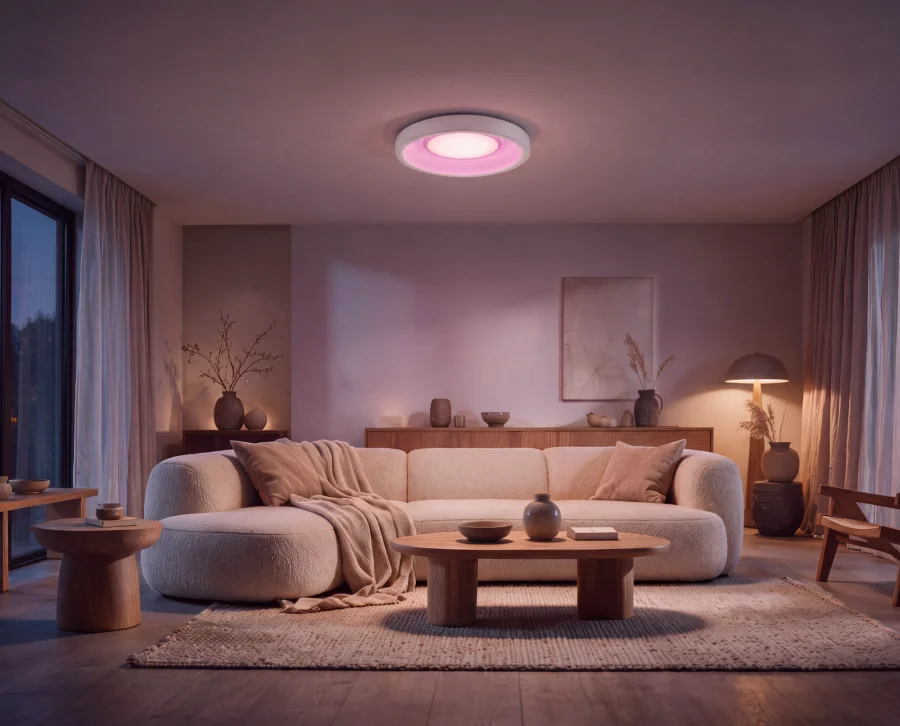
Set the scene for a comfy night in with LEDVANCE’s smart lights.
To give you a snapshot, most of the range is tunable white or full color, so your lights can go from a cozy evening glow to crisp morning brightness (or a full rainbow, if the mood strikes). There are also IP-rated options for bathrooms and the garden, including floodlights and outdoor spots, so you can automate your lights beyond the back door, for example to turn your security lights on when a sensor detects motion. And if you prefer to use what you already have, the SMART+ Plug can turn any ordinary lamp or appliance into something you can automate, while smart wall switches do the same for your ceiling lights: replace the switch on the wall, keep the bulbs you have.
As with every device certified to the program, LEDVANCE’s products have been rigorously tested by our in-house team to make sure they comply with our core requirements of local control and privacy. LEDVANCE have also committed to providing long-term support for our community, so you can be confident your setup will keep working for the long run.
Lighting that lasts
Sustainability is one of the core principles of the Open Home Foundation, the non-profit organization that runs Works with Home Assistant. A big part of that is making sure devices stay useful for as long as possible. Since LEDVANCE’s devices don’t need a cloud service to function, you don’t have to worry about a far-off server shutdown turning your lights into e-waste.
And because Matter works across platforms, you’ll still be able to use your tech if you ever change smart home systems. Lighting that keeps shining whatever happens to a platform: that’s the kind of partner we love to welcome, and it’s what this program is all about.
All systems glow
We’re thrilled to have LEDVANCE join our community, and can’t wait to see what you light up with their range of devices. Want to see more partners like them on board? A Home Assistant Link (formerly Home Assistant Cloud) subscription gives you secure, remote access to your smart home, and directly supports the Open Home Foundation to expand our program. Because the more brands that join, the more choice you have to design your space exactly the way you like. Here’s to plenty more switched-on homes 💡 Welcome, LEDVANCE!
FAQs
Q: If I have a device that is not listed under Works with Home Assistant does this mean it’s not supported?
A: No! It just means that it hasn’t gone through a testing schedule with our team or doesn’t fit the requirements of the program. It might function perfectly well but be added to the testing schedule later down the road, or it might work under a different connectivity type that we don’t currently test under the program.
Q: OK, so what’s the point of the Works with program?
A: It highlights the devices we know work well with Home Assistant and the brands that make a long-term commitment to keeping support for these devices going. The certification agreement specifies that the devices must have the functionality you would expect within Home Assistant, operate locally without the need for cloud and that they will continue to do so long-term.
Q: How were these devices tested?
A: All of LEDVANCE’s certified devices were tested using Home Assistant over a standard Wi-Fi connection with our certified Matter integration. If you have another setup or integration that’s not a problem, but we test this way as it’s the most effective method for our team to certify within our ecosystem.
Q: Will you be adding more LEDVANCE devices to the program?
A: Why not! We’re thrilled to foster a close relationship with the team at LEDVANCE to work together on any upcoming releases or add in further products that are not yet listed here.
You can now fill in forms faster in Smart Window. When clicking into a form field or selecting Fill from sources, Smart Window will now suggest data to use based on your relevant open tabs and saved autofill data.
Firefox now creates more accessible PDFs when saving a page as PDF, and when printing on Linux and macOS. This also fixes a variety of PDF rendering issues, such as missing math symbols.
Firefox now supports the JPEG XL image format, which generally has better compression than WebP, JPEG, PNG, and GIF.
New Tab now keeps a library of custom wallpapers under Your images, rather than only the most recent one.
Firefox's translations feature now supports the following languages:
Albanian
Belarusian
Filipino
Fixed
Fixed website icons (favicons) in address bar results blending into the highlight color when selecting a result with the keyboard on Ubuntu's default theme.
Fixed a crash that could occur while Firefox loaded website icons (favicons).
Fixed the first letter of each search engine's name being underlined in the Unified Search Button menu in the address bar on Windows and Linux, which could cause conflicting keyboard shortcuts.
Fixed menus such as List all tabs, Settings, and Unified Search being hard to read with a Windows High Contrast theme. Menu background and text colors now follow the Background and Text colors chosen for a custom contrast theme in Windows Settings.
Firefox no longer rounds scroll positions to whole screen pixels. Scrolling is now smoother and more precise, especially on high-resolution displays or when a page is zoomed.
Fixed an issue where the Network Monitor could miss WebSocket messages if they arrived immediately after a connection was established.
Web Platform
Firefox now supports typed arithmetic in CSS calc(), allowing units to be multiplied and divided within math functions.
Added support for the navigate option for the Notification constructor and ServiceWorkerRegistration.showNotification(), which specifies a URL to navigate to when the notification is clicked.
The WebAuthn conditional UI is now shown on input elements with an autocomplete="webauthn" attribute. Previously, it was only shown when the attribute included another autofill field value, such as autocomplete="username webauthn". (Learn more)
Web apps launched with the third-party PWAsForFirefox tool may fail to start in Firefox 158 and show the error "The installation seems to be incomplete." Updating PWAsForFirefox to version 2.20.1 or later fixes the issue. If the error persists, select "Reinstall runtime" and then "Patch profiles and runtime" in the PWAsForFirefox extension settings.
Community Contributions
With the release of Firefox 158, we are pleased to welcome the developers who contributed their first code change to Firefox in this release, 20 of whom were brand new volunteers! Please join us in thanking each of these diligent and enthusiastic individuals, and take a look at their contributions:
"Tegenover mij zit Joseph Oubelkas, 46 jaar, geboren uit een Nederlandse moeder en een Marokkaanse vader. Hij werd al jong IT-ingenieur en op zijn twintigste begon hij zijn eigen IT-bedrijf. Een succesverhaal.
Op 23 december 2004 slaat het noodlot toe. Joseph gaat voor zijn werk naar een pakstation in Marokko, in opdracht van een van zijn klanten: het Nederlandse groente- en fruitbedrijf Zwaardfruit.
Op het moment dat hij daar aankomt, is de politie op bezoek; er is 8000 kilo hasj gevonden. Joseph maakt duidelijk wie hij is en wat hij komt doen, maar het maakt allemaal niet uit. Joseph wordt gearresteerd en krijgt 10 jaar celstraf voor drugssmokkel, zonder bewijs. Joseph was op het verkeerde moment op de verkeerde plaats.
Ook het Ministerie van Buitenlandse Zaken, overtuigd van zijn onschuld, kreeg niet veel voor elkaar. Uiteindelijk zou Joseph meer dan 4,5 jaar in verschillende Marokkaanse gevangenissen doorbrengen voordat hij werd vrijgelaten, en dat was 17 juni 2009. Over deze jaren schreef hij in 2011 het boek 400 brieven van mijn moeder, een onverbiddelijke bestseller."
In Schuilen in Schoonheid spreekt Matthijs van Nieuwkerk met spraakmakende gasten over tegenslag en de schoonheid van het leven. Aan de hand van de drie schuilplaatsen van zijn gast, onderzoekt Matthijs wat weerbaarheid inhoudt. Gasten delen de plekken, rituelen en kunstwerken waar zij troost in vinden.
Op de hoogte blijven van alles rondom deze podcast? Volg ons op Instagram via @matthijsvannieuwkerk en TikTok @schuileninschoonheid. Dit is een podcast van Dag en Nacht. Adverteren in deze podcast? Kijk op adverteren.podimo.nl voor alle mogelijkheden.
If you like Part-DB, consider donating to support the development. Press the sponsor button on the main github page, for more info.
Note
If you are using Part-DB it would be helpful if you fill out this short survey on your usage of Part-DB (Google Forms): https://forms.gle/Q15twx3YYq3qCNfe8
Part-DB 2.20.1
Improvements
Prefetch tree view links on hover (instantclick similar to normal links). that should make feel the UI more responsive
Removed redundant render call for empty datatables
Make IC logo tool images lazy loading
Bug fixes
Fix Generic Web imports of offers without a price by @00200200 in #1596
Fixed generic web provider compatibility with websites that return incorrect data (#1595)
Other changes
Update KiCad symbols and footprints lists by @jbtronics in #1597
UniFi Network Application 11.0.83 requires UniFi OS 6.0 or newer. The upgrade may take up to 20 minutes.
Improved Application Stability
Migrated the application database to PostgreSQL.
Introduced a new, more scalable statistics engine.
Existing statistics history is cleared and starts fresh after the update.
Removed USG gateway support.
Network Application 10.6 is the last version supporting USG.
Removed Network Application Server support.
Upgrade to UniFi OS Server, the official replacement.
All sites are automatically migrated to the Zone-Based Firewall.
Live Flows
View active flows on the gateway while they are in progress and terminate them on demand.
Supported on UDM-Pro, UDM-SE, UDM-Pro-Max, UDW, EFG, EF-Core, UDM-Beast, UCG-Fiber, UCG-Max, UXG-Max, UXG-Fiber, UXG-Pro, and UXG-Enterprise.
Requires UniFi OS 6.0.10 or newer.
External Network Lists
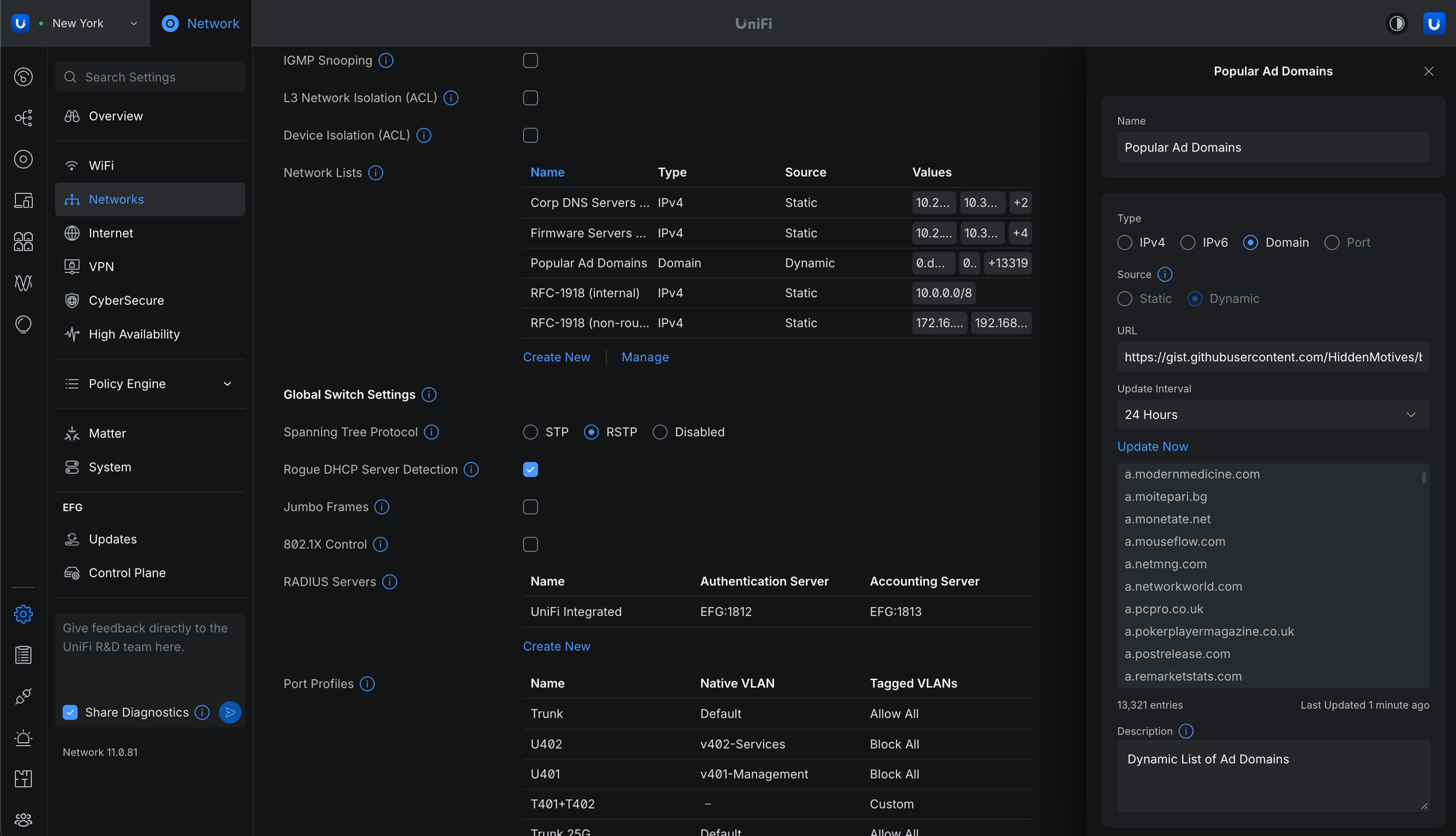
Added an External source option to Network Lists to import domain or IP lists from external sources.
Requires UniFi OS 6.0.10 or newer.
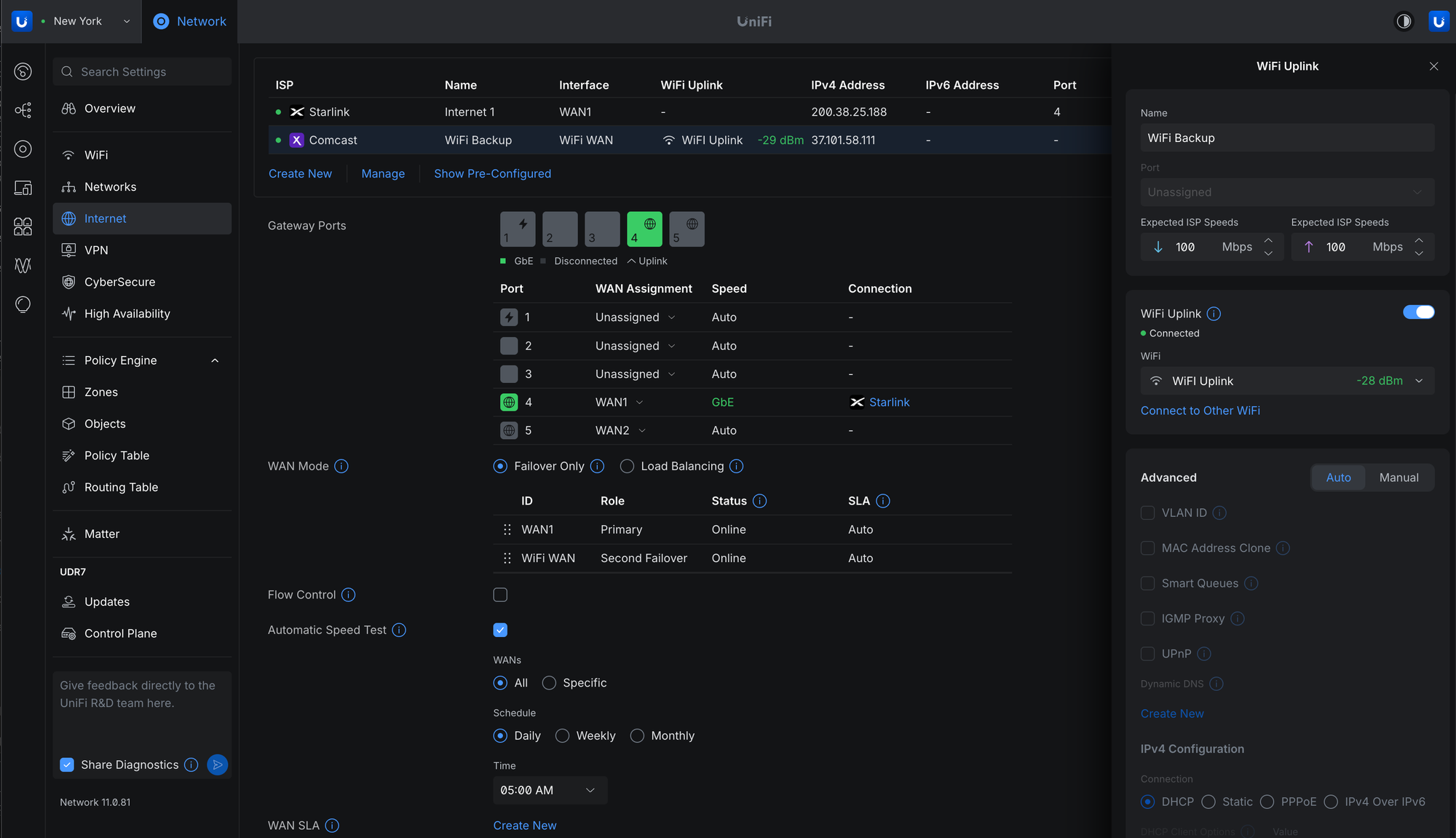
WiFi Uplink
Connect your gateway to a nearby WiFi network to use as an internet backup.
Supported on UDR-7, UDR-5G-Max, Express 7, and UCG-Industrial.
Requires UniFi OS 6.0.10 or newer.
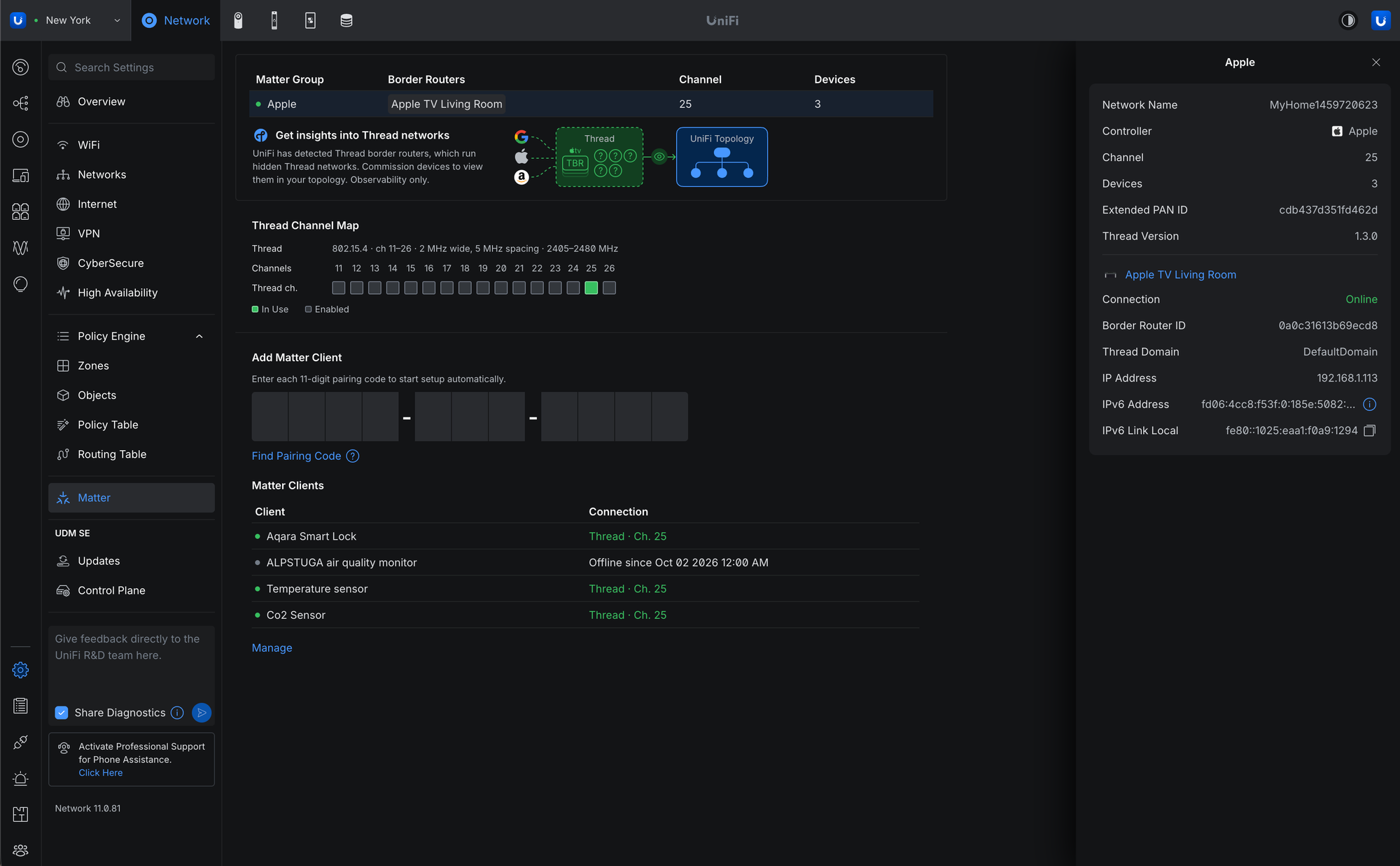
Matter Thread Device Monitoring
Commission Matter Thread devices to monitor their status and connectivity.
Requires UniFi OS Gateway 6.0.10 or newer.
mDNS must be enabled.
IPv6 must be enabled on the network hosting the Thread Border Routers.
Improvements
Added an option to generate client device icons.
Added a new client connection alarm.
Added Battery Self-Test for UPS devices.
Added bulk editing for clients, including removal and blocking.
Added a country selection dropdown to Channel Plan.
Added support for Subnet Overlap System Logs.
Added Time Machine to the Topology page.
Added IPIP WAN support for Japanese IPv4 over IPv6 services.
Added a Packet Capture option to the Radio side panel.
Added Remote Power Cycle support for UPS 2U Pro.
Added a USB-C option for EAV-Bridge.
Added SD-WAN Policies for destination- and performance-based routing across selected spokes, with configurable hub selection, WAN priorities, and tunnel health thresholds for packet loss, latency, and jitter.
Requires Site Manager 5.10.2 or newer.
Improved traffic animations in Topology.
Improved guest authorization latency through the API.
Improved switch stacking stability.
Improved the 802.1X and RADIUS settings user experience.
Improved Channel AI.
Improved IGMP Snooping settings validation.
Improved the firmware Revert experience with a feedback form.
Improved the Deep Inspection settings user experience.
Improved Port Manager default columns and filters.
Improved Time Machine loading performance on large sites.
Improved the VPN settings user experience.
Improved availability detection for Virtual Network Override.
Improved the Routing settings user experience.
Increased the VLAN limit when no gateway is adopted.
Time Machine now remembers whether it was open or closed.
Updated Site-to-Site OpenVPN encryption options with AES-192-CBC and AES-128-CBC support.
Removed System Settings when using Site Manager.
Language and Time settings are now managed through the Site Manager header and synchronized across UniFi applications.
Country selection is now available in WiFi Channel settings.
NTP settings are now available in the Site Gateway side panel.
The Professional Installer section has been removed, with Extend 6 GHz Non-PSC Channel Use now available in Global WiFi settings.
System Settings remain available in the Local Portal for Language and Time configuration.
Flows
Added Firewall Policy names for Allow actions in Traffic Flows.
Requires UniFi OS 6.0.10 or newer.
Added Application Column/Filter in Traffic Flows.
Requires UniFi OS 6.0.10 or newer.
Added a Flows Logging option to Firewall Policies.
Improved Traffic Flows reporting.
Local DNS queries are now identified as DNS in Traffic Flows.
Bugfixes
Fixed an issue where Channel AI could suggest channels unavailable to outdoor access points.
Fixed an issue where disabling the display on a meshed Express 7 could fail.
Fixed a rare issue where Alarm Manager emails could be sent unexpectedly.
Fixed an issue where Firewall Policies referencing SD-WAN hub-spoke tunnels could stop working after WAN interface changes.
Fixed missing System Log events for unauthorized Hotspot guests.
Fixed a rare issue where hostname and IPv6 address information could fluctuate.
Fixed an issue where an incorrect parent device could be offered when adopting a UniFi Device Bridge.
Fixed a rare issue where leaving a web session open for an extended period could cause the browser to crash.
Fixed an issue where L2TP VPN appeared as a Content Filtering source option.
Fixed a rare issue where devices could appear twice in the Devices list.
Fixed a rare issue where guest voucher authorization could report success without providing internet access.
Fixed a rare issue where Hotspot guests could be required to reauthorize when roaming between access points.
Fixed a rare issue where SD-WAN tunnels could fail to establish between sites.
Fixed an issue where Isolated Networks did not isolate traffic to the VPN zone.
Fixed a rare issue where IPv6 IPS threats did not appear in Traffic Flows.
Fixed an issue where Site Manager could fail to display statistics for multi-site hosts with a large number of sites.
Additional information
Self-Hosted UniFi Deployments
For self-hosted deployments, we recommend upgrading to UniFi OS Server. It provides the full UniFi OS Platform experience, ensuring you receive the latest features, improvements, and integrations.
UniFi Cloud Gateways remain our recommended solution for deployments that do not require self-hosting.
1.14.2 brings Mountain View closer to Gmail: the open message shows the whole conversation, replies are written in place under it, and a side panel holds calendar, tasks and contacts. Tasks can now be moved into calendars shared with you, and the "Date sent" list order works again.
UI: In Mountain View, the open message shows the whole conversation around it, and replies are written in place under the conversation instead of in a separate window
UI: Mountain View has Gmail's side panel with calendar, tasks and contacts, and its advanced search form
UI: Mountain View's message menu has Find emails from, and the Move to menu in the bulk actions can be searched
Changes
UI: Mountain View looks more like Gmail: the content sits on a rounded card over a tinted canvas, the navigation has a Labels section, and the message rows, open message toolbar, compose window, account card, message menu and bulk actions follow Gmail's layout and order. The keyboard shortcuts sit behind a help button in the top bar
Fixes
Mail: The "Date sent" list order sorts by date sent again instead of falling back to date received (#1219, thanks @Area128)
Mail: In Mountain View, the dark backdrop behind a message body spans its full width
Tasks: Tasks in calendars shared with you show up, and tasks can be created in, moved into, edited and deleted in those calendars (#1204, thanks @mmomjian)
The DistroWatch news feed is brought to you by TUXEDO COMPUTERS. This week in DistroWatch Weekly:
Review: Abora OS 4.0 and Butterbian 0.5.0
News: Rocky launches OpenCourant, NetBSD surpasses funding goals, behind the curtain at Chimera Linux
Questions and answers: What causes an operating system to break?
Released last week: ZEPHIX 9
Upcoming releases: Ubuntu 26.10, CalyxOS 8.0
Opinion poll: Flavours of Fedora
Reader comments....
1.14.0 adds Mountain View, an optional layout with a top bar and a wide search field, and gives the Files app and the calendar a new layout. Dark mode now recolours messages instead of inverting them, so brand colours stay as sent. Push can be turned on for several accounts at once, and the account list can be backed up encrypted and restored on another device. The composer got a long round of send fixes. With several accounts open, batch actions no longer hit another account's message that happens to share an id with the selected one.
UI: Mountain View is an optional layout, chosen under Settings > Layout > Interface layout. On desktop it has a top bar with a wide search field, an apps grid and the account avatar in place of the left rail, a Compose pill, a docked compose window, an account popover with unread counts per account, and j/k, x and g shortcuts. Calendar, Contacts, Files and Settings use the same top bar. The default layout is unchanged (#1168, thanks @lucamzanon)
Files: The Files app is laid out like Contacts and Calendar: a sidebar with a New menu, the folder tree, Starred, Recent and Shared with me, a header with breadcrumbs, search, sort and a list/grid switch, a details panel, right-click menus in the sidebar and arrow-key navigation. On touch, a tap opens and a long press selects. Folders in the tree can be renamed and deleted, recent files open in their folder, and the view, sort and hidden-files settings now apply
Files: Image previews in Files and in attachments zoom with the wheel or a pinch, pan by dragging or with the arrow keys, switch between fit and full size on double-click, and close on a click beside the image
Files: Uploads show as a toast with their progress and a Cancel button. The large file warning is gone
Calendar: On wide screens, clicking or dragging over empty time opens a quick editor next to the slot, and clicking an event opens a card with edit, delete and more actions. Busy month cells show "+N more", the agenda lists each day as a row with the date beside its events, and the dates in the week header open that day. Calendar lists in the sidebar fold away and show their options on hover. Phones keep the full editor
Push: The notification settings list every connected account and turn push on or off for several of them at once, with a single browser permission prompt (#1054, thanks @lucamzanon)
Accounts: Users with several accounts can save their account list on the webmail server, encrypted in the browser with a password they choose, and restore it on another device. No mailbox passwords are stored. Admins turn it on with "Account List Backup" under Admin > Policy (#1201, thanks @lucamzanon)
Filters: The folder context menu runs a saved rule on the messages already in that folder (#1166)
Composer: Schedule send offers tomorrow at 8:00, tomorrow at 13:00 and next Monday at 8:00 as one-click times
Settings: The language picker has a search field and flags, and every date format and region option shows a live sample
Plugins: A plugin can run a message-list search with a JMAP Email filter (#1024)
Plugins: Calendar event actions get the event's uid and attendees, and the form-save hook now fires and can change the meeting link that is saved with the event (#1202, thanks @siennathesane)
Changes
Mail: Dark mode recolours messages instead of inverting them. Light backgrounds are darkened in their own hue, brand colours and dark fills stay as sent, and text only changes when it lacks contrast. A message's own dark mode styles follow the app theme instead of the system's
Mail: A folder opened before shows its messages at once and refreshes them in the background. A failed load leaves them on screen (#1195, thanks @lucamzanon)
Composer: On a phone, the formatting toolbar folds away behind a Formatting button and its buttons are larger. The send options sit together in one menu
Files: File sizes are rounded the way people read them, like 67 KB or 2.1 MB
Fixes
Mail: In views that merge several accounts, selecting a message no longer also selects a message with the same id in another account. Batch delete, move, archive, copy, mark read, tag and spam act only on the ticked messages, each through its own account. Before, a permanent delete could remove the other account's message (#1061, thanks @lucamzanon)
Mail: A message with two spaces in a row in its subject no longer freezes the tab (#1193, thanks @dealerweb)
Mail: Blocking remote content no longer drops a message's style sheets, so messages keep their layout before images are loaded
Mail: The list shows no paperclip on a message that only has inline images
Mail: The "via" badge is hidden when it repeats the sender's name, and a draft shows one Edit button
Send: Signed and encrypted messages reach Bcc recipients (#1206)
Send: After a plugin send, such as S/MIME, the composer closes, and a failed plugin send keeps the draft (#1207)
Send: A failed send removes its unsent copy from Drafts and explains the failure in plain words. A send while offline says so and keeps the message
Send: Typed addresses are split on commas, and a message with an invalid address is not sent. The address field marks which ones to fix
Send: Undo send disappears once the delay is over and says so when an undo fails
Send: Discard deletes the draft, also one reopened from Scheduled, and closing an autosaved draft no longer asks about unsaved changes
Send: The missing subject warning comes once per message, and the scheduled time shows its date, rounded to the minute
Composer: Tabbing into a reply or forward keeps the quoted message, and tabbing into a new message starts at the top of the body
Composer: A reply opens with the caret in the body, and the composer is titled Reply, Reply All or Forward instead of New Message
Composer: A reopened draft takes its text from the message body only. An attached .csv or .txt no longer turns up as the message text (#1213, thanks @shukiv)
Composer: A long attachment list scrolls instead of pushing the Send button out of view (#1212, thanks @shukiv)
Composer: The plain-text part of sent mail marks quotes and list items, and the signature has one separator
Composer: Enter adds the highlighted suggestion instead of the typed text, and the suggestions close once the address is added and line up with the typed text. On a phone they span the whole row and show the name above the address
Composer: Body text no longer shows through the pinned formatting toolbar (#1200, thanks @lucamzanon)
Composer: On a phone, sending a new message returns to the message list, and the Continue draft banner no longer flashes after a send
Composer: Bitwarden no longer offers logins in the recipient fields, the mail search box or the event participant field
Login: A remembered sign-in survives a server timeout or an origin switch during restore instead of signing out (#1167)
Login: Signing out of one account keeps the other accounts, and a reload with only accounts awaiting sign-in shows the login page instead of a connection error (#1201, thanks @lucamzanon)
Login: A reload without "Remember me" no longer reports an expired session
Unified: Switching to another account keeps the unified mailbox on (#1144, thanks @lucamzanon)
Push: Push is renewed for every connected account, not only the active one, so accounts no longer stop notifying after seven days. The all-accounts panel shows each account's real state and why an account failed (#1054, thanks @lucamzanon)
Filters: Forward is hidden in filter rules when the server allows no redirects (#1208)
Calendar: Save is blocked while a plugin's form-save hook runs, so a double press no longer creates the event twice (#1202, thanks @siennathesane)
Calendar: Participant suggestions are no longer cut off by the event form
Files: Canceling an upload stops the file in flight and says the upload was canceled instead of counting every file as done
Files: A drag selection keeps its items after letting go, and Files shows a loading state instead of "No files yet" before the first listing
Files: Read-only documents open in ONLYOFFICE without the -103 warning (#1187)
Contacts: The contact popover shows the sender's name when the saved contact has none, and Contacts shows placeholders instead of "No contacts yet" while loading
UI: The close and back buttons in the composer and conversation view have names for screen readers, and the composer toolbar buttons are labelled
UI: Reply All stays on one line in the conversation view, and the welcome banner gives touch tips on a phone
Translations: The new composer, send, Files and filter strings are translated
If you are upgrading from v0.16.x, replace the binary (or run docker pull). If you are upgrading from v0.15.x and below, please read the upgrading documentation for more information on how to upgrade from previous versions.
Added
sd_notify support.
JMAP: Mailbox/set allows moving a mailbox under a parent that already has a child with the same name, and rejects renames that only change the case of a mailbox name with alreadyExists.
RocksDB: Blob garbage collection rewrites every stored blob on each compaction of the blobs column family, about once per 128MB of new mail.
Milter: End-of-headers is not sent to milters that negotiate SMFIP_NOHDRS without SMFIP_NOEOH, so the transaction stalls until it times out.
OIDC: When the access token lacks the claimUsername claim but has an email claim, the account is built from email without consulting the userinfo endpoint.
JMAP:
onSuccessUpdateEmail and onSuccessDestroyEmail entries in EmailSubmission/set that name an existing submission by id update or destroy the Email with the same id instead of the submission's own Email.
A VacationResponse/set that only sets isEnabled on an account without a vacation response activates an empty Sieve script.
We are excited to announce that SCS Software will be heading to Poznań Game Arena 2026, taking place from 23rd to 25th October in Poznań, Poland!
If you're attending this year's event, be sure to stop by and visit us in Hall 5, Booth 56, where we'll be bringing a selection of our latest projects, immersive experiences, plenty of opportunities to get behind the wheel, and a chance to meet and chat with our team.
For American Truck Simulator, you'll be able to explore the breathtaking landscapes of the British Columbia DLC by taking a virtual journey through Canada's westernmost province. Meanwhile, in Euro Truck Simulator 2, you'll discover the stunning landscapes of the Iceland DLC, as well as experience the upcoming Coaches DLC and take a different kind of journey across Europe in a long-distance bus.
To make your experience even more immersive, we're once again bringing our 4D motion simulators to the show floor. If you've always wanted to experience the feeling of driving a truck with added motion effects, be sure to give it a try during your visit.
We're also happy to be partnering with Logitech, which will be providing steering wheels and peripherals for our booth. Their hardware will help you get comfortable behind the wheel and experience our games with precision and control.
But that's not all! We're also delighted to be partnering with Scania Poland, who will be bringing a real Scania truck directly to our booth.
This will give visitors the opportunity to get up close with a real Scania truck, with the cabin open for visitors to step inside and explore, while also experiencing our virtual trucking worlds just a few steps away. With Scania Poland personnel on hand throughout the event, you'll be able to take a closer look at the truck and its interior before stepping into our games. It's a great chance to see how the details and atmosphere of real-world trucking inspire what we create in our games.
Poznań Game Arena is one of the biggest gaming events in Poland, and we're looking forward to meeting the Polish trucking community and everyone who shares our passion for virtual trucking.
Whether you are coming to try out our latest content, take a ride in one of our 4D motion simulators, check out the Scania truck, or simply stop by to say hello to the SCS Software team, we'd love to see you there! But if you won't be able to attend, don't worry, and make sure to give our X/Twitter, Instagram, Facebook, Bluesky, YouTube, and TikTok a follow as we plan to regularly share updates from PGA, so you don't miss anything! See you in Poznań, truckers!

 Log in


 Set the scene for a comfy night in with LEDVANCE’s smart lights.