❌

Lees weergave

Dafne Schippers verloor (net als Matthijs) hond bij treinongeluk: "Sammie redde mij"

💾

“Tegenover mij zit Dafne Schippers. 34 jaar. We zitten bij mij thuis in de Achterhoek en zo konden de hondjes er namelijk makkelijk bij. En dat heeft een reden. Dafne is topatlete in ruste, sprintster in de buitencategorie. Ze liep jarenlang sneller dan de rest. Twee keer wereldkampioen op de 200 meter, 2015 en 2017. Deze gouden medailles hangen in een overvolle prijzenkast tussen Olympisch-, Europees- en Nederlands eremetaal.

Drie jaar geledne nam ze, geplaaagd door te veel rugpijn, afscheid. Ze was toen 31 jaar. In haar afscheidstweet schreef ze kort: ‘De race stopt hier’. Een leven van 12 jaar topsport. 12 jaar van manische interesse in honderste van sconden tijdswinst en alles wat daarbij komt kijken. Het zat erop. Dafne en ik hebben iets gemeen. Iets verdrietigs. Deze podcast heet Schuilen in Schoonheid, waar vind je troost in tijden van onmacht, pijn, verdriet, spanning? Wij vonden dat allebei bij onze hond en we zijn allebei onze hond bij een treinongeluk verloren.”

In Schuilen in Schoonheid spreekt Matthijs van Nieuwkerk met spraakmakende gasten over tegenslag en de schoonheid van het leven. Aan de hand van de drie schuilplaatsen van zijn gast, onderzoekt Matthijs wat weerbaarheid inhoudt. Gasten delen de plekken, rituelen en kunstwerken waar zij troost in vinden.

Op de hoogte blijven van alles rondom deze podcast? Volg ons op Instagram via @matthijsvannieuwkerk en TikTok @schuileninschoonheid. Dit is een podcast van Dag en Nacht. Adverteren in deze podcast? Kijk op adverteren.podimo.nl voor alle mogelijkheden.
  •  

Jan Mulder: “Sterven. Hoezo? Dat vind ik het grootste onrecht ooit bedacht" | Schuilen in Schoonheid

💾

"Tegenover mij zit Jan Mulder. 81 jaar. Vader van zonen Youri en Gerrit. Man van jeugdliefde Johanna. Groninger in hart en nieren. Jan Mulder was een goede voetballer, daar niet van. Bovendien een voetballer die later een gevierd columnist en schrijver zou worden. Hij leidde een zo op het oog jaloersmakend groots leven. Pendelend tussen Anderlecht-maatje Rob Rensenbrink en idool Remco Campert.

Maar Jans grootste bijdrage aan ons geluk was zijn onweerstaanbare rol als tafelheer. Een dagelijks leven dat begon bij Barend & Van Dorp, en dat was in 1998. Jan was de allereerste. Een talkshow zonder extra stoel is sinds dien niet meer gemaakt. Jan schreef, in zijn eentje, televisiegeschiedenis."

In Schuilen in Schoonheid spreekt Matthijs van Nieuwkerk met spraakmakende gasten over  tegenslag en de schoonheid van het leven. Aan de hand van de drie schuilplaatsen van zijn gast, onderzoekt Matthijs wat weerbaarheid inhoudt. Gasten delen de plekken, rituelen en kunstwerken waar zij troost in vinden. 

Op de hoogte blijven van alles rondom deze podcast? Volg ons op Instagram via @matthijsvannieuwkerk en TikTok @schuileninschoonheid. Dit is een podcast van Dag en Nacht. Adverteren in deze podcast? Kijk op adverteren.podimo.nl voor alle mogelijkheden.
  •  

Abderrahim Nouri: "Die eerste glimlach van Appie is niet te omschrijven" | Schuilen in Schoonheid

💾

"Tegenover mij zit Abderrahim Nouri, 33 jaar. Hij is de oudste broer van Abdelhak Nouri. Die is veel beter bekend als Appie Nouri. Appie was een van de grootste talenten van Ajax toen hij in 2017 tijdens een oefenwedstrijd in Oostenrijk werd getroffen door een hartstilstand. Door een te trage behandeling van de medische staf liep Nouri ernstige hersenschade op.

Dat is al bijna tien jaar geleden. Nouri leeft sindsdien in een staat van verminderd bewustzijn en woont in een speciaal aangepast huis. Daar wordt hij intensief verzorgd. Abderrahim heeft zijn werk opgezegd en wijdt zijn leven aan het wel en wee van zijn broertje."

In Schuilen in Schoonheid spreekt Matthijs van Nieuwkerk met spraakmakende gasten over  tegenslag en de schoonheid van het leven. Aan de hand van de drie schuilplaatsen van zijn gast, onderzoekt Matthijs wat weerbaarheid inhoudt. Gasten delen de plekken, rituelen en kunstwerken waar zij troost in vinden. 

Op de hoogte blijven van alles rondom deze podcast? Volg ons op Instagram via @matthijsvannieuwkerk en TikTok @schuileninschoonheid. Dit is een podcast van Dag en Nacht. Adverteren in deze podcast? Kijk op adverteren.podimo.nl voor alle mogelijkheden.
  •  

Pierre Bokma: "We krijgen wel straf. Het gaat heel naar worden" | Schuilen in Schoonheid

💾

"Tegenover mij zit Pierre Bokma. Zeventig jaar. De meest betoverende acteur van ons land, zei Hanneke Groenteman niet zo lang geleden. En haar spreek je niet snel tegen. Ik rende begin jaren negentig naar De Stadsschouwburg in Amsterdam om Pierre als Richard de 3de te zien. Het was een sensatie. Hij werd ervoor bekroond met een Louis d’Or. Vijfendertig jaar later is er een Gouden Kalf voor de tv-serie De Joodse Raad, waarin Pierre de rol van David Cohen speelt, hartverscheurend, het verhaal, de rol, het spel. En wat de junioren betreft: op TikTok gaan er talloze imitaties rond van Pierres rol als leraar Duits in het tv-programma Rundfunk. Als lijstjesman stel ik: de top 5 acteurs alive: Andrew Scott, Jack Nicholson, Christopher Waltz, Pierre Bokma en Leonardo Di Caprio."

In Schuilen in Schoonheid spreekt Matthijs van Nieuwkerk met spraakmakende gasten over  tegenslag en de schoonheid van het leven. Aan de hand van de drie schuilplaatsen van zijn gast, onderzoekt Matthijs wat weerbaarheid inhoudt. Gasten delen de plekken, rituelen en kunstwerken waar zij troost in vinden. 

Op de hoogte blijven van alles rondom deze podcast? Volg ons op Instagram via @matthijsvannieuwkerk en TikTok @schuileninschoonheid. Dit is een podcast van Dag en Nacht. Adverteren in deze podcast? Kijk op adverteren.podimo.nl voor alle mogelijkheden.
  •  

Dit is Schuilen in Schoonheid

💾

In Schuilen in Schoonheid spreekt Matthijs van Nieuwkerk met spraakmakende gasten over  tegenslag en de schoonheid van het leven. Waar schuil je in tijden van tegenslag?

Aan de hand van de drie schuilplaatsen van zijn gast, onderzoekt Matthijs wat weerbaarheid inhoudt. Gasten delen de plekken, rituelen en kunstwerken waar zij troost in vinden.

Op de hoogte blijven van alles rondom deze podcast? Volg ons op Instagram via @matthijsvannieuwkerk en TikTok @schuileninschoonheid

Dit is een podcast van Dag en Nacht.
  •  

Ellen Verbeek: "Verdriet gaat niet weg, de ruimte eromheen wordt groter" | Schuilen in Schoonheid

💾

"Tegenover mij zit Ellen Verbeek, 68 jaar. Ze vertrok eind jaren tachtig met haar man Derk Sauer en zoon Tom naar Moskou. De Muur was gevallen, perestroika heette de nieuwe droom, de lucht zinderde van vrijheid en mogelijkheden. Derk en Ellen begonnen in Rusland het mediabedrijf Independent Media. Ellen werd hoofdredacteur van Russische Cosmopolitan en bevrijdde de moderne Russin van man en aanrecht.

Ze werd in dezelfde tijd in Rusland een veelgevraagde tv-persoonlijkheid. Met de komst van Poetin sloeg de langzaam sfeer om en na de inval van Rusland in Oekraïne, in 2022, lieten Ellen en Derk alles in Moskou achter en vertrokken, vluchtten naar Nederland. Vorig jaar juli stuitte hun boot van in Griekenland op een rots, niet eens zo hard, maar Derk viel door de schok achterover van een trappetje. Een maand later overleed hij."

Genoemde literatuur:
- The Year of Magical Thinking (Joan Didion)
- Things in Nature Merely Grow (Yiyun Li)
- The Griefcast (Cariad Lloyd)
- All There Is with Anderson Cooper (Anderson Cooper)

In Schuilen in Schoonheid spreekt Matthijs van Nieuwkerk met spraakmakende gasten over tegenslag en de schoonheid van het leven. Aan de hand van de drie schuilplaatsen van zijn gast, onderzoekt Matthijs wat weerbaarheid inhoudt. Gasten delen de plekken, rituelen en kunstwerken waar zij troost in vinden.

Op de hoogte blijven van alles rondom deze podcast? Volg ons op Instagram via @matthijsvannieuwkerk en TikTok @schuileninschoonheid. Dit is een podcast van Dag en Nacht. Adverteren in deze podcast? Kijk op adverteren.podimo.nl voor alle mogelijkheden.
  •  

Fresku: "Mijn grootste pijn is mijn grootste succes" | Schuilen in Schoonheid

💾

"Tegenover mij zit Fresku. Echte naam Roy Michael Reymound. Rapper en cabaretier uit Eindhoven. veertig is hij nu. Kreeg vorig jaar een Edison voor zijn album Leren Leven. En dat werd hoog tijd. Fresku heeft me altijd ontroerd, met zijn geweldige teksten, zijn zeer persoonlijke verhalen, zijn eeuwige onzekerheid en met zijn oproep, in 2018, om te bidden voor zijn zieke zoontje Rayaan. Hij schreef bij die gelegenheid een van zijn mooiste nummers; Mijn Zoon. We zijn nu acht jaar later.

Met zijn zoon gaat het goed en Fresku reist dit najaar met het Metropole Orkest door het land. Hij zal daarbij zeker zijn nummer 'Ik Wil' zingen. Ik citeer daaruit drie regels: “Ik zou willen dat ik niet meer wakker lag, geen paniekaanvallen meer, ik wil van mijn angsten af.”

In Schuilen in Schoonheid spreekt Matthijs van Nieuwkerk met spraakmakende gasten over  tegenslag en de schoonheid van het leven. Aan de hand van de drie schuilplaatsen van zijn gast, onderzoekt Matthijs wat weerbaarheid inhoudt. Gasten delen de plekken, rituelen en kunstwerken waar zij troost in vinden. 

Op de hoogte blijven van alles rondom deze podcast? Volg ons op Instagram via @matthijsvannieuwkerk en TikTok @schuileninschoonheid. Dit is een podcast van Dag en Nacht. Adverteren in deze podcast? Kijk op adverteren.podimo.nl voor alle mogelijkheden.
  •  

Astrid Holleeder: "We zijn met z'n zessen: ik, m'n hondje en vier eksters" | Schuilen in Schoonheid

💾

"Tegenover mij zit Astrid Holleeder (60): advocaat, auteur van de bestseller Judas en sinds kort tv-persoonlijkheid. Maar bovenal is zij de zus van de bekendste crimineel van Nederland, Willem Holleeder.

Zelf kwam ik Willem vroeger nog wel eens tegen in Amsterdam. "Hé gabber, bakkie doen?" riep hij dan vanaf zijn scooter. Ik was als de dood voor hem. Astrid leefde echter in een constante nachtmerrie. Toen haar geweten het won van de broederliefde, nam ze een levensgevaarlijk besluit: ze legde geheime getuigenissen af om haar eigen broer voorgoed achter de tralies te krijgen.

Het resultaat? Willem Holleeder kreeg levenslang, maar Astrid werd vogelvrij verklaard. Vanaf 2015 veranderde haar leven in een voortdurende vlucht voor de wraakacties van haar broer. Nu, elf jaar later, spreekt ze over het leven in de schaduw, haar continue zoektocht naar veiligheid en de prijs van de waarheid."

Het boek waar Astrid uit voorleest heet De Keuze van Edith Eger.

In Schuilen in Schoonheid spreekt Matthijs van Nieuwkerk met spraakmakende gasten over tegenslag en de schoonheid van het leven. Aan de hand van de drie schuilplaatsen van zijn gast, onderzoekt Matthijs wat weerbaarheid inhoudt. Gasten delen de plekken, rituelen en kunstwerken waar zij troost in vinden.

Op de hoogte blijven van alles rondom deze podcast? Volg ons op Instagram via @matthijsvannieuwkerk en TikTok @schuileninschoonheid. Dit is een podcast van Dag en Nacht. Adverteren in deze podcast? Kijk op adverteren.podimo.nl voor alle mogelijkheden.
  •  

v12.5.0

⚠️ Potential Breaking Changes

Fixed TFA enforcement to use effective permissions (#28176)
Policies with an IP allow list are now accounted for when enforcing TFA within the allowed range.

Improved license handling so a failed license request keeps the current license in effect and is retried by a scheduled license check, with a warning in the app showing why the license could not be renewed and when it lapses (#28331)
The /server/license response no longer includes downgrade_reason. Read invalid_reason instead, which also reports why a license that is still in effect could not be renewed.

@directus/errors no longer exports LicenseManagedByEnvError, LicenseOfflineUnsupportedError, LicenseResolveIncompleteError or LicenseServiceUnavailableError, or their error codes. License request failures now surface as LICENSE_INVALID with a failure extension, or as the standard FORBIDDEN, INVALID_PAYLOAD, REQUESTS_EXCEEDED and SERVICE_UNAVAILABLE errors.

Removed the ip-matching dependency (#28243)
Policy ip_access and IMPORT_IP_DENY_LIST values are now more strictly validated. Subnets with a malformed prefix such as 10.0.0.0/ 24 or 10.0.0.0/+24, are no longer accepted.

Existing policies that already store such a value will fail every request for users with that policy.

Fixed requests failing after a process was stopped during schema building (#28316)
CACHE_SCHEMA_MAX_ITERATIONS has been removed. CACHE_SCHEMA_SYNC_TIMEOUT now also limits the schema build itself and defaults to 60000 ms.

If you have configured a lower value, make sure it is long enough for your schema to finish building.

Updated outdated type definitions for directus_notifications, directus_permissions, directus_extensions, directus_fields, directus_activity, directus_collections, and directus_revisions (#28072)
Breaking changes in @directus/sdk:

  • DirectusNotification.id is now correctly typed as number.
  • DirectusField.schema is now nullable.
  • FieldMetaConditionOptionType has been removed; condition options is now Record<string, any>.
  • FieldMetaConditionType.hidden, readonly, required, and options are now optional, and rule is typed as a filter.
  • All ExtensionSchema properties are now optional, and DirectusExtension.schema can also be an ExtensionSchemaEntry.

Breaking changes in @directus/types:

  • Notification.id is now correctly typed as number.

  • Notification.status and timestamp are now nullable.

  • @directus/api

    • Improved license handling so a failed license request keeps the current license in effect and is retried by a scheduled license check, with a warning in the app showing why the license could not be renewed and when it lapses (#28331 by @ComfortablyCoding)
    • Removed the ip-matching dependency (#28243 by @Nitwel)
    • Fixed requests failing after a process was stopped during schema building (#28316 by @Nitwel)
  • @directus/errors

    • Improved license handling so a failed license request keeps the current license in effect and is retried by a scheduled license check, with a warning in the app showing why the license could not be renewed and when it lapses (#28331 by @ComfortablyCoding)
  • @directus/utils

  • @directus/types

    • Updated outdated type definitions for directus_notifications, directus_permissions, directus_extensions, directus_fields, directus_activity, directus_collections, and directus_revisions (#28072 by @kheiner)
  • @directus/sdk

    • Updated outdated type definitions for directus_notifications, directus_permissions, directus_extensions, directus_fields, directus_activity, directus_collections, and directus_revisions (#28072 by @kheiner)

✨ New Features & Improvements

  • @directus/app
    • Added a Preview Base URL project setting, selectable as a variable in a collection's Preview URL (#28227 by @robluton)
    • Added header bar buttons to set multiple selected Flows to active or inactive (#28321 by @robluton)
    • Added a confirmation dialog when saving Public policy permission changes on system collections (#28311 by @robluton)
    • Added a persistent warning notice when editing the Public policy (#28310 by @robluton)
    • Added support for linking images in the WYSIWYG editor: select an image and use the link toolbar button (or Mod+K) to wrap it in an anchor; stored <a href><img></a> markup now survives loading without triggering the normalization warning (#28289 by @alvarosabu)
  • @directus/api
    • Added a Preview Base URL project setting, selectable as a variable in a collection's Preview URL (#28227 by @robluton)
  • @directus/memory
    • Added opt-in hash option to redis memory, improving cache clear performance (#28214 by @Nitwel)
    • Added optional lock settings to usingLock to override the lock's duration and retry count. A signal is now passed to the callback that aborts if the lock is lost before it finishes (#28331 by @ComfortablyCoding)
  • @directus/system-data
    • Added a Preview Base URL project setting, selectable as a variable in a collection's Preview URL (#28227 by @robluton)
  • @directus/types
    • Added a Preview Base URL project setting, selectable as a variable in a collection's Preview URL (#28227 by @robluton)
  • @directus/sdk
    • Added a Preview Base URL project setting, selectable as a variable in a collection's Preview URL (#28227 by @robluton)
  • @directus/constants
    • Added a persistent warning notice when editing the Public policy (#28310 by @robluton)
  • @directus/env

🐛 Bug Fixes & Optimizations

  • @directus/app
    • Updated proxy-addr, braintrust, MCP SDK, sharp, vue, dompurify, source-map-js and serialize-javascript to address CVEs (#28334 by @br41nslug)
    • Update license validation to only accept Directus keys and tokens (#28331 by @ComfortablyCoding)
    • Updated undici, axios, nodemailer, basic-ftp, ip-address, and fast-uri to address CVEs (#28330 by @br41nslug)
    • Improved license handling so a failed license request keeps the current license in effect and is retried by a scheduled license check, with a warning in the app showing why the license could not be renewed and when it lapses (#28331 by @ComfortablyCoding)
    • Fixed tooltips not appearing on keyboard focus (#28263 by @robluton)
    • Fixed Norwegian time format patterns that displayed raw timestamps instead of times in datetime fields (#28332 by @u12206050)
    • Fixed the module navigation scrolling back to the top when navigating to another page (#28269 by @khanahmad4527)
    • Fixed AI translations creating duplicate target language rows when streaming multiple fields. (#28074 by @xmflsct)
    • Updated outdated type definitions for directus_notifications, directus_permissions, directus_extensions, directus_fields, directus_activity, directus_collections, and directus_revisions (#28072 by @kheiner)
    • Cleaned unsupported markup from pasted content in the WYSIWYG editor and flagged it inline, with a view of what was removed and the choice to undo the paste or redo it raw in the raw HTML editor (#28238 by @alvarosabu)
  • @directus/api
    • Updated proxy-addr, braintrust, MCP SDK, sharp, vue, dompurify, source-map-js and serialize-javascript to address CVEs (#28334 by @br41nslug)
    • Update license validation to only accept Directus keys and tokens (#28331 by @ComfortablyCoding)
    • Fixed OpenAPI spec version to only change when the generated spec does (#28109 by @kheiner)
    • Fixed creating a collection with neither schema nor meta returning a misleading 403 instead of a 400 validation error (#28258 by @kheiner)
    • Fixed filtering and GraphQL typing of geometry subtype fields (e.g. geometry.Point) (#28308 by @PINYOPATTANAWASANPORN)
    • Fixed license boot holding a lock for the entirety of startup (#28331 by @ComfortablyCoding)
    • Fixed GraphQL marking not-null fields with a default value as nullable in queries and fields with falsey default values as required in create mutations (#28280 by @Dextheking1)
    • Added opt-in hash option to redis memory, improving cache clear performance (#28214 by @Nitwel)
    • Fixed TFA enforcement to use effective permissions (#28176 by @psang39)
    • Updated undici, axios, nodemailer, basic-ftp, ip-address, and fast-uri to address CVEs (#28330 by @br41nslug)
    • Fixed GraphQL fragments on the union type of one M2A field returning no data when spread into another M2A field (#28305 by @Nitwel)
    • Unified related collection lookups to use getRelationInfo (#28246 by @Nitwel)
    • Fixed a GraphQL query with a __proto__ field alias being able to write a property onto Object.prototype. (#28211 by @datrixlab)
    • Improved validation of storage locations and paths for files (#28077 by @br41nslug)
  • @directus/extensions-sdk
    • Fixed directus-extension validate passing or crashing on missing extension paths (#28320 by @PINYOPATTANAWASANPORN)
    • Updated proxy-addr, braintrust, MCP SDK, sharp, vue, dompurify, source-map-js and serialize-javascript to address CVEs (#28334 by @br41nslug)
  • @directus/composables
    • Updated proxy-addr, braintrust, MCP SDK, sharp, vue, dompurify, source-map-js and serialize-javascript to address CVEs (#28334 by @br41nslug)
    • Updated undici, axios, nodemailer, basic-ftp, ip-address, and fast-uri to address CVEs (#28330 by @br41nslug)
  • @directus/extensions
    • Updated proxy-addr, braintrust, MCP SDK, sharp, vue, dompurify, source-map-js and serialize-javascript to address CVEs (#28334 by @br41nslug)
  • @directus/stores
    • Updated proxy-addr, braintrust, MCP SDK, sharp, vue, dompurify, source-map-js and serialize-javascript to address CVEs (#28334 by @br41nslug)
  • @directus/themes
    • Updated proxy-addr, braintrust, MCP SDK, sharp, vue, dompurify, source-map-js and serialize-javascript to address CVEs (#28334 by @br41nslug)
  • @directus/types
    • Updated proxy-addr, braintrust, MCP SDK, sharp, vue, dompurify, source-map-js and serialize-javascript to address CVEs (#28334 by @br41nslug)
    • Updated undici, axios, nodemailer, basic-ftp, ip-address, and fast-uri to address CVEs (#28330 by @br41nslug)
  • @directus/utils
    • Updated proxy-addr, braintrust, MCP SDK, sharp, vue, dompurify, source-map-js and serialize-javascript to address CVEs (#28334 by @br41nslug)
    • Fixed filtering and GraphQL typing of geometry subtype fields (e.g. geometry.Point) (#28308 by @PINYOPATTANAWASANPORN)
    • Unified related collection lookups to use getRelationInfo (#28246 by @Nitwel)
  • @directus/specs
    • Fixed creating a collection with neither schema nor meta returning a misleading 403 instead of a 400 validation error (#28258 by @kheiner)
  • @directus/cli
    • Updated undici, axios, nodemailer, basic-ftp, ip-address, and fast-uri to address CVEs (#28330 by @br41nslug)
  • @directus/storage-driver-cloudinary
    • Updated undici, axios, nodemailer, basic-ftp, ip-address, and fast-uri to address CVEs (#28330 by @br41nslug)
  • @directus/storage-driver-supabase
    • Updated undici, axios, nodemailer, basic-ftp, ip-address, and fast-uri to address CVEs (#28330 by @br41nslug)
  • @directus/update-check
    • Updated undici, axios, nodemailer, basic-ftp, ip-address, and fast-uri to address CVEs (#28330 by @br41nslug)
  • @directus/env
    • Fixed requests failing after a process was stopped during schema building (#28316 by @Nitwel)
  • @directus/sdk
    • Fixed readActivity, deletePermission, readPermission, updatePermission, readItemPermissions, readNotification, and readRevision not rejecting a null or undefined key or collection (#28072 by @kheiner)

📦 Published Versions

  • @directus/app@18.1.0
  • @directus/api@40.0.0
  • @directus/cli@12.3.1
  • @directus/composables@11.6.4
  • @directus/constants@14.5.0
  • create-directus-extension@12.1.6
  • @directus/env@6.4.0
  • @directus/errors@3.0.0
  • @directus/extensions@4.0.6
  • @directus/extensions-registry@4.0.5
  • @directus/extensions-sdk@18.0.6
  • @directus/memory@4.1.0
  • @directus/pressure@4.0.6
  • @directus/schema-builder@1.0.4
  • @directus/specs@15.2.1
  • @directus/storage-driver-azure@13.0.6
  • @directus/storage-driver-cloudinary@14.0.3
  • @directus/storage-driver-gcs@13.0.6
  • @directus/storage-driver-s3@14.0.3
  • @directus/storage-driver-supabase@5.0.3
  • @directus/stores@3.0.2
  • @directus/system-data@4.8.0
  • @directus/themes@3.0.1
  • @directus/types@18.0.0
  • @directus/update-check@14.0.1
  • @directus/utils@14.0.0
  • @directus/validation@3.0.6
  • @directus/sdk@27.0.0

  •  

v1.13.0 - Out of Office Forwarding, Copy to Another Account & Unverified Sender Warnings

1.13.0 (2026-10-07)

1.13.0 turns the vacation settings into an Out of Office page that can also forward mail, lets filter rules run only for a date range, and copies messages into another connected account. Files from the Files app can be attached in the composer, tags can be set on many messages at once and folders moved in bulk. Messages whose sender can't be verified now carry a warning. It also stops one account's settings and templates from carrying over to the next account signed in on the same browser.

Thank you for your donations:

One-time

  • Anonymous
  • Anonymous
  • Anonymous

Monthly

Security

  • Settings: Signing out and then signing in with another account in the same browser no longer shows the previous account's settings, tags and templates, and no longer saves them to the new account's synced settings (#1185)

Features

  • Mail: A message whose sender fails the From domain's checks, or that passes neither SPF nor DKIM, shows a warning above the message and a badge next to the sender. "Always trust this sender" is not offered for it
  • Mail: "Copy to account..." in the message menu files a copy in a folder of another connected account and leaves the original where it is. Copies keep their original date (#1150, thanks @lucamzanon)
  • Mail: The selection toolbar and the right-click menu put a tag on, or take it off, every selected message at once (#1077)
  • Out of office: The vacation settings are now an Out of Office page: the period on top, then the automatic reply and forwarding, each with its own switch. Forwarding works with or without the reply, never forwards spam and can keep a copy in the inbox. The reply can go to all senders, internal senders only or external senders only (#1152, thanks @dealerweb)
  • Filters: A rule can be limited to a period, and the rule list shows whether it is scheduled, active or expired (#1152, thanks @dealerweb)
  • Filters: The new "All messages" condition matches every message (#1154, thanks @dealerweb)
  • Composer: "Attach from Files" attaches files from the Files app, including files shared with you, without downloading and uploading them again (#1179)
  • Composer: Typing @ in the message body offers the To and Cc recipients and inserts the chosen one's first name. Bcc recipients are never offered. "Mention recipients with @" in the composer settings turns it off (#1134, thanks @dealerweb)
  • Folders: The folder settings can select several folders, with Shift+click for a range, and move them together under another folder or to the top level (#1173)
  • Calendar: The day and week views can be limited to working hours, and the week view can leave out non-working days. Events outside the visible hours are counted at the top and bottom of each day and open from there, and a button in the view shows all hours (#1164)
  • Login: LOGIN_SHOW_TOKEN_LOGIN=true offers "Sign in with an access token", for JMAP servers that take API tokens instead of passwords, such as Fastmail
  • Login: A server in JMAP_SERVERS whose oauth block has both a clientId and a buttonLabel gets its own sign-in button on the login page, even while OAuth is off globally. This allows a "Sign in with Google" button for a Gmail bridge next to servers that use passwords (#1135, thanks @lucamzanon)
  • UI: The browser tab title names the active account, as in "Inbox - alice@example.com - Webmail", and Settings, Calendar, Contacts and Files set their own title. Turning off "Subject in Tab Title" under Admin > Policy keeps message subjects out of the title, and with it out of the browser history (#1186, thanks @oguzyilmaznet)
  • Unified: While logins reconnect after a page load, the "All accounts" header shows how many are already counted, such as "4/10" (#1140, thanks @lucamzanon)
  • Push: A message that reaches several of your accounts rings once. For 30 seconds after an alert, notifications from your other accounts arrive silently (#1141, thanks @lucamzanon)
  • Server: SOURCE_CODE_URL points the source code link in Settings > About at the code of a modified build, as AGPL section 13 asks of anyone running one (#1161)

Changes

  • Calendar: The day and week views show 08:00 to 20:00 by default. "Limit visible hours" in the calendar settings changes the range or turns it off (#1164)
  • Tags: Tag views and their counts leave out messages in Trash and Spam (#1156)
  • Mail: In a shared mailbox, the Move menus list that mailbox's folders first and your own folders after them, under your account name (#1149)
  • Dependencies: sharp 0.35.5 and source-map-js 1.2.2 (npm audit)
  • Docs: CONTRIBUTING.md explains what belongs in core and what in a plugin, and which changes need an agreed issue before a pull request

Fixes

  • Mail: Attachments, inline images and .eml downloads of messages in shared folders are fetched from the account that owns them. On Cyrus they failed with "failed to find blob by id" (#1188, thanks @VasilisNtovolos)
  • Mail: Archive creates an Archive folder when the account has none, instead of only reporting that it is missing (#1176, thanks @cybersmurf)
  • Mail: Opening the webmail starts in the inbox instead of a folder from an earlier visit, such as Trash
  • Mail: Opening another folder, tag, account or search starts the message list at the top instead of where the last one was scrolled to (#1138, thanks @dealerweb)
  • Mail: Previews no longer start with a style sheet ("@media screen and ...") in the message list and in push notifications (#1136, thanks @lucamzanon)
  • Search: Searching from the unified All mail view finds sent mail too
  • Send: A draft saved without a subject reopens with an empty subject, so Send warns about it again instead of sending "(No Subject)" (#1189)
  • Send: When the server does not confirm that a message was sent, the draft is kept and the composer asks you to check Sent before sending again (#1019, thanks @lucamzanon)
  • Send: A message the server refuses shows the server's reason instead of "Invalid reference to non-existing object"
  • Send: A forward sent from another account's address no longer fails with blobNotFound. Its attachments and inline images are copied to the sending account first (#1142, thanks @lucamzanon)
  • Push: Push turns itself back on when the browser lost its subscription, retrying at most every 15 minutes (#1147, thanks @lucamzanon)
  • Push: The notification settings check push again when you come back to the tab, so push turned off in the browser or another tab no longer shows as on (#1148, thanks @lucamzanon)
  • Push: When the new message cannot be read, the notification no longer announces another unread message from the Inbox in its place, and a failed lookup shows a generic notification instead of none (#1041, thanks @lucamzanon)
  • Filters: "Stop processing further rules" also stops after "Delete silently" and "Reject", so later rules no longer file the message. Rules whose name contains double spaces, a tab or a trailing space no longer gain a copy on every save, and the copies earlier saves left are removed (#1153, thanks @dealerweb)
  • Filters: The forwarding limit counts the forwards one message can collect, instead of adding up every enabled rule, and warns when the rule order lets one message go over it (#1155, thanks @dealerweb)
  • Filters: A condition with several values wraps inside its card in the expanded rule view (#1139, thanks @dealerweb)
  • Filters: An open rule dialog or Sieve editor, and what was typed in it, survives a filter change from another tab or device (#1162, thanks @dealerweb)
  • Templates: A tab or device that had not reloaded no longer deletes templates created elsewhere when it saves its settings
  • Calendar: Duplicating an event keeps its meeting link (#1170)
  • Calendar: The Calendar Agenda plugin shows events from shared and group calendars (#1175, thanks @cybersmurf)
  • Files: Folders shared with you can be opened, and your own folders shared, in both folder layouts (#1181)
  • Files: Office editing works behind a reverse proxy where the editor and the browser reach the webmail at different addresses. The WOPI client URL may be an internal address (#1130)
  • Login: When Stalwart accepts a password and TOTP code but refuses to issue tokens, the login page points at the OAuth client settings instead of opening the browser's own sign-in dialog and reporting a wrong code
  • Branding: With APP_NAME set, the authenticator app entry for two-factor sign-in, the About card and the Files preview use the configured name and logo (#1177, thanks @cybersmurf)
  • UI: Text fields in dialogs keep the focus when the page behind updates, which happened every 30 seconds and on new mail (#1162, thanks @dealerweb)
  • UI: Buttons, menu items, tabs and other controls show the pointer cursor again (#1184, thanks @gwku)
  • UI: The account group labels in the From dropdown are readable in dark themes (#1157, thanks @dealerweb)
  • Translations: Czech is fully translated (#1174, thanks @cybersmurf), and missing placeholders are restored in Persian, Hebrew, Hungarian, Mongolian and Slovak (#1165, thanks @owgreen-dev)

  •  

v1.24.1-pre

This week's release includes Git tag creation, the ability to drag Terminal tabs into the Agent Panel, and pre-filling of the File Finder's search query with text selected in the editor or terminal.

Features

AI

  • Improved Agent Panel terminal support by allowing Terminal tabs to be dragged into it. (#60582; thanks cppcoffee)
  • Improved custom Amazon Bedrock model support with configurable tool use, images, and thinking. (#64953; thanks mpyuglgwkxcmodyrpo)
  • Improved memory and CPU usage while the agent responds in long threads. (#65244)

Git

  • Added a git: create tag at head command and a Create Tag… context menu action in Git history and Git Graph to create local tags on commits. Tags are not pushed automatically. (#61973, #65194; thanks cppcoffee)
  • Added gitiles as a Git hosting provider for Gitiles/Gerrit deployments, enabling permalinks and navigation from the Git blame diff view. (#63996; thanks JonathanBerkeley)
  • Added a side-by-side view for directory diffs opened with zed --diff. (#64967; thanks ian-h-chamberlain)
  • Added file counts to section headers in the Git Panel. (#65028; thanks mansoorkhan96)
  • Added self-hosted Gerrit repositories as a provider for permalinks. (#53832; thanks starsep)
  • Improved the Git Panel with a collapsible commit message editor, configurable with git_panel.commit_editor, and the Git Graph with collapsible commit details. (#63236; thanks mulhamna)
  • Improved Git Graph readability by moving refs from the description column into the graph. (#59839; thanks RemcoSmitsDev)
  • Improved Git Panel file actions for multiple selected files. (#64640; thanks Acd-kk)

Debugger

  • Improved the debugger variables view with distinct colors for values based on their type, such as integers and strings. (#64111; thanks syormon)

Languages

  • Added a Show Source option to the Markdown preview tab context menu. (#65081; thanks joshkent94)
  • Added a Go package-level test gutter button next to package declarations. (#56699; thanks cppcoffee)
  • Added support for language-server extensions to configure which language servers are enabled by default in extension.toml. See the extension documentation. (#65030)
  • Added markdown_preview.heading_font_weight to configure the font weight of headings in the Markdown preview. (#64421; thanks dremnik)
  • Added the mermaid_font_family setting to configure the font used in Mermaid diagrams. (#63430; thanks Sha1rholder)
  • Improved the column filter dropdown in the tabular data preview to sort values naturally (e.g., 2 before 10). (#64764; thanks HalavicH)

Remote Development

  • Improved remote server responsiveness when log or RPC response writes are blocked. (#65011; thanks Huliiiiii)

Linux

  • Reduced the Linux release binary size by about 23% on x86_64. (#65169)

macOS

  • Improved how Finder groups Zed on macOS by identifying it as a developer tool. (#65130; thanks kennyheard)

Other

  • Added an extension_suggestions setting to turn off extension suggestions. (#65109; thanks audinue)
  • Improved the File Finder to pre-fill its query with text selected in the editor or terminal. Disable this with file_finder.prefill_query_from_selection. (#64946; thanks AbyssWaIker)
  • Improved multi-cursor editing performance. (#64409; thanks Rani367)
  • Improved project search speed and memory usage over misclassified binary files. (#64549)
  • Improved the Extensions view so installed extensions appear even while offline or when the remote list is incomplete. (#64766)
  • Improved the font family pickers in the settings window to render each option in its own font as a preview. (#64199; thanks mizanisoffline)
  • Improved Zed startup time. (#65170)

Bug Fixes

  • Fixed .env files being treated as shell scripts and triggering shellcheck warnings. They now use the Env language. (#64242; thanks pleahmacaka)
  • Fixed a crash when editing a buffer while an inlay-hint request was pending. (#65193)
  • Fixed a crash when syntax parsing requested bytes inside a multibyte character. (#65273)
  • Fixed a ty language server panic when opening a Python file as a single-file project. (#60753; thanks MostlyKIGuess)
  • Fixed ACP session title clearing and prevented programmatic title updates from being saved as user renames. (#65195)
  • Fixed ChatGPT Subscription models disappearing when the model catalog takes longer than 5 seconds to load. (#64925; thanks dualfroz)
  • Fixed Command-clicking a symbol whose name matches its file name doing nothing. (#64892; thanks skmanoj322)
  • Fixed emoji, symbol, and non-Latin fonts rendering as empty boxes on Linux after being used as a font fallback. (#65269)
  • Fixed files created in a directory that was deleted and immediately recreated (for example by a build or test step that clears and repopulates an output directory) not appearing until the workspace was reloaded. (#61372; thanks marcalc)
  • Fixed files in symlinked directories opening in a separate worktree when a language server reports them by their canonical path. (#64895; thanks taburet)
  • Fixed hanging during remote project search. (#65257)
  • Fixed JSON completion ordering when typing the start of a key. (#65139; thanks ragen1337)
  • Fixed language association for file_type path globs with single-file worktrees. (#60307; thanks notpeter)
  • Fixed Markdown Preview ignoring pane-split actions when focused; splitting now opens another preview in the new pane. (#65136; thanks yskim308)
  • Fixed remote paths sometimes reusing a workspace connected to a different host. (#64145; thanks hamishc)
  • Fixed selected context being lost when added before an agent thread finished loading. (#64252; thanks porada)
  • Fixed the Git Panel offering to initialize a repository when a single file was opened as a project, which failed with "Not a directory". (#64948; thanks virajbhartiya)
  • Fixed the minimap thumb and cursor moving inconsistently. (#62087; thanks InfyniteHeap)
  • Fixed worktree creation on a Windows remote from a Unix client. (#63075; thanks lingyaochu)
  • Fixed "Scroll to User Message" so it lands on typed answers to AskUserQuestion. (#64007; thanks seth-wood)
  • Fixed editor: open docs failing to open local documentation when its file URL contained encoded characters. (#64317; thanks xdBronch)
  • Fixed envFile not being loaded when debugging Python projects with debugpy. (#52933; thanks davidalecrim1)
  • Fixed macro_rules! text flickering in the Rust completion menu. (#63185; thanks mTvare6)
  • Fixed shift-click and shift-up/shift-down selection in the Project Panel omitting folded directories or the starting entry. (#65266; thanks tsutoringo)
  • Fixed shift-enter in the JetBrains keymap not selecting the previous search match. (#65129; thanks codello)
  • Fixed an empty frame being drawn next to diff hunks in the Git Panel when the Stage/Restore buttons are disabled. (#65121; thanks kevin-pierik)
  • Fixed auto-closing brackets being inserted inside comments or strings at the end of a file. (#64840; thanks rn23thakur)
  • Fixed bracket colors flickering during agentic edits. (#65157)
  • Fixed copying Markdown code blocks nested inside blockquotes, lists, and callouts. (#64264; thanks julian-bruyers)
  • Fixed debugger error messages showing placeholders like {response_message} instead of the actual error text. (#65006; thanks SATVIKsynopsis)
  • Fixed dropping external files onto a specific directory in a folded path in the Project Panel. (#65259; thanks kevin-pierik)
  • Fixed identical Backspace and Delete icons in the Keymap Editor. (#65037; thanks GautamBytes)
  • Fixed LM Studio models not appearing when a Splash model is installed. (#64847; thanks dio-az)
  • Fixed Markdown Preview and the Agent Panel rendering the text between two --- separators as a YAML metadata block. (#64162; thanks meditationduck)
  • Fixed Markdown task-list checkboxes not appearing or sitting above the first line of text in Markdown Preview. (#53699, #65113; thanks AdamJedl and gitKashish)
  • Fixed missing reasoning options when applying a default model to an ACP agent session. (#65233)
  • Fixed navigation from agent file links opening the wrong file or workspace. (#64748)
  • Fixed selected radio indicator alignment in agent elicitation forms. (#63885; thanks itsfuad)
  • Fixed some inlay hints appearing at the wrong position while editing. (#64791; thanks HuaGu-Dragon)
  • Fixed SSH config hosts sometimes remaining missing or stale in the remote projects picker. (#65246; thanks egecemkirci)
  • Fixed text selection and copying in Thinking previews in agent threads. (#65231)
  • Fixed the Agent Panel's "Awaiting Confirmation" row jumping while its ellipsis animated. (#64952; thanks virajbhartiya)
  • Fixed the debugger panel stack-frame error banner persisting after a successful refresh. (#63977; thanks whitecat1331)
  • Fixed the default value shown for format_on_save in the settings popup. (#65167; thanks skatromb)
  • Fixed the which-key popup and pending keystrokes indicator showing disabled bindings or hiding actions that also start longer shortcuts. (#64935, #64942)
  • Fixed unhelpful tool-call error messages when a model returned an invalid or incomplete response. (#65245)

  •  

v1.23.2

This week's release includes the ability to preview JSONL and NDJSON files as tables.

Features

AI

  • Added the agent.max_idle_retained_threads setting to control how many idle agent threads remain loaded. (#64547; thanks hazicy)
  • Improved Google AI error messages and added automatic retries when a model was overloaded. (#64865)
  • Improved plan updates from ACP agents, including panel refreshes after status changes. (#64884)
  • Improved the Agent Panel error shown when a Zed sign-in expired. (#64754)
  • Improved visibility of keyboard-selected agent conversations in the Threads Sidebar. (#63922; thanks jaklyk2103)

Git

  • Added a folder-specific context menu in the Git Panel's tree view. (#59853; thanks Sondeyy)

Languages

  • Added JSONL and NDJSON support to the tabular data preview. Open previews alongside the source with cmd-k v (macOS) or ctrl-k v (Linux/Windows). (#64471; thanks unshDee)
  • Added extension installation suggestions for many more languages when opening unsupported files. (#63211; thanks haolamnm)
  • Added support for rewrapping text in Typst files. (#64858; thanks AdinAck)

Remote Development

  • Added support for terminal.shell in remote sessions. (#61451; thanks quinn)

Other

  • Added alt-/ to show the bindings that can complete a pending multi-keystroke shortcut. (#64803)
  • Added a soft_wrap_indent setting ("none", "same", "extra_one", "extra_two") to configure indentation for soft-wrapped continuation lines. (#63468; thanks arusahni)
  • Improved responsiveness when watching paths on slow or unresponsive filesystems. (#63410; thanks RemcoSmitsDev)
  • Improved editor: select next and editor: select previous to respect the buffer search whole-word option. (#64137; thanks yawnnn)

Bug Fixes

  • Debugger: Fixed "Rerun last debug scenario" not running the last scheduled scenario. (#64856; thanks MeiramSh)
  • Fixed a crash on Windows when reading a stored credential that has no username. (#64735)
  • Fixed a crash when pasting multiple selections at the end of a file in Vim mode. (#64876)
  • Fixed a crash when typing the start of a multi-key binding at the end of a read-only file. (#64730)
  • Fixed agent notifications showing a thread's original title after the thread was renamed. (#64907; thanks IFafaa)
  • Fixed commit details and diffs waiting behind an in-progress fetch, pull, or push before opening. (#64720; thanks azeemshaik025)
  • Fixed external-agent sessions remaining loaded after their conversation was closed during loading. (#64717)
  • Fixed images in Markdown table cells ignoring column alignment and vertical centering. (#64914; thanks dremnik)
  • Fixed issues where OpenAI model tool calls to MCP servers treated optional fields as required, causing errors. (#64920)
  • Fixed missing or outdated output in agent tool results. (#64708)
  • Fixed search highlights in Markdown Preview that hid matched text when the theme used opaque highlight colors. (#64788; thanks IFafaa)
  • Fixed stale agent responses that could clear a newer prompt or show errors from an earlier send. (#64917)
  • Fixed syntax highlighting for fenced code blocks with extra text after the language name. (#64694; thanks maxmalkin)
  • Fixed the pending keybindings list showing task: spawn instead of the task name for bindings that spawn a task. (#64937; thanks frinyvonnick)
  • Fixed the Zed Cloud connection failing with UnknownIssuer behind corporate TLS-inspecting proxies whose root CA is installed in the system trust store. (#63686; thanks joepjoosten)
  • ACP: Fixed partial tool-call display updates when content referenced an unavailable terminal. (#64784)
  • Fixed a bug where inlay hints positioned past the end of a buffer could appear on its last line, and inlay hints exactly at the end of a file without a trailing newline could be hidden. (#64659; thanks HuaGu-Dragon)
  • Fixed a rare crash when hovering wrapped Markdown text on Linux. (#64672)
  • Fixed centered layout not applying when a pane was zoomed in. (#64064; thanks UdeshyaDhungana)
  • Fixed closing one LSP Logs view stopping streams used by another view or downstream client. (#61222; thanks aviatesk)
  • Fixed completion details lacking visual distinction from completion labels. (#64684; thanks GautamBytes)
  • Fixed delayed selection of the first entry when opening a context menu. (#64365)
  • Fixed entries folding when clicked in the Outline Panel. (#64736)
  • Fixed Helix buffer picker opening in the wrong pane on space b. (#64494; thanks GautamBytes)
  • Fixed hover flicker after dismissing native menus on macOS. (#64175; thanks yay)
  • Fixed incorrect selected and hover colors for threads in the Threads Sidebar. (#62597; thanks Robot-Inventor)
  • Fixed indentation corruption during multicursor editing and block indentation. (#64675; thanks GautamBytes)
  • Fixed language server formatting scrolling to the bottom when the server replaces the entire buffer. (#57269; thanks kalilamodow)
  • Fixed row separator lines in tabular data previews extending past the last column. (#63367; thanks HalavicH)
  • Fixed soft-wrap continuation line indentation calculation for unindented lines starting at column 0. (#63468; thanks arusahni)
  • Fixed terminal tool call output covering the rounded corners of its card in the Agent Panel. (#64328; thanks chrisdrackett)
  • Fixed window controls shifting by one pixel when the Threads Sidebar was open on Linux. (#64381; thanks Piyushrathoree)
  • Fixed wrap guides showing in the Agent Panel before a conversation started. (#64886; thanks virajbhartiya)

Breaking Changes and Notices

  • Changed title-bar application menus on Linux and Windows to require a click before opening. Enable title_bar.open_menus_on_hover to restore opening on hover. (#48496; thanks pauldipietro)

  •  

Early Stable Update for Desktop

The Stable channel has been updated to 156.0.8078.12/.13 for Windows and Mac as part of our early stable release to a small percentage of users. A full list of changes in this build is available in the log.

You can find more details about early Stable releases here.

Interested in switching release channels?  Find out how here. If you find a new issue, please let us know by filing a bug. The community help forum is also a great place to reach out for help or learn about common issues.


Srinivas Sista

Google Chrome

  •  

2026.10: You are here 📍

Home Assistant 2026.10! 🎉

Last week, Nabu Casa dropped: Big Tech ruined the cloud, so we’re renaming ours. Home Assistant Cloud is on its way to becoming Home Assistant Link. Same service, new name. I love that title, by the way. If you haven’t read the story behind it yet, go have a look, and tell us what you think. The change is planned for the December release, so there is still time. 🏎️

Now, I’ll let you in on a secret: I’m an automation person. Dashboards are lovely and I admire everyone who builds a pretty one, but for me, automationsAutomations in Home Assistant allow you to automatically respond to things that happen in and around your home. [Learn more] are what make a smart home actually smart. So you can imagine how happy I am with what’s in this release. One of the most powerful features you never thought you’d need has been sitting in Home Assistant for years: trigger IDs. Give your triggersA trigger is the part of an automation that makes the automation start when something specific happens, for example, when the sun sets, a door opens, or a button is pressed. [Learn more] an ID, and one automation can do the job of two, three, or five. It was also tucked away in a menu, you had to invent the IDs yourself, and then remember which was which. Plenty of you never found it, and that’s on us.

Not anymore. Trigger IDs finally get a proper UI: you check the triggers you want in the condition, and Home Assistant takes care of the IDs behind the scenes. And if you like writing your own IDs in YAMLYAML is a human-readable data serialization language. It is used to store and transmit data in a structured format. In Home Assistant, YAML is used for configuration, for example in the configuration.yaml or automations.yaml files. [Learn more], nothing changes. Those keep working exactly as before. That makes it my favorite of this release. 🧠

Don’t get me wrong, the map is absolutely a cool feature too. Last release, every map in Home Assistant broke overnight when our map provider wanted an API key. We moved to OpenStreetMap, and it turns out that swapping out the map opens a lot of doors: a vector map that stays sharp at every zoom level, redesigned markers, and an overview of where everyone has been. You are here. 📍

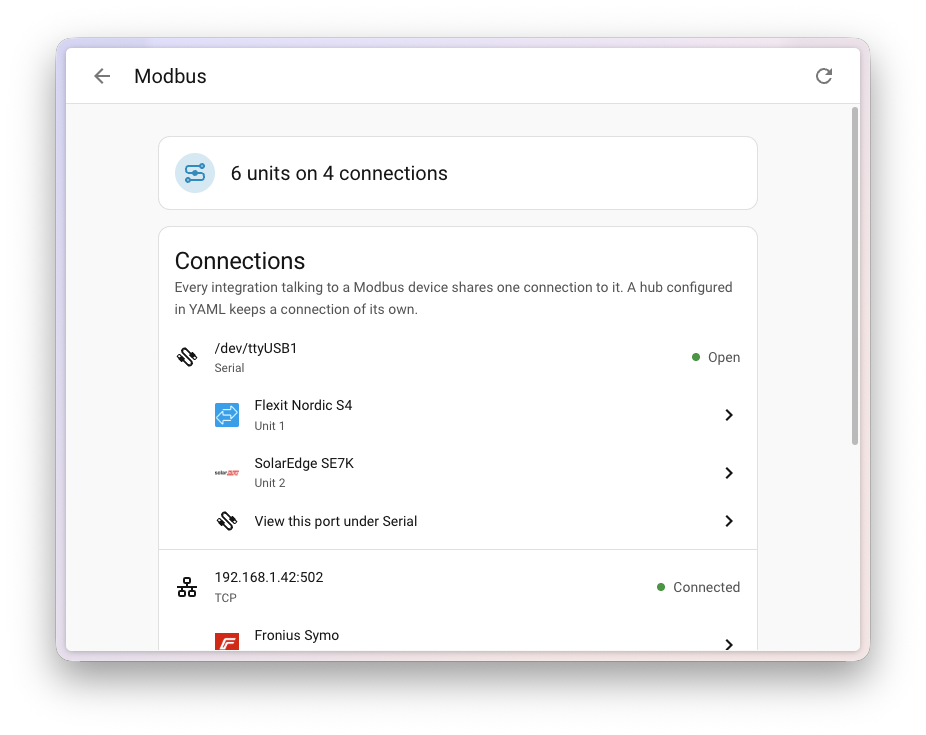
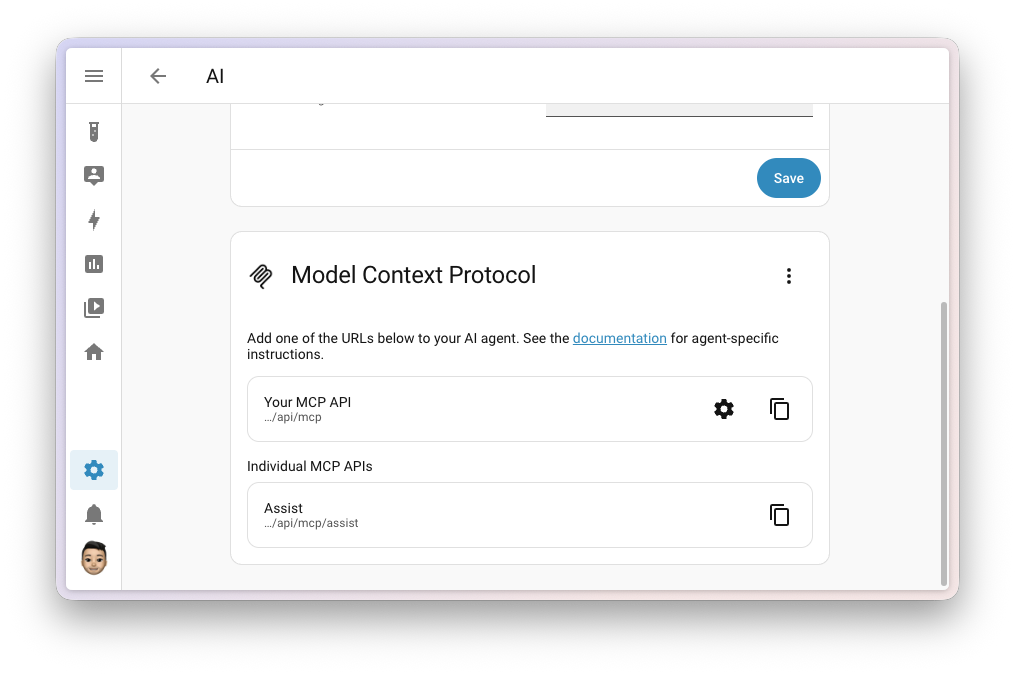
There’s more: a tidier profile page, a panel for your Modbus connections, connecting your AI in one click, and 15 new integrationsIntegrations connect and integrate Home Assistant with your devices, services, and more. [Learn more]! 🚀

Enjoy the release!

../Frenck

A huge thank you to all the contributors who made this release possible! And a special shout-out to @googanhiem and @piitaya who helped write these release notes. Also, @grischard, @moryoav, and @RaHehl for putting effort into tweaking its contents. Thanks to them, these release notes are in great shape. ❤️

Cloud becomes Link

In case you missed it, we’re making the move to rename Home Assistant Cloud to Home Assistant Link. Same service, new name.

We’re all pretty annoyed by how Big Tech has been ruining perfectly good smart home devices by making them reliant on the cloud. Ours has never locked anyone in, harvested their data, or turned working devices into e-waste, so a new name was in order. Home Assistant Link is all about being clearer that it does things differently. The change is planned for the December release, so tell us your thoughts before then.

The best link is a fast link. 🏎️ Nabu Casa has been hard at work making remote access even faster across the globe. They recently migrated all of their servers to bare metal and added more servers to boost their coverage of the world. This month, they added a latency checker that pings multiple servers on boot and picks the best connection for you.

A whole new map

Last release, something changed underneath every map in Home Assistant, and we barely mentioned it in the release notes. The map provider we relied on started stamping an “API key required” message across its map images, breaking every map in Home Assistant at once. Instead of hunting for another free tile provider, we switched from pre-rendered map images to vector tiles generated and served by the OpenStreetMap Foundation. Both maps use OpenStreetMap data, but your device now draws the map itself. The new Map tiles integration fetches and caches the tiles through your Home Assistant instance, so your browser does not contact external tile servers directly. Recently viewed parts of the map remain available through a short internet hiccup.

Guillaume Rischard (@grischard), the former chair of the OpenStreetMap Foundation who initiated and led its vector-tile initiative, joined us during the 2026.9 release party.

Swapping out the map underneath opened a lot of doors. This release walks through the first few.

Crisp at every zoom level

The map is drawn entirely on your device, as vectors, instead of being stitched together from pictures. Streets and labels stay sharp at any zoom level, and zooming in and out is smooth. The map also has a dedicated dark style, with colors designed for dark mode. Older devices that can’t render vector maps, like the old tablet on your wall, automatically fall back to the classic map.

Redesigned markers

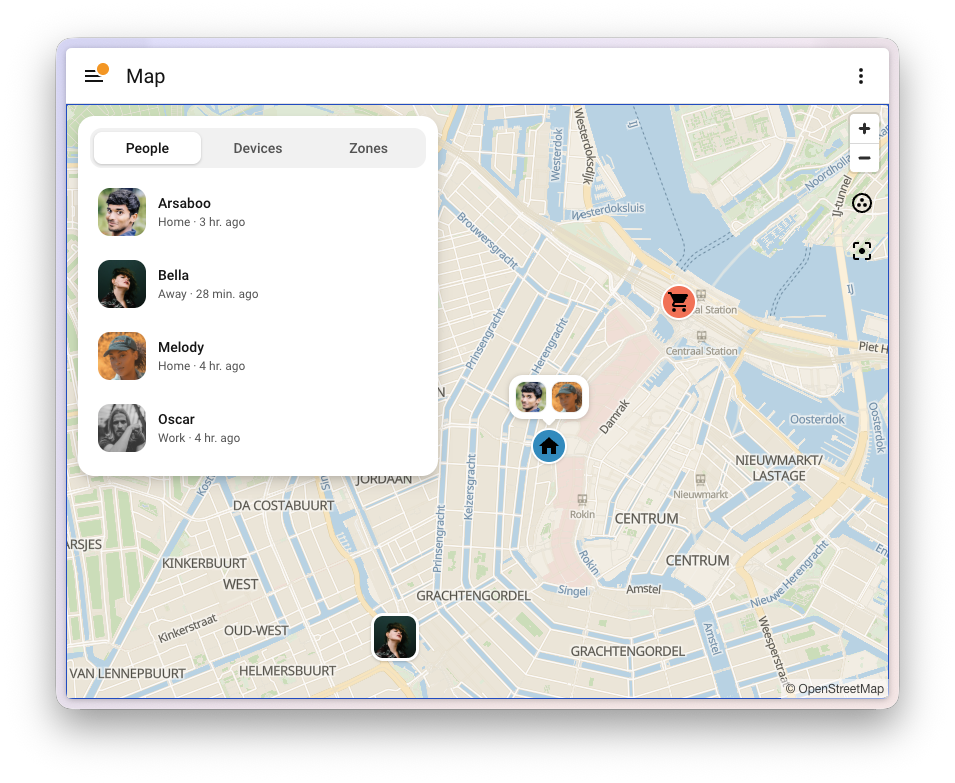
The markers on the map got a complete redesign. People show up with their picture, zonesZones allow you to specify certain regions on a map. They enable zone presence-detection and can be used in automations. For example, to start the vacuum after you left home or start the heating at home when you leave the office. [Learn more] get a marker with their icon in their own color, and everyone in the same zone shares a single bubble on that zone, instead of a pile of markers stacked on top of each other. Zoom out far enough, and bubbles that would overlap merge into one.

Screenshot of the map with the redesigned markers, showing a person with their picture, two people sharing a bubble on the Home zone, and the Supermarket zone with its icon, next to the overview listing everyone on the People tab.

An overview for the Map dashboard

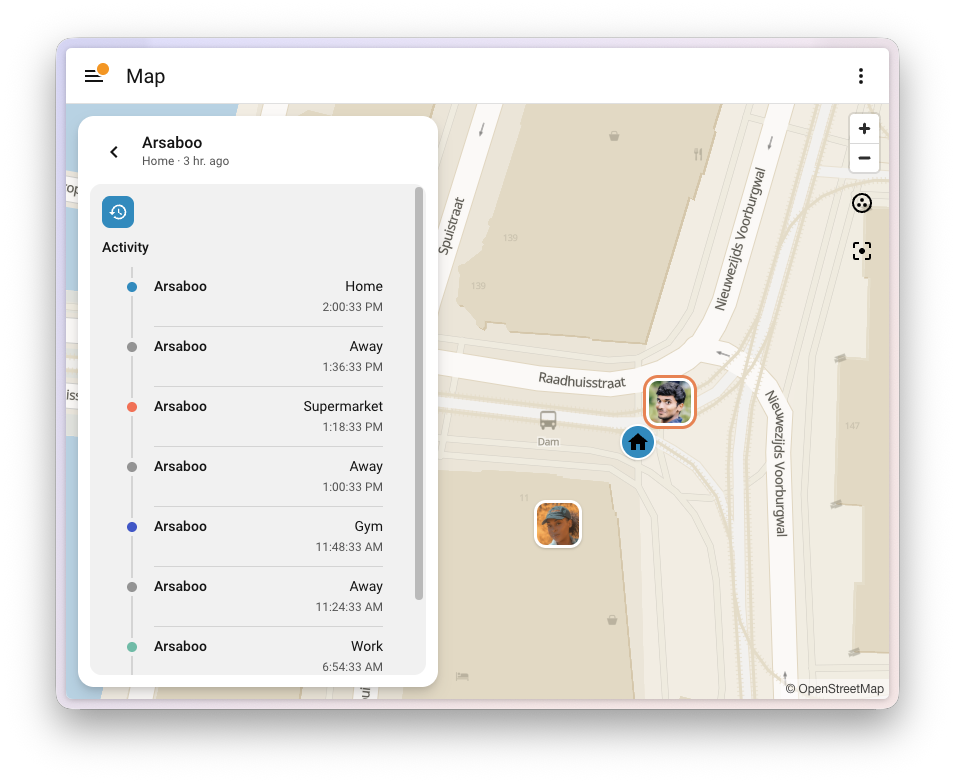
The Map dashboard now comes with an overview, next to the map on a desktop and as a sheet you pull up on your phone. It has three tabs: People, Devices, and Zones. Select someone to see their recent activity, with each stop colored by the zone they were in. Select a zone to see who’s there. On a phone, the map now also fills the whole screen, edge to edge.

Screenshot of the recent activity of a person in the map overview, with each entry marked in the color of its zone.

The same overview shows up when you put a map card in a panel view on your own dashboard.

Zones on the new map

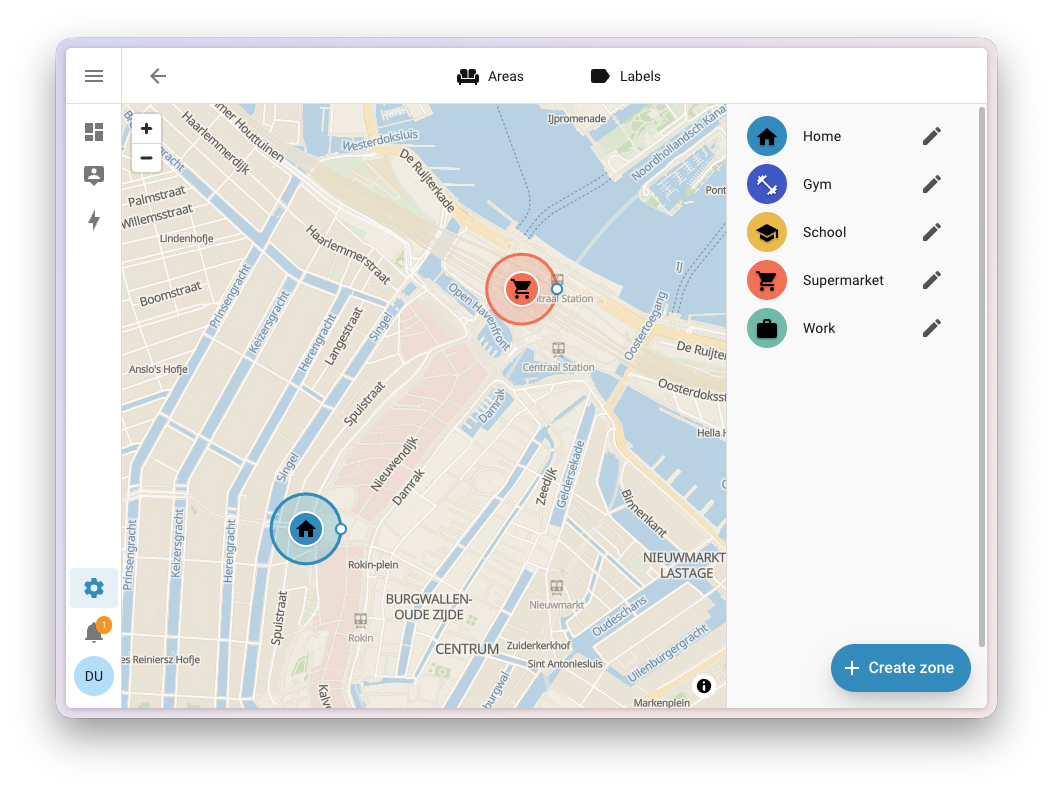
The zone editor in Settings > Areas, labels & zones now uses the same new map. Your zones are sorted alphabetically, with Home always at the top, and they show the same icons and colors you see on the map.

Screenshot of the zone editor on the new map, with the list of zones sorted alphabetically and Home at the top.

The redesign follows an Open Home Foundation design concept for the Map dashboard.

Thanks to @maartenla, @matthiasdebaat, @bramkragten, and @bgoncal; @grischard for initiating vector maps on the OpenStreetMap side and for assisting us; and Paul Norman (@pnorman) for developing Tilekiln and the tile service. Thanks also to the OpenStreetMap Foundation and the MapLibre, Shortbread, and VersaTiles communities.

Like Home Assistant, OpenStreetMap is built in the open by people like you. Spot something in your neighborhood that’s missing or out of date? You can leave a note or edit the map yourself.

A tidier profile page

Select your name at the bottom of the sidebar, and you land on your User profile. Over the years, that page quietly turned into a bit of a junk drawer. Language, theme, date formats, sidebar order, push notifications, keyboard shortcuts: all stacked in one long General tab, with Security as its only neighbor. Everything was there. You just had to scroll past most of it to find the one thing you came for.

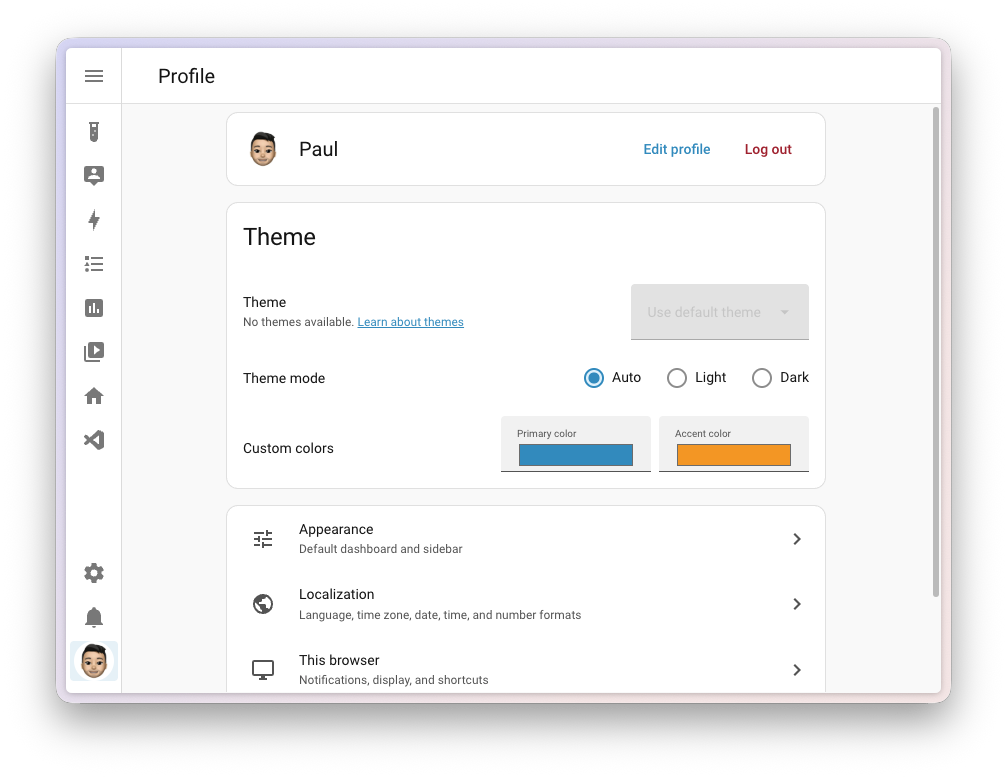
The profile page is now an overview, using the same kind of navigation you already know from Settings. At the top is a card with your account, followed by your Theme, and a short list of sections that each hold a handful of related settings:

  • Appearance: Your default dashboard and the order of your sidebar
  • Localization: Your language, time zone, and how dates, times, and numbers are shown
  • This browser (or This mobile app in the companion app): Notifications, display, and shortcuts for the device you’re using right now
  • Security: Your password, multi-factor authentication, and access tokens

Nothing was taken away. Every setting is still there, just grouped so it’s easier to find. Thanks, @pcan08 and @maartenla!

Screenshot of the redesigned user profile page, showing the account card, the theme picker, and the Appearance, Localization, and This browser sections.

That account card at the top learned a new trick, too. Until now, your own name and picture weren’t actually yours to change. Only an administrator could set them, tucked away in the person settings. Not an administrator, but you wanted a nicer picture of yourself in the sidebar? You had to go ask whoever runs your Home Assistant. A bit odd, for something that is literally your face.

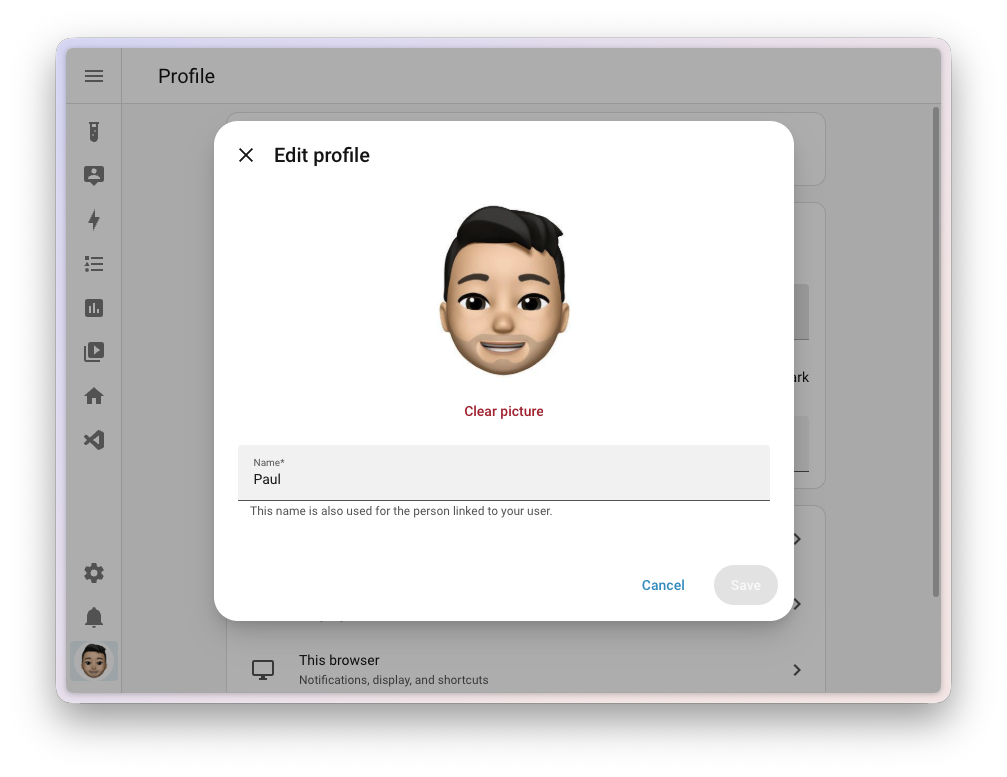
Every user, administrator or not, now has an Edit profile button right next to Log out. Upload and crop a picture, change your name, and save. Your name is used for both your user and the person linked to it, so it’s the same everywhere you show up, from the sidebar to your dashboards and Assist. Your new picture shows up in the sidebar right away.

Screenshot of the Edit profile dialog, with the profile picture, a button to clear it, and a field to change your name.

The best automation feature you never used

Take a look at your automationsAutomations in Home Assistant allow you to automatically respond to things that happen in and around your home. [Learn more], and chances are you’ll find a few that come in pairs. One turns the hallway light on when motion is detected, the other turns it off again when the motion stops. One sends a notification when the washing machine starts, the other when it’s done. Two automations, doing one job.

Home Assistant has had a way to combine those into one for years. Give each triggerA trigger is the part of an automation that makes the automation start when something specific happens, for example, when the sun sets, a door opens, or a button is pressed. [Learn more] an ID, and use the Triggered by conditionConditions check whether something is true at that moment, for example, whether a door is closed. You can use them in automations and scripts. If a condition is not met, the actions that come after it in the same sequence do not run. At the top level of an automation or script, this stops the automation or script. [Learn more] to do something different depending on which trigger fired. It’s one of the most powerful things you can do in the automation editor, and also one of the best-hidden. The trigger ID field sat in the menu of each trigger. You had to come up with an ID, type it in yourself, and then remember which ID belonged to which trigger when you picked them in the condition. Most people never found it, and honestly, we can’t blame them.

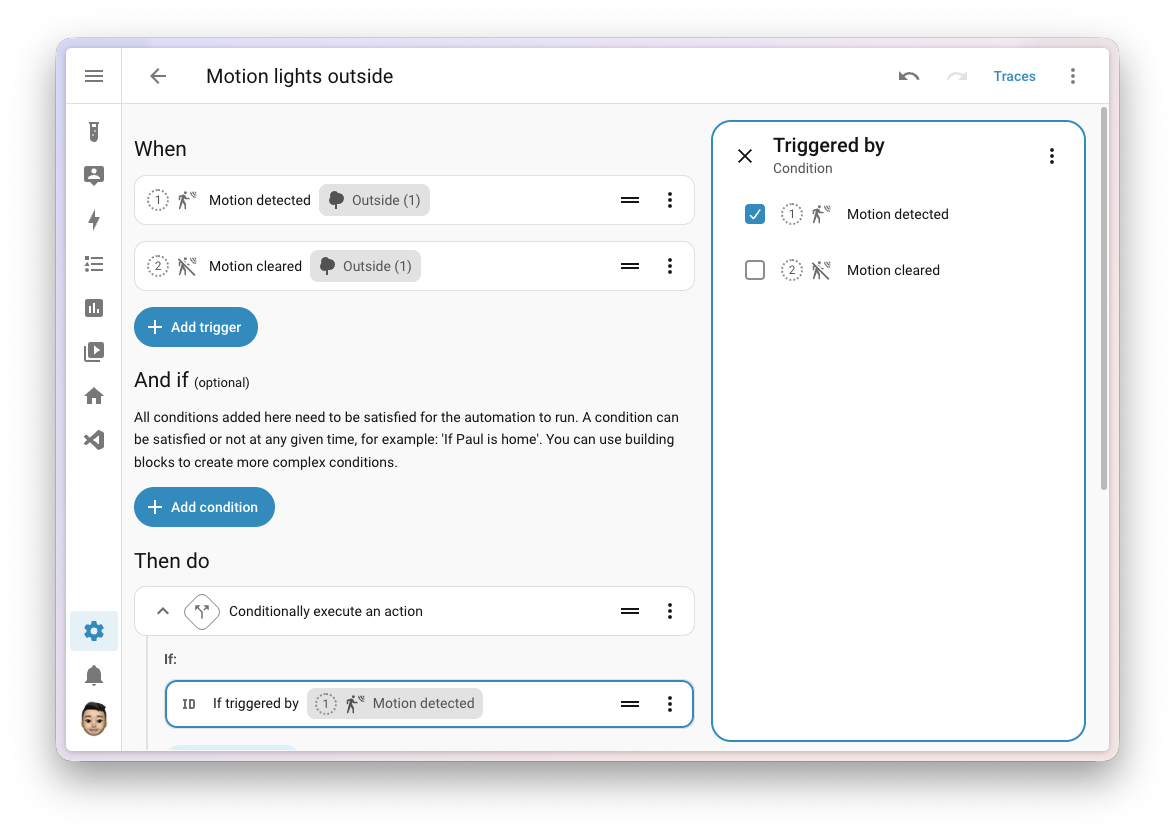
Not anymore. Add a Triggered by condition, and you check the triggers it should match. You see the triggers themselves, not some ID you made up, and each one is numbered by its position in your list, with the same number shown next to the trigger itself. So you always know which one is which. There are no IDs to come up with at all. Home Assistant takes care of those behind the scenes, and cleans up after itself when you remove a trigger.

Screenshot of the automation editor with two numbered triggers, Motion detected and Motion cleared, and a Triggered by condition where the first trigger, Motion detected, is checked.

If you set your trigger IDs yourself in YAMLYAML is a human-readable data serialization language. It is used to store and transmit data in a structured format. In Home Assistant, YAML is used for configuration, for example in the configuration.yaml or automations.yaml files. [Learn more], nothing changes. Those IDs keep working exactly as they did, sharing one ID between several triggers is still fine, and Home Assistant won’t add IDs to your YAML for you. The trigger ID field is gone from the automation editor, because you no longer need it there: to run the same actions for several triggers, check them all in one Triggered by condition.

The editor does keep an eye out for two things, but only in the Triggered by condition. If a condition points to a trigger that no longer exists, it flags it, so you can clear it. And if several triggers share the same ID, it shows a warning with a Fix that gives each trigger its own ID and updates your conditions to match. It’s a suggestion, not a repair, so if sharing an ID is what you want, you can leave it as it is.

This completes an Open Home Foundation roadmap opportunity to make referencing triggers in automations a lot easier. Thanks, @jpbede, @wendevlin, @marcinbauer-ohf, and @nielsrowinbik!

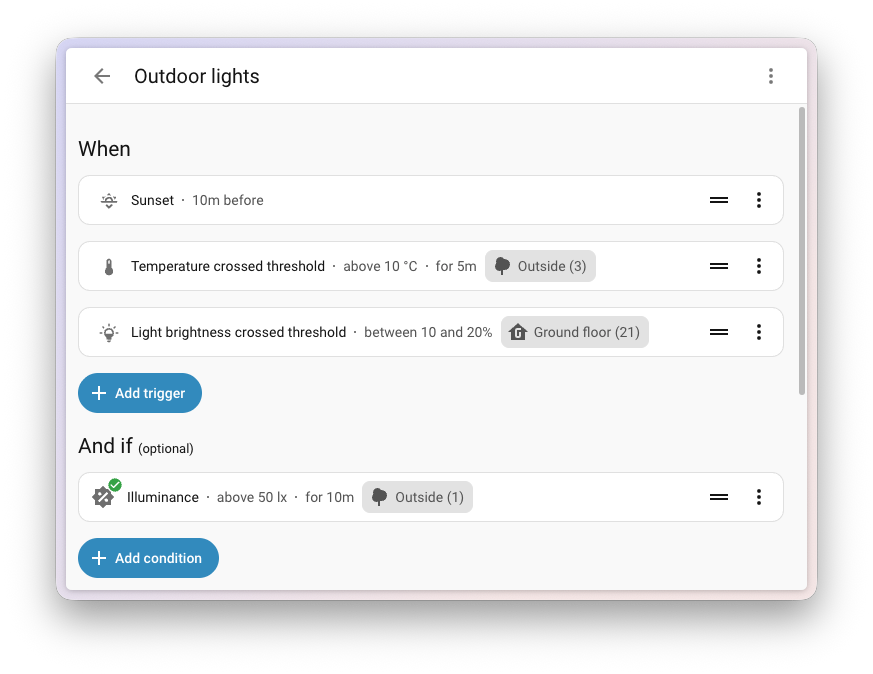
While you’re in the automation editor, you’ll notice your triggersA trigger is the part of an automation that makes the automation start when something specific happens, for example, when the sun sets, a door opens, or a button is pressed. [Learn more], conditionsConditions check whether something is true at that moment, for example, whether a door is closed. You can use them in automations and scripts. If a condition is not met, the actions that come after it in the same sequence do not run. At the top level of an automation or script, this stops the automation or script. [Learn more], and actionsAn action makes Home Assistant do something, for example, turn on a light, send a notification, or activate a scene. Automations and scripts run a list of actions. [Learn more] tell you a bit more at a glance. Each row now shows the details that used to be hidden until you opened it: the threshold a trigger or condition checks for, like “above 10 °C”, how long something needs to stay that way, the offset on a sunrise or sunset, and how long a wait action waits before it gives up. Thanks, @wendevlin and @MindFreeze!

Screenshot of triggers and a condition in the automation editor, each showing its details in the row: 10m before sunset, temperature above 10 °C for 5m, light brightness between 10 and 20%, and illuminance above 50 lx for 10m.

Integrations

Thanks to our community for keeping pace with the new integrationsIntegrations connect and integrate Home Assistant with your devices, services, and more. [Learn more] and improvements to existing ones! You’re all awesome 🥰

New integrations

We welcome the following new integrations in this release:

  • Axle Energy, added by @Herbertmt978
    Bring the grid event schedule of your Axle Energy account into Home Assistant. It tells you whether an upcoming event asks you to import from or export to the grid, and exactly when it starts and ends, so your automationsAutomations in Home Assistant allow you to automatically respond to things that happen in and around your home. [Learn more] can get your home ready in time.

  • Bitvis Power Hub, added by @MandusBorjesson
    Read real-time electricity data from your smart meter using a Bitvis Power Hub, which plugs into the meter’s HAN port. The Power Hub pushes its measurements, like power, voltage, and current per phase, straight to Home Assistant over your local network. No cloud, no pollingData polling is the process of querying a device or service at regular intervals to check for updates or retrieve data. By defining a custom polling interval, you can control how frequently your system checks for new data, which can help optimize performance and reduce unnecessary network traffic. [Learn more].

  • Gree Infrared, added by @Dr-Blank, launching at 🥈 silver quality
    Control a Gree air conditioner using any infrared transmitter you already have set up in Home Assistant, like an ESPHome device with an infrared LED. Add an infrared receiver, and the climateThe Climate entity allows you to control and monitor HVAC (heating, ventilating, and air conditioning) devices and thermostats. [Learn more] entity follows along when someone uses the physical Gree remote. Gree builds air conditioners for many brands, so units sold as Onida, Sinclair, and others work as well.

  • INDI Allsky, added by @TN-1
    Connect your INDI Allsky camera server, an allsky camera system for astrophotography and keeping an eye on cloud cover. You get the latest capture as a camera, plus sensors for sky quality, the number of stars detected, exposure time, and whether it’s night.

  • KACO Modbus, added by @g4bri3lDev
    Connect a KACO new energy solar inverter directly over your local network using Modbus TCP. It shows what the inverter is producing right now, its lifetime energy counter for the Energy dashboard, and what it is doing, without any cloud account or manufacturer portal involved.

  • my-PV, added by @rrooggiieerr
    Control my-PV devices, like the AC•THOR range and AC ELWA 2, which turn your surplus solar power into hot water. Home Assistant talks to them locally and discovers them on your network automatically.

  • OSRAM Infrared, added by @freeDom-, launching at 🥈 silver quality
    Control OSRAM and LEDVANCE RGB lights that come with a 24-button infrared remote, using an infrared transmitter set up in Home Assistant. With an infrared receiver, the lightA light has a brightness you can control, and optionally color temperature or RGB color control. [Learn more] entity also picks up commands from the physical remote.

  • Persang Infrared, added by @Dr-Blank
    Control a Persang Bluetooth speaker using an infrared transmitter set up in Home Assistant, giving you a media player and buttons for its remote functions.

  • SolarEdge Modbus, added by @frenck, launching at 🏆 platinum quality
    Connect to your SolarEdge solar inverter over your own network, using the Modbus TCP interface built into the inverter. No account, no API key, no cloud. Readings arrive every few seconds instead of every few minutes, and keep arriving when your internet connection is down. You can also change the export limit and how your battery charges.

  • Sunsynk, added by @jamesridgway
    Bring your Sunsynk hybrid solar inverter and battery into Home Assistant using your Sunsynk Connect account. You get sensors for solar production, grid import and export, and your battery. Home Assistant can even discover the Sunsynk data logger on your network.

  • Theben Conexa Smart Meter Gateway, added by @mdluhosch
    Read your meter data locally from a Theben Conexa 3.0 smart meter gateway, using its built-in Home Area Network (HAN) interface. No cloud needed.

  • Threema, added by @LukasQ
    Send end-to-end encrypted messages from your automationsAutomations in Home Assistant allow you to automatically respond to things that happen in and around your home. [Learn more] to people on Threema, the privacy-focused messenger that doesn’t need a phone number. It uses the Threema Gateway service, and each person you add as a recipient gets their own notify entity.

  • Vitesy, added by @chemelli74
    Connect the Vitesy Shelfy, an air purifier that lives in your refrigerator. See the air quality and temperature inside your fridge, how often the door was opened, and when the filter needs cleaning or replacing. You can even switch the purifier mode, for example to boost it after a grocery run.

  • Willow, added by @PaxPrz
    Keep an eye on the health of your indoor plants with Willow sensors. Temperature, humidity, soil moisture, and light levels come from the Willow cloud into Home Assistant, ready for your dashboards and automationsAutomations in Home Assistant allow you to automatically respond to things that happen in and around your home. [Learn more]. Your plants can’t tell you they’re thirsty, but now Home Assistant can.

  • Zonneplan, added by @erwindouna
    Get the electricity and gas prices of your Zonneplan contract, a Dutch provider of dynamic energy contracts. Handy for running your appliances when energy is cheapest.

This release also has new virtual integrations. Virtual integrations are stubs that are handled by other (existing) integrations to help with findability. These ones are new:

Noteworthy improvements to existing integrations

It is not just new integrationsIntegrations connect and integrate Home Assistant with your devices, services, and more. [Learn more] that have been added; existing ones keep getting better too. Here are some of the noteworthy improvements this release:

  • Matter added switchesSwitches are things that have two states you can select between, such as turning on or off a socket. [Learn more] to turn the visual and audible alarms of supported leak sensors on or off, like the IKEA KLIPPBOK, and a switch for one-touch locking, so you decide whether a single touch on the keypad of your lock is enough to lock the door. DevicesA device is a model representing a physical or logical unit that contains entities. that measure electrical power now also report the frequency and power factor. Thanks, @wardmatter, @mmmspatz, and @lboue!
  • Tuya supports a lot more devicesA device is a model representing a physical or logical unit that contains entities. this release: two-channel DIN rail energy meters with readings per channel, circuit breakers, EV chargers (with their charging current, charging mode, and session energy), water valves (with water usage and temperature), and the keypad tone and alarm push settings of the Duosmart C30 alarm panel. Three-phase electricity meters now also report reactive power, apparent power, and power factor for each phase. Thanks, @keranm, @tmunzer, @o-borovets, @syl-craft, @ChayoteJarocho, @huangrenwei79, and @epenet!
  • Internet Printing Protocol (IPP) added page counters, so you can keep track of how many pages, impressions, and sheets your printer has gone through, split into color and black and white on printers that report it. Thanks, @brianegge!
  • ESPHome devicesA device is a model representing a physical or logical unit that contains entities. can now open the connection to Home Assistant themselves, so they work even when Home Assistant can’t reach them directly. Turn on the outgoing_connection option on your ESPHome device, and Home Assistant takes it from there, with the same encryption as always. Thanks, @bdraco!
  • HomeKit Bridge can now show your valve entitiesAn entity represents a sensor, actor, or function in Home Assistant. Entities are used to monitor physical properties or to control other entities. An entity is usually part of a device or a service. [Learn more] in the Home app as a faucet, shower head, or sprinkler. How long a valve runs can now also come from any number entity, not just a number helperA helper is a virtual entity you create inside Home Assistant. It is not backed by a physical device. Helpers store values, track state, or do calculations that your automations and dashboards need. [Learn more]. Thanks, @louwii17!
  • Philips Hue added a switch to turn each MotionAware zone on or off, just like you can in the Hue app. Rooms and zones also gained a sceneScenes capture the states you want certain entities to be. For example, a scene can specify that light A should be turned on and light B should be bright red. [Learn more] select, showing which scene (or smart scene) is currently active, and letting you pick another one. Thanks, @marcelveldt and @sliekens!
  • Reolink can now control the pan and tilt lens of cameras that combine multiple lenses in one device, when connected to a Reolink NVR or Home Hub. Thanks, @starkillerOG!
  • Music Assistant announcements can now speak a message, not only play an audio file. The announcement action takes a message and a “text-to-speech”TTS (text-to-speech) allows Home Assistant to talk to you. [Learn more] entity to speak it, while keeping the pre-announcement chime and announcement volume that tts.speak doesn’t offer. The AI search tool can now also search inside artists, albums, and playlists. Thanks, @marcelveldt and @balloob!
  • Roborock wet and dry vacuums now update in real time, so docking or starting a cleaning shows up in Home Assistant right away. The Roborock Q10 can now also clean specific zones, drive to a spot you pick, and report where it is. Thanks, @piitaya and @hmmbob!
  • Z-Wave added three new conditionsConditions check whether something is true at that moment, for example, whether a door is closed. You can use them in automations and scripts. If a condition is not met, the actions that come after it in the same sequence do not run. At the top level of an automation or script, this stops the automation or script. [Learn more] to the automation editor, with proper fields to fill in: check a device’s node status, the value of a configuration parameter, or any other Z-Wave value. Z-Wave triggersA trigger is the part of an automation that makes the automation start when something specific happens, for example, when the sun sets, a door opens, or a button is pressed. [Learn more] got the same treatment. Thanks, @raman325!
  • UniFi Network now reports the battery level and runtime of your UniFi UPS, along with its output power, current, voltage, and power factor. Thanks, @jimstrang!
  • Broadlink now supports the RM5 Plus, which used to fail with a “device not supported” error. Thanks, @DAB-LABS!
  • UniFi Protect now supports the key fob, with an event entityAn event entity represents a momentary occurrence without a lasting state, for example, when you press a doorbell or a button on a remote control. Instead of a state such as on or off, the event entity keeps track of when the last event was detected and its event type, such as a single press or a long press. [Learn more] that fires on every button press, and shows each relay input as its own binary sensorA binary sensor is an entity that reports one of two mutually exclusive states, on or off. The device class determines how those states are labeled in the UI. For example, open/closed for a door or detected/clear for motion. [Learn more]. The API key only mode now also handles motion and smart detections, smart sensors, sirens, relays, and several camera and floodlight settings. Thanks, @sbesh91, @igoraugustynski, and @RaHehl!
  • OpenAI added support for the GPT-6 Astra and GPT-Image-2.5 models. GPT-Image-2.5 Flare is now the default for generating images with AI Task. Thanks, @Shulyaka!
  • SwitchBot Bluetooth added support for the Lock Ultra Max, the Universal Remote, and the RGBICWW Light Bars, and lets you set how fast your SwitchBot curtains move. Thanks, @Onero-testdev and @joostlek!
  • SwitchBot Cloud added support for the Lock Ultra Max. Thanks, @XiaoLing-git!
  • LIFX now supports LIFX lights that connect over ThreadThread is a low-power mesh networking standard that is specifically designed for smart home applications. It is a protocol that defines how devices communicate. [Learn more], and the signal strength sensor works for those lights too. Thanks, @Djelibeybi!
  • Proxmox VE added “update entities”An update entity is an entity that indicates if an update is available for a device or service. [Learn more] for your Proxmox nodes, showing when updates are available and how many Proxmox and other packages are waiting. Installing them from Home Assistant is not possible yet. Thanks, @CoMPaTech!
  • LinkPlay speakers that follow another speaker in a multiroom group now show the title, artist, album, and album art of what’s playing. Each speaker keeps its own volume. Thanks, @MagicMicky!
  • Apple iCloud brings your iCloud calendars and Reminders into Home Assistant. Each calendar shows up as a calendar entityA calendar entity represents a schedule of events coming from a local or external calendar source. It can be used to trigger automations based on the start or end of an event, react to offsets (like 15 minutes before), or retrieve event details through services. [Learn more], and each Reminders list as a to-do list, where you can add, complete, and remove items that sync right back to your Apple devices. Thanks, @FezVrasta!
  • Hikvision added “event entities”An event entity represents a momentary occurrence without a lasting state, for example, when you press a doorbell or a button on a remote control. Instead of a state such as on or off, the event entity keeps track of when the last event was detected and its event type, such as a single press or a long press. [Learn more] that tell you what triggered a smart event: a human, a vehicle, or a pet. Great for getting notified about people at your gate, while ignoring passing traffic. Thanks, @ptarjan!
  • Opower now uses the import and export readings from your meter itself for your grid statistics. Before, grid import was worked out from your net usage, which undercounted it for homes with solar panels, and could even show no import at all on a sunny day. Thanks, @tronikos!
  • TP-Link Omada now shows your Omada controller as a deviceA device is a model representing a physical or logical unit that contains entities., with its status and an “update entity”An update entity is an entity that indicates if an update is available for a device or service. [Learn more] for its firmware. Thanks, @rubempoli!
  • EnergyZero can now use quarter-hourly electricity prices, and added all-in electricity prices next to the market prices. Thanks, @klaasnicolaas!
  • Bosch SHC grew a lot this release. Micromodule shutters, awnings, and blinds now show up as coversCovers are devices such as blinds, garage doors, etc that can be opened and closed and optionally set to a specific position. [Learn more], and there are new switches for child locks, the alarm bypass of door and window contacts, the silent mode of thermostats, the intrusion alarm of the Smoke Detector II, and the settings of the Motion Detector 2, Door/Window Contact II Plus, Micromodule Relay, and Camera Eyes. A new sensor counts the open doors and windows in your home, thermostats show their valve position, and motion detectors now fire an event for every motion. Thanks, @mosandlt!
  • Midea added water heaters, a lock switch, a pump switch for dehumidifiers, a sensor for when the water pump of an air conditioner is running, and salt, AI mode, time remaining, and door warning entities for the appliances that support them. Thanks, @chemelli74, @rokam, @mattrossman, and @peterdey!
  • Teslemetry can now control things locally: your Powerwall over your own network, and your vehicle over Bluetooth. Commands try the local route first and fall back to the cloud, so they are faster, and vehicle commands even work when the car has no connection. Thanks, @Bre77!
  • Peblar chargers can now install firmware updates from Home Assistant, and you can manage the RFID cards and the autocharge vehicles allowed to charge, and authorize a charge session, all from actionsAn action makes Home Assistant do something, for example, turn on a light, send a notification, or activate a scene. Automations and scripts run a list of actions. [Learn more]. Chargers with a buzzer or status light also get selects for the buzzer volume and LED brightness. Thanks, @syphernl and @frenck!
  • MELCloud Home added the outdoor temperature and a switch to put your unit in standby. Thanks, @erwindouna!
  • Universal Devices ISY/IoX added “event entities”An event entity represents a momentary occurrence without a lasting state, for example, when you press a doorbell or a button on a remote control. Instead of a state such as on or off, the event entity keeps track of when the last event was detected and its event type, such as a single press or a long press. [Learn more] for Insteon buttons and keypads, so you can automate on a press, a double press, or a long press. Thanks, @shbatm!
  • LG Infrared air conditioners gained swing modes, switches for the ion generator and auto clean, a select for the energy limit, and buttons for features like Jet mode and Eco mode. Thanks, @Dr-Blank!
  • Samsung Infrared now supports air conditioners. Thanks, @elax46!
  • Weheat added the air outlet temperature, domestic hot water target and control method, the electricity used by the indoor unit, and what your heat pump is doing while it cools. Thanks, @barryvdh!
  • LED Infrared added support for generic 10-key LED candle remotes. Thanks, @tr4nt0r!
  • Collection image gained actionsAn action makes Home Assistant do something, for example, turn on a light, send a notification, or activate a scene. Automations and scripts run a list of actions. [Learn more] to jump to the first, last, next, or previous image in the folder, alongside picking a random one. Thanks, @karwosts!
  • Homevolt added a select to change the battery mode, and controls for the power setpoint and grid import and export limits. Thanks, @Danielhiversen!

Integration quality scale achievements

One thing we are incredibly proud of in Home Assistant is our integration quality scale. This scale helps us and our contributors to ensure integrations are of high quality, maintainable, and provide the best possible user experience.

This release, we celebrate several integrationsIntegrations connect and integrate Home Assistant with your devices, services, and more. [Learn more] that have improved their quality scale:

This is a huge achievement for these integrations and their maintainers. The effort and dedication required to reach these quality levels is significant, as it involves extensive testing, documentation, error handling, and often complete rewrites of parts of the integration.

A big thank you to all the contributors involved! 👏

Now available to set up from the UI

While most integrationsIntegrations connect and integrate Home Assistant with your devices, services, and more. [Learn more] can be set up directly from the Home Assistant user interface, some were only available using YAML configuration. We keep moving more integrations to the UI, making them more accessible for everyone to set up and use.

The following integrations are now available via the Home Assistant UI:

Farewell to the following

Time for a little cleaning, and no, we did not wait for spring! The following “integrations”Integrations connect and integrate Home Assistant with your devices, services, and more. [Learn more] are no longer available as of this release:

  • Dublin Bus has been removed. It relied on the Real-Time Passenger Information API, which the National Transport Authority shut down in September 2020, so it has not worked since. For scheduled departures, the GTFS integration can use the timetable data published by Transport for Ireland.
  • Etherscan has been removed. It relied on version 1 of the Etherscan API, which has been shut down, so its sensors only showed False instead of a balance. To keep tracking a wallet balance, you can use the RESTful sensor with the Etherscan V2 API and your own free API key.
  • Melnor RainCloud has been removed. Melnor discontinued the original RainCloud WiFi Timer in April 2026, and its cloud service no longer responds.
  • Orange and Rockland Utility (ORU) has been removed. The endpoint it relied on stopped returning meter data years ago. Orange and Rockland customers can use the Opower integration instead.
  • Sigfox has been removed. It relied on version 1 of the Sigfox backend API, which Sigfox retired.
  • SolarEdge Local has been removed. It relied on a local web API that SolarEdge disabled in inverter firmware updates starting in 2020. Use the SolarEdge integration, or the new SolarEdge Modbus integration if you want to keep things local.
  • Travis-CI has been removed. It relied on the travis-ci.org API, which Travis CI shut down in June 2021.
  • Zestimate has been removed. Zillow retired the API it relied on, and its replacement is aimed at commercial use, so the integration could not simply be updated.

If you still have any of these in your YAMLYAML is a human-readable data serialization language. It is used to store and transmit data in a structured format. In Home Assistant, YAML is used for configuration, for example in the configuration.yaml or automations.yaml files. [Learn more] configuration, you can remove them.

Other noteworthy changes

There is even more packed into this release. Here are some of the other changes worth a mention:

  • The Home dashboard now shows active alerts too. The alerts you set up for the Security dashboard last release, like a door left open or a smoke detector going off, now also show up right on your Home dashboard, so you don’t miss them. Thanks, @timmo001!
  • Tile cards gained a slider feature for input selects and select entities, so you can slide between options, in the same style as the toggle for input booleans. This was @Jump-333’s very first contribution to Home Assistant. Thanks, and welcome!
  • The Energy dashboard now shows the discharge of each battery separately in the energy usage graph, just like it already did for charging. Thanks, @MindFreeze!
  • Calendar cards can show a button to add an event again, so you can put something on the calendar right from your dashboard, and you pick where the button sits. Thanks, @Phil0L!
  • Lawn mower entities gained a stop action and an idle state, so you can cancel a mower’s current task instead of only pausing it or sending it home. The automation editor has a matching trigger and condition, too. MQTT lawn mowers support it as well, and Husqvarna Automower and Husqvarna Automower BLE mowers already report when they are idle. Thanks, @piitaya, @Thomas55555, and @alistair23!
  • Binary sensor has a new glass break device class. Glass break sensors are treated as security sensors, so they show up on the Security dashboard and in your home security summary. HomematicIP Cloud, SimpliSafe, Z-Wave, and Hive already use it. Thanks, @catellie!
  • Template got two nice additions this release. Thanks, @Petro31!
    • Template entities can now be climate entities, so you can build your own thermostat from other entities. Think of a heat pump or air conditioner that an integration only exposes as a loose collection of switches, sensors, and numbers. Create one as a helperA helper is a virtual entity you create inside Home Assistant. It is not backed by a physical device. Helpers store values, track state, or do calculations that your automations and dashboards need. [Learn more] from the UI, pick templatesA template is an automation definition that can include variables for the action or data from the trigger values. This allows automations to generate dynamic actions. [Learn more] for the current temperature, target temperature, and HVAC mode, and choose the actions that run when you change them. In YAMLYAML is a human-readable data serialization language. It is used to store and transmit data in a structured format. In Home Assistant, YAML is used for configuration, for example in the configuration.yaml or automations.yaml files. [Learn more], you can take it further with fan, preset, and swing modes, and humidity. The template climate documentation has all the details.
    • Binary sensor template helpers now let you set a delay before they turn on or off, right from the UI. Until now, that was only possible in YAMLYAML is a human-readable data serialization language. It is used to store and transmit data in a structured format. In Home Assistant, YAML is used for configuration, for example in the configuration.yaml or automations.yaml files. [Learn more].
  • Templates gained a timedelta_string function, which turns a duration into readable text like “1 hour 30 minutes”, the same way time_since and time_until do. Thanks, @cnotin!
  • Automation traces got a fresh look that matches the automation editor, with the real icon for each triggerA trigger is the part of an automation that makes the automation start when something specific happens, for example, when the sun sets, a door opens, or a button is pressed. [Learn more], conditionConditions check whether something is true at that moment, for example, whether a door is closed. You can use them in automations and scripts. If a condition is not met, the actions that come after it in the same sequence do not run. At the top level of an automation or script, this stops the automation or script. [Learn more], and actionAn action makes Home Assistant do something, for example, turn on a light, send a notification, or activate a scene. Automations and scripts run a list of actions. [Learn more], and a clear view of branches that didn’t finish. Drag the divider to give the graph or the details more room, the step buttons now float on top of the graph, and screen readers describe each step. Thanks, @jpbede!
  • The Z-Wave network map can now show the real mesh. Turn on the new neighbors toggle, and it draws the connections between your devices, not just the routes they use. It’s off by default, because large networks get busy fast. Thanks, @MindFreeze!
  • Calendar events from CalDAV, Local calendar, and Google Calendar now include whether they are confirmed or tentative, so your automationsAutomations in Home Assistant allow you to automatically respond to things that happen in and around your home. [Learn more] can tell the difference. Remote calendar now also leaves out canceled events. Thanks, @1358!
  • Climate fan modes can now be set by voice, through a conversation agent, like “set the fan mode to auto”. Thanks, @synesthesiam!
  • Units keep growing: atmospheres (atm) for pressure, and therms (thm) for energy, the unit many US utilities bill natural gas in. Weather entities can now also report pressure in kilopascals (kPa), which most weather services in Canada use. Thanks, @Bre77, @virtitnerd, and @RussellAult!
  • Password managers, including the one built into Firefox, can fill in your details on the Home Assistant login page again. Thanks, @MindFreeze!
  • On phones with a notch or rounded corners, tables, filter bars, settings cards, headers, and pop-up messages now reach the edges of the screen, while everything you read or tap stays clear of the cutout. Thanks, @bgoncal!
  • Tables, like the ones listing your devicesA device is a model representing a physical or logical unit that contains entities. and entitiesAn entity represents a sensor, actor, or function in Home Assistant. Entities are used to monitor physical properties or to control other entities. An entity is usually part of a device or a service. [Learn more], now show placeholder rows while they load. And if something fails to load, you now see an error, instead of an empty list that looks like you have nothing set up. Thanks, @timmo001!
  • YAML configuration errors now suggest what you probably meant. Mistype command_topci, and the error asks: did you mean command_topic? Error messages also show the path to the file relative to your configuration folder, so they are easier to read. Thanks, @frenck and @emontnemery!

Show a card only when it matters

Dashboards can show or hide a card, badge, or section based on conditionsConditions check whether something is true at that moment, for example, whether a door is closed. You can use them in automations and scripts. If a condition is not met, the actions that come after it in the same sequence do not run. At the top level of an automation or script, this stops the automation or script. [Learn more]: only on a phone, only for a certain user, only when the washing machine is running. Those conditions were always a smaller set than the ones you know from automations.

This release, the Visibility tab offers the same conditions as the automation editor, including Template, Sun, Zone, and Device, and the conditions integrations bring along. They sit right next to the ones that only make sense on a dashboard, like Screen and User, and you can mix them freely. Show the garden lights card only after sunset, and only on a phone. Each row now also describes what it checks, just like in the automation editor, and you can drag the rows into a different order. Your existing visibility conditions keep working as they are.

And no more guessing why a card is hiding. The top of the Visibility tab tells you whether the card is visible right now, and each condition shows whether it currently passes. Thanks, @MindFreeze and @timmo001!

Screenshot of the Visibility tab of a tile card, showing that the card is currently visible because all conditions are met, with a check mark on each condition: a template, a zone, a device, and the sun.

A panel for your Modbus connections

Last release, we started modernizing Modbus: integrations that already know how your device talks Modbus, so you pick your device in the UI instead of writing register maps by hand. Those integrations share a single connection to each device, which is great for devices that only accept a few connections at once. It also meant there was no single place to see which integrations were talking to what.

The new Modbus panel under Settings > Connectivity fixes that. It lists every Modbus connection Home Assistant has, serial ports and network gateways alike, along with the devicesA device is a model representing a physical or logical unit that contains entities. on it and the integrations using them. Connections set up in YAMLYAML is a human-readable data serialization language. It is used to store and transmit data in a structured format. In Home Assistant, YAML is used for configuration, for example in the configuration.yaml or automations.yaml files. [Learn more] show up here too. A connection that’s closed isn’t a problem, by the way. It opens again the next time an integration needs it. The Serial panel links straight to it for ports that carry Modbus. Thanks, @balloob!

Screenshot of the Modbus panel, listing a serial port shared by a Flexit and a SolarEdge device, and a network connection to a Fronius inverter.

The list of integrations built this way keeps growing. This release adds two new ones: SolarEdge Modbus, launching straight at platinum, and KACO Modbus, thanks to @g4bri3lDev. STIEBEL ELTRON now shares its connection through the Modbus integration as well, and Sofar climbed all the way to platinum, thanks to @darkrain-nl.

Connect your AI in one click

Home Assistant can act as a Model Context Protocol server, which lets AI apps like Claude, ChatGPT, or Cursor talk to your home. Getting there was a bit of a hunt, though: add the integrationIntegrations connect and integrate Home Assistant with your devices, services, and more. [Learn more], pick which parts of Home Assistant to expose, and then figure out which URL to hand to your AI app.

The AI tasks page under Settings > System is now called AI, and it gained a Model Context Protocol card. Turn the server on in a single click, and the card lists the URLs to paste into your AI app, each with a button to copy it. New setups expose everything Home Assistant has to offer, including anything added later, and only allow administrator accounts to connect. You can change both whenever you like, without removing and re-adding the integration.

Screenshot of the AI settings page with the new Model Context Protocol card, listing the URLs to add to your AI agent, each with a button to copy it.

It also works the other way around. Apps that run their own MCP server are now discovered automatically by the Model Context Protocol integration, so connecting Home Assistant to them only takes a confirmation.

And your AI got a lot better at finding music. Ask it to play something, and instead of blindly playing the first search result, it now gets a list of results and picks the best match. It can even search inside an artist, album, or playlist to find that one specific song. Search itself improved along the way: artists, albums, and playlists from Music Assistant can now be searched inside, just like results from Jellyfin and Squeezebox, local media now finds matching folders too, and Radio Browser puts the 100 most popular stations first.

Thanks, @balloob!

If your home runs on KNX, your AI can now dig into that too. The KNX integration brings its own set of AI tools, which you can hand to your conversation agent, or to your AI app through the Model Context Protocol server. Ask about the group addresses, devices, and functions in your ETS project, go through the history of telegrams on your bus, or decode a value you don’t recognize. It can even read and write values on the bus directly. Thanks, @martinhoefling!

Name an entity after its device

Some entitiesAn entity represents a sensor, actor, or function in Home Assistant. Entities are used to monitor physical properties or to control other entities. An entity is usually part of a device or a service. [Learn more] are the whole point of their deviceA device is a model representing a physical or logical unit that contains entities.. Calling the smoke sensor of a smoke detector “Smoke detector Smoke detected” doesn’t help anyone. Integrations already give their main entity the name of the device, but if you wanted to do the same for another entity, there was no clean way to do it. If you cleared its name, it jumped right back to the name the integration gave it.

The entity settings now have a Use device name switch. Turn it on, and the entity goes by the name of its device. The switch also shows you what that device name is, with a link to rename the device if you’d like. Turn it off, and you’re back to the entity’s own name, filled in with the default from the integration. If you change your mind, a restore button takes you back to the default. Thanks, @piitaya and @matthiasdebaat!

Screenshot of the entity settings for a smoke detector, with the Use device name switch turned on and the name field hidden.

Timers, one tap away

Timer helpersA helper is a virtual entity you create inside Home Assistant. It is not backed by a physical device. Helpers store values, track state, or do calculations that your automations and dashboards need. [Learn more] are now a lot easier to control from your dashboard. Tile cards have two new features for them: Timer actions adds buttons to start, pause, and cancel a timer (and optionally finish it), and Timer presets starts a timer with a preset duration in a single tap. Presets show up as a row of buttons, or as a dropdown, handy for a longer list. You manage the presets from the timer itself: open its more info dialog and select Edit presets from the menu.

That more info dialog got a fresh look too, and when a timer finishes, you’ll see a small animation. Thanks, @maartenla!

Screenshot of two tile cards for a timer, one with the timer actions buttons to start, pause, and cancel it, and one with a row of preset buttons for 2, 5, and 10 minutes.

Patch releases

We will also release patch releases for Home Assistant 2026.10 in October. These patch releases only contain bug fixes. Our goal is to release a patch release once a week, aiming for Friday.

2026.10.1 - October 10

2026.10.2 - October 16

Need help? Join the community

Home Assistant has a great community of users who are all more than willing to help each other out. So, join us!

Our very active Discord chat server is an excellent place to be, and don’t forget to join our amazing forums.

Found a bug or issue? Please report it in our issue tracker to get it fixed! Or check our help page for guidance on more places you can go.

Are you more into email? Sign up for the Open Home Foundation Newsletter to get the latest news about features, things happening in our community, and other projects that support the Open Home straight into your inbox.

Backward-incompatible changes

We do our best to avoid making changes to existing functionality that might unexpectedly impact your Home Assistant installation. Unfortunately, sometimes it is inevitable.

We always make sure to document these changes to make the transition as easy as possible for you. This release has the following backward-incompatible changes:

Authentication

The deprecated legacy mode of the Home Assistant authentication provider has been removed. Usernames are now always handled in their normalized form: lowercase, and without spaces at the start or end. If Home Assistant showed you a repair about usernames that are not normalized, change those usernames to match.

(@gjohansson-ST - #175613) (Authentication documentation)

easyEnergy

The hours_priced_equal_or_lower and hours_priced_equal_or_higher sensors are now named Periods priced equal or lower and Periods priced equal or higher, and no longer have h as their unit of measurement. Their values count price periods, not hours.

If you have “templates”A template is an automation definition that can include variables for the action or data from the trigger values. This allows automations to generate dynamic actions. [Learn more] or dashboard cards that rely on the unit of these sensors, update them to handle a count without a unit. The values, entity IDs, and unique IDs are unchanged, so automationsAutomations in Home Assistant allow you to automatically respond to things that happen in and around your home. [Learn more] that only compare the numbers need no changes.

(@klaasnicolaas - #181431) (easyEnergy documentation)

EnergyFlip

EnergyFlip shut down the API version the integration used, so the integration has moved to the new version. The new API no longer provides the additional electricity measurements, so only the current power sensor remains for electricity.

(@DieEneSchrodinger - #179723) (EnergyFlip documentation)

EnergyZero

The hours_priced_equal_or_lower electricity sensor is now named Periods priced equal or lower, and no longer has h as its unit of measurement. Its value counts price periods, not hours.

If you have “templates”A template is an automation definition that can include variables for the action or data from the trigger values. This allows automations to generate dynamic actions. [Learn more] or dashboard cards that rely on the unit of this sensor, update them to handle a count without a unit. The value, entity ID, and unique ID are unchanged, so automationsAutomations in Home Assistant allow you to automatically respond to things that happen in and around your home. [Learn more] that only compare the number need no changes.

(@klaasnicolaas - #181492) (EnergyZero documentation)

Google Sheets

Reading an empty worksheet now returns {"range": [[]]} instead of {"range": []}. If you have automationsAutomations in Home Assistant allow you to automatically respond to things that happen in and around your home. [Learn more], scriptsA script is a saved list of steps that runs when you start it, for example, from a dashboard, with Assist, or from an automation. Unlike an automation, a script has no triggers, so it doesn’t start by itself. [Learn more], or “templates”A template is an automation definition that can include variables for the action or data from the trigger values. This allows automations to generate dynamic actions. [Learn more] that check for an empty worksheet, update them to match.

(@JamieMagee - #181692) (Google Sheets documentation)

Google Wifi

The uptime sensor is deprecated and will be removed in a future release. Use the new last restart sensor instead.

(@EReaso - #177525) (Google Wifi documentation)

IoTaWatt

Reactive power sensors now use the reactive power device class, which changes their unit of measurement from VAR to var. You have these sensors if an output on your IoTaWatt is configured with the unit VAR.

If such a sensor has recorded long-term statisticsHome Assistant keeps statistics for sensors that have a state class, such as measurement, total, or total increasing. Every 5 minutes, it saves short-term statistics, which are deleted after 10 days by default. Every hour, it saves long-term statistics, which are never deleted automatically. The Energy dashboard and statistics cards use them. [Learn more], Home Assistant creates a repair about the changed unit after the update. Pick the offered option to update the statistics to the new unit. No data is lost. In return, these sensors are now shown as reactive power, and you can display them in mvar, var, or kvar.

(@agners - #180913) (IoTaWatt documentation)

Libre Hardware Monitor

Libre Hardware Monitor versions older than 0.9.5 are no longer supported. If you run an older version, update Libre Hardware Monitor to keep using the integration.

(@Sab44 - #181928) (Libre Hardware Monitor documentation)

Linode and Tank Utility

The Linode and Tank Utility integrationsIntegrations connect and integrate Home Assistant with your devices, services, and more. [Learn more] have been disabled and no longer start.

Both depend on Python libraries that have not been maintained for years (the Linode one was last updated in 2018, the Tank Utility one in 2023) and no longer work with current Python packaging tools. Keeping them running meant holding back those tools for every other integration, so they have been switched off instead.

If you use either integration, you can remove it from your configuration. If the underlying libraries are updated, or replaced with maintained alternatives, the integrations can be activated again. Community contributions to make this happen are very welcome.

(@frenck - #182842) (Linode documentation) (Tank Utility documentation)

Mealie

Mealie 3.2 or newer is now required. Version 3.2 was released in September 2025, and the Mealie appApps are additional standalone third-party software packages that can be installed on Home Assistant OS. [Learn more] and official container are already well past it, so most of you don’t need to do anything. If your Mealie server runs an older version, update it before you update Home Assistant.

(@andrew-codechimp - #180609) (Mealie documentation)

MQTT

The mqtt.publish and mqtt.dump actions now require an administrator account, just like mqtt.reload already did.

AutomationsAutomations in Home Assistant allow you to automatically respond to things that happen in and around your home. [Learn more], scriptsA script is a saved list of steps that runs when you start it, for example, from a dashboard, with Assist, or from an automation. Unlike an automation, a script has no triggers, so it doesn’t start by itself. [Learn more], and scenesScenes capture the states you want certain entities to be. For example, a scene can specify that light A should be turned on and light B should be bright red. [Learn more] that publish on their own are not affected, because they run without a user context. What changes is a call a non-admin user makes themselves: from a dashboard button, from the developer tools, or by starting a script or automation by hand. Those now fail with “Unauthorized”. If a non-admin user needs to be able to publish, let the automation run on its own trigger instead of having that user start it.

(@frenck - #182045) (MQTT documentation)

OpenEVSE

The Charging status sensor now reports a fixed set of states in snake_case, such as charging, not_connected, and gfci_self_test_failure, instead of the raw values from the charger, such as Charging or not connected. If you have automationsAutomations in Home Assistant allow you to automatically respond to things that happen in and around your home. [Learn more] or scriptsA script is a saved list of steps that runs when you start it, for example, from a dashboard, with Assist, or from an automation. Unlike an automation, a script has no triggers, so it doesn’t start by itself. [Learn more] that check for the old values, update them to match the new ones.

(@firstof9 - #180329) (OpenEVSE documentation)

Proxmox VE

The Uptime sensor of nodes, virtual machines, and containers now shows a timestamp of when it started, instead of the time since it started in seconds. If you have automationsAutomations in Home Assistant allow you to automatically respond to things that happen in and around your home. [Learn more], scriptsA script is a saved list of steps that runs when you start it, for example, from a dashboard, with Assist, or from an automation. Unlike an automation, a script has no triggers, so it doesn’t start by itself. [Learn more], or “templates”A template is an automation definition that can include variables for the action or data from the trigger values. This allows automations to generate dynamic actions. [Learn more] that use the number of seconds, update them to work with the timestamp.

(@erwindouna - #169704) (Proxmox VE documentation)

Rejseplanen

Rejseplanen now uses version 2.0 of the Rejseplanen API, which requires an API key. You can apply for an API key with Rejseplanen Labs. The integration is now set up from the UI instead of YAMLYAML is a human-readable data serialization language. It is used to store and transmit data in a structured format. In Home Assistant, YAML is used for configuration, for example in the configuration.yaml or automations.yaml files. [Learn more].

All extra attributes have been removed from the sensors. If you have “templates”A template is an automation definition that can include variables for the action or data from the trigger values. This allows automations to generate dynamic actions. [Learn more] or dashboard cards that use them, you need to update them.

(@Jawar19 - #152200) (Rejseplanen documentation)

Sofar

Sofar inverters that report no energy meter no longer get these six energy sensors: Load consumption today, Load consumption total, Import energy today, Import energy total, Export energy today, and Export energy total.

They never held real readings on those inverters. The inverter itself marks those values as invalid, and on a PV-only inverter, Load consumption total simply repeated the solar generation total. If you used these sensors on your Energy dashboard, or in “templates”A template is an automation definition that can include variables for the action or data from the trigger values. This allows automations to generate dynamic actions. [Learn more] or automationsAutomations in Home Assistant allow you to automatically respond to things that happen in and around your home. [Learn more], remove them. Hybrid inverters and PV inverters with a meter keep all six.

(@darkrain-nl - #181729) (Sofar documentation)

State conditions

State conditionsConditions check whether something is true at that moment, for example, whether a door is closed. You can use them in automations and scripts. If a condition is not met, the actions that come after it in the same sequence do not run. At the top level of an automation or script, this stops the automation or script. [Learn more] that combine the for option with a state attribute, a list of states, or a state taken from another entity now fail validation. These combinations don’t support a duration, so you get an error when the configuration is checked, instead of a condition that doesn’t do what you expect.

(@emontnemery - #174083)

Synology DSM

The synology_dsm.reboot and synology_dsm.shutdown actions now require an administrator account.

AutomationsAutomations in Home Assistant allow you to automatically respond to things that happen in and around your home. [Learn more] and scriptsA script is a saved list of steps that runs when you start it, for example, from a dashboard, with Assist, or from an automation. Unlike an automation, a script has no triggers, so it doesn’t start by itself. [Learn more] that run on their own triggers are not affected, because they run without a user context. What changes is a call a non-admin user makes themselves: from a dashboard button, from the developer tools, or by starting a script or automation by hand. Those now fail with “Unauthorized”. If a non-admin user needs to be able to restart or shut down the NAS, let the automation run on its own trigger instead of having that user start it.

(@frenck - #182050) (Synology DSM documentation)

Telegram bot

When you pass a directory_path to the telegram_bot.download_file action, that directory now has to be in your allowlist_external_dirs. If the action starts failing, add the directory to your configuration:

homeassistant:
  allowlist_external_dirs:
    - /media/telegram

If you leave out directory_path, nothing changes. Files are still saved to the telegram_bot folder in your configuration directory, without an allowlist entry.

(@frenck - #182460) (Telegram bot documentation)

Teslemetry

Vehicles that stream their data no longer get the entitiesAn entity represents a sensor, actor, or function in Home Assistant. Entities are used to monitor physical properties or to control other entities. An entity is usually part of a device or a service. [Learn more] that can only be updated by pollingData polling is the process of querying a device or service at regular intervals to check for updates or retrieve data. By defining a custom polling interval, you can control how frequently your system checks for new data, which can help optimize performance and reduce unnecessary network traffic. [Learn more]. Updating those required a paid API call, which most people did not expect.

(@Bre77 - #181351) (Teslemetry documentation)

UniFi Network

You can no longer reconfigure the UniFi Network integrationIntegrations connect and integrate Home Assistant with your devices, services, and more. [Learn more] by adding the same site again through Add integration. Use the dedicated Reconfigure option of the integration instead.

(@robinsiep - #182201) (UniFi Network documentation)

UpCloud

The option to configure the pollingData polling is the process of querying a device or service at regular intervals to check for updates or retrieve data. By defining a custom polling interval, you can control how frequently your system checks for new data, which can help optimize performance and reduce unnecessary network traffic. [Learn more] interval has been removed from UpCloud. The integration now always polls every 60 seconds. If you had set a longer interval, this means more API calls: a 300 second interval, for example, becomes five times as many calls.

If you need a different update frequency, you can set your own polling interval.

(@KingLizard1020 - #181327) (UpCloud documentation)

Xbox

The Subscribed to Xbox Game Pass binary sensorA binary sensor is an entity that reports one of two mutually exclusive states, on or off. The device class determines how those states are labeled in the UI. For example, open/closed for a door or detected/clear for motion. [Learn more] has been removed, because it never worked. The Xbox API always reported false, whether you or your friends were subscribed to Game Pass or not.

(@tr4nt0r - #182734) (Xbox documentation)

If you are a custom integration developer and want to learn about changes and new features available for your integration: Be sure to follow our developer blog. The following changes are the most notable for this release:

All changes

Of course, there is a lot more in this release. You can find a list of all changes made here: Full changelog for Home Assistant Core 2026.10.

  •  

Coaches: Tourist Jobs

In one of our previous blogs, we gave you a closer look at the Quick Jobs and Contract Jobs you will be able to take on with Coaches when the DLC releases. But these won't be the only opportunities available to you. Today, we'd like to tell you more about Tourist Jobs!

Tourist Jobs will offer a different gameplay experience from Quick Jobs and Contract Jobs, as well as from the jobs you are used to doing with your truck. As the name suggests, you will step into the role of a bus driver, taking passengers who are enjoying their day off on trips from a bus station to an interesting landmark.


These destinations may include beautiful natural scenery, city centers where passengers can enjoy some sightseeing, or occasionally even industrial depots where they can take a guided tour. Of course, some of these destinations often have their own opening hours, and the arrival times take this into account.

Tourist Jobs are distinguished by whether the landmarks they visit are locally or globally known, which in turn determines the length of the journey. When you arrive at the final destination, you will be able to enjoy a scenic viewpoint accompanied by a short cutscene, giving you a taste of what your passengers came to see and providing even more incentive to discover these places for yourself.

Many of these viewpoints will also feature a short description of the location, allowing you to learn something new about the place you have just visited.

Once you have given your passengers some time to take in the sights, don't forget to bring them safely back home! Compared to Contract Jobs, Tourist Jobs offer a more leisurely schedule. This gives you more freedom to take your time, enjoy the scenery, and make the journey itself part of the experience.

Looking forward to being part of the journey and experiencing a new gameplay perspective when Coaches is released? Then don't forget to add the Coaches DLC to your Steam wishlist! 

Also, make sure to keep track of future updates by following us on X/Twitter, Facebook, Instagram, Bluesky, and YouTube, or sign up for our newsletter to stay in touch with the latest news. Until next time, safe travels!

  •  

v4.4.2

Features

  • Added settings search to the command palette, with Global and This page scopes. (#12111)
  • Added GitHub Actions runner support for servers used for both deployments and builds, with shared-resource warnings. (#12109)
  • Added per-server controls to store full, anonymized, or no client IP addresses in traffic analytics through the UI and API.
  • Added Cloudflare Tunnel updates from server settings, with progress logs and a background restart.

Fixes

  • Fixed unnecessary Docker build cache resets caused by temporary build helper containers. (#11781; closed #11387 and #11525)
  • Fixed deployment of large Docker Compose files, including Sentry self-hosted, with many YAML aliases or build arguments without values. (Closed #11725)
  • Fixed the traffic globe not appearing when country data arrived after the initial load. (#12108)
  • Fixed traffic path rows for different domains and combined overflow entries into one Other paths row.
  • Prevented Chrome local network permission prompts caused by favicons for private network hosts. (#12107)
  • Increased the Cloudflare Tunnel startup timeout and stored new tunnel configurations outside temporary directories.
  • Prevented duplicate form updates.

Improvements

  • Made searchable and multi-select dropdowns consistent across forms.

What's Changed

New Contributors

Full Changelog: v4.4.1...v4.4.2

  •  

v4.4.1

Features

  • Added volume backup success, failure, and warning notifications through team backup notification channels.
  • Added configurable alerts for missing volume backups in the UI and API, with alerts disabled by default.

Fixes

  • Fixed deployment progress checks that stayed active after missing queue jobs exceeded the deployment timeout.
  • Included running scheduled tasks and database and volume backups in progress checks.
  • Fixed the log viewer when its parent component refreshed.
  • Recorded database and volume backups that missed their scheduled start as failed and sent failure notifications.
  • Fixed Telegram topic routing for backup warnings, missing volume backups, and volume recovery failures.
  • Set database sessions to UTC to prevent timestamp offsets.

Improvements

  • Added SCHEDULED_JOBS_DISPATCH_MODE to select sequential or concurrent schedule dispatch. Self-hosted instances used sequential dispatch by default to reduce CPU and memory use; cloud instances kept concurrent dispatch.
  • Updated Sentinel to 1.0.2 and pinned the Sentinel host image to a fixed digest.

Full Changelog: v4.4.0...v4.4.1

  •  

v5.57.0

5.57.0 (2026-10-07)

🚀 New feature

  • cli: add strapi enterprise install command (#27849)
  • content-type-builder: Preserve data on renaming attributes (#26749)
  • review-workflows: record workflow and review actions in audit logs (#27814)

🔥 Bug fix

  • updating xhmikosr/decompress (#27885)
  • documentId upload in content API (#27834)
  • admin: media library banner appears on every admin page instead of only the media library (9012e0ad5a)
  • admin: upsell banner stacked with the media library banner when both were shown (349aaea5ba)
  • admin: upsell banner briefly mounted and queried its trial data on the media library (ba5482ce21)
  • admin: guard RelativeTime against invalid dates (#27472)
  • admin: enumeration placeholder shown twice in select trigger (#27785)
  • admin: add strapi version to admin telemetry events (#27922)
  • admin|upload: stamp legacy media events and send login telemetry once (#27932)
  • content-manager: warn before discard removes relations to draft entries (#27815)
  • content-manager: preview click-to-edit breaks when the preview script is injected twice (#27796)
  • content-manager: relation list loses pages after opening the same document in a modal (#27831)
  • content-manager: stop relation fields rendering a full page loader (#27682)
  • core: strip empty documentId from create/update data to prevent … (#27766)
  • documentation: prevent relation schema generation from exhausting memory (#27780)
  • i18n: globe tooltip displays [object object] (#27890)
  • lint: make oxlint override globs match repo paths (#27863)
  • upload: add rotate to the media library image editor (#27714)
  • upload: open asset and folder actions on right-click (#27816)
  • upload: stamp mediaLibraryVersion v1 on legacy media library events (#27900)
  • utils: explain that status is root-only when used in nested populate (#27857)

📚 Documentation Changes

  • architecture modeling (#26927)

⚙️ Chore

  • fix package version alignment on develop (#27871)
  • remove lodash/fp and prefer native javascript (#27819)
  • deps: bump @radix-ui/react-toolbar from 1.1.11 to 1.1.19 (5dc5ad318d)
  • email: migrate unit tests from jest to vitest (#27391)
  • graphql: migrate backend unit tests from jest to vitest (#27389)
  • i18n: remove type exports from server entry (#27817)

💅 Enhancement

  • core: accept localization behavior from registered providers (#27806)
  • strapi: stop loading the admin build toolchain on every cli command (#27910)

🚨 Security

  • document DTS transfer-token trust model as a specific exclusion (#27483)
  • deps: upgrade vite to fix server.fs.deny bypass on windows (eadb0c9d82)
  • deps: resolve every qs copy in the lockfile to 6.16.0 (3be284aab1)

❤️ Thank You

  •  

De ondergang van het medium televisie is begonnen ft. Alex Mazereeuw | POM S12E07

Buzz heeft geschiedenis geschreven. Het programma trekt zo weinig kijkers dat het niet meer meegenomen wordt in de metingen, dus officieel kijkt er niemand. Alex Mazereeuw kijkt wel. Net als de moeder van Mark Baanders. Voor Alexander is het de perfecte metafoor voor wat er nu gebeurt: een tv-programma over internet in een glimmend Talpa-decor, terwijl televisie zelf in hoog tempo leegloopt. Zelfs De Slimste Mens haalt geen miljoen meer. Tijd om het kijkcijfer te begraven.

En dan bestond televisie 75 jaar. Geen avondvullende show met Linda de Mol die uit een helikopter springt. Wel Koot en Bie op NPO 3 en Kees Grimbergen om 23.36 uur.

Victor Vlam stapte uit de jury van de Sonja Barend Award omdat Eva Jinek genomineerd is voor haar interview met Chris Stoffer. Het is nu de Sofie Hilbrand-prijs, volgens hem. Het echte probleem is dat de prijs alleen tv-interviews meetelt, waardoor het beste gesprek van het jaar kansloos is: Matthijs van Nieuwkerk en Pierre Bokma in Schuilen in Schoonheid. Bokma neemt een steen mee. Matthijs vraagt er serieus naar. Eerder die week moest Matthijs nog reclame maken voor ondergoed.

We sluiten af bij de vraag wie de nieuwe adviseur van Sinterklaas wordt nu Stefan de Wallen stopt. Alex heeft een kandidaat. Je raadt het al.

Volgende week is het herfstvakantie, daarna zijn we er weer.


This is a public episode. If you would like to discuss this with other subscribers or get access to bonus episodes, visit www.pom.show

💾

  •  

NVIDIA Driver 617.42

Release Highlights:
Although GeForce Game Ready Drivers and NVIDIA Studio Drivers can be installed on supported notebook GPUs, the original equipment manufacturer (OEM) provides certified drivers for your specific notebook on their website. NVIDIA recommends that you check with your notebook OEM for recommended software updates for your notebook.

Game Ready for Call of Duty: Modern Warfare 4
This new Game Ready Driver provides the best gaming experience for the latest new games and updates supporting DLSS and RTX technologies including Call of Duty: Modern Warfare 4, STAR WARS: Galactic Racer, Dragon’s Dogma 2: Dark Arisen, Microsoft Flight Simulator 2024, and Valor Mortis.

Fixed Gaming Bugs
  • Assassin's Creed Shadows may crash to desktop after extended gameplay after updating to driver 616.56 [6685219]

Fixed General Bugs
  • N/A

Learn more in our Game Ready Driver article here.

Game Ready Driver

  •  

Stable Channel Update for Desktop

The Stable channel has been updated to 155.0.8059.39/.40 for Windows and Mac and 155.0.8059.39 to Linux which will roll out over the coming days/weeks. A full list of changes in this build is available in the Log

Security Fixes and Rewards

Note: Access to bug details and links may be kept restricted until a majority of users are updated with a fix. We will also retain restrictions if the bug exists in a third party library that other projects similarly depend on, but haven’t yet fixed.


This update includes 247 security fixes. Please see the Chrome Security Page for more information.


[N/A][534994449] Critical CVE-2026-106382: Use after free in Chromecast. Reported by Google on 2026-07-15


[TBD][560238696] Critical CVE-2026-106197: Use after free in Browser. Reported by Xinyang Ge on 2026-09-11


[TBD][567160164] Critical CVE-2026-106358: Use after free in Navigation. Reported by Xinyang Ge (Anthropic), assisted by Claude on 2026-09-28


[N/A][567936270] Critical CVE-2026-106347: Use after free in Track. Reported by Xinyang Ge (Anthropic), assisted by Claude on 2026-09-30


[$5000][527023137] High CVE-2026-102322: Incorrect Authorization in SiteIsolation. Reported by Avadhut Mahamuni on 2026-06-23


[$2,000][550302121] High CVE-2026-106245: Uninitialized resource in ANGLE. Reported by JonathanBouman on 2026-08-21


[$2,000][551529559] High CVE-2026-106327: Incorrect authorization in Core. Reported by OGINOME Tomohito on 2026-08-23


[$2,000][552115620] High CVE-2026-106366: Incomplete cleanup in CustomTabs. Reported by Naoya Miyaguchi on 2026-08-24


[$2,000][553857574] High CVE-2026-106258: Uninitialized resource in ANGLE. Reported by weihengqiuu on 2026-08-28


[$2,000][553881031] High CVE-2026-106376: Uninitialized resource in ANGLE. Reported by weihengqiuu on 2026-08-28


[$2,000][560055258] High CVE-2026-106308: Incorrect reference resolution in Autofill. Reported by Anonymous on 2026-09-11


[$2,000][561066220] High CVE-2026-106215: Uninitialized resource in ANGLE. Reported by JonathanBouman on 2026-09-13


[$1,000][539043243] High CVE-2026-106369: Missing authorization in Translate. Reported by M. Fauzan Wijaya (Gh05t666nero) on 2026-07-26


[$1,000][547343108] High CVE-2026-106293: Type confusion in ANGLE. Reported by Jinpyo Lee on 2026-08-16


[N/A][520179149] High CVE-2026-106377: Race condition in Fonts. Reported by Google on 2026-06-05


[N/A][520755056] High CVE-2026-106412: Race condition in Core. Reported by Google on 2026-06-06


[N/A][533426590] High CVE-2026-106243: Incomplete cleanup in Proxy Auth. Reported by Google on 2026-07-10


[N/A][533493992] High CVE-2026-106214: Information leak in Proxy. Reported by Google on 2026-07-10


[N/A][540018068] High CVE-2026-106364: Incorrect authorization in Omnibox. Reported by Google on 2026-07-28


[N/A][546630009] High CVE-2026-106239: Integer overflow in WebGL. Reported by Google on 2026-08-14


[TBD][547065823] High CVE-2026-106426: Race condition in Fonts. Reported by Emond Papegaaij on 2026-08-17


[TBD][550379413] High CVE-2026-106419: Use after free in ANGLE. Reported by Shaked Reiner (Palo Alto Networks) on 2026-08-21


[N/A][552423127] High CVE-2026-106396: Improper input validation in Omnibox. Reported by Google on 2026-08-25


[N/A][553114676] High CVE-2026-106323: Missing authorization in Chrome for iOS. Reported by Google on 2026-08-26


[N/A][553115993] High CVE-2026-106231: Uninitialized resource in Dawn. Reported by Google on 2026-08-26


[N/A][553117809] High CVE-2026-106202: Uninitialized resource in ANGLE. Reported by Google on 2026-08-26


[N/A][553118338] High CVE-2026-106273: Uninitialized resource in Video. Reported by Google on 2026-08-26


[TBD][553394296] High CVE-2026-106203: Incomplete cleanup in Autofill. Reported by Anonymous on 2026-08-27


[N/A][553454734] High CVE-2026-106332: Integer overflow in Compositing. Reported by Google on 2026-08-27


[TBD][554992296] High CVE-2026-106281: Use after free in Tint. Reported by 0599jiangyc on 2026-08-31


[TBD][555932520] High CVE-2026-106298: Use after free in Chrome Tabs. Reported by TIENPA on 2026-09-02


[TBD][557729858] High CVE-2026-106193: Use after free in Parser. Reported by Blockian Creator of Kritt and Open-Kritt on 2026-09-05


[N/A][559780376] High CVE-2026-106255: Race condition in V8. Reported by Google on 2026-09-10


[TBD][559793873] High CVE-2026-106393: Use after free in Storage. Reported by Xinyang Ge on 2026-09-10


[N/A][561891645] High CVE-2026-106227: Use after free in Core. Reported by Google on 2026-09-15


[N/A][561987051] High CVE-2026-106379: Uninitialized resource in Skia. Reported by Google on 2026-09-15


[N/A][562002095] High CVE-2026-106211: Use after free in TabStrip. Reported by Google on 2026-09-15


[N/A][562043997] High CVE-2026-106329: Incorrect authorization in FileSystem. Reported by Google on 2026-09-15


[TBD][563673584] High CVE-2026-106248: Use after free in Bindings. Reported by Alessandro Rizzo (0xAlessandro) on 2026-09-19


[TBD][565612897] High CVE-2026-106235: Use after free in WebAudio. Reported by Team Allied (Hyeongeun Ji, h4nk3r1n, h4vrut4, HunSec, nag0x) on 2026-09-24


[TBD][565674529] High CVE-2026-106257: Use after free in HTML. Reported by OpenAI Codex Security (amyb) on 2026-09-24


[TBD][565742177] High CVE-2026-106268: Use after free in WebRTC. Reported by xinyang on 2026-09-24


[TBD][565774991] High CVE-2026-106278: Use after free in Select. Reported by Xinyang Ge (Anthropic), assisted by Claude on 2026-09-24


[TBD][565797213] High CVE-2026-106233: Use after free in Metrics. Reported by Xinyang Ge (Anthropic), assisted by Claude on 2026-09-24


[TBD][566111249] High CVE-2026-106318: Use after free in Media. Reported by Xinyang Ge (Anthropic), assisted by Claude on 2026-09-25


[TBD][566136674] High CVE-2026-106411: Use after free in Parser. Reported by Xinyang Ge (Anthropic), assisted by Claude on 2026-09-25


[TBD][566347711] High CVE-2026-106423: Use after free in Media. Reported by Xinyang Ge (Anthropic), assisted by Claude on 2026-09-26


[N/A][566404364] High CVE-2026-106346: Improper state validation in DevTools. Reported by Google on 2026-09-26


[TBD][566824998] High CVE-2026-106190: Use after free in Media. Reported by weihengqiuu on 2026-09-27


[TBD][567160162] High CVE-2026-106357: Use after free in WebRTC. Reported by Xinyang Ge (Anthropic), assisted by Claude on 2026-09-28


[TBD][567177599] High CVE-2026-106240: Type confusion in V8. Reported by OpenAI Codex Security (amyb) on 2026-09-28


[TBD][567379988] High CVE-2026-106184: Uninitialized resource in Media. Reported by James Burton (Offensive Security @ Meta) on 2026-09-29


[TBD][567447106] High CVE-2026-106383: Use after free in Media. Reported by Xinyang Ge (Anthropic), assisted by Claude on 2026-09-29


[TBD][567538973] High CVE-2026-106349: Use after free in V8. Reported by Xinyang Ge (Anthropic), assisted by Claude on 2026-09-29


[N/A][567873463] High CVE-2026-106421: Use after free in PDF. Reported by Xinyang Ge (Anthropic), assisted by Claude on 2026-09-30


[N/A][567910530] High CVE-2026-106204: Use after free in PDF. Reported by Xinyang Ge (Anthropic), assisted by Claude on 2026-09-30


[N/A][568422505] High CVE-2026-106200: Use after free in Track. Reported by Google on 2026-10-01


[$3,000][380789337] Medium CVE-2026-106265: UI misrepresentation in File. Reported by Umar Farooq on 2024-11-25


[$3,000][492374387] Medium CVE-2026-106238: Race condition in Fonts. Reported by c6eed09fc8b174b0f3eebedcceb1e792 on 2026-03-13


[$2,000][501171258] Medium CVE-2026-106324: Incorrect authorization in WebAppInstalls. Reported by Narenda Singh (@_3P1C) on 2026-04-09


[$1,000][477327257] Medium CVE-2026-106420: Incorrect calculation in API. Reported by Luan Herrera (@lbherrera_) on 2026-01-21


[N/A][496623893] Medium CVE-2026-106222: Incorrect authorization in Sync. Reported by Google on 2026-03-26


[N/A][497062057] Medium CVE-2026-106208: Missing authorization in API. Reported by Google on 2026-03-28


[N/A][497148613] Medium CVE-2026-106286: Confused deputy in Omnibox. Reported by Google on 2026-03-28


[N/A][497350668] Medium CVE-2026-106181: Incorrect reference resolution in DevTools. Reported by Google on 2026-03-29


[N/A][497652727] Medium CVE-2026-106315: Use after free in Modularization. Reported by Google on 2026-03-30


[N/A][497842821] Medium CVE-2026-106274: Incorrect reference resolution in Browser. Reported by Google on 2026-03-30


[N/A][498075038] Medium CVE-2026-106365: Missing authorization in Animation. Reported by Google on 2026-03-31


[N/A][498737756] Medium CVE-2026-106267: Missing authorization in Network. Reported by Google on 2026-04-01


[N/A][498739277] Medium CVE-2026-106194: Missing authorization in WebAppInstalls. Reported by Google on 2026-04-01


[N/A][498770931] Medium CVE-2026-106313: Incorrect authorization in Browser. Reported by Google on 2026-04-02


[N/A][499468981] Medium CVE-2026-106283: Use after free in Streaming. Reported by Google on 2026-04-04


[N/A][499571442] Medium CVE-2026-106291: Use after free in GarbageCollection. Reported by Google on 2026-04-04


[N/A][500106110] Medium CVE-2026-106300: Race condition in CacheStorage. Reported by Google on 2026-04-06


[N/A][501533684] Medium CVE-2026-106314: Incorrect authorization in Bluetooth. Reported by Google on 2026-04-10


[N/A][501633302] Medium CVE-2026-106223: Uninitialized resource in GPU. Reported by Google on 2026-04-11


[N/A][501647772] Medium CVE-2026-106242: Information leak in Omnibox. Reported by Google on 2026-04-11


[N/A][501729675] Medium CVE-2026-106241: Incorrect authorization in Search. Reported by Google on 2026-04-11


[N/A][501763586] Medium CVE-2026-106381: Incorrect authorization in Passwords. Reported by Google on 2026-04-11


[N/A][501770489] Medium CVE-2026-106217: Missing authorization in Google Lens. Reported by Google on 2026-04-12


[N/A][501790682] Medium CVE-2026-106425: Missing authorization in BrowserTag. Reported by Google on 2026-04-12


[N/A][501805355] Medium CVE-2026-106225: Missing authorization in Autofill. Reported by Google on 2026-04-12


[N/A][501896592] Medium CVE-2026-106363: Missing authorization in FullScreen. Reported by Google on 2026-04-12


[N/A][501914204] Medium CVE-2026-106266: Confused deputy in Contextual Tasks. Reported by Google on 2026-04-12


[N/A][502034469] Medium CVE-2026-106189: Code injection in ReaderMode. Reported by Google on 2026-04-13


[N/A][502105238] Medium CVE-2026-106335: Use after free in Media. Reported by Google on 2026-04-13


[N/A][502179715] Medium CVE-2026-106415: Information leak in Enterprise. Reported by Google on 2026-04-13


[N/A][502278429] Medium CVE-2026-106224: Missing authorization in Google Lens. Reported by Google on 2026-04-13


[N/A][502462485] Medium CVE-2026-106185: Improper input validation in Viz. Reported by Google on 2026-04-14


[N/A][502475175] Medium CVE-2026-106244: Incorrect authorization in Permissions. Reported by Google on 2026-04-14


[N/A][502648640] Medium CVE-2026-106407: Incorrect authorization in GetUserMedia. Reported by Google on 2026-04-14


[N/A][503625361] Medium CVE-2026-106389: Incorrect authorization in USB. Reported by Google on 2026-04-17


[N/A][503725788] Medium CVE-2026-106397: Incorrect authorization in Mobile. Reported by Google on 2026-04-17


[N/A][504215649] Medium CVE-2026-106196: Missing authorization in Navigation. Reported by Google on 2026-04-19


[N/A][504223609] Medium CVE-2026-106414: Improper input validation in Mobile. Reported by Google on 2026-04-19


[N/A][504227656] Medium CVE-2026-106408: Protection mechanism failure in Mobile. Reported by Google on 2026-04-19


[N/A][504638005] Medium CVE-2026-106261: Uninitialized resource in Video. Reported by Google on 2026-04-20


[N/A][505186109] Medium CVE-2026-106406: Missing authorization in Mobile. Reported by Google on 2026-04-22


[N/A][507351786] Medium CVE-2026-106290: Uninitialized resource in GPU. Reported by Google on 2026-04-28


[TBD][507596239] Medium CVE-2026-106378: Privilege elevation in Sandbox. Reported by Paulos Yibelo Mesfin on 2026-04-29


[TBD][510773353] Medium CVE-2026-106198: Missing authorization in FileSystem. Reported by pakhunov.anton.n on 2026-05-07


[N/A][511745101] Medium CVE-2026-106326: Confused deputy in UI. Reported by Google on 2026-05-10


[N/A][511796554] Medium CVE-2026-106354: Improper resource exposure in Extensions. Reported by Google on 2026-05-10


[N/A][512998592] Medium CVE-2026-106342: Information leak in Autofill. Reported by Google on 2026-05-13


[N/A][513365978] Medium CVE-2026-106424: Information leak in Audio. Reported by Google on 2026-05-15


[N/A][513741326] Medium CVE-2026-106253: Incorrect authorization in Extensions. Reported by Google on 2026-05-16


[N/A][513757840] Medium CVE-2026-106279: Incorrect reference resolution in Passwords. Reported by Google on 2026-05-16


[N/A][513781133] Medium CVE-2026-106361: Incorrect provision of specified functionality in Mobile. Reported by Google on 2026-05-16


[N/A][514041626] Medium CVE-2026-106402: Incorrect authorization in Extensions. Reported by Google on 2026-05-17


[N/A][514061289] Medium CVE-2026-106311: Clickjacking in PermissionElement. Reported by Google on 2026-05-17


[N/A][514070956] Medium CVE-2026-106246: Incorrect authorization in Browser. Reported by Google on 2026-05-17


[N/A][514071472] Medium CVE-2026-106302: UI misrepresentation in PermissionElement. Reported by Google on 2026-05-17


[N/A][514072462] Medium CVE-2026-106416: Code injection in Extensions. Reported by Google on 2026-05-17


[N/A][514078734] Medium CVE-2026-106182: UI misrepresentation in Paint. Reported by Google on 2026-05-17


[N/A][514204338] Medium CVE-2026-106282: UI misrepresentation in WebOTP. Reported by Google on 2026-05-18


[N/A][514426571] Medium CVE-2026-106392: Information leak in WebAudio. Reported by Google on 2026-05-18


[N/A][515477538] Medium CVE-2026-106188: Confused deputy in SignIn. Reported by Google on 2026-05-21


[N/A][517033396] Medium CVE-2026-106370: Uninitialized resource in GPU. Reported by Google on 2026-05-27


[N/A][517090646] Medium CVE-2026-106356: Clickjacking in EVP. Reported by Google on 2026-05-27


[N/A][517150523] Medium CVE-2026-106405: Race condition in CustomTabs. Reported by Google on 2026-05-27


[N/A][517213220] Medium CVE-2026-106322: Open redirect in AppManifest. Reported by Google on 2026-05-27


[N/A][517366426] Medium CVE-2026-106280: Incorrect authorization in PermissionElement. Reported by Google on 2026-05-28


[N/A][517374100] Medium CVE-2026-106206: Improper input validation in Mobile. Reported by Google on 2026-05-28


[N/A][517429254] Medium CVE-2026-106180: Observable discrepancy in Animation. Reported by Google on 2026-05-28


[N/A][517475258] Medium CVE-2026-106303: Observable discrepancy in Autofill AI. Reported by Google on 2026-05-28


[N/A][517546096] Medium CVE-2026-106201: Race condition in V8. Reported by Google on 2026-05-28


[N/A][517649552] Medium CVE-2026-106333: Incorrect authorization in Input. Reported by Google on 2026-05-28


[N/A][517689673] Medium CVE-2026-106228: Confused deputy in Google Lens. Reported by Google on 2026-05-29


[N/A][517700327] Medium CVE-2026-106289: Missing authorization in FedCM. Reported by Google on 2026-05-29


[N/A][517708426] Medium CVE-2026-106277: Information leak in Animation. Reported by Google on 2026-05-29


[N/A][517801814] Medium CVE-2026-106410: Missing authorization in Permissions. Reported by Google on 2026-05-29


[N/A][517804731] Medium CVE-2026-106284: Out of bounds read in Printing. Reported by Google on 2026-05-29


[N/A][518039724] Medium CVE-2026-106209: UI misrepresentation in Mobile. Reported by Google on 2026-05-29


[N/A][518076654] Medium CVE-2026-106216: Cross-site request forgery in ReadingList. Reported by Google on 2026-05-30


[N/A][518091868] Medium CVE-2026-106328: Incorrect authorization in PDF. Reported by Google on 2026-05-30


[N/A][518096516] Medium CVE-2026-106387: Missing authorization in Mobile. Reported by Google on 2026-05-30


[N/A][518108937] Medium CVE-2026-106400: Clickjacking in Messages. Reported by Google on 2026-05-30


[N/A][519499907] Medium CVE-2026-106205: Missing authorization in Passwords. Reported by Google on 2026-06-03


[N/A][520153320] Medium CVE-2026-106213: Race condition in WebAudio. Reported by Google on 2026-06-05


[N/A][520507737] Medium CVE-2026-106230: Incorrect reference resolution in Offline. Reported by Google on 2026-06-05


[N/A][520533412] Medium CVE-2026-106367: Missing authorization in Mobile. Reported by Google on 2026-06-05


[N/A][520573237] Medium CVE-2026-106226: Improper input validation in Compositing. Reported by Google on 2026-06-06


[N/A][521949525] Medium CVE-2026-106229: UI misrepresentation in FileSystem. Reported by Google on 2026-06-09


[N/A][522299740] Medium CVE-2026-106232: UI misrepresentation in Browser. Reported by Google on 2026-06-10


[N/A][522325665] Medium CVE-2026-106391: Incorrect authorization in WebShare. Reported by Google on 2026-06-10


[N/A][522722456] Medium CVE-2026-106336: Observable discrepancy in Paint. Reported by Google on 2026-06-11


[N/A][523601696] Medium CVE-2026-106403: Incorrect authorization in Accessibility. Reported by Google on 2026-06-13


[N/A][523699645] Medium CVE-2026-106373: Use after free in Fonts. Reported by Google on 2026-06-13


[N/A][523750306] Medium CVE-2026-106301: Confused deputy in Contextual Tasks. Reported by Google on 2026-06-14


[N/A][524587778] Medium CVE-2026-106292: Buffer overflow in Fonts. Reported by Google on 2026-06-16


[N/A][533066295] Medium CVE-2026-106262: Incomplete cleanup in GetUserMedia. Reported by Google on 2026-07-09


[TBD][535639435] Medium CVE-2026-106360: Information leak in Payments. Reported by NH DEV on 2026-07-17


[N/A][536507840] Medium CVE-2026-106375: Incomplete cleanup in Dawn. Reported by Google on 2026-07-19


[N/A][537107728] Medium CVE-2026-106348: Information leak in Animation. Reported by Google on 2026-07-21


[N/A][537832408] Medium CVE-2026-106307: Incorrect authorization in Network. Reported by Google on 2026-07-22


[N/A][540072162] Medium CVE-2026-106212: Incorrect authorization in Autofill. Reported by Google on 2026-07-28


[TBD][543082212] Medium CVE-2026-106398: Incorrect authorization in Media. Reported by caveeroo on 2026-08-05


[N/A][550512266] Medium CVE-2026-106388: Missing authorization in DataTransfer. Reported by leolee on 2026-08-21


[N/A][553118313] Medium CVE-2026-106271: Missing authorization in Workers. Reported by Google on 2026-08-26


[N/A][553121488] Medium CVE-2026-106395: Uninitialized resource in Dawn. Reported by Google on 2026-08-26


[N/A][553124799] Medium CVE-2026-106304: Out of bounds read in ANGLE. Reported by Google on 2026-08-26


[N/A][553129739] Medium CVE-2026-106401: Out of bounds write in Media. Reported by Google on 2026-08-26


[N/A][553135213] Medium CVE-2026-106330: Information leak in Paint. Reported by Google on 2026-08-26


[N/A][553138969] Medium CVE-2026-106295: Incorrect authorization in Unbounded Element. Reported by Google on 2026-08-26


[N/A][553139506] Medium CVE-2026-106352: Incorrect authorization in WebProtect. Reported by Google on 2026-08-26


[N/A][553145497] Medium CVE-2026-106337: UI misrepresentation in UI. Reported by Google on 2026-08-26


[N/A][553149001] Medium CVE-2026-106263: Improper input validation in SignIn. Reported by Google on 2026-08-26


[N/A][553150261] Medium CVE-2026-106404: Incorrect authorization in FontAccess. Reported by Google on 2026-08-26


[N/A][553154579] Medium CVE-2026-106183: Missing authorization in Chromoting. Reported by Google on 2026-08-26


[N/A][553156221] Medium CVE-2026-106386: Uninitialized resource in WebAudio. Reported by Google on 2026-08-26


[N/A][553164077] Medium CVE-2026-106351: Observable discrepancy in Safebrowsing. Reported by Google on 2026-08-27


[TBD][554348119] Medium CVE-2026-106384: Missing authorization in SiteIsolation. Reported by med.bassia on 2026-08-29


[TBD][554619028] Medium CVE-2026-106207: Race condition in V8. Reported by flyyy on 2026-08-30


[N/A][556235808] Medium CVE-2026-106321: Information leak in Editing. Reported by Google on 2026-09-02


[TBD][556304559] Medium CVE-2026-106210: Observable discrepancy in Scroll. Reported by Hafiizh on 2026-09-03


[TBD][557036053] Medium CVE-2026-106254: Information leak in Mobile. Reported by Anonymous on 2026-09-04


[TBD][557288890] Medium CVE-2026-106372: Incorrect authorization in UI. Reported by Quyen Son at VinFast (@zer0qs) on 2026-09-05


[N/A][558539954] Medium CVE-2026-106341: Type confusion in V8. Reported by Google on 2026-09-08


[TBD][559097675] Medium CVE-2026-106409: Incorrect reference resolution in WebAppInstalls. Reported by Quyen Son at VinFast (@zer0qs) on 2026-09-09


[$2,000][503794852] Low CVE-2026-106340: Missing authorization in CredentialProvider. Reported by Wooseok Sung on 2026-04-17


[$1,000][417555081] Low CVE-2026-106276: UI misrepresentation in Payments. Reported by Khalil Zhani on 2025-05-14


[TBD][448789663] Low CVE-2026-106338: UI misrepresentation in PictureInPicture. Reported by Hafiizh on 2025-10-02


[TBD][450323465] Low CVE-2026-106317: UI misrepresentation in FullScreen. Reported by Manojkumar Jaganathan (https://www.linkedin.com/in/manojkumar-j-7ba35b202/) Aka TheWhiteEvil (https://hackerone.com/the-white-evil) with HackerBro Technologies on 2025-10-09


[N/A][498375898] Low CVE-2026-106344: Missing authorization in Permissions. Reported by Google on 2026-04-01


[N/A][500532594] Low CVE-2026-106359: Confused deputy in DeviceBoundSessionCredentials. Reported by Google on 2026-04-08


[N/A][502078791] Low CVE-2026-106353: Improper input validation in Mobile. Reported by Google on 2026-04-13


[N/A][502111211] Low CVE-2026-106312: Missing authorization in SignIn. Reported by Google on 2026-04-13


[N/A][502282293] Low CVE-2026-106191: Missing authorization in Actor. Reported by Google on 2026-04-13


[N/A][502497790] Low CVE-2026-106250: Missing authorization in Actor. Reported by Google on 2026-04-14


[TBD][503708636] Low CVE-2026-106309: Incorrect authorization in Selection. Reported by Putra Mahardika | Instagram @mhrdkaa._ on 2026-04-17


[N/A][511776800] Low CVE-2026-106187: Missing authorization in Permissions. Reported by Google on 2026-05-10


[N/A][513122002] Low CVE-2026-106394: Incomplete cleanup in Glic. Reported by Project Fortify on 2026-05-14


[N/A][513383360] Low CVE-2026-106306: Incorrect authorization in DevTools. Reported by Google on 2026-05-15


[N/A][513423334] Low CVE-2026-106427: Confused deputy in Mobile. Reported by Google on 2026-05-15


[N/A][513446410] Low CVE-2026-106252: Incorrect comparison in Fonts. Reported by Google on 2026-05-15


[N/A][513518289] Low CVE-2026-106287: Information loss in CORS. Reported by Google on 2026-05-15


[N/A][513735469] Low CVE-2026-106297: Incorrect authorization in Scheduling. Reported by Google on 2026-05-16


[N/A][513821237] Low CVE-2026-106260: Incorrect authorization in DevTools. Reported by Google on 2026-05-16


[N/A][514456975] Low CVE-2026-106362: Missing authorization in DevTools. Reported by Google on 2026-05-19


[N/A][514460295] Low CVE-2026-106275: Uninitialized resource in GPU. Reported by Google on 2026-05-19


[N/A][517703787] Low CVE-2026-106199: Incorrect authorization in Actor. Reported by Google on 2026-05-29


[N/A][519211890] Low CVE-2026-106299: Improper input validation in WebAudio. Reported by Google on 2026-06-02


[N/A][519458746] Low CVE-2026-106422: Incorrect authorization in API. Reported by Google on 2026-06-03


[N/A][522557469] Low CVE-2026-106186: Uncontrolled search path element in CredentialProvider. Reported by Google on 2026-06-11


[N/A][524435922] Low CVE-2026-106247: Buffer overflow in ANGLE. Reported by Google on 2026-06-16


[N/A][524681280] Low CVE-2026-106192: Information leak in Mobile. Reported by Google on 2026-06-16


[N/A][530237174] Low CVE-2026-106399: Out of bounds read in Skia. Reported by Google on 2026-07-01


[N/A][533084756] Low CVE-2026-106264: Missing authorization in Web Authentication (Passkeys & Security Keys). Reported by Google on 2026-07-09


[N/A][533119681] Low CVE-2026-106285: UI misrepresentation in WebAppInstalls. Reported by Google on 2026-07-09


[N/A][534843648] Low CVE-2026-106220: Information leak in Passwords. Reported by Google on 2026-07-14


[N/A][536471438] Low CVE-2026-106417: Integer overflow in Media. Reported by Google on 2026-07-19


[N/A][540049672] Low CVE-2026-106221: Confused deputy in WebAPKs. Reported by Google on 2026-07-28


[N/A][540076586] Low CVE-2026-106259: Incorrect authorization in PermissionElement. Reported by Google on 2026-07-28


[N/A][540078886] Low CVE-2026-106296: Improper privilege management in UI. Reported by Google on 2026-07-28


[TBD][552440317] Low CVE-2026-106249: Incorrect authorization in Autofill. Reported by mute1008 on 2026-08-25


[TBD][552832446] Low CVE-2026-106374: Type confusion in V8. Reported by SecBuddyN, Tencent KeenLab (CodeBuddy Security) on 2026-08-26


[N/A][553168380] Low CVE-2026-106380: UI misrepresentation in UI. Reported by Google on 2026-08-27


[N/A][553250818] Low CVE-2026-106179: UI misrepresentation in WebAppInstalls. Reported by Google on 2026-08-27


[N/A][553252261] Low CVE-2026-106368: UI misrepresentation in UI. Reported by Google on 2026-08-27


[N/A][553255283] Low CVE-2026-106237: Information leak in Permissions. Reported by Google on 2026-08-27


[N/A][553256068] Low CVE-2026-106331: Improper input validation in Extensions. Reported by Google on 2026-08-27


[N/A][553269860] Low CVE-2026-106270: Incorrect authorization in WebAppInstalls. Reported by Google on 2026-08-27


[N/A][553270559] Low CVE-2026-106350: Incorrect authorization in Browser. Reported by Google on 2026-08-27


[N/A][553274076] Low CVE-2026-106288: Missing authorization in Browser. Reported by Google on 2026-08-27


[N/A][553276352] Low CVE-2026-106305: UI misrepresentation in Mobile. Reported by Google on 2026-08-27


[N/A][553283471] Low CVE-2026-106418: Missing authorization in Network. Reported by Google on 2026-08-27


[N/A][553317583] Low CVE-2026-106343: Improper state validation in Autofill AI. Reported by Google on 2026-08-27


[N/A][553326010] Low CVE-2026-106371: Incorrect authorization in Transactions Platform. Reported by Google on 2026-08-27


[N/A][553335319] Low CVE-2026-106256: Information leak in Passwords. Reported by Google on 2026-08-27


[N/A][553336689] Low CVE-2026-106413: Race condition in Browser. Reported by Google on 2026-08-27


[N/A][553913506] Low CVE-2026-106339: Use of released resource in Core. Reported by Google on 2026-08-28


[N/A][553929758] Low CVE-2026-106320: Use of released resource in UI. Reported by Google on 2026-08-28


[N/A][553930843] Low CVE-2026-106195: Incorrect authorization in Chromoting. Reported by Google on 2026-08-28


[N/A][554556423] Low CVE-2026-106316: UI misrepresentation in Chromoting. Reported by Google on 2026-08-29


[N/A][554874487] Low CVE-2026-106385: Race condition in Chromoting. Reported by Google on 2026-08-30


[N/A][556211265] Low CVE-2026-106325: Incorrect reference resolution in Core. Reported by Google on 2026-09-02


[N/A][556213916] Low CVE-2026-106390: Incorrect provision of specified functionality in SanitizerAPI. Reported by Google on 2026-09-02


[N/A][556215048] Low CVE-2026-106294: Incomplete cleanup in Chromoting. Reported by Google on 2026-09-02


[N/A][556229780] Low CVE-2026-106334: Information leak in Payments. Reported by Google on 2026-09-02


[N/A][556233068] Low CVE-2026-106236: UI misrepresentation in Chromoting. Reported by Google on 2026-09-02


[N/A][556237314] Low CVE-2026-106251: UI misrepresentation in Chromoting. Reported by Google on 2026-09-02


[N/A][556250086] Low CVE-2026-106310: Use of released resource in FontAccess. Reported by Google on 2026-09-02


[N/A][556258544] Low CVE-2026-106345: Use of released resource in Session. Reported by Google on 2026-09-02


[N/A][556259957] Low CVE-2026-106272: UI misrepresentation in Chromoting. Reported by Google on 2026-09-02


[N/A][559777100] Low CVE-2026-106355: Missing authorization in Media. Reported by Google on 2026-09-10


[TBD][564085088] Low CVE-2026-106234: Use after free in Network. Reported by Findingz on 2026-09-20


[TBD][565742178] Low CVE-2026-106269: Use after free in CSS. Reported by xinyang on 2026-09-24


We would also like to thank all security researchers that worked with us during the development cycle to prevent security bugs from ever reaching the stable channel.


Many of our security bugs are detected using AddressSanitizer, MemorySanitizer, UndefinedBehaviorSanitizer, Control Flow Integrity, libFuzzer, or AFL.

Interested in switching release channels? Find out how here. If you find a new issue, please let us know by filing a bug. The community help forum is also a great place to reach out for help or learn about common issues.

Daniel Yip

Google Chrome
Share on Twitter Share on Facebook

  •  

Extended Stable Update for Desktop

 The Extended Stable channel has been updated to 152.0.7977.158 for Windows and Mac which will roll out over the coming days/weeks.

A full list of changes in this build is available in the log. Interested in switching release channels? Find out how here. If you find a new issue, please let us know by filing a bug. The community help forum is also a great place to reach out for help or learn about common issues.

Srinivas Sista
Google Chrome
  •  

v1.18.35

Core

Improvements

  • Added canonical redirects and JSON and Markdown data formats for agent-readable stats.

Bugfixes

  • xAI tool results now include supported images, while unsupported image formats are skipped. (@Jaaneek)

Thank you to 3 community contributors:

  • @dc85:
    • docs(web): add Fledge Alpha Free to Zen docs (#52895)
  • @jm0ney337:
    • docs(ecosystem): add opencode-supabase to ecosystem plugins (#49848)
  • @Jaaneek:
    • fix(opencode): bump @ai-sdk/xai to 3.0.139 so tool-result images reach xAI (#53549)

  •  

v4.4.0

This release adds built in traffic analytics for Traefik and Caddy, experimental support for SQLite as a database, readable container names with a configurable container prefix, third-party secret managers, Cloudflare DNS management, OpenID Connect sign-in, GitHub Actions runners on build servers, and Docker registry logins. It also includes many fixes.

Added

  • Traffic analytics for Traefik and Caddy using the new Rust version of sentinel (#11292)
    • Sentinel ingests the proxies JSON access logs and stores aggregate rollups only. Raw access logs are rotated on the server.
    • Per-server toggle on the new server Analytics page, off by default. Enabling it restarts the proxy and Sentinel. Optional MaxMind license key; GeoIP works without one.
    • Views: team dashboard widget, global Analytics page with server and application filters, per-server Analytics page, per-application and per-service Analytics tab.
    • Metrics: requests, bandwidth, unique visitors, and p95 latency KPIs with sparklines, requests chart, status-code breakdown, interactive globe with country breakdown, device, path, host, referrer, and browser breakdowns, optional live refresh for the 24h range.
    • Settings for top-N, sampling threshold, retention, and GeoIP. Nginx is out of scope.
    • Caddy applications and services need a redeploy after the toggle changes so their logging labels are updated. Caddy needs caddy-docker-proxy 2.9 or newer.
image image
  • SQLite database (#11992)
    • Add SQLite as a standalone database, based on a custom image (peakimages/sqlite).
    • Connect a SQLite database to an application or Docker Compose application on the same server in one click. Coolify mounts its data volume, protects connected volumes, and lets you unlink applications.
    • Back up and restore SQLite databases, including scheduled backups.
image
  • Container name prefix for generated names (#11704)

    • Optional prefix for the generated (rolling update) naming mode, set in the application's container settings or via custom_container_name_prefix in the API. It is slugified, limited to 30 characters, and unique per server. Rolling updates keep working compared to the custom container name (consistent mode) which loses rolling updates.
    before after
    single container app (prefix: shop-api) k9p2m4x7q1w3e5r6t8y0u2i4-20260908T141530 shop-api-20260908T141530
    compose service web (prefix: shop-api) web-k9p2m4x7q1w3e5r6t8y0u2i4-20260908T141530 web-shop-api-20260908T141530
  • Split action buttons (#11409)

    • Resource action menus show the primary action as a one-click button with secondary actions in a dropdown. This improves UX as the primary action is now only one click away, rather than two clicks and hidden inside a dropdown menu
  • Autofocus on auth forms (#11324)

  • Third-party secret managers (#11474)

    • Doppler, Infisical, and HashiCorp Vault as secret sources for applications, services, and standalone databases.
    • {{vault.KEY}} references are resolved during deployment and database start. Values are never stored in Coolify's database and are redacted from deployment logs.
    • Key browsing, bulk import as references, autocomplete, provider validation, and clear deployment errors for missing secrets. Build reuse is skipped when build-time secret references may have changed.
  • Team audit log (#11462, #11788)

    • Searchable, filterable log of UI, API, MCP, and webhook activity under Team → Audit Log, covering resource changes, deployments, backups, proxy controls, membership, token, and integration changes, account security events, and server, application, service, and instance settings.
    • Entries show the previous and new value of each changed field under "View changes". Changes are encrypted at rest, and secrets, commands, and configuration content are left out.
    • Stores actor, resource, and request context with sensitive metadata redacted. Events are pruned after 90 days.
    • Team admins and owners can read events with GET /audit-events in the API.
  • Database import API (#11699)

    • Import backups into standalone and service databases from an upload, a server path, or S3 storage: POST /databases/{uuid}/imports/uploads, POST /databases/{uuid}/imports, GET /databases/{uuid}/imports/{activity_id}, and the same under /services/{uuid}/databases/{database_uuid}/imports.
    • Uploading and starting an import need the write permission. An import from a server path also needs deploy.
  • Cloudflare integration tokens (#11359)

  • Cloudflare DNS record management (#11699)

    • From the application and service Domains pages, Coolify matches hostnames to zones reachable with the team's Cloudflare tokens and creates records pointing at the server.
    • Detects records that already point elsewhere and offers a replace action, shows a "Managed by Coolify" badge, and deletes managed records with the domain after confirmation.
  • OpenID Connect single sign-on (#10543)

    • Sign in and register with any OIDC provider.
    • Registration policy per provider: allow or block password registration and user creation, optionally auto-join new users to the Root team.
    • Linked SSO identities are shown on the user profile. Provider-managed email addresses cannot be changed in Coolify.
    • Microsoft Entra ID: use https://login.microsoftonline.com/<tenant ID>/v2.0 as the issuer URL and add the optional ID token claims email and xms_edov to the app registration. xms_edov counts as a verified email.
  • Alpine Linux server support (#6189)

    • Add and update alpine based servers with apk.
  • Copy environment variable values (#11379)

    • Copy resolved values directly from the environment variables page. Shared variables and $SERVICE_* references resolve to their actual value, except references to locked shared variables. Locked variables have no copy button.
  • Named volumes (#7591)

    • New volume mounts use named Docker volumes instead of host source paths, including on Swarm. New volumes are pre-filled with a resource-based name.
    • Existing bind mounts keep their source paths, which are shown read-only.
  • Server roles for deployments and builds

    • Set a server to Deployments only, Builds only, or Deployments and builds in the server settings or via server_role in the API. The deprecated is_build_server field still works.
    • Deployments only servers never build images themselves, and applications on them need a Docker image name.
    • Choose per team whether builds fall back to the deployment server when no build server is usable.
  • GitHub Actions self-hosted runners (beta) (#12054)

    • Builds only servers can run GitHub Actions workflow jobs for an organization GitHub App. Each job gets a new runner container that is removed when the job ends.
    • Set labels, parallel runners, CPU and memory limits, the runner image, timeouts, and Docker in jobs (privileged Docker-in-Docker, Sysbox, or none) on the new server GitHub Runners page. The host Docker socket is never mounted.
    • Jobs started by pull requests are refused unless you allow them.
    • The server role cannot be changed while runners are enabled, and a server can be reserved for runners so it takes no application builds.
  • Docker registry logins (#12048)

    • The new Registries page and the Registries tab of each server list the registries a server is logged in to and the registries its applications need.
    • Log in, update, and log out with presets for Docker Hub, GHCR, GitLab, Google Artifact Registry, Azure ACR, and AWS ECR, or any other registry. Coolify runs docker login on the server and does not store the token.
    • API: GET /servers/{uuid}/registries, POST /servers/{uuid}/registries, POST /servers/{uuid}/registries/{registry}/check, and DELETE /servers/{uuid}/registries/{registry}.
  • Docker images page (#11689)

    • The new server Images page lists every image with its size, age, and the containers that use it, and shows the total and reclaimable disk space. Unused images can be deleted after typing their reference.
  • Traefik ACME certificates (#12015)

    • View and delete certificates stored in Traefik's acme.json on the new TLS Certificates page in the server's Proxy menu. Deleting does not revoke the certificate, and the server shows that the proxy needs a restart.
    • Coolify backs up acme.json before every change and keeps the last 10 backups, which can be restored or deleted on the same page.
  • Account deletion (#12088)

    • Delete your own account from the profile page. Teams where you are the only member are deleted, you are removed from all other teams, and your API tokens and sessions are revoked.
    • Deletion is blocked for the root user, while a team you own alone still has servers, projects, or Git sources, and while a shared team would be left without an admin or owner.
  • Preview deployments API

    • GET /applications/{uuid}/previews and GET /applications/{uuid}/previews/{pull_request_id} return preview deployments. POST /applications/{uuid}/previews opens or redeploys the preview of a pull request and needs the deploy permission.
  • Reopen the live deployment log (#11783)

    • Services, databases, and applications show a "Deploying… View log" indicator that reopens the running log. Deploy, Start, or Restart during a running operation reopens the log instead of failing.
  • Application settings filter (#11783)

    • Filter the application settings sidebar, including sub-pages such as Advanced → Proxy.
  • Use variables such as ${NETWORK:-coolify} or ${COMPOSE_PROJECT_NAME}_default in Compose network names of applications and services, including a service's networks: list. A network name that is a single variable is added as an editable environment variable.

  • Delete a server from its cloud provider (Hetzner, Vultr, or DigitalOcean) through the API with delete_from_provider=true on DELETE /servers/{uuid}. (#12026)

  • Give additional users access to the Horizon dashboard with the HORIZON_ALLOWED_EMAILS environment variable (#9354)

  • Show pending team invitations on the dashboard.

  • Test S3 storages that were marked unusable again every hour, so they become usable on their own once the connection works.

  • Generate a random manual webhook secret with one click.

  • Show a warning icon on the server Proxy menu when the proxy is not running.

  • Link the Healthcheck row in the status summary of applications and databases to the healthcheck page.

  • Add a favicon, an Apple touch icon, and a web app manifest.

  • Add OAuth settings to auto-join new OAuth users to the root team and to disable password registration while OAuth is on. The login page then shows "Only OAuth registration is enabled."

  • Add a shared copy component which is used across resource (#11368)

Changed

  • Realtime runs on Laravel Reverb inside the Coolify container, next to the terminal server. The separate coolify-realtime (Soketi) container is no longer used; existing proxy routes and port settings keep working, and a soketi override in docker-compose.custom.yml is still accepted. (#10530, #11935)
  • Generated container names use an ISO 8601 timestamp suffix (<uuid>-20260908T141530) instead of HHMMSS plus microseconds (the old suffix is still recognized). (#11702)
  • Containers are labelled with coolify.applicationUuid, coolify.serviceUuid, coolify.service.subUuid, and coolify.databaseUuid instead of numeric ID labels. Existing containers keep working and get the new labels on the next deploy or restart.
  • Database restores: the import command is read-only, and single-database PostgreSQL restores no longer drop existing objects by default. The new "Replace objects that already exist" option (replace_existing in the API) restores the previous --clean behavior. PostgreSQL archive restores also skip owners and privileges unless "Keep owners and privileges" (keep_owners) is set. (#11699)
  • Database restores support PostgreSQL custom and tar archives, MongoDB archives and dump directories, and bz2, xz, and zip files. All-databases MySQL and MariaDB restores can restore users and privileges (restore_mysql_users), and SQLite restores can pick the target file (sqlite_database). The import form shows the exact restore script.
  • All OAuth providers are managed from one Settings → Authentication page with provider icons and clearer login buttons. (#10543)
  • OAuth accounts link to a provider identity, not only to an email. The first OAuth login links the account. To link an existing account, the provider must verify the email, except for accounts without a password that an OAuth login made before this release. New accounts follow the registration settings.
  • Each account links to one OAuth provider. If you used two providers with the same email before, use the first one you sign in with after the upgrade.
  • If you rename a self-hosted GitLab, Authentik, Clerk, or Zitadel host, or change the Azure tenant, run php artisan oauth:rekey <provider> --from=<old URL or tenant> so linked accounts keep working.
  • Authentik 2025.10 and later: to link an existing Coolify account to Authentik, the email scope must return email_verified: true. Add a scope mapping in Authentik under Customization → Property Mappings that returns {"email": request.user.email, "email_verified": True}, and use it on the provider instead of the default email mapping.

  • OAuth logins ask for the 2FA code if 2FA is on, and SSO users can turn on 2FA without a password.
  • Users with a linked OAuth identity confirm destructive actions with the typed confirmation only, without a password.
  • The Google "Hosted domain" setting is enforced. * allows any Workspace account.
  • Denied OAuth logins show the reason on the login page instead of a generic error.
  • Metrics collection settings (collection rate, history retention, push interval) moved from the Sentinel page to the Charts page. The Sentinel custom image is saved with an Apply and restart button instead of autosave. (#11292)
  • Chart tooltips show the viewer's local time and UTC. (#11292)
  • The container log viewer has Time, Type, and Message columns, and log lines expand with pretty-printed JSON (#11292). Only the visible rows are rendered, so large logs stay responsive.
  • Standalone database starts run through a queued job so credentials from secret managers can be resolved. (#11474)
  • On new KeyDB and Dragonfly databases, a REDIS_PASSWORD environment variable sets the server password and the connection URLs. Databases created before this release keep their stored password unless the variable reads a secret manager.
  • New proxy configurations use Traefik v3.7 and caddy-docker-proxy 2.13.
  • Coolify no longer reconnects the proxy to all Docker networks every hour and on server checks. The proxy is connected when a destination is created, when an application or service is deployed, and when the proxy starts or restarts.
  • Environment variable names must match [A-Za-z_][A-Za-z0-9_.]*. Existing runtime-only variables with other names, such as my-var, still deploy with a warning and a suggested name, while invalid build-time names stop image builds. (#11917)
  • Applications on multiple servers: additional servers must use the same proxy (Traefik or Caddy) as the primary server and always pull the image the primary server pushed instead of building it. Persistent volumes and Docker Compose applications can no longer be combined with multiple servers. Existing setups get a warning in the deployment log. (#12053)
  • Scheduled database backups, scheduled tasks, volume backups, and Docker cleanups are each dispatched every minute by their own scheduler process instead of one queued job, so a busy queue or a slow schedule type no longer delays the others.
  • Stopping or deleting a resource runs Docker cleanup only when the server's disk usage is at or above its cleanup threshold and no cleanup finished in the last hour. Only one cleanup runs per server at a time.
  • Hourly Sentinel version checks and weekly server patch checks run at a different time for each server instead of for all servers at once.
  • High disk usage notifications repeat at most once per interval for each server, 24 hours by default instead of about hourly. Set the interval in Server → Advanced or with server_disk_usage_notification_interval_hours in the API. A new alert is sent earlier when usage dropped at least 5 points below the threshold and rises again.
  • Logging in no longer accepts a pending team invitation automatically. Invitations are accepted on the invitation page.
  • SSH_COMMAND_TIMEOUT=0 or an invalid value no longer removes the time limit of remote commands. The default of 3600 seconds is used instead.
  • Docker Swarm can only be enabled for teams that already use it.
  • Resource settings sidebars collapse their groups again, with the group of the active page open. (#11783)
  • Production and preview environment variables are shown in separate labelled sections. (#11783)
  • Project cards and lists show compact resource stats, the server list shows resource count and status, and database URLs have a copy button. (#11783)
  • Notification channel toggles and database and service actions update instantly. (#11783)
  • The running deployments indicator moved from a floating button into the sidebar (the top bar on mobile) and is also shown on the dashboard.
  • The remaining native browser confirmation dialogs are replaced with Coolify confirmation modals.

Security

  • Issue short-lived terminal session tokens on the server instead of sending SSH commands through the browser (#11942)
  • Require the two-factor challenge for OAuth sign-in, link existing accounts only when the provider verified the email address, and enforce the configured Google Workspace domain (#11907, #11989)
  • Build email verification links and the default OAuth callback URL from the instance URL instead of the request's Host header
  • Remove the unused PUT /user/profile-information route, which changed the account email without verification
  • Validate Git-based Docker Compose applications against Compose injection when they are loaded, saved, and deployed
  • Validate git refs before a deployment is queued and again when it starts (#11905)
  • Validate environment variable names before they are used in Docker commands and quote docker run -e values (#11917)
  • Validate custom internal container names, Compose network names, and static images, and quote them in Docker commands (#11912, #11914, #11958)
  • Quote container names, paths, owners, and modes in backup, database start, scheduled task, stop, service, and file storage commands (#11970, #11979, #11983, #11989)
  • Validate Compose build paths, file storage paths, and Compose volume paths. Relative file storage paths must stay inside the resource directory, Coolify never deletes host paths outside it or writes through symbolic links there, and API tokens need the deploy permission for mounts outside it (#11911, #11943, #11944, #11993)
  • Validate proxy configurations before they are saved (#11923)
  • Stop exposing the Traefik dashboard in new proxy configurations and remove the legacy dashboard router from saved ones (restart the proxy to apply)
  • Deploy pull requests from other repositories on GitLab, Gitea, and Bitbucket only when public preview deployments are enabled (#11922)
  • Hide matching applications in manual webhook responses and throttle repeated distinct signature failures per client address, repository, and branch, without blocking correctly signed deliveries (#11989)
  • Require at least 16 characters for new or changed manual webhook secrets
  • Reject Stripe webhooks when Stripe is not fully configured (#11915)
  • Enforce team ownership and permissions in onboarding, deploy key selection, notification settings, team invitations, and tag deployments (#11913, #11920, #11960, #11966, #11989)
  • Use the team that owns a resource instead of the currently selected team for permissions, secret redaction, and selectable servers, destinations, S3 storages, private keys, Git sources, cloud provider tokens, tags, and shared variables, so switching teams in another tab cannot mix teams
  • Accept and use only private keys of the same team when adding a server, on GitHub App and GitLab source settings, and for GitHub App tokens, git commands, SSH connections, and backup downloads
  • Keep existing SSH private keys out of the browser during onboarding and require update permission on a key to select it
  • Hide HTTP basic auth passwords, log drain keys, and the Sentinel token from members without update permission (#11961)
  • Hide Docker Compose content, file mount content, environment variable values hardcoded in the Compose file, server shared variable values, and proxy configuration files from members without update permission
  • Keep S3 storage keys and database passwords hidden from members after a failed save or a page refresh
  • Show container logs and scheduled task commands and output only to users who can update the resource, and require the read:sensitive permission for the log endpoints and scheduled task output in the API
  • Return the saved proxy configuration and validation logs of servers in API responses only with the read:sensitive permission
  • Keep the reference instead of the value when an environment variable references a locked shared variable
  • Show the team Danger Zone only to the team owner
  • Prevent root team admins from deleting the root user, root team owners, or their own account in the team admin view
  • Check permissions before import file checks on the database import form and before Vultr status refreshes
  • Lock the domain and DNS validation state on the Domains pages against changes from the browser
  • Require the deploy permission for instant_deploy in the API and accept only known API token permissions (#11969, #11981)
  • Enforce the server limit on every server creation path, including the API, onboarding, and cloud providers (#11968)
  • Send Git source API requests through the outbound URL guard while still allowing self-hosted Git sources on private networks, and block NAT64 addresses (#11964, #11967)
  • Keep secrets out of deployment logs when a command fails, including multiline and literal values (#11974)
  • Encrypt remote commands stored for queued tasks, remove them when the task ends, and keep the command line out of error logs, timeout errors, backup logs, and failure notifications
  • Require an instance admin for impersonation and the team admin view (#11989)
  • Rate limit logins per normalized email address (#11989)
  • Update league/commonmark to 2.10.3, which fixes GHSA-8rr7-cvq3-gmfh
  • Remove an unused application config download action

Fixed

  • Custom container names (#11701)
    • A stored custom name was applied on deploy even when consistent naming was off, while the UI hid the field. Those applications are migrated to consistent naming so their names do not change.
    • Custom names are only used in consistent naming mode. In the API, custom_internal_name turns consistent naming on, and sending it with is_consistent_container_name_enabled: false returns 422.
    • Docker Compose applications ignored the custom name and now use it: web-shop-api instead of web-<uuid>.
    • A name that another application on the same server already uses is no longer saved.
  • Deployments
    • Concurrent deployment requests respect the server queue limit, no longer queue duplicates of the same commit, and can no longer start the same queued deployment twice. (#11987)
    • A deployment that cannot be started, for example because of an invalid registry image name, is marked as failed instead of staying in progress and blocking later deployments.
    • An error after the new container passed its health check, for example in a notification, no longer removes the new container or marks the finished deployment as failed.
    • Cancelling a deployment stops the helper container on the build server and on the deployment server, and no longer runs kill -9 on the server with a process ID from the Coolify container.
    • Deployments connect the proxy to the destination network before the containers start.
    • Deleting a server marks its queued deployments as failed instead of leaving them queued.
    • Deploying, closing, or deleting a preview no longer removes the containers of other pull requests whose number starts with the same digits, such as PR 1 and PR 12.
    • Loading pull requests and pull request status updates are only used for applications with a GitHub App source.
  • Applications on multiple servers
    • Stop reaches every server even when one of them is unreachable, file mounts are written on every server, and additional servers deploy the same commit, rollback, and image tag as the primary server.
    • Queued deployments on additional servers start when the running deployment finishes or is cancelled.
    • One deployment notification is sent after all servers finish.
    • Deployments without a Docker image name fail with a clear error when started from a webhook or the API.
  • Servers
    • A server is marked unreachable only after two consecutive failed connection checks instead of one, and a single failed check no longer marks all resources on the server as exited.
    • Deployments recheck a server that is marked unreachable before failing with "Server is not functional".
    • Queue workers keep using SSH multiplexing after a server connection check.
    • Remote commands that failed on the server are no longer run a second time because their output contained words such as "connection refused". A failed S3 backup upload shows the real error.
    • Containers are matched to their resource by UUID, so containers of another Coolify instance that manages the same server are no longer mixed up with resources that have the same ID.
    • Leftover helper containers are cleaned up on every server instead of one server per run.
    • A manual Docker cleanup that starts while another cleanup runs waits instead of being dropped, and a failed cleanup marks only its own execution as failed.
    • Stopped Hetzner, DigitalOcean, and Vultr servers have the Power On button again.
  • Servers with a non-root SSH user
    • Starting and restarting the proxy and loading and saving its configuration work when the user cannot enter the proxy directory.
    • Database starts and backups, application deployments, service starts, the log drain, and volume clones work when the user cannot write to /data/coolify.
    • Pipes inside quoted strings, such as Docker --format templates, are no longer rewritten with sudo.
  • Sentinel
    • Sentinel is started with --restart unless-stopped, so Docker restarts it after a crash or reboot.
    • A Sentinel that runs but stopped pushing, or is unhealthy, is restarted, and Sentinel is no longer restarted in a loop while it starts.
    • Two Sentinel starts for the same server no longer collide, and Sentinel checks are skipped on unreachable servers. (#12100)
    • Changing the instance URL updates the Sentinel URL of remote servers that use the generated URL.
    • Container health changes show in the UI after the next push instead of up to five minutes later, and the Sentinel page shows the last push error while Sentinel is out of sync.
  • Scheduled jobs and backups
    • Scheduled backups whose queued job was lost are queued again after 60 minutes. Lost scheduled tasks and Docker cleanups are recorded as failed, and the team is notified.
    • One schedule that fails no longer stops the other due schedules, and schedules with a fixed time run once when daylight saving time repeats an hour.
    • Scheduled backups use the current server state instead of a state cached by the queue worker.
    • Backups and scheduled tasks that exceed their timeout fail with the timeout error instead of staying open.
    • Two backups of the same database that start in the same second no longer write the same file, and a backup is skipped while the database starts, restarts, or imports.
    • "All databases" backups of PostgreSQL, MySQL, and MariaDB fail when the dump command fails instead of saving an incomplete archive.
    • In a backup of several databases, every database gets its own result and finish time.
    • Failed volume backup recovery no longer piles up retry jobs or blocks new backups. Executions that need action show "Needs attention" with the reason and a retry button.
    • Settings → Backup loads when the Coolify database has no backup schedule and always uses the instance database.
    • Instance cleanup jobs are no longer blocked for up to 24 hours after a worker was stopped mid-run.
    • php artisan scheduled:diagnostics no longer changes scheduler state.
  • Databases
    • "Regenerate SSL Certificates" writes server.crt and server.key for PostgreSQL, MySQL, MariaDB, Redis, KeyDB, and Dragonfly instead of server.pem, so these databases start again, and the CA file on the server matches the CA that signed the certificate.
    • New and regenerated database SSL certificates use a P-256 key, so Electron-based clients such as MongoDB Compass can connect.
    • The MongoDB health check pings the database instead of always passing. (#11730)
    • ClickHouse databases with a file mount keep their data volume. Affected databases keep their current data and ask to adopt it before the next start.
    • Databases and services show their new status right after a start.
  • Database restores
    • Single-database MySQL and MariaDB restores decompress .gz archives instead of piping them into the client, and dump-all MySQL restores emit valid shell environment variables. (#11699)
    • Database restores detect the backup format before changing anything. "All databases" imports no longer drop everything when the file cannot be restored, PostgreSQL restores run in one transaction, and replace restores of SQL backups only swap in the new database on success.
    • Interrupted or stale database imports are stopped and cleaned up and no longer block later imports, and a second start, restart, or import while one is running is rejected (409 in the API). Long imports are no longer cut off by the 10-minute task timeout.
    • Imports use the selected source. A checked server path is no longer replaced by an earlier upload that was never imported.
  • Compose and storage
    • Compose volumes declared as external are used as declared instead of being renamed to <uuid>_<name>. Existing resources keep their old volume, the deployment log explains how to switch, and the storage page lists external volumes. Preview deployments keep their own volume.
    • Compose volumes keep their driver, driver_opts, and labels when Coolify renames them (volumes created before the upgrade keep their settings), NFS and CIFS volumes are no longer dropped from a service that has other volumes, and ../ bind sources resolve to the parent directory.
    • Deleting a Docker Compose preview removes only the networks and volumes Coolify created for it, instead of every network and volume in the Compose file.
    • Content files are written before the containers start, for every build pack and on every server of the application, and their content is no longer deleted when Docker created a directory at the file's path.
    • File and directory mounts with a relative path are created inside the resource directory instead of the SSH user's home directory, and cloned volumes keep the driver and options of the source volume.
    • Service switches save without saving pending Compose edits, services with an empty Compose file no longer block proxy starts, and Compose comments are kept. (#11985)
    • Starting a service after the configuration of an existing volume changed no longer skips the next start step.
  • API
    • GET /applications/{uuid}/logs respects service_name and returns 404 when no running container matches. (#12066)
    • POST /deploy with pull_request_id builds the pull request instead of the base branch for deploy key and public repository applications.
    • Creating a Docker Compose application no longer generates an unused top-level domain.
    • Pull request IDs above the integer range return a validation error instead of a 500, also in the MCP deploy tool.
    • Database create requests are validated (422 for invalid input), accept numeric resource limits, and read instant_deploy as a boolean.
    • The database list no longer returns backup configurations of another database type with the same ID.
    • GET /servers/{uuid}/domains?uuid=<application uuid> filters by application instead of returning 404.
    • The API reference documents PATCH /security/keys/{uuid} instead of PATCH /security/keys.
  • Event toggles on the Email notification settings page work again. (#11512)
  • Email notification and log drain settings are restored when enabling them fails, other notification toggles return to their saved state when saving fails, and conflicting email providers can no longer be enabled together. (#10543)
  • Resend errors show a clear message, and an email that Resend did not accept is no longer counted as sent.
  • A proxy in a restart loop sends at most one "container restarted" notification per hour.
  • GitLab OAuth sign-in reads the user from GitLab API v4 instead of the removed v3 endpoint.
  • Revoking or expiring a team invitation no longer deletes a user who already joined another team.
  • Pages that stay open while you switch teams in another tab no longer fail when realtime events arrive.
  • Members get a 403 instead of a 500 on the Cloud Tokens page, and non-admins are redirected from the OAuth settings page.
  • Gitea preview deployments use the pull request's head commit instead of HEAD.
  • Webhooks with pushes without commits or malformed payload values get a clean response instead of a 500.
  • Re-checking DNS replaces a stored result, so application, service, and preview domains no longer keep their first status. (#11951)
  • DNS checks compare IPv6 addresses by value, so the same address written differently matches.
  • Copying DNS record values from the DNS entries dialog works on instances served over plain HTTP.
  • Services on unreachable servers can be removed from Coolify only. Deleting any resource on an unreachable server warns that its Docker resources stay on the server and notifies the team afterwards.
  • The service list no longer becomes empty when the template CDN returns an empty or invalid response.
  • The Grafana admin user and password fields show for Grafana images with a registry prefix, such as docker.io/grafana/grafana. (#10617)
  • The terminal shows an error instead of an endless "connecting…" spinner when a session cannot start.
  • The Logs page shows why containers could not be loaded instead of "No containers are running".
  • Applications without a configuration snapshot show pending configuration changes again.
  • "Generate default" for the custom Nginx configuration of a static site with SPA enabled generates the SPA configuration.
  • Saving an environment variable shows validation errors instead of a generic error.
  • The "Never" expiry of a new API token is kept instead of falling back to 30 days.
  • GitHub sources have the Test connection button again.
  • The duplicate check for private keys only looks at the team the key belongs to.
  • The 2FA setup URL on the profile page is shown and copied with & instead of &amp;.
  • The Help form shows an error when the feedback could not be delivered.
  • Quick adding tags with special characters, such as apostrophes, works. (#11971)
  • Additional destinations can no longer be added twice.
  • Applications with a git:// repository URL no longer crash when showing commit links.
  • Running the install script again no longer changes the owner and permissions of resource data under /data/coolify, and it waits for the Docker daemon on OpenRC.
  • The daily database cleanup deletes old rows in batches instead of one long DELETE.

Services

New

  • 9router: AI coding gateway that routes coding assistant requests to 40+ LLM providers with fallback (#11592)
  • Bulwark: JMAP webmail (#11180)
  • Docling: converts PDF, DOCX, PPTX, images, and HTML to Markdown and JSON (#9121)
  • Engram: persistent memory sync server for AI coding agents over MCP (#10808)
  • Hermes Agent: autonomous AI agent with persistent memory, scheduling, and a web dashboard (#10703)
  • Honcho: memory and reasoning for personalized AI agents (#11184)
  • Lidarr: music collection manager for Usenet and BitTorrent (#11576)
  • Linkwarden: collaborative bookmark manager that preserves web pages (#11561)
  • Obsidian: the Obsidian desktop app in the browser (#10704)
  • OpenWA and OpenWA with PostgreSQL and Redis: self-hosted WhatsApp API gateway with a dashboard (#11448)
  • PeerTube: decentralized video platform (#9564)
  • Portabase: database backup and monitoring (#11054)
  • Snipe-IT: IT asset management (#10544)
  • Zero: query-driven sync engine for TypeScript apps backed by Postgres (#10713)

Updated

  • Appwrite 2.0.0. New Appwrite services use PostgreSQL instead of MariaDB. (#10810)
  • Authentik 2026.5.6, with data stored in ./data instead of ./media. (#8791)
  • Autobase 2.11.0 with DBDesk Studio. (#9850, #11749)
  • Beszel Agent 0.19.0 with configurable LISTEN and HUB_URL. (#11647)
  • Bugsink requires an admin email and adds email, site title, and time zone settings.
  • Budibase no longer runs Watchtower.
  • EMQX Enterprise 6.2.2. (#10922)
  • Garage 2.3.0 with a generated access key, secret key, and default bucket. (#10735)
  • Hermes Agent with WebUI uses Hermes Agent v2026.6.5 and Hermes WebUI 0.51.489. (#10702)
  • Homarr 1.74.0. (#9821)
  • Karakeep 0.33.2 with the Karakeep Chrome image and Meilisearch 1.41.0. (#11245)
  • Plausible 3.2.1, which fixes CVE-2026-8467. ClickHouse settings match upstream: a 30-day query log, IPv4-only listening, and lower resource usage. (#10975, #11939)
  • Pterodactyl Panel and Pterodactyl with Wings 1.12.3 are available again. (#11173)
  • Rallly uses PostgreSQL 18, requires an initial admin email, and adds a registration toggle.
  • SigNoz 0.137.1 with ClickHouse 25.12.5. (#11346)
  • Terraria Server 1.4.5.0 with a generated server password. (#11322)
  • Vikunja and Vikunja with PostgreSQL have health checks and use VIKUNJA_SERVICE_SECRET. (#10331)
  • Mattermost is marked as AMD64 only.
  • osTicket is hidden from the service list. (#10621)

Fixed

  • AFFiNE: the Postgres health check uses the configured user instead of affine.
  • Budibase: one-click deployments work with the budibase/database image. (#9828)
  • Bugsink: superuser creation works, and the MySQL user and password show in the UI. (#11225)
  • Buzz: desktop app origins are allowed by CORS. (#11046, #11741)
  • Chatwoot: the Sidekiq health check is lighter. (#10920)
  • Chibisafe: uploaded files are served from the correct uploads volume. (#11804)
  • CyberChef: uses port 8080. (#11170)
  • Deno KV: its options show up again. The template is renamed from denoKV to deno-kv, and the old key still works in the API and for existing services.
  • Dozzle with auth: documents the bcrypt password hash and the correct default password. (#11235)
  • Fider: BASE_URL no longer includes the port, which caused CSP errors. (#11682)
  • OpenClaw: the generated username shows in the UI. (#8629)
  • Rallly: login no longer fails with an invalid origin error. (#9536)
  • SigNoz: no more broken pipe errors. (#11640)
  • TriliumNext: runs on ARM64. The health check uses Node instead of wget.
  • Twenty: connects to its backend again. (#11562)
  • Vaultwarden: fresh installs with Vaultwarden 1.37 work with the SQLite database URL. (#11471)

Removed

  • Unused persistent storage Show Livewire component and view. (#11615)
  • Unused Blade and Livewire components and views.
  • Legacy Laravel Dusk browser tests, DuskServiceProvider, and the laravel/dusk dependency. Browser tests use the Pest browser plugin.
  • Laravel Nightwatch integration: the laravel/nightwatch dependency, the Nightwatch agent service in the Coolify container, and the NIGHTWATCH_ENABLED setting.
  • Settings → Scheduled Jobs monitoring page.
  • The PROXY_CONNECT_NETWORKS_INTERVAL_SECONDS setting.
  • The TrustHosts middleware, which never checked the host.

Refactored

  • Container name generation uses one code path for single-container and Compose applications. (#11701)
  • Database start command execution is extracted into a shared service and job. (#11474)
  • Action buttons share one split-button component, removing duplicated markup and CSS. (#11409)
  • Volumes and directory mounts are separated in the storage UI. (#7591)
  • Team broadcast events share one trait and always name their team.

Issues

  •  

Minecraft 26.4-snapshot-3 (snapshot) Released

26.4 Snapshot 3 (known as 26.4-snapshot-3 in the launcher) is the third snapshot for Java Edition 26.4, released on October 6, 2026, which adds the ice caves including ice crystals, icicles, ice balls, the frostbite and the Freezing effect, and fixes bugs. Full changelog: https://minecraft.wiki/Java_Edition_26.4-snapshot-3
  •  

South Dakota: Community Spotlight

Since the release of the South Dakota DLC for American Truck Simulator, we’ve loved seeing all of your screenshots, videos, reviews, and trucking adventures from across the Mount Rushmore State. Watching our community explore this new expansion has been incredibly rewarding for our team, which is why we wanted to shine a spotlight on some of our favourite community content, as shared by you!


For those of you who may not have had the chance to hit the road in South Dakota just yet, we wanted to highlight a few YouTube videos we enjoyed, to give you a glimpse of what awaits in this newest map expansion for ATS. We hope these will inspire you to start your own journey through the The Land of Infinite Variety! A big shoutout to everyone featured below, be sure to give them a subscribe and a like!


We’ve also been seeing plenty of amazing screenshots and videos shared across social media on X, BlueSky, Instagram, Facebook, TikTok, and more. Thank you to everyone who has tagged us, shared their adventures, and shown off their favourite areas of South Dakota. Our teams genuinely enjoy scrolling through your photos and seeing your unique trucking setups and routes. Here are just a few that we liked!


We also want to thank everyone who has taken the time to leave reviews and feedback on Steam. Reading your comments and impressions means a lot to our developers, map designers, artists, and the entire team behind American Truck Simulator. Your support, suggestions, and enthusiasm continue to help shape the future of the game and motivate us every day. 


If you’ve been enjoying your time in South Dakota, we’d really appreciate it if you considered leaving a review on the DLC Steam page, we would really appreciate it! You can find the review section at the bottom of the Steam Store page.

We have also reached out to a few content creators who got the opportunity to try out this DLC in early access to give us their opinion on the South Dakota map expansion. It's safe to say they enjoyed it too! We also recommend checking out their channels for more content!

BadMae


"We’ve had such a fun time exploring South Dakota together! Seeing Mount Rushmore was definitely a highlight, but we also loved discovering the quarries, landmarks, and quiet towns throughout the state. With a little research, you start to realize just how much history is represented across the map and how each place played a part in shaping South Dakota. We also got an early taste of the new Road Trip experience, which gave us an entirely new and fun way to explore the South Dakota map. South Dakota has been a great addition to ATS, and we’re excited to keep discovering more!"  - Christian & Monique, BadMae

Milan


"South Dakota's the first state DLC in a while that actually made me slow down on purpose. The plains stretch forever, then you drop into the Badlands and it feels like someone switched planets, especially around golden hour.

Mount Rushmore is the obvious photo stop, but the real grin moments are in the smaller details: that quarry plonked weirdly in the middle of the Sioux Falls suburbs, the trailer plants in Watertown and Mitchell, and farm depots surrounded by actual shelterbelts dating back to the Dust Bowl era.

Deadwood still has that Wild West vibe, which I personally enjoy, and compared to some previous DLCs, South Dakota feels like it has several different personalities packed into one state. You keep getting those "wait, is that a real landmark?" moments along the way. That's probably what I like most about it. It feels more like a proper road trip."


TheHuskie


"What impressed me the most in South Dakota DLC is how much effort has clearly gone into making the state feel authentic and realistic. The scenery is incredibly detailed, and the variety between the wide-open Great Plains, the Badlands, and the Black Hills makes the experience feel very different depending on where you are driving.

I especially enjoy the Black Hills and the more winding roads there. They provide some really beautiful driving experiences and, from a content creator’s perspective, give me a lot of opportunities to create cinematic shots. Mount Rushmore and the other landmarks also make exploring the map feel more rewarding, while the smaller towns and rural areas add a lot of character to the journeys."


We would like to thank you all for your continued support! Keep on sharing your journeys through the South Dakota DLC with us on our social media channels using the hashtag #CruisingSouthDakota and by tagging us on Social Media. Until next time, keep on truckin'! 

  •  

Firefox 157.0.1

Fixed

  • Fixed downloads failing on macOS when Firefox is set to ask where to save files but doesn't have permission to access the Downloads folder. (Bug 2077390)

  • Fixed the sidebar getting stuck on the Bookmarks or AI Chatbot panel for some users. (Bug 2076296)

  • Fixed the Restore from Backup option not appearing during onboarding on Windows. (Bug 2073401)

  • Security fix.

  •  
❌