โŒ

Lees weergave

CPU-Z 2.21

  • AMD EXPO-ULL SPD memory profiles.
  • AMD Radeon RX 9050 (Navi 44).
  • Preliminary support of Lisuan 7G100 GPU.

  •  

v0.16.18

[0.16.18] - 2026-08-17

If you are upgrading from v0.16.x, replace the binary (or run docker pull). If you are upgrading from v0.15.x and below, please read the upgrading documentation for more information on how to upgrade from previous versions.

Added

  • Reporting: inboundReportMaxSize setting, which bounds the size of a decompressed inbound DMARC or TLS report (default 25MB).
  • RocksDB: cacheSize setting, which bounds the total memory shared by the block caches of every column family (default 128MB).

Changed

  • ASN & GeoIP: Default data source URLs now point at the ip-location-db GitHub releases, as the previously used npm packages are no longer updated. Existing installations keep their configured URLs and should update them following the ASN and GeoIP documentation.
  • JMAP: Identity/get keeps identities in sync with the account's e-mail addresses.
  • MTA: Queue scheduler no longer rescans the queue from the earliest pending event and coalesces bursts of delivery completions into a single scan.
  • RocksDB:
    • Column families are tuned for the access pattern of the data they hold.
    • Range iteration uses bounded iterators and no longer reads values when only keys were requested.

Fixed

  • JMAP:
    • Setting uploadTtl to 1ms triggers panic.
    • CalendarEvent/set does not assign organizerCalendarAddress nor send scheduling messages when an event is created with participants.
    • CalendarEvent/get omits isOrigin when it is listed explicitly in properties.
    • CalendarEventNotification/changes and FileNode/changes reject with cannotCalculateChanges the state that /get returned for an account with no change history.
    • CalendarEvent/set and ContactCard/set do not write a vanished tombstone for the previous CalDAV/CardDAV href when calendarIds or addressBookIds moves an item between collections.
  • CalDAV: Attendee addresses that percent-encode a display name into the mailto: URI are queued verbatim.
  • Calendar: Recurring events disappear from CalDAV time-range REPORTs and JMAP CalendarEvent/query results a few years after their first occurrence.
  • WebDAV:
    • When a file node references a parent folder that no longer exists, any request on a file collection panics.
    • MOVE on a folder honors a Depth header of 0 or 1 instead of always moving the whole subtree.
  • MTA:
    • DSN bounces are emitted with a malformed Message-ID wrapped in doubled angle brackets.
    • Delivery to any MX host whose name is an IDN A-label fails permanently.
    • Queue strategy and quota expressions that branch on source never match at enqueue.
    • MTA-STS:
      • Policies in testing mode are enforced, turning any TLS error into a permanent failure.
      • mx patterns published as U-labels never authorize the MX host they name.
    • DMARC:
      • Alignment compares identifiers in their A-label form.
      • External reporting addresses published as U-labels are rejected as unauthorized.
  • Spam filter:
    • Some rules misfire on internationalized addresses when the envelope and the headers spell the same domain in different label forms.
    • Punycode labels that do not re-encode to the label they came from are no longer decoded.
  • WebPush: Validate push URL and use application/octet-stream as Content-Type for encrypted payloads.
  • Directory:
    • Local group membership is cleared when the external directory is configured with a group claim or attribute that it does not return.
    • LDAP: Directories that store aliases as additional values of the primary address attribute provision no aliases.
    • Mail addressed to a domain alias is rejected with 550 Relay not allowed, unless the domain's primary name happened to be resolved earlier and is still cached.
  • RocksDB: bufferSize setting was applied to the unused default column family and had no effect.
  • Sieve: include statements fail to find system and user global scripts whose name contains uppercase characters.
  • Task manager: totalDeadline is measured from the time a task was created instead of its first failed attempt.

Check binary attestation here

  •  

v4.3.7

Fixes

  • Created complete PostgreSQL, MySQL, and MariaDB dumps when โ€œAll databasesโ€ was selected, preserved multi-database selections, and honored the chosen storage when deleting backups (#11331, closes #11325).
  • Restored backup pages for applications configured with directory-only backup targets (#11332, closes #11307).
  • Made deployment cancellation reliable across the API, MCP, and preview cleanup flows, and advanced the next queued deployment after cancellation (#11330, closes #11327).
  • Fixed PostgreSQL and volume backups to S3-compatible storage on servers using non-root SSH users (#11329, closes #11304).
  • Preserved ports and existing entries when editing application and service domains or S3 endpoint URLs (#11328, closes #11320).
  • Prevented Docker cleanup from accidentally deleting images marked with the coolify.managed=true label (#8831, closes #8822).
  • Kept table dropdowns visible and correctly positioned inside scrolling or overflowing containers.

Improvements

  • Stored locally uploaded profile pictures and project icons in persistent private storage so they survived upgrades.
  • Improved clipboard copying for API tokens and other read-only fields.

What's Changed

New Contributors

Full Changelog: v4.3.6...v4.3.7

  •  

Minecraft 26.3-snapshot-9 (snapshot) Released

26.3 Snapshot 9 (known as 26.3-snapshot-9 in the launcher) is the ninth snapshot for Java Edition 26.3, released on August 17, 2026, which tweaks the teleportation of entities, makes technical changes, and fixes bugs. Full changelog: https://minecraft.wiki/Java_Edition_26.3-snapshot-9
  •  

Release 2026.08.17

Docker Images

Docker images have been built and pushed:

Docker Hub:

  • alexta69/metube:latest
  • alexta69/metube:2026.08.17

GitHub Container Registry:

  • ghcr.io/alexta69/metube:latest
  • ghcr.io/alexta69/metube:2026.08.17

Changes

  • fix: detect channels addressed without a tab (closes #1024) (e15aff3)
  • fix: carry yt-dlp warning context on the DownloadError path (closes #1047) (fccd207)
  • fix: keep generated filenames within the filesystem limit (closes #1034) (6461924)
  • feat: show the queued format in the Downloading table (closes #551) (c68fcad)
  • feat: DEFAULT_FOLDER pre-selects a download folder (closes #875) (a4454ac)
  • feat: shift-click to select a range of rows (closes #525) (75fe1f0)
  • fix: surface yt-dlp warning context on failed downloads (5826d0d)

  •  

DistroWatch Weekly, Issue 1186

The DistroWatch news feed is brought to you by TUXEDO COMPUTERS. This week in DistroWatch Weekly:
Review: Helwan Linux 5.0
News: Mint develops new kernel manager, NetBSD gets updated Enlightenment port, Redox OS updates system installer, KDE Plasma 6.6 to gain long-term support
Questions and answers: Why distributions mostly use Bash
Released last week: CachyOS 260809, SparkyLinux 8.4, Manjaro Linux 26.1.0, Omarchy....
  •  

Development Release: TUXEDO OS 20260813

The DistroWatch news feed is brought to you by TUXEDO COMPUTERS. TUXEDO Computers, a German-based manufacturer of Linux desktop and laptop computers, has announced the release of the initial public beta build of its Debian-based TUXEDO OS. While the past releases of the distribution were based on Ubuntu, the project has recently decided to switch to Debian's "Testing" branch....
  •  

v4.3.6

Features

  • Added full-width and centered page layout preferences.
  • Added searchable breadcrumb switching for applications, databases, and services.
  • Added an Admin navigation link for root users.
  • Added the installed Coolify version to the mobile sidebar.

Fixes

  • Correctly marked missing resources as stopped when Sentinel reported a complete empty container snapshot.
  • Fixed dropdown sizing and positioning, including trigger-width matching and viewport overflow.
  • Fixed horizontal scrolling and row borders in the database backup execution table.
  • Displayed a clear empty state when no database backup executions existed.
  • Added missing Turkish translations for Authentik and Zitadel sign-in (#9938).
  • Improved loading indicator contrast in dark mode.

Improvements

  • Replaced page-size selectors with clearer dropdown controls while retaining custom page sizes.
  • Sorted resources alphabetically in breadcrumb switchers.
  • Refined desktop header borders and breadcrumb search styling.

What's Changed

  • fix(lang): add missing keys for Authentik and Zitadel OAuth by @onurdilmen in #9938

New Contributors

Full Changelog: v4.3.5...v4.3.6

  •  

Distribution Release: PrismLinux 2026.08.15

The DistroWatch news feed is brought to you by TUXEDO COMPUTERS. PrismLinux, an Arch-based Linux distribution with a custom system installer and support for Cinnamon, GNOME and KDE Plasma desktops, as well as the niri Wayland compositor, has been updated to version 2026.08.15: "After more than two months without a release, PrismLinux Reborn 1.0 is finally here. This release....
  •  

v0.19.10

This is a small release backporting a few changes to the stable version of the app. We'll be starting the beta for version 0.20 in the coming weeks, which will require Jellyfin 10.11 or newer.

๐Ÿ—๏ธ Enhancements

๐Ÿ”ง Bugfixes

  • Fix wrong string used for RecommendedServerIssue.SecureConnectionFailed #5674, by @nielsvanvelzen
  • Add Amazon Fire TV 4K (1st Gen) to modelsWithDoViHdr10PlusBug #5687, by @nyanmisaka

Contributors

  •  

Release 2026.08.16

Docker Images

Docker images have been built and pushed:

Docker Hub:

  • alexta69/metube:latest
  • alexta69/metube:2026.08.16

GitHub Container Registry:

  • ghcr.io/alexta69/metube:latest
  • ghcr.io/alexta69/metube:2026.08.16

Changes

  • feat: let a subscription carry clip bounds (closes #1049) (aac9c63)
  • feat: allow a subscription's download folder to be changed (closes #1052) (3444b16)
  • build(deps): upgrade frontend dependencies to Angular 22.1 (59cf84a)
  • build(deps): upgrade Python dependencies (99b6452)

  •  

v4.3.4

Features

  • Added project icons to dashboard cards and shared-variable project views.

Fixes

  • Restored clickable deployment-log download actions (#11306; closed #11301).
  • Fixed an error that prevented eligible teamsโ€™ danger zones from loading (#11305; closed #11303).
  • Added subscription access for Coolify Cloud team admins, correctly positioned the mobile account menu, and preserved the server-limit adjustment modal during updates.

Improvements

  • Standardized pagination, page-size controls, and responsive filter and sorting menus across resource lists.
  • Constrained the deployment log viewerโ€™s desktop height for easier navigation.

What's Changed

Full Changelog: v4.3.3...v4.3.4

  •  

v4.3.3

Features

  • Added custom project icons with local and S3-backed storage.
  • Added configurable CPU limits for volume-backup compression.

Fixes

  • Fixed the Whatโ€™s New dialog failing to open from the account menu (#11261, fixes #11219).
  • Fixed PostgreSQL instances with SSL certificates failing to start because of private-key ownership (#11286, fixes #5450).
  • Fixed S3 connection tests using saved settings instead of current form values (#11297, fixes #11289).
  • Fixed inconsistent MinIO client versions across Coolify images (#11291, fixes #11288).
  • Fixed search-indexing table headers overflowing domain tables (#11275, fixes #11263).
  • Fixed Sentinel restarting after it had been disabled (#11298, fixes #11280).
  • Allowed more startup time before Coolify health checks marked the container unhealthy (#11299, fixes #11277).
  • Fixed databases disappearing from counts and resource operations when different database types shared the same numeric ID (#11300, fixes #11285).
  • Fixed Traefik network labels for Docker Compose services without a user-selected network.
  • Fixed PostgreSQL custom-format backup uploads being rejected by SQL safety validation.
  • Fixed Compose environment variables that referenced themselves becoming uneditable.
  • Fixed stopped resources retaining stale running states.
  • Fixed deployment logs losing the manually selected follow mode and showing filtered lines.
  • Fixed S3 endpoint normalization, validation feedback, and partial numeric host editing.

Improvements

  • Made volume and full-database backups faster by using parallel gzip compression when available.
  • Prevented deletion of Compose-managed persistent volumes and improved persistent-volume management.
  • Improved mobile application links, backup screens, loading states, and validation feedback.
  • Clarified application image-retention cleanup options.

What's Changed

New Contributors

Full Changelog: v4.3.2...v4.3.3

  •  

SCS Fan Day Experience Vol. 5

We're excited to announce that we'll be hosting another SCS Fan Day Experience on the 2nd of October, inviting a selection of fans from our #BestCommunityEver to join us for a memorable afternoon at our offices in Prague! If you'd like to visit us, you'll find all the important information, along with the application form, below.

We hosted the last Fan Day in May. It was awesome to meet with dedicated members from our community, as we gave them a guided tour of our office, where they had the opportunity to try our 4D Motion Simulator, meet with some of our colleagues, and take a look behind the scenes of our projects. We then wrapped up the day with snacks and coffee in our fun zone, followed by a Q&A with our team and CEO, Pavel ล ebor. To top it all off, our guests received a small gift bag filled with our merchandise. You can watch our wrap-up video from the day below.


And on our next Fan Day in October, we plan to do the same, so if this is something you are interested in, make sure to read further and apply below until the 31st of August!ย From all applicants, SCS Software will personally select 20 community members, and we reserve the right to make the final choice.

Before you apply, it's important to note that SCS Software unfortunately cannot cover accommodation and travel costs, so if you are selected, you will need to cover these expenses yourself.ย ย Also, the event date is fixed and cannot be changed, so if chosen, you will need to be at our offices in Prague, Czech Republic, on the 2nd of October, 2026.ย Additionally, if you are under the age of 18, you will be required to bring an accompanying adult with you to the event.

And that's it! We are very much looking forward to seeing all your applications - make sure to include as much information about yourself as possible. Maybe even include a photo or a short video introducing yourself and your passion for our games, which might boost your chances of being selected. And don't forget to regularly check your email inbox, as we will contact you there if you are selected.

You can apply here until the 31st of August, 23:59 CEST!

We cannot wait to welcome our passionate fans to our offices once again and spend another memorable afternoon with them. So don't hesitate and fill out the application form!ย 

Also remember to follow us on our X/Twitter, Facebook, Instagram, Bluesky, and YouTube for all the latest news, or sign up for our newsletter to stay informed. Until next time, safe travels!

  •  

Release 2026.08.15

Docker Images

Docker images have been built and pushed:

Docker Hub:

  • alexta69/metube:latest
  • alexta69/metube:2026.08.15

GitHub Container Registry:

  • ghcr.io/alexta69/metube:latest
  • ghcr.io/alexta69/metube:2026.08.15

Changes

  • docs: note that a configured proxy needs no ALLOW_PRIVATE_ADDRESSES (c8fb5bb)
  • fix: let a configured proxy live on any internal address (closes #1055) (de57484)
  • fix: judge the IPv4 tunnelled inside IPv6 transition addresses (7082858)
  • build(deps): bump aiohttp in the uv group across 1 directory (97d1cc8)

  •  

UniFi OS Server 5.1.21

Overview


ย 

Bundled Application

Bugfixes

  • Fixed an issue where "Remember Me" local login sessions expired sooner than expected following recent security updates.
  • "Remember Me" sessions now remain active for up to 30 days. Re-authentication is still required after UniFi OS upgrades and console reboots.
  • For the best authentication experience, use the UniFi Mobile App or unifi.ui.com.
  •  

UniFi OS Server 5.1.19

Overview

UniFi OS 5.1.19 includes the improvements and bugfixes below.

ย 

Bundled Application

Improvements

  • Improved update resiliency.
  • Improved generating support files.
  • Improved backup restore resiliency.

Bugfixes

  •  

UniFi OS Server 5.1.15

Overview


ย 

Bundled Application

Improvements

  • Added support for automatic Letโ€™s Encrypt certificates.
  • Added support for configuring a custom Network memory limit.
  • Allowed Super Admins to restore local backups.
  • Improved firmware upgrade behavior by updating the Network Application to the latest official release after upgrades.
  • Improved the Alarm Manager user experience.
  • Improved remote connection reliability and fixed cases where pages could load indefinitely.
  • Improved backup restore resiliency.
  • Improved overall system stability and device discovery resiliency.
  • Removed unused external port 8443.
  • Lowered the default Network memory limit from 80% to 70% of host memory to improve system headroom and stability.

ย 

Linux

  • Added automatic migration from the legacy Network Server.
  • Added low swap-space warnings to help prevent failures caused by memory pressure.
  • Improved installer resiliency by applying only targeted and custom sysctl overrides.
  • Improved update reliability by waiting for ports to close before applying updates.
  • Restricted port 11084 to loopback access.

ย 

Windows & macOS

  • Improved the Windows WSL bootstrap flow with better resiliency and clearer error messages.
  • Improved container port binding behavior by binding explicitly instead of all interfaces.
  • Improved Windows diagnostics and troubleshooting logs.
  • Restored ICMP and ping functionality inside Podman containers.

Bugfixes

  • Fixed an issue where downloading device support files via the side panel failed.
  • This requires port 28082 to be accessible for the devices.
  • Fixed cases where Network support files could be empty.
  • Fixed the security issues mentioned in Security Advisory Bulletin 065.


ย 

Linux

  • Fixed update failures caused by disk quota limitations on temporary host storage.
  • Fixed an issue where the service could fail to start after boot because the user session was not yet ready.

ย 

Windows & macOS

  • Fixed unnecessary container recreation caused by mount reordering.
  • Fixed WSL version detection on non-English and non-US locale systems.
  • Fixed an issue where support file generation could corrupt Podman state on Windows.
  • Fixed Windows 10 firewall blocking for the discovery port.
  •  

UniFi OS Server 5.0.6

Overview


ย 

Bundled Application

Improvements

  • Added support for recovering corrupted states on macOS and Windows.
  • Added support for Pasta networking mode on Linux.
  • Required podman version 4.9.3 or newer.
  • Added time/date mismatch toast messages.
  • Improved Network Application stability.
  • Improved the Alarm Manager user experience and resiliency.
  • Improved Remote Access connection resiliency.
  • Improved the Internet connectivity check.
  • Improved the resiliency of the backup and restore process.
  • Improved the device discovery process for faster detection.
  • Improved the certificate file validation.
  • Improved required packages/versions validation.

Bugfixes

  • Fixed the inability to create support files in rare cases.
  • Fixed an issue where the application was shown as ready while it was actually still starting.
  • Fixed an issue where local account users did not receive email notifications.
  •  

UniFi OS Server 4.3.6

Overview

UniFi OS Server allows users to run the full UniFi OS experience on their own Windows, macOS, or Linux hardware. Initially, it will support the UniFi Network and InnerSpace application.

ย 

Benefits of UniFi OS Server (Compared to Self-Hosting Only the Network Application)

Opting for a UniFi OS Server provides several advantages over simply running the standalone UniFi Network application:

  • Full UniFi OS Experience:ย Enjoy the comprehensive and unified UniFi OS interface, providing a consistent management experience similar to that found on official UniFi Consoles.
  • Future-Proof Platform:ย Built on the UniFi OS foundation, this self-hosted solution is better positioned to support new features, updates, and upcoming UniFi applications, offering greater extensibility.
  • Unified Updates:ย Manage updates for the underlying UniFi OS and its applications through a more integrated process.

ย 

System Requirements

  • Storage:
  • Minimum: 20GB of free disk space.
  • Software Dependencies:ย 
  • The UniFi OS Server installer will typically include necessary dependencies or guide you through their setup.
  • On Linux - Podman 4.3.1 or higher.
  • On Windows - WSL (Windows Subsystem for Linux) version 2 - installed during setup.
  • Ports used:
  • 3478, 5005, 5514, 6789, 8080, 8444, 8880, 8881, 8882, 9543, 10003, 11084, 11443.


ย 

Bundled Application

  •  

UniFi Network Application 10.5.67

Overview

UniFi Network Application 10.5.67 includes the improvements and bugfixes listed below.

ย 

Client Observability

Gain complete visibility into client behavior with a 24-hour activity timeline that correlates connectivity, roaming, application usage, and network health into a single troubleshooting experience.
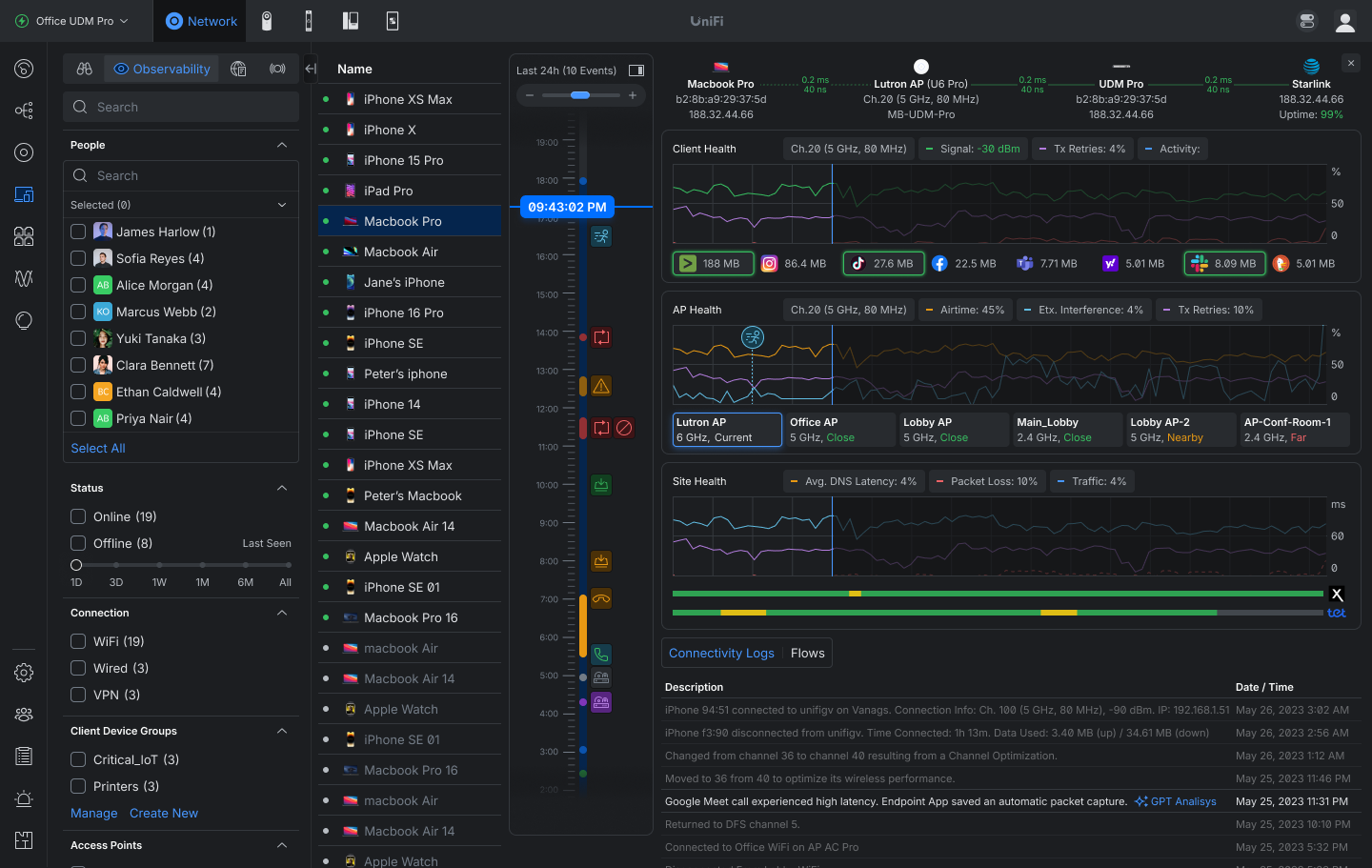
  • Review a 24-hour time machine of client activity and events.
  • Track connection quality with signal strength, TX retries, latency, and packet loss.
  • Analyze roaming history and access-point performance affecting the client experience.

ย 

Safe Ops

Safe Ops introduces proactive protection and recovery mechanisms designed to reduce outages, maintain connectivity, and improve operational resilience across UniFi deployments.
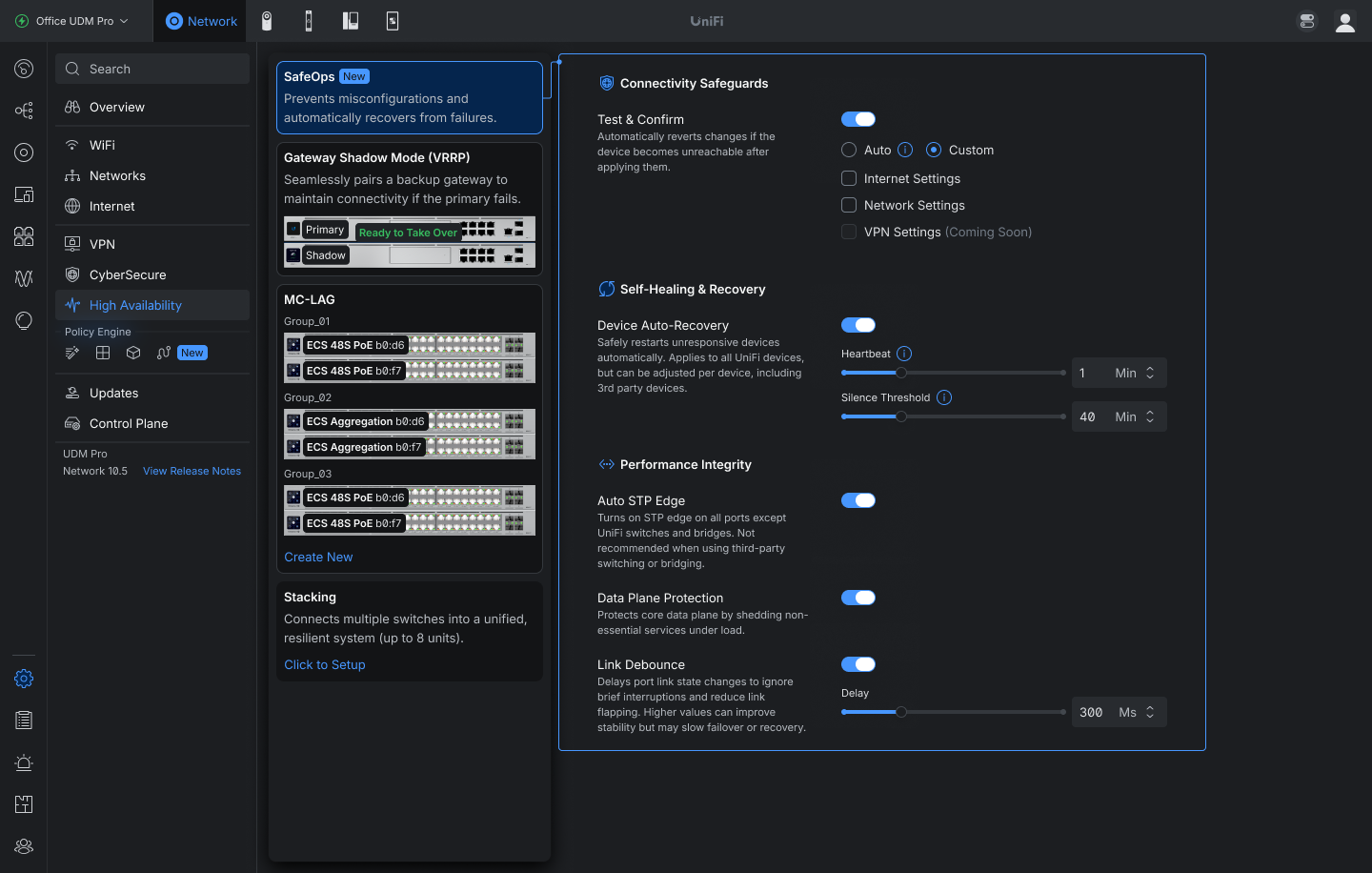
  • Added Auto STP Edge that automatically sets ports connected to end devices as Edge.
  • Added Link Debounce controls to reduce link flapping caused by brief interruptions and unstable connections.
  • Requires USW 7.5.4 or newer.
  • Added Test & Confirm safeguards that automatically roll back changes if device connectivity is lost after configuration updates.
  • Available for Internet and Network settings. Wider support coming soon.
  • Requires UniFi OS 5.1.12 or newer
  • Added Data Plane Protection.
  • Enhanced Device Supervisor with global Auto-Recovery controls, including configurable health monitoring and recovery thresholds.

Improvements

  • Added information to CyberSecure settings when Safe Mode is active.
  • Added an option to clear the Auto STP Edge assigned status in Port Manager port settings.
  • Added Domain and Description fields to Network Lists.
  • Added Local Subnet configuration for policy-based IPsec Site-to-Site VPNs.
  • Added an โ€œAdvertise BGP to SD-WANโ€ option in BGP settings.
  • Added PPPoE 1500 MTU support.
  • Added a Duplicate action for Firewall Policies in the Policy Table.
  • Added Firewall Hit and Last Hit columns to the Firewall Policy table and predefined policy side panel.
  • Added column customization to the Radios page.
  • Added column sorting to Settings Overview.
  • Added sorting to OSPF and BGP neighbor tables.
  • Added warnings for client devices using private MAC addresses.
  • Added a warning when changing 6 GHz radio settings on an MLO mesh parent.
  • Added a Person filter to the Clients page.
  • Requires One-Click WiFi.
  • Added APs with wired downlinks to Infrastructure Topology.
  • Added uplink change and device update events to Infrastructure Topology.
  • Added third-party device connection events to the Infrastructure Topology timeline.
  • Added Last Seen information to anomaly tooltips in Port Manager.
  • Added customizable Power Cycle on Internet Loss behavior with configurable delay and single-cycle recovery per outage to prevent repeated modem resets during prolonged WAN outages.
  • Added a Hardware Acceleration option for UDM Beast.
  • Added an infrared status indicator for EAV Bridge.
  • Requires firmware version 1.0.9 or newer.
  • Added migration support from Suricata 6 to Suricata 8.
  • Requires UniFi OS 5.1.20 or newer.
  • The upgrade may take up to 1 hour after updating the Network Application.
  • On consoles with high resource usage, the automatic upgrade is skipped, and a manual upgrade option is available in CyberSecure settings.
  • Improved device adoption resiliency.
  • Improved Network Application stability under high load.
  • Improved the VPN settings user experience.
  • Improved VPN client configuration validation.
  • Improved validation when configuring BGP.
  • Improved IPsec policy-based routing configuration by excluding WireGuard and OpenVPN clients from Local Network selection.
  • Improved the offline device experience in Topology.
  • Improved the STP Blocked experience in Infrastructure Topology.
  • Improved Infrastructure Topology timeline events by grouping cascading device offline and online events while clearly identifying the top uplink.
  • Improved the U5G device side panel with more detailed status information.
  • Improved database upgrade resiliency against power loss.
  • Improved Hardware Acceleration validation to check only when Smart Queues or QoS are enabled.
  • Improved the CyberSecure section user experience.
  • Improved SD-WAN Underlay resiliency.
  • Improved the Network Lists user experience and validation.
  • Improved RADIUS Server validation.
  • Improved application stability.
  • Increased the EFG IDS/IPS VLAN limit from 25 to 64.
  • Reduced U5G eSIM data usage from WAN monitoring.
  • Restored maximum download and upload speed indicators on the Dashboard.

Bugfixes

  • Fixed the security issues mentioned in Security Advisory Bulletin 067.
  • Fixed an issue where WPA Enterprise SSIDs could fail to broadcast when using a stale RADIUS accounting secret.
  • Fixed an issue where the Virtual Network Override limit was applied to clients that did not have the feature enabled.
  • Fixed an issue where LTE Pro Failover could fail in rare cases.
  • Fixed an issue where sorting by Available IPs in Network settings did not work.
  • Fixed an issue where restoring a backup disabled hardware offloading on supported consoles.
  • Fixed an issue where USW Flex downlink devices could display an incorrect uplink in rare cases.
  • Fixed an issue where Captive Portal and internet access did not work on UX7 guest networks using non-Hotspot WiFi.
  • Fixed an issue where device name changes were not reflected in Update Manager while the device was offline.
  • Fixed an issue where Access Point settings could not be saved in rare cases.
  • Fixed an issue where Hotspot Managers could not access vouchers.
  • Fixed an issue where frequent connected and disconnected logs were shown for MC-LAG target members.
  • Fixed an issue where blocked client devices could remain blocked after removal, causing connectivity issues.
  • Fixed an issue where the Network Application could fail to reinstall on Cloud Key Gen2.
  • Fixed an issue where duplicate WAN settings could be created when adopting multiple U5G devices simultaneously.
  • Fixed an issue where the VLAN ID for inter-VLAN routing networks on third-party gateways could not be edited.
  • Fixed an issue where disabling a LAN port on UX7 could prevent configuration from being provisioned to other meshed access points.
  • Fixed an issue where AV Manager was not displayed when no switches were adopted on the site.
  • Fixed an issue where jumbo frames were not correctly applied to EF-Core LAG ports.
  • Fixed an issue where switches could fail to adopt in rare cases.

Additional information


ย 

UniFi OS Server


Going forward, we recommend users upgrade toย UniFi OS Serverย for all self-hosted deployments. It provides the full UniFi OS Platform experience, ensuring you receive the latest features, improvements, and integrations.


UniFi Network Native Application for UniFi OS

Compatible with UDM, UDR, UDR7, UDR 5G Max, Express, Express 7, and UCG models (Ultra, Max, Fiber, and Industrial) on UniFi OS 3.1.6 or later. UDM-Pro, UDM-SE, and UDW have been using it since UniFi OS 5.1.5.

  • The UniFi OS update utilizes the application version compatible with your console.
  • The manual update process via SSH requires a compatible package. Incompatible packages will be rejected on installation.
  • Older UniFi OS versions (prior to UniFi OS 3.1.6) on the UDM and UDR continue to utilize the standard UniFi Network Application for UniFi OS.

ย 

ย Checksums

43e063cd9eb23da43486d94b1c6d7ba4 | UniFi-installer.exe
7fa2a2772e99a118b76d1cc5ba3ad7e4 | UniFi-Network-Server.dmg
6fba2c86ab1cb4a7f1ac68daca6079bc | UniFi.unix.zip
0b53960adc6b24c1a9fe77c5cf7336d3 | unifi_sysvinit_all.deb
fb3fc1cd76cb2505fc2e77616e40e812 | unifi-uos_sysvinit.deb
521cb64de466f4fd9fa6a62261c1349c | unifi-native_sysvinit.deb
601df32736f41e40a80a3e472450a3e1 | unifi_sh_api


------------------------------------------------------------------------------------------------------------------------


0616709e512c75bfc8a37a75d412d71cacac8b98f4e443358fb163e38aa38829 | UniFi-installer.exe
45dc63df7811d03f08bf58b44b1b3dd7b90ed8a245269acec64a0343d1ec224c | UniFi-Network-Server.dmg
2121a1b4f115388387b73d9e443312779724422f5609bdbae8309efe0ca6672c | UniFi.unix.zip
ee3b99b95678be4e1d8b58e3826e8911531b12b32ee8bf1ea4b49fb7e76f9783 | unifi_sysvinit_all.deb
052d9ea00a6afaaf225c1c9d89b3c8d4f64143e468a319255a809440f5972211 | unifi-uos_sysvinit.deb
418a6f797994917af126449d9b0072666097c5a69dd795ae4b5e36ef39917e9e | unifi-native_sysvinit.deb
1791685039ea795970bcc7a61eec854058e3e6fc13c52770e31e20f3beb622eb | unifi_sh_api
  •  

UniFi Network Application 10.5.66

Overview

UniFi Network Application 10.5.66 includes the improvements and bugfixes listed below.

Improvements

  • Improved Auto STP Edge detection.
  • Improved Network Application stability.
  • Improved Control Plane protection detection stability.
  • Restored maximum download and upload speed indicators on the Dashboard.

Bugfixes

  • Fixed a rare issue where the Network Application could fail to start after reverting to an older version.

Additional information


ย 

UniFi OS Server


Going forward, we recommend users upgrade toย UniFi OS Serverย for all self-hosted deployments. It provides the full UniFi OS Platform experience, ensuring you receive the latest features, improvements, and integrations.


UniFi Network Native Application for UniFi OS

Compatible with UDM, UDR, UDR7, UDR 5G Max, Express, Express 7, and UCG models (Ultra, Max, Fiber, and Industrial) on UniFi OS 3.1.6 or later. UDM-Pro, UDM-SE, and UDW have been using it since UniFi OS 5.1.5.

  • The UniFi OS update utilizes the application version compatible with your console.
  • The manual update process via SSH requires a compatible package. Incompatible packages will be rejected on installation.
  • Older UniFi OS versions (prior to UniFi OS 3.1.6) on the UDM and UDR continue to utilize the standard UniFi Network Application for UniFi OS.

ย 

ย Checksums

74328b781d1a7dc235205ee3f0f965d4 | UniFi-installer.exe
7016318ae9a337fe34d04d88693ac2ff | UniFi-Network-Server.dmg
9a5148e91d8e4635ab74cd9b1c477d56 | UniFi.unix.zip
83def636c79b4b24a4addbb01ad64ba0 | unifi_sysvinit_all.deb
584c11e2b4db50b21da35757d17de200 | unifi-uos_sysvinit.deb
255f70436823c83670b9f96a3e16dfc9 | unifi-native_sysvinit.deb
601df32736f41e40a80a3e472450a3e1 | unifi_sh_api


------------------------------------------------------------------------------------------------------------------------


7cc3ff0fa9e9c94b80548c2b70145c502ba6bdc7c480ba19d61fb369261c5228 | UniFi-installer.exe
2171ecff57c1c26db6aeb536e8df850041d5f3c304e06202b88a8c683d41caff | UniFi-Network-Server.dmg
305fb51fc433cc47314dd08d426a4c451599f2341f0eab7c6e583897231a14ff | UniFi.unix.zip
e77a09985f917f377b477fa204198ae805c0e4aa273f879098b1a8d3677bd732 | unifi_sysvinit_all.deb
a919a6a90e8cd8f4030617d4657ac3fef125d3d4a5f735b6b994768774e91ccd | unifi-uos_sysvinit.deb
24a61d59e12381ddacae2d7c82ccebef2562da141e1ec6a3bcbfd3bec697e962 | unifi-native_sysvinit.deb
1791685039ea795970bcc7a61eec854058e3e6fc13c52770e31e20f3beb622eb | unifi_sh_api
  •  

UniFi Network Application 10.5.62

Overview

UniFi Network Application 10.5.62 includes the improvements and bugfixes listed below.

Improvements

  • Added information to CyberSecure settings when Safe Mode is active.
  • Added an option to clear the Auto STP Edge assigned status in Port Manager port settings.
  • Improved SD-WAN Underlay resiliency.
  • Improved the Network Lists user experience and validation.
  • Improved RADIUS Server validation.
  • Improved application stability.

Bugfixes

  • Fixed an issue where the STP column in Port Manager Time Machine did not reflect the correct state.
  • Fixed an issue where U-LTE adoption could trigger a gateway configuration error.
  • Fixed an issue where the Network Application could fail to start after upgrading to Network 10.5.57 on sites with a large number of Traffic Flows.
  • Upgrading from Network 10.5 versions may take up to 30 minutes on sites with a large number of Traffic Flows.
  • Fixed an issue where the Test & Confirm feature appeared as available on devices that did not meet the UniFi OS 5.1 requirement.
  • Fixed an issue where traffic flow retention was not properly enforced.
  • Fixed an issue where Firewall Blocked and Policy-Based Routing system logs were not forwarded to remote SIEM servers.
  • Fixed an issue where console memory usage could continue to grow if downloading Traffic Flows was canceled before completion.

Additional information


ย 

UniFi OS Server


Going forward, we recommend users upgrade toย UniFi OS Serverย for all self-hosted deployments. It provides the full UniFi OS Platform experience, ensuring you receive the latest features, improvements, and integrations.


UniFi Network Native Application for UniFi OS

Compatible with UDM, UDR, UDR7, UDR 5G Max, Express, Express 7, and UCG models (Ultra, Max, Fiber, and Industrial) on UniFi OS 3.1.6 or later. UDM-Pro, UDM-SE, and UDW have been using it since UniFi OS 5.1.5.

  • The UniFi OS update utilizes the application version compatible with your console.
  • The manual update process via SSH requires a compatible package. Incompatible packages will be rejected on installation.
  • Older UniFi OS versions (prior to UniFi OS 3.1.6) on the UDM and UDR continue to utilize the standard UniFi Network Application for UniFi OS.

ย 

ย Checksums

800f49d04e6229af77978f033f208da0 | UniFi-installer.exe
dd46f32720dbd010b3488dc79cbb058f | UniFi-Network-Server.dmg
4b14da8ed9693cf92a279e192576ea76 | UniFi.unix.zip
533e57bae6edc82557bf9b0e766dd2df | unifi_sysvinit_all.deb
2048a2499931191d0877a1d40e20811b | unifi-uos_sysvinit.deb
13947caa6256f181c8aea99ad62056a7 | unifi-native_sysvinit.deb
601df32736f41e40a80a3e472450a3e1 | unifi_sh_api


------------------------------------------------------------------------------------------------------------------------


8c786751d530a93743875e7adf44b46f1c8758bec8323efddd2f5a464e576e08 | UniFi-installer.exe
1117a7c5134dc6a29d9ec4f69333f4407dc928c397c0c8d995a50c0a560d4b91 | UniFi-Network-Server.dmg
aebf6f08a84308e004be4d355db37068b66155e1747dd149b42c410eb3d3ca67 | UniFi.unix.zip
65d4232eef35483a12aacb356c93a2f6f7b543caa2a6773bdce8b08f45a1956b | unifi_sysvinit_all.deb
ea159dc7957e2c8b05355106a3be552b4afb8212ff2945141ef94b5513b1d983 | unifi-uos_sysvinit.deb
e25010052d2cabdaf2f12843dde5795e1952e760ed4462296b46a049063f5d49 | unifi-native_sysvinit.deb
1791685039ea795970bcc7a61eec854058e3e6fc13c52770e31e20f3beb622eb | unifi_sh_api
  •  
โŒ