The DistroWatch news feed is brought to you by TUXEDO COMPUTERS. TUXEDO Computers, a German-based manufacturer of Linux desktop and laptop computers, has announced the release of the initial public beta build of its Debian-based TUXEDO OS. While the past releases of the distribution were based on Ubuntu, the project has recently decided to switch to Debian's "Testing" branch....
The DistroWatch news feed is brought to you by TUXEDO COMPUTERS. PrismLinux, an Arch-based Linux distribution with a custom system installer and support for Cinnamon, GNOME and KDE Plasma desktops, as well as the niri Wayland compositor, has been updated to version 2026.08.15: "After more than two months without a release, PrismLinux Reborn 1.0 is finally here. This release....
Fixed listboxes and table menus losing their Alpine and Livewire scope during UI updates, preventing dropdown positioning errors and broken menus (#11311; closed #11308, #11309, and #11310).
What's Changed
fix(ui): prevent floating dropdown Alpine scope errors by @andrasbacsai in #11311
This is a small release backporting a few changes to the stable version of the app. We'll be starting the beta for version 0.20 in the coming weeks, which will require Jellyfin 10.11 or newer.
Fixed an error that prevented eligible teams’ danger zones from loading (#11305; closed #11303).
Added subscription access for Coolify Cloud team admins, correctly positioned the mobile account menu, and preserved the server-limit adjustment modal during updates.
Improvements
Standardized pagination, page-size controls, and responsive filter and sorting menus across resource lists.
Constrained the deployment log viewer’s desktop height for easier navigation.
What's Changed
fix(team): prevent danger zone source loading error by @andrasbacsai in #11305
fix(deployment): restore deployment log download actions by @andrasbacsai in #11306
We're excited to announce that we'll be hosting another SCS Fan Day Experience on the 2nd of October, inviting a selection of fans from our #BestCommunityEver to join us for a memorable afternoon at our offices in Prague! If you'd like to visit us, you'll find all the important information, along with the application form, below.
We hosted the last Fan Day in May. It was awesome to meet with dedicated members from our community, as we gave them a guided tour of our office, where they had the opportunity to try our 4D Motion Simulator, meet with some of our colleagues, and take a look behind the scenes of our projects. We then wrapped up the day with snacks and coffee in our fun zone, followed by a Q&A with our team and CEO, Pavel Šebor. To top it all off, our guests received a small gift bag filled with our merchandise. You can watch our wrap-up video from the day below.
And on our next Fan Day in October, we plan to do the same, so if this is something you are interested in, make sure to read further and apply below until the 31st of August! From all applicants, SCS Software will personally select 20 community members, and we reserve the right to make the final choice.
Before you apply, it's important to note that SCS Software unfortunately cannot cover accommodation and travel costs, so if you are selected, you will need to cover these expenses yourself. Also, the event date is fixed and cannot be changed, so if chosen, you will need to be at our offices in Prague, Czech Republic, on the 2nd of October, 2026. Additionally, if you are under the age of 18, you will be required to bring an accompanying adult with you to the event.
And that's it! We are very much looking forward to seeing all your applications - make sure to include as much information about yourself as possible. Maybe even include a photo or a short video introducing yourself and your passion for our games, which might boost your chances of being selected. And don't forget to regularly check your email inbox, as we will contact you there if you are selected.
We cannot wait to welcome our passionate fans to our offices once again and spend another memorable afternoon with them. So don't hesitate and fill out the application form!
UniFi OS Server allows users to run the full UniFi OS experience on their own Windows, macOS, or Linux hardware. Initially, it will support the UniFi Network and InnerSpace application.
Benefits of UniFi OS Server (Compared to Self-Hosting Only the Network Application)
Opting for a UniFi OS Server provides several advantages over simply running the standalone UniFi Network application:
Full UniFi OS Experience: Enjoy the comprehensive and unified UniFi OS interface, providing a consistent management experience similar to that found on official UniFi Consoles.
Future-Proof Platform: Built on the UniFi OS foundation, this self-hosted solution is better positioned to support new features, updates, and upcoming UniFi applications, offering greater extensibility.
Unified Updates: Manage updates for the underlying UniFi OS and its applications through a more integrated process.
System Requirements
Storage:
Minimum: 20GB of free disk space.
Software Dependencies:
The UniFi OS Server installer will typically include necessary dependencies or guide you through their setup.
On Linux - Podman 4.3.1 or higher.
On Windows - WSL (Windows Subsystem for Linux) version 2 - installed during setup.
UniFi Network Application 10.5.67 includes the improvements and bugfixes listed below.
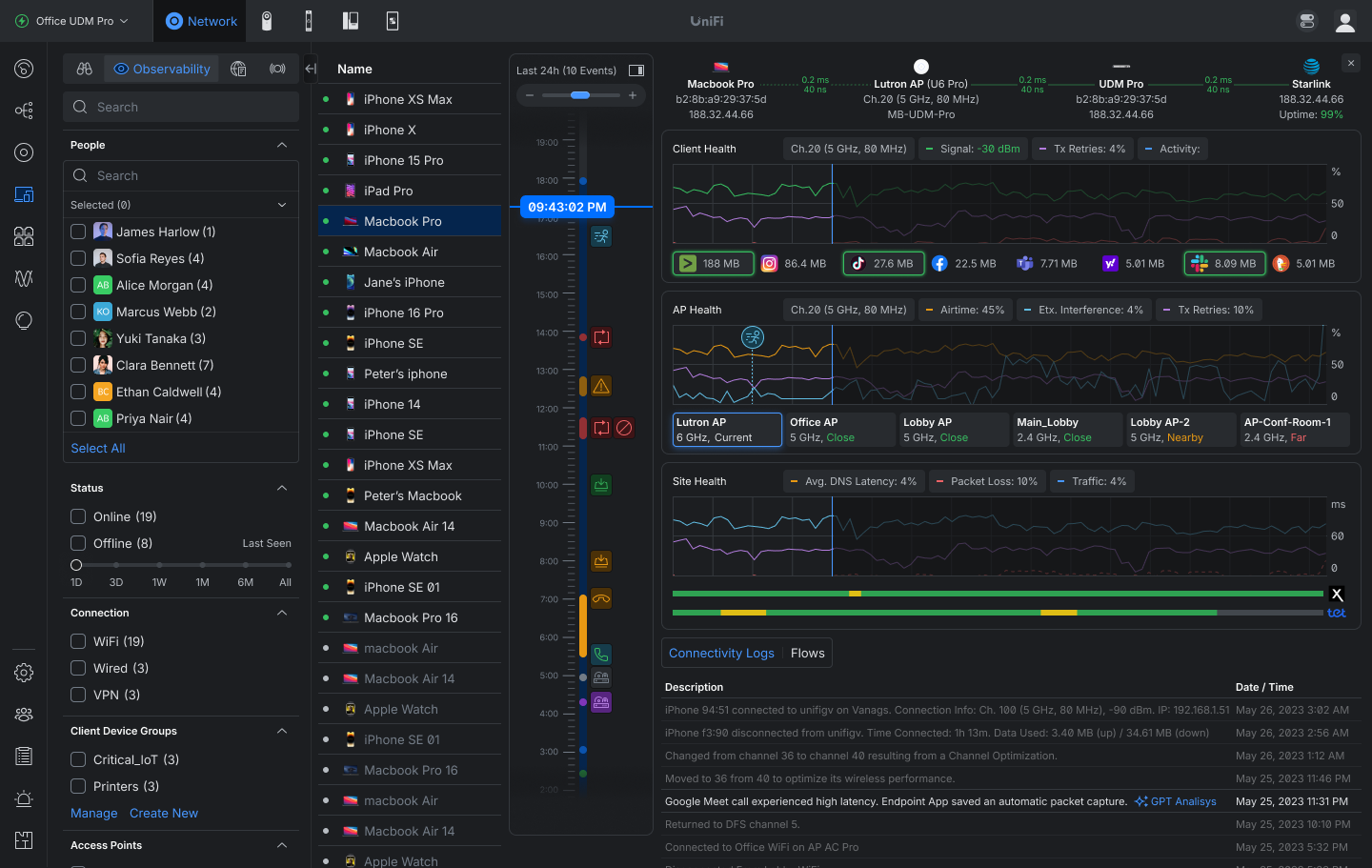
Client Observability
Gain complete visibility into client behavior with a 24-hour activity timeline that correlates connectivity, roaming, application usage, and network health into a single troubleshooting experience.
Review a 24-hour time machine of client activity and events.
Track connection quality with signal strength, TX retries, latency, and packet loss.
Analyze roaming history and access-point performance affecting the client experience.
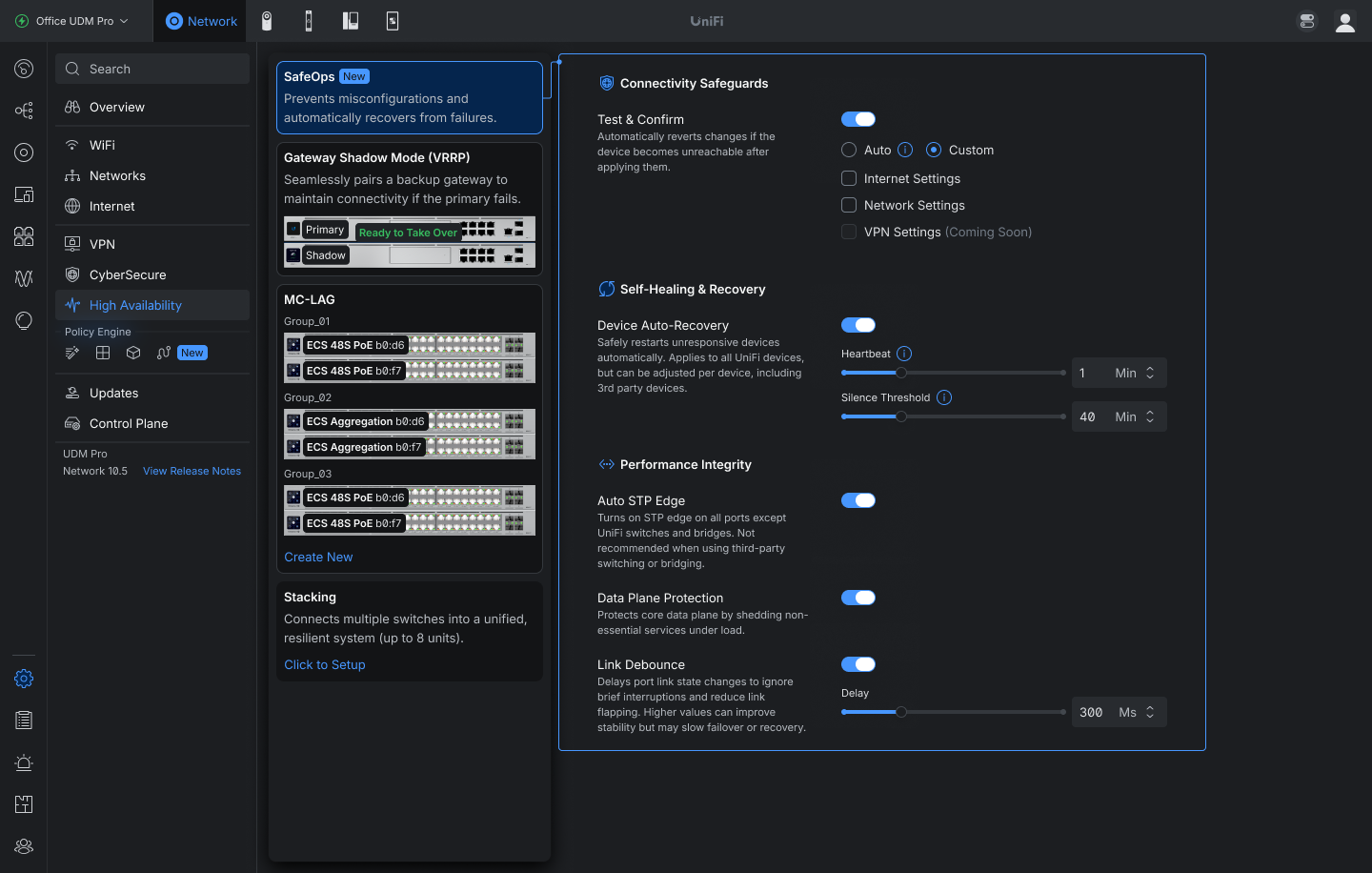
Safe Ops
Safe Ops introduces proactive protection and recovery mechanisms designed to reduce outages, maintain connectivity, and improve operational resilience across UniFi deployments.
Added Auto STP Edge that automatically sets ports connected to end devices as Edge.
Added Link Debounce controls to reduce link flapping caused by brief interruptions and unstable connections.
Requires USW 7.5.4 or newer.
Added Test & Confirm safeguards that automatically roll back changes if device connectivity is lost after configuration updates.
Available for Internet and Network settings. Wider support coming soon.
Requires UniFi OS 5.1.12 or newer
Added Data Plane Protection.
Enhanced Device Supervisor with global Auto-Recovery controls, including configurable health monitoring and recovery thresholds.
Improvements
Added information to CyberSecure settings when Safe Mode is active.
Added an option to clear the Auto STP Edge assigned status in Port Manager port settings.
Added Domain and Description fields to Network Lists.
Added Local Subnet configuration for policy-based IPsec Site-to-Site VPNs.
Added an “Advertise BGP to SD-WAN” option in BGP settings.
Added PPPoE 1500 MTU support.
Added a Duplicate action for Firewall Policies in the Policy Table.
Added Firewall Hit and Last Hit columns to the Firewall Policy table and predefined policy side panel.
Added column customization to the Radios page.
Added column sorting to Settings Overview.
Added sorting to OSPF and BGP neighbor tables.
Added warnings for client devices using private MAC addresses.
Added a warning when changing 6 GHz radio settings on an MLO mesh parent.
Added a Person filter to the Clients page.
Requires One-Click WiFi.
Added APs with wired downlinks to Infrastructure Topology.
Added uplink change and device update events to Infrastructure Topology.
Added third-party device connection events to the Infrastructure Topology timeline.
Added Last Seen information to anomaly tooltips in Port Manager.
Added customizable Power Cycle on Internet Loss behavior with configurable delay and single-cycle recovery per outage to prevent repeated modem resets during prolonged WAN outages.
Added a Hardware Acceleration option for UDM Beast.
Added an infrared status indicator for EAV Bridge.
Requires firmware version 1.0.9 or newer.
Added migration support from Suricata 6 to Suricata 8.
Requires UniFi OS 5.1.20 or newer.
The upgrade may take up to 1 hour after updating the Network Application.
On consoles with high resource usage, the automatic upgrade is skipped, and a manual upgrade option is available in CyberSecure settings.
Improved device adoption resiliency.
Improved Network Application stability under high load.
Improved the VPN settings user experience.
Improved VPN client configuration validation.
Improved validation when configuring BGP.
Improved IPsec policy-based routing configuration by excluding WireGuard and OpenVPN clients from Local Network selection.
Improved the offline device experience in Topology.
Improved the STP Blocked experience in Infrastructure Topology.
Improved Infrastructure Topology timeline events by grouping cascading device offline and online events while clearly identifying the top uplink.
Improved the U5G device side panel with more detailed status information.
Improved database upgrade resiliency against power loss.
Improved Hardware Acceleration validation to check only when Smart Queues or QoS are enabled.
Improved the CyberSecure section user experience.
Improved SD-WAN Underlay resiliency.
Improved the Network Lists user experience and validation.
Improved RADIUS Server validation.
Improved application stability.
Increased the EFG IDS/IPS VLAN limit from 25 to 64.
Reduced U5G eSIM data usage from WAN monitoring.
Restored maximum download and upload speed indicators on the Dashboard.
Fixed an issue where WPA Enterprise SSIDs could fail to broadcast when using a stale RADIUS accounting secret.
Fixed an issue where the Virtual Network Override limit was applied to clients that did not have the feature enabled.
Fixed an issue where LTE Pro Failover could fail in rare cases.
Fixed an issue where sorting by Available IPs in Network settings did not work.
Fixed an issue where restoring a backup disabled hardware offloading on supported consoles.
Fixed an issue where USW Flex downlink devices could display an incorrect uplink in rare cases.
Fixed an issue where Captive Portal and internet access did not work on UX7 guest networks using non-Hotspot WiFi.
Fixed an issue where device name changes were not reflected in Update Manager while the device was offline.
Fixed an issue where Access Point settings could not be saved in rare cases.
Fixed an issue where Hotspot Managers could not access vouchers.
Fixed an issue where frequent connected and disconnected logs were shown for MC-LAG target members.
Fixed an issue where blocked client devices could remain blocked after removal, causing connectivity issues.
Fixed an issue where the Network Application could fail to reinstall on Cloud Key Gen2.
Fixed an issue where duplicate WAN settings could be created when adopting multiple U5G devices simultaneously.
Fixed an issue where the VLAN ID for inter-VLAN routing networks on third-party gateways could not be edited.
Fixed an issue where disabling a LAN port on UX7 could prevent configuration from being provisioned to other meshed access points.
Fixed an issue where AV Manager was not displayed when no switches were adopted on the site.
Fixed an issue where jumbo frames were not correctly applied to EF-Core LAG ports.
Fixed an issue where switches could fail to adopt in rare cases.
Additional information
UniFi OS Server
Going forward, we recommend users upgrade to UniFi OS Server for all self-hosted deployments. It provides the full UniFi OS Platform experience, ensuring you receive the latest features, improvements, and integrations.
UniFi Network Native Application for UniFi OS
Compatible with UDM, UDR, UDR7, UDR 5G Max, Express, Express 7, and UCG models (Ultra, Max, Fiber, and Industrial) on UniFi OS 3.1.6 or later. UDM-Pro, UDM-SE, and UDW have been using it since UniFi OS 5.1.5.
The UniFi OS update utilizes the application version compatible with your console.
The manual update process via SSH requires a compatible package. Incompatible packages will be rejected on installation.
Older UniFi OS versions (prior to UniFi OS 3.1.6) on the UDM and UDR continue to utilize the standard UniFi Network Application for UniFi OS.
UniFi Network Application 10.5.66 includes the improvements and bugfixes listed below.
Improvements
Improved Auto STP Edge detection.
Improved Network Application stability.
Improved Control Plane protection detection stability.
Restored maximum download and upload speed indicators on the Dashboard.
Bugfixes
Fixed a rare issue where the Network Application could fail to start after reverting to an older version.
Additional information
UniFi OS Server
Going forward, we recommend users upgrade to UniFi OS Server for all self-hosted deployments. It provides the full UniFi OS Platform experience, ensuring you receive the latest features, improvements, and integrations.
UniFi Network Native Application for UniFi OS
Compatible with UDM, UDR, UDR7, UDR 5G Max, Express, Express 7, and UCG models (Ultra, Max, Fiber, and Industrial) on UniFi OS 3.1.6 or later. UDM-Pro, UDM-SE, and UDW have been using it since UniFi OS 5.1.5.
The UniFi OS update utilizes the application version compatible with your console.
The manual update process via SSH requires a compatible package. Incompatible packages will be rejected on installation.
Older UniFi OS versions (prior to UniFi OS 3.1.6) on the UDM and UDR continue to utilize the standard UniFi Network Application for UniFi OS.
UniFi Network Application 10.5.62 includes the improvements and bugfixes listed below.
Improvements
Added information to CyberSecure settings when Safe Mode is active.
Added an option to clear the Auto STP Edge assigned status in Port Manager port settings.
Improved SD-WAN Underlay resiliency.
Improved the Network Lists user experience and validation.
Improved RADIUS Server validation.
Improved application stability.
Bugfixes
Fixed an issue where the STP column in Port Manager Time Machine did not reflect the correct state.
Fixed an issue where U-LTE adoption could trigger a gateway configuration error.
Fixed an issue where the Network Application could fail to start after upgrading to Network 10.5.57 on sites with a large number of Traffic Flows.
Upgrading from Network 10.5 versions may take up to 30 minutes on sites with a large number of Traffic Flows.
Fixed an issue where the Test & Confirm feature appeared as available on devices that did not meet the UniFi OS 5.1 requirement.
Fixed an issue where traffic flow retention was not properly enforced.
Fixed an issue where Firewall Blocked and Policy-Based Routing system logs were not forwarded to remote SIEM servers.
Fixed an issue where console memory usage could continue to grow if downloading Traffic Flows was canceled before completion.
Additional information
UniFi OS Server
Going forward, we recommend users upgrade to UniFi OS Server for all self-hosted deployments. It provides the full UniFi OS Platform experience, ensuring you receive the latest features, improvements, and integrations.
UniFi Network Native Application for UniFi OS
Compatible with UDM, UDR, UDR7, UDR 5G Max, Express, Express 7, and UCG models (Ultra, Max, Fiber, and Industrial) on UniFi OS 3.1.6 or later. UDM-Pro, UDM-SE, and UDW have been using it since UniFi OS 5.1.5.
The UniFi OS update utilizes the application version compatible with your console.
The manual update process via SSH requires a compatible package. Incompatible packages will be rejected on installation.
Older UniFi OS versions (prior to UniFi OS 3.1.6) on the UDM and UDR continue to utilize the standard UniFi Network Application for UniFi OS.
Gain complete visibility into client behavior with a 24-hour activity timeline that correlates connectivity, roaming, application usage, and network health into a single troubleshooting experience.
Review a 24-hour time machine of client activity and events.
Track connection quality with signal strength, TX retries, latency, and packet loss.
Analyze roaming history and access-point performance affecting the client experience.
Safe Ops
Safe Ops introduces proactive protection and recovery mechanisms designed to reduce outages, maintain connectivity, and improve operational resilience across UniFi deployments.
Added Auto STP Edge that automatically sets ports connected to end devices as Edge.
Added Link Debounce controls to reduce link flapping caused by brief interruptions and unstable connections.
Requires USW 7.5.4 or newer.
Added Test & Confirm safeguards that automatically roll back changes if device connectivity is lost after configuration updates.
Available for Internet and Network settings. Wider support coming soon.
Requires UniFi OS 5.1.12 or newer
Added Data Plane Protection.
Enhanced Device Supervisor with global Auto-Recovery controls, including configurable health monitoring and recovery thresholds.
Improvements
Added Domain and Description fields to Network Lists.
Added Local Subnet configuration for policy-based IPsec Site-to-Site VPNs.
Added an “Advertise BGP to SD-WAN” option in BGP settings.
Added PPPoE 1500 MTU support.
Added a Duplicate action for Firewall Policies in the Policy Table.
Added Firewall Hit and Last Hit columns to the Firewall Policy table and predefined policy side panel.
Added column customization to the Radios page.
Added column sorting to Settings Overview.
Added sorting to OSPF and BGP neighbor tables.
Added warnings for client devices using private MAC addresses.
Added a warning when changing 6 GHz radio settings on an MLO mesh parent.
Added a Person filter to the Clients page.
Requires One-Click WiFi.
Added APs with wired downlinks to Infrastructure Topology.
Added uplink change and device update events to Infrastructure Topology.
Added third-party device connection events to the Infrastructure Topology timeline.
Added Last Seen information to anomaly tooltips in Port Manager.
Added customizable Power Cycle on Internet Loss behavior with configurable delay and single-cycle recovery per outage to prevent repeated modem resets during prolonged WAN outages.
Added a Hardware Acceleration option for UDM Beast.
Added an infrared status indicator for EAV Bridge.
Requires firmware version 1.0.9 or newer.
Added migration support from Suricata 6 to Suricata 8.
Requires UniFi OS 5.1.20 or newer.
The upgrade may take up to 1 hour after updating the Network Application.
On consoles with high resource usage, the automatic upgrade is skipped, and a manual upgrade option is available in CyberSecure settings.
Improved device adoption resiliency.
Improved Network Application stability under high load.
Improved the VPN settings user experience.
Improved VPN client configuration validation.
Improved validation when configuring BGP.
Improved IPsec policy-based routing configuration by excluding WireGuard and OpenVPN clients from Local Network selection.
Improved the offline device experience in Topology.
Improved the STP Blocked experience in Infrastructure Topology.
Improved Infrastructure Topology timeline events by grouping cascading device offline and online events while clearly identifying the top uplink.
Improved the U5G device side panel with more detailed status information.
Improved database upgrade resiliency against power loss.
Improved Hardware Acceleration validation to check only when Smart Queues or QoS are enabled.
Improved the CyberSecure section user experience.
Increased the EFG IDS/IPS VLAN limit from 25 to 64.
Reduced U5G eSIM data usage from WAN monitoring.
Bugfixes
Fixed an issue where WPA Enterprise SSIDs could fail to broadcast when using a stale RADIUS accounting secret.
Fixed an issue where the Virtual Network Override limit was applied to clients that did not have the feature enabled.
Fixed an issue where LTE Pro Failover could fail in rare cases.
Fixed an issue where sorting by Available IPs in Network settings did not work.
Fixed an issue where restoring a backup disabled hardware offloading on supported consoles.
Fixed an issue where USW Flex downlink devices could display an incorrect uplink in rare cases.
Fixed an issue where Captive Portal and internet access did not work on UX7 guest networks using non-Hotspot WiFi.
Fixed an issue where device name changes were not reflected in Update Manager while the device was offline.
Fixed an issue where Access Point settings could not be saved in rare cases.
Fixed an issue where Hotspot Managers could not access vouchers.
Fixed an issue where frequent connected and disconnected logs were shown for MC-LAG target members.
Fixed an issue where blocked client devices could remain blocked after removal, causing connectivity issues.
Fixed an issue where the Network Application could fail to reinstall on Cloud Key Gen2.
Fixed an issue where duplicate WAN settings could be created when adopting multiple U5G devices simultaneously.
Fixed an issue where the VLAN ID for inter-VLAN routing networks on third-party gateways could not be edited.
Fixed an issue where disabling a LAN port on UX7 could prevent configuration from being provisioned to other meshed access points.
Fixed an issue where AV Manager was not displayed when no switches were adopted on the site.
Fixed an issue where jumbo frames were not correctly applied to EF-Core LAG ports.
Fixed an issue where switches could fail to adopt in rare cases.
Additional information
UniFi OS Server
Going forward, we recommend users upgrade to UniFi OS Server for all self-hosted deployments. It provides the full UniFi OS Platform experience, ensuring you receive the latest features, improvements, and integrations.
UniFi Network Native Application for UniFi OS
Compatible with UDM, UDR, UDR7, UDR 5G Max, Express, Express 7, and UCG models (Ultra, Max, Fiber, and Industrial) on UniFi OS 3.1.6 or later. UDM-Pro, UDM-SE, and UDW have been using it since UniFi OS 5.1.5.
The UniFi OS update utilizes the application version compatible with your console.
The manual update process via SSH requires a compatible package. Incompatible packages will be rejected on installation.
Older UniFi OS versions (prior to UniFi OS 3.1.6) on the UDM and UDR continue to utilize the standard UniFi Network Application for UniFi OS.
UniFi Network Application 10.4.57 introduces enhanced routing and visibility features, including a new Routing experience with expanded Policy-Based Routing capabilities.
WAN Insights and WiFi Airtime Visibility
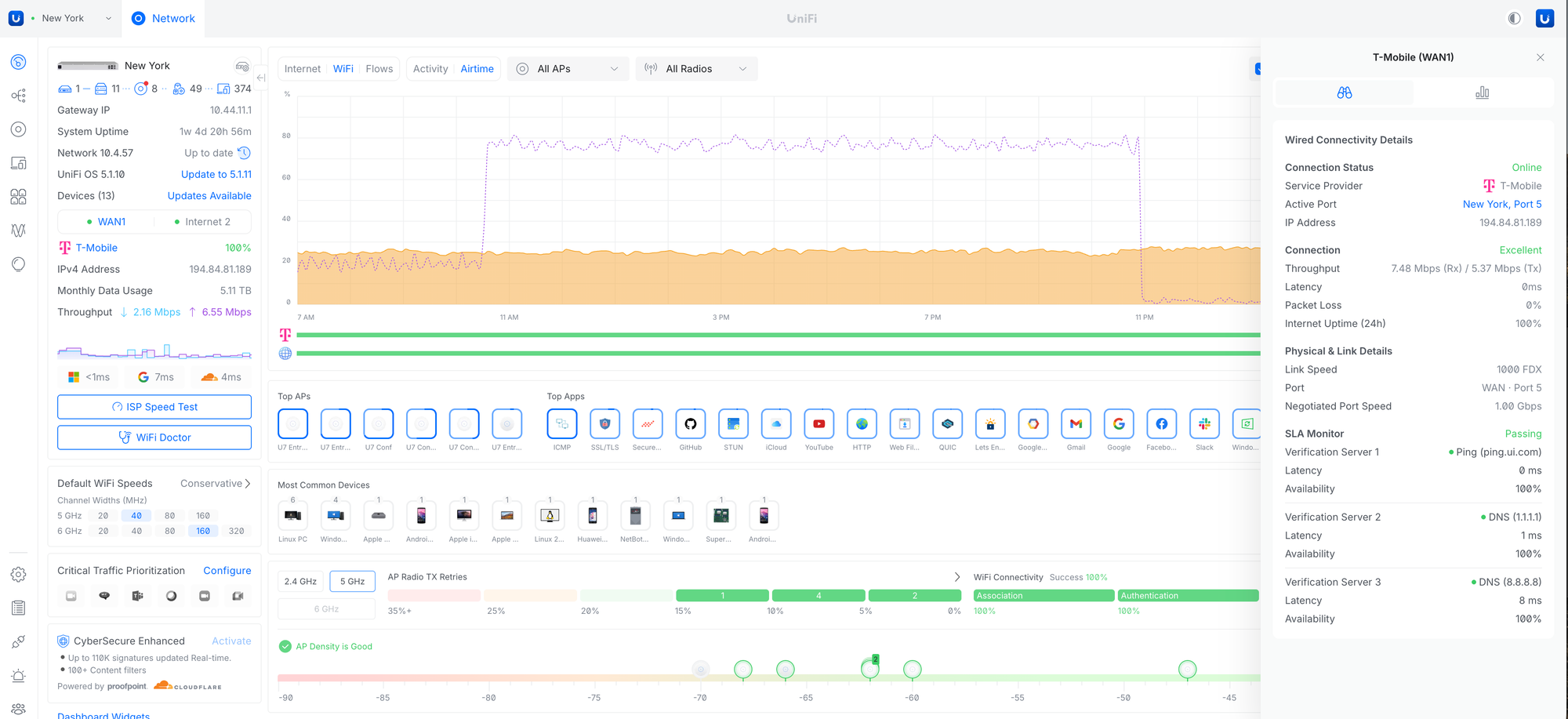
Expanded Dashboard visibility with new WiFi Airtime, Multicast, and WAN health insights, along with improved ISP and 5G monitoring through enhanced connectivity details, SLA visibility, and utilization metrics.
Added WiFi Airtime and Multicast activity graphs to the Dashboard.
Improved the WAN and ISP side panel with SLA, latency, packet loss, and utilization insights.
Expanded 5G and cellular connection visibility and diagnostics.
Requires U5G firmware 7.4.1 or newer.
Routing User Experience/FIB table
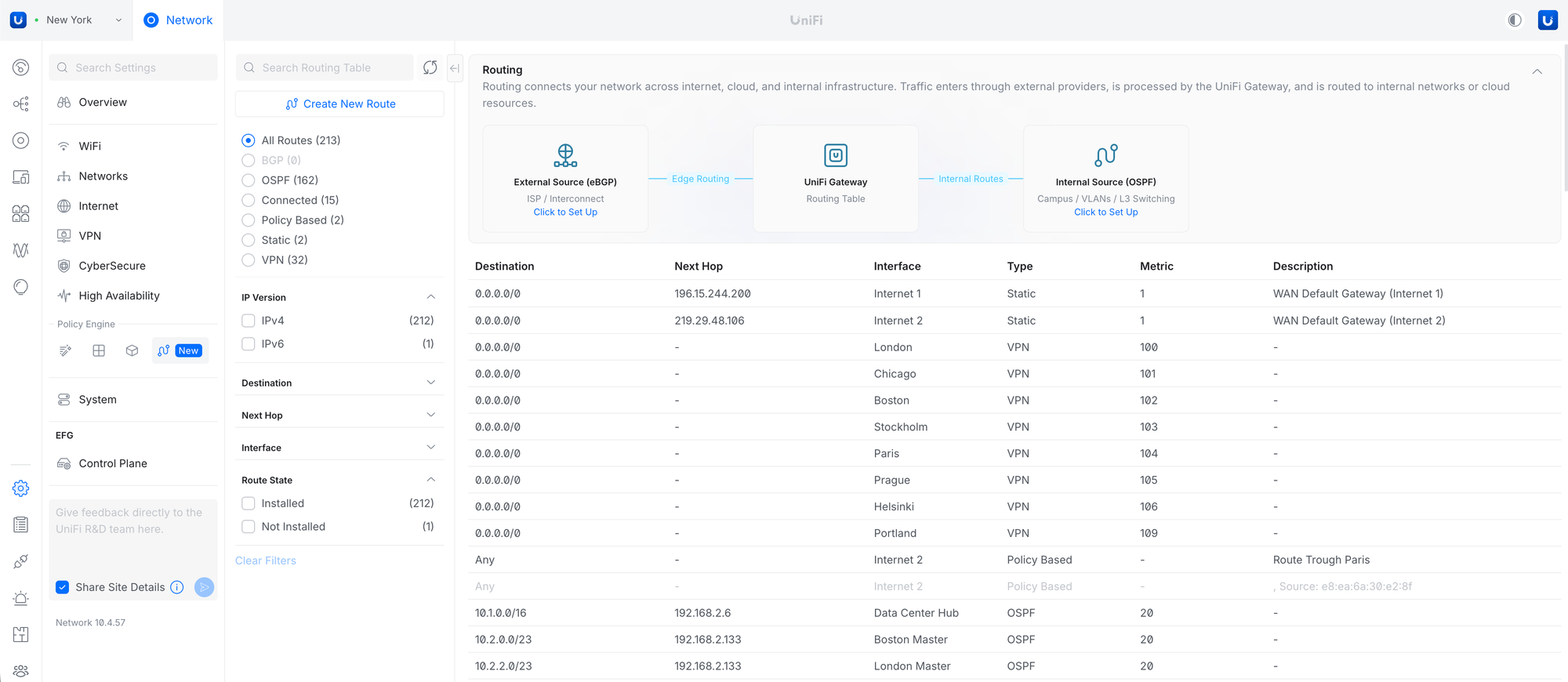
Introduced a centralized Routing view for managing and troubleshooting Static, OSPF, BGP, Connected, and Policy-Based routes, along with a unified FIB table that provides visibility into route destinations, next hops, interfaces, metrics, and routing sources across the gateway.
Improvements
Added a Tags column to the Devices page.
Added an Installation Date column to the Devices page.
Added a warning about data usage before running a Speed Test on 5G WAN.
Added an IPv6 Detection banner to the Dashboard.
Requires UniFi OS 5.1.8 or newer.
Added a Power Sources column to the device list.
Added Pro AV and Tagged VLAN columns to Port Manager.
Added warnings when VLAN tagging conflicts are detected.
Added Time Machine to Infrastructure Topology.
Added an option to configure Safe Shutdown Trigger Point and Auto-Recovery power cycle delay.
Requires UPS 1.4.30 or newer.
Added a suggestion in Infrastructure Topology to set devices as Edge to improve STP convergence.
Added a notice when saving Content Filtering exceptions that client-side DNS may cache entries for up to 1 hour.
Added support for using UXG-Fiber as an SD-WAN hub.
Added the ability to change the VPN gateway netmask when existing clients are present.
Added the ability to configure Static and Policy-Based Routes from the Routing section.
Added an STP column and filters to the Ports page.
Improved feedback in Port Manager and WiFi Broadcast settings when VLAN tagging conflicts are detected.
Improved validation for WireGuard IPv6 MTU and MSS settings.
Improved SSL certificate generation used in Deep Inspection.
Improved Remote Activity Logging by allowing configuration for Gateway, Switch, and Access Point logging.
Improved the VPN settings user experience.
Improved WiFi Broadcast settings.
Renamed Roaming Assistant to Handoff Suggestions (802.11v) and expanded support to 6 GHz.
Added new IoT optimization settings, including DTIM Interval Lock and Channel Lock options.
Replaced legacy IoT Mode with the new Force WiFi 4 compatibility option.
Improved IP display for meshed devices.
Improved the VPN connection user experience in the Clients section.
Improved Clients page performance when handling large amounts of offline clients.
Improved Site Magic connectivity.
Improved the Infrastructure Topology Time Machine user experience.
Improved the Reset Stats option in Port Manager.
It now also clears Last Seen devices.
Improved the Zone-Based Firewall policy reordering user experience.
Improved the Port Manager settings user experience.
Improved application resiliency.
Improved WiFi settings validation for Handoff Suggestions (6 GHz).
Disabled DNS Assistance when Captive Portal is enabled.
Moved Email Services to Control Plane Settings.
If a custom email service is used, it must be reconfigured in Control Plane after the update.
Bugfixes
Fixed an issue where view-only admins did not receive email notifications.
Fixed an issue where settings provisioning did not occur after device re-adoption in rare cases.
Fixed an issue where SD-WAN could fail to sync and new networks could not be created after applying a Blueprint in rare cases.
Fixed an issue where U-LTE settings could not be saved in rare cases.
Fixed an issue where IGMP Snooping settings could fail to be provisioned in rare cases.
Fixed an issue where Port Manager and Device settings could fail to save changes in rare cases.
Fixed an issue where flow control settings in Port Profiles could fail to save.
Fixed an issue where port forwarding on L3 networks in zone-based firewall rules did not work properly.
Fixed an issue where LTE backup settings in VLAN configuration were not respected in zone-based firewall rules in rare cases.
Fixed an issue where clients with only a fixed IP and no dynamic IP were missing from the IP table.
Fixed an issue where WAN3 port assignment could fail after restoring a backup.
Fixed a gateway configuration error when entering an invalid IPv6 range in network settings.
Fixed an issue where the UDB Pro mesh parent was not displayed in the side panel.
Fixed an issue where LCM night mode settings could fail to save in rare cases.
Fixed an issue where third-party clients were missing from Infrastructure Topology.
Fixed an issue where navigating to Channel AI could result in a dead end.
Fixed an issue where the Captive Portal did not work when connected to a UX7 in Mesh Mode.
Fixed an issue where the Etherlighting network option was missing.
Fixed an issue where some devices could fail to adopt via UniFi Auto-Link on Cloud Gateways with built-in WiFi when using a WiFi broadcast with a non-default network assigned.
Fixed an issue where Multicast Storm Control was not applied from Port Profiles when Pro AV QoS was not in use.
Going forward, we recommend users upgrade to UniFi OS Server for all self-hosted deployments. It provides the full UniFi OS Platform experience, ensuring you receive the latest features, improvements, and integrations.
UniFi Network Native Application for UniFi OS
Compatible with UDM, UDR, UDR7, UDR 5G Max, Express, Express 7, and UCG models (Ultra, Max, Fiber, and Industrial) on UniFi OS 3.1.6 or later. UDM-Pro, UDM-SE, and UDW have been using it since UniFi OS 5.1.5.
The UniFi OS update utilizes the application version compatible with your console.
The manual update process via SSH requires a compatible package. Incompatible packages will be rejected on installation.
Older UniFi OS versions (prior to UniFi OS 3.1.6) on the UDM and UDR continue to utilize the standard UniFi Network Application for UniFi OS.
UniFi Network Application 10.3.58 includes the improvements and bugfixes below.
Improvements
Improved the resiliency for applying Orchestrations.
Bugfixes
Fixed an issue where Firewall Policies were not correctly ordered when using Blueprints.
Fixed an issue where DNS Assistance could be enabled for IoT WiFi Broadcasts.
Fixed incorrect port numbers in the Port Operation selector on certain switch models.
Fixed a dead-end for Hotspot Operators.
Fixed an issue where the Separate IKEv2 Networks setting for IPsec site-to-site VPNs could not be saved.
Fixed an issue where ports could be marked down even with an active connection.
Additional information
UniFi OS Server
Going forward, we recommend users upgrade to UniFi OS Server for all self-hosted deployments. It provides the full UniFi OS Platform experience, ensuring you receive the latest features, improvements, and integrations.
UniFi Network Native Application for UniFi OS
Compatible with UDM, UDR, UDR7, UDR 5G Max, Express, Express 7, and UCG models (Ultra, Max, Fiber, and Industrial) on UniFi OS 3.1.6 or later. UDM-Pro, UDM-SE, and UDW have been using it since UniFi OS 5.1.5.
The UniFi OS update utilizes the application version compatible with your console.
The manual update process via SSH requires a compatible package. Incompatible packages will be rejected on installation.
Older UniFi OS versions (prior to UniFi OS 3.1.6) on the UDM and UDR continue to utilize the standard UniFi Network Application for UniFi OS.
UniFi Network Application 10.3.55 adds Identity Firewall, Improves Device Monitoring, and includes additional improvements and bugfixes.
Identity Firewall
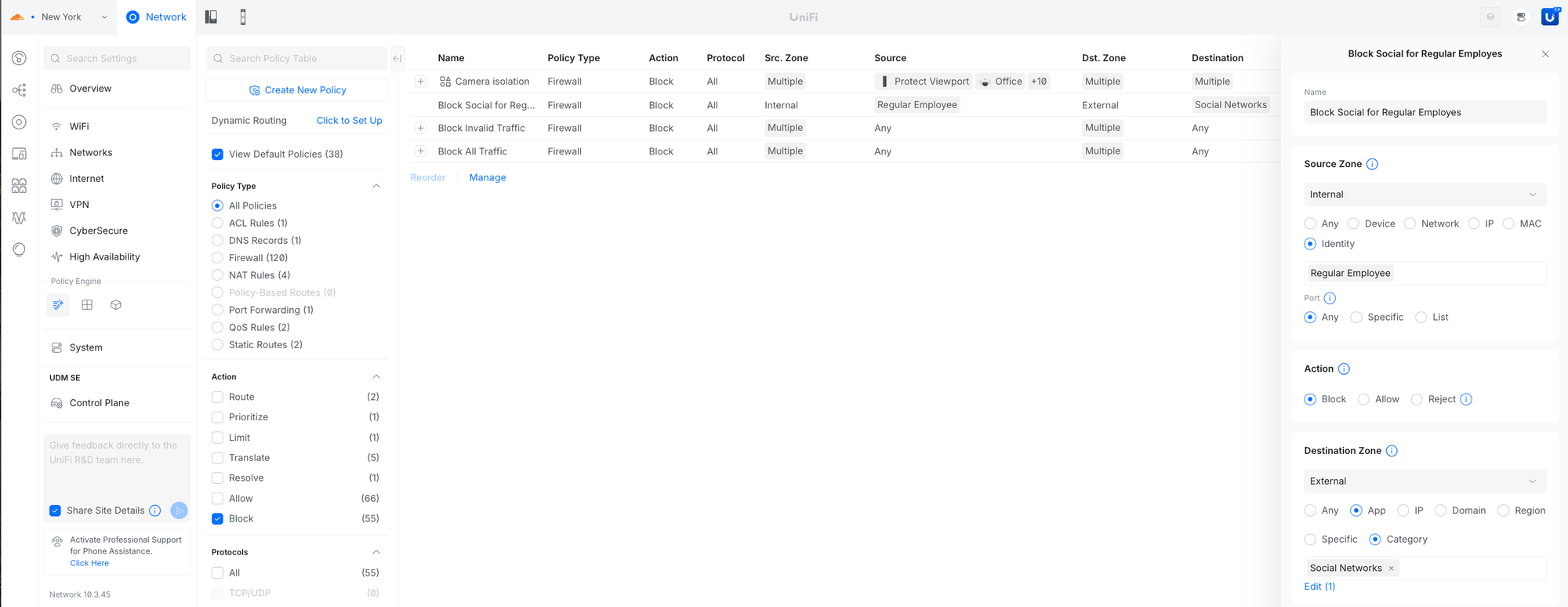
Create firewall rules using Identity Roles or individual users to enforce user-based access control independent of IP addresses. Enables consistent policy across devices and simplifies access management as users move between networks.
Requires UniFi OS 5.1 or newer.
Client Devices in Infrastructure Topology & Device Supervisor
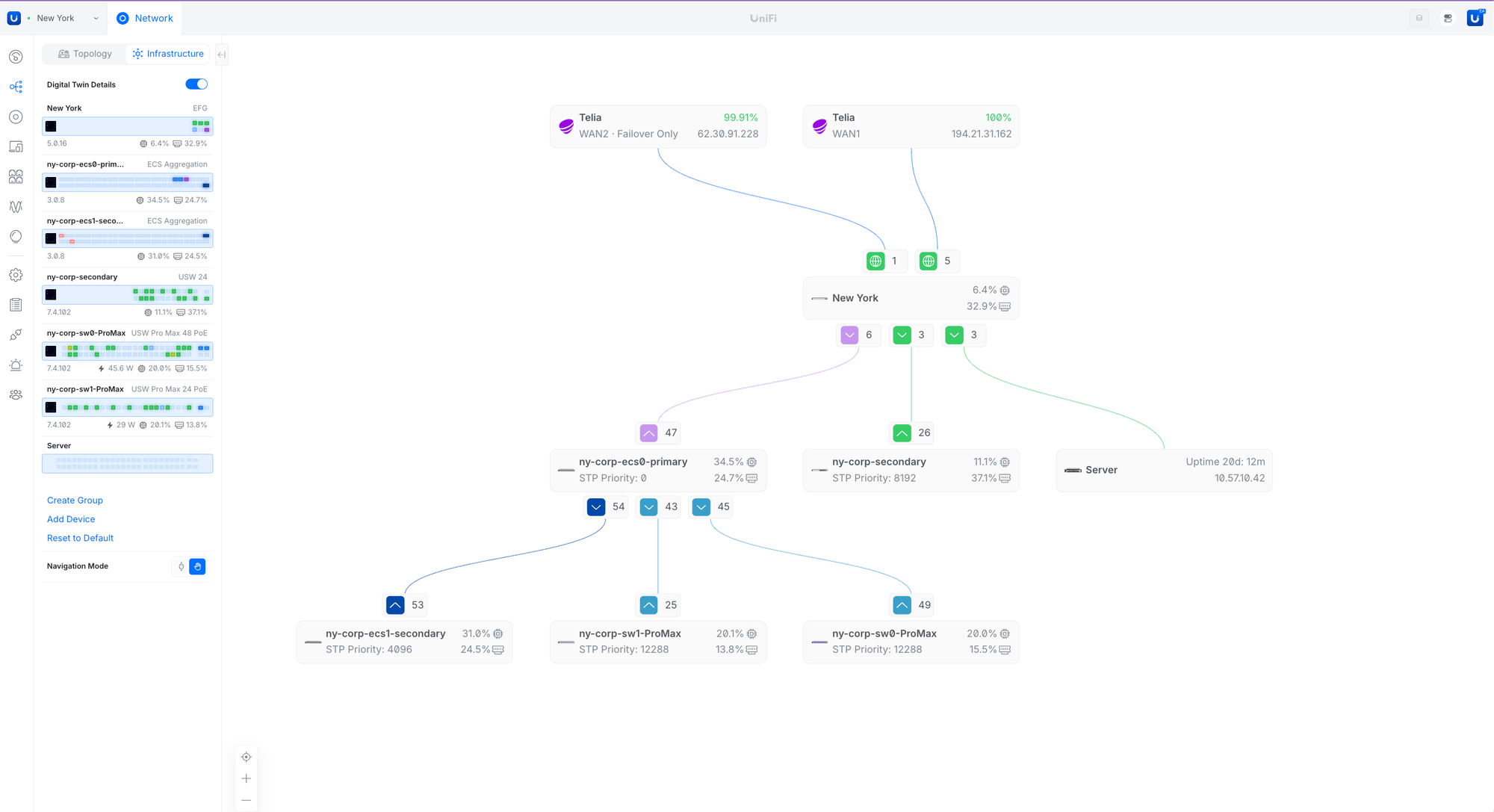
Added client device support in Infrastructure Topology and enhanced monitoring for non-UniFi devices (e.g., servers, sensors). Device Supervisor can automatically restart unreachable devices and improves visibility in Topology and Digital Twin.
Improvements
Added OWE support to the WiFi Broadcast and LAG connection support to the Integration API.
Added a Device Supervisor filter to the Devices page.
Added a DNS Assistance setting to WiFi Broadcast settings to improve DNS resiliency and latency.
Requires Access Point firmware 8.6.2 or newer.
Added an IPv6 MSS option to VPN Client settings.
Added a device status indicator to system logs for multiple devices going offline.
Added support for configuring VLANs on UDB/UDB-Pro ports.
Added DNS Policy orchestration support.
Allowed specifying the method for IKEv2 reauthentication in IPsec VPN settings.
Improved MTU validation when IPv4 MSS is configured.
Improved IP range validation in QoS and Firewall settings.
Improved Time Machine event detection for Ports.
Improved the Ports Manager user experience.
Improved Port Forward validation to prevent overlap with IPsec site-to-site VPNs.
Improved Dashboard Internet statistics accuracy in rare cases.
Improved backup restore resiliency.
Improved the STP blocked link experience in Infrastructure Topology.
Improved WiFi Doctor-triggered device update speed and reliability.
Improved DS-Lite over PPPoE by provisioning the correct interface for firewall rules and displaying the correct WAN IPv6 address.
Improved the Guest Table to display voucher names.
Improved the VPN settings user experience.
Increased DS-Lite MTU by 8 bytes.
Bugfixes
Fixed an issue where devices were not reprovisioned when DHCP relay settings were changed.
Fixed an issue where packet capture status was not updated when opening an already running capture.
Fixed an issue where the UNVR was incorrectly shown in the Clients page when connected via an SFP port.
Fixed an issue where the Uplink column on the Devices page was not sorting correctly.
Fixed an issue where the IPv6 WAN default route on single-WAN gateways could be incorrectly applied.
Fixed an issue where the default route for static IPv6 WAN with a link-local next hop was not applied.
Fixed an issue where IGMP Snooping settings could fail to be provisioned in rare cases.
Fixed an issue where toggling “Mesh Connect” on a UDB Switch did not apply changes to the device.
Fixed an issue where the Port State in Port Manager could be incorrectly represented in rare cases.
Fixed an issue where VLAN tagging configuration for In-Wall Access Points could be incorrect in rare cases.
Fixed an issue where UDB devices could generate false Meshing system log messages.
Additional information
UniFi OS Server
Going forward, we recommend users upgrade to UniFi OS Server for all self-hosted deployments. It provides the full UniFi OS Platform experience, ensuring you receive the latest features, improvements, and integrations.
UniFi Network Native Application for UniFi OS
Compatible with UDM, UDR, UDR7, UDR 5G Max, Express, Express 7, and UCG models (Ultra, Max, Fiber, and Industrial) on UniFi OS 3.1.6 or later. UDM-Pro, UDM-SE, and UDW have been using it since UniFi OS 5.1.5.
The UniFi OS update utilizes the application version compatible with your console.
The manual update process via SSH requires a compatible package. Incompatible packages will be rejected on installation.
Older UniFi OS versions (prior to UniFi OS 3.1.6) on the UDM and UDR continue to utilize the standard UniFi Network Application for UniFi OS.
UniFi Network Application 10.2.105 adds Port Manager Time Machine, improves the Topology, adds Device Supervisor, and includes additional improvements and bugfixes.
Port Manager Time Machine
Review the latest 24hr port activity to verify historical device connectivity and analyze anomalies for faster troubleshooting.
Infrastructure Topology & Digital Twin
Introduces a topology view focused on core infrastructure, providing clear visibility into key inter-switch and device bridge links. Includes a rack-level and customizable Digital Twin for physical-to-logical mapping and improved operational awareness.
Device Supervisor
Monitors UniFi device heartbeats and automatically power-cycles unresponsive devices via PoE switches or UniFi PDUs to restore connectivity with minimal downtime.
Improvements
Added the ability to easily revert device firmware to previous versions.
Added IPv6 support for WireGuard VPN.
Requires UniFi OS 5.1 or newer.
Added the ability to disable the buzzer sound on UPS devices.
Requires UPS firmware version 1.4.24 or newer.
Added an API endpoint to retrieve MC-LAG domain information.
Added ASN information to WAN-related System logs.
Added the ability to reposition lower Pages in the navigation panel.
Added keyboard arrow navigation across panels on the Device and Client pages.
Added a TX Retries column and a “Locked to AP” indicator on the Clients page, along with a filter for Clients locked to APs.
Added OWE support in WiFi settings for open networks.
Added a warning when using Fast Roaming with MLO in WiFi Broadcast settings.
Added support for all Admins to establish Teleport connections from the WiFiman app.
Added EAPOL exception for OWE guest networks in ebtables.
Added a safeguard to prevent mesh-connected U6-Extender and BeaconHD devices from disabling mesh connectivity.
Added Shadow Console in Digital Twin Rack View.
Improved Remote Logging to use the built-in SSD for remote logs when available.
Improved dashboard loading speed.
Improved PoE source detection for devices within Device Supervisor.
Improved the IGMP Snooping experience.
Use the management IP address for the querier when no querier address is configured.
Do not provision the querier address when IGMP Proxy is enabled.
Improved MSS IPv6 validation in VPN Server settings.
Improved the IGMP Querier selection user experience.
Improved the IGMP Snooping configuration user experience.
Improved the VPN Server, VPN Client, and overall VPN settings user experience.
Improved Flows processing performance.
Improved uptime sorting on the Device page.
Added BPDU Guard, which automatically disables ports if STP control frames are received to prevent loops.
Disabled ports require manual re-enablement.
BPDU Guard should not be enabled on ports connected to switches, APs, or gateways.
Requires UniFi Switch firmware 7.4 or newer.
Added STP Edge, which enables immediate forwarding on client-facing ports to speed up connectivity.
Requires UniFi Switch firmware 7.4 or newer.
Added the ability to configure Storm Control as a percentage.
Requires UniFi Switch firmware 7.4 or newer.
Improved the WiFi Doctor user experience.
Improved Dashboard details for device, application, and UniFi OS updates, including revert options.
Revert options require UniFi OS 5.1 or newer.
Improved grouping options by application on the Device page for large sites.
Improved overall application stability and resiliency.
Bugfixes
Fixed an issue where packet captures failed to start in some cases.
Fixed an issue where the default security posture was changed to Allow after an earlier upgrade.
You'll have to manually check your settings if you touched this setting while on 10.2; others should automatically recover.
Fixed an issue where View All Flows could result in an empty page.
Fixed an issue where WiFi Broadcast settings could fail to save in rare cases.
Fixed an issue where the VPN uptime stats could be missing for Site-to-Site VPN's.
Fixed an issue where the ISP Speed Test schedule appeared in the Device Update panel.
Fixed an issue where channel width could be mismatched when adopting wireless APs.
Fixed an issue where more Layer 3 networks could be created than supported on UniFi Switches.
Fixed an issue where Smart Queues were incorrectly limited to 1 GbE on UDM models.
Fixed an issue where Rogue AP Detected notifications could be missing.
Fixed an issue where WiFi Speed Limit settings were not displaying in rare cases.
Going forward, we recommend users upgrade to UniFi OS Server for all self-hosted deployments. It provides the full UniFi OS Platform experience, ensuring you receive the latest features, improvements, and integrations.
UniFi Network Native Application for UniFi OS
Compatible with UDM, UDR, UDR7, UDR 5G Max, Express, Express 7, and UCG models (Ultra, Max, Fiber, and Industrial) on UniFi OS 3.1.6 or later. UDM-Pro, UDM-SE, and UDW have been using it since UniFi OS 5.1.5.
The UniFi OS update utilizes the application version compatible with your console.
The manual update process via SSH requires a compatible package. Incompatible packages will be rejected on installation.
Older UniFi OS versions (prior to UniFi OS 3.1.6) on the UDM and UDR continue to utilize the standard UniFi Network Application for UniFi OS.
Going forward, we recommend users upgrade to UniFi OS Server for all self-hosted deployments. It provides the full UniFi OS Platform experience, ensuring you receive the latest features, improvements, and integrations.
UniFi Network Native Application for UniFi OS
Compatible with UDM, UDR, UDR7, Express, Express 7, and UCG models (Ultra, Max, Fiber, and Industrial) on UniFi OS 3.1.6 or later. UDM-Pro, UDM-SE, and UDW have been using it since UniFi OS 5.1.5.
The UniFi OS update utilizes the application version compatible with your console.
The manual update process via SSH requires a compatible package. Incompatible packages will be rejected on installation.
Older UniFi OS versions (prior to UniFi OS 3.1.6) on the UDM and UDR continue to utilize the standard UniFi Network Application for UniFi OS.
Going forward, we recommend users upgrade to UniFi OS Server for all self-hosted deployments. It provides the full UniFi OS Platform experience, ensuring you receive the latest features, improvements, and integrations.
UniFi Network Native Application for UniFi OS
A specific application version that is only compatible with the UDM, UDR, UDR7, Express, Express 7, UCG-Ultra, UCG-Max, and UCG-Fiber (running UniFi OS 3.1.6 or newer).
The UniFi OS update utilizes the application version compatible with your console.
The manual update process via SSH requires a compatible package. Incompatible packages will be rejected on installation.
Older UniFi OS versions (prior to UniFi OS 3.1.6) on the UDM and UDR continue to utilize the standard UniFi Network Application for UniFi OS.
Create a backup before upgrading your UniFi Network Application if any issues are encountered.
See the UniFi Network Server Help Center article for more information on self-hosting a server.
UniFi Network Application 7.5 and newer requires MongoDB 3.6 and Java 17.
Version 7.5 to 8.0 supports up to MongoDB 4.4.
Version 8.1 and newer supports up to MongoDB 7.0.
Version 9.0 and newer supports up to MongoDB 8.0 and Java 17/21.
UniFi Network Application updates may cause your adopted devices to be re-provisioned.
Existing UniFi Network Applications must be on one of the following versions to upgrade directly to this version:
9.0.118 and earlier 9.0.x versions.
8.6.9 and earlier 8.6.x versions.
8.5.6 and earlier 8.5.x versions.
8.4.62 and earlier 8.4.x versions.
8.3.32 and earlier 8.3.x versions.
8.2.93 and earlier 8.2.x versions.
8.1.127 and earlier 8.1.x versions.
8.0.28 and earlier 8.0.x versions.
7.5.187 and earlier 7.5.x versions.
7.4.162 and earlier 7.4.x versions.
7.3.84 and earlier 7.3.x versions.
7.2.97 and earlier 7.2.x versions.
7.1.68 and earlier 7.1.x versions.
7.0.26 and earlier 7.0.x versions.
6.5.55 and earlier 6.5.x versions.
6.4.54 and earlier 6.4.x versions.
6.3.51 and earlier 6.3.x versions.
6.2.26 and earlier 6.2.x versions.
6.1.71 and earlier 6.1.x versions.
6.0.45 and earlier 6.0.x versions.
5.14.25 and earlier 5.14.x versions.
5.13.33 and earlier 5.13.x versions.
5.12.72 and earlier 5.12.x versions.
5.11.52 and earlier 5.11.x versions.
5.10.27 and earlier 5.10.x versions.
5.9.33 and earlier 5.9.x versions.
5.8.30 and earlier 5.8.x versions.
5.7.28 and earlier 5.7.x versions.
5.6.42 and earlier 5.6.x versions.
Most earlier versions are also supported for a direct upgrade, going back to 3.1.0.
UniFi Network Native Application for UniFi OS
A specific application version that is only compatible with the UDM, UDR, Express, UCG-Ultra, and UCG-Max (running UniFi OS 3.1.6 or newer).
The UniFi OS update uses the application version required for your console.
The manual update process via SSH requires you to use the compatible package. Incompatible packages will be rejected on installation.
Older UniFi OS versions (before UniFi OS 3.1.6) on the UDM and UDR still use regular UniFi Network Application for UniFi OS.
UniFi Network Application 10.2.93 adds Port Manager Time Machine, improves the Topology, adds Device Supervisor, and includes additional improvements and bugfixes.
Port Manager Time Machine
Review the latest 24hr port activity to verify historical device connectivity and analyze anomalies for faster troubleshooting.
Infrastructure Topology & Digital Twin
Introduces a topology view focused on core infrastructure, providing clear visibility into key inter-switch and device bridge links. Includes a rack-level and customizable Digital Twin for physical-to-logical mapping and improved operational awareness.
Device Supervisor
Monitors UniFi device heartbeats and automatically power-cycles unresponsive devices via PoE switches or UniFi PDUs to restore connectivity with minimal downtime.
Improvements
Added the ability to easily revert device firmware to previous versions.
Added IPv6 support for WireGuard VPN.
Requires UniFi OS 5.1 or newer.
Added the ability to disable the buzzer sound on UPS devices.
Requires UPS firmware version 1.4.24 or newer.
Added an API endpoint to retrieve MC-LAG domain information.
Added ASN information to WAN-related System logs.
Added the ability to reposition lower Pages in the navigation panel.
Added keyboard arrow navigation across panels on the Device and Client pages.
Added a TX Retries column and a “Locked to AP” indicator on the Clients page, along with a filter for Clients locked to APs.
Added OWE support in WiFi settings for open networks.
Added a warning when using Fast Roaming with MLO in WiFi Broadcast settings.
Added support for all Admins to establish Teleport connections from the WiFiman app.
Improved the IGMP Snooping configuration user experience.
Improved the VPN Server, VPN Client, and overall VPN settings user experience.
Improved Flows processing performance.
Improved ptime sorting on the Device page.
Added BPDU Guard, which automatically disables ports if STP control frames are received to prevent loops.
Disabled ports require manual re-enablement.
BPDU Guard should not be enabled on ports connected to switches, APs, or gateways.
Requires UniFi Switch firmware 7.4 or newer.
Added STP Edge, which enables immediate forwarding on client-facing ports to speed up connectivity.
Requires UniFi Switch firmware 7.4 or newer.
Added the ability to configure Storm Control as a percentage.
Requires UniFi Switch firmware 7.4 or newer.
Added support for Fast Leave per port.
Requires UniFi Switch firmware 7.4 or newer.
Improved the WiFi Doctor user experience.
Improved Dashboard details for device, application, and UniFi OS updates, including revert options.
Revert options require UniFi OS 5.1 or newer.
Improved grouping options by application on the Device page for large sites.
Improved overall application stability and resiliency.
Bugfixes
Fixed an issue where channel width could be mismatched when adopting wireless APs.
Fixed an issue where more Layer 3 networks could be created than supported on UniFi Switches.
Fixed an issue where Smart Queues were incorrectly limited to 1 GbE on UDM models.
Fixed an issue where Rogue AP Detected notifications could be missing.
Fixed an issue where WiFi Speed Limit settings were not displaying in rare cases.
Additional information
UniFi OS Server
Going forward, we recommend users upgrade to UniFi OS Server for all self-hosted deployments. It provides the full UniFi OS Platform experience, ensuring you receive the latest features, improvements, and integrations.
UniFi Network Native Application for UniFi OS
A specific application version that is only compatible with the UDM, UDR, UDR7, Express, Express 7, UCG-Ultra, UCG-Max, and UCG-Fiber (running UniFi OS 3.1.6 or newer).
The UniFi OS update utilizes the application version compatible with your console.
The manual update process via SSH requires a compatible package. Incompatible packages will be rejected on installation.
Older UniFi OS versions (prior to UniFi OS 3.1.6) on the UDM and UDR continue to utilize the standard UniFi Network Application for UniFi OS.
UniFi Network Application 10.1.85 includes the bugfix below.
Bugfixes
Fixed an issue where the Dashboard could fail to load in rare cases.
Additional information
UniFi OS Server
Going forward, we recommend users upgrade to UniFi OS Server for all self-hosted deployments. It provides the full UniFi OS Platform experience, ensuring you receive the latest features, improvements, and integrations.
UniFi Network Native Application for UniFi OS
A specific application version that is only compatible with the UDM, UDR, UDR7, Express, Express 7, UCG-Ultra, UCG-Max, and UCG-Fiber (running UniFi OS 3.1.6 or newer).
The UniFi OS update utilizes the application version compatible with your console.
The manual update process via SSH requires a compatible package. Incompatible packages will be rejected on installation.
Older UniFi OS versions (prior to UniFi OS 3.1.6) on the UDM and UDR continue to utilize the standard UniFi Network Application for UniFi OS.
UniFi Network Application 10.1.84 enhances high availability and system logging, adds new connectivity insights, and includes additional improvements and bugfixes.
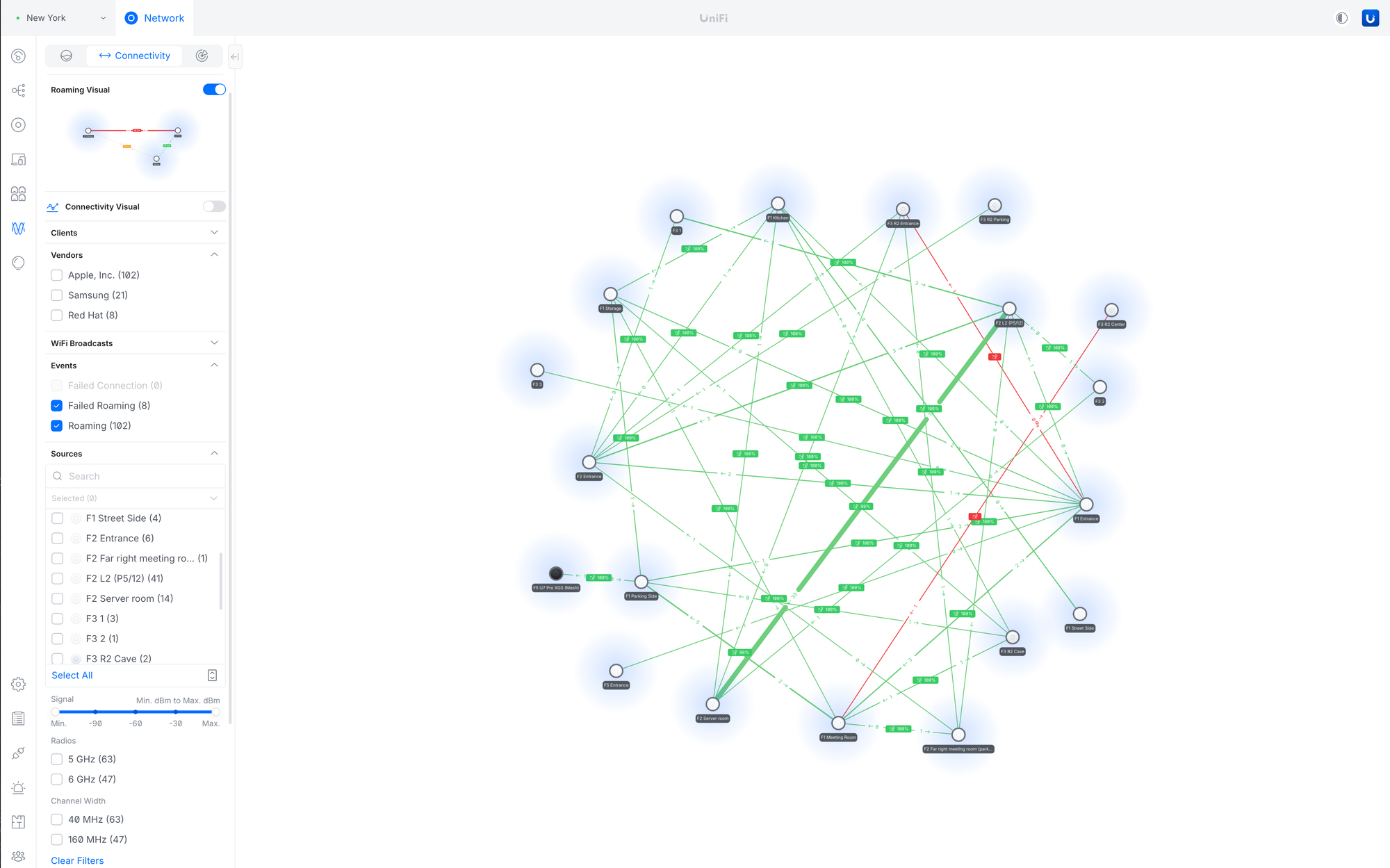
Added Connectivity Insights
Added a new Connectivity section to the Radio view, visualizing client roaming journeys across access points.
Provides granular filtering by source and destination (signal strength, radio band, channel width, device tags, and more).
Helps identify AP density gaps and optimize assisted handoff for improved roaming and overall network performance.
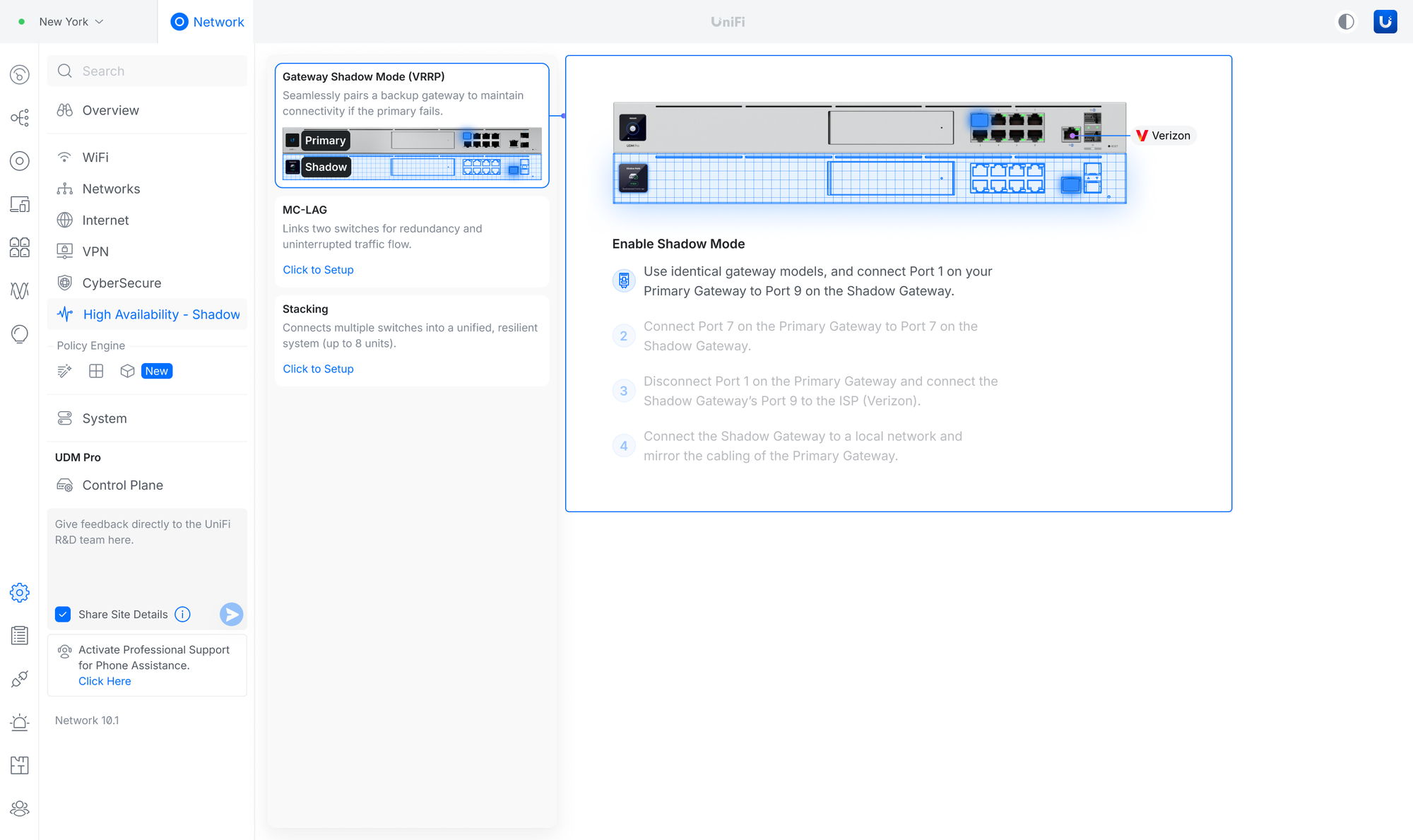
Improved the High Availability setup user experience
Optimized Shadow Mode (VRRP) setup steps with more guided instructions.
Streamlined the MC-LAG configuration flow for a more straightforward setup.
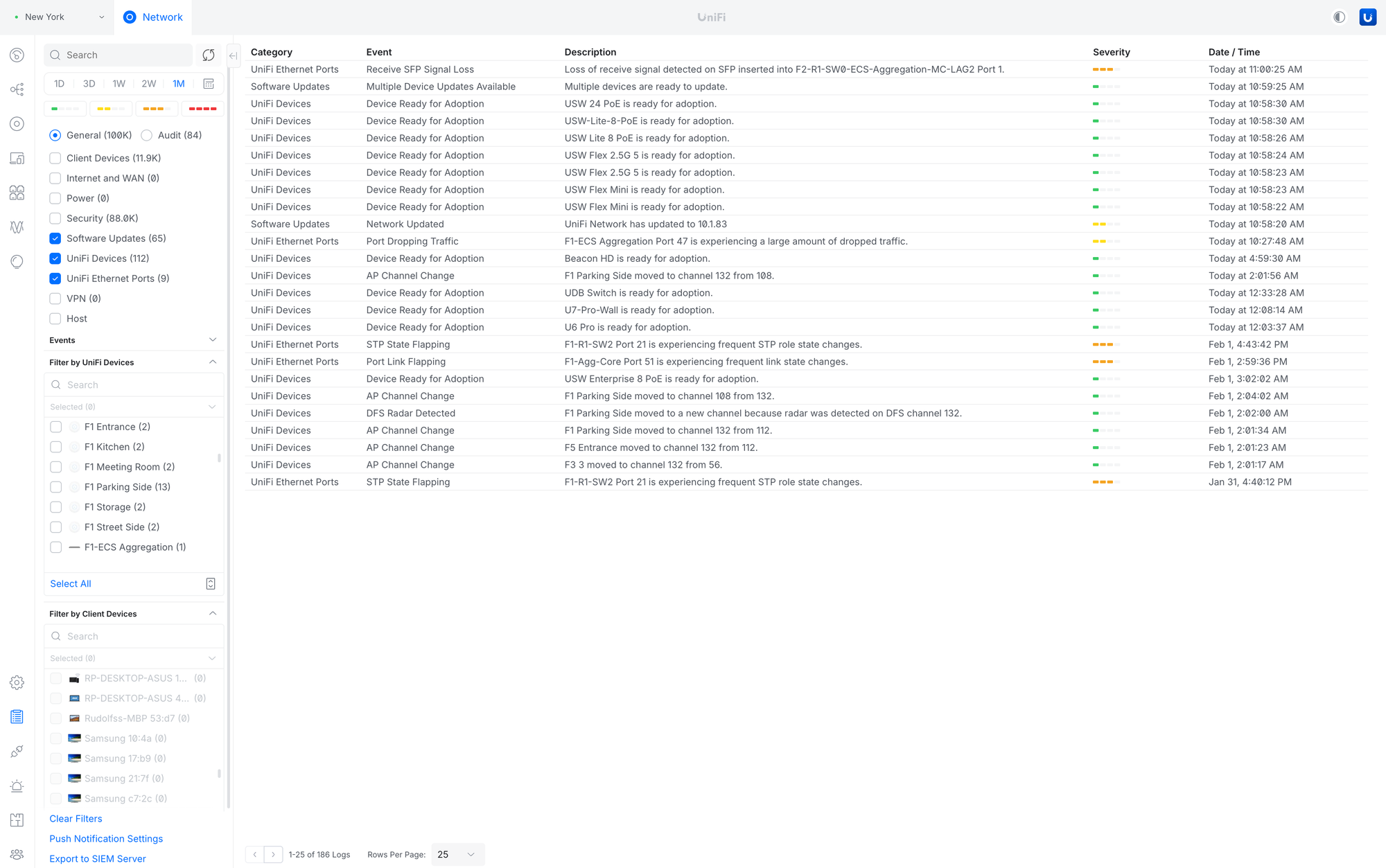
Improved System Logs
Added an Audit filter with admin-based filtering.
Added logs for Access Point meshing.
Improved log categorization.
Introduced Client and Device filters.
Improvements
Radios
Added Total Multicast TX Packets in the AirView charts.
Added Access Point Filter to the Airview Radio section.
Added AirTime charts in the Radio section panels.
Added Avg. Interference and Avg. AirTime columns to the Radio page.
Added the Active Client distribution diagram in the Radio side panel.
Added packet capture results download as a text file or copy to the clipboard.
WiFi & Access Points
Added 6GHz WiFi experience in the AP side panel.
Added "Show Access Point name in Beacon" to the WiFi Settings.
Added Statistics Charts to the Access Points side panel's Insights tab.
Added a notice suggesting disabling Mesh Connect for Access Points with a Wired Uplink.
Added WiFi usage chart in the Clients page.
Added WiFi Doctor on the Dashboard.
Added confirmation tooltip for "Override All APs" in Roaming Assistant.
Added a Warning when changing from WPA3 to WPA2/3 Security in the WiFi settings.
Improved the user experience for the meshed AP side panel.
Improved the user experience for AirTime Utilization in the AP side panel.
Improved the Most Active Client widget in the AP side panel.
Improved the WiFi Broadcasting Settings user experience.
Moved the WiFi Client Ping test to the Client side panel.
Moved Wireless Client Airtime Graph to the Client side panel.
Moved AirTime charts to the AP Insights panel.
Moved Packet Capture to the Radio Section.
Dashboard
Added messaging to upgrade to UniFi OS Server on UniFi Network Servers.
Added Starlink Firmware status and obstructions details to the Dashboard.
Starlink router must be directly connected to the UniFi Gateway.
The 192.168.100.0/24 subnet cannot be used on the local network.
Added a notice about the available update to the Dashboard.
Improved the Dashboard user experience for multiple WAN setups.
Port Manager & Devices
Added the Release Notes button in the device table.
Added Device Model and Firmware Version details in the Port Manager left panel.
Added Port Warnings in the Port Side Panel Settings tab for better visibility.
Added device compliance information in the device side panel.
Allow clicking on the Connection Column to open the Client/Device panel in Port Manager.
Improved the Port Manager user experience for offline devices.
Networking, SD-WAN & VPN
Added support for MTU/MSS settings for SD-WAN, VPN Servers, and VPN Clients.
Added information for LAG ports to use the same speeds on both ends to prevent performance degradation.
Allow the UCG-Fiber to work as a Hub for SD-WAN.
Improved the Link Aggregation removal user experience.
Improved the MC-LAG user experience.
Validation & Safety
Added validation for Loopback IP addresses in the Network Settings.
Improved validation across the Settings pages.
API
• Added various new endpoints to the Network API:
Device Removal.
UniFi Device Adoption.
Wireless Device Adoption.
DNS policy creation and management.
Firewall policy creation and management.
Listing VPN servers and Site-to-Site tunnels.
Performance & Reliability
Added automatic removal of older firmware when new firmware is cached.
Improved latency for applying configuration changes.
Improved backup restore resiliency.
Improved application stability.
Others
Added sorting for the Hotspot Voucher table.
Added Device Tags.
Requires UniFi OS 5.0 or newer.
Added the option to expand Long List Filters to full height for better usability.
Added PDU Power Actions in Alarm Manager.
Improved the Topology user experience for larger setups.
Improved the AirTime Utilization charts user experience.
Improved the device adoption user experience.
Improved the user experience for configuring static IP addresses for devices.
Moved Network Lists and RADIUS Servers to the Networks settings.
Removed the Interface Refresh Rate Field setting.
It's now always automatically adjusted.
Removed the Network Application backup option.
You must now use the backup option within Control Plane.
Renamed DHCP Manager to IP Table.
Bugfixes
Fixed an issue where the LED settings weren't taking effect on some Access Points in rare cases.
Requires Access Point firmware 8.5.0 or newer.
Fixed an issue where the Guest Network option wasn't available on sites that don't use Zone-Based Firewall.
Fixed the inability to remove offline UPS devices.
Fixed an issue where users could configure RADIUS DAS/DAC when not all requirements were met.
Fixed an issue where not all places were using the same ISP logos.
Fixed an issue where the 5GHz Roaming Assistance toggle wasn't working correctly.
Fixed an issue where the WiFi blackout scheduler could incorrectly select specified time ranges in rare cases.
Fixed an issue where the Add Voucher button wasn't available for the Hotspot Operators.
Fixed inconsistent data reporting between the Network Application dashboard and the Site Manager ISP Viewer.
Fixed an issue where the WiFi MAC Filter values were cleared after toggling MAC Filtering.
Fixed an issue where System Statistics didn't report for 5G devices.
Fixed an issue where Intrusion Prevention could be disabled after suppressing signatures in rare cases.
Fixed an issue where Orchestration WiFi with PPSK enabled could fail to apply in rare cases.
Fixed an issue where the Clients page table could fail to display some columns in rare cases.
Fixed an issue where PPPoE settings might not display correctly in rare cases.
Additional information
UniFi OS Server
Going forward, we recommend users upgrade to UniFi OS Server for all self-hosted deployments. It provides the full UniFi OS Platform experience, ensuring you receive the latest features, improvements, and integrations.
UniFi Network Native Application for UniFi OS
A specific application version that is only compatible with the UDM, UDR, UDR7, Express, Express 7, UCG-Ultra, UCG-Max, and UCG-Fiber (running UniFi OS 3.1.6 or newer).
The UniFi OS update utilizes the application version compatible with your console.
The manual update process via SSH requires a compatible package. Incompatible packages will be rejected on installation.
Older UniFi OS versions (prior to UniFi OS 3.1.6) on the UDM and UDR continue to utilize the standard UniFi Network Application for UniFi OS.

 Log in