 Log in
nginx-1.29.4 mainline version has been released, featuring HTTP/2 to backend and Encrypted ClientHello.
2025-12-09
nginx-1.29.4 mainline version has been released, featuring HTTP/2 to backend and Encrypted ClientHello.

nginx-1.29.4 mainline version has been released, featuring HTTP/2 to backend and Encrypted ClientHello.
Full Changelog: v4.1.5...v4.1.6

BookStack v25.11.6 has been released.
This is a security release to address a vulnerability in our dependencies related to XML
handling, which could allow users to replay SAML authentication requests with specially crafted & manipulated requests.
It's strongly advised to update if you're using SAML authentication for BookStack.

If you’re ever in need of a device that works great with Home Assistant, well, I have just the program for you. Works with Home Assistant is our certification program that ensures devices work seamlessly and locally, all with brands that back them up.
Did you know that this year the Works with Home Assistant program has certified 12 partners across 12 months? That’s more than were certified in the two years since the program launched in 2022! The full list of devices is insanely long now (luckily, we made it searchable). To make all this happen over just one year, a lot of important things have been happening behind the scenes.
In August 2024, the Open Home Foundation took over Works with Home Assistant. This helped reinforce that this program is not a commercial venture: it exists solely to connect our users with brands that support the foundation’s core values of privacy, choice, and sustainability.
When we moved it over to the foundation, we also took that chance to beef-up our processes, with robust legal contracts that ensure every partner who joins the program formally commits to things like offering users long-term support and easy updates.
When we started the program we certified brands, but now we certify devices. This means you know exactly which sensors, switches, or other gadgets have been rigorously tested by us to ensure the best experience with Home Assistant. Each certified device has to work locally, without the need for cloud subscriptions or control.
We can now certify in phases, rather than overwhelming our testers with a truckload of devices in order to launch one partner. Also, if a manufacturer has one device that is cloud-controlled, it doesn’t blacklist any remaining items they have that could operate perfectly well locally. It sometimes means that sometimes your favorite devices aren’t part of the first wave of certification but, trust us, the partners check the comments 😉.
Here’s a conundrum: the more products that are certified, the harder it is for you to see and find them. The good news is I think we’ve cracked it!
Last week, we published the first version of our new searchable certified device list. Previously, you’d have to hunt around for info by checking the integration page or digging through launch blogs to see if a device was certified. Now, certified devices are kept up to date in one central, easy-to-use location, with extra information on the region they’re available in, the protocol we’ve certified them under, and notes about any secondary functionality we’re still working on.
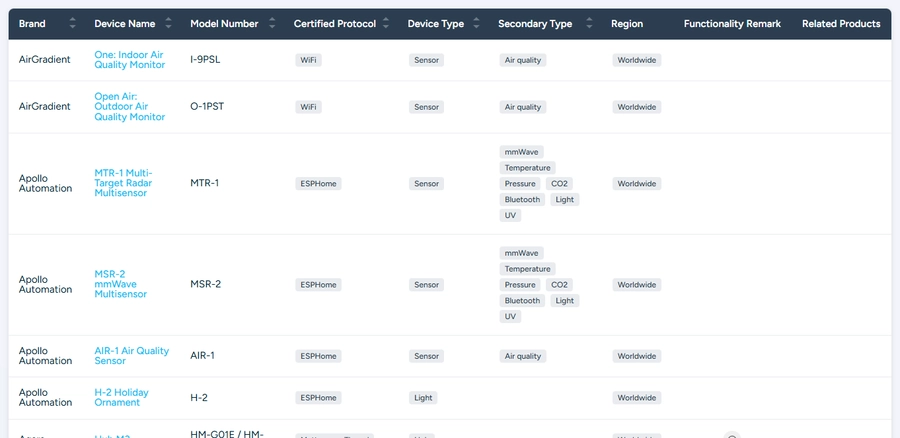 So many (useful) columns!
Every certified device earns the right to display our badge on its packaging, proudly announcing it Works with Home Assistant. If you’re not part of the program, you’re not allowed to use the Home Assistant logo. We used to have different versions of the badges depending on whether the device used Matter, Zigbee, or Z-Wave, and so on, but – let’s be honest – they were overcomplicated and impossible to actually read on a box!
Since the badge is such an important signal when you’re browsing products, we decided to simplify it and focus purely on that mark of quality. Now we have just two versions: a color badge and a monochrome design that are easier to read on any packaging.
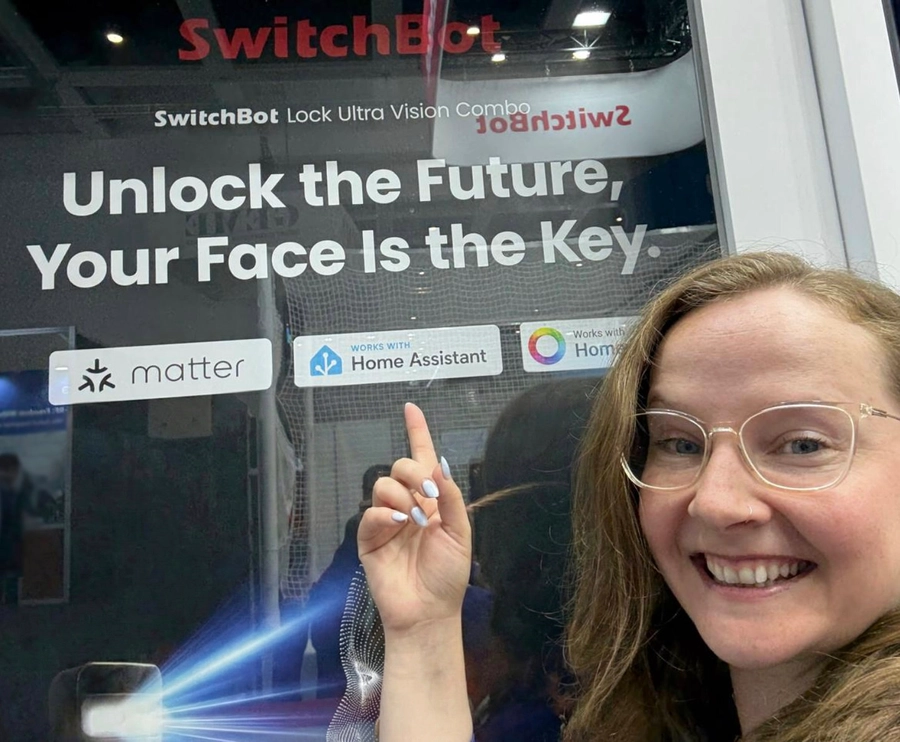 We love to see the new badge being used IRL!
For 2025, our goal was simple: we wanted both the big names and passionate community projects to be able to join. Yes, we’re thrilled to have major smart home players such as Shelly and Reolink committing to the program, but it’s equally important for us to connect with smaller, community-built projects – the start-ups or developers who keep open source at the heart of everything they do, like AirGradient and Apollo Automation.
This commitment to inclusivity is a big reason why we keep the annual fee for joining the program deliberately low, at only 500 CHF (per partner, not device) per year. We want to ensure being part of Works with Home Assistant is achievable for everyone who shares our vision.
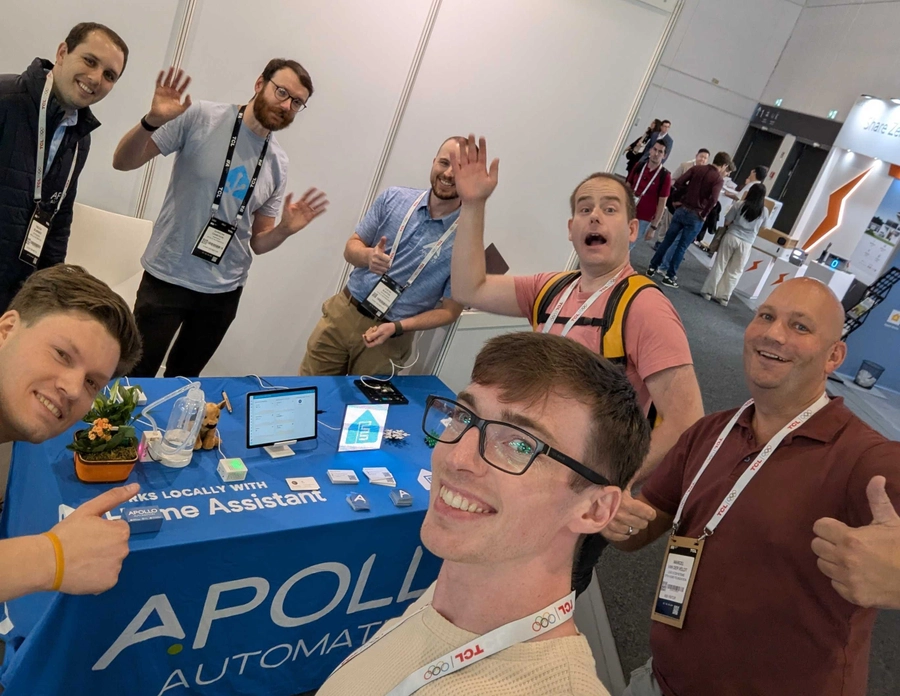 Some of our team visiting the Apollo booth at IFA Berlin in September.
Testing hasn’t always been perfect – we knew we needed to make improvements, and the community has been amazing in helping us find things we need to look at. Like everything we do, we learn as we go, we iterate, and we improve. Previously, everyone was testing in their own way, but now we’ve standardized the way we test and give feedback to partners. This means testing is more consistent, exacting, and able to handle higher volumes – one of the reasons why we’ve been able to increase the number of devices we’ve certified so radically!
A lot of devices that come across our desks don’t pass certification, and it’s often due to organizations not fully understanding the requirements of joining. While this can vary greatly depending on the device and protocol, it was clear we needed to be more transparent. So as well as publishing our Works with Home Assistant Working Group Resolution, we’re also publishing further testing information: this sample testing report for a simple smart plug shows you the process we follow.
Because we get to see and test new devices in advance, and receive feedback from our certified partners as part of the process, we have a sneak peek into what vendors have in mind for 2026 and beyond. This allows us to look at our product roadmap and see where we need to realign with innovations in the market. By testing today’s devices, we’re guiding tomorrow’s Home Assistant features!
 Spot one of the certified cameras in our State of the Open Home segment
A core aim of the program is to ensure all certified devices have their “key functionality” available within Home Assistant. So how do we decide what aspects are controllable in Home Assistant and what doesn’t make the cut?
We use our best judgment on this, but we also want your feedback, because everyone has a slightly different point of view, even within our team and testers – so look out for our user research requests, or please share your thoughts in our comments below!
For all this talk of testing, Works with Home Assistant is primarily about people and partnerships! As a foundation, we’re focused on making sure the program stays deeply connected with the community it serves, both online and in person.
We’ve been stepping up our presence at meetups and events around the world, so we can share the latest developments and gather your valuable feedback. From gigantic trade shows like CES in Las Vegas to small, local get-togethers, you can expect to see us there! We also want to do this online, so you can ask partners questions on streams, or in comments – keep an eye out for more of this in future.
 San Diego Meetup
So that was 2025 in a (big) nutshell. As for 2026, we want to kick it off with some wonderful Zigbee partners we’ve been working really hard on – particularly after the awesome launch of Connect ZBT-2. Even though Zigbee is one of the longest-established protocols, it’s actually one of the hardest for us to test and certify because so many devices operate outside the official specification. This means our team and partners do a lot of prep to get them to a testable state – but in doing so we’re driving big improvements in functionality for everyone!
We also want to improve coverage globally, so, regardless of region, everyone who uses Home Assistant has a good range of certified options to choose from. This means we’re actively seeking partners who will cover regions outside of Europe and North America for everyday essentials like smart plugs and lighting.
As ever, everything coming up will be covered right here – so stay tuned for updates… and here’s to certifying many more devices in 2026! 🎉🥳🎊

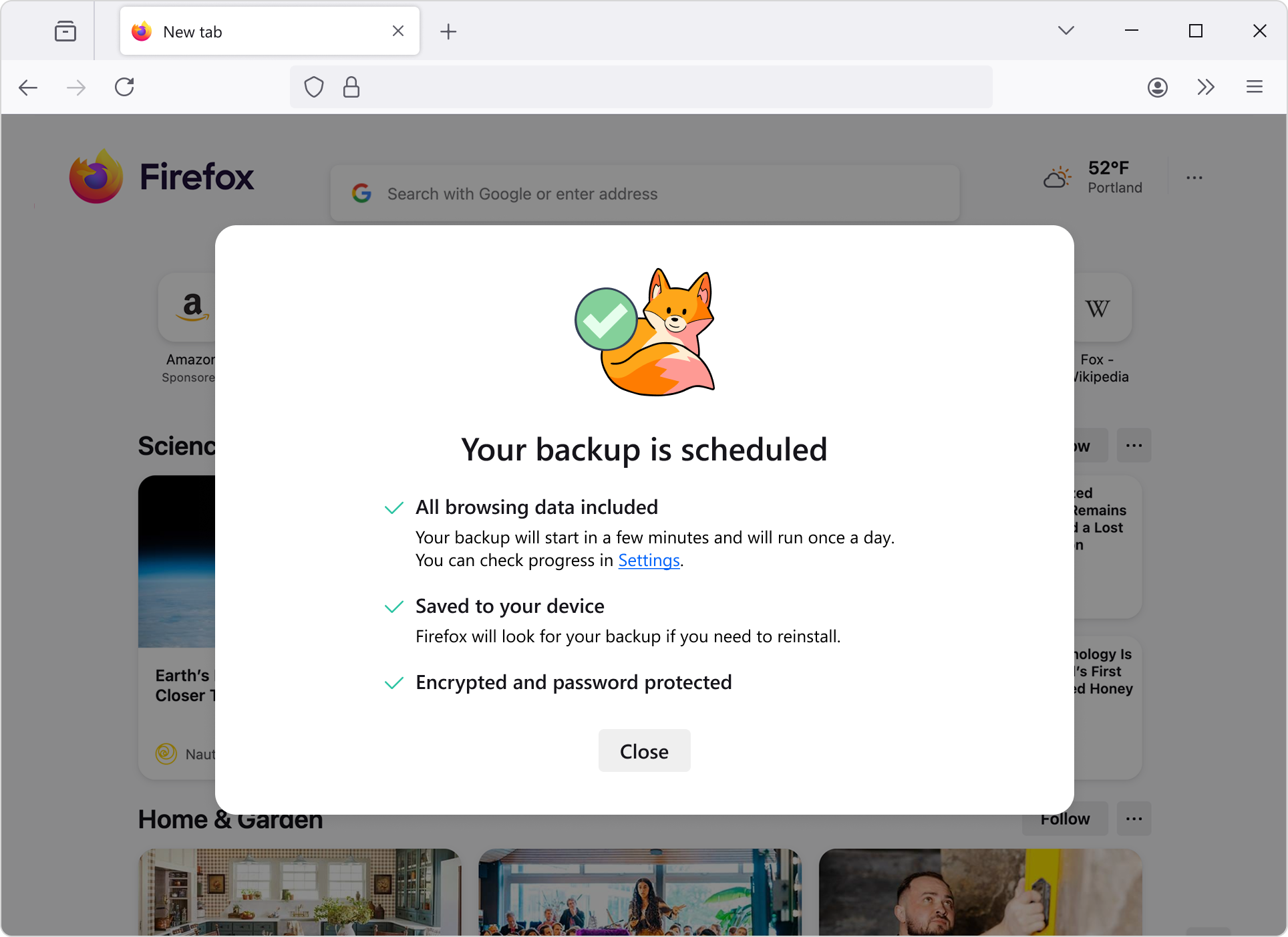
Windows 10 users can now automatically protect their passwords, bookmarks, and more by turning on backup in Firefox. Your browsing data is saved daily on your device and can be encrypted with a password. When you set up a fresh install of Firefox on any operating system for a new device or your current one, you can restore from this backup and pick up right where you left off. This feature is currently available on Windows devices and will be coming to other operating systems soon.

This feature is part of a progressive roll out.
Certain new Firefox features are released gradually. This means some users will see the feature before everyone does. This approach helps to get early feedback to catch bugs and improve behavior quickly, meaning more Firefox users overall have a better experience.
MacOS users now have a dedicated GPU process by default. This includes WebGPU, WebGL, and Firefox's own WebRender. With this feature enabled, fatal errors in graphics code will no longer crash the browser, and will instead transparently restart the GPU process.
Firefox Labs is now available to all desktop users, regardless of whether they choose to participate in studies or submit telemetry. This means more experimental features are now available to more people.
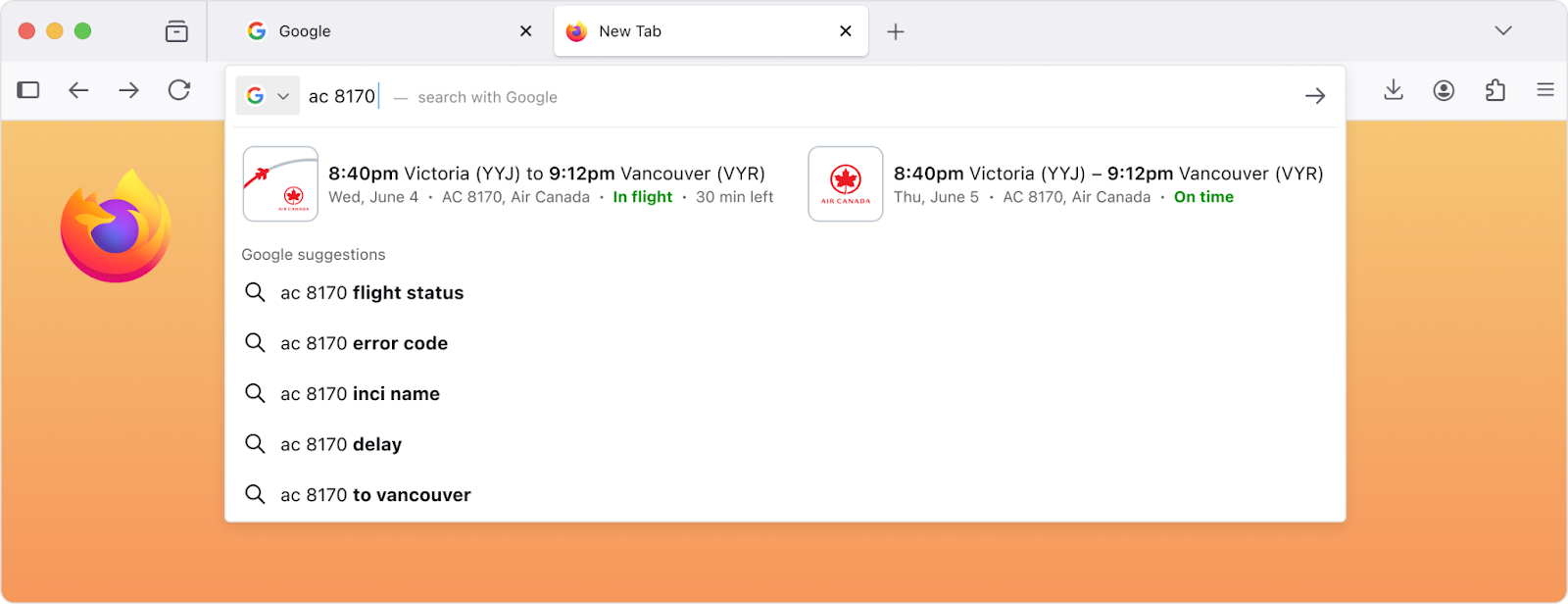
Users can now skip the results page and see direct results as they type in the search bar for faster, simpler browsing.
This feature is part of a progressive roll out.
Certain new Firefox features are released gradually. This means some users will see the feature before everyone does. This approach helps to get early feedback to catch bugs and improve behavior quickly, meaning more Firefox users overall have a better experience.
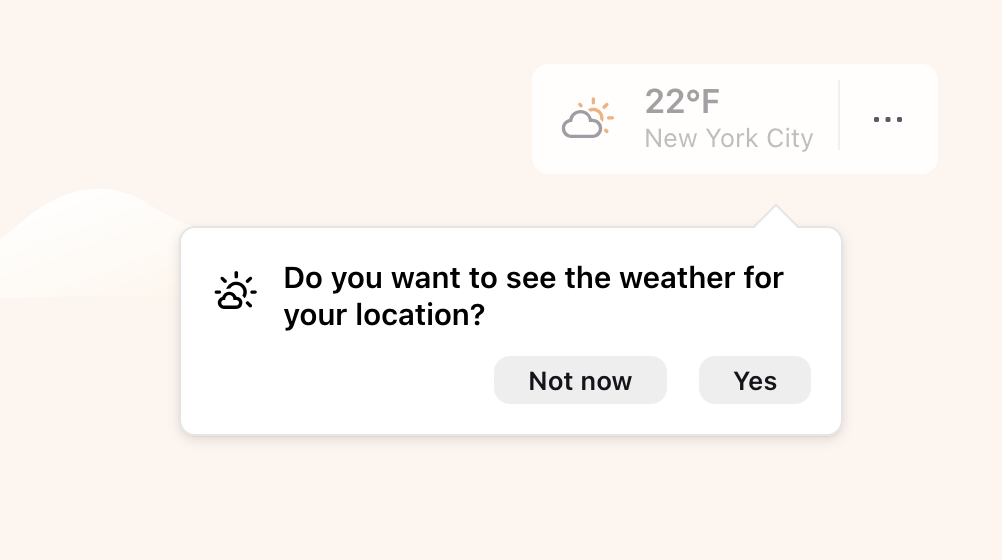
There is a New Tab Weather opt-in workflow available for users in the EU and some other countries, where they can choose whether to enable location detection or manually search for a location.
This feature is part of a progressive roll out.
Certain new Firefox features are released gradually. This means some users will see the feature before everyone does. This approach helps to get early feedback to catch bugs and improve behavior quickly, meaning more Firefox users overall have a better experience.
Firefox now natively supports fractional scaled displays on Linux (Wayland), making rendering more effective.
For users of the English-language versions of Firefox in France, Germany, and Italy, the address bar now shows English-language suggestions for holidays and other important dates.

When the timepicker is enabled for <input type="time"> and <input type="datetime-local">, it now provides full keyboard and assistive technology support. This update also improves the behavior of the time spin buttons for users who prefer reduced motion. The Firefox Accessibility team hopes that making the built-in timepicker accessible will encourage wider adoption of browser-provided time and date inputs across the web, reducing the need for custom controls, and improving accessibility for all users.
Various security fixes.

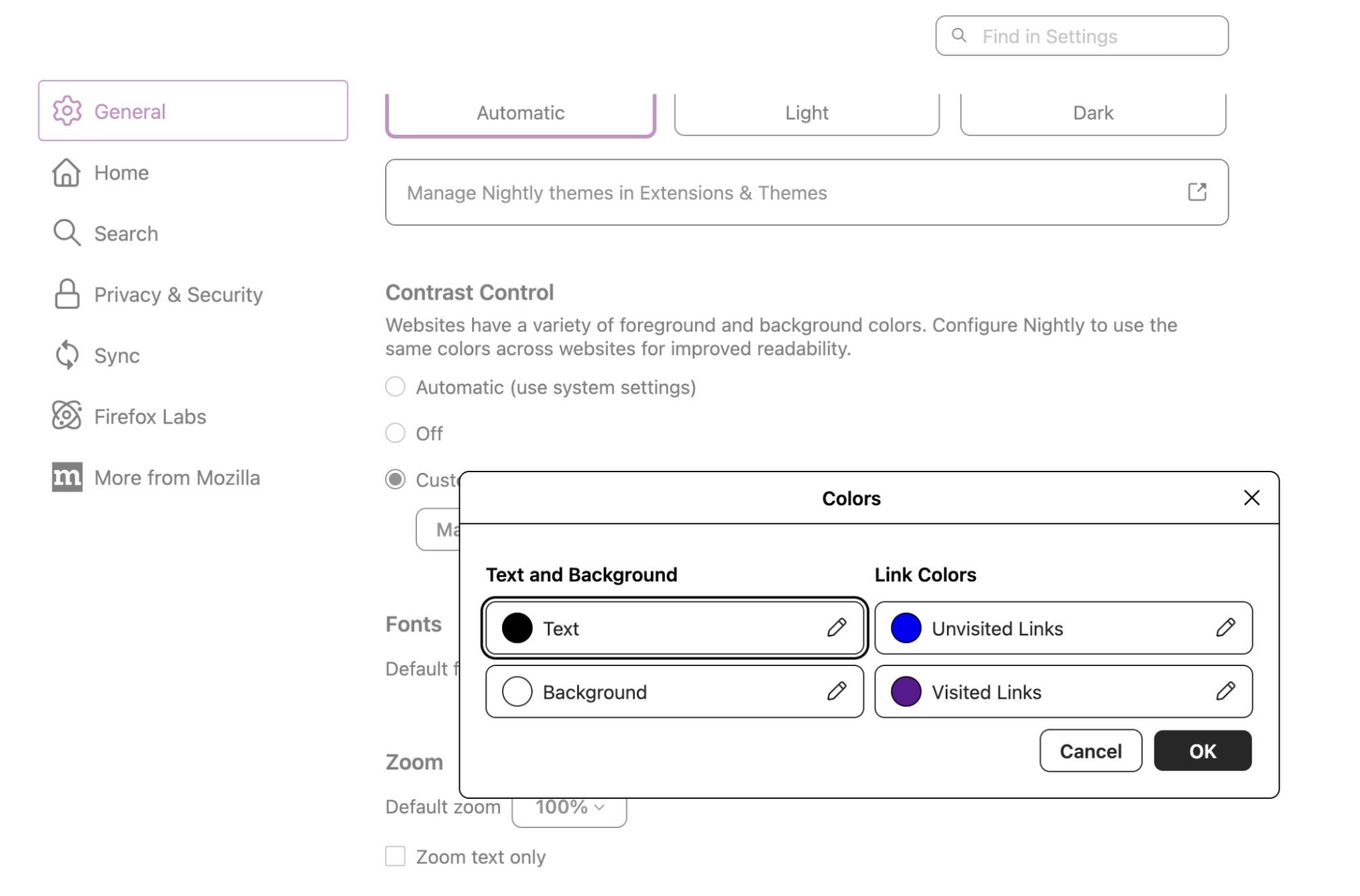
The Colors dialog in Settings now uses clearer color picker controls that keep each color sample next to its label. It makes it easier to understand and adjust text, background, and link colors when using a forced colors palette to customize the default text, link, and page background colors, especially with or without screen magnifiers.
Firefox removed support for Direct2D on Windows. If you still require Direct2D support, please use ESR 140.0 or higher.

You can find information about policy updates and enterprise specific bug fixes in the Firefox for Enterprise 146 Release Notes.

Firefox now supports ML-KEM for WebRTC, by sending a post-quantum (PQ) key share during the DTLS 1.3 handshake. ML-KEM is the next-generation public-key cryptosystem that is believed to be secure against attackers with large quantum computers.
Firefox now supports compressed elliptic curve points in WebCrypto. These reduce the size of public keys by nearly half, saving bandwidth and storage, while still allowing the full point to be reconstructed mathematically.
The Skia graphics library has been updated to improve rendering performance and compatibility.
Unused CSS custom properties are now hidden by default in the Rule view of the Inspector. This not only reduces clutter, but in some cases also speeds up the rendering of the inspector panel.

The @scope rule is now supported, allowing authors to restrict styling to a subtree of the DOM. This avoids having to write overly-specific selectors.
Firefox now supports the contrast-color() CSS function that takes a color value and returns a contrasting color. Note that the specification currently restricts the contrasting color to black or white. This limitation is expected to be removed in the future. (Learn more)
Introduced the text-decoration-inset property, which allows authors to adjust the start and end points of line decorations.
Firefox now supports the legacy -webkit-fill-available keyword as a value for the CSS width and height properties. This improves rendering of content on websites that use this value. This keyword is an alias for the recently standardized stretch keyword, which is not yet enabled in Firefox.

On Windows, clicking tabs may not work at the very top of the screen when Firefox is maximized on a second monitor. We’re working to fix this in a future release. (Fixed in 147.0)

With the release of Firefox 146, we are pleased to welcome the developers who contributed their first code change to Firefox in this release, 16 of whom were brand new volunteers! Please join us in thanking each of these diligent and enthusiastic individuals, and take a look at their contributions:

(Total 1300+)Wana boot and install OS through network (PXE)? Welcome to my new project iVentoy.
About iVentoy https://www.iventoy.com/
iVentoy is an enhanced version of the PXE server.
Extremely easy to use
Many advanced features
x86 Legacy BIOS, IA32 UEFI, x86_64 UEFI and ARM64 UEFI mode supported
110+ common types of OS supported (Windows/WinPE/Linux/VMware)
......
SHA-256
57689c6ef027eb5994c2aad8a2325c38455249451de3b29107274a30e15e7633  ventoy-1.1.08-linux.tar.gz
ad312c5a2f0fe65d92ee3e31b428a944ab6a93101f66a005ae494ea6e8c349d4  ventoy-1.1.08-livecd.iso
2eeb7553e62a940449a42b59ede3b4d3550023b2ff864a297dee818086e3564b  ventoy-1.1.08-windows.zip

Warning
After upgrade, you need to run php bin/console doctrine:migrations:migrate (or equivalent) as webserver user after upgrade.. If you are running a docker container, use sudo docker exec --user=www-data partdb php bin/console doctrine:migrations:migrate, or sudo -E inside the docker container, to ensure that the migrations are applied to the correct database.
Tip
If you like Part-DB, consider donating to support the development. Press the sponsor button on the main github page, for more info.
Important
If you are using Part-DB it would be helpful if you fill out this short survey on your usage of Part-DB (Google Forms): https://forms.gle/Q15twx3YYq3qCNfe8
COMPOSER_EXTRA_PACKAGES env to docker containers, to install additional composer packages, like email bridges (#1138)Full Changelog: v2.2.1...v2.3.0


Changes in 8.2.1:

Changes in 8.2.0:
OBS-Studio-32.0.3-Sources.tar.gz: 583c8b47d3accb4a48b9966ac7e2f1c96501a7fb3d57dd4454cdaa4df4c01e7f
OBS-Studio-32.0.3-Ubuntu-24.04-x86_64-dbsym.ddeb: 48db8b9d4a74bdafc70b2d71501d44965dc4a180ada920e787f91b8ca67825e4
OBS-Studio-32.0.3-Ubuntu-24.04-x86_64.deb: 3d5737a3e88762931f17068288bab8749b0de9ad39e71418eb97391b5477fb64
OBS-Studio-32.0.3-Windows-arm64-PDBs.zip: 6bb45a0b75896b080ee4c5b1e742727eca6e78b32c2e384ab538397e27cd8fa7
OBS-Studio-32.0.3-Windows-arm64.zip: e3ed1f2145798a11f37d5d1898adfd8b21483e0969485845106e763b0e93d7b7
OBS-Studio-32.0.3-Windows-x64-Installer.exe: 8c69a00e23cfeaa441725160586ca0a51c27e557652ed65000df67179dad9ac3
OBS-Studio-32.0.3-Windows-x64-PDBs.zip: e8dd1daea83d7d859facbb8fb1fc097e8a6bf6283b75a8198370935aa5362ad9
OBS-Studio-32.0.3-Windows-x64.zip: 7dbaafe4ff9acbeab688035d6a8071e39c09d1a86f3aa3e300e74eec09e4b502
OBS-Studio-32.0.3-macOS-Apple-dSYMs.tar.xz: 9684eb894cfa3e34dfb41690309fe5bc1438568e36fae64cdbd40b345ab75660
OBS-Studio-32.0.3-macOS-Apple.dmg: 5efd7ec3871fa5f217644425e6777354716425dd25c0759c9373b163cc9de6e8
OBS-Studio-32.0.3-macOS-Intel-dSYMs.tar.xz: 8ce6315d900586500f1b9237d632ab2f6cb5400dbfd44f4be649889abd7d70b0
OBS-Studio-32.0.3-macOS-Intel.dmg: 5a74b72ef4b00c655cdb50215bb9455d529542f1d32d119b1747feee2ec77166

Updates:
Changes/improvements:
Fixes:

New
Bug Fixes
Enhancements:
Security

VIENNA, Austria – December 04, 2025 –Enterprise software developer Proxmox Server Solutions GmbH (henceforth “Proxmox”) today announced the immediate availability of the stable version 1.0 of Proxmox Datacenter Manager. This new product directly addresses the increasing complexity of operating distributed and large-scaled Proxmox-based environments. Proxmox Datacenter Manager offers a holistic single pane of glass view for the administration, monitoring, and scaling of Proxmox VE and Proxmox Backup Server, with the primary goal of providing administrators with comprehensive and seamless control.
Managing growing data centers, distributed across multiple locations or clusters, consistently presents major challenges for enterprises and teams. A lack of global oversight, fragmented metrics, and the need to perform complex operations manually across various environments can quickly lead to inefficiencies and increased error susceptibility.
Proxmox Datacenter Manager was developed as the strategic answer to this scaling challenge. It bridges the gap between individual Proxmox-based nodes and clusters, providing a unified view of the entire infrastructure. This not only simplifies routine tasks but also enables advanced functionalities that were previously difficult to achieve.
Proxmox Datacenter Manager delivers a set of core functions specifically designed for managing complex, enterprise-grade environments:
"The modern infrastructure landscape demands adaptability, from data centers to edge locations. Organizations need tools that evolve alongside their business. Proxmox Datacenter Manager is designed as a key building block within our expanding ecosystem, empowering customers with the right solution for every stage of their journey", says Tim Marx, COO at Proxmox. "By choosing the Proxmox ecosystem, organizations unlock a wide range of deployment options. From high-performance setups at hyperscalers to distributed branch offices that maintain data sovereignty. Our consistent commitment to openness ensures long-term interoperability and real freedom of choice for customers and partners."
Proxmox Datacenter Manager 1.0 is immediately available for download. Users can obtain a complete installation image via ISO download, which contains the full feature-set of the solution and can be installed quickly on bare-metal systems using an intuitive installation wizard.
Seamless distribution upgrades from older versions of Proxmox Datacenter Manager are possible using the standard APT package management system. Furthermore, it is also possible to install Proxmox Datacenter Manager on top of an existing Debian installation. As Free/Libre and Open Source Software (FLOSS), the entire solution is published under the GNU AGPLv3.
For enterprise users, Proxmox Server Solutions GmbH offers professional support through subscription plans. A subscription provides access to the stable Enterprise Repository with timely updates via the web interface, as well as to certified technical support and is recommended for production use. Customers with active Enterprise Support for their Proxmox remotes also gain access to Proxmox Datacenter Manager updates and support.
Resources:
###
About Proxmox Server Solutions
Proxmox provides powerful and user-friendly open-source server software. Enterprises of all sizes and industries use the Proxmox solutions to deploy efficient and simplified IT infrastructures, minimize total cost of ownership, and avoid vendor lock-in. Proxmox also offers commercial support, training services, and an extensive partner ecosystem to ensure business continuity for its customers. Proxmox Server Solutions GmbH was established in 2005 and is headquartered in Vienna, Austria.
Contact: Daniela Häsler, Proxmox Server Solutions GmbH, marketing@proxmox.com
Home Assistant 2025.12! 🎄
As the year winds down and the holidays approach, we’re closing out 2025 with a release that’s all about giving you more control and a little bit of magic. ✨
This month, we’re unveiling Home Assistant Labs, a brand-new space where you can preview features before they go mainstream. And what better way to kick it off than with Winter mode? ❄️ Enable it and watch snowflakes drift across your dashboard. It’s completely unnecessary, utterly delightful, and exactly the kind of thing we love to build. ❄️
But that’s just the beginning. We’ve been working on making automationsAutomations in Home Assistant allow you to automatically respond to things that happen in and around your home. [Learn more] more intuitive over the past releases, and this release finally delivers purpose-specific triggers and conditions. Instead of thinking in (numeric) states, you can now simply say “When a light turns on” or “If the climate is heating”. It’s automation building the way our mind works, as it should be. 🧠
Oh, and if you’re looking to level up your Zigbee or Thread network, check out the Home Assistant Connect ZBT-2 we released last month. It’s four times faster and has a gorgeous new antenna design that you’ll actually want to display on your desk. 📡
From all of us working on Home Assistant:
Thank you for an amazing 2025! ❤️
Happy holidays, and enjoy the release!
../Frenck
Jingle Labs by Frenck and Darren
Dashing through the code,
With a brand-new Labs to show,
Snowflakes start to fall,
Watch the dashboard glow!
Triggers now make sense,
Conditions feel just right,
What fun it is to automate,
Your smart home every night!
Chorus
Jingle Labs, jingle Labs,
Features on the way!
Oh what fun it is to run,
Home Assistant every day, hey!
Jingle Labs, jingle Labs,
Winter mode is here!
Turn your lights on with a thought,
And spread some holiday cheer!
Power graphs are live,
Water meters too,
Dashboards you can set,
For every user’s view!
Xbox got some love,
Shelly’s platinum now,
Contributors came through this year,
Take a final bow!
Chorus
Jingle Labs, jingle Labs,
Triggers for the win!
Climate, lights, and fans galore,
Let the automations spin!
Jingle Labs, jingle Labs,
Thank you all so much!
Happy holidays from us,
Now go and automate stuff!
A huge thank you to all the contributors who made this release possible! And a special shout-out to @TimoPtr, @laupalombi, @jlpouffier, and @MindFreeze who helped write these release notes. Also, @edenhaus, @tr4nt0r, @jpbede, @RaHehl, @bieniu, @arturpragacz, and @piitaya for putting effort into tweaking its contents. Thanks to them, these release notes are in great shape. ❤️
When we develop new features for Home Assistant, we often find ourselves in a tricky spot. A feature might be fully built and tested, but we’re not entirely sure if it’s the right fit for everyone just yet. Maybe we want to gather some real-world feedback first, or perhaps we want to see how the community uses it before committing to keeping it around forever.
That’s where Home Assistant Labs comes in! 🧪
Labs is a brand-new place in Home Assistant that gives you a sneak peek at features we’re working on. These are not unfinished experiments or unstable beta features. They are fully functional and tested, but they might change or even disappear based on feedback. We are committed to building in the open, and we want to give more people the choice to hop into the lab with us. By joining us, your feedback will directly help refine these features for the entire community.
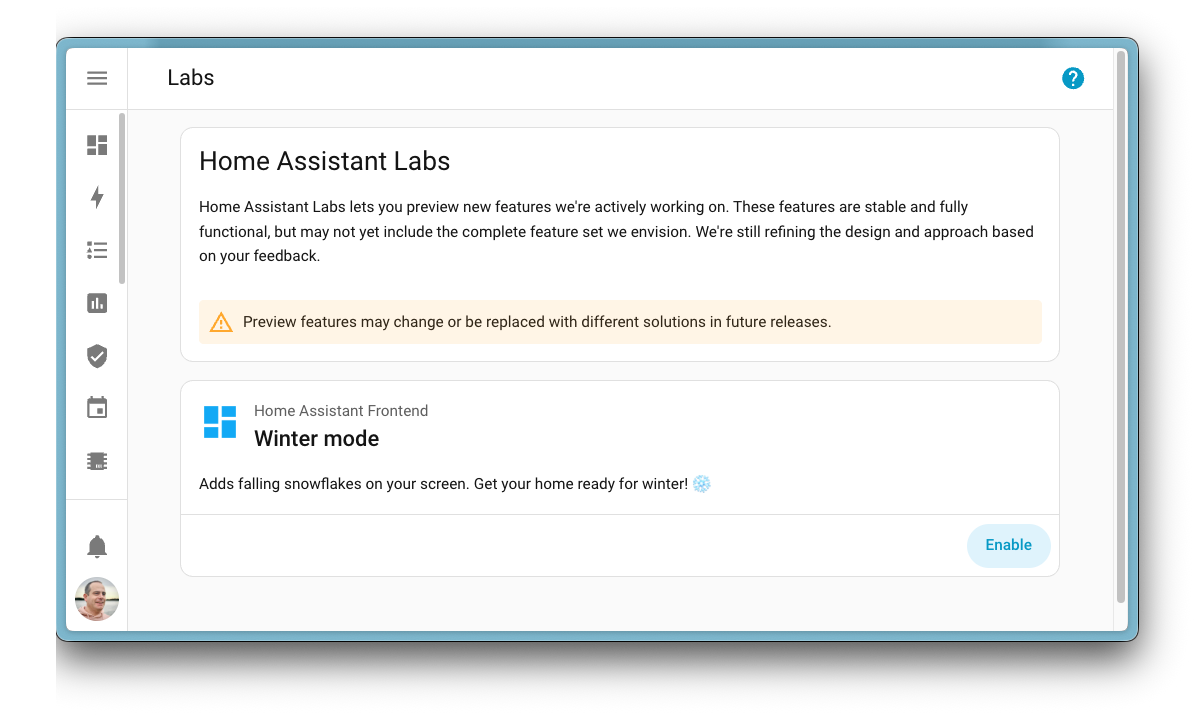
The very first preview feature available in Labs is Winter mode ❄️, inspired by a community post on Reddit originally created by u/Possible-Week-5815. Enable it, and watch your Home Assistant interface transform into a winter wonderland with falling snow. A fun way to get into the holiday spirit!
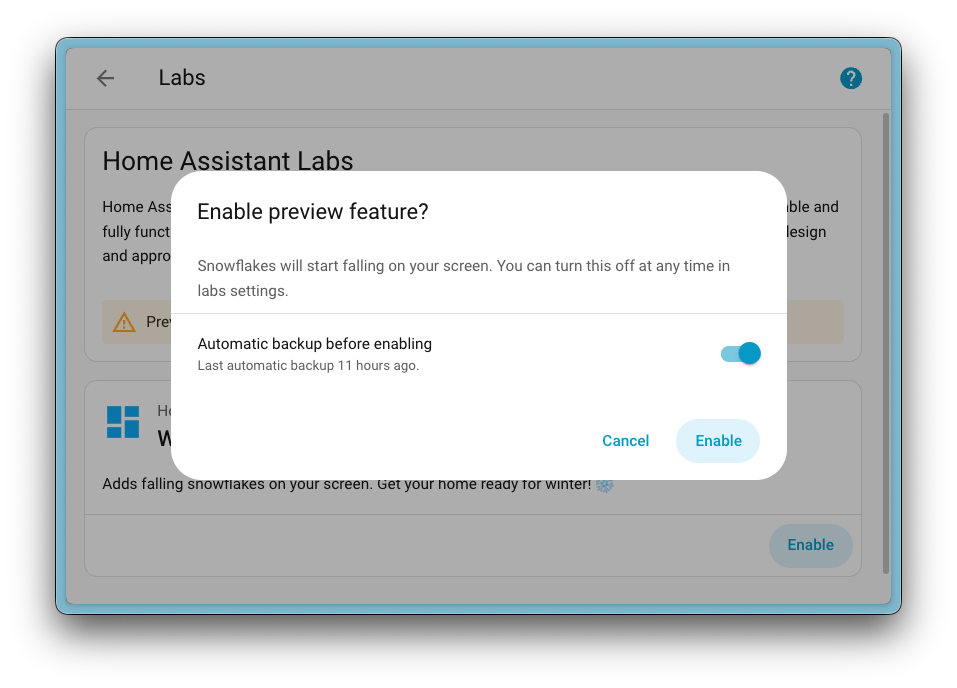
When you enable a preview feature, you can also choose to create a backup first, just to be safe. And if you change your mind? Simply disable it again. No restart required!
Preview features are off by default, and enabling them won’t affect your existing setup. It’s completely optional, so if you prefer to stick with the battle-proven experience, that’s totally fine. But if you’re curious and want to explore what’s coming next, Labs is the place to be.
But what was the first Labs preview feature we put in there? Well, it’s a big one…

Almost two years ago, we released a new automationAutomations in Home Assistant allow you to automatically respond to things that happen in and around your home. [Learn more] editor that unwrapped all our actionsActions are used in several places in Home Assistant. As part of a script or automation, actions define what is going to happen once a trigger is activated. In scripts, an action is called sequence. [Learn more] and made them easier to understand. Instead of a single, obscure “Call service” action, you now see clear options like “Light: Turn on” or “Media Player: Set Volume”.
Ever since, we’ve been wondering: could we do the same for triggersA trigger is a set of values or conditions of a platform that are defined to cause an automation to run. [Learn more] and conditionsConditions are an optional part of an automation that will prevent an action from firing if they are not met. [Learn more]? Instead of relying on technical, state-based options, what if we could offer intuitive alternatives that just make sense? Options like “When a light turns on” or “If a light is on”.
That idea set a two-year plan in motion, and today it’s finally becoming a reality.
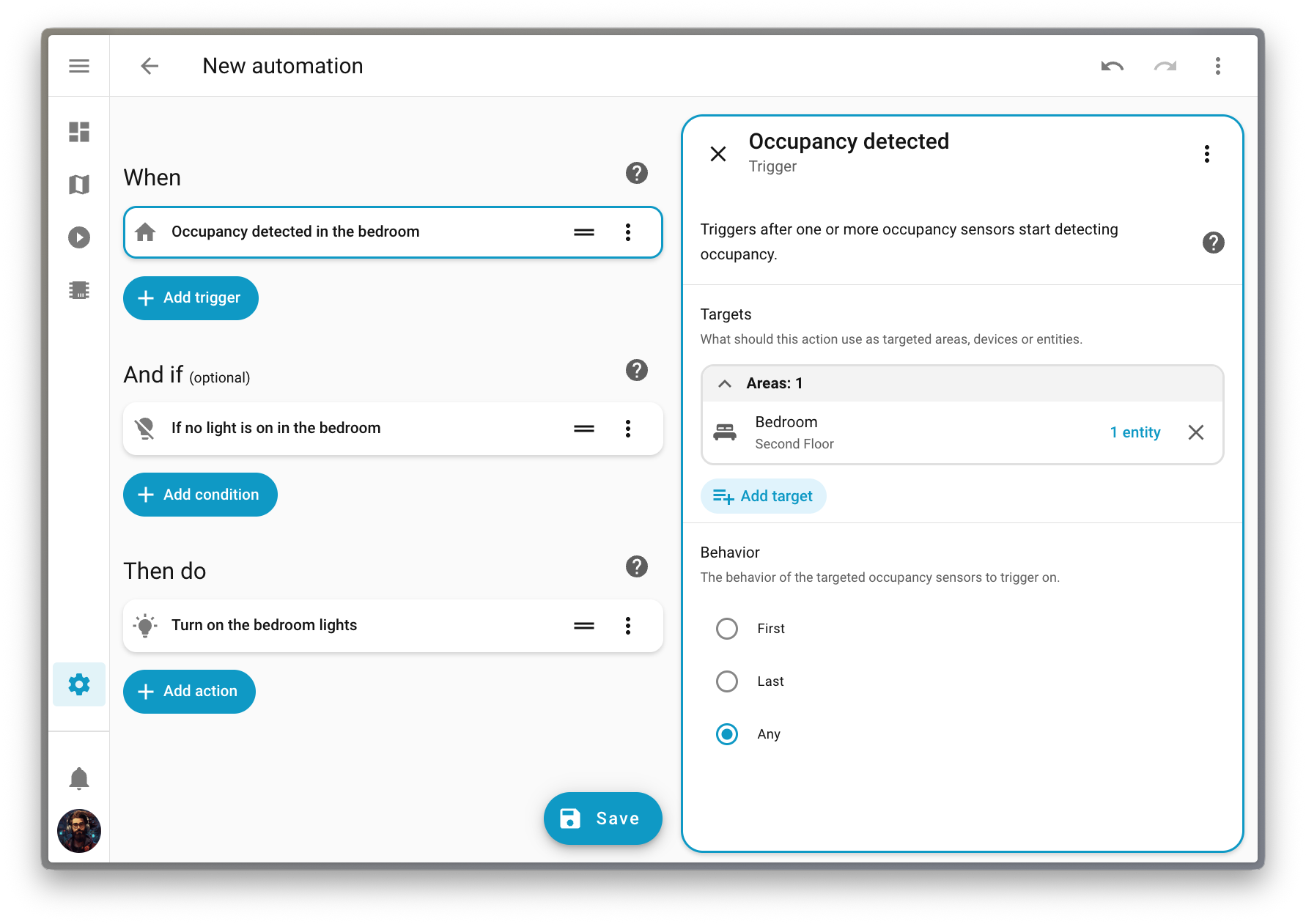
Along the way, we discovered something interesting: many of you take a “target-first” approach when building automationsAutomations in Home Assistant allow you to automatically respond to things that happen in and around your home. [Learn more]. You think about what you want to automate (a deviceA device is a model representing a physical or logical unit that contains entities., an entityAn entity represents a sensor, actor, or function in Home Assistant. Entities are used to monitor physical properties or to control other entities. An entity is usually part of a device or a service. [Learn more], or an areaAn area in Home Assistant is a logical grouping of devices and entities that are meant to match areas (or rooms) in the physical world: your home. For example, the living room area groups devices and entities in your living room. [Learn more]) before thinking about how to automate it (which action to perform or which trigger to use). This release embraces that mindset with a completely new way to build automations.
Purpose-specific triggers and conditions are now provided directly by domainsEach integration in Home Assistant has a unique identifier: The domain. It is often shown as the first part (before the dot) of entity IDs. like Light, Climate, Fan, and others, covering the most common automation use cases.
These new triggers and conditions fully support targeting. This means you can trigger an automation when any light in your living room turns on, without having to list them one by one or create a group beforehand. Targeting an area keeps things simple: it’s always aligned with how your home is organized, and you don’t have to update anything when you add or remove devices.
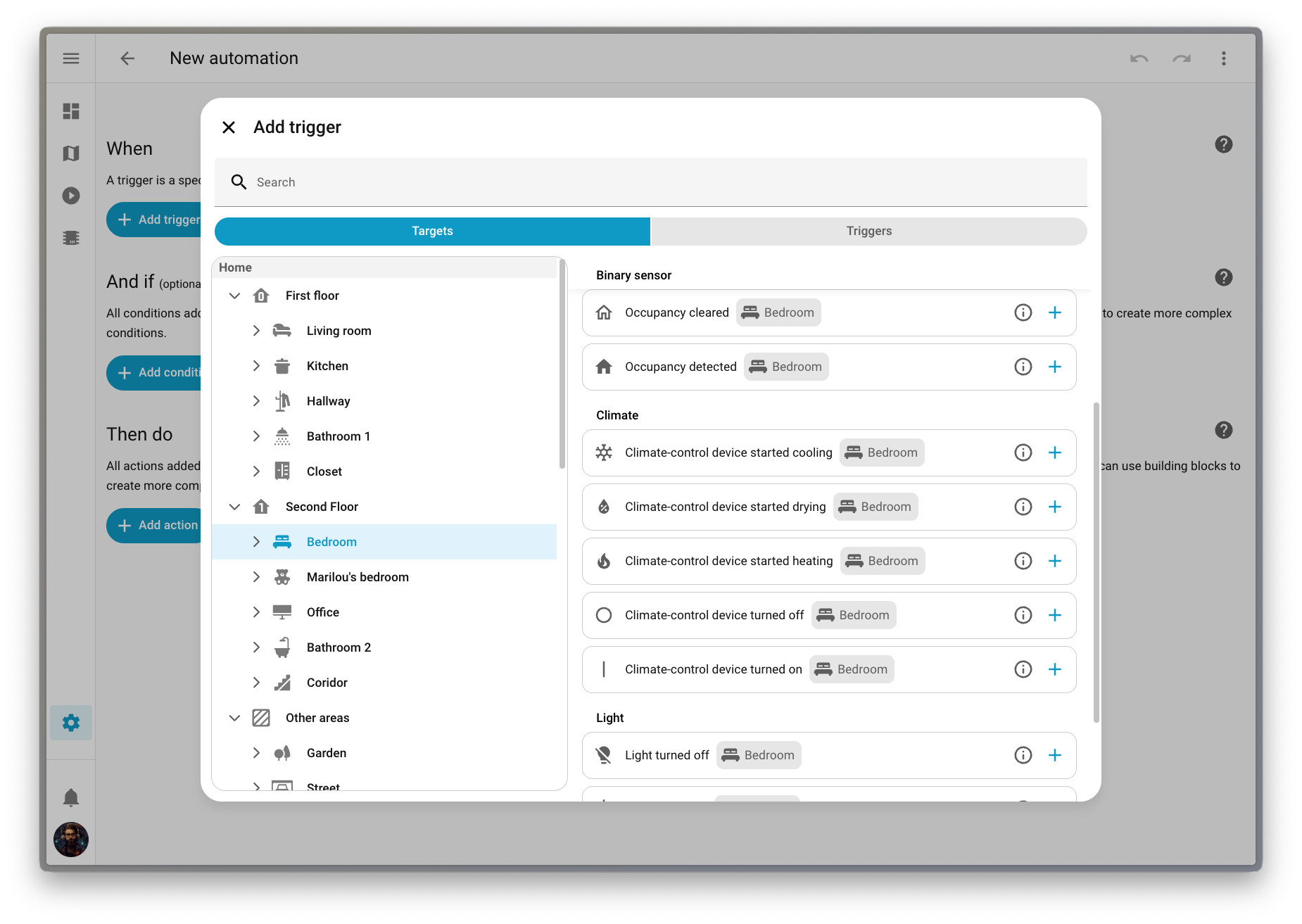
LabelsLabels in Home Assistant allow grouping elements irrespective of their physical location or type. Labels can be assigned to areas, devices, entities, automations, scenes, scripts, and helpers. Labels can be used in automations and scripts as a target for actions. Labels can also be used to filter data. [Learn more] are supported too! You can now check if any of your Christmas lights are on. Perfect timing for the holidays! 🎄
We’ve also introduced a new way to pick triggers, conditions, and actions that fits this target-first approach. You can navigate your home by floorA floor in Home Assistant is a logical grouping of areas that are meant to match the physical floors in your home. Devices & entities are not assigned to floors but to areas. Floors can be used in automations and scripts as a target for actions. For example, to turn off all the lights on the downstairs floor when you go to bed. [Learn more], then area, then device, and see exactly which options are available for each target. It’s a much more intuitive way to build automationsAutomations in Home Assistant allow you to automatically respond to things that happen in and around your home. [Learn more].
This feature is still being refined, so we’ve made it available as a preview feature in Labs. Head over to Settings > System > Labs to enable it and help us shape the future of automation building!
We have a lot of dashboard improvements to share in this release! From better default dashboard management to an improved Home dashboard, we have been busy making your Home Assistant experience even better.
Picking a default dashboard is now a system-level setting that takes effect instantly for all users on your Home Assistant installation. The dashboard you choose will appear at the top of the sidebar, replacing the current default.
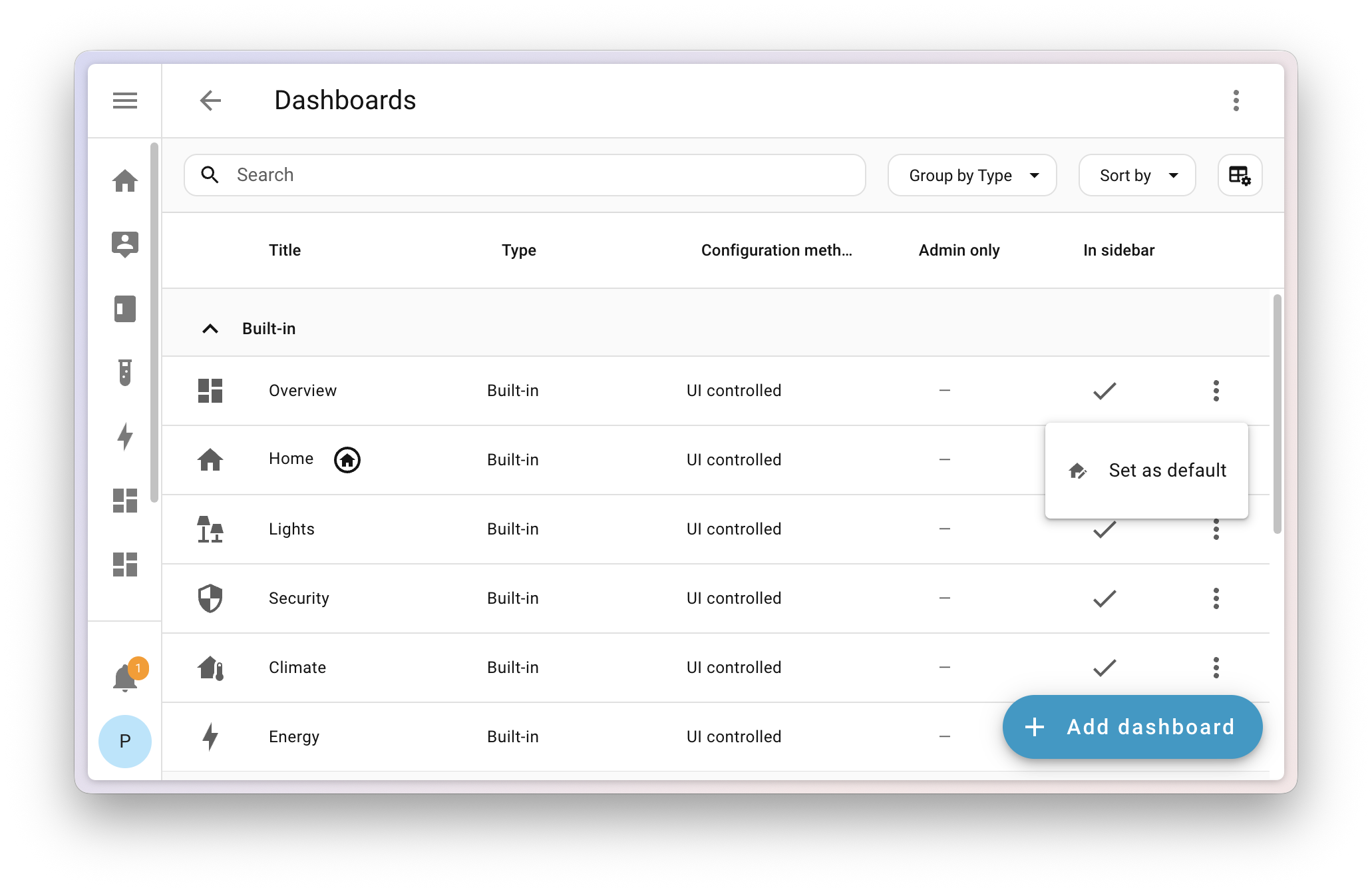
But don’t worry, personal preferences still matter! We added a new setting in your User profile where you can override the system default and set your own preferred dashboard.
If you set your phone to one dashboard and your wall tablet to another, they’ll now both revert to the default dashboard. If you want your wall tablet to use a different dashboard than your other devices, we recommend giving it a separate user profile that you can customize however you want.
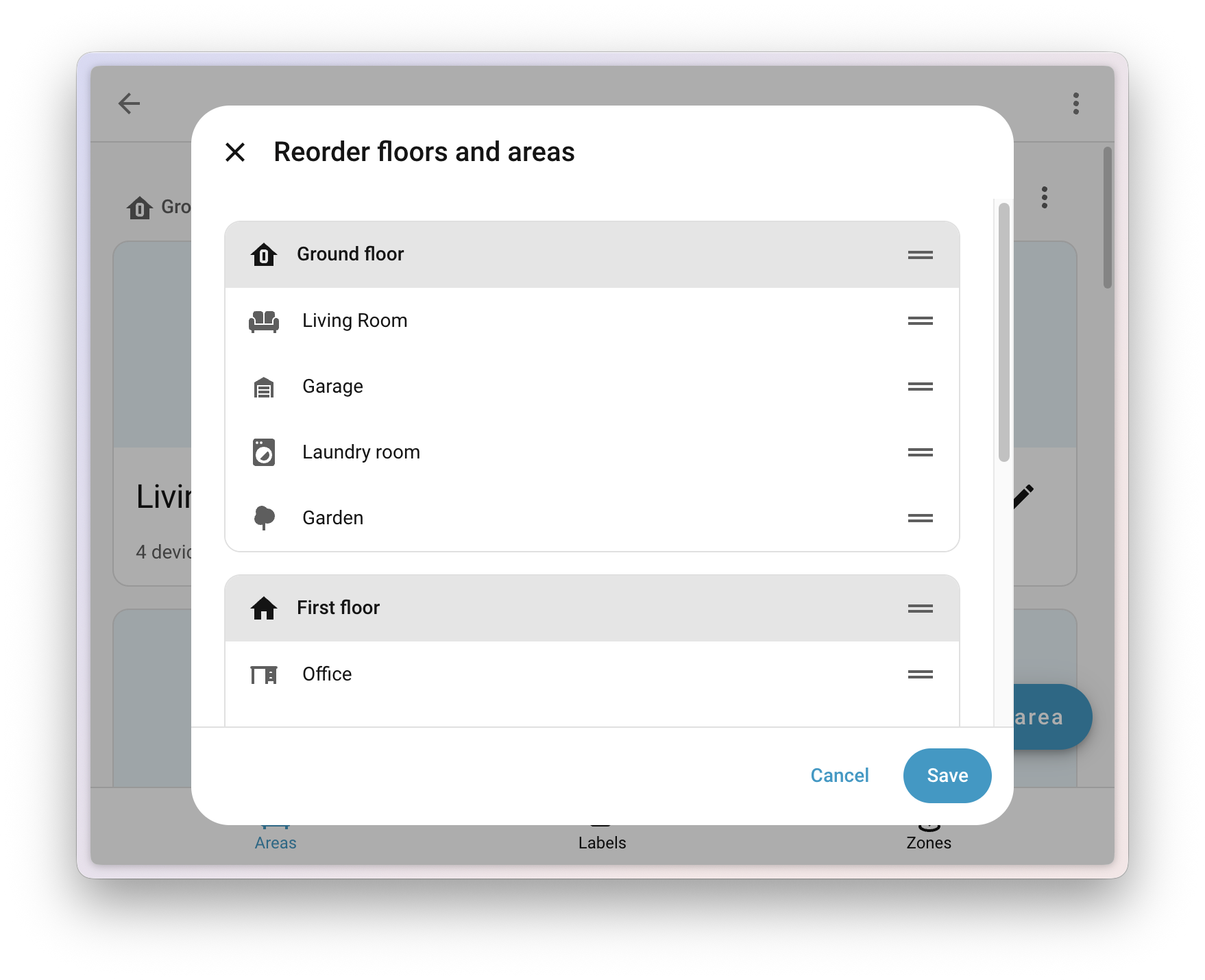
When using the built-in dashboard experiences (Home, Lights, Security, and others), one of the main pain points was the strict ordering of areasAn area in Home Assistant is a logical grouping of devices and entities that are meant to match areas (or rooms) in the physical world: your home. For example, the living room area groups devices and entities in your living room. [Learn more] (alphabetically) and floorsA floor in Home Assistant is a logical grouping of areas that are meant to match the physical floors in your home. Devices & entities are not assigned to floors but to areas. Floors can be used in automations and scripts as a target for actions. For example, to turn off all the lights on the downstairs floor when you go to bed. [Learn more] (numerically by level). This often didn’t make sense in a real home, where your guest bathroom shouldn’t appear before your living room, and the attic is rarely more relevant than the main floor.
Now you can go to Settings > Areas, labels & zones and use the new Reorder floors and areas menu to manually drag and drop any area or floor to reorder them. Your changes will instantly apply to all built-in dashboards that show areas and floors.
With the launch of Labs, we retired the experimental flag from the dashboard creation list. The Home dashboard can now be found in the dashboard list (still not visible by default), and the Areas dashboard has evolved into Home, so we’ve removed it for now. If you’re using the Areas dashboard, it will continue to work; you just won’t be able to create another.
Note
We want to keep hearing your voice! Share your experience with us in the Home dashboard survey and help us improve every step of the way. And of course join us on Discord to work together on the future of dashboards.
We added a new sidebar to the Home dashboard that gathers quick access links we think are useful for you. There’s also a nicer area and floor layout that uses space more efficiently. On a more technical level, the Home dashboard is now a proper built-in dashboard and shows up in the dashboard list.
Important
There is a chance your current favorites might disappear in this release and need to be re-added. This is due to the migration of this dashboard from a strategy to a built-in dashboard.
The dashboard editor now includes the undo and redo feature that we added in 2025.10 to the automationAutomations in Home Assistant allow you to automatically respond to things that happen in and around your home. [Learn more] and scriptScripts are components that allow you to specify a sequence of actions to be executed by Home Assistant when turned on. [Learn more] editor. This allows you to experiment safely while editing your dashboards. You can undo up to 75 changes or restore them with a single click, making editing dashboards faster and less stressful.
Thanks to @jpbede for implementing this handy feature!
The Energy dashboard has been helping you track your energy and gas usage for years now, and this release brings two great additions: real-time power monitoring and downstream water tracking.
Until now, the Energy dashboard was all about energy: the cumulative kWh you’ve consumed or produced over time. But sometimes you want to know what’s happening right now. How much power is that appliance actually drawing? Is your solar system producing at this very moment?
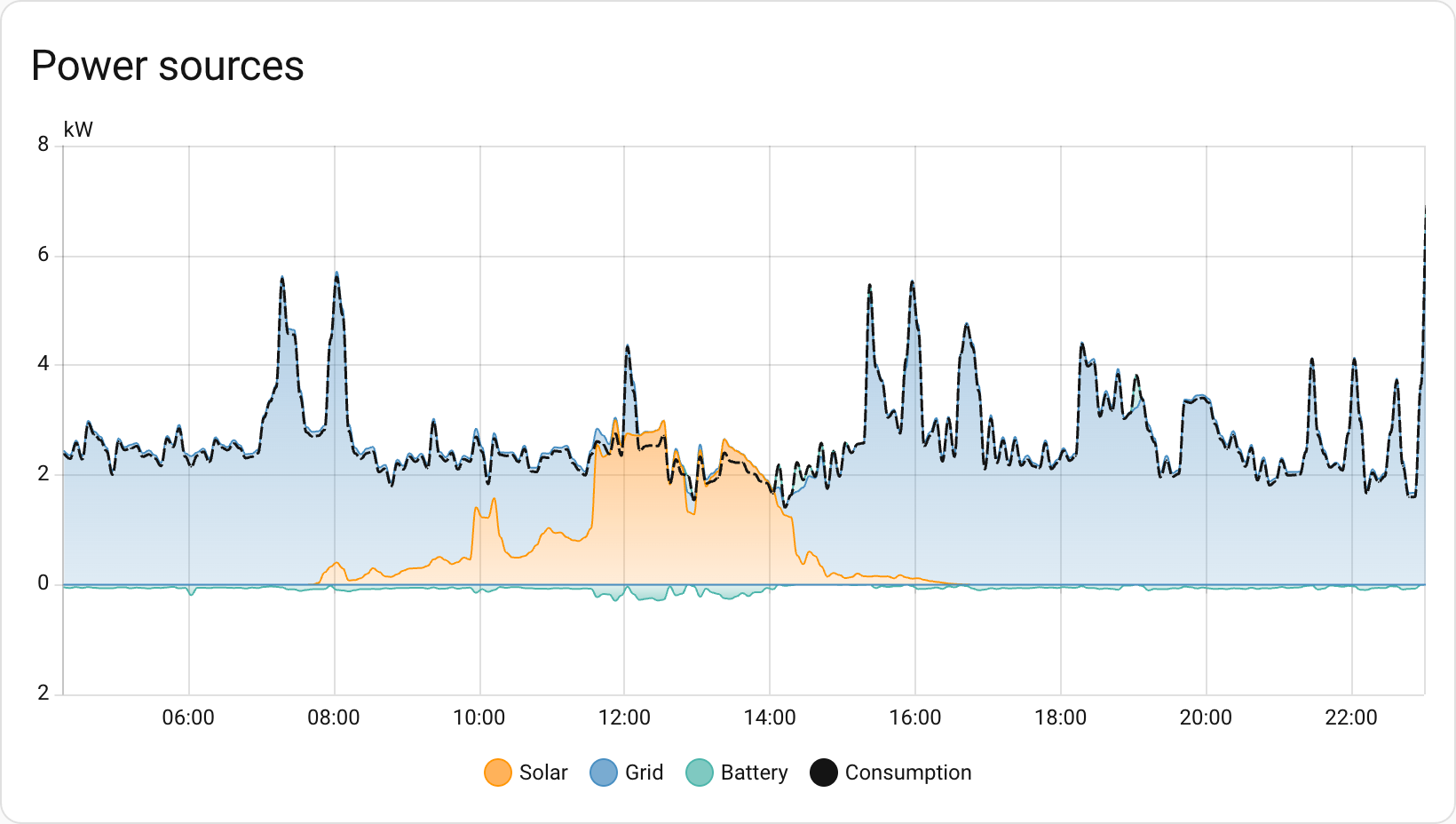
With this release, you can now configure power sensors alongside your energy sensors. Track your real-time grid consumption, see how much you’re exporting back to the grid, and watch those watts flow in real-time. The power configuration options now appear alongside energy settings for each source or device, and new power graphs let you see your power consumption throughout the day.

The Energy dashboard has been tracking your water consumption for a while now, but it was missing something: the ability to see where all that water is actually going. Just like you can track individual devices for energy consumption, you can now add downstream water meters to break down your water usage.
Got a smart irrigation controller? A water softener with a flow meter? A separate meter for your pool? Now you can track them all and see exactly how your water consumption is distributed across different uses.
There’s also a brand-new water sankey card that visualizes your water flow, just like the energy sankey diagram you already know. It’s a great way to see where your water is going at a glance.
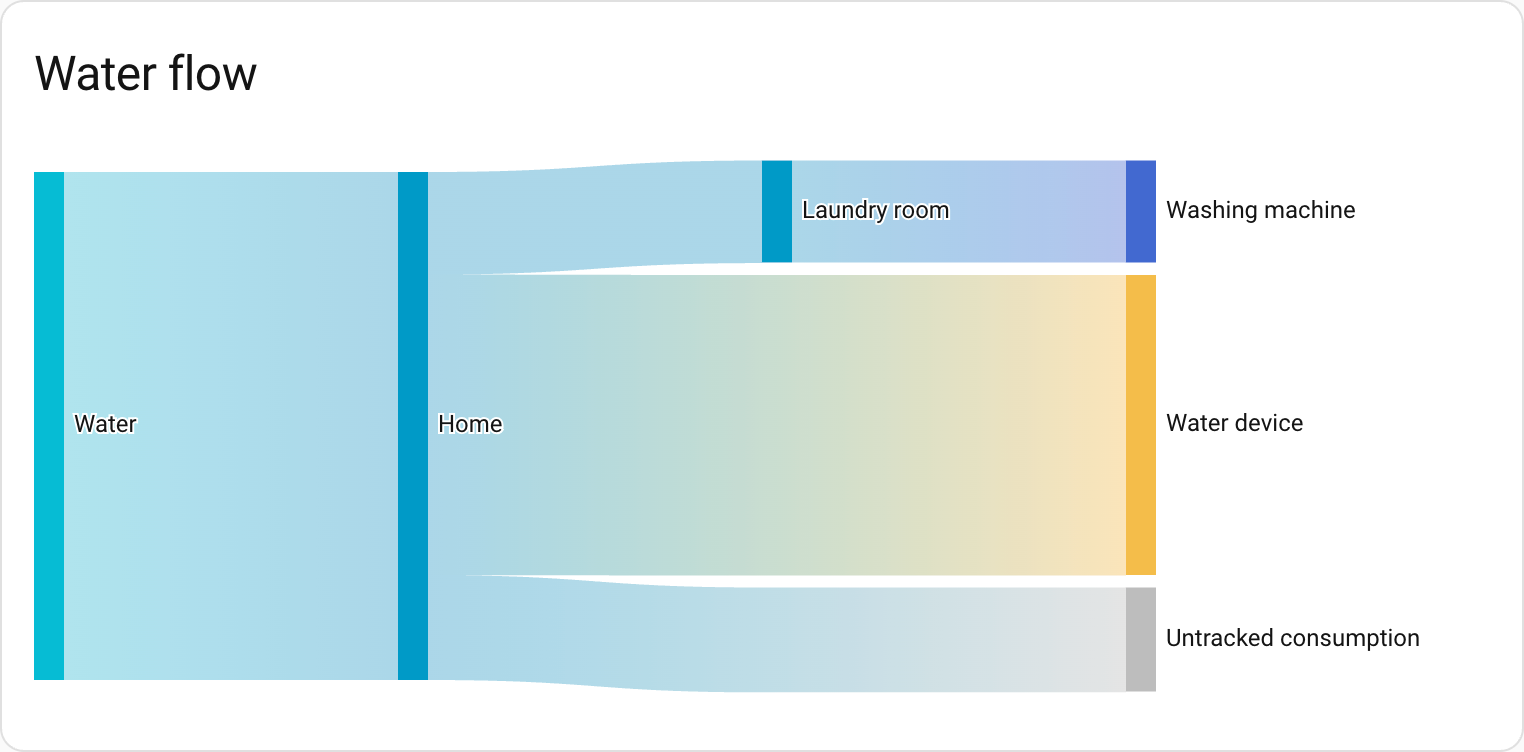 The new water sankey card shows where your water is going at a glance.
To make room for this new functionality, the Energy dashboard has been reorganized. Don’t worry: if you only have energy configured, you’ll still see the same dashboard. But if you add water, gas, or power, the dashboard will be split into several tabs.
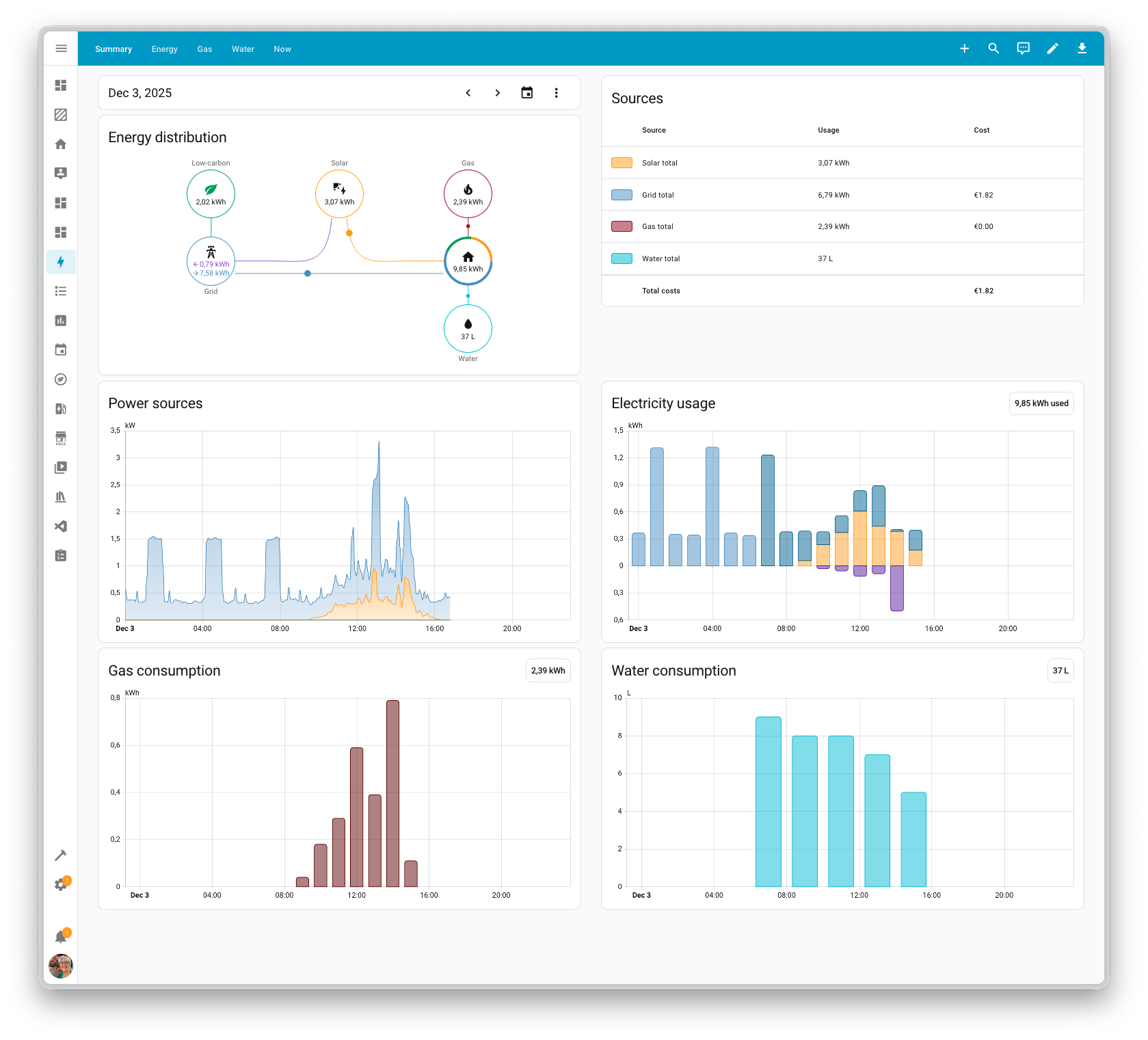
Thanks to our community for keeping pace with the new integrationsIntegrations connect and integrate Home Assistant with your devices, services, and more. [Learn more] and improvements to existing ones! You’re all awesome 🥰
We welcome the following new integrations in this release:
This release also has new virtual integrations. Virtual integrations are stubs that are handled by other (existing) integrations to help with findability. These ones are new:
It is not just new integrationsIntegrations connect and integrate Home Assistant with your devices, services, and more. [Learn more] that have been added; existing ones are also being constantly improved. Here are some of the noteworthy changes to existing integrations:
water_heater domain.One thing we are incredibly proud of in Home Assistant is our integration quality scale. This scale helps us and our contributors to ensure integrations are of high quality, maintainable, and provide the best possible user experience.
This release, we celebrate several integrationsIntegrations connect and integrate Home Assistant with your devices, services, and more. [Learn more] that have improved their quality scale:
2 integrations reached platinum 🏆
1 integration reached gold 🥇
2 integrations reached silver 🥈
2 integrations reached bronze 🥉
This is a huge achievement for these integrations and their maintainers. The effort and dedication required to reach these quality levels is significant, as it involves extensive testing, documentation, error handling, and often complete rewrites of parts of the integration.
A big thank you to all the contributors involved! 👏
While most integrationsIntegrations connect and integrate Home Assistant with your devices, services, and more. [Learn more] can be set up directly from the Home Assistant user interface, some were only available using YAML configuration. We keep moving more integrations to the UI, making them more accessible for everyone to set up and use.
The following integration is now available via the Home Assistant UI:
The following integrationsIntegrations connect and integrate Home Assistant with your devices, services, and more. [Learn more] are no longer available as of this release:
There are many more improvements in this release; here are some of the other noteworthy changes:
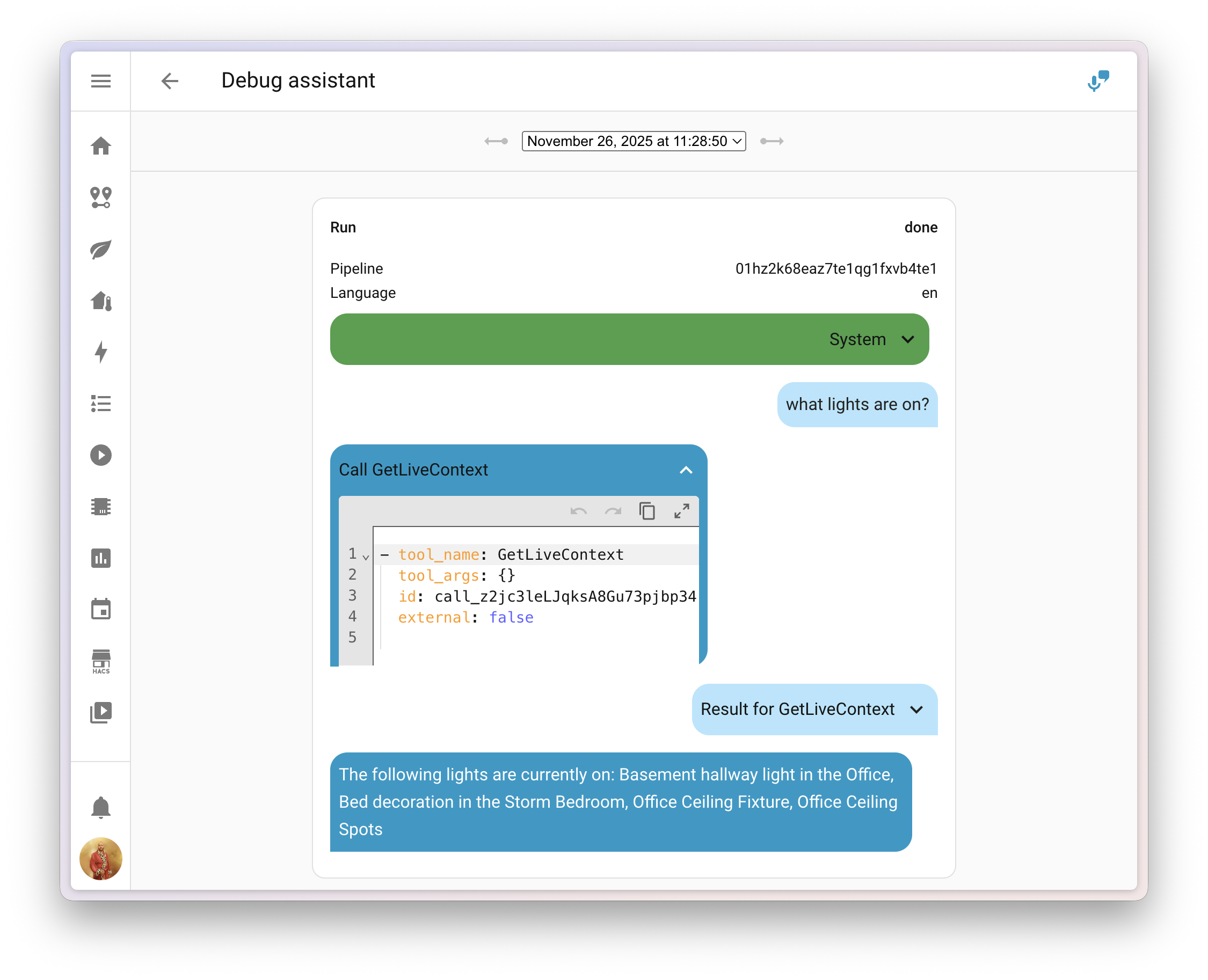
clamp, wrap, and remap to manipulate numbers in your templates. Awesome!min and max options to the bar gauge feature for tile cards, giving you more control over the gauge range.Ever played around with AI in Home Assistant and wondered what data is actually being sent?
@balloob upgraded the voice assistant debug interface, and you can now inspect the system prompt that tells the AI how to behave, along with any tool calls it made to generate your answer.
This makes it much easier to figure out why the AI decided to skip over that one entityAn entity represents a sensor, actor, or function in Home Assistant. Entities are used to monitor physical properties or to control other entities. An entity is usually part of a device or a service. [Learn more], or why it called a specific tool. You can find the debug interface in the voice assistant configuration panel.
If you’re using the Home Assistant Companion app for Android, there’s a handy new feature waiting for you! Starting with app version 2025.11, you can now add entitiesAn entity represents a sensor, actor, or function in Home Assistant. Entities are used to monitor physical properties or to control other entities. An entity is usually part of a device or a service. [Learn more] to widgets and Android Auto favorites directly from the entity’s more info dialog.
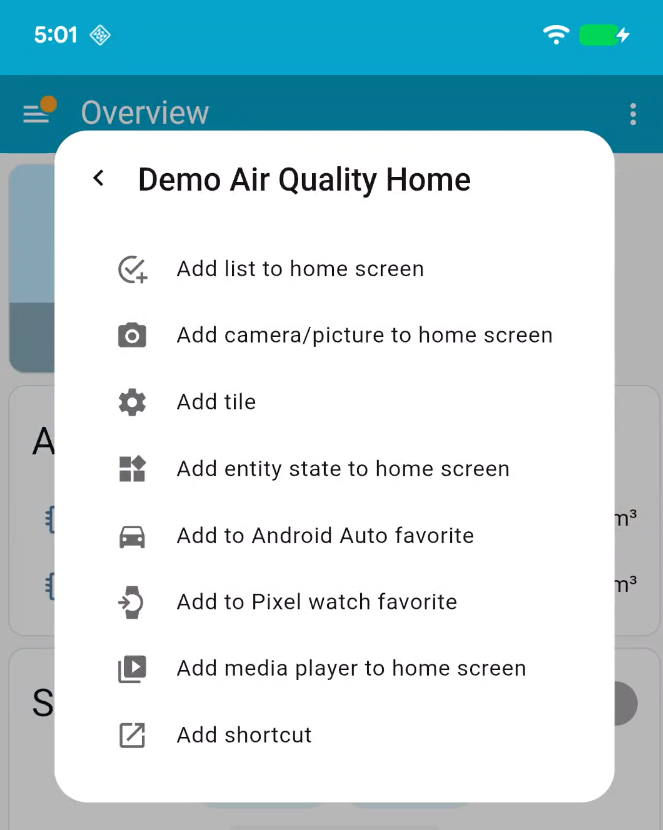
With just a few taps, you can:
No more deep-diving into app settings! The Add to option appears in the more info dialog with options tailored to the entity you’re viewing. For example, adding a media player widget is only available for media players.
This is a first step in integrating native mobile features directly into the Home Assistant interface. Future releases will expand this with support for creating shortcuts, tiles, and watch favorites.
Thanks for this great addition, @TimoPtr! 🙏
We will also release patch releases for Home Assistant 2025.12 in December. 🎄 These patch releases only contain bug fixes. Our goal is to release a patch release once a week, aiming for Friday.
v1.5.0 ([@funkybunch] - #158015)restart button for sleeping gen2+ Shelly devices (@bieniu - #158047)Home Assistant has a great community of users who are all more than willing to help each other out. So, join us!
Our very active Discord chat server is an excellent place to be, and don’t forget to join our amazing forums.
Found a bug or issue? Please report it in our issue tracker to get it fixed! Or check our help page for guidance on more places you can go.
Are you more into email? Sign up for the Open Home Foundation Newsletter to get the latest news about features, things happening in our community, and other projects that support the Open Home straight into your inbox.
We do our best to avoid making changes to existing functionality that might unexpectedly impact your Home Assistant installation. Unfortunately, sometimes it is inevitable.
We always make sure to document these changes to make the transition as easy as possible for you. This release has the following backward-incompatible changes:
After a 6-month deprecation period, support for the Home Assistant Core and Home Assistant Supervised installation methods, as well as all 32-bit system architectures (i386, armhf, and armv7), has now been fully removed.
These installation methods and architectures will no longer receive updates, including security updates. If you are still using one of these installation methods or architectures, please migrate to a supported installation method and architecture as soon as possible to continue receiving updates and support.
For more information on this change, read the Deprecating Core and Supervised installation methods, and 32-bit systems blog post.
It is now required to set a username and password when enabling the debug UI.
(@edenhaus - #157008) (go2rtc docs)
The legacy license plate event sensor has been removed from the UniFi Protect integration, as it no longer functions with Protect 6 and newer. The UniFi Protect integration has not been compatible with Protect versions older than 6 for quite some time.
This sensor has been replaced with a new Vehicle Detection Event entity that provides significantly more functionality, including license plate recognition, vehicle type detection, color detection, and confidence scores. The new event entity fires with a 3-second delay to ensure optimal thumbnail and LPR data quality.
For more information and automation examples, see the Vehicle Detection Event documentation.
The Xbox media browser has been completely overhauled to support multiple accounts and introduce a range of other improvements. As part of this update, the format of the media-source identifiers has been changed as well.
The following and followers sensors introduced in the last release previously included friends in their counts. After a recent API update, friends are no longer included.
If you are a custom integration developer and want to learn about changes and new features available for your integration: Be sure to follow our developer blog. The following changes are the most notable for this release:
Of course, there is a lot more in this release. You can find a list of all changes made here: Full changelog for Home Assistant Core 2025.12.
