The Stable channel has been updated to 147.0.7727.116/117 for Windows/Mac and 147.0.7727.116 for Linux, which will roll out over the coming days/weeks. A full list of changes in this build is available in the Log
Security Fixes and Rewards
Note: Access to bug details and links may be kept restricted until a majority of users are updated with a fix. We will also retain restrictions if the bug exists in a third party library that other projects similarly depend on, but haven’t yet fixed.
This update includes 19 security fixes. Below, we highlight fixes that were contributed by external researchers. Please see the Chrome Security Page for more information.
[TBD][493652473] High CVE-2026-6919: Use after free in DevTools. Reported by c6eed09fc8b174b0f3eebedcceb1e792 on 2026-03-18
[TBD][499891888] High CVE-2026-6920: Out of bounds read in GPU. Reported by tatiwari of Microsoft on 2026-04-06
[TBD][493315759] Medium CVE-2026-6921: Race in GPU. Reported by soiax on 2026-03-17
We would also like to thank all security researchers that worked with us during the development cycle to prevent security bugs from ever reaching the stable channel.
As usual, our ongoing internal security work was responsible for a wide range of fixes:
[505764421]Various fixes from internal audits, fuzzing and other initiatives
Interested in switching release channels? Find out how here. If you find a new issue, please let us know by filing a bug. The community help forum is also a great place to reach out for help or learn about common issues.
The Extended Stable channel has been updated to 146.0.7680.208for Windows and Mac which will roll out over the coming days/weeks.
A full list of changes in this build is available in the log. Interested in switching release channels? Find out how here. If you find a new issue, please let us know by filing a bug. The community help forum is also a great place to reach out for help or learn about common issues.
We’re excited to continue our journey across South Dakota, highlighting even more of the cities coming with this DLC for American Truck Simulator. Each one has its own unique history and charm, which has been captured and recreated by our talented teams. Ready to check them out? Let’s get rolling!
Aberdeen
Located in northeastern South Dakota, Aberdeen serves as an important hub for agriculture and industry, and also acts as a key gateway for drivers heading towards North Dakota. Known as the “Hub City,” it plays a vital role in connecting surrounding rural communities.
In-game, drivers will find a variety of industries to explore, including a large farm, a sizeable farm equipment scrapyard, and a soybean processing facility, reflecting the steady flow of agricultural freight that defines trucking across this part of the state. The city also features several notable buildings and landmarks such as the White House Inn, Aldersgate Church, and the Brown County Offices. There's plenty for you to explore here on your travels. Oh, and be sure to stop by the local truck stop before continuing your haul! Watertown
Surrounded by farmland and home to a range of industrial businesses, Watertown offers a unique blend of rural charm and economic activity. The city sits near the notable glacial Pelican Lake, a popular destination for outdoor activities and a natural getaway shaped by melting glaciers over 20,000 years ago.
Watertown is also known as the home of one of the most well-known American artists of wildlife and rural nostalgia, Terry Redlin, with an Art Centre named after him located in the city, which we've included in our recreation. Drivers will also be able to deliver to and from a range of industries in Watertown, including an ethanol plant, trailer manufacturing facility, and residential development depots.
Whilst driving through Watertown, you may notice the city’s unique layout, which reflects its early origins. Diagonal streets form the original town centre, which were aligned with the railway that once ran through it, allowing for easier access when transporting goods. As the city grew beyond its initial footprint, development gradually shifted to a more traditional straight grid pattern, creating the distinct mix of layouts you can see today.
Brookings
Home to South Dakota State University, Brookings is a lively city with plenty to discover. One of its most recognisable sights is the Coughlin Campanile, a 165-foot-tall chimes tower completed in 1929, which stands proudly on the university campus. It was later listed on the National Register of Historic Places in 1987.
Elsewhere in the city, you’ll find Veterans Memorial Park, a multi-war memorial that honours all veterans, past, present, and future. Its design features a centralised star symbol representing the five branches of the armed forces.
Drivers passing through Brookings will also come across Pioneer Park, a popular local spot that hosts community events throughout the year. Looking for work? Brookings offers a wide range of job opportunities, including a custom farm depot and a furniture manufacturing facility, alongside several other industries that supports the local economy.
Yankton
Situated along the Missouri River, Yankton is a city deeply connected to the water, often earning it the nickname “River City”. One of its most iconic landmarks is the Meridian Bridge, completed in 1924. This historic double-deck, vertical-lift structure was the first permanent crossing over the Missouri River in the Yankton area and played a vital role in connecting the region, including early freight routes moving goods across state lines.
Originally built to carry traffic between South Dakota and Nebraska, the bridge remained in use for over 80 years before being replaced in 2008. Today, it has been preserved as a pedestrian and bicycle crossing, allowing visitors to experience this impressive piece of engineering up close. It still stands as a defining landmark of Yankton, reflecting both the city’s history and its strong connection to the river.
In Yankton itself, drivers can also pass by the Veterans Memorial and a local church. Many visitors are drawn to nearby Lewis and Clark Lake, one of the most popular recreation areas in the South Dakota state park system. Here, drivers will have the opportunity to complete deliveries to a local depot, all whilst taking in the sights and sounds of the city.
Mitchell
Located along Interstate 90 between Sioux Falls and Pierre, you'll find Mitchell, best known for one of South Dakota’s unique attractions, the famous Corn Palace! Decorated with elaborate murals made entirely from corn and other grains, it draws visitors from across the country and stands as a true local icon. It's kinda corny, but we had to include it!
In addition to this landmark, Mitchell features a variety of industries for drivers to deliver to and from, including a grain elevator, farm depot, trailer production facility, and building materials factory. You’ll also find an oil and natural gas site nearby, along with a spacious truck stop, a familiar sight for long-haul drivers travelling along I-90.
Our team has done their best to squeeze in as much detail as possible into these smaller cities, within the scale of ATS. Finding the right balance is always a challenge, but we think they’ve done a great job bringing these South Dakota cities to life. Let us know what you think in the comments, we’d love to hear from you!
If you enjoyed today’s look at the cities of South Dakota, be sure to add this upcoming DLC to your Steam Wishlist. Your support means a lot to us and helps drive our future releases. We look forward to sharing more development news and previews in the near future. Until next time, happy haulin’!
[p]Adjusted camera motion due to recoil to match CS:GO more closely. Bullet trajectories should continue to match CS2.[/p][/*]
[p]Players will now experience the full camera motion due to external sources of aim punch (e.g. getting shot) regardless of network latency. The effects of aim punch on bullet trajectories are still applied immediately on the server.[/p][/*]
[p][/p][p]\[ ANIMGRAPH 2 ][/p]
[p]Minor adjustments to viewmodel animations.[/p][/*]
[p]Fixed several cases where crouch transitions in the air were instantaneous.[/p][/*]
[p]Fixed a bug where MVP panel characters weren't resetting correctly.[/p][/*]
In today's blog, we would like to show you the custom depots and completely new companies you will deliver cargo to and from in our upcoming Illinois DLC for American Truck Simulator, so let's take a look!
Illinois has one of the most diverse economies in the United States and a long history of manufacturing, producing a wide range of goods. It is also a major producer of non-electrical machinery, such as industrial and construction equipment, which is among its most important export industries.
As always, we wanted to reflect the real world when choosing depots for this map expansion, which is why you'll see representations of these industries in our newly created companies, as well as in our established custom depots. One of them is Antlion, a large construction machinery factory in Peoria. From there, you can take vehicles straight from the production line to the new dealer, GroundBreaker, in Quincy.
If you're a fan of boats, you're in for a treat. With Lake Michigan being a popular recreation spot in the state, you'll also be able to transport boats to or from the new Aqua Vista marinas in Marion and Chicago, as well as the already established Rock Port logistics company in Peoria.
And we couldn't forget about the Chicago International Airport, one of the busiest in the whole world. In our game, it's represented by a landmark cargo terminal, carefully recreated to match the real one, where players can load cargo onto aircraft. The area also includes a fuel station, where you can transport jet fuel. You will also be able to deliver cargo straight into a massive ULTIMUS transport plane!
In the Missouri DLC, we introduced underground warehouses, which offer an unusual experience of transporting cargo below the surface. Following that, you will be able to find the new UnderCity storage in Chicago, a big underground depot used for storing a wide range of products for the city's needs. Another one can be found near Quincy, a branch of the Terrastore company, which you are already familiar with from Missouri.
Agriculture is just as important to the state as manufacturing. Illinois is home to around 75,000 farms that cover nearly three-quarters of its land. Farmers produce large amounts of soybeans, corn, and dairy products, as well as raising pigs and cattle, helping supply food across the U.S. and around the world. That is why you will find plenty of custom depot farms around the cities of Marion, Champaign, Rockford, and Effingham.
Alongside these farms, you will also come across large Flavorfair grain elevator custom depots in East St. Louis and Quincy. These facilities play an important role in the agricultural supply chain, collecting and storing grain from nearby farms before it is transported onward for processing or distribution.
But that's not all. If you're looking to haul something a bit heavier, be sure to check out the quarries around Chicago and Rockford. You can also head to the custom timber harvest depot near Marion, where logging operations keep a steady supply of timber ready for transport.
26.2 Snapshot 4 (known as 26.2-snapshot-4 in the launcher) is the fourth snapshot for Java Edition 26.2, released on April 21, 2026, which adds two new languages, makes technical changes, and fixes some bugs and issues.
Full changelog: https://minecraft.wiki/Java_Edition_26.2-snapshot-4
Split View just got better: You can now right-click any link and choose Open Link in Split View to open it alongside your current tab. You can also search open tabs when creating a split view and quickly reverse tab positions using the new Reverse Tabs option in the tab context menu.
Share multiple tabs in a single step. Select several tabs, right-click, and choose Copy X Links (for Windows and Linux) or choose Share → Copy X Links (for MacOS). When pasted into other apps that support rich text, links include both the page title and the URL for easy reading.
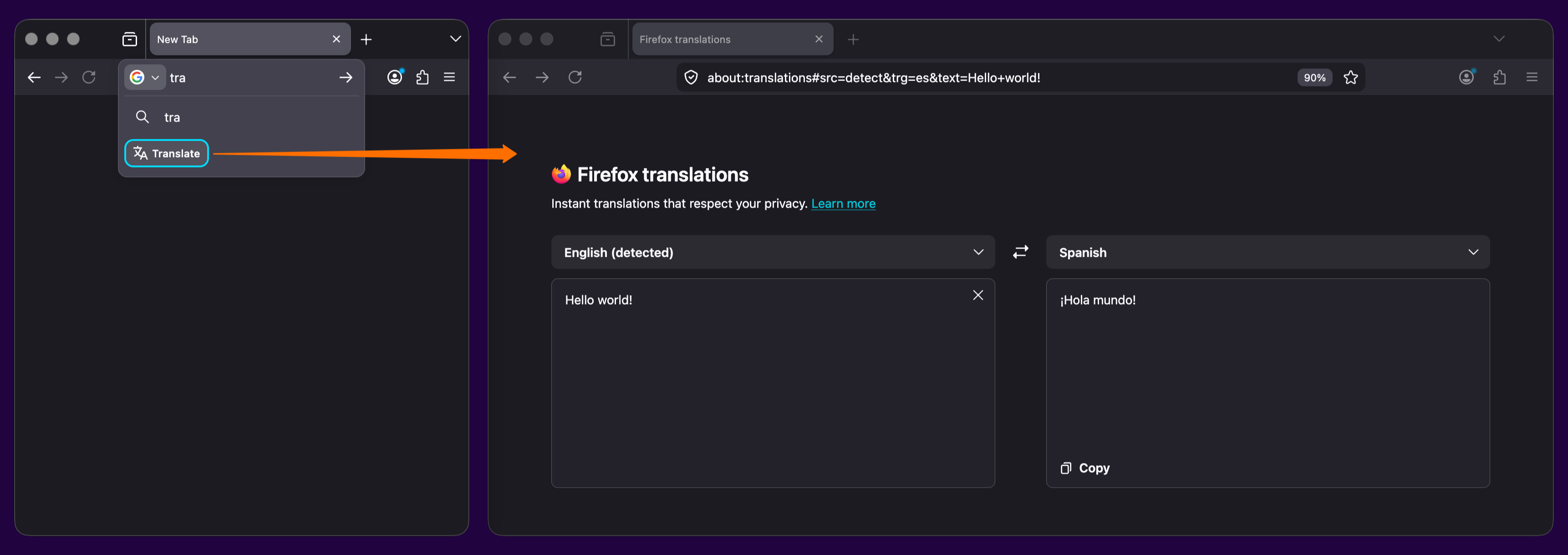
Try out real-time, private translations in Firefox Desktop with the about:translations page. Start typing the word "translate" into the URL bar for a quick-action shortcut to the page.
Added support for the GTK emoji picker on Linux, allowing users to insert emoji using the system shortcut (typically Ctrl+.).
Firefox web apps are now available to Windows users who installed Firefox through the Microsoft Store.
The new Firefox Profile management system is now available to all users, including users on Windows 10.
Backing up a profile to a file is now available to all Windows 10 and 11 users, including those who use the new profile management system.
Firefox now ships with a new .rpm package for Linux users on Red Hat, Fedora, openSUSE, and other RPM-based distributions.
Firefox now prompts you to enable location access in Windows settings when granting a website permission to use your location, if geolocation hasn't already been allowed. This behavior, previously limited to some Windows 11 versions, now applies to all supported Windows versions.
The built-in VPN is now available for users in Canada. Note: This feature is not available in enterprise environments.
Currently available in: Canada, France, Germany, United Kingdom, United States
This feature is part of a progressive roll out.
What is a progressive roll out?
Certain new Firefox features are released gradually. This means some users will see the feature before everyone does. This approach helps to get early feedback to catch bugs and improve behavior quickly, meaning more Firefox users overall have a better experience.
Fixed
Fixed an issue on macOS where, when macOS Lockdown mode is enabled, emoji characters are not displayed in web content.
If you prefer creating tab groups from the context menu, you can now turn off drag-and-drop group creation in Settings > Tabs > Drag tabs to create tab groups.
A new element-specific section has been added to the pseudo-class toggle panel including a toggle for the :open pseudo-class, which is only available for elements that have an open state like <dialog> elements. The existing toggle for the :visited pseudo-class was also moved there, as it only applies to <a> and <area> elements. (Learn More)
The Document.caretPositionFromPoint() method now only returns a position in a shadow DOM if its ShadowRoot is passed in the newly-added shadowRoots option.
The devtools network monitor now indicates when a connection used a certificate issued by a certificate authority not in Mozilla's Root CA Program.
Web Platform
Firefox now supports the ariaNotify API for accessibility notifications (e.g. for screen readers) as a more ergonomic and reliable alternative to ARIA live regions.
Firefox now supports media element pseudo-classes (e.g., :playing, :paused) to allow more precise styling based on media playback state.
Added support for the highlightsFromPoint() API, which allows web pages to interact with CSS Highlights by returning all Highlights at a given point.
Firefox now supports light-dark() on images, just like on colors, which is very useful for supporting dark mode on websites.
The color-mix() function previously accepted only two color values. This limitation has now been removed, allowing the function to accept an arbitrary number of colors.
Added support for a new auto value on the sizes attribute for lazy-loaded image elements with multiple images defined via srcset. This allows the browser to automatically select the right image based on the layout width of the image element. (Learn More)
Unresolved
Users with Bitdefender security software installed may experience problems loading websites, particularly Facebook.com. We are working on a workaround, but as a temporary mitigation, disabling Bitdefender or turning off its traffic filtering features may resolve the issue. (Fixed in 150.0.1)
Some websites on internal or corporate networks that require a login prompt may fail to display the sign-in dialog in Firefox 150, showing a blank page instead. (Fixed in 150.0.2 in Bug 2034752)
Community Contributions
With the release of Firefox 150, we are pleased to welcome the developers who contributed their first code change to Firefox in this release, 22 of whom were brand new volunteers! Please join us in thanking each of these diligent and enthusiastic individuals, and take a look at their contributions:
Today, we’re excited to share a closer look at another key part of our upcoming Coaches DLC for Euro Truck Simulator 2. While stepping behind the wheel of a coach introduces a brand-new way to experience the road, an equally important part of this new gameplay lies in where your journey begins and ends; the coach stations and stops themselves.
When development on Project Coaches began, there were already quite a few bus station prefabs placed across the ETS2 map. Many of you may have already spotted these throughout the map long before our official announcement of Coaches. While they served well as scenic placeholders, they were not really designed with our Coaches DLC in mind. As a result, a significant part of the Coaches development has focused on reworking these older assets, refreshing their layouts, and in many cases rebuilding them from the ground up so they better reflect real-world locations and integrate more naturally into their surroundings.
At the same time, expanding coverage across the map became a key priority. We spoke with Dominik, Producer of Project Coaches, to learn more. "From the very beginning, we faced a significant challenge, expanding the network of bus stations and stops across all of Europe. In some existing DLCs, these locations were scarce or missing entirely. Our primary goal was to cover key cities to ensure players can take on bus jobs even if they own a DLC that is currently disconnected from the rest of the road network. Following that, we focused on covering as many capital cities as possible while identifying new spots where we could realistically fit bus infrastructure into the map."
Of course, integrating these new locations into an already established world is far from straightforward. Many of our map expansions, such as Italia, Road to the Black Sea and Beyond the Baltic Sea were originally built without the Coaches' gameplay in mind. This means that adding new stations required revisiting existing cities and carefully adapting them to fit new infrastructure.
One of our map designers shares, "Most bus terminals require varying degrees of intervention into the existing map. Creating a brand-new station from scratch is a relatively straightforward process, essentially standard map development. However, adding new areas to locations where they weren't originally planned presents a unique set of challenges, especially in parts of the map that are nearly a decade old. In those cases, we must carefully use older assets and techniques to ensure the new additions don't feel out of place."
Even in our newer map expansions, space is often limited, especially in dense urban environments. "It is quite a puzzle to integrate two hundred meters of road and a large bus terminal into a space where, originally, there was only room for half of that. It’s a constant balancing act between our vision and the technical reality of the existing map."
In some cases, this has even led to cities being expanded to include parts of their town centres, allowing for more authentic placement of coach stations. Additionally, map designers who have been working on specific DLCs have been implementing their own stations, with the Coach Team stepping in to provide technical support and ensure that all necessary gameplay functionality is properly implemented.
"It’s been great to be part of the Coaches development team as a tester and to have the opportunity to see all of these newly created locations come to life." Simon B from our QA team adds "The asset and map designers have really outdone themselves on this project, creating vibrant bus stations and once again bringing a large portion of the real world closer through stunning landmarks and scenery.
That said, with so much work to do, there are always some remaining issues or imperfections that can go unnoticed with each new bus station, which is where I come in. Whether it’s a smaller detail or a larger issue, and whether the fix is quick or more involved, everything is resolved smoothly and efficiently thanks to the proactivity of the wider team. I’m excited to continue helping ensure these bus stations are in top condition, and I can’t wait to see the final result of all our work."
With the Coaches DLC, we’re not just introducing a new vehicle type, but so much more! From reworked legacy prefabs to newly built landmark stations and expanded city areas, we want to ensure that players can enjoy this upcoming addition across our already established Euro Truck Simulator 2 map.
Excited for the Coaches DLC for Euro Truck Simulator 2? Be sure to add it to your Steam Wishlist! It really helps support our future releases and ensures you’ll be notified when it launches. In the meantime, follow us on our official social media channels to stay up to date with the latest development news. Until next time, see you on the road!
We’re back with another episode of SCS On The Road! This time, we’re taking you to the Netherlands, where we visited DAF Trucks in the city of Eindhoven. During our trip, we had the opportunity to explore their facilities, gather valuable reference materials, and get up close with the DAF XF Electric.
Join Nemiro, Oscar, Filipkoo, and George, members of our SCS Software team, as they meet with Tim Gerth, Sales Information Manager at DAF Trucks NV. In this episode, we will take you behind the scenes of how we recorded authentic sounds and captured detailed photographic references for the DAF XF Electric.
We also had the opportunity to gather video and photo references of the DAF Eindhoven campus, which we’ve recreated in Euro Truck Simulator 2, and that players will get to explore as part of our Benelux Rework update. You can read more about that here!
We'd like to give a massive thank you to our friends at DAF Trucks, and to everyone who made our visit possible, for allowing us to visit their Eindhoven facility, get up close with the DAF XF Electric, and ultimately bring both of these into Euro Truck Simulator 2. We'd also like to give a special thanks to Tim Gerth, who we met during our visit and who we've had the opportunity to interview in a previous SCS On The Road episode, which you can find here. We highly recommend taking a watch!
Make sure to stay connected with all the latest news and upcoming episodes by following us on X, Facebook, Instagram, Bluesky, TikTok, and YouTube, or by subscribing to our newsletter. We look forwarding to bringing you more SCS On The Road episodes in the future, and until next time, keep on truckin'!
Today, we’re incredibly excited to share a truly special milestone for American Truck Simulator, one that celebrates not only our journey, but the legacy of one of the most iconic roads in the world.
Route 66 is a legendary highway in the United States, stretching from Chicago, Illinois to Los Angeles, California, crossing eight states along the way. First established in 1926, it became one of America's first continuous highways, playing a major role in U.S. culture and history.
In 2026, Route 66 celebrates its 100th anniversary, and to mark this milestone, a wide range of events and initiatives are being organised to honour its legacy. As part of these celebrations, the Route 66 Centennial Commission has brought together official projects that help preserve, showcase, and share the story of this legendary road with the world.
We are incredibly proud to share that American Truck Simulator has been recognised as an Official Route 66 Centennial Project. This prestigious designation, approved by the United States government and Congress, places our work alongside a range of initiatives honouring the legacy of Route 66 as it reaches its 100-year milestone.
We put together a short video showcasing some of the iconic locations you can find along this historic highway in American Truck Simulator, check it out below!
So, what does this mean? The Route 66 Centennial Project highlights a
variety of efforts from around the world that help share the story of
this historic highway. These include preservation work, cultural
programmes, and modern digital experiences like ours. "SCS Software’s
Route 66 recreation in their American Truck Simulator video game offers
an unprecedented way to experience the history, culture, and beauty of
America’s most iconic highway," said Bill Thomas, Commissioner for the
Route 66 Centennial Commission. "This digital re-creation not only
celebrates the centennial milestone but also honours the people and
communities that have kept Route 66 alive for generations."
We are truly honoured that American Truck Simulator has been included in this initiative. Since the release of ATS in 2016, our team has been carefully building the game world state by state, always aiming to recreate real locations with authenticity and care. One of our long-term goals has been to bring Route 66 to life in a way that players everywhere can experience and enjoy.
With the upcoming release of the Illinois DLC for American Truck Simulator, our virtual recreation of Route 66 will be completed in full, allowing players to drive the entire historic route from Chicago to Los Angeles across all eight states. This marks a major milestone not only for our game, but also for everyone who has dreamed of experiencing this legendary journey.
We would like to thank the Route 66 Centennial Commission for this incredible recognition, and of course, our community, whose support continues to drive us forward. We look forward to sharing more with you as we approach the completion of Route 66 in American Truck Simulator.
We're happy to share that the Open Beta for the 1.59 update for Euro Truck Simulator 2 is now available for players to try out and test. If you decide to take part in this Open Beta, it would be a huge help if you could report any issues or bugs you may encounter in theappropriate section of our official forums.
Your feedback and reports mean a lot to our team, and we genuinely appreciate the time you are taking to help us improve the game. With that said, let's jump in and explore what the 1.59 Open Beta brings.
Benelux Rework Release
We are happy to reveal that the long-awaited Benelux Rework project will be released in this update! Our assets and map designers have completely rebuilt the whole original map of Belgium, the Netherlands, and Luxembourg from scratch, delivering a richer, more detailed experience.
Truckers will be able to explore a wide range of revamped major cities and their surroundings, including Amsterdam, Groningen, Rotterdam, Brussels, Liège, and Luxembourg City. Each location has been carefully redesigned to highlight its unique character with plenty of landmarks and details!
You can also look forward to hauling cargo through entirely new locations. These include Antwerp, home to one of Europe's largest container ports; the DAF Trucks facility in Eindhoven, which has been recreated with remarkable detail in close cooperation with our partners at DAF Trucks; as well as key transport corridors - the busy E40 and A2 motorway.
You'll be able to drive from the beautiful hilly landscapes of the Belgian Ardennes to the flat polders and picturesque coastal roads in the northern Netherlands - the reworked Benelux offers a diverse and varied environment that truly reflects the region's look and feel.
Whether you're cruising through dense city centers, navigating busy highways, or discovering scenic country routes, the Benelux region now offers a far more immersive and authentic journey. You can see more from what is coming in our already released blogs on this topic.
Volvo Trucks Experience Center
In partnership with our friends at Volvo Trucks, we are adding the renowned Volvo Trucks Experience Center, situated in Gothenburg, Sweden, to the map, where you will be able to test your trucking skills.
The center's standout feature is its dedicated driving circuit, which incorporates sweeping bends, tighter technical corners, elevation changes, downhill stretches, and varied road layouts. This allows drivers to assess vehicle behaviour in a controlled environment, highlighting stability, braking precision, handling characteristics, and overall driving comfort in ways that go beyond everyday road conditions.
The Volvo Trucks Experience Center has been recreated almost entirely on a 1:1 scale in our map with a strong attention to detail. You will be able to drive the full circuit and explore the surrounding areas of the facility.
To find this amazing facility, you will need to venture around the roads near Gothenburg to discover an entrance that will initially not be shown on your GPS. And remember, since it is located in Sweden, you will need the Scandinavia DLC to be able to visit it. You can read more about this addition here.
Thermo King Update
Thermo King, a global leader in transport temperature control, is coming to Euro Truck Simulator 2 with their trailer refrigeration units! These will replace all the unbranded units we had on our base game and DLC reefer trailers so far. This will add an extra touch of realism when you are hauling temperature-sensitive cargo and spot a famous real-world brand on your trailer.
From the 1.59 update, you will be able to see the Thermo King A-360, A-400, A-500, SLXi 300, and SLXi 400 refrigeration units on the front of your single trailers, which deliver a range of trailer refrigeration performance to suit different transport needs. On top of that, we will also be adding the UT-1400R unit, designed for double-trailer configurations and mounted beneath the trailer. Find out more about this update here.
Advisor Update - Finances & Damage Widgets
We've been closely listening to feedback from our community, and one of the most common points raised in the new route advisor was that many players missed having quick access to information on vehicle damage and finances. While our teams are actively working on the next steps in our broader vision for a redesigned UI in this area, we didn't want to make you wait until that work is complete. Instead, we've prioritized implementing some of the most frequently requested improvements as soon as possible.
Based on that, we've implemented the Damage and Finances widgets. These widgets are designed to restore easy access to information about truck damage, plus trailer and cargo damage, if you are currently driving with a trailer and cargo, as well as your current bank balance, with an average profit over the last seven days displayed too.
These widgets can be turned on and off in the Widget Settings Menu, and if enabled, they will be displayed in the bottom right corner above your GPS.
Tow to Road
The Tow to Road feature was designed to improve the overall quality of life for players by reducing frustrating situations during gameplay. It will allow drivers to quickly recover if their truck overturns or gets stuck in a ditch or uneven terrain. It will also help prevent disruptions in multiplayer sessions, enabling players to continue with their convoy when they find themselves stuck, without the need to be towed to a service location, which could cause unnecessary delays.
So when you are in a difficult situation, you can simply find the new "Tow to Road" button under the Service menu (set to F7 by default). After paying a small fee for the towing service, you will be transported to your last safe location on the road. You can read more about this feature here.
Skills UX Redesign
The Skill Screen has received a visual rework while remaining in its original place within the interface. This update focuses on improving clarity and overall user experience without changing its core functionality.
You can now view both your current skill level and the next step in its progression. Tooltips also allow you to explore other ranks within each skill. Selecting a skill provides improved readability and clearer visual feedback, including a better indication of how many steps remain in that skill's progression path.
Each skill is represented as a clickable button, making it easy to access more detailed information. The redesign also improves navigation when using a controller.
QoL UI/UX Changes
We're continuing to refine the overall user experience with updates focused on readability, clarity, and smoother controller navigation.
The in-game news banner has received a visual refresh to better align with our newer UI style while improving readability. When hovering over a news item, a tooltip will now display a longer excerpt along with a clear call to action. Deactivated news items now feature a clearer status indicator, which also doubles as an activation button.
We're making navigation on the world map more intuitive for controller users. A new "undo last pin" feature has been added, along with remapped controls for adding, removing, setting avoid areas, and resetting pins.
Save handling has also been improved, with new saves now using the standard save icon instead of a black screenshot and overwriting clearly labeled as "Overwrite". Garage upgrade cutscenes can now be skipped more consistently using the (B) button, and the controller navigation has been further refined with improved D-pad accessibility across UI.
Traffic Sound Rework
We've also made some adjustments to traffic audio as part of this update. Sounds have been softened and rebalanced to better match real-world perception, with less emphasis on distant engine noise and more on the subtle "road hiss" of tires. Honking behavior has also been slightly randomized to reduce repetition. Overall, traffic should now feel less intrusive and better integrated into the ambient soundscape.
Height Blend Improvements
We've also made a few improvements to the Height Blend feature. Derived normal maps can now be enabled to help conserve GPU memory, and we've also addressed several graphical issues to ensure more consistent, visually accurate results.
Detour Feature Maintenance
We've decided to temporarily disable the detour feature to focus on maintenance and further development. We've received numerous reports of Detours not functioning as intended, and the current system no longer meets our needs.
As a result, we'll be shutting down detours while we work on improving and upgrading the feature in the background to make it more stable and reliable. Please note that this change only affects detours - random road events will continue to be available in the game.
Changelog
Map
Benelux Rework Release
Volvo Trucks Experience Center
Vehicles
Thermo King Update
Gameplay
Tow to Road Feature
UI/UX
Advisor Update - Finances & Damage Widgets
Skills UX Redesign
QoL UI/UX Changes
Improved News Banner Readability
World Map Pin Enhancements
Save Icon Update
Garage Cutscene Skipping
D-pad Accessibility Improvements
Visuals
Height Blend Improvements
Sounds
Traffic Sound Rework
Other
Detour Feature Maintenance
So enjoy all the new additions, but please remember: It's only an open beta, not a stable public version - so you may encounter bugs, instability, or crashes. It's completely okay if you want to wait for the final release. But if you're interested in helping us to get there faster, we'd appreciate all of your feedback on our forum and your bug reports in the dedicated section.
Please check our modding wiki to get details pertaining to mods for the game.
If you wish to participate in this Open Beta, you can find this version in the Experimental Beta branch on Steam. The way to access it is as follows: Steam client → LIBRARY → right-click on Euro Truck Simulator 2 → Properties → Betas tab → Beta Participation drop-down menu → public_beta. No password is required. Sometimes you will have to restart your Steam client to see the correct branch name there.
Have you been wondering what our Bridge Between Communities blog was teasing last week? Some of you have correctly recognized the 1915 Çanakkale Bridge, which will bring our community closer together than ever before. And now we are really excited to reveal that our next map expansion for Euro Truck Simulator 2 will take players into the heart of Türkiye, with the...
This vast, culturally rich region is a land of stunning contrasts, where sunlit coasts meet towering mountains and open plains. From the west's olive groves to the glittering waters of the Mediterranean, a new vista awaits your discovery after every turn.
Transport cargo from the bustling streets of Istanbul all the way to Aksaray, the easternmost point of this expansion. The route begins with engineering marvels as you cross the record-breaking 1915 Çanakkale Bridge, the longest suspension bridge in the world, or the impressive Yavuz Sultan Selim and Osmangazi Bridge, each a gateway into Anatolia. At the heart of your journey lies Ankara, the capital city and a vital crossroads of the region. Soon, the road may lead you past the shimmering expanse of Tuz Gölü, or through the vibrant tourist cities of Antalya and Alanya, where grand hotels rely on your cargo deliveries.
Experience the thrill of cruising the beautiful coastal roads in both the north and south, where the sea sparkles just beyond the guardrails, and take on challenging mountain routes with steep climbs, tight turns, and breathtaking views.
We can't wait to start bringing you future updates from this upcoming map expansion as the work on Soul of Anatolia goes on. Just keep in mind that there is a long way ahead to bring this big map to you, and everything you see here is still really much in a work-in-progress state and may change until the DLC is released.
Also, remember to give our X/Twitter, Instagram, Facebook, Bluesky, and TikTok a follow as you'll receive updates not only about Soul of Anatolia, but also other news from our games straight to your feed. Or subscribe to our newsletter to stay informed! Until next time, we will see you on the road.
We’re excited to announce that the 1.59 Open Beta for American Truck Simulator is now live and ready for you to check out. If you choose to participate, we’d greatly appreciate you sharing any bugs or issues you come across in the proper section of our official forums.
Your feedback is incredibly valuable to us, and we’re thankful for the time you take to help us make the game even better. With that, let’s take a look at what’s included in the 1.59 Open Beta.
Advisor Update - Finances & Damage Widgets
We've been closely listening to feedback from our community, and one of the most common points raised in the new route advisor was that many players missed having quick access to information on vehicle damage and finances. While our teams are actively working on the next steps in our broader vision for a redesigned UI in this area, we didn't want to make you wait until that work is complete. Instead, we've prioritized implementing some of the most frequently requested improvements as soon as possible.
Based on that, we've implemented the Damage and Finances widgets. The widgets are designed to restore easy access to information about truck damage, plus trailer and cargo damage, if you are currently driving with a trailer and cargo, as well as your current bank balance, with an average profit over the last seven days displayed too.
These widgets can be turned on and off in the Widget Settings Menu, and if enabled, they will be displayed in the bottom-right corner above your GPS.
Tow to Road
The Tow to Road feature was designed to improve the overall quality of life for players by reducing frustrating situations during gameplay. It will allow drivers to quickly recover if their truck overturns or gets stuck in a ditch or uneven terrain. It will also help prevent disruptions in multiplayer sessions, enabling players to continue with their convoy when they find themselves stuck, without the need to be towed to a service location, which could cause unnecessary delays.
So when you are in a difficult situation, you can simply find the new "Tow to Road" button under the Service menu (set to F7 by default). After paying a small fee for the towing service, you will be transported to your last safe location on the road. You can read more about this feature here.
Skills UX Redesign
The Skill Screen has received a visual rework while remaining in its original place within the interface. This update focuses on improving clarity and overall user experience without changing its core functionality.
You can now view both your current skill level and the next step in its progression. Tooltips also allow you to explore other ranks within each skill. Selecting a skill provides improved readability and clearer visual feedback, including a better indication of how many steps remain in that skill's progression path.
Each skill is represented as a clickable button, making it easy to access more detailed information. The redesign also improves navigation when using a controller.
QoL UI/UX Changes
We're continuing to refine the overall user experience with updates focused on readability, clarity, and smoother controller navigation.
The in-game news banner has received a visual refresh to better align with our newer UI style while improving readability. When hovering over a news item, a tooltip will now display a longer excerpt along with a clear call to action. Deactivated news items now feature a clearer status indicator, which also doubles as an activation button.
We're making navigation on the world map more intuitive for controller users. A new "undo last pin" feature has been added, along with remapped controls for adding, removing, setting avoid areas, and resetting pins.
Save handling has also been improved, with new saves now using the standard save icon instead of a black screenshot and overwriting clearly labeled as "Overwrite". Garage upgrade cutscenes can now be skipped more consistently using the (B) button, and the controller navigation has been further refined with improved D-pad accessibility across UI.
Traffic Sound Rework
We’ve also made some adjustments to traffic audio as part of this update. Sounds have been softened and rebalanced to better match real-world perception, with less emphasis on distant engine noise and more on the subtle “road hiss” of tires. Honking behavior has also been slightly randomized to reduce repetition. Overall, traffic should now feel less intrusive and better integrated into the ambient soundscape.
Height Blend Improvements
We’ve also made a few improvements to the Height Blend feature. Derived normal maps can now be enabled to help conserve GPU memory, and we’ve addressed several graphical issues to ensure more consistent, visually accurate results.
Detour Feature Maintenance
We've decided to temporarily disable the detour feature to focus on maintenance and further development. We've received numerous reports of Detours not functioning as intended, and the current system no longer meets our needs.
As a result, we'll be shutting down detours while we work on improving and upgrading the feature in the background to make it more stable and reliable. Please note that this change only affects detours - random road events will continue to be available in the game.
Changelog:
Gameplay
Tow to Road Feature
UI/UX
Advisor Update - Finances & Damage Widgets
Skills UX Redesign
QoL UI/UX Changes
Improved News Banner Readability
World Map Pin Enhancements
Save Icon Update
Garage Cutscene Skipping
D-pad Accessibility Improvements
Visuals
Height Blend Improvements
Sounds
Traffic Sound Rework
Other
Detour Feature Maintenance
Enjoy all the new additions, but please remember: It's only an open beta, not a stable public version - so you may encounter bugs, instability, or crashes. It's completely okay if you want to wait for the final release. But if you're interested in helping us to get there faster, we'd appreciate all of your feedback on our forum and your bug reports in the dedicated section.
Please check our modding wiki to get details pertaining to mods for the game.
If you wish to participate in this Open Beta, you can find this version in the Experimental Beta branch on Steam. The way to access it is as follows: Steam client → LIBRARY → right-click on American Truck Simulator → Properties → Betas tab → Beta Participation drop-down menu → public_beta. No password is required. Sometimes you will have to restart your Steam client to see the correct branch name there.
Some time has passed since our first Road to Consoles Dev Talk, where we took you behind the scenes of our work on bringing Euro Truck Simulator 2 and American Truck Simulator to the Xbox Series X|S and PlayStation 5. And today, we would like to share our progress since then with the second dev talk!
We know our #BestCommunityEver is eager to hear more news about the development of this project. We are working hard on bringing our games to consoles as soon as possible, but it is a huge task that requires the involvement of multiple departments in SCS Software. Even though there is still a lot of work to be done, we are making progress every day, and we are happy to give you an update on it.
In our second Road to Consoles Dev Talk, we interviewed some of the key members of the involved departments to tell you more about what they are currently working on, what is ahead of us, and also some of the challenges they are dealing with. And our goal is to do everything properly without taking any shortcuts. So without further ado, let's see what the team has been busy with!
We hope you have enjoyed taking a dive behind the scenes of the development process. And don't worry, we're just as excited to share more as you are to hear it, so stay tuned for our next update when we have something new to reveal.
We will share more important information about this project once we are ready to reveal it, so don't forget to follow us on X/Twitter, Facebook, Instagram, Bluesky, and YouTube, so you won't miss out on any news. Or you can sign up for our newsletter to stay informed. Until next time, happy trucking!
Few cars have shaped American roads and culture quite like the 1967 Ford Mustang Fastback. Today, we’re excited to take a closer look at this iconic American muscle car, and one of the vehicles that you’ll be able to get behind the wheel of in our upcoming Road Trip module with the Ford Car Pack DLC.
The 1967 Mustang Fastback marked a defining moment for the brand, introducing a more aggressive design, wider stance and a more powerful engine. This evolution shaped its reputation as a true performance machine, combining everyday drivability with power. Its versatility, iconic fastback silhouette, and muscular proportions make perfect fit for the open road.
Our team has worked hard to bring the 1967 Ford Mustang Fastback to life in American Truck Simulator, with a strong focus on period accuracy and heritage. From its unmistakable exterior design to the finer details that define its character, every effort has been made to faithfully recreate this classic vehicle.
Players can look forward to a selection of factory-inspired exterior colours, including Lime Gold, Acapulco Blue, Dark Moss Green, Silver Frost, Burgundy, Candy Apple Red, and many more!
On the inside, you’ll have the choice to select from a range of authentic interior trims, including Black, Red, Saddle, Parchment, Ivy Gold, and Dark & Light Aqua, paired with classic seating options such as luxury bucket seats or ComfortWeave insert seats. All in a Deluxe interior variant which features brushed aluminium accents.
Please note: the 1967 Ford Mustang GT Fastback is still a work in progress. While both the exterior and interior models are actively being refined, some elements continue to be fine-tuned.
We’re incredibly thankful to the team at Ford for helping us source a classic Mustang during our visit to the USA, and to Toman Motors s.r.o.
for providing us access to their Mustang for detailed reference
materials. We'd also like to give a shoutout to our good friends at Veteráni na Truc
for allowing us to record authentic Mustang engine sounds. Their
support has been invaluable in helping us recreate this American legend.
We look forward to sharing more updates on the Road Trip Module, and what more is to come. Until then, be sure to add the Ford Car Pack to your Steam Wishlist. We thank you all for your support and look forward to seeing you out on the road!

 Log in