Lees weergave

British Columbia: Building Canada with Patrix

Today, we’re taking a closer look behind the scenes of Building Canada, focusing on the creation of British Columbia and what it takes to bring it into American Truck Simulator. We spoke with Patrix, our Map Technical Lead for ATS, who shared his perspective on how this ambitious new region is being brought to life and how the new road networks are being made.

"Hi, my name is Patrik (also known as Patrix). Over the past 15 exciting years at SCS Software, a mix of good fortune and personal dedication has taken me on quite a journey, from starting as a junior map designer on Euro Truck Simulator 2 just months before its release, to my current role as a Technical Lead working on American Truck Simulator."

"It's a pleasure and a big responsibility to be trusted by the company in terms of technical knowledge and pipeline correctness. In my early years, I recall breaking a lot of technical rules to achieve any sort of visual that was (or could be) considered nice. Doing that, I was many times inevitably instructed by experienced senior colleagues about how the game engine works and why I should be careful about overloading hardware with random details or items in map scenes."

"As years flew by, I became more responsible and stood rather rational about the complexity of the map and shaped a pretty exact vision of where the limits are and how the map should be done, so that it works smoothly on any computer and is also accessible to maintenance, which is critical for projects that live on for more than 10 years, just like ATS recently proved to be able to."

"Right now, my responsibility is to set and maintain a certain technical consistency in terms of how our map is being done across the entire ATS, which means syncing the attitude towards map creation across several projects and across different map teams."

"When our CEO, Pavel Šebor, approached us initially with the idea of going north to British Columbia, we immediately knew it would be a challenge. With its significance for the future of ATS, British Columbia reminds me of the times when we worked on Texas. Both were to be bigger than regular DLCs and should also carry a lot of specific new content. Logically, as we are going to another country in ATS for the very first time, we had to prepare a new set of road signage, both vertical and horizontal. Vertical signage are road-side signs, and those in Canada are very similar to the ones in the United States."

"Small things like font differences, dimensions, or rules for placement are exactly those little details we are looking for and following, so that our community of experienced drivers will immediately recognize that they are in Canada, even from unspecified random screenshots."

"Just like we did for the US, we read lots of Canadian documentation to get things right. One of the more complicated decisions was to pick the correct width of road lines. If documentation gives you a variety, what would you pick? The middle, one of the edge cases, or the most common? Also, how would we know from Prague what the most common roadline width is in Canada? When we found answers to these initial questions, even bigger issues appeared with implementation. For our Prism3D engine, different roadlines mean lots of new data that we had to create. Our in-game roads are made from templates of roads and more complex baked segments that we call prefabs. So if we wanted a slightly different yellow and a little wider/narrower lines, it meant making hundreds of road templates and prefabs to be able to bring this detail into British Columbia."

"Another part of my role as technical leader is to check all city layouts and compare their ambitions to the rest of the map, so that we stay consistent in the way we shape the game world."

"Now, British Columbia is actually pretty huge, but just like in many other cases, it is disproportionally balanced in terms of city spacing. The area around Vancouver is surrounded by a huge agglomeration of suburbs, and even cities across the water, like Victoria, were challenging in terms of where to put them on our map scale. Obviously, we had to sacrifice some bridges or interesting road pieces near Vancouver, but on the other hand, we will bring both border crossings from the US to Canada below Vancouver. The one at Interstate 5 is now relevant since we know our car-driving module, Road Trip, is on the way."


"I hope that players will truly enjoy exploring British Columbia and come to appreciate the sheer scale and ambition behind the project. While bringing a brand-new map like this to life comes with its fair share of challenges, it’s also been an incredibly fun and rewarding experience for the team, one we’re excited to share with the community."

We hope you enjoyed this peek behind the curtains of this upcoming expansion. Don't forget to add the British Columbia DLC to your Steam wishlist! Make sure to follow us on X/TwitterFacebookInstagramBluesky, and YouTube, or sign up for our newsletter for future updates. Until next time, happy haulin'!

  •  

FreshRSS 1.29.0

This is a major release.

Feature highlights✨:

  • New sort order preferences at global, category, and feed levels
  • Use feed-provided icon
  • New option to hide sidebar by default
  • Show time since when a feed has problems
  • New functions to handle plural in internationalisation
  • New cli/purge.php to apply purge policy from command line

Bug fixes highlights 🐛:

  • Improve support of PHP 8.5+
  • Several fixes related to searches

Security highlights 🛡:

  • Limit cURL to protocols HTTP, HTTPS

UI highlights 🖼:

  • Improve mobile view with multiple lines when thumbnails and summaries are shown
  • Several themes improved

Extensions highlights 🧩:

  • New Webhook extension for automated RSS notifications
  • New LLM Classification extension to automatically tag incoming articles based on a prompt sent to an LLM

This release has been made by @Alkarex, @Inverle, @Kiblyn11, @math-GH, @rupakbajgain, @xtmd and newcomers @polybjorn, @olivluca, @tomasodehnal, @PeterVavercak, @mrtnrdl, @ale-rt, @cweiske, @rid3r45, @gabbihive, @drosell271, @Kachelkaiser, @zanivann, @nanos, @bowencool, @pe1uca, @matheusroberson, @DenuxPlays, @rlrs, @chanse-syres, @IEEE-754, @umaidshahid, @michi-onl

Full changelog:

  • Features
    • New sort order preferences at global, category, and feed levels #8234
    • New filtering by date of Server modification date #8131, #8576
      • Corresponding search operator, e.g. mdate:P1D for finding articles modified by the author / server during the past day.
      • Especially useful for optimising the API synchronisation.
    • Use feed-provided icon #8633
    • New option to automatically mark new articles as read if an identical GUID already exists in the same category #8673
    • Automatic feed visibility/priority during search #8609
    • Add feed visibility filter to statistics view unread dates #8489
    • Add option to enable/disable notifications, also for PWA #8458
    • Add a form to create new user queries on the User Queries page #8623
    • Allow WebSub hub push from same private network #8450
    • Support category field in JSON feed import #8786
  • Bug fixing
    • Fix wrong search toString in case of regex-looking string #8479
    • Fix article last seen date in case of feed errors #8646
    • Fix search expansion with backslash #8497
    • Fix user query parsing #8543
    • Fix search in shared user queries #8789
    • Fix redirect to wrong view after mark as read in reader and global views #8552
    • Fix SQLite paging when sorting by article length #8594
    • Fix change sorting during paging #8688
    • Fix SQL keyset pagination when sorting by category name #8597
    • Fix SQL duplicates in the user labels when sorting randomly #8626
    • Fix wrong error redirect in subscription management #8625
    • Fix do not include hidden feeds when counting total number of unread articles #8715
    • Update user modify date when changing extensions UserJS / UserCSS #8607
    • Non-strict OPML export #eedefb
  • Security
    • Limit cURL to protocols HTTP, HTTPS #8713
    • Better sanitise favicon URLs #8714
    • New setting for <iframe> referrer allow list #8672
    • Fix email validation and allow error page for unverified email users #8582
    • Add allowfullscreen to <iframe> #8467
    • Rewrite Set-Cookie using native PHP support of SameSite #8447, #8778
      • Sanitize lifetime of session cookies from session.cookie-lifetime in php.ini
    • Update to <meta name="referrer" content="no-referrer" /> from deprecated never #8725
    • Preventive measure against search ingestion #8777
  • UI
    • New option to hide sidebar by default #8528
    • Improve mobile view with multiple lines when thumbnails and summaries are shown #8631
    • New option to disable unread counter in tab title and favicon #8728
    • Show time since when a feed has problems #8670
    • Improve add feed UI #8683
    • Improve slider behaviour when using navigate back button #8496, #8524
    • Improve consistency of slider behaviour after submitting form #8612
    • Create dynamic favicons from SVG instead of PNG canvas #8577, #8588
    • Only display scrollbar everywhere if there's an overflow (especially for Chromium) #8542
    • Fix CSS padding of .content pre code #8620
    • Fix wrong navigation buttons layout on Chromium #8606
    • Fix don’t mark as read if middle click is outside of article link #8553
    • More robust JS #8595
    • Fix sidebar slide animation at narrow viewports #8747
    • Visually dim disabled users in user management table #8768
    • Improve multiple UI themes #8711, #8732,
      #8733, #8734, #8735,
      #8736, #8737, #8738,
      #8739, #8743, #8746,
      #8749, #8761, #8781,
      #8784, #8785
    • Various UI and style improvements: #8537, #8538,
      #8541, #8624, #8731,
      #8774
  • Deployment
    • Also push Docker images to GitHub registry #8669
    • Improve support of PHP 8.5+ using Pdo\Mysql #8526
    • Add support for Podman in Makefile #8456
    • Re-add database status in installation check #8510
    • Docker / CLI: Allow chown/chmod to fail with warning #8635
  • Extensions
    • New Webhook extension for automated RSS notifications Extensions#456
    • New LLM Classification extension to automatically tag incoming articles based on a prompt sent to an LLM Extensions#458
    • New extension methods to get typed configuration values #8696
    • New hook: Minz_HookType::ActionExecute #8599, #8603
    • New hook to modify the list of feeds to actualize #8655, #8675
    • Allow passing Minz_HookType as hook name in registerHook() #8600
    • Return more info and status from httpGet() #8700
    • Make httpGet() cache nullable #8705
    • Allow extensions’ configuration UI to use select-input-changer JavaScript helper #8721
  • SimplePie
  • CLI
    • New cli/purge.php to apply purge policy #8740
  • I18n
  • Misc.

  •  

5.3.4

Note

UpSnap is, and always will be, free and open source software.

If someone is asking you to pay money for access to UpSnap binaries, source code, or licenses, you are being scammed.

The official and only trusted source for UpSnap is this repository (and its linked releases).
Do not pay third parties for something that is provided here for free.

Changelog

Bug fixes

Others

  •  

Mobile OS Release: UBports 24.04-1.3

The DistroWatch news feed is brought to you by TUXEDO COMPUTERS. The UBports developers have announced the latest version of their project's continuation of the Ubuntu Touch operating system. Version 24.04-1.3 introduces a number of fixes and improves the handling of X11 desktop applications. "Ubuntu Touch 24.04-1.3 is a maintenance release of the 24.04-1.x series. This release contains mostly....
  •  

3.1.2

CSMWrap Version 3.1.2

Changelog since CSMWrap 3.1.1

  • Fix AMD-Vi IOMMU disabling bug - This may have led to incomplete IOMMU unit shutdown before disabling it.
  • Hand exact extra PCI root bus list to SeaBIOS - This fixes issues that may happen when probing non-existent/invalid PCI root buses.
  • Add new logo - Add new logo by conkkerxd and add ASCII art of it to splash screen/banner.

Full Changelog: 3.1.1...3.1.2

  •  

Paint.NET 5.2 Alpha (build 9625)

Welcome to the first alpha for the 5.2 update! This new version is focused on performance, quality-of-life, and infrastructure improvements which prepare for the big 6.0 version that will be coming later. The two biggest changes are the new FileType plugin system and the rewritten high-precision layer rendering engine.

New FileType Plugin System

The original FileType plugin system dates back to 2005 with the v2.5 release. It has withstood the test of time in the sense that it still works and has provided a lot of value for a lot of people, but it has also noticeably aged poorly in ways that have prevented progress in other areas of the app. It was written at a time when .NET itself was just 3 years old and hitting its 2.0 release with generics and 64-bit support. The modern systems used in Paint.NET for component management and isolation were nowhere to be found back then. I had no clue that the project’s longevity would stretch so far into the future, nor that so many plugins would be developed!

The old FileType plugin system is tightly coupled with the Document, Layer, and Surface classes which Paint.NET also uses internally for UI and rendering purposes. They only support the 32-bit BGRA UI8 pixel format and a flat list of bitmap layers. The new FileType system works through interfaces such as IFileTypeDocument<TPixel> and ILayer<TPixel>, along with a rich and strongly-typed imaging framework providing support for a wide variety of pixel formats, pooled bitmap allocation, scaling/interpolation, quantization/dithering, format conversion, color management, and more.

Decoupling the FileType system from the internal classes means that these two systems can now evolve independently, and internal details can be abstracted away from plugins. The new plugin system has been designed to support versioning, meaning that functionality can be added or changed in the programming interfaces that are provided to plugins while maintaining compatibility for plugins that have already been published. New layer types and topologies (e.g. layer folders) can be added without breaking existing plugins, new blend modes can be introduced, and bitmap layers will finally be able to migrate to a tiled storage system.

Note to plugin authors: In general, plugins should provide pixel data in the image file’s original format without converting it to BGRA32. In other words, let Paint.NET handle the conversion, whether you’re supplying pixels as RGBA64, BGR24, or even an HDR format such as RGBA FP32. Paint.NET will figure out the best conversion for pixel format and color profile handling, and when expanded pixel format support is rolled out your plugin can automatically benefit from it. Note that plugins can also determine at runtime which pixel formats are supported and which are native, in case they do want to do the conversion themselves for whatever reason.

New Layer Rendering Engine

The old layer rendering engine has its roots going all the way back to the 1.0 release in 2004. Over the years it has migrated from C# to C for performance reasons, and then back to C# once the language and JIT had finally caught up to the performance of the native code. However, it has no SIMD optimizations, it only has 8 bits per channel of precision (“UI8”), and the code was very messy and difficult to make changes to. Working with many layers can result in incorrect colors or banding artifacts as off-by-1 errors accumulate across multiple layers. 

With 5.2, this has been completely rewritten and upgraded to use 32-bits of floating-point precision per channel (“FP32”). It is fully optimized for AVX2, AVX512, and even ARM64 NEON thanks to .NET’s new platform-agnostic intrinsics support. Because FP32 uses a lot more memory bandwidth than UI8, many tricks have been employed to cut down on that to the point that there is no perceptible performance reduction from previous versions (the old renderer not using any SIMD also helps this comparison). The bottleneck is compute, not memory bandwidth, and performance really shines on CPUs with AVX512 support even with standard dual channel memory.

A driving factor behind this change was to prepare for future versions of Paint.NET that will expand pixel format support beyond BGRA UI8. In order to do this in a sane and maintainable manner, having a canonical pixel format became important so that each rendering kernel only needs to be written once. All of the rendering kernels can now operate exclusively on FP32 data, with high-performance format conversion and color transform kernels at the beginning and end of the rendering pipeline. This will make it much easier to add support for RGBA UI16, RGBA FP16, and even RGBA FP32 — the layer rendering engine already supports it, the rest of the app just has to catch up.

What’s coming in 6.0?

This update will introduce a new .PDN file format that will finally enable the ability to add new features to the document and layering systems. High bit-depth pixel formats, new blend modes, and layer folders are planned to be the first use of these. Later on, features such as adjustment layers, text layers, and HDR will also be added (to name a few).

Change Log

Changes since 5.1.12:

  • New modernized FileType plugin system
    • Support for a wide variety of pixel formats. The classic BGRA32 is of course available, as well as RGBA64, CMYK, or even RGBA128Float (which will be more useful with upcoming HDR support).
    • Decoupled from the internal Document and Layer classes, thus affording flexibility for more comprehensive changes to the document and layer object model.
  • Rewritten layer rendering rendering engine.
    • Now uses 32-bit floating point (FP32) instead of 8-bit integers (UI8).
    • Much higher precision eliminates artifacts and incorrect colors that can result from the old low-precision 8-bit rendering code
    • Fully optimized for AVX2 and AVX512. Significant performance gains on systems with AVX512 support due to a high compute:memory ratio.
  • Renamed Edit -> Copy Merged to Edit -> Copy Flattened.
  • Improved copy-to-clipboard (Edit -> Copy and Edit -> Copy Flattened) performance by up to 95%. See also: https://x.com/rickbrewPDN/status/2039850858935140449
  • Reduced temporary memory usage by 50% for Edit -> Paste into New Image.
  • Paint Bucket and Color Picker now support holding Ctrl as a shortcut key for specifying Image sampling mode.
  • Substantial performance improvements for larger images. Fluidity of zooming and scrolling will be significantly better. A lot of lag and hitching has been eliminated.
  • Save Configuration dialog renamed to Save Options.
  • Fixed some cases of metadata not being preserved correctly.
    • PNG tEXt/iTXt metadata is now preserved, which includes prompt and parameter information for images generated by Stable Diffusion et. al.
    • Expanded and improved the imaging framework for plugins.
      • Better color management
      • New interpolation modes (BitmapInterpolationMode2)
      • Channel extraction and channel replacement. This makes it easier to work with a variety of non-standard pixel formats (e.g. Gray+Alpha) that do not have direct support in the imaging framework.
      • Support for generic 2-channel pixel formats (ColorGenericXY[16, 32, 32Half, 64Float]). These are meant to be used with the aforementioned channel extraction and replacement support.
      • Support for alpha formats beyond 8-bits: 16-bit integer, as well as 16- and 32-bit floating point.
      • Better CMYK pixel format support, which enables importing CMYK32, CMYKA40, CMYK64, and CMYKA80 images
    • Improved reliability of some GPU effects/adjustments on certain older or low-end systems.
    • Optimized the Median Blur effect by 10-50% depending on the selected quality value.
    • Optimized histogram calculation for Levels and Auto-Levels by about 20%.
    • Updated to use .NET 10
    • “Classic” (aka legacy) effect plugin system is now fully deprecated. Old plugins will still continue to work forever, but new ones can no longer be compiled.
    • Updated bundled AVIF FileType plugin to use the new FileType plugin system.
    • Updated bundled DDS FileType Plus plugin to use the new FileType plugin system.
      • The Save Options dialog will now auto-select the DDS format that the original file was encoded with if it was also a DDS file.
    • Updated bundled JPEG XL FileType plugin to use the new FileType plugin system.
    • Updated bundled WebP FileType plugin to use the new FileType plugin system.
    • Converted the SetupDownloader EXE from C# to C++, thus eliminating the last dependency on .NET Framework 4.8. This executable is used for the small “Any CPU” / “Web” installer.
    • Fixed a scaling issue with the “compass” mouse cursor used by various tools (Move, Shapes).
    • Fixed an uncommon cosmetic glitch with the selection outline when the selection quality is set to “pixelated”
    • Fixed an ultra-rare hang that could happen after opening an image or when the “Committing changes” progress bar was at 70%.

    Download and Install

    This build is available via the built-in updater as long as you have opted-in to pre-release updates. From within Settings -> Updates, enable “Also check for pre-release (beta) versions of paint.net” and then click on the Check Now button. You can also use the links below to download an offline installer or portable ZIP.

    You can also download the installer here (for any supported CPU and OS), which is also where you can find downloads for offline installers, portable ZIPs, and deployable MSIs.

    •  

    Illinois: Chicago + BIG in Illinois

    Chicago, the city that never stops moving, best known for its iconic skyline, hot dogs, and historic architecture. Today, we’re excited to give you a closer look at the Windy City, its unique road network, and the new Special Transport routes coming with our upcoming Illinois DLC for American Truck Simulator which releases on May 14th. Ready to take a look? Let’s head downtown!


    As you can imagine, recreating a city of this size and scale in ATS is no easy task. With so much detail to capture, industries to represent, and road networks to connect, there have been many challenges. We spoke with Lukas, one of our Senior Map Designers who has worked on recreating the Windy City for more than a year, to learn more about our in-game version of Chicago and what players can expect.

    "Chicago is a unique city" Lukas shares. "Many people know it from movies and games, even if they’ve never been there. My personal goal was to create a believable version that we could all be proud of, not just for our players, but for locals too."


    One of the most visually striking features players will notice is Chicago’s skyline. It's the largest we’ve created to date. Lukas shares more "We tried to make the skyline as accurate as possible in terms of scale, space and optimisation... the fact that you can actually drive right into it is crazy, and I'm really glad we managed to make that possible."

    When it comes to trucking through the city itself, players will be able to drive through key downtown areas, including the famous Chicago Loop, parts of Streeterville, and the Near South Side. These districts have been recreated with attention to detail. While certain areas such as Navy Pier are represented creatively within the game’s scale, they remain recognisable and true to their real-world inspiration. Alongside this, iconic routes such as Lake Shore Drive offer stunning views of Lake Michigan and the city panorama. 


    As you can imagine, for many living in the city, driving isn’t the fastest or most affordable way to get around. For many, the Chicago ‘L’, the city’s rapid transit system, is part of the daily commute, and something we couldn’t miss including in our recreation. Complete with a brand-new train model created by our vehicle team, this iconic mode of public transport weaves through the city with elevated, subway, and surface-level lines. Its distinctive steel elevated structures, dating back to 1892, are a defining feature of Chicago’s streets.


    However, there’s more than meets the eye than just what’s on the surface. Our team has also recreated Lower Wacker Drive, an iconic three level underground roadway system in Chicago, running beneath the Loop to help alleviate congestion. Completed in 1926, it serves as a fast-moving, often confusing through-route and key shipping artery for the city. We look forward to you experiencing these unique road networks rarely seen in American Truck Simulator.


    A city this big couldn’t run without its truck drivers, and Chicago brings a wide range of industries and delivery opportunities. One notable location is O’Hare International Airport, the sixth busiest airport in the world, handling more than 850,000 aircraft movements each year. Here, players can take on deliveries within the airport and its cargo operations, including transporting goods to and from a cargo warehouse, unloading at a custom fuel depot, and even delivering directly to a specialised large cargo aircraft on the apron. 


    Beyond the airport, Chicago features a variety of other depots, including a large intermodal yard, and locations such as a car factory and a custom car export depot. Players can also deliver to a construction site located next to the Franklin Delano Roosevelt Bridge along Lake Shore Drive. Other delivery locations include the marina, a food processing facility, a heavy machinery service, and a chem oil industry. Some of the most unique deliveries can even take players underground, with the custom-built Undercity storage depo on Lower Wacker Drive, and the Wallbert warehouse situated even deeper below the city.

    One industry we could not miss is the iconic Thornton Quarry, one of the largest and most recognisable quarries in the region. This vast, custom-built depot is a standout location for players looking for work, and a landmark in its own right. With its real-life counterpart spanning an immense area, our team has worked hard to bring that same sense of scale and depth into its virtual recreation. Whether you're hauling heavy materials and equipment in or out of the site, or simply passing by, be sure to take a moment to admire this impressive operation located south of Chicago.


    Of course, no city would be complete without its landmarks. From towering skyscrapers and historic buildings to well-known attractions such as Buckingham Fountain, the Shedd Aquarium, the Field Museum, and Soldier Field, there’s plenty to see. Navy Pier is also represented, complete with the Chicago Children’s Museum and Centennial Wheel. Love bridges? Be sure to check out the Franklin Delano Roosevelt Bridge and the William P. Fahey Bridge, both of which are dynamic. And that’s just scratching the surface!


    So as you can tell, there's plenty to see, deliver and explore in Chicago, but we will leave the rest to you! However, the city is not the only thing that is BIG in Illinois... 

    BIG in Illinois - Special Transport Routes 

    If you're looking for a challenge in Illinois, then maybe our new Special Transport routes are for you! Truckers who are ready to take on these mighty loads will find several new Special Transport job contracts.


    Whilst these routes have been carefully pre-planned by our dispatchers, you can expect there to be some challenging manoeuvres and scenic views on the road to your final destination. As always, trained escort teams and local police will assist in guiding you along the correct route, and where necessary, help block traffic to allow safe passage.


    Think you've got what it takes? Special Transport DLC owners will find contracts on offer between the following cities: 

    Peoria to Chicago
    Moline to Quincy 
    Springfield to Marion 


    So whether you're taking on Special Transport routes or hauling cargo through the busy streets of Chicago, we truly hope you enjoy all that the Illinois DLC has to offer in American Truck Simulator when it releases on May 14th! If you like what you see, be sure to add it to your Steam Wishlist, and until next time, keep on truckin'!

    •  

    30.0.0

    Releases Notes for 30.0.0

    Windows Installer
    Windows No Installer (zip)
    macOS - Universal
    Linux - deb, AppImage or rpm

    Windows intel x32 releases are marked -ia32-

    ChangeLog:

    •  

    Distribution Release: Parrot 7.2

    The DistroWatch news feed is brought to you by TUXEDO COMPUTERS. The Parrot project has announced the availability of Parrot 7.2. The new version of the Debian-based Linux distribution includes a fix for the Copy Fail Linux kernel exploit, automates handling of Flatpak updates, and applies updates from the upstream Debian branch. "Parrot 7.2 released. Significant updates have also....
    •  

    v0.19.9

    If you appreciate my work, you can show your support with a donation through Buy Me a Coffee or GitHub sponsors. Your support helps me continue improving and growing the app. Thank you!

    🏗️ Enhancements

    • Use lighter field set for home screen API requests #5543, by @johnpc
    • perf: Defer LiveTV check until after main rows are displayed #5544, by @johnpc
    • Disable dependency info inclusion in bundles and APKs #5548, by @nielsvanvelzen

    🔧 Bugfixes

    Contributors

    •  

    Distribution Release: TROMjaro 2026.05.08

    The DistroWatch news feed is brought to you by TUXEDO COMPUTERS. The TROMjaro project has announced the availability of the latest update of TROMjaro, a Manjaro-based Linux distribution with a customised Xfce desktop. Version 2026.05.08 updates the Linux kernel to the latest long-term supported version (6.18.26) which fixes the Copy Fail kernel vulnerability. It also ships with a new....
    •  

    v1.6.3 - "Unlimited" HTTP/2 Accounts, Quick Reply Redesign & Dark-Mode Email Fixes

    1.6.3 (2026-05-08)

    Features

    • Mail: Lift 5-account cap on HTTP/2
    • Mail: Import .eml files via folder right-click menu

    Fixes

    • Mail: Trim leading whitespace from email list preview
    • Mail: Fall back when only the truncation indicator remains in email preview
    • Mail: Hide files/contacts nav items when JMAP server lacks support
    • Viewer: Preserve emoji colors in dark mode
    • Viewer: Prevent white-on-white in dark mode for nested bgcolor containers
    • Viewer: Render plain-text-only emails as text, not HTML
    • Viewer: Render HTML-only emails and redesign external content prompt
    • Viewer: Pad Word/Outlook HTML email rendering
    • Compose: Redesign quick reply to match sender/banner layout
    • Compose: Disable StarterKit's bundled link/underline to avoid duplicate extensions
    • Sharing: Request shareWith explicitly so calendar/address book shares survive a re-login (#257)
    • UI: Strip leading punctuation when computing avatar initials
    • Mobile: Hide email hover actions

    i18n

    • Add missing translation keys across 15 locales

    •  

    Distribution Release: ZenLake OS 26.04

    The DistroWatch news feed is brought to you by TUXEDO COMPUTERS. A new addition to DistroWatch, ZenLake OS is a user-friendly Linux distribution featuring a customised GNOME desktop and a built-in ability to restore the system to a previous state in case of a boot or system failure. The just-released ZenLake OS 26.04 is based on Ubuntu 26.04: "ZenLake....
    •  

    Counter-Strike 2 Update

    [p]\[ MAPS ][/p][p]Cache[/p]
    • [p]Fixed various holes in map.[/p][/*]
    • [p]Simplified grenade clipping in various areas.[/p][/*]
    • [p]Fixed sounds and surfacetypes for various materials.[/p][/*]
    • [p]Orange wire spool at Sandbags has been exchanged for white wire.[/p][/*]
    [p]\[ MUSIC KITS ][/p]
    • [p]NIGHTMODE II Music Kits are now available for purchase in standard and StatTrak versions through the STORE tab.[/p][/*]
    [p]\[ WORKSHOP ][/p]
    • [p]Fixed progressive refinement rendering Source Film Maker.[/p][/*]
    [p]\[ MISC ][/p]
    • [p]User Viewmodel FOV now correctly networks to remote clients.[/p][/*]
    • [p]Adjusted player model occlusion bounds.[/p][/*]
    • [p]Fixed ragdolls missing death velocity when shot in specific body locations.[/p][/*]
    • [p]Minor adjustments to ground smoothing transitions when leaving the ground and when landing.[/p][/*]
    • [p]Fixed a case where post-processing transitions weren't smooth (e.g. at the end of freeze time).[/p][/*]
    • [p]Fixed a case where map guides for Ancient wouldn't load in the nighttime version[/p][/*]
    • [p]Adjusted score values for various weapons in Deathmatch.[/p][/*]
    • [p]Adjusted XP limits in Deathmatch and Arms Race.[/p][/*]
    •  

    Iceland: Custom Depots

    In today's blog, we bring you a glimpse at some of the custom depots featured in the upcoming Iceland map expansion, which is currently in development for Euro Truck Simulator 2. So let's take a look at what our map designers are working on!

    The largest one is a landmark depot of a silicon metal factory, which is an accurate 1:1 copy of the real-world facility found in this location. This will be the home of a new virtual company called Kísilverksmiðja, producing silicon metal, which is used in a wide variety of applications in the chemical industry, production of silicones and silanes, or high-strength aluminium alloys for the automotive industry.

    Truckers will be able to drive to nearly every corner of the complex and load or unload their truck in various locations within the complex based on the type of cargo they are hauling. The depot will also feature dynamic cargo loading of logs, which play a key role in this industry. The entire location is positioned near the coast, so in addition to the tunnel connecting the depot and the city, drivers will also get to enjoy some beautiful views of the sea.

    Then, you will find three custom-made quarries located in the towns of Selfoss, Patreksfjörður, and Blönduós. Quarrying of aggregate materials, both rock and sediment, is an important industry in Iceland, since aggregates are needed for a wide range of building and road construction projects.

    All of these quarries are branches of the well-established MS Stein company that truckers can already know. Set within Iceland's iconic landscapes, these unique depots offer striking surroundings: the first two lie at the foot of towering cliffs, with the second one also boasting sweeping views of the sea.

    Truckers will also come across six custom farm depots, each reflecting the characteristic Icelandic rural way of life. These are usually smaller, family-owned homesteads, often situated at the foot of mountains and shaped by the surrounding landscape. Their architecture is adapted to Iceland's demanding climate, using practical materials such as concrete and corrugated metal.

    On these farms, you will often see livestock typical of the region, particularly Icelandic sheep and cattle. Some, like those in Þórshöfn and near Reykjavík, are tucked into the landscape, while others are located right beside the road.

    With these farms, our map designers tried to convey the narrow Icelandic roads, deep valleys, charcoal-colored rocks and soil, and farmsteads appearing as clusters of modest farm buildings nestled against the base of rugged mountains. Beyond them, you will see just vast stretches of land that extend far into the rocky highlands, with roaming sheep.

    And that's all for today! If we got you excited about this map expansion, don't forget to support us by adding the Iceland DLC to your Steam wishlist.

    Remember to give our X/TwitterInstagramFacebookBluesky, and TikTok a follow as you'll receive updates about our games straight to your feed, or subscribe to our newsletter to stay informed! Until next time, keep on trucking.

    •  

    Firefox

    Fixed

    • Fixed an issue where websites on internal or corporate networks that require a login prompt would show a blank page. (Bug 2034752)

    • Fixed an issue that prevented highlighting from working on scanned images in the built-in PDF viewer. (Bug 2034980)

    • Fixed an issue where the "New" badge persisted on Split View menu items. (Bug 2027793)

    • Fixed an issue that prevented some webcams from working correctly in video calls. (Bug 2034722)

    • Fixed an issue where a tab would crash when dragging and dropping nested folders onto a webpage. (Bug 2030461)

    • Improved how Firefox displays websites with advanced 3D effects, fixing cases where parts of the page could disappear or appear incorrectly. (Bug 2034283)

    • Fixed an issue that could prevent Firefox’s local backup feature from completing successfully. (Bug 2029240)

    • Fixed an issue where the status and navigation bars would flicker or show mismatched colors when editing a page’s address. (Bug 2021596)

    • Improved the appearance of search suggestions in the address bar by preventing icons from appearing stretched or distorted. (Bug 2035353)

    • Various security fixes.

    •  

    FileZilla Client 3.70.5 released

    Fixed vulnerabilities:

    • Official binaries are now linked against GnuTLS 3.8.13

    New features:

    • SFTP: Added a page with compatibility flags to the Site Manager

    Bugfixes and minor changes:

    • SFTP: Updated to fzssh 1.2.1 to ignore items with invalid names directory listings instead of failing listings completely
    • SFTP: Fixed issue where some items were reported with the wrong type depending on server capabilities
    • SFTP: If keyboard-interactive authentication fails, automatically start a new authentication attempt
    •  

    v1.6.2 - Multi-Server JMAP, Plugin Hot-Reload & Plugin Dev Toolkit, and Fulltext Settings Search

    1.6.2 (2026-05-06)

    Features

    • Plugins: Hot-reload and dev-folder loading for live plugin development
    • Plugins: On-demand src/ bundling via esbuild
    • Plugins: New http:fetch permission and httpOrigins manifest field
    • Plugins: onBeforeEmailSend hook with fromEmail exposed on OutgoingEmail
    • Plugins: Project EmailReadView for the email-banner slot and expose auth results
    • Plugins: Ingest icon, banner, and screenshots from the source repo
    • Plugins: Restrict plugin and theme install/uninstall to the admin dashboard
    • Mail: Multi-server JMAP support
    • Settings: Fulltext search across the settings sidebar
    • Settings: Sub-result rows with highlight in settings search
    • Settings: Surface plugin settings as search sub-results
    • Settings: Remove experimental tags from themes, plugins, and sender favicons
    • Viewer: Redesigned external-mail banner above attachments
    • Calendar: Calendar invitation banner expands on row click
    • Calendar: Calendar invitation banner is now collapsible

    Fixes

    • Admin: Collapse admin panel into a single tabbed page
    • Plugins: Inline plugin configure panel to avoid dev-mode hang
    • Plugins: Resolve PLUGIN_DEV_DIR plugins in admin config route
    • Plugins: Add missing body type assertion in createPluginAPI fetch options
    • Plugins: Propagate settingsSchema
    • Settings: Highlight plugin and theme cards in search results
    • Settings: Open plugin card on first click of a setting sub-result
    • Settings: Drop ghost sub-results from account and language search
    • Settings: Improve search highlight styling
    • Viewer: Show notification banners above attachments
    • Viewer: Rework S/MIME banner to match calendar invitation
    • Viewer: Close PDF preview on Escape before email viewer
    • Viewer: Render PDF previews via <object> with blob: in object-src CSP (#253)
    • Calendar: Align invitation icon with sender avatar column
    • Calendar: Fix invitation picker clipping (#250)
    • Auth: Read activeAccountId from authStore in account selectors
    • UI: Adjust toast item border radius and progress bar styles
    • UI: Remove fly-in animation from context menu submenus
    • i18n: Add missing Czech flag icon

    i18n

    • Add missing translation keys across 15 locales

    •  

    Distribution Release: PrismLinux 2026.05.05

    The DistroWatch news feed is brought to you by TUXEDO COMPUTERS. The PrismLinux team has announced the release of PrismLinux 2026.05.05, a significant update of the project's Arch-based Linux distribution that boots into a KDE Plasma desktop and provides a custom system installer: "We are pleased to announce PrismLinux 2026.05.05, a substantial stable release, bringing a fully redesigned installer,....
    •  

    2026.5: We're on the same frequency now 📡

    Home Assistant 2026.5! 🎉

    What a few weeks it has been! Earlier this month, we hosted State of the Open Home 2026 live in Utrecht, the Netherlands. A big chunk of that day was dedicated to something we deeply care about: building in the open, and how we’re going to take that even further from here on out. 💙

    Building in the open isn’t just about source code on GitHub. It’s about doing the planning, the decision-making, and the prioritizing out where everyone can see it, follow along, and join in. And “joining in” doesn’t mean you have to write a single line of code or even consider yourself technical. Sharing how you use Home Assistant, telling us what frustrates you, what you wish existed, voting on ideas, helping a fellow user on the forums or Discord, translating, writing documentation, or simply leaving a thoughtful comment on a roadmap item: it all counts, and it all shapes where this project goes next. 🤝

    A great first step in that direction also went live this month: our roadmap is now public. You can go browse it, see what we’re working on, what’s next, and (most importantly) comment on it, share your thoughts, and help shape it. We talked about all of this, and a lot more, on stage. So if you weren’t able to join us live, please go watch the recording. It is genuinely worth your time, and it’s the best invitation I can give you to come build the Open Home with us. 🗺️

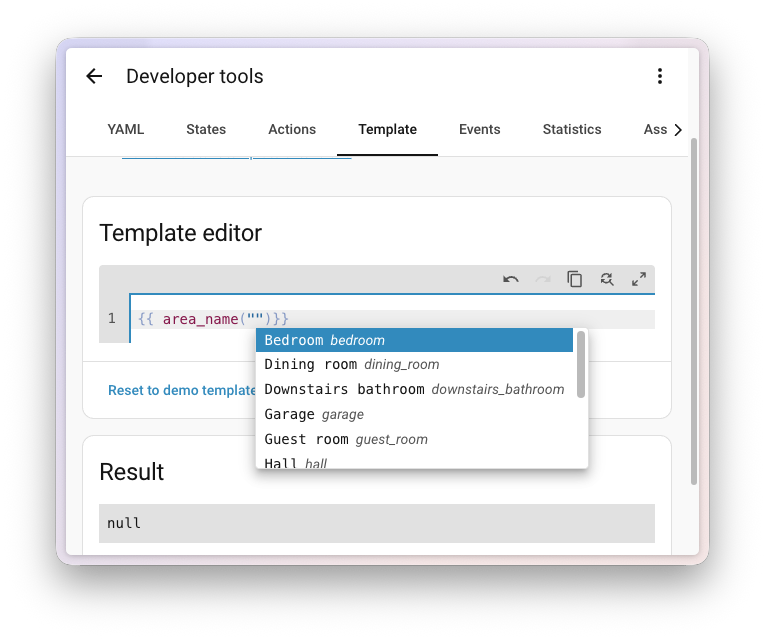
    Now, on to this release. My personal favorite this month is maybe a bit unexpected, considering it sits all the way at the end of this post: the completely reworked templating documentation. I know, I know, “documentation” doesn’t exactly scream headline feature. But hear me out: making Home Assistant more approachable is one of our biggest missions this year, and darn good documentation is a big part of that. We’ve expanded our documentation team and are investing heavily in this, and the new templating docs are the very first taste of what’s to come. I’m really proud of where this is heading. 📚

    That said, I’d be lying if I said I wasn’t also super stoked about radio frequency (RF) support landing this release. Just like last month’s infrared (IR) release, this brings a massive category of devices into Home Assistant natively: blinds, garage doors, ceiling fans, RF outlets, doorbells… you name it. Sure, there have always been clever workarounds and custom integrations to bridge some of these, but having it built right into the platform changes the game completely. There is so much cool stuff going on around this, and we’re only getting started. 📡

    And there’s plenty more: a new Maintenance dashboard for your batteries, serial ports proxied over the network with ESPHome, new tile card features for media players, durations for purpose-specific automation triggers and conditions, redesigned more-info dialogs for vacuums and lawn mowers, autocomplete in the code editors, and 12 new integrations! 🚀

    Enjoy the release!

    ../Frenck

    A huge thank you to all the contributors who made this release possible! And a special shout-out to @piitaya who helped write the release notes this release. Also, @RaHehl, @balloob, @Tommatheussen, and @mib1185 for putting effort into improving its contents. Thanks to them, these release notes are in great shape. ❤️

    Radio frequency joins infrared as a first-class citizen

    Last release, we welcomed infrared as a first-class citizen of Home Assistant, opening the door to all those TVs, air conditioners, and other appliances still controlled by their little IR remote. This release continues that story with another old-school protocol: radio frequency (RF). 📡

    Think about all the RF-controlled devices already living in your home: motorized blinds and curtains, garage door openers, ceiling fans, wireless wall switches, RF outlets, doorbells, and yes, those holiday string lights. Most of them haven’t had a great way into your smart home, because they don’t speak Wi-Fi, Bluetooth, Zigbee, Z-Wave, or Matter. They speak RF, and only RF. There have always been workarounds and custom integrations to bridge some of them, but with this release, Home Assistant speaks RF natively.

    Meet the Radio frequency platform

    The new Radio frequency integration follows the exact same pattern as last release’s infrared platform. It’s an entity type that represents an RF transmitter, like an ESPHome-powered device with a sub-GHz transmitter attached. You don’t set it up directly. Instead, other integrations use it to send RF commands on your behalf, and you simply pick which transmitter they should use.
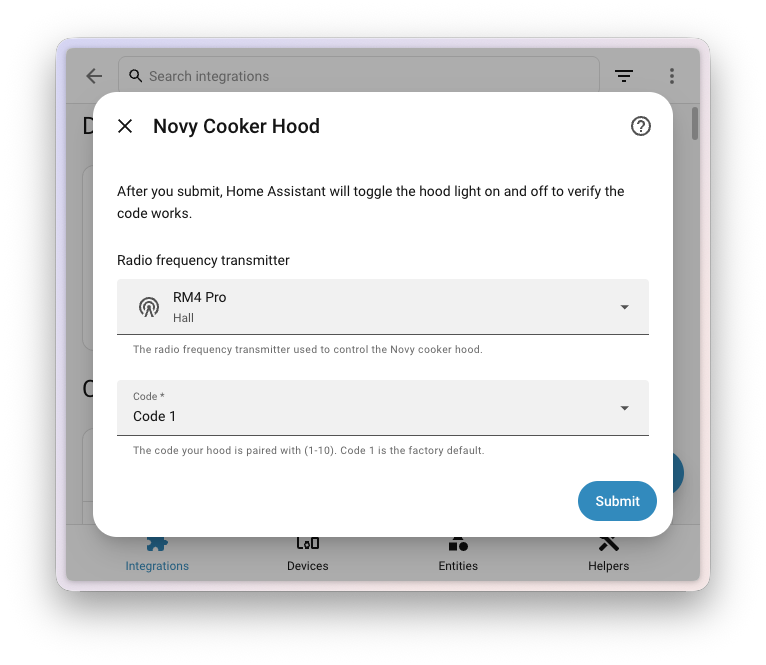
    Screenshot of an RF device setup dialog, with a Radio frequency transmitter dropdown.

    Two transmitter integrations support this from day one:

    • ESPHome, so any ESPHome device with a compatible sub-GHz transmitter can act as your home’s RF bridge. Most modules cover all common sub-GHz bands (315, 433, 868, and 915 MHz), so a single transmitter can talk to a wide range of devices. For DIY, we recommend the inexpensive CC1101 module (around $10), which you wire up to an ESP32 yourself. There’s a step-by-step guide on how to build one in the ESPHome documentation.
    • Broadlink, so any Broadlink RM4 Pro you may already own can be reused as an RF transmitter for the new integrations. The RM4 Pro is the only model in the RM4 line with RF support, and it’s limited to the 433 MHz band.

    On the other side, device-specific integrations use the platform to actually do something useful. Two are shipping in this release:

    • Honeywell String Lights, to turn your RF remote-controlled Honeywell string lights on and off from Home Assistant, with all the automation magic that brings. 🎄
    • Novy Cooker Hood, to control the light and the extractor fan on your Novy cooker hood. These are typically ceiling-mounted, so an RF remote (and now Home Assistant) is the only practical way to reach them. 💨
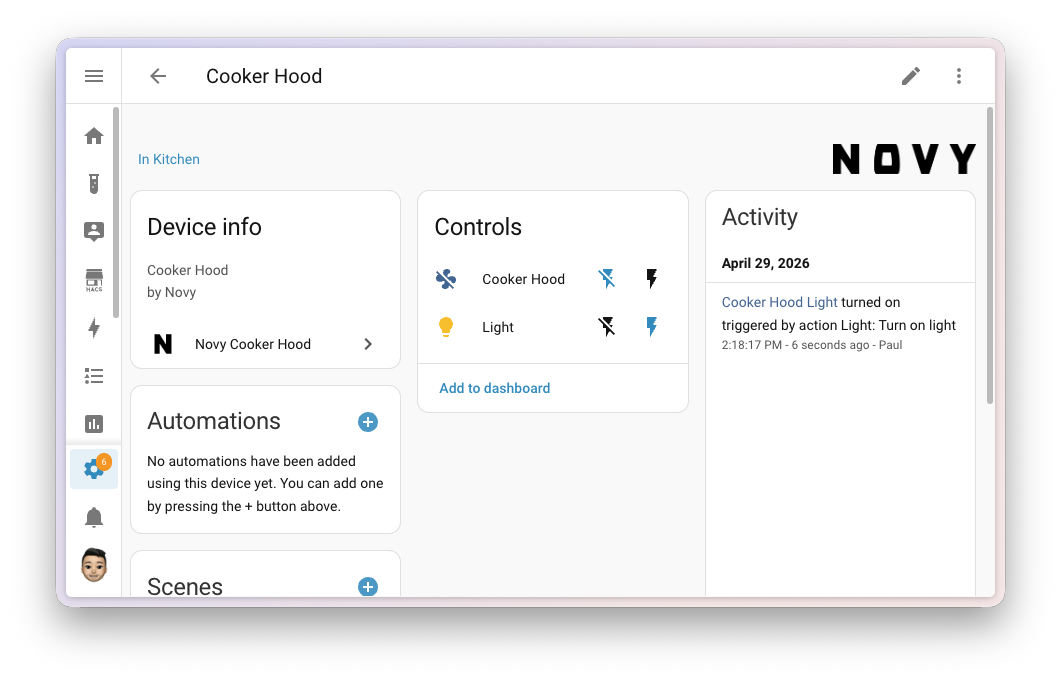
    Screenshot of an RF-controlled device page in Home Assistant, showing controls and recent activity.

    Why this is a big deal

    Like infrared, this is about more than a single new feature. A large chunk of perfectly good RF-controlled hardware out there has no smart home story at all. By giving Home Assistant a standard way to talk to RF devices, every new consumer integration built on top instantly works with every transmitter integration. Add a new ESPHome RF proxy somewhere in the house, and your blinds, your fan, and your string lights all just work. ✨

    This is a great fit with the values of the Open Home Foundation, and especially sustainability. 🌱 Instead of throwing out a working motorized blind because it’s “dumb”, you can integrate it. Instead of replacing your RF outlets with new Wi-Fi ones, you can keep using them. It’s another way to extend the life of devices you already own, and to reduce electronic waste. ♻️

    A sneak peek at what’s coming

    You may have caught a glimpse of where this is heading at the State of the Open Home 2026. Nabu Casa is a commercial partner of the Open Home Foundation, running Home Assistant Cloud and producing devices like the Home Assistant Green and the Home Assistant Voice Preview Edition. They’ve been working on a new device, currently going by the codename Project Blast, that brings infrared and radio frequency capabilities together in a single, polished package. The new Radio frequency platform in this release is part of the foundation that makes products like that possible. Stay tuned. 👀

    If this tickles your interest, watch Carl from Nabu Casa explain what’s coming in this segment of the State of the Open Home 2026. 📺

    We’re excited to see where the community takes this. The Radio frequency platform is designed to grow: more transmitter integrations, more device integrations, and more protocols over time.

    This work is part of an Open Home Foundation roadmap opportunity to make radio frequency a first-class citizen of Home Assistant. Mission accomplished. 🎉

    Serial ports over the network with ESPHome

    We have a bit of a theme going on. Last release, infrared became a first-class citizen of Home Assistant. This release, radio frequency joined the party. And now, there’s another way you can put an ESPHome device somewhere in your home and let Home Assistant talk to things through it: serial ports. 🔌

    If you’ve ever set up a Bluetooth proxy, the idea will feel familiar. Plenty of smart home gear talks over a serial connection, like energy meters with a P1 port, or that classic Denon receiver with the new Denon RS-232 integration shipping in this release. Until now, the device producing those serial signals had to be physically plugged into the same machine running Home Assistant, or wired up over a long, unwieldy cable. Not anymore. ✨

    With the new serial proxy support in ESPHome, any serial port plugged into (or built into) an ESPHome device can now be exposed over your network and used by Home Assistant as if it were sitting right next to it. Drop an ESP somewhere convenient, plug your serial device into it, and Home Assistant takes care of the rest. 🪄
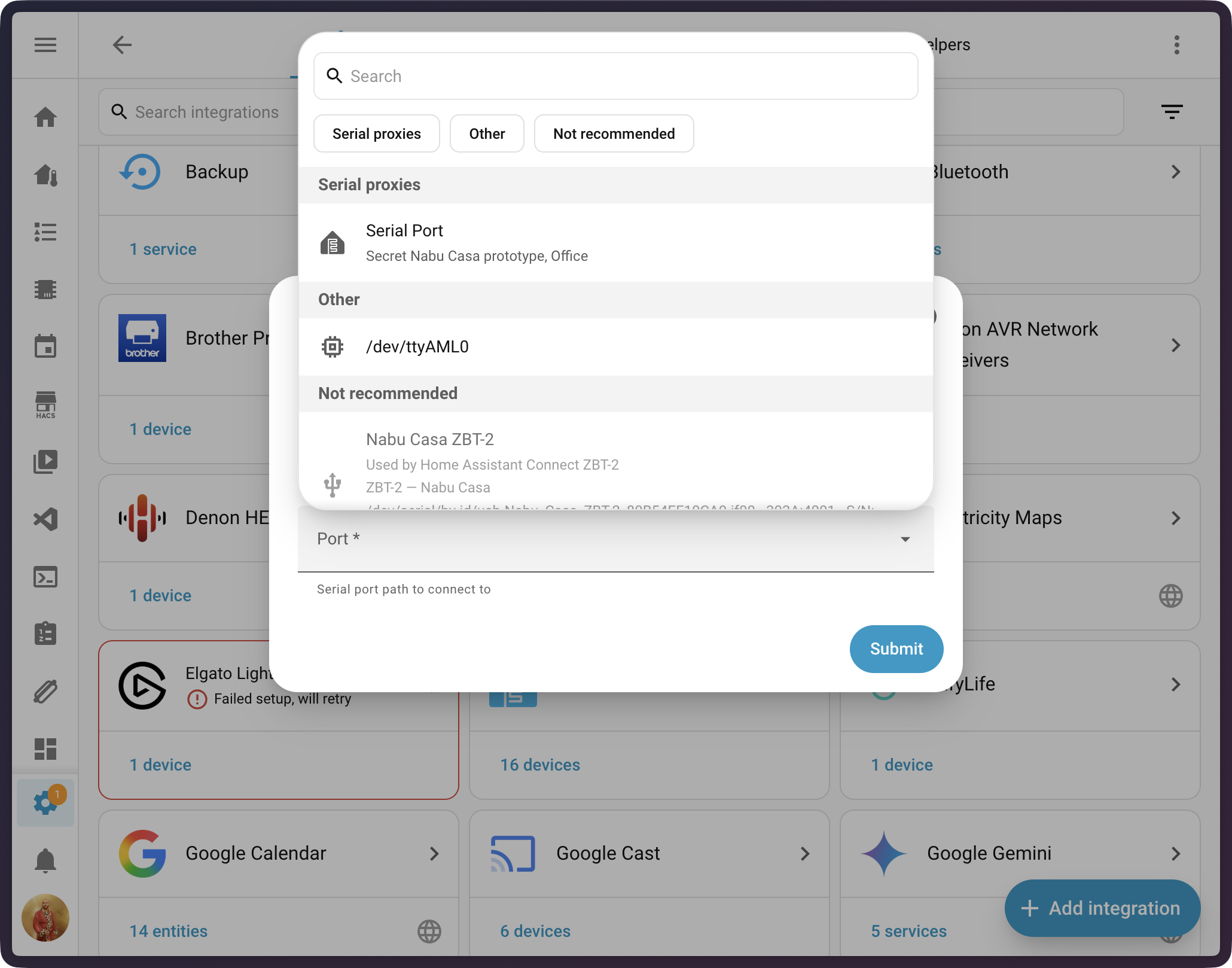
    Screenshot of the new serial port selector in the UI, showing local USB serial ports and remote ESPHome serial proxies side by side.

    Where this comes in handy

    This is great news if you’ve ever struggled to put a serial-connected device exactly where you wanted it. A few practical examples:

    • Connect to receivers, projectors, or other AV gear over RS-232 from anywhere on your network.
    • Read your smart meter’s P1 port from the meter cabinet, even if your Home Assistant server lives upstairs in a closet. ⚡

    Like our existing Bluetooth, infrared, and radio frequency proxies, this is also a sustainability win. ♻️ Instead of replacing perfectly good serial-only equipment with newer Wi-Fi versions, you can keep using what you already have. That energy meter, that older AV receiver, that industrial sensor: they all just work, over the network. 🌱

    Under the hood

    Behind the scenes, this release rewires Home Assistant’s serial-port handling top to bottom to make serial proxies a natural part of the system. Some highlights for the curious:

    • All of Home Assistant has been migrated to a modern, async-first serial driver called serialx, replacing the older pyserial library that Home Assistant has used for years. It’s designed for the way Home Assistant works today and adds support for new connection types, including ESPHome serial proxies, transparently.
    • Integrations that need a serial port now get a new, polished serial port selector in the UI. It lists local USB serial ports and remote ESPHome serial proxies side by side, with friendly names. The list even updates live, so a USB device you plug in while the dropdown is open shows up right away.
    • Common integrations that talk over serial pick up serial proxies for free. The new Denon RS-232 integration uses it from day one, and the existing Russound RIO integration has been migrated to serialx as well, so it can now talk to your multi-room audio gear over an ESPHome serial proxy too.

    If you’re an integration developer (or maintain a custom component) talking over serial, head over to the migrating from pyserial to serialx developer blog post to read all about how to take advantage of this. 🛠️

    A first step, not the finish line

    Let’s be upfront about one thing: getting a serial proxy up and running today is not a one-tap experience yet. To use this in your home, you’ll need to build your own ESPHome device with the serial_proxy component configured for the UART your serial device is wired to. That means writing an ESPHome YAML configuration, flashing the firmware, and connecting the hardware. It’s very doable, but it is on the technical side. 🤓

    We think that’s okay, because this release is the foundational milestone that makes everything else possible. The plumbing is now in place across Home Assistant, ESPHome, and the integrations that need it. From here, we (and the broader community) can build on top of this with friendlier setup flows, ready-made hardware, and pre-built ESPHome configurations. Just like Bluetooth and infrared proxies before it, the experience will get more approachable release after release. 🚀

    This work is part of an Open Home Foundation roadmap opportunity to make serial proxying a first-class citizen of Home Assistant. Another roadmap milestone, checked off the list. ✅

    More from your built-in dashboards

    Over the past few releases, Home Assistant has been quietly growing a family of built-in dashboards that you don’t have to build yourself. It started with the Home dashboard back in 2025.9, and grew with dedicated Lights, Climate, and Security dashboards in 2025.11. This release adds a new one and upgrades an existing one. 🏠

    Stay on top of your batteries with the new Maintenance dashboard

    Keeping your smart home running smoothly is a side of home automation that doesn’t always get the spotlight. We’ve all been there: that motion sensor in the hallway that suddenly stops triggering the lights one evening, only to discover days later that its battery had died. 🪫 Wouldn’t it be nice to spot that before it becomes a problem? The new built-in Maintenance dashboard gives questions like that a home of their own. 🧰
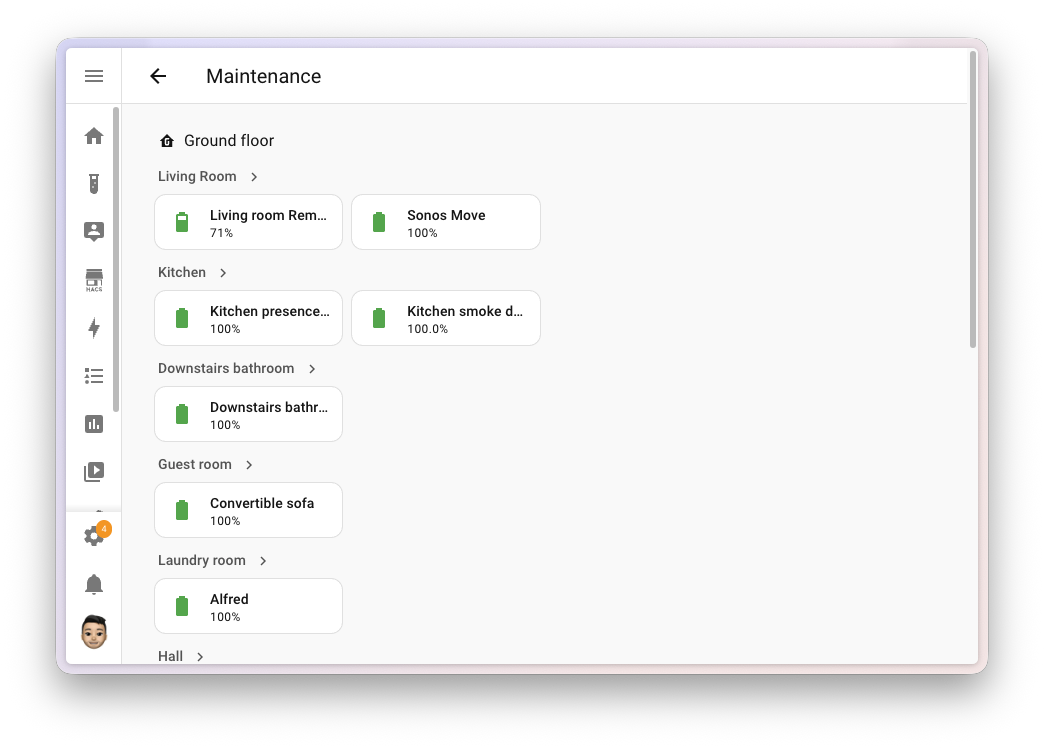
    Screenshot of the new Maintenance dashboard showing battery entities grouped by area.

    The dashboard focuses on what is probably the most-requested view of all: your batteries. It automatically discovers every battery entityAn entity represents a sensor, actor, or function in Home Assistant. Entities are used to monitor physical properties or to control other entities. An entity is usually part of a device or a service. [Learn more] in your home and lays them out grouped by area, with low ones highlighted so you can spot the ones that need swapping at a glance. No more digging through entity lists or building your own dashboard for it. 🔋

    This is a community contribution from @Brookke, who built it from the ground up. Big thanks for adding such a useful new dashboard to Home Assistant! 👏

    Tip

    Are you a developer? Each one of these built-in dashboards is powered by a dashboard strategy: a piece of code that generates a complete dashboard on the fly, tailored to your home. Starting with this release, you can register your own custom dashboard strategies from a custom integration or frontend module, and share them with the community.

    Imagine a strategy that builds the perfect dashboard for your plants, your 3D printers, your home lab, or your aquarium, automatically, for anyone who installs it. We can’t wait to see what you create. 🌱

    Activity log on the Security dashboard

    The built-in Security dashboard also gets a nice upgrade this release: a new Activity sidebar that shows you a live, 24-hour log of everything happening with your security-related entities. Cameras, locks, alarm panels, motorized covers, door and window sensors, and the comings and goings of the people in your home, all in one place. 🔓

    It’s a quiet upgrade you’ll feel every day: at a glance, you can see if a door was opened, if someone arrived home, or if the front camera spotted motion, without having to dig through the logbook or build a dashboard for it yourself. The sidebar appears automatically on wider screens whenever the Logbook integration is enabled (it is, by default).
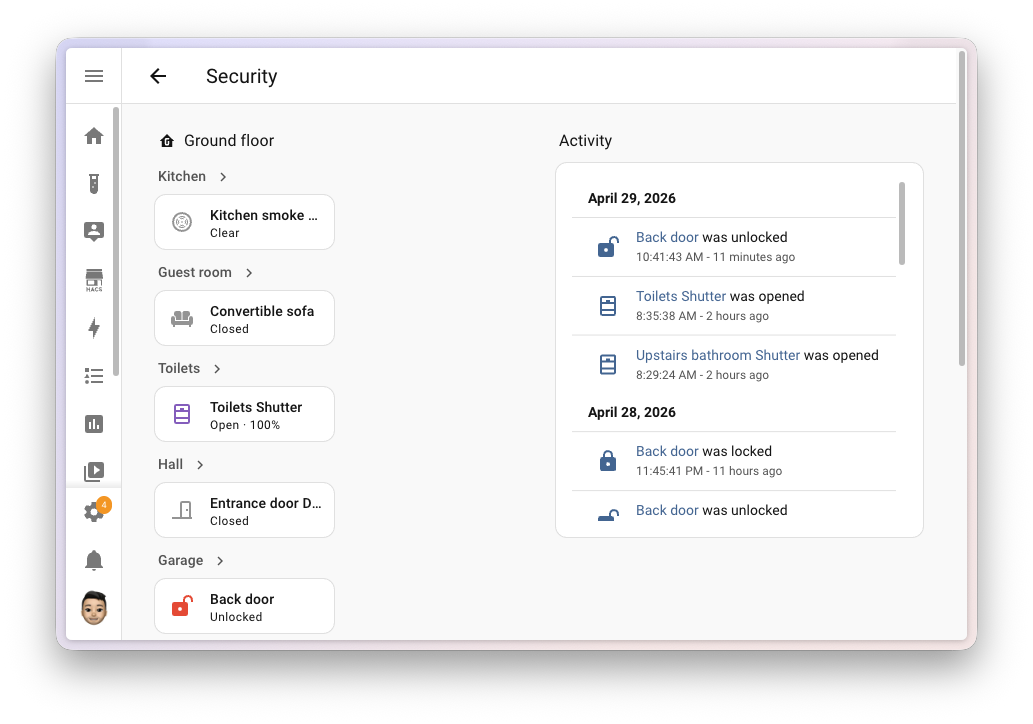
    Screenshot of the Security dashboard with the new Activity sidebar showing recent events.

    More for the dashboards you build yourself

    Building your own dashboard is one of the most rewarding parts of Home Assistant. The best part: you can build the entire thing right in the UI, by dragging and dropping cards into place. You don’t need to be technical, you don’t need to know YAML, and you don’t need to touch a single line of code to make something that looks great and works exactly the way you want.

    Of course, the dashboards you craft yourself get plenty of love this release too. A new card for one-tap shortcuts and fresh tile card features for your media players. 🎨

    Introducing the shortcut card

    Dashboards are the front door to your smart home, and sometimes the most useful thing you can put on them isn’t an entity, but a quick way to get somewhere. Jump to your energy dashboard. Open the camera view. Launch Assist. Open the manual in a new tab. The new shortcut card makes building those one-tap launchers a breeze. ⚡
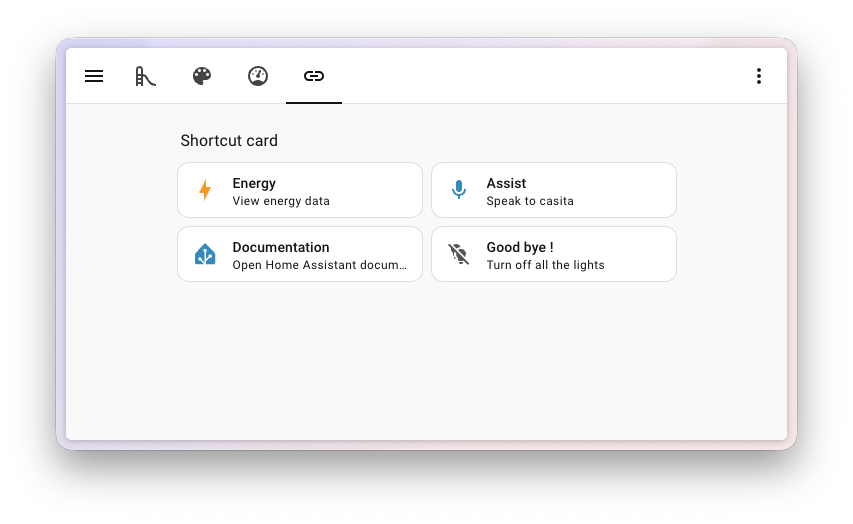
    Screenshot of a dashboard with several shortcut cards.

    It looks and feels like a tile card, but instead of representing an entity, it triggers an action when you select it. You can pick from:

    • Navigate to another dashboard, view, area, or device page.
    • Open a URL in a new tab, perfect for linking out to your router, NAS, or documentation.
    • Launch Assist, so your voice assistant is always one tap away.
    • Perform an action, like turning off all the lights when you head out the door. 🌙

    The card is smart about defaults: pick a navigation target and it picks up the title, icon, and color of that destination automatically. Pick Launch Assist and it suggests a microphone icon. You can override any of it, of course; set your own label, description, icon, and color, and pick between a horizontal or vertical layout.
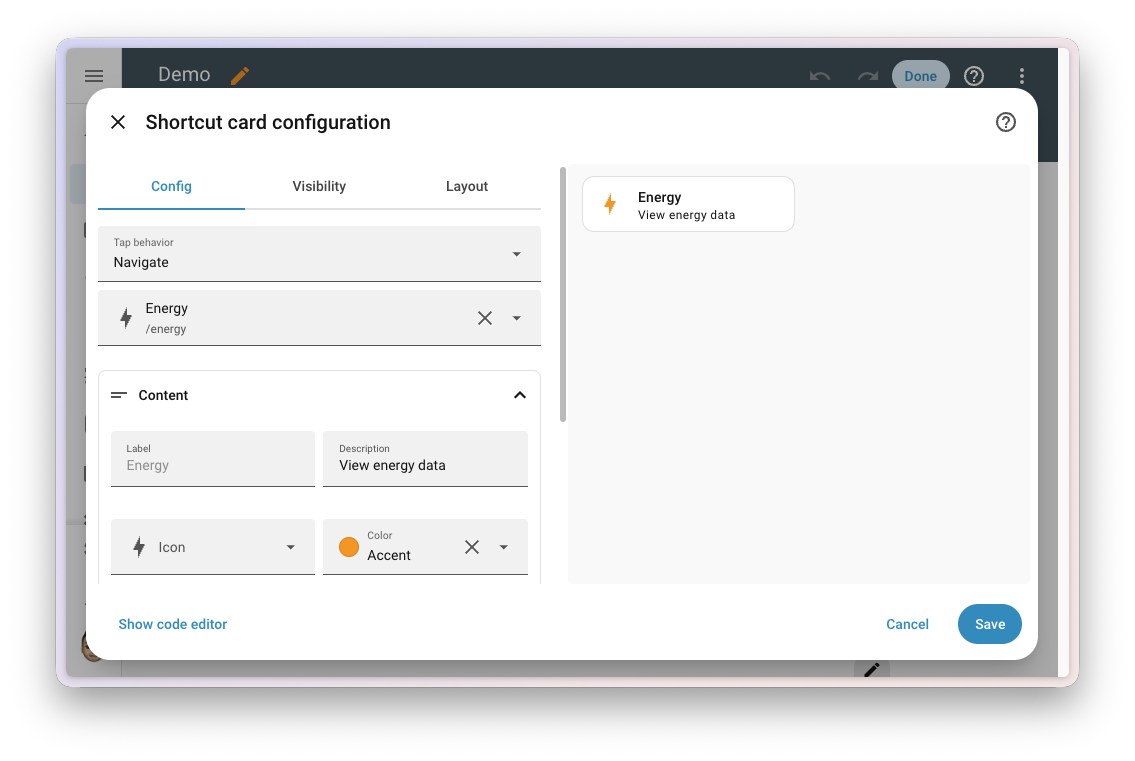
    Screenshot of the shortcut card configuration dialog.

    The shortcut also comes as a badge, so you can drop the same one-tap actions into the badge row at the top of any view. Same options, same smart defaults, just in a more compact form.

    New tile card features for media players

    The tile card is one of the most flexible building blocks in Home Assistant dashboards, and this release expands what it can do for media players. Two new card features and a more flexible playback feature give you a lot more choice in how your media player tiles look and behave. 🎶
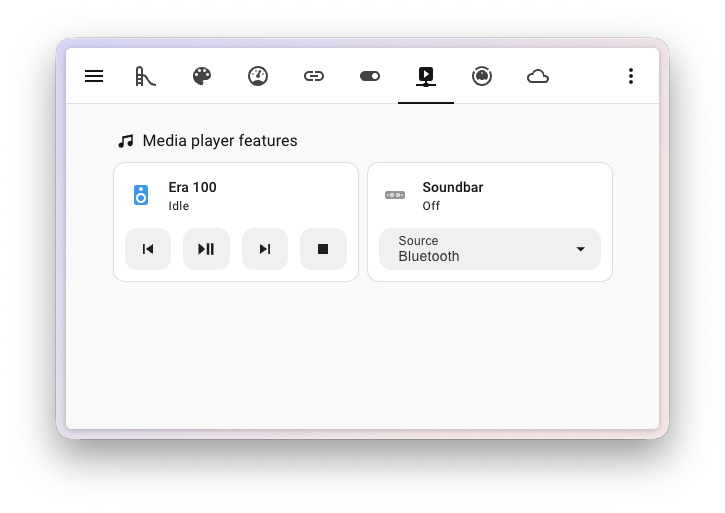
    Screenshot of two media player tile cards showing the new playback and source features.

    The first new feature is select source: a dropdown right on the tile that lets you switch the input or source on your media player. HDMI 1, the Spotify input on your receiver, that one obscure radio station you actually like; it’s all one tap away. The second is select sound mode, with the same dropdown experience for picking modes like Movie, Music, or Night on receivers and AV gear that support it.

    And the existing playback card feature got a long-requested upgrade: you can now pick exactly which buttons appear and in what order. Mix and match from on/off, play, pause, play/pause, stop, previous track, and next track to build a remote that fits your media player perfectly. No more turn-on button on a TV that doesn’t need one, no more missing the next-track button on your speaker. 🎚️
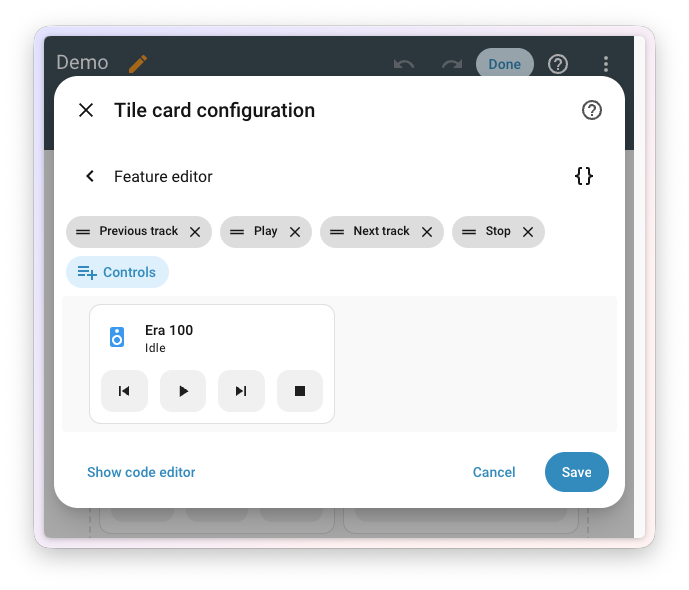
    Screenshot of the tile card playback feature editor with reorderable control chips and a media player preview.

    Purpose-specific automation triggers & conditions

    The journey to make automationAutomations in Home Assistant allow you to automatically respond to things that happen in and around your home. [Learn more] building feel natural continues. Ever since Home Assistant 2025.12 introduced purpose-specific triggers and conditions, every release has chipped away at the gap between how you describe your home in your head (“when a light turns on”, “if the climate is heating”) and what you actually had to type into an automation. Last release added a whole batch of cross-domain triggers and conditions. This release adds something the entire community has been asking for: time. ⏱️

    Automations that finally understand “for a while”

    Reading back the feedback we’ve received in the months this has been in Home Assistant Labs, one request stood out above all others: durations. Almost every “when motion is detected” automation in the wild secretly wishes it could say “when motion has not been detected for the last 5 minutes”. And almost every “if a door is open” condition really wants to be “if a door has been open for at least 10 minutes”. 🚪

    Now they can. On the trigger side, a new for field has landed across a wide range of state-based purpose-specific triggers, from motion and occupancy to doors, windows, lights, switches, climate, covers, and many more. Pick a trigger, set how long the situation has to hold, and you’re done. No more wrestling with template helpers or YAML for: keys hidden in code views to express something this fundamental.
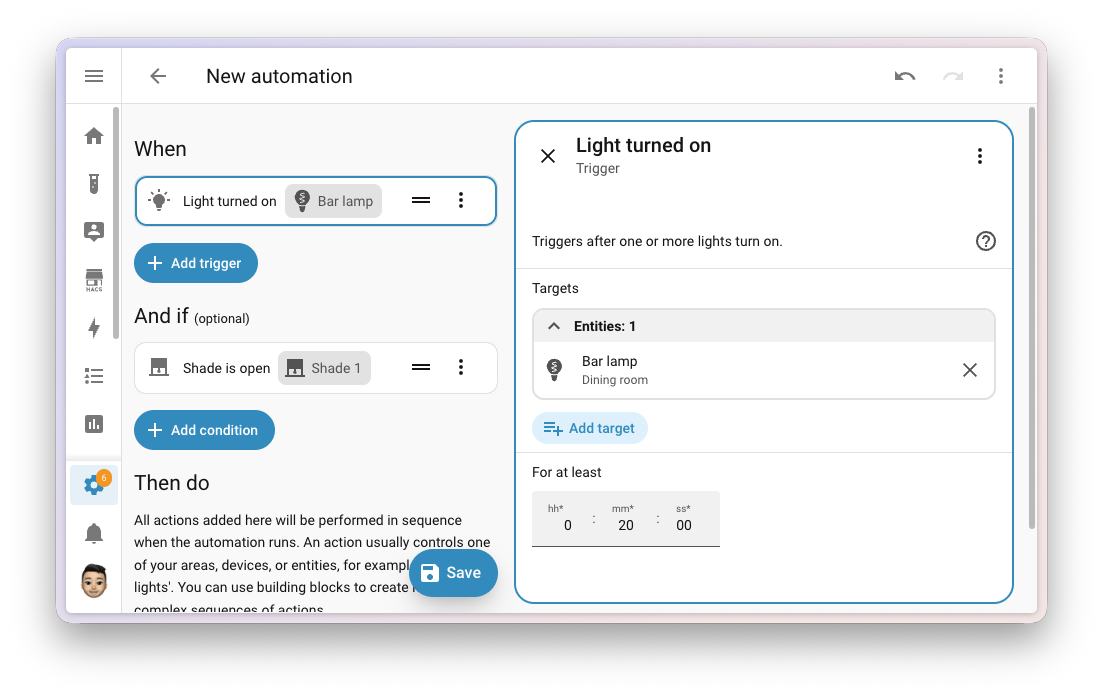
    Screenshot of a purpose-specific trigger in the automation editor with the new for duration field.

    On the condition side, duration is now available across the entire family of entity conditions in Labs. Whether you’re checking on motion, a door, a light, a switch, a climate, a media player, or anything else, you can now ask for the state to have held for a given amount of time before the condition is considered true. Same story: no template helpers, no YAML detour.
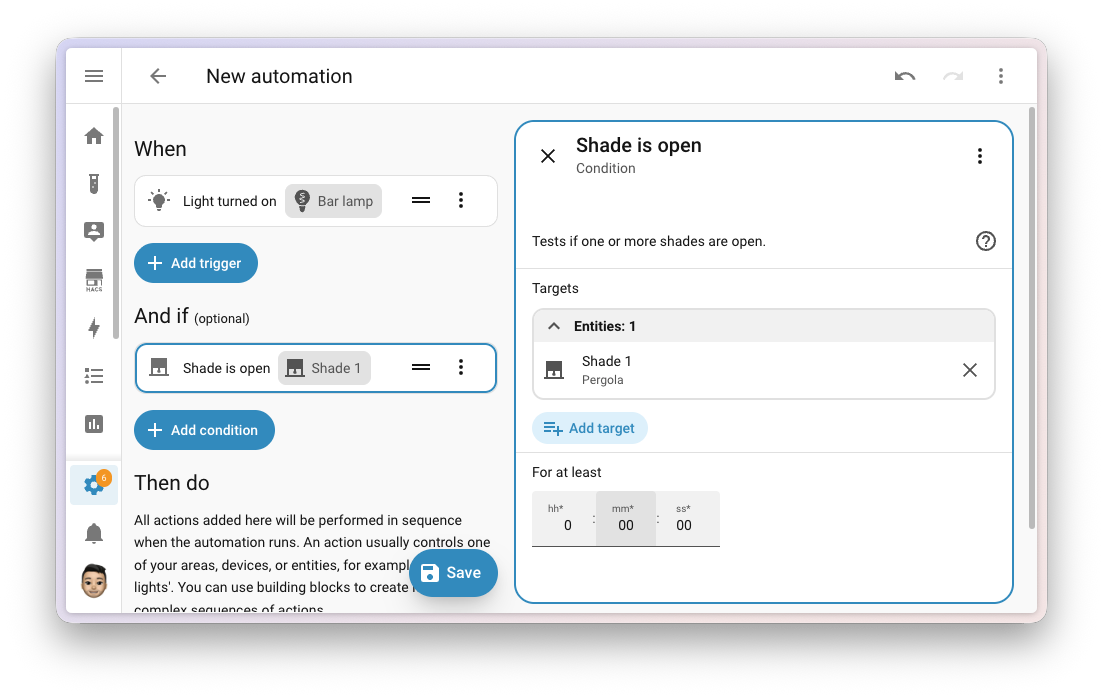
    Screenshot of a purpose-specific condition in the automation editor with the new duration field.

    A few examples of what this unlocks:

    • “When the front door has been open for more than 2 minutes” → close-the-door reminder. 🔔
    • “When motion has not been detected in the office for 15 minutes” → turn off the lights. 💡
    • “If the bedroom window has been closed for at least an hour” → only then start the air purifier. 🌬️
    • “When a garage door has been open for more than 30 minutes after sunset” → send a notification. 🌙

    It’s a small-looking addition with an outsized impact: a whole category of “almost possible” automations just became easy to put together.

    A few more triggers and conditions to play with

    Beyond the new sense of time, this release sprinkles a few more handy purpose-specific building blocks across your house.

    If you keep an eye on updates waiting to be installed, two new conditionsConditions are an optional part of an automation that will prevent an action from firing if they are not met. [Learn more], is available and is not available, let an automation branch on whether something is pending, without templating the answer yourself.

    Your media players got chatty: triggers fire when something starts playing, pauses, turns on, or turns off, and now also when a player is muted or unmuted, when its volume changes, or when the volume crosses a threshold you set. Conditions follow the same beat with is muted, is unmuted, and a numeric volume check. Perfect fuel for “dim the lights when the movie starts”, “pause the music when the doorbell rings”, or “only send the loud TTSTTS (text-to-speech) allows Home Assistant to talk to you. [Learn more] announcement if the speaker is below 30%”. 🎬🔇

    Your remotes picked up matching is on and is off conditions, finishing what last release’s triggers started. And your to-do lists can now answer two questions an automation might have: are all items completed, or are there still incomplete items on the list? Great for end-of-day check-ins or those “did I forget to feed the cat” moments. 🐱

    Your timers got a whole lifecycle of new triggersA trigger is a set of values or conditions of a platform that are defined to cause an automation to run. [Learn more]: started, paused, restarted, cancelled, and finished. So that 20-minute “tea is ready” timer can now actually tell your kitchen lights to flash, and your “kids screen time” timer can announce when it’s running, paused, or up. There’s also a new time remaining trigger that fires when a running timer reaches a remaining duration you pick: think a gentle “five minutes left” warning before the screen time timer runs out. ⏲️

    And finally, a new doorbell rang trigger. Doorbell event entities now speak a shared language, so a single trigger lights up regardless of which brand sits at your front door. 🔔

    Changes to existing triggers and conditions

    As some of the very first, we’ve added purpose-specific triggers and conditions for Person entities and Device Tracker entities separately. More recently, we’ve decided we want to go for a more ergonomic cross-domain approach. Those the triggers entered_home and left_home as also the conditions is_home and is_not_home got removed from the Person and Device Tracker. They will get successor in one of the upcoming releases.

    Try it out!

    Purpose-specific triggers and conditions are still a preview feature in Home Assistant Labs, but with each release the rough edges get smoother, and we’re closing in on having it feature complete. If you haven’t given it a spin yet, head over to Settings > System > Labs, switch it on, and let us know what you think. Your feedback is genuinely shaping where this lands; building in the open at work. 💚

    Integrations

    Thanks to our community for keeping pace with the new integrationsIntegrations connect and integrate Home Assistant with your devices, services, and more. [Learn more] and improvements to existing ones! You’re all awesome 🥰

    New integrations

    We welcome the following new integrations in this release:

    • Denon RS-232, added by @balloob
      Control your Denon receiver locally over its RS-232 serial port. Connect your receiver using a serial cable or a USB-to-serial adapter for push-based state updates, without depending on the network or the cloud.

    • Duco, added by @ronaldvdmeer — launching at 🏆 platinum quality
      Monitor and control your Duco demand-controlled ventilation system locally from Home Assistant. Track CO₂, humidity, and other sensor data, and adjust ventilation, all over your local network.

    • EARN-E P1 Meter, added by @Miggets7
      Connect your EARN-E energy monitor to Home Assistant for real-time insights into your smart meter’s energy and gas data. The device pushes its readings over your local network, so no cloud or polling is involved.

    • Eurotronic Comet Blue, added by @rikroe
      Integrate your Eurotronic Comet Blue (and similar) Bluetooth radiator thermostats with Home Assistant. Read thermostat status and adjust temperatures locally, without a hub or cloud connection. Compatible thermostats include Sygonix HT100 BT, Xavax Hama, and Lidl Silvercrest RT2000BT.

    • Fumis, added by @frenck — launching at 🏆 platinum quality
      Bring your Fumis-based pellet stove into Home Assistant through the Fumis online service. Monitor your room temperature, set a comfortable target temperature, and turn your stove on or off. Pellet stoves, pellet boilers, and hybrid wood and pellet stoves equipped with a Fumis WiRCU Wi-Fi module are sold under many different brands, including Austroflamm, Eco Spar, HAAS+SOHN, and Heta.

    • Honeywell String Lights, added by @balloob
      Control your Honeywell radio frequency (RF) remote-controlled string lights from Home Assistant. Uses the new Radio frequency entity platform, so you’ll need a compatible sub-GHz RF transmitter (for example, an ESPHome device) to send commands.

    • Kiosker, added by @Claeysson
      Monitor your Kiosker web kiosks running on iPad or iPhone from Home Assistant. Kiosker turns your iOS device into a powerful, easy-to-use web kiosk, perfect for dashboards on the wall.

    • Novy Cooker Hood, added by @piitaya
      Control the light and the extractor fan on your Novy cooker hood from Home Assistant. Novy hoods are typically ceiling-mounted, with no buttons within reach, so an RF remote (and now Home Assistant) is the only practical way to control them. Uses the new Radio frequency entity platform, so you’ll need a compatible sub-GHz RF transmitter (for example, a Broadlink RM4 Pro or an ESPHome device) to send commands.

    • OMIE, added by @luuuis — launching at 🥈 silver quality
      Bring Iberian Peninsula day-ahead electricity spot prices from OMIE into Home Assistant. Sensors expose the current and next-hour prices for both Spain and Portugal, perfect for smarter automations around when to run your dishwasher, charge your EV, or heat your water.

    • Radio frequency, added by @balloob
      A new entity type that represents a sub-GHz radio frequency (RF) transmitter, like an ESPHome device with a CC1101 module attached. You don’t set this integration up directly; instead, other integrations use it to send RF commands to devices such as remote outlets, garage doors, and string lights. The new Honeywell String Lights and Novy Cooker Hood integrations are the first to make use of it. Read more about it in the Radio frequency joins infrared as a first-class citizen section above.

    • Teleinfo, added by @esciara — launching at 🥈 silver quality
      Read electricity consumption data from French Linky smart meters and older electronic meters using the Télé-Information Client (TIC) protocol. Connect a Teleinfo USB adapter to your meter’s TIC output to monitor real-time energy indexes, apparent power, instantaneous current, and tariff information, all locally.

    • Victron GX, added by @tomer-w — launching at 🏆 platinum quality
      Connect your Victron Energy GX devices, like the Cerbo GX, Venus GX, and Color Control GX, to Home Assistant over MQTT. Get real-time monitoring and control of your Victron system, including inverters, solar chargers, battery systems, grid meters, and EV chargers.

    Noteworthy improvements to existing integrations

    It is not just new integrationsIntegrations connect and integrate Home Assistant with your devices, services, and more. [Learn more] that have been added; existing ones are also being constantly improved. Here are some of the noteworthy changes to existing integrations:

    • MQTT picked up three new platforms this release: time, datetime, and date entities, giving you even more building blocks for your MQTT-based devices and automations. Thanks, @jbouwh!
    • Matter added support for Matter radon sensors, so radon-monitoring devices that speak Matter now show up natively in Home Assistant. Thanks, @dnicoara!
    • ESPHome water heater entities now support away mode, matching what physical and smart water heaters in your home offer. Thanks, @tronikos!
    • Shelly added tilt and rotation binary sensors for the Shelly Cury, and the Shelly Wall Display now exposes a media player entity for built-in audio playback. Thanks, @bieniu!
    • Sonos got two new switches for TV Autoplay and Ungroup on Autoplay, giving you fine-grained control over how home theater speakers behave when the TV turns on. Thanks, @arsenicks!
    • Apple TV now supports keyboard text input services, so you can send text to your Apple TV right from Home Assistant. No more hunting for letters on the on-screen keyboard. Thanks, @kroehre!
    • Music Assistant received a big batch of player options: number, text, switch, and select entities are now exposed for everything Music Assistant players make configurable. On top of that, sound mode support has landed too. Thanks, @fmunkes!
    • Roborock owners with a Q10 S5+ now get dedicated sensor and select entities for their vacuum, and Q7 vacuums gained cleaning route control. Thanks, @lboue and @Lash-L!
    • WLED now supports per-segment freezing, letting you pause effects on individual LED segments. Thanks, @tgechev!
    • Broadlink can now act as an infrared emitter on the new infrared platform that landed last release, so your Broadlink RM-series devices can be reused as native IR transmitters for other integrations. Thanks, @YuvalWS!
    • Home Connect added microwaves to the related appliance types for several sensors, expanding coverage of supported devices. Thanks, @Diegorro98!
    • OpenAI Conversation added support for OpenAI’s new GPT-5.5 conversation model and the gpt-image-2 image generation model, which is now the recommended default for image generation. Thanks, @Shulyaka!
    • SMLIGHT SLZB devices now expose an infrared platform, so they can be used as IR transmitters with the new infrared entity platform. Thanks, @tl-sl!
    • SwitchBot Air Purifier devices gained fan speed percentage control and a button to toggle the built-in light sensor. Thanks, @zerzhang!
    • Tado now uses a dynamic update interval, automatically adjusting how often it polls based on activity to give you fresher data when something is happening. Thanks, @erwindouna!
    • SolarEdge got a whole set of new battery storage sensors. There are aggregate sensors for the total daily charge and discharge energy across your batteries, and per-battery sensors for daily charge and discharge energy, state of charge, and current power. All new sensors are disabled by default, so you can enable just the ones you need. Thanks, @it-rec!
    • HTML5 Push Notifications got a major upgrade: a new event platform, a new html5.send_message entity action, and the integration is now correctly classified as a notification service. Thanks, @tr4nt0r!
    • Anthropic added support for Anthropic’s new Claude Opus 4.7 model. Thanks, @Shulyaka!
    • Immich media source now exposes your favorite collection, making it easy to pull starred photos straight into your dashboards. Thanks, @mib1185!
    • Transmission gained an event entity for torrent events, perfect for triggering automations when downloads finish. Thanks, @andrew-codechimp!
    • Portainer continues its rapid expansion: new buttons for pruning volumes, killing containers, recreating containers, and full volume management. Thanks, @erwindouna!
    • LG Netcast got a new action to send remote control commands, letting you script TV navigation and input. Thanks, @mithomas!
    • Subaru vehicles that support remote start now have a dedicated start/stop button entity. Thanks, @masterkoppa!
    • London Underground expanded beyond the tube: it now reports status for the Trams and the IFS Cloud Cable Car as well. Thanks, @prpr19xx!
    • UniFi Access picked up several improvements: a select entity for temporary door lock rules, UA-HUB-Door support, entry/exit direction on access events, automatic console discovery via UniFi Discovery, and a warning when a UniFi Protect API key is used during setup. Thanks, @imhotep and @RaHehl!
    • UniFi Protect is turning into your alarm hub: it gains an alarm control panel, UniFi PoE Siren / UniFi SuperLink Siren sirens, and switches for the new UniFi SuperLink Relay — a device that reaches up to 2 km over LoRa. All of these new features require UniFi Protect 7.1 or later. Thanks to Ubiquiti for the public API improvements, and to @RaHehl for bringing it all to Home Assistant!
    • WaterFurnace geothermal systems now expose a climate entity, alongside new energy statistics so you can track your system’s energy use over time. Thanks, @masterkoppa!
    • OpenDisplay Flex e-paper devices now expose new diagnostic sensors driven by passive Bluetooth Low Energy advertisements: a battery percentage and battery voltage sensor for battery- and solar-powered devices, and a chip temperature sensor. Thanks, @g4bri3lDev!
    • Satel Integra now supports encrypted connections, keeping your alarm panel communications secure over the network. Thanks, @Tommatheussen!

    Integration quality scale achievements

    One thing we are incredibly proud of in Home Assistant is our integration quality scale. This scale helps us and our contributors to ensure integrations are of high quality, maintainable, and provide the best possible user experience.

    This release, we celebrate several integrationsIntegrations connect and integrate Home Assistant with your devices, services, and more. [Learn more] that have improved their quality scale:

    This is a huge achievement for these integrations and their maintainers. The effort and dedication required to reach these quality levels is significant, as it involves extensive testing, documentation, error handling, and often complete rewrites of parts of the integration.

    A big thank you to all the contributors involved! 👏

    Now available to set up from the UI

    While most integrationsIntegrations connect and integrate Home Assistant with your devices, services, and more. [Learn more] can be set up directly from the Home Assistant user interface, some were only available using YAML configuration. We keep moving more integrations to the UI, making them more accessible for everyone to set up and use.

    The following integrations are now available via the Home Assistant UI:

    Farewell to the following

    The following integrationIntegrations connect and integrate Home Assistant with your devices, services, and more. [Learn more] is also no longer available as of this release:

    • LANnouncer has been removed. The companion Android app is no longer available, which made the integration impossible to install or use. It was deprecated in Home Assistant 2025.10 and is now removed. If you were still using it, you’ll need to look for an alternative notification integration.

    Other noteworthy changes

    There are many more improvements in this release; here are some of the other noteworthy changes:

    • Mobile app notifications are now entities. The Mobile app integration now exposes a notificationYou can use notifications to send messages, pictures, and more, to devices. [Learn more] entity for each of your devices, on top of the existing notify actions. That means you can group your phones and tablets together using the regular group helper right from the user interface, and send a single notification to all of them at once. No YAML, no scripting, no scrolling through a list of targets. Thanks, @tr4nt0r! 📱
    • A search bar on the integration detail page. Integrations with a lot of devices and entries (think Z-Wave, Zigbee, or your sprawling pile of ESPHome devices) now have a search bar at the top, matching across entry titles, device names, manufacturers, models, and areas. 🔍
    • Dashboard visibility conditions can now refer to the card’s own entity. State and numeric state visibility conditions get a new Current entity option that automatically follows whichever entity the card is bound to. No more re-typing entity IDs, and your card stays reusable.
    • Dashboard visibility conditions now support attributes. State and numeric state visibility conditions on cards can now check an entity attribute instead of just the state, catching up with their automation counterparts.
    • Reload your shell commands without restarting. A new reload action lets you re-read your Shell command YAML configuration on the fly. One less reason to restart Home Assistant. Thanks, @potelux!
    • Template vacuums learned about rooms. Vacuums you build with the Template integration can now expose their segments (rooms) and a clean_segment action, plugging straight into the new Clean by area view. 🧹 Thanks, @gustavakerstrom!
    • More unit love for sensors. Frequency sensors now support millihertz (mHz) through gigahertz (GHz) with automatic conversion between them, and electric current sensors gained microamperes (µA). Thanks, @32u-nd, @Lamarqe, and @Phunkafizer!

    A modern more-info dialog for vacuums and lawn mowers

    When you tap on an entity in your dashboard, the more-info dialog that pops up is one of the most-used surfaces in Home Assistant. This release, two of them get a fresh new look: vacuums and lawn mowers. 🧹🌱
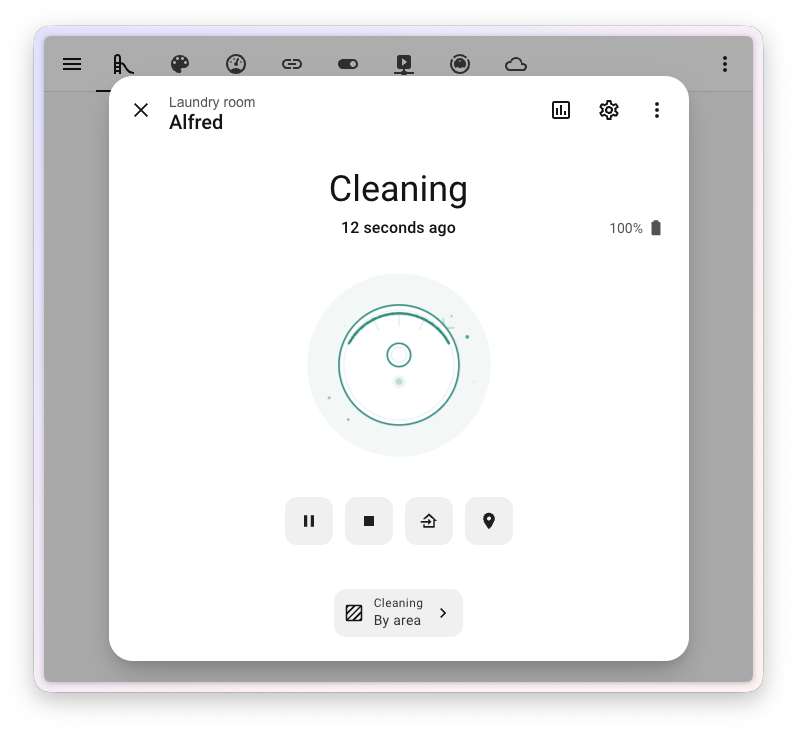
    Screenshot of the redesigned vacuum more-info dialog with the new illustration and action buttons.

    The redesigned vacuum dialog leads with a friendly new illustration of your vacuum that comes to life with state-driven animations: it spins while cleaning, glides home while returning, sits quietly when docked, and shakes when something’s wrong. Battery moved up into the header where you can spot it at a glance, and the action buttons (start, pause, return to dock) are now lined up in a single, consistent row.

    The biggest functional addition is a brand new Clean by area view. Many modern robot vacuums let you ask them to clean a specific room, but until now, there was no built-in way to do that from the dialog. You can now map your Home Assistant areasAn area in Home Assistant is a logical grouping of devices and entities that are meant to match areas (or rooms) in the physical world: your home. For example, the living room area groups devices and entities in your living room. [Learn more] to the rooms your vacuum knows about, and start a cleaning job for one or more areas right from the dialog. If you haven’t set up a mapping yet, the dialog walks you through it with a friendly empty state.
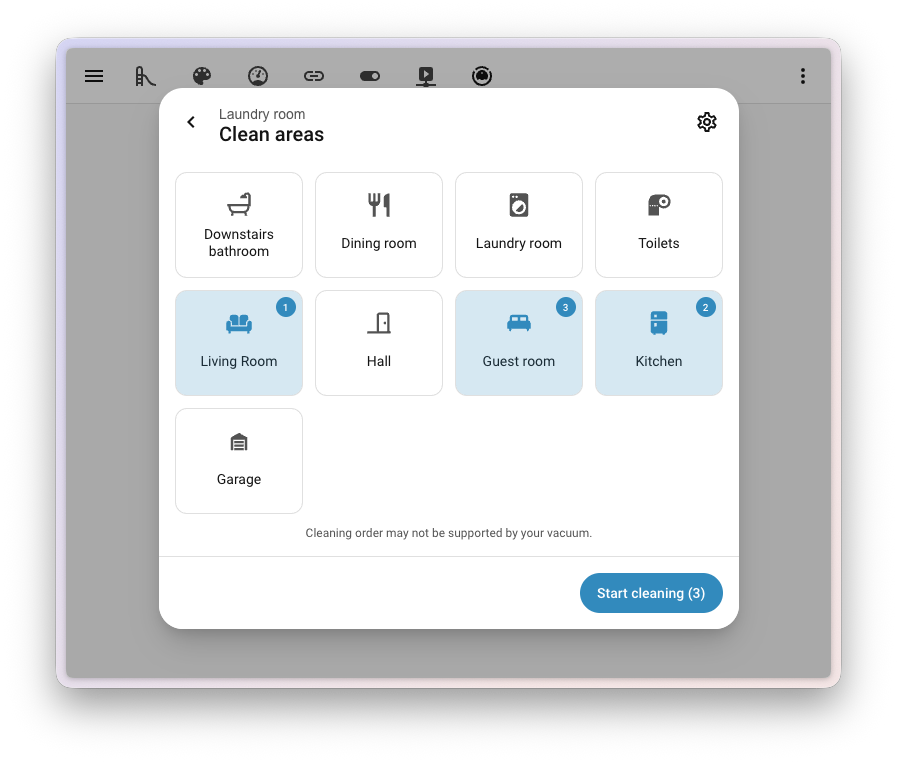
    Screenshot of the new Clean by area view in the vacuum more-info dialog.

    Lawn mowers got the same love. The redesigned lawn mower dialog brings the same fresh illustration with state-driven animations (mowing, returning, docked, error), the same battery-in-the-header layout, and the same unified action button row. Whether your robot is busy on the carpet or busy on the lawn, the experience now feels the same.
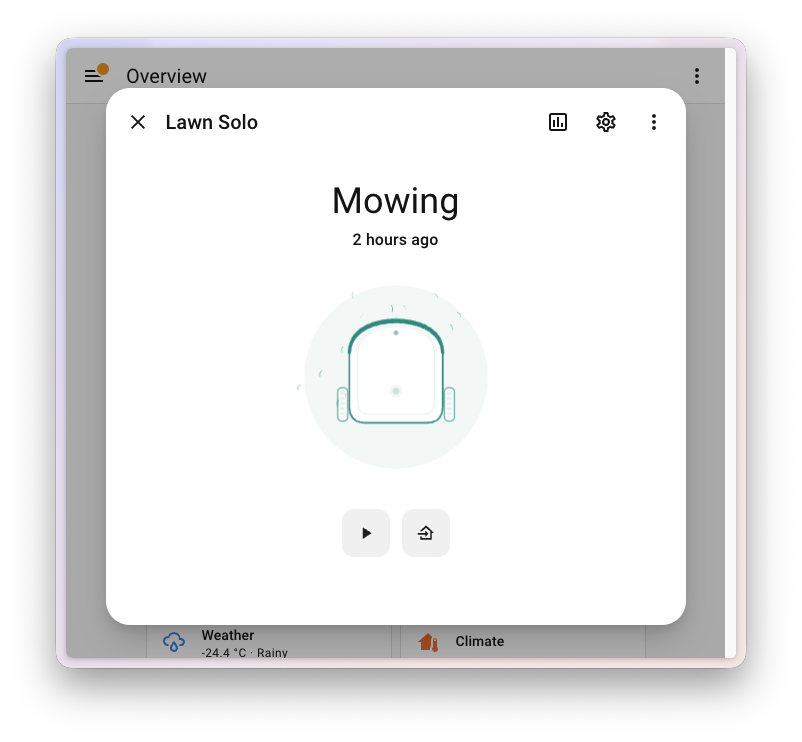
    Screenshot of the redesigned lawn mower more-info dialog with the new illustration and action buttons.

    This work delivers on two Open Home Foundation roadmap opportunities: refined more info screen for vacuum cleaners and refining the more info screen for lawn mowers. Two roadmap items, one redesign. ✅

    New styling for toggles

    Toggles across Home Assistant got a small but lovely makeover this release. Every toggle in the app has been updated with a fresh new design. 🎨
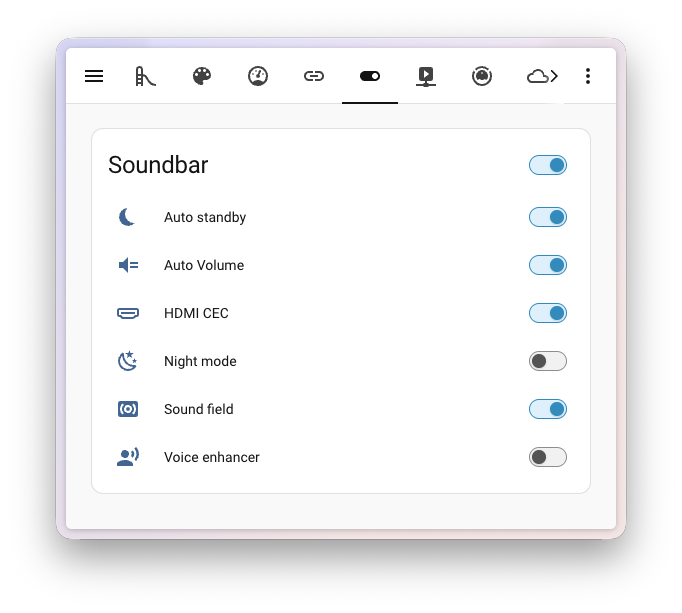
    Screenshot of an entities card showing the refreshed toggle styling. The refreshed toggles on an entities card.

    It’s not just a fresh coat of paint either: the new toggle is fully keyboard-friendly. Tab to it, then use the arrow keys to flip it on or off without ever touching the mouse. Small change, big quality-of-life upgrade. ⌨️

    The templating documentation you’ve always wanted

    First, the most important thing to say up front: you do not need to write code or touch a single template to use Home Assistant. Everything from setting up your devices, to building automations and crafting beautiful dashboards, can be done entirely through the user interface, and it gets better every release. If the interface does what you need, you’re done. 💚

    That said, templating is one of the most powerful corners of Home Assistant for the people who do want to go a step further: dynamic notifications that read the actual temperature, automations that decide based on a calculation across several entities, template entities whose value is computed from other entities. And it has long been one of the most intimidating corners too. So we shipped a top-to-bottom rework of the templating documentation, with one goal: if you have ever felt that templates were “not for you”, we want to change that. 📚✨
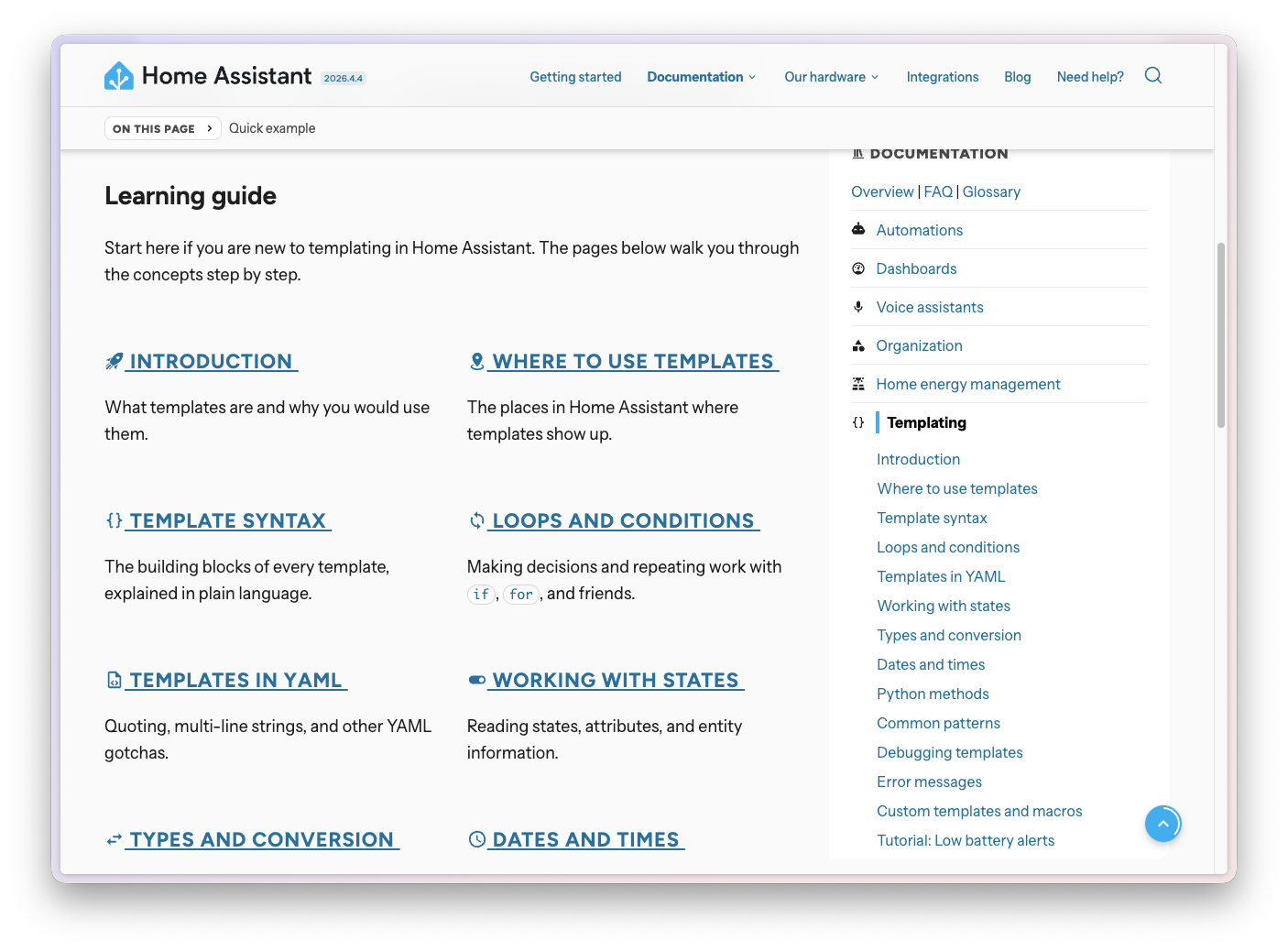
    Screenshot of the new templating documentation landing page with the learning guide.

    If you decide to learn templating, we are now confident we have everything in place to take you all the way:

    There’s a quality-of-life upgrade across the entire website too: templates in code blocks are now interactive. Hover over a function name to see its description, select it to jump to the reference page, hover over a parameter for a quick reminder of what it does. Examples render with the input on top and the actual output right below, so you never have to guess what a template will produce.
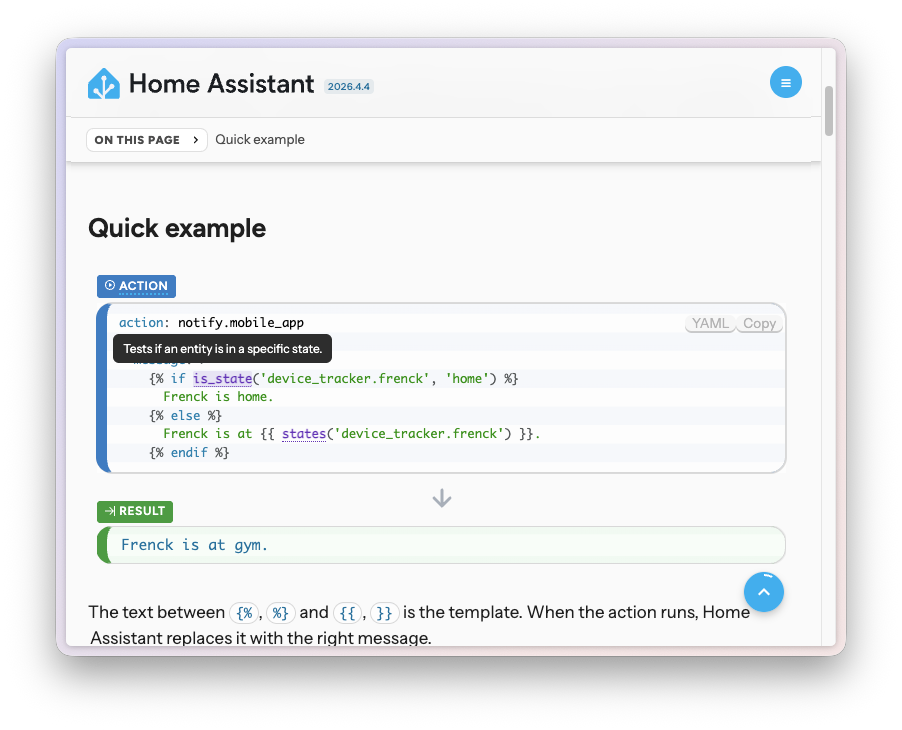
    Screenshot of the new templating documentation showing an interactive function tooltip and an input/output example block.

    Skip it, skim it, or master it. Either way, we’ve got your back. And this is just the beginning: we’ve expanded our documentation team and are investing heavily in making all of our documentation more approachable. So expect more reworks, more tutorials, and more friendly-but-thorough guides in releases to come. 💪

    Smarter code editors with autocomplete

    The rework didn’t stop at the documentation. While building it, it became painfully clear that even with great docs, writing a template still meant flipping back and forth between tabs. So the code editors you find throughout Home Assistant, the ones you use to write a template or fine-tune an automation, got a serious upgrade this release too. They now offer rich, context-aware autocomplete for both YAML and Jinja2 templates. ✨
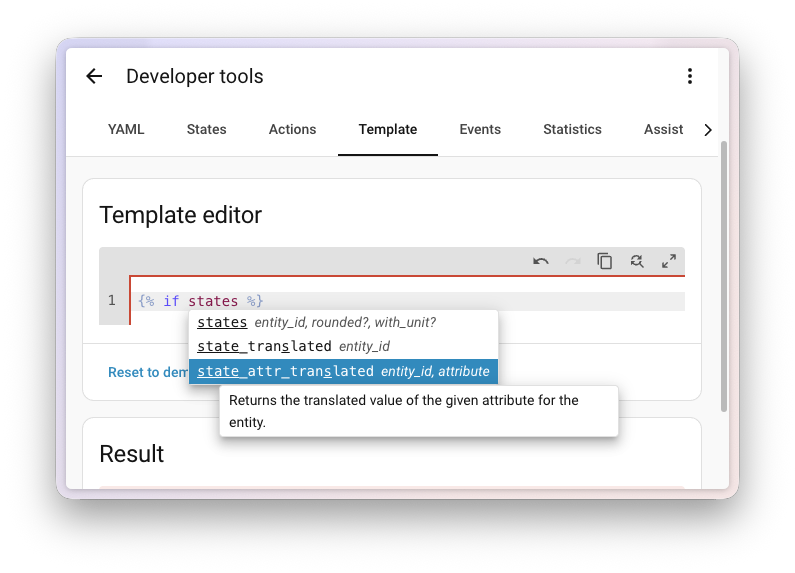
    Screenshot of the template editor showing autocomplete for template functions.

    Start typing inside a {{ ... }} or {% ... %} block, and the editor now suggests Home Assistant’s template functions, filters, tests, and globals. Each suggestion comes with a short signature, a description, and tab-stops for the arguments, so you can fly through writing a template without keeping the template documentation open in another tab.

    It gets even better inside the string arguments of those functions. The editor knows what kind of ID a function expects and offers matching suggestions:

    Screenshot of the template editor showing autocomplete for area IDs.

    No more copy-pasting entity IDs from the developer tools, and no more typos sneaking into your templates. Less friction, fewer mistakes. 🎯

    And it’s not just autocomplete. Hover over anything in your template and the editor has something useful to say. Functions, filters, and tests get a small tooltip with their signature, what they do, and a direct link to the full documentation page. Entity IDs and attributes show their current value right where you’re typing, so you instantly see whether your template is reading what you think it is. 🔍
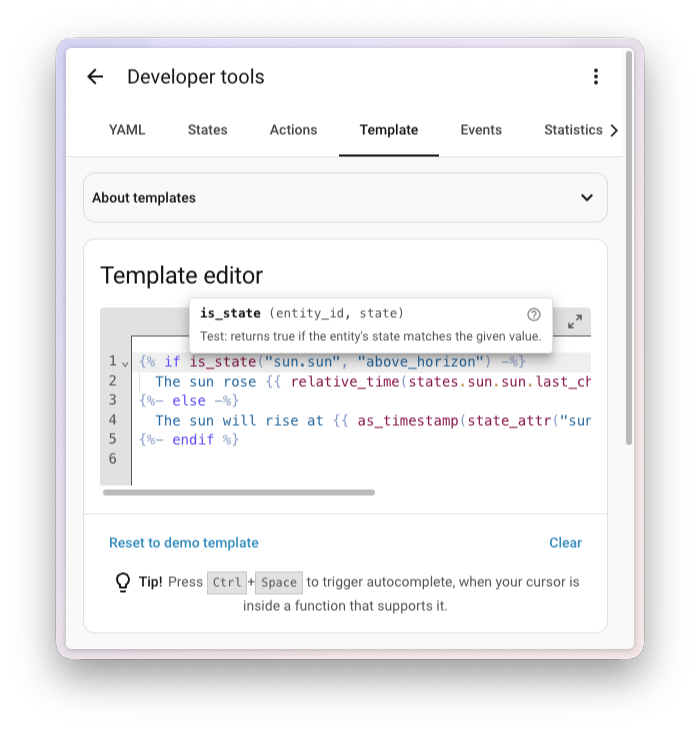
    Screenshot of the template editor showing a hover tooltip on a template function.

    Need help? Join the community

    Home Assistant has a great community of users who are all more than willing to help each other out. So, join us!

    Our very active Discord chat server is an excellent place to be, and don’t forget to join our amazing forums.

    Found a bug or issue? Please report it in our issue tracker to get it fixed! Or check our help page for guidance on more places you can go.

    Are you more into email? Sign up for the Open Home Foundation Newsletter to get the latest news about features, things happening in our community, and other projects that support the Open Home straight into your inbox.

    Backward-incompatible changes

    We do our best to avoid making changes to existing functionality that might unexpectedly impact your Home Assistant installation. Unfortunately, sometimes it is inevitable.

    We always make sure to document these changes to make the transition as easy as possible for you. This release has the following backward-incompatible changes:

    Purpose-specific triggers and conditions

    When we first introduced purpose-specific triggers and conditions, we added separate ones for Person entities and Device Tracker entities. Since then, we’ve decided to take a more ergonomic, cross-domain approach instead.

    As a result, the entered home and left home triggers, and the is home and is not home conditions, have been removed from Person and Device Tracker. Replacements that work across both will land in an upcoming release.

    If you have automations that use these triggers or conditions on a person or device tracker, switch them back to a regular state trigger or state condition (for example, state changed to home) until the cross-domain replacements arrive.

    (@emontnemery - #168406)

    Gardena Bluetooth

    The “finish watering” value in the Gardena Bluetooth integration has been moved from a binary sensor to a regular sensor that exposes the timestamp of when watering is expected to finish. This makes the value far more useful in dashboards and automations.

    If you have automations, scripts, or dashboards that reference the previous binary sensor entity, update them to use the new sensor entity instead.

    (@elupus - #169476) (Gardena Bluetooth documentation)

    pilight

    The pilight integration has been disabled because the underlying pilight library relies on setuptools.pkg_resources, which is no longer available in setuptools 82.0.0 and later.

    If the library is updated to remove the setuptools.pkg_resources dependency, or replaced with a maintained alternative that does so, the integration can be activated again. Community contributions to make this happen are very welcome.

    (@epenet - #167760) (pilight documentation)

    Ring

    The Ring doorbell event entity now emits the standardized ring event type instead of the legacy ding. This change aligns Ring with the new doorbell event standard, so the entity can be used seamlessly with the new purpose-specific automation triggers and conditions.

    If you have automations that listen for the ding event type from your Ring doorbell, update them to use ring instead.

    (@abmantis - #167728) (Ring documentation)

    Supervisor

    Previously, all actions registered by the Supervisor integration (such as hassio.addon_start, hassio.backup_partial, and hassio.host_reboot) only logged an error on failure, and your script or automation would continue running regardless of whether the action succeeded.

    These actions now properly raise on failure, which means your automation or script will stop unless continue_on_error is set to true. If you rely on the previous behavior, add continue_on_error: true to those action steps.

    (@mdegat01 - #166558) (Supervisor documentation)

    Webhook

    The local_only option on webhooks must now be a proper boolean (true or false). Previously, other truthy values like 1 or "yes" were silently accepted. This brings the option in line with the rest of Home Assistant.

    If you have webhooks configured in YAML with non-boolean local_only values, update them to use true or false.

    (@edenhaus - #169296) (Webhook documentation)

    If you are a custom integration developer and want to learn about changes and new features available for your integration: Be sure to follow our developer blog. The following changes are the most notable for this release:

    Patch releases

    We will also release patch releases for Home Assistant 2026.5 in May. These patch releases only contain bug fixes. Our goal is to release a patch release once a week, aiming for Friday.

    2026.5.1 - May 8

    All changes

    Of course, there is a lot more in this release. You can find a list of all changes made here: Full changelog for Home Assistant Core 2026.5.

    •  

    v5.45.0

    5.45.0 (2026-05-06)

    🚀 New feature

    • extended ctb api for plugins (ad7cb5d5d7)
    • sort based on publish status (#25689)
    • admin: api token supports admin permissions and admin user ownership (#25657)
    • content-manager: add Zod 4 foundation utilities (#25574)

    🔥 Bug fix

    • issue with plugin content type uid (f768670d38)
    • style issues (2f42e5fe44)
    • opt out of the ct backup strategy for plugin content types (5936814932)
    • build errors (520ecfc6d5)
    • enforce minimum length (f2b6c2bcd0)
    • prevent trailing ? in URL when params is empty object (#25724, #25900)
    • dynamically update rate limit prefix key based on route (#24818)
    • admin: clean up lazy component registration warnings (#25015)
    • admin: type addMenuLink with optional Component for menu-only links (#26198)
    • content-manager: prevent crash on detached DZ component (#26148)
    • content-type-builder: preserve plugin CT identity in AI chat transform (0be48848fa)
    • database: run cleanOrderColumns updates sequentially (#26134)
    • database: run cleanOrderColumns updates sequentially (#26134)
    • review-workflows: implement incremental loading in assignee dropdown (#25967)
    • upload: sharp concurrency and cache leads to OOM (#26046)

    ❤️ Thank You

    •  

    Euro Truck Simulator 2: 1.59 Update Release

    We are excited that the 1.59 update for Euro Truck Simulator 2 is now officially released and available on Steam! We hope you will enjoy all the new features, which you can read about in more detail below.

    As always, we would like to thank everyone who took part in the open beta phase and reported possible issues or any kind of feedback on our forum, as it helped us fine-tune everything for a smooth transition to the full update!


    Benelux Rework Release

    We are happy to reveal that the long-awaited Benelux Rework project is released with this update! Our assets and map designers have completely rebuilt the whole original map of Belgium, the Netherlands, and Luxembourg from scratch, delivering a richer, more detailed experience.

    Truckers can explore a wide range of revamped major cities and their surroundings, including Amsterdam, Groningen, Rotterdam, Brussels, Liège, and Luxembourg City. Each location has been carefully redesigned to highlight its unique character with plenty of landmarks and details!

    You can also look forward to hauling cargo through entirely new locations. These include Antwerp, home to one of Europe's largest container ports; the DAF Trucks facility in Eindhoven, which has been recreated with remarkable detail in close cooperation with our partners at DAF Trucks; as well as key transport corridors - the busy E40 and A2 motorway.

    You'll be able to drive from the beautiful hilly landscapes of the Belgian Ardennes to the flat polders and picturesque coastal roads in the northern Netherlands - the reworked Benelux offers a diverse and varied environment that truly reflects the region's look and feel.

    Whether you're cruising through dense city centers, navigating busy highways, or discovering scenic country routes, the Benelux region now offers a far more immersive and authentic journey. You can see more from what is coming in our already released blogs on this topic.

    Volvo Trucks Experience Center

    In partnership with our friends at Volvo Trucks, we are adding the renowned Volvo Trucks Experience Center, situated in Gothenburg, Sweden, to the map, where you can test your trucking skills.

    The center's standout feature is its dedicated driving circuit, which incorporates sweeping bends, tighter technical corners, elevation changes, downhill stretches, and varied road layouts. This allows drivers to assess vehicle behaviour in a controlled environment, highlighting stability, braking precision, handling characteristics, and overall driving comfort in ways that go beyond everyday road conditions.

    The Volvo Trucks Experience Center has been recreated almost entirely on a 1:1 scale in our map with a strong attention to detail. You can drive the full circuit and explore the surrounding areas of the facility.

    To find this amazing facility, you need to venture around the roads near Gothenburg to discover an entrance that will initially not be shown on your GPS. And remember, since it is located in Sweden, you need the Scandinavia DLC to be able to visit it. You can read more about this addition here.

    Thermo King Update

    Thermo King, a global leader in transport temperature control, is coming to Euro Truck Simulator 2 with their trailer refrigeration units! These replace all the unbranded units we had on our base game and DLC reefer trailers so far. This adds an extra touch of realism when you are hauling temperature-sensitive cargo and spot a famous real-world brand on your trailer.

    With this update, you can see the Thermo King A-360, A-400, A-500, SLXi-300, and SLXi-400 refrigeration units on the front of your single trailers, which deliver a range of trailer refrigeration performance to suit different transport needs. On top of that, we also added the UT-1400R unit, designed for double-trailer configurations and mounted beneath the trailer. Find out more about this update here.

    Advisor Update - Finances & Damage Widgets

    We've been closely listening to feedback from our community, and one of the most common points raised in the new route advisor was that many players missed having quick access to information on vehicle damage and finances. While our teams are actively working on the next steps in our broader vision for a redesigned UI in this area, we didn't want to make you wait until that work is complete. Instead, we've prioritized implementing some of the most frequently requested improvements as soon as possible.

    Based on that, we've implemented the Damage and Finances widgets. These widgets are designed to restore easy access to information about truck damage, plus trailer and cargo damage, if you are currently driving with a trailer and cargo, as well as your current bank balance, with an average profit over the last seven days displayed too.

    These widgets can be turned on and off in the Widget Settings Menu, and if enabled, they will be displayed in the bottom right corner above your GPS.

    Tow to Road

    The Tow to Road feature was designed to improve the overall quality of life for players by reducing frustrating situations during gameplay. It allows drivers to quickly recover if their truck overturns or gets stuck in a ditch or uneven terrain. It also helps prevent disruptions in multiplayer sessions, enabling players to continue with their convoy when they find themselves stuck, without the need to be towed to a service location, which could cause unnecessary delays.

    So when you are in a difficult situation, you can simply find the new "Tow to Road" button under the Service menu (set to F7 by default). After paying a small fee for the towing service, you will be transported to your last safe location on the road. You can read more about this feature here.

    Skills UX Redesign

    The Skill Screen has received a visual rework while remaining in its original place within the interface. This update focuses on improving clarity and overall user experience without changing its core functionality.

    You can now view both your current skill level and the next step in its progression. Tooltips also allow you to explore other ranks within each skill. Selecting a skill provides improved readability and clearer visual feedback, including a better indication of how many steps remain in that skill's progression path.

    Each skill is represented as a clickable button, making it easy to access more detailed information. The redesign also improves navigation when using a controller.

    QoL UI/UX Changes

    We're continuing to refine the overall user experience with updates focused on readability, clarity, and smoother controller navigation.

    The in-game news banner has received a visual refresh to better align with our newer UI style while improving readability. When hovering over a news item, a tooltip will now display a longer excerpt along with a clear call to action. Deactivated news items now feature a clearer status indicator, which also doubles as an activation button.

    We're making navigation on the world map more intuitive for controller users. A new "undo last pin" feature has been added, along with remapped controls for adding, removing, setting avoid areas, and resetting pins.

    Save handling has also been improved, with new saves now using the standard save icon instead of a black screenshot and overwriting clearly labeled as "Overwrite". Garage upgrade cutscenes can now be skipped more consistently using the (B) button, and the controller navigation has been further refined with improved D-pad accessibility across UI.

    Traffic Sound Rework

    We've also made some adjustments to traffic audio as part of this update. Sounds have been softened and rebalanced to better match real-world perception, with less emphasis on distant engine noise and more on the subtle "road hiss" of tires. Honking behavior has also been slightly randomized to reduce repetition. Overall, traffic should now feel less intrusive and better integrated into the ambient soundscape.

    Height Blend Improvements

    We've also made a few improvements to the Height Blend feature. Derived normal maps can now be enabled to help conserve GPU memory, and we've also addressed several graphical issues to ensure more consistent, visually accurate results.

    Detour Feature Maintenance

    We've decided to temporarily disable the detour feature to focus on maintenance and further development. We've received numerous reports of Detours not functioning as intended, and the current system no longer meets our needs.

    As a result, we'll be shutting down detours while we work on improving and upgrading the feature in the background to make it more stable and reliable. Please note that this change only affects detours - random road events will continue to be available in the game.

    Changelog

    Map

    • Benelux Rework Release
    • Volvo Trucks Experience Center

    Vehicles

    • Thermo King Update
    Gameplay
    • Tow to Road Feature

    UI/UX

    • Advisor Update - Finances & Damage Widgets
    • Skills UX Redesign
    • QoL UI/UX Changes
      • Improved News Banner Readability
      • World Map Pin Enhancements
      • Save Icon Update
      • Garage Cutscene Skipping
      • D-pad Accessibility Improvements

    Visuals

    • Height Blend Improvements

    Sounds

    • Traffic Sound Rework
    Other
    • Detour Feature Maintenance

    Don't forget to also give our X/TwitterInstagramFacebookBlueskyTikTok, and YouTube a follow, as you'll receive updates about our games straight to your feed! Osubscribe to our newsletter to stay informed. Safe travels!

    •  
    ❌