โŒ

Lees weergave

SteamOS 3.9.3 Beta

This update is for the SteamOS Beta and Preview channels, and includes new features that are still being tested. You can opt into this in Settings > System > System Update Channel.

These notes contain all changes since the current stable SteamOS 3.8 release, with the changes added since the previous 3.9 preview releases noted below

New in SteamOS 3.9.3

General

  • Fixed performance issues in STAR WARS: Galactic Racer on resume from suspend on Steam Machine

  • Fixed an issue that could lead to GPU errors in The Crew Motorfest

  • Fixed audio issues on hotplug of certain monitors in a multi-monitor setup

  • Improved support for Steam Frame wireless adapter

  • Security and stability updates

Developer

  • Reintroduce support for Android binder IPC

SteamOS 3.9

General

  • Updated Arch Linux base

  • Updated Desktop Mode from Plasma 6.4.3 to Plasma 6.7.3

  • Fixed a bug causing hidden WiFi networks to fail to connect on the first attempt

  • Fixed Steam Remote Play not working on Steam Machine when booting with no external display connected

  • Fixed "Disable Frame Limiter" toggle not working when VRR is enabled

  • Fixed the frame limiter incorrectly applying to VR titles when streaming from Steam Machine to Steam Frame

  • Fixed loss of input if a launcher window is accidentally dragged around in Game Mode

  • Fixed an issue causing frame limits to result in lower than intended FPS on certain external displays

  • Fixed issues with suspend/resume on systems with RDNA1 or RDNA2 based dedicated GPUs

  • Fixed a system crash when launching Forza Horizon 6 on Legion Go 2

  • Added preliminary support for Legion Go 2 brightness control

  • Fixed an issue causing certain games (incl. ELDEN RING and DARK SOULSโ„ข III) to fail to run on recent Panther Lake Intel CPUs

  • Worked around a firmware issue on some ASUS devices causing excessive fan speed upon waking from sleep

  • Fixed boot screen corruption on Intel PTL+ devices

  • Security and stability updates

Misc

  • Updated the bootloader to improve compatibility with certain motherboards

  • The Desktop Mode lockscreen is no longer prevented from being explicitly enabled in settings (but remains off by default)

  • Fixed logging in to Desktop Mode via RDP with system users when enabled

Developer

  • Switched WiFi backend to wpa_supplicant by default for new installations, improving compatibility with various WiFi networks

    • Enhanced wpa_supplicant to support fast WiFi reconnect on resume from sleep, previously only available in the iwd backend

    • Known issue: Existing installations will continue to use iwd unless manually enabled in Developer Settings

  • Linux kernel rebased on Linux 7.2

  • Added preliminary support for hibernation, not yet exposed in Game Mode UI

    • Enhanced Linux kernel hibernation support to enable interrupting hibernate requests and fixed various driver issues

  • Various scripts and packages have been renamed from `steamos-` to `holo-`, with aliases to the former names where appropriate

  • Improved support for running SteamOS as a VM guest with accelerated graphics (virtio-gpu, venus)

  • Updated included renderdoc version

  •  

Steam Achievement Sets Now in Beta

We're starting a beta for Steam Achievement Sets, a new feature aimed at improving the achievement experience on Steam.

Games today live longer than ever, continuing to receive updates through new DLC, expansions, and seasons. But achievements added with new game content can be hard to discover and can accidentally break the completion status of players who have already finished the game.

We have designed Achievement Sets to help address these types of issues. You can try them out in today's Steam Client beta and in a growing set of games that have already added support.

Introducing Achievement Sets

This beta enables developers to group their game's related achievements together in collections we are calling Achievement Sets. Devs can specify the number of sets and the purpose of each to match their game's specific needs. You can imagine one game grouping its achievements into single-player and multiplayer sets, or another into 8 class-based sets.

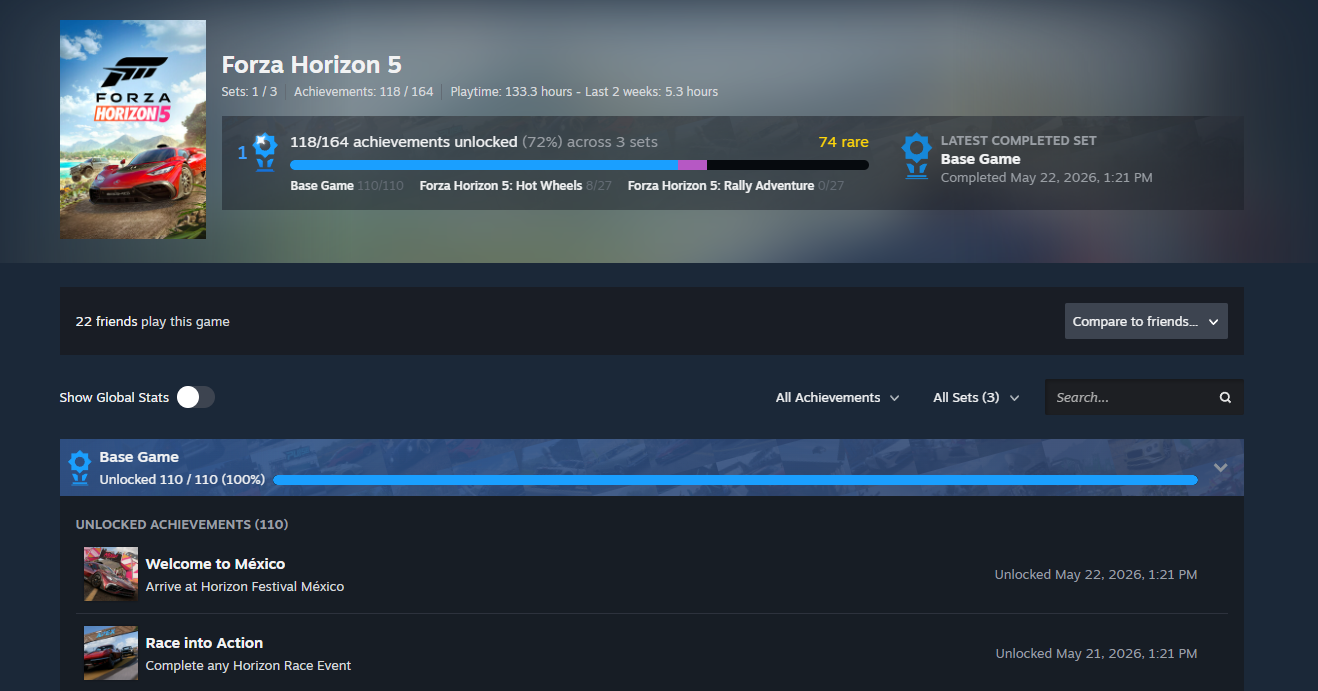
In games that support sets, you still unlock achievements by playing the game as usual. But when you browse what you have unlocked afterward, Steam will break the long list of game achievements into the developer-created sets, making it easier to see what you have completed and to find other related achievements you can unlock next.

Each Achievement Set also has its own progress bar showing how far along you are in that area. Once you have unlocked every achievement in a set, Steam will commemorate the moment and add a "set complete" trophy to your profile. If new achievements are later added to the set, your completion is preserved.

As a game grows, developers can create new sets to hold achievements for the added content. These new sets make it easy for returning players to see what new things they can unlock, while also preserving their prior completion status until they play again.

There are two types of Achievement Sets.

Base Game Achievement Sets

Base Game sets contain achievements that can be earned by all players who play a game. Their progress and trophies are displayed in blue on your achievements page.

DLC Achievement Sets

Some games contain achievements that can only be earned once you have purchased additional content (DLC) for that game. These achievements can now be grouped into new DLC sets, allowing you to separately track what you have unlocked in the new content.

DLC achievements are not included in your overall game progress until you have access to the content. Once acquired, they will be displayed as purple progress and trophies on your achievements page.

All possible achievements for a game can be explored from the new achievements page, so if you are curious, give the page a skim to see what the game's DLC has added.

Seasonal Achievements

We are also introducing the ability for game developers to archive individual achievements or entire Achievement Sets. We think there are a lot of fun ways games can take advantage of the temporary nature this can add, such as adding achievements to season-based games or enabling time-limited holiday achievements.

Once archived, users who had already unlocked the achievement or set will still see it on their profile. However, archived achievements won't show up on the profile pages of users who missed the unlock nor block their progress toward completing a set or game. Anytime an achievement can no longer be unlocked by users, it should be archived.

A New Achievements Page

Bringing this all together is an updated achievements page, accessible from your Games List on the web and from games in your Steam Library. The new page gives you a summary of your overall progress, progress in each achievement set, and details on individual achievements.

Global Stats, or the per-achievement completion rates, are now available as a toggle here rather than on a separate page.

Search has also been expanded with filters for specific achievement sets and for locked or unlocked achievements. Plus, there's a little extra joy when you complete all your achievement sets.

You can now compare your game progress with up to three friends, including rare achievements, completed sets, and progress in DLC sets.ย You'll see both the number of achievement sets you've completed and a new, more accurate total achievement count, making it easier to compare your progress with friends. This total is based on achievements each player can actually earn, which may vary depending on the add-on content they have and whether certain achievements are time-limited or archived. As a result, the total can differ from friend to friend.ย 

And More

We've rebuilt a few areas where achievements are displayed, to show off your overall achievement and set progress throughout Steam. You'll see your completed sets on your profile in the Recently Played section, your Games List, your Library, and more.

  • The Perfect Games tab is now called Completed and expands to show both completed games and games with completed achievement sets.

  • Games with completed achievement sets can now be added to the Completionist Showcase, in addition to completed games.

  • Games played via Family Sharing are now displayed in the Games List.

  • Friends with playtime in a game through Family Sharing are now eligible for friend comparison.

  • Store and Library game pages will now show if a game has achievement sets.

Try It Out Now

These updates are now available as a beta for both players and game developers.ย Here's how to join the Steam Client Beta. We'll continue making improvements during the beta, so make sure to let us know what you think.

As developers begin using the new tools, you'll start seeing these changes appear for supported games.

The following games have already added achievement sets:

Are you a game developer interested in seeing how easy it is to add achievement sets? Read the Steamworks blog post here.

  •  

Steam Beta Client Update: October 15th

We have just shipped an updated Steam Client to the Preview/Beta channel.

Steam Achievement Sets

A new way to organize, track, and complete a game's achievements. Read more details in the announcement.

  • Games can now organize and group achievements for base game and DLC content

  • DLC achievements can be added via sets without breaking game completion

  • Completed achievement sets remain completed when new sets are added

  • Achievements and sets can be archived if they are seasonal or can no longer be achieved

  • Updated Achievements page and achievement rollup displays

General

  • Notifications settings layout has been changed to be easier to work with on all screen sizes

  • Fixed multiple edge cases that could cause memory leaks in game streaming and controller code

  • Multiple general stability improvements and fixes for rare crashes affecting small numbers of users

  • Fixed an error displaying dates for users in British Columbia

Library

  • Improved offline support for the activity feed and fixed cases where it could previously skip loading some events.

Linux

  • The Steam client is now a 64bit application.

  • The Steam client now runs inside a Steam Runtime container.

    • This will help the Steam client provide a more consistent experience across multiple distributions. This is the same technology used by Steam games.

  • Fixed a case where Steam updater UI would fail to show for some users.

Remote Play

  • Added a "Display Style" setting to allow stretching and zooming when the stream is a different aspect ratio than the client display.

Steam Controller Firmware

  • Fixed an issue where shutting down a controller while docked to the puck could cause it to turn back on

Accessibility

  • Background art will appear on the home screen when High Contrast is enabled

  •  

Steam Client Beta - October 15th

The Steam Client Beta has been updated with the following changes:

Steam Achievement SetsA new way to organize, track, and complete a game's achievements. Read more details in the announcement.

  • Games can now organize and group achievements for base game and DLC content

  • DLC achievements can be added via sets without breaking game completion

  • Completed achievement sets remain completed when new sets are added

  • Achievements and sets can be archived if they are seasonal or can no longer be achieved

  • Updated Achievements page and achievement rollup displays

General

  • Notifications settings layout has been changed to be easier to work with at all window sizes.

  • Fixed multiple edge cases that could cause memory leaks in game streaming and controller code.

  • Multiple general stability improvements and fixes for rare crashes affecting small numbers of users.

  • Fixed an error displaying dates for users in British Columbia.

Library

  • Improved offline support for the activity feed and fixed cases where it could previously skip loading some events.

Linux

  • The Steam client is now a 64bit application.

  • The Steam client now runs inside a Steam Runtime container.

    • This will help the Steam client provide a more consistent experience across multiple distributions. This is the same technology used by Steam games.

  • Fixed a case where Steam updater UI would fail to show for some users.

Remote Play

  • Added a "Display Style" setting to allow stretching and zooming when the stream is a different aspect ratio than the client display.

Steam Controller Firmware

  • Fixed an issue where shutting down a controller while docked to the puck could cause it to turn back on.

Accessibility

  • In Big Picture Mode, background art will appear on the home screen when High Contrast is enabled.

  •  

Steam Client Update For Frame: October 15th

Steam Client (for Steam Frame) has just been released for all users with the following changes:

Steam Frame

  • Improve reliability of pairing with the Steam Frame Wireless Adapter.

  • Show progress of initial connection with the Steam Frame Wireless Adapter after pairing.

  • Added a Playtime Mode icon to the notification area.

  • Fixed an issue where Wi-Fi power saving was enabled at startup, despite being disabled in settings.

  • Improved Steam Frame Wireless Adapter reliability on Windows by preventing the adapter from going to sleep.

  • Fixed a crash in the Steam Frame Wireless Adapter driver when it fails to initialize.

General

This update for Steam Frame also includes a large number of other Steam Client improvements.

Please refer to the Steam Client patch notes for more details:

https://store.steampowered.com/news/app/593110/view/710037059469839720

  •  

SteamOS 0.5.6 Beta for Steam Frame

SteamOS 0.5.6 (for Steam Frame) has just been released.

This update is for the Steam Frame Beta channel, and includes new features that are still being tested.

You can opt into this in Settings > System > System Update Channel.


OS:

  • Disable avahi-daemon publishing mDNS, causing polluting frame-XXXX.local mDNS mappings, and in some cases delaying shutdown.

  • Allow .apk files in right-click "add to steam" context menu in Desktop mode.

  • Improve performance overlay battery and memory usage reporting.

Streaming:

  • Improve robustness of connecting using the Steam Frame Wireless Adapter, making it able to connect in some situations it previously could not.

Audio:

  • Add echo cancellation and noise suppression for external microphones.

  •  
โŒ