The Steam Client Beta has been updated with the following changes:
Homescreen - Big Picture Mode
Added a new 'Big Art Mode' option for the home screen. This can be enabled in Settings > Home.
Added Personal Calendar to the Recommended tab on the home screen
[carousel][/carousel]
Screensaver - Big Picture Mode
Added a new screensaver feature, accessible in Settings > Customization. There are two screensavers available:
The default is a game art slideshow that can be configured to show artwork from recently played games and your recent in-game screenshots.
A retro inspired bouncing logo screensaver
Big Picture mode can also load custom screensavers. Similar to startup movies, they can be placed in the config\\uioverrides\\screensavers directory in your Steam install directory (e.g. C:\\Program Files (x86)\\Steam or ~/.steam/root). You can use the bouncing logo screensaver (in the steamui\\screensavers directory) as an example to get started.
[carousel][/carousel]
General
Improved Steam Client startup performance
Fixed a case where after server maintenance some users might fail to auto-reconnect to Steam
Fixed bug where being prompted to refresh credentials more than once could trigger an immediate restart
On Windows, using the systray menu to exit while the Steam window is minimized will no longer flash the window visible briefly
Dialogs that appear for serious error conditions now stay above the main window
Game Recording
Fixed some cases where playback would jump to an unexpected point in the timeline when reaching the end of a play session or clip
Decreased performance impact of game recording for some D3D12 games on Windows
In-Game Overlay
Fixed frame rate hitches in D3D11 and D3D12 games when taking screenshots on Windows
Fixed rendering the overlay and using other overlay related features (screenshots, game recording, etc.) in Vulkan games that create multiple windows.
Big Picture Mode
Added explicit warning text to power menu confirmation dialogs when proceeding will shut down an active game
Updated default artwork when an app does not have library or hero artwork
Reorganized the idle timer settings when on battery and AC power
Steam Input
Improved CPU performance at runtime and in configuration loading
Added information about which configurations are compatible in the configurator browser when using a game that requires Steam Input API
Fixed the controller support widget showing "This game doesn't support controllers" for unreleased games that don't have controller support information yet
Fixed controllers not using the desktop configuration on the desktop UI login window
Added the missing settings for adjusting emulated joystick adaptive centering on trackpad
Linux
Improved download speeds on high latency connections.
The "Select compatibility tool" dropdown is now always visible.
The recommended compatibility tool, or steam runtime for native games, now shows at the top of the list as the "Default" option.
Compatibility tool aliases, e.g. "Proton Stable", can now be selected from this dropdown.
The SteamOS compatibility dialogs will now show in desktopUI when installing games not verified for that HW
On Desktop Linux we will now show the SteamOS unsupported dialog when installing games that are known to not work with Proton
Improve distro information collection for hardware survey, preferring data from /etc/os-release.
SteamRT3 Experimental Beta
Fixed "Add a Non-Steam Game" showing an invalid list of applications.
Fixed the "Run Steam when my computer starts" toggle.
Remote Play
A PIN is no longer required to download an app to a remote device. A PIN is still required to Install and Stream from a remote device.
Adding Download Complete notification for a remote download if you initiated the download on your current device.
We have just shipped an updated Steam Client to the Preview/Beta channel.
Home Screen
Added a new 'Big Art Mode' option for the home screen. This can be enabled in Settings > Home.
Added Personal Calendar to the Recommended tab on the home screen
[carousel][/carousel]
Screensavers
Added a new screensaver feature, accessible in Settings > Customization. There are two screensavers available:
The default is a game art slideshow that can be configured to show artwork from recently played games and your recent in-game screenshots.
A retro inspired bouncing logo screensaver
Custom screensavers are also supported. Similar to startup movies, they can be placed in directories at ~/.steam/root/config/uioverrides/screensavers/. You can use the bouncing logo screensaver (in the steamui/screensavers directory) as an example to get started.
[carousel][/carousel]
General
Added notification about the current user when waking from sleep, if there have been multiple recent users. The notification can be activated to switch users and dismisses immediately on any other input. This notification can be toggled from the Notification Settings.
Added confirmation step to "exit VR" and "switch to desktop mode" power menu actions, and removed it from "sleep".
Added explicit warning text to power menu confirmation dialogs when proceeding will shut down an active game.
Added confirmation dialog/user switching ability when waking from sleep would require kicking an active session elsewhere.
The SteamOS compatibility dialogs will now show in desktop mode when installing games not verified for that HW.
The 'System Report' dialog is now more responsive when displaying and uploading the gathered system report.
Added "Default to Desktop Mode" toggle to System settings.
Fixed a case where Windows games would show as 'Not Compatible' in the library view until a manual Proton version was selected for this app.
Improved download speeds on high latency connections.
The "Select compatibility tool" dropdown is now always visible.
The recommended compatibility tool, or steam runtime for native games, now shows at the top of the list as the "Default" option.
Compatibility tool aliases, e.g. "Proton Stable", can now be selected from this dropdown.
Updated default artwork when an app does not have library or hero artwork.
Reorganized the idle timer settings when on battery and AC power
Pressing the controller's system button will request the TV to switch to the Steam Machine as the active source (the connected TV must support HDMI CEC)
Game Recording
Fixed some cases where playback would jump to an unexpected point in the timeline when reaching the end of a play session or clip
Decreased performance impact of game recording for some D3D12 games on Windows
Steam Input
Improved CPU performance at runtime and in configuration loading
Added information about which configurations are compatible in the configurator browser when using a game that requires Steam Input API
Fixed the controller support widget showing "This game doesn't support controllers" for unreleased games that don't have controller support information yet
Fixed controllers not using the desktop configuration on the desktop UI login window
Added the missing settings for adjusting emulated joystick adaptive centering on trackpad
SteamRT3 Experimental Beta
Fixed the Performance Overlay slider.
Fixed "Add a Non-Steam Game" showing an invalid list of applications.
Fixed the "Run Steam when my computer starts" toggle.
Remote Play
A PIN is no longer required to download an app to a remote device. A PIN is still required to Install and Stream from a remote device.
Adding Download Complete notification for a remote download if you initiated the download on your current device.
In-Game Overlay
Fixed frame rate hitches in D3D11 and D3D12 games when taking screenshots on Windows
Fixed rendering the overlay and using other overlay related features (screenshots, game recording, etc.) in Vulkan games that create multiple windows.
We have just shipped an updated Steam Client update to the Stable channel.
Note: This client was re-released September 6th with the following additional changes:
Fixed a case where the steamwebhelper process could experience high CPU usage when certain events were shown in the library tab.
General
Allow changing account while a game is running. In this case, the change account dialog shows a warning that proceeding will close active games.
Added "Ask which account to use on startup" toggle to startup account chooser.
Eliminated "change account" confirmation dialog in most cases. Changing account while Steam is running now brings up the account chooser directly, then restarts as the chosen account.
Steam shutdown now waits for just-exited games to finish cloud sync.
In the Web Browser, the left trackpad of Steam Deck/Steam Controller is now bound to scroll wheel for navigating non-Steam websites.
Fixed issues where some Steam Workshop items were not being updated properly.
Fixed requesting a PIN reset while signed in as a different account restarting with the wrong account signed in.
Fixed a bug where a single pixel line would sometimes appear above the header on the home screen.
Fixed a issue where sometimes uninstalling a game would not remove it from the download queue.
Fixed a crash when suspending/resuming a device after a controller disconnected.
Desktop Mode
Fixed some keys not typing properly in Steam Overlay.
Friends & Chat
Chat messages with suspicious content will now be flagged in group chats. You can report the messages, block the sender, or dismiss the warning by activating the notice.
Steam Input
Make controller configurations that are shared with other devices or unique to a device more clear in the configurator UI and add an option to split Steam Controller configurations so they are no longer shared with Steam Deck.
Remote Play
Improved video color range.
Added support for HDR streaming on Steam Deck OLED.
Added support for AV1 video streaming when using the experimental SteamRT3 Steam Client.
Fixed a case where streaming could show a black window.
Fixed a bug where Remote Devices with Remote Play enabled weren't showing as Streamable.
Fixed video frame being clipped when desktop scaling is enabled.
Fixed framerate drop when using the unlimited bandwidth option when streaming from Steam Deck or Steam Machine.
A new Steam Client update has been released and will be automatically downloaded.
Note: This client was re-released September 6th with the following additional changes:
Fixed a case where the steamwebhelper process could experience high CPU usage when certain events were shown in the library tab.
Fixed Steam streaming client failing to launch on Windows 10.
General
Allow changing account while a game is running. In this case, the change account dialog shows a warning that proceeding will close active games.
Added "Ask which account to use on startup" toggle to startup account chooser.
Eliminated "change account" confirmation dialog in most cases. Changing account while Steam is running now brings up the account chooser directly, then restarts as the chosen account.
Steam shutdown now waits for just-exited games to finish cloud sync.
Fixed issues where some Steam Workshop items were not being updated properly.
Fixed game server browser filtering out multiple servers being hosted from a single public IP.
Fixed an issue where sometimes uninstalling a game would not remove it from the download queue
Friends & Chat
Chat messages with suspicious content will now be flagged in group chats. You can report the messages, block the sender, or dismiss the warning by clicking the notice.
Big Picture Mode
In the Web Browser, the left trackpad of Steam Deck/Steam Controller is now bound to scroll wheel for navigating non-Steam websites.
Fixed a bug where a single pixel line would sometimes appear above the header on the home screen.
Remote Play
Improved video color range on all platforms.
Added support for HDR streaming on Steam Deck OLED.
Fixed a case where streaming could show a black window.
Fixed a bug where Remote Devices with Remote Play enabled weren't showing as Streamable.
Fixed video frame being clipped when using pipewire capture with desktop scaling on Wayland.
Fixed framerate drop when using the unlimited bandwidth option with VA-API encoding on Linux.
Steam Input
Make controller configurations that are shared with other devices or unique to a device more clear in the configurator UI and add an option to split Steam Controller configurations so they are no longer shared with Steam Deck.
Linux
Fixed some keys not typing properly in Steam Overlay when in Big Picture Mode.
Fixed a crash when suspending/resuming a device after a controller disconnected.
We have just shipped an updated Steam Client to the Preview/Beta channel.
Friends & Chat
Chat messages with suspicious content will now be flagged in group chats. You can report the messages, block the sender, or dismiss the warning by activating the notice.
Steam Input
Fixed a crash opening some Nintendo Switch Pro controllers.
Remote Play
Fixed a bug where very high bitrate streams stopped sending video frames.
Fixed video frame being clipped when desktop scaling is enabled.
Fixed framerate drop when using the unlimited bandwidth option when streaming from Steam Deck or Steam Machine.
The Steam Client Beta has been updated with the following changes:
Friends & Chat
Chat messages with suspicious content will now be flagged in group chats. You can report the messages, block the sender, or dismiss the warning by clicking the notice.
Steam Input
Fixed a crash opening some Nintendo Switch Pro controllers.
Remote Play
Fixed a bug where very high bitrate streams stopped sending video frames.
Fixed video frame being clipped when using pipewire capture with desktop scaling on Wayland.
Fixed framerate drop when using the unlimited bandwidth option with VA-API encoding on Linux.
Steam's PvE Survival Crafting Fest is on now through September 7th at 10 a.m. PT, which means a full week of discounts on games that test your skills by pitting you against the environment you find yourself in.
Can you, for example, survive being stranded at sea? Being underwater? Floating through space? Existing on an island (alone) filled with cannibals? These are just hypotheticals, of course.
Join us now for the Steam PvE Survival Crafting Fest, and may you survive the elements by any means necessary. (At a discount, too!)
Note: This update is for the Steam Deck Preview channel, and includes new features that are still being tested. You can opt into this in Settings > System > System Update Channel.
Note on Preview Releases
This is an early Preview build of SteamOS 3.9, and may contain unexpected bugs or stability issues. If you encounter problems, please consider filing a bug on the SteamOS issue tracker.
The following notes are an overview, and may not include all changes since the previous SteamOS 3.8 Stable Release.
General
Updated Arch Linux base
Updated Desktop Mode from Plasma 6.4.3 to Plasma 6.7.3
This update is for the SteamOS Beta and Preview channels, and includes new features that are still being tested. You can opt into this in Settings > System > System Update Channel.
General
Fixed an issue present in previous beta builds causing degraded performance in some cases when composition is required (such as when having FSR enabled)
Fixed Firefox in Desktop Mode sometimes freezing when fullscreen
Worked around an issue where Unreal Engine 5 VR games could display a blank right eye
Fixed Bluetooth instability with Nintendo Switch Pro (v1) controller
Fixed Desktop Mode allowing resolutions below 640x480 on certain displays, rendering it unusable
Fixed a regression from previous beta breaking WiFi connectivity on the MSI Claw A1M
Fixed issues with battery display on Lenovo Legion Go models
Fixed a bug where the MSI Claw would freeze on resume if an SD card was present during suspend and resume
Fixed a bug where the system would freeze on resume if an SD card was removed while suspended
Steam Pins and Pegs Fest is August 17th through 20th, with loads of games on sale that have you playing with pins or pegs. Or pins AND pegs (why not get a lil' crazy?)!
Master pinball and pinball-like games, knock down actual bowling pins, and break some bricks. Try your hand at deckbuilding pegs, roguelike pegs, and more. There are plenty of discounted titles to explore and add to your library.
This update is for the SteamOS Beta and Preview channels, and includes new features that are still being tested. You can opt into this in Settings > System > System Update Channel.
Known Issues - Beta
There is a known issue with degraded performance in some cases when composition is required (such as when having FSR enabled).
This issue is fixed in the latest SteamOS stable release (3.8.16). Affected users may wish to switch to the stable update channel while we work on bringing this fix to the beta channel.
General
Added support for waking up from the Steam Controller Wireless Adapter (2015)
Improved battery indications when the device is charging in but using more power than the charger can provide
Preliminary support for the Steam Frame Wireless Adapter
Added support for Steam Controller (2026) to the built-in [c]hid_steam[/c] controller driver, enabling use with native controller applications when Steam is not running
Fixed an issue where hotplugging HDMI displays could cause lockups in Desktop Mode
Fixed an issue where TVs supporting an HDMI "Game Mode" would display the initial boot logo before engaging said mode, causing unnecessary delay and flashing
Fixed some cases of slow or stuck Wi-Fi connections with certain adapters
Fixed an issue causing previous SteamOS updates to fail to apply for some users
Security and stability fixes
Steam Machine Firmware 108
Fixed an issue where the system could occasionally wake up immediately after going to sleep
Fixed a rare issue where CPU performance could be degraded until reboot after waking up from sleep
Audio
Fix for HDMI audio dropouts with some game and TV combinations
Improve reliability of HDMI hotplug detection
Add option to prefer lower latency audio codecs for Bluetooth devices
Non-Valve Devices
Improve support for MSI Claw and OneXPlayer device variants
Improve support for devices with external or no Wi-Fi adapters
Fixed an infrequent bug where some 3rd party handhelds would have input ignored when held
Added initial gamepad support for MSI Claw 8 EX AI+
Added initial gamepad support for Konkr FIT
Added initial gamepad support for AYANEO Pocket S2
Updated gamepad support for OneXPlayer Apex with new firmware
We have just shipped an updated Steam Client to the Preview/Beta channel.
General
Fixed requesting a PIN reset while signed in as a different account restarting with the wrong account signed in.
Steam Input
Make controller configurations that are shared with other devices or unique to a device more clear in the configurator UI and add an option to split Steam Controller configurations so they are no longer shared with Steam Deck
Desktop Mode
Fixed game server browser filtering out multiple servers being hosted from a single public IP.
The Steam Client Beta has been updated with the following changes:
General
Fixed game server browser filtering out multiple servers being hosted from a single public IP.
Steam Input
Make controller configurations that are shared with other devices or unique to a device more clear in the configurator UI and add an option to split Steam Controller configurations so they are no longer shared with Steam Deck
There are lots of features we're excited about when it comes to Steam Controller, and Grip Sense is one of them.
Wait, what IS Grip Sense?
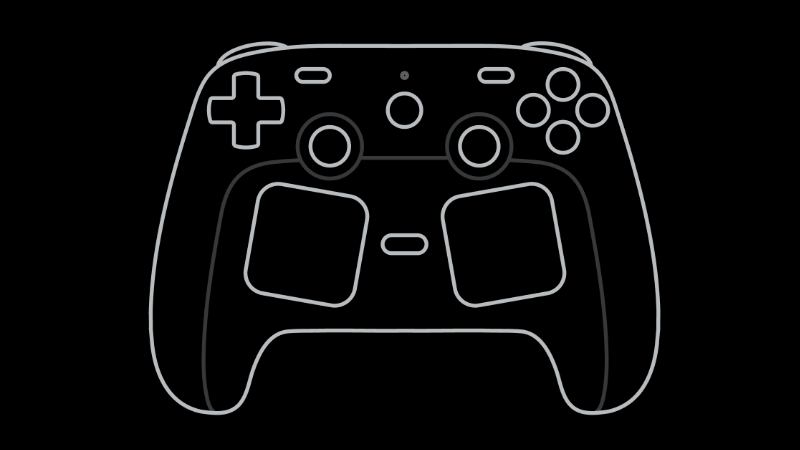
Grip Sense is what we're calling the two capacitive touch sensors inside the handles of Steam Controller. They sense when your fingers are touching the locations highlighted in the image below.
Sounds cool. But, like, why?
Because it's, like, cool! Actually, our driving motivation in building these was to provide another way to activate/deactivate Gyro quickly when you've moved it past your comfortable zone and need to recenter it (called "ratcheting").
It's similar to when you're using your mouse and reach the end of your mousepad: you naturally pick it up and put it back down in the middle. With ratcheting, when you get to the "edge" of your comfortable zone while using Gyro, you can lift your fingers up off the back of the controller, recenter the controller, and then put your fingers back on the controller.
The threshold for activation is adjustable. You can make it so a very slight lift of the fingers will deactivate gyro; or you can make it so you almost need take your whole hand off the controller (like in the animation above). We outline more on how to do that later in this article.
While the original intent was for ratcheting (and it does work for that!) we have found a few other cool use cases, like using it to bring up a weapon wheel, map, or menu. You can lift your fingers off the controller, the weapon wheel will pop up, then you can make your selection and put your fingers back to lock it in. We'll show you how to do that too.
How to assign Grip Sense to Gyro activation
Navigate to the layout editor for a game in the Steam App or in Big Picture Mode (we outline this in our blog post on the Steam Input Configurator). Once there, ensure Gyro is set to "Gyro to Mouse", then click on the Gyro Behavior settings gear
Once in here, you will see the Gyro to Mouse settings. The first option is "Choose Gyro Button(s)". It will default to right trackpad touch and right thumbstick touch. Click in the box to the right to access the button selector menu:
This window will show all options for activating Gyro. If you are unsure what an icon means, you can hover over it and a text description will appear on top. The Grip Sense sensors are the two circled in the image below. When a button is selected, it will turn blue. To deselect, click on the button again; it will turn gray.
Once the button is selected, it will work to disable/enable gyro in game. In this example, when you lift your right fingers off of the controller, gyro will be disabled. When your fingers are on the controller, gyro will be enabled.
Multiple activation buttons
If there are multiple buttons selected (see example below where both grip sensors were picked), an option will appear to let you choose whether Any or All buttons are required to Enable, Suppress or Toggle the gyro. By default, it will choose Any. For grip sense, "Any" means you need to extend the fingers on both hands to disable gyro. "All" would mean you only need to extend the fingers on one hand.
How to use Grip Sense for weapon wheel/map/menu
In order to use Grip Sense like you would a "press and hold" button to bring up things like weapon wheels, menus, maps, etc, you need to access it a little bit differently.
Within the game of your choice, navigate to the Layout Editor (read more in our "How to make the most of the Steam Input Configurator" blog post). Once inside the layout editor, in the Buttons section, navigate down to the grip buttons.
Pick whichever one you want to use and assign it to the button that opens up menu, weapon wheel, etc.
Here's the tricky part: Grip Sense looks like a pressed button when your fingers are touching the grip, and we want the opposite. We want it to look like a pressed button when your fingers lift off of the grip. To do that, click on the gear icon next to the button; click on settings; then towards the bottom of the settings screen you will see an "Invert Input" toggle. Turn that on (blue).
Now, whenever the grip is released, it will activate as a button press and hold until the grip is touched again!
How to adjust Grip Sense sensitivity
Everybody's hands and preferences are different, so we provided a way to adjust the Grip Sense sensitivity. If you want to change the sensitivity, you can do so by navigating to Calibration and Advanced settings for the controller.
From the Steam App
From the menu in the top left, click Steam > Settings > Controller > Click "details" for the controller you want to modify > Scroll down until you see "Calibration & Advanced Settings" and click on "Open" > Navigate down to "Grip Sensors" where you will see the sensor adjustment interface.
From Big Picture Mode
Hit Steam to open the Steam menu > Settings > Controller > Click "details" for the controller you want to modify > Scroll down until you see "Calibration & Advanced Settings" and click on "Open" > Navigate down to "Grip Sensors" where you will see the sensor adjustment interface.
Adjusting the sensitivity
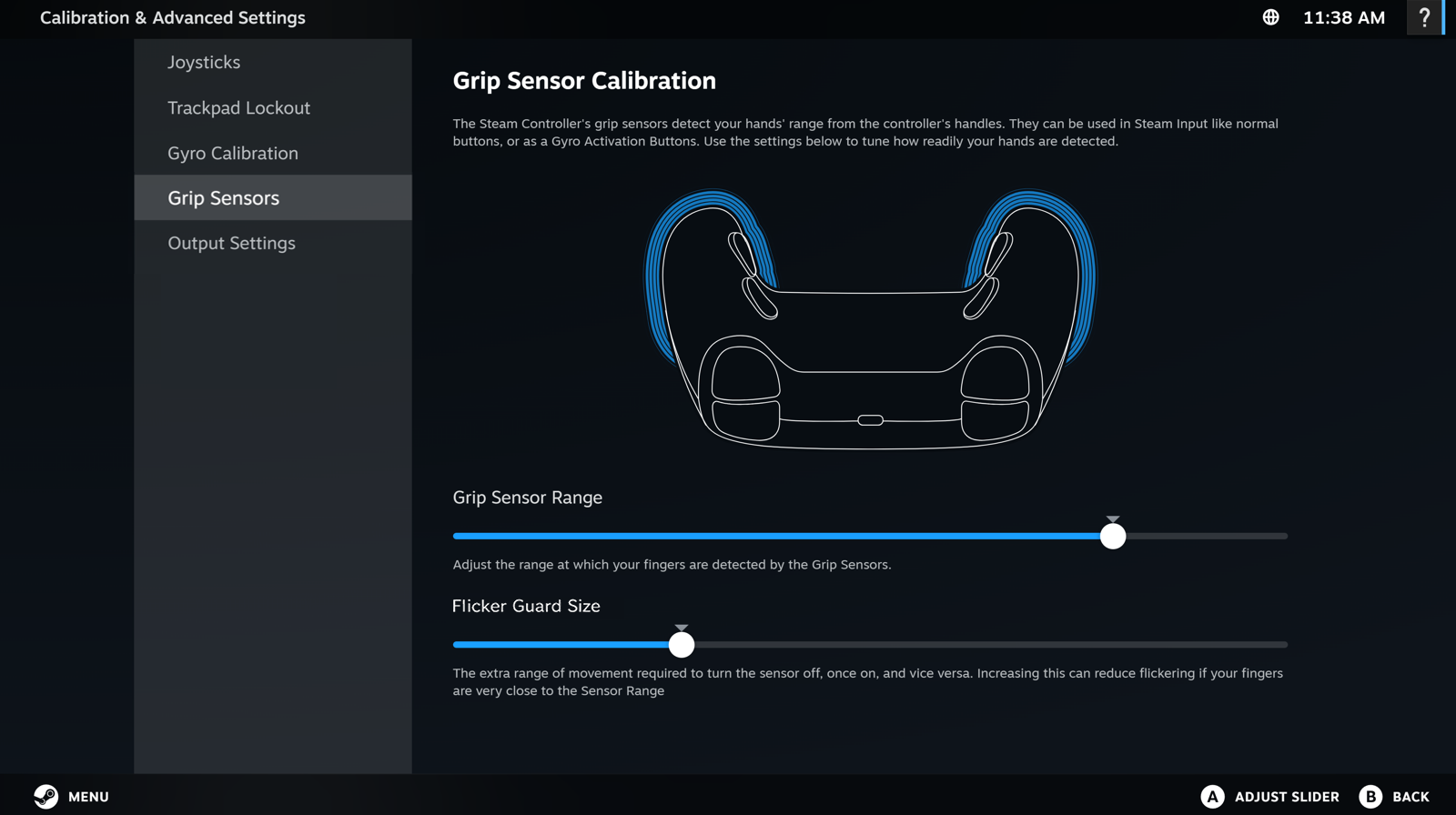
On the Grip Sensor Calibration page, you will see two sliders:
Grip Sensor Range - The further the slider is to the left, the closer your fingers need to be to the controller grips for them to be sensed. If you want slight lifts of the fingers to turn off the sensor, move it to the left. If you want to move your fingers substantially before deactivating the sensor, move it to the right.
Flicker Guard Size (aka Hysteresis) - This makes the states (on vs off) a bit more sticky around your sensor range. The further this slider is to the right, the more sticky the sensor state is. Meaning, if the sensors are on and the slider is far to the right, you need to move your fingers further to turn them off. If you're looking for very snappy quick response, keep this low. If you're looking for very stable performance with no accidental activations, put it higher.
As you adjust, the UI will provide real time feedback when the sensor is "on" (blue line on grips) vs "off"
Note: if you move the Flicker Size Guard slider all the way to the left, you may have issues with the grip sense flickering or responding to touch events on the trackpads or thumbstick. Moving it slightly to the right can help resolve this issue.
Learn more about Steam Controller on its product page, and keep an eye on the Steam Hardware Blog for other how-to guides and closer looks.

 Log in



 [/carousel]

 [/carousel]

 [/carousel]

 [/carousel]