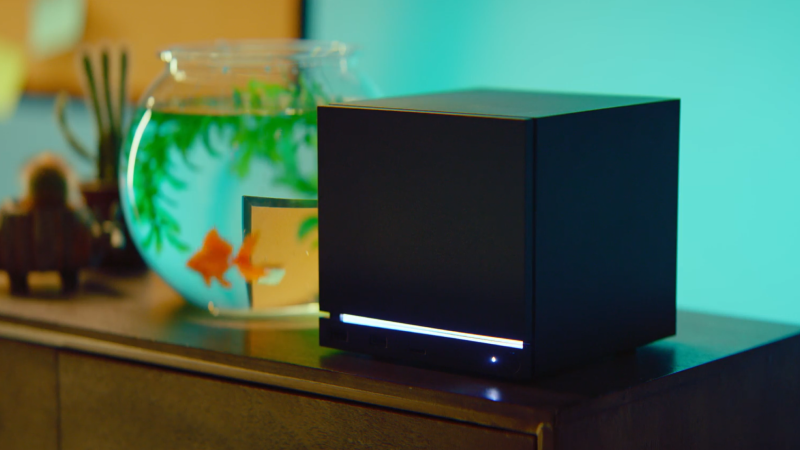
The Steam Client Beta has been updated with the following changes:
Steam Input
Added support for both the wired and wireless versions of the PDP Afterglow Wave Controller for Nintendo Switch
Added support for Turtle Beach controllers for Nintendo Switch 2
Fixed the Apex 5 controller showing up as multiple controllers when "Allow third-party apps to take over mappings" is enabled in the FlyDigi Space Station app
Remote Play
Added 59.94 FPS as an available framerate limit
Reduced frame drops when the framerate limit is set to automatic
Fixed overloading the client video decoder when unlimited bandwidth is enabled
Steam Controller FW
Fixed an issue with occasional repeated button presses on the B Button
Ми щойно випустили оновлення клієнта Steam Deck для бета-каналу.
Загальне
Виправлено помилку, через яку у вікні попереднього перегляду «Список змін» в меню «Налаштування» → «Система» було показано подію для неправильного каналу. Наприклад, список змін був для бета-каналу, хоча користувач використовував стабільний.
Режим робочого столу
Виправлено помилку, через яку використовувалося неправильне масштабування в режимі Big Picture.
Введення Steam
Додано підтримку дротової та бездротової версій контролера PDP Afterglow Wave для Nintendo Switch.
Додано підтримку контролерів Turtle Beach для Nintendo Switch 2.
Remote Play
До параметра «Обмеження частоти кадрів» додано опцію 59,94 к/с.
Зменшено втрату кадрів, коли для обмеження частоти кадрів вибрано опцію «Автоматично».
Виправлено проблему з перевантаженням відеодекодера клієнта, якщо ввімкнено необмежену пропускну здатність.
Мікропрограма Steam Controller
Вирішено проблему з випадковими повторюваними натисканнями кнопки B.
This update is for the SteamOS Beta and Preview channels, and includes new features that are still being tested. You can opt into this in Settings > System > System Update Channel.
Note: These changes were simultaneously released to SteamOS stable channel as 3.8.14
General
Fixed an issue where WiFi would be limited to lower speeds on certain routers that advertise incorrect MCS requirements
This update is for the Steam Deck Beta and Preview channels, and includes new features that are still being tested. You can opt into this in Settings > System > System Update Channel.
Note: This beta contains changes that were simultaneously released to SteamOS stable channel as 3.8.13, noted below
General
The Steam Machine splash screen/logo now appears much more quickly after device startup
Add option to reset all audio configuration and settings to system defaults under Settings -> Audio
Fixed 20-30s startup delay in some games on non-Valve devices with no audio sources
Fixed a regression with some MSI Claw devices on newer firmware losing access the Guide and Quick Access Menu buttons.
Fixed a regression with Legion Go 1 models on older controller firmware where gyroscope would fail to initialize.
Fixed a regression on OneXPlayer F1 models where rumble was being blocked and the joystick poll rate was low. As a consequence, the M1 (left) extra shoulder button is no longer able to function.
Added controller support for missing OneXPlayer F1 and OneXPlayer 2 special edition models.
Fixed in 3.8.13
Fixed an issue causing controller firmware updates to fail on certain Steam Deck models
We have just shipped an updated Steam Deck Client to the Preview/Beta channel.
Steam Input
Steam Controller: The Gyro Calibration Threshold has been set to 50% of the previous value so that it is less likely to trigger while in hand.
Steam Controller: Gyro Calibration threshold is now available in Steam->Settings->Controller->Details->Calibration & Advanced (Open)->Gyro Calibration.
Steam Controller: You can choose to disable hardware calibration and rely on the standard Steam Input Gyro Calibration tools instead, by using the "Enable Software Calibration for Steam Controller" toggle.
Steam Controller Firmware
Fixed occasional repeated trackpad samples that caused issues with momentum during trackball mode
Fixed an issue with unintentionally waking host devices while shutting down the controller
The Steam Client Beta has been updated with the following changes:
Big Picture Mode
Fixed style regressions in the Quick Access menu Voice chat controls tab.
Steam Input
Steam Controller: The Gyro Calibration Threshold has been set to 50% of the previous value so that it is less likely to trigger while in hand.
Steam Controller: Gyro Calibration threshold is now available in Steam->Settings->Controller->Details->Calibration & Advanced (Open)->Gyro Calibration.
Steam Controller: You can choose to disable hardware calibration and rely on the standard Steam Input Gyro Calibration tools instead, by using the "Enable Software Calibration for Steam Controller" toggle.
Fixed Steam Controller glyphs in Shadow of the Tomb Raider.
Steam Controller Firmware
Fixed an issue where trackpad samples could be duplicated and cause issues w/ momentum in trackball mode
Fixed an issue with unintentionally waking host devices while shutting down the controller
Remote Play
Fixed software encoding on macOS and the steamrt3 Linux beta
We have just shipped an updated Steam Deck Client to the Stable channel.
General
Steam Machine compatibility improvements.
The game launch progress screen screen will now show a note if the "Maximum Game Resolution" setting resulted in the game running at a resolution lower than the display's native resolution.
Moved the "Maximum Game Resolution" setting from Settings->Display->Advanced to Settings->Display.
"Maximum Game Resolution" options will now be generated based on the current display's aspect ratio. On non-standard aspect ratios, additional options will be available under 'More options'.
Don't show the "Maximum Game Resolution" resolution dropdown in Settings->Display if all the available options match the current display's native resolution.
We have just shipped an updated Steam Deck Client to the Preview/Beta channel.
General
Don't show the "Maximum Game Resolution" resolution dropdown in Settings->Display if all the available options match the current display's native resolution.
This update is for the Steam Deck Beta and Preview channels, and includes new features that are still being tested. You can opt into this in Settings > System > System Update Channel.
Note: This beta contains changes that were simultaneously released to SteamOS stable channel as 3.8.12, noted below
General
Updated Mesa graphics driver to a new major release, containing many ray-tracing performance improvements, as well as other performance and functionality improvements
Greatly improved VRAM management, improving performance and stability in cases where VRAM is limited
Fixed in 3.8.12
Fixed issue with Steam streaming in Desktop Mode in fullscreen games
Fixed a graphics driver issue where the main menu in Sniper Elite 5 would not render correctly
Fixed various issues with the SD Card reader on some Legion Go S models
We have just shipped an updated Steam Deck Client to the Preview/Beta channel.
General
The game launch progress screen screen will now show a note if the "Maximum Game Resolution" setting resulted in the game running at a resolution lower than the display's native resolution.
Moved the "Maximum Game Resolution" setting from Settings->Display->Advanced to Settings->Display.
"Maximum Game Resolution" options will now be generated based on the current display's aspect ratio. On non-standard aspect ratios, additional options will be available under 'More options'.
Greetings to everyone who loves good deals on great games (everyone, we hope?)!
The Steam Summer Sale means the entire Steam Store is filled with deals upon deals upon deals, as our official trailer above will attest. From now through July 9th at 10 a.m. Pacific (it's a long one, friends) you can pick literally any genre of gaming you love and find all sorts of sales.
Cooking battles, universe exploration, fighting with swords/guns/your fists, cozy games, football and basketball games, zombies, and more. Wait, we should list the "more", it's so good: there are even all-time greats that are on deep discounts throughout the sale.
The Steam Summer Sale is yours to explore in the shade of the summer (or in the warmth of the winter for our southern hemisphere friends): Now through July 9th at 10 a.m. Pacific. See you there!
A new Steam client has been released and will be automatically downloaded.
Note: This update was re-released June 24th with the following additional changes:
Fixed Steam crash for some games using Steam Timeline API.
Fixed Steam Deck verified icons not showing when Library setting is enabled.
General
Added support for the Malay language.
Updated controller pairing UI.
Improved Pipewire session logic on Linux. If persistent capture permissions are granted to Steam, there will only be an active Pipewire session when streaming or recording.
Fixed video autoplay not working in some cases.
Fixed webusb notifications showing for some devices when connected.
In-Game Overlay
Fixed a bug where performance monitor showed FG rather than DLSS in some situations where we should have known DLSS specifically was in use for frame generation.
Friends & Chat
Fixed a bug that could cause gamepad navigation to become unresponsive after clicking 'Ignore All' on the friend invite list.
Remote Play
Added a button to toggle the performance graph in the streaming overlay.
Added a 100 Mbit/s bandwidth option.
The "Unlimited" bandwidth option allows adaptive bitrate up to 250 MBit/s when connecting to the latest Steam beta.
The enhanced streaming presets use "Unlimited" (adaptive up to 250 Mbit/s) bandwidth.
Steam Input
Added support on Windows for more than 4 Xbox controllers if GameInput v3 is installed. This can be enabled by running Steam with "-gameinput" as a command line option.
Added support for GameCube rumble when the adapter is in PC mode.
Fixed the selected action set in the configurator resetting while making edits in the configurator.
Fixed a bug virtual menus assigned to a mode shift would not be able to add bindings when accessed via the link on the source page.
Fixed a case where deleting an action set could cause a configuration to fail to load.
Fixed the Add Action Set dialog sometimes having a blank entry in the dropdown.
Fixed a rumble related handle leak in the Xbox Extended Feature driver on Windows.
Fixed a case where newly exported templates would not show up in the controller configurator until restarting the Steam client.
Fixed an issue with saving out autosaves with multiple Xbox controllers of the same type connected.
Both the Steam Machine 2TB and 2TB bundle options come with two additional faceplates: red fabric, and solid walnut.
All prices are inclusive of VAT where applicable.
We have details on how to sign up for a chance to reserve yours below. Since this has proven to be a weird time to launch hardware, we thought this would be a good opportunity to share more about how we got here.
--
Steam Machine, like our other hardware products, is made up of many components that we source from manufacturers around the world. The price at which we sell our hardware is a direct result of the cost of these components. We felt like we had a good understanding of how those costs might change over time when we first started sourcing them for Steam Machine back in 2023. That understanding was born from the many years of data we all have about the evolution of PC hardware prices – primarily, that it tends to get cheaper over time as new technology arrives.
Over the past year or so, that has changed quickly and significantly, most visibly for RAM and storage components. There are a variety of reasons, all of which are affecting hardware products everywhere. The overall effect is that our original goal for the price of Steam Machine is no longer viable. So the prices we're sharing today reflect the state of the world for manufacturing; or, more accurately, it reflects the price of the components as we've secured them over the past 6 months.
Price wasn't the only thing impacted by all of this: availability was as well. There were periods where we found we couldn't source some of our components at all, at any price. More than anything else, this has impacted the number of units we've been able to produce for launch.
--
In an effort to improve the purchase experience and limit resellers, we're implementing a reservation system.
If you're busy now, no problem: You can sign up anytime before Thursday June 25th at 10 a.m. Pacific.
At that time, we will close signups and do a one-time randomization to determine the reservation and waitlist order.
Based on the reservation order, you will receive an email on June 25th indicating one of two things:
You've been added to the reservation queue and a Steam Machine has been reserved in your name. As units become available for shipment, people in the reservation queue will receive an email with the option to purchase.
We'll send the first batch of those starting Monday June 29th, and will continue to go through the reservation queue as units become available.
You've been added to the waitlist and we'll let you know when more units become available.
More details below in the FAQ.
FAQ
Why a randomized reservation order?
We underestimated customer interest when we recently released the new Steam Controller, and we wanted to create a system that would be less frustrating and more fair for everyone. A launch that starts at a specific day and time tends to reward bots, people with fast internet connections, talented gaming fingers for quick F5/refresh reactions, and those who can schedule their life around that moment. By accepting reservation signups over the course of a few days, without any incentive to be first, we're hoping to take away some of that friction. The longer timeframe also allows us to do some extra validation on the signups to make sure they're real accounts, with only one per household.
Are there any criteria for signing up?
Customers must meet the following criteria to be able to sign up:
You must have a Steam account in good standing.
You must have made a purchase on Steam prior to April 27th 2026.
Limit one signup per household. We will use payment method, shipping address, and other information to eliminate multiple entries.
What if I don't sign up before June 25th at 10 a.m. Pacific?
After the one-time randomization at that time, anyone who signs up will be automatically added to the back of the waitlist.
Do I have to pick a specific model at signup?
If you care about getting any available Steam Machine model, more than any specific one, you're welcome to sign up for multiple models. Each model has its own list of sign-ups that will be randomized on June 25th at 10am. After that, if you are assigned a reservation queue spot for one or more models, you'll automatically be allocated a reservation for the highest end one you're in, and removed from all the others. If you didn't get a reservation spot for any of the models you signed up for, you'll be placed on the waitlist for the model that you were closest to the front of.
Are these sign up lists separated by region?
Yes, there are separate lists for each shipping region – North America, United Kingdom/European Union, and Australia. You'll be automatically placed in the lists for the region you're in.
I received an email that I’m in the reservation queue, what does that mean?
It means you have a Steam Machine reserved for you. All you need to do is wait, and once we have it ready, we'll send you an email with the option to purchase. You'll then have 72 hours to complete the purchase before we cancel your reservation and move on to the next person in the queue.
When can I expect to get my order email?
We will begin emailing folks in the reservation queue the week of June 29th, in the order they were randomized into. We expect to continue sending these emails throughout the remainder of the year.
I received an email that I'm on the waitlist, what does that mean?
It means that when we did the one-time randomization of the reservation queue, your place in line ended up beyond the number of Steam Machines we'll have in this production run. As we work our way through the queue, some customers may cancel their reservations. If that happens, you may be moved up in the reservation queue, and you'll be notified via email that you have a reservation after all. But if not, nothing about your position in the waitlist changes, and any future production runs of Steam Machines will be offered to customers in order they're on the waitlist.
Can I change which model I reserved?
Once the randomization has occurred on June 25th, and you’ve received your reservation or waitlist email, you cannot change the Steam Machine model you have signed up for. Canceling a reservation or leaving the waitlist will release your spot.
What if I’m in Japan, South Korea, Taiwan, or Hong Kong?
Visit Komodo, our official distributor in those regions, to learn how to order in Japan, Taiwan, and Hong Kong. Steam Machine will not be shipping in South Korea.
Is this the Valve console?
We think of Steam Machine as an extension of PC gaming, not as a console.
The traditional console model is to sell hardware at a loss and make up the revenue with subscription services or by selling games that are locked-in to the hardware. We think this can make sense for a single business in the short term but that open ecosystems are better for customers over the long term. PC gaming's history proves this: The openness of the PC gaming space has enabled it to be the primary driver of hardware and software innovation for decades.
The strength of PC gaming is the ability to play the games you want on the hardware you want. Steam Machine is *a* solution to these problems (and we think it's a great one), but it's not the only solution, and we don't want it to be.
If I don't get a Steam Machine right away, is there anything else I can do?
Thanks to the openness of the PC platform, there are lots of options for devices that will allow you to run games natively or streamed to your TV. There are many PC sites and communities out there that can help you with that. For our part, we are continuing to work toward enabling SteamOS to be used on more hardware than just ours. In fact, with the newly-released SteamOS 3.8, you can run the same code and operating system as Steam Machine on your own living-room PC using whatever PC parts you want:

 Log in