 Log in
Firefox 153.0.4
Fixed
Fixed Firefox becoming unresponsive when clearing browsing history, which could also result in site data being lost. (Bug 2059647)
Reference link to 153.0.3 release notes.

Fixed Firefox becoming unresponsive when clearing browsing history, which could also result in site data being lost. (Bug 2059647)
Reference link to 153.0.3 release notes.
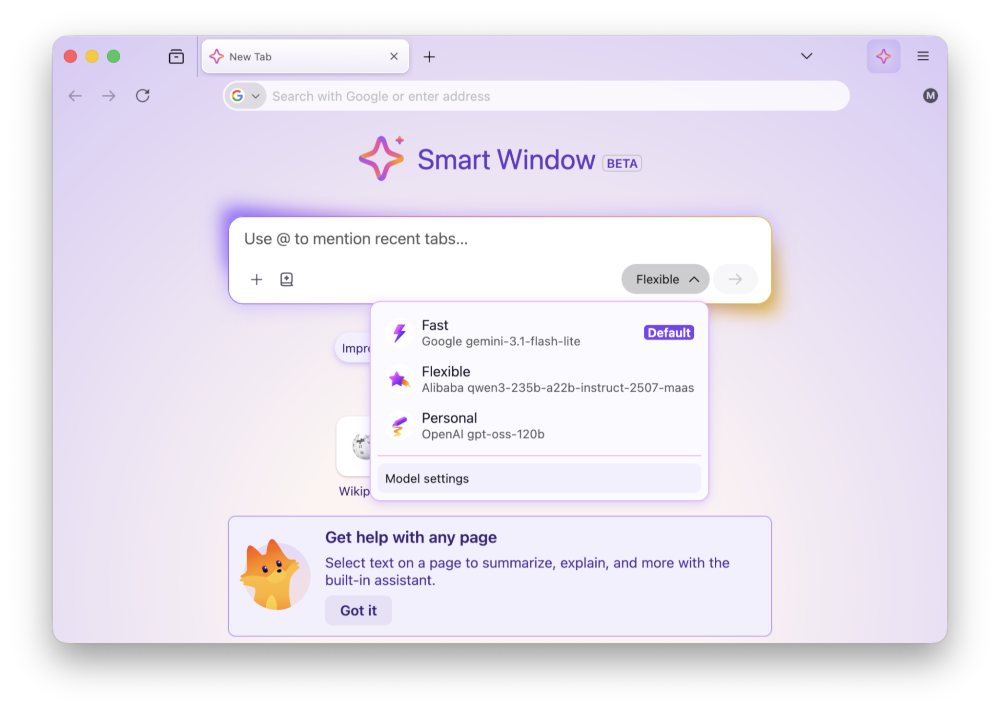
Smart Window includes several enhancements:
Fixed audio and video failing to play, or hanging when seeking, on websites that load media from a Blob URL. (Bug 2056444)
Fixed Internet shortcuts dragged from Firefox to the desktop being marked as untrusted on Windows, which caused a security warning every time they were opened. (Bug 2056865)
Fixed the Bookmarks, History, and other sidebars failing to open when the sidebar is hidden and the password manager has been turned off by an enterprise policy. (Bug 2056857)
Fixed a Mozilla VPN upgrade offer appearing for people in regions where Mozilla VPN is not sold. (Bug 2058264)
Fixed frequent Inspector crashes in the Developer Tools on pages where an extension content script had added event listeners. (Bug 2042101)
Fixed a rare case on Windows where starting Firefox while a partial update was still being applied could leave the installation broken and unable to start. (Bug 2058197, Bug 2058594)
Reference link to 153.0.1 release notes.
Addressed a startup crash on Windows that could occur after updating Firefox, when some of the application's internal files could not be loaded. Firefox should now start in these cases, although parts of the interface may not display correctly until a further update completes (Bug 2056926).
Fixed audio playing silently on some music and audio streaming sites after pausing and resuming playback (Bug 2053586).
Fixed the New Tab page background flashing a few seconds after the page loaded when a custom wallpaper was in use (Bug 2056650).
Fixed a crash that could occur when a page loaded a frame using a javascript: address (Bug 2054485).
Fixed a crash that could occur while typing text in an editable area of a page (Bug 2053867).
Fixed a search engine you had already installed yourself being labeled as "New" when Firefox later started offering the same engine (Bug 2053710).
Improved pointer lock, used by games and other immersive web content, so that the mouse pointer is less likely to escape the Firefox window (Bug 1255338, Bug 2040628).
Fixed an issue in the Inspector's Rules view where pseudo-elements could only be expanded once per selected element (Bug 2054525).
Fixed View Page Source failing to load blob: documents (Bug 2054428).
Fixed View Page Source timing out on documents that inherit their origin, such as frames using the srcdoc attribute (Bug 2054487).
Reference link to 153.0 release notes.
Some Windows users may experience a crash on startup after updating, caused by an incomplete update leaving the Firefox installation in an inconsistent state (Bug 1681745). If you are affected, downloading Firefox from firefox.com and installing it over your existing installation will repair it. Your bookmarks, passwords and other data are stored separately and will not be affected. Fixed in 153.0.1.
High Dynamic Range (HDR) video playback is now available on Windows - this feature needs HDR mode enabled for the display in Windows Settings - Display. Laptop displays that only offer "HDR video streaming" are not supported at this time. Some videos recorded on phones in certain orientations are currently not shown as HDR.
Containers let you keep separate parts of your online life (work, shopping, personal, banking) logged into different accounts in the same browser window, but keep your cookies and ad tracking isolated inside each container.
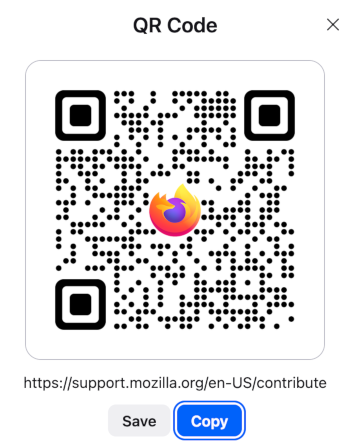
Share any open page with a QR code. Right-click a tab, select Share > Generate QR Code. Great for posters, invitations, banners, and other printed materials.
It is now possible to merge multiple PDFs by dragging a PDF into the PDF sidebar.
It is now possible to add images as new pages within PDFs using the Firefox PDF editor.
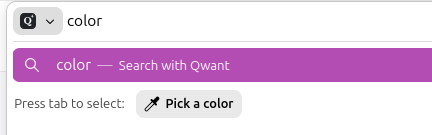
Quickly pick and copy a color from any page by typing "pick color", "color picker", or "eyedropper" in the address bar and selecting the "Pick a color" quick action.
Added support for Apple's system-wide full-screen keyboard command (Globe-F).
Firefox now verifies and displays Qualified Website Authentication Certificates (QWACs) in accordance with eIDAS regulations.
Added improved support for videos with overlays so users can more easily access video actions from context menus.
Firefox now highlights the location permission icon in red whenever a website has access to your location. The permission icon is also now visible on search results pages where it was previously hidden.

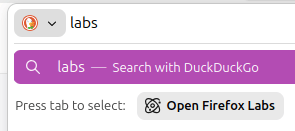
Firefox Labs can now be opened quickly by typing "labs" or "experiment" in the address bar and selecting the Open Firefox Labs quick action.
Firefox now offers experimental support for the new JPEG XL image format, which generally provides better compression than WebP, JPEG, PNG, and GIF and is designed to supersede them. You can enable it from the Firefox Labs panel in Settings.
Various security fixes.
Extensions can no longer access local files by default. Users can grant or revoke this access via the new "Access local files on your computer" permission, separate from "Access your data for all websites".
Local Network Access restrictions are now enabled by default for all users. Firefox requires websites to request permission before connecting to devices on your local network or to apps and services on your device.
Outdated cookie settings have been removed from the Settings UI. Users still in that mode should switch to default behavior "Isolate cross-site cookies". More information
You can find information about policy updates and enterprise-specific bug fixes in the Firefox for Enterprise 153 Release Notes.
A new "Local Mode" setting in the options panel allows developers to load local directories via custom origins. This simplifies testing for APIs that do not function over standard file:// URLs, removing the need to run a local web server. Multiple directory mappings are supported.
Firefox now supports a limited subset of the non-standard ::-webkit-scrollbar pseudo-element to improve web compatibility:
width/height disable overlay scrollbars for the affected container.display: none on ::-webkit-scrollbar behaves like scrollbar-width: none, hiding the scrollbar.@supports selector(::-webkit-scrollbar) now evaluates to true.The vertical-align property was converted into a shorthand for baseline-source, alignment-baseline, and baseline-shift in Firefox 149. Now, alignment-baseline supports the new keywords alphabetic, ideographic, central, mathematical, and hanging, extending the variety of baselines to choose for alignment.
Implemented the new popover=hint spec, which removes a series of inconsistent and unexpected behaviors.
The circle() and ellipse() functions accept two new keywords closest-corner and farthest-corner for their radial size.
The newly added Error.stackTraceLimit property allows to set the maximal depth of the captured JavaScript error stack as a performance optimization.
Developers can now use the text import attribute to import text files using the module system.
The Picture In Picture API exposes a way for web developers to make use of user agent Picture-In-Picture functionality.
The Intl.LocaleInfo proposal adds the ability to query Locale information, such as week data (first day in a week, weekend start day, weekend end day), text direction and hour cycle used in the Locale.
The MediaCapabilities.decodingInfo() and MediaCapabilities.encodingInfo() methods now accept the "webrtc" configuration type. This allows a site to query whether a given audio or video configuration can be decoded or encoded for WebRTC and whether doing so will be smooth and/or powerEfficient.
HTTP Compression Dictionaries is enabled via rollout in 153, it will be made permanent in a future release. This can greatly reduce network traffic size for sites that use it.
Some Windows users may experience a crash on startup after updating, caused by an incomplete update leaving the Firefox installation in an inconsistent state (Bug 1681745). If you are affected, downloading Firefox from firefox.com and installing it over your existing installation will repair it. Your bookmarks, passwords and other data are stored separately and will not be affected. Fixed in 153.0.1.
With the release of Firefox 153, we are pleased to welcome the developers who contributed their first code change to Firefox in this release, 15 of whom were brand new volunteers! Please join us in thanking each of these diligent and enthusiastic individuals, and take a look at their contributions:
Smart Window includes several enhancements:
Fixed an issue that prevented email tracking protection from being disabled in the redesigned Firefox Settings. (Bug 2049331)
Fixed a hang that could occur after using a file picker dialog on macOS 26. (Bug 2053177)
Fixed the homepage not loading for some enterprise configurations that set it using a legacy autoconfig format. (Bug 2047962)
Various security fixes.
Reference link to 152.0.5 release notes.
Fixed the Manage payment methods list in Settings appearing empty when a saved payment card had no expiration date. (Bug 2048383)
Reference link to 152.0.4 release notes.
Smart Window includes several enhancements:
Fixed copy, paste, undo, redo, and similar keyboard shortcuts not working inside macOS system dialogs such as the Save and Open panels. (Bug 2040851, Bug 2040844)
Fixed the Manage Cookies and Site Data dialog opening with an empty list when opened from the Settings search results. (Bug 2041077)
Fixed keyboard focus landing in the wrong place after following an in-page link, so pressing Tab continues from the link's position as expected. (Bug 2049307)
Various security fixes.
Reference link to 152.0.3 release notes.
Fixed an issue that could cause extreme memory usage and freezing on startup for users with language packs installed. (Bug 2049845)
Reference link to 152.0.2 release notes.
Fixed some Settings section headings showing placeholder text instead of the translated name in certain languages. (Bug 2047983)
Fixed New Tab content not matching the browser's display language after it was changed. (Bug 2046945)
Fixed a regression that could break playback of some MP4 video files. (Bug 2047467)
Fixed a performance regression that could slow down sites performing many encryption and decryption operations at once, such as Proton Drive. (Bug 2046401)
Reference link to 152.0.1 release notes.
Some users with a language pack installed may experience high memory usage and an unresponsive browser on startup. (Fixed in 152.0.3 in Bug 2049845)
Fixed frequent crashes affecting users with Intel Raptor Lake processors. (Bug 2039575)
Fixed an issue on macOS where choosing a PDF option, such as "Save as PDF", from the system print dialog would send the job to your printer instead of saving a file. (Bug 2047850)
Reference link to 152.0 release notes.
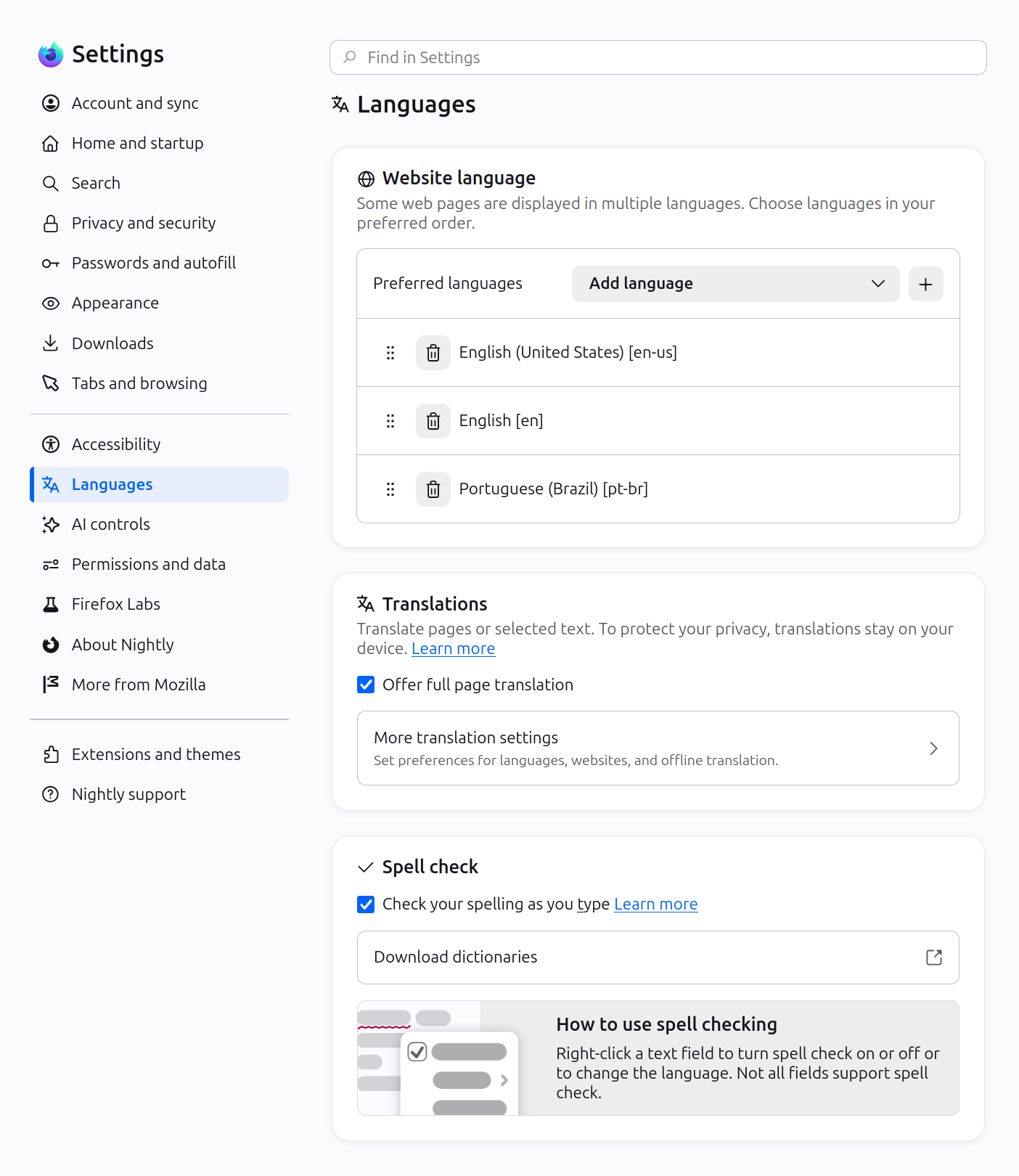
Firefox Settings features a brand-new look with streamlined organization, clearer groupings, and improved navigation for easier customization.
In Private Browsing windows, you can now temporarily disable tracker blocking for a tab if it's causing a site to break. When you reload a page where trackers were blocked, Firefox shows a message offering to reload without the stricter protections. All other tracking protections stay active.

You can now mute your browser from the address bar: type "mute" (or "shush" or "sssh") and use the address bar quick action to silence every tab currently playing sound across all Firefox windows.
Improved support for more advanced cursor movement commands, including those relating to paragraph boundaries, on macOS.
On Windows and Linux, you can now copy links via the tab context menu by right-clicking a tab and selecting Share > Copy Link, making it easy to copy a link without switching to the tab first. When multiple tabs are selected, you can copy all selected links at once. Windows users still retain access to Microsoft sharing options from the Share menu.
A "Send tab" toolbar button is now available which can be added via More Tools > Customize Toolbar.
The following languages are now available for Translations:
Firefox builds in Croatian, English (UK), Georgian, Persian, Slovenian, Tajik, Tamil, Tibetan, Turkish, Welsh, and Xhosa now come with a built-in dictionary for the Firefox spellchecker.
Firefox now offers experimental support for the new JPEG XL image format, which generally provides better compression than WebP, JPEG, PNG, and GIF and is designed to supersede them. You can enable it from the Firefox Labs panel in Settings.

Fixed an issue where the Paste option could be missing from context menus when editing content on sites such as Squarespace, LinkedIn, and eBay.
Improved dragging images from Firefox to the desktop or Finder on macOS — images now save reliably and land where you drop them.
In multiple monitor situations, the About Firefox window now more reliably opens on the display with the most recently used Firefox window.
Fixed arrow-key text navigation and word selection commands that moved in the wrong direction in right-to-left text on macOS and Linux.
Various security fixes.
Site zooming via keyboard or mouse now offers more zoom levels in smaller increments than before.
When a PDF or other file that Firefox opens directly finishes downloading, it now opens in a background tab if you've switched tabs or closed the original page.
The Tabs from Other Devices panel in the sidebar now lets you open tabs in a new tab or a new container tab from the context menu.
You can find information about policy updates and enterprise-specific bug fixes in the Firefox for Enterprise 152 Release Notes.
Developer Tools now have an option in the Settings panel to toggle the display of comment nodes in the Inspector.
Web Notifications can now have action buttons via the actions option. They appear as buttons below the notification text or in the Options list on macOS.
The field-sizing property is now available, allowing form controls to adjust in size to fit their contents.
Firefox now supports the WebAuthn Related Origin Request feature, which simplifies login flows by making Passkeys usable from multiple domains.
The Pointer Lock API now supports the unadjustedMovement option, allowing sites to receive raw mouse-movement data unaffected by OS-level acceleration.
With the release of Firefox 152, we are pleased to welcome the developers who contributed their first code change to Firefox in this release, 25 of whom were brand new volunteers! Please join us in thanking each of these diligent and enthusiastic individuals, and take a look at their contributions:
Smart Window includes several enhancements:

This feature is part of a progressive roll out.
Certain new Firefox features are released gradually. This means some users will see the feature before everyone does. This approach helps to get early feedback to catch bugs and improve behavior quickly, meaning more Firefox users overall have a better experience.
Fixed audio and video failing to play, or hanging when seeking, on websites that load media from a Blob URL. (Bug 2056444)
Fixed Internet shortcuts dragged from Firefox to the desktop being marked as untrusted on Windows, which caused a security warning every time they were opened. (Bug 2056865)
Fixed the Bookmarks, History, and other sidebars failing to open when the sidebar is hidden and the password manager has been turned off by an enterprise policy. (Bug 2056857)
Fixed a Mozilla VPN upgrade offer appearing for people in regions where Mozilla VPN is not sold. (Bug 2058264)
Fixed frequent Inspector crashes in the Developer Tools on pages where an extension content script had added event listeners. (Bug 2042101)
Fixed a rare case on Windows where starting Firefox while a partial update was still being applied could leave the installation broken and unable to start. (Bug 2058197, Bug 2058594)
Reference link to 153.0.1 release notes.
Addressed a startup crash on Windows that could occur after updating Firefox, when some of the application's internal files could not be loaded. Firefox should now start in these cases, although parts of the interface may not display correctly until a further update completes (Bug 2056926).
Fixed audio playing silently on some music and audio streaming sites after pausing and resuming playback (Bug 2053586).
Fixed the New Tab page background flashing a few seconds after the page loaded when a custom wallpaper was in use (Bug 2056650).
Fixed a crash that could occur when a page loaded a frame using a javascript: address (Bug 2054485).
Fixed a crash that could occur while typing text in an editable area of a page (Bug 2053867).
Fixed a search engine you had already installed yourself being labeled as "New" when Firefox later started offering the same engine (Bug 2053710).
Improved pointer lock, used by games and other immersive web content, so that the mouse pointer is less likely to escape the Firefox window (Bug 1255338, Bug 2040628).
Fixed an issue in the Inspector's Rules view where pseudo-elements could only be expanded once per selected element (Bug 2054525).
Fixed View Page Source failing to load blob: documents (Bug 2054428).
Fixed View Page Source timing out on documents that inherit their origin, such as frames using the srcdoc attribute (Bug 2054487).
Reference link to 153.0 release notes.
Some Windows users may experience a crash on startup after updating, caused by an incomplete update leaving the Firefox installation in an inconsistent state (Bug 1681745). If you are affected, downloading Firefox from firefox.com and installing it over your existing installation will repair it. Your bookmarks, passwords and other data are stored separately and will not be affected. Fixed in 153.0.1.
High Dynamic Range (HDR) video playback is now available on Windows - this feature needs HDR mode enabled for the display in Windows Settings - Display. Laptop displays that only offer "HDR video streaming" are not supported at this time. Some videos recorded on phones in certain orientations are currently not shown as HDR.
Containers let you keep separate parts of your online life (work, shopping, personal, banking) logged into different accounts in the same browser window, but keep your cookies and ad tracking isolated inside each container.
Share any open page with a QR code. Right-click a tab, select Share > Generate QR Code. Great for posters, invitations, banners, and other printed materials.
It is now possible to merge multiple PDFs by dragging a PDF into the PDF sidebar.
It is now possible to add images as new pages within PDFs using the Firefox PDF editor.
Quickly pick and copy a color from any page by typing "pick color", "color picker", or "eyedropper" in the address bar and selecting the "Pick a color" quick action.
Added support for Apple's system-wide full-screen keyboard command (Globe-F).
Firefox now verifies and displays Qualified Website Authentication Certificates (QWACs) in accordance with eIDAS regulations.
Added improved support for videos with overlays so users can more easily access video actions from context menus.
Firefox now highlights the location permission icon in red whenever a website has access to your location. The permission icon is also now visible on search results pages where it was previously hidden.
This feature is part of a progressive roll out.
Certain new Firefox features are released gradually. This means some users will see the feature before everyone does. This approach helps to get early feedback to catch bugs and improve behavior quickly, meaning more Firefox users overall have a better experience.
Firefox Labs can now be opened quickly by typing "labs" or "experiment" in the address bar and selecting the Open Firefox Labs quick action.
Firefox now offers experimental support for the new JPEG XL image format, which generally provides better compression than WebP, JPEG, PNG, and GIF and is designed to supersede them. You can enable it from the Firefox Labs panel in Settings.
Various security fixes.
Extensions can no longer access local files by default. Users can grant or revoke this access via the new "Access local files on your computer" permission, separate from "Access your data for all websites".
Local Network Access restrictions are now enabled by default for all users. Firefox requires websites to request permission before connecting to devices on your local network or to apps and services on your device.
Outdated cookie settings have been removed from the Settings UI. Users still in that mode should switch to default behavior "Isolate cross-site cookies". More information
You can find information about policy updates and enterprise-specific bug fixes in the Firefox for Enterprise 153 Release Notes.
A new "Local Mode" setting in the options panel allows developers to load local directories via custom origins. This simplifies testing for APIs that do not function over standard file:// URLs, removing the need to run a local web server. Multiple directory mappings are supported.
Firefox now supports a limited subset of the non-standard ::-webkit-scrollbar pseudo-element to improve web compatibility:
width/height disable overlay scrollbars for the affected container.display: none on ::-webkit-scrollbar behaves like scrollbar-width: none, hiding the scrollbar.@supports selector(::-webkit-scrollbar) now evaluates to true.The vertical-align property was converted into a shorthand for baseline-source, alignment-baseline, and baseline-shift in Firefox 149. Now, alignment-baseline supports the new keywords alphabetic, ideographic, central, mathematical, and hanging, extending the variety of baselines to choose for alignment.
Implemented the new popover=hint spec, which removes a series of inconsistent and unexpected behaviors.
The newly added Error.stackTraceLimit property allows to set the maximal depth of the captured JavaScript error stack as a performance optimization.
Developers can now use the text import attribute to import text files using the module system.
The Picture In Picture API exposes a way for web developers to make use of user agent Picture-In-Picture functionality.
The Intl.LocaleInfo proposal adds the ability to query Locale information, such as week data (first day in a week, weekend start day, weekend end day), text direction and hour cycle used in the Locale.
The MediaCapabilities.decodingInfo() and MediaCapabilities.encodingInfo() methods now accept the "webrtc" configuration type. This allows a site to query whether a given audio or video configuration can be decoded or encoded for WebRTC and whether doing so will be smooth and/or powerEfficient.
HTTP Compression Dictionaries is enabled via rollout in 153, it will be made permanent in a future release. This can greatly reduce network traffic size for sites that use it.
This feature is part of a progressive roll out.
Certain new Firefox features are released gradually. This means some users will see the feature before everyone does. This approach helps to get early feedback to catch bugs and improve behavior quickly, meaning more Firefox users overall have a better experience.
Some Windows users may experience a crash on startup after updating, caused by an incomplete update leaving the Firefox installation in an inconsistent state (Bug 1681745). If you are affected, downloading Firefox from firefox.com and installing it over your existing installation will repair it. Your bookmarks, passwords and other data are stored separately and will not be affected. Fixed in 153.0.1.
With the release of Firefox 153, we are pleased to welcome the developers who contributed their first code change to Firefox in this release, 15 of whom were brand new volunteers! Please join us in thanking each of these diligent and enthusiastic individuals, and take a look at their contributions:
Fixed some Settings section headings showing placeholder text instead of the translated name in certain languages. (Bug 2047983)
Fixed New Tab content not matching the browser's display language after it was changed. (Bug 2046945)
Fixed a regression that could break playback of some MP4 video files. (Bug 2047467)
Fixed a performance regression that could slow down sites performing many encryption and decryption operations at once, such as Proton Drive. (Bug 2046401)
Reference link to 152.0.1 release notes.
Some users with a language pack installed may experience high memory usage and an unresponsive browser on startup. (Fixed in 152.0.3 in Bug 2049845)
Fixed frequent crashes affecting users with Intel Raptor Lake processors. (Bug 2039575)
Fixed an issue on macOS where choosing a PDF option, such as "Save as PDF", from the system print dialog would send the job to your printer instead of saving a file. (Bug 2047850)
Reference link to 152.0 release notes.
Firefox Settings features a brand-new look with streamlined organization, clearer groupings, and improved navigation for easier customization.
In Private Browsing windows, you can now temporarily disable tracker blocking for a tab if it's causing a site to break. When you reload a page where trackers were blocked, Firefox shows a message offering to reload without the stricter protections. All other tracking protections stay active.
You can now mute your browser from the address bar: type "mute" (or "shush" or "sssh") and use the address bar quick action to silence every tab currently playing sound across all Firefox windows.
Improved support for more advanced cursor movement commands, including those relating to paragraph boundaries, on macOS.
On Windows and Linux, you can now copy links via the tab context menu by right-clicking a tab and selecting Share > Copy Link, making it easy to copy a link without switching to the tab first. When multiple tabs are selected, you can copy all selected links at once. Windows users still retain access to Microsoft sharing options from the Share menu.
A "Send tab" toolbar button is now available which can be added via More Tools > Customize Toolbar.
The following languages are now available for Translations:
Firefox builds in Croatian, English (UK), Georgian, Persian, Slovenian, Tajik, Tamil, Tibetan, Turkish, Welsh, and Xhosa now come with a built-in dictionary for the Firefox spellchecker.
Firefox now offers experimental support for the new JPEG XL image format, which generally provides better compression than WebP, JPEG, PNG, and GIF and is designed to supersede them. You can enable it from the Firefox Labs panel in Settings.
Fixed an issue where the Paste option could be missing from context menus when editing content on sites such as Squarespace, LinkedIn, and eBay.
Improved dragging images from Firefox to the desktop or Finder on macOS — images now save reliably and land where you drop them.
In multiple monitor situations, the About Firefox window now more reliably opens on the display with the most recently used Firefox window.
Fixed arrow-key text navigation and word selection commands that moved in the wrong direction in right-to-left text on macOS and Linux.
Various security fixes.
Site zooming via keyboard or mouse now offers more zoom levels in smaller increments than before.
When a PDF or other file that Firefox opens directly finishes downloading, it now opens in a background tab if you've switched tabs or closed the original page.
The Tabs from Other Devices panel in the sidebar now lets you open tabs in a new tab or a new container tab from the context menu.
You can find information about policy updates and enterprise-specific bug fixes in the Firefox for Enterprise 152 Release Notes.
Developer Tools now have an option in the Settings panel to toggle the display of comment nodes in the Inspector.
Web Notifications can now have action buttons via the actions option. They appear as buttons below the notification text or in the Options list on macOS.
The field-sizing property is now available, allowing form controls to adjust in size to fit their contents.
Firefox now supports the WebAuthn Related Origin Request feature, which simplifies login flows by making Passkeys usable from multiple domains.
The Pointer Lock API now supports the unadjustedMovement option, allowing sites to receive raw mouse-movement data unaffected by OS-level acceleration.
With the release of Firefox 152, we are pleased to welcome the developers who contributed their first code change to Firefox in this release, 25 of whom were brand new volunteers! Please join us in thanking each of these diligent and enthusiastic individuals, and take a look at their contributions:
Fixed an issue on macOS where smart cards and security keys could fail to load certificates automatically. (Bug 2041208)
Fixed an issue where adding another tab to an existing Split View could unexpectedly close it. (Bug 2039795)
Fixed an issue where Split View would close instead of switching tabs when using the "Switch to Tab" option from the address bar. (Bug 2039787)
Fixed a crash on Windows that occurred when using the Sogou input method to type Simplified Chinese. (Bug 2039203)
Fixed an issue where Firefox stopped caching new content once the disk cache was full, causing pages and resources to be re-downloaded from the network on every visit. (Bug 2031577)
Fixed an issue where some websites could render incorrectly or fail to load when they used JavaScript to insert WebKit-specific style rules. (Bug 2040693)
Fixed an issue where clicking and selecting text in some input fields and text areas did not work on pages that styled them with certain CSS rules. (Bug 2039504)
Fixed an issue where the up and down buttons on number input fields could overlap and hide the value when sites sized the field to fit its contents. (Bug 2039315)
Fixed an issue where sorting strings that include numbers could produce an incorrect order on some websites and web applications. (Bug 2027078)
Fixed an issue where dropdown menus would not open for <select> elements created inside an iframe and then moved into the parent page. (Bug 2041720)
Reference link to 151.0.1 release notes.
Fixed a crash experienced by users with Intel Raptor Lake CPUs. (Bug 1950764)
Fixed an issue on Windows where some websites using WebSerial to flash device firmware could fail unexpectedly. (Bug 2040754)
Reference link to 151.0 release notes.
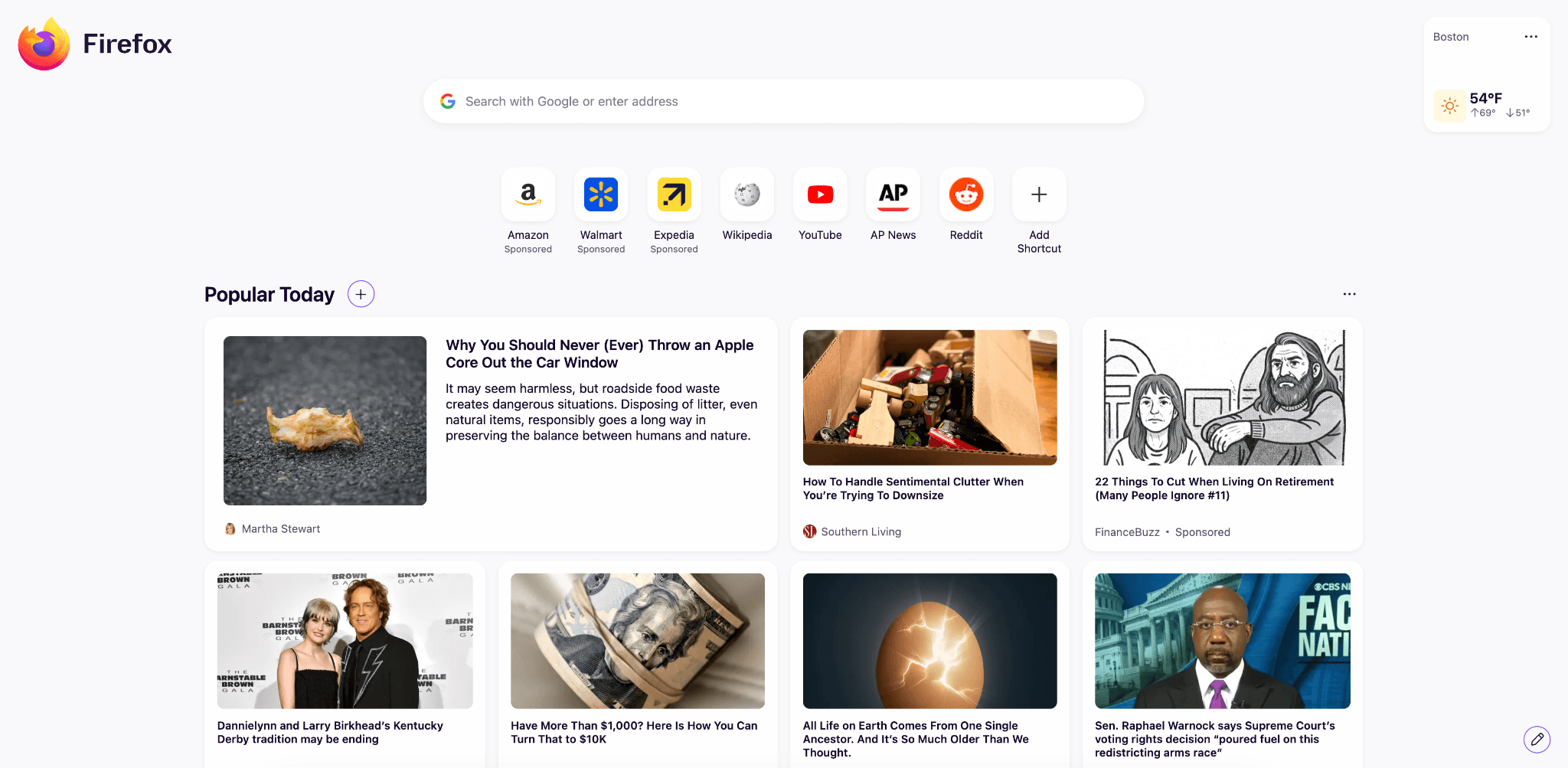
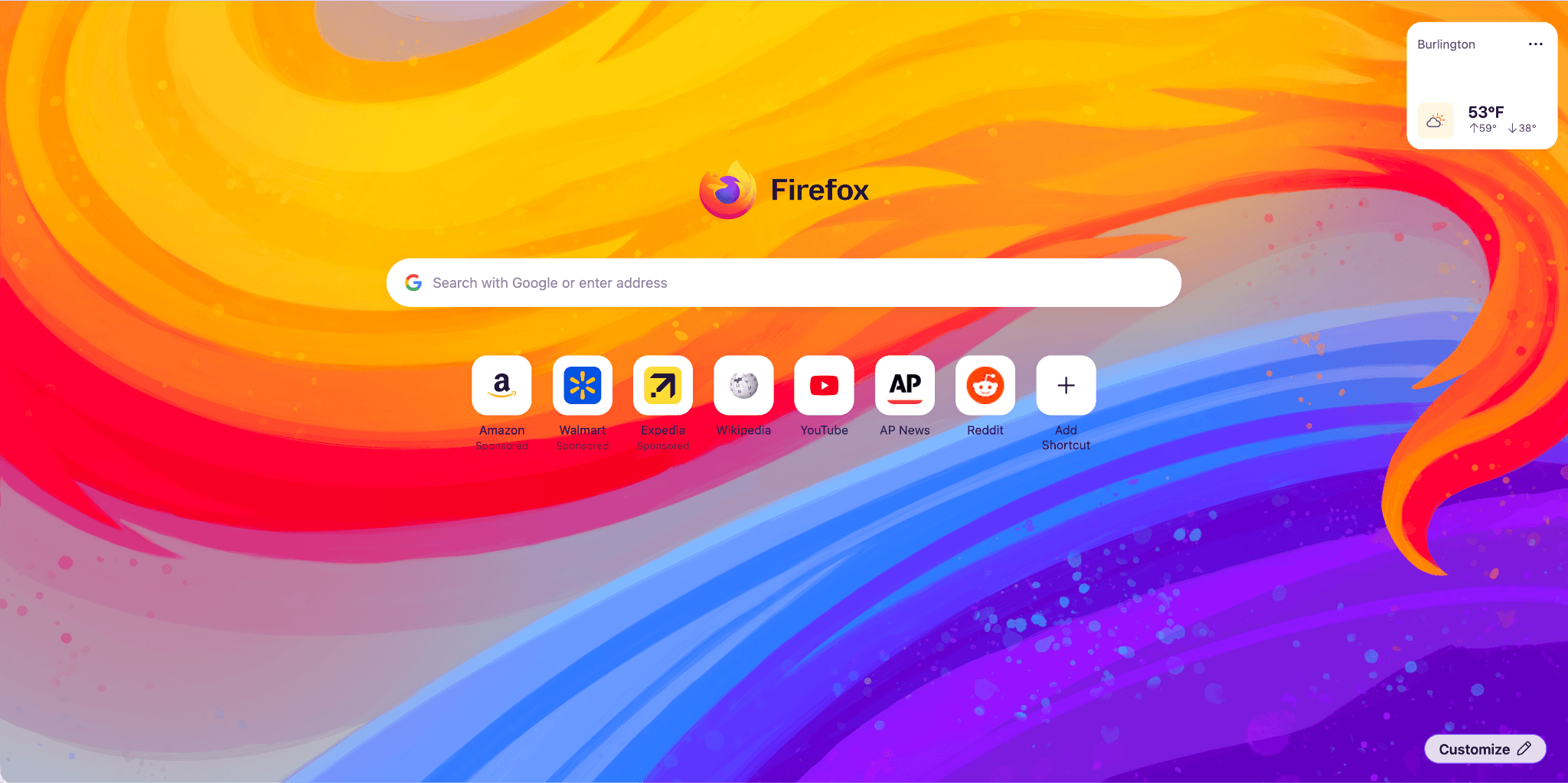
Firefox Home (New Tab) has a fresh, new look and feel. The layout and design will enable upcoming features, from widgets to shortcuts improvements, launching between 151 and 152. Included are some new and exciting Wallpapers, such as the one below. Use the pencil icon in the lower right to check them out.
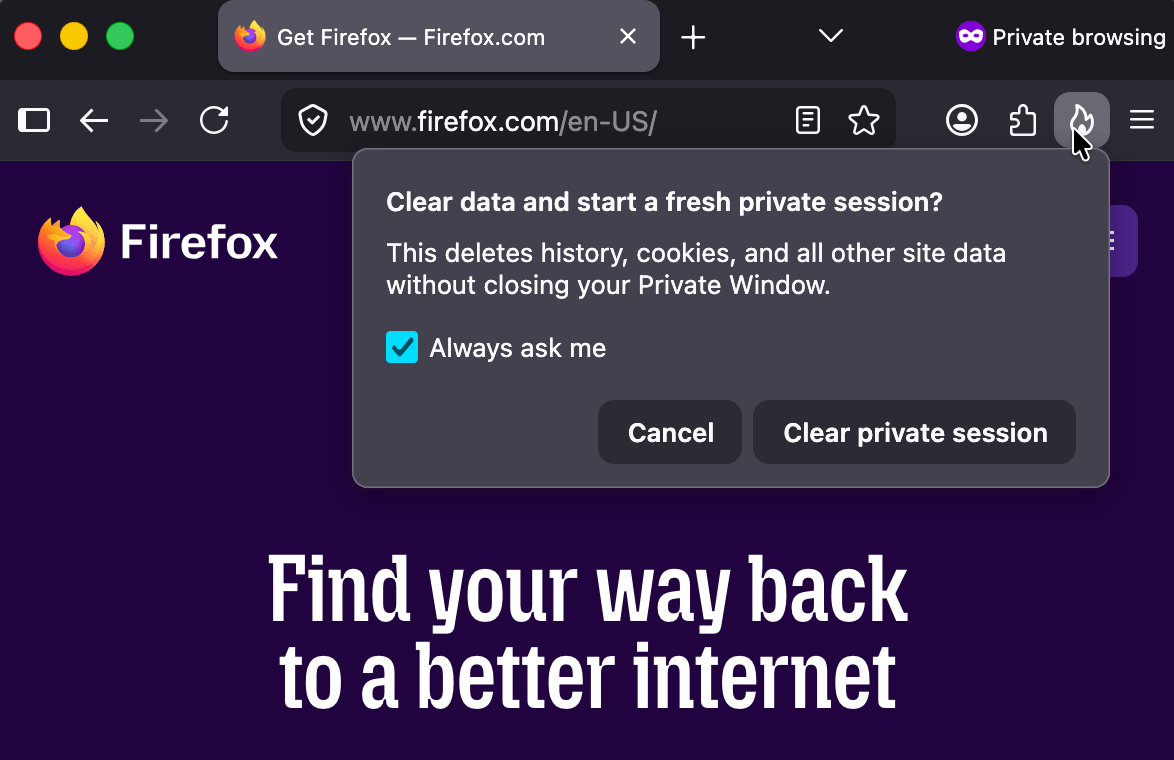
Private Browsing Mode now allows you to instantly clear all data from your current session without closing the entire window. When you select the End Private Session button (the fire icon) to the right of the URL bar, Firefox will ask you to confirm to clear your session. Once confirmed, it will wipe all of your private browsing data and open a fresh new Private Browsing Mode session for you.
Firefox now strengthens protection against fingerprinting in Standard Enhanced Tracking Protection, making it harder for websites to track you across sites by limiting the amount of information revealed about your device and browser. This reduces the number of users uniquely identifiable by common fingerprinting techniques by an average of ~14%, and by ~49% on macOS.
You can now merge multiple PDFs directly in Firefox PDF. Combine separate PDF files into a single document without ever leaving Firefox or relying on third-party tools.
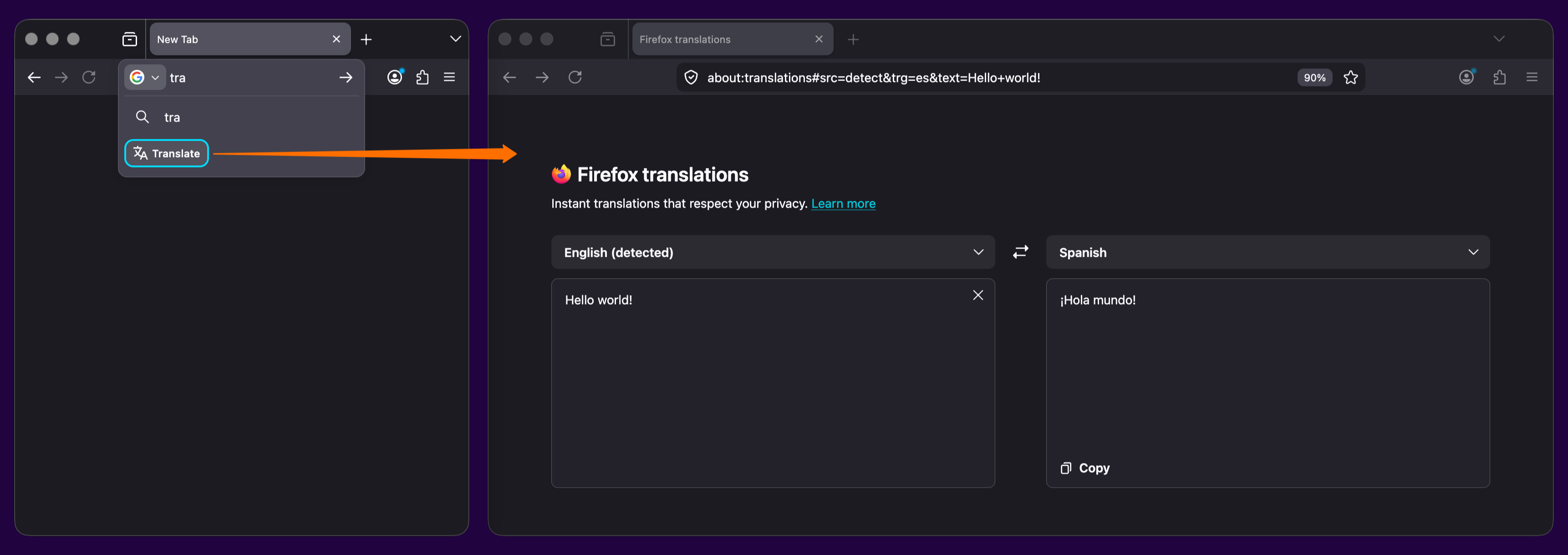
The Translations page (about:translations) is now accessible through the More Tools section of the Application Menu.
Local Firefox profile backups are now available on Linux in addition to Windows, and you can restore them across platforms.
On macOS, URLs copied from iOS devices using Apple’s Universal Clipboard now paste correctly in Firefox.
On macOS, dropdown menus on web pages now use the native macOS menu style, matching the look and behavior of the rest of the system.
Address Autofill is enabled for users in the Netherlands.
Firefox’s built-in VPN now lets you choose your browsing location, giving you more control over how and where your traffic appears online. You can select from available countries or use Recommended to automatically choose the best connection for your network.
This feature is part of a progressive roll out.
Certain new Firefox features are released gradually. This means some users will see the feature before everyone does. This approach helps to get early feedback to catch bugs and improve behavior quickly, meaning more Firefox users overall have a better experience.
Fixed incorrect screen resolution reporting to websites in multi-monitor setups.
Fixed an issue on macOS where maximized Firefox windows could reopen on the wrong monitor after relaunching in multi-monitor setups.
Improved color management for copied and pasted images on macOS.
Various security fixes.
The search bar in Firefox Settings (about:preferences) is now larger and spans the full width of the settings content area, making it easier to find options.
Extensions and Themes installed in a Firefox Desktop profile directory will be restored successfully after the profile directory is moved or restored to a different location or a different operating system.
Geolocation on Windows now respects the user's Windows location permission setting, instead of overriding it, when the user grants location permission to a page. Firefox will ask users to enable the Windows permission if it is needed.
You can find information about policy updates and enterprise-specific bug fixes in the Firefox for Enterprise 151 Release Notes.
You can now manage microcontrollers that support serial communications in Firefox via the Web Serial API. This lets you program microcontrollers and development boards, such as ESP devices, Raspberry Pi Picos, 3D printers, CNC machines, and other devices. Web Serial can be used in Extensions, but not from moz-extension contexts at this time.
Local network access restrictions are now rolling out to all users. Firefox requires websites to request permission before connecting to devices on your local network or to apps and services on your device. Previously, this protection was limited to users with Enhanced Tracking Protection set to Strict.
This feature is part of a progressive roll out.
Certain new Firefox features are released gradually. This means some users will see the feature before everyone does. This approach helps to get early feedback to catch bugs and improve behavior quickly, meaning more Firefox users overall have a better experience.
The new Fullscreen Keyboard Lock API adds an optional argument to requestFullscreen that allows websites to request that while fullscreen, pressing the Escape key will no longer exit fullscreen (instead, a long-press is required), and certain formerly-reserved browser hotkeys are allowed to be default-prevented.
Firefox improves the rendering of absolutely positioned elements across multi-column containers and when printing, producing more accurate positioning and fragmentation.
@container rules now allow specifying a list of container query conditions rather than a single condition.
Firefox now supports container style queries, allowing styles to be applied to an element based on the computed values of its container's custom properties. This can be done by using one or more style() functions inside @container rules.
A new CSSContainerRule.conditions property was introduced, holding an array of all container query conditions. This new property is intended to replace CSSContainerRule.containerName and CSSContainerRule.containerQuery, which only supported a single name and query, making them deprecated.
Updated the behavior of implicit anchors in CSS Anchor Positioning. The position-anchor property now defaults to normal. When using position-area, implicit anchors are applied automatically, while popovers using anchor() or anchor-center now require position-anchor: auto to opt in.
Firefox now supports the Document Picture-in-Picture API, which allows web pages to place content in an always-on-top popup.
Temporary site permissions are now correctly reflected in the Permissions API.
Firefox now supports the declarative definition of slot assignment behavior for shadow roots.
With the release of Firefox 151, we are pleased to welcome the developers who contributed their first code change to Firefox in this release, 37 of whom were brand new volunteers. Please join us in thanking each of these diligent and enthusiastic individuals, and take a look at their contributions:
Fixed an issue where websites on internal or corporate networks that require a login prompt would show a blank page. (Bug 2034752)
Fixed an issue that prevented highlighting from working on scanned images in the built-in PDF viewer. (Bug 2034980)
Fixed an issue where the "New" badge persisted on Split View menu items. (Bug 2027793)
Fixed an issue that prevented some webcams from working correctly in video calls. (Bug 2034722)
Fixed an issue where a tab would crash when dragging and dropping nested folders onto a webpage. (Bug 2030461)
Improved how Firefox displays websites with advanced 3D effects, fixing cases where parts of the page could disappear or appear incorrectly. (Bug 2034283)
Fixed an issue that could prevent Firefox’s local backup feature from completing successfully. (Bug 2029240)
Fixed an issue where the status and navigation bars would flicker or show mismatched colors when editing a page’s address. (Bug 2021596)
Improved the appearance of search suggestions in the address bar by preventing icons from appearing stretched or distorted. (Bug 2035353)
Various security fixes.
Reference link to 150.0.1 release notes.
Fixed an issue where Facebook and other websites might not load properly for users with Bitdefender security software installed. (Bug 2034178)
Fixed an issue where denying a geolocation permission prompt could cause Firefox to show the system permission dialog again on a second attempt. (Bug 2034120)
Fixed an issue that prevented tabs from being added to some older saved tab groups. (Bug 2031961)
Fixed a layout issue where some drop-down menus expanded to display all list items at once. (Bug 2033117)
Fixed an issue where borders and outlines on some page elements disappeared when pinch zooming or smart zooming on macOS and Windows. (Bug 2030043)
Various security fixes.
All Relay users can now create up to 50 email masks—an increase from the previous limit of 5.
Reference link to 150.0 release notes.
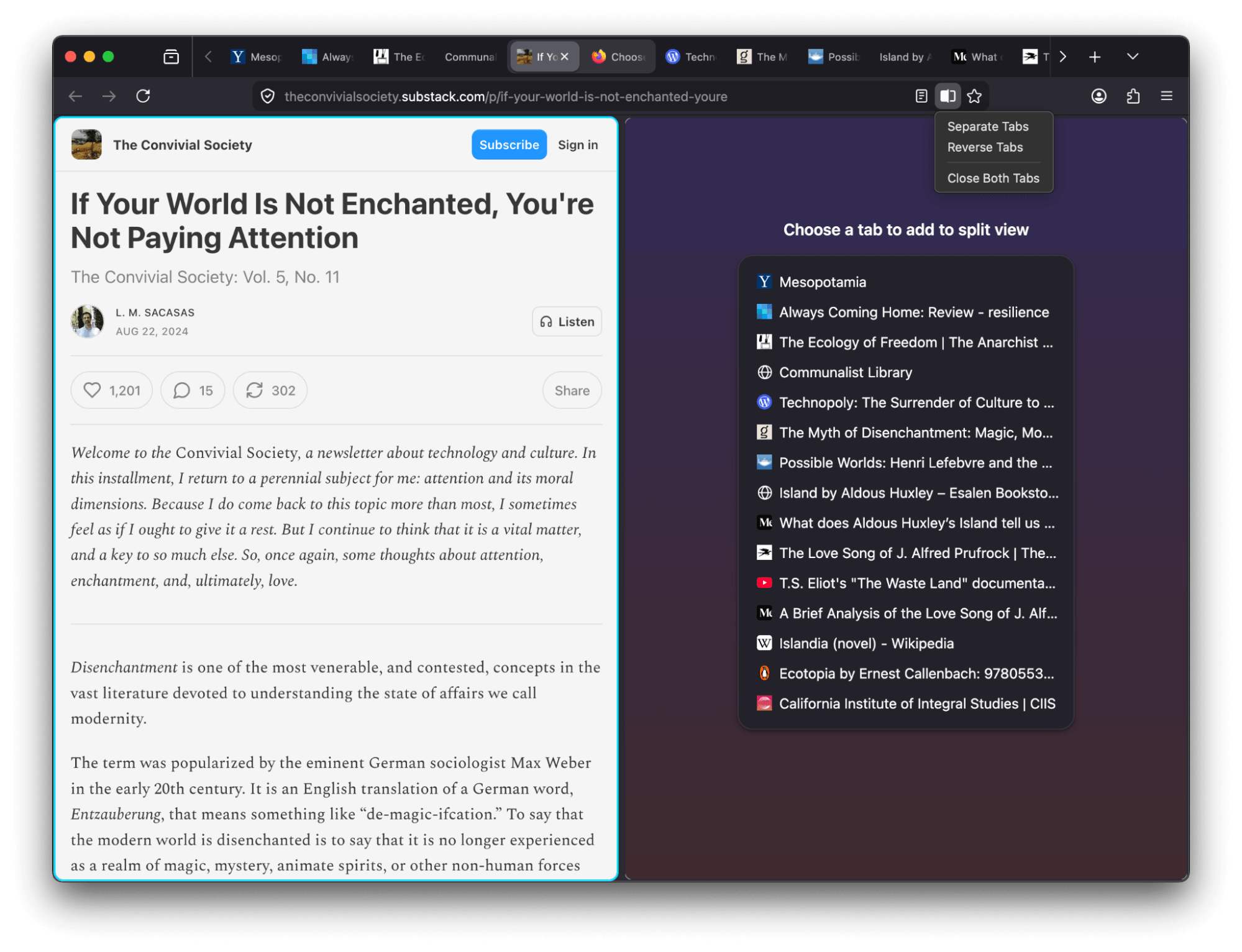
Split View just got better: You can now right-click any link and choose Open Link in Split View to open it alongside your current tab. You can also search open tabs when creating a split view and quickly reverse tab positions using the new Reverse Tabs option in the tab context menu.
Share multiple tabs in a single step. Select several tabs, right-click, and choose Copy X Links (for Windows and Linux) or choose Share → Copy X Links (for MacOS). When pasted into other apps that support rich text, links include both the page title and the URL for easy reading.
You can now use Firefox’s built-in PDF editor to reorder, copy, paste, delete, and export pages in a PDF.
Try out real-time, private translations in Firefox Desktop with the about:translations page. Start typing the word "translate" into the URL bar for a quick-action shortcut to the page.
Added support for the GTK emoji picker on Linux, allowing users to insert emoji using the system shortcut (typically Ctrl+.).
Firefox web apps are now available to Windows users who installed Firefox through the Microsoft Store.
The new Firefox Profile management system is now available to all users, including users on Windows 10.
Backing up a profile to a file is now available to all Windows 10 and 11 users, including those who use the new profile management system.
Firefox now ships with a new .rpm package for Linux users on Red Hat, Fedora, openSUSE, and other RPM-based distributions.
Firefox now prompts you to enable location access in Windows settings when granting a website permission to use your location, if geolocation hasn't already been allowed. This behavior, previously limited to some Windows 11 versions, now applies to all supported Windows versions.
The built-in VPN is now available for users in Canada. Note: This feature is not available in enterprise environments.
This feature is part of a progressive roll out.
Certain new Firefox features are released gradually. This means some users will see the feature before everyone does. This approach helps to get early feedback to catch bugs and improve behavior quickly, meaning more Firefox users overall have a better experience.
Fixed an issue on macOS where, when macOS Lockdown mode is enabled, emoji characters are not displayed in web content.
Various security fixes.
If you prefer creating tab groups from the context menu, you can now turn off drag-and-drop group creation in Settings > Tabs > Drag tabs to create tab groups.
You can find information about policy updates and enterprise-specific bug fixes in the Firefox for Enterprise 150 Release Notes.
A new element-specific section has been added to the pseudo-class toggle panel including a toggle for the :open pseudo-class, which is only available for elements that have an open state like <dialog> elements. The existing toggle for the :visited pseudo-class was also moved there, as it only applies to <a> and <area> elements. (Learn More)
The Document.caretPositionFromPoint() method now only returns a position in a shadow DOM if its ShadowRoot is passed in the newly-added shadowRoots option.
The devtools network monitor now indicates when a connection used a certificate issued by a certificate authority not in Mozilla's Root CA Program.
Firefox now supports the ariaNotify API for accessibility notifications (e.g. for screen readers) as a more ergonomic and reliable alternative to ARIA live regions.
Firefox now supports media element pseudo-classes (e.g., :playing, :paused) to allow more precise styling based on media playback state.
Added support for the highlightsFromPoint() API, which allows web pages to interact with CSS Highlights by returning all Highlights at a given point.
Firefox now supports light-dark() on images, just like on colors, which is very useful for supporting dark mode on websites.
The color-mix() function previously accepted only two color values. This limitation has now been removed, allowing the function to accept an arbitrary number of colors.
Added support for a new auto value on the sizes attribute for lazy-loaded image elements with multiple images defined via srcset. This allows the browser to automatically select the right image based on the layout width of the image element. (Learn More)
Users with Bitdefender security software installed may experience problems loading websites, particularly Facebook.com. We are working on a workaround, but as a temporary mitigation, disabling Bitdefender or turning off its traffic filtering features may resolve the issue. (Fixed in 150.0.1)
Some websites on internal or corporate networks that require a login prompt may fail to display the sign-in dialog in Firefox 150, showing a blank page instead. (Fixed in 150.0.2 in Bug 2034752)
With the release of Firefox 150, we are pleased to welcome the developers who contributed their first code change to Firefox in this release, 22 of whom were brand new volunteers! Please join us in thanking each of these diligent and enthusiastic individuals, and take a look at their contributions:
Various security fixes.
Fixed an issue where certain parts of web pages, such as drop-down menus and specific styles, did not appear correctly when printing. (Bug 2026109)
Fixed an issue where some website error pages displayed generic connection messages instead of the specific error code and description provided by the server. (Bug 2023800)
Fixed a crash that occurred when using certain security keys or WebAuthn features for two-factor authentication. (Bug 2026688)
Fixed an issue on Linux where the browser toolbar could become unresponsive to mouse clicks after dragging a tab when using Wayland. (Bug 2022238)
Fixed a layout issue where text inside certain graphics (SVG) appeared shifted or misaligned from its intended position. (Bug 2024647)
Fixed an issue where the "Send to device" option failed to work when used from the Open Tabs section in Firefox View. (Bug 2023201)
Introduced a new enterprise policy that allows administrators to directly manage and control AI-related features within Firefox. (Bug 2019983)
Fixed an issue where enterprise policies for the browser homepage and start page were not being applied correctly. (Bug 2027888)
Introduced a new enterprise policy that allows administrators to prevent the built-in VPN and IP protection features from being available to users. (Bug 2022365)
Reference link to 149.0 release notes.
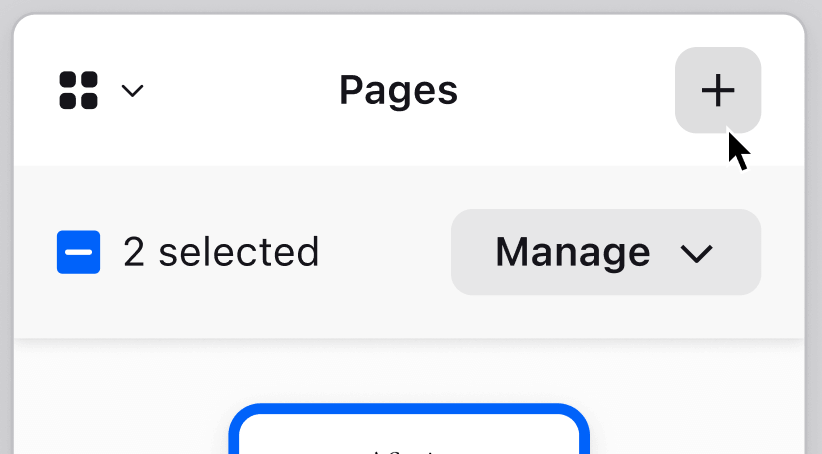
View two pages side-by-side in a single window with the new Split View feature that makes it easier to compare information, research topics or work across two pages at once. To create a split view, select one or two tabs and choose Add to Split View or Open in Split View.
Firefox now offers a free built-in VPN. Whether you’re using public Wi-Fi while traveling, searching for sensitive health information, or shopping for something personal, this feature gives you a simple way to stay protected. Once you sign in and turn it on, you can hide your location and IP address by routing it through a secure proxy while you browse in Firefox. You will get 50 GB of protection every month, with the option to turn it on or off for specific websites. This feature is progressively rolling out in the US, UK, Germany and France starting today.
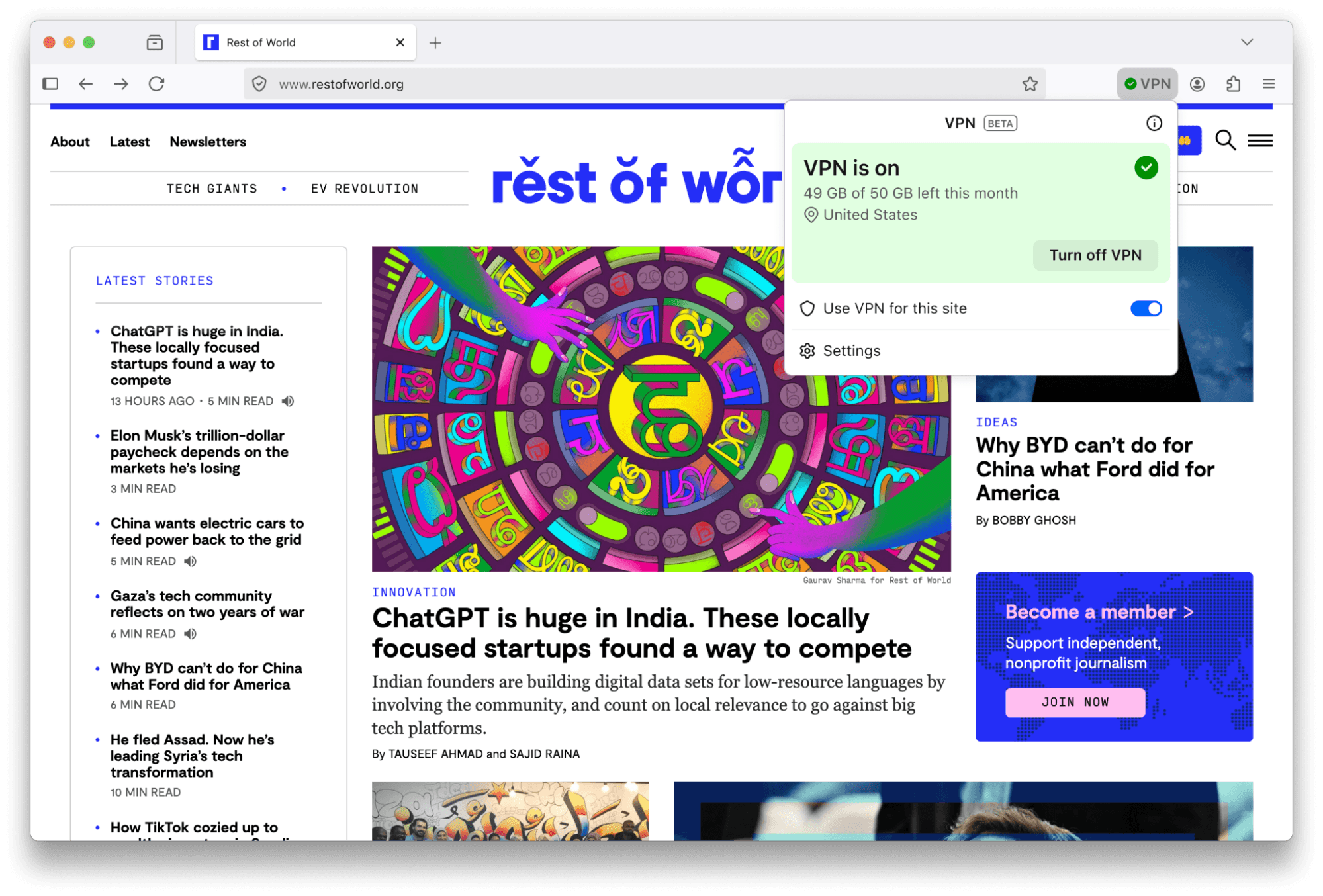
Enterprise note: This feature is not available in enterprise environments and is not being rolled out to users with enterprise policies. While it can currently be enabled manually, administrators will have the ability to disable it via enterprise policy starting April 7. In the meantime, organizations can use the BlockAboutConfig policy to prevent manual enablement.
This feature is part of a progressive roll out.
Certain new Firefox features are released gradually. This means some users will see the feature before everyone does. This approach helps to get early feedback to catch bugs and improve behavior quickly, meaning more Firefox users overall have a better experience.
Many PDF files will now load significantly faster thanks to hardware acceleration.
Firefox now automatically blocks notifications and permanently revokes permissions for any website flagged as malicious by SafeBrowsing. This prevents unsafe sites from sending background notifications to users, commonly used for ads, spam or phishing.
You can now add a Share button to your toolbar via Customize Toolbar, making it easy to share the current tab using your Windows or macOS system sharing options.
Address Autofill is enabled for users in Australia, India, Italy, Poland and Austria.
Explore more of the web with new on-device translation support for Bosnian, Norwegian Bokmål, Serbian and Thai — plus improved accuracy for Croatian.
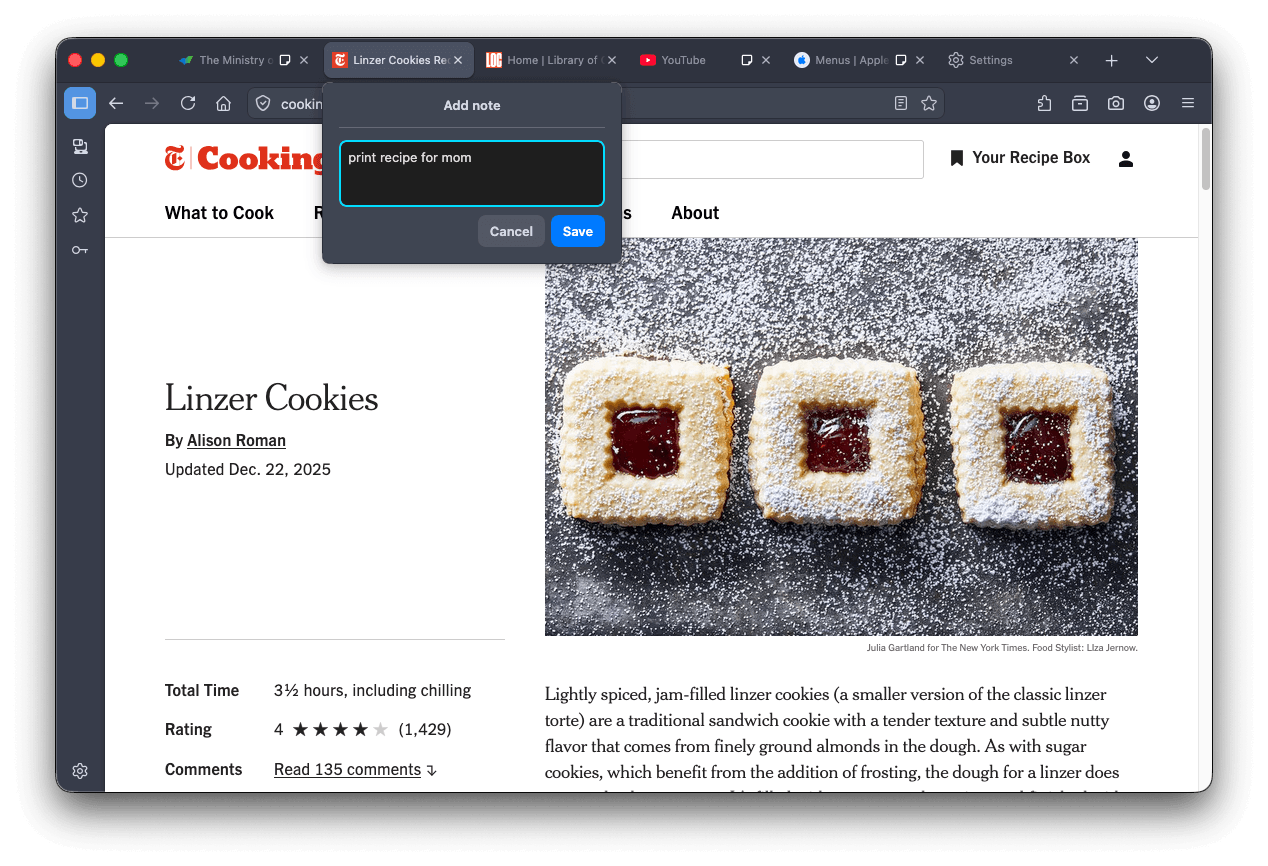
Tab notes feature that lets you attach a short note to a web page is now available in Firefox Labs. You can use notes to remember why you opened a page, what you planned to do next or any details you want to revisit later. Please give notes a try and share your feedback on what works well and what can be improved.
Increased robustness of HTTP/3 upload performance for unstable network conditions.
Various security fixes.
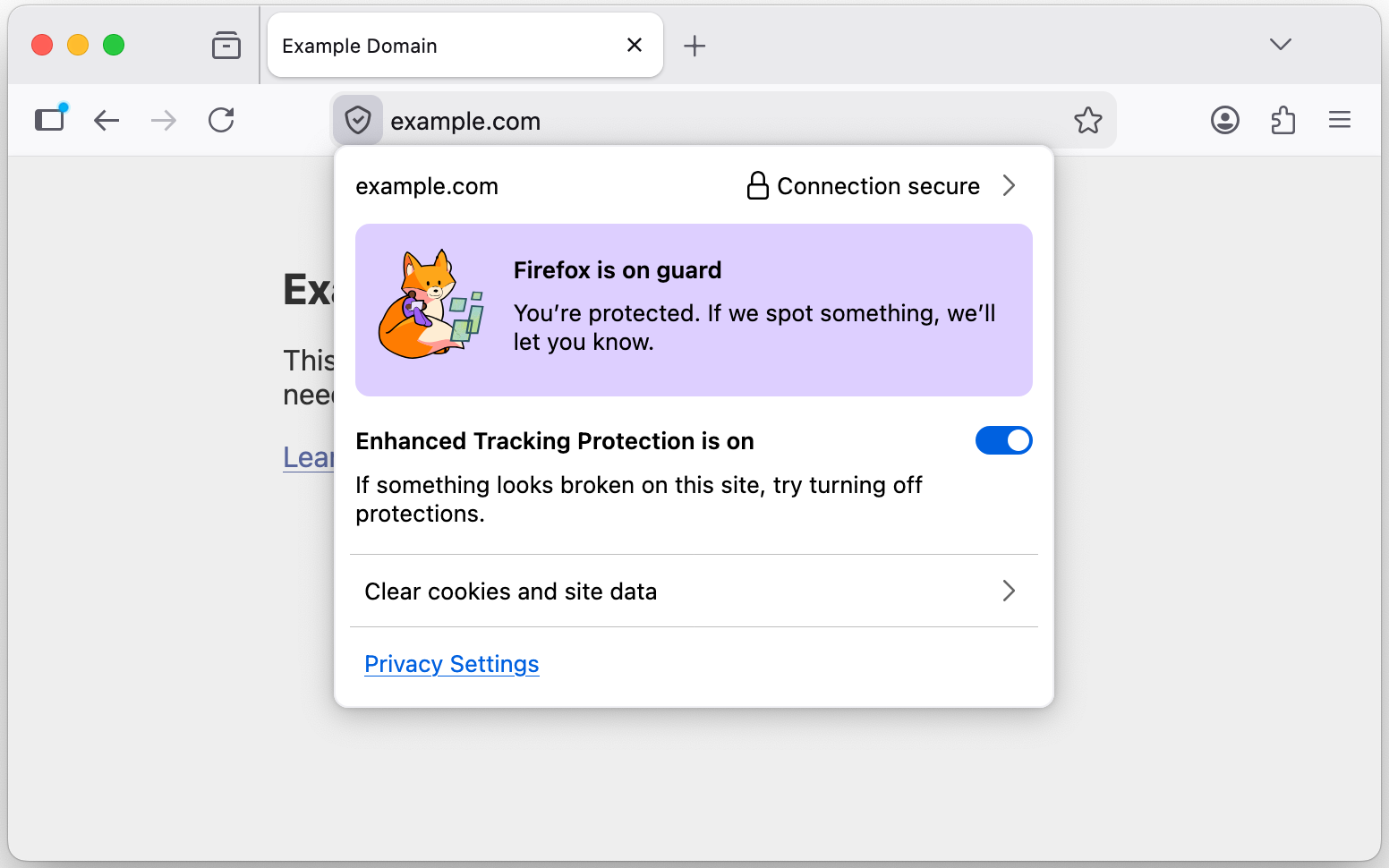
The TrustPanel combines the privacy and security panels accessed from the address bar to give the user one place to check the Privacy and Security settings of the current page. Learn more.
Security has been strengthened by tightening the requirements for JavaScript files that can be loaded in the parent process, providing additional defense in depth against potential threats.
On Linux, Firefox will now default to the XDG portal file picker if available, rather than the GTK3 one, which is usually better integrated with the user's desktop environment, and more powerful.
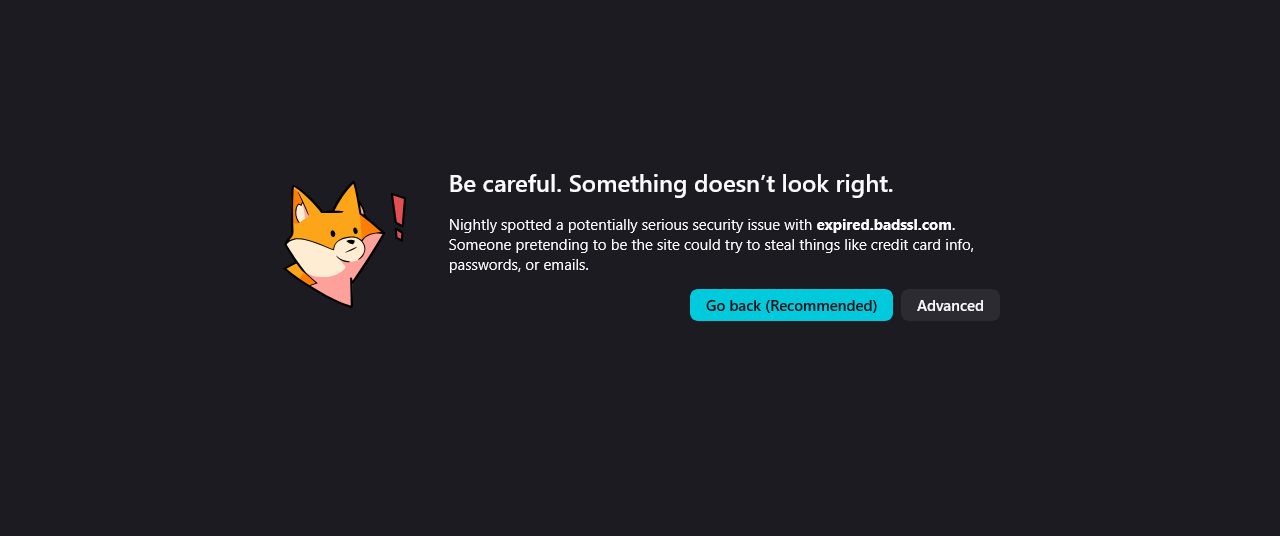
Firefox error pages have a fresh new look, with updated visuals that better match the overall feel of Firefox. The redesigned pages create a more cohesive experience while making it clearer what went wrong.
On Windows, Firefox will use the modern Windows.Devices.Geolocation API for geolocation instead of Windows 7 location API.
The toolbar of the Storage Inspector now has a button to delete all entries of the currently selected storage.
Besides each CSS declaration related to a computed value shown in the Computed view there's now an icon to jump to it in the Rules view.
showPicker() now supports text-based <input> elements with an associated <datalist>, displaying the autofill dropdown. See documentation.
The functions xywh() and rect() were previously implemented for the clip-path and offset-path properties. They are now also available for the shape-outside property.
Added support for the HTML attribute popover="hint".
Enabled media element pseudo-classes, such as :playing, :paused…
Enabled the spec-compliant HTMLMediaElement.captureStream() API.
Added support for closing popovers & dialogs with the Android Back Button, and implemented the CloseWatcher API for handling this in script.
The new Reporting API provides a generic reporting mechanism for web applications to use to make reports available based on various platform features (for example Content Security Policy, Permissions-Policy or feature deprecation reports) in a consistent manner.
With the release of Firefox 149, we are pleased to welcome the developers who contributed their first code change to Firefox in this release, 25 of whom were brand new volunteers! Please join us in thanking each of these diligent and enthusiastic individuals, and take a look at their contributions:
Fixed an issue where searches entered in the Firefox Home search field were incorrectly redirected to the address bar for some users who had disabled search handoff behavior via advanced settings. (Bug 2017049)
Fixed an issue where some web-based rich text editors stopped applying formatting, such as bold or italic. (Bug 2020927)
Fixed an issue where videos could autoplay unexpectedly on YouTube despite autoplay being blocked, particularly impacting screen reader users. (Bug 2020233)
Fixed an issue that caused some absolutely positioned elements meant to be centered, for example, using margin: auto with inset: 0, to appear left-aligned on initial load. (Bug 2017440)
Fixed an issue where the “Switch to Tab” suggestion in the address bar appeared blank for pages without a title. (Bug 2020341)
Fixed an issue that could reduce video quality on Windows systems using NVIDIA GPUs with Video Super Resolution enabled. (Bug 2019515)
Various security fixes.
Reference link to 148.0 release notes.
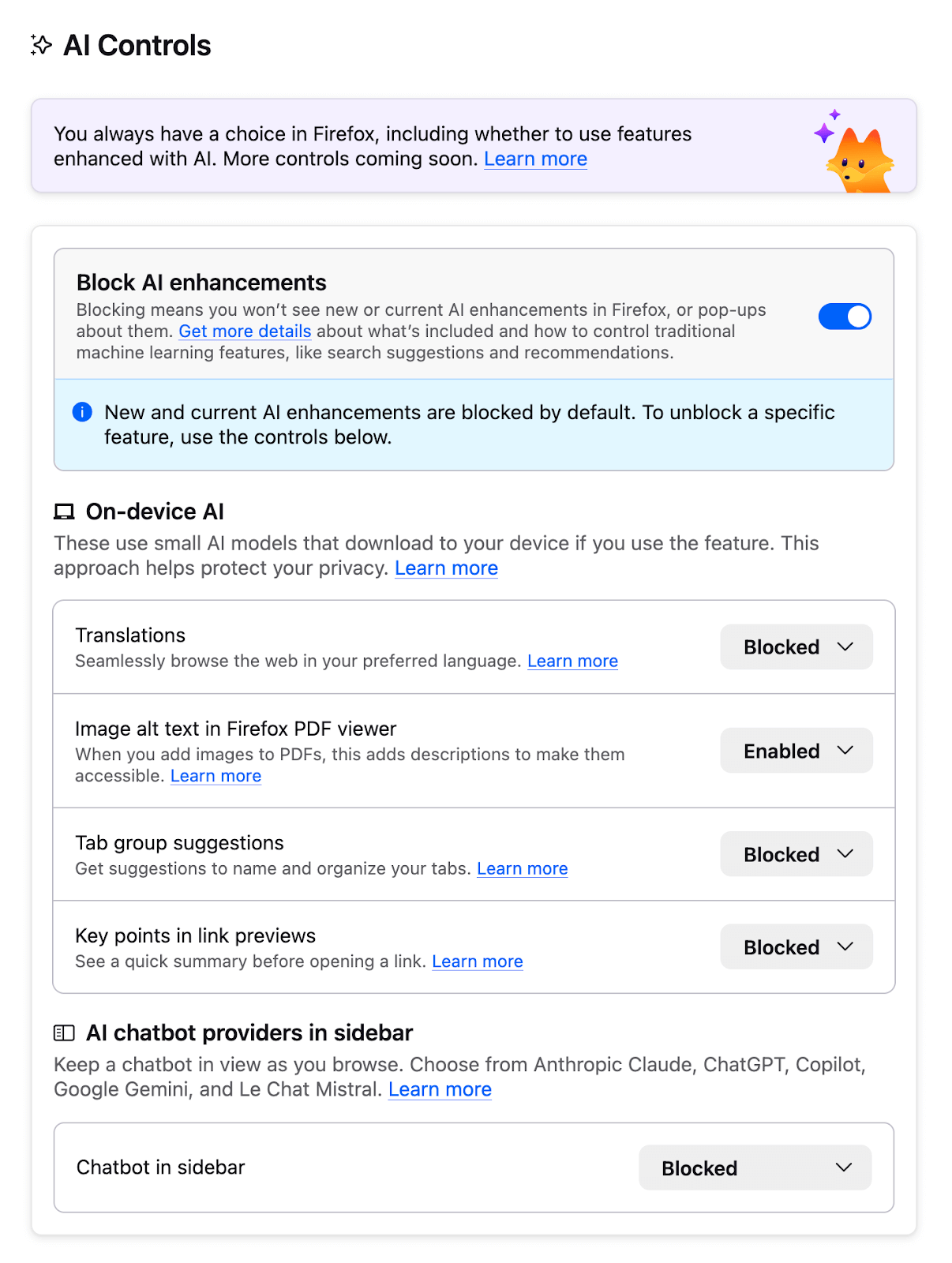
Added an AI Controls section to Settings for managing AI-enhanced features. Learn more.
Firefox now has improved support for screen readers accessing mathematical formulas embedded in PDFs.
Remote improvements are now decoupled from telemetry requirements in Firefox Settings. You can now opt into receiving remote browser changes even if you have opted out of sharing telemetry or participating in our experimental studies.
Firefox Backup is now available on Windows 10 to users who also use the “Clear history when Firefox closes” capability. Backups will not include any data which is set to be cleared when Firefox is closed.
The following languages are now available for translation:
New Tab wallpapers will now appear on new container tabs as well as new default tabs.
Fixed an issue where a language pack could become disabled after a major update, causing Firefox to display in the wrong language.
On Windows, dragging a downloaded image to Adobe Illustrator now correctly inserts the image instead of its URL.
Various security fixes.
The initial about:blank document is now Web-compatible. If the first navigation of a browsing context goes to about:blank, it completes synchronously and is no longer replaced by a second parser-generated document.
Service worker support for WebGPU has been added, making it available in all worker contexts. Service workers allow WebGPU to run in the background, which is particularly useful for extensions and other pages that can meaningfully share resources across multiple tabs and time periods.
Firefox now supports the Iterator.zip() and Iterator.zipKeyed() methods from the joint iteration proposal. This allows zipping together underlying iterators into an iterator over values grouped by position, similar to zip in many other languages.
Firefox now supports the Trusted Types API, which is primarily aimed at preventing cross-site scripting attacks.
Firefox now supports the Sanitizer API, which provides new methods for HTML manipulation. The element.setHTML() method enables developers to insert HTML content similarly to element.innerHTML, but without the security vulnerabilities such as cross-site scripting (XSS). A complementary method, document.parseHTML(), is also available for parsing HTML safely.
Firefox now supports the location.ancestorOrigins attribute.
Firefox now supports the NavigationPrecommitController.addHandler() interface of the Navigation API. This allows registering a post-commit navigation handler during the pre-commit phase, to allow a multi-step navigation process.
Firefox now supports the position-try-order property as part of CSS Anchor Positioning, controlling the order of fallback positioning attempts.
With the release of Firefox 148, we are pleased to welcome the developers who contributed their first code change to Firefox in this release, 18 of whom were brand new volunteers! Please join us in thanking each of these diligent and enthusiastic individuals, and take a look at their contributions:

Firefox now allows you to customize your keyboard shortcuts to replace hard-to-type or hard-to-remember hotkeys, eliminate conflicts with other software, and create your preferred set. Access this experimental new feature by typing about:keyboard in the address bar and please share your feedback with us on Mozilla Connect!

Resolved various issues with missing or impaired browser functionality when using XDG Base Directories on Linux. (Bug 2011300)
Fixed an issue causing excess passkey prompts to appear when logging into some sites. (Bug 2010919)
Fixed an issue that could lead to sites being incorrectly flagged as malicious by SafeBrowsing. (Bug 2010956)
Various security fixes.
Reference link to 147.0.1 release notes.
Fixed compatibility problems with websites that use the new Compression Dictionaries technology, such as ChatGPT, by temporarily disabling the feature. (Bug 2010712)
Fixed an issue where an unnecessary empty directory was created on Linux systems. (Bug 2001887)
Fixed an issue where time formats could cause certain websites to display incorrectly. (Bug 2010411)
Reference link to 147.0 release notes.
Address autofill has been enabled for users in Switzerland.
WebGPU support is now enabled for devices with Apple Silicon processors on all supported macOS versions.
Improved video playback performance on systems with AMD GPUs by enabling zero-copy playback for hardware-decoded video where supported, bringing them to parity with Intel and NVIDIA GPUs.
Firefox now supports the Safe Browsing V5 protocol and is migrating from Safe Browsing V4 to the local list mode of Safe Browsing V5 protocol.
Users with Enhanced Tracking Protection (ETP) set to Strict will have local network access restrictions enabled by default. Firefox will now require users to explicitly allow public websites to access local network resources.
This feature is part of a progressive roll out.
Certain new Firefox features are released gradually. This means some users will see the feature before everyone does. This approach helps to get early feedback to catch bugs and improve behavior quickly, meaning more Firefox users overall have a better experience.
Firefox now allows you to customize your keyboard shortcuts to replace hard-to-type or hard-to-remember hotkeys, eliminate conflicts with other software, and create your preferred set. Access this experimental new feature by typing about:keyboard in the address bar and please share your feedback with us on Mozilla Connect!
Firefox now supports the Freedesktop.org XDG Base Directory Specification.
A Picture-in-Picture player window can now optionally be opened automatically for a video playing in a tab when that tab goes into the background. A special thanks to volunteer Daniele Ferla for contributing this feature!

Fixed an issue that prevented some Windows users from selecting a tab when the cursor was at the top of the screen and the Firefox window was maximized.
Fixed a bug that made HTTP/3 requests containing non-UTF-8 header values time out or fall back to HTTP/2 after a while.
A draggable button can now be dragged if initiated from the button itself.
For Linux GNOME Mutter users, window and rendering surface sizes were updated to match the actual pixel grid so Firefox delivers sharp rendering on fractionally scaled displays regardless of the actual window size.
Various security fixes.
Firefox now uses the same quality values (q-values) in Accept-Language headers as other major browsers. The second language preference is now sent as q=0.9 instead of q=0.5, with subsequent language preferences decreasing by 0.1 each (minimum 0.1). This change fixes compatibility issues with some servers that incorrectly rejected requests with lower quality values.
You can find information about policy updates and enterprise-specific bug fixes in the Firefox for Enterprise 147 Release Notes.
View Transitions: View transition pseudo-elements now appear in the elements panel and the associated animations appear in the animations panel.
Anchor positioning: Elements with a valid anchor-name are given an 'anchor' badge in the elements view, and @position-try CSS rules are now displayed in the CSS rules panel when an element using position-try-fallbacks is selected.
The JSON viewer now has a button to import the resource into Firefox Profiler to get a breakdown of its size.
Pseudo-element selectors can now be added/edited in the CSS rules panel.
Added support for the Navigation API. This API provides the ability to initiate, intercept, and manage browser navigation actions. It is a successor to previous web platform features such as the History API and window.location, which solves their shortcomings.
The Unicode ICU library was updated to release 78, bringing support for Unicode 17 and new locales.
ES modules in service workers are now supported, aligning Firefox with other major browsers and improving compatibility for modern web apps.
Support for CSS Module Scripts was added, allowing stylesheets to be imported using the JavaScript module system and import attributes.
The CSS counter-* and quotes properties are now supported in the ::marker pseudo-element.
Both CompressionStream and DecompressionStream now support the Brotli format.
Firefox now supports the :active-view-transition-type selector and associated View Transitions API changes.
Firefox now exposes the view transition currently active on the document via the Document.activeViewTransition property.
Support for CSS anchor positioning was added, enabling tethering elements. The anchor-positioned elements can then have their size and position set relative to the anchor elements to which they are bound.
Firefox now supports Storage-Access-Headers, allowing servers to opt into unpartitioned cookies via HTTP headers if storage-access was granted prior to the Storage Access API.
Implemented CSS root-font-relative units rcap, rch, rex and ric.
With the release of Firefox 147, we are pleased to welcome the developers who contributed their first code change to Firefox in this release, 14 of whom were brand new volunteers! Please join us in thanking each of these diligent and enthusiastic individuals, and take a look at their contributions:
