
❌

Lees weergave

visionOS 27: Siri AI, Eye-Aware Notifications, Curved Windows, and More

Apple's WWDC 2026 keynote may have seemed relatively quiet on the Vision Pro front, but the visionOS 27 beta contains a decent amount of new features and quality of life improvements that are likely to be welcomed by the headset's user base.
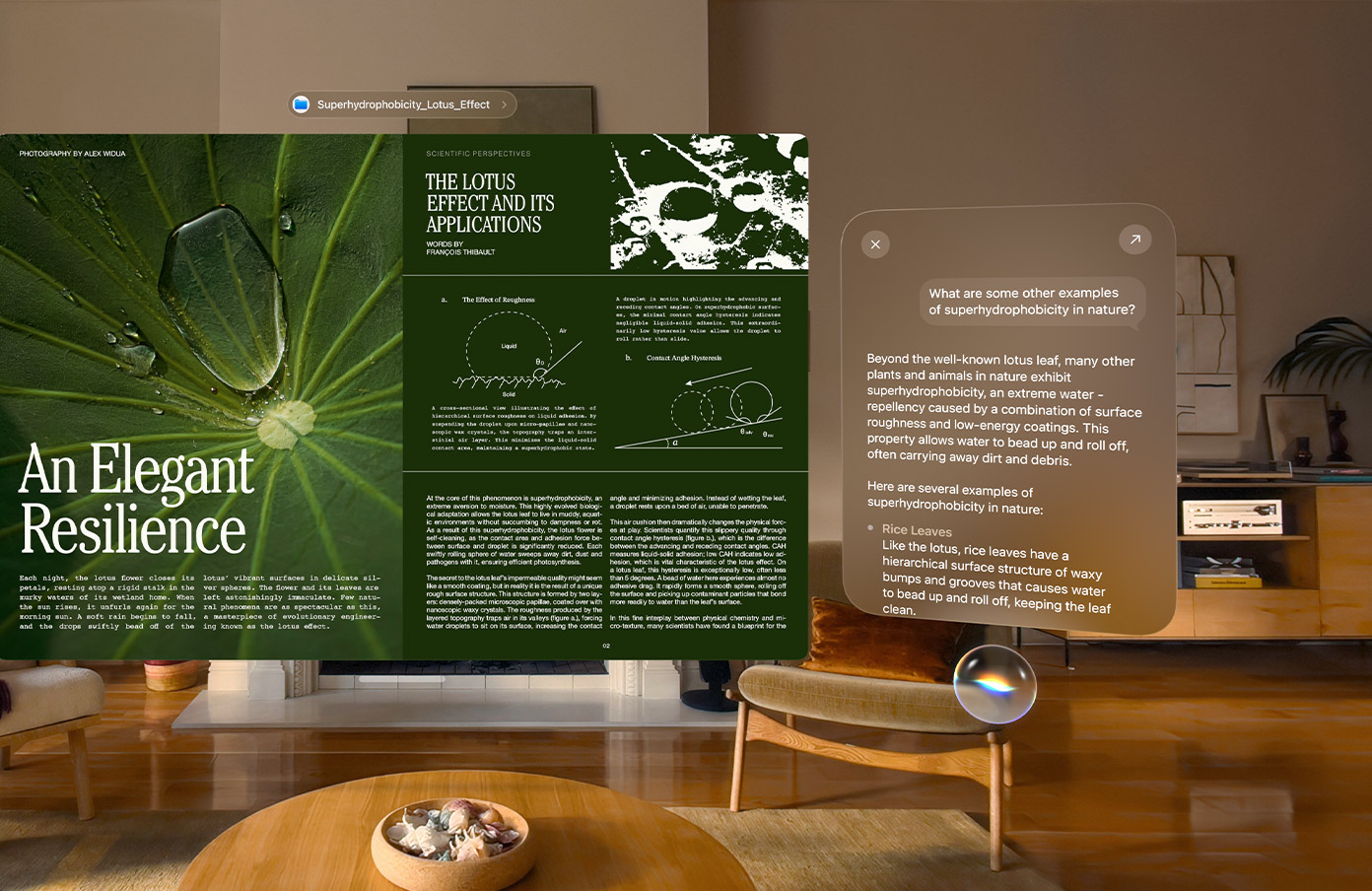

As you'd expect, visionOS 27 is getting the new Apple Intelligence and Siri AI features that Apple has brought to iOS 27 and macOS 27, but this time they feel more seamlessly integrated into the platform compared to previous efforts. For example, Vision Pro users can ask β€ŒSiriβ€Œ about anything in their surroundings, and using Visual Intelligence, the assistant will see and interpret it in real time, identifying the content, answering questions about it, and providing contextual information to boot.

Interacting with Apple's β€ŒSiriβ€Œ is achieved via a new 3D orb that users can place anywhere in their virtual space, and just looking at the widget is enough to start a conversation – no "Hey β€ŒSiriβ€Œ" needed. A new β€ŒSiriβ€Œ app also makes it easier to revisit previous interactions and continue conversations.

Curved windows in visionOS 27

Below is a summary of what else is new in visionOS 27:
  • Panoramas as environments: Panorama photos can now be turned into immersive spatial environments. Rather than viewing panoramas as flat images, users can step into them and experience added depth and realism, making photos and landscapes feel more lifelike.

  • Curved app windows: Apps such as Safari, Freeform, and Apple TV now take advantage of new curved window layouts that wrap content around a user's field of view. The feature is designed to create a more immersive workspace and make better use of Vision Pro's virtual display area.

  • Faster Wi-Fi: Apple says visionOS 27 significantly improves wireless performance, with supported networks delivering speeds up to three times faster than before.

  • Safari 3D environments: A new Web Environments feature means developers can now use a new immersive API to launch users into a full 360-degree environment from within Safari. Apple says these environments can completely surround a user's physical space, making browsing feel more like a native Vision Pro experience.

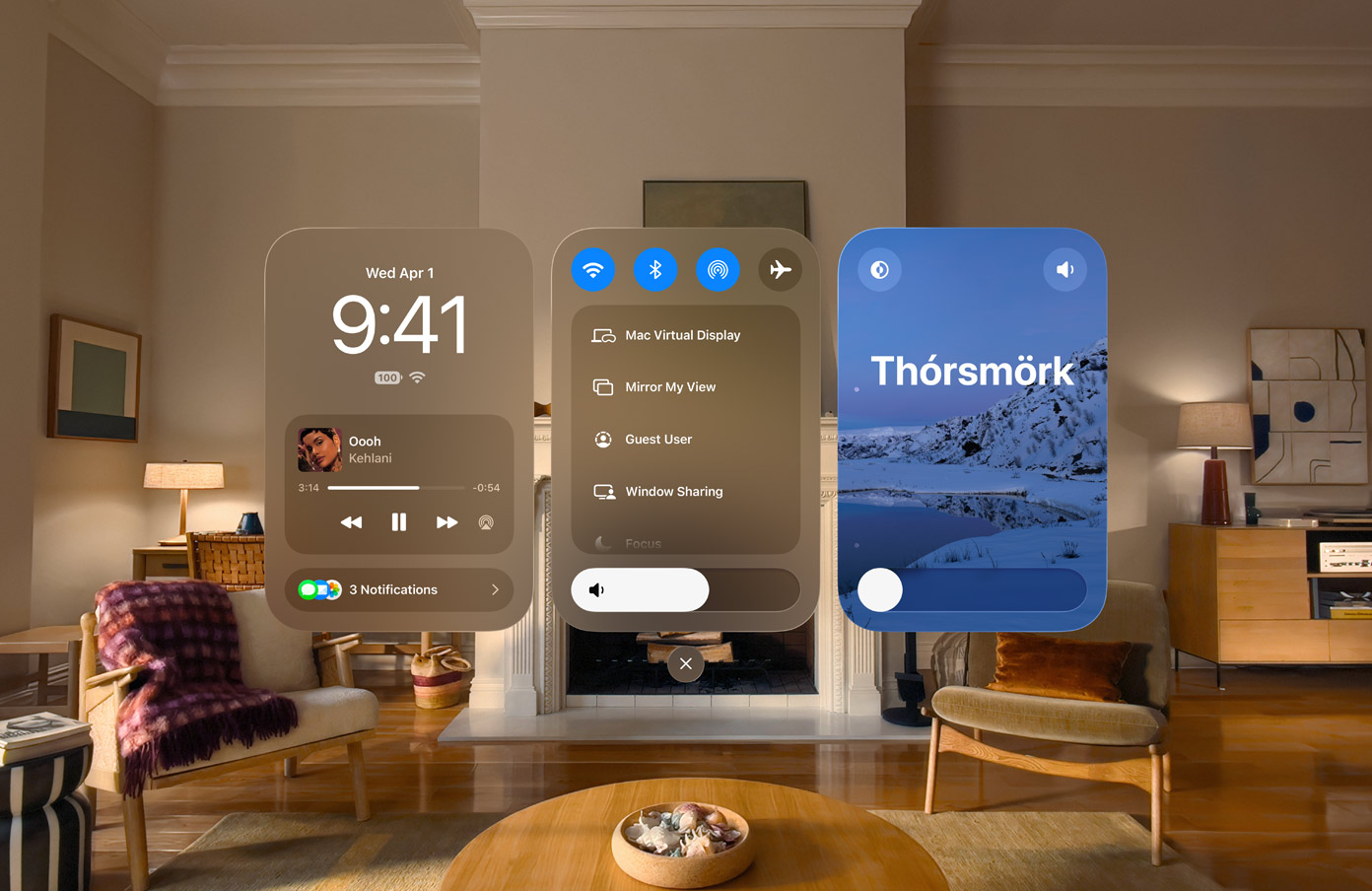
  • Redesigned Control Center: Control Center has been reorganized with dedicated sections for notifications and media playback, system controls, and immersive environments. The redesign aims to make common controls easier to find and reduce the number of steps required to access frequently used settings.

  • Smaller widgets: A new extra-small widget size allows users to place more widgets throughout their physical space without overwhelming their environment. The additional size option gives users greater flexibility when placing clocks, weather widgets, photos, and other persistent spatial content.

  • Glance-to-expand notifications: Notifications will now automatically expand when a user looks at them, thereby reducing the need for hand gestures or manual interaction. The feature means quicker access to information, while remaining in line with visionOS's eyes-first interaction model.

  • Spatially preview your Mac: Mac owners can now preview and edit 3D models from their laptop directly in visionOS, while Quick Look enhancements allow for annotations to be added directly to 3D models.

  • New Environment: Apple has added a new immersive environment based on ThΓ³rsmΓΆrk, a nature reserve in Iceland known for its dramatic mountains, valleys, and glaciers. Users can select the environment as a virtual backdrop for work and entertainment, just like the existing environments.

  • Developer enhancements: Apple is introducing new frameworks, APIs, and tools to help developers build more advanced spatial experiences. The updates include RealityKit improvements, Environment Occlusion for more realistic blending of virtual and physical objects, enhanced asset rendering technologies, updates to Reality Composer Pro 3, and improvements for popular game engines.

The new Control Center design for visionOS 27


The visionOS 27 developer beta is available now, ahead of the software's full release this fall. Apple says β€ŒSiriβ€Œ AI will begin rolling out later this year as a beta feature and will initially support English only. However, unlike on iPhone and iPad, where β€ŒSiriβ€Œ AI will not be available at launch in the European Union, Vision Pro users in the EU will have access to the feature from day one.
Related Roundup: Apple Vision Pro
Tag: Siri
Buyer's Guide: Vision Pro (Neutral)
Related Forum: Apple Vision Pro

This article, "visionOS 27: Siri AI, Eye-Aware Notifications, Curved Windows, and More" first appeared on MacRumors.com

Discuss this article in our forums
  •  

iOS 27 Introduces Overhauled AirPods Settings Menu

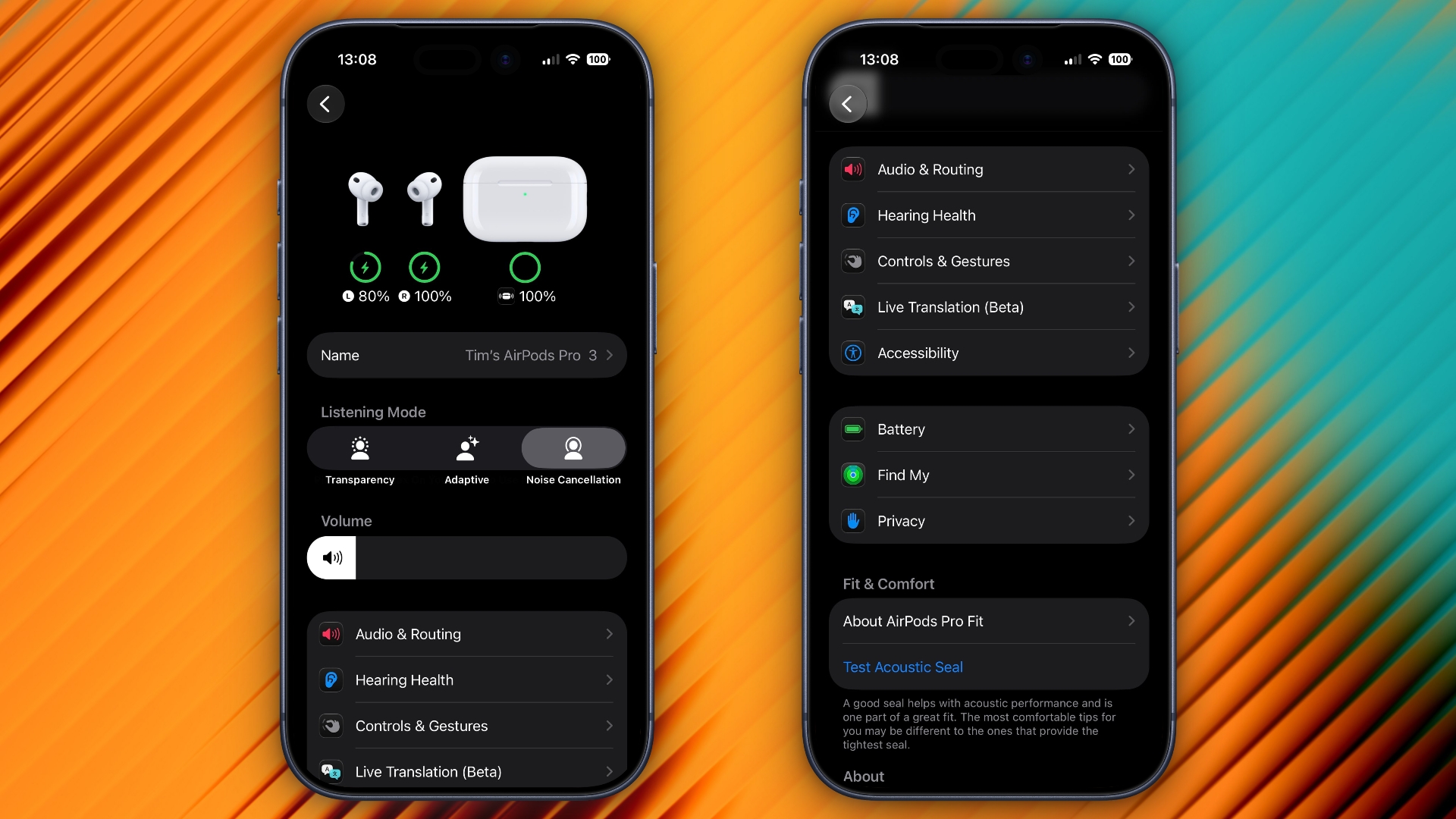
When AirPods owners connect to their iPhone running iOS 27, they'll see a completely revamped settings menu for their earbuds that does a better job at organizing all of the feature options that Apple has added over the last few years.

airpods settings
In the first iOS 27 developer beta, released on Monday, the new settings menu can be accessed in the same way as the old one – i.e. by appearing only when your AirPods are paired with your iPhone – but the menu itself is now a lot more easy to navigate.

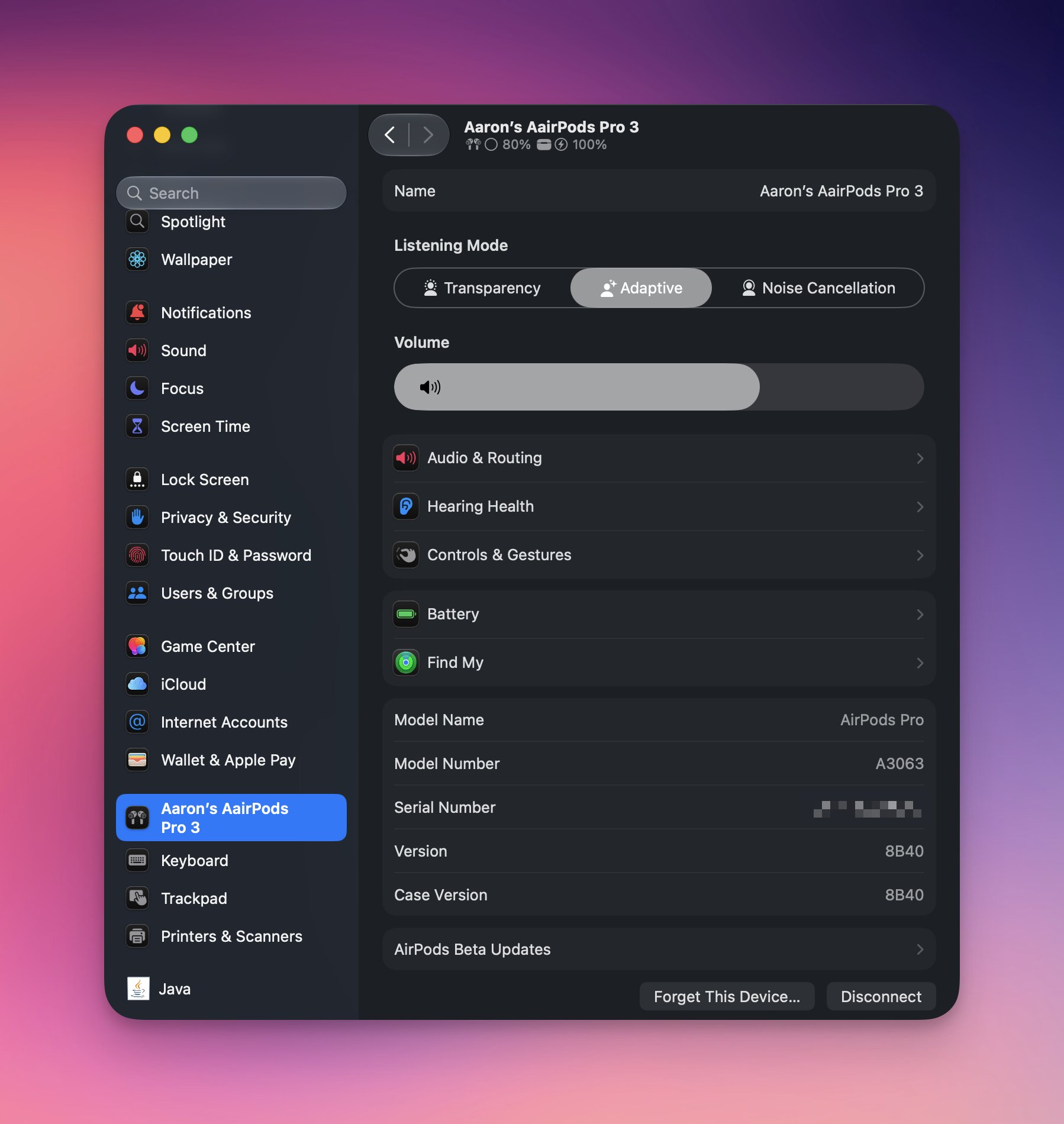
Apple has added a volume slider under the Listening Mode toggles, while the Hearing Health, Call Controls/Camera Control, Live Translation and Adaptive Audio sections have been condensed into separate menus identified by new icons: Accessibility, Audio & Routing, Hearing Health, and Controls & Gestures. There are also new menus for Battery, Privacy, and Find My options.

The new design makes the AirPods settings menu a lot more compact, and it no longer feels like you have to endlessly scroll to try and find the option you're after. Apple has also implemented the redesign in System Settings for macOS 27 Golden Gate.


Apple plans to release a public beta version of iOS 27 and macOS 27 next month, with a general release of the updates expected in the fall.
Related Roundups: AirPods 4, iOS 27
Buyer's Guide: AirPods (Caution)
Related Forum: AirPods

This article, "iOS 27 Introduces Overhauled AirPods Settings Menu" first appeared on MacRumors.com

Discuss this article in our forums
  •  

iOS 27: Find My App Lets You Hide Location From Others Temporarily

Apple's first iOS 27 developer beta, released on Monday, includes a new feature in the Find My app that lets you temporarily hide your location from select people.


A new "Hide Location" option appears in the user's Find My card in the People section, under "My Location." Tapping it hides your location temporarily for 12 hours before reverting to your previous shared location state. When enabled, the option switches to "Unhide Location."

As it currently works, enabling the feature doesn't appear to notify the person that you are hiding your location from them – your Find My card simply registers "No Location Found" on their device.

iOS 27 introduces a new "Hide Location" button in Find My that allows you to stop sharing your location without notifying the other person. pic.twitter.com/p0gIHsMy46

β€” Aaron (@aaronp613) June 9, 2026

Apple intends to make a public beta of iOS 27 available next month, with a general release expected in September.
Related Roundup: iOS 27
Tag: Find My

This article, "iOS 27: Find My App Lets You Hide Location From Others Temporarily" first appeared on MacRumors.com

Discuss this article in our forums

  •  

iOS 27 Lets You Dismiss the 'Now Playing' Lock Screen Widget

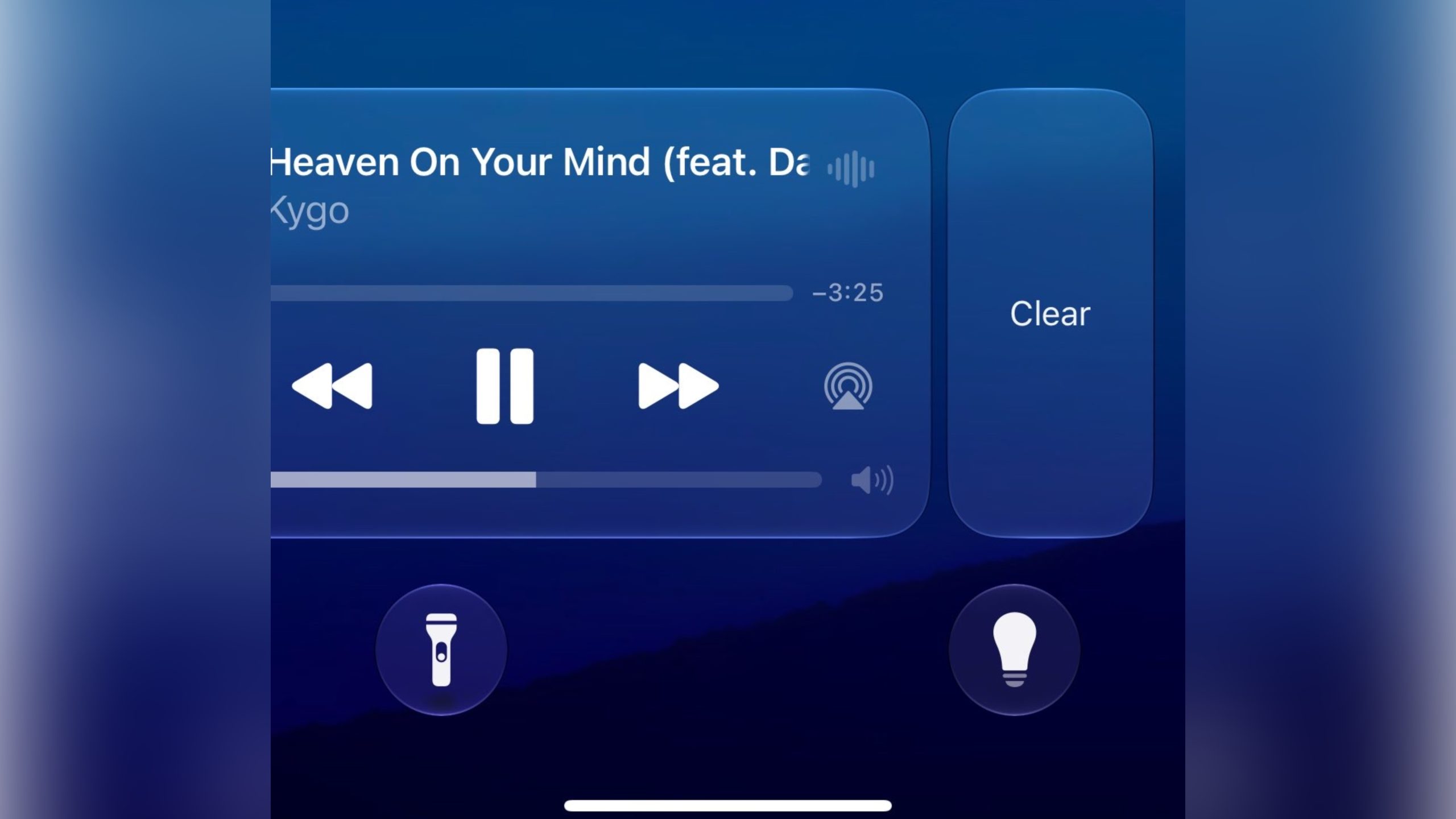
Apple in iOS 27 has made a small but significant change to how the Now Playing widget works on your iPhone's Lock Screen – you can now swipe it away to get rid of it.


Previously, there was no way to dismiss the Now Playing interface on the Lock Screen. But in the first iOS 27 developer build released yesterday, a leftward swipe on the playback controls slides in a Clear button from the right.

Clearing the controls from the screen also removes the smaller Now Playing widget from the Dynamic Island.

It's not quite clear yet how to bring the widgets back immediately – as 9to5Mac notes, the only workaround appears to be pausing whatever's playing, waiting a few minutes, and then resuming it. It also seems to depend on which app you're using for playback. For example, switching from a podcast to video playback re-invokes the Lock Screen widget.

New in iOS 27: You can now swipe away the now playing controls on the lock screen.

Unclear how to get it back at the moment pic.twitter.com/NuEbyiHgok

β€” Aaron (@aaronp613) June 8, 2026

Being able to make the Now Playing widget go away is admittedly a small tweak, but it will be welcomed by anyone who likes to dismiss whatever is taking up space on their Lock Screen, playback controls included. Apple will make iOS 27 available in public beta next month, with a general release expected in the fall.
Related Roundup: iOS 27

This article, "iOS 27 Lets You Dismiss the 'Now Playing' Lock Screen Widget" first appeared on MacRumors.com

Discuss this article in our forums
  •  

visionOS 27 Gains New Icelandic Environment Called 'ThΓ³rsmΓΆrk'

Apple made the visionOS 27 beta available to Vision Pro developers after Monday's WWDC 2026 keynote, and in this version there is a new Environment that allows you to immerse yourself in the Icelandic highlands.


"ThΓ³rsmΓΆrk" is a mountain ridge in Iceland that was named after the Norse god Thor. It offers a nighttime and daytime experience of the icy landscape surrounding a lake, complete with wintry sound effects and running water. It also includes a view of the Northern Lights.

Environments let you transform your physical surroundings into a different place, like Yosemite, Mount Hood, or the Moon. Environments can be used while you're using apps or they can provide a backdrop when you're watching movies. In ThΓ³rsmΓΆrk, for example, if you're watching a video, the scene's colors are reflected in the snow and the water for extra immersion.

Last year, visionOS 26 introduced an interactive Jupiter Environment that uses imagery from NASA for maximum authenticity.

There were only a handful of passing references to visionOS 27 during Apple's keynote, but the Vision Pro software is set to benefit from the same Siri AI features that are coming to iOS 27, iPadOS 27, and macOS 27 Golden Gate. visionOS 27 is expected to be released in the fall.
Related Roundup: Apple Vision Pro
Buyer's Guide: Vision Pro (Neutral)
Related Forum: Apple Vision Pro

This article, "visionOS 27 Gains New Icelandic Environment Called 'ThΓ³rsmΓΆrk'" first appeared on MacRumors.com

Discuss this article in our forums

  •  

Apple Pay for Transit Now Works in These 14 U.S. Cities

Apple has expanded the number of major U.S. cities where its Apple Pay for transit feature is supported, providing a simple way for those who use public transportation to pay for rides.


β€ŒApple Payβ€Œ for transit now works in Atlanta, the Bay Area, Boston, Chicago, Dallas, Houston, Los Angeles, New York, Orange County, Philadelphia, Portland, San Diego, Seattle, and Washington, DC.

Some of these cities have supported β€ŒApple Payβ€Œ for transit purposes for several years, and in others like Dallas and Houston, support is new as of June 2026.

In cities that support Apple Pay for transit, iPhone users can enable Express Mode to pay fares without unlocking their device or using Face ID or Touch ID. To choose a card, open Settings, go to Wallet & Apple Pay, and tap Express Transit Card.

When a credit or debit card is set for Express Mode, it can be used automatically at transit terminals. On iPhone XS and later, Express Transit may also work for up to five hours after the battery runs out, thanks to power reserve.

Some cities allow standard credit or debit cards for transit, while others require a dedicated transit card in the Wallet app. For example, in Houston, users add a virtual RideMETRO card, whereas in Dallas users can pay their DART transit fare with any contactless credit card or debit card.

The iPhone 6s, 2016 iPhone SE, and later support Express Mode for Apple Pay transit. It also works on Apple Watch Series 1 and later with watchOS 5.2.1 or newer.

Apple Pay transit is available in several cities around the world, including London, Hong Kong, Tokyo, Toronto, Beijing, and Shanghai.

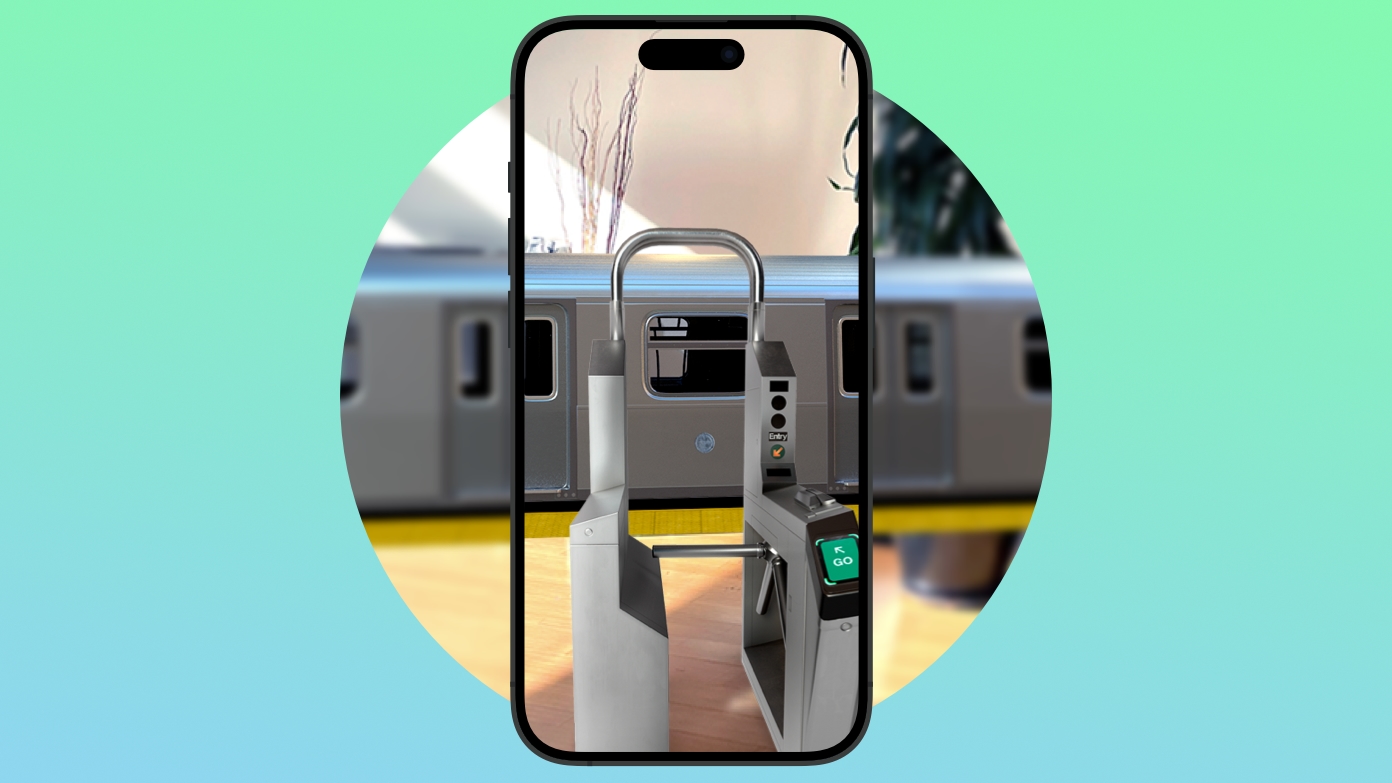
Transit support varies by city, so check local requirements before traveling. In supported areas, Apple Pay can make public transit easier by letting you pay at the gate without buying tickets in advance. Apple lists supported transit systems on its website.
Related Roundup: Apple Pay

This article, "Apple Pay for Transit Now Works in These 14 U.S. Cities" first appeared on MacRumors.com

Discuss this article in our forums
  •  
❌