❌

Lees weergave

Apple Park Visitor Center Gets New Merch Ahead of WWDC 2026

With developers and members of the media soon to arrive at the Apple Park campus for WWDC 2026, Apple has added new merchandise to the store at the β€ŒApple Parkβ€Œ Visitor Center.


Mr. Macintosh shared images of the new items, including crewneck sweatshirts with the classic Apple Garamond text featuring rainbow lettering, hats with a rainbow Apple logo, and water bottles in gray and white.

Exclusive new Apple Park Visitor Center #WWDC26 merch drop today!!!🀩

I was first in the store this morning after the overnight reset! Here's what Apple added:

🌈 Rainbow Apple Logo Hat
🌈 Rainbow Garamond Crewneck
🚰 Apple Stainless Steel Water Bottle pic.twitter.com/joEbAtigjq

β€” Mr. Macintosh (@ClassicII_MrMac) June 4, 2026

He also said Apple is using new merchandise drawers at the β€ŒApple Parkβ€Œ Visitor Center to hold the β€ŒWWDC 2026β€Œ gear.

The β€ŒApple Parkβ€Œ Visitor Center sells Apple-branded gear unavailable at other Apple retail stores. Apple regularly introduces new T-shirt and sweatshirt designs, and it sells water bottles, notebooks, pens, and other small items.

β€ŒApple Parkβ€Œ is also a full Apple Store with the option to purchase standard Apple products like iPhones, iPads, Macs, and accessories.

Apple invited members of the media and select developers to an in-person β€ŒWWDC 2026β€Œ keynote viewing event. WWDC is set to begin on Monday, June 8, which means attendees will be heading to β€ŒApple Parkβ€Œ in the coming days.
Related Roundup: WWDC 2026

This article, "Apple Park Visitor Center Gets New Merch Ahead of WWDC 2026" first appeared on MacRumors.com

Discuss this article in our forums

  •  

Satechi CubeDock Review: A Thunderbolt 5 Dock That Doubles as an SSD Enclosure

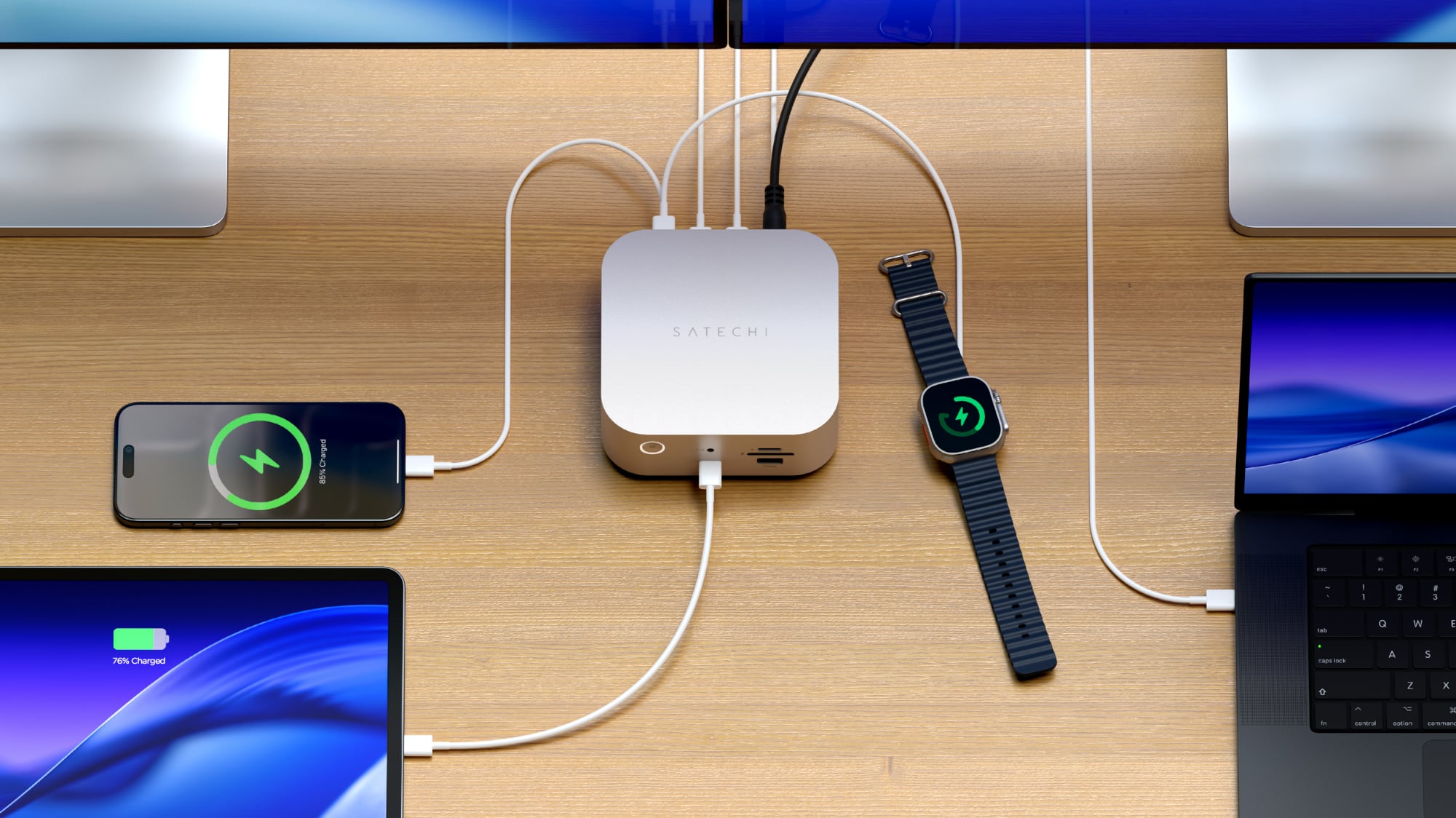
Accessory maker Satechi released its first Thunderbolt 5 dock earlier this year, debuting the $400 Thunderbolt 5 CubeDock. Satechi's dock combines Thunderbolt 5 connectivity with the traditional ports you expect from a dock, plus extra SSD storage thanks to an added SSD enclosure.


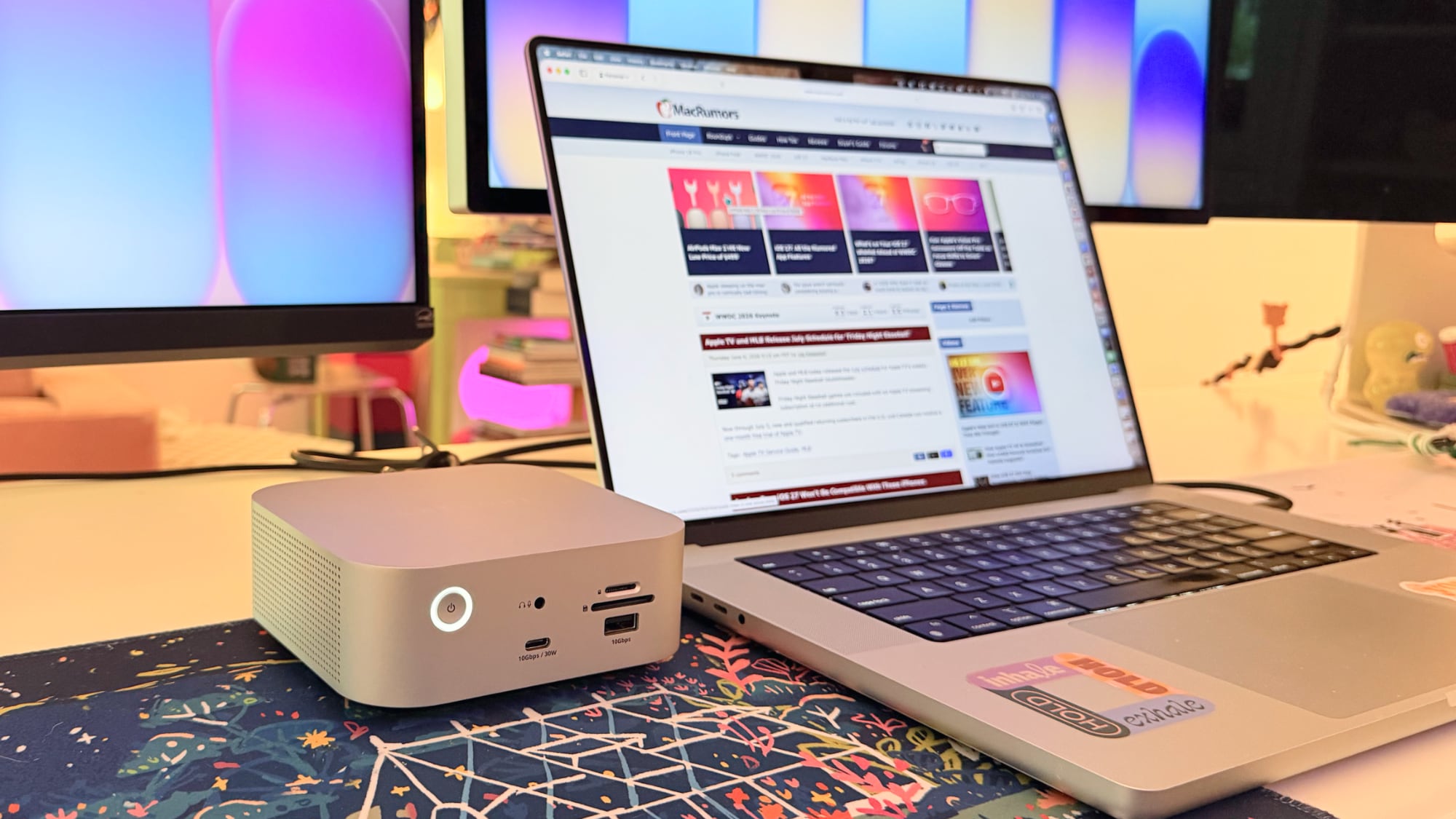
Satechi likes to make things shaped like the Mac mini, and the CubeDock gives β€ŒMac miniβ€Œ vibes. It's five inches by five inches, and two inches thick, identical to the β€ŒMac miniβ€Œ. It's silver, so it matches Apple hardware that comes in that shade, and it would pair well with a β€ŒMac miniβ€Œ.

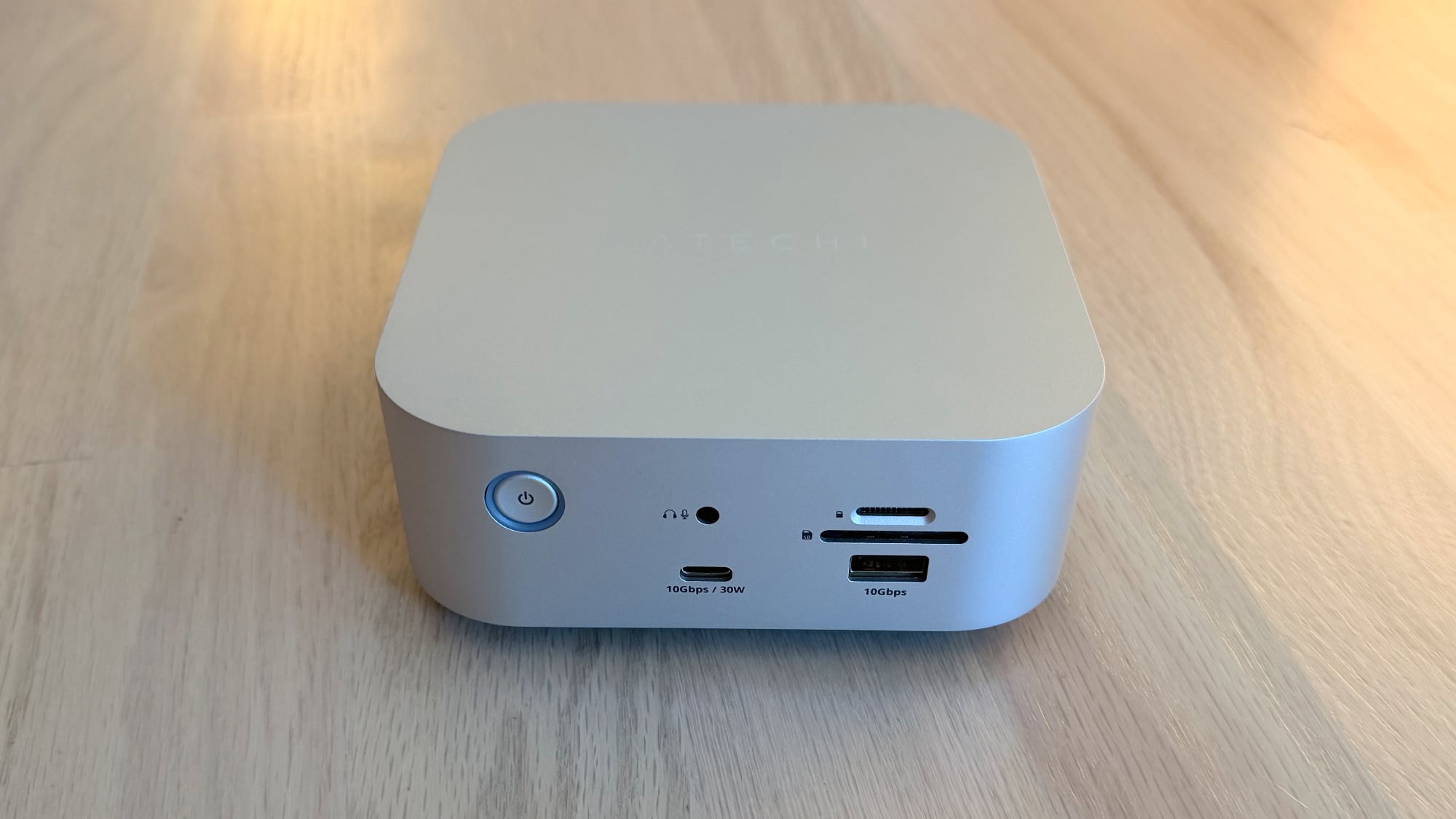
The front of the dock has a 30W/10Gbps USB-C port, a 7.5W/10Gbps USB-A port, a 3.5mm audio jack, and SD and microSD card slots. I like the positioning of the card readers because they're easy to get to. I don't use wired headphones, but if I did, I'd also appreciate having that front audio jack. 30W charging for the front USB-C port is useful too, because 30W is enough to fast charge an iPhone and charge an iPad or MacBook Air.


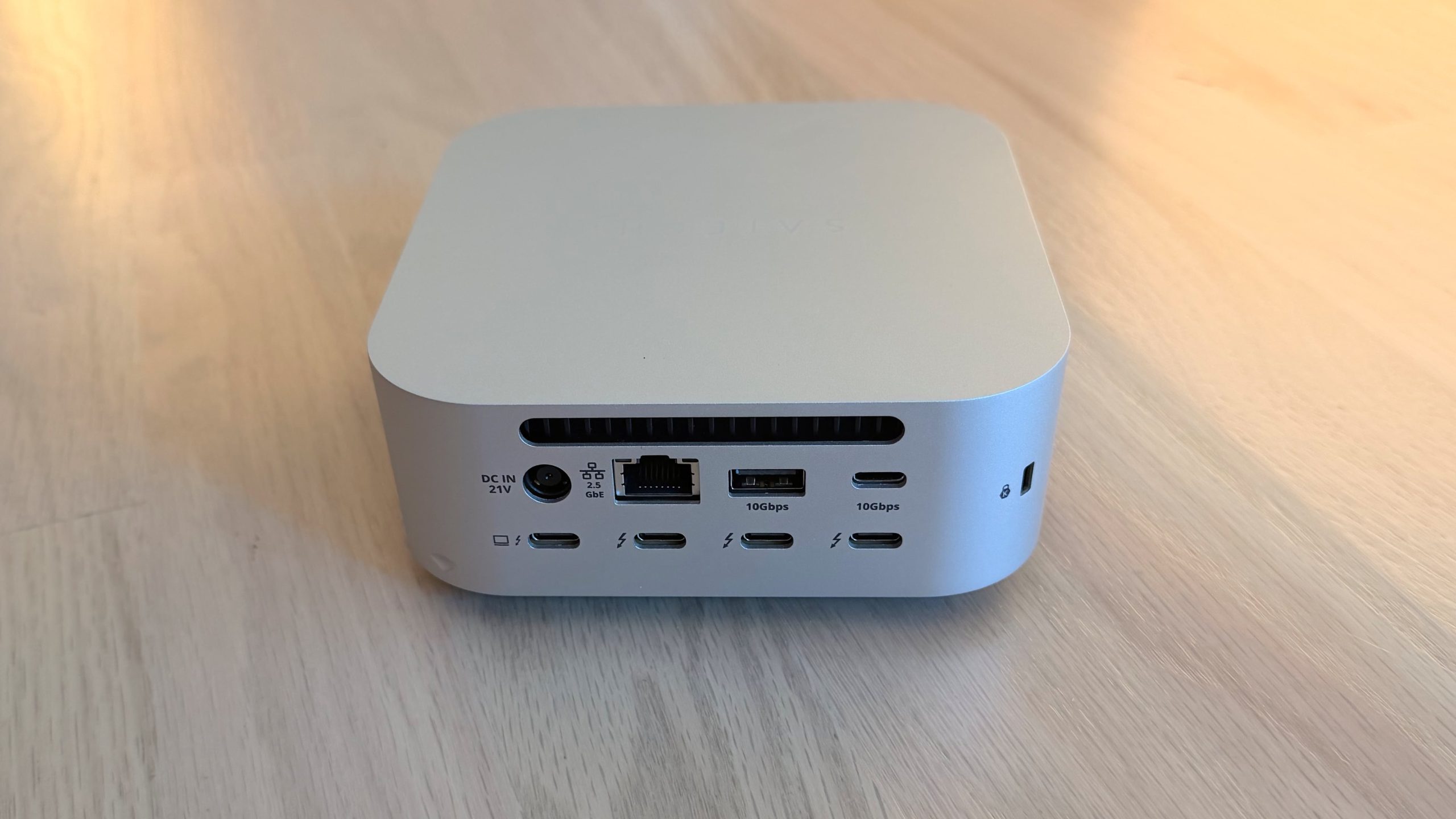
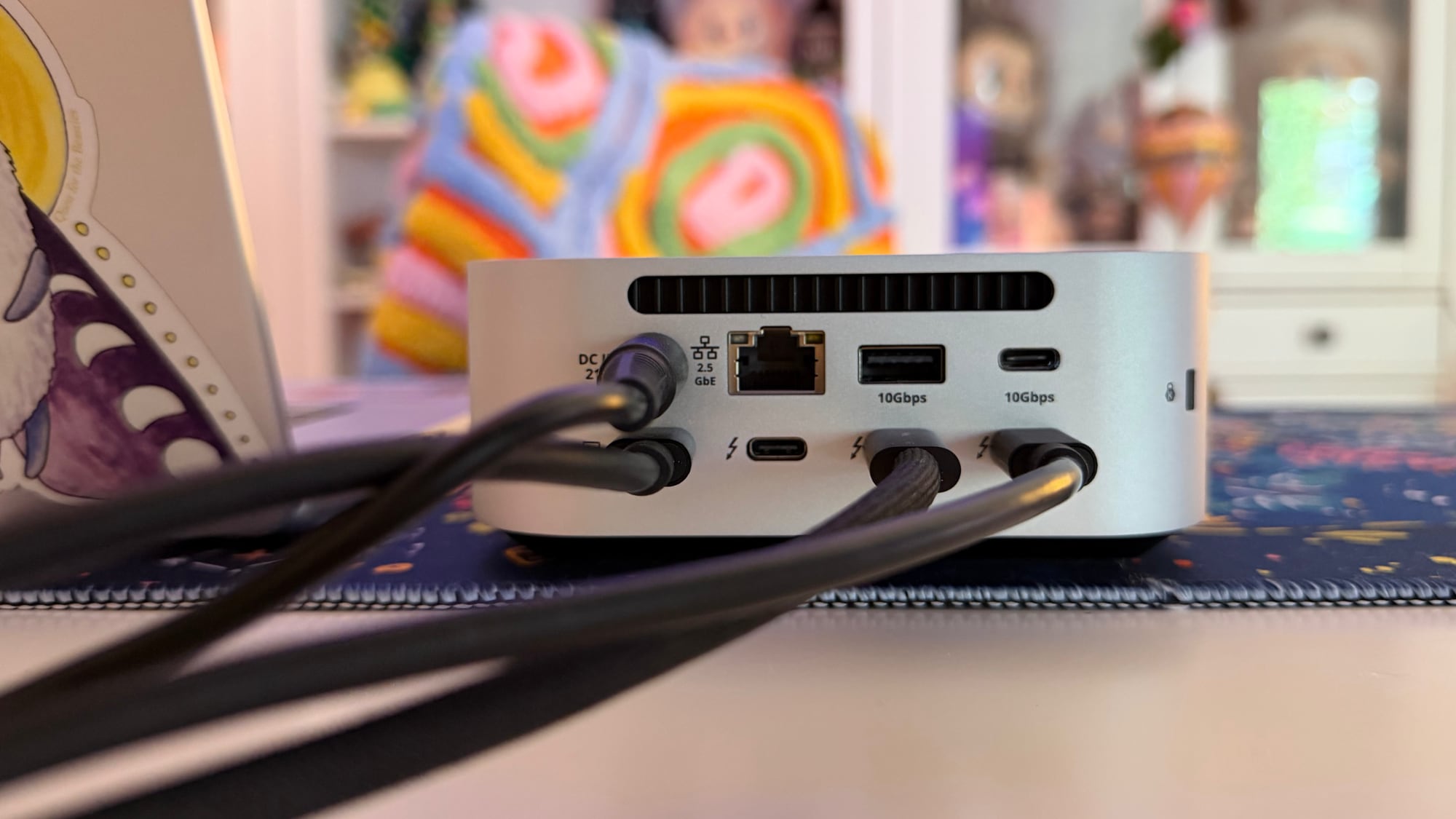
The back has a 2.5Gb Ethernet port, an 80/120Gbps Thunderbolt 5 host port to connect to a Mac, three additional 80Gbps Thunderbolt 5 ports (with 15W each for accessories), a 10Gbps 4.5W USB-A port, a 10Gbps 7.5W USB-C port, and a DC port for connecting the power supply. The CubeDock provides 140W for a MacBook,can charge the 16-inch MacBook Pro at the fastest speed.


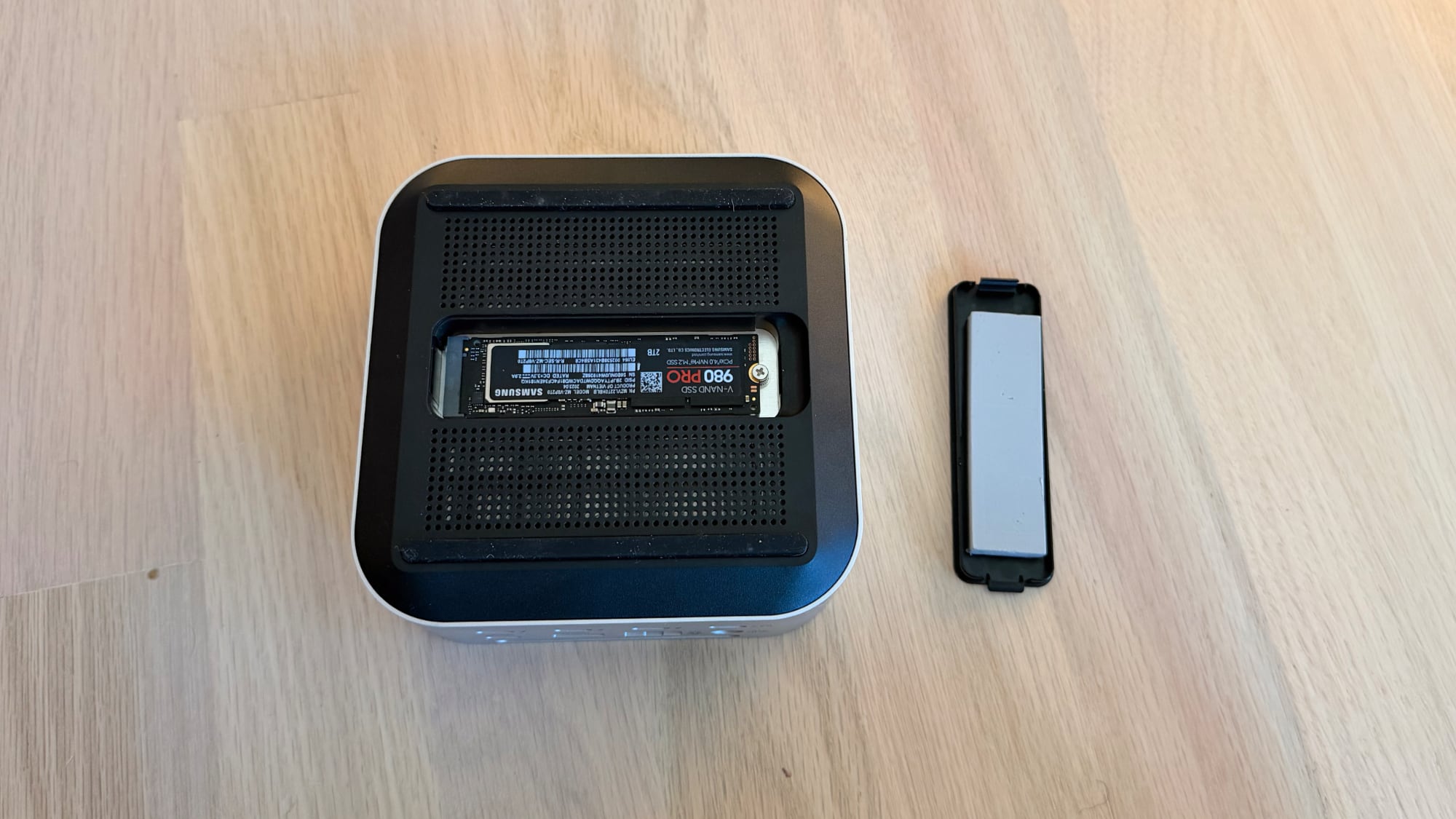
At the bottom of the CubeDock, there's a panel that can be popped out to add in up to an 8TB NVMe SSD. It supports 2230, 2242, 2260, and 2280 sizes with transfer speeds of up to 6000MB/s, depending on the SSD used. The CubeDock has an SSD enclosure, but it does not come with SSD storage. You need to buy an internal SSD separately if you want to use the enclosure, and SSDs aren't cheap right now.


I installed a 2TB SSD in the slot at the bottom of the CubeDock. There's a plastic cover that comes off, and the SSD plugs in underneath. It's held in place with a screw, but the installation process was a little annoying because the screw needs to be positioned before the SSD is inserted. Satechi includes a thermal pad, which I added before closing it back up. My Mac recognized the SSD in the enclosure just as it would any other SSD I plugged in.


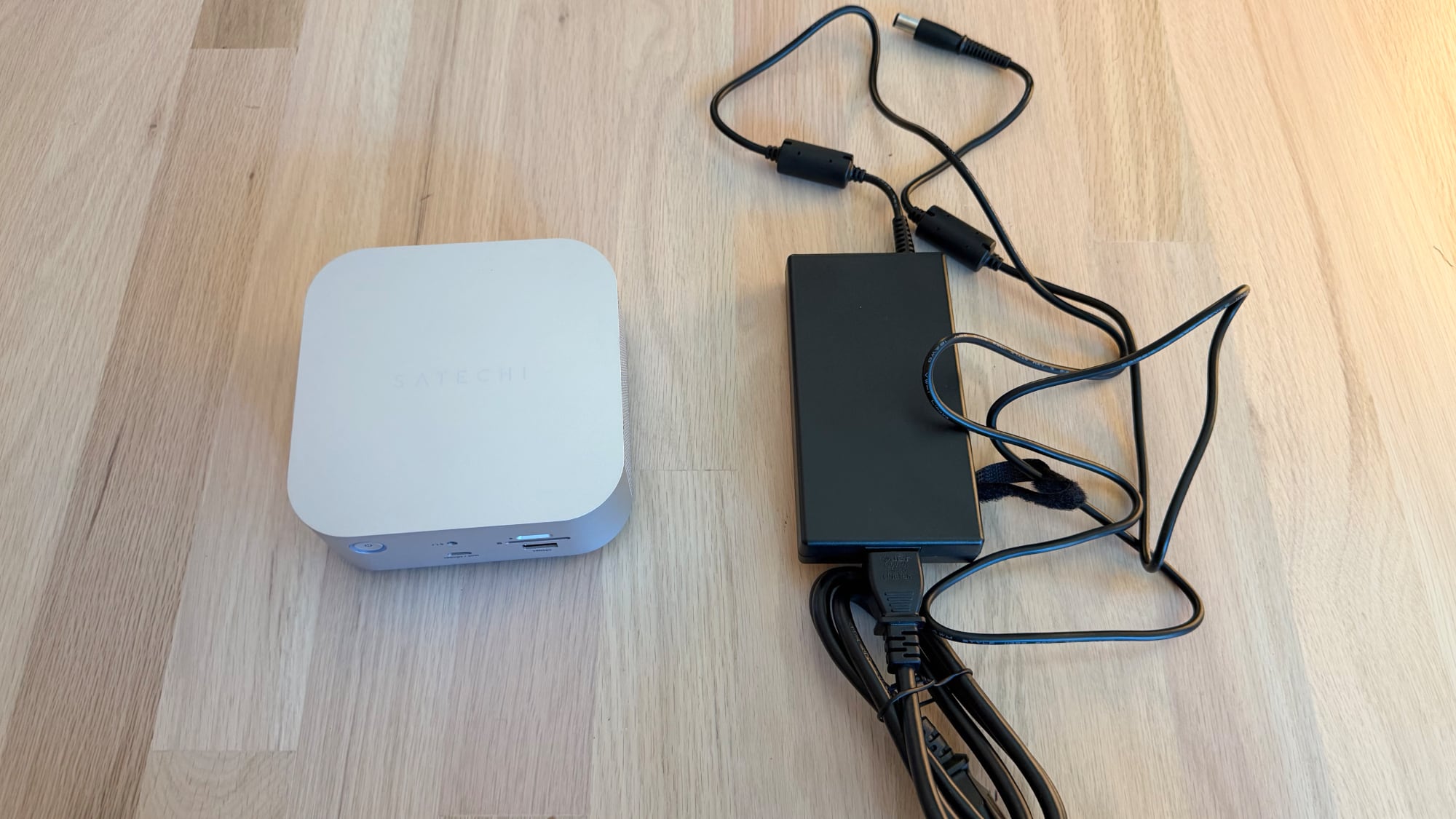
There is a fan in the CubeDock that circulates air, along with vent holes at the sides. It has an LED power button on the front, and it charges with an included 180W power supply. The power supply is not built into the dock and is instead an external brick. Satechi also includes a Thunderbolt 5 cable to connect the dock to a Mac.

I don't generally mind the sound of fans, but the CubeDock's fans have a subtle electronic whine that bothers me. I know some people can't hear that high-pitched electronic noise, but I can, and in a quiet room, it's the audio equivalent of having a pebble stuck in my shoe. I can't hear the sound when the TV is on, when music is playing, or when my AC is running. Anker's Thunderbolt 5 Dock has fans and had a similar noise, but fanless models like the CalDigit TS5 Plus are silent.

With the fans, the CubeDock doesn't get blazingly hot, but it is warm to the touch. The temperature is closer to a hand warmer on a cold day than scorching coffee. I didn't notice a temperature difference testing with the SSD installed and without it.


The CubeDock supports up to three 8K displays at 60Hz, but Satechi says 8K is limited to Windows machines. The M5 Pro and M5 Max chips do support 8K displays, but I don't have one to test with.

What I do have on hand is a 5K Studio Display and a 32-inch 4K 120Hz OLED display, both of which the CubeDock can handle with no problem. I plugged in two iPhones to charge, put in an SD card, and connected two SSDs, and transferred large files. I had no issues with the CubeDock under this stress test, and everything also worked during day-to-day testing.

The benefit of a dock like the CubeDock is being able to plug in multiple displays, peripherals, and accessories while only having one cable connected to a Mac. I can tuck the CubeDock under a display, route the cables out the back, and keep my desk neater with less cable clutter. I felt like the CubeDock had a good number of ports for everyday use, and I wasn't missing anything. It has fewer USB-C and USB-A ports than some other docks that it competes with, but I have few enough USB-A devices that even two USB-A ports felt like one too many.

The Apple silicon chip you have determines the number of displays that the CubeDock can drive over a single Thunderbolt port. M5 Pro and M5 Max Macs can drive three displays at 6K/60Hz with Satechi's dock. M4 Max, M4 Pro and earlier Pro/Max chips support up to two external displays with the CubeDock (up to 6K/60Hz).


Pro/Max Macs can generally support more than two external displays, but you need to use more than one Thunderbolt port. I have two displays connected to an M1 Max with the CubeDock, and a third display plugged into a different Thunderbolt port.

Base M1 and M2 Macs support a single external display over Thunderbolt, but base M4 and M5 Macs can drive two. The M3 is complicated because an M3 β€ŒMacBook Airβ€Œ can support two displays, but only in clamshell mode. It's best to check Satechi's website for compatibility info to make sure you can connect what you want to connect.

Bottom Line


Satechi's dock lets you connect multiple displays, peripherals, and accessories to your Mac with one cable, offering easy plug-and-play functionality. The addition of an SSD enclosure helps differentiate the CubeDock from competing products. It puts the ports most people need right up front, and hides the rest away for desk organization.

The CubeDock is one of the better looking options on the market because of how well it matches Apple's aesthetic, and it doesn't run as hot as docks without a fan included. Unfortunately, the fan noise can be distracting for people who are sensitive to certain sounds.

With two generations of Thunderbolt 5 Macs now available, there's more reason to choose a Thunderbolt 5 over a Thunderbolt 4 dock. Compared to Thunderbolt 4, Thunderbolt 5 offers double the bandwidth (80Gbps instead of 40Gbps) and up to 120Gbps for display-heavy setups.

If you have a newer Mac that supports Thunderbolt 5 and need extra ports, a Thunderbolt 5 dock makes the most sense. If you have an older Mac and are trying to decide between Thunderbolt 4 and Thunderbolt 5, Thunderbolt 5 is the better choice if you're going to upgrade anytime in the next couple of years.

How to Buy


The Satechi Thunderbolt 5 CubeDock with SSD Enclosure can be purchased from the Satechi website or from Amazon.com for $399.99.

Note: Satechi provided MacRumors with a CubeDock for the purpose of this review. No other compensation was received. MacRumors is an affiliate partner with Satechi and may earn commissions on purchases made through links in this article.
Tag: Satechi

This article, "Satechi CubeDock Review: A Thunderbolt 5 Dock That Doubles as an SSD Enclosure" first appeared on MacRumors.com

Discuss this article in our forums

  •  

iOS 27: All the Rumored App Features

Siri is getting a major overhaul in iOS 27, but Apple also has some big updates planned for apps like Camera, Photos, and Wallet. There are multiple new AI features in the works, plus some non-AI upgrades.


Camera


Apple is moving Visual Intelligence from the Camera Control button to the Camera app in iOS 27, according to Bloomberg. There will be a Siri mode that will be available alongside the existing Photo, Video, Portrait, and Panorama modes. When in Siri mode, the existing Camera app shutter button will feature the Apple Intelligence logo, letting users know the Siri features are available.

Siri mode is a renaming of Visual Intelligence, and it will make the feature more visible. Accessing Visual Intelligence in iOS 26 requires users to hold down the Camera Control button or assign the feature to the Action button, and many people may not even know it exists.

Visual Intelligence can identify objects, plants, animals, art, books, and more, searching for whatever the user snaps on Google Image Search. In iOS 27, Siri will be able to answer questions about what a user is looking at, providing information from the web.

Apple is adding new Visual Intelligence capabilities in iOS 27, and they will be available through the Camera app Siri mode.

  • Nutrition - Users can scan nutrition labels on food packaging for calorie and macronutrient tracking using the Health app.

  • Contacts - Visual Intelligence will let users scan phone numbers and addresses on business cards and other print media, adding the information to the Contacts app.


Apple plans to make the Camera app more customizable in iOS 27. iPhone users will be able to replace the top row of camera shortcuts with options of their choosing, selecting features like flash, exposure, timer, depth of field, photo styles, and resolution.

Camera controls, now labeled as widgets, can be placed at the top of the Camera interface in any order. Users can select widgets from a transparent widget tray that comes up from the bottom of the app and organizes widgets into categories like basic, manual, and settings.

The Camera app will have the same default layout that's available now with quick tap buttons for flash, Live Photos, and Night Mode, but the customizable widget interface will be added as an advanced layout that will appeal to professional users.

iPhone users can currently tap on an icon at the top right of the Camera app to access all of the Camera controls, but Apple is moving that view to the right of the shutter button in iOS 27.

The Camera app is also going to get new grid and level options that will join the existing features.

Photos


The Photos app will have an Apple Intelligence Tools section when editing an image with new Extend and Reframe options.

  • Extend - Extend generates additional image content beyond the original frame of the photo, filling in scenery when changing the crop of an image. This tool will support expanding the edges of an image with zoom gestures.

  • Reframe - When used with spatial photos, Reframe will let users change the perspective of an image after it's captured.


Apple is also testing an AI photo editing feature that lets users request edits using natural language. Users would be able to tweak color, lighting, cropping, and other image parameters without having to use manual tools. The voice-based photo editing feature may not arrive in the first version of iOS 27.

Shortcuts


The iOS 27 Shortcuts app will support using natural language to create a shortcut with AI. Users will be able to tell Siri what they want to accomplish with a multi-step shortcut, and Siri will generate it.

The Shortcuts app will open with a prompt that says "What do you want your shortcut to do?" with a text field to enter a description. Shortcuts that are created using AI are then automatically installed and immediately available for use.

Wallet


The Wallet app is getting a "Create a Pass" option so users can generate digital passes from scans of physical items like movie tickets, concert passes, and gym membership cards.

Users can tap on the "+" button in the Wallet app and then scan a QR code on a pass or ticket if one is available. If there is no QR code available, there will be an option to create a custom pass.

There are three pass types in Create a Pass, each with a different color. Apple is using purple for events, blue for memberships, and orange for other types of passes. Users can customize images, colors, style, and text on the digital passes.

Apple is also adding an AI bill-splitting feature that will work with Apple Cash. iPhone users will be able to take a photo of a receipt and generate Apple Cash payment requests for different people.

Image Playground and Genmoji


Apple is updating the Image Playground app. The interface for generating a new image has fewer controls and a "describe a change" option for editing images that are created. Previously created images are displayed in a grid with more rounded edges, and instead of a New Image button, there's a "+" button.

Apple has also been testing new models that produce more lifelike images, so we could see new image generation capabilities in iOS 27 with better image quality.

Genmoji is also getting an update so it will use fewer resources, causing less battery drain and fewer heat problems. Genmoji will be better quality with a new Genmoji model, and a Suggested Genmoji feature will bring up custom emoji ideas based on your media and text history.

Writing Tools


Apple is testing an expanded version of Writing Tools that will do more rewriting and text generation than the current version. There is a "Write with Siri" toggle at the top of the keyboard, along with a "Help Me Write" option that comes up when Siri is activated while a text field is open.

Apple is going to add a dedicated AI grammar checker that will work alongside the current spell check. When writing in Messages, Mail, and other apps there will be a translucent menu that slides up from the bottom of the iPhone's screen, and it will show suggested revisions next to the original written text.

Users can go through the suggestions and accept or reject them one by one, approve all of the changes at once, or ignore the changes.

Other Features


  • Wallpaper - There will be an option to generate custom wallpapers with the Image Playground app, with the feature built into the interface for selecting a new wallpaper.

  • Safari - Safari will get an updated start page with four tabs for switching between favorites, bookmarks, Reading List, and history.

  • Calendar - Rumors suggest the Calendar app will incorporate new AI features. Siri will also be able to draw on information in the app.

  • Health - With a new calorie scanning feature coming to the Camera app, calorie tracking will be more prominent in the Health app. Apple was also planning a Health+ subscription service, and while that's been scaled back, there could be other AI health app changes.

  • Weather - The Weather app will have a new Conditions panel for switching between temperature, rain, and wind from the main interface, without the need to tap into a weather module.

  • AirPods settings - The AirPods interface in the Settings app will be simplified, with options featuring better organization. Major features like hearing health will be easier to find.

  • AirPlay Alternatives - Apple is adding a feature that will let users beam content to AirPlay alternatives like Google Cast. It could be limited to iPhone users in the EU because it is being implemented as a Digital Markets Act requirement.


System-Wide Design Changes


There are system-wide design changes coming in iOS 27. The separate tab bar in apps like Apple Music, Podcasts, News, and Apple TV will be adjusted to combine search with the other navigation options. Apple separated search in many apps when introducing Liquid Glass, but it's reverting to the original look.

When using the on-screen keyboard, there's a new animation that shows the keys sliding up from the bottom of the iPhone interface, and Apple is adding redo and undo controls for easier customization of the Home Screen's icon and widget layouts.
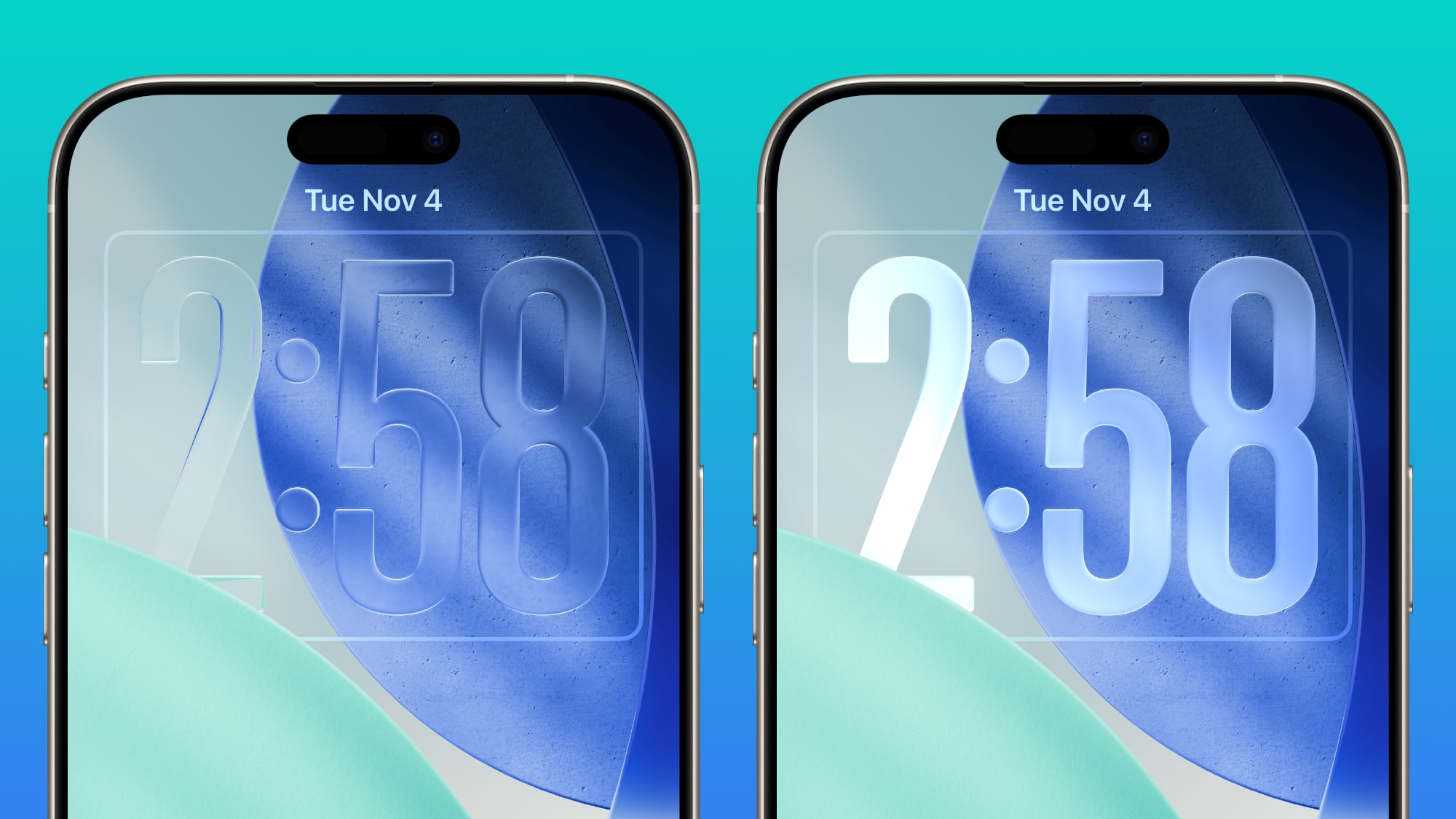


Apple doesn't plan to make major changes to the Liquid Glass aesthetic in iOS 27, but the company is mulling a system-wide setting that would precisely adjust the look of the interface. In iOS 26.2, Apple added a slider that lets users adjust the opacity of Liquid Glass for the Lock Screen's clock, and that setting could be expanded to the entire operating system.

Foldable iPhone Interface


The first foldable iPhone will be introduced in September. Rumors suggest that it will feature a 5.5-inch display when folded, and a 7.8-inch display when it's opened up like a book.
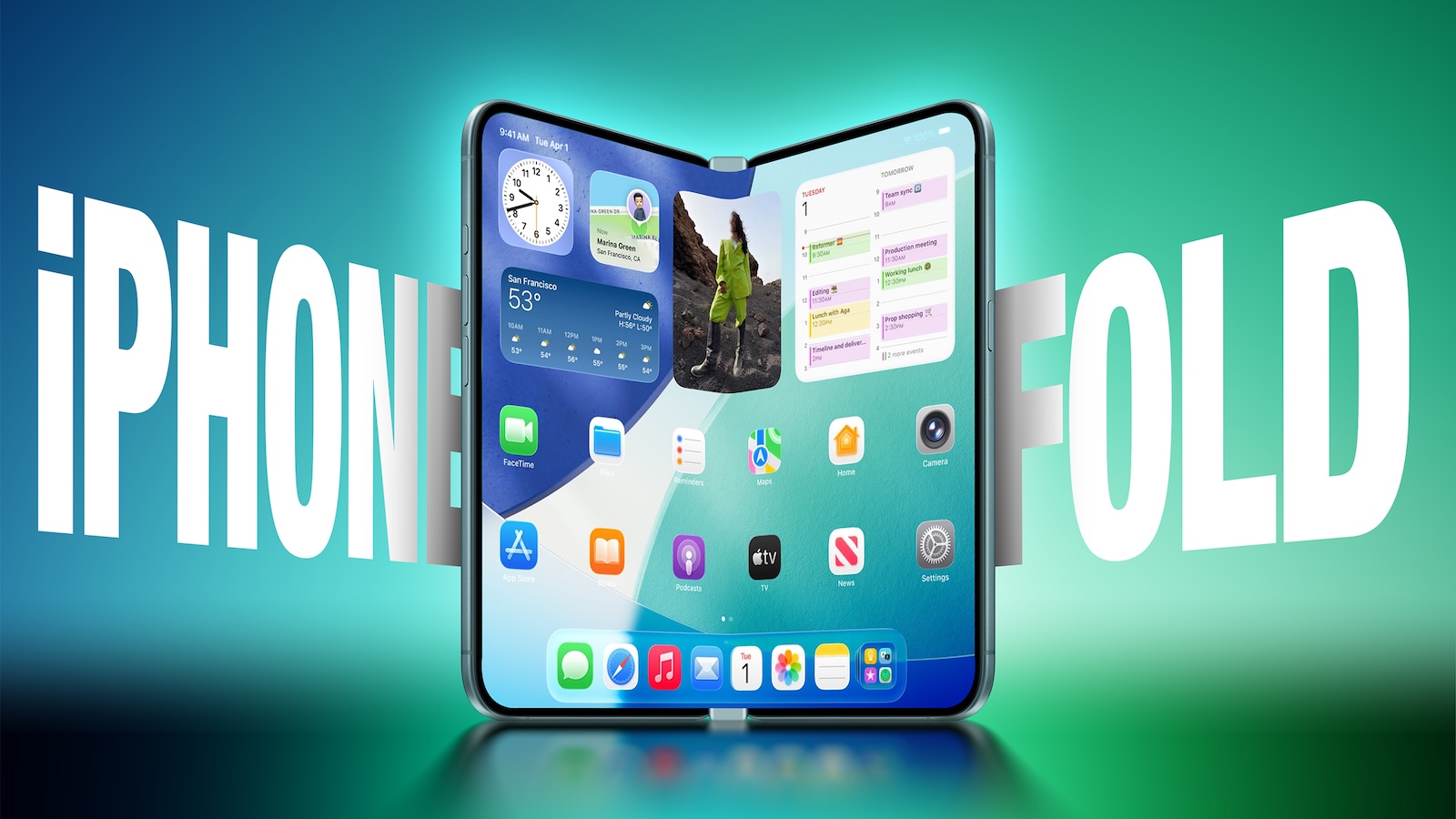


An iPhone with a larger display will require major updates to iOS, and iOS 27 will focus on building new interfaces and experiences made for a larger smartphone display.

The iPhone Fold will operate like a cross between an iPhone and an iPad, but it will run iOS, not iPadOS, and it won't support iPad apps, according to Bloomberg. When unfolded, the iPhone will have an iPad-like layout that supports multitasking with two apps side-by-side. Many of Apple's iPhone apps will have sidebars on the left of the display, with Apple providing developers with tools to easily adapt their apps to the new layout.

Apple is using a wider design for the iPhone Fold than most foldable smartphone makers have used, and it is rumored to have an iPad-like 4:3 aspect ratio. When the iPhone is closed, it will have a standard iPhone layout that looks like the version of iOS we have now.

Satellite Features


Apple is working on several new satellite features for the iPhone, and it's possible some features could be introduced as soon as 2027.

  • Apple Maps via satellite

  • Photos in Messages via satellite

  • Satellite API framework for third-party apps

  • Satellite over 5G

  • Satellite connectivity without the need for a view of the sky


Performance and Stability


Bloomberg has described iOS 27 as a "Snow Leopard" update, suggesting that Apple will focus on improving underlying performance and quality.

Apple is prioritizing cleaning up the iOS code and removing anything that's outdated, which could mean upgrading apps to improve performance and rewriting some existing features to be more efficient. The code updates could provide a more responsive, faster version of iOS.

Apple is also aiming for efficiency improvements that could translate into tangible battery life gains.

Launch Date


Apple will preview the new iOS features at its WWDC 2026 keynote event on June 8. Developers will get access the same day, and a public beta will likely be available in July. iOS 27 will launch in September alongside new iPhones.
Related Roundup: iOS 27

This article, "iOS 27: All the Rumored App Features" first appeared on MacRumors.com

Discuss this article in our forums

  •  

Bluetti Elite 10 Mini Power Station Review: Small, Capable, and Apple-Friendly

Bluetti's Elite 10 Mini Power Station is larger than your average iPhone or iPad power bank, but it's still small enough to be portable. It's ideal for camping, day trips, barbecues, or to have on hand in case of a power outage. It's also a design that works well on a desktop thanks to the included ports.


The Elite 10 has a 128Wh capacity, which is enough to charge a MacBook Neo almost three times, a MacBook Pro 1.5 times, or a MacBook Air twice. It can charge an iPhone or an β€ŒiPadβ€Œ multiple times, and it supports charging multiple devices at one time too. It can power devices that draw as much as 200W and it has 300W surge capacity with 400W lifting power, so it's more than adequate for Apple products. You can plug in anything that is under 200W, so it's not going to work for things like blow dryers or heaters, but it can power all kinds of small electronics.

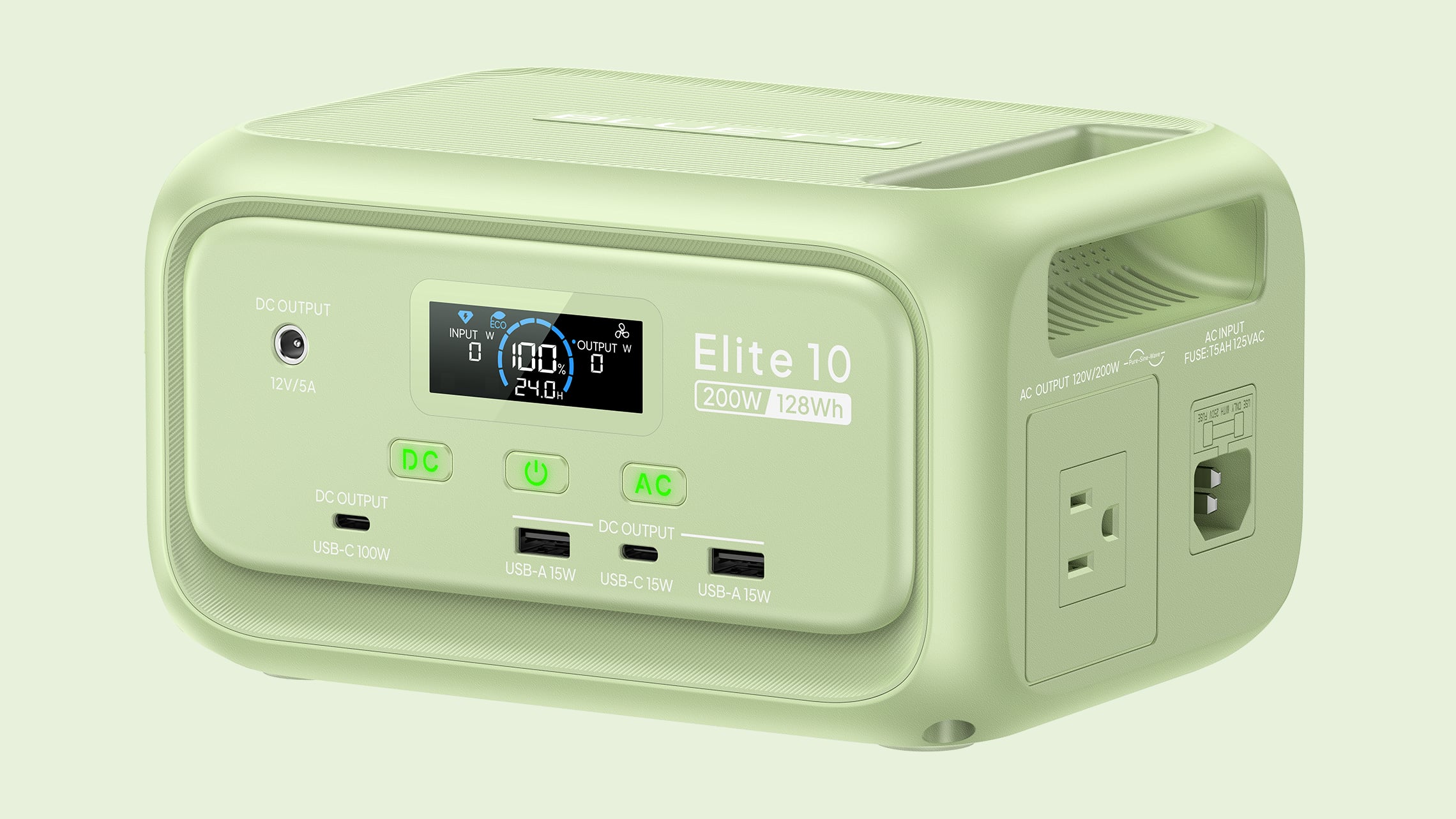
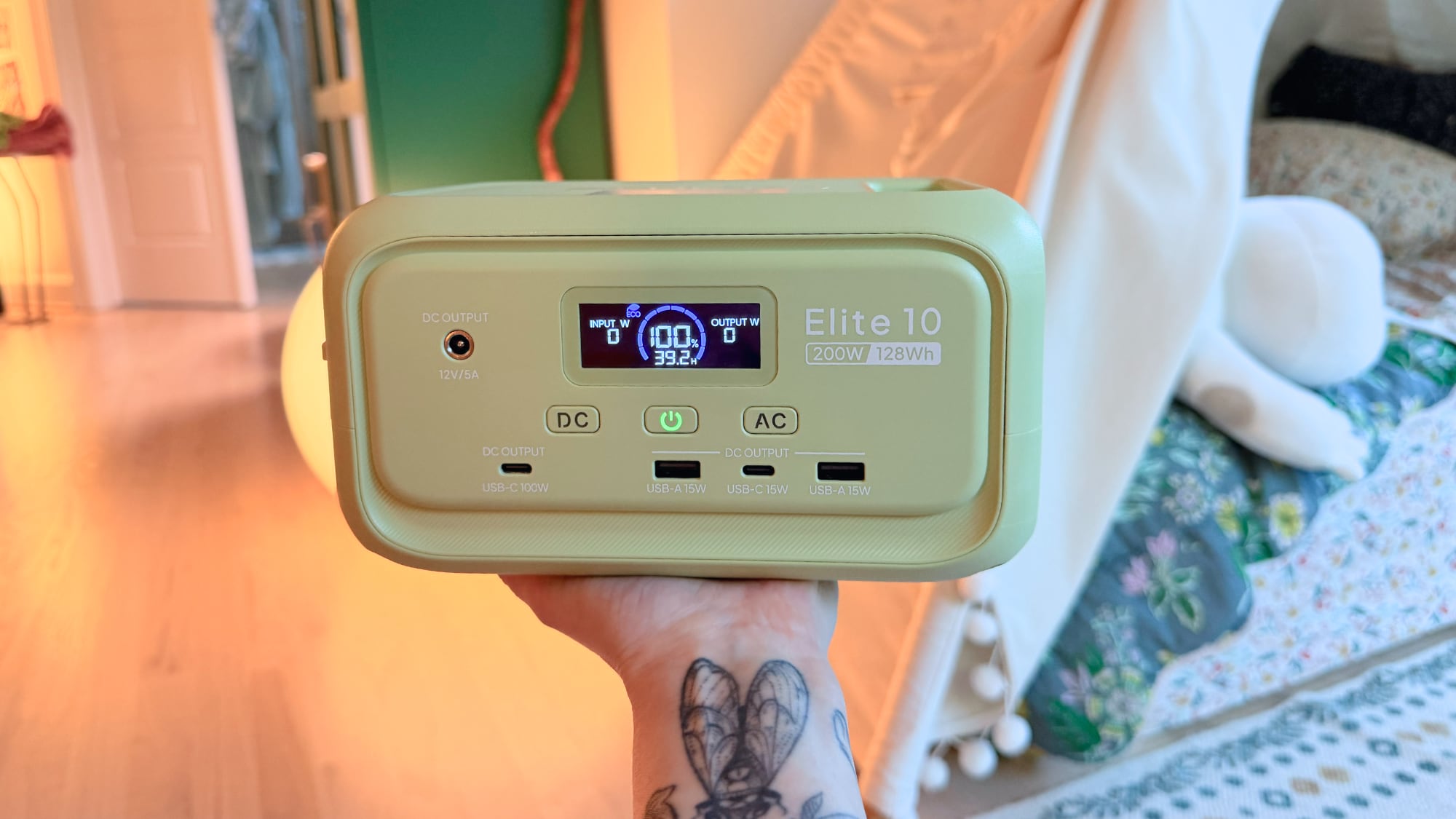
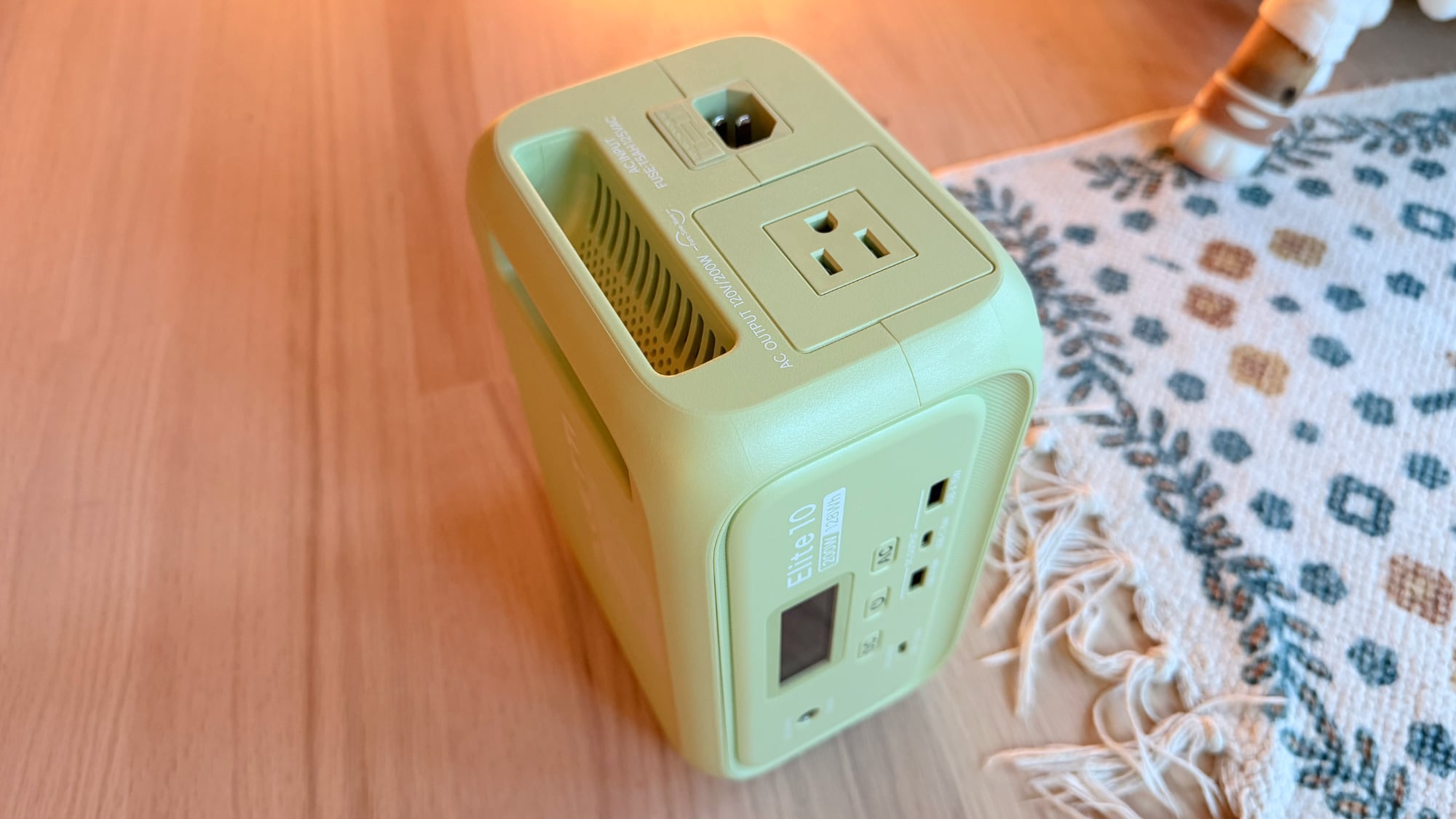
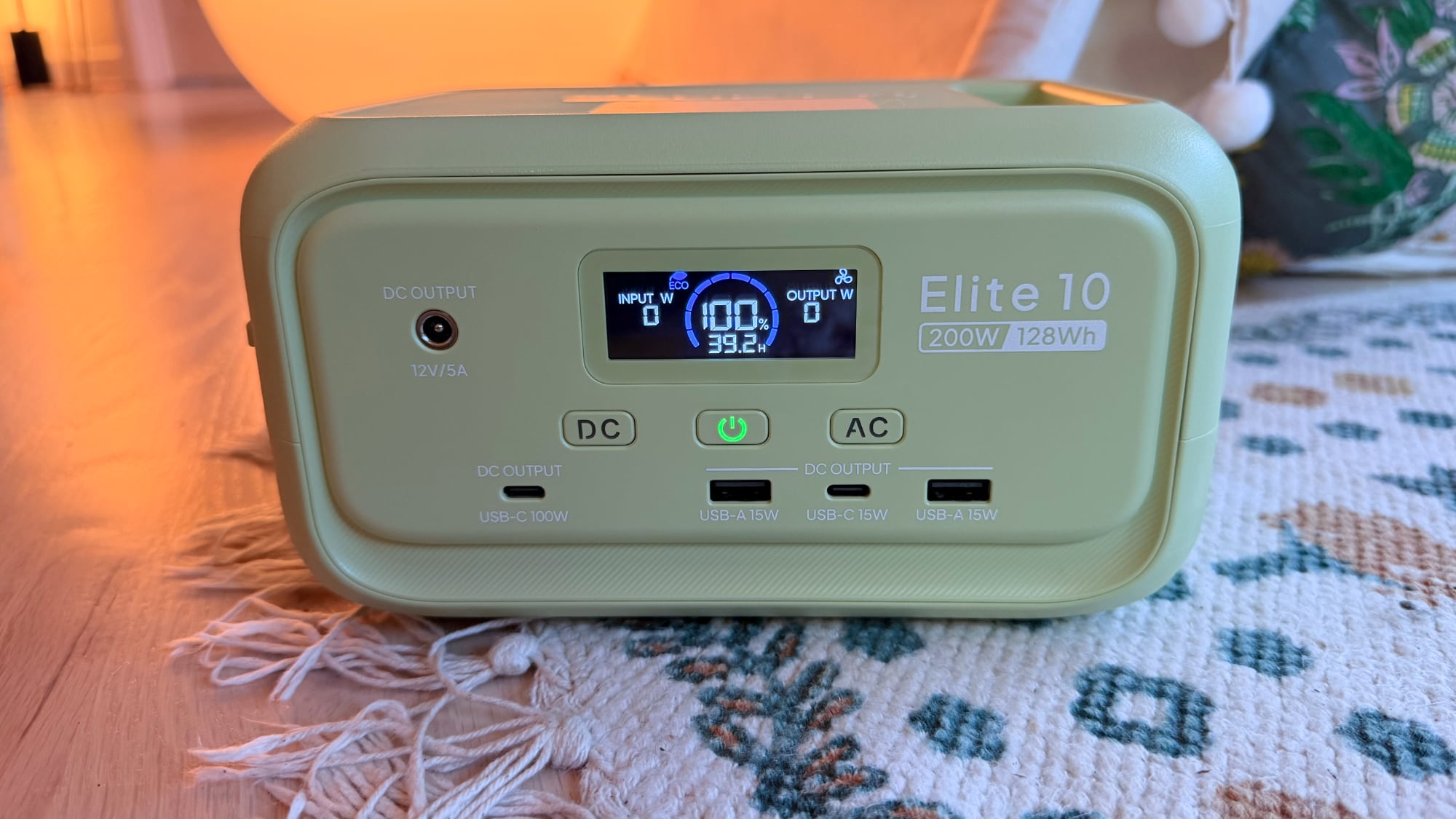
There's a single AC outlet on the right side of the charger, plus two USB-A ports, two USB-C ports, and a 12V DC port at the front. One of the USB-C ports offers up to 100W charging, so you can charge a Mac, β€ŒiPadβ€Œ, or iPhone directly with that port without the need for a power adapter. The other USB-C port is 15W, as are the two USB-A ports. As with other Bluetti chargers, you need to press the AC or DC buttons to turn on power to the ports, a feature that prevents unnecessary power draw in standby mode.


Bluetti sells the Elite 10 in a standard gray shade or a light green that's a fun match with the bright colors of the β€ŒMacBook Neoβ€Œ. It's made from plastic, but it's weighty and feels durable. The Elite 10 is 7.9 inches long, 5.8 inches wide, and 4.3 inches tall, so it's not something you're going to want to carry around in a backpack as a daily charger, but it is small enough to keep in the car for emergencies, and at four pounds, it's not too heavy to bring on a trip to the park or the beach.

There's a carrying handle at the top of the Elite 10, and it has built-in fans to keep it cool. The fans are barely noticeable unless you're drawing power at full capacity, and even then, they're quiet. An LED display lets you know the Elite 10's capacity, how much power is being sent to a device, and how much longer the battery will last. Alternatively, you can use the Bluetti app to see that information.


There is a built-in LED light strip at the back that offers cold light, warm light, and a flashing emergency light that can stay on for up to 50 hours. The light is bright enough to light up a tent or a small space. I'm a fan of the LED strip in the Elite 10 because it's a feature that not too many power stations offer.

I've been testing the Elite 10 since December 2025, and I have no complaints. It's worked as intended, and it's a charger that I like to keep on my desktop. I've also brought it outside to charge up smart bird feeders, and it's come on day trips. I did most of my testing of the Elite 10 back in December, but I wanted to see how it would work as a power station that's just tucked away until it's needed in an emergency.


I charged it to full in January, made sure it was off, then stuck it in my closet and left it alone. I was curious about whether it could hold a charge across multiple months, and it does. When I pulled it out of the closet on May 15, it was still at 100 percent charge. It's not ideal to leave a battery at a 100 percent charge for long periods, but if you charge it up and forget about it until a power outage, it's still good to go. Draining it to about 90 percent and then checking in on it every six months or so should be enough if you just want an in-case-of-emergency device that you don't have to think about often. Bluetti says that the LiFePO4 battery inside will last for over 3,000 cycles while remaining above 80 percent total capacity.

UPS mode is supported for uninterrupted power during an outage. You can plug the Elite 10 into a power source and then plug in a computer or router. If the power goes out, it takes 10ms for the Elite 10 to provide power to your computer or router, so your device won't shut off. When you're using it for that purpose, it supports 350W max bypass charging, so it will work for some PC setups. I tested with my router and with a light, and it did swap over as quickly as advertised.

The Elite 10 can be charged with a standard outlet (and a charging cable is included), a car (adapter sold separately), or up to a 100W solar panel. It supports simultaneous AC + solar charging too at up to 150W. With AC power, it can charge at 150W, reaching 100 percent in just over an hour.


Bluetti says that the Elite 10 is in the airline-approved range for carry-on batteries, but I'm not sure I'd try to bring it on a plane. The last few times I've flown in the U.S., flight attendants have been wary of portable batteries and there's now a rule that they must be visible and in reach at all times.

Bottom Line


If you're looking for a portable charger that's still big enough to power multiple iPhones, a couple of iPads, or a MacBook and an iPhone, the Elite 10 is a good option. It's light enough and small enough to bring on short trips, and it's also ideal for keeping in the car or on hand for power outages.

How to Buy


Bluetti's Elite 10 Mini Power Station can be purchased from the Bluetti website or from Amazon for $120.

Note: Bluetti provided MacRumors with an Elite 10 Mini Power Station for the purpose of this review. No other compensation was received. MacRumors is an affiliate partner with Bluetti and may earn commissions on purchases made through links in this article.
This article, "Bluetti Elite 10 Mini Power Station Review: Small, Capable, and Apple-Friendly" first appeared on MacRumors.com

Discuss this article in our forums

  •  
❌