Lees weergave

Google Search Now Connects to Instacart, Canva and YouTube Music

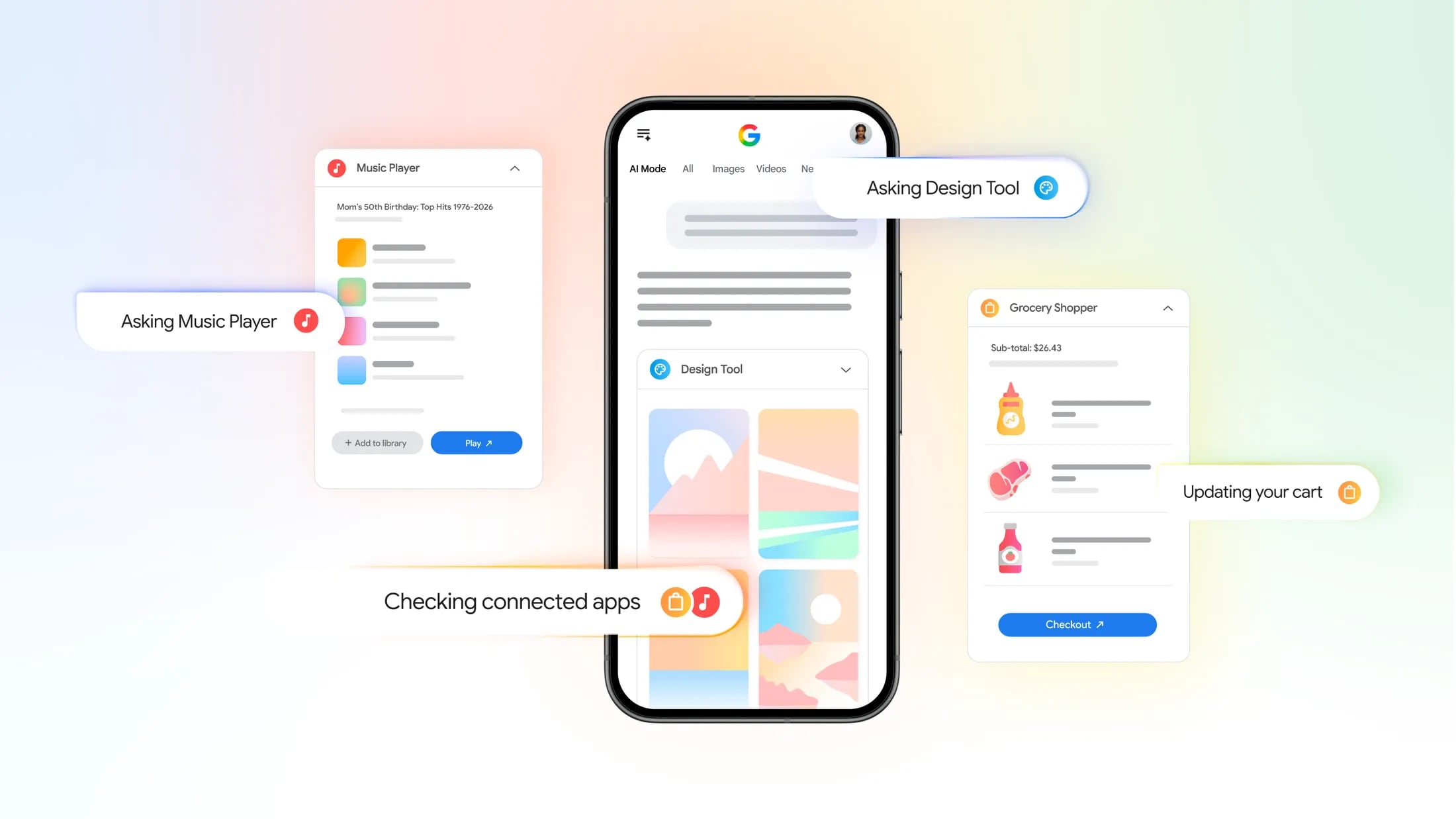
Google is expanding AI Mode in Search, allowing users to connect apps to improve search results and "get more done."


Instacart, YouTube Music, and Canva can be connected, and Google explains how the integrations can be useful:

  • Instacart - If you're using AI Mode to help you plan a grocery list, ingredients can be added right to an Instacart shopping cart for quick ordering.

  • Canva - If you're creating a flyer, you can get template options from Canva.

  • YouTube Music - You can use AI Mode to curate a playlist and save it to YouTube Music.


Instacart, Canva, and YouTube Music are the only apps that can be connected right now, but Google may add more in the future. Connected apps were previously available in Gemini, but the feature set is now being expanded to Search.

Connecting apps is limited to AI Mode in the United States, in English. Once an app is connected, users are able to access new features when making a request in Google Search AI Mode. Connected apps can be used in Search both on the desktop and through the Google Search iOS app.

Google suggests users turn on history and personalized recommendations to improve the Google Search experience. Google says it uses people's interactions with Search and the new AI features to develop and improve generative AI experiences.
Tag: Google

This article, "Google Search Now Connects to Instacart, Canva and YouTube Music" first appeared on MacRumors.com

Discuss this article in our forums

  •  

Roblox is Adding AI Game Creation to iPhone and iPad

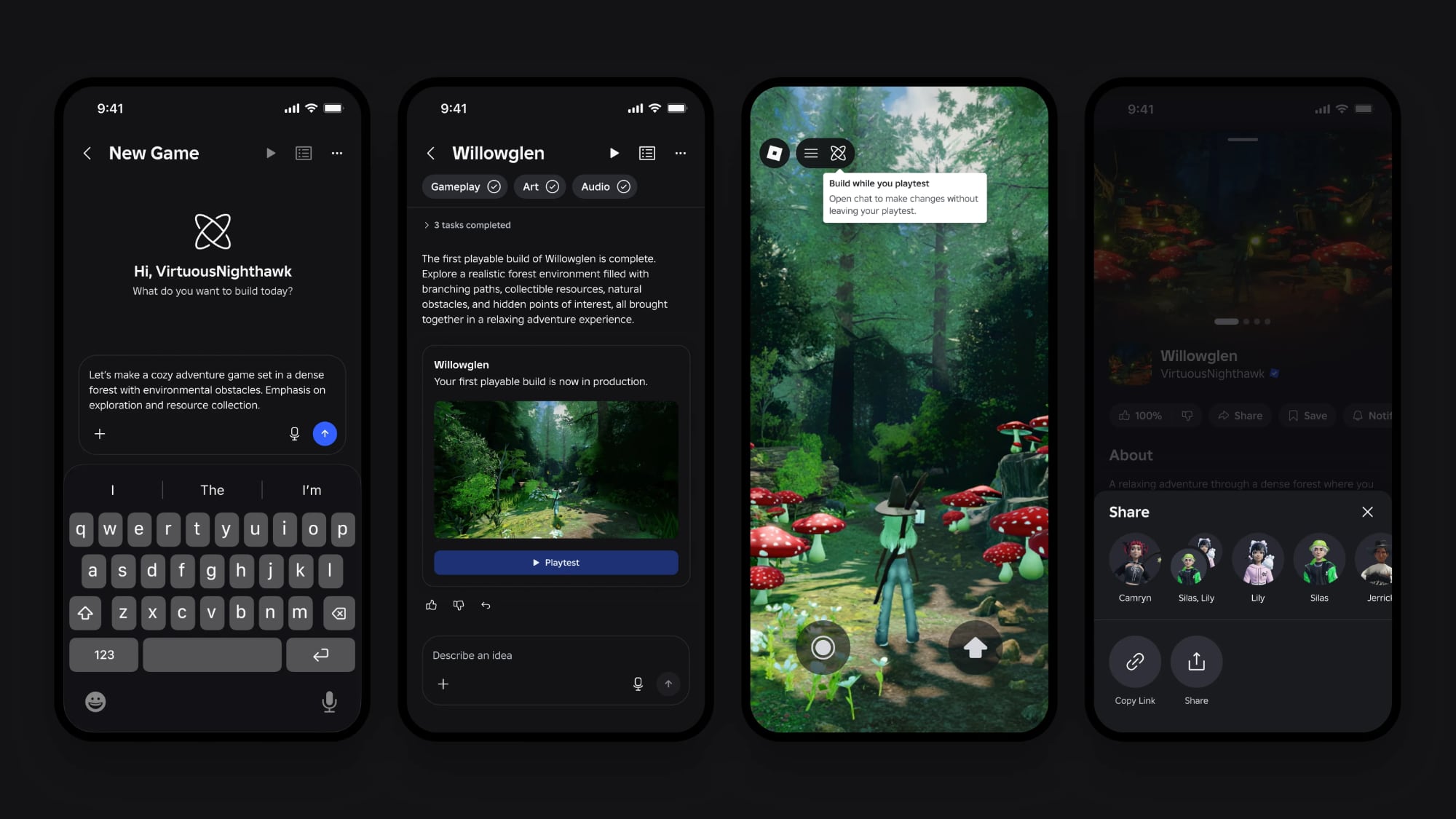
Online game platform Roblox today said it is adding a new Build tool that will let iPhone and iPad users create games using AI.


With the mobile-first Build option, Roblox users can write a text-based prompt and have AI turn it into a basic game. A single prompt will create a starting point that can be expanded with playtesting and further commands. The entire game-making process, from creation to uploading on the Roblox platform, can be done on a mobile device.

Right now, creating a game in Roblox requires a Mac or PC app, but Build will extend game creation to mobile users too. Roblox is also adding new AI creation tools to Roblox Studio, its desktop game creation software. Content created using the Build tool can be iterated on with Studio.

Roblox Build is set to roll out to the Roblox mobile app on July 28, beginning with a public alpha test for users in New Zealand. Build will roll out to additional regions in the coming months as Roblox improves the experience.

Roblox has 132 million daily active users, and user-created games like Brookhaven RP, Adopt Me, and Dress to Impress have been wildly popular.
Tag: Roblox

This article, "Roblox is Adding AI Game Creation to iPhone and iPad" first appeared on MacRumors.com

Discuss this article in our forums

  •  

1Password for Claude Lets AI Log In Without Seeing Your Passwords

Popular password management app 1Password today added Claude support, which means AI service Claude can access credentials stored in 1Password for completing browser tasks.


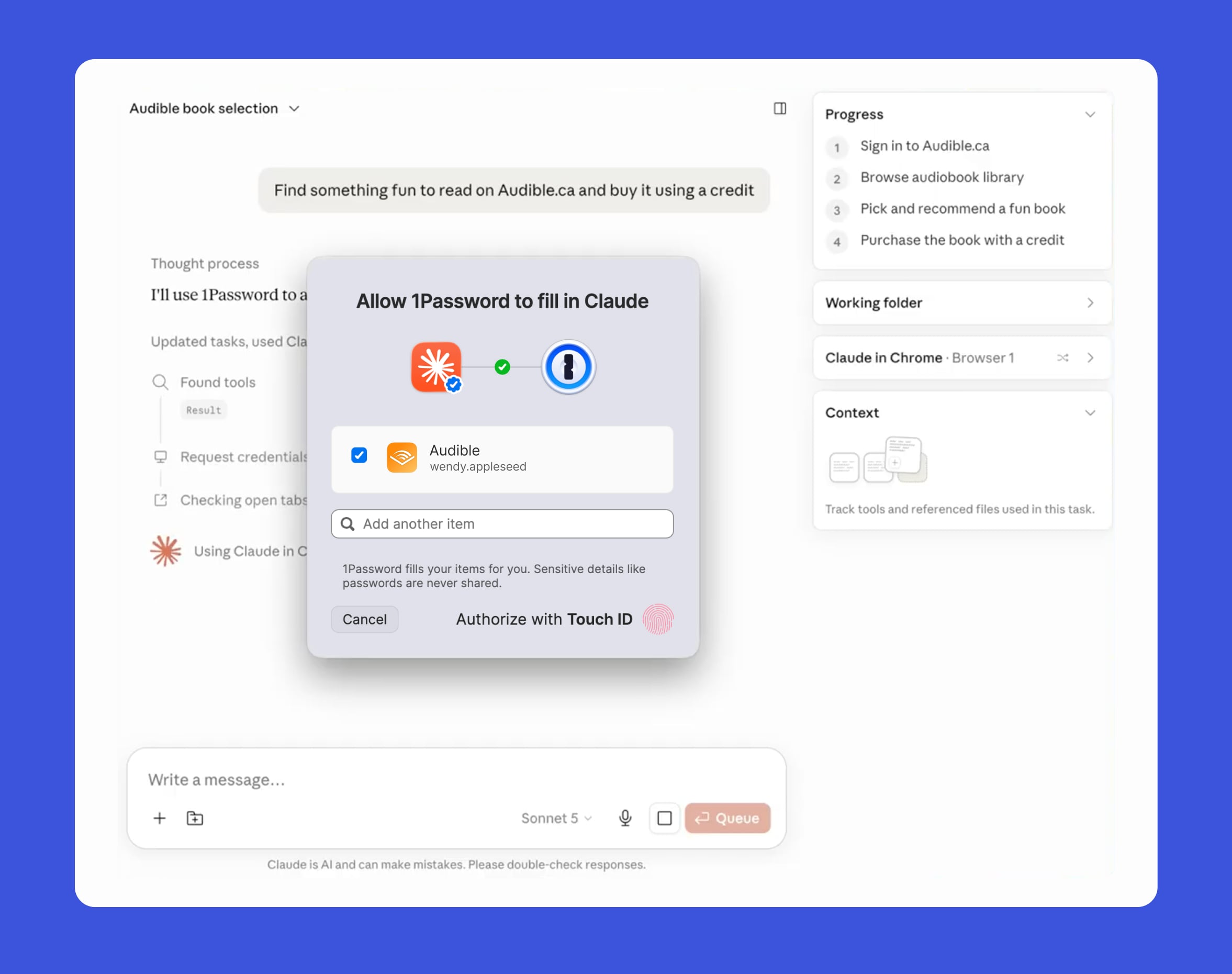
With the integration, Claude can use 1Password logins and one-time codes without the actual password being exposed to Claude. Passwords never reach Claude's context, memory, or Anthropic's systems.

When Claude wants to sign in to a website, 1Password shows the user which credential Claude wants access to and why. After the user approves the request, 1Password adds the credential directly to the page. Access is limited to the current task and ends when the task has been completed. The 1Password team says that after a password is autofilled, the app checks to make sure secrets were not exposed on the page.


Credit cards and identities in 1Password are not supported at the current time, so Claude's access is limited to logins and one-time codes.

The 1Password browser extension is also being updated with Agentic Mode, which gives users control over browser-based AI agents. When an AI agent takes over, the 1Password extension locks down so passwords are not exposed. The password interface is hidden, and the agent can use logins and one-time codes only when the user gives approval. Agentic Mode works to protect passwords from AI agents even if the integration is not set up.

1Password for Claude is available for Mac, and 1Password business, family, and individual plan subscribers can use it. A Pro, Max, Team, or Enterprise Claude plan is required. 1Password has a help document with detailed information on how to set it up.

Claude can use 1Password logins across sites where Claude in Chrome can complete actions. The 1Password desktop app and browser extension are required, as are the Claude desktop app and the Claude in Chrome browser extension.
This article, "1Password for Claude Lets AI Log In Without Seeing Your Passwords" first appeared on MacRumors.com

Discuss this article in our forums

  •  

Google and Epic Abandon Injunction Modification Request, Clearing the Way for Rival Android App Stores

Google and Epic Games this week withdrew their joint motion to modify an injunction requiring Google to support third-party app stores in Google Play. The two companies abandoned the request after it became clear the court was unlikely to allow it.


Google is now bound by a permanent injunction issued in October 2024 requiring it to allow alternative app stores on Android devices. In a court filing [PDF], Google said that it plans to begin supporting alternative app stores on July 22. In a statement to The Verge, Google said it decided to withdraw the motion to avoid a prolonged legal fight.
We've agreed with Epic to withdraw our motion to modify the US Court's injunction rather than prolonging this process which creates uncertainty for the ecosystem. This allows us to focus on executing our recently announced global business model evolution to deliver greater app store choice, lower prices, and more opportunities for developers and users. We remain committed to maintaining Android's industry-leading security and fostering a competitive ecosystem where every app store and developer has the freedom to compete. In parallel, we continue to comply with the US Court's injunction.

‌Epic Games‌ sued Google at the same time that it sued Apple, but the cases had different judges and different outcomes. The lawsuit largely went in Apple's favor, but ‌Epic Games‌ came out ahead in the Google case after a jury found Google abused its power by operating an app store monopoly and charging developers fees that were too high.

Third-party U.S. app stores will now be able to distribute the Google Play catalog of apps, and Google has published a guide on the process. The app stores will be available through the Google Play Store, and Google will charge alternative marketplaces a $5,000 annual access fee. Apps downloaded through alternative stores will still use the Google Play system, and Google will collect its service fee on those transactions.

Google's agreement with Epic Games to lower fees for apps and accept alternative payment options is separate from the injunction requiring it to support third-party marketplaces in the Play Store, and it remains in place. Google is still adding support for outside payment methods and lowering its fees.

The injunction forcing Google to support third-party app stores doesn't have a direct impact on Apple, but it is a legal outcome Apple has been fighting worldwide. The European Union's Digital Markets Act requires Apple to support alternative app marketplaces and app sideloading in the EU, and Apple has repeatedly said the requirement weakens user privacy and protections. Google adding support for third-party app stores through the Android Play Store could eventually impact Apple's own Epic fight or future regulatory changes.

Though Apple largely won its legal fight against ‌Epic Games‌, the case is ongoing. Apple was ordered to allow link-outs and alternative payment options in the U.S. in 2021, and compliance problems later led to a contempt ruling. Apple has now appealed to the Supreme Court, and the court will hear Apple's argument in late 2026 or early 2027.

Update: This article was updated to clarify that Google and ‌Epic Games‌ have not abandoned their settlement, but have withdrawn their joint motion to modify the injunction requiring Google to support third-party app stores on its Android platform.

Google asked the court to allow it to distribute third-party app stores on Google Play through the Registered App Stores program that it plans to roll out worldwide later this year, but Google will now support one program in the U.S. and one program in other countries.

The ‌Epic Games‌ and Google settlement is intact and will see Google lowering fees. The agreement addresses litigation in Australia and the UK as well as the U.S.
This article, "Google and Epic Abandon Injunction Modification Request, Clearing the Way for Rival Android App Stores" first appeared on MacRumors.com

Discuss this article in our forums

  •  

CrashStealer Malware Impersonates Apple Tool to Steal Mac Passwords and Crypto

Mac users should watch out for macOS malware called CrashStealer, according to Jamf Threat Labs. The malware impersonates Apple's crash reporting framework, and it's meant to steal all kinds of sensitive information.


CrashStealer collects browser data, password manager data, cryptocurrency wallet extensions, and keychain data, and Jamf first noticed it circulating in a fake Apple-notarized app called Werkbit. With notarization, the malware is not stopped by Gatekeeper, which is part of the macOS security system.

It targets more than 80 cryptocurrency wallet extensions, and 14 password managers like 1Password, LastPass, and Dashlane. It searches through the Document and Downloads folders to look for information worth collecting.

The app looks legitimate and uses a typical macOS install procedure for software downloaded through the web, with the process detailed on Jamf's website. A fake CrashReporter.app is downloaded through Werkbit, and it's meant to impersonate Apple's own crash reporter. A user clicking on the app would likely see it as a legitimate Apple utility.

It requests full disk access "for system administration," and uses a native password prompt that looks like a genuine macOS authorization request. The password entered is used to access the login keychain. Data collected is encrypted with AES–256-GCM through Apple's CommonCrypto and sent to the attacker's IP address.

Jamf says the way CrashStealer was implemented "shows real care," with the concealment steps setting it apart from standard infostealers. The malware was reported to Apple after first being spotted in May and found actively in use in July.

Apple revoked the Werkbit app's signing credentials, so the specific attack vector outlined by Jamf has been disabled, but the malware could surface again. The original version was gated behind a PIN required for installation, suggesting it was aimed at specific people.

Apple's notarization system is meant to protect Mac users from malware, and Apple says that notarized apps are checked for malicious components. CrashStealer makes it clear there are methods for hiding malware from Apple's security process.

When downloading software, users can protect themselves from CrashStealer by being aware that Apple's crash reporter is built-in. Any download that uses CrashReporter is a red flag, as is an app that asks for a system password right when it's launched.
Tag: Malware

This article, "CrashStealer Malware Impersonates Apple Tool to Steal Mac Passwords and Crypto" first appeared on MacRumors.com

Discuss this article in our forums

  •  

Apple Closes Unlocked iPhone Loophole for T-Mobile and Verizon Financing

Carrier-financed iPhones purchased from Apple will soon be locked to the carrier, ending a workaround customers used to purchase an unlocked iPhone on a payment plan.


Until the rule change, buying an iPhone from Apple and opting for financing through Verizon or T-Mobile meant you would get an iPhone not locked to either carrier's network. That's no longer the case, and now iPhones financed through Verizon or T-Mobile will not be able to be used with a different network. AT&T-financed smartphones were always locked to the AT&T network.

Apple's new policy was highlighted on Reddit after a user saw a new "Will my iPhone be unlocked?" FAQ item.
In most cases, yes. An iPhone purchased from Apple is unlocked. Once your new iPhone is activated, it remains unlocked, which means you can use it with any carrier that provides service for iPhone. However, if you choose to finance an iPhone through the AT&T Installment Plan, T-Mobile Equipment Installment Plan, or Verizon Device Payment Program, your iPhone will be locked to the carrier until paid in full.

An unlocked smartphone means it can be used with any carrier, while a locked smartphone is limited to the carrier it was purchased through. Locked smartphones can be problematic when traveling internationally, because activating a second eSIM for another network is blocked.

Apple hasn't said why it's making the change, but buyers were able to use carrier trade-ins and promotional discounts to get an unlocked iPhone. Some buyers may have purchased iPhones and sold them off without making the carrier payments, and carrier locking is a standard practice to prevent unpaid devices from being resold.

Apple's checkout process still says iPhones financed through T-Mobile and Verizon are unlocked, so the new policy may not have gone into effect yet.

iPhones purchased outright or with Apple Card Monthly Installments remain unlocked from the time of purchase. When iPhones purchased through carrier plans are paid off, they are unlocked.
This article, "Apple Closes Unlocked iPhone Loophole for T-Mobile and Verizon Financing" first appeared on MacRumors.com

Discuss this article in our forums

  •  

AppleCare+ for Macs and iPads Just Got More Expensive

Apple is increasing the price of some AppleCare+ subscription plans, reports Bloomberg. Monthly ‌AppleCare‌+ subscription plans for Macs and iPads are now $0.50 more expensive in the U.S., while annual plans are $5 more.


The price increases apply to new subscriptions, so customers who already have an ‌AppleCare‌+ subscription for a device will keep their current prices.

The ‌AppleCare‌+ pricing change follows price hikes on all iPads and Macs due to global memory shortages and increasing component costs. Price increases range from $100 to $1,300.

Apple has not raised the price of its ‌AppleCare‌ One subscription plan that rolled out last year. ‌AppleCare‌ One covers up to three Apple devices with a $19.99 per month fee. Additional products can be added to ‌AppleCare‌ One for $5.99 per month.

Apple previously increased iPhone ‌AppleCare‌+ plans by 50 cents in early 2025, and prices could go up again when the new iPhones launch this September.
This article, "AppleCare+ for Macs and iPads Just Got More Expensive" first appeared on MacRumors.com

Discuss this article in our forums

  •  

Apple Won't Allow These Ad Categories in the Maps App

Apple this week shared a new Advertising Services policy outlining the kinds of ads that won't be allowed in the Maps app.


As noted by TechCrunch, Apple has a list of ad categories that are not permitted in Apple Maps.

  • Home services - Ads that directly or indirectly promote home services are not allowed. That includes but is not limited to plumbing, electrical, locksmith, HVAC, pest control, roofing, and general contracting services.

  • Bail bonds - Ad content that directly or indirectly promotes bail bond services or surety bond services related to criminal pretrial release is not allowed.

  • Cryptocurrency ATMs - Ad content that directly or indirectly promotes ATMs for cryptocurrencies is prohibited.


Apple says ads that promote or reference medical services may be allowed, and will be evaluated on a case-by-case basis.

Google allows home services ads, and it's one of the largest local ad categories, so Apple's restrictions will set it apart. Apple seems to be limiting ads to businesses with a physical location that customers can visit.

In addition to these rules, Maps ads have to adhere to Apple's other advertising rules. Apple does not allow ads for controlled or intoxicating substances like marijuana or tobacco, and it has a long list of rules for alcohol-related ads, dietary supplement ads, financial product ads, religious ads, gambling ads, prescription drug ads, and contest ads. Ad content for weapons or ammunition isn't allowed, and ad content that contains or promotes violence, harm, or antisocial behavior is prohibited.

Ads that promote false, fraudulent, or deceptive claims are not allowed, nor are ads that include defamatory or profane content, discriminatory content, illegal or criminal content, or intellectual property violations.

Anti-Apple ads are prohibited, as are ads that promote or facilitate the sale of products or services that compete with Apple hardware products. Apple also does not allow political ads, ads with unproven health-related products and services, or ads with offensive, controversial, or inappropriate content.

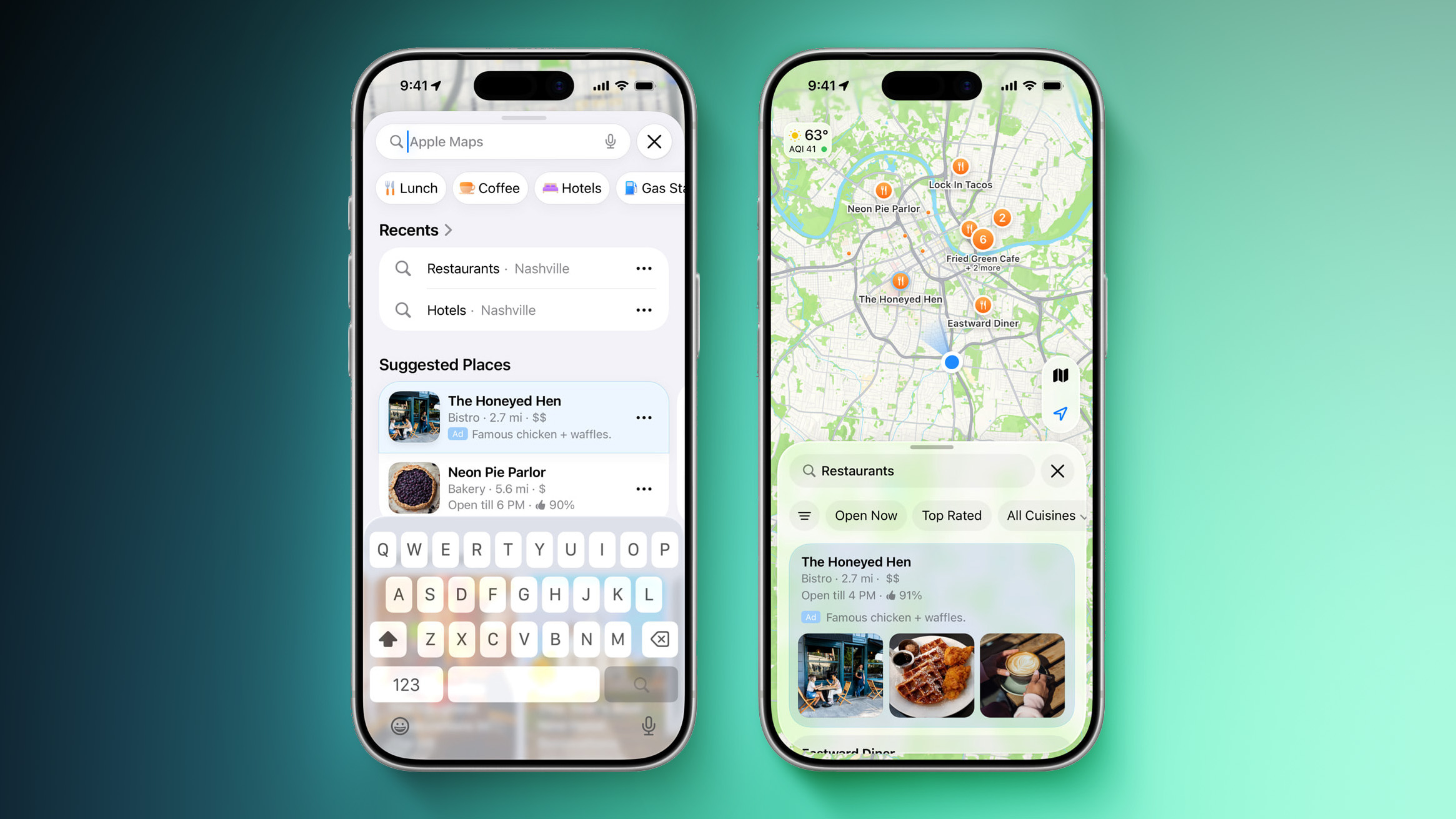
Apple plans to start showing ads in the Maps app in the United States and Canada this summer. Ads will show up in search results and in the Suggested Places section of the app.

Ads will have a clear "Ad" label, and a user's location and the ads they see and interact with in ‌Apple Maps‌ are not associated with their Apple account. Apple also does not collect ad data or share it with third parties.
This article, "Apple Won't Allow These Ad Categories in the Maps App" first appeared on MacRumors.com

Discuss this article in our forums

  •  

Apple's 2026 Smart Home Lineup: New Apple TV, HomePod, and Home Hub

Now that Siri AI is ready to launch in iOS 27, iPadOS 27, and macOS 27 Golden Gate, Apple can finally introduce new smart home products built to work with the smarter version of ‌Siri‌.


Apple has multiple new home devices in development, several of which are rumored to launch before the end of the year. We're waiting on a new version of the Apple TV 4K, a smart home hub, a new HomePod, and a new HomePod mini.

Home Hub


Similar to an iPad in design, but with a 7-inch square display. There will be a wall mount option or a speaker base option. The speaker base has a hemispherical dome, similar to the base of the iMac G4. The device will have a built-in camera for video calls, facial recognition, and presence detection. It'll run apps like Safari, Calendar, Photos, and Home, and it will integrate with ‌Siri‌ AI. Rumors suggest it could be priced around $350.

Apple TV 4K


The next ‌Apple TV‌ 4K will have the same form factor as the current model, but it's expected to have an A17 Pro chip or better that supports Apple Intelligence and ‌Siri‌ AI. There are no ‌Apple Intelligence‌ features on the ‌Apple TV‌ right now, so a more powerful chip will bring quite a few changes. It could also get more RAM and Apple's N1 networking chip for Wi-Fi 7, Bluetooth 6, and Thread.

HomePods


Apple is expected to refresh both the ‌HomePod‌ and the ‌HomePod mini‌, but we're not expecting new form factors.

The speakers will get new chips that are faster and could support ‌Siri‌ AI via the iPhone like the Apple Watch. A faster processor could bring improvements in sound quality, and an upgraded Ultra Wideband chip could bring connectivity improvements and new features.

The ‌HomePod mini‌ is expected to get new colors.

Cameras


Apple is designing its own security camera, and it could launch as soon as this year. HomeKit Secure Video cameras are getting several upgrades in ‌iOS 27‌, including 4K video recording, AI summaries, and the option to stitch video from different cameras together for tracking a single event across rooms.

All of these features would be ideal for an Apple-created camera, so it's not hard to imagine the update is meant for Apple hardware. A 2026 launch isn't a sure thing for the camera, and it could come at a later time.

The ‌Apple Intelligence‌ Home app features require an ‌Apple TV‌ or ‌HomePod‌ to serve as a hub, and Apple's upcoming home hub will likely also serve as a hub for accessories like cameras.

Launch Timing


With so many home devices planned for the end of the year, we could get them alongside the new iPhone models at Apple's September event, or Apple could do a second home-centric event around the October timeframe. Apple often holds two fall events. The second event is typically for iPads or Macs, but there's no reason it couldn't be home products this year.

So far, we haven't heard concrete rumors on when Apple will debut its smart home devices, but as we get closer to fall, we should hear more.
Related Roundups: Apple TV, HomePod

This article, "Apple's 2026 Smart Home Lineup: New Apple TV, HomePod, and Home Hub" first appeared on MacRumors.com

Discuss this article in our forums

  •  

LEGO Considering Bondi Blue iMac G3 Set

LEGO today said the iMac G3 project submitted for consideration on its "Ideas" site has been moved to Parking Lot status, which means it hasn't been ruled out and could still possibly be turned into an official LEGO set.


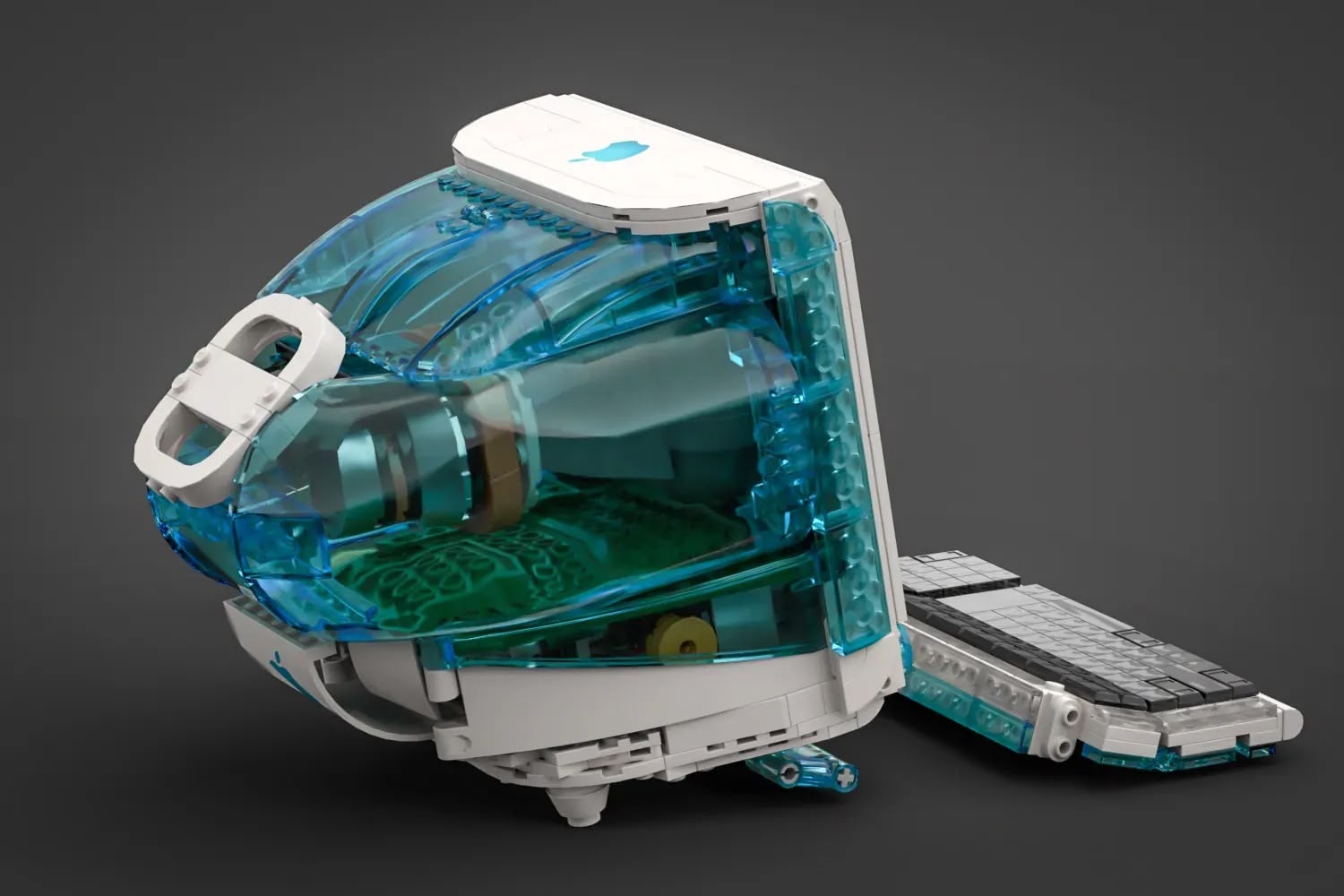
On its "Ideas" website, LEGO lets fans submit mockups and suggestions for future LEGO sets. Any project that gets at least 10,000 votes goes to the LEGO Review Board and has a chance to become a LEGO set. Back in August 2025, LEGO fan terauma submitted a recreation of Apple's 1998 ‌iMac‌ G3 in Bondi Blue.


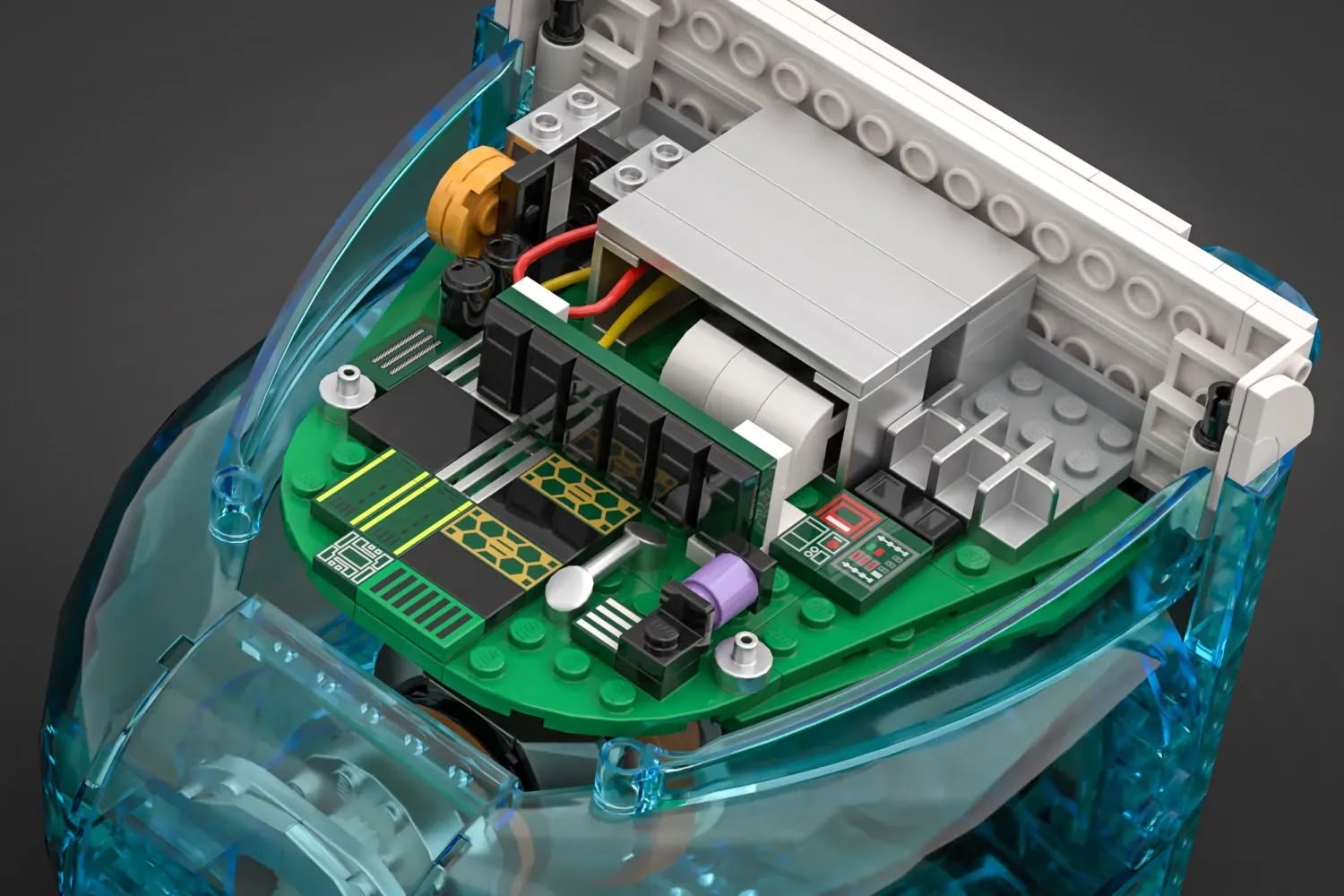
The LEGO creation captures the distinctive look of the ‌iMac‌ G3, featuring an all-in-one computer design, "hockey puck" mouse, matching keyboard, and accompanying cables. The design uses translucent blue LEGO pieces in a shade close to Bondi Blue, and the interior has details like a cathode ray tube and a circuit board.

The design successfully reached 10,000 supporters to make it to the LEGO Ideas team, and LEGO has been considering turning it into a set. Parking Lot status means LEGO needs more time to review the project, and in this case, LEGO could be communicating with Apple for permission.


Many Ideas set proposals get early rejections, so it's somewhat promising that LEGO is taking the time to further consider making an ‌iMac‌ G3 LEGO set. The Downton Abbey and The Old Man and the Sea LEGO sets were in the Parking Lot before making it to production.

The third 2025 Ideas review round that the ‌iMac‌ G3 set was in had 75 total qualifying ideas. Three were chosen to become sets, four (including the ‌iMac‌ G3) were given Parking Lot status for further consideration, and the rest were rejected. Projects can remain in the Parking Lot for up to three review periods before a final decision is made.

LEGO will share updates in the future on whether the ‌iMac‌ G3 project will move forward or will be rejected. A LEGO Apple Store proposal went through the same process, but it was rejected outright.
Related Roundup: iMac
Tag: LEGO
Buyer's Guide: iMac (Don't Buy)
Related Forum: iMac

This article, "LEGO Considering Bondi Blue iMac G3 Set" first appeared on MacRumors.com

Discuss this article in our forums

  •  

OpenAI's First AI Device Will Be a Portable Smart Speaker

OpenAI's first AI hardware product is a mobile smart speaker without a display, reports Bloomberg. The device is at the heart of a new legal dispute with Apple, with Apple accusing OpenAI of stealing trade secrets that have contributed to the development of the product.


OpenAI's speaker-like product is designed to "serve as a humanlike AI companion that lives in the home," according to Bloomberg. It will be able to control smart home accessories, answer questions, play media, respond to messages, and more, with the device powered by ChatGPT. It is meant to learn more about the user over time, becoming more personalized and proactive, using GPT-Live to communicate with users.

The device will have a personality, and will be able to "connect on a humanlike level with users." It has mechanical elements that can move on their own, to create a sense that the device is alive. There's also a camera so it can understand a user's surroundings. The AI product includes a rechargeable battery and it can be carried from room to room.

OpenAI CEO Sam Altman and former Apple designer Jony Ive have teased the device several times, suggesting it will have "incredible contextual awareness" about a user's life, and describing it as a new type of computer built for AI. The two have suggested prototypes are "jaw-droppingly good" and "exciting."

In a lawsuit filed against OpenAI for theft of trade secrets, Apple claims OpenAI used its confidential information developing the AI device, including gaining access to a proprietary metal finishing technique. "OpenAI's nascent hardware business now rests on the shakiest of foundations, rotten to its core by its illegal reliance on misappropriated trade secrets," reads Apple's filing.

People familiar with the project told Bloomberg that the device is different from anything Apple has on the market today, and it is "unlikely" it violates Apple trade secrets. Though Apple has the HomePod and HomePod mini speakers, OpenAI does not see Apple's speakers as comparable to its hardware product.

Apple is also working on a home hub device that sounds similar to what OpenAI is developing. Apple's smart home hub is rumored to have a 7-inch square display, a speaker, a camera for video chats and facial recognition, and Siri AI integration.

Initial rumors suggested OpenAI's hardware device could come out as soon as 2026, but it's now not expected to launch until 2027. OpenAI could unveil the AI product this year ahead of its 2027 release, but the Apple lawsuit could change the timing. Apple has asked the court for an injunction, and if granted, OpenAI could be prohibited from releasing hardware.
Tag: OpenAI

This article, "OpenAI's First AI Device Will Be a Portable Smart Speaker" first appeared on MacRumors.com

Discuss this article in our forums

  •  

OpenAI: No Evidence Apple's Trade Secret Complaint Has Merit

OpenAI says it is "not aware" of any evidence that Apple's allegations of trade secret theft have merit in a statement provided to Bloomberg.

While we take these allegations seriously, we're not aware of any evidence that this complaint has merit. We believe in fair competition and allowing people the freedom to work wherever they choose, and we're focused on building innovative technology that empowers people everywhere.

Apple filed a lawsuit against OpenAI on Friday, accusing the company of intellectual property theft. Apple said OpenAI employees Tang Tan and Chang Liu schemed to steal confidential Apple information to further hardware development at OpenAI. Tan is OpenAI's Chief Hardware Officer and a 24-year Apple veteran who led product design, while Liu is on the hardware team at OpenAI after working as a senior system electrical engineer at Apple.

Tan and Liu allegedly asked Apple employees interviewing at OpenAI to come prepared with details on unreleased devices, components, manufacturing processes, and vendor relationships. Liu is also accused of keeping an Apple-issued laptop and exploiting an authentication bug to view confidential documents while working at OpenAI. From the lawsuit:
This is the tip of the iceberg. Apple lacks visibility into what's been happening behind closed doors at OpenAI, where such misconduct is normalized and exemplified by leadership. This much is clear, however: at every level, from members of its Technical Staff to its Chief Hardware Officer, and in coordination with business partners, OpenAI has been stealing Apple's trade secrets and confidential information. As a natural result, OpenAI's nascent hardware business now rests on the shakiest of foundations, rotten to its core by its illegal reliance on misappropriated trade secrets.

When Apple first filed the suit, OpenAI gave a dismissive response. "We have no interest in other companies' trade secrets," said OpenAI spokesperson Drew Pusateri. "We remain focused on building innovative technology that empowers people everywhere."

OpenAI's new statement about employee mobility hints at how it will frame the case publicly. In the lawsuit, Apple said more than 400 Apple employees have migrated to OpenAI, so OpenAI can point to its hiring of former Apple employees as motivation for Apple's lawsuit.

Apple is aiming for a jury trial, and is hoping to uncover more evidence through discovery. Apple has requested an injunction requiring OpenAI to cease using any Apple information during the development of OpenAI's AI hardware device. Apple is also seeking damages and suing Tan and Liu for breach of contract for violating their employment agreements.
This article, "OpenAI: No Evidence Apple's Trade Secret Complaint Has Merit" first appeared on MacRumors.com

Discuss this article in our forums

  •  

Apple Releases New iOS 27 AirPods Firmware For Public Beta Testers

Apple today released new AirPods beta firmware available for public testers. The firmware has a build number of 9A5314b, and it is available for the AirPods Pro 2, AirPods Pro 3, AirPods 4, and AirPods Max 2. The public beta firmware is identical to the third developer beta Apple released last week.


In iOS 27, iPadOS 27, and macOS Golden Gate, Apple is adding a new AirPods interface, a slider for Adaptive mode, and support for custom EQ, so the firmware lets public beta testers use those features. AirPods are also compatible with the new Siri AI.

When the AirPods are connected to an iPhone, iPad, or Mac running iOS 26, iPadOS 26, or macOS 26 or later, there is a beta firmware option that can be accessed in the AirPods settings interface. Toggling on beta updates allows users to install the beta firmware.

Firmware updates can be downloaded by connecting the AirPods to an Apple device and connecting them to power. It can take a few hours for new firmware to be installed because there is no straightforward software update option like there is for other Apple devices.
Related Roundups: AirPods 4, iOS 27, iPadOS 27
Buyer's Guide: AirPods (Caution)
Related Forum: AirPods

This article, "Apple Releases New iOS 27 AirPods Firmware For Public Beta Testers" first appeared on MacRumors.com

Discuss this article in our forums

  •  

macOS Golden Gate Public Beta: 10 Features to Try First

macOS 27 Golden Gate is available to public beta testers as of this week, which means you can try out Siri AI and the other changes coming in the update before it launches this fall.


We don't recommend betas for devices that serve a critical function, and it's always best to test on a secondary device. macOS Golden Gate is a stable beta compared to past releases, but it's still in development and there can be some bugs to contend with. Before installing the update, make sure to create a Time Machine backup so you can go back to macOS Tahoe if you need to.

Liquid Glass


Apple added a Liquid Glass slider in macOS 27, and you can adjust the transparency level. You can select a clearer version of Liquid Glass that lets some of the background show through, or a more opaque version for improved legibility. Since it's a slider, you can also pick something in between.

Apple also tweaked the overall opacity of Liquid Glass, and it better diffuses complex content behind navigation bars and buttons. Darkened edges and brighter specular highlights add more depth and separation for different UI elements.

Toolbars, Sidebars, and Windows


Uniform toolbars in apps make text headings and groups of controls more legible, and Apple has cut back on the number of icons that are used in menu interfaces. Windows have the same corner radius for more consistency, and you'll notice that app corners are not as dramatically rounded.

Changes to window shadows and the Liquid Glass updates make it a lot easier to tell which window is active when you have several apps open.

Sidebars no longer float and are edge-to-edge, which is a less distracting design. Sidebar icons once again use color, too.

Siri AI


‌Siri‌ AI is the biggest change in ‌macOS Golden Gate‌. ‌Siri‌ is smarter, more capable, and functions like a chatbot. On the Mac, you can ask ‌Siri‌ anything using the Spotlight interface that comes up with Command + Space. Spotlight is now a unified "Search or Ask" bar where you can search for files, apps, and other content, or ask ‌Siri‌ to complete tasks or answer queries.

You can also interact with ‌Siri‌ using the dedicated ‌Siri‌ app, which is where you can view past conversations and start new conversations. ‌Siri‌ conversations sync across all of your devices, and the ‌Siri‌ app is cross-platform.

‌Siri‌ can see what's on your screen and access your personal information like emails, messages, and photos to answer questions. ‌Siri‌ can also search the web and complete tasks in apps for you. It's a huge change from the prior version of ‌Siri‌, and ‌Siri‌ can handle far more than it could before.

We have more on some of the tasks you can complete with ‌Siri‌ in our Siri AI guide.

Visual Intelligence


Apple brought the iPhone's Visual Intelligence feature to the Mac in macOS 27. You can ask ‌Siri‌ questions about what's on your screen with ‌Visual Intelligence‌, choosing the entire screen or just a portion.

‌Visual Intelligence‌ on the Mac works when you press Command + Shift + Space or Command + Shift + 6 to capture one area of the display. If you press Command + Shift + 5 (also used for recording your display and capturing screenshots), you can click on the ‌Visual Intelligence‌ icon to get an adjustable selection square for selecting an area of the screen.

‌Siri‌ can search for images, summarize, translate, identify objects, add information from the screen to apps like Calendar or Reminders, answer questions about what you're looking at, and more. ‌Visual Intelligence‌ on Mac has all of the same features as Visual Intelligence on iPhone, and it includes the new ‌Visual Intelligence‌ features like telling you nutritional information for food or splitting out a bill.

Write with Siri


There is a system-wide Write with ‌Siri‌ feature that goes beyond the Apple Intelligence Writing Tools available in ‌macOS Tahoe‌. ‌Siri‌ can compose entire emails or messages for you, give you feedback on your writing, change out words, and complete other editing tasks.

To use Write with ‌Siri‌ on Mac, right-click in an app and choose the Ask ‌Siri‌ option. If you select text before the right-click, you can ask ‌Siri‌ for editing help. If you have a blank document, you can ask ‌Siri‌ to generate something for you. When drafting emails or messages, ‌Siri‌ can analyze your past communications and generate something in your own writing style.

Apple also expanded spell correction in ‌macOS Golden Gate‌, and your Mac will now also give you grammar suggestions and fixes.

iPhone Mirroring


You can resize the iPhone Mirroring window in ‌macOS Golden Gate‌, dragging at the corner to make a window larger or smaller. Depending on the app, you may be limited to a portrait iPhone aspect ratio, but other apps support iPad or landscape layouts.

Shortcuts


It's easier for anyone to create a Shortcut in just a few minutes in ‌macOS Golden Gate‌. The Shortcuts app on Mac opens to an interface that lets you describe what you want a shortcut to do using natural language.

AI creates the shortcut for you, and you can refine it with further natural language commands or manually edit it. You can activate your shortcuts through the app or with ‌Siri‌ commands.

Safari Extensions


Safari has a customizable extension feature in ‌macOS Golden Gate‌, and you can use the Describe Extension option to type in what you want an extension to do. The extension is created using AI and is available to use right away.

To use it, click on the settings icon on the right side of the URL bar and choose the Describe Extension option. Some Apple examples:

  • Display a reading time estimate as a badge on the extension

  • Close duplicate tabs pointing to the same URL when I click the extension

  • Highlight this word

  • Create a 3-minute focus timer for the page

  • Set the minimum font size to 14pt

  • Every time I open a new tab, draw me a flower

  • Highlight and show the dimensions of webpage elements when I click them

  • Enter design mode for a website so that I can edit the contents

  • Save this recipe


Safari Tab Grouping and Notifications


Safari also has an intelligent tab grouping feature. Tabs in related categories are automatically grouped together in the tab view.

You can also set Safari to monitor a webpage for updates, with Hourly, Daily, Weekly, and Monthly checks available. When you set this feature up, you'll get a notification when the content on the webpage changes.

Performance Improvements


In addition to introducing ‌Siri‌ and new ‌Apple Intelligence‌ features, ‌macOS Golden Gate‌ cleans up underlying code. Apple made multiple refinements to speed up performance.

Animations and interactions are faster and smoother, and you'll notice a difference when scrolling Safari and other apps, opening Mission Control and Spaces, and using other Mac interface elements.

AirDrop transfers complete more quickly, browsing through files on attached network devices is faster, and window positioning is more stable when using external displays. Messages also sync faster and more reliably across devices.

Apple rebuilt its search foundation for Spotlight, Photos, Mail, and Messages, and indexing is quicker. When you search for something recent, it's more likely to come up right away than before, and in Mail, there's a ranking system that surfaces the emails you're most likely looking for. Mail search indexing is more reliable than before, and Spotlight search suggestions are more relevant.

How to Install


Sign up on Apple's beta testing website, then open up the System Settings app. From there, click on General > Software Update and under the Beta Updates section, click on the "i" to choose macOS 27 Golden Gate Public Beta.

After that, you can install ‌macOS Golden Gate‌ like any other software update.

System Requirements


‌macOS Golden Gate‌ runs on Macs with an M1 chip or later, plus the A18 Pro MacBook Neo. Intel Macs do not support ‌macOS Golden Gate‌ and won't get the new features.

Every Mac that runs ‌macOS Golden Gate‌ supports ‌Apple Intelligence‌ and ‌Siri‌ AI, but some on-device ‌Siri‌ processing features for selecting a natural voice and getting upgraded dictation require an M3 or later.

‌Siri‌ AI is not available in the European Union or China right now, and won't be available when the update launches this fall either.
Related Roundup: macOS Golden Gate

This article, "macOS Golden Gate Public Beta: 10 Features to Try First" first appeared on MacRumors.com

Discuss this article in our forums

  •  

iOS 27 Public Beta Is Here: 10 New Features Worth Testing

Apple released the iOS 27 public beta today, and if you've been curious about the new software, now's the time to try it out. ‌iOS 27‌ brings Siri AI, performance improvements, and lots of new Apple Intelligence features. With the public betas, you don't need to wait until September to see what's new.


‌iOS 27‌ is one of Apple's most stable betas compared to prior years. We never recommend installing a beta on a main device, especially if you rely on important health apps, but if you have a secondary device or can live with a few bugs, the software is worth checking out.

Performance Improvements


Apple sped up a long list of features in ‌iOS 27‌, and it's immediately noticeable when you download the software.

Everything feels snappier than it did in iOS 26. Animations are quicker, apps launch faster, and AirDrop transfers complete faster. You'll see improvements when taking photos, opening the keyboard, using the App Library, and swapping Home Screen pages. Your iMessages between devices sync more accurately, messages won't fail to send and will be automatically retried, and your iPhone can transition more smoothly between Wi-Fi and cellular.

The majority of new features in ‌iOS 27‌ require ‌Apple Intelligence‌ and an iPhone 15 Pro or later, but the under-the-hood improvements are available on all iPhones, and even older iPhones will feel faster.

Siri AI


‌Siri‌ got a total overhaul in ‌iOS 27‌, and it's now "‌Siri‌ AI." It's more like ChatGPT or Claude than the prior version of ‌Siri‌, with support for back-and-forth conversations. ‌Siri‌ AI can do a lot of what other AI chatbots can do, but unlike other AI options, ‌Siri‌ has private access to your messages, emails, photos, apps, and other personal data so it can complete a wider range of tasks. ‌Siri‌ can also search the web, so it can answer all kinds of queries.

You can activate ‌Siri‌ with a wake word, swipe down from the middle of your screen to type a question to ‌Siri‌, chat with ‌Siri‌ in the ‌Siri‌ app, or press the side button to activate ‌Siri‌.

Some examples of what ‌Siri‌ is now able to do:

  • Create home automations with a command like lock all the doors at midnight.

  • Find specific emails, messages, photos, images, links, files, and other documents people have sent to you. You can ask based on person, time, location, and more.

  • Delete files, emails, photos, or messages.

  • Add all items from a recipe on a website to a shopping list.

  • Recommend activities, places, and restaurants you might like based on what it knows about you.

  • Look at something on your screen like a website and answer questions about it.

  • Answer general knowledge questions.

  • Add information about people to the Contacts app when asked, like birthdays or additional phone numbers.

  • Find passwords for websites and apps that are stored in the Passwords app.


For more on some of the commands you can use with ‌Siri‌, we have a dedicated Siri AI guide.

Visual Intelligence


Visual Intelligence is accessible through the Camera app with a new ‌Siri‌ mode that you can choose as an alternative to photo and video modes. It works the same as it did before, but it's easier to get to.

There are new ‌Visual Intelligence‌ features, and ‌Siri‌ can do things like tell you the nutritional value of something you're about to eat, or calculate what everyone owes from an image of a receipt. We have more examples in our iOS 27 Visual Intelligence guide.

Write with Siri


‌Siri‌ can generate text from scratch in ‌iOS 27‌, and there's a system-wide Write with ‌Siri‌ feature you can get to from the keyboard. ‌Siri‌ can help you write, give you feedback on what you've written, change the tone or wording of your writing, and even write in your style by analyzing your emails and messages.

Your iPhone also automatically suggests grammar fixes in addition to spelling fixes.

Photos Clean Up


The Clean Up tool that removes unwanted objects from images in the Photos app is much improved in ‌iOS 27‌, and it does a better job cleanly removing what you don't want and filling in what's missing more convincingly.

There are also new image tools for extending the borders of a photo using AI, and changing the perspective or composition of an image.

Our full iOS 27 Photos guide goes through all of the new features.

Passwords


If you use the Passwords app, there's a new feature that uses Safari to automatically change weak and compromised passwords for you. It requires a device that supports ‌Apple Intelligence‌.

Safari


You can create custom extensions with natural language commands in Safari, which is useful for when you want to do something specific but there isn't a good extension available. Some sample suggestions, from Apple:

  • Create a citation for the current webpage and copy it to my clipboard

  • Create a 3-minute focus timer for the page

  • Set the minimum font size to 14pt

  • Turn the page into pirate speak

  • Style websites like 90s websites with bold colors and type

  • Every time I open a new tab, draw me a different flower

  • Highlight and show the dimensions of webpage elements when I tap on them

  • Enter the design mode for a website so that I can edit the contents


Safari can also automatically organize your tabs into categories and watch a webpage and let you know if there are changes. For more, read our iOS 27 Safari guide.

Home App


Use HomeKit Secure Video cameras? They now support 2K and 4K recording. There's also a new AI feature that gives you text descriptions for what's happening in your home, and there's an option to search through videos using natural language to find something you're looking for.

The AI features will require a 2TB iCloud+ plan at launch, but the 4K streaming doesn't.

For more on what's new in the Home app, check out our iOS 27 Home guide.

AirPods EQ


If you've ever wanted to adjust the sound of your AirPods, you can do so with new AirPods customization options that let you tweak mids, highs, and lows. Custom EQ is available for AirPods 4, AirPods Pro 2, AirPods Pro 3, and AirPods Max 2.

Shortcuts


If you find the Shortcuts app intimidating, it's easier to use in ‌iOS 27‌. You can tell the Shortcuts app what you want to be able to accomplish with a shortcut, and it'll make it using AI. You can then refine it with further natural language requests, or manually edit.

How to Install the Beta


You can sign up for the ‌iOS 27‌ beta (and any other betas) using Apple's public beta website. Once you're signed up, you can go to Settings > General > Software Update and then choose the ‌iOS 27‌ Public Beta to install the update.

Make sure to create a backup before you install the beta just in case you want to downgrade back to ‌iOS 26‌ later.

Beta Reminders


‌iOS 27‌ is still very much a beta, and this is not the final version of the software we'll see in September. Apple is still refining ‌Siri‌ AI and ‌Apple Intelligence‌ features, as well as addressing bugs and tweaking features.

iOS 27 Discussion and App Info


The iOS MacRumors forums are a good place to discuss ‌iOS 27‌ features and take a look at what people are saying about the software's stability.

There's a list of working and non-working apps on the forums if you want to see what you might miss out on, and a helpful discussion on how people are using ‌Siri‌ AI.

We also have a full iOS 27 roundup with more detail on what's new in the update.
Related Roundups: iOS 27, iPadOS 27

This article, "iOS 27 Public Beta Is Here: 10 New Features Worth Testing" first appeared on MacRumors.com

Discuss this article in our forums

  •  

iOS 26.6 Will Warn You About Malicious iMessages

Apple is adding a new warning about malicious iMessages in iOS 26.6, according to X user @limpless_skelly, who shared a mockup of the notification.


The pop-up will warn users that a message could be trying to harm their iPhone or compromise their privacy. Apple asks users to share the message so it can guard against future attacks, and there are "Not Now," "Share With Apple," and "Don't Report" options to tap. Not Now likely causes the pop-up to surface again at a later time.

New in iOS 26.6 Beta 5: Apple is adding a new "Malicious Message Detected" feature.

If iOS detects a potentially malicious message, you'll be warned and can choose to share it with Apple to help investigate the attack and improve future protections. pic.twitter.com/NAVzs528So

— (@limpless_skelly) July 13, 2026

The actual alert hasn't been seen yet, but code in iOS 26.6 beta 5 confirms that it is indeed in the beta. It's not yet clear what messages will cause it to appear, but it could be a response to sophisticated exploits and phishing attempts in the Messages app. Apple added a "BlastDoor" sandbox security system to Messages in iOS 14, but in 2021, there was a zero-click iMessage exploit that was able to circumvent it and install spyware on the target device. Apple has since added Lockdown Mode and iMessage Contact Key Verification for extra security, along with spam message filtering.

Unfortunately, the alert looks similar to some of the fake scam pop-ups that show up in Safari, which could confuse iPhone users.

Apple has released five betas of iOS 26.6 so far, and it's nearing a public launch. We're expecting the update to come out sometime around the end of July.
Related Roundups: iOS 26, iPadOS 26
Related Forum: iOS 26

This article, "iOS 26.6 Will Warn You About Malicious iMessages" first appeared on MacRumors.com

Discuss this article in our forums

  •  

First macOS Golden Gate Public Beta Now Available

Apple today released the first public beta of macOS Golden Gate, expanding the macOS 27 beta test to non-developers. You can sign up to test the update on Apple's beta website, and then download it by going to System Settings > General > Software Update and toggling on the macOS 27 beta.


‌macOS Golden Gate‌ includes the same Siri AI features as iOS 27 and iPadOS 27, but you get to ‌Siri‌ through Spotlight with a Command + Space keyboard shortcut. ‌Siri‌ can search the web to answer questions, look through your personal data like photos, emails, and messages to help you find what you're searching for, and complete actions in and between apps. There is a dedicated ‌Siri‌ app, and you can hold ongoing conversations with ‌Siri‌.

Apple brought Visual Intelligence to the Mac, so ‌Siri‌ can look at what's on your screen and answer questions about it.

The Liquid Glass design introduced last year has been updated, and Apple added a slider for controlling overall system transparency. Liquid Glass opacity has been changed so it better diffuses complex content, and other design changes bring more depth and separation to the UI so it's easier to tell which window is active.

Apps now feature uniform toolbars with headings and controls that are easier to read, and windows no longer have such dramatically rounded corners. Sidebars are no longer floating and extend edge-to-edge, plus window positioning is more consistent across external displays.

Write with ‌Siri‌ is able to generate text from scratch, correct your grammar, or give you feedback on your writing, and there are new AI editing tools in the Photos app. In Shortcuts, you can create automations with natural language requests, and search has been improved in Mail and Messages. Apple made multiple performance improvements across ‌macOS Golden Gate‌ for a faster, smoother experience even on older Macs.

More on the new features in macOS 27 can be found in our macOS Golden Gate roundup.
Related Roundup: macOS Golden Gate

This article, "First macOS Golden Gate Public Beta Now Available" first appeared on MacRumors.com

Discuss this article in our forums

  •  

iOS 27 and iPadOS 27 Now Available to Public Beta Testers

Apple today released the first public betas of iOS 27 and iPadOS 27, allowing anyone with a compatible device to download and test the new software.


You can get started by signing up on Apple's beta website and then opting in to the public beta by going to Settings > General > Software Update and choosing the ‌iOS 27‌ or ‌iPadOS 27‌ Public Beta option. Today's public beta is identical to the third developer beta, and there's also a newly revised ‌iPadOS 27‌ third beta available for developers.

‌iOS 27‌ introduces Siri AI, a more capable version of ‌Siri‌ that can search the web, access your personal information, see what's on your screen, and take actions in and across apps. ‌Siri‌ in ‌iOS 27‌ is more similar to Claude or ChatGPT than the prior version of ‌Siri‌, with a dedicated ‌Siri‌ app for back-and-forth conversations. You can use ‌Siri‌ AI if you have a device that supports Apple Intelligence.

Apple updated the Liquid Glass design that debuted last year, adding a slider to adjust the transparency level and refining its look. There are new AI features in many of Apple's apps. Visual Intelligence moved to the Camera app and supports new features like getting the nutritional information for a meal or splitting a bill, and ‌Siri‌ is able to generate text for you or help you refine your writing with Write with ‌Siri‌.

There are new AI photo editing tools in the Photos app, Safari can organize your tabs automatically, and you can create Shortcuts and Safari extensions using natural language commands. AirPods have custom EQ, the Home app supports 4K video cameras, and there are new child safety controls for parents.

Apple made dozens of improvements to device performance, and everything feels faster, even on older iPhones. Apps launch quicker, AirDrop transfers are faster, the keyboard loads quicker, and more.

Additional information on the new features in ‌iOS 27‌ can be found in our dedicated iOS 27 roundup, with info on ‌iPadOS 27‌ available in our separate iPadOS 27 roundup.
Related Roundups: iOS 27, iPadOS 27

This article, "iOS 27 and iPadOS 27 Now Available to Public Beta Testers" first appeared on MacRumors.com

Discuss this article in our forums

  •  

tvOS 27 and watchOS 27 Now Available to Public Beta Testers

Apple today released the first public betas of tvOS 27 and watchOS 27, giving Apple TV and Apple Watch users a chance to try the new software ahead of its fall launch. There's also a new HomePod Software 27 beta for the ‌HomePod‌ and HomePod mini.


You can sign up for Apple's public beta testing program on the beta website, and then download the updates through the Settings app on each device. Today's public betas are the same as the third developer betas released last week.

‌watchOS 27‌ adopts Siri AI, and you can use ‌Siri‌ from your wrist as long as you have an iPhone that supports it. ‌Siri‌ AI can access your personal information, answer all kinds of questions, and complete tasks for you. There is a dedicated ‌Siri‌ app that's front and center on the watch in the new dynamic app grid that comes up when pressing the Digital Crown.

There's a new gesture for selecting a widget in the Smart Stack, plus Apple added Smart Stack suggestions for finding a parked car, accessing a transit card, and getting a birthday reminder.

Workout Buddy works without your iPhone nearby, treadmill run and walk distances are tracked more accurately, and Apple added a unified Find My app that also supports Precision Finding.

tvOS 27 has a redesigned Podcasts app, Hi-Res Lossless audio and AutoMix song transitions in Apple Music, and easier profile switching. With performance improvements, apps launch faster, animations are speedier, and devices connect more quickly when AirPlaying content.

More on what's new in the updates can be found in our watchOS 27 roundup and Apple TV roundup.
Related Roundups: Apple TV, watchOS 26, watchOS 27
Buyer's Guide: Apple TV (Don't Buy)

This article, "tvOS 27 and watchOS 27 Now Available to Public Beta Testers" first appeared on MacRumors.com

Discuss this article in our forums

  •  

Apple Seeds Fifth iOS 26.6 and iPadOS 26.6 Betas to Developers [Update: Public Beta Available]

Apple today seeded the fifth betas of upcoming iOS 26.6 and iPadOS 26.6 updates to developers for testing purposes, with the software coming a week after Apple seeded the fourth betas.


Registered developers can download the betas from the Settings app on the iPhone or iPad by going to the General section and selecting Software Update.

With iOS 27 set to launch in September, Apple is wrapping up work on iOS 26. We are not expecting any major new features in the iOS 26.6 update, and it will primarily focus on bug fixes and performance improvements.

The update adds new wording around blocked contact limits, letting users know when they have exceeded the maximum number of blocked contacts. The update might also include a new anti-snatching feature that locks your iPhone if it's grabbed from your hand.
Related Roundups: iOS 26, iPadOS 26
Related Forum: iOS 26

This article, "Apple Seeds Fifth iOS 26.6 and iPadOS 26.6 Betas to Developers [Update: Public Beta Available]" first appeared on MacRumors.com

Discuss this article in our forums

  •  

Fifth macOS Tahoe 26.6 Beta Now Available for Developers [Update: Public Beta Available]

Apple today provided the fifth beta of an upcoming macOS Tahoe 26.6 update to developers for testing purposes, with the update coming a week after Apple seeded the fourth beta.


Developers can download the ‌macOS Tahoe‌ 26.6 update by opening up the System Settings app, selecting the General category, and then choosing Software Update. Beta Updates will need to be enabled, and a free developer account is required.

With macOS Golden Gate launching in just a couple months, Apple is likely focusing most of its attention on the new software. We are not expecting any major new features in ‌macOS Tahoe‌ 26.6.
Related Roundup: macOS Tahoe
Related Forum: macOS Tahoe

This article, "Fifth macOS Tahoe 26.6 Beta Now Available for Developers [Update: Public Beta Available]" first appeared on MacRumors.com

Discuss this article in our forums

  •  

Apple Releases Fifth watchOS 26.6, tvOS 26.6 and visionOS 26.6 Betas

Apple today provided developers with the fifth betas of upcoming watchOS 26.6, tvOS 26.6, and visionOS 26.6 betas for testing purposes. The software comes a week after Apple seeded the fourth betas.


The software updates are available through the Settings app on each device, and because these are developer betas, a free developer account is required.

There's no word on what's in the software as of yet. watchOS, tvOS, and visionOS often get few features in each new beta, with updates primarily focusing on bug fixes and performance improvements.
This article, "Apple Releases Fifth watchOS 26.6, tvOS 26.6 and visionOS 26.6 Betas" first appeared on MacRumors.com

Discuss this article in our forums

  •  

iOS 27: What's New With the Mail App

Apple's Mail app is getting some useful updates in iOS 27, with Apple making big improvements to search and introducing new AI features.


Search


‌iOS 27‌ has an overhauled search system that extends to the Mail app. Instead of surfacing results based on keywords and recency, Mail app search ranks results by relevance and intent. Search results that come up in Mail are more relevant than before, so you find exactly what you're looking for.

If you search for "Sprouts" because you want to find a recent order, it'll show your order before it shows marketing emails you might have from the same retailer.

Siri AI


The Mail app has a built-in "Ask Siri" feature. Long press on any email and you can ask ‌Siri‌ to summarize, find an item in the email, track a package, get a flight number, save a photo, and more.

Once you get a response, you can swipe down to enter the ‌Siri‌ interface for asking follow-up questions. Conversations are logged in the ‌Siri‌ app.

‌Siri‌ can complete tasks in the Mail app too, like deleting all emails from a specified sender or adding information from an email to your Reminders list.

Writing Tools


The Mail app has a Write with ‌Siri‌ interface above the keyboard, which you can tap to get writing help. ‌Siri‌ can draft an email for you, check over an email you've written, help you reword an email, change the style of the email, or give you writing tips.

Write with ‌Siri‌ is able to match your standard writing style, punctuation, and tone, so emails sound more like you and less like AI.

Your iPhone also now flags both typos and grammar errors while you write.

Smart Reply


Smart Replies that your iPhone suggests to you are now tuned to your writing style, which means the one-tap suggestions sound like things you might actually type.

Contextual Suggestions


The contextual suggestions that you see at the top of the Mail app are now available to third-party apps, plus Apple has revamped the design.

An email that includes a flight time or a restaurant reservation has a one-tap button for adding it to the Calendar app. An email with directions may let you see the route in Maps, and emails with tracking information can be tracked with the Wallet app.

Call Context


Call Context is a feature that works between the Mail app and the Phone app. When you call a business like an airline or a retailer where you have a relevant email, the Phone app will show information pulled from that email.

You might see it bring up a reservation number for a flight, or an order number for a call with a retailer. Call Context works on-device, looking at who you're calling and not call audio.

Performance Improvements


Messages in Mail load faster, search indexing is more reliable, and unread badges between platforms like iOS and macOS sync more reliably. Apple also updated list formatting.

Requirements


The Mail app search improvements are available on all iPhones that run ‌iOS 27‌, but AI features like ‌Siri‌ AI integration, Write with ‌Siri‌, Call Context, and Contextual Suggestions require an iPhone that supports Apple Intelligence.

‌Siri‌ AI is not available in the European Union or China, and Contextual Suggestions are English-only at launch.
Related Roundups: iOS 27, iPadOS 27

This article, "iOS 27: What's New With the Mail App" first appeared on MacRumors.com

Discuss this article in our forums

  •  

Apple Sues OpenAI for Stealing Trade Secrets to Build AI Hardware

Apple today accused OpenAI of stealing Apple trade secrets and intellectual property in its effort to develop an AI hardware device.


In a lawsuit filed with the Northern District of California, Apple said it uncovered evidence of a months-long scheme to steal confidential information. Apple says OpenAI hardware lead and former Apple designer Tang Tan and former electrical engineer Chang Liu directed Apple employees interviewing with OpenAI to provide details on unreleased devices, components, manufacturing processes, and vendor relationships.

In a statement to MacRumors, Apple said it is suing to protect the hard work of its employees.
At Apple, our teams are constantly developing breakthrough technologies to create the best products and services in the world, and protecting their work and intellectual property is something we take very seriously. Recently, significant evidence has emerged suggesting individuals employed by OpenAI wrongfully took Apple's secret and confidential information regarding our unreleased technologies, processes, and products. We will always defend our teams' hard work and innovations, and we are taking all appropriate steps to do so.

Tan is accused of using his internal knowledge of Apple's exit procedures to help employees covertly deliver information, and giving OpenAI key information about Apple suppliers that has benefited OpenAI's work on an AI device. From the lawsuit:
OpenAI also instructs new hires on how to avoid scrutiny when they leave Apple. For example, Mr. Tan warns them not to tell Apple that they have taken jobs at OpenAI, so they can stay at Apple as long as they can. After his own departure, Mr. Tan improperly retained or obtained an internal Apple managers' document marked "Need to Know" that describes security procedures for employee departures. Messages left on Apple-issued work devices show that Mr. Tan and his OpenAI colleagues have been sharing this document with new hires before they give notice to Apple of their departures, previewing Apple's security protocols. Unsurprisingly, Apple's investigation has found a pattern by employees who depart for OpenAI of taking steps to evade the security processes intended to protect Apple's confidential information.

Apple says it discovered a pattern of OpenAI recruits emailing themselves confidential information when leaving Apple, including Tan. Others were "improperly using their knowledge of Apple's confidential and trade secret information to assist OpenAI in developing hardware." OpenAI apparently used confidential Apple hardware information when approaching Apple suppliers, and tricked one company into using a "specific trade secret metal-finishing technique" for an OpenAI device by claiming it had Apple's permission to do so.

Apple says evidence on an employee's work-issued device indicates Tan instructed her to "bring some parts" she worked on to an interview, suggesting she show OpenAI batteries, SIPs, logic boards, and other hardware. It was not an isolated incident, and Apple claims several OpenAI interviewees were asked to do the same.

Liu allegedly kept an Apple-issued laptop after departing the company and exploited a vulnerability to download dozens of confidential Apple documents while he was working at OpenAI. He also maintained a relationship with Yu-Ting "Alyssa" Peng, an Apple employee who continued to give him updates on Apple's projects, vendor decisions, and engineering details. When Liu learned he still had access to Apple's systems, he texted Peng "LOL, I found out I can access the [network storage], so funny."

Apple accuses OpenAI leadership of creating a culture of hardware theft, and says OpenAI's hardware business is "rotten to its core" because of its reliance on information stolen from Apple.
This is the tip of the iceberg. Apple lacks visibility into what's been happening behind closed doors at OpenAI, where such misconduct is normalized and exemplified by leadership. This much is clear, however: at every level, from members of its Technical Staff to its Chief Hardware Officer, and in coordination with business partners, OpenAI has been stealing Apple's trade secrets and confidential information. As a natural result, OpenAI's nascent hardware business now rests on the shakiest of foundations, rotten to its core by its illegal reliance on misappropriated trade secrets.

Apple attempted to contact OpenAI in February when it first learned of the potential theft, but OpenAI did not respond, leading Apple to investigate further. Apple claims OpenAI is under pressure to debut a hardware device, which has led to the company taking shortcuts instead of investing in legitimate development. "OpenAI has turned to trade secret misappropriation to free-ride off Apple's decades of innovation," reads the lawsuit.

Former Apple design chief and OpenAI designer Jony Ive is not named in the suit, but it does target io Products, which OpenAI acquired. While OpenAI CEO Altman is referenced, he isn't named as a defendant, and Apple doesn't suggest Ive or Altman were involved. Apple also does not appear to be targeting the ongoing OpenAI recruitment of Apple staff, though the lawsuit mentions that more than 400 former Apple employees now work at OpenAI.

Apple mentions its ongoing partnership with OpenAI for Siri ChatGPT integration, but only to say that the agreement is not an issue in the lawsuit.

Prior rumors suggest the relationship between Apple and OpenAI has been souring, with OpenAI allegedly considering a lawsuit against Apple because the integration failed to live up to OpenAI's expectations and Apple's promises.

In its trade secret theft lawsuit, Apple is seeking an injunction to stop OpenAI from possessing, using, or disclosing its technologies as well as damages "in an amount to be determined at trial." It is also suing Tan and Liu for breach of contract for violating their agreements with Apple.
This article, "Apple Sues OpenAI for Stealing Trade Secrets to Build AI Hardware" first appeared on MacRumors.com

Discuss this article in our forums

  •  

iOS 27: 8+ New CarPlay Features

With iOS 27, Apple is introducing several CarPlay features that will improve your in-car experience, both when you're driving and when you're idle in the car. From new video experiences to Siri AI, there are multiple new options to look forward to.


Video Apps


‌CarPlay‌ apps can incorporate video browsing capabilities, so you can browse for and watch videos on your in-car display while parked. The video playback feature does not work when a car is in motion for safety reasons, but if you're watching something and shift into drive, playback will switch to audio only.

iPhone apps that support AirPlay can also stream content to the car's display.

Video apps require car manufacturers to enable support on the vehicle, and no automakers have announced plans to add support as of now.

Siri AI


Apple's smarter, more capable version of ‌Siri‌ can be used in the car for hands-free conversations. ‌Siri‌ AI for ‌CarPlay‌ works like ‌Siri‌ AI on other devices, so you can ask it to complete tasks or find information for you while you drive.

Conversations in ‌CarPlay‌ sync to the ‌Siri‌ app on iPhone so you can pick them up later.

Audio


There is a persistent mini-player for the Now Playing ‌CarPlay‌ template. The player shows artwork and playback controls in the top right corner of audio and media apps.

The Now Playing interface in ‌CarPlay‌ also has a progress bar, so you can jump to a specific spot in a song, podcast, or audiobook.

Wallpapers


‌CarPlay‌ includes the new ‌iOS 27‌ wallpapers, formatted for the ‌CarPlay‌ interface. The wallpapers have wave-style designs in a range of colors, with 14 total wallpaper options available.

‌CarPlay‌ in ‌iOS 27‌ also supports larger, more interactive content thumbnails and it incorporates the updated Liquid Glass icons for apps like Maps and Weather.

Route Data


Navigation apps like Apple Maps and Google Maps can share route data with a vehicle for incorporating information like EV charging stops. The car is able to check a map route against the range of the vehicle, and suggest a charging stop.

Reliability and Location Accuracy


Apple says that wireless ‌CarPlay‌ is more reliable in ‌iOS 27‌, plus it supports improved GPS location accuracy and navigation heading detection.

Voice Control


All app categories are also now able to offer a voice control option, and Apple has designed a voice control template that can be integrated into apps for voice conversations.

Natural Language Improvements


In Apple Maps, Apple extended natural language search to navigation, and that also works with ‌CarPlay‌. You can ask ‌Siri‌ for directions that avoid toll roads, highways, and more.

Compatibility


Using the new ‌CarPlay‌ features in ‌iOS 27‌ requires a connected iPhone with ‌iOS 27‌ installed. For ‌Siri‌ AI, you'll need an iPhone that supports Apple Intelligence, which includes the iPhone 15 Pro and later.
Related Roundups: CarPlay, iOS 27, iPadOS 27

This article, "iOS 27: 8+ New CarPlay Features" first appeared on MacRumors.com

Discuss this article in our forums

  •  

Apple TV Taking Over Comic-Con's Hall H for the First Time With Widow's Bay, Silo and More

Apple TV is taking over Hall H at San Diego Comic-Con for the first time, according to Deadline. Apple is holding a two-hour panel on July 25 featuring stars from Widow's Bay, Matchbox The Movie, Mayday, Dark Matter, and Silo. Hall H is known for some of the biggest Comic-Con panels and events, and Saturday draws the largest crowds. Apple's event will come before a major Marvel Studios presentation.


Panelists from Matchbox The Movie will include John Cena, Jessica Biel, and Arturo Castro, while Dark Matter panelists will include Blake Crouch, Matt Tolmach, Jacquelyn Ben-Zekry, Joel Edgerton, Jennifer Connelly, and more. Panelists for Widow's Bay have not been announced, but it should be a popular portion of the event given the show's popularity. Widow's Bay recently received 19 Emmy nominations.

John Francis Daley and Jonathan Goldstein will discuss Mayday, and Silo panelists include Graham Yost, Rebecca Ferguson, Common, Tim Robbins, Ashley Zukerman, Jessica Henwick, and Alexandria Riley. Josh Horowitz from the Happy, Sad, Confused podcast will moderate the panels.

A Silo Experience will be held at The Lot from Friday, July 24 to Sunday, July 26. On Friday, July 24, Apple plans to offer a sneak preview of Dark Matter season 2.

‌Apple TV‌ has had a presence at prior Comic-Con events, but Apple skipped the 2025 show.

San Diego Comic-Con takes place from July 23 to July 26, with a preview night on July 22. The ‌Apple TV‌ panel will be held from 2:00 to 4:00 p.m. on July 25.
Related Roundup: Apple TV
Buyer's Guide: Apple TV (Don't Buy)

This article, "Apple TV Taking Over Comic-Con's Hall H for the First Time With Widow's Bay, Silo and More" first appeared on MacRumors.com

Discuss this article in our forums

  •  

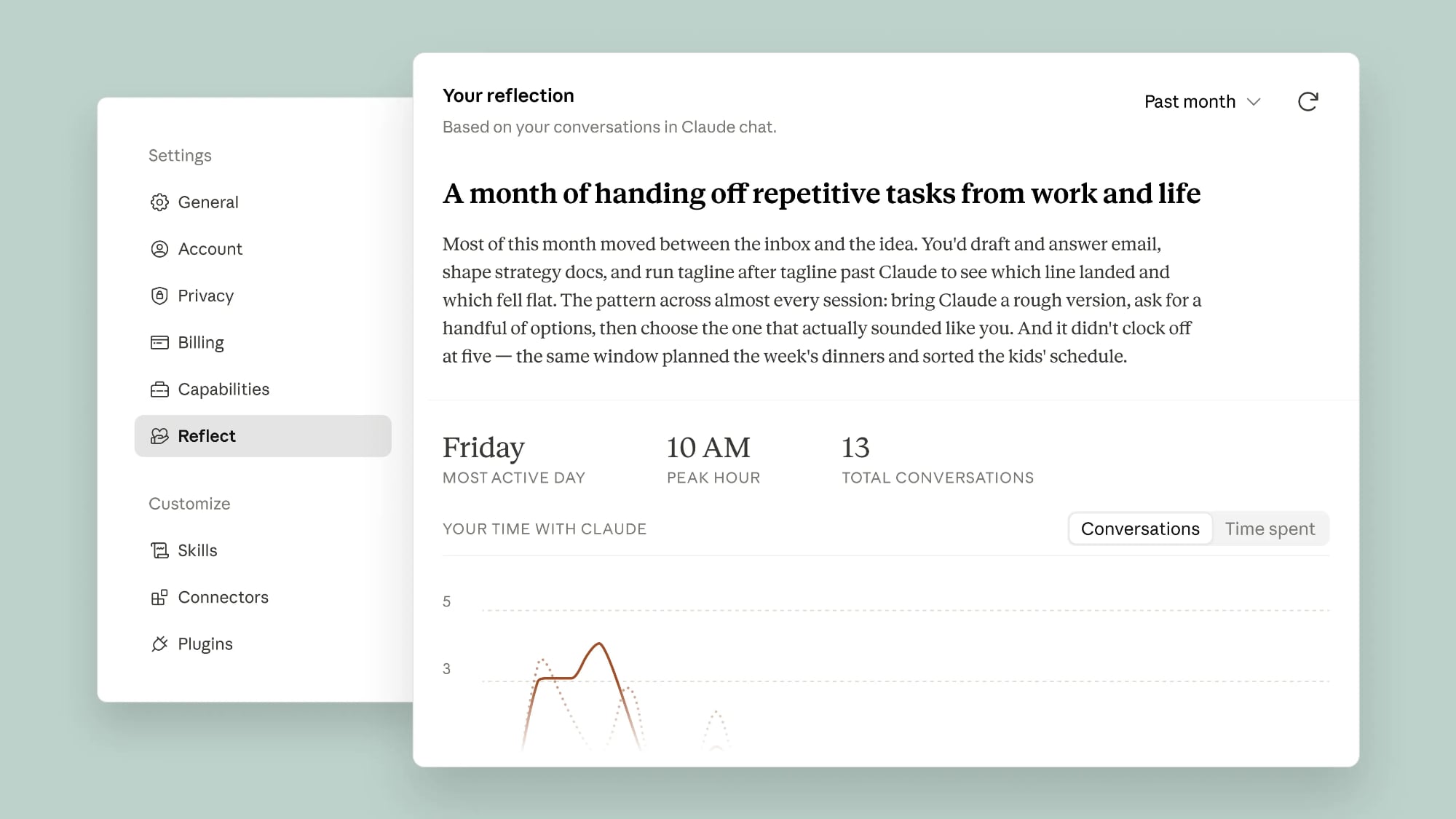
Anthropic Adds 'Reflect' Feature to Claude for Tracking Your Usage

Anthropic is updating Claude with a new "Reflect" feature that's akin to Spotify Wrapped. Reflect lets you look back on how you've been using Claude, and for how long.


Reflect includes a summary of Claude usage, incorporating key topics, usage patterns, and the type of tasks you work through using Claude.

You can look back at Claude activity over the past 1, 3, 6, or 12 months, and in the near future, Anthropic plans to add a view of how much time you've spent using Claude. Anthropic says the Reflect feature invites users to step back and look at the role Claude plays in their lives. It will surface questions for you to consider, like "What's one thing you want to keep doing yourself, even if Claude could do it faster?"

There are new settings for quiet hours or scheduling a nudge to remind you to take a break from using Claude after a certain amount of time. Anthropic says you can also use the information with the 4D AI Fluency Framework to expand how you work with Claude across four categories: Delegation, Description, Discernment, and Diligence. It offers examples of how you collaborate with Claude, and it has practical suggestions for areas of improvement.

Reflect does not draw information from incognito chats, and it doesn't use underlying files from connected tools. Conversations connected to health integration tools are also left out of insights, and the information shown in the Reflect option isn't used for other purposes.

Reflect is available in beta for Free, Pro, and Max users who have memory turned on. It can be accessed through the Settings section of Claude on the web or in the desktop app. Select the Reflect tab to generate a report.
This article, "Anthropic Adds 'Reflect' Feature to Claude for Tracking Your Usage" first appeared on MacRumors.com

Discuss this article in our forums

  •  

OpenAI Debuts ChatGPT Work Agent and New GPT-5.6 Models

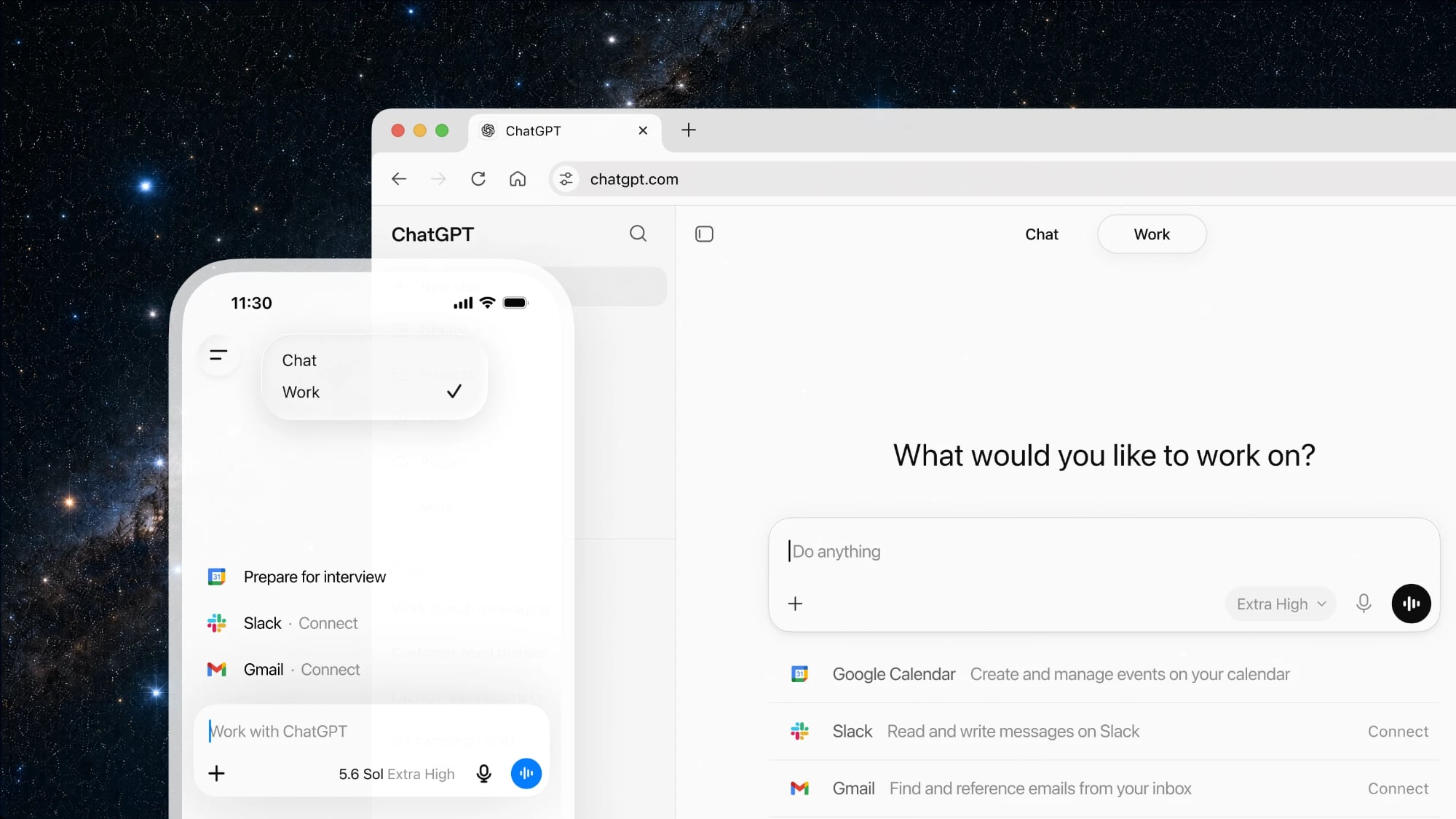
OpenAI today announced ChatGPT Work, a ChatGPT agent with built-in Codex that can complete tasks across web, mobile, and desktop using information from your apps. ChatGPT Work can execute multi-step tasks, using scheduling to work independently. Like Claude Cowork, ChatGPT can use your computer to do tasks in the background across apps.


Tasks can be started and managed on any device, including a smartphone. On the desktop, OpenAI is merging the Codex app with the ChatGPT app. ChatGPT Work can use local files and apps to do tasks, or a new built-in browser to access websites, tools, and online files. Plugins connect apps and systems to ChatGPT Work, and a new Sites beta feature lets you create interactive sites and web apps for reports, live dashboards, and more.

ChatGPT Work is powered by OpenAI's GPT–5.6 models, which are also rolling out today after a limited preview period. Sol is OpenAI's new flagship model, while Terra is a balanced everyday work model and Luna is a cost-efficient model.

OpenAI says that GPT–5.6 Sol achieves "state-of-the-art results" in coding, knowledge work, cybersecurity, and science. It outperforms prior frontier models while using fewer tokens for a lower estimated cost.

OpenAI claims that GPT–5.6 is better at coding and has improved design judgment, able to create "tasteful, ergonomic, and functional interfaces" with just high-level direction. It can also create more accurate presentations, documents, and spreadsheets.

The model has safeguards against misuse, with layered protections that include real-time checks, monitoring, and access calibrated to risk and trust. It is OpenAI's best cybersecurity model, ideal for code review, threat modeling, and more.

GPT–5.6 is available across ChatGPT, Codex, and the OpenAI API starting today. GPT–5.6 Sol is available for Plus, Pro, Business, and Enterprise users. Free and Go users have access to GPT–5.6 Terra.

ChatGPT Work is available today for Pro, Enterprise, and Edu plans. It will expand to Plus and Business plans in the next few days.

With OpenAI merging Codex and ChatGPT, there is a new ChatGPT desktop app that's available across Mac and Windows. Users who have the Codex app installed can update it to turn it into the new ChatGPT desktop app. The existing ChatGPT desktop app is being renamed ChatGPT Classic.
This article, "OpenAI Debuts ChatGPT Work Agent and New GPT-5.6 Models" first appeared on MacRumors.com

Discuss this article in our forums

  •  

Everything Coming in the 2026 Apple TV 4K

The Apple TV 4K hasn't been updated since 2022, and it's due for a refresh. An update is planned for 2026, but Apple is likely going to wait to launch it after Siri AI launches in iOS 27.


Design


‌Apple TV‌ design updates don't happen often, and that's not changing. The next ‌Apple TV‌ is going to have the same squircle shape as the current model, and it'll continue to be made from a black plastic material.

We're expecting the 2026 ‌Apple TV‌ to be indistinguishable from the existing ‌Apple TV‌ on the exterior, with no changes to size or design.

New Chip


The ‌Apple TV‌ 4K is going to get a new A-series chip, and that'll be the biggest upgrade. Rumors suggest Apple is planning to use the A17 Pro that was first introduced in the iPhone 15 Pro models.

Compared to the A15 Bionic in the current ‌Apple TV‌, the A17 Pro is a solid update, and it's a good reason to hold off on buying the current model. The A17 Pro is built on a 3-nanometer process for faster speeds and better efficiency. It has hardware-accelerated ray tracing for higher-quality graphics in games and it supports hardware-accelerated AV1 decoding, which is useful for streaming content.

The A17 Pro is the oldest chip Apple makes that supports Apple Intelligence, and it's also used in the iPad mini 7.

Since Apple has held the ‌Apple TV‌ update for so long, it's possible it'll get an even newer chip like the A18 or A19. A RAM update is possible too, especially if the ‌Apple TV‌ has any kind of ‌Apple Intelligence‌ support.

Apple Intelligence and Siri


The next ‌Apple TV‌ is ready to launch, but new ‌Siri‌ features are the holdup. Apple wants to release the ‌Apple TV‌ with the smarter version of ‌Siri‌ that Apple is testing in ‌iOS 27‌, iPadOS 27, and macOS 27.

Bloomberg's Mark Gurman says the Apple TV is linked to "new artificial intelligence features" that Apple has postponed until iOS 27, which is launching in September 2026. Apple intended to debut the ‌Apple Intelligence‌ ‌Siri‌ features in spring 2026, but the company was still experiencing issues with ‌Siri‌. At this point, we're not going to see new ‌Siri‌ capabilities until ‌iOS 27‌, which also means a delay for all the devices that Apple is holding.

Along with the ‌Apple TV‌, the rumored home hub and a new version of the HomePod are waiting on ‌Siri‌ AI's launch.

Updated ‌Siri‌ features may require more RAM and a faster chip, so if you want the smarter ‌Siri‌ on the ‌Apple TV‌, that's another reason to wait before making a purchase.

Wi-Fi


The ‌Apple TV‌ could get Apple's N1 networking chip with Wi-Fi 7 support. Wi-Fi 7 works with the 6GHz band offered by newer routers.

6GHz connectivity is faster and less congested, which you want for a streaming device.

Bluetooth and Thread


The ‌Apple TV‌ 4K could get Bluetooth 6 for connecting devices like controllers and earbuds.

Apple's N1 chip also supports Thread, so the ‌Apple TV‌ will be able to continue to serve as a Thread border router and a Matter hub for smart home devices.

Siri Remote


It's possible Apple will introduce a new Siri Remote alongside the ‌Apple TV‌, though it's unclear what Apple might change.

Pricing


There were rumors of a price drop, but with the June 2026 price increase for the 2022 ‌Apple TV‌ and all Macs and iPads, a lower price is unlikely.

Launch Date


With ‌Siri‌ AI set to launch in September in ‌iOS 27‌, we could see the ‌Apple TV‌ refreshed right around when new iPhone models come out.
Related Roundup: Apple TV
Buyer's Guide: Apple TV (Don't Buy)

This article, "Everything Coming in the 2026 Apple TV 4K" first appeared on MacRumors.com

Discuss this article in our forums

  •  

Meta's New AI Image Tool Can Use Your Public Instagram Photos by Default

Meta is rolling out a new feature that lets people use public Instagram posts and reels to generate AI content, and it's turned on by default.


If you have an Instagram account that's not set to private, there is a setting allowing anyone to generate content on ‌Meta‌ AI using your images and videos. The option was added to support ‌Meta‌'s new image generation model, Muse Image. Muse Image is rolling out across Instagram, WhatsApp, and ‌Meta‌ AI, and it pulls in images from an Instagram account with just an @-mention. From ‌Meta‌'s description of Muse Image:
You can also @-mention Instagram accounts in the Meta AI app to bring specific Instagram profiles right into your images. Whether you want to design a custom event invitation, mock up a collaborative creative concept, or generate a personalized graphic, tagging a username lets Meta AI use public photos to build a visual that's ready to post.

An Instagram help page explains that content on public Instagram accounts can be used for creating content with AI features, and you won't get a notification if someone uses your content to create an AI image.
If your account is public: Anyone on Instagram can reuse all or part of your reels, feed videos, and photos shared after reuse became available. Reels, feed videos, and photos can be reused in features like remix, sequence, templates and stickers. In addition, people may be able to create content with your Instagram content using AI features at Meta.

‌Meta‌ opts all public Instagram accounts in by default, but there is an option to turn off AI permissions. In the Instagram app settings, scroll to Sharing and Reuse, then toggle off "Posts" and "Reels" under the "Allow people to create with and reuse your content on Instagram and with AI features at ‌Meta‌."

Turn off the setting now if you don't want people using your content to create AI images, because AI content created prior to turning it off isn't deleted. Muse Image is still rolling out, and so is the toggle to turn off AI use. You may not see the opt-out option right away. Private Instagram profiles aren't included in Muse Image.

‌Meta‌ plans to expand Muse Image to Facebook and Messenger soon, and allow advertisers and agencies to use Muse Image to create content in the coming weeks. ‌Meta‌ is also working on a Muse Video feature.
This article, "Meta's New AI Image Tool Can Use Your Public Instagram Photos by Default" first appeared on MacRumors.com

Discuss this article in our forums

  •  
❌