Lees weergave

Anthropic Launches Claude Sonnet 5 With Near-Opus Performance at a Lower Price

Anthropic today introduced Claude Sonnet 5, a more affordable model that narrows the gap between Sonnet and Opus. Anthropic says Claude Sonnet 5 is its most agentic Sonnet model to date, able to make plans, use tools like browsers and terminals, and run autonomously.


Opus models have better agentic capabilities, but they're more expensive than Sonnet models. Sonnet 5's performance is similar to Opus 4.8, and it has improved over Sonnet 4.6 in areas including reasoning, tool use, coding, and knowledge work.

As for agentic capabilities, Sonnet 5 is able to finish complex tasks that Sonnet 4.6 could not complete, and it checks its own output without being asked. It is better at refusing malicious requests, and Anthropic says it shows lower rates of hallucination and sycophancy.

Sonnet 5 is available across all plans and is the default model for Free and Pro plans. It is priced at $2 per million input tokens and $10 per million output tokens through August 31, then prices will go up to $3 and $15, respectively.
This article, "Anthropic Launches Claude Sonnet 5 With Near-Opus Performance at a Lower Price" first appeared on MacRumors.com

Discuss this article in our forums

  •  

Supreme Court Will Hear Apple's Appeal in Epic Games App Store Fight

The United States Supreme Court has agreed to hear Apple's appeal against the contempt ruling that forced it to change its App Store linking rules, reports Reuters.


In a statement to MacRumors, Apple said the court's decision was welcome news.
This is an important question of law and we are pleased the Supreme Court will hear our case.

Apple asked the Supreme Court to review the decision back in May, and it was unclear if the request would be granted because the court previously declined to weigh in on the dispute. The 2024 denial involved the original Epic Games vs. Apple commission battle, but the case has since gotten spicier and piqued the Supreme Court's interest.

Apple largely won the Epic Games case in 2021 and wasn't found to have violated antitrust law, but Yvonne Gonzalez Rogers, the judge overseeing the case, ordered Apple to relax its anti-steering rules and let developers link to alternate payment options in apps. Apple agreed, but ended up charging a 12 to 27 percent fee on link-outs instead of 15 to 30 percent. When adding in fees to payment processors, developers got more hassle with little to no discount, which resulted in few developers using the new link system.

‌Epic Games‌ accused Apple of violating the judge's order, and took Apple back to court. Gonzalez Rogers agreed with Epic, and in April 2025, found Apple in contempt of court for willfully violating the 2021 injunction. She barred Apple from collecting any fees on links in the U.S. App Store, and Apple changed its ‌App Store‌ rules to comply.

Apple appealed, and the Ninth Circuit Court of Appeals upheld the contempt finding, leading Apple to further appeal to the Supreme Court.

Apple argued the contempt ruling was inappropriate because of the wording around the original order and Apple's implementation. The initial order did not bar Apple from charging fees when developers linked to third-party payment options, but both the district court and the appeals court said Apple violated the "spirit" of the injunction by charging fees that were too high. Apple said that a contempt ruling based on "spirit" instead of the word of the ruling is a "recipe for abuse." Apple is aiming to have the Supreme Court toss out the contempt decision because there was no clear and unambiguous violation.

Apple also asked the court to evaluate the scope of the injunction, which Apple said should apply only to ‌Epic Games‌ and not to all developers. Apple heavily leaned on Trump v. CASA, a recent ruling that said lower courts do not have the authority to issue universal injunctions to block nationwide policies.

In its request to the Supreme Court, Apple said the contempt ruling based on spirit and the order forcing it to change its policies for all developers "have combined to create an injunction that may reshape the global app marketplace." Apple's argument that the outcome of the case could lead to regulatory changes worldwide may also have swayed the court to weigh in on the case.

The Supreme Court will hear the case in its next term that begins in October after a summer break. While Apple waits for the Supreme Court decision, it will be going back to district court for fee calculations that will go into effect if the higher court does not toss out the contempt ruling and resulting anti-steering order. Apple was ordered back to district court because the appeals court found the district court's total ban on commissions went too far, and sent it back to set a reasonable fee.
This article, "Supreme Court Will Hear Apple's Appeal in Epic Games App Store Fight" first appeared on MacRumors.com

Discuss this article in our forums

  •  

Apple Now Sells Refurbished iPhone 16e Starting at $419

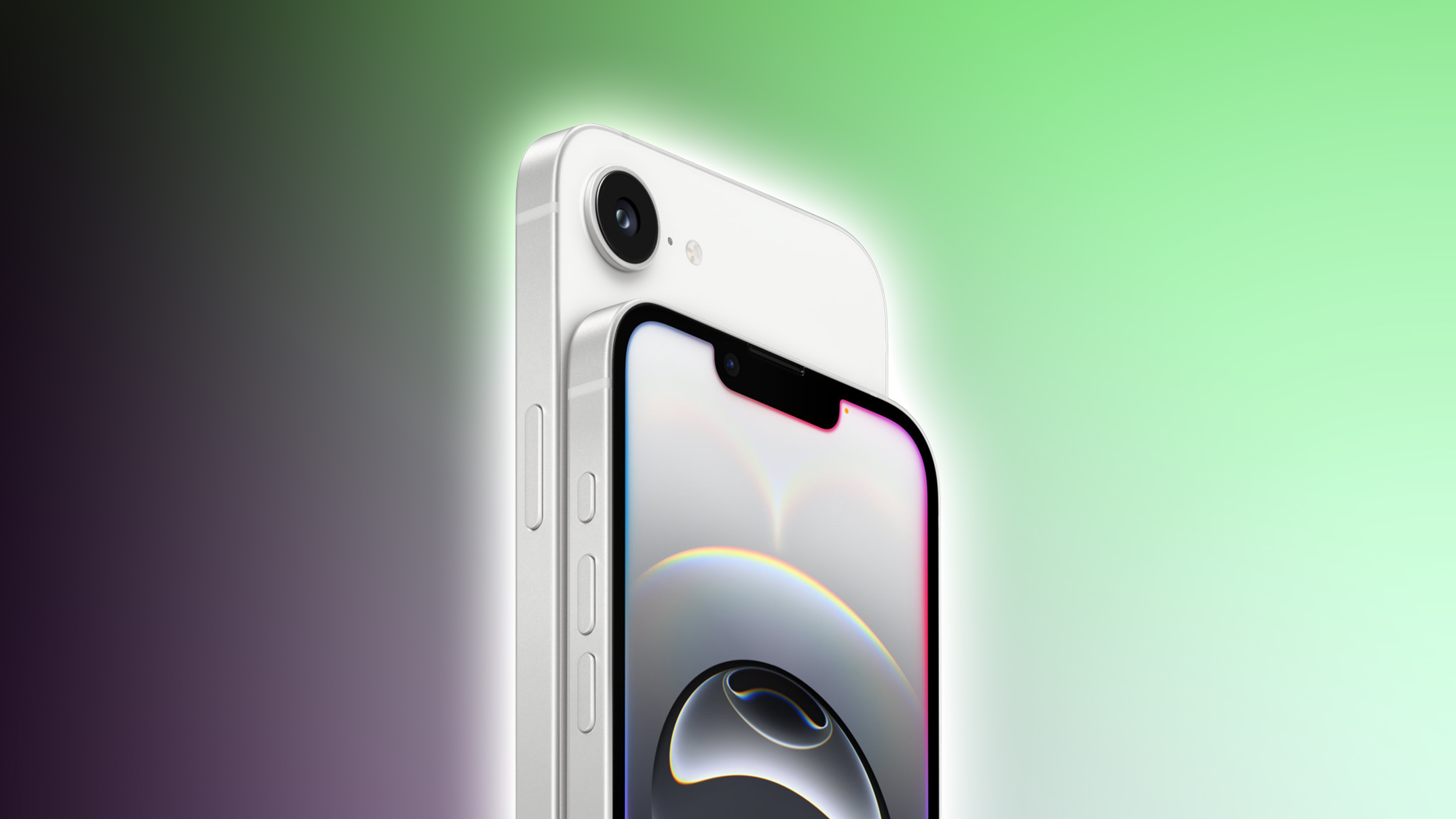
Apple today updated its online refurbished store in the United States, adding the iPhone 16e. Refurbished iPhone 16e models are available at discounted prices for the first time since the device launched in February 2025.


Entry-level 128GB iPhone 16e models are priced at $419, which is a $180 discount from the original price. The iPhone 16e was retired when the iPhone 17e came out, so it is no longer available new from Apple.

Upgraded 256GB and 512GB iPhone 16e models are available for $509 and $679, respectively. The iPhone 16e comes in black or white, and Apple has both colors available.

At $419, a refurbished iPhone 16e is $180 less than Apple's most affordable iPhone, the 17e, but it lacks a few useful features. It does not include MagSafe charging, it has a slower C1 modem instead of the C1X, 128GB starting storage instead of 256GB, an older A18 chip, and original Ceramic Shield glass instead of Ceramic Shield 2.

Refurbished iPhones are unlocked and eligible to be used with any carrier. Apple revamps iPhones that have been returned or repaired, adding new batteries, outer shells, and cables. Refurbished iPhones are essentially identical to new iPhones after going through Apple's cleaning and testing process, and they come with the same one-year warranty with an option to purchase AppleCare+ coverage.
This article, "Apple Now Sells Refurbished iPhone 16e Starting at $419" first appeared on MacRumors.com

Discuss this article in our forums

  •  

Apple Seeds Third Public Betas of iOS 26.6, macOS Tahoe 26.6 and More

Apple today provided public beta testers with the third betas of iOS 26.6, iPadOS 26.6, macOS Tahoe 26.6, watchOS 26.6, and tvOS 26.6, with the software coming a day after Apple seeded the betas to developers.


After signing up to beta test the software updates on Apple's beta site, public beta testers can download the new software using the Software Update section in the Settings app on each device.

iOS 26.6 has a feature that will let you know when you have blocked too many contacts, but the limit is in the thousands so most users may not ever see the messaging. There are also signs of a new iPhone anti-snatching feature that locks a stolen iPhone when it's grabbed from your hand.

No other major new features have been found in any of the software updates, with Apple likely focusing on bug fixes and security improvements. We're nearing the end of the "26" software cycle, with Apple planning to release iOS 27, iPadOS 27, macOS Golden Gate, and more in September.
Related Roundups: iOS 26, iPadOS 26, macOS Tahoe
Related Forums: iOS 26, macOS Tahoe

This article, "Apple Seeds Third Public Betas of iOS 26.6, macOS Tahoe 26.6 and More" first appeared on MacRumors.com

Discuss this article in our forums

  •  

Apple Creator Studio Gets New AI Features

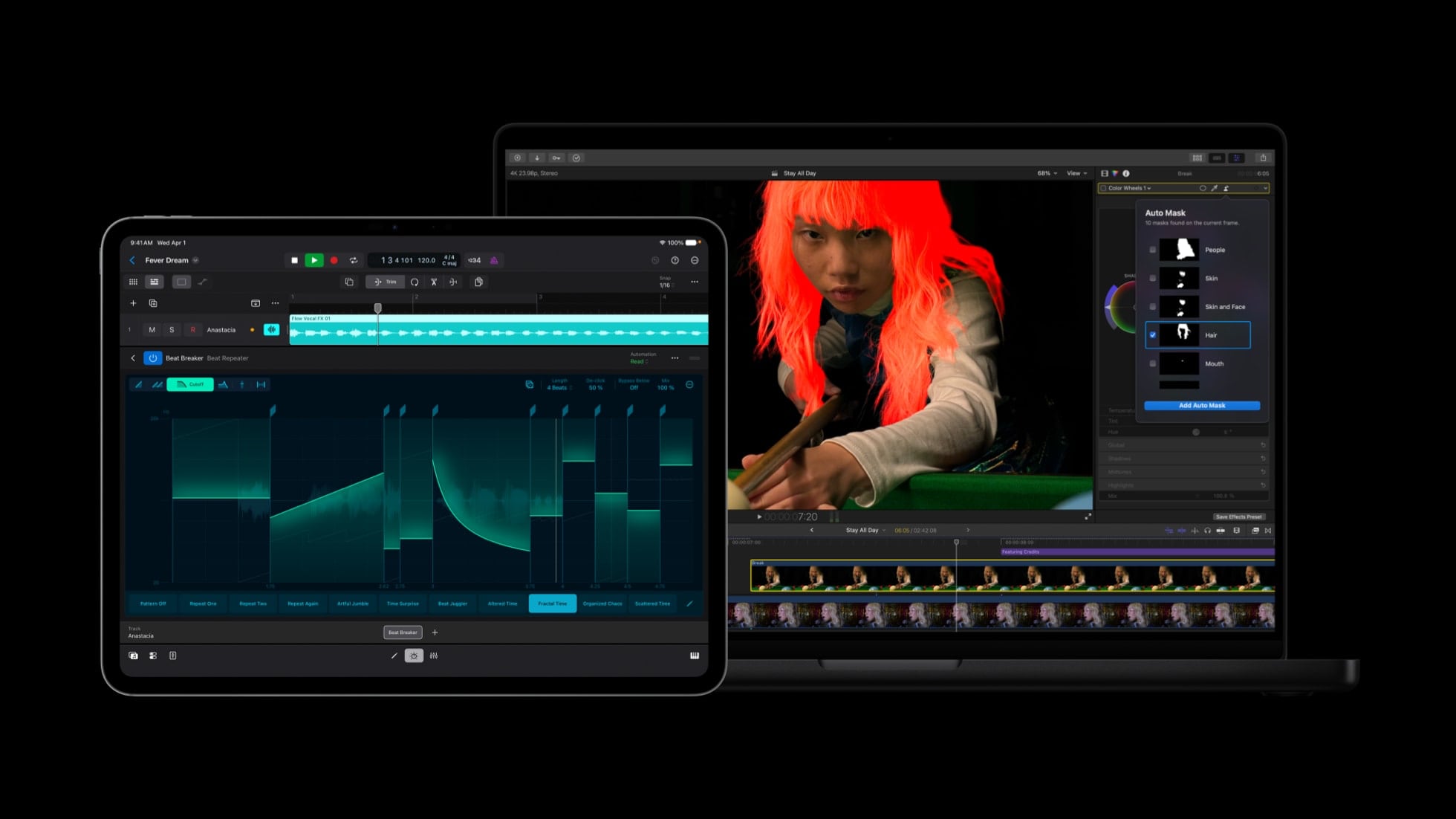
Apple today updated its Creator Studio apps, adding new AI features to Pixelmator Pro, Final Cut Pro, Logic Pro, and more.


Apple is integrating Pixelmator Pro with Final Cut Pro, Keynote, Numbers, and Pages. Final Cut Pro users can send a frame to Pixelmator Pro to create thumbnails and social graphics. In Keynote, Numbers, and Pages, users can select an image in a document and open it in Pixelmator Pro to edit, with changes saved to the original document.

The three office apps support generating vector shapes using AI, and Pixelmator Pro is getting advanced image generation and a Content Hub. Users can generate AI images directly in Pixelmator Pro with natural language, and browse a curated collection of images in Content Hub. Freeform also integrates with Pixelmator Pro in iOS 27, iPadOS 27, and macOS Golden Gate.

Final Cut Pro is getting Generate Captions, an on-device AI feature that automatically adds subtitles to videos based on audio. Subtitles can have animations and custom fonts, colors, and positions.

Edit Detection is a new AI feature that analyzes rendered video and splits it back into the original clips on the timeline. Apple says editors can use the tool for edit refinements or assembling a cut-down highlight clip for social media.

On the Mac, Final Cut Pro has an Auto Mask feature that isolates and refines video elements like skin, hair, sky, foliage, and clothing. Users can hover over a clip and make precise adjustments with no manual tracking. Color Match now produces more accurate and natural color matches in different lighting conditions, plus Advanced Trimming lets users fine-tune incoming and outgoing frames one-by-one.

Motion gains native support for scaling vector graphics without affecting quality, and Compressor has an Immersive Metadata Viewer for the Vision Pro. Final Cut Camera is getting expanded ProRes Support, an option to disable digital zoom, and Clean HDMI Out for sending a pristine video signal to external monitors and recorders.

Logic Pro's Chord ID feature has been rebuilt and it is more accurate than before. Apple says Session Players will respond and perform chord changes more quickly. Both Logic Pro and MainStage have a new granular sync mode in Alchemy to open up "new dimensions of sound design."

More information on the updates can be found on Apple's website. Creator Studio Pro includes all of Apple's creative software, and it is priced at $12.99 per month or $129 per year. Up to six people can share a single membership.
This article, "Apple Creator Studio Gets New AI Features" first appeared on MacRumors.com

Discuss this article in our forums

  •  

T-Mobile Automatically Moving Legacy Plan Customers to New Plans

Some T-Mobile customers with legacy phone plans are being upgraded to newer T-Mobile plans automatically, reports CNET. The company has been sending out notifications to customers with older plans, letting them know that they're going to be transferred to a current plan.


Customers being pushed to a new plan could get an automatic bill increase. The carrier plans to move customers to comparable modern plans. T-Mobile options include Essentials, Essentials Saver, Experience More, and Experience Beyond. Prices for a single line start at $50 per month.

T-Mobile marketing lead Allan Samson said the majority of customers being automatically upgraded will pay below what the plan sells for, and won't have the same pricing that a plan would cost a new customer. The average increase will be around $4 per line per month, with some pricing going up $6.

Employees were told T-Mobile is transitioning customers to modern plans to get rid of over 1,100 legacy billing codes, and were warned to expect increased customer contact volume in the coming weeks.

T-Mobile declined to tell CNET which plans are being retired, but some date back 15 years. The company has run through a lot of plans over the last decade and a half, plus Sprint users on legacy plans were folded into T-Mobile after the 2020 merger.

Thousands of customers are affected, and will be receiving alerts from T-Mobile. Plans will change during the next billing cycle. Customers unhappy with T-Mobile's decision can pick a different T-Mobile plan or switch carriers.
This article, "T-Mobile Automatically Moving Legacy Plan Customers to New Plans" first appeared on MacRumors.com

Discuss this article in our forums

  •  

WhatsApp Now Lets You Reserve a Username

Popular messaging app WhatsApp is now allowing users to reserve usernames ahead of plans to launch username-based messaging. Right now, WhatsApp uses a person's phone number as an identifier, but usernames will allow people to interact without having to exchange personal information.


Username reservations are rolling out starting this week, and not all users will have access to the reservation system right away. WhatsApp is sending a notification when a username can be reserved. Usernames are optional, and once access has been granted, a username can be selected by going to Settings > Account > Username. Usernames can be 3 to 35 characters in length.

There are over three billion people on WhatsApp, and the company says it is opening up reservations early so "everyone has the opportunity to select the username that matters to them." WhatsApp suggests users choose a unique name only contacts would know.

Creators, small businesses, and organizations have the option to claim their existing Instagram or Facebook username on WhatsApp. Users who have a username on Instagram or Facebook can claim the same username on WhatsApp by choosing the Use Instagram username or Use Facebook username option, as long as it isn't already taken.

WhatsApp has no directory of usernames to browse, and no username discovery suggestions. People will need to know a WhatsApp user's exact username to send a message, plus there is an optional username key that adds extra spam protection.

Usernames will roll out gradually over the next few months. Once live, an account with a username set will no longer reveal a phone number when messaging a person or a business for the first time.
This article, "WhatsApp Now Lets You Reserve a Username" first appeared on MacRumors.com

Discuss this article in our forums

  •  

Open Source AI Agent OpenClaw Gets Native iOS App

Popular open source AI agent OpenClaw is expanding to the iPhone and iPad with a new native iOS app. OpenClaw for iOS can be used alongside an existing gateway as a secure node for chat, voice approvals, sharing, and device-aware automation.


The iOS app replaces iPhone and ‌iPad‌ workarounds that involved using Telegram or WhatsApp for on-the-go access.

OpenClaw is a self-hosted AI agent that runs on a Mac or PC. Users can connect an API key from Claude, OpenAI, Gemini, or other AI services, linking the model to content on the gateway machine. OpenClaw lets an AI model access messaging apps, files, web browsers, and more, so it can complete tasks.

To make use of the new iOS app, you'll need a gateway running on a local machine. The App Store description says the iOS app can be used in multiple ways.


  • Pair with your private OpenClaw Gateway by QR code or setup code

  • Chat with your assistant from iPhone

  • Use realtime and background Talk mode

  • Review Gateway action approvals from your iPhone

  • Share text, links, and media directly from iOS into OpenClaw

  • Enable device capabilities such as camera, screen, location, photos, contacts, calendar, and reminders when you choose

  • Receive push wakes and node status updates for connected workflows


OpenClaw is a useful tool, but it has risks. It is susceptible to prompt injection and requires broad system permissions on gateway devices.

OpenClaw started out as Clawdbot, because the initial version created by Peter Steinberger used Claude. Anthropic complained about the name, prompting a rename.

The app can be downloaded from the ‌App Store‌ for free. [Direct Link]
This article, "Open Source AI Agent OpenClaw Gets Native iOS App" first appeared on MacRumors.com

Discuss this article in our forums

  •  

Apple Released iOS 26.5.2 Security Fixes Early to Thwart AI-Assisted Hacks

Apple today released iOS 26.5.2, iPadOS 26.5.2, and macOS Tahoe 26.5.2 with a long list of security fixes that it initially introduced in the iOS 26.6, iPadOS 26.6, and ‌macOS Tahoe‌ 26.6 betas.


Apple told Reuters that it released the updates earlier than planned due to concerns about AI-assisted hacks.
The company told Reuters on Monday it was adapting to ​the reality that, given the ability of artificial intelligence ​to speed the development of malicious hacking tools, it needed to reduce the time between when updates were first ​made public and when they were put into customers' hands.

Vulnerability fixes are typically included in most Apple software updates, but its major point updates usually include more fixes. Apple intended to release the 25+ security fixes that it introduced today in iOS 26.6 and its sister updates, but didn't want to wait for iOS 26.6 to come out.

In its security document outlining the changes, Apple did not say that any of the vulnerabilities that were fixed had been actively exploited, and the company further told Reuters that there was no evidence any of the now-patched vulnerabilities had been taken advantage of. Apple said the time between when the security fixes were announced and when they were deployed needed to be compressed, but did not say which vulnerabilities drove the urgency.

Apple is among Anthropic's Project Glasswing partners, and it has been using the Claude Mythos Preview to hunt down and patch vulnerabilities before hackers can use them to breach devices. It's not known if Mythos played a role in Apple's decision to release the fixes ahead of schedule.
Related Roundups: iOS 26, iPadOS 26
Related Forum: iOS 26

This article, "Apple Released iOS 26.5.2 Security Fixes Early to Thwart AI-Assisted Hacks" first appeared on MacRumors.com

Discuss this article in our forums

  •  

iOS 26.5.2 Patches More Than 25 Security Vulnerabilities

Apple's newly released iOS 26.5.2, iPadOS 26.5.2, and macOS 26.5.2 updates address more than 25 security vulnerabilities, which means you should install the updates as soon as possible.


According to Apple's security support documents for the updates, the new software has vulnerability fixes that Apple previously made available in the iOS 26.6, iPadOS 26.6, and macOS Tahoe 26.6 betas.

There are multiple kernel fixes, and several WebKit vulnerabilities that could lead to crashes or data leaks have been addressed. None of the vulnerabilities are known to have been actively exploited, but now that Apple has published details about them, it is possible malicious entities could create exploits targeting users who have not yet updated.

Apple always recommends that iPhone, iPad, and Mac users keep their devices up to date and install the new software patches shortly after they're released.
Related Roundups: iOS 26, iPadOS 26
Related Forum: iOS 26

This article, "iOS 26.5.2 Patches More Than 25 Security Vulnerabilities" first appeared on MacRumors.com

Discuss this article in our forums

  •  

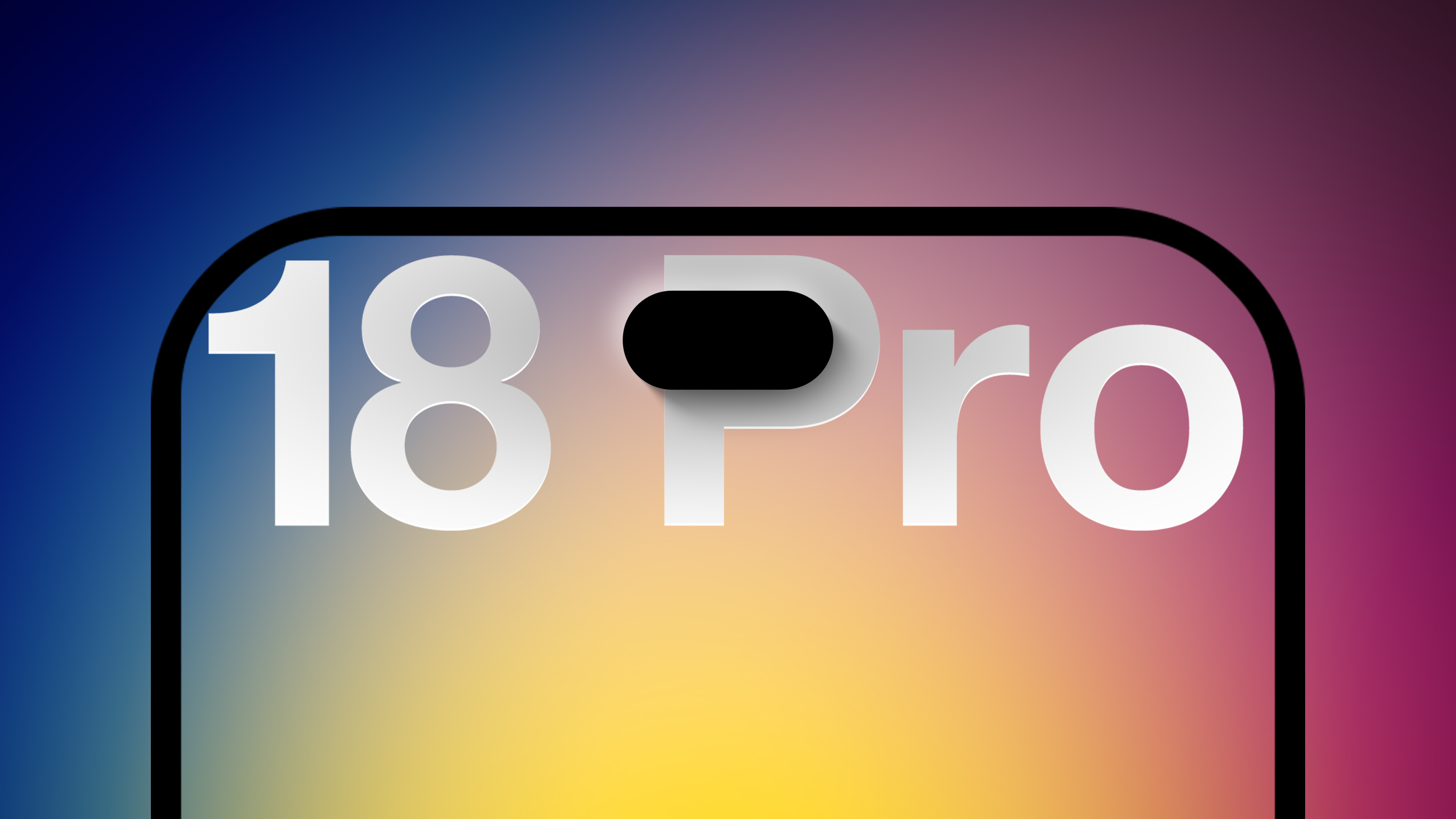
Apple 'Concerned' Over iPhone 18 Pro Data Leak From Supplier Tata

Apple is "concerned" about a recent data leak from Tata Electronics, one of its manufacturing partners in India, reports Reuters. Tata Electronics was the target of a cyberattack, with confidential Apple documents stolen and shared on the dark web.


Hackers were able to steal information about the iPhone 18 Pro and ‌iPhone 18 Pro‌ Max, including a list of suppliers, parts, and images of the devices. Detailed documents with component designs and specifications have been leaked, and earlier reports suggested some of the data leaked included emails, event logs, documents from TSMC and Qualcomm, and information about older iPhones.

Reuters says that at least six files show "hundreds" of ‌iPhone 18 Pro‌ components, including details of chips on the main circuit board and battery and camera components. The leaked files have "confidential" Apple watermarks and Apple codenames for the ‌iPhone 18 Pro‌ models, along with images of the iPhones during drop tests.

The images depict a "slab-shaped, grey handset with a three-rear-camera setup and an Apple logo," according to Reuters. Rumors suggest the ‌iPhone 18 Pro‌ will look much like the iPhone 17 Pro, with few design differences beyond a slimmed down Dynamic Island.

Tata supplies some iPhone parts, and also assembles some iPhones in India. It is a growing supplier as Apple works to diversify manufacturing away from China. The data also links suppliers to iPhone parts, which is information Apple does not share.

Tata Electronics disclosed the attack last week, saying it had detected a cybersecurity incident after it became clear ransom group World Leaks had shared more than 200,000 files that included information on Apple and Tesla. The files have been circulating on the dark web since at least June 10.

The manufacturer has restricted internal access to sensitive systems and hired a global consultant to conduct a forensic audit, but Reuters suggests the incident could upset Apple and endanger its relationship with Tata. Apple is investigating the incident and working with Tata on long-term measures to improve security.
Related Roundup: iPhone 18 Pro

This article, "Apple 'Concerned' Over iPhone 18 Pro Data Leak From Supplier Tata" first appeared on MacRumors.com

Discuss this article in our forums

  •  

Apple Releases macOS Tahoe 26.5.2

Apple today released macOS Tahoe 26.5.2, a small update to the ‌macOS Tahoe‌ operating system that came out last year. ‌macOS Tahoe‌ 26.5.2 comes a month after Apple released ‌macOS Tahoe‌ 26.5.1.


Mac owners can download the software by opening the System Settings app and then navigating to the Software Updates section.

According to Apple's release notes for the update, ‌macOS Tahoe‌ 26.5.2 includes security fixes for the Mac.
Related Roundup: macOS Tahoe
Related Forum: macOS Tahoe

This article, "Apple Releases macOS Tahoe 26.5.2" first appeared on MacRumors.com

Discuss this article in our forums

  •  

Apple Releases iOS 26.5.2 With Security Fixes

Apple today released iOS 26.5.2 and iPadOS 26.5.2, minor updates to the iOS and iPadOS 26 operating systems that came out in September. iOS 26.5.2 comes a month after the launch of iOS 26.5.1, an update that added a charging fix for the iPhone Air and iPhone 17 models.


iOS 26.5.2 and iPadOS 26.5.2 can be downloaded on eligible iPhones and iPads over-the-air by going to Settings > General > Software Update.

According to Apple's release notes, iOS 26.5.2 includes security fixes for the iPhone and iPad.

Apple is wrapping up work on iOS 26 because iOS 27 is launching in just a few months. ‌iOS 27‌ is available to developers now, with a public beta coming in July.
Related Roundups: iOS 26, iPadOS 26
Related Forum: iOS 26

This article, "Apple Releases iOS 26.5.2 With Security Fixes" first appeared on MacRumors.com

Discuss this article in our forums

  •  

Apple Seeds Third iOS 26.6 and iPadOS 26.6 Betas to Developers

Apple today seeded the third betas of upcoming iOS 26.6 and iPadOS 26.6 updates to developers for testing purposes, with the software coming two weeks after Apple seeded the second betas.


Registered developers can download the betas from the Settings app on the iPhone or iPad by going to the General section and selecting Software Update.

With iOS 27 set to launch in September, Apple is wrapping up work on iOS 26. We are not expecting any major new features in the iOS 26.6 update, and it will primarily focus on bug fixes and performance improvements.

The update adds new wording around blocked contact limits, letting users know when they have exceeded the maximum number of blocked contacts. The update might also include a new anti-snatching feature that locks your iPhone if it's grabbed from your hand.
Related Roundups: iOS 26, iPadOS 26
Related Forum: iOS 26

This article, "Apple Seeds Third iOS 26.6 and iPadOS 26.6 Betas to Developers" first appeared on MacRumors.com

Discuss this article in our forums

  •  

Third macOS Tahoe 26.6 Beta Now Available for Developers

Apple today provided the third beta of an upcoming macOS Tahoe 26.6 update to developers for testing purposes, with the update coming two weeks after Apple seeded the second beta.


Developers can download the ‌macOS Tahoe‌ 26.6 update by opening up the System Settings app, selecting the General category, and then choosing Software Update. Beta Updates will need to be enabled, and a free developer account is required.

With macOS Golden Gate set to launch in just a few months, Apple is likely focusing most of its attention on the new software. We are not expecting any major new features in ‌macOS Tahoe‌ 26.6.
Related Roundup: macOS Tahoe
Related Forum: macOS Tahoe

This article, "Third macOS Tahoe 26.6 Beta Now Available for Developers" first appeared on MacRumors.com

Discuss this article in our forums

  •  

Apple Releases Third watchOS 26.6, tvOS 26.6 and visionOS 26.6 Betas

Apple today provided developers with the third betas of upcoming watchOS 26.6, tvOS 26.6, and visionOS 26.6 betas for testing purposes. The software comes two weeks after Apple seeded the second betas.


The software updates are available through the Settings app on each device, and because these are developer betas, a free developer account is required.

There's no word on what's in the software as of yet. watchOS, tvOS, and visionOS often get few features in each new beta, with updates primarily focusing on bug fixes and performance improvements.
This article, "Apple Releases Third watchOS 26.6, tvOS 26.6 and visionOS 26.6 Betas" first appeared on MacRumors.com

Discuss this article in our forums

  •  

iOS 27 Makes the Shortcuts App Much Less Intimidating

The Shortcuts app can be intimidating to casual iPhone users, but with iOS 27, it's a lot easier to use. With Apple Intelligence integration, shortcuts can be created using natural language, and they're much more accessible to the average person.

Describe a Shortcut


When you tap on the New Shortcut button in the ‌iOS 27‌ Shortcuts app, it opens to the Describe a Shortcut interface.
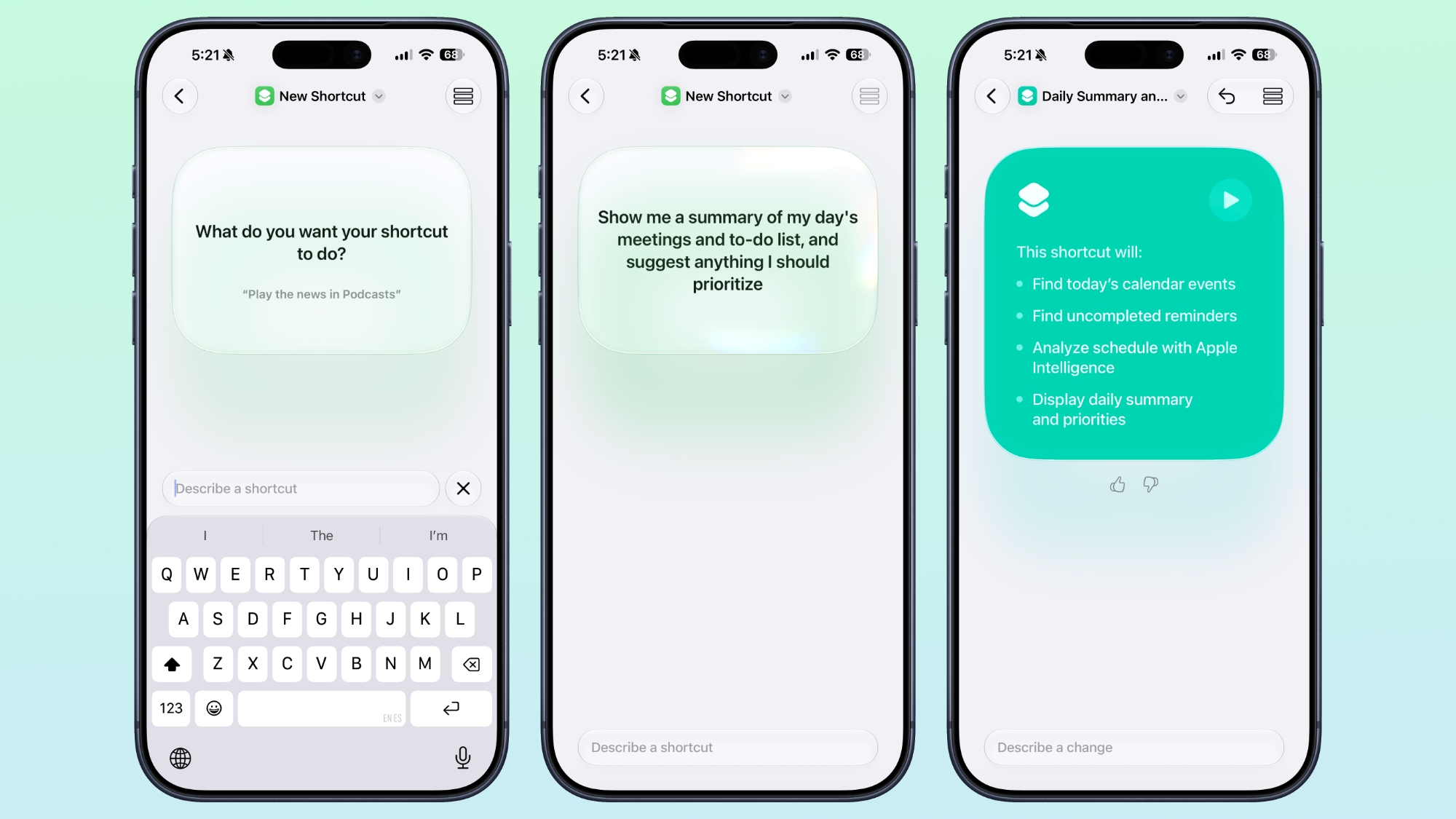

There's a text box that asks you what you want your shortcut to do, and you can describe what you need in natural language. You can start with a single step, or add in multiple parameters. ‌Apple Intelligence‌ selects the correct actions, creates the automations, and folds it all into a completed shortcut. A few examples of what you can do:

  • Each evening, set tomorrow's alarm based on my first Calendar event, turn on Sleep Focus, and dim the bedroom lights.

  • Every morning, show me my first meeting, today's weather, and my Reminders due today.

  • Turn on the porch lights at night when you get a notification that food delivery is arriving.

  • Text my partner an ETA when I leave work, then start playing my podcast.

  • Show me a summary of my day's meetings and to-do list, and suggest anything I should prioritize.

  • When I open YouTube, turn off orientation lock. Turn it back on when I close the app.

  • Give me a three-line summary of today's tech news.


Shortcuts and automations can run based on time of day, location, an app action, a system feature like a screenshot, an incoming notification, and more. Shortcuts can do all kinds of things, from accessing system features to opening and running apps.

Add Refinements


After dictating a shortcut, the app will outline each of the actions the shortcut will perform. If it's what you want, you can tap on the play button to test it. It will be added automatically to your personal shortcuts.
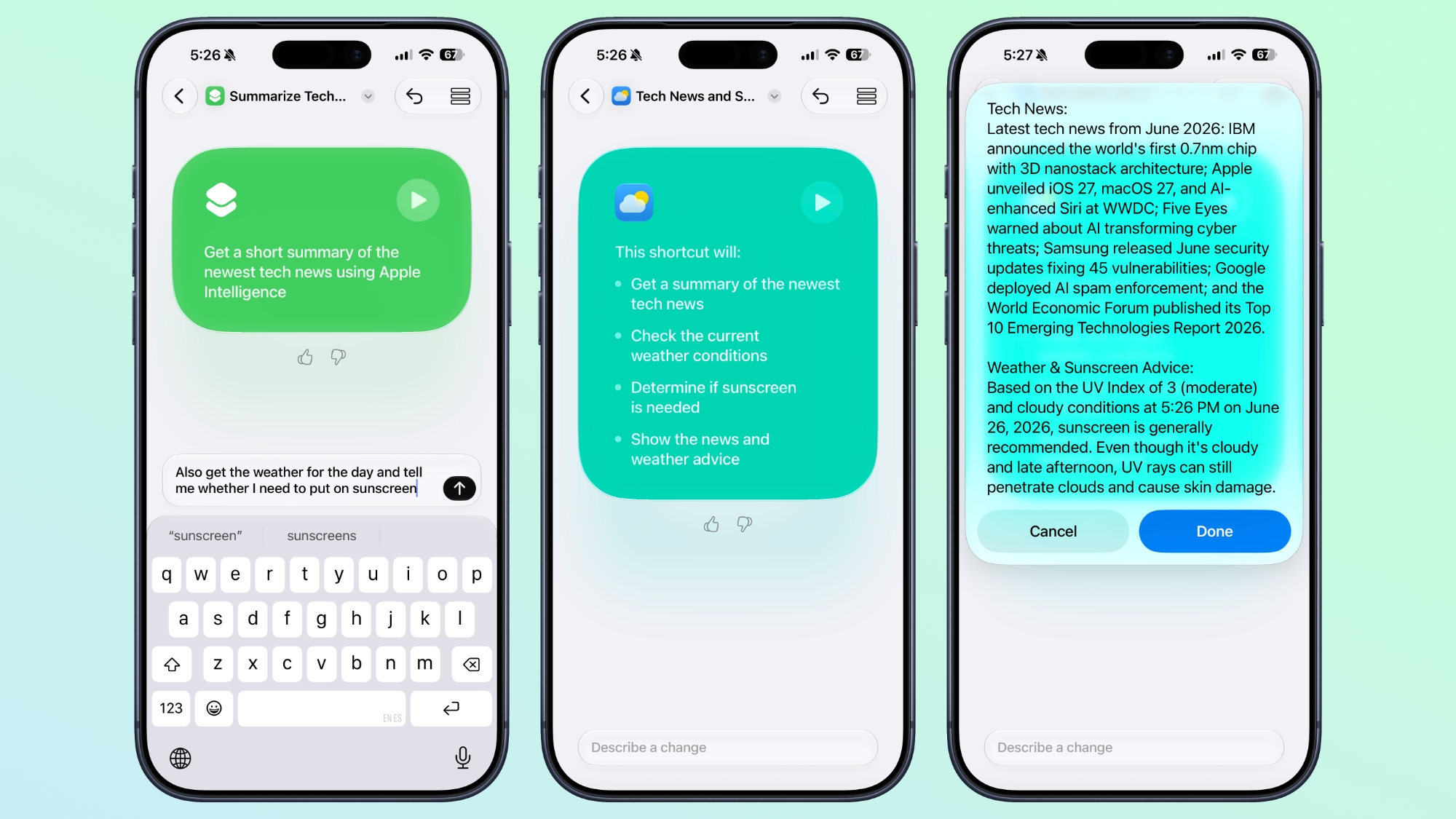

If it's not quite what you want or you want to add more features, you can use the "Describe a change" interface. You can type in what you want to tweak, and go through multiple rounds of refinement until you get exactly what you want.

Shortcuts can be used from Siri, the app, Control Center, the Action Button, and more.

Edit Manually


Once created, you can tap into a manual editing interface if you want to add more complicated actions or tweak without using ‌Apple Intelligence‌. AI Shortcuts is in beta and it's not always perfect, so sometimes manual edits are required to get the end result you want.
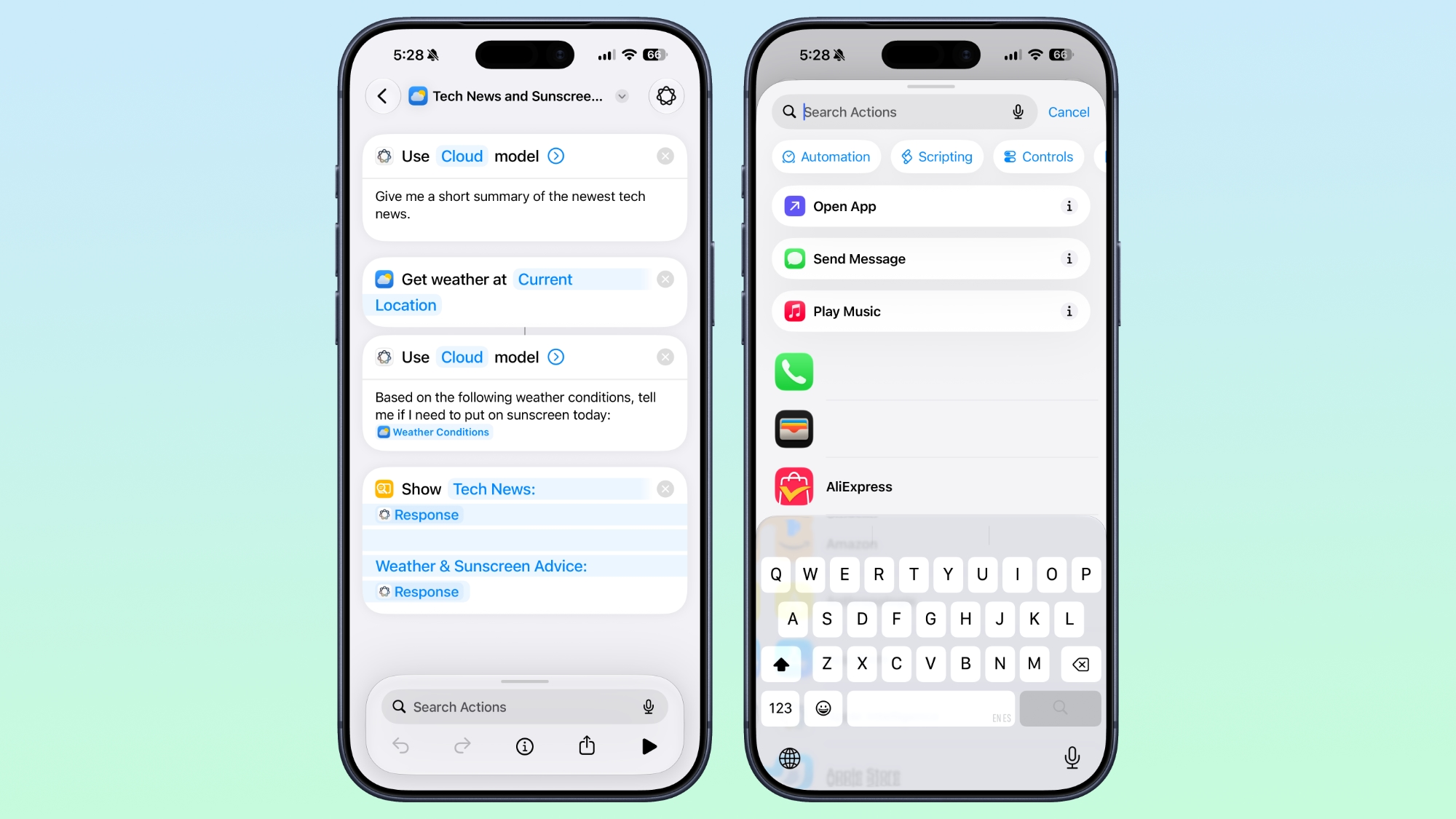

You can also open any shortcut and use the ‌Apple Intelligence‌ mode to make edits.

New Automation Triggers


  • When a notification is received

  • When a screenshot is captured

  • When a keyboard is connected

  • When an Apple Watch workout starts


New Actions


There are several new actions in the Shortcuts app.

  • Automate a recording in Notes

  • Send messages to a group conversation

  • Updated Get What's On Screen option that gets context information from the display (e.g. text, title, or links)

  • Choose an item from a list

  • Delete conversations or messages in Messages

  • Mark as read in Messages

  • Search in Messages

  • Open Messages inbox

  • Send Tapback

  • Auto Enhance Photo

  • Delete albums and photos

  • Favorite photos

  • Hide photos

  • Open photo

  • Create Group in Reminders

  • Create Section in Reminders

  • Delete groups, lists, and sections in Reminders

  • Edit list in Reminders

  • Toggle Hearing Aid Mute

  • Toggle Vehicle Motion Cues


Improved Apple Intelligence Models


Shortcuts can use improved ‌Apple Intelligence‌ models that have access to broad world knowledge, which means the model can search the web to get information.
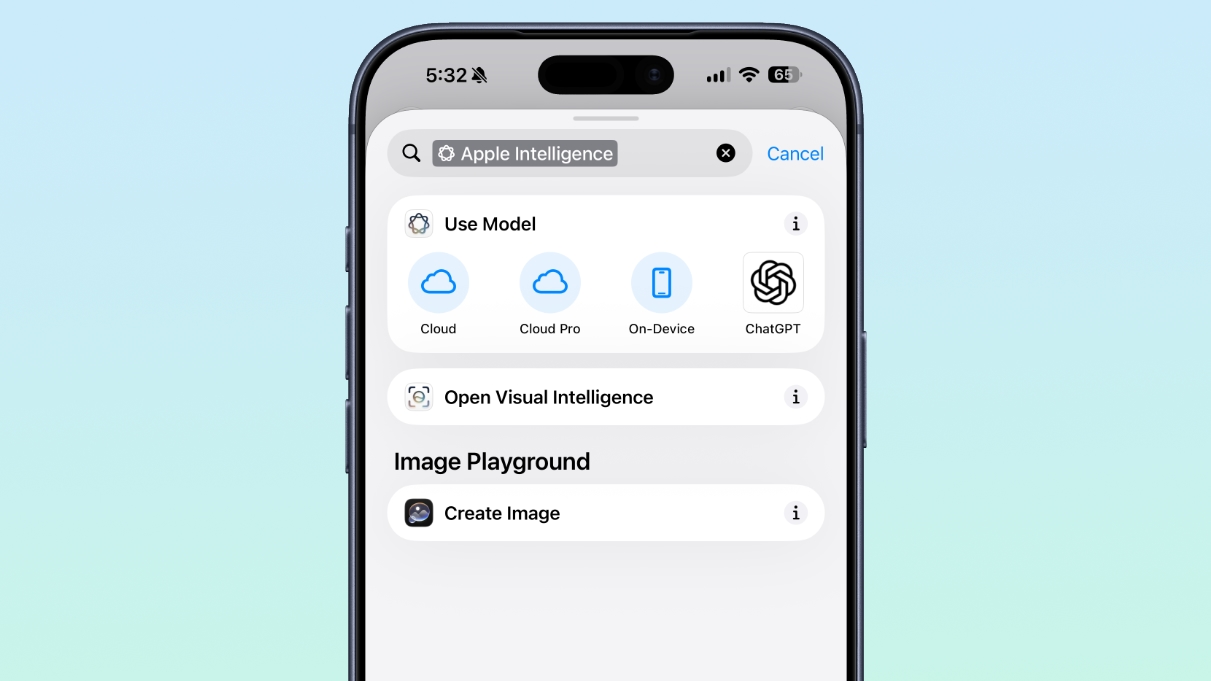

There are now Cloud, Cloud Pro, and on-device models that can be used in shortcuts. Cloud Pro is able to search the web, and is used for queries that need information from the internet.

Data Storage


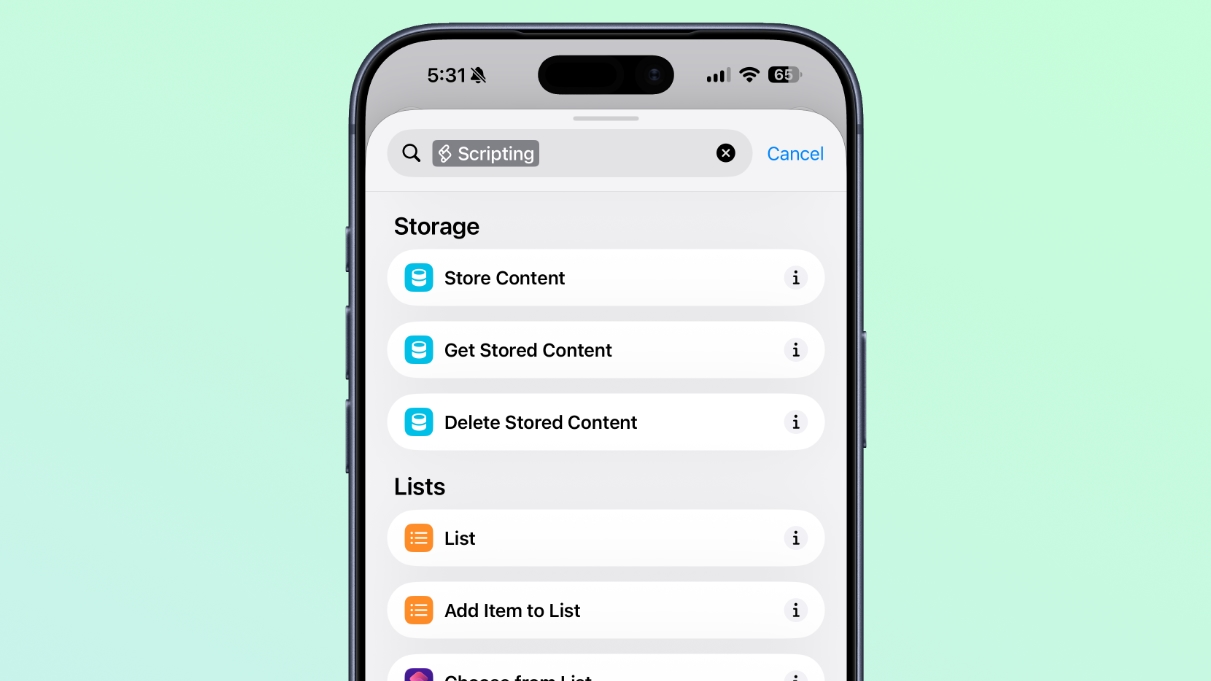
Shortcuts can store and update data, so you can do things like add items to a list or keep a tally.

Automation Updates


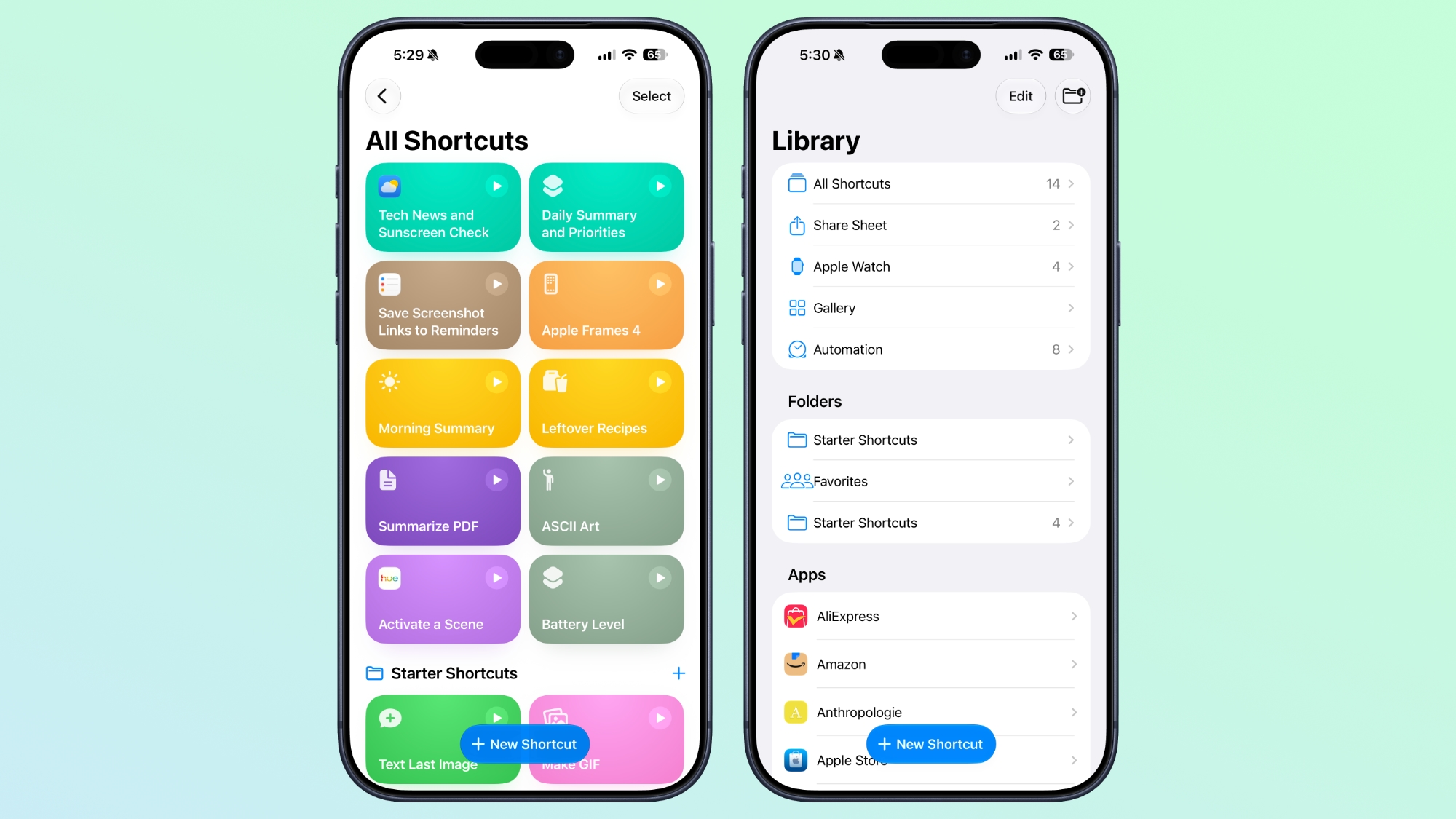
Automation is no longer a separate section in the Shortcuts app, and automation triggers are under the general Shortcuts actions.

Cross-Platform Support


The Describe a Shortcut feature is available in the Shortcuts app in ‌iOS 27‌, iPadOS 27, and macOS Golden Gate.

Requirements


The ‌Apple Intelligence‌ Shortcut app features require a device that supports ‌Apple Intelligence‌, which includes the iPhone 15 Pro and later, iPads with an M-series chip or the iPad mini with A17 Pro, or a Mac with an Apple silicon chip.

Supported languages include English, Danish, Dutch, French, German, Italian, Norwegian, Portuguese, Spanish, Swedish, Turkish, Vietnamese, Chinese (simplified and traditional), Japanese, and Korean.
Related Roundups: iOS 27, iPadOS 27

This article, "iOS 27 Makes the Shortcuts App Much Less Intimidating" first appeared on MacRumors.com

Discuss this article in our forums

  •  

Apple Loses Another Top Executive to OpenAI

Paul Meade, who oversees development on the Vision Pro and Apple's upcoming smart glasses, is leaving Apple for OpenAI, reports Bloomberg.


Meade took over leadership of Apple's Vision Products Group when Vision Pro chief Mike Rockwell took over Siri's AI upgrade. He was previously leading the Vision Pro hardware engineering team, and before that, he was on the iPad and iPhone teams. Meade has been at Apple since 2010, and working in the Vision Products Group since 2017.

More recently, Meade was overseeing the development of the AI smart glasses that Apple has in the works to compete with the Meta Ray-Bans, and also leading the team working on future augmented reality glasses.

Meade is leaving Apple by next week and will join OpenAI's hardware unit to work on AI devices. Fletcher Rothkopf, who heads up product design function for the Vision Pro and smart glasses, will take over for Meade. Meade's decision to leave is a result of executive changes at Apple as John Ternus prepares to take over as CEO. Apple chip lead Johny Srouji is taking Ternus's role as chief hardware officer, and the reorganization has upset some hardware executives.

Former Apple employees Jony Ive, Tang Tan, and Evans Hankey are also at OpenAI, among others.
Tag: OpenAI

This article, "Apple Loses Another Top Executive to OpenAI" first appeared on MacRumors.com

Discuss this article in our forums

  •  

iPhone 18 Pro and Pro Max May See $200 Price Increase

Apple's iPhone 18 Pro models could be up to $200 more expensive, according to a prediction from analytics firm IDC.


IDC expected Apple to raise iPhone 18 prices, but prior to yesterday's Mac and iPad price hike, the prediction was a $100 increase for the 18 Pro and Pro Max, and a $50 increase for the base models.

IDC Senior Director of Data & Analytics Nabila Popal says the magnitude of the Mac and iPad price increase points to even higher ‌iPhone 18‌ prices.
In our forecast, we had assumed a price hike of $100 to Pro and Pro Max models, and $50 hike to base models–-however, seeing the price hikes today to iPad and Macs going as high as $300 for some models, my personal instinct says the hike to iPhones may be even higher than what we assumed–-perhaps even $200 to the Pro/Pro Max models. I think the days of $50 price increases are over.

Apple also plans to release a foldable iPhone this year, and IDC thinks it could have an average selling price of $2,500, with higher storage tiers to cost as much as $3,000. The price of the premium model could offset some of the increased memory costs and avoid a larger price hike to other models.

Apple increased prices because component costs have gone up as a result of a global memory crisis limiting supply. The ‌iPhone 18 Pro‌ and ‌iPhone 18 Pro‌ Max are expected to have 12GB RAM, so looking to other devices with 12GB RAM could hint at Apple's iPhone pricing plans. The M4 iPad Air and lower-tier M5 iPad Pro have 12GB RAM, with prices going up $150 and $200, respectively.

It's possible the ‌iPhone 18 Pro‌ models will see similar increases in price, raising the starting price of the ‌iPhone 18 Pro‌ to between $1,249 and $1,299 and the starting price of the ‌iPhone 18 Pro‌ Max to between $1,349 and $1,399.

IDC thinks an ‌iPhone 18 Pro‌ price increase won't impact the number of people upgrading, because consumers with an iPhone 15 (non-Pro) or older are likely to want to buy a new iPhone to get Siri AI. The firm estimates that 54 percent of iPhones shipped since 2022 need to be upgraded to get the new ‌Siri‌. Customers who choose a Pro Max are also "premium-focused and less price sensitive" and so won't be dissuaded by a price increase, plus many customers opt for monthly payment plans. A $200 increase to the ‌iPhone 18 Pro‌ price over 36 months is just about $5 per month.
Related Roundups: iPhone 18 Pro, iPhone Fold
Tag: IDC

This article, "iPhone 18 Pro and Pro Max May See $200 Price Increase" first appeared on MacRumors.com

Discuss this article in our forums

  •  

OpenAI Launches GPT-5.6 Sol, Terra, and Luna in Limited Preview

OpenAI today launched a limited preview of its GPT–5.6 series, which includes flagship model Sol, a balanced everyday work model named Terra, and Luna, a fast and affordable model.


Terra is similar in performance to GPT–5.5 but it is 2x cheaper, and Luna offers "strong capability" at OpenAI's lowest price. GPT–5.6 Sol is OpenAI's strongest model to date, with agentic improvements in coding, biology, and cybersecurity. There is a new "max" reasoning effort and an "ultra" mode that uses sub-agents for complex work.

OpenAI says GPT–5.6 Sol has its most "robust safety stack to date" with protections for high-risk activity, sensitive cyber requests, and misuse. It has been tested for weaknesses and hardened against real-world attacks. OpenAI says safeguards allow the model to deliver "substantial benefit for legitimate defensive work" while limiting prohibited offensive use. It is better at helping users find and fix vulnerabilities than carrying out end-to-end attacks, according to OpenAI.

The Trump administration is limiting the launch of GPT–5.6, and OpenAI agreed to hold back on releasing it to all users. The model is instead available for a small group of trusted partners at the current time, but OpenAI is planning for a wider launch after further testing. In its GPT–5.6 announcement, OpenAI pushed back against the administration's request to hold the model back and said the government AI access process should not become the long-term default.
We don't believe this kind of government access process should become the long-term default. It keeps the best tools from users, developers, enterprises, cyber defenders, and global partners who need them. We are taking this short-term step because we believe it is the strongest path to broader availability in the coming weeks, while we work with the Administration to develop the cyber Executive Order framework and a repeatable process for future model releases.

The Trump administration is putting together a process for benchmarking and assessing new AI models prior to launch, per a June 2 executive order. The administration previously forced Anthropic to remove access to Claude Fable 5 and Mythos 5, even though Anthropic adhered to a voluntary government review process and added guardrails based on government feedback.

The GPT–5.6 models are available through the API and Codex to a trusted set of OpenAI partners and organizations. OpenAI says they will be available more broadly in ChatGPT, Codex, and the API "soon."
Tag: OpenAI

This article, "OpenAI Launches GPT-5.6 Sol, Terra, and Luna in Limited Preview" first appeared on MacRumors.com

Discuss this article in our forums

  •  

MacRumors Giveaway: Win an iPad Air and Rock Paper Pencil From Astropad

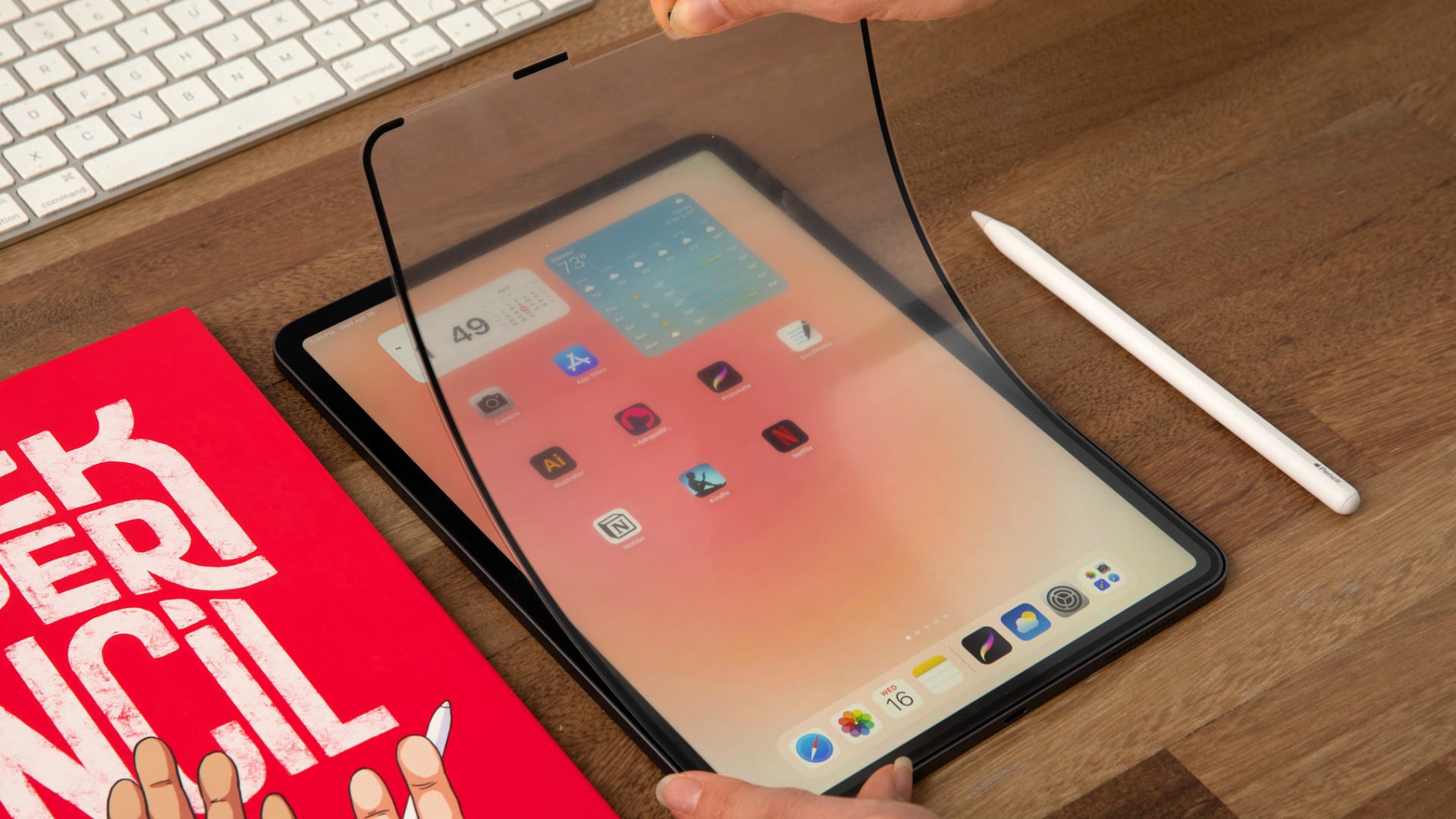
For this week's giveaway, we've teamed up with Astropad to offer MacRumors readers a chance to win an iPad Air, an Apple Pencil Pro, and one of Astropad's Rock Paper Pencil kits to use with it.


Rock Paper Pencil makes writing on your iPad with an ‌Apple Pencil‌ feel like writing on paper instead of a slippery display, offering a more comfortable and natural writing experience.

The Rock Paper Pencil kit includes a super thin NanoCling screen protector for the ‌iPad‌'s display and an ‌Apple Pencil‌ tip that replaces the stock ‌Apple Pencil‌ tip. You can put the NanoCling screen protector on while you're using your ‌Apple Pencil‌, then take it off and put it away when you want to use your ‌iPad‌ without it. Putting the screen protector on and removing it again takes just seconds, and there's no sticky residue left behind on your ‌iPad‌'s screen.


Astropad's Rock Paper Pencil is normally $45, but there is a Prime Day sale going on right now with a 15 percent discount available. If you do a lot of writing or sketching on your ‌iPad‌, it's a deal you won't want to miss out on.

Astropad has iterated on the Rock Paper Pencil over time, perfecting the paper-like feel to get the smoothest writing experience. There's a microscopic texture on the screen protector that mimics the feel of paper, but it doesn't interfere with the vivid colors of the ‌iPad‌'s display.


The ‌Apple Pencil‌ tip from Astropad is made from solid stainless steel that doesn't wear down or degrade over time. The tip is 1mm for the perfect pencil feel, with an ideal balance of friction and durability.

If you hate the slippery, unnatural feeling of writing on a hard screen, the Rock Paper Pencil is worth checking out. It can make you forget that you're writing on a tablet because it feels and sounds like using a pen on paper.


Rock Paper Pencil is compatible with all of Apple's M2, M3, M4, and M5 iPads, and many older models as well. It works with the 6th and 7th-generation iPad mini and the 7th-generation ‌iPad‌ and later.


We have a Rock Paper Pencil kit, an ‌iPad Air‌, and an ‌Apple Pencil‌ Pro for one lucky MacRumors reader. To enter to win, use the widget below and enter an email address. Email addresses will be used solely for contact purposes to reach the winner(s) and send the prize(s). You can earn additional entries by subscribing to our weekly newsletter, subscribing to our YouTube channel, following us on Twitter, following us on Instagram, following us on Threads, or visiting the MacRumors Facebook page.

Due to the complexities of international laws regarding giveaways, only U.S. residents who are 18 years or older, UK residents who are 18 years or older, and Canadian residents who have reached the age of majority in their province or territory are eligible to enter. All federal, state, provincial, and/or local taxes, fees, and surcharges are the sole responsibility of the prize winner. To offer feedback or get more information on the giveaway restrictions, please refer to our Site Feedback section, as that is where discussion of the rules will be redirected.

The contest will run from today (June 26) at 9:00 a.m. Pacific Time through 9:00 a.m. Pacific Time on July 3. The winner will be chosen randomly on or shortly after July 3 and will be contacted by email. The winner will have 48 hours to respond and provide a shipping address before a new winner is chosen.
Related Roundup: iPad Air
Buyer's Guide: iPad Air (Buy Now)
Related Forum: iPad

This article, "MacRumors Giveaway: Win an iPad Air and Rock Paper Pencil From Astropad" first appeared on MacRumors.com

Discuss this article in our forums

  •  

2027 iPhone 18 and iPhone 18e to Get 9GB RAM and A20 Chip

The lower-end iPhone 18 models set to launch in spring 2027 will feature 9GB DRAM, up from 8GB, according to Apple analyst Ming-Chi Kuo.


Kuo says the A20 chip Apple plans to use for the devices will have 1.5GB x 6 dies for a total of 9GB RAM, instead of 2GB x 4 dies as the current lower-end iPhone 17 models use.

By lower-end iPhones, Kuo is likely referencing the ‌iPhone 18‌ and the iPhone 18e, both of which are rumored to be coming around March or April of 2027. Apple plans to introduce the iPhone 18 Pro, ‌iPhone 18 Pro‌ Max, and foldable iPhone this fall, and those devices are expected to feature 12GB RAM (1.5GB x 8 dies) like the current iPhone 17 Pro models.

Apple will add more RAM to the ‌iPhone 18‌ models to make sure the devices work well with AI workloads and are able to support all of the Apple Intelligence features coming in iOS 27.

Apple yesterday raised prices across its Mac and iPad lines, but ‌iPhone 17‌ pricing hasn't gone up. Apple will likely implement price hikes when the ‌iPhone 18 Pro‌ models come out, and since Apple raised the cost of even the low-end iPad and the MacBook Neo, the ‌iPhone 18‌ and iPhone 18e probably won't be exempt from an increase.
Related Roundup: iPhone 18
Related Forum: iPhone

This article, "2027 iPhone 18 and iPhone 18e to Get 9GB RAM and A20 Chip" first appeared on MacRumors.com

Discuss this article in our forums

  •  

M6 MacBook Pro Expected This Year With Apple's First 2nm Chip

Apple could launch an updated base model 14-inch MacBook Pro with an M6 chip as soon as this year, reports Bloomberg. There could also be M6 chip updates for the Mac mini, iMac, and MacBook Air, but Apple is testing an M6 ‌MacBook Pro‌.


Apple plans to introduce the M6 in late 2026, and for the first time, it will be a standalone chip. Apple is not working on M6 Pro or M6 Max chips, and will hold off on higher-end chip options until the M7 series launches in 2027.

The M6 chip will be the first built on a 2-nanometer process instead of the 3-nanometer process that Apple has used for the last several chip generations. Rumors suggest Apple will use TSMC's N2 process. Compared to the 3nm process, the 2nm process cuts down on transistor size so more can be packaged on a chip. Decreases in node size typically bring improved processor speeds and better power efficiency.

TSMC's new chips also transition from InFo (Integrated Fan-Out) packaging to WMCM (Wafer-Level Multi-Chip Module). WMCM integrates individual chip components like the CPU, GPU, DRAM, and Neural Engine more closely together, improving communication between the components.

According to Bloomberg, the M6 will be the most powerful in the industry for its class. The chip will have higher memory bandwidth at approximately 200GB/s (up from 153GB/s in the M5). Increased memory bandwidth will improve graphics performance and speed up on-device AI tasks.

The M6 will have an updated memory architecture, an upgraded Neural Engine for AI processing, and improvements to video encoding and decoding. Performance will improve for all of the processing cores, and the GPU will also get an update to optimize it for AI. Apple is testing versions of the chip with a 12-core GPU. The M5 chip is limited to a 10-core GPU.

Apple last updated the base 14-inch ‌MacBook Pro‌ with an M5 chip in October 2025, so an M6 update around the one-year mark would make sense. The base ‌Mac mini‌ and ‌iMac‌ have not been updated since October 2024, but Bloomberg recently said those machines would get M5 chips, not M6 chips, so Apple's plans are unclear. Bloomberg's newest report on the M6 mentions plural entry-level Macs getting the M6, but it only specifically references the ‌MacBook Pro‌.

Apple added the M5 chip to the iPad Pro in October 2025, but it is not known if the device will get an M6 chip this year because prior rumors have said no 2026 refresh is planned. The ‌MacBook Air‌ was refreshed in March 2026, so it may not get a new chip until 2027.
Related Roundup: MacBook Pro
Buyer's Guide: MacBook Pro (Buy Now)
Related Forum: MacBook Pro

This article, "M6 MacBook Pro Expected This Year With Apple's First 2nm Chip" first appeared on MacRumors.com

Discuss this article in our forums

  •  

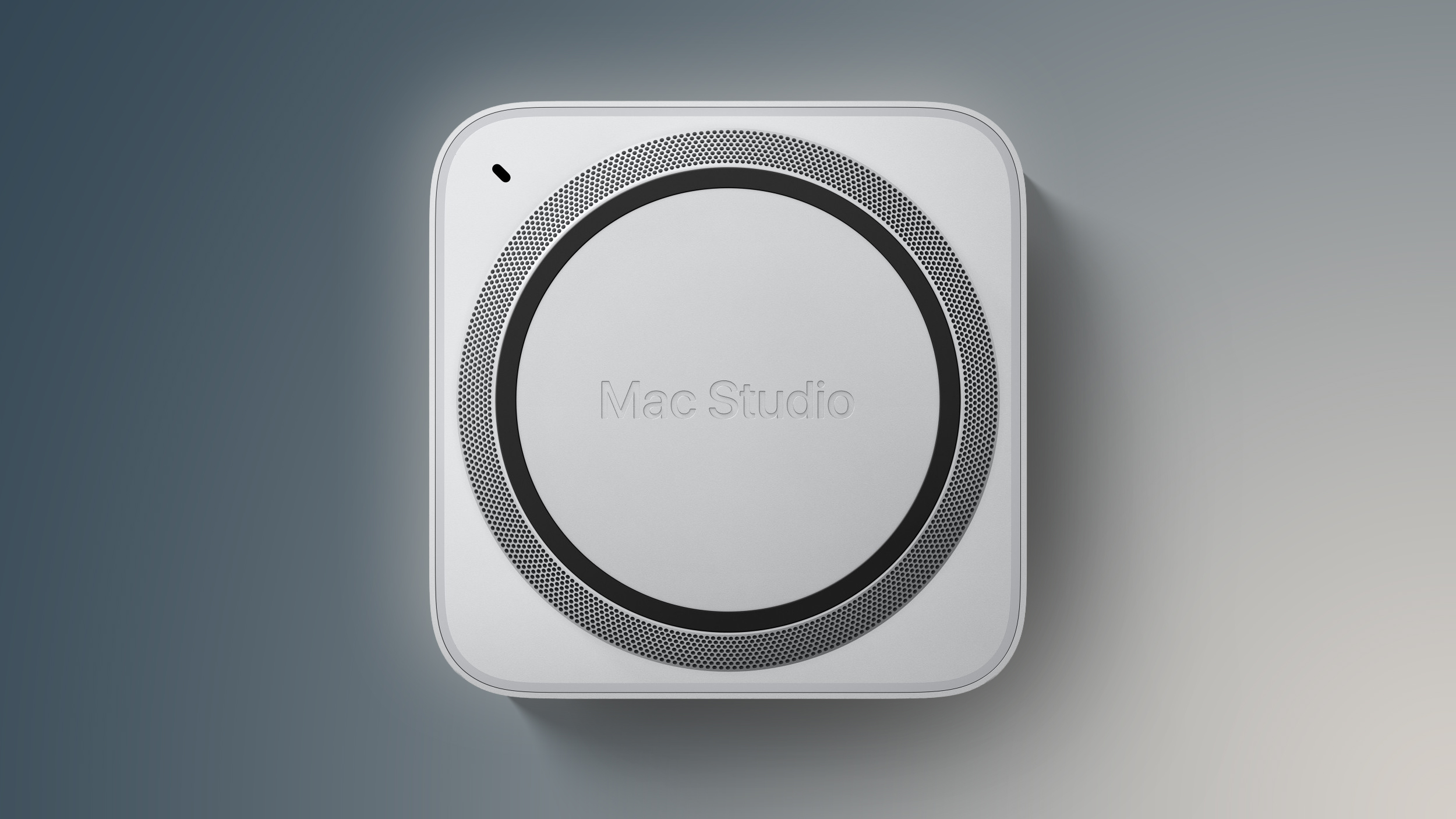
M5 Ultra Mac Studio Could Launch in 2026 With Up to 768GB of RAM

Despite price increases across the Mac line, Apple is still planning to release a new Mac Studio as soon as this year, reports Bloomberg.


Apple plans to introduce a new M5 Ultra chip as the final option in the M5 family before it transitions to the M6, M7, M7 Pro, and M7 Max. The M5 Ultra will come in a new version of the ‌Mac Studio‌, which hasn't been updated since March 2025.

The ‌Mac Studio‌ refresh was supposed to come earlier in 2026, but Apple reportedly postponed the launch because of memory chip supply issues and price increases. In April, Bloomberg said the ‌Mac Studio‌ would launch sometime around October 2026.

It's not clear if Apple will make an October launch. The current M3 Ultra ‌Mac Studio‌ already has delivery estimates ranging into October.

The M5 Ultra chip is expected to have around 36 CPU cores and 80 GPU cores, which is not too far off from the M3 Ultra. The M3 Ultra has up to a 32-core CPU and up to an 80-core GPU. Apple has tested support for up to 768GB of unified memory, but supply constraints could prevent it from launching with an option for that much memory.

Apple was selling the M3 Ultra ‌Mac Studio‌ with up to 512GB RAM, but the 512GB model was removed back in March. Apple has been temporarily cutting higher-tier Macs, and the current M3 Ultra ‌Mac Studio‌ can only be purchased with 96GB RAM.

Even if Apple does plan to release a ‌Mac Studio‌ with an M5 Ultra chip and 768GB RAM, it would be astronomically expensive. When Apple raised Mac prices today, the 96GB ‌Mac Studio‌ went from $3,999 to $5,299, an increase of $1,300. 8x more RAM during the memory crisis could see the ‌Mac Studio‌ priced at over $10,000.
Related Roundup: Mac Studio
Buyer's Guide: Mac Studio (Don't Buy)
Related Forum: Mac Studio

This article, "M5 Ultra Mac Studio Could Launch in 2026 With Up to 768GB of RAM" first appeared on MacRumors.com

Discuss this article in our forums

  •  

Apple Seeds New watchOS 27 Beta for Apple Watch Ultra 3

Apple today seeded a new beta of watchOS 27 for the Apple Watch Ultra 3, with the update coming over two weeks after the launch of the first beta. This beta is only available for the ‌Apple Watch Ultra 3‌, which did not get the second beta update that came out earlier this week.


The beta can be downloaded through the Watch app on the iPhone with a free developer account. The Apple Watch will need to be on the charger, connected to Wi-Fi, and have a battery level of 50 percent or above for new software to be installed.

‌watchOS 27‌ will include Siri AI, the smarter, more capable version of ‌Siri‌. ‌Siri‌ can hold back-and-forth conversations, plus it has access to general world knowledge and your personal data to answer questions and find information. ‌Siri‌ AI on Apple Watch requires an iPhone that supports Apple Intelligence, including the iPhone 15 Pro and later.

There's a new Dynamic app grid that highlights ‌Siri‌ suggested apps, and more intuitive Smart Stack Suggestions. You can find your parked car, see pinned messages, get noise alerts, and view identity and transit cards.

Liquid Glass has been updated to improve legibility, and Workout Buddy works on the Apple Watch even when an iPhone isn't nearby. Workout Buddy also gains new metrics like progressive increases to distance, pace, or duration. Apple added a new all-in-one Find My app with support for Precision Finding, and there are performance optimizations that improve battery life.

More on what's new in ‌watchOS 27‌ is available in our watchOS 27 roundup.
Related Forum: Apple Watch

This article, "Apple Seeds New watchOS 27 Beta for Apple Watch Ultra 3" first appeared on MacRumors.com

Discuss this article in our forums

  •  

2027 Macs to Get AI-Focused M7 Chips as Apple Skips High-End M6

Apple is changing its Apple silicon launch timeline to speed up the debut of chips designed for artificial intelligence workloads, reports Bloomberg.


Apple plans to release an M6 chip for entry-level Macs as soon as this year, but it has canceled plans for higher-end M6 Pro and M6 Max chips. Instead, Apple's next Pro and Max chips will be part of its M7 chip lineup, with the first M7 chips launching in 2027. An M5 Ultra chip could also come as soon as this year.

  • M5 Ultra - Late 2026

  • M6 - Late 2026

  • M7 - First half of 2027

  • M7 Pro - End of 2027

  • M7 Max - End of 2027

  • M7 Ultra - 2028


Apple is speeding up development on M7 chips because they have technologies supporting on-device AI and GPU-intensive software. Since the launch of the first Apple silicon chips, Apple has always had at least three variants, including the base M-series chip, a Pro version, and a Max version. The M6 will mark the first time that Apple is not coming out with a Pro or Max chip for the line.

Apple could update the entry-level MacBook Pro with an M6 chip as soon as this year. It is expected to have around 200GB/s memory bandwidth for better graphics and faster AI processing and video editing. The base M5 chip has 153GB/s memory bandwidth, and the base M7 chip could have 240GB/s bandwidth.

Bloomberg says the M6 will also include an updated memory architecture and an upgraded Neural Engine, along with performance improvements across all of the processor cores and a redesigned GPU with up to 12 cores. Prior rumors have suggested the M6 will be the first built on Apple's new 2-nanometer process.

The base M6 could also be used in the entry-level Mac mini and iMac, along with upcoming iPad Pro and iPad Air models. The higher-end ‌MacBook Pro‌ models and higher-end ‌Mac mini‌ will use the M7 Pro and M7 Max. The Mac Studio will use the M7 Max and M7 Ultra.

Bloomberg says Apple still plans to release an M5 Ultra for a refreshed version of the ‌Mac Studio‌ as soon as this year. The M5 Ultra will have approximately 36 CPU cores and 80 GPU cores. An M5 Ultra ‌Mac Studio‌ could have as much as 768GB of unified memory.

Apple is working on a high-end "MacBook Ultra" with an OLED display and a touchscreen, and rumors suggested it could come as soon as late 2026. That seems unlikely now with the M7 Pro and M7 Max chips slated for late 2027, unless Apple equips the high-end ‌MacBook Pro‌ with an M6, the M5 Max, or the M5 Ultra chip.

News of Apple's updated chip launch timeline comes just after the company raised prices across all of its Macs and iPads.
Related Roundups: Mac Studio, MacBook Pro
Related Forums: Mac Studio, MacBook Pro

This article, "2027 Macs to Get AI-Focused M7 Chips as Apple Skips High-End M6" first appeared on MacRumors.com

Discuss this article in our forums

  •  

Google Lowering Play Store Fees and Allowing Alternative Payments Worldwide

As a result of the lawsuit Epic Games filed against Google, Google is making major changes to its Play Store worldwide. Google today said it would soon lower fees and start accepting alternative payment options.


App developers will be able to offer payment options other than Google's in-app billing system in the UK, European Economic Area, and United States. Developers can use the billing system of their choice and link users to websites for purchases.

As for fees, Google will charge between 10% and 25% (not including billing fee), based on annual earnings. There's a base 10% service fee on the first $1 million in annual earnings. For earnings over $1 million, fees are 20% for new installs and 25% for existing installs (apps installed prior to the new rules) with the exception of auto-renewing subscriptions. Link-out fees are 20% for apps earning over $1 million annually.

There is an additional 5% fee for transactions that use the Google Play billing system, which is on top of the base service fees. Google's full fee structure is outlined on its website.

Google also has lower pricing options for apps that qualify for its Games Level Up and Apps Experience programs, with fees ranging from 10 percent to 20 percent. Those programs will be open to developers starting in September.

Fees and billing options go into effect on June 30 in the UK, United States, and European Economic Area. The updated fee structure will expand to Australia, Japan, and South Korea by the end of 2026, and the rest of the world by September 2027.

Google's antitrust lawsuit with ‌Epic Games‌ went differently than Apple's antitrust lawsuit, and Google was found to have an app store monopoly resulting in higher fees for developers. Google and ‌Epic Games‌ came to a settlement agreement, and Google said it would lower fees, support alternative app stores, and offer alternative payment options.

‌Epic Games‌ and Apple are continuing to fight in court, with Apple appealing to the Supreme Court. Apple is currently barred from charging commissions on U.S. apps with links to purchase options on the web and it has to comply with the Digital Markets Act in the European Union, but Apple does not have one worldwide policy like Google does now.

Until fee calculations happen in the ‌Epic Games‌ v. Apple case, Apple is charging $0 for links in the App Store, while Google is charging between 10 and 20 percent.

It is possible that Google's Play Store changes could impact the eventual outcome of Apple's legal dispute with ‌Epic Games‌. Apple and Google have historically charged developers similar fees, and though Apple is fighting ‌App Store‌ regulation in multiple countries, it is having to implement a disjointed set of fees and restrictions on a per-country basis to keep up with local laws.
This article, "Google Lowering Play Store Fees and Allowing Alternative Payments Worldwide" first appeared on MacRumors.com

Discuss this article in our forums

  •  

iOS 27 Home App: 10+ New HomeKit Features

Apple updated the Home app with some useful new features that rely on Apple Intelligence. The updates improve the way HomeKit Secure Video cameras work on Apple's HomeKit platform.


Apple Intelligence Summaries


The Home app generates written summaries for motion alerts and what's detected, using AI to determine what's been recorded. It can recognize people, animals, vehicles, packages, and general motion, giving a summary of what's happening even if you're not looking at the video footage.

It is intelligent enough to give detail, so you'll see alerts like "a person walked through the room," "two people were in the room," "a dog sat on the floor," or "a cat played in the room."

‌HomeKit Secure Video‌ cameras have facial recognition, so they can also recognize people who are in your Photo Library, sending alerts and summaries with names.

Grouped Footage


Along with analyzing footage, the Home app can now group footage from separate cameras capturing the same event. If a person walks by one camera and continues on to another, the Home app knows those two events are related. During video playback, you can see relevant footage from multiple cameras with a summary of something that happened across the entire home.

Highlights


If there are noteworthy recordings available, they are shown in a separate section above the general recordings in the camera view.

Search


The Home app supports natural language search for camera footage, so if you're looking for something like when a package was delivered, you can search for it. It can recognize objects, colors, and more. Search works in the Home app and directly in Spotlight.

Notification Summaries


Notifications update in real-time and related alerts are combined instead of being shown as separate notifications. The net result is fewer Home app notifications. Summaries can be turned on in the Home app settings on a per-camera basis, plus there are options for multiple languages.

Video Previews


Long pressing on an incoming video notification plays a preview clip of the footage and includes access to nearby accessories like lights that you might want to turn on quickly.

Reduce Notifications


There is an ‌Apple Intelligence‌ section in the Home app where you can turn on video summaries and cut down on notifications. The Reduce Notifications toggle combines related activities like someone arriving and unlocking the door.

4K Recording


‌HomeKit Secure Video‌ cameras are no longer limited to 1080p recording. If supported, cameras can stream and record at up to 4K.

Energy Monitoring


Accessories able to track energy usage like smart plugs now display that information in the Home app in the Energy tab. There is no way to create automations based on the data as of now.

Remote Apple TV Updates


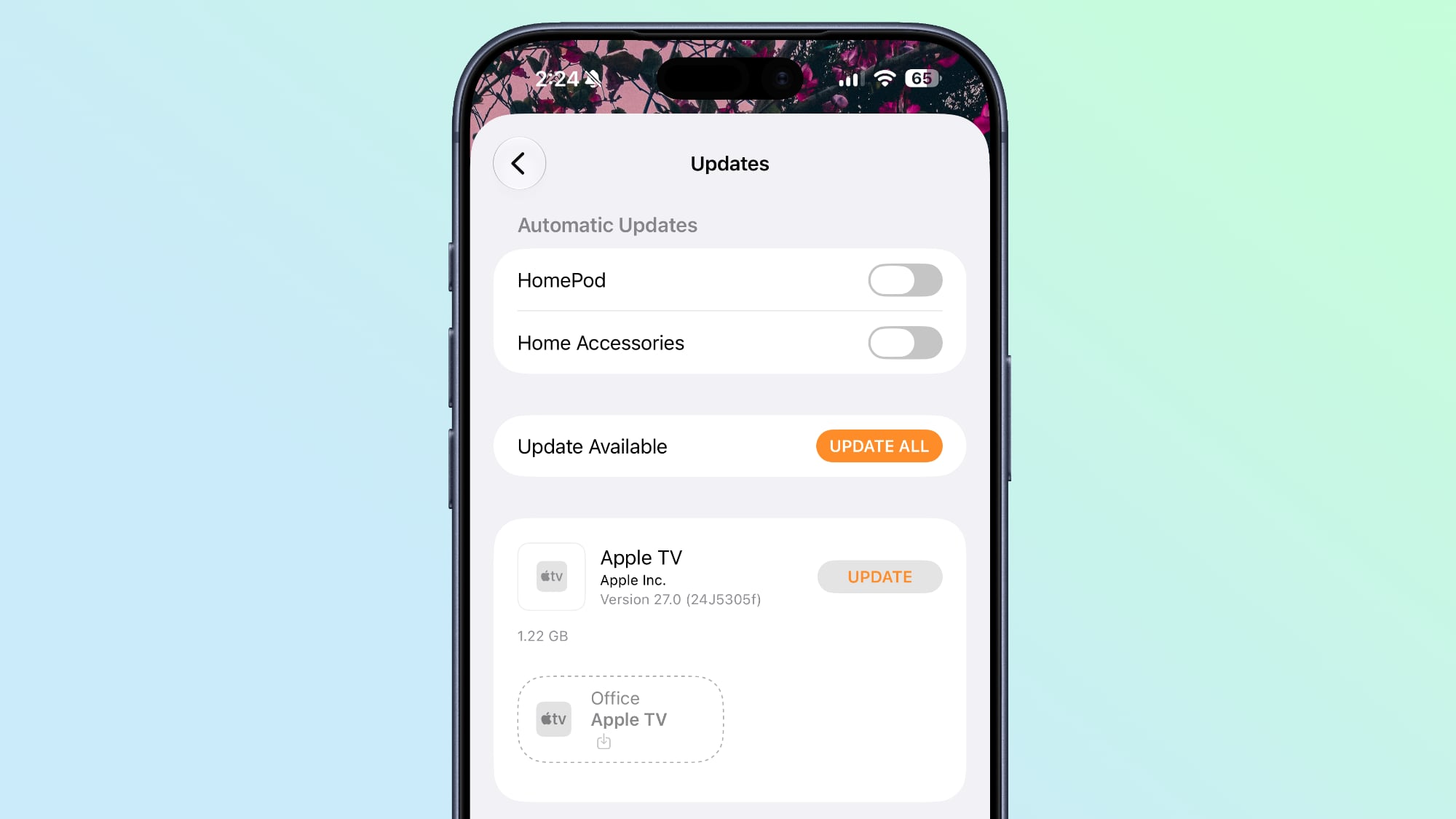
It's now possible to update the Apple TV remotely using the Home app, similar to how HomePod updates are installed.


Reliability


Apple says capturing and storing ‌HomeKit Secure Video‌ footage is more reliable than it was before and it is less likely to miss activity.

Connectivity for Thread home accessories has also been improved with Apple adopting Thread 1.4, and ‌HomeKit‌ accessories now pair faster. Apple also says smart home accessory updates are faster than before.

When adding a new device to the Home app, there's a simplified interface that's useful for configuring Matter accessories in particular.

Compatibility and Requirements


The ‌Apple Intelligence‌ features in the Home app require a device that supports ‌Apple Intelligence‌, which includes the iPhone 15 Pro and later. The Home features also need an Apple TV running tvOS 27 or a ‌HomePod‌ running the ‌HomePod‌ Software 27.

‌HomeKit Secure Video‌ requires an iCloud+ plan. The 50GB plan supports a single camera, the 200GB plan supports up to five cameras, and the 2TB and above plans support unlimited cameras.

4K video recording does not require ‌Apple Intelligence‌.
Related Roundups: iOS 27, iPadOS 27
Tag: HomeKit

This article, "iOS 27 Home App: 10+ New HomeKit Features" first appeared on MacRumors.com

Discuss this article in our forums

  •  

Every New AirPods Feature in iOS 27

With every iOS update, Apple adds new features to the AirPods. In iOS 27, the AirPods work with Siri AI, and there's a long-requested custom EQ option.


Custom EQ


Apple resisted custom EQ for the AirPods for years, preferring to require users to stick with Apple's sound profiles. That's changing in ‌iOS 27‌, and there are finally adjustable equalizer settings.

When the AirPods are connected to an iPhone running ‌iOS 27‌ and have the latest firmware, custom EQ can be accessed by going to Settings > [AirPods Name] > Audio & Routing > Equalizer > Custom.

There are options for adjusting lows, mids, and highs.

Custom EQ is available for AirPods with an H2 chip, which includes the AirPods Pro 2, AirPods Pro 3, AirPods 4, and AirPods Max 2.

Redesigned Settings Menu


There's a more compact settings interface available when the AirPods are connected to an iPhone. It's still located under Settings > AirPods, but all of the AirPods features are better organized and easier to get to.

The Transparency, Noise Cancellation, and Adaptive modes are still accessible at the top of the screen for quick switching, but Apple also added a volume slider for adjusting sound in the same interface.

Instead of expanded menus for Hearing Health, Call Controls, and gestures, the options are organized into separate menus. Apple has logically aggregated controls into categories that include Audio & Routing, Hearing Health, Controls & Gestures, Live Translation, Accessibility, Battery, Find My, and Privacy.

Siri AI


The smarter version of ‌Siri‌, ‌Siri‌ AI, works on the AirPods through a connected iPhone. When you're wearing AirPods, you can ask ‌Siri‌ AI questions and make requests.

‌Siri‌ AI isn't a standalone feature on the AirPods, and it requires an iPhone that supports it. ‌Siri‌ AI has a long list of new capabilities, which are outlined in our Siri guide. Apple is rumored to be developing AirPods with cameras that will feed visual data to ‌Siri‌ AI, and the current integration is a precursor to that deeper feature set.

Precision Finding


The ‌AirPods Pro 3‌ charging case features Ultra Wideband (UWB), and it works with Precision Finding on the iPhone. With the update to ‌iOS 27‌ and watchOS 27, you can also use an Apple Watch for ‌AirPods Pro 3‌ Precision Finding.

GymKit Syncing


GymKit works with the iPhone in ‌iOS 27‌, and it can sync heart rate data collected from the ‌AirPods Pro 3‌ to gym equipment like treadmills and indoor bikes.

Accessibility


Apple added Name Recognition in ‌iOS 27‌, so users who are deaf or hard of hearing can be alerted if someone says their name. It's a feature that works with the AirPods Hearing Health options, and it supports more than 50 languages globally.

Compatibility


Some of the new AirPods features require an H2 chip, and for ‌Siri‌ AI, you'll need an Apple Intelligence-compatible iPhone. The Precision Finding and GymKit features are limited to ‌AirPods Pro 3‌.

Launch Date


The new AirPods features require ‌iOS 27‌ and updated AirPods firmware. Developers have access now, and Apple plans to release a public beta in July. ‌iOS 27‌ will launch in September alongside new iPhone models.
Related Forum: AirPods

This article, "Every New AirPods Feature in iOS 27" first appeared on MacRumors.com

Discuss this article in our forums

  •  

iOS 27 Weather App: All the New Features

There are no new AI features in the iOS 27 Weather app, but Apple did make improvements to the layout. It's now easier to see at-a-glance information for weather conditions.


Highlights


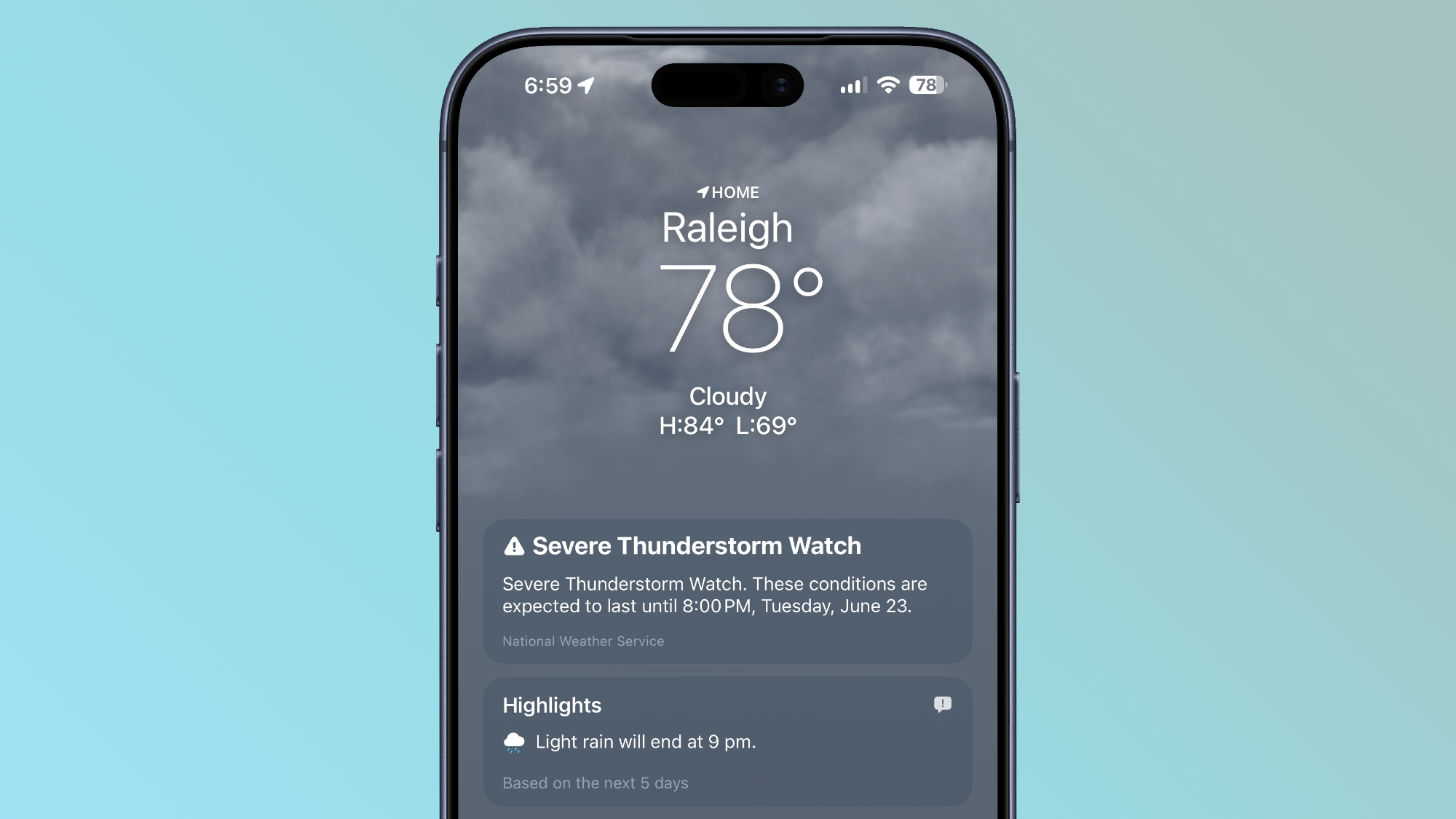
The top of the Weather app now has a Highlights section that shows you need-to-know weather information for the day.


Conditions


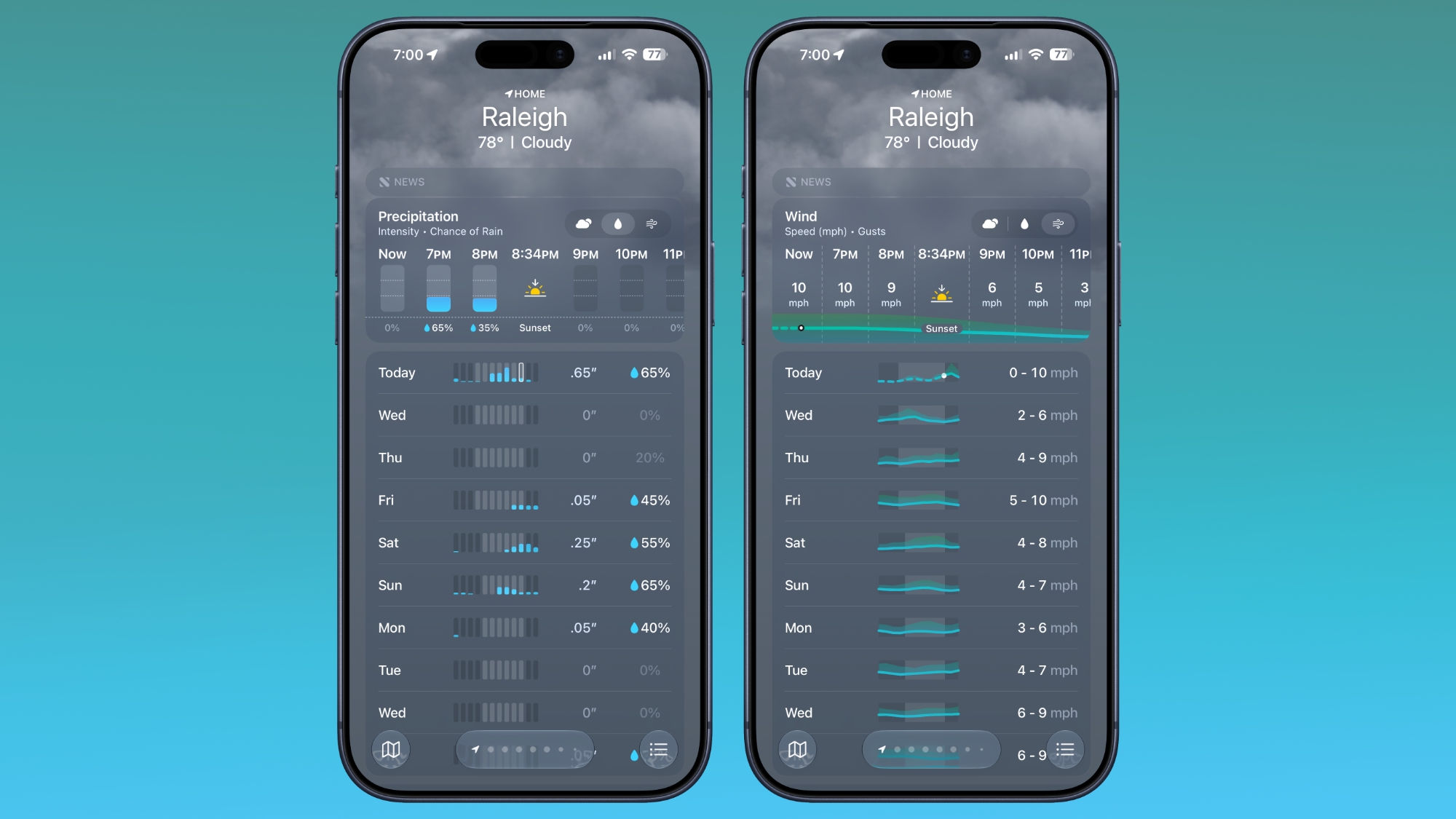
There are new views for the Conditions section of the main Weather app interface. In addition to viewing temperature and current condition on an hourly basis, you can toggle over to a precipitation or wind view.


Precipitation shows you an hour-by-hour chance of rain forecast, while wind displays a breakdown of wind speed.

10-Day View


The 10-day view also changes when you swap between the different condition options so you can see precipitation and wind overviews for the next 10 days without having to tap into a more detailed view.

Widgets


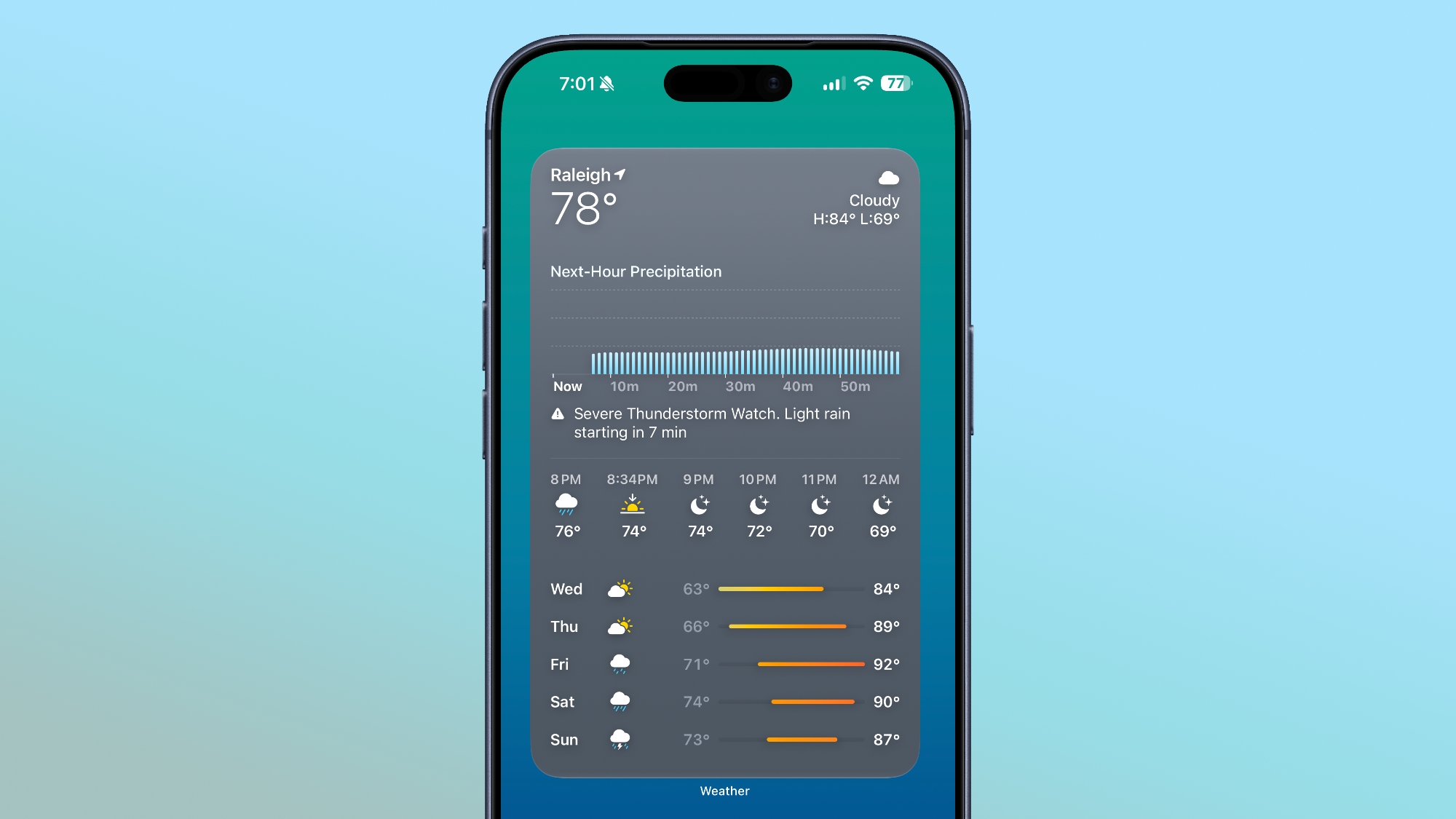
There's a new extra large size available for Home Screen widgets, which is applicable to the Weather app. You can set the Weather app to take up an entire app page.


More iOS 27 Features


There are a long list of new features in ‌iOS 27‌, with details available in our iOS 27 roundup.
Related Roundups: iOS 27, iPadOS 27

This article, "iOS 27 Weather App: All the New Features" first appeared on MacRumors.com

Discuss this article in our forums

  •  
❌