❌

Lees weergave

Touchscreen MacBook '100% Confirmed,' Says Reputable Leaker

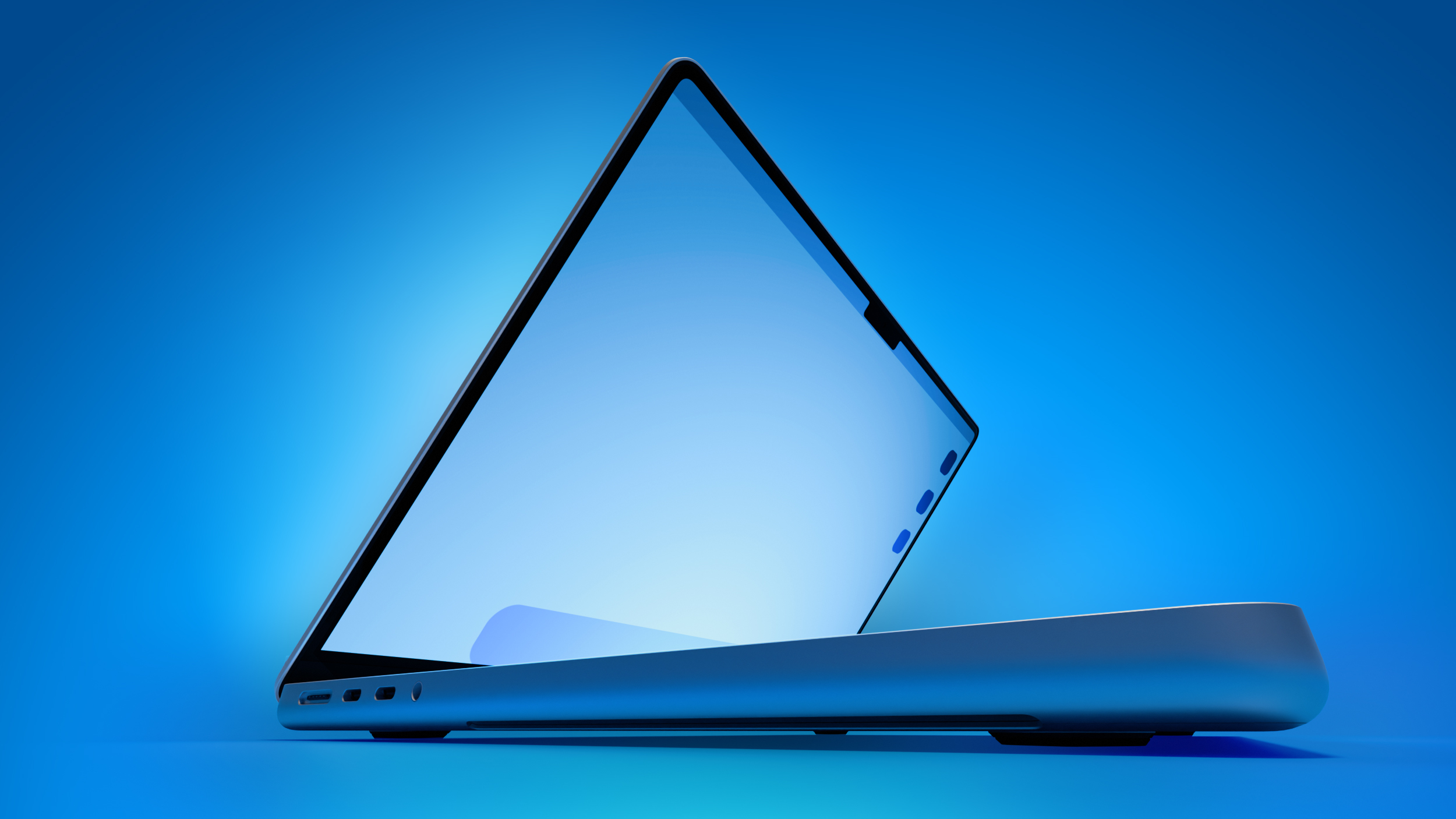
Apple's first touchscreen MacBook is now "100% confirmed," according to the prolific Chinese leaker known as Instant Digital, who appears to have insider information from sources in the supply chain. The leaker made their definitive statement this morning in a Weibo post.
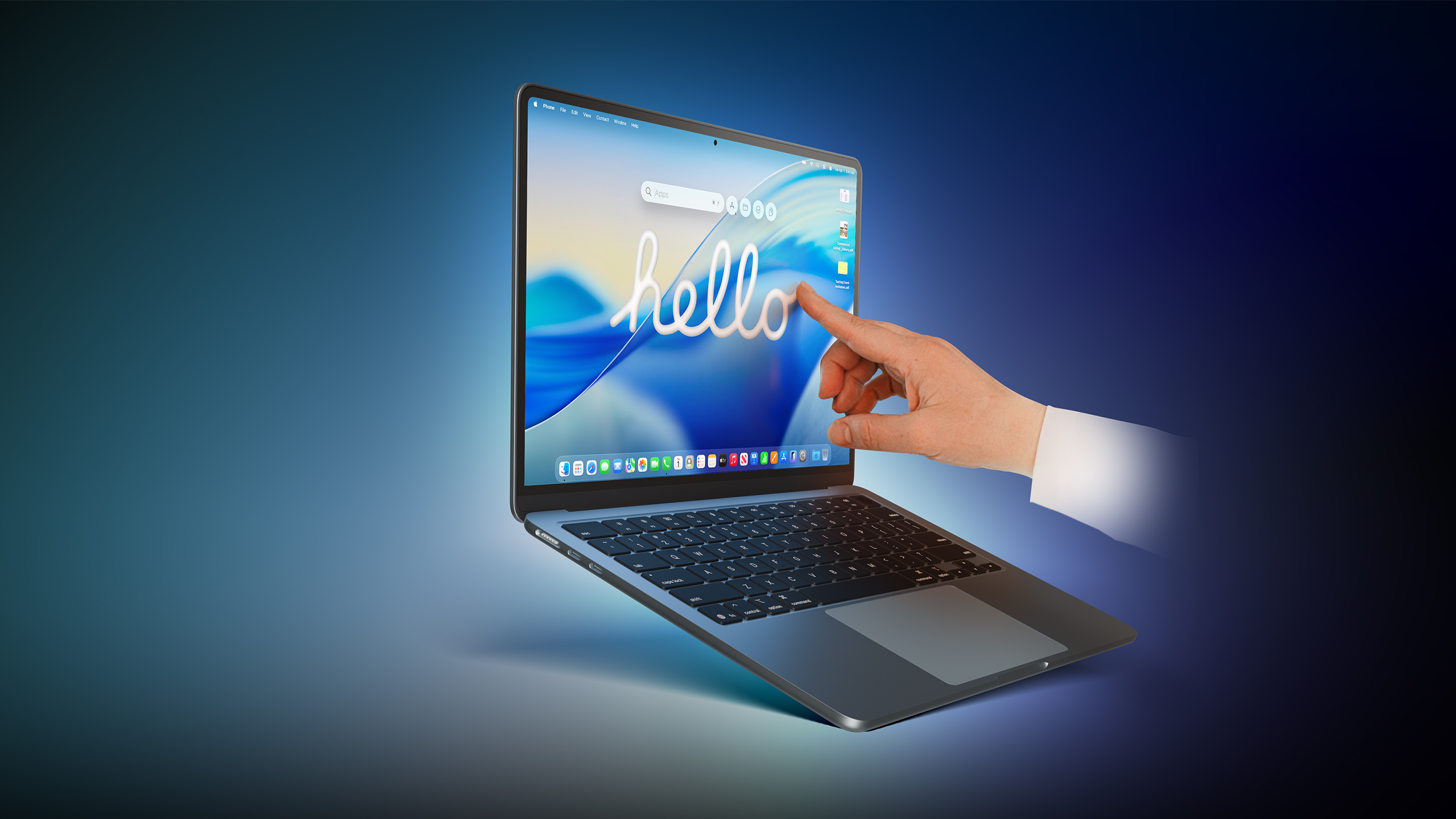

Instant Digital has a good track record for Apple rumors and has provided some strikingly accurate information in the past, so it's always worth noting what they have to say about Apple's plans. The claim is also backed by several recent reports.

Recurring rumors about Apple's touchscreen MacBook development actually go back a few years. In January 2023, Bloomberg's Mark Gurman said that a MacBook Pro with an OLED display would be the first touchscreen Mac. The machine was initially slated for 2025, but that timeline never played out.

Since then, reports have become more frequent and assertive. In September 2025, analyst Ming-Chi Kuo said the first touchscreen OLED MacBook Pro would enter mass production in 2026. Gurman has also repeatedly stated that the next 14-inch and 16-inch MacBook Pro models will have touchscreen and are slated to launch in late 2026 to early 2027 – with the global memory chip shortage potentially making 2027 more likely.

Touchscreen support is expected to be one of several major upgrades coming to Apple's next-generation high-end MacBook Pro models. Other rumored features include M6 Pro and M6 Max chips, an OLED display, a Dynamic Island (i.e., no notch), and a thinner design. The new laptops could also adopt MacBook Ultra branding.

Notably, macOS 27 Golden Gate also introduces a more touch-friendly interface, since Apple's Sidecar feature now allows users to tap and interact with macOS interface elements using a finger on their iPad.

Apple apparently is not going to advertise the β€Œnew MacBook Proβ€Œ/Ultra as a touch-first device like the β€ŒiPadβ€Œ – it will be "touch-friendly, not touch-first," according to Gurman. In that sense, Apple will let customers use touch and mouse gestures interchangeably for all functions.

Apple has long rejected the idea of a touchscreen Mac, so moving ahead with one would be a major shift in the company's thinking. In 2010, Steve Jobs argued that "touch surfaces don't want to be vertical," citing the arm fatigue that comes from repeatedly reaching up to a screen.

More than a decade later, in 2021, Apple's hardware engineering chief John Ternus – soon to be Apple CEO – said the Mac was "totally optimized for indirect input" and that Apple saw no compelling reason to change that approach.

Are you looking forward to touching a future MacBook's screen? Let us know in the comments.
Related Roundup: MacBook Pro
Buyer's Guide: MacBook Pro (Buy Now)
Related Forum: MacBook Pro

This article, "Touchscreen MacBook '100% Confirmed,' Says Reputable Leaker" first appeared on MacRumors.com

Discuss this article in our forums
  •  

macOS 27 Golden Gate Reverses a Divisive Tahoe Design Choice

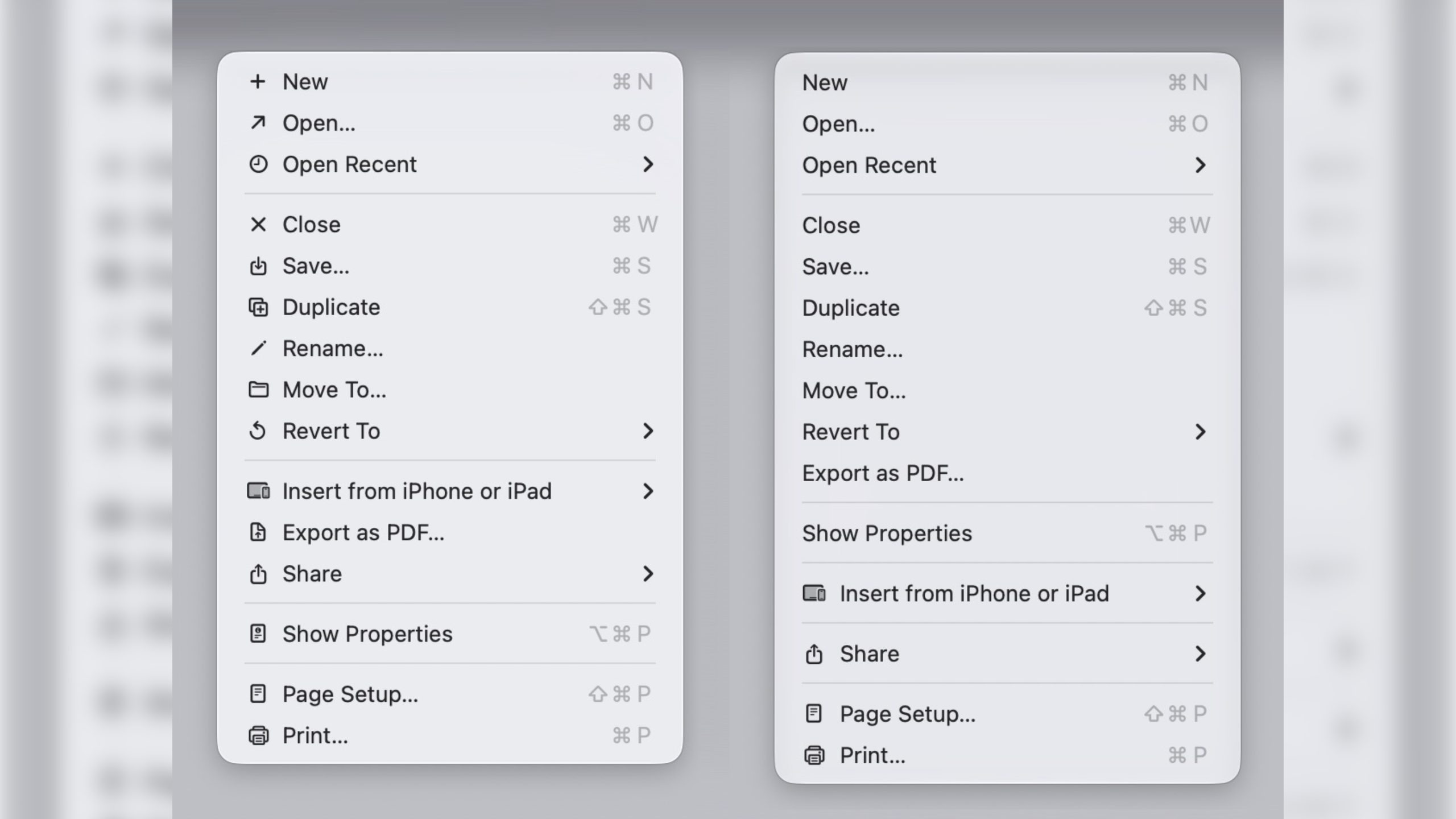
In macOS 27 Golden Gate, Apple has removed many of the menu item icons that are so prevalent throughout macOS 26 Tahoe, as spotted by Nikita "Tonsky" Prokopov (via Daring Fireball). The developer shared before-and-after screenshots on Mastodon to evidence the reversal.

Menu item icons in macOS 26 (left) vs. macOS 27 (image: Nikita Prokopov)

Tahoe was the first version of macOS to place a small icon next to nearly every entry in the menu bar across Apple's apps, but the change drew swift criticism from designers and developers. Many of the icons are inconsistent and often difficult to understand on their own, with different Apple apps showing different icons for the same menu items.

The third-party developer pushback was strong enough that some even adopted open-source code provided by NetNewsWire's Brent Simmons to switch the icons off by default.

In Golden Gate though, they're gone – or only used where genuinely useful. Apple has also revised its Human Interface Guidelines to tell developers to use menu item icons "sparingly and with purpose," reserving them for common actions, file system locations, connected devices, and similar cases.

macOS 27 is currently in developer beta, with a public beta to arrive next month, followed by a general release in the fall.
Related Roundups: macOS Tahoe, macOS Golden Gate
Related Forum: macOS Tahoe

This article, "macOS 27 Golden Gate Reverses a Divisive Tahoe Design Choice" first appeared on MacRumors.com

Discuss this article in our forums
  •  

Deezer Launches AI Music Detector for Apple Music, Spotify, and More

French music platform Deezer has launched a free online tool that can detect AI-generated tracks in Apple Music playlists, as well as playlists created on other streaming platforms.

"No other company has followed our lead yet, so we decided to make it possible for everyone to check if their playlists include synthetic music, no matter which streaming platform they use," Deezer CEO Alexis Lanternier said in a press release. "A vast majority of people want to know if AI music is being recommended to them and our data show that nearly half of the users joining Deezer from another platform have AI tracks in their playlists. We're expecting our AI music detector to be an eye-opening experience for listeners around the world."
The tool works with 20 different platforms including Spotify, SoundCloud, and YouTube Music. To use it, visit Deezer's AI music detector site, select your streaming service, then grant Deezer permission to access it. The tool will import your playlists, scan them for AI content, and alert you of any suspicious-sounding tracks.

Apple in March rolled out a metadata system called Transparency Tags, which indicates when AI has been used in the creation of music hosted on the platform. The only problem is that the tags are optional, so Apple is basically asking artists and record labels to voluntarily label songs that were made using AI.

Deezer reports that it receives over 60,000 fully AI-generated tracks per day, with synthetic content now accounting for roughly 39% of all music delivered to the platform. Up to 85% of streams on AI-generated music were fraudulent in 2025, according to Deezer's data.
This article, "Deezer Launches AI Music Detector for Apple Music, Spotify, and More" first appeared on MacRumors.com

Discuss this article in our forums
  •  

These Older iPhones Will Need an Update to Keep Running WhatsApp

Some older iPhone models will need a software update to keep running WhatsApp from the end of November 2026, after Meta confirmed it is raising the app's minimum system requirements.


From November 30, WhatsApp will require iOS 15.5 or later, up from the current requirement of iOS 15.1.

The models affected are the iPhone 6s, iPhone 6s Plus, iPhone SE (1st generation), iPhone 7, and iPhone 7 Plus. iOS 15.8.8 is the last update these models can install, so owners just need to make sure their device is updated before the deadline.

To be clear, no iPhone is being dropped outright. Every model that can run iOS 15.1 can also be updated to 15.5, so a trip into Settings ➝ General ➝ Software Update will be all it takes to stay compatible.

Happily, the new requirements aren't as harsh as last year. In June 2025, WhatsApp cut off the iPhone 5s, iPhone 6, and iPhone 6 Plus entirely, since none of the devices could be updated past iOS 15.0. Affected users were left with web.whatsapp.com as their only option.

Meta says it reviews supported operating systems each year, dropping those with the fewest users and the ones least likely to carry current security updates. Anyone on an affected version will be notified inside WhatsApp and reminded to upgrade before support ends.
This article, "These Older iPhones Will Need an Update to Keep Running WhatsApp" first appeared on MacRumors.com

Discuss this article in our forums
  •  

Bypass Siri AI Waitlist on macOS 27 Golden Gate Beta: Here's How

If you installed the macOS 27 Golden Gate developer beta and have signed up to the Siri AI waitlist but are still waiting to be accepted, there's a Terminal command workaround that enables the new virtual assistant on your Mac immediately.


If you're still reading, since you're on the first macOS 27 developer beta, we're assuming you are running it on a test machine, and not on your primary Mac. We're also assuming you're comfortable with using the Terminal app. MacRumors cannot take responsibility for lost data. You should always have a backup.

With that said, early reports indicate the workaround is safe, and you won't need to reverse it once officially off the waitlist. Note that while Siri AI is not available in the EU for iPhone and iPad users due to the DMA rules, it is available on Mac and Vision Pro.

Here's how it's done.
  1. Open Terminal on your Mac running the macOS 27 beta.

  2. Input the following command at the prompt and press Enter: sudo defaults write "/Library/Preferences/FeatureFlags/Domain/GenerativeModels.plist" "EnhancedSiriWaitlist" -dict-add Enabled -bool NO

  3. Restart your Mac to apply the change.
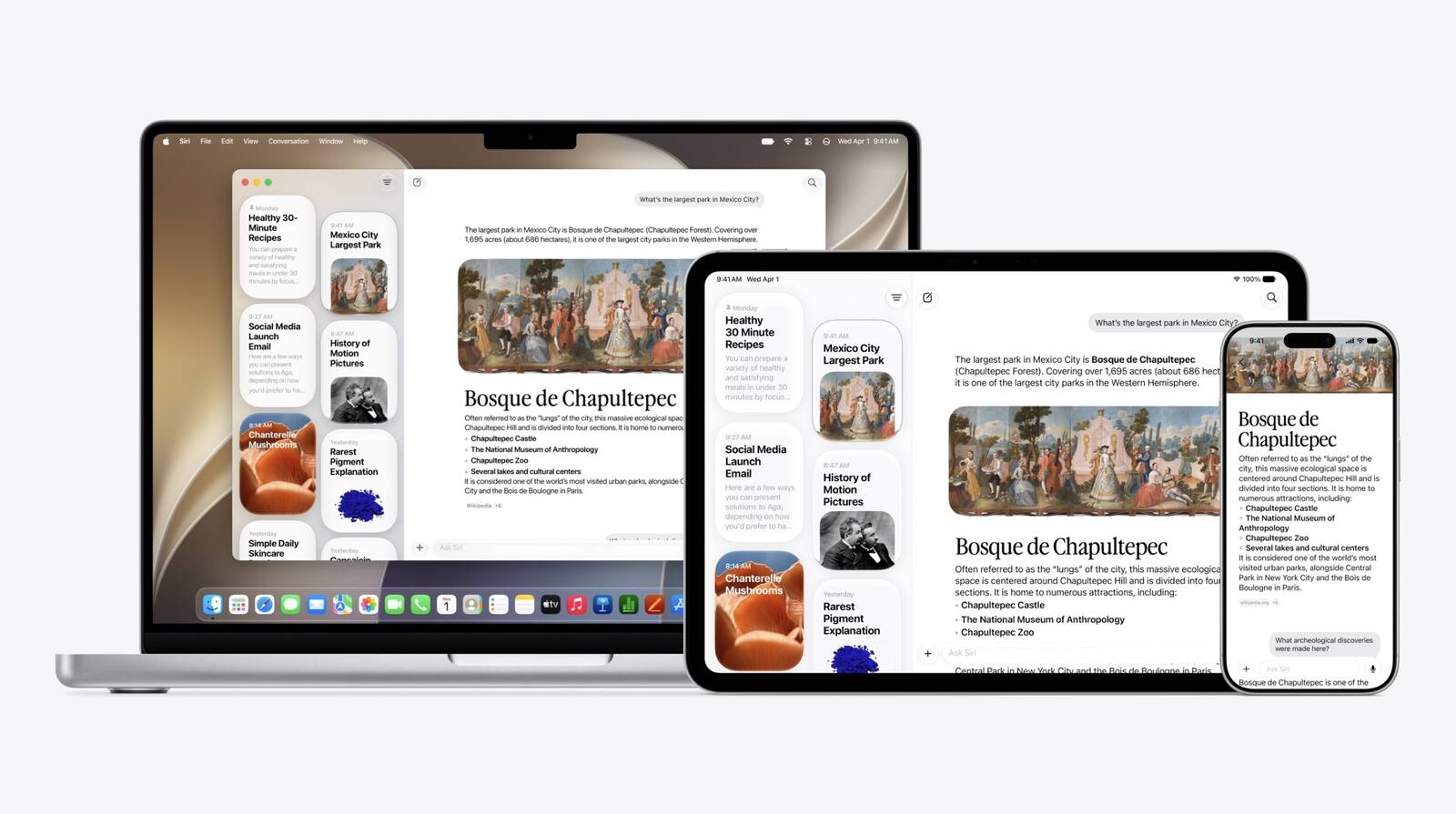
After restarting, you can try it out right away. In the dedicated Siri app, for example, you can have back-and-forth conversations with Siri in text or voice modes, and your conversation history is synced across your devices via iCloud.

Siri AI can draw on personal context understanding to search across messages, emails, photos, and more, and get things done across apps with even more system-wide app actions.

On Mac, β€ŒSiriβ€Œ is now also integrated into Spotlight and available via right-click context menus on any file or window. Note that Siri AI is initially only available in English. Let us know how you get on in the comments.

Correction: Article originally stated that Siri AI is not available in the EU. However, the limitation only applies to the iPhone and iPad, not the Mac. Apologies for the error.
Tags: Siri, Siri AI

This article, "Bypass Siri AI Waitlist on macOS 27 Golden Gate Beta: Here's How" first appeared on MacRumors.com

Discuss this article in our forums
  •  

iOS 27 Brings These Five New Features to Your iPhone Lock Screen

Apple unveiled iOS 27 at WWDC this week, and while the headline-grabbing Siri overhaul has received the most attention, the Lock Screen has picked up several refinements that you may have missed.


Some are brand-new additions, while others are tweaks to features Apple introduced in iOS 26, but together they give you more control over how your Lock Screen looks and behaves.

Here are five to try if you plan to install the public beta next month, or when iOS 27 becomes generally available in the fall.

Extend Your Wallpaper


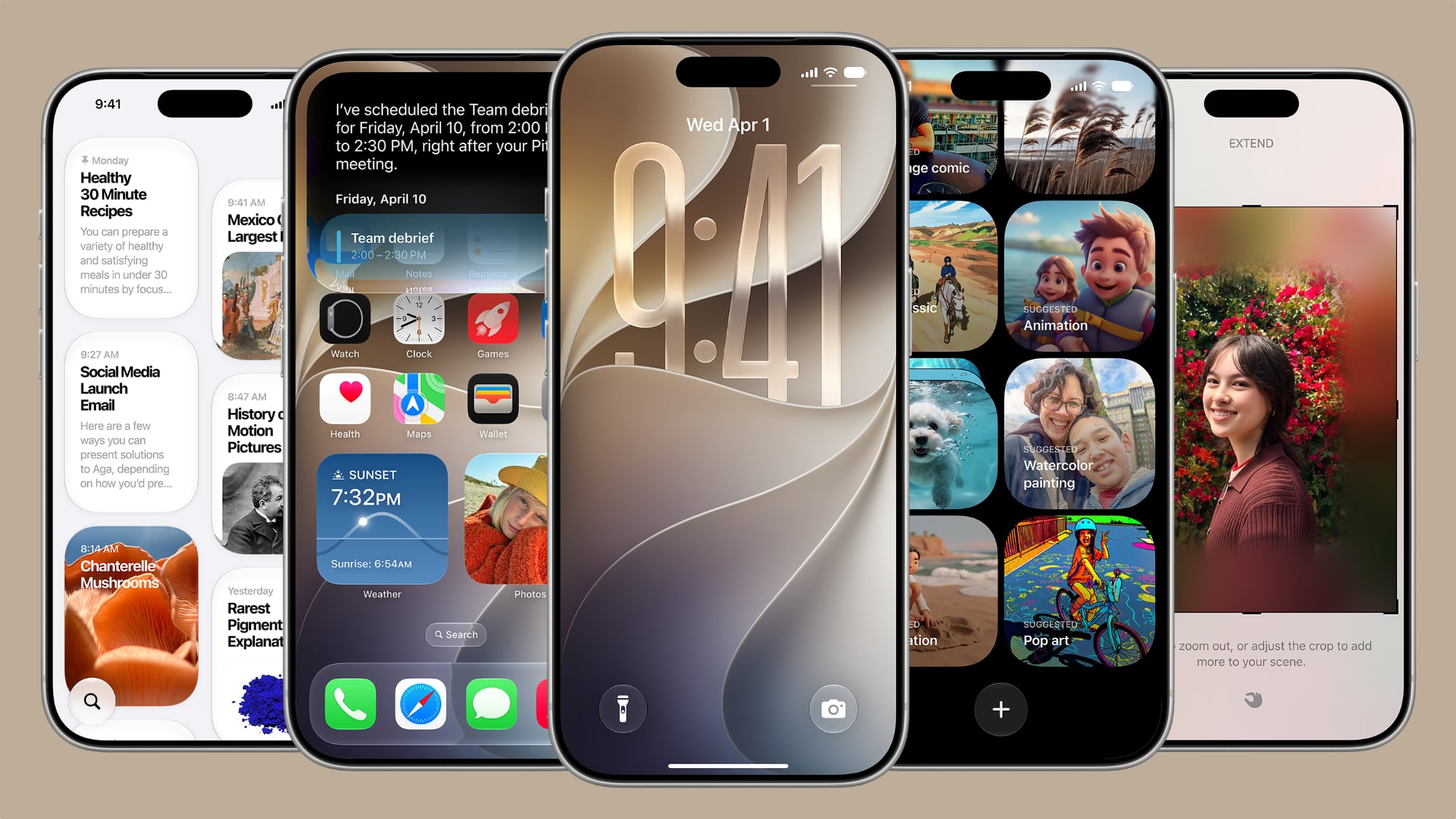
A new wallpaper extension feature in iOS 27 uses Apple Intelligence to automatically expand a photo beyond its original boundaries so it fills the entire Lock Screen more naturally. If a photo is cropped too tightly, doesn't match your iPhone's aspect ratio, or it leaves empty space when positioned on the Lock Screen, iOS 27 can generate additional image content around the edges with the "Extend" option. It will analyze the existing image and create matching background details that blend with the original photo, so there's no need for aggressive cropping. The Extend option can also be found in the Photos app.

Make the Clock Tiny


lock screen
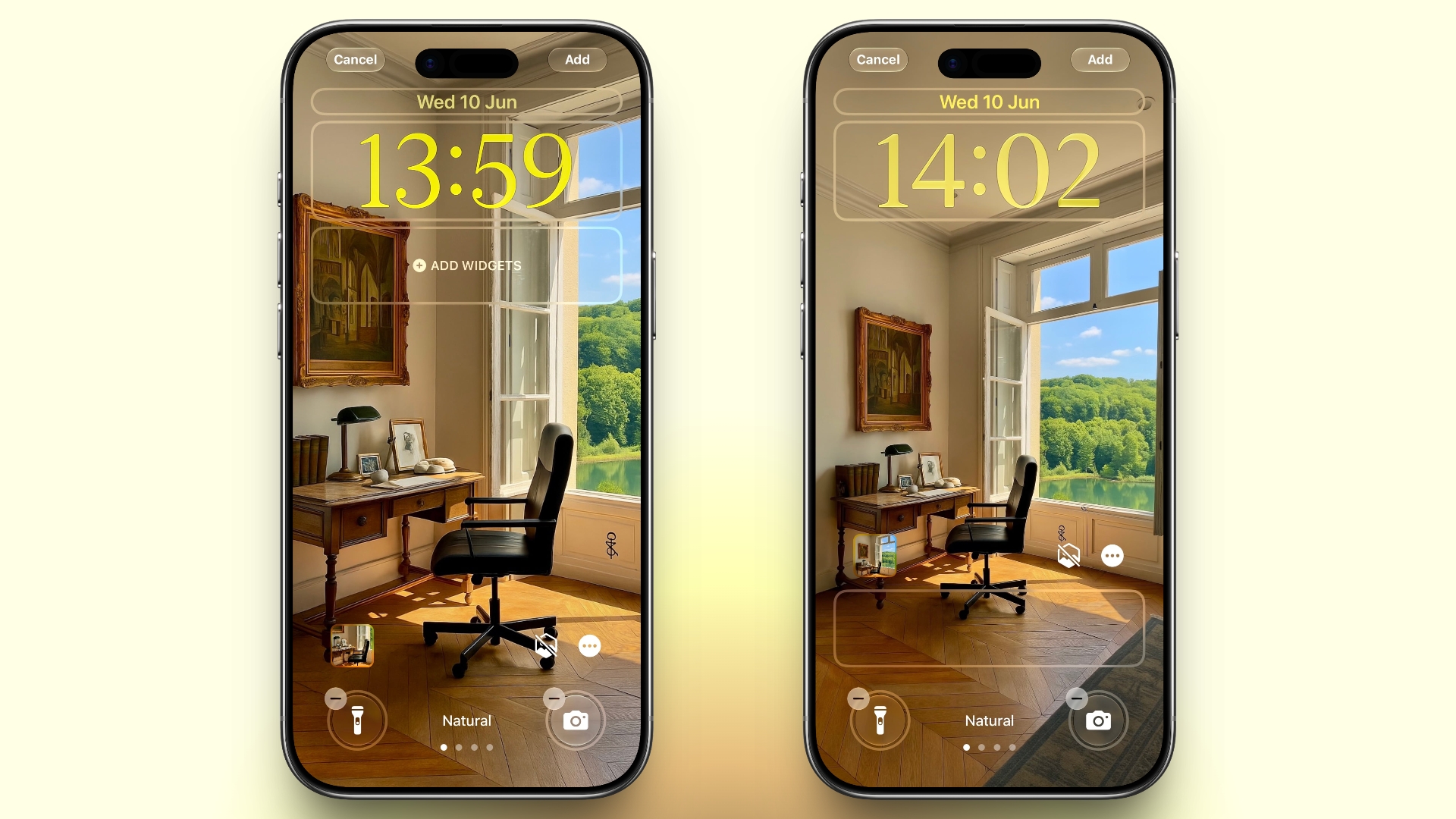
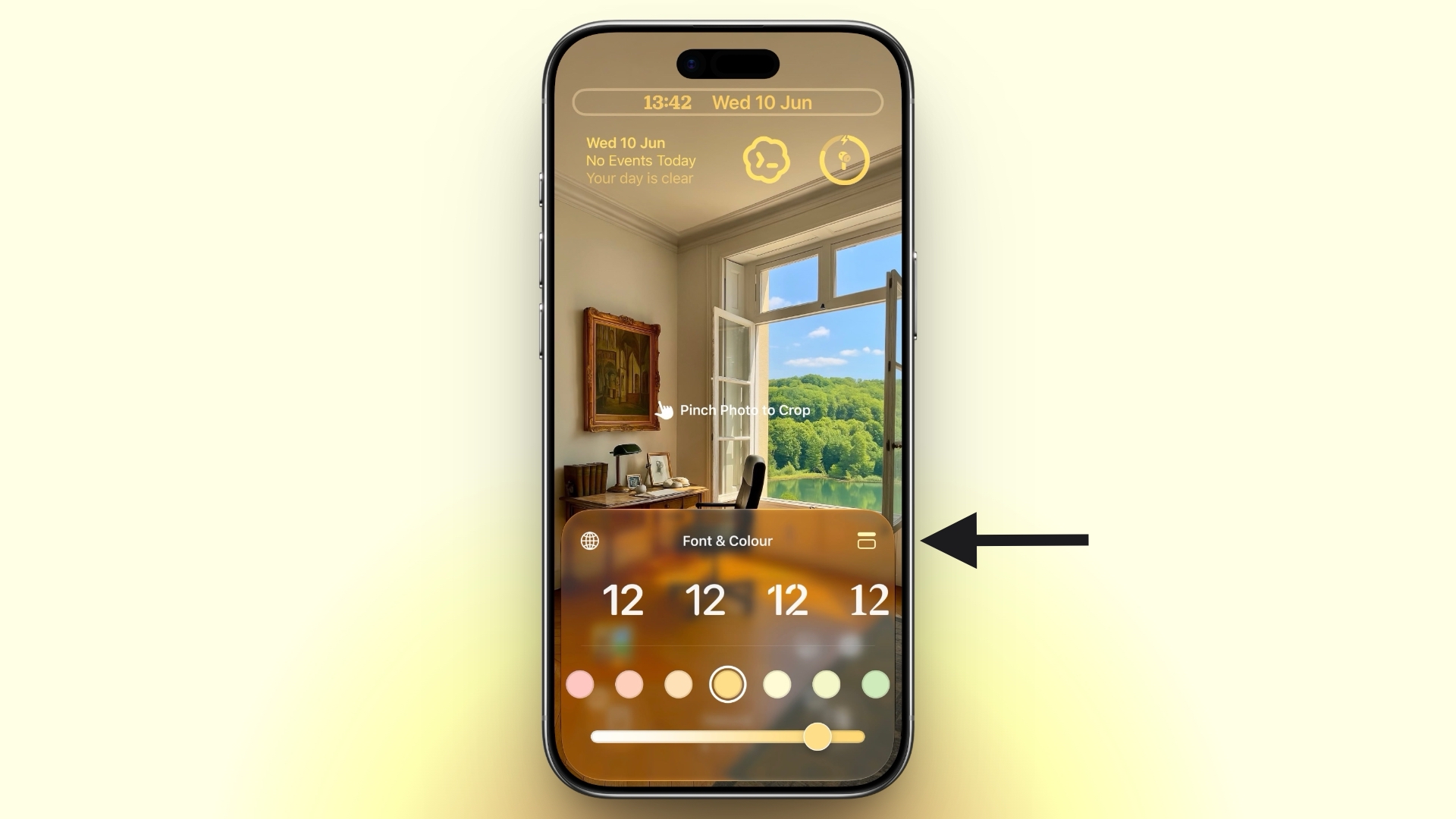
A new compact clock mode is available as a new Lock Screen layout option in iOS 27. Found in the top-right corner of the Font & Color panel, the option moves the time from its traditional large, centered position to a much smaller format alongside the date and widgets at the top of the screen. It's a nice option to have if you like a cleaner Lock Screen look that shows off your wallpaper more fully, and it's the complete opposite effect introduced in iOS 26 that stretches the clock down the screen.

Generate Wallpapers With AI


playground
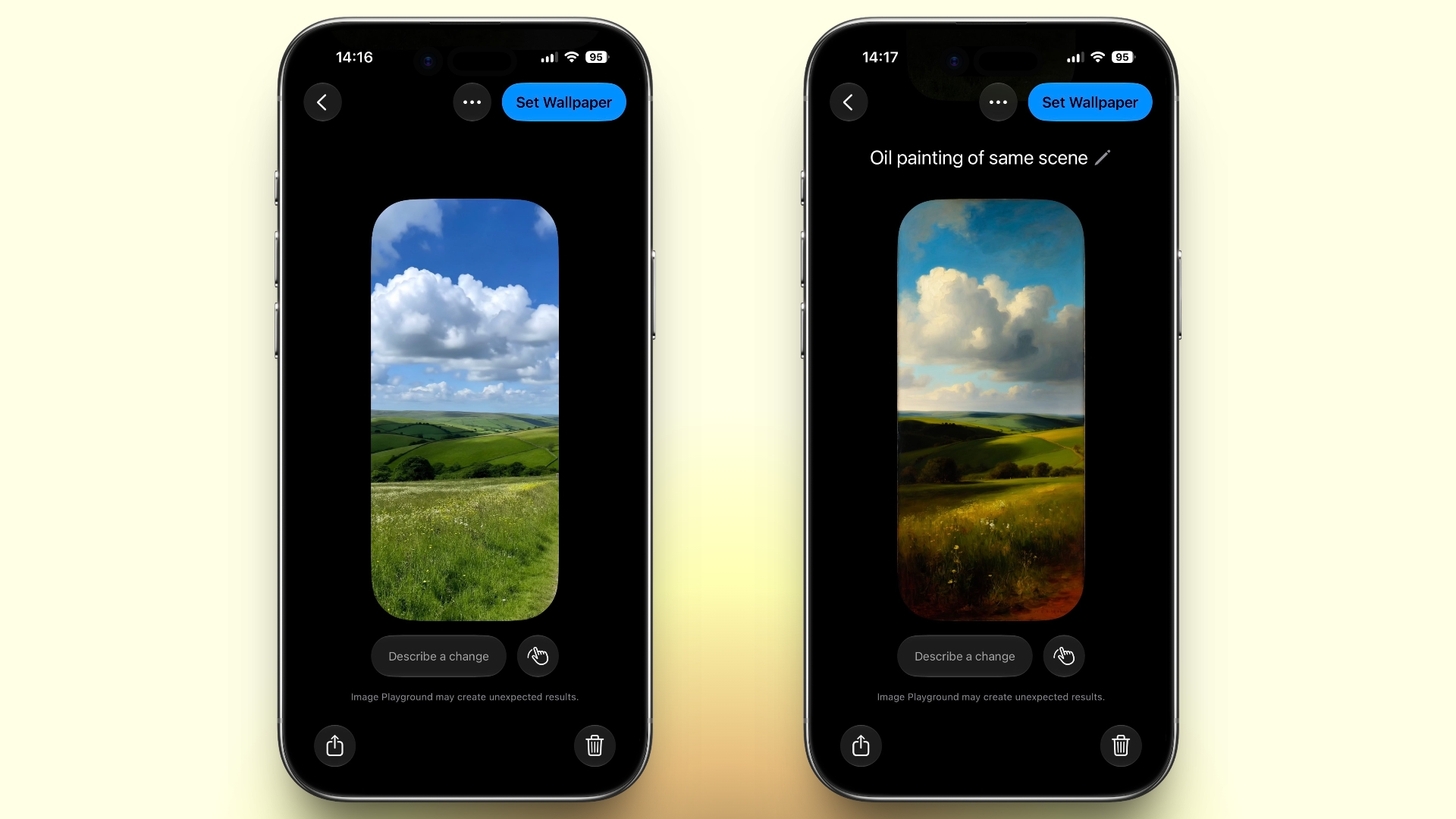
iOS 27 also expands Image Playground with support for AI-generated Lock Screen wallpapers. You can create custom backgrounds using text descriptions, and the app will generate entirely new images tailored to your preferred style, subject matter, or aesthetic, allowing you to set it directly as your Lock Screen wallpaper.

Change Liquid Glass Opacity


settings
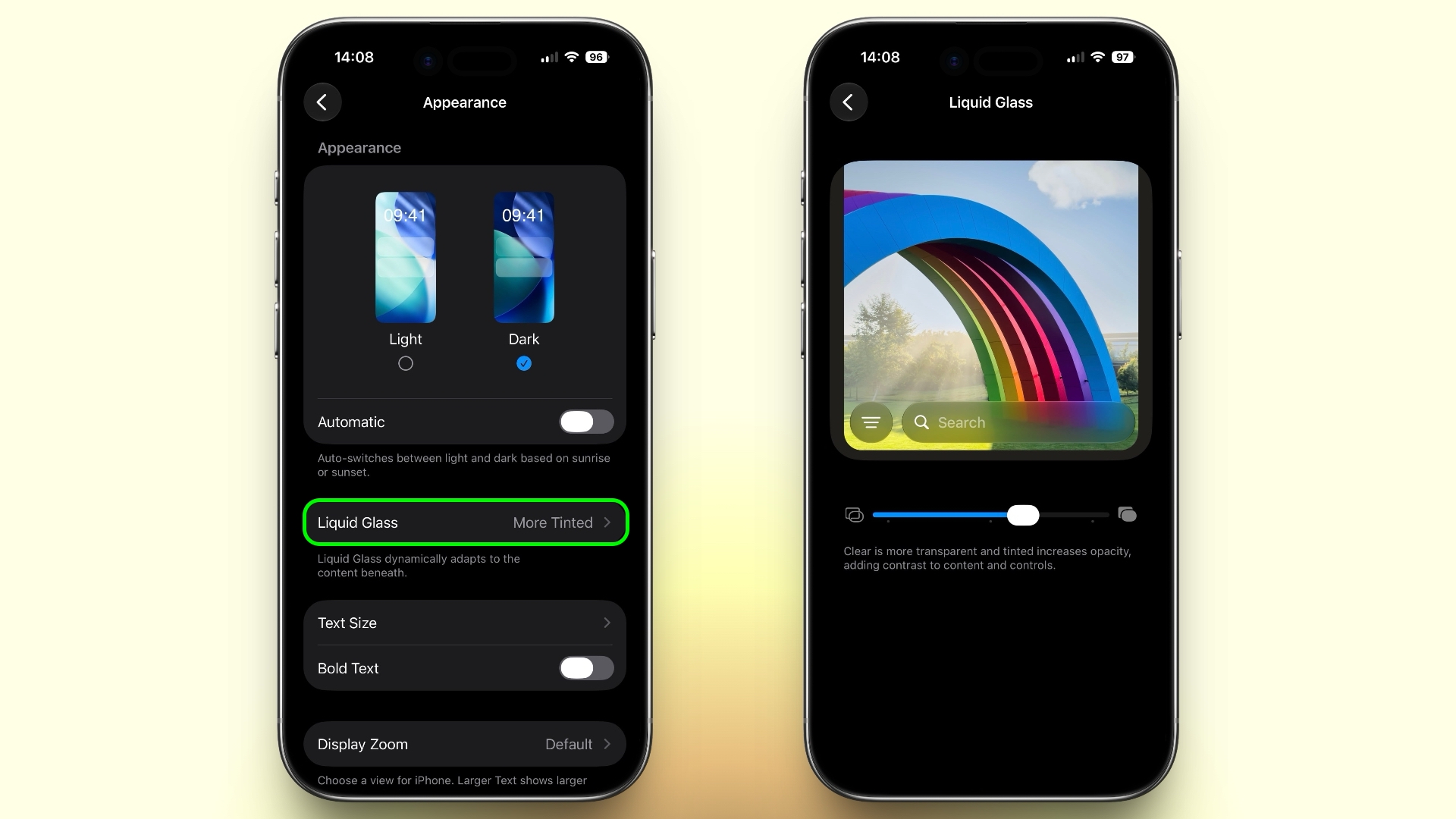
In iOS 27, Apple added a full Liquid Glass slider under Settings ➝ Appearance ➝ Liquid Glass. It changes the translucency of Liquid Glass elements, and you can choose a clear version of Liquid Glass that allows some of the background to show through, select a more opaque, tinted version that improves the legibility of text, or choose something in between. Granted, it's more of a system-wide customization feature than a Lock Screen-exclusive feature, but it directly impacts the look of your clock setup, buttons, widgets, and notifications.

New Siri Interface


To go with Apple's tentpole "Siri AI" chatbot-style overhaul, iOS 27 introduces a redesigned Siri experience. Instead of the glowing light effect that previously traced the edges of the display, a swirling Siri orb now expands and animates within the Dynamic Island. Siri requests and responses are also now presented in a more compact interface surrounding the Dynamic Island, so interactions should feel more focused rather than completely taking over your Lock Screen.
Related Roundups: iOS 27, iPadOS 27

This article, "iOS 27 Brings These Five New Features to Your iPhone Lock Screen" first appeared on MacRumors.com

Discuss this article in our forums
  •  

14 Ways Apple Is Improving Messages in iOS 27

Apple at this year's WWDC emphasized that its approach to iOS 27 development was to add fewer newer features and instead make existing features better. Examples of that approach can be seen across the operating system, but it is arguably most obvious in the changes coming to Messages.


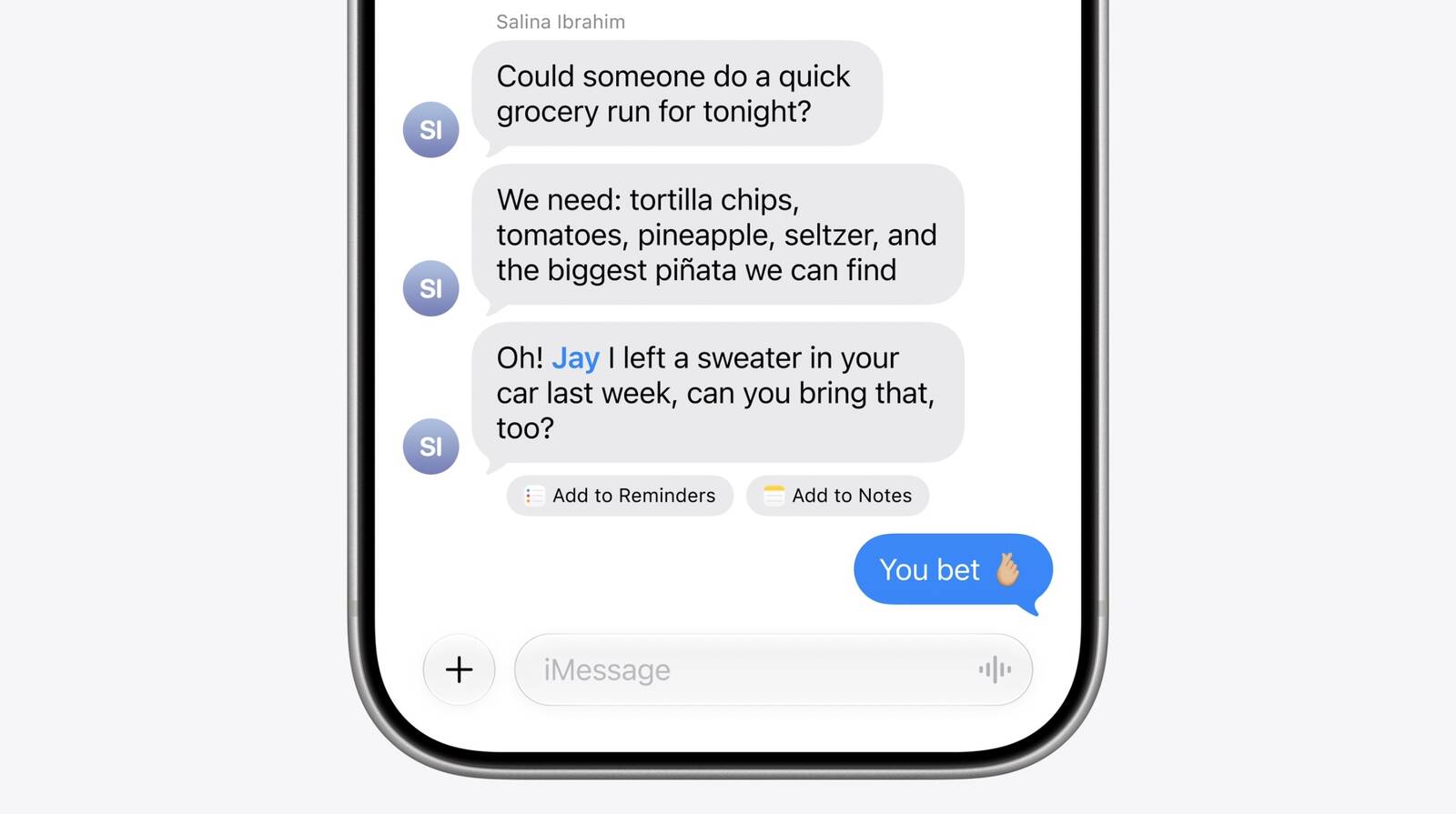
That's not to say there's nothing original coming to Messages in iOS 27. For instance, one new Apple Intelligence feature brings content-aware suggestions directly into conversations. If someone asks for photos, for example, Messages can recognize what's being discussed and suggest searching your photo library, using details like people, places, and keywords to surface relevant images.

The app can also detect when a conversation would benefit from creating a reminder or note and offer a shortcut to do so without leaving the thread. Apple is also bringing drawing tools directly into Messages, allowing users to create and share hand-drawn sketches within conversations.

Otherwise, Apple's focus has been on making the following enhancements and improvements to its broader Messages platform:

  • Faster message loading: Large conversations, especially those containing years of history and thousands of attachments, should load and scroll more quickly.

  • Improved syncing across devices: Apple says Messages, read states, reactions, and attachments sync more reliably and quickly between iPhone, iPad, Mac, Apple Watch, and Vision Pro.

  • Find offloaded media in Messages: Search can surface photos and videos that have been offloaded from local storage and stored in iCloud.

  • Thumbnails for offloaded media: Offloaded photos and videos now get visible preview thumbnails instead of generic placeholders, making older media easier to identify.

  • Personalized Smart Reply suggestions: Apple Intelligence-generated Smart Reply suggestions can now reflect a user's own writing style, making suggested responses feel more natural and personal.

  • Consolidated notifications for multiple Tapbacks: Multiple reactions to a message are grouped into a single notification rather than generating separate alerts.

  • Continuous sending of photos, videos, and text: Messages continue sending in the background and automatically resume when connectivity returns, reducing interrupted sends.

  • Search conversations by phone number or nickname: Conversation search now works with saved nicknames and phone numbers, not just contact names.

  • Faster access to recent camera captures: Newly captured photos and videos appear more quickly in the Messages media picker.

  • Failed messages automatically retry sending: Messages that fail because of temporary network issues will automatically attempt to resend without the user's intervention.

Early adopters of iOS 27 will receive access to the public beta next month, when they can try out the new features and improvements themselves. Apple is expected to make a general release available in the fall.
Related Roundups: iOS 27, iPadOS 27

This article, "14 Ways Apple Is Improving Messages in iOS 27" first appeared on MacRumors.com

Discuss this article in our forums
  •  

iOS 27 Brings New Functionality to HomePod

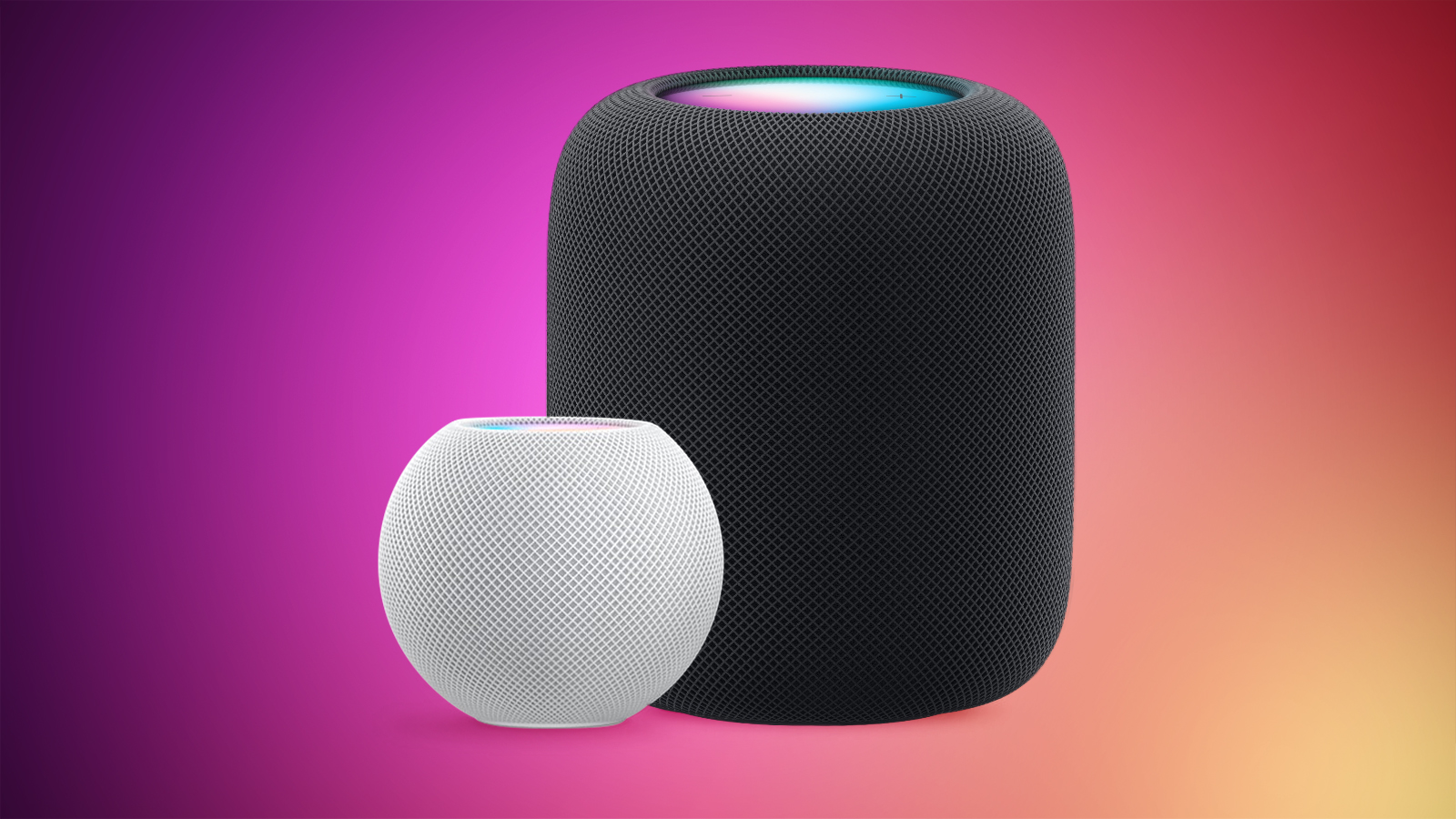
With the launch of iOS 27 and HomePod Software 27, Apple is adding support for AutoMix, Apple's AI-powered Apple Music feature that blends songs using matching key and tempo.


Apple says it has improved AutoMix's underlying algorithms to generate new transition types, making for more seamless blends between tracks, so this should also benefit the newly introduced feature for HomePod.

Running Apple's current HomePod Software 26, the AutoMix feature in Apple Music is not available on HomePod. Users running the existing software only have access to the crossfade feature that improves transitions between songs.

If users AirPlay to HomePod and the device they are using to AirPlay supports AutoMix (and it is turned on), then it will play on the AirPlay stream to HomePod, but that's the only workaround.

OG HomePod Support


In case anyone was wondering, the new HomePod Software 27 beta does support the original HomePod. There was some confusion about this earlier in the week, but MacRumors contributor Aaron Perris was able to independently confirm support for Apple's first smart speaker, which launched in 2018 and was discontinued in 2021.

HomePod Software 27 will come out of beta when iOS 27 becomes generally available in the fall.
Related Roundups: HomePod, HomePod mini, iOS 27, iPadOS 27

This article, "iOS 27 Brings New Functionality to HomePod" first appeared on MacRumors.com

Discuss this article in our forums
  •  

iPhone 17's 8GB Limit Costs It These Two Siri AI Features in iOS 27

Apple this week revealed what its most advanced on-device AI model does, and the feature list is shorter than the hardware requirements might suggest.


In its Siri AI announcement during WWDC 2026, Apple confirmed that the model powers two things: more expressive Siri voices and a major accuracy gain for systemwide dictation.

Both require 12GB of unified memory. Among current iPhones, that limits the more powerful AI model to the iPhone Air, iPhone 17 Pro, and iPhone 17 Pro Max, alongside iPad models with the M4 chip or later, Macs with M3 or later, and Apple Vision Pro with M5.

That's right, the standard iPhone 17 misses out. Having only 8GB to its name – the minimum Apple Intelligence has required since launch – the base flagship model falls short of the new threshold. This is the first time Apple has raised that bar, given that Apple Intelligence has required 8GB since its introduction two years ago.

So What Does 12GB Get You That 8GB Doesn't?


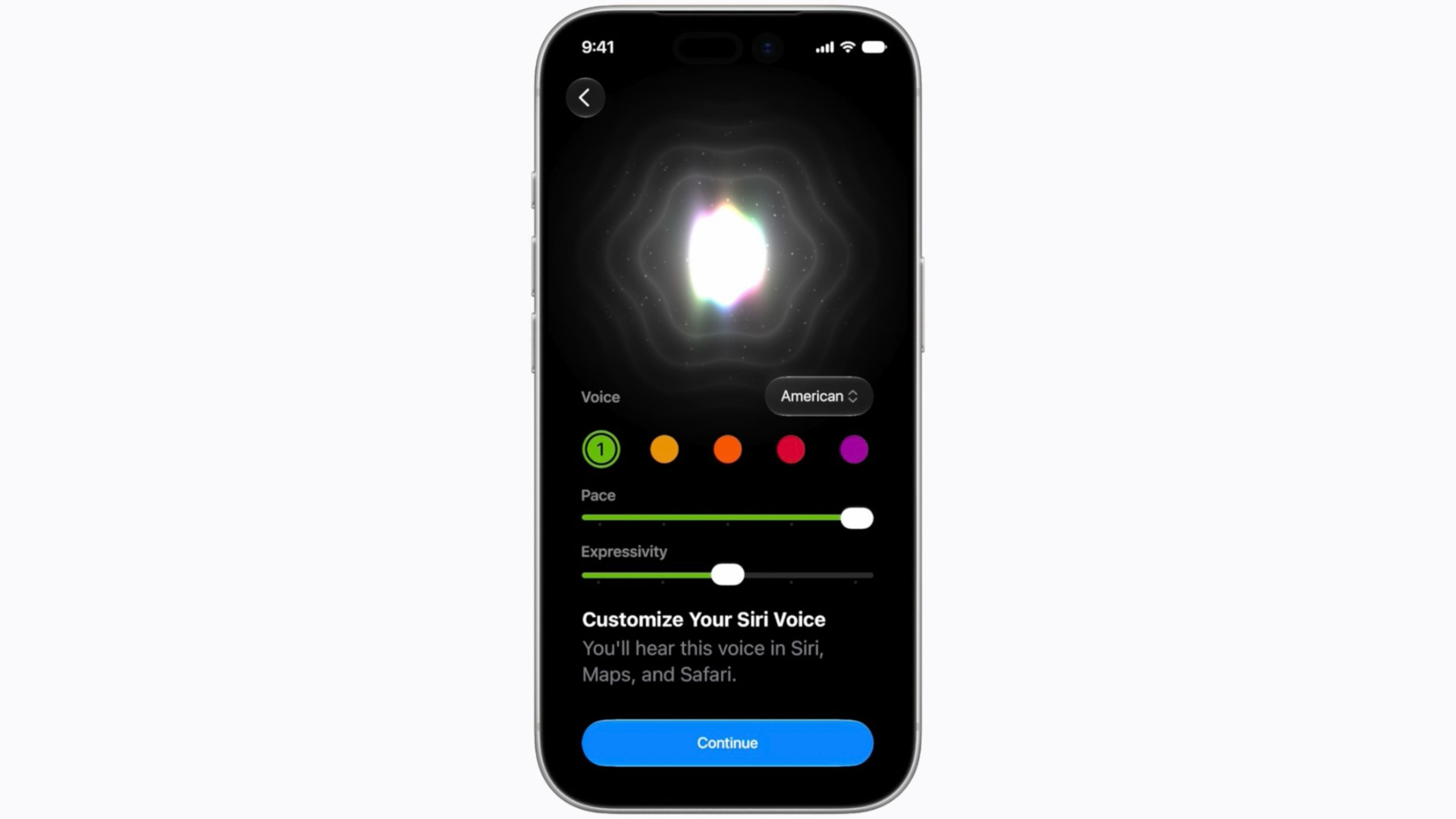
On the voice side, users can adjust the expressiveness and pace of Siri's speech so that the assistant sounds the way they want it. However, it's the dictation feature that includes the more substantial change. Apple's most advanced on-device AI model is said to be able to turn speech into polished text on the fly, handling capitalization, punctuation, and formatting automatically, with improved speech understanding that's meant to cut down on errors.

siri
Everything else in the Siri AI rollout – personal context, onscreen awareness, web answers, the dedicated Siri app, Visual Intelligence, and Writing Tools – runs on the broader Apple Intelligence device list. That list still includes iPhone 15 Pro, the iPhone 16 series, and iPhone 17.

The 12GB requirement, in other words, does not refer to Siri AI wholesale; it improves how Siri sounds and how well it transcribes. Base iPhone 17 owners will still get the new chatbot-style assistant with iOS 27, they'll just get the older voices and a less precise dictation engine.

Whether that matters will vary from user to user, but for anyone who dictates messages and notes all day, the better transcription is the kind of thing you will likely notice immediately. For everyone else, the difference may be something they can quite happily live with.

iOS 27 is currently in developer beta, with a public beta launching next month and a general release arriving in the fall.
Related Roundups: iOS 27, iPadOS 27, iPhone 17
Tags: Siri, Siri AI
Buyer's Guide: iPhone 17 (Neutral)
Related Forum: iPhone

This article, "iPhone 17's 8GB Limit Costs It These Two Siri AI Features in iOS 27" first appeared on MacRumors.com

Discuss this article in our forums
  •  

tvOS 27: Apple Music Gains Hi-Res Lossless Audio on Apple TV 4K

Apple Music is bringing Hi-Res Lossless Audio to tvOS 27, in addition to standard Lossless Audio.


Apple says subscribers with compatible external speaker outputs will be able to enjoy their favorite songs in the highest audio quality and experience studio-quality sound directly through their Apple TV 4K.

As of tvOS 26, Apple TV 4K supports Apple Music Lossless audio up to 24-bit/48 kHz, but does not support Hi-Res Lossless playback (above 48 kHz, or up to 24-bit/192 kHz).

Lossless audio refers to a form of compression that preserves all of the original data, which can result in an improved listening experience, although to what extent is debated.

The tvOS 27 developer beta is already out, and registered developers can install it through Settings ➝ System ➝ Software Update ➝ Beta Updates on a supported Apple TV. tvOS 27 will go on general release in the fall.
Related Roundup: Apple TV
Buyer's Guide: Apple TV (Don't Buy)

This article, "tvOS 27: Apple Music Gains Hi-Res Lossless Audio on Apple TV 4K" first appeared on MacRumors.com

Discuss this article in our forums

  •  

visionOS 27: Siri AI, Eye-Aware Notifications, Curved Windows, and More

Apple's WWDC 2026 keynote may have seemed relatively quiet on the Vision Pro front, but the visionOS 27 beta contains a decent amount of new features and quality of life improvements that are likely to be welcomed by the headset's user base.


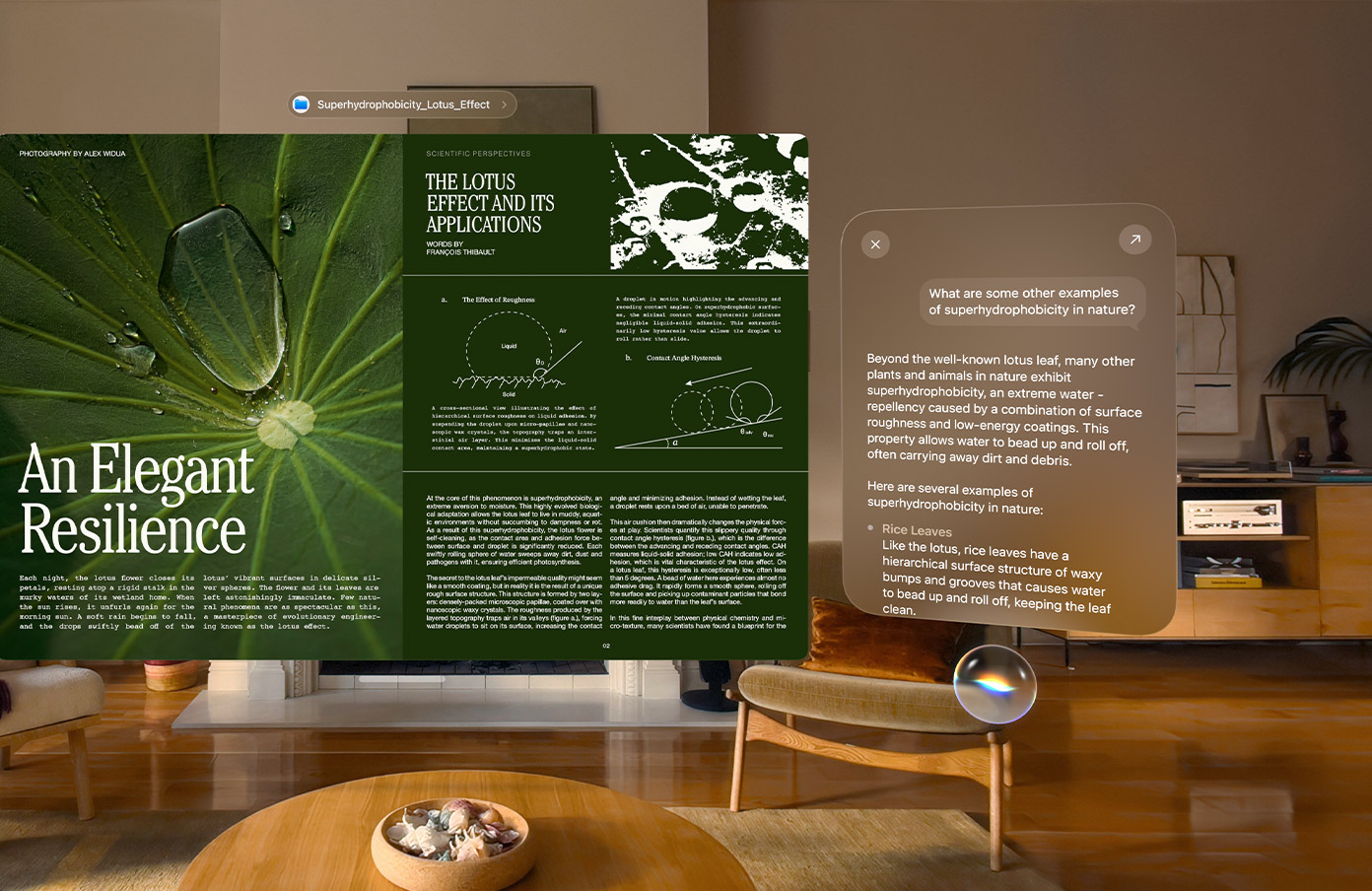
As you'd expect, visionOS 27 is getting the new Apple Intelligence and Siri AI features that Apple has brought to iOS 27 and macOS 27, but this time they feel more seamlessly integrated into the platform compared to previous efforts. For example, Vision Pro users can ask β€ŒSiriβ€Œ about anything in their surroundings, and using Visual Intelligence, the assistant will see and interpret it in real time, identifying the content, answering questions about it, and providing contextual information to boot.

Interacting with Apple's β€ŒSiriβ€Œ is achieved via a new 3D orb that users can place anywhere in their virtual space, and just looking at the widget is enough to start a conversation – no "Hey β€ŒSiriβ€Œ" needed. A new β€ŒSiriβ€Œ app also makes it easier to revisit previous interactions and continue conversations.

Curved windows in visionOS 27

Below is a summary of what else is new in visionOS 27:

  • Panoramas as environments: Panorama photos can now be turned into immersive spatial environments. Rather than viewing panoramas as flat images, users can step into them and experience added depth and realism, making photos and landscapes feel more lifelike.

  • Curved app windows: Apps such as Safari, Freeform, and Apple TV now take advantage of new curved window layouts that wrap content around a user's field of view. The feature is designed to create a more immersive workspace and make better use of Vision Pro's virtual display area.

  • Faster Wi-Fi: Apple says visionOS 27 significantly improves wireless performance, with supported networks delivering speeds up to three times faster than before.

  • Safari 3D environments: A new Web Environments feature means developers can now use a new immersive API to launch users into a full 360-degree environment from within Safari. Apple says these environments can completely surround a user's physical space, making browsing feel more like a native Vision Pro experience.

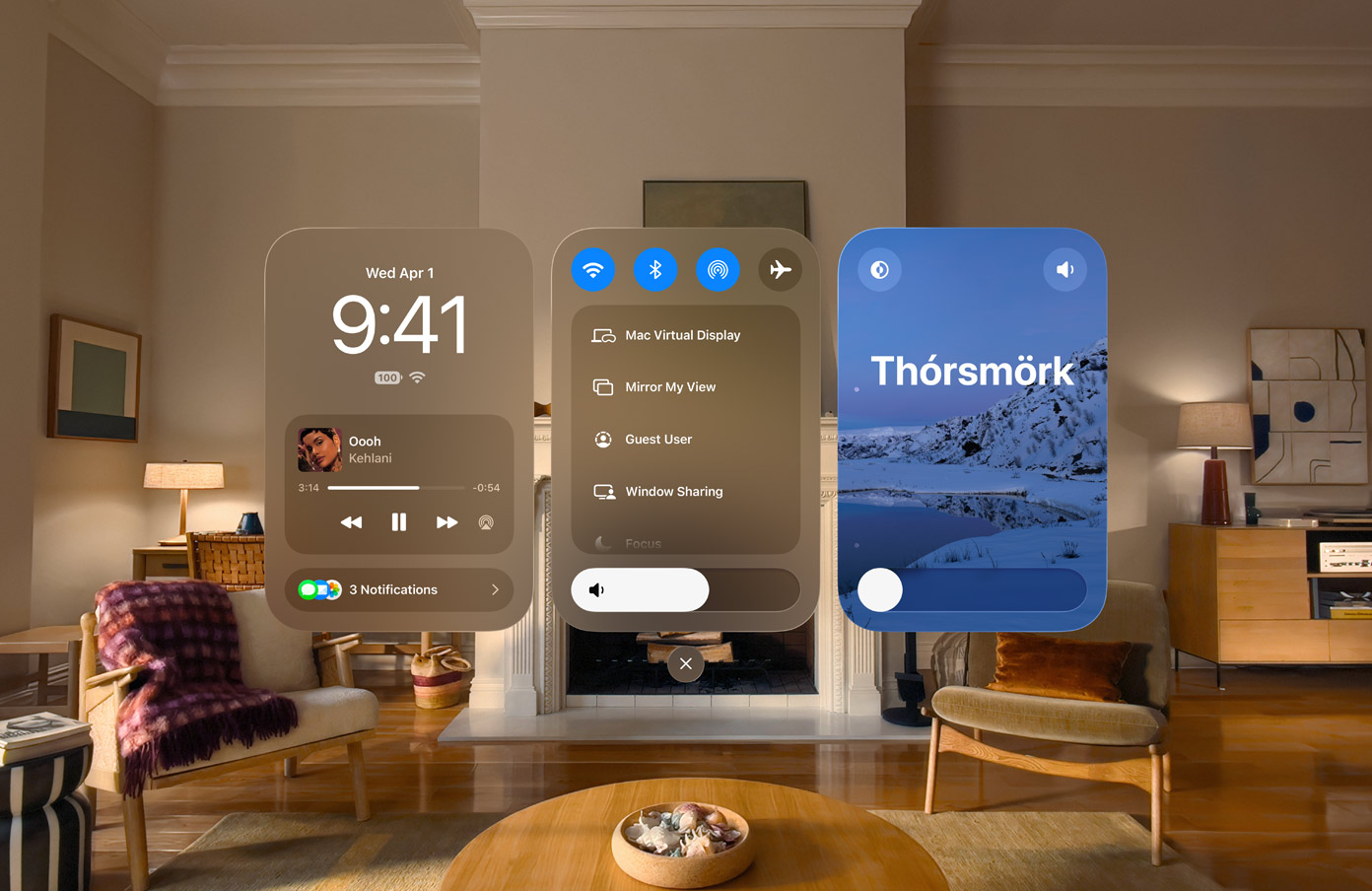
  • Redesigned Control Center: Control Center has been reorganized with dedicated sections for notifications and media playback, system controls, and immersive environments. The redesign aims to make common controls easier to find and reduce the number of steps required to access frequently used settings.

  • Smaller widgets: A new extra-small widget size allows users to place more widgets throughout their physical space without overwhelming their environment. The additional size option gives users greater flexibility when placing clocks, weather widgets, photos, and other persistent spatial content.

  • Glance-to-expand notifications: Notifications will now automatically expand when a user looks at them, thereby reducing the need for hand gestures or manual interaction. The feature means quicker access to information, while remaining in line with visionOS's eyes-first interaction model.

  • Spatially preview your Mac: Mac owners can now preview and edit 3D models from their laptop directly in visionOS, while Quick Look enhancements allow for annotations to be added directly to 3D models.

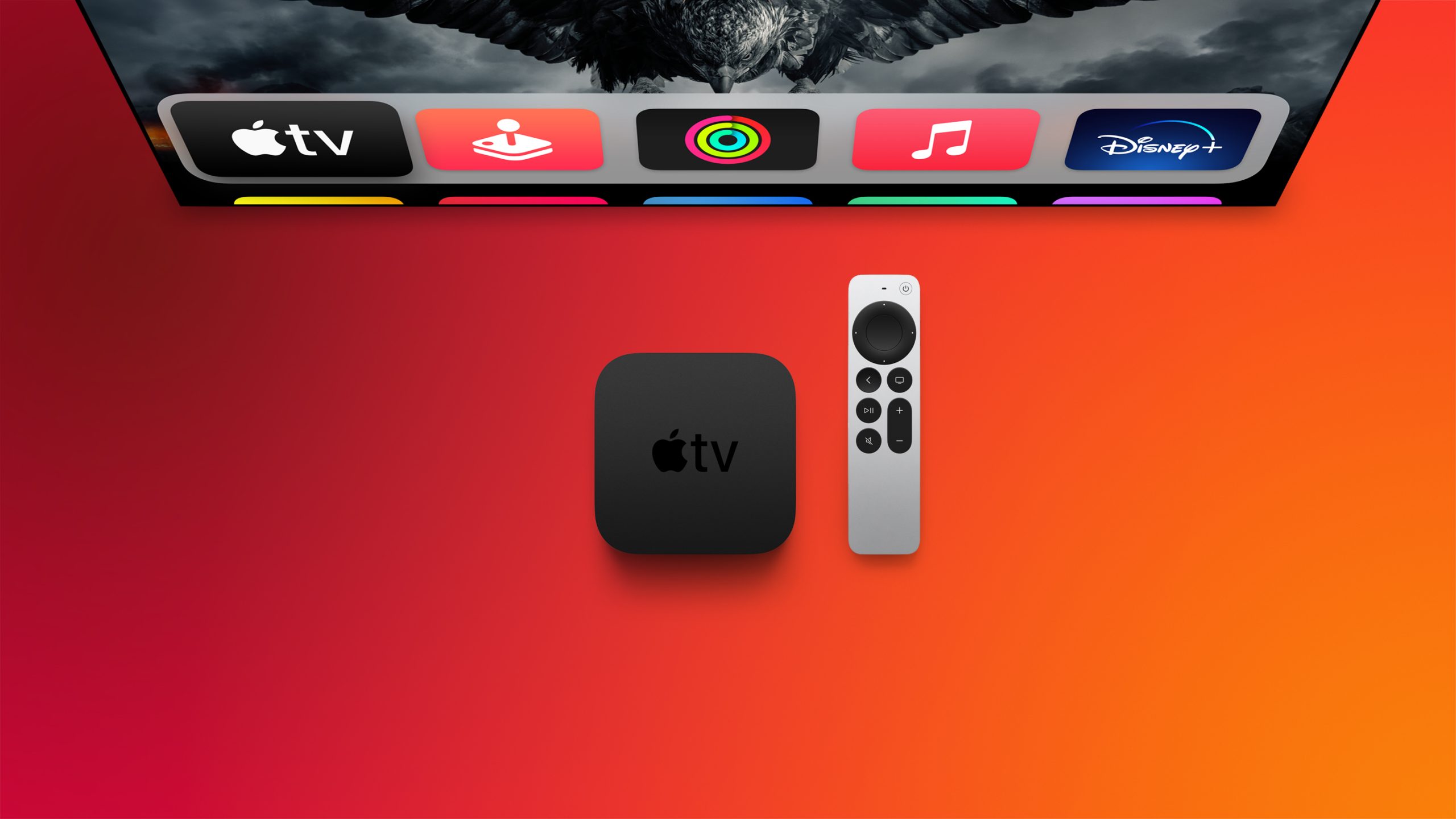
  • New Environment: Apple has added a new immersive environment based on ThΓ³rsmΓΆrk, a nature reserve in Iceland known for its dramatic mountains, valleys, and glaciers. Users can select the environment as a virtual backdrop for work and entertainment, just like the existing environments.

  • Developer enhancements: Apple is introducing new frameworks, APIs, and tools to help developers build more advanced spatial experiences. The updates include RealityKit improvements, Environment Occlusion for more realistic blending of virtual and physical objects, enhanced asset rendering technologies, updates to Reality Composer Pro 3, and improvements for popular game engines.

The new Control Center design for visionOS 27


The visionOS 27 developer beta is available now, ahead of the software's full release this fall. Apple says β€ŒSiriβ€Œ AI will begin rolling out later this year as a beta feature and will initially support English only. However, unlike on iPhone and iPad, where β€ŒSiriβ€Œ AI will not be available at launch in the European Union, Vision Pro users in the EU will have access to the feature from day one.
Related Roundup: Apple Vision Pro
Tag: Siri
Buyer's Guide: Vision Pro (Neutral)
Related Forum: Apple Vision Pro

This article, "visionOS 27: Siri AI, Eye-Aware Notifications, Curved Windows, and More" first appeared on MacRumors.com

Discuss this article in our forums
  •  

iOS 27 Introduces Overhauled AirPods Settings Menu

When AirPods owners connect to their iPhone running iOS 27, they'll see a completely revamped settings menu for their earbuds that does a better job at organizing all of the feature options that Apple has added over the last few years.

airpods settings
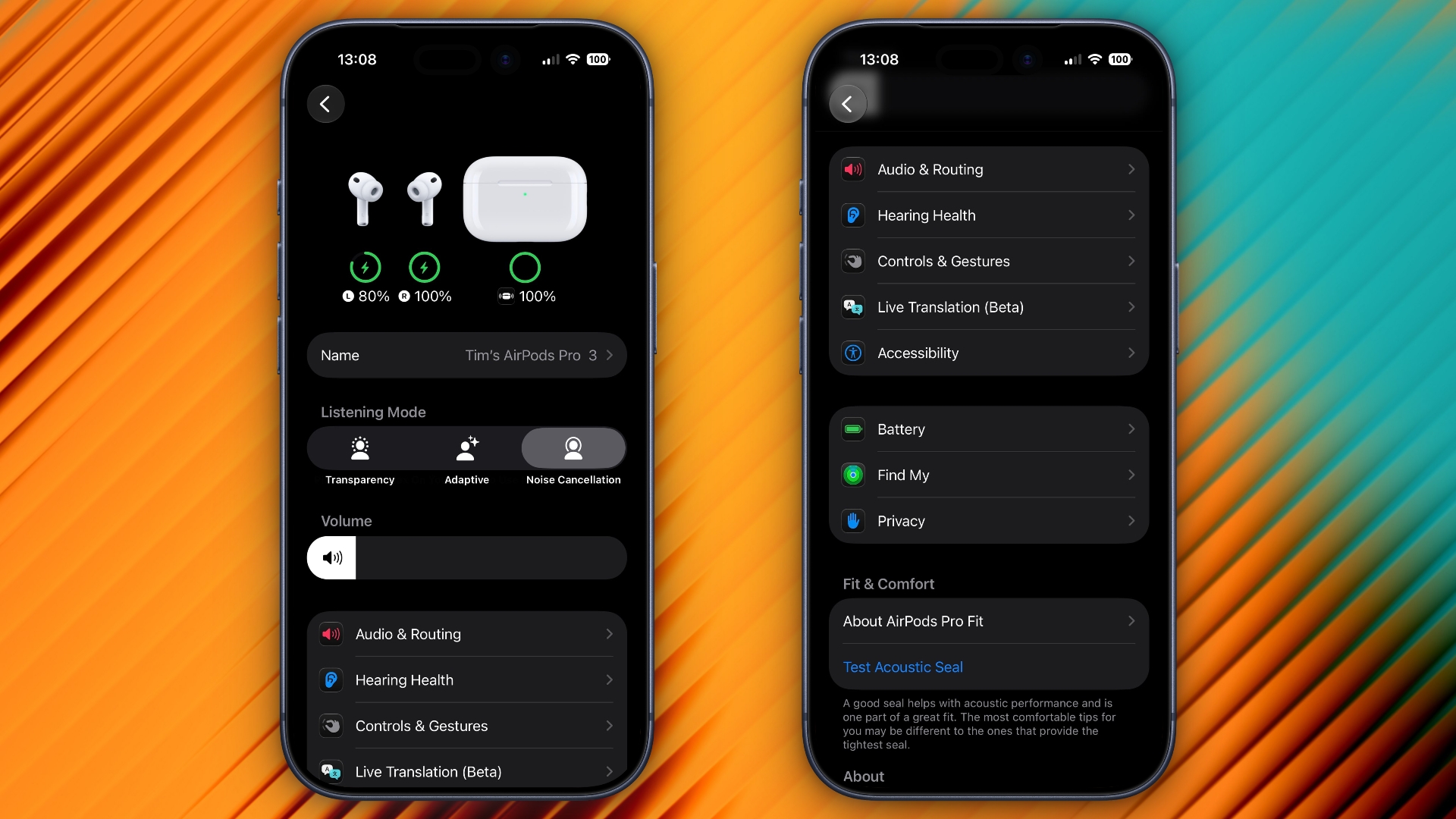
In the first iOS 27 developer beta, released on Monday, the new settings menu can be accessed in the same way as the old one – i.e. by appearing only when your AirPods are paired with your iPhone – but the menu itself is now a lot more easy to navigate.

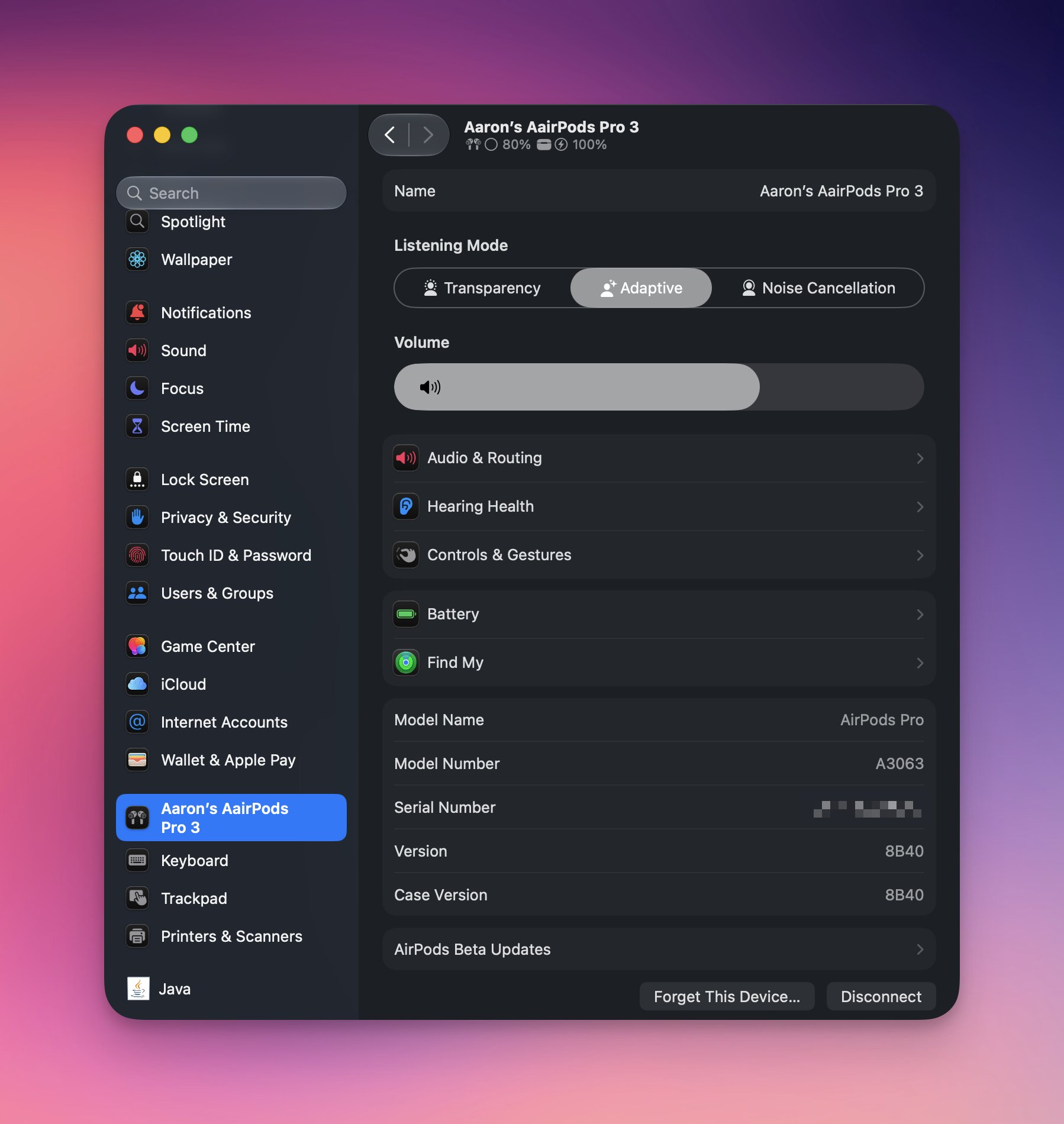
Apple has added a volume slider under the Listening Mode toggles, while the Hearing Health, Call Controls/Camera Control, Live Translation and Adaptive Audio sections have been condensed into separate menus identified by new icons: Accessibility, Audio & Routing, Hearing Health, and Controls & Gestures. There are also new menus for Battery, Privacy, and Find My options.

The new design makes the AirPods settings menu a lot more compact, and it no longer feels like you have to endlessly scroll to try and find the option you're after. Apple has also implemented the redesign in System Settings for macOS 27 Golden Gate.


Apple plans to release a public beta version of iOS 27 and macOS 27 next month, with a general release of the updates expected in the fall.
Related Roundups: AirPods 4, iOS 27
Buyer's Guide: AirPods (Caution)
Related Forum: AirPods

This article, "iOS 27 Introduces Overhauled AirPods Settings Menu" first appeared on MacRumors.com

Discuss this article in our forums
  •  

iOS 27: Find My App Lets You Hide Location From Others Temporarily

Apple's first iOS 27 developer beta, released on Monday, includes a new feature in the Find My app that lets you temporarily hide your location from select people.


A new "Hide Location" option appears in the user's Find My card in the People section, under "My Location." Tapping it hides your location temporarily for 12 hours before reverting to your previous shared location state. When enabled, the option switches to "Unhide Location."

As it currently works, enabling the feature doesn't appear to notify the person that you are hiding your location from them – your Find My card simply registers "No Location Found" on their device.

iOS 27 introduces a new "Hide Location" button in Find My that allows you to stop sharing your location without notifying the other person. pic.twitter.com/p0gIHsMy46

β€” Aaron (@aaronp613) June 9, 2026

Apple intends to make a public beta of iOS 27 available next month, with a general release expected in September.
Related Roundup: iOS 27
Tag: Find My

This article, "iOS 27: Find My App Lets You Hide Location From Others Temporarily" first appeared on MacRumors.com

Discuss this article in our forums

  •  

iOS 27 Lets You Dismiss the 'Now Playing' Lock Screen Widget

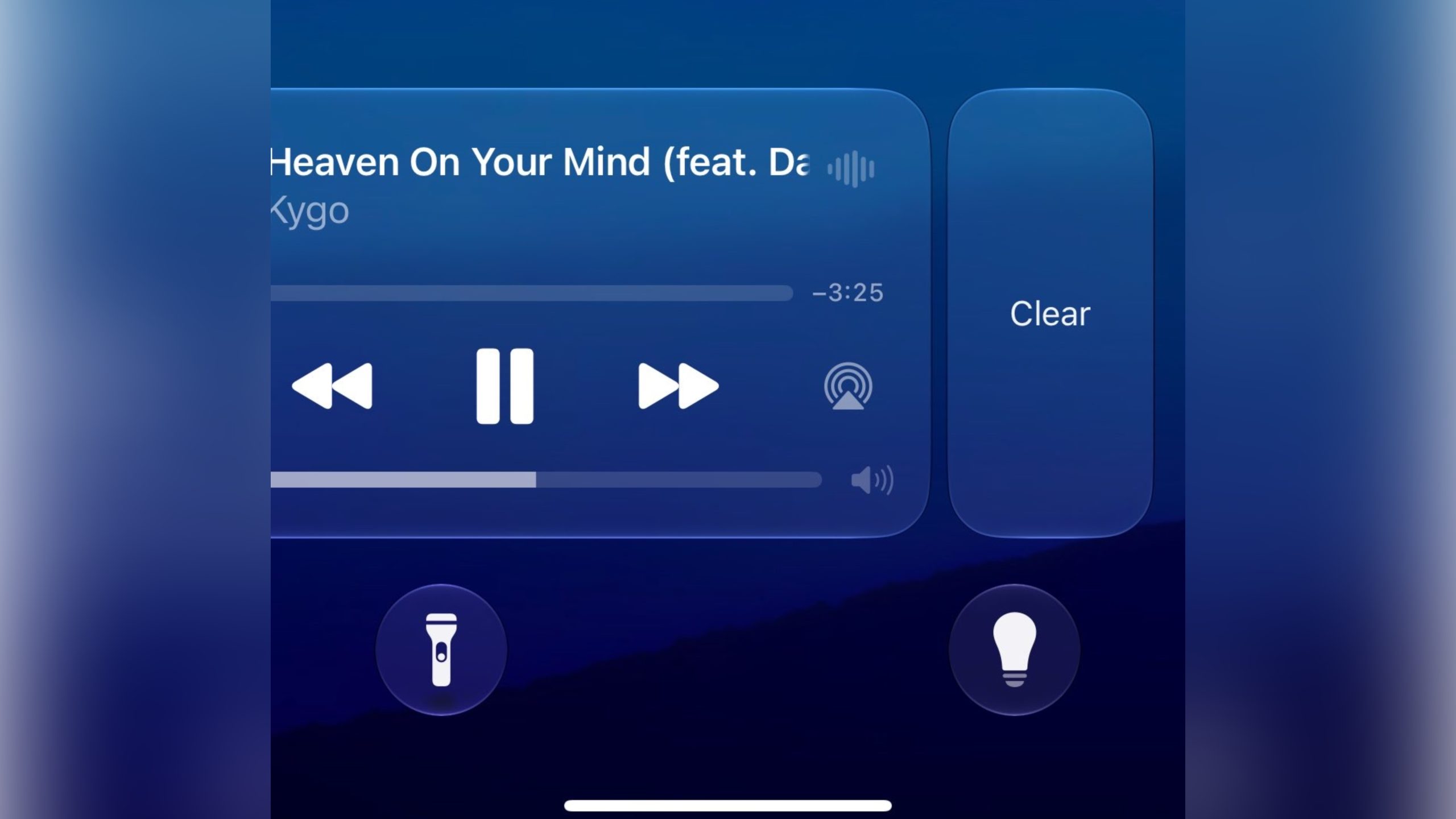
Apple in iOS 27 has made a small but significant change to how the Now Playing widget works on your iPhone's Lock Screen – you can now swipe it away to get rid of it.


Previously, there was no way to dismiss the Now Playing interface on the Lock Screen. But in the first iOS 27 developer build released yesterday, a leftward swipe on the playback controls slides in a Clear button from the right.

Clearing the controls from the screen also removes the smaller Now Playing widget from the Dynamic Island.

It's not quite clear yet how to bring the widgets back immediately – as 9to5Mac notes, the only workaround appears to be pausing whatever's playing, waiting a few minutes, and then resuming it. It also seems to depend on which app you're using for playback. For example, switching from a podcast to video playback re-invokes the Lock Screen widget.

New in iOS 27: You can now swipe away the now playing controls on the lock screen.

Unclear how to get it back at the moment pic.twitter.com/NuEbyiHgok

β€” Aaron (@aaronp613) June 8, 2026

Being able to make the Now Playing widget go away is admittedly a small tweak, but it will be welcomed by anyone who likes to dismiss whatever is taking up space on their Lock Screen, playback controls included. Apple will make iOS 27 available in public beta next month, with a general release expected in the fall.
Related Roundup: iOS 27

This article, "iOS 27 Lets You Dismiss the 'Now Playing' Lock Screen Widget" first appeared on MacRumors.com

Discuss this article in our forums
  •  

visionOS 27 Gains New Icelandic Environment Called 'ThΓ³rsmΓΆrk'

Apple made the visionOS 27 beta available to Vision Pro developers after Monday's WWDC 2026 keynote, and in this version there is a new Environment that allows you to immerse yourself in the Icelandic highlands.


"ThΓ³rsmΓΆrk" is a mountain ridge in Iceland that was named after the Norse god Thor. It offers a nighttime and daytime experience of the icy landscape surrounding a lake, complete with wintry sound effects and running water. It also includes a view of the Northern Lights.

Environments let you transform your physical surroundings into a different place, like Yosemite, Mount Hood, or the Moon. Environments can be used while you're using apps or they can provide a backdrop when you're watching movies. In ThΓ³rsmΓΆrk, for example, if you're watching a video, the scene's colors are reflected in the snow and the water for extra immersion.

Last year, visionOS 26 introduced an interactive Jupiter Environment that uses imagery from NASA for maximum authenticity.

There were only a handful of passing references to visionOS 27 during Apple's keynote, but the Vision Pro software is set to benefit from the same Siri AI features that are coming to iOS 27, iPadOS 27, and macOS 27 Golden Gate. visionOS 27 is expected to be released in the fall.
Related Roundup: Apple Vision Pro
Buyer's Guide: Vision Pro (Neutral)
Related Forum: Apple Vision Pro

This article, "visionOS 27 Gains New Icelandic Environment Called 'ThΓ³rsmΓΆrk'" first appeared on MacRumors.com

Discuss this article in our forums
  •  

Apple Pay for Transit Now Works in These 14 U.S. Cities

Apple has expanded the number of major U.S. cities where its Apple Pay for transit feature is supported, providing a simple way for those who use public transportation to pay for rides.


β€ŒApple Payβ€Œ for transit now works in Atlanta, the Bay Area, Boston, Chicago, Dallas, Houston, Los Angeles, New York, Orange County, Philadelphia, Portland, San Diego, Seattle, and Washington, DC.

Some of these cities have supported β€ŒApple Payβ€Œ for transit purposes for several years, and in others like Dallas and Houston, support is new as of June 2026.

In cities that support Apple Pay for transit, iPhone users can enable Express Mode to pay fares without unlocking their device or using Face ID or Touch ID. To choose a card, open Settings, go to Wallet & Apple Pay, and tap Express Transit Card.

When a credit or debit card is set for Express Mode, it can be used automatically at transit terminals. On iPhone XS and later, Express Transit may also work for up to five hours after the battery runs out, thanks to power reserve.

Some cities allow standard credit or debit cards for transit, while others require a dedicated transit card in the Wallet app. For example, in Houston, users add a virtual RideMETRO card, whereas in Dallas users can pay their DART transit fare with any contactless credit card or debit card.

The iPhone 6s, 2016 iPhone SE, and later support Express Mode for Apple Pay transit. It also works on Apple Watch Series 1 and later with watchOS 5.2.1 or newer.

Apple Pay transit is available in several cities around the world, including London, Hong Kong, Tokyo, Toronto, Beijing, and Shanghai.

Transit support varies by city, so check local requirements before traveling. In supported areas, Apple Pay can make public transit easier by letting you pay at the gate without buying tickets in advance. Apple lists supported transit systems on its website.
Related Roundup: Apple Pay

This article, "Apple Pay for Transit Now Works in These 14 U.S. Cities" first appeared on MacRumors.com

Discuss this article in our forums
  •  

Here Are the Macs Compatible With macOS Golden Gate

Apple today unveiled macOS Golden Gate, the next major version of its Mac operating system, during its WWDC 2026 keynote.


As expected, the update confirms the end of Intel Mac support. Apple said last year that macOS Tahoe would be the final release to run on pre-Apple silicon machines, and macOS 27 makes that official – you'll need an Apple silicon Mac to install it.

Here are the Macs compatible with macOS Golden Gate:

  • MacBook Neo (2026)

  • MacBook Air with Apple silicon (2020 and later)

  • MacBook Pro with Apple silicon (2020 and later)

  • iMac with Apple silicon (2021 and later)

  • Mac mini with Apple silicon (2020 and later)

  • Mac Studio with Apple silicon (2022 and later)

  • Mac Pro with Apple silicon (2023 and later)

Four models that ran macOS Tahoe didn't make the cut this year. They include the MacBook Pro (16-inch, 2019), the MacBook Pro (13-inch, 2020, Four Thunderbolt 3 ports), the iMac (2020), and the Mac Pro (2019).

Owners of those machines aren't entirely out of luck, however. Apple usually keeps issuing security fixes for the previous macOS version well after it's superseded, so anyone sticking with Tahoe will continue to get the necessary patches. But for the latest features, though, the only path forward is a newer Mac.
This article, "Here Are the Macs Compatible With macOS Golden Gate" first appeared on MacRumors.com

Discuss this article in our forums

  •  

New Siri AI Features Won't Be Available in EU Later This Year

The new enhanced Siri AI features that Apple announced today at WWDC 2026 will not be available in the European Union or in China when they are released in beta later this year.


Apple said that while Siri AI will be available for free with the new upcoming OS releases, it will not be available in the EU on iOS and iPadOS until it can find a path forward for regulatory approval.

Apple said EU regulators did not accept any of the company's proposed solutions to bring Siri AI to the EU while safely supporting other virtual assistants.

"We're deeply disappointed that our EU users won't have Siri AI on iPhone or iPad when we share our new software releases later this year," said Craig Federighi, Apple's senior vice president of Software Engineering. "Our hope is to eventually bring Siri AI to the EU, and we will continue to engage with EU regulators on a path forward. However, their refusal to engage constructively on solutions that preserve privacy and security means we do not currently have a timeline for Siri AI's availability on iOS and iPadOS in the EU."
When iOS 27 and iPadOS 27 launch later this year, Apple will not offer Siri AI or its new features on those platforms in the EU. That includes the new app for revisiting conversations, expanded Visual Intelligence capabilities, integrated writing tools, Siri mode in the Camera app on iPhone, and other Siri AI features introduced at WWDC26. Apple explained further in a newsroom announcement:
According to EU regulators, the DMA requires Apple to give any AI system nearly unlimited access to a user's device, as well as the ability to act on that access autonomously without a user's ongoing visibility and control. That includes the ability to read and send messages, make purchases, access files, and execute actions across any app. Security researchers have already shown that AI systems can be hijacked to steal personal data β€” like passwords and photos β€” and to permanently alter files and account settings without a user's consent. As AI systems gain more capabilities, these risks are quickly increasing in frequency and scope.

Given the serious risks to users, Apple designed a solution called Trusted System Agent β€” an intermediary that would allow virtual assistants to safely access the same features and capabilities as Siri AI for devices in the EU. Apple also shared a plan to launch Siri AI in the EU while gradually rolling out this new solution over an 18-month period. The European Commission said no. In fact, the European Commission did not agree to any of Apple's proposals.
The restrictions will apply to both consumers and developers. EU-based developers will be unable to test or integrate the new Siri AI features into their iPhone and iPad apps. Apple will, however, make Siri AI available in the EU on macOS 27, visionOS 27, and watchOS 27.

Apple also said that Siri AI will not be available in China while the company works through regulatory requirements.


This article, "New Siri AI Features Won't Be Available in EU Later This Year" first appeared on MacRumors.com

Discuss this article in our forums
  •  

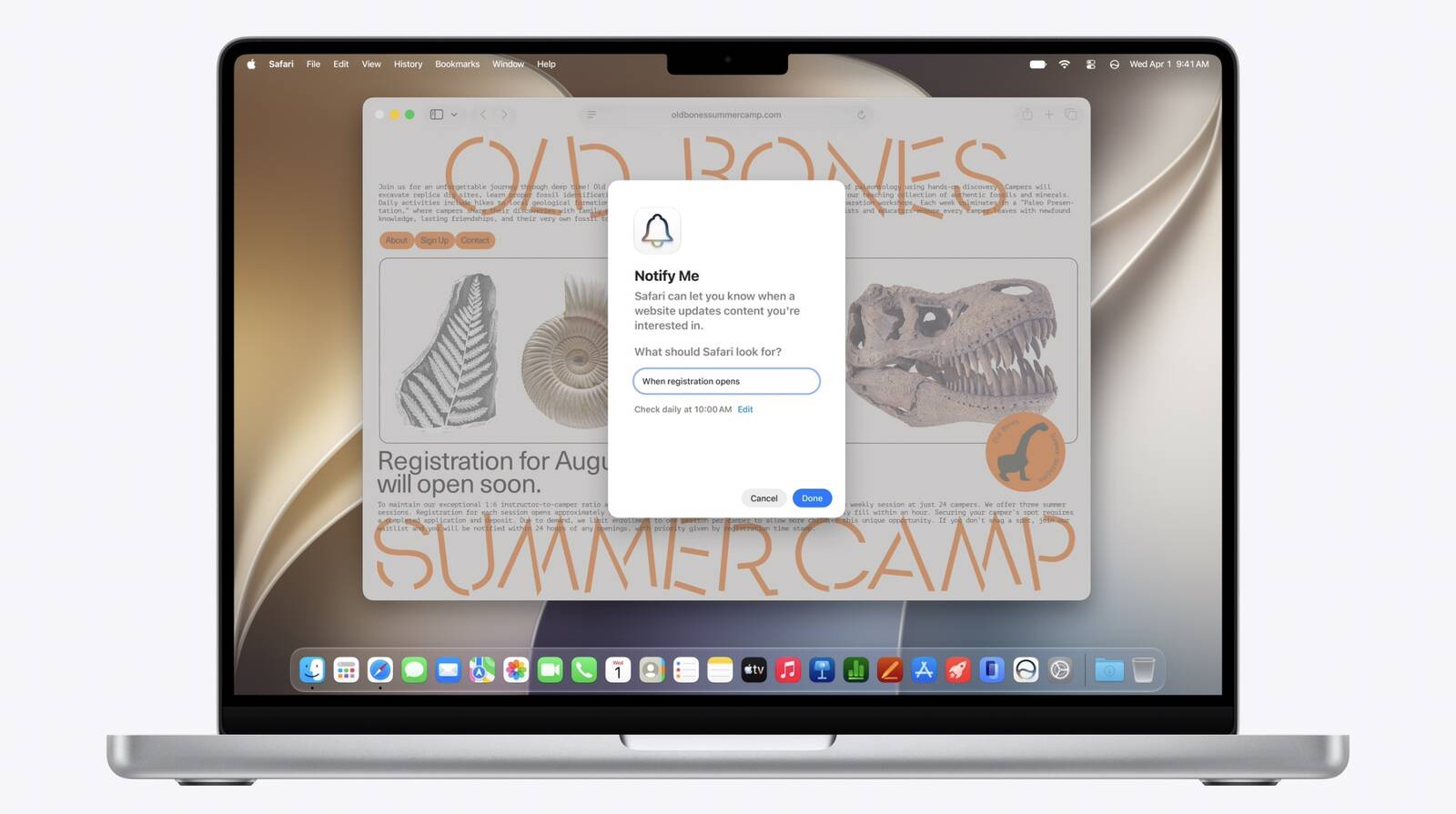
New Safari Can Monitor a Webpage and Notify You of Updates

Apple's new version of Safari browser can be tasked to monitor a webpage and notify you of any changes, thanks to a new built-in feature.


With "Notify Me," Safari can keep checking a website on your behalf – such as a product you've been watching for when it comes back in stock – and alert you when a change occurs.

In other upcoming feature additions, using the power of AI, Safari tabs that you have open can automatically be organized into topics.

Moreover, thanks to the new Siri AI features, Apple says that you can describe what you want in natural language, and Safari can create a custom extension that adapts web pages just for you.

It's worth noting, however, that the new enhanced Siri AI features that Apple announced today at WWDC 2026 will not be available in the European Union or in China when they are released in beta later this year.
This article, "New Safari Can Monitor a Webpage and Notify You of Updates" first appeared on MacRumors.com

Discuss this article in our forums
  •  

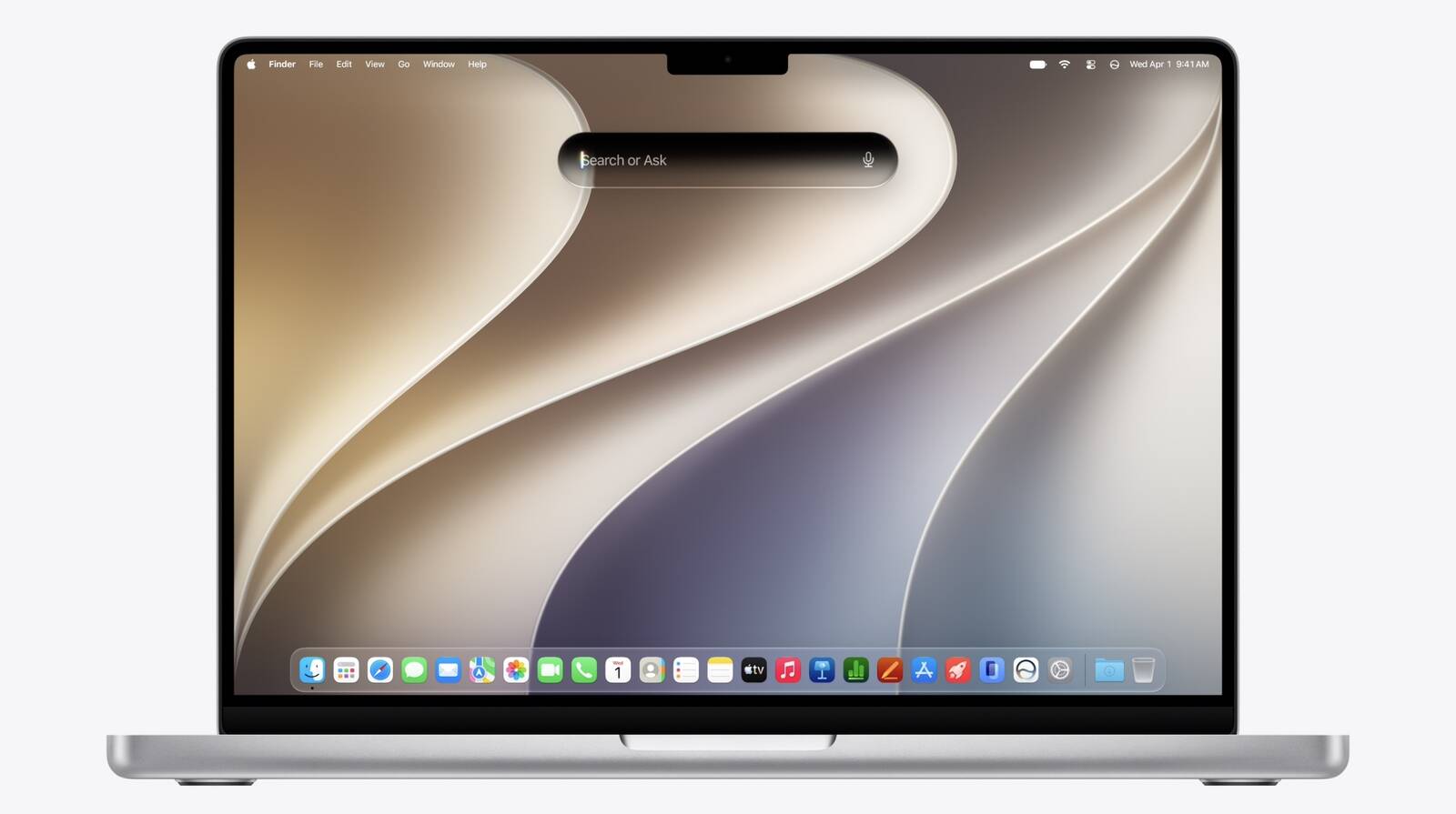
Rich Siri Conversations in macOS 27 Can Be Started in Spotlight

In macOS 27, Siri's new chatbot capabilities can be accessed straight from Spotlight, Apple announced today.


During its WWDC 2026 keynote, Apple revealed that Siri's rich conversational experience can be started right inside the Spotlight prompt, accessed via Command + Space, bringing in context and chat history on the fly.

Conversation history is synced via iCloud, so you can go from device to device. It can use world knowledge, personal content, and allows you to perform tasks like writing Messages or emails.

There's also a new Siri mode in Camera. Apple is introducing broader Apple Intelligence upgrades that can bring smarter capabilities to apps across the iPhone, iPad, and Mac.
Related Roundup: macOS 27
Tag: Siri

This article, "Rich Siri Conversations in macOS 27 Can Be Started in Spotlight" first appeared on MacRumors.com

Discuss this article in our forums
  •  

Apple Touts Faster Core Software Features Across Devices

Apple at WWDC 2026 today said it has made several responsiveness improvements across its software ecosystem, speeding up system animations, app launching, and much more.


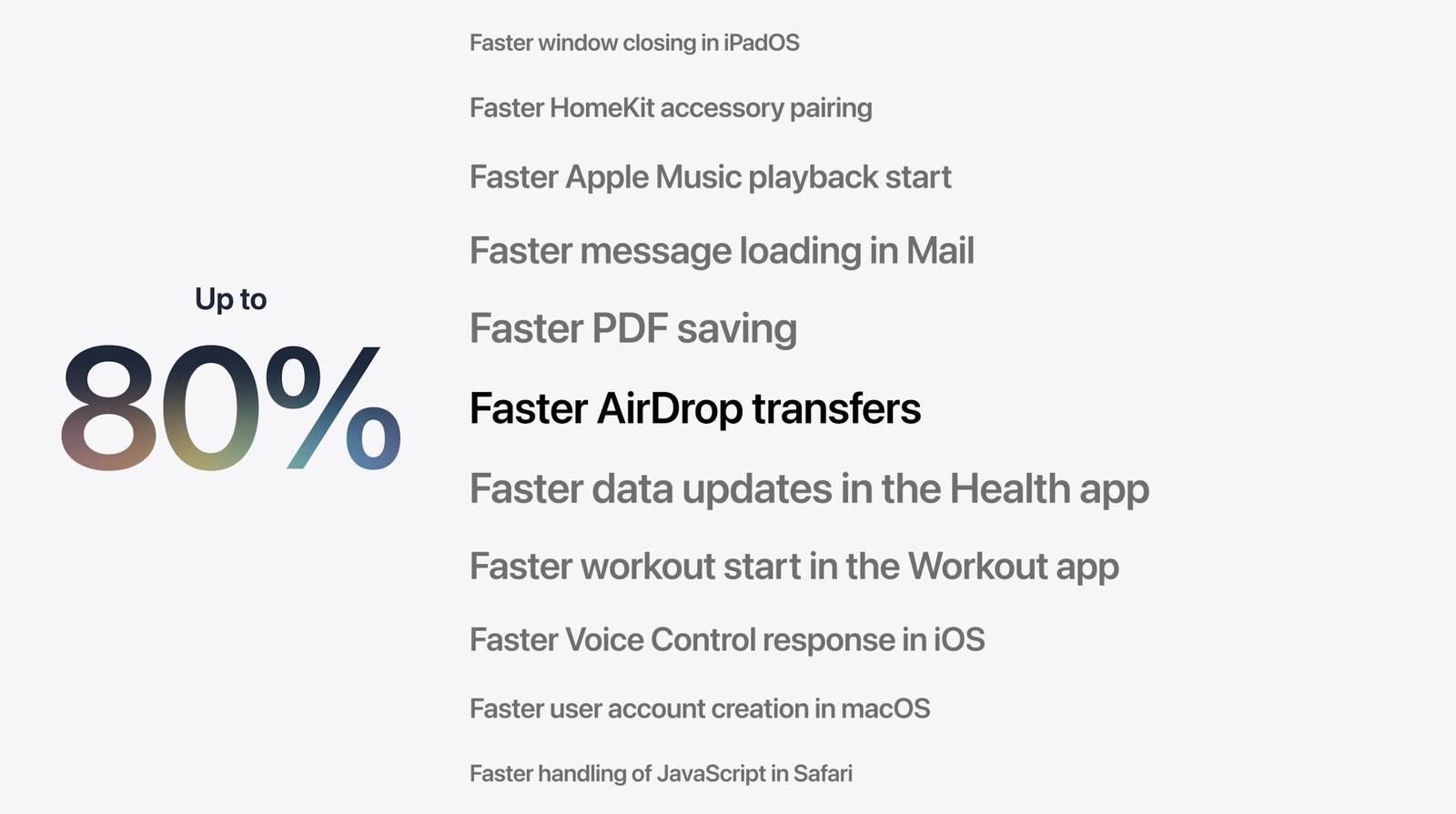
Apple says that launching iPhone and iPad apps is up to 30 percent faster across devices, while new photos taken on iPhone appear in iCloud Photos up to 70 percent faster.

Elsewhere, sharing files between devices over AirDrop is now up to 80 percent faster and transfers in the Files app are up to 50 percent faster. There's also a new CPU scheduler manager that prioritizes jobs and ensures that the right work is executed on time.

Apple also says that network transitions on its mobile devices have been improved, so that switching between cellular data and Wi-Fi when you're out and about feels a lot more seamless.
This article, "Apple Touts Faster Core Software Features Across Devices" first appeared on MacRumors.com

Discuss this article in our forums
  •  

iOS 27 Supports iPhone 11 and Newer, Says Apple

iOS 27 is supported on iPhone 11 and all of the same iPhone models as iOS 26, Apple confirmed today during its WWDC 2026 keynote.


The announcement means that iOS 27 will be compatible with the following iPhone models when it arrives in September:
  • iPhone 17e

  • iPhone 17

  • iPhone 17 Pro & Pro Max

  • iPhone Air

  • iPhone 16e

  • iPhone 16

  • iPhone 16 Plus

  • iPhone 16 Pro

  • iPhone 16 Pro Max

  • iPhone 15

  • iPhone 15 Plus

  • iPhone 15 Pro

  • iPhone 15 Pro Max

  • iPhone 14

  • iPhone 14 Plus


  • iPhone 14 Pro

  • iPhone 14 Pro Max

  • iPhone 13

  • iPhone 13 mini

  • iPhone 13 Pro

  • iPhone 13 Pro Max

  • iPhone 12

  • iPhone 12 mini

  • iPhone 12 Pro

  • iPhone 12 Pro Max

  • iPhone 11 Pro

  • iPhone 11 Pro Max

  • iPhone 11

  • iPhone SE (3rd generation)

Apple is also expected to introduce broader Apple Intelligence upgrades that could bring smarter capabilities to apps across the iPhone, iPad, and Mac. Stay tuned for all the details.
Related Roundup: iOS 27

This article, "iOS 27 Supports iPhone 11 and Newer, Says Apple" first appeared on MacRumors.com

Discuss this article in our forums
  •  

5 Things to Watch for During Apple's WWDC 2026 Keynote Today

WWDC 2026 has officially arrived, with Apple set to kick off its annual developer conference with its opening keynote at 10 a.m. Pacific Time today.


Apple will announce its latest software updates, including iPadOS 27, macOS 27, watchOS 27, tvOS 27, and visionOS 27. Could there also be a surprise or two in store?

Below, we recap five key talking points heading into WWDC 2026:
  1. Apple could announce new hardware at this year's conference – reportedly, it even has a couple of new devices "ready to go" – but we are keeping our expectations in check. Apple is believed to be holding back new additions to the company's hardware lineup until the new version of Siri and other Apple Intelligence upgrades are released to the general public later this year. The global memory shortage is also making Mac upgrades less likely for now.

  2. Apple may gate access to new Siri features via a waitlist when iOS 27 arrives in September, similar to the initial launch of the Apple Intelligence platform two years ago. Apple is still internally labeling the long-delayed revamped Siri as a "beta," suggesting it won't be marketed as finished when it arrives later this year. Today's preview of the software should clarify what still needs work.

  3. macOS 26 Tahoe will be the final major macOS version for Intel-based Macs, Apple revealed at last year's WWDC. That means macOS 27 will be compatible with Apple silicon Macs only, so you will need a Mac with an M-series chip or a MacBook Neo with an A18 Pro chip in order to install the software update. Dropping support for the legacy chips also means Apple can focus on honing new features exclusively for Apple silicon.

  4. WWDC 2026 will be Apple CEO Tim Cook's last as keynote speaker. The opening keynote of WWDC has been presented by Cook every year since 2012, but the 65-year-old is stepping down as Apple's chief executive officer, and hardware engineering chief John Ternus is set to take over on September 1. Bloomberg's Mark Gurman anticipates that Cook will kick off the keynote, but software chief Craig Federighi will be the most prominent figure for the majority of the presentation as he introduces the new AI-centric features.

  5. This year, macOS Emerald and macOS Big Bear have emerged as two speculative possibilities for the name of macOS 27, which Apple has yet to announce. Meanwhile, Little Finder Guy has re-appeared, this time in WWDC swag bags! The tiny anthropomorphized version of the Mac Finder icon went viral earlier this year after appearing in Apple's MacBook Neo marketing campaign. Could we see the character return during the macOS 27 preview? Fingers crossed!


Stay tuned for in-depth coverage of all of Apple's announcements today. We also have a guide explaining all the ways you can watch Apple's WWDC 2026 Keynote live as it happens.
Related Roundup: WWDC 2026

This article, "5 Things to Watch for During Apple's WWDC 2026 Keynote Today" first appeared on MacRumors.com

Discuss this article in our forums

  •  

WWDC 2026 Swag Bag Includes Little Finder Guy

Just hours away from WWDC's opening keynote, some developers have been sharing the contents of their conference swag bags on social media. The bags are given to attendees when they register for the event, and typically contain limited-edition Apple gifts.


This year, developers have been registering early at Apple's Infinite Loop campus, where they have been gifted a black tote bag emblazoned with the WWDC 2026 logo, along with a water bottle, a selection of stickers, and collectible enamel pins.

There are four pins in the bag, including the Apple skull and crossbones, an Apple 50 pin, Clarus the Dogcow, and Little Finder Guy – the tiny anthropomorphized version of the Mac Finder icon that went viral after appearing in Apple's recent online marketing campaign for the MacBook Neo.

wwdc 2026 apple swag #wwdc pic.twitter.com/SLgrgLxQwl

β€” Canoopsy (@Canoopsy) June 7, 2026

MacRumors will be in attendance at the keynote, with live coverage of the event beginning shortly after 10:00 a.m. Pacific Time. Stay tuned to MacRumors.com and our @MacRumorsLive account on X (Twitter). We've also put together a guide explaining all the ways you can watch Apple's WWDC 2026 Keynote live as it happens.
Related Roundup: WWDC 2026

This article, "WWDC 2026 Swag Bag Includes Little Finder Guy" first appeared on MacRumors.com

Discuss this article in our forums

  •  

How to Watch Apple's WWDC 2026 Keynote on June 8

The 2026 Worldwide Developers Conference will take place this week from June 8 through June 12, and like the last six years, it will be an online event, although select developers and students will be invited to Apple Park. To kick things off, Apple holds a keynote event on the Monday to announce new software, which is what makes it of interest to the general public.


During the keynote event on Monday, June 8, Apple is expected to unveil iOS 27, iPadOS 27, macOS 27, tvOS 27, watchOS 27, and visionOS 27. (The "27" represents the September 2026 to September 2027 release season.)

You can watch the WWDC 2026 keynote event using one of the methods outlined below. The live stream is set to start at 10:00 a.m. Pacific Time from β€ŒApple Parkβ€Œ in Cupertino, California. We have a full list of when the event will begin in other time zones in the United States and around the world.

  • Honolulu, Hawaii -- 7:00 a.m. HAST

  • Anchorage, Alaska -- 9:00 a.m. AKDT

  • Cupertino, California -- 10:00 a.m. PDT

  • Phoenix, Arizona -- 10:00 a.m. MST

  • Vancouver, Canada -- 10:00 a.m. PDT

  • Denver, Colorado -- 11:00 a.m. MDT

  • Dallas, Texas -- 12:00 noon CDT

  • New York, New York -- 1:00 p.m. EDT

  • Toronto, Canada -- 1:00 p.m. EDT

  • Halifax, Canada -- 2:00 p.m. ADT

  • Rio de Janeiro, Brazil -- 2:00 p.m. BRT (no DST)

  • London, United Kingdom -- 6:00 p.m. BST

  • Berlin, Germany -- 7:00 p.m. CEST

  • Paris, France -- 7:00 p.m. CEST

  • Cape Town, South Africa -- 7:00 p.m. SAST

  • Helsinki, Finland -- 8:00 p.m. EEST

  • Istanbul, Turkey -- 8:00 p.m. TRT

  • Dubai, United Arab Emirates -- 9:00 p.m. GST

  • Delhi, India -- 10:30 p.m. IST

  • Jakarta, Indonesia -- 12:00 a.m. WIB next day

  • Shanghai, China -- 1:00 a.m. CST next day

  • Singapore -- 1:00 a.m. SGT next day

  • Perth, Australia -- 1:00 a.m. AWST next day

  • Hong Kong -- 1:00 a.m. HKT next day

  • Seoul, South Korea -- 2:00 a.m. KST next day

  • Tokyo, Japan -- 2:00 a.m. JST next day

  • Adelaide, Australia -- 2:30 a.m. ACST next day

  • Sydney, Australia -- 3:00 a.m. AEST next day

  • Auckland, New Zealand -- 5:00 a.m. NZST next day

Watch the Keynote on YouTube


Watching the WWDC keynote on YouTube may be one of the quickest and easiest ways to catch the event because YouTube is generally available on most devices, including TV sets and consoles.


The YouTube live stream above will be accessible on June 8 when the event kicks off.

Watch the Keynote on Mac, iPhone, iPad, or Vision Pro


You can watch the WWDC keynote on any Mac, iPhone, iPad, or Vision Pro using Apple's native Safari browser or another browser. iOS devices must be running iOS 10 or later, and Macs need to be running macOS Sierra 10.12 or later to access the stream.

Launch Safari from your chosen device and follow this link to the WWDC 2026 Keynote.

Watch the Keynote Using the Apple TV App


You can watch the WWDC keynote via Apple's TV app on Mac, iPhone, iPad, Vision Pro, and Apple TV, with the link in the TV app becoming available on the day of the event or just before.

  1. Open the TV app on your chosen device.

  2. Scroll down the Watch Now category and select WWDC 2026. Alternatively, type "WWDC" into the Search field and select WWDC 2026 from the results.

  3. Click Play.


The app may tell you to tune in at your local time to watch the event live prior to when the WWDC keynote begins.

Watch the Keynote on a Windows PC


If you don't have an Apple device handy, you can still watch the WWDC 2026 keynote on a PC running Windows 10 or later. Open Microsoft Edge browser and follow this link to the WWDC 2026 Livestream.

While Apple offers no guarantees, other platforms may also be able to access the WWDC 2026 keynote using recent versions of Chrome or Firefox (MSE, H.264, and AAC codecs/extensions must be installed).

Watch in the Apple Developer App or Developer Website


Apple also plans to stream the keynote in the Apple Developer app, and on the Apple Developer website, making it easier than ever for Apple fans and developers to catch the event.

MacRumors Coverage


For those unable to watch the live stream, or who prefer to read a text version of the announcements, we'll have live coverage both here on MacRumors.com and through our MacRumorsLive X (Twitter) account, so make sure to follow.
Related Roundup: WWDC 2026

This article, "How to Watch Apple's WWDC 2026 Keynote on June 8" first appeared on MacRumors.com

Discuss this article in our forums
  •  

Will Apple Launch New Hardware at WWDC Next Week?

Apple has several hardware releases in the pipeline, but will we see any of them unveiled at this year's Worldwide Developers Conference?


WWDC is primarily a software event where new versions of iOS, iPadOS, macOS, watchOS, tvOS, and visionOS take center stage, but it's not unusual for Apple to introduce new hardware during the developer conference. Take WWDC 2017, for example, where Apple first unveiled the original HomePod over six months ahead of its launch.

Apple has chosen to show off other major products at the annual event, like the redesigned Mac Pro and Pro Display XDR announced in June 2019. More recently, Apple unveiled the first 15-inch MacBook Air in 2023, along with the M2 Ultra chip in the Mac Studio, and the first Mac Pro powered by Apple silicon.

So What Can We Expect at WWDC 2026?


Probably not much. Apple has actually released a lot of updates already in 2026. We've seen the AirTag 2, the iPhone 17e, and a new iPad Air with M4 chip, along with refreshed M5 MacBook Air and M5 Pro/Max MacBook Pro models.

Indeed, March was a big month for Apple. The Studio Display XDR arrived with mini-LED backplane technology and a 120Hz refresh rate, the regular Studio Display received a Thunderbolt 5 upgrade, and the company also debuted its industry-disrupting $599 MacBook Neo. It even quietly updated the AirPods Max with an H2 chip.

But despite the flurry of spring announcements, Apple reportedly has more products waiting in the wings. According to Bloomberg's Mark Gurman, new models of the Apple TV 4K and HomePod mini are "ready to go" and have been "for months." So why has Apple yet to launch the new devices, and should we expect to see them at WWDC?


Unfortunately, it's unlikely that we will see either of these products announced during the conference. The main reason is that Apple is holding them back until the more personalized version of Siri and other Apple Intelligence upgrades are released later this year. We'll undoubtedly see these software features previewed at WWDC, but they won't be released to the public until mid-September, so it's not reasonable to expect that the new Apple TV and HomePod mini will launch before then.

The same goes for other rumored products like smart glasses, AirPods with cameras, and the smart home hub or so-called "HomePad." All of these devices will rely on an enhanced Siri and a version of Apple Intelligence that finally lives up to its promises, but we won't see these improvements go public until the fall.

Mac Updates? Unlikely


It's not looking good for Mac mini or Mac Studio updates arriving anytime soon, either.

Apple is battling a global memory chip shortage, driven by hyperscalar companies building out AI server facilities. The squeeze has already seen Apple remove desktop Macs from its online store – Mac mini models with 32GB and 64GB of RAM are no longer available for purchase, nor is the M3 Ultra Mac Studio with 256GB RAM. Apple even went so far as to remove the β€ŒMac miniβ€Œ with 256GB of SSD storage, leaving the 512GB model as the minimum option. Apple CEO Tim Cook himself has said that the Mac mini and Mac Studio could be hard to get for months to come.

Perhaps the best we can hope for is a hardware preview of Apple's smart home accessories. Other than that, the safest overriding assumption is not to expect hardware-based product launches at all until Apple's new software updates mature to a point where its AI-based features no longer carry the "beta" badge caveat, and there's no sign that's about to happen anytime soon.

WWDC 2026 kicks off with Apple's keynote on Monday, June 8 at 10 a.m. Pacific Time. Be sure to stay tuned here at MacRumors for comprehensive coverage of all the announcements.
Related Roundup: WWDC 2026

This article, "Will Apple Launch New Hardware at WWDC Next Week?" first appeared on MacRumors.com

Discuss this article in our forums

  •  

iOS 27: New Siri Features Could Be Gated Behind a Waitlist

Bloomberg's Mark Gurman has published his WWDC preview ahead of Monday's keynote, and while almost all of the iOS 27 features he covers have already made the rounds, there are a couple of details worth highlighting.


As we've covered previously, Apple is turning Siri into a full chatbot that users can interact with, similar to Claude or ChatGPT. The Siri chatbot will be integrated into Apple's operating systems at the system level, and there will also be a Siri app for back-and-forth conversations.

Perhaps unsurprisingly, Gurman says that Siri chats will sync across devices via iCloud, making Apple's assistant similar to rivals like ChatGPT that retain history across sessions. Users' chats with Siri will also be able to auto-delete on a schedule, 30 days, a year, or never. The options will be controlled in Settings, much like Messages.

Notably, Gurman says that Apple is still internally labeling the long-delayed revamped Siri as a "beta" and "preview," suggesting it won't be marketed as finished software when it arrives later this year. That may frustrate some users, given the Apple Intelligence features that were first teased in 2024 have been repeatedly delayed, but it's worth noting that the original Siri also held the same "beta" caveat for two years after its 2011 debut.

As a result of the abiding "beta" moniker, Gurman says it's possible that Apple will initially introduce a waitlist for the new Siri that could gate access to certain features when iOS 27 arrives in September, similar to the initial launch of the Apple Intelligence platform two years ago. It's not clear which features they might be, though.

WWDC 2026 kicks off with Apple's keynote on Monday, June 8 at 10 a.m. Pacific Time.
Related Roundup: iOS 27

This article, "iOS 27: New Siri Features Could Be Gated Behind a Waitlist" first appeared on MacRumors.com

Discuss this article in our forums
  •  

'MacBook Ultra' May Drive Industry Shift to Hybrid OLED Laptop Displays

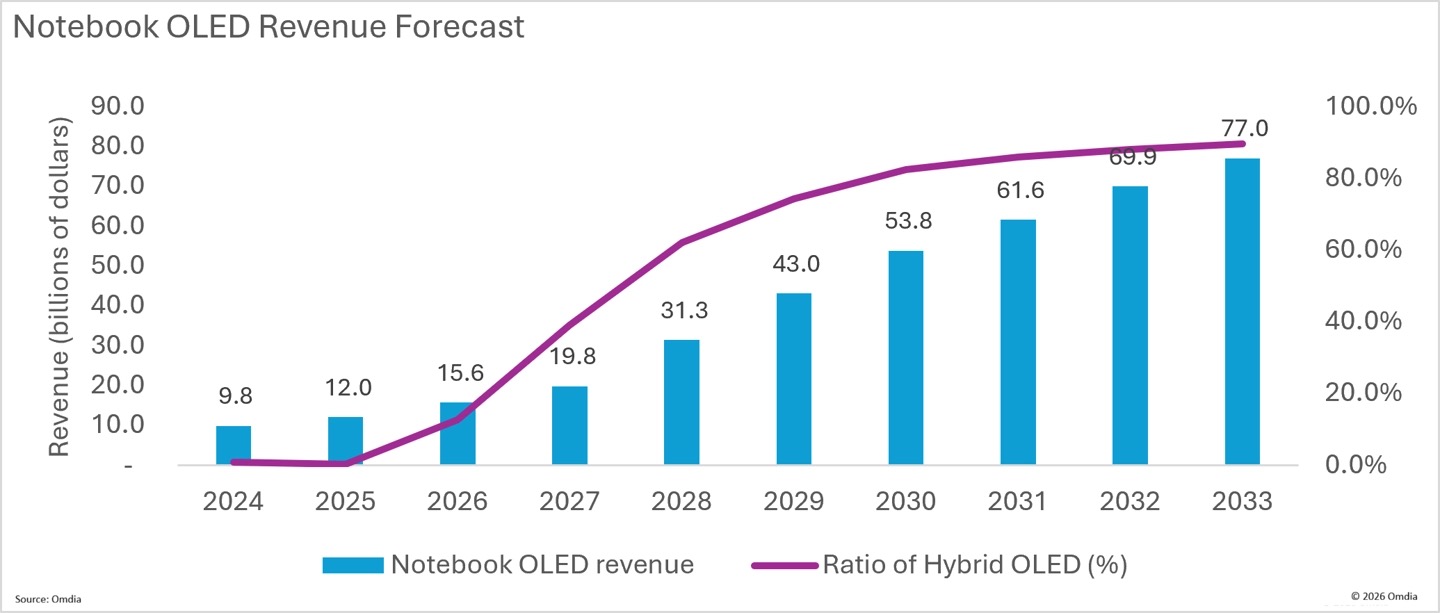
Apple's upcoming OLED MacBook Pro – aka "MacBook Ultra" – is expected to be the primary driver of a hybrid OLED laptop display market worth $4 billion this year, according to a new Omdia research report ($).


The report corroborates rumors that Apple's first OLED MacBook will use a hybrid OLED architecture combining oxide TFT (thin-film transistor) and tandem OLED layers. The combination is already used in Apple's iPad Pro models, and offers higher brightness, improved power efficiency, and longer lifespan compared with conventional single-stack OLED panels.

Samsung Display is said to be making the panels, and the supplier has invested heavily in an 8.6-generation OLED production line in South Korea. The line recently reached a key milestone for mass production.

It will be the first time the combination has been used for a laptop in the 14-inch and 16-inch range, and Apple's adoption is expected to pull the rest of the OLED laptop industry in the same direction. Omdia estimates that hybrid OLED panels will account for 12.6% of all OLED laptop shipments in 2026, rising dramatically to 89.5% by 2033.

Omdia says manufacturers are already exploring new patterning methods for large OLED panels. In addition to the established Fine Metal Mask (FMM) process, it says technologies such as inkjet printing (IJP) and fine photolithography mask (FPM) are being developed to improve production efficiency for larger screens.


Apple's first OLED MacBook Pro will also feature a touchscreen display, according to analyst Ming-Chi Kuo. The claim has been corroborated by Bloomberg reporter Mark Gurman, who also says the laptops will have "thinner and lighter frames." Apple is apparently focusing on delivering the thinnest possible device without compromising on battery life or major new features. That might also mean a higher price point and a new "Ultra" tier for the laptop.

The redesigned 14-inch and 16-inch MacBook Pro models are also expected to have a hole-punch camera at the top of the display, and it could potentially be housed in a pill-shaped cutout similar to the iPhone's Dynamic Island, rather than the notch MacBook Pro owners are accustomed to. Gurman says the machines will be powered by M6 chips and are being readied for a late 2026 or early 2027 launch. As things stand, the latter time frame is now looking more likely, owing to the global memory chip shortage.
Related Roundup: MacBook Pro
Tags: OLED, Omdia
Buyer's Guide: MacBook Pro (Buy Now)
Related Forum: MacBook Pro

This article, "'MacBook Ultra' May Drive Industry Shift to Hybrid OLED Laptop Displays" first appeared on MacRumors.com

Discuss this article in our forums
  •  

iPhone 18 Pro: Dark Cherry, Light Blue, and Dark Gray Chassis Leaked [Update]

Update: Since publication, new information has come to light suggesting the images have been AI-manipulated and are not in fact iPhone 18 Pro chassis parts. The original article follows.


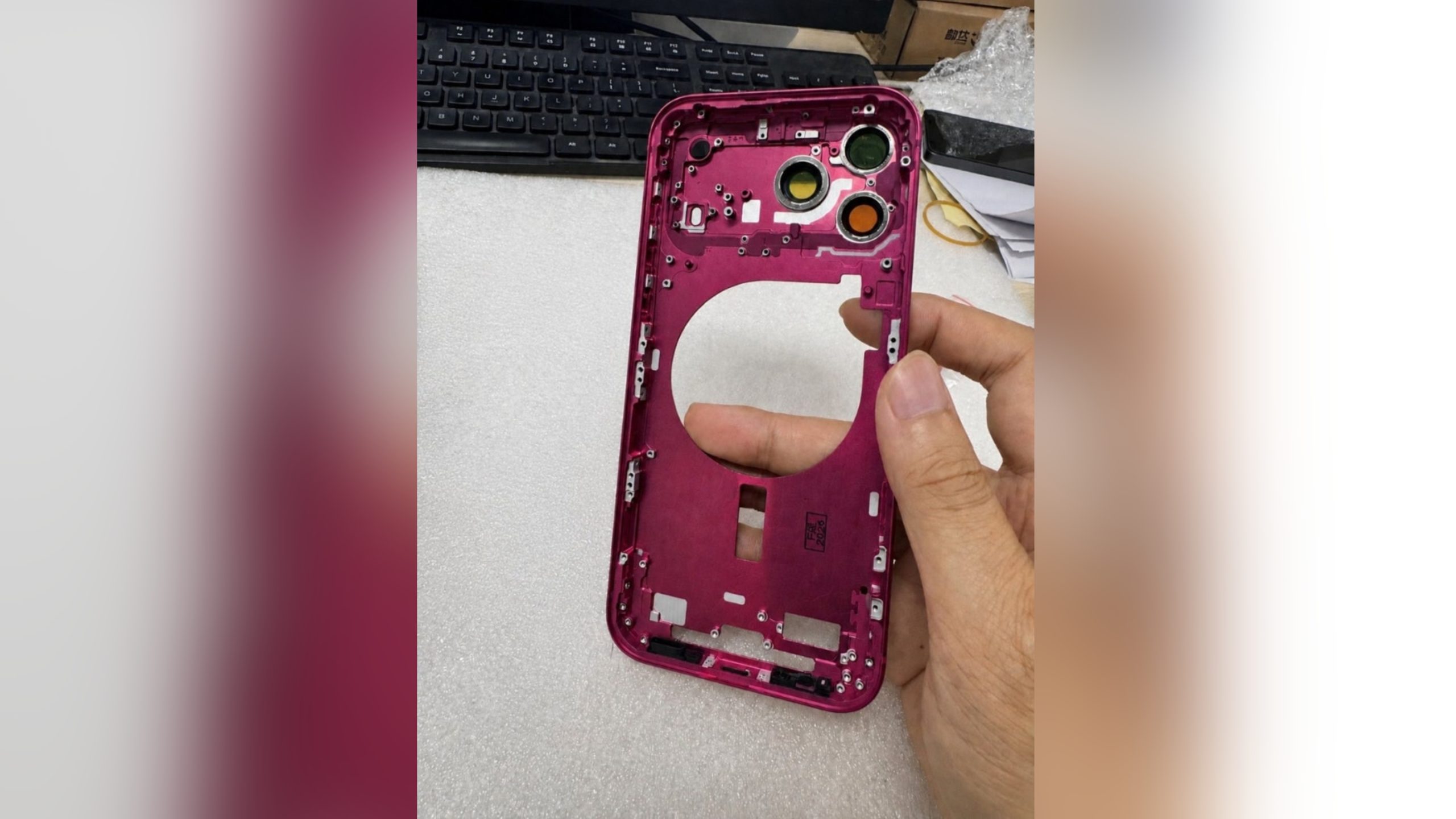
The color options Apple is reportedly planning for the upcoming iPhone 18 Pro and β€ŒiPhone 18 Proβ€Œ Max have appeared online today in the form of images of chassis parts of unknown authenticity.


Shared by the account name "yeux1122" on the Korean-langauge Naver blog, the images show what appear to be production-ready frames for three of the four colors Apple is rumored to be planning.

Multiple rumors have suggested Apple is testing a deep red finish for the iPhone 18 Pro models, and the color is expected to be the special color that Apple chooses in 2026, similar to Cosmic Orange for iPhone 17 Pro.


Two other colors Apple is said to be planning are Light Blue and Dark Gray. Apple may also offer the iPhone 18 Pro and iPhone 18 Pro Max in Silver, though that color isn't shown in these pictures. Macworld previously shared what it said were Pantone codes for the four colors Apple is testing.

The four colors have also been spotted in the first iPhone 18 Pro dummy models to leak, providing another look at the shades Apple is likely to use.


The iPhone 18 Pro models are expected to be unveiled this September alongside Apple's first foldable iPhone, which will have its own set of color finishes that are likely to be more muted, with silver, white, and indigo rumored so far.
Related Roundup: iPhone 18 Pro
Tag: Naver

This article, "iPhone 18 Pro: Dark Cherry, Light Blue, and Dark Gray Chassis Leaked [Update]" first appeared on MacRumors.com

Discuss this article in our forums
  •  

Apple's New Ad Pitches Safari as a More Private Alternative to Chrome

Apple has published a new ad to appeal to customers who prioritize privacy when browsing, suggesting that Safari is the one you should use if you want to "Keep data trackers off your back."


In a new Privacy on iPhone segment titled "Safari helps block data trackers," the ad shows users of rival phones in everyday situations having to live with data trackers as they browse. The trackers are depicted as people in chrome-colored suits (get it?) who generally follow them around wherever they go to look at their screen – and in some cases literally sit on their shoulders to get a better view.

Apple on its website calls privacy a "fundamental human right," and highlights several features that Chrome doesn't come with out of the box. Safari blocks third-party cookies by default, uses machine learning to combat tracking, removes tracking parameters from URLs in Private Browsing, hides your IP address from known trackers, prevents web extensions from accessing your browsing activity by default, and blocks known trackers in Private Browsing.
This article, "Apple's New Ad Pitches Safari as a More Private Alternative to Chrome" first appeared on MacRumors.com

Discuss this article in our forums
  •  
❌