❌

Lees weergave

Raising the bar together. Introducing the Driver Quality Initiative at WinHEC 2026

There are moments in this industry when you can feel the ecosystem lean in. This week in Taipei was one of them. For two days at WinHEC 2026 (Windows Hardware Engineering Conference) β€” Microsoft’s first WinHEC since 2018 β€” we had the privilege of spending time alongside our OEM, silicon, IHV and ODM partners, and the engineers who build Windows, to talk honestly about where we are, opportunities to be better connected as an ecosystem and where we're going together. As we shared in March, a fundamental component to raising the bar on quality across areas such as system stability, driver quality and app reliability requires coordinated execution across the entire ecosystem. At WinHEC 2026, we shared how we’re addressing this at the driver level with our partners by introducing the Driver Quality Initiative (DQI), a comprehensive, ecosystem-wide effort designed to fundamentally raise the bar on driver quality, reliability and security across Windows.

β€œGreat platforms aren’t built in isolation. Platform quality depends on early, honest collaboration across OEMs, ODMs, silicon partners and IHVs.Β WinHECΒ brings engineers together with Microsoft to align early, solve real problems and deliver higher‑quality solutions for our shared customers” β€” Syam Poluri, Distinguished Engineer,Β DellΒ Technologies

Raising the bar on quality takes all of us.

Drivers sit at the heart of every Windows experience. They connect the OS to the silicon, components and peripherals that make Windows one of the most versatile platforms in the industry. Today, thousands of partners contribute to tens of thousands of active driver families across the Windows install base. When drivers are high quality, customers experience reliable, secure, performant devices. When drivers fail, customers experience it as a device problem, regardless of where the root cause sits. Chart showing four pillars of the Driver Quality Initiative.DQI builds on the learnings and infrastructure established through the Windows Resiliency Initiative (WRI) and is organized around four pillars:
  • Architecture: We are heavily investing in hardening kernel mode drivers and enabling the third-party kernel mode driver transition to either user mode driver or Microsoft authored class drivers. This is to ensure higher driver security, reliability and resiliency. User-mode driver investments include performance updates to PCIe devices with DMA support as well as Wi-fi stack (coming soon). Class driver investments include Soundwire Device Class for Audio (SDCA), introduction of the I3C class driver, NCM USB ethernet class driver as well as continuous enhancements to existing first-party class drivers on Windows 11.
  • Trust: We are raising the bar for trusted partners and trusted drivers, including stronger partner verification, expanded automated analysis and updated Windows Hardware Compatibility Program requirements.
  • Lifecycle: We are improving driver lifecycle management through better Windows Update catalog hygiene, including deprecating outdated or low-quality drivers, advancing SBOM alignment and enabling faster issue analysis through driver symbols.
  • Quality Measures: We are expanding how driver quality is measured beyond crashes to include stability, functionality, performance, and power and thermal impact, giving partners clearer signals to improve the real customer experience.
DQI is a partnership. Microsoft is building the frameworks, tools and quality signals, and we are working with partners to raise driver quality across the ecosystem so customers can rely on their Windows devices from day one through the full life of the PC.

β€œDelivering high-quality drivers and resilient platforms isn’t owned by any one companyβ€”it’s a shared commitment. Through our close collaboration with Microsoft,Β AMDΒ is focused on building a culture of joint accountability to ensure security, stability and predictable performance for our customers at scale.” β€” David Harmon, Director, Software Engineering, AMD

What we did at WinHEC

Day 1 opened with a keynote presentation featuring our Windows leadership team, organized around three themes: navigating the evolving landscape, raising the bar on Windows 11 quality and the future vision for Windows. The keynote set the tone for the days ahead. We were candid about where we are, clear about where we're going and explicit about the partnership required to get there. From there, attendees broke out into workshops, with sessions spanning five tracks:
  • End-to-end driver quality β€” covering the full lifecycle from authoring and validation through publishing, and post-release health
  • Platform fundamentals β€” power, thermal and storage fundamentals that define everyday device experience
  • Exceptional device experiences β€” delivering best-in-class quality across media and display, camera, audio, connectivity and peripherals
  • Windows Server β€” platform direction, reliability and the evolving requirements for modern datacenter and edge deployments
  • Ecosystem advancement β€” end-to-end security, co-engineering tools, manufacturing and AI hardware innovation.
Day 2 shifted from discussion to application. Hands-on labs gave engineers the opportunity to put guidance into practice, from authoring and hardening drivers, executing hardware compatibility tests, and exploring AI-assisted crash analysis. Microsoft engineers worked side by side with partner teams, helping them move from understanding the guidance to applying it directly within their own engineering workflows. Beyond the structured sessions, attendees explored demo booths showcasing the latest tools, diagnostics and technologies coming to the Windows platform. The dedicated Microsoft Experience Room brought hardware and the operating system together to demonstrate how end-to-end experiences come to life across various Windows customers, such as students, developers, creators, information workers and gamers, making the connection between platform engineering decisions and real customer outcomes tangible. Each day concluded at the Connection Corner, an open forum where partners could engage directly with the Microsoft engineers building these tools. It was, for many attendees, the most valuable part of the event: unfiltered access to the people doing the work, with the time and space to dig into the questions that matter most.

β€œAt Acer, we believe that continuous innovation and collaboration are the engines that drive the technology industry forward. On display at WinHEC, Windows stands out as an innovative platform that brings together partners across a broad range of expertise. The Microsoft conference is where innovation, technology and domain experts come together to unlock the true value of platform engineering.” Β β€” Mark Yang, Associate Vice President of Compute Software Technology, Acer Inc.

"The customers ASUS serves β€” gamers, creators, students and professionals β€” each demand a different kind of Windows device. WinHEC is where ASUS and Microsoft engineers go deep on the platform fundamentals that make those very different devices share the same quality bar, generation after generation." β€” Justin Yo, Software Associate VP, ASUSTeK Computer Inc.

What we heard from partners

A few themes came through clearly in our conversations across the two days:
  • Quality is a shared priority. Across silicon, OEM and IHV partners, the message was consistent β€” driver and platform quality is central to the customer experience, and the ecosystem is ready to invest.
  • Innovation thrives on a strong foundation. When the fundamentals are solid, partners can invest more confidently in differentiated experiences, AI-powered capabilities and next-generation hardware, knowing the platform will support them. The energy around what becomes possible when quality is a given, not a variable, was one of the most exciting themes of the week.
  • There is real appetite for this kind of engagement. Partners told us repeatedly that the combination of roadmap clarity and hands-on technical depth is exactly what the ecosystem needs at this moment and going forward.
  • Transparency matters. Partners welcomed the open methodology behind driver quality metrics, the phased rollout of lifecycle states and the commitment to incentive-based distribution as the right model for moving forward together.

"The best customer experiences are built on the foundation of strong partner collaboration. WinHEC is where that work happens β€” engineers from HP and Microsoft aligning early, solving real problems and ensuring that what we ship together actually works for the people who depend on it every day. That kind of direct, honest partnership across the ecosystem raises the bar for everyone." β€” Deepak Patil, Senior Vice President, Personal Systems Engineering, HP Inc.
Looking ahead

WinHEC 2026 was an important step, but it's the start of the work, not the end. In the months ahead, we will keep investing in the fundamentals that matter most to customers: reliability, security, performance, compatibility and quality. We’ll also keep collaborating with OEMs, silicon partners, IHVs, ODMs and the broader hardware ecosystem through the Windows Resiliency Initiative, the new Driver Quality Initiative and the work we do together every day. To everyone who joined us in Taipei this week, from our CPU, GPU and silicon partners; display, camera, audio and networking teams; IBVs, ODMs and OEMs; to the peripheral and component engineers who make the breadth of Windows possible β€” thank you. The depth of engagement, the willingness to work together in the room, and the shared commitment to quality made this week what it was. The work we do together over the coming year will define the Windows experience for more than a billion users. We couldn't be more energized about what we're going to build. β€” Robin and Ian
  •  

New updates to Edge across desktop and mobile

Edge just made it easier to go from first tab to final plan, wherever you go. Your favorite Copilot experiences, plus new ones, are now available directly in Edge on desktop and, for the first time, in the Edge mobile app. This includes capabilities now available to everyone on desktop and mobile like reasoning across multiple open tabs so Copilot can compare info, surface key details, and see what matters, more relevant answers from Copilot built on your browsing history and past chats, and hands-free browsing with Voice and Vision. We're also making it easier to jumpstart your day and pick up where you left off with a redesigned new tab page and Journeys, now broadly available across desktop2 and mobile3. Plus, new productivity tools on Edge desktop are designed to move you from idea to done without breaking stride. As part of today's update, we're retiring Copilot Mode1. With helpful features built directly into Edge, it's now simpler to shape how you browse and get more done. To explore what's new, visit aka.ms/CopilotinEdge or download the Edge Mobile app.

New updates to the Edge mobile app

Today, we're bringing the experiences you love on Edge desktop to the Edge mobile app so you can get more done wherever you go. Juggling tabs on your phone used to mean endless swiping and tab hopping. Not anymore. With your permission, Copilot in Edge can reason across your open tabs. Just ask a question and it pulls from your tabs to compare details, surface answers, and help you decide without the back-and-forth. https://www.youtube.com/watch?v=Q9itnNYyhGc Previously available only on desktop, Journeys is now available on the Edge mobile app3. Journeys makes it easier to pick up where you left off and resume your projects by, with your permission, organizing your browsing history into meaningful topics – with summaries and suggested next steps – so you can quickly get back to planning that dog-friendly camping adventure or that piece of clothing you can't stop thinking about. https://www.youtube.com/watch?v=it6NFi4PO30 Sometimes the fastest way to get help is to just ask. With Vision and Voice, available to everyone on desktop and now in the Edge mobile app, you can, with your permission, share your screen and talk through what you're looking at β€” hands-free. Ask questions, get explanations, or think through a decision out loud. It's like having a second pair of eyes wherever you are. When Copilot is active, you'll always see clear visual cues so you know when it's taking an action, helping, listening, or viewing. We are also bringing Edge desktop's redesigned new tab page to the Edge mobile app to streamline how you get your day started, making it easier to jump right into what you need to get done. Bringing together chat, searching, and browsing in one clean starting point, Edge keeps you moving forward. https://www.youtube.com/watch?v=S7CT_HiWFys

Stay in your flow

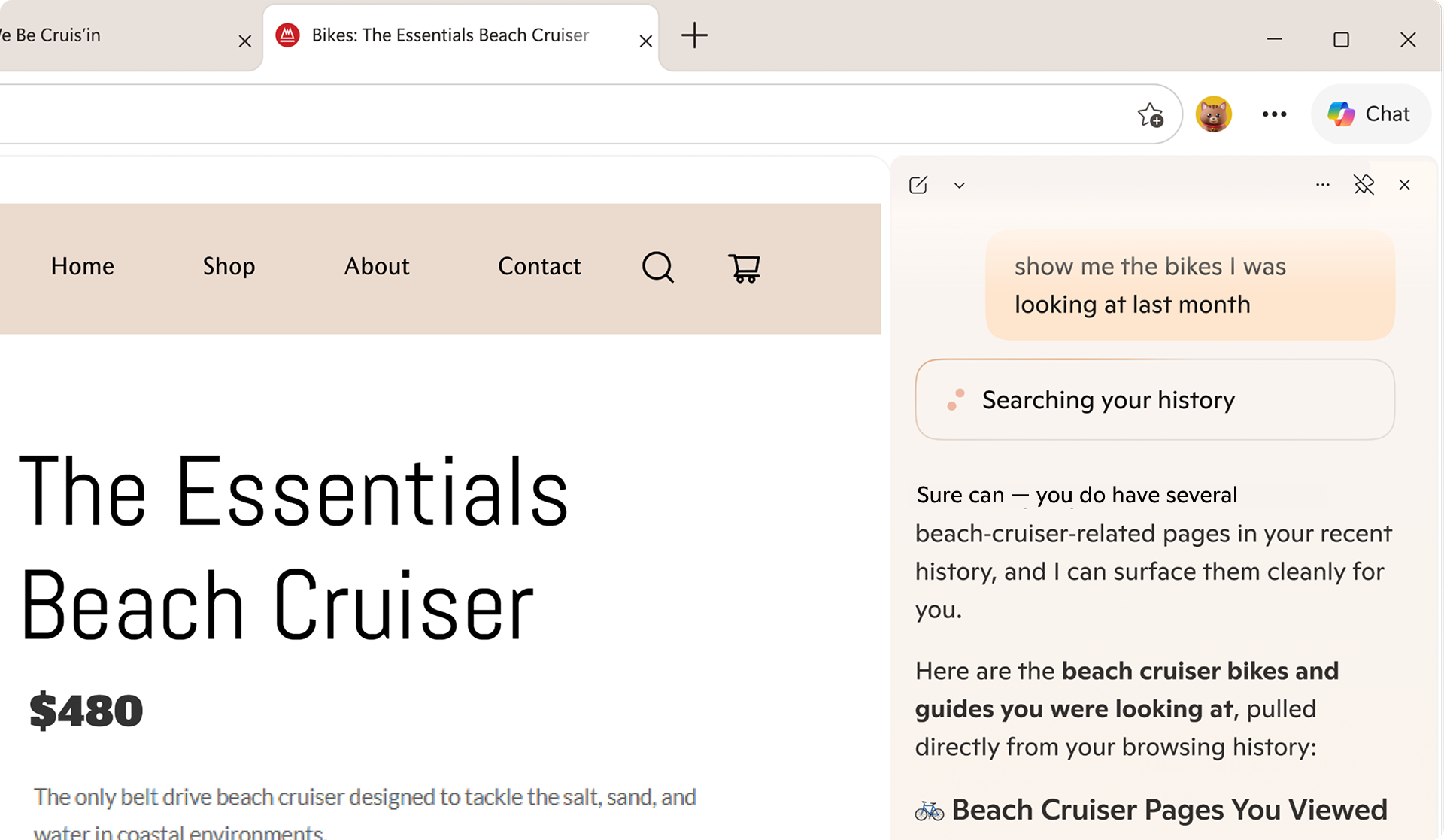
Life doesn't happen in one tab. Now available to everyone, Copilot can pull context from your open tabs to surface relevant information and help you make decisions with less effort to keep you moving forwardβ€” without having to leave the page you're on. No setup required. Just click the Copilot icon in the top right corner and ask Copilot to compare options across tabs, explain what matters, and get clear answers. Take planning your next trip to Napa β€” comparing wineries, restaurants, and routes across a dozen tabs is the hardest part. Copilot in Edge, with your permission, reads across every tab you have open, so you can compare options, surface what matters, and make decisions with less tab-hopping. https://www.youtube.com/watch?v=Ls6dRaxSL28 With your permission, Copilot can also use your browsing history to deliver more relevant, higher-quality answers β€” like finishing up your shopping, returning to a thread you were following, or picking up research you started days ago. Copilot builds on what you've already seen so you spend less time switching and more time staying in your flow. Now, with long-term memory on desktop and mobile, Copilot not only builds on what you've seen but also can reference your past chats to provide more relevant help. You're always in control of what Copilot can access. Copilot in Edge for desktop, showing a message saying 'Searching your history'.

Built to keep you moving forward

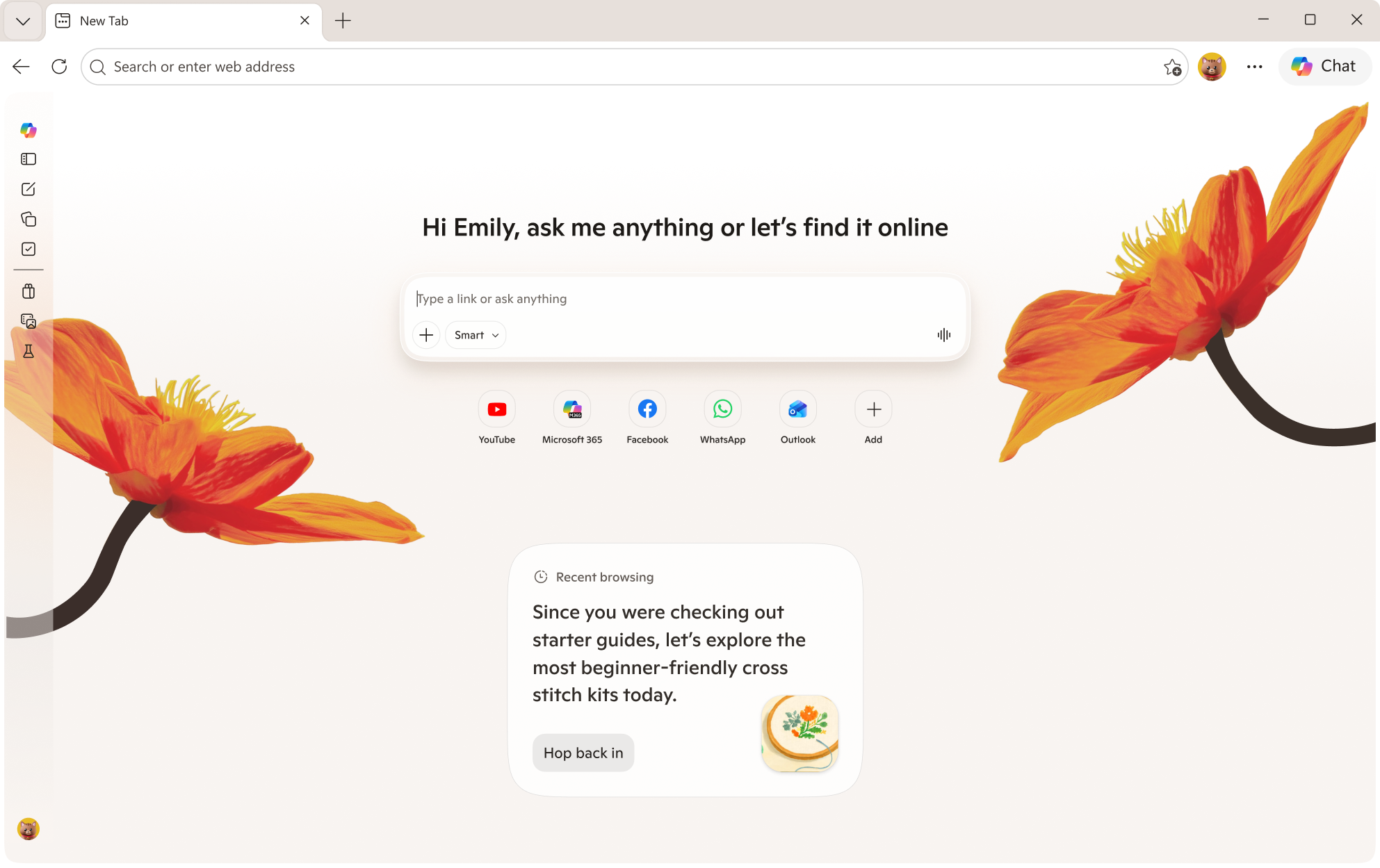
Sometimes getting started is the hardest part. The redesigned new tab page, now available for everyone to try, brings together chat, search, and web navigation in one place so you can effortlessly explore the web. It's also where all your Journeys live, so it's easy to jump back in and keep going. Edge on desktop new tab page, showing Copilot and Recent browsing. Journeys, now available for free in all English markets2, helps pick up where you left off. Ever start trying to learn something new then … life happens? Journeys brings you back to past browsing projects by grouping your browsing history into helpful topic cards on your new tab page so you can resume that cross stitching hobby – without starting from scratch. https://www.youtube.com/watch?v=5RdQ9zjMpKM

New tools to boost your productivity

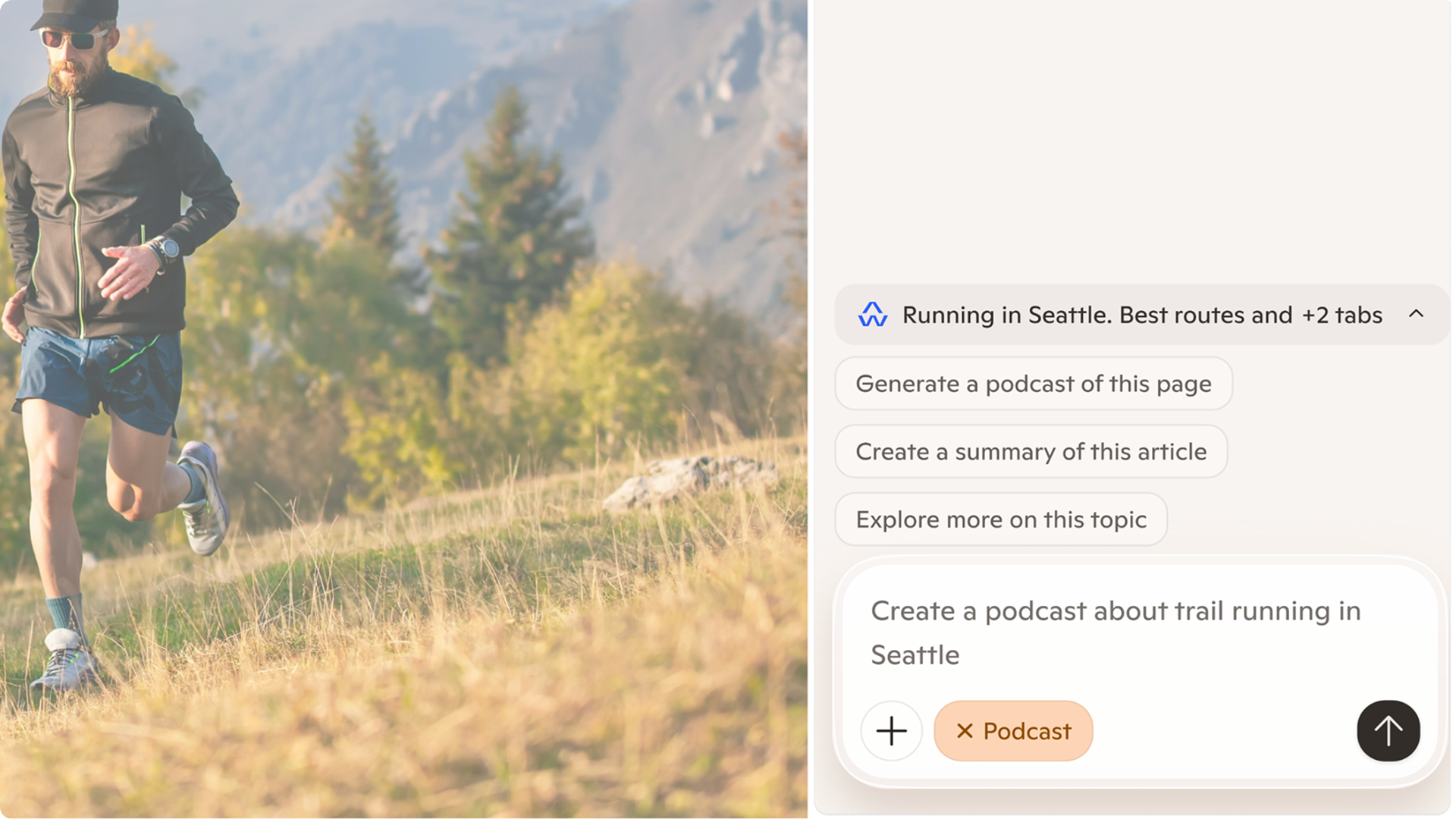
Whether you're cramming for finals, writing a research paper, or understanding a complex topic, Edge has new built-in tools to help you focus, learn faster and get more done without ever leaving your browser. Study and Learn mode helps you get started breaking down topics into guided study sessions, interactive quizzes, and more to supplement your learning. To get started, simply type into Copilot in Edge "Quiz me on this topic" when you have a webpage open or locate the mode dropdown at the bottom left of the input box on the redesigned new tab page and select "Study and Learn mode." Write with confidence, right where you are. Writing assistant5 gives you extra help by generating drafts, rewriting for clarity, or adjusting tone right where you're already typing in Edge. Just look for the blue dot the next time you're writing to get help in the moment. https://www.youtube.com/watch?v=m9__zGC-miQ Turn your browsing into a study session with Copilot quizzes. Easily generate quizzes, flashcards, and guided sessions based on what you're reading so you can test yourself as you go, right in your browser. https://www.youtube.com/watch?v=4j3chZtjQvc Finally, you can now turn your tabs into a podcast6. Whether you're catching up on research or exploring something new, now you can listen, learn, and keep moving without missing a beat. Podcasts in Edge is available in English markets. Copilot chat in Edge, with the message: Create a podcast about trail running in Seattle.

You choose what you need

We're making it easier to shape your experience on the web. At any time, you can select which experiences you want or leave off the ones you don't. Just head to aka.ms/CopilotinEdge or Edge Settings to customize your experience anytime. With Copilot in Edge, your data stays yours. Microsoft only collects what's needed to improve your experienceβ€”or what you choose to provide via Personalization settings. Copilot follows Microsoft's trusted privacy standards, meaning your information is never shared without your permission. Your browser data is protected under the Microsoft Privacy Statement.

Tell us what you think

Copilot features are available in all Copilot markets4 on Edge for Windows and Mac and the Edge mobile app today. We're excited to bring you these Copilot features directly to your Edge browser7 and want to hear from you. To get started, visit aka.ms/CopilotinEdge and give us your feedback. If you're excited to share more ideas and connect with others, consider joining our Discord channel. 1 Existing Copilot Mode users will continue to receive priority access to new features through Copilot in Edge Preview. Users may change this anytime in Edge Settings. As part of retiring Copilot Mode, Copilot Actions, previously available in Limited Preview, is now available as Browse with Copilot on Edge desktop for Microsoft 365 Premium Subscribers in the U.S. only. Usage limits apply. 2 Journeys on Edge desktop is available only in all English markets (en-US, en-GB, en-CA, en-AU, en-NZ, en-IN, en-SG). 3 Journeys on Edge mobile is available in the U.S. only. 4 Vision, Voice, multi-tab context, long-term memory, Copilot quizzes, and the redesigned new tab page are available in all Copilot markets across desktop and mobile. 5 Writing assistant is available in the U.S. only. 6 Podcasts is available in all Copilot markets in English only. Must be signed in with a Microsoft Account to generate a podcast. Subscribers to Microsoft 365 Personal, Family, and Premium have access to extended usage. Learn more. 7 Usage limits apply to certain Copilot features. Availability of Copilot features subject to change.
  •  
❌