 Log in
Srinivas Sista
Google Chrome


The Extended Stable channel has been updated to 142.0.7499.235 for Windows and Mac which will roll out over the coming days/weeks.
The Stable channel has been updated to 143.0.7499.109/.110 for Windows/Mac and 143.0.7499.109 for Linux, which will roll out over the coming days/weeks. A full list of changes in this build is available in the Log.
2025-12-12: Updated to include more details for bug number 466192044
Security Fixes and Rewards
Note: Access to bug details and links may be kept restricted until a majority of users are updated with a fix. We will also retain restrictions if the bug exists in a third party library that other projects similarly depend on, but haven’t yet fixed.
This update includes 3 security fixes. Below, we highlight fixes that were contributed by external researchers. Please see the Chrome Security Page for more information.
[N/A][466192044] High CVE-2025-14174: Out of bounds memory access in ANGLE. Reported by Apple Security Engineering and Architecture (SEAR) and Google Threat Analysis Group on 2025-12-05
[$2000][460599518] Medium CVE-2025-14372: Use after free in Password Manager. Reported by Weipeng Jiang (@Krace) of VRI on 2025-11-14
[$2000][461532432] Medium CVE-2025-14373: Inappropriate implementation in Toolbar. Reported by Khalil Zhani on 2025-11-18
Google is aware that an exploit for CVE-2025-14174 exists in the wild.
We would also like to thank all security researchers that worked with us during the development cycle to prevent security bugs from ever reaching the stable channel.
Many of our security bugs are detected using AddressSanitizer, MemorySanitizer, UndefinedBehaviorSanitizer, Control Flow Integrity, libFuzzer, or AFL.
Interested in switching release channels? Find out how here. If you find a new issue, please let us know by filing a bug. The community help forum is also a great place to reach out for help or learn about common issues.

Windows 10 users can now automatically protect their passwords, bookmarks, and more by turning on backup in Firefox. Your browsing data is saved daily on your device and can be encrypted with a password. When you set up a fresh install of Firefox on any operating system for a new device or your current one, you can restore from this backup and pick up right where you left off. This feature is currently available on Windows devices and will be coming to other operating systems soon.
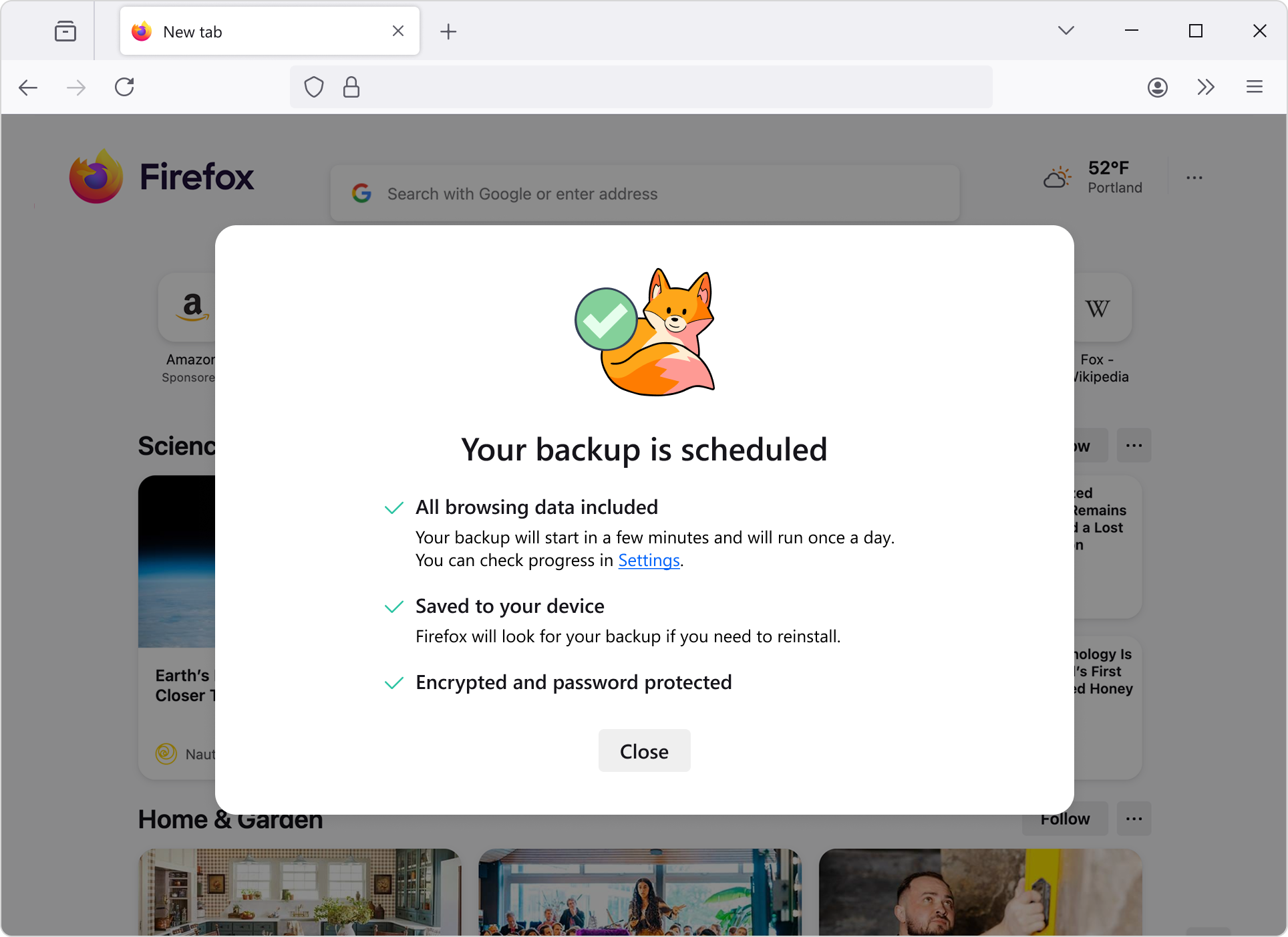

This feature is part of a progressive roll out.
Certain new Firefox features are released gradually. This means some users will see the feature before everyone does. This approach helps to get early feedback to catch bugs and improve behavior quickly, meaning more Firefox users overall have a better experience.
MacOS users now have a dedicated GPU process by default. This includes WebGPU, WebGL, and Firefox's own WebRender. With this feature enabled, fatal errors in graphics code will no longer crash the browser, and will instead transparently restart the GPU process.
Firefox Labs is now available to all desktop users, regardless of whether they choose to participate in studies or submit telemetry. This means more experimental features are now available to more people.
Users can now skip the results page and see direct results as they type in the search bar for faster, simpler browsing.
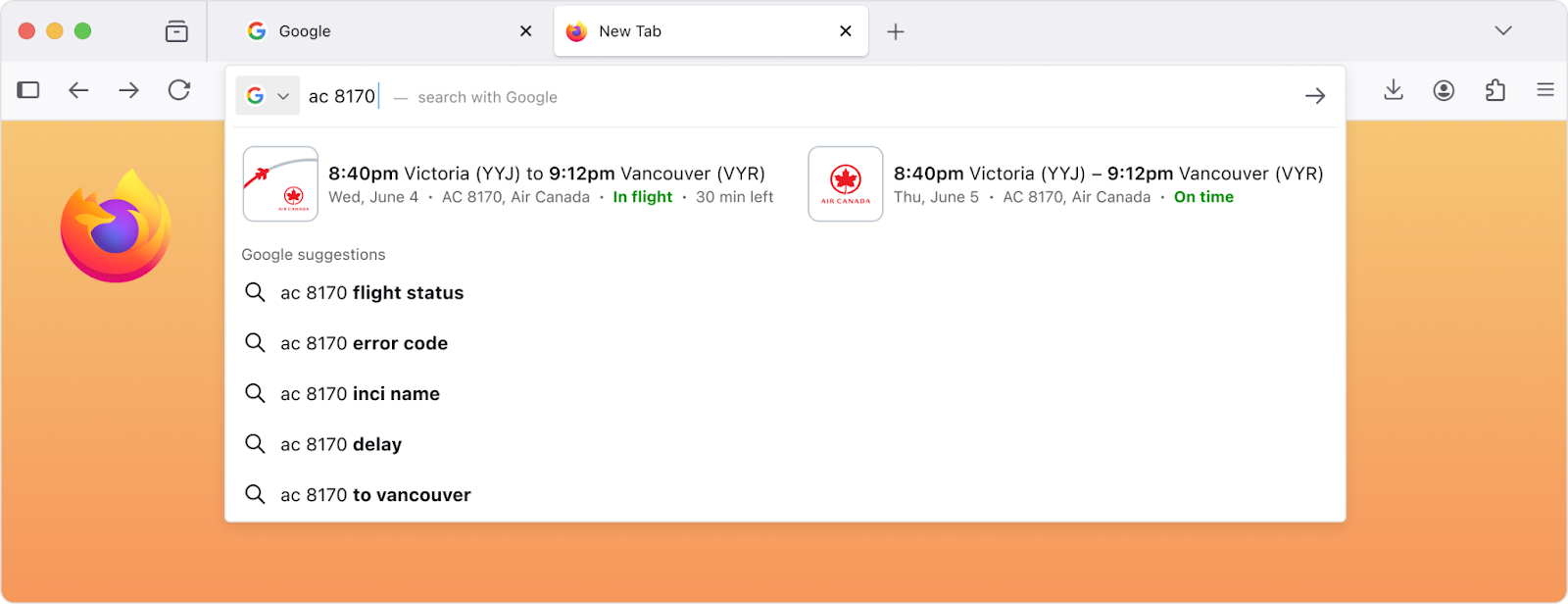
This feature is part of a progressive roll out.
Certain new Firefox features are released gradually. This means some users will see the feature before everyone does. This approach helps to get early feedback to catch bugs and improve behavior quickly, meaning more Firefox users overall have a better experience.
There is a New Tab Weather opt-in workflow available for users in the EU and some other countries, where they can choose whether to enable location detection or manually search for a location.
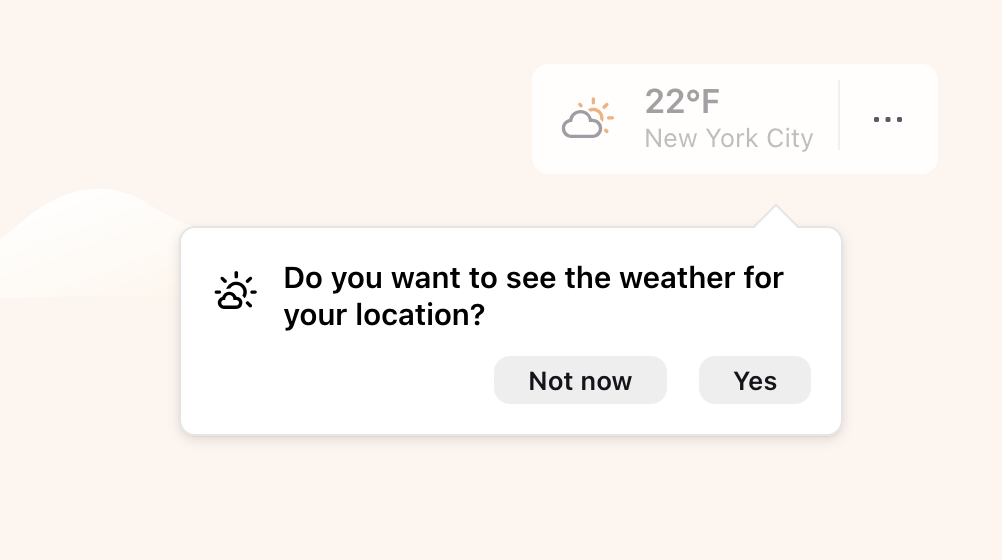
This feature is part of a progressive roll out.
Certain new Firefox features are released gradually. This means some users will see the feature before everyone does. This approach helps to get early feedback to catch bugs and improve behavior quickly, meaning more Firefox users overall have a better experience.
Firefox now natively supports fractional scaled displays on Linux (Wayland), making rendering more effective.
For users of the English-language versions of Firefox in France, Germany, and Italy, the address bar now shows English-language suggestions for holidays and other important dates.

When the timepicker is enabled for <input type="time"> and <input type="datetime-local">, it now provides full keyboard and assistive technology support. This update also improves the behavior of the time spin buttons for users who prefer reduced motion. The Firefox Accessibility team hopes that making the built-in timepicker accessible will encourage wider adoption of browser-provided time and date inputs across the web, reducing the need for custom controls, and improving accessibility for all users.
Various security fixes.

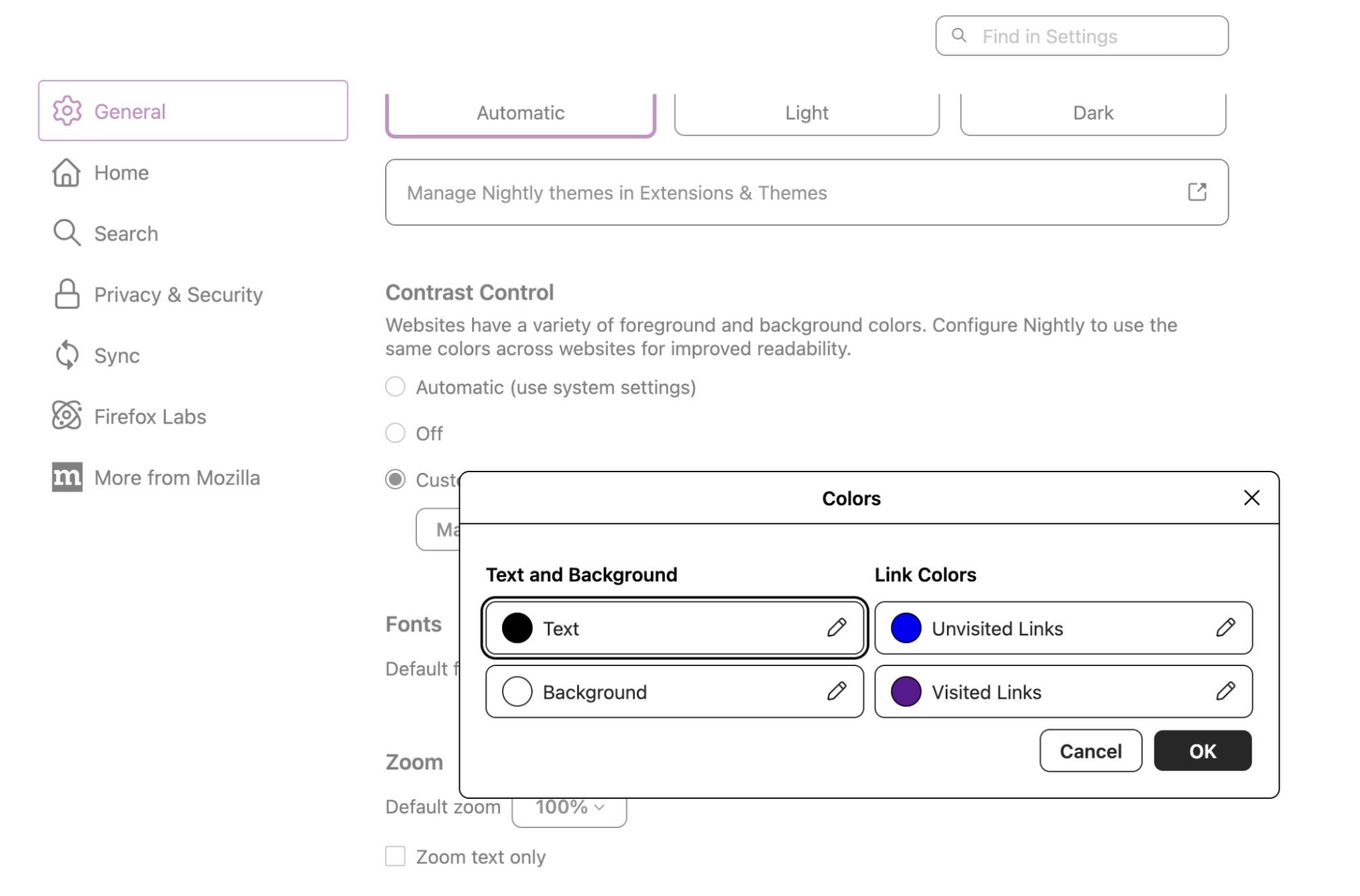
The Colors dialog in Settings now uses clearer color picker controls that keep each color sample next to its label. It makes it easier to understand and adjust text, background, and link colors when using a forced colors palette to customize the default text, link, and page background colors, especially with or without screen magnifiers.
Firefox removed support for Direct2D on Windows. If you still require Direct2D support, please use ESR 140.0 or higher.

You can find information about policy updates and enterprise specific bug fixes in the Firefox for Enterprise 146 Release Notes.

Firefox now supports ML-KEM for WebRTC, by sending a post-quantum (PQ) key share during the DTLS 1.3 handshake. ML-KEM is the next-generation public-key cryptosystem that is believed to be secure against attackers with large quantum computers.
Firefox now supports compressed elliptic curve points in WebCrypto. These reduce the size of public keys by nearly half, saving bandwidth and storage, while still allowing the full point to be reconstructed mathematically.
The Skia graphics library has been updated to improve rendering performance and compatibility.
Unused CSS custom properties are now hidden by default in the Rule view of the Inspector. This not only reduces clutter, but in some cases also speeds up the rendering of the inspector panel.

The @scope rule is now supported, allowing authors to restrict styling to a subtree of the DOM. This avoids having to write overly-specific selectors.
Firefox now supports the contrast-color() CSS function that takes a color value and returns a contrasting color. Note that the specification currently restricts the contrasting color to black or white. This limitation is expected to be removed in the future. (Learn more)
Introduced the text-decoration-inset property, which allows authors to adjust the start and end points of line decorations.
Firefox now supports the legacy -webkit-fill-available keyword as a value for the CSS width and height properties. This improves rendering of content on websites that use this value. This keyword is an alias for the recently standardized stretch keyword, which is not yet enabled in Firefox.

On Windows, clicking tabs may not work at the very top of the screen when Firefox is maximized on a second monitor. We’re working to fix this in a future release. (Fixed in 147.0)

With the release of Firefox 146, we are pleased to welcome the developers who contributed their first code change to Firefox in this release, 16 of whom were brand new volunteers! Please join us in thanking each of these diligent and enthusiastic individuals, and take a look at their contributions:
(Total 1300+)Wana boot and install OS through network (PXE)? Welcome to my new project iVentoy.
About iVentoy https://www.iventoy.com/
iVentoy is an enhanced version of the PXE server.
Extremely easy to use
Many advanced features
x86 Legacy BIOS, IA32 UEFI, x86_64 UEFI and ARM64 UEFI mode supported
110+ common types of OS supported (Windows/WinPE/Linux/VMware)
......
SHA-256
57689c6ef027eb5994c2aad8a2325c38455249451de3b29107274a30e15e7633  ventoy-1.1.08-linux.tar.gz
ad312c5a2f0fe65d92ee3e31b428a944ab6a93101f66a005ae494ea6e8c349d4  ventoy-1.1.08-livecd.iso
2eeb7553e62a940449a42b59ede3b4d3550023b2ff864a297dee818086e3564b  ventoy-1.1.08-windows.zip

Changes in 8.2.1:

Changes in 8.2.0:
OBS-Studio-32.0.3-Sources.tar.gz: 583c8b47d3accb4a48b9966ac7e2f1c96501a7fb3d57dd4454cdaa4df4c01e7f
OBS-Studio-32.0.3-Ubuntu-24.04-x86_64-dbsym.ddeb: 48db8b9d4a74bdafc70b2d71501d44965dc4a180ada920e787f91b8ca67825e4
OBS-Studio-32.0.3-Ubuntu-24.04-x86_64.deb: 3d5737a3e88762931f17068288bab8749b0de9ad39e71418eb97391b5477fb64
OBS-Studio-32.0.3-Windows-arm64-PDBs.zip: 6bb45a0b75896b080ee4c5b1e742727eca6e78b32c2e384ab538397e27cd8fa7
OBS-Studio-32.0.3-Windows-arm64.zip: e3ed1f2145798a11f37d5d1898adfd8b21483e0969485845106e763b0e93d7b7
OBS-Studio-32.0.3-Windows-x64-Installer.exe: 8c69a00e23cfeaa441725160586ca0a51c27e557652ed65000df67179dad9ac3
OBS-Studio-32.0.3-Windows-x64-PDBs.zip: e8dd1daea83d7d859facbb8fb1fc097e8a6bf6283b75a8198370935aa5362ad9
OBS-Studio-32.0.3-Windows-x64.zip: 7dbaafe4ff9acbeab688035d6a8071e39c09d1a86f3aa3e300e74eec09e4b502
OBS-Studio-32.0.3-macOS-Apple-dSYMs.tar.xz: 9684eb894cfa3e34dfb41690309fe5bc1438568e36fae64cdbd40b345ab75660
OBS-Studio-32.0.3-macOS-Apple.dmg: 5efd7ec3871fa5f217644425e6777354716425dd25c0759c9373b163cc9de6e8
OBS-Studio-32.0.3-macOS-Intel-dSYMs.tar.xz: 8ce6315d900586500f1b9237d632ab2f6cb5400dbfd44f4be649889abd7d70b0
OBS-Studio-32.0.3-macOS-Intel.dmg: 5a74b72ef4b00c655cdb50215bb9455d529542f1d32d119b1747feee2ec77166

Updates:
Changes/improvements:
Fixes:

The Extended Stable channel has been updated to 142.0.7499.226 for Windows and Mac which will roll out over the coming days/weeks.
The Chrome team is delighted to announce the promotion of Chrome 143 to the stable channel for Windows, Mac and Linux. This will roll out over the coming days/weeks.
Chrome 143.0.7499.40 (Linux) 143.0.7499.40/41 Windows/Mac contains a number of fixes and improvements -- a list of changes is available in the log. Watch out for upcoming Chrome and Chromium blog posts about new features and big efforts delivered in 143.
Security Fixes and Rewards
Note: Access to bug details and links may be kept restricted until a majority of users are updated with a fix. We will also retain restrictions if the bug exists in a third party library that other projects similarly depend on, but haven’t yet fixed.
This update includes 13 security fixes. Below, we highlight fixes that were contributed by external researchers. Please see the Chrome Security Page for more information.
[$11000][456547591] High CVE-2025-13630: Type Confusion in V8. Reported by Shreyas Penkar (@streypaws) on 2025-10-31
[$3000][448113221] High CVE-2025-13631: Inappropriate implementation in Google Updater. Reported by Jota Domingos on 2025-09-29
[TBD][439058242] High CVE-2025-13632: Inappropriate implementation in DevTools. Reported by Leandro Teles on 2025-08-16
[N/A][458082926] High CVE-2025-13633: Use after free in Digital Credentials. Reported by Chrome on 2025-11-05
[TBD][429140219] Medium CVE-2025-13634: Inappropriate implementation in Downloads. Reported by Eric Lawrence of Microsoft on 2025-07-02
[N/A][457818670] Medium CVE-2025-13720: Bad cast in Loader. Reported by Chrome on 2025-11-04
[N/A][355120682] Medium CVE-2025-13721: Race in v8. Reported by Chrome on 2024-07-23
[$3000][405727341] Low CVE-2025-13635: Inappropriate implementation in Downloads. Reported by Hafiizh on 2025-03-24
[$1000][446181124] Low CVE-2025-13636: Inappropriate implementation in Split View. Reported by Khalil Zhani on 2025-09-20
[TBD][392375329] Low CVE-2025-13637: Inappropriate implementation in Downloads. Reported by Hafiizh on 2025-01-27
[TBD][448046109] Low CVE-2025-13638: Use after free in Media Stream. Reported by sherkito on 2025-09-29
[TBD][448408148] Low CVE-2025-13639: Inappropriate implementation in WebRTC. Reported by Philipp Hancke on 2025-10-01
[TBD][452071826] Low CVE-2025-13640: Inappropriate implementation in Passwords. Reported by Anonymous on 2025-10-14
We would also like to thank all security researchers that worked with us during the development cycle to prevent security bugs from ever reaching the stable channel.
Many of our security bugs are detected using AddressSanitizer, MemorySanitizer, UndefinedBehaviorSanitizer, Control Flow Integrity, libFuzzer, or AFL.
Interested in switching release channels? Find out how here. If you find a new issue, please let us know by filing a bug. The community help forum is also a great place to reach out for help or learn about common issues.
Srinivas Sista
Google Chrome
Below are development builds for testing purposes.
Latest development build: 2.5.5.30 (November 27th 2025)
Latest stable release build: 2.5.5.0
https://github.com/clsid2/mpc-hc/releases/tag/2.5.5
Fixed an issue that prevented typing in Baidu’s search box when using Chinese IMEs on Windows. (Bug 2000479)
Reference link to 145.0.1 release notes.
On Windows, clicking tabs may not work at the very top of the screen when Firefox is maximized on a second monitor. We’re working to fix this in a future release. (Fixed in 147.0)
The Stable channel has been updated to 143.0.7499.40/.41 for Windows and Mac as part of our early stable release to a small percentage of users. A full list of changes in this build is available in the log.
You can find more details about early Stable releases here.
Interested in switching release channels? Find out how here. If you find a new issue, please let us know by filing a bug. The community help forum is also a great place to reach out for help or learn about common issues.
Daniel Yip
Google Chrome
Fixed an issue causing breakage on sites using Three.js. (Bug 1995939)
Fixed a failure to open Firefox from the desktop launcher on older versions of Windows 10. (Bug 2000411)
Fixed Web compatibility issues with Rogers. Rogers customers would see a broken iframe with "Firefox Can’t Open This Page" when viewing bills, rather than the billing info. (Bug 1996823)
Fixed an issue in the Web Developer Tools preventing copy all or save all requests as HAR. (Bug 1995694)
Reference link to 145.0 release notes.
On Windows, clicking tabs may not work at the very top of the screen when Firefox is maximized on a second monitor. We’re working to fix this in a future release. (Fixed in 147.0)
The Stable channel has been updated to 142.0.7444.175/.176 for Windows and 142.0.7444.176 for Mac and 142.0.7444.175 for Linux, which will roll out over the coming days/weeks. A full list of changes in this build is available in the Log.
Security Fixes and Rewards
Note: Access to bug details and links may be kept restricted until a majority of users are updated with a fix. We will also retain restrictions if the bug exists in a third party library that other projects similarly depend on, but haven’t yet fixed.
This update includes 2 security fixes. Below, we highlight fixes that were contributed by external researchers. Please see the Chrome Security Page for more information.
[N/A][460017370] High CVE-2025-13223: Type Confusion in V8. Reported by Google Threat Analysis Group on 2025-11-12
[N/A][450328966] High CVE-2025-13224: Type Confusion in V8. Reported by Google Big Sleep on 2025-10-09
Google is aware that an exploit for CVE-2025-13223 exists in the wild.
We would also like to thank all security researchers that worked with us during the development cycle to prevent security bugs from ever reaching the stable channel.
Many of our security bugs are detected using AddressSanitizer, MemorySanitizer, UndefinedBehaviorSanitizer, Control Flow Integrity, libFuzzer, or AFL.
Interested in switching release channels? Find out how here. If you find a new issue, please let us know by filing a bug. The community help forum is also a great place to reach out for help or learn about common issues.
The Stable channel has been updated to 142.0.7444.162/.163 for Windows and 142.0.7444.162 for Mac and 142.0.7444.162 for Linux, which will roll out over the coming days/weeks. A full list of changes in this build is available in the Log.
Security Fixes and Rewards
Note: Access to bug details and links may be kept restricted until a majority of users are updated with a fix. We will also retain restrictions if the bug exists in a third party library that other projects similarly depend on, but haven’t yet fixed.
This update includes 1 security fix. Below, we highlight fixes that were contributed by external researchers. Please see the Chrome Security Page for more information.
Interested in switching release channels? Find out how here. If you find a new issue, please let us know by filing a bug. The community help forum is also a great place to reach out for help or learn about common issues.
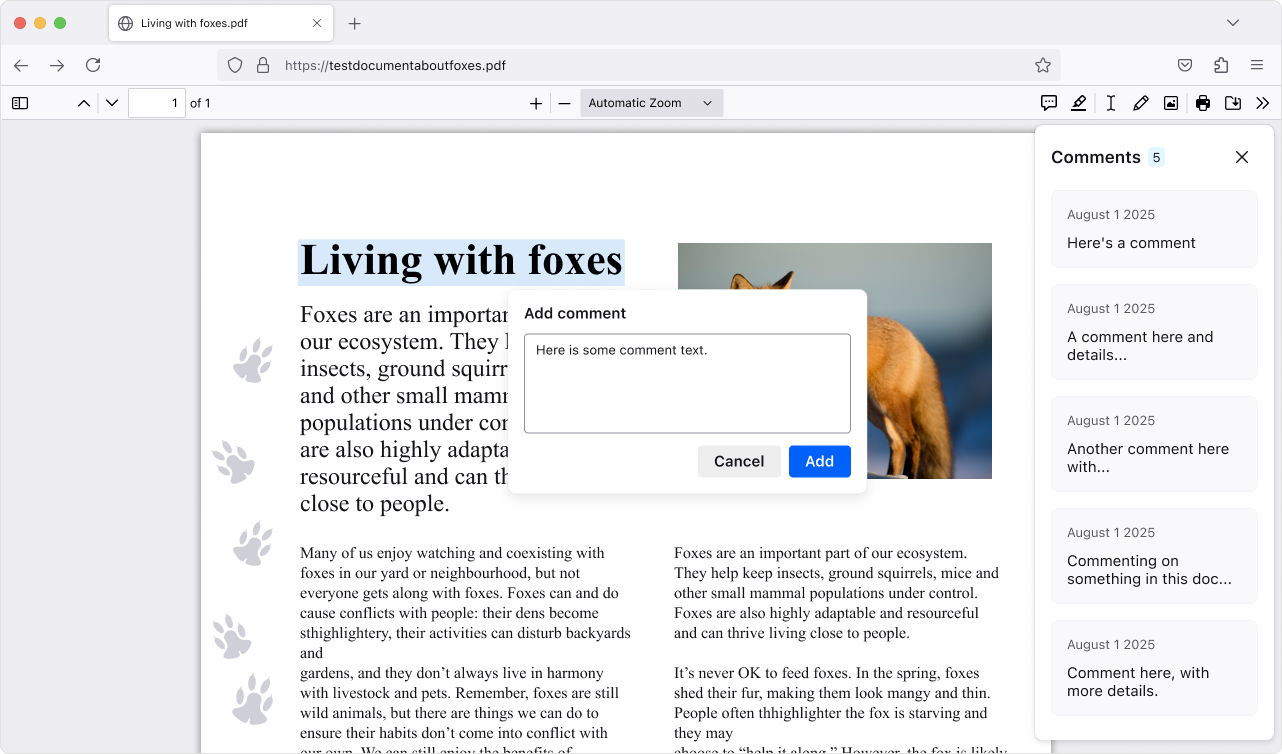
Add, edit, and delete comments to make your own notes in PDFs (summaries, questions, tasks, etc.). The comment sidebar helps you scan all your comments and quickly jump to them, which is handy for long or heavily marked-up PDFs.
This version introduces a new phase of privacy protections, building on our research on reducing browser fingerprinting. These new defenses cut the percentage of users seen as unique almost in half, ensuring a safer and more private browsing experience in Private Browsing or when using Enhanced Tracking Protection set to Strict.
Need a reminder of what tabs are in a group? Hover over the tab group name to get a preview of the tabs inside without opening it.
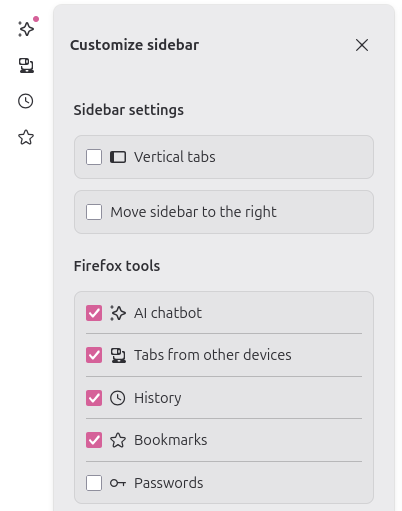
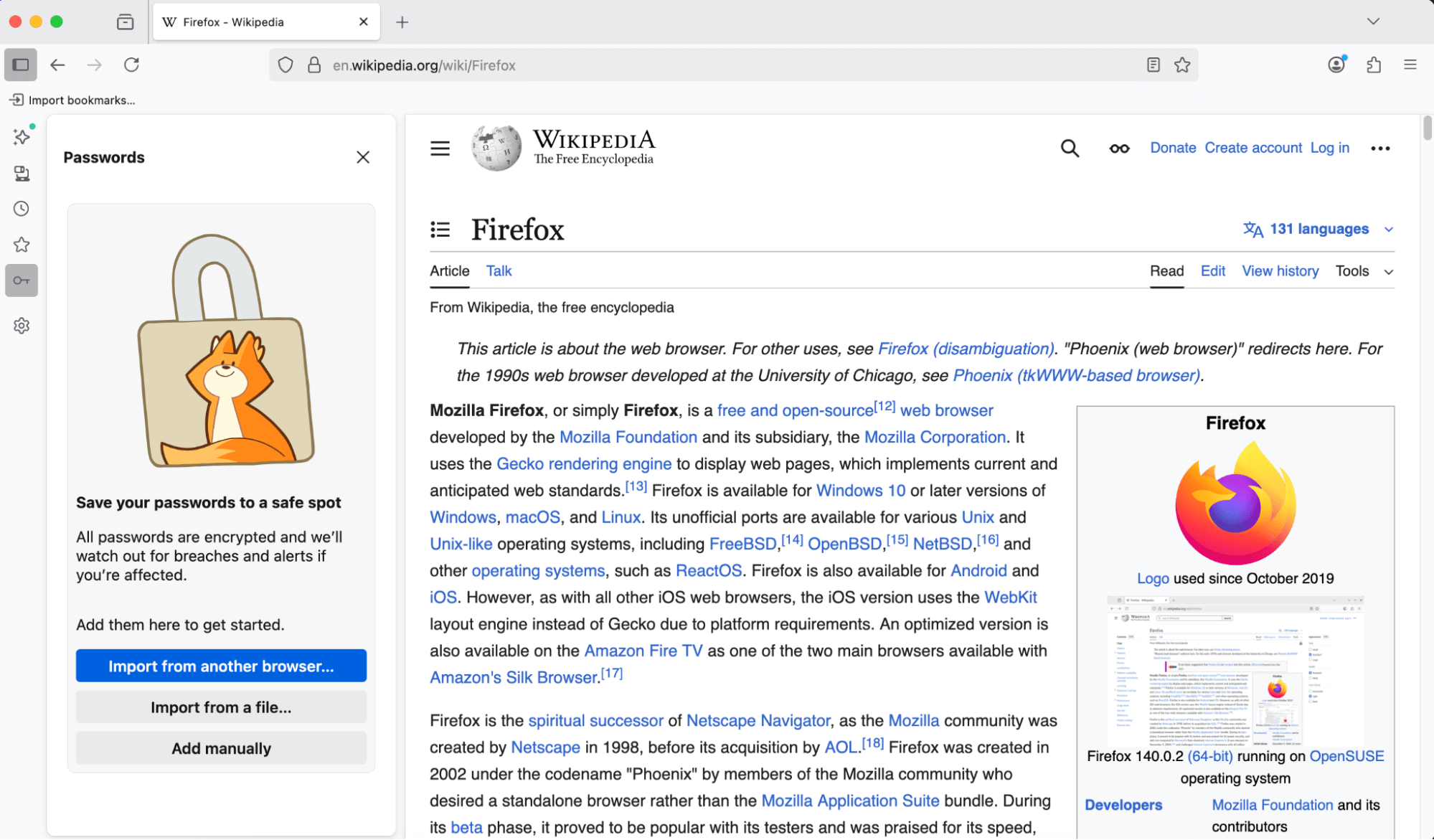
You can now access and manage your saved passwords right from the sidebar—no need to open a new tab or window. Stay on the page you’re on and get to your logins faster.
Copy Link to Highlight allows users to share arbitrary sections of a page with others by copying a link through the context menu with a given selection
The Translations feature has an improved experience when translating between languages with different script directions.
New brand-inspired wallpapers are available for New Tab on desktop, with versions for both light and dark mode.
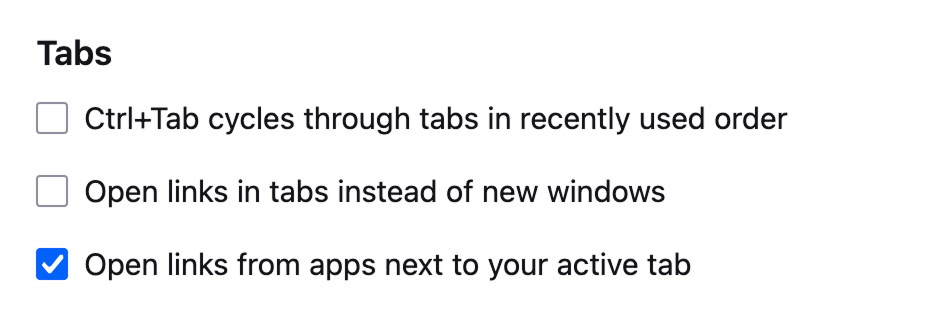
With the new Open links from apps next to your active tab setting, you can have links from other applications open next to your active tab instead of at the end of the tab strip.
Enhanced Bounce Tracking Protection’s stateless mode is now enabled by default in ETP Strict, blocking more advanced tracking techniques based on redirection
For most Windows users, the existing desktop shortcut for launching Firefox has been replaced with the desktop launcher, a small program that will launch Firefox if it is installed, but if it is not installed will prompt the user to install Firefox. This will provide an easy installation point for Firefox users who acquire a new Windows device, where Firefox will not be installed by default, but the desktop launcher program may have synced via OneDrive or other cloud storage product. Learn more.

Various security fixes.
Firefox no longer supports 32-bit Linux systems. We recommend installing the 64-bit version for continued updates and support.
Horizontal tabs are now slightly more rounded to match the look of vertical tabs. Buttons and text inputs, including the address bar, have also been updated for consistency.
When no extensions are installed, clicking the Extensions button now shows a message highlighting how extensions can enhance your browsing, with links to the Firefox Add-ons store.
Local translation models are now compressed with Zstandard, reducing download sizes and on-device storage consumption. As always, all Firefox translations happen securely and privately on your local device, unlike other browsers that translate using cloud services.
We updated default automation preferences to better support Agentic browsing, reducing the steps agents need to complete a task and chances for the agent to get stuck.
You can find information about policy updates and enterprise specific bug fixes in the Firefox for Enterprise 145 Release Notes.
Microsoft UI Automation phased release rollout at 100%. Microsoft UI Automation is the new accessibility framework for Microsoft Windows. This will provide better assistive technology (AT) support and performance on Windows for current and future assistive technologies.
Support has been added for the Atomics.waitAsync proposal, which is a non-blocking, asynchronous version of Atomics.wait. This allow synchronization of threads based upon the value in a shared memory location, for more details please consult our MDN documentation.
Firefox now supports the new Integrity-Policy header for enforcing sub-resource integrity for scripts. Further implementation of this header is underway.
Added Matroska support for the most commonly used codecs: AVC, HEVC, VP8, VP9, AV1, AAC, Opus, and Vorbis.
The text-autospace property is now supported, allowing automatic spacing adjustments between characters from different scripts.
The WebGPU DOM API (spec; MDN) is now available on macOS 26 (Tahoe) on Apple Silicon. For details, see the Mozilla Graphics Team Blog.
On Windows, clicking tabs may not work at the very top of the screen when Firefox is maximized on a second monitor. We’re working to fix this in a future release. (Fixed in 147.0)
With the release of Firefox 145, we are pleased to welcome the developers who contributed their first code change to Firefox in this release, 5 of whom were brand new volunteers! Please join us in thanking each of these diligent and enthusiastic individuals, and take a look at their contributions:
This is a hotfix for 5.1.10 that fixes the DxgiAdapterService, which is used by plugins that initialize DirectX using their own interop.
The 5.1.10 update was a maintenance release that added a Romanian translation, fixed some important bugs, and updated the bundled FileType plugins.
There are two releases of Paint.NET:
 Settings -> Updates -> Check Now.
Changes since 5.1.10:
Changes in 5.1.10 that were new since 5.1.9:

