 Log in
Srinivas Sista
Google Chrome


The Extended Stable channel has been updated to 142.0.7499.226 for Windows and Mac which will roll out over the coming days/weeks.
The Chrome team is delighted to announce the promotion of Chrome 143 to the stable channel for Windows, Mac and Linux. This will roll out over the coming days/weeks.
Chrome 143.0.7499.40 (Linux) 143.0.7499.40/41 Windows/Mac contains a number of fixes and improvements -- a list of changes is available in the log. Watch out for upcoming Chrome and Chromium blog posts about new features and big efforts delivered in 143.
Security Fixes and Rewards
Note: Access to bug details and links may be kept restricted until a majority of users are updated with a fix. We will also retain restrictions if the bug exists in a third party library that other projects similarly depend on, but haven’t yet fixed.
This update includes 13 security fixes. Below, we highlight fixes that were contributed by external researchers. Please see the Chrome Security Page for more information.
[$11000][456547591] High CVE-2025-13630: Type Confusion in V8. Reported by Shreyas Penkar (@streypaws) on 2025-10-31
[$3000][448113221] High CVE-2025-13631: Inappropriate implementation in Google Updater. Reported by Jota Domingos on 2025-09-29
[TBD][439058242] High CVE-2025-13632: Inappropriate implementation in DevTools. Reported by Leandro Teles on 2025-08-16
[N/A][458082926] High CVE-2025-13633: Use after free in Digital Credentials. Reported by Chrome on 2025-11-05
[TBD][429140219] Medium CVE-2025-13634: Inappropriate implementation in Downloads. Reported by Eric Lawrence of Microsoft on 2025-07-02
[N/A][457818670] Medium CVE-2025-13720: Bad cast in Loader. Reported by Chrome on 2025-11-04
[N/A][355120682] Medium CVE-2025-13721: Race in v8. Reported by Chrome on 2024-07-23
[$3000][405727341] Low CVE-2025-13635: Inappropriate implementation in Downloads. Reported by Hafiizh on 2025-03-24
[$1000][446181124] Low CVE-2025-13636: Inappropriate implementation in Split View. Reported by Khalil Zhani on 2025-09-20
[TBD][392375329] Low CVE-2025-13637: Inappropriate implementation in Downloads. Reported by Hafiizh on 2025-01-27
[TBD][448046109] Low CVE-2025-13638: Use after free in Media Stream. Reported by sherkito on 2025-09-29
[TBD][448408148] Low CVE-2025-13639: Inappropriate implementation in WebRTC. Reported by Philipp Hancke on 2025-10-01
[TBD][452071826] Low CVE-2025-13640: Inappropriate implementation in Passwords. Reported by Anonymous on 2025-10-14
We would also like to thank all security researchers that worked with us during the development cycle to prevent security bugs from ever reaching the stable channel.
Many of our security bugs are detected using AddressSanitizer, MemorySanitizer, UndefinedBehaviorSanitizer, Control Flow Integrity, libFuzzer, or AFL.
Interested in switching release channels? Find out how here. If you find a new issue, please let us know by filing a bug. The community help forum is also a great place to reach out for help or learn about common issues.
Srinivas Sista
Google Chrome
Below are development builds for testing purposes.
Latest development build: 2.5.5.30 (November 27th 2025)
Latest stable release build: 2.5.5.0
https://github.com/clsid2/mpc-hc/releases/tag/2.5.5


Fixed an issue that prevented typing in Baidu’s search box when using Chinese IMEs on Windows. (Bug 2000479)
Reference link to 145.0.1 release notes.

On Windows, clicking tabs may not work at the very top of the screen when Firefox is maximized on a second monitor. We’re working to fix this in a future release. (Fixed in 147.0)
The Stable channel has been updated to 143.0.7499.40/.41 for Windows and Mac as part of our early stable release to a small percentage of users. A full list of changes in this build is available in the log.
You can find more details about early Stable releases here.
Interested in switching release channels? Find out how here. If you find a new issue, please let us know by filing a bug. The community help forum is also a great place to reach out for help or learn about common issues.
Daniel Yip
Google Chrome
Fixed an issue causing breakage on sites using Three.js. (Bug 1995939)
Fixed a failure to open Firefox from the desktop launcher on older versions of Windows 10. (Bug 2000411)
Fixed Web compatibility issues with Rogers. Rogers customers would see a broken iframe with "Firefox Can’t Open This Page" when viewing bills, rather than the billing info. (Bug 1996823)
Fixed an issue in the Web Developer Tools preventing copy all or save all requests as HAR. (Bug 1995694)
Reference link to 145.0 release notes.
On Windows, clicking tabs may not work at the very top of the screen when Firefox is maximized on a second monitor. We’re working to fix this in a future release. (Fixed in 147.0)
The Stable channel has been updated to 142.0.7444.175/.176 for Windows and 142.0.7444.176 for Mac and 142.0.7444.175 for Linux, which will roll out over the coming days/weeks. A full list of changes in this build is available in the Log.
Security Fixes and Rewards
Note: Access to bug details and links may be kept restricted until a majority of users are updated with a fix. We will also retain restrictions if the bug exists in a third party library that other projects similarly depend on, but haven’t yet fixed.
This update includes 2 security fixes. Below, we highlight fixes that were contributed by external researchers. Please see the Chrome Security Page for more information.
[N/A][460017370] High CVE-2025-13223: Type Confusion in V8. Reported by Google Threat Analysis Group on 2025-11-12
[N/A][450328966] High CVE-2025-13224: Type Confusion in V8. Reported by Google Big Sleep on 2025-10-09
Google is aware that an exploit for CVE-2025-13223 exists in the wild.
We would also like to thank all security researchers that worked with us during the development cycle to prevent security bugs from ever reaching the stable channel.
Many of our security bugs are detected using AddressSanitizer, MemorySanitizer, UndefinedBehaviorSanitizer, Control Flow Integrity, libFuzzer, or AFL.
Interested in switching release channels? Find out how here. If you find a new issue, please let us know by filing a bug. The community help forum is also a great place to reach out for help or learn about common issues.
The Stable channel has been updated to 142.0.7444.162/.163 for Windows and 142.0.7444.162 for Mac and 142.0.7444.162 for Linux, which will roll out over the coming days/weeks. A full list of changes in this build is available in the Log.
Security Fixes and Rewards
Note: Access to bug details and links may be kept restricted until a majority of users are updated with a fix. We will also retain restrictions if the bug exists in a third party library that other projects similarly depend on, but haven’t yet fixed.
This update includes 1 security fix. Below, we highlight fixes that were contributed by external researchers. Please see the Chrome Security Page for more information.
Interested in switching release channels? Find out how here. If you find a new issue, please let us know by filing a bug. The community help forum is also a great place to reach out for help or learn about common issues.

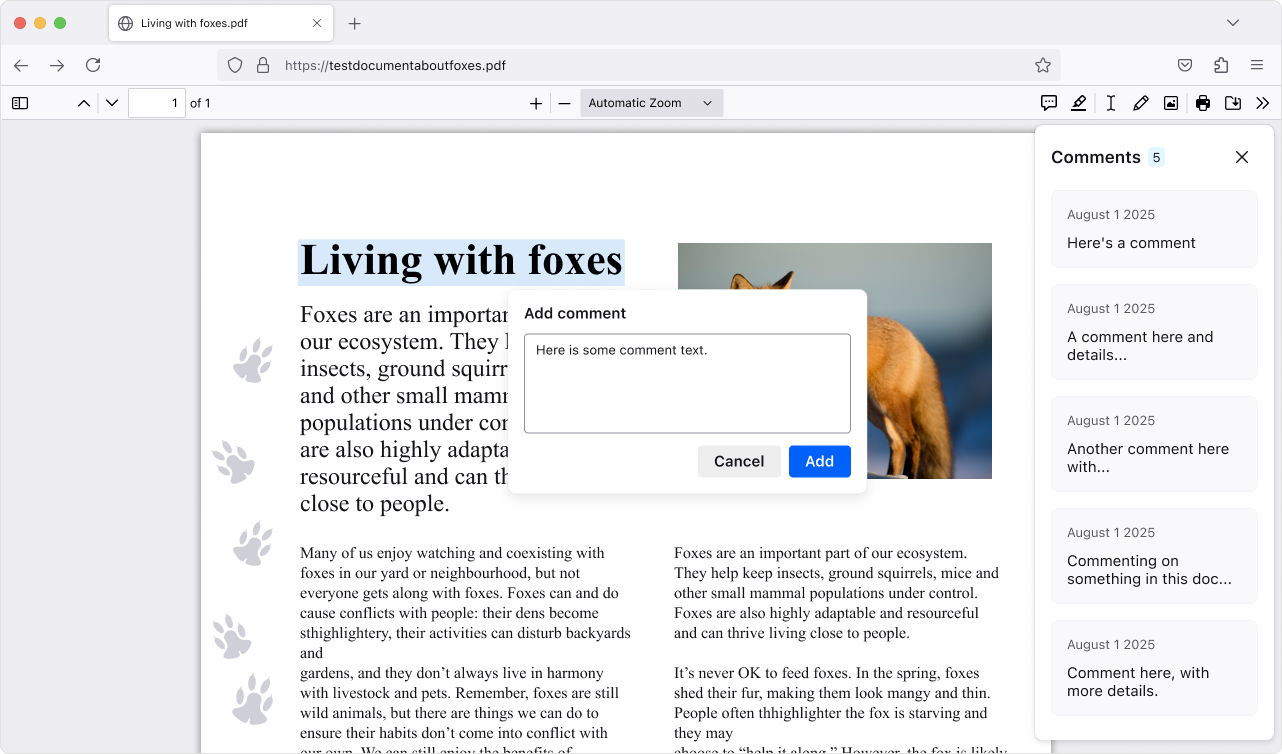
Add, edit, and delete comments to make your own notes in PDFs (summaries, questions, tasks, etc.). The comment sidebar helps you scan all your comments and quickly jump to them, which is handy for long or heavily marked-up PDFs.
This version introduces a new phase of privacy protections, building on our research on reducing browser fingerprinting. These new defenses cut the percentage of users seen as unique almost in half, ensuring a safer and more private browsing experience in Private Browsing or when using Enhanced Tracking Protection set to Strict.
Need a reminder of what tabs are in a group? Hover over the tab group name to get a preview of the tabs inside without opening it.
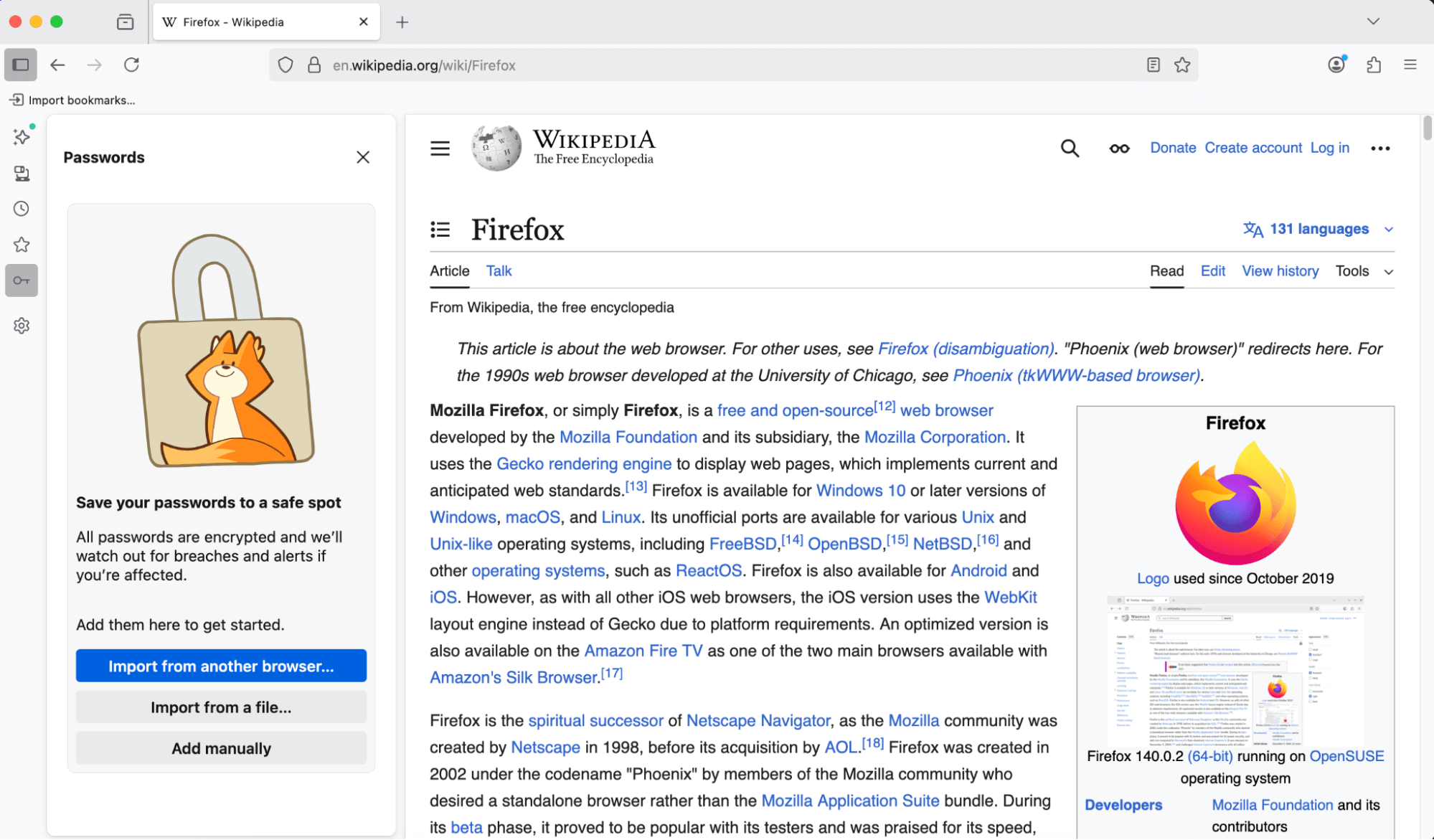
You can now access and manage your saved passwords right from the sidebar—no need to open a new tab or window. Stay on the page you’re on and get to your logins faster.
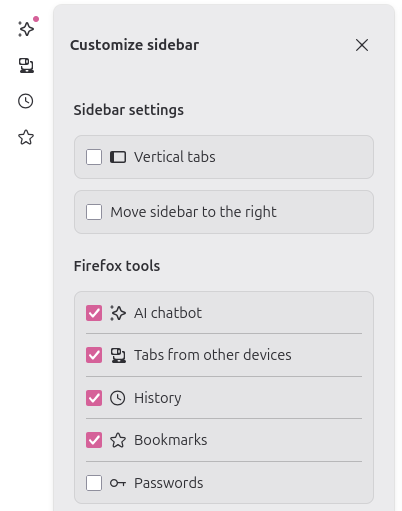
Copy Link to Highlight allows users to share arbitrary sections of a page with others by copying a link through the context menu with a given selection
The Translations feature has an improved experience when translating between languages with different script directions.
New brand-inspired wallpapers are available for New Tab on desktop, with versions for both light and dark mode.
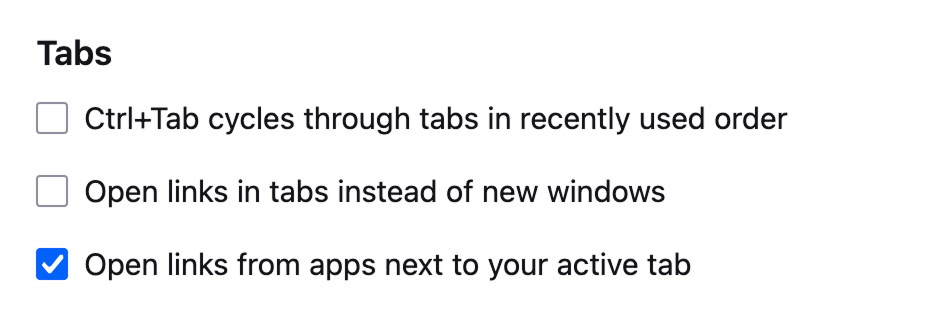
With the new Open links from apps next to your active tab setting, you can have links from other applications open next to your active tab instead of at the end of the tab strip.
Enhanced Bounce Tracking Protection’s stateless mode is now enabled by default in ETP Strict, blocking more advanced tracking techniques based on redirection
For most Windows users, the existing desktop shortcut for launching Firefox has been replaced with the desktop launcher, a small program that will launch Firefox if it is installed, but if it is not installed will prompt the user to install Firefox. This will provide an easy installation point for Firefox users who acquire a new Windows device, where Firefox will not be installed by default, but the desktop launcher program may have synced via OneDrive or other cloud storage product. Learn more.

Various security fixes.

Firefox no longer supports 32-bit Linux systems. We recommend installing the 64-bit version for continued updates and support.
Horizontal tabs are now slightly more rounded to match the look of vertical tabs. Buttons and text inputs, including the address bar, have also been updated for consistency.
When no extensions are installed, clicking the Extensions button now shows a message highlighting how extensions can enhance your browsing, with links to the Firefox Add-ons store.
Local translation models are now compressed with Zstandard, reducing download sizes and on-device storage consumption. As always, all Firefox translations happen securely and privately on your local device, unlike other browsers that translate using cloud services.
We updated default automation preferences to better support Agentic browsing, reducing the steps agents need to complete a task and chances for the agent to get stuck.

You can find information about policy updates and enterprise specific bug fixes in the Firefox for Enterprise 145 Release Notes.

Microsoft UI Automation phased release rollout at 100%. Microsoft UI Automation is the new accessibility framework for Microsoft Windows. This will provide better assistive technology (AT) support and performance on Windows for current and future assistive technologies.

Support has been added for the Atomics.waitAsync proposal, which is a non-blocking, asynchronous version of Atomics.wait. This allow synchronization of threads based upon the value in a shared memory location, for more details please consult our MDN documentation.
Firefox now supports the new Integrity-Policy header for enforcing sub-resource integrity for scripts. Further implementation of this header is underway.
Added Matroska support for the most commonly used codecs: AVC, HEVC, VP8, VP9, AV1, AAC, Opus, and Vorbis.
The text-autospace property is now supported, allowing automatic spacing adjustments between characters from different scripts.
The WebGPU DOM API (spec; MDN) is now available on macOS 26 (Tahoe) on Apple Silicon. For details, see the Mozilla Graphics Team Blog.
On Windows, clicking tabs may not work at the very top of the screen when Firefox is maximized on a second monitor. We’re working to fix this in a future release. (Fixed in 147.0)

With the release of Firefox 145, we are pleased to welcome the developers who contributed their first code change to Firefox in this release, 5 of whom were brand new volunteers! Please join us in thanking each of these diligent and enthusiastic individuals, and take a look at their contributions:
This is a hotfix for 5.1.10 that fixes the DxgiAdapterService, which is used by plugins that initialize DirectX using their own interop.
The 5.1.10 update was a maintenance release that added a Romanian translation, fixed some important bugs, and updated the bundled FileType plugins.
There are two releases of Paint.NET:
 Settings -> Updates -> Check Now.
Changes since 5.1.10:
Changes in 5.1.10 that were new since 5.1.9:
This is a maintenance release that adds a Romanian translation, fixes some important bugs, and updates the bundled FileType plugins.
There are two releases of Paint.NET:
Settings -> Updates -> Check Now.
Changes since 5.1.9:
The Stable channel has been updated to 142.0.7444.134/.135 for Windows and 142.0.7444.135 for Mac and 142.0.7444.134 for Linux, which will roll out over the coming days/weeks. A full list of changes in this build is available in the Log.
Security Fixes and Rewards
Note: Access to bug details and links may be kept restricted until a majority of users are updated with a fix. We will also retain restrictions if the bug exists in a third party library that other projects similarly depend on, but haven’t yet fixed.
This update includes 5 security fixes. Below, we highlight fixes that were contributed by external researchers. Please see the Chrome Security Page for more information.
Interested in switching release channels? Find out how here. If you find a new issue, please let us know by filing a bug. The community help forum is also a great place to reach out for help or learn about common issues.
Updates:
Changes/improvements:
Fixes:
The Chrome team is delighted to announce the promotion of Chrome 142 to the stable channel for Windows, Mac and Linux. This will roll out over the coming days/weeks.
Chrome 142.0.7444.59 (Linux) 142.0.7444.59/60 Windows and 142.0.7444.60 Mac contains a number of fixes and improvements -- a list of changes is available in the log. Watch out for upcoming Chrome and Chromium blog posts about new features and big efforts delivered in 142.
Security Fixes and Rewards
Note: Access to bug details and links may be kept restricted until a majority of users are updated with a fix. We will also retain restrictions if the bug exists in a third party library that other projects similarly depend on, but haven’t yet fixed.
This update includes 20 security fixes. Below, we highlight fixes that were contributed by external researchers. Please see the Chrome Security Page for more information.
[$50000][447613211] High CVE-2025-12428: Type Confusion in V8. Reported by Man Yue Mo of GitHub Security Lab on 2025-09-26
[$50000][450618029] High CVE-2025-12429: Inappropriate implementation in V8. Reported by Aorui Zhang on 2025-10-10
[$10000][442860743] High CVE-2025-12430: Object lifecycle issue in Media. Reported by round.about on 2025-09-04
[$4000][436887350] High CVE-2025-12431: Inappropriate implementation in Extensions. Reported by Alesandro Ortiz on 2025-08-06
[N/A][439522866] High CVE-2025-12432: Race in V8. Reported by Google Big Sleep on 2025-08-18
[N/A][449760249] High CVE-2025-12433: Inappropriate implementation in V8. Reported by Google Big Sleep on 2025-10-07
[N/A][452296415] High CVE-2025-12036: Inappropriate implementation in V8. Reported by Google Big Sleep on 2025-10-15
[$3000][337356054] Medium CVE-2025-12434: Race in Storage. Reported by Lijo A.T on 2024-04-27
[$3000][446463993] Medium CVE-2025-12435: Incorrect security UI in Omnibox. Reported by Hafiizh on 2025-09-21
[$2000][40054742] Medium CVE-2025-12436: Policy bypass in Extensions. Reported by Luan Herrera (@lbherrera_) on 2021-02-08
[$2000][446294487] Medium CVE-2025-12437: Use after free in PageInfo. Reported by Umar Farooq on 2025-09-20
[$1000][433027577] Medium CVE-2025-12438: Use after free in Ozone. Reported by Wei Yuan of MoyunSec VLab on 2025-07-20
[TBD][382234536] Medium CVE-2025-12439: Inappropriate implementation in App-Bound Encryption. Reported by Ari Novick on 2024-12-04
[N/A][430555440] Low CVE-2025-12440: Inappropriate implementation in Autofill. Reported by Khalil Zhani on 2025-07-09
[N/A][444049512] Medium CVE-2025-12441: Out of bounds read in V8. Reported by Google Big Sleep on 2025-09-10
[TBD][452071845] Medium CVE-2025-12443: Out of bounds read in WebXR. Reported by Aisle Research on 2025-10-15
[$3000][390571618] Low CVE-2025-12444: Incorrect security UI in Fullscreen UI. Reported by syrf on 2025-01-18
[$1000][428397712] Low CVE-2025-12445: Policy bypass in Extensions. Reported by Thomas Greiner on 2025-06-29
[$1000][444932667] Low CVE-2025-12446: Incorrect security UI in SplitView. Reported by Hafiizh on 2025-09-14
[TBD][442636157] Low CVE-2025-12447: Incorrect security UI in Omnibox. Reported by Khalil Zhani on 2025-09-03
We would also like to thank all security researchers that worked with us during the development cycle to prevent security bugs from ever reaching the stable channel.
Interested in switching release channels? Find out how here. If you find a new issue, please let us know by filing a bug. The community help forum is also a great place to reach out for help or learn about common issues.
Srinivas Sista
Google Chrome
Fixed an issue where the list of available locales in about:settings contained more locales than were downloaded or currently supported. (Bug 1994642)
Fixed an issue where using the keyboard to open the Unified Search dropdown was inconsistent. The dropdown now expands properly, allowing users to select a search engine using the keyboard. (Bug 1979826)
Fixed an issue where curated photo collections on Microsoft OneDrive's Photos “For You” page failed to load, showing a gray screen instead of content. Collections now display as expected. (Bug 1986533)
Fixed a startup crash affecting Windows users with Avast or other security software installed. (Bug 1992678)
Fixed an issue on macOS where the emoji picker shortcut and menu entry stopped working after switching between apps. (Bug 1980815)
Fixed an issue on macOS where dragging images from Firefox into third-party apps like Preview could fail or behave unexpectedly. (Bug 1995345)
Fixed performance and video playback issues on macOS 26 (Tahoe) that occurred when the system was under heavy load. (Bug 1995638)
Fixed a browser hang on macOS 26 (Tahoe) that could occur when bookmark folders contained loops or repeated references to themselves. (Bug 1995621)
Reference link to 144.0 release notes.
vMix 29 is now available for download via the vMix.com download page! Good news for those who purchased vMix after January 2023, as it’s a free update! vMix Max users can also update today for free to get all of the new vMix 29 features. If you like what you see and want to update to vMix 29 from an older version, it’s just $60 USD for an additional 12 months of updates. To get up to date with the new vMix 29 features, here’s a short video from current vMix CEO Martin “Spud” Sinclair.
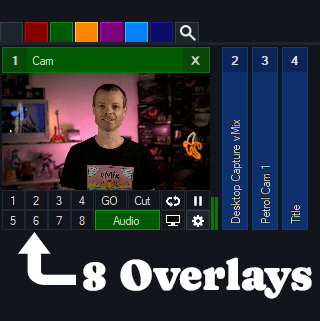
vMix 29 will now have double the amount of Overlays and Stingers as previous versions! Now you’ll be able to overlay to your heart’s content. With the Overlay support for Mixes in vMix 28, the extra 4 Overlays will give you plenty of options!
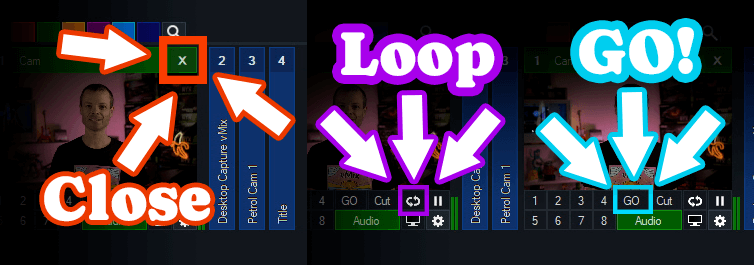
There has also been a few interface changes on inputs with some new icons, positions and functions.
Close– To close an input now you just need to click the X in the top right.
Loop– To loop a video click the loop icon.
GO– The GO button replaces Quick Play. By default it functions the same as the Quick Play transition but also adds full shortcut functionality for each GO button on every input!

vMix 29 has full support for input and output of Open Media Transport (OMT). OMT is an open-source protocol for high-quality and low latency local network video. For more information head to openmediatransport.org.
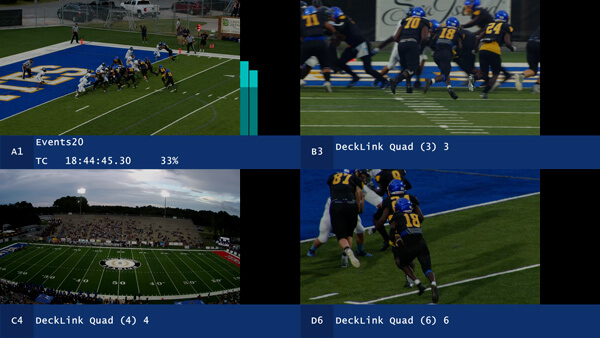
Quad View mode has been added to Replay that allows viewing four separate camera angles on screen at a time in high quality (via Replay MultiView). This provides a simple way to review and compare content on one screen from multiple angles. Adding multiple tags to events is also available in vMix 29, along with dragging and dropping events to list folders.
New Replay performance updates have been added such as-
New OnCountdownTime and OnCountdownRemaining, allow triggers on Title countdowns.
For a Free 60-Day Trial of vMix Pro, just head to the download page on vMix.com. You just need to download, install and enter your email address where it says Register for a fully functional 60 day trial.
vMix 29 will be a free update for those that have purchased after January 1st 2023 or if you’ve purchased a 12 month upgrade…in the last 12 months. vMix Max users can update for free.
If you’re outside of this window and would like to update, you can do so via our Upgrades Page. It’s $60 USD for an additional 12 months of updates. If you don’t want to, you can continue to use your current vMix version.
For more information about vMix, just head to vMix.com!

Here’s a full list of all the updates for vMix 29…take a look, you might find something you like!
Open Media Transport (OMT) support
Instant Replay
New Overlay Channels
Remember vMix GO? It’s back, in POG form (Programmable option gateway)!
Zoom
Audio
Search
Triggers
Other Features
OBS-Studio-32.0.2-Sources.tar.gz: 48d744037c553eea8f9b76bf46f6dcac753e52871f49b2c1a2580757f723a1b7
OBS-Studio-32.0.2-Ubuntu-24.04-x86_64-dbsym.ddeb: b7ef41ca56c072194a2b819108a92f0e71830eae4d6265b4f3cf62359b546d52
OBS-Studio-32.0.2-Ubuntu-24.04-x86_64.deb: ab1ba6582fcc5eaf051f28fafc01becec5d8edabfe4775626d5a1c94ef6340bb
OBS-Studio-32.0.2-Windows-arm64-PDBs.zip: 0a1b87d0a7e535876366cc45ca3aae769c6380223bcde40a9cc40852ace79a9e
OBS-Studio-32.0.2-Windows-arm64.zip: 73a2958c4e5bf07f1479b5997ffcae6955848e160d61044d9e0f45d826cfb678
OBS-Studio-32.0.2-Windows-x64-Installer.exe: da31c224edcb9520afa6a0df89c0cc32eac07b5d8e8bc2816c3e55764738a117
OBS-Studio-32.0.2-Windows-x64-PDBs.zip: 1b3e913564866ea67db711ab4bb4e9ecd3225fb4bad478cf71b09ddaf98fe5ef
OBS-Studio-32.0.2-Windows-x64.zip: 60b4510590140bd83625cc694d4ccd56b34fb499fc41d18c9558636a53ceabfa
OBS-Studio-32.0.2-macOS-Apple-dSYMs.tar.xz: 260fd560655ff7351710351f8d08555ea52b7c9a95b188924f29676d1ffc592c
OBS-Studio-32.0.2-macOS-Apple.dmg: 5c8f0e2349e45b57512e32312b053688e0b2bb9f0e8de8e7e24ee392e77a7cb3
OBS-Studio-32.0.2-macOS-Intel-dSYMs.tar.xz: 6cd38a3013bae8b99c43f7edca5051b8d9639b30a1a7c70e7fe20ac5bbf39923
OBS-Studio-32.0.2-macOS-Intel.dmg: ad5613bf36d95f8917fe56b127359b48595671e7341dc997202bb15242a53466

The Stable channel has been updated to 142.0.7390.52 for Windows and 142.0.7390.53 for Mac as part of our early stable release to a small percentage of users. A full list of changes in this build is available in the log.
You can find more details about early Stable releases here.
Interested in switching release channels? Find out how here. If you find a new issue, please let us know by filing a bug. The community help forum is also a great place to reach out for help or learn about common issues.
Srinivas Sista
Google Chrome
The Stable channel has been updated to 141.0.7390.122/.123 for Windows and Mac and 141.0.7390.122 for Linux, which will roll out over the coming days/weeks. A full list of changes in this build is available in the Log.
This update does not include any security fixes.
Note that a previous version of these notes incorrectly indicated that V8 Bug 452296415 with CVE-2025-12036 had been fixed in this release. It will be included in Chrome 142
Interested in switching release channels? Find out how here. If you find a new issue, please let us know by filing a bug. The community help forum is also a great place to reach out for help or learn about common issues.
LANIPScanner is a new tool for Windows that scans your network and displays the list of all computers and devices that are currently connected to your network. LANIPScanner uses multiple network protocols to scan your network, including ICMP (ping), ARP, mDNS, DNS, NBNS, SSDP.
For every computer or device that is connected to your network, the following information is displayed (Only if it’s available): IP Address, MAC Address, MAC Address Company, Device Name, Workgroup, Device String, Ping Time, Ping TTL, Device Type, Protocols List, IPv6 Address, IPv6 Link Local Address.
When a device responses to SSDP or mDNS protocol, you can also view the raw data received from the device in the lower pane, by selecting the device in the upper pane.
The LANIPScanner tool works on any version of Windows starting from Windows XP and up to Windows 11. Both 32-bit and 64-bit systems are supported.
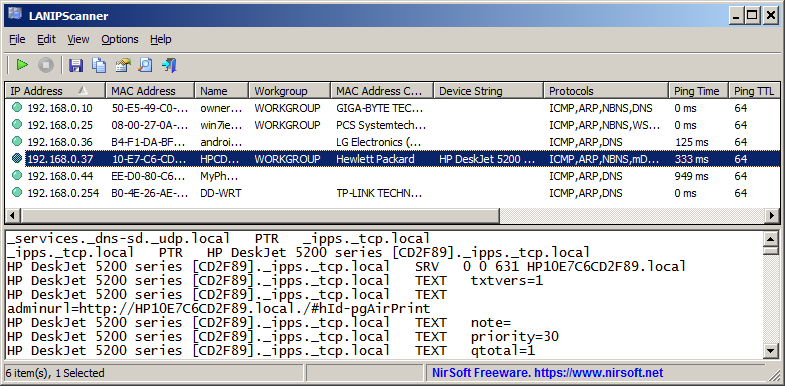
You can download the new LANIPScanner tool from this Web page.
FullUpdatesHistoryView is a new tool for Windows 11 that displays the history of Windows updates on your system. For every Windows update history record, the following information is displayed: Update Time, Title, Description, Information URL, Category, KB Number, Update ID, Provider ID, and more…
This tool uses a new database available only on Windows 11 and the latest versions of Windows 10 ( C:\ProgramData\USOPrivate\UpdateStore\store.db ), so you cannot use it for previous versions of Windows.
For viewing the Windows updates history on older versions of Windows you can use this tool: Windows Updates History Viewer.
The previous tool for viewing the Windows updates history ( Windows Updates History Viewer ) reads the updates by using Windows API or by reading the database file directly from C:\Windows\SoftwareDistribution\DataStore\DataStore.edb, depending on what you choose in the ‘Advanced Options’ window.
However, every time that a major update of Windows 11 is installed (e.g: 23H2, 24H2), all previous updates are deleted from the database by Windows operating system, so the previous tool cannot display the updates installed on your system before the last major update of Windows.
The FullUpdatesHistoryView tool uses the new updates history database (C:\ProgramData\USOPrivate\UpdateStore\store.db ) which keeps all updates history records, without deleting the history on every major update.
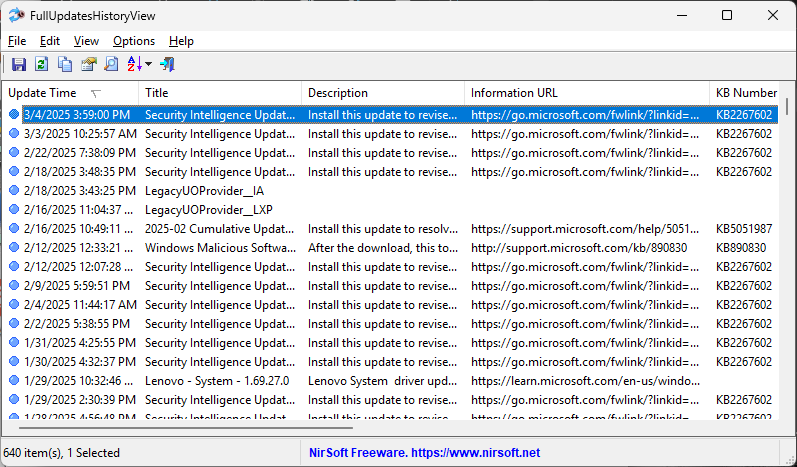
You can download the FullUpdatesHistoryView tool from this Web page.
The new version of MultiMonitorTool (version 2.20) allows you to easily set the display scaling of specific monitor from command-line, by using the /SetScale command.
The first parameter of the /SetScale command is the name of the monitor (For example: \\.\DISPLAY1). Like in other commands of MultiMonitorTool, you can also specify the monitor ID or the serial number of the monitor, or ‘Primary’ string for the primary monitor.
The second parameter specifies the scaling value. You can specify the absolute scale value in percent, for example: 100,125,150,175,200,225, and so on…
You can also specify a relative value. In this case – you have to specify ‘0’ to set the recommended display scaling, a positive number (1, 2, 3, …) to set display scaling larger than recommended, or a negative number (-1, -2, -3, …) to set display scaling smaller than recommended.
Here’s some examples for the /SetScale command:
MultiMonitorTool.exe /SetScale “\\.\DISPLAY2” 150
MultiMonitorTool.exe /SetScale “Primary” 125
MultiMonitorTool.exe /SetScale “GSM5B54” 1
You can download the new version of MultiMonitorTool from this Web page.
DHCPLogView is a new tool for Windows that monitors the DHCP requests sent by every device connects to your network and displays the information on the main window.
For every device that connects your network the following information is displayed:
MAC Address, MAC Address Company, DHCP Request Time, Requested IP Address, Host Name, Vendor Class ID, Parameter Request List,
and the operating system of the device (For common versions of Windows and Android)
You can also use DHCPLogView in system tray mode and get notification every time that a device sends a DHCP request to connect your network.
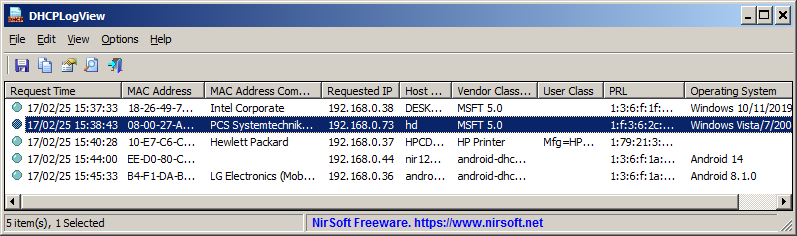
You can get more information about the new DHCPLogView tool in this Web page.
BluetoothLEView is a new tool for Windows 10 and Windows 11 that monitors and displays the activity of Bluetooth Low Energy devices around you.
For every device detected by BluetoothLEView, the following information is displayed (if it’s available): MAC Address, Device Name, Signal Strength In dBm (RSSI), Manufacturer ID, Manufacturer Name, Service ID, Service Name, first and last time that the device was detected, number of times that the device was detected, and more…
In order to run and use the BluetoothLEView tool, you need a computer with Windows 10 or Windows 11, and a Bluetooth dongle or internal Bluetooth adapter that supports Bluetooth Low Energy.
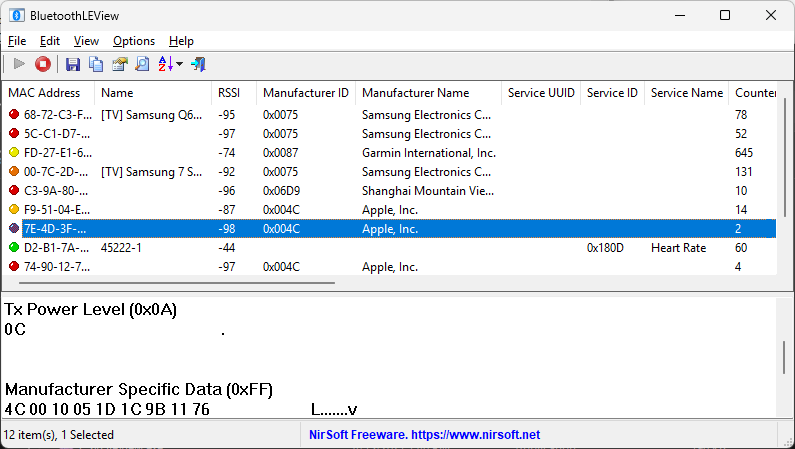
You can download the BluetoothLEView tool from this Web page.
The new version of WifiInfoView (v2.90) allows you to easily export the information of one or more access points into a .pcap capture file.
For every access point that you select, a single beacon frame with all information elements is added to the .pcap file.
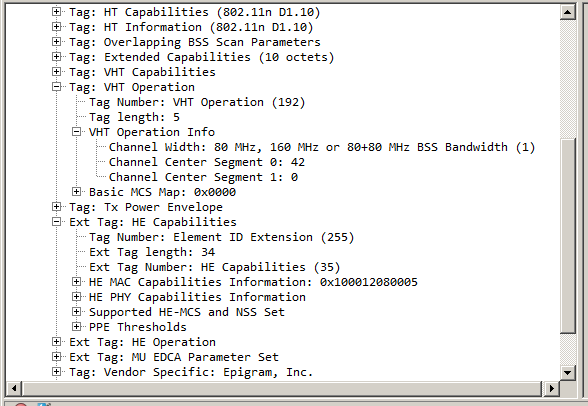
After generating the .pcap with WifiInfoView, you can open and analyze the access point information by using the Wireshark software.
Here’s an example for .pcap file generated by WifiInfoView, and then opened in Wireshark:
You can download the new version of WifiInfoView from this Web page.
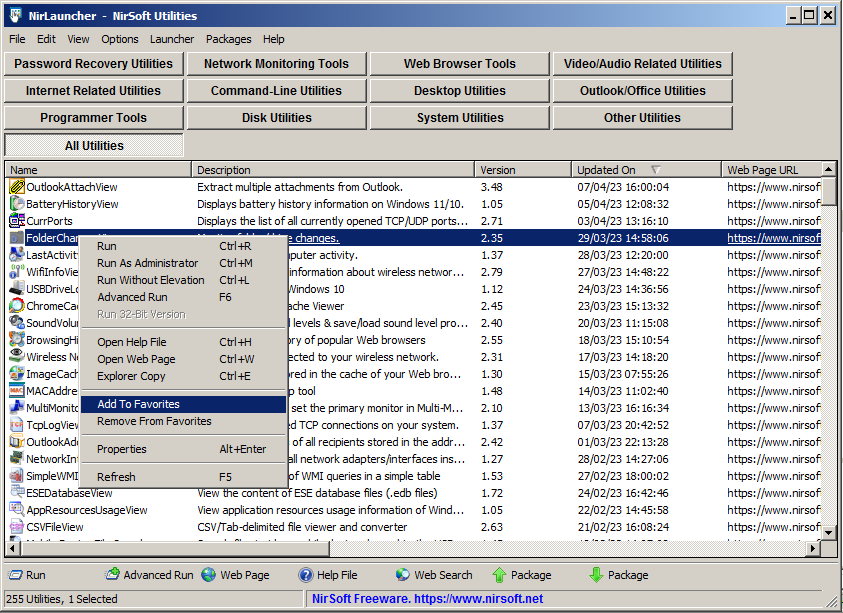
The new version of NirLauncher package (1.30) allows you to easily add tools into your favorites list, and then view only your favorite tools instead of the entire tools collection.
In order to use this feature, simply select one or more tools in the main window of NirLauncher, and then from the right-click context menu choose ‘Add To Favorites’ to add the selected tools into your favorites list, or ‘Remove From Favorites’ to remove the selected tools from your favorites list.
When you want to view only your favorite tools, go to View -> Show Only Favorites or simply press F2.
There are also a few more new features in version 1.30 of NirLauncher package. You can find more information about them in the About Window (Help -> About).

