❌

Lees weergave

Paint.NET 5.2 Alpha (build 9625)

​

Welcome to the first alpha for the 5.2 update! This new version is focused on performance, quality-of-life, and infrastructure improvements which prepare for the big 6.0 version that will be coming later. The two biggest changes are the new FileType plugin system and the rewritten high-precision layer rendering engine.

New FileType Plugin System

The original FileType plugin system dates back to 2005 with the v2.5 release. It has withstood the test of time in the sense that it still works and has provided a lot of value for a lot of people, but it has also noticeably aged poorly in ways that have prevented progress in other areas of the app. It was written at a time when .NET itself was just 3 years old and hitting its 2.0 release with generics and 64-bit support. The modern systems used in Paint.NET for component management and isolation were nowhere to be found back then. I had no clue that the project’s longevity would stretch so far into the future, nor that so many plugins would be developed!

The old FileType plugin system is tightly coupled with the Document, Layer, and Surface classes which Paint.NET also uses internally for UI and rendering purposes. They only support the 32-bit BGRA UI8 pixel format and a flat list of bitmap layers. The new FileType system works through interfaces such as IFileTypeDocument<TPixel> and ILayer<TPixel>, along with a rich and strongly-typed imaging framework providing support for a wide variety of pixel formats, pooled bitmap allocation, scaling/interpolation, quantization/dithering, format conversion, color management, and more.

Decoupling the FileType system from the internal classes means that these two systems can now evolve independently, and internal details can be abstracted away from plugins. The new plugin system has been designed to support versioning, meaning that functionality can be added or changed in the programming interfaces that are provided to plugins while maintaining compatibility for plugins that have already been published. New layer types and topologies (e.g. layer folders) can be added without breaking existing plugins, new blend modes can be introduced, and bitmap layers will finally be able to migrate to a tiled storage system.

Note to plugin authors: In general, plugins should provide pixel data in the image file’s original format without converting it to BGRA32. In other words, let Paint.NET handle the conversion, whether you’re supplying pixels as RGBA64, BGR24, or even an HDR format such as RGBA FP32. Paint.NET will figure out the best conversion for pixel format and color profile handling, and when expanded pixel format support is rolled out your plugin can automatically benefit from it. Note that plugins can also determine at runtime which pixel formats are supported and which are native, in case they do want to do the conversion themselves for whatever reason.

New Layer Rendering Engine

The old layer rendering engine has its roots going all the way back to the 1.0 release in 2004. Over the years it has migrated from C# to C for performance reasons, and then back to C# once the language and JIT had finally caught up to the performance of the native code. However, it has no SIMD optimizations, it only has 8 bits per channel of precision (β€œUI8”), and the code was very messy and difficult to make changes to. Working with many layers can result in incorrect colors or banding artifacts as off-by-1 errors accumulate across multiple layers.Β 

With 5.2, this has been completely rewritten and upgraded to use 32-bits of floating-point precision per channel (β€œFP32”). It is fully optimized for AVX2, AVX512, and even ARM64 NEON thanks to .NET’s new platform-agnostic intrinsics support. Because FP32 uses a lot more memory bandwidth than UI8, many tricks have been employed to cut down on that to the point that there is no perceptible performance reduction from previous versions (the old renderer not using any SIMD also helps this comparison). The bottleneck is compute, not memory bandwidth, and performance really shines on CPUs with AVX512 support even with standard dual channel memory.

A driving factor behind this change was to prepare for future versions of Paint.NET that will expand pixel format support beyond BGRA UI8. In order to do this in a sane and maintainable manner, having a canonical pixel format became important so that each rendering kernel only needs to be written once. All of the rendering kernels can now operate exclusively on FP32 data, with high-performance format conversion and color transform kernels at the beginning and end of the rendering pipeline. This will make it much easier to add support for RGBA UI16, RGBA FP16, and even RGBA FP32 β€” the layer rendering engine already supports it, the rest of the app just has to catch up.

What’s coming in 6.0?

This update will introduce a new .PDN file format that will finally enable the ability to add new features to the document and layering systems. High bit-depth pixel formats, new blend modes, and layer folders are planned to be the first use of these. Later on, features such as adjustment layers, text layers, and HDR will also be added (to name a few).

Change Log

Changes since 5.1.12:

  • New modernized FileType plugin system
    • Support for a wide variety of pixel formats. The classic BGRA32 is of course available, as well as RGBA64, CMYK, or even RGBA128Float (which will be more useful with upcoming HDR support).
    • Decoupled from the internal Document and Layer classes, thus affording flexibility for more comprehensive changes to the document and layer object model.
  • Rewritten layer rendering rendering engine.
    • Now uses 32-bit floating point (FP32) instead of 8-bit integers (UI8).
    • Much higher precision eliminates artifacts and incorrect colors that can result from the old low-precision 8-bit rendering code
    • Fully optimized for AVX2 and AVX512. Significant performance gains on systems with AVX512 support due to a high compute:memory ratio.
  • Renamed Edit -> Copy Merged to Edit -> Copy Flattened.
  • Improved copy-to-clipboard (Edit -> Copy and Edit -> Copy Flattened) performance by up to 95%. See also: https://x.com/rickbrewPDN/status/2039850858935140449
  • Reduced temporary memory usage by 50% for Edit -> Paste into New Image.
  • Paint Bucket and Color Picker now support holding Ctrl as a shortcut key for specifying Image sampling mode.
  • Substantial performance improvements for larger images. Fluidity of zooming and scrolling will be significantly better. A lot of lag and hitching has been eliminated.
  • Save Configuration dialog renamed to Save Options.
  • Fixed some cases of metadata not being preserved correctly.
    • PNG tEXt/iTXt metadata is now preserved, which includes prompt and parameter information for images generated by Stable Diffusion et. al.
    • Expanded and improved the imaging framework for plugins.
      • Better color management
      • New interpolation modes (BitmapInterpolationMode2)
      • Channel extraction and channel replacement. This makes it easier to work with a variety of non-standard pixel formats (e.g. Gray+Alpha) that do not have direct support in the imaging framework.
      • Support for generic 2-channel pixel formats (ColorGenericXY[16, 32, 32Half, 64Float]). These are meant to be used with the aforementioned channel extraction and replacement support.
      • Support for alpha formats beyond 8-bits: 16-bit integer, as well as 16- and 32-bit floating point.
      • Better CMYK pixel format support, which enables importing CMYK32, CMYKA40, CMYK64, and CMYKA80 images
    • Improved reliability of some GPU effects/adjustments on certain older or low-end systems.
    • Optimized the Median Blur effect by 10-50% depending on the selected quality value.
    • Optimized histogram calculation for Levels and Auto-Levels by about 20%.
    • Updated to use .NET 10
    • β€œClassic” (aka legacy) effect plugin system is now fully deprecated. Old plugins will still continue to work forever, but new ones can no longer be compiled.
    • Updated bundled AVIF FileType plugin to use the new FileType plugin system.
    • Updated bundled DDS FileType Plus plugin to use the new FileType plugin system.
      • The Save Options dialog will now auto-select the DDS format that the original file was encoded with if it was also a DDS file.
    • Updated bundled JPEG XL FileType plugin to use the new FileType plugin system.
    • Updated bundled WebP FileType plugin to use the new FileType plugin system.
    • Converted the SetupDownloader EXE from C# to C++, thus eliminating the last dependency on .NET Framework 4.8. This executable is used for the small β€œAny CPU” / β€œWeb” installer.
    • Fixed a scaling issue with the β€œcompass” mouse cursor used by various tools (Move, Shapes).
    • Fixed an uncommon cosmetic glitch with the selection outline when the selection quality is set to β€œpixelated”
    • Fixed an ultra-rare hang that could happen after opening an image or when the β€œCommitting changes” progress bar was at 70%.

    Download and Install

    This build is available via the built-in updater as long as you have opted-in to pre-release updates. From within Settings -> Updates, enable β€œAlso check for pre-release (beta) versions of paint.net” and then click on the Check Now button. You can also use the links below to download an offline installer or portable ZIP.

    You can also download the installer here (for any supported CPU and OS), which is also where you can find downloads for offline installers, portable ZIPs, and deployable MSIs.

    ​

    •  

    30.0.0

    Releases Notes for 30.0.0

    Windows Installer
    Windows No Installer (zip)
    macOS - Universal
    Linux - deb, AppImage or rpm

    Windows intel x32 releases are marked -ia32-

    ChangeLog:

    •  

    Firefox

    Fixed

    • Fixed an issue where websites on internal or corporate networks that require a login prompt would show a blank page. (Bug 2034752)

    • Fixed an issue that prevented highlighting from working on scanned images in the built-in PDF viewer. (Bug 2034980)

    • Fixed an issue where the "New" badge persisted on Split View menu items. (Bug 2027793)

    • Fixed an issue that prevented some webcams from working correctly in video calls. (Bug 2034722)

    • Fixed an issue where a tab would crash when dragging and dropping nested folders onto a webpage. (Bug 2030461)

    • Improved how Firefox displays websites with advanced 3D effects, fixing cases where parts of the page could disappear or appear incorrectly. (Bug 2034283)

    • Fixed an issue that could prevent Firefox’s local backup feature from completing successfully. (Bug 2029240)

    • Fixed an issue where the status and navigation bars would flicker or show mismatched colors when editing a page’s address. (Bug 2021596)

    • Improved the appearance of search suggestions in the address bar by preventing icons from appearing stretched or distorted. (Bug 2035353)

    • Various security fixes.

    •  

    FileZilla Client 3.70.5 released

    Fixed vulnerabilities:

    • Official binaries are now linked against GnuTLS 3.8.13

    New features:

    • SFTP: Added a page with compatibility flags to the Site Manager

    Bugfixes and minor changes:

    • SFTP: Updated to fzssh 1.2.1 to ignore items with invalid names directory listings instead of failing listings completely
    • SFTP: Fixed issue where some items were reported with the wrong type depending on server capabilities
    • SFTP: If keyboard-interactive authentication fails, automatically start a new authentication attempt
    •  

    Stable Channel Update for Desktop

    The Chrome team is delighted to announce the promotion of Chrome 148 to the stable channel for Windows, Mac and Linux. This will roll out over the coming days/weeks.

    ChromeΒ 148.0.7778.96 (Linux)Β 148.0.7778.96/97Β Windows/MacΒ contains a number of fixes and improvements -- a list of changes is available in theΒ log. Watch out for upcomingΒ ChromeΒ andΒ ChromiumΒ blog posts about new features and big efforts delivered in 148.

    Security Fixes and Rewards

    Note: Access to bug details and links may be kept restricted until a majority of users are updated with a fix. We will also retain restrictions if the bug exists in a third party library that other projects similarly depend on, but haven’t yet fixed.


    This update includes 127 security fixes. Below, we highlight fixes that were contributed by external researchers. Please see the Chrome Security Page for more information.

    Many of our security bugs are detected using AddressSanitizer, MemorySanitizer, UndefinedBehaviorSanitizer, Control Flow Integrity, libFuzzer, or AFL.

    [$43000][493747582] Critical CVE-2026-7896: Integer overflow in Blink. Reported by c6eed09fc8b174b0f3eebedcceb1e792 on 2026-03-18

    [N/A][504069514] Critical CVE-2026-7897: Use after free in Mobile. Reported by Google on 2026-04-18

    [N/A][504587882] Critical CVE-2026-7898: Use after free in Chromoting. Reported by Google on 2026-04-20

    [$55000][505481948] High CVE-2026-7899: Out of bounds read and write in V8. Reported by Project WhatForLunch (@pjwhatforlunch) on 2026-04-23

    [$16000][496503799] High CVE-2026-7900: Heap buffer overflow in ANGLE. Reported by Anonymous on 2026-03-26

    [$16000][497724490] High CVE-2026-7901: Use after free in ANGLE. Reported by Syn4pse (@ret2happy) on 2026-03-30

    [$8000][502030575] High CVE-2026-7902: Out of bounds memory access in V8. Reported by JunYoung Park(@candymate) of KAIST Hacking Lab on 2026-04-13

    [TBD][491760376] High CVE-2026-7903: Integer overflow in ANGLE. Reported by heesun on 2026-03-11

    [TBD][492350406] High CVE-2026-7904: Out of bounds read in Fonts. Reported by c6eed09fc8b174b0f3eebedcceb1e792 on 2026-03-13

    [N/A][495259842] High CVE-2026-7905: Insufficient validation of untrusted input in Media. Reported by Google on 2026-03-23

    [N/A][496284584] High CVE-2026-7906: Use after free in SVG. Reported by Google on 2026-03-25

    [N/A][496292089] High CVE-2026-7907: Use after free in DOM. Reported by Google on 2026-03-25

    [N/A][497436531] High CVE-2026-7908: Use after free in Fullscreen. Reported by Google on 2026-03-29

    [N/A][497437113] High CVE-2026-7909: Inappropriate implementation in ServiceWorker. Reported by Google on 2026-03-29

    [N/A][497543810] High CVE-2026-7910: Use after free in Views. Reported by Google on 2026-03-29

    [N/A][497548912] High CVE-2026-7911: Use after free in Aura. Reported by Google on 2026-03-29

    [N/A][497639714] High CVE-2026-7912: Integer overflow in GPU. Reported by Google on 2026-03-30

    [N/A][497936728] High CVE-2026-7913: Insufficient policy enforcement in DevTools. Reported by Google on 2026-03-30

    [N/A][498401609] High CVE-2026-7914: Type Confusion in Accessibility. Reported by Google on 2026-04-01

    [N/A][498454478] High CVE-2026-7915: Insufficient data validation in DevTools. Reported by Google on 2026-04-01

    [N/A][498720754] High CVE-2026-7916: Insufficient data validation in InterestGroups. Reported by Google on 2026-04-01

    [N/A][498752242] High CVE-2026-7917: Use after free in Fullscreen. Reported by Google on 2026-04-02

    [N/A][498780188] High CVE-2026-7918: Use after free in GPU. Reported by Google on 2026-04-02

    [N/A][498832921] High CVE-2026-7919: Use after free in Aura. Reported by Google on 2026-04-02

    [N/A][498989348] High CVE-2026-7920: Use after free in Skia. Reported by Google on 2026-04-02

    [N/A][499062376] High CVE-2026-7921: Use after free in Passwords. Reported by Google on 2026-04-02

    [N/A][499449324] High CVE-2026-7922: Use after free in ServiceWorker. Reported by Google on 2026-04-04

    [N/A][500080194] High CVE-2026-7923: Out of bounds write in Skia. Reported by Google on 2026-04-06

    [N/A][500087204] High CVE-2026-7924: Uninitialized Use in Dawn. Reported by Google on 2026-04-06

    [N/A][501833981] High CVE-2026-7925: Use after free in Chromoting. Reported by Google on 2026-04-12

    [TBD][502249087] High CVE-2026-7926: Use after free in PresentationAPI. Reported by anonymous on 2026-04-14

    [N/A][502830119] High CVE-2026-7927: Type Confusion in Runtime. Reported by Google on 2026-04-15

    [N/A][504612429] High CVE-2026-7928: Use after free in WebRTC. Reported by Google on 2026-04-20

    [N/A][504660052] High CVE-2026-7929: Use after free in MediaRecording. Reported by Google on 2026-04-20

    [TBD][434825208] Medium CVE-2026-7930: Insufficient validation of untrusted input in Cookies. Reported by Satoki on 2025-07-29

    [TBD][474338157] Medium CVE-2026-7931: Insufficient validation of untrusted input in iOS. Reported by Qadhafy Muhammad Tera on 2026-01-08

    [TBD][481634116] Medium CVE-2026-7932: Insufficient policy enforcement in Downloads. Reported by Povcfe of Tencent Security Xuanwu Lab on 2026-02-04

    [TBD][488585490] Medium CVE-2026-7933: Out of bounds read in WebCodecs. Reported by heapracer (@heapracer) on 2026-03-01

    [N/A][489023922] Medium CVE-2026-7934: Insufficient validation of untrusted input in Popup Blocker. Reported by Google on 2026-03-02

    [TBD][489624550] Medium CVE-2026-7935: Inappropriate implementation in Speech. Reported by Qadhafy Muhammad Tera on 2026-03-04

    [TBD][490485402] Medium CVE-2026-7936: Object lifecycle issue in V8. Reported by Christian Holler on 2026-03-07

    [TBD][491766258] Medium CVE-2026-7937: Insufficient policy enforcement in DevTools. Reported by lebr0nli of National Yang Ming Chiao Tung University, Dept. of CS, Security and Systems Lab on 2026-03-11

    [TBD][492735384] Medium CVE-2026-7938: Use after free in CSS. Reported by c6eed09fc8b174b0f3eebedcceb1e792 on 2026-03-15

    [TBD][492963096] Medium CVE-2026-7939: Inappropriate implementation in SanitizerAPI. Reported by s3zer0 on 2026-03-15

    [TBD][493631402] Medium CVE-2026-7940: Use after free in V8. Reported by sakana on 2026-03-17

    [TBD][493955234] Medium CVE-2026-7941: Insufficient validation of untrusted input in Mobile. Reported by Adithya Kotian on 2026-03-19

    [N/A][495363705] Medium CVE-2026-7942: Integer overflow in ANGLE. Reported by Google on 2026-03-23

    [TBD][495373657] Medium CVE-2026-7943: Insufficient validation of untrusted input in ANGLE. Reported by 86ac1f1587b71893ed2ad792cd7dde32 on 2026-03-23

    [N/A][495783187] Medium CVE-2026-7944: Insufficient validation of untrusted input in Persistent Cache. Reported by Google on 2026-03-24

    [N/A][495802788] Medium CVE-2026-7945: Insufficient validation of untrusted input in COOP. Reported by Google on 2026-03-24

    [N/A][496016840] Medium CVE-2026-7946: Insufficient policy enforcement in WebUI. Reported by Google on 2026-03-25

    [N/A][496169594] Medium CVE-2026-7947: Insufficient validation of untrusted input in Network. Reported by Google on 2026-03-25

    [N/A][496193452] Medium CVE-2026-7948: Race in Chromoting. Reported by Google on 2026-03-25

    [N/A][496206134] Medium CVE-2026-7949: Out of bounds read in Skia. Reported by Google on 2026-03-25

    [N/A][496259890] Medium CVE-2026-7950: Out of bounds read and write in GFX. Reported by Google on 2026-03-25

    [TBD][496266456] Medium CVE-2026-7951: Out of bounds write in WebRTC. Reported by soft.connect.fr on 2026-03-26

    [N/A][496279876] Medium CVE-2026-7952: Insufficient policy enforcement in Extensions. Reported by Google on 2026-03-25

    [N/A][496379792] Medium CVE-2026-7953: Insufficient validation of untrusted input in Omnibox. Reported by Google on 2026-03-26

    [N/A][496380960] Medium CVE-2026-7954: Race in Shared Storage. Reported by Google on 2026-03-26

    [N/A][496441232] Medium CVE-2026-7955: Uninitialized Use in GPU. Reported by Google on 2026-03-26

    [N/A][496463315] Medium CVE-2026-7956: Use after free in Navigation. Reported by Google on 2026-03-26

    [N/A][496607380] Medium CVE-2026-7957: Out of bounds write in Media. Reported by Google on 2026-03-26

    [N/A][496632973] Medium CVE-2026-7958: Inappropriate implementation in ServiceWorker. Reported by Google on 2026-03-26

    [N/A][496645205] Medium CVE-2026-7959: Inappropriate implementation in Navigation. Reported by Google on 2026-03-26

    [N/A][497007825] Medium CVE-2026-7960: Race in Speech. Reported by Google on 2026-03-27

    [N/A][497008295] Medium CVE-2026-7961: Insufficient validation of untrusted input in Permissions. Reported by Google on 2026-03-27

    [N/A][497081987] Medium CVE-2026-7962: Insufficient policy enforcement in DirectSockets. Reported by Google on 2026-03-28

    [N/A][497250399] Medium CVE-2026-7963: Inappropriate implementation in ServiceWorker. Reported by Google on 2026-03-28

    [N/A][497254383] Medium CVE-2026-7964: Insufficient validation of untrusted input in FileSystem. Reported by Google on 2026-03-28

    [N/A][497255035] Medium CVE-2026-7965: Insufficient validation of untrusted input in DevTools. Reported by Google on 2026-03-28

    [N/A][497341787] Medium CVE-2026-7966: Insufficient validation of untrusted input in SiteIsolation. Reported by Google on 2026-03-29

    [N/A][497365545] Medium CVE-2026-7967: Insufficient validation of untrusted input in Navigation. Reported by Google on 2026-03-29

    [N/A][497432281] Medium CVE-2026-7968: Insufficient validation of untrusted input in CORS. Reported by Google on 2026-03-29

    [N/A][497450574] Medium CVE-2026-7969: Integer overflow in Network. Reported by Google on 2026-03-29

    [N/A][497487462] Medium CVE-2026-7970: Use after free in TopChrome. Reported by Google on 2026-03-29

    [N/A][497529290] Medium CVE-2026-7971: Inappropriate implementation in ORB. Reported by Google on 2026-03-29

    [N/A][497546281] Medium CVE-2026-7972: Uninitialized Use in GPU. Reported by Google on 2026-03-29

    [N/A][497565944] Medium CVE-2026-7973: Integer overflow in Dawn. Reported by Google on 2026-03-29

    [N/A][497649372] Medium CVE-2026-7974: Use after free in Blink. Reported by Google on 2026-03-30

    [N/A][497735587] Medium CVE-2026-7975: Use after free in DevTools. Reported by Google on 2026-03-30

    [N/A][497736679] Medium CVE-2026-7976: Use after free in Views. Reported by Google on 2026-03-30

    [N/A][497821223] Medium CVE-2026-7977: Inappropriate implementation in Canvas. Reported by Google on 2026-03-30

    [N/A][497828892] Medium CVE-2026-7978: Inappropriate implementation in Companion. Reported by Google on 2026-03-30

    [N/A][497849876] Medium CVE-2026-7979: Inappropriate implementation in Media. Reported by Google on 2026-03-30

    [N/A][497859275] Medium CVE-2026-7980: Use after free in WebAudio. Reported by Google on 2026-03-30

    [N/A][497926602] Medium CVE-2026-7981: Out of bounds read in Codecs. Reported by Google on 2026-03-30

    [N/A][497952533] Medium CVE-2026-7982: Uninitialized Use in WebCodecs. Reported by Google on 2026-03-30

    [N/A][497975608] Medium CVE-2026-7983: Out of bounds read in Dawn. Reported by Google on 2026-03-31

    [N/A][498277368] Medium CVE-2026-7984: Use after free in ReadingMode. Reported by Google on 2026-03-31

    [N/A][498352423] Medium CVE-2026-7985: Use after free in GPU. Reported by Google on 2026-03-31

    [N/A][498396238] Medium CVE-2026-7986: Insufficient policy enforcement in Autofill. Reported by Google on 2026-04-01

    [N/A][498696266] Medium CVE-2026-7987: Use after free in WebRTC. Reported by Google on 2026-04-01

    [N/A][498753456] Medium CVE-2026-7988: Type Confusion in WebRTC. Reported by Google on 2026-04-02

    [N/A][498765082] Medium CVE-2026-7989: Insufficient data validation in DataTransfer. Reported by Google on 2026-04-02

    [N/A][498892267] Medium CVE-2026-7990: Insufficient validation of untrusted input in Updater. Reported by Google on 2026-04-02

    [N/A][499065126] Medium CVE-2026-7991: Use after free in UI. Reported by Google on 2026-04-02

    [N/A][499067529] Medium CVE-2026-7992: Insufficient validation of untrusted input in UI. Reported by Google on 2026-04-02

    [N/A][499099003] Medium CVE-2026-7993: Insufficient validation of untrusted input in Payments. Reported by Google on 2026-04-03

    [N/A][499116954] Medium CVE-2026-7994: Inappropriate implementation in Chromoting. Reported by Google on 2026-04-03

    [N/A][501745798] Medium CVE-2026-7995: Out of bounds read in AdFilter. Reported by Google on 2026-04-11

    [TBD][484547631] Low CVE-2026-7996: Insufficient validation of untrusted input in SSL. Reported by heesun on 2026-02-15

    [TBD][487960705] Low CVE-2026-7997: Insufficient validation of untrusted input in Updater. Reported by ochkofficial on 2026-02-26

    [TBD][491676472] Low CVE-2026-7998: Insufficient validation of untrusted input in Dialog. Reported by Tianyi Hu on 2026-03-11

    [TBD][493099941] Low CVE-2026-7999: Inappropriate implementation in V8. Reported by Taisic Yun (@taisic) of Theori on 2026-03-16

    [TBD][494464734] Low CVE-2026-8000: Insufficient validation of untrusted input in ChromeDriver. Reported by Ryan Jupp - HAAO on 2026-03-20

    [TBD][494764371] Low CVE-2026-8001: Use after free in Printing. Reported by c6eed09fc8b174b0f3eebedcceb1e792 on 2026-03-21

    [N/A][495779613] Low CVE-2026-8002: Use after free in Audio. Reported by Google on 2026-03-24

    [N/A][495985532] Low CVE-2026-8003: Insufficient validation of untrusted input in TabGroups. Reported by Google on 2026-03-25

    [N/A][496189510] Low CVE-2026-8004: Insufficient policy enforcement in DevTools. Reported by Google on 2026-03-25

    [N/A][496298665] Low CVE-2026-8005: Insufficient validation of untrusted input in Cast. Reported by Google on 2026-03-25

    [N/A][496373088] Low CVE-2026-8006: Insufficient policy enforcement in DevTools. Reported by Google on 2026-03-26

    [N/A][496399759] Low CVE-2026-8007: Insufficient validation of untrusted input in Cast. Reported by Google on 2026-03-26

    [N/A][496426191] Low CVE-2026-8008: Inappropriate implementation in DevTools. Reported by Google on 2026-03-26

    [N/A][496555077] Low CVE-2026-8009: Inappropriate implementation in Cast. Reported by Google on 2026-03-26

    [N/A][496624084] Low CVE-2026-8010: Insufficient validation of untrusted input in SiteIsolation. Reported by Google on 2026-03-26

    [N/A][496626029] Low CVE-2026-8011: Insufficient policy enforcement in Search. Reported by Google on 2026-03-26

    [N/A][496628298] Low CVE-2026-8012: Inappropriate implementation in MHTML. Reported by Google on 2026-03-26

    [N/A][497427430] Low CVE-2026-8013: Insufficient validation of untrusted input in FedCM. Reported by Google on 2026-03-29

    [N/A][497490364] Low CVE-2026-8014: Inappropriate implementation in Preload. Reported by Google on 2026-03-29

    [N/A][497548558] Low CVE-2026-8015: Inappropriate implementation in Media. Reported by Google on 2026-03-29

    [N/A][497695401] Low CVE-2026-8016: Use after free in WebRTC. Reported by Google on 2026-03-30

    [N/A][497722578] Low CVE-2026-8017: Side-channel information leakage in Media. Reported by Google on 2026-03-30

    [N/A][498292657] Low CVE-2026-8018: Insufficient policy enforcement in DevTools. Reported by Google on 2026-03-31

    [N/A][498353173] Low CVE-2026-8019: Insufficient policy enforcement in WebApp. Reported by Google on 2026-03-31

    [N/A][498382925] Low CVE-2026-8020: Uninitialized Use in GPU. Reported by Google on 2026-04-01

    [N/A][498417031] Low CVE-2026-8021: Script injection in UI. Reported by Google on 2026-04-01

    [N/A][499194407] Low CVE-2026-8022: Inappropriate implementation in MHTML. Reported by Google on 2026-04-03

    We would also like to thank all security researchers that worked with us during the development cycle to prevent security bugs from ever reaching the stable channel.


    Interested in switching release channels? Find out howΒ here. If you find a new issue, please let us know byΒ filing a bug. TheΒ community help forumΒ is also a great place to reach out for help or learn about common issues.


    Srinivas Sista

    Google Chrome

    •  

    Early Stable Update for Desktop

    The Stable channel has been updated to 148.0.7778.96/.97 for Windows and Mac as part of our early stable release to a small percentage of users. A full list of changes in this build is available in the log.

    You can find more details about early Stable releases here.

    Interested in switching release channels? Β Find out how here. If you find a new issue, please let us know by filing a bug. The community help forum is also a great place to reach out for help or learn about common issues.


    Srinivas Sista

    Google Chrome

    •  

    Extended Stable Updates for Desktop

    The Extended Stable channel has been updated to 146.0.7680.216Β for Windows and Mac which will roll out over the coming days/weeks.


    A full list of changes in this build is available in the log. Interested in switching release channels? Find out how here. If you find a new issue, please let us know by filing a bug. The community help forum is also a great place to reach out for help or learn about common issues.

    Srinivas Sista
    Google Chrome
    •  

    Stable Channel Update for Desktop

    The Stable channel has been updated to 147.0.7727.137/138 for Windows/MacΒ  andΒ 147.0.7727.137 for Linux, which will roll out over the coming days/weeks. A full list of changes in this build is available in theΒ Log

    Security Fixes and Rewards

    Note: Access to bug details and links may be kept restricted until a majority of users are updated with a fix. We will also retain restrictions if the bug exists in a third party library that other projects similarly depend on, but haven’t yet fixed.


    This update includes 30 security fixes. Below, we highlight fixes that were contributed by external researchers. Please see the Chrome Security Page for more information.


    [$7000][494352590] Critical CVE-2026-7363: Use after free in Canvas. Reported by heapracer on 2026-03-19

    [N/A][493221953] Critical CVE-2026-7361: Use after free in iOS. Reported by Google on 2026-03-16

    [N/A][503419515] Critical CVE-2026-7344: Use after free in Accessibility. Reported by Google on 2026-04-16

    [N/A][503645680] Critical CVE-2026-7343: Use after free in Views. Reported by Google on 2026-04-17

    [$16000][493955227] High CVE-2026-7333: Use after free in GPU. Reported by c6eed09fc8b174b0f3eebedcceb1e792 on 2026-03-19

    [N/A][495852034] High CVE-2026-7360: Insufficient validation of untrusted input in Compositing. Reported by Google on 2026-03-24

    [N/A][496284494] High CVE-2026-7359: Use after free in ANGLE. Reported by Google on 2026-03-25

    [N/A][496285281] High CVE-2026-7358: Use after free in Animation. Reported by Google on 2026-03-25

    [TBD][496456528] High CVE-2026-7334: Use after free in Views. Reported by Batuhan Eşref KOΓ‡ on 2026-03-26

    [N/A][497047552] High CVE-2026-7357: Use after free in GPU. Reported by Google on 2026-03-27

    [N/A][497769116] High CVE-2026-7356: Use after free in Navigation. Reported by Google on 2026-03-30

    [N/A][498746519] High CVE-2026-7354: Out of bounds read and write in Angle. Reported by Google on 2026-04-01

    [N/A][498809718] High CVE-2026-7353: Heap buffer overflow in Skia. Reported by Google on 2026-04-01

    [N/A][499023054] High CVE-2026-7352: Use after free in Media. Reported by Google on 2026-04-02

    [N/A][499119490] High CVE-2026-7351: Race in MHTML. Reported by Google on 2026-04-02

    [N/A][500018484] High CVE-2026-7350: Use after free in WebMIDI. Reported by Google on 2026-04-06

    [N/A][500034684] High CVE-2026-7349: Use after free in Cast. Reported by Google on 2026-04-06

    [N/A][500104917] High CVE-2026-7348: Use after free in Codecs. Reported by Google on 2026-04-06

    [TBD][500387779] High CVE-2026-7335: Use after free in media. Reported by Jungwoo Lee (@physicube) and Wongi Lee (@_qwerty_po) on 2026-04-07

    [TBD][500767595] High CVE-2026-7336: Use after free in WebRTC. Reported by Mozilla on 2026-04-09

    [TBD][500880819] High CVE-2026-7337: Type Confusion in V8. Reported by q@calif.io on 2026-04-09

    [N/A][501722605] High CVE-2026-7347: Use after free in Chromoting. Reported by Google on 2026-04-11

    [N/A][502206907] High CVE-2026-7346: Inappropriate implementation in Tint. Reported by Google on 2026-04-13

    [N/A][502248774] High CVE-2026-7345: Insufficient validation of untrusted input in Feedback. Reported by Google on 2026-04-13

    [TBD][502449857] High CVE-2026-7338: Use after free in Cast. Reported by Krace on 2026-04-14

    [N/A][503889643] High CVE-2026-7342: Use after free in WebView. Reported by Google on 2026-04-17

    [N/A][504586599] High CVE-2026-7341: Use after free in WebRTC. Reported by Google on 2026-04-20

    [$4000][493957495] Medium CVE-2026-7339: Heap buffer overflow in WebRTC. Reported by c6eed09fc8b174b0f3eebedcceb1e792 on 2026-03-19

    [$3000][497896137] Medium CVE-2026-7340: Integer overflow in ANGLE. Reported by 86ac1f1587b71893ed2ad792cd7dde32 on 2026-03-30

    [N/A][498285711] Medium CVE-2026-7355: Use after free in Media. Reported by Google on 2026-03-31


    We would also like to thank all security researchers that worked with us during the development cycle to prevent security bugs from ever reaching the stable channel.

    Many of our security bugs are detected using AddressSanitizer, MemorySanitizer, UndefinedBehaviorSanitizer, Control Flow Integrity, libFuzzer, or AFL.


    Interested in switching release channels? Find out howΒ here. If you find a new issue, please let us know byΒ filing a bug. TheΒ community help forumΒ is also a great place to reach out for help or learn about common issues.

    Srinivas Sista

    Google Chrome
    •  

    Firefox

    Fixed

    • Fixed an issue where Facebook and other websites might not load properly for users with Bitdefender security software installed. (Bug 2034178)

    • Fixed an issue where denying a geolocation permission prompt could cause Firefox to show the system permission dialog again on a second attempt. (Bug 2034120)

    • Fixed an issue that prevented tabs from being added to some older saved tab groups. (Bug 2031961)

    • Fixed a layout issue where some drop-down menus expanded to display all list items at once. (Bug 2033117)

    • Fixed an issue where borders and outlines on some page elements disappeared when pinch zooming or smart zooming on macOS and Windows. (Bug 2030043)

    • Various security fixes.

    Changed

    • All Relay users can now create up to 50 email masksβ€”an increase from the previous limit of 5.

    •  

    Early Stable Update for Desktop

    The Stable channel has been updated to 148.0.7778.56/.57 for Windows and Mac as part of our early stable release to a small percentage of users. A full list of changes in this build is available in the log.

    You can find more details about early Stable releases here.

    Interested in switching release channels? Β Find out how here. If you find a new issue, please let us know by filing a bug. The community help forum is also a great place to reach out for help or learn about common issues.


    Srinivas Sista

    Google Chrome

    •  

    Ventoy 1.1.12 release

    Changelog

    1. Bugfix for ubuntu24.04.4 install failure. (#3567)
    2. Fix the VirtualBox UEFI display issue when booting Windows. (#3570)
    3. Improve for UEFI boot Windows/WinPE resolution issue fix.
    4. Fix Oracle Linux 6.9 install issue.

    Wana boot and install OS through network (PXE)? Welcome to my new project iVentoy.

    About iVentoy https://www.iventoy.com/
    iVentoy is an enhanced version of the PXE server.
    Extremely easy to use
    Many advanced features
    x86 Legacy BIOS, IA32 UEFI, x86_64 UEFI and ARM64 UEFI mode supported
    110+ common types of OS supported (Windows/WinPE/Linux/VMware)
    Turn any PC, laptop, server, NAS, or Raspberry Pi into a PXE server instantly!
    ......

    SHA-256

    04620b546bcc5eeeb5971767595b3713ee3de71580a82449053c53a7cb32fcd9  ventoy-1.1.12-linux.tar.gz
    c1345277c8f3a8fcc213945687bcad5ff1d680b1d6b7b7a1cdf85f7d4a368406  ventoy-1.1.12-livecd.iso
    e70c505be08d99c55e506832f596c430a9c36f8d087f25542d3f6d332d9b6473  ventoy-1.1.12-windows.zip
    

    Download Ventoy

    •  

    Stable Channel Update for Desktop

    The Stable channel has been updated to 147.0.7727.116/117 for Windows/MacΒ  andΒ 147.0.7727.116 for Linux, which will roll out over the coming days/weeks. A full list of changes in this build is available in theΒ Log


    Security Fixes and Rewards

    Note: Access to bug details and links may be kept restricted until a majority of users are updated with a fix. We will also retain restrictions if the bug exists in a third party library that other projects similarly depend on, but haven’t yet fixed.

    This update includes 19 security fixes. Below, we highlight fixes that were contributed by external researchers. Please see the Chrome Security Page for more information.


    [TBD][493652473] High CVE-2026-6919: Use after free in DevTools. Reported by c6eed09fc8b174b0f3eebedcceb1e792 on 2026-03-18

    [TBD][499891888] High CVE-2026-6920: Out of bounds read in GPU. Reported by tatiwari of Microsoft on 2026-04-06

    [TBD][493315759] Medium CVE-2026-6921: Race in GPU. Reported by soiax on 2026-03-17


    We would also like to thank all security researchers that worked with us during the development cycle to prevent security bugs from ever reaching the stable channel.

    As usual, our ongoing internal security work was responsible for a wide range of fixes:

    • [505764421]Various fixes from internal audits, fuzzing and other initiatives


    Many of our security bugs are detected using AddressSanitizer, MemorySanitizer, UndefinedBehaviorSanitizer, Control Flow Integrity, libFuzzer, or AFL.


    Interested in switching release channels? Find out howΒ here. If you find a new issue, please let us know byΒ filing a bug. TheΒ community help forumΒ is also a great place to reach out for help or learn about common issues.

    Srinivas Sista

    Google Chrome
    •  

    Extended Stable Updates for Desktop

    Β The Extended Stable channel has been updated to 146.0.7680.208Β for Windows and Mac which will roll out over the coming days/weeks.


    A full list of changes in this build is available in the log. Interested in switching release channels? Find out how here. If you find a new issue, please let us know by filing a bug. The community help forum is also a great place to reach out for help or learn about common issues.

    Srinivas Sista
    Google Chrome
    •  

    OBS Studio 32.1.2

    32.1.2 Hotfix Changes

    • Fixed scene list selection lag regression present in 32.1.0 and 32.1.1 [Warchamp7]
    • Fixed nested menu appearance [Warchamp7]
    • Fixed warnings about non-existent properties in some themes [Warchamp7]

    32.1.1 Hotfix Changes

    • Fixed missing audio mixer tooltips [Warchamp7]
    • Fixed audio mixer minimum width being too large [Warchamp7]
    • Fixed audio mixer sorting weight for global and pinned sources [Warchamp7]
    • Fixed disabled sources appearing in audio mixer [Warchamp7]
    • Fixed missing toolbar actions for audio mixer [Warchamp7]
    • Fixed incorrect colors in audio mixer [Warchamp7]
    • Fixed audio deduplication incorrectly applying when an audio output capture source is set to monitor only [pkviet]

    32.1 New Features

    • Overhauled the Audio Mixer [Warchamp7]
      • Adjusted the horizontal layout
      • Adjusted the vertical layout
      • Added button to swap layouts to the toolbar
      • Changed the default layout to vertical
      • Added button to toggle audio monitoring
      • Sources in the preview are now shown while in Studio Mode
      • Added ability to pin audio sources
        • Pinned sources are always displayed
        • Global audio sources are always pinned
      • Added ability to display sources set to hide
      • Added ability to display sources that are not in the current scene
    • Added WebRTC Simulcast Support [Sean-Der]
    • Added missing undo/redo actions for scene items [cg2121]
      • Scale filtering, blending mode, blending method, deinterlacing mode and deinterlacing field order
    • Added partial support for Canvases to obs-websocket [exeldro/tt2468/Warchamp7]

    32.1 Changes

    • Improved security of browser sources using local files [Warchamp7]
    • Improved plugin manager by allowing enabling/disabling missing plugins [Warchamp7]
    • Removed "Source" from source names [Warchamp7]
    • Updated the Edit Transform dialog [Warchamp7]
    • Changed copying a scene item to copy all properties [cg2121/Warchamp7]
    • Disabled dock animations [Warchamp7]
    • Moved transition preview button to button box [exeldro]
    • Rearranged default dock positions [Warchamp7]
    • Increased media source playback slider update rate [Warchamp7]
    • Enabled palette for Light theme audio mixer [Warchamp7]
    • Changed default bitrates to 6000 kbps [mihawk90]

    32.1 Bug Fixes

    • Fixed a crash if some source data was null [Penwy]
    • Fixed a crash on Linux when changing profiles or on application shutdown [hoshinolina]
    • Fixed a possible crash on macOS during application shutdown if YouTube docks were active [PatTheMav]
    • Fixed an issue where projector resolutions had decimals [Warchamp7]
    • Fixed sync of Preview/Program size and positioning [Warchamp7]
    • Refactored OBSBasic::Save to only save frontend canvas scenes/groups [dsaedtler]
    • Fixed NAL type for HEVC caption/BPM SEIs [dsaedtler]
    • Fixed an issue where video scaling could be incorrect in multivideo encoder scenarios [dsaedtler]
    • Fixed an issue with chapter markers having incorrect time when using file splitting [garyholmes]
    • Fixed an issue where some recordings could have black thumbnails [derrod]
    • Fixed an issue where the NVIDIA Blur and Background Blur could have banding or look splotchy [pkviet]
    • Fixed an issue where macOS Screen Capture would select an item for capture by default [jcm93]
    • Fixed an issue with PipeWire when capturing a device that does not require a framerate [tytan652]
    • Fixed an issue where PipeWire Camera framerates listed could be incorrect [tytan652]
    • Fixed an issue where HDR video playback in Media Source could be darker than expected [xtfo]
    • Fixed an issue that could cause OBS to become unable to change profiles or video settings [exeldro]
    • Fixed an issue that could cause transitions to become locked [Warchamp7]

    Checksums

    OBS-Studio-32.1.2-Sources.tar.gz: c6532380c68a75327fe8b551461adeca8f184dcbe4015096251a6de76362a554
    OBS-Studio-32.1.2-Ubuntu-24.04-x86_64-dbsym.ddeb: 3cf56a96de5d0b45f641e8415d3dacc1e47dfc897ba5bcd118b3af05a9ea76da
    OBS-Studio-32.1.2-Ubuntu-24.04-x86_64.deb: a3bb1b0176604dad9e22710e057f0fdd76e8afb600e0e1914c30464ae49908e8
    OBS-Studio-32.1.2-Windows-arm64-PDBs.zip: 609c4cd849f8d225b021a5f50a080c31af8beb1b5275f2b0088318ab80b0ed78
    OBS-Studio-32.1.2-Windows-arm64.zip: 5e1e400e1b49d2019c97c928873229336c8e0b56df488663532376485746328e
    OBS-Studio-32.1.2-Windows-x64-Installer.exe: 94d180c1fc481ccc307b95513f795d088d63ac4f61ad3253c2ac0d94d0844110
    OBS-Studio-32.1.2-Windows-x64-PDBs.zip: 8105fed359f3437819264b0ebb1c50db6d3bb30de1a65d4a3049e3c14f88deb8
    OBS-Studio-32.1.2-Windows-x64.zip: 8d97e4563bd8d22d03e63042aa7dccede1d555c9bd35ce8a9e5019b0d0201bf6
    OBS-Studio-32.1.2-macOS-Apple-dSYMs.tar.xz: eea32d7c022237e163a02f8f2fdc26c8b1a0d4a4fc3fb49aaf14df7b59b3d668
    OBS-Studio-32.1.2-macOS-Apple.dmg: 2aeb3aaa99544fefd557f10ac6550e73df71540dd57528b2a1e6f39a55ebacfb
    OBS-Studio-32.1.2-macOS-Intel-dSYMs.tar.xz: 6a06ed32e0626cafcb7d4f53074b80e63329c1c99309c7f5898d469ed0ef307c
    OBS-Studio-32.1.2-macOS-Intel.dmg: f7febee4c52e97930ffa9d8bcae79ee4c60c411827688cfbe36bc53edc51616e
    

    •  

    Firefox

    New

    • Split View just got better: You can now right-click any link and choose Open Link in Split View to open it alongside your current tab. You can also search open tabs when creating a split view and quickly reverse tab positions using the new Reverse Tabs option in the tab context menu.

    • Share multiple tabs in a single step. Select several tabs, right-click, and choose Copy X Links (for Windows and Linux) or choose Share β†’ Copy X Links (for MacOS). When pasted into other apps that support rich text, links include both the page title and the URL for easy reading.

    • You can now use Firefox’s built-in PDF editor to reorder, copy, paste, delete, and export pages in a PDF.

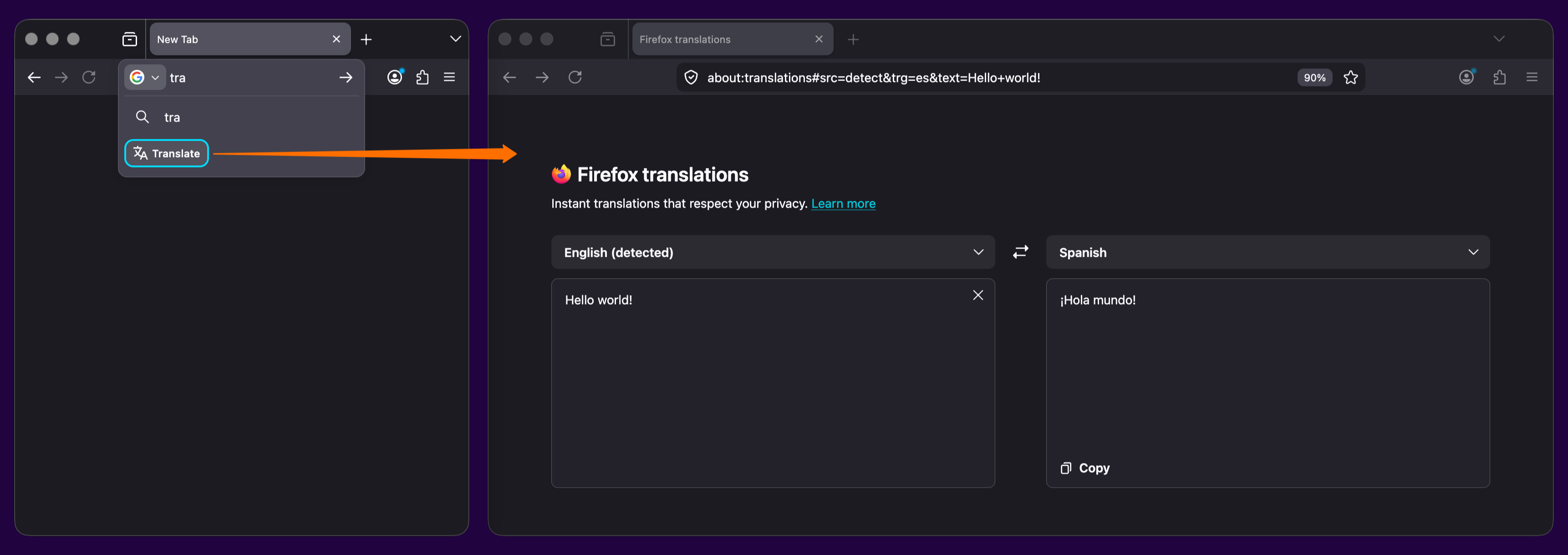
    • Try out real-time, private translations in Firefox Desktop with the about:translations page. Start typing the word "translate" into the URL bar for a quick-action shortcut to the page.

      Screenshot of two open Firefox windows. On the left, *tra* is in the URL bar and the *translate* quick action appears below, circled in bright blue. An orange arrow points from it to the right window, where the Firefox about:translations page is open. *Hello world!* is translated to the Spanish *Β‘Hola mundo!*

    • Added support for the GTK emoji picker on Linux, allowing users to insert emoji using the system shortcut (typically Ctrl+.).

    • Firefox web apps are now available to Windows users who installed Firefox through the Microsoft Store.

    • The new Firefox Profile management system is now available to all users, including users on Windows 10.

    • Backing up a profile to a file is now available to all Windows 10 and 11 users, including those who use the new profile management system.

    • Firefox now ships with a new .rpm package for Linux users on Red Hat, Fedora, openSUSE, and other RPM-based distributions.

    • Firefox now prompts you to enable location access in Windows settings when granting a website permission to use your location, if geolocation hasn't already been allowed. This behavior, previously limited to some Windows 11 versions, now applies to all supported Windows versions.

    • The built-in VPN is now available for users in Canada. Note: This feature is not available in enterprise environments.

      Currently available in: Canada, France, Germany, United Kingdom, United States

      This feature is part of a progressive roll out.

      What is a progressive roll out?

      Certain new Firefox features are released gradually. This means some users will see the feature before everyone does. This approach helps to get early feedback to catch bugs and improve behavior quickly, meaning more Firefox users overall have a better experience.

    Fixed

    • Fixed an issue on macOS where, when macOS Lockdown mode is enabled, emoji characters are not displayed in web content.

    • Various security fixes.

    Changed

    • If you prefer creating tab groups from the context menu, you can now turn off drag-and-drop group creation in Settings > Tabs > Drag tabs to create tab groups.

    Enterprise

    Developer

    • A new element-specific section has been added to the pseudo-class toggle panel including a toggle for the :open pseudo-class, which is only available for elements that have an open state like <dialog> elements. The existing toggle for the :visited pseudo-class was also moved there, as it only applies to <a> and <area> elements. (Learn More)

    • The Document.caretPositionFromPoint() method now only returns a position in a shadow DOM if its ShadowRoot is passed in the newly-added shadowRoots option.

    • The devtools network monitor now indicates when a connection used a certificate issued by a certificate authority not in Mozilla's Root CA Program.

    Web Platform

    • Firefox now supports the ariaNotify API for accessibility notifications (e.g. for screen readers) as a more ergonomic and reliable alternative to ARIA live regions.

    • Firefox now supports media element pseudo-classes (e.g., :playing, :paused) to allow more precise styling based on media playback state.

    • Added support for the highlightsFromPoint() API, which allows web pages to interact with CSS Highlights by returning all Highlights at a given point.

    • Firefox now supports light-dark() on images, just like on colors, which is very useful for supporting dark mode on websites.

    • The color-mix() function previously accepted only two color values. This limitation has now been removed, allowing the function to accept an arbitrary number of colors.

    • Added support for a new auto value on the sizes attribute for lazy-loaded image elements with multiple images defined via srcset. This allows the browser to automatically select the right image based on the layout width of the image element. (Learn More)

    Unresolved

    • Users with Bitdefender security software installed may experience problems loading websites, particularly Facebook.com. We are working on a workaround, but as a temporary mitigation, disabling Bitdefender or turning off its traffic filtering features may resolve the issue. (Fixed in 150.0.1)

    • Some websites on internal or corporate networks that require a login prompt may fail to display the sign-in dialog in Firefox 150, showing a blank page instead. (Fixed in 150.0.2 in Bug 2034752)

    Community Contributions

    •  

    2.7.1

    Donations are appreciated. There is now a PayPal option.

    Changes from 2.7.0 to 2.7.1:

    Updates:

    • Updated MPC Video Renderer to version 0.10.2.2535

    Fixes:

    • Several small fixes and improvements.

    OpenSubtitles download error 406

    Subtitle downloads from OpenSubtitles may fail depending on time of day. This is due to our daily download quota being exceeded. Current amount of donations is barely enough to pay for the existing quota. So it is unlikely that quota can be increased and situation will get worse over time.
    If you create an OpenSubtitles account and configure it in MPC-HC settings then you may be able to bypass the quota.
    Options > Subtitles > Misc > Right-click on OpenSubtitles.com > Setup > Fill in username/password

    Overview of features

    A lot of people seem to be unaware of some of the awesome features that have been added to MPC-HC in the past years. Here is a list of useful options and features that everyone should know about:

    • Play HDR video
      This requires using either MPC Video Renderer (MPCVR) or madVR.
      These renderers can be selected here:
      Options > Playback > Output
      With other video renderers, the colors will be wrong!
      MPCVR is now included and is the recommended renderer for modern systems. MadVR needs to be installed separately. MPCVR also supports Dolby Vision. MadVR does not.
      For optimal performance you should change the hardware decoder to D3D11 in LAV Video Decoder settings when using MPCVR on Windows 10/11, because this renderer uses DirectX11.
      (Automatic detection of GPU and configuration of the above settings is high on my ToDo list, so MPC-HC will have better default out-of-the-box settings on modern systems in the future.)
    • The installer of MPC-HC is very basic (and that will not change).
      I therefore recommend using K-Lite Codec Pack. That includes MPC-HC and other essential components. It has a very advanced installation that can automatically create file associations, and helps you with easy configuration of important MPC-HC settings, such as preferred subtitle language. It also does automatic configuration of renderer and hardware decoding, for best performance and HDR support.
      The Standard version should be sufficient for most people. Use Full version of you like to use MadVR.
    • Modern GUI Theme (Dark or Light) or the old classic theme
      Options > Player > User Interface
      It is also possible to change the height of the seekbar and size of the toolbar buttons.
      Plus there are options to show audio/video details in the statusbar, such as codec and resolution.
    • Customizable toolbar buttons
      You can add/remove/re-order the player buttons.
      There are also several different toolbar designs to choose from.
    • Video preview on the seekbar
      Options > Player > User Interface > Hover type
    • Ability to search for subtitles
      Press D for manual search.
      Or enable automatic search in: Options > Subtitles > Misc
    • Adjust playback speed
      Menu > Play > Playback rate
      The buttons in the player that control playback rate take a 2x step by default. This can be customized to smaller values (like 10%):
      Options > Playback > Speed step
      Adjusting playback speed works best with the internal audio renderer. This also has automatic pitch correction.
      Options > Playback > Output > Audio Renderer
    • MPC-HC can remember recently played files and also their playback position, so you can resume playback from when you left
      Options > Player > History
    • You can quickly seek through a video with Ctrl + Mouse Scrollwheel.
    • You can jump to next/previous file in a folder by pressing PageUp/PageDown.
    • You can right-click on the framestep button to step backwards. Some other buttons also have right-click actions, such as closing file by right-clicking stop.
    • You can perform automatic actions at end of file. For example to go to next file or close player.
      Options > Playback > After Playback (permanent setting)
      Menu > Play > After Playback (for current file only)
    • A-B repeat
      You can loop a segment of a video. Press [ and ] to set start and stop markers.
    • You can rotate/flip/mirror/stretch/zoom the video
      Menu > View > Pan&Scan
      This is also easily done with hotkeys (see below).
    • There are lots of keyboard hotkeys and mouse actions to control the player. They can be customized as well.
      Options > Player > Keys
      Tip: there is a search box above the table.
    • You can hide GUI elements even in windowed mode
      Options > User Interface > Hide Windowed Controls
      That hides most GUI elements during playback. To show them simply move your mouse to bottom of window.
      You can even hide everything except the video by pressing 1 (restore normal view with 3).
    • You can seek inside the playlist by simply typing text (when playlist window has the mouse focus).
    • MPC-HC also supports Blu-ray playback.
      Only limitation is that you need to use a decrypting tool.
      And it also does not support Blu-ray menus, but you can use the navigate menu in the player to select the content to play.
    • You can stream videos directly from Youtube and many other video websites
      Put yt-dlp.exe in the MPC-HC installation folder.
      Then you can open website URLs in the player: Menu > File > Open File/URL
      You can even download those videos: Menu > File > Save a copy
      Tip: to be able to download in best quality with yt-dlp, it is recommended to also put ffmpeg.exe in the MPC-HC folder.
      Several YDL configuration options are found here: Options > Advanced
      This includes an option to specify the location of yt-dlp.exe in case you don't want to put it in MPC-HC folder.
      Note 1: You also need to install Microsoft Visual C++ 2010 SP1 Redistributable Package (x86)
      Note 2: For optimal Youtube support you may also need to put deno.exe in same folder as yt-dlp.
      Note 3: yt-dlp nightly build (very latest version made daily)
      Note 4: yt-dlp windows7 compatible build
    • Besides all these (new) features, there have also been many bugfixes and internal improvements in the player in the past years that give better performance and stability. It also has updated internal codecs. Support was added for CUE sheets, WebVTT subtitles, etc.
    • You should really take a few minutes to look through all the options pages if you are a new user or if you are upgrading from a very old version. Don't forget the advanced options page.

    MPC Video Renderer

    Frequently Asked Questions

    •  

    Extended Stable Updates for Desktop

    The Extended Stable channel has been updated to 146.0.7680.201Β for Windows and Mac which will roll out over the coming days/weeks.


    A full list of changes in this build is available in the log. Interested in switching release channels? Find out how here. If you find a new issue, please let us know by filing a bug. The community help forum is also a great place to reach out for help or learn about common issues.

    Srinivas Sista
    Google Chrome
    •  

    Stable Channel Update for Desktop

    The Stable channel has been updated to 147.0.7727.101/102 for Windows/MacΒ  andΒ 147.0.7727.101Β for Linux, which will roll out over the coming days/weeks. A full list of changes in this build is available in theΒ Log


    Security Fixes and Rewards

    Note: Access to bug details and links may be kept restricted until a majority of users are updated with a fix. We will also retain restrictions if the bug exists in a third party library that other projects similarly depend on, but haven’t yet fixed.


    This update includes 31 security fixes. Please see the Chrome Security Page for more information.


    [$90000][490170083] Critical CVE-2026-6296: Heap buffer overflow in ANGLE. Reported by cinzinga on 2026-03-05


    [$10000][493628982] Critical CVE-2026-6297: Use after free in Proxy. Reported by heapracer on 2026-03-17

    [TBD][495700484] Critical CVE-2026-6298: Heap buffer overflow in Skia. Reported by 86ac1f1587b71893ed2ad792cd7dde32 on 2026-03-24

    [N/A][497053588] Critical CVE-2026-6299: Use after free in Prerender. Reported by Google on 2026-03-28

    [TBD][497724498] Critical CVE-2026-6358: Use after free in XR. Reported by Jihyeon Jeong (Compsec Lab, Seoul National University / Research Intern) on 2026-03-30

    [TBD][490251701] High CVE-2026-6359: Use after free in Video. Reported by 86ac1f1587b71893ed2ad792cd7dde32 on 2026-03-06

    [TBD][491994185] High CVE-2026-6300: Use after free in CSS. Reported by c6eed09fc8b174b0f3eebedcceb1e792 on 2026-03-12

    [TBD][495273999] High CVE-2026-6301: Type Confusion in Turbofan. Reported by qymag1c on 2026-03-23

    [TBD][495477995] High CVE-2026-6302: Use after free in Video. Reported by Syn4pse on 2026-03-24

    [N/A][496282147] High CVE-2026-6303: Use after free in Codecs. Reported by Google on 2026-03-25

    [N/A][496393742] High CVE-2026-6304: Use after free in Graphite. Reported by Google on 2026-03-26

    [TBD][496618639] High CVE-2026-6305: Heap buffer overflow in PDFium. Reported by 86ac1f1587b71893ed2ad792cd7dde32 on 2026-03-26

    [TBD][496907110] High CVE-2026-6306: Heap buffer overflow in PDFium. Reported by 86ac1f1587b71893ed2ad792cd7dde32 on 2026-03-27

    [TBD][497404188] High CVE-2026-6307: Type Confusion in Turbofan. Reported by Project WhatForLunch (@pjwhatforlunch) on 2026-03-29

    [N/A][497412658] High CVE-2026-6308: Out of bounds read in Media. Reported by Google on 2026-03-29

    [N/A][497846428] High CVE-2026-6309: Use after free in Viz. Reported by Google on 2026-03-30

    [TBD][497880137] High CVE-2026-6360: Use after free in FileSystem. Reported by asjidkalam on 2026-03-31

    [N/A][497969820] High CVE-2026-6310: Use after free in Dawn. Reported by Google on 2026-03-31

    [N/A][498201025] High CVE-2026-6311: Uninitialized Use in Accessibility. Reported by Google on 2026-03-31

    [N/A][498269651] High CVE-2026-6312: Insufficient policy enforcement in Passwords. Reported by Google on 2026-03-31

    [N/A][498765210] High CVE-2026-6313: Insufficient policy enforcement in CORS. Reported by Google on 2026-04-02

    [N/A][498782145] High CVE-2026-6314: Out of bounds write in GPU. Reported by Google on 2026-04-02

    [N/A][499247910] High CVE-2026-6315: Use after free in Permissions. Reported by Google on 2026-04-03

    [N/A][499384399] High CVE-2026-6316: Use after free in Forms. Reported by Google on 2026-04-03

    [N/A][500036290] High CVE-2026-6361: Heap buffer overflow in PDFium. Reported by Google on 2026-04-06

    [TBD][500066234] High CVE-2026-6362: Use after free in Codecs. Reported by c6eed09fc8b174b0f3eebedcceb1e792 on 2026-04-07

    [N/A][500091052] High CVE-2026-6317: Use after free in Cast. Reported by Google on 2026-04-06

    [N/A][495751197] Medium CVE-2026-6363: Type Confusion in V8. Reported by Google on 2026-03-24

    [TBD][495996858] Medium CVE-2026-6318: Use after free in Codecs. Reported by Syn4pse on 2026-03-25

    [TBD][499018889] Medium CVE-2026-6319: Use after free in Payments. Reported by pwn2addr on 2026-04-02

    [N/A][502103414] Medium CVE-2026-6364: Out of bounds read in Skia. Reported by Google Threat Intelligence on 2026-04-13


    We would also like to thank all security researchers that worked with us during the development cycle to prevent security bugs from ever reaching the stable channel.


    Many of our security bugs are detected using AddressSanitizer, MemorySanitizer, UndefinedBehaviorSanitizer, Control Flow Integrity, libFuzzer, or AFL.


    Interested in switching release channels? Find out howΒ here. If you find a new issue, please let us know byΒ filing a bug. TheΒ community help forumΒ is also a great place to reach out for help or learn about common issues.

    Srinivas Sista

    Google Chrome
    •  

    FileZilla Client 3.70.3 released

    Bugfixes and minor changes:

    • SFTP: Added a heuristic to reply to a keyboard-interactive request with the site's password, if it consists of a single prompt named "Password"
    • SFTP: Updated to fzssh 1.1.10 for increased compatibility with broken servers that blatantly violate the SSH specifications
    •  

    FileZilla Client 3.70.2 released

    Bugfixes and minor changes:

    • SFTP: Updated to fzssh 1.1.9 to address an issue with servers sending nonsensical SSH_MSG_USERAUTH_INFO_REQUEST packages
    •  

    FileZilla Client 3.70.1 released

    Bugfixes and minor changes:

    • SFTP: Updated to fzssh 1.1.8 to address an issue with servers sending empty longnames
    • SFTP: Updated to fzssh 1.1.8 to address an issue with servers incapable of handling large receive windows of 2^32 - 1 bytes
    • SFTP: Fixed an issue creating directories during file upload
    •  
    ❌