Lees weergave

iCloud, Photos, Find My and More Experiencing Issues

Several iCloud services are experiencing issues, according to Apple's system status page.


Find My, Game Center, Photos, ‌iCloud‌ Calendar, ‌iCloud‌ Mail, ‌iCloud‌ Contacts, ‌iCloud‌ Web Apps, and iWork for ‌iCloud‌ are all experiencing service interruptions.

Apple says only some users may run into problems. The issue started at 3:33 p.m. Eastern Time and is ongoing.
This article, "iCloud, Photos, Find My and More Experiencing Issues" first appeared on MacRumors.com

Discuss this article in our forums

  •  

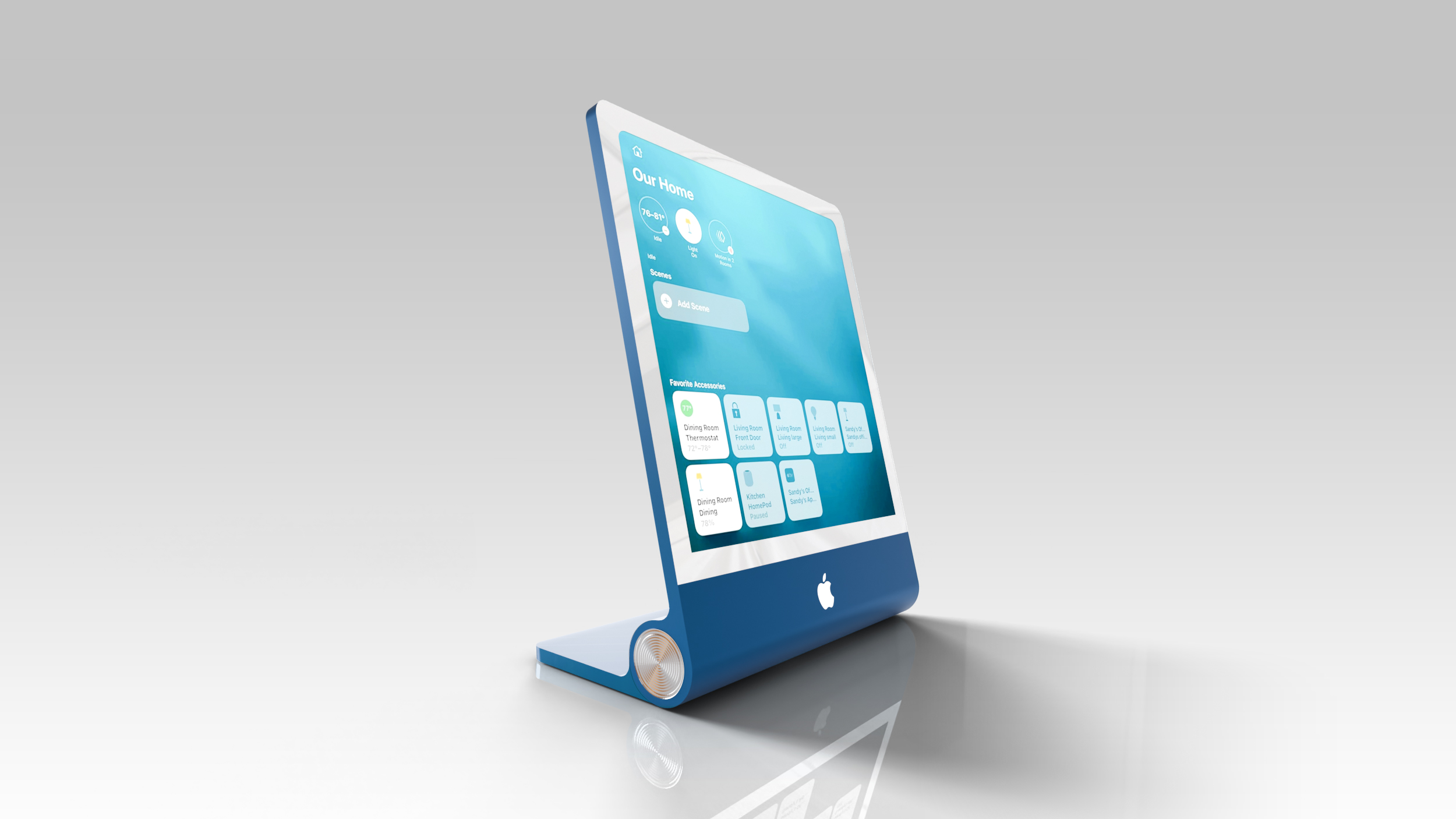
Apple's Home Hub Will Have a Widget Gallery With iPhone Widget Support

Apple is working on a home hub that incorporates Siri AI, and it's set to launch as soon as this year. The home hub will use a Widget Gallery that lets users select the content they want to appear on the device's home screen.


Mentions of the Widget Gallery were found in macOS Tahoe 26.7, an update that leaked a long list of unreleased Apple products. The strings were found in a file named PosterKit-J490, and J490 is the codename for the home hub. PosterKit is Apple's framework for Lock Screen customization, and the hub's home screen could have many of the same options for icons, widgets, and clock faces.

Apple already uses the Widget Gallery on iPhone, iPad, and Mac for adding widgets to the Home Screen and Lock Screen of those devices, and the home hub will have a similar mechanism.

Based on the code, widgets installed on a linked iPhone will be suggested on the home hub, much like how iPhone widgets are available on a Mac without an app being installed. It looks like third-party app widgets may be supported in addition to Apple's own apps. iPhone app widgets displayed on the home hub will have information mirrored from the iPhone.

All users in the home will be able to see the widgets installed on the home hub, but content in widgets will only be visible when the primary linked device is in the home for privacy protection.

A Smart Stack will automatically rotate through widgets to show relevant information throughout the day, and users will also be able to flip through the different Smart Stack options. Apple already has Smart Stack on its other devices, including the Apple Watch.

The home hub isn't expected to have its own App Store, but it will support Apple apps like Safari, Apple News, Apple Music, Notes, Calendar, Photos, and Home. Tapping on an installed widget from the home screen could launch a full app with more information. Code references a Face Gallery too, suggesting users will be able to select different clock options for the device's home screen, and it indicates that the hub will be able to be added to HomeKit scenes and automations alongside other smart home accessories.

Apple's hub is expected to have a 7-inch square display with options to put it on a base or mount it on the wall. More information about the device can be found in our guide.
This article, "Apple's Home Hub Will Have a Widget Gallery With iPhone Widget Support" first appeared on MacRumors.com

Discuss this article in our forums

  •  

National Parks Apple Watch Activity Challenge Launching August 23

Apple will launch its annual National Parks Apple Watch activity challenge on Sunday, August 23 to celebrate national parks across the United States.


Apple Watch owners can earn an Apple Watch activity award by doing a hike, walk, run, or wheelchair push that lasts for 20 minutes or more on August 23, 2026.
Earning this award is a walk in the park. Or a run. Or a hike. Or a wheelchair push. Just record one of these workouts for 20 minutes or more on August 23.

Like all of the Apple Watch activity challenges, earning the award will provide users with animated stickers that can be used in the Messages app.


Along with a new Apple Watch challenge, Apple typically offers other national parks-themed content in August, including an Apple Pay donation program, Apple TV content, Apple Music songs, books, podcasts, and more.
Related Roundup: Apple Watch 11

This article, "National Parks Apple Watch Activity Challenge Launching August 23" first appeared on MacRumors.com

Discuss this article in our forums

  •  

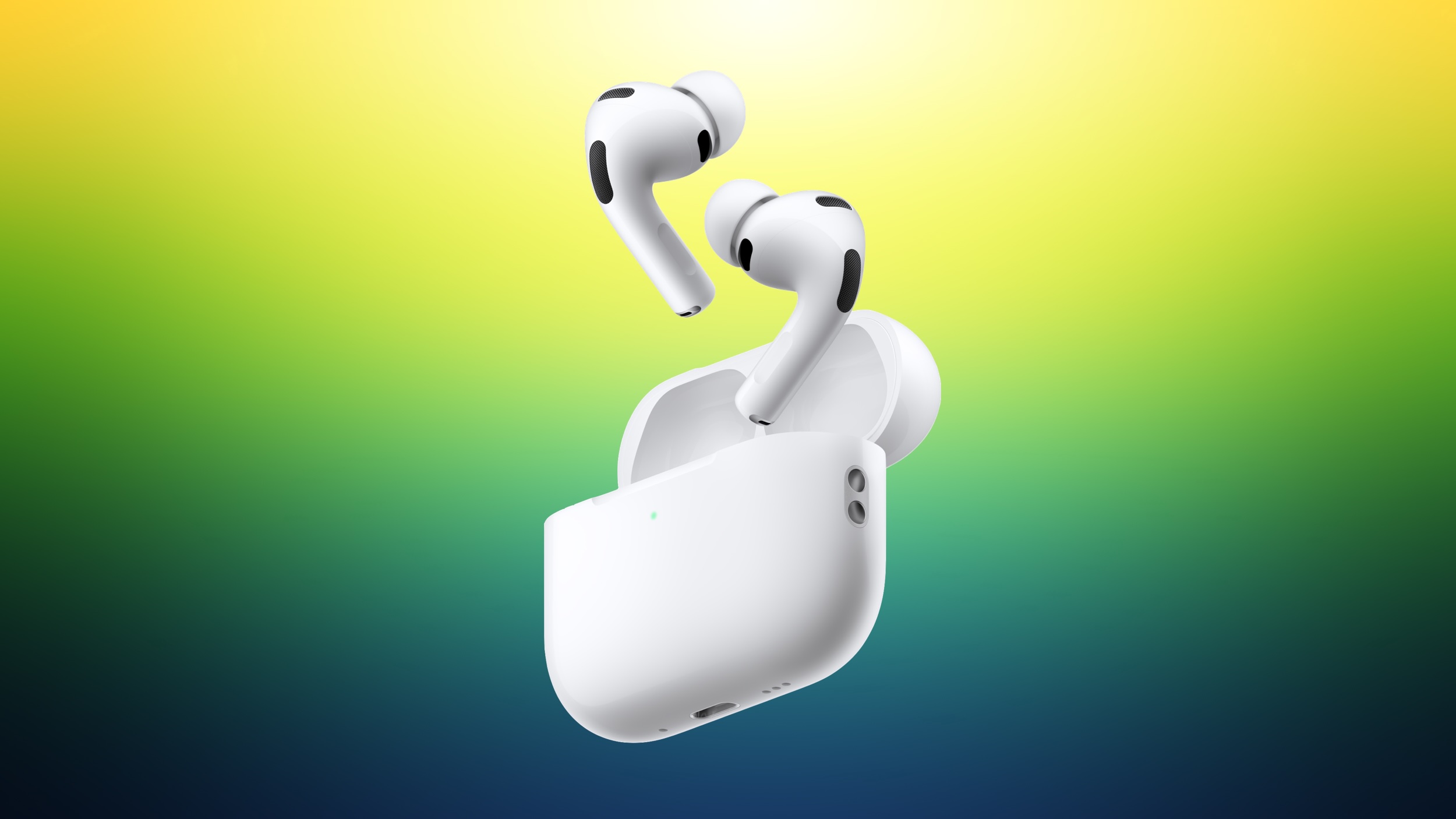
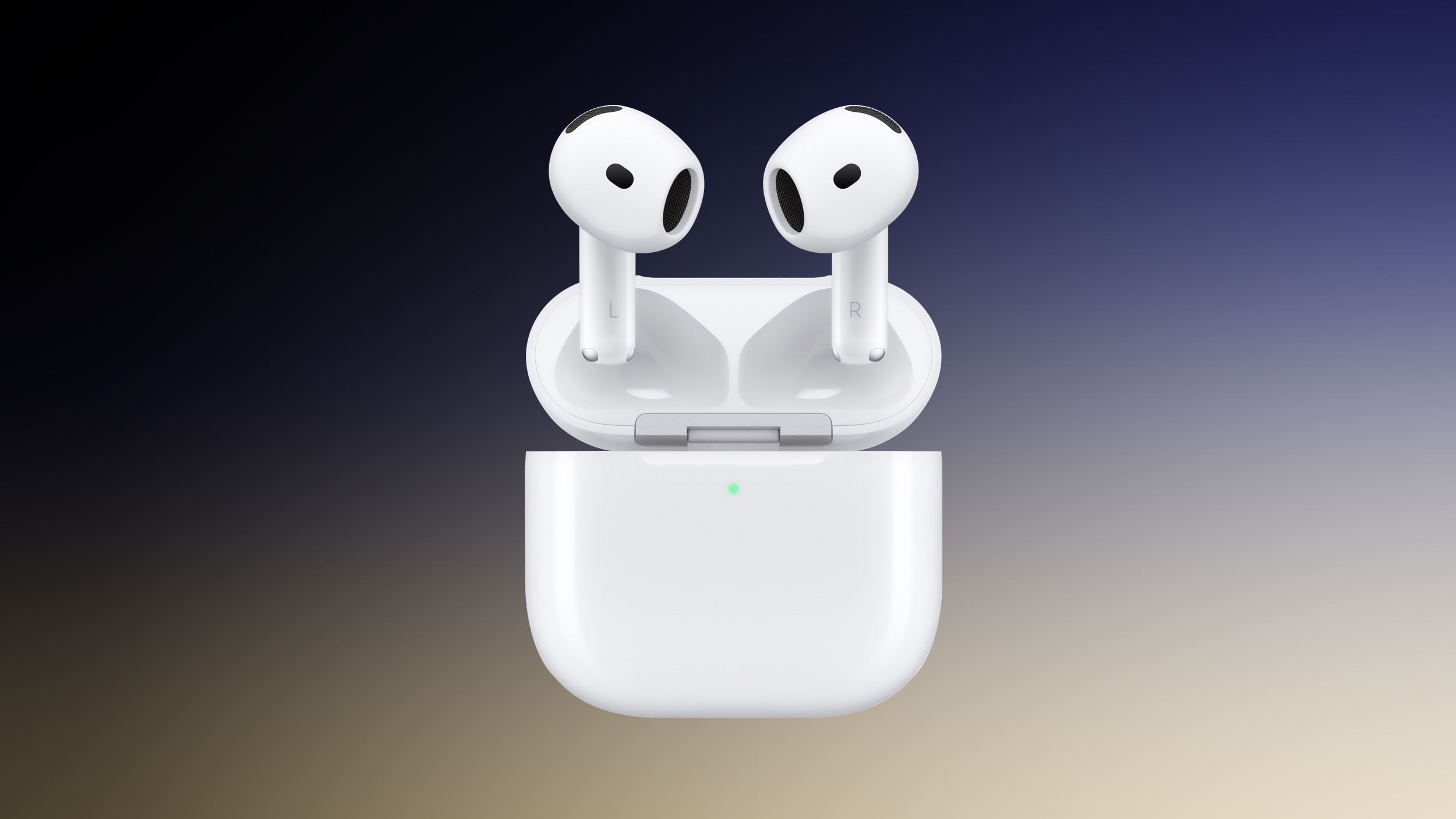
Apple's Camera AirPods May Launch as 'AirPods Pro,' Not 'AirPods Ultra'

The camera-equipped AirPods that we've confirmed Apple is working on are likely going to be part of the AirPods Pro lineup rather than separate "AirPods Ultra."


A macOS Tahoe 26.7 file that references the new AirPods is labeled "AirPods Pro," hinting at the new name. It's possible that's a placeholder name, so AirPods Ultra isn't entirely out of the question, but given Apple put a full video of the new AirPods in the software, there isn't much need for a placeholder.

Bloomberg's Mark Gurman said in March that Apple was considering several devices with the Ultra name, including the foldable iPhone Ultra, AirPods Ultra, and an OLED MacBook Ultra, but that may not be a term we see for the new AirPods. He suggested Apple might use the name because the camera-equipped AirPods were expected to be more expensive than the $249 AirPods Pro 3, so Apple's "Pro" choice could also be a hint that pricing won't be too far off the current model.

Rumors about camera-equipped AirPods have been a little confusing, and that could account for any naming discrepancies. Most of the rumors about the AirPods with a camera were about a product with the codename B798. In June, Gurman said the camera AirPods had been delayed because of issues with Siri AI, and would not launch until September 2027 alongside the 20th anniversary iPhone.

In early August, Gurman revised his launch timing and said Apple was close to debuting camera AirPods with the codename B790. The B790 AirPods had apparently been progressing alongside the B798 model, and Gurman said the company "famously creates competing versions of the same product internally," with B790 closer to launch than B798.

It's not known if there are differences between the B790 and B798 products Apple has been working on, but it looks like we're going to see the camera AirPods this year. The AirPods video in ‌macOS Tahoe‌ 26.7 suggests the device is near-ready to launch.

The camera in the AirPods will not be used for capturing photos and videos and will instead feed visual information to ‌Siri‌ AI for an easier-to-use version of Visual Intelligence.
Related Roundup: AirPods Pro 3
Buyer's Guide: AirPods Pro (Neutral)
Related Forum: AirPods

This article, "Apple's Camera AirPods May Launch as 'AirPods Pro,' Not 'AirPods Ultra'" first appeared on MacRumors.com

Discuss this article in our forums

  •  

Apple Overhauls EU App Store Fees to Settle Digital Markets Act Dispute

Apple today announced changes to its App Store policies and fees in the European Union to comply with the Digital Markets Act. Apple says the changes were made after "close collaboration" with the European Commission, and the updates simplify the fee structure and "resolve Apple's disagreements with the Commission over business terms and alternative distribution."


The initial acquisition fee and store services fee are being removed for apps distributed outside of the ‌App Store‌, and Apple will now charge a 5% Core Technology Commission on digital purchases that replaces the prior per-install Core Technology Fee.

Commission rates are changing for ‌App Store‌ apps, alternative payments, and apps distributed through alternative app marketplaces or the web.

  • App Store Apps With In-App Purchase - Apple will charge a 26% fee for apps distributed through the ‌App Store‌ that use in-app purchase. The fee will be 15% for Small Business Program, Mini Apps Partner Program, and Video Partner Program participants. It will also be 15% for auto-renewing subscriptions after their first year.

  • App Store Apps Using Alternative Payments - Apps in the ‌App Store‌ that use in-app alternative payment processing will pay 20%. Developers in Apple's programs will pay 10%.

  • Apps That Link Out of the App for Purchases - Apps that link to a website purchase option will pay 15%. Developers in Apple's programs will pay 10%.

  • Alternative App Marketplace Apps - Apple will charge a 5% Core Technology Commission.

  • Apps Distributed via the Web - Apple will charge a 5% Core Technology Commission.


Developers can offer in-app purchase options alongside alternative payment options in the EU, which is something Apple did not allow before. Apple says there will be presentation requirements so users have a consistent, transparent experience.

Developers distributing apps in the EU must select their payment options and maintain those options for 12 months before making changes to "provide consistency and clarity for users." Apple will still use a Notarization process for apps downloadable through the web and through alternative app marketplaces.

Apps in the Kids category or being used by children under 13 will not include links to websites to complete transactions. All apps that use alternative payment processing or link to a website for transactions have to include a parental gate if the user is under 18.

Apple is relaxing the rules for operating an alternative app marketplace or distributing apps via the web in the European Union. Apple used to require developers to have a one million euro standby letter of credit from an A-rated financial institution, but the new rules are as follows:

  • Meet a moderate financial-stability bar as scored by Dun & Bradstreet.

  • Are publicly traded or owned by a publicly traded company.

  • Have received venture funding from an established investment firm.

  • Have completed a financial audit by a licensed accountant.

  • Are a government entity, educational institution, or nonprofit.


Developers can sign the new terms starting today, and the changes go into effect on October 1.
This article, "Apple Overhauls EU App Store Fees to Settle Digital Markets Act Dispute" first appeared on MacRumors.com

Discuss this article in our forums

  •  

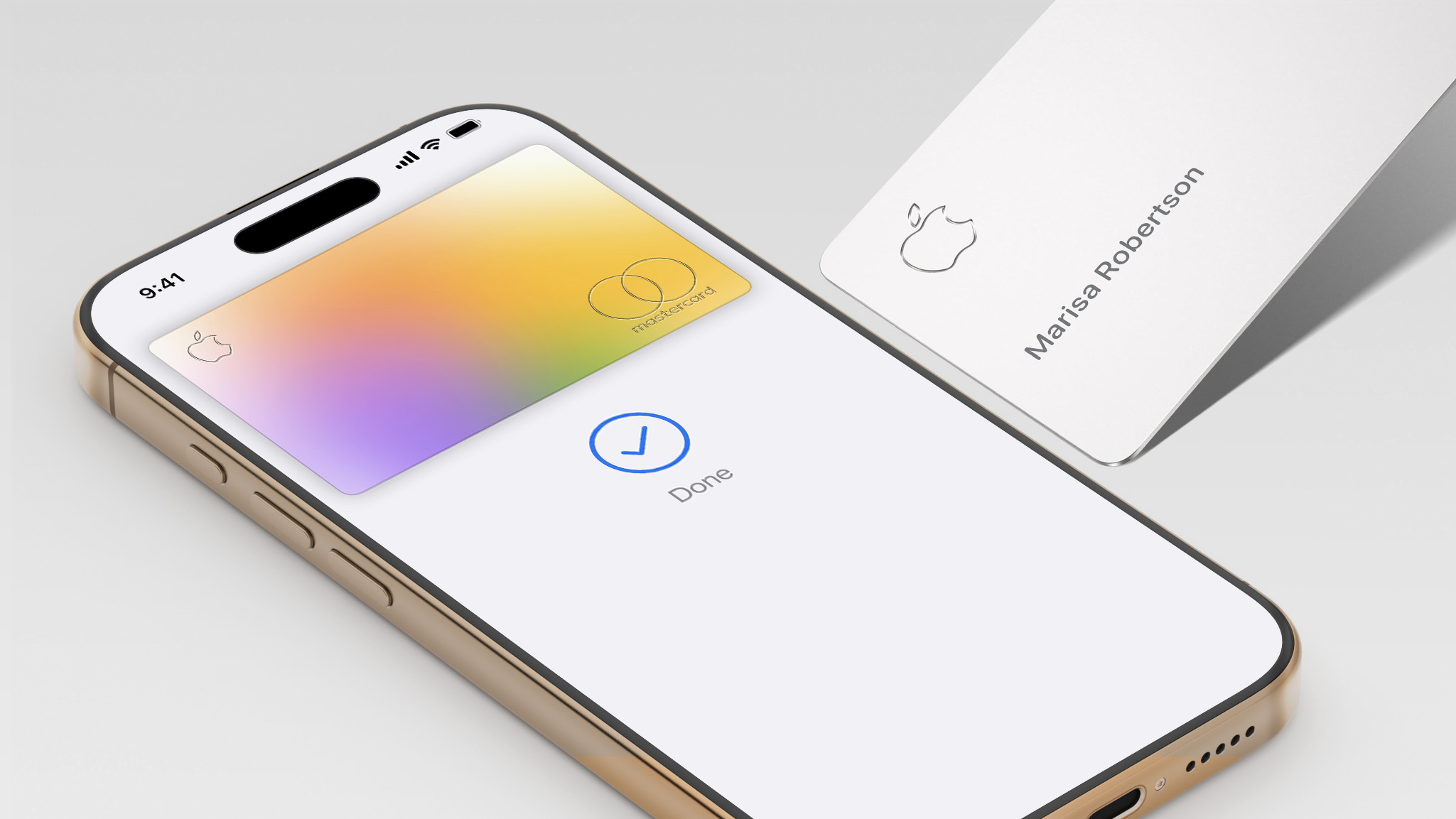
Apple Card Offering 5% Cash Back on Select Purchases for Limited Time

Now through September 15, you can get 5% Daily Cash when you use the Apple Card via Apple Pay on up to $750 in combined eligible purchases at Booking​.com, Hertz, ChargePoint, Exxon, and Mobil. The maximum total Daily Cash you can earn through this offer is $37.50, according to Apple, with complete details outlined on this page.


Ordinarily, the Apple Card offers 3% Daily Cash at these partners, but this limited-time promotion provides an additional 2% Daily Cash on eligible purchases up to the $750 limit. Apple has given the offer an "August road trip" theme, as the eligible purchases include hotel rooms, rental cars, gas, and electric vehicle charging.

Apple's credit card is available in the U.S. only.
This article, "Apple Card Offering 5% Cash Back on Select Purchases for Limited Time" first appeared on MacRumors.com

Discuss this article in our forums

  •  

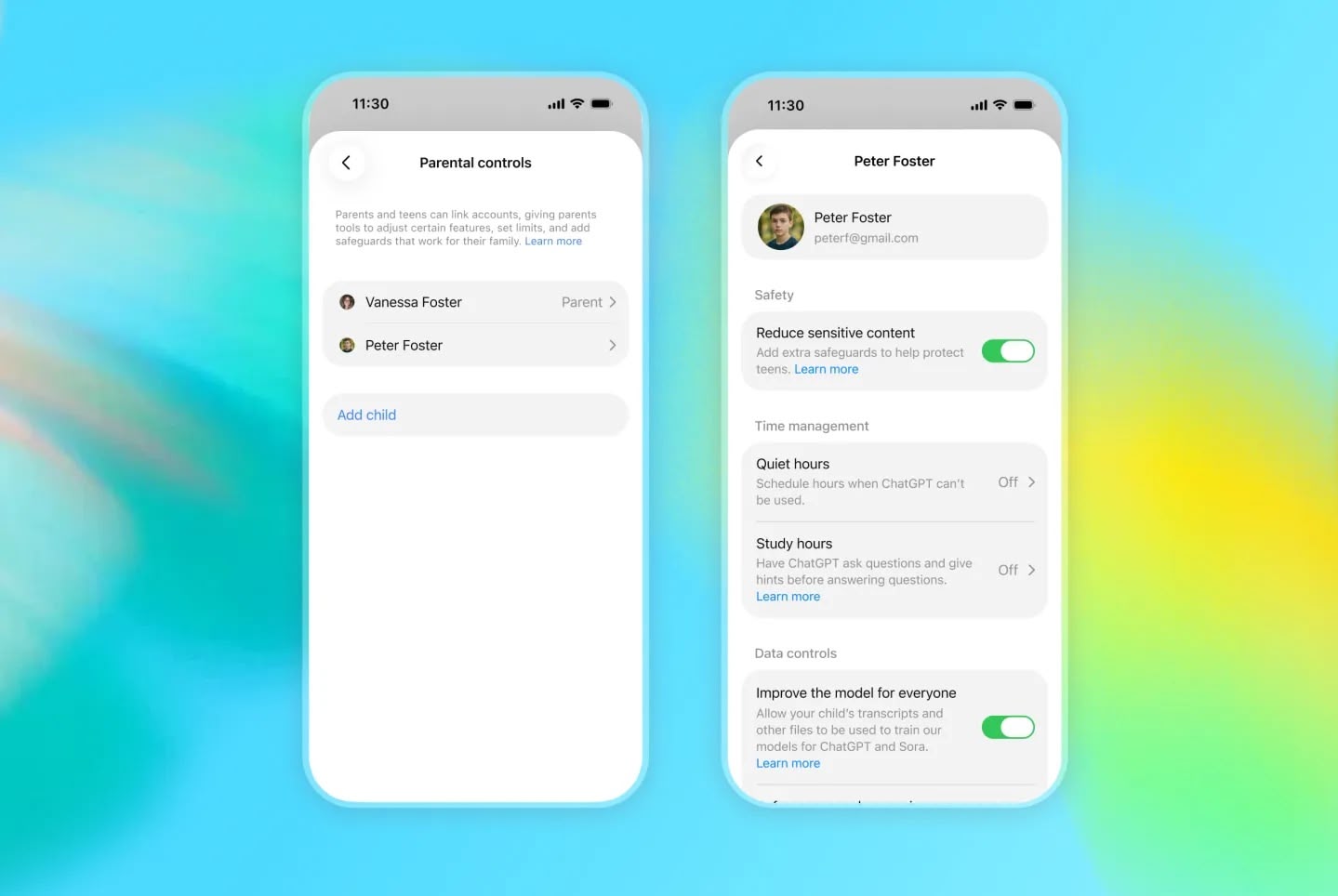
OpenAI Announces ChatGPT for Teens With Built-In Safeguards and Learning Prompts

OpenAI is adding a ChatGPT mode for teenagers that includes parental controls, enhanced content safeguards, and a focus on learning.


ChatGPT for Teens is "designed to help teens learn, think critically, deepen understanding, and use AI with confidence," said the company in a blog post announcing the feature.

The feature includes learning-focused starter prompts for facilitating studying, practicing skills, or exploring ideas. ChatGPT's Study mode is baked in, as are learning tools (including quizzes when available), and Study hours that let the teen or a linked parent/guardian choose when eligible new chats start in study mode.

OpenAI says reminders encourage users to take breaks, and there are built-in provisions for making it clear that ChatGPT is AI, and does not have consciousness, experience feelings or emotions. That backstop aims to discourage relationship-forming with the chatbot.

ChatGPT automatically enables ChatGPT for Teens for eligible accounts identified as belonging to someone under 18. Users who think they are seeing the feature by mistake can verify their age and ask ChatGPT to remove the teen protections.

OpenAI says ChatGPT for Teens is rolling out globally to eligible teen accounts on Free and paid personal ChatGPT plans beginning August 18, with full availability in Australia expected September 8.
This article, "OpenAI Announces ChatGPT for Teens With Built-In Safeguards and Learning Prompts" first appeared on MacRumors.com

Discuss this article in our forums

  •  

Apple's M4 iPad Air Gets Best-Ever Discounts Since Summer Price Hikes

Amazon and Best Buy this week have multiple discounts on the M4 iPad Air, providing $100 off these 2026 models. These are the best prices we've seen in the wake of Apple's summer price hikes.

Note: MacRumors is an affiliate partner with Amazon. When you click a link and make a purchase, we may receive a small payment, which helps us keep the site running.

You'll find savings on both the 11-inch and 13-inch models of the M4 iPad Air, with savings mainly focused on 128GB and 256GB Wi-Fi tablets. All of these discounts have been automatically applied and do not require a coupon code or a special membership.


The new iPad Air features the M4 chip, C1X modem, and N1 networking chip, which brings support for Wi-Fi 7 and Bluetooth 6. In terms of design, the 2026 models are identical to the 2025 iPad Air tablets, with an edge-to-edge display, slim bezels, and aluminum chassis.

11-inch M4 iPad Air


13-inch M4 iPad Air


If you're on the hunt for more discounts, be sure to visit our Apple Deals roundup where we recap the best Apple-related bargains of the past week.


Deals Newsletter


Interested in hearing more about the best deals you can find in 2026? Sign up for our Deals Newsletter and we'll keep you updated so you don't miss the biggest deals of the season!


Related Roundup: Apple Deals

This article, "Apple's M4 iPad Air Gets Best-Ever Discounts Since Summer Price Hikes" first appeared on MacRumors.com

Discuss this article in our forums

  •  

Apple Donating to Indonesian Earthquake Relief Efforts

In a social media post today, Apple CEO Tim Cook said Apple will be donating to relief efforts on the ground in Indonesia as the country reels from a deadly earthquake and aftershocks.

Apple has donated to the Red Cross following past natural disasters, but it does not disclose the dollar amounts.
This article, "Apple Donating to Indonesian Earthquake Relief Efforts" first appeared on MacRumors.com

Discuss this article in our forums

  •  

Thomas Lange: LLM usage in Debian

After spending many hours on reading all the proposals and discussions the best choice for me is NOTA (None of the above).

We do not need to create new rules for LLM usage, we already have our DFSG and our social contract.

Keep it simple, stupid. Avoid more rules!

  •  

New Apple TV to Come With Upgraded Siri Remote

The next-generation Apple TV 4K will ship with an upgraded Siri Remote, according to macOS 26.7 code findings.

The code does not reveal any specific changes planned for the remote, but it suggests that a new Apple TV is finally coming soon, following years of rumors. The new model, expected to be powered by an A17 Pro chip or newer, will likely be unveiled this September or October.
This article, "New Apple TV to Come With Upgraded Siri Remote" first appeared on MacRumors.com

Discuss this article in our forums

  •  

AirTag 2 Drops to Low Price of $89 for 4-Pack

Apple's AirTag 2 is on sale for $89.00 this week on Amazon, down from $99.00. This deal is on the 4-Pack of the AirTag 2, and it's a match of the record low price first seen during Prime Day.

Note: MacRumors is an affiliate partner with Amazon. When you click a link and make a purchase, we may receive a small payment, which helps us keep the site running.

We're also tracking a smaller deal on the AirTag 2 1-Pack, available for $24.00, down from $29.00. This is another record low price on the AirTag 2, and both have estimated delivery dates of August 23.


The new AirTag is equipped with a second-generation Ultra Wideband chip, enabling the Precision Finding feature to work up to 50% farther away from an item compared to the previous-generation model.

If you're on the hunt for more discounts, be sure to visit our Apple Deals roundup where we recap the best Apple-related bargains of the past week.


Deals Newsletter


Interested in hearing more about the best deals you can find in 2026? Sign up for our Deals Newsletter and we'll keep you updated so you don't miss the biggest deals of the season!


Related Roundup: Apple Deals

This article, "AirTag 2 Drops to Low Price of $89 for 4-Pack" first appeared on MacRumors.com

Discuss this article in our forums

  •  

Apple's US App Store Commission Revenue Down 18% This Year

The commission Apple earns from the App Store is shrinking in markets where it has been forced to relax its grip on in-app purchases, based on new analytics data.


According to Appfigures, cited by the Financial Times ($), Apple's U.S. commission revenue has fallen 18 percent since the start of 2026. It also found App Store revenue declining in Brazil and Japan since both countries introduced new regulations.

Separately, Sensor Tower said U.S. consumer spending through the App Store was down 6 percent in the second quarter, compared to 9 percent growth a year earlier.

The figures follow Apple's admission during last month's earnings call that regulatory changes have started to weigh on its Services growth. Apple reported services revenue of $30.7 billion for the June quarter, a record for the period but short of the $31.4 billion that analysts expected.

Apple traditionally has taken 15 to 30 percent of digital purchases made inside apps on the App Store. However, a U.S. injunction won by Epic Games now forces the company to let developers steer users to outside payment options without taking a cut. Sensor Tower said the U.S. slowdown had been heavily affected by the ruling. Apple has not collected fees from link-outs in the U.S. since April 2025.
This article, "Apple's US App Store Commission Revenue Down 18% This Year" first appeared on MacRumors.com

Discuss this article in our forums

  •  

Sonos iPhone App Finally Gains Live Activities Support

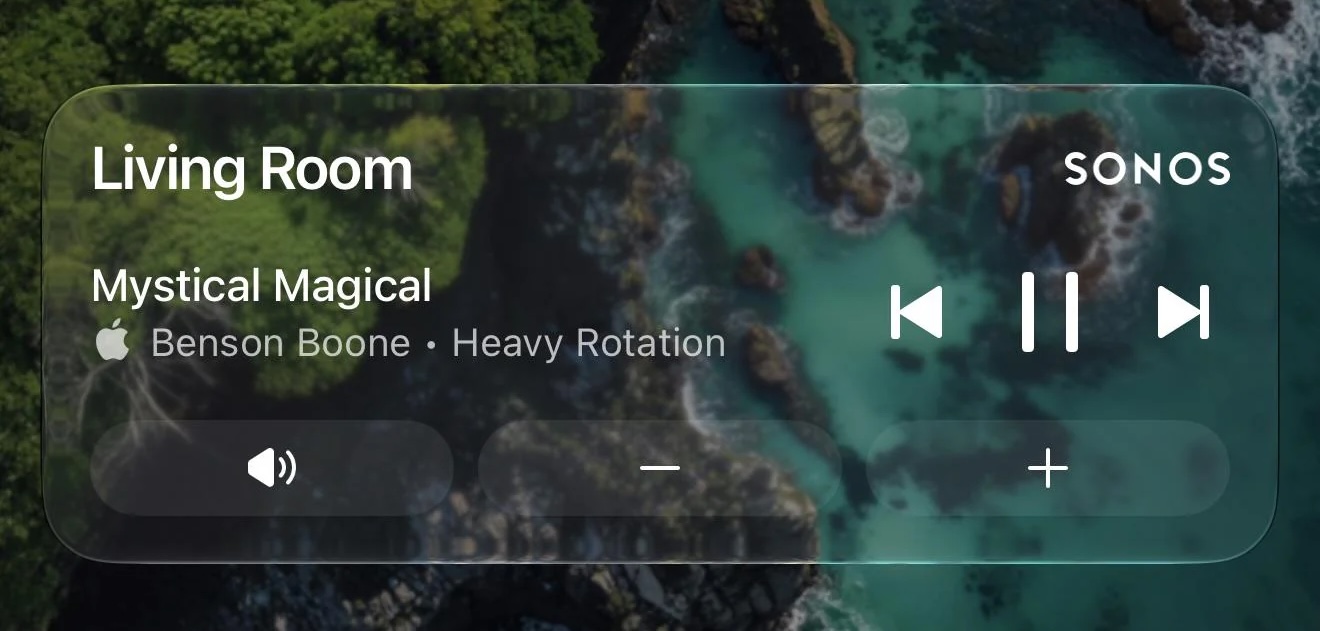
Sonos just updated its iOS app with new Live Activities support, providing quick access to playback controls from your Lock Screen.

Image credit: MajorAtmosphere

Sonos shared a Reddit post announcing the new feature, which appears after you initiate playback on a Sonos device and then close the app.

The Live Activity shows the current room or group you were last playing audio from and allows you to play/pause or skip tracks. Even if you initiate playback on Sonos from outside the Sonos app (Direct Control from supported services, Bluetooth, or AirPlay) you can still use the local playback controls that appear on the Live Activity.

As things stand, album art can't be displayed on the Live Activity, but the company said it's looking into alternative ways to enhance the Lock Screen experience. Sonos also mentioned that Live Activities work on Apple Watch and CarPlay, but "right now the controls aren't supported" in these instances.

Sonos called Live Activities support a "much requested, anticipated, and needed feature."

(Via 9to5Mac.)
Tag: Sonos

This article, "Sonos iPhone App Finally Gains Live Activities Support" first appeared on MacRumors.com

Discuss this article in our forums

  •  

Andy Simpkins: My first go at tracking down a kernel bug…

A couple of weekends back, I upgraded my home sever. It failed to restart after running apt dist-upgrade

The only update that was performed was to the kernel, it went from 6.12.88+deb13-amd64 to 6.12.100+deb13-amd64. I had previously performed an apt-get upgrade, and rebooted the machine, so I was pretty sure that this was to blame. This blog entry (is a late) attempt to document how I went about finding a fix for this issue so that next time I don’t need as much hand holding as I did this time around :-)

(1)
Having my machine not boot following an upgrade is pretty rare, but has happened before. Usually it is because I have done something wrong so as always confirming I haven’t broken something by accident is always my first step…

I plugged in a keyboard an monitor to the machine and watched it boot. Being a server this takes a long time (I guess because at this stage of system initialisation we want to test things sequentially)

Watching the system boot I see the usual BIOS/UEFI stages for this machine, followed by the grub menu and the the local screen showed:

            Loading Linux 6.12.100+deb13-amd64 ...
            Loading initial ramdisk ...

Nothing else. That was it. OK that looks like I have a broken system all right, and at very early stage of the boot process process.

(2)
Breaking into the grub menu and removing the quiet option yields a little more information (but not much):

            Loading Linux 6.12.100+deb13-amd64 …
            Loading initial ramdisk ...
            

            	EFI stub: Loaded initrd from LINUX_EFI_INITRD_MEDIA_GUID d
            	evice path
            		EFI stub: Measured initrd data into PCR 9

and nothing else.

(3) Initial debugging

  • Confirmed that I could still boot the machine with the old kernel 6.12.88+deb13-amd64 (During boot select Advanced options from the grub menu followed by the kernel image wanted)
    • Yes – the system starts happily with the previous kernel
  • Checked that /boot had enough space
    • Yes – plenty of space
  • Is anyone else reporting this problem?
    • Nothing jumps out on Debian’s bug tracker
    • Actually not mush referenced for my search “EFI stub: Measured initrd data into PCR 9 apart” other than the usual rantings to “turn off secure boot” (on this server that currently isn’t turned on – bad me)

(4) Triage

Start looking for where the fault first occurred. At this point I needed help, and given that Sledge was visiting I asked if he would sanity check what I was doing. His initial thoughts were that that /boot had run out of space, but replaying my step (3) with him acting as a ‘rubber duck’ showed that this was something other than PBKAC

Sledge had a quick look, then informed me that between kernel images 6.12.88+deb13 and 6.12.100+deb13 Debian stable has only had shipped .90 .94 .95 and .96 kernels. We could easily try them all:

  • wget each kernel package then install (dpkg -i) followed by an update-grub, checking that there was sufficient space on disks especially my small /boot partition)
  • I started with image 6.12.95+deb13 and this worked
  • 6.12.96+deb13 yielded the same lock up on boot as 6.12.100+deb13

OK I now have the first kernel image that doesn’t boot on my system, time to raise a bug…

Up until now I have been walking to my garage where the server is located and standing in front of a rack
with a monitor and keyboard plugged into the machine. However this machine supports IPMI so I spent a little time getting that up and running so that I can continue from the relative comfort of my desk (with lights, a chair and not needing to hold the keyboard with one hand)

Great I can now grab screen shots from the confort of my desk (unfortunatly they are only screen shots not text files, but at least we can seen the early stage of boot, Post, grub menu and then initramfs before system log happens)

(5) Collating information for the initial bug report

Sledge had mentioned my problem in irc/#debain-kernal where iam_tj suggested that we try appending
‘debug earlycon=efifb’ to the kernal command line. This yielded 15 seconds worth of messages before the system locked up the last few messages being (vmlinuz-6.12.96+deb13-amd64):

[ 14.663477] RCU Tasks: Setting shift to 5 and lim to 1 rcu_task_cb_adjust=1 rcu_task_cpu_ids=20.
[ 14.750474] RCU Tasks Rude: Setting shift to 5 and lim to 1 rcu_task_cb_adjust=1 rcu_task_cpu_ids=20.
[ 14.838024] RCU Tasks Trace: Setting shift to 5 and lim to 1 rcu_task_cb_adjust=1 rcu_task_cpu_ids=20.
[ 14.929752] NR_IRQS: 524544, nr_irqs: 584, preallocated irqs: 16
[ 15.016814] rcu: srcu_init: Setting srcu_struct sizes based on contention.
[ 15.104011] Console: colour dummy device 80×25
[ 15.191236] printk: legacy console [tty0] enabled
[ 15.278249] printk: legacy bootconsole [efifb0] disabled

Booting the working kernel with the same kernel options yields the SAME messages with slightly differing times, but then continues to login prompt:

 [   14.697466] RCU Tasks: Setting shift to 5 and lim to 1 rcu_task_cb_adjust=1 rcu_task_cpu_ids=20.
 [   14.784936] RCU Tasks Rude: Setting shift to 5 and lim to 1 rcu_task_cb_adjust=1 rcu_task_cpu_ids=20.
 [   14.872067] RCU Tasks Trace: Setting shift to 5 and lim to 1 rcu_task_cb_adjust=1 rcu_task_cpu_ids=20.
 [   14.964000] NR_IRQS: 524544, nr_irqs: 584, preallocated irqs: 16
 [   15.051482] rcu: srcu_init: Setting srcu_struct sizes based on contention.
 [   15.226079] printk: legacy console [tty0] enabled
 [   15.313751] printk: legacy bootconsole [efifb0] disabled
 [   15.400831] ACPI: Core revision 20240827
 [   15.401415] clocksource: hpet: mask: 0xffffffff max_cycles: 0xffffffff, max_idle_ns: 79635855245 ns
 [   15.401464] APIC: Switch to symmetric I/O mode setup
 
... and so on

iam_tj also suggested adding keep_bootcon – with ‘debug earlycon=efifb keep_bootcon’ on vmlinuz-6.12.96+deb13-amd64:
We get a LOT further – and we see a crash / trace-back:

[ 34.285342] BUG: kernel NULL pointer dereference, address: 0000000000000000

I raised bug #1143721 and followed it up with screen captures of the boot sequence (captured from the IPMI client) and files containing the output of dmidecode, lscpu and lspci to kive the kernel team as much information as possible:

[6.12.96+deb13-amd64 debug earlycon=efifb keep_bootcon.tar.gz (application/gzip, attachment)]
[dmidecode.txt (text/plain, attachment)]
[lscpu.txt (text/plain, attachment)]
[lspci.txt (text/plain, attachment)]

(6) Tracking down the bug Git Bisect

The problem with this type of bug is that it is hardware (class) specific, whilst the kernel doesn’t boot on my system, it clearly has worked on machines used by the kernel team, the Debian test and build infrastructure, (otherwise this kernel would never have been released) and everyone else who has upgraded to the newer kernel before I did (otherwise we would be drowning in fails to boot bug reports). Carnil’s excellent response to my bug: Message #15 (and help in IRC) provided me with a detailed step by step guide in how to track down the individual git commit that fails on my system. I had already (with Sledge’s suggestion) made a clone of the stable branch, but was struggling to follow the steps in the Debian Linux Kernel Handbook to re-build a duplicate kernel because I didn’t understand how to obtain the same configuration that Debian used to build the kernel; Carnil’s email provided me the missing steps (Highlighted).

git clone --single-branch -b linux-6.12.y https://git.kernel.org/pub/scm/linux/kernel/git/stable/linux-stable.git
cd linux-stable
git checkout v6.12.95
cp /boot/config-$(uname -r) .config
yes '' | make localmodconfig
make savedefconfig
mv defconfig arch/x86/configs/my_def
test 6.12.96 to ensure this is "bad"
git checkout v6.12.96
make my_defconfig
make -j $(nproc) bindeb-pkg
… install the resulting .deb package and confirm it fails to boot and triggers the NULL pointer dereference.

Right I can now start to Bisect the problem:

git bisect start
git bisect good v6.12.95
git bisect bad v6.12.96

Rather than use the half step point’s git bisect suggested I was advised in irc to jump straight to the a given commit that from the git log was suspected as the culprit:

git checkout 977855894bca4b87afa50d21e3f3e85a5a0e901f
build and install….
fails…
git bisect bad

git checkout 977855894bca4b87afa50d21e3f3e85a5a0e901f~1 ## ~1 is the commit beforehand
build and install….
fails…
git bisect good

The entire test tree can shown with git bisect log and this was submitted as an email to the bug report, we have found our smoking gun :-)

Finally I would like to thank Carnil, Iam_tj for their time patience and fantastic support in guiding me through finding this regression. Right now kernel bugs are coming in thick and fast with a lot of AI assisted bug hunting, the increased numbers of bugs mean that the kernel team are especially busy. Hopefully our paths will cross and I’ll be able to buy you some beers (or whatever) soon. thank you. Sledge also deserves thanks for putting up with me and pointing me in the right direction (as ever). Lucky for me that he lives nearby so I can provide beers on a regular basis :-)

  •  

Unreleased AirPods 5 Models Referenced in macOS 26.7

In a notable addition to the unreleased Apple products referenced in yesterday's macOS Tahoe 26.7 software update, AirPods 5 models have also been spotted. Internally codenamed B868M and B868E, the models almost certainly refer to AirPods 5 and AirPods 5 with Active Noise Cancellation. Current AirPods 4 models, launched in September 2024, have the codenames B768M and B768E.

While next-generation features are unknown, AirPods 5 could get an updated H3 chip with improved sound quality and lower latency. Launch timing however remains unclear. On a side note, macOS 26.7 also contains a reference to an unreleased Beats Solo Buds model.
Related Roundup: AirPods 4
Buyer's Guide: AirPods (Caution)
Related Forum: AirPods

This article, "Unreleased AirPods 5 Models Referenced in macOS 26.7" first appeared on MacRumors.com

Discuss this article in our forums

  •  

Distribution Release: Mainstream OS 1.3.0

The DistroWatch news feed is brought to you by TUXEDO COMPUTERS. Mainstream OS, an Arch-based, user-friendly Linux distribution with a highly customised desktop that uses the Quickshell toolkit on top of the Hyprland compositor, has been updated to version 1.3.0. The project's changelog provides details about the latest round of desktop interface improvements and bug fixes: "Put the dock....
  •  

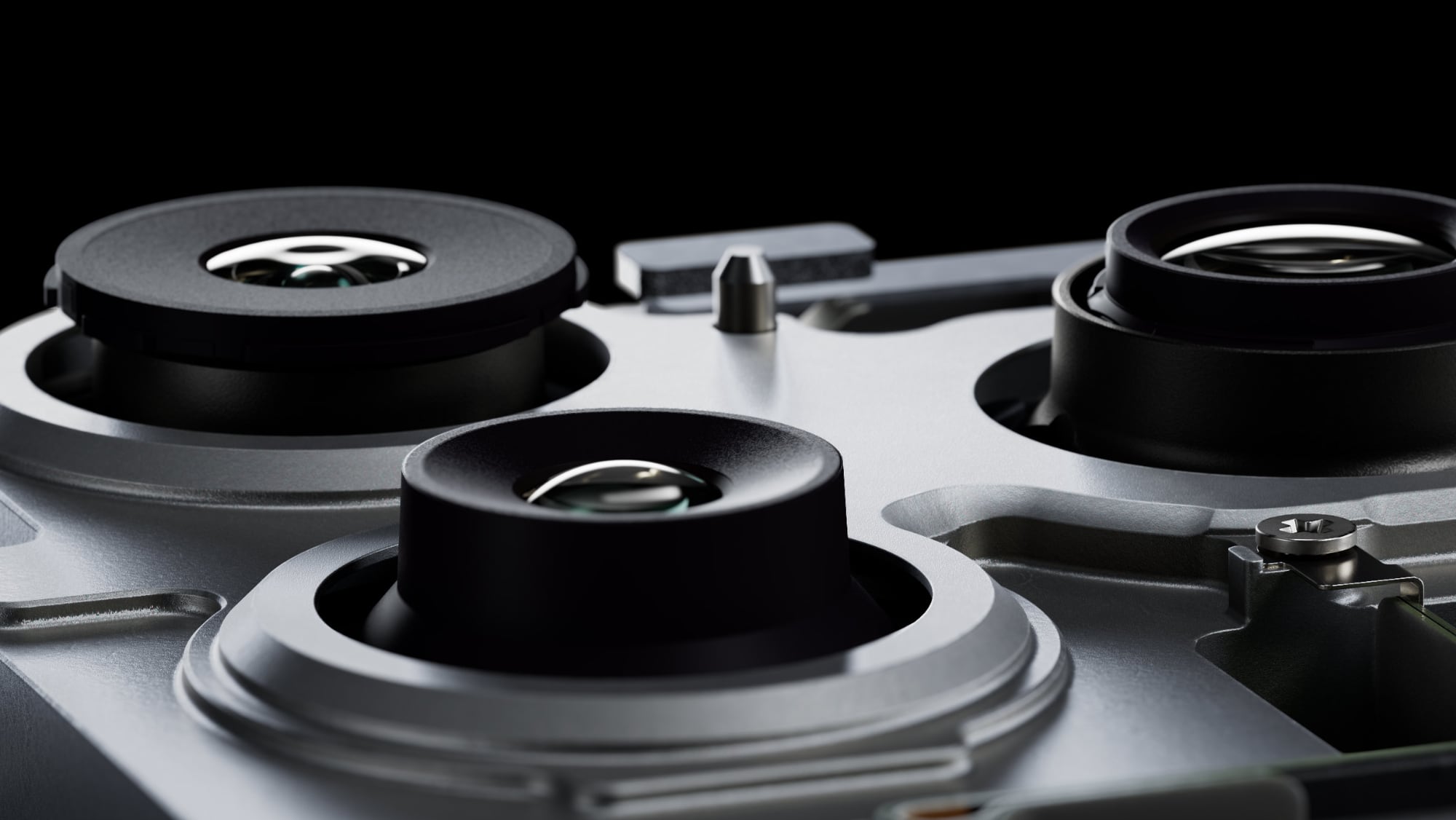
iPhone 18 Pro Max Rumored to Get Exclusive Camera Upgrade

Apple's upcoming iPhone 18 Pro models may be differentiated by a new camera feature that could be exclusive to the larger Pro Max model, if a Chinese leaker is to be believed.


Since 2024, we've been hearing rumors about Apple's plans to introduce a variable aperture camera on the iPhone 18 Pro models – a first for any iPhone – but it was understood until now that the feature would come to both devices.

Leaker Ice Universe claims that's not the case. The iPhone 18 Pro Max will "exclusively feature a variable aperture," they said in a new post on Weibo, a Chinese social media platform.

"Looks like even Apple can't escape the reality that if you want the absolute best camera experience, you'll have to put up with a phone that weighs like a brick," the leaker added.

We already know a variable aperture lens is coming to the iPhone 18 Pro Max, thanks to the June leak of internal files from Apple supplier Tata Electronics. The files revealed that the iPhone 18 Pro Max will feature a new Sony IMX905 sensor with variable aperture support.

The smaller iPhone 18 Pro model was not mentioned in the leaked file, but it wasn't clear if that meant it wouldn't get a variable aperture lens, or it the leaked files simply didn't include that information.

Apple has never implemented a variable aperture on an iPhone. From the iPhone 14 Pro through the iPhone 17 Pro, the main camera uses a fixed ƒ/1.78 aperture, meaning the lens remains fully open at all times when capturing images.

With a variable lens, the iPhone 18 Pro Max could allow users to manually shift the aperture, similar to on a DSLR camera. It could mean more control over depth of field, enabling sharper focus on subjects or smoother background blur. That all depends on how Apple implements the feature, of course. It may be more automated than that.

Beyond size and battery life, the last time Apple differentiated its iPhone Pro models was with the iPhone 15 Pro, which lacked the tetraprism telephoto lens that was included to the iPhone 15 Pro Max.

The iPhone 18 Pro Max is rumored to be bigger and heavier than its predecessor this year. Apart from the rumored aperture lens, it is expected to be otherwise equivalent to its smaller sibling. Both iPhone 18 Pro models are set to launch next month alongside Apple's first foldable iPhone, the "iPhone Ultra."
Related Roundup: iPhone 18 Pro

This article, "iPhone 18 Pro Max Rumored to Get Exclusive Camera Upgrade" first appeared on MacRumors.com

Discuss this article in our forums

  •  

John Goerzen: AI in Debian: The Vote, Proposals, and Nuance

Let me start with a hypothesis:

For human developers, using coding LLMs magnifies their difference in skill levels.

I am one that rarely thinks things are always black and white. Back in March, I wrote Artifial Intelligence: Shades of Gray. Since then, I’ve had more of a chance to experiment with LLMs myself. I also happen to work for an employer that is taking a very pragmatic approach to LLMs: teams and individuals use it as they see fit, but if they are causing considerable expense, they have to justify it.

In various settings, I have seen the egregious examples of AI slop we all know about. As I wrote in March, “I have seen it both waste more time than it saves, and save a ton of time.”

I have come to see that, as a tool, it is most valuable when it is running under the supervision of an experienced engineer. It is at its worst when it has no such supervision; the “vibe coding” and other low-quality slop we see.

A coding agent is like a junior developer or research assistant. When properly supervised, they help projects move along more quickly by letting a senior developer focus on the more difficult, less mundane aspects of the project. But one couldn’t expect a junior developer to consistently deliver high-quality code and architecture on their own.

Let’s put a pin in this idea and look at the story in Debian.

LLM use in Debian

There is a vote happening in Debian around the use of LLMs. In typical Debian fashion, there are 8 options to choose from, many of them similar. Most of these proposals acknowledge there are different types of tasks done in Debian, but the proposals don’t differentiate between them well. Let me do so here. These are some of the LLM-relevant tasks people in Debian perform:

  • Packaging upstream software for Debian (by far the largest task)
  • Writing Debian-specific code (eg, apt or the Debian installer)
  • Maintaining Debian infrastructure (build systems, for instance)
  • Writing documentation and translations

I’m going to focus my remarks here on packaging upstream software for Debian, since this is by far the most time-consuming developer task project-wide.

It matters to our users that we get this right, and packaging quality is one of the things that sets Debian apart from other distros. Packaging things for Debian requires knowledge of some specific tools, such as debhelper, that aren’t widely used anywhere else. In most cases, it is fairly rote time-consuming work. In other words, by its design, it requires people with senior-level skills to do grunt work.

I can’t overstate how massive a burden this grunt work is. I maintain some packages for Go and Rust. By Debian policy, all of those packages’ dependencies must also exist as Debian packages, and be used to build against. When upstream adopts a newer version of some library, it can unleash cascading dependencies that can take hours to sort out. Worse, the Rust team and the Go team use entirely different ways of managing packages (Go uses one Git repo per package, while Rust has a monorepo with specialized scripts to import Cargo packages and generate Debian ones). On top of that, we can’t just modify things like usual; we have to use quilt. And on top of that, I’m also a backports maintainer, so all the work (and usually even more) has to be done there also.

Now let’s pull on that pin from the earlier conversation. This is exactly the kind of scenario that a well-supervised coding LLM is most effective in. I could see a seasoned developer saving hours, maybe even days, by turning over the mundane tasks of managing trees of cascading dependencies over to a coding tool — and verifying and directing the process. (Yes, I have been using em-dashes for years; LLMs have copied people like me, not the other way around! This post was not written with any AI assistance.)

Actually, this is almost a dream scenario for a coding assistant. The result is time-consuming to formulate but easy to review, which is the opposite of the way these things often go.

I can assure you with 100% certainty that humans aren’t adding a lot of value in this process. It would be wrong to believe that a human is carefully reading every line of code in dozens of updated or new library packages. The problem set is too big, the time too short, and the code too varied and complex.

Coding agents seem to be most effective when there are strong test suites that they can test changes against. Debian builds, especially of modern packages, tend to have this property. Many packages have test suites that are run during build. And, if the package builds in an isolated environment (and especially if its downstream dependencies do also), then there is a decent chance that it’s fairly correct. Maybe needing some manual tweaking here and there, but generally a successful build is a reasonable indicator.

You can argue that it would make more sense for Debian to just include dependencies in source packages, along with some version information to support security rebuilds, and I’d tend to agree with you. But we are where we are. This would be one of the more significant leaps forward in developer productivity, but it complicates things like copyright reviews.

Where are LLMs run? What is the environmental impact?

Most of the proposals seem to make the assumption that LLMs must always run in some large, hosted datacenter. As I noted in my March article, I have had credible results on even an older GPU running on solar power.

That said, it is undeniable that LLMs are fueling a datacenter boom, and this in turn is producing a significant new demand for resources. Most notably for the global scale: electricity, which is sometimes generated using carbon-emitting technologies.

Bill McKibben, who has been a leading voice in the fight against climate change since the 1980s, has made some interesting points recently: he’s noted that solar power is the fastest kind of generation we can build, and a number of large AI companies are investing heavily in solar, even to the point of fully offsetting new datacenter’s needs. On the other hand, he’s also noted that some companies are buying inefficient and dirty gas turbines. It is decidedly a mixed bag. The heavy investment in solar can have knock-on positive effects for infrastructure. Obviously, not every picture here is rosy. This analysis doesn’t touch on the real land and water use situation, either.

On the other hand, if an LLM allows me to do in an hour what I would have done in a day, that’s a day of not heating or cooling the work area — generally not sustaining a human for the purpose of writing code for Debian. HVAC energy consumption dwarfs my GPU, and I’d imagine probably also the slice of LLM energy used.

Holistically, I would have to conclude the picture is mixed. It is possible to use LLMs in a pretty green way, and also in a pretty dirty way.

Assuming Conditions Never Change

A flaw in most of these proposals is they assume that the conditions at this present moment will always hold. In fact, that the conditions at the present moment will not continue is something both AI cheerleaders and AI skeptics agree on.

For instance:

Ed Zitron has done a ton of research into the financing side of AI, and has concluded that the current model is unsustainable and headed for a significant bubble burst. I’m not positioned to personally evaluate those claims, but if that happens, what is the result? Perhaps it is a steeply increasing cost of inference for the frontier models, slower pace of training/evolution for them, etc.

In a recent episode of Oxide and Friends, Simon Willison discussed the open weight models that are now available. They have been making remarkable strides in efficiency and capabilities, to the point where $50,000 of hardware can now run high-end open weight models with capabilities that are at least in the same ballpark as the American frontier models. This puts running high-end models locally squarely within reach of universities and small- to medium-sized businesses, with power requirements that can be met with standard commercial solar and wind installations.

The lack of nuance in the more restrictive proposals is particularly concerning. Proposal A doesn’t allow “the use or assitance of… LLMs”. So it bans my solar-powered GPU. It bans using LLMs to find security issues. It bans all sorts of things that don’t seem to be ban-worthy, alongside the things that do. And it codifies it in the very hard-to-change social contract.

That proposal, and some like it, seem to imply that all LLM output is bad. I grant you that AI slop is a real and legitimate concern, and many Open Source projects have to deal with it. On the other hand, we have all seen first-hand how the security of the Linux kernel has benefited dramatically from AI analysis. It is certain that black hats are using these tools. If we refuse to use modern security tools, our security will be compromised (and what is the environmental and social impact of THAT?)

I find the statement “Generative AI is characterized by producing output of a nature that would ordinarily be produced and consumed by humans” to be particularly interesting. The same was once said of compilers.

The Real Concerns

You might think from reading this that I am some AI cheerleader. I’m not. I share the ethics of the FLOSS movement, and have for decades. I abhor the power and lack of ethics that many big names in the field are running with at the moment. I’ve had to put up Anubis on this blog, for instance.

I have personally experienced the effects of AI slop, especially at review time. This is a real problem, though I don’t think the more draconian policies are likely to help (the looser “you must disclose” stand a fighting chance, but I’m not sure they would help, either.) Done poorly, AI threatens developer burnout by overwhelming them with poor code and verbose but useless explanations. Done well, AI can help prevent developer burnout by automating tedious and low-value tasks.

Shouldn’t our goal be that humans submit work to Debian, using tools they prefer, and take responsibility for it? Does it matter if someone uses ed, vim, emacs, or vscode? If they use LSP or just run gcc manually? I’d say we benefit from the diversity. Wouldn’t we be better off to benefit from the diversity here, and judge work as we always have: on its merits, not what tools were used to create it?

Fundamentally, a GR is a long and arduous process. It’s not easy to reverse later. Amending the Social Contract is even longer and more arduous (I should know; I may have been the first one to try). The LLM landscape is fast-moving. None of us can really predict where it will be in a year. Will the current market leading companies even still exist? Will it be at all credible to refuse to use AI-assisted security tools? What is the most effective way to deal with AI slop? What level of utility will we be able to achieve with models run locally?

Some of these proposals would make sense if drafted in some way short of a GR, which would allow more maneuverability as the landscape changes.

Brief analysis of the options

Considering the proposals:

  • Proposal A: seeks to amend the social contract, which I am opposed to for reasons already laid out above. It names some real concerns about AI that I agree with, but implies that all LLM uses and models are guilty of the problems, which is not the case with all of the claims. It also sets us behind the curve on security and stability by forbidding the use or assistance of those tools, even if run by others. It requires us to ignore reports of actual security bugs, or correct fixes, if those reports were generated with the assistance of an LLM, which I find to be absolutely untenable.
  • Proposal B: This is the “AI with accountability” approach. It notes the real concerns with LLMs without painting with an overbroad brush. It strikes me as level-headed and sensible.
  • Proposal C: It paints with an over-broad brush and makes some non-binding requests. Then it winds up largely like proposal B, though while it is worded more strongly, has fewer binding requirements (for instance, it lacks proposal B’s prohibition on transmitting sensitive information to untrusted providers)
  • Proposal D: Seems broadly similar to proposal B, an “AI with accountability” approach. I’m not really clear why we need both.
  • Proposal E: Largely the status quo. It is like proposals B and D in that it says humans are accountable for their contributions. It encourages disclosure of LLM use, but does not mandate it. Like proposal B, it prohibits disclosing sensitive information to third-party AI services. Note that both proposals B and D have an appropriate nuance: a local model is fine, a third-party one is not.
  • Proposal F: This seems really similar to proposal E. I’m not sure why we have these two.
  • Proposal G: Disallows “the output of generative AI as direct contributions to Debian.” This is something of a weakened proposal A; it doesn’t seek to amend the social contract, nor does it ban all use; it simply bans the use as a direct contribution.
  • Proposal H: Ban due to climate impacts. “How is this even an argument” is disrespectful to reasoned conversation. I have already noted that LLMs can be and are used in ways that are not climate-harming. It explicitly contains no binding requirements at all, and is effectively a rant. While I agree with the sentiment that climate change is an urgent problem, and that some LLMs are exacerbating it, I disagree with that all LLM usage does so and therefore disagree with the conclusion.

In favor of nuance

I find that black-and-white thinking is almost always something to be avoided. I see it too often. I see it in politics, I see it in our software, I see it in discussions around AI. Are there deeply unethical things happening in AI? Absolutely. Are they doing some impressive things? Also yes.

We have accepted this nuance in other areas. For instance, almost all the hardware Debian runs on has closed-source hardware, and has components manufactured or assembled in countries with some of the worst human rights records on the planet. I’m not saying this is a great state of affairs. It is something we should speak up about and act upon. But the worse state of affairs would be “no Debian because the hardware is impure”.

  •  

Apple's Camera-Equipped AirPods Confirmed: See Them in Action

Apple is working on camera-equipped AirPods that appear to be nearly ready to launch, based on a video MacRumors found in the macOS Tahoe 26.7 release candidate.


In a short demo, a man holds a book up so the camera in the AirPods can see the title. "With Visual Intelligence, your world becomes savable. See something you like? Just ask me to save it for later," says the voiceover text.

Here is your first look at AirPods with Cameras in action using Visual Intelligence.

This video file came from macOS 26.7 RC pic.twitter.com/yo7RI4MCeu

— Aaron (@aaronp613) August 18, 2026

The camera on the AirPods will feed information to ‌Visual Intelligence‌, and Siri will be able to answer questions about the wearer's surroundings and log information. There is a direct reference to setting up ‌Visual Intelligence‌ on the AirPods.

If hair is covering the AirPods up, you'll receive an alert. "To get the most accurate information about things in your environment, make sure AirPods are not covered," it says.

The camera-equipped AirPods have the codename B790, which was also previously mentioned by Bloomberg's Mark Gurman. Gurman suggested the AirPods could launch as soon as September, so we could see them at the iPhone-centric event where Apple will unveil the iPhone 18 Pro, ‌iPhone 18 Pro‌ Max, and foldable iPhone Ultra.

‌macOS Tahoe‌ 26.7 has multiple other mentions of the B790 product, as well as references to a long list of other unreleased Apple products.
Related Roundups: AirPods 4, AirPods Pro 3
Related Forum: AirPods

This article, "Apple's Camera-Equipped AirPods Confirmed: See Them in Action" first appeared on MacRumors.com

Discuss this article in our forums

  •  

macOS Tahoe 26.7 is Full of References to Unreleased Apple Products

The macOS Tahoe 26.7 release candidate that Apple seeded today has references to several unreleased products, from home devices to iPhones, iPads, AirPods, and Macs.


Some of these codenames have shown up in prior software updates but have new feature flags, while others haven't been seen in the code before.

Home Accessories


  • Home Hub (J490/HomeAccessory17,1 and J491/HomeAccessory17,2) - There are references to Siri setup for a "J490" home accessory, which has previously been identified as Apple's upcoming home hub. There's a second reference to J490 and J491. J490 is believed to be the version of the home hub with a base, while J491 is the version that's meant to be mounted on a wall.

  • HomePod mini (B525) - Code mentions "Argentium" has been installed on a product codenamed B525, which likely corresponds to the HomePod mini. The current HomePod mini has a B520 codename.

  • Home Accessory (J229) - There is a reference to "J229Architecture," a codename for an unreleased Apple product. J229 previously popped up in iOS 26 last December and was found by Macworld. The site said it was a device with multiple sensors and the ability to detect alarm sounds and capture images. It's possible J229 is the rumored security camera Apple is working on, or some kind of accessory to go with its home hub products.

  • Pebble - There's a reference to "Pebble," which Bloomberg previously said was Apple's codename for the homeOS operating system that runs on the home hub.

  • HomeAccessory17,3 (J595) - A tabletop robot.

  • Mystery Colors - There are references to colors for a home accessory, which might be linked to the ‌HomePod mini‌ 2, the home hub, or something else. The colors are Rose Pink, Silver, Space Gray, and Starlight.

  • Audio Accessory Visual Reasoning - There is an audio_accessory_visual_reasoning string, which could be for the home hub.


Headphones


  • AirPods with Cameras (B790) - B790 is the codename for AirPods with a camera, according to Bloomberg. Confusingly, these are not the camera-equipped AirPods rumored for 2027 because those have a B798 codename, but are a "separate camera AirPods project" that could come out as soon as September. Code specifically mentions an image stream for the device: "B790 start image stream failed for left bud."

  • Beats (B518 and B522) - B518 and B522 could reference upcoming Beats headphones.

  • AirPods Pro 4 - There is a reference to AirPodsPro1,4, which could be fourth-generation AirPods Pro. The current AirPods Pro 3 are AirPodsPro1,3. There's also a reference to AirPod3,5.


iPhone


  • iPhone Air 2 (V62) - V62 was previously seen in iOS 27 code, and Macworld says it's the iPhone Air 2. The ‌iPhone Air‌ 2 isn't expected until spring 2027.

  • iPhone 18 Pro (V63) - V63 was previously seen in ‌iOS 27‌ code, and Macworld says it's the iPhone 18 Pro. The ‌iPhone 18 Pro‌ is expected in September.

  • iPhone 18 Pro Max (V64) - V64 was previously seen in ‌iOS 27‌ code, and Macworld says it's the ‌iPhone 18 Pro‌ Max. The ‌iPhone 18 Pro‌ Max is expected in September.

  • iPhone 18 (V67) - V67 was previously seen in ‌iOS 27‌ code, and Macworld says it's the iPhone 18. The ‌iPhone 18‌ isn't expected until spring 2027.

  • iPhone Ultra (V68) - V68 was previously seen in ‌iOS 27‌ code, and Macworld says it's the foldable iPhone Ultra. The ‌iPhone Ultra‌ is expected in September.


Mac


  • MacBook Pro (J804) - J804 is the entry-level 14-inch MacBook Pro that's going to be updated with an M6 chip before the end of the year. The current M5 ‌MacBook Pro‌ is J704.

  • iMac (J833 and J834) - J833 and J834 are the codenames for new iMac models Apple is working on, according to Bloomberg.

  • MacBook Pro - K114c, K114s, K116c, and K116s reference upcoming ‌MacBook Pro‌ models. It's possible these are the higher-end OLED ‌MacBook Pro‌ models Apple is working on.


iPad


  • iPad mini (J510 and J511) - J510 and J511 are the codenames for the next-generation iPad mini rumored to be getting an ‌OLED‌ display and A19 Pro chip.


Headset


Apple TV Remote


There's a mention of ATVRemote1,5, which appears to be a new Apple TV remote. Rumors previously suggested the next ‌Apple TV‌ could come with an updated remote control.

Apple Intelligence in China


There are references to Writing Tools coming to China. Code mention temporary restrictions due to triggering safety alerts, and content that won't be able to be edited with Apple Intelligence.


  • Content safety update required. iPhone will be able to use Writing Tools once the automatic update completes.

  • Unable to edit this text. %1$@ may be able to help with this type of content. This text will need to be sent to %2$@.

  • Writing Tools are temporarily restricted due to triggering safety alerts multiple times.


Unknown Model Numbers


There are multiple model numbers listed that do not correspond to any existing Apple product and they don't have a clear link to an upcoming product.

  • A3436, A3437, A3438, A3439, A3440, A3441

  • A3456, A3457

  • A3465

  • A3529, A3530, A3531, A3532, A3533

  • A3543

  • A3577

  • Device1,8234

  • Device1,8236

  • Device1,8238

  • Device1,8240

  • Device1,8241

  • Device1,8242

  • Device1,8246

  • Device1,8247

  • Device1,8248


We'll see the first devices on this list launch this September, when Apple is expected to introduce the ‌iPhone 18 Pro‌, ‌iPhone 18 Pro‌ Max, and ‌iPhone Ultra‌. We don't yet know when new home products or Macs might come out. Apple often holds two fall events, so there could be a second event in October or November for the ‌MacBook Pro‌, ‌iMac‌, ‌iPad mini‌, and home accessories.
Related Roundup: macOS Tahoe
Related Forum: macOS Tahoe

This article, "macOS Tahoe 26.7 is Full of References to Unreleased Apple Products" first appeared on MacRumors.com

Discuss this article in our forums

  •  

Apple Releases New iOS 27, iPadOS 27, macOS 27, and tvOS 27 Public Betas

Apple today released the fourth public betas of iOS 27, iPadOS 27, tvOS 27, and macOS Golden Gate, allowing anyone with a compatible device to download and test the new software. The fourth betas come a week after Apple seeded the third betas and just a few hours after the sixth developer betas.


You can get started by signing up on Apple's beta website and then opting in to the public beta by opening up the Settings app on your device, selecting General, and choosing Software Update.

We are nearing the end of the beta testing process, and few new features were found in today's developer betas. ‌macOS Golden Gate‌ includes new wallpapers, while ‌iOS 27‌ has a Shortcuts splash screen and a new Game Center icon.
Related Roundups: Apple TV, iOS 27, iPadOS 27
Buyer's Guide: Apple TV (Don't Buy)

This article, "Apple Releases New iOS 27, iPadOS 27, macOS 27, and tvOS 27 Public Betas" first appeared on MacRumors.com

Discuss this article in our forums

  •  

Improving File Explorer & Context Menu: faster, simpler, and more customizable

Hi Windows Insiders, File Explorer is one of the most used experiences on Windows. It's where you get work done: organizing files, finding what you need, and moving content seamlessly across local storage and the cloud. Earlier this year, we shared our commitment to improving Windows quality, with a focus on performance, reliability, and craftsmanship. In File Explorer, that means investing in the foundational work needed to improve the experience end-to-end: reducing hangs and delays, improving responsiveness and reliability, addressing customer-reported issues, and removing friction from everyday tasks. But quality is also about continually evolving the experience to feel more modern, intuitive, and efficient for the millions of people who rely on File Explorer every day. Today we're sharing progress on both fronts. Alongside continued investments in File Explorer performance and reliability, we are introducing a substantially redesigned context menu experience that's faster, simpler, and more customizable than ever before. This new context menu experience is now rolling to Windows Insiders and represents one of several major improvements underway as we continue to modernize File Explorer.

Fewer bad moments

What people remember most are the worst moments. A single freeze while renaming a file, a slow right-click, or a Home view that flashes and reloads can outweigh dozens of smooth interactions. That reality has guided our approach to improving File Explorer. We focused on the everyday experiences people rely on most and set clear goals to make those interactions faster, more reliable, and less disruptive. Improving the moments that matter most We've profiled and invested in improving the performance and responsiveness of File Explorer. File Explorer now launches faster, and the overall experience feels more consistent and predictable. We’ve analyzed the issues behind many of the freezes, hangs, and delays users encounter, and eliminated dozens of potential stalls and interruptions in the experience.  As a result, you'll see fewer freezes and flashes when browsing, renaming files, navigating, or selecting multiple files. There are many more improvements to come, and these changes are designed to reduce disruptions and make File Explorer feel more responsive and reliable day to day.

Improving the details that matter every day

Our work extends beyond performance and reliability improvements. Many of the requests we hear from customers aren’t about major new features, they’re about the small interactions that happen every day.  We’ve continued refining File Explorer based on that feedback, removing friction and improving the details that help make everyday tasks feel more natural and predictable. For example, file renames no longer get interrupted by background file synchronization, and case-only filename changes now appear immediately. We’ve also improved navigation workflows.  The Address Bar now supports a wider range of inputs, including paths with quotation marks and double backslashes. Support for opening folders in a new tab with a middle-click has also been expanded to the Address Bar and Home page folders, making multitasking faster and more intuitive. Smaller usability improvements add up as well. Home now preserves whether sections are expanded or collapsed so you can pick up where you left off. File sizes are now displayed using appropriate units such as KB, MB, and GB, making them easier to understand at a glance. The Details pane has been reorganized so file properties are easier to find and review. Many of these improvements came directly from customer and Windows Insider feedback. They represent just the beginning of our ongoing effort to improve the everyday experiences people depend on most.

Putting you in control of the context menu

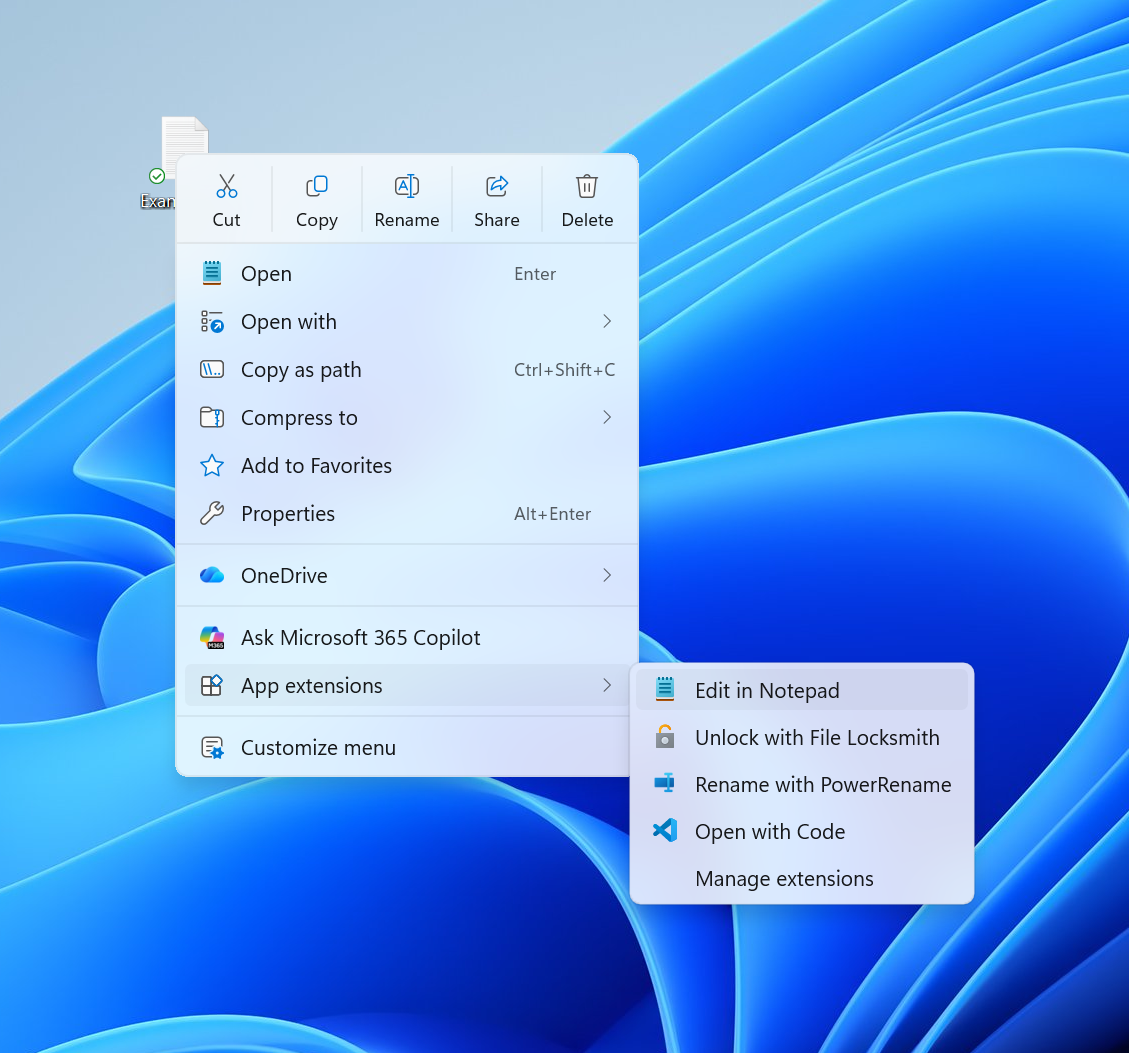
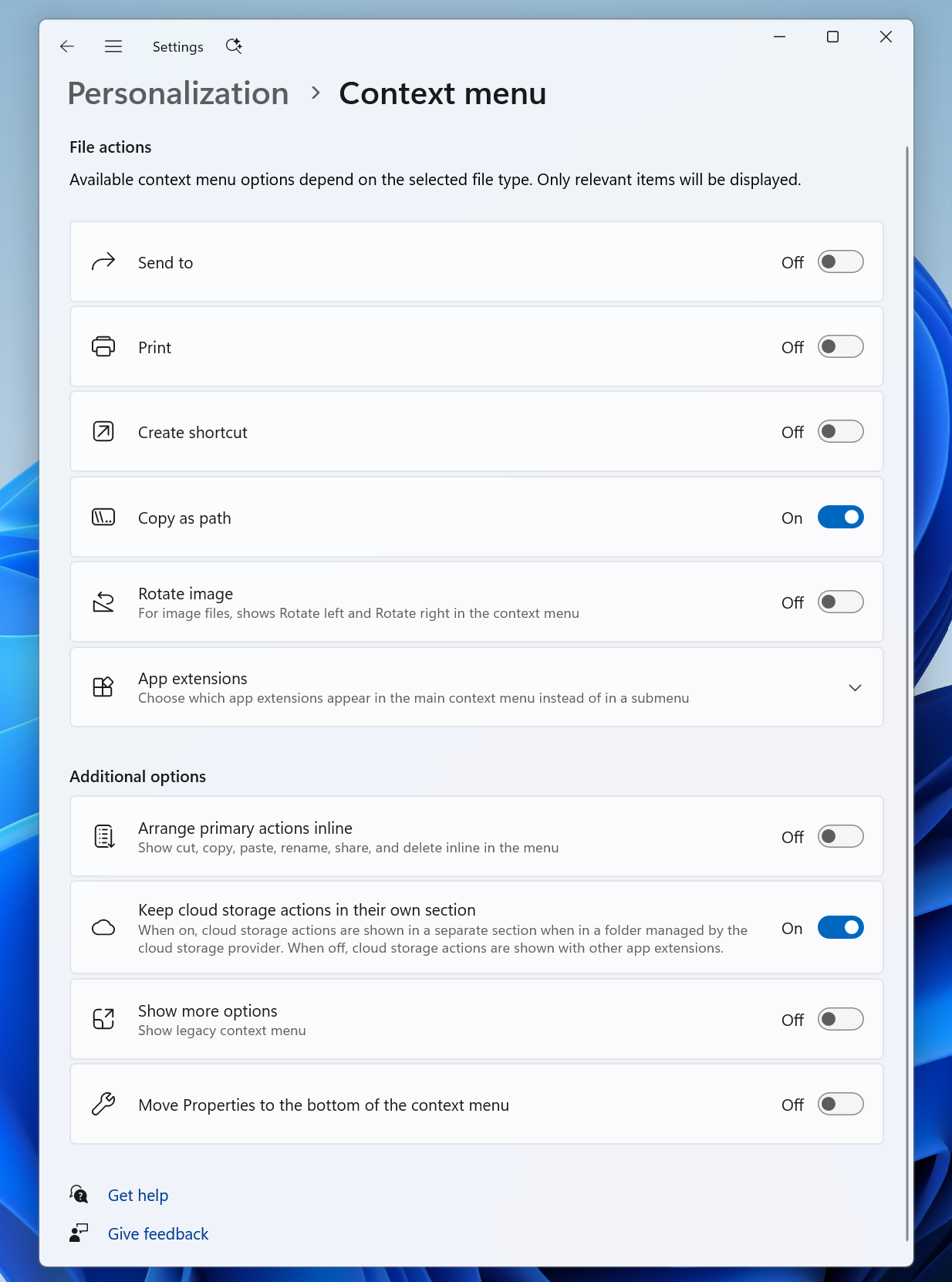
Right-clicking is one of the most common actions in Windows. If it doesn’t work as intended, or is difficult to navigate, it can derail your workflow. When we launched Windows 11, we introduced a new context menu with a modernized design, improved organization, and a new approach to application extensions. Over time, though, the menu became cluttered and sluggish, and we recognized the need to dramatically reduce the time between right-clicking and having a menu that’s fully ready to use. Today, we're excited to announce an updated context menu that delivers a faster, simpler, and more customizable experience. The new design reduces top-level clutter, keeps commonly used actions easy to access, and introduces a new Settings experience that gives you more control over what appears in the menu. [caption id="attachment_179130" align="aligncenter" width="1024"]The new right-click menu. The new right-click menu.[/caption] Faster to open The first thing you'll notice is that the menu opens much more quickly. For something used as often as the context menu, speed is part of good design. A lot of that comes from behind-the-scenes engineering improvements, and a good part comes from a cleaner default menu, with the full set of options just a click away in Settings. Clutter isn't only a visual problem; it slows the menu down because every app that adds its own options can make the menu do extra work each time it opens. Your menu, your control Part of the broader push we’re making across Windows 11 is making the operating system calmer by default, with more personalization and control. Each person uses the context menu in different ways, so we’re adding more customization to allow you to choose the layout that works best for you. At the bottom of the new context menu, you’ll now find “Customize menu”, as a shortcut to its Settings page, where you can shape the menu around your preferences, your habits, or the years of muscle memory you’ve built with a specific configuration. [caption id="attachment_179131" align="aligncenter" width="760"]The new Context Menu page in the Settings app, under Personalization. The new Context Menu page in the Settings app, under Personalization.[/caption] The top section lets you turn built-in Windows commands like Send to or Create shortcut on or off. Some of these commands, like Print, weren't available in the Windows 11 context menu before and can now be switched on if you want them. The next section is about options for app extensibility, so you can choose which app extensions appear in the main menu or submenu, including hiding the submenu altogether. Finally, the last section is about where the most common commands live. We know many people have years of muscle memory from the Windows 10 menu, so we've added options to bring that feel back. You can list the main commands (Cut, Copy, Paste, Rename, Delete, and Share) inline directly in the menu instead of as a row of icons, and you can move Properties down to the very bottom. As we continue refining this experience with Insider feedback, our goal is to make right-click feel more responsive, predictable, and personal.

Building a healthier File Explorer for the long term

We are committed to continue doing the hard work and consistently improving File Explorer month after month. Not every update will be obvious on its own, but together they should make File Explorer feel faster, polished, and more dependable across tasks users do most. Your feedback continues to shape every step of this journey. Keep it coming through Feedback Hub, and we'll continue sharing our progress as this work evolves. The File Explorer team
  •  

Announcing new builds for 17 August 2026

Hello Windows Insiders, Today, we’re releasing new Windows 11 Insider Preview builds to the Beta and Experimental Channels. This post also includes reminders about renewed flight certificates and the current Feature Flags settings issue in the Experimental channel. Renewed Windows Insider flight certificates As a reminder, all new builds include renewed Windows Insider flight certificates, replacing certificates that expired on August 11, 2026. Flight certificates are renewed periodically to help ensure Insider devices remain on supported builds and continue receiving future Windows Insider Preview updates. Devices that are not updated to a newer build with a current certificate may encounter compatibility issues with software such as anti-cheat applications. For more information, please visit the certificate renewal FAQ. Experimental Feature Flags We’re investigating an issue that causes the Feature Flags settings page to appear empty for Windows Insiders in the Experimental channel. We expect to resolve it in the next Experimental build and will share updates on the blog. New builds this week We’re releasing new Windows 11 Insider Preview builds today. Select your channel below to view its release notes: For those on other specific build versions, here are today’s new builds and release notes:

Notable new features:

[File Explorer]

Release channel: Experimental Introducing the new, redesigned Context Menu in File Explorer
  • We’re beginning to roll out an updated context menu experience in File Explorer, designed to feel faster, cleaner, and easier to tailor to the way you work. The new design reduces top-level clutter, keeps commonly used actions easy to access, and adds a new Settings experience that gives you more control over what appears in the menu. As we continue refining this experience with Insider feedback, our goal is to make right-click feel more responsive, predictable, and personal.
[caption id="attachment_179130" align="aligncenter" width="1024"]The new right-click menu. The new right-click menu.[/caption]

[Emoji]

Release channel: Experimental
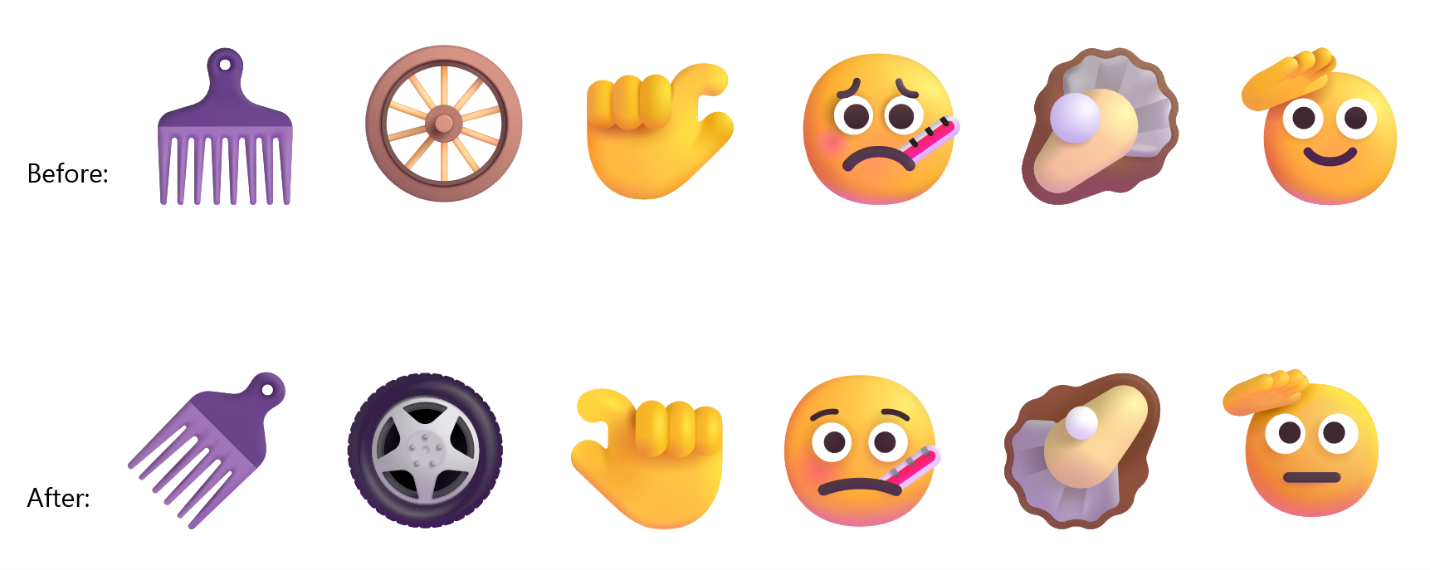
  • We’re adding support for Emoji 17.0. This includes new emoji such as distorted face, fight cloud, and hairy creature. To try out the new emoji, you can press the Windows key plus Period (.) to open the emoji panel and insert them from there.
New Emoji 17.0
  • As part of this effort, we’ve also made some slight adjustments the design of some of our current emoji to improve consistency across platforms. This includes the saluting face, face with peeking eye, goose, lotus, and kissing cat emoji.
Updated emoji Thanks, Stephen and the Windows Insider Program team
  •  

Apple Adds More New Wallpapers in macOS Golden Gate

Apple today added two new Golden Gate-themed wallpaper options in the sixth beta of macOS 27.


There are new Golden Gate Day and Golden Gate Evening wallpaper options that join the Golden Gate Sunset and Golden Gate Night wallpapers that Apple introduced in earlier betas.

macOS 27 also includes abstract Golden Gate wallpaper options for those who don't prefer scenery.


Golden Gate Day and Golden Gate Evening animate when you unlock your Mac, and can be set as a screen saver. When used as screen saver, both wallpapers feature cars slowly driving across the bridge.

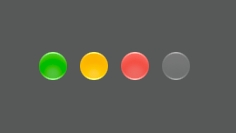
Apple also tweaked the look of the traffic light buttons in macOS Golden Gate beta six, adding a Liquid Glass aesthetic.


‌macOS Golden Gate‌ is available for developers and public beta testers, with a public launch coming in September.
Related Roundup: macOS Golden Gate

This article, "Apple Adds More New Wallpapers in macOS Golden Gate" first appeared on MacRumors.com

Discuss this article in our forums

  •  
❌