
Lees weergave

Apple Intelligence Home Features Require 2TB iCloud+ Plan in iOS 27

Using Apple Intelligence camera features in the Home app will require an iCloud+ plan starting at 2TB, according to Apple. Apple shared the detail in its notes for the third macOS Golden Gate beta that was released today.

In iOS 27, iPadOS 27, and macOS 27 Golden Gate, the Home app is able to generate written summaries for motion alerts from HomeKit Secure Video cameras. It's also able to group footage from separate cameras for an overview of activity and pull out noteworthy recordings, plus it supports natural language search.

Apple said at WWDC that some ‌Apple Intelligence‌ features would require an ‌iCloud‌+ plan, but Apple didn't specify which tier users would need to subscribe to. For the Home features, users will need the 2TB ‌iCloud‌+ plan or better. The 2TB plan includes 2TB of ‌iCloud‌ storage and it costs $9.99 per month.

‌HomeKit Secure Video‌ cloud storage has always required a paid ‌iCloud‌ plan. The 50GB plan allows for one camera, while the 200GB plan supports up to five. The 2TB plan lets users add an unlimited number of ‌HomeKit Secure Video‌ cameras, and now it will also add the ‌Apple Intelligence‌ Home feature set. HomeKit video storage does not count against the storage limit of an ‌iCloud‌+ plan, so the full 2TB stays available for photos and other data.

More on what's new in the Home app in ‌iOS 27‌, ‌iPadOS 27‌, and macOS 27 can be found in our guide.
Related Roundups: iOS 27, iPadOS 27

This article, "Apple Intelligence Home Features Require 2TB iCloud+ Plan in iOS 27" first appeared on MacRumors.com

Discuss this article in our forums

  •  

Siri AI Comes to Apple Watch in watchOS 27 Beta 3

With watchOS 27 beta 3, Apple added support for Siri AI and the ‌Siri‌ app, so Apple Watch users can now use the features right from their wrist.


Apple said ‌Siri‌ AI would be coming to the watch back when ‌watchOS 27‌ was first introduced, but the feature wasn't live until now.

The Dynamic App Grid that pops up when the Digital Crown is pressed displays the ‌Siri‌ app in the center, and the smarter version of ‌Siri‌ is available to answer queries and complete requests.

‌Siri‌ AI on Apple Watch relies on a nearby Apple Intelligence- compatible iPhone for processing. Conversations in the ‌Siri‌ app on Apple Watch sync to the ‌Siri‌ app across all other devices like iPhone, iPad, and Mac.
Tag: Siri
Buyer's Guide: Apple Watch (Caution)
Related Forum: Apple Watch

This article, "Siri AI Comes to Apple Watch in watchOS 27 Beta 3" first appeared on MacRumors.com

Discuss this article in our forums
  •  

macOS Golden Gate Gets New Wallpaper

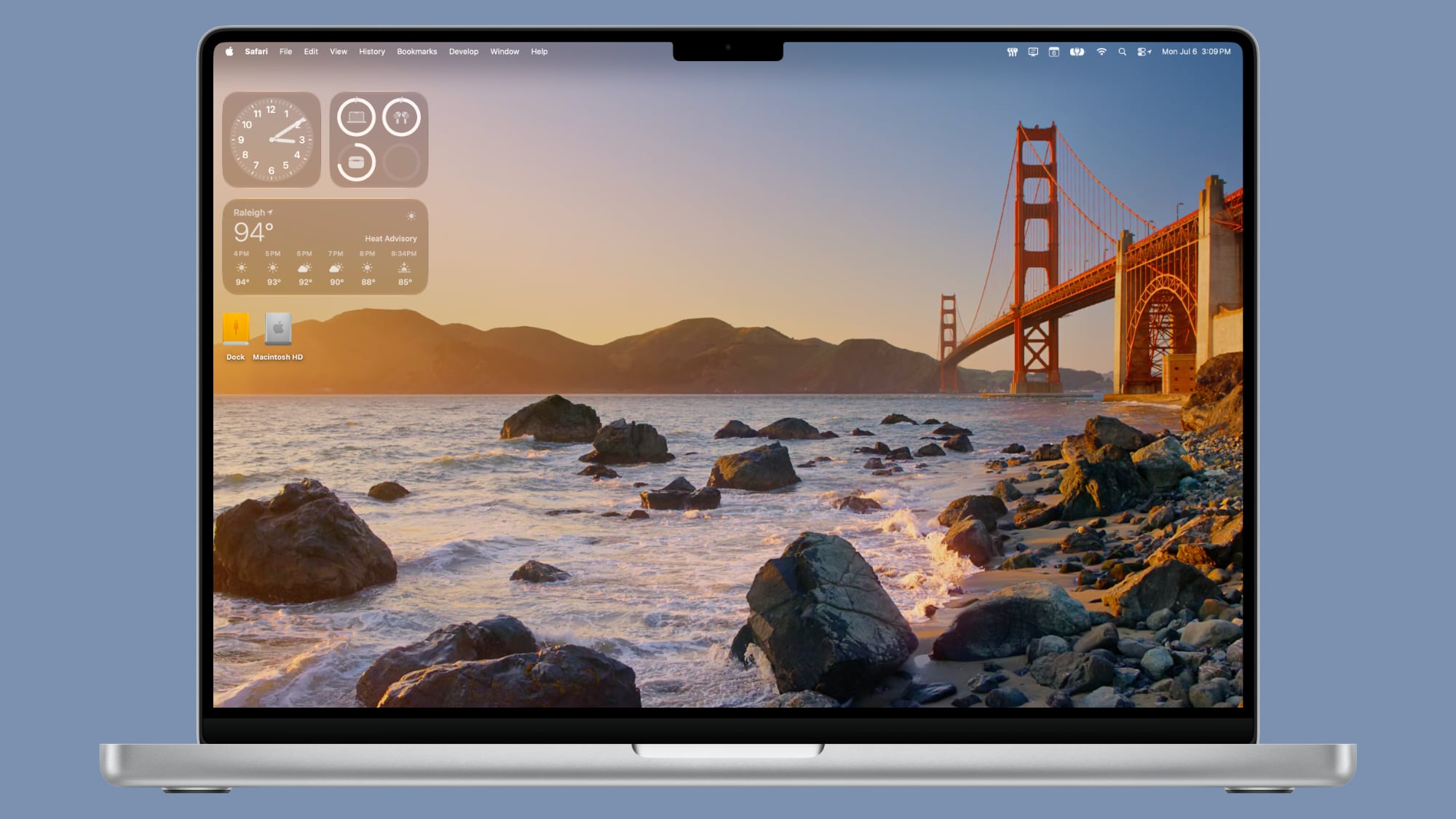
With the third beta of macOS 27, Apple added new Golden Gate-themed wallpaper options to the Mac.


There are new Golden Gate Sunset and Golden Gate Night options, both of which join the prior Golden Gate abstract wallpaper that Apple introduced with the initial beta.

Golden Gate Sunset and Golden Gate Night animate when unlocking the Mac, and can be set as a screen saver. When used as a screen saver, the Golden Gate Sunset wallpaper features waves breaking on the rocks near the Golden Gate Bridge. The Golden Gate Night wallpaper shows cars driving across the bridge.

With past updates, Apple has included several themed wallpaper options, so more Golden Gate wallpapers could be added in the future. macOS Golden Gate is limited to developers right now, but we are expecting a public beta soon.
Related Roundup: macOS Golden Gate

This article, "macOS Golden Gate Gets New Wallpaper" first appeared on MacRumors.com

Discuss this article in our forums

  •  

macOS Golden Gate Beta 3 Now Available for Developers

Apple today provided developers with the third beta of macOS Golden Gate, with the update coming two weeks after Apple seeded the second beta.


Developers can download ‌macOS Golden Gate‌ by going to System Settings > General > Software Update. Beta Updates will need to be enabled, and a free developer account is required.

‌macOS Golden Gate‌ includes multiple design improvements. Liquid Glass opacity has been improved to increase readability, there's a slider for controlling the level of transparency, and changes to shadowing make it easier to tell when a window is active. Apps now have uniform toolbars, edge-to-edge sidebars, and less rounded corners, plus there are fewer icons in menu bars.

Siri has been transformed into ‌Siri‌ AI, a chatbot-style assistant that combines general world knowledge, your personal data, and onscreen awareness to answer questions about anything and find information for you. ‌Siri‌ lives in Spotlight, and you can ask questions with the new Search or Ask interface.

There's also a ‌Siri‌ app where you can chat with ‌Siri‌ and view past conversations, and on newer Macs, you can set a custom voice for ‌Siri‌ with personalized pace and expressivity. Visual Intelligence is now on the Mac so ‌Siri‌ can answer questions about what's on your screen, and a Write with ‌Siri‌ feature lets ‌Siri‌ generate text or give feedback on your writing.

There are AI photo editing tools in the Photos app, AI tab organization in Safari, an option to use AI to automatically update weak passwords in the Passwords app, and a revamped Image Playground app that can generate photorealistic images.

More on all of the new features in ‌macOS Golden Gate‌ can be found in our macOS Golden Gate roundup. ‌macOS Golden Gate‌ is limited to developers right now, but Apple plans to release a public beta soon.
Related Roundup: macOS Golden Gate

This article, "macOS Golden Gate Beta 3 Now Available for Developers" first appeared on MacRumors.com

Discuss this article in our forums
  •  

Apple Seeds Third iOS 27 and iPadOS 27 Betas to Developers

Apple today seeded the third betas of iOS 27 and iPadOS 27 to developers for testing purposes, with the update coming two weeks after Apple released the second betas.


Registered developers can download the betas from the Settings app on the iPhone or iPad by going to the General section and selecting Software Update.

‌iOS 27‌ introduces Apple's smarter version of Siri, ‌Siri‌ AI. ‌Siri‌ AI is a chatbot similar to ChatGPT, incorporating general world knowledge, personal data from apps like Messages and Mail, and onscreen awareness to answer questions and find information for you.

There are new Apple Intelligence features in apps like Photos, Safari, Shortcuts, Wallet, and Passwords, plus Apple added a standalone ‌Siri‌ app that houses ‌Siri‌ conversations. Write with ‌Siri‌ is available systemwide for generating text or offering feedback on your writing, and Visual Intelligence has been relocated to the Camera app with a new ‌Siri‌ mode.

Apple improved the look of Liquid Glass and added a slider for customizing transparency. There are multiple performance improvements to speed up iOS, so everything feels faster, even on older iPhones. Apps launch quicker, AirDrop transfers are faster, the keyboard pops up more quickly, and devices are better at transitioning between Wi-Fi and Cellular to keep you connected.

For more on what's new in ‌iOS 27‌, we have a dedicated iOS 27 roundup.
Related Roundups: iOS 27, iPadOS 27

This article, "Apple Seeds Third iOS 27 and iPadOS 27 Betas to Developers" first appeared on MacRumors.com

Discuss this article in our forums

  •  

Apple Seeds Third visionOS 27 Beta to Developers

Apple today provided developers with the third beta of an upcoming visionOS 27 update for testing purposes, with the beta coming two weeks after Apple released the second beta.


visionOS 27 can be installed by opening the Settings app, going to Software Updates, and opting into Beta Updates.

visionOS 27 introduces Siri AI, the smarter and more capable version of ‌Siri‌ that's similar in capability to chatbots like ChatGPT and Claude. On the Vision Pro, ‌Siri‌ can answer questions about anything the wearer is looking at, and there's a new ‌Siri‌ orb that can be placed anywhere in wearer's virtual space.

Panorama photos can be turned into spatial environments, and there's a new Icelandic Thórsmörk environment that features dramatic mountains, valleys, and glaciers, along with the northern lights. Web Environment support allows developers to create 360-degree environments in Safari for a more native Vision Pro browsing experience.

App windows are now curved to provide a more immersive workspace, and Control Center has been reorganized to make system controls easier to find. Apple added a smaller widget size, and notifications automatically expand when the wearer looks at them.

More on what's new in visionOS 27 is listed in our Vision Pro roundup.
Related Roundup: Apple Vision Pro
Buyer's Guide: Vision Pro (Neutral)
Related Forum: Apple Vision Pro

This article, "Apple Seeds Third visionOS 27 Beta to Developers" first appeared on MacRumors.com

Discuss this article in our forums

  •  

Apple Seeds watchOS 27 Beta 3 to Developers

Apple today seeded the third beta of watchOS 27 to developers, with the update coming two weeks after the launch of the second beta.


The beta can be downloaded through the Watch app on the iPhone with a free developer account. The Apple Watch will need to be on the charger, connected to Wi-Fi, and have a battery level of 50 percent or above for new software to be installed. The beta is available for all Apple Watch models compatible with ‌watchOS 27‌ except for the Apple Watch Ultra 3.

‌watchOS 27‌ will include Siri AI, the smarter, more capable version of ‌Siri‌. ‌Siri‌ can hold back-and-forth conversations, plus it has access to general world knowledge and your personal data to answer questions and find information. ‌Siri‌ AI on Apple Watch requires an iPhone that supports Apple Intelligence, including the iPhone 15 Pro and later.

There's a new Dynamic app grid that highlights ‌Siri‌ suggested apps, and more intuitive Smart Stack Suggestions. You can find your parked car, see pinned messages, get noise alerts, and view identity and transit cards.

Liquid Glass has been updated to improve legibility, and Workout Buddy works on the Apple Watch even when an iPhone isn't nearby. Workout Buddy also gains new metrics like progressive increases to distance, pace, or duration. Apple added a new all-in-one Find My app with support for Precision Finding, and there are performance optimizations that improve battery life.

More on what's new in ‌watchOS 27‌ is available in our watchOS 27 roundup.
Related Roundups: watchOS 26, watchOS 27
Related Forum: Apple Watch

This article, "Apple Seeds watchOS 27 Beta 3 to Developers" first appeared on MacRumors.com

Discuss this article in our forums
  •  

Apple Seeds tvOS 27 Beta 3 to Developers

Apple today seeded the third beta of tvOS 27 to developers for testing purposes, with the update coming two weeks after Apple released the second beta.


The beta can be downloaded and installed through the Settings app on the Apple TV. A free developer account is required.

tvOS 27 has few new features compared to the other 27 software updates, but it does add a redesigned Podcasts app, options for larger text, and a more responsive Control Center.

AirPlaying to an ‌Apple TV‌ from another Apple device is faster, and apps and animations are smoother. You can also now see AppleCare coverage details in the Settings app.

More on the features in tvOS 27 can be found in our Apple TV roundup.
Related Roundup: Apple TV
Buyer's Guide: Apple TV (Don't Buy)

This article, "Apple Seeds tvOS 27 Beta 3 to Developers" first appeared on MacRumors.com

Discuss this article in our forums
  •  

Fourth macOS Tahoe 26.6 Beta Now Available for Developers

Apple today provided the fourth beta of an upcoming macOS Tahoe 26.6 update to developers for testing purposes, with the update coming a week after Apple seeded the third beta.


Developers can download the ‌macOS Tahoe‌ 26.6 update by opening up the System Settings app, selecting the General category, and then choosing Software Update. Beta Updates will need to be enabled, and a free developer account is required.

With macOS Golden Gate launching in just a couple months, Apple is likely focusing most of its attention on the new software. We are not expecting any major new features in ‌macOS Tahoe‌ 26.6.
Related Roundup: macOS Tahoe
Related Forum: macOS Tahoe

This article, "Fourth macOS Tahoe 26.6 Beta Now Available for Developers" first appeared on MacRumors.com

Discuss this article in our forums
  •  

Apple Seeds Fourth iOS 26.6 and iPadOS 26.6 Betas to Developers

Apple today seeded the fourth betas of upcoming iOS 26.6 and iPadOS 26.6 updates to developers for testing purposes, with the software coming a week after Apple seeded the third betas.


Registered developers can download the betas from the Settings app on the iPhone or iPad by going to the General section and selecting Software Update.

With iOS 27 set to launch in September, Apple is wrapping up work on iOS 26. We are not expecting any major new features in the iOS 26.6 update, and it will primarily focus on bug fixes and performance improvements.

The update adds new wording around blocked contact limits, letting users know when they have exceeded the maximum number of blocked contacts. The update might also include a new anti-snatching feature that locks your iPhone if it's grabbed from your hand.
Related Roundups: iOS 26, iPadOS 26
Related Forum: iOS 26

This article, "Apple Seeds Fourth iOS 26.6 and iPadOS 26.6 Betas to Developers" first appeared on MacRumors.com

Discuss this article in our forums

  •  

Apple Releases Fourth watchOS 26.6, tvOS 26.6 and visionOS 26.6 Betas

Apple today provided developers with the fourth betas of upcoming watchOS 26.6, tvOS 26.6, and visionOS 26.6 betas for testing purposes. The software comes a week after Apple seeded the third betas.


The software updates are available through the Settings app on each device, and because these are developer betas, a free developer account is required.

There's no word on what's in the software as of yet. watchOS, tvOS, and visionOS often get few features in each new beta, with updates primarily focusing on bug fixes and performance improvements.
This article, "Apple Releases Fourth watchOS 26.6, tvOS 26.6 and visionOS 26.6 Betas" first appeared on MacRumors.com

Discuss this article in our forums

  •  
❌