Lees weergave

How to See Which Mac Apps Will Stop Working After macOS Golden Gate

Apple is phasing out support for Rosetta 2, which is a feature that allows Intel-based apps to run on Apple silicon Macs. Rosetta is going to stop working for most apps in macOS 28, and when that happens, apps that use it will stop working.
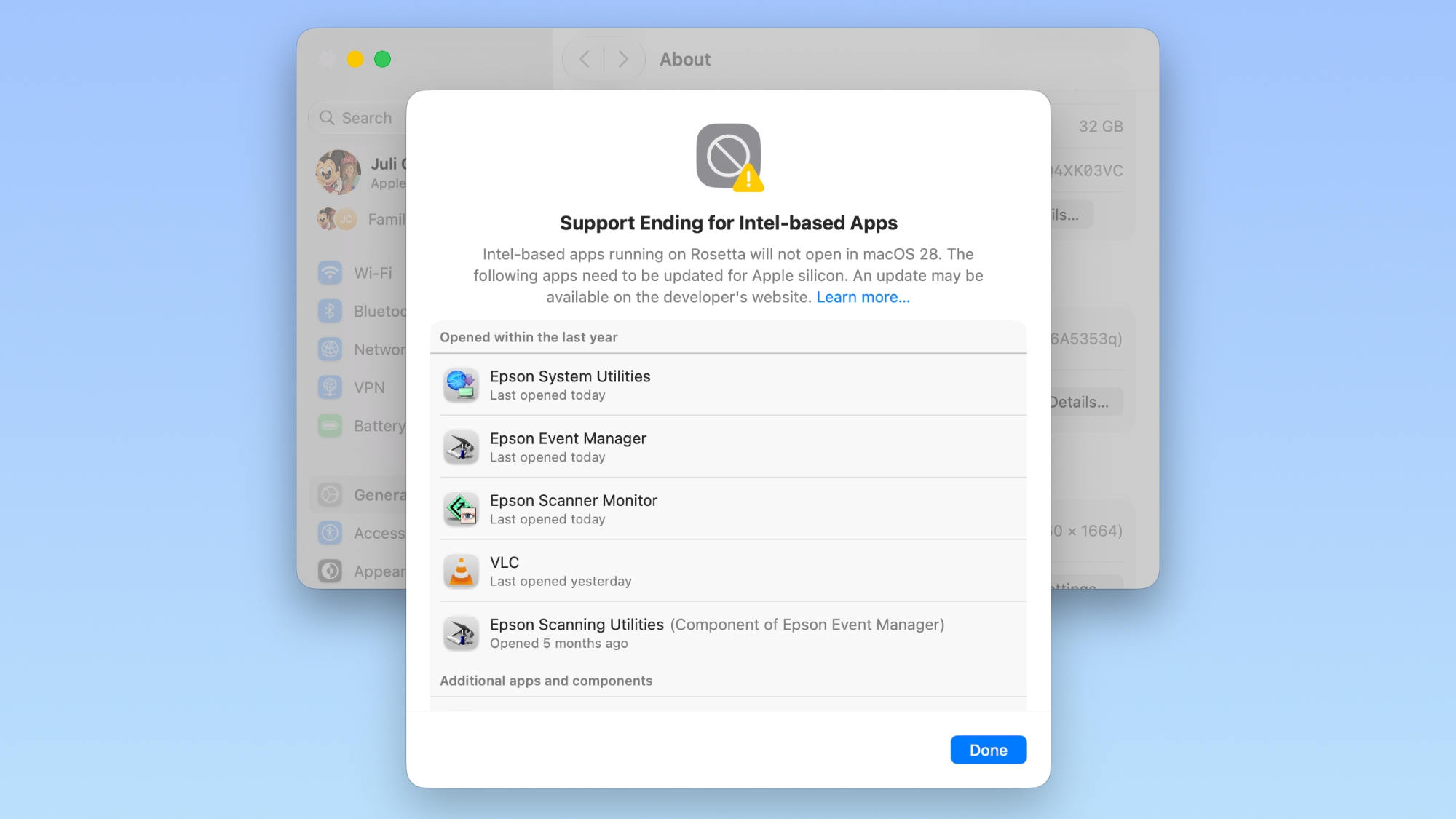

Apple began warning customers and companies about the upcoming sunsetting of Rosetta with macOS Tahoe, and the warnings go even further in macOS Golden Gate.

If you have apps that still use Rosetta, you'll get a warning every time you restart your Mac or open an Intel app. ‌macOS Golden Gate‌ also adds a new list where you can check which apps are going to stop working in the future.

You can get to the list by going to Settings > General > About > Intel-Based apps and clicking on the "Details" option.

The interface lists all of the apps that are going to stop working, giving Mac users plenty of time to contact app developers or find alternative apps.
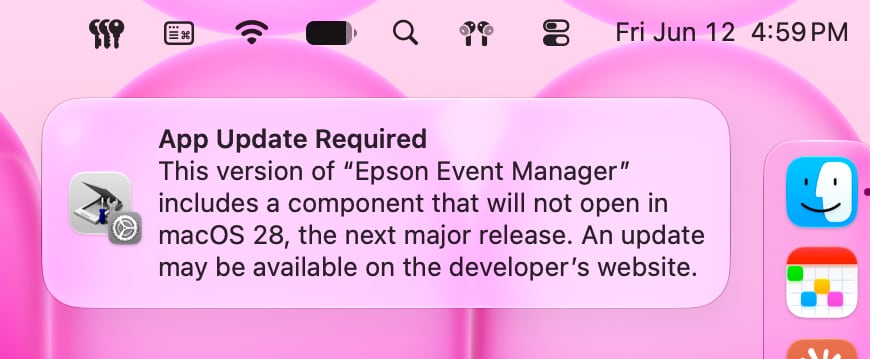

‌macOS Golden Gate‌ does not install Rosetta automatically, so if you still have these outdated Intel apps, there will be a short installation when you try to open one for the first time after upgrading to Golden Gate. Authentication plugins and other pre-login utilities that require Rosetta fail to load in ‌macOS Golden Gate‌ because of the limitation.

Apple designed Rosetta to help users and developers transition from Intel to Apple silicon, but Apple phased out the last Intel-based Mac years ago. Apple only sells Apple silicon Macs, and it is slowly ending support for Intel-based models.

‌macOS Tahoe‌ was the final version of macOS available for Intel Macs, and ‌macOS Golden Gate‌ requires a Mac with an Apple silicon chip.
Related Roundup: macOS Golden Gate

This article, "How to See Which Mac Apps Will Stop Working After macOS Golden Gate" first appeared on MacRumors.com

Discuss this article in our forums

  •  

macOS 27 Golden Gate Hands-On: Every Major New Feature

macOS 27 Golden Gate is in beta ahead of a fall release, and we thought we'd go over what's new for those who don't want to risk beta software on their Mac. macOS Golden Gate adds Siri AI, Liquid Glass updates, and multiple new Apple Intelligence features.


‌Siri‌ on the Mac lives in Spotlight. Command + Space brings up a new Search or Ask interface for searching for files on the Mac or asking ‌Siri‌ a question. ‌Siri‌ is able to access data on the Mac, and it can answer the same general questions any chatbot can answer. The combination of personal context and world knowledge lets ‌Siri‌ do some things that are unavailable to other AI services like ChatGPT or Claude.

‌Siri‌ answers appear in Spotlight with an option to ask follow-up questions, but there's also a standalone ‌Siri‌ app where you can find all of your past ‌Siri‌ interactions. ‌Siri‌ is also integrated into the system for features like Write with ‌Siri‌. ‌Siri‌ can compose emails and messages for you in your own writing style, check your grammar, or just give you general feedback on what you've written.

Apple brought Visual Intelligence to the Mac, and it's available through the screenshot interface. When activated, you can select an area of your display that has something you want to know more about, and ‌Siri‌ can answer questions you have. In apps like Safari, you can select text or images, then ask ‌Siri‌ about your selection. Many of the same ‌Visual Intelligence‌ features that are on iPhone have carried over to the Mac, so ‌Siri‌ can identify plants and animals or even tell you the nutritional value of food in an image, which is a new feature this year.

‌Apple Intelligence‌ makes many of the built-in Mac apps better. Safari can group similar tabs together by subject, Passwords can automatically change weak passwords for you, Photos has new AI editing tools for changing framing and perspective, and Image Playground can generate photorealistic images.

Shortcuts uses AI to build shortcuts for you based on natural language requests, Calendar supports natural language event input, Mail search is better than before with quick action suggestions, and the Messages app also supports AI suggestions for actions you might want to take, like inserting a photo to send to a friend.

Apple updated Liquid Glass in ‌macOS Golden Gate‌. There's a slider for adjusting overall system opacity, refraction and contrast have been improved, sidebars are unified with less wasted space, and Apple has removed many of the unnecessary icons from menu bars.

If you have a Mac that can run Golden Gate, you're going to get ‌Siri‌ AI and the ‌Apple Intelligence‌ features. ‌Apple Intelligence‌ works on all Apple silicon Macs, and Golden Gate doesn't run on devices with an Intel chip.

EU users can't use ‌Siri‌ AI on the iPhone and the iPad because Apple isn't making it available yet, but ‌Siri‌ AI is available on macOS in the European Union.
Related Roundup: macOS Golden Gate

This article, "macOS 27 Golden Gate Hands-On: Every Major New Feature" first appeared on MacRumors.com

Discuss this article in our forums
  •  

iOS 27: All the New Health and Fitness Features

Apple was rumored to be working on an AI health service, but it was scrapped well before the iOS 27 beta came out. It could resurface in the future, but for now, there are a handful of health and fitness changes in the update.


Design


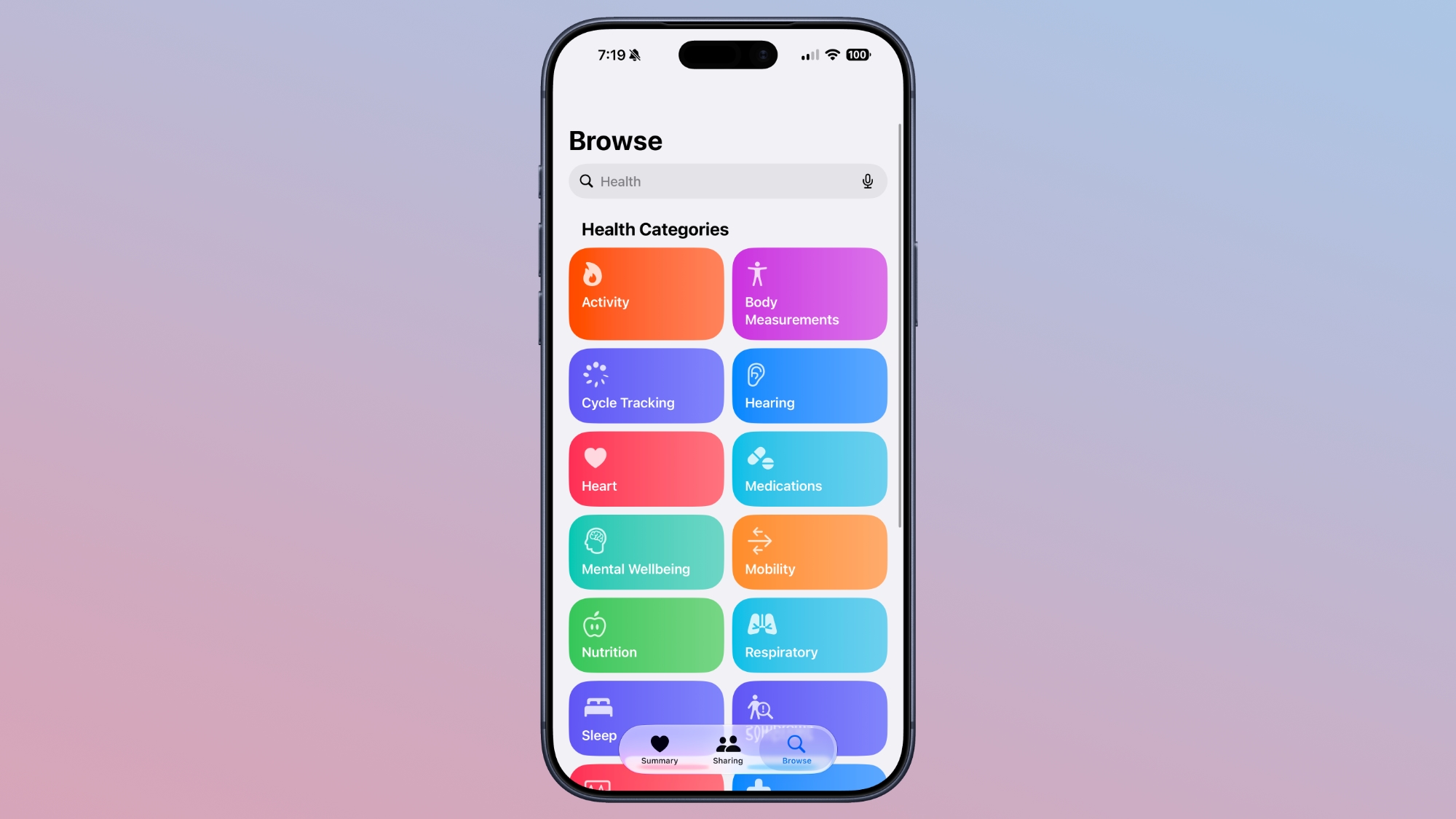
Apple redesigned the Browse section of the Health app, and it now uses a card-style interface instead of a list. It is more colorful and easier to see the different categories.


The app also has a single bottom navigation bar that incorporates a search/browse button, instead of a separate search button.

Visual Intelligence


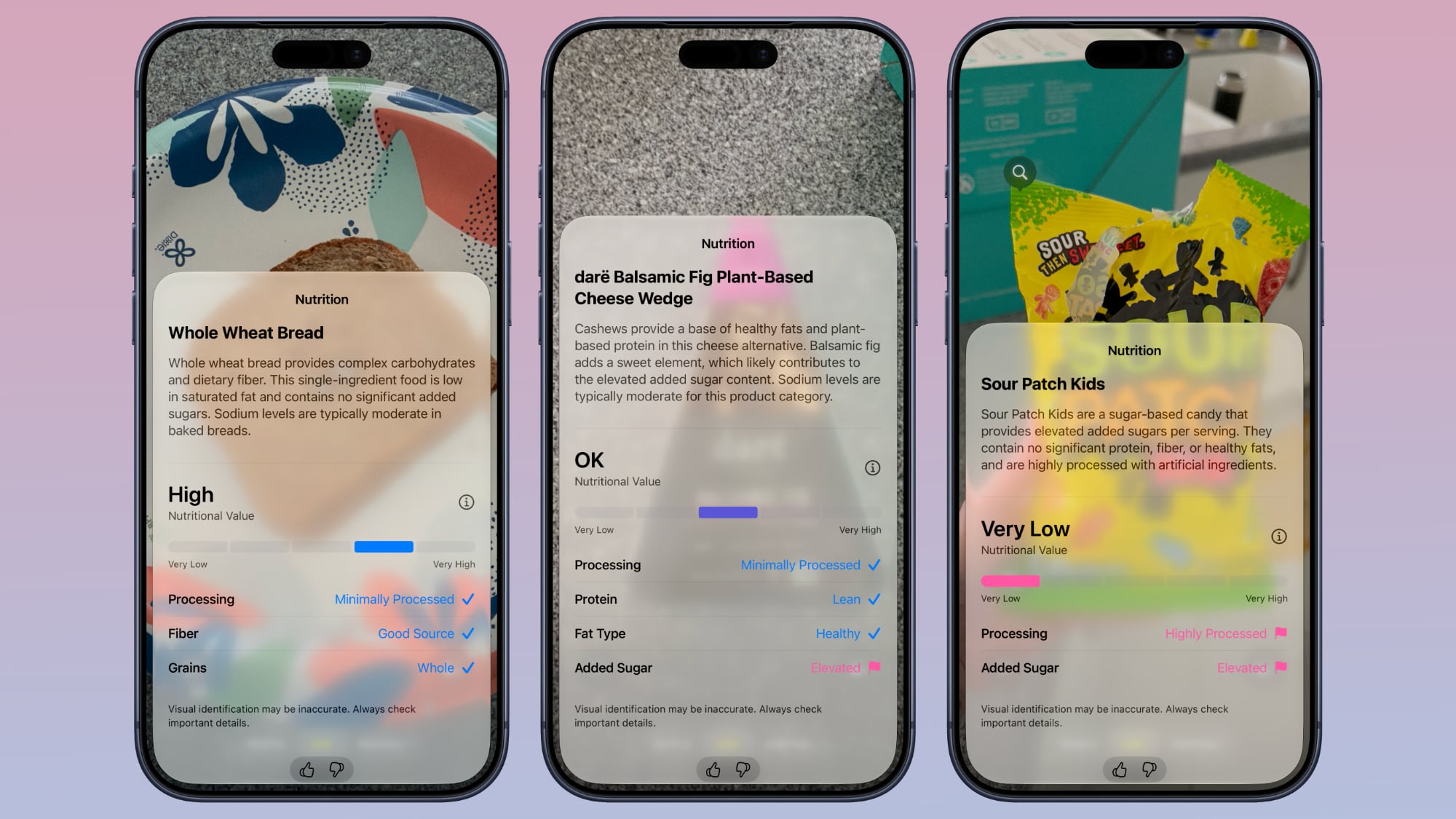
Visual Intelligence has a new nutrition feature that can tell you the nutritional value of what you're eating. You can open the Camera app to the new Siri mode and take a photo of a food item to get feedback.


It does not give exact calorie counts, but it lets you know if a food is heavily processed, if it has protein, if it's high in sugar, and more. It gives food a nutritional value ranking between very low and very high. Data does not sync to the Health app, but it's still useful.

‌Visual Intelligence‌ requires an iPhone 15 Pro or later.

Cycle Tracking


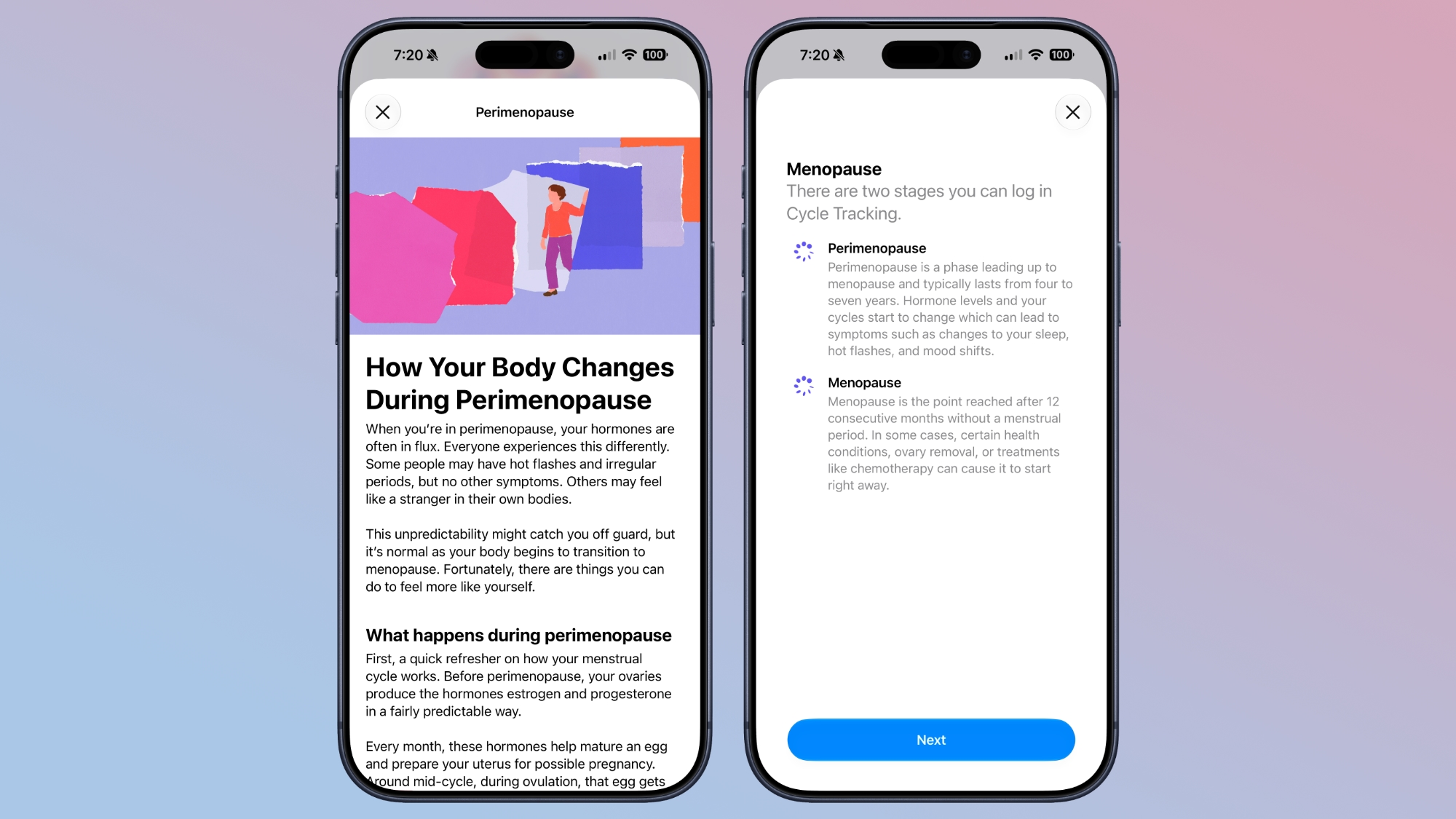
Cycle Tracking is expanding with perimenopause/menopause support. The Health app now sends notifications when logged cycle patterns are suggestive of perimenopause.


The feature uses long-term cycle data to flag the perimenopause hormonal transition that can begin a decade or more before menopause. Cycle deviation alerts are based on the user's logged cycle history and are for users age 40 and above.

Users can keep track of symptoms and access educational resources that offer guidance and support.

Apple also added new Fitness+ workouts for perimenopause and menopause.

Faster Data Updates


Data syncs to the Health app quicker than before thanks to performance improvements Apple implemented.

Child Safety


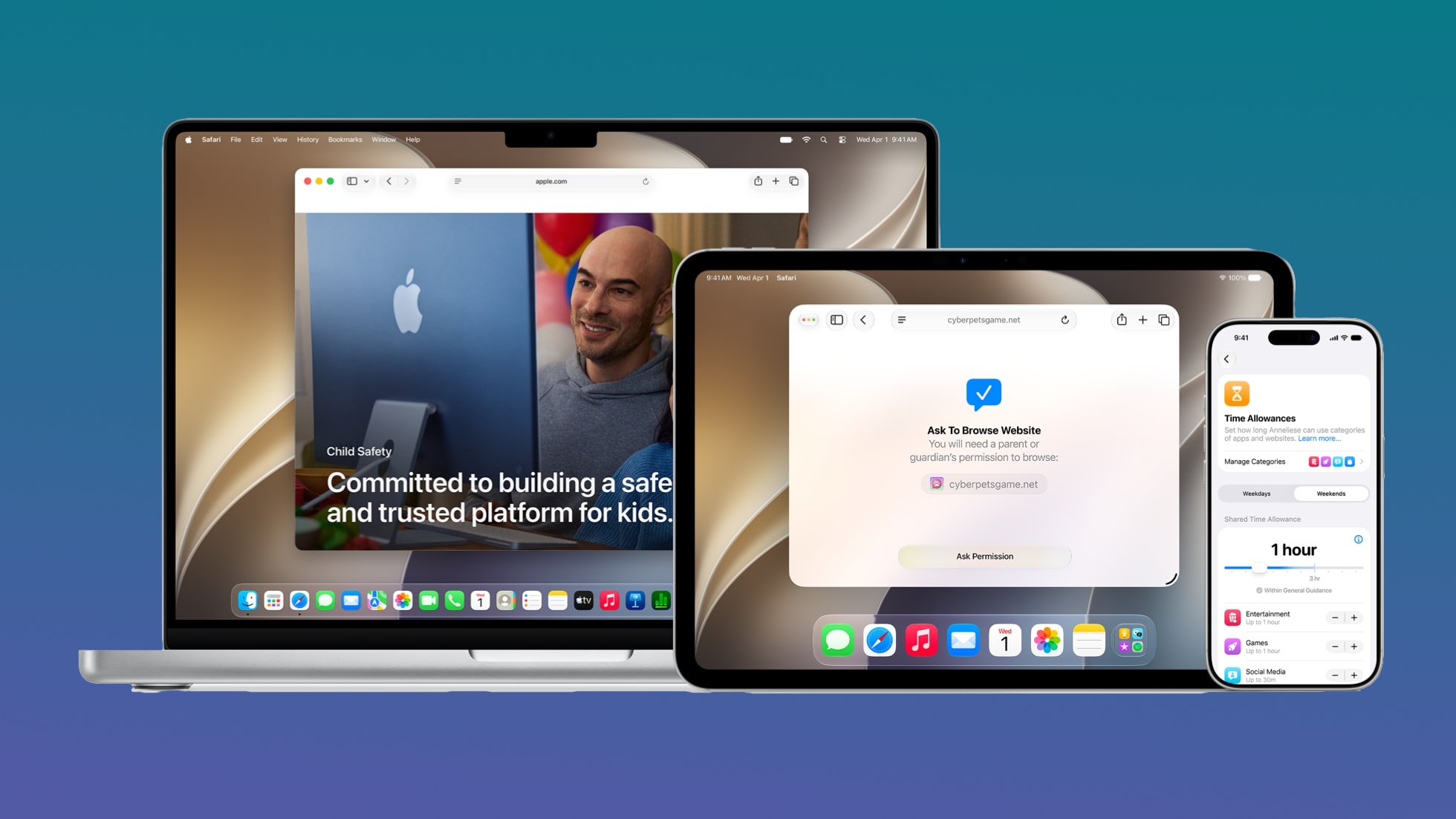
There are several new Child Safety features that give parents more control over the content their children are seeing. Apple is including guidance based on expert health research to help parents make decisions about managing child accounts.


Route and Distance Accuracy


Route maps that populate the Fitness app after workouts are more accurate in ‌iOS 27‌. During treadmill workouts, distance is also reflected more accurately than before.

Step Count


Step counts will sync between the Health and Fitness apps.

GymKit


GymKit has expanded to the iPhone, which can pair with treadmills, indoor bikes, and other exercise equipment for data syncing. GymKit was previously an Apple Watch feature, but now iPhone users won't need a watch to use it.

GymKit can sync calories, distance, speed, incline, and pace.

Launch Date


‌iOS 27‌ is available to developers, with a public beta planned for July. It will launch to the public this fall.
Related Roundups: iOS 27, iPadOS 27

This article, "iOS 27: All the New Health and Fitness Features" first appeared on MacRumors.com

Discuss this article in our forums
  •  

Apple's Craig Federighi: Siri Won't Be Your AI Girlfriend

Apple software engineering chief Craig Federighi and marketing chief Greg Joswiak sat down for an interview with Mostly Human after during WWDC, discussing the iOS 27 Siri changes, Apple's take on AI, new child safety protections, and more.


Apple set out to deliver an AI utility, not an AI companion. When asked whether users could create an AI boyfriend or girlfriend with the new Siri, Federighi said absolutely not. ‌Siri‌ is meant to help, and Apple didn't want to focus on engagement like other AI companies. From Federighi:
Quite the opposite, because as you may know, if you use many of the existing chatbots, they're really focused on engagement to a large degree. And sycophancy, right? They kind of want to pull you in. They might encourage you to reveal things about yourself, and then use that as a basis to establish a connection.

We view it quite the opposite. I mean, the way that we have designed Siri, Siri really wants to say 'Listen, that's not what I'm here for, right? I'm here to help you. I can help you get things done. I can help you learn about the world.' But if you try to engage Siri as a romantic partner, Siri's not up for that. Siri's 100 percent not into that.

Joswiak said Apple didn't want to do AI for AI's sake, and the company wanted AI to blend in with existing iPhone features.
We like when technology disappears, right? You just focus on what you want to do, or you focus on the content. And it's the same thing with AI. [...] We don't do AI for AI's sake. 'Hey, look at us, we're doing AI.' It's how does AI make everything better? And that makes our products better, our features better.

He went on to say that he doesn't want iPhone users to have to be "prompt experts" to use AI. "We want to meet them where they're at," said Joswiak. "Have the products and features become better, and this is just a really helpful technology in making those features and products better."

Federighi wanted to make it clear that Apple's approach to AI is privacy forward.
I think it's a challenging thing for a lot of people to understand the distinction between what your iPhone knows and what, say, Apple as a company knows. Your iPhone is yours, right? Your data is yours and it stays on your phone and your control and Siri is using it for you. Apple doesn't get to know any of this stuff, and that is very different than I think most players in the space, and I think super important.

The full interview covers other topics like child safety, AI and jobs, iOS 27 features, Apple's 50th anniversary, the future of AI, scammers, and much more.
This article, "Apple's Craig Federighi: Siri Won't Be Your AI Girlfriend" first appeared on MacRumors.com

Discuss this article in our forums
  •  

Apple Criticizes U.S. Antitrust Bill That Targets the App Store

United States Senators Chuck Grassley and Amy Klobuchar this week reintroduced the American Innovation and Choice Online Act (AICOA) that targets major tech companies like Apple, and Apple is not happy to see it back.


The bipartisan bill is reminiscent of the Digital Markets Act in the European Union, banning large platforms from favoring their own products or services, limiting competitors' access to key platform features, locking users into default settings, and more. It is a reworked version of the same bill that did not reach a floor vote back in 2022.

In a statement to MacRumors, Apple said AICOA will undermine privacy, security, and child safety protections, while also making it more difficult to do business in the U.S.
We strongly disagree with the Senate's consideration of European-style regulation that would hamper innovation and force changes consumers never asked for, while undermining the privacy, security and child safety protections they rely on every day. Apple is proud to be an engine of innovation, job creation, and economic growth in the U.S., where some of the world's most innovative companies have designed technology that has changed the world. Importing Europe's failed policies will not increase competition -- it will make it more difficult to do business right here at home.

AICOA aims to "restore online competition and affordability" by preventing digital platforms from "abusing their market power to stifle competition, undercut online businesses and raise prices for American consumers." It would permit the Department of Justice, Federal Trade Commission, and state attorneys general to challenge online platforms for exclusionary conduct that harms competition.

It is applicable to platforms that have at least $175 billion in average annual gross revenue and reach 34 percent of U.S. subscriber households or 34 percent of U.S. monthly active users over the age of 12. Apple would be subject to the restrictions should AICOA pass. Companies are barred from the following under the current AICOA wording:

  • Unfairly favoring their own products or services.

  • Misusing nonpublic business-user data to copy and compete against small businesses.

  • Unfairly limiting competitors' access to key platform features.

  • Blocking business users from accessing or moving their own data from one digital platform to another.

  • Retaliating against users or business users who raise legal concerns.

  • Unfairly enforcing terms of service in ways that harm competition.

  • Conditioning companies' access to the platform, or product placement on the platform, on purchase or use of unrelated services.

  • Locking users into default settings.

  • Skewing ranking or presentation against similarly situated business users.


Apple says AICOA would have the same impact as the Digital Markets Act, harming innovation, weakening privacy protections, and delaying new product features. Most recently, Apple said it would not be able to bring Siri AI to the European Union when iOS 27 launches because of an inability to reach an agreement with the European Commission on the DMA's interoperability rules.

Like the DMA, AICOA would allow for third-party app marketplaces and alternative payment methods, which Apple maintains will undermine the user protections of the App Store. Apple also says the AICOA rules mandating open platform access would give the most sensitive user data to any company that wants it.

Bill sponsors say AICOA was written to "preserve safety, privacy, intellectual property, national security and constitutional protections," and that it includes language to ensure covered platforms are able to prevent fraud and protect safety, user privacy, nonpublic data, or platform security.

Along with Apple, AICOA would impact Google, Amazon, and Meta. It is endorsed by Mozilla, Proton, DuckDuckGo, Yelp, and Y Combinator, among others. Senators Josh Hawley, Dick Durbin, Sheldon Whitehouse, and Cory Booker are co-sponsors.
This article, "Apple Criticizes U.S. Antitrust Bill That Targets the App Store" first appeared on MacRumors.com

Discuss this article in our forums
  •  

What's New in the iOS 27 Photos App

The Photos app is one of a handful of apps that Apple paid extra attention to in iOS 27. It has multiple improvements to performance, and several quality-of-life upgrades. There are also new AI photo editing tools that use Apple Intelligence.


AI Tools


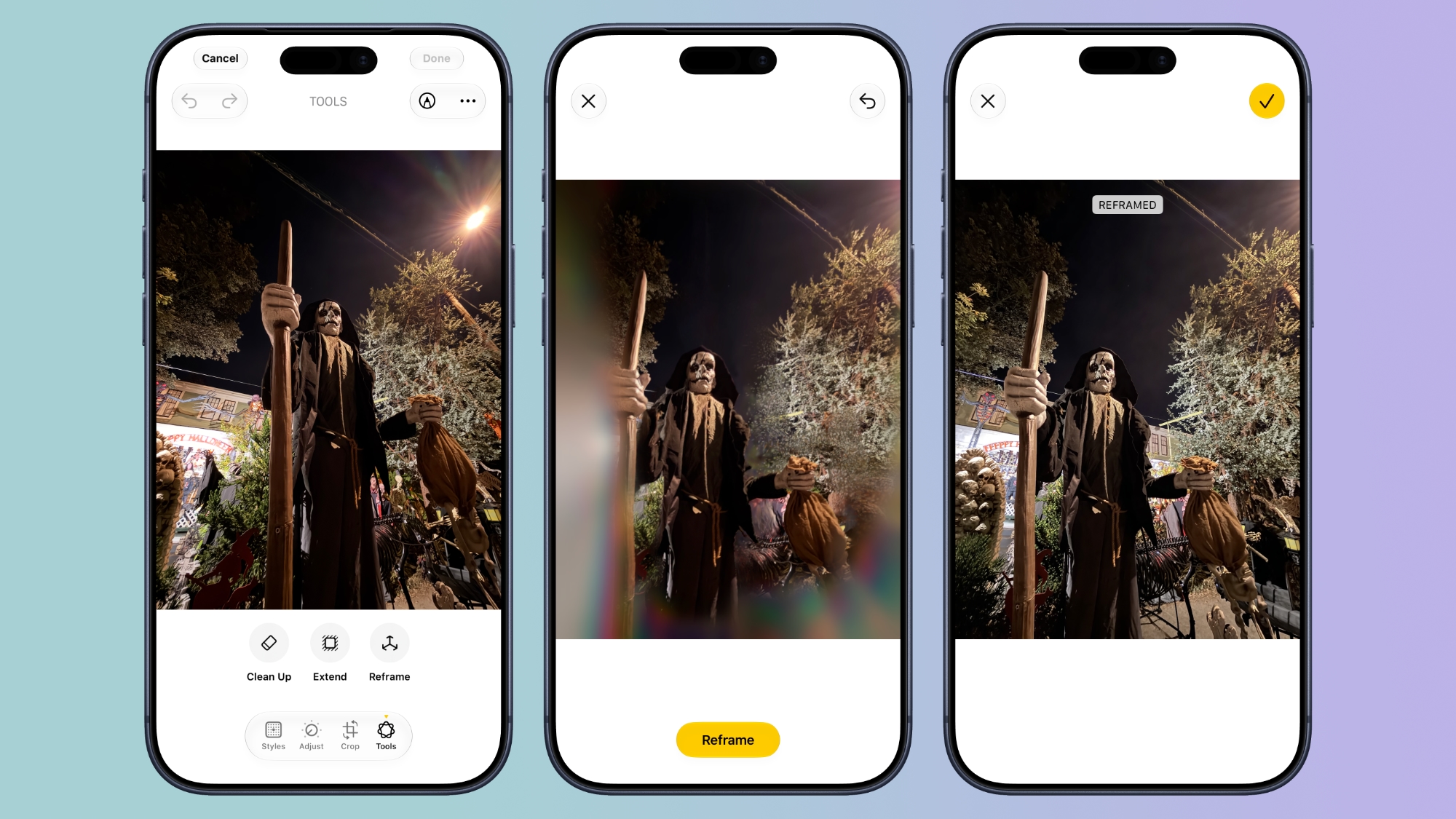
There is a set of AI photo editing tools in the ‌Photos‌ app, accessible by tapping on the icon featuring three sliders, and then selecting the ‌Apple Intelligence‌ icon labeled "Tools."

Clean Up


Clean Up uses new AI models, and it's better at removing objects. The original version of Clean Up was best for small items with little complexity in the surrounding area, but now it is able to do more work reconstructing backgrounds with generative AI.


There are now three options for object removal. Fast works more quickly and can still be used for simple edits, while High Quality works better for more detailed scenes. Auto lets the ‌Photos‌ app decide which option is best.

Extend


Extend lets you change the crop of an image, expanding the borders around content to zoom out a bit or change the photo's composition. It uses generative AI to fill in missing areas, and you can adjust the borders with pinch gestures.


Apple also uses the Extend feature for expanding iPhone Lock Screen wallpapers that don't quite fit the display.

Reframe


Reframe can change the perspective of the photo, making adjustments to the angle of a person or object. It draws on the spatial information the iPhone gathers when a photo is taken, and combines it with AI to change the angle of the camera in post-processing. The spatial data is used for adjusting the subject of the image, and then AI fills in any pixels that are missing.


Reframe uses touch and drag gestures to adjust perspective, and two fingers for panning, zooming, or rotating an image to get the right angle.

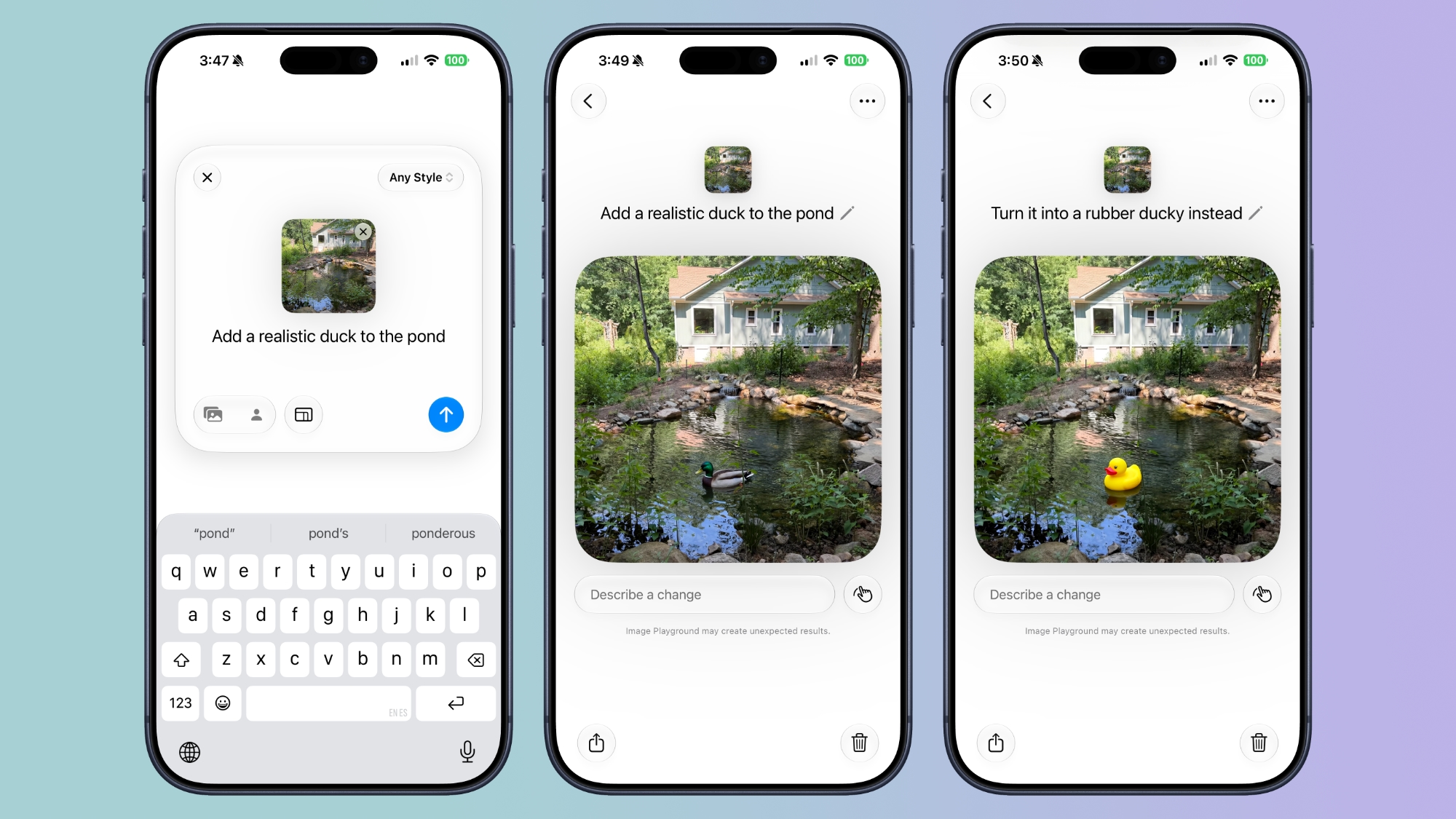
Image Playground


While not part of the ‌Photos‌ app, the Image Playground app can be used to make photorealistic edits to your image. If you have a photo of a friend and want to add a hat or an accessory that looks real, you can do so with ‌Image Playground‌. You can select specific areas in an image to modify and make AI edits using natural language, plus there's an option to combine images.


‌Image Playground‌ can be used for free, but there will be daily caps, with extra usage available through iCloud+ plans.

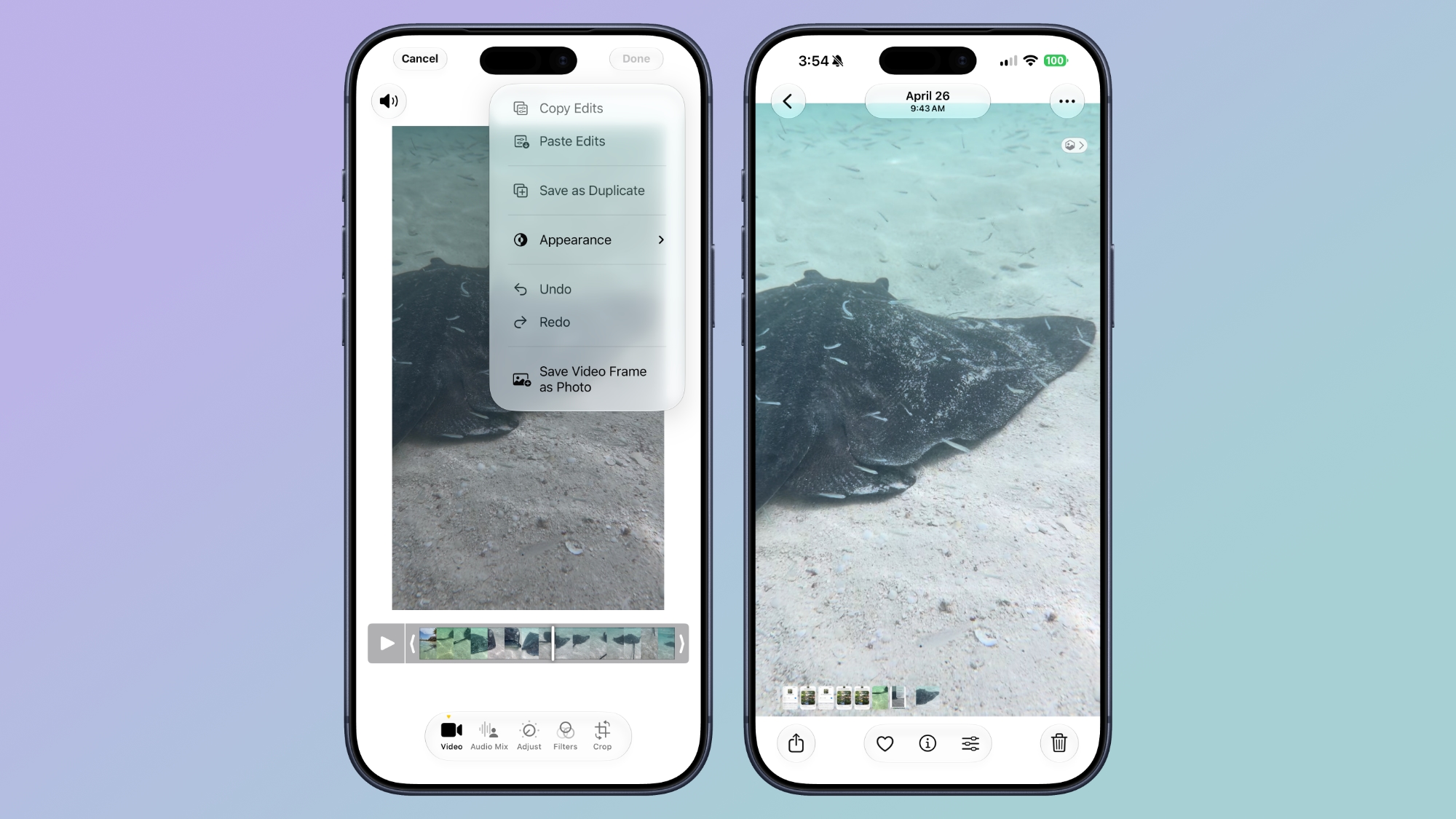
Videos to Photos


You can now save a frame of a video as an individual photo.


Metadata


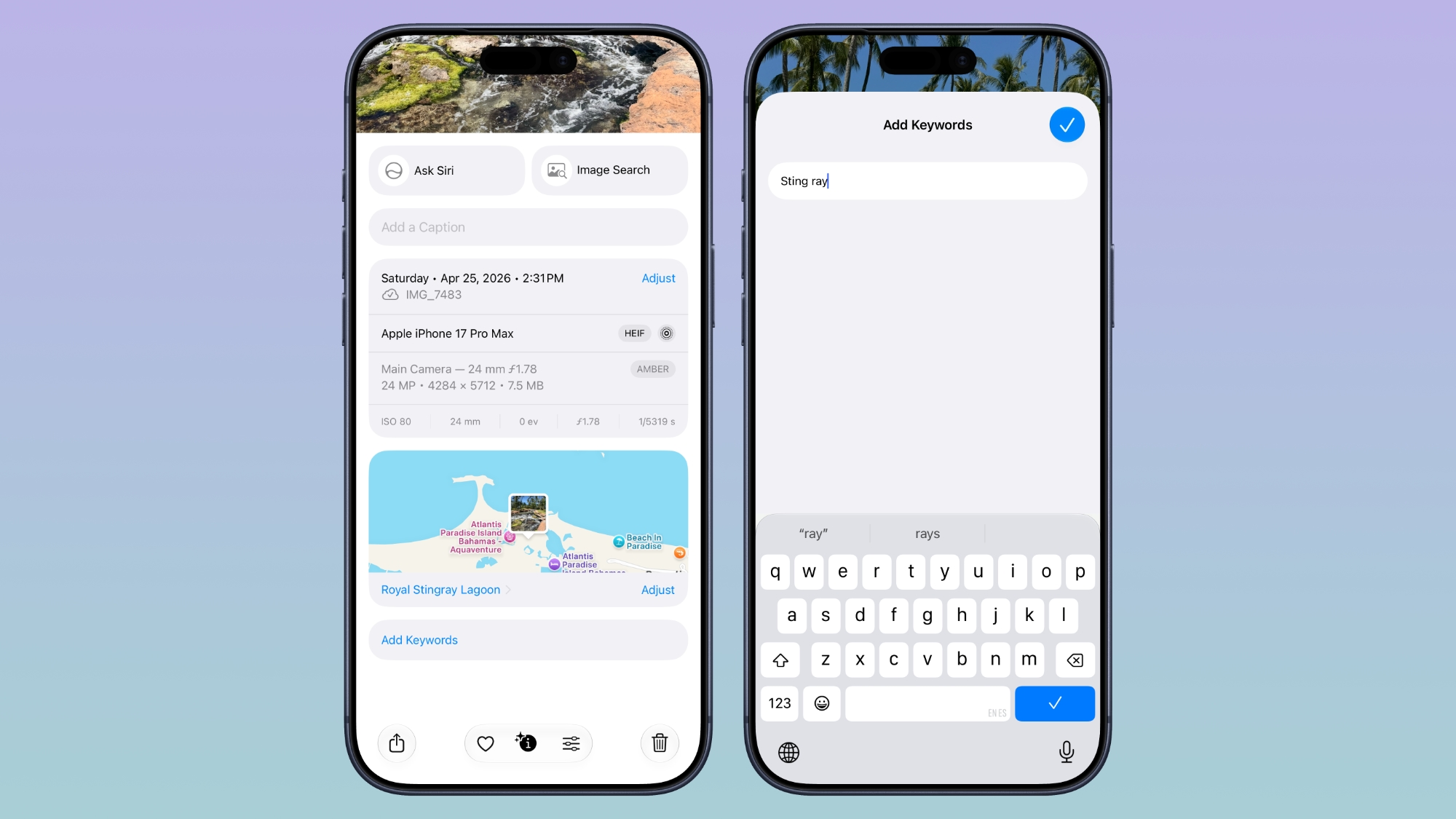
Apple now lets you add keywords and star ratings to photos and videos in the ‌Photos‌ app. You can rate images with one to five stars and then filter images by rating.


Album Changes


Apple improved album organization in ‌iOS 27‌ and added new features for Shared Albums, including an option for Android and Windows users to contribute to ‌iCloud‌ albums.

  • Shared Albums can be filtered by photos or videos.

  • It's easier to save images from Shared Albums.

  • You can set Shared Albums to expire after 30 days, which is useful for sharing photos without having a permanent album.

  • It's easier to invite people to Shared Albums with a dedicated "Create Shared Album" option in any album menu.

  • You can create a link for people to upload images to a Shared Album, and there are new permissions so you can require explicit access to be granted.

  • Shared Albums have a recent activity log.

  • You can react to images in Shared Albums with any emoji.


Slideshows


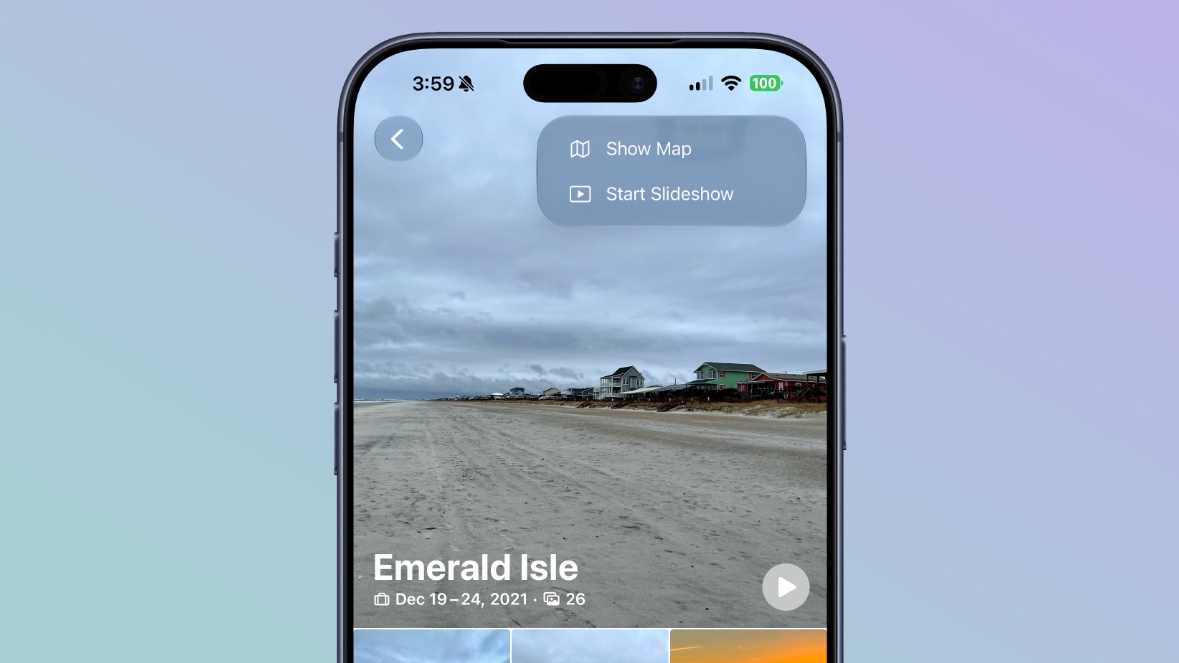
You can create a slideshow from any album or collection of images in the ‌Photos‌ app instead of being limited to what's in the Memories section. Just tap into an album, tap the icon in the upper right of the display, and choose "Start Slideshow." Alternatively, select several photos and then follow the same steps from the main Library interface.


Slideshows can be customized with transition styles, slide duration, and background music. The resulting file can be shared on social media, and saved as a video.

Utilities


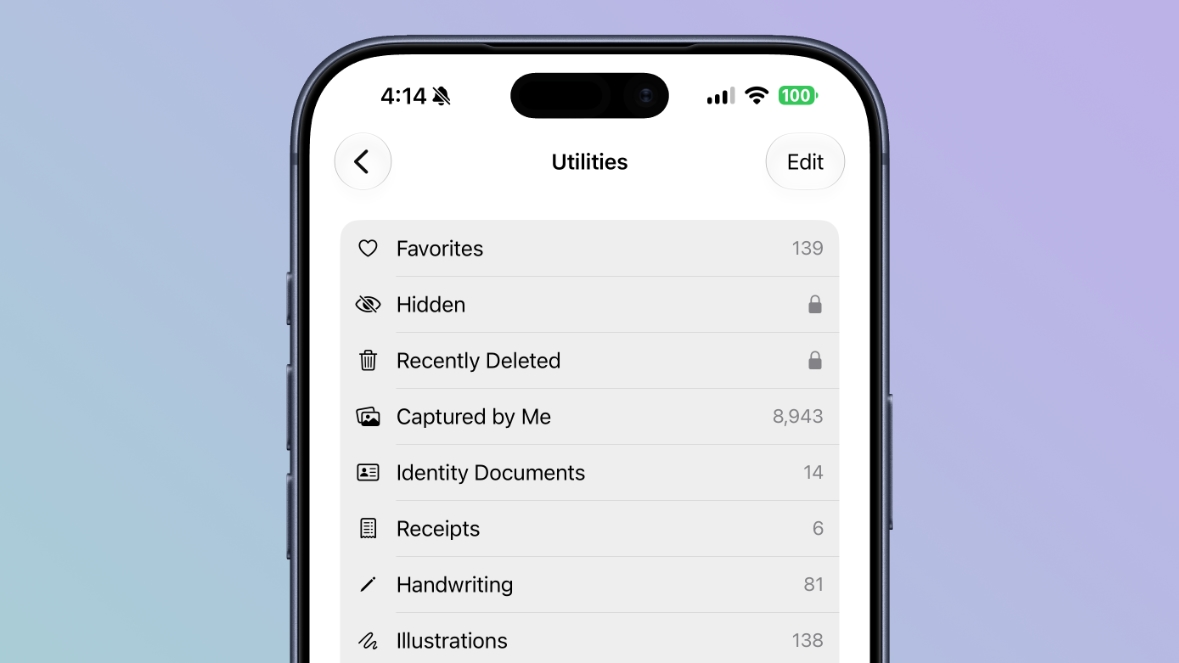
There are two new Utilities folders in the ‌Photos‌ app. Captured by Me includes all of the images that you've taken from the Camera app on your current or past iPhone, while Identity Documents aggregates pictures of passports, licenses, and similar documents.


iCloud


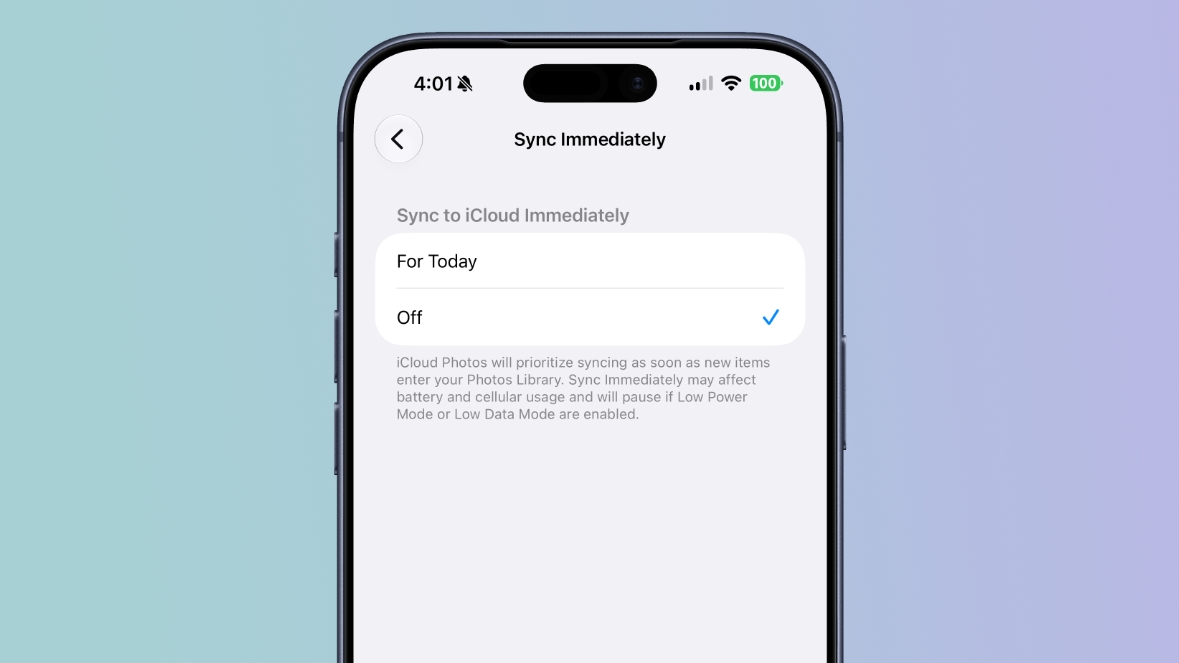
In the ‌Photos‌ section of the Settings app, there's a "Sync Immediately" option that lets you prioritize immediate ‌iCloud‌ uploads for the day.


With the setting enabled, iCloud Photos will sync as soon as new images enter the ‌Photos‌ Library instead of holding uploads to save battery.

Full-resolution photos and videos can be added to ‌iCloud‌ Shared Albums, with support for all common photo and video formats.

Other Changes


  • You can select a specific pet to use with the Photo Shuffle wallpaper.

  • Search returns more pleasing photos of people and pets in Top Results.

  • The Collections tab is faster to render.

  • New captures from the Camera app load quicker in ‌Photos‌.

  • You can include images of yourself in Photo Shuffle.

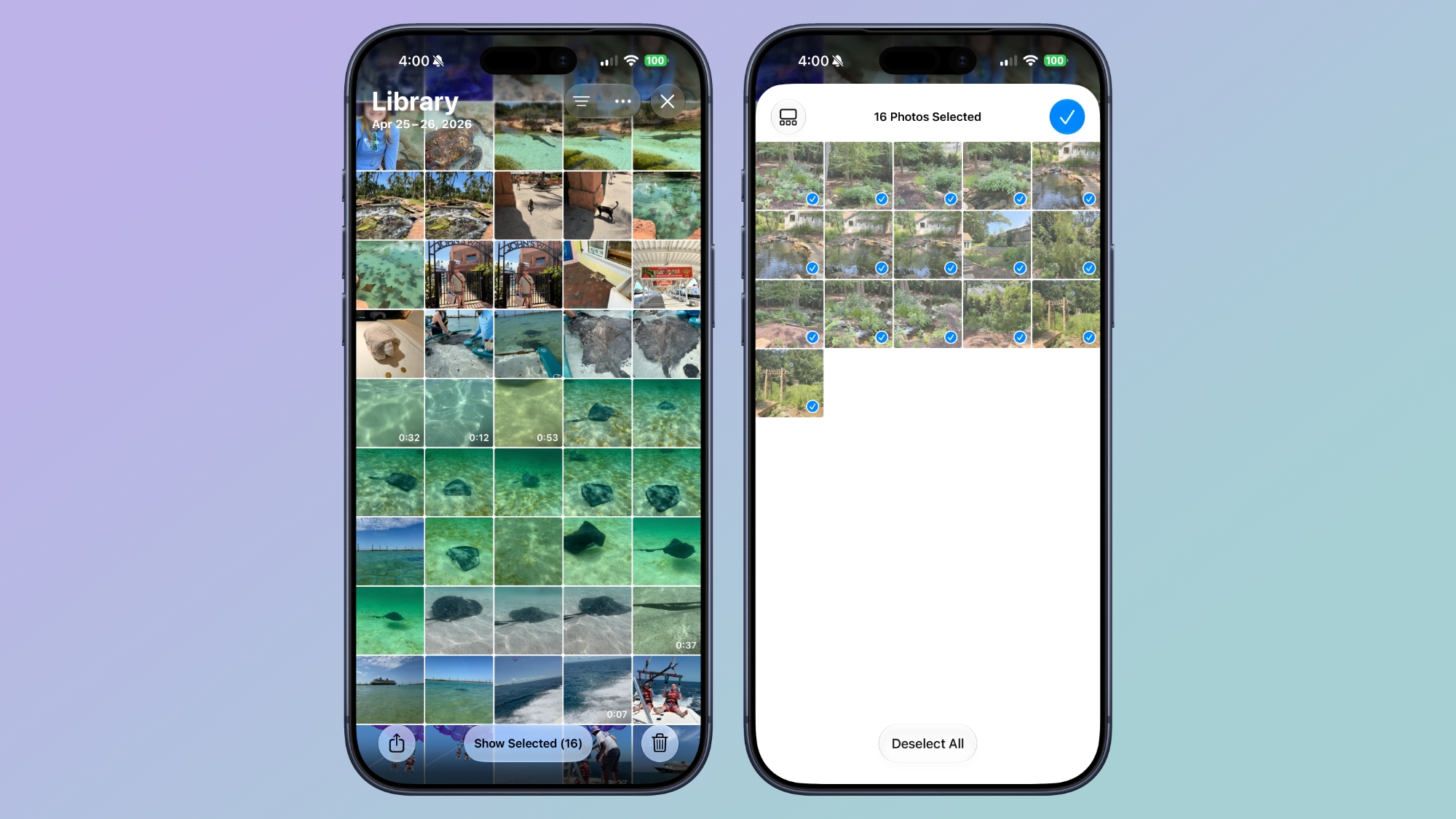
  • A "Show Selected" option in the Library shows you all of the photos you have checked so you can modify metadata.


Compatibility


The AI photo editing tools are available on devices that support ‌Apple Intelligence‌, which includes the iPhone 15 Pro and later. Performance and organizational tools are available on devices that run ‌iOS 27‌, which includes the iPhone 11 and later.
Related Roundups: iOS 27, iPadOS 27
Tag: Photos

This article, "What's New in the iOS 27 Photos App" first appeared on MacRumors.com

Discuss this article in our forums
  •  
❌