❌

Lees weergave

Iustin Pop: AI agents aha moment

Looking at the reactions to the Debian AI vote, I think some people still think the clock can be turned back, as if that ever worked in history. Rather than cry about spilled milk, I prefer to find a path forward in the new world. There are many ways to use LLMs, some of them are straightforward, others not so much.

One of the “not so clear” areas for me is the focus on agentic workloads. For complex tasks, sure, you want something that can work in the background, but in general, why does every single tool go the agentic way? I much prefer the “chat/ask” approach, or even the “code” one, but if I’m at the keyboard, why would I send a task to an agent, and see it work, instead of directly implementing it?

And then, this past Friday, I finally understood one part of that. I was in the airport, sitting at the gate and waiting to board a flight, and because I arrived much earlier at the airport (fearing crowds due to Labour Day weekend), I got one hour of work before boarding started. As the time for boarding approached, I did one more commit after making sure tests pass, pushed, closed laptop, and went to walk a bit before getting on the plane.

As I was getting up, I get a phone notification from GitHub that the CI run failed. I was quite surprised, as the local tests passed, so I open the notification, and realize that tests via make test vs CI (which additionally uses --pedantic) had slightly different settings, and of course I missed a build warning (which in CI is an error).

I thought I’d fix that on the plane, but then I saw a “Copilot agent” button in the mobile app. I was curious what it did, I click it, and I see Copilot starting a draft pull request, and saying:

Thanks for asking me to work on this. I will get started on it and keep this PR’s description up to date as I form a plan and make progress.

Fix the failing GitHub Actions job. Analyze the Actions logs, identify the root cause of the failure, and implement a fix.

Then it goes, finds the failure, writes the fix, and tries to run the tests. Well, it can’t do it (it runs in a restricted container, so no network, so stack install couldn’t actually work). The agent sees that, acknowledges it has no way to validate the fix, but the error message was clear enough that it was confident the fix is mostly correct, so it sends the pull request.

I allow full CI to run on the pull request, and go buy a bottle of water. After that, I check and see that the CI failed again, as not one but two test files were broken, and I didn’t have --keep-going, so the build stopped at the first failure. I write a comment in the pull request, no reaction, I realize I need to tag Copilot explicitly, I do that, and it starts another investigation.

I’m waiting now in the boarding queue, with phone in hand, while Copilot is fixing my bug. While I scan my boarding pass and walk towards the plane, the pull request is updated, I trigger another CI, it passes, and I merge it.

And then, it hit me. Agents allow me to make progress while being “not at keyboard”, whether that’s physically “not at keyboard”, or while working on something else. Fixing a simple test failure is not something that needs human attention per se, whereas improving the test layout might be.

In that airport, using otherwise-unusable downtime, and without explicitly intending to, I made progress in understanding a different way to use AI. Now I have three ways to work with LLMs: ask (tutor mode), code (implement my request), and agent (fix simple or complex problems, autonomously). I still don’t know about “plan” mode and really complex tasks, like asking it to implement features from scratch. That will probably be the next area to tackle.

And today (Sunday), while waiting for a running race to start, I opened GitHub, and asked Copilot to increase test coverage for a simple module. It did, and yes it still can’t run tests (I learned in the meantime that you can configure the environment in which the agent runs, nice), but after two back-and-forth messages, I have a pull request ready to review. All in the 20 minutes before a race, where I could either browse social media or actually do some meaningful work.

Checking now my GitHub billing, it looks like all of this Copilot use only cost $1.92. Yes, that is under two dollars! And while it did use compute resources, the person across the aisle who watched TikTok or Instagram for half an hour while waiting for takeoff also consumed a lot of compute, and so do the gazillion cat videos uploaded to YouTube every day.

To me, this is another tool in the toolbox, that might one day replace me (as it did to the 19th-century textile workers), or make me five times more productive — we’ll see where we end up. In the meantime, I can move faster, and make better use of my limited free time.

Enjoy the ride!

  •  

Dirk Eddelbuettel: RcppFarmHash 0.0.4 on CRAN: Maintenance

Another minor maintenance release of the RcppFarmHash package is now on CRAN as version 0.0.4.

RcppFarmHash wraps the Google FarmHash family of hash functions (written by Geoff Pike and contributors) that are used for example by Google BigQuery for the FARM_FINGERPRINT digest.

This releases updates several of package internal files for continuous intergration and package data.

The brief NEWS entry follows:

Changes in version 0.0.4 (2026-09-06)

  • Minor updates to continuous integration, README.md and DESCRIPTION

Courtesy of my CRANberries, there is also a diffstat report for this release. For questions, suggestions, or issues please use the issue tracker at the GitHub repo.

This post by Dirk Eddelbuettel originated on his Thinking inside the box blog. If you like this or other open-source work I do, you can now sponsor me at GitHub.

  •  

BSD Release: NetBSD 9.5

The DistroWatch news feed is brought to you by TUXEDO COMPUTERS. The NetBSD project has announced the fifth and final update to the NetBSD 9.x series. The NetBSD 9 series will no longer receive security updates. "Announcing NetBSD 9.5. Note: this will be the final release from the netbsd-9 stable branch and also marks the end-of-support for this branch.....
  •  

Russell Coker: CoMaps

I have just tried CoMaps, a free mapping program released under the Apache license [1]. I have tried it on Android on a Pixel 6a but it also runs on Linux so I’ll try it on a PinePhone or similar at some convenient time. On Android it is in the F-Droid repository among others and for Linux there’s a Flatpak package.

The data it uses is from Open Street Map project [2] which has extensive and accurate coverage of every place I’ve looked at (Australia and a few other first-world countries). The first thing it does after being installed is start downloading the world data set from Open Street Map and prompt to download the data for the detected region (Melbourne in my case).

The UI is decent and allows most of the features that I am used to using in Google Maps. The quality of directions seems good, I’ve only tested it with one journey so far which was a 50 minute drive across the city and it gave a set of directions that Google Maps often gives.

It gives spoken directions which is an important feature but sometimes the way the directions are presented is confusing. When turning off a freeway it didn’t give a spoken direction to do that, it gave a direction to “turn right” which was AFTER leaving the freeway, fortunately the map was clearly displayed.

In terms of use practices of this program the main difference I recommend is checking which off ramp to use from a freeway before entering the freeway. With Google Maps you can rely on it giving clear directions in that case.

I recommend this program without reservation. It can do everything that Google Maps does apart from detecting traffic jams because there’s no way of detecting traffic without spying on users. It is designed to preserve user privacy and works well in that regard.

Related posts:

  1. Kogan AX1800 Wifi6 Mesh I previously blogged about the difficulties in getting a good...
  2. An Introduction to Android I gave a brief introductory talk about Android at this...
  3. Occupy Main Street The Occupy Wall St blog has an informative summary of...
  •  

Steinar H. Gunderson: plocate 1.1.25 released

I've released version 1.1.25 of plocate. This time around, there's two security issues of unknown severity; if you chain them with other bugs, they could lead to being able to list files (but of course not their contents) that you should not normally be able to see. So an update is probably in order; you can never be too safe these days.

The full changelog is:

plocate 1.1.25, September 6th, 2026

  - Fix two early-exit bugs with multiple databases.
    Reported by Manpreet Singh and Tyler Spivey.

  - Drop setgid properly, including the saved gid.
    Reported by Michal Sekletar, found with the help of Claude Opus 4.6.

  - Fix a potential symlink-checking race in updatedb.
    Reported by Michal Sekletar, found with the help of Claude Opus 4.6.

As usual, you can get it from the home page, or it's on the way up in Debian unstable.

  •  

Enrico Zini: Migrating away from .org/.net/.com domains

After having witnessed how easy it is for good people to lose a .org domain over a fascist tantrum (you can follow the Autistici/Inventati story here and here), I've started moving all my infrastructure to differently managed TLDs.

enricozini.org and enricozini.com will keep being functional for the time being, as dropping a domain makes it available for squatting and impersonation.

These new domains are now online, with working web and emails:

It will take ages to migrate countless accounts that are tied to my primary email address, so better start early.

Waiting to see what will happen with .meow domains, which I supported despite not identifying as a cat.

  •  

Michael Stapelberg: Debian Code Search: Fast TurboPFor with Go SIMD

This August, I accomplished what I wanted for many years: I deleted the last cgo dependency in Debian Code Search! This was made possible by Go’s recently introduced SIMD support, because now we can implement the TurboPFor integer compression format as efficiently — more efficiently, in fact, by using the newer AVX512 instruction set! — as the reference implementation.

Background: Why does DCS need a fast Integer Codec?

Debian Code Search (DCS) is a search engine that allows searching all the Open Source source code within Debian, with either literal search expressions or regular expression search queries.

A search engine uses an inverted index: a map from term to documents containing the term. Each document is typically represented most efficiently by using an id, so the index consists of many lists of document ids.

When searching, it is important to quickly decode these lists to answer the search query. However, there is a point of diminishing returns where the decoding speed, even though it can still be measurably improved quite a bit, no longer influences the overall query duration.

From 2012 (its inception) to 2019, Debian Code Search used to use a small index format, and queries were fast because the index was kept entirely in RAM. In 2019, I implemented the new index format, which adds an on-disk positional index. For literal queries (78.2% of DCS queries), querying the positional index on disk is faster than querying the non-positional index in RAM.

The efficient encoding of the TurboPFor format makes it possible to fit such an index on a mid-sized Hetzner server, which I rent with two 1 TB SSD disks. The optimized decoder of the C TurboPFor library is what made decoding fast at query time.

If you want to dive deeper into the algorithm, see this blog post from February 2019:

If you want to learn more about the positional index, see this blog post from September 2019:

SIMD in Go

For many years, you had the following options for using SIMD instructions in Go:

  1. Hand-writing Go assembler code. This is only doable for small functions, for example bytes.IndexByte is implemented with hand-written Go assembly (including AVX2).
  2. Generating Go assembler code with tools like Michael McLoughlin’s “Avo”. This is how crypto/internal/fips140/sha256 uses AVX2. While Avo generator code definitely is higher-level than hand-written assembly, it is still too close to assembly for my taste.
  3. Use a C library via cgo so gcc or clang compiles SIMD code. Debian Code Search used to use the powturbo/TurboPFor C library via cgo for the last 7 years.

The C TurboPFor library has served us well, but Debian Code Search was always intended to be a project using Go, so I would prefer it if I did not have any C code in the project.

Go 1.26 (released in February 2026) introduced the simd/archsimd package:

Go 1.26 introduces a new experimental simd/archsimd package, which can be enabled by setting the environment variable GOEXPERIMENT=simd at build time. This package provides access to architecture-specific SIMD operations. It is currently available on the amd64 architecture and supports 128-bit, 256-bit, and 512-bit vector types, such as Int8x16 and Float64x8, with operations such as Int8x16.Add. The API is not yet considered stable.

— Go 1.26 Release Notes

For my 2019 TurboPFor analysis, I implemented goturbopfor, a native Go teaching decoder (without any SIMD), because I find Go code easier to follow than C code, especially optimized C code. My implementation was intentionally not optimized so that the code was easier to study.

The TurboPFor format/algorithm has a vector-optimized part: bitpacking comes in a scalar variant (bitunpack32) and a vector variant (bitunpack256v32), where the vector variant is used for full blocks (256 values) and the scalar variant is used for remainder blocks (< 256 values).

When Go 1.26 was released, I used Claude Code to explore whether my native Go decoder’s bitunpack256v32 function (for the vertical vector layout) could be implemented using Go SIMD, and the answer was yes, it was possible and it was faster than without SIMD, but not quite at the level of C TurboPFor. If you let Claude Code try for long enough, it eventually finds enough optimizations (about 10) to match C performance.

I don’t want to vibe-code Debian Code Search, though, so I figured I would find some time to review the SIMD code at some point and see if I could implement something similar myself.

Before I found enough time and motivation to complete said review, I discovered that to not regress real-life query performance by more than 10 to 100 milliseconds (which seems acceptable), I don’t actually need to add SIMD code to my teaching decoder at all; it would be sufficient to reduce allocations in my teaching decoder and specialize it per bit width.

Encouraged by the possibility of using the optimized native Go decoder in Debian Code Search, I explored whether I could also implement a native Go encoder so that I could get rid of the C TurboPFor dependency entirely. The answer is yes, it is doable in a few days, and it isn’t even that much slower: Go is at 76% of C, see Debian/dcs commit e920dc7.

The goal I set myself at that point was to see if I could learn enough SIMD to optimize the native Go encoder such that its performance would match how DCS uses C TurboPFor (via cgo).

Beating C TurboPFor was possible in 2-3 commits (SIMD and bit width specialization). To my surprise, Claude Fable 5 pointed out that the encoder’s block scanning could be done more efficiently using a technique called positional popcount, and that is another 2x speed-up! 😲

To be clear: I am not saying the Go compiler beats C here. Certainly, the C compiler can also produce fast AVX512 code and can be used to implement positional popcount. When comparing apples to apples, i.e. backporting the AVX512 kernels and positional popcount technique to C TurboPFor, Go benchmarks a little slower at ≈1.4x C.

This spectacular result (much faster than what DCS had before) got me curious how far I could push the decoder with SIMD after all. I ended up matching/exceeding the cgo version here, too!

The rest of this article explains a few classes of optimizations I encountered along the way.

Starting Point

When I wrote my goturbopfor teaching decoder, I named its functions to match the upstream C TurboPFor library, but now I want to get away from names like p4ndec256v32 — they make sense from the TurboPFor perspective, but for Debian Code Search, we can use cleaner names.

Before writing any code, I audited how DCS uses integer compression / decompression.

API design: BlockEncoder, BlockDecoder and streaming

In Debian Code Search, we have the following usage patterns:

  • Partial Indexing: When a new package (or package version) enters Debian, all of its (text) files are indexed. If the hello-2.12.3-1 package (hypothetically) contained only hello.c with printf("hello!\n");, we would assign document ID 1 to hello.c and store in the partial index that trigrams pri, rin, int, ntf, etc. are all found in doc 1 (hello.c).
  • Full Index Merging: The many thousands of partial index files (for each Debian package) are combined into a small handful of large index files: When searching, it would be expensive to consult thousands of indexes. To merge multiple partial index files into one larger index (which can then be efficiently queried), we need to re-encode the partial index files: what used to be document ID 1 in the partial index might be document ID 2531 in the full index.
  • Querying (searching): When users enter search queries, these queries need to be answered as quickly as possible. The relevant entries in the full indexes are decoded (in parallel).

For reading the index, we do keep the decoded uint32s fully in memory, so we only need DecodeN(input []byte, output []uint32) (read int), a function that reads len(output) values (uint32) from input and returns how many bytes it consumed.

For writing the index (both in partial indexing, and when merging), keeping the entire index in memory is prohibitively expensive, so we need a streaming API, for decoding and for encoding.

Ultimately, I converged on the following API:

package pforenc

type BlockEncoder struct {
    // scratch buffers can go here
}

// EncodeBlock encodes len(vals)<=256 uint32s into dest (one TurboPFor block).
func (*BlockEncoder) EncodeBlock(dest []byte, vals []uint32) []byte {}

// EncodeN calls EncodeBlock in a loop.
func (*BlockEncoder) EncodeN(dest []byte, vals []uint32) []byte {}

type StreamEncoder struct {
  be   BlockEncoder
  vals [256]uint32
  // scratch buffers
}

// if full, you need to call [EncodeBlock]
func (*StreamEncoder) Add(val uint32) (full bool)

// EncodeBlock must be called after all data was [Add]ed.
//
// Write the returned buffer to file or send it over the network;
// it is only valid until the next [EncodeBlock] call.
func (*StreamEncoder) EncodeBlock() []byte {
  if se.n == 0 { return nil } // turn an extra EncodeBlock into a no-op
  // …
}

This API (the decoder works similarly) allows us to process data in TurboPFor format without any memory allocations. The types are not safe for concurrent use by multiple goroutines. The zero value is ready to be used. For the streaming API, the result only stays valid until the next call.

Initial Implementation

Before we can optimize anything, we need a working decoder and encoder. The decoder already exists: my goturbopfor teaching decoder. Next up, I needed an encoder.

Writing a TurboPFor encoder has a delightfully simple starting point: You can encode all values at bit width 32, in little endian, at which point you only need to add a one-byte TurboPFor block header every 256 values and you’re done:

func (be *BlockEncoder) EncodeN(dest []byte, vals []uint32) []byte {
  for len(vals) > 0 {
    chunk := min(len(vals), 256)
    dest = be.EncodeBlock(dest, vals[:chunk])
    vals = vals[chunk:]
  }
  return dest
}

func (be *BlockEncoder) EncodeBlock(dest []byte, vals []uint32) []byte {
  const bitWidth = 32
  dest = append(dest, bitWidth)
  for _, val := range vals {
    dest = binary.LittleEndian.AppendUint32(dest, val)
  }
  return dest
}

Of course, this is a terribly inefficient compressor, so after the first commit, the real work starts: implement each block type until the compression matches the original C TurboPFor implementation (same output file size), or in other words: do the reverse of the decoder.

  1. The TurboPFor bitpacking block type (bitpacking implementation commit) encodes a bit stream of variable bit width (where the bit width is in range 0 ≤ bitWidth ≤ 32) in little endian byte order. By scanning all values and choosing the smallest bit width that allows representing all values, this technique saves disk space (compresses).
  2. The bitpacking with exceptions block type (bitpacking with exceptions implementation commit) determines two bit widths: one for values, the other bit width for encoding exceptions. This allows choosing a lower bit width (that does not cover all values) compared to the bitpacking block type. A bitmap encodes whether a value has an exception or not.
  3. The bitpacking with VB exceptions block type (bitpacking with VB exceptions implementation commit) is a variant which does not use an exception bitmap and encodes exceptions using a variable byte integer encoding. This is more efficient when there are few exceptions (less than 20) or the exceptions are very different in bit width compared to the other values.
  4. Lastly, the constant block type (constant implementation commit) stores just one value on disk. This is useful for all-zero or all-one blocks, for example.

I found it interesting to realize that the main work of the encoder is to scan the input values and choose the optimal block type, whereas the actual encoding itself is cheap in comparison.

At this point, we can look at performance and see that the Go encoder is at 76% of the C encoder.

In all honesty, I could have probably stopped here, but now that the milestone of a viable replacement was reached, I got curious to see how far it would be possible to push the encoder (how much work to reach C speeds?) and afterwards, the decoder, too.

Setup

The microarchitecture level: set GOAMD64

The microarchitecture of a CPU determines which instructions it provides, and that includes not just SIMD instruction sets (like AVX2), but also other useful instructions like LZCNT (Leading Zero Count), which can be used to implement math/bits.Len32 more efficiently, which the TurboPFor encoder needs to call on every input value to determine the ideal bit width.

Let’s walk through how to set the microarchitecture level when using Go on 64-bit x86 (x86-64).

Go uses the GOARCH environment variable to configure the target compilation architecture, and I am using the value amd64 to select 64-bit x86 (AVX2 and AVX512 are instruction sets found on x86-64 CPUs). With GOARCH=amd64, the architecture-specific variable GOAMD64 configures the microarchitecture level for which to compile and Go 1.18 introduced these 4 different levels:

GOAMD64=v1 (default): The baseline.
Exclusively generates instructions that all 64-bit x86 processors can execute.

GOAMD64=v2: all v1 instructions,
plus CMPXCHG16B, LAHF, SAHF, POPCNT, SSE3, SSE4.1, SSE4.2, SSSE3.

GOAMD64=v3: all v2 instructions,
plus AVX, AVX2, BMI1, BMI2, F16C, FMA, LZCNT, MOVBE, OSXSAVE.

GOAMD64=v4: all v3 instructions,
plus AVX512F, AVX512BW, AVX512CD, AVX512DQ, AVX512VL.

In 2026, I generally recommend compiling with GOAMD64=v3 so that functions like bits.OnesCount8 are compiled into intrinsics (POPCNT) instead of using a lookup table.

For Intel CPUs, setting GOAMD64=v3 means your programs will only start on Haswell CPUs (2013) or newer; for AMD CPUs that means Zen 1 (2017) or newer.

In this specific case (DCS), I am even compiling with GOAMD64=v4. The v4 microarchitecture level requires AVX512, which means AMD Zen 4, Zen 5 or newer (Intel’s story is… complicated). Luckily, both my main development PC (Zen 5) and the Debian Code Search server (Zen 4) are recent enough. Setting GOAMD64=v4 has little effect on Go 1.27 itself: the only change is that maps use one less instruction (VPBROADCASTB instead of PSHUFB). But compiling with GOAMD64=v4 allows us to move one more feature check from runtime to compile time, see SIMD build tags.

It makes sense to set the microarchitecture level in your benchmark setup so that you don’t measure the slow fallback implementations. I use export GOAMD64=v4 in my Makefile.

Benchmarking setup

Go’s built-in testing package contains support for benchmarks which are written in functions of the form func BenchmarkXxx(b *testing.B). The simplest way to run such benchmarks is go test -bench=., but I ended up configuring a few convenience make targets, which write results to bench.txt and compare against baseline.txt (the previous commit’s results, usually), using the very useful benchstat tool.

GOTEST=go test

# -count=6 gives p≤0.002 in benchstat:
# https://pkg.go.dev/golang.org/x/perf/cmd/benchstat
BENCHFLAGS=-run=^$$ -bench=. -benchtime=200000x -count=6

# use taskset -c1 to always pin to the same single core,
# avoiding accidental scheduling on different cores on
# mixed-core CPUs like the Ryzen 9 9950X3D.
TASKSET=taskset -c 1
BENCH=$(TASKSET) $(GOTEST) $(BENCHFLAGS)

.PHONY: all test bench bench-baseline bench-relative

all: test

bench: test
	$(BENCH) | tee bench.txt
# Compares compression ratio between C and Go implementation
	benchstat -col /impl -row '/n /vals' -filter '-/impl:go-stream .unit:(encoded-bytes)' bench.txt
# Compares performance between C (cgo) and Go implementation
	benchstat -col /impl -row '/n /vals' -filter '.unit:(Mval/s)' bench.txt

bench-baseline: test
	$(BENCH) | tee baseline.txt

bench-relative: test
	$(BENCH) | tee bench.txt
	benchstat -filter '-/impl:go-stream .unit:(encoded-bytes)' baseline.txt bench.txt
	benchstat -filter '/impl:go .unit:(Mval/s)' baseline.txt bench.txt

The encoded-bytes and Mval/s units are custom metrics I am reporting from the various sub-benchmarks, which are arranged such that I can filter / report them with benchstat.

The main encoder (and decoder) benchmarks compare 3 different implementations (cgo, Go, Go with the StreamEncoder API) with a number of benchmark cases that are designed to cover the different block types and contain a similar mix of values as what we see in Debian Code Search:

// reportMetrics adds Mval/s and encoded-bytes metrics to all benchmarks.
func reportMetrics(b *testing.B, n int, nencoded int) {
   b.ReportMetric(float64(nencoded), "encoded-bytes")
   b.ReportMetric(float64(b.N*n)/1e6/b.Elapsed().Seconds(), "Mval/s")
}

// BenchmarkEncode/n=<N>/vals=<testcase>/impl=<c|go|go-stream>
//
// e.g. BenchmarkEncode/n=2048/vals=one-constant/impl=go-stream
func BenchmarkEncode(b *testing.B) {
   for _, tc := range allBenchCases() {
     n := len(tc.vals)
     b.Run(fmt.Sprintf("n=%d/vals=%s", n, tc.name), func(b *testing.B) {
       b.Run("impl=c", func(b *testing.B) {
         b.ReportAllocs()
         var encoded []byte
         buf := make([]byte, turbopfor.EncodingSize(n))
         for b.Loop() {
           encoded = turbopfor.P4nenc256v32Buf(buf, tc.vals)
         }
         reportMetrics(b, n, len(encoded))
       })
       b.Run("impl=go", func(b *testing.B) {
         b.ReportAllocs()
         var be BlockEncoder
         var encoded []byte
         buf := make([]byte, 0, turbopfor.EncodingSize(n))
         for b.Loop() {
           encoded = be.EncodeN(buf, tc.vals)
         }
         reportMetrics(b, n, len(encoded))
       })
       b.Run("impl=go-stream", func(b *testing.B) {
         b.ReportAllocs()
         var se StreamEncoder
         var encoded int
         for b.Loop() {
           encoded = 0
           for _, val := range tc.vals {
             if se.Add(val) {
               encoded += len(se.EncodeBlock())
             }
           }
           encoded += len(se.EncodeBlock())
         }
         reportMetrics(b, n, encoded)
       })
     })
   }
}

CPU counters: perf

Go has included excellent performance tooling for many years, see the “Profiling Go Programs” blog post (2011) for an example of how to use pprof, a sampling profiler. This profiler can help track down which part of a program runs slow, or where memory allocations happen.

Once you identified the slow part of a program, how do you know why it’s slow?

To learn more about the specific bottlenecks your program encounters, you can consult your CPU’s hardware performance counters. For example, you could check the branch predictor counters to see if your program is slow due to a high number of branch mispredicts.

On Linux, the perf tool is the best way to access the CPU hardware performance counters. A good starting point for working with perf is the documentation on “Top-down analysis with the perf tool”, which describes the optimization method that Intel established.

In my Makefile, I set up two perf targets:

# GOTEST and TASKSET like shown in the earlier benchmarking setup section:
GOTEST=go test -pgo=encode.cpuprof
TASKSET=taskset -c 1
PERFBENCHFLAGS=-test.bench='Encode/n=2048/vals=debian-mix/impl=go$$' -test.benchtime=200000x

# Use perf(1) to capture AMD IBS (the equivalent to Intel PEBS)
# PipelineL1 is roughly equivalent to Intel TopdownL1
perf:
	$(GOTEST) -c
	$(TASKSET) perf stat -M PipelineL1 ./pforenc.test -test.run=^$$ $(PERFBENCHFLAGS)
	sudo perf record -F 4999 -e ibs_op// --call-graph fp ./pforenc.test -test.run=^$$ $(PERFBENCHFLAGS)
	sudo chmod 644 perf.data

# 488281 iterations × 2048 values = 1.000e9 values, so counter/1e9 = per value.
perf-per-value:
	$(GOTEST) -c
	$(TASKSET) perf stat -x, -e cycles:u,instructions:u,branches:u,branch-misses:u ./pforenc.test -test.run=^$$ -test.bench='Encode/n=2048/vals=debian-mix/impl=go$$' -test.benchtime=488281x 2>&1 >/dev/null | awk -F, '{printf "%-16s %6.2f /val\n", $$3, $$1/1e9}'

The perf-per-value numbers are high level numbers that indicate how much work the implementation is doing. Reducing the number usually increases speed.

To see the counters for each instruction (and source code lines), I use make perf, followed by perf report. A quick shortcut is perf annotate, which directly shows the hottest function.

Optimizations (scalar)

Let’s first see how far we can get without reaching for SIMD instructions.

(The examples are not necessarily in commit order, but cherry-picked for clarity.)

Profile-Guided Optimization (PGO)

PGO stands for Profile-Guided Optimization and is a feature that Go introduced as a preview in Go 1.20 (released in February 2023) and shipped as ready for general production use in Go 1.21 (released in August 2023).

The idea is to capture a CPU profile that records where your program spends most of its CPU time, which you then provide to the Go compiler to give it more data to make better decisions.

Most importantly, this way the Go compiler can inline functions much more aggressively than its usual heuristics allow, which does have a measurably positive effect in my series of optimization commits. Another optimization that a PGO profile allows the compiler to do is conditional devirtualization — but our TurboPFor code does not use any interfaces.

My strategy is to enable PGO before doing any other optimizations, so that we have the full inlining budget available that PGO gives us, and can measure the effect of other commits clearly.

Surprisingly, turning on PGO actually decreases our performance (-13% geomean), but a closer investigation reveals that we just got unlucky. Let me explain.

Aside from inlining and conditional devirtualization, PGO also influences alignment: The Go compiler sets PCALIGNMAX(64, 31) on the first block of a loop (the “loop body”) for all loops in hot functions (per the PGO profile), i.e. Go will insert up to 31 bytes of padding to make the block land on a 64-byte boundary. Documentation like AMD’s “Software Optimization Guide for the AMD Zen5 Microarchitecture” (2024, #58455) explicitly recommends aligning hot loops that way:

[…] for hot loops, some further knowledge of trade-offs can be helpful. Because the processor can read an aligned 64-byte fetch block every cycle, it is suggested to either align the start of the loop to the beginning of a 64-byte cache line […]

Indeed, when compiling with -gcflags=all=-d=alignhot=0 to disable the alignment, performance remains as good as without PGO. How can the padding hurt more than help? The answer is: It’s not the padding itself! It’s a side-effect of the padding moving instructions to different addresses.

In the unlucky arrangement, a macro-fused CMPQ+JGE instruction pair now ends up exactly on a 32-byte boundary. However, the Go compiler ensures fused branch sequences must never cross or end at a 32-byte boundary to fix Intel erratum SKX102 (discussion: Go issue #35881) by inserting NOPs.

This NOP padding, unlike the loop alignment padding, is not free; these extra instructions slow down our otherwise dispatch-bound loops.

Because the commits after the PGO enabling commit change the code, this unlucky situation is avoided for the rest of the optimization series (by chance).

Reducing memory allocations

Memory allocations are quite expensive, at least in comparison to encoding/decoding integers, so I followed my usual strategy of first reducing memory allocations as much as possible.

In my goturbopfor teaching decoder, whenever the code needed a scratch buffer, it would allocate it right then and there with make():

// p4dec32 decodes one block of TurboPFor-encoded 32 bit ints
func (d *decoder) p4dec32(input []byte, output []uint32) (read int) {
    // …
  switch blockType {
  case blockBitpackingExceptions:
    bx, input := input[0], input[1:]
    n := len(output)

    exmap := input
    nex := 0 // number of exceptions
    for i := 0; i < n; i++ {
      if exmap[i/8]&(1<<uint(i%8)) != 0 {
        nex++
      }
    }
    input = input[(n+7)/8:]

    exceptions := make([]uint32, nex)
    input = input[bitunpack32(input, exceptions, bx):]
    input = input[d.bitunpack(input, output, b):]

    for i := 0; i < n; i++ {
      if exmap[i/8]&(1<<uint(i%8)) != 0 {
        output[i] += exceptions[0] << b
        exceptions = exceptions[1:]
      }
    }

    return before - len(input)
  }
}

The Go compiler can turn make(T, n) calls into stack allocations, if n is known at compile-time. But, in this case nex is not known at compile-time. We can verify that Go calls into the runtime (runtime.makeslice) by dumping the object code (assembly) with source annotated (-S):

% cd ~/go/src/github.com/stapelberg/goturbopfor
% git reset --hard 49b7c05cc61e77f0257568eb73833467714d2b4a
% go test -c  # go1.27.0
% go tool objdump -S goturbopfor.test | perl -nlE 'say if /p4dec32/ .. /^$/'
TEXT github.com/stapelberg/goturbopfor.(*decoder).p4dec32(SB) /home/michael/go/src/github.com/stapelberg/goturbopfor/goturbopfor.go
func (d *decoder) p4dec32(input []byte, output []uint32) (read int) {
  0x549f60		4c8da42460ffffff	LEAQ 0xffffff60(SP), R12
  0x549f68		4d3b6610		CMPQ R12, 0x10(R14)
  0x549f6c		0f86d9070000		JBE 0x54a74b
  0x549f72		55			PUSHQ BP
  0x549f73		4889e5			MOVQ SP, BP
  0x549f76		4881ec18010000		SUBQ $0x118, SP
  0x549f7d		48899c2430010000	MOVQ BX, 0x130(SP)
  0x549f85		4889b42448010000	MOVQ SI, 0x148(SP)
	if len(output) == 0 {
  0x549f8d		4d85c0			TESTQ R8, R8
  0x549f90		0f84a7030000		JE 0x54a33d
  0x549f96		660f1f840000000000	NOPW 0(AX)(AX*1)
  0x549f9f		90			NOPL
[…]
		exceptions := make([]uint32, nex)
  0x54a4be		488d057bec1700		LEAQ 0x17ec7b(IP), AX
  0x54a4c5		4c89fb			MOVQ R15, BX
  0x54a4c8		4889d9			MOVQ BX, CX
  0x54a4cb		e8f0ddf3ff		CALL runtime.makeslice(SB)
[…]

An easy speed-up was to avoid allocations through reuse (in goturbopfor). In the DCS pfordec package (with the improved API design), I ended up with a vals [256]uint32 field in the StreamDecoder type, which brings us from 773 Mval/s to 858 Mval/s on the debian-mix:

% benchstat -filter '/impl:go /vals:debian-mix .unit:(Mval/s)' \
  baseline.txt bench.txt
goos: linux
goarch: amd64
pkg: github.com/Debian/dcs/internal/turbopfor/pfordec
cpu: AMD Ryzen 9 9950X3D 16-Core Processor
           │ baseline.txt │             bench.txt              │
           │    Mval/s    │   Mval/s     vs base               │
n=2048        1.089k ± 1%   1.175k ± 0%   +7.85% (p=0.002 n=6)
n=2039         974.7 ± 0%   1046.0 ± 0%   +7.32% (p=0.002 n=6)
n=160          434.9 ± 1%    513.6 ± 5%  +18.11% (p=0.002 n=6)
geomean        772.9         857.7       +10.98%

Aside from the speed-up, avoiding memory allocations is generally nice in benchmarks because it removes the garbage collector from the equation and makes it less likely that your benchmarks get other processes OOM-killed on the same machine.

Generics for bit width specialization

In general, we want to make it easy for the compiler to understand as much as possible about our algorithm. Consider this bitpack implementation:

func bitpack(dest []byte, vals []uint32, bitWidth int) []byte {
  mask := uint32(1<<bitWidth - 1)
  var acc uint64
  var have int
  for _, val := range vals {
    acc |= uint64(val&mask) << have
    have += bitWidth
    for have >= 32 {
      dest = binary.LittleEndian.AppendUint32(dest, uint32(acc))
      acc >>= 32
      have -= 32
    }
  }
  for have > 0 {
    dest = append(dest, byte(acc))
    acc >>= 8
    have -= 8
  }
  return dest
}

Let’s think through what determines the iterations and control flow this function uses:

  1. The number of input values (vals), but not their actual value.
  2. The bit width to pack into (bitWidth).

With a bit of careful rearrangement, we can provide the compiler with both, a fixed number of input values (say, 32), and a bit width, both known at compile time. Why is this worthwhile? Because we can manually unroll the loop, let the compiler eliminate much of the repetition and get much faster compiled code as a result!

Let’s first fix the number of input values to 32 and rewrite the loop to calculate the position offsets within dest instead of changing dest on each value (with AppendUint32):

func bitpack32Unrolled(dest []byte, vals *[32]uint32, bitWidth int) {
  // only one bounds check for 32 values
  dest = dest[: 4*bitWidth : 4*bitWidth]
  mask := uint32(1<<bitWidth - 1)
  var acc uint64
  var have, pos int
  // Manually unrolled loop starts here.
  // Each iteration is identical except for the vals[x] index.
  acc |= uint64(vals[0]&mask) << have
  have += bitWidth
  if have >= 32 {
    binary.LittleEndian.PutUint32(dest[pos:pos+4], uint32(acc))
    pos += 4
    acc >>= 32
    have -= 32
  }

  // vals[1] .. vals[30] elided for brevity

  // Each loop iteration is 8 lines of Go code, so for 32 input values,
  // bitpack32Unrolled contains 8*32 = 256 lines of code.

  acc |= uint64(vals[31]&mask) << have
  have += bitWidth
  if have >= 32 {
    binary.LittleEndian.PutUint32(dest[pos:pos+4], uint32(acc))
    pos += 4
    acc >>= 32
    have -= 32
  }

  // have == 0; for all bitWidths
}

Next, we want to specialize not just for 32 input values, but also for each of the 32 bit widths.

Can we do better than hand-copying bitpack32Unrolled 32 times (= 8192 lines of Go code)?

Yes, we can use Go generics to help us with the code generation!

In Go, array types like [4]byte (not slices like []byte!) contain the length of the array as part of their type, meaning [1]byte (an array of length 1) is a different type than [2]byte.

Instead of passing the bit width as a function parameter, we can declare 32 different types (one for each bit width) and recover the bit width (at compile time!) from the type system:

type bitWidthT interface {
  [1]byte | [2]byte | [3]byte | [4]byte | [5]byte |
  [6]byte | [7]byte | [8]byte | [9]byte | [10]byte |
  [11]byte | [12]byte | [13]byte | [14]byte | [15]byte |
  [16]byte | [17]byte | [18]byte | [19]byte | [20]byte |
  [21]byte | [22]byte | [23]byte | [24]byte | [25]byte |
  [26]byte | [27]byte | [28]byte | [29]byte | [30]byte |
  [31]byte | [32]byte
}

func bitpack32Unrolled[T bitWidthT](dest []byte, vals *[32]uint32) {
  var zero T
  bitWidth := len(zero)                  // known at compile time
  dest = dest[: 4*bitWidth : 4*bitWidth] // make cap known at compile time
  mask := uint32(1<<bitWidth - 1)
  var acc uint64
  var have, pos int
  // Manually unrolled loop starts here.
  // Each iteration is identical except for the vals[x] index.
  acc |= uint64(vals[0]&mask) << have
  have += bitWidth
  if have >= 32 {
    binary.LittleEndian.PutUint32(dest[pos:pos+4], uint32(acc))
    pos += 4
    acc >>= 32
    have -= 32
  }

  // vals[1] .. vals[31] elided for brevity
}

When we instantiate bitpack32Unrolled[bitWidthT] with all 32 different types ([1]byte, [2]byte, …, [32]byte), the compiler substitutes the bitWidthT type parameter and produces 32 copies of the function, which we can find in our compiled executable with names like github.com/Debian/dcs/internal/turbopfor/pforenc.bitpack32Unrolled[go.shape.[12]uint8]. The “shape” of a generic type is based on its memory layout, so a shape for [1]byte must be different than the shape for [2]byte.

Because the bitWidth is now known at compile time, the Go compiler can generate close to the optimal machine code for each bit width, which we can confirm using go tool objdump.

The code is branchless (after the one bounds check per 32 values) and aside from the loads and stores (from/to memory) consists only of shifts and bit operations, all with constant operands:

% go test -c && go tool objdump -S pforenc.test
[…]
TEXT github.com/Debian/dcs/internal/turbopfor/pforenc.bitpack32Unrolled[go.shape.[28]uint8](SB) /home/michael/dcs/internal/turbopfor/pforenc/bitpackunroll.go
func bitpack32Unrolled[T bitWidthT](dest []byte, vals *[32]uint32) {
  0x660580              55                      PUSHQ BP
  0x660581              4889e5                  MOVQ SP, BP
  0x660584              48895c2418              MOVQ BX, 0x18(SP)
        dest = dest[: 4*bitWidth : 4*bitWidth] // make cap known at compile time
  0x660589              4883ff70                CMPQ DI, $0x70
  0x66058d              0f820b030000            JB 0x66089e
        acc |= uint64(vals[0]&mask) << have
  0x660593              8b06                    MOVL 0(SI), AX
  0x660595              25ffffff0f              ANDL $0xfffffff, AX
        acc |= uint64(vals[1]&mask) << have
  0x66059a              8b4e04                  MOVL 0x4(SI), CX
  0x66059d              81e1ffffff0f            ANDL $0xfffffff, CX
  0x6605a3              48c1e11c                SHLQ $0x1c, CX
  0x6605a7              4809c8                  ORQ CX, AX
                acc >>= 32
  0x6605aa              4889c1                  MOVQ AX, CX
  0x6605ad              48c1e820                SHRQ $0x20, AX
                binary.LittleEndian.PutUint32(dest[pos:pos+4], uint32(acc))
  0x6605b1              90                      NOPL
        b[0] = byte(v)
  0x6605b2              890b                    MOVL CX, 0(BX)
        acc |= uint64(vals[2]&mask) << have
  0x6605b4              8b4e08                  MOVL 0x8(SI), CX
  0x6605b7              81e1ffffff0f            ANDL $0xfffffff, CX
  0x6605bd              48c1e118                SHLQ $0x18, CX
  0x6605c1              4809c1                  ORQ AX, CX
                acc >>= 32
  0x6605c4              4889c8                  MOVQ CX, AX
  0x6605c7              48c1e920                SHRQ $0x20, CX
                binary.LittleEndian.PutUint32(dest[pos:pos+4], uint32(acc))
  0x6605cb              90                      NOPL
        b[0] = byte(v)
  0x6605cc              894304                  MOVL AX, 0x4(BX)

Now we need to actually call bitpack32 from the general bitpack function:

func bitpack(dest []byte, vals []uint32, bitWidth int) []byte {
  if bitWidth == 0 {
    return dest // no payload, sparse block with only exceptions
  }
  if len(vals) >= 32 {
    size := 4 * bitWidth
    for len(vals) >= 32 {
      existing := len(dest)
      dest = slices.Grow(dest, size)[:existing+size]
      bitpack32(dest[existing:] /*append*/, (*[32]uint32)(vals), bitWidth)
      vals = vals[32:]
    }
  }
  mask := uint32(1<<bitWidth - 1)
  var acc uint64
  var have int
  for _, val := range vals {
    acc |= uint64(val&mask) << have
    have += bitWidth
    for have >= 32 {
      dest = binary.LittleEndian.AppendUint32(dest, uint32(acc))
      acc >>= 32
      have -= 32
    }
  }
  for have > 0 {
    dest = append(dest, byte(acc))
    acc >>= 8
    have -= 8
  }
  return dest
}

func bitpack32(dest []byte, vals *[32]uint32, bitWidth int) {
  switch bitWidth {
  case 1: bitpack32Unrolled[[1]byte](dest, vals)
  case 2: bitpack32Unrolled[[2]byte](dest, vals)
  case 3: bitpack32Unrolled[[3]byte](dest, vals)
  case 4: bitpack32Unrolled[[4]byte](dest, vals)
  case 5: bitpack32Unrolled[[5]byte](dest, vals)
  case 6: bitpack32Unrolled[[6]byte](dest, vals)
  case 7: bitpack32Unrolled[[7]byte](dest, vals)
  case 8: bitpack32Unrolled[[8]byte](dest, vals)
  case 9: bitpack32Unrolled[[9]byte](dest, vals)
  case 10: bitpack32Unrolled[[10]byte](dest, vals)
  case 11: bitpack32Unrolled[[11]byte](dest, vals)
  case 12: bitpack32Unrolled[[12]byte](dest, vals)
  case 13: bitpack32Unrolled[[13]byte](dest, vals)
  case 14: bitpack32Unrolled[[14]byte](dest, vals)
  case 15: bitpack32Unrolled[[15]byte](dest, vals)
  case 16: bitpack32Unrolled[[16]byte](dest, vals)
  case 17: bitpack32Unrolled[[17]byte](dest, vals)
  case 18: bitpack32Unrolled[[18]byte](dest, vals)
  case 19: bitpack32Unrolled[[19]byte](dest, vals)
  case 20: bitpack32Unrolled[[20]byte](dest, vals)
  case 21: bitpack32Unrolled[[21]byte](dest, vals)
  case 22: bitpack32Unrolled[[22]byte](dest, vals)
  case 23: bitpack32Unrolled[[23]byte](dest, vals)
  case 24: bitpack32Unrolled[[24]byte](dest, vals)
  case 25: bitpack32Unrolled[[25]byte](dest, vals)
  case 26: bitpack32Unrolled[[26]byte](dest, vals)
  case 27: bitpack32Unrolled[[27]byte](dest, vals)
  case 28: bitpack32Unrolled[[28]byte](dest, vals)
  case 29: bitpack32Unrolled[[29]byte](dest, vals)
  case 30: bitpack32Unrolled[[30]byte](dest, vals)
  case 31: bitpack32Unrolled[[31]byte](dest, vals)
  case 32: bitpack32Unrolled[[32]byte](dest, vals)
  }
}

Encoding remainder blocks is quite a bit faster (full blocks use the vertical layout anyway):

% benchstat -filter '/impl:go /n:160 .unit:(Mval/s)' baseline.txt bench.txt
goos: linux
goarch: amd64
pkg: github.com/Debian/dcs/internal/turbopfor/pforenc
cpu: AMD Ryzen 9 9950X3D 16-Core Processor
                         │ baseline.txt │             bench.txt              │
                         │    Mval/s    │   Mval/s     vs base               │
vals=bitpacking-bw1          751.2 ± 3%   1120.5 ± 0%  +49.15% (p=0.002 n=6)
vals=bitpacking-bw2          716.8 ± 2%   1176.0 ± 0%  +64.07% (p=0.002 n=6)
vals=bitpacking-bw7          700.0 ± 1%   1078.5 ± 0%  +54.08% (p=0.002 n=6)
vals=bitpacking-bw1-exc      524.8 ± 1%    736.8 ± 0%  +40.40% (p=0.002 n=6)
vals=bitpacking-bw2-exc      543.7 ± 1%    758.2 ± 0%  +39.46% (p=0.002 n=6)
vals=bitpacking-bw7-exc      566.7 ± 1%    787.7 ± 0%  +38.99% (p=0.002 n=6)
vals=bitpacking-vb-exc       442.6 ± 1%    616.5 ± 0%  +39.29% (p=0.002 n=6)
vals=sparse-exc              532.4 ± 0%    787.8 ± 0%  +47.97% (p=0.002 n=6)
vals=sparse-vb-exc           408.9 ± 1%    597.8 ± 0%  +46.20% (p=0.002 n=6)
vals=debian-mix              559.5 ± 0%    783.8 ± 9%  +40.09% (p=0.002 n=6)

This performance win comes at the cost of binary size increase. In this case, the .text section (executable code) grows by about 20 KB and the .gopclntab section grows by another 26 KB. Definitely a price I am very willing to pay, but the case might not be as clear in all circumstances.

Optimization: Bigger strides with SIMD

Even without reaching for SIMD instructions, a TurboPFor implementation can be made faster by making it work bigger strides. Take this code from the goturbopfor teaching decoder which counts the number of exceptions by checking if each value’s bit is set in the exception bitmap:

case blockBitpackingExceptions:
  bx, input := input[0], input[1:]
  n := len(output)

  exmap, input := input, input[(n+7)/8:]
  nex := 0 // number of exceptions
  for i := range n {
    if exmap[i/8]&(1<<uint(i%8)) != 0 {
      nex++
    }
  }
  exceptions := d.scratch[:nex]

We can use the bits.OnesCount64 functions to count ones bits in the exception bitmap, 64 values at a time. For remainder blocks, the rest is processed 8 values (1 byte) at a time:

i := 0
for ; i+8 <= n/8; i += 8 {
  xm8 := binary.LittleEndian.Uint64(exmap[i:])
  nex += bits.OnesCount64(xm8)
}
for ; i < (n+7)/8; i++ {
  xmb := exmap[i]
  // Clear the bits which do not belong to the exception map:
  if rem := n - i*8; rem < 8 {
    xmb &= 1<<rem - 1
  }
  // Go compiles OnesCount32 into an intrinsic,
  // but not OnesCount8, so we convert to uint32:
  nex += bits.OnesCount32(uint32(xmb))
}

OnesCount64 uses a 64-bit register. For comparison, AVX2 SIMD instructions use 256-bit registers (= 8 uint32) and AVX512 SIMD instructions use 512-bit registers.

In the following sections, we will first set up our build tags for conditional compilation to use a trivial SIMD instruction, then walk through an AVX2 and AVX512 SIMD kernel.

SIMD build tags

Let’s assume we have the following scalar code:

constant.go:

package pfordec

func fillConstant(output []uint32, val uint32) {
  for i := range output {
    output[i] = val
  }
}

To increase throughput, we can use AVX2 instructions if they are available on the CPU on which the program runs, i.e. using runtime dispatch. We’ll first rename fillConstant to fillConstantScalar (it’s now the fallback path):

constant.go:

package pfordec

func fillConstantScalar(output []uint32, val uint32) {
  for i := range output {
    output[i] = val
  }
}

Next, we’ll supply two different implementations (constant_nosimd.go and constant_amd64.go), the latter of which is selected when compiling for GOARCH=amd64 with GOEXPERIMENT=simd (the latter will hopefully be dropped in a later version of Go). The nosimd variant just dispatches to the fillConstantScalar, which will likely be inlined:

//go:build !goexperiment.simd || !amd64

package pfordec

func fillConstant(output []uint32, val uint32) {
  fillConstantScalar(output, val)
}

The constant_amd64.go variant assigns the hasAVX2 global variable by doing a CPUID check and then jumps to the scalar fallback if !hasAVX2, i.e. the CPU is too old:

//go:build goexperiment.simd && amd64

package pfordec

import "simd/archsimd"

var hasAVX2 = archsimd.X86.AVX2()

func fillConstant(output []uint32, val uint32) {
  if !hasAVX2 {
    fillConstantScalar(output, val)
    return
  }
  val8 := archsimd.BroadcastUint32x8(val)
  i := 0
  for ; i+8 <= len(output); i += 8 {
    val8.StoreArray((*[8]uint32)(output[i : i+8]))
  }
  // use the scalar implementation for the last <= 7 elements
  fillConstantScalar(output[i:], val)
}

We can go one step further by conditionally compiling const hasAVX2 = true when GOAMD64 is set to v3 or higher (i.e. the amd64.v3 build tag is set). As a practical example from Debian Code Search, we currently need the following checks / dispatches:

code function vector instruction set GOAMD64
encoder bitpack256v AVX2 GOAMD64=v3
encoder exbitmap AVX512 GOAMD64=v4
encoder scan AVX512+VBMI+GFNI+BITALG n/a
decoder bitunpack AVX2 GOAMD64=v3
decoder bitunpack256v32 AVX2 GOAMD64=v3
decoder bitunpack256v32Ex AVX512 GOAMD64=v4

In DCS, the effect is measurably positive, but small.

The 256 uint32 vertical layout

First, here is the layout explanation from my 2019 TurboPFor analysis blog post:

In regular (non-SIMD) bitpacking, integers are stored on disk one after the other, padded to a full byte, as a byte is the smallest addressable unit when reading data from disk. For example, if you bitpack only one 3 bit int, you will end up with 5 bits of padding.

SIMD bitpacking works like regular bitpacking, but processes 8 uint32 little-endian values at the same time, leveraging the AVX instruction set. The following illustration shows the order in which 3-bit integers are decoded from disk:

The scalar implementation uses an array of 8 uint64 to process 8 values at a time:

func bitunpack256v32(input []byte, dest []uint32, bitWidth int) (read int) {
  mask := uint64(1)<<bitWidth - 1
  orig := len(input)
  var bits uint
  var acc [8]uint64 // accumulator: current+next bits
  for op := 0; op < len(dest); {
    if bits < uint(bitWidth) {
      // read 8 more uint32s
      for i := range 8 {
        acc[i] |= uint64(binary.LittleEndian.Uint32(input)) << bits
        input = input[4:]
      }
      bits += 32
    }
    for i := range 8 {
      dest[op] = uint32(acc[i] & mask)
      op++
      acc[i] >>= bitWidth
    }
    bits -= uint(bitWidth)
  }
  return orig - len(input)
}

The SIMD version also processes 8 values, but without a for i := range 8 loop!

One difference is that we no longer have the luxury of using uint64 for acc (holding rest and current bits); because AVX2 registers only fit 8 uint32 (not 8 uint64). Instead, we split acc into rest8 and cur8.

func bitunpack256v32(fullinput []byte, fulldest []uint32, bitWidth int) (read int) {
  dest := fulldest[:256]
  if bitWidth == 0 {
    clear(dest)
    return 0
  }
  n := 32 * int(bitWidth)
  input := fullinput[:n] // tell the Go compiler how long the input is
  mask8 := archsimd.BroadcastUint32x8(uint32(1)<<bitWidth - 1)
  bitWidth8 := archsimd.BroadcastUint32x8(uint32(bitWidth))
  var bits uint
  pos := 0
  // var acc [8]uint64
  var rest8 archsimd.Uint32x8
  var cur8 archsimd.Uint32x8
  for op := 0; op < 256; op += 8 {
    if bits < uint(bitWidth) {
      // read 8 more uint32s
      // acc[i] |= uint64(binary.LittleEndian.Uint32(input)) << bits
      next := archsimd.LoadUint8x32(input[pos : pos+32]).ReshapeToUint32s()
      pos += 32  // input = input[4:]
      cur8 = rest8.Or(next.ShiftAllLeft(uint64(bits)))
      // acc[i] >>= bitWidth
      rest8 = next.ShiftAllRight(uint64(uint(bitWidth) - bits))
      bits += 32
    } else {
      cur8 = rest8
      // acc[i] >>= bitWidth
      rest8 = rest8.ShiftRight(bitWidth8)
    }
    // dest[op] = uint32(acc[i] & mask)
    cur8.And(mask8).Store(dest[op : op+8])
    bits -= uint(bitWidth)
  }
  return n
}

The SIMD version benchmarks about 3x as fast as the scalar version.

Another significant speedup is to use generics for bit width specialization for this SIMD kernel so that bitWidth becomes a compile-time constant and the compiler can generate better code.

Positional Popcount

For my TurboPFor encoder, I implemented the same techniques as described above:

  1. Bitpack full blocks with SIMD (AVX2)

  2. Gather exceptions using SIMD (AVX512)

  3. Use generics to specialize per bit width

These changes are sufficient to roughly match the cgo performance, but then Claude Fable 5 found another 2x speed-up on top of that!

The key observation is that once encoding blocks is fast, the preceding step of scanning the input values to decide which block type to use becomes the bottleneck. Here is the encoder’s main encode function, which first does one pass over the input values (scan) and then prices all different block types at all relevant bit widths (requires fast access to the scan histogram):

func (be *BlockEncoder) encode(dest []byte, vals []uint32, layout blockLayout) []byte {
  var stats stats
  scan(&stats, vals) // gathers statistics from every value in vals
  bitWidth := bits.Len32(stats.or)
  if stats.or == stats.and {
    return be.encodeConstant(dest, vals, bitWidth)
  }
  n := len(vals)
  // bitpacking is the default, unless we find a more efficient block type.
  bestType := blockBitpacking
  bestB := bitWidth
  best := priceBitpack(n, bitWidth, layout)

  // Walk from high bitWidths to low: to break ties, we prefer
  // the encoding with fewer exceptions (for faster decoding).
  for b := bitWidth - 1; b >= 0; b-- { // up to 32 iterations
    nex := int(stats.cnt[b])
    size := priceBitpackExceptions(n, b, bitWidth, nex, layout)
    if size < best {
      bestType = blockBitpackingExceptions
      bestB = b
      best = size
    }
    // Over-approximate the number of VB bytes.
    vb := nex + // exceptions using 1, 2, 3, 4, or 5 VB bytes
      int(stats.cnt[b+7]+ // exceptions using 2, 3, 4, or 5 VB bytes
        stats.cnt[b+14]+ // exceptions using 3, 4, or 5 VB bytes
        stats.cnt[b+19]+ // exceptions using 4 or 5 VB bytes
        stats.cnt[b+24]) // exceptions using 5 VB bytes
    size = headerBytes + headerExBytes + payloadBytes(n, b, layout) + vb + nex
    if size < best {
      bestType = blockBitpackingVBExceptions
      bestB = b
      best = size
    }
  }
  switch bestType {
  case blockBitpacking:
    return be.encodeBitpack(dest, vals, layout, bitWidth)
  case blockBitpackingExceptions:
    return be.encodeBitpackExc(dest, vals, layout, bestB, bitWidth-bestB)
  case blockBitpackingVBExceptions:
    return be.encodeBitpackVBExc(dest, vals, layout, bestB, int(stats.cnt[bestB]))
  default:
    panic("BUG: bestType not implemented")
  }
}

I’ll show you a slightly shortened version of scan, the function which is the bottleneck:

type stats struct {
  // cnt[n] = how many values where bits.Len32(val)>n,
  // i.e. how many exceptions are required for bitWidth=n.
  // Padded so that cnt[b+24] is always in bounds.
  cnt [32 + 24]uint32
}

func scan(output *stats, vals []uint32) {
  for _, val := range vals {
    for b := range bits.Len32(val) {
      output.cnt[b]++ // b bits are not enough to store val
    }
  }
}

Let’s consider the following 3 example values to understand the resulting cnt:

input input (bin) bits.Len32
23 0b0000010111 5
5 0b0000000101 3
666 0b1010011010 10

The resulting cnt exception count histogram would contain (cnt shortened to c):

c[0] c[1] c[2] c[3] c[4] c[5] c[6] c[7] c[8] c[9] c[10]
3 3 3 2 2 1 1 1 1 1 0

In words, this means that at bit width 10, we could encode all the values without any exceptions.

But most values do not need 10 bits, so a bit width of 5 would be more efficient, but requires storing one exception. Encoding at bit width 4 requires 2 exceptions, and so on.

The scan function above is intentionally kept simple for illustration. We can make it faster by moving the per-bit-width loop outside the per-element loop. The fast version still needs about 12 instructions per value. With SIMD, we can reduce this to by 8x to only 1.5 instructions per value!

The trick: smear masks enable positional popcount

The trick is to turn each input value into its “smear mask” (imagine taking the first 1 bit and smearing it across the remaining positions). Here are the smear masks for our example:

input input (bin) bits.Len32 “smear mask”
23 0b0000010111 5 0b0000011111
5 0b0000000101 3 0b0000000111
666 0b1010011010 10 0b1111111111

Turning a value into its smear mask is computationally cheap: Go implements BitLen(x) (functions like bits.Len32) by calculating 32 - LZCNT(x). We can calculate the “smear mask” of a value with ^uint32(0) >> LZCNT(x), i.e. starting with a 32-one-bits mask and shifting it by the number of leading zeros.

Now, to obtain e.g. cnt[4], we can count the 1 bits at bit position 4 of all input values.

The POPCNT instruction counts bits very efficiently, but it counts one bits within a register, so it counts rows, not columns. Counting columns is called Positional Population Count.

I found the following papers that describe positional popcount with SIMD:

Positional Popcount: a visual explanation

To understand the AVX512 implementation of positional popcount, I found it most helpful to visualize an AVX512 register (512 bits, i.e. 64 bytes). The graphic below uses the Uint64x8 layout, meaning it divides the register into 8 lanes of 64 bits (= 8 bytes) each.

This illustration shows the whole process: how uint32s are loaded into an AVX512 register (all 4 of its bytes, in sequence) and where we end up, i.e. the 32 positional popcounts:
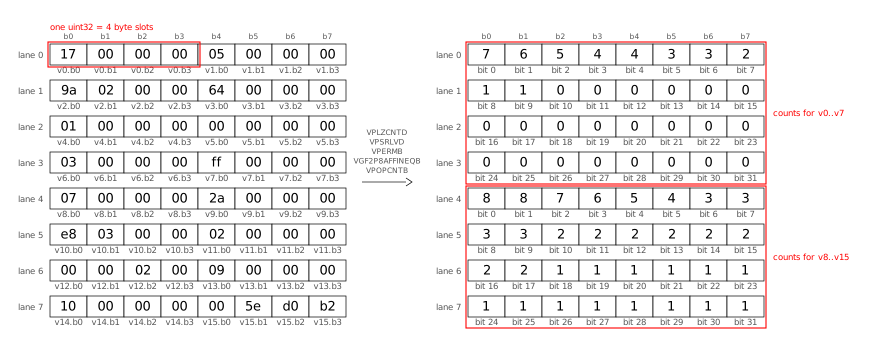
Let’s break down this process into its individual steps.

First, we turn each loaded value into its smear mask as explained above.

The VPOPCNTB vector instruction calculates POPCNT (1 byte) of 64 bytes at once, but first we need to shuffle the bytes inside the register: in load order, we have a full uint32 (4 bytes), followed by another uint32, per lane. First, we permute the bytes (VPERMB) such that all the first bytes of each value end up in one lane (“transpose the bytes”):
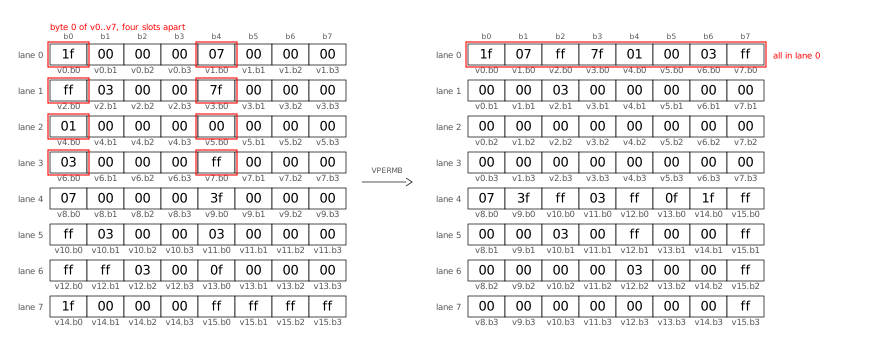
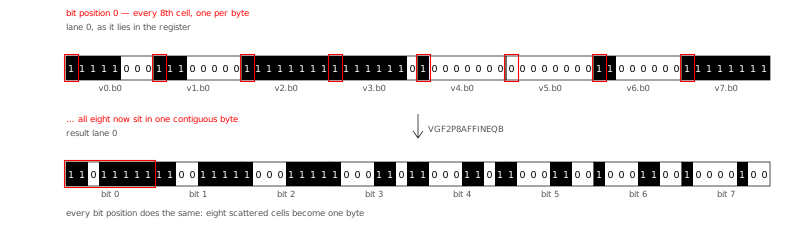
Next, we “transpose the bits” using the GF2P8AFFINEQB instruction, which sounds scary but turns out to be quite flexible for bit manipulation of all kinds. The GF2P8AFFINEQB instruction is also “the star of the show” in Go’s Green Tea Garbage Collector (2025). Here is the bit transpose, shown in the AVX512 register layout (see below for a different layout):
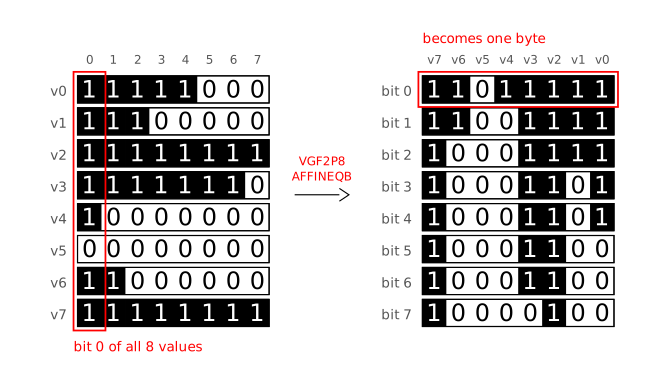
I found it easier to understand the transpose step when arranging the 8 bytes of lane 0 from top-to-bottom (instead of left-to-right), because then it looks like a 90 degree clockwise rotation:
Now we can use VPOPCNTB to count the bits in all 64 bytes at once:
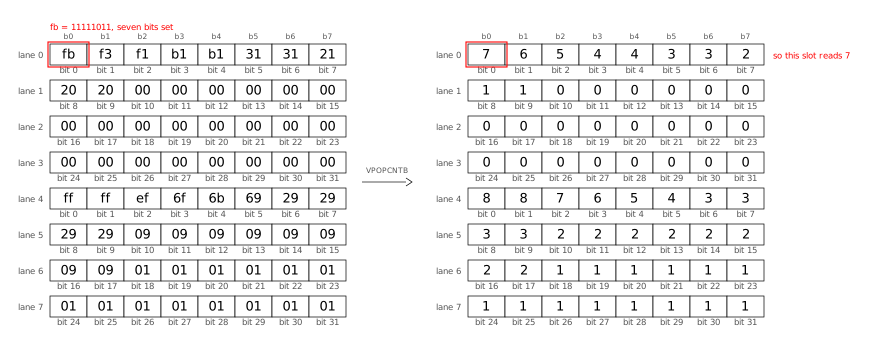
After all loop iterations (processing 16 values each) are done, we add the two groups (first 8 values, second 8 values) to obtain the 32 exception counts:
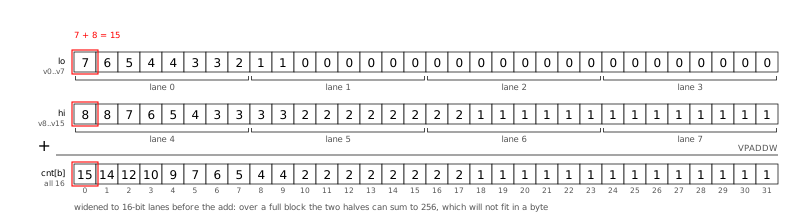
Positional Popcount: Go SIMD

Here is the Go code that implements what I described visually above:

func scanSIMD(output *stats, vals []uint32) {
  ones16 := archsimd.BroadcastUint32x16(^uint32(0)) // 16 32-one-bits masks
  shuffle := archsimd.LoadUint8x64Array(&scanShuffle)
  units := archsimd.LoadUint8x64Array(&scanUnits)
  var acc archsimd.Uint8x64
  idx := 0
  for ; idx+16 <= len(vals); idx += 16 {
    v := archsimd.LoadUint32x16(vals[idx : idx+16])
    // Replace all values with their smear masks.
    smear := ones16.ShiftRight(v.LeadingZeros()).ReshapeToUint8s()
    // Transpose: shuffle the bytes, then transpose the bits.
    matrices := smear.Permute(shuffle).ReshapeToUint64s()
    transposed := units.GaloisFieldAffineTransform(matrices, 0)
    // Popcount 64 bytes at once into the accumulator.
    acc = acc.Add(transposed.OnesCount())
  }
  // Store the accumulator into output.cnt:
  // Widen the two groups of byte counts to uint16 lanes (so that
  // 128+128 = 256 fits), fold them into cnt[b] for b=0..31,
  // then widen again to the uint32 lanes of output.cnt.
  sum := acc.GetLo().ExtendToUint16().Add(acc.GetHi().ExtendToUint16())
  sum.GetLo().ExtendToUint32().Store(output.cnt[0:16])
  sum.GetHi().ExtendToUint32().Store(output.cnt[16:32])
  // scalar tail for the 0..15 remaining values
  for _, val := range vals[idx:] {
    for b := range bits.Len32(val) {
      output.cnt[b]++
    }
  }
}

Have a look at the commit introducing positional popcount to DCS for the full code (including shuffle tables and ISA checks) as well as the detailed benchmark results.

Go even faster?

The SIMD optimizations I showed above beat the cgo TurboPFor library that Debian Code Search used before. When comparing apples to apples, i.e. backporting the AVX512 kernels and positional popcount technique to C TurboPFor, Go benchmarks a little slower at ≈1.4x C.

Could we make my Go TurboPFor implementation even faster, to truly match the C speed?

Yes! But also no. Let me explain:

  1. We could use more SIMD instructions to remove all code that still processes one value at a time. For example, in my encoder’s encodeBitpackVBExc function. Or we could price all bit widths concurrently in encode. Or in the decoder’s exception apply code path.
    But all of these SIMD instructions make understanding (and changing) the code harder, so I am cautious regarding which ones I introduce.

  2. A big part of the performance gap is due to Go’s bounds checks. While it costs performance, bounds checking is great for safety, so I will not turn off bounds checking. The Go compiler eliminates a number of bounds checks when it understands it’s safe to do so. One optimization avenue could be to make the prove pass in the Go compiler smarter to eliminate more bounds checks.

  3. When doing mid-stack inlining (proposal #19348) (2017), Go sometimes needs to put NOP instructions into the binary so that it can attach inlining markers. For dispatch-bound functions, these extra NOPs can measurable slow down execution.

  4. The Go compiler currently allows specifying the architecture (GOARCH=amd64) and microarchitecture (GOAMD64=v3), but not a specific CPU architecture (like AMD Zen 4). Therefore, CPU-specific workarounds for one vendor affect all the generated code. The specific one I encountered in my code is that the Go compiler emits XORL CX,CX before every POPCNT to break a false-output-dependency from the Intel Sandy Bridge Skylake era, which is unnecessary on AMD Zen CPUs.
    I suspect that Go intentionally does not offer this level of customizability.

  5. After all of the above points are addressed, what remains is better code generation in specific cases. To illustrate what I mean, consider the example of incrementing a loop variable, where Go re-derives an index every time:
    Go: POPCNTL; ADDQ DI,CX; LEAQ (base)(CX*4) (3 instructions)
    clang: popcnt; lea rax,[rax+4*rdi] (2 instructions)
    Depending on the specific case, improving the compiler might be easy or prohibitively complex. Often, such improvements are hard to measure conclusively.

Conclusion

Go’s SIMD support makes available — in Go code without having to resort to cgo or assembly — a powerful part of modern CPUs which allows speeding up the kind of computation that TurboPFor needs by an order of magnitude! 😲

I found it very valuable to use a coding agent (Claude Code, with Opus 5 and Fable 5 in this case) to help with the many tedious parts of such performance work (and still it took me weeks!). The LLM can read objdump output much faster than I can, can see patterns and correlations I might never identify, never becomes frustrated after a compiler error or runtime panic, and never runs out of patience to run one more experiment, as long as I give it measurable and reachable goals.

The performance of the SIMD code which one can get from the Go compiler is pretty close to what a good C compiler like clang provides. The CPU performance counters show value decoding speeds of 7 instructions/cycle (IPC) on a machine where the maximum is 8 IPC.

To me, SIMD support is a very welcome addition to Go.

  •  

Distribution Release: Zenwalk GNU Linux Current-260905

The DistroWatch news feed is brought to you by TUXEDO COMPUTERS. Zenwalk GNU Linux is a Slackware-based desktop distribution. The project's latest snapshot integrates Flatpak support and includes version 7.1.7 of the Linux kernel. "One of the improvements in this milestone is the integration of native Flatpak support directly into the Zenwalk desktop. Flatpak is installed and configured out....
  •  

Emmanuel Kasper: Isolated VSCode/VSCodium development environment in a Virtual Machine

Following the previous steps, we are now interested in getting a graphical environment with a VSCodium, the opensource rebuild of the VSCode IDE.

Configuring the display and development environment

From the previous steps we had a virtual machine where we can login with a debian user, and we can start configuring a graphical desktop environment.

  • Install Gnome Flashback.

Gnome Flashback is a 2D version of the Gnome Desktop, it has a kind of year 2009 feeling but works well enough. We need a 2D desktop, as the Virtio display adapter does not work consistently with 3D enabled.

# inside dev-vm
# apt install task-gnome-flashback-desktop
  • From the host connect to the VM display using a remote client:
$ virt-viewer dev-vm

or using the Remote Viewer app:

$ remote-viewer spice://localhost:5900
  • Install the Spice Agent package. The Spice Agent provides a shared clipboard between host and VM, and also adapts automatically the VM display and desktop when the window of the Spice client is resized.
# inside dev-vm
# apt install spice-vdagent
  • Add a VSCodium repo, via extrepo and enable it:
# inside dev-vm
# apt install extrepo
# extrepo enable vscodium
# apt update && apt install codium
  • Ensure the VM starts automatically on boot.
$ virsh autostart dev-vm

It also makes sense to set our debian user to autologin in Gnome Fallback, and start Codium on session start.

This is how the environement should look like at this point: Remote Viewer

Sharing source code from host to guest VM

Finally we need to make sure we have access in the dev-vm to our source code repositories. For this I will share the directory /home/manu/Projects/git which is containing all my git projects on the host, to the dev-vm using virtiofs.

The configuration of virtiofs is fortunately possible using virt-manager, which will save us some tedious XML editing. virt-manager screenshot

Finally we mount the shared directory, and enable the mount on each boot.

# inside dev-vm
# mount -t virtiofs /home/manu/Projects/git /home/manu/Projects/git
#  echo '/home/manu/Projects/git /home/manu/Projects/git virtiofs defaults 0 0' >> /etc/fstab

So now we have an isolated dev environment where we can run untrusted code, with a very strong isolation from our host.

  •  

Michael Ablassmeier: virtnbdbackup - backup target plugins

I’ve released a new version of virtnbdbackup. The new version adds a small plugin system layer that allows users to extend the backup targets by creating plugins.

Past feature requests asked for backup to S3 or adding encryption features, which i dont need and do not want to maintain within the project scope. Users can now extend the utility with plugins.

In the course of implementing this, i had the idea: why not create a plugin thats capable of streaming the backups to a proxmox backup server?

This resulted in pypbs, a small python binding for libproxmox-backup-qemu0 that allows to store fixed index images on PBS using python.

A first POC implementation of the plugin worked quite well, even tho i don’t know if its worth releasing. A better approach would be to use PBS dynamic index format, but then i might just add a small plugin that wraps the proxmox-backup-client CLI for doing this..

  •  

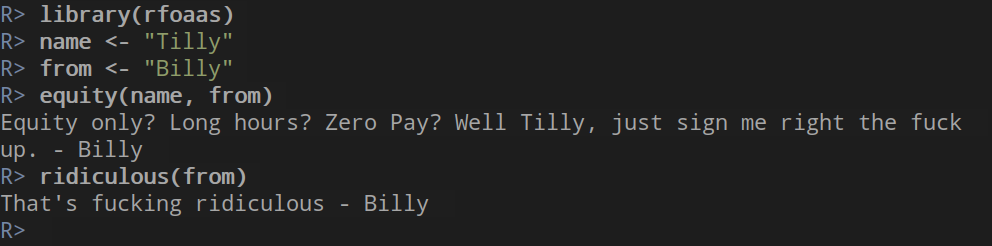
Dirk Eddelbuettel: rfoaas 2.4.0 at CRAN: Fully Restored Functionality

rfoaas greed example

FOASS is back at a new site / url since late August! It restores original FOAAS functionality and full set of REST access points including the language filters.

So this new rfoaas release restores all accessor functions re-enabling full R access, documents, and tests them. We re-enabled code coverage too. This corresponds to the upstream version 2.4.0 in the forked FOASS repo, and by our convention we use the same version number for the R package.

My CRANberries service provides a comparison to the previous release. Questions, comments etc should go to the GitHub issue tracker. More background information is on the project page as well as on the github repo

This post by Dirk Eddelbuettel originated on his Thinking inside the box blog. If you like this or other open-source work I do, you can sponsor me at GitHub.

  •  

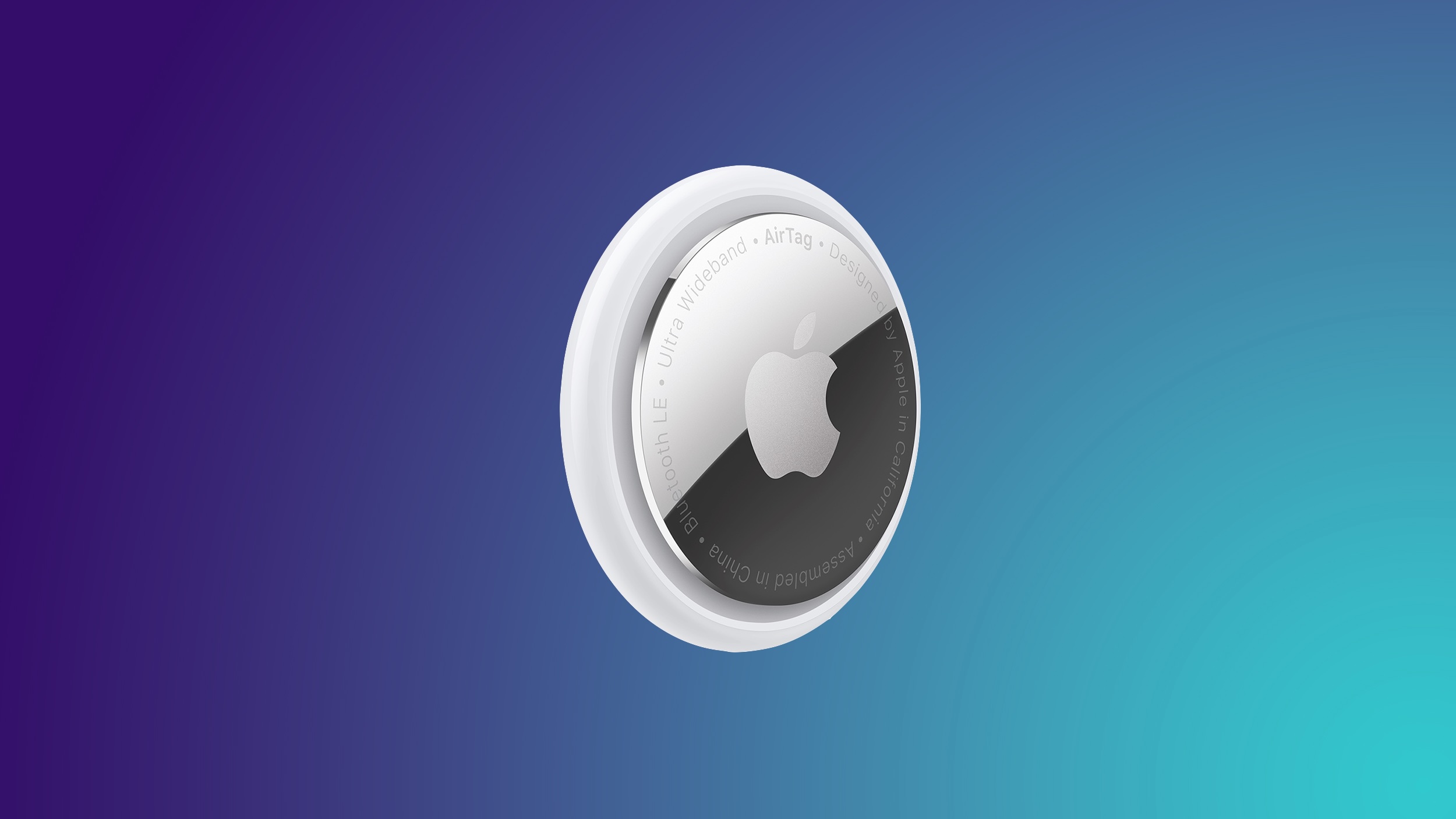
AirTag 2 4-Pack Drops to $79.99 on Amazon, Matching Record Low

Apple's AirTag 2 is on sale for $79.99 this weekend on Amazon, down from $99.00. This deal is on the 4-Pack of the AirTag 2, and it's a match of the record low price for the accessory, beating the previous low by about $5.

Note: MacRumors is an affiliate partner with Amazon. When you click a link and make a purchase, we may receive a small payment, which helps us keep the site running.
We're also tracking a smaller deal on the AirTag 2 1-Pack, available for $24.00, down from $29.00. This is another record low price on the AirTag 2.


The new AirTag is equipped with a second-generation Ultra Wideband chip, enabling the Precision Finding feature to work up to 50% farther away from an item compared to the previous-generation model.

If you're on the hunt for more discounts, be sure to visit our Apple Deals roundup where we recap the best Apple-related bargains of the past week.


Deals Newsletter


Interested in hearing more about the best deals you can find in 2026? Sign up for our Deals Newsletter and we'll keep you updated so you don't miss the biggest deals of the season!


Related Roundup: Apple Deals

This article, "AirTag 2 4-Pack Drops to $79.99 on Amazon, Matching Record Low" first appeared on MacRumors.com

Discuss this article in our forums

  •  

iPhone 18 Pro: Everything M6 Tells Us About the A20 Chip

Apple announced the M6 chip last week, just ahead of its September iPhone event, providing the clearest indication yet of what the A20 will bring to the iPhone 18 lineup.


Apple silicon generations share much of their architecture across the A-series and the M-series, so a new A-series chip normally functions as a partial preview of the M-series chip that follows it. This year the order reversed; the M6 was revealed on August 25, ahead of the A20 Pro expected in the iPhone 18 Pro this month.

Recent reports place the A20 Pro at up to 18% faster and up to 30% more power efficient than the A19 Pro, which is broadly similar to the M6 over the M5.

Apple's First 2nm iPhone Chip


The M6 is Apple's first chip built on TSMC's 2nm (N2) process, with the second almost certain to be the A20. Being a smaller manufacturing process, N2 has higher transistor density, allowing Apple to pack more performance into a smaller area.

Apple has historically debuted new nodes on the A-series, since iPhone volume validates yields, so introducing N2 in an $899 Mac mini represents a change. As such, reports that the A20 and A20 Pro will move to N2 are now supported by a shipping product rather than analyst predictions. The consequence for the iPhone event is that the "Apple's first 2nm chip" claim is no longer available.

Dual Neural Engine?


The iPhone's Neural Engine has remained at 16 cores and approximately 35 trillion operations per second since the A17 Pro, spanning three generations. The M6 introduces a Dual 16-core Neural Engine, which Apple says system frameworks can address simultaneously for up to 2x the peak compute of previous generations.

The change corresponds with the reported move to WMCM packaging, which integrates memory onto the same wafer as the CPU, GPU, and Neural Engine to shorten the path between them. It is possible that die area and thermal constraints may limit a dual engine to the A20 Pro.

GPU AI Gains Are Now Incremental


Apple said the M5 delivered over 4x the peak GPU compute for AI compared to the M4, reflecting the introduction of Neural Accelerators within each GPU core. The M6 is rated at nearly 30% over the M5.

The A19 Pro recorded a comparable 4x improvement on the iPhone 17 Pro last September for the same architectural reason. Second-generation Neural Accelerators consequently appear to represent a refinement rather than another step change, suggesting the A20 Pro will not repeat the A19 Pro's headline figure.

Graphics Improvements Should Carry Across


The M6 adds 50% increased geometry rates, an updated shader core architecture, revised Dynamic Caching, and hardware-accelerated ray tracing. These are architectural changes and comparable graphics work has historically appeared across both the A-series and M-series within the same generation.

Memory Bandwidth Suggests a Modest A20 Gain


Memory bandwidth determines how quickly data moves between the memory and the processor, and it is the main constraint on running large language models on device. The M6 provides up to 170GB/s, which Apple describes as a 10% increase over the M5's 153.6GB/s.

That increase is small enough to indicate Apple is using a faster grade of the same LPDDR5X memory rather than moving to the newer LPDDR6 standard, which would have delivered a far larger jump. Reports indicate Apple is sourcing high-speed LPDDR5X from Samsung for the ‌iPhone 18‌ lineup, and the M6 is consistent with that.

The implication for the A20 is that memory bandwidth is unlikely to improve dramatically. The A19 Pro is rated at 76.8GB/s, and a similar 10% uplift would take the A20 Pro to roughly 85GB/s. Any meaningful gain in how quickly the ‌iPhone 18 Pro‌ loads and runs on-device models is therefore more likely to come from WMCM packaging shortening the distance data travels than from the memory itself.

AV1 Encode Remains Absent


The M6 Media Engine supports hardware-accelerated H.264, HEVC, ProRes, and ProRes RAW, with AV1 decode but no AV1 encode, matching the M5. The omission on a new process node in a desktop chip makes its inclusion in the A20 Pro highly unlikely.
Related Roundups: iPhone 18, iPhone 18 Pro
Related Forum: iPhone

This article, "iPhone 18 Pro: Everything M6 Tells Us About the A20 Chip" first appeared on MacRumors.com

Discuss this article in our forums

  •  

Top Stories: 'Surprise and Shine' Apple Event Preview, John Ternus Takes Over, and More

After years of rumors, the highly anticipated foldable iPhone is almost here, but that's not all we're expecting to see at next week's big event, and we've got full coverage of expectations for the "Surprise and Shine" event.


Beyond the event, this week also saw John Ternus take over from Tim Cook as Apple CEO, while we learned a bit more about what's coming in iOS 27 and how Apple has been trying to respond to massive demand for its desktop Macs amid the surge in AI computing, so read on below for all of the details!

Top Stories


iPhone Ultra, iPhone 18 Pro, and More: Apple's September 9 Event Preview


Apple's September event will take place on Wednesday, September 9, at 10:00 a.m. Pacific Time. At the event, Apple will announce its 2026 iPhone lineup, and this year is a big one. Along with the slab-style iPhones we've been using for years, Apple is going to debut its first foldable device. We'll also get new Apple Watches, a new set of AirPods, and possibly some other surprises.


Everything we expect to see at the "Surprise and Shine" event is recapped in our event guide and overview video, so make sure to check it out.

Read John Ternus' First Memo to Apple Employees as CEO


This week marked the end of an era, with Tim Cook stepping down as Apple CEO after 15 years and hardware engineering chief John Ternus taking over the reins. Cook will remain active with Apple as Executive Chair.


In his first memo to employees as CEO, Ternus thanked employees for a warm welcome, expressed thanks to Cook for his contributions to Apple and assisting with the transition, and shared excitement about the future including "a huge launch" next week.

iPhone 18 Pro Pre-Orders May Start at an Unusual Time


Following next Wednesday's event, pre-orders for the new iPhone hardware may start at an unusual time. Pre-orders for the new iPhone models typically start at 5:00 a.m. Pacific Time on the Friday immediately following the event, but this year that falls on the 25th anniversary of the 9/11 terrorist attacks.


As it did back in 2015 when pre-orders would also have fallen on the 11th, Apple will reportedly push things back this year and begin accepting pre-orders at midnight Pacific Time on Saturday, September 12.

iOS 27 Introduces New 'iPhone Handoff' Feature


Back at WWDC in June, Apple made the briefest of mentions about iOS 27 offering the ability to share a phone number between devices, and now we know how that feature will work.


MacRumors forum member pdfu this week shared a video showing how users will set up the feature, dubbed iPhone Handoff, from the Cellular section of the Settings app. iPhone Handoff will require carrier support, with the user's main eSIM remaining on their primary phone and a companion eSIM being sent to another iPhone. Once activated, a single phone number will be used across both devices, with the phone number automatically switching back and forth to whichever device is unlocked at the moment.

Foldable iPhone Ultra Likely Has MagSafe Charging


In addition to the iPhone 18 Pro and Pro Max, next week's event will also see the long-awaited introduction of Apple's first foldable iPhone. The device will sacrifice a few features in order to enable its ultra-thin profile, and until recently it was thought that MagSafe charging might be one of those things.


In a recent interview with Tom's Guide, however, Bloomberg's Mark Gurman says "all indications" point toward MagSafe support being included on the phone.

Apple Caught Off Guard by AI Demand for Mac Mini and Mac Studio


Apple's unusually timed announcement of new Mac mini and Mac Studio models last week was driven by unexpectedly strong enterprise appetite for AI hardware, according to The Information. Apple normally releases new Mac models in the fall, closer to October or November, but Apple pulled Mac announcements ahead of the anticipated arrival of new iPhone models as it has sought to meet strong demand for its desktop Macs.


Apple highlighted the ‌Mac mini‌ and ‌Mac Studio‌'s shift toward business buyers back in June, with a "Business at the Park" event involving executives from major companies Ford, Disney, and Anthropic. The ‌Mac mini‌ was said to be the "darling" of the event.

A surge in demand for Mac hardware to run AI models has coincided with the global memory shortage, leaving many ‌Mac mini‌ and ‌Mac Studio‌ configurations out of stock for months and making the new models a priority to allow Apple to offer improved performance and higher production volumes.

MacRumors Newsletter


Each week, we publish an email newsletter like this highlighting the top Apple stories, making it a great way to get a bite-sized recap of the week hitting all of the major topics we've covered and tying together related stories for a big-picture view.

So if you want to have top stories like the above recap delivered to your email inbox each week, subscribe to our newsletter!
This article, "Top Stories: 'Surprise and Shine' Apple Event Preview, John Ternus Takes Over, and More" first appeared on MacRumors.com

Discuss this article in our forums

  •  

Junichi Uekawa: Summer Vacation for my kids is over.

Summer Vacation for my kids is over. And Peace is back to my life. AI is transforming how I operate and view things. It was very different a few months back. AI (as a product) is useful in generating code, useful in analysing things. It seems to be able to retrieve and show me information relatively quickly, doesn't need me to scan the search results to find which one is more useful. I feel I am less reliable than an AI, even when AI is prone to failure. The text generated by AI is better worded than me myself, albeit they have their own tone. Is it still fun if all my hobby programming is overtaken by AI? I am not sure, did I enjoy writing the fixtures and build environment for the open source programming stuff? Do I enjoy reviewing other people's code? Reviewing other people's contributions is usually not great, because by definition the code you own you have better knowledge about, and the code you generate yourself is the best code, others will not fit naturally, they don't have the historical context, and the undocumented future plans.

  •  

iPhone Ultra, iPhone 18 Pro, and More: Apple's September 9 Event Preview

Apple's September event will take place on Wednesday, September 9 at 10:00 a.m. Pacific Time. Apple will announce its 2026 iPhone lineup, and this year is a big one. Along with the slab-style iPhones we've been using for years, Apple is going to debut its first foldable device. We'll also get new Apple Watches, a new set of AirPods, and possibly some other surprises.


Everything we expect to see at the "Surprise and Shine" event is below.

Foldable iPhone


Apple's 2026 iPhone lineup will include its first foldable device. We don't know what Apple will call it, but rumors suggest it might be named the iPhone Ultra.

Apple has designed a book-style foldable that has an iPad-like layout when it's opened up. It will have a ~5.5-inch OLED outer display, which is what you'll use when the iPhone is closed. It will unfold into a larger ‌OLED‌ display that's approximately 7.8 inches.


The design is wider than it is tall when it's open, and you can picture it as something like an iPad mini that folds in half. Samsung's recent Galaxy Z Fold8 matches the foldable iPhone rumors, so it may be the best look at the size and layout of Apple's device.

Apple wanted a crease-free design, but that doesn't seem to be possible with a foldable yet. The ‌iPhone Ultra‌ will instead have a minimal crease and a durable liquid metal hinge. Foldables are delicate and hinges can be a weak point, so Apple focused on durability. Rumors indicate Apple could have some tricks to keep the crease less visible over time, such as optically clear adhesive that will fill in any micro-cracks caused by repeated folding.

When unfolded, the ‌iPhone Ultra‌ could be as thin as 4.5mm, making it Apple's thinnest iPhone to date. That would make it 9mm when folded, which is close to the thickness of the 8.75mm iPhone 17 Pro Max. With a chassis that thin, Apple had to make design compromises.

There is reportedly no space for the TrueDepth camera system for Face ID, so it's going to use Touch ID instead. There will be a ‌Touch ID‌ side button, similar to the iPad Air and ‌iPad mini‌. Though ‌Face ID‌ isn't included, there will be front cameras for both the inner and outer displays.

Apple also didn't have room for a three-lens rear camera system, so the ‌iPhone Ultra‌ won't have a telephoto lens. Rumors suggest it will have an Ultra Wide lens and a Wide lens located on the back of the device, so the rear camera works whether the ‌iPhone Ultra‌ is folded or unfolded.

It was unclear if MagSafe would be included because leaked dummy models didn't feature a magnetic ring, but Bloomberg says ‌MagSafe‌ charging will indeed be a feature.

The ‌iPhone Ultra‌ will have a 2nm A20 Pro chip. The A20 Pro is expected to be around 18 percent faster and up to 30 percent more power efficient than the A19 Pro, and it could have a 7-core GPU, a wider memory interface, and a larger L2 cache for its efficiency cores. We're expecting 12GB of RAM.

Apple's 2026 iPhones could use its house-designed C2 modem, which is expected to be faster and more efficient than the C1X. It's not yet clear if Apple has added mmWave technology to the C2, and if it hasn't, foldable iPhone models sold in the U.S. could use Qualcomm modems instead. mmWave 5G isn't widely used outside of the U.S., but it is an expected feature for U.S. iPhones. The other alternative is limiting the foldable iPhone to sub–6GHz 5G speeds worldwide.

Each half of the ‌iPhone Ultra‌ will have a battery inside, and it could have a total capacity in the 5,400 to 5,800 mAh range. The ‌iPhone 17 Pro‌ Max has a 5,088 mAh battery for comparison.

Apple isn't taking risks with color. The ‌iPhone Ultra‌ will come in silver/white and a second color that's been described as a very deep shade of indigo that's close to black.

Software could make or break the ‌iPhone Ultra‌, and Apple has been telling developers to design their apps for a variety of sizes and aspect ratios to accommodate the two foldable screens. The ‌iPhone Ultra‌ is likely to support multitasking, side-by-side apps, and sidebars, much like the iPad.

Apple's first foldable won't be cheap. According to rumors, it will cost at least $2,000, and higher-capacity models could be upwards of $2,500.

iPhone 18 Pro and iPhone 18 Pro Max


The iPhone 18 Pro models will look a lot like the ‌iPhone 17 Pro‌ models, with no major design changes expected. There are rumors that the ‌iPhone 18 Pro‌ Max might be a little bit thicker and heavier because of a larger battery, but ‌iPhone 17 Pro‌ cases are expected to fit the ‌iPhone 18 Pro‌ models. The camera plateau could be slightly thicker to accommodate a new variable aperture lens.


Apple has new colors planned, including a dark cherry shade, light blue, and silver. Rumors suggest there won't be a black ‌iPhone 18 Pro‌ option.

With the ‌iPhone 17 Pro‌ models, there's a clear color contrast between the frosted glass back and the aluminum casing, but that might be more subtle with the ‌iPhone 18 Pro‌. While the overall shape isn't being updated, the ‌iPhone 18 Pro‌ and Pro Max could have a smaller Dynamic Island. There were early rumors about under-display ‌Face ID‌ with no Dynamic Island at all, but that's not going to happen.

There may be a noticeable increase in battery life due to the larger capacity battery rumored for the 18 Pro Max (5,567 mAh), plus efficiency improvements from the 2nm A20 Pro chip it's supposed to get and an upgrade in display technology. Rumors say Apple is using an LTPO+ display that's more efficient than the current ‌OLED‌ display.

Apple plans to upgrade the main rear camera with a DSLR-like variable aperture, giving users more control over the light that reaches the lens. An option for a smaller aperture in bright lighting could improve exposure, while a larger aperture in lower lighting conditions would let in more light to reduce grain and produce sharper images. A variable aperture also gives more control over background blur. Some rumors suggest this might be a feature exclusive to the ‌iPhone 18 Pro‌ Max, but it's not clear if that's accurate.

Apple could use a three-layer stacked image sensor developed by Samsung, which would make the camera more responsive and improve low-light performance. The Telephoto lens could have a wider aperture to let in more light, but no changes are rumored for the Ultra Wide lens or the front-facing camera.

There might be changes to the Camera Control button. Apple is supposedly simplifying it to eliminate the capacitive layer that lets you swipe to adjust camera settings on the button.

As with the foldable iPhone, some or all of the ‌iPhone 18 Pro‌ models could get Apple's C2 modem, but again, it's possible U.S. models will have Qualcomm modems for mmWave 5G.

Compared to the ‌iPhone 17 Pro‌ models, the ‌iPhone 18 Pro‌ models will be more expensive. Apple is paying more for memory and storage, and prices for Macs and iPads already went up. We could see a price increase ranging from $100 to $300.

Apple Watch Series 12


The Apple Watch Series 12 won't design changes, but Apple could bring back the ceramic case option. We're expecting an updated processor that could bring improvements to health and fitness tracking.

Apple is testing a feature that would let the heart rate sensor continuously collect data throughout the day, powering a new Health app feature that could show wellness-related info similar to what the Oura Ring offers.

Apple Watch Ultra 4


Like the Apple Watch Series 12, the Apple Watch Ultra 4 will have no major changes. It's likely to get the same upgraded processor and related changes.

AirPods 5


References to AirPods 5 were found in the macOS 26.7 release candidate, and the new earbuds could launch alongside the ‌iPhone 18 Pro‌ models. Apple could add an updated H3 chip for improved sound quality and lower latency, and we're likely to still get an ANC version and a non-ANC version.

Possible Product Launches


  • Home hub - Apple is working on a home hub with a 7-inch square display, an integrated camera, presence detection sensors, and more. It will control smart home devices, but it will also run apps. Rumors suggest it can be used to make video calls, play content, and interact with Siri AI, the new version of ‌Siri‌ in iOS 27. Apple has been waiting to launch the home hub because ‌Siri‌ AI is a central feature of the new device.

  • Apple TV 4K - There's a new Apple TV with a faster processor in the works, and it could come at the September event. No design changes are expected, but an updated chip could support ‌Siri‌ AI and new gameplay features. There are also signs of a new remote in Apple code.

  • HomePod mini - The HomePod mini is due for a refresh, and it's also expected to get a faster processor. We haven't heard word of design changes, but it could come in new colors.


Software Updates


At the September 9 event, Apple will announce the release dates for ‌iOS 27‌, iPadOS 27, macOS Golden Gate, tvOS 27, watchOS 27, and visionOS 27. Apple will also likely seed release candidate versions of the updates to developers and public beta testers following the event.

Based on historical release timelines, ‌iOS 27‌ and its sister updates could come out as soon as September 14.

What Not to Expect


There are several other products rumored to be launching before the end of 2026, but they'll likely come at a second event in October or November. There's also a notable omission from the lineup, because Apple is going to delay the iPhone 18.

  • iPhone 18 - The standard ‌iPhone 18‌ will not launch in September 2026, with Apple instead planning to debut it in spring 2027 alongside the iPhone 18e and the iPhone Air 2. In the fall, we're only getting the ‌iPhone 18 Pro‌, ‌iPhone 18 Pro‌ Max, and foldable iPhone.

  • Apple Watch SE 4 - There won't be a new Apple Watch SE 4 this year.

  • M6 MacBook Pro - A new entry-level MacBook Pro with an M6 chip is coming before the end of the year, but not at the September event.

  • M6 iMac - There's also an M6 iMac rumored to be coming in 2026, but Apple is likely to hold a Mac event to announce it, or do it via press release at a later date.

  • OLED MacBook Pro - We've been waiting on an ‌OLED‌ touchscreen ‌MacBook Pro‌, and it's rumored for late 2026 or early 2027. It's not a candidate for Apple's September event.

  • OLED iPad mini - There's an ‌OLED‌ ‌iPad mini‌ in development, and it's expected to launch before the end of October. It's another one that's unlikely for an iPhone event.


Apple's New CEO


New Apple CEO John Ternus has presented at Apple events before, but the iPhone event will be the first he hosts as CEO in place of Tim Cook.

Cook was Apple's CEO for 15 years, so a transition to Ternus leading an event is a major change.

Cook is now Apple's executive chairman, and he may not make an appearance during the event at all.

iPhone Preorders


Apple almost always holds preorders on the Friday after an event, but this year, that Friday is 9/11. It's unlikely Apple will do iPhone preorders on Friday because of the date, so orders could happen on Saturday instead. The last time iPhone preorders overlapped with the 9/11 date in 2015, Apple pushed orders to Saturday.

If Apple follows the same pattern, the ‌iPhone 18 Pro‌ models and the ‌iPhone Ultra‌ could be available for preorder on Saturday, September 12. Back in 2015, Apple started preorders at 12:01 a.m. Pacific Time, but in recent years, preorders have started at 5:00 a.m. Pacific Time. Preorders this year could take place at 5:00 a.m. on September 12.

The new iPhones will likely launch on Friday, September 18, regardless of preorder date.

How to Watch


Apple's "Surprise and Shine" event will start at 10:00 a.m. Pacific Time on Wednesday, September 9. Apple will livestream the event on its website, on YouTube, and through the ‌Apple TV‌ app on supported devices.


For those unable to watch the livestream, MacRumors will have full event coverage on MacRumors.com and the MacRumorsLive X account. We'll also take a much closer look at all of the new products after the event.
Related Roundup: iPhone 18 Pro

This article, "iPhone Ultra, iPhone 18 Pro, and More: Apple's September 9 Event Preview" first appeared on MacRumors.com

Discuss this article in our forums

  •  

Apple Planning AI Home Security Camera and Service for 2027

Apple could release a home security system and service in 2027, according to Bloomberg.


The company is designing a privacy-forward home security camera that will "use AI to monitor the surrounding environment instead of actual video footage." It will apparently work with a new home security and monitoring service, but no additional detail on the service is included.

Apple is planning to release a home hub for controlling smart home devices before the end of the year, and rumors have previously suggested there's a camera in the works to go along with it. Early rumors indicated it would be a wireless camera with Siri integration and a connection to the home hub that's in development.

Apple already has HomeKit Secure Video, an Apple Home feature for third-party cameras. ‌HomeKit Secure Video‌ features end-to-end encryption and uses iCloud to securely stream and store video from compatible HomeKit cameras.

In iOS 27, Apple is upgrading its HomeKit camera features. The Home app is able to generate written summaries for motion alerts, plus it can surface highlights and group footage from different cameras together. The new features require a 2TB or higher ‌iCloud‌+ plan, while ‌HomeKit Secure Video‌ requires a 50GB plan or better.

It's possible a future home security monitoring service could also be tied to ‌iCloud‌+ and Apple's existing ‌HomeKit Secure Video‌ features.
This article, "Apple Planning AI Home Security Camera and Service for 2027" first appeared on MacRumors.com

Discuss this article in our forums

  •  

Anthropic's Claude Comes to CarPlay

Anthropic added CarPlay integration to the Claude iOS app, which means Claude users can talk to Claude through their in-car infotainment systems.


Apple added support for third-party chatbots in ‌CarPlay‌ in iOS 26.4. Chatbot apps with ‌CarPlay‌ integration need to add support for a voice control screen, use Apple's designated ‌CarPlay‌ template, and get an entitlement from Apple. Claude can answer voice-based questions hands-free, but the chatbot won't be able to control vehicle or iPhone functions. Users also need to open the Claude app from the ‌CarPlay‌ interface because there is no support for third-party wake words.

The Claude app on ‌CarPlay‌ opens with a "Start a hands-free conversation" screen, with options to start a new chat or access recent chats. There are in-app controls for muting and unmuting and ending and resuming conversations, plus visual cues for when Claude is listening or talking.

‌CarPlay‌ has long supported third-party apps, but Apple has limited the kinds of apps that are available to prevent driving distractions. OpenAI added ‌CarPlay‌ support to the ChatGPT app earlier this year.

Update: This article was updated to note that the Claude ‌CarPlay‌ integration is live.
Related Roundup: CarPlay

This article, "Anthropic's Claude Comes to CarPlay" first appeared on MacRumors.com

Discuss this article in our forums

  •  

Foldable 'iPhone Ultra' Still Likely to Be Missing These Five Features

Apple's first foldable iPhone, dubbed the "iPhone Ultra," is expected to launch without at least four features that will be present on the iPhone 18 Pro models, despite a price tag of at least $2,000.


The iPhone Air lacks Ultra Wide and Telephoto rear cameras, a SIM card slot, and stereo speakers. With a super thin design, a titanium frame, and a glass back, the ‌iPhone Ultra‌ is expected to be very similar to the ‌iPhone Air‌ in terms of design, and it is possible that similar concessions will be present on the device. There are no indications that the ‌iPhone Ultra‌ will be missing stereo speakers, but it is not out of the question given the other compromises Apple has chosen to make. Based on over a year of reports and rumors, the ‌iPhone Ultra‌ could be missing the following features:


  • Face ID/TrueDepth camera array

  • Telephoto camera/third rear camera

  • Action button

  • Physical SIM card slot

  • mmWave 5G


MagSafe was originally in question earlier in the rumor cycle.


Face ID


The ‌iPhone Ultra‌ is believed to be too thin to accommodate Apple's TrueDepth camera array, which is required for ‌Face ID‌ authentication, so Apple is expected to revert to a Touch ID side button instead.

There will still be a front-facing camera for both displays, with the inner one rumored to be a 24-megapixel under-display sensor, but biometric authentication will be handled by the fingerprint reader.

The last flagship iPhone with Touch ID was 2016's iPhone 7. The ‌iPhone 18 Pro‌ models are moving in the opposite direction, apparently relocating ‌Face ID‌'s flood illuminator beneath the screen to shrink the Dynamic Island.

Telephoto Camera


As visible on dummy models shared by Sonny Dickson, Vadim Yuryev, and others, the ‌iPhone Ultra‌ is expected to sport only two rear cameras. These are believed to be 48-megapixel Wide and Ultra Wide lenses, with no third Telephoto camera of the kind found on the Pro models.

Bloomberg's Mark Gurman said last month that the people who have used the device are impressed by it, but singled out the camera system as the most likely disappointment for buyers.

Action Button


Dummy models continue to point to the absence of the Action button. A power button and volume buttons are clearly visible, with the volume buttons located on the top edge of the device and aligned to the right, similar to the iPad mini, but the left edge appears to be entirely bare. That would make the ‌iPhone Ultra‌ the first iPhone with no Action button or silent switch, some three years after Apple introduced the Action button on the iPhone 15 Pro as a replacement for the switch.

The unusual button layout was first rumored by Weibo leaker "Instant Digital," who said that the motherboard sits on the right side of the device. Rather than run cables across the display to the left side, where the volume buttons are located on every other iPhone, Apple is said to have decided to run them directly upwards to maximize internal space.

Image via Vadim Yuryev.


SIM Card Slot


Rumors indicate that the ‌iPhone Ultra‌ will also lack a SIM card slot, just like the ‌iPhone Air‌, being compatible with eSIM only. Gurman and analyst Ming-Chi Kuo both expect the device to be eSIM only in every market where it launches.

mmWave 5G Connectivity


The device is likely to miss mmWave 5G if it features Apple's in-house C2 modem as rumored, since reports indicate the C2 may still lack mmWave capability. ‌iPhone 18 Pro‌ models sold in the United States are expected to retain Qualcomm hardware because they support the mmWave bands used by American carriers. Apple does not sell mmWave-capable iPhones outside the U.S.

The ‌iPhone Ultra‌'s C2-based configuration would therefore advance Apple's modem transition, just like the ‌iPhone Air‌, but could limit the device to sub-6GHz 5G.

MagSafe?


Bloomberg's ‌Mark Gurman‌ has now indicated that ‌MagSafe‌ will make it into the device after all. Speaking in an interview with Tom's Guide, Gurman said "all indications that I've heard is that ‌MagSafe‌ is in for this foldable phone," pointing to the fact that Apple managed to fit the magnet array into the ‌iPhone Air‌.

The uncertainty stemmed from the dummy models of the device that emerged earlier this year. Units shared by Dickson and Yuryev showed no indentations for the internal ‌MagSafe‌ magnets, while the mock ‌iPhone 18 Pro‌ and ‌iPhone 18 Pro‌ Max units shown alongside them clearly did. Leaked cases for the foldable, on the other hand, included a magnetic ring, leaving the question open until recently.

Image via Vadim Yuryev.


Price and Launch


The rumored starting price for the ‌iPhone Ultra‌ varies, but reports agree that it will not be below $1,999, with Kuo placing it somewhere between $2,000 and $2,500. The iPhone 17 Pro starts at $1,099 and has all of the above features, and while the ‌iPhone 18 Pro‌ is expected to see a price increase of $200 to $300, the ‌iPhone Ultra‌'s compromises could still prove controversial.

Apple will almost certainly unveil the device alongside the ‌iPhone 18 Pro‌ and ‌iPhone 18 Pro‌ Max at its "Surprise and Shine" event on Wednesday, September 9.
Related Roundup: iPhone Fold

This article, "Foldable 'iPhone Ultra' Still Likely to Be Missing These Five Features" first appeared on MacRumors.com

Discuss this article in our forums

  •  

macOS 26.7 Code Hints at Two Unreleased Apple Game Controllers

References to two unreleased controllers that identify as Apple hardware in code were spotted in the macOS 26.7 release candidate by MacRumors reader Pdfu. Apple's first macOS 26.7 release candidate came out in mid-August, and it was full of references to unreleased Apple devices, from iPhones and Macs to new home accessories. Pdfu has continued to dig into the RC, finding new details that were previously overlooked.


There are GameController profiles for two hardware devices identified as T6502 and T1057, which Pdfu suggests could be Apple gaming controllers in development. The two controllers have different haptic designs and standard controller components, like a D-pad, dual thumbsticks, shoulder buttons, Home and Menu buttons, and analog triggers. T1057 also has accelerometer and gyroscope support, while T6502 doesn't.

The code includes dedicated hardware plug-ins for each device as well, which suggests these are actual devices instead of placeholder code.

There have been rumors about a possible Apple game controller over the years, but nothing has ever materialized.

The code found in the first macOS Tahoe 26.7 RC could point to an Apple controller in the works, but it could also be referencing internal test hardware Apple uses for testing game controller code and support. Apple removed the code in the second ‌macOS Tahoe‌ 26.7 RC.

Apple has had multiple opportunities to release a game controller. The company could have launched one alongside any version of the Apple TV, when Apple Arcade came out, or when the Vision Pro launched, but it didn't. Instead, Apple focused on building extensive support for third-party controllers.

In 2015, Apple required ‌Apple TV‌ games to support the Siri Remote as a gaming controller, but gave that up in a matter of months. With the Vision Pro, it partnered with Sony to add Vision Pro support to the PlayStation VR2 Sense controllers instead of designing its own controller.

Console makers have mastered the controller, and many people already have Xbox, PlayStation, or Nintendo controllers. There's little improvement to be made on controller ergonomics, but if Apple is working on a controller, features like Find My and instant cross-device pairing could set it apart from competitors.

All of the references can be found in blacktop/ipsw-diffs on GitHub, with Pdfu's highlights available in the forum post.
This article, "macOS 26.7 Code Hints at Two Unreleased Apple Game Controllers" first appeared on MacRumors.com

Discuss this article in our forums

  •  

iPhone Duo?

While the long-awaited foldable iPhone has often been referred to as the iPhone Ultra or the iPhone Fold in rumors, another name making the rounds is iPhone Duo.


There is no actual evidence that Apple will use the iPhone Duo name, but it is certainly a possibility. Apple has used Duo branding in the past, for its PowerBook Duo line of laptops in the 1990s and for its MagSafe Duo Charger in the early 2020s.

In this case, Duo would refer to the foldable iPhone's dual screens.

Microsoft released a dual-screen Android smartphone called the Surface Duo in 2020 that has since been discontinued, and Intel had its popular lines of Core Duo and Core 2 Duo processors in the 2000s, so perhaps Apple will want to avoid using Duo branding due to that history. However, competing companies have devices with Ultra and Fold branding too, such as Samsung's Galaxy S26 Ultra and Galaxy Z Fold8.

In April, former Macworld reporter Filipe Espósito cited a source familiar with Apple's plans who said the foldable iPhone will be named iPhone Ultra. Bloomberg's Mark Gurman said many Apple employees refer to the device as the iPhone Ultra within the company, but he has never firmly reported that it will be the official name.

Apple has used Ultra branding for the Apple Watch Ultra, CarPlay Ultra, and its M1 Ultra, M2 Ultra, M3 Ultra, and M5 Ultra chips.

Apple is expected to unveil its foldable iPhone during its event next week, so we will soon find out whether the device is named iPhone Ultra, iPhone Fold, iPhone Duo, or something else. Share your own guesses in the comments section.
Related Roundup: iPhone Fold

This article, "iPhone Duo?" first appeared on MacRumors.com

Discuss this article in our forums

  •  

Alogic Expands Display Lineup With New 5K and 6K Models, Debuts New Peripherals

Accessory brand Alogic today announced an expansion to its display lineup, adding several new 5K and 6K models offering varying feature sets with availability coming over the next couple of months.

Aspekt displays

New models in the Aspekt touch-enabled family include a 27-inch 5K model and a 32-inch 6K model with support for 10-point multitouch and MPP 2.0 styluses. Dock capabilities are built into the display, including USB-C with up to 90 watts of upstream charging, HDMI 2.1, DisplayPort 2.0, additional USB-C and USB-A ports, Gigabit Ethernet, and USB-A KVM functionality. There's also a 34-inch 5K Ultrawide model, which offers a resolution of up to 5,120 x 2,160 and a 100Hz refresh rate, plus the 10-point multitouch functionality

The 27-inch 5K ($1,899.99) and 32-inch 6K ($2,999.99) models will be available by the end of October, while the 34-inch Ultrawide 5K model will be priced at $2,799.99 and launch by the end of November.

Clarity 6K display

Alogic has also expanded its Clarity family of displays, adding a 12-megapixel webcam to the 27-inch 5K ($1,899.99) and 32-inch 6K ($3,099.99) models, with availability by the end of October. Both displays similarly offer touchscreen support, USB-C, HDMI 2.1, and DisplayPort 1.4 connectivity options, USB-A and audio connections, and up to 90 watts of upstream charging.

Vision displays

There's also a new 34-inch Edge 5K Ultrawide option priced at $1,599.99 launching by mid-November, and finally, on the low end of the display lineup, Alogic is introducing new 24-inch ($199.99) and 27-inch ($299.99) options in its Vision family of business-oriented displays, plus a 34-inch Ultrawide model.

FlashDock 5

Turning to peripherals, Alogic has announced the FlashDock 5 docking station, a 13-port Thunderbolt 5 dock supporting full bandwidth of up to 80 Gbps in symmetric mode or up to 120 Gbps in asymmetric mode. It supports up to three external displays (depending on capabilities of the host computer), with two HDMI 2.1 ports, two USB-C 3.2 Gen 2 ports, three USB-A ports, a 2.5 Gigabit Ethernet port, SD and microSD card readers, a 3.5mm combo audio port, and an additional downstream Thunderbolt 5 port. There's also an integrated M.2 NVMe SSD slot to allow you to add external storage. It's available now and is priced at $399.99.

Crux mouse

And on the input side, Alogic is now shipping several previously announced accessories including the ergonomic multifunction Crux productivity mouse, priced at $79.99. The Hush full-size keyboard ($89.99) with backlit keys and multi-device support is also shipping, as is the Hush mouse ($29.99) with a slim design and multi-device support.

Note: MacRumors is an affiliate partner with Alogic. When you click a link and make a purchase, we may receive a small payment, which helps us keep the site running.

Tag: Alogic

This article, "Alogic Expands Display Lineup With New 5K and 6K Models, Debuts New Peripherals" first appeared on MacRumors.com

Discuss this article in our forums

  •  

Review: Acer's 6K Touchscreen Display Turns Your Mac Into a Giant iPad, Sort Of

Acer recently came out with a new 6K 31.5-inch display, the ProDesigner PE320QXT. It's a touchscreen display that's able to work with a Mac using touch drivers, and it's aimed at professional creators. It's fun to use, but there are some compromises, and this is not the display to get unless you really want touch integration.


This is a big, heavy display. It's thicker than my Apple Studio Display, and it's thicker than any other display I've tested, likely because of the touch layer. It does have a tapered design so the sides aren't quite as thick as the middle, but this isn't a modern-looking monitor. It doesn't resemble something designed in 2026, especially with the button-based controls and the thick bezels. If someone told me this was a display from 2006, I'd believe it. With its stand, the ProDesigner weighs about 22 pounds, and it takes up a lot of room on my desk.

The display uses an IPS panel and has a resolution of 6016 x 3384, and it can connect to a Mac using HDMI or USB-C. I tested it on a 16-inch M1 Max MacBook Pro running macOS Golden Gate and an M4 MacBook Air. By default, macOS uses a 3008 x 1692 scaled resolution, which is a good compromise between display quality and sizing. It can be set at higher resolutions, including the full 6016 x 3384, but window sizing and text get smaller as resolution goes up.


Text is crisp and everything looks sharp at the default resolution, but brightness is limited to 400 nits and contrast is just fair, not outstanding. My office is bright, and in the daytime, 400 nits is a little too dim, especially if I'm simultaneously using the ‌MacBook Pro‌'s much better mini-LED screen or a ‌Studio Display‌ with the Acer ProDesigner. Brightness does go up to 600 nits for HDR content, but I wouldn't recommend it for HDR movies because it doesn't have the local dimming you get from mini-LED or OLED.

Though brightness wasn't where I wanted it to be, quality and color were excellent. With some displays, it's unpleasant to use them with a ‌MacBook Pro‌ because of the pixel density mismatch, but 6K resolution makes a difference when using the display next to a ‌MacBook Pro‌. Text and interface elements don't look soft or low-resolution. Acer says the display is Calman-verified for color accuracy with support for 99 percent of the Adobe RGB and P3 color gamuts. I don't have a colorimeter or a reference display for testing, but colors were saturated and seemed similar to those on my ‌MacBook Pro‌. I did notice a little light bleed at the edges of the display when viewing a dark image in a dark room, but it's not something I noticed in regular use and the display otherwise looked uniform.


One of the main concerns with any kind of color work is the glossiness of the display. This is one of the most reflective displays I've used, and it is problematic when viewing dark content in a room with bright light. If you have lights behind you, they're going to reflect and make it harder to see what you're working on. Acer says it's an anti-glare display, but I disagree.


This is a display with a 60Hz refresh rate, and I do notice the lower refresh rate when scrolling through webpages because I'm used to my Mac's 120Hz option. This isn't a display I'd choose for games because of it, but games do look good thanks to the resolution.

Controls


Acer doesn't have a native macOS app for controlling the display, so there's no way to control brightness from the Mac unless you download third-party display software. I use BetterDisplay, and it works well.

Without third-party display software, you're limited to the brightness controls on the monitor itself. There are five buttons on the bottom right of the display. On-device controls are not as convenient as software-based controls, and it takes too many button presses to adjust brightness. I need to press one button to toggle the brightness setting, then use a different button and press several times to adjust up or down.

The brightness control is right next to the power button, so I've accidentally turned the display off several times. It's hard to imagine a control scheme that would be less ergonomic than the one Acer chose. You can tediously control all of the display settings with the physical buttons, or use third-party software to solve the problem.

Stand


The ProDesigner uses a folding stand made for switching between an upright and a tilted, low-angle orientation, with the latter meant to be used for drawing, sketching, and other tablet-style work. Since the stand is meant to tilt into a tablet position, it doesn't have much height adjustment, with about six inches of range. If you need the display to be taller, you'll need a monitor riser.


It is easy to pull it down into more of a tablet mode, and when it's oriented like that, it's like using a giant iPad or drawing tablet. It can be adjusted to several different angles, and it swivels 360 degrees so you can find the best position for whatever you're doing. The stand mechanism feels well-designed and there's little friction when making changes.


I didn't think attempting to draw or write on a display this size was going to be comfortable, but being able to angle the display helped. I had no issue when using it at my desk, though it does take up a lot of space. This isn't a situation where you can pick up your drawing surface and pop over to the couch to draw. You need the right setup for this display and its large stand.

The stand design makes the most sense if you're often using the display in touch mode, and less sense if you just want a display. It doesn't have the range of height adjustment of a standard desktop display because of the mechanism to shift it into a tablet position.

Ports and Charging


The display connects to a Mac over USB-C and offers 90W passthrough charging. That's not enough power to reach the 140W maximum charging speed of a 16-inch ‌MacBook Pro‌, but it was enough to keep my Mac topped up over the course of the day, even while gaming.

It has two HDMI 2.1 ports, one DisplayPort 1.4 port, a USB-C port with power delivery, two USB-A 3.2 Gen 1 ports, a USB-B upstream port, and a 3.5mm jack. There is no Thunderbolt support, so you can't daisy-chain displays.

Touchscreen and Software


macOS doesn't have native touchscreen support, so third-party software is required to make the Acer display's touchscreen function. Acer suggests the UPDD Touch Software driver from Touch-Base, and it allows for 10-finger touch input.


You can use all of the Mac gestures you're familiar with on the ProDesigner, but it's clear this is a display that wasn't built with the Mac in mind. The UPDD software requires per-app customization of touch gestures for some workflows. It's nice that the customization is available, but the software can be confusing. I don't know who is going to want to put in the work to get this running in a way that doesn't involve at least some frustration. In an app like Pixelmator Pro, I'd have to manually tweak the gestures to be able to use it efficiently, and the same goes for most apps. Apps on the Mac just weren't built for touch input.

With the UPDD software, touch input works, and works well. Finger taps are accurate, and Acer has a stylus that goes along with the display (that is a separate purchase). With the stylus, fine-line writing and drawing are supported, and features I'd expect with a stylus, like palm rejection and tilt, are available. Using the stylus is similar to using an ‌iPad‌ with an Apple Pencil that has hover. I can see the mouse cursor when the stylus is close to the screen so I can tell what I'm doing. Using touch or the stylus didn't seem laggy, and writing on the display was responsive.


Touch works on macOS, and I can tap with a finger to launch apps, change settings, adjust windows, and control on-screen elements, but it's not a feature I need or want. It would take me months, if not years, to get as fast with touch gestures as I am with a trackpad, and I'd never be able to replace the keyboard.

The display's touch feature is useful for drawing and sketching, and likely convenient for workflows like video editing, but I'm not sure it has appeal beyond that. There aren't many Mac tasks that are easier to do or more accessible with touch controls. Also, a display this big and this glossy really shows fingerprints.

Webcam and Speakers


There is a built-in 8-megapixel webcam, and it is higher quality than the camera in my ‌MacBook Pro‌ (not hard to achieve). Since I don't do a ton of video calls, it's not a super important feature for me, but someone who is often in video meetings might appreciate it more.


The camera can tilt for adjusting the angle depending on where you're positioned, but it is a wider angle than I'm used to with a webcam and the framing is awkward. When the camera is not in use, there's a physical cover for privacy purposes.

The speakers are fine, but nothing special. I wouldn't use them over standalone speakers or a Mac's speakers. Voice calls and short video content sound fine, but music sounds one-dimensional.

Bottom Line


Acer's ProDesigner PE320QXT wasn't built for the Mac, and it's obvious. It requires a lot of software to work, and it's software that Acer didn't even design. You can use it with the Mac, but the Mac was an afterthought.

The touch hardware works well, and if you want a 31.5-inch drawing surface, this display does that. You can make this work with a favorite creative app, and it's a lot of fun to have such a big digital canvas. There are rumors that Apple is working on a touchscreen ‌OLED‌ MacBook, so macOS could get more touch-friendly in the near future and that might change how useful the display is.

macOS wasn't built to be used with a touchscreen, and I would bet money that no Mac user is going to speed up an established and comfortable Mac workflow with Acer's display.

The only reason to choose this display over another 6K display is the touch feature. If you want a big touch surface, the ProDesigner is a good option and it's priced well for what it is. If you need a Mac display for any other purpose, you're probably better off getting something else.

How to Buy


The Acer ProDesigner PE320QXT can be purchased from B&H for $1,299.99.
This article, "Review: Acer's 6K Touchscreen Display Turns Your Mac Into a Giant iPad, Sort Of" first appeared on MacRumors.com

Discuss this article in our forums

  •  

MacRumors Giveaway: Win an iPad Air and Revamped Rock Paper Pencil Kit From Astropad

For this week's giveaway, we've once again teamed up with Astropad to offer MacRumors readers a chance to win an M4 iPad Air, an Apple Pencil Pro, and an Astropad Rock Paper Pencil kit to use with it.


The $49.99 Rock Paper Pencil is a screen protector and ‌Apple Pencil‌ tip combo that makes writing on your iPad feel like writing on a piece of paper instead of a slippery glass display. It's a more comfortable and natural writing and drawing experience.


A non-adhesive paper-textured screen protector attaches to the ‌iPad‌'s display, with a custom tip added to the ‌Apple Pencil‌. The paper-like feel of the screen comes from a microscopic texture that adds friction to improve control.


Astropad this week launched the fourth iteration of Rock Paper Pencil, and it now comes with tips that have a different feel. There's a new graphite tip that's meant to feel like writing with a 2B pencil, which Astropad says is ideal for sketching and shading. It even sounds like writing with a pencil on paper when you use it. There's also a ballpoint tip that feels like using with a smooth gel pen. It's ideal for writing and linework. Two of each kind of tip are included in the kit.


When you want to use your ‌iPad‌ for watching videos or playing games, you can take off the screen protector and store it away in a protective sleeve. It attaches to the ‌iPad‌ with Astropad's NanoCling technology, so there's no adhesive to deal with.


For those who dislike the unnatural feel of writing or drawing on a glass surface with a plastic ‌Apple Pencil‌ tip, Rock Paper Pencil is worth checking out.

Rock Paper Pencil is compatible with all of Apple's M2, M3, M4, and M5 iPads, as well as many older iPads.

We have a Rock Paper Pencil kit, an M4 ‌iPad Air‌, and an ‌Apple Pencil‌ Pro for one lucky MacRumors reader. To enter to win, use the widget below and enter an email address. Email addresses will be used solely for contact purposes to reach the winner(s) and send the prize(s). You can earn additional entries by subscribing to our weekly newsletter, subscribing to our YouTube channel, following us on Twitter, following us on Instagram, following us on Threads, or visiting the MacRumors Facebook page.

Due to the complexities of international laws regarding giveaways, only U.S. residents who are 18 years or older, UK residents who are 18 years or older, and Canadian residents who have reached the age of majority in their province or territory are eligible to enter. All federal, state, provincial, and/or local taxes, fees, and surcharges are the sole responsibility of the prize winner. To offer feedback or get more information on the giveaway restrictions, please refer to our Site Feedback section, as that is where discussion of the rules will be redirected.The contest will run from today (September 4) at 9:00 a.m. Pacific Time through 9:00 a.m. Pacific Time on September 11. The winner will be chosen randomly on or shortly after September 11 and will be contacted by email. The winner will have 48 hours to respond and provide a shipping address before a new winner is chosen.
Related Roundup: iPad Air
Buyer's Guide: iPad Air (Buy Now)
Related Forum: iPad

This article, "MacRumors Giveaway: Win an iPad Air and Revamped Rock Paper Pencil Kit From Astropad" first appeared on MacRumors.com

Discuss this article in our forums

  •  

Aqara Debuts Five Matter Smart Lights With Apple Home Support

Aqara today introduced five new Matter-enabled smart lights compatible with Apple Home. The lights support Thread and Zigbee as well, and can be paired with Aqara sensors and switches.


The Floor Lamp T1 is a tall, rod-shaped light with a wall-wash effect. It has 18 controllable zones that can be set to different colors, and it supports 2000K to 9000K white light at up to 1,000 lumens.

Aqara's LED Downlight T2 has a thin profile for low ceilings or retrofitting. It supports 16 million colors and 2000K to 9000K white light. The trimmable LED Strip T2 has 108 LEDs per meter and is ideal for use under cabinets and along shelves. Aqara says it delivers even light without visible hotspots. The light strip has 18 controllable zones every three meters for smooth color gradients.

The Outdoor String Lights H1 are weatherproof for use on patios and decks. The lights have individually controllable zones with the same white light range as the other lights, and can adjust based on time of day, environment, and triggers from other smart home devices.

Aqara also announced the Permanent Outdoor Lights H1 that can be used all year. The lights feature independently controlled LEDs and can be extended or cut to fit any roofline.


Aqara is showing off the new lights at IFA. Pricing and launch timing are not yet available.
This article, "Aqara Debuts Five Matter Smart Lights With Apple Home Support" first appeared on MacRumors.com

Discuss this article in our forums

  •  

The MacRumors Show: iPhone 18 Pro Event Expectations

Ahead of Apple's "Surprise and shine" event on September 9, we talk through everything to expect on this week's episode of The MacRumors Show.


The event begins at 10:00 a.m. Pacific Time at the Apple Park campus in Cupertino, California, and will be streamed on Apple's website, on YouTube, and through the Apple TV app. It is the first keynote since John Ternus succeeded Tim Cook as chief executive on September 1. Rumors suggest at least six new products will arrive at the event.

The Apple Watch Series 12 is expected to add a new chip, improved fitness tracking, better battery life, continuous heart-rate collection, and redesigned Health and Fitness experiences. A ceramic case option may return in white or dark gray, but no major redesign or Touch ID is now expected.

The Apple Watch Ultra 4 should receive the same new chip and health upgrades, again without a redesign. Apple may also expand its existing satellite connectivity features on the device with satellite Apple Maps and photo sharing in Messages.

AirPods 5 is expected to arrive in two versions, with and without active noise cancellation. Both may use an H3 chip for improved sound and lower latency, but are not expected to add the AirPods Pro 3's heart-rate sensor.

The iPhone 18 Pro should retain the iPhone 17 Pro's design while gaining an A20 Pro chip on TSMC's 2nm process, with RAM integrated on the same wafer. Other expected upgrades include a LTPO+ display, Samsung image sensor, simplified Camera Control without a capacitive layer, a narrower Dynamic Island, 12GB of RAM, 256GB base storage, and 5G satellite internet. It may use Apple's C2 modem outside the U.S., while U.S. models will likely retain Qualcomm hardware for mmWave connectivity.

The ‌iPhone 18 Pro‌ Max should share the smaller models's upgrades while adding a 5,391mAh battery in China and 5,567mAh battery in the U.S.. It may be thicker, heavier, and around 243 grams, with a variable-aperture main camera that could be exclusive to the larger device.

The foldable iPhone, likely called the "iPhone Ultra," is expected to be the biggest announcement, using a wide passport-style design with 5.5-inch outer and 7.8-inch inner displays, an iPad-like 4:3 aspect ratio, and a nearly invisible screen crease. It may feature a titanium-and-aluminum chassis, liquid-metal hinge, vapor-chamber cooling, A20 Pro chip, dual 5,400mAh to 5,800mAh batteries, ‌Touch ID‌ power button instead of Face ID, rear wide and ultra wide cameras, dual selfie cameras in hole-punch cutouts, and the Camera Control button, with 256GB, 512GB, and 1TB storage options. It is also expected to be more repairable than rival foldables.

The MacRumors Show has its own YouTube channel, so make sure you're subscribed to keep up with new episodes and clips.


You can also listen to ‌The MacRumors Show‌ on Apple Podcasts, Spotify, Overcast, or other podcast apps. You can also copy our RSS feed directly into your player.


If you haven't already listened to the previous episode of The MacRumors Show, catch up to hear our discussion about the new Mac mini and Mac Studio, the M6 and M5 Ultra chips, and invites to Apple's September event.

Subscribe to ‌The MacRumors Show‌ for new episodes every week, where we discuss some of the topical news breaking here on MacRumors, often joined by interesting guests such as Michael Fisher, Kayci Lacob, Kevin Nether, John Gruber, Mark Gurman, Jon Prosser, Luke Miani, Matthew Cassinelli, Brian Tong, Quinn Nelson, Jared Nelson, Eli Hodapp, Mike Bell, Sara Dietschy, iJustine, Jon Rettinger, Andru Edwards, Arnold Kim, Ben Sullins, Marcus Kane, Christopher Lawley, Frank McShan, David Lewis, Tyler Stalman, Sam Kohl, Federico Viticci, Thomas Frank, Jonathan Morrison, Ross Young, Ian Zelbo, and Rene Ritchie.

‌The MacRumors Show‌ is on X @MacRumorsShow, so be sure to give us a follow to keep up with the podcast. You can also email us at podcast@macrumors.com or head over to The MacRumors Show forum thread. Remember to rate and review the podcast, and let us know what subjects and guests you would like to see in the future.
Related Roundup: iPhone 18 Pro

This article, "The MacRumors Show: iPhone 18 Pro Event Expectations" first appeared on MacRumors.com

Discuss this article in our forums

  •  

Apple Just Fixed TestFlight

As noted by MacStories editor-in-chief Federico Viticci, TestFlight now shows recent betas by default again for all users.

In July, Apple updated TestFlight with a search field for quickly finding apps that you are beta testing, but some users started to see their apps presented in alphabetical order. It is not entirely clear if this was a bug or an intentional change, but many users did not like it, and TestFlight version 4.3.1 reverses course. The update with the fix is available in the App Store now. The search field remains.
This article, "Apple Just Fixed TestFlight" first appeared on MacRumors.com

Discuss this article in our forums

  •  

Labor Day Deals Offer Up to $330 Off Studio Displays and Mac Mini Pre-Order Savings

It's Labor Day weekend, and we're tracking big discounts across a wide variety of Apple and Apple-related products, including some of the best prices of the year on Studio Displays. You can also still get pre-order discounts on the new Mac minis on Amazon.

Note: MacRumors is an affiliate partner with some of these vendors. When you click a link and make a purchase, we may receive a small payment, which helps us keep the site running.

Mac Mini Pre-Orders


  • What's the deal? Take up to $29 off Mac mini pre-orders

  • Where can I get it? Amazon

  • Where can I find the original deal? Right here


Amazon this week introduced the first cash discounts on Apple's brand new Mac mini, with discounts including two of the M6 models as well as the M5 Pro model. All of these deals are pre-order discounts on the 2026 Mac mini, which officially launches on September 22.

Studio Display


  • What's the deal? Take up to $330 off Apple Studio Displays

  • Where can I get it? Amazon

  • Where can I find the original deal? Right here

Note: You won't see the deal price until checkout.


Amazon this week introduced major discounts on the Apple Studio Display and Apple Studio Display XDR, providing up to $330 off these monitors. If you're shopping for the Studio Display, be sure to clip the on-page coupon on Amazon to get the final deal price.

Amazon Labor Day Sale


  • What's the deal? Save on popular accessories at Amazon

  • Where can I get it? Amazon

  • Where can I find the original deal? Right here


There's a big accessory sale happening on Amazon this week, with the year's best prices on Anker chargers, Samsung monitors, Sonos audio products, and much more.

AirTag 2


  • What's the deal? Take up to $19 off AirTag 2

  • Where can I get it? Amazon

  • Where can I find the original deal? Right here


Apple's AirTag 2 is on sale for $79.99 this week on Amazon, down from $99.00. This deal is on the 4-Pack of the AirTag 2, and it's a new record low price for the accessory, beating the previous low by about $9.

If you're on the hunt for more discounts, be sure to visit our Apple Deals roundup where we recap the best Apple-related bargains of the past week.


Deals Newsletter


Interested in hearing more about the best deals you can find in 2026? Sign up for our Deals Newsletter and we'll keep you updated so you don't miss the biggest deals of the season!


Related Roundup: Apple Deals

This article, "Labor Day Deals Offer Up to $330 Off Studio Displays and Mac Mini Pre-Order Savings" first appeared on MacRumors.com

Discuss this article in our forums

  •  

Apple Testing New HomePod With Siri AI

Apple has been testing a new full-sized HomePod with Siri AI support, according to Bloomberg's Mark Gurman.
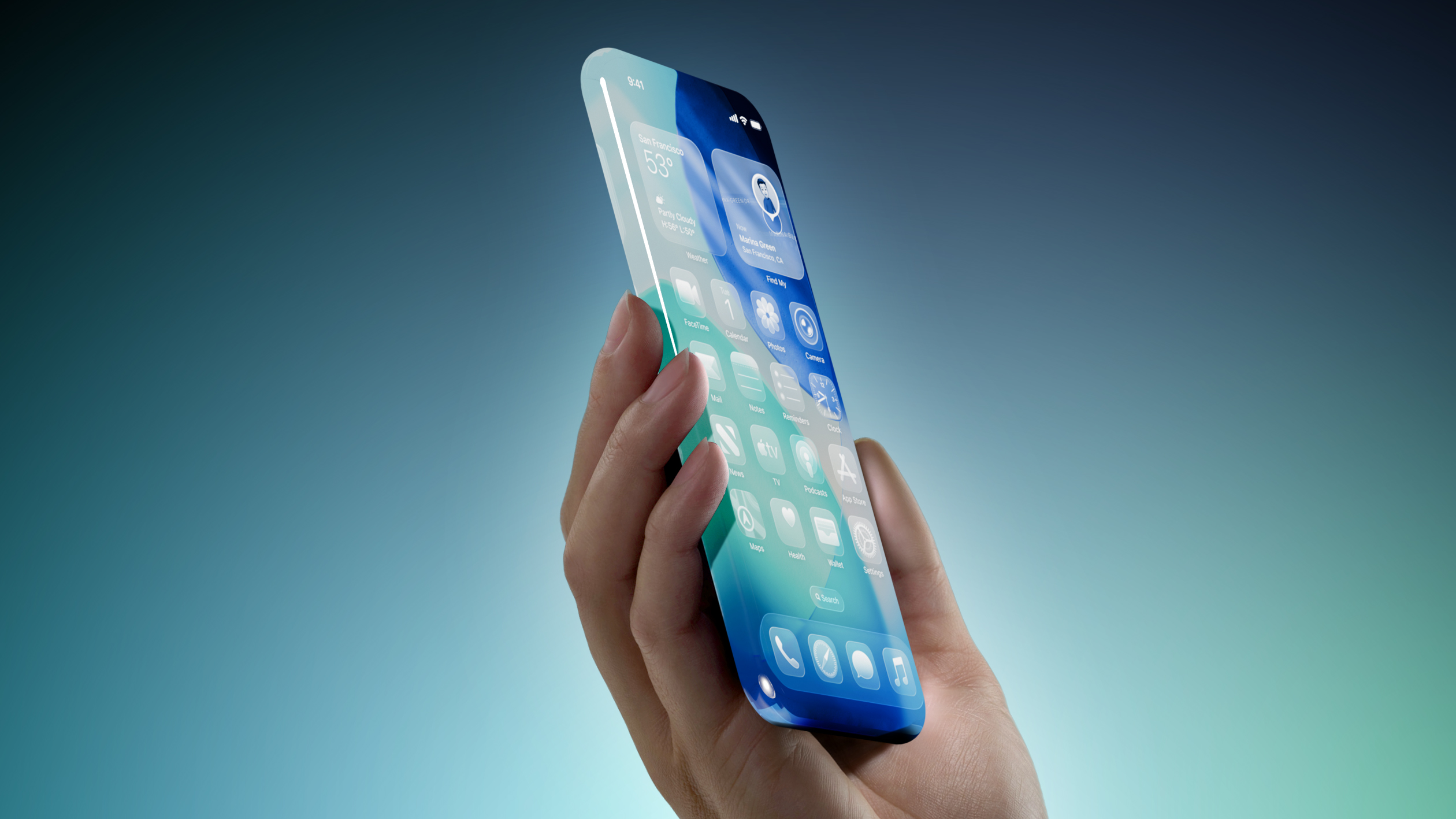
Unfortunately, in his report outlining upcoming Apple products today, Gurman said the new full-sized HomePod "doesn't appear to be imminent," so do not expect the speaker to be updated soon. The current HomePod was unveiled in January 2023.
Related Roundup: HomePod
Buyer's Guide: HomePod (Caution)

This article, "Apple Testing New HomePod With Siri AI" first appeared on MacRumors.com

Discuss this article in our forums

  •  

iPhone 20 Rumored to Have Biggest Revamp Since iPhone X

Apple plans to release a special 20th-anniversary iPhone next year with the biggest design changes since the iPhone X, according to Bloomberg's Mark Gurman.


Unveiled by Steve Jobs in 2007, the iPhone turns 20 next year. To mark the occasion, the report said Apple plans to release a 20th-anniversary iPhone with "curved glass around all corners and edges" and thinner bezels around the screen.

"It will be the biggest overhaul to what is now the iPhone Pro line since the iPhone X," the report said, but no further details were provided.

Released in 2017, the iPhone X was the first iPhone with Face ID. The removal of the Touch ID button allowed for the iPhone X's screen to extend more towards the edges of the device compared to previous models. It seems like the 20th-anniversary iPhone would go a step further than this by truly having the screen wrap around the corners and edges of the device, for a seemingly all-glass appearance.

Rumors about the 20th-anniversary iPhone have gone back and forth, but based on Gurman's latest reporting today, the device seems to be in the works still. However, it remains to be seen if Apple can fully achieve the ambitious design changes that are apparently in development, or if plans for the device will ultimately be scaled back.
This article, "iPhone 20 Rumored to Have Biggest Revamp Since iPhone X" first appeared on MacRumors.com

Discuss this article in our forums

  •  
❌