❌

Lees weergave

OpenAI Announces ChatGPT for Teens With Built-In Safeguards and Learning Prompts

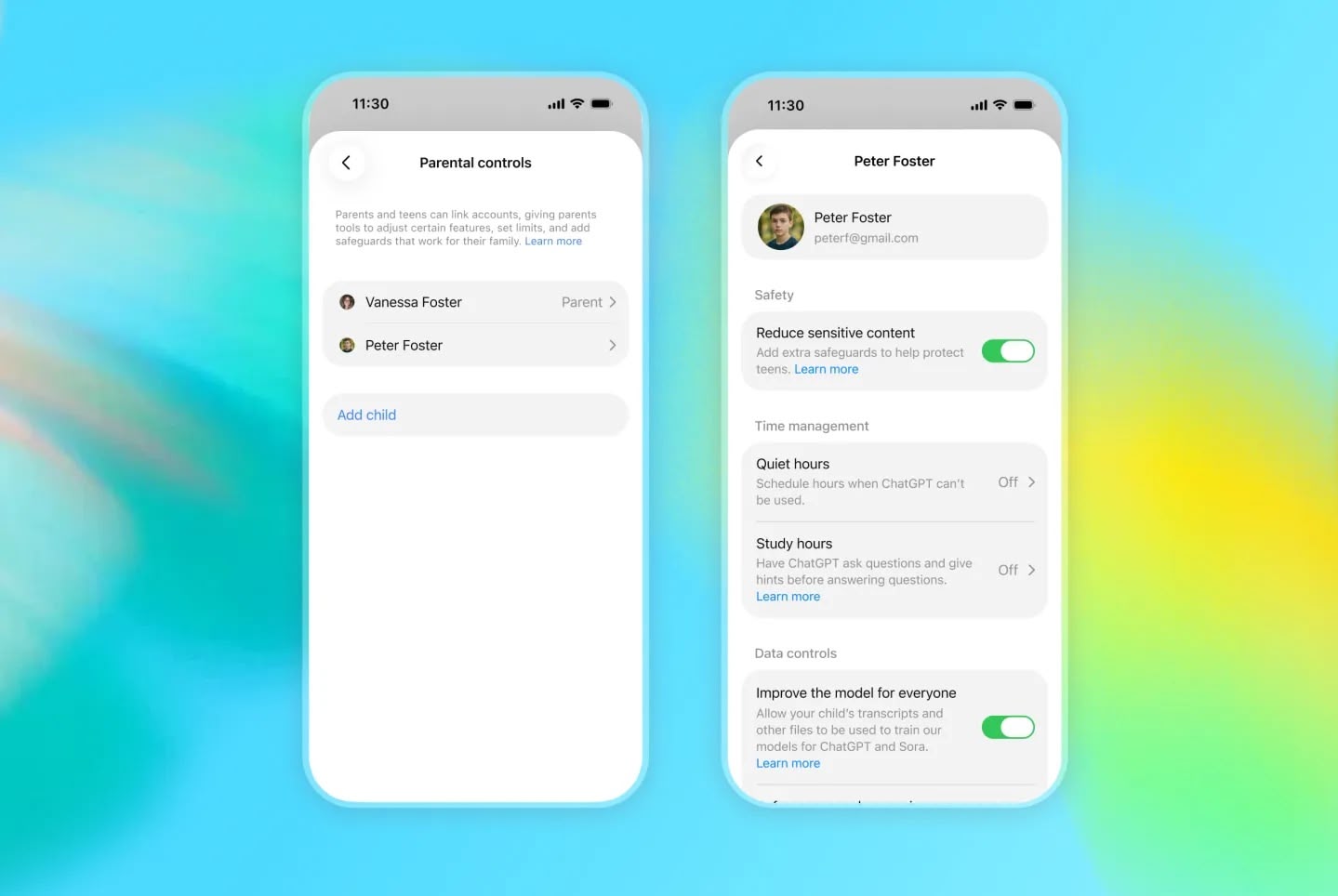
OpenAI is adding a ChatGPT mode for teenagers that includes parental controls, enhanced content safeguards, and a focus on learning.


ChatGPT for Teens is "designed to help teens learn, think critically, deepen understanding, and use AI with confidence," said the company in a blog post announcing the feature.

The feature includes learning-focused starter prompts for facilitating studying, practicing skills, or exploring ideas. ChatGPT's Study mode is baked in, as are learning tools (including quizzes when available), and Study hours that let the teen or a linked parent/guardian choose when eligible new chats start in study mode.

OpenAI says reminders encourage users to take breaks, and there are built-in provisions for making it clear that ChatGPT is AI, and does not have consciousness, experience feelings or emotions. That backstop aims to discourage relationship-forming with the chatbot.

ChatGPT automatically enables ChatGPT for Teens for eligible accounts identified as belonging to someone under 18. Users who think they are seeing the feature by mistake can verify their age and ask ChatGPT to remove the teen protections.

OpenAI says ChatGPT for Teens is rolling out globally to eligible teen accounts on Free and paid personal ChatGPT plans beginning August 18, with full availability in Australia expected September 8.
This article, "OpenAI Announces ChatGPT for Teens With Built-In Safeguards and Learning Prompts" first appeared on MacRumors.com

Discuss this article in our forums

  •  

Apple's US App Store Commission Revenue Down 18% This Year

The commission Apple earns from the App Store is shrinking in markets where it has been forced to relax its grip on in-app purchases, based on new analytics data.


According to Appfigures, cited by the Financial Times ($), Apple's U.S. commission revenue has fallen 18 percent since the start of 2026. It also found App Store revenue declining in Brazil and Japan since both countries introduced new regulations.

Separately, Sensor Tower said U.S. consumer spending through the App Store was down 6 percent in the second quarter, compared to 9 percent growth a year earlier.

The figures follow Apple's admission during last month's earnings call that regulatory changes have started to weigh on its Services growth. Apple reported services revenue of $30.7 billion for the June quarter, a record for the period but short of the $31.4 billion that analysts expected.

Apple traditionally has taken 15 to 30 percent of digital purchases made inside apps on the App Store. However, a U.S. injunction won by Epic Games now forces the company to let developers steer users to outside payment options without taking a cut. Sensor Tower said the U.S. slowdown had been heavily affected by the ruling. Apple has not collected fees from link-outs in the U.S. since April 2025.
This article, "Apple's US App Store Commission Revenue Down 18% This Year" first appeared on MacRumors.com

Discuss this article in our forums

  •  

Sonos iPhone App Finally Gains Live Activities Support

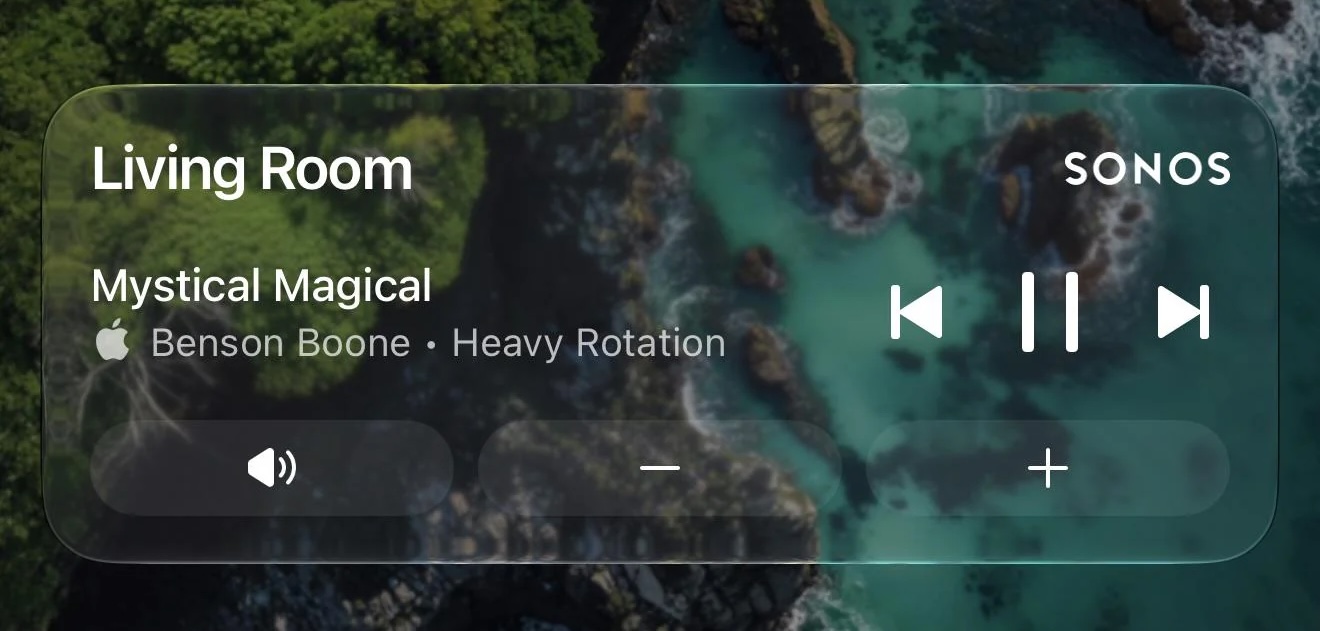
Sonos just updated its iOS app with new Live Activities support, providing quick access to playback controls from your Lock Screen.

Image credit: MajorAtmosphere

Sonos shared a Reddit post announcing the new feature, which appears after you initiate playback on a Sonos device and then close the app.

The Live Activity shows the current room or group you were last playing audio from and allows you to play/pause or skip tracks. Even if you initiate playback on Sonos from outside the Sonos app (Direct Control from supported services, Bluetooth, or AirPlay) you can still use the local playback controls that appear on the Live Activity.

As things stand, album art can't be displayed on the Live Activity, but the company said it's looking into alternative ways to enhance the Lock Screen experience. Sonos also mentioned that Live Activities work on Apple Watch and CarPlay, but "right now the controls aren't supported" in these instances.

Sonos called Live Activities support a "much requested, anticipated, and needed feature."

(Via 9to5Mac.)
Tag: Sonos

This article, "Sonos iPhone App Finally Gains Live Activities Support" first appeared on MacRumors.com

Discuss this article in our forums

  •  

Unreleased AirPods 5 Models Referenced in macOS 26.7

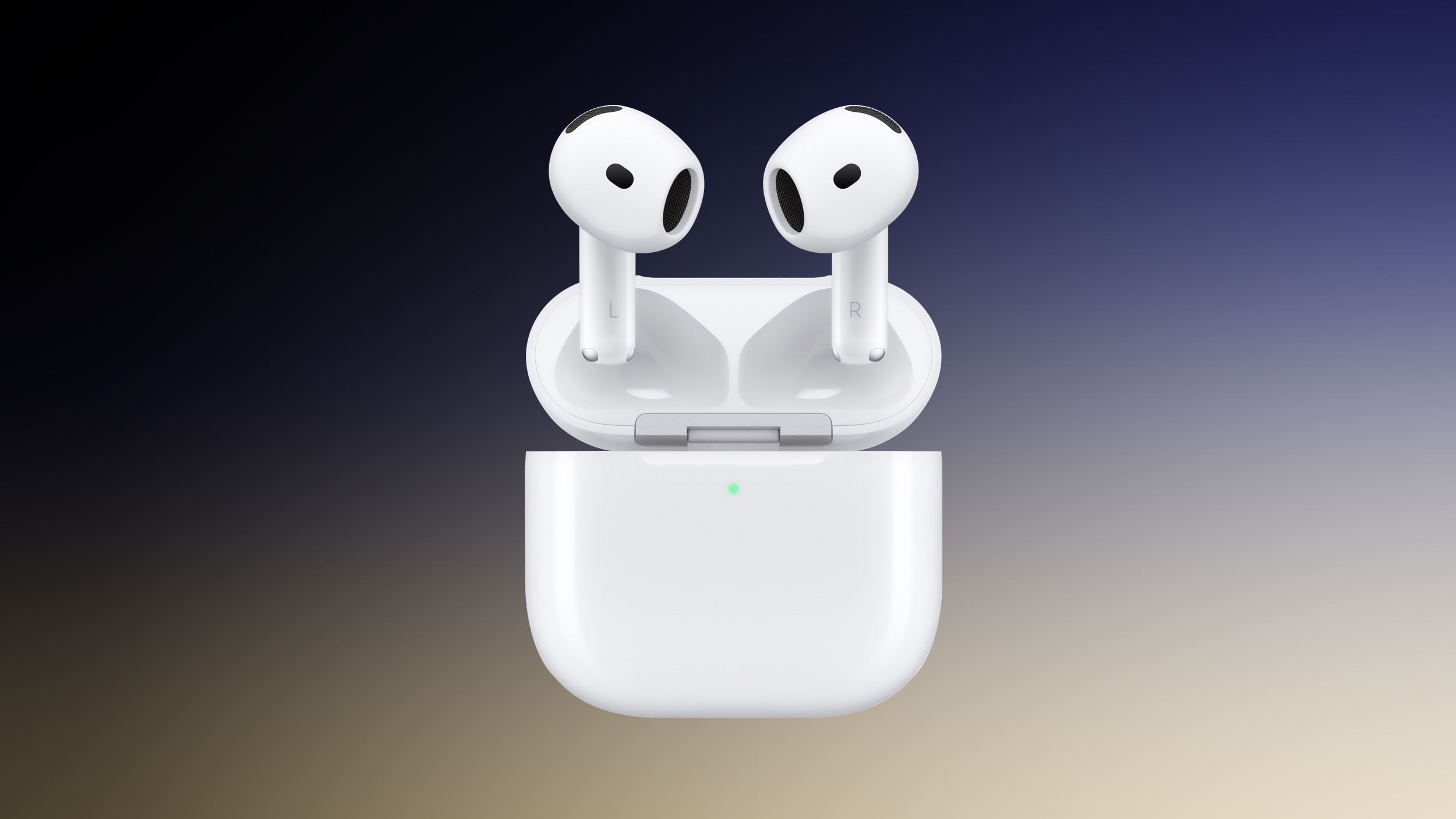
In a notable addition to the unreleased Apple products referenced in yesterday's macOS Tahoe 26.7 software update, AirPods 5 models have also been spotted. Internally codenamed B868M and B868E, the models almost certainly refer to AirPods 5 and AirPods 5 with Active Noise Cancellation. Current AirPods 4 models, launched in September 2024, have the codenames B768M and B768E.

While next-generation features are unknown, AirPods 5 could get an updated H3 chip with improved sound quality and lower latency. Launch timing however remains unclear. On a side note, macOS 26.7 also contains a reference to an unreleased Beats Solo Buds model.
Related Roundup: AirPods 4
Buyer's Guide: AirPods (Caution)
Related Forum: AirPods

This article, "Unreleased AirPods 5 Models Referenced in macOS 26.7" first appeared on MacRumors.com

Discuss this article in our forums

  •  

iPhone 18 Pro Max Rumored to Get Exclusive Camera Upgrade

Apple's upcoming iPhone 18 Pro models may be differentiated by a new camera feature that could be exclusive to the larger Pro Max model, if a Chinese leaker is to be believed.


Since 2024, we've been hearing rumors about Apple's plans to introduce a variable aperture camera on the iPhone 18 Pro models – a first for any iPhone – but it was understood until now that the feature would come to both devices.

Leaker Ice Universe claims that's not the case. The iPhone 18 Pro Max will "exclusively feature a variable aperture," they said in a new post on Weibo, a Chinese social media platform.

"Looks like even Apple can't escape the reality that if you want the absolute best camera experience, you'll have to put up with a phone that weighs like a brick," the leaker added.

We already know a variable aperture lens is coming to the iPhone 18 Pro Max, thanks to the June leak of internal files from Apple supplier Tata Electronics. The files revealed that the iPhone 18 Pro Max will feature a new Sony IMX905 sensor with variable aperture support.

The smaller iPhone 18 Pro model was not mentioned in the leaked file, but it wasn't clear if that meant it wouldn't get a variable aperture lens, or it the leaked files simply didn't include that information.

Apple has never implemented a variable aperture on an iPhone. From the iPhone 14 Pro through the iPhone 17 Pro, the main camera uses a fixed Ζ’/1.78 aperture, meaning the lens remains fully open at all times when capturing images.

With a variable lens, the iPhone 18 Pro Max could allow users to manually shift the aperture, similar to on a DSLR camera. It could mean more control over depth of field, enabling sharper focus on subjects or smoother background blur. That all depends on how Apple implements the feature, of course. It may be more automated than that.

Beyond size and battery life, the last time Apple differentiated its iPhone Pro models was with the iPhone 15 Pro, which lacked the tetraprism telephoto lens that was included to the iPhone 15 Pro Max.

The iPhone 18 Pro Max is rumored to be bigger and heavier than its predecessor this year. Apart from the rumored aperture lens, it is expected to be otherwise equivalent to its smaller sibling. Both iPhone 18 Pro models are set to launch next month alongside Apple's first foldable iPhone, the "iPhone Ultra."
Related Roundup: iPhone 18 Pro

This article, "iPhone 18 Pro Max Rumored to Get Exclusive Camera Upgrade" first appeared on MacRumors.com

Discuss this article in our forums

  •  

iOS 27 Finally Fixes Replying to Android Texts

When iOS 27 arrives next month, you'll be able to reply to a specific green chat bubble (aka an Android message) in a Messages conversation on your iPhone.


All you need to do is press and hold the message, tap Reply, then type your response. It will be received by the recipient as a real threaded reply (i.e. an inline reply), tying it directly to the message in question. It's the same with reactions – react to a shared photo and your contact will see the intended emoji instead of a message saying that you "liked an image."

It's all thanks to Apple's embrace of RCS Universal Profile 3.0, the GSMA standard it helped publish and has been adopting in stages. Universal Profile 2.4 first appeared in iOS 18 in September 2024, but it didn't support inline replies. Come this September, on supporting iPhones, that will finally change.

Bear in mind that the feature also depends on carrier support at both ends. Even before you update to iOS 27, you can see if your device is ready for the change: simply go to Settings ➝ Apps ➝ Messages ➝ RCS Messaging, and check that the RCS Messaging toggle is enabled. If the setting isn't displayed in said menu, your carrier has yet to enable the feature.
Related Roundups: iOS 27, iPadOS 27
Tag: Android

This article, "iOS 27 Finally Fixes Replying to Android Texts" first appeared on MacRumors.com

Discuss this article in our forums

  •  

Apple's macOS Screen Sharing Flaw Is Being Exploited in the Wild

The screen sharing flaw that Apple rushed out a fix for earlier this month has already been exploited in the wild, according to the Netherlands' National Cyber Security Center (NCSC-NL).


On August 6, Apple released macOS Tahoe 26.6.1, an update to the β€ŒmacOS Tahoeβ€Œ operating system that came out last year. The update came a little over a week after Apple released macOS Tahoe 26.6.

In its security support document, Apple said that the update addressed a vulnerability that could allow an attacker to authenticate to Screen Sharing without valid credentials – in short, a bad actor could view a user's Mac screen and remotely take control of their keyboard and mouse. It appears however that hackers have already been taking advantage of the flaw.

As first reported by ArsTechnica, the NCSC-NL said that it had been notified of abuse of the vulnerability, "observed on multiple systems on which port 5900 was accessible from the internet." The reason is that when screen sharing is enabled, macOS's firewall intentionally exposes this port.

"In all these cases, root had been accessed on the affected system and a Monero crypto miner had been placed," the NCSC-NL added. In other words, a targeted Mac's resources are used to mine cryptocurrency.

When pushing the fix – which was also included in macOS Sonoma 14.8.9 and macOS Sequoia 15.7.9 – Apple said it had addressed the authentication issue with "improved state management." Users who have not updated their Macs should do so as soon as possible. Even for those who have updated, use of a VPN is also recommended when screen sharing is active.

If you're not sure if your macOS version is up-to-date, you can check by going into your Mac's System Settings and selecting General ➝ Software Update.
This article, "Apple's macOS Screen Sharing Flaw Is Being Exploited in the Wild" first appeared on MacRumors.com

Discuss this article in our forums

  •  

Tim Cook Reflects on His Legacy in Final Weeks as Apple CEO

Apple CEO Tim Cook once said that what Steve Jobs stood for, in a word, was "innovation." In a CBS News interview conducted yesterday, Cook – in his final weeks at the helm of the company – was asked what his legacy stood for, and this was his response:

"In my view, your legacy is described by others, not yourself. And so, I hope that people will say that I was a good and decent man. And if they say that at the end of the day, I will feel like I have achieved something."

The interview was conducted as part of CBS News' coverage of Apple's opening of its Advanced Manufacturing Center (AMC) in Houston, Texas. You can watch it in full here.
This article, "Tim Cook Reflects on His Legacy in Final Weeks as Apple CEO" first appeared on MacRumors.com

Discuss this article in our forums

  •  

30 New Things Your iPhone Can Do in iOS 27

Apple will release iOS 27 in September, and despite the company's focus this year on refining its flagship operating system and nixing bugs, there are still many additional features on the way, not least of which is Apple's new context-aware Siri, re-tooled for the generative AI era.

This year's major iPhone software update isn't all about AI, though, as the following feature list testifies. iOS 27 is currently in public beta – if you're OK with that, you can install it today.

Extend Your Photos and Lock Screen Wallpaper
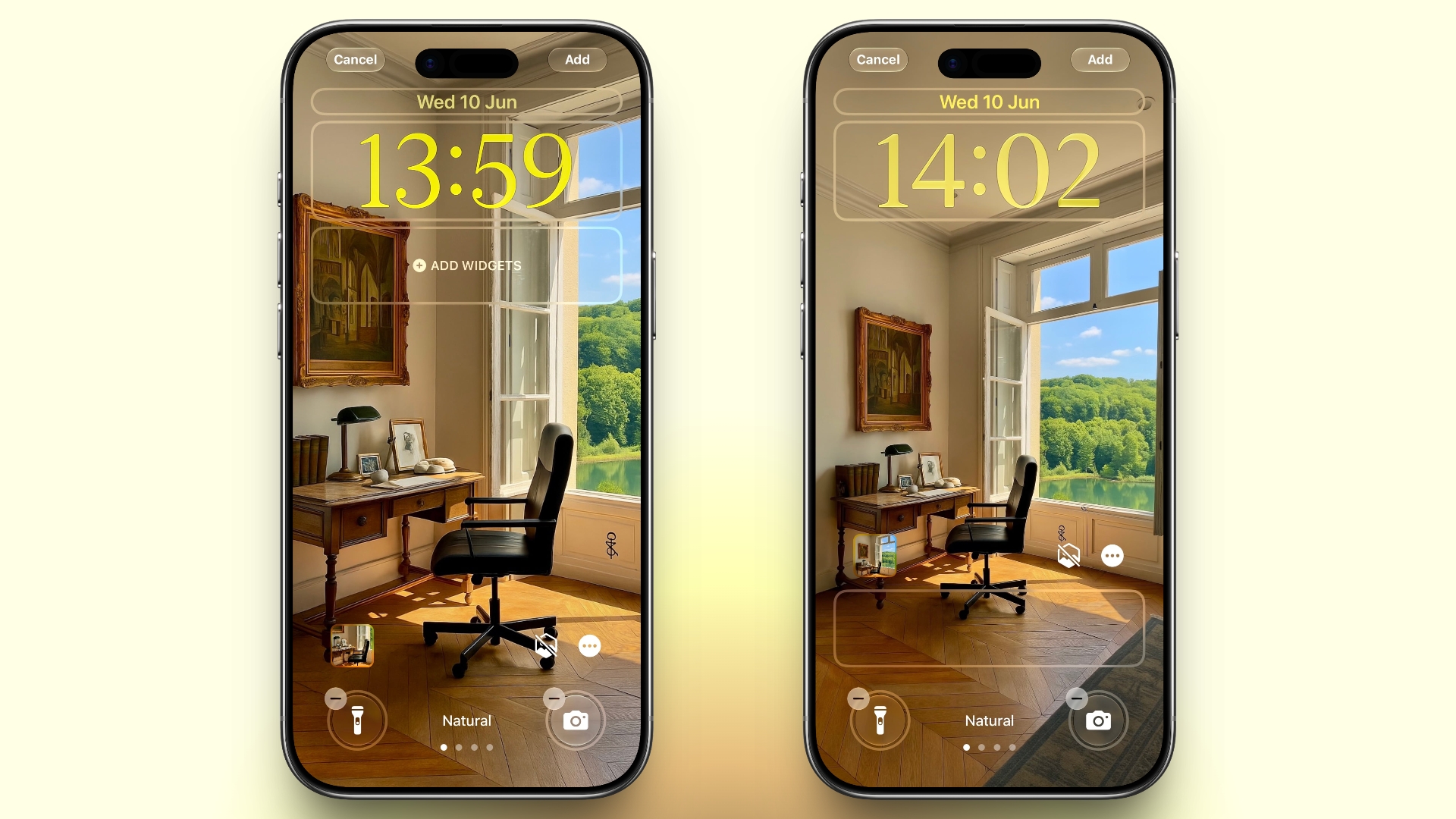


A new wallpaper extension feature in iOS 27 uses Apple Intelligence to automatically expand a photo beyond its original boundaries so it fills the entire Lock Screen more naturally. If a photo is cropped too tightly, doesn't match your iPhone's aspect ratio, or it leaves empty space when positioned on the Lock Screen, iOS 27 can generate additional image content around the edges with the "Extend" option. It will analyze the existing image and create matching background details that blend with the original photo, so there's no need for aggressive cropping. The Extend option can also be found in the Photos app.

Organize Your Safari Tabs
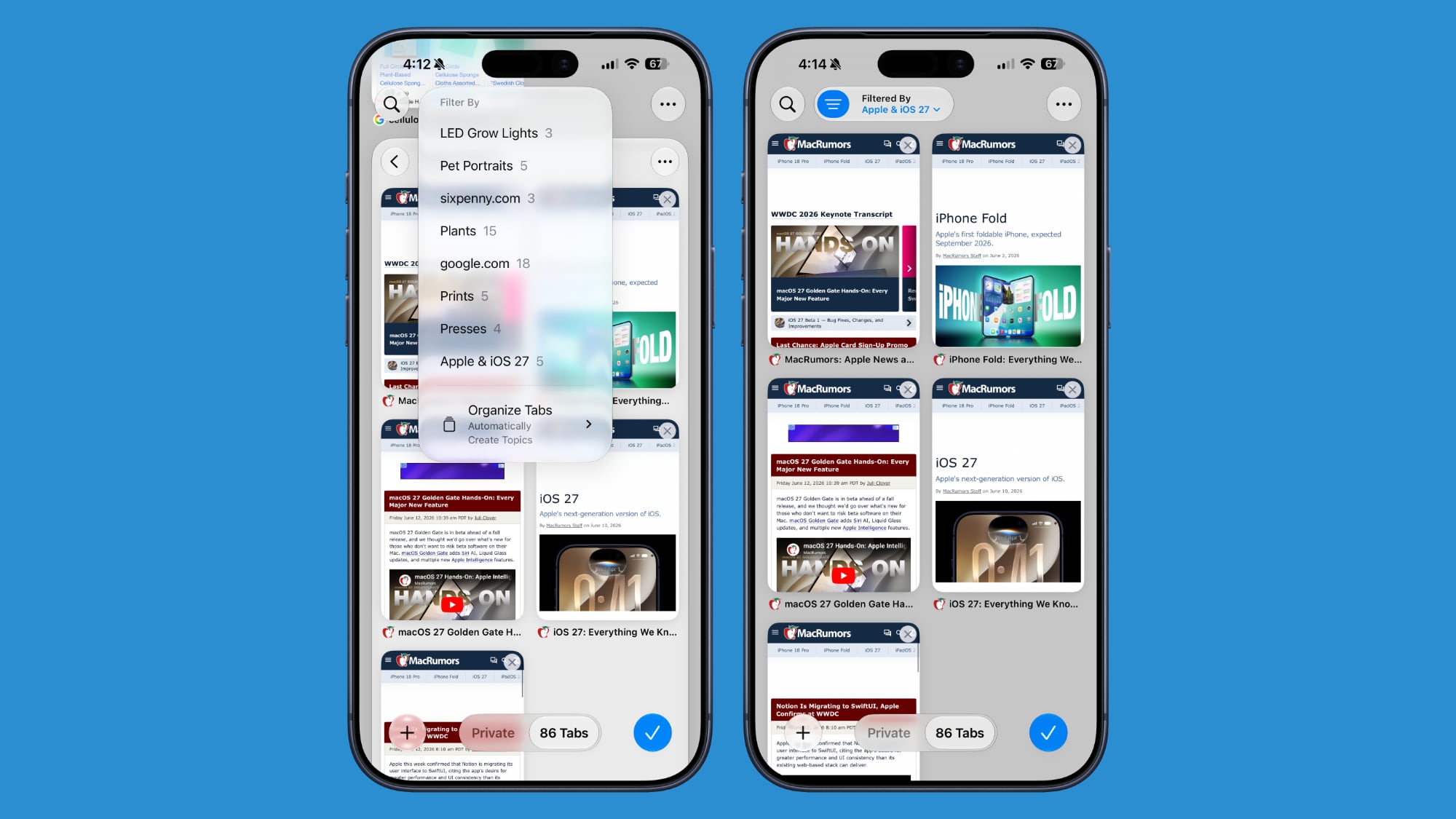


Safari uses Apple Intelligence to automatically organize your open tabs into related topics, making them easier to browse and manage. For example, if you're shopping for a new refrigerator while planning a vacation, Safari groups tabs for each activity into separate topic-based collections. You can enable this feature by opening Tab View, tapping the three-line icon in the top-right corner, and turning on Automatically Create Topics.

Use Natural Language for Reminder and Calendar Entries
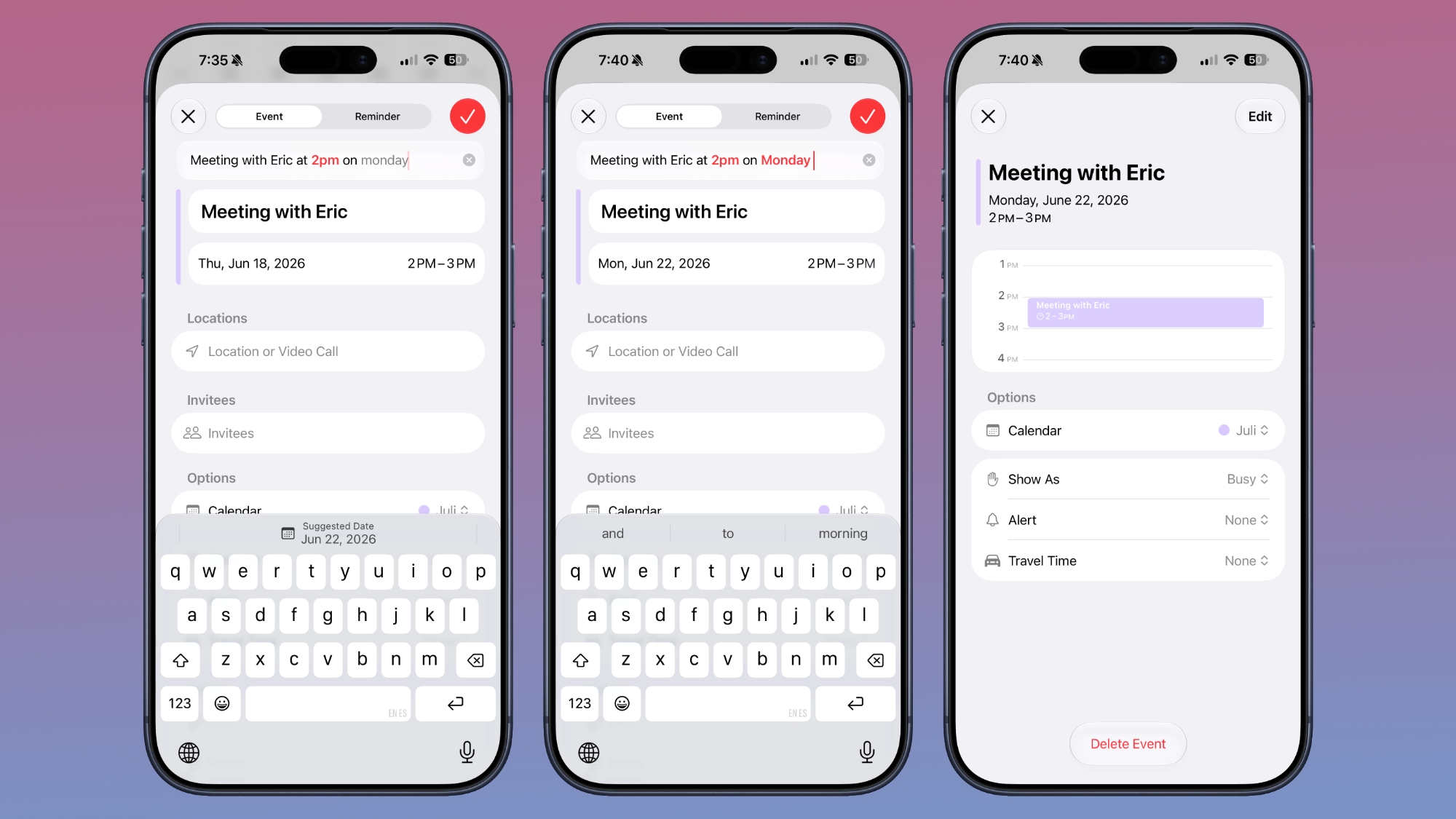


In the Reminders app, you can now create reminders using natural language, and Apple Intelligence will automatically fill in details such as the date, time, and location. For example, if you type "Pick up Dad at 6 p.m. tonight" or "Send the photos to Eric tomorrow at 3 p.m.," Reminders extracts the relevant information and adds it to the reminder automatically.

The Calendar app also supports natural language input, identifying people, dates, and locations as you type. You can then tap the suggested information to quickly add it to your event.

Inline Reply to Messages From Android Users
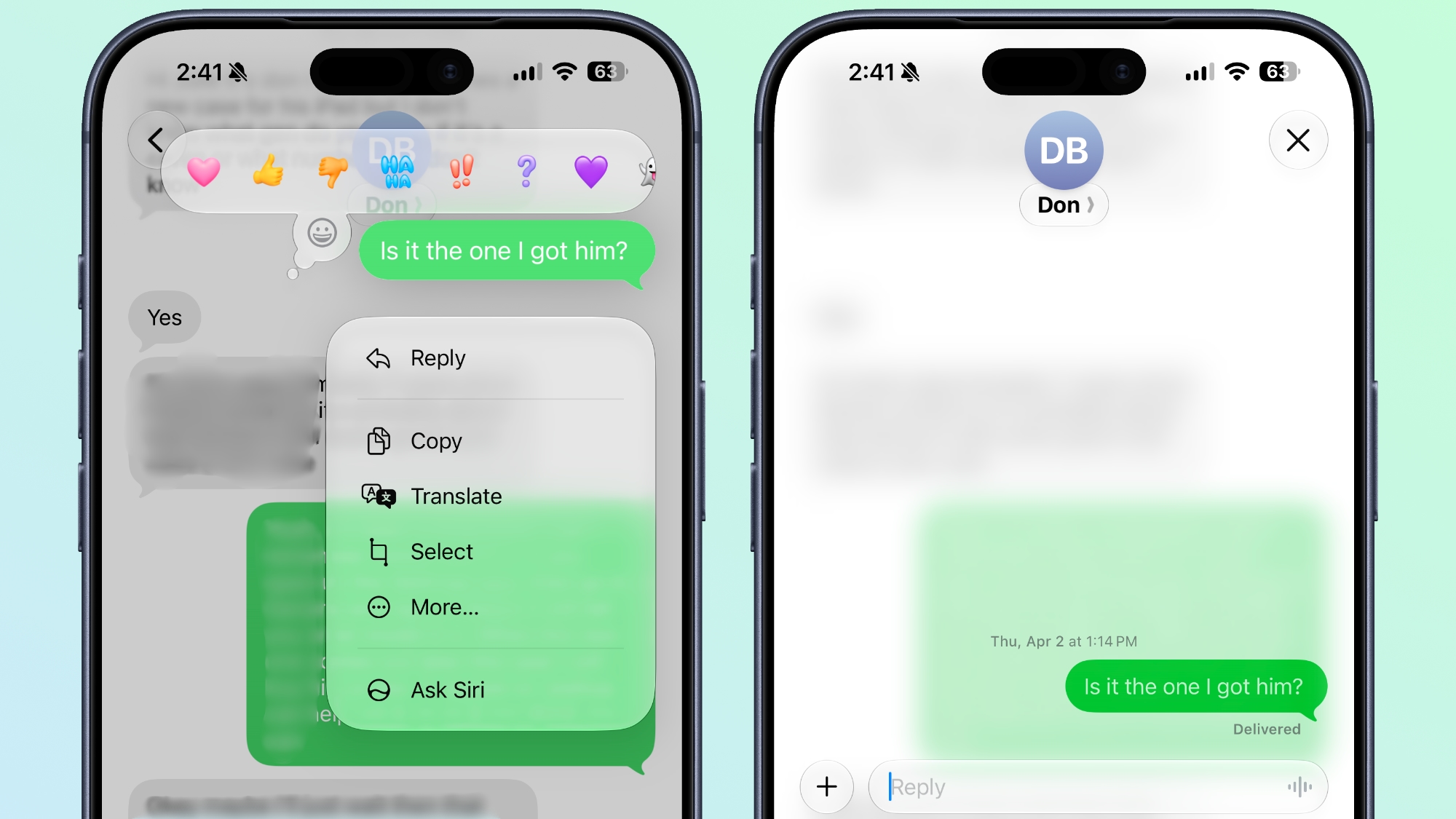


In the Messages app, you can now long press on a specific message from an Android user (a green chat bubble) and get an option to reply to it. That contrasts with iOS 26, where inline replies are limited to blue bubbles sent over Apple's iMessage platform.

Upgrade Your Wallet Passes
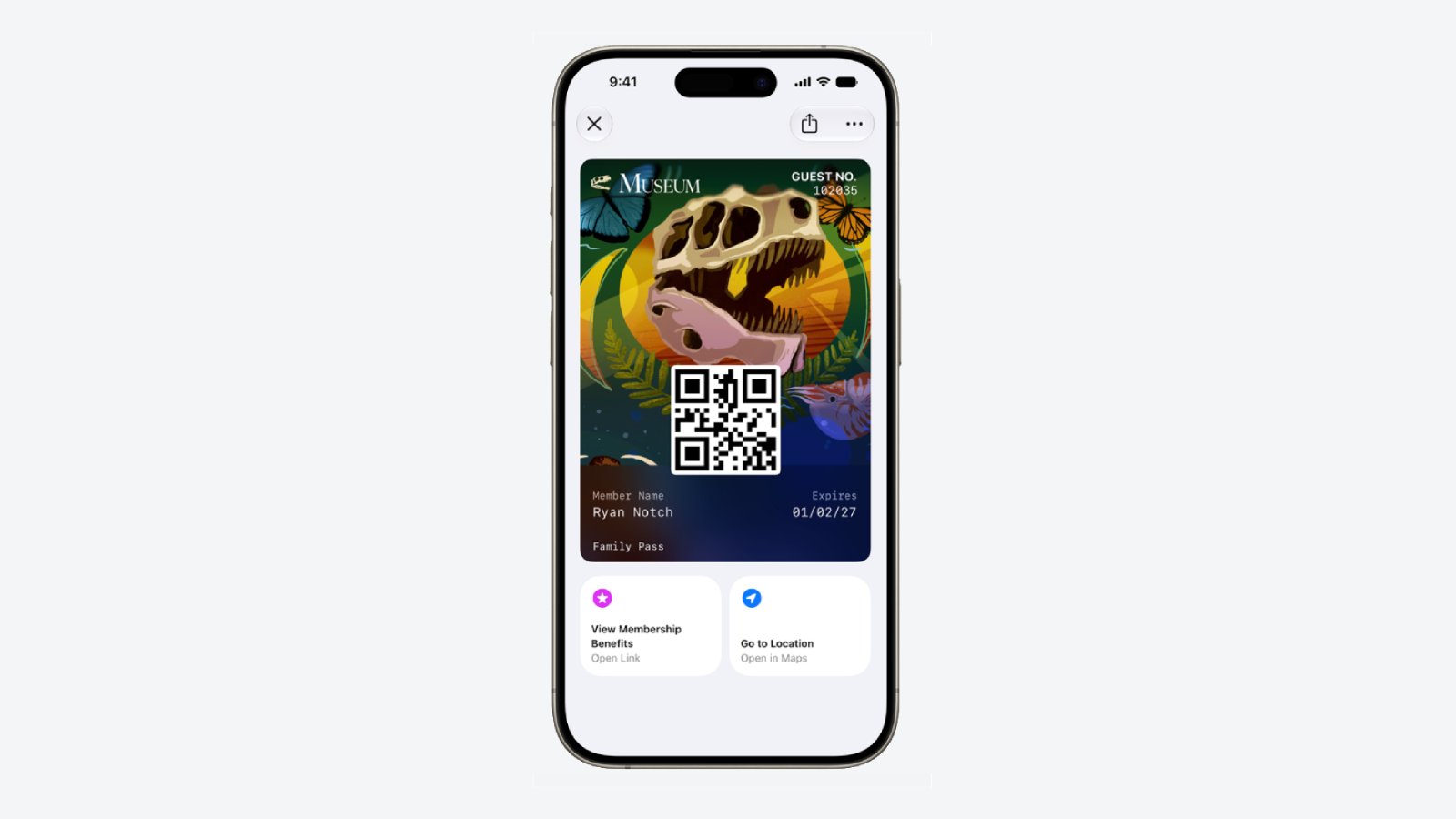


Apple has expanded the redesigned pass experience in the Wallet app with iOS 27, bringing the enhanced design introduced for airline boarding passes in iOS 26 to additional pass types. Membership, gift, loyalty, and rewards cards can now use a new Poster Generic layout with a background image, a logo, customizable header and footer fields, main information, and an optional barcode. Passes can also include up to two quick actions at the bottom, such as getting directions to a venue or checking a rewards points balance.

Describe Your Next Shortcut
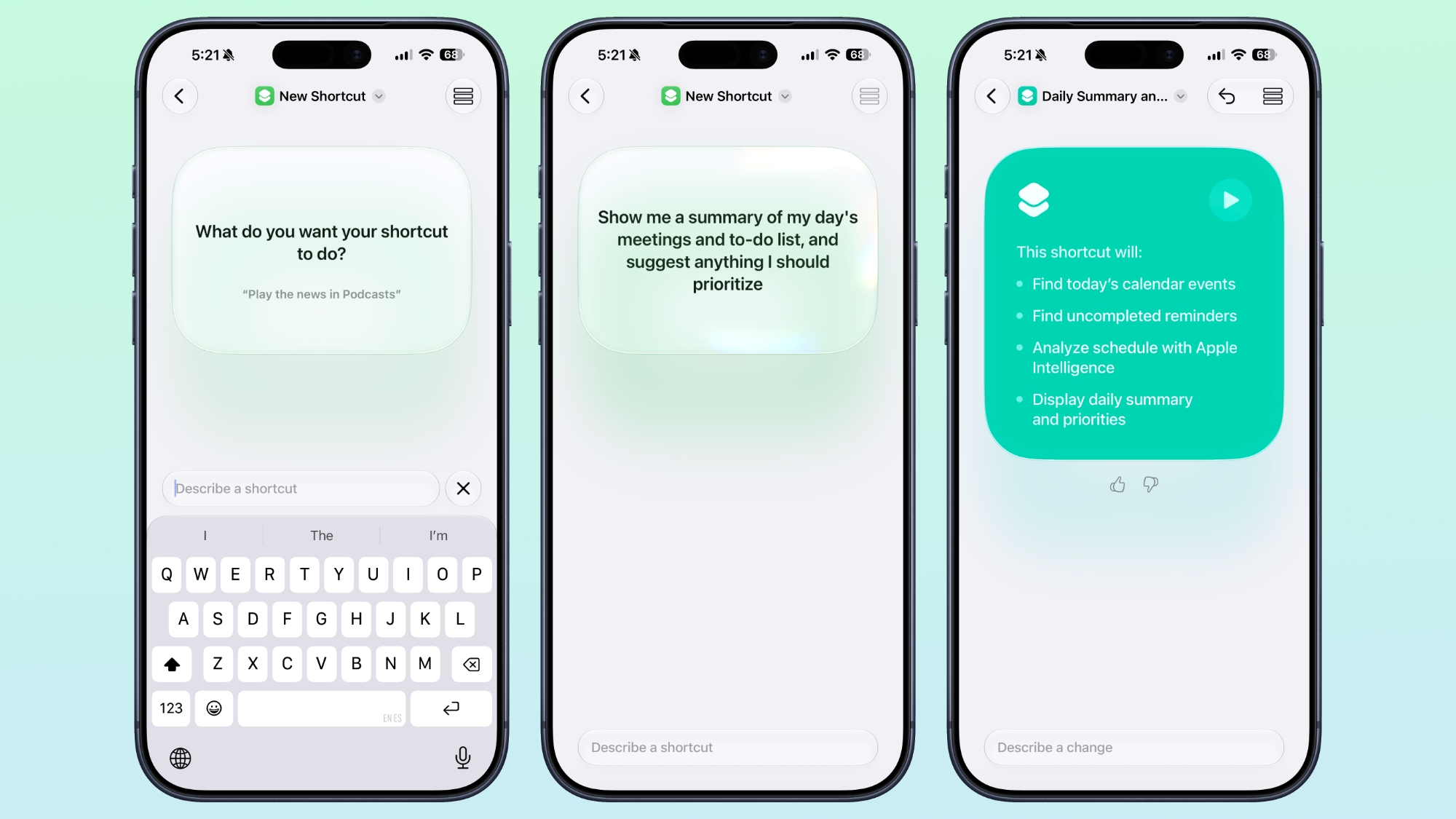


Apple Intelligence makes creating shortcuts much more accessible by letting you build them with natural language. Tapping New Shortcut in the Shortcuts app opens a Describe a Shortcut interface, where you simply explain what you want the shortcut to do. You can describe a single action or a more complex automation, and Apple Intelligence selects the appropriate actions and assembles the shortcut automatically.

For example, you could create a shortcut that sets tomorrow's alarm based on your first Calendar event, enables Sleep Focus, and dims the bedroom lights each evening, or one that displays your first meeting, the weather, and today's reminders every morning. Like existing shortcuts, these automations can be triggered by factors such as the time of day, your location, app activity, system events like taking a screenshot, incoming notifications, and more.

Get a Better Flyover of Your City



Apple is enhancing the Flyover feature in Maps with iOS 27, using Apple Intelligence models to improve aerial imagery with greater texture and sharper detail. Trees, buildings, and other landmarks appear more realistic, with more accurate geometry and improved lighting effects.

According to Apple, the update makes select cities around the world look more lifelike, from the shape of individual trees to the way light reflects off glass skyscrapers. Flyover already offers detailed 3D views of landmarks, roads, parks, and buildings in more than 350 cities, so iOS 27 is essentially using AI to further improve the quality of those visualizations.

Ask Siri What Your Camera Sees
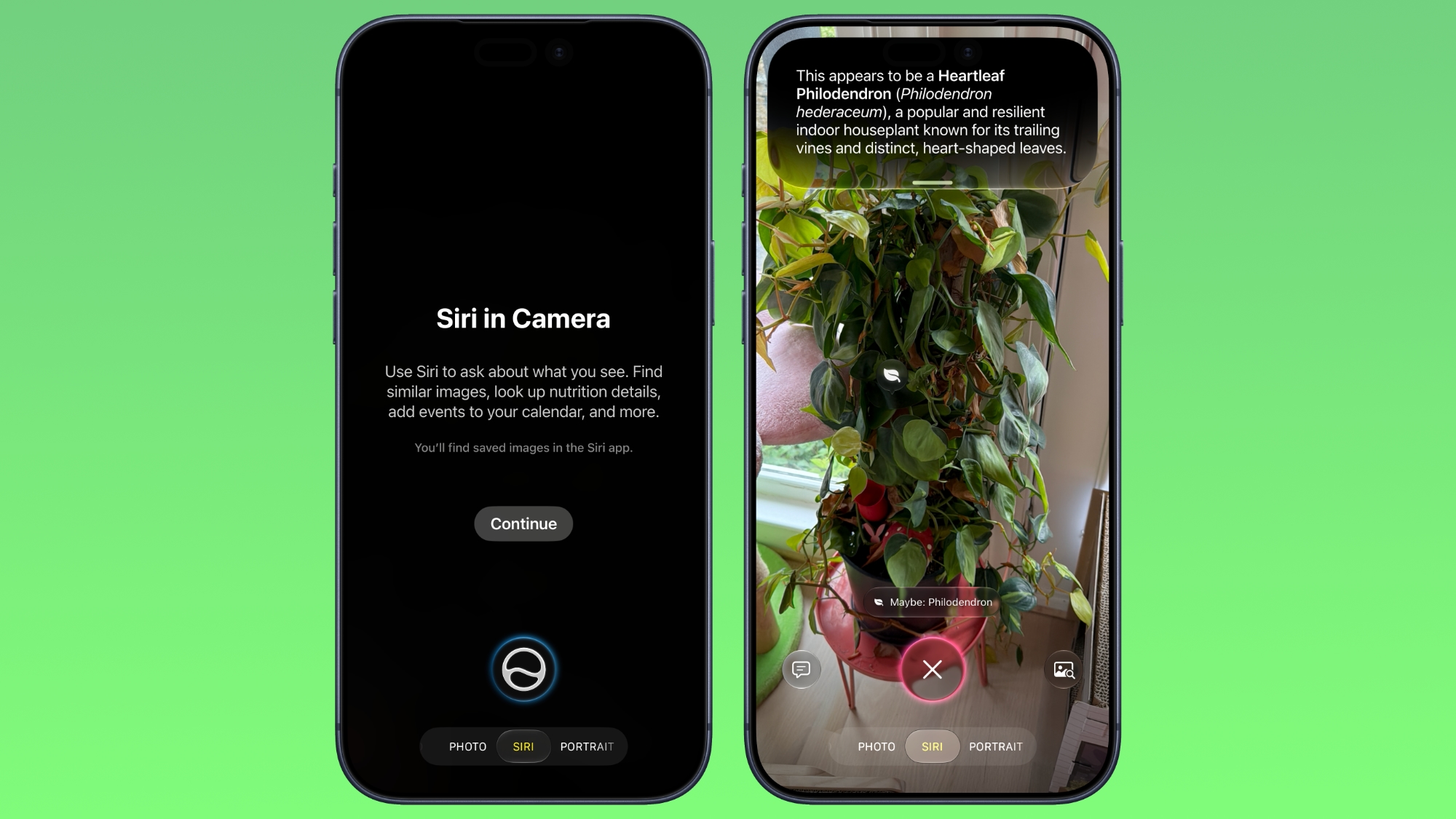


The iOS 27 Camera app has a new "Siri" mode that is available in addition to the video, photo, and other camera modes. The new mode uses Visual Intelligence to identify objects in the frame and provide information about them. It can be used to identify plants, animals, food, and more. If it's food you want info on, for example, it can tell you what it is, and how many calories are in it.

Other examples β€ŒSiriβ€Œ mode can be used for include capturing a photo of an event flyer and adding a date to the Calendar app, text translation, splitting a bill, and more.

Make Your Lock Screen Clock More Compact
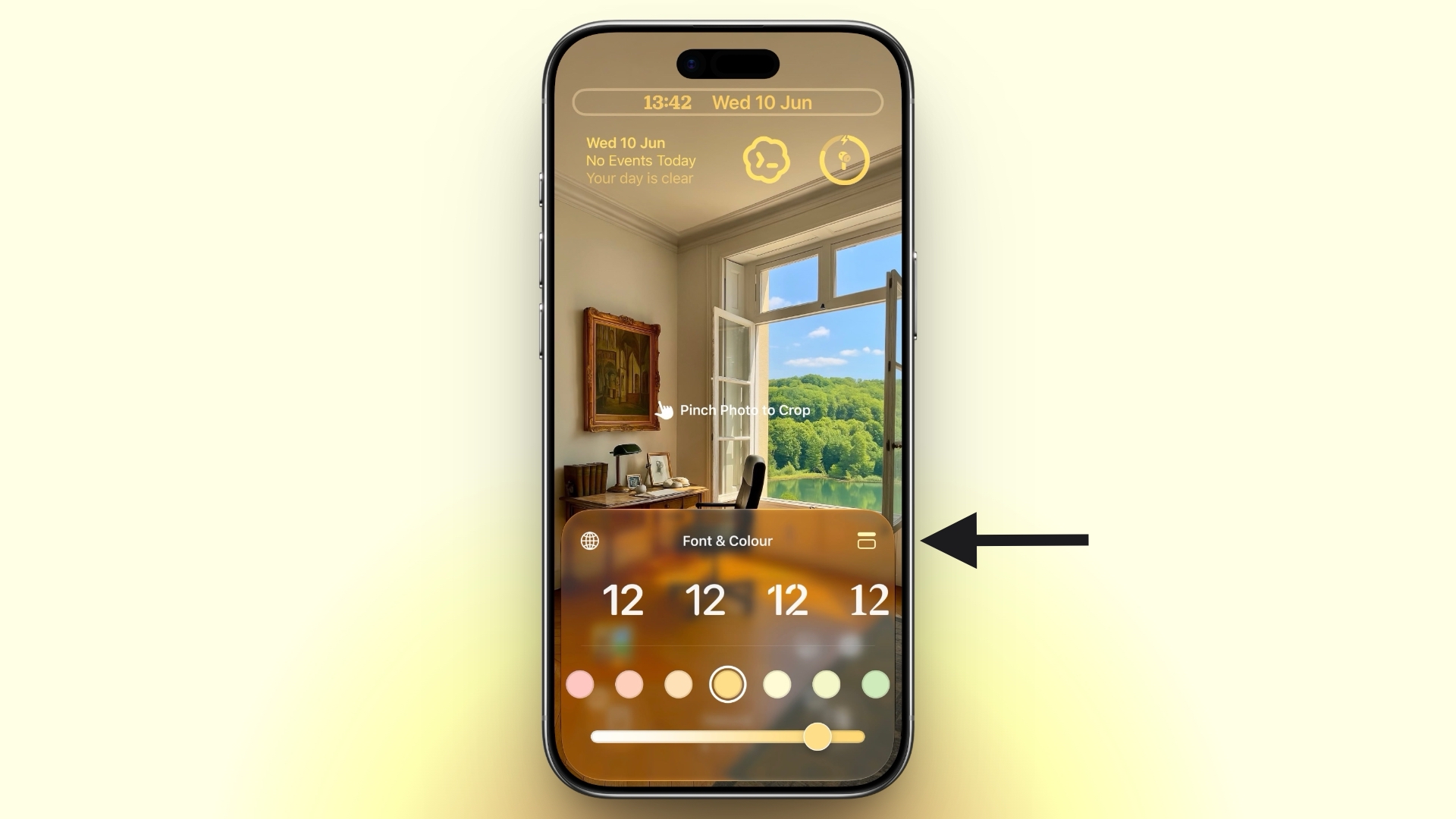

lock screen
A new compact clock mode is available as a new Lock Screen layout option in iOS 27. Found in the top-right corner of the Font & Color panel, the option moves the time from its traditional large, centered position to a much smaller format alongside the date and widgets at the top of the screen. It's a nice option to have if you like a cleaner Lock Screen look that shows off your wallpaper more fully, and it's the complete opposite effect introduced in iOS 26 that stretches the clock down the screen.

Generate Photo-realistic Images with Image Playground



Apple's Image Playground has been a bit of an embarrassment up until now, being limited to cutesy re-renderings of actual photos and sketched illustrations. But the app gets a major update in iOS 27. Powered by a new generative model that runs on Private Cloud Compute, it can produce high-quality images in virtually any style, including photo-realistic output for the first time. All generated images automatically carry a hidden SynthID watermark to identify them as AI-generated. The app now also supports photo-based editing in addition to creation.

Tweak Liquid Glass Opacity
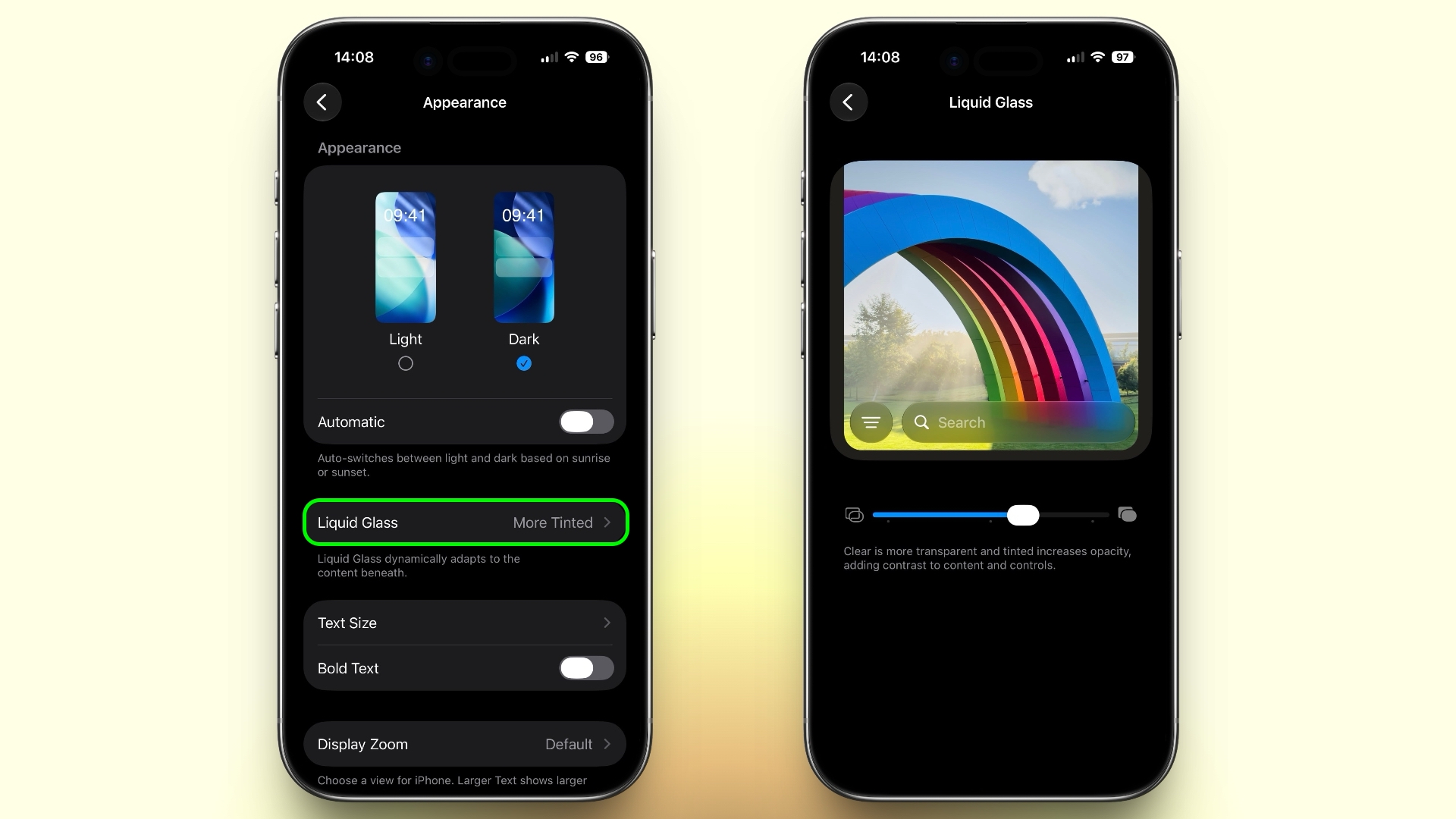

settings
If Apple's Liquid Glass UI embrace in iOS 26 wasn't your thing, there's a way to tone it down. In iOS 27, Apple added a full Liquid Glass slider under Settings ➝ Appearance ➝ Liquid Glass. It changes the translucency of Liquid Glass elements, and you can choose a clear version of Liquid Glass that allows some of the background to show through, select a more opaque, tinted version that improves the legibility of text, or choose something in between.

Create a Slideshow from Any Album
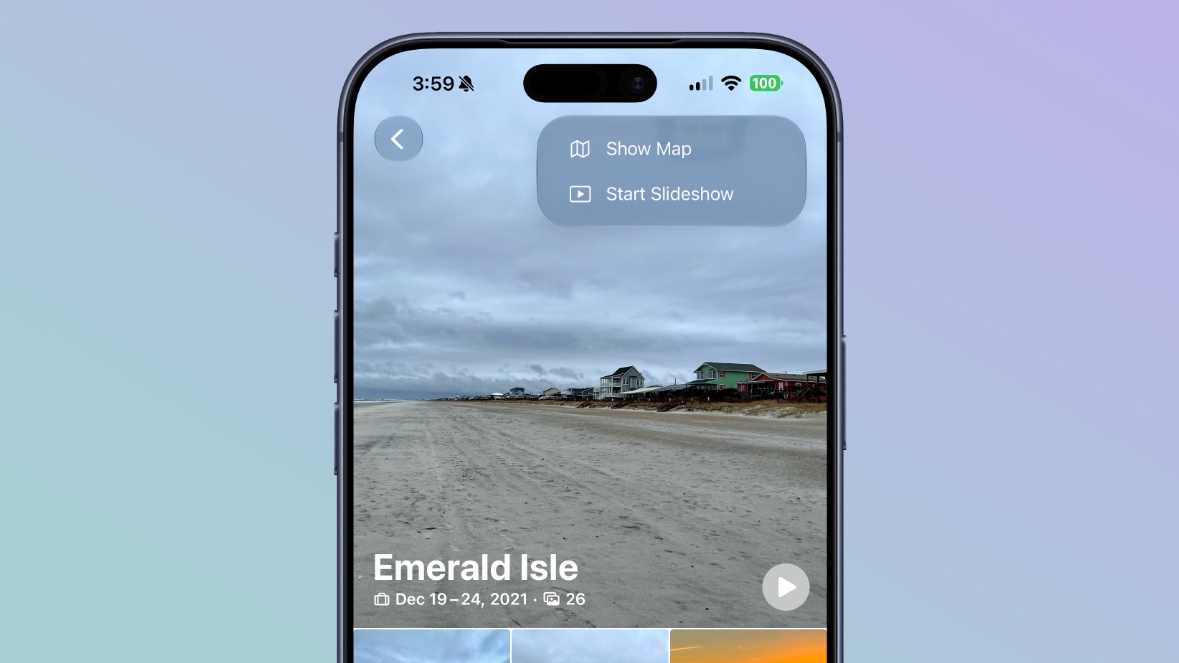


In iOS 27, you can create a slideshow from any album, collection, or selection of photos in the Photos app, rather than being limited to Memories. Open an album or select multiple photos, tap the menu button in the top-right corner, and choose Start Slideshow. Slideshows can be customized with different transition styles, slide durations, and background music, and then saved as a video or shared directly to social media.

Easily Switch Between Siri and ChatGPT



The new Siri app in iOS 27 defaults to the new Siri AI, but you can switch it to ChatGPT if you prefer. Simply long press on the text input field and tap "Ask...", then you'll see an option to change to ChatGPT. Note that conversation context does not transfer when you switch chatbot providers. Currently, ChatGPT appears as an alternative in the Siri AI app whether or not you have the ChatGPT extension enabled in Settings ➝ Siri ➝ ChatGPT.

Build a Browser Extension With a Prompt
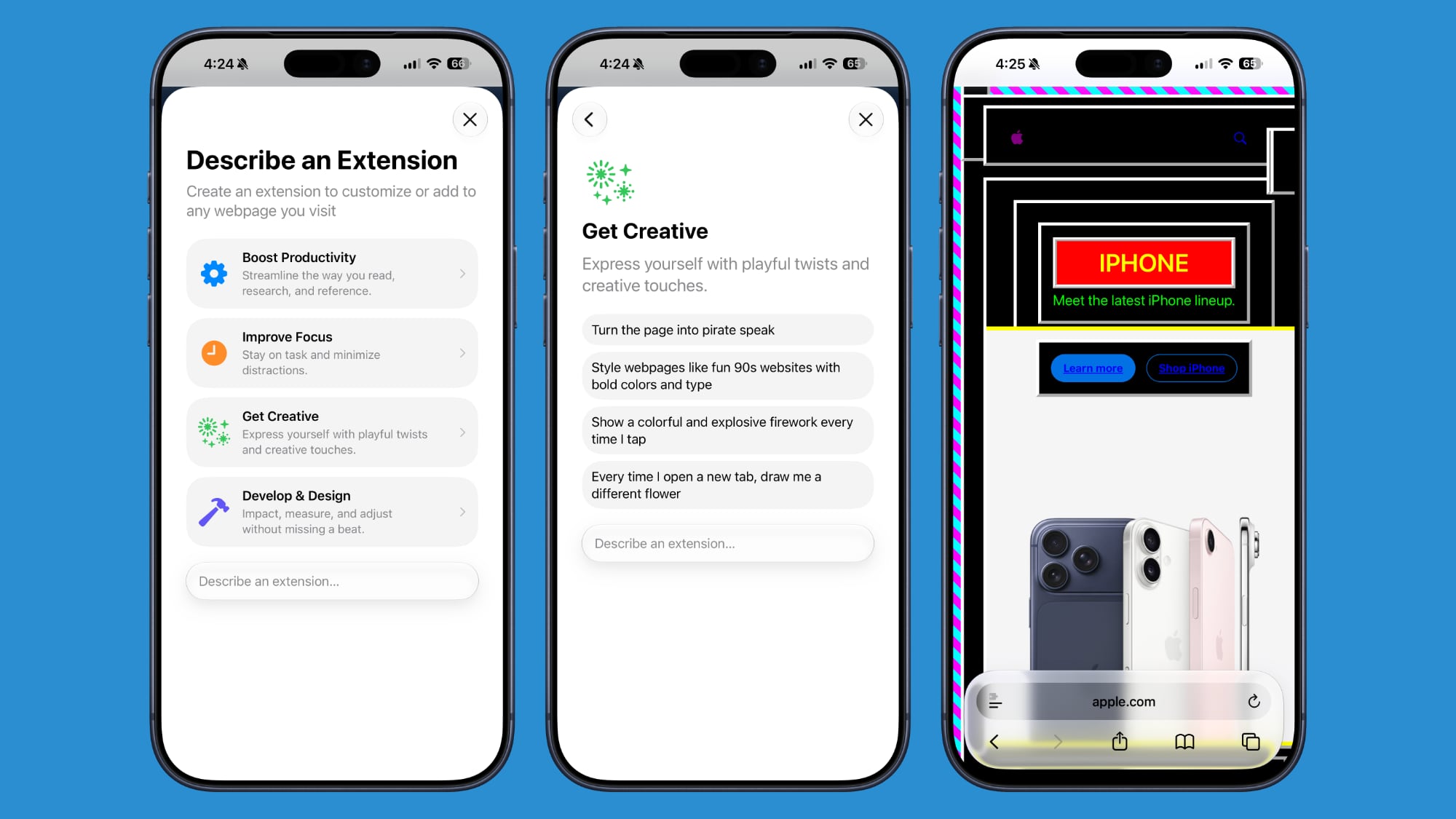


Safari has been given a new AI-powered extension creation feature. A new Create an Extension option, available from Safari's menu to the left of the address bar, lets you describe what you want an extension to do in plain language, and Apple generates it for you. If you need inspiration, Apple also provides suggested ideas across categories including Boost Productivity, Improve Focus, Get Creative, and Develop and Design.

Get AI Summaries of HomeKit Camera Footage (iCloud+ Only)
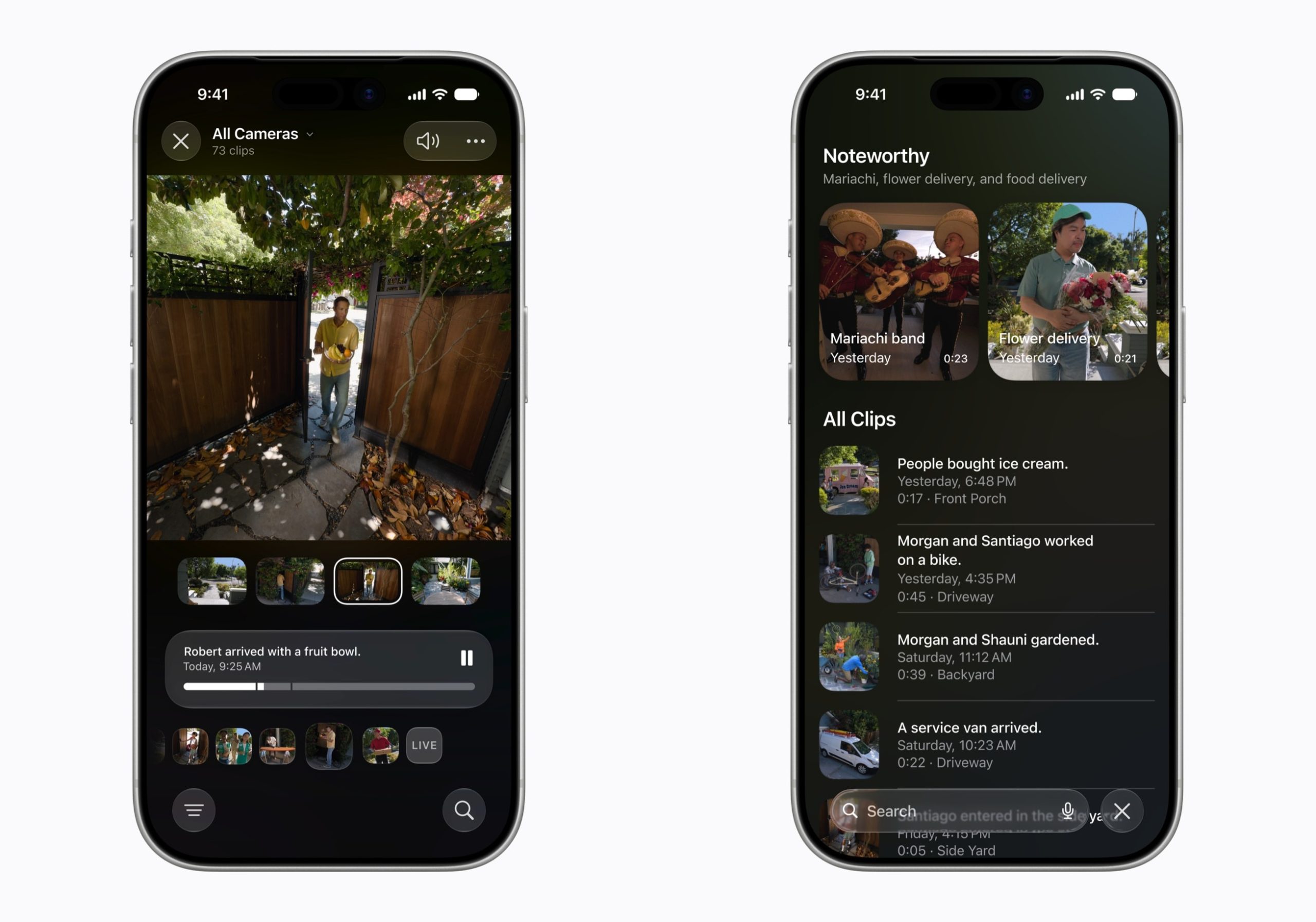


The Home app is now able to generate written summaries for motion alerts from HomeKit Secure Video cameras. It's also able to group footage from separate cameras for an overview of activity and pull out noteworthy recordings, plus it supports natural language search. Bear in mind that this feature is only available if you have an iCloud+ plan with at least 2TB of storage (that's a $9.99/month subscription).

Equalize Your AirPods
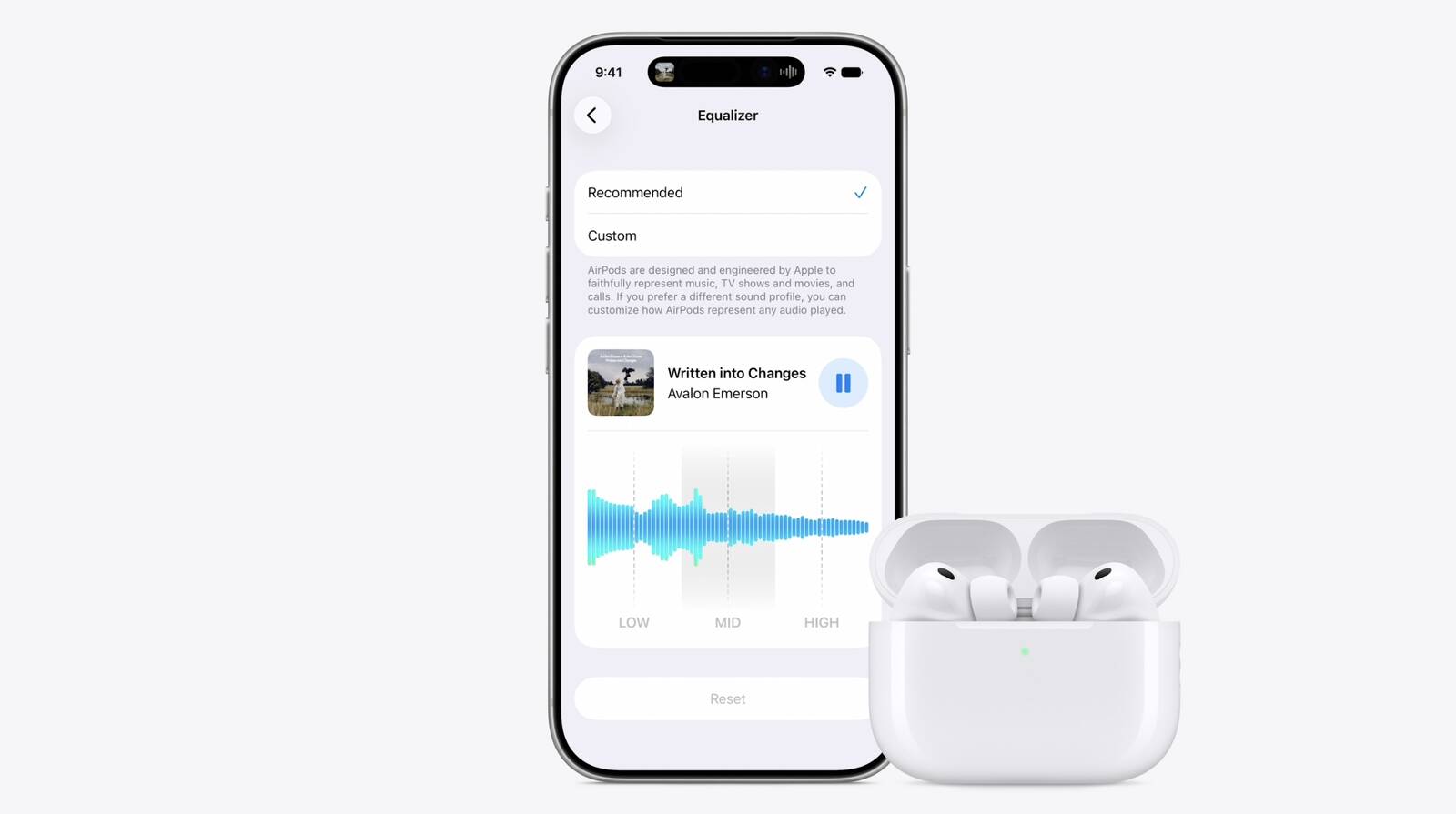


With iOS 27, Apple finally introduces adjustable EQ controls for compatible AirPods models. With your AirPods paired and the latest firmware installed, you can go to Settings ➝ [Your AirPods] ➝ Audio & Routing ➝ Equalizer ➝ Custom to adjust the lows, mids, and highs. Custom EQ is available on AirPods with Apple's H2 chip, including AirPods Pro 2, AirPods Pro 3, AirPods 4, and AirPods Max 2.

Customize Siri's Voice
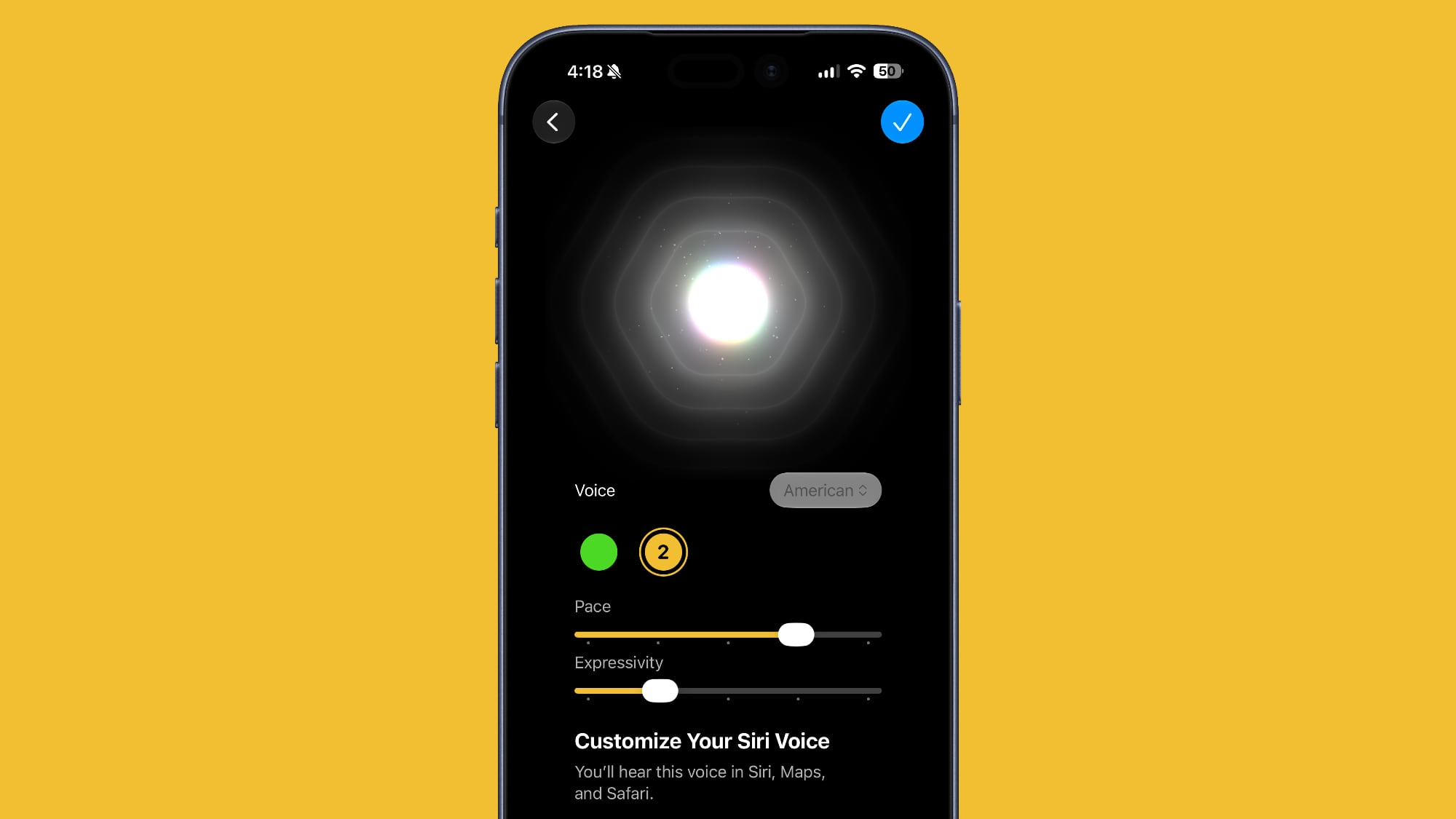


Apple has introduced a more powerful on-device Apple Intelligence model for the iPhone 17 Pro, iPhone 17 Pro Max, and iPhone Air. The upgraded model can understand and generate speech, as well as interpret text and images, enabling a more natural and responsive Siri experience. It also unlocks new voice customization options that let you adjust Siri's expressiveness and speaking pace to suit your preferences.

Rate Your Photos
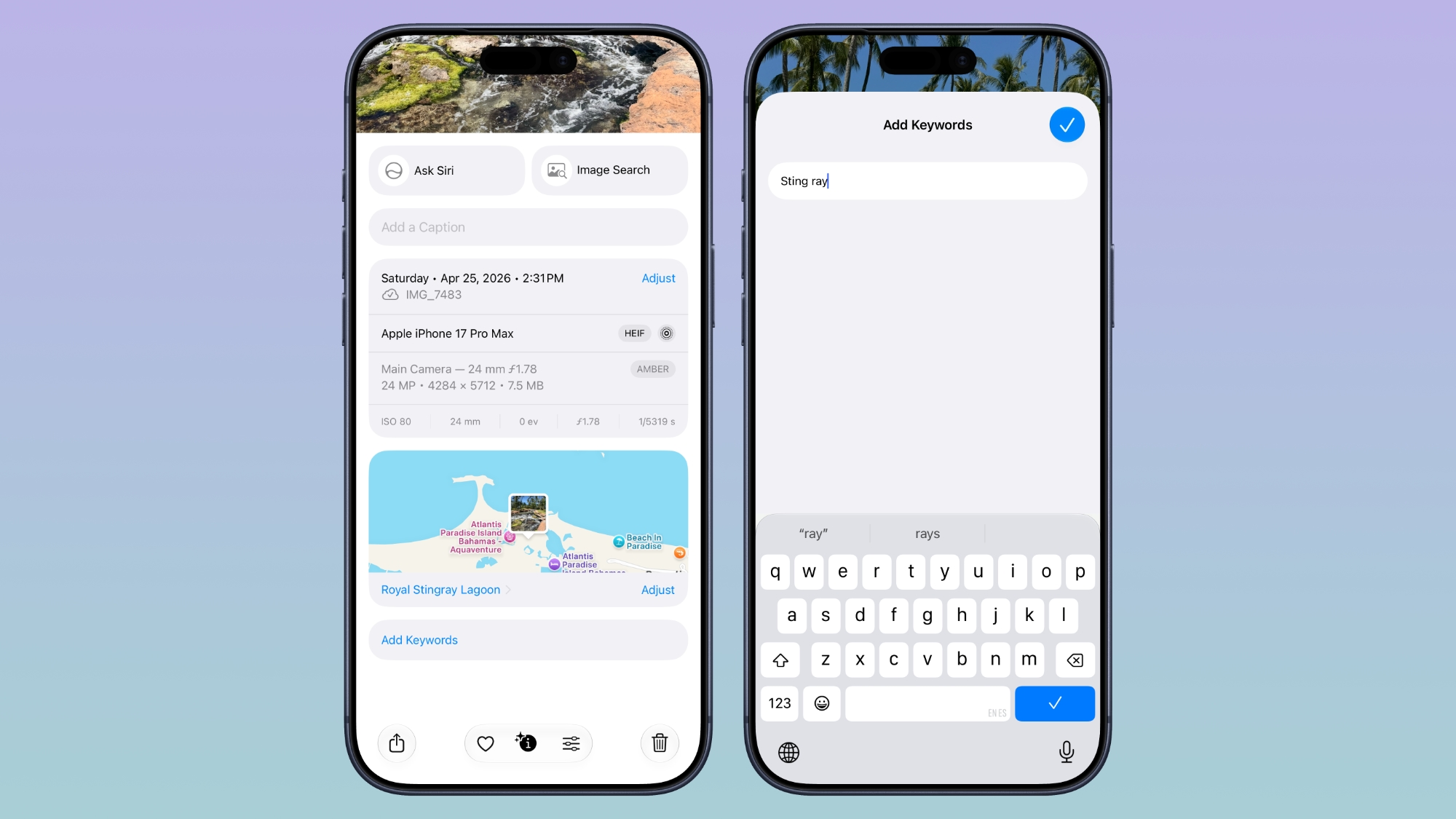


Apple now lets you assign one- to five-star ratings and keywords to photos and videos in the Photos app, making it easier to organize and filter your library. To go with the new feature, Apple has added a Show Rating Controls option to the Photos section of the Settings app. When enabled, it displays star ratings on photos and videos and adds rating badges to thumbnails, ensuring that your highest-rated media is easy to spot at a glance.

Ask Questions About Your Surroundings
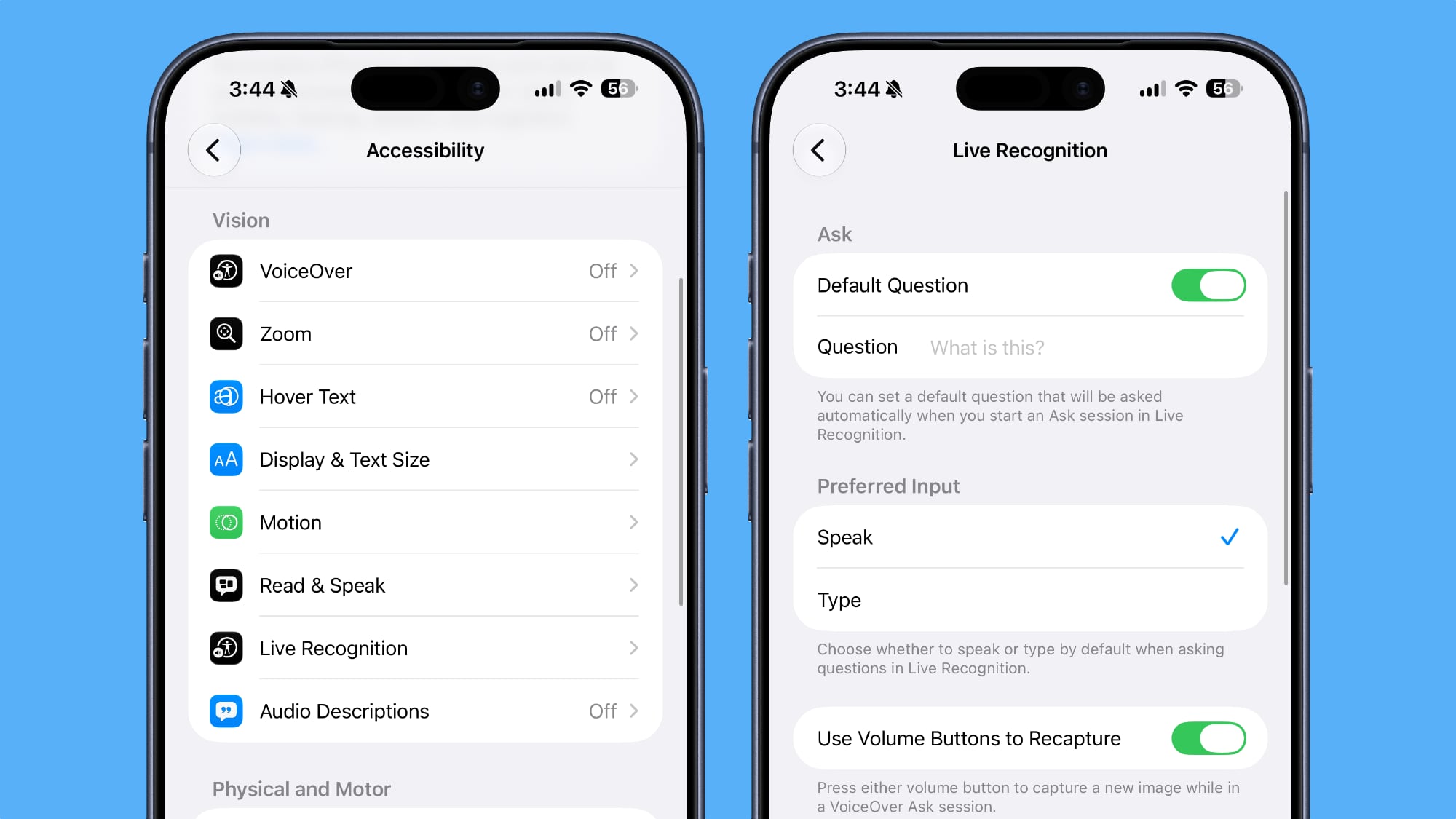


In Accessibility, Apple has added a new Live Recognition section. Powered by on-device intelligence, Live Recognition uses the iPhone's camera to identify and describe people, objects, and surroundings in real time. It can also answer questions about what it sees, with the option to set a default prompt for quick access.

Auto-Update Your Weak Passwords
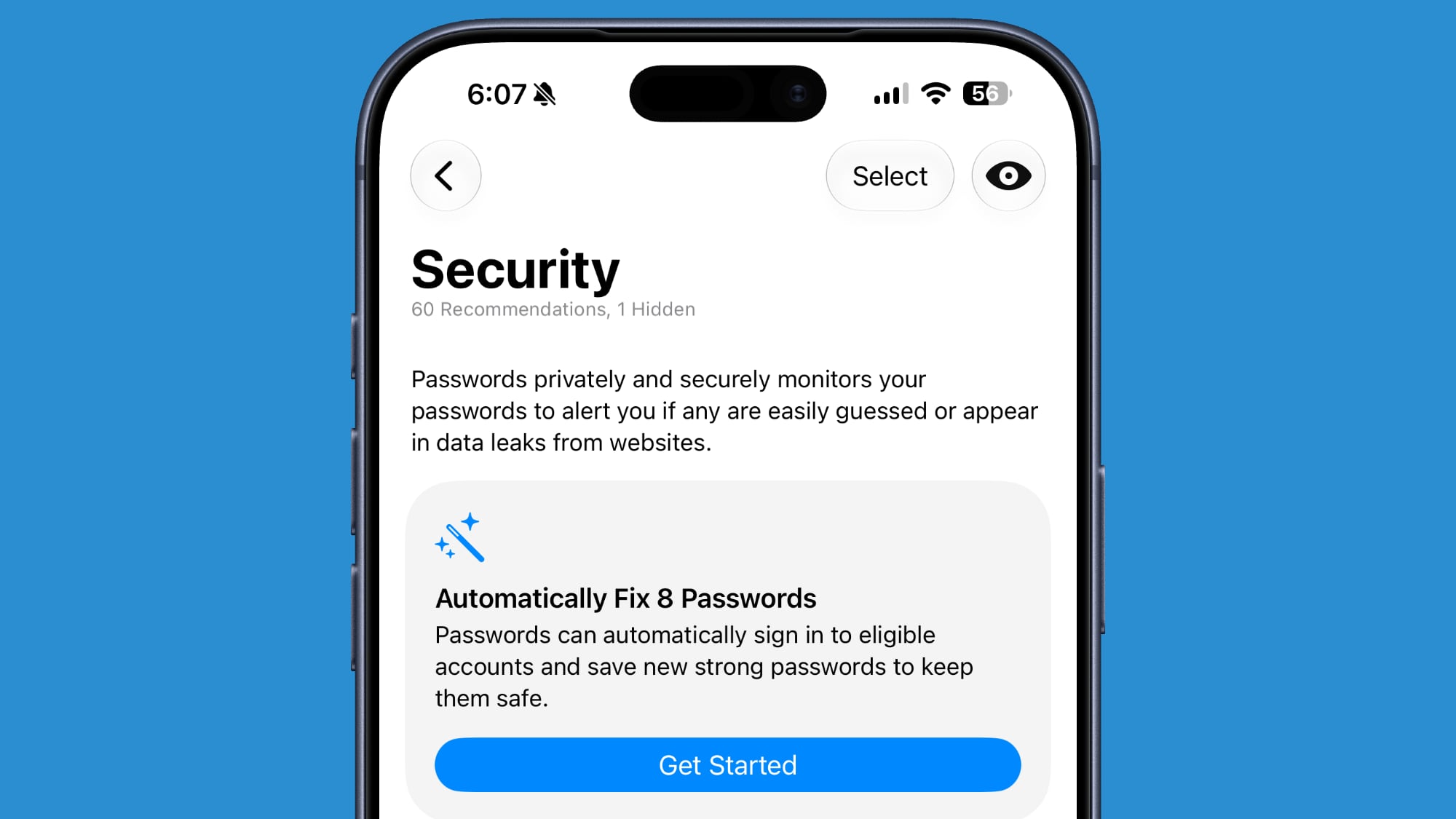


If you use Apple's Passwords app, there's a new feature that uses Safari to automatically change weak and compromised passwords for you. The feature uses β€ŒApple Intelligenceβ€Œ to automatically navigate to eligible websites, sign in, and update your password with a tap.

Save a Still From a Video
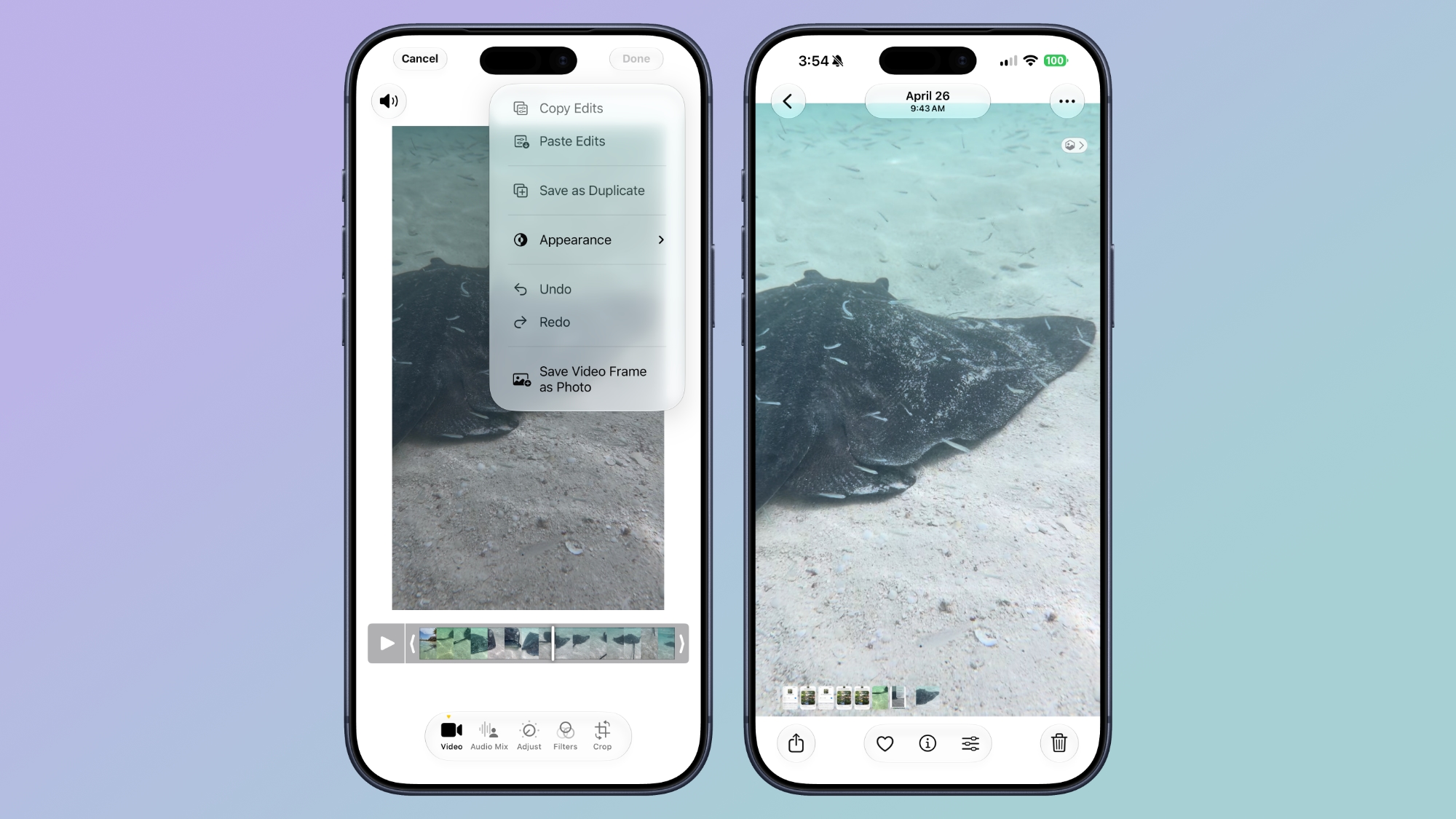


The Photos app in iOS 27 lets you pull a single frame out of a video and save it as its own photo. So you no longer have to rely on the old workaround of pausing playback, taking a screenshot, and cropping out the scrubber. The frame is subsequently saved in your library as a normal image, ready to edit or share just like any other shot.

Give Your Alarms Their Own Volume
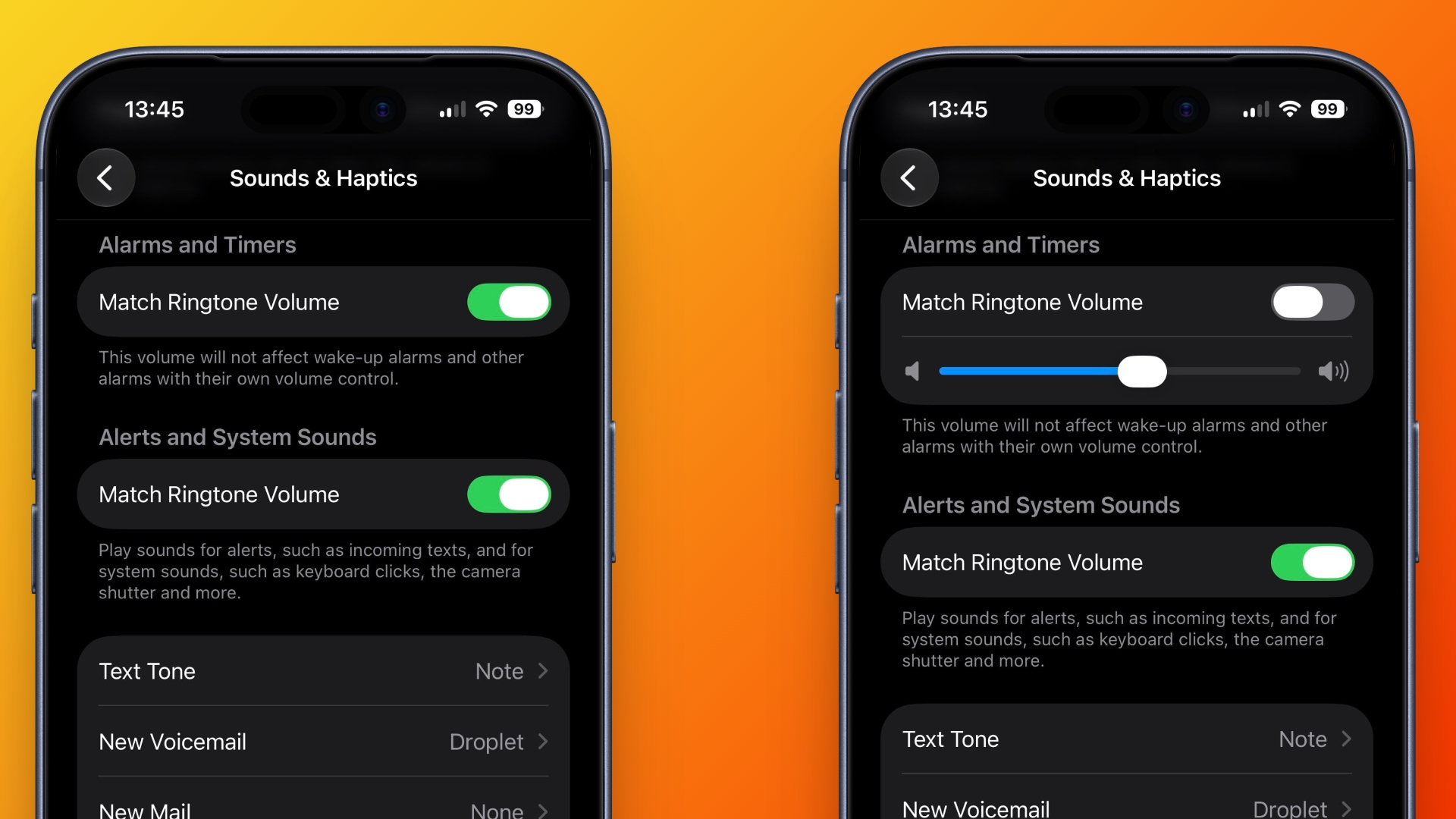


In iOS 27, Settings ➝ Sounds & Haptics gains an Alarms and Timers section with a "Match Ringtone Volume" toggle. Switch it off and a dedicated slider appears, so you can drop the ringer to nothing overnight and still get woken at the volume you chose. Apple's own note under the slider says it won't override wake-up alarms or other alarms that carry their own volume control.

Share Your Location for as Long as You Want
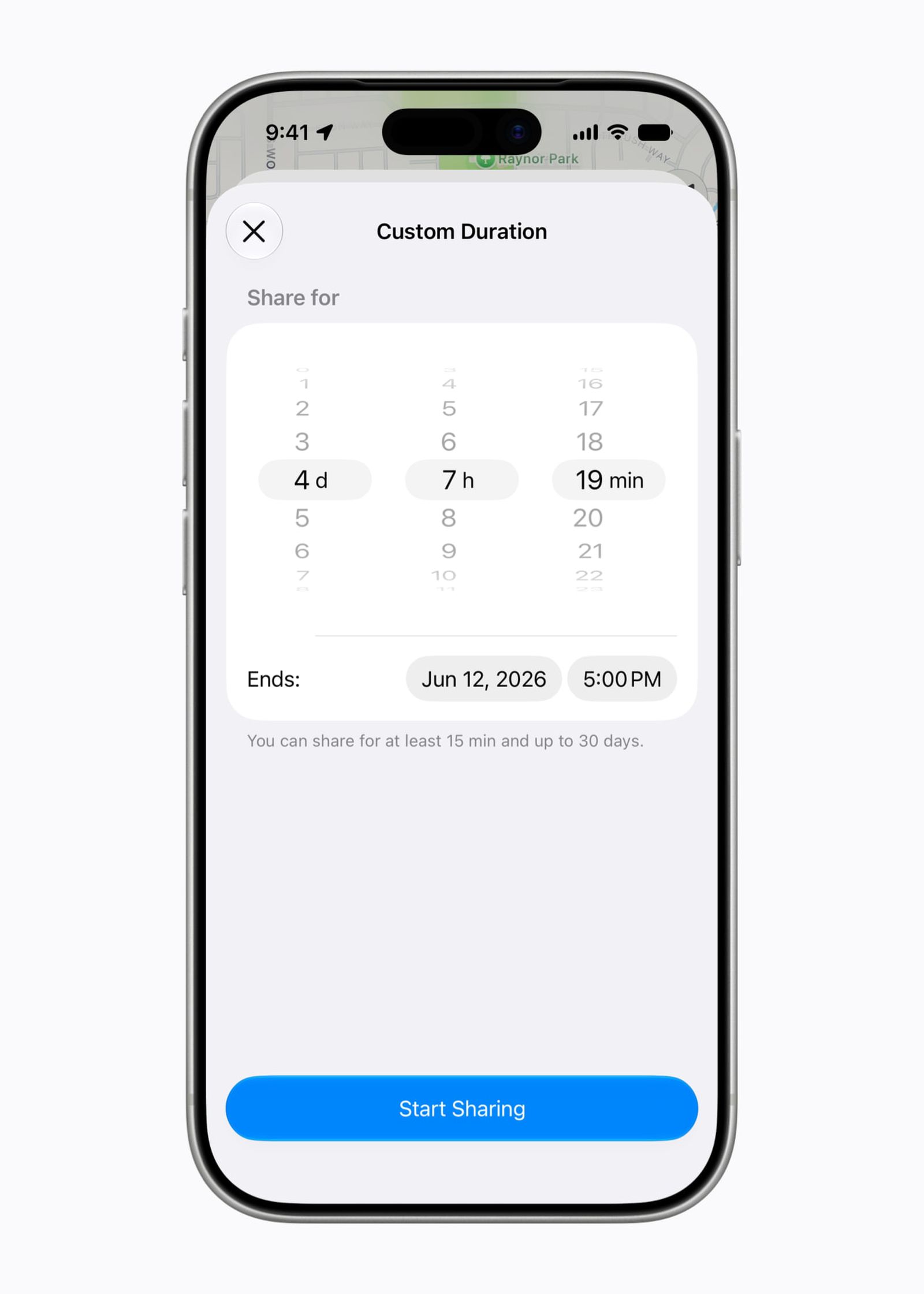


In iOS 26, sharing your location in Find My involves choosing from three presets: one hour, until end of day, or indefinitely. By contrast, iOS 27 adds custom durations – four days and six hours, for example. Alternatively, you can enter an exact date and time for sharing to expire. You can also pause sharing with specific people until the end of the day, without them being informed.

Show Both Camera Views on a FaceTime Call
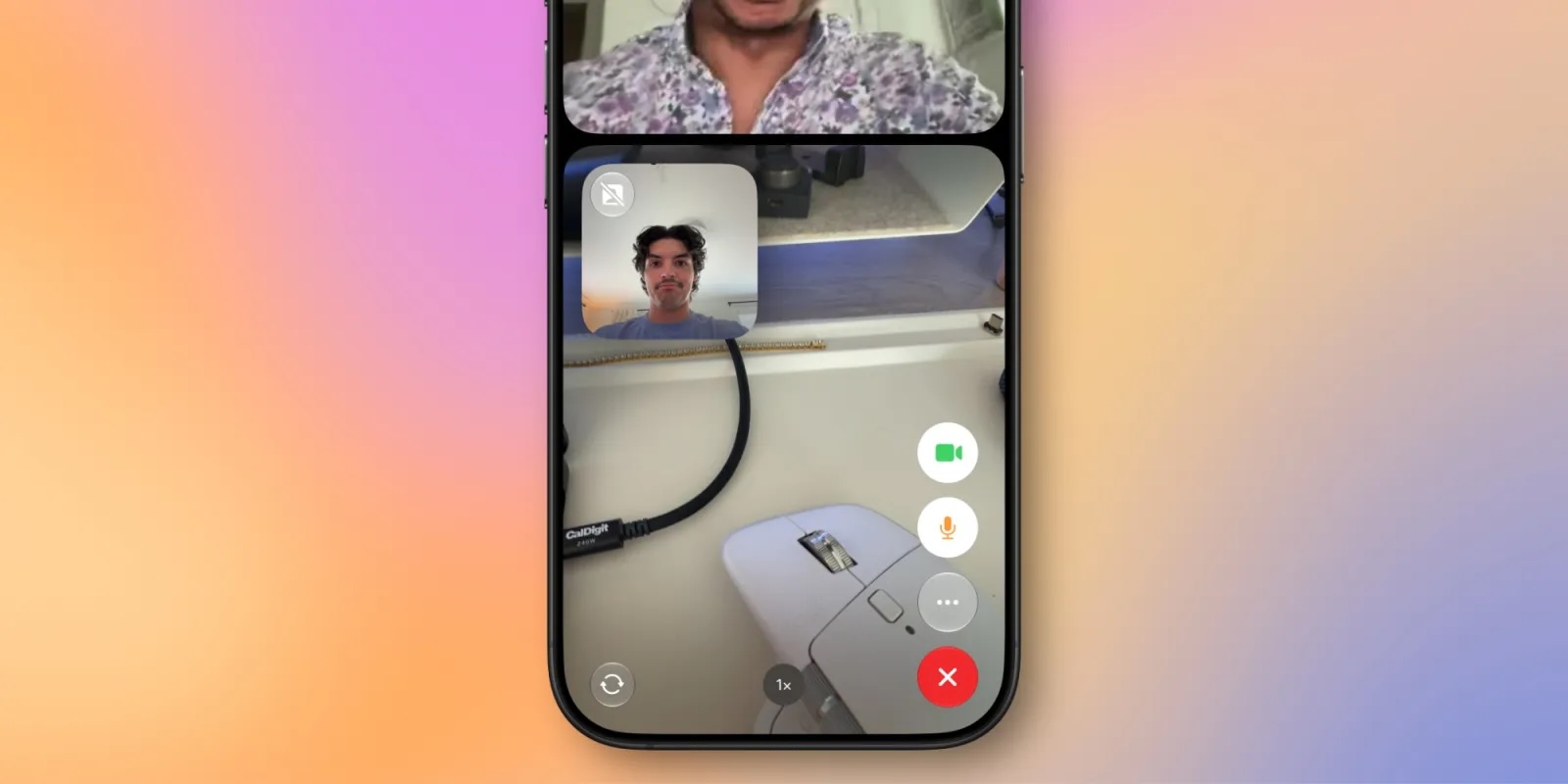


FaceTime has a Dual Capture option in iOS 27. On the iPhone 17 models and the iPhone Air, you can use the front and back cameras at the same time while on a FaceTime call. The person you're calling is able to see your face and what's shown through the back camera. You can turn on Dual Capture on a supported iPhone by tapping on the camera flip button. If you only want to show the back camera feed, you can tap to turn off the front camera view.

Draw in Messages
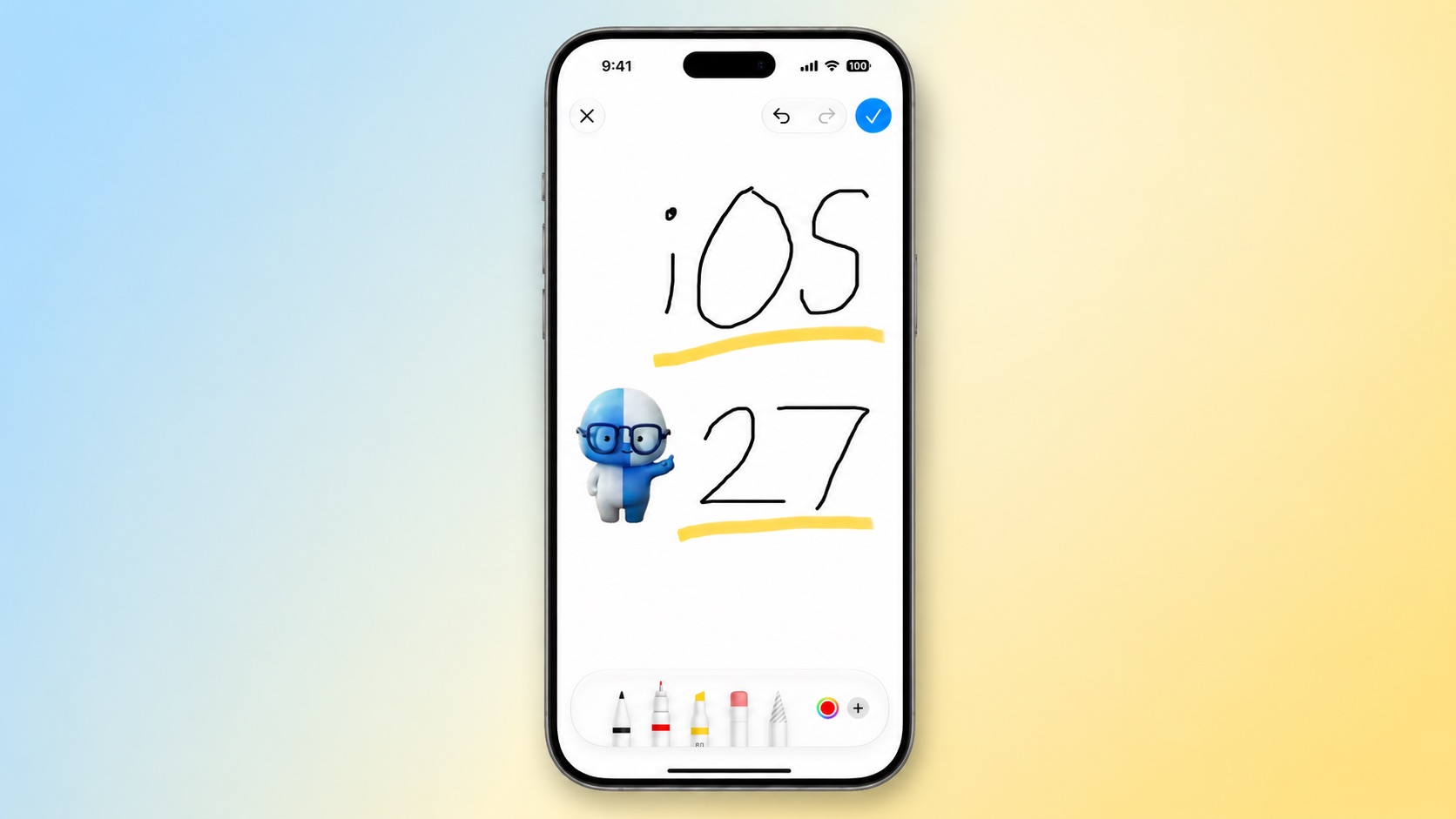


You can now drawing in the Messages app to send little sketches and notes. It's available when tapping on the "+" button next to the text bar in a conversation. The drawing interface is the same as the Markup tool available in apps like Photos and Notes. There's a marker, a pen, a highlighter, and an eraser, plus options to use the tools in any color.

Get Notified About a Webpage Change
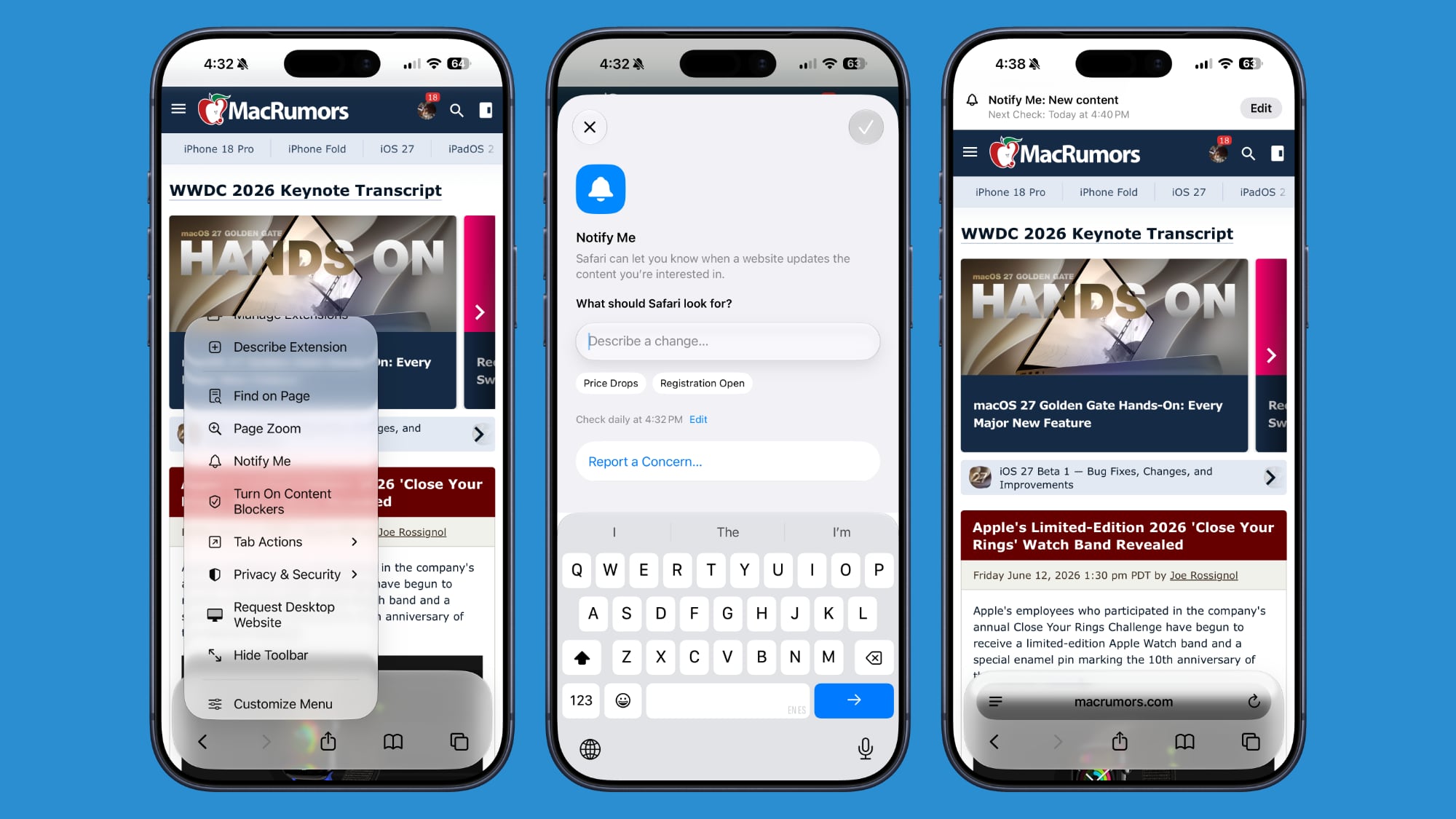


Apple's new version of Safari browser in macOS 27 and iOS 27 can be tasked to monitor a webpage and notify you of any changes. With "Notify Me," Safari can keep checking a website on your behalf – such as a product you've been watching for when it comes back in stock – and alert you when a change occurs.

Reframe a Photo
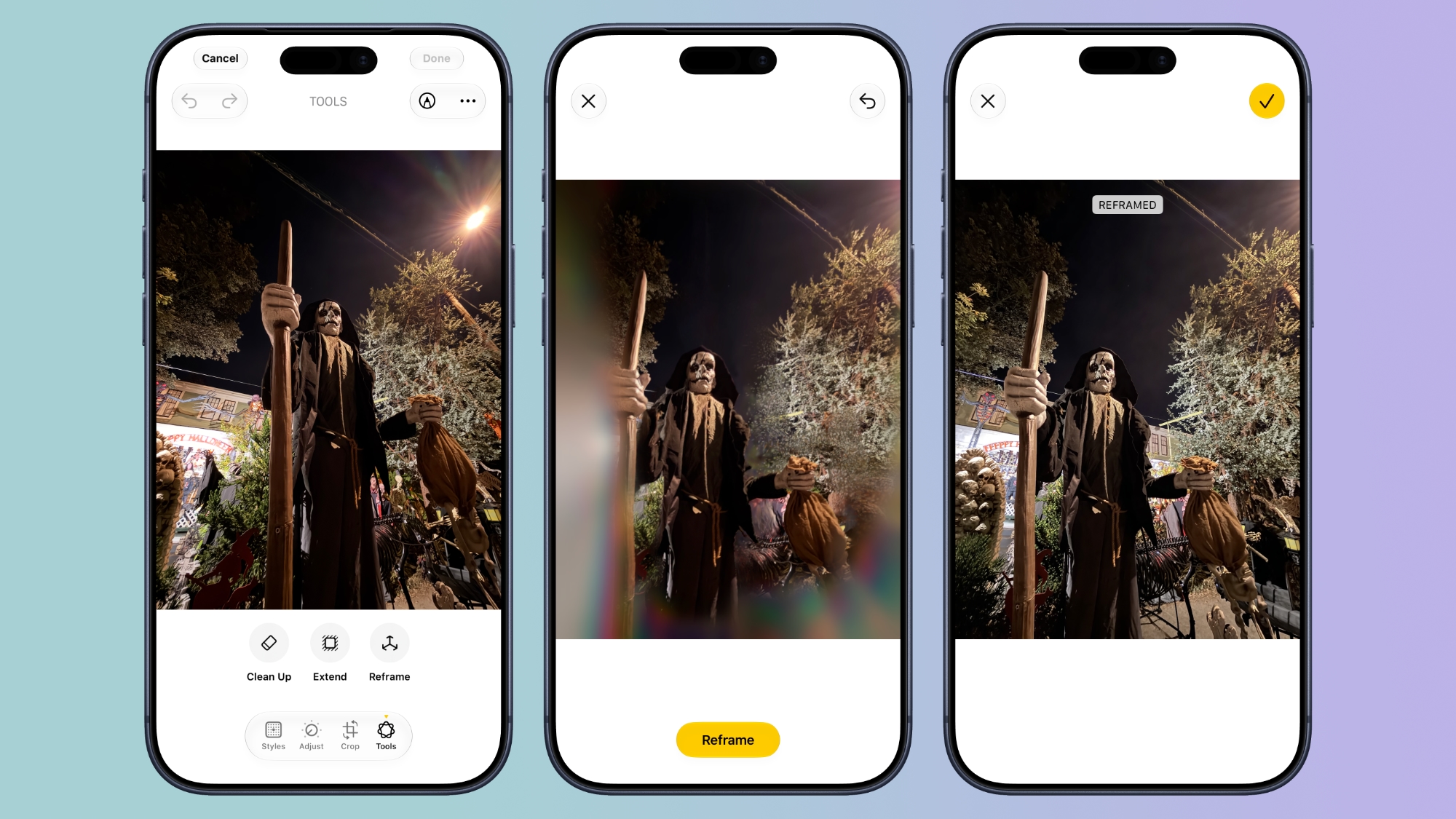


A new Reframe feature in Photos can change the perspective of a photo and make adjustments to the angle of a person or object. It uses the spatial information the iPhone gathers when a photo is taken, and combines it with AI to change the angle of the camera in post-processing. The spatial data is used for adjusting the subject of the image, and then AI fills in any pixels that are missing.

Get Spending Insights in Wallet

wallet
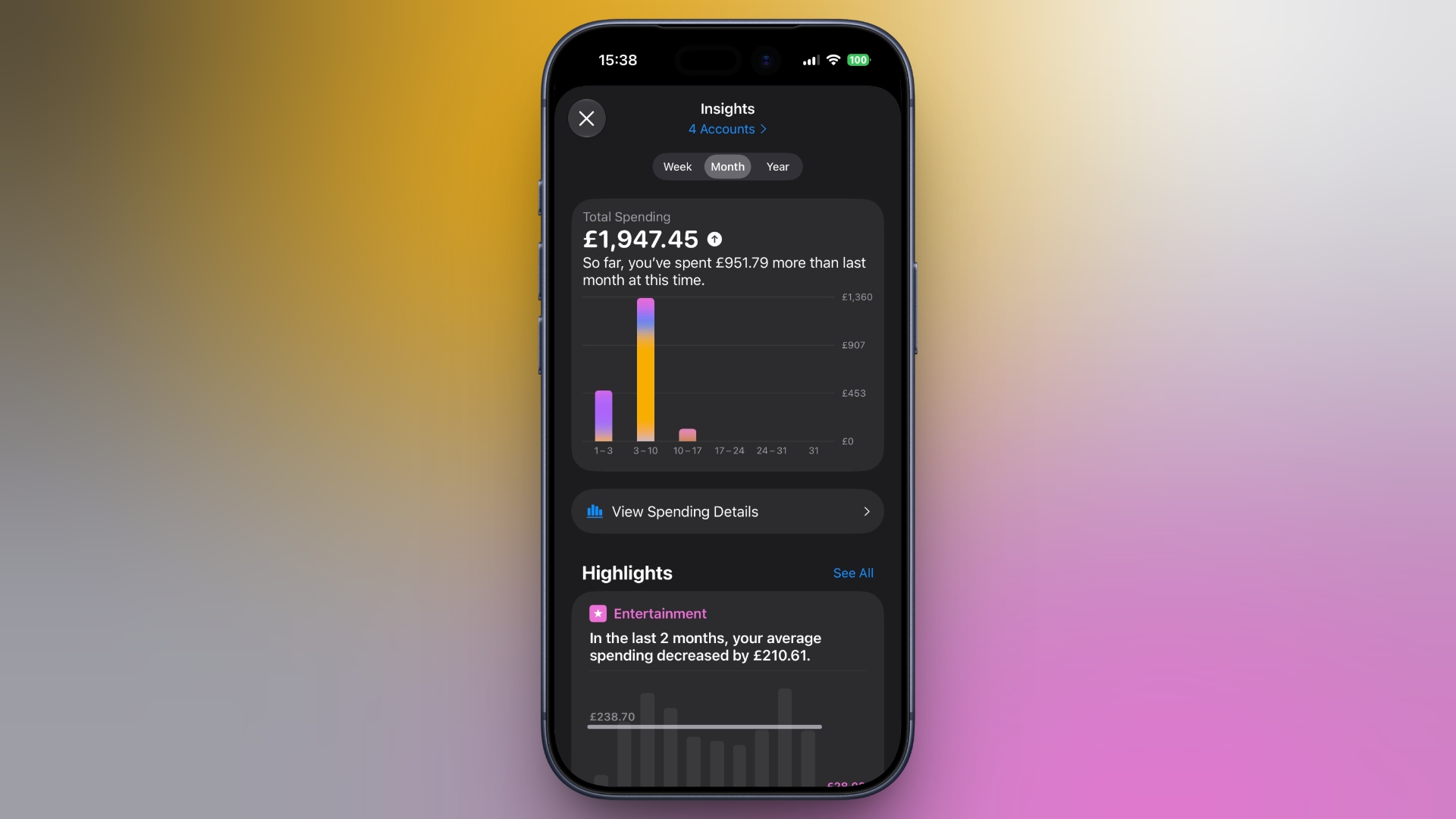
A new "Insights" feature in the Wallet app lets you add different Connected Accounts to monitor your spending. Accessed by tapping the three dots in the top right corner, the feature displays your spending highlights, trends, and other details. Note that Connected Accounts integration is dependent on your bank offering the feature, and currently it has broader support in the U.K. than in the U.S.

Get Context When on a Call
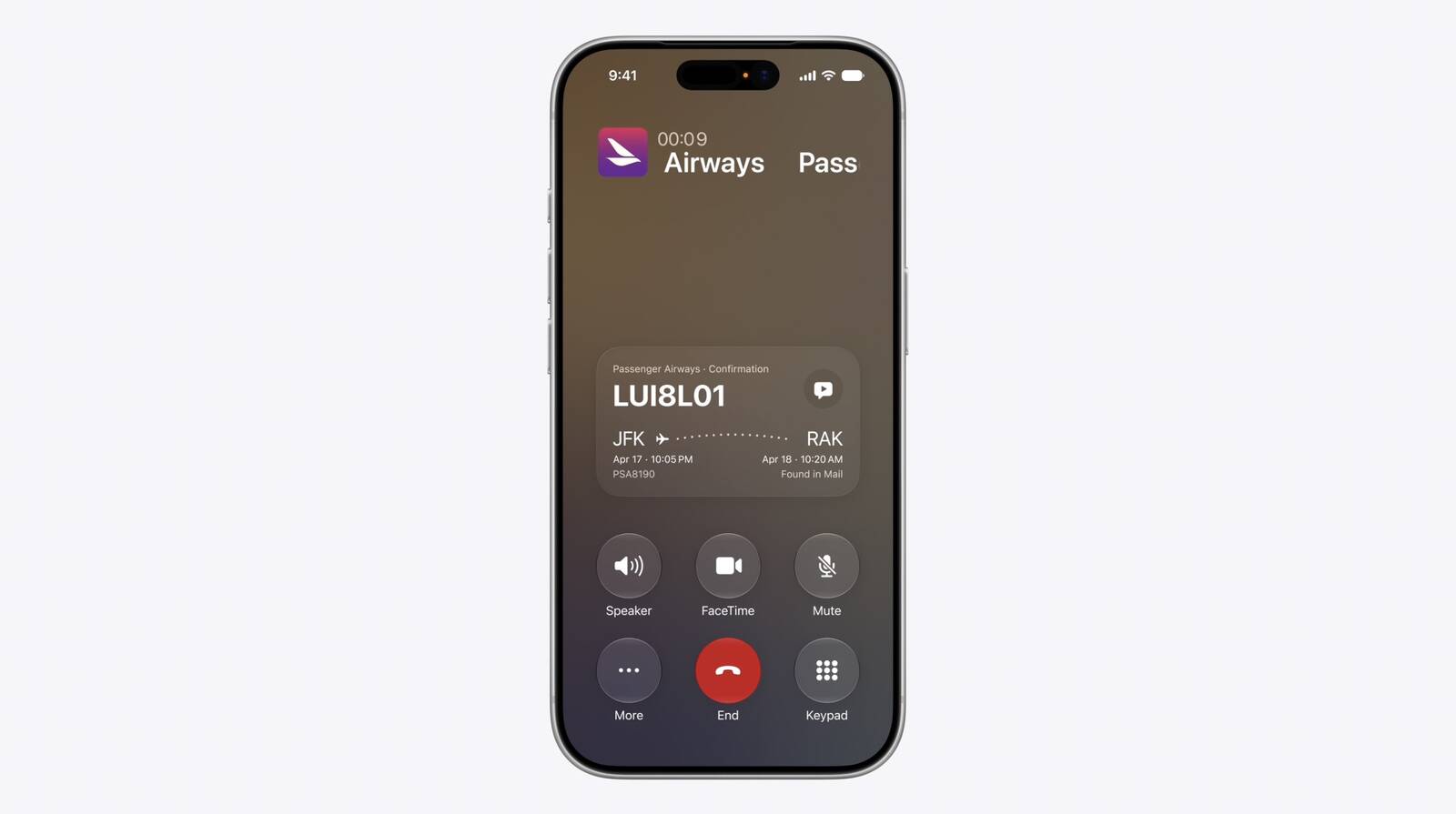


When you're on a phone call to a business, a new feature called "Call Context" proactively surfaces relevant information. If you call an airline to change a flight, for example, the Phone app can automatically find the relevant confirmation code or reservation number from Mail and display it during the call. Apple says Call Context looks only at who the user is calling and not at the call audio itself. The feature runs entirely on device, meaning no data is shared with Apple or any third party.

Learn What's Trending Around You in Maps
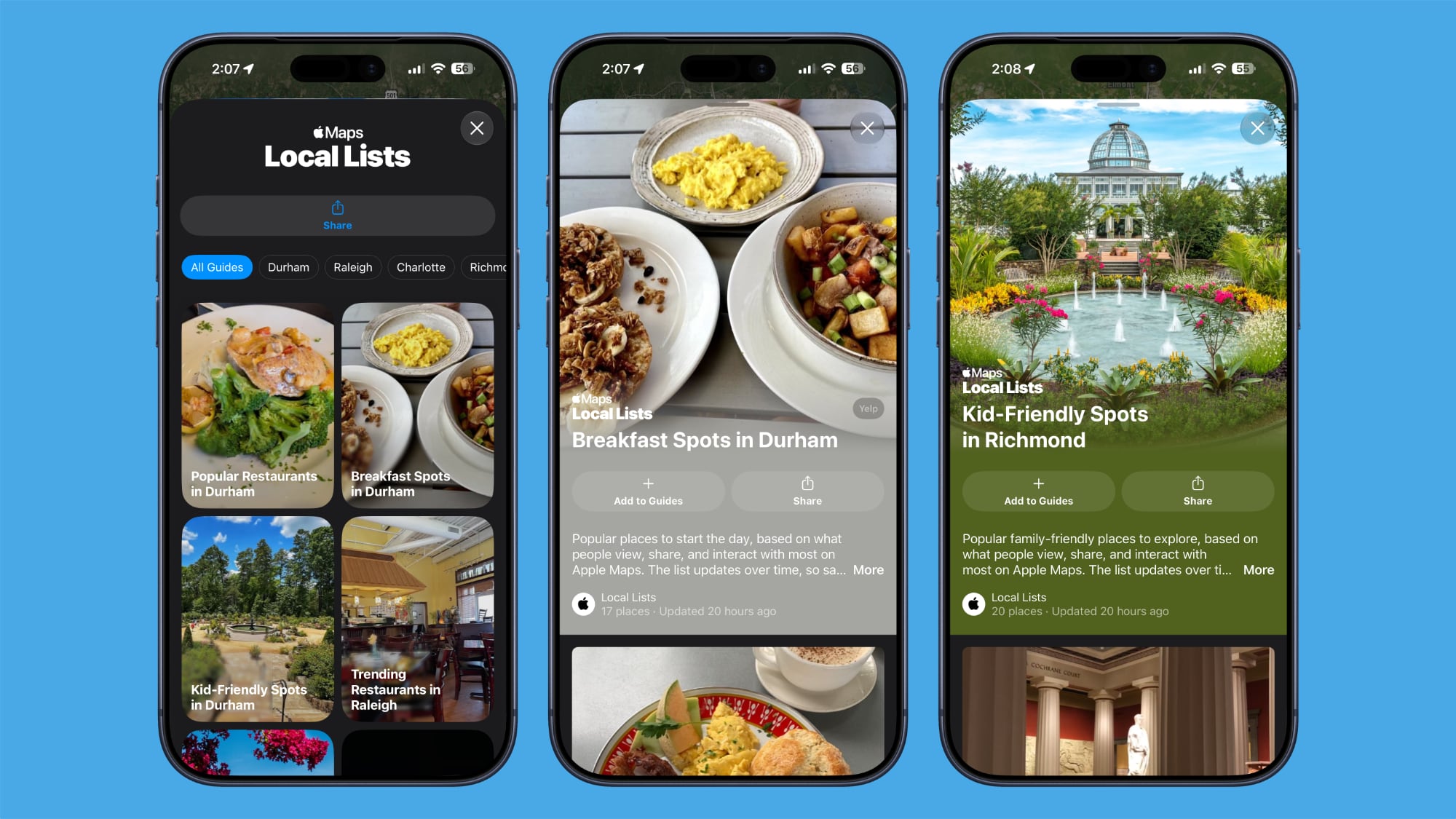


In Maps, a new Local Lists section uses intelligent insights from what's trending around you for suggestions on places you should visit. Maps surfaces locally relevant collections of places to make it easier to find popular and interesting locations. Apple says Local Lists is privacy-focused and does not use information tied to individual users. Note that this feature is only available in the U.S.
Related Roundups: iOS 27, iPadOS 27

This article, "30 New Things Your iPhone Can Do in iOS 27" first appeared on MacRumors.com

Discuss this article in our forums

  •  

Apple Trained Own AI Model for China Market With Help From Alibaba

Reuters reports that Apple has trained its own large language model for the China market, rather than relying on a third-party model to power its Apple Intelligence features in the country.


The LLM has been developed with the help of Alibaba, according to the report's sources. The development marks a break from Apple's previous strategy of relying on domestic models to bring generative AI to its devices sold in China.

Rollout of its AI features in China is expected in the coming months. The rollout is described by the report as a "dual-track strategy" for AI deployment in China, allowing Apple to navigate regulatory hurdles that have limited access for other U.S. tech companies.

The move makes Apple the first foreign company approved by the Chinese government to offer a proprietary AI model in the country.

Apple previously agreed with Chinese regulators to incorporate Alibaba's Qwen model into Apple Intelligence features, similar to Apple's existing ChatGPT extension available elsewhere. Apple briefly published a support guide in China explaining how Mac users can connect Alibaba's Qwen AI to Siri and Writing Tools, before pulling it entirely less than a day later.
This article, "Apple Trained Own AI Model for China Market With Help From Alibaba" first appeared on MacRumors.com

Discuss this article in our forums

  •  

'iPhone Ultra' Could Face Staggered Market Rollout, US Only at Launch

Apple's upcoming foldable "iPhone Ultra" may see a staggered country-by-country launch over several months, with initial availability limited to the U.S. market, according to an Australian publication.


In a report labeled "exclusive," ChannelNews said today it has been told by local carriers and one major retailer that Apple's first foldable iPhone will be a "no show" when the iPhone 18 Pro models launch in September, despite being unveiled together. Instead, Apple will release the book-style device in the U.S. market first, followed by key markets including China over two or three months.

The staggered launch is said to be due to supply setbacks and "pricing problems." The publication's sources also claim that Apple is "having testing issues with production models that have already been built."

Apple analyst Ming-Chi Kuo claimed last month that Apple would unveil its first foldable iPhone at the same time as the iPhone 18 Pro and iPhone 18 Pro Max, but that iPhone Ultra pre-orders would start at a later date than the latter models.

Kuo said manufacturing challenges have limited early production, but this is the first time we have heard that a staggered country rollout could be another consequence of continuing supply issues.

Vision Pro All Over Again?


It wouldn't be the first time Apple has launched a new product in a staggered manner. When the Vision Pro launched in February 2024, it was only available in the U.S. initially. The headset was later launched in China, Hong Kong, Japan, and Singapore in June, followed by Australia, Canada, France, Germany, and the UK in July.

The reasons for the Vision Pro's staggered launch came down to low volume production, retail store readiness, and the fact that it was an entirely new category for Apple. All three could arguably apply to the company's first foldable.

Multiple reports have suggested the iPhone Ultra's production has faced hurdles because of the complexity of the device, with the hinge structure and display durability testing having been the principal bottlenecks. However, those issues were thought to have been resolved during trial production at Foxconn, with Apple subsequently raising its order to around 10 million units, up from 7-8 million units for the year, according to Nikkei Asia.

That said, 10 million units amounts to only a third of Kuo's forecast of 20-22 million units for iPhone 18 Pro models this year. Meanwhile, Kuo still believes Apple's supplier will ship only 7-8 million foldable iPhones in 2026. At such a relatively small number, Apple would presumably struggle to stock 40+ countries on launch day.

It's worth bearing in mind that a staggered market launch is a claim made by the report's sources, and remains uncorroborated. Either way, we should know for sure soon enough. The iPhone Ultra's unveiling is only a matter of weeks away, and we're expecting it to feature an inner display of around 7.7 to 7.8 inches, a 5.5-inch cover screen, a thickness of roughly 4.5mm, and a starting price above $2,000. Apple's iPhone event is most likely going to happen on Tuesday, September 8 or Wednesday, September 9.
Related Roundups: Apple Vision Pro, iPhone Fold
Buyer's Guide: Vision Pro (Neutral)
Related Forum: Apple Vision Pro

This article, "'iPhone Ultra' Could Face Staggered Market Rollout, US Only at Launch" first appeared on MacRumors.com

Discuss this article in our forums

  •  

Base iPhone 18 Tipped to Get These Two Pro-Level Upgrades

The base iPhone 18 model that Apple is expected to release by March 2027 will be equipped with 12GB of RAM, up from 8GB in the iPhone 17, according to analyst Jeff Pu.


Pu's latest assessment, if accurate, would see the iPhone 18 gaining the same amount of memory as the iPhone 17 Pro models. Analyst Dan Nystedt claimed the same RAM upgrade for the iPhone 18 back in April.

That said, their predictions conflict with the most recent report on the subject from analyst Ming-Chi Kuo, who said both the iPhone 18 and iPhone 18e would have only 9GB of RAM. This would prevent the devices from supporting some Apple Intelligence features.

However, Pu agrees with Kuo that the lower-cost iPhone 18e – also coming in the spring – will come with 9GB of RAM, based on his own sources and supply chain information. Both models are expected to be powered by the A20 chip.

Interestingly, Pu additionally believes that the regular iPhone 18 will feature a narrower Dynamic Island. Most of the rumors about a smaller Dynamic Island have pertained to the iPhone 18 Pro models, but Chinese leaker Ice Universe has also claimed the smaller Dynamic Island will be adopted across the iPhone 18 lineup.
Related Roundup: iPhone 18
Tag: Jeff Pu
Related Forum: iPhone

This article, "Base iPhone 18 Tipped to Get These Two Pro-Level Upgrades" first appeared on MacRumors.com

Discuss this article in our forums

  •  

WhatsApp Now Lets You Save a Contact's Username

Following its username feature rollout, WhatsApp is now letting users save a contact's username when they add their name and phone number. The username field is shown between the first and last name fields and the phone number section.

You can add a new contact in WhatsApp by tapping the + button in the navigation bar of the Chats tab. According to WABetaInfo, when usernames become more widely available, WhatsApp will populate the username field automatically when users create a new contact from the chat info screen.
This article, "WhatsApp Now Lets You Save a Contact's Username" first appeared on MacRumors.com

Discuss this article in our forums

  •  

Apple's 2026 Back to School Offer is Now Live Across Europe

Apple's annual Back to School promotion is now live in the United Kingdom and 18 other European countries: Austria, Belgium, Czechia, Denmark, Finland, France, Germany, Hungary, Ireland, Italy, the Netherlands, Norway, Poland, Portugal, Spain, Sweden, Switzerland, and Turkey.


The European launch follows the company's back-to-school promotion rollout in the United States and several other regions and territories last month.

The offer is aimed at college students and educational staff and includes a gift card worth up to Β£120/€120 with the purchase of an eligible Mac or iPad. Turkey is the exception, where buyers of eligible Macs and iPads can choose a four-pack of AirTags at no additional charge, or they can pay extra for various AirPods models or (when purchasing an iPad) an Apple Pencil Pro.

Note that the MacBook Neo is not an eligible product in any of the countries, and the iPad mini, entry-level iPad, and desktop Macs are excluded too.

The promotion runs through to October 22, 2026.
This article, "Apple's 2026 Back to School Offer is Now Live Across Europe" first appeared on MacRumors.com

Discuss this article in our forums

  •  

iPhone Ultra's Two Selfie Cameras Could Sit in the Same Corner

With Apple's upcoming iPhone Ultra there's been a lingering question over the exact placement of the selfie cameras in the device's folded and unfolded states – but today we may have stumbled upon the answer.


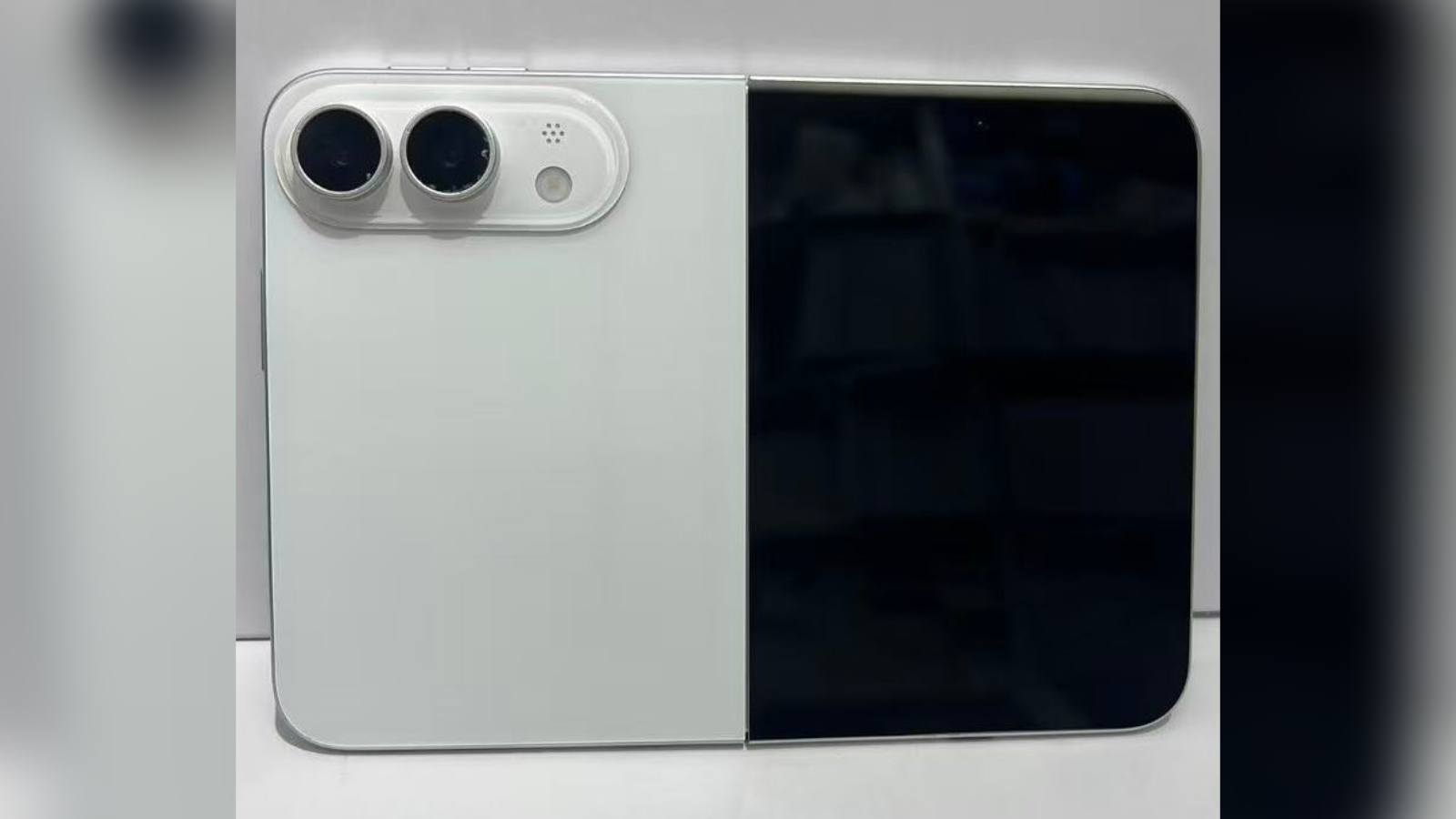
Dummy units have suggested a top-centered cut-out for the selfie camera on the outer display of Apple's foldable, while locating the selfie camera for the inner display in the outermost top-left corner. That presents an asymmetry untypical of Apple's designs.

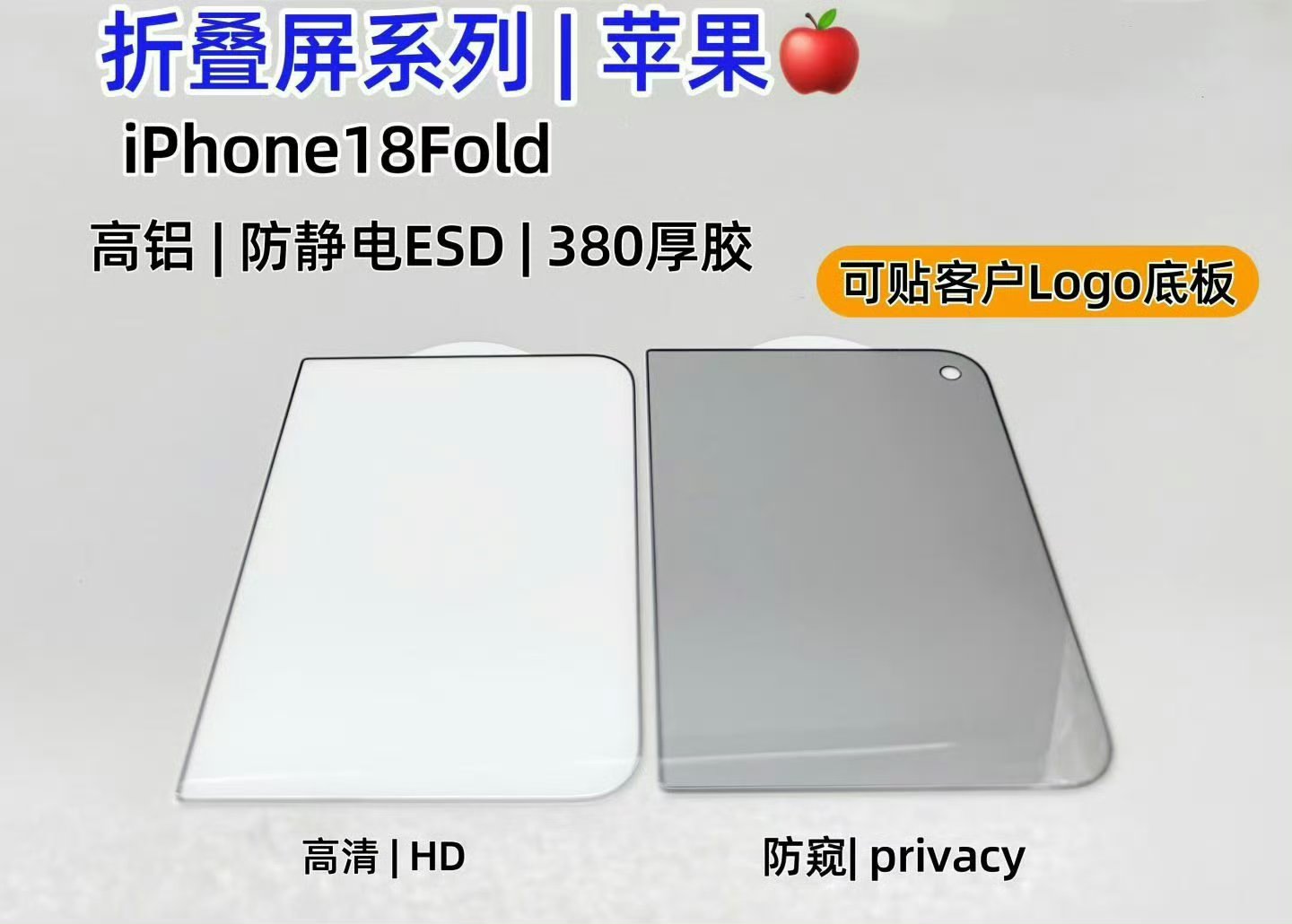
However, screen protectors for the iPhone Ultra that surfaced online today suggest the device's selfie cameras on the inner and outer displays may be located in the same corner of the same half, with one facing out and one facing in.


The screen protectors show a selfie camera cutout on the top-right corner of the outer display when the device is closed. Taken together, the two leaks could imply one front-facing camera zone in a single corner.


Such an arrangement – two slightly offset lenses – could let Apple confine the cutouts and camera modules to a single region of a 4.5mm thick chassis, rather than having them spaced out in different places, which would fit for a device where internal space is at a premium.

Now, accessory makers typically work from leaked CAD files of sometimes dubious accuracy, so a pair of screen protectors can't be considered to provide definitive evidence of a device's design. Our reading also assumes the dummy iPhone Ultra models had one camera placement correct (the top-left inner selfie camera) and one out of whack (the centered outer camera). Even so, the side-by-side internal placement could make sense.

We'll know one way or another soon enough. The iPhone Ultra is expected to be unveiled next month, featuring a 5.5-inch cover display and a 7.8-inch inner display, the A20 Pro chip, Touch ID integrated into the Side button in lieu of Face ID, and a 5,000mAh battery, along with a 48-megapixel dual rear camera system.
Related Roundup: iPhone Fold

This article, "iPhone Ultra's Two Selfie Cameras Could Sit in the Same Corner" first appeared on MacRumors.com

Discuss this article in our forums

  •  

Microsoft Edge Browser to Get Apple Account Sign-In Support

Microsoft is testing support for signing into its Edge browser using your Apple Account, avoiding the need to create a Microsoft account. Two new flags related to the support were spotted by MacMagazine in the latest Edge Canary build, with the feature also rolling out to Edge Beta users.
One of the flags enables Apple Account sign-in for Edge profiles, while the other adds an Apple sign-in button to the profile menu (where a Google Account sign-in option already exists). In its release notes for Edge Beta 152, Microsoft already lists Apple Account sign-in support for Windows and macOS, but describes it as a "controlled rollout," so there may be some delay before all beta users see it.
This article, "Microsoft Edge Browser to Get Apple Account Sign-In Support" first appeared on MacRumors.com

Discuss this article in our forums

  •  

Leaker: All-Glass 2027 iPhone Still on Track Despite Cancellation Rumors

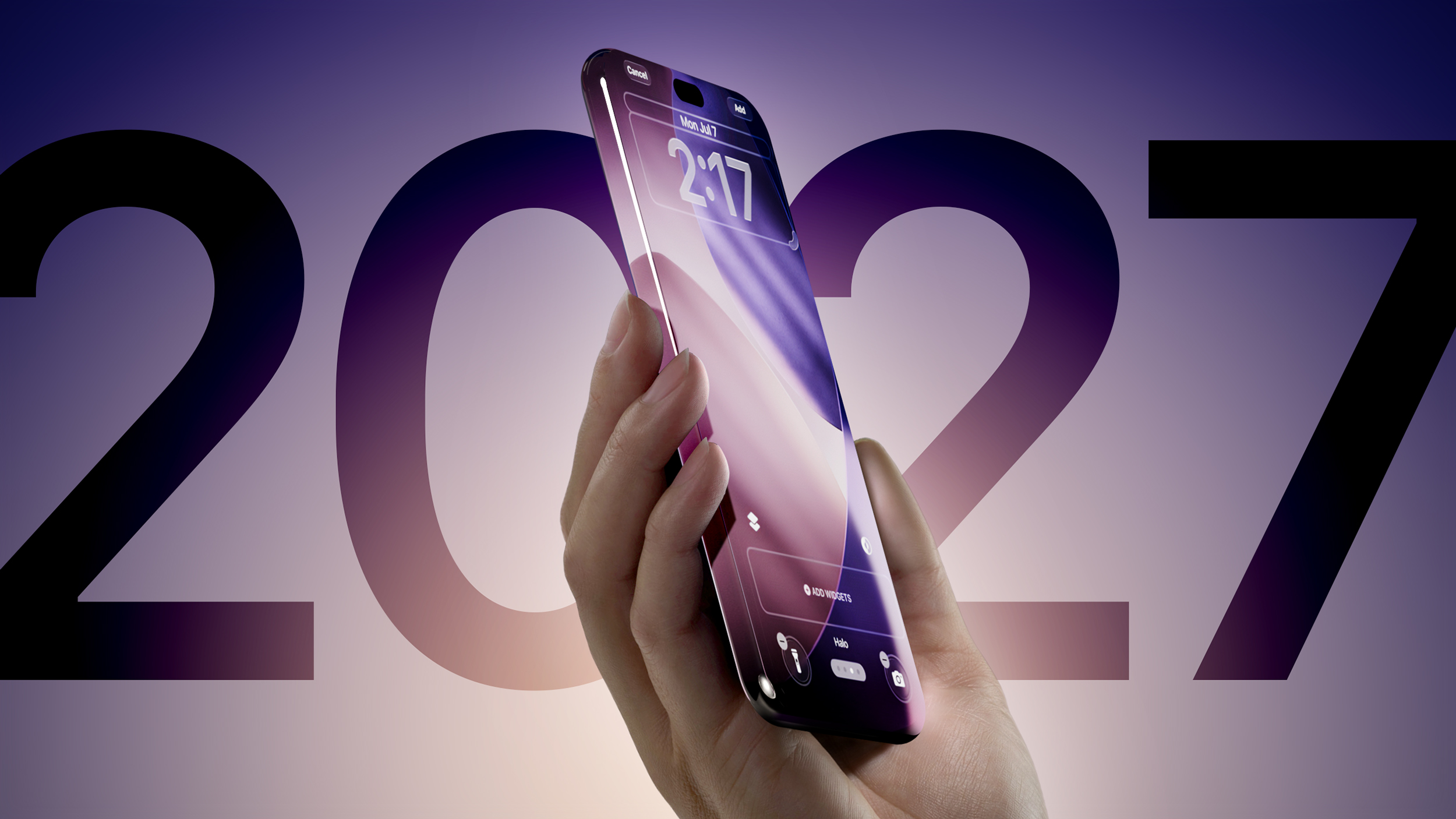
There's been more pushback against the recent analyst report that claimed Apple's all-glass 20th-anniversary iPhone next year has been canceled. Bloomberg's Mark Gurman has already responded by saying the "glass-centric" redesign is still on track for 2027, and now a prominent Chinese leaker says the commemorative device indeed remains in active development.


Weibo-based leaker Digital Chat Station identifies the device as having two sizes in equivalent Pro/Pro Max variants, citing the internal codenames V73/V74 previously referenced by Gurman. Based on supply chain information, the leaker says the two new displays have increased in physical size while retaining the same aspect ratio. Their rationale for this is that Apple's borderless four-curved-edge design uses a flat 2D display combined with a glass cover, and takes advantage of the glass's optical refraction and shape to create the visual effect of a display lacking borders.

The description lines up with Gurman's claim that glass is used on the front and back of the phones, with the material curving into the sides, leaving only a small metal band in the middle.

Digital Chat Station's latest post also chimes with an earlier claim of theirs that Apple is testing a slightly larger 6.96-inch display for the device's Pro Max variant, suggesting the OLED panel itself is slightly bigger, but the extra area curves the display further into the device's edges while the chassis remains essentially the same size as the current iPhone 17 Pro Max.

Jefferies analyst Edison Lee caused a stir on Monday when he claimed Apple's rumored all-glass iPhone expected to mark the device's 20th anniversary has been canceled. Gurman soon refuted the claim based on his own information, though he did say that Apple had also considered a "more aspirational version" that "used even more glass" – but this was scrapped early on. It's quite possible that this more ambitious version was the device Lee was referring to in his report.

Either way, today's post from Digital Chat Station adds further weight to the possibility that Lee is off the mark, and that the radically redesigned 20th-anniversary iPhone is still in the works and should arrive in the fall of 2027.
This article, "Leaker: All-Glass 2027 iPhone Still on Track Despite Cancellation Rumors" first appeared on MacRumors.com

Discuss this article in our forums

  •  

Apple Pay to Launch in India by October

Apple Pay will launch in India by this October, reports Business Standard, citing people familiar with the matter. Apple Pay will support major credit card networks like Visa and Mastercard, but it won't support transactions via the country's Unified Payments Interface (UPI) at launch.
Apple would need clearance from the National Payments Corporation of India (NPCI) for that to happen, plus it would need to partner with a sponsor bank for routing the transactions. Negotiations are said to be ongoing.

Bloomberg reported in February that Apple has been in talks with major Indian banks in a bid to get Apple Pay up and running in the country this year.
Related Roundup: Apple Pay

This article, "Apple Pay to Launch in India by October" first appeared on MacRumors.com

Discuss this article in our forums

  •  

Latest iOS 27 Beta References Six Unreleased iPhone Models

Macworld reports that iOS 27 beta 5, released to developers on Monday, contains hidden code revealing six unreleased iPhone models – although you've probably heard of them before.


The following references are said to have been found alongside references to existing iPhone models, in system files associated with the iPhone's battery drivers and Battery Intelligence features:

  • V62 β€” iPhone Air 2

  • V63 β€” iPhone 18 Pro

  • V64 β€” iPhone 18 Pro Max

  • V67 β€” iPhone 18

  • V68 β€” iPhone Ultra

  • V69 β€” iPhone 18e

It's the first time the full iPhone 18 lineup has been mentioned in code found in an iOS 27 beta. To be clear, the discovered references are the codes in bold, excluding the names (which are inferred) but these internal Apple identifiers have appeared in previous leaks or have been used by Bloomberg's Mark Gurman in his reporting, allowing them to be matched to the expected iPhone models.

Apple has not publicly confirmed the existence of any upcoming iPhone 18 models, but regular readers will know that they have been heavily rumored for several months now.

Apple is taking a different launch approach to the iPhone 18 series this time around, with a split-launch strategy that will see the iPhone 18 Pro, iPhone 18 Pro Max, and foldable iPhone Ultra unveiled in September. For the first time, the regular iPhone 18 will be launched in the spring of 2027 alongside the iPhone 18e and iPhone Air 2.
Related Roundups: iOS 27, iPadOS 27, iPhone 18
Related Forum: iPhone

This article, "Latest iOS 27 Beta References Six Unreleased iPhone Models" first appeared on MacRumors.com

Discuss this article in our forums

  •  

Bluesky Now Lets You Hide Reposts From Specific Users in Your Feeds

Bluesky now lets you hide reposts from a specific person in your feeds if they're getting a bit spammy for your liking. You can hide reposts from individual users by clicking the three dots button in their profile and selecting "Hide reposts in feeds."

Bluesky told The Verge it will also be launching a feature that will auto-add post numbers to threads, which should make it easier for users to gauge how long a thread will take to read. The beta feature can be enabled in Bluesky's settings.
Tag: Bluesky

This article, "Bluesky Now Lets You Hide Reposts From Specific Users in Your Feeds" first appeared on MacRumors.com

Discuss this article in our forums

  •  

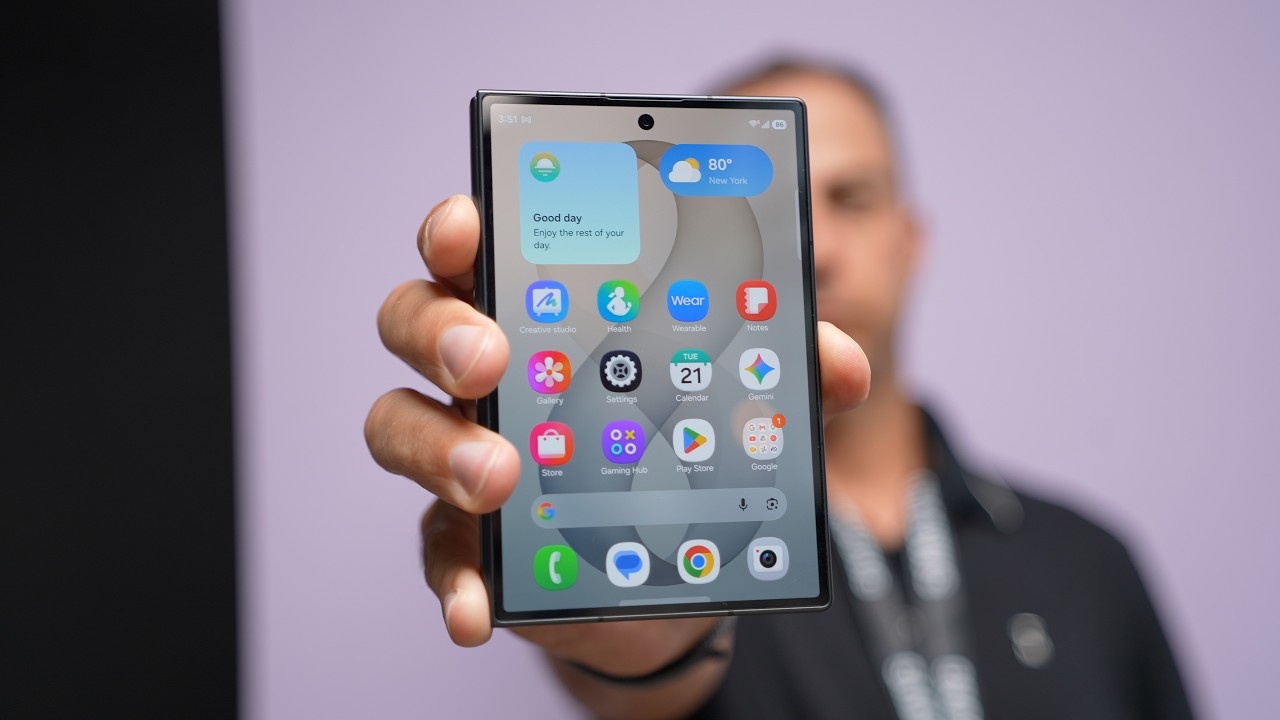
Apple's Foldable iPhone Ultra Faces a Surging Samsung Galaxy Z Fold 8

Apple's foldable iPhone is expected to arrive in September against a rival already outrunning its own forecasts.

ETNews reports Samsung is building an extra one million Galaxy Z Fold 8 units, after the 4:3 device took 70 percent of a record 1.44 million Galaxy Z8 series pre-orders. Apple's foldable display – made by Samsung – is rumored to use the same aspect ratio in the same book-style form factor.
This article, "Apple's Foldable iPhone Ultra Faces a Surging Samsung Galaxy Z Fold 8" first appeared on MacRumors.com

Discuss this article in our forums

  •  

Apple Testing Chinese Memory Chips in iPhones and MacBooks

Apple has been testing memory chips from China's ChangXin Memory Technologies (CXMT) across product lines including iPhones and MacBooks, according to a report today from The Wall Street Journal ($).


Laptop makers HP and Acer have already started using memory chips from CXMT in devices sold outside the U.S. Meanwhile, Apple has held early talks with CXMT about supplying components for devices sold in China, and the company is hoping for a sign-off from the White House before going further. The Financial Times reported last month that Apple had begun qualifying CXMT's DRAM, but today's report is the first to place that testing inside specific product categories.

What could scupper any potential deal are U.S. rules that bar American companies from transferring technology to CXMT, including conversations about technical details and product specifications. Export lawyer Kevin Wolf of Akin Gump told WSJ that Apple can buy off-the-shelf CXMT components and haggle over price, but it can't commission chips designed to its own requirements.

Apple usually has memory specially configured to work optimally with its own silicon, so using standard parts could mean reworking sections of its hardware, or potentially settling for less-than-ideal performance.

What's making Apple's life harder is the fact that a bipartisan group of senators led by Chuck Schumer has asked the company to rule out using Chinese memory entirely. A response to the request is due August 21.

There are supply issues to contend with as well. CXMT has reportedly maxed out production for the year and has little room for new international customers, having already prioritized domestic buyers such as ByteDance, Tencent, and Xiaomi. Its prices reportedly sit level with (and sometimes above) those of Micron, SK Hynix, and Samsung. That's bad news for Apple. A fourth supplier only helps if it has chips to sell and sells them cheaper. Right now though, CXMT does neither.

Apple raised prices across its product lineup (excepting iPhone models) in June, blaming memory costs driven by the AI infrastructure demand.
This article, "Apple Testing Chinese Memory Chips in iPhones and MacBooks" first appeared on MacRumors.com

Discuss this article in our forums

  •  

OLED iMac Panel Could Include Extra Layer to Fight Screen Burn-In

LG Display is developing a five-layer OLED panel structure that could end up in a future iMac, with an extra layer added to prevent screen burn-in and increase brightness, reports The Elec.


LG Display already builds four-stack OLED panels for high-resolution monitors, and arranges the light-emitting layers in a blue-green-blue-red pattern. The five-stack version reportedly under development adds a third blue layer, creating a blue-green-blue-red-blue arrangement.

Stacking on another emitting layer spreads the electrical load, which is important at high pixel densities, where each pixel gets smaller, as does the portion of it that actually emits light. Pushing more current through a smaller emitter to keep brightness up is also said to shorten panel life while making image retention more likely.

Apple last year sent requests for information to Samsung Display and LG Display about iMac OLED panel development. The specifications discussed were a 24-inch panel with 600 nits of brightness and 218 pixels per inch. The current 24-inch iMac's LCD manages 500 nits at the same density.

LG Display has already demonstrated a 27-inch 5K panel at 220 PPI with an RGB stripe subpixel layout. Given it uses the four-stack structure, it is likely not destined for an iMac, but The Elec suggests it is a gauge for high-density RGB stripe OLED and whether the company can manufacture it in volume.

The only problem with using five stacks, however, is cost. More emitting layers mean more organic material and a reportedly fiddlier deposition process. At the same time, LG Display has to reach Apple's brightness and lifespan requirements without ruining its yields in the process.

Samsung Display is developing QD-OLED for the same reason. Both suppliers are targeting 2028 to have the first iMac OLED panels developed, but a launch likely won't happen until 2029 at the earliest. Meanwhile, Apple is expected to refresh its current 24-inch LCD-based iMac with a new processor later this year.
Related Roundup: iMac
Tags: OLED, The Elec
Buyer's Guide: iMac (Don't Buy)
Related Forum: iMac

This article, "OLED iMac Panel Could Include Extra Layer to Fight Screen Burn-In" first appeared on MacRumors.com

Discuss this article in our forums

  •  

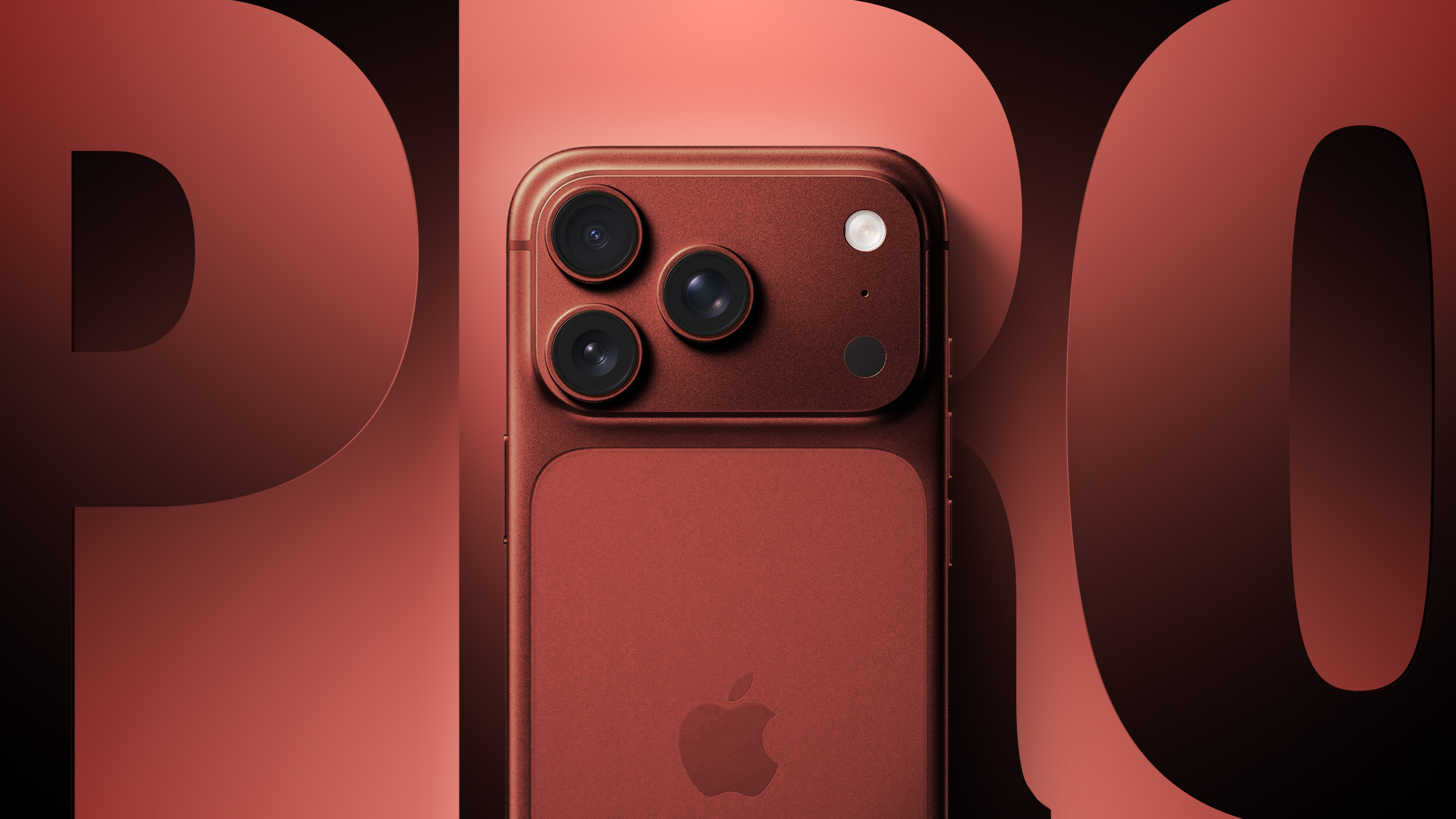
iPhone 18 Pro Costing Apple 38% More to Make, TrendForce Estimates

Apple's iPhone 18 Pro will cost nearly 40 percent more to build than its predecessor because of soaring memory prices, according to new data analyzed TrendForce.


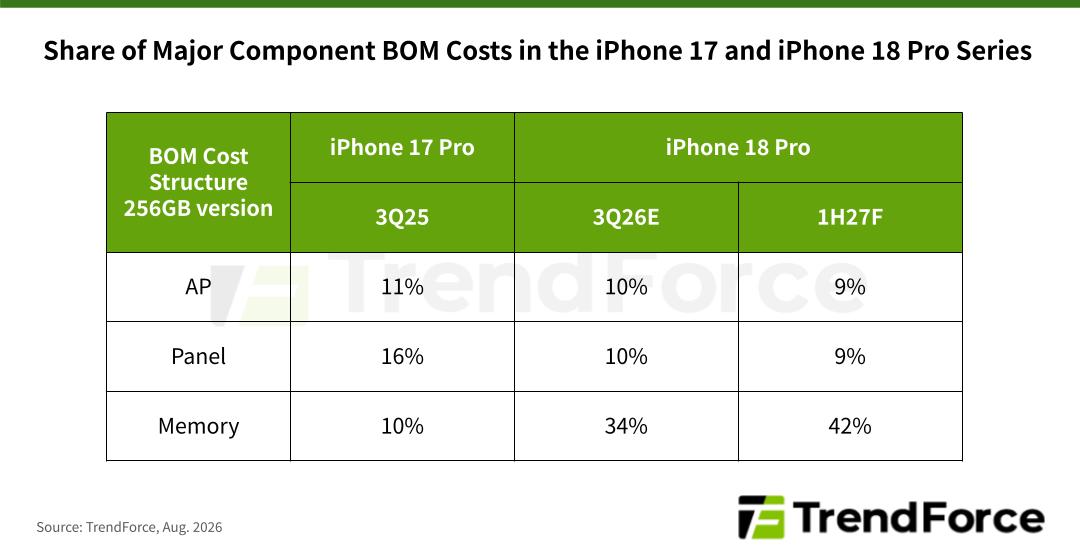
The research firm's latest smartphone analysis puts the bill of materials for the 256GB iPhone 18 Pro roughly 38 percent above the equivalent iPhone 17 Pro, and says higher retail prices will be unavoidable as a result.

Memory is said to have accounted for about 10 percent of the 256GB iPhone Pro's total component cost a year ago. TrendForce estimates that figure at roughly 34 percent in the third quarter of 2026, rising past 40 percent in the first half of 2027. Panel and application processor costs, once the two biggest line items, drop to single-digit percentages by that point, given memory has taken up so much of the overall cost.

TrendForce expects Apple to take the same approach it used with recent MacBook launches by giving up part of its gross margin to keep the increase palatable with customers and protect shipment volumes. It also suggests Apple could raise prices on older iPhone models at the same time as the new lineup arrives, thereby spreading the cost recovery across the range.


TrendForce notes that memory prices have climbed five- to sevenfold since the start of 2025, and expects Android vendors in the entry-level and mid-range segments to raise prices more steeply than Apple. That, or they could drop product lines outright.

Apple raised prices across the Mac, iPad, Apple TV, HomePod, and Vision Pro lines in June over concerns about the same memory crunch. The iPhone lineup escaped that round, but it looks increasingly unlikely that it will escape the next one.

Apple is expected to announce the iPhone 18 Pro, iPhone 18 Pro Max, and its first foldable iPhone "Ultra" next month.
Related Roundup: iPhone 18 Pro

This article, "iPhone 18 Pro Costing Apple 38% More to Make, TrendForce Estimates" first appeared on MacRumors.com

Discuss this article in our forums

  •  

Apple Dropped Plan to Ship Leased iPhones Already Set Up for Users

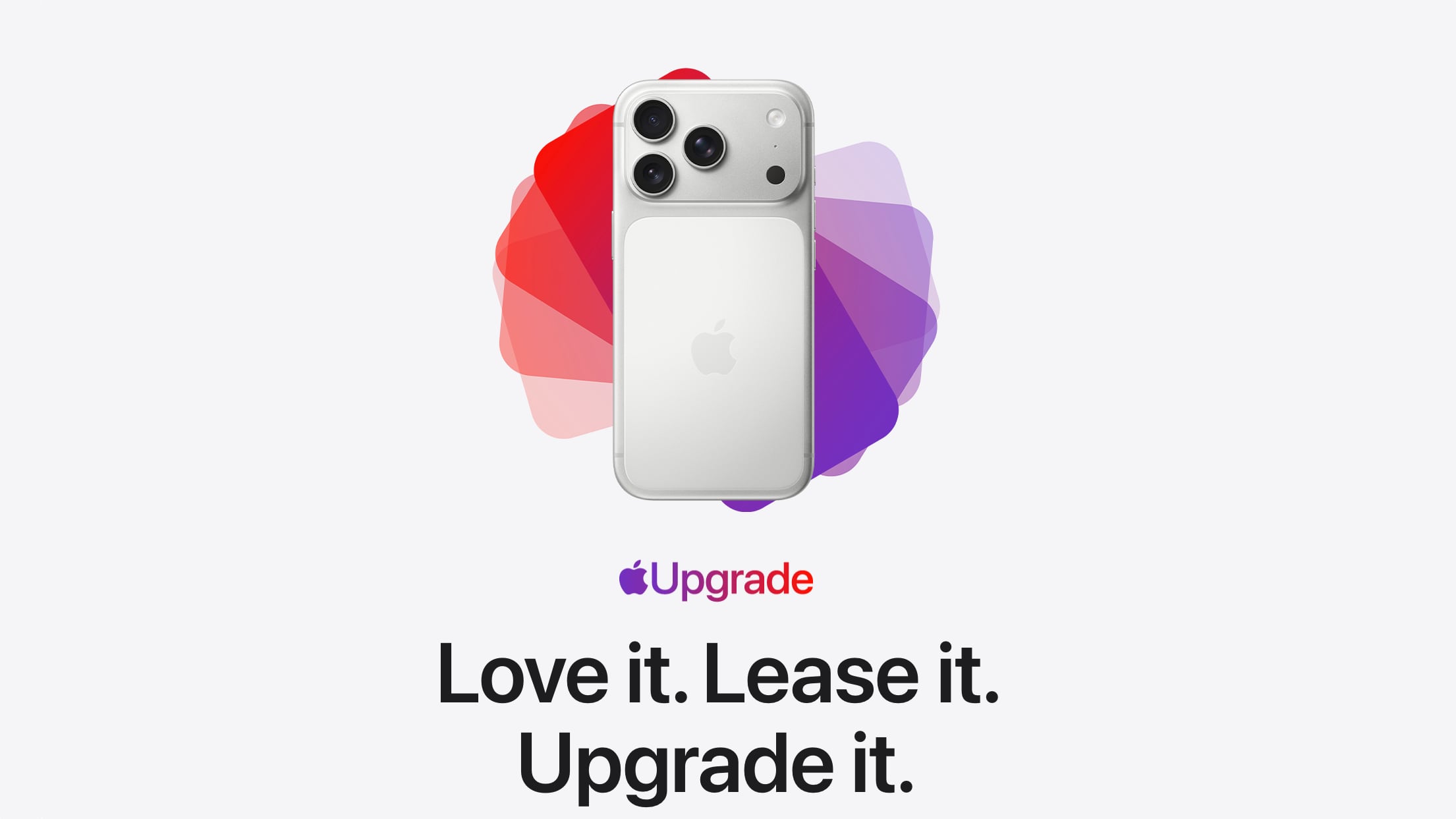
Apple considered a so-called "white-glove" element for its Apple Upgrade leasing program that would have delivered each new replacement device already loaded with the customer's data, but the idea never made it out of planning, according to Bloomberg's Mark Gurman.


Apple Upgrade launched in the U.S. on July 28, replacing the iPhone Upgrade Program and iPhone Payments. The plan lets customers lease an iPhone, iPad, Mac, or Apple Watch rather than buy one outright or pay in installments. iPhone and Apple Watch leases run 12 or 24 months, while Mac and iPad terms are 24 or 36 months. At the end of a term, customers return the device, pay off the balance and keep it, or trade up to a new lease.

In his latest Power On newsletter, Gurman reports that when the concept was first discussed years ago, Apple also weighed the idea of having each year's device arrive at the customer's door ready to use, restored from their iCloud backup before it shipped. The version of Apple Upgrade that was actually launched last month includes nothing of the sort.

Setting up a new iPhone can be a notoriously drawn-out process, and the feature would have removed that step from launch day entirely. Gurman believes however that the privacy optics may have put Apple off the idea.

Gurman says the technical side was never the obstacle. Rather, Apple may have decided the idea of receiving a new iPhone with personal account data pre-installed on it could be unnerving for some customers, provoking questions about how the data was transferred and whether anyone could have accessed it.
This article, "Apple Dropped Plan to Ship Leased iPhones Already Set Up for Users" first appeared on MacRumors.com

Discuss this article in our forums

  •  

New MacBook Pro and Refreshed iMacs Likely Coming in October

Apple is likely to unveil a new M6 MacBook Pro and refreshed iMacs in October, based on its typical release schedule, according to Bloomberg's Mark Gurman.


Writing in the latest edition of his Power On newsletter, Gurman reiterated his belief that Apple is readying the launch of a refreshed base-model MacBook Pro with a 14-inch display powered by an M6 chip.

The base model is expected ahead of new high-end MacBook Pro models with OLED displays and M5 Pro and M5 Max chips, which could arrive between the end of this year and early 2027. Gurman reported last month that Apple was testing the laptops with macOS 27.1, which is scheduled for release to consumers at the end of October.

As for iMacs, the new version is likely to be an updated 24-inch model with an M5 chip or M6 chip, replacing the existing M4 model. No major design changes are expected, with Apple also reportedly developing a 24-inch iMac with an OLED display, though that won't arrive for several years.
Related Roundup: MacBook Pro
Buyer's Guide: MacBook Pro (Buy Now)
Related Forum: MacBook Pro

This article, "New MacBook Pro and Refreshed iMacs Likely Coming in October" first appeared on MacRumors.com

Discuss this article in our forums

  •  

Apple Account Card Expands Again: What It Is and What It Isn't

Apple this week expanded support for its Apple Account Card in the Wallet app to Estonia, Latvia, Lithuania, and Malta. The Apple Account Card option for Wallet started rolling out in 2022, and Apple has been gradually expanding the feature to more countries since then.


What is the Apple Account Card?


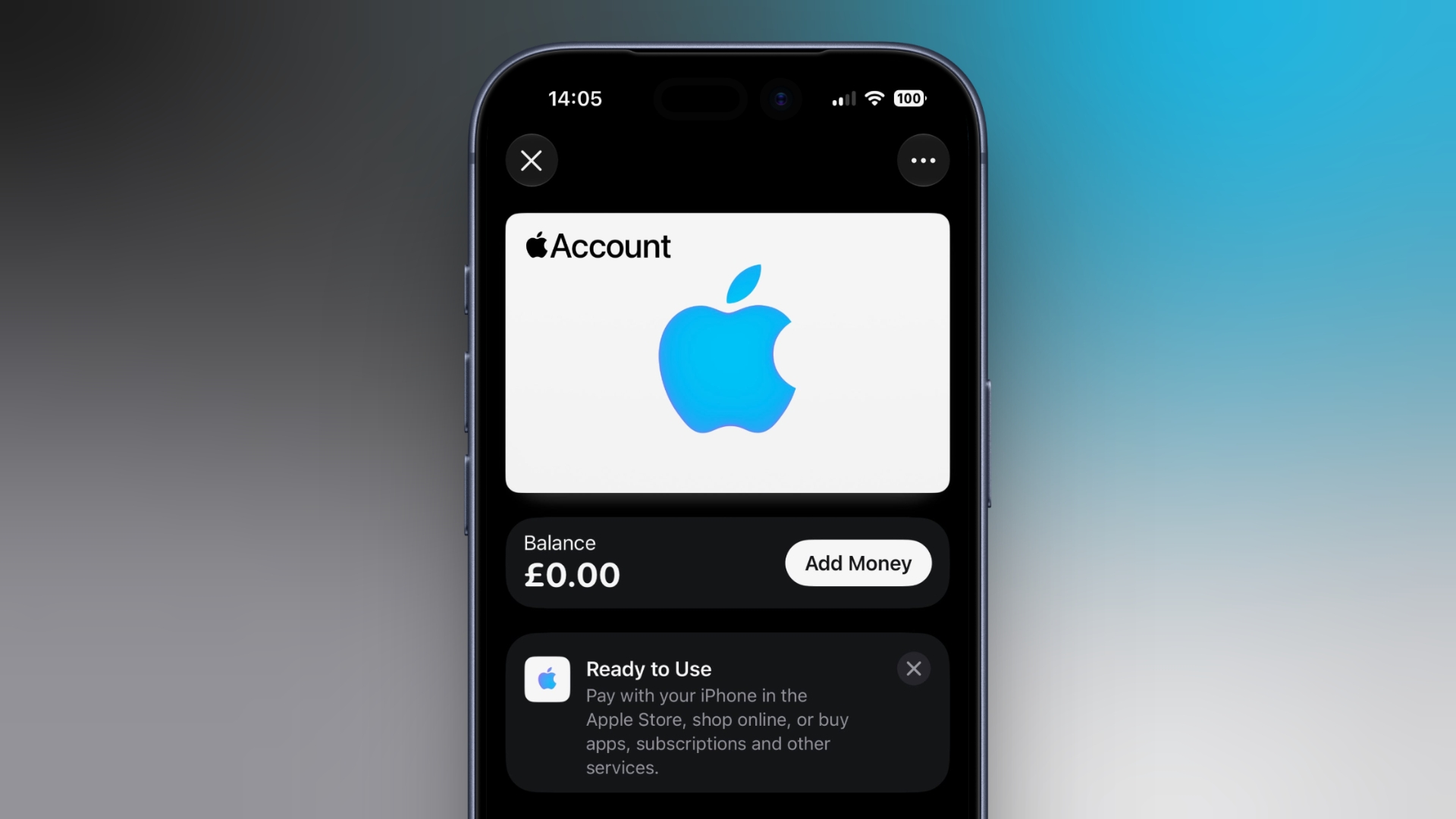
So what is it, exactly? The card displays the balance associated with a user's Apple Account (formerly Apple ID), and it can be used to make purchases in any brick-and-mortar Apple Store and online at Apple.com. It can also be used to buy apps in the App Store, as well as subscriptions and other Apple services.

It's also where the credit goes if you use it to redeem an Apple Gift Card. An Apple Account Card can also be topped up using a linked debit or credit card (via the "Add Money" option in Wallet).

It's NOT an Apple Credit Card


Note that an Apple Account Card is different from Apple Card, the latter of which is a straightforward digital and physical credit card for making financial transactions at contactless payment terminals (via Apple Pay), as well as in stores, restaurants, and other locations where Apple Pay isn't yet accepted.

Comparatively, an Apple Account Card is a digital-only card for money available in your Apple Account balance. There's no credit line, no interest, and no rewards attached. Neither is there a physical version of the Apple Account Card. You can't send money to a friend with it, and the balance isn't something you can cash out.

Apple Account Card – Supported Regions


As well as the regions mentioned at the start of this article, Apple Account Cards are supported in the following countries:

  • Australia

  • Austria

  • Belgium

  • Canada

  • Czechia

  • Denmark

  • Finland

  • Hong Kong

  • Ireland

  • Italy

  • Japan


  • Luxembourg

  • Mexico

  • Norway

  • Poland

  • Portugal

  • Spain

  • Sweden

  • Switzerland

  • the UK

  • U.S.

  • United Arab Emirates


One thing to note: Paying in person at an Apple Store with an Apple Account Card (by double-clicking the side button and holding your iPhone to the reader) isn't available in every country or region, and neither are all of the card's other features. Apple hasn't yet said whether the four new regions that it most recently expanded to will get the full range of usage options.

Add an Apple Account Card to Wallet


wallet
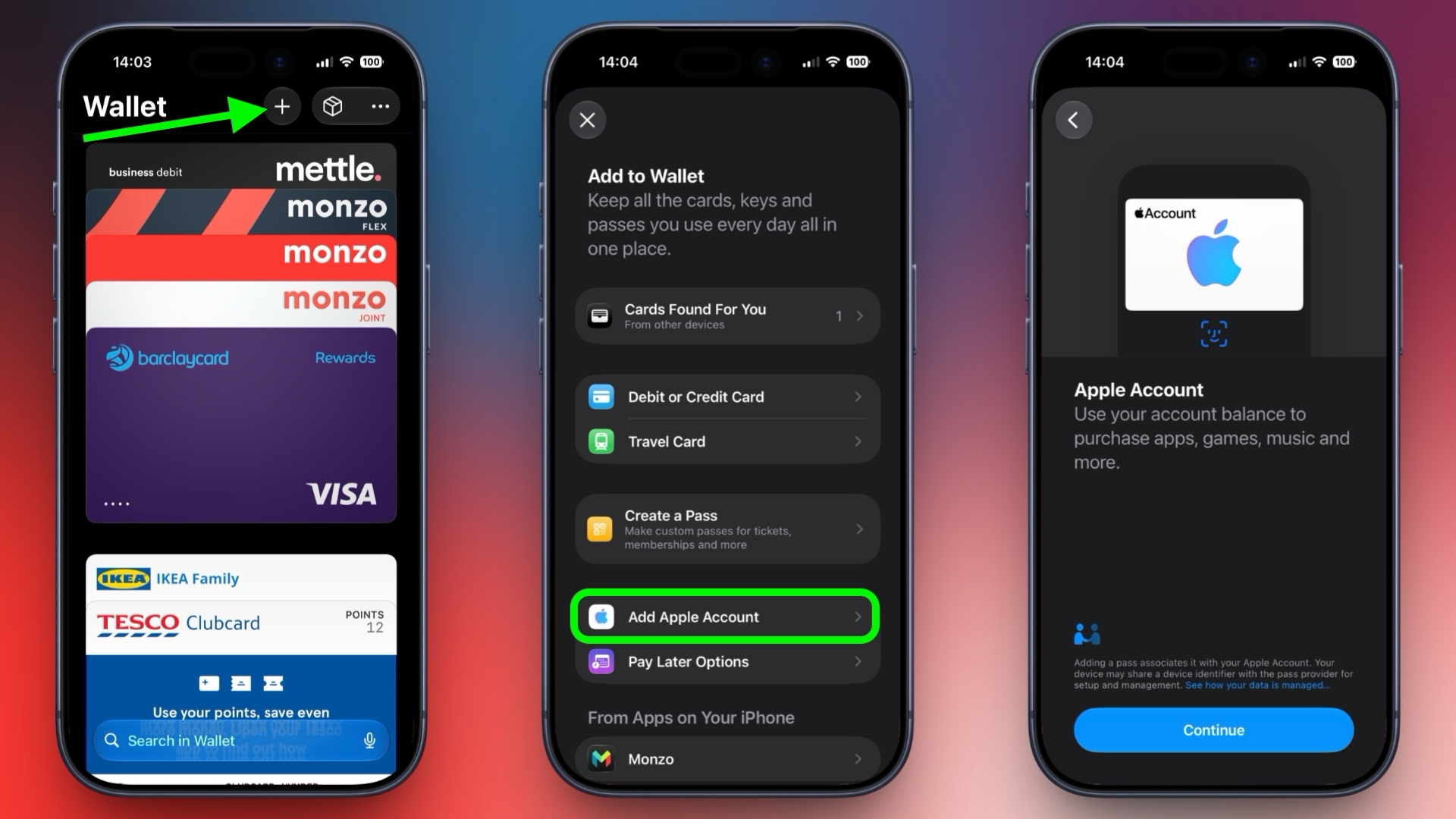
To add an Apple Account Card to your iPhone's Wallet app, open Wallet, tap the plus (+) button, then tap Add Apple Account. Tap Continue, then give it a few moments while it's linked to your Apple Account. Once it's in your Wallet, your balance and any recent transactions will appear below the card.
This article, "Apple Account Card Expands Again: What It Is and What It Isn't" first appeared on MacRumors.com

Discuss this article in our forums

  •  

iOS 27's New Compact Clock Gives Your Wallpaper Room to Breathe

In iOS 26, Apple let you stretch the Lock Screen clock down your iPhone's display until it dwarfed everything else. In iOS 27, Apple has a new clock option that does the opposite, with the introduction of a compact mode that shrinks the time to roughly the size of the date and tucks it into the row at the top of the screen.

betsy-cat-lock-screen
The result is a Lock Screen that genuinely shows off your wallpaper, while still displaying the time and date. If you picked a photo that looks better in its complete framing, this is the first time iOS gives you the opportunity to see more of it unobstructed.

How to Switch to the Compact Clock


The following steps show you how it's done.

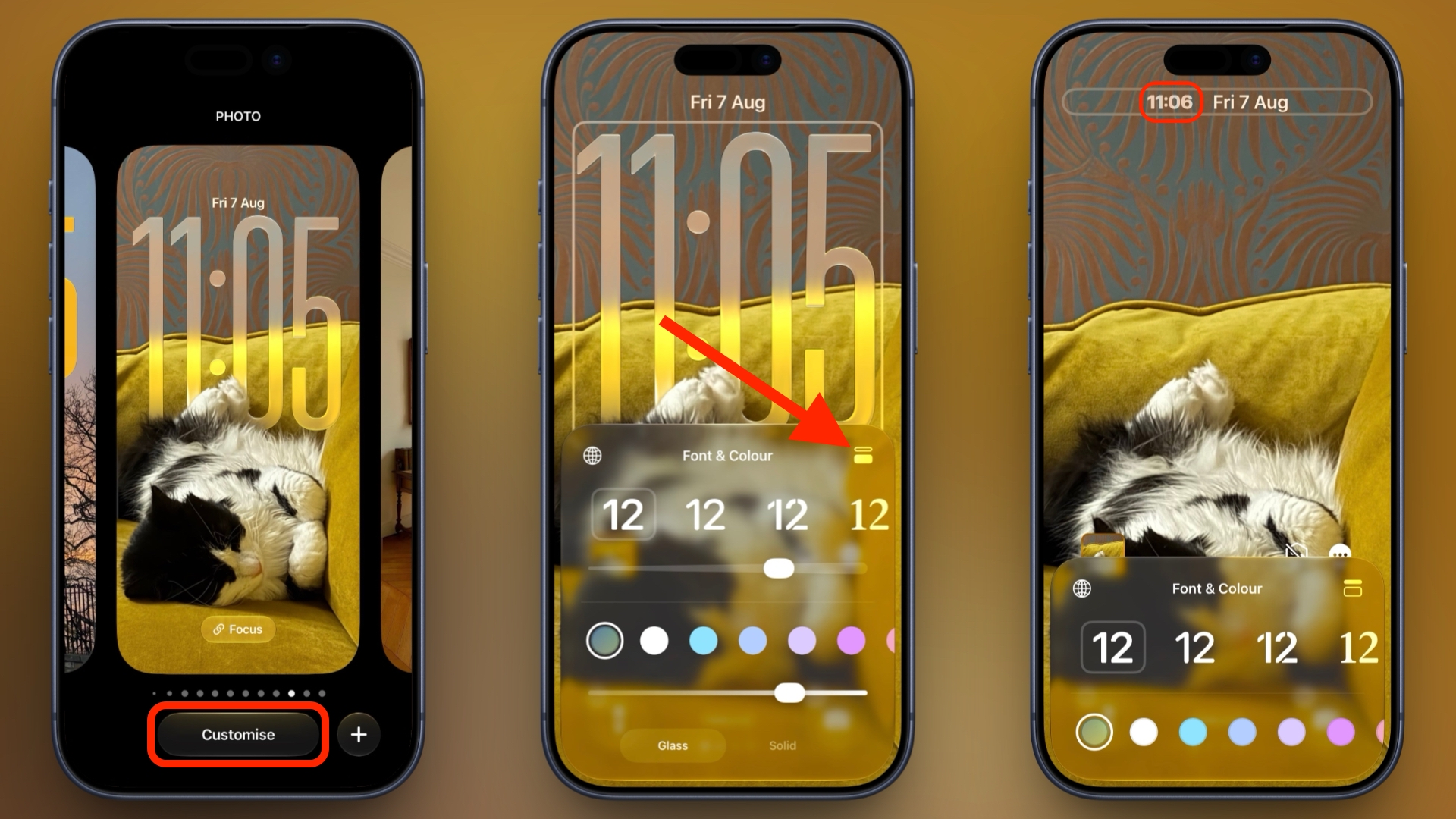
  1. Touch and hold the Lock Screen, then tap Customize.

  2. Tap inside the currently set clock frame to open the Font & Color panel.

  3. Tap the new icon made of two horizontal bars in the top-right corner of the panel to set the clock to compact mode.

  4. If you're happy with the new look, tap anywhere else on the wallpaper, then tap Done in the top-right corner of the screen.

compact clock steps

You'll see that the clock shrinks immediately and moves up beside the date, so you can judge the effect against your wallpaper before saving. To go back, simply tap the same icon in the Font & Color panel again. The clock will return to its previous position and size.

Customizations


The new compact clock keeps your existing clock customizations like font, weight, and color, and these can still be adjusted, but you do lose access to the Liquid Glass slider in compact mode.

Bear in mind that the option applies to individual Lock Screens rather than being a global setting, so you can have a compact clock on one wallpaper and a full-size one on another – for a Focus mode, for example. iOS 27 is currently in public beta with general availability expected in September.
Related Roundups: iOS 27, iPadOS 27

This article, "iOS 27's New Compact Clock Gives Your Wallpaper Room to Breathe" first appeared on MacRumors.com

Discuss this article in our forums

  •  

Set a Custom EQ for Your AirPods in iOS 27

Sony, Bose, and Sennheiser owners have been able to adjust the audio frequency spectrum of their headphones for years, whereas AirPods owners have had to make do with Apple's default tuning. That's no longer the case in iOS 27, which adds a three-band equalizer to the AirPods settings screen.


It's worth noting that iOS has had an EQ setting for years – it's buried in Settings ➝ Apps ➝ Music, but it applies only to Apple Music playback, and works on any pair of headphones. In iOS 27, the new EQ is specifically tied to your AirPods, so it applies to everything you listen to. Your custom EQ profile also carries over to iPad and Mac when you pair your AirPods with them.

What You Need


Custom EQ requires Apple's H2 chip, so it supports AirPods Pro 2, AirPods Pro 3, AirPods 4, and AirPods Max 2. Earlier models, including the original AirPods Max, aren't compatible with the feature.

You'll also need current AirPods beta firmware. If the Equalizer option described below doesn't appear, pair your AirPods with your iPhone, tap your AirPods in Settings, then tap AirPods Beta Updates and toggle on the beta updates option. Afterwards, put your AirPods in the case, connect the case to power, and leave it near your unlocked iPhone to let the latest beta firmware install quietly in the background. It shouldn't take more than half an hour.

How to Adjust Your AirPods EQ


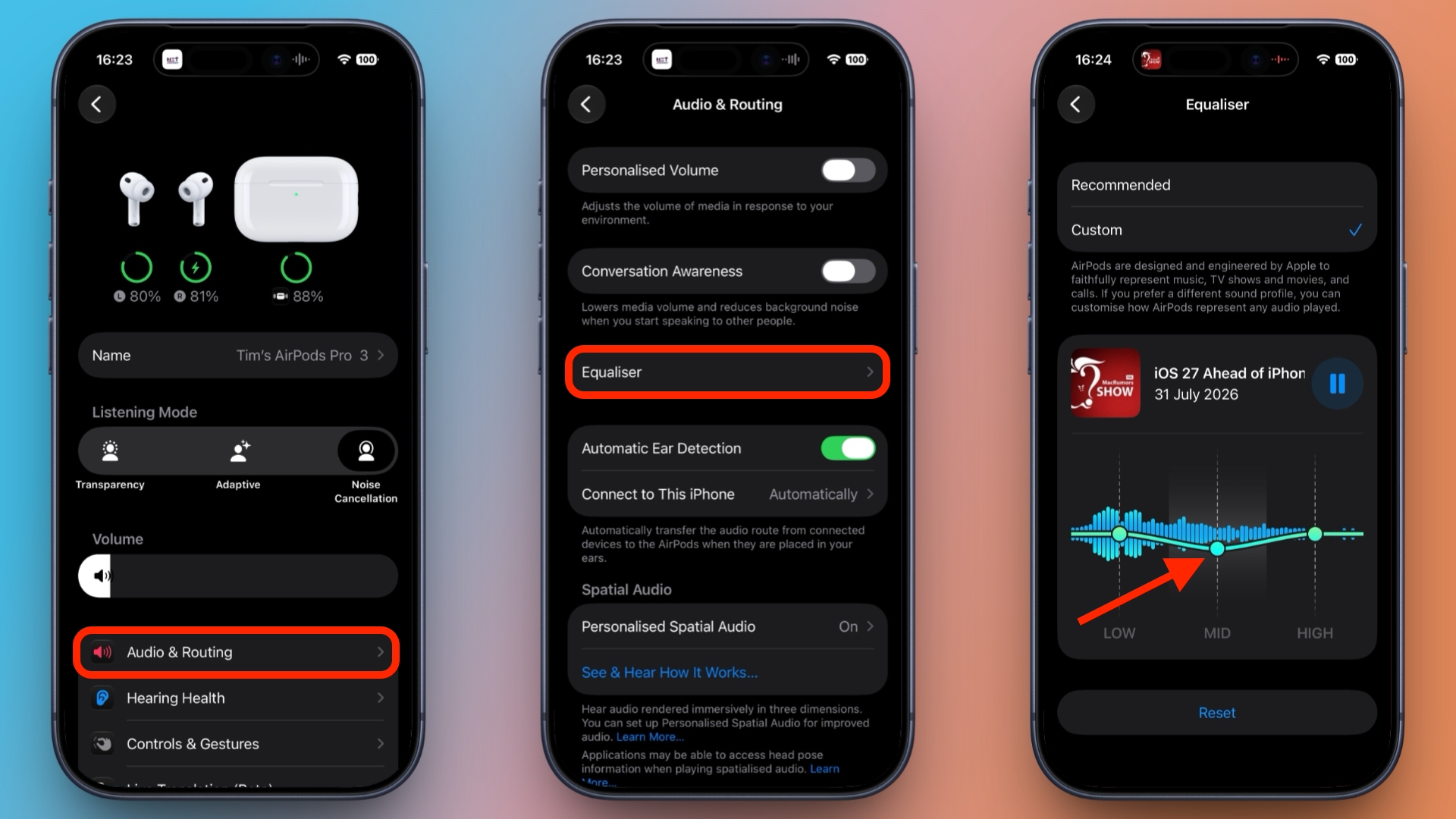
  1. With your AirPods connected, open Settings on your iPhone.

  2. Tap your AirPods at the top of the screen.

  3. Tap Audio & Routing.

  4. Tap Equalizer.

  5. Tap Custom, then drag the low, mid, and high points up or down.

settings
You should see a media playback control above the EQ showing the last thing you listened to, allowing you to hear how your adjustments sound in real time. Lows cover bass weight, mids carry vocals and most instruments, and highs handle treble detail and sibilance.

To undo your changes, simply tap Reset, or choose Recommended at the top to restore Apple's default profile. You'll find all the same options in iPadOS 27, as well as in macOS 27 Golden Gate (in System Settings).

iOS 27 and Apple's other upcoming software updates remain in public beta for now, with a general release expected sometime this September.
Related Roundups: AirPods 4, iOS 27, iPadOS 27
Buyer's Guide: AirPods (Caution)
Related Forum: AirPods

This article, "Set a Custom EQ for Your AirPods in iOS 27" first appeared on MacRumors.com

Discuss this article in our forums

  •  

iPhone 18 Pro Models Could Be Up to $300 More Expensive, Says Analyst

This year's iPhone 18 Pro and iPhone 18 Pro Max could be $250-$300 more expensive than existing iPhone 17 Pro models due to higher silicon and memory costs, an analyst claimed today.


According to an earnings note by Jeff Pu of GF Securities, higher 2nm silicon and DRAM/NAND costs could drive the price hikes, as Apple grapples with global component shortages owing to the AI infrastructure buildout.

Currently, the iPhone 17 Pro and iPhone 17 Pro Max start at $1,099 and $1,199, respectively. In June, Apple increased the prices of iPads, Macs, HomePods, the Apple TV, and the Vision Pro. iPhone models were spared similar hikes. Pu believes price hikes on the next-generation Pro models could create "demand uncertainty." The analyst has subsequently downgraded AAPL from buy to hold.

It's a shift of tone from Pu, who in May said Apple could price the iPhone 18 Pro models "aggressively," despite rising memory costs.

During the company's Q3 earnings call on Thursday, outgoing Apple CEO Tim Cook did not comment on whether Apple plans to raise iPhone prices when the iPhone 18 Pro models and first foldable launch this September, but many analysts believe prices will go up.

This September, Apple is expected to unveil the iPhone 18 Pro models alongside its first foldable iPhone, which is expected to cost north of $2,000. The regular iPhone 18, iPhone 18e, and iPhone Air 2 are expected to launch in spring 2027.
Related Roundup: iPhone 18 Pro
Tag: Jeff Pu

This article, "iPhone 18 Pro Models Could Be Up to $300 More Expensive, Says Analyst" first appeared on MacRumors.com

Discuss this article in our forums

  •  
❌