Lees weergave

Meta's New AI Image Tool Can Use Your Public Instagram Photos by Default

Meta is rolling out a new feature that lets people use public Instagram posts and reels to generate AI content, and it's turned on by default.

If you have an Instagram account that's not set to private, there is a setting allowing anyone to generate content on ‌Meta‌ AI using your images and videos. The option was added to support ‌Meta‌'s new image generation model, Muse Image. Muse Image is rolling out across Instagram, WhatsApp, and ‌Meta‌ AI, and it pulls in images from an Instagram account with just an @-mention. From ‌Meta‌'s description of Muse Image:
You can also @-mention Instagram accounts in the Meta AI app to bring specific Instagram profiles right into your images. Whether you want to design a custom event invitation, mock up a collaborative creative concept, or generate a personalized graphic, tagging a username lets Meta AI use public photos to build a visual that's ready to post.

An Instagram help page explains that content on public Instagram accounts can be used for creating content with AI features, and you won't get a notification if someone uses your content to create an AI image.
If your account is public: Anyone on Instagram can reuse all or part of your reels, feed videos, and photos shared after reuse became available. Reels, feed videos, and photos can be reused in features like remix, sequence, templates and stickers. In addition, people may be able to create content with your Instagram content using AI features at Meta.

‌Meta‌ opts all public Instagram accounts in by default, but there is an option to turn off AI permissions. In the Instagram app settings, scroll to Sharing and Reuse, then toggle off "Posts" and "Reels" under the "Allow people to create with and reuse your content on Instagram and with AI features at ‌Meta‌."

Turn off the setting now if you don't want people using your content to create AI images, because AI content created prior to turning it off isn't deleted. Muse Image is still rolling out, and so is the toggle to turn off AI use. You may not see the opt-out option right away. Private Instagram profiles aren't included in Muse Image.

‌Meta‌ plans to expand Muse Image to Facebook and Messenger soon, and allow advertisers and agencies to use Muse Image to create content in the coming weeks. ‌Meta‌ is also working on a Muse Video feature.
This article, "Meta's New AI Image Tool Can Use Your Public Instagram Photos by Default" first appeared on MacRumors.com

Discuss this article in our forums

  •  

Nintendo Shutting Down Mario Kart Tour iOS Game

Nintendo today said it is ending service for its Mario Kart Tour mobile game on Tuesday, September 29. There are no plans for an offline version of the game, so it will no longer be playable after that date.


In-game currency is no longer available for purchase, and Nintendo has ended automatic subscription renewals ahead of the shutdown date.

Players who had a Mario Kart Tour Gold Pass subscription will be able to use the benefits for free from now until September 29, while players who did not have a subscription will get the benefits starting on August 4.

The Gold Pass includes Gold Gifts, Gold Challenges, 200cc, an increase in the maximum coins and points that can be earned per day, and a pipe gauge that fills faster. Players who have rubies can use the currency in the Spotlight Shop, Mii Racing Suit Shop, and Coin Rush until service ends.

Mario Kart Tour launched in September 2019 and it was downloaded more than 90 million times during its first week of availability.

Like traditional Mario Kart games, Mario Kart Tour on iPhone and iPad tasked players with racing to beat their rivals to the finish line, using drifts and items to succeed. The game featured several tracks, and playable characters like Luigi, Toad, Shy Guy, Waluigi, Peach, and Toadette.

Nintendo has launched and then canceled several mobile games, including Animal Crossing: Pocket Camp, Miitomo, Dr. Mario World, and Dragalia Lost. Fire Emblem Heroes, Super Mario Run, and new game Pictonico continue to be available.
This article, "Nintendo Shutting Down Mario Kart Tour iOS Game" first appeared on MacRumors.com

Discuss this article in our forums

  •  

OpenAI Introduces GPT-Live to Make ChatGPT Voice Feel Like a Real Conversation

OpenAI today introduced GPT-Live, which it describes as a new generation of voice models meant to make talking to AI feel more like having a conversation with a real person. GPT-Live is meant to replace the existing ChatGPT voice experience.


GPT-Live is able to listen and speak at the same time, and it can show it is paying attention with acknowledgment phrases like "mhmm." The model was built for continuous interaction, and it can make decisions on whether to speak, continue listening, pause, interrupt, or use a tool multiple times per second.
Talking with ChatGPT should now feel much more like a real conversation. You can interrupt with a question, pause to gather your thoughts, or ask ChatGPT to slow down. It naturally acknowledges what you're saying with phrases like "mhmm" or "got it," so you know it's following along. We've also remastered the nine distinct voices in ChatGPT for GPT-Live.

OpenAI says GPT-Live is its smartest voice model to date, using the latest frontier model (currently GPT–5.5) for web search, deep reasoning, and complex work. While GPT-Live works on a task, it is able to continue a conversation, and then give the results of a task when it's finished. It also works for live translation, and displays rich visual cards for weather, stocks, sports, and more.

OpenAI is rolling out GPT-Live–1 and GPT-Live–1 mini to ChatGPT users worldwide starting today. GPT-Live–1 is the default for Go, Plus, and Pro users, while GPT-Live–1 mini is the default for Free users.

ChatGPT users can tap the Voice button to talk with ChatGPT and experience GPT-Live. GPT-Live does not yet support voice with video or screen sharing in ChatGPT, but OpenAI is working to add that feature soon.
This article, "OpenAI Introduces GPT-Live to Make ChatGPT Voice Feel Like a Real Conversation" first appeared on MacRumors.com

Discuss this article in our forums

  •  

Apple TV Earns Record 87 Emmy Nominations for 2026, Led by 'Pluribus' and 'Widow's Bay'

Apple earned its highest number of Emmy nominations to date in 2026, with popular shows like Pluribus, Margo's Got Money Troubles, Widow's Bay, Shrinking, and Slow Horses earning the most nominations. New series Widow's Bay received 19 nominations, while Pluribus was second with 18 nominations.


The five most highly nominated shows are up for best series in their respective categories, and have also earned several lead actress and actor nominations.

Pluribus


  • Outstanding Drama Series

  • Outstanding Lead Actress in a Drama Series - Rhea Seehorn, Carol Sturka

  • Outstanding Supporting Actor in a Drama Series - Carlos-Manuel Vesga, Manousos

  • Outstanding Supporting Actress in a Drama Series - Karolina Wydra, Zosia

  • Outstanding Guest Actress in a Drama Series - Miriam Shor, Helen

  • Outstanding Guest Actor in a Drama Series - Jeff Hiller, Larry

  • Outstanding Writing for a Drama Series

  • Outstanding Directing for a Drama Series


Margo's Got Money Troubles


  • Outstanding Comedy Series

  • Outstanding Lead Actress in a Comedy Series - Elle Fanning

  • Outstanding Supporting Actor in a Comedy Series - Nick Offerman, Jinx Millet

  • Outstanding Supporting Actress in a Comedy Series - Michelle Pfeiffer, Shyanne Millet


Slow Horses


  • Outstanding Drama Series

  • Outstanding Lead Actor in a Drama Series - Gary Oldman, Jackson Lamb

  • Outstanding Supporting Actor in a Drama Series - Jack Lowden, River Cartwright

  • Outstanding Guest Actor in a Drama Series - Jonathan Pryce, David Cartwright

  • Outstanding Directing for a Drama Series

  • Outstanding Writing for a Drama Series


Shrinking


  • Outstanding Comedy Series

  • Outstanding Lead Actor in a Comedy Series - Jason Segel, Jimmy

  • Outstanding Supporting Actress in a Comedy Series - Jessica Williams, Gaby

  • Outstanding Supporting Actor in a Comedy Series - Harrison Ford, Paul

  • Outstanding Supporting Actor in a Comedy Series - Michael Urie, Brian

  • Outstanding Guest Actor in a Comedy Series - Brett Goldstein, Louis

  • Outstanding Guest Actor in a Comedy Series - Michael J. Fox, Gerry


Widow's Bay


  • Outstanding Comedy Series

  • Outstanding Lead Actor in a Comedy Series - Matthew Rhys, Mayor Tom Loftis

  • Outstanding Supporting Actress in a Comedy Series - Dale Dickey, Rosemary

  • Outstanding Supporting Actor in a Comedy Series - Stephen Root, Wyck

  • Outstanding Supporting Actress in a Comedy Series - Kate O'Flynn, Patricia

  • Outstanding Guest Actress in a Comedy Series - Betty Gilpin, Sarah Westcott Warren

  • Outstanding Guest Actor in a Comedy Series - Hamish Linklater, Richard Warren

  • Outstanding Directing for a Comedy Series

  • Outstanding Writing for a Comedy Series


The Morning Show


  • Outstanding Supporting Actor in a Drama Series - Billy Crudup, Cory Ellison


Your Friends & Neighbors


  • Outstanding Drama Series


Apple also received nominations in categories for music, sound, picture editing, and more. Other titles up for those awards include Murderbot, Mr. Scorsese, Palm Royale, and Monarch: Legacy of Monsters.

The full list of nominations can be found on the Television Academy website. Winners will be announced live on Monday, September 14 at 5:00 p.m. Pacific Time on NBC.
Related Roundup: Apple TV
Buyer's Guide: Apple TV (Don't Buy)

This article, "Apple TV Earns Record 87 Emmy Nominations for 2026, Led by 'Pluribus' and 'Widow's Bay'" first appeared on MacRumors.com

Discuss this article in our forums
  •  

iOS 27: 13 Ways the Messages App is Smarter and Less Annoying

The Messages app is arguably the most important app on the iPhone, and in iOS 27, Apple is adding some useful improvements. There are some quality-of-life fixes for longtime issues, and new AI features.


Contextual Suggestions


Messages uses Apple Intelligence to surface one-tap suggestions based on what's being discussed in a conversation. If someone you're talking to asks you to send a photo, Messages recognizes the request and suggests adding the relevant photos.


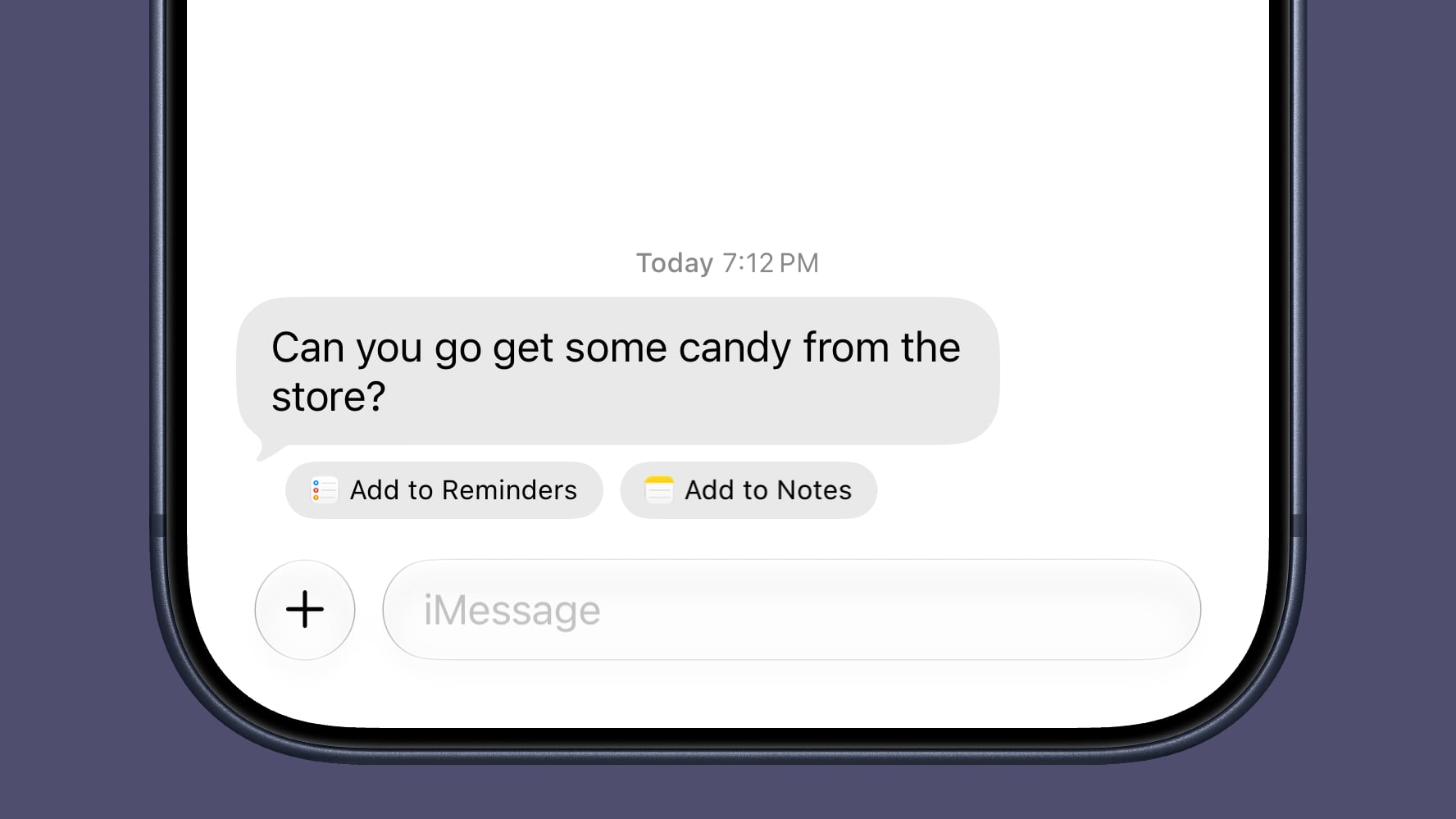
If someone invites you to an event, Messages offers to add it to your Calendar. If someone asks you to pick something up at the store, Messages will suggest adding it to your Reminders list or to the Notes app.

Messages will also suggest Genmoji you might want to generate based on the conversation.

Write With Siri


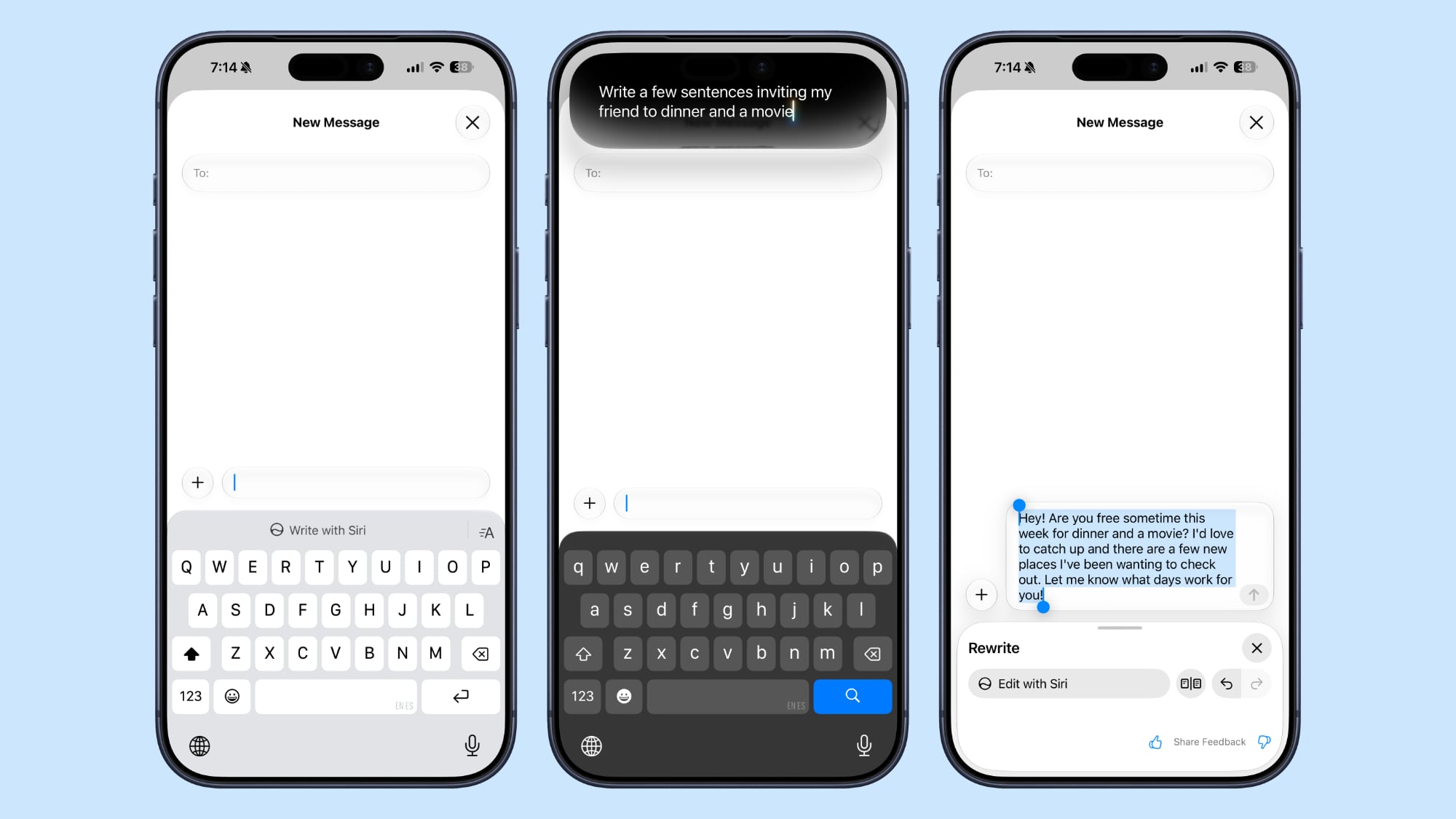
There's a systemwide Write with Siri feature that's available in the Messages app. ‌Siri‌ AI can compose entire messages for you, proofread your messages, or give you feedback.


There is a dedicated Write with ‌Siri‌ button above the keyboard where you can get to the new ‌Siri‌ tools.

Smart Reply suggestions also use your writing style so they sound more natural.

Siri AI


‌Siri‌ AI integrates with the Messages app. You can ask ‌Siri‌ to find images, videos, links, addresses, phone numbers, and more in the Messages app, plus ‌Siri‌ can draft message replies and act on info in the Messages app, like adding an event date to the Calendar app.

Drawing


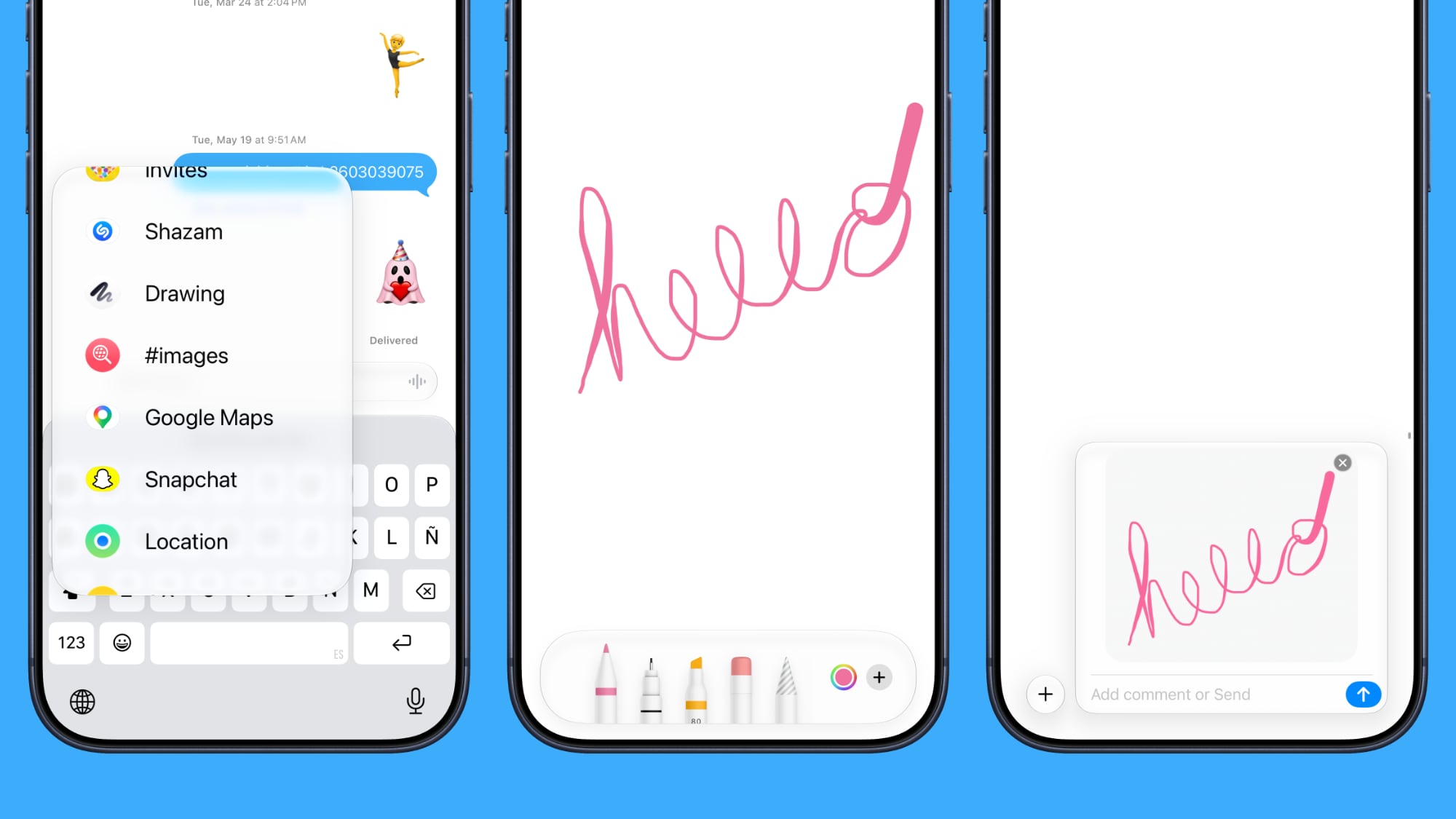
You can use a new Drawing interface in the Messages app to send little sketches and notes. It's available when tapping on the "+" button next to the text bar in a conversation.


The drawing interface is the same as the Markup tool available in apps like Photos and Notes. There's a marker, a pen, a highlighter, and an eraser, plus options to use the tools in any color.

Accidental Recordings


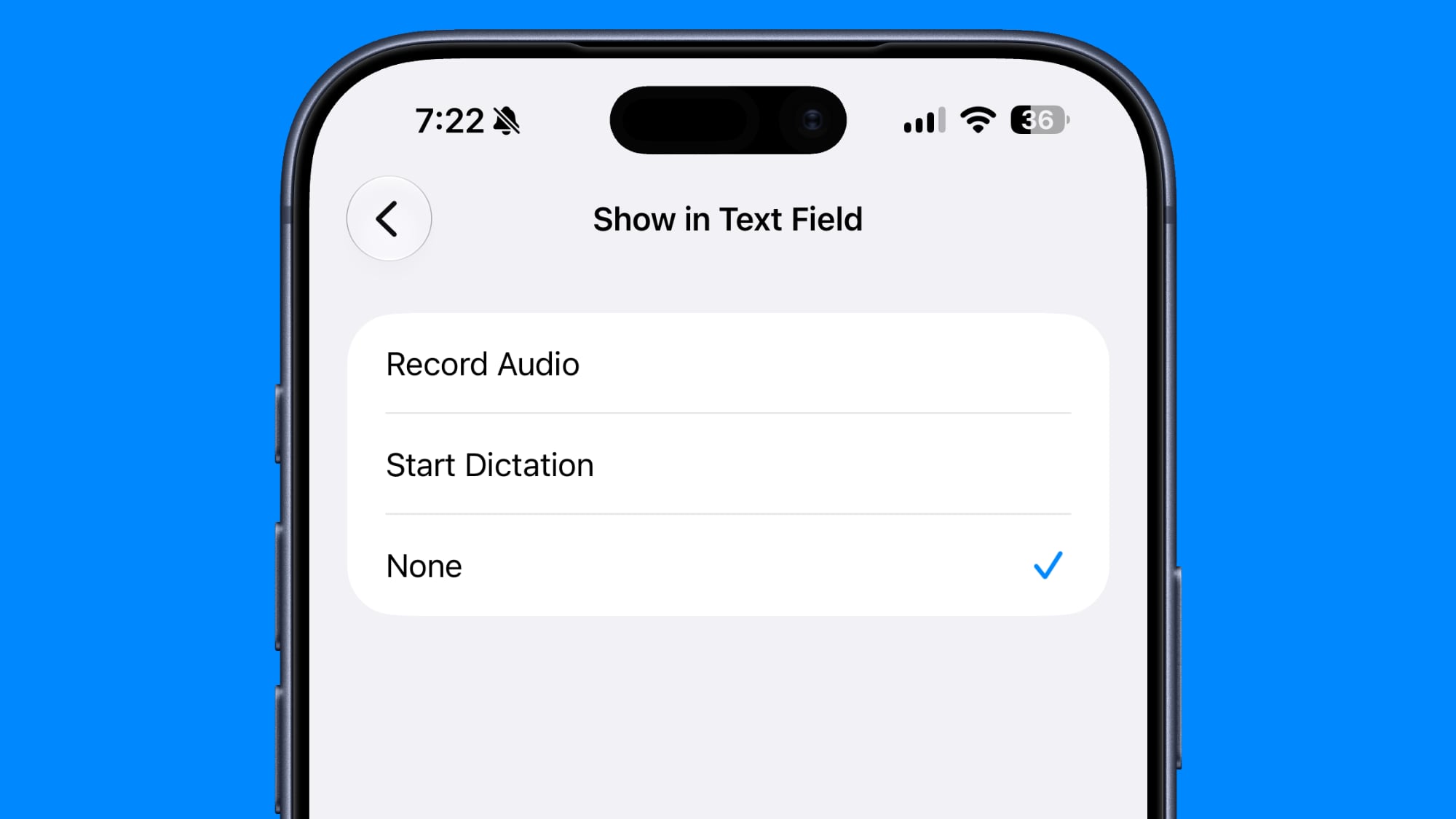
The ‌iOS 27‌ Messages app includes an option to remove the audio button from the text bar. In the Messages section of the Settings app, you can navigate to Show in Text Field to set the right-side button to Record Audio, Start Dictation, or None.


Setting the option to none will prevent you from accidentally recording a voice message with an errant tap.

Tapbacks


Messages now consolidates notifications for Tapback responses, which is useful when you're in a group thread and tons of people are sending emojis.

Sending


When a message fails to send in ‌iOS 27‌, your iPhone will automatically retry sending it. In iOS 26, you get an alert if a message fails, but you have to manually tap to try to send it again.

The Messages app also supports continuous sending of photos, videos, and texts. If you're sending someone a photo and your connection is poor or you go offline, it automatically resumes sending when the connection is restored.

Syncing


Cross-device syncing is improved in ‌iOS 27‌, so conversations will sync more reliably across the iPhone, iPad, Mac, Apple Watch, and Vision Pro. Fewer messages will fail to sync and display properly when you switch between devices.

Messages, read states, reactions, and attachments sync faster.

When you take a photo and then go to the Messages app to send it, you're more likely to see it right away. Apple says the iPhone is faster to add recent camera captures to Messages.

Search


Apple improved its search index across apps like Mail and Messages, so you're more likely to find what you're looking for.

You can also search for conversations in Messages using a phone number or a contact's nickname.

Offloaded Media


If you have photos or videos that have been offloaded to save storage space, you can still find them in the ‌iOS 27‌ Messages app when you search.

Thumbnails are also displayed for offloaded media instead of a placeholder image, so you know what's there.

RCS


In RCS message conversations with Android users, you can now long press on a message to send an inline reply. ‌iOS 27‌ also shows reaction emoji directly on images and videos, a feature that was not functioning in ‌iOS 26‌.

Genmoji


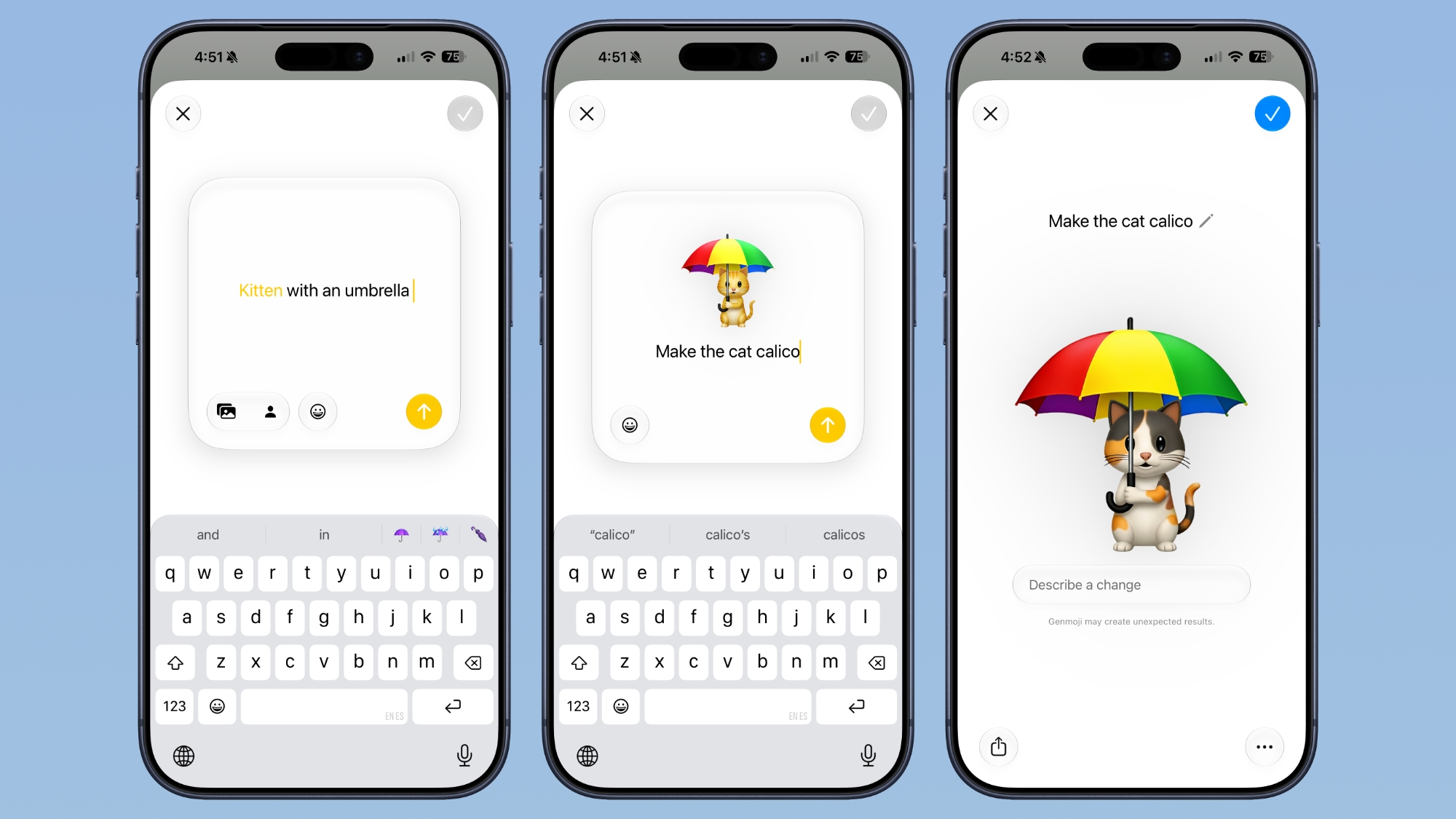
Apple revamped ‌Genmoji‌ creation in ‌iOS 27‌. There's an updated interface for describing an emoji that you want, with options to start from an existing emoji, choose an image from ‌Photos‌, or select a person.


After uploading an image or using a text phrase to create a ‌‌Genmoji‌‌, there's a new "Describe a change" interface for making updates to what you've already created. You can iterate on designs and change individual elements of a ‌‌Genmoji‌‌, tweaking colors and objects. Each change uses the old base instead of regenerating a new ‌‌Genmoji‌‌.

With a series of requests, it is possible to make a complicated, multi-element ‌‌Genmoji‌‌. Along with describing changes, you can add in additional emoji, and the interface makes suggestions on what to do next.

‌‌Genmoji‌‌ output is more consistent, and ‌‌Genmoji‌‌ look more like real emoji with a 3D, cartoonish style by default. There is now an option to change style, so if you don't want the cartoonish look, you can ask for something else like a drawing or a sketch.

Large Conversations


Large conversations load and scroll faster in ‌iOS 27‌, according to Apple.

Read More


More on all of the features in ‌iOS 27‌ can be found in our iOS 27 guide.
Related Roundups: iOS 27, iPadOS 27

This article, "iOS 27: 13 Ways the Messages App is Smarter and Less Annoying" first appeared on MacRumors.com

Discuss this article in our forums
  •  

Flighty Update Adds Step-by-Step Guide for Connecting Flights

Popular flight tracking app Flighty has a new Connection Assistant that helps travelers make connecting flights at airports worldwide.


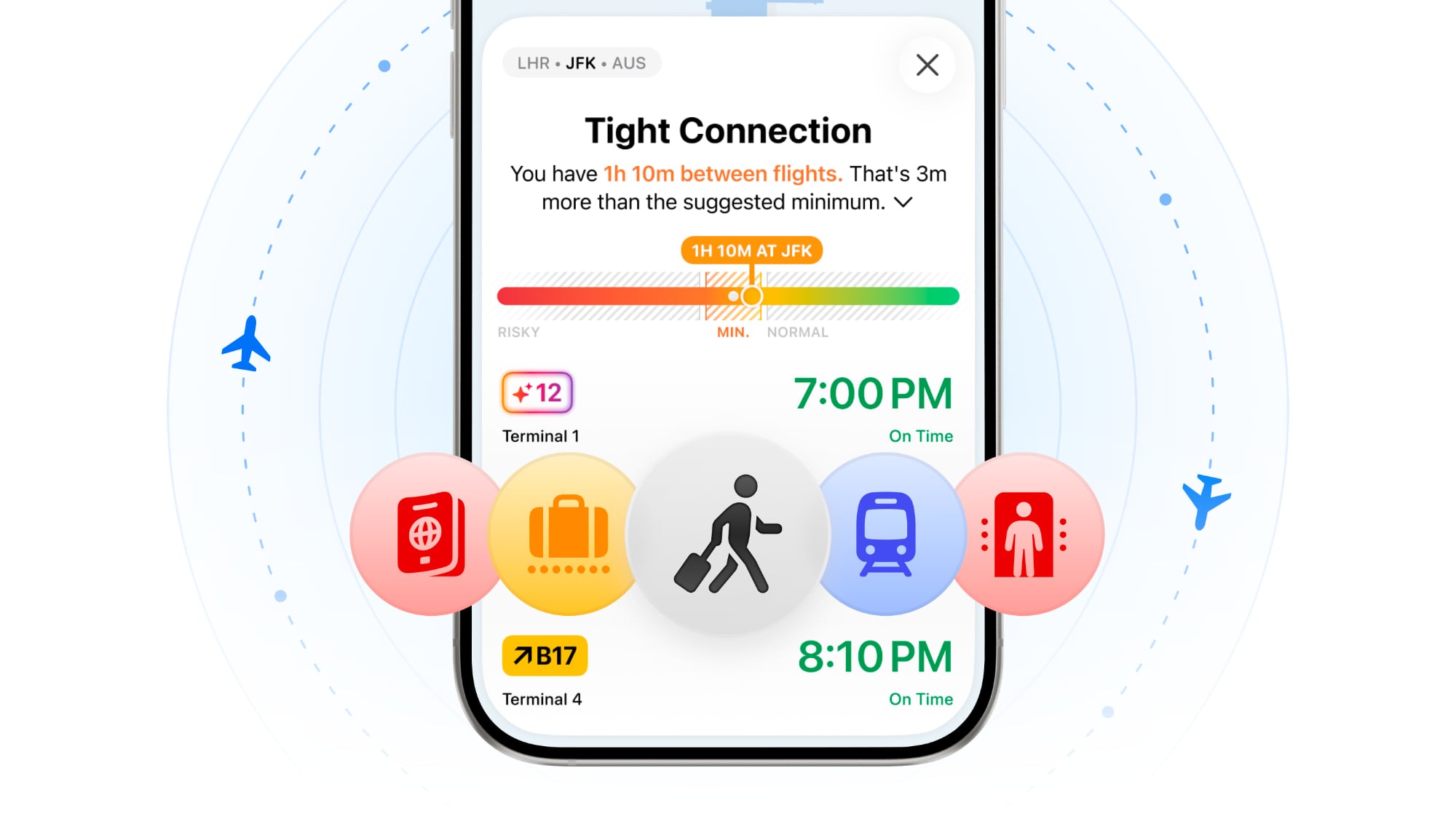
Connection Assistant gives flyers a step-by-step guide for all connections on a trip. It will outline whether users need to go through passport control, recheck a bag, go through security, or change terminals, and it gives an estimate of how long the process will take. Adding a passport to the app will let users know if they can use e-gates or skip passport control.

Users will get a heads-up on how tight a connecting flight is based on recommended minimums for planning purposes, and how long it typically takes to get from one flight to another. Flighty says Connection Assistant combines flight tracking data with airport-specific procedures and statistical modeling of millions of prior flights to create a custom walkthrough for each flight.

Flighty is also now able to predict arrival and departure gates, gate range, or concourse when a flight is first added to the app. The predictions are based on the flight's historical gates, and on the day of a connection, predictions will narrow to the exact gate.

Flighty can be downloaded from the App Store for free, with weekly, monthly, annual, and lifetime purchase options for Pro features.
This article, "Flighty Update Adds Step-by-Step Guide for Connecting Flights" first appeared on MacRumors.com

Discuss this article in our forums
  •  

Apple Seeds Fourth Public Betas of iOS 26.6, macOS Tahoe 26.6 and More

Apple today provided public beta testers with the fourth betas of iOS 26.6, iPadOS 26.6, macOS Tahoe 26.6, watchOS 26.6, and tvOS 26.6, with the software coming a day after Apple seeded the betas to developers.


After signing up to beta test the software updates on Apple's beta site, public beta testers can download the new software using the Software Update section in the Settings app on each device.

iOS 26.6 has a feature that will let you know when you have blocked too many contacts, but the limit is in the thousands so most users may not ever see the messaging. There are also signs of a new iPhone anti-snatching feature that locks a stolen iPhone when it's grabbed from your hand.

No other major new features have been found in any of the software updates, with Apple likely focusing on bug fixes and security improvements. We're nearing the end of the "26" software cycle, with Apple planning to release iOS 27, iPadOS 27, macOS Golden Gate, and more in September.
Related Roundups: iOS 26, iPadOS 26, macOS Tahoe
Related Forums: iOS 26, macOS Tahoe

This article, "Apple Seeds Fourth Public Betas of iOS 26.6, macOS Tahoe 26.6 and More" first appeared on MacRumors.com

Discuss this article in our forums
  •  

Claude Cowork Expands to iPhone and the Web

Anthropic today said it is bringing Claude Cowork to mobile and the web, with beta access rolling out to Max users first. Claude Cowork is a feature that lets Claude access local files and connected tools, then autonomously complete tasks on your behalf.


Claude Cowork tasks can now be started and monitored on the web, desktop, and Claude mobile apps. Claude is able to work in the background in the cloud even when no device is online, sending an alert when it needs permission to move forward with a task.

Anthropic says the desktop is still the best place for the full Cowork experience because it gives Claude access to local files and a browser, but those who were unable to install a desktop app can now use Cowork.

Claude chat and Cowork have also been combined into a single view on the web and desktop and are no longer separate tabs.

As part of the expansion to mobile, Anthropic is extending doubled Cowork usage limits through August 5.
This article, "Claude Cowork Expands to iPhone and the Web" first appeared on MacRumors.com

Discuss this article in our forums
  •  

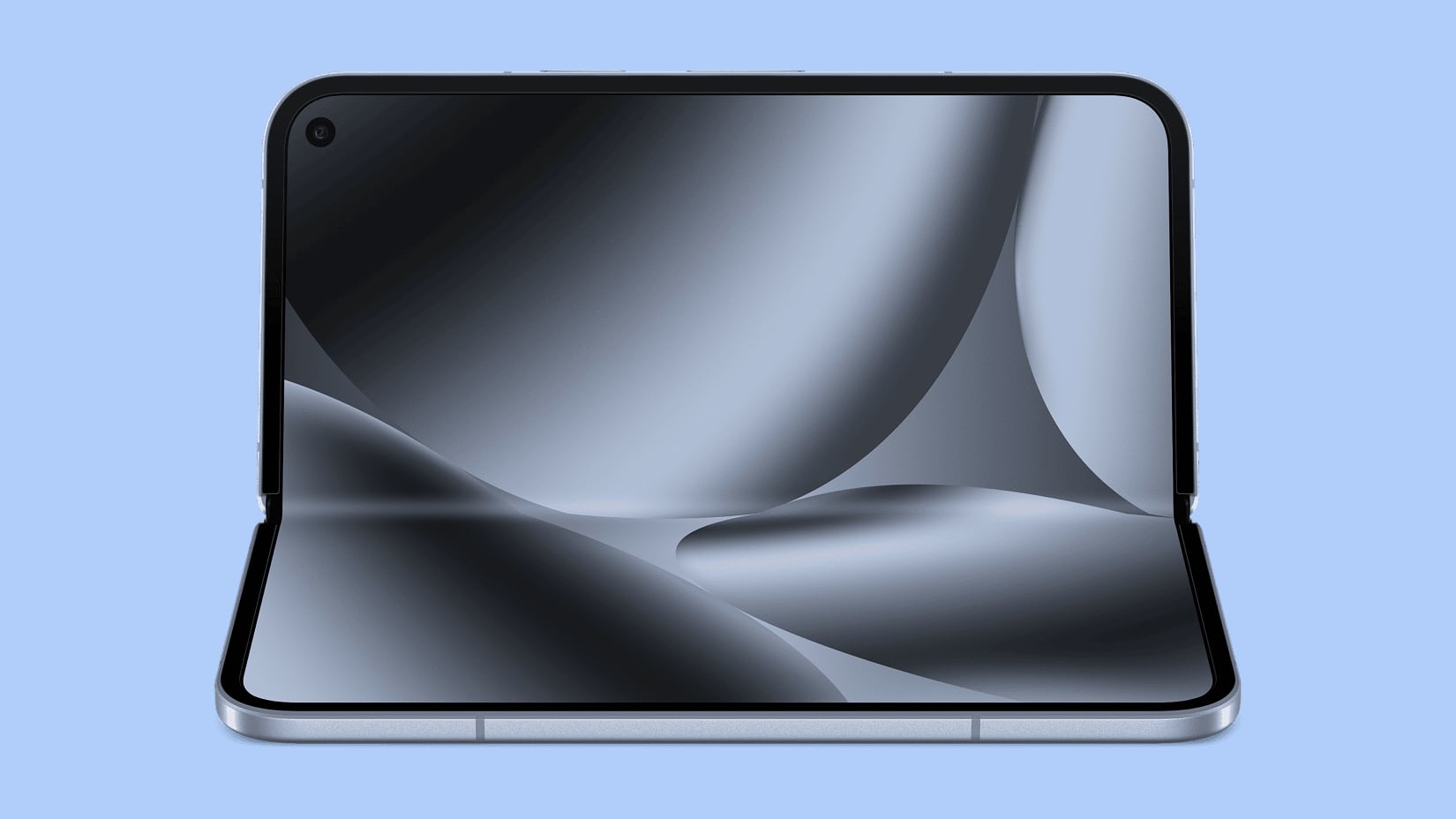
Google's Pixel 11 Event Set for August 12, a Month Before Apple Debuts Foldable iPhone

Google will introduce its latest Pixel smartphones at an August 12 event, debuting the updated devices about a month ahead of when Apple is expected to announce new iPhone models.


Google is expected to launch the Pixel 11, Pixel 11 Pro, Pixel 11 Pro XL, and a new Pixel 11 Pro Fold. Leaked CAD renders suggest the new smartphones will have slimmed down bezels, a slightly thinner design than the Pixel 10, and an updated all-black camera bar.

The latest Pixel foldable is expected to look like the Pixel 10 Pro Fold, but it could be thinner with some minor changes to the rear camera bar. It's supposed to be about 10.1mm thick when folded and 4.8mm thick when unfolded, which is not too far off from the rumored thickness of Apple's foldable iPhone.

Last year, Apple cut the 128GB iPhone and the iPhone 17 launched with 256GB of starting storage, and Google plans to make the same move with the Pixel 11.

This year's Pixel devices could be more expensive, and a leak out of Europe suggests a €100 price increase across all new Pixel smartphones compared to the prior pricing. Most device manufacturers are upping prices in 2026 because of the soaring costs of DRAM.

Apple raised the prices of all Macs and iPads in June, and the new iPhones coming in the fall are likely going to be more expensive than the ‌iPhone 17‌ lineup. The iPhone 18 Pro and Pro Max could be up to $200 more expensive, according to analyst estimates.

Google's Pixel 11 lineup will compete with Apple's ‌iPhone 18 Pro‌ models, which Apple is expected to introduce in September. Apple won't have a Pixel 11 equivalent in 2026 because it is holding its base iPhone 18 until spring 2027, but it will launch the ‌iPhone 18 Pro‌, ‌iPhone 18 Pro‌ Max, and its first foldable iPhone.

Samsung is also going to launch new smartphones ahead of when Apple introduces the ‌iPhone 18‌ lineup. The next Samsung Unpacked event is expected later in July, with the company set to introduce the Galaxy Z Fold 8, the Galaxy Z Flip 8, and the Galaxy Z Fold 8 Wide. The latter foldable has an aspect ratio that's closer to the rumored foldable iPhone.

With the foldable iPhone, Apple will be competing with Samsung and Google, and both companies have had time to refine their foldable device designs. Samsung has been making foldables since 2019, and Google's first Pixel Fold came out in 2023.
This article, "Google's Pixel 11 Event Set for August 12, a Month Before Apple Debuts Foldable iPhone" first appeared on MacRumors.com

Discuss this article in our forums
  •  

Apple Releases New AirPods Beta Firmware With iOS 27 Features

Apple today released a third version of the beta firmware it is testing for the AirPods Pro 2, AirPods Pro 3, AirPods 4, and AirPods Max 2. The firmware is limited to developers at the current time, and it has a build number of 9A5314b.


In iOS 27, iPadOS 27, and macOS Golden Gate, Apple is adding a new AirPods interface, a slider for Adaptive mode, and support for custom EQ, so the firmware adds support for those features. AirPods are also compatible with the new Siri AI.

When the AirPods are connected to an iPhone, iPad, or Mac running iOS 26, iPadOS 26, or macOS 26 or later, there is a beta firmware option that can be accessed in the AirPods settings interface. Toggling on beta updates allows users to install the beta firmware.

Firmware updates can be downloaded by connecting the AirPods to an Apple device and connecting them to power. It can take a few hours for new firmware to be installed because there is no straightforward software update option like there is for other Apple devices.
Related Forum: AirPods

This article, "Apple Releases New AirPods Beta Firmware With iOS 27 Features" first appeared on MacRumors.com

Discuss this article in our forums
  •  

Everything New in iOS 27 Beta 3

Apple is continuing to refine iOS 27 ahead of its planned September launch, and the third beta includes several new features. Siri is more customizable, there's a fun new wallpaper action, and some useful improvements to Photos and Shortcuts.


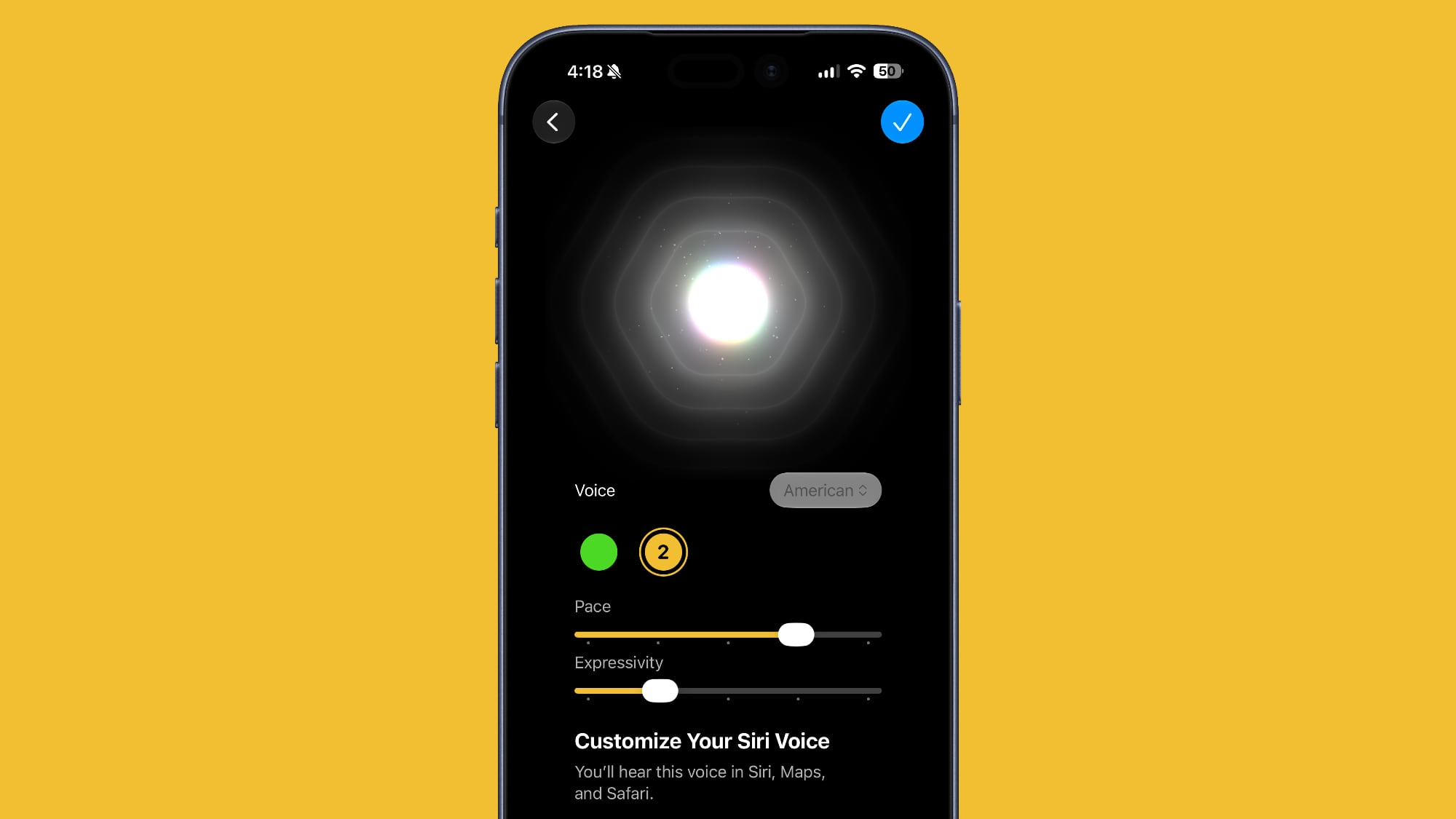
Siri Voice


Beta 3 adds support for ‌Siri‌ voice customization on compatible devices. The customization option existed in prior betas, but it was not active. It's now usable, and you can customize the pace and expressivity of ‌Siri‌, with two base voice options available right now.


‌Siri‌ voice customization requires an iPhone 17 Pro or an iPhone Air because it uses on-device processing.

Live Recognition


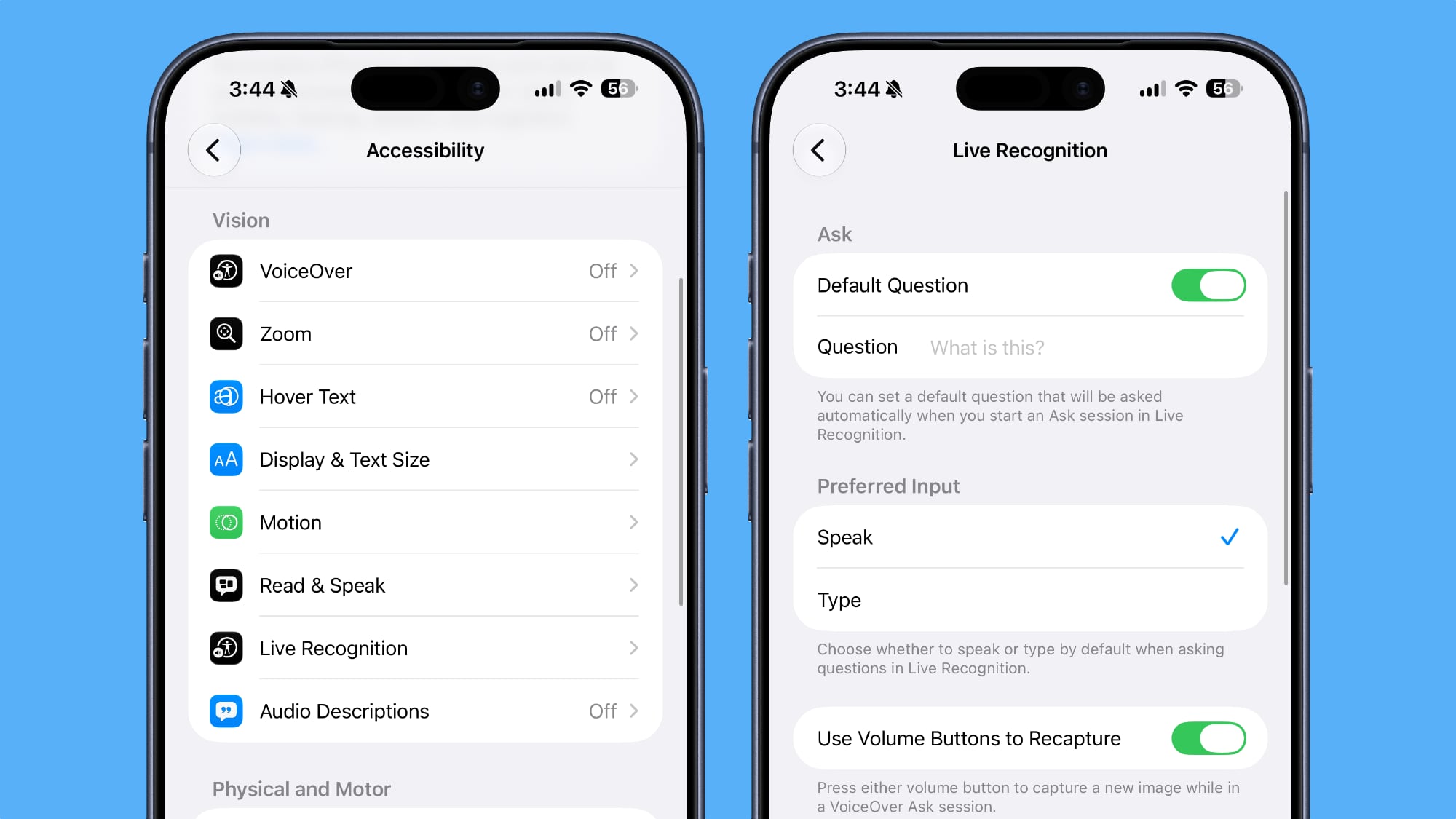
In Accessibility, Apple added a new Live Recognition section. Live Recognition uses on-device intelligence to detect and describe things around you with the camera app. The feature is able to answer questions about what it sees, with an option to set a default question. There's also support for custom activities.


Reminders


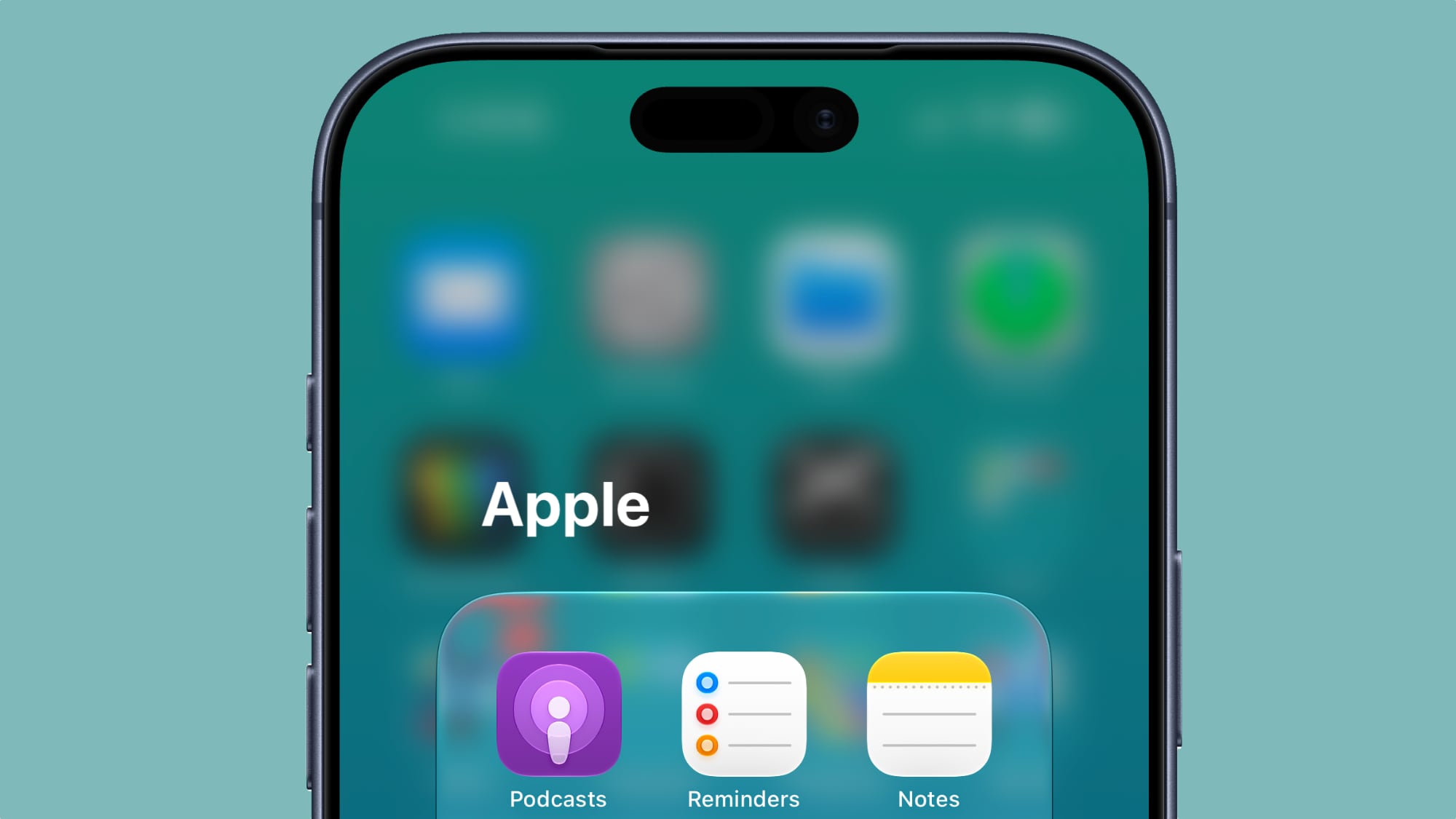
The Reminders app has an updated icon with Liquid Glass to-do list bullets.


Photos


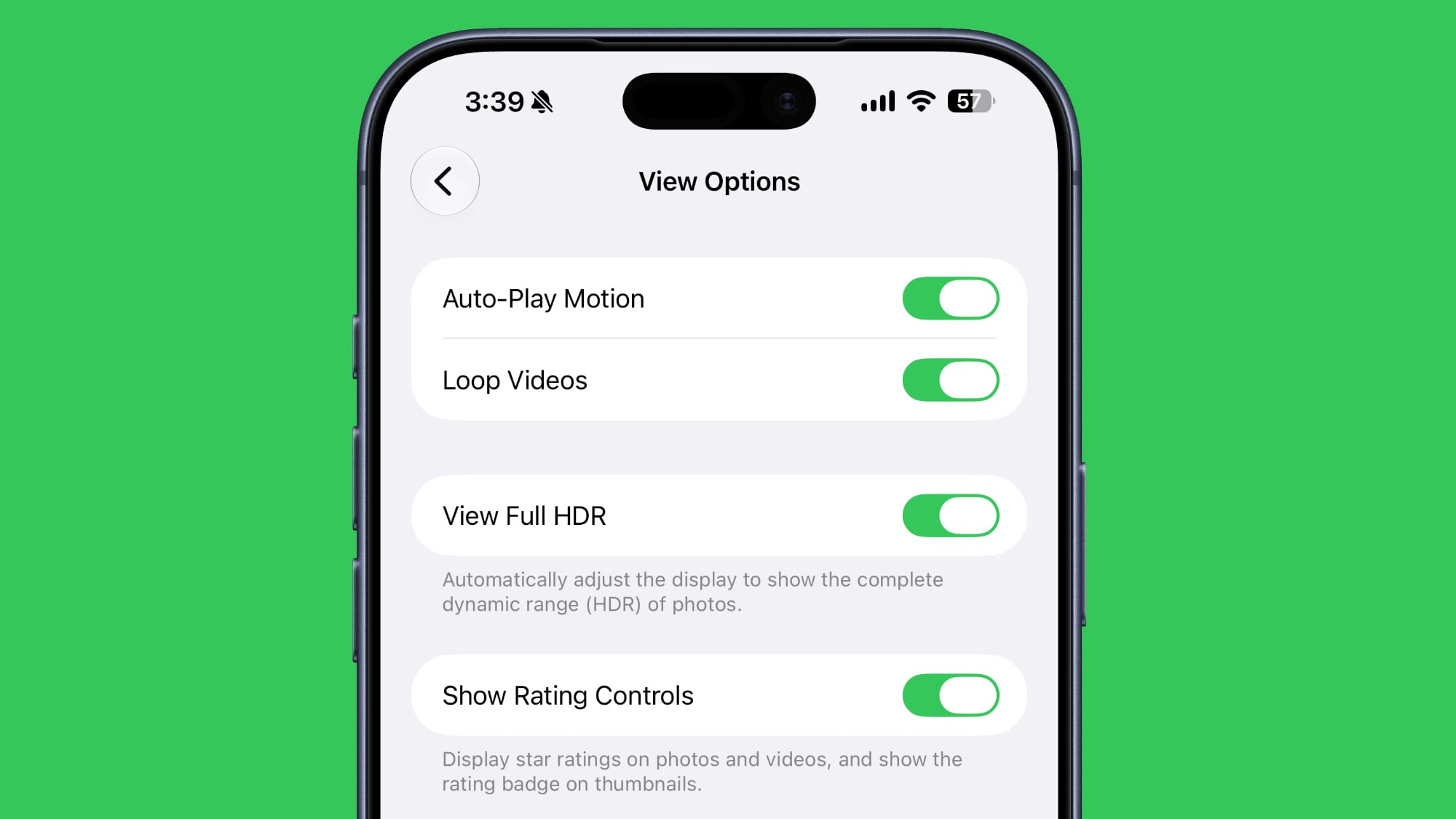
In the ‌Photos‌ section of the Settings app, there's a new Show Rating Controls toggle. It displays star ratings on photos and videos, and shows a rating badge on thumbnails.


Control Center


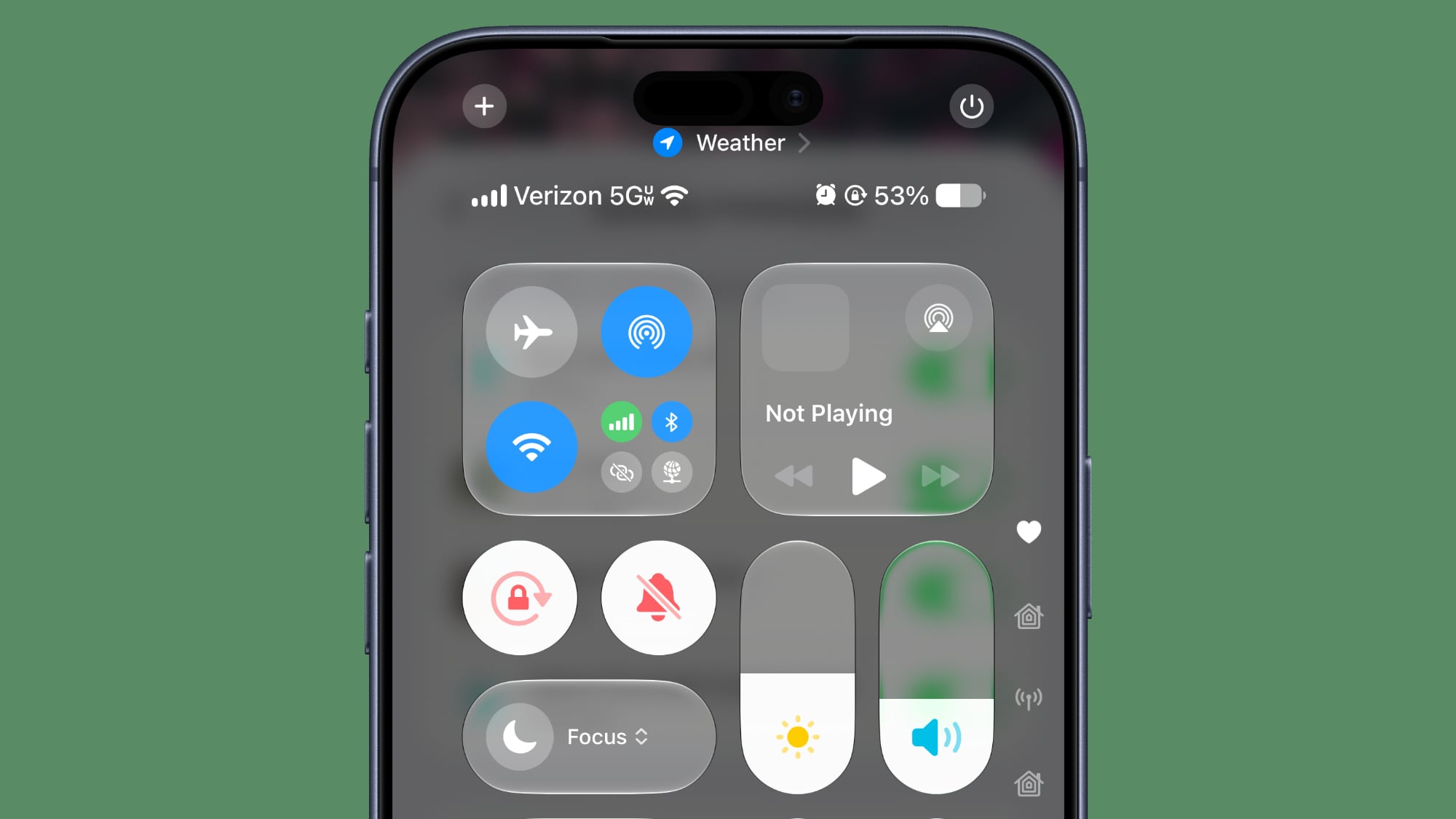
In Control Center, you can see details about your cellular connection even when connected to Wi-Fi. It shows signal strength and whether you're connected to LTE or 5G.


Shortcuts


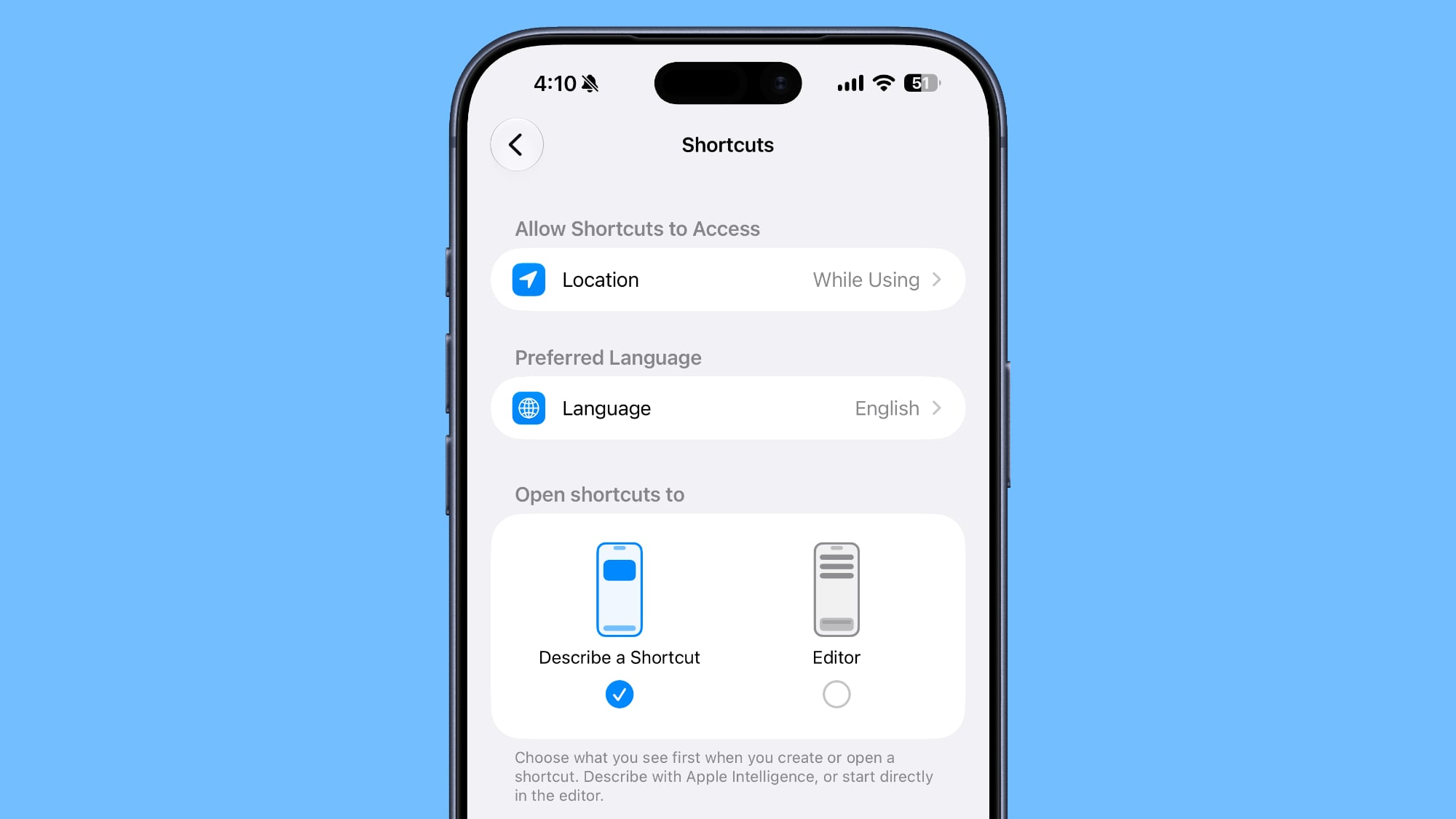
You can now choose whether to open to the Describe a Shortcut interface or the manual Shortcuts editor when creating a new shortcut.


Wallpaper


When you swipe down into the notification center, a cutout of the subject of your wallpaper now appears first over the Home Screen or app you're using.

iOS 27 beta 3 adds a new wallpaper animation which is so smooth pic.twitter.com/8LzBOx3HMD

— Aaron (@aaronp613) July 6, 2026


AirPods


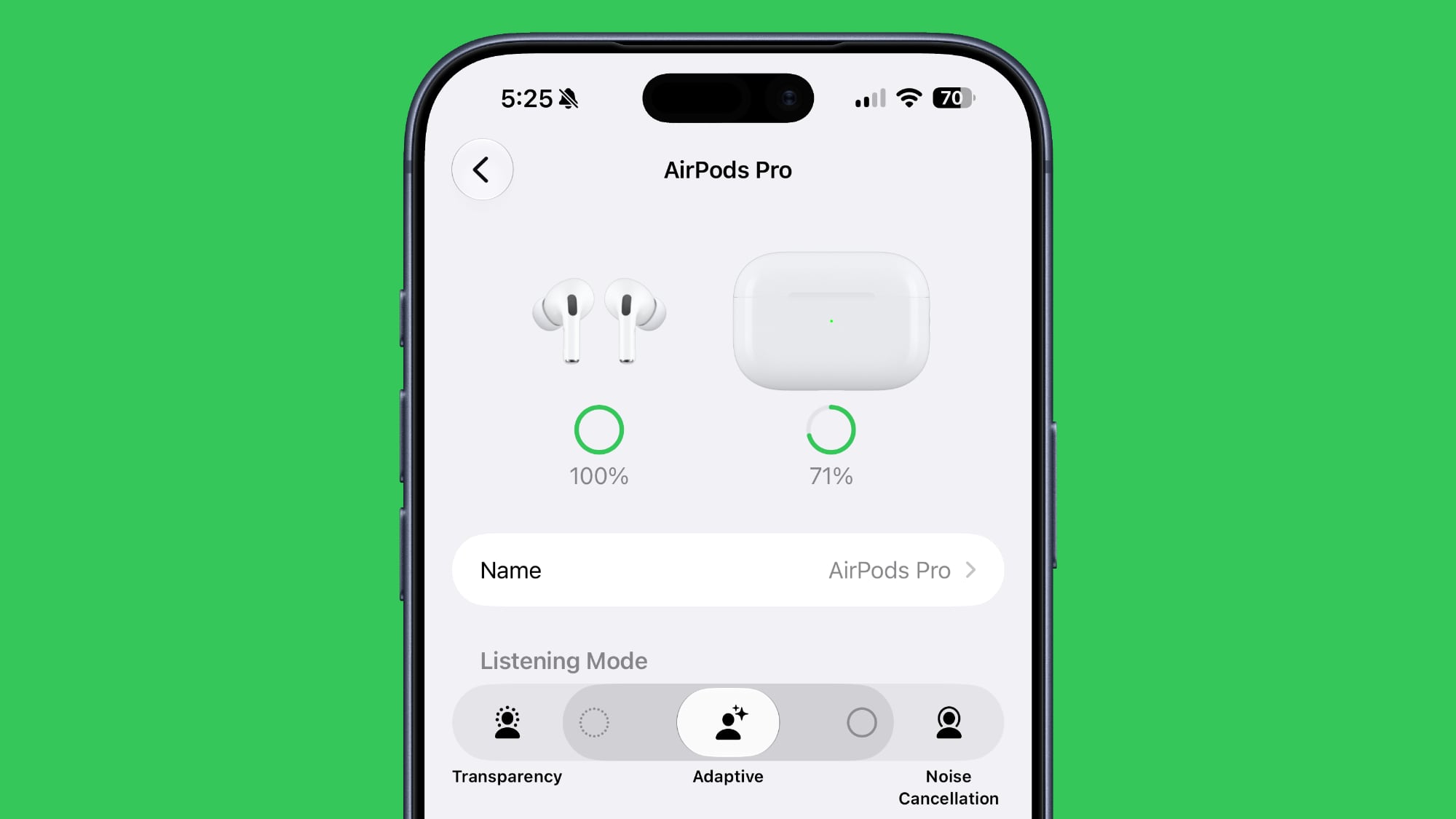
The Adaptive setting on the AirPods has a slider that lets you select more transparency or more noise cancellation.


Home App


Apple clarified that Apple Intelligence features in the Home app will require a 2TB iCloud+ plan.

Maps


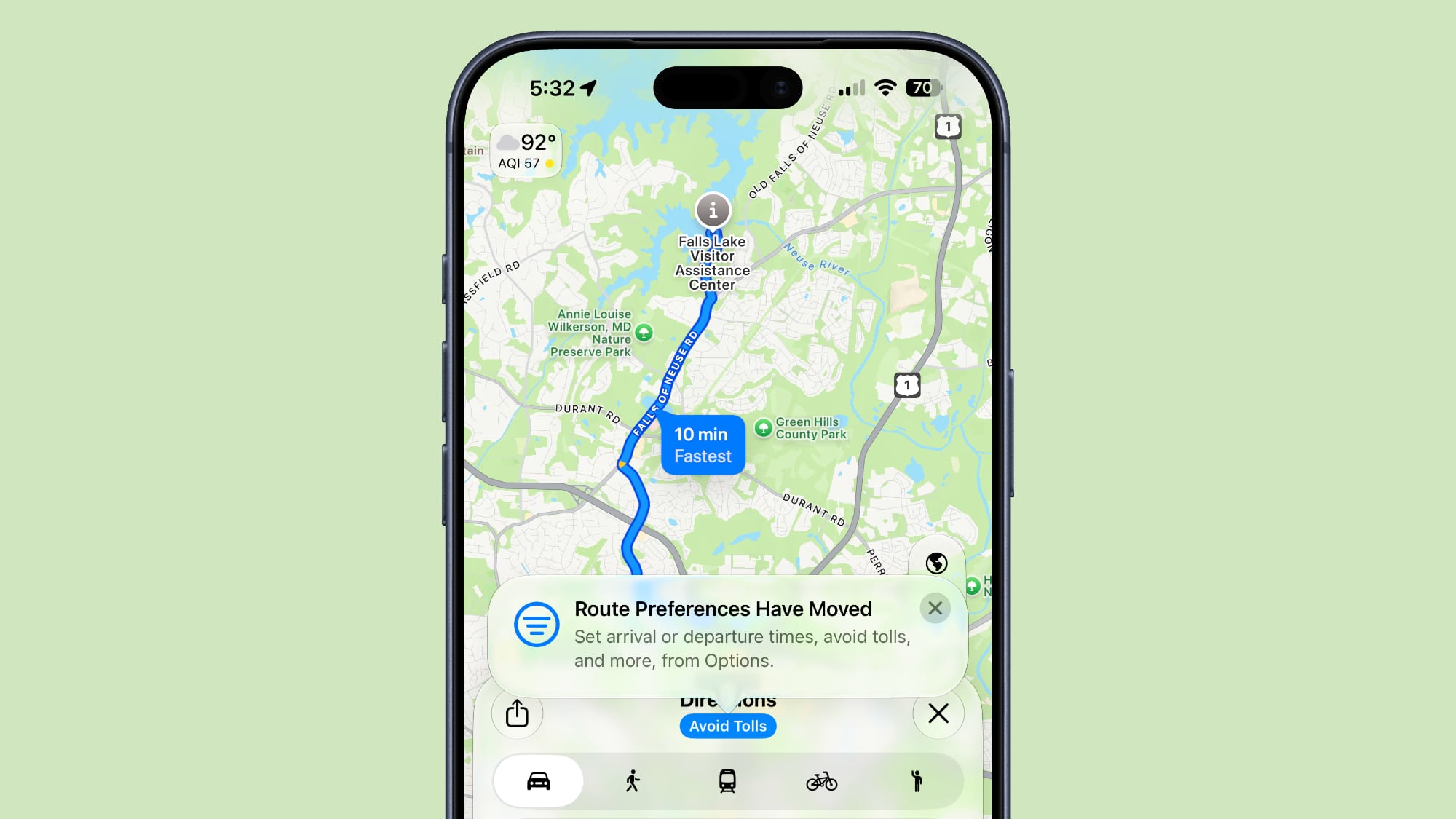
Apple added a tooltip to make it clearer that route preferences haven't been eliminated and can be accessed by tapping under the options interface when getting directions.


Lock Screen


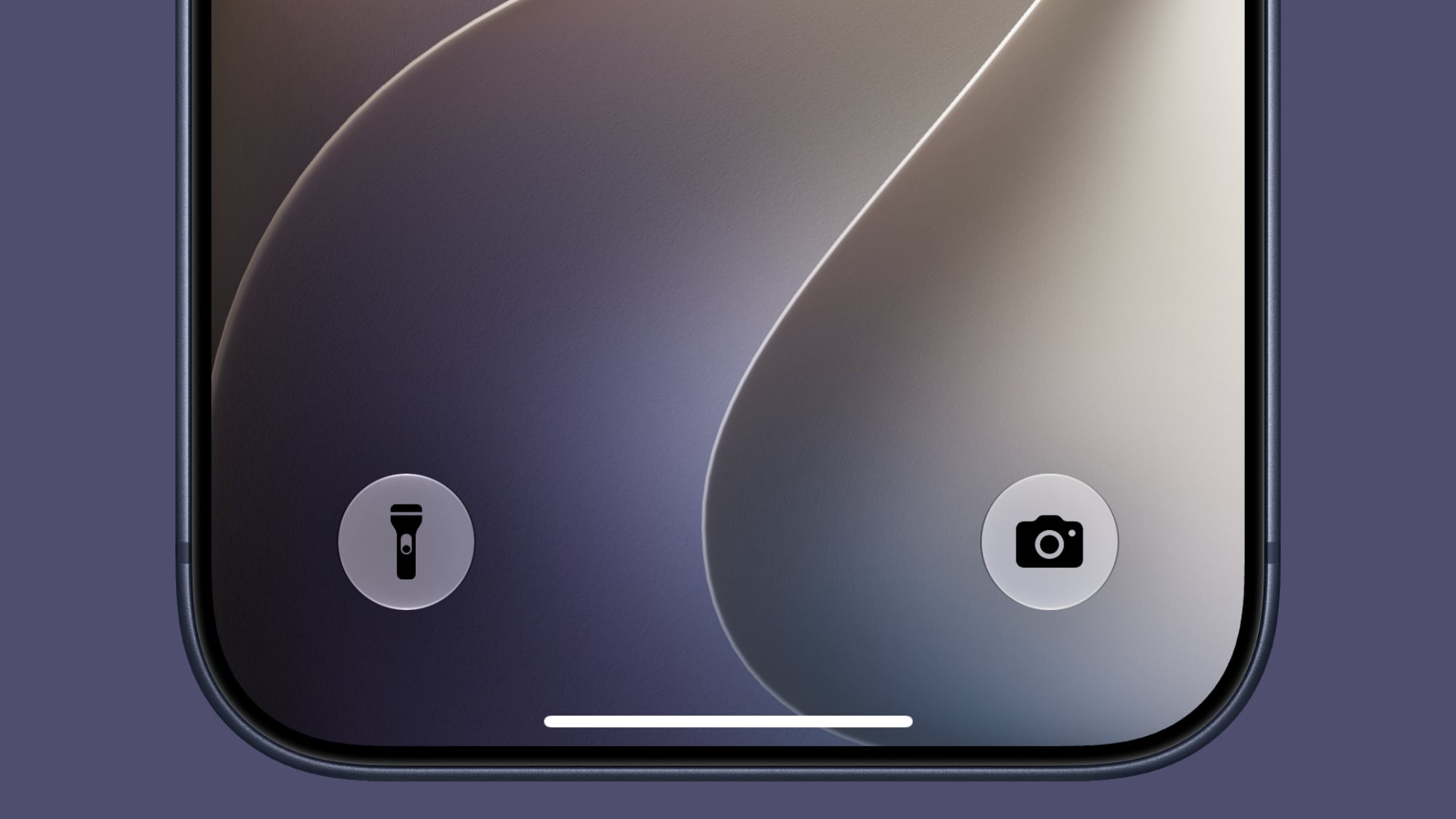
The Control Center buttons on the Lock Screen now have black icons instead of white icons with some wallpaper.


5G in India


5G+ is now available in India on supported carriers.
Related Roundups: iOS 27, iPadOS 27

This article, "Everything New in iOS 27 Beta 3" first appeared on MacRumors.com

Discuss this article in our forums
  •  

Apple Intelligence Home Features Require 2TB iCloud+ Plan in iOS 27

Using Apple Intelligence camera features in the Home app will require an iCloud+ plan starting at 2TB, according to Apple. Apple shared the detail in its notes for the third macOS Golden Gate beta that was released today.


In iOS 27, iPadOS 27, and macOS 27 Golden Gate, the Home app is able to generate written summaries for motion alerts from HomeKit Secure Video cameras. It's also able to group footage from separate cameras for an overview of activity and pull out noteworthy recordings, plus it supports natural language search.

Apple said at WWDC that some ‌Apple Intelligence‌ features would require an ‌iCloud‌+ plan, but Apple didn't specify which tier users would need to subscribe to. For the Home features, users will need the 2TB ‌iCloud‌+ plan or better. The 2TB plan includes 2TB of ‌iCloud‌ storage and it costs $9.99 per month.

‌HomeKit Secure Video‌ cloud storage has always required a paid ‌iCloud‌ plan. The 50GB plan allows for one camera, while the 200GB plan supports up to five. The 2TB plan lets users add an unlimited number of ‌HomeKit Secure Video‌ cameras, and now it will also add the ‌Apple Intelligence‌ Home feature set. HomeKit video storage does not count against the storage limit of an ‌iCloud‌+ plan, so the full 2TB stays available for photos and other data.

More on what's new in the Home app in ‌iOS 27‌, ‌iPadOS 27‌, and macOS 27 can be found in our guide.
Related Roundups: iOS 27, iPadOS 27

This article, "Apple Intelligence Home Features Require 2TB iCloud+ Plan in iOS 27" first appeared on MacRumors.com

Discuss this article in our forums
  •  

Siri AI Comes to Apple Watch in watchOS 27 Beta 3

With watchOS 27 beta 3, Apple added support for Siri AI and the ‌Siri‌ app, so Apple Watch users can now use the features right from their wrist.


Apple said ‌Siri‌ AI would be coming to the watch back when ‌watchOS 27‌ was first introduced, but the feature wasn't live until now.

The Dynamic App Grid that pops up when the Digital Crown is pressed displays the ‌Siri‌ app in the center, and the smarter version of ‌Siri‌ is available to answer queries and complete requests.

‌Siri‌ AI on Apple Watch relies on a nearby Apple Intelligence- compatible iPhone for processing. Conversations in the ‌Siri‌ app on Apple Watch sync to the ‌Siri‌ app across all other devices like iPhone, iPad, and Mac.
Tag: Siri
Buyer's Guide: Apple Watch (Caution)
Related Forum: Apple Watch

This article, "Siri AI Comes to Apple Watch in watchOS 27 Beta 3" first appeared on MacRumors.com

Discuss this article in our forums
  •  

macOS Golden Gate Gets New Wallpaper

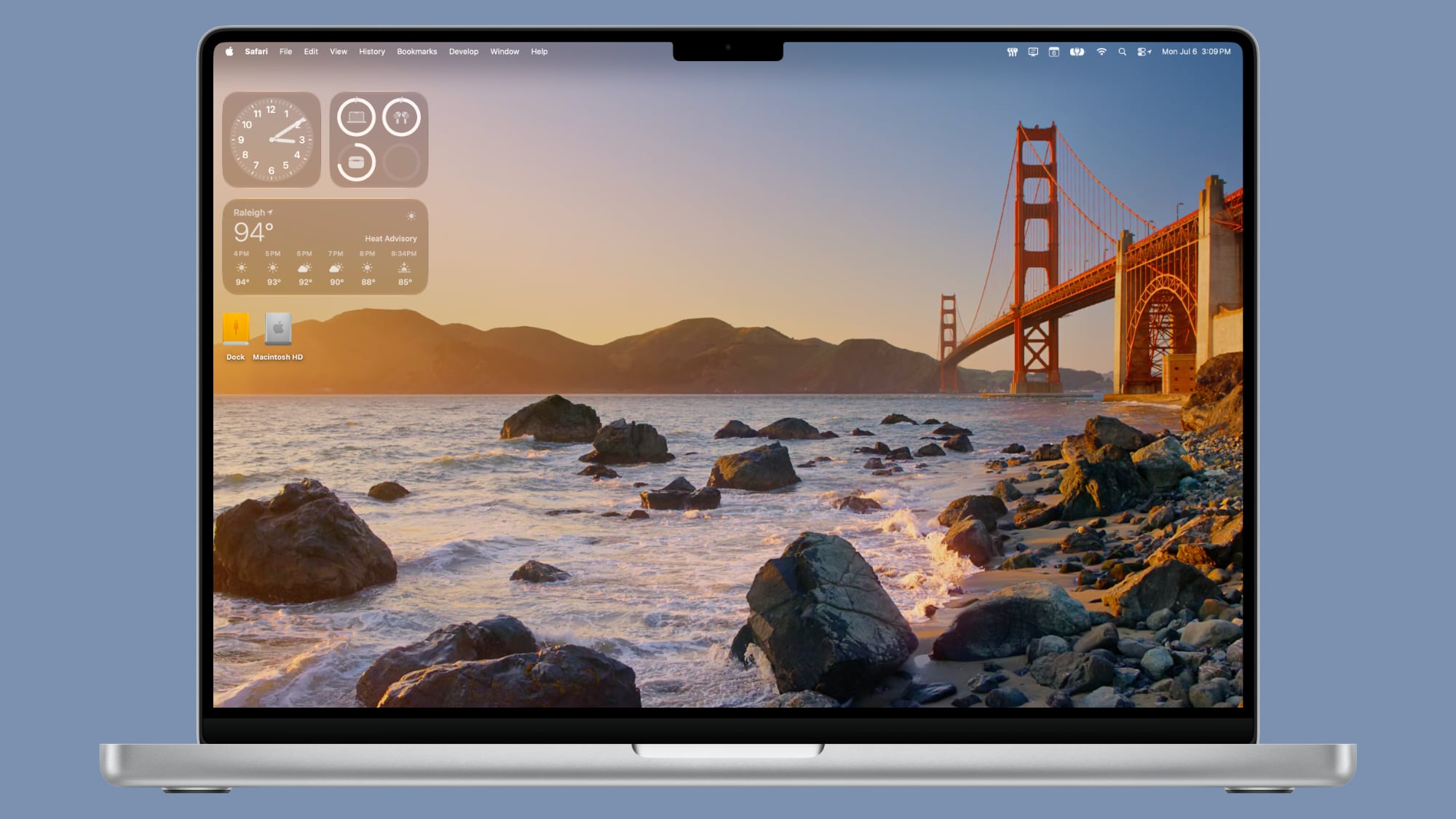
With the third beta of macOS 27, Apple added new Golden Gate-themed wallpaper options to the Mac.


There are new Golden Gate Sunset and Golden Gate Night options, both of which join the prior Golden Gate abstract wallpaper that Apple introduced with the initial beta.

Golden Gate Sunset and Golden Gate Night animate when unlocking the Mac, and can be set as a screen saver. When used as a screen saver, the Golden Gate Sunset wallpaper features waves breaking on the rocks near the Golden Gate Bridge. The Golden Gate Night wallpaper shows cars driving across the bridge.

With past updates, Apple has included several themed wallpaper options, so more Golden Gate wallpapers could be added in the future. macOS Golden Gate is limited to developers right now, but we are expecting a public beta soon.
Related Roundup: macOS Golden Gate

This article, "macOS Golden Gate Gets New Wallpaper" first appeared on MacRumors.com

Discuss this article in our forums
  •  

macOS Golden Gate Beta 3 Now Available for Developers

Apple today provided developers with the third beta of macOS Golden Gate, with the update coming two weeks after Apple seeded the second beta.


Developers can download ‌macOS Golden Gate‌ by going to System Settings > General > Software Update. Beta Updates will need to be enabled, and a free developer account is required.

‌macOS Golden Gate‌ includes multiple design improvements. Liquid Glass opacity has been improved to increase readability, there's a slider for controlling the level of transparency, and changes to shadowing make it easier to tell when a window is active. Apps now have uniform toolbars, edge-to-edge sidebars, and less rounded corners, plus there are fewer icons in menu bars.

Siri has been transformed into ‌Siri‌ AI, a chatbot-style assistant that combines general world knowledge, your personal data, and onscreen awareness to answer questions about anything and find information for you. ‌Siri‌ lives in Spotlight, and you can ask questions with the new Search or Ask interface.

There's also a ‌Siri‌ app where you can chat with ‌Siri‌ and view past conversations, and on newer Macs, you can set a custom voice for ‌Siri‌ with personalized pace and expressivity. Visual Intelligence is now on the Mac so ‌Siri‌ can answer questions about what's on your screen, and a Write with ‌Siri‌ feature lets ‌Siri‌ generate text or give feedback on your writing.

There are AI photo editing tools in the Photos app, AI tab organization in Safari, an option to use AI to automatically update weak passwords in the Passwords app, and a revamped Image Playground app that can generate photorealistic images.

More on all of the new features in ‌macOS Golden Gate‌ can be found in our macOS Golden Gate roundup. ‌macOS Golden Gate‌ is limited to developers right now, but Apple plans to release a public beta soon.
Related Roundup: macOS Golden Gate

This article, "macOS Golden Gate Beta 3 Now Available for Developers" first appeared on MacRumors.com

Discuss this article in our forums
  •  

Apple Seeds Third iOS 27 and iPadOS 27 Betas to Developers

Apple today seeded the third betas of iOS 27 and iPadOS 27 to developers for testing purposes, with the update coming two weeks after Apple released the second betas.


Registered developers can download the betas from the Settings app on the iPhone or iPad by going to the General section and selecting Software Update.

‌iOS 27‌ introduces Apple's smarter version of Siri, ‌Siri‌ AI. ‌Siri‌ AI is a chatbot similar to ChatGPT, incorporating general world knowledge, personal data from apps like Messages and Mail, and onscreen awareness to answer questions and find information for you.

There are new Apple Intelligence features in apps like Photos, Safari, Shortcuts, Wallet, and Passwords, plus Apple added a standalone ‌Siri‌ app that houses ‌Siri‌ conversations. Write with ‌Siri‌ is available systemwide for generating text or offering feedback on your writing, and Visual Intelligence has been relocated to the Camera app with a new ‌Siri‌ mode.

Apple improved the look of Liquid Glass and added a slider for customizing transparency. There are multiple performance improvements to speed up iOS, so everything feels faster, even on older iPhones. Apps launch quicker, AirDrop transfers are faster, the keyboard pops up more quickly, and devices are better at transitioning between Wi-Fi and Cellular to keep you connected.

For more on what's new in ‌iOS 27‌, we have a dedicated iOS 27 roundup.
Related Roundups: iOS 27, iPadOS 27

This article, "Apple Seeds Third iOS 27 and iPadOS 27 Betas to Developers" first appeared on MacRumors.com

Discuss this article in our forums
  •  

Apple Seeds Third visionOS 27 Beta to Developers

Apple today provided developers with the third beta of an upcoming visionOS 27 update for testing purposes, with the beta coming two weeks after Apple released the second beta.


visionOS 27 can be installed by opening the Settings app, going to Software Updates, and opting into Beta Updates.

visionOS 27 introduces Siri AI, the smarter and more capable version of ‌Siri‌ that's similar in capability to chatbots like ChatGPT and Claude. On the Vision Pro, ‌Siri‌ can answer questions about anything the wearer is looking at, and there's a new ‌Siri‌ orb that can be placed anywhere in wearer's virtual space.

Panorama photos can be turned into spatial environments, and there's a new Icelandic Thórsmörk environment that features dramatic mountains, valleys, and glaciers, along with the northern lights. Web Environment support allows developers to create 360-degree environments in Safari for a more native Vision Pro browsing experience.

App windows are now curved to provide a more immersive workspace, and Control Center has been reorganized to make system controls easier to find. Apple added a smaller widget size, and notifications automatically expand when the wearer looks at them.

More on what's new in visionOS 27 is listed in our Vision Pro roundup.
Related Roundup: Apple Vision Pro
Buyer's Guide: Vision Pro (Neutral)
Related Forum: Apple Vision Pro

This article, "Apple Seeds Third visionOS 27 Beta to Developers" first appeared on MacRumors.com

Discuss this article in our forums
  •  

Apple Seeds watchOS 27 Beta 3 to Developers

Apple today seeded the third beta of watchOS 27 to developers, with the update coming two weeks after the launch of the second beta.


The beta can be downloaded through the Watch app on the iPhone with a free developer account. The Apple Watch will need to be on the charger, connected to Wi-Fi, and have a battery level of 50 percent or above for new software to be installed. The beta is available for all Apple Watch models compatible with ‌watchOS 27‌ except for the Apple Watch Ultra 3.

‌watchOS 27‌ will include Siri AI, the smarter, more capable version of ‌Siri‌. ‌Siri‌ can hold back-and-forth conversations, plus it has access to general world knowledge and your personal data to answer questions and find information. ‌Siri‌ AI on Apple Watch requires an iPhone that supports Apple Intelligence, including the iPhone 15 Pro and later.

There's a new Dynamic app grid that highlights ‌Siri‌ suggested apps, and more intuitive Smart Stack Suggestions. You can find your parked car, see pinned messages, get noise alerts, and view identity and transit cards.

Liquid Glass has been updated to improve legibility, and Workout Buddy works on the Apple Watch even when an iPhone isn't nearby. Workout Buddy also gains new metrics like progressive increases to distance, pace, or duration. Apple added a new all-in-one Find My app with support for Precision Finding, and there are performance optimizations that improve battery life.

More on what's new in ‌watchOS 27‌ is available in our watchOS 27 roundup.
Related Roundups: watchOS 26, watchOS 27
Related Forum: Apple Watch

This article, "Apple Seeds watchOS 27 Beta 3 to Developers" first appeared on MacRumors.com

Discuss this article in our forums
  •  

Apple Seeds tvOS 27 Beta 3 to Developers

Apple today seeded the third beta of tvOS 27 to developers for testing purposes, with the update coming two weeks after Apple released the second beta.


The beta can be downloaded and installed through the Settings app on the Apple TV. A free developer account is required.

tvOS 27 has few new features compared to the other 27 software updates, but it does add a redesigned Podcasts app, options for larger text, and a more responsive Control Center.

AirPlaying to an ‌Apple TV‌ from another Apple device is faster, and apps and animations are smoother. You can also now see AppleCare coverage details in the Settings app.

More on the features in tvOS 27 can be found in our Apple TV roundup.
Related Roundup: Apple TV
Buyer's Guide: Apple TV (Don't Buy)

This article, "Apple Seeds tvOS 27 Beta 3 to Developers" first appeared on MacRumors.com

Discuss this article in our forums
  •  

Fourth macOS Tahoe 26.6 Beta Now Available for Developers

Apple today provided the fourth beta of an upcoming macOS Tahoe 26.6 update to developers for testing purposes, with the update coming a week after Apple seeded the third beta.


Developers can download the ‌macOS Tahoe‌ 26.6 update by opening up the System Settings app, selecting the General category, and then choosing Software Update. Beta Updates will need to be enabled, and a free developer account is required.

With macOS Golden Gate launching in just a couple months, Apple is likely focusing most of its attention on the new software. We are not expecting any major new features in ‌macOS Tahoe‌ 26.6.
Related Roundup: macOS Tahoe
Related Forum: macOS Tahoe

This article, "Fourth macOS Tahoe 26.6 Beta Now Available for Developers" first appeared on MacRumors.com

Discuss this article in our forums
  •  

Apple Seeds Fourth iOS 26.6 and iPadOS 26.6 Betas to Developers

Apple today seeded the fourth betas of upcoming iOS 26.6 and iPadOS 26.6 updates to developers for testing purposes, with the software coming a week after Apple seeded the third betas.


Registered developers can download the betas from the Settings app on the iPhone or iPad by going to the General section and selecting Software Update.

With iOS 27 set to launch in September, Apple is wrapping up work on iOS 26. We are not expecting any major new features in the iOS 26.6 update, and it will primarily focus on bug fixes and performance improvements.

The update adds new wording around blocked contact limits, letting users know when they have exceeded the maximum number of blocked contacts. The update might also include a new anti-snatching feature that locks your iPhone if it's grabbed from your hand.
Related Roundups: iOS 26, iPadOS 26
Related Forum: iOS 26

This article, "Apple Seeds Fourth iOS 26.6 and iPadOS 26.6 Betas to Developers" first appeared on MacRumors.com

Discuss this article in our forums
  •  

Apple Releases Fourth watchOS 26.6, tvOS 26.6 and visionOS 26.6 Betas

Apple today provided developers with the fourth betas of upcoming watchOS 26.6, tvOS 26.6, and visionOS 26.6 betas for testing purposes. The software comes a week after Apple seeded the third betas.


The software updates are available through the Settings app on each device, and because these are developer betas, a free developer account is required.

There's no word on what's in the software as of yet. watchOS, tvOS, and visionOS often get few features in each new beta, with updates primarily focusing on bug fixes and performance improvements.
This article, "Apple Releases Fourth watchOS 26.6, tvOS 26.6 and visionOS 26.6 Betas" first appeared on MacRumors.com

Discuss this article in our forums
  •  

Anthropic's Claude Fable 5 Available Again After U.S. Lifts Export Controls

Anthropic's Fable 5 model is once again available for use, the company said today. Claude users are now seeing the option to use Fable 5, with Anthropic rolling out an in-app message.


Through July 7, eligible Claude subscribers can use up to 50 percent of their plan's weekly usage limit on Fable 5. After hitting that limit, Fable 5 use will require credits. After July 7, Fable will be available through usage credits.

Fable 5 is Anthropic's first Mythos-class model that's available for the public, and it first came out on June 9. Fable 5's capabilities exceed those of any model it has made generally available, and it has demonstrated "exceptional performance" for software engineering, knowledge work, vision, scientific research, and more. It outperforms Opus models on longer, more complex tasks. Fable 5 can work autonomously for longer than any prior Claude model.

Though Anthropic released Fable 5 with conservative safeguards to prevent misuse, the Trump administration applied export controls to the model, forcing Anthropic to restrict access to foreign nationals. Anthropic had no way of verifying the nationality of people using its models, so it had to suspend access to Fable 5. At the same time, Anthropic also had to restrict access to Mythos 5, the next model in its Project Glasswing initiative for major companies and federal agencies seeking help defending critical infrastructure.

The order came after Amazon researchers found a prompt able to bypass Fable's safeguards, and the model found software vulnerabilities. Anthropic investigated and discovered that older models and models from competing companies could also locate the same vulnerabilities. Anthropic ended up shipping a new classifier that blocks the technique in more than 99 percent of cases.

Fable 5 is available for Pro, Max, Team, and select Enterprise plans. Anthropic has also restored Mythos 5 access for U.S. organizations that are part of Project Glasswing.

Anthropic says that it is deepening its cooperation with the U.S. government on new pre-release testing, information sharing, and research collaboration.
This article, "Anthropic's Claude Fable 5 Available Again After U.S. Lifts Export Controls" first appeared on MacRumors.com

Discuss this article in our forums

  •  

iOS 27: All the New Apple Maps Features

The Maps app didn't get as many iOS 27 updates as some of Apple's other apps, but there are still several useful features worth knowing about.


Flyover Improvements


Apple is upgrading Flyover in ‌iOS 27‌, making it more detailed than before. It combines aerial imagery with Vision Intelligence models to add more texture and sharper visuals for trees, architecture, and more.


Apple says select cities around the world are rendered in sharper, more lifelike detail with improvements to everything from the "shapes of individual trees to the way light reflects off the glass of skyscrapers."

Flyover is an Apple Maps feature that offers detailed 3D landmarks, roads, parks, buildings, and more in more than 350 cities. The current version of Flyover uses aerial imagery captured by planes, but the new ‌iOS 27‌ version improves the quality using AI.

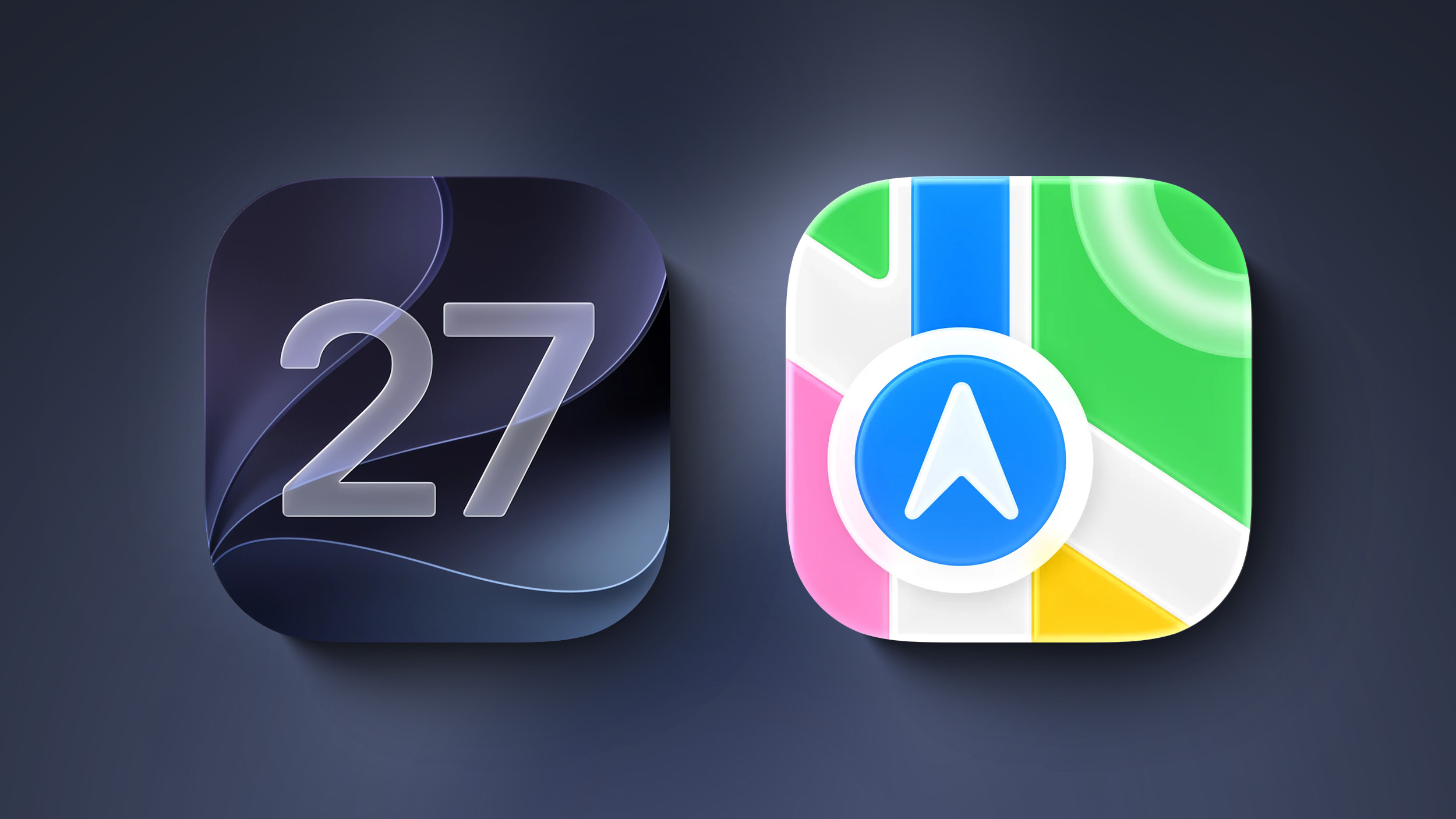
New Maps Icon


Apple updated several of its Liquid Glass app icons in ‌iOS 27‌ to add more glass-like layers. Icons have more depth, and the Maps app icon makes the difference especially clear.

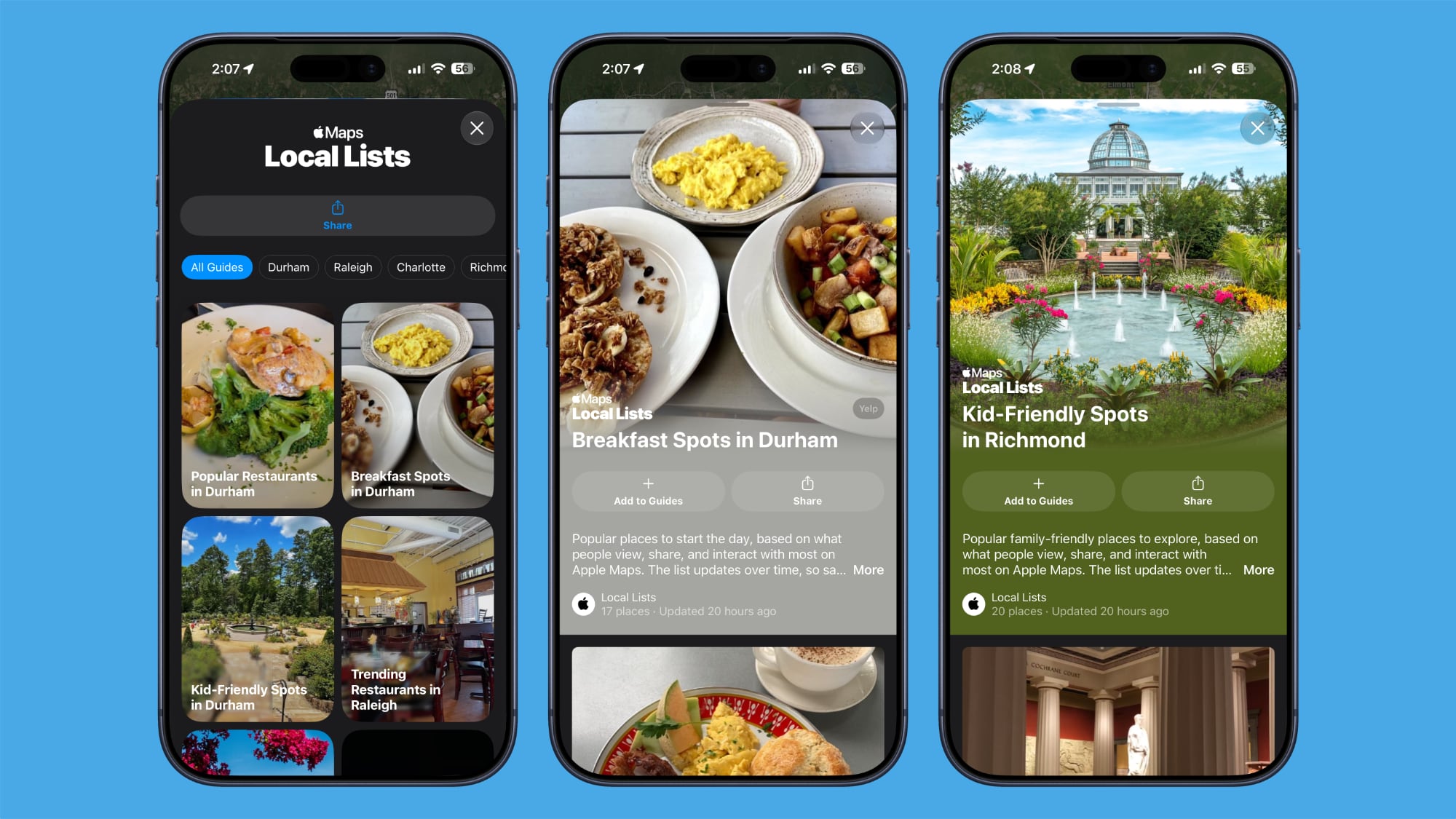
Local Lists


Local Lists uses intelligent insights from what's trending around you for suggestions on places you should visit. Maps surfaces locally relevant collections of places to make it easier to find popular and interesting locations to visit.


Local Lists is privacy-focused and does not use information tied to individual users. It is a U.S.-only feature.

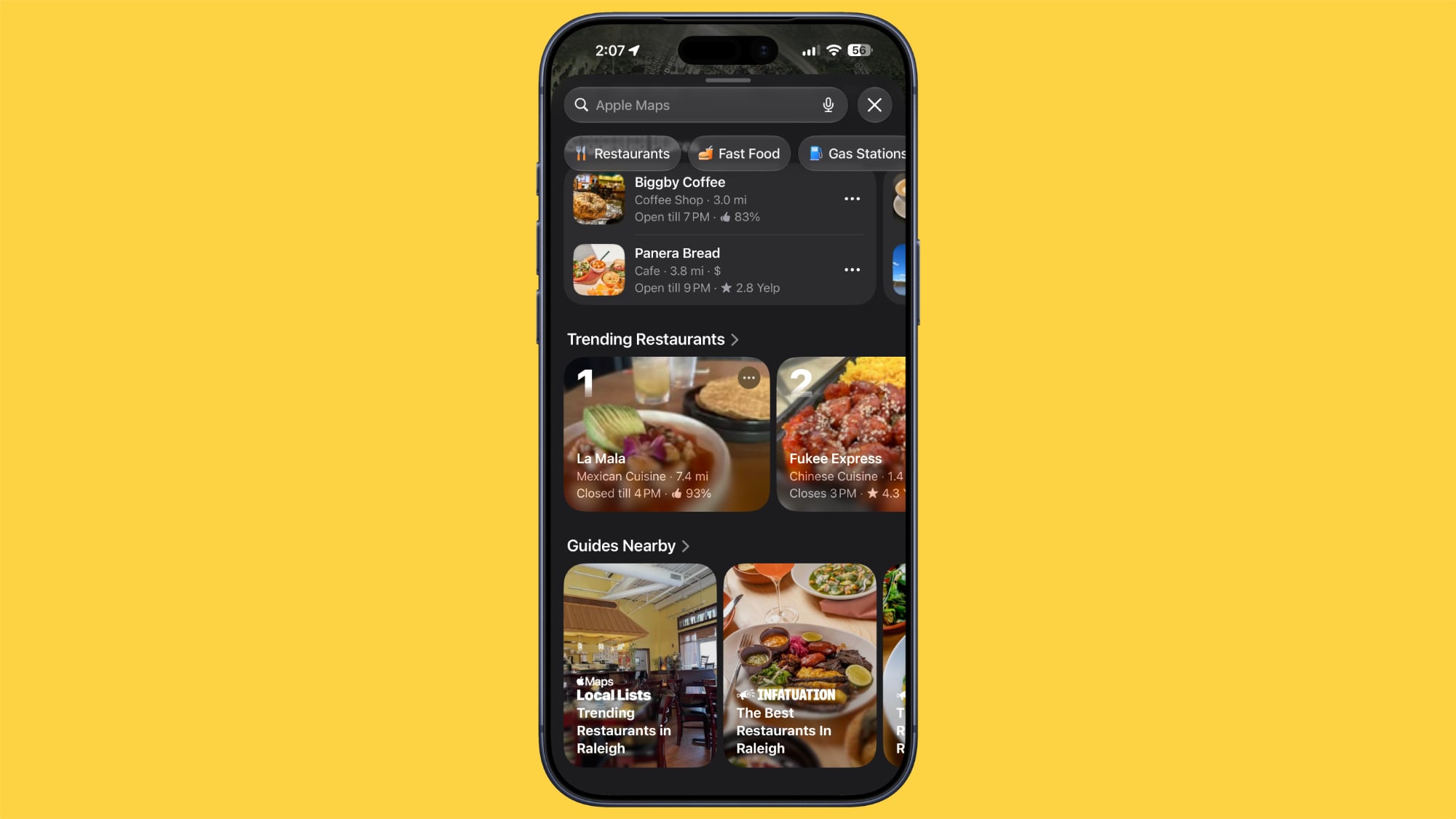
Trending Restaurants


In the Search interface, there's a Trending Restaurants section that shows you the top restaurants in the area you're in.


Natural Language Search Expansion


Natural language search in Maps now lets you ask for directions that avoid toll roads or highways.

Widgets


On the Apple Watch, there's a new Parked Car widget in the Smart Stack so you can easily see your car's last known location, with info synced from the iPhone.

Offline Maps


Apple says Offline Maps have improved in ‌iOS 27‌. More locations are shown on the map, labels are darker and clearer, and there are icons that are easier to view at a glance. When you tap on a location, like a town, it will zoom into the area automatically so you can see what's there.

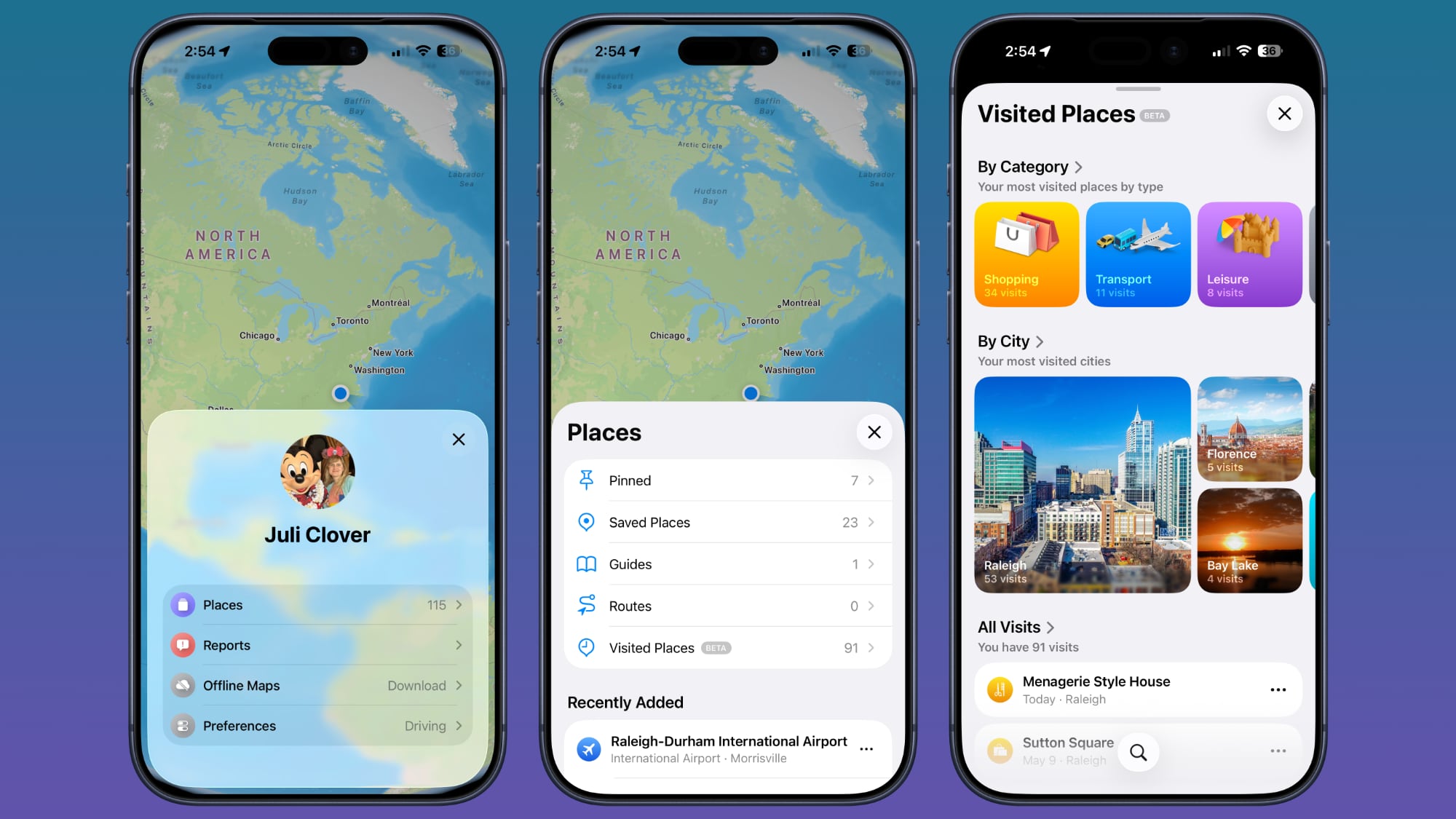
Visited Places


The Visited Places feature is more accurate in ‌iOS 27‌ and less likely to miss locations. Visited Places keeps track of locations you've been to, organizing stops by category and location. It's accessible by tapping on your profile picture, choosing Places, and selecting Visited Places.


Visited Places is also expanding to more locations in ‌iOS 27‌.

More iOS 27 Features


For more on what's new in ‌iOS 27‌, we have a dedicated roundup.
Related Roundups: iOS 27, iPadOS 27

This article, "iOS 27: All the New Apple Maps Features" first appeared on MacRumors.com

Discuss this article in our forums

  •  

Apple Releases Safari Technology Preview 247 With MCP Server for AI Agent Integration

Apple today released a new update for Safari Technology Preview, the experimental browser that was first introduced in March 2016. Apple designed ‌Safari Technology Preview‌ to allow users to test features that are planned for future release versions of the Safari browser.


‌Safari Technology Preview‌ 247 adds the Safari Model Context Protocol (MCP) server meant to speed up web development and debugging. With the MCP server, an AI agent can emulate what users experience on a website, providing better information for debugging.
In Safari Technology Preview 247, we're introducing the Safari MCP server — a Model Context Protocol server for web developers that makes your web development and debugging workflow faster and more powerful. We know agents are increasingly integral to the coding process and the Safari MCP server gives your agent the ability to know how your code actually renders in the browser by connecting it to a Safari browser window.

Any MCP-compatible client can connect to the Safari MCP server. More information is available on Apple's WebKit site.

‌Safari Technology Preview‌ 247 also includes fixes and updates for Accessibility, CSS, Fonts, Forms, HTML, JavaScript, MathML, Media, Model Element, Networking, Rendering, SVG, Scrolling, Security, Spatial Web, Text, Web API, WebDriver, and WebGL.

The ‌Safari Technology Preview‌ update is available through the Software Update mechanism in System Preferences or System Settings to anyone who has downloaded the browser from Apple's website. Complete release notes for the update are available on the Safari Technology Preview website.

Apple's aim with ‌Safari Technology Preview‌ is to gather feedback from developers and users on its browser development process. ‌Safari Technology Preview‌ can run side-by-side with the existing Safari browser and while it is designed for developers, it does not require a developer account to download and use.
This article, "Apple Releases Safari Technology Preview 247 With MCP Server for AI Agent Integration" first appeared on MacRumors.com

Discuss this article in our forums
  •  

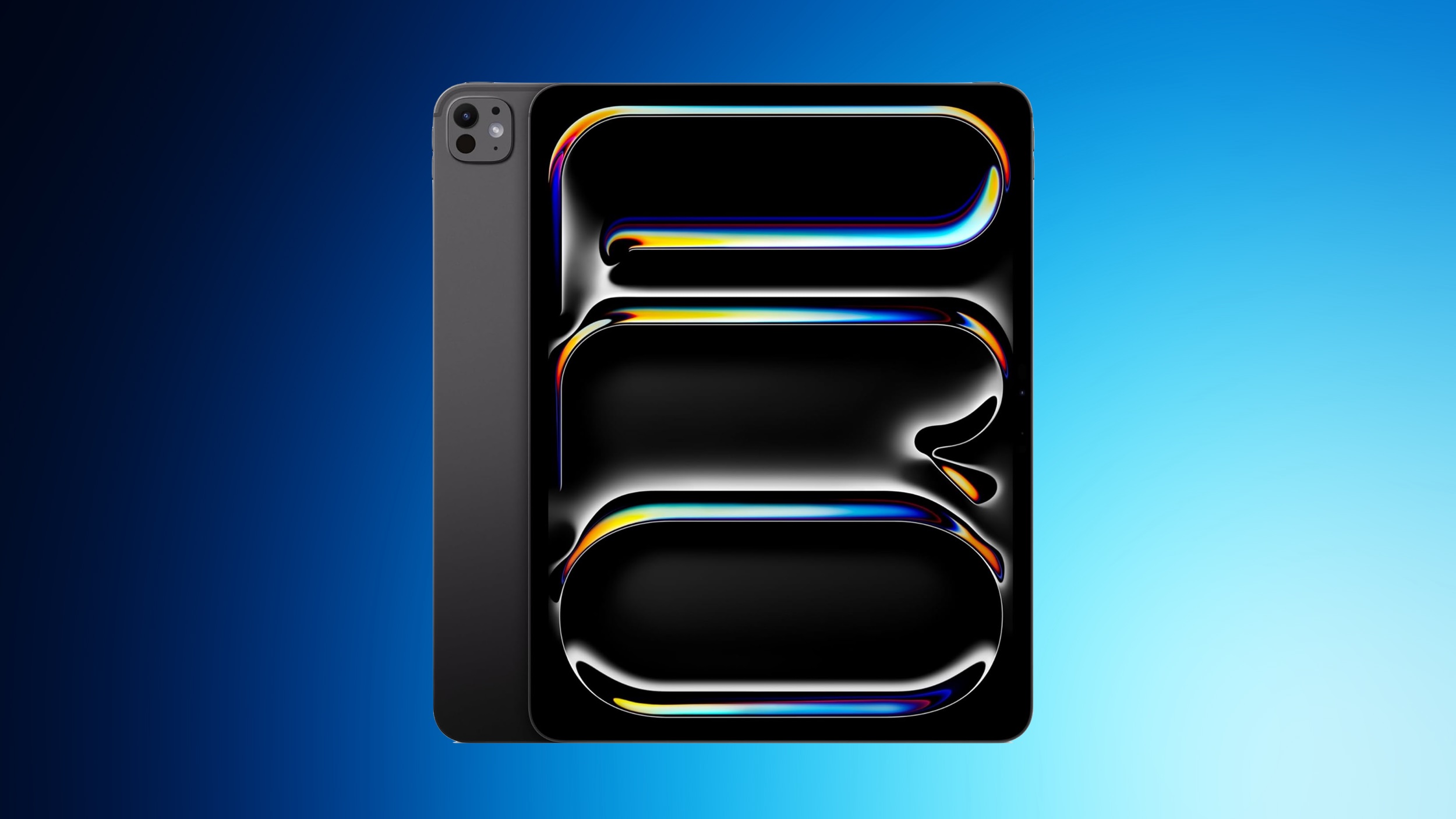
Apple to Launch New iPad Pro in Spring 2027

Apple is planning to release new 11-inch and 13-inch iPad Pro models in spring 2027, reports Bloomberg. No major design changes are expected, with Apple focusing on internal upgrades.


The ‌iPad Pro‌ models could use either M6 chips or M7 chips. Apple will introduce the M6 chip as soon as this year in an updated 14-inch MacBook Pro model, but it is aiming to release the M7 chip in the first half of 2027.

Bloomberg does not specify which chip Apple will put in the ‌iPad Pro‌, but if the M7 chip is ready by spring 2027, the new iPads could have the upgraded chip. If it's not ready, they'll use the M6. Both chips will be built on Apple's new 2-nanometer process, but the M7 has AI optimizations that the M6 doesn't have.

Apple has also tested a vapor chamber cooling system that could improve performance.

Little else is known about the new ‌iPad Pro‌ models, but if they come out in spring 2027, Apple could introduce them alongside the iPhone 18e, iPhone 18, and iPhone Air 2, devices that are also slated for spring 2027.
Related Roundup: iPad Pro
Buyer's Guide: iPad Pro (Neutral)

This article, "Apple to Launch New iPad Pro in Spring 2027" first appeared on MacRumors.com

Discuss this article in our forums

  •  

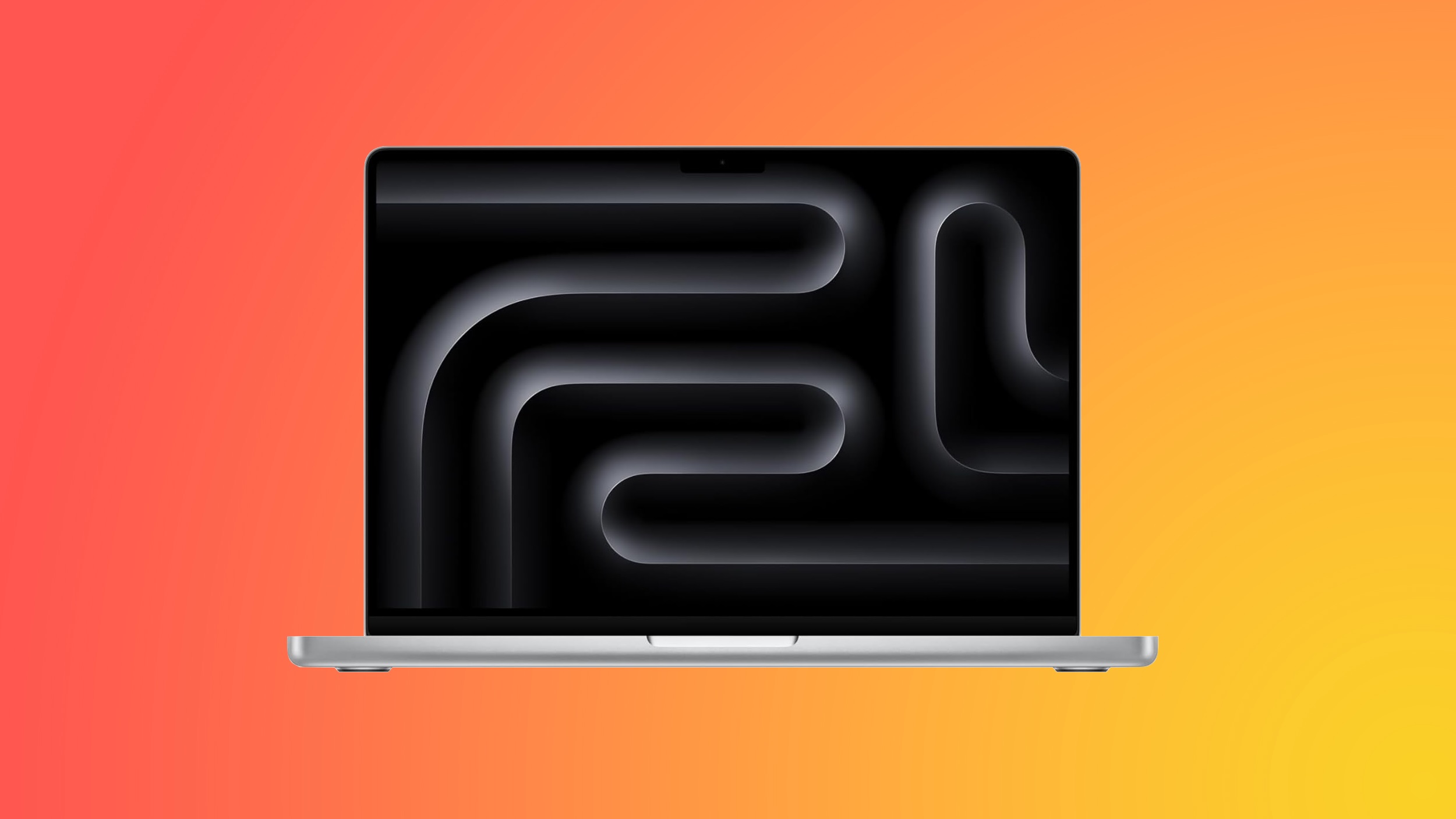
M6 MacBook Pro Coming in Late 2026, Redesigned M7 Model Launching in 1H 2027

Apple plans to release an updated 14-inch MacBook Pro with an M6 chip in late 2026, and then follow it with a revamped M7 model in the first half of 2027, reports Bloomberg.


Apple apparently finished work on a 14-inch ‌MacBook Pro‌ with an M6 chip "months ago," and the device is expected to launch before the end of the year. Apple's M6 chip cycle will be shorter than prior chip cycles because it is not planning for M6 Pro and M6 Max chips. Apple is aiming to have a quick transition between M6 and M7 because its M7 chips have optimizations for AI workloads.

The M7 ‌MacBook Pro‌ coming in 2027 will have a new design that's "in line" with the design that Apple plans to use for its rumored high-end OLED touchscreen ‌MacBook Pro‌ models. Prior rumors have suggested the high-end ‌OLED‌ ‌MacBook Pro‌ models could get a slimmed down design.

It's still unclear when the ‌OLED‌ ‌MacBook Pro‌ models will come out, but Bloomberg believes a launch is slated for the end of 2026 or early 2027.

Apple's release timelines are uncertain because of the ongoing memory chip shortages and increased costs that it's dealing with.

Apple has a long list of products that could come in the first half of 2027, including new iPad Pro models, the iPhone Air 2 with a second camera, the iPhone 18, and the iPhone 18e.
Related Roundup: MacBook Pro
Buyer's Guide: MacBook Pro (Buy Now)
Related Forum: MacBook Pro

This article, "M6 MacBook Pro Coming in Late 2026, Redesigned M7 Model Launching in 1H 2027" first appeared on MacRumors.com

Discuss this article in our forums
  •  

Apple in Talks to Buy Memory Chips From Chinese Makers CXMT and YMTC

Apple is in talks to buy memory from Chinese semiconductor companies ChangXin Memory Technologies Co. (CXMT) and Yangtze Memory Technologies Co. (YMTC), reports Bloomberg, citing sources with knowledge of the talks. Discussions between Apple and the chipmakers are ongoing, and no deal has been finalized yet.


Financial Times previously reported Apple was looking into working with CXMT and YMTC to get RAM at a lower cost, and there were also several reports from South Korean sites on the possibility. Apple recently raised the prices of Macs, iPads, and other devices, and consumers are now forced to pay more for many Apple products.

Apple increased its prices because of an ongoing global memory shortage that has driven costs up. Chipmakers are focusing on chips for AI servers, leaving less supply for consumer devices. With demand outpacing supply, memory manufacturers can charge higher prices.

Both CXMT and YMTC are on the Defense Department's 1260H list of Chinese companies that the U.S. suspects have ties to the People's Liberation Army. YMTC is also on a U.S. Commerce Department blacklist that prevents U.S. companies from selling to companies on the list without an export license.

Apple is not required to get U.S. approval before buying chips from the Chinese companies, but working with the Trump administration would prevent political upset. Apple is hoping to get a green light on the deal, and it wants to keep CXMT off the Commerce Department's Entity List, which would prevent it from using CXMT as a supplier.

Bloomberg says Apple CEO Tim Cook has spoken with Trump administration officials, including Treasury Secretary Scott Bessent. Apple has proposed using the chips sourced from the companies in devices meant for the Chinese market, freeing up chips from other suppliers for the U.S.

Some Trump administration officials are reportedly against letting Apple source chips from CXMT and YMTC, so it's not clear if the talks will lead to an agreement. Apple previously tried to source memory from YMTC in 2022, but the talks ended after congressional backlash.
Tag: China

This article, "Apple in Talks to Buy Memory Chips From Chinese Makers CXMT and YMTC" first appeared on MacRumors.com

Discuss this article in our forums

  •  

Elon Musk's SpaceX Showed Off Prototype AI Device

Elon Musk's SpaceX may be aiming to compete with Apple in the future. The company showed investors a prototype for a "handset-like device designed to reshape how humans interact with artificial intelligence," according to The Wall Street Journal.


The device is described as being slimmer than an iPhone, with a "sleek design." It runs a proprietary operating system, has a Qualcomm chipset, and integrates AI tech from SpaceX subsidiary xAI. In the past, Musk has talked about an "everything app" like China's WeChat, and the device investors were shown apparently drew on that concept.

SpaceX was showing the prototype to investors and stakeholders ahead of its IPO, and said the project was in the early stages of development. The final design could change, and it is not known if it will actually come to market.

Musk has talked about designing a smartphone in the past. He said he would develop one if X (formerly Twitter) was removed from the App Store by Apple. In November 2025, he said he didn't want to make a phone, but he would if Apple and Google did "really bad things" like censorship. In a town hall meeting, Musk said the idea of making a phone "makes me want to die," but one of his companies would make a phone if needed.

Earlier this year, Musk said explicitly that SpaceX is not developing a phone, but The Wall Street Journal says some SpaceX and Tesla investors were told Musk "has long envisioned" a device that would be a platform for Tesla, SpaceX, and xAI technologies. Musk has denied the report, calling it "utterly false."
This article, "Elon Musk's SpaceX Showed Off Prototype AI Device" first appeared on MacRumors.com

Discuss this article in our forums

  •  

MacBook Ultra: Everything We Know About Apple's OLED Touchscreen Mac

Apple is working on a high-end MacBook Pro that could be called the "MacBook Ultra." The device will have several firsts in a Mac, including an OLED display and a touchscreen.


The "Ultra" name isn't a sure thing, and Apple could also continue to call the device the ‌MacBook Pro‌. It will be a "Pro" device in the ‌MacBook Pro‌ line.

Design


Apple hasn't redesigned the ‌MacBook Pro‌ since it added Apple silicon chips in 2021, so the device is due for a new look. The MacBook Ultra could feature some design changes, including a thinner chassis.

Apple could get rid of the notch on the MacBook Ultra, replacing it with an iPhone-style Dynamic Island. A ‌Dynamic Island‌ would unify the way Siri AI behaves across the iPhone and the Mac with iOS 27 and macOS Golden Gate.

Size Options


The MacBook Ultra will be available in both 14-inch and 16-inch size options.

Display


Apple's upcoming MacBook will be the first with an OLED display. OLED display technology is already used for the iPhone, Apple Watch, and iPad Pro, but it has taken time for larger-sized OLED screens to come down in price.

OLED will be an upgrade over the current mini-LED display technology in most cases, bringing deeper colors and a higher contrast ratio with true blacks. In an OLED display, individual pixels turn off instead of dim when not activated, so there's less light leakage. OLED displays tend to have better HDR than mini-LED, but sometimes don't match the overall mini-LED brightness levels.

Along with OLED technology, the MacBook Ultra is expected to have the first touchscreen display on a Mac. Users will be able to use their fingers for tapping and interacting with items on the Mac's display, similar to an iPad.

Touchscreen capabilities will be used alongside the trackpad and keyboard, and so Apple may be viewing them as more supplementary than a main control method. Apple is rumored to be adapting ‌macOS Golden Gate‌ for touch input.

Apple plans to add a reinforced hinge to the MacBook Ultra's display so that it doesn't wobble when it's tapped.

M5 Pro and M5 Max Chips


The current ‌MacBook Pro‌ models are equipped with M5 Pro and M5 Max chips, and Apple plans to use the same chips for the rumored MacBook Ultra.

Apple is planning to introduce the M6 chip as soon as late 2026, but Bloomberg says Apple isn't going to release any other chips in the M6 series. Apple's chip plans have changed in recent months, and there won't be an M6 Pro or an M6 Max. With no M6 Pro or M6 Max, Apple will need to use the M5 Pro and M5 Max so it doesn't have to wait for the M7 series.

A second-generation MacBook Ultra will use the M7 Pro and M7 Max chips.

With the MacBook Ultra set to use the same chips that are in the existing ‌MacBook Pro‌, it's unclear if it will replace the existing 14-inch and 16-inch ‌MacBook Pro‌ models or be sold alongside them as a higher-end option.

MacBook Ultra Hints


There are features in ‌macOS Golden Gate‌ that hint at a future touchscreen Mac. Apple added direct touch input to Sidecar so users can tap and interact with macOS elements when using the ‌iPad‌ as a Mac display.

‌macOS Golden Gate‌ supports an iPhone-style pull-to-refresh option, and it can be used across apps like Safari, Mail, News, Podcasts, and Calendar. A pull-to-refresh option makes the most sense on a touch display.

Pricing


Apple's OLED MacBook is expected to be a premium product, with a price tag higher than current ‌MacBook Pro‌ models. Apple raised the prices of all Macs in June, and so the MacBook Ultra will likely be even more expensive than expected.

The higher-end 14-inch ‌MacBook Pro‌ with M5 Pro chip starts at $2,499, while the 16-inch ‌MacBook Pro‌ starts at $2,999. The OLED MacBook will be priced even higher.

Launch Date


Rumors suggest the MacBook Ultra will launch in late 2026 or early 2027, with mass production to start in late 2026. If the MacBook Ultra comes in 2026, it could be released sometime between October and December, but it won't be unveiled at Apple's September iPhone event.

If it launches in 2027, it could come early in the year at Apple's first 2027 event.
This article, "MacBook Ultra: Everything We Know About Apple's OLED Touchscreen Mac" first appeared on MacRumors.com

Discuss this article in our forums
  •  
❌