Lees weergave

Apple Seeds Fourth Public Betas of iOS 26.6, macOS Tahoe 26.6 and More

Apple today provided public beta testers with the fourth betas of iOS 26.6, iPadOS 26.6, macOS Tahoe 26.6, watchOS 26.6, and tvOS 26.6, with the software coming a day after Apple seeded the betas to developers.


After signing up to beta test the software updates on Apple's beta site, public beta testers can download the new software using the Software Update section in the Settings app on each device.

iOS 26.6 has a feature that will let you know when you have blocked too many contacts, but the limit is in the thousands so most users may not ever see the messaging. There are also signs of a new iPhone anti-snatching feature that locks a stolen iPhone when it's grabbed from your hand.

No other major new features have been found in any of the software updates, with Apple likely focusing on bug fixes and security improvements. We're nearing the end of the "26" software cycle, with Apple planning to release iOS 27, iPadOS 27, macOS Golden Gate, and more in September.
Related Roundups: iOS 26, iPadOS 26, macOS Tahoe
Related Forums: iOS 26, macOS Tahoe

This article, "Apple Seeds Fourth Public Betas of iOS 26.6, macOS Tahoe 26.6 and More" first appeared on MacRumors.com

Discuss this article in our forums

  •  

Claude Cowork Expands to iPhone and the Web

Anthropic today said it is bringing Claude Cowork to mobile and the web, with beta access rolling out to Max users first. Claude Cowork is a feature that lets Claude access local files and connected tools, then autonomously complete tasks on your behalf.


Claude Cowork tasks can now be started and monitored on the web, desktop, and Claude mobile apps. Claude is able to work in the background in the cloud even when no device is online, sending an alert when it needs permission to move forward with a task.

Anthropic says the desktop is still the best place for the full Cowork experience because it gives Claude access to local files and a browser, but those who were unable to install a desktop app can now use Cowork.

Claude chat and Cowork have also been combined into a single view on the web and desktop and are no longer separate tabs.

As part of the expansion to mobile, Anthropic is extending doubled Cowork usage limits through August 5.
This article, "Claude Cowork Expands to iPhone and the Web" first appeared on MacRumors.com

Discuss this article in our forums

  •  

iOS 27 Public Beta is Coming Soon

Apple previously announced that the first iOS 27 public beta would be released in July, meaning that it should be available at some point this month.


Below, we have outlined how to get ready for the iOS 27 public beta, which will likely follow the third or fourth iOS 27 developer beta.

Release Date History


The first public betas of iOS 16 through iOS 26 came out between July 11 and July 24.


  • iOS 26 Public Beta: Thursday, July 24, 2025

  • iOS 18 Public Beta: Monday, July 15, 2024

  • iOS 17 Public Beta: Wednesday, July 12, 2023

  • iOS 16 Public Beta: Monday, July 11, 2022


Get Ready


Once it is available, anyone will be able to install the iOS 27 public beta on a compatible iPhone for free by following the steps outlined below.

  • Sign up at beta.apple.com for free.

  • Open your iPhone's Settings app and tap General → Software Update → Beta Updates.

  • Select the iOS 27 Public Beta option (restart your iPhone if you don't see it) and follow the on-screen steps.
If you are impatient, anyone can install the iOS 27 developer beta for free right now.

Warning: While the first public beta is usually more stable than the first developer beta, iOS betas often have bugs and performance issues. You may not be able to use some apps that you rely on, and issues can extend to CarPlay. Backing up your iPhone before installing beta software is highly recommended, and relying on a secondary iPhone altogether is always a good idea if possible.

iOS 27 is compatible with the iPhone 11 and newer, but Apple Intelligence features like Siri AI are limited to the iPhone 15 Pro and newer.

Keep in mind that the revamped version of Siri has a waitlist. To join the waitlist, open the Settings app on iOS 27 and tap on Siri and you will find it there. In some cases, it can take a few weeks to receive access to Siri AI and the Siri app.

Beyond the new Siri, iOS 27 features Liquid Glass design enhancements, performance improvements, expanded child safety features, and more.
Related Roundups: iOS 27, iPadOS 27

This article, "iOS 27 Public Beta is Coming Soon" first appeared on MacRumors.com

Discuss this article in our forums

  •  

Google's Pixel 11 Event Set for August 12, a Month Before Apple Debuts Foldable iPhone

Google will introduce its latest Pixel smartphones at an August 12 event, debuting the updated devices about a month ahead of when Apple is expected to announce new iPhone models.


Google is expected to launch the Pixel 11, Pixel 11 Pro, Pixel 11 Pro XL, and a new Pixel 11 Pro Fold. Leaked CAD renders suggest the new smartphones will have slimmed down bezels, a slightly thinner design than the Pixel 10, and an updated all-black camera bar.

The latest Pixel foldable is expected to look like the Pixel 10 Pro Fold, but it could be thinner with some minor changes to the rear camera bar. It's supposed to be about 10.1mm thick when folded and 4.8mm thick when unfolded, which is not too far off from the rumored thickness of Apple's foldable iPhone.

Last year, Apple cut the 128GB iPhone and the iPhone 17 launched with 256GB of starting storage, and Google plans to make the same move with the Pixel 11.

This year's Pixel devices could be more expensive, and a leak out of Europe suggests a €100 price increase across all new Pixel smartphones compared to the prior pricing. Most device manufacturers are upping prices in 2026 because of the soaring costs of DRAM.

Apple raised the prices of all Macs and iPads in June, and the new iPhones coming in the fall are likely going to be more expensive than the ‌iPhone 17‌ lineup. The iPhone 18 Pro and Pro Max could be up to $200 more expensive, according to analyst estimates.

Google's Pixel 11 lineup will compete with Apple's ‌iPhone 18 Pro‌ models, which Apple is expected to introduce in September. Apple won't have a Pixel 11 equivalent in 2026 because it is holding its base iPhone 18 until spring 2027, but it will launch the ‌iPhone 18 Pro‌, ‌iPhone 18 Pro‌ Max, and its first foldable iPhone.

Samsung is also going to launch new smartphones ahead of when Apple introduces the ‌iPhone 18‌ lineup. The next Samsung Unpacked event is expected later in July, with the company set to introduce the Galaxy Z Fold 8, the Galaxy Z Flip 8, and the Galaxy Z Fold 8 Wide. The latter foldable has an aspect ratio that's closer to the rumored foldable iPhone.

With the foldable iPhone, Apple will be competing with Samsung and Google, and both companies have had time to refine their foldable device designs. Samsung has been making foldables since 2019, and Google's first Pixel Fold came out in 2023.
This article, "Google's Pixel 11 Event Set for August 12, a Month Before Apple Debuts Foldable iPhone" first appeared on MacRumors.com

Discuss this article in our forums

  •  

Apple Releases New AirPods Beta Firmware With iOS 27 Features

Apple today released a third version of the beta firmware it is testing for the AirPods Pro 2, AirPods Pro 3, AirPods 4, and AirPods Max 2. The firmware is limited to developers at the current time, and it has a build number of 9A5314b.


In iOS 27, iPadOS 27, and macOS Golden Gate, Apple is adding a new AirPods interface, a slider for Adaptive mode, and support for custom EQ, so the firmware adds support for those features. AirPods are also compatible with the new Siri AI.

When the AirPods are connected to an iPhone, iPad, or Mac running iOS 26, iPadOS 26, or macOS 26 or later, there is a beta firmware option that can be accessed in the AirPods settings interface. Toggling on beta updates allows users to install the beta firmware.

Firmware updates can be downloaded by connecting the AirPods to an Apple device and connecting them to power. It can take a few hours for new firmware to be installed because there is no straightforward software update option like there is for other Apple devices.
Related Forum: AirPods

This article, "Apple Releases New AirPods Beta Firmware With iOS 27 Features" first appeared on MacRumors.com

Discuss this article in our forums

  •  

Thorsten Alteholz: My Debian Activities in June 2026

Debian LTS/ELTS

This was my hundred-forty-fourth month that I did some work for the Debian LTS initiative, started by Raphael Hertzog at Freexian.

During my allocated time I uploaded or worked on:

  • [DLA 4615-1] exim4 security update to fix one CVE related to information disclosure in combination with proxies.
  • [DLA 4616-1] haveged security update to fix one CVE related to local root privilege escalation.
  • [DLA 4618-1] gsasl security update to fix one CVE related to denial of service.
  • [DLA 4631-1] asterisk security update to fix 13 CVEs related to buffer under- or overflows, either on heap or on stack. Some are related to use-after-free or wrong processing of invalid or untrusted certificates.
  • [ELA-1747-1] gimp security update to fix three CVEs in Buster related to denial of service or execution of arbitrary code if malformed PSP, JPEG 2000 or PSD files are opened.
  • [ELA-1748-1] gimp security update to fix two CVEs in Stretch related to denial of service or execution of arbitrary code if malformed PSP or PSD files are opened.
  • [ELA-1749-1] exim4 security update to fix one CVEs in Buster and Stretch related to information disclosure in combination with proxies.
  • [ELA-1750-1] gsasl security update to fix one CVEs in Buster and Stretch related to denial of service.

Besides fixing all CVEs of asterisk in Bullseye, I started to look at asterisk in other releases as well. Rather surprisingly asterisk is only part of Unstable and Bullseye. All other releases don’t include any version of asterisk at all. So first things first, besides some security related RC bugs, asterisk did not migrate due to RC-bugs in dahdi-linux. As I maintain osmocom-dahdi-linux (which supports less/other hardware), I looked at the open issues and after some rounds I could upload a new upstream version, fixed some bugs and resolved issues with piuparts. dahdi-linux meanwhile migrated to testing, job done!
As a next step I looked at the open CVEs. Some of them had been already fixed in previous uploads but had not been marked accordingly. So I fixed all remaining ones and sent a debdiff to the maintainer. Unfortunately there was some kind of overlap in our work and he ignored my debdiff but uploaded a new upstream version. Anyway, job done as well, no open security issues anymore. The only thing that hinders asterisk from migrating to testing is the reproducible build. So if anybody has some spare time …

Other things I worked on were the regression update of rsync. Some of the elven new patches need to be backported, but I am confidentially to finish this month. I already reviewed the rsync– uploads of Sylvain to Buster and Stretch, so I don’t expect any big hurdles here. I am also making progress to find the correct patches for hplip and cups.

Debian Printing

This month I uploaded a new upstream versions:

  • hplip to unstable to fix some bugs.

This work is generously funded by Freexian!

Debian Lomiri

This month new upstream versions of dozens of lomiri packages have been released and I uploaded lots of them to Debian. After they migrate to testing, I am also going to sync them to the Ubuntu PPA.

This work is generously funded by Fre(i)e Software GmbH!

Debian Astro

This month I uploaded a new upstream version or a bugfix version of:

  • indi-pentax to unstable. This is a package in contrib without autobuild and needed a new upload for the libraw transistion.
  • c-munipack to unstable.
  • supernovas to unstable (sponsored upload).

Debian IoT

This month I uploaded a new upstream version or a bugfix version of:

Debian Mobcom

This month I uploaded a new upstream version or a bugfix version of:

misc

This month I uploaded a new upstream version or a bugfix version of:

  • visam to unstable. There had been an RC bug due to two binaries with the same name but different functionality. Yes, it is in the policy but … (my mother forbade me to elaborate more on this)
  • mailio to unstable.
  •  

New in Edge for developers – Style layout gaps, improve keyboard accessibility and migrate your PWA to a new origin

Welcome to New in Edge for developers, a new series featuring recent web platform updates in Microsoft Edge that help web developers build better sites and apps. In this first edition, we'll look at CSS gap decorations for styling the space between layout items, the focusgroup attribute for easier keyboard navigation, same-site PWA origin migration for moving an installed web app without disrupting users, and other improvements such as text-fit, flex-wrap: balance, and faster clipboard reads. We'll also preview upcoming features you can test today and share feedback on early, and highlight a few updates from across the broader web ecosystem, such as Modern Web Guidance, an AI coding agent skill helping you write better code.

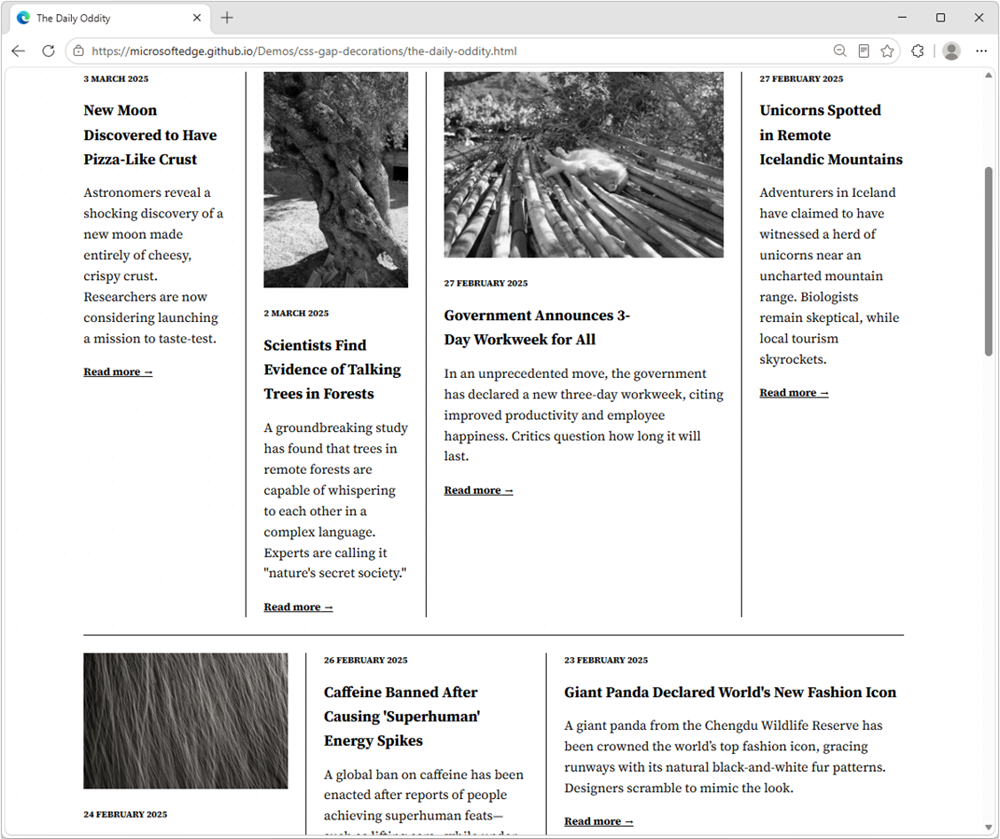
Style layout gapsA demo news website with mutiple articles in columns, each with an image and some text. Articles are separated by dark lines.

CSS gap decorations let you style the gaps between items in flex, grid, and multi-column layouts directly, without relying on border hacks, pseudo-elements, or extra DOM elements. The new row-rule and extended column-rule properties, as well as the rule shorthand, support colors, patterns, and even the repeat() syntax for rich, consistent designs with minimal CSS.
.grid {
  display: grid;
  gap: 16px;
  row-rule: 1px solid #ccc;
  column-rule: 2px solid #333;
}
Learn more about CSS gap decorations and try our interactive playground.

Improve keyboard accessibility with focusgroup

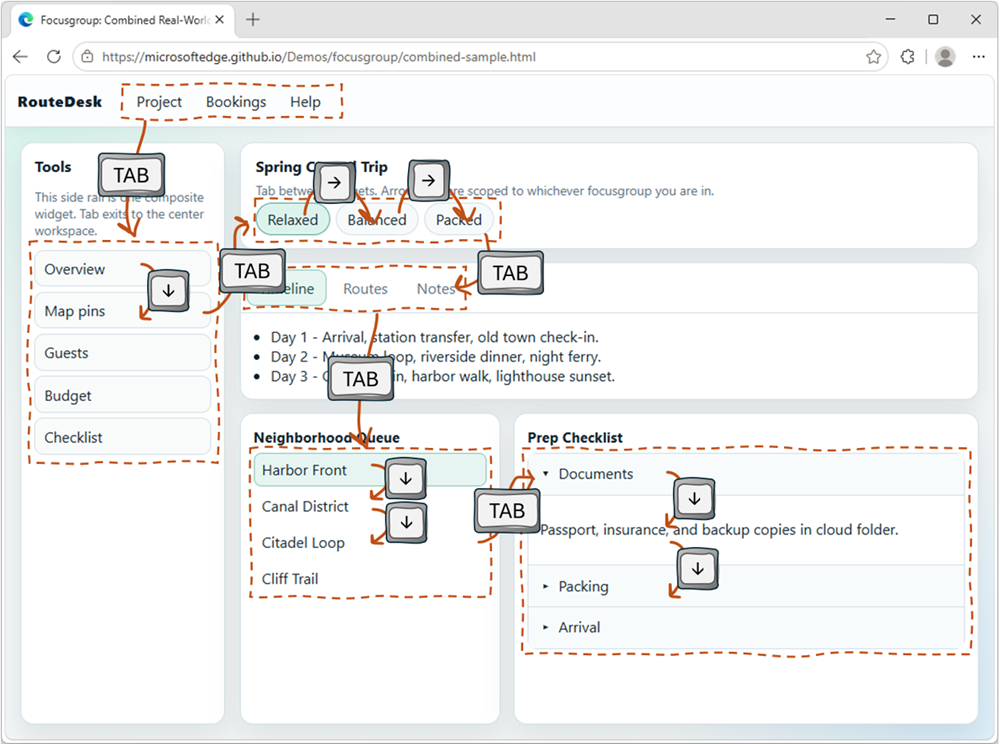
A typical web app UI with a horizontal menu bar, a sidebnar, a toolbar, some tabs, and more widgets like accordions, and more. Overlaid on top of the UI are key strokes showing that the user is navigating between the different widgets with tabs, and navigating within the widgets with arrow keys. The focusgroup HTML attribute gives you arrow key navigation for composite widgets, such as toolbars, tabs, or menus, for free. With the focusgroup attribute you get automatic arrow key handling and focus memory, without any custom JavaScript roving tabindex code. To learn more, check out Making keyboard navigation effortless.

Migrate your PWA to a new origin

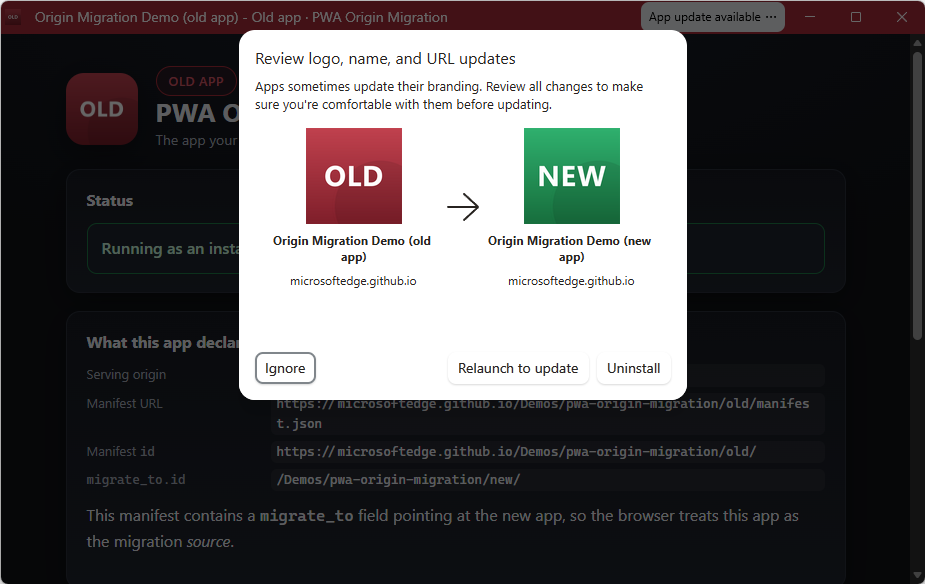
The window of an installed PWA called Old app. A button titled App update available is in the title bar, the user has clicked it, and a popup has appeared as an overlay on the app, showing the intended move from Old app to New app. The user can ignore the move, relaunch to update, or uninstall the app. You can now seamlessly migrate your Progressive Web App (PWA) to a new, same-site origin, preserving user installations and permissions. When a user installs a PWA, its identity is bound to its web origin (for example, example.com/app). Previously, changing the origin forced users to manually uninstall and reinstall the app. This is no longer necessary. Now, moving to a new origin such as app.example.com can happen without interruption to your users. To learn more, see Seamless PWA origin migration: Change domains without losing users.

And many other features

We've added many more web platform features to Microsoft Edge over the past fews releases. Check out the links below to find out more: For even more updates, check out our web platform release notes.

Ready for testing

While not yet available for general use, the following features are available for early testing and feedback. You can test these new features either locally, or on your production website with your own users, by registering for an origin trial. Your feedback is crucial to help us shape these next features and ensure they meet your needs as developers, and the needs of your users.

Network Efficiency Guardrails: monitor and improve your site's load performance

Complex sites that embed third-party content and are maintained by many different teams tend to run the risk of regressing load performance when strong guidelines and monitor practices are not in place. This is exactly what the Network Efficiency Guardrails feature provides. It surfaces performance violations automatically in production, so your teams can catch and fix them without manually auditing every page. To learn more and test the Network Efficiency Guardrails feature, see Monitor and improve your web app's load performance.

<install>: install web apps with a single HTML element

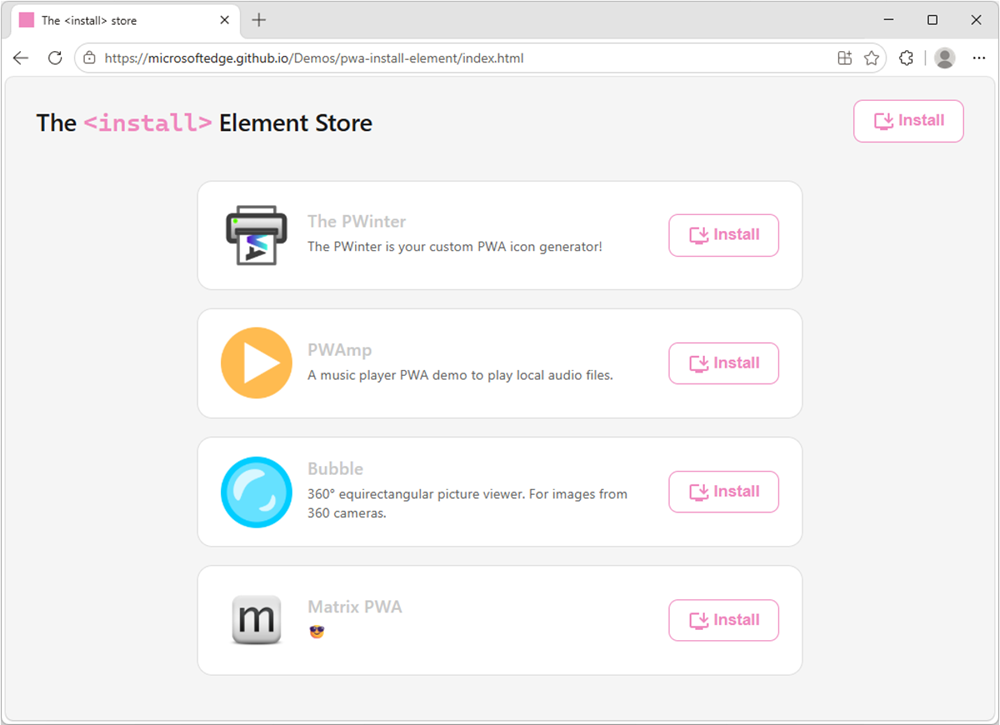
A website called The install Element store. The site has a button to install itself as an app. And it lists other apps, such as The PWinter, PWAmp, Bubble, and Matrix PWA, each with their own install button. The new <install> element gives you a browser-trusted install button with no JavaScript required. The browser controls the button's label and appearance, so a user click is a genuine signal of intent. You can even use the installurl attribute to build an app catalog that installs cross-origin web apps.
<!-- Install the current app -->
<install></install>

<!-- Install a different app -->
<install installurl="https://awesome-app.com/"></install>
To learn more, and get started, see our blog post: Install web apps with the new HTML install element.

CSS Grid Lanes: space efficient masonry layout

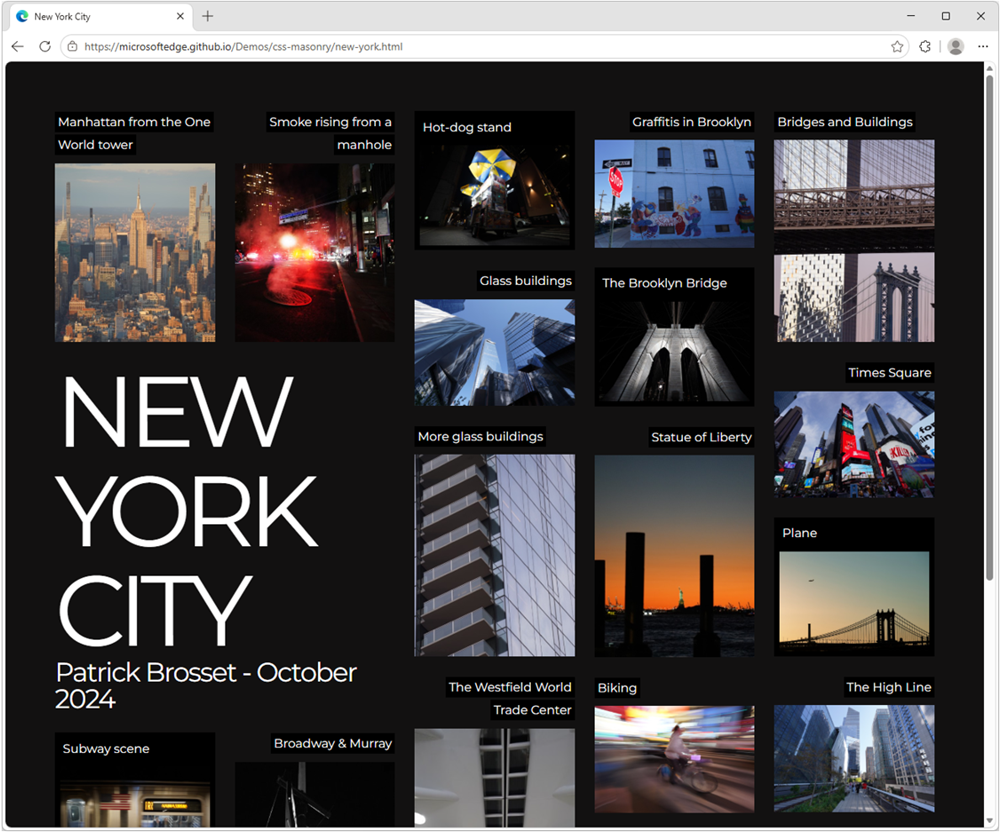
A photo gallery website, dark background, with the text New Work City, and a dozen or so photos of New York, placed in a space efficient masonry layout. Grid Lanes is a new type of CSS layout that allows items to be automatically placed in the next available space, creating a space-efficient masonry-like layout without needing to specify row heights or use JavaScript. Grid Lanes is ideal for galleries, portfolios, and any design where items have varying widths or heights.
.grid {
  display: grid-lanes;
  grid-template-columns: repeat(auto-fill, minmax(200px, 1fr));
}
To learn more, check out our demos.

New models and APIs for on-device AI

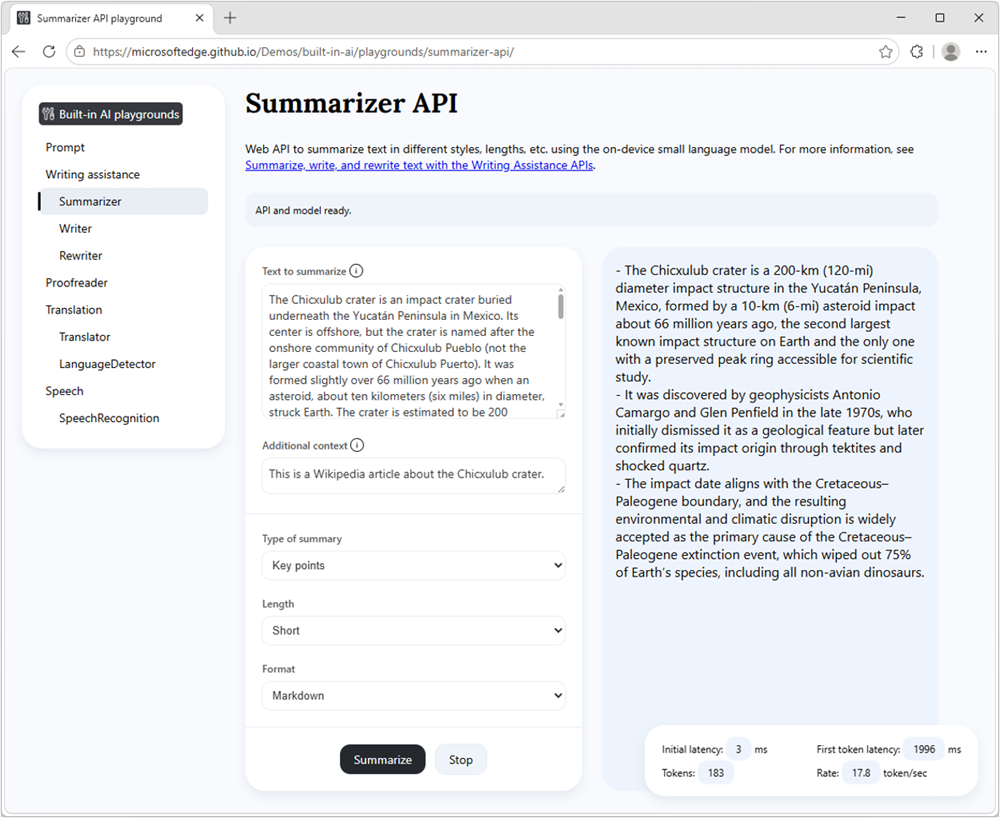
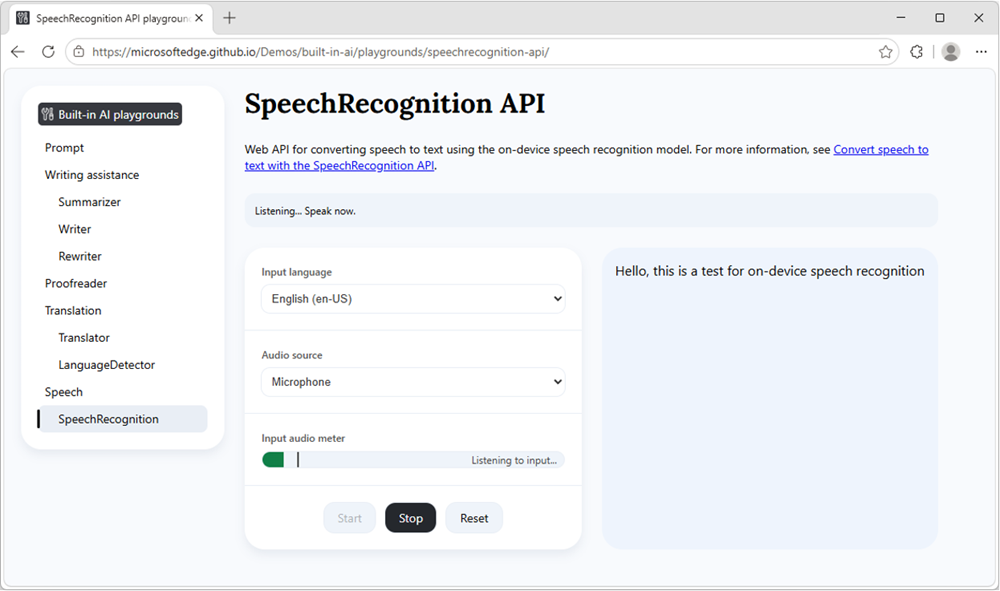
Our developer preview of the pre-release Aion-1.0-Instruct small language model is now available to use with the Prompt API and Writing Assistance APIs in Microsoft Edge. Aion-1.0-Instruct is smaller, faster, and more efficient than Phi-4-mini. It also expands support to significantly more devices. Check out our playground samples and share your feedback on GitHub. Summarizer API: a playground site with two columns. On the left: input text to summarize, and settings. On the right: summarized text. That's not all, starting with Microsoft Edge Canary or Dev 150, you can now also use the WebSpeech API to convert speech to text by using a local model, rather than a cloud-based solution. With on-device speech recognition support in Microsoft Edge, you can reduce your web app's running cost, be network independent, and improve privacy for your users. Speech Recognition API: a demo webpage that lets you choose an input language and an audio source, and which converts the audio source into written text. The audio meter shows current activity, and the output reads Hello, this is a test for on-device speech recognition. To learn more about Aion-1.0-Instruct, on-device speech recognition, and other on-device AI API updates, see Expanding on‑device AI in Microsoft Edge: New models and APIs for the web.

News from across the web platform

Beyond individual features, we also want to highlight a few updates from across the web platform and the broader web ecosystem.

Interop 2026 progress

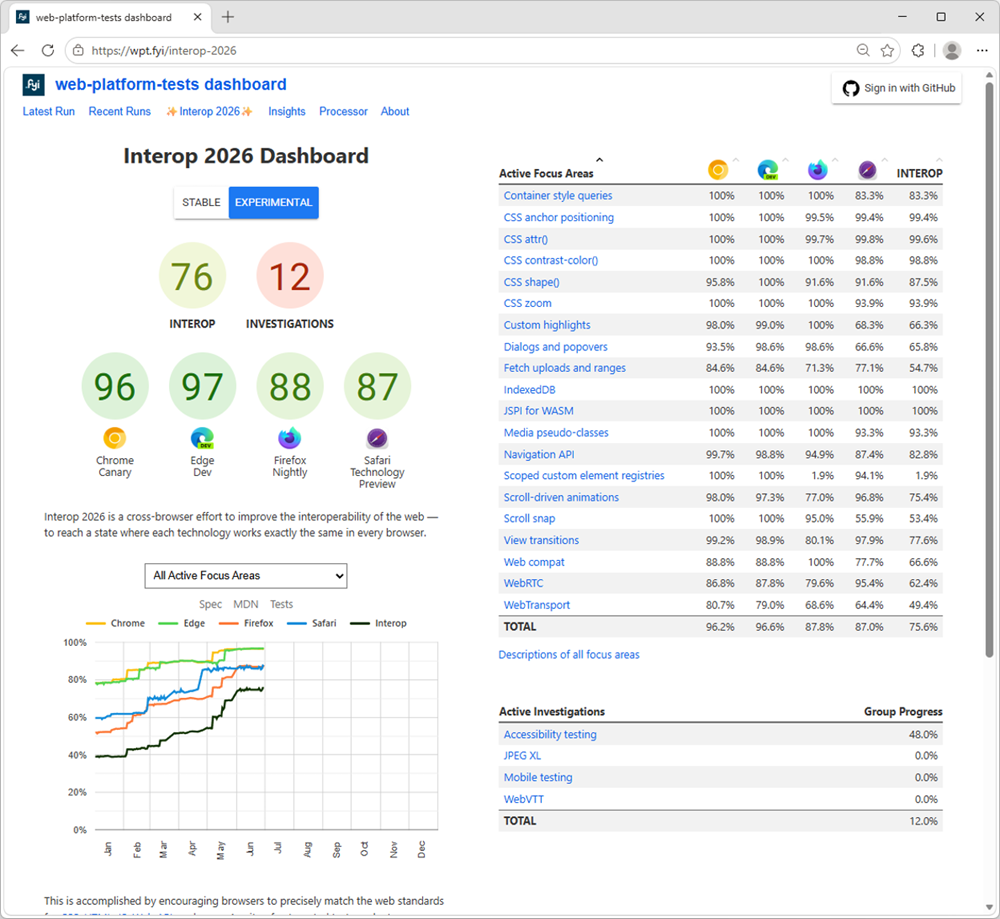
The Interop 2026 home page, showing browsers' current scores, a graph with scores over time, and the list of focus areas with their scores per browser. The web moves forward by responding to new end-user and developer needs, and this is therefore a big part of what we do. But we also know that you need stability and consistency to build on. That's why we've been participating in the Interop project for the past five years, working with other browser vendors to identify and fix interoperability issues across browsers. This work is crucial to ensure that the web remains a healthy ecosystem where developers can build with confidence, and users can access content and applications regardless of their choice of browser. Interop 2026, the latest round of the project, is now well underway, and we've already made significant progress in fixing the issues identified during the planning phase. Between January and June 2026, Microsoft Edge's test pass rate increased from 77% to 97%, and we're hard at work on features such as Scoped custom element registries and WebTransport. Check out the Interop dashboard for more details on this year's focus areas and the progress made by all participating browsers.

Modern web guidance

We've partnered with the Google Chrome team to bring Modern Web Guidance to web developers. This ambitious project gives developers AI skills they can use with their AI coding agents, to build better web apps based on best practices under rigorous evals. We want to hear from you about this project. Did you try it? Did you find the results helpful? Are there other features you'd like to see included? Please let us know by using the public repo.

Closing words

On the Microsoft Edge web platform team, we're always listening to what users and web developers need, and pushing for a better, more capable web. Our work is never done; a healthy web is one that keeps improving to meet ever evolving needs. We hope these recent feature additions and early experiments are useful to you and your users. As always, let us know your feedback and other unsolved use cases. With your help, we can make your lives as developers easier, and your web products better for users.
  •  

iPhone 18 Pro Could Be Noticeably Thicker Than iPhone 17 Pro

The iPhone 18 Pro's aluminum frame and camera housing are both set to grow thicker than the iPhone 17 Pro's, according to new posts from the leaker known as "Fixed Focus Digital."


In a post on Weibo today, the leaker said that aluminum alloy mid-frames are "going to be used in straight-edge phones for a long time to come," referring to Apple's continued use of the material introduced with the ‌iPhone 17 Pro‌ rather than a return to titanium. Citing leaked materials from Tata, the leaker claimed that the ‌iPhone 18 Pro‌'s overall body and rear camera plateau, will be thicker than the current model, corresponding to a roughly 2mm increase the leaker says it can now confirm firsthand. The leaker added that the final thickness figure "will indeed be somewhat surprising."

The post links to two of the leaker's earlier claims. In one, Fixed Focus Digital said the ‌iPhone 18 Pro‌ lineup "will still feature an aluminum alloy build" with "indeed excellent" heat dissipation, while warning that buyers should be cautious about the new color options given the discoloration and surface chipping that has affected some ‌iPhone 17 Pro‌ units. In the other, the leaker said supply chain feedback confirmed the ‌iPhone 18 Pro‌'s main camera upgrade and indicated that the aluminum alloy back panel would grow by 2mm.

That 2mm figure lines up with a separate post the leaker shared on July 4, which estimated that the ‌iPhone 18 Pro‌ models' overall thickness will land somewhere around 9.9–10.9mm. That would mark a substantial jump from the ‌iPhone 17 Pro‌ and ‌iPhone 17 Pro‌ Max, which both measure 8.75mm thick. It also builds on dummy models shared in April, which suggested the ‌iPhone 18 Pro‌ Max's camera plateau would grow to 11.54mm, up from 11.23mm on the ‌iPhone 17 Pro‌ Max.

The added bulk is reportedly tied to a redesigned main camera system. The device is widely rumored to feature the iPhone's first variable aperture, a component reported to cost Apple 50% more than the current fixed-aperture lens. Production of the new module is said to be ramping up at suppliers including LG Innotek and Sunny Optical.

The ‌iPhone 18 Pro‌ and ‌iPhone 18 Pro‌ Max are expected to launch alongside Apple's first foldable iPhone this September.
Related Roundups: iPhone 17 Pro, iPhone 18 Pro
Related Forum: iPhone

This article, "iPhone 18 Pro Could Be Noticeably Thicker Than iPhone 17 Pro" first appeared on MacRumors.com

Discuss this article in our forums

  •  

Amazon Discounts All Wi-Fi iPad Mini 7 Models by Up to $130

Amazon today has a few discounts on the iPad mini 7, starting at $489.00 for the 128GB Wi-Fi tablet, down from $599.00. This is the first time since Prime Day that we've tracked all Wi-Fi models of the tablet on sale with notable discounts.

Note: MacRumors is an affiliate partner with Amazon. When you click a link and make a purchase, we may receive a small payment, which helps us keep the site running.

Additionally, you can get the 256GB Wi-Fi iPad mini 7 for $589.00 and the 512GB Wi-Fi iPad mini 7 for $769.00, both available in multiple colors. Of course, when compared to the pre-hike prices on each model, these are all second-best prices on the iPad mini 7.


Additionally, you can pair a new iPad mini with the Apple Pencil Pro for $99.00 on sale right now on Amazon, down from $129.00.


If you're on the hunt for more discounts, be sure to visit our Apple Deals roundup where we recap the best Apple-related bargains of the past week.


Deals Newsletter


Interested in hearing more about the best deals you can find in 2026? Sign up for our Deals Newsletter and we'll keep you updated so you don't miss the biggest deals of the season!


Related Roundup: Apple Deals

This article, "Amazon Discounts All Wi-Fi iPad Mini 7 Models by Up to $130" first appeared on MacRumors.com

Discuss this article in our forums

  •  

AirPods Max Condensation Lawsuit Largely Dismissed by NY Judge

A federal judge has thrown out most of the claims in a proposed class action accusing Apple's AirPods Max of a condensation defect, ruling that the $549 headphones do what they were built for even if they fall short of a buyer's expectations (via Law360).


Filed in April 2025 by two plaintiffs, the suit alleges that condensation builds up inside the AirPods Max ear cups during normal indoor use, which can degrade sound, break ear detection and active noise cancellation, and interfere with charging.

From the 24-page order:
On April 9, 2021, while residing in New York, Plaintiff Apicella ordered AirPods Max headphones and AppleCare+ through Apple's website. Upon receiving and using his AirPods Max, Plaintiff Arthur Apicella "noticed excessive condensation in his AirPods Max ear cups while watching a movie," and his AirPods Max "generate[d] condensation in the ear cups every time he used them, often after only about 15 minutes of use."

On May 23, 2021, while residing in Washington, Plaintiff Dustin Amundson purchased AirPods Max headphones and AppleCare. Shortly after purchasing them, Plaintiff Amundson "noticed excessive condensation in his AirPods Max ear cups while performing every day tasks, indoors, at home," and they "generate[d] condensation in the ear cups every time he use[d] them."

Plaintiffs allege that they "are unable to use their AirPods Max to enjoy 'exhilarating high-fidelity audio' . . . or the supposed '[s]patial audio with dynamic head tracking [giving them] a theater-like experience for movies and shows, with sound that surrounds [them.]'" Instead, they experience switches in connection between their devices, pauses in connectivity or sound quality, failure to connect to wireless networks "with increasing frequency as the condensation worsens," and "failure to maintain its battery charge" for the advertised 20 hours.
Both plaintiffs claim that Apple knew about the problem as early as 2018, but stayed quiet.

However, in an order issued on Monday, Judge Orelia E. Merchant of the Eastern District of New York dismissed every claim brought under New York law with prejudice. She found that the state's implied warranty of merchantability asks only that a product meet "a minimal level of quality," not that it needs to be perfect. She also noted that one plaintiff had successfully used his AirPods Max to watch a movie.

The New York resident was dropped from the case entirely, while the Washington state resident may still proceed with two claims under Washington law and the federal Magnuson-Moss Warranty Act.

The AirPods Max condensation phenomenon is fairly well-known at this point. Condensation frequently forms where warm body heat meets the cooler aluminum ear cups. Owners began reporting condensation soon after the headphones launched in December 2020. By 2023, the issue was sometimes referred to as "condensation death" following reports that some headphones had stopped working due to the accumulation of liquid.

Whether the phenomenon is the direct cause of reported faults has never been firmly established. Many owners experience condensation build-up inside the cans with apparently no ill effects, and there haven't been waves of water-damaged units flooding the repair market. Apple's AirPods Max 2, launched in March this year, have the same ear cup design as the original model, and condensation has been reported in them as well.

The New York case is actually the second AirPods Max condensation class action to flounder. An earlier California case filed in February 2021 never reached the class-wide stage because the lead plaintiffs settled their individual claims with Apple and both parties moved to dismiss.

Notably, Apple has not conceded the headphones have an inherent defect in either case. In its California court filing, the company argued that moisture is more noticeable on AirPods Max simply because the ear cups are magnetic and removable, and pointed to its own guidance that the headphones "aren't waterproof or water resistant."
Related Roundup: AirPods Max 2
Buyer's Guide: AirPods Max (Buy Now)
Related Forum: AirPods

This article, "AirPods Max Condensation Lawsuit Largely Dismissed by NY Judge" first appeared on MacRumors.com

Discuss this article in our forums

  •  

Free Dropbox Client Maestral Will Eventually Stop Working

Maestral, the free lightweight open-source Dropbox client for Mac, has been retired, according to the project's maintainer, Sam Schott.


Over its seven-year life, Maestral has proven to be a popular client for users on platforms and file systems that are no longer directly supported by Dropbox. It has also been lauded for its simplicity, small app bundle size, and low memory usage compared to the official Dropbox app.

By cutting out Dropbox's client bloat, Maestral just runs silently in the background and syncs a local folder to Dropbox using the company's APIs. It also allows for configuring an unlimited number of Dropbox accounts, supports selective sync, and works on an unlimited number of devices – avoiding Dropbox's caps.

Schott, writing on the project's GitHub page:
As of 2026-07-28, this project is archived. It's been a fun challenge to develop a syncing client, but unfortunately, I find too little time to invest in Maestral these days. I've also moved away from using Dropbox myself.
Schott says Maestral will still remain usable in the medium term – i.e., for as long as its certificates are valid – but it will no longer be actively maintained or receive updates. Unless someone else forks the project and takes it over, unfortunately it will eventually stop working.
Tag: Dropbox

This article, "Free Dropbox Client Maestral Will Eventually Stop Working" first appeared on MacRumors.com

Discuss this article in our forums

  •  

iPhone Air 2 Could Get an 11% Battery Capacity Boost

Apple is reportedly working on a second-generation iPhone Air that's expected to launch in spring 2027, and one of Apple's main aims is to improve battery life. We now have the first rumor suggesting what kind of improvement could be coming.


In a post on Weibo listing supply chain predictions, serial leaker Digital Chat Station said the iPhone Air 2 is expected to feature a 3,500mAh battery. That's up from the 3,149mAh battery in the current iPhone Air, indicating around a 11% increase in raw capacity.

A larger battery capacity usually implies either a physically larger battery or a denser one, but it does not automatically mean a bigger phone. Apple may also be able to improve internal packaging to fit a larger battery in the same chassis. Either way, it's going to be another tight squeeze.

Multiple prior rumors have suggested Apple is adding a second camera to the ‌iPhone Air‌ to address the main customer complaint about the device. The current model has a single rear Wide lens, which makes it less versatile compared to the more affordable iPhone 17 in terms of photography. Reports suggest Apple will add an Ultra Wide lens to the iPhone Air 2 to address this.

Multiple technologies are housed in the plateau of the iPhone Air to maximize space for the battery, so Apple would presumably need to redesign the internals considerably to fit in another camera. Whether that will impact the battery packaging design remains to be seen.

The device will use an A20 chip built on Apple's new 2nm process, so it could feature better efficiency, which should help battery life regardless of any change in battery capacity. In addition, according to a separate report, Apple is said to be adopting a Samsung-made OLED technology called CoE (Color Filter on Encapsulation), which could make the iPhone Air 2's display thinner. That could allow Apple to slide in a slightly larger battery while retaining the same device dimensions.

The iPhone Air 2 is expected to launch in the first half of 2027, alongside the regular iPhone 18 and the lower-cost iPhone 18e.
Related Roundup: iPhone Air
Buyer's Guide: iPhone Air (Neutral)

This article, "iPhone Air 2 Could Get an 11% Battery Capacity Boost" first appeared on MacRumors.com

Discuss this article in our forums

  •  

Everything New in iOS 27 Beta 3

Apple is continuing to refine iOS 27 ahead of its planned September launch, and the third beta includes several new features. Siri is more customizable, there's a fun new wallpaper action, and some useful improvements to Photos and Shortcuts.


Siri Voice


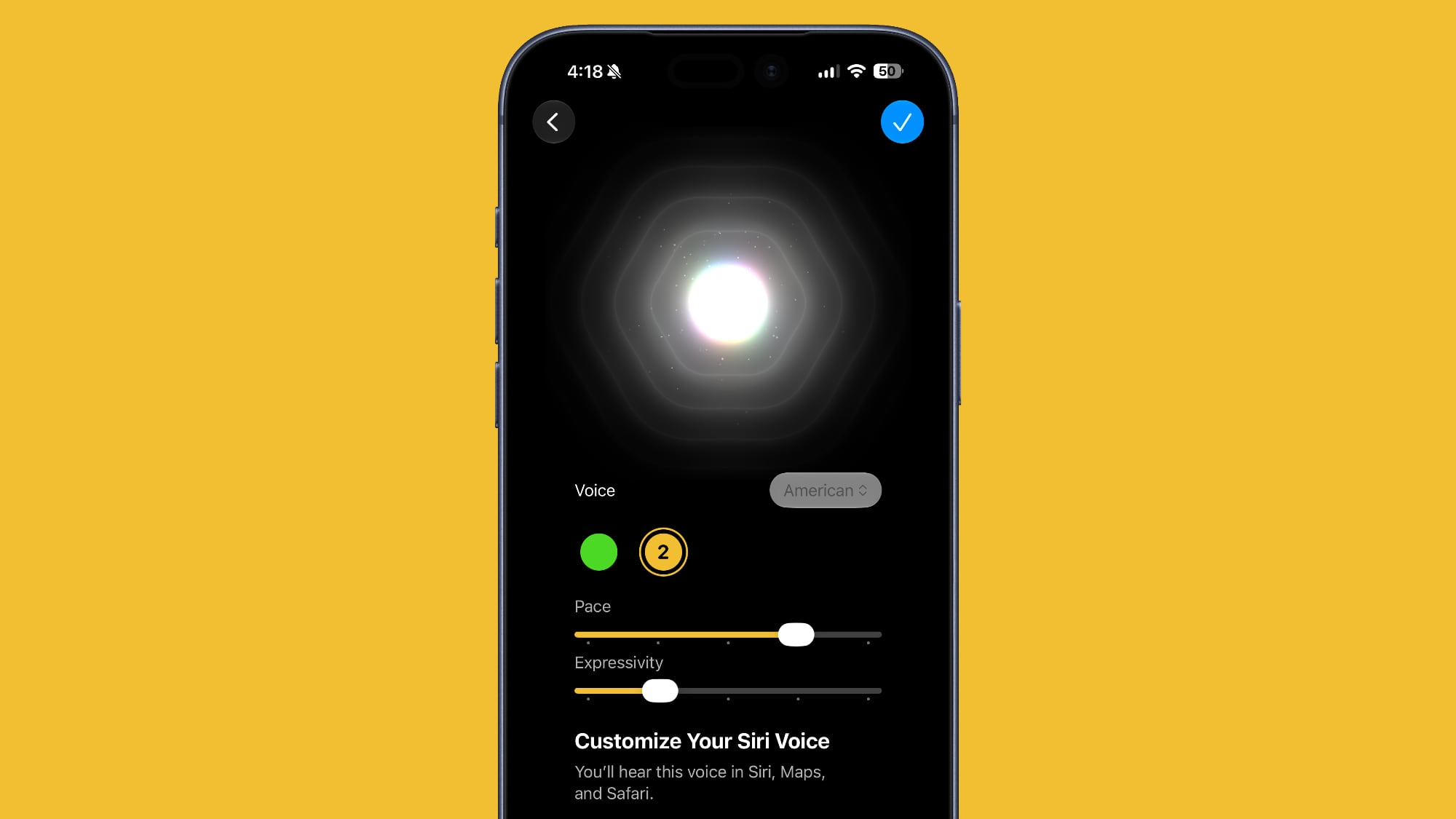
Beta 3 adds support for ‌Siri‌ voice customization on compatible devices. The customization option existed in prior betas, but it was not active. It's now usable, and you can customize the pace and expressivity of ‌Siri‌, with two base voice options available right now.


‌Siri‌ voice customization requires an iPhone 17 Pro or an iPhone Air because it uses on-device processing.

Live Recognition


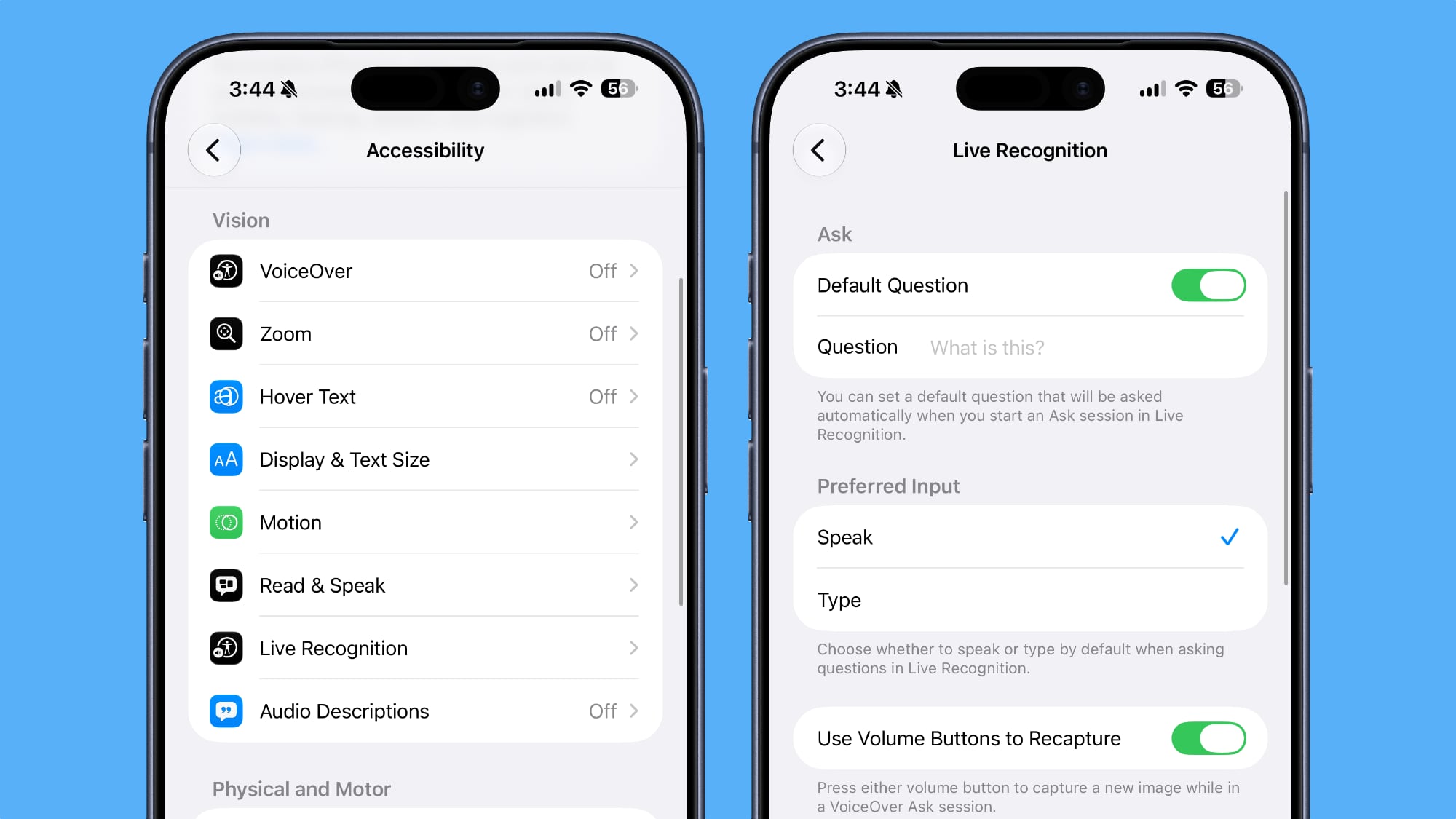
In Accessibility, Apple added a new Live Recognition section. Live Recognition uses on-device intelligence to detect and describe things around you with the camera app. The feature is able to answer questions about what it sees, with an option to set a default question. There's also support for custom activities.


Reminders


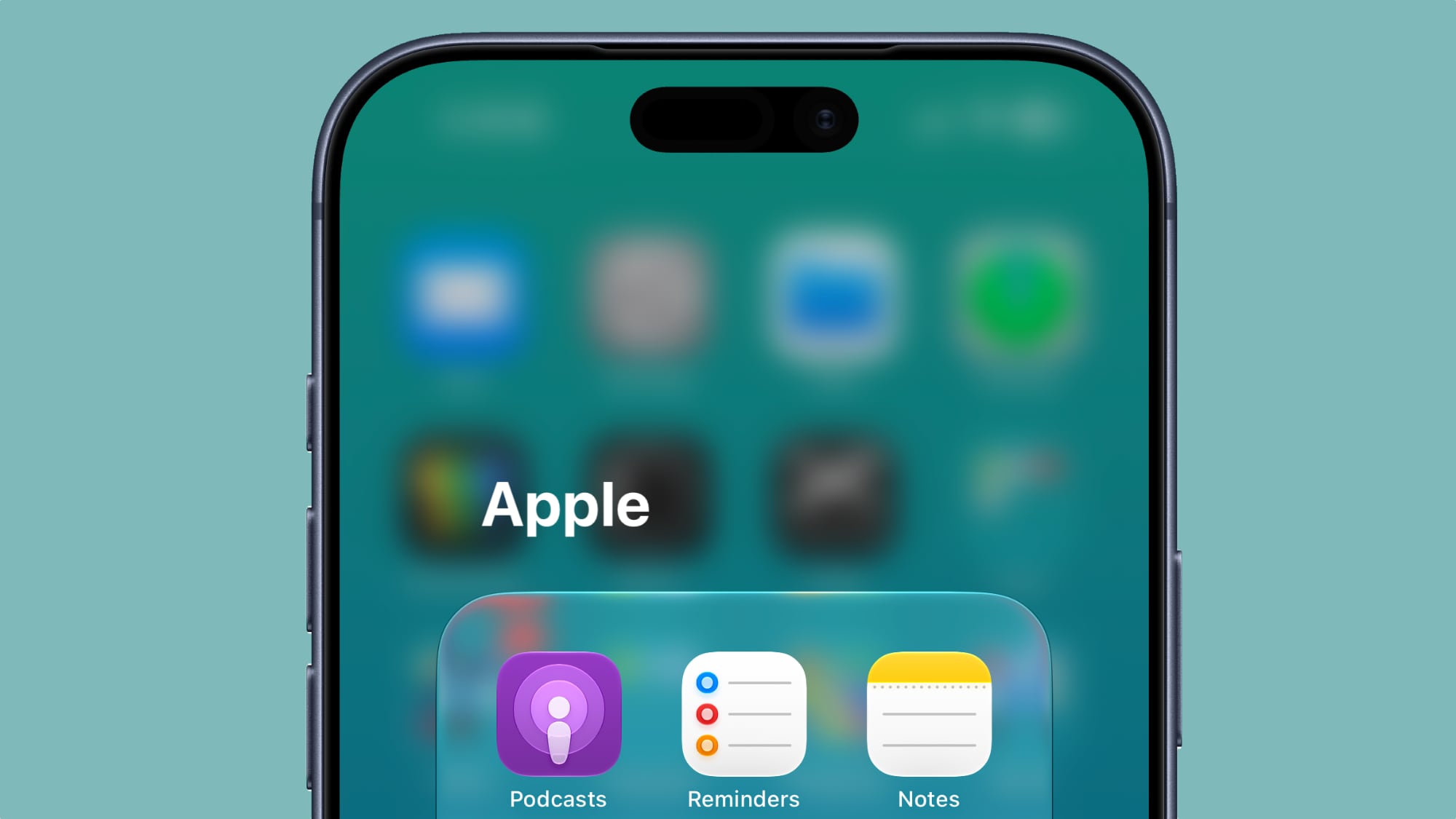
The Reminders app has an updated icon with Liquid Glass to-do list bullets.


Photos


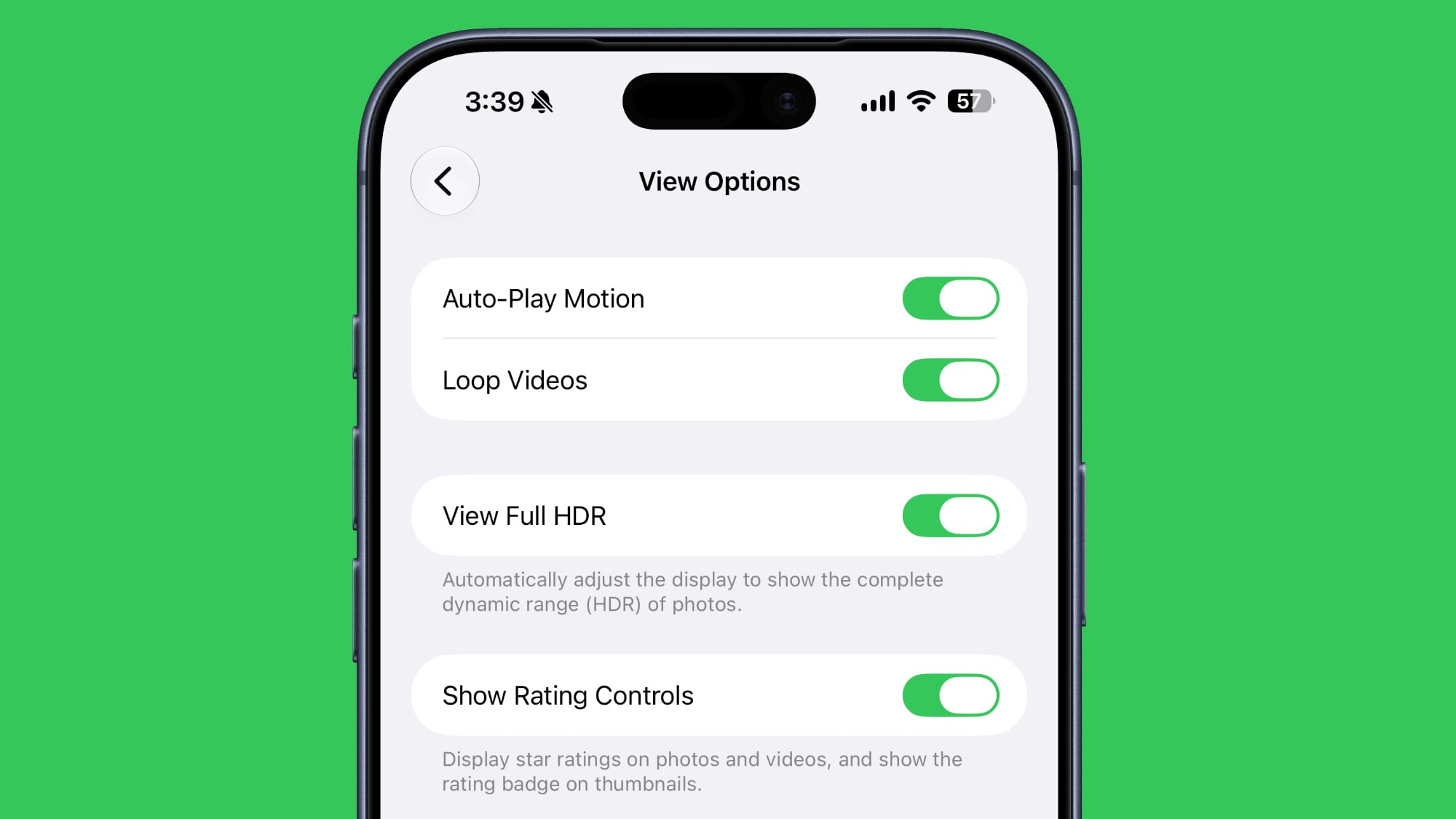
In the ‌Photos‌ section of the Settings app, there's a new Show Rating Controls toggle. It displays star ratings on photos and videos, and shows a rating badge on thumbnails.


Control Center


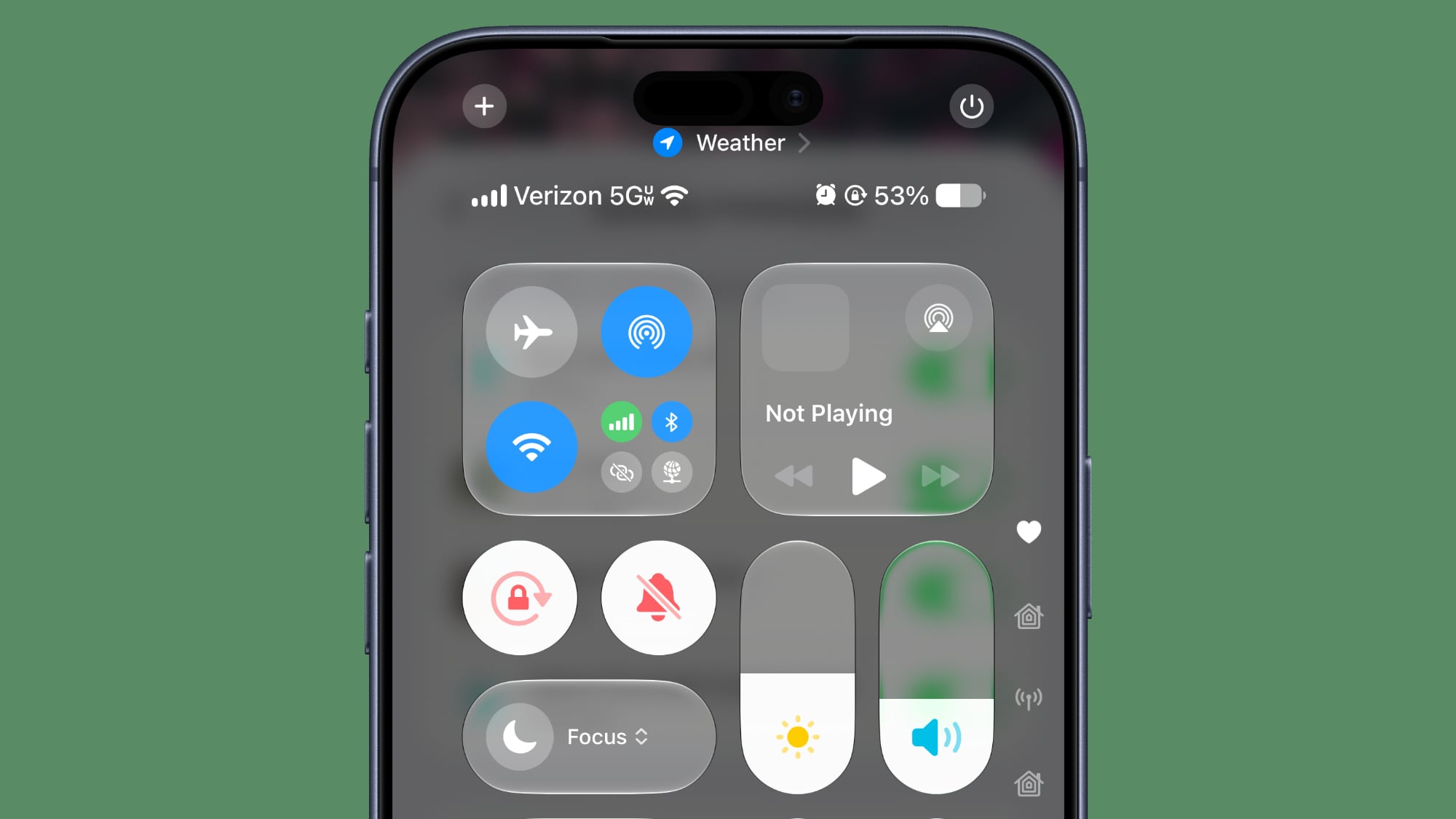
In Control Center, you can see details about your cellular connection even when connected to Wi-Fi. It shows signal strength and whether you're connected to LTE or 5G.


Shortcuts


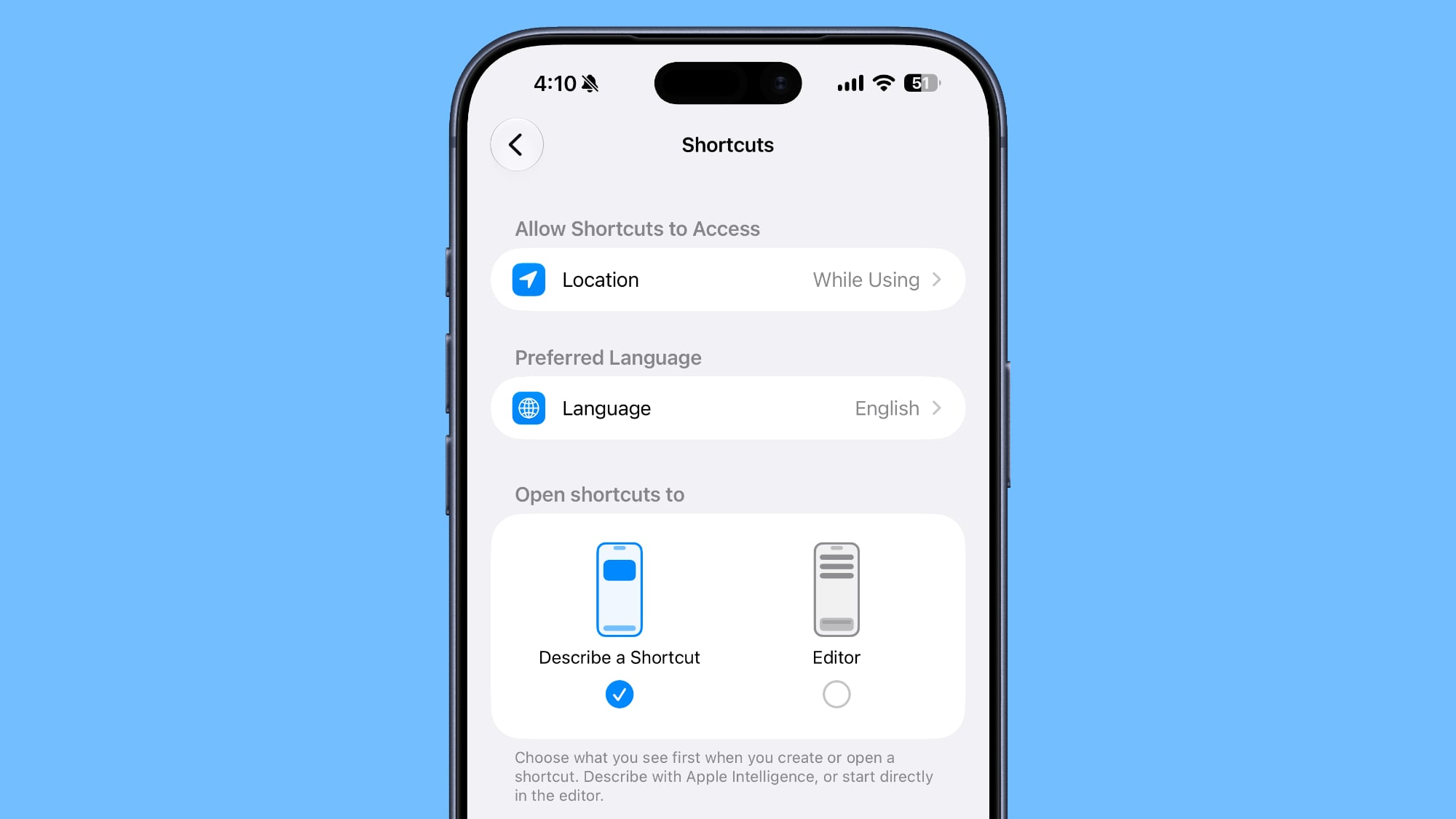
You can now choose whether to open to the Describe a Shortcut interface or the manual Shortcuts editor when creating a new shortcut.


Wallpaper


When you swipe down into the notification center, a cutout of the subject of your wallpaper now appears first over the Home Screen or app you're using.

iOS 27 beta 3 adds a new wallpaper animation which is so smooth pic.twitter.com/8LzBOx3HMD

— Aaron (@aaronp613) July 6, 2026


AirPods


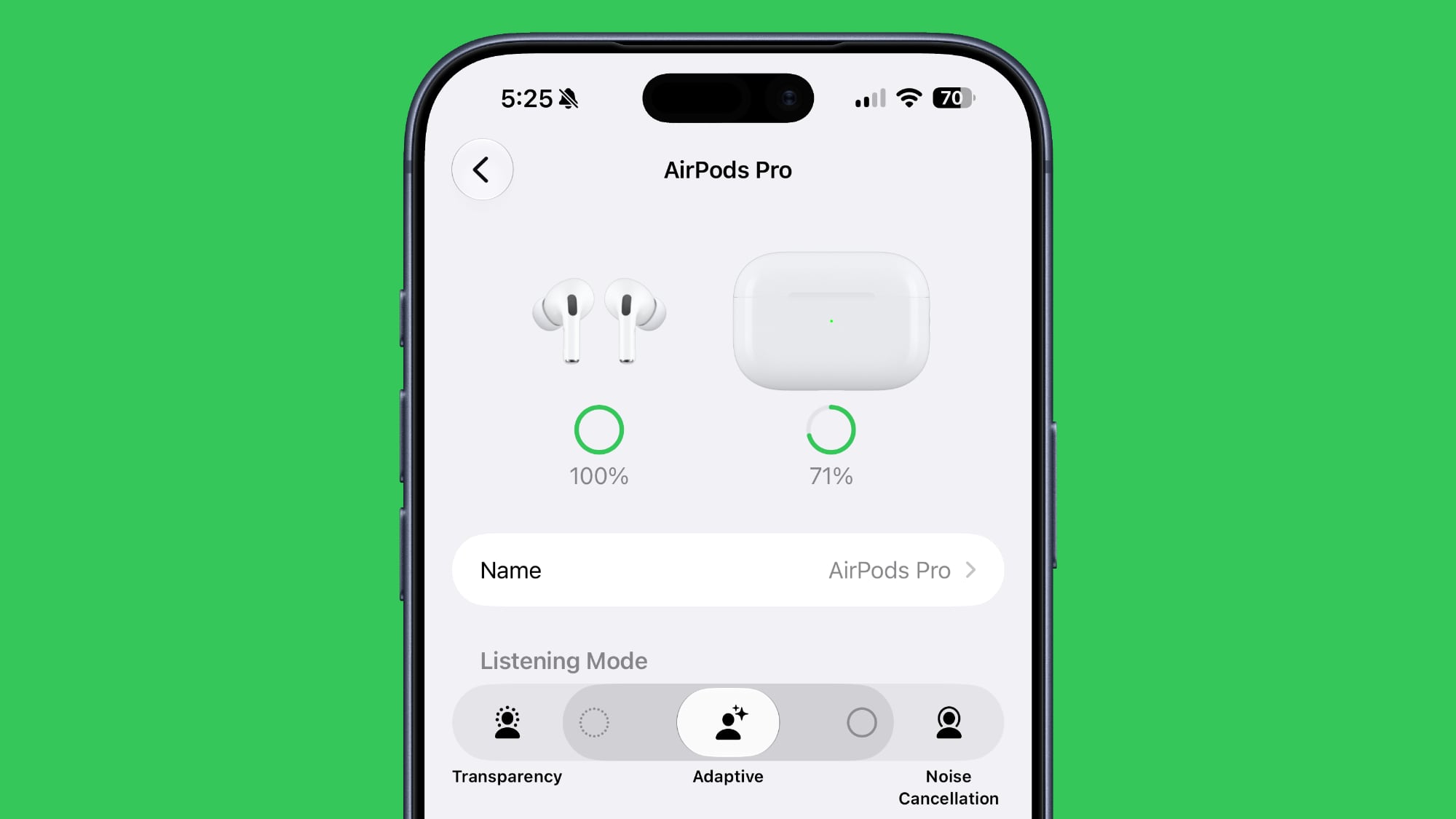
The Adaptive setting on the AirPods has a slider that lets you select more transparency or more noise cancellation.


Home App


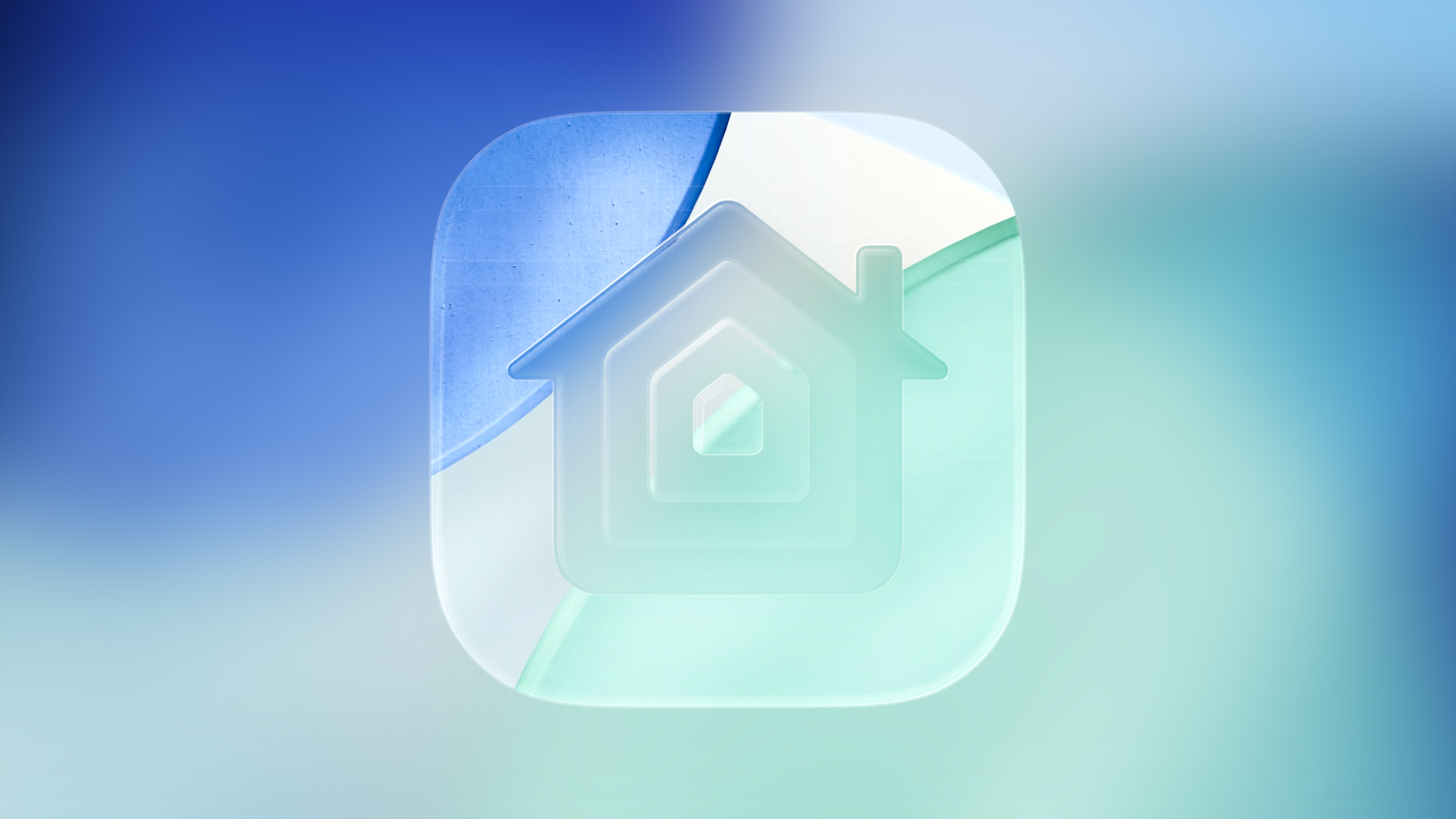
Apple clarified that Apple Intelligence features in the Home app will require a 2TB iCloud+ plan.

Maps


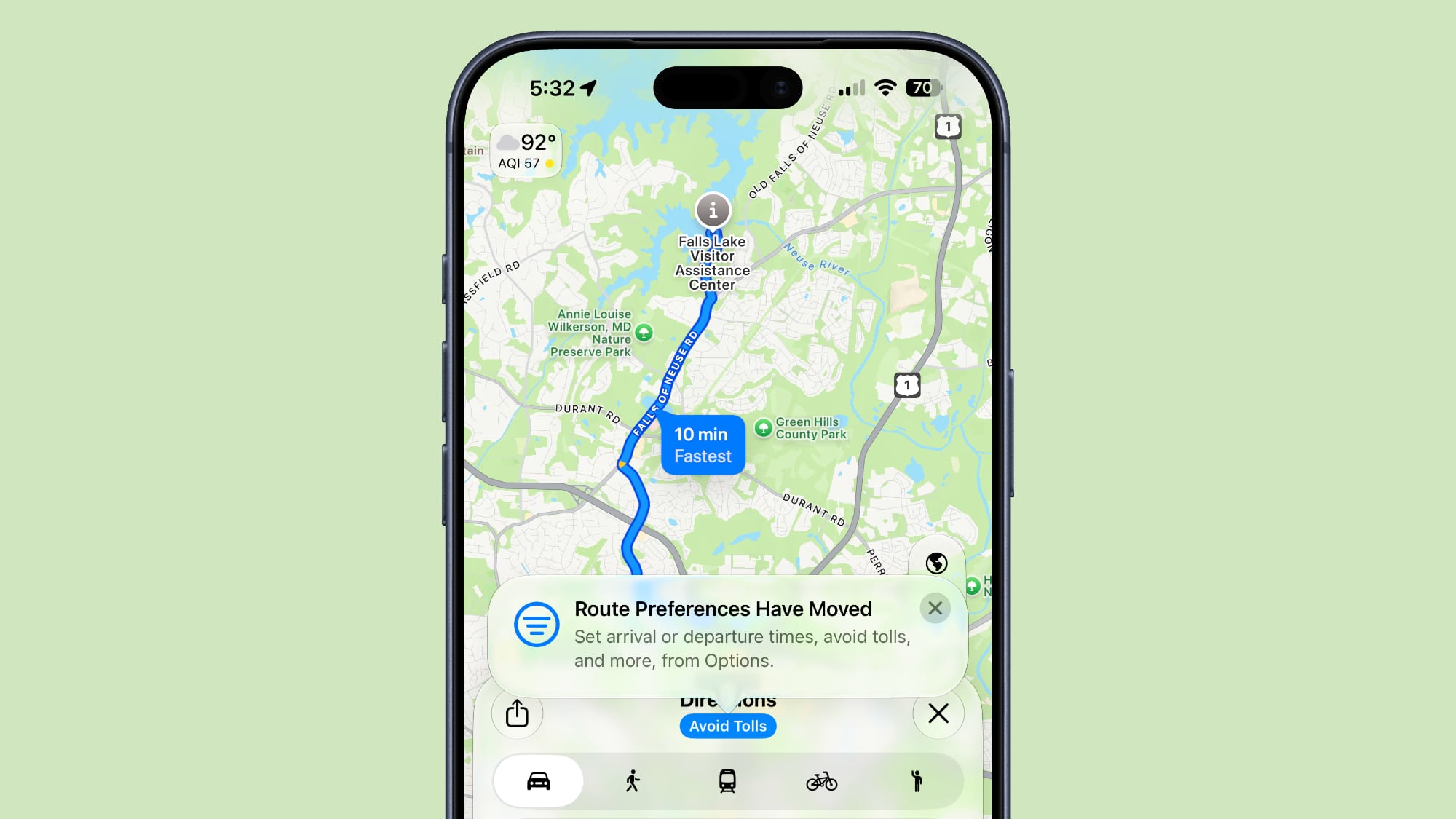
Apple added a tooltip to make it clearer that route preferences haven't been eliminated and can be accessed by tapping under the options interface when getting directions.


Lock Screen


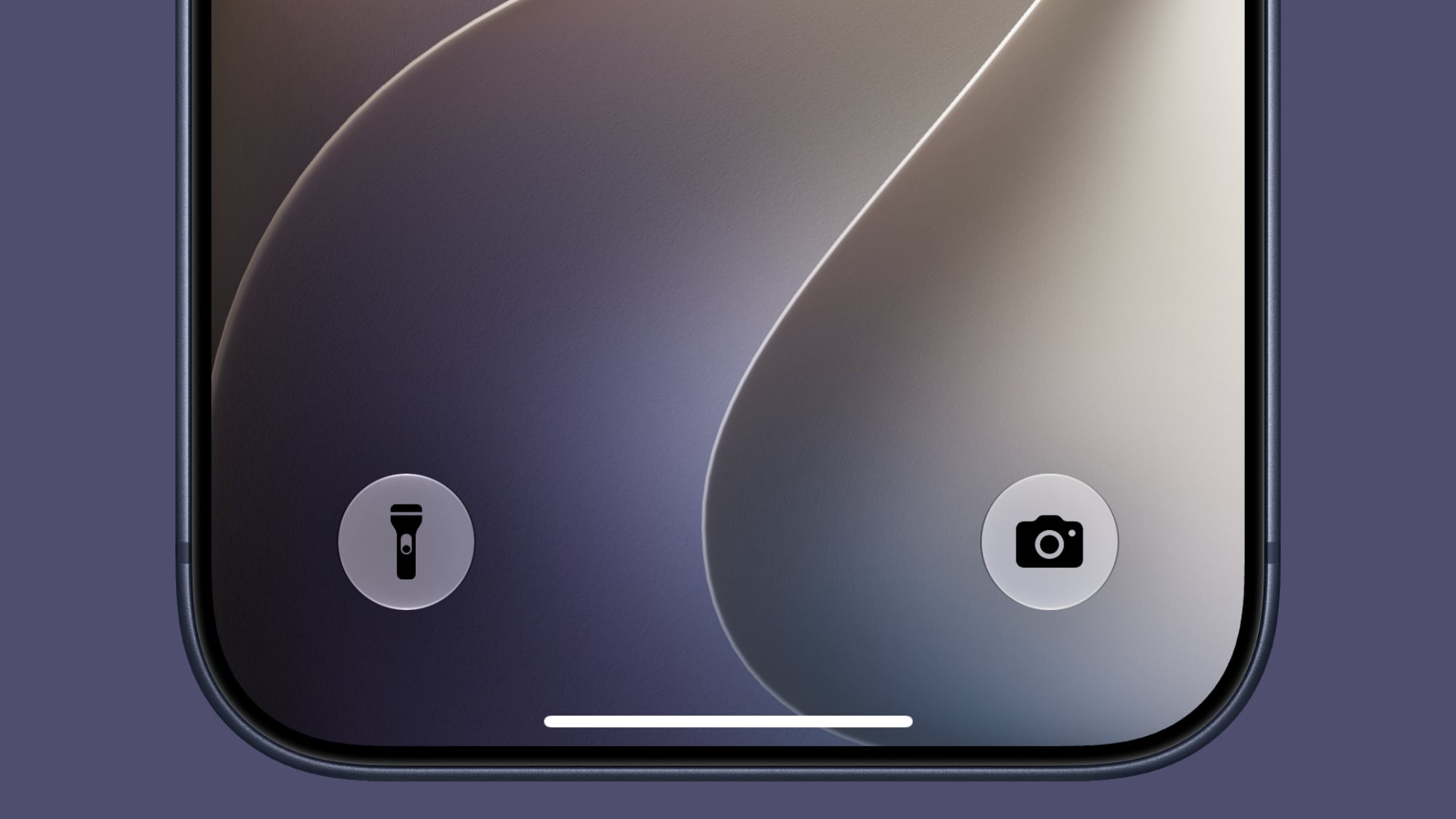
The Control Center buttons on the Lock Screen now have black icons instead of white icons with some wallpaper.


5G in India


5G+ is now available in India on supported carriers.
Related Roundups: iOS 27, iPadOS 27

This article, "Everything New in iOS 27 Beta 3" first appeared on MacRumors.com

Discuss this article in our forums

  •  

Apple Intelligence Home Features Require 2TB iCloud+ Plan in iOS 27

Using Apple Intelligence camera features in the Home app will require an iCloud+ plan starting at 2TB, according to Apple. Apple shared the detail in its notes for the third macOS Golden Gate beta that was released today.


In iOS 27, iPadOS 27, and macOS 27 Golden Gate, the Home app is able to generate written summaries for motion alerts from HomeKit Secure Video cameras. It's also able to group footage from separate cameras for an overview of activity and pull out noteworthy recordings, plus it supports natural language search.

Apple said at WWDC that some ‌Apple Intelligence‌ features would require an ‌iCloud‌+ plan, but Apple didn't specify which tier users would need to subscribe to. For the Home features, users will need the 2TB ‌iCloud‌+ plan or better. The 2TB plan includes 2TB of ‌iCloud‌ storage and it costs $9.99 per month.

‌HomeKit Secure Video‌ cloud storage has always required a paid ‌iCloud‌ plan. The 50GB plan allows for one camera, while the 200GB plan supports up to five. The 2TB plan lets users add an unlimited number of ‌HomeKit Secure Video‌ cameras, and now it will also add the ‌Apple Intelligence‌ Home feature set. HomeKit video storage does not count against the storage limit of an ‌iCloud‌+ plan, so the full 2TB stays available for photos and other data.

More on what's new in the Home app in ‌iOS 27‌, ‌iPadOS 27‌, and macOS 27 can be found in our guide.
Related Roundups: iOS 27, iPadOS 27

This article, "Apple Intelligence Home Features Require 2TB iCloud+ Plan in iOS 27" first appeared on MacRumors.com

Discuss this article in our forums

  •  

Announcing new builds for July 6 2026

Hello Windows Insiders, We have new releases today with builds across Beta and Experimental. New builds this week Today we are releasing new Windows 11 Insider Preview Builds. As a reminder, all Insiders can find the release notes for your device based on the new channel system, even if you haven’t moved yet. This is to make finding build information as easy as possible during the transition. See your channel release notes here: For those on other specific build versions, here are today’s new builds and release notes:
  • Beta (26H1): Build 2820.2380
  • Experimental (26H1): Build 28120.2387
  • Experimental (Future Platforms): We do not have a new build for this channel today, keep an eye out for future announcements.

Notable new features:

[Cloud Recovery]

Release channel: Experimental
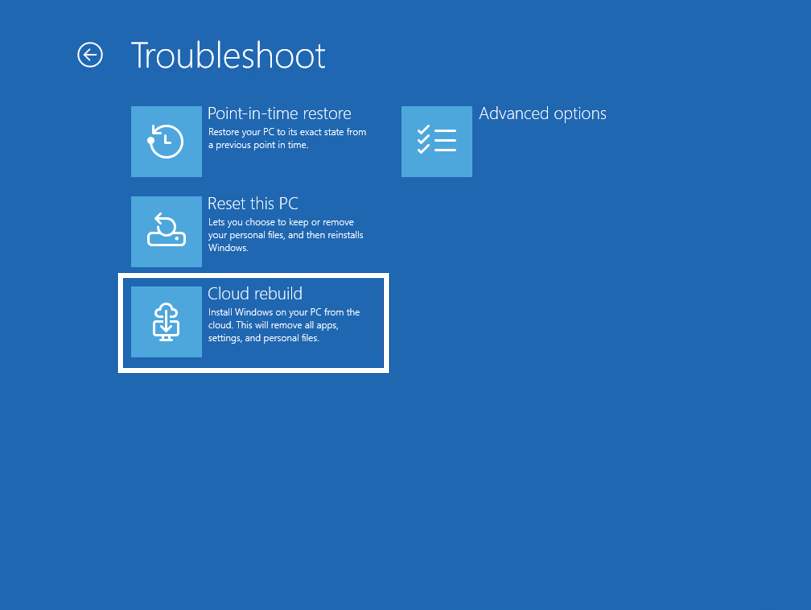
  • We're introducing Cloud rebuild, a new recovery option that restores a Windows 11 PC to a clean, known-good state by performing a full OS reinstall, even when Windows won't boot. Unlike Reset this PC, Cloud rebuild downloads both the target Windows image and the device's drivers from Windows Update, so the device comes back fully functional without USB media, without a custom image, and without depending on the health of the currently installed OS.
[caption id="attachment_179033" align="aligncenter" width="811"]The new Cloud rebuild option in Windows Recovery Environment (WinRE), enabling a full Windows reinstall using files downloaded from Windows Update. The new Cloud rebuild option in Windows Recovery Environment (WinRE), enabling a full Windows reinstall using files downloaded from Windows Update.[/caption] To learn more, see https://aka.ms/CloudRebuild.

[Account Control]

Release channel: Experimental
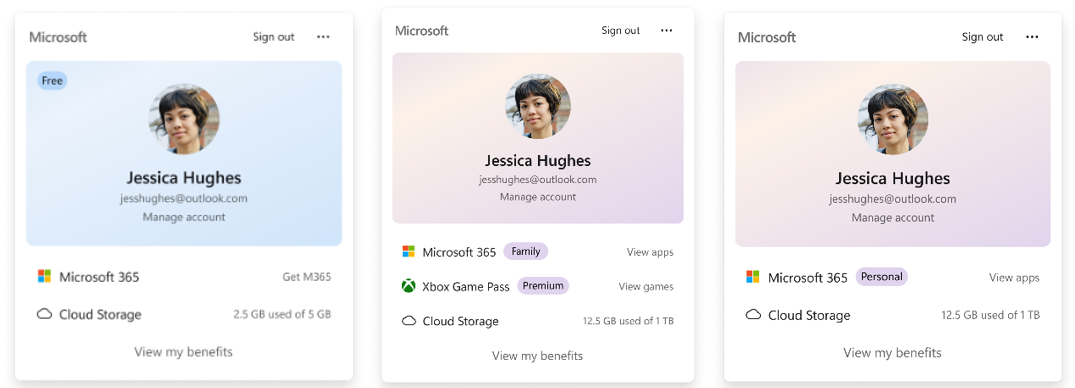
  • The Windows 11 Account Control flyout has a refreshed, modern design and a clear subscription badge to make the user's account status instantly visible. This helps users easily identify their plan, discover benefits, and explore upgrades.
[caption id="attachment_179034" align="aligncenter" width="1024"]UI showing the refreshed Account Control flyout with subscription badges, account benefits, and storage details. UI showing the refreshed Account Control flyout with subscription badges, account benefits, and storage details.[/caption] Thanks, Stephen and the Windows Insider Program team
  •  

Siri AI Comes to Apple Watch in watchOS 27 Beta 3

With watchOS 27 beta 3, Apple added support for Siri AI and the ‌Siri‌ app, so Apple Watch users can now use the features right from their wrist.


Apple said ‌Siri‌ AI would be coming to the watch back when ‌watchOS 27‌ was first introduced, but the feature wasn't live until now.

The Dynamic App Grid that pops up when the Digital Crown is pressed displays the ‌Siri‌ app in the center, and the smarter version of ‌Siri‌ is available to answer queries and complete requests.

‌Siri‌ AI on Apple Watch relies on a nearby Apple Intelligence- compatible iPhone for processing. Conversations in the ‌Siri‌ app on Apple Watch sync to the ‌Siri‌ app across all other devices like iPhone, iPad, and Mac.
Tag: Siri
Buyer's Guide: Apple Watch (Caution)
Related Forum: Apple Watch

This article, "Siri AI Comes to Apple Watch in watchOS 27 Beta 3" first appeared on MacRumors.com

Discuss this article in our forums

  •  

Aigars Mahinovs: How to make a good group photo

Taking a good group photo consists of multiple aspects:

  • hardware
  • scouting
  • organization
  • preparation
  • execution
  • processing
  • publishing

I can say with confidence that nearly everything here comes from having failed to do these things right at least once, even on the latest attempts, so this is an ideal to reach towards, not something we expect to hit every time.

The Goal

The main goal of a big event group photo is capture both the moment itself and each individual person inside that moment.

We want people, who were not there to see all the people involved and get an impression of what it was like being there. It needs to show the breadth and depth of people that make up this group, this project.

And we want people who were there to be able to look back the next week, the next year or in ten years and remember - ah, yes, I was there, I was standing right there with this grin on my face next to this wonderful person and I was feeling great.

Hardware

Based on the goal we want to have high level photographic gear that is able to capture both a broad enough picture to encompass all the people and some of their surroundings to communicate the context (without undue distortions) and to deliver enough detail and resolution so that faces and facial expressions and underlying feelings of every single person in that group could be clearly seen and preserved.

To both capture the context and minimise distortion the final picture should be just a bit wider than normal human field of view. That is about 50mm for a full-frame camera or 35mm for a typical 1.6 crop camera. You can go a bit wider if there are no better alternatives (as detailed in the scouting section), but be prepared that corners of the image will be distorted and not really usable (but we can fix that in processing step). Or you can go to unusual aspect ratios, like we did in Debconf 10.

In the absence of a 100MP+ camera, you will need to be stitching together multiple frames to achieve resolution high enough to have enough pixels-per-face to see emotions clearly. This means that the photos you will actually be taking will be tighter than the overall field of view mentioned above. Still, a higher resolution camera body is preferable - nowadays 24MP-32MP cameras APS-C provide a good compromise between resolution and price, but 45-67MP full-frame cameras also exist on the market. Assume that we will be shooting in a bright environment, so most likely with quite low ISO settings, that means that high-ISO noise characteristics of more expensive cameras will not really play a role here. You will also not need very fast burst modes, even manual speed of one frame per second is sufficient.

You will also want to get as much detail as possible out of your lens, and this is the most important part. You can do amazing work in all other steps of the process and have a great camera too, but if you pair it with a lens that is not sharp, then the end result will be disappointing.

You want the lens that is sharpest corner-to-corner when stepped down to about f/8-f/11, that you can get for your system. You also want that lens to be about 85mm full-size sensor or 50mm for 1.6 crop size. Luckily that kind of range is also a great range for optical design and sharpest lenses are typically available in exactly these kinds of sizes. You absolutely want to have a fixed focal length lens, not a zoom lens. Even profession grade zoom lenses often deliver worse image quality compared to fixed lenses that cost less 1/10th of their price (when shooting in the same focal length). Newer design lenses are better than older lenses - optical design, coatings and precision manufacturing have advanced a lot over the decades. Retro look is great for mood, but not as good for actual resolution and clarity. You don't need to overpay for most expensive lenses because those often only improve image quality on lower F-stops. To encompass the whole group we will need to shoot at f/8 and in bright light, so the extra benefits of those f/1.2-capable super expensive lenses will not come into play here.

We will have no use for a flash here. A tripod will be too restrictive when rapidly repositioning the camera between different parts of the panorama shoot. But a monopod might help with stability - I have not tried that myself, however.

For my last photos I used a Canon EOS R7 (32.5MP) with Canon RF 50mm f/1.8 STM lens and considering an upgrade to Sigma 56mm f/1.4 DC DN for the next time.

Scouting

Scouting a good location for the group photo is another big chunk of a successful picture. The critical piece of the puzzle is lens-to-face distance. In order to keep everyone's face in-focus and have enough resolution on the farthest faces (without making nearest faces truly massive) we want to do everything possible to reduce the variance in lens-to-face distance - to reduce the difference in distance between closest and farthest face.

The most effective way to do that is to have the photographer climb higher. To see this in action on the Debconf photos, compare Debconf6 (very high camera position, group on level ground - good) to Debconf10 (camera not too high, group on stairs, still good) and to Debconf17 (camera could not get high enough and the group is on flat ground - not great). Even the Debconf25 photo was suboptimal from this perspective. The Debconf23 photo was a very good example from the recent years - good height and also the group was positioned in a semi-circle so there were no people directly in front and very near to the camera.

So you are looking for the highest point you could get to (even if that requires a special permission of key or a ladder) with a field large enough to fit the whole group comfortably. How to check that? Normally I simply take a photo from the top of the whole area and note down from there where the extreme corners of the group could be and still be fully seen in the shot - not blocked by trees, buildings and shadows. Then I go down and measure that space. Rule of thumb being - people in one horizontal line can stand 1 normal length step from each other and two horizontal lines can be half a step from each other vertically. So I can just measure a rough rectangle in steps, multiply the sides, multiply that by two and I have the rough number of people that can fit there for the photo.

Once you have a candidate location or two, it is important to check them at the same time-of-day as you plan to do the photo (see organization section for that). You want to make sure that the whole area of the group is in the same illumination - if half of the group is in the sun and half in a shadow, then you will be having a very bad time later. The absolute ideal positioning for the group photo is to have everyone be in shadow, but still have enough bright skies and bright buildings in front of the people to give good illumination of the faces. Worst you can do is have the sun be behind the people (so all the faces are really dark) and second worst is have the sun be directly in front of the group, so that the faces are very well illuminated, but everyone's eyes are closed because they are being blinded by the sun. And sometimes all you can do is pray for some light clouds to provide for even and dispersed light. Debconf23 was very lucky that way.

Another consideration is to how people are going to get to that place. You need to consider accessibility needs of people (it is ok, if it takes more effort or time, but it needs to be organized and communicated well in advance). And you need to consider how the big masses of people will be getting there - how to tell people where exactly it is and how to get there from various locations where people might be hanging out during the event?

Having an alternate location indoors might be necessary if the weather report for the next days is not sufficiently predictable. We had to use that contingency in Debconf9, for example.

Organization

It's hard to take a good group photo if half of the group does not show up or is too late, so this needs some organization to happen smoothly.

First of all you need to choose date and time for the photo. The photo does not take too much time from the schedule of the event and can be squeezed in after all the other events are already scheduled. In fact I prefer that as it allows you the flexibility of choosing the date based on weather conditions and time based on light and shadow conditions in potential photo spots. You don't want to choose the daytrip day as most people will be away and return times are not really predictable. You do not want to choose the morning after Cheese and Wine party for obvious reasons. First day and last two days are also sub-optimal as some people arrive late and some leave early for various personal reasons. Also you don't want it to happen just before Cheese and Wine either because then you'd have very little time and clarity to do the processing of the image on the same day.

For timing, the best way, in my experience, is to schedule the photo directly after the end of talk sessions before a meal break - lunch or dinner. Typically in the Debconf schedule there are 2-3 daily breaks planned, say for Debconf25 there was lunch, afternoon break and dinner. Talks are planned to end ~10 minutes before those breaks (and meals) begin, so for example, afternoon break starts at 16:00 and all talks in the previous block end at 15:50. In such a case just schedule the "Group photo" event from 15:50 to 16:05. This gives people the info to go there directly from the end of all talks and that they will have sufficient time for break/meal afterwards. Do not forget to specify the location (as exactly as possible) in that event entry and make sure to post it at least two days in advance. People often want to wear something specific for the photo and thus need to know about it in advance. This also makes sure that people do not make alternate food plans for that specific break and don't leave the venue.

Announce the date, time and the exact location as wide as possible, don't be shy. Announce and discuss mailing lists, IRC, Signal, Telegram, make sure the front desk knows in case anyone asks in-person, ... Check that it is again included in the announcements email on the day preceding the photo date.

When the date has arrived, it is a good idea to check in early with people with special mobility needs to make sure they know where to go, how to get there and how much time they will need to be able to get there on time.

As the final round of talks before the group photo is starting up, it is time to recruit "runners". I've had great success with this technique. The idea is pretty simple - for each room where people congregate (talk rooms, hacklabs, cafeteria, outside hackspace, front-desk, ...) go there and choose one person. You want to choose a person that you will recognise and remember among everyone else in the group, either because of who they are or what they are wearing, whatever works best for you. If they agree to help, instruct them to: "at end of talk, announce that the group photo happening now and the location, herd people towards the photo location, be the last person out, make sure there are no stragglers from this area behind you, when you arrive to the photo place I will assume that everyone else from this room is also now there, when you are there catch my attention and show this sign so I know for sure that it is all good and make sure that I did see it from you". With that sorted out all you will need to remember is how many runners you recruited and how many have reported in to figure out if everyone has now arrived or if we still have to wait for someone or some group.

Then you will only have one last point of organization left - shaping the crowd into a group. People will not know what your vision for the group photo is, so you will have to give clear and LOUD instructions on where people should not be standing. Use clear, large gestures to support your words. You want to compact the group, have the people that just joined in the last moment and are standing to the side come deeper in and join the crowd. Have any holes in the middle of the crowd filled in. Forming a semi-circle instead of a blob helps with averaging face-to-lens distances. Make sure people are not in unexpected shadows. Make sure carried objects, like umbrellas of flags do not cover the faces of other people. Take the time to look at everyone face to make sure there are no people hiding behind someone's shoulder - typically they are not aware that their face is in fact not really visible. If there are such people, call them out and point directly at them and encourage them to step forward, if they wish to do so. You are the only one seeing the final picture now and only you can correct it before capturing the moment. So a few extra seconds here are worth taking, even if 300+ people are standing in scorching heat and waiting on you.

When you are happy with what you are seeing, make sure to tell people clearly that you are now about to take the pictures and again remind them not to move and explicitly not to turn their heads to the side until you are done (this is the source of most of the extra work in processing). Be very loud and clear and make sure you have everyone's undivided attention before you start saying the important stuff.

When done - say so. There will be other groups that will want to also have a photo taken after the main group is a bit more dispersed, so don't run away. Typically at least the T-shirt group will want a picture and also all the organizers.

Final bit of organization during the group photo shooting itself is the sneaky self-insert. You may choose not to bother with it, or do it in the simplest way, like I did in Debconf6, but if you really want to blend in with the crowd, you need to have someone else take a photo of you in the exact same location at the same date and time from the same location. So you should already during shaping the crowd decide where you would fit in, it is easiest to blend in at the back of the crowd and to one or other side, so that it appears like you are just standing behind the shoulders of a couple peoples. Remember that spot - it is easiest if you stand in the exact same ground spot when your photo is taken. Just go down, recruit a volunteer to take your photo, make sure the settings are fixed to the same ones as for the group photo shots and have them take a handful of shots of you - one of you centered in the camera frame and a couple more with you more towards the corners of the frame. This distortion from being off-center in the frame may be important later.

Preparation

In addition to preparing the crowd for the photo, you also need to prepare yourself and the equipment. Make sure you have dusted your camera sensor and cleaned both inside and outside glass of your lens. It is usually a good idea to remove any filters from the lens. Install the hood, if that could help with blocking the sun flares. Make sure you have the right lens and that you have installed the right lens.

For fixed settings I typically shoot in JPEG with RAW being there more like an emergency backup. The extra dynamic range of RAW could be used, but it is really complex to do that in combination with image blending and it is hard to get right, so I prefer an all-JPEG workflow and fix the dynamic range in the scene itself, before shooting. For Canon I am using the Standard profile that boosts the color saturation and sharpness a bit as I just enjoy that look and find it hard to get anything significantly better from RAW data even with a lot of effort. In any case make sure you have enough space on the cards to take at least 100 images and that you have a full battery. Do not use high speed burst setting because it is then too easy to take too many pictures at the start of the sequence and be stuck with your camera still in "Busy" state writing big RAW files to slowish SD cards and not allowing you to finish the full picture rapidly.

You want to have the shutter speed at at least 1/100th of a second to prevent blur from both your hand movements and also from people in the shot moving around a bit (image stabilisation will not help you there). And you want to have the aperture to be around f/8 - lower apertures risk people in front or behind falling out of focus, make the lenses look less sharp. Higher apertures also start to become less sharp due to diffraction effects above f/8. ISO should stay as low as possible, ideally at ISO 100, but if there is not enough light then upping the ISO to 400 would be the first step that I would try to do and second would be decreasing the aperture to f/5.6. If there is too much light, then increasing the shutter speed should be the safe thing to do.

As people start to arrive into the shooting location - check the exposure and nail down the settings, ideally in manual mode. Consider that left side could be a bit lighter or darker than right side. Err on the side of making the picture a bit too dark as there is more depth to darkness before cut-off compared to clipping on the high end. However, do not trust the exposure detection, instead take a picture and look specifically at skin tones in faces of people that already are standing in the photo area. Faces are the key bit and the exposure needs to be adjusted just to the faces and ignore darker of lighter clothing. Do some test shots and find settings where faces look not too bright, but also not very dark and fix those settings in manual mode.

Now you are ready for the action. Shape the crowd, check the faces and the action can start!

Execution

During taking of the group photo you want to finish it fast, but at the same time you have to take the time to make it right. If you hurry too much under pressure, you risk being left with unusably blurry images and the whole effort wasted. Having already prepared and verified the manual settings makes it easier.

When you are taking pictures, you have to remain as still as possible - even at very high shutter speeds even slow hand movements are still bad for image quality. So think of the movement as of biathlon athlete shooting the very middle of five, very separate targets - take a burst, reframe, then steady up for a second and only then take the next burst. 3 frames per burst are sufficient. 90% of the time the very first photo of a burst will be best. As you move from frame to frame, aim for just a bit more than half-frame overlap. This will give the opportunity to skip frames if all is good, but also have backup coverage of every face in case of problems. Proceed systematically, I typically start off on the top left of the crowd, then go right until the end of the line, then shift down half a frame and go left until the end and repeat until I am done with the crowd.

After that it is very helpful to also immediately take photos of a "frame" around the whole crowd. Stitching process often distorts the frames in weird ways that leave holes in the resulting image that you can fill if you have a wide frame around the crowd. It is possible to compensate with creative cutouts in the final image (like Debconf9), but the more framing room you make, the more flexible you will be able to be with cropping of the final photo. The frame also gives you the opportunity to capture more of the context of the place and space.

As an example, Debconf25 group photo in the end consisted from 9 images + 1 for sick people + 1 for me. I ended up missing the framing shots for bottom left, top left and top right corners. To get there I took 68 images. And in some years it was more than a hundred.

Processing

This part might be less stressful than taking the pictures from intensity perspective, but it lasts longer. Depending on you luck, skill and perfectionism it can take anywhere from 3 to 9 hours of work to complete.

Before you start, however, you should first request things that you will need for other people. This can even be done before taking the actual group photo, but usually I forget. To finish the photo you will need three things:

  • good quality vector graphics of the current Debconf logo
  • good quality vector graphics of the next years Debconf logo (even if preliminary)
  • motto of the conference

The first two you should be able to get from the respective organizers. The motto is harder. I typically try to ask the current DPL to come up with something describing the current mood of the project or of the event, but it is rare that it is that easy. Most of the time I came up with something as I was editing the photo and reflecting on what was the mood, the feeling, the mojo of this conference and of this year was like. Bend that around a recognisable phrase or expression, make it a bit more insider-relevant and you are on the right path. Some years this was the hardest part.

For the panorama stitching I will describe the workflow that has served me good for years, but maybe there are better ways possible nowadays. Feel free to let me know!

First I would save all photos taken and select one sharpest photo from every burst. Next I would select the minimal number of photos that appear to be covering the entire crowd. The fewer images you use, the better in the end because the most quality problems crop up in the areas where photos are getting stitched together. Fewer seams leads to fewer issues.

Open Hugin (you will also need enblend and enfuse installed) and import your minimal set of images into it. Click the "Align" button and wait a while - the processor will be trying to figure out keypoints in each image and then try to match these points between the images to try to fit them all together into a single projection. To do that it will distort the images. This is the trial and error process part. You may need to add, remove or replace images to get the stitching to work or to work better. You may want to add more of the frame images to fill the ragged holes around the image.

After initial alignment, go to "Move/Drag" tab and move the image a bit up in the projected field of view and make it a bit more central visually. That will help a bit with the distortions in the near-by people and people in the corners of the image. In the "Crop" tab set the initial crop - leave it generous, you can always crop more in later steps. Do not be afraid of leaving in sizable chunks of black homes, empty skies or grass. All of that can be filled in later as well.

Go back to the "Assistant" tab and click "Create panorama". It is good enough to have JPEG output at 100% quality using exposure corrected low dynamic range output option. Make sure to check the "Keep intermediate images" option. This will not only generate the final, merged panorama, but also keep around the individual images after perspective correction and exposure blending steps. These are critical for fixing blending error in the next step.

You might need to go back a forth a few times with a different sets of source images, maybe adding some image between other two, maybe removing another to reach a better starting point. The key part to pay attention - how many ugly stitches are there in the image. Check every face, the blending algorithms do not recognise faces and sometimes try to stitch one face from two or more images creating very weird effects. They can be fixed in the next step, but it is rather hard manual work, so the fewer such faces are in the blended image, the less work you will have. In some years I've managed to find a combination where all faces were good and in other years I had to manually fix 13-15 faces.

Do not try to blend the extra pictures (like with you or with sick people) into the main panorama with Hugin - it will get very confused with the parts of the grass that it is able to see where other people were standing.

The next is the final processing in GIMP. Think of it like a large and complex project - do as much as possible in separate layers, save often.

Fixing wrongly stitched faces and also putting yourself into the photo are very similar activities in the end. Just the scale and the source differ. For yourself you just cut out yourself (upper torso is enough) from the separate photo. For corrupted face, choose one of two intermediate images that the Hugin created where the face is transformed, but not yet merged (with a different version of itself). In either case crop the photo to roughly the interesting size and put roughly in the right spot as a separate layer on top of the group photo background. Reduce the opacity of the small layer to 30-40% and zoom in to 400%. With that it is much simpler to position the layer with pixel precision. Then all you need to do is add a layer mask to this layer and paint it just right. Basically in layer mask black means transparent and white means non-transparent. So you need to just make everything that is you have white mask and everything that is not you have black mask. And smudge the border a bit with finger tool or blur to make the transition smoother. Easy to say. Hard to do. This is what takes most of the actual work hours in post-processing.

You might miss someone. I am sure Phill is just thrilled to see me in the very middle of the Debconf25 final picture .... But do try to fix them all.

Use large, sweeping geometric figures to cover up black holes, empty grass fields and other sub-optimal corner features. And then use that newly created free space to put in a large version of the logo of this years conference, decently sized motto and slightly smaller invitation to the next years conference.

Do not forget to add a copyright and license statement somewhere in the corner in smaller, but still well readable font. I am using a text like: "Photo by: Full Name, Email: fullemail@debian.org, License: GPLv2+ or CCv3-BY" This ensures that this image may be used in any press coverage (with basic attribution) and also can be included in any GPL-licensed software, if that ever comes up. The same statement is also in the metadata of the image file (see Image-Metadata-Edit metadata in GIMP) along with information that states that this is "Debian Developer Conference Group photo, City, Country, Year". Image->Image properties->Comment is another place where GIMP hides this EXIF information.

For ease of use, in addition to a full-resolution image it is also useful to make a lower resolution version that would still fit on a 4K screen at full resolution, so about 3840px wide. Some photo hosting services set other limits for image size as well, so it might be needed to scale the image down below 100Mpix to upload it to Google Photos, for example.

Publishing

So, it is finally 1AM and the group photo is ready! How do you push it out to people? Well, in all possible ways and places. Again - don't be shy, people do really want to see it.

Push it to whatever you use for your shared photos. Push it to Debconf shared git (note that this is GIT-LFS repo, make sure you know how to add content to the LFS specifically). All permanent links to that in GroupPhotosAll wiki. And then send those links to IRC, Signal, Telegram groups, debconf-announce mailing list. Publish it in your blog and push that to Debian Planet. Push it in Threads, Bluesky and Mastodon. Send an email separately to Debconf orga team. And one to Debian Publicity Team so they can put it into the Debian Home Page and push via Debian micronews accounts.

And that is about it. Now you can go back to enjoying the rest of the conference. Or running around doing other things that you think need to be done. It's up to you. You did it. This moment will remain with people for a very long time. And you helped.

Questions? Feedback? Just ask here or here.

  •  

macOS Golden Gate Gets New Wallpaper

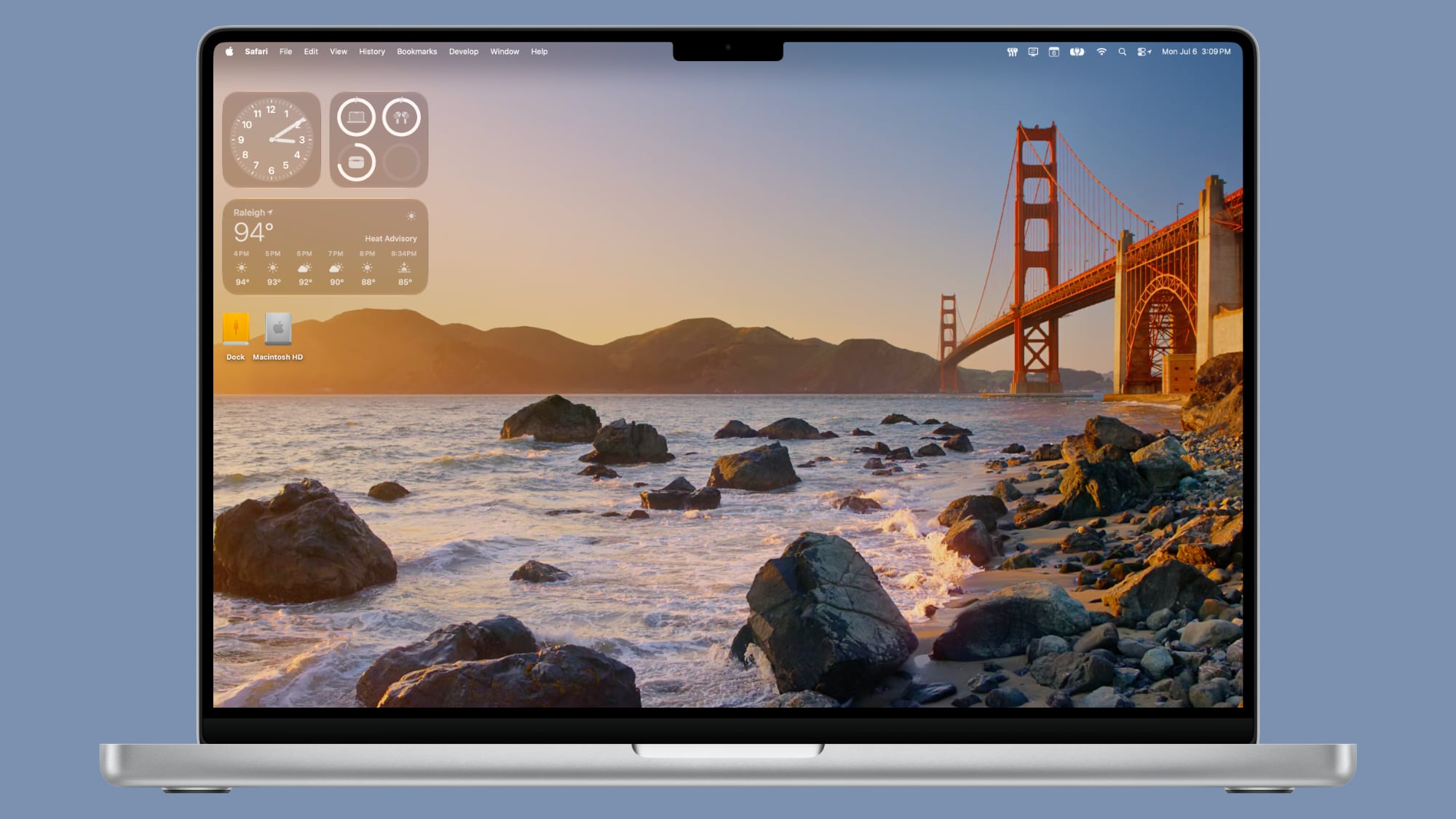
With the third beta of macOS 27, Apple added new Golden Gate-themed wallpaper options to the Mac.


There are new Golden Gate Sunset and Golden Gate Night options, both of which join the prior Golden Gate abstract wallpaper that Apple introduced with the initial beta.

Golden Gate Sunset and Golden Gate Night animate when unlocking the Mac, and can be set as a screen saver. When used as a screen saver, the Golden Gate Sunset wallpaper features waves breaking on the rocks near the Golden Gate Bridge. The Golden Gate Night wallpaper shows cars driving across the bridge.

With past updates, Apple has included several themed wallpaper options, so more Golden Gate wallpapers could be added in the future. macOS Golden Gate is limited to developers right now, but we are expecting a public beta soon.
Related Roundup: macOS Golden Gate

This article, "macOS Golden Gate Gets New Wallpaper" first appeared on MacRumors.com

Discuss this article in our forums

  •  

macOS Golden Gate Beta 3 Now Available for Developers

Apple today provided developers with the third beta of macOS Golden Gate, with the update coming two weeks after Apple seeded the second beta.


Developers can download ‌macOS Golden Gate‌ by going to System Settings > General > Software Update. Beta Updates will need to be enabled, and a free developer account is required.

‌macOS Golden Gate‌ includes multiple design improvements. Liquid Glass opacity has been improved to increase readability, there's a slider for controlling the level of transparency, and changes to shadowing make it easier to tell when a window is active. Apps now have uniform toolbars, edge-to-edge sidebars, and less rounded corners, plus there are fewer icons in menu bars.

Siri has been transformed into ‌Siri‌ AI, a chatbot-style assistant that combines general world knowledge, your personal data, and onscreen awareness to answer questions about anything and find information for you. ‌Siri‌ lives in Spotlight, and you can ask questions with the new Search or Ask interface.

There's also a ‌Siri‌ app where you can chat with ‌Siri‌ and view past conversations, and on newer Macs, you can set a custom voice for ‌Siri‌ with personalized pace and expressivity. Visual Intelligence is now on the Mac so ‌Siri‌ can answer questions about what's on your screen, and a Write with ‌Siri‌ feature lets ‌Siri‌ generate text or give feedback on your writing.

There are AI photo editing tools in the Photos app, AI tab organization in Safari, an option to use AI to automatically update weak passwords in the Passwords app, and a revamped Image Playground app that can generate photorealistic images.

More on all of the new features in ‌macOS Golden Gate‌ can be found in our macOS Golden Gate roundup. ‌macOS Golden Gate‌ is limited to developers right now, but Apple plans to release a public beta soon.
Related Roundup: macOS Golden Gate

This article, "macOS Golden Gate Beta 3 Now Available for Developers" first appeared on MacRumors.com

Discuss this article in our forums

  •  

Apple Seeds Third iOS 27 and iPadOS 27 Betas to Developers

Apple today seeded the third betas of iOS 27 and iPadOS 27 to developers for testing purposes, with the update coming two weeks after Apple released the second betas.


Registered developers can download the betas from the Settings app on the iPhone or iPad by going to the General section and selecting Software Update.

‌iOS 27‌ introduces Apple's smarter version of Siri, ‌Siri‌ AI. ‌Siri‌ AI is a chatbot similar to ChatGPT, incorporating general world knowledge, personal data from apps like Messages and Mail, and onscreen awareness to answer questions and find information for you.

There are new Apple Intelligence features in apps like Photos, Safari, Shortcuts, Wallet, and Passwords, plus Apple added a standalone ‌Siri‌ app that houses ‌Siri‌ conversations. Write with ‌Siri‌ is available systemwide for generating text or offering feedback on your writing, and Visual Intelligence has been relocated to the Camera app with a new ‌Siri‌ mode.

Apple improved the look of Liquid Glass and added a slider for customizing transparency. There are multiple performance improvements to speed up iOS, so everything feels faster, even on older iPhones. Apps launch quicker, AirDrop transfers are faster, the keyboard pops up more quickly, and devices are better at transitioning between Wi-Fi and Cellular to keep you connected.

For more on what's new in ‌iOS 27‌, we have a dedicated iOS 27 roundup.
Related Roundups: iOS 27, iPadOS 27

This article, "Apple Seeds Third iOS 27 and iPadOS 27 Betas to Developers" first appeared on MacRumors.com

Discuss this article in our forums

  •  

Apple Seeds Third visionOS 27 Beta to Developers

Apple today provided developers with the third beta of an upcoming visionOS 27 update for testing purposes, with the beta coming two weeks after Apple released the second beta.


visionOS 27 can be installed by opening the Settings app, going to Software Updates, and opting into Beta Updates.

visionOS 27 introduces Siri AI, the smarter and more capable version of ‌Siri‌ that's similar in capability to chatbots like ChatGPT and Claude. On the Vision Pro, ‌Siri‌ can answer questions about anything the wearer is looking at, and there's a new ‌Siri‌ orb that can be placed anywhere in wearer's virtual space.

Panorama photos can be turned into spatial environments, and there's a new Icelandic Thórsmörk environment that features dramatic mountains, valleys, and glaciers, along with the northern lights. Web Environment support allows developers to create 360-degree environments in Safari for a more native Vision Pro browsing experience.

App windows are now curved to provide a more immersive workspace, and Control Center has been reorganized to make system controls easier to find. Apple added a smaller widget size, and notifications automatically expand when the wearer looks at them.

More on what's new in visionOS 27 is listed in our Vision Pro roundup.
Related Roundup: Apple Vision Pro
Buyer's Guide: Vision Pro (Neutral)
Related Forum: Apple Vision Pro

This article, "Apple Seeds Third visionOS 27 Beta to Developers" first appeared on MacRumors.com

Discuss this article in our forums

  •  

Apple Seeds watchOS 27 Beta 3 to Developers

Apple today seeded the third beta of watchOS 27 to developers, with the update coming two weeks after the launch of the second beta.


The beta can be downloaded through the Watch app on the iPhone with a free developer account. The Apple Watch will need to be on the charger, connected to Wi-Fi, and have a battery level of 50 percent or above for new software to be installed. The beta is available for all Apple Watch models compatible with ‌watchOS 27‌ except for the Apple Watch Ultra 3.

‌watchOS 27‌ will include Siri AI, the smarter, more capable version of ‌Siri‌. ‌Siri‌ can hold back-and-forth conversations, plus it has access to general world knowledge and your personal data to answer questions and find information. ‌Siri‌ AI on Apple Watch requires an iPhone that supports Apple Intelligence, including the iPhone 15 Pro and later.

There's a new Dynamic app grid that highlights ‌Siri‌ suggested apps, and more intuitive Smart Stack Suggestions. You can find your parked car, see pinned messages, get noise alerts, and view identity and transit cards.

Liquid Glass has been updated to improve legibility, and Workout Buddy works on the Apple Watch even when an iPhone isn't nearby. Workout Buddy also gains new metrics like progressive increases to distance, pace, or duration. Apple added a new all-in-one Find My app with support for Precision Finding, and there are performance optimizations that improve battery life.

More on what's new in ‌watchOS 27‌ is available in our watchOS 27 roundup.
Related Roundups: watchOS 26, watchOS 27
Related Forum: Apple Watch

This article, "Apple Seeds watchOS 27 Beta 3 to Developers" first appeared on MacRumors.com

Discuss this article in our forums

  •  

Apple Seeds tvOS 27 Beta 3 to Developers

Apple today seeded the third beta of tvOS 27 to developers for testing purposes, with the update coming two weeks after Apple released the second beta.


The beta can be downloaded and installed through the Settings app on the Apple TV. A free developer account is required.

tvOS 27 has few new features compared to the other 27 software updates, but it does add a redesigned Podcasts app, options for larger text, and a more responsive Control Center.

AirPlaying to an ‌Apple TV‌ from another Apple device is faster, and apps and animations are smoother. You can also now see AppleCare coverage details in the Settings app.

More on the features in tvOS 27 can be found in our Apple TV roundup.
Related Roundup: Apple TV
Buyer's Guide: Apple TV (Don't Buy)

This article, "Apple Seeds tvOS 27 Beta 3 to Developers" first appeared on MacRumors.com

Discuss this article in our forums

  •  

Fourth macOS Tahoe 26.6 Beta Now Available for Developers

Apple today provided the fourth beta of an upcoming macOS Tahoe 26.6 update to developers for testing purposes, with the update coming a week after Apple seeded the third beta.


Developers can download the ‌macOS Tahoe‌ 26.6 update by opening up the System Settings app, selecting the General category, and then choosing Software Update. Beta Updates will need to be enabled, and a free developer account is required.

With macOS Golden Gate launching in just a couple months, Apple is likely focusing most of its attention on the new software. We are not expecting any major new features in ‌macOS Tahoe‌ 26.6.
Related Roundup: macOS Tahoe
Related Forum: macOS Tahoe

This article, "Fourth macOS Tahoe 26.6 Beta Now Available for Developers" first appeared on MacRumors.com

Discuss this article in our forums

  •  

Apple Seeds Fourth iOS 26.6 and iPadOS 26.6 Betas to Developers

Apple today seeded the fourth betas of upcoming iOS 26.6 and iPadOS 26.6 updates to developers for testing purposes, with the software coming a week after Apple seeded the third betas.


Registered developers can download the betas from the Settings app on the iPhone or iPad by going to the General section and selecting Software Update.

With iOS 27 set to launch in September, Apple is wrapping up work on iOS 26. We are not expecting any major new features in the iOS 26.6 update, and it will primarily focus on bug fixes and performance improvements.

The update adds new wording around blocked contact limits, letting users know when they have exceeded the maximum number of blocked contacts. The update might also include a new anti-snatching feature that locks your iPhone if it's grabbed from your hand.
Related Roundups: iOS 26, iPadOS 26
Related Forum: iOS 26

This article, "Apple Seeds Fourth iOS 26.6 and iPadOS 26.6 Betas to Developers" first appeared on MacRumors.com

Discuss this article in our forums

  •  

Apple Releases Fourth watchOS 26.6, tvOS 26.6 and visionOS 26.6 Betas

Apple today provided developers with the fourth betas of upcoming watchOS 26.6, tvOS 26.6, and visionOS 26.6 betas for testing purposes. The software comes a week after Apple seeded the third betas.


The software updates are available through the Settings app on each device, and because these are developer betas, a free developer account is required.

There's no word on what's in the software as of yet. watchOS, tvOS, and visionOS often get few features in each new beta, with updates primarily focusing on bug fixes and performance improvements.
This article, "Apple Releases Fourth watchOS 26.6, tvOS 26.6 and visionOS 26.6 Betas" first appeared on MacRumors.com

Discuss this article in our forums

  •  

iPhone 17 Pro Max Sealed in Time Capsule Until 2276

An iPhone 17 Pro Max in Cosmic Orange has been sealed inside a 250 year time capsule as part of America's Semiquincentennial celebrations, with the device not due to be seen again until the 23rd century.


America250, the congressionally appointed nonprofit leading the 250th anniversary celebrations, announced that "America's Time Capsule" was officially sealed and buried at Independence National Historical Park in Philadelphia on July 4, 2026, to be reopened in 2276.

The iPhone was included through America250's "America Innovates" initiative as a representative of the cutting edge of American innovation and technology in 2026, with the device showcasing advances in handheld computing, imaging, and connectivity that have transformed how people work, communicate, and create in the 21st century. The device contains "digital artifacts" in the Notes app, intended to give whoever opens the capsule in 2276 a small window into everyday life in 2026.

The capsule itself was built to give the iPhone and everything else inside it the best possible chance of surviving intact. Developed with the National Institute of Standards and Technology and preservation experts at the Library of Congress, it uses a 900 pound, precision milled stainless steel cylinder sealed with indium, a soft metal that deforms under compression to fill microscopic imperfections in the sealing groove. It was covered with a 1,100 pound stainless steel bell jar that creates a protective air pocket to keep the vessel dry underground.

Beyond the iPhone, the capsule holds contributions from all 56 states and territories and all three branches of the federal government, including a feather from Civil War era bald eagle mascot "Old Abe" (Wisconsin), fabric from the Wright brothers' 1903 aircraft (Ohio), and an AI generated response from Anthropic's Claude submitted by California imagining the state 250 years from now.
Related Roundup: iPhone 17 Pro
Related Forum: iPhone

This article, "iPhone 17 Pro Max Sealed in Time Capsule Until 2276" first appeared on MacRumors.com

Discuss this article in our forums

  •  

Anker's 3-in-1 Foldable Wireless Charger Matches Prime Day Low at $99.74

Anker's popular Prime 3-in-1 Wireless Charging Station has dropped to $99.74 on Amazon, down from $149.99. This is one of Anker's newest accessories, and Amazon's sale today is a match of the all-time low price that we last tracked during Prime Day.

Note: MacRumors is an affiliate partner with some of these vendors. When you click a link and make a purchase, we may receive a small payment, which helps us keep the site running.
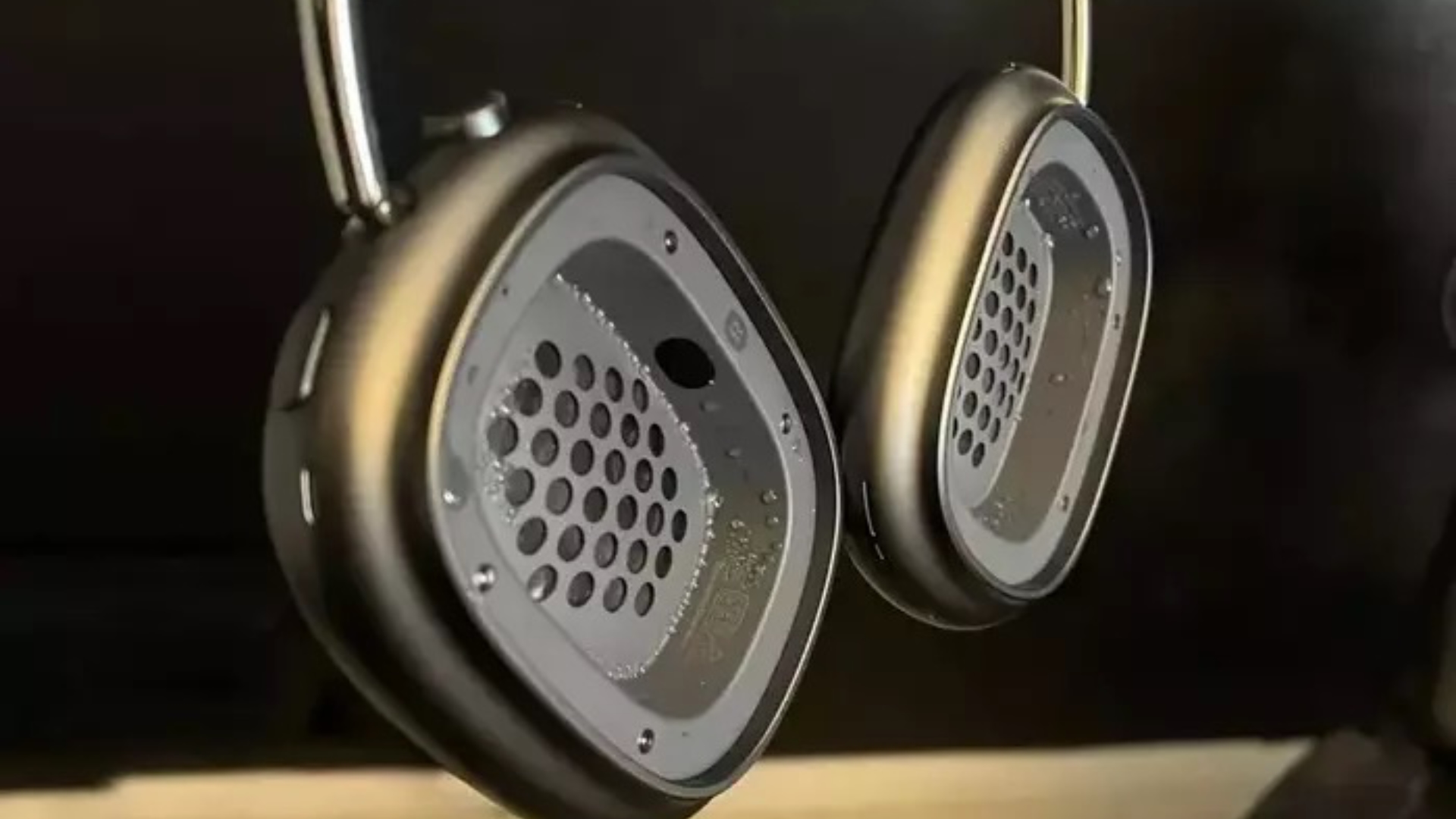
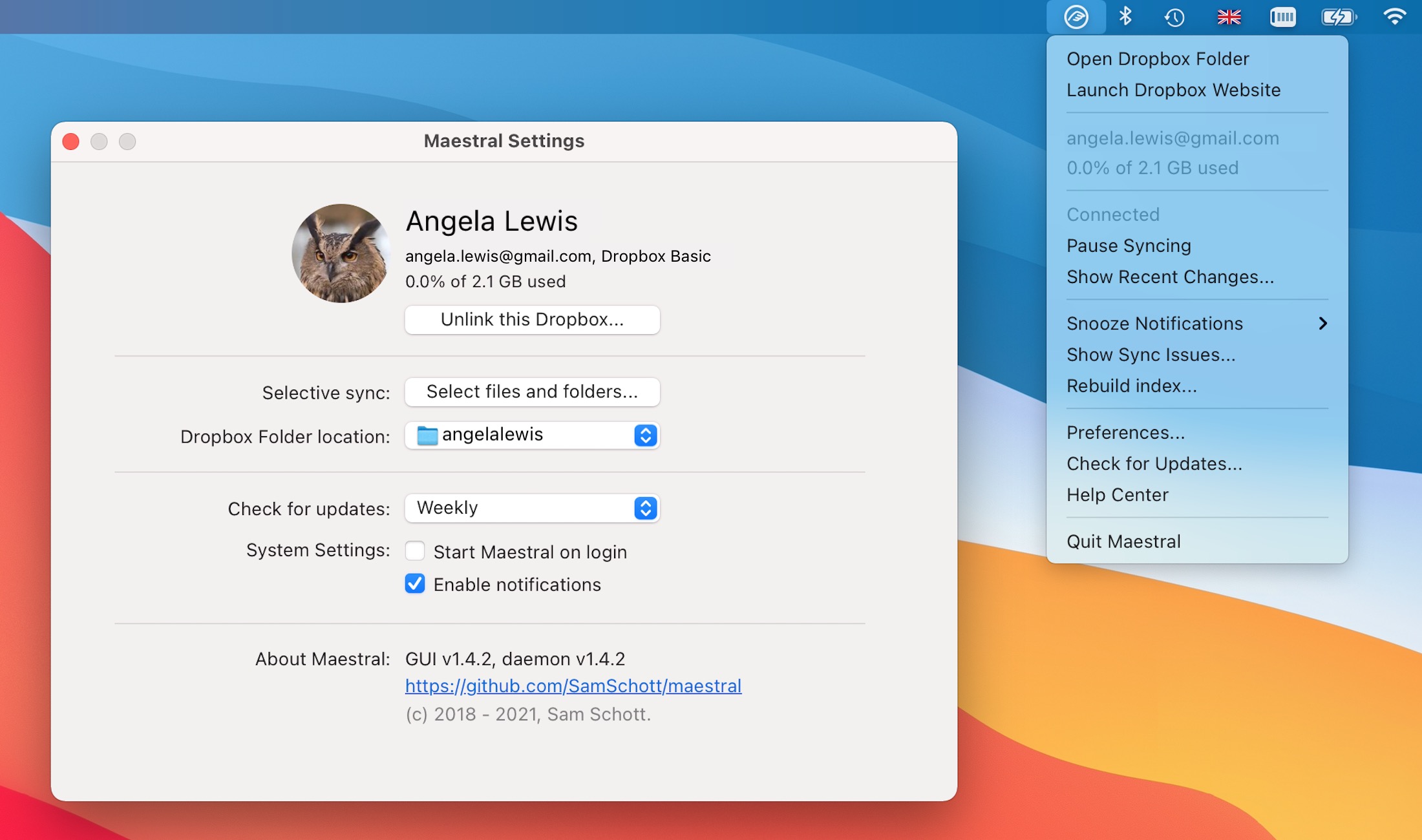
The Prime 3-in-1 Wireless Charging Station features Qi2.2 support, which lets a compatible MagSafe ‌iPhone‌ charge at up to 25W. It's the same speed as Apple's ‌MagSafe‌ charger, and it is 10W faster than the standard Qi2 ‌MagSafe‌ chargers. You can also simultaneously charge an Apple Watch and AirPods with the device.


Below you'll find a list of the best Anker discounts on Amazon this week, also including wall chargers, portable batteries, and more. There are a few more accessories that are matching their Prime Day prices, including Anker's Nano USB-C Wall Charger with Smart Display. You can get this accessory for $25.99, down from $39.99.

Wall Chargers


Wireless Chargers


Portable Chargers


Portable Power Stations


Docks


If you're on the hunt for more discounts, be sure to visit our Apple Deals roundup where we recap the best Apple-related bargains of the past week.


Deals Newsletter


Interested in hearing more about the best deals you can find in 2026? Sign up for our Deals Newsletter and we'll keep you updated so you don't miss the biggest deals of the season!


Related Roundup: Apple Deals

This article, "Anker's 3-in-1 Foldable Wireless Charger Matches Prime Day Low at $99.74" first appeared on MacRumors.com

Discuss this article in our forums

  •  

iPhone 18 Pro vs. iPhone 18 Pro Max: Here's What the Latest Leak Says

Apple is expected to unveil the iPhone 18 Pro and iPhone 18 Pro Max in September. The devices will have a lot in common, but the latest leak suggests that the Pro Max model will take an even bigger step forward in regards to battery life.


According to new filings in a Chinese regulatory database, it appears that the iPhone 18 Pro Max will be equipped with a 5,567mAh battery in the U.S., while the iPhone 18 Pro will seemingly have a 4,288mAh battery. It is no surprise the Pro Max has a larger battery, but its year-over-year gains in battery life look to be particularly significant this year.

If the leaked capacities are accurate, the iPhone 18 Pro Max would have nearly a 10% larger battery compared to the iPhone 17 Pro Max, while the size of the iPhone 18 Pro's battery would only increase by less than 1% over the iPhone 17 Pro.

It was previously rumored that the iPhone 18 Pro Max will be thicker than the iPhone 18 Pro. If so, that might be to accommodate the larger battery.

In some years, the Pro Max gets some camera features before the Pro, but that is not expected to be the case this year. The main 48-megapixel Fusion camera is rumored to get variable aperture on both the iPhone 18 Pro and iPhone 18 Pro Max.

Of course, the Pro Max will remain larger and heavier than the Pro, but the devices should be identical beyond that and the bigger gap in battery life.
Related Roundup: iPhone 18 Pro

This article, "iPhone 18 Pro vs. iPhone 18 Pro Max: Here's What the Latest Leak Says" first appeared on MacRumors.com

Discuss this article in our forums

  •  

The latest in our company transformation

Amy Coleman, EVP and Chief People Officer, shared the following communication with employees today.

When I stepped into this role, I promised to communicate more openly with you and share the “why” behind our decisions.

Today we are eliminating around 4,800 roles, about 2.1% of our global workforce, as we focus our people, investments, and energy on the priorities that will keep Microsoft positioned to deliver for customers in a fast-changing industry. The people whose jobs are impacted today are our colleagues and friends. They have made meaningful contributions to Microsoft, and we are deeply grateful for everything they have done.

Decisions like these are never easy, and you have my commitment that we are always looking for ways to reduce the need for job eliminations. Whenever possible, our priority is to place people into new roles aligned to the company’s highest priorities and greatest areas of opportunity. Over the past year, we have redeployed more than 4,000 employees into new roles, including another 500 this month. We will also transition four of our gaming studios to operate under new management, with the goal of preserving both their intellectual property and ongoing projects. In addition, more than 30% of eligible employees chose to participate in our recent voluntary retirement program, and we will continue exploring similar approaches in the future. While this doesn’t change the difficulty of today’s news, we will continue to do everything we can to create opportunities for our people, reduce the need for job eliminations where possible, and responsibly support those affected with care and respect.

The “why” is this: Our business is changing because the world around it is changing. The way technology is built, deployed, and used is transforming faster than at any point in my time here. Our customers’ needs are shifting, the business models that serve them are shifting, and that means the work itself – what we do, where we focus, and how we’re organized – has to transform too. Companies don’t get to choose whether their industry changes; they only get to choose whether they change with it. That means we will need to adjust resources and roles and shift how we operate so we can have the greatest impact for our customers.

I also want to be direct that the roles eliminated today are not being replaced by AI. At the same time, what is true is that AI is changing how work gets done. Some of the tasks we do every day can now be automated, and that means we all need to keep learning, keep building new skills, and keep adapting as the work evolves. Our customers are navigating this same shift, and they’re counting on us to help them through it. We can’t do that well unless we’re doing it ourselves. This comes down to two commitments: making the decisions needed to drive differentiated customer value, and supporting the people affected by them.

First, we will make the hard changes required to build differentiated products and services that deliver differentiated customer value. We are aligning our investment, people, and energy to our business priorities. Today’s changes mostly fall within our Commercial and XBOX organizations. In our Microsoft Commercial Business, they build on last week’s Frontier Company announcement, reshaping how we work and embedding our engineering experts alongside customers so we can help them accelerate their technology deployments. In XBOX, we are restructuring to position the business for long-term success. Engineering teams across the company will also evolve their structure and priorities to meet customer needs and innovate for the future.

Second, we will do this thoughtfully.  As mentioned above, we are working on alternative solutions to job eliminations, and beyond this, we will continue to invest in equipping employees with new skills, including in AI. For those who are impacted, we provide financial support and resources to help them take their next step.

I know many of you want to help those who are leaving but aren’t sure how. Reach out and check in on your colleagues. Use your network to bring people together, share what makes them exceptional, and help create connections to opportunities that might not happen otherwise.

We are still early on this journey, and there will be more changes ahead; other parts of our business will need to make similar changes. Each time, you can hold us to the two commitments.

During my time at Microsoft, I’ve seen this company reinvent itself again and again. What makes that possible has always been our people – their resilience, creativity, and willingness to keep learning.

Thank you for everything you bring to Microsoft.

Amy

Read more: Resetting XBOX.

The post The latest in our company transformation appeared first on The Official Microsoft Blog.

  •  
❌