Lees weergave

What's on Your iOS 27 Wishlist Ahead of WWDC 2026?

We're just a handful of days away from Apple's 2026 Worldwide Developers Conference, which will see the introduction of iOS 27, iPadOS 27, macOS 27, and more.


We've heard plenty of rumors about ‌iOS 27‌ and it sounds like most of the new features will focus on Siri and AI, but we want to hear from readers. Are you looking forward to any of the new capabilities? Read our iOS 27 roundup to see what's in store.

What's at the top of your wishlist? Do you want updates to the Liquid Glass design? Multitasking options? More emoji?

MacRumors readers have been discussing some of their ‌iOS 27‌ wants in a dedicated iOS 27 wishlist forum thread that's worth checking out. Some top picks:

  • Support for using any third-party AI assistant (which is rumored)

  • A dock with more than four icons

  • An option for using two apps at once

  • Dynamic wallpapers

  • Imports from the Files app to the Music and TV apps

  • Themes from prior versions of iOS

  • Multiple user accounts and/or guest mode (for iPadOS 27)

  • Clipboard history

  • An RSS app

  • A tool for PC file transfers


Let us know what you're hoping to see from Apple.

The WWDC 2026 keynote event will take place on Monday, June 8 at 10:00 a.m. Pacific Time or 1:00 p.m. Eastern Time.
Related Roundups: iOS 27, WWDC 2026

This article, "What's on Your iOS 27 Wishlist Ahead of WWDC 2026?" first appeared on MacRumors.com

Discuss this article in our forums

  •  

Apple Bringing App Store Age Verification to Texas as SB 2420 Takes Effect June 4

Apple today said App Store rules in Texas are changing due to the enforcement of SB 2420, a law that adds age assurance requirements for app marketplaces and developers.


Apple users located in Texas will soon be required to confirm whether they are 18 years or older when creating an Apple Account. Apple Accounts for users under 18 must be part of a Family Sharing group, and parents need to provide consent for all App Store downloads, app purchases, and in-app transactions.

Developers need to adopt the Declared Age Range API to provide the required age categories for new account users in Texas, and they are responsible for implementing the correct age restrictions. Developers must get parental consent for a minor to download an app, and are required to re-obtain consent if there is a "significant change" to an app. It is up to developers to determine when a significant change has been made to an app.

Parents in Texas are able to revoke consent for any app they previously approved for their child, a system that developers also need to support. Apple has several APIs for developers who need to implement these features, including the Declared Age Range API and the Significant Change API. Developers could face civil penalties of up to $10,000 per violation.

Apple first outlined the changes it was making to support SB 2420 in October 2025, because it was supposed to go into effect on January 1, 2026. In December, a Texas federal judge blocked the age verification law and said it was "more likely than not unconstitutional" and a violation of the First Amendment due to the burden of age verification.

The U.S. Court of Appeals for the Fifth Circuit temporarily stayed the injunction that was blocking the law from being enforced, so SB 2420 will go into effect on June 4, 2026. Legal proceedings are still ongoing, and the Fifth Circuit has not decided on whether it will issue a permanent stay of the injunction during the appeals process. The courts still need to determine the constitutionality of SB 2420 and whether the state has the authority to impose age verification requirements on app marketplaces.

When SB 2420 is live, Apple will need to confirm user age when a person creates an Apple Account, an action that the company has not wanted to take. Apple is required to use "commercially reasonable methods to identify an individual's age" during account creation. Existing accounts are not affected. Google's Play Store is also subject to the law.

Apple fought against age assurance requirements in Texas and other states because of the data collection required to determine user age. Apple says SB 2420 forces users to share personally identifiable data to download any apps, even a simple app for checking weather or sports scores. Apple introduced the Declared Age Range API to minimize data collection where possible.

Apple CEO Tim Cook attempted to persuade Texas Governor Greg Abbott to veto the legislation, but Abbott went ahead and signed it into law.

More information on Apple's age assurance frameworks can be found on its Developer website.
This article, "Apple Bringing App Store Age Verification to Texas as SB 2420 Takes Effect June 4" first appeared on MacRumors.com

Discuss this article in our forums

  •  

Apple is Permanently Closing Three U.S. Stores This Month

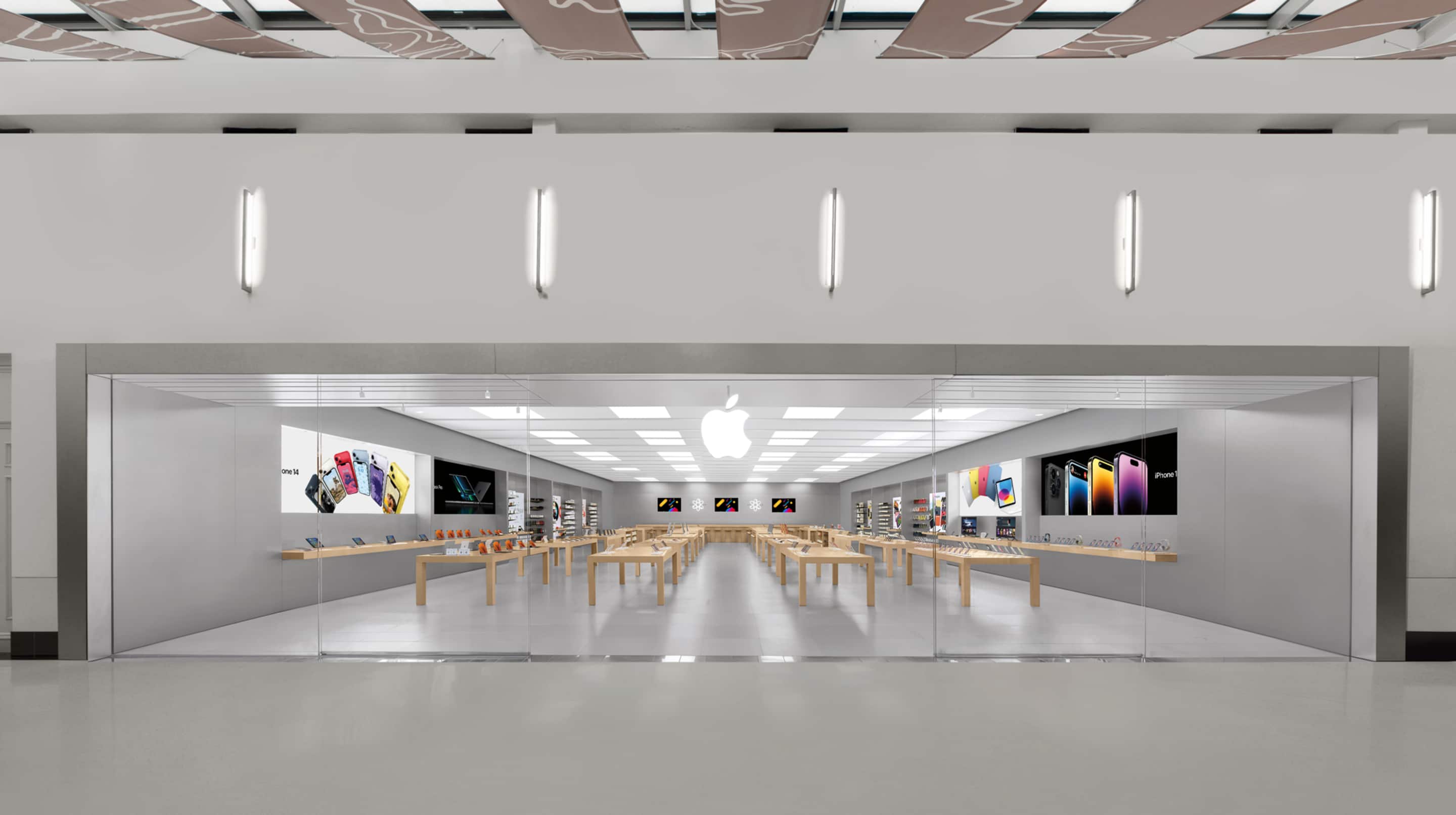
Apple will be permanently closing three of its retail stores in the U.S. on the evening of Saturday, June 20, according to its website.

Apple Towson Town Center

The locations that are closing:In April, Apple said it made the "difficult decision" to close the stores due to "declining conditions" at the shopping malls in which they are located.

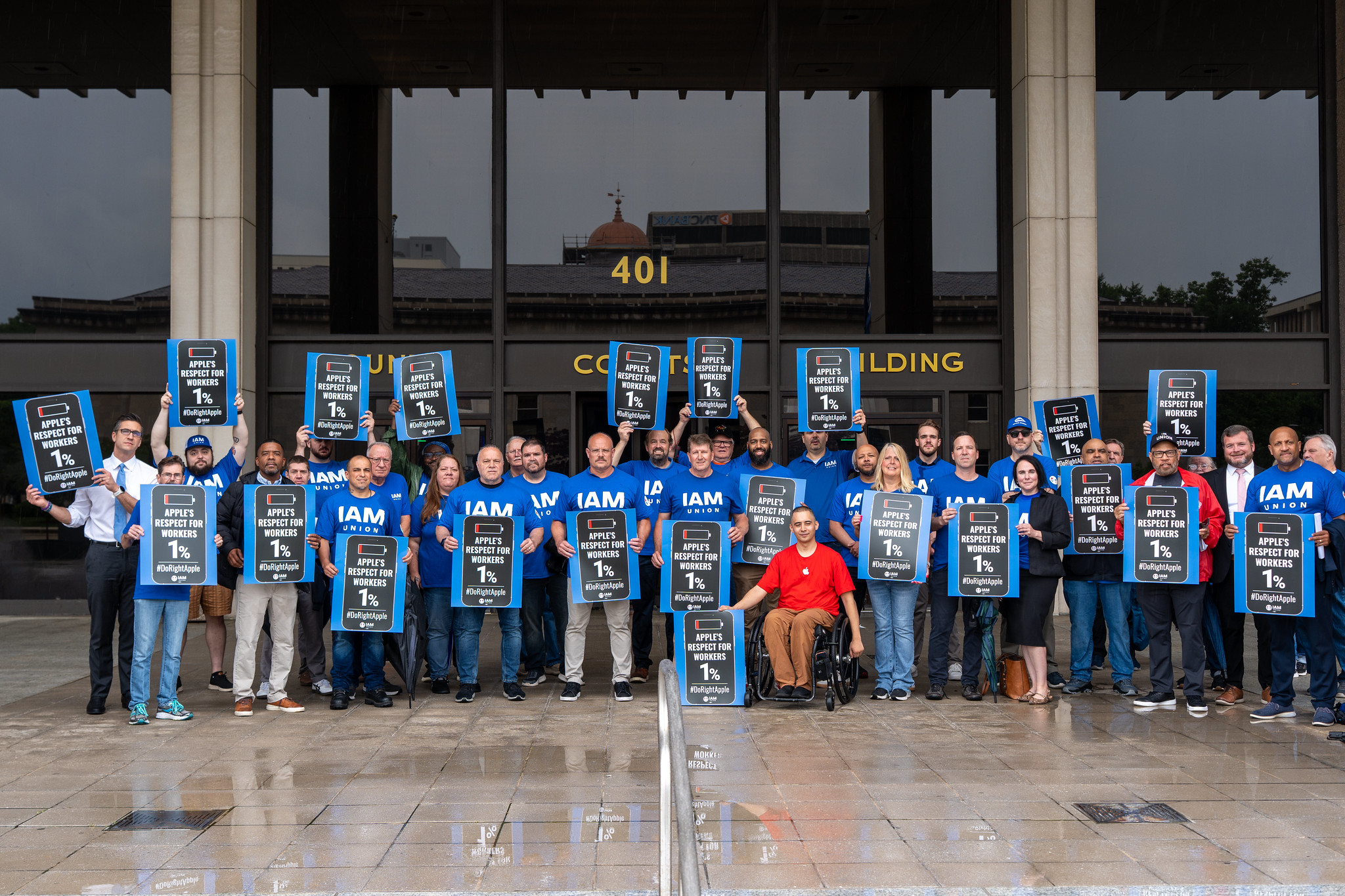
Notably, the staff at the Towson Town Center location became Apple's first retail employees in the U.S. to unionize in 2022. They belong to the International Association of Machinists and Aerospace Workers' Coalition of Organized Retail Employees (IAM CORE), and they signed a collective bargaining agreement with Apple in 2024.

The union and the store's employees have been protesting the planned closure, and some lawmakers in Maryland have voiced their support.


The union is upset that Apple is allowing non-unionized employees at the Trumbull and North County stores to transfer to nearby locations, but not extending this offer to unionized employees at the Towson location. For its part, Apple said it is simply honoring the terms of the collective bargaining agreement that the employees agreed to.

According to Apple, the contract states that in the event of a store closure, Apple would transfer or rehire employees if the company opened a new store within 50 miles of the current location at Towson Town Center. In any other circumstance, the union negotiated for employees to receive severance, which is being provided.

Apple said it has no current plans to open a new store in the area, but if it were to do so within 18 months after the collective bargaining agreement was ratified, the affected employees would have the right of first refusal.

Nevertheless, IAM has accused Apple of potential union busting and said that the agreement "requires equal treatment."

"Apple workers in Towson voted to join the IAM, fought for and won a contract, and are now being punished for it," said IAM President Brian Bryant. "Apple signed a collective bargaining agreement that requires equal treatment. It is time for Apple to honor that agreement and do right by these workers before June 20."

Towson Town Center is genuinely in a state of decline and has lost many other major retailers in recent years, so it is very likely that Apple is exiting the shopping mall at least partly due to the worsening conditions. Nevertheless, the situation could benefit Apple by warning employees at other stores that joining a union does not always work out. However, we may never know Apple's true and full intentions behind its decision.
This article, "Apple is Permanently Closing Three U.S. Stores This Month" first appeared on MacRumors.com

Discuss this article in our forums

  •  

Ben Hutchings: FOSS activity in May 2026

This was a particularly busy month for me in terms of Debian contributions.

It started with a week in Hamburg for the MiniDebConf. I talked to many colleagues face-to-face and worked on various bugs and maintenance tasks. I’m pleased to have finally found the time to reproduce and fix the boot-time crashes in the parallel port subsystem that have been reported many times recently.

A series of easily exploited kernel LPE (local privilege execution) issues were published this month, mostly with very little coordination with distributions. Salvatore and I had to upload fixes for these at roughly weekly intervals. All of these fixes needed to be applied to 4 different upstream branches (currently 5.10, 6.1, 6.12, and 7.0) and 7 Debian branches (including backports).

  •  

Kuo: Apple's Vision Pro Successors Off the Table as Focus Shifts to Smart Glasses

Incoming Apple CEO John Ternus signed off on a major revision of Apple's Vision Pro and smart glasses plans, consolidating Apple's work in the category.


According to Apple analyst Ming-Chi Kuo, Ternus nixed plans for a second Vision Pro and a lighter Vision Air. Kuo says there are only two smart glasses products in development, including the AI smart glasses that Apple is creating to rival the Meta Ray-Bans and a display-equipped set of AR smart glasses.

"I think removing the Vision Pro line was the right call, as Apple shifts resources toward smart glasses with greater mass-market potential," writes Kuo. Kuo says that the Vision products roadmap that he shared in June 2025 is no longer a useful reference because of the major changes that Apple has made to its plans over the last year. Kuo's product timeline originally featured seven products, but now it features just two that are still relevant.

Kuo believes the AI smart glasses will ship in 2027, while the display-equipped augmented reality glasses with "optical waveguides" won't come out until 2029 at the earliest. Optical waveguides pair a micro-display with waveguides that guide the image to the user's eyes. Lenses remain transparent, so the virtual content looks like it's overlaid on the real world view.

Bloomberg's Mark Gurman weighed in on Kuo's report and said the Vision Air was discontinued in October 2025, the display glasses meant to pair with a Mac were sunset in January 2025, and AI smart glasses will launch at the end of 2027.

While Kuo does not believe Apple is working on any version of a Vision Pro, Gurman claims Apple has a Vision Pro 2 "in testing" but the category is "on ice." Earlier this week, Gurman also said Apple is working on a cheaper, lighter Vision Pro, but the device is unlikely to launch before late 2028 or 2029.

John Ternus is set to take over as Apple's CEO on September 1, 2026. Current Apple CEO Tim Cook will remain on as Executive Chairman.
Related Roundup: Apple Vision Pro
Buyer's Guide: Vision Pro (Neutral)
Related Forum: Apple Vision Pro

This article, "Kuo: Apple's Vision Pro Successors Off the Table as Focus Shifts to Smart Glasses" first appeared on MacRumors.com

Discuss this article in our forums

  •  

Apple's New Beats Pill Ad Leans Into Reality TV Show 'Love Island USA'

Apple today shared a new Beats Pill ad that pays tribute to the reality TV show Love Island USA, which returned for an eighth season this week.


The ad does not mention Love Island USA, but the "Pill People" are said to have "entered the villa," which is a clear reference to the show.

"If you're binging a full summer of island drama, you'll need battery life that can keep up," says Apple. "Good thing the Beats Pill gets up to 24 hours of listening time, more than enough for every recoupling, challenge, and twist the summer has to offer."

Apple released the current Beats Pill in 2024. Priced at $149.99 in the U.S, the speaker comes in Matte Black, Statement Red, and Champagne Gold.
This article, "Apple's New Beats Pill Ad Leans Into Reality TV Show 'Love Island USA'" first appeared on MacRumors.com

Discuss this article in our forums

  •  

Amazon Undercuts Apple With Quicker MacBook Neo Delivery and Discounted Price

Amazon is offering same-day delivery on Apple's MacBook Neo in select locations alongside its ongoing $9 discount on the notebook. You can get all four colors of the 256GB delivered same-day in many locations, plus a few colors of the 512GB model.

Note: MacRumors is an affiliate partner with some of these vendors. When you click a link and make a purchase, we may receive a small payment, which helps us keep the site running.

If your location doesn't have a same-day delivery option, Amazon is still providing a delivery estimate between June 4 and June 8 on every MacBook Neo computer. This beats Apple's current delivery estimates by up to a week.


Apple's MacBook Neo has recently been struck by delayed delivery estimates on Apple.com, due to the notebook's booming popularity. Amazon's quicker delivery estimates are bolstered by the small $9 discounts on each model of the notebook, and Amazon is still the only retailer hosting these deals.

Following its launch in March, the MacBook Neo has become a big hit for Apple, with the company struggling to keep the computer in stock online and in Apple stores. As of writing, Apple.com quotes a 1-2 week delivery estimate on every model of the Neo in the U.S. and many other countries.

If you're on the hunt for more discounts, be sure to visit our Apple Deals roundup where we recap the best Apple-related bargains of the past week.


Deals Newsletter


Interested in hearing more about the best deals you can find in 2026? Sign up for our Deals Newsletter and we'll keep you updated so you don't miss the biggest deals of the season!


Related Roundup: Apple Deals

This article, "Amazon Undercuts Apple With Quicker MacBook Neo Delivery and Discounted Price" first appeared on MacRumors.com

Discuss this article in our forums

  •  

MacBook Neo is So Popular That Apple Reportedly Doubled Production

On an earnings call in late April, Apple's CEO Tim Cook said that customer response to the MacBook Neo was "off the charts," and the popularity of the laptop has reportedly led the company to significantly boost production.


Apple supply chain analyst Ming-Chi Kuo this week said he believes that MacBook Neo shipments to Apple were doubled from an initial target of 5 million units to 10 million units in 2026 at some point after the laptop launched in March.

Apple was very optimistic about the MacBook Neo before announcing it, but the company still "undercalled" the level of enthusiasm that the laptop would generate, according to Cook. He said that MacBook Neo demand exceeded Apple's expectations and helped to drive a record number of first-time Mac buyers last quarter.

New figures from market research firm IDC support Apple's claim that the MacBook Neo is selling well, and the Windows PC industry has taken notice. For example, Dell recently introduced a redesigned XPS 13 laptop from $699 and said it has features "you won't find on a MacBook Neo," such as a touch screen and a backlit keyboard.

"Apple's MacBook Neo is a capable machine, and its arrival confirms that there's real appetite for premium quality at accessible prices," admitted Dell.

With a starting price of $599 in the U.S., or $499 for college students, the MacBook Neo is Apple's most affordable MacBook ever. Powered by the iPhone's A18 Pro chip, the laptop is available in colorful finishes like Citrus and Blush.

A second-generation MacBook Neo is expected to be released next year with an A19 Pro chip and 12GB of RAM.
Related Roundup: MacBook Neo
Buyer's Guide: MacBook Neo (Buy Now)
Related Forum: MacBook Neo

This article, "MacBook Neo is So Popular That Apple Reportedly Doubled Production" first appeared on MacRumors.com

Discuss this article in our forums

  •  

Apple Says macOS 27 Won't Be Compatible With These Macs

During WWDC 2025, Apple revealed that macOS 26 Tahoe would be the final major macOS version for Intel-based Macs.


macOS 27 will be compatible with Apple silicon Macs only, meaning that you will need a Mac with an M-series chip or a MacBook Neo with an A18 Pro chip in order to install the software update. Apple will unveil macOS 27 during its WWDC 2026 keynote this Monday, June 8, and the update should be widely released in September.

Intel-based Macs that can run macOS Tahoe but will not be compatible with macOS 27:
  • 13-inch MacBook Pro (2020, Four Thunderbolt 3 Ports)

  • 16-inch MacBook Pro (2019)

  • 27-inch iMac (2020)

  • Mac Pro (2019)
Apple said Intel-based Macs will continue to receive security updates for three years.

macOS 27's exact compatibility with Apple silicon Macs remains to be seen, but presumably the update will support all Macs with an M1 chip or newer.

macOS 27 will still be able to run Intel apps, as it will be the final major macOS release to include Apple's full Rosetta translation layer.

"Rosetta was designed to make the transition to Apple silicon easier, and we plan to make it available for the next two major macOS releases – through macOS 27 – as a general-purpose tool for Intel apps to help developers complete the migration of their apps," said Apple. "Beyond this timeframe, we will keep a subset of Rosetta functionality aimed at supporting older unmaintained gaming titles, that rely on Intel-based frameworks."
Related Roundup: macOS 27

This article, "Apple Says macOS 27 Won't Be Compatible With These Macs" first appeared on MacRumors.com

Discuss this article in our forums

  •  

LG Kicks Off Summer Sale With Big Deals on Monitors, TVs, and Appliances

LG is hosting a big savings event on its website this week, with deals on monitors, TVs, home appliances, and more. LG's discounts have been automatically applied and do not require any discount codes or special memberships.

Note: MacRumors is an affiliate partner with LG. When you click a link and make a purchase, we may receive a small payment, which helps us keep the site running.

Highlights of the event include up to $500 off select LG monitors and up to $1,500 off LG's best TV sets. If you're planning to buy multiple monitors, LG is offering an extra 5 percent off your order with select models.


TVs


Monitors


Appliances


If you're on the hunt for more discounts, be sure to visit our Apple Deals roundup where we recap the best Apple-related bargains of the past week.


Deals Newsletter


Interested in hearing more about the best deals you can find in 2026? Sign up for our Deals Newsletter and we'll keep you updated so you don't miss the biggest deals of the season!


Related Roundup: Apple Deals

This article, "LG Kicks Off Summer Sale With Big Deals on Monitors, TVs, and Appliances" first appeared on MacRumors.com

Discuss this article in our forums

  •  

Apple TV Shares Trailer for New Heist Series Starring Anya Taylor-Joy

Apple TV today released a trailer for "Lucky," an upcoming crime series starring and executive produced by award-winning actress Anya Taylor-Joy.


The show revolves around a heist gone wrong.

"When a multimillion-dollar heist goes sideways, con artist Lucky (Taylor-Joy) is forced to go on the run," said Apple. "Pursued by both the FBI and a ruthless crime boss, Lucky must fight for her life — and a way out."


The limited series is based on Marissa Stapley's bestselling novel of the same name.

The first two episodes will be released on Wednesday, July 15, and one new episode will follow every Wednesday through August 19.

Apple's streaming service is available on the web and in the Apple TV app across many platforms. U.S. pricing is set at $12.99 per month or $129 per year.
This article, "Apple TV Shares Trailer for New Heist Series Starring Anya Taylor-Joy" first appeared on MacRumors.com

Discuss this article in our forums

  •  

Apple Store Seemingly Opening in Japan's Second-Largest City

As noted by Kazuto Kusakari, new job listings suggest that Apple is preparing to open its first store in Yokohama.

Yokohama is Japan's second-largest city by population, after Tokyo. Apple has 11 stores in Japan already.

Thanks, @hamu_3nd!
This article, "Apple Store Seemingly Opening in Japan's Second-Largest City" first appeared on MacRumors.com

Discuss this article in our forums

  •  

MacBook Neo Disrupts a PC Market in Decline, IDC Says

The global memory shortage that has already squeezed Mac mini and Mac Studio supply is now set to weigh heavily on the broader PC market, with IDC forecasting an 11.3% decline in global shipments for 2026.


According to IDC's Worldwide Quarterly Personal Computing Device Tracker, conditions are expected to worsen progressively through the fourth quarter, when shipments are forecast to fall 20% year-over-year, with no meaningful relief expected before the end of 2027. Average selling prices are rising and PC manufacturers are struggling to maintain full product portfolios.

The first quarter of 2026 offered a deceptively encouraging signal, with shipments growing 3% versus the same period last year, but that strength was largely artificial; both consumer and commercial buyers pulled purchases forward ahead of anticipated price increases and availability constraints. Some of that first quarter momentum is carrying into the second quarter, but the remaining quarters are expected to deteriorate. IDC forecasts average selling price growth of 17% in 2026, and even as memory capacity expands over the next two years, pricing is unlikely to return to 2025 levels. TrendForce previously warned that surging memory and CPU costs could push mainstream laptop prices up by nearly 40% this year.

Against that backdrop, Apple's MacBook Neo has driven stronger-than-expected notebook demand and prompted IDC to revise its notebook forecast upward. Launched in March at $599, the ‌MacBook Neo‌ pairs the A18 Pro chip with 8GB of memory and targets the sub-$700 notebook segment. This market accounts for approximately 75 million units annually, nearly 40% of total notebook volume, which is a tier historically dominated by Windows and ChromeOS devices.

The ‌MacBook Neo‌'s competitive ripple effects cut both ways. IDC said the device is "putting real pressure on the entire PC ecosystem," and expects rivals to respond with new silicon, a more efficient OS from Microsoft, and aggressive promotional pricing. The competitive pressure from the ‌MacBook Neo‌ is providing a partial offset to broader price increases, keeping some low-cost notebook options alive, though the overall average selling price trajectory remains firmly upward.

While rising memory costs are pushing many PC vendors toward higher-priced systems or forcing specification cuts to defend lower price points, Apple has moved in the opposite direction. The memory shortage has had a more direct impact on Apple's higher-end Mac models, with ‌Mac mini‌ and ‌Mac Studio‌ models seeing configuration cuts and significant shipping delays as the company struggles to secure supply.
Related Roundup: MacBook Neo
Tag: IDC
Buyer's Guide: MacBook Neo (Buy Now)
Related Forum: MacBook Neo

This article, "MacBook Neo Disrupts a PC Market in Decline, IDC Says" first appeared on MacRumors.com

Discuss this article in our forums

  •  

Apple Announces Europe's First Developer Center

Apple today announced it will open Europe's first Apple Developer Center in Berlin later this year.


The facility joins existing Developer Centers in Bengaluru, Cupertino, Shanghai, and Singapore. Apple said the Berlin center, located in Mitte district, will offer developers throughout Europe in-person sessions, workshops, and one-on-one appointments in multiple languages, with consultation areas and dedicated labs staffed by Apple experts. Apple's vice president of Worldwide Developer Relations, Susan Prescott, said:

Europe is home to an extraordinary community of developers who are building apps that create connections, encourage creativity, and drive innovation. We have always believed that when developers have the right tools and resources to do their best work, incredible things follow. That belief is what this center is built on, and we look forward to seeing what the community continues to build.


The center will host a regular cadence of events covering iOS, iPadOS, macOS, tvOS, visionOS, and watchOS development, aimed at teams of all sizes and at every stage of app development. Apple said the programming is intended to help developers improve the design, quality, and performance of their apps.

Apple noted that storefronts across Europe saw more than 150 million average weekly users in 2025, and that eligible developers can access the App Store Small Business Program, which offers a reduced 15% commission rate for small and individual developers.

The announcement builds on Apple's existing developer investments in Europe, which include the Swift Student Challenge, 19 Apple Developer Academies worldwide, and Apple Foundation Programs in Italy and France. The company pointed out that developers also have access to more than 250,000 APIs across frameworks including HealthKit, Metal, Core ML, MapKit, and SwiftUI.
This article, "Apple Announces Europe's First Developer Center" first appeared on MacRumors.com

Discuss this article in our forums

  •  

Distribution Release: T2 Linux SDE 26.6

The DistroWatch news feed is brought to you by TUXEDO COMPUTERS. T2 Linux SDE is an independently-developed open-source system development environment (or distribution build kit). It enables the creation of custom distributions with bleeding-edge technology. The project's latest release, version 26.6, polishes the KDE Plasma build and expands RISC-V support. "This T2/Linux release continues to polish our flagship KDE....
  •  

Apple Music Classical Announces New Partnership With London's Wigmore Hall

Wigmore Hall Live today relaunches as a digital-only platform in partnership with Apple Music Classical, with all recording royalties passed directly to artists, Gramophone reports.


Wigmore Hall is a prestigious 550-seat concert hall on Wigmore Street in London's Marylebone, widely regarded as one of the world's foremost venues for chamber music, early music, and vocal recitals. Opened in 1901 and noted for its particularly good acoustics, the Grade II listed building hosts over 500 concerts each year. The new partnership with Apple was announced as part of the Hall's 125th anniversary celebrations this year.

Under the artist-first model, Wigmore Hall will cover all production costs for every release and take no share of recording income, passing 100% of royalties received directly to the performing artists. The platform will release four digital-only recordings per year, drawn from live performances at the Hall and developed in close collaboration with artists. Each new Wigmore Hall Live release will premiere exclusively on Apple Music Classical for three months.

Director John Gilhooly said the partnership would allow listeners "to experience Wigmore Hall concerts as close to the live event as possible," citing ‌Apple Music‌ Classical's sound quality as central to that goal.

The first release under the new model is Pianist Boris Giltburg's recording of Beethoven's Piano Sonatas Nos. 4, 8, 9, 20 ("Pathétique"), and 26 ("Les Adieux"), recorded live at Wigmore Hall in February 2025. The Piano Sonata No. 26 in E-flat major is available now, with the entire album to launch tomorrow. The release includes an artist commentary track in which Giltburg offers deeper insight into the repertoire.

‌Apple Music‌ Classical has previously partnered with institutions including the Berlin Philharmonic, Carnegie Hall, the Chicago Symphony Orchestra, the London Symphony Orchestra, the Metropolitan Opera, the New York Philharmonic, and the Vienna Philharmonic. The app launched in most countries in March 2023 and is included with a standard ‌Apple Music‌ subscription at no additional cost, offering access to over five million classical music tracks. It is based on Primephonic, a classical music streaming service acquired by Apple in 2021.
This article, "Apple Music Classical Announces New Partnership With London's Wigmore Hall" first appeared on MacRumors.com

Discuss this article in our forums

  •  

Apple Agrees to Hand Over Financial Data to India's Antitrust Regulator

Apple has agreed to hand over financial data to India's competition regulator, in a move that could bring a years-long antitrust case significantly closer to a penalty decision.


According to Reuters, a confidential Competition Commission of India (CCI) order showed that Apple last month agreed to supply its India-specific financials, which the watchdog typically needs to calculate potential fines. At a hearing on May 21, Apple's lawyer asked for a "final extension" until June 25 to file the information, and the CCI granted the request.

The development is an important reversal for Apple, which had previously refused to provide financial information to the regulator. The company argued the case should be paused while it separately challenges India's revised antitrust penalty law, which allows fines to be levied against a company's global revenue rather than just local earnings, which could expose Apple to up to $38 billion in fines.

The CCI repeatedly rejected that argument, saying it required only India financials to begin with and accused Apple of using the parallel court challenge to delay proceedings. Last month, a Delhi High Court judge directed Apple to cooperate with the investigation after the company sought to put the case on hold.

The case dates back to 2021, when a coalition of complainants including Match Group, the owner of Tinder, and the Alliance of Digital India Foundation, which represents Indian startups, filed a complaint regarding App Store policies. The CCI concluded its investigation in 2024, finding that Apple had abused its dominant position in the market for iPhone apps and that the ‌App Store‌ was "an unavoidable trading partner" for developers, who were not permitted to use third-party payment services for in-app purchases.

The case is unfolding as India becomes one of Apple's most consequential markets. The iPhone accounts for 9% of India's smartphone market, up from roughly 2% five years ago, and the company has significantly ramped up manufacturing in the country as part of its broader effort to reduce dependence on China.
This article, "Apple Agrees to Hand Over Financial Data to India's Antitrust Regulator" first appeared on MacRumors.com

Discuss this article in our forums

  •  

Emmanuel Kasper: Running Linux i386 binary (steamcmd) via debootstrap foreign chroot

The Steam command line client, which I need to download the game data for the Doom3 BFG shooter, is only available as an Linux i386 binary. As my main home computer is an arm64 box, this could be an issue, but today we have no less than three different ways to run a Linux i386 binary on arm64: Fex, Box32/64 and the older qemu-user mode. According to the Box64 benchmarks, qemu-user is the slowest of the three. But since this is only to run a command line tool downloader, where network speed is the bottleneck, this doesn’t matter a lot.

Running steamcmd outside of a chroot via qemu-user and dpkg multiarch support was failing me with the error i386-binfmt-P: Could not open '/lib/ld-linux.so.2': No such file or directory even after installing the i386 libc. So I went the way of qemu-user and a chroot environment, a bit more convoluted but I can run any i386 binaries there in the future.

Create a debian-i386 chroot environment via deboostrap:

$ sudo apt install qemu-user qemu-user-binfmt debootstrap
$ fakeroot debootstrap --foreign --arch=i386 debian-i386
$ sudo chroot debian-i386
# inside the chroot 
# /debootstrap/debootstrap --second-stage 
# exit

Add needed mounts to run binaries inside the chroot:

$ sudo mount --bind /dev/ debian-i386/dev/
$ sudo mount --bind /dev/pts debian-i386/dev/pts
$ sudo mount -t proc none  debian-i386/proc/

Install steamcmd in the chroot client:

$ sudo chroot debian-i386

# export LANG=C
# cat /etc/apt/sources.list
deb http://deb.debian.org/debian stable main contrib non-free
# apt update && apt install --yes steamcmd 
# useradd --create-home --shell /bin/bash steam
# su - steam
$ steamcmd 
... will download an updated version of the tool, and print a lot of tracing information

Steam> quit

From now on you can follow the Doom3 BFG instructions to download the game data.

Once you exit the chroot, the game data will be available at debian-i386/home/steam/

  •  

Siri in iOS 27: Every New Feature and Change to Expect

Apple first introduced the idea of a smarter version of Siri at the 2024 Worldwide Developers Conference. ‌Siri‌ with Apple Intelligence was supposed to launch as part of iOS 18, but the underlying architecture wasn't good enough, and Apple was forced to delay the feature. We're now expecting a new version of ‌Siri‌ in iOS 27 with some long-awaited smarts.


Siri's New Capabilities


Based on Apple's promises and rumors about what's coming in the new version of iOS, ‌Siri‌ in ‌iOS 27‌ will be nothing like ‌Siri‌ in iOS 26. In 2024, Apple showed us three ways that ‌Siri‌ will improve, but two years have passed and extra work has been done, so we're expecting even more than what Apple demonstrated back then.

‌Siri‌ is going to be able to draw on user data and information from Apple devices, with access to personal data for completing tasks. The assistant is also going to be able to do more with apps, and it will be able to tell what's on the screen to answer questions.

Personal Context


‌Siri‌ will be able to access emails, messages, files, photos, and more, learning all about you to help you complete tasks and keep track of what you've been sent. Apple offered some examples of how personal context will work:

  • Show me the files Eric sent me last week.

  • Find the email where Eric mentioned ice skating.

  • Find the books that Eric recommended to me.

  • Where's the recipe that Eric sent me?

  • What's my passport number?


Onscreen Awareness


Onscreen awareness will let ‌Siri‌ see what's on your screen and complete actions involving whatever you're looking at. If someone texts you an address, you can tell ‌Siri‌ to add it to their contact card. Or if you're looking at a photo and want to send it to someone, you can ask ‌Siri‌ to do it for you.

App Integration


‌Siri‌ will be able to do more in and across apps, performing actions and completing tasks that are just not possible with the personal assistant right now. We don't have a full picture of what ‌Siri‌ will be capable of, but Apple gave a few examples of what to expect.

  • Moving files from one app to another.

  • Editing a photo and then sharing it with someone.

  • Getting directions home and sending the ETA in the Messages app.

  • Drafting and then sending an email.


‌Siri‌ will be able to complete tasks in Apple apps and in third-party apps, with developers able to expose app capabilities to ‌Siri‌.

Siri as a Chatbot


Apple is turning Siri into a full chatbot that users can interact with similarly to Claude or ChatGPT. The ‌Siri‌ chatbot will be integrated into Apple's operating systems at the system level, plus there will be a ‌Siri‌ app for back-and-forth conversations.

‌Siri‌ will be able to do the same things that other chatbots can do. It will be able to search the web for answers to questions and provide summaries, evaluate and summarize uploaded documents, and even generate images and content so you can do things like get help with writing or creating an infographic.

Unlike ChatGPT and Claude, ‌Siri‌ will have deeper Apple device integration and more access to user data. Current chatbots can't access your mail app, what you've written in notes, your Photos Library, or your messages, but ‌Siri‌ will have that information. Personal data access will set ‌Siri‌ apart and give iPhone users some of the features that Android users have been able to enjoy thanks to Gemini's integration with Google services.

‌Siri‌ will be able to answer multi-part questions, remember what it was asked before, maintain context across requests, and remember details about the user.

Siri's Design


With ‌Siri‌'s chatbot transition, Apple will be making multiple Siri-related design changes. ‌Siri‌ will largely live in the Dynamic Island, and there will be new ways to access ‌Siri‌.

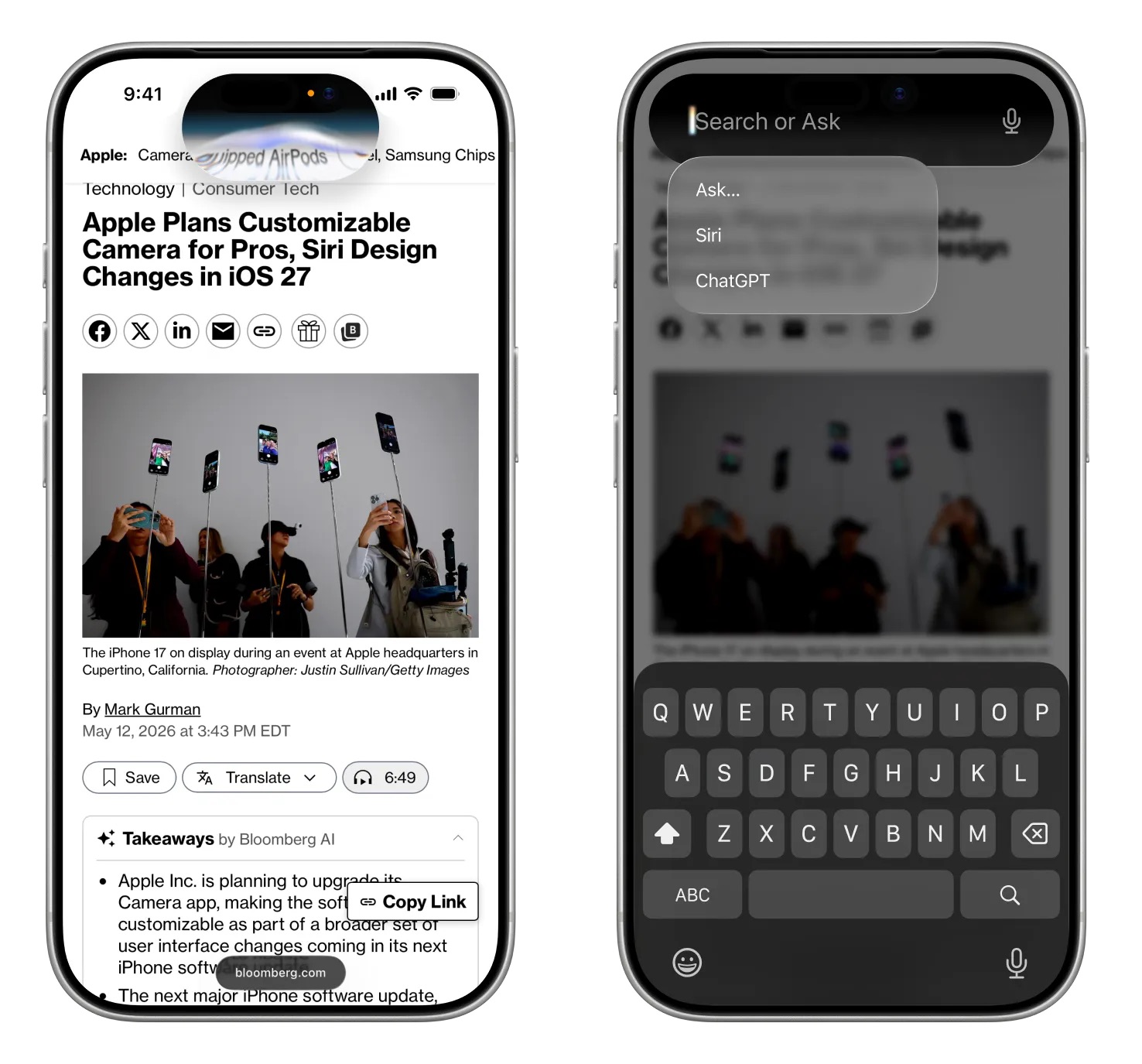
Swiping down from the center of the iPhone's display from the Home Screen or any app will bring up a new "Search or Ask" feature in the ‌Dynamic Island‌. A glowing, pill-shaped animation will be displayed in the ‌Dynamic Island‌ to indicate that ‌Siri‌ is processing a request.

Image via Bloomberg

When ‌Siri‌ has an answer, the ‌Dynamic Island‌ will expand into a transparent card with the result, incorporating images, info from the web, notes and other information relevant to the query or request. Swiping on the results card will bring up a conversation mode that looks similar to an iMessage chat, and there will be an option to transition to the full ‌Siri‌ app.

Search or Ask replaces ‌Siri‌ Suggestions and will let users launch apps, start text messages, ask about the weather, add calendar appointments, trigger shortcuts in apps, and search the web using Apple's new AI web search feature. Search or Ask queries will also be able to be sent to third-party chatbot services like ChatGPT instead of ‌Siri‌.

While ‌Siri‌ can be accessed through a swipe in ‌iOS 27‌, Apple is keeping the "Hey ‌Siri‌" wake word and ‌Siri‌ activation through the Side button. With the new center swipe, accessing the Notification Center will be done with a swipe down on the left side of the display. Swiping down on the right side will continue to bring up Control Center.

Apple will also integrate an "Ask ‌Siri‌" button into the menus of its apps, giving users a way to send content directly to ‌Siri‌ alongside a request.

The new ‌Siri‌ interface uses dark colors with no light mode available. ‌Siri‌ UI elements have a dark background with color accents that mirror the options Apple is using in WWDC imagery. Apple's WWDC website features a white Swift bird with subtle highlights in pink, dark blue, purple, and orange.

A Siri App


There will be a dedicated ‌Siri‌ app for interacting with ‌Siri‌, and it will look similar to apps for third-party chatbots but with an Apple design aesthetic. We have a separate guide on the ‌Siri‌ app.

Privacy


Apple plans to lean into privacy as a central principle of its approach to AI, giving it a way to distinguish ‌Siri‌ from other chatbot options. Apple will likely aim to keep as much processing on-device as possible to limit the amount of data that leaves a user's device.

Apple said that ‌Apple Intelligence‌ features will continue to run on Apple devices and Private Cloud Compute.

Apple will have limits around memory, including restrictions on the information that can persist and how long it is kept. Users will be able to auto-delete ‌Siri‌ chats and requests after a set period of time, like 30 days or one year. There will also be an option to keep chats permanently.

‌Siri‌ can be turned off right now, as can ‌Apple Intelligence‌, and there's no sign that's going to change in ‌iOS 27‌. Users who don't want to enable ‌Siri‌ or use the new features will not have to.

Siri Extensions


Apple is letting rival chatbots integrate with ‌Siri‌ in ‌iOS 27‌, expanding on the OpenAI partnership that currently allows ‌Siri‌ to hand off requests to ChatGPT. Apple plans to allow other chatbots like Claude and Gemini to work with ‌Siri‌, so users will be able to send questions to their favorite chatbot instead of ‌Siri‌.

iPhone users will be able to select which services they want to use inside ‌Siri‌ through "Extensions" options coming to ‌iOS 27‌, iPadOS 27, and macOS 27. The options will be available in the ‌Apple Intelligence‌ and ‌Siri‌ section of the Settings app, with Apple providing download links for chatbot apps. There will be a dedicated Extensions section in the App Store that will serve as a way to choose a third-party AI app.

‌Siri‌ will be the default for the Search or Ask interface, but rumors suggest users will be able to select other chatbots to speak with. Users will also be able to choose third-party AI services as the default for ‌Apple Intelligence‌ features like Writing Tools and Image Playground, expanding ‌Apple Intelligence‌ integration beyond ChatGPT.

Apple also plans to let users choose voices from third-party AI to use instead of ‌Siri‌, so there will be a distinct audio difference between a response from ‌Siri‌ and a response from the user's chatbot of choice. ‌Siri‌ would use one voice, while responses from third-party AI options would use another voice.

Gemini Help


To get ‌Siri‌ up and running, Apple partnered with Google to use Gemini AI models instead of using its own AI models. Apple signed a multi-year deal to use Google's Gemini models and cloud technology for its Apple Foundation Models.

Google and Apple said that the next generation of Apple Foundation Models will be based on Google Gemini models, with Gemini used to power future ‌Apple Intelligence‌ features and the more personalized version of ‌Siri‌.

Apple said Google's AI technology offered the most capable foundation for its models.

Device Compatibility


‌Apple Intelligence‌ features require an iPhone 15 Pro or later, and it's possible some of the new ‌Siri‌ options could be limited to those same models.

Launch Date


Apple will preview the new ‌Siri‌ at its WWDC 2026 keynote event on June 8, with betas of ‌iOS 27‌, iPadOS 27, and ‌macOS 27‌ provided to developers the same day. Public betas will come in July, and the software updates will launch in September.

It is not yet clear if all of the new ‌Siri‌ features will be available in the beta, or even right when ‌iOS 27‌ launches.
Related Roundup: iOS 27
Tag: Siri

This article, "Siri in iOS 27: Every New Feature and Change to Expect" first appeared on MacRumors.com

Discuss this article in our forums

  •  

Google Expands AirDrop Support to More Android Phones

Google today said its Quick Share feature that allows Android and iPhone users to exchange files with AirDrop is expanding to more devices.


Quick Share is now available on the following Android smartphones.

Samsung:

  • Galaxy S26, S26+, S26 Ultra

  • Galaxy S25, S25+, S25 Ultra, S25 Edge (new)

  • Galaxy S24, S24+, S24 Ultra (new)

  • Galaxy Z Flip7 (new)

  • Galaxy Z Fold7 (new)

  • Galaxy Z Flip6 (new)

  • Galaxy Z Fold6 (new)

  • Galaxy Z TriFold (new)


Google:

  • Pixel 10, 10 Pro, 10 Pro XL, 10 Pro Fold, 10a

  • Pixel 9, 9 Pro, 9 Pro XL, 9 Pro Fold, 9a

  • Pixel 8a


Other Smartphone Makers:

  • HONOR Magic V6 (new)

  • OnePlus 15 (new)

  • Xiaomi 17T Pro

  • OPPO Find X9, X9 Pro, X9 Ultra, X9s

  • OPPO Find N6

  • Vivo X300, X300 Pro, X300 Ultra


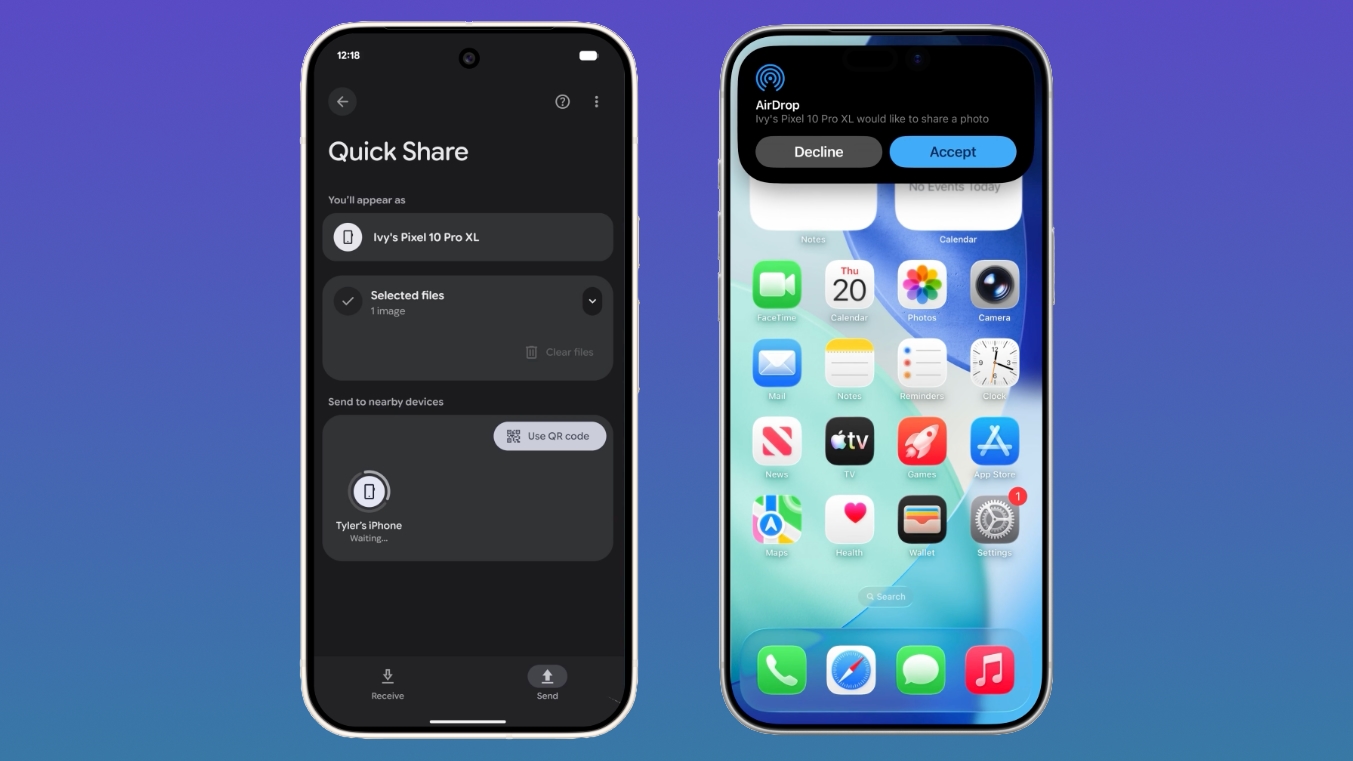
Quick Share is the Android equivalent of AirDrop, and Google added AirDrop integration in November 2025. iPhone users can AirDrop files and photos to Quick Share-enabled Android devices, while Android users can use Quick Share to send files and photos to iPhone users.

On an Android device, users need to make sure the Share with Apple devices setting is turned on and that the iPhone user sets AirDrop visibility to "Everyone for 10 minutes" through the Control Center. From there, an Android to iPhone file transfer is identical to a standard AirDrop transfer on the iPhone end.

On an iPhone, sharing a file to an Android smartphone is done through the standard AirDrop interface. Android owners receiving files will need to make sure Quick Share Receive mode is on, and then an iPhone user sending a file will see the Android device in the AirDrop list.

Android devices that are not compatible with Quick Share can generate a QR code that can be used to share content with iPhone users via the cloud.

Though Google positions the Quick Share to AirDrop file transfer feature as an Android/iPhone option, Android users can also exchange files with iPads and Macs.

Google plans to bring Quick Share to the Motorola Razr Fold 2026, OPPO Find X8 series, and HONOR Magic8 Pro in the coming months.
This article, "Google Expands AirDrop Support to More Android Phones" first appeared on MacRumors.com

Discuss this article in our forums

  •  

AI alone won’t change your business. The system running it will.

AI has arrived in the enterprise, and the shift is happening all at once. Every function, every role, every workflow is being reshaped. At the same time, a new class of organizations is emerging, one that will look fundamentally different from the companies that defined the last era of business. The winners won’t be those with the most demos, but those that turn AI into a governed, continuously improving system for running real work.

This isn’t just about chatbots, either. Those experiences are useful, but they don’t transform how large organizations operate. The real opportunity is teams of agents executing long running work across functions like software delivery, support, finance, HR, and operations — with the identity, context, policy, and human oversight required to trust them in production.

To make this possible, enterprises need more than access to a powerful AI model or scalable compute. What determines success is the system around the AI: how agents are built and deployed by engineering teams, how they’re contextualized in the enterprise, how they’re governed and observed in production, and how they improve safely over time. Without that system, AI remains fragmented, fragile, and difficult to trust at scale.

We’re taking a fundamentally different approach. We are building a comprehensive agent platform: one that supports many models, is open, and gives you choice and flexibility at every layer of the stack. And we are purposefully designing it with developers at the center. Today, the next pieces of that platform are clicking into place.

Building a system for the agentic enterprise

To succeed in this new era, an agent platform must meet a higher bar. It must run real production workloads, map real organizational complexity, and manage real business responsibility.

We’re building around three key principles:

First, it must be a single, integrated system, with support for a wide range of models.
Enterprises can’t afford to assemble their agent strategy one piece at a time. Disconnected tools stitched together after the fact can slow teams down and introduce unnecessary risk. Building, contextualizing, running, governing, and improving agents should happen within one coherent system. That’s why we’re bringing together Azure, GitHub, Microsoft IQ, Fabric, Foundry, Windows, Microsoft Security, and Microsoft 365 to operate as a single system you can use to deploy agents at enterprise scale. Enterprises also need the flexibility to choose the right model for the task, balancing quality, speed, and cost — including Microsoft models, partner models, and open models.

Second, it must be secured and governed by design.
Governance is easy to claim and much harder to deliver. Making it real means starting with a single stack that spans development through production, built on the identity, access, compliance, and security foundations enterprises already trust. By extending Entra, Purview, Defender, Agent 365, and the broader Microsoft Security stack, governance becomes native to the system rather than bolted on later, supporting the ambitions of an AI first enterprise without compromising control.

Third, it must improve continuously.
Enterprise AI systems can’t be static. Agent behavior, outcomes, and human feedback must flow back into the system, so it can improve safely over time under human oversight. As the system runs, models, workflows, and agents become more capable and more specific to an enterprise’s unique business processes. The result is a system that compounds in value the longer it’s in use.

These properties are becoming must-haves, and enterprises that align their AI ambitions with these three principles will pull ahead in quarters, not years.

So how does a system like this actually take shape inside a real enterprise? It starts where work begins, with how agents are built. Let’s walk through what that looks like on the platform we’ve built.

A diagram of the Microsoft agent platform, with a box at the top with the line: One enterprise system. Six boxes below the top box, all in one line, labeled from left to right: 01 Build GitHub; 02 Contextualize Microsoft IQ; 03 Run Microsoft Foundry; 04 Govern Agent 365; 05 Improve Foundry optimization; 06 Surface Teams | Microsoft 365.


1. Build in GitHub

GitHub is where your developers already work. It’s where your dependencies live, where your application and code context is kept, where you collaborate with the open source community you depend on, and where you drive innovation. Building agents anywhere else means leaving all that behind.

Agents should be built the same way production software is built. You write code with GitHub Copilot to move faster. You bring together the assets that matter most: codebases, work items, agent skills, and tools. And because agents aren’t just code, you bring your evals and observability assets alongside them, all versioned the way any production system should be.

Agents must follow a lifecycle: source, test, deploy, observe, and improve. GitHub sets up that lifecycle and provides the necessary controls from day one. The result is a workflow designed for building agents with the right guardrails from the start. And you can do all this in one place, in a new app built for this system.

2. Contextualize with Microsoft IQ

Code is only part of an agent. To be useful, an agent also has to understand your business: your customers, your products, your contracts, your processes. Without enterprise context and intelligence you can trust, even the most capable model is guessing.

Enterprises require a wide variety of models and the ability to match the right model to the right job, but model choice alone is not enough. Microsoft IQ grounds agents in enterprise context by connecting to your business data wherever it lives, across Microsoft 365, your core business systems (such as customer and revenue data), and other systems your enterprise already relies on, like knowledge bases and your website. With Web IQ, the latest addition to the IQ platform, agents can also incorporate relevant information from the web when appropriate.

Contextualizing agents in enterprise data isn’t just about access. Pointing AI at raw information is inefficient and brittle. Microsoft IQ organizes, secures, and surfaces the right information in forms agents can actually use, so they can reach accurate insight without drowning in noise or hallucinating answers.

Once agents are grounded in the right context, enterprises can go further. With Frontier Tuning, you don’t just call AI models. You improve how they behave using your data and real-world workflows.

That includes Microsoft’s seven new MAI models, spanning image, voice, transcription, coding, and reasoning. Together, this model family is designed to work across the kinds of tasks that matter in the real world, and critically, these models are not static endpoints. They’re built to learn from how work actually gets done in your business.

Our reinforcement learning environments allow our models to be reinforced through actual outcomes in your environment. Think of them as training gyms for AI. Here the agent learns your very specific processes, standards, and way of working. It becomes specialized and adapted to you, delivering a measurable and better ROI.

Moreover, your custom or post-trained models all stay in your environment. Your intellectual property, your proprietary data, and the way work actually gets done become part of how your agents reason and act. The resulting intelligence runs in your environment, under your control, and the learning stays yours.

Without context and Frontier Tuning, agents are capable generalists. With it, they become a customized partner that understands the business they’re operating in.

3. Run in Foundry

Once agents are built and contextualized, they need a place to run. Not as an experiment. In production.

Agents and teams of agents place very different demands on a runtime than traditional applications do. They need to reason, act, call tools, coordinate with other agents, and adapt over time, all while operating under enterprise controls. Foundry is the runtime designed for that reality.

  • The largest collection of models: Different agents need to be good at different things at different price points. Whatever the task, whatever the cost profile, Foundry provides access to the right model, and an optimized model router helps you balance quality, speed, and cost for each agent.
  • Optimized performance for open models: With Fireworks AI on Foundry, enterprises get faster, more efficient inference directly into the platform.
  • Support for any agent, including those not built on our stack: Bring in agents built on the Microsoft Agent Framework, LangGraph, GitHub Copilot SDK, Claude Agent SDK, or a custom harness.
  • Tools and actions: Agents act on enterprise systems through MCP, connectors, APIs, and workflows, with safe execution by default.
  • Evals and traces: Observability and traces make agent behavior measurable. If you can’t measure it, you can’t improve it.
  • Continuous optimization: Foundry enables tuning of models, harnesses, IQs, tools, and actions over time, improving performance as agents operate in your world.

A trust, security, and policy rail wraps the entire runtime. Policy applies consistently across context access, tool calls, optimization updates, traces, and response delivery. The agent doesn’t just work. It works the way your enterprise requires.

This is where your agent stops being a project and starts becoming a production system.

4. Govern with Agent 365

Now multiply that agent by hundreds. Then thousands. That’s what happens as different teams build agents across an enterprise. Some are well designed. Some aren’t. Some have access they shouldn’t. Others are doing valuable work that no one else in the organization benefits from.

Enterprise governance isn’t optional. Enterprises need a way to see what’s running, understand what it can access, monitor task adherence, and enforce policies across their entire agent estate.

Agent 365, along with Entra, Purview, Defender, and the broader Microsoft Security stack, come together to do just this. And if you’re interested in AI for security in addition to securing your AI, there’s “MDASH.”

Every agent in your organization shows up in a single catalog, whether it was built in Foundry or elsewhere. IT sees who deployed an agent, what data and tools it can access, how it’s behaving, and what it costs. They can enforce policy or take action when required.

One place. Full visibility. Real control over what your agents do and don’t do.

5. Improve continuously

Agents can’t be static. Every agent action generates signal: trajectories, outcomes, feedback. The system captures it, refines it, and feeds it back. Observe. Evaluate. Improve. Roll out safely. Repeat.

This learning loop runs continuously, in production.

Most gains start with eval-driven improvements to the agent itself: prompts, context, skills, and tools. As clear patterns emerge, learning can extend into model routing across multiple models, fine-tuning, or reinforcement learning. But it all stays anchored in evaluation, improving agent quality and ROI to the level the business requires.

The loop is governed, not closed. Enterprises need to audit it, correct it, and control how to roll out changes. The system becomes more capable over time, guided by human oversight and increasingly autonomous, but never beyond your reach.

This is the hill-climbing model in action: system-level improvement, happening continuously while the system runs.

6. Surface where people work, and scale on Azure

Of course, none of this matters if it doesn’t reach the people doing the work.

Agents surface directly in the flow of work, in Teams, across Microsoft 365, and inside your own applications and experiences. Identity, security, and compliance are built in from the start, so the agents that your teams rely on day to day inherit the same trust model as the rest of your environment.

We support multiple platforms, but your agents can be developed and run in an optimized and secure way on Windows. You can run models both in the cloud and locally on your machine, and best-in-class sandboxing lets you run always-on agents safely.

When you need compute optimized for AI, global and sovereign infrastructure, or a route to market, the system scales on Azure, the same enterprise foundation customers have trusted for decades.

The system compounds

Every leading enterprise will converge on this model: a central AI platform that orchestrates work across the business, bringing together data, models, agents, and human judgment into a continuously improving and secure system.

As that system runs, its value compounds. Velocity increases and the bottleneck shifts from effort to human creativity and coordination. People are able to do more work independently, guided by shared context and fewer handoffs, while the business moves faster without adding friction.

We’re in a time of profound disruption. The enterprises that lead in this moment will be those that adapt as conditions change, simplify how work is coordinated across the business, and consistently turn intelligence into real outcomes. Microsoft’s agent platform is designed to do exactly that: it unlocks the ability to build, contextualize, run, govern, and improve agents as a single, integrated system.

At that point, the platform becomes more than a build layer. It becomes the operating system for enterprise AI at scale, where intelligence and trust are built in by design.

The post AI alone won’t change your business. The system running it will. appeared first on The Official Microsoft Blog.

  •  

Microsoft Build 2026: Be yourself at work

Platforms shift when developers build. We explore, choose tools, dream, create.

This platform shift comes with more information than ever, ready at your fingertips. This shift, it’s about building fast AND THEN: it’s about building, operating, optimizing and observing. Securing your infrastructure, applications and agents in a seamless way that doesn’t slow you down from the moment you open your laptop to the moment you ship to production.

But there’s a duality in being a developer – you’re a tinkerer, choosing your own tools and models, and you’re an enterprise builder, shipping systems that demand governance, security and trust from day one.

Developers don’t need another way to just build and run an agent or app. They need trust. They need native context and knowledge. Most of all, they need choice to access the right model for the right problem.

This duality is where Microsoft thrives. We ask: what does it mean to be a modern developer today? And at Microsoft Build, we shared how we empower developers to build in this era of ubiquitous intelligence with the controls and security you expect at scale – on a platform that’s model diverse, open and heterogeneous at every layer of the stack. Bringing together what you know with what the world knows natively.

There’s a lot of news today, but there are three themes to anchor on.

First, intelligence that’s truly yours. With the Microsoft Agent Platform powered by your context and intelligence from Microsoft IQ, you can build your agent in GitHub, deploy it to Microsoft Foundry and optimize it automatically with models best suited for the job. Ground it in your intelligence and the world’s knowledge, then access it via Microsoft Teams, M365 or anywhere your team works. Designed to reduce the need to make tradeoffs between context and governance, security and speed, or models and tools.

Second, the full stack built your way. You should be able to build the way you want to build, with the tools, models and workflows you choose, and make it real. This expands beyond the agent platform to across the stack. Silicon to OS to developer tools to cloud – and that starts with Windows. Not Windows for “Windows developers.” Windows for developers, period. We’re bringing a new developer configuration that gives you more flexibility, a frictionless intelligent shell and terminal experience, local sandboxing for agents, new Windows Subsystem for Linux capabilities and powerful options to do it on your local machine.

Third is what comes next, where agentic systems move from code to human progress, amplifying what scientists and researchers can achieve. New frontiers in science and computing that start with the same developer platform underneath.

Together, developers get a multi-model ecosystem, from your laptop to the cloud, so you can build the frontier without giving up the control and craft that truly makes the work yours.

And as always, it starts with the developer. Let’s dive in.

Agents that know you, your business, and the world

As models become more capable and more available, the differentiator for any organization is no longer access to intelligence, but ownership. How does your expertise, data and way of working become a system that continuously learns and drives better outcomes? The goal is an ecosystem that gives companies their own agency, not one that funnels value back to a consultant or the model maker.

Your agents should reflect how you think and operate, from your business logic and institutional knowledge, down to your workflows.

That starts with context. Microsoft IQ, generally available today across GitHub Copilot, Microsoft Foundry and Copilot Studio, is a new context layer that grounds agents in both world knowledge and enterprise knowledge. Work IQ is the workplace intelligence layer for agents, capturing how work actually happens across Microsoft 365, organizational systems and external sources: people, emails, documents, meetings and how they connect. The Work IQ APIs, generally available on June 16, provide programmatic access to this intelligence layer and give agents the context they need to work effectively in your organization. Fabric IQ provides a shared semantic foundation over structured business data. Foundry IQ ties it together and enables retrieval planning across both enterprise knowledge and the live web.

New to the family is Web IQ, announced today: the fastest real-world grounding you can give your agents. An AI-first web search stack that’s model-agnostic and MCP-native, returning relevant passages at nearly 2.5x the speed of the next best alternative.

We’re also looking at how this context applies to new form factors, specifically always-on autonomous agents. Microsoft Scout is a new personal agent for work that we are bringing to Frontier customers today. Built on OpenClaw and WorkIQ, Microsoft Scout understands how you work, uses the tools you already live in, like Teams and Outlook, and proactively handles things like meeting prep, scheduling conflicts and routine tasks without asking. We’re excited to share more soon as we expand what Microsoft Scout can do and roll it out more broadly.

On the model layer, the Microsoft AI Superintelligence Team released a family of seven new in-house models, starting with MAI-Thinking-1 – Microsoft AI’s first reasoning model. Trained from scratch with zero distillation on enterprise grade, clean and commercially licensed data you can build on with confidence.

It’s a mid-sized, 35 billion active parameter model with a 256K context window built for high efficiency and performance, but importantly, at a low-token cost. On a blind test, independent raters prefer it to Sonnet 4.6 [1], and it matches Opus 4.6 on coding abilities on SWE Bench Pro [2]. MAI-Thinking-1 was designed to be good at complex multi-step instructions, long-context reasoning and code generation, and it’s open now on Foundry in private preview.

But that isn’t the only new model. MAI-Image-2.5 and its flash variant are Microsoft’s first models to serve both text-to-image (#3 on the Arena AI leaderboard) and enabling image-to-image workloads (#2 on the Arena AI leaderboard, surpassing Nano Banana 2). These are especially useful in creative workflows, when you want some assistance taking a concept into reality or enhancing existing image work. These models are live in PowerPoint, rolling out on OneDrive, and today, they’re landing on Foundry with market-leading quality per dollar.

There are other new members of the MAI family too: MAI Transcribe 1.5 combines state-of-the-art accuracy across 43 languages, with streaming coming soon. MAI-Voice-2 and its flash variant are now available in more than 15 additional languages with new voice options. And MAI-Code-1, our inference efficient coding model tuned for GitHub, is now available in Copilot and VS Code.

Developer choice doesn’t stop at our catalog. MAI models will also be available on Fireworks AI, Baseten and Open Router. And Fireworks AI is now generally available on Foundry, giving developers a single platform experience with enterprise governance and Azure data residency, regardless of the model they choose.

For organizations ready to make intelligence truly their own, Frontier Tuning applies reinforcement learning within your compliance boundary so agents can learn how the business actually works. Using your own data, domain knowledge and workflows, the result is a loop that sharpens as agents work. Available in private preview today.

And security and governance wraps the entire system. Agent 365 for local agents extends Entra, Defender and Purview into a single control plane to observe, govern and secure agents across your estate, regardless of where they’re hosted or what framework they’re built on. This is how you build at speed while maintaining control.

Alongside it is an open, end-to-end trust stack for AI agents on any framework anchored by two open-source projects: Adaptive Spec-driven Scoring for Evaluation and Regression Testing (ASSERT) for policy-driven safety evaluation, and the Agent Control Specification to standardize where and how to apply controls in the agent loop.

Also strengthening our defense is Codename MDASH. Our new multi-model agentic security system deploys 100+ agents to find exploitable bugs by reasoning about data flow, business logic and exploit chains with context-aware fixes delivered directly in the Defender Portal.

The full stack, your way

When we think about work in the agentic age, it requires a ubiquitous intelligence platform that spans cloud and edge. But as a developer, how do you build these rich, agentic systems while staying firmly in control? That means staying in flow instead of waiting on tools and running experiments in minutes rather than hours.

It starts at the silicon, and that’s where Surface RTX Spark Dev Box comes in – it’s designed for sustained workloads: long-running training jobs, agentic AI pipelines and local model fine-tuning.

Powered by NVIDIA RTX Spark, it delivers up to one petaflop of AI compute and 128 GB of unified memory, capable of running up to 120B parameter LLMs with up to 1 million tokens context using agents locally without cloud GPU instances [3]. Windows Services for Linux (WSL) 2 with native GPU passthrough and full CUDA support comes pre-configured for developers, with Visual Studio Code, GitHub Copilot and many more of your favorite tools pre-installed. Surface RTX Spark Dev Box will be available later this year in the US via Microsoft.com.

In the OS layer, Microsoft is making Windows an agent-native runtime. Microsoft Execution Containers (MXC), now in preview, gives developers and IT administrators a simpler way to create enterprise-grade sandboxed environments for agents, with containment enforced by the operating system itself. Describe your requirements once, and Windows enforces them everywhere your agents run.

This technology is now being used by OpenClaw on Windows, enabling execution of multi-step workflows inside these OS-enforced boundaries. NVIDIA’s OpenShell secure runtime for autonomous agents uses MXC and adds policy management, inference routing and PII obfuscation. Together, these capabilities give developers a safe environment for agent development and deployment and provide IT teams with the governance tools they need across local devices and cloud environments.

And when agents move to the cloud, hosted agents in Foundry Agent Service, in preview, provide the same model at scale: instant-on sandboxes per session, isolated execution, persistent memory and elastic scale. Think of it as the primitive for agents the way containers were for cloud-native apps.

Agentic development flows, whether in the IDE or in the command line, helps us write code faster than ever before, but that’s only one part of building software.

The GitHub Copilot app, now in preview, brings agentic development to a native desktop experience – and a much wider audience. Start from an idea, an existing issue or PR, orchestrate multiple agent sessions in parallel, and keep changes moving through review, CI and merge. Each session uses git worktrees, so work stays separated. Copilot handles execution, while developers say in control.

Developers can generate applications in seconds, but getting those apps into production still requires stitching together databases, APIs, authentication and infrastructure.

At the platform layer, Rayfin, now in preview, solves that. It brings a managed, backend-as-a-service to Microsoft Fabric, defined through GitHub-based workflows, so developers can move from prototype to production without managing infrastructure. Integration with Replit creates a fast path from prototype to enterprise-grade deployment with governance from day one. And as agentic applications scale, Azure HorizonDB delivers performance and reliability to meet your most demanding database requirements. It’s a fully managed PostgreSQL service on Azure that delivers more than 3x the throughput of comparable self-managed setups in internal testing.

The future belongs to builders

In the same way long-running agents have helped redefine software development and the role of the developer, new agents will help change research and development and what scientists can achieve.

Microsoft Discovery is generally available today. Built on Azure, it gives researchers an enterprise-grade agentic AI platform for the full science workflow. BHP is using it to find copper-leaching solutions in months instead of years. Syensqo is accelerating semiconductor R&D. GSK is iterating on drug discovery. Additionally, a free Discovery local app was announced for the broader scientific community. It is available in preview and only requires a GitHub Copilot account.

Finally, our next generation quantum computing chip Majorana 2 represents a giant step toward scale: an average qubit lifetime of 20 seconds with instances up to a minute, 1,000x higher reliability than our previous generation, and a path to one million qubits on a chip that fits in the palm of your hand. With the help of agentic AI, we will achieve a scalable quantum machine by 2029.

***

Platforms don’t shift on their own; developers build them forward. Today is about giving you more to build with.

These are just some of the announcements at Build. We’re excited to connect with those of you joining virtually and in person for keynotes, code deep dives, hack sessions and more. Many sessions will also be available on demand.

For the full set of news, visit the Microsoft Build Live blog.

Now, let’s build.

***

Footnotes:
1: measured via Surge our independent human rating partner
2: Based on the SWE Bench Pro Benchmark
3: Source: NVIDIA. Based on 1 Theoretical FP4 TOPS using the sparsity feature.

Related:
Check out our live blog, Microsoft Build Live

Connect your local project to the Microsoft Build session catalog with this GitHub Copilot CLI skill: microsoft/Build-CLI: Experience Microsoft Build, directly from your terminal, with GitHub Copilot C…

Read more about all the updates for developers

The post Microsoft Build 2026: Be yourself at work appeared first on The Official Microsoft Blog.

  •  

Distribution Release: Clonezilla Live 3.3.2-31

The DistroWatch news feed is brought to you by TUXEDO COMPUTERS. Clonezilla Live is a Debian-based live CD containing Clonezilla, a partition and disk cloning software. The project's latest announcement brings Clonezilla Live up to date with Debian's "Unstable" repository: "Stable Clonezilla Live 3.3.2-31 released. This release of Clonezilla live includes major enhancements and bug fixes. Enhancements and changes....
  •  

Apple Announces This Year's App Design Award Winners Ahead of WWDC 2026

WWDC is set to start on Monday, June 8, and ahead of the keynote event, Apple has announced the winners of its annual Apple Design Awards. The Apple Design Awards recognize apps and games for their innovation, ingenuity, and technical achievement.


Apple chose one app and one game for each of the six award categories.

More details on the winning apps and games and the developers behind them can be found on Apple's website. Apple also has a selection of apps and games that were selected as finalists before the winners were chosen.

WWDC will begin on Monday, June 8 at 10:00 a.m. Pacific Time.
Related Roundup: WWDC 2026

This article, "Apple Announces This Year's App Design Award Winners Ahead of WWDC 2026" first appeared on MacRumors.com

Discuss this article in our forums

  •  

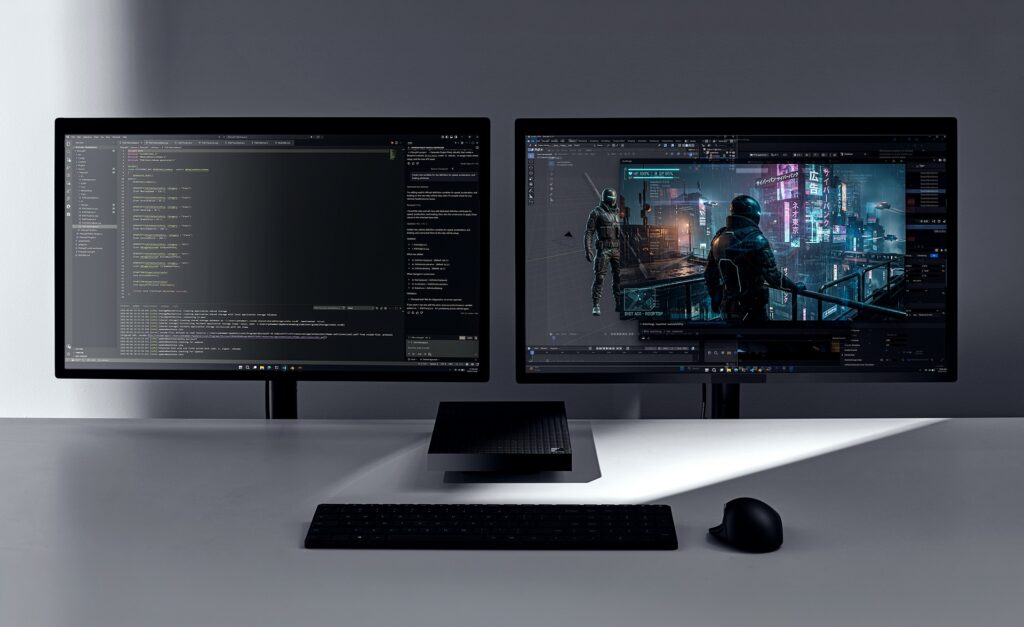
Building the next generation of devices for developers: Surface RTX Spark Dev Box

Software developers are some of the most ambitious makers we serve. They push devices harder, ask more of their tools and expect their environment to help define the pace of modern software creation. Development today means longer running jobs, larger models and a growing need to prototype and iterate locally rather than paying for every cloud call. That is why we embarked on a project to build two new Surface devices designed specifically for the needs of these makers. Earlier this week, we introduced Surface Laptop Ultra, a high-performance laptop built for developers, creators and technical professionals who need serious performance wherever they work. Today at Microsoft Build, we are introducing Surface RTX Spark Dev Box, a compact developer PC engineered with NVIDIA RTX Spark superchip and built on the Windows developer platform, designed for local-first AI development. Surface RTX Spark Dev Box is for developers who want to prototype, fine-tune and run capable models on their desk, and reach for the cloud when the work calls for it. Together, Surface Laptop Ultra and Surface RTX Spark Dev Box represent the next step for Surface: purpose-built devices for the people building what’s next. https://www.youtube.com/watch?v=VlAI1_JkXL4

A new category of Surface, built for developers

The way developers build software is fundamentally changing. AI models are growing in capability and complexity, agentic workflows demand sustained compute, and every iteration can incur cloud costs, even when the work doesn’t require state-of-the-art models. Surface RTX Spark Dev Box changes that equation. It’s a purpose-built Windows AI developer box that puts up to 1 petaflop of AI compute directly on the desk. By bringing powerful AI compute to the edge, developers can reserve frontier model calls for truly frontier problems and handle the rest on their own hardware. The result is a development workflow that can be more efficient and responsive, with developers in control of where their compute dollars go.

Sustained AI performance in a compact form factor

At the heart of this new developer machine is the NVIDIA RTX Spark superchip, combining a powerful NVIDIA Blackwell RTX GPU and an ultra-efficient NVIDIA Grace CPU to deliver up to 1 petaflop of AI compute with 128 GB of unified memory. That’s enough compute power to run 120B+ parameter models with 1 million token context locally at interactive speeds or fine-tune models that previously required cloud GPU instancesi. With an aluminum chassis engineered to double as a heatsink, Surface RTX Spark Dev Box is designed for the workloads that matter most to developers: long-running training jobs, large model inference and complex agentic pipelines that benefit from consistent, sustained performance.

Built for the tools and workflows developers already use, out of the box

Surface RTX Spark Dev Box ships with Windows 11 Pro pre-configured for developers at the image level. This brings a purposeful set of defaults, preinstalled tools and tuned settings so the development environment is the default from first sign-in. Two monitors side by side with a box in between The setup keeps developers in their workflow: dark theme, taskbar simplified for development, Widgets removed, Do Not Disturb on. Developer Mode is enabled. PowerShell 7 is the default shell. Under the hood, WSL 2 is configured with GPU passthrough and CUDA support. VS Code, GitHub Copilot, Git, Python and Node.js are installed. Your favorite IDEs, agents, coding assistants, frameworks and libraries all work on Surface RTX Spark Dev Box, whether you prefer the Windows side or WSL. Surface RTX Spark Dev Box is also a world class entry point to the rest of the Microsoft AI stack. AI Toolkit for VS Code brings model conversion, fine-tuning and evaluation into the editor developers already use. Windows ML with TensorRT, and Windows Copilot Runtime give you a consistent local inference surface. Microsoft Foundry connects local prototyping to production deployment, so the model you tune locally ships through the same tools and identity you use every day. GitHub Copilot scales from CLI to enterprise on the same machine. That is what we mean by best Microsoft experience for developers: the local box, the OS, the developer tools and the cloud platform working as one stack.

Secure by design

For developers working with sensitive models, proprietary data and valuable IP, security isn’t optional. It’s foundational. The powerful GPU and unified memory mean more of your models and IP can stay local and lets developers keep more of their models and data local. Surface RTX Spark Dev Box is built on chip-to-cloud security aligned with Microsoft’s Zero Trust principles:
  • Secured-core PC architecture
  • BitLocker encryption
  • Microsoft Defender protection
For organizations, Surface RTX Spark Dev Box integrates with Entra ID and Intune for management and governance at scale. With Surface Laptop Ultra and Surface RTX Spark Dev Box, we’re expanding the Surface line with two products built specifically for makers. Surface Laptop Ultra is built for high-performance work that moves with you, from compiling and debugging to creative production and AI experimentation, while Surface RTX Spark Dev Box is built for the local compute developers need when models, agents and long-running workloads belong on the desk. Different form factors, same direction: giving developers the best option and more choice in where and how they build. Surface RTX Spark Dev Box will be available later this year in the U.S. exclusively on Microsoft.com. Learn more at microsoft.com/devboxii. i Source: NVIDIA. Based on 1 Theoretical FP4 TOPS using the sparsity feature.  ii Microsoft Surface RTX Spark Dev Box and Surface Laptop Ultra are pre-release products. Products and features are subject to regulatory certification/approval; actual sale and delivery is contingent on compliance with applicable requirements. 
  •  

Windows platform security for AI agents

Making Windows the trustworthy OS for agents

AI agents are no longer just answering questions, they are taking actions across systems with increasing autonomy. As they become persistent participants in how software runs, they introduce new risk to control and trust, challenging the security assumptions that have defined computing for decades. Developers are building agents that read files, invoke services, modify environments and chain operations together at increasing speed. That capability is powerful, but it raises a critical question: how do you ensure these systems remain trustworthy when they operate autonomously, at scale, on real data? This shift changes what developers, IT and security teams need from the platform. Security for agents must be built into the foundation by design so they can be developed, deployed and governed with confidence. When that foundation is in place, organizations can scale agent adoption while maintaining control and trust. Containment, identity and manageability are built as foundational primitives in Windows, extending security beyond the app and model into the OS. We’ve previously shared the principles guiding how we secure agent workflows on Windows. Then in May we announced how Microsoft Agent 365 was expanding its capabilities, including the ability to discover and manage local agents on Windows, starting with OpenClaw agents and expanding soon to other widely used agents like GitHub Copilot CLI and Claude Code.  We also announced that "beyond monitoring, organizations will be able to apply policy-based controls to set guardrails for what agents are allowed to do."  At Build 2026 we are sharing an update on how Agent 365 and Windows are working together to provide those capabilities with the introduction of Microsoft Execution Containers (MXC) SDK. For developers, Windows will provide the building blocks needed to implement agents that are more secure on both consumer and enterprise systems. For IT teams looking to balance deploying agents at scale while managing risks, Agent 365 and Windows provide the observability, governance and security capabilities that are critically needed. Illustration showing user and agents

Policy-based controls

Containment bounds what agents can access and do, so non-deterministic behavior doesn’t translate into uncontrollable risk. Unlike traditional applications, agent behavior is dynamic and often generated at runtime. The agent often uses models to generate complex code for each prompt that can read, act and chain multiple operations. Containment ensures agents can do useful work without being granted the full authority of the user’s session.

The Microsoft Execution Containers (MXC) SDK

To contain agent impact without limiting productivity gains, we’re introducing an early preview of the Microsoft Execution Containers (MXC) SDK, a cross-platform, policy-driven execution layer for agents on Windows and WSL. Developers define what to constrain in their apps and agents, and Windows enforces those constraints consistently at runtime through MXC. MXC provides an abstraction layer across isolation primitives, so developers do not have to manage low-level isolation details.

The composable sandbox and containment spectrum

The composable sandbox is how Windows applies isolation and containment in practice, with MXC as the control surface for developers. The same policy model and SDK can map to different isolation constructs depending on the workload and containment requirements. A coding agent and an enterprise data-processing agent may not need the same guardrails, but they do need one coherent trust story. The composable sandbox delivers the flexibility and control that developers and IT need. Agent 365's policy-based controls with Microsoft Entra and Intune will be used to apply those MXC constraints to a specific agent. Windows supports a range of containment options so that guardrails can match the nature and risk of the workload. Additional functionality and security enhancements will be added to subsequent releases. The following will be released in early preview shortly after Build to meet the needs of the agent ecosystem:

Process isolation

Windows is simplifying how developers enable process isolation for agents. Process isolation provides fast, lightweight containment within the user’s environment for scenarios like running model-generated code within a dedicated process boundary that restricts access to files and network domains outside defined policy. It is ideal for use cases like coding agents where the developer inner loop must stay responsive. GitHub Copilot CLI has adopted MXC process isolation to constrain what dynamically generated and executed code can do. We are excited to share the results of this deep partnership between Windows and GitHub with our shared customers.

Session isolation

Workloads that span across large numbers of long running processes or ones that need their own resources like a desktop to run automation may find process isolation overly limiting. Sessions in Windows separate the agent’s execution from the human user’s environment, such as the interactive desktop, clipboard, UI, input devices and active sessions. This mitigates UI spoofing, input injection and cross-session data leakage, and is suited for sustained workflows that run alongside the user’s own work. Sessions in Windows run with distinct user accounts, which enables isolation. Windows assigns a local ID or a cloud provisioned identity backed by Entra and attributes all activity from the container to that identity, so you can clearly differentiate human from agent. MXC session isolation paired with unique local ID on Windows enables precise control, least-privilege access and full auditability. Access policies can be applied to Windows session isolation so agents run independently with controlled local access and full lifecycle governance managed through Microsoft Entra and Intune in the cloud. Teams can use Intune policies to require MXC isolation with guardrails such as filesystem rules. Our initial release will support non-interactive sessions with additional capabilities targeted for future releases. As agents evolve, we are continuing to expand MXC containment capabilities and invite developers and the broader ecosystem to share feedback, including through engagement with the project on GitHub. Some other MXC containment capabilities currently on our roadmap are:

Micro-VM

Research at the cutting edge of agent security shows how LLMs are developing capabilities around escaping sandboxes. Is there a way to provide the desirable properties of process isolation like low overhead with a stronger isolation boundary? Micro-VMs that use hardware-backed isolation via the hypervisor with lightweight images can be well suited for higher-risk workloads. The micro-VM construct raises the bar against sandbox escapes by using a hypervisor while facilitating higher density than is possible with full VMs. They are desirable for agents processing sensitive data or running untrusted external code.

Linux containers

Will bring the containment model to Linux-first agent toolchains via WSL. This enables compatibility with Linux ML frameworks and package ecosystems with OS-enforced boundaries.

MXC integration for cloud VM Windows 365 for Agents

Windows 365 for Agents, now generally available, extends containment beyond the local device. The agent runs in an Intune-managed Cloud PC, fully separate from the user’s machine. If compromised, impact is contained to a disposable cloud instance. Suited for enterprise-managed agent fleets with centrally provisioned policy and compliance. To learn more, check out our Windows 365 blog. With the future addition of MXC integration, Windows 365 for Agents will scale from lightweight local isolation to stronger hardware-backed boundaries - through a single SDK and policy model. With the combination of these new Windows capabilities and Agent 365, Microsoft is continuing to expand its full stack offering to help enterprises to observe, govern, and secure their agents.

Innovating with partners in the ecosystem

We are partnering with leading innovators in the industry like Hermes, Manus, NVIDIA, OpenAI and OpenClaw, to ensure the containment we are building supports real developer needs. OpenClaw now runs the node and gateway securely on Windows leveraging MXC. You can use the new Windows companion app to easily set up your own claws or connect to existing ones. NVIDIA brings OpenShell to Windows, built on MXC. Integrating MXC via OpenShell provides developers with an easy-to-deploy package for autonomous, always-on agents safely. Hermes Agent will be integrating OpenShell and MXC in their new Windows application. "Continuously running local agents, like Hermes Agent, require intentional isolation. Developers need control over what an agent can access and trust that those controls will hold,” said Dillon Rolnick, CEO of Nous Research. “Microsoft Execution Containers (MXC), integrated with OpenShell, provides a policy-driven foundation for private, on-device agents on Windows.” "Working with Microsoft on the Microsoft Execution Containers (MXC) allows us to explore new patterns for AI agents to safely and efficiently generate and execute code. By combining Codex's capabilities with MXC's execution environment, we aim to help developers move from intent to reliable execution faster, while maintaining the security and control enterprises need," said David Wiesen, Member of Technical Staff, OpenAI “Manus is built to help users move from intent to completed work across tools, files, code and workflows,” said Tao Zhang. Chief Product Officer. “With Microsoft Execution Containers (MXC), Windows gives developers a policy-driven way to define what an agent can access and enforce those boundaries at runtime, so more autonomous agents can operate safely in enterprise environments.”

Built on a secure foundation by design

This agentic security model runs on a Windows platform designed to reduce risk by default. Decades of investment in Windows provide the foundation for everything running on top of it including agentic security capabilities. Under the Secure Future Initiative, continuously strengthening this foundation remains a company-wide priority. Windows reduces the attack surface and raises the security baseline by default – so agents inherit that protection without additional work. It shows up in capabilities like passwordless sign-in with passkeys, Hotpatch updates without restarts, production drivers written in Rust to reduce memory-safety vulnerabilities and post-quantum cryptography in Insider builds. Secure Boot enforces a hardware root of trust on every startup. Defender provides real‑time protection against prompt injection and other emerging agent threats. It uses advanced scanning engines and continuously updated intelligence to detect and respond to attacks. These protections are available to all Windows customers - including consumers using Windows Defender as their primary antivirus. Enterprise manageability has been a longstanding platform capability that IT and security teams depend on Windows to provide. Agent 365 now provides native integration of observability, governance and security capabilities for agents running on Windows OS environments, like MXC and Windows 365 for agents, so agents running on Windows can start secure and stay secure. Windows will continue to raise the bar for platform security with capabilities like our recently announced Baseline Security Mode. Together, these investments help provide the secure foundation on which trustworthy agentic computing is built.

Start building secure agents today

The value of an agent is not just what it can do, but whether it can be trusted in production. Windows enables agents that are secure, governable and ready for real-world deployment. Many of these capabilities are available today in Windows Insider builds, with more coming through our developer preview program. Windows continues to evolve so developers and organizations can move fast on AI while maintaining trust and security. We are excited to see what you build. To get started:
  •  

Build 2026: Furthering Windows as the trusted platform for development

Build is one of our favorite moments each year - a chance to connect with the global developer community and share what we’ve been building. Over the past year, we have connected with many developers pushing the boundaries of what’s possible on Windows. What we consistently hear is that you want a platform that meets you where you are, removes friction and gives you the flexibility to choose how and where you build across local and cloud, across platforms, languages and frameworks. That feedback has shaped everything we are announcing today. The foundation of great development starts with strong fundamentals, coupled with a great developer experience. We are continuing to raise the bar on Windows 11 quality and deeply focused on making Windows more secure, more reliable across the shell - from Explorer to Start to Search – with a simple goal to reduce cognitive load. Whether you are building modern applications or experimenting with agent-driven workflows, we are committed to making Windows more adaptable, capable and aligned with how development actually happens today. And as AI continues to reshape how software is built, we are investing deeply in enabling you to run your AI workloads securely where it makes the most sense on-device, in the cloud or across both without trade-offs. Our goal is simply to give you a platform that accelerates your ideas.

What’s new for Windows platform at Build?

  • Developer-optimized Windows 11 experience to build and ship faster.
    • Coreutils for Windows - a set of Linux-like command line utilities that run natively on Windows, now generally available.
    • WSL containers - a built-in way to create, run and interact with Linux containers using familiar CLI & API, coming soon to public preview.
    • Windows Development Skills - gives agents structured knowledge to build great native Windows apps end-to-end using WinUI3 skills and WinApp CLI, now generally available.
    • Intelligent Terminal – intentionally brings context-aware intelligence to your favorite agents directly into a terminal based experience to help debug errors, run multi-step tasks so you can stay in your flow, available in experimental preview.
    • Windows Developer Configurations - powered by WinGet, sets up a distraction-free dev environment with VS Code, GitHub Copilot, WSL, PowerShell 7 and developer-optimized settings with one command on any Windows 11 device, now generally available.
    • Windows 365 with Developer configuration – Windows 365 comes pre-configured with the same Windows developer configuration, available in public preview.
  • Secure Windows platform to build and run agents with OS-enforced agent identity, containment and enterprise-grade manageability.
    • Introducing Microsoft Execution Containers (MXC) SDK– A policy-driven execution layer that lets developers declare what an agent can access (e.g., files, network) with containment boundaries enforced at runtime. MXC offers a spectrum of isolation semantics that are dynamically composable based on intent and risk, available in early preview.
    • Agent 365 native integration with MXC enables agents running on Windows to start secure and stay secure. Integration will deliver Defender, Entra, Intune and Purview protections so security and IT teams can constrain and secure local agents to prevent enterprise risk, available in preview in July.
    • OpenClaw runs natively on Windows leveraging MXC - The Windows node and gateway run contained, so your system stays secure. You can easily install and use OpenClaw in Windows with its own companion app and set up your own claws or connect to existing ones, available in open-source. We are invested in continuing to make OpenClaw run securely on Windows.
    • NVIDIA is bringing OpenShell to Windows built on MXC - Integrating MXC via OpenShell provides developers with an easy-to-deploy package for autonomous, always-on agents safely.
    • Windows 365 for Agents - provides computer-using agents with secure, managed Cloud PCs to execute enterprise workflows, now generally available.
  • Unmetered intelligence on Windows powered by on-device AI
    • Introducing new on-device SLMs - Aion 1.0 Instruct, a smaller, faster and smarter on-device SLM, and Aion 1.0 Plan, a reasoning and tool-calling model that enables fully local agentic capabilities, available in the coming months.
    • Expanding Windows AI APIs to more Windows 11 PCs across CPU and GPU Speech-to-text recognition API available on NPUs and CPUs. On-device SLM expands to capable dGPUs enabling text-intelligence capabilities locally and Video Super Resolution available on CPUs so developers can deliver richer experiences without a cloud round trip.
  • Introducing Surface RTX Spark Dev Box – purpose-built for developers powered by NVIDIA RTX Spark silicon, delivering up to 1 petaflop of AI compute paired with 128 GB of unified memory shared across the CPU and GPU. Comes with all of the above developer optimized Windows 11 experience so developers can build, test and run AI and agent workloads locally without setup friction or unpredictable cloud costs.
  • Introducing DGX Station for Windows — the world’s most powerful deskside AI supercomputer for developing and running agents on Windows — powered by the NVIDIA GB300 Grace Blackwell Ultra Superchip. It is purpose-built to develop and run up to 1 trillion-parameter frontier AI models locally, as well as connect always-on, frontier AI agents to enterprise applications and workflows, coming in Q4 this year.
  • New capabilities in Microsoft Store – We are committed to making Microsoft Store a trusted platform for app distribution, delivering free and faster company onboarding with Entra ID support, accelerated app certification times, and new near real-time analytics and subscription insights for developers.

Introducing Project Solara

We're introducing Project Solara, a new platform built from the ground up to power agent-driven experiences, including two new concept devices that reimagine how this comes to life. With agents becoming a both a new unit of programming and an emerging new unit of human-to-machine interaction, the mission of Project Solara is to pioneer agent-first experiences that are shaped around you: your agents, your tasks, your environment, under your control.

Developer-optimized Windows 11 experience to build and ship faster

We have optimized the Windows 11 experience for developers, bringing frequently used command line utilities, a familiar comfort shell, faster setup experience, a built-in way to create and interact with Linux containers on Windows and a new experimental Intelligent Terminal.

Announcing general availability of Coreutils for Windows

Developers constantly move between platforms, but familiar commands don't work consistently, forcing workarounds, lost speed and context switching. To address this, we've built Coreutils for Windows from the uutils open-source project, a cross-platform reimplementation of GNU Coreutils in Rust. These are Linux-like command-line utilities that run natively on Windows. Whether you're moving between Linux, macOS, WSL, containers or cloud environments, the commands and workflows you've built over years just work in your Windows environment. Explore and get started with Coreutils for Windows. https://www.youtube.com/watch?v=_bcFOTI35gI

Announcing WSL containers, coming soon to public preview

Containers and Linux are core to modern development workflows. Windows Subsystem for Linux (WSL) has become foundational for running Linux workloads on Windows. Last year at Build 2025, we open-sourced WSL, and community contributions have grown to over 200 PRs per month. We're building on this momentum by integrating WSL more deeply into Windows with WSL containers. Modern container workflows on Windows often depend on third‑party tooling, adding setup overhead, licensing cost and limited enterprise control. IT teams also lack consistent visibility into what’s running and how containers interact with the underlying host. WSL containers provide a built-in way to create, run and interact with Linux containers on Windows. Whether you are working on local development, AI/ML workflows or containerized testing, Linux containers run out of the box. To enable you to build WSL containers, we are offering WSL containers CLI & API.
  • WSL containers CLI: Use the new exe binary to directly build, run and deploy Linux containers on Windows, out of the box.
  • WSL containers API: Access functions to run Linux containers programmatically in your native Windows apps - unlocking scenarios like running local AI workloads, testing pipelines, and Linux based processing.
For enterprises, WSL containers provide policy‑based enablement and management using familiar Windows controls. IT admins gain visibility into what Linux containers are running on developer machines, can control where images are sourced from, and can govern how containers interact with the host. WSL containers will be available in public preview in the coming months as a regular update to WSL. Since WSL is open source, you can view the team’s progress at our WSL GitHub. https://www.youtube.com/watch?v=c78ZMB7SgHM

Announcing general availability of Windows Developer Configurations

We understand that getting to a code-ready state quickly matters, regardless of your development workflow. Windows Developer Configurations enables you to go from a fresh machine to a ready-to-code environment in minutes. It includes:
  • dev-config.winget - a WinGet configuration file, to get an optimized, distraction free development environment with the right versions of essential developer tools installed – WSL, PowerShell 7, Git, GitHub CLI, Visual Studio Code, Python and more. It also applies developer-optimized settings — like Git version control in File Explorer, file extensions visible and hidden files shown. It’s fully customizable, so you can adapt it to your needs and add your favorite third‑party tools.
  • Workload-specific scripts for container, cloud and infrastructure development - make it easy to install the exact tools, libraries and dependencies you need for your specific use case.
  • WSL comfort setup scripts - enable you to bring your preferred tools and workflows to Windows - like homebrew, zsh, starship, and more.
Get started or tailor it to your needs by exploring Windows Developer Configurations. https://www.youtube.com/watch?v=YaR-JpaWFqw

Announcing Intelligent Terminal, available as experimental version

Developers spend a significant part of their workflow in the terminal, but today that experience lacks integration with agentic tools and context they rely on. They must leave the terminal to look up fixes, and copy suggestions from multiple sources, which leads to increased context switching. To address this, Intelligent Terminal provides context to your favorite agents via ACP (Agent Communication Protocol) so you can stay in the terminal and query, debug or complete any task on hand. It is based on the existing Windows Terminal experience, so you get everything it offers (tabs, profiles, themes, settings, shells) plus native agent CLI integration in the agent pane. If no agent is installed, GitHub Copilot is available for you to get started. In a typical scenario, when a command fails, Intelligent Terminal automatically surfaces the context and suggests fixes you can run immediately in the dedicated agent pane. Instead of debugging step-by-step across multiple tools, you can resolve issues, iterate and move forward quickly while staying in your flow. To learn more, check out the Intelligent Terminal blog. https://www.youtube.com/watch?v=o1DmM6_z4zk

Announcing general availability of Windows Development Skills

We are introducing Windows Development Skills to enable agents to directly leverage structured knowledge to execute across the full lifecycle of building a native Windows app using WinUI3 skills and winapp CLI. By powering agents with Windows specific application development knowledge, these skills help achieve token efficiency. To add Windows Development Skills to your favorite agents visit https://aka.ms/winui-skills. https://www.youtube.com/watch?v=7OK30hI5h-I

Announcing Windows 365 with Developer configuration, available in public preview

Alongside local development, enterprises often increasingly need a cloud-based option to standardize development environments across teams, scale on demand and to be ready to code from any device - without managing local infrastructure or setup. To address these needs, we are bringing new developer capabilities to Windows 365, a cloud-based service that securely streams a full Windows desktop experience to any device. Windows 365 with Developer configuration offers ready‑to‑code environments in the cloud. This image provides a consistent, preconfigured Windows 11 development experience from first sign‑in, with commonly used tools such as Visual Studio Code, Git, GitHub CLI and WSL already set up.  The environment can also be extended with additional SDKs, CLIs, packages and build tools based on project requirements, while remaining aligned with organization policies and controls. With flexible performance configurations and seamless access from any device, Windows 365 helps streamline development workflows, whether working on-site or remotely, across Windows and Linux (via WSL) environments, running AI models or moving between local and cloud setups. To learn more, check out the Windows 365 blog. All these improvements share a common goal: giving developers an environment they can rely on, one that stays out of the way and keeps them in the flow. And as AI becomes integral to how software is built and shipped, the platform must evolve too. That's why we're taking the next step: making Windows the best place to build and run agents.

Windows is the secure platform to build and run agents with OS-enforced containment, agent identity and enterprise-grade manageability

As agents become more capable and autonomous, they're delivering material productivity gains. But they're also introducing new risk, and the issue isn't just the agent. It's the entire system the agent operates across. Every interaction — between agents and humans, tools, apps, models and even other agents — exposes new attack surface and introduces different failure modes. This is a multi-layer systems problem. That's why we've built containment, identity and manageability as foundational primitives in the operating system — making Windows the most trusted platform to build and run agents. Illustration showing user and agents

Microsoft Execution Containers (MXC) — now available in early preview

It's critical to contain agent impact without limiting productivity gains. That’s why we are introducing Microsoft Execution Containers (MXC), a cross-platform, policy-driven execution layer for agents across Windows and WSL. Developers declare what an agent can access, like files and networking related policies configured in Intune, and MXC enforces those boundaries at runtime. Windows delivers a composable sandbox spectrum through MXC — a single SDK and policy model that maps to the right isolation construct for any agent workload.
  • Fast process isolation (adopted by GitHub Copilot CLI) and session isolation separates the agent's execution from the user's desktop, clipboard, UI and input devices, and critically, binds the agent to a strong user identity — mitigating UI spoofing, input injection and cross-session data leakage. Process isolation and session isolation will be available to Windows Insiders shortly after Build.
  • Windows 365 for Agents, now generally available, extends containment beyond the local device and agents run in an Intune-managed Cloud PC, fully separate from the user's machine.
  • Micro-VMs, Linux containers and MXC integration for Windows 365 for Agents are currently on our roadmap as additional MXC containment capabilities.
  • Agent 365 layers Entra and Intune policy on top so IT can govern containment centrally while developers choose the guardrail weight their workload demands.

OS-enforced Agent Identity and enterprise manageability on Windows

Beyond containment, every agent activity must be attributable and governed. Windows assigns agents a local ID or a cloud provisioned identity backed by Entra and attributes all activity from the container to that identity, so you can clearly differentiate human from agent. Native Windows integration with Agent 365 provides a common foundation for observability, security and governance, including native Intune integration to set policies that gate the agent runtime execution and control how agents run. Defender, Entra, Intune and Purview will provide runtime protections for evolving threats across access, sensitive data, malicious prompts and risky behavior so security and IT teams can prevent enterprise risk. Get started at: Microsoft Execution Containers. Learn more at: Windows Platform Security for AI Agents and aka.ms/BUILD_SecurityBlog.

Innovating with partners in the ecosystem

We are partnering with leading innovators in the industry like Hermes, Manus, NVIDIA, OpenAI and OpenClaw, to ensure the containment we are building supports real developer needs. OpenClaw now runs the node and gateway securely on Windows leveraging MXC. You can use the new Windows companion app to easily set up your own claws or connect to existing ones. NVIDIA brings OpenShell to Windows, built on MXC. Integrating MXC via OpenShell provides developers with an easy-to-deploy package for autonomous, always-on agents safely. Hermes Agent will be integrating OpenShell and MXC in their new Windows application. "Continuously-running local agents, like Hermes Agent, require intentional isolation. Developers need control over what an agent can access and trust that those controls will hold,” said Dillon Rolnick, CEO of Nous Research. “Microsoft Execution Containers (MXC), integrated with OpenShell, provides a policy-driven foundation for private, on-device agents on Windows.” "Working with Microsoft on the Microsoft Execution Containers (MXC) allows us to explore new patterns for AI agents to safely and efficiently generate and execute code. By combining Codex's capabilities with MXC's execution environment, we aim to help developers move from intent to reliable execution faster, while maintaining the security and control enterprises need." said David Wiesen, Member of Technical Staff, OpenAI. “Manus is built to help users move from intent to completed work across tools, files, code and workflows,” said Tao Zhang, Chief Product Officer.  “With Microsoft Execution Containers (MXC), Windows gives developers a policy-driven way to define what an agent can access and enforce those boundaries at runtime, so more autonomous agents can operate safely in enterprise environments.” Get started here: OpenClaw Windows Node.

Announcing Windows 365 for Agents generally available within Agent 365

Windows 365 for Agents provides Cloud PCs that enable AI agents to execute multi-step workflows across software, including opening apps, navigating interfaces, entering inputs and processing data. Today, we are making Windows 365 for Agents generally available within Agent 365, enabling Agent builders to build computer-using agents for a variety of enterprise use cases. To learn more, check out Windows 365 for Agents documentation | Microsoft Learn.

Unmetered intelligence delivered on Windows

We're entering a new era of software development. As AI models grow more powerful, agentic workflows demand continuous compute, escalating cloud costs. By shifting some of that intelligence to the edge, we are transforming the developer experience: frontier models tackle frontier problems, while everything else runs locally at scale. A new generation of on-device small language models (SLMs) on Windows is making this easier. Windows ML is the platform that unlocks unmetered intelligence on Windows, enabling developers to build, optimize and deploy AI at scale, across all silicon. Today we are bringing new capabilities to accelerate your local AI development.

A new generation of on-device models - Aion 1.0 Instruct and Aion 1.0 Plan in preview

We are introducing a new generation of models purpose-built for local execution, each designed for a specific tier of device capability. Together, they represent a clear progression: from efficiency at scale to local agentic reasoning, all running without cloud dependency or per-token cost.
  • Aion 1.0 Instruct: efficiency at scale. Aion 1.0 Instruct is our next-generation small language model, smaller, faster and more efficient than our current Windows OS SLM. Designed from the ground up for on-device workloads, Aion 1.0 Instruct powers everyday text intelligence (summarization, rewrite, intents, accessibility) and extends beyond Windows APIs with integration into the Edge browser and availability as open weights. Developers can start experimenting with Aion 1.0 Instruct in preview today in Edge Insider channels and as an open source model in July on Hugging Face.
https://www.youtube.com/watch?v=zkHWGFYNlLI
  • Aion 1.0 Plan: local agentic reasoning. Aion 1.0 Plan is a 14-billion parameter reasoning and tool-calling model with 32K context length that ships in-box as part of Windows on capable devices. It enables applications to reason over user intent, invoke tools, manage files and orchestrate sub-agents, bringing fully agentic workflows onto the device.

Announcing new Speech Recognition API

Last year at Build, we introduced Windows AI APIs powered by local on-device models. Today we are adding Speech Recognition API to this list. Speech Recognition API enables real-time or batch, on-device speech-to-text from live audio. Developers can enable their apps to produce transcripts from recordings or embed captions anywhere audio plays, using microphone, streamed or audio file inputs, with hardware-accelerated execution where available. By running locally, transcriptions can still be generated without network connectivity, saving on cloud costs. This unlocks new possibilities for modern text entry, audio-video applications, dictation-enabled workflows and accessibility tools that need reliable, low-latency transcription regardless of connectivity. The Speech Recognition API will enter public preview. The API will initially be limited to English-language speech recognition and will expand as it gradually roll outs across global markets. Learn more about the new Speech Recognition API when it becomes available this week at: aka.ms/speech-recognition-api.

Announcing Expansion of Windows AI APIs across GPUs and CPUs, now available

Windows AI APIs offer the fastest and easiest path for developers to integrate local AI into their apps using ready-to-use APIs powered by on-device models specializing in specific tasks. We are thrilled to share that Windows AI APIs are expanding beyond NPUs to CPUs and GPUs, bringing local AI experiences to a much broader set of Windows 11 devices. In addition to existing NPU support, our existing Windows inbox SLM is available on capable GPUs and Video super resolution and Speech Recognition on CPUs, all in public preview. https://www.youtube.com/watch?v=1mSUNPLDZNE https://www.youtube.com/watch?v=zWsBdlZsy_w This expansion gives developers a broader audience for their AI-powered applications with OS-optimized performance. Learn more about Windows API support and minimum hardware requirements here: aka.ms/WinAI/APIs The Windows inbox models that power the AI APIs are not automatically downloaded to every device. They are only acquired when an application on the device requests them, keeping storage and bandwidth impact minimal for users who do not need them. Many app developers are leveraging Microsoft Foundry on Windows to enable local AI in their applications.grid of logos https://www.youtube.com/watch?v=she5m9OTT7Q With Microsoft Foundry on Windows, local AI is no longer a compromise - it is a platform for breakthrough developer experiences. From efficient small models to agentic reasoning to frontier coding, this is unmetered intelligence on Windows.

Windows on next-generation hardware purpose-built for developers

We are bringing purpose-built developer devices which are the best expression of the full suite of advancements and new capabilities we are introducing today from developer optimized experience, secure platform to build and run agents to our local AI platform. With the increase in capability of agentic and coding models that run locally on this class of device, we can take the next step for hybrid compute – bringing the best of cloud and client together. In GitHub Copilot CLI we will enable developers to configure selective task delegation to subagents powered by a local model. Using /fleet, the primary agent running in the cloud builds a plan, assesses the complexity of each task, and routes appropriate ones locally based on the models’ size and capability. This approach harnesses available local compute to reduce cost without compromising on quality. With Windows 11 PCs powered by capable silicon from AMD, Intel, NVIDIA and Qualcomm including workstation-class machines powered by AMD Ryzen™ AI MAX+ 395, new NVIDIA RTX Spark, and data-center-class systems like NVIDIA DGX Station for Windows, developers now have access to unmetered, tiered AI capabilities tailored to specific needs, from everyday development to frontier-class tasks.

Announcing Surface RTX Spark Dev Box available later this year

Surface RTX Spark Dev Box delivers GPU-first AI performance with the new NVIDIA RTX Spark silicon, providing 1 petaflop of AI compute[i] and 128GB of unified memory shared dynamically across CPU and GPU in a single memory address space. This hardware foundation is designed for model optimization, fine-tuning and large inference workloads. By making these workloads practical to run locally, it reduces reliance on cloud only workflows, helping avoid recurring token costs and usage spikes while keeping iteration fast and predictable. Surface RTX Spark Dev Box ships with developer optimized Windows 11 experience - preconfigured with all your essential developer tools - Visual Studio Code, GitHub Copilot available inline in Windows Terminal, WSL, PowerShell 7 and Windows settings tuned for development - so you spend less time configuring your machine and more time building from the moment you sign in. To learn more, check out the Devices blog. Surface RTX Spark Dev Box will be available later this year in the U.S. exclusively on Microsoft.com. Learn more at microsoft.com/devbox [ii]. https://www.youtube.com/watch?v=vzD4OvMIECM

Introducing DGX Station for Windows, available later this year

For decades, we have partnered with NVIDIA to bring the most powerful computing experiences to the world. DGX Station for Windows is the next step in a multi‑year journey to bring the full power of Windows and unlock breakthrough AI performance on the Windows platform. Building on the NVIDIA DGX Station™ system design, DGX Station for Windows is the ultimate deskside AI supercomputer bringing NVIDIA GB300 Grace Blackwell-class AI infrastructure directly into the Windows ecosystem — providing the compute needed to build, run and connect powerful AI agents to the applications and infrastructure Windows users already harness.  It can run frontier AI models up to 1 trillion parameters locally.

Stronger Windows security, reducing risk by default

Windows is strengthening its security foundation to reduce risk by default. New capabilities strengthen this foundation across key layers by reducing legacy risk, enforcing code trust and advancing cryptography. This raises the security bar at the platform level, protecting earlier in the lifecycle, not just after code runs.
  • Prepare your applications for a post-quantum world on Windows. Windows continues to expand post-quantum cryptography (PQC) support across the platform, broadening algorithm coverage and integrating it more deeply into the platform. This includes PQ hybrid key exchange in the Windows TLS stack, support for composite PQC algorithms through Windows cryptography APIs (CNG) and certificate functions, and PQ certificate issuance via Active Directory Certificate Services (ADCS). Read more here.
  • Move away from legacy authentication to stronger, more secure defaults, reducing exposure to known attack paths. IAKerb and LocalKDC (in WIP Server and Client) are configurable via new registry keys, helping reduce NTLM usage and enable stronger Kerberos-based authentication across more scenarios. Read more here.
  • Ensure only trusted drivers run on your device by default. Driver signing now follows a higher security bar with an updated certification process. Windows is moving toward Windows Hardware Compatibility Program (WHCP) certified drivers as the default, with a staged transition from audit to enforcement and stronger trust requirements over time. Read more here.
  • Protect devices from untrusted apps without disrupting users. Smart App Control for consumers and App Control for Business are expanding in coverage across millions of devices, with stronger reputation-based enforcement, new integration APIs and policy-driven control for enterprise environments.

Looking ahead

Build is always a moment to pause, reflect and look forward. As development continues to evolve, Windows will continue to provide developers with the flexibility to choose their tools, shape their workflows and decide how intelligence runs. Whether you’re building applications, deploying AI models or experimenting with agents, our goal is the same: to make Windows the best place to build - today and into the future. We’re excited to see what you create next. Join us throughout Build to learn more, explore the sessions and dive deeper into the updates shaping the Windows developer platform. [i] Source: NVIDIA. Based on 1 Theoretical FP4 TOPS using the sparsity feature. [ii] Microsoft Surface RTX Spark Dev Box and Surface Laptop Ultra are pre-release products. Products and features are subject to regulatory certification/approval; actual sale and delivery is contingent on compliance with applicable requirements. 
  •  

Expanding on‑device AI in Microsoft Edge: New models and APIs for the web

At Build 2025, we introduced the Prompt and Writing Assistance APIs in Microsoft Edge with the Phi-4-mini language model. Since then, we've heard from web developers, incorporated your feedback, and expanded Edge's on-device AI capabilities with new models and APIs. Today, we're introducing three updates:
  1. A developer preview of the pre-release Aion-1.0-Instruct small language model for early testing and feedback.
  2. The Language Detector and Translator APIs in Edge 148, powered by on-device, task-specific models.
  3. Experimental on-device speech recognition with the Web Speech API, available in Edge Canary and Dev channels.

Developer preview of Aion-1.0-Instruct

For the past year, the Prompt and Writing Assistance APIs have used Phi-4-mini, a highly capable 4B-parameter language model, in Edge. While it delivers strong text understanding, reasoning, and instruction-following for web scenarios, the model's hardware requirements have limited its availability across devices. Today, we're introducing a developer preview of the pre-release Aion-1.0-Instruct small language model in Edge Canary and Dev channels. This language model is smaller, faster, and more efficient. It expands support to significantly more devices — including those with less capable GPUs and, through CPU-inference, devices without a GPU — while delivering strong quality for a wide range of web use-cases. https://www.youtube.com/watch?v=5RMUnykaFTY This preview allows you to evaluate Aion-1.0-Instruct in real-world web scenarios, test API interoperability, and provide feedback that will guide final optimizations, ahead of its planned open-source release on Hugging Face in July. To try out the model, explore the documentation for the Prompt API and Writing Assistance APIs, experiment with the playground samples, and share your feedback on GitHub.

Language Detector and Translator APIs in Edge 148

The Language Detector and Translator APIs enable websites and browser extensions to identify the language of text and translate between language pairs. These APIs are now available in Edge 148, powered by on-device, task-specific models built directly into the browser. They deliver fast, high-quality translation, support 145+ languages, and are optimized for translation workloads on the web. You can use these APIs from JavaScript in your site or extension, gaining improved user privacy, network independence, and zero translation costs compared to cloud-based services. In their simplest form, the Language Detector and Translator APIs can be used as shown:
// Create a Language Detector session.
const detector = await LanguageDetector.create();

// Detect the language of the text.
const results = await detector.detect(userText);

// Use the results.
for (const result of results) {
  // Show the full list of potential languages with their likelihood,
  // ranked from most likely to least likely.
  console.log(result.detectedLanguage, result.confidence);
}

// Create a Translator session.
const translator = await Translator.create({
  sourceLanguage: "es",
  targetLanguage: "en"
});

// Translate the text and wait for the translation to be done.
const translatedText = await translatorSession.translate(userText);

// Use the translation. 
console.log(translatedText);
https://www.youtube.com/watch?v=DRLG6jXEs50 To learn more, check out the documentation for the Language Detector API and Translator API, try our playground samples, and share your feedback in the Language Detector and Translator feedback issues on GitHub.

On-device speech recognition with the Web Speech API

The Web Speech API enables you to incorporate voice or audio input into websites and browser extensions. This API is typically backed by cloud-based services for speech recognition (speech-to-text) and synthesis (text-to-speech). In the latest Edge Canary and Dev channels, we're introducing a task-specific model that processes speech locally on the user's device. This on-device implementation improves user privacy, reduces latency, and unlocks low-connectivity scenarios that require network independence. Using the new on-device speech recognition capability requires only minor updates to your existing Web Speech API code, as shown:
// Create a SpeechRecognition instance.
const recognition = new SpeechRecognition();
recognition.lang = 'en-US';

// Use on-device speech recognition.
recognition.processLocally = true;

// Start speech recognition.
recognition.start();
https://www.youtube.com/watch?v=svw3dQn52YY To get started with on-device speech recognition, check out the documentation, try the playground demo, and share your feedback on GitHub.

Try it out and let us know

With the Aion-1.0-Instruct small language model, the new Language Detector and Translator APIs, and on-device speech recognition in Microsoft Edge, you can build AI-powered web experiences by leveraging models built into the browser, without relying on specialized hardware, cloud services, or domain-specific expertise. We invite you to explore these capabilities, experiment with the new models, and tell us what you build. Your feedback will shape the next iteration of on-device AI in Microsoft Edge, and we're excited to partner with you as we continue expanding what's possible for AI on the web.
  •  
❌