
❌

Lees weergave

Building Windows for hybrid intelligence

Building Windows for hybrid intelligence Agents are creating a foundational shift in how people get things done, unlocking new levels of productivity and capability on the PC. As agents become part of everyday work, they also raise the bar for compute, security, and control.   That’s why we’re building Windows as the home for hybrid intelligence: a platform where agents can run locally when it makes sense, reach the cloud when they need to, and operate with the security and manageability organizations expect.  Hybrid intelligence expands what’s possible. Windows makes it practical, secure, and ready for broad adoption. And powerful new silicon, devices and models unlock local compute. Together, they define the next chapter of the PC: 
  • Windows is the most secure platform for agents. With containment, identity, and manageability built into the platform, Windows helps you control what agents can access, know which agent acted, and govern them at scale. Microsoft Execution Containers (MXC), now generally available for Windows and integration with Microsoft Agent 365, are key steps in making that real.   
  • Hybrid intelligence brings frontier capability to Windows locally. With intelligent routing, powerful local models, and a performant runtime, Windows lets work run in the right place for each task — local or cloud. We’re bringing frontier-class capabilities to local PCs and enabling services like GitHub to route intelligently on Windows. 
  • Copilot gets supercharged with Windows hybrid intelligence. With your permission, Copilot will be able to use local context from your PC, take action on your behalf, and tap into local models, bringing you more capability while helping your tokens go further. 
  • A new generation of PCs built for these possibilities. From always-on mini desktop PCs to deskside supercomputers powered by DGX Station for Windows, we are bringing a broad range of devices to unlock hybrid intelligence. Surface Laptop Ultra, powered by NVIDIA RTX Spark™, is available for pre-order today, alongside new devices from ASUS, Dell, HP, Lenovo, and MSI. 
  • Windows gets more capable across everyday tasks including new ways to take action directly from Windows Search on the taskbar and enhancements in gaming. 

Windows is the most secure platform for agents

https://www.youtube.com/watch?v=MzhMPCeFc5w Agents don’t work like traditional apps. They can run around the clock, use tools, write code, access files, and act across systems, often without someone watching every step. That requires a new security model built for how agents actually operate. On Windows, that model comes together through containment, identity, and manageability. Containment controls what an agent can access. Identity makes clear which agent acted, so IT can distinguish agent activity from the person using the device. And manageability connects that activity into tools like Agent 365 and Intune, so organizations can set policy, monitor risk, and govern agents across the organization1.  Together, these primitives allow organizations to secure, observe, and govern agents with confidence.

Expanding the ecosystem of agents on Microsoft Execution Containers, now generally available

Microsoft Execution Containers Traditional sandbox solutions weren’t designed for agents, where containment needs can change with every prompt and tool call. We built Microsoft Execution Containers (MXC) to meet that need. Today, Microsoft Execution Containers (MXC), becomes generally available on Windows 11, enabling organizations to define which files and networks agents can access, with those policies enforced at runtime. For individuals using AI on their personal PC2, these safeguards are part of the agent experience itself, giving users a more secure way to work with these tools. While MXC works across operating systems, its deep integration with Windows gives organizations more control of their data and a broader range of containment options, from process and session isolation to WSLc, virtual machines, and Windows 365 for Agents. Leading agents already support MXC, including Codex from OpenAI, GitHub Copilot, OpenClaw, Replit, LM Studio, OpenShell from NVIDIA, and Unsloth AI. Many others will be releasing support for MXC: Anthropic Claude Code, Box, Egnyte, Heidi Health, Hermes Agent by Nous Research, Manus, Perplexity, Raycast, and Simular amongst others. Microsoft Execution Containers Partners We’re also excited to share that Muse for Windows, a personal AI agent from Meta, is coming soon as a native app on Windows with MXC integration, bringing another leading AI experience to Windows and providing more choice in the agents people can use on their Windows PC. To learn more about how developers can integrate their agents with MXC, visit: Microsoft Execution Containers: Policy-driven containment for AI agents. 

Bringing hybrid intelligence to Windows

Hybrid intelligence As AI models grow in size and capability, customers’ needs are outpacing what their cloud budgets can support. They want to make every AI token count without giving up frontier capabilities. Hybrid intelligence brings local and cloud AI together, helping customers stretch their budgets while preserving access to the intelligence they need.   To bring this to life requires powerful local models, intelligent orchestration, a performant runtime, and capable silicon, all working together to create a meaningful experience.

Frontier coding intelligence, running locally on your PC

At Build, we introduced MAI Code 1.1 Flash, a 137 billion total and 6.8 billion active parameters, designed for real-world coding workloads. Today, we’re bringing that intelligence to your device, using 3-bit precision to reduce the model size by nearly 80% while preserving coding quality and supporting a 256K context window locally.  In addition to MAI Code 1.1 Flash, we are bringing other powerful models like an upcoming Nemotron model from NVIDIA – with over 70 billion parameter and quantized in 2-bit to use just over 20GB of memory and DeepSeek V4 Flash, a 284B parameter model, and others for optimal speed and intelligence running locally on RTX Spark.  With optimization and tuning, these models bring what was frontier-class capabilities to local PCs while preserving accuracy and performance — using less memory and fewer system resources.  The goal is to keep AI responsive while leaving room for everything else you do on your PC.

Introducing intelligent routing on Windows with GitHub HydraFusion

https://youtu.be/yzBVjfwgWw8 Earlier this year, GitHub launched HydraFusion, which routes each task to the right model in the cloud.   Today, we’re extending that intelligence to Windows, enabling HydraFusion to tap into models running locally on device, making your tokens go further.   Hybrid intelligence on Windows, powered by HydraFusion is coming to the GitHub Copilot app, GitHub Copilot CLI and Visual Studio Code in experimental preview later in October.   To learn more about how we’re working with GitHub to make this possible on Windows, read: Bringing local models and sandboxed tools to Windows and GitHub Copilot. 

Bringing llama.cpp to Windows ML to provide easier access to open-source models

To power this growing ecosystem of highly capable local models, you need a performant runtime. Windows ML is a scalable runtime to deploy models across GPU, NPU, and CPU, and we’re continuously evolving it.   Today, we’re also announcing llama.cpp support in Windows ML, giving developers more open-source model choices, and the ability to experiment quickly with emerging models as they land.  To learn more, visit AI Development on Windows: from PyTorch and llama.cpp to Windows ML. 

Supercharging Copilot on Windows with hybrid intelligence

Copilot with Hybrid intelligence Recently, we introduced the new Copilot built around three experiences: Home, Code, and Autopilot. Today, we’re announcing that on Copilot+ PCs, Copilot will get supercharged with Windows hybrid intelligence, providing three key local capabilities.   
  • Local context. With your permission, Copilot can understand relevant content on your PC, including files and recent activity, bringing local context into the flow of work. 
  • Local actions. Copilot can take action on your behalf across Windows, helping complete tasks like organizing files, assessing device diagnostics, troubleshooting issues, coding, and carrying out workflows directly on your device. 
  • Local models. Copilot can tap into AI models running on your PC, using local compute for the right tasks while combining it with cloud intelligence when needed. 
Across Home, Code, and Autopilot, hybrid intelligence makes Copilot more useful on Windows.  In Home, Copilot can use local context from your PC to pull in the files you’ve been working on and help turn them into collaboration-ready artifacts.  In Code, hybrid intelligence helps you create native Windows apps from a single prompt, run code more securely with MXC support, and use local models when appropriate so projects can move faster and token costs can be managed.  And hybrid intelligence will make Autopilot, a persistent, proactive and personal agent, even better. Hybrid intelligence brings local context, local models and PC actions into the agent flow, enabling more grounded personal agent experiences that can continue working on your behalf, even while you focus on other things.  This is the next step for Copilot on Windows, powered by hybrid intelligence. Copilot understands your PC, takes action with your permission, and uses local models when it makes sense, with you in control at every step. Copilot features powered by hybrid intelligence are expected to begin rolling out on Copilot+ PCs in the coming months.3

Offering a range of PCs for agentic work

To bring our vision of hybrid intelligence and new experiences to every desk and every home, you need a broad range of silicon and Windows PCs, from mini desktops up to deskside supercomputers.

Mini desktop PCs, with a simplified out-of-box setup for running agents 

https://youtu.be/DsLkQ04iECA People are already using mini desktop PCs as always-on machines for long-running agents. But too often, getting started requires terminal-based setup, complicated configuration, and security trade-offs that weren’t designed for agent workloads.  Today, we’re announcing a simpler way to set up popular agents on mini desktop PCs in just a few clicks, right out of the box. For OpenClaw users, we’re introducing a native Windows gateway that simplifies setup, along with MXC integration to help keep agents securely contained in a sandbox.  This is just the beginning. Over time, we intend to bring these experiences to more Windows devices, guided by customer feedback, so more people can securely run and work with the agents they choose.

Copilot+ PCs, with hybrid intelligence

Copilot+ PCs established a new class of thin, light and powerful Windows PCs designed to deliver advanced AI experiences on device. Across all Copilot+ PCs, over 2 trillion inferences are run locally per month, improving customers’ experience across search, imaging, and video calls, and today, over 40% of laptops being built for business are Copilot+ PCs. With fast performance, great battery life, and built-in AI features, Copilot+ PCs are your PC for everyday tasks, with even more capability on the way with the new Copilot and hybrid intelligence. See the latest Copilot+ PCs from Acer, ASUS, Dell, HP, Lenovo and Microsoft Surface, at: https://www.microsoft.com/en-us/windows/shop-pcs.   Copilot features powered by hybrid intelligence are expected to begin rolling out over the coming months on Copilot+ PCs4.

Builder PCs, for a new way to create with cloud and local AI

We’re designing new PCs for the builders – the developers, creators, and makers who are pushing the limits of what they can do with their PC. They bring together high-performance local compute and intelligence so people can build, iterate, and create with the right AI capability for the task. Builder’s PCs require powerful silicon, unified memory, and optimized AI experiences built for demanding local workloads. In June, Microsoft and NVIDIA introduced RTX Spark to help usher in this category. Windows will continue partnering with NVIDIA and other silicon vendors to expand these capabilities across more devices. Today, we’re excited to announce pre-order of new Windows PCs powered by RTX Spark from ASUS, Dell, HP, Lenovo, MSI and Microsoft Surface.

Surface Laptop Ultra and Surface RTX Spark Dev Box, available for pre-order

Surface Laptop Ultra Surface Laptop Ultra, our most powerful Surface ever, brings the vision of hybrid intelligence to life for creators, developers and AI builders. Designed around the RTX Spark, it combines up to 128 GB of unified memory with the ability to run AI models exceeding 120 billion parameters locally, bringing powerful AI compute to demanding creative and technical workflows. Alongside Surface Laptop Ultra, Surface RTX Spark Dev Box brings powerful local AI compute to the desk, helping developers and AI engineers experiment, evaluate models and iterate locally. Both devices are available for pre-order today, with Surface Laptop Ultra available beginning October 16 and Surface RTX Spark Dev Box shipping to customers in the U.S. November.

An ecosystem of Builder PCs, powered by RTX Spark

With Windows on RTX Spark, we're bringing last year’s frontier capabilities to your laptop. New Windows PCs powered by NVIDIA RTX Spark were designed as an ecosystem to maximize performance in tasks like local inference, image and video generation. We’re proud to support our device partners as they meet the unique needs of our customers. Across Windows PCs with RTX Spark, builders can see significant local AI performance gains compared with an Apple MacBook Pro 16-inch with M5 Pro, including up to5:
  • 2.1x faster time to first token6
  • 4.3x faster AI image generation7
  • 6.2x faster AI video generation8
Today you can pre-order the following PCs: 
  • ASUS ProArt P16 and ASUS ProArt P14: Combines powerful AI performance, ASUS Lumina Pro OLED displays and big capacity battery life in slim, lightweight 16- and 14-inch designs built for creators on the go.
  • Dell XPS 16 Creator Edition: The first XPS laptop powered by NVIDIA RTX Spark, giving creators and developers studio-grade performance, professional display accuracy, and local AI development in a premium, portable design.
  • HP OmniBook Ultra 16: Combines an ultra-thin premium design with breakthrough thermal innovation, delivering sustained performance for the most demanding AI workloads.
  • Lenovo Yoga 9n 2-in-1: A versatile convertible that combines NVIDIA RTX Spark with a 360-degree design and dual-surface pen input for creators who need high performance and flexibility to work independently or collaborate.
  • MSI Prestige N16 Flip AI+: Combines a thin-and-light 2-in-1 design with a 16-inch UHD+ Tandem OLED display, NVIDIA AI acceleration and a 99.9Wh battery for creators, professionals and gamers on the go.
  • Surface Laptop Ultra: The most powerful Surface Laptop ever, built around NVIDIA RTX Spark with up to 128GB of unified memory, a 15-inch touchscreen and a new thermal architecture engineered for sustained performance. 
All of these RTX Spark Windows PCs are available for pre-order starting today and begin shipping October 16. The RTX Spark based dev boxes and mini desktops will be coming later this year.

AI supercomputers, with DGX Station for Windows

With Windows on DGX Station we're bringing last quarter’s frontier capabilities to your desktop. At the top of the range, we’re excited to announce that new supercomputers powered by NVIDIA DGX Station will be available on Windows later this year. Utilizing the NVIDIA GB300 Grace Blackwell Ultra Desktop Superchip, DGX Station for Windows brings data-center-class performance together with enterprise grade security and manageability. This unlocks the power to run frontier-class models locally, from Llama 4 Maverick and Kimi K2.6 to DeepSeek V4 Pro, at more than a trillion parameters9. Capabilities that once required renting a cluster, now in a deskside supercomputer. This brings a new level of AI compute to Windows, enabling developers, engineers, scientists and organizations everywhere to run frontier-class models and agentic workloads on devices that were previously limited to the cloud or data centers. The DGX Station for Windows enables 2 key customer scenarios:
  • Personal AI Supercomputer: For the most demanding engineering, scientific, and research workloads, DGX Station for Windows enables a generation of powerful Windows applications accelerated by multimodal agents that can model, perceive, and design for the physical world.
  • Scalable Windows Token Factory: DGX Station for Windows can also serve as powerful token factory for teams, supporting 32 or more simultaneous agents serving teams of developers, engineers, or researchers, helping reduce cloud token consumption.
By keeping inference local, organizations can keep sensitive data and IP within their own environment and manage their AI Supercomputers and Token Factories using the same trusted tools they use across their Windows fleet today. The result is a shared AI resource on Windows that helps lower operating costs, improve responsiveness, and give teams greater control over how and where their AI workloads run. Paired with MXC, it’s never been easier to build, govern, secure, and trust end-to-end agentic loops on Windows. Today we welcome the Dell Pro Precision with GB300, and HP ZGX Fury AI Station, both coming later this year, alongside more from our other OEM partners, running the Windows platform organizations know and trust.

Windows gets more capable across everyday tasks

Hybrid intelligence opens up an entirely new chapter for Windows, but innovation isn’t only about what’s next. It’s also about making the experiences you rely on every day faster, easier and better, from getting things done to how you play. 

Introducing actions in Windows Search: Go from finding to doing

https://youtu.be/Nj5KL9yDlwE Search has always been about quickly helping you find what you need. Today, we’re introducing a new Windows Search experience that is faster, more efficient, and enables richer experiences, beginning with thousands of new actions that will be available directly from the taskbar.  These new actions help you finish tasks right where you started, without opening another app or navigating through additional screens. We’re starting with familiar tasks where saving a few steps can make a meaningful difference in everyday use.    Here are a few things to try:  
  • Turn something on or off. Try phrases such as “switch to dark mode, “turn on Do Not Disturb,” or “enable Airplane mode.” 
  • Make a quick adjustment. Try “dim my screen” or “mute.”
  • Manage your workspace. Try “minimize all my windows,” or “arrange my windows.”
  • Send a message. Try “Text Elisa I’ll be there soon.” 
We will also begin adding the option to integrate the new Copilot with Search on the taskbar, so you can get quick answers inline from Search, and if you want to have a richer conversation, you can jump from Search directly to the full Copilot app. This experience will be opt-in, and will first start rolling out to select markets later this year. New actions will begin rolling out to Windows Insiders in the experimental channel today. Visit to read more: From searching to doing: Building a faster, more streamlined Windows Search . 

Advancing gaming across the Windows PC ecosystem

Gaming is a fundamental part of Windows, and with new Windows PCs powered by RTX Spark, we’re continuing to expand where and how people can play the games they love.  Over the past several years, we’ve made significant investments to improve the gaming experience on Arm-based Windows PCs with expanded availability of Prism, support from leading anti-cheat providers, and XBOX PC app compatibility.   RTX Spark™ now raises those investments to new levels for gaming performance and graphics capabilities, showcased by Gears of War: E-Day, with support for features like DirectX raytracing, variable rate shading, and DirectStorage. Gears will also be the first to offer expanded support for Advanced Shader Delivery, cutting first-launch shader compilation from minutes to seconds and helping reduce in-game stutter, so players spend less time waiting, and more time playing.  Combined with growing support from game developers and publishers such as Electronic Arts, Embark, Tencent and Ubisoft joining KRAFTON, NetEase, Riot Games, Epic Games and more, players now have access to a deep and growing catalog of PC games on Windows on Arm, including Fortnite, Alan Wake 2 and the new World of Warcraft: Forever, and other top titles coming soon, like League of Legends, Valorant, PUBG: Battlegrounds, Genshin Impact and other top titles on Arm-based Windows PCs.  And we’re super excited to announce that in 2027, Call of Duty will be coming to RTX Spark™.   Windows is the home for PC gaming and together with our partners, we’re making Windows on Arm continue that heritage. That means more of the games players love, richer graphics, and less time waiting to get into the action.

Innovation built on a foundation of quality

Innovation only matters when the foundation underneath is great. Over the past year, the team has been hard at work improving Windows quality, and we continue to invest in everyday performance, reliability, and craftmanship that have meaningful impact on the way people experience Windows. This work has spanned giving customers more personalization and control in places like Windows updates, Start and taskbar, Search, the Windows Insider program, as well as deep investments with our partners to enhance driver quality, reliability and security with our ecosystem. It has also included significant efforts to make Windows the best destination for developers, including optimizations specific to the developer experience. In July we shared how this work continues as we deliver ongoing improvements customers can feel across each of these areas, which will only grow in importance with the new capabilities we’ve shared today. The way forward for Windows   This is the future we’re building: agents that can work securely on your behalf, intelligence that moves seamlessly between local and cloud, and devices that become more capable than ever before. At the same time, Windows will continue to get better at the everyday experiences people rely on — from Search to gaming and everything in between. From the edge to the frontier, Windows is the home for hybrid intelligence — helping individuals and organizations get more done, more efficiently, with security built in.  Explore the new Windows PCs powered by NVIDIA RTX Spark and join us at Microsoft Ignite in November to learn more about putting hybrid intelligence to work for your organization.
[1] Governance at scale may require additional services. [2] Windows Update required. Features will roll out over time, and availability and timing may vary by device, market, and silicon platform. [3] Windows Update required. Features will roll out over time, and availability and timing may vary by device, market, and silicon platform. [4] Availability and timing may vary by device, market, and silicon platform. [5] Compared with an Apple MacBook Pro 16-inch with M5 Pro and 64 GB of memory, tested Windows PCs with NVIDIA RTX Spark. [6] Based on Microsoft-commissioned testing conducted in September 2026, comparing a selection of preproduction Windows PCs with NVIDIA RTX Spark (64 GB) and a preproduction Microsoft Surface Laptop Ultra with NVIDIA RTX Spark (64 GB) against an Apple MacBook Pro 16-inch with M5 Pro (64 GB). Tested in llama.cpp using the Qwen3.5 27B model (Q4K-Medium) with a fixed 8,192-token prompt. Performance varies significantly by device configuration, usage and other factors. [7] Based on NVIDIA testing conducted in September 2026, comparing a selection of preproduction Windows PCs with NVIDIA RTX Spark (64 GB) and an Apple MacBook Pro 16-inch with M5 Pro (64 GB). Tested in ComfyUI using FLUX.2 Klein 4B at NVFP4 precision, four sampling steps, and an output resolution of 1024 × 1024. Performance varies by device. [8] Based on NVIDIA testing conducted in September 2026, comparing a selection of preproduction Windows PCs with NVIDIA RTX Spark (64 GB) and an Apple MacBook Pro 16-inch with M5 Pro (64 GB). Tested in ComfyUI using LTX 2.3 22B at NVFP4 precision, 121 frames at 25 fps, eight steps, and an output resolution of 1280 × 720. Performance varies by device. [9] Powered by the NVIDIA GB300 Grace Blackwell Ultra Desktop Superchip with up to 748 GB of coherent memory and 20 petaflops of FP4 AI compute, it delivers data-center-level performance, supporting large AI models up to 1 trillion parameters.
  •  

Evolving Windows vulnerability management to meet the speed of AI-powered discovery

Windows has adapted to emerging threats for decades, all while operating at unparalleled scale. It's our responsibility to bring clarity, transparency and sustained investment so customers understand what is happening, what Microsoft is doing and how they can reduce their exposure. The pace of vulnerability discovery is changing with advances in AI making it possible to find more issues, faster, across more code, with new mechanisms that can accelerate both discovery and analysis. The fastest way to reduce customer exposure is to find issues before attackers can use them. Windows is expanding its ability across the platform to find issues earlier, accelerate the engineering work to fix them, strengthen validation and deliver timely, high-quality updates that keep customers protected.

Finding vulnerabilities earlier and at greater scale

By applying AI across security analysis, we can identify patterns faster, prioritize risk and scale vulnerability discovery across the Windows codebase. This helps reduce the time between discovery and customer protection. It includes using Microsoft Security’s multi-model agentic scanning harness (MDASH), which utilizes multiple models including leading third-party AI vulnerability discovery models. To run MDASH at Windows scale, Windows set up dedicated cloud infrastructure for scanning and proving. A scanner pipeline scans critical binaries and validates candidates using multi-model debate across multiple model families. Confirmed candidates then flow to a separate, Windows-specific prove pipeline that helps eliminate remaining false positives, so only the highest-confidence findings reach the engineering team. This automation helps handle a larger volume of potential vulnerabilities and shortens the review window for new ones, shrinking the attack window for zero-day exploits. This effort extends beyond Windows as we work across Microsoft to drive broader adoption of these tools and practices throughout both the company and the wider ecosystem. We partner closely with AI-powered scanning teams across Microsoft’s product divisions, sharing insights, comparing best practices and aligning on key findings. In parallel, we collaborate with the Microsoft Security Response Center (MSRC) to continuously refine the end-to-end process from vulnerability discovery and issue filing to remediation and validation. We also regularly reassess our prioritization and rollout strategy based on lessons learned and feedback gathered through our Chief Information Security Officers’ (CISOs) engagements with customers. We continue to evolve our internal systems and practices so that vulnerability discovery is not treated as a separate activity, but as part of how we build, review and improve Windows before new features or updates are released. As a part of this we are updating our Secure Development Lifecycle (SDL) best practices to ensure our secure-by-design approach explicitly accounts for potential AI-enabled attack techniques and exploit paths. That means using AI to help identify potential issues earlier in the development process, while relying on human expertise to evaluate findings, make risk-based decisions and ensure fixes meet the quality bar customers expect. As AI helps defenders discover more issues, customers will see a higher volume of security updates included in each security release. This is evidence that defenders are getting better at identifying and addressing issues. Our focus is to effectively utilize these AI tools to support faster protection, stronger engineering systems and more actionable guidance for customers.

Fixing responsibly with AI and engineering discipline

Windows is evolving our engineering and validation systems to reduce the time from discovery to protection, with areas where customer risk is greatest. As we build our end-to-end system from discovery to remediation of vulnerabilities on Windows, we’re making the following investments to help ensure that we are not compromising update quality as we gain speed:
  • We are integrating AI into our process to compress the path from discovery to a validated fix, helping engineers understand failures faster, propose candidate fixes consistent with the surrounding code, surface related issues elsewhere in the codebase and select the regression tests most likely to be affected by a change.
  • Windows updates undergo validation across a range of testing environments, including the Security Update Validation Program (SUVP) and internal validation designed to help evaluate compatibility, reliability and real-world usage scenarios. This broad validation helps identify functional, application compatibility and quality issues before updates are broadly released.
  • We’re also investing in new technology, including Windows-specific tools and agentic harnesses, to enable end-to-end generation and validation of fixes using AI, keeping humans in the loop when it comes to code review.
Customers rely on Windows updates to protect their environments, and they also need confidence that updates will deploy smoothly across diverse devices, applications and configurations. That is why quality remains central to this work. As we increase the pace of vulnerability discovery and remediation, we are also committed to giving customers practical ways to test, deploy and monitor updates in their own environments. In cases where customers see signals of potential issues or regressions, they can connect with Microsoft Customer Service and Support to report the issue and/or learn if it is a known issue. In the event of an issue, we are able to employ Known Issue Rollback (KIR), a mitigation technology that allows customers to quickly revert a targeted change, fix, functionality or feature that caused the problem, to its previous behavior. This approach allows the customer’s security protections to stay in place instead of uninstalling an entire update to fix an issue.

Helping customers safely stay current

The most important guidance is to stay current and take security updates as soon as possible. Timely patching is one of the most effective ways to reduce exposure, especially as AI accelerates the speed at which vulnerabilities can be discovered and exploited. We also recognize that every customer's situation is different. Many organizations need to assess risk, validate updates, sequence deployments and prioritize critical assets. When Microsoft releases security updates, we share Common Vulnerabilities and Exposure (CVE) information and high-level guidance about the vulnerabilities addressed in the Security Update Guide, including available context on risk and mitigations where applicable. Customers should use that information to build a risk map for their own estate, prioritize protections for high-value targets and accelerate deployment where exposure is greatest. To help organizations prepare with less disruption, we also provide production-quality optional non-security preview ("D") releases ahead of the planned security update release for the following month for testing. These cumulative releases include new features and quality improvements. We target optional non-security preview releases for the fourth week of the month, two weeks before they'll see these features become part of the next monthly security update. These previews enable compatibility testing across a broad set of devices, applications and environments, helping identify issues earlier and increasing confidence in the quality and deployment readiness of the subsequent monthly security updates. Security is not just about responding faster to vulnerabilities. It is also about reducing exposure to security attacks. Windows is designed with multiple layers of protection enabled by default, strong identity protection with Windows Hello, the ability to reduce reliance on administrator privileges, trusted application experiences and hardware-rooted security. Together, these capabilities help organizations reduce exposure, strengthen resilience and provide a more secure foundation as organizations assess, test and deploy updates across their environment. To learn more about Windows security, see the Windows 11 Security Book or the Windows Server 2025 Security Book for your Server fleet. Windows also works closely with Microsoft Defender and the broader security ecosystem to help protect customers during the window between vulnerability disclosure and full deployment of security updates. Where possible, Microsoft Defender provides detections and protections that add another layer of defense. Through programs such as Microsoft Active Protections Program (MAPP), Microsoft also collaborates with security protection and antivirus partners so they can prepare protections for customers as security updates are released. We recommend that customers update their security endpoint software to the latest version and take daily signature updates for best protection. Intune helps teams identify gaps, enforce compliance and deploy fixes across endpoints, and Azure Arc makes it easy to connect Windows Servers outside Azure to Microsoft Defender for Cloud.

Tools that make patching easier

A holistic patch strategy depends on tools that help teams move across the full lifecycle: automate what can move fast, identify what still needs attention and limit exposure when devices or apps fall behind. Modern management capabilities such as Windows Autopatch with hotpatch enabled, available in Microsoft Intune, can help accelerate security updates and minimize disruptions for your Windows 11 devices. With Autopatch, customers can configure the automatic deployment of Windows security updates, driver updates and firmware updates, across rings with the option to pause based on reliability signals, so issues can be contained before they spread. Autopatch now surfaces a security-risk and compliance overview with device-level drill-down, so customers can see where their estate is exposed and how to reconfigure their policies to stay more secure. Windows Servers can be hotpatched as well through Azure Arc, enabling rebootless security updates for your critical infrastructure and VMs across the fleet, manageable at scale with Azure Update Manager. Intune Enterprise Application Management helps keep apps current. Microsoft Defender Vulnerability Management, Windows and Intune insights help teams understand remaining exposure and prioritize remediation. Compliance policies, Conditional Access and security baselines help enforce the desired state across the endpoint estate, or harden devices when updates can’t be applied right away. Together, these capabilities help customers move from a time-based patching cadence to a more continuous, risk-based approach. For practical guidance on operationalizing patching across endpoint estates, see the Microsoft Intune blog on building a patch strategy for today’s threat pace. https://www.youtube.com/watch?v=QdjSkbKXoJw

Building trust through continuous improvement

The threat environment will continue to evolve as AI advances, with researchers continuing to find new classes of issues and attackers looking for ways to move faster. Our response is to keep strengthening the systems that help us find vulnerabilities earlier, fix them responsibly and support customers through safe, timely updates. As the pace of vulnerability discovery increases, customers shouldn’t have to choose between speed and stability. Our job is to help customers stay protected while deploying updates with confidence. Windows will continue investing in the systems, engineering practices and platform protections needed to reduce exposure responsibly at global scale.
  •  

Building the next generation of devices for developers: Surface RTX Spark Dev Box

Software developers are some of the most ambitious makers we serve. They push devices harder, ask more of their tools and expect their environment to help define the pace of modern software creation. Development today means longer running jobs, larger models and a growing need to prototype and iterate locally rather than paying for every cloud call. That is why we embarked on a project to build two new Surface devices designed specifically for the needs of these makers. Earlier this week, we introduced Surface Laptop Ultra, a high-performance laptop built for developers, creators and technical professionals who need serious performance wherever they work. Today at Microsoft Build, we are introducing Surface RTX Spark Dev Box, a compact developer PC engineered with NVIDIA RTX Spark superchip and built on the Windows developer platform, designed for local-first AI development. Surface RTX Spark Dev Box is for developers who want to prototype, fine-tune and run capable models on their desk, and reach for the cloud when the work calls for it. Together, Surface Laptop Ultra and Surface RTX Spark Dev Box represent the next step for Surface: purpose-built devices for the people building what’s next. https://www.youtube.com/watch?v=VlAI1_JkXL4

A new category of Surface, built for developers

The way developers build software is fundamentally changing. AI models are growing in capability and complexity, agentic workflows demand sustained compute, and every iteration can incur cloud costs, even when the work doesn’t require state-of-the-art models. Surface RTX Spark Dev Box changes that equation. It’s a purpose-built Windows AI developer box that puts up to 1 petaflop of AI compute directly on the desk. By bringing powerful AI compute to the edge, developers can reserve frontier model calls for truly frontier problems and handle the rest on their own hardware. The result is a development workflow that can be more efficient and responsive, with developers in control of where their compute dollars go.

Sustained AI performance in a compact form factor

At the heart of this new developer machine is the NVIDIA RTX Spark superchip, combining a powerful NVIDIA Blackwell RTX GPU and an ultra-efficient NVIDIA Grace CPU to deliver up to 1 petaflop of AI compute with 128 GB of unified memory. That’s enough compute power to run 120B+ parameter models with 1 million token context locally at interactive speeds or fine-tune models that previously required cloud GPU instancesi. With an aluminum chassis engineered to double as a heatsink, Surface RTX Spark Dev Box is designed for the workloads that matter most to developers: long-running training jobs, large model inference and complex agentic pipelines that benefit from consistent, sustained performance.

Built for the tools and workflows developers already use, out of the box

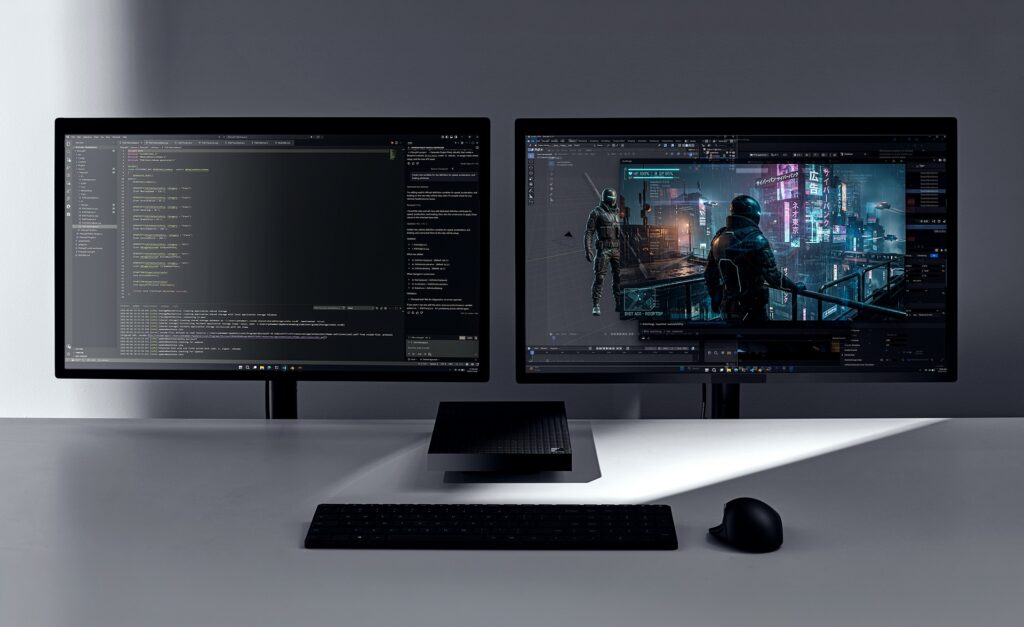
Surface RTX Spark Dev Box ships with Windows 11 Pro pre-configured for developers at the image level. This brings a purposeful set of defaults, preinstalled tools and tuned settings so the development environment is the default from first sign-in. Two monitors side by side with a box in between The setup keeps developers in their workflow: dark theme, taskbar simplified for development, Widgets removed, Do Not Disturb on. Developer Mode is enabled. PowerShell 7 is the default shell. Under the hood, WSL 2 is configured with GPU passthrough and CUDA support. VS Code, GitHub Copilot, Git, Python and Node.js are installed. Your favorite IDEs, agents, coding assistants, frameworks and libraries all work on Surface RTX Spark Dev Box, whether you prefer the Windows side or WSL. Surface RTX Spark Dev Box is also a world class entry point to the rest of the Microsoft AI stack. AI Toolkit for VS Code brings model conversion, fine-tuning and evaluation into the editor developers already use. Windows ML with TensorRT, and Windows Copilot Runtime give you a consistent local inference surface. Microsoft Foundry connects local prototyping to production deployment, so the model you tune locally ships through the same tools and identity you use every day. GitHub Copilot scales from CLI to enterprise on the same machine. That is what we mean by best Microsoft experience for developers: the local box, the OS, the developer tools and the cloud platform working as one stack.

Secure by design

For developers working with sensitive models, proprietary data and valuable IP, security isn’t optional. It’s foundational. The powerful GPU and unified memory mean more of your models and IP can stay local and lets developers keep more of their models and data local. Surface RTX Spark Dev Box is built on chip-to-cloud security aligned with Microsoft’s Zero Trust principles:
  • Secured-core PC architecture
  • BitLocker encryption
  • Microsoft Defender protection
For organizations, Surface RTX Spark Dev Box integrates with Entra ID and Intune for management and governance at scale. With Surface Laptop Ultra and Surface RTX Spark Dev Box, we’re expanding the Surface line with two products built specifically for makers. Surface Laptop Ultra is built for high-performance work that moves with you, from compiling and debugging to creative production and AI experimentation, while Surface RTX Spark Dev Box is built for the local compute developers need when models, agents and long-running workloads belong on the desk. Different form factors, same direction: giving developers the best option and more choice in where and how they build. Surface RTX Spark Dev Box will be available later this year in the U.S. exclusively on Microsoft.com. Learn more at microsoft.com/devboxii. i Source: NVIDIA. Based on 1 Theoretical FP4 TOPS using the sparsity feature.  ii Microsoft Surface RTX Spark Dev Box and Surface Laptop Ultra are pre-release products. Products and features are subject to regulatory certification/approval; actual sale and delivery is contingent on compliance with applicable requirements.  
  •  

Introducing a powerful new chapter for Windows PCs, accelerated by NVIDIA RTX Spark

Today at NVIDIA GTC, Microsoft and NVIDIA announced the world’s most powerful and efficient thin-and-light Windows PCs ever. Accelerated by NVIDIA RTX Spark, these new PCs unlock incredible momentum for developers, creators and power users, and are purpose-built for the new wave of agents. This marks a key milestone in the rich, full‑stack collaboration between Microsoft and NVIDIA spanning gaming, AI and cloud – from DirectX and RTX to NVIDIA‑accelerated AI workloads on Azure – driving end-to-end innovation for our shared customers. These next-generation Windows PCs represent the next step on that journey. Builders and creators today are reimagining how things get done, and they need reimagined hardware, silicon and platform capabilities to support them. They need PCs capable of running graphically intensive tasks efficiently, highly capable AI models, and a platform that simply and securely runs agents locally. It’s the combination of Windows’ platform and ecosystem leadership, with NVIDIA's silicon innovation and industry-leading graphics and AI leadership, that has resulted in a collection of powerhouse laptops that will redefine how developers and creators interact with their PCs.

“NVIDIA and Microsoft share a vision that agents are the future of personal computing,” said Jeff Fisher, senior vice president of personal computing at NVIDIA. “RTX Spark combines NVIDIA's full technology stack with Microsoft Windows and is purpose-built for creators, gamers and AI developers in the personal AI era.”

Taking Windows to the next level on RTX Spark

A computer chip visible from below a transparent laptop computer. RTX Spark delivers 1 petaflop of AI performance, industry-leading performance-per-watt, full stack NVIDIA AI and RTX graphics technology, with up to 6144 Blackwell RTX cores, up to 20 power-efficient cores built with the Arm architecture and up to 128GB of unified memory. Paired with Windows, it unlocks the capabilities creators and developers need to run advanced workloads, build with the tools they depend on and even play their favorite games. Bringing Windows to RTX Spark enables you to do the work that matters on silicon that delivers the performance you demand. Great silicon deserves deep platform work. We optimized Windows to bring out the full performance of RTX Spark.

Performance and power management

To get the most out of Windows on RTX Spark’s powerful, heterogeneous architecture, we implemented workload profile scheduling (WPS) and optimized it for RTX Spark, enabling the Windows scheduler to more efficiently scale workloads across all 20 cores. Whether you’re checking your email or running an agent locally to debug code, the Windows scheduler on RTX Spark will ensure you get the best performance and efficiency out of your CPU. We also worked with NVIDIA to enable the Microsoft Power and Thermal Framework (MPTF) on RTX Spark, to maximize performance and power on the go. MPTF standardizes one of the most complex parts of a modern PC and will enable RTX Spark based PCs to deliver industry-leading power efficiency while staying cool under intense workloads. Beyond its industry-leading performance per watt for creative, AI and gaming workloads, RTX Spark is positioned to take advantage of our advancements to DirectX 12, including support for neural rendering and optimized ray tracing performance, and has been tuned to maximize the performance of its Blackwell GPU, making it one of the best places to play on Windows. In addition, Microsoft and NVIDIA have worked to unlock the power of the GPU for local AI workloads through Windows ML, enabling AI developers to leverage TensorRT natively in Windows.

Unified memory optimizations

To realize the potential of up to 128GB of unified memory on RTX Spark, we have focused on improving how Windows supports unified memory systems, starting with a new higher, smarter limit on total system memory accessible by the GPU. This updated limit increases the memory available to the GPU on high-memory systems, unlocking the ability to load larger local AI models or render more complex projects. Memory intensive workloads across powerful creator apps, AI workloads and games put a variety of demands on the system and require a versatile memory system to achieve peak performance.  In addition to increasing the memory available to the GPU, we are also enhancing how Windows manages page sizes in shared memory regions on unified memory systems.  These changes ensure that larger memory pages are available for greater performance on heavier workloads, while giving developers the flexibility to optimize for the needs of their memory workloads between CPU and GPU.

Prism emulation enhancements

Prism, our emulator for running 32-bit and 64-bit x86 apps on Windows on Arm, will also be present and optimized for RTX Spark powered PCs.  Prism ensures apps run well on these devices even if those apps haven't been built for the Arm architecture. We have continued to enhance the Prism emulator with additional performance and compatibility features, building on the Prism optimizations delivered last year that added support for the AVX/AVX2 instruction set extensions. Prism has been tuned for the microarchitecture of RTX Spark and when combined with the raw power of the silicon, unlocks great performance for developers, creators and gaming workloads running under emulation.

Windows quality investments

This year, we've been laser focused on raising the bar on performance, reliability and craft across Windows 11. As the Windows foundation strengthens, we are also pushing forward on this next era of Windows computing and delivering meaningful improvements to system performance that will benefit all Windows 11 PCs including these new PCs powered by RTX Spark. This includes changes like more fluid and responsive app interactions by moving many core Windows experiences to the WinUI3 framework and elevating the Windows Subsystem for Linux (WSL) experience, along with baseline reliability improvements across the operating system and more control and personalization, including alternate taskbar positions. These quality-focused updates will continue to roll out throughout the year.

A computer screen displaying a vertical taskbar.Delivering a better platform for agents with Windows on RTX Spark

This week at Microsoft Build, you will see how we are optimizing the Windows platform for building and running agents securely with OS-enforced identity, containment and manageability. With a powerful GPU and up to 128 GB of unified memory, RTX Spark will be great hardware to build and run agentic workloads locally, with security and containment features designed to help protect users. NVIDIA is bringing NVIDIA OpenShell to Windows, built on new Windows security and containment primitives. Hermes Agent and OpenClaw will be integrating OpenShell and these new Windows primitives inside of their Windows application. This enables customers to run agents and integrate them into developer and creative workflows, with the performance headroom to reason over large contexts without round-tripping to the cloud. Control is a fundamental principle for AI on Windows. You choose when and how agents act on your behalf, with controls to help provide visibility into what they can access.

Enabling the Windows ecosystem for RTX Spark

From the app developers optimizing their software for this architecture, to our OEM partners building these new powerful PCs, the Windows ecosystem has come together to ensure RTX Spark delivers a complete, performant experience from day one.

App ecosystem growth

Three laptop computers displaying different apps.Silicon and OS optimization matters, but what you can actually run on the device is what customers experience. We have partnered across the ecosystem to ensure these new PCs powered by RTX Spark will launch with broad application support. Over the last two years, Microsoft and NVIDIA have worked with a breadth of app developers to make significant advancements to optimize the apps people want and rely on for Arm-based devices. As a result, PC users on RTX Spark will immediately benefit from an expansive ecosystem of native and performant apps. For creatives, top tools like Blender, DaVinci Resolve, Maxon Cinema4D, Maxon Redshift, Topaz Photo, CapCut, Cubase, Bitwig Studio, Affinity by Canva and more all run natively on Arm today, as do the audio, video, MIDI and control peripherals they require. Adobe’s flagship applications including Photoshop and Premiere are likewise native, and have partnered with NVIDIA and Microsoft on additional optimizations for the RTX Spark. Apps for technical creators are also optimizing for this platform, including MATLAB, one of the most popular, which now officially supports Windows on Arm via Prism. Across apps, RTX SPARK can unlock new capabilities and speed for workflows like video compositing, rendering complex 3D geometries, or using the latest AI-driven tools for content analysis and transformation. Game developers have also laid a strong foundation for RTX Spark’s arrival. Today, anti-cheat solutions from partners like Epic’s Easy Anti-Cheat and BattlEye, expanded Prism emulator compatibility, and XBOX PC app support means players will have access to a deep catalog of Windows PC games. RTX Spark will bring even higher levels of gaming performance to AAA titles on Arm. Riot Games, one of the world’s leading game developers and publishers, has confirmed that League of Legends and VALORANT are coming to the platform. PUBG: Battlegrounds, the iconic battle royale title from KRAFTON, will also be joining the expansive catalog of compatible titles including PRAGMATA, Alan Wake 2, Naraka: Bladepoint, War Thunder and more. Top agentic and AI developer workloads like GitHub Copilot, Claude Code, ComfyUI, Cursor and more now run across all modern PC silicon – making Windows the ideal platform for AI-assisted development, or for leveraging the power of the GPU to train, optimize and evaluate models. For developers, our partnership with NVIDIA on RTX Spark plans to bring additional exciting technologies like CUDA-accelerated PyTorch, Ilama.cpp, TensorRT, Hugging Face frameworks, Unsloth, Kohya and more.

PC ecosystem adoption

Windows and RTX Spark bring to life the most powerful and efficient thin-and-light PCs with all-day battery life1, optimized for developers and creators who need to trust that they can power through advanced workflows, in a portable package. These PCs will join the Copilot+ PC category, with powerful NPUs for local AI processing in addition to the GPU, unlocking rich AI-powered experiences. Beginning this Fall, RTX Spark will power a full range of Windows laptops and small form factor desktop PCs, starting with Microsoft Surface, ASUS, Dell, HP, Lenovo and MSI.

Introducing Surface Laptop Ultra

A laptop computer displaying a black graphic resembling a wave against a dark background.Surface Laptop Ultra. Built for world makers and creative pros, Surface Laptop Ultra brings cutting-edge AI performance into a thin, precision-engineered laptop designed for sustained high performance. From rendering to compiling to local AI workflows, this is uncompromising craft meets raw power – a new kind of performance for the people who create what's next. To learn more, visit the Devices blog by Brett Ostrum, Corporate Vice President, Surface. We are also proud to support the announcements of our PC partners:
  • ASUS: The ASUS ProArt P16 and ASUS ProArt P14 combine powerful AI performance with slim and lightweight designs built for creators on the go. Available in 16-inch and 14-inch models with elegant Nano Black and new Neo White color options, the laptops feature ASUS Lumina Pro OLED displays and exceptional all-day battery life for premium creative experiences anywhere.
  • Dell Technologies: The XPS 16 Creator Edition delivers serious GPU power built for creative work with smoother playback on 4K timelines, faster exports and a more seamless experience with AI tools. The Tandem OLED display with True Black HDR 600 ensures your visuals look exactly as intended. Add in a built-in SD card reader and HDMI port, and you've got a machine that's as capable in the field as it is back at your desk.
  • HP Inc.: The HP OmniBook Ultra 16and HP OmniBook X 14 laptops are built for creators, gamers and AI developers, providing powerful local AI performance and experiences that help users accelerate workflows.
  • Lenovo: The Lenovo Yoga Pro 9n marries Lenovo Yoga's creator-focused features with NVIDIA's newest chip to deliver a laptop that is portable, powerful and can last for extended periods away from an outlet.
  • MSI: The Prestige N16 Flip AI+ combines a premium thin-and-light 2-in-1 design, a 16-inch UHD+ Tandem OLED display, NVIDIA AI acceleration and a 99.9Wh battery. It delivers immersive visuals, advanced AI experiences, and exceptional mobility for creators, professionals and gamers.
We can't wait for developers and creators to experience what's possible when stunning graphics, incredible performance and cutting-edge AI come together in these powerful, portable PCs.

Scaling the power of Windows to NVIDIA DGX Station

Today's announcement is an important step on our journey to unleash the full power of Windows to NVIDIA silicon, from powerful laptops to data center class workstations. Together with NVIDIA, we’re scaling Windows from RTX Spark through to DGX Station for Windows, up to a trillion-parameter AI supercomputer powered by the NVIDIA GB300 Grace Blackwell Ultra Desktop Superchip, later this year. This unlocks breakthrough AI performance on Windows, the platform enterprises trust for manageability, security and compatibility, with seamless access to the Linux AI ecosystem through Windows Subsystem for Linux (WSL). With NVIDIA GB300‑class capability on Windows, we are making a step‑function leap in performance, fundamentally changing where advanced AI work can happen – enabling developers and organizations to run frontier‑class models and agentic workloads locally that were previously primarily available in the cloud or data centers. Pairing the GB300 Superchip with an additional NVIDIA RTX PRO™ Blackwell Workstation GPU enables developers to combine frontier AI compute with ray-traced visualization and simulation in a single deskside system — delivering the performance needed for agents to perceive, simulate and interact with the physical world. By bringing AI on‑device, organizations can keep data close and shape how it’s used to meet their own compliance and data boundary requirements, complementing cloud workloads. This shift opens new possibilities, lowers the barrier to experimentation, and makes unmetered, always‑available AI compute a native part of Windows workflows. We are building toward a future where Windows provides a unified foundation for AI, from the device in your hands to the infrastructure behind it. Stay tuned over the next couple of days. We look forward to sharing more on our vision of Windows for developers at Microsoft Build. 1 Based on internal testing of pre‑release units. Battery life varies significantly based on usage, settings and other factors. 
  •  

Microsoft Sovereign Cloud adds governance, productivity and support for large AI models securely running even when completely disconnected 

As digital sovereignty becomes a strategic requirement, organizations are rethinking how they deploy critical infrastructure and AI capabilities under tighter regulatory expectations and higher risk conditions. Microsoft’s approach to sovereignty is grounded in enabling enterprises, public sectors and regulated industries to participate in the digital economy securely, independently and on their own terms. The Microsoft Sovereign Cloud brings together productivity, security and cloud workloads to span both public and private environments. Customers can choose the right control posture for each workload, through a continuum of sovereign options protecting against fragmenting their architecture or increasing operational risk. Trust is built on confidence: confidence that data stays protected, controls are enforceable and operations can continue under real-world conditions.  

To support these confidential environments, Microsoft offers full stack capabilities that support customers across connected, intermittently connected and fully disconnected modes. Today’s expansion of capabilities includes three major updates:

  • Azure Local disconnected operations (now available) – Organizations can now run mission-critical infrastructure with Azure governance and policy control, with no cloud connectivity, optimizing continuity for sovereign, classified or isolated environments. 
  • Microsoft 365 Local disconnected (now available) – Core productivity workloads, Exchange Server, SharePoint Server and Skype for Business Server can run fully inside the customer’s sovereign operational boundary on Azure Local, keeping teams productive even when disconnected from the cloud. 
  • Foundry Local adds modern infrastructure capabilities and support for large AI models – Organizations can now bring large AI models into fully disconnected, sovereign environments with Foundry Local. Using modern infrastructure from partners like NVIDIA, customers with sovereign needs will now be able to run multimodal models locally on their own hardware, inside strict sovereign boundaries enabling powerful, local AI inferencing in fully disconnected environments. 
Diagram titled “Sovereign Private Cloud” comparing Connected and Disconnected deployment models. A dashed horizontal line separates “Cloud region” (top) from “On premises” (bottom). On the left (Connected), the control plane resides in the cloud region and connects down to on-premises components, including Foundry Local, Microsoft 365 Local, and Azure Local. On the right (Disconnected), the cloud control plane is absent, and the control plane runs on-premises as an “appliance VM,” directly managing Foundry Local, Microsoft 365 Local, and Azure Local within the local environment.
Run connected or fully disconnected. Sovereign Private Cloud unifies Azure Local, Microsoft 365 Local and Foundry Local, bringing modern infrastructure, productivity and support for large AI models to any operational boundary.

This delivers a truly localized full stack experience built on Azure Local infrastructure and Microsoft 365 Local workloads, designed to stay resilient across any connectivity condition, with large models being part of Foundry Local extending the stack to run advanced multimodal models locally, securely, even when fully disconnected. Customers can now help maintain uninterrupted operations, keep mission critical workloads protected and apply consistent governance and policy enforcement, while keeping data, identities and operations within their sovereign boundaries.

Azure Local runs critical infrastructure locally, even when disconnected 

For workloads with specialized requirements, Azure Local provides the on-premises foundation with consistent Azure governance and policy controls. With Azure Local disconnected operations, management, policy and workload execution stay within the customer-operated environments, so services continue running securely even when environments must be isolated or connectivity is not available. Using familiar Azure experiences and consistent policies, organizations can deploy and govern workloads locally without depending on continuous connection to public cloud services. Azure Local is designed to scale with mission-critical needs from smaller deployments to larger footprints that support data-intensive and AI-driven workloads. Customers can start fast, expand over time and maintain a unified operational model, all within their sovereign boundary.

Operating in disconnected environments surfaces constraints that go beyond traditional cloud assumptions: External dependencies may be unacceptable, connectivity may be intentionally restricted and operational continuity is a business imperative. 

“The availability of Azure Local disconnected operations represents a breakthrough for organizations that need control over their data without sacrificing the power of the Microsoft Cloud. For Luxembourg, where digital sovereignty is not just a principle but a strategic necessity, this model offers the resilience, autonomy and trust our market expects. By combining Microsoft’s technological leadership with Proximus NXT’s sovereign cloud expertise, we are enabling our customers to innovate confidently — even in fully disconnected mode,” said Gerard Hoffmann, CEO Proximus Luxembourg. 

Microsoft 365 Local keeps productivity and collaboration available in fully disconnected environments 

As sovereign environments move into disconnected environments, keeping people productive becomes just as critical as keeping infrastructure online. Building on more than a decade of delivering and supporting these services, Microsoft 365 Local disconnected brings that continuity to the productivity layer, delivering Microsoft’s core server workloads — Exchange Server, SharePoint Server and Skype for Business Server supported through at least 2035 — directly into the customer’s sovereign private cloud.  

With Microsoft 365 Local, teams can communicate, share information and collaborate securely within the same controlled boundary as their infrastructure and AI workloads. Everything runs locally, under customer-owned policies, with full control of data resiliency, access and compliance. By operating with Azure-consistent management and governance, customers get the productivity experience they rely on, designed to stay resilient and secure even when offline. 

Bringing large models and modern infrastructure to Foundry Local 

With the availability of larger models and modern infrastructure as part of the Foundry Local portfolio, Microsoft is enabling customers with highly secure environments the ability to run multimodal, large models directly inside their sovereign private cloud environments. This brings the richness of Microsoft’s enterprise AI capabilities to on-premises systems, complete with local inferencing and APIs that operate completely within customer-controlled data boundaries.  

Expanding beyond small models, the integration of Foundry Local with Azure Local is specifically designed to support large-scale models utilizing the latest GPUs from partners such as NVIDIA. Microsoft will provide comprehensive support for deployments, updates and operational health. Even as inferencing demands increase over time, customers retain complete control over their data and hardware.  

Choice and control without added complexity 

Customers facing strict sovereignty and regulatory requirements are clear that a fully disconnected sovereign private cloud is a key business need. Microsoft Sovereign Private Cloud is designed to meet these needs head-on, enabling secure, compliant operations even in environments with no external connectivity. At the same time, we recognize that disconnected environments are not one-size-fits-all; some customers operate across connected, hybrid and disconnected modes based on mission, risk and regulation. Our approach helps customers to meet strict sovereign requirements in fully disconnected scenarios without compromising simplicity, while retaining flexibility where connectivity is possible. Together, Azure Local disconnected operations, Microsoft 365 Local and Foundry Local help organizations choose where workloads run and how environments are managed, while standardizing governance and operational practices across connected and disconnected deployments. 

Get started 

  • Azure Local disconnected operations and Microsoft 365 Local disconnected are now available worldwide, and large models on Foundry Local are available to qualified customers. 

Douglas Phillips leads global engineering efforts for Microsoft’s specialized, sovereign, and private clouds. He is responsible for Microsoft’s global strategy, products and operations that bring Microsoft’s industry-leading solutions, including Azure, our adaptive cloud portfolio and Microsoft 365 collaboration suite, to customers with additional sovereignty, security, edge and compliance requirements. 

The post Microsoft Sovereign Cloud adds governance, productivity and support for large AI models securely running even when completely disconnected  appeared first on The Official Microsoft Blog.

  •  

A milestone achievement in our journey to carbon negative

In 2020, Microsoft announced a moonshot commitment to become carbon negative by 2030 — accelerating work across our company to advance the partnerships and technologies needed to advance sustainability for our businesses, our customers and the world. A key milestone on this journey was our aim to match 100% of our annual global electricity consumption with renewable energy(1) by 2025. Today, we are pleased to share that Microsoft has achieved this milestone(2). This progress helps drive investment into the power systems where we operate, expand clean energy supply and advance broader energy innovation.

Over a decade of investment: 40 gigawatts of new renewable energy contracted

What began in 2013 with a single 110 megawatt (MW) power purchase agreement (PPA) in Texas — a small first step to demonstrate how corporate procurement could scale clean energy(3) — has evolved into one of the largest clean energy portfolios in the world. This first deal not only supported Microsoft’s early cloud services but also set in motion a decade of commercial partnerships and learning-by-doing that served to demonstrate how corporate demand for advanced energy solutions can help to achieve a more affordable and sustainable power system, while supporting reliability for customers.

Since our carbon negative announcement in 2020, we have contracted 40 gigawatts (GW) of new renewable energy supply across 26 countries, working with more than 95 utilities and developers across 400+ contracts and counting. To put that amount in perspective — that’s enough energy to power about 10 million US homes. Of that contracted volume, 19 GW are now online, delivering new clean energy supply to the power grid, while the remainder are slated to come online over the next five years.

Our new renewable energy procurement continues to deliver significant environmental benefits, including the reduction of Microsoft’s reported Scope 2 carbon dioxide emissions by an estimated 25 million tons(4) and the mobilization of billions of dollars’ worth of private investment in regions where we operate.

This map illustrates Microsoft’s global renewable energy procurement footprint. Contracted and active volumes of renewable energy as of December 31, 2025. The base image is a world map, with markers placed across North America, South America, Europe, Asia‑Pacific, and other regions where Microsoft has contracted for renewable energy. The map is intended to show the global reach and regional diversity of Microsoft’s renewable energy procurement efforts.

Catalyzing market investment through bankable, repeatable models

Microsoft is among the early pioneers in developing technical and commercial practices that help advance bankable, repeatable and scalable procurement tools suitable for each market. Our clean energy purchasing navigates a global patchwork of power market designs, requiring creativity in how we balance cost, time to market and project sizing in our portfolio across planning, contracting and management.

Our work has benefited from a broad coalition of partners helping to build this market together. According to Bloomberg New Energy Finance, more than 200 global corporations collectively purchased nearly 200 GW of clean energy around the world since 2008. Working alongside other clean energy buyers — as well as hundreds of utilities, manufacturers, financiers, developers and engineers — we have helped reduce transaction costs, expand developer access to financing and streamline procurement approaches that other buyers can adopt.

This global flywheel of partnership, investment, technology and policy innovation is expected to continue to facilitate billions of dollars’ worth of investment into infrastructure and jobs. And as we’ve seen repeatedly, when Microsoft sends a clear market signal for world-class, first-of-a-kind technologies and infrastructure, the power sector rises to the challenge. Our procurement over the past decade has demonstrated that partnerships, communities and innovation are essential ingredients that help to accelerate first-of-a-kind technologies and infrastructure at scale.

Scaling partnerships to scale infrastructure

Critical to Microsoft’s success in expanding digital infrastructure and supporting our local communities is our ability to build trusted partnerships with the over 95 global energy suppliers that support our clean energy portfolio. We have sourced clean energy through multiple requests for proposal or information, bilateral engagements and clean tariffs to evaluate over 5,000 unique carbon-free energy projects around the world.

Today, Microsoft has six energy company partners with which we have over 1 GW of contracted renewable energy capacity, and more than 20 energy supplier partners where each partner has at least five separate renewable energy projects with Microsoft — evidence of the durable, repeatable relationships necessary to scale clean energy. Combining scale with speed, Microsoft’s landmark 10.5 GW framework agreement with Brookfield sends a long-term, 2030 demand signal to the market that enables developers to raise funding more efficiently, bolster supply chains, hire engineers and construct world-class energy infrastructure.

Putting communities first

Our renewable energy procurement has mobilized billions of dollars in private investment, supported thousands of jobs across the communities where we operate and delivered meaningful co-benefits. Through partnerships with developers and nonprofit organizations, we’ve worked to embed community-driven benefits into our energy portfolio. These benefits include robust infrastructure, economic inclusion and support for community-focused organizations.

Our support for communities shows up in projects like our 500 MW PPA with Sol Systems, or our 250 MW PPA with Volt Energy Utility that provided local training and jobs, as well as grants to community nonprofit organizations and habitat restoration. We’ve also signed over 1.5 GW of distributed solar, bringing clean energy directly into hundreds of communities around the world. Landmark agreements like our 500 MW offtake with Pivot Energy, or our 270 MW offtake with PowerTrust are expected to foster employment, energy cost savings and grid resilience in communities across the United States, Mexico and Brazil. More details on the above examples and our approach to community benefits in clean energy agreements can be found in a dedicated Microsoft whitepaper.

Innovation unlocks new markets and pathways

Microsoft’s clean energy procurement continues to play an important role in catalyzing technical, commercial and regulatory innovation. Our commercial efforts have helped lower barriers to entry into new markets and expand access into multi-technology contracts that accelerate decarbonization.

In Japan, Microsoft signed one of the first corporate PPAs in the country’s restructured power market. Our 25 MW, 20-year agreement with Shizen represents the first single-asset virtual PPA executed in the country, which helped pave the way to over 2GWs of corporate procurement since 2024, according to Bloomberg New Energy Finance. Alongside opening new markets, we have structured several multi-technology offtakes in nascent markets for corporate procurement. In India, Microsoft purchased a combined 437 MW solar/wind hybrid offtake from Renew, where our projects will support energy access and rural electrification. In Microsoft’s home state of Washington, our datacenters in Douglas County are supplied by 100% carbon-free energy, as we leverage a creative blend of new wind power and hydropower storage to deliver around-the-clock clean energy.

Looking forward to 2030 and beyond

In 2025, the International Energy Agency (IEA) described a new “Age of Electricity,” marked by accelerating electricity demand from electric vehicles, air conditioners, data centers and heat pumps. As the world electrifies more of the economy, the demand for affordable, reliable and clean electricity will continue to rise.

Our experience building Microsoft’s clean energy portfolio both reflects and furthers global trends. According to IEA data, since 2000, renewable energy generation has expanded nearly four-fold. In many power markets across the world, clean energy is one of the fast-growing sources of generation, and often the one with the fastest time-to-market. Corporate buyers like Microsoft continue to serve as an important catalyst in driving commercial demand for innovation and infrastructure across the power industry.

As we continue our journey toward becoming carbon negative by 2030, Microsoft will continue to push for an expansive focus on adding all forms of carbon-free electricity solutions, complementing and adding to our portfolio of renewable energy resources. We recognize that the world’s rising electricity needs require a balanced, all-of-the-above decarbonization strategy to meet global economic growth and environmental goals, and our sustainability goals will continue to support this approach moving forward. Such a strategy requires a broader set of carbon-free energy and grid-enabling technologies, including nuclear energy, next-generation grid infrastructure and carbon capture technology. Just as renewable energy was a relatively small part of global energy grids in 2013 when we signed our first PPA, today many advanced energy technologies remain early in their development but offer significant promise to accelerate progress towards an affordable, reliable and sustainable energy future.

Microsoft has already taken early steps to support the advancement of a broader set of carbon-free energy technologies as we partner with Helion and Constellation Energy on a 50 MW fusion project in Washington state and work with Constellation to restart the 835 MW Crane Clean Energy Center in Pennsylvania. Microsoft’s Climate Innovation Fund has allocated $806 million of capital to 67 investees, with 38% directed toward Energy Systems — advancing carbon-free power and fuels, energy storage and energy management solutions.

We welcome continued collaboration with our power sector partners to bring these innovations to market and incorporate new technology tools in the process to accelerate their development.

We will continue to build and leverage new AI-driven tools to design, permit and deploy new power technologies that help expand and more efficiently operate the electricity grid, bringing more clean energy online faster. This work is exemplified by our recently announced collaborations with Idaho National Laboratory and the Midcontinental System Operator, among other examples.

And as we advance innovative energy technologies, we recognize that standards must evolve alongside innovation. That is why we will continue participating in industry forums that strengthen carbon accounting frameworks — so that our clean energy procurement is measured with greater accuracy and delivers real world emissions reductions, with a continued focus on maintaining the high level of integrity that the world has come to expect from Microsoft.

Our carbon negative commitment remains a call to action — for Microsoft, our customers and the broader technology sector — to invest in an affordable, reliable and sustainable power system. As we look toward 2030, that call to action has never been clearer.

Gratitude — and momentum for the work ahead

Today’s milestone represents a shared achievement among the utility professionals, clean energy developers, community leaders, technology innovators and forward-thinking policymakers who continue the deployment of renewable energy. Meeting today’s milestone shows what partnership can deliver in bringing big ideas to life. The future of carbon-free energy is one that we will create – together.

As Microsoft’s Chief Sustainability Officer, Melanie Nakagawa leads the company’s targets to be carbon negative, water positive, and zero waste by 2030. She brings deep experience at the intersection of policy, business, and technology to advance climate and sustainability solutions globally.

As President of Cloud Operations + Innovation at Microsoft, Noelle Walsh leads the organization that powers the global Microsoft Cloud. She oversees the company’s physical cloud infrastructure and operations, with a charter focused on safety, security, availability, sustainability, and competitive infrastructure growth — bringing decades of global operational leadership.

Footnotes

  1. Renewable energy is defined within Microsoft’s fact sheet https://aka.ms/SustainabilityFactsheet2025, which represents FY24 data.
  2. To date, Microsoft’s renewable energy target includes two primary categories: renewable energy from contracted projects and grid mix. The first is renewable energy delivered under PPAs or similar long-term contracting mechanisms, generally for new projects where our financial involvement in the project’s development is critical for its success. This category represents more than 90% of the renewable energy applied to achieve our 2025 target. The second category is “grid mix” — renewable energy supported via our standard utility relationships and rates, inclusive of policy programs such as renewable portfolio standards and state and utility decarbonization goals. Our 2025 100% renewable target does not include purchases from short-term, so-called “spot market” renewable energy credits (RECs) sourced from operational clean energy projects. With the above in mind, Microsoft leverages a straightforward formula to determine our 100% renewable energy metric on a global, annual basis. We update and further detail the methodology and assumptions behind this formula in our annual sustainability reports:Formula for methodology on renewable energy metric.
  3. Clean energy — also referred to in this blog as carbon free energy — is defined within Microsoft’s fact sheet https://aka.ms/SustainabilityFactsheet2025, which represents FY24 data.
  4. Reduction of reported Scope 2 emissions are calculated between FY20-25, the cumulative difference between location based and market-based emissions, excluding the use of short-term, so-called “spot market” RECs.

The post A milestone achievement in our journey to carbon negative appeared first on The Official Microsoft Blog.

  •  
❌