❌

Lees weergave

Soul of Anatolia: Building Intersections with Pavel

Today, we’re taking a look behind the scenes of theΒ Soul of Anatolia DLC for Euro Truck Simulator 2, this time focusing on the complex work that goes into creating the roads and intersections that connect its cities and landscapes. We spoke with Pavel, one of our Map Designers, who shared more about his work on the project and the process of building a road network.

Hi! My name is Pavel, and I’ve been working at SCS Software as a Map Designer for more than 7 years.

For the past two years, I’ve mainly specialised in everything related to roads and highways.

For Soul of Anatolia, I design large highway interchanges and create specifications for other departments for prefabs, tunnels, and traffic lights. I also work with my colleagues to place these elements throughout the map and strive to create a consistent driving experience for players.

What similar projects have you worked on in the past, and how is working on Soul of Anatolia DLC different?

The project that comes closest to my work on Soul of Anatolia is the Greece DLC, where I had some experience with the geometric design of interchanges and maintaining consistency in road elements such as toll gates.

Working on Soul of AnatoliaΒ is different mainly because of the scale of what I’m responsible for. I’ve been given much more room to influence the road layout.

How large is this DLC, and what challenges does it bring for you?

From my perspective, with my focus mainly on roads, this DLC is truly huge. For example, we have more than a hundred large highway interchanges on the map.

The challenge for me is to make sure these interchanges meet our requirements while also making sure everything fits within the map.

How does the creation and implementation of highway interchanges work?

Since the project is usually already underway in some form by the time I start working on it, I create pre-assembled interchanges separately from the project in a dedicated test map, where I also test newly created prefabs.

In this map, I always start with a rough prototype built by hand, where the main focus is choosing the right number of road lanes and the type of road intersection. I then iterate on this prototype, adjusting curve radii and fine-tuning road lengths to meet the rules we have established, such as clearance heights under bridges, road banking, and maximum gradients.

I try to calculate and build everything so that the interchange matches its real-world counterpart as closely as possible, is as compact as possible, and is also comfortable to drive through.

Once I’m happy with the prototype, it is copied into the project and placed in its designated location, where it may still undergo some minor adjustments. At that point, my work on the interchange is finished.

You spoke about prefabs; how does the creation of new prefabs work?

First, I consider whether a prefab really needs to be created for a particular situation, or whether the situation could be solved with a prefab we already have, perhaps with a small compromise.

If I conclude that a new prefab is necessary, I start designing it. I begin by putting together a rough prototype using roads. For the design, I use simple geometry, such as calculating the radius and sector of a circle.

It’s important not to make the prefab unnecessarily large while also finding the right compromise that allows both our AI traffic and players to drive through it without problems.

Once I’m happy with the shape, I create a simple blueprint of the prefab. In addition to its shape, it also shows the road markings and the routes that AI traffic will take.

Once that is ready, I create a specification for our road department. Along with the coordinates of the pre-assembled prototype, I include the blueprints and a basic description.

After that, I simply wait for the prefab to be created. Once it comes back to me, I either provide feedback on it or approve it for use on the map.

What are you most looking forward to seeing completed on the map as part of Soul of Anatolia DLC?

A little selfishly, I’m looking forward to finally having all the highway interchanges and prefabs completed. Toward the end of the project, I’ll also add the necessary accessories to them, such as traffic lights.

After that, most of my work will be focused on details and small touches that will allow me to give the project some extra care and bring the level of detail closer to the real-world references.

What have you enjoyed the most about Soul of Anatolia DLCΒ so far, and what are you looking forward to the most?

I’m really enjoying one new type of interchange, and one modified existing type of prefab that I’ve wanted to have ever since I joined the company. I’ve now managed to get them created, and they’re already waiting for you in the map for you to drive through.

What do you think players will like the most about Soul of Anatolia DLC, and what shouldn’t they miss?

Of course, waiting at traffic-light intersections!

No, just kidding. It will definitely be the landscapes and landmarks. Even now, at a really early stage of the map’s development, some places can really surprise me with how detailed and beautiful they already look.

We hope you enjoyed this behind-the-scenes look at the work that goes into building the roads and intersections of Soul of Anatolia. A huge thank you to Pavel for sharing more about his role and giving us a glimpse into the process behind creating the region's road network.

If you are excited to be cruising in this map expansion, don't forget to support us by adding the Soul of Anatolia DLC to your Steam wishlist.

Also, remember to give our X/Twitter, Instagram, Facebook, Bluesky, and TikTok a follow, as you'll receive updates from our games straight to your feed. Or subscribe to our newsletter to stay informed. Until next time, safe travels!

  •  

Steam Client Beta - September 22nd

The Steam Client Beta has been updated with the following changes:

Big Picture Mode

  • Fixed the on-screen keyboard not popping up in non-Steam games after toggling wifi or suspending the machine

Steam Input

  • Fixed the glyphs shown for the Xbox Elite Controller paddle buttons

Remote Play: Pyrowave

  • Fixed occasional flickering when streaming to Linux and SteamOS clients

  • Switched encoding to use the compute queue to avoid contention with game GPU usage

  • Fixed GPU memory leak on the client when frequently changing resolutions

  •  

Steam Beta Client Update: September 22nd

We have just shipped an updated Steam Client to the Preview/Beta channel.

General

  • Fixed the on-screen keyboard not popping up in non-Steam games after toggling wifi or suspending the machine

Steam Input

  • Fixed the glyphs shown for the Xbox Elite Controller paddle buttons

Remote Play: Pyrowave

  • Fixed occasional flickering when streaming to Linux and SteamOS clients

  • Switched encoding to use the compute queue to avoid contention with game GPU usage

  • Fixed GPU memory leak on the client when frequently changing resolutions

  •  

SteamOS 3.8.28 Beta

This update is for the SteamOS Beta and Preview channels, and includes new features that are still being tested. You can opt into this in Settings > System > System Update Channel.

General

  • Fixed an issue where game performance could be degraded after sleep/resume on systems with AMD discrete GPUs

  •  

Counter-Strike 2 Update

[p]\[ PREMIER ][/p]
  • [p]Updated the map selection process to give players more opportunities to play maps they've been learning.[/p][/*]
  • [p]Map selection process:[/p]
    • [p]Team 1 picks one map[/p][/*]
    • [p]Team 2 picks two maps[/p][/*]
    • [p]Team 1 picks a final map.Β [/p][/*]
    • [p]One of the four maps will be randomly selected and the match will begin.[/p][/*]
    [/*][p][/p][p]\[ RUSH ][/p]
    • [p]Rush is a fast-paced queued 3v3 game mode.Β [/p][/*]
    • [p]Players battle through a series of battle arenas to reach the opponent's castle and win the match.[/p][/*]
    • [p]Battle arenas are randomly selected for each match, so no two matches are the same.[/p][/*]
    • [p]Control the tower when you eliminate the enemy team (or time expires) to win the round.[/p][/*]
    [p][/p][p]\[ GAMEPLAY ][/p]
    • [p]Players can now reload silently (but slowly) by pressing and holding the reload key.[/p][/*]
    • [p]Un-scoping a sniper weapon no longer produces a sound.[/p][/*]
    • [p]Globally increased visual clarity and improved fidelity of bullet impact decals.[/p][/*]
    • [p]ammo_grenade_limit_total setting now also enforces the total number of grenades a player is allowed to purchase in a round.[/p][/*]
    • [p]Chickens now take damage from the Zeus x27.
      [/p][/*]
    [p]\[ SETTINGS ][/p]
    • [p]Crosshairs have been updated to be resolution independent.[/p]
      • [p]A new "Crosshair/Scopes" tab is available in the Settings menu, and includes updated crosshair settings.[/p][/*]
      • [p]Added new crosshair styles[/p][/*]
      • [p]Updated the default crosshair to "Dynamic Quad," which better represents weapon accuracy.[/p][/*]
      [/*][p][/p][p]\[ ENGINE ][/p]
      • [p]Updated engine code to the latest version of Source 2.[/p][/*]
      [p][/p][p]\[ MAPS ][/p][p]Ancient[/p]
      • [p]Fixed holes in world in Long A Main Hall.[/p][/*]
      • [p]Adjusted door geometry and grenade clipping inside Jaguar.[/p][/*]
      [p]Cache[/p]
      • [p]Some gap fixes and clipping adjustments around the blue doors in Mid.[/p][/*]
      [p]Mirage[/p]
      • [p]Reinforced scaffolding by balcony in A site.[/p][/*]
      [p]Train[/p]
      • [p]Blocked pixel gap in crates on bombsite A.[/p][/*]
      [p][/p][p]\[ MISC ][/p]
      • [p]Added ability to set a "Clan Tag" for players who are members of Steam Community Groups. You can adjust your Clan Tag from your Player Profile.[/p][/*]
      • [p]Added support for applying stickers to C4.[/p][/*]
      • [p]The Starjunk 95, Industrial Sunset Memories Music Kit is now available for purchase in standard and StatTrak versions through the STORE tab.[/p][/*]
      • [p]Halftime scoreboard stats should now fully reflect the results of the previous round.[/p][/*]
      • [p]Fixed a case where players could avoid a kick ban.[/p][/*]
      • [p]Players can now adjust music volume per game-mode.[/p][/*]
      [p][/p][p]\[ WORKSHOP ]Β [/p]
      • [p]Added "minimap_volume" entity which enables a custom minimap image when a player is within the volume.[/p][/*]
      • [p]Added "sky_camera_volume" and "sky_camera_volume_target", which enable custom location-specific skybox rendering.[/p][/*]
      • [p]Added "point_deathcam_bounds" entity that constrains the player death camera.[/p][/*]
      • [p]Added "env_shake_volume" entity that allows camera shake only within a specified volume.[/p][/*]
      [p][/p][p]\[ SCRIPTING ][/p]
      • [p]Added CSRadarPoint entity.[/p][/*]
      • [p]Added CSObservablePoint entity.[/p][/*]
      • [p]Added AddTeamMoney API method.[/p][/*]
      • [p]Added OnPlayerTeamChanged callback.[/p][/*]
      • [p]SetDialogVariableString now accepts a localization string.[/p][/*]
      •  

      Minecraft 26.4-snapshot-1 (snapshot) Released

      26.4 Snapshot 1 (known as 26.4-snapshot-1 in the launcher) is the first snapshot for Java Edition 26.4, released on September 22, 2026, which switches the default game renderer to Vulkan, makes minor changes and fixes bugs. Full changelog: https://minecraft.wiki/Java_Edition_26.4-snapshot-1
      •  

      Steam Client Beta - September 21st

      The Steam Client Beta has been updated with the following changes:

      Big Picture Mode

      • Using a physical mouse to click on text input will no longer bring up the On-Screen Keyboard

      Steam Input

      • Fixed showing doubled Xbox style controllers on Windows

      • Fixed showing doubled Steam Controllers on macOS

      • Fixed regression with rumble on 3rd party SteamOS Handhelds

      • Improved the styling of multibinding rows in the configuration mapping screen

      Remote Play

      •  

      Steam Beta Client Update: September 21st

      We have just shipped an updated Steam Client to the Preview/Beta channel.

      General

      • Using a physical mouse to click on text input will no longer bring up the On-Screen Keyboard

      Steam Input

      • Fixed regression with rumble on 3rd party SteamOS Handhelds

      • Improved the styling of multibinding rows in the configuration mapping screen

      Remote Play

      •  

      Road Trip: Ford Release Date & Video Trailer Reveal

      Get ready for a brand-new experience in American Truck Simulator! It's time to grab a different set of keys and hit the road in amazing vehicles that are a little different than what you've been used to. We're excited to announce that the

      Road Trip: Ford DLC for American Truck Simulator will be released on September 29th, 2026!

      We are so excited to be almost finished with this upcoming DLC and that our #BestCommunityEver will be able to enjoy it too! To get you in the mood for driving the stunning cars from Ford, our talented video team has put together an official video trailer. Watch it below to see all that is coming!

      Road Trip will bring a whole new experience for players of American Truck Simulator. Not only will you be able to drive in completely different types of vehicles than before, but you will also have the opportunity to complete smaller delivery jobs, customize your cars with accessories, paint them in different colors, or explore the vast landscapes of the U.S. from a completely new perspective while also discovering and learning about beautiful landmarks with the new Atlas feature!

      Just imagine driving legendary cars like theΒ 1967 Ford Mustang Fastback,Β 2023 Ford F-150,Β 2023 Ford Bronco, andΒ 1998–2012 Ford Crown Victoria on Route 66 from Chicago to Los Angeles, through the rolling hills of the Midwest, or over the beautiful mountains in Montana from the comfort of your home.

      And if you are a pure truck driver and don't feel like ever leaving your decked-out rig, don't forget that the Atlas feature available with Road Trip DLCs is not just for cars.Β You can still enjoy the feature behind the wheel of an 18-wheeler - just make sure to own the Road Trip: Ford DLC so this feature is unlocked for you right after its release.Β 

      We would like to thank FordΒ for their cooperation in bringing their amazing vehicles into our game! If you are looking forward to hitting the road in a Ford, make sure to add the Road Trip: Ford DLC for American Truck Simulator to your Steam Wishlist.Β 

      Remember to stay up to date with the latest American Truck Simulator news by subscribing to our newsletter or following us on X/Twitter, Facebook, BlueSky, and Instagram. Until next time, we wish you happy journeys!

      •  

      World of Trucks: Cruising South Dakota Event

      With the release of our South Dakota DLC, we invite you all to join us on Thursday, the 24th of September, for the newest World of Trucks event - Cruising South Dakota! Roll through the Mount Rushmore State and take in its wide-open landscapes, natural beauty and rich history.

      So, what is the challenge? Haul cargo to or from any city in South Dakota and help the community reach a collective goal of 150,000,000 miles (241,402,000 km). With the strength of our #BestCommunityEver, we know you will smash it!Β 

      Hit the road by #CruisingSouthDakota, where vast prairies meet the rugged Black Hills and the otherworldly Badlands, with long crossings over the Missouri River along the way. But this land carries far more than scenery, it holds stories that reach deep into the past. The Black Hills, known to the Lakota people as Paha Sapa, are sacred ground, while Badlands National Park preserves one of the richest fossil beds on Earth. This is where giants like SUE the T. rex slept for millions of years before being discovered.

      During your travels, you can look forward to many spectacular views and highlights, such as:

      • Mount Rushmore National Memorial, the iconic monument carved into a granite face in the Black Hills.
      • Badlands National Park, a dramatic maze of layered rock spires and buttes unlike anywhere else in America.
      • Deadwood, the legendary gold rush town where Wild Bill Hickok played his final hand.
      • Missouri River crossings, where the great river divides the rolling east from the rugged west of the state.


      As with past Cruising events, you can also participate using your own trailer by selecting jobs from the External Market!

      The South Dakota DLC features 13 incredible cities to explore, and we're offering an exclusive reward for completing your personal goal, which will require you to deliver a job to or from all of them. All jobs for the event must be at least 100 miles (161 km) long.

      Take part in this breathtaking journey across the Great Plains, from South Dakota's sweeping landscapes and Black Hills to its frontier towns. Let's roll through the Mount Rushmore State!

      Rules

      Using External Contracts or External Market, with a World of Trucks-connected profile in American Truck Simulator, the community goal is to drive 150,000,000 miles (241,402,000 km) while delivering cargoes to or from any city in South Dakota.

      When a player has completed deliveries to or from all 13 South Dakota cities, they will achieve their personal goal.

      All jobs for the event must be at least 100 miles (161 km) long.

      You can check if your recent deliveries met these conditions using your Log Book in your World of Trucks profile.

      Rewards

      • Personal: Players who complete deliveries to or from all 13 South Dakota cities will earn a personal World of Trucks Achievement and a Call of the Badlands ATS truck paint job Steam inventory item.

      • Community: When the community goal of driving 150,000,000 miles (241,402,000 km) during deliveries to or from any city in South Dakota is met, players who have also achieved their personal goal will receive a Ring-necked Pheasant Steam inventory item.

      Note: In order to qualify for the community reward, you must complete your personal goal in American Truck Simulator. Each reward will be a Steam inventory item for American Truck Simulator. Once completed, claim your rewards on the Events page of your World of Trucks profile.

      The event will conclude on Sunday, the 22nd of November at 23:59 UTC.

      Gear up for the latest addition to American Truck Simulator and join us for #CruisingSouthDakota! Share your screenshots and videos with us on our Facebook, X (formerly Twitter), and Instagram profiles, and we will share our favourite ones (we may even feature some of them in a future blog post!).

      •  

      Steam Beta Client Update: September 18th

      We have just shipped an updated Steam Client to the Preview/Beta channel.

      General

      • Added support for keyboard glyphs in the footer when using mouse/kb to interact with Big Picture Mode

      Steam Input

      • Added a new view in the configurator for Steam Input API games that lists out actions and their bindings rather than inputs to actions along with streamlined binding interface

      • Added a new multi-binding page in the configurator for authoring button combinations that visualizes the timeline of command outputs and their settings

      • Added support for inverting button chord bindings

      • Fixed older-unnamed Virtual Menus showing up as "Create Virtual Menu" in some views

      SteamRT3 Experimental Beta

      • Fixed Night Mode

      Remote Play

      • Fixed EULA acceptance when starting a Remote Stream.

      •  

      Steam Client Beta - September 18th

      The Steam Client Beta has been updated with the following changes:

      Big Picture Mode

      • Added support for keyboard glyphs in the footer when using mouse/kb to interact with Big Picture Mode

      Steam Input

      • Added a new view in the configurator for Steam Input API games that lists out actions and their bindings rather than inputs to actions along with streamlined binding interface

      • Added a new multi-binding page in the configurator for authoring button combinations that visualizes the timeline of command outputs and their settings

      • Added support for inverting button chord bindings

      • Added support for switching into Lizard mode on the new Steam Controller when interacting with UAC windows or other places where Windows blocks Steam Input

      • Fixed older-unnamed Virtual Menus showing up as "Create Virtual Menu" in some views

      Remote Play

      • Fixed EULA acceptance when starting a Remote Stream.

      •  

      Indiana: Research Trip

      In June, we announced that we are working on the Indiana DLC for American Truck Simulator. While our map teams are busy bringing the Hoosier State to life, they first had to experience it for themselves. Let's take a look back at their research trip to Indiana!

      The team that set out for Indiana consisted of the map DLC lead Dubak, our map designers LukΓ‘Ε‘ and Martin, and our researcher Spekin. Today, they will share their impressions from the trip and a couple of photos they captured along the way. Below, we are also bringing a few screenshots from the work-in-progress map!

      "This was my second research trip to the US, and every time it's an incredible experience for me.Β It boasts not only amazing nature and landscapes, but also rich and beautiful cities. Before the trip, we were a bit worried that Indiana would be a state full of fields, but we were completely wrong. It was a great experience, and I'm really glad that my team and I get to build this wonderful state and show players all the beauty and hidden gems Indiana has to offer," Dubak told us.

      They travelled across the state, visiting many of its cities and landmarks, from Indianapolis to Fort Wayne, Evansville, South Bend, and more. "We were blown away by the memorial and the Capitol in Indianapolis, and we also checked out a massive steel mill in East Chicago, Lake Monroe, and the Indiana Dunes National Park," Dubak said.

      During their nine-day journey, the team gathered plenty of references and experienced the atmosphere of each place they visited. They explained that walking the streets and visiting these places in real life before recreating them in the editor was a completely new experience.

      "As a map designer, I was thrilled to have the opportunity to visit the US in person.Β You can feel the atmosphere and the scale of everything around you. Personally, I enjoyed all the landmarks in Indiana - from courthouses and churches to banks, statues, historical monuments, memorials, and murals, not to mention the small details here and there. History has shaped the US greatly, and you have the opportunity to experience that," LukΓ‘Ε‘ shared with us.

      Being there in person also reveals smaller details that can be difficult to notice through street view or other sources. This helps the team understand what is important to include in the game and what gives each place its authentic feel.

      "As a map designer, I looked for all the details that make every corner authentic.Β If you are sufficiently attentive, you can find a lot of interesting stuff around. For example, I learned that bigger is better. You can hardly go wrong with that. I also love discovering all the different advertisements, billboards, and signs. I created a large photo gallery of them so that our branding and asset team could use them as inspiration for the state of Indiana and upcoming projects. We also saw an Amish community in the region, which was really interesting. Overall, the research trip was a great experience, and I would love to come back for more inspiration," LukΓ‘Ε‘ said.

      For Martin, it was the diversity of Indiana's landscapes and the roads connecting them that made the biggest impression.

      "I was amazed by how diverse the landscape actually is, with plenty of forested areas that transition into national parks, wetlands, prairies, and even sand dunes up north along Lake Michigan.Β What captivated me the most was probably the scenic IN-46 highway between Bloomington and Columbus. The road winds through the Norman Upland, home to Indiana's largest state park, Brown County State Park. We drove through many towns packed with truly memorable landmarks. In the capital, Indianapolis, it was fascinating to see modern skyscraper architecture blending with historic buildings, churches, cathedrals, and beautifully maintained parks," Martin shared with us.

      Even Spekin was surprised by some of the things he saw during the trip, despite his role as a researcher, which means he spends a lot of time studying upcoming DLC areas and preparing references for the rest of the team.

      "I was shocked by how big everything is in the US. For example, flags, totems, grain bins, or even roads and countryside are not as straight as they seem on street view, and you can also see the elevation. We observed and measured everything from a random curb in the city to grown corn in the countryside, so the biggest task was just not to look suspicious while capturing those details," he told us.

      As a researcher, Spekin records everything that could be useful to other departments and considers how these references could be used in the game, while keeping our scale and other map limitations in mind: "Sometimes a reference can be just for inspiration, like night photos of buildings with neon lights or backlit advertisements, which are often difficult to find. During the trip, however, this was much easier, as we often arrived at our final destination late at night," he shared.Β 

      "It might sound weird, but I like farm areas, so grain elevators, barns, and animals are my favorite ones, so you can probably guess what my photo library looks like. I also love industrial zones, so I really enjoyed Gary Steel Works, even though we saw it only from the outside. We also visited a few old covered bridges in Indiana, and I know it's just an old bridge, but I liked it a lot. Of course, I enjoyed the whole trip, every city and every town. I wish we could put everything into the game," Spekin says.

      While our work on the map is still in its early stages, we also wanted to give you a small preview of what's already getting done.Β 

      Here, you can see a few locations that are taking shape for the Indiana DLC, including the public library in Evansville, Acy Lake, and locations around Indianapolis and along I-69 and US 30.

      And that's it from today's blog! We hope you have enjoyed this report from our research trip to Indiana. If you are looking forward to exploring the Hoosier State like we did, be sure to add the Indiana DLC to your Steam wishlist and show your support to our team working on it!

      Don't forget to follow us on X/Twitter, Instagram, Facebook, Bluesky, and TikTok, or subscribe to our newsletter for the latest development updates. Until next time, we will see you on the road!

      •  

      Euro Truck Simulator 2: 1.61 Update Release

      We are excited that the 1.61 update for Euro Truck Simulator 2 is now officially released and available on Steam! We hope you will enjoy all the new features, which you can read about in more detail below.


      We would like to thank everyone who took part in the open beta phase and reported possible issues or any kind of feedback on our forum, as it helped us fine-tune everything for a smooth transition to the full update!

      We'd also like to thank everyone who participated in the 1.61 Experimental Beta, especially those who shared their thoughts on the Multi-Function Display (MFD) and the In-Game Menu. These additions will be introduced in a future update, giving us more time to refine and polish these features and ensure they deliver the best possible experience when they are ready.

      Now without further ado, let's take a look at what this update includes!


      Proximity Exploration

      In the 1.61 update, we are introducing a new feature designed to assist players with exploring the world map and discovering more along their journey. Introducing Proximity Exploration, a new quality-of-life feature that makes map discovery a little more intuitive, while still keeping the enjoyment of exploring the world for yourself.


      When enabled, Proximity Exploration automatically reveals a small area around your vehicle as you travel. This means you will no longer need to drive over every tiny section of road to mark it as explored, which should be especially useful for those of you chasing that elusive 100% map discovery! It can also help reveal nearby accessible roads and areas around locations such as rest stops, toll gates, border crossings, gas stations, and other places where multiple road segments may sit closely together.

      And don't worry, secret roads will still have secrets to uncover! Proximity Exploration can reveal the first segment of a secret road when you get close enough, giving you a small hint that there might be somewhere new to explore. From there, however, the rest is up to you, as the remaining route will only be discovered by actually driving along it.


      Whether you use Proximity Exploration to help hunt down those final percentages or simply make exploring the map a little smoother, the choice is yours!

      Volvo Special Edition


      We are very excited to join Volvo Trucks in the celebrations of their 100th anniversary by welcoming the Volvo FH Series 6 100 Year Edition to Euro Truck Simulator 2.Β 


      The Volvo FH Series 6 100 Year Edition will bring a new look for both the interior and exterior, reflecting Volvo's century of innovation with driver-centric features. These additions will be reflected in the base game of ETS2 with new accessories and paint jobs available for the Aero XL cabin of the Volvo FH Series 6.


      On the exterior, this update introduces two new paint jobs: 100 Year Edition – Night and 100 Year Edition – Day. The two designs feature distinctive dark or light exterior colour striping, complemented by two additional Centennial logos on either side of the truck. You will also be able to choose from two different light boxes: one with the 100 Year logo and another one with the FH16 logo.


      We are also adding a brand new interior option featuring black leather door panels with unique stitching, carpets, a rear wall decoration featuring the 100 Year Edition logo, and a decorative dashboard ambient LED lighting available in red or blue colour options.


      To complete the interior, you will also have the option to customize it with a range of exclusive accessories. These include a black leather steering wheel and new two-tone seats combining a black leather base with a grey textile upper section and the 100 Year logo.

      You can read more about this special edition at our dedicated blogpost!

      Improved Material System

      The Improved Material System significantly improves the lighting and visual quality of vehicle interiors in selected trucks. Its main focus is to enhance how interior materials react to light, which results in a more readable, detailed, and visually pleasing cabin environment.


      One of the most significant changes was a redesign of the materials used in vehicle interiors. As a result, it makes differences between materials such as leather, fabric, plastic, and metal far more apparent, even in low-light conditions. The new solution uses multiple variants of dynamic cubemaps, allowing all materials to reflect their surroundings more naturally and respond to ambient light in a more realistic way.


      The entire system was designed from the start with the interiors of trucks in both games in mind, so the base games and their existing fleets will gradually benefit from these improvements as well. In this update, we're excited to bring the Improved Material System update to the Volvo FH Series 6, Volvo FH Series 5 and Volvo FH Series 4 alongside the already updated DAF NGD and MAN TG3 TGX models.


      With future updates, we will gradually add this technology for other trucks across both games. You can read more about this feature here.

      Livestock Trailer Rework

      We’re excited to introduce a complete rework of the Livestock Trailer, which our vehicle team has done so from the ground up.


      Inspired by modern European livestock trailers, our vehicle team rebuilt the trailer entirely from scratch, replacing the previous older model with a brand-new one. One of the biggest changes drivers will notice is the removal of the older belly axle variant, which has been replaced with a lowered chassis configuration featuring dual wheels.


      For those who own their own Livestock trailers, the updated trailer will offer multiple customization options, including two chassis variants, a Straight 3 Axle and a Lowered 3 Axle configuration. Drivers will also be able to choose between an Aluminium body or a fully paintable body.


      A wide range of accessories have also been included to customize your trailer. We’re also introducing newly configurable paint jobs for owned trailers, allowing you to customize up to four different colour sections across specific parts of the trailer for even greater customization. Freight Market and AI traffic variants have also been reworked based on the new owned trailer model, with company paint jobs completely reworked to better reflect more realistic transport operations.

      You can read more about this rework at our dedicated blog.

      SchwarzmΓΌller Trailer Pack Update

      We’re excited to begin updating theΒ SchwarzmΓΌller Trailer Pack DLC to better reflect their new modern trailer designs, starting with a complete rework of one of its low loader trailers and accessories. Let’s take a closer look!


      Leading this update is the redesigned low loader trailer, which has been rebuilt to closely match SchwarzmΓΌller’s latest real-world model.


      Alongside the trailer itself, its available accessories have also been updated with refreshed designs to better represent the equipment and styling SchwarzmΓΌller offers today. While the available cargo options remain the same, this update marks the beginning of a larger goal for us, to rework the entire SchwarzmΓΌller Trailer Pack.


      We look forward to seeing you on the road with this newly updated trailer! You can read more about this update at our dedicated blog.

      Map Changes for Coaches

      With the upcoming Coaches DLC, our map and asset teams have also been making a number of changes across Euro Truck Simulator 2 to prepare the world for passenger transport. The biggest of these can be found in Nuremberg, where we have added a brand-new bus station alongside several remade and newly created landmarks in the surrounding area. Our teams have put a lot of work into bringing this part of the city to life and making sure it is ready to welcome coaches.


      We have also updated the bus stations in Karlstad, Aarhus, and Thessaloniki so they are now functional with our upcoming Coaches DLC. We've also made other smaller changes, including updates to navigation, access, and layouts.Β 


      The coach station at Karlstad has received a brand-new station building, while Thessaloniki now features new signage and other updates. In Heraklion, we have also opened up a previously inaccessible street to make room for the new bus station.


      We’ve also made a number of changes to border crossings to ensure they work correctly with coaches. This included introducing vehicle-specific navigation, as well as opening up parts of border areas that were previously inaccessible to players. Border crossings across the map have also received smaller layout adjustments to help coaches follow the correct routes while keeping navigation working as expected.

      Alongside these changes, we have made plenty of smaller tweaks to bus stops and their surroundings across the map. While many of these may go unnoticed, they all help make sure the existing world is ready for the arrival of Coaches.


      Changelog

      Map

      • Proximity ExplorationΒ 
      • Map changes for the upcoming Coaches DLCΒ 


      Vehicles

      • Addition of the Volvo FH Series 6 100 Year Edition
      • Livestock Trailer ReworkΒ 
      • SchwarzmΓΌller Trailer Pack UpdateΒ 

      Visual

      • Improved Material System added for the Volvo FH Series 6, Volvo FH Series 5 and Volvo FH Series 4

      •  

      Steam Client Beta - September 16th

      The Steam Client Beta has been updated with the following changes:

      Windows

      • Fixed regression causing some games to crash on launch.

      • Fixed a crash at launch on computers with EZFRD64.DLL installed

      Linux

      • Fixed regression causing crash in native Linux version of some games.

      • Fixed regression with bottom download progress bar not showing download progress.

      • Fixed an issue where virtual gamepads were torn down temporarily when a game called the ISteamUtils::SetGameLauncherMode api, which could cause titles that don't support controller hotplugging to lose input

      Remote Play

      • Fixed incorrect colors when streaming from a Windows computer with an AMD GPU

      •  

      Steam Beta Client Update: September 16th

      We have just shipped an updated Steam Client to the Preview/Beta channel.

      General

      • Fixed regression causing crash in native Linux version of some games.

      • Fixed regression causing flicker and unwanted UI briefly after waking from sleep.

      • Fixed an issue where virtual gamepads were torn down temporarily when a game called the ISteamUtils::SetGameLauncherMode api, which could cause titles that don't support controller hotplugging to lose input

      •  

      SCS On The Road: Iceland Research Trip

      A few weeks ago, we shared a blog from our research trip to Iceland, where the map designers who took part in the journey shared their impressions. Today, we're excited to bring you a big episode of SCS On The Road, where you can experience the research trip in more detail, complete with stunning shots of Iceland's breathtaking landscapes and even some comparisons with the in-game map!

      Part of our marketing team set out on this journey alongside our map designers to document the unforgettable trip. Iceland is undoubtedly one of the most beautiful countries in the world, and during their time there, the map team had the chance to visit some truly stunning locations that they are now recreating for this upcoming map expansion.

      To bring these places to life in our game and do them justice, the team needed to gather plenty of visual references, helping them recreate the landscapes and landmarks as accurately and faithfully to reality as possible.Β 

      In this video, our map designers also shared some interesting insights into the map creation process, along with information about some of the places we are bringing directly into the map - keep an eye out for an upcoming hidden road, crossing a narrow bridge on its way to Þingvellir National Park!

      We would also like to send a huge thank you to Volvo Trucks and SkΓΊli, a real truck driver from Iceland, who made it possible for the map designers to take a ride in the 780-horsepower Volvo FH16 XXL and experience Iceland from a completely different perspective - from the cabin of a truck. So, without further ado, let's watch this episode together!


      Stay tuned for more, because on this trip we also collaborated with Volvo to shoot one of their videos. While we cannot reveal what it was about right now, you can look forward to a behind-the-scenes SCS On The Road episode from that as well!

      Don't forget to add the Iceland DLC to your Steam wishlistΒ if you want to explore the beautiful places you saw in this video!

      Also, remember to follow us onΒ X/Twitter, Instagram, Facebook, Bluesky, and TikTokΒ to receive updates on upcoming Euro Truck Simulator 2 projects and future SCS On The Road episodes. Or subscribe to our newsletter to stay informed. Keep on trucking!

      •  

      Minecraft 26.3 (stable) Released

      26.3, the release of Wilderness Bound, is a game drop for Java Edition released on September 15, 2026, which adds the dappled forest biome with the new poplar wood type, red shrubs, and shelf mushrooms. It also adds wool stairs and slabs, concrete stairs and slabs, straw beds, cushions, and a new structure called the abandoned camp, and fixes bugs. Full changelog: https://minecraft.wiki/Java_Edition_26.3
      •  

      American Truck Simulator: 1.61 Update Release

      We're excited to announce that the 1.61 update for American Truck Simulator has officially been released and is now available on Steam!

      Before we head to the news, we would like to thank everyone who took part in the Open Beta and reported any issues or provided general feedback on our forum. This makes it much easier for our team to fine-tune everything and helps ensure a smooth transition to the full update release.

      We'd also like to thank everyone who participated in the 1.61 Experimental Beta, especially those who shared their thoughts on the Multi-Function Display (MFD) and the In-Game Menu. These additions will be introduced in a future update, giving us more time to refine and polish these features and ensure they deliver the best possible experience when they are ready.

      Now, let’s dive into what you can expect in the 1.61 Update:


      Proximity Exploration

      In the 1.61 update, we are introducing a new feature designed to assist players with exploring the world map and discovering more along their journey. Introducing Proximity Exploration, a new quality-of-life feature that makes map discovery a little more intuitive, while still keeping the enjoyment of exploring the world for yourself.

      When enabled, Proximity Exploration automatically reveals a small area around your vehicle as you travel. This means you will no longer need to drive over every tiny section of road to mark it as explored, which should be especially useful for those of you chasing that elusive 100% map discovery! It can also help reveal nearby accessible roads and areas around locations such as rest stops, toll gates, border crossings, gas stations, and other places where multiple road segments may sit closely together.

      And don't worry, secret roads will still have secrets to uncover! Proximity Exploration will only reveal the first segment of a secret road when you get close enough, giving you a small hint that there might be somewhere new to explore. From there, however, the rest is up to you, as the remaining route will only be discovered by actually driving along it.

      Whether you use Proximity Exploration to help hunt down those final percentages or simply make exploring the map a little smoother, the choice is yours!

      Improved Material System

      The Improved Material System significantly improves the lighting and visual quality of vehicle interiors in selected trucks. Its main focus is to enhance how interior materials react to light, which results in a more readable, detailed, and visually pleasing cabin environment.

      One of the most significant changes was a redesign of the materials used in vehicle interiors. As a result, it makes differences between materials such as leather, fabric, plastic, and metal far more apparent, even in low-light conditions. The new solution uses multiple variants of dynamic cubemaps, allowing all materials to reflect their surroundings more naturally and respond to ambient light in a more realistic way.

      The entire system was designed from the start with the interiors of trucks in both games in mind, so the base games and their existing fleets will gradually benefit from these improvements as well. In this update, we're excited to bring the Improved Material System to the International LT and International LoneStar.

      With future updates, we will gradually add this technology for other trucks across both games. You can read more about this feature here.

      Map Changes for Road Trip

      With the upcoming Road Trip project, our map and asset teams have also been preparing the world of American Truck Simulator for a new way to explore the roads. While many of these changes are happening behind the scenes, they help lay the groundwork for future features and ensure the map is ready for the journey ahead.

      We have implemented inactive Tourist Boards across several states, including California, Oregon, Washington, Idaho, Montana, Wyoming, and the upcoming South Dakota DLC. These Tourist Boards will remain unavailable until the Road Trip project is released, but they are already in place and ready for the future. Alongside these additions, we have also applied various small visual improvements and polish to selected areas across the map.

      As part of these preparations, we have also added a number of new gas stations across the map. These locations will not only serve truck drivers but will also become available for cars when the Road Trip project releases, giving players more places to stop and refuel during their travels.

      These changes are just a small part of the preparation work being done behind the scenes, helping us make sure the American Truck Simulator world is ready for new adventures on the road.

      New Cargoes

      We are also introducing new cargo options and improving the visuals of some existing ones. Players can now transport new types of freight, including Seed Containers, Trailers, and Truss, adding more variety to their hauling jobs across America.

      Alongside these additions, we also updated the existing Rails cargo with a brand-new model and improved textures. These changes help bring more detail and visual quality to the cargo you see on the road, making each delivery feel even more realistic.

      Changelog:

      Map

      • Proximity Exploration
      • Map Changes for Road Trip

      Vehicles

      • New Cargoes

      Visual

      • Improved Material System: International LT & International LoneStar

      We hope you are also excited to try out all the new features! Make sure to keep up to date with future updates by following us on X/Twitter, Facebook, BlueSky, YouTube, TikTok, and Instagram, and by subscribing to our newsletter! Until next time, happy haulin'!

      •  

      SteamOS 3.9.1 Preview

      Note: This update is for the Steam Deck Preview channel, and includes new features that are still being tested. You can opt into this in Settings > System > System Update Channel.

      Note on Preview Releases

      This is an early Preview build of SteamOS 3.9, and may contain unexpected bugs or stability issues. If you encounter problems, please consider filing a bug on the SteamOS issue tracker.

      These notes contain all changes since the current stable SteamOS 3.8 release, with the changes added since the previous preview noted below

      New in SteamOS 3.9.1

      General

      • Fixed a system crash when launching Forza Horizon 6 on Legion Go 2

      • Fixed an issue causing frame limits to result in lower than intended FPS on certain external displays

      • Fixed issues with suspend/resume on systems with RDNA1 or RDNA2 based dedicated GPUs

      • Fixed a regression in seamless boot causing the boot logo to disappear prior to the Steam startup animation

      • Fixed a rare issue where fan speed would revert to BIOS control until a reboot, resulting in higher than normal fan speeds on Steam Deck

      • Security and stability updates

      Developer

      • Fixed verbose-mode boots, triggered by the [c]steamos-bootdebug[/c] utility or chainloader menu, having their output hidden by plymouth

      • Updated included renderdoc version

      SteamOS 3.9

      General

      Misc

      • Updated the bootloader to improve compatibility with certain motherboards

      • The Desktop Mode lockscreen is no longer prevented from being explicitly enabled in settings (but remains off by default)

      Developer

      • Switched WiFi backend to wpa_supplicant by default for new installations, improving compatibility with various WiFi networks

        • Enhanced wpa_supplicant to support fast WiFi reconnect on resume from sleep, previously only available in the iwd backend

        • Known issue: Existing installations will continue to use iwd unless manually enabled in Developer Settings

      • Linux kernel rebased on Linux 7.2

      • Added preliminary support for hibernation, not yet exposed in Game Mode UI

        • Enhanced Linux kernel hibernation support to enable interrupting hibernate requests and fixed various driver issues

      • Various scripts and packages have been renamed from `steamos-` to `holo-`, with aliases to the former names where appropriate

      • Improved support for running SteamOS as a VM guest with accelerated graphics (virtio-gpu, venus)

      •  

      SteamOS 3.8.27 Beta

      This update is for the SteamOS Beta and Preview channels, and includes new features that are still being tested. You can opt into this in Settings > System > System Update Channel.

      General

      • Fixed a rare issue where fan speed would revert to BIOS control until a reboot, resulting in higher than normal fan speeds

      •  

      Steam Frame is here!

      Steam Frame launches today! Sign-up for reservations now in the following options:

      • Steam Frame 256GB: 1,059 USD/ 1,529 CAD/ 1,049 EUR/ 889 GBP/ 1,609 AUD/ 4,539 PLN

      • Steam Frame 1TB: 1,299 USD/ 1,859 CAD/ 1,279 EUR/ 1,089 GBP/ 1,969 AUD/ 5,549 PLN

      All prices are inclusive of VAT where applicable.

      Steam Frame ships directly via Steam in the U.S., Canada, UK, EU, and Australia; and via KOMODO (an authorized distributor) in Japan, Taiwan, and Hong Kong (South Korea coming soon). Pricing in these regions is available via KOMODO Station.

      Β 

      What is Steam Frame?

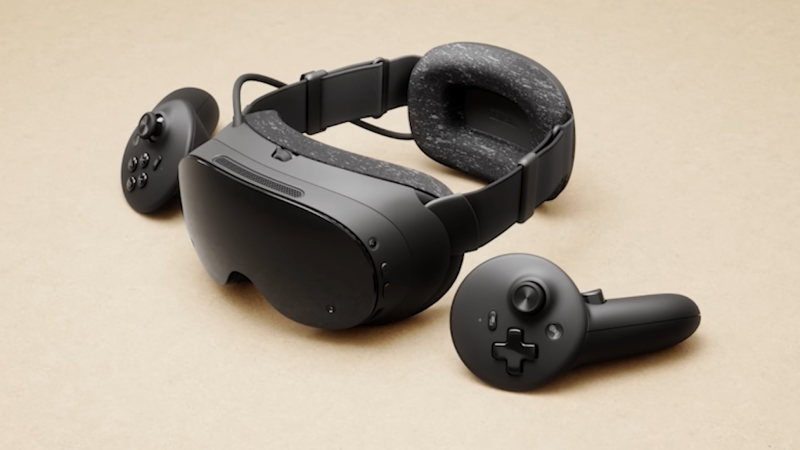
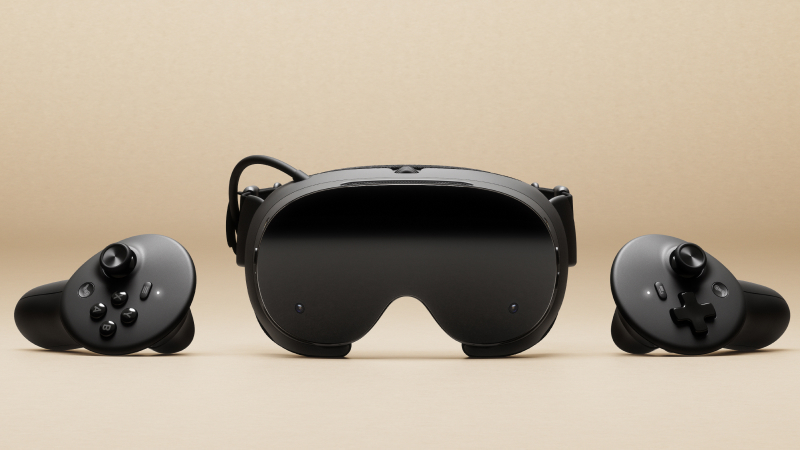
      Steam Frame is our wireless VR headset + controllers, built for both VR and non-VR gameplay. Designed for streaming, it can handle your entire Steam library. And it supports stand-alone play too, with over 100 games (and growing) already Steam Frame Standalone Verified. Read more (and check out the specs) on the Steam Frame product page.

      Half-Life: Alyx is included!

      Redeem your copy in settings when you log into Steam Frame. (If you already have Half-Life: Alyx in your library, you will not be able to redeem another copy – only one copy can be redeemed per device.)

      How do I get my hands on a Steam Frame?

      We're following the same approach we implemented with the launch of Steam Machine, as we found the reservation system helpful in improving the purchase experience and limiting resellers. That means:

      • Beginning right now, you can sign up for the model you'd like to purchase (either Steam Frame 256GB, or Steam Frame 1TB)

      • No time? No worries! Signups remain open until September 17th at 10 a.m. Pacific.

      • At that time, we'll close signups and do a one-time randomization to determine reservation and waitlist order.

      Based on the results of that randomization, you'll receive an email on September 17th letting you know you're either in the reservation queue or on the waitlist. Here's what that means:

      • If you're in the reservation queue, the model you signed up for has been reserved in your name. As units become available to ship, you'll receive an email with the option to purchase. The first batch of these emails will begin going out on September 18th.

      • If you’ve been added to the waitlist, your place in line is beyond the number of Steam Frames currently available for reservation. We will notify you if you are moved to the reservation queue.

      In addition, we will also be selling the following first-party Steam Frame accessories. These are sold separately, and will be available as an add-to-cart option only at checkout for those who have received a purchase email:

      • PSU (45W power supply with 2.5m cable): 29 USD/ 49 CAD/ 39 EUR/ 29 GBP/ 49 AUD/ 139 PLN

      • Ergonomic Accessories Kit (2 controller hand straps/battery doors, 1 headset top strap, 1 extended light blocker): 59 USD/ 89 CAD/ 69 EUR/ 59 GBP/ 99 AUD/ 279 PLN

      • Accessory Replacement Kit (1 face gasket, 1 head cushion, 1 standard light blocker): 49 USD/ 69 CAD/ 59 EUR/ 49 GBP/ 89 AUD/ 229 PLN

      Head to the official Steam Frame product page to learn more and signup. For additional details on the signup process, please visit our FAQ section.

      You can also watch our official overview/quick start guide videos below!

      Part 1: Getting Started with Steam Frame

      Part 2: More about Steam Frame Accessories

      •  

      Steam Frame

      Steam Frame is a streaming-first, wireless VR headset + controllers that can handle your whole Steam library. Step into immersive VR, or lean back and enjoy your non-VR catalog. And it supports stand-alone play too.

      •  

      Minecraft 26.3-rc-3 (snapshot) Released

      26.3 Release Candidate 3 (known as 26.3-rc-3 in the launcher) is the third and final release candidate for Java Edition 26.3, released on September 14, 2026, which fixes bugs and reverts a bug fix. Full changelog: https://minecraft.wiki/Java_Edition_26.3-rc-3
      •  

      Road Trip: Quick Jobs & Freight Market

      Who says deliveries are only for trucks? In today's blog, we're taking a closer look at how Quick Jobs and the Freight Market will work in our upcoming Road Trip module for American Truck Simulator. Let's check it out!Β 

      Before we continue, we’ve also put together a video version of this blog for you to enjoy. You can check it out below!


      Players familiar with American Truck Simulator will already know Quick Jobs and the Freight Market from their trucking careers. Road Trip builds on these systems with its own approach to courier work, customer reviews, and progression.

      Just like with trucks, you won't need to have your own vehicle to take on a Quick Job. A suitable vehicle will be provided for you by the company offering the job, allowing you to jump straight into work as a courier driver. Fuel, repairs and any other expenses you encounter will be covered by the company, just as they are with traditional Quick Jobs in American Truck Simulator.

      So what kind of jobs can you expect? Drivers can be tasked with delivering small packages and documents, as well as transferring vehicles between car dealerships. The jobs available to you can also vary depending on the type of vehicle involved, so a pickup truck may receive different contracts compared to a sports car or a classic vehicle.

      However, completing the journey is only one part of the job. After each delivery, the customer will review your performance across three areas; Time Management, Vehicle Appearance, and Cargo Handling.

      These reviews are specific to the delivery you have completed. Damaging valuable documents, for example, may lead to very different feedback compared to successfully delivering delicate plant seedlings without any issues. Our goal is to make each job feel a little more personal, with a customer waiting at the other end to judge how well you handled their delivery.

      Some customers may also place a higher priority on one of these three areas. You'll be able to see this before accepting the job, and meeting their expectations will be more demanding. However, taking on that extra risk can also result in a better financial reward.

      Time Management also works a little differently from simply beating a deadline. Customers expect you at a particular time, which means arriving too early can be just as unwelcome as arriving late. Each completed delivery is also given a star rating, which contributes towards your overall Courier Rating.

      Your Courier Rating determines the types of jobs available to you, the maximum distance of the routes you can take on, and how much you can earn. Maintaining a higher rating will unlock more challenging work, such as fragile or valuable cargo and jobs with tighter delivery windows, while also providing a bonus to the offered payout.

      Drivers who consistently achieve five-star deliveries can also build a Perfect Delivery Streak, which will reward drivers with additional money bonus.

      Already saved up enough money to purchase your own vehicle? Then you'll have access to even more job opportunities! Players of American Truck Simulator will already be familiar with the Freight Market, and Road Trip introduces its own equivalent, known as the Dispatch Market.

      The Dispatch Market works in a similar way to Quick Jobs, but instead of using a borrowed vehicle, you'll complete the job using a vehicle from your own garage. As you're supplying your own vehicle, these jobs will also offer a slightly higher payout, as you'll be responsible for your own expenses, including repairs and fuel.

      The same Courier Rating, customer reviews, and performance criteria apply here too. Naturally, some jobs will differ from those found in Quick Jobs, such as car jockey work, after all, asking you to give away your own car would be a little unfair.

      Any money you earn from these jobs goes directly into your existing ATS profile, which is shared between your trucking career and Road Trip. There is no separate XP system for this mode, instead, progression is earned by your Courier Rating, customer reviews, and your ability to maintain a Perfect Delivery Streak.

      For the initial release of Road Trip, jobs will focus on getting yourself and the delivery safely from point A to point B, with more possibilities we hope to explore in the future.Β 

      We hope you’ve enjoyed learning more about how jobs will work in Road Trip. We’re looking forward to seeing how you build up your Courier Rating, tackle different types of deliveries, and make the most of these new opportunities on the roads of American Truck Simulator.

      If you’re excited to get behind the wheel when Road Trip arrives, be sure to add the Ford Car Pack and RAM & Dodge Car Pack to your Steam Wishlist! Until next time, keep an eye on our official channels for more news and previews from Road Trip. We’ll see you on the road!

      •  

      World of Trucks: Resuming Events

      Our dearest community,

      Earlier this year, we shared that we would be taking a temporary pause from running our World of Trucks events. We also know how much these events mean to our #BestCommunityEver and that many of you have missed taking part. Today, we are pleased to confirm that we have decided to resume our World of Trucks events in the familiar format you already know, while the wider rework continues.

      This means you can once again look forward to coming together for events throughout the months ahead. First up will be Cruising South Dakota, followed by Cruising Iceland and our seasonal Halloween and Christmas events later this year. We will share full details ahead of each event.

      Our teams will continue working on the underlying systems and infrastructure that support these events, with the goal of bringing much more of the event experience directly into Euro Truck Simulator 2 and American Truck Simulator. This includes the improvements we previously described, such as the ability to view and redeem rewards, earn and view achievements, and follow event progress and community milestones directly in-game. It also involves broader behind-the-scenes changes to support the World of Trucks service in the future.

      Thank you, as always, for your patience, support, and passion. We are excited to welcome you back to World of Trucks events and hope you will join us for the journeys ahead.

      We'll see you on the road.

      •  

      Community Stories: Trucker Cassie

      In today's blog, we bring you another one of our Community Stories. This time with Trucker Cassie, one of the content creators playing our games, who will tell you all about her job as a real-life truck driver, as well as her passion for Euro Truck Simulator 2!

      You might know Trucker Cassie from her YouTube or TwitchΒ channels, where she regularly posts videos from her life as a truck driver in Scandinavia, and also gameplay live streams, mostly from ETS2. And today, she will tell you all about her love for trucks!

      "It's quite random that I started working as a truck driver. I never had any drivers in my family. It was a friend who showed me the world of trucks. He had just gotten his heavy license, and one morning he gave me a ride to school in the oldest Scania I had ever seen. But from that moment, a spark was lit. Maybe I could drive a truck too? It felt so cool and free! So I applied to a trucking school, and the rest is history," Cassie told us.

      Cassie discovered her passion for truck driving, and now, it's been 13 years since she started this way of life, as she now works part-time as a truck driver and shares her stories on social media. "At the start of my career, I never wanted to stop working. I wanted to beat my earlier record on how many deliveries I could make in a day. I had really found my place in life! But a few years with this lifestyle caused me to burn out, and it forced me to rethink my situation. Today, I work part-time, and I've learnt how important it is to wind down and relax when I can," she says.

      If you wonder what kind of work Cassie usually does and what her days on the long and beautiful Scandinavian roads look like, she also shares this with us: "I have tried various delivery types, such as gravel, wood chips, and powder tanker. Now I'm delivering various goods from Sweden to Norway. And when I'm done with that delivery, I normally load fish in Norway. The fishing industries can be located in tricky places! Through small towns and up and down steep and curvy hills. It can really be a challenge during wintertime. After the fish is loaded, I drive to Denmark, where another driver picks up my trailer and drives it somewhere in Europe! Then I pick up a load from Denmark and drive home to Sweden again."

      What Cassie loves the most about her job are the amazing views she sees along the way as well as the solitude this life can bring. "I get to listen to music and podcasts, and I rarely talk to customers. I also get to bring my Chihuahua, Happy," she told us.

      This interesting merge of the two worlds is something we really love, as we have heard similar stories where either members of our community started driving trucks for a living because of our games, or long-term truck drivers that found their passion in Euro Truck Simulator 2 or American Truck Simulator.

      "I have been a truck driver for a while before I discovered Euro Truck Simulator 2. A colleague of mine showed me the game, and I thought it was a silly idea to drive a truck for work, then get home, and play a truck simulator after work. And now look at me," Cassie shared.

      So what is actually so satisfying about playing a truck simulator when you are a real-life truck driver?Β 

      "I am having the time of my life when I play ETS2 on my livestreams! Because in a real truck, you have a lot of responsibility; to deliver the cargo, the truck, and yourself to the delivery place safely. Always being alert. But when I'm playing the game, I can be social with the chat, drive together with the viewers, answer questions, and just have a good time. And the consequences won't be too big when my digital truck makes a kickflip off a mountain because I was focusing on what the chat is saying. I also like to compare the real-life roads to the simulator! And point out the landmarks and differences from the real places," Cassie explained.

      What actually inspired Cassie to start creating content on social media was kind of a coincidence, but from there, it helped her to grow a big community of over 160 thousand followers on YouTube alone.

      "I started my main YouTube channel after I got the offer of being in a reality TV show years ago. I had to film my workday as a truck driver myself, and then send the footage to the TV production. The TV show was canceled before it hadΒ even started, though, and there I was with a vlog. I realized I could put it together myself and post it on YouTube! So that's what I did. A few videos in, and I suddenly gained thousands of subscribers in a few weeks' time. It was crazy! I also have a smaller YouTube channel, where I post gaming content and previous livestreams. I decided to have two separate channels since the content is quite different. And of course, my Twitch channel, where I do livestreams when I have the energy for it," Cassie told us.

      This gave us a great opportunity to ask Cassie, a real truck driver, how Euro Truck Simulator 2 compares with the real world, and she was happy to answer that:

      "I think Euro Truck Simulator 2 is very accurate to real life trucking! Especially when you have a steering wheel and pedals. I know a few people who have practiced reversing trailers in the game, then tried it out in real life. And they nailed it! All because they have practiced in the game."

      We were also curious how Cassie's driving differs from the real world to how she drives in Euro Truck Simulator 2. "I definitely test the limits and do more daring stuff in the game! Somehow, people get surprised when they see my real-life work videos, and notice I actually know how to drive a truck. But I don't blame them, after seeing my stunts in ETS2. It would be nice to have a pink MAN truck in real life as well! But until now, I'll get to be pretty in pink in the simulator," she answered.

      If you think this life would be for you and you are also thinking about taking on a truck driver career, Cassie has a message for you! "I really recommend people try out Euro Truck Simulator 2 if they are curious about becoming truck drivers in real life. It is a pretty big decision, with lots of money needed to get a heavy license with all the needed certificates. And I think ETS2 gives a great hint of what trucking can feel like! Also, it's a really fun activity to bring home your non-trucking friends and let them reverse a trailer in the game! Better than any board game I have played :)," she concluded.

      We hope you have enjoyed Cassie's story! If you did, remember to give our X/Twitter, Instagram, Facebook, Bluesky, and TikTok a follow so you won't miss similar blogs and also updates from our games straight to your feed. Or subscribe to our newsletter to stay informed. Keep on trucking!

      •  

      Minecraft 26.3-rc-2 (snapshot) Released

      26.3 Release Candidate 2 (known as 26.3-rc-2 in the launcher) is the second release candidate for Java Edition 26.3, released on September 11, 2026, which fixes a bug. Full changelog: https://minecraft.wiki/Java_Edition_26.3-rc-2
      •  
      ❌