Today, we're taking a closer look at Sioux Falls, the largest city in South Dakota and one of the highlights of our upcoming South Dakota DLC for American Truck Simulator. Whether you're delivering cargo or simply enjoying the drive, this city offers plenty of memorable sights and destinations to explore. Let's take a closer look!
Located in the southeastern corner of South Dakota, Sioux Falls is the state's largest city. Built around the Big Sioux River, the city has grown from a small historic settlement into a bustling city in the Midwest, while still retaining many of its historic landmarks. Our map team has worked to recreate many of the locations that make Sioux Falls instantly recognisable, giving drivers plenty to discover as they travel through the city.
Upon arriving in the city, you'll be greeted by the Welcome to Sioux Falls sign, and no visit would be complete without seeing Falls Park, where the city's famous waterfalls can be found. These cascading falls on the Big Sioux River are not only the inspiration behind the city's name but also one of South Dakota's top attractions.
Heading into Downtown Sioux Falls, you'll find a vibrant mix of historic architecture, modern businesses, and bustling streets. Keep an eye out for the beautifully recreated Minnehaha County Courthouse, an impressive quartzite building that has stood proudly in the city for well over a century. Nearby, you'll also pass the local bus station, where players can spot a colourful mural that celebrates the city's artistic culture and community spirit.
Through the heart of the city, you'll be able to spot several local landmarks, which include the Arc of Dreams sculpture and Fawick Park. History enthusiasts may also recognise the USS South Dakota Battleship Memorial, dedicated to the crew of the famous WWII battleship. The memorial features one of the ship's original main gun barrels alongside displays commemorating those who served aboard the vessel.
Beyond its landmarks, Sioux Falls is a bustling centre of industry, offering plenty of opportunities for hard-working truckers. From delivering to a food processing plant, warehouse, construction site, and rail supply depot, to transporting cargo for a metalworks, wind turbine factory, recreation vehicle dealership, and truck dealership, there's no shortage of work.
You'll also be able to haul materials & equipment to and from the city's impressive quarry, a nod to the region's long-standing quarrying industry that helped shape many of Sioux Falls' historic buildings.
Whether you're making deliveries or admiring its historic downtown, Sioux Falls is a fantastic destination to explore in our upcoming South Dakota DLC for American Truck Simulator. If you like what you've seen here today, be sure to add it to your Steam Wishlist! We look forward to sharing more from this work-in-progress map expansion in the future. Until next time, keep on truckin'!
Today, we'd like to give you a glimpse of our work on the Soul of Anatolia DLC for Euro Truck Simulator 2 by showcasing some of the new assets we've been creating to make this map expansion unique!
Because the DLC is still very much a work in progress, it's not quite the right time to start previewing specific locations, as our map designers are still bringing them to life. Instead, we'd like to share a selection of the 3D models that our assets team has been hard at work creating, displayed in a placeholder setting for now.
Keep in mind that the assets we're showcasing today are just a glimpse of what's still to come. The assets team continues making new models throughout the entire development process, so what you're seeing here represents only a fraction of what will eventually make its way into the final product.
Based on our research team and close collaboration between our map and assets teams, these models are created to reflect the architecture and character of the region. In this map expansion, you will encounter plenty of different cities, each with its own unique architecture, so we need to capture a wide spectrum of buildings, from the big and small, modern and older city buildings to rural houses you would see when visiting the western part of Türkiye in real life.
Over time, they are being integrated into the map by the team working on this DLC, helping shape its towns, cities, and other locations across the map expansion. In total, we plan to create around 300 new generic assets, similar to the ones you see here, as well as our usual landmark assets, which are created for more significant buildings to make them instantly recognizable. You can look forward to seeing these in future blog posts.
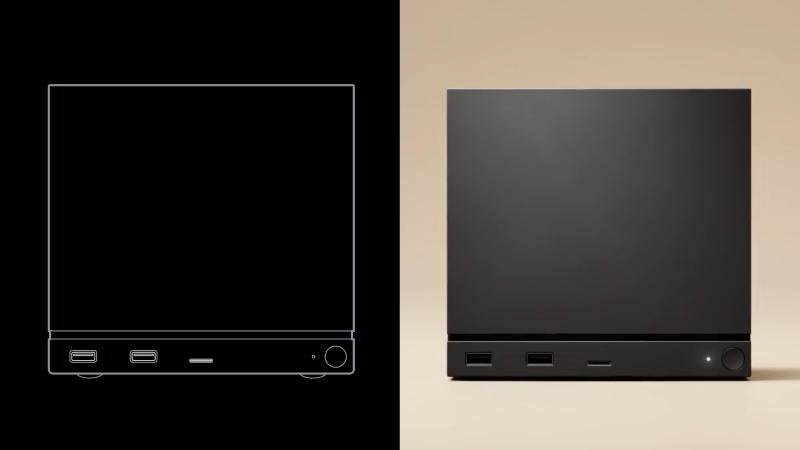
We began shipping Steam Machine at the end of June and now that we’re a few weeks in, we wanted to share more information both on Steam Machine itself and the status of the reservation queue and waitlist as it stands today.
FSR4.1 is now available on Proton Experimental for titles supporting FSR upgrade.
The CAD file for Steam Machine external geometry is available for download here
Reservations and Waitlist updates
We’re fulfilling orders on a daily basis, sending out emails to reservation holders with the option to purchase in the order in which they landed on the list post-randomization. We expect everyone in the reservation queue will have the option to purchase by the end of this year.
With each reservation queue and corresponding waitlist being per-product, per-region, they can move at different speeds based on demand. This means for some products in some regions, we've reached the end of the reservation queue and have started inviting folks from the waitlist. We unintentionally skipped a step with this group by automatically sending the option-to-order email; moving forward, anyone who comes off the waitlist will first receive a message from us confirming you've been added to the reservation queue and can expect an option-to-purchase email sometime after that.
Importantly, no one on the waitlist is leapfrogging over anyone currently holding a reservation; we're only dipping into waitlists if and when we reach the end of the reservation queue for that product and region.
What's next
If you have a reservation, you can expect an email offering you the chance to purchase by the end of the year. If you have a spot on one of the waitlists, there is a chance you could be moved into reservations depending on which product you're on the list for; in those instances we will email you about your new reservation status first, with a purchase email to follow once your spot in that queue comes up.
For everyone receiving a purchase email: You must complete your purchase within 72 hours or we will move to the next person in line.
26.3 Snapshot 6 (known as 26.3-snapshot-6 in the launcher) is the sixth snapshot for Java Edition 26.3, released on July 28, 2026, which tweaks the abandoned camps, makes technical changes, and fixes bugs.
Full changelog: https://minecraft.wiki/Java_Edition_26.3-snapshot-6
We have just shipped an updated Steam Client to the Preview/Beta channel.
General
Allow changing account while a game is running. In this case, the change account dialog shows a warning that proceeding will close active games.
Steam shutdown now waits for just-exited games to finish cloud sync.
Added "Ask which account to use on startup" toggle to startup account chooser.
Eliminated "change account" confirmation dialog in most cases. Changing account while Steam is running now brings up the account chooser directly, then restarts as the chosen account.
The Steam Client Beta has been updated with the following changes:
General
Allow changing account while a game is running. In this case, the change account dialog shows a warning that proceeding will close active games.
Steam shutdown now waits for just-exited games to finish cloud sync.
Added "Ask which account to use on startup" toggle to startup account chooser.
Eliminated "change account" confirmation dialog in most cases. Changing account while Steam is running now brings up the account chooser directly, then restarts as the chosen account.
Downloads
Fixed local game transfers no longer working.
Linux
Fixed Proton games with mixed case paths failing to install or update with Disk Write Errors.
In the 1.60 update, we have introduced the Improved Material System for selected trucks for both Euro Truck Simulator 2 and American Truck Simulator. And today, we bring you a look behind the scenes at how this feature came to life!
The two main people working on this feature are our colleagues Daniel and Martin, who were and still are implementing the system for trucks in both games, and also for cars in the upcoming Road Trip project for American Truck Simulator.
Daniel - Vehicle Technical Leader
"I've been working at SCS Software for over thirteen years. I started as a 3D Generalist, then worked as a 3D Vehicle Artist and Vehicle Team Lead. Today, my role is the Vehicle Technical Leader.
My work bridges the gap between the graphical and technical aspects of development. I collaborate with programmers to implement vehicle features into the engine, while also helping artists establish efficient workflows. I also design new tools and technical improvements.
My task on the improved material system was to identify the problem, propose a solution, and collaborate with programmers on its implementation into the engine. Next, we needed to set up a practical workflow for the vehicle team so that the system could be used consistently across other vehicles. The programmers created the necessary support in the engine and shaders. The graphic designers then converted and fine-tuned the materials for specific trucks."
Martin - Senior 3D Graphic Designer
"I work as a Senior 3D Graphic Designer specializing in vehicles. I also worked as Head of Content for the Road Trip project. I participated in selecting the vehicles and their specific variants, handled research and pre-production, provided expert consultation, and subsequently worked on the actual creation of the vehicles. I also helped Dan fine-tune changes to the material system.
Cars have been a long-standing passion of mine, especially sports cars and classic cars - particularly American ones. Thanks to this, I was able to bring my own experience and knowledge of American automotive culture, history, and the technical development of individual models to the project.
My main task was the 1967 Ford Mustang and everything related to its visual and content preparation. I was involved in selecting the specific car and its variant, conducting research, gathering references, consulting during data collection, and the actual creation of the model and materials.
During the development of the new material system, I prepared and fine-tuned the individual surfaces on the Mustang. Together with Dan, we used this car to verify how the new technical solution behaved in practice and which values provided the most accurate results."
How did this project start?
"Development began while we were working on the Road Trip project. The interiors of passenger cars are smaller and darker than those of trucks, so the shortcomings of the original system were more noticeable in them.
Aside from direct light, the original system had no way to render light within the interiors. In the real world, a large portion of the visuals consists of so-called indirect, or reflected light (GI). However, the game did not work with this concept at all and was not designed for it. We knew we needed to change this somehow.
The second problem was that the interiors of the trucks contain many different materials, such as fabric, leather, plastic, painted surfaces, metal, and glass. The original system was unable to render them accurately, especially under indirect lighting; everything looked very flat.
"Road Trip provided us with a suitable, isolated environment for development and testing. From the start, however, we designed the system so that it could also be used for trucks," says Daniel.
What did you have to do before actually starting to implement the improved system?
"We needed to map out the actual vehicles and the materials used in their interior in detail through extensive research. I studied magazines, photographs, available documentation, and individual trim levels. While gathering data, we had the opportunity to see the specific car in person, speak with its owner, and document its construction and appearance in detail.
It wasn't enough to simply determine that a certain part of the interior was made of, for example, plastic, leather, or metal. We also had to examine the surface texture, the degree of gloss, the way the material reflects light, its wear and tear, the color shade, and the differences between individual parts.
This research laid the foundation upon which we could later assess whether the materials in the game corresponded to the actual vehicle," Martin told us.
"We also had to decide which direction to take. One of the key requirements was maintaining performance, so we looked for approaches that didn't require complex computational operations and sought techniques that would achieve good results with minimal changes to computational complexity. I believe the result of our efforts is a noticeable improvement in graphics with minimal impact on performance," Daniel shared with us.
How did the process of bringing the new system into the game look?
"We needed to implement changes to the engine regarding how the game loads and handles reflective textures. A reflective texture is essentially a cube where each face shows a reflection in a different direction relative to the player. Using it is significantly more efficient than calculating actual light reflections using ray tracing. We made several changes to the code to gain direct access to individual mipmaps. A mipmap is a scaled-down copy of the original image, typically used when a textured object is farther away from the player to eliminate unappealing texture aliasing. In our specific case, however, a lower resolution automatically results in a softer reflection, which can be used for materials that do not have a 100% glossy surface but rather a physically rougher surface, causing the reflection on the material to be more diffuse.
This way, we created several different levels of reflection smoothness, ranging from perfectly glossy surfaces like chrome, through smoother reflections such as those found on leather seat materials, to rough, nearly non-reflective materials like fabrics, where one side of the reflection cube is only 2x2px. In our case, it replaces the Iradience map, which means it primarily serves to project the surrounding light palette onto the given material (color cast). The game was already calculating the mipmaps themselves, which means this change costs us practically nothing in terms of performance - and that is the main reason we decided to use this approach.
Along with the material changes, we also needed to rebalance the contrast and lighting throughout the game to eliminate extremely dark areas and achieve a more realistic sense of lighting.
Unlike the original solution, where reflective textures were used only for highly reflective materials, particularly metals, the revised system applies a reflective texture to every single material in the vehicle's interior. However, they differ in how strongly the reflection is visible in the final image and in the softness of the reflection applied. This ensures that even less reflective materials - especially plastics - convey a sense of reflected light, color cast, and improved contrast, particularly in shaded areas of the interior. Players will now notice that the entire interior actually reacts to the truck's surroundings; for example, when driving past trees, the part of the interior near the windows takes on a subtle green tint. This makes the game feel much more realistic than before, even without the computationally expensive global illumination (GI) calculation.
Once the technology was ready, we needed to determine how to adjust the individual materials under the new conditions. Since each material now includes a reflective component, we had to completely rebalance all the settings for each material. To ensure that existing textures would function correctly with the new settings, we also had to rebalance their color and specular components to the standard values we had established during our extensive testing.
The final step for system-wide deployment was to create a material library so that we wouldn't have to configure each material type separately for every vehicle," Daniel explains.
What were the biggest challenges in implementing the system?
"The biggest challenge was the diversity of the vehicles. The individual trucks were created at different times and used different source data, textures, and rendering methods. There is no single conversion that works for all trucks. Each completed interior has its own structure and requires a customized approach," says Daniel.
"Also, the individual properties of materials influence one another. Changing the reflectance or roughness might improve the appearance of one surface, but at the same time cause the material to behave poorly in a different lighting situation. Or a material that looked right in direct daylight might be too shiny in a dark interior or react unnaturally while driving at night. It was therefore necessary to constantly strike a balance between realism, visibility, and consistent behavior. The goal was not to make all surfaces more prominent or shinier, but to accurately capture the differences between them.
We reworked many of these steps several times during development. However, the result was not just materials for one specific car, but also experience and guidelines that will significantly facilitate work on future vehicles.
The process wasn't straightforward. It wasn't enough to simply set a few parameters according to a pre-prepared table. We had to figure out many of the values ourselves, and together with Dan, we tested them repeatedly right in the game," Martin added.
How did you manage to do the changes without affecting performance?
"Our players use a wide range of hardware. We didn't want to create visual enhancements that would significantly reduce the game's performance or even make the game unplayable for some players. Therefore, the system is not based on a new, resource-intensive lighting simulation. It extends the existing rendering pipeline and utilizes already available data more efficiently.
Performance was continuously profiled during development. The goal was to achieve a visible improvement with minimal impact on the graphics card and memory. Furthermore, the system is configured to function with a certain trade-off even when set to medium or low - in such cases, while reflections are not rendered in real time and some benefits, such as realistic color cast from the vehicle's surroundings, are lost, the materials themselves still look realistic and can be distinguished from one another," says Daniel.
So far, we've implemented the improved material system on four trucks across ETS2 and ATS. Rather than making the community wait until every truck has been updated, we'll continue rolling out the improved material system for other trucks gradually, allowing you to enjoy the improvements on some vehicles already while we complete the rest. As Daniel explains here:
"Each truck requires individual adjustments, a visual inspection, and testing of all variants in daylight, at night, in the rain, and in cloudy weather. Therefore, it was not possible to update the entire fleet at once. This smaller initial group will allow us to verify the entire production process, maintain quality, and gather feedback from players."
We hope you have enjoyed this in-depth look at how we work on the improved material system. Make sure to also add the Ford Car Pack and the RAM & Dodge Car Pack to your Steam wishlist, so you can enjoy this feature on cars when we release them.
If you've been following our rework projects in American Truck Simulator, you may be wondering what's next after our recent focus on Route 66. Today, we're excited to share the answer! Our next major undertaking will be the Nevada Rework Project, where we'll give the Silver State a complete overhaul.
As part of this next phase, our map designers will focus on the entire state of Nevada, reworking all of its existing cities and road networks to bring them up to the quality standards of our latest content. Since Nevada was one of the original states released with American Truck Simulator, this rework will allow us to rebuild many locations from the ground up while preserving the character and atmosphere that make the state so unique.
In addition to refreshing familiar places, we're also taking the opportunity to expand Nevada with locations and road connections that were missing from the original version. One example is the city of Fallon, located east of Carson City. Alongside it, we'll also add the missing sections of US-95 that pass through Fallon from south to north, creating a more complete and authentic driving experience.
Throughout the state, you can also look forward to a variety of brand-new custom depots, offering more diverse delivery destinations and making freight transportation across Nevada feel even more immersive than before.
This is just the beginning of the Nevada Rework Project, and we're looking forward to sharing more previews from development as work progresses. Be sure to follow us on X/Twitter, Facebook, Instagram, TikTok, Bluesky, and YouTube, or sign up for our newsletter so you don't miss any future updates. Until next time, keep on truckin'!
With so many amazing games on Steam, players are wishlisting more and more titles. Existing options like ranking and filtering are great, but players have asked for even more ways to manage their Steam wishlists. Today we're adding categorization as well as improved search and sharing to the wishlist. Read the full post below for the details, then try out all the new tools on your own wishlist.
Categories added to wishlist
First and foremost is the ability to create and assign custom categories to games on your wishlist. You might want to create a custom category for games you saw featured in a cool event, games best played with a controller, or even games you have in mind for someone else.
Adding custom categories is quick and easy...
Filter to a category by simply clicking on the category name at the top of your wishlist or next to the My Categories area of each game
Quickly add to your frequent categories from the "On Wishlist" dropdown on store pages
Customize wishlist notifications to only be sent for certain categories
Other improvements
We've improved the search experience on the wishlist page and enabled autocomplete for faster results
We now highlight when a game on your wishlist has a demo available. You can also be notified when a demo is released for a game in your wishlist.
Microtrailers are now shown when hovering each games capsule image
Navigating to/from your wishlist in a browser, mobile, Steam Client, or Steam OS does a better job of bringing you back to what you were looking at
Plus we've made some tweaks to the wishlist page to improve contrast and legibility
Sharing your wishlist
You can already share a link to your wishlist, now you can share a link to a specific category on your wishlist, or even a filtered view of your wishlist.
Clicking on the share button at the top of your wishlist gives you a unique URL to share with friends and family. People with the link can view the shared list even if your wishlist is set to private. Links can be revoked at any time.
This sharing link will only show the games in the your current filtered view. For example: you might want to share 'My Birthday List' with your family. From that shared link, your family can gift games directly to you, even if they don't have a Steam account...
More gifting improvements...
As we hinted at above, we suspect one common new category for wishlists will be games you want to buy for a friend or family member. With that in mind, we paired this wishlist change with a big update to gift purchasing on Steam. Check out all the gift improvements here!
Steam gifts are a popular way to send copies of games and digital gift cards to friends and family. Today we’re shipping some great new features that improve the gifting experience, making it easier to send both digital gift cards and games. These features pair nicely with the Wishlist categories and other improvements that are also now available.
Guest checkout
In 2024, we added guest checkout, which lets a family member or friend make a gift purchase without needing to create a Steam account. This feature was limited to digital gift cards and hardware purchases at the time.
Now guest checkout can be used to buy any game on Steam.
You can send a wishlist share link to a friend or family member and they can purchase gifts directly from that list without needing a Steam account themselves. If a guest wants to send a gift as a surprise they can send it to any email address instead.
Gift to email
Don't know your nephew's Steam account? No problem, both digital gift cards and games can now be sent directly to email recipients. And don't worry if your nephew's email address is the same one they use for their Steam account. The email will include a link to let them sign in to their account and accept the gift.
Please note that any gift email not accepted within 30 days will be automatically refunded, so they cannot be scheduled for future delivery. The recipient of the gift must also live in the same country as the purchaser.
Cross-region gifting
Buying a gift for a friend in a higher-priced region? In the past, digital gift cards were the solution for gifting, but that required you to know the full price of the game in your friend's region.
Now you can gift games directly to your friend. Steam will match the increased price in your friend's region at checkout. Your friend needs to be on your Steam friends list to send this type of gift.
Direct from wishlist
Sending a friend or family member a link to your wishlist is a great way to help them choose a great gift for your birthday or holiday. We have made a number of share link improvements, including:
You can now send a digital gift card or gift a game directly from someone's wishlist
You no longer need to be friends on Steam to send gifts
You can create a shared wishlist link that is filtered to specific games
When a friend or family member clicks on your shared wishlist link, if they choose to gift you a game, the gift recipient in the cart will be pre-populated with your information.
And remember from above, your friend or family member can checkout as a guest, without needing to create a Steam account
More wishlist improvements...
That wraps it up for today's gift related updates. Check out our Steam Wishlist announcement to learn about wishlist categories and other improvements that are now available.
Our wheels keep turning, and today we’re ready to share a teaser of another U.S. state currently in development for American Truck Simulator. Let’s see how good your guessing game is!
So, here are your clues! Take a close look at the screenshot and teaser video below. It may seem a little fishy at first, but sometimes the smallest hints can lead to the answer.
This next destination is known for its wide-open spaces, long-haul roads, and a landscape where the horizon seems to stretch on forever. It’s a place shaped by hardworking industries, strong prairie winds, and a pioneering spirit that still runs deep today.
Think you’ve caught on to where we’re heading next? Drop your guesses in the comments below, and when the time is right, we look forward to sharing more about what awaits on the road ahead in this part of the U.S. Until then, be sure to follow our blog and our social channels on X, Instagram, Facebook, and TikTok so you don’t miss a thing.
We have just shipped an updated Steam Client update to the Stable channel.
General
Improved notification settings layout in some languages
Restored the full set of options to the 'Maximum Game Resolution' dropdown. They can be found under the 'More Options' sub-menu.
Fixed a case where the 'Patch Notes' preview box in Settings->System would incorrectly show an event for the wrong channel. E.g. showing Beta Channel notes when the client is opted in to the Stable Channel.
Fixed a crash when manually starting a game recording.
Fixed mouse cursor changing to resize cursor at screen edges.
Fixed a case where the controller pairing screen could pop up during controller firmware updates.
Desktop Mode
Fixed incorrect UI scale being used when in Big Picture Mode.
Steam Machine
Show Steam Machine Verified information on the game capsules in home, and on the game details screen.
Added 'Great on Machine' section to the Library
Steam Workshop
Re-worked system that managed what subscribed items needed to be updated.
Remote Play
Added 59.94 FPS as an available framerate limit
Reduced frame drops when the framerate limit is set to automatic
Fixed offline devices showing as streamable when they aren't.
Fixed overloading the client video decoder when unlimited bandwidth is enabled
Fixed mouse coordinates for input-only streaming
Fixed very low refresh rate on some systems, introduced in the last beta
Steam Input
Steam Controller: The Gyro Calibration Threshold has been set to 50% of the previous value so that it is less likely to trigger while in hand.
Steam Controller: Gyro Calibration threshold is now available in Steam->Settings->Controller->Details->Calibration & Advanced (Open)->Gyro Calibration.
Steam Controller: You can choose to disable hardware calibration and rely on the standard Steam Input Gyro Calibration tools instead, by using the "Enable Software Calibration for Steam Controller" toggle.
Steam Controller: Fixed Gyro stutter due to IMU timestamp being ignored.
Added support for both the wired and wireless versions of the PDP Afterglow Wave Controller for Nintendo Switch.
Added support for Turtle Beach controllers for Nintendo Switch 2.
Steam Controller Firmware
Fixed occasional repeated trackpad samples that caused issues with momentum during trackball mode.
Fixed an issue with unintentionally waking host devices while shutting down the controller.
Fixed an issue with occasional repeated button presses on the B Button.
A new Steam Client update has been released and will be automatically downloaded.
General
Improved notification settings layout in some languages.
Fixed a case where the controller pairing screen could pop up during controller firmware updates.
Steam Workshop
Re-worked system that managed what subscribed items needed to be updated.
In-Game Overlay
Fixed a case where the in-game overlay could hold a reference and prevent a game which tries to fully tear down and recreate the renderer after a D3D12 device/driver failure from succeeding.
Remote Play
Added 59.94 FPS as an available framerate limit.
Reduced frame drops when the framerate limit is set to automatic.
Fixed black screen when hardware encoding is disabled.
Fixed offline devices showing as streamable when they aren't.
Fixed overloading the client video decoder when unlimited bandwidth is enabled.
Fixed mouse coordinates for input-only streaming.
Steam Input
Steam Controller: The Gyro Calibration Threshold has been set to 50% of the previous value so that it is less likely to trigger while in hand.
Steam Controller: Gyro Calibration threshold is now available in Steam->Settings->Controller->Details->Calibration & Advanced (Open)->Gyro Calibration.
Steam Controller: You can choose to disable hardware calibration and rely on the standard Steam Input Gyro Calibration tools instead, by using the "Enable Software Calibration for Steam Controller" toggle.
Steam Controller: Fixed gyro stutter due to IMU timestamp being ignored.
Steam Controller: Fixed glyphs in Shadow of the Tomb Raider.
Added support for both the wired and wireless versions of the PDP Afterglow Wave Controller for Nintendo Switch.
Added support for Turtle Beach controllers for Nintendo Switch 2.
Fixed the Apex 5 controller showing up as multiple controllers when "Allow third-party apps to take over mappings" is enabled in the FlyDigi Space Station app.
Steam Controller Firmware
Fixed an issue where trackpad samples could be duplicated and cause issues w/ momentum in trackball mode
Fixed an issue with unintentionally waking host devices while shutting down the controller.
Fixed an issue with occasional repeated button presses on the B Button.
Linux
Fixed a crash when manually starting a game recording.
Fixed steamwebhelper crash when hardware acceleration is enabled on NVIDIA gpus.
macOS
Fixed chat windows showing over fullscreen game windows when opened in the Steam overlay.
VR
Fixed a case where Steam claimed that SteamVR crashed on last run when it didn't.
Today, we take you on a preview journey to beautiful Rapid City, one of the cities you will find when driving through our upcoming South Dakota DLC for American Truck Simulator!
Rapid City is located in a picturesque landscape surrounded by some of South Dakota's most popular natural attractions. Heading west opens the way to the Black Hills National Forest and the iconic Mount Rushmore - the reason Rapid City is also known as the Gateway to the Black Hills. Traveling east along Interstate 90 takes you toward the rugged landscapes of Badlands National Park.
Beyond its surroundings, Rapid City has a rich heritage, as it celebrates its 150th anniversary this year. It has grown from a small settlement into a thriving regional hub while preserving the character that makes it unique. Today, tourism is one of the cornerstones of the local economy, with visitors drawn not only to the beauty of the region but also to the historic streets, distinctive buildings, and local landmarks.
Our asset and map designers have recreated plenty of these buildings and structures to bring Rapid City to life. Among them are two hotels, one of which is located in the heart of downtown, known for its appearance and history dating back to the 1920s. Driving further, you will also find another historic building that once served as the fire station and is now transformed into a local winery.
Some of the landmarks can be seen from a distance yet are instantly recognizable, such as the large white "SMD" letters displayed on the hillside above the city. Created by students as a tribute to the South Dakota Mines school and community, it has become one of the symbols of Rapid City. Another smaller landmark you may notice is the gateway entrance to Memorial Park, located in the center of the city along Rapid Creek.
You will also find many more landmarks as you explore Rapid City, from larger ones such as the city hall and administration buildings to smaller ones like a roadside windmill, a statue in the downtown, and others. Each of these elements has been recreated to help capture the atmosphere and identity of the real place.
And if you are visiting not only for sightseeing but also to take on a job, you will find plenty of depots to choose from. These include a cement works, a gas and chemical distribution facility, a sawmill, a warehouse, a home store, waste management, and even a custom-made grain elevator depot, all ready to load up your trailer.
Also, remember to follow us on Twitter, Facebook, Instagram, Bluesky, and YouTube for all the latest news from not only this map expansion, but also other American Truck Simulator projects, or sign up for our newsletter to stay informed. Until next time, safe travels!
26.3 Snapshot 5 (known as 26.3-snapshot-5 in the launcher) is the fifth snapshot for Java Edition 26.3, released on July 21, 2026, which fixes bugs.
Full changelog: https://minecraft.wiki/Java_Edition_26.3-snapshot-5
Steam Train Fest is chugging along through July 27th at 10 a.m. PT! Score deals on train games of all kinds: Building train stations and train tracks, managing entire lines, or riding the rails in general.
Join us for Steam Train Fest and get your Steam Library on track. (Eh?)
With the upcoming 1.61 update for Euro Truck Simulator 2, we’re excited to introduce a complete rework of the Livestock Trailer, which our vehicle team has reworked from the ground up. Let’s take a closer look at what changes have been made!
The goal for our team was to create a model that closely matches what you’d see on the road in the real world, with a strong focus on detail. Inspired by modern European livestock trailers, our vehicle team rebuilt the trailer entirely from scratch, replacing the previous older model with a brand-new one.
One of the biggest changes drivers will notice is the removal of the older belly axle variant, which has been replaced with a lowered chassis configuration featuring dual wheels. Alongside this, the trailer has been refined with improved proportions, updated details, and an overall cleaner, more modern appearance.
For those who own their own Livestock trailers, the updated trailer will offer multiple customization options, including two chassis variants, a Straight 3 Axle and a Lowered 3 Axle configuration. Drivers will also be able to choose between an Aluminium body or a fully paintable body.
A wide range of accessories have also been included to customize your trailer including storage boxes, water tanks, side protections, full side covers, fenders, marker lights, rear bumpers, mudflaps, a spare tire, and a fire extinguisher.
We’re also introducing newly configurable paint jobs for owned trailers, allowing you to customize up to four different colour sections across specific parts of the trailer for even greater customization. Freight Market and AI traffic variants have also been reworked based on the new owned trailer model, with company paint jobs completely reworked to better reflect more realistic transport operations.
We look forward to seeing you out on the road with this reworked trailer in Euro Truck Simulator 2. Be sure to keep an eye our blog and social media channels for more upcoming development news on the 1.61 update and more. Until next time, keep on truckin’!

 Log in