Lees weergave
SteamOS 3.8.2 Beta: Second Clutch
Note: This update is for the Steam Deck Beta and Preview channels, and includes new features that are still being tested. You can opt into this in Settings > System > System Update Channel.
These notes contain all changes since the current stable SteamOS 3.7 release, with those additional changes since the previous 3.8.1 Beta:
New in 3.8.2
Fixed a regression that could cause Borderlands 2 to crash on startup on certain systems
Fixed trackpad losing functionality after sleep/resume on the Legion Go
Security updates to Flatpak, libpng and openssl
General
Fixed a case where WiFi performance could become degraded until the device was put to sleep or manually reconnected
Fixed excessive trackpad sensitivity on certain early Steam Deck LCD models
Initial support for upcoming Steam Machine hardware
Updated Arch system base
Updated graphics driver with performance and stability fixes
Fixed a case where per-app performance settings would intermittently fail to apply when launching a game
Improved support for the screencasts in Game Mode (e.g. OBS/Discord)
Fixed dropdown menus not appearing in some games
Improved VRR frame pacing
Fixed FSR badge remaining off in the performance overlay, even if it was actually active
Improved support for games that attempt to open PDF files in external viewers
Fixed an issue affecting certain titles (such as "SpongeBob SquarePants: Titans of the Tide") where the game window could have an incorrect position
Fixed closing certain titles (such as "STAR WARS Jedi: Survivorβ’") and Starfield resulting in a session crash
Improved support for certain USB racing wheels and USB devices that boot in a non-standard mode
Frequently these are devices that appear as USB storage devices with a driver installer, and must be switched to their normal mode by the OS
Steam Deck controller firmware updates now display update progress on the splash screen
Fixes issue on specific Steam Deck revisions where firmware updates could render the left controller inoperative for that session
Numerous stability and security updates
Bluetooth
Re-re-enable Bluetooth Wake for Steam Deck LCD
Fix for more spurious wake issues that were present in earlier attempts
Audio
Detect HDMI channel count and expose surround configuration if available
Add a setting to allow using Bluetooth headset mics (Bluetooth playback quality will be worse while capture is active)
Restore internal audio device on reboot if set to "Off" in desktop mode
Increase suspend timeout for HDMI devices so initial audio isn't cut off after a few seconds of inactivity
Fixed a bug with switching input devices when a wired headset is plugged in
Fixed an issue where audio underruns could be experienced after sleep/resume
Accessibility
Added an option to force mono audio output
Desktop Mode
KDE Plasma updated to version 6.4.3 from 6.2.5, and now uses wayland by default
Fixes several cases of reduced performance in Desktop Mode compared to Game Mode
Improved support for rotated displays
Better scale factor out of the box on TVs
Adds support for external HDR displays
Adds support for VRR displays
Adds support per-display scale factor
For more information, see Plasma release announcements
Keyboard layout and language are now obeying Game Mode settings
Improved windowing behavior for games running in Proton
System Firmware
Includes Steam Deck LCD BIOS v133
Security updates
Added "Memory Power Down" setup option
Preliminary support for hibernation
Includes Steam Deck OLED BIOS v114
Security updates
Charging LED now changes color when charge limit is reached, rather than only at 100%
Non-Deck
Improved compatibility with recent Intel and AMD platforms
Greatly improved video memory management with discrete GPU platforms
Fixed a compatibility issue with the SteamOS chainloader that could cause a boot failure on some desktop systems with recent UEFI firmware
Power button short and long presses now supported across a wide variety of devices
Improved controller support for OneXPlayer F1 series, GPD Win 5, GPD Win Mini, Anbernic Win600, OrangePi NEO, and Lenovo Legion Go
Added controller support for OneXPlayer X1 series and Lenovo Legion Go 2
Added system and controller firmware update support for the Lenovo Legion Go 2
Added preliminary charge limiting support for Legion Go, Legion Go S, and Legion Go 2 - currently only accessible in Desktop Mode
Added controller RGB LED color settings for the Lenovo Legion Go 2
Added controller, TDP control, and speaker audio support for the ASUS ROG Xbox Ally series
Reduced handheld controller input latency from 5-8ms to 100-500us
Night mode, color vibrance, and color temperature sliders in Steam now work on Z2E and later AMD APUs
Seamless boot fixes for Z2E and later AMD APUs
Automatically handle internally rotated display for some third-party handhelds
Improved motion control support for handhelds with BMI260 IMUs
SD card reliability improvements for some third-party handhelds, including ASUS ROG Xbox Ally, Legion Go 1, Legion Go S, Legion Go 2, and MSI Claw
Fixed washed out colors for Zotac and OneXPlayer handhelds with OLED
Fixed some GPU hangs on Phoenix APU devices (Tales of Arise, Octopath Traveler II)
Fixed ASUS ROG Ally power consumption from fingerprint reader while shut down
Developer
Desktop Mode now uses Wayland by default
X11 support may still be selected via Steam developer settings, or via `steamosctl`
Updated Linux kernel to 6.16
Steam now uses steamos-manager to query available desktop sessions and trigger desktop session switching
Added support for setting the desktop password in developer settings
Initial support for running as a Virtual Machine guest (virtio guest drivers)
Added support for third-party devices to trigger the SteamOS boot menu via EFI variable
Added `custom-update` verb to `atomupd-manager` for easier testing of specific builds
System reports now include more audio debug information
Initial support for LAVD CPU scheduler via `steamosctl set-cpu-scheduler lavd`
v0.5.0 - βThe Caesar-Augustus memorial sewerβ
0.5.0 (2026-04-12)
- Feature: [#23465] Change plugin JavaScript engine from Duktape to QuickJS-NG, allowing ES6+ features to be used in plugins.
- Feature: [#26178] Port of the Spinning Cars from RollerCoaster Tycoon 1.
- Improved: [#25314] Add unbanked and banked quarter helices to the Alpine, Corkscrew, Giga, Hybrid, Looping, Mine Ride, Mini, Multi-Dimension, Single Rail, Stand Up, Steeplechase and Twister tracks.
- Improved: [#26044] Simplify Android installation by bundling OpenRCT2 assets in APK.
- Improved: [#26293] Objects extracted from saves now have more information in their filenames.
- Improved: [objects#432] Allow saving scenery from RCT1 with track designs.
- Change: [#25962] The station style dropdown now shows entrance icons next to the labels for easier selection.
- Change: [#26175] The ride colour tab is made more compact by collapsing unavailable sections instead of only hiding them.
- Change: [#26178] Symmetric spinning trains and legacy βpre-reversedβ trains can no longer be reversed.
- Fix: [#10616] Quarter-tile trees cannot be placed on dry portions of half-water tiles.
- Fix: [#25128] Mute button displayed in wrong state after load.
- Fix: [#25460] Infinite loop when moving track design ghost queue over queue loop with zero clearances.
- Fix: [#25735] Ride synchronisation z-check works incorrectly.
- Fix: [#25919] Path drag tool error sound stacks when placement fails.
- Fix: [#25926] Path drag tool shows cost for single tile instead of total.
- Fix: [#25927] Wall drag tool error sound stacks and shows wrong cost.
- Fix: [#25962] Dropdown triangle glyphs are not optically centred.
- Fix: [#25993] Toggling βallow arbitrary ride type changesβ does not resize open ride windows.
- Fix: [#26111] Vehicle colours tab can go out of bounds in certain edge cases.
- Fix: [#26118] Windows installers for releases are not signed properly.
- Fix: [#26128] The loan spinner widget does not appear on the same baseline as the text around it.
- Fix: [#26140] The time a guest has spent in a queue overflows back to 0 after it reaches 65535 (about a year).
- Fix: [#26159] The map generator window is not resized correctly in Enlarged UI mode.
- Fix: [#26196] The sprites of one angle of the Steeplechase left large turn are misaligned (original bug).
- Fix: [#26214] The wrong sprite is used for one angle of the gentle diagonal slope of Alpine, Hybrid and Single Rail tracks.
- Fix: [#26243] Increase max dropdown size from 512 to 1024 to accommodate parks with more than 512 rides.
- Fix: [#26306] Platform::FindApp fails to locate Homebrew-installed tools on macOS.
- Fix: [#26339] Crash when setting up a marketing campaign.
- Fix: [objects#430] The RCT1 Reverse Freefall car can be reversed and show broken sprites when doing so.
Release created in https://github.com/OpenRCT2/OpenRCT2/actions/runs/24303301342
SHA256 checksums:
545aacbbce6e0f00097c6a2efe9d1d7a4226f20f8f120304e41324e955406387 ./OpenRCT2-v0.5.0-Linux-bookworm-x86_64.tar.gz
b390cba3ecfecb5c3188fe33b8391a7045a039739c382e0fa6b9ff0f0d4c101e ./OpenRCT2-v0.5.0-windows-symbols-arm64.zip
7736205ec96e93203c129038475026764a267d7883f11095b4ed0b98ca49852c ./OpenRCT2-v0.5.0-macos-universal.zip
af94d53b5259c28d8639f264e8dfe88a4ca68aa60b90631cb27a66caa895a6b2 ./OpenRCT2-v0.5.0-sha256sums.txt
f714431d73d77e66f4808e728a4b54c14c59b931b36d49e4d4ac238e2490aac3 ./OpenRCT2-v0.5.0-windows-symbols-win32.zip
8d1d6fd2afe324ed8b74b4483ee5693256cdc69a1a3159818bbbba49914b2e13 ./OpenRCT2-v0.5.0-windows-installer-x64.exe
20260b77324bd8e9cad95a8e4da2ef69d56a95e6715de0a64d824be8e57333b5 ./OpenRCT2-v0.5.0-Linux-trixie-x86_64.tar.gz
99d626e6aca3168ff48900dc4c3aa0c3f3a7026f5974181840b62f1f099202b1 ./OpenRCT2-v0.5.0-windows-symbols-x64.zip
5557043fe8e12457307a1bdf743a1daeb772bba9c36637664731fdebed19b948 ./OpenRCT2-v0.5.0-windows-portable-x64.zip
74d1b920033ee54effb35674fa53659ad8b942378649a98dd7efc6ba923f236c ./OpenRCT2-v0.5.0-windows-installer-win32.exe
e1dbdf337c3a02a03b7722752a749303277c20fcae962471705f214d4c14b9fc ./OpenRCT2-v0.5.0-Linux-resolute-x86_64.tar.gz
8f5660356449a086667d02525fc63c9d85e9883f47cb50d501febc4476551d41 ./OpenRCT2-v0.5.0-windows-installer-arm64.exe
cb174ca94e48a3aa8d83fa8f9e5b13df281b8d56f1bd67f7a5f5ed5dc0addb31 ./OpenRCT2-v0.5.0-android.apk
0d1f01be35d8d4632aa3dc67d33b084f610576a2b1d966011964951eac15e303 ./OpenRCT2-v0.5.0-windows-portable-win32.zip
e1c27003ba27bea8dc7cf7c1f41fc51e2a271269b8911ffa19905dc2447a3d97 ./OpenRCT2-v0.5.0-windows-portable-arm64.zip
42885a0f51bed6f145488161a6d932912050a15f2f3ac32bb7a5d48d42b03a6d ./OpenRCT2-v0.5.0-Linux-noble-x86_64.tar.gz
780c2a48f0ab917dd4b10079eb13c57093919410a5c7a356492c728315b6cb9a ./OpenRCT2-v0.5.0-linux-x86_64.AppImage
Steam Deck Beta Client Update: April 10th
We have just shipped an updated Steam Deck Client to the Preview/Beta channel.
The Steam Deck Client has been updated again on April 11th to fix a launch failure with certain titles.
General
Additional improvements for captive portals.
Steam Client Beta - April 10th
The Steam Client Beta has been updated again on April 11th to fix a launch failure with certain titles on Linux.
The Steam Client Beta has been updated with the following changes:
General
Added System Report button to the Help section on Windows.
SteamRT3 Beta
Fixed a case where the ~/.steam/root symlink would fail to be created at client startup.
SteamOS 3.8.1 Beta: Second Clutch
Note: This update is for the Steam Deck Beta and Preview channels, and includes new features that are still being tested. You can opt into this in Settings > System > System Update Channel.
These notes contain all changes since the current stable SteamOS 3.7 release, with no changes added since the 3.8.1 preview
General
Fixed a case where WiFi performance could become degraded until the device was put to sleep or manually reconnected
Fixed excessive trackpad sensitivity on certain early Steam Deck LCD models
Initial support for upcoming Steam Machine hardware
Updated Arch system base
Updated graphics driver with performance and stability fixes
Fixed a case where per-app performance settings would intermittently fail to apply when launching a game
Improved support for the screencasts in Game Mode (e.g. OBS/Discord)
Fixed dropdown menus not appearing in some games
Improved VRR frame pacing
Fixed FSR badge remaining off in the performance overlay, even if it was actually active
Improved support for games that attempt to open PDF files in external viewers
Fixed an issue affecting certain titles (such as "SpongeBob SquarePants: Titans of the Tide") where the game window could have an incorrect position
Fixed closing certain titles (such as "STAR WARS Jedi: Survivorβ’") and Starfield resulting in a session crash
Improved support for certain USB racing wheels and USB devices that boot in a non-standard mode
Frequently these are devices that appear as USB storage devices with a driver installer, and must be switched to their normal mode by the OS
Steam Deck controller firmware updates now display update progress on the splash screen
Fixes issue on specific Steam Deck revisions where firmware updates could render the left controller inoperative for that session
Numerous stability and security updates
Bluetooth
Re-re-enable Bluetooth Wake for Steam Deck LCD
Fix for more spurious wake issues that were present in earlier attempts
Audio
Detect HDMI channel count and expose surround configuration if available
Add a setting to allow using Bluetooth headset mics (Bluetooth playback quality will be worse while capture is active)
Restore internal audio device on reboot if set to "Off" in desktop mode
Increase suspend timeout for HDMI devices so initial audio isn't cut off after a few seconds of inactivity
Fixed a bug with switching input devices when a wired headset is plugged in
Fixed an issue where audio underruns could be experienced after sleep/resume
Accessibility
Added an option to force mono audio output
Desktop Mode
KDE Plasma updated to version 6.4.3 from 6.2.5, and now uses wayland by default
Fixes several cases of reduced performance in Desktop Mode compared to Game Mode
Improved support for rotated displays
Better scale factor out of the box on TVs
Adds support for external HDR displays
Adds support for VRR displays
Adds support per-display scale factor
For more information, see Plasma release announcements
Keyboard layout and language are now obeying Game Mode settings
Improved windowing behavior for games running in Proton
System Firmware
Includes Steam Deck LCD BIOS v133
Security updates
Added "Memory Power Down" setup option
Preliminary support for hibernation
Includes Steam Deck OLED BIOS v114
Security updates
Charging LED now changes color when charge limit is reached, rather than only at 100%
Non-Deck
Improved compatibility with recent Intel and AMD platforms
Greatly improved video memory management with discrete GPU platforms
Fixed a compatibility issue with the SteamOS chainloader that could cause a boot failure on some desktop systems with recent UEFI firmware
Power button short and long presses now supported across a wide variety of devices
Improved controller support for OneXPlayer F1 series, GPD Win 5, GPD Win Mini, Anbernic Win600, OrangePi NEO, and Lenovo Legion Go
Added controller support for OneXPlayer X1 series and Lenovo Legion Go 2
Added system and controller firmware update support for the Lenovo Legion Go 2
Added preliminary charge limiting support for Legion Go, Legion Go S, and Legion Go 2 - currently only accessible in Desktop Mode
Added controller RGB LED color settings for the Lenovo Legion Go 2
Added controller, TDP control, and speaker audio support for the ASUS ROG Xbox Ally series
Reduced handheld controller input latency from 5-8ms to 100-500us
Night mode, color vibrance, and color temperature sliders in Steam now work on Z2E and later AMD APUs
Seamless boot fixes for Z2E and later AMD APUs
Automatically handle internally rotated display for some third-party handhelds
Improved motion control support for handhelds with BMI260 IMUs
SD card reliability improvements for some third-party handhelds, including ASUS ROG Xbox Ally, Legion Go 1, Legion Go S, Legion Go 2, and MSI Claw
Fixed washed out colors for Zotac and OneXPlayer handhelds with OLED
Fixed some GPU hangs on Phoenix APU devices (Tales of Arise, Octopath Traveler II)
Fixed ASUS ROG Ally power consumption from fingerprint reader while shut down
Developer
Desktop Mode now uses Wayland by default
X11 support may still be selected via Steam developer settings, or via `steamosctl`
Updated Linux kernel to 6.16
Steam now uses steamos-manager to query available desktop sessions and trigger desktop session switching
Added support for setting the desktop password in developer settings
Initial support for running as a Virtual Machine guest (virtio guest drivers)
Added support for third-party devices to trigger the SteamOS boot menu via EFI variable
Added `custom-update` verb to `atomupd-manager` for easier testing of specific builds
System reports now include more audio debug information
Initial support for LAVD CPU scheduler via `steamosctl set-cpu-scheduler lavd`
Animgraph 2 Beta Update
- [p]Reduced network bandwidth utilization[/p][/*]
On now: Steam Hidden Object Fest!

Steam's Hidden Object Fest is live, and as you can tell from the trailer we've hidden (in plain sight) above, it's packed with discounts on games that require your keen eye.
Search through buildings, castles, rooms, piles, you name it: The objective is to find the object.
The Steam Hidden Object Fest, on now through April 13th. Go check it out now!

Minecraft 26.2-snapshot-2 (snapshot) Released
Minecraft 26.1.2 (stable) Released
Steam Client Beta - April 8th
The Steam Client Beta has been updated with the following changes:
Game Recording
Fixed a bug which affected taking a screenshot from a game recording clip.
Steam Deck Beta Client Update: April 8th
We have just shipped an updated Steam Deck Client to the Preview/Beta channel.
Game Recording
Fixed a bug which affected taking a screenshot from a game recording clip.
Minecraft 26.1.2-rc-1 (snapshot) Released
Steam Deck Beta Client Update: April 7th
We have just shipped an updated Steam Deck Client to the Preview/Beta channel.
Steam Input
Improved controller setting behavior when a controller is disconnected.
Steam Client Beta - April 7th
The Steam Client Beta has been updated with the following changes:
Steam Input
Improved controller setting behavior when a controller is disconnected.
Minecraft 26.2-snapshot-1 (snapshot) Released
Steam Client Beta - April 4th
The Steam Client Beta has been updated with the following changes:
Steam Input
Changed controller settings to use a menu and details structure instead of tabs to list the connected controllers.
Steam Deck Beta Client Update: April 4th
We have just shipped an updated Steam Deck Client to the Preview/Beta channel.
General
Fixed a case where pressing the power button would enter Sleep mode instead of Display-Off Download mode.
Improved compatibility with WiFi captive portals.
Steam Input
Changed controller settings to use a menu and details structure instead of tabs to list the connected controllers.
Steam Deck Beta Client Update: April 2nd
We have just shipped an updated Steam Deck Client to the Preview/Beta channel.
Downloads
Added Remote Downloads Management. This allows you to manage downloads on Remote Steam Clients from the downloads page. You can select different clients by pressing Y on the downloads page.
The App Details page now has the same options and statuses for remote clients as the local client.
Both the local and remote clients must be updated to enable this feature.
Store Home Beta
Fixed "..." context menu in Discounts & Events section
Increased number of capsules per page in various carousels
Smoothed the Featured & Recommended carousel transitions
Updated the Recently Updated section's capsules to link to the corresponding announcement for the game
Steam Input
Fixed a case where radial menus would fail to dismiss after releasing the joystick on Steam Deck
Steam Client Beta - April 2nd
The Steam Client Beta has been updated with the following changes:
Downloads
Added Remote Downloads Management. This allows you to manage downloads on Remote Steam Clients from the downloads page.
The App Details page now has the same options and statuses for remote clients as the local client.
Both the local and remote clients must be updated to enable this feature.
Windows
Updated CPUID SDK used for CPU Temperature in in-game overlay performance monitor when enabled
Store Home Beta
Fixed "..." context menu in Discounts & Events section
Increased number of capsules per page in various carousels
Smoothed the Featured & Recommended carousel transitions
Updated the Recently Updated section's capsules to link to the corresponding announcement for the game
Steam Input
Fixed a case where radial menus would fail to dismiss after releasing the joystick on Steam Deck
Steam Deck Beta Client Update: April 1st
We have just shipped an updated Steam Deck Client to the Preview/Beta channel.
General
Enabled the refreshed Steam Store home page
Updated the Store main menu option to navigate to the Steam Store home page instead of the Great On Deck hub
Cloud
Fixed an issue which could lead to data loss when uninstalling, reinstalling, and playing a game without restarting the client in between
Steam Client Beta - April 1st
The Steam Client Beta has been updated with the following changes:
General
Enabled the refreshed Steam Store home page
Linux SteamRT3 Beta
Fixed Steam tray icon not showing.
Big Picture
Updated the Store main menu option to navigate to the Steam Store home page instead of the Great On Deck hub
Cloud
Fixed an issue which could lead to data loss when uninstalling, reinstalling, and playing a game without restarting the client in between
Counter-Strike 2 Update
- [p]All third-person animations have been re-authored, and in several cases adjusted in response to player feedback.[/p][/*]
- [p]Smoothed in-air crouching transitions in first and third-person.[/p][/*]
- [p]In support of Animgraph 2, the logic adjusting player height on sloped surfaces has been refactored.[/p]
- [p]Player height on ramps is now consistent and no longer depends on approach direction.[/p][/*]
- [p]As a result of this change, grenade lineups on sloped surfaces may have changed.[/p][/*]
- [p]Updated engine code to the latest version of Source 2.[/p][/*]
- [p]Added function GetRoundRemainingTime.[/p][/*]
- [p]Player occlusion now uses a GPU query to prevent players clipping through thin walls when none of their bounding volume is visible.[/p][/*]
- [p]Mix adjustments to help accentuate jump landing sounds during combat.[/p][/*]
- [p]New c4 equip sound.[/p][/*]
- [p]Minor adjustments to ambient sound levels.[/p][/*]
- [p]Fixed missing ambient sounds on team selection and end of match screens.[/p][/*]
- [p]Fixed missing sounds in the main menu UI[/p][/*]
- [p]Mix tweaks while taking damage[/p][/*]
- [p]Fixed bug where DeathCam music cue was causing volume ducking for too long.Β [/p][/*]
- [p]Vertical occlusion is now more gradual at the edges of transition points in Nuke and Vertigo.[/p][/*]
- [p]Various map audio adjustments in Baggage, Shoots, Ancient, Nuke, and Vertigo.[/p][/*]
- [p][strike]In some rare cases, when you turn your head there will be a slight unintended camera shift.[/strike][/p][/*]
- [p][strike]The Karambit crouch animation has a strange wrist rotation.[/strike][/p][/*]
- [p][strike]Certain combinations of graphics settings result in many things rendering as solid black.[/strike][/p][/*]
- [p][strike]Some materials are missing their normal tint.[/strike][/p][/*]
- [p][strike]The Default T shirt is missing its pattern.[/strike][/p][/*]
- [p][strike]Overpass has broken shadows at Fountain, Playground and Long.[/strike][/p][/*]
- [p][strike]Rapid hand switching just shows up as a blinking weapon.[/strike][/p][/*]
- [p][strike]The third-person Shadow Daggers deploy animation is misbehaving.[/strike][/p][/*]
- [p][strike]Third-person idle animations stop during first-person weapon inspects.[/strike][/p][/*]
- [p][strike]The Paracord Knife is missing a deploy animation.[/strike][/p][/*]

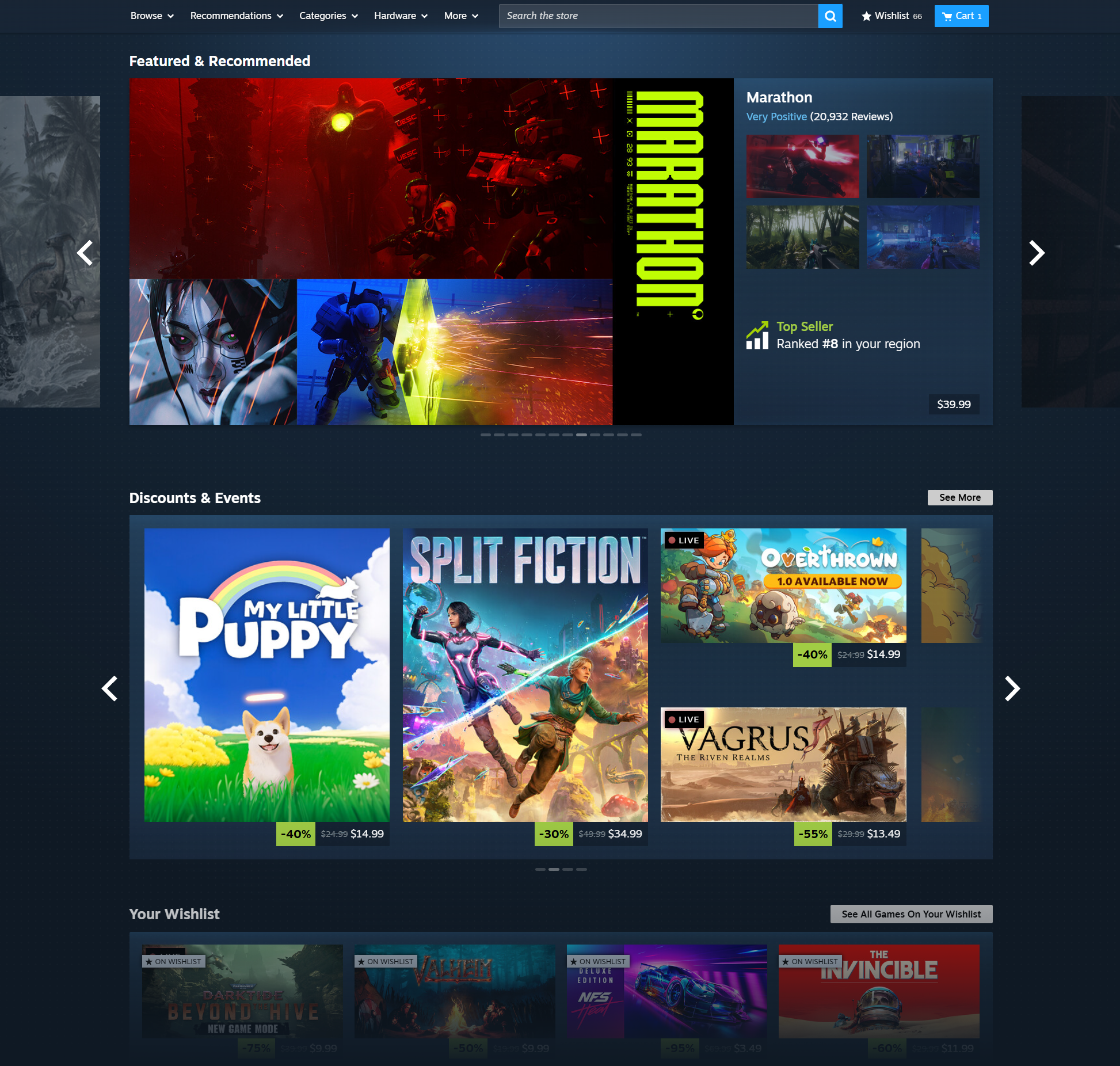
Steam Store Home: A refresh
We're giving the Steam store home a refresh, and you can try it out now by opting into the latest Steam beta within your desktop client.
The updated design is our latest work in making improvements across the Steam store, like the game page updates we made a few months ago. The new layout aims to make it even easier for you to find new games by displaying more content and information. We're now displaying higher resolution game art for better visual clarity. Those of you with higher resolution monitors will notice the new store home is wider and more responsive. If you're viewing the store home on Steam Deck or in Big Picture mode you'll also see these updates.
Updates
Overall Design Refresh: Over the years we've introduced new sections and added new ways for you to discover and learn about games, and this update aims to make the store home feel more cohesive. Each section has a distinct set of tools and information to give users many ways to explore the diverse catalog of games on Steam. A goal of this visual refresh is to strike a balance between providing more consistency in UI elements, while allowing the unique nature of each section to show through.

Featured & Recommended: There is now more detailed information highlighting the reason a game is being recommended to you; plus a user review round-up.Β When hovering over a game's cover art, the game's micro-trailer will play for a quick peak at the action. We also added a sneak-peek of the adjacent games in the carousel.
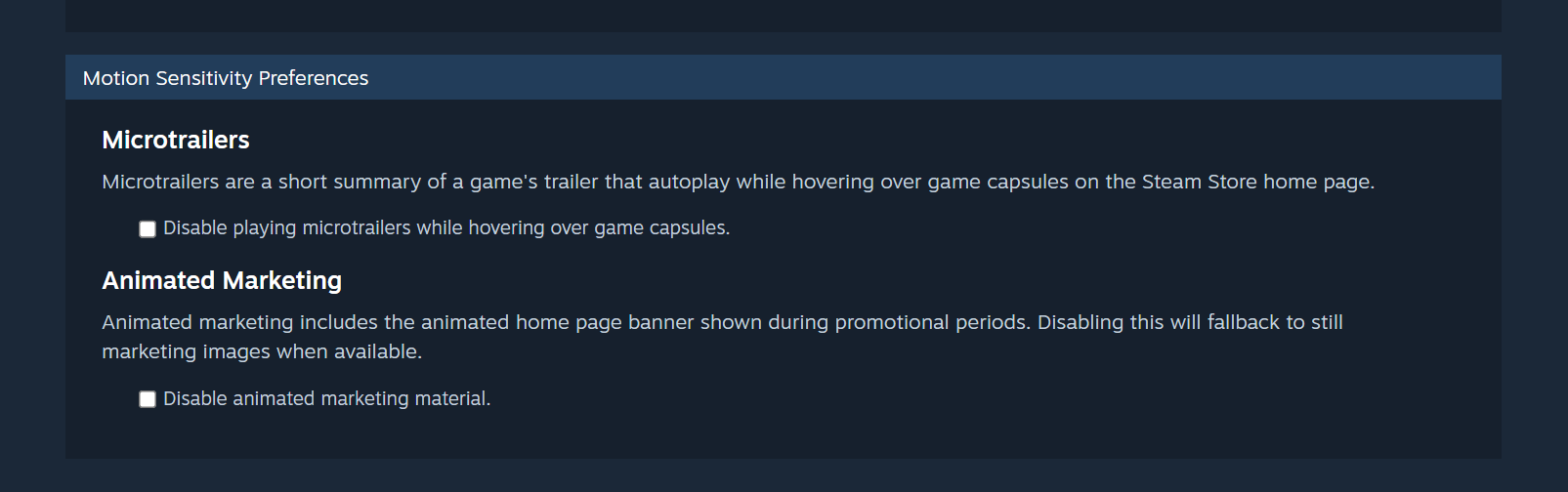
Option to disable: Micro-trailer hovers and animated marketing assets can be disabled in Store Settings for users with motion sensitivity.

Discounts & Events: Now uses larger game artwork.

Updated Discovery Queue: A quicker way to browse titles in your Discovery Queue without leaving the page.

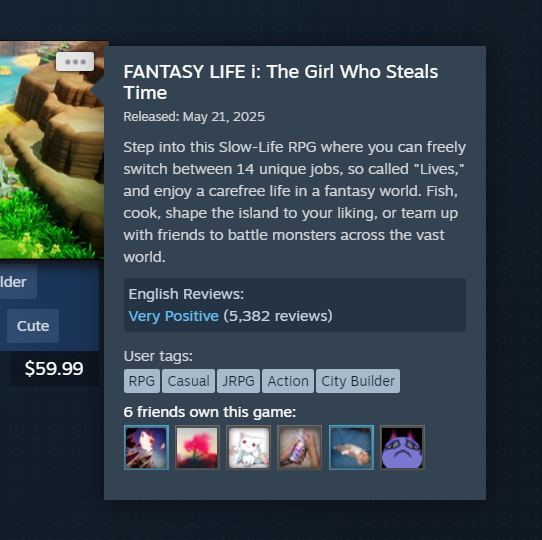
Better Hover States: A short description is presented along with other relevant information. The UI is updated to provide better contrast and legibility.Β

Infinite Scroll: Refreshed design to bring this part of the store home in line visually and functionally with the rest of the sections.
New Sections
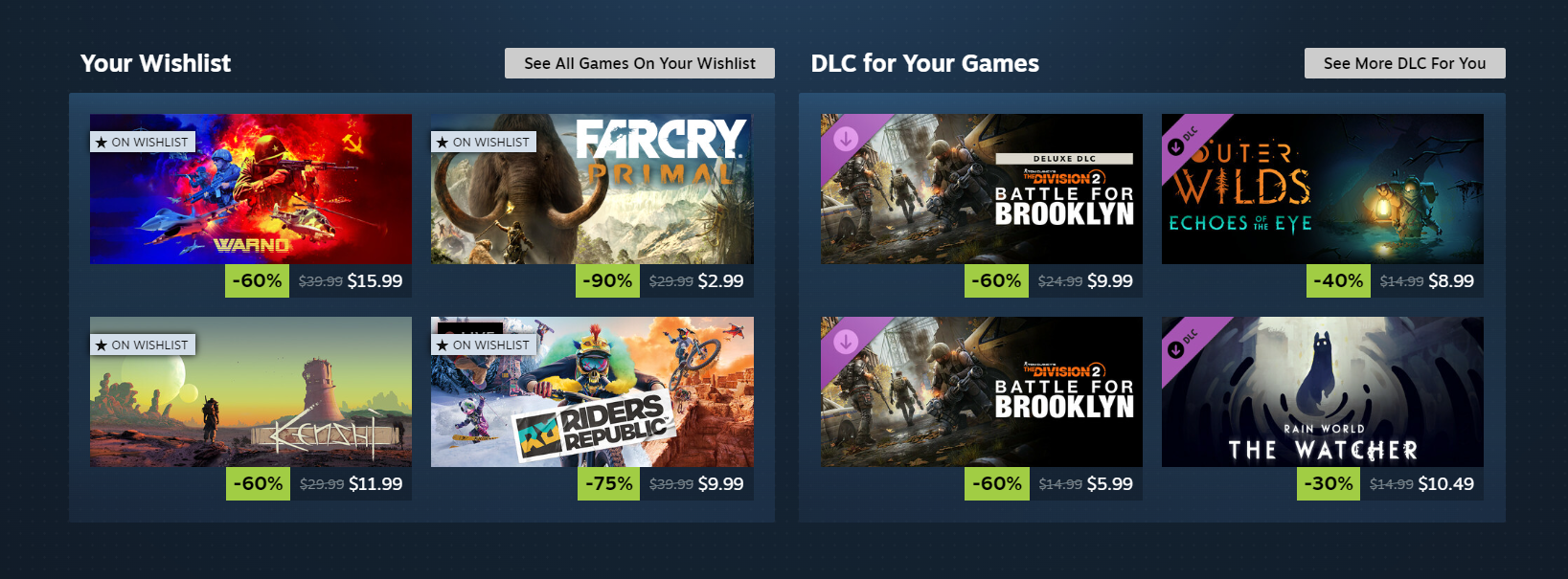
Your Wishlist: This section, as you might guess, features games on discount from your wishlist.Β
DLC for Your Games:Β This section will feature DLC that's on discount for games from your library.

About the beta
We're constantly looking to make Steam better, and we make decisions based on data and feedback we receive.Β The Steam Client Beta is a great way to test features that are in-progress and provide impactful feedback.
Not participating in the Steam Client Beta?Β Here's how to join.Β Try out the new homepage andΒ let us know what you think.

Minecraft 26w14a (snapshot) Released
Minecraft 26.1.1 (stable) Released
Minecraft 26.1.1-rc-1 (snapshot) Released
Steam House & Home Fest - Come On In!

Welcome to your humble abode for the weekβSteam House & Home Festβfeaturing discounts and demos on games all about the home from now through April 6th at 10AM Pacific.
You'll be floored by all the ways you can make a home your own, whether interior decoration, cleaning, organizing, power-washing, renovating, or anything in between. Chores may be no fun in real life, but in these games, there's nothing quite so satisfying as having everything in its right place.
Steam House & Home Fest is in residence now through April 6th...don't sleep on it!

SteamOS 3.8.1 Preview: Second Clutch
Note: This update is for the Steam Deck Preview channel, and includes new features that are still being tested. You can opt into this in Settings > System > System Update Channel.
These notes contain all changes since the current stable SteamOS 3.7 release, with the changes added since the previous preview noted in bold
General
New in 3.8.1 Fixed a case where WiFi performance could become degraded until the device was put to sleep or manually reconnected
New in 3.8.1 Fixed excessive trackpad sensitivity on certain early Steam Deck LCD models
Initial support for upcoming Steam Machine hardware
Updated Arch system base
Updated graphics driver with performance and stability fixes
Fixed a case where per-app performance settings would intermittently fail to apply when launching a game
Improved support for the screencasts in Game Mode (e.g. OBS/Discord)
Fixed dropdown menus not appearing in some games
Improved VRR frame pacing
Fixed FSR badge remaining off in the performance overlay, even if it was actually active
Improved support for games that attempt to open PDF files in external viewers
Fixed an issue affecting certain titles (such as "SpongeBob SquarePants: Titans of the Tide") where the game window could have an incorrect position
Fixed closing certain titles (such as "STAR WARS Jedi: Survivorβ’") and Starfield resulting in a session crash
Improved support for certain USB racing wheels and USB devices that boot in a non-standard mode
Frequently these are devices that appear as USB storage devices with a driver installer, and must be switched to their normal mode by the OS
Steam Deck controller firmware updates now display update progress on the splash screen
Fixes issue on specific Steam Deck revisions where firmware updates could render the left controller inoperative for that session
Numerous stability and security updates
Bluetooth
Re-re-enable Bluetooth Wake for Steam Deck LCD
Fix for more spurious wake issues that were present in earlier attempts
Audio
Detect HDMI channel count and expose surround configuration if available
Add a setting to allow using Bluetooth headset mics (Bluetooth playback quality will be worse while capture is active)
Restore internal audio device on reboot if set to "Off" in desktop mode
Increase suspend timeout for HDMI devices so initial audio isn't cut off after a few seconds of inactivity
Fixed a bug with switching input devices when a wired headset is plugged in
Fixed an issue where audio underruns could be experienced after sleep/resume
Accessibility
Added an option to force mono audio output
Desktop Mode
KDE Plasma updated to version 6.4.3 from 6.2.5, and now uses wayland by default
Fixes several cases of reduced performance in Desktop Mode compared to Game Mode
Improved support for rotated displays
Better scale factor out of the box on TVs
Adds support for external HDR displays
Adds support for VRR displays
Adds support per-display scale factor
For more information, see Plasma release announcements
Keyboard layout and language are now obeying Game Mode settings
Improved windowing behavior for games running in Proton
System Firmware
Includes Steam Deck LCD BIOS v133
Security updates
Added "Memory Power Down" setup option
Preliminary support for hibernation
Includes Steam Deck OLED BIOS v114
Security updates
Charging LED now changes color when charge limit is reached, rather than only at 100%
Non-Deck
Improved compatibility with recent Intel and AMD platforms
Greatly improved video memory management with discrete GPU platforms
Fixed a compatibility issue with the SteamOS chainloader that could cause a boot failure on some desktop systems with recent UEFI firmware
Power button short and long presses now supported across a wide variety of devices
Improved controller support for OneXPlayer F1 series, GPD Win 5, GPD Win Mini, Anbernic Win600, OrangePi NEO, and Lenovo Legion Go
Added controller support for OneXPlayer X1 series and Lenovo Legion Go 2
Added system and controller firmware update support for the Lenovo Legion Go 2
Added preliminary charge limiting support for Legion Go, Legion Go S, and Legion Go 2 - currently only accessible in Desktop Mode
Added controller RGB LED color settings for the Lenovo Legion Go 2
Added controller, TDP control, and speaker audio support for the ASUS ROG Xbox Ally series
Reduced handheld controller input latency from 5-8ms to 100-500us
Night mode, color vibrance, and color temperature sliders in Steam now work on Z2E and later AMD APUs
Seamless boot fixes for Z2E and later AMD APUs
Automatically handle internally rotated display for some third-party handhelds
Improved motion control support for handhelds with BMI260 IMUs
SD card reliability improvements for some third-party handhelds, including ASUS ROG Xbox Ally, Legion Go 1, Legion Go S, Legion Go 2, and MSI Claw
Fixed washed out colors for Zotac and OneXPlayer handhelds with OLED
Fixed some GPU hangs on Phoenix APU devices (Tales of Arise, Octopath Traveler II)
Fixed ASUS ROG Ally power consumption from fingerprint reader while shut down
Developer
Desktop Mode now uses Wayland by default
X11 support may still be selected via Steam developer settings, or via `steamosctl`
Updated Linux kernel to 6.16
Steam now uses steamos-manager to query available desktop sessions and trigger desktop session switching
Added support for setting the desktop password in developer settings
Initial support for running as a Virtual Machine guest (virtio guest drivers)
Added support for third-party devices to trigger the SteamOS boot menu via EFI variable
Added `custom-update` verb to `atomupd-manager` for easier testing of specific builds
System reports now include more audio debug information
Initial support for LAVD CPU scheduler via `steamosctl set-cpu-scheduler lavd`
Steam Client Beta - March 26th
The Steam Client Beta has been updated with the following changes:
General
Fixed regression causing download items to shift to side when entries are dragged.
Fixed regression causing Steam overlay to dismiss when Exit Game dialog is shown.
Linux
Fixed regression launching games with custom environments set in launch options.
Steam Input
Fixed regression causing Switch 2 controllers to not function correctly.