We have just shipped an updated Steam Deck Client to the Preview/Beta channel.
General
Fixed a crash related to the Steam Controller.
The 'Legacy Steam Runtime' compatibility tool is now an optional standalone download instead of being bundled with the Steam client.
Library
Improved EULA scrolling behavior when using a controller
Settings
Updated the layout and styles for client settings across desktop, Big Picture and controller configuration to improve readability and organization.
Notification settings has been updated to allow changing e-mail, client, and mobile notification preferences in one place
Directly navigating to a specific settings page (i.e by activating the network icon in the header) will now focus the first setting in that section instead of the settings navigation menu.
Friends & Chat
Friend status will now update much more quickly after waking your device from sleep or toggling network connectivity
Steam Input
Removed several configuration options from incompatible inputs. Digital Buttons can no longer be set Press types that require Analog input and Gyro can no longer be set to incompatible Radial Menu or Hotbar. These options will still be available for all compatible inputs.
Fixed Gyro to Joystick Camera timing issue - should appear smoother across all controllers.
Added an extra option to Gyro to Joystick Camera - Angle Catchup can be active while gyro ratcheting.
Fixed micro-stutter in Steam Controller gyro
You can now turn off "Track Pad locking" - by default each trackpad is disabled while the corresponding joystick is either deflected or the joystick's capacitive sensor has been activated. This is to avoid accidental track pad touches when using a joystick. Find the setting in: Settings->Controller->Details->Calibration & Advanced->Trackpad Lockout.
Fixed Grip Sense sensor page Grip Range slider, and adjusted explanations.
Desktop Mode
Fixed a case where dropdown windows and profile hover windows could get stuck on screen.
The Steam Client Beta has been updated with the following changes:
Settings
Updated the layout and styles for client settings across desktop, Big Picture and controller configuration to improve readability and organization.
Notification settings has been updated to allow changing e-mail, client, and mobile notification preferences in one place.
Linux
The 'Legacy Steam Runtime' compatibility tool is now an optional standalone download instead of being bundled with the Steam client.
Fixed a case where dropdown windows and profile hover windows could get stuck on screen.
Fixed a crash related to the Steam Controller on Linux
SteamRT3 Beta
Fixed a failure to start the client and proton games on systems where SDL_VIDEO_DRIVER doesn't include the x11 or windows options.
Steam Input
Removed several configuration options from incompatible inputs. Digital Buttons can no longer be set Press types that require Analog input and Gyro can no longer be set to incompatible Radial Menu or Hotbar. These options will still be available for all compatible inputs.
Fixed Gyro to Joystick Camera timing issue - should appear smoother across all controllers.
Added an extra option to Gyro to Joystick Camera - Angle Catchup can be active while gyro ratcheting.
Fixed micro-stutter in Steam Controller gyro
You can now turn off "Track Pad locking" - by default each trackpad is disabled while the corresponding joystick is either deflected or the joystick's capacitive sensor has been activated. This is to avoid accidental track pad touches when using a joystick. Find the setting in: Settings->Controller->Details->Calibration & Advanced->Trackpad Lockout.
Fixed Grip Sense sensor page Grip Range slider, and adjusted explanations.
Today, we’re excited to bring not one, but two new additions to American Truck Simulator! Whether you prefer the power and comfort of long-haul trucking or the cutting-edge innovation of electric mobility, this update delivers something special for every kind of driver. Introducing the all-new 2025 Volvo VNL and Volvo VNR Electric!
From refined aerodynamics and driver-focused interiors to sustainable, zero-emission technology, both vehicles showcase Volvo’s commitment to innovation and performance. Let’s take a closer look at what each of these incredible trucks has to offer.
Volvo VNL 2025
The all-new Volvo VNL arrives in American Truck Simulator as a step forward in long-haul trucking. Designed with efficiency, comfort, and modern styling in mind, this truck is built to conquer the open road.
Players will immediately notice the redesigned exterior, featuring smoother lines and improved aerodynamics. Every detail has been carefully crafted, making it a perfect companion for those long interstate journeys.
Inside the cabin, the VNL focuses on ergonomics and accessibility, with a fully digital dashboard and thoughtfully placed controls ensuring maximum comfort during extended trips.
A wide range of customization options is also available, including chassis configurations, paint jobs, accessories, and much more. This also includes a special paint job for the SCS box trailer.
Under the hood, players can select from a variety of powerful engine options paired with smooth transmissions, delivering the performance and reliability expected from a modern long-haul truck.
Volvo VNR Electric
Alongside the VNL, we’re proud to introduce the Volvo VNR Electric, bringing the first electric truck to American Truck Simulator. While the VNL is a full-size truck that you can own, customize, and expand your fleet with, the VNR Electric is availableexclusively through Quick Jobs, giving players a chance to experience electric trucking in a curated way.
This truck represents a modern era of transportation, designed primarily for urban and regional distribution. Its fully electric powertrain delivers smooth, quiet operation, offering a completely different driving experience compared to traditional trucks.
Visually, the VNR Electric stands out with its modern, clean design and distinctive lighting elements. The interior reflects the same philosophy, offering a sleek and functional workspace tailored for urban operations.
We’re incredibly excited to see you hit the road with both the Volvo VNL and the Volvo VNR Electric. Whether you’re hauling across states or navigating city streets, these trucks open up new experiences in American Truck Simulator.
We look forward to your feedback, screenshots, and stories from the road!
Available in beta starting today, we're releasing major updates to the Steam Community Market to improve item pages, listings, and search/filters. The Community Market enables Steam players to buy and sell in-game and Steam Community items to each other. Over the past few years, the number of games participating in the Market has grown significantly. More than 13,000 games now have Steam Community items available on the Market, and more than 700 have in-game items. These game economies have outgrown the Market’s existing browsing and discovery tools, so it's time for an upgrade. Our newly expanded tools provide the Market with a deeper understanding of item data from games - so it's easier to learn about the unique features of items listed for sale, directly on Steam.
Since Counter-Strike items are popular in the Community Market (and a game we work closely with) we’ve used them to experiment and build out this extensive item integration, but we look forward to other games leveraging these same new features.
Here are some noteworthy upgrades:
Bigger, Better Listings
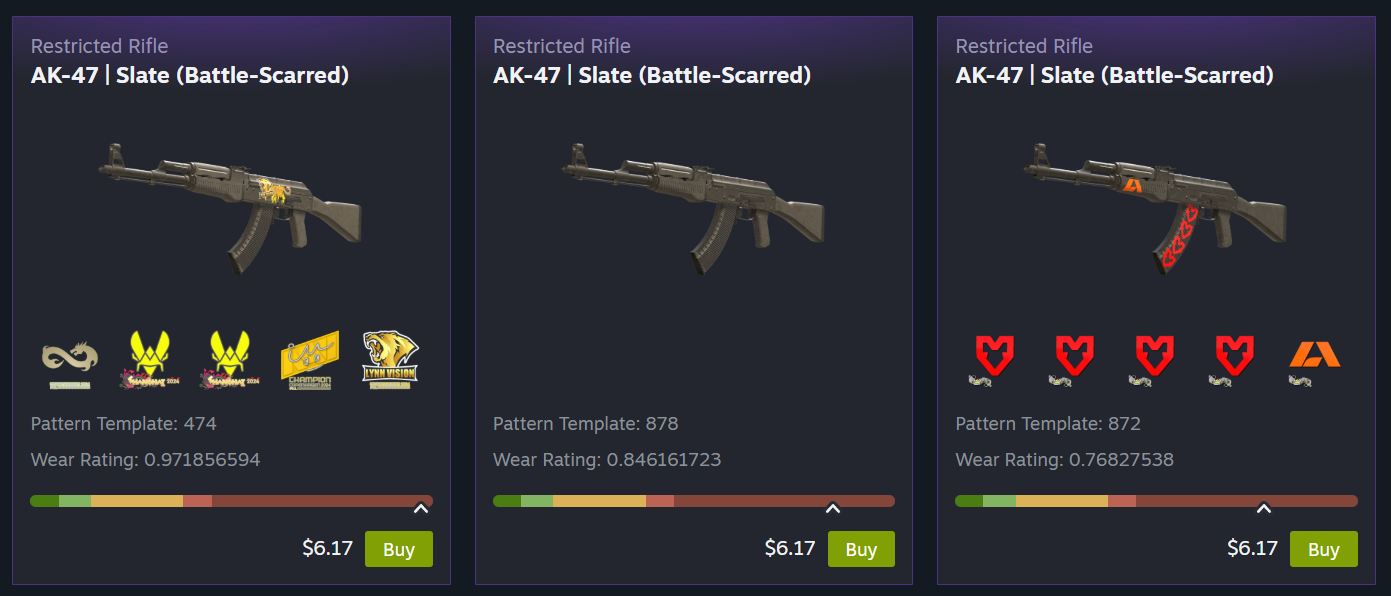
Sometimes you just need a bigger view, and now you get it! Listings can now feature more images, item descriptions, and callouts for listing specific information such as wear/float, pattern template, applied accessories, etc.
Counter-Strike players will immediately notice the new images generated specifically for that listing, rather than generic images, to showcase each item's unique features. No more having to fire up the game in order to make your purchasing decision. (Not just new listings! As part of our internal testing we generated over 27,000,000 unique images to backfill existing Counter-Strike listings.)
Once you narrow down to the desired item, you now get a larger listing view, and you can flip through all the matching results, making it easy to compare the variants of a skin in place.
Showcasing New Game-Specific Data
The Market now leverages all these new item details for better filtering, grouping, and visibility, making it easier for you to find what you want.
Accessories
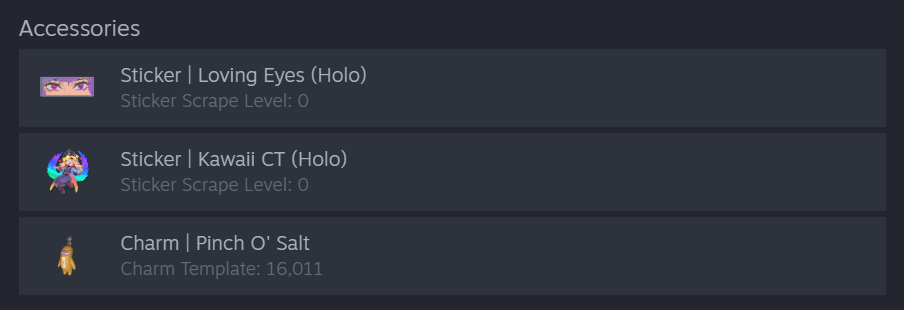
With a better understanding of attached items like stickers and charms, we link directly to their Market listings. Additionally, we surface that information to show better images and current values.
Unique Properties
Games can now feature unique item properties on their listings. For Counter-Strike skins, that means a better view of things like pattern template, wear/float, and charm template.
(This additional data from Counter-Strike goes a long way toward making listings more accurate, but it's extra useful when bubbled up into the filter options. All games using Steam’s Inventory system — which includes most games on the Market — will automatically benefit from dynamic filters based on item data, with no additional work required from developers. Read more about dynamic filters below.)
Grouping Like Items into One Page
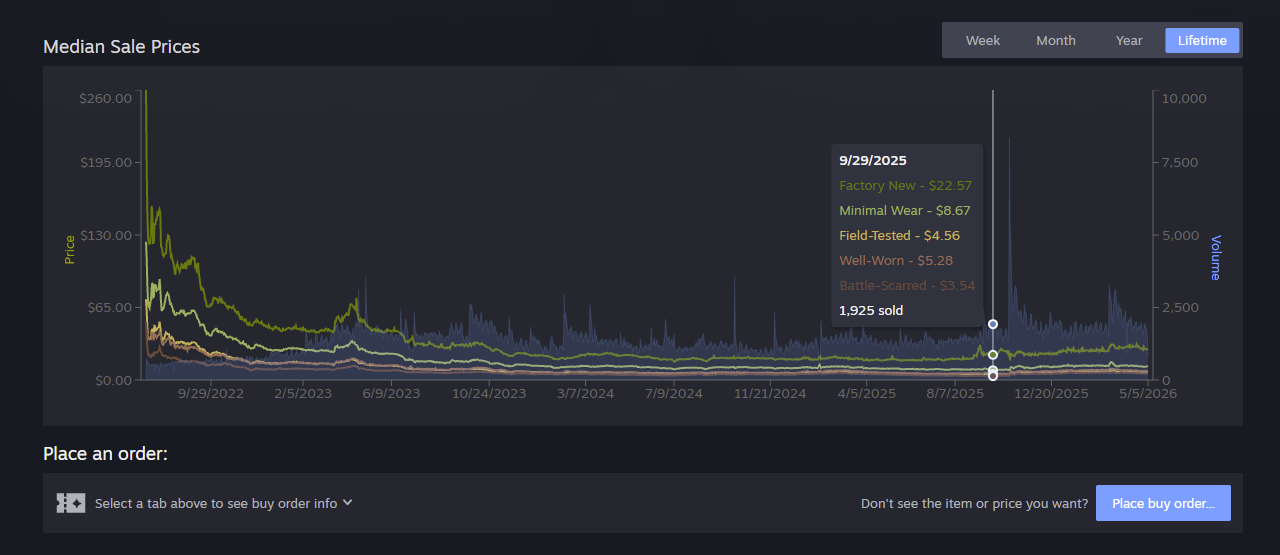
Many Market items are simply variations of the same base item, and we think it's easier to make your selection when you can easily compare them. For some Counter-Strike skins there might be 10 different versions of an item that vary based on one characteristic. When a game decides to group their items together you'll find a set of tabs that let you filter them quickly. For Counter-Strike skins you can use the tabs to get a price overview. Hover over the tab to preview that wear level, then click it to filter both the listings and the graph below.
General Improvements
Many of today's changes require no additional game-specific data to make the Market a better experience for all users and games. We think these updates will feel great across the board, whether you've come to window shop or you know exactly what you are looking for.
Item Pages
All the data mentioned above gets shown off on the updated item pages - which have a new, wider layout to accommodate a full-width grid of items for sale.
Here you can take advantage of additional category links, better graphs, and new dynamic filters.
Scroll down to see the new listing cards with larger images, as well as asset and accessory info.
Improved Graphs
Graphs have also received an overhaul. In addition to many general usability and performance fixes, graphs now display volume data alongside price and can display multiple datasets for grouped items.
Making search more robust with dynamic filters
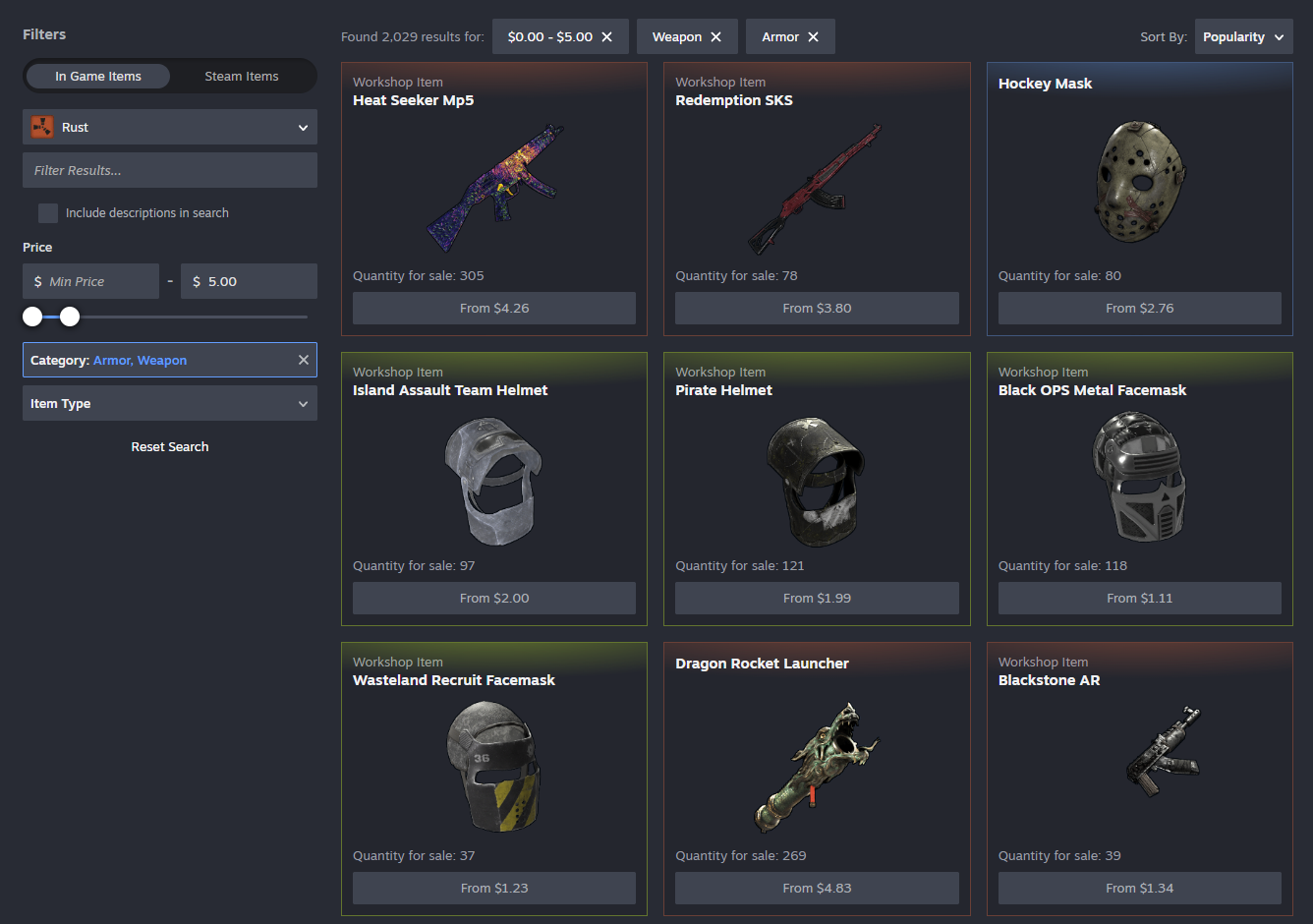
If you've used the Market lately, you've probably seen the new dynamic filters we've been beta testing. Those will now appear on both item pages and search pages alongside the new listing cards. Plus you'll see price filtering and new sorting options like popularity, price, quantity, etc.
These filters are built from existing item data, so you can filter (and sometimes search) against anything we know about. We've made searching and filtering faster - changing a filter immediately updates the displayed results (plus they automatically load more when you scroll.)
Steam Community Items
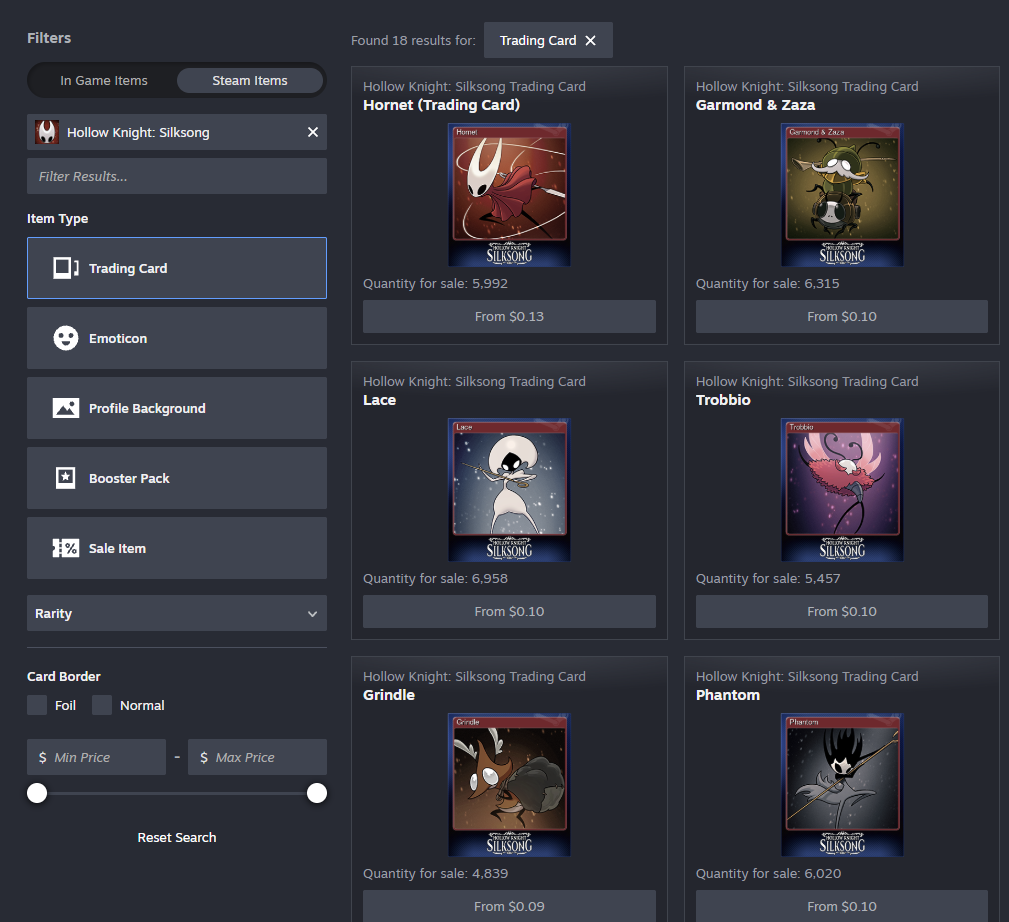
Now it's easier to switch between in-game items and Steam Community items. Buying and selling Steam Community items such as emoticons, trading cards, or profile backgrounds has been possible on the Market for years, but the relevant filters were hard to find.
While you're browsing Trading Card Booster Packs, you might also notice we're starting to introduce cross-linking between containers and contained items.
These changes are available now, along with smaller quality of life updates such as automatic loading of listings while scrolling, broader access to advanced search from more page headers, breadcrumb navigation, and text entry support across long lists.
All of this work builds upon other features we've released over the past year including support for Trade Protected Items, game specific filters, price filtering, search autocomplete, and improving overall reliability.
Frequently Asked Questions
Where can I find the changes?
Today we're updating the Community Market's item pages and search results. We're learning as we go and this is a great point for us to gather feedback from players and game developers.
How can I join the beta?
You don't need to! We're enabling the Market beta for everyone. If you need to opt out, there's a button at the top of the item and search pages.
For our Road Trip project in American Truck Simulator, we continue to expand a growing collection of legendary vehicles that feel perfectly at home cruising endless highways and scenic byways across America. Today, we’re excited to share a work-in-progress look at the 2023 Dodge Challenger SRT Hellcat Widebody, one of the most iconic American muscle cars of modern times.
Few vehicles represent contemporary American muscle quite like the Challenger. The Hellcat Widebody stands as a bold statement from an era when muscle cars reached new heights of power, presence, and character, while still paying homage to the unmistakable design language that defined generations before it. It is already regarded as a modern legend, a car that proudly carries the spirit of American performance into the present day.
The Dodge Challenger has always been about more than numbers on paper. It’s about attitude, confidence, and the feeling of pointing a long hood toward the horizon. The Hellcat amplifies all of that with its aggressive stance, widened bodywork, and unmistakable road presence.
In Road Trip, this vehicle is about experiencing the vastness of North America from behind the wheel of an automotive icon, cruising historic highways, rolling through small towns, and stopping to admire the diverse landscapes and landmarks that define each state. This is the kind of car meant for memorable journeys, where the drive itself is just as important as the destination.
With every new Road Trip vehicle, our team continues to raise the bar for visual fidelity, and the Dodge Challenger Hellcat Widebody is no exception. From the muscular exterior proportions to carefully crafted interior details, our vehicle artists are paying close attention to materials, lighting, and overall authenticity to ensure the car feels believable and immersive within the world of American Truck Simulator.
Whether parked at a scenic overlook or cruising under changing skies, we want this Challenger to look and feel right in every situation, making each Road Trip experience more atmospheric and visually rewarding.
We’re looking forward to sharing more updates as the Road Trip project evolves. Please remember that this car is still a work in progress, and further refinements are planned as development continues. With legendary vehicles like the Dodge Challenger Hellcat Widebody, we aim to clearly set expectations: Road Trip is about exploration, atmosphere, and celebrating American automotive culture on the open road, one unforgettable journey at a time.
We have just shipped an updated Steam Deck Client to the Preview/Beta channel.
General
Fixed streamable non-Steam games showing in Library when Remote Play is turned off
Fixed the "View friends list" link in the Big Picture home page opening the older non-QAM version of the friends list
Steam Input
Fixed an issue where Steam Controller grip thresholds were loaded incorrectly in the device calibration screen
Fixed an issue preventing the Steam button chord configuration from being edited for the Steam Controller
Fixed an issue with doubled input when the Steam Controller is charging on the puck
Track Pad Locking - You can now turn off the Joystick vs Trackpad Locking behavior in Settings->Controller->Details->Calibration & Advanced->Trackpad Lockout. This feature is intended to avoid accidental touches on the touchpad while using a Joystick, but it can now be turned off.
Today, we’re taking a closer look behind the scenes of Building Canada, focusing on the creation of British Columbia and what it takes to bring it into American Truck Simulator. We spoke with Patrix, our Map Technical Lead for ATS, who shared his perspective on how this ambitious new region is being brought to life and how the new road networks are being made.
"Hi, my name is Patrik (also known as Patrix). Over the past 15 exciting years at SCS Software, a mix of good fortune and personal dedication has taken me on quite a journey, from starting as a junior map designer on Euro Truck Simulator 2 just months before its release, to my current role as a Technical Lead working on American Truck Simulator."
"It's a pleasure and a big responsibility to be trusted by the company in terms of technical knowledge and pipeline correctness. In my early years, I recall breaking a lot of technical rules to achieve any sort of visual that was (or could be) considered nice. Doing that, I was many times inevitably instructed by experienced senior colleagues about how the game engine works and why I should be careful about overloading hardware with random details or items in map scenes."
"As years flew by, I became more responsible and stood rather rational about the complexity of the map and shaped a pretty exact vision of where the limits are and how the map should be done, so that it works smoothly on any computer and is also accessible to maintenance, which is critical for projects that live on for more than 10 years, just like ATS recently proved to be able to."
"Right now, my responsibility is to set and maintain a certain technical consistency in terms of how our map is being done across the entire ATS, which means syncing the attitude towards map creation across several projects and across different map teams."
"When our CEO, Pavel Šebor, approached us initially with the idea of going north to British Columbia, we immediately knew it would be a challenge. With its significance for the future of ATS, British Columbia reminds me of the times when we worked on Texas. Both were to be bigger than regular DLCs and should also carry a lot of specific new content. Logically, as we are going to another country in ATS for the very first time, we had to prepare a new set of road signage, both vertical and horizontal. Vertical signage are road-side signs, and those in Canada are very similar to the ones in the United States."
"Small things like font differences, dimensions, or rules for placement are exactly those little details we are looking for and following, so that our community of experienced drivers will immediately recognize that they are in Canada, even from unspecified random screenshots."
"Just like we did for the US, we read lots of Canadian documentation to get things right. One of the more complicated decisions was to pick the correct width of road lines. If documentation gives you a variety, what would you pick? The middle, one of the edge cases, or the most common? Also, how would we know from Prague what the most common roadline width is in Canada? When we found answers to these initial questions, even bigger issues appeared with implementation. For our Prism3D engine, different roadlines mean lots of new data that we had to create. Our in-game roads are made from templates of roads and more complex baked segments that we call prefabs. So if we wanted a slightly different yellow and a little wider/narrower lines, it meant making hundreds of road templates and prefabs to be able to bring this detail into British Columbia."
"Another part of my role as technical leader is to check all city layouts and compare their ambitions to the rest of the map, so that we stay consistent in the way we shape the game world."
"Now, British Columbia is actually pretty huge, but just like in many other cases, it is disproportionally balanced in terms of city spacing. The area around Vancouver is surrounded by a huge agglomeration of suburbs, and even cities across the water, like Victoria, were challenging in terms of where to put them on our map scale. Obviously, we had to sacrifice some bridges or interesting road pieces near Vancouver, but on the other hand, we will bring both border crossings from the US to Canada below Vancouver. The one at Interstate 5 is now relevant since we know our car-driving module, Road Trip, is on the way."
"I hope that players will truly enjoy exploring British Columbia and come to appreciate the sheer scale and ambition behind the project. While bringing a brand-new map like this to life comes with its fair share of challenges, it’s also been an incredibly fun and rewarding experience for the team, one we’re excited to share with the community."
Chicago, the city that never stops moving, best known for its iconic skyline, hot dogs, and historic architecture. Today, we’re excited to give you a closer look at the Windy City, its unique road network, and the new Special Transport routes coming with our upcoming Illinois DLC for American Truck Simulator which releases on May 14th. Ready to take a look? Let’s head downtown!
As you can imagine, recreating a city of this size and scale in ATS is no easy task. With so much detail to capture, industries to represent, and road networks to connect, there have been many challenges. We spoke with Lukas, one of our Senior Map Designers who has worked on recreating the Windy City for more than a year, to learn more about our in-game version of Chicago and what players can expect.
"Chicago is a unique city" Lukas shares. "Many people know it from movies and games, even if they’ve never been there. My personal goal was to create a believable version that we could all be proud of, not just for our players, but for locals too."
One of the most visually striking features players will notice is Chicago’s skyline. It's the largest we’ve created to date. Lukas shares more "We tried to make the skyline as accurate as possible in terms of scale, space and optimisation... the fact that you can actually drive right into it is crazy, and I'm really glad we managed to make that possible."
When it comes to trucking through the city itself, players will be able to drive through key downtown areas, including the famous Chicago Loop, parts of Streeterville, and the Near South Side. These districts have been recreated with attention to detail. While certain areas such as Navy Pier are represented creatively within the game’s scale, they remain recognisable and true to their real-world inspiration. Alongside this, iconic routes such as Lake Shore Drive offer stunning views of Lake Michigan and the city panorama.
As you can imagine, for many living in the city, driving isn’t the fastest or most affordable way to get around. For many, the Chicago ‘L’, the city’s rapid transit system, is part of the daily commute, and something we couldn’t miss including in our recreation. Complete with a brand-new train model created by our vehicle team, this iconic mode of public transport weaves through the city with elevated, subway, and surface-level lines. Its distinctive steel elevated structures, dating back to 1892, are a defining feature of Chicago’s streets.
However, there’s more than meets the eye than just what’s on the surface. Our team has also recreated Lower Wacker Drive, an iconic three level underground roadway system in Chicago, running beneath the Loop to help alleviate congestion. Completed in 1926, it serves as a fast-moving, often confusing through-route and key shipping artery for the city. We look forward to you experiencing these unique road networks rarely seen in American Truck Simulator.
A city this big couldn’t run without its truck drivers, and Chicago brings a wide range of industries and delivery opportunities. One notable location is O’Hare International Airport, the sixth busiest airport in the world, handling more than 850,000 aircraft movements each year. Here, players can take on deliveries within the airport and its cargo operations, including transporting goods to and from a cargo warehouse, unloading at a custom fuel depot, and even delivering directly to a specialised large cargo aircraft on the apron.
Beyond the airport, Chicago features a variety of other depots, including a large intermodal yard, and locations such as a car factory and a custom car export depot. Players can also deliver to a construction site located next to the Franklin Delano Roosevelt Bridge along Lake Shore Drive. Other delivery locations include the marina, a food processing facility, a heavy machinery service, and a chem oil industry. Some of the most unique deliveries can even take players underground, with the custom-built Undercity storage depo on Lower Wacker Drive, and the Wallbert warehouse situated even deeper below the city.
One industry we could not miss is the iconic Thornton Quarry, one of the largest and most recognisable quarries in the region. This vast, custom-built depot is a standout location for players looking for work, and a landmark in its own right. With its real-life counterpart spanning an immense area, our team has worked hard to bring that same sense of scale and depth into its virtual recreation. Whether you're hauling heavy materials and equipment in or out of the site, or simply passing by, be sure to take a moment to admire this impressive operation located south of Chicago.
Of course, no city would be complete without its landmarks. From towering skyscrapers and historic buildings to well-known attractions such as Buckingham Fountain, the Shedd Aquarium, the Field Museum, and Soldier Field, there’s plenty to see. Navy Pier is also represented, complete with the Chicago Children’s Museum and Centennial Wheel. Love bridges? Be sure to check out the Franklin Delano Roosevelt Bridge and the William P. Fahey Bridge, both of which are dynamic. And that’s just scratching the surface!
So as you can tell, there's plenty to see, deliver and explore in Chicago, but we will leave the rest to you! However, the city is not the only thing that is BIG in Illinois...
BIG in Illinois - Special Transport Routes
If you're looking for a challenge in Illinois, then maybe our new Special Transport routes are for you! Truckers who are ready to take on these mighty loads will find several new Special Transport job contracts.
Whilst these routes have been carefully pre-planned by our dispatchers, you can expect there to be some challenging manoeuvres and scenic views on the road to your final destination. As always, trained escort teams and local police will assist in guiding you along the correct route, and where necessary, help block traffic to allow safe passage.
Think you've got what it takes? Special Transport DLC owners will find contracts on offer between the following cities:
Peoria to Chicago Moline to Quincy Springfield to Marion
So whether you're taking on Special Transport routes or hauling cargo through the busy streets of Chicago, we truly hope you enjoy all that the Illinois DLC has to offer in American Truck Simulator when it releases on May 14th! If you like what you see, be sure to add it to your Steam Wishlist, and until next time, keep on truckin'!
A new Steam client has been released and will be automatically downloaded.
General
Fixed a case where the Steam Controller firmware update dialog could reopen after a successful update
Fixed streamable games showing when "Ready to Play should include Streamable games" is toggled off
Fixed occasional cursor corruption while streaming on Windows
Added setting to enable or disable controller battery notifications.
Steam Input
Fixed an issue where config selections could fail to save for the new Steam Controller
Fixed compatibility issues in games when a Steam Controller is docked to the charging puck
Fixed a localization bug in the Configuration browser screen
Updated Steam Controller firmware to fix a bug that caused some left trackpads to have issues registering touches on the left side of the pad when connected wirelessly
We have just shipped an updated Steam Deck Client to the Stable channel.
General
Fixed a case where the Steam Controller firmware update dialog could reopen after a successful update
Fixed streamable games showing when "Ready to Play should include Streamable games" is toggled off
Steam Input
Fixed an issue where config selections could fail to save for the new Steam Controller
Fixed compatibility issues in games when a Steam Controller is docked to the charging puck
Fixed a localization bug in the Configuration browser screen
Updated Steam Controller firmware to fix a bug that caused some left trackpads to have issues registering touches on the left side of the pad when connected wirelessly
Note: This update is for the Steam Deck Beta and Preview channels, and includes new features that are still being tested. You can opt into this in Settings > System > System Update Channel.
These notes contain all changes since the current stable SteamOS 3.7 release, with the new changes since the previous 3.8.3 Beta noted below
New in 3.8.4
Fixed a regression causing certain VRR-capable TVs to fail to work via a connected dock
Fixed a rare bug where switching to desktop mode may hang indefinitely
Fixes for experimental nested desktop mode
Even more stability and security updates
Even more support for upcoming Steam Machine hardware
General
Fixed a case where WiFi performance could become degraded until the device was put to sleep or manually reconnected
Fixed excessive trackpad sensitivity on certain early Steam Deck LCD models
Initial support for upcoming Steam Machine hardware
Added support for waking from sleep via connected Steam Controller
Updated Arch system base
Updated graphics driver with performance and stability fixes
Fixed a case where per-app performance settings would intermittently fail to apply when launching a game
Substantially improved speed of future OS updates on high-speed connections
Improved support for the screencasts in Game Mode (e.g. OBS/Discord)
Fixed dropdown menus not appearing in some games
Improved VRR frame pacing
Fixed FSR badge remaining off in the performance overlay, even if it was actually active
Improved support for games that attempt to open PDF files in external viewers
Added missing graphics features needed for titles such as "Crimson Desert"
Fixed an issue affecting certain titles (such as "SpongeBob SquarePants: Titans of the Tide") where the game window could have an incorrect position
Fixed closing certain titles (such as "STAR WARS Jedi: Survivor™") and Starfield resulting in a session crash
Improved support for certain USB racing wheels and USB devices that boot in a non-standard mode
Frequently these are devices that appear as USB storage devices with a driver installer, and must be switched to their normal mode by the OS
Steam Deck controller firmware updates now display update progress on the splash screen
Fixes issue on specific Steam Deck revisions where firmware updates could render the left controller inoperative for that session
Numerous stability and security updates
Bluetooth
Re-re-enable Bluetooth Wake for Steam Deck LCD
Fix for more spurious wake issues that were present in earlier attempts
Audio
Detect HDMI channel count and expose surround configuration if available
Add a setting to allow using Bluetooth headset mics (Bluetooth playback quality will be worse while capture is active)
Restore internal audio device on reboot if set to "Off" in desktop mode
Increase suspend timeout for HDMI devices so initial audio isn't cut off after a few seconds of inactivity
Fixed a bug with switching input devices when a wired headset is plugged in
Fixed an issue where audio underruns could be experienced after sleep/resume
Accessibility
Added an option to force mono audio output
Desktop Mode
KDE Plasma updated to version 6.4.3 from 6.2.5, and now uses wayland by default
Fixes several cases of reduced performance in Desktop Mode compared to Game Mode
Improved support for rotated displays
Better scale factor out of the box on TVs
Adds support for external HDR displays
Adds support for VRR displays
Adds support per-display scale factor
For more information, see Plasma release announcements
Steam Controller launched on May 4th, and while we were happy to see such a high level of interest, the experience for a lot of you trying to buy it was incredibly frustrating. We plan to continue replenishing stock as we get more in, but in the meantime wanted to share changes we're making to improve the purchase experience and to limit reseller activity:
Beginning May 8th at 10 am Pacific, we're opening a reservation queue for Steam Controller. Once you reserve, your place in line will be saved. When we go back in stock, order emails will be sent in the same order that reservations were made.
Here are the details on how we're hoping to improve the experience overall while also taking steps to limit reseller activity:
Reservation details:
Reservations will be limited to one Steam Controller per user.
Once you receive an order email, you have three days (72 hours) to make your purchase on Steam.
For now, customers who have already purchased a Steam Controller are not yet eligible to reserve another Steam Controller.
Additionally:
Your account must be in good standing on Steam
You must have made a purchase on Steam prior to April 27, 2026
Replenishment of inventory will vary from region to region. We will start fulfilling reservations next week in the US / Canada, and UK / EU / AU in the following weeks.
In today's blog, we bring you a glimpse at some of the custom depots featured in the upcoming Iceland map expansion, which is currently in development for Euro Truck Simulator 2. So let's take a look at what our map designers are working on!
The largest one is a landmark depot of a silicon metal factory, which is an accurate 1:1 copy of the real-world facility found in this location. This will be the home of a new virtual company called Kísilverksmiðja, producing silicon metal, which is used in a wide variety of applications in the chemical industry, production of silicones and silanes, or high-strength aluminium alloys for the automotive industry.
Truckers will be able to drive to nearly every corner of the complex and load or unload their truck in various locations within the complex based on the type of cargo they are hauling. The depot will also feature dynamic cargo loading of logs, which play a key role in this industry. The entire location is positioned near the coast, so in addition to the tunnel connecting the depot and the city, drivers will also get to enjoy some beautiful views of the sea.
Then, you will find three custom-made quarries located in the towns of Selfoss, Patreksfjörður, and Blönduós. Quarrying of aggregate materials, both rock and sediment, is an important industry in Iceland, since aggregates are needed for a wide range of building and road construction projects.
All of these quarries are branches of the well-established MS Stein company that truckers can already know. Set within Iceland's iconic landscapes, these unique depots offer striking surroundings: the first two lie at the foot of towering cliffs, with the second one also boasting sweeping views of the sea.
Truckers will also come across six custom farm depots, each reflecting the characteristic Icelandic rural way of life. These are usually smaller, family-owned homesteads, often situated at the foot of mountains and shaped by the surrounding landscape. Their architecture is adapted to Iceland's demanding climate, using practical materials such as concrete and corrugated metal.
On these farms, you will often see livestock typical of the region, particularly Icelandic sheep and cattle. Some, like those in Þórshöfn and near Reykjavík, are tucked into the landscape, while others are located right beside the road.
With these farms, our map designers tried to convey the narrow Icelandic roads, deep valleys, charcoal-colored rocks and soil, and farmsteads appearing as clusters of modest farm buildings nestled against the base of rugged mountains. Beyond them, you will see just vast stretches of land that extend far into the rocky highlands, with roaming sheep.
Note: this beta was re-released on 5/7 with additional fixes
We have just shipped an updated Steam Deck Client to the Preview/Beta channel.
General
Fixed a case where the Steam Controller firmware update dialog could reopen after a successful update
Fixed streamable games showing when "Ready to Play should include Streamable games" is toggled off
Steam Input
Fixed an issue where config selections could fail to save for the new Steam Controller
Fixed compatibility issues in games when a Steam Controller is docked to the charging puck
Fixed a localization bug in the Configuration browser screen
Updated Steam Controller firmware to fix a bug that caused some left trackpads to have issues registering touches on the left side of the pad when connected wirelessly
Note: this beta was re-released on 5/7 with additional fixes
The Steam Client Beta has been updated with the following changes:
General
Fixed a case where the Steam Controller firmware update dialog could reopen after a successful update
Fixed streamable games showing when "Ready to Play should include Streamable games" is toggled off
Steam Input
Fixed an issue where config selections could fail to save for the new Steam Controller
Fixed compatibility issues in games when a Steam Controller is docked to the charging puck
Fixed a localization bug in the Configuration browser screen
Updated Steam Controller firmware to fix a bug that caused some left trackpads to have issues registering touches on the left side of the pad when connected wirelessly
We are excited that the 1.59 update for Euro Truck Simulator 2 is now officially released and available on Steam! We hope you will enjoy all the new features, which you can read about in more detail below.
As always, we would like to thank everyone who took part in the open beta phase and reported possible issues or any kind of feedback on our forum, as it helped us fine-tune everything for a smooth transition to the full update!
Benelux Rework Release
We are happy to reveal that the long-awaited Benelux Rework project is released with this update! Our assets and map designers have completely rebuilt the whole original map of Belgium, the Netherlands, and Luxembourg from scratch, delivering a richer, more detailed experience.
Truckers can explore a wide range of revamped major cities and their surroundings, including Amsterdam, Groningen, Rotterdam, Brussels, Liège, and Luxembourg City. Each location has been carefully redesigned to highlight its unique character with plenty of landmarks and details!
You can also look forward to hauling cargo through entirely new locations. These include Antwerp, home to one of Europe's largest container ports; the DAF Trucks facility in Eindhoven, which has been recreated with remarkable detail in close cooperation with our partners at DAF Trucks; as well as key transport corridors - the busy E40 and A2 motorway.
You'll be able to drive from the beautiful hilly landscapes of the Belgian Ardennes to the flat polders and picturesque coastal roads in the northern Netherlands - the reworked Benelux offers a diverse and varied environment that truly reflects the region's look and feel.
Whether you're cruising through dense city centers, navigating busy highways, or discovering scenic country routes, the Benelux region now offers a far more immersive and authentic journey. You can see more from what is coming in our already released blogs on this topic.
Volvo Trucks Experience Center
In partnership with our friends at Volvo Trucks, we are adding the renowned Volvo Trucks Experience Center, situated in Gothenburg, Sweden, to the map, where you can test your trucking skills.
The center's standout feature is its dedicated driving circuit, which incorporates sweeping bends, tighter technical corners, elevation changes, downhill stretches, and varied road layouts. This allows drivers to assess vehicle behaviour in a controlled environment, highlighting stability, braking precision, handling characteristics, and overall driving comfort in ways that go beyond everyday road conditions.
The Volvo Trucks Experience Center has been recreated almost entirely on a 1:1 scale in our map with a strong attention to detail. You can drive the full circuit and explore the surrounding areas of the facility.
To find this amazing facility, you need to venture around the roads near Gothenburg to discover an entrance that will initially not be shown on your GPS. And remember, since it is located in Sweden, you need the Scandinavia DLC to be able to visit it. You can read more about this addition here.
Thermo King Update
Thermo King, a global leader in transport temperature control, is coming to Euro Truck Simulator 2 with their trailer refrigeration units! These replace all the unbranded units we had on our base game and DLC reefer trailers so far. This adds an extra touch of realism when you are hauling temperature-sensitive cargo and spot a famous real-world brand on your trailer.
With this update, you can see the Thermo King A-360, A-400, A-500, SLXi-300, and SLXi-400 refrigeration units on the front of your single trailers, which deliver a range of trailer refrigeration performance to suit different transport needs. On top of that, we also added the UT-1400R unit, designed for double-trailer configurations and mounted beneath the trailer. Find out more about this update here.
Advisor Update - Finances & Damage Widgets
We've been closely listening to feedback from our community, and one of the most common points raised in the new route advisor was that many players missed having quick access to information on vehicle damage and finances. While our teams are actively working on the next steps in our broader vision for a redesigned UI in this area, we didn't want to make you wait until that work is complete. Instead, we've prioritized implementing some of the most frequently requested improvements as soon as possible.
Based on that, we've implemented the Damage and Finances widgets. These widgets are designed to restore easy access to information about truck damage, plus trailer and cargo damage, if you are currently driving with a trailer and cargo, as well as your current bank balance, with an average profit over the last seven days displayed too.
These widgets can be turned on and off in the Widget Settings Menu, and if enabled, they will be displayed in the bottom right corner above your GPS.
Tow to Road
The Tow to Road feature was designed to improve the overall quality of life for players by reducing frustrating situations during gameplay. It allows drivers to quickly recover if their truck overturns or gets stuck in a ditch or uneven terrain. It also helps prevent disruptions in multiplayer sessions, enabling players to continue with their convoy when they find themselves stuck, without the need to be towed to a service location, which could cause unnecessary delays.
So when you are in a difficult situation, you can simply find the new "Tow to Road" button under the Service menu (set to F7 by default). After paying a small fee for the towing service, you will be transported to your last safe location on the road. You can read more about this feature here.
Skills UX Redesign
The Skill Screen has received a visual rework while remaining in its original place within the interface. This update focuses on improving clarity and overall user experience without changing its core functionality.
You can now view both your current skill level and the next step in its progression. Tooltips also allow you to explore other ranks within each skill. Selecting a skill provides improved readability and clearer visual feedback, including a better indication of how many steps remain in that skill's progression path.
Each skill is represented as a clickable button, making it easy to access more detailed information. The redesign also improves navigation when using a controller.
QoL UI/UX Changes
We're continuing to refine the overall user experience with updates focused on readability, clarity, and smoother controller navigation.
The in-game news banner has received a visual refresh to better align with our newer UI style while improving readability. When hovering over a news item, a tooltip will now display a longer excerpt along with a clear call to action. Deactivated news items now feature a clearer status indicator, which also doubles as an activation button.
We're making navigation on the world map more intuitive for controller users. A new "undo last pin" feature has been added, along with remapped controls for adding, removing, setting avoid areas, and resetting pins.
Save handling has also been improved, with new saves now using the standard save icon instead of a black screenshot and overwriting clearly labeled as "Overwrite". Garage upgrade cutscenes can now be skipped more consistently using the (B) button, and the controller navigation has been further refined with improved D-pad accessibility across UI.
Traffic Sound Rework
We've also made some adjustments to traffic audio as part of this update. Sounds have been softened and rebalanced to better match real-world perception, with less emphasis on distant engine noise and more on the subtle "road hiss" of tires. Honking behavior has also been slightly randomized to reduce repetition. Overall, traffic should now feel less intrusive and better integrated into the ambient soundscape.
Height Blend Improvements
We've also made a few improvements to the Height Blend feature. Derived normal maps can now be enabled to help conserve GPU memory, and we've also addressed several graphical issues to ensure more consistent, visually accurate results.
Detour Feature Maintenance
We've decided to temporarily disable the detour feature to focus on maintenance and further development. We've received numerous reports of Detours not functioning as intended, and the current system no longer meets our needs.
As a result, we'll be shutting down detours while we work on improving and upgrading the feature in the background to make it more stable and reliable. Please note that this change only affects detours - random road events will continue to be available in the game.
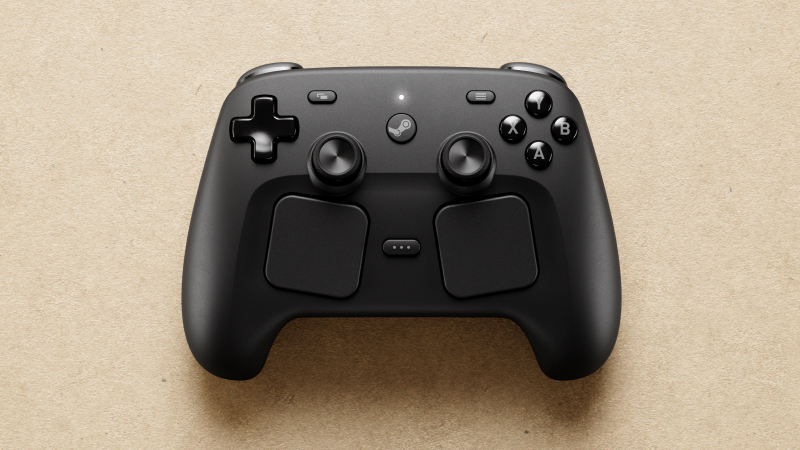
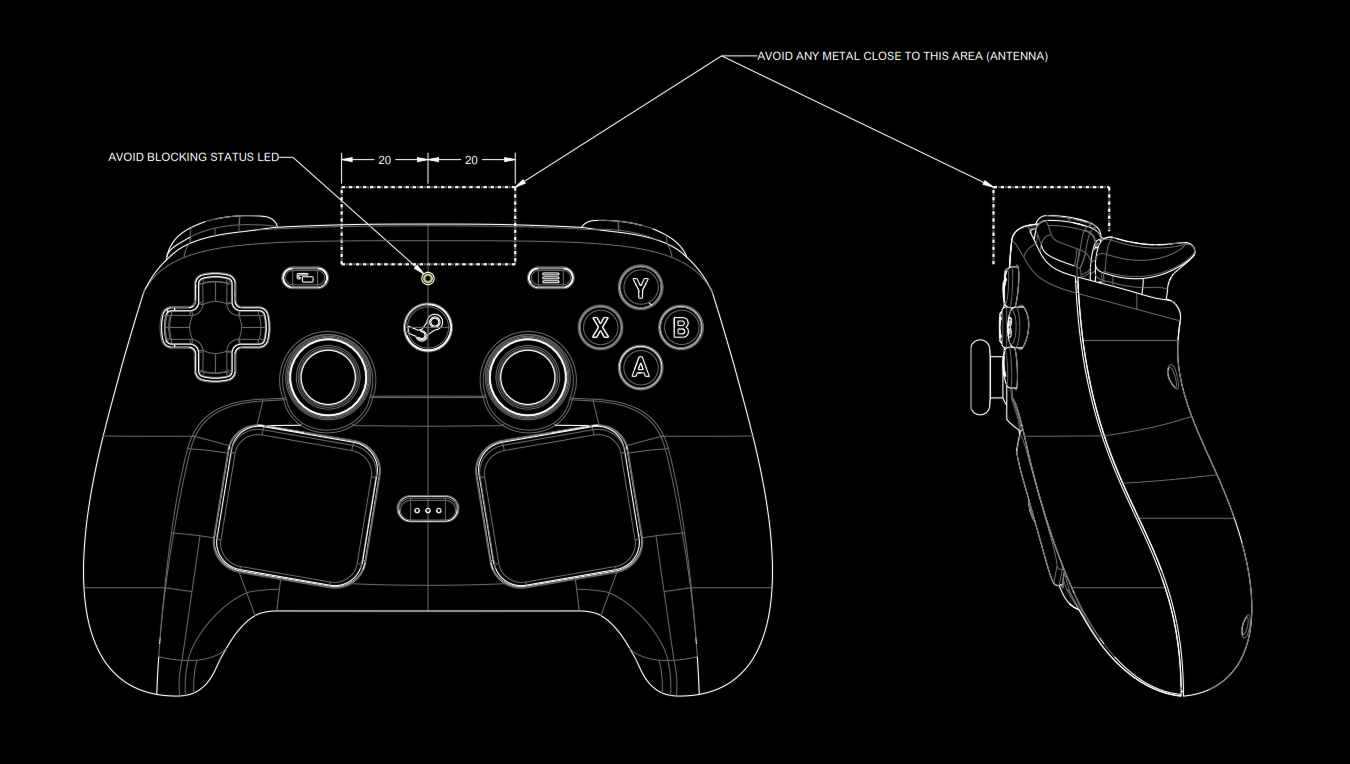
Greetings! We have exciting news to share for those of you who want to hack, mod, or design accessories for the Steam Controller and Puck.
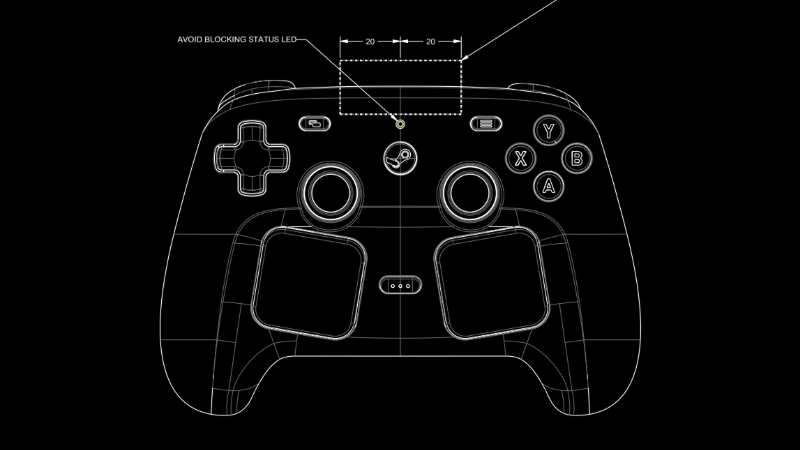
Today we're making the CAD files for the external shell (surface topology) of Steam Controller and Puck available for download under a Creative Commons license. This includes an STP model of each, an STL model of each, and an engineering drawing with critical features/keep outs for each.
We're thrilled to announce that the 1.59 updateforAmerican Truck Simulator has officially been released and is now available on Steam!
First of all, we would like to thank everyone who took part in the Open Beta and reported any issues or provided general feedback on our forum. This makes it much easier for our team to fine-tune everything and helps ensure a smooth transition to the full update release.
Advisor Update - Finances & Damage Widgets
We've been closely listening to feedback from our community, and one of the most common points raised in the new route advisor was that many players missed having quick access to information on vehicle damage and finances. While our teams are actively working on the next steps in our broader vision for a redesigned UI in this area, we didn't want to make you wait until that work is complete. Instead, we've prioritized implementing some of the most frequently requested improvements as soon as possible.
Based on that, we've implemented the Damage and Finances widgets. The widgets are designed to restore easy access to information about truck damage, plus trailer and cargo damage, if you are currently driving with a trailer and cargo, as well as your current bank balance, with an average profit over the last seven days displayed too.
These widgets can be turned on and off in the Widget Settings Menu, and if enabled, they will be displayed in the bottom-right corner above your GPS.
Tow to Road
The Tow to Road feature was designed to improve the overall quality of life for players by reducing frustrating situations during gameplay. It will allow drivers to quickly recover if their truck overturns or gets stuck in a ditch or uneven terrain. It will also help prevent disruptions in multiplayer sessions, enabling players to continue with their convoy when they find themselves stuck, without the need to be towed to a service location, which could cause unnecessary delays.
So when you are in a difficult situation, you can simply find the new "Tow to Road" button under the Service menu (set to F7 by default). After paying a small fee for the towing service, you will be transported to your last safe location on the road. You can read more about this feature here.
Skills UX Redesign
The Skill Screen has received a visual rework while remaining in its original place within the interface. This update focuses on improving clarity and overall user experience without changing its core functionality.
You can now view both your current skill level and the next step in its progression. Tooltips also allow you to explore other ranks within each skill. Selecting a skill provides improved readability and clearer visual feedback, including a better indication of how many steps remain in that skill's progression path.
Each skill is represented as a clickable button, making it easy to access more detailed information. The redesign also improves navigation when using a controller.
QoL UI/UX Changes
We're continuing to refine the overall user experience with updates focused on readability, clarity, and smoother controller navigation.
The in-game news banner has received a visual refresh to better align with our newer UI style while improving readability. When hovering over a news item, a tooltip will now display a longer excerpt along with a clear call to action. Deactivated news items now feature a clearer status indicator, which also doubles as an activation button.
We're making navigation on the world map more intuitive for controller users. A new "undo last pin" feature has been added, along with remapped controls for adding, removing, setting avoid areas, and resetting pins.
Save handling has also been improved, with new saves now using the standard save icon instead of a black screenshot and overwriting clearly labeled as "Overwrite". Garage upgrade cutscenes can now be skipped more consistently using the (B) button, and the controller navigation has been further refined with improved D-pad accessibility across UI.
Traffic Sound Rework
We’ve made some adjustments to traffic audio as part of this update. Sounds have been softened and rebalanced to better match real-world perception, with less emphasis on distant engine noise and more on the subtle “road hiss” of tires. Honking behavior has also been slightly randomized to reduce repetition. Overall, traffic should now feel less intrusive and better integrated into the ambient soundscape.
Height Blend Improvements
We’ve also made a few improvements to the Height Blend feature. Derived normal maps can now be enabled to help conserve GPU memory, and we’ve addressed several graphical issues to ensure more consistent, visually accurate results.
Detour Feature Maintenance
We've decided to temporarily disable the detour feature to focus on maintenance and further development. We've received numerous reports of Detours not functioning as intended, and the current system no longer meets our needs.
As a result, we'll be shutting down detours while we work on improving and upgrading the feature in the background to make it more stable and reliable. Please note that this change only affects detours - random road events will continue to be available in the game.
Changelog:
Gameplay
Tow to Road Feature
UI/UX
Advisor Update - Finances & Damage Widgets
Skills UX Redesign
QoL UI/UX Changes
Improved News Banner Readability
World Map Pin Enhancements
Save Icon Update
Garage Cutscene Skipping
D-pad Accessibility Improvements
Visuals
Height Blend Improvements
Sounds
Traffic Sound Rework
Other
Detour Feature Maintenance
We hope you are also excited to try out all the new features! Make sure to keep up to date with the future updates by following us on X/Twitter, Facebook, BlueSky, YouTube, and Instagram, and by subscribing to our newsletter! Until next time, happy haulin' and we'll see you on the road!
Sure, a fest all about deckbuilders might sound straightforward. But even just a quick glance at Steam Deckbuilders Fest (or even at the official trailer, above) tells you not all deckbuilders are the same.
Build a formidable deck and use it to lure humans into a haunted mansion. Restore a crumbling library in the 1930s. Collect mystical cards, build unique decks, even use your deck alongside dice: there's a deckbuilder for you no matter what kind you're looking for.
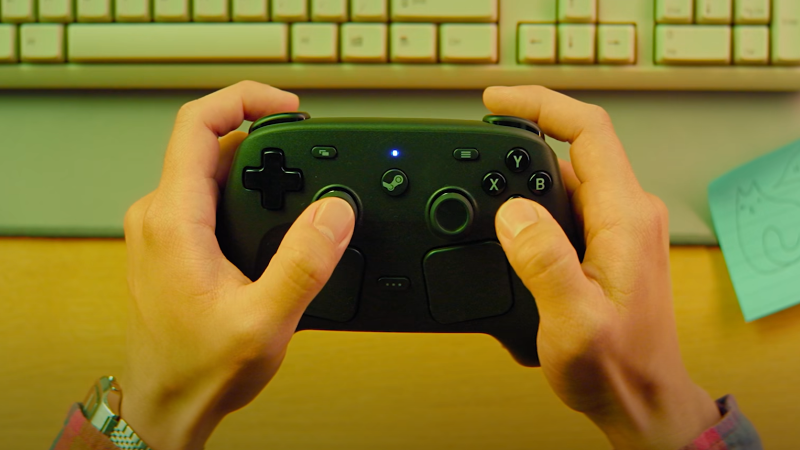
Steam Controller is now available on Steam. Check out our handy overview and quick-start guide in the video we made (above). You can also read through the many capabilities of Steam Controller in our blog post from April 27th.
Steam Controller is made for you to play all your games on Steam, however you like to play them. It has all the inputs you'd expect from a gamepad (including next-gen magnetic thumbsticks), plus advanced options like trackpads, gyro, Grip Sense, and grip buttons. There are even ways to customize these features for your experience, which we highlight here. (And it comes with a Puck!)
Follow the Steam Hardware blog for future updates and additional guides for getting the most out of Steam Controller and its features, including trackpads, gyro, Grip Sense, and virtual menus coming soon.
Today, we're excited to give you a closer look at the 2023 Ford Bronco Badlands, one of the vehicles that you'll be able to get behind the wheel of in our upcoming Road Trip module with the Ford Car Park DLC for American Truck Simulator.
Few vehicles have captured the spirit of American adventure quite like the Ford Bronco. Its legendary status comes from decades of exploring the wild, built on a foundation of rugged capability, a good mix of abilities, and open-air freedom.
It became an easily recognizable vehicle by people all over the world in the past decades, featured in some popular movies, too. The 2023 Bronco Badlands, which you will be able to drive with the Ford Car Pack, is a part of its sixth generation.
First introduced in the mid-1960s as a revolutionary 4x4, the Bronco quickly achieved cult success, with more than 1.1 million cars manufactured across multiple generations over 31 years of production. With a long-awaited return in 2021 after a 25-year hiatus, it has reclaimed its reputation as a vehicle that can handle almost anything, from technical rock crawling in the desert to scenic coastal cruises and everything in between.
Over the years, the Bronco has grown and evolved alongside its drivers. What started as a simple, utilitarian off-roader has transformed into a lineup featuring advanced EcoBoost powertrains, cutting-edge G.O.A.T. (Goes Over Any type of Terrain) modes, and performance-focused suspension, all while staying true to its iconic boxy roots.
This ability to master any surface is a big reason why the Bronco remains a symbol of outdoor exploration, equally at home as a daily driver or a hardcore companion for those who love to venture far off the beaten path.
Players can also look forward to a selection of factory-inspired exterior colours from the 2023 lineup, including striking options such as Azure Gray, Cactus Gray, Eruption Green, Pepper Red, Velocity Blue, or Yellowstone paint.

 Log in