❌

Normale weergave

2.8.1

Door: clsid2
22 Augustus 2026 om 21:28

Donations are appreciated. There is now a PayPal option.

Changes from 2.8.0 to 2.8.1:

Updates:

  • Updated LAV Filters to version 0.83-1-g63d24
  • Updated MPC Video Renderer to version 0.10.8.2572

Changes/additions:

  • Added ability to load a secondary subtitle track from the subtitle menu. This supports only external text-based formats (SRT) and excludes formats that may contain explicit positioning (SSA/PGS/VobSub). The secondary subtitle is rendered at the top of the window. There are some known limitations. For example adjustments such as delay will apply to both tracks. Secondary is also not included in screenshots. Do NOT open issues/requests about this!
  • Added ability to auto-copy all rendered subtitle text to the clipboard in real-time. Toggling this on/off can be assigned to a hotkey or one of the custom toolbar buttons.
  • New "remote" page in web interface, providing a modern interface for remote control of MPC-HC from any phone (or web browser) in your local network.
  • Expanded the API for remote control through window messages from a master process. See MpcApi.h header file.

Fixes:

  • A few bug fixes in web interface.
  • A few other fixes and small improvements.

Full changelog

Full list of all changes since start of this project.

OpenSubtitles download error 406

Subtitle downloads from OpenSubtitles may fail depending on time of day. This is due to our daily download quota being exceeded. Current amount of donations is barely enough to pay for the existing quota. So it is unlikely that quota can be increased and situation will get worse over time.
If you create an OpenSubtitles account and configure it in MPC-HC settings then you may be able to bypass the quota.
Options > Subtitles > Misc > Right-click on OpenSubtitles.com > Setup > Fill in username/password

Overview of features

A lot of people seem to be unaware of some of the awesome features that have been added to MPC-HC in the past years. Here is a list of useful options and features that everyone should know about:

  • Play HDR video
    This requires using either MPC Video Renderer (MPCVR) or madVR.
    These renderers can be selected here:
    Options > Playback > Output
    With other video renderers, the colors will be wrong!
    MPCVR is included and is the recommended and default renderer for modern systems. MadVR needs to be installed separately. MPCVR also supports Dolby Vision. MadVR does not.
    For optimal performance you should change the hardware decoder to D3D11 in LAV Video Decoder settings when using MPCVR on Windows 10/11, because this renderer uses DirectX11.
  • The installer of MPC-HC is very basic (and that will not change).
    I therefore recommend using K-Lite Codec Pack. That includes MPC-HC and other essential components. It has a very advanced installation that can automatically create file associations, and helps you with easy configuration of important MPC-HC settings, such as preferred subtitle language(s). It also does automatic configuration of renderer and hardware decoding, for best performance and HDR support.
    The Standard version should be sufficient for most people. Use Full version of you like to use MadVR.
  • Modern GUI Theme (Dark or Light) or the old classic theme
    Options > Player > User Interface
    It is also possible to change the height of the seekbar and size of the toolbar buttons.
    Plus there are options to show audio/video details in the statusbar, such as codec and resolution.
  • Customizable toolbar buttons
    You can add/remove/re-order the player buttons.
    There are also several different toolbar designs to choose from.
  • Video preview on the seekbar
    Options > Player > User Interface > Hover type
  • Ability to search for subtitles
    Press D for manual search.
    Or enable automatic search in: Options > Subtitles > Misc
  • Adjust playback speed
    Menu > Play > Playback rate
    The buttons in the player that control playback rate take a 2x step by default. This can be customized to smaller values (like 10%):
    Options > Playback > Speed step
    If you have 1000 IQ you can even do smart stuff like setting playback rate change to mouse right-click + scrollwheel:
    Options > Player > Mouse
    Adjusting playback speed works best with MPC Audio Renderer or SaneAR. These audio renderers have automatic pitch correction, while DirectSound does not.
    Options > Playback > Output > Audio Renderer
  • MPC-HC can remember recently played files and also their playback position, so you can resume playback from when you left
    Options > Player > History
  • You can quickly seek through a video with Ctrl + Mouse Scrollwheel.
  • You can jump to next/previous file in a folder by pressing PageUp/PageDown.
  • You can right-click on the framestep button to step backwards. Some other buttons also have right-click actions, such as closing file by right-clicking stop.
  • You can perform automatic actions at end of file. For example to go to next file or close player.
    Options > Playback > After Playback (permanent setting)
    Menu > Play > After Playback (for current file only)
  • A-B repeat
    You can loop a segment of a video. Press [ and ] to set start and stop markers.
  • You can rotate/flip/mirror/stretch/zoom the video
    Menu > View > Pan&Scan
    This is also easily done with hotkeys (see below).
  • There are lots of keyboard hotkeys and mouse actions to control the player. They can be customized as well.
    Options > Player > Keys
    Tip: there is a search box above the table.
  • You can hide GUI elements even in windowed mode
    Options > User Interface > Hide Windowed Controls
    That hides most GUI elements during playback. To show them simply move your mouse to bottom of window.
    You can even hide everything except the video by pressing 1 (restore normal view with 3).
  • You can seek inside the playlist by simply typing text (when playlist window has the mouse focus).
  • MPC-HC also supports Blu-ray playback.
    Only limitation is that you need to use a decrypting tool.
    And it also does not support Blu-ray menus, but you can use the navigate menu in the player to select the content to play.
  • You can stream videos directly from Youtube and many other video websites
    Put yt-dlp.exe in the MPC-HC installation folder.
    Then you can open website URLs in the player: Menu > File > Open File/URL
    You can even download those videos: Menu > File > Save a copy
    Tip: to be able to download in best quality with yt-dlp, it is recommended to also put ffmpeg.exe in the MPC-HC folder.
    Several YDL configuration options are found here: Options > Advanced
    This includes an option to specify the location of yt-dlp.exe in case you don't want to put it in MPC-HC folder.
    Note 1: You also need to install Microsoft Visual C++ 2010 SP1 Redistributable Package (x86)
    Note 2: For optimal Youtube support you may also need to put deno.exe in same folder as yt-dlp.
    Note 3: yt-dlp nightly build (very latest version made daily)
    Note 4: yt-dlp windows7 compatible build
  • Besides all these (new) features, there have also been many bugfixes and internal improvements in the player in the past years that give better performance and stability. It also has updated internal codecs. Support was added for CUE sheets, WebVTT subtitles, etc.
  • You should really take a few minutes to look through all the options pages if you are a new user or if you are upgrading from a very old version. Don't forget the advanced options page.

MPC Video Renderer

Frequently Asked Questions

  •  

Road Trip: Vehicle Configuration & Purchase Process

Door: Petr
22 Augustus 2026 om 17:00

Today, we're happy to bring you another preview from the Road Trip project. This time, we'll be showing you more from the vehicle configuration and purchase process, so let's take a look!

Both the purchase process and vehicle configuration in Road Trip will work a little bit differently than what you are used to with trucks. If you want to get behind the wheel of your own Ford Mustang, Dodge Challenger, or any other car, you will need to head on to the "Car Dealer" tab in the in-game desktop.

There, you'll first select your preferred car brand, with the available options depending on which Car Pack DLCs you own. If you own both theΒ Ford Car Pack and RAM & Dodge Car PackΒ DLCs, you'll be able to choose from Ford, RAM, and Dodge. As you can see, some Car Packs may contain and unlock more than one brand, as is the case with the RAM & Dodge Car Pack DLC. After that, you can choose a specific model, take a closer look at the car, see its light signature, explore its details, and check out its description, technical details, and specifications. You can browse the available models like a catalog, or switch to a table view and easily compare their specifications side by side. Before purchase, you can choose from a variety of unique colours.

After purchasing your car, you'll either have the option to drive it straightaway or give it a more personalized look based on your preference. If you decide to make some further customizations, you will need to head to the garage, which can also be found in the in-game desktop under the "My Cars" tab. This is a brand new virtual space where you can view, customize, and manage your cars.

There, the layout is similar to the Car Dealer, allowing you to browse the cars you own, view their details, and compare them. But more importantly, this is where the customization happens! Just hit Configure and choose from a variety of different options tailored for each car - from paint jobs to both exterior and interior parts. Selected cabin accessories will also be compatible with Car Pack DLCs. You can also sell your cars here.

Now you can hit the Drive button and start exploring the world of American Truck Simulator from a completely new and different perspective.

We are still researching further options and are dedicated to continuing our work on bringing new features and customization options to Road Trip vehicles in the future. Stay tuned as we explore new ways to expand and enhance this experience!

If you are excited about Road Trip, make sure to add both its DLCs, the Ford Car Pack or the RAM & Dodge Car Pack,Β to your Steam wishlist!

Also, remember to follow us on X/Twitter, Facebook, Instagram, Bluesky, and YouTube for all the latest news from Road Trip and other American Truck Simulator information, or sign up for our newsletter to stay informed. Happy travels!

  •  

31.3.2

22 Augustus 2026 om 19:00

Releases Notes for 31.3.2

Windows Installer
Windows No Installer (zip)
macOS - Universal
Linux - deb, AppImage or rpm

Windows intel x32 releases are marked -ia32-

ChangeLog:

  • Fixes the save dialog reopening endlessly without ever saving when saving a new or imported shape library [#2518]
  • Stops saving changes to a library opened from file asking for a save location on every save [#2521]
  • Fixes saving a library disabling external change detection for the open diagram
  • Updates to draw.io core 31.3.2.

  •  

Distribution Release: DragonOS Resolute_R1

21 Augustus 2026 om 18:07
The DistroWatch news feed is brought to you by TUXEDO COMPUTERS. The DragonOS project has announced the release of a major update to DragonOS, a specialist Ubuntu-based Linux distribution designed for those interested in software-defined radio (SDR). It ships with a suite of some of the most powerful and accessible open-source SDR software. The latest version, labelled as "Resolute_R1"....
  •  

Coaches: Vehicle Ownership & Job Schedule

Door: Alex
21 Augustus 2026 om 17:00

Ready to swap cargo for passengers? Then we've got some exciting news for you! Today, we're sharing more details about the upcoming Coaches DLC for Euro Truck Simulator 2, including coach ownership and how you'll plan and take on passenger transport jobs. All aboard!Β 

One of our goals with the Coaches DLC is to give players the opportunity to purchase and customise their own coach, much like you already can with trucks.Β 


Coaches will be available for purchase through the Online Dealer and will be stored in the player's virtual garage. From there, players will be able to manage, inspect, customise, and sell their vehicles whenever they wish. Coaches will also be stored separately from trucks, meaning they won't occupy any existing garage slots.


Purchasing a coach will be a significant investment, but finances will be shared across both Truck and Coach modes. This means players will be able to earn money through Coach Quick Jobs or regular truck jobs before purchasing their own vehicle. Financing and loans will also be available for those who wish to get behind the wheel a little sooner, just make sure to pay on time!

Coaches will feature a range of customisation options. Depending on the vehicle model, players will be able to choose from various chassis configurations, engine and transmission variants, along with a selection of interior options such as seat upholstery colours and curtains. Selected cabin accessories will also be compatible with coaches.


Not every upgrade will be available immediately. Some parts and accessories will unlock through player progression, giving drivers additional options as they gain more experience behind the wheel.

Owning a coach will also provide the freedom to explore the map outside of scheduled passenger services. Players will be able to travel wherever they like, visit viewpoints, and enjoy driving across Europe at their own pace. Fuel consumption, fatigue, and other familiar gameplay systems will work just as they do when driving an owned truck.Β Owning a coach will also unlock new gameplay features, one of which is Contract Jobs.Β 

Using the Contract Jobs menu, players will be able to browse available passenger services in cities close to their current location. After selecting a route, they will first need to drive to the appropriate bus station before beginning the service.


Once at the station, players will confirm their selected line. The game will then advance to the scheduled departure time, passengers will board the coach, and the journey can begin. Many passenger services will include multiple stops along the route, and players can choose from jobs that vary in difficulty based on their experience and skill level. Taking on more challenging routes will reward higher earnings and additional experience.Β 


We hope you enjoyed reading about the ongoing work for Coaches for Euro Truck Simulator 2. If you're excited to get behind the wheel, be sure to add this upcoming module to your Steam Wishlist. We look forward to sharing more news with you about this addition as development continues. See you on the road!

  •  

v4.3.10

21 Augustus 2026 om 12:19

Features

  • Added configurable SMTP EHLO domains for instance and team email delivery (#11398, closes #11388).
  • Added API endpoints for viewing and updating instance-wide SMTP and Resend settings.
  • Added manual upgrade controls to the Updates page and mobile navigation.

Fixes

  • Applied the configured sender name and address to SMTP, Resend, test, transactional, and password-reset emails (#11393, closes #6073).
  • Respected disabled SMTP encryption in test emails (#11384, closes #5877 and #6442).
  • Prevented Proton SMTP from folding long From headers (#11400, closes #11380).
  • Restricted API token visibility and revocation to the active team, and stopped expiration warnings for users who had left that team (#11396, closes #11390).
  • Persisted the target image and version before container recreation so upgrades kept the installed version aligned (#11401, closes #11389).
  • Restored generated Caddy labels for applications with configured domains (#11397, closes #11394).
  • Allowed domains to be added to services with an empty Compose environment section (#11407, closes #11381).
  • Marked failed or timed-out Docker cleanup executions as finished and recorded their errors (#11408, closes #11383).
  • Required explicit confirmation before invitation magic links were redeemed, preventing link scanners and previews from consuming invitations (#11413, closes #11375).
  • Aligned team-scoped API responses and project access checks across sources, servers, projects, and environments (#11405).
  • Prevented newly introduced static settings from appearing as pending deployment changes after upgrades (#11430, closes #11426).
  • Completed local resource deletion even when remote Docker or backup cleanup failed.
  • Made team membership, invitation, token revocation, and source deletion changes roll back safely when part of the operation failed.
  • Released page scroll locking before destructive confirmation actions ran, preventing stuck interfaces.

Improvements

  • Preserved the current page and query parameters when switching teams.
  • Showed warnings for pending proxy updates and unavailable Sentinel instances in server status indicators.
  • Limited team deletion to owners, assigned an owner to existing ownerless teams, and made blocking resources easier to find from the danger zone.

Full Changelog: v4.3.9...v4.3.10

  •  

Release 2026.08.21

21 Augustus 2026 om 10:08

Docker Images

Docker images have been built and pushed:

Docker Hub:

  • alexta69/metube:latest
  • alexta69/metube:2026.08.21

GitHub Container Registry:

  • ghcr.io/alexta69/metube:latest
  • ghcr.io/alexta69/metube:2026.08.21

Changes

  • fix: move persistent queue state writes off the event loop (#980) (c9c507f)
  • fix: stop stating the output file on every progress tick (#980) (327e1eb)
  • fix: point audio download links at the directory the server used (closes #533) (82e966c)
  • fix: strip trailing slashes from the download directories (346da19)
  • fix: warn when uploaded cookies shadow a configured cookiefile (b74185b)
  • fix: let named CORS origins send credentials (closes #155) (c393e01)

  •  

31.3.1

21 Augustus 2026 om 09:49

Releases Notes for 31.3.1

Windows Installer
Windows No Installer (zip)
macOS - Universal
Linux - deb, AppImage or rpm

Windows intel x32 releases are marked -ia32-

ChangeLog:

  • Uses electron 42.9.3
  • Signs the bundled Electron DLLs on Windows, so Windows Defender ASR ransomware protection no longer blocks the app after installs and updates [#2509]
  • Builds the Windows no-installer zip with the full signed and fused configuration [#2509]
  • Stops the update download window staying on top of other applications and covering the install prompt [#2516]
  • Stops repeated manual update checks producing duplicate update dialogs
  • Fixes opening multi-page PDFs exported by releases before 30.3.6, where the diagram is embedded as a PDF file attachment
  • Updates to draw.io core 31.3.1.

  •  

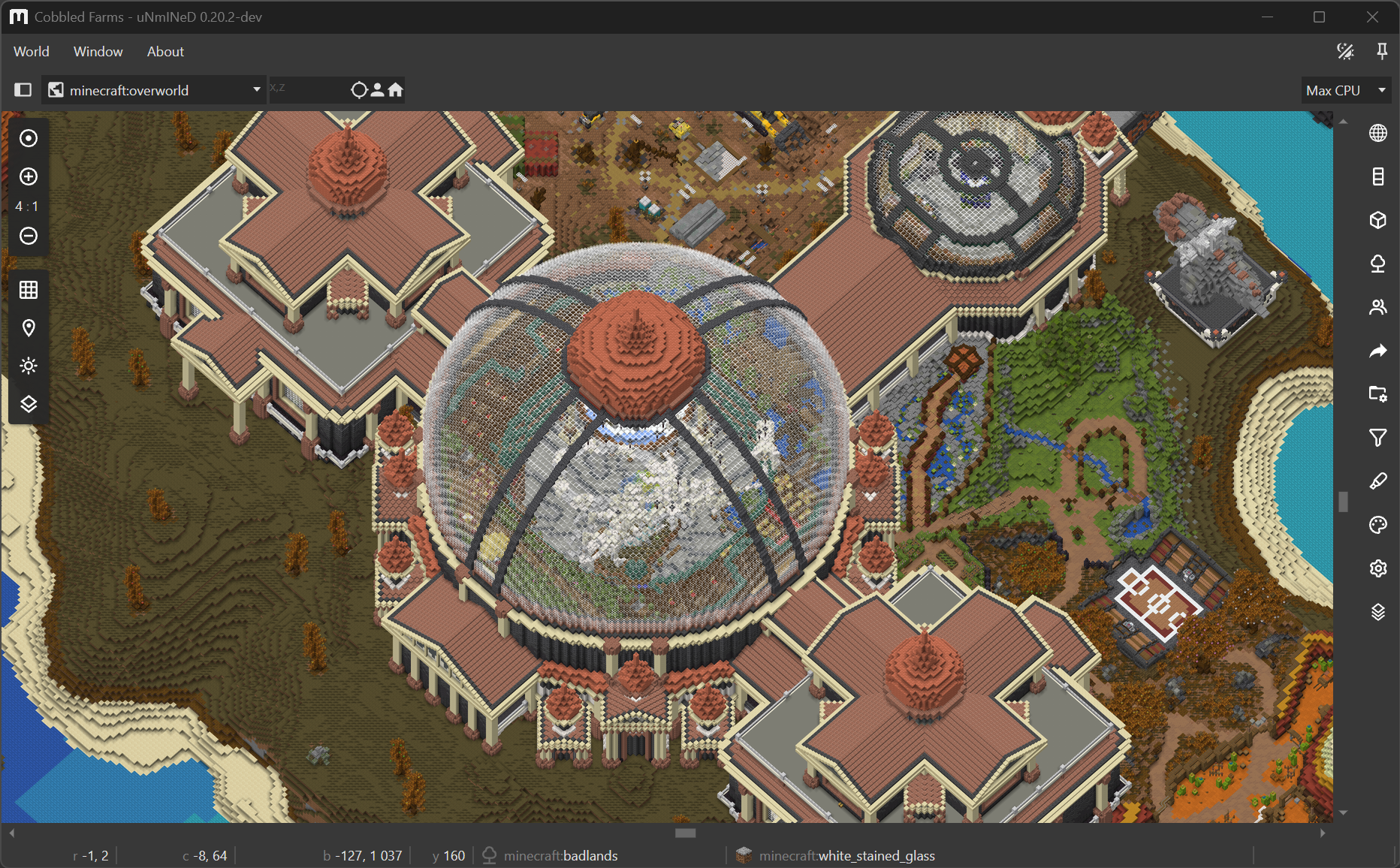
uNmINeD 0.20.2-dev

Door: megasys
21 Augustus 2026 om 00:41

New uNmINeD development snapshot is available for download!

Changes:

  • (GUI) Added two additional zoom levels to isometric mode, now it works from 4:1 to 16:1
  • (CLI) Added webp-format (lossless, lossy), webp-method (0..6) and webp-quality (0..100) command line parameters to web export
  • Fixed default webp format, now it’s lossless instead of lossy
  • Fixed sulfur caves, dappled forest and nether colors/tints
  • Fixed Java local player GUID parsing
  • Fixed water block levels in isometric mode

The isometric mode is not yet optimized for speed, and isometric map tiles are not yet cached. Future releases will be faster.

  •  

UniFi Network Application 10.6.97

Door: UI-Glenn
20 Augustus 2026 om 21:56

Overview

UniFi Network Application 10.6.97 adds Drift Inspector, Topology Spotlight, and expanded Safe Ops features, along with the improvements and bug fixes listed below.


Β 


Added Drift Inspector to Blueprints in Site Manager

  • Make local changes to sites using Blueprint orchestrations, with a clear view of configuration drift and an easy way to resolve it.


Added Topology Spotlight

  • Quickly highlight and filter selected devices for easier navigation and troubleshooting in large topologies.


Improved SafeOps features

  • Expanded Test & Confirm support to VPN and Management networks.
  • Added Nightly Channel AI Optimization with configurable radio selection and an improved optimization algorithm.


Improved Time Machine Experience

  • Added Time Machine for Radios to review radio usage metrics, configuration changes, and radio events from the past 24 hours.
  • Expanded Port Manager Time Machine to All Ports, making it easier to identify and troubleshoot problematic network segments.

Improvements

  • Added a flapping devices filter to Port Manager Time Machine for clients with frequent reconnections.
  • Added the Reduced Firewall State Timeouts profile for EFG, EF-Core, and UXG-Enterprise.
  • Added a confirmation prompt when updating all devices from the Devices filter side panel.
  • Added sorting to Network Lists and descriptions on hover.
  • Added column sorting to tables in Settings Overview.
  • Added an Allow Empty Password option for RADIUS MAC Authentication.
  • Added the ability to disable the LCM screen on meshed UX7 devices.
  • Added Sort by Topology to the Devices page.
  • Added a notice for unsupported devices in Test & Confirm settings.
  • Added a disabled port filter to Port Manager.
  • Added an Additional Labels option to Infrastructure Topology.
  • Added a warning in Topology when Sonos devices with mixed wired and wireless connections are detected.
  • Added validation to prevent OpenVPN Server and Site-to-Site VPNs from using the same UDP port.
  • Added a Spotlight selection option in Topology.
  • Added the ability to disable insecure OpenVPN compression.
  • Added Multicast Suppressor support.
  • Requires UAP 8.8 or newer.
  • Added a Lock Port to UniFi Device option to Port Manager.
  • Requires Switch firmware version 7.6 or newer.
  • Added support for adopting multiple U5G devices on the same site over LAN.
  • Added support for using Domain Network Lists in QoS Policies.
  • Added support for customizing WAN interfaces used for Automatic Speed Tests.
  • Added Bulk Update Management to the Devices page.
  • Improved Device Auto-Recovery stability.
  • Improved Data Plane Protection resiliency.
  • Improved Traffic Activity Statistics accuracy.
  • Improved the Observability section.
  • Improved the device revert experience by allowing easy reversion for all devices with the same Device model and version.
  • Improved DHCP Options validation.
  • Improved the Dynamic DNS settings user experience.
  • Improved RADIUS settings validation.
  • Improved Virtual Network management in Topology.
  • Improved the AV Manager user experience.
  • Improved Honeypot validation.
  • Improved the display of unstable links in Infrastructure Topology.
  • Improved network subnet validation against static route destinations.
  • Improved Port Profiles management in Port Manager.
  • Improved Port Manager by automatically opening Time Machine.
  • Improved the Device Update confirmation screen by showing the number of connected devices that might be interrupted.
  • Improved OpenVPN server configuration files by removing periodic TLS key renegotiation.
  • Requires UniFi OS 5.1 or newer
  • Improved VPN Server settings validation.
  • Improved application startup resiliency.
  • Improved the Port Forwarding table user experience.
  • Removed the STP Edge note from Port Manager when Auto STP Edge is disabled.
  • Separated the Reset Stats and Clear Last Seen Device actions in Port Manager.
  • Enabled DHCP Guarding by default on new networks.

Bugfixes

  • Fixed an issue where client devices with a configured Power Source could be automatically enrolled in Device Auto-Recovery.
  • Fixed an issue where the AP Stopped Mesh system log could be generated repeatedly after an AP switched to a wired uplink.
  • Fixed an issue where the High Traffic alarm incorrectly reported wireless client downloads as uploads.
  • Fixed an issue where SD-WAN Mesh VPN tunnels could remain after the configuration was removed.
  • Fixed an issue where the client count in the WiFi Broadcast overview was incorrect when MLO clients were connected.
  • Fixed an issue where filter counters could flicker on the Connectivity page in rare cases.
  • Fixed an issue where the hostname was not set correctly for a UX7 connected via mesh.
  • Fixed an issue where a custom APN could be lost after moving a SIM between slots on a U5G.
  • Fixed an issue where the UX7 did not display connected wireless clients in the Devices list.
  • Fixed a rare issue where opening Client Observability could impact system stability.
  • Fixed an issue where DAS/DAC (CoA) was unavailable when using Open security with RADIUS MAC Authentication.
  • Fixed an issue where MC-LAG configurations could be lost after restoring a backup.
  • Fixed an issue where the Connectivity page was missing some roaming events.

Additional information


Β 

UniFi OS Server


Going forward, we recommend users upgrade toΒ UniFi OS ServerΒ for all self-hosted deployments. It provides the full UniFi OS Platform experience, ensuring you receive the latest features, improvements, and integrations.


UniFi Network Native Application for UniFi OS

Compatible with UDM, UDR, UDR7, UDR 5G Max, Express, Express 7, and UCG models (Ultra, Max, Fiber, and Industrial) on UniFi OS 3.1.6 or later. UDM-Pro, UDM-SE, and UDW have been using it since UniFi OS 5.1.5.

  • The UniFi OS update utilizes the application version compatible with your console.
  • The manual update process via SSH requires a compatible package. Incompatible packages will be rejected on installation.
  • Older UniFi OS versions (prior to UniFi OS 3.1.6) on the UDM and UDR continue to utilize the standard UniFi Network Application for UniFi OS.

Β 

Β Checksums

3c61771b272fce0dc4d885b27f5aacc3 | UniFi-installer.exe
a7e03c2267472a2ca92e08757af3664e | UniFi-Network-Server.dmg
edb6f32f292e5a1746c0759c3381d91c | UniFi.unix.zip
05a81e3c1e56c9bdb93b9e3203804441 | unifi_sysvinit_all.deb
14c2556535e87d5fbbb2331573455051 | unifi-uos_sysvinit.deb
4561503f51df61ab44bb793f45cf4641 | unifi-native_sysvinit.deb
601df32736f41e40a80a3e472450a3e1 | unifi_sh_api


------------------------------------------------------------------------------------------------------------------------


0a8bac122b9ff697fdbf1f591acaee20871fe8c2b3080ece50264fc8bd0014e3 | UniFi-installer.exe
8a60ce8b69575777e7f983642368a49c04f5a995dc78bda84ca74d16557c680d | UniFi-Network-Server.dmg
9d50b389b418c0007c4ad234b8d0e608150c2a88aabb1ab9b1f12394f489e3d3 | UniFi.unix.zip
a03edb46d0d1df8edd517c07d80588addf62799493a4b20846317705620fe5cc | unifi_sysvinit_all.deb
c6ff500ba2d21c99097fa3be89041965d4e90c76f90e0f4722855827319ce47c | unifi-uos_sysvinit.deb
ada60aa072c880df48f0d1f7cc5c4134fef20a6e501e1f56ecc075a4e5953a06 | unifi-native_sysvinit.deb
1791685039ea795970bcc7a61eec854058e3e6fc13c52770e31e20f3beb622eb | unifi_sh_api
  •  

Stable Channel Update for Desktop

20 Augustus 2026 om 22:28

The Stable channel has been updated to 151.0.7922.173/.174 for Windows and Mac and 151.0.7922.173 for Linux, which will roll out over the coming days/weeks. A full list of changes in this build is available in the LogΒ 

Security Fixes and Rewards

Note: Access to bug details and links may be kept restricted until a majority of users are updated with a fix. We will also retain restrictions if the bug exists in a third party library that other projects similarly depend on, but haven’t yet fixed.

This update includes 7 security fixes. Please see the Chrome Security Page for more information.


[N/A][522819252] Critical CVE-2026-76017: Use after free in Chromoting. Reported by Google on 2026-06-11

[N/A][513757918] High CVE-2026-76018: Privilege elevation in Import. Reported by Google on 2026-05-16

[TBD][539032888] High CVE-2026-76019: Incorrect authorization in Workers. Reported by Anonymous on 2026-07-26

[TBD][541837151] High CVE-2026-76020: Race condition in V8. Reported by Salvatore Gulizia (nickname: Serotav) on 2026-08-03

[N/A][541854084] High CVE-2026-76021: Use after free in DOM. Reported by Google BigSleep@Grape on 2026-08-02

[TBD][543798025] High CVE-2026-76022: Buffer overflow in Network. Reported by 0xAlessandro on 2026-08-07

[TBD][545124048] High CVE-2026-76023: Improper resource control in Linux Toolkit Theming. Reported by Keita Sode and Daisuke Hatakeyama of SYZD Research on 2026-08-11


We would also like to thank all security researchers that worked with us during the development cycle to prevent security bugs from ever reaching the stable channel.


Many of our security bugs are detected using AddressSanitizer, MemorySanitizer, UndefinedBehaviorSanitizer, Control Flow Integrity, libFuzzer, or AFL.

Interested in switching release channels? Find out how here. If you find a new issue, please let us know by filing a bug. The community help forum is also a great place to reach out for help or learn about common issues.


Srinivas Sista

Google Chrome

  •  

Asterisk Release 23.5.0-rc2

20 Augustus 2026 om 17:41

The Asterisk Development Team would like to announce
release candidate 2 of asterisk-23.5.0.

The release artifacts are available for immediate download at
https://github.com/asterisk/asterisk/releases/tag/23.5.0-rc2
and
https://downloads.asterisk.org/pub/telephony/asterisk

Repository: https://github.com/asterisk/asterisk
Tag: 23.5.0-rc2

This release resolves issues reported by the community
and would have not been possible without your participation.

Thank You!

Change Log for Release asterisk-23.5.0-rc2

Links:

Summary:

  • Commits: 1
  • Commit Authors: 1
  • Issues Resolved: 1
  • Security Advisories Resolved: 0

User Notes:

Upgrade Notes:

Developer Notes:

Commit Authors:

  • George Joseph: (1)

Issue and Commit Detail:

Closed Issues:

  • 2085: [bug]: res_http_websocket: SEGV if we're a server and receive a PONG frame

Commits By Author:

  • George Joseph (1):

    • res_http_websocket: Check for client before handling PONG frames.

Commit List:

  • res_http_websocket: Check for client before handling PONG frames.

Commit Details:

res_http_websocket: Check for client before handling PONG frames.

Author: George Joseph
Date: 2026-08-13

websocket_handled_pong_or_close() now checks that session->client is valid
before trying to check missed_pong_count.

Resolves: #2085

  •  

Asterisk Release 20.21.0-rc2

20 Augustus 2026 om 17:41

The Asterisk Development Team would like to announce
release candidate 2 of asterisk-20.21.0.

The release artifacts are available for immediate download at
https://github.com/asterisk/asterisk/releases/tag/20.21.0-rc2
and
https://downloads.asterisk.org/pub/telephony/asterisk

Repository: https://github.com/asterisk/asterisk
Tag: 20.21.0-rc2

This release resolves issues reported by the community
and would have not been possible without your participation.

Thank You!

Change Log for Release asterisk-20.21.0-rc2

Links:

Summary:

  • Commits: 1
  • Commit Authors: 1
  • Issues Resolved: 1
  • Security Advisories Resolved: 0

User Notes:

Upgrade Notes:

Developer Notes:

Commit Authors:

  • George Joseph: (1)

Issue and Commit Detail:

Closed Issues:

  • 2085: [bug]: res_http_websocket: SEGV if we're a server and receive a PONG frame

Commits By Author:

  • George Joseph (1):

    • res_http_websocket: Check for client before handling PONG frames.

Commit List:

  • res_http_websocket: Check for client before handling PONG frames.

Commit Details:

res_http_websocket: Check for client before handling PONG frames.

Author: George Joseph
Date: 2026-08-13

websocket_handled_pong_or_close() now checks that session->client is valid
before trying to check missed_pong_count.

Resolves: #2085

  •  

Asterisk Release 22.11.0-rc2

20 Augustus 2026 om 17:40

The Asterisk Development Team would like to announce
release candidate 2 of asterisk-22.11.0.

The release artifacts are available for immediate download at
https://github.com/asterisk/asterisk/releases/tag/22.11.0-rc2
and
https://downloads.asterisk.org/pub/telephony/asterisk

Repository: https://github.com/asterisk/asterisk
Tag: 22.11.0-rc2

This release resolves issues reported by the community
and would have not been possible without your participation.

Thank You!

Change Log for Release asterisk-22.11.0-rc2

Links:

Summary:

  • Commits: 1
  • Commit Authors: 1
  • Issues Resolved: 1
  • Security Advisories Resolved: 0

User Notes:

Upgrade Notes:

Developer Notes:

Commit Authors:

  • George Joseph: (1)

Issue and Commit Detail:

Closed Issues:

  • 2085: [bug]: res_http_websocket: SEGV if we're a server and receive a PONG frame

Commits By Author:

  • George Joseph (1):

    • res_http_websocket: Check for client before handling PONG frames.

Commit List:

  • res_http_websocket: Check for client before handling PONG frames.

Commit Details:

res_http_websocket: Check for client before handling PONG frames.

Author: George Joseph
Date: 2026-08-13

websocket_handled_pong_or_close() now checks that session->client is valid
before trying to check missed_pong_count.

Resolves: #2085

  •  

1.61 Update: Volvo FH Series 6 100 Year Edition

Door: Petr
20 Augustus 2026 om 17:00

We are very excited to join Volvo Trucks in the celebrations of their 100th anniversary by welcoming the Volvo FH Series 6 100 Year Edition to Euro Truck Simulator 2 with the release of the upcoming 1.61 update! Let's take a look at what's in store.Β 

Volvo Group was established in 1927 and will be celebrating its 100th anniversary next year. To mark this special occasion, Volvo Trucks is introducing the anniversary edition of their latest model, the Volvo FH Series 6, and we are proud to be bringing the updates coming with this edition to Euro Truck Simulator 2 as well.

The Volvo FH Series 6 100 Year Edition will bring a new look for both the interior and exterior, reflecting Volvo's century of innovation with driver-centric features. These additions will be reflected in the base game of ETS2 with new accessories and paint jobs available for the Aero XL cabin of the Volvo FH Series 6, enabling every virtual trucker to drive the beautiful centennial edition in our game as well, when the 1.61 update releases.

On the exterior, this update introduces two new paint jobs: 100y Edition – Night and 100y Edition – Day. The two designs feature distinctive dark or light exterior colour striping, complemented by two additional Centennial logos on either side of the truck. You will also be able to choose from two different light boxes: one with the 100y logo and another one with the FH16 logo.

We are also adding one brand new interior option featuring black leather door panels with unique stitching, carpets, a rear wall decoration featuring the 100 Year Edition logo, and a decorative dashboard ambient LED lighting available in red or blue colour options.

To complete the interior, you will also have the option to customize it with a range of exclusive accessories. These include a black leather steering wheel and new two-tone seats combining a black leather base with a grey textile upper section and the 100y logo.

We are very proud to be able to bring these new additions to the world of Euro Truck Simulator 2 and enjoy the celebrations along with our community and Volvo Trucks, whom we wish many more successful years of producing great trucks and machines!

To keep track of future updates from our games, make sure to give ourΒ X/Twitter, Instagram, Facebook, Bluesky, TikTok, and YouTubeΒ a follow. OrΒ subscribe to our newsletterΒ to stay informed. Keep on trucking!

  •  

Firefox 151.0.4

9 Juni 2026 om 18:01

Fixed

  • Fixed an issue on Windows where Firefox could become unresponsive when using the back and forward buttons. (Bug 2039866)

  • Fixed an issue where Firefox could fall back to software rendering on some older GPUs, reducing graphics performance. (Bug 2043249)

  • Fixed a crash on Windows that could occur when Firefox interacted with accessibility services. (Bug 204330)

  • Fixed an issue where some text input fields could incorrectly show a resize handle. (Bug 2044051)

  •  

CPU-Z 3.01

20 Augustus 2026 om 18:00
  • CPU-Z Validator V3 (more information *at that address*).
  •  

Distribution Release: FydeOS 23.0

20 Augustus 2026 om 16:54
The DistroWatch news feed is brought to you by TUXEDO COMPUTERS. The FydeOS project has announced the release of FydeOS 23.0, a significant update of the project's ChromeOS-based Linux distribution that aims to bring a Google Chromebook-like experience to standard PCs. This new version upgrades the Android subsystem to Android 13: "We are delighted to announce the release of....
  •  

Release 2026.08.20

20 Augustus 2026 om 02:52

Docker Images

Docker images have been built and pushed:

Docker Hub:

  • alexta69/metube:latest
  • alexta69/metube:2026.08.20

GitHub Container Registry:

  • ghcr.io/alexta69/metube:latest
  • ghcr.io/alexta69/metube:2026.08.20

Changes

  • upgrade yt-dlp from 2026.7.4 to 2026.8.19 (8695478)

  •  

Distribution Release: Garuda Linux 260819

20 Augustus 2026 om 02:04
The DistroWatch news feed is brought to you by TUXEDO COMPUTERS. The Garuda Linux project has published a new release. The new version, 260819 "Temeraire", introduces a refined way to handle disk sectors and switches the default kernel to match CachyOS. "When creating new disk layouts, the installer will pick the biggest sector size a disk supports, and for....
  •  

Counter-Strike 2 Update

20 Augustus 2026 om 01:36
[p]\[ MAPS ][/p][p]Boulder[/p]
  • [p]Updated to the latest version from the Community Workshop (Update Notes)[/p][/*]
[p]Poseidon[/p]
  • [p]Updated to the latest version from the Community Workshop (Update Notes)[/p][/*]
[p]\[ GAMEPLAY ][/p]
  • [p]Fixed a case where player speed was too high when moving against walls.[/p][/*]
  •  

Dopamine 3.0.9

Door: digimezzo
19 Augustus 2026 om 20:56

[3.0.9] - 2026-08-19

Added

  • Added an equalizer
  • Added a clear selection button on artists, genres, albums, playlist folders and playlists screens.
  • Added an option to show a more compact total duration in songs lists

Changed

  • Updated the Portuguese (Brazil) translation

Fixed

  • Crash on startup when failing to get the system color when "Follow system color" is enabled
  • Snap version does not start on the first launch
  • Artists whose names start with accented letters (e.g. Ş, Ü) incorrectly grouped under # instead of their base letter in the artists list
  • Tracks of multi-disc albums were grouped by disc number across albums instead of being listed per album
  • When sorting large playlists, songs sometimes move back to their original position.
  • Newline character not processed correctly on some lyrics

  •  

Early Stable Update for Desktop

19 Augustus 2026 om 18:58

The Stable channel has been updated to 152.0.7977.54/.55 for Windows and Mac as part of our early stable release to a small percentage of users. A full list of changes in this build is available in the log.

You can find more details about early Stable releases here.

Interested in switching release channels? Β Find out how here. If you find a new issue, please let us know by filing a bug. The community help forum is also a great place to reach out for help or learn about common issues.


Daniel Yip

Google Chrome

  •  

Iceland: Research Trip

Door: Petr
19 Augustus 2026 om 17:00

A few weeks ago, several members of our team embarked on a research trip to Iceland to gather valuable reference material for the upcoming DLC. Let's take a look at what they thought of their journey!

The team that traveled to Iceland consisted of the map DLC lead Ivo and two map designers, Ashley and Johana. Travelling with them also were some of our colleagues from the marketing department, as they had the opportunity for the first time to join a research trip and document the whole journey. That's why we will also be bringing you a packed SCS On The Road episode in the future where you will see this whole trip in more detail.

"Visiting Iceland was wonderful because first-hand experience allows you to take in the landscape with all your senses and provides an insight that digital sources struggle to match. It was fascinating to "get to know" the places on which we work and to find our bearings in a landscape we know well, even though we were seeing it for the first time," says Ivo.

Even though the development of this map expansion is already in a more advanced state, this trip will help the team gather any missing references as well as learn even more about The Land of Fire and Ice.

"Soon after arrival, we started noticing some of the landmarks we already knew from the game. Seeing Iceland with my own eyes was truly incredible. All the mountains were so vast and varied that I sometimes found it difficult to fully comprehend them. My personal favourite memories were when we were at a rest stop and had time to go for a short walk on a footpath, just seeing nature up close while surrounded by giant mountains," Ashley told us.

Everyone on the trip was amazed by the beauty of this island and admitted it helped them get the feeling of what it's like to be there in person, as Johana explains here: "You get a pretty good sense of how gorgeous the place is from everything you can look up on the internet, but once you're there it really hits you. One thing you can't really experience from the street view is the scale, which is an important thing when it comes to landscape. And boy, weren't we surprised at how BIG some of the mountains and waterfalls really are."

The team managed to cover quite a distance in the one week they were visiting, taking into account how many different places they needed to stop by to study and take references.

"We managed to drive the entire western half of the Ring Road, roughly from Lake MΓ½vatn in the north to VΓ­k in the south, and visit interesting locations along the way. Everywhere we went, we came across something unusual for us, be it high mountains, fjords, lava fields, numerous small waterfalls and torrents that suddenly appear in some narrow gorge, or sheep and horses grazing freely. As well as various types of roads and urban areas, particularly in Akureyri and ReykjavΓ­k," Ivo says.

Iceland has a completely different and unique landscape compared to what we have worked on in the past, so seeing it with their own eyes was an unforgettable experience for our map designers. "What impressed me most was the raw beauty of the landscape itself. Iceland is a living textbook of geological processes, and that's something that fascinates me. My personal favourite, however, was visiting Thingvellir National Park, because I'm a history nerd and standing on the spot where the Viking Althing used to meet was a dream come true for me," Ivo shared with us.

One thing the team had to get used to was Iceland's almost endless daylight. During their visit, the sun set for less than three hours each day, but at least it gave them a lot of extra time. "Back home, we're not used to seeing the sun even around midnight, but although it made it a bit harder to sleep, on the other hand it allowed us to make the most of every day," Ivo told us.

We also have to send a huge thanks to Volvo Trucks, who invited us to be part of the filming of their videos, which we cannot reveal right now, but we are working on making another SCS On The Road episode with a behind-the-scenes look at the shooting. Thanks to that, our map designers had the unique opportunity to get in the passenger seat of a truck for the first time and gain insight into how the view from a truck differs from that of a standard car.

"Thanks to Volvo, we were able to cover part of the journey in a truck with a local professional driver, which gave us a brilliant new perspective," Ivo shared. Ashley was also impressed by the experience: "It was much higher than I expected, and the view was certainly great. Overall, a very cool experience," she said. Johana added: "Never in my life have I expected to be inside a truck and be driven in Iceland of all the places. It was an amazing experience and a work trip I won't soon forget!"

Our map designers were also able to compare their ongoing work on the map expansion with what they saw in real life. "I was really happy about how familiar everything felt, compared to what we already have in-game. Almost as if I had stumbled into the game itself," Ashley said.

"I got to see the town Γ“lafsvΓ­k, which I'm working on in the map, and was able to check out their harbour, which was quite helpful since there aren't enough references online. Now back in Prague, I got the sense of a map designer's pride while looking at our own Iceland in the editor, thinking, yup, this is gonna look great!" Johana concluded.

If you want to get a similar experience as our map designers and travel around Iceland in ETS2, don't forget to add this map expansion to your Steam wishlist.

Also, remember to give our X/Twitter, Instagram, Facebook, Bluesky, and TikTok a follow to receive updates not only about Iceland, but also other news from our games straight to your feed. Or subscribe to our newsletter to stay informed. Until next time, happy haulin'!

  •  

FileZilla Client 3.71.0 released

Door: Tim Kosse
19 Augustus 2026 om 15:50

New features:

  • FTP(S), SFTP: Entering an empty path in the remote path edit field now returns back to the initial home directory

Bugfixes and minor changes:

  • FTP(S): Fix parsing of permissions for chmod dialog on servers that include both perms and unix.mode facts in MLSD output
  • SFTP: Updated fzssh to 1.4.0 to support additional algorithms and key file formats
  • Official binaries are now linked against wxWidgets 3.2.11
  • FTP(S): Fixed parsing of paths on servers with the server type set to DOS. Some malformed paths were wrongly accepted, confusing the engine; such paths are now rejected early.
  • Refactored engine internals to remove influences from FTP-specific concepts that were permeating into other protocols
  •  
❌