
 Log in
Engineering secure passkey sync in Microsoft Password Manager
22 April 2026 om 17:57
Passkeys are designed to replace passwords with strong, phishing-resistant credentials that make sign-in quick, easy, and secure. With Microsoft Password Manager, users can now save and sync passkeys across devices signed in with their Microsoft account.
Syncing passkeys enables a seamless sign-in experience, allowing users to access their credentials wherever they are signed in. Instead of being tied to a single device, passkeys can be securely available across devices while continuing to leverage device-based authentication such as biometrics or PIN.
However, enabling this experience requires a thoughtful approach to security. Roaming cryptographic credentials must be protected during creation, sync, and recovery without weakening their security properties.
In this post, we'll walk through the architectural principles that power passkey syncing in Microsoft Password Manager.
 These layers work together to protect passkeys during creation, synchronization, and recovery. The passkey service backend is deployed using Confidential Containers on Azure Container Instances (ACI), which leverage Trusted Execution Environments for protected execution of sensitive workloads.
Architecture overview
Passkey syncing in Microsoft Password Manager is built on a layered architecture that's designed to securely enable roaming credentials. The system applies multiple independent protections across the boundaries between compute (where sensitive operations are processed), key management, storage, and device authorization. At a high level, passkey syncing in Microsoft Password Manager combines:- Confidential computing for sensitive passkey operations.
- Hardware-rooted key protection for service-side encryption keys.
- Tamper-evident recovery storage for secure activation and recovery.
- Encrypted synchronization across registered devices.
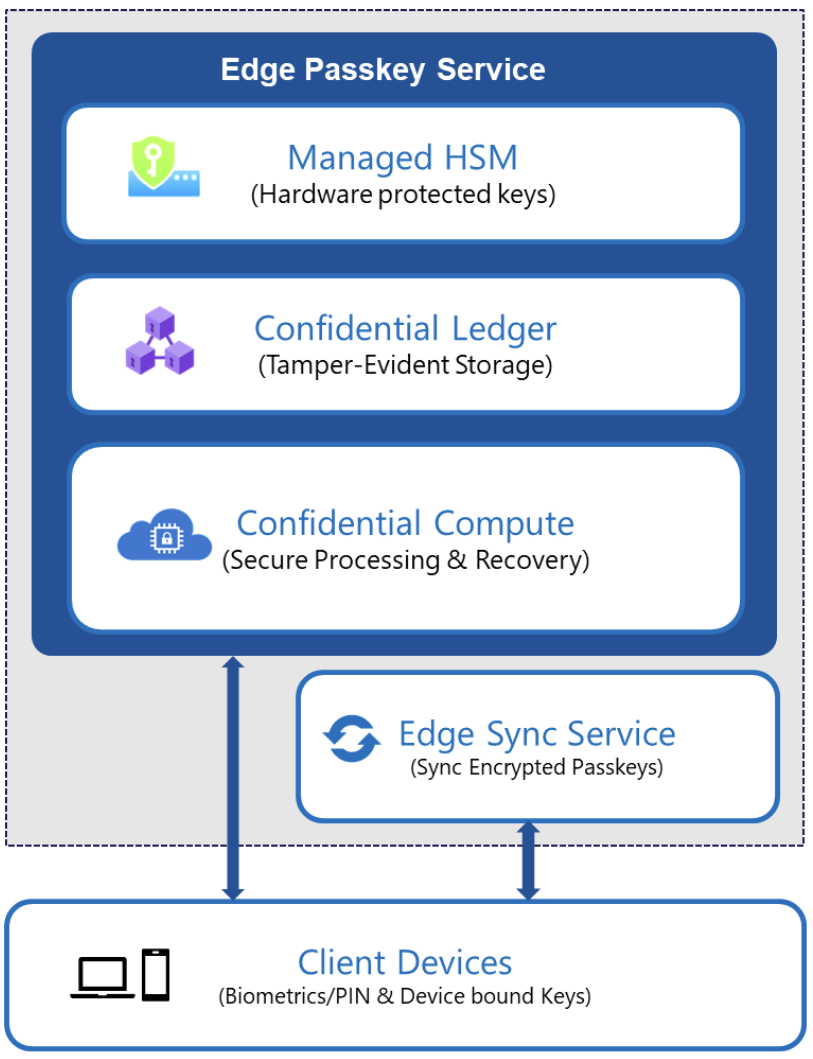 These layers work together to protect passkeys during creation, synchronization, and recovery. The passkey service backend is deployed using Confidential Containers on Azure Container Instances (ACI), which leverage Trusted Execution Environments for protected execution of sensitive workloads.
Confidential compute for passkey operations
Sensitive passkey operations, including credential creation, assertion, and recovery validation, execute inside the Azure confidential computing environments backed by hardware isolation. This ensures that:- Cryptographic material is processed inside protected memory.
- The host environment cannot inspect sensitive cryptographic material (such as passkeys and encryption keys) while in use.
- Only attested service code can access protected encryption keys.
