Log in
The post appeared first on Windows Blog.
30 September 2026 om 01:22
The post appeared first on Windows Blog.

The post appeared first on Windows Blog.
wsl --update in your terminal or download the latest release from GitHub and you will gain access to:
wslc.exe to directly build, run and deploy Linux containers on Windows, or use its built-in alias container.exe to run the same familiar container commands For a deeper look at how WSL containers are built, how they work with WSL, and the architecture behind the platform, see our WSL containers architecture blog.
Let's get into what's new with GA.
For a deeper look at how WSL containers are built, how they work with WSL, and the architecture behind the platform, see our WSL containers architecture blog.
Let's get into what's new with GA.
wslc container restart — restart a running containerwslc container cp — copy files in and out via tar archivewslc system info — see the state of your container environment at a glancewslc network connect and wslc network disconnect — attach and detach containers from networkswslc network create now supports arbitrary network driver options--stop-timeout on wslc create and wslc run, including -1 for an infinite timeout--mount support during wslc create and wslc runwslc session, so you can put your container storage on the drive you want.wslc as your default driver for creating and interacting with VS Code dev containerswslc.wslc from within WSL distroswslc composewsl compose up to work with your existing compose.yaml files, unchanged. We’ve started on this and hope to share more soon.
consomme network mode, enabled for container workflows which improves networking compatibility across developer and enterprise scenarios.
These foundational improvements benefit WSL distributions, WSL containers, and other container technologies built on WSL, reflecting a broader effort to make Linux on Windows feel increasingly seamless and integrated.
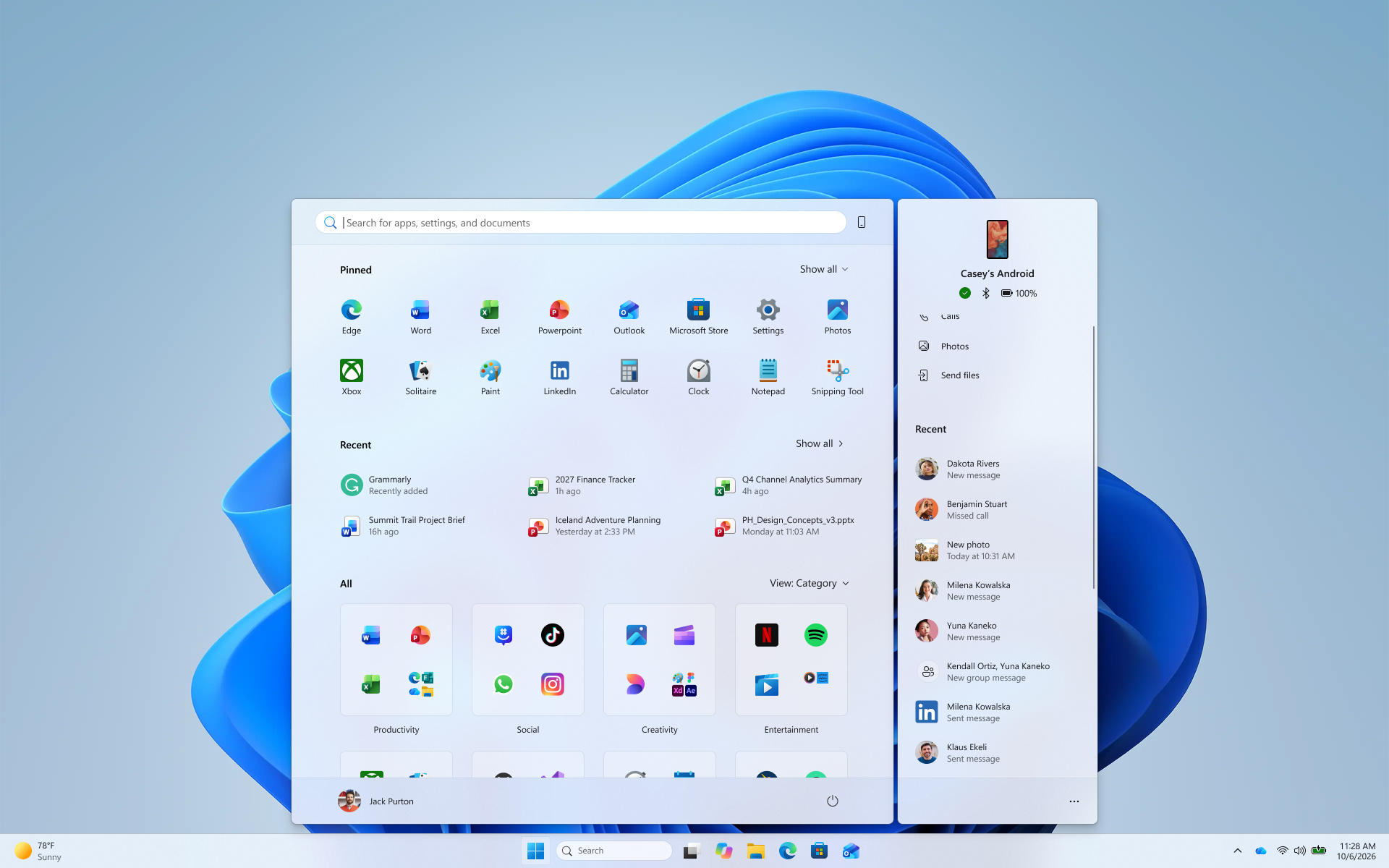 The phone companion in Start with a scrollable pane for viewing more recent mobile activity.[/caption]
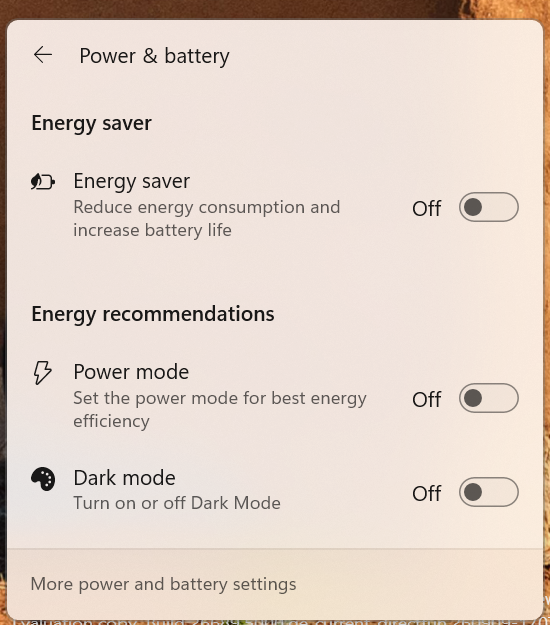 The Power & battery settings page showing Energy Recommendations, including suggested actions.[/caption]
Thanks,
Stephen and the Windows Insider Program team
The Power & battery settings page showing Energy Recommendations, including suggested actions.[/caption]
Thanks,
Stephen and the Windows Insider Program team Surface Pro 12-inch introduces Microsoft Ink Canvas, an AI-powered, pen-first experience for sketching, annotating, generating images and summarizing text directly on the canvas. Built for the moments before an idea becomes a document or prompt, Ink Canvas lets customers use Slim Pen to express intent visually, spatially and in their own handwriting — giving Copilot richer context and helping rough thoughts become useful creations faster.5 Ink Canvas will be pre-installed on the new Pro 12-inch, and will also be available to download from the Microsoft Store on other supported Surface and Windows devices on October 13.13
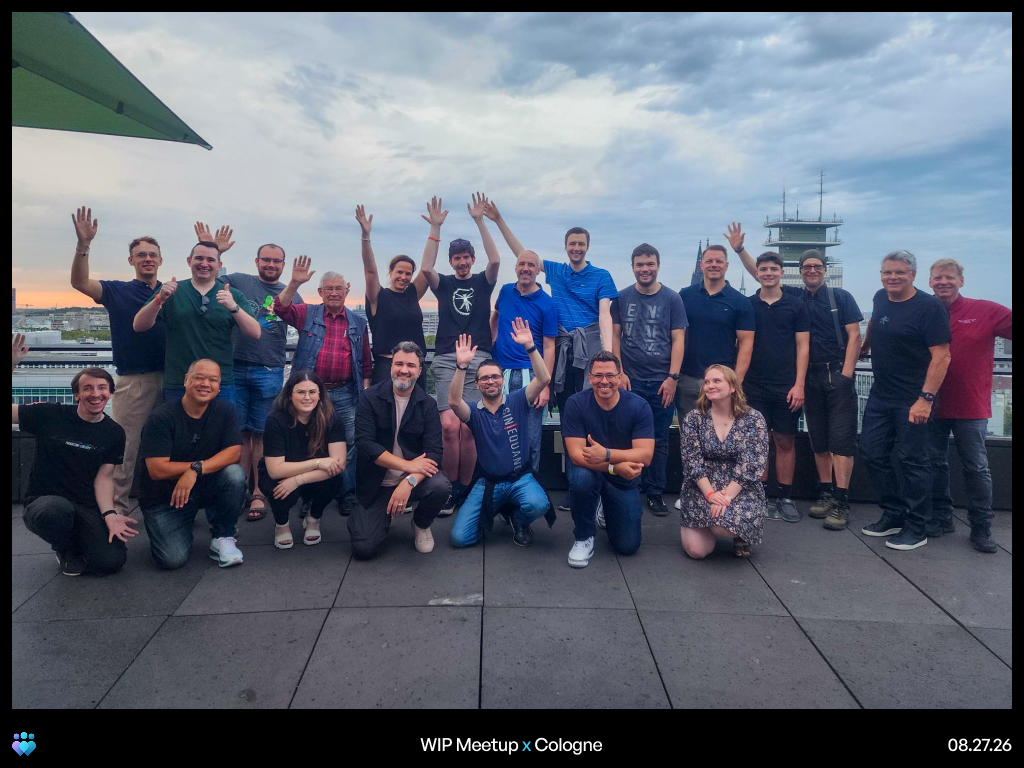 A group of Windows Insiders from the Windows Insider meetup in Cologne[/caption]
[caption id="attachment_179173" align="aligncenter" width="1024"]
A group of Windows Insiders from the Windows Insider meetup in Cologne[/caption]
[caption id="attachment_179173" align="aligncenter" width="1024"]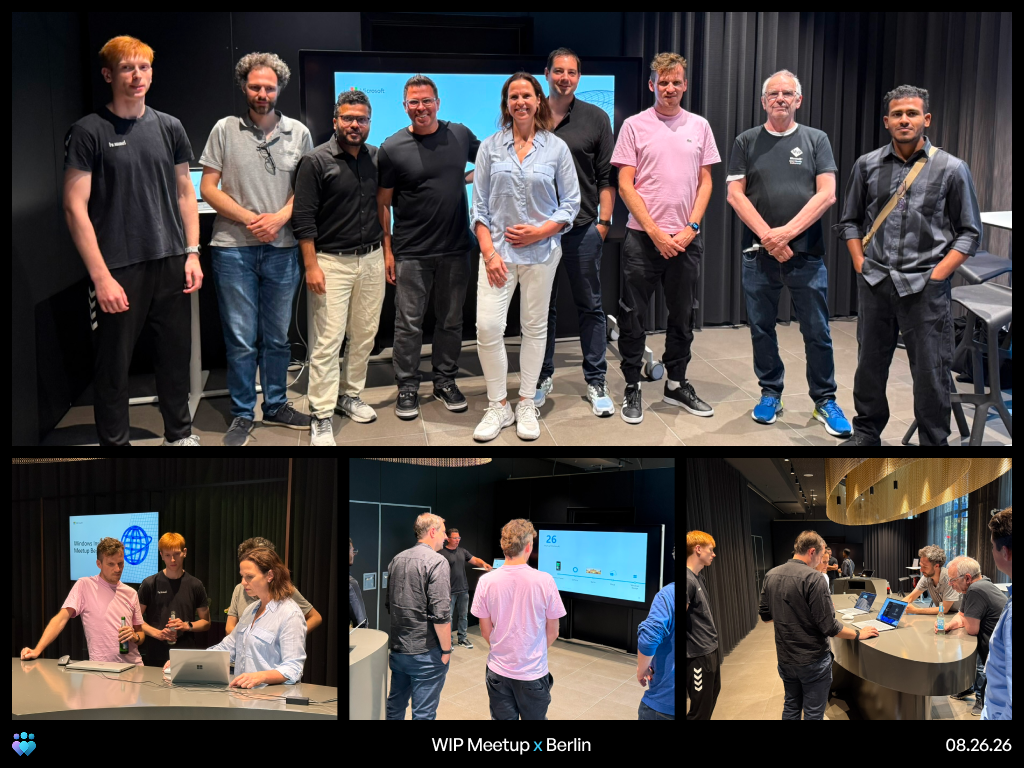 A group of Windows Insiders from the Windows Insider meetup in Berlin[/caption]
[caption id="attachment_179174" align="aligncenter" width="1024"]
A group of Windows Insiders from the Windows Insider meetup in Berlin[/caption]
[caption id="attachment_179174" align="aligncenter" width="1024"]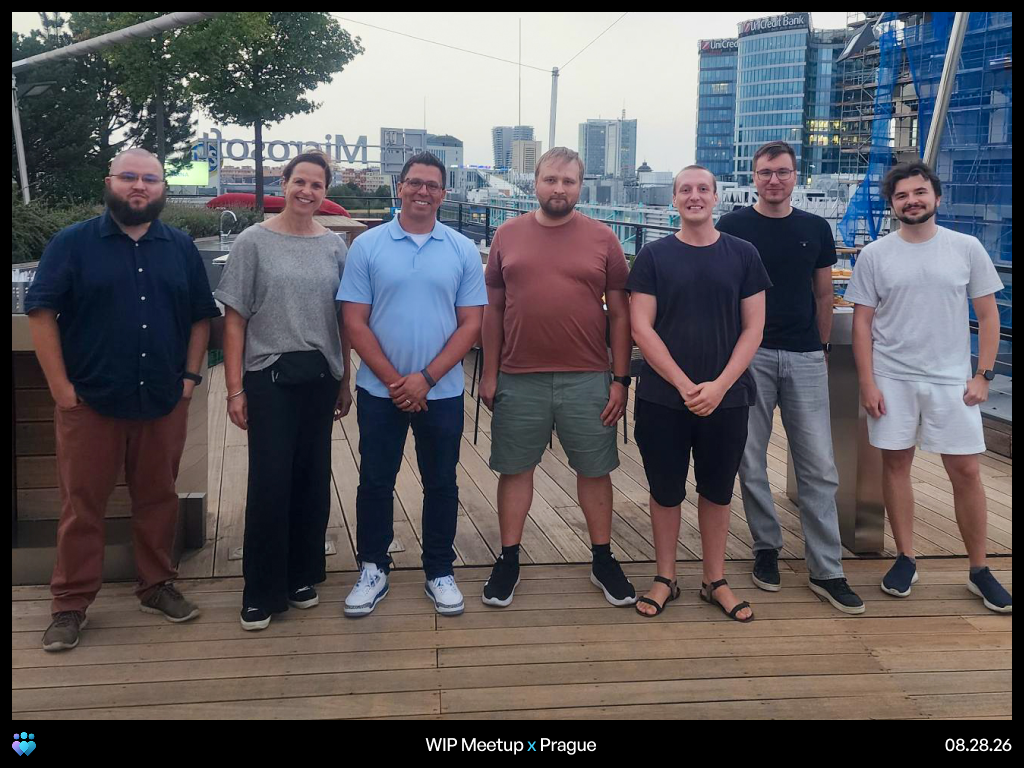 A group of Windows Insiders from the Windows Insider meetup in Prague[/caption]
These meetups were smaller by design. That gave us more time for direct conversations, questions, and feedback. Many of you shared that you can feel the improvements in Experimental builds, especially in overall system responsiveness. That feedback came with a clear ask to keep rolling these improvements out to everyone so your friends, family, and other people in your life can experience them too. Some of that is already underway. Start and taskbar improvements have started rolling out broadly, and you can expect more as we head into the fall.
You also asked us to explore new ways of sharing our work, including early design concepts and ideas. We recently held a feedback session where we shared the design for the File Explorer context menus that recently shipped to Experimental builds. You can expect more lightweight, early sharing sessions so we can hear your feedback before improvements make their way into Experimental builds.
We also heard that it can be difficult to understand what’s happening with the feedback you submit. You want similar feedback grouped together and a clearer view of what we’re considering and actively working on. We’re increasing our investment in this area and will have more to share soon.
A consistent theme across the meetups was the strength of the Insider community. Across each stop, attendees reconnected in person, met people they had previously only known online, and shared tips with one another. It was great to be together, swap insights, and spend time with this community. The feedback and energy we feel from Insiders help us shape Windows. We’re looking forward to keeping the conversation going as the tour continues.
Marcus
Windows Community Connection in Brooklyn, NYC on October 15: Register for a chance to attend an exclusive Windows Insider event on October 15 in Brooklyn: https://www.aka.ms/windowsfans. Hear from Microsoft leaders and the Windows Insider team, share your thoughts on the program, and get a closer look at what's ahead for Windows. Space is limited.
A group of Windows Insiders from the Windows Insider meetup in Prague[/caption]
These meetups were smaller by design. That gave us more time for direct conversations, questions, and feedback. Many of you shared that you can feel the improvements in Experimental builds, especially in overall system responsiveness. That feedback came with a clear ask to keep rolling these improvements out to everyone so your friends, family, and other people in your life can experience them too. Some of that is already underway. Start and taskbar improvements have started rolling out broadly, and you can expect more as we head into the fall.
You also asked us to explore new ways of sharing our work, including early design concepts and ideas. We recently held a feedback session where we shared the design for the File Explorer context menus that recently shipped to Experimental builds. You can expect more lightweight, early sharing sessions so we can hear your feedback before improvements make their way into Experimental builds.
We also heard that it can be difficult to understand what’s happening with the feedback you submit. You want similar feedback grouped together and a clearer view of what we’re considering and actively working on. We’re increasing our investment in this area and will have more to share soon.
A consistent theme across the meetups was the strength of the Insider community. Across each stop, attendees reconnected in person, met people they had previously only known online, and shared tips with one another. It was great to be together, swap insights, and spend time with this community. The feedback and energy we feel from Insiders help us shape Windows. We’re looking forward to keeping the conversation going as the tour continues.
Marcus
Windows Community Connection in Brooklyn, NYC on October 15: Register for a chance to attend an exclusive Windows Insider event on October 15 in Brooklyn: https://www.aka.ms/windowsfans. Hear from Microsoft leaders and the Windows Insider team, share your thoughts on the program, and get a closer look at what's ahead for Windows. Space is limited.referenceTarget property, to make your custom web components more accessible, and the aria-actions attribute, to expose your widgets' secondary actions to assistive technologies.
We'll then round up other useful additions, including media-state pseudo-classes, relative alpha colors, and PWA drag regions, and go over early features that are ready for testing such as WebMCP, to unlock browsing agent scenarios.
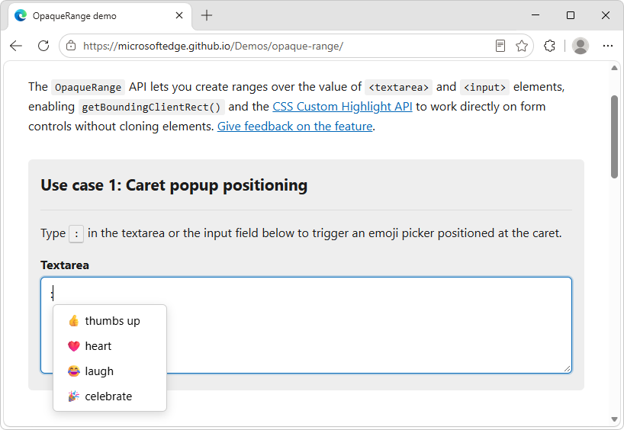 The new OpaqueRange API provides live access to ranges of text within form inputs, such as
 <textarea> and <input> elements.
You can use these ranges for operations like getBoundingClientRect() and getClientRects(), and therefore position UI at specific places within form inputs.
The OpaqueRange API also works with the CSS Custom Highlight API, making it possible to create personalized highlights within editable text regions.
To learn more about the OpaqueRange API, checkout our intro video, explainer, and live demos.
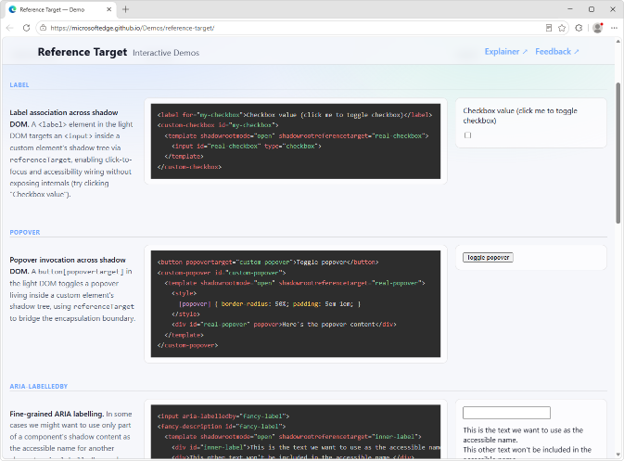 A common pain point developers face when creating web components with Shadow DOM is making them accessible. A problem also known as cross-root ARIA.
The
A common pain point developers face when creating web components with Shadow DOM is making them accessible. A problem also known as cross-root ARIA.
The referenceTarget property of a ShadowRoot object, which can also be set via the shadowrootreferencetarget HTML attribute on elements, solves this.
It makes it possible to forward ID reference attributes, such as for or aria-labelledby, to elements that are inside the shadow DOM of a component.
For example, you can use this to link a <label for> element to the right <input> element, even if that <input> is inside the shadow DOM of a web component.
<label for="custom-checkbox">Checkbox value</label>
<custom-checkbox id="custom-checkbox">
  <template shadowrootmode="open" shadowrootreferencetarget="real-checkbox">
    <input id="real-checkbox" type="checkbox">
  </template>
</custom-checkbox>
To learn more, read our explainer, and use our live demos.
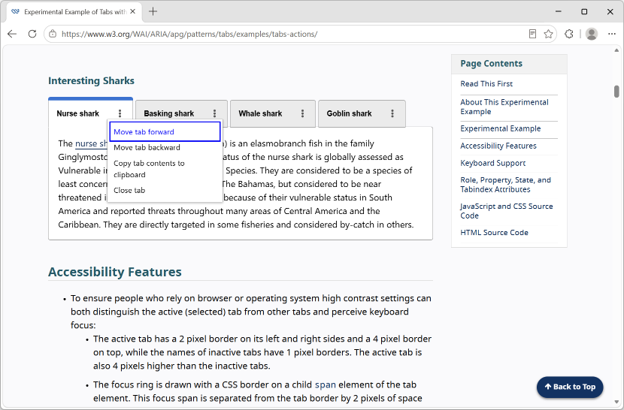 Complex UIs often contain composite widgets with multiple actionable parts. For example, a tab widget may also include another button.
These composite interactive widgets can be hard to make accessible to assistive technology users.
The new HTML
Complex UIs often contain composite widgets with multiple actionable parts. For example, a tab widget may also include another button.
These composite interactive widgets can be hard to make accessible to assistive technology users.
The new HTML aria-actions attribute makes it possible to expose your widgets' secondary actions to screen readers.
For example, you can expose the close button of a tab widget as follows:
<button class="tab" aria-actions="close-tab">
    <span class=”tab-title”>Tab 1</span>
    <span id="close-tab">Close</span>
</button>
To learn more, check out the tabs with action buttons example from the ARIA Authoring Practices Guide.
<video> and <audio>, based on their playback state, by using the new :playing, :paused, :buffering, :muted, and :stalled pseudo-classes.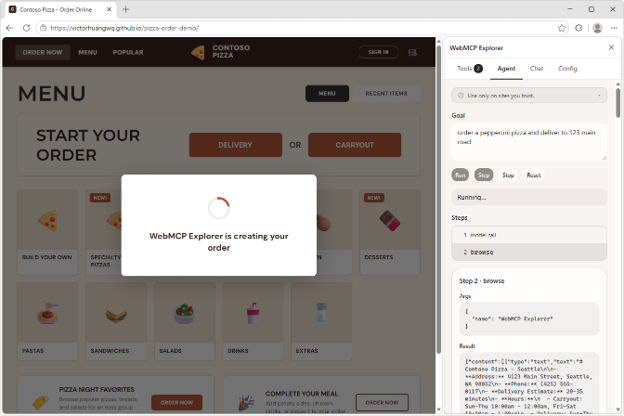 We have been actively involved with the Web Machine Learning Community Group, specifying WebMCP: a web API that helps you create efficient, fast, and trusted human-agent collaboration workflows for your site.
Using WebMCP, you can reuse your existing front-end code, and expose it as structured tools which a browsing agent can then use to help users accomplish tasks on your site.
Our implementation of the WebMCP spec in Microsoft Edge is ready for testing. To get started, we created a few samples and a browser extension to run and debug your WebMCP tools. Find out more on the webmcp-labs repo.
We have been actively involved with the Web Machine Learning Community Group, specifying WebMCP: a web API that helps you create efficient, fast, and trusted human-agent collaboration workflows for your site.
Using WebMCP, you can reuse your existing front-end code, and expose it as structured tools which a browsing agent can then use to help users accomplish tasks on your site.
Our implementation of the WebMCP spec in Microsoft Edge is ready for testing. To get started, we created a few samples and a browser extension to run and debug your WebMCP tools. Find out more on the webmcp-labs repo.
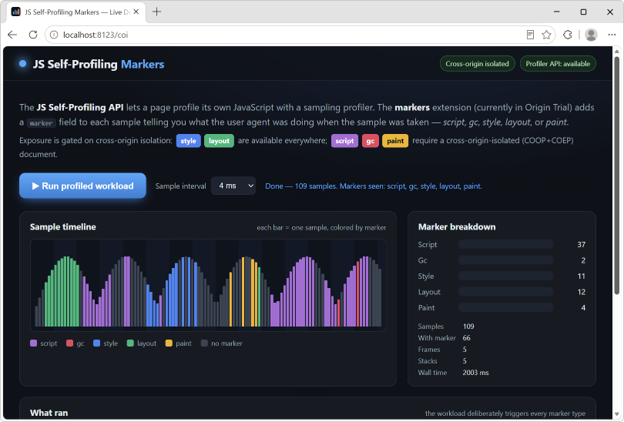 The JS Self-Profiling API is a great way to measure your app's performance in production, on real user devices. But it only samples your page's JavaScript, which often leaves unexplained gaps in a trace, moments where the browser was styling, laying out, painting, or running garbage collection.
We're adding sample markers to fill those gaps. Each sample can now carry a marker that identifies what the browser was doing at capture time. Now, an unexplained gap shows up clearly as, for example, a run of layout markers, so you can pinpoint the real cause of a slow trace and optimize the right thing instead of guessing.
To learn more, read the feature explainer, see the markers in action by running our live demo, and register for the origin trial to test it with your own users and share feedback.
The JS Self-Profiling API is a great way to measure your app's performance in production, on real user devices. But it only samples your page's JavaScript, which often leaves unexplained gaps in a trace, moments where the browser was styling, laying out, painting, or running garbage collection.
We're adding sample markers to fill those gaps. Each sample can now carry a marker that identifies what the browser was doing at capture time. Now, an unexplained gap shows up clearly as, for example, a run of layout markers, so you can pinpoint the real cause of a slow trace and optimize the right thing instead of guessing.
To learn more, read the feature explainer, see the markers in action by running our live demo, and register for the origin trial to test it with your own users and share feedback.
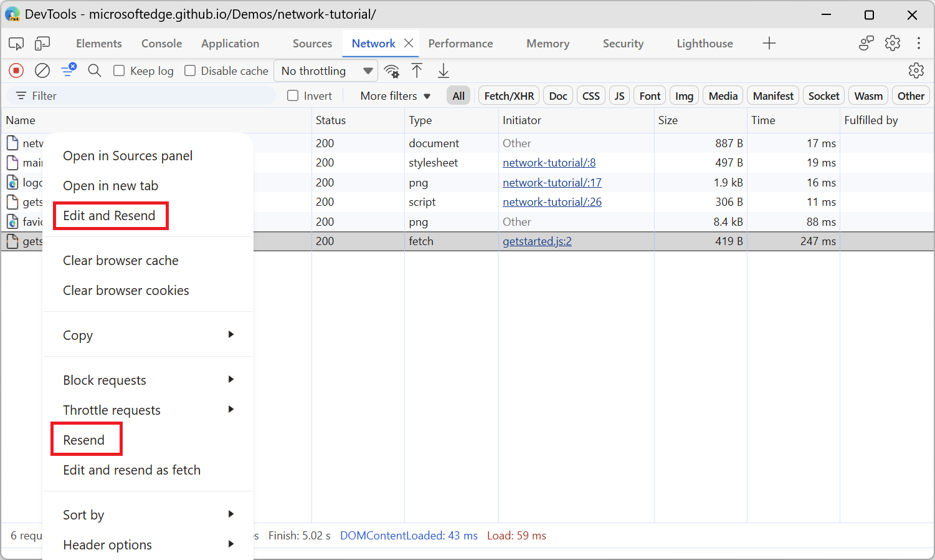 Starting with Edge 153, the Network tool in DevTools now includes two new actions, available on each request via the contextual menu:
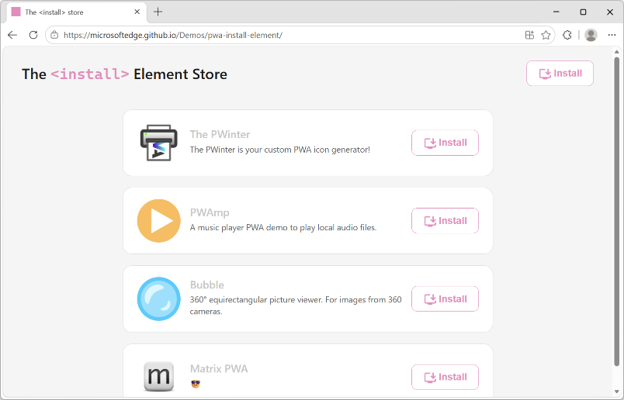 Updated versions of the Web Install API and the
 <install> element are available for testing.
Both navigator.install() and the <install> element now take a direct link to the target manifest file of the app you're installing. For example:
// Install the current app
navigator.install();

// Install a cross-origin web app
navigator.install( { manifest: https://example.com/manifest.json });
<!-- Install the current app -->
<install>

<!-- Install a cross-origin web app -->
<install manifest="https://example.com/app/manifest.webmanifest"></install>
To learn more about these web app installation features, check out the Web Install API and <install> element demos and resources. You can also start using the
<install> element on your own site by registering to the origin trial.
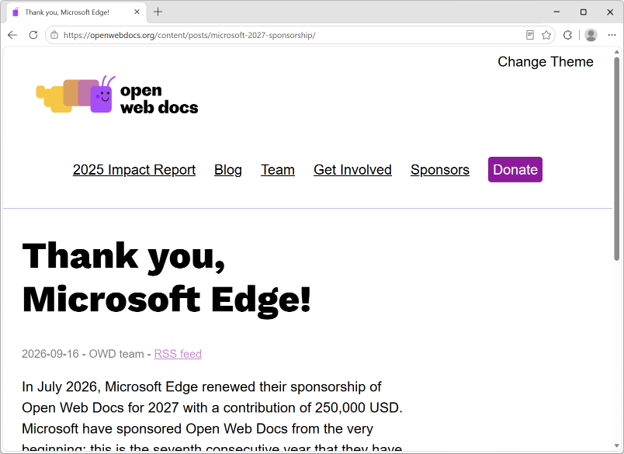 High-quality and up-to-date technical web platform documentation continues to play a key role in making the web the most universal application runtime in history.
This is why, at Microsoft Edge, we have been sponsoring Open Web Docs. This year marks our 7th consecutive year funding OWD, enabling the collective to continue creating and maintaining the documentation and data that all web developers need.
High-quality and up-to-date technical web platform documentation continues to play a key role in making the web the most universal application runtime in history.
This is why, at Microsoft Edge, we have been sponsoring Open Web Docs. This year marks our 7th consecutive year funding OWD, enabling the collective to continue creating and maintaining the documentation and data that all web developers need.
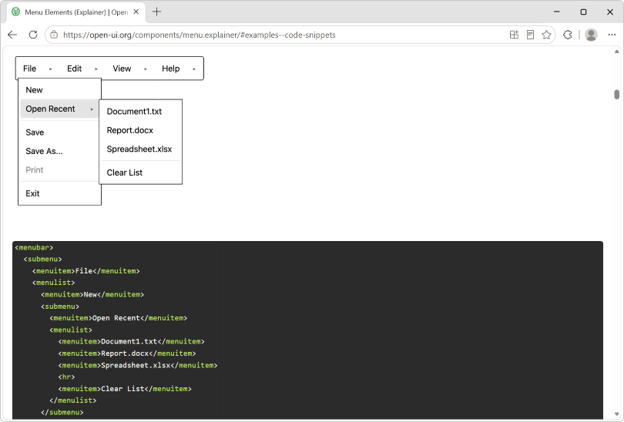 Web developers have long needed a browser-provided way to build menus that don't require re-implementing accessibility, keyboard navigation, focus management, and positioning from scratch. The Open UI community is working on a new native menu element that aims to provide these capabilities out of the box, while remaining flexible enough to fit modern design systems.
We're excited about this work because it reflects a broader trend toward more powerful, customizable built-in web platform components. Great work from the Google team for implementing the
Web developers have long needed a browser-provided way to build menus that don't require re-implementing accessibility, keyboard navigation, focus management, and positioning from scratch. The Open UI community is working on a new native menu element that aims to provide these capabilities out of the box, while remaining flexible enough to fit modern design systems.
We're excited about this work because it reflects a broader trend toward more powerful, customizable built-in web platform components. Great work from the Google team for implementing the <menubar> element.
To test the element, enable the "Experimental Web Platform features" flag on the about://flags page. We can't wait to see what you build.
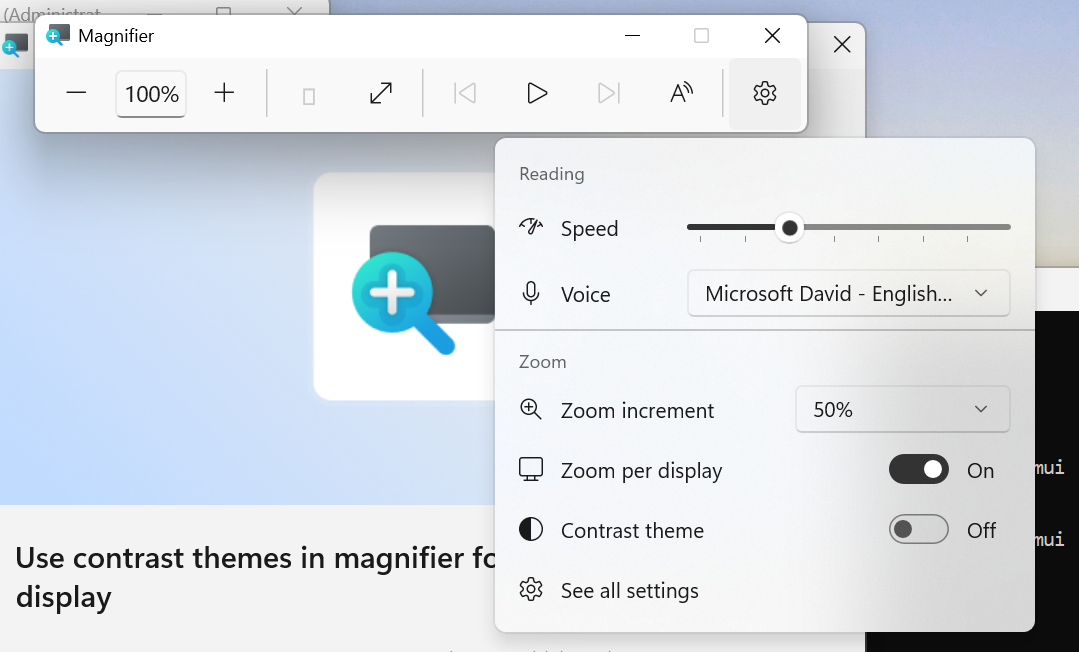 UI showing the new contrast theme toggle in Magnifier[/caption]
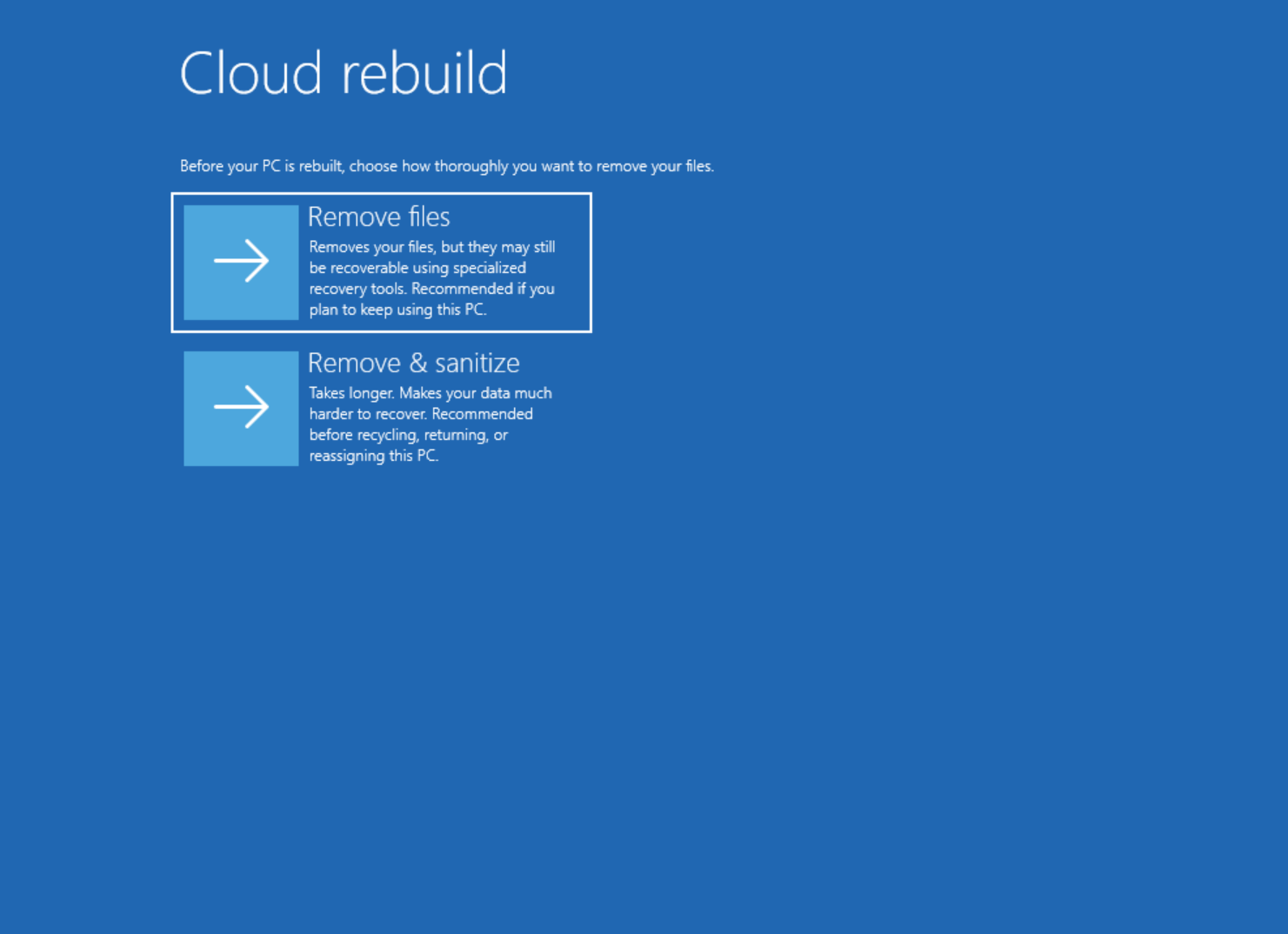 UI showing new Cloud rebuild file removal options.[/caption]
Thanks,
Stephen and the Windows Insider Program teamLondon Stock Exchange Group increases developer productivity with Windows 365. “Windows 365 gives us the ability to provide different types of performance and development environments plus access to GitHub Copilot, where we’ve seen an increase in developer productivity and efficiency.” says Sandra Lee, Group Chief Information Security Officer, LSEG.Siemens uses Windows 365 for scenarios that include developers who need specialized digital tools, as well as employees requiring temporary access. “In all these cases, we need a trustworthy device and a verified identity in our IT landscape—even if the access is only intended to be temporary,” says Hendrik Harder, Global Service Owner Virtual Client at Siemens.
ABN AMRO transforms the workplace for 3,500 offshore developers with Windows 365. Developers reported smoother performance, faster onboarding and more productivity, while IT teams benefited from simplified operations and scalability. “The first time I used Windows 365, I thought I was using my own laptop—the performance was that smooth,” says Peter Witmond, Product Owner Virtual Workplace at ABN AMRO.
Acer Vero 16[/caption]
Acer’s Windows compute lineup at IFA 2026 also included the Swift Blade 14, a 799-gram ultra-lightweight laptop for ultimate mobility; the Acer SFF RTX Spark reference design powered by the NVIDIA RTX Spark superchip for the age of personal AI agents; the Acer Veriton RI110 AI Mini Workstation, a Copilot+ PC designed for agentic AI workflows; the Aspire G 3D 16 laptop, powered by the AMD Ryzen AI Max+ 395 processor and offering Acer’s naked-eye 3D technology; the Swift Air 16 laptop with a premium aluminum chassis and Intel Core Series 3 processors; the Predator Atlas 7 gaming handheld; and the refreshed Aspire S series all-in-one desktops.
ProArt Laptop (Nano Black & Neo White)[/caption]
Dell 14S Laptop[/caption]
HP OmniBook X 14[/caption]
Yoga Pro 9n (15”, 11)[/caption]
For students, families, and everyday users, the new IdeaPad Vibe series combines bold colors and lightweight designs with responsive performance and Copilot+ PC experiences. Available in 14- and 15-inch configurations, the lineup offers a choice of Snapdragon X or AMD Ryzen AI 400 Series processors. Lenovo also introduced the compact, cluster-ready ThinkCentre X Ultra for advanced business AI workloads, the streamlined IdeaCentre AIO i, and the ultra-slim ThinkBook 14 Gen 9 for mobile, AI-enhanced productivity.
[caption id="attachment_263918" align="alignnone" width="1024"] IdeaPad Vibe[/caption]
Venture 15[/caption]
Ryzen AI Halo[/caption]
NVIDIA RTX Spark Superchip[/caption]
UI showing new Cloud rebuild file removal options.[/caption]
Thanks,
Stephen and the Windows Insider Program teamLondon Stock Exchange Group increases developer productivity with Windows 365. “Windows 365 gives us the ability to provide different types of performance and development environments plus access to GitHub Copilot, where we’ve seen an increase in developer productivity and efficiency.” says Sandra Lee, Group Chief Information Security Officer, LSEG.Siemens uses Windows 365 for scenarios that include developers who need specialized digital tools, as well as employees requiring temporary access. “In all these cases, we need a trustworthy device and a verified identity in our IT landscape—even if the access is only intended to be temporary,” says Hendrik Harder, Global Service Owner Virtual Client at Siemens.
ABN AMRO transforms the workplace for 3,500 offshore developers with Windows 365. Developers reported smoother performance, faster onboarding and more productivity, while IT teams benefited from simplified operations and scalability. “The first time I used Windows 365, I thought I was using my own laptop—the performance was that smooth,” says Peter Witmond, Product Owner Virtual Workplace at ABN AMRO.
Acer Vero 16[/caption]
Acer’s Windows compute lineup at IFA 2026 also included the Swift Blade 14, a 799-gram ultra-lightweight laptop for ultimate mobility; the Acer SFF RTX Spark reference design powered by the NVIDIA RTX Spark superchip for the age of personal AI agents; the Acer Veriton RI110 AI Mini Workstation, a Copilot+ PC designed for agentic AI workflows; the Aspire G 3D 16 laptop, powered by the AMD Ryzen AI Max+ 395 processor and offering Acer’s naked-eye 3D technology; the Swift Air 16 laptop with a premium aluminum chassis and Intel Core Series 3 processors; the Predator Atlas 7 gaming handheld; and the refreshed Aspire S series all-in-one desktops.
ProArt Laptop (Nano Black & Neo White)[/caption]
Dell 14S Laptop[/caption]
HP OmniBook X 14[/caption]
Yoga Pro 9n (15”, 11)[/caption]
For students, families, and everyday users, the new IdeaPad Vibe series combines bold colors and lightweight designs with responsive performance and Copilot+ PC experiences. Available in 14- and 15-inch configurations, the lineup offers a choice of Snapdragon X or AMD Ryzen AI 400 Series processors. Lenovo also introduced the compact, cluster-ready ThinkCentre X Ultra for advanced business AI workloads, the streamlined IdeaCentre AIO i, and the ultra-slim ThinkBook 14 Gen 9 for mobile, AI-enhanced productivity.
[caption id="attachment_263918" align="alignnone" width="1024"] IdeaPad Vibe[/caption]
Venture 15[/caption]
Ryzen AI Halo[/caption]
NVIDIA RTX Spark Superchip[/caption]
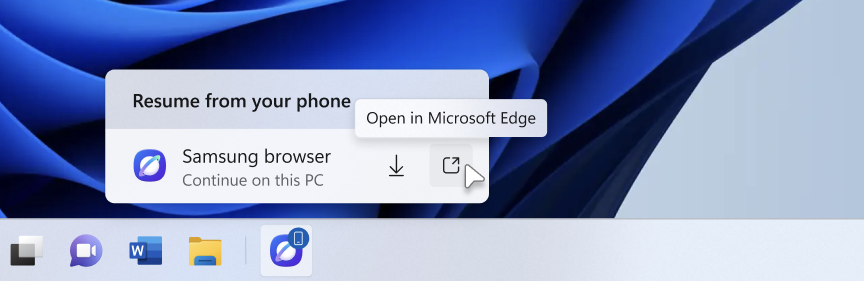 The Resume hovercard provides an option to open the webpage in the PC's default browser.[/caption]
[caption id="attachment_179157" align="aligncenter" width="684"]
The Resume hovercard provides an option to open the webpage in the PC's default browser.[/caption]
[caption id="attachment_179157" align="aligncenter" width="684"]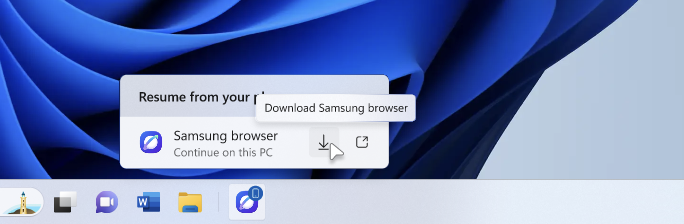 The Resume hovercard provides an option to install the originating phone browser.[/caption]
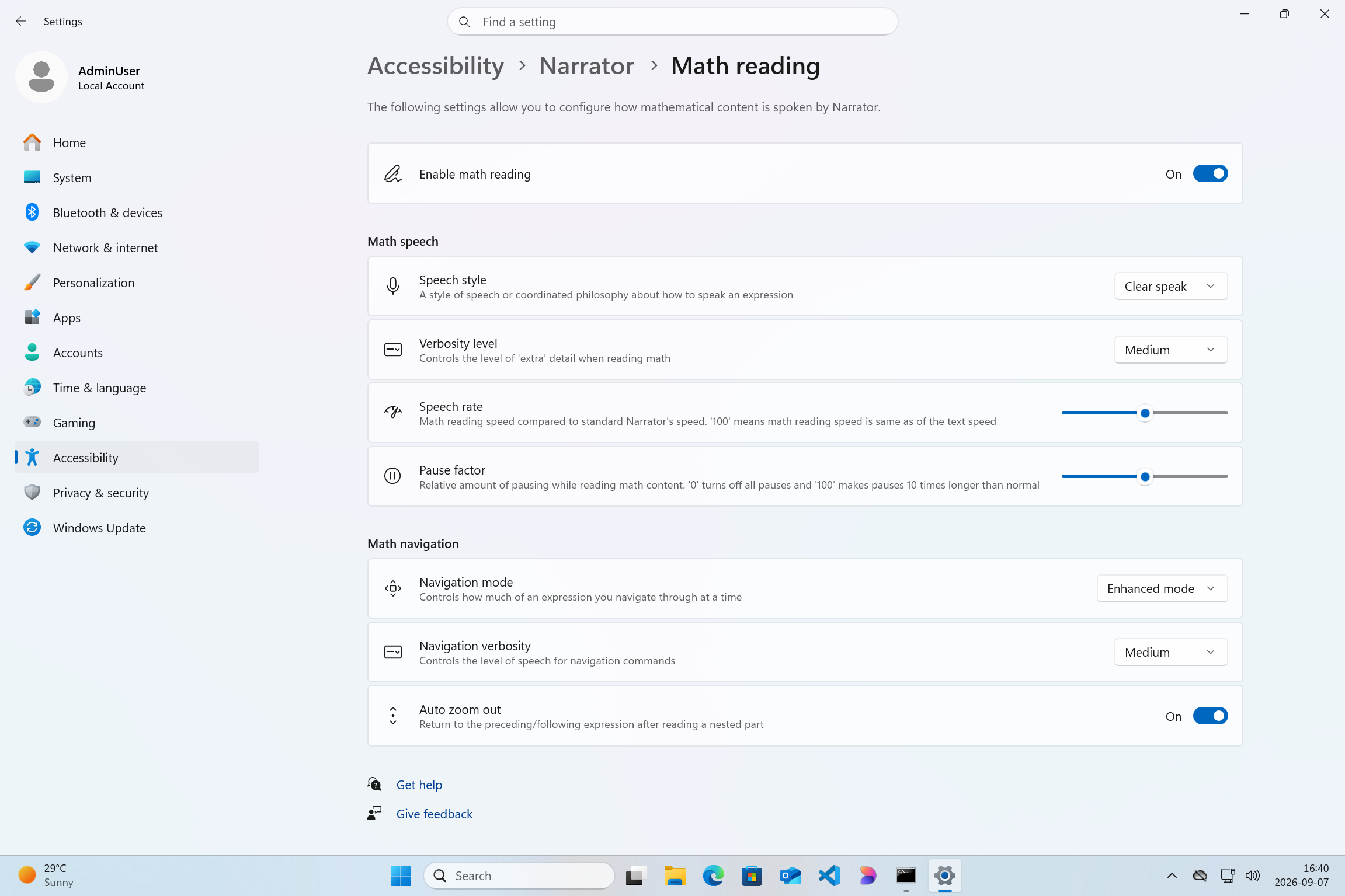 Screenshot of Windows settings page with Narrator Math reading settings page open[/caption]
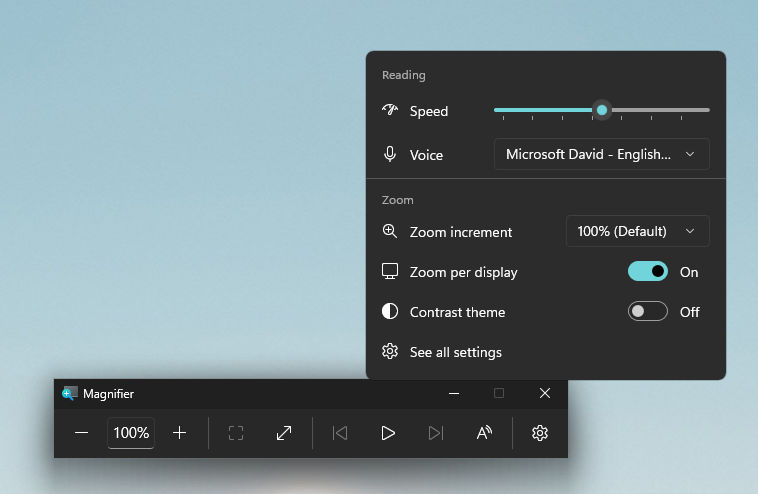 UI showing Magnifier settings with Zoom per display enabled, allowing each monitor to maintain its own zoom level.[/caption]
[caption id="attachment_179160" align="aligncenter" width="1041"]
UI showing Magnifier settings with Zoom per display enabled, allowing each monitor to maintain its own zoom level.[/caption]
[caption id="attachment_179160" align="aligncenter" width="1041"] UI showing Magnifier's multiple display controls, including independent zoom and view locking options.[/caption]
Thanks,
Stephen and the Windows Insider Program team
Each of these improvements came from a real family experience — from issues parents told us mattered most: speed, accuracy, control, transparency, and peace of mind.
This is the compounding effect of a team that treats every piece of customer feedback as a commitment to do better. Thank you to every parent who shared their voice; you’ve shaped this product, and we’re just getting started.
All of the above fixes are available in the latest versions of the Family Safety mobile app both iOS and Android are available. You can also access Family Safety on the web by visiting: https://account.microsoft.com/family/
UI showing Magnifier's multiple display controls, including independent zoom and view locking options.[/caption]
Thanks,
Stephen and the Windows Insider Program team
Each of these improvements came from a real family experience — from issues parents told us mattered most: speed, accuracy, control, transparency, and peace of mind.
This is the compounding effect of a team that treats every piece of customer feedback as a commitment to do better. Thank you to every parent who shared their voice; you’ve shaped this product, and we’re just getting started.
All of the above fixes are available in the latest versions of the Family Safety mobile app both iOS and Android are available. You can also access Family Safety on the web by visiting: https://account.microsoft.com/family/
 The Featured badge is awarded to select extensions that align with Best practices for extensions. Our evaluation considers more than 60 quality signals across multiple dimensions of an extension. Today, much of our evaluation process is automated to make it more consistent, objective, and scalable as the ecosystem expands.
But quality is not static. As we continue to refine our badging criteria, and as developers continuously improve their extensions by fixing issues, refining experiences, and responding to user feedback, we automatically update badges on the Edge Add-ons site.
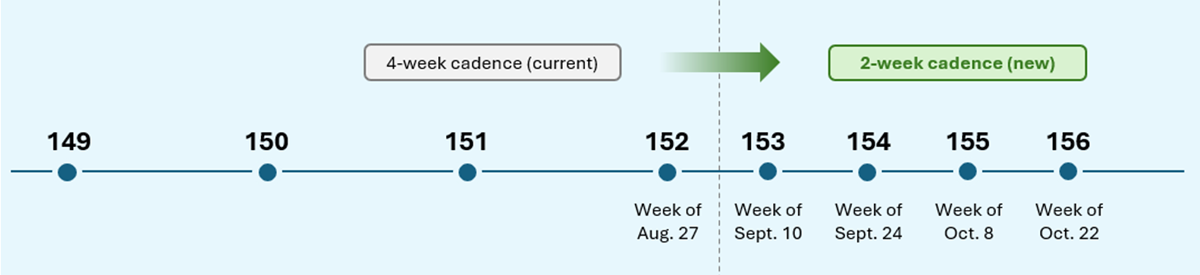
And now, to more quickly recognize quality improvements, we're refreshing Featured badges every 15 days.
With this more frequent cadence, high-quality extensions can earn recognition sooner, and developers receive faster feedback on their investments in quality. At the same time, users benefit from a more up-to-date view of the extensions that meet our quality standards.
Our goal is simple: make it easier for users to find extensions they can trust while ensuring developers who invest in quality are recognized more quickly.
We’ve also pre-configured Windows Settings for coding across File Explorer, Search, Start, and the Taskbar. File Explorer shows file extensions, hidden files, the full path in the title bar, and the details pane, with long-path support enabled. Recently used files and folders and sync provider tips are turned off for a cleaner workspace. In Search and Start, Command Palette is enabled, while Start menu tips and account notifications are turned off to reduce distractions.
Windows Subsystem for Linux (WSL) has become foundational for running Linux workloads on Windows. Last year we open-sourced WSL. Building on that momentum at Build 2026, we integrated WSL more deeply into Windows with WSL containers to provide a built-in way to create, run, and interact with Linux containers directly on Windows.
Together, with Project Zenith, these choices create a calm, and meaningful starting point for development. Project Zenith is not about prescribing a single workflow. You can continue to configure, extend, and personalize your environment around the tools, languages, and frameworks you prefer. It is about beginning from a better baseline, shaped by the settings and tools developers reach for first, so a new device works with you to accelerate your workflows.
Recent STEM and education apps available on Windows on Arm devices[/caption]
Recent security apps available on Windows on Arm devices[/caption]
Recent productivity apps available on Windows on Arm devices[/caption]
Recent creativity, social media and entertainment apps available on Windows on Arm devices[/caption]
The takeaway is clear: Windows on Arm is no longer defined by potential, but by a rapidly expanding ecosystem of devices with apps available across workloads that customers depend on most. As developers continue to invest in Arm-native experiences and compatibility, customers gain more choices, flexibility, and confidence in adopting the next generation of Windows devices.
As the ecosystem continues to expand, the Microsoft App Assure team is ready to assist software developers interested in bringing their apps to Windows on Arm. Through our Arm Advisory Service, we offer expert guidance, technical workshops, code samples, and an escalation path to Microsoft engineers ready to assist with software development. Reach out to us here to learn more.
Finally, don’t forget to bookmark https://worksonwoa.com/ for a comprehensive and continuously updated list of all the apps available on Windows on Arm devices.
The Featured badge is awarded to select extensions that align with Best practices for extensions. Our evaluation considers more than 60 quality signals across multiple dimensions of an extension. Today, much of our evaluation process is automated to make it more consistent, objective, and scalable as the ecosystem expands.
But quality is not static. As we continue to refine our badging criteria, and as developers continuously improve their extensions by fixing issues, refining experiences, and responding to user feedback, we automatically update badges on the Edge Add-ons site.
And now, to more quickly recognize quality improvements, we're refreshing Featured badges every 15 days.
With this more frequent cadence, high-quality extensions can earn recognition sooner, and developers receive faster feedback on their investments in quality. At the same time, users benefit from a more up-to-date view of the extensions that meet our quality standards.
Our goal is simple: make it easier for users to find extensions they can trust while ensuring developers who invest in quality are recognized more quickly.
We’ve also pre-configured Windows Settings for coding across File Explorer, Search, Start, and the Taskbar. File Explorer shows file extensions, hidden files, the full path in the title bar, and the details pane, with long-path support enabled. Recently used files and folders and sync provider tips are turned off for a cleaner workspace. In Search and Start, Command Palette is enabled, while Start menu tips and account notifications are turned off to reduce distractions.
Windows Subsystem for Linux (WSL) has become foundational for running Linux workloads on Windows. Last year we open-sourced WSL. Building on that momentum at Build 2026, we integrated WSL more deeply into Windows with WSL containers to provide a built-in way to create, run, and interact with Linux containers directly on Windows.
Together, with Project Zenith, these choices create a calm, and meaningful starting point for development. Project Zenith is not about prescribing a single workflow. You can continue to configure, extend, and personalize your environment around the tools, languages, and frameworks you prefer. It is about beginning from a better baseline, shaped by the settings and tools developers reach for first, so a new device works with you to accelerate your workflows.
Recent STEM and education apps available on Windows on Arm devices[/caption]
Recent security apps available on Windows on Arm devices[/caption]
Recent productivity apps available on Windows on Arm devices[/caption]
Recent creativity, social media and entertainment apps available on Windows on Arm devices[/caption]
The takeaway is clear: Windows on Arm is no longer defined by potential, but by a rapidly expanding ecosystem of devices with apps available across workloads that customers depend on most. As developers continue to invest in Arm-native experiences and compatibility, customers gain more choices, flexibility, and confidence in adopting the next generation of Windows devices.
As the ecosystem continues to expand, the Microsoft App Assure team is ready to assist software developers interested in bringing their apps to Windows on Arm. Through our Arm Advisory Service, we offer expert guidance, technical workshops, code samples, and an escalation path to Microsoft engineers ready to assist with software development. Reach out to us here to learn more.
Finally, don’t forget to bookmark https://worksonwoa.com/ for a comprehensive and continuously updated list of all the apps available on Windows on Arm devices.
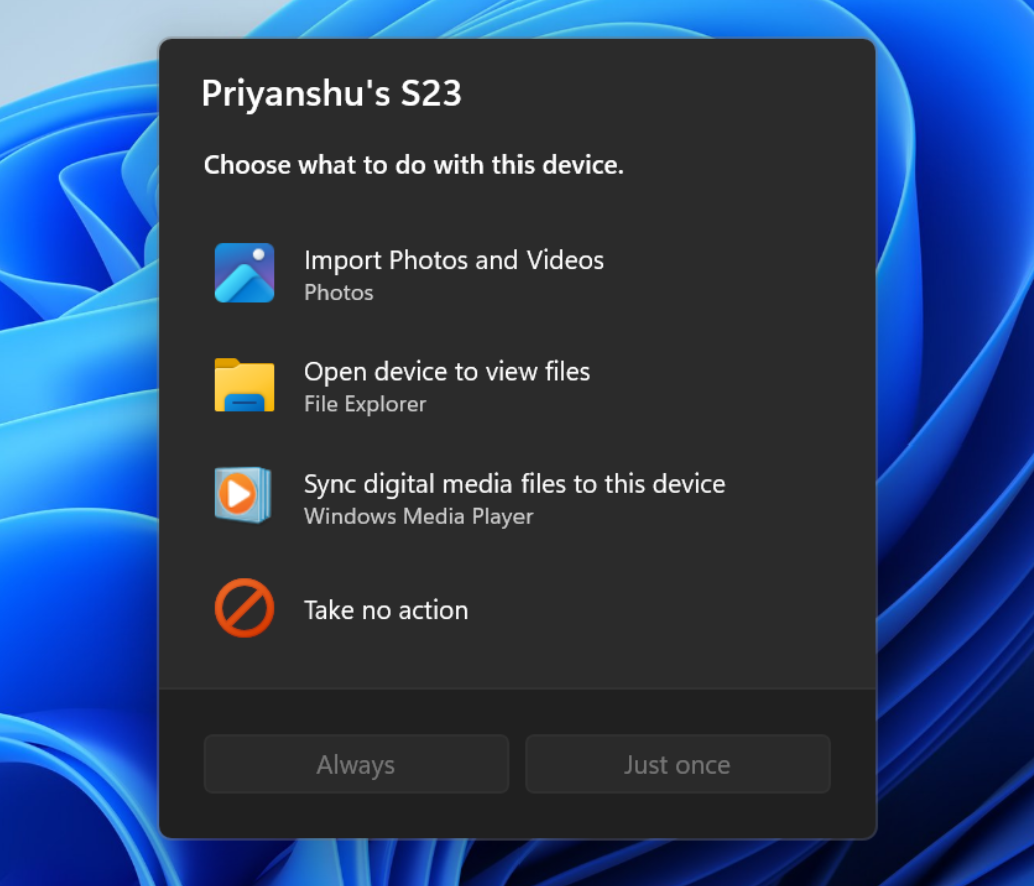 The new AutoPlay experience, shown in dark mode.[/caption]
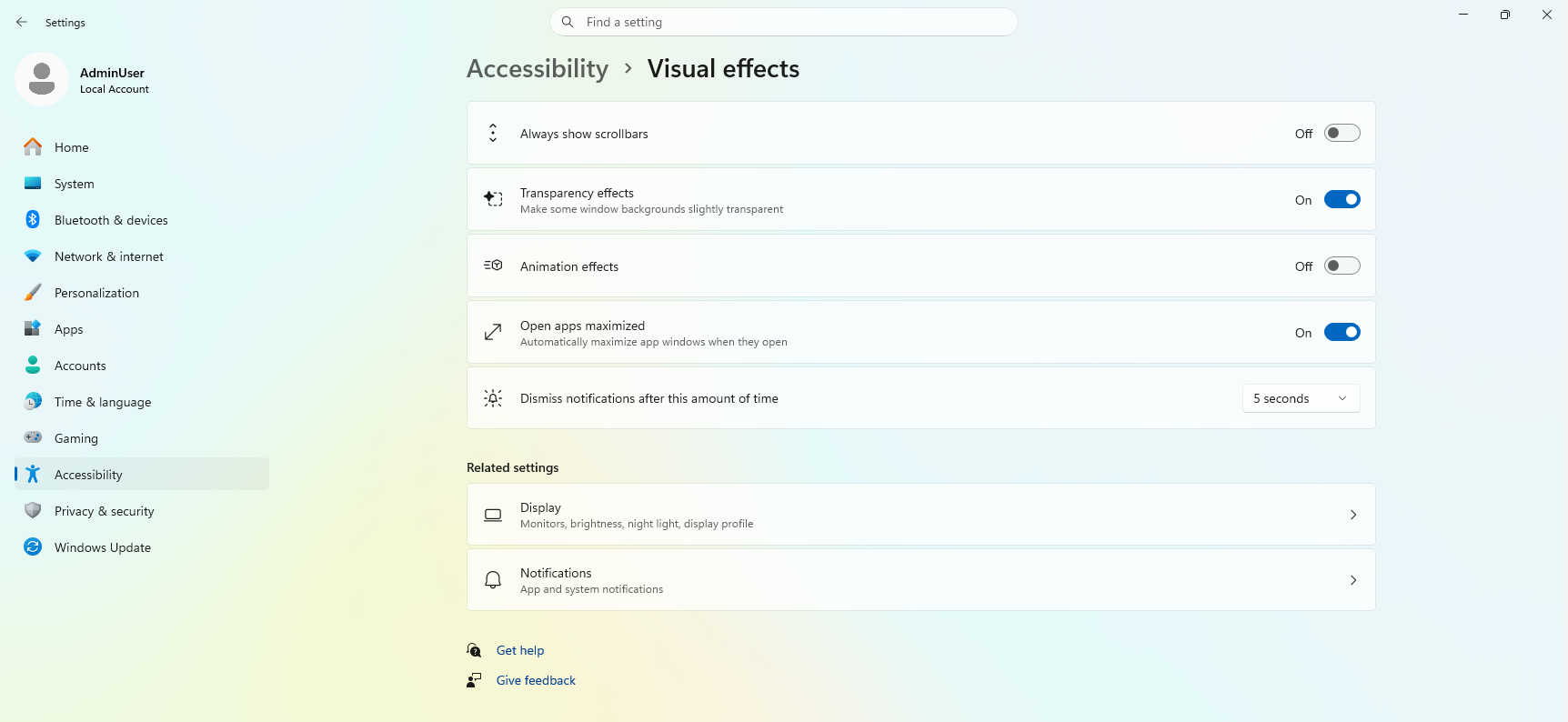 UI showing the new "Open apps maximized" accessibility setting in Settings > Accessibility > Visual effects.[/caption]
Thanks,
Stephen and the Windows Insider Program team See what customers are saying about Windows 365. Learn more at aka.ms/Windows365Stories.[/caption]
Over the past five years, we’ve evolved Windows 365 in meaningful ways and introduced new offerings to meet our customers’ diverse needs:
This graphic was published by Gartner, Inc. as part of a larger research document and should be evaluated in the context of the entire document available at aka.ms/DaaSMQ2026. Note: Gartner does not endorse any company, vendor, product or service depicted in its publications, and does not advise technology users to select only those vendors with the highest ratings or other designation. Gartner publications consist of the opinions of Gartner’s business and technology insights organization and should not be construed as statements of fact. Gartner disclaims all warranties, expressed or implied, with respect to this publication, including any warranties of merchantability or fitness for a particular purpose. Gartner, Magic Quadrant for Desktop as a Service, 5 August 2026, By Stuart Downes, Todd Larivee, Sunil Kumar. Gartner and Magic Quadrant are trademarks of Gartner, Inc., and/or its affiliates.[/caption]
IDC MarketScape vendor analysis model is designed to provide an overview of the competitive fitness of ICT suppliers in a given market. The research methodology utilizes a rigorous scoring methodology based on both qualitative and quantitative criteria that results in a single graphical illustration of each vendor’s position within a given market. The Capabilities score measures vendor product, go-to-market and business execution in the short-term. The Strategy score measures alignment of vendor strategies with customer requirements in a 3-5-year timeframe. Vendor market share is represented by the size of the icons.[/caption]
“Microsoft offers a fully integrated DaaS stack where endpoint management, identity, security, and compliance serve as native prebuilt components.” Additionally, “Microsoft stands out as the only vendor to productize the agentic workspace as a distinct purchasable offering alongside the standard managed desktop. This provides a robust production foundation for IT leaders whose DaaS strategies must accommodate AI agent deployment over the next three years."
- IDC MarketScape: Worldwide Desktop as a Service 2026 Vendor Assessment (Doc #US54118526, July 2026)
Windows 365 monitoring and reporting platform (generally available in September) and a new agent for Windows 365 administrators (limited preview).[/caption]
UI showing the new "Open apps maximized" accessibility setting in Settings > Accessibility > Visual effects.[/caption]
Thanks,
Stephen and the Windows Insider Program team See what customers are saying about Windows 365. Learn more at aka.ms/Windows365Stories.[/caption]
Over the past five years, we’ve evolved Windows 365 in meaningful ways and introduced new offerings to meet our customers’ diverse needs:
This graphic was published by Gartner, Inc. as part of a larger research document and should be evaluated in the context of the entire document available at aka.ms/DaaSMQ2026. Note: Gartner does not endorse any company, vendor, product or service depicted in its publications, and does not advise technology users to select only those vendors with the highest ratings or other designation. Gartner publications consist of the opinions of Gartner’s business and technology insights organization and should not be construed as statements of fact. Gartner disclaims all warranties, expressed or implied, with respect to this publication, including any warranties of merchantability or fitness for a particular purpose. Gartner, Magic Quadrant for Desktop as a Service, 5 August 2026, By Stuart Downes, Todd Larivee, Sunil Kumar. Gartner and Magic Quadrant are trademarks of Gartner, Inc., and/or its affiliates.[/caption]
IDC MarketScape vendor analysis model is designed to provide an overview of the competitive fitness of ICT suppliers in a given market. The research methodology utilizes a rigorous scoring methodology based on both qualitative and quantitative criteria that results in a single graphical illustration of each vendor’s position within a given market. The Capabilities score measures vendor product, go-to-market and business execution in the short-term. The Strategy score measures alignment of vendor strategies with customer requirements in a 3-5-year timeframe. Vendor market share is represented by the size of the icons.[/caption]
“Microsoft offers a fully integrated DaaS stack where endpoint management, identity, security, and compliance serve as native prebuilt components.” Additionally, “Microsoft stands out as the only vendor to productize the agentic workspace as a distinct purchasable offering alongside the standard managed desktop. This provides a robust production foundation for IT leaders whose DaaS strategies must accommodate AI agent deployment over the next three years."
- IDC MarketScape: Worldwide Desktop as a Service 2026 Vendor Assessment (Doc #US54118526, July 2026)
Windows 365 monitoring and reporting platform (generally available in September) and a new agent for Windows 365 administrators (limited preview).[/caption]
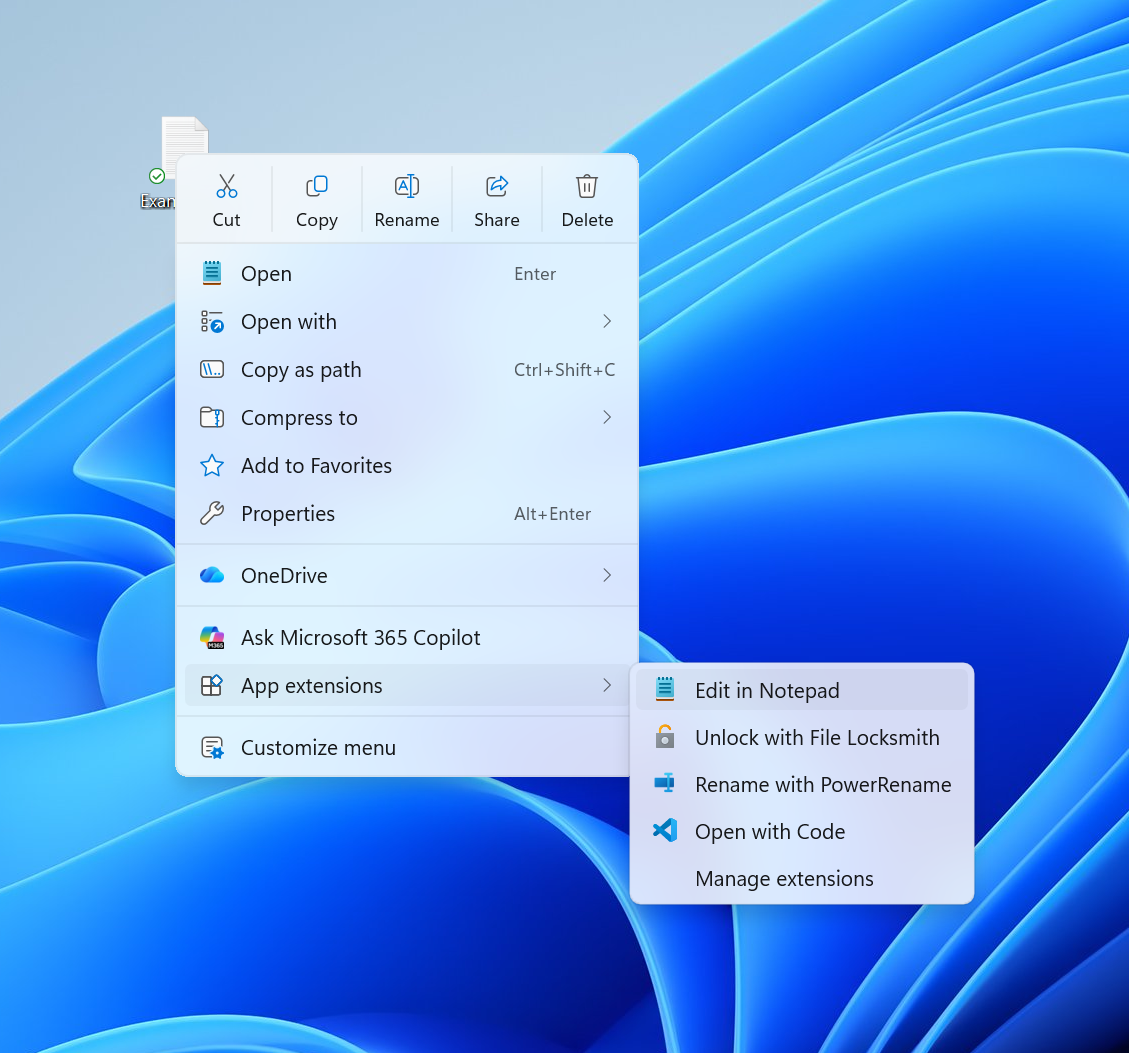 The new right-click menu.[/caption]
Faster to open
The first thing you'll notice is that the menu opens much more quickly. For something used as often as the context menu, speed is part of good design. A lot of that comes from behind-the-scenes engineering improvements, and a good part comes from a cleaner default menu, with the full set of options just a click away in Settings.
Clutter isn't only a visual problem; it slows the menu down because every app that adds its own options can make the menu do extra work each time it opens.
Your menu, your control
Part of the broader push we’re making across Windows 11 is making the operating system calmer by default, with more personalization and control.
Each person uses the context menu in different ways, so we’re adding more customization to allow you to choose the layout that works best for you.
At the bottom of the new context menu, you’ll now find “Customize menu”, as a shortcut to its Settings page, where you can shape the menu around your preferences, your habits, or the years of muscle memory you’ve built with a specific configuration.
[caption id="attachment_179131" align="aligncenter" width="760"]
The new right-click menu.[/caption]
Faster to open
The first thing you'll notice is that the menu opens much more quickly. For something used as often as the context menu, speed is part of good design. A lot of that comes from behind-the-scenes engineering improvements, and a good part comes from a cleaner default menu, with the full set of options just a click away in Settings.
Clutter isn't only a visual problem; it slows the menu down because every app that adds its own options can make the menu do extra work each time it opens.
Your menu, your control
Part of the broader push we’re making across Windows 11 is making the operating system calmer by default, with more personalization and control.
Each person uses the context menu in different ways, so we’re adding more customization to allow you to choose the layout that works best for you.
At the bottom of the new context menu, you’ll now find “Customize menu”, as a shortcut to its Settings page, where you can shape the menu around your preferences, your habits, or the years of muscle memory you’ve built with a specific configuration.
[caption id="attachment_179131" align="aligncenter" width="760"]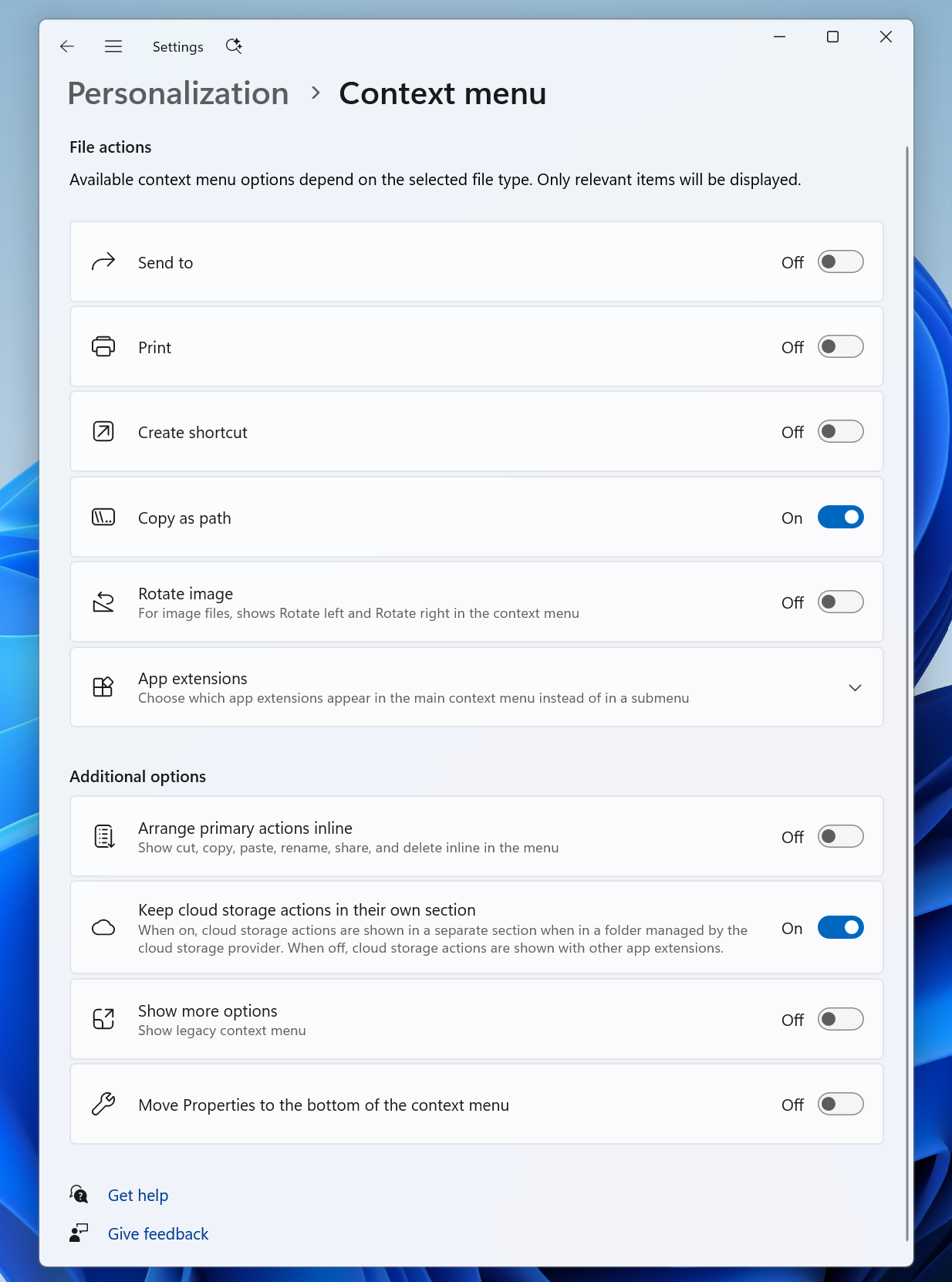 The new Context Menu page in the Settings app, under Personalization.[/caption]
The top section lets you turn built-in Windows commands like Send to or Create shortcut on or off. Some of these commands, like Print, weren't available in the Windows 11 context menu before and can now be switched on if you want them.
The next section is about options for app extensibility, so you can choose which app extensions appear in the main menu or submenu, including hiding the submenu altogether.
Finally, the last section is about where the most common commands live. We know many people have years of muscle memory from the Windows 10 menu, so we've added options to bring that feel back. You can list the main commands (Cut, Copy, Paste, Rename, Delete, and Share) inline directly in the menu instead of as a row of icons, and you can move Properties down to the very bottom.
As we continue refining this experience with Insider feedback, our goal is to make right-click feel more responsive, predictable, and personal.
The new right-click menu.[/caption]
The new Context Menu page in the Settings app, under Personalization.[/caption]
The top section lets you turn built-in Windows commands like Send to or Create shortcut on or off. Some of these commands, like Print, weren't available in the Windows 11 context menu before and can now be switched on if you want them.
The next section is about options for app extensibility, so you can choose which app extensions appear in the main menu or submenu, including hiding the submenu altogether.
Finally, the last section is about where the most common commands live. We know many people have years of muscle memory from the Windows 10 menu, so we've added options to bring that feel back. You can list the main commands (Cut, Copy, Paste, Rename, Delete, and Share) inline directly in the menu instead of as a row of icons, and you can move Properties down to the very bottom.
As we continue refining this experience with Insider feedback, our goal is to make right-click feel more responsive, predictable, and personal.
The new right-click menu.[/caption]

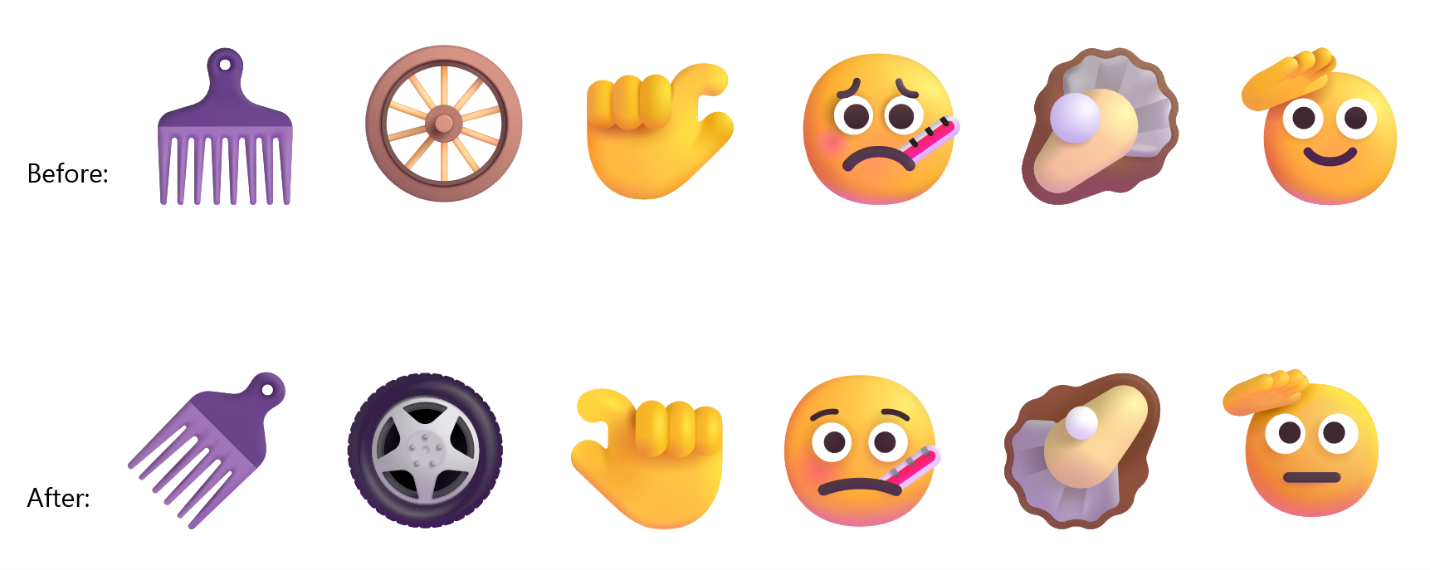 Thanks,
Stephen and the Windows Insider Program team
Thanks,
Stephen and the Windows Insider Program teamedge://extensions) and on Microsoft Edge Add-ons product detail pages. The very few developers with an MV2 extension will see a similar notice in Microsoft Partner Center, along with a direct outreach from our team to help them complete the migration.
Over the next few months, MV2 extensions will be gradually turned off by default. Users will be notified in advance and directed to recommended MV3 versions where available.
These changes will start in the Canary, Dev, and Beta channels and gradually broaden to Stable in the following months, with the goal of completing the consumer transition by the end of 2026. Managed devices will not be affected during the consumer rollout. Enterprise deprecation will follow in early 2027.
We will keep the community updated on the status of the rollout on a regular cadence.