❌

Normale weergave

Moving the Microsoft Edge extensions ecosystem forward with Manifest Version 3

7 Augustus 2026 om 17:54
Back in 2020, we committed to Manifest Version 3 (MV3) as the future direction of the Chromium extensions platform. Since then, we've worked with developers, listened to feedback, and continued evolving Microsoft Edge toward a more secure and performant extensions foundation. Today, we're announcing the next phase of that journey. With 95% of the top MV2 extensions on the Edge Add-ons website already moved to MV3, the ecosystem has made meaningful progress. Beginning in August 2026, Microsoft Edge will start the consumer transition away from Manifest Version 2 (MV2) extensions and toward MV3. Our goal is to complete the consumer transition by the end of 2026, with enterprise deprecation following in early 2027.

The ecosystem is ready for the next step

This is a significant milestone for the extensions community, and one we have approached deliberately. Microsoft Edge continued to support MV2 extensions so developers, enterprises, and users who depend on specific extensions had more time to adapt. The move to MV3 has come a long way. MV3 offers security and performance improvements over MV2, and developers across the ecosystem have done the work to modernize their extensions. To put some numbers around the progress the ecosystem has made, there are only 58 MV2-based extensions in the Edge Add-ons website with any meaningful usage. Of these, only three don't have a publicly available MV3-based extension already available. Developers and users have spoken: the vast majority of extensions of all typesβ€”from password managers to VPNs to ad-blockersβ€”have successfully transitioned to MV3 with no loss of customer functionality. We're committed to working with all developers with MV2-based extensions to smoothly move their users to MV3 extensions.

What to expect next

Starting in August 2026, a subset of users with MV2 extensions installed will begin to see notices on the Manage Extensions page (edge://extensions) and on Microsoft Edge Add-ons product detail pages. The very few developers with an MV2 extension will see a similar notice in Microsoft Partner Center, along with a direct outreach from our team to help them complete the migration. Over the next few months, MV2 extensions will be gradually turned off by default. Users will be notified in advance and directed to recommended MV3 versions where available. These changes will start in the Canary, Dev, and Beta channels and gradually broaden to Stable in the following months, with the goal of completing the consumer transition by the end of 2026. Managed devices will not be affected during the consumer rollout. Enterprise deprecation will follow in early 2027. We will keep the community updated on the status of the rollout on a regular cadence.
What developers should do now

For developers who still maintain MV2 extensions, now is the time to complete the move to MV3. Ship an MV3 version of your extension and submit the update through Microsoft Partner Center. The Migrate an extension from Manifest Version 2 to V3 guide outlines the required changes. This progress only works because of the developers who have already moved their extensions to MV3 and shared feedback along the way. Thank you for your partnership and continued support in improving Microsoft Edge. If you run into questions during your migration, please reach out to the Microsoft Edge extensions team. We're happy to help.
  •  

Bring your security stack into Edge for Business β€” with support for more partners

4 Augustus 2026 om 18:00
At a glance Edge for Business security connectors extend your security tools into the browser, so you gain visibility and enforcement where work happens. This update adds new partner integrations, including Cisco Secure Access, Tanium, and Clever.
You’ve built a security stack to protect your organization. As work shifts into the browser, a critical question emerges: can those tools protect work at the point where it happens? Good news, they canβ€”when combined with the Edge for Business security connector framework. The framework extends your existing security stack into the browser, bringing greater visibility and policy enforcement into everyday work without adding another control plane or duplicating tools. We’re expanding this ecosystem with new integrations so you can maintain consistent protection wherever work happens.

Now generally available

  • Cisco Secure Access is an advanced enterprise browser integration for Edge for Business. As a single integrated connector, it brings not only secure access but also unified data protection and AI guardrails directly into the browser.
  • Tanium Connector for Microsoft Edge for Business delivers real-time browser telemetry into Tanium Autonomous IT Platform, helping organizations gain deeper visibility into browser-based threats, close critical security blind spots, improve compliance validation, and strengthen overall endpoint security across the enterprise.
  • Clever Classroom MFA TrustPass helps streamline logins in education environments by recognizing trusted devices in Edge for Businessβ€”reducing unnecessary MFA prompts while maintaining strong security.

Bringing it all together

Our goal at Edge for Business is to give you a simpler way to secure how work gets done. As our connector ecosystem continues to grow, you have more options than ever to easily integrate the security tools you already use into the browser. Easily Integrate Security Tools with Connectors
  •  

Faster updates, enterprise-friendly schedule: the new Microsoft Edge release cycle

11 Juni 2026 om 18:01
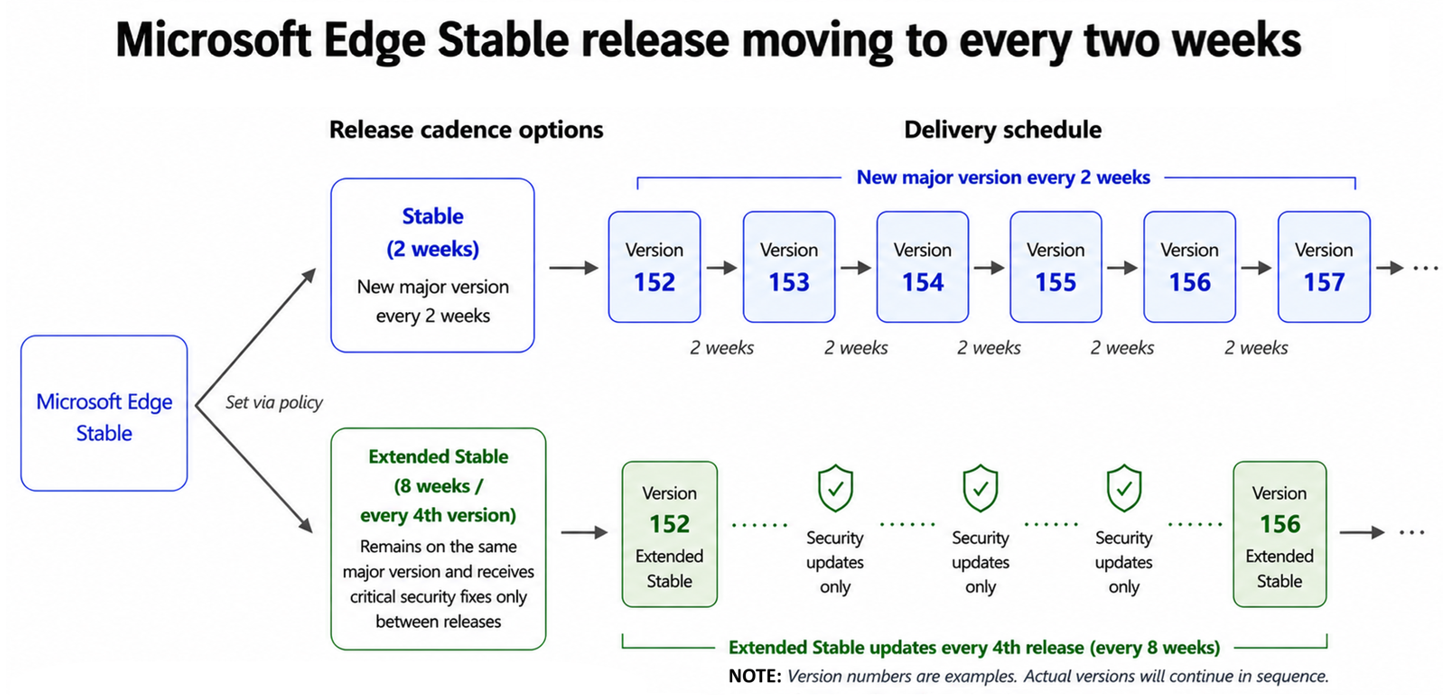
Microsoft Edge is moving to a two-week release cycle, bringing new features and improvements to users and organizations faster than ever. This is great news for teams that thrive on innovation: instead of waiting a full month for the next update, you get a steady, continuous stream of new capabilities to put to work sooner. For organizations that prefer a more deliberate pace, Extended Stable is not changing. We introduced it in 2021 to provide a longer, predictable rhythm, and that commitment remains firmly in place. Extended Stable remains unchanged in timing.

Changes to the release schedule

Starting with Microsoft Edge 152 (Stable on August 27), Edge will move to a 2-week release cycle. Extended Stable will now receive updates every fourth release (for example, 156, 160, 164). The time between Extended Stable updates stays the same, at every eight weeks. Microsoft Edge Stable release moving to every two weeks. Diagram showing the schedule for Stable, and Extended Stable. For customers on Stable, the practical effect of the new cycle is smaller, steadier change. Each release brings about half as much new content as before, delivered twice as often. Security and platform improvements reach your users faster, and each change set is smaller, which can make validation more manageable. Both channels receive critical security updates. The difference is how quickly new features arrive: Stable delivers them on the new 2-week cycle, while Extended Stable spaces feature updates over an 8-week window for organizations that prefer a longer planning rhythm.

Recommended action

In summary, here is what to do, depending on the channel you run:
  • If you are on Extended Stable: no action needed. Your 8-week cycle and the same support model continue.
  • If you are on Stable: plan for smaller, more frequent change sets and faster delivery of security improvements.
  • Whichever channel you run: add a pilot group to Beta and start testing from day one to maximize your validation time.
Early testing gives you more time to identify issues, provide feedback, and address them before the Stable release reaches your organization. Enterprise Preview is our supported path for piloting Beta, with setup guidance built for IT admins, which helps you stay ahead of the faster cadence. To prepare for the transition, please refer to the updated Microsoft Edge release schedule and the Microsoft Edge Lifecycle page. We will continue to share updates through the Microsoft Edge Blog and the Microsoft 365 Message Center. The pace of Edge is accelerating, and your users get to enjoy the payoff: more features, more improvements, arriving sooner and more often. And whatever pace suits your organization, you stay in control of it. We appreciate the partnership of our customers, and we are committed to supporting every team, on every channel, as Edge keeps getting better, faster.
  •  
❌