Normale weergave
-
Windows Blog
- Introducing the next Surface Pro and Surface Laptop, built for performance and flexibility
Announcing new builds for 12 June 2026
- Beta: Build 26220.8680
- Experimental: Build 26300.8687
- Beta (26H1): Build 28020.2298
- Experimental (26H1): Build 28120.2302
- Experimental (Future Platforms) – Including Canary 29600 series: Build 29610.1000
- Note: The issue affecting AMD machines supporting System Guard has been resolved meaning these devices will be offered the Experimental (Future Platforms) build as usual
- Release Preview 24H2/25H2: Build 26100.8728/26200.8728
- Release Preview 26H1: Build 28000.2333
Notable new features
[Windows Update]
Release channel: Experimental- As announced in the Windows Update announce blog, we are rolling out a new unified update experience to reduce the number of reboots you see per month. We are starting by coordinating driver, .NET, and firmware updates to align with the monthly quality update, reducing the update experience to a single monthly restart. See the blog for more information.
[Search]
Release channel: Experimental- Finding apps is more forgiving. Search is better at handling typos, dropped letters, extra letters, and partial words for apps. Queries like “utlook” can still find Outlook.
- Settings results are improving. We’ve made ranking improvements to help more relevant settings appear higher in results.
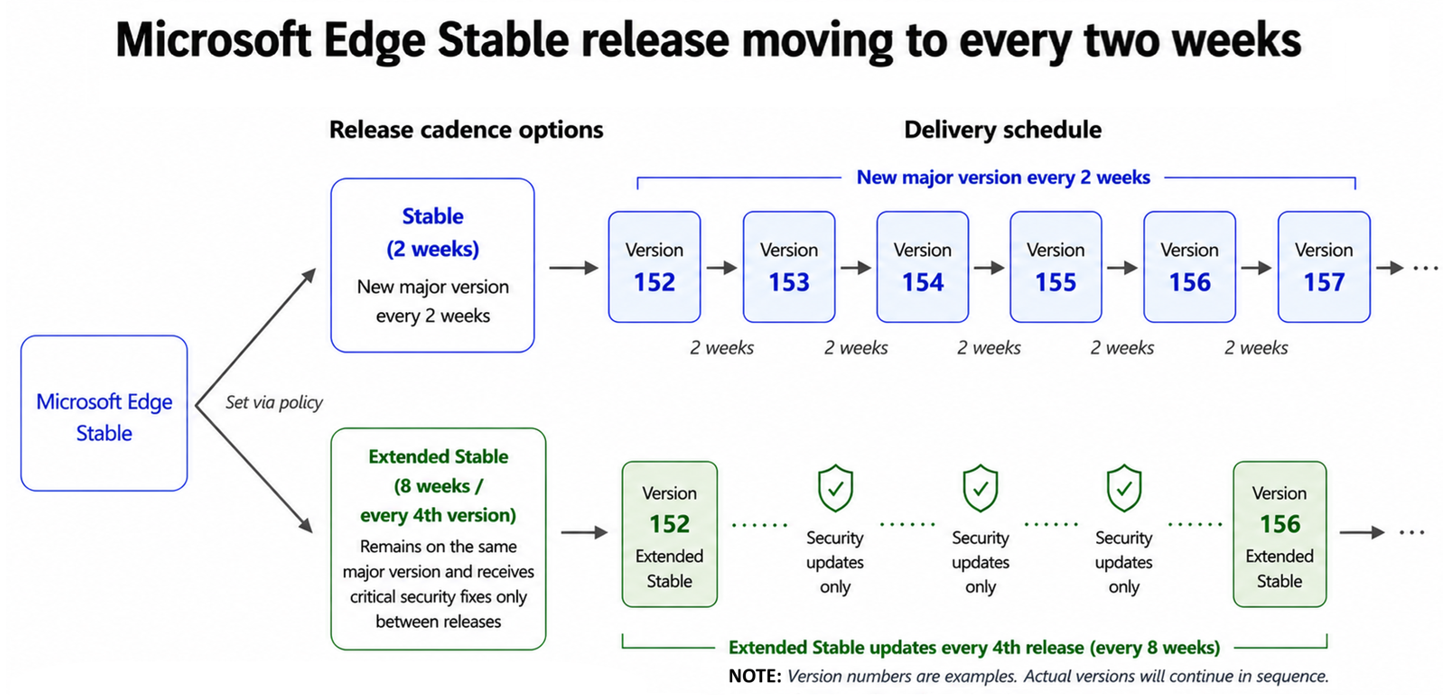
Faster updates, enterprise-friendly schedule: the new Microsoft Edge release cycle
Changes to the release schedule
Starting with Microsoft Edge 152 (Stable on August 27), Edge will move to a 2-week release cycle. Extended Stable will now receive updates every fourth release (for example, 156, 160, 164). The time between Extended Stable updates stays the same, at every eight weeks.Recommended action
In summary, here is what to do, depending on the channel you run:- If you are on Extended Stable: no action needed. Your 8-week cycle and the same support model continue.
- If you are on Stable: plan for smaller, more frequent change sets and faster delivery of security improvements.
- Whichever channel you run: add a pilot group to Beta and start testing from day one to maximize your validation time.
Computex 2026: Empowering a billion users with Windows across the ecosystem
New Windows 11 PCs from across the ecosystem
Acer
Acer announced a comprehensive lineup of innovation, with all new laptops running on Windows 11. The lineup featured Copilot+ PCs prominently, including several new entries to Acer’s mainstream Aspire product line: the high-powered Aspire X 16 AI laptop for prosumers, the Aspire 18 AI laptop with greater screen space for creative workflows and productivity and the Aspire C AI Series all-in-one desktops with an innovative new ErgoStand design. Acer also added two new Copilot+ PCs to the premium Swift line with two versions of Swift Spin 14 AI — one powered by Intel Core Ultra Series 3 processors and the other by Snapdragon X2 Series processors — also marking Acer’s first convertible 2-in-1 laptops under the Swift line. [caption id="attachment_263872" align="alignnone" width="1024"]ASUS
ASUS showcased its latest AI PC portfolio designed to make AI more practical and accessible for every user. The new ProArt P16 and P14, powered by NVIDIA RTX Spark, bring next-generation agentic AI workflows and powerful local AI capabilities to creators and developers. For mainstream consumers, the new Zenbook 14 delivers a Windows experience with premium design, all-day mobility and fresh new Ceraluminum colors, while the Snapdragon-powered Vivobook S series expands AI-enhanced productivity to an even broader audience. Together, these innovations demonstrate ASUS’ vision of bringing advanced AI experiences across every category of personal computing. [caption id="attachment_263865" align="alignnone" width="1024"]Dell
The new XPS 13 starting at $699 proves that a lower price doesn't mean accepting less. As Dell's thinnest and lightest laptop yet, with up to 17 hours of streaming battery life, it delivers true all-day portability. Every detail reflects XPS craftsmanship – from the durable CNC aluminum chassis to the 2.5K touchscreen, backlit keyboard and Intel Wi-Fi 7 that all come standard, redefining what a premium laptop can be at this price.“With XPS 13, we’re proving that a lower price doesn’t mean accepting less. It's the thinnest and lightest XPS we've ever built. This reflects where XPS is headed: more power, more innovation and stronger competition across price points.” - Donnie Oliphant, XPS Product Lead, Dell Technologies
[caption id="attachment_263866" align="alignnone" width="1024"]HP
Beginning later this year, HP will bring RTX Spark to its HP OmniBook Ultra 16 and HP OmniBook X 14 laptops, built for powerful performance. The company is also planning to expand its RTX Spark offerings with a compact desktop, bringing new choices to creators, AI enthusiasts and developers. RTX Spark is designed for creators, gamers and AI developers, bringing NVIDIA’s full-stack AI platform and suite of RTX technologies to slim laptops with all-day battery life. [caption id="attachment_263873" align="alignnone" width="1024"]MSI
MSI unveiled the Prestige N16 Flip AI+, the company’s first laptop developed in collaboration with NVIDIA powered by the new RTX Spark. It reinvents personal computing, combining advanced content creation, AI development and high-performance gaming in a new platform engineered from the ground up for the next wave of Windows PC experiences. It features a 16-inch UHD+ Tandem OLED display with a dual-layer emissive structure that stacks two OLED layers to share light output. This advanced panel technology delivers over 1000 nits of peak brightness while improving display longevity and power efficiency. Designed for versatile everyday use, the 2-in-1 flip design allows seamless transitions between laptop, tablet, tent and presentation modes, adapting easily to different workflows and environments. [caption id="attachment_263874" align="alignnone" width="960"]Surface
The Surface Laptop Ultra is the most powerful Surface Laptop ever built, designed for world makers, creative pros, developers and AI builders. Powered by an NVIDIA RTX Spark superchip, Surface Laptop Ultra combines a powerful NVIDIA Blackwell RTX GPU, full CUDA support and up to 128GB of unified memory to help creators and developers take on demanding local AI, rendering, compiling and multi-model workflows in a thin, precision-engineered laptop. Surface Laptop Ultra brings uncompromising craft and raw power to the people creating what’s next, with up to 1 petaflop of AI compute, capable of running up to 120B parameter models with 1 million token context locally [2]. It pairs that performance with the hardware world makers need on the go: a 15-inch mini-LED PixelSense Ultra touchscreen, all-day battery life and creator-ready ports. To learn more, visit the Devices blog by Brett Ostrum, Corporate Vice President, Surface. [caption id="attachment_263860" align="alignnone" width="1024"]Next generation silicon powering AI PCs
Intel
Intel introduced Intel Arc G-Series processors, a new family of products designed for next-generation handheld gaming systems. Launching with Intel Arc G3 and Intel Arc G3 Extreme processors running on Windows 11, the series builds on the architecture of Intel Core Ultra Series 3 to bring optimized performance and power efficiency to portable play. Designed for handheld with optimized core counts, power management and software, Intel Arc G3 processors deliver leadership performance and efficiency for smooth, immersive gameplay and exceptional battery life without compromise. Handheld designs from leading partners will launch in the coming months, beginning with Acer’s Predator Atlas 8, MSI Claw 8 EX AI+ and OneXPlayer."Intel Arc G-Series represents years of focused innovation and a deep commitment to gaming. It delivers uncompromising PC performance in the palm of your hand, combined with the console-like accessibility and immediacy gamers expect. With cutting-edge graphics technologies like XeSS 3 and breakthrough efficiency for longer unplugged play, Intel Arc G-Series proves that while others make tradeoffs, gamers don't have to." – Dan Rogers, Vice President and General Manager, PC Product, Client Computing Group
NVIDIA
At Computex 2026, NVIDIA CEO Jensen Huang announced the RTX Spark, a new Arm-based AI superchip developed in collaboration with MediaTek and Microsoft, designed to run personal AI agents locally on Windows laptops and compact desktops. It is designed for AI, creating and gaming, delivers up to 1 petaflop of AI performance, Blackwell RTX cores, industry-leading power efficiency, full-stack NVIDIA AI and graphics technology and up to 128GB of unified memory. NVIDIA and Microsoft collaborated to bring NVIDIA OpenShell runtime to Windows, built on MXC. Integrating MXC through OpenShell provides an easy-to-integrate package for developers to deploy autonomous, always-on agents safely. Beginning this fall, RTX Spark will power a full range of Windows laptops and small form factor desktop PCs, with Microsoft Surface, ASUS, Dell, HP, Lenovo and MSI. Jensen also announced the NVIDIA DGX Station for Windows, a deskside AI supercomputer powered by the GB300 Grace Blackwell Ultra Desktop Superchip. It allows enterprise developers to run frontier AI models with up to 1 trillion parameters locally on Windows environments without cloud costs. [caption id="attachment_263879" align="alignnone" width="1024"]Qualcomm
Ahead of Computex, Qualcomm Technologies, Inc. announced the Snapdragon C Platform, a new entry-tier processor designed to make modern, responsive computing more accessible for students, families and small businesses. It delivers efficient performance with cool, quiet designs and all-day battery life. In tandem with Qualcomm’s announcement, Acer unveiled the Acer Aspire Go 15, expanding access to capable laptops at more affordable price points, becoming the first PC maker to announce a device powered by the new Snapdragon C processor. The company also introduced the Acer Swift Spin 14 AI, powered by Snapdragon X2 Elite or X2 Plus, delivering up to 80 TOPS of AI performance. ASUS announced the ASUS Ascent QN10, the world’s first AI mini PC powered by the Snapdragon X2 Elite platform, featuring an 80 TOPS NPU. The device supports intelligent, agentic AI experiences and expands Snapdragon X2 Elite into a new mini PC form factor. Together, these announcements highlight a significant leap in performance and AI capability while broadening Qualcomm Technologies’ compute portfolio across tiers and form factors.“As costs rise and customer expectations evolve, Snapdragon C brings together value-oriented computing, all-day battery life, AI capabilities and responsive performance in cool-quiet devices for expanded platform choice. We’re delivering modern computing experiences that help our ecosystem reach new audiences and expanding access to reliable, efficient technology for students, families, customer-facing small businesses and beyond.” - Kedar Kondap, Senior Vice President and General Manager of Compute and Gaming, Qualcomm Technologies, Inc.
“Acer’s announcements reflect the strength and breadth of the Snapdragon portfolio from premium AI experiences with the Snapdragon X2 Series to accessible, everyday computing with the new Snapdragon C Platform. Together, these platforms are helping expand the Windows ecosystem, while giving our partners new opportunities to reach more users.” - Nitin Kumar, VP, Product Management, SVP & GM, Compute and Gaming, Qualcomm Technologies, Inc.
Empowering a billion users together
These announcements and many more from our partners last week are a powerful reminder of what makes Windows special: an open ecosystem of partners pushing boundaries together, delivering performance, longer battery life, AI experiences and thoughtful design across more form factors than any other platform. From everyday productivity to premium consumer devices to commercial fleets and frontline workhorses, the Windows ecosystem is meeting customers wherever they work, create and play. Thank you to every partner who joined us in Taipei, to the teams who made it happen, and to the more than a billion daily users who continue to choose Windows. If you are looking for a new Windows 11 PC, there has never been a better time to explore the wide range of devices available from our partners and find the one that best fits the way you live and work. [1] Based on publicly available information as of April 2026, ROG Strix SCAR 18 is the only gaming laptop known to feature a 4K resolution and 240Hz refresh rate in a single 18" mini-LED panel with ELMB. [2] Source: NVIDIA. Based on 1 Theoretical FP4 TOPS using the sparsity feature.Announcing new builds 8 June 2026
- Beta: Build 26220.8575
- Experimental: We do not have a new build for this channel today. Keep an eye out for future flights.
- Beta (26H1): Build 28020.2236
- Experimental (26H1): Build 28120.2242
- Experimental (Future Platforms) – Including Canary 29500 series: We do not have a new build for this channel today. Keep an eye out for future flights.
XBOX Games Showcase 2026 recap
Building the next generation of devices for developers: Surface RTX Spark Dev Box
A new category of Surface, built for developers
The way developers build software is fundamentally changing. AI models are growing in capability and complexity, agentic workflows demand sustained compute, and every iteration can incur cloud costs, even when the work doesn’t require state-of-the-art models. Surface RTX Spark Dev Box changes that equation. It’s a purpose-built Windows AI developer box that puts up to 1 petaflop of AI compute directly on the desk. By bringing powerful AI compute to the edge, developers can reserve frontier model calls for truly frontier problems and handle the rest on their own hardware. The result is a development workflow that can be more efficient and responsive, with developers in control of where their compute dollars go.Sustained AI performance in a compact form factor
At the heart of this new developer machine is the NVIDIA RTX Spark superchip, combining a powerful NVIDIA Blackwell RTX GPU and an ultra-efficient NVIDIA Grace CPU to deliver up to 1 petaflop of AI compute with 128 GB of unified memory. That’s enough compute power to run 120B+ parameter models with 1 million token context locally at interactive speeds or fine-tune models that previously required cloud GPU instancesi. With an aluminum chassis engineered to double as a heatsink, Surface RTX Spark Dev Box is designed for the workloads that matter most to developers: long-running training jobs, large model inference and complex agentic pipelines that benefit from consistent, sustained performance.Built for the tools and workflows developers already use, out of the box
Surface RTX Spark Dev Box ships with Windows 11 Pro pre-configured for developers at the image level. This brings a purposeful set of defaults, preinstalled tools and tuned settings so the development environment is the default from first sign-in.Secure by design
For developers working with sensitive models, proprietary data and valuable IP, security isn’t optional. It’s foundational. The powerful GPU and unified memory mean more of your models and IP can stay local and lets developers keep more of their models and data local. Surface RTX Spark Dev Box is built on chip-to-cloud security aligned with Microsoft’s Zero Trust principles:- Secured-core PC architecture
- BitLocker encryption
- Microsoft Defender protection
Windows platform security for AI agents
Making Windows the trustworthy OS for agents
AI agents are no longer just answering questions, they are taking actions across systems with increasing autonomy. As they become persistent participants in how software runs, they introduce new risk to control and trust, challenging the security assumptions that have defined computing for decades. Developers are building agents that read files, invoke services, modify environments and chain operations together at increasing speed. That capability is powerful, but it raises a critical question: how do you ensure these systems remain trustworthy when they operate autonomously, at scale, on real data? This shift changes what developers, IT and security teams need from the platform. Security for agents must be built into the foundation by design so they can be developed, deployed and governed with confidence. When that foundation is in place, organizations can scale agent adoption while maintaining control and trust. Containment, identity and manageability are built as foundational primitives in Windows, extending security beyond the app and model into the OS. We’ve previously shared the principles guiding how we secure agent workflows on Windows. Then in May we announced how Microsoft Agent 365 was expanding its capabilities, including the ability to discover and manage local agents on Windows, starting with OpenClaw agents and expanding soon to other widely used agents like GitHub Copilot CLI and Claude Code. We also announced that "beyond monitoring, organizations will be able to apply policy-based controls to set guardrails for what agents are allowed to do." At Build 2026 we are sharing an update on how Agent 365 and Windows are working together to provide those capabilities with the introduction of Microsoft Execution Containers (MXC) SDK. For developers, Windows will provide the building blocks needed to implement agents that are more secure on both consumer and enterprise systems. For IT teams looking to balance deploying agents at scale while managing risks, Agent 365 and Windows provide the observability, governance and security capabilities that are critically needed.Policy-based controls
Containment bounds what agents can access and do, so non-deterministic behavior doesn’t translate into uncontrollable risk. Unlike traditional applications, agent behavior is dynamic and often generated at runtime. The agent often uses models to generate complex code for each prompt that can read, act and chain multiple operations. Containment ensures agents can do useful work without being granted the full authority of the user’s session.The Microsoft Execution Containers (MXC) SDK
To contain agent impact without limiting productivity gains, we’re introducing an early preview of the Microsoft Execution Containers (MXC) SDK, a cross-platform, policy-driven execution layer for agents on Windows and WSL. Developers define what to constrain in their apps and agents, and Windows enforces those constraints consistently at runtime through MXC. MXC provides an abstraction layer across isolation primitives, so developers do not have to manage low-level isolation details.The composable sandbox and containment spectrum
The composable sandbox is how Windows applies isolation and containment in practice, with MXC as the control surface for developers. The same policy model and SDK can map to different isolation constructs depending on the workload and containment requirements. A coding agent and an enterprise data-processing agent may not need the same guardrails, but they do need one coherent trust story. The composable sandbox delivers the flexibility and control that developers and IT need. Agent 365's policy-based controls with Microsoft Entra and Intune will be used to apply those MXC constraints to a specific agent. Windows supports a range of containment options so that guardrails can match the nature and risk of the workload. Additional functionality and security enhancements will be added to subsequent releases. The following will be released in early preview shortly after Build to meet the needs of the agent ecosystem:Process isolation
Windows is simplifying how developers enable process isolation for agents. Process isolation provides fast, lightweight containment within the user’s environment for scenarios like running model-generated code within a dedicated process boundary that restricts access to files and network domains outside defined policy. It is ideal for use cases like coding agents where the developer inner loop must stay responsive. GitHub Copilot CLI has adopted MXC process isolation to constrain what dynamically generated and executed code can do. We are excited to share the results of this deep partnership between Windows and GitHub with our shared customers.Session isolation
Workloads that span across large numbers of long running processes or ones that need their own resources like a desktop to run automation may find process isolation overly limiting. Sessions in Windows separate the agent’s execution from the human user’s environment, such as the interactive desktop, clipboard, UI, input devices and active sessions. This mitigates UI spoofing, input injection and cross-session data leakage, and is suited for sustained workflows that run alongside the user’s own work. Sessions in Windows run with distinct user accounts, which enables isolation. Windows assigns a local ID or a cloud provisioned identity backed by Entra and attributes all activity from the container to that identity, so you can clearly differentiate human from agent. MXC session isolation paired with unique local ID on Windows enables precise control, least-privilege access and full auditability. Access policies can be applied to Windows session isolation so agents run independently with controlled local access and full lifecycle governance managed through Microsoft Entra and Intune in the cloud. Teams can use Intune policies to require MXC isolation with guardrails such as filesystem rules. Our initial release will support non-interactive sessions with additional capabilities targeted for future releases. As agents evolve, we are continuing to expand MXC containment capabilities and invite developers and the broader ecosystem to share feedback, including through engagement with the project on GitHub. Some other MXC containment capabilities currently on our roadmap are:Micro-VM
Research at the cutting edge of agent security shows how LLMs are developing capabilities around escaping sandboxes. Is there a way to provide the desirable properties of process isolation like low overhead with a stronger isolation boundary? Micro-VMs that use hardware-backed isolation via the hypervisor with lightweight images can be well suited for higher-risk workloads. The micro-VM construct raises the bar against sandbox escapes by using a hypervisor while facilitating higher density than is possible with full VMs. They are desirable for agents processing sensitive data or running untrusted external code.Linux containers
Will bring the containment model to Linux-first agent toolchains via WSL. This enables compatibility with Linux ML frameworks and package ecosystems with OS-enforced boundaries.MXC integration for cloud VM Windows 365 for Agents
Windows 365 for Agents, now generally available, extends containment beyond the local device. The agent runs in an Intune-managed Cloud PC, fully separate from the user’s machine. If compromised, impact is contained to a disposable cloud instance. Suited for enterprise-managed agent fleets with centrally provisioned policy and compliance. To learn more, check out our Windows 365 blog. With the future addition of MXC integration, Windows 365 for Agents will scale from lightweight local isolation to stronger hardware-backed boundaries - through a single SDK and policy model. With the combination of these new Windows capabilities and Agent 365, Microsoft is continuing to expand its full stack offering to help enterprises to observe, govern, and secure their agents.Innovating with partners in the ecosystem
We are partnering with leading innovators in the industry like Hermes, Manus, NVIDIA, OpenAI and OpenClaw, to ensure the containment we are building supports real developer needs. OpenClaw now runs the node and gateway securely on Windows leveraging MXC. You can use the new Windows companion app to easily set up your own claws or connect to existing ones. NVIDIA brings OpenShell to Windows, built on MXC. Integrating MXC via OpenShell provides developers with an easy-to-deploy package for autonomous, always-on agents safely. Hermes Agent will be integrating OpenShell and MXC in their new Windows application. "Continuously running local agents, like Hermes Agent, require intentional isolation. Developers need control over what an agent can access and trust that those controls will hold,” said Dillon Rolnick, CEO of Nous Research. “Microsoft Execution Containers (MXC), integrated with OpenShell, provides a policy-driven foundation for private, on-device agents on Windows.” "Working with Microsoft on the Microsoft Execution Containers (MXC) allows us to explore new patterns for AI agents to safely and efficiently generate and execute code. By combining Codex's capabilities with MXC's execution environment, we aim to help developers move from intent to reliable execution faster, while maintaining the security and control enterprises need," said David Wiesen, Member of Technical Staff, OpenAI “Manus is built to help users move from intent to completed work across tools, files, code and workflows,” said Tao Zhang. Chief Product Officer. “With Microsoft Execution Containers (MXC), Windows gives developers a policy-driven way to define what an agent can access and enforce those boundaries at runtime, so more autonomous agents can operate safely in enterprise environments.”Built on a secure foundation by design
This agentic security model runs on a Windows platform designed to reduce risk by default. Decades of investment in Windows provide the foundation for everything running on top of it including agentic security capabilities. Under the Secure Future Initiative, continuously strengthening this foundation remains a company-wide priority. Windows reduces the attack surface and raises the security baseline by default – so agents inherit that protection without additional work. It shows up in capabilities like passwordless sign-in with passkeys, Hotpatch updates without restarts, production drivers written in Rust to reduce memory-safety vulnerabilities and post-quantum cryptography in Insider builds. Secure Boot enforces a hardware root of trust on every startup. Defender provides real‑time protection against prompt injection and other emerging agent threats. It uses advanced scanning engines and continuously updated intelligence to detect and respond to attacks. These protections are available to all Windows customers - including consumers using Windows Defender as their primary antivirus. Enterprise manageability has been a longstanding platform capability that IT and security teams depend on Windows to provide. Agent 365 now provides native integration of observability, governance and security capabilities for agents running on Windows OS environments, like MXC and Windows 365 for agents, so agents running on Windows can start secure and stay secure. Windows will continue to raise the bar for platform security with capabilities like our recently announced Baseline Security Mode. Together, these investments help provide the secure foundation on which trustworthy agentic computing is built.Start building secure agents today
The value of an agent is not just what it can do, but whether it can be trusted in production. Windows enables agents that are secure, governable and ready for real-world deployment. Many of these capabilities are available today in Windows Insider builds, with more coming through our developer preview program. Windows continues to evolve so developers and organizations can move fast on AI while maintaining trust and security. We are excited to see what you build. To get started:- Explore the Microsoft Execution Containers SDK.
- Try process and session isolation in Windows Insider builds when available shortly after Build.
Build 2026: Furthering Windows as the trusted platform for development
What’s new for Windows platform at Build?
- Developer-optimized Windows 11 experience to build and ship faster.
- Coreutils for Windows - a set of Linux-like command line utilities that run natively on Windows, now generally available.
- WSL containers - a built-in way to create, run and interact with Linux containers using familiar CLI & API, coming soon to public preview.
- Windows Development Skills - gives agents structured knowledge to build great native Windows apps end-to-end using WinUI3 skills and WinApp CLI, now generally available.
- Intelligent Terminal – intentionally brings context-aware intelligence to your favorite agents directly into a terminal based experience to help debug errors, run multi-step tasks so you can stay in your flow, available in experimental preview.
- Windows Developer Configurations - powered by WinGet, sets up a distraction-free dev environment with VS Code, GitHub Copilot, WSL, PowerShell 7 and developer-optimized settings with one command on any Windows 11 device, now generally available.
- Windows 365 with Developer configuration – Windows 365 comes pre-configured with the same Windows developer configuration, available in public preview.
- Secure Windows platform to build and run agents with OS-enforced agent identity, containment and enterprise-grade manageability.
- Introducing Microsoft Execution Containers (MXC) SDK– A policy-driven execution layer that lets developers declare what an agent can access (e.g., files, network) with containment boundaries enforced at runtime. MXC offers a spectrum of isolation semantics that are dynamically composable based on intent and risk, available in early preview.
- Agent 365 native integration with MXC enables agents running on Windows to start secure and stay secure. Integration will deliver Defender, Entra, Intune and Purview protections so security and IT teams can constrain and secure local agents to prevent enterprise risk, available in preview in July.
- OpenClaw runs natively on Windows leveraging MXC - The Windows node and gateway run contained, so your system stays secure. You can easily install and use OpenClaw in Windows with its own companion app and set up your own claws or connect to existing ones, available in open-source. We are invested in continuing to make OpenClaw run securely on Windows.
- NVIDIA is bringing OpenShell to Windows built on MXC - Integrating MXC via OpenShell provides developers with an easy-to-deploy package for autonomous, always-on agents safely.
- Windows 365 for Agents - provides computer-using agents with secure, managed Cloud PCs to execute enterprise workflows, now generally available.
- Unmetered intelligence on Windows powered by on-device AI
- Introducing new on-device SLMs - Aion 1.0 Instruct, a smaller, faster and smarter on-device SLM, and Aion 1.0 Plan, a reasoning and tool-calling model that enables fully local agentic capabilities, available in the coming months.
- Expanding Windows AI APIs to more Windows 11 PCs across CPU and GPU Speech-to-text recognition API available on NPUs and CPUs. On-device SLM expands to capable dGPUs enabling text-intelligence capabilities locally and Video Super Resolution available on CPUs so developers can deliver richer experiences without a cloud round trip.
- Introducing Surface RTX Spark Dev Box – purpose-built for developers powered by NVIDIA RTX Spark silicon, delivering up to 1 petaflop of AI compute paired with 128 GB of unified memory shared across the CPU and GPU. Comes with all of the above developer optimized Windows 11 experience so developers can build, test and run AI and agent workloads locally without setup friction or unpredictable cloud costs.
- Introducing DGX Station for Windows — the world’s most powerful deskside AI supercomputer for developing and running agents on Windows — powered by the NVIDIA GB300 Grace Blackwell Ultra Superchip. It is purpose-built to develop and run up to 1 trillion-parameter frontier AI models locally, as well as connect always-on, frontier AI agents to enterprise applications and workflows, coming in Q4 this year.
- New capabilities in Microsoft Store – We are committed to making Microsoft Store a trusted platform for app distribution, delivering free and faster company onboarding with Entra ID support, accelerated app certification times, and new near real-time analytics and subscription insights for developers.
Introducing Project Solara
We're introducing Project Solara, a new platform built from the ground up to power agent-driven experiences, including two new concept devices that reimagine how this comes to life. With agents becoming a both a new unit of programming and an emerging new unit of human-to-machine interaction, the mission of Project Solara is to pioneer agent-first experiences that are shaped around you: your agents, your tasks, your environment, under your control.Developer-optimized Windows 11 experience to build and ship faster
We have optimized the Windows 11 experience for developers, bringing frequently used command line utilities, a familiar comfort shell, faster setup experience, a built-in way to create and interact with Linux containers on Windows and a new experimental Intelligent Terminal.Announcing general availability of Coreutils for Windows
Developers constantly move between platforms, but familiar commands don't work consistently, forcing workarounds, lost speed and context switching. To address this, we've built Coreutils for Windows from the uutils open-source project, a cross-platform reimplementation of GNU Coreutils in Rust. These are Linux-like command-line utilities that run natively on Windows. Whether you're moving between Linux, macOS, WSL, containers or cloud environments, the commands and workflows you've built over years just work in your Windows environment. Explore and get started with Coreutils for Windows. https://www.youtube.com/watch?v=_bcFOTI35gIAnnouncing WSL containers, coming soon to public preview
Containers and Linux are core to modern development workflows. Windows Subsystem for Linux (WSL) has become foundational for running Linux workloads on Windows. Last year at Build 2025, we open-sourced WSL, and community contributions have grown to over 200 PRs per month. We're building on this momentum by integrating WSL more deeply into Windows with WSL containers. Modern container workflows on Windows often depend on third‑party tooling, adding setup overhead, licensing cost and limited enterprise control. IT teams also lack consistent visibility into what’s running and how containers interact with the underlying host. WSL containers provide a built-in way to create, run and interact with Linux containers on Windows. Whether you are working on local development, AI/ML workflows or containerized testing, Linux containers run out of the box. To enable you to build WSL containers, we are offering WSL containers CLI & API.- WSL containers CLI: Use the new exe binary to directly build, run and deploy Linux containers on Windows, out of the box.
- WSL containers API: Access functions to run Linux containers programmatically in your native Windows apps - unlocking scenarios like running local AI workloads, testing pipelines, and Linux based processing.
Announcing general availability of Windows Developer Configurations
We understand that getting to a code-ready state quickly matters, regardless of your development workflow. Windows Developer Configurations enables you to go from a fresh machine to a ready-to-code environment in minutes. It includes:- dev-config.winget - a WinGet configuration file, to get an optimized, distraction free development environment with the right versions of essential developer tools installed – WSL, PowerShell 7, Git, GitHub CLI, Visual Studio Code, Python and more. It also applies developer-optimized settings — like Git version control in File Explorer, file extensions visible and hidden files shown. It’s fully customizable, so you can adapt it to your needs and add your favorite third‑party tools.
- Workload-specific scripts for container, cloud and infrastructure development - make it easy to install the exact tools, libraries and dependencies you need for your specific use case.
- WSL comfort setup scripts - enable you to bring your preferred tools and workflows to Windows - like homebrew, zsh, starship, and more.
Announcing Intelligent Terminal, available as experimental version
Developers spend a significant part of their workflow in the terminal, but today that experience lacks integration with agentic tools and context they rely on. They must leave the terminal to look up fixes, and copy suggestions from multiple sources, which leads to increased context switching. To address this, Intelligent Terminal provides context to your favorite agents via ACP (Agent Communication Protocol) so you can stay in the terminal and query, debug or complete any task on hand. It is based on the existing Windows Terminal experience, so you get everything it offers (tabs, profiles, themes, settings, shells) plus native agent CLI integration in the agent pane. If no agent is installed, GitHub Copilot is available for you to get started. In a typical scenario, when a command fails, Intelligent Terminal automatically surfaces the context and suggests fixes you can run immediately in the dedicated agent pane. Instead of debugging step-by-step across multiple tools, you can resolve issues, iterate and move forward quickly while staying in your flow. To learn more, check out the Intelligent Terminal blog. https://www.youtube.com/watch?v=o1DmM6_z4zkAnnouncing general availability of Windows Development Skills
We are introducing Windows Development Skills to enable agents to directly leverage structured knowledge to execute across the full lifecycle of building a native Windows app using WinUI3 skills and winapp CLI. By powering agents with Windows specific application development knowledge, these skills help achieve token efficiency. To add Windows Development Skills to your favorite agents visit https://aka.ms/winui-skills. https://www.youtube.com/watch?v=7OK30hI5h-IAnnouncing Windows 365 with Developer configuration, available in public preview
Alongside local development, enterprises often increasingly need a cloud-based option to standardize development environments across teams, scale on demand and to be ready to code from any device - without managing local infrastructure or setup. To address these needs, we are bringing new developer capabilities to Windows 365, a cloud-based service that securely streams a full Windows desktop experience to any device. Windows 365 with Developer configuration offers ready‑to‑code environments in the cloud. This image provides a consistent, preconfigured Windows 11 development experience from first sign‑in, with commonly used tools such as Visual Studio Code, Git, GitHub CLI and WSL already set up. The environment can also be extended with additional SDKs, CLIs, packages and build tools based on project requirements, while remaining aligned with organization policies and controls. With flexible performance configurations and seamless access from any device, Windows 365 helps streamline development workflows, whether working on-site or remotely, across Windows and Linux (via WSL) environments, running AI models or moving between local and cloud setups. To learn more, check out the Windows 365 blog. All these improvements share a common goal: giving developers an environment they can rely on, one that stays out of the way and keeps them in the flow. And as AI becomes integral to how software is built and shipped, the platform must evolve too. That's why we're taking the next step: making Windows the best place to build and run agents.Windows is the secure platform to build and run agents with OS-enforced containment, agent identity and enterprise-grade manageability
As agents become more capable and autonomous, they're delivering material productivity gains. But they're also introducing new risk, and the issue isn't just the agent. It's the entire system the agent operates across. Every interaction — between agents and humans, tools, apps, models and even other agents — exposes new attack surface and introduces different failure modes. This is a multi-layer systems problem. That's why we've built containment, identity and manageability as foundational primitives in the operating system — making Windows the most trusted platform to build and run agents.Microsoft Execution Containers (MXC) — now available in early preview
It's critical to contain agent impact without limiting productivity gains. That’s why we are introducing Microsoft Execution Containers (MXC), a cross-platform, policy-driven execution layer for agents across Windows and WSL. Developers declare what an agent can access, like files and networking related policies configured in Intune, and MXC enforces those boundaries at runtime. Windows delivers a composable sandbox spectrum through MXC — a single SDK and policy model that maps to the right isolation construct for any agent workload.- Fast process isolation (adopted by GitHub Copilot CLI) and session isolation separates the agent's execution from the user's desktop, clipboard, UI and input devices, and critically, binds the agent to a strong user identity — mitigating UI spoofing, input injection and cross-session data leakage. Process isolation and session isolation will be available to Windows Insiders shortly after Build.
- Windows 365 for Agents, now generally available, extends containment beyond the local device and agents run in an Intune-managed Cloud PC, fully separate from the user's machine.
- Micro-VMs, Linux containers and MXC integration for Windows 365 for Agents are currently on our roadmap as additional MXC containment capabilities.
- Agent 365 layers Entra and Intune policy on top so IT can govern containment centrally while developers choose the guardrail weight their workload demands.
OS-enforced Agent Identity and enterprise manageability on Windows
Beyond containment, every agent activity must be attributable and governed. Windows assigns agents a local ID or a cloud provisioned identity backed by Entra and attributes all activity from the container to that identity, so you can clearly differentiate human from agent. Native Windows integration with Agent 365 provides a common foundation for observability, security and governance, including native Intune integration to set policies that gate the agent runtime execution and control how agents run. Defender, Entra, Intune and Purview will provide runtime protections for evolving threats across access, sensitive data, malicious prompts and risky behavior so security and IT teams can prevent enterprise risk. Get started at: Microsoft Execution Containers. Learn more at: Windows Platform Security for AI Agents and aka.ms/BUILD_SecurityBlog.Innovating with partners in the ecosystem
We are partnering with leading innovators in the industry like Hermes, Manus, NVIDIA, OpenAI and OpenClaw, to ensure the containment we are building supports real developer needs. OpenClaw now runs the node and gateway securely on Windows leveraging MXC. You can use the new Windows companion app to easily set up your own claws or connect to existing ones. NVIDIA brings OpenShell to Windows, built on MXC. Integrating MXC via OpenShell provides developers with an easy-to-deploy package for autonomous, always-on agents safely. Hermes Agent will be integrating OpenShell and MXC in their new Windows application. "Continuously-running local agents, like Hermes Agent, require intentional isolation. Developers need control over what an agent can access and trust that those controls will hold,” said Dillon Rolnick, CEO of Nous Research. “Microsoft Execution Containers (MXC), integrated with OpenShell, provides a policy-driven foundation for private, on-device agents on Windows.” "Working with Microsoft on the Microsoft Execution Containers (MXC) allows us to explore new patterns for AI agents to safely and efficiently generate and execute code. By combining Codex's capabilities with MXC's execution environment, we aim to help developers move from intent to reliable execution faster, while maintaining the security and control enterprises need." said David Wiesen, Member of Technical Staff, OpenAI. “Manus is built to help users move from intent to completed work across tools, files, code and workflows,” said Tao Zhang, Chief Product Officer. “With Microsoft Execution Containers (MXC), Windows gives developers a policy-driven way to define what an agent can access and enforce those boundaries at runtime, so more autonomous agents can operate safely in enterprise environments.” Get started here: OpenClaw Windows Node.Announcing Windows 365 for Agents generally available within Agent 365
Windows 365 for Agents provides Cloud PCs that enable AI agents to execute multi-step workflows across software, including opening apps, navigating interfaces, entering inputs and processing data. Today, we are making Windows 365 for Agents generally available within Agent 365, enabling Agent builders to build computer-using agents for a variety of enterprise use cases. To learn more, check out Windows 365 for Agents documentation | Microsoft Learn.Unmetered intelligence delivered on Windows
We're entering a new era of software development. As AI models grow more powerful, agentic workflows demand continuous compute, escalating cloud costs. By shifting some of that intelligence to the edge, we are transforming the developer experience: frontier models tackle frontier problems, while everything else runs locally at scale. A new generation of on-device small language models (SLMs) on Windows is making this easier. Windows ML is the platform that unlocks unmetered intelligence on Windows, enabling developers to build, optimize and deploy AI at scale, across all silicon. Today we are bringing new capabilities to accelerate your local AI development.A new generation of on-device models - Aion 1.0 Instruct and Aion 1.0 Plan in preview
We are introducing a new generation of models purpose-built for local execution, each designed for a specific tier of device capability. Together, they represent a clear progression: from efficiency at scale to local agentic reasoning, all running without cloud dependency or per-token cost.- Aion 1.0 Instruct: efficiency at scale. Aion 1.0 Instruct is our next-generation small language model, smaller, faster and more efficient than our current Windows OS SLM. Designed from the ground up for on-device workloads, Aion 1.0 Instruct powers everyday text intelligence (summarization, rewrite, intents, accessibility) and extends beyond Windows APIs with integration into the Edge browser and availability as open weights. Developers can start experimenting with Aion 1.0 Instruct in preview today in Edge Insider channels and as an open source model in July on Hugging Face.
- Aion 1.0 Plan: local agentic reasoning. Aion 1.0 Plan is a 14-billion parameter reasoning and tool-calling model with 32K context length that ships in-box as part of Windows on capable devices. It enables applications to reason over user intent, invoke tools, manage files and orchestrate sub-agents, bringing fully agentic workflows onto the device.
Announcing new Speech Recognition API
Last year at Build, we introduced Windows AI APIs powered by local on-device models. Today we are adding Speech Recognition API to this list. Speech Recognition API enables real-time or batch, on-device speech-to-text from live audio. Developers can enable their apps to produce transcripts from recordings or embed captions anywhere audio plays, using microphone, streamed or audio file inputs, with hardware-accelerated execution where available. By running locally, transcriptions can still be generated without network connectivity, saving on cloud costs. This unlocks new possibilities for modern text entry, audio-video applications, dictation-enabled workflows and accessibility tools that need reliable, low-latency transcription regardless of connectivity. The Speech Recognition API will enter public preview. The API will initially be limited to English-language speech recognition and will expand as it gradually roll outs across global markets. Learn more about the new Speech Recognition API when it becomes available this week at: aka.ms/speech-recognition-api.Announcing Expansion of Windows AI APIs across GPUs and CPUs, now available
Windows AI APIs offer the fastest and easiest path for developers to integrate local AI into their apps using ready-to-use APIs powered by on-device models specializing in specific tasks. We are thrilled to share that Windows AI APIs are expanding beyond NPUs to CPUs and GPUs, bringing local AI experiences to a much broader set of Windows 11 devices. In addition to existing NPU support, our existing Windows inbox SLM is available on capable GPUs and Video super resolution and Speech Recognition on CPUs, all in public preview. https://www.youtube.com/watch?v=1mSUNPLDZNE https://www.youtube.com/watch?v=zWsBdlZsy_w This expansion gives developers a broader audience for their AI-powered applications with OS-optimized performance. Learn more about Windows API support and minimum hardware requirements here: aka.ms/WinAI/APIs The Windows inbox models that power the AI APIs are not automatically downloaded to every device. They are only acquired when an application on the device requests them, keeping storage and bandwidth impact minimal for users who do not need them. Many app developers are leveraging Microsoft Foundry on Windows to enable local AI in their applications.Windows on next-generation hardware purpose-built for developers
We are bringing purpose-built developer devices which are the best expression of the full suite of advancements and new capabilities we are introducing today from developer optimized experience, secure platform to build and run agents to our local AI platform. With the increase in capability of agentic and coding models that run locally on this class of device, we can take the next step for hybrid compute – bringing the best of cloud and client together. In GitHub Copilot CLI we will enable developers to configure selective task delegation to subagents powered by a local model. Using /fleet, the primary agent running in the cloud builds a plan, assesses the complexity of each task, and routes appropriate ones locally based on the models’ size and capability. This approach harnesses available local compute to reduce cost without compromising on quality. With Windows 11 PCs powered by capable silicon from AMD, Intel, NVIDIA and Qualcomm including workstation-class machines powered by AMD Ryzen™ AI MAX+ 395, new NVIDIA RTX Spark, and data-center-class systems like NVIDIA DGX Station for Windows, developers now have access to unmetered, tiered AI capabilities tailored to specific needs, from everyday development to frontier-class tasks.Announcing Surface RTX Spark Dev Box available later this year
Surface RTX Spark Dev Box delivers GPU-first AI performance with the new NVIDIA RTX Spark silicon, providing 1 petaflop of AI compute[i] and 128GB of unified memory shared dynamically across CPU and GPU in a single memory address space. This hardware foundation is designed for model optimization, fine-tuning and large inference workloads. By making these workloads practical to run locally, it reduces reliance on cloud only workflows, helping avoid recurring token costs and usage spikes while keeping iteration fast and predictable. Surface RTX Spark Dev Box ships with developer optimized Windows 11 experience - preconfigured with all your essential developer tools - Visual Studio Code, GitHub Copilot available inline in Windows Terminal, WSL, PowerShell 7 and Windows settings tuned for development - so you spend less time configuring your machine and more time building from the moment you sign in. To learn more, check out the Devices blog. Surface RTX Spark Dev Box will be available later this year in the U.S. exclusively on Microsoft.com. Learn more at microsoft.com/devbox [ii]. https://www.youtube.com/watch?v=vzD4OvMIECMIntroducing DGX Station for Windows, available later this year
For decades, we have partnered with NVIDIA to bring the most powerful computing experiences to the world. DGX Station for Windows is the next step in a multi‑year journey to bring the full power of Windows and unlock breakthrough AI performance on the Windows platform. Building on the NVIDIA DGX Station™ system design, DGX Station for Windows is the ultimate deskside AI supercomputer bringing NVIDIA GB300 Grace Blackwell-class AI infrastructure directly into the Windows ecosystem — providing the compute needed to build, run and connect powerful AI agents to the applications and infrastructure Windows users already harness. It can run frontier AI models up to 1 trillion parameters locally.Stronger Windows security, reducing risk by default
Windows is strengthening its security foundation to reduce risk by default. New capabilities strengthen this foundation across key layers by reducing legacy risk, enforcing code trust and advancing cryptography. This raises the security bar at the platform level, protecting earlier in the lifecycle, not just after code runs.- Prepare your applications for a post-quantum world on Windows. Windows continues to expand post-quantum cryptography (PQC) support across the platform, broadening algorithm coverage and integrating it more deeply into the platform. This includes PQ hybrid key exchange in the Windows TLS stack, support for composite PQC algorithms through Windows cryptography APIs (CNG) and certificate functions, and PQ certificate issuance via Active Directory Certificate Services (ADCS). Read more here.
- Move away from legacy authentication to stronger, more secure defaults, reducing exposure to known attack paths. IAKerb and LocalKDC (in WIP Server and Client) are configurable via new registry keys, helping reduce NTLM usage and enable stronger Kerberos-based authentication across more scenarios. Read more here.
- Ensure only trusted drivers run on your device by default. Driver signing now follows a higher security bar with an updated certification process. Windows is moving toward Windows Hardware Compatibility Program (WHCP) certified drivers as the default, with a staged transition from audit to enforcement and stronger trust requirements over time. Read more here.
- Protect devices from untrusted apps without disrupting users. Smart App Control for consumers and App Control for Business are expanding in coverage across millions of devices, with stronger reputation-based enforcement, new integration APIs and policy-driven control for enterprise environments.
Looking ahead
Build is always a moment to pause, reflect and look forward. As development continues to evolve, Windows will continue to provide developers with the flexibility to choose their tools, shape their workflows and decide how intelligence runs. Whether you’re building applications, deploying AI models or experimenting with agents, our goal is the same: to make Windows the best place to build - today and into the future. We’re excited to see what you create next. Join us throughout Build to learn more, explore the sessions and dive deeper into the updates shaping the Windows developer platform. [i] Source: NVIDIA. Based on 1 Theoretical FP4 TOPS using the sparsity feature. [ii] Microsoft Surface RTX Spark Dev Box and Surface Laptop Ultra are pre-release products. Products and features are subject to regulatory certification/approval; actual sale and delivery is contingent on compliance with applicable requirements.Expanding on‑device AI in Microsoft Edge: New models and APIs for the web
- A developer preview of the pre-release Aion-1.0-Instruct small language model for early testing and feedback.
- The Language Detector and Translator APIs in Edge 148, powered by on-device, task-specific models.
- Experimental on-device speech recognition with the Web Speech API, available in Edge Canary and Dev channels.
Developer preview of Aion-1.0-Instruct
For the past year, the Prompt and Writing Assistance APIs have used Phi-4-mini, a highly capable 4B-parameter language model, in Edge. While it delivers strong text understanding, reasoning, and instruction-following for web scenarios, the model's hardware requirements have limited its availability across devices. Today, we're introducing a developer preview of the pre-release Aion-1.0-Instruct small language model in Edge Canary and Dev channels. This language model is smaller, faster, and more efficient. It expands support to significantly more devices — including those with less capable GPUs and, through CPU-inference, devices without a GPU — while delivering strong quality for a wide range of web use-cases. https://www.youtube.com/watch?v=5RMUnykaFTY This preview allows you to evaluate Aion-1.0-Instruct in real-world web scenarios, test API interoperability, and provide feedback that will guide final optimizations, ahead of its planned open-source release on Hugging Face in July. To try out the model, explore the documentation for the Prompt API and Writing Assistance APIs, experiment with the playground samples, and share your feedback on GitHub.Language Detector and Translator APIs in Edge 148
The Language Detector and Translator APIs enable websites and browser extensions to identify the language of text and translate between language pairs. These APIs are now available in Edge 148, powered by on-device, task-specific models built directly into the browser. They deliver fast, high-quality translation, support 145+ languages, and are optimized for translation workloads on the web. You can use these APIs from JavaScript in your site or extension, gaining improved user privacy, network independence, and zero translation costs compared to cloud-based services. In their simplest form, the Language Detector and Translator APIs can be used as shown:// Create a Language Detector session.
const detector = await LanguageDetector.create();
// Detect the language of the text.
const results = await detector.detect(userText);
// Use the results.
for (const result of results) {
// Show the full list of potential languages with their likelihood,
// ranked from most likely to least likely.
console.log(result.detectedLanguage, result.confidence);
}
// Create a Translator session.
const translator = await Translator.create({
sourceLanguage: "es",
targetLanguage: "en"
});
// Translate the text and wait for the translation to be done.
const translatedText = await translatorSession.translate(userText);
// Use the translation.
console.log(translatedText);
https://www.youtube.com/watch?v=DRLG6jXEs50
To learn more, check out the documentation for the Language Detector API and Translator API, try our playground samples, and share your feedback in the Language Detector and Translator feedback issues on GitHub.
On-device speech recognition with the Web Speech API
The Web Speech API enables you to incorporate voice or audio input into websites and browser extensions. This API is typically backed by cloud-based services for speech recognition (speech-to-text) and synthesis (text-to-speech). In the latest Edge Canary and Dev channels, we're introducing a task-specific model that processes speech locally on the user's device. This on-device implementation improves user privacy, reduces latency, and unlocks low-connectivity scenarios that require network independence. Using the new on-device speech recognition capability requires only minor updates to your existing Web Speech API code, as shown:// Create a SpeechRecognition instance. const recognition = new SpeechRecognition(); recognition.lang = 'en-US'; // Use on-device speech recognition. recognition.processLocally = true; // Start speech recognition. recognition.start();https://www.youtube.com/watch?v=svw3dQn52YY To get started with on-device speech recognition, check out the documentation, try the playground demo, and share your feedback on GitHub.
Try it out and let us know
With the Aion-1.0-Instruct small language model, the new Language Detector and Translator APIs, and on-device speech recognition in Microsoft Edge, you can build AI-powered web experiences by leveraging models built into the browser, without relying on specialized hardware, cloud services, or domain-specific expertise. We invite you to explore these capabilities, experiment with the new models, and tell us what you build. Your feedback will shape the next iteration of on-device AI in Microsoft Edge, and we're excited to partner with you as we continue expanding what's possible for AI on the web.Tune into XBOX Games Showcase June 7
Introducing Surface Laptop Ultra: Made for world makers
Introducing a powerful new chapter for Windows PCs, accelerated by NVIDIA RTX Spark
“NVIDIA and Microsoft share a vision that agents are the future of personal computing,” said Jeff Fisher, senior vice president of personal computing at NVIDIA. “RTX Spark combines NVIDIA's full technology stack with Microsoft Windows and is purpose-built for creators, gamers and AI developers in the personal AI era.”
Taking Windows to the next level on RTX Spark
Performance and power management
To get the most out of Windows on RTX Spark’s powerful, heterogeneous architecture, we implemented workload profile scheduling (WPS) and optimized it for RTX Spark, enabling the Windows scheduler to more efficiently scale workloads across all 20 cores. Whether you’re checking your email or running an agent locally to debug code, the Windows scheduler on RTX Spark will ensure you get the best performance and efficiency out of your CPU. We also worked with NVIDIA to enable the Microsoft Power and Thermal Framework (MPTF) on RTX Spark, to maximize performance and power on the go. MPTF standardizes one of the most complex parts of a modern PC and will enable RTX Spark based PCs to deliver industry-leading power efficiency while staying cool under intense workloads. Beyond its industry-leading performance per watt for creative, AI and gaming workloads, RTX Spark is positioned to take advantage of our advancements to DirectX 12, including support for neural rendering and optimized ray tracing performance, and has been tuned to maximize the performance of its Blackwell GPU, making it one of the best places to play on Windows. In addition, Microsoft and NVIDIA have worked to unlock the power of the GPU for local AI workloads through Windows ML, enabling AI developers to leverage TensorRT natively in Windows.Unified memory optimizations
To realize the potential of up to 128GB of unified memory on RTX Spark, we have focused on improving how Windows supports unified memory systems, starting with a new higher, smarter limit on total system memory accessible by the GPU. This updated limit increases the memory available to the GPU on high-memory systems, unlocking the ability to load larger local AI models or render more complex projects. Memory intensive workloads across powerful creator apps, AI workloads and games put a variety of demands on the system and require a versatile memory system to achieve peak performance. In addition to increasing the memory available to the GPU, we are also enhancing how Windows manages page sizes in shared memory regions on unified memory systems. These changes ensure that larger memory pages are available for greater performance on heavier workloads, while giving developers the flexibility to optimize for the needs of their memory workloads between CPU and GPU.Prism emulation enhancements
Prism, our emulator for running 32-bit and 64-bit x86 apps on Windows on Arm, will also be present and optimized for RTX Spark powered PCs. Prism ensures apps run well on these devices even if those apps haven't been built for the Arm architecture. We have continued to enhance the Prism emulator with additional performance and compatibility features, building on the Prism optimizations delivered last year that added support for the AVX/AVX2 instruction set extensions. Prism has been tuned for the microarchitecture of RTX Spark and when combined with the raw power of the silicon, unlocks great performance for developers, creators and gaming workloads running under emulation.Windows quality investments
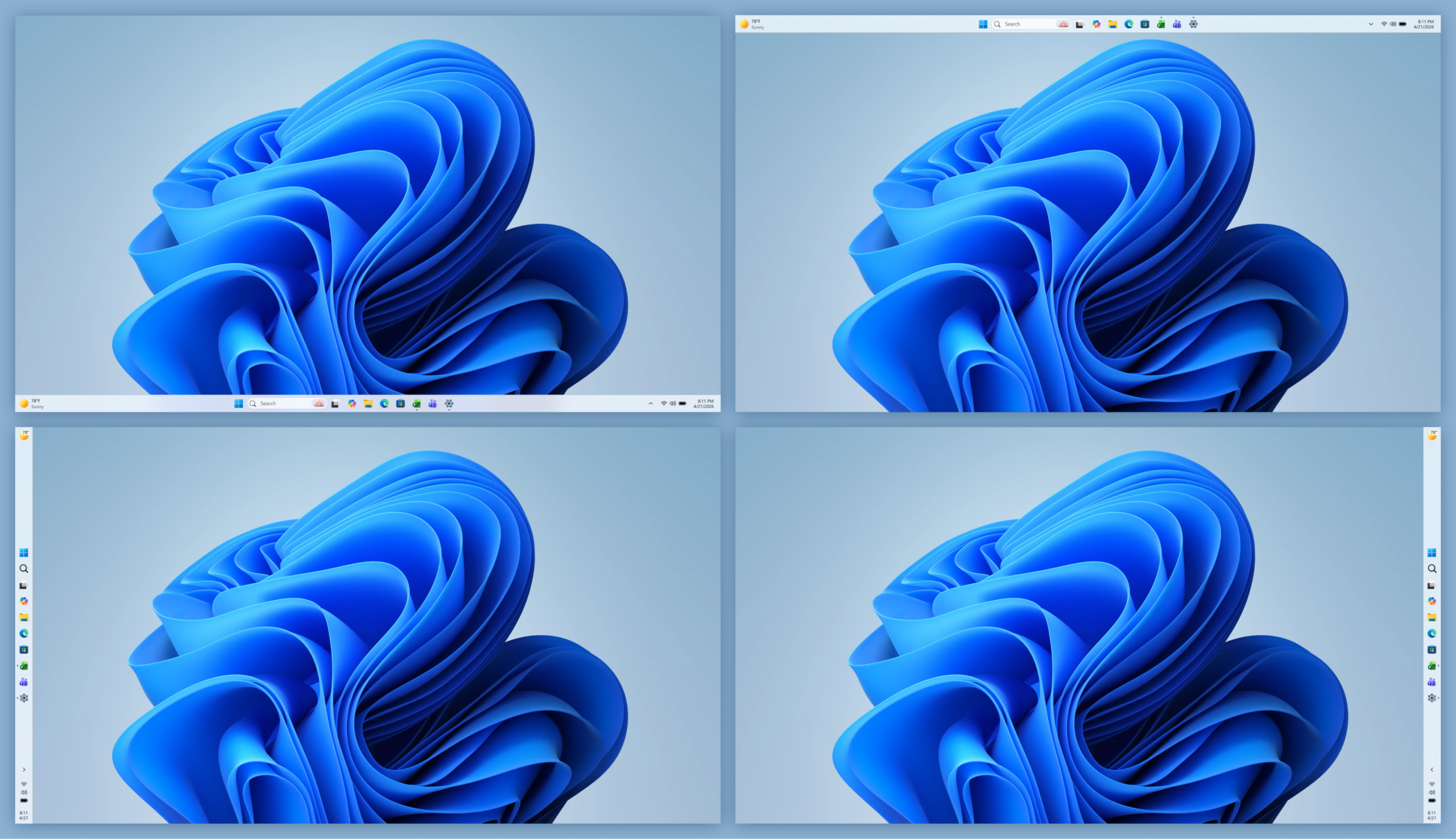
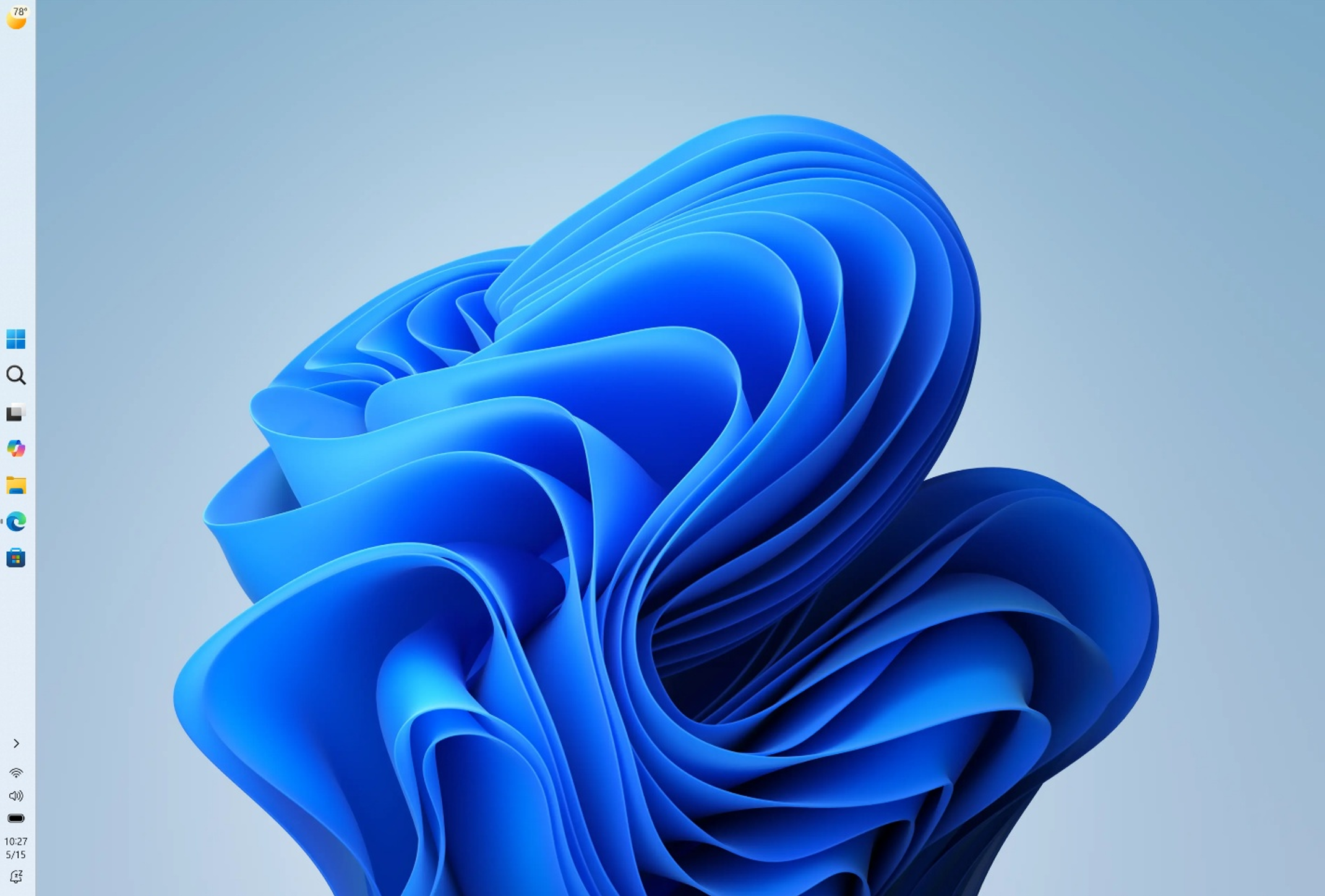
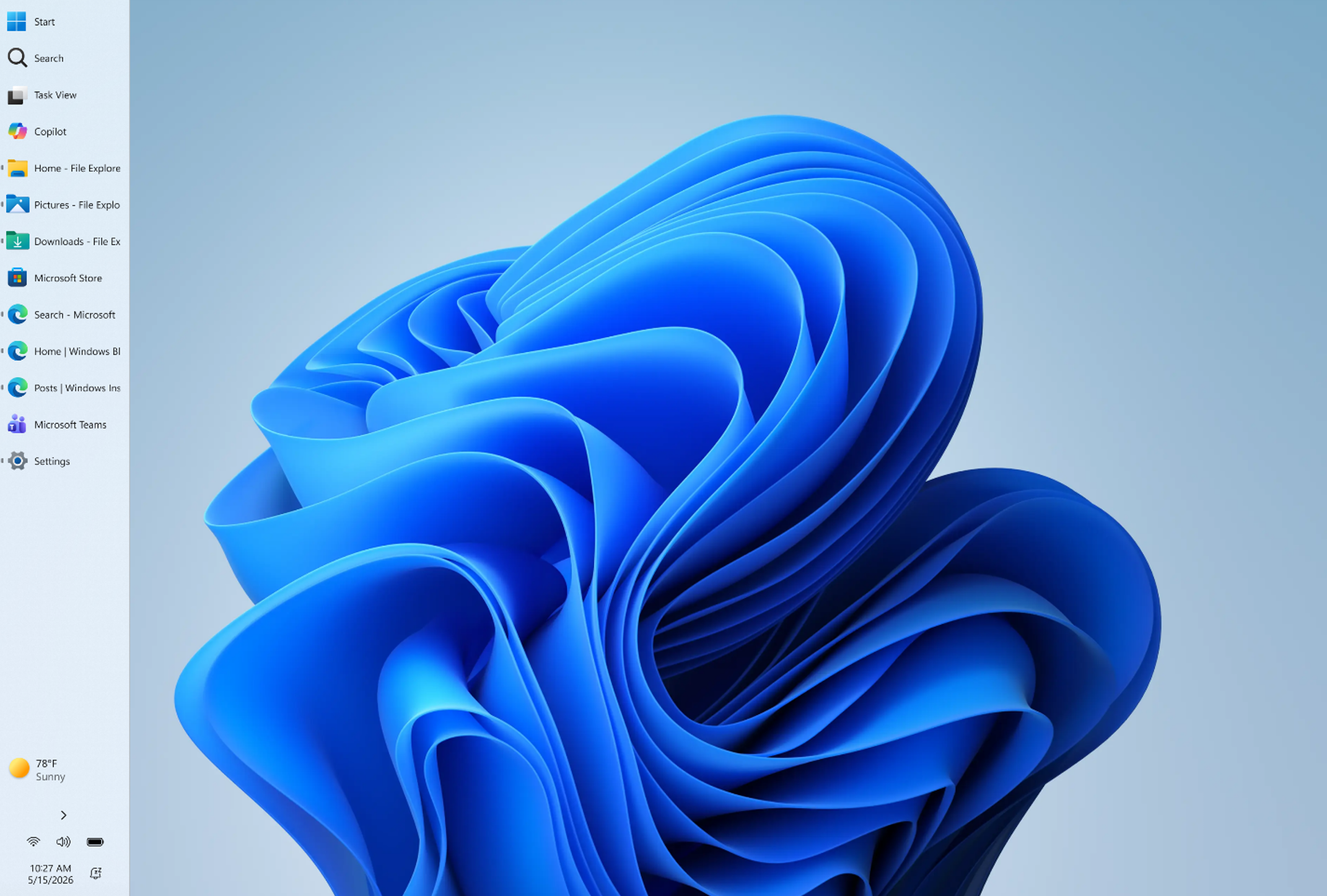
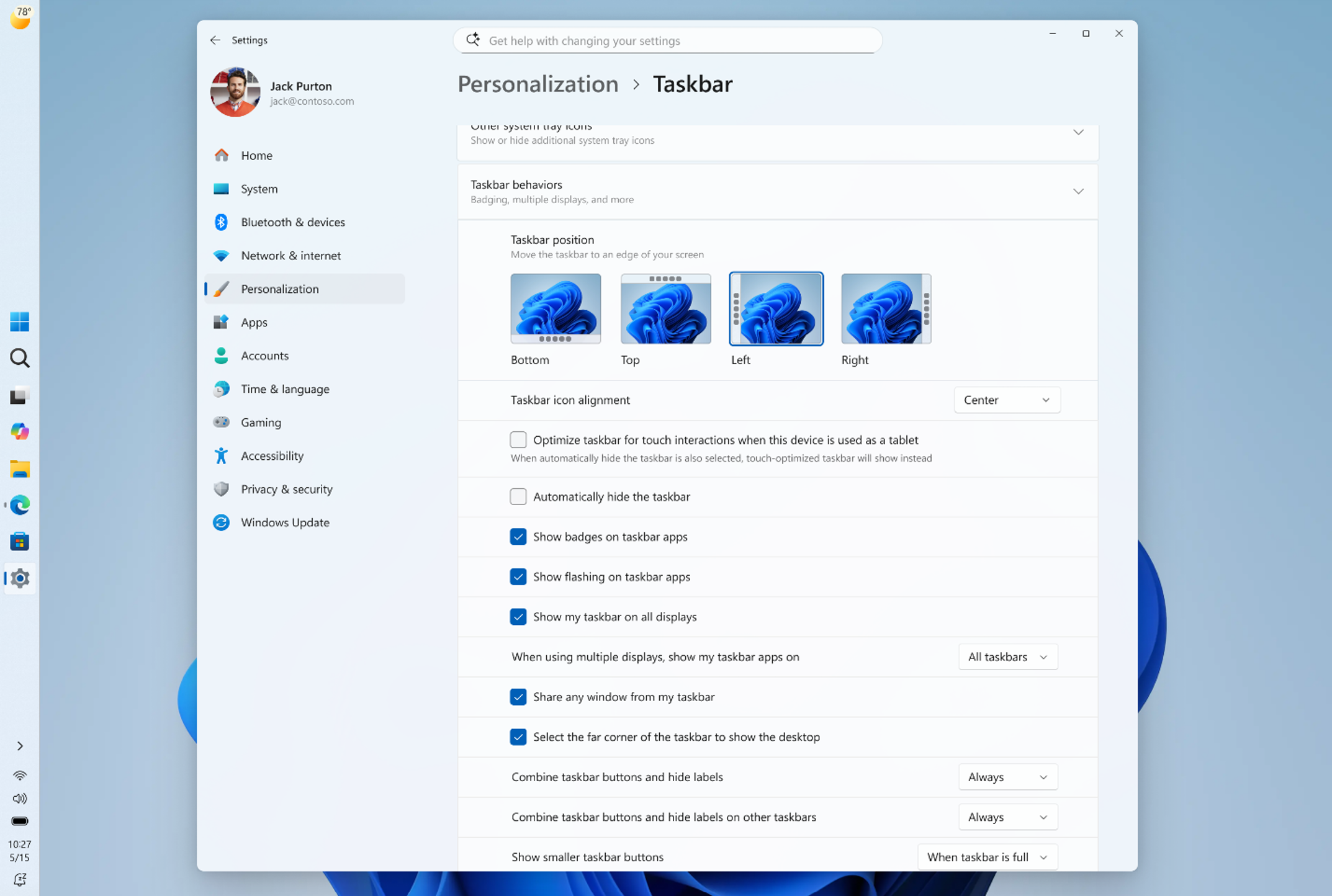
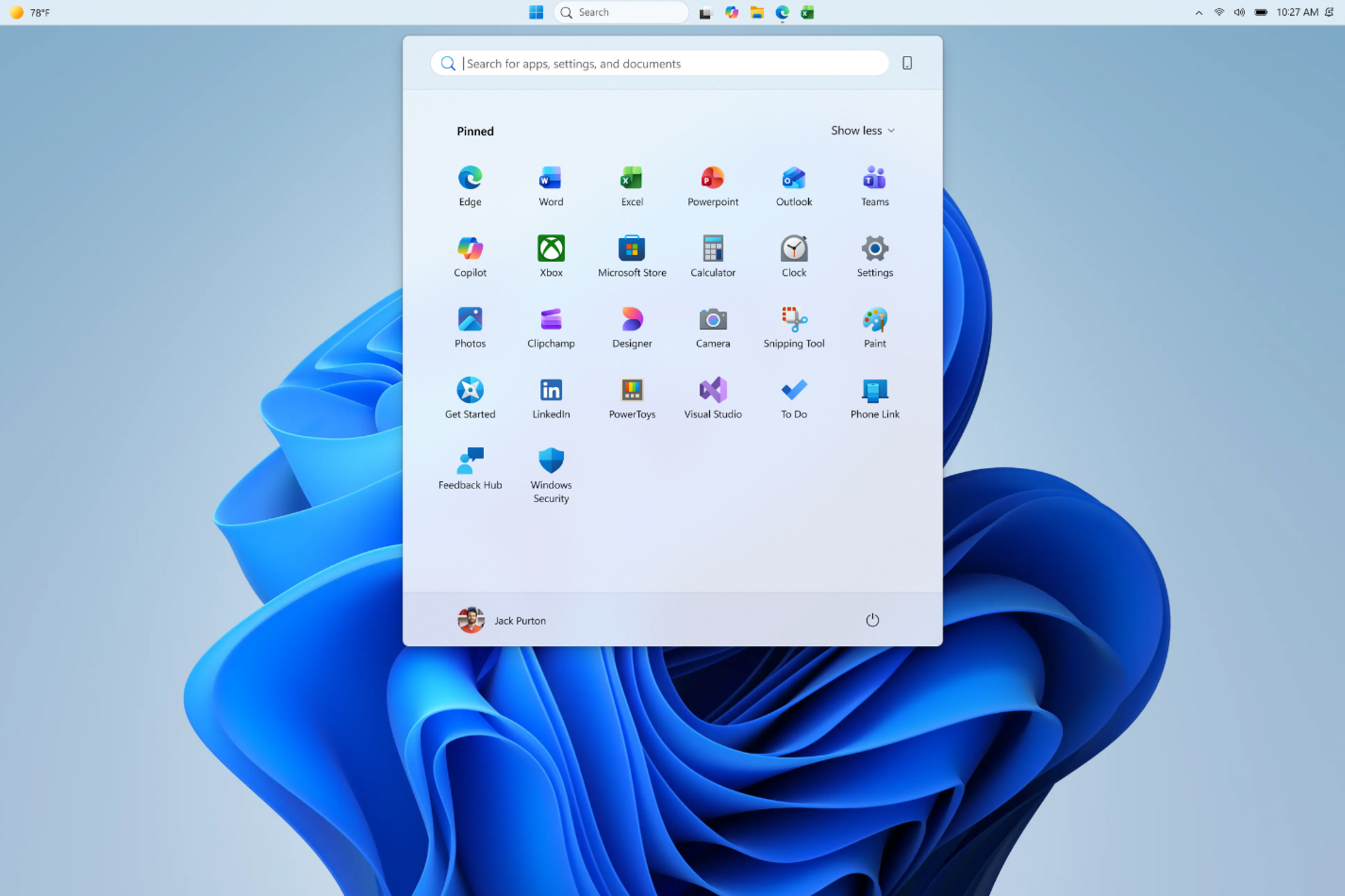
This year, we've been laser focused on raising the bar on performance, reliability and craft across Windows 11. As the Windows foundation strengthens, we are also pushing forward on this next era of Windows computing and delivering meaningful improvements to system performance that will benefit all Windows 11 PCs including these new PCs powered by RTX Spark. This includes changes like more fluid and responsive app interactions by moving many core Windows experiences to the WinUI3 framework and elevating the Windows Subsystem for Linux (WSL) experience, along with baseline reliability improvements across the operating system and more control and personalization, including alternate taskbar positions. These quality-focused updates will continue to roll out throughout the year.
Delivering a better platform for agents with Windows on RTX Spark
This week at Microsoft Build, you will see how we are optimizing the Windows platform for building and running agents securely with OS-enforced identity, containment and manageability. With a powerful GPU and up to 128 GB of unified memory, RTX Spark will be great hardware to build and run agentic workloads locally, with security and containment features designed to help protect users.
NVIDIA is bringing NVIDIA OpenShell to Windows, built on new Windows security and containment primitives. Hermes Agent and OpenClaw will be integrating OpenShell and these new Windows primitives inside of their Windows application. This enables customers to run agents and integrate them into developer and creative workflows, with the performance headroom to reason over large contexts without round-tripping to the cloud.
Control is a fundamental principle for AI on Windows. You choose when and how agents act on your behalf, with controls to help provide visibility into what they can access.
Enabling the Windows ecosystem for RTX Spark
From the app developers optimizing their software for this architecture, to our OEM partners building these new powerful PCs, the Windows ecosystem has come together to ensure RTX Spark delivers a complete, performant experience from day one.App ecosystem growth
PC ecosystem adoption
Windows and RTX Spark bring to life the most powerful and efficient thin-and-light PCs with all-day battery life1, optimized for developers and creators who need to trust that they can power through advanced workflows, in a portable package. These PCs will join the Copilot+ PC category, with powerful NPUs for local AI processing in addition to the GPU, unlocking rich AI-powered experiences. Beginning this Fall, RTX Spark will power a full range of Windows laptops and small form factor desktop PCs, starting with Microsoft Surface, ASUS, Dell, HP, Lenovo and MSI.Introducing Surface Laptop Ultra
- ASUS: The ASUS ProArt P16 and ASUS ProArt P14 combine powerful AI performance with slim and lightweight designs built for creators on the go. Available in 16-inch and 14-inch models with elegant Nano Black and new Neo White color options, the laptops feature ASUS Lumina Pro OLED displays and exceptional all-day battery life for premium creative experiences anywhere.
- Dell Technologies: The XPS 16 Creator Edition delivers serious GPU power built for creative work with smoother playback on 4K timelines, faster exports and a more seamless experience with AI tools. The Tandem OLED display with True Black HDR 600 ensures your visuals look exactly as intended. Add in a built-in SD card reader and HDMI port, and you've got a machine that's as capable in the field as it is back at your desk.
- HP Inc.: The HP OmniBook Ultra 16and HP OmniBook X 14 laptops are built for creators, gamers and AI developers, providing powerful local AI performance and experiences that help users accelerate workflows.
- Lenovo: The Lenovo Yoga Pro 9n marries Lenovo Yoga's creator-focused features with NVIDIA's newest chip to deliver a laptop that is portable, powerful and can last for extended periods away from an outlet.
- MSI: The Prestige N16 Flip AI+ combines a premium thin-and-light 2-in-1 design, a 16-inch UHD+ Tandem OLED display, NVIDIA AI acceleration and a 99.9Wh battery. It delivers immersive visuals, advanced AI experiences, and exceptional mobility for creators, professionals and gamers.
Scaling the power of Windows to NVIDIA DGX Station
Today's announcement is an important step on our journey to unleash the full power of Windows to NVIDIA silicon, from powerful laptops to data center class workstations. Together with NVIDIA, we’re scaling Windows from RTX Spark through to DGX Station for Windows, up to a trillion-parameter AI supercomputer powered by the NVIDIA GB300 Grace Blackwell Ultra Desktop Superchip, later this year. This unlocks breakthrough AI performance on Windows, the platform enterprises trust for manageability, security and compatibility, with seamless access to the Linux AI ecosystem through Windows Subsystem for Linux (WSL). With NVIDIA GB300‑class capability on Windows, we are making a step‑function leap in performance, fundamentally changing where advanced AI work can happen – enabling developers and organizations to run frontier‑class models and agentic workloads locally that were previously primarily available in the cloud or data centers. Pairing the GB300 Superchip with an additional NVIDIA RTX PRO™ Blackwell Workstation GPU enables developers to combine frontier AI compute with ray-traced visualization and simulation in a single deskside system — delivering the performance needed for agents to perceive, simulate and interact with the physical world. By bringing AI on‑device, organizations can keep data close and shape how it’s used to meet their own compliance and data boundary requirements, complementing cloud workloads. This shift opens new possibilities, lowers the barrier to experimentation, and makes unmetered, always‑available AI compute a native part of Windows workflows. We are building toward a future where Windows provides a unified foundation for AI, from the device in your hands to the infrastructure behind it. Stay tuned over the next couple of days. We look forward to sharing more on our vision of Windows for developers at Microsoft Build. 1 Based on internal testing of pre‑release units. Battery life varies significantly based on usage, settings and other factors.Windows quality update: May
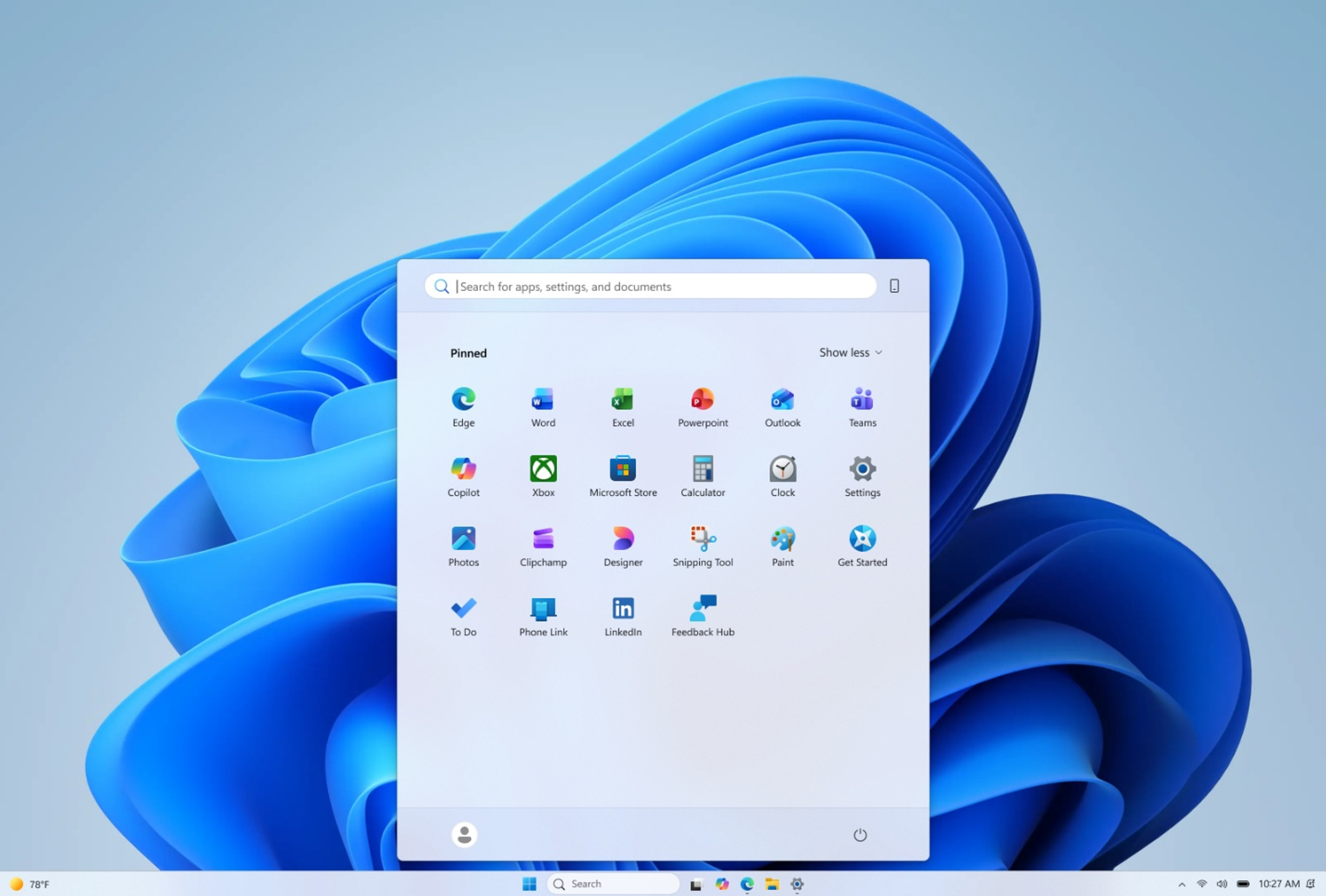
Making Taskbar and Start more personal
Improving driver quality, reliability, and security with the Driver Quality Initiative (DQI), and Cloud Initiated Driver Recovery
In March, we committed to delivering a smoother, more dependable Windows experience with our ecosystem of partners. Drivers are a critical part of that work. Drivers sit at the heart of Windows, connecting the OS to silicon, components, and peripherals. With thousands of partners contributing to tens of thousands of active driver families, improving driver quality is essential to making Windows more reliable over time. At WinHEC 2026, we introduced the Driver Quality Initiative (DQI), a comprehensive effort designed to improve driver quality, reliability, and security across Windows. We also rolled out new changes with Cloud Initiated Driver Recovery to improve how drivers are validated, delivered, and maintained. By catching issues earlier, targeting updates more precisely, and enabling automatic recovery when needed, devices can stay reliable over time with fewer disruptions and a better path back to a known-good state. This is part of our ongoing work with partners to make Windows more dependable over time.File Explorer improvements across reliability, readability and usability
[embed]https://youtu.be/gZUDEBbZSp4[/embed] Building on last month’s improvements, we made several updates to File Explorer across reliability, readability, and usability, including the Address Bar, file size formatting, keyboard navigation, and renaming. The Address Bar now supports paths containing double backslashes and quotation marks, such as C:\Users\user or "C:\Users\user", improving compatibility with more of the paths people paste or type into File Explorer. We also improved reliability of the Address Bar suggestion dropdown so it consistently closes after an item is selected. In Details view, file sizes now use appropriate units like KB, MB, and GB instead of KB-only, making them easier to read at a glance. We also improved keyboard navigation in File Explorer context menu flyouts. We also fixed multiple renaming issues, including one where text could be repeatedly selected while renaming items in folder views, and another where updated names with case-only changes were not immediately reflected in folder views across local and cloud storage. These are small details, but they show up in places people use all day. The goal is fewer broken paths, clearer information, and File Explorer interactions that behave more predictably. These updates also began rolling out earlier this month in the Experimental Channel.Making Windows easier to use with voice input, touch, and more personalization
[caption id="attachment_178981" align="aligncenter" width="1024"]Build next week!
Next week is Microsoft Build, where we’ll share more about what we’re doing to elevate the developer experience across the Windows platform. We’ve got a lot in store, so tune in for the keynote at 9:30am PT on Tuesday. Earlier today, we also shared the first episode of Inside Windows, a podcast where Pavan Davuluri, Executive Vice President, Windows & Devices, sits down with members of the team to share more insight into the work and people behind Windows. I was honored to be the first guest and talk through some of the work we’ve been focused on over the past several months. For those attending our meetup next week in San Francisco, I look forward to meeting you and hearing how we can keep improving the Windows Insider experience, particularly for developers. More to come next week! MarcusAnnouncing new builds for 29 May 2026
- Beta: Build 26220.8544
- Experimental: Build 26300.8553
- Experimental (26H1): Build 28020.2207
- Experimental (Future Platforms) – Including Canary 29500 series: Build 29599.1000
- Please note: We have identified an issue internally causing crashes on AMD machines supporting System Guard, meaning these devices in WIP will not be offered this week's Experimental (Future Platforms) build. This should be fixed by the next flight.
Notable new features:
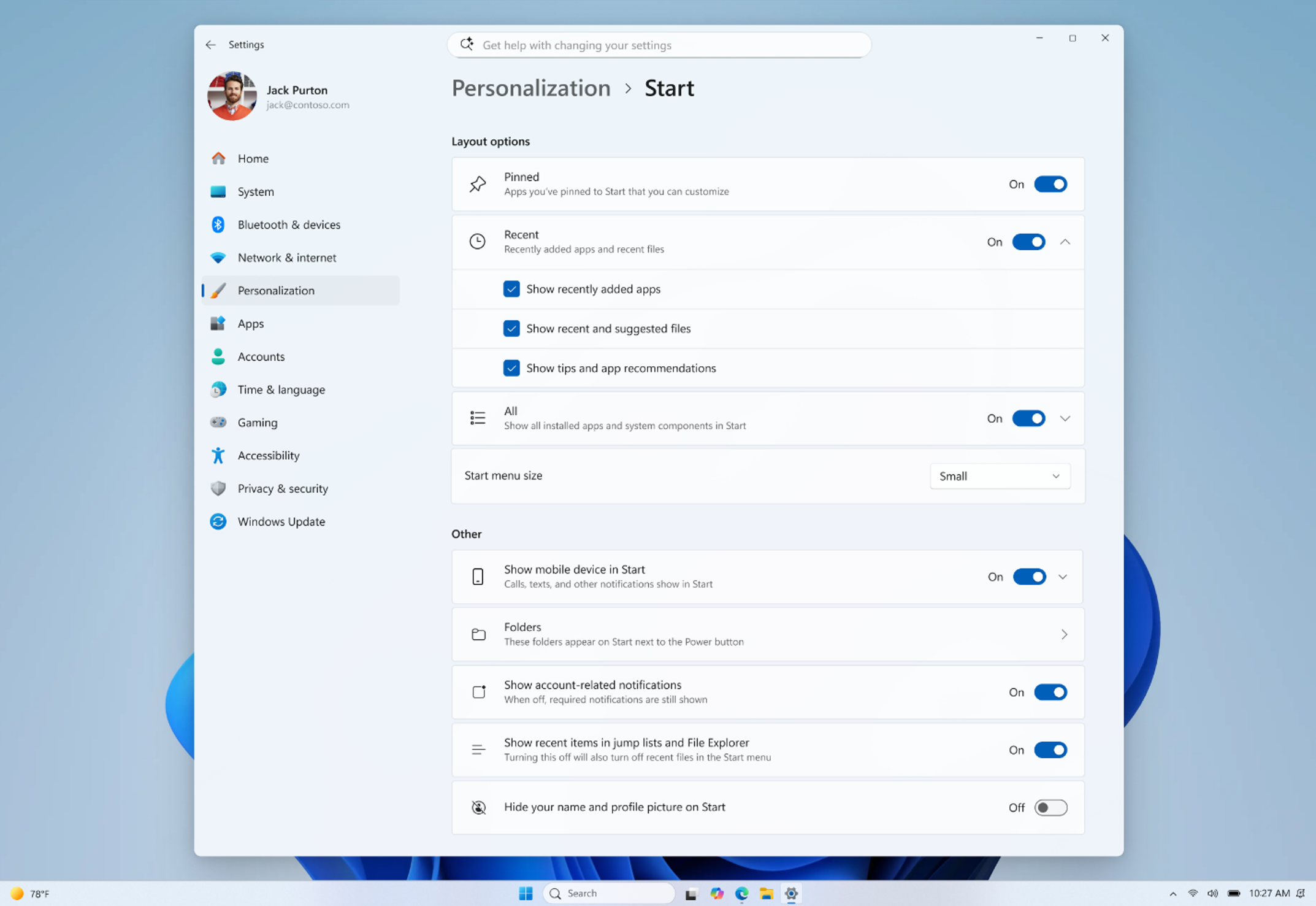
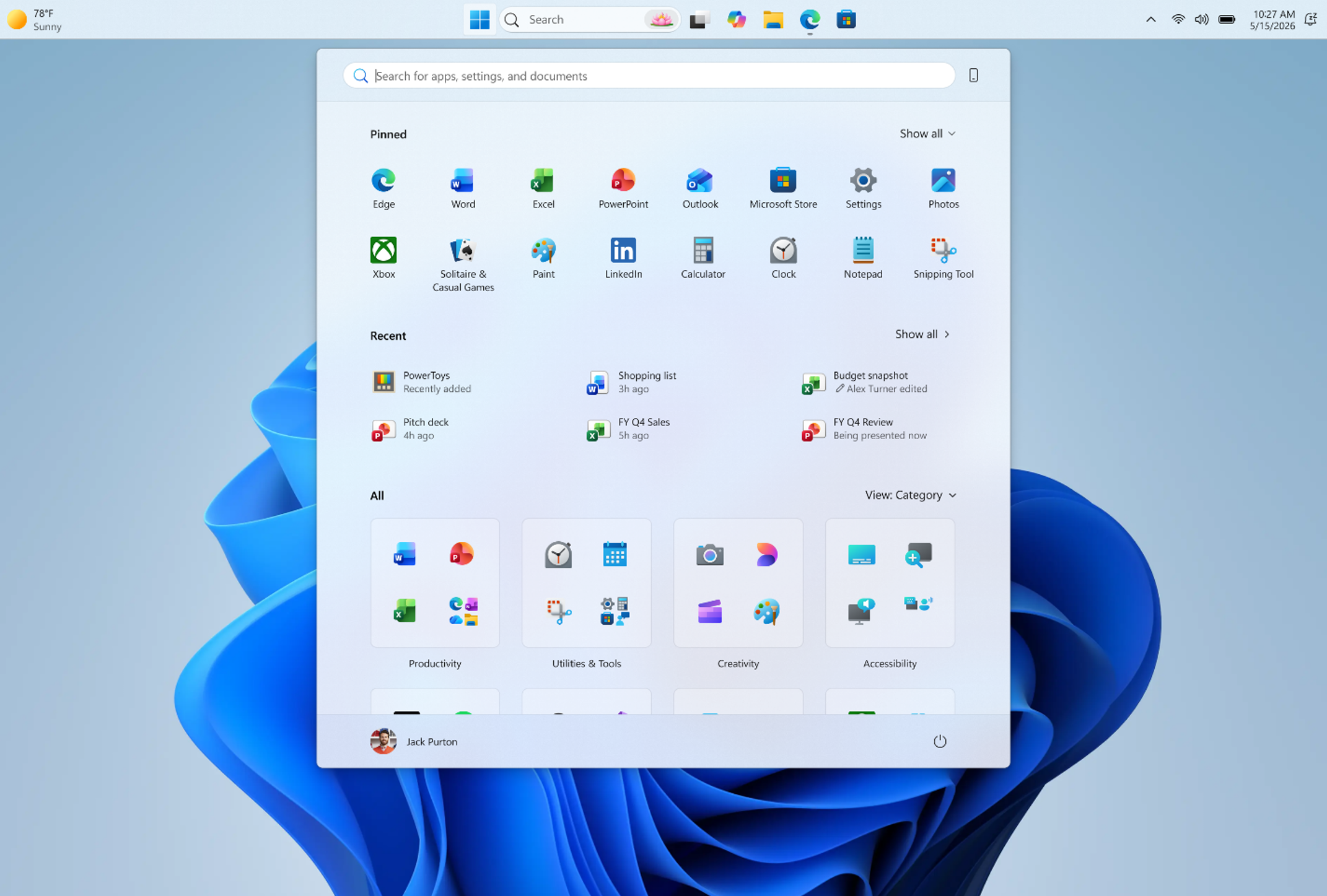
[Start menu]
Release channel: Experimental This update brings a number of improvements for the Start menu as first outlined in the Making Taskbar and Start more personal Insider blog. This includes:- Renamed "Recommended" section to "Recent" in Start and Settings page
- Section-level toggles to independently show or hide Pinned, Recommended, and All.
- Choose between a small and large Start menu, in addition to "Automatic (default)" setting option that's already available today
- The option to hide your name and profile picture in Start
- Redesigned Start menu settings page
[Windows Search]
Release channel: Experimental, Beta We're improving Windows Search results:- Search by Substring: Files with compound names or content (e.g., MeetingNotesApril, ProjectStatusReport) are now easily discoverable by typing “april” or “status”.
Announcing new builds for 22 May 2026
New builds this week
Today we are releasing new Windows 11 Insider Preview Builds. As a reminder, all Insiders can find the release notes for your device based on the new channel system, even if you haven’t moved yet. This is to make finding build information as easy as possible during the transition. See your channel release notes here:- Beta: Build 26220.8491
- Experimental: Build 26300.8497
- Experimental (26H1): Build 28020.2149
- Experimental (Future Platforms) – Including Canary 29500 series: Build 29595.1000
Notable new features:
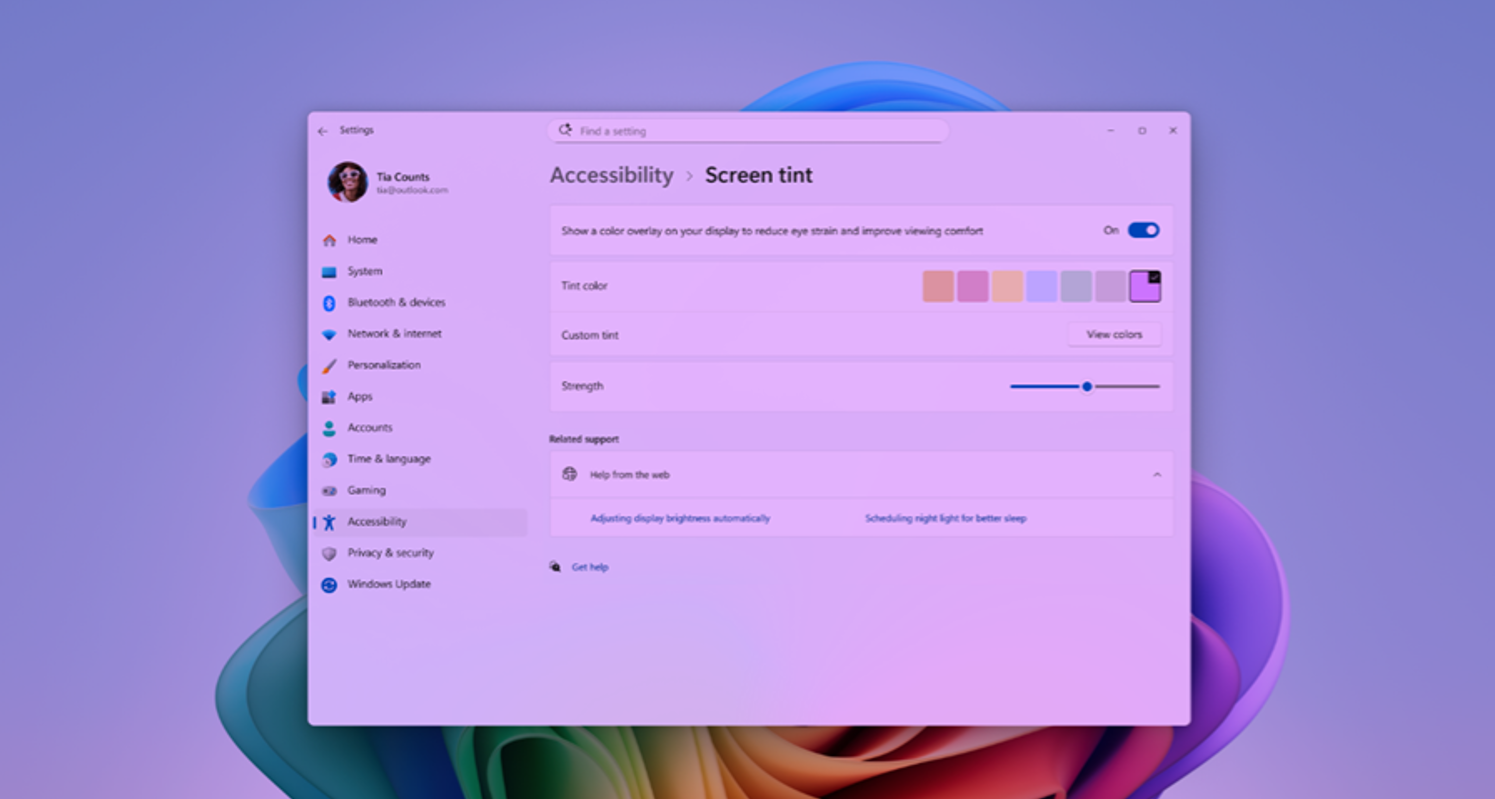
[Accessibility – screen tint]
Release channel: Experimental New Accessibility setting – screen tint We're introducing screen tint, a new accessibility setting that applies a color overlay across your entire display, softening its intensity so it's easier on your eyes throughout the day. If bright, saturated screens leave you with tired or sensitive eyes by the end of a long session, screen tint can help. [caption id="attachment_178980" align="aligncenter" width="1024"][Narrator]
Release channel: Experimental Braille displays now connect instantly with Narrator We are making refreshable braille displays easier to use in Windows. Narrator now supports displays that use the HID standard — an open industry standard for braille displays. If your display supports HID, simply connect it via USB and start reading — true plug-and-play with no additional setup required. For Bluetooth, pair your HID braille display in Settings > Bluetooth & devices just like any other accessory, and you can work wirelessly without being tethered to your PC.[Voice Isolation in Voice Access]
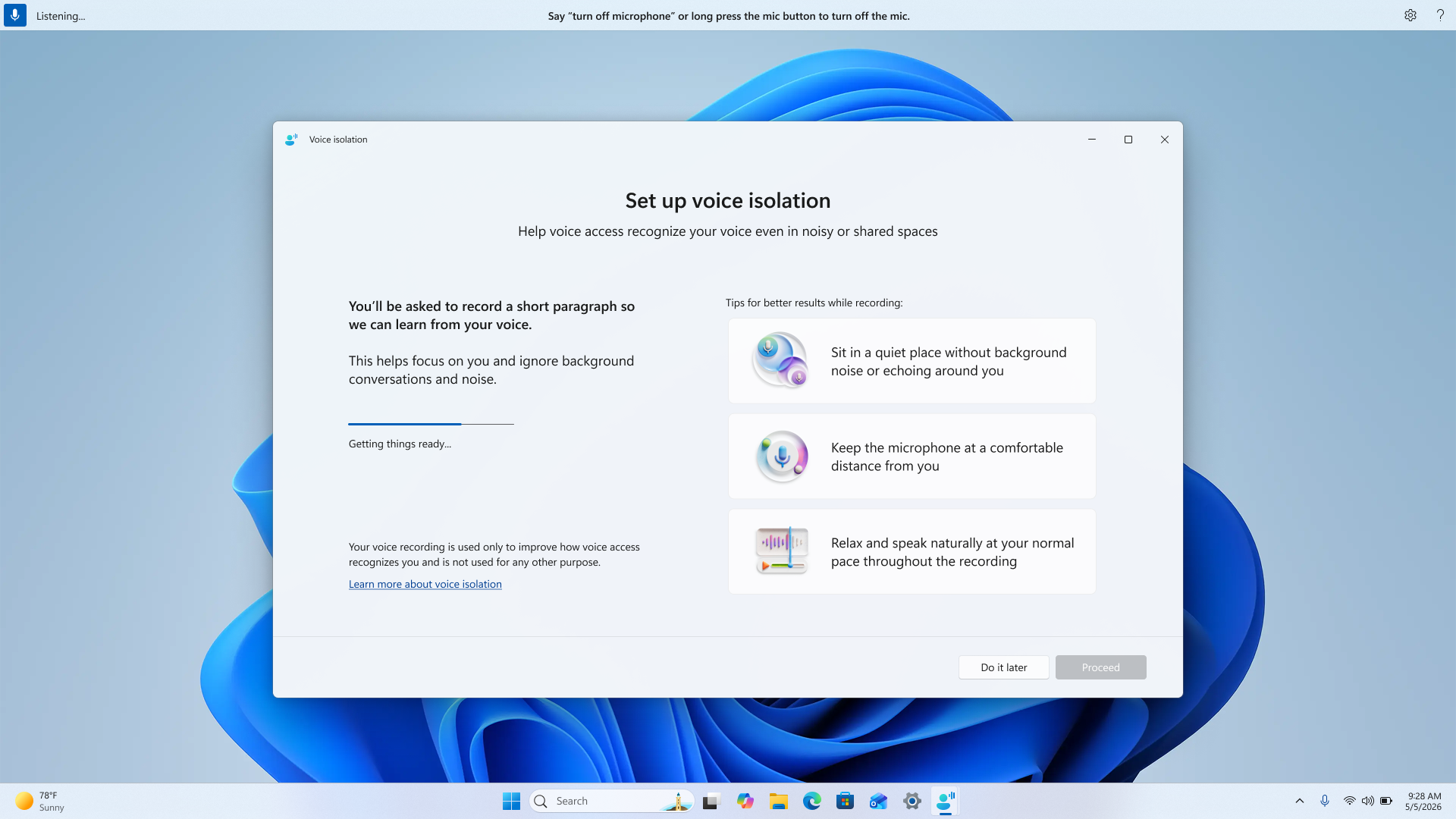
Release channel: Experimental We're introducing Voice Isolation, a new option in Voice Access that helps it focus on your voice, even when others are speaking nearby. Whether you're in a shared office, an open floor plan, or at home with family around, Voice Isolation filters out other voices and background noise so Voice Access can better understand you. All processing happens privately on your device. [caption id="attachment_178981" align="aligncenter" width="1024"]New in Edge for Business: AI for work, safe from day one
- Agentic browsing with Copilot (limited preview)
- AI across tabs to move from information to decisions
- Deliver AI securely—without losing control
- Protect against shadow AI in the browser
- Join the limited preview
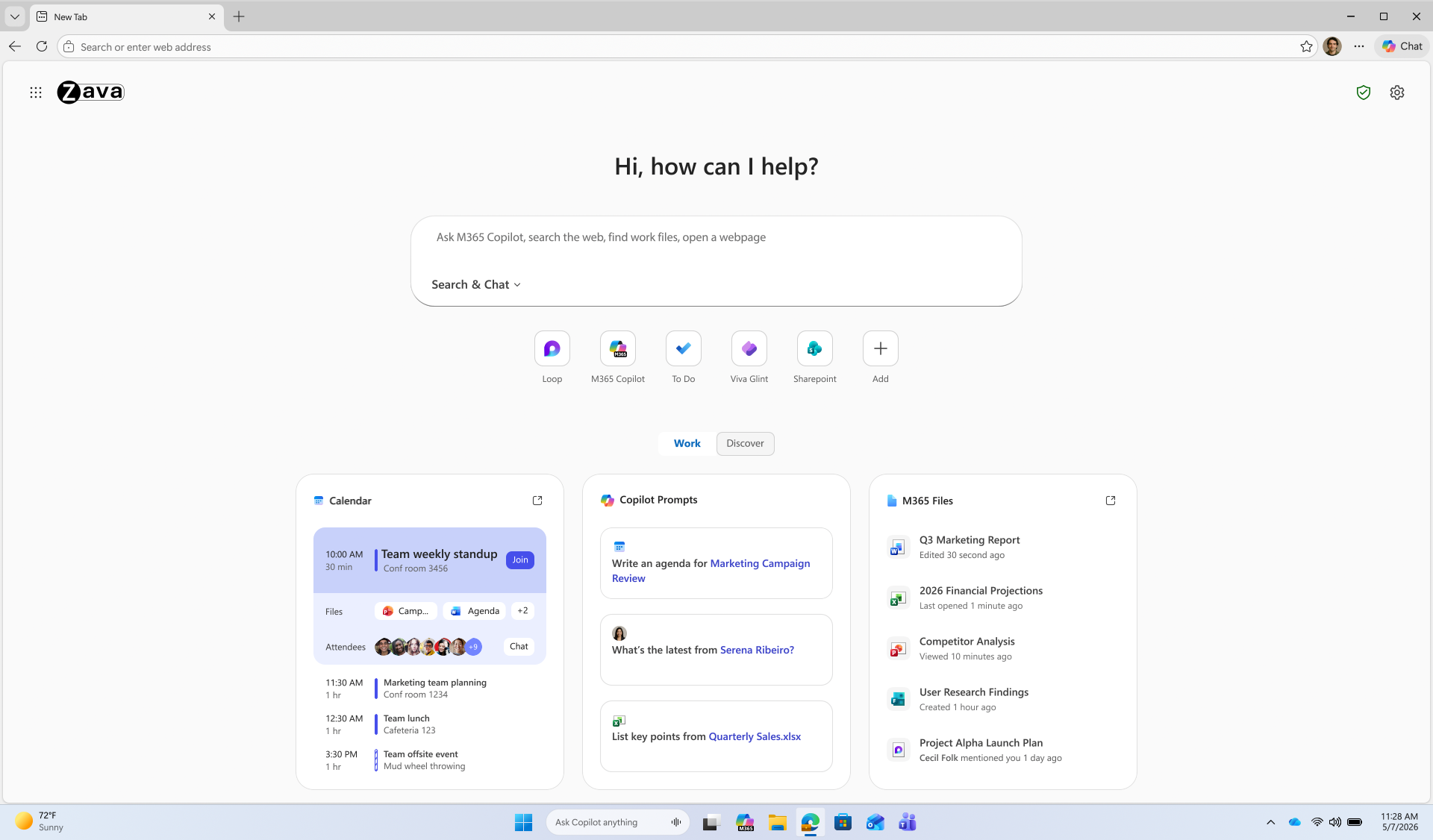
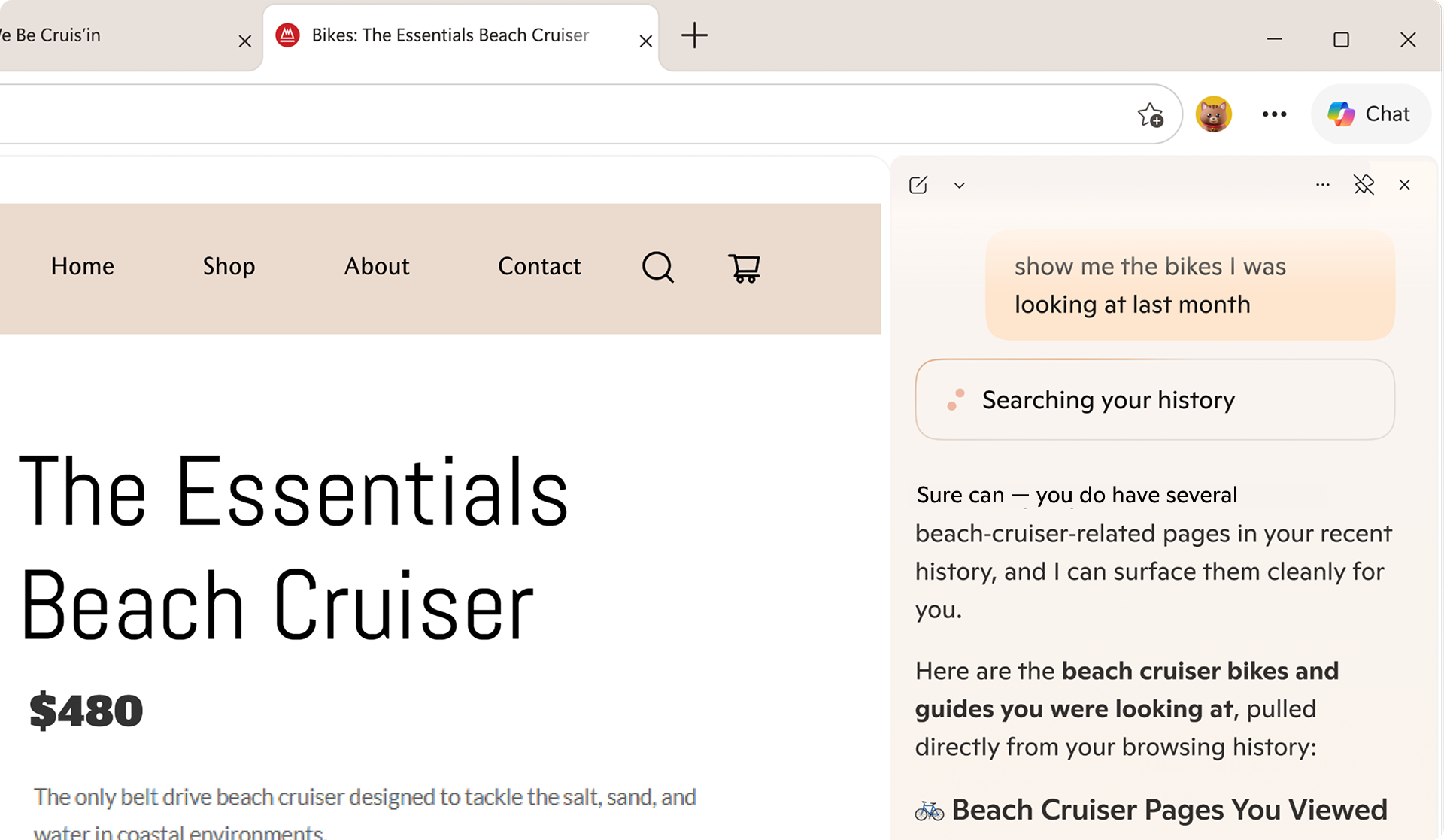
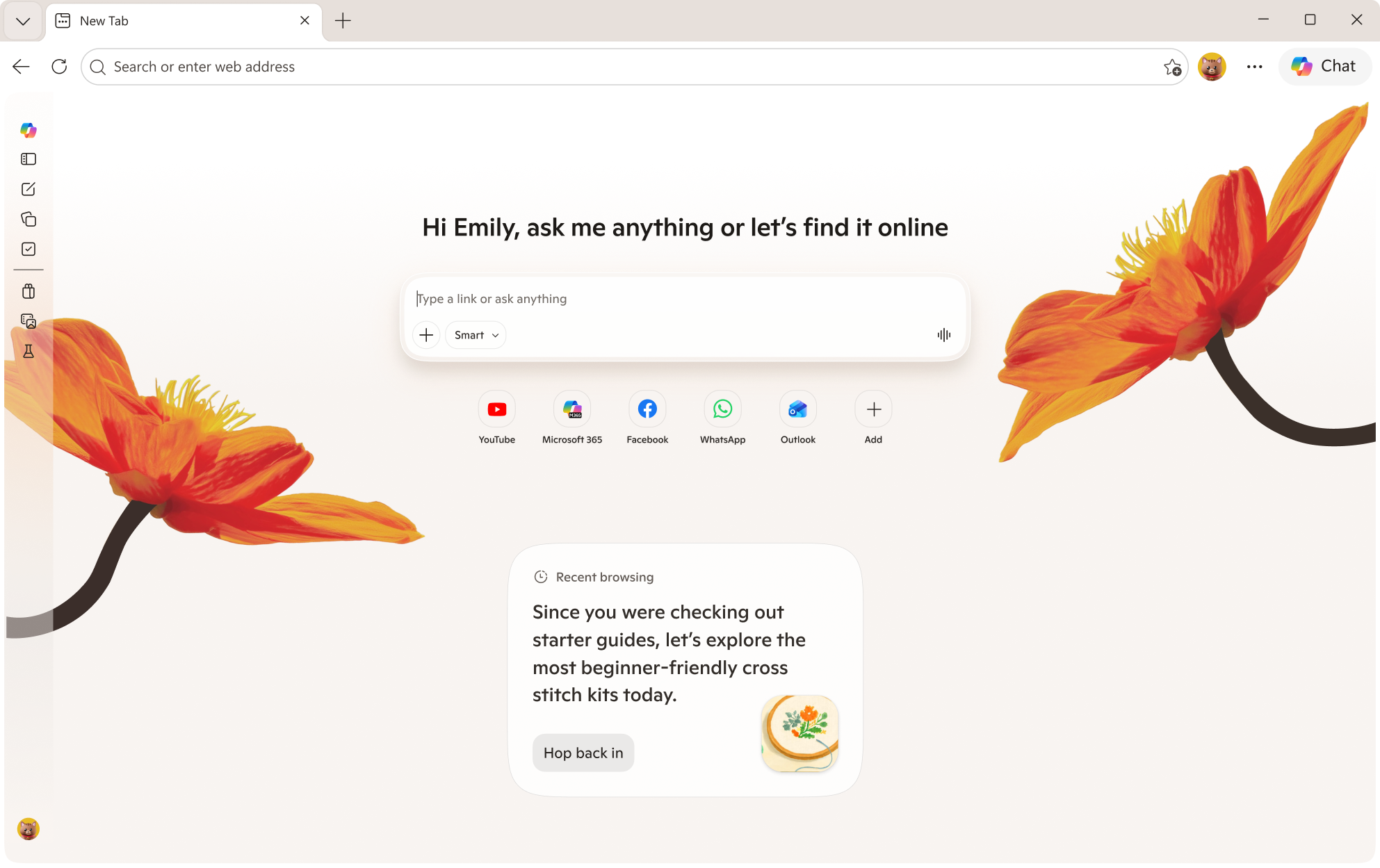
Introducing agentic browsing with Copilot in Edge for Business
Agentic browsing lets Copilot complete multi-step tasks on approved sites, with IT controls and user oversight. Business users across your organization often spend time on repetitive, multi-step work in the browser—filling out forms, navigating sites to complete tasks, and pulling information across tabs. It's exactly the kind of work people want to shortcut. Available today in limited preview, agentic browsing with Copilot in Edge for Business brings multi-step task completion into a managed enterprise experience. Copilot can navigate pages, fill in information, and complete workflows—helping users save time without turning to unsanctioned AI. https://www.youtube.com/watch?v=mQv0EBvj2nI For IT, enabling Copilot to browse doesn't mean giving up control: you decide when to turn it on and exactly where it can run. You enable it through its own policy and is scoped to sites you designate, so you can roll it out deliberately. Purview continues to enforce data protection policies, such as copy/paste of sensitive data, while Copilot browses. For users, clear visual indicators show when Copilot is taking action, and they can pause or stop it at any time. For sensitive actions such as entering passwords or credit card numbers, Copilot pauses for user input. IT admins can request to join the limited preview. Available worldwide with a Microsoft 365 Copilot license, excluding the European Economic Area.Quickly move from tabs to decisions
Beyond agentic browsing, we're expanding AI capabilities that help users get oriented faster, pull together information across tabs, and get to an answer—right in the flow of work.Copilot-inspired new tab page
The Copilot-inspired new tab page brings calendar, files, and prompts into one work dashboard—generally available on desktop and mobile. Every day starts the same way: users open the browser, review their calendar, and track down files. A reimagined new tab page brings calendar, files, and Copilot prompts into one view, reducing the need to switch between tools. An intelligent box enables chat and search from one entry point, while work cards surface upcoming meetings, Microsoft 365 files, and suggested Copilot prompts for quick action. The experience becomes even more personalized with a Microsoft 365 Copilot license. Generally available today on desktop and mobile. Learn how to configure.Multi-tab reasoning and YouTube summarization
Multi-tab reasoning and YouTube summarization are now available on mobile, in addition to desktop, turning open tabs and videos into quick takeaways. Users live in tabs—jumping between docs, web pages, and videos just to piece together an answer. Multi-tab reasoning and YouTube summarization help turn that scattered information into quick answers, without adding yet another tool. Multi-tab reasoning analyzes open tabs to generate comparisons, summaries, and insights. For example, users can compare product specs across tabs, summarize vendor documentation, or pull key differences from multiple pages into one answer. And because it's Edge for Business, Purview policies exclude sensitive content from reasoning. https://www.youtube.com/watch?v=X87JA-sPz2Y When users only need a few key answers from a 15-minute video, YouTube summarization pulls out the takeaways and even answers questions—whether they're reviewing a product demo, an industry presentation, or a webinar. Learn how to configure multi-tab reasoning and YouTube summarization.Deliver AI securely—without losing control
Edge for Business offers an IT-managed system of controls for AI—policies, tenant protections, and data protection enforcement—available from day one. AI in the browser is moving fast, and IT teams are under pressure to deliver new capabilities without becoming the team that slows everyone down. Most organizations don't want an "all or nothing" switch—they want to adopt AI in stages without changing their security posture or creating new exceptions. With Edge for Business, our mission is to offer AI experiences with enterprise-grade security and controls built-in from day one — through a system of controls that provides differentiated compliance and security for AI. That's what you should expect from an industry-leading secure enterprise browser. Edge for Business is the only major enterprise browser that protects company data in AI by enforcing data protection in the browser and keeping sensitive interactions within the tenant. Protections you rely on, such as blocking copy/paste, continue to be enforced on AI-assisted workflows. And because Microsoft 365 Copilot includes enterprise data protection, prompts, responses, and files stay within your tenant and are not used to train models. These protections apply natively when users sign into Edge for Business with an eligible Entra ID, no extensions required. A single policy enables AI features like summarization and multi-tab reasoning to help you get started quickly. For advanced AI, Copilot Mode is evolving into granular controls—so you can enable each feature individually instead of through a single toggle, making it easier to pilot and deploy advanced AI with more predictable outcomes. Existing configurations are honored for organizations that previously enabled Copilot Mode. The result: you can roll out AI on your terms—enabled by policy and fully under IT control. https://www.youtube.com/watch?v=9KFId0FzSfMProtect against shadow AI in the browser
Purview data protections in Edge for Business can audit or block sensitive prompts and uploads on common consumer AI apps and redirect users to Copilot for protected work AI. What happens when users don't follow rules and use unsanctioned AI? Organizations need the ability to audit prompts and block sensitive uploads, especially on consumer AI tools. With Edge for Business, consumer AI doesn't have to be a gap. Shadow AI protections powered by Purview bring inline data loss prevention into the browser for the most common AI apps. Purview analyzes prompts and file uploads: when sensitive data is detected, the action is audited or blocked. Users receive a clear, policy notification and are redirected to Microsoft 365 Copilot, where enterprise data protection and DLP policies apply. These protections work on managed and unmanaged devices when users are signed into Edge for Business with their eligible Entra ID. Requires Microsoft 365 E5; pay as you go pricing applies. Learn more. https://www.youtube.com/watch?v=JIDs57MAXOoGet started
IT admins can request to join the limited preview for agentic browsing in Edge for Business to experience how it works in a managed environment. Edge for Business plays a key role in delivering AI securely—where users already work and where controls are already in place. Request to join the limited preview for agentic browsing in Edge for Business to evaluate the experience and help shape what comes next.Note: learn more about Microsoft 365 Copilot availability here.
Introducing new Surface devices built for business and AI acceleration
"At Flagstar, we're focused on equipping our teams with technology that's secure, flexible and ready for the next wave of AI. Surface brings together the hardware, security and Microsoft ecosystem in a way that just works, giving our teams the confidence to run AI-powered workflows on device while staying protected and productive wherever they are." — Jason Pope, Chief Technology Officer, Flagstar Bank
We have always believed that the hardware people use enables businesses and teams to achieve more. Surface was created to set the standard for what a premium Windows PC can be, and that standard has never been higher. Today, we are proud to announce the next generation of the Surface for Business portfolio, the new Surface Pro for Business and Surface Laptop for Business powered by Intel Core Ultra Series 3 processors are available today in select markets, delivering world-class performance and AI on the edge to accelerate productivity. Powered by Intel's next‑generation Core Ultra Series 3 architecture, the new Surface Laptop for Business and Surface Pro for Business deliver a meaningful leap in graphics performance, delivering up to 35% more graphics performance than MacBook Air with M5[1], and more than 90% faster performance than Laptop 5[2] on select configurations with Intel Core Ultra X7. From analyzing complex information to presenting to customers or creating content on the go, the Intel Core Ultra Series 3 GPU enables work to move in real time, delivering the sustained, fluid performance leaders expect from a premium business PC, without compromising mobility, battery life or security. Whether your teams are in the boardroom, at a customer site or working from anywhere, these AI PCs are built to perform at the speed of business. Later this year, we will extend the Surface for Business portfolio with models featuring the Snapdragon X2 processors, delivering up to 80% faster local AI inferencing than before[3] and uncompromising battery life[4].
The new Surface Laptop for Business 13-inch is the most portable Surface Laptop, available starting today in select markets in 16GB and 24GB configurations starting at $1,499 (MSRP), with an 8GB configuration coming later this year starting at $1,299.99 (MSRP). With on-device AI processing, Wi-Fi 7[5] and a removable Gen 4 SSD designed for enterprise serviceability, it brings the full Surface experience to the entry-premium tier without asking IT or employees to trade off performance and productivity for portability.
- Security and trust are fundamental and should be built into every aspect of a device.
- Innovative devices are the platform that enables organizations to move faster with hybrid AI to accelerate workflows, productivity and end-to-end management.
- Intentional, functional and human centered design is imperative for hardware that supports how businesses work, with PCs that are built with a focus on reliability, sustainability and repairability features designed to keep employees productive and in their flow.
For the first time ever on a Surface device, we are introducing an optional integrated privacy screen with anti-glare. Built directly into select configurations of the 13.8-inch display of our Surface Laptop for Business, this software driven visual privacy filter helps protect sensitive information from unintended viewers and can be centrally managed by IT or activated instantly by employees with a single keystroke. Once activated, the privacy screen provides immediate protection from prying eyes without the need of a third-party physical screen protector. Designed from the ground up as part of our security‑by‑design approach, this innovation is made possible only by the tight integration of Surface hardware and software.
Surface allows us to run AI where learning happens, on the device itself. The future of AI is not everything going to the cloud; it's AI at the edge." — Eric Sedore, AVP and Chief Technology Officer, Syracuse University
For organizations building and deploying enterprise AI applications, Surface is also the reference platform for Windows AI APIs and the Foundry platform. Surface is purpose-built for developers who need a trusted, consistent hardware baseline, helping to enable on-device AI processing that can help offload everyday workloads from the cloud and optimize overall AI infrastructure costs at scale. Surface for Business does not just transform the experience for employees, it transforms the experience for IT. From UEFI to browser, it can be managed through Microsoft Intune. Every device in this portfolio is built to support the end-to-end Microsoft stack: Microsoft Intune, Windows Autopilot and the Surface Management Portal give IT administrators a single, unified plane to provision devices at scale, enforce policies and manage the full device lifecycle including zero-touch deployment that gets people productive from day one.[7] When the hardware, the operating system, the management platform and the productivity suite are all built and optimized by Microsoft, the result is not just operational efficiency, it’s a level of assurance and confidence that benefits the end-customers and businesses.XBOX Player Voice: A simpler way to share feedback
Improving Windows quality: Making Taskbar and Start more personal
Bringing more personalization to the taskbar
The taskbar is where your PC experience comes to life. Just like a well-organized workspace, having it tailored to your needs helps you stay productive, so we’re introducing more ways to customize it.Taskbar positions
Location, location, location. The ability to move the taskbar to the top or sides of the screen has been one of the most requested features, and we are bringing it to Windows 11. Starting today, Windows Insiders in the Experimental channel will be able to:- Position the taskbar on any edge of the screen: Top, bottom, left, or right (see figure 1).
- Choose icon alignment for every taskbar position: Top-aligned or centered when the taskbar is on the left or right, and left-aligned or centered when the taskbar is on the top or bottom.
- Use Start, Search, and other flyouts relative to the taskbar location: For example, when the taskbar is on the top, Start opens from the top (see figure 2).
- See every window at a glance: When using a vertical taskbar with “Never combine” taskbar buttons and show labels enabled, each app window appears as a separate labeled button, making it easier to identify and switch between windows (see figure 3).
- Auto-hide and tablet-optimized taskbar are not yet supported in alternate positions.
- Touch gestures for alternate positions are still in progress.
- Search boxes are not yet supported in alternate positions and will appear as a search icon for now.
Smaller taskbar
Windows 11 introduced a roomier taskbar to support more states and features while also improving touch targets. On smaller screens, that extra height can take away from your usable workspace. We are adding the option to switch to a more compact taskbar for times when every pixel counts. With this update, when small taskbar is enabled, you get smaller icons, a shorter taskbar, and more vertical space for your apps (see video below). No restart or sign-out is required. This experience is rolling out today in the Experimental channel. To change your taskbar size, go to Settings > Personalization > Taskbar > Taskbar behaviors > Show smaller taskbar buttons. When set to Always, both the icons and the taskbar height become smaller. [embed]https://youtu.be/pvE2gyWnVHA[/embed]Putting you in control of Start
There is a unique Start for everyone, whether you want a minimal experience with just your pinned apps, quick access to recent files, everything in one place, or something in between. We are making changes in two areas to support this. First, we are giving you easier ways to shape your Start menu. Second, we are improving the quality of what appears there by default.More control over your layout
Today, customizing Start can require navigating multiple settings in different places. Turning off the Recommended section involves toggling several settings, and clearing pinned apps means unpinning them one by one. We are simplifying this experience. Over the coming weeks, Insiders will get:- Section-level toggles to independently show or hide Pinned, Recommended, and All. One toggle per section that is simple and clear.
- A separate control for file recommendations. Today, turning off Recommended in Start also turns off jump lists and recent files in File Explorer. With this change, you can disable file recommendations in Start without affecting recent files in other places.
- Start menu size settings that let you choose your preferred size. Today, Start adapts to your display. With this update, you can choose Small or Large so your preference stays consistent across displays whenever possible.
- The option to hide your name and profile picture in Start for added privacy when sharing your screen, presenting, or streaming.
Improving recommendation quality
We are also improving the content that appears in this section for people who choose to keep it on. We are renaming Recommended to Recent to better reflect what the section primarily shows, including recently installed apps and recently used files. We are keeping recently installed apps visible, as this remains one of the primary ways people discover newly installed apps alongside the Microsoft Store. Both users and developers have told us this visibility is important. In addition, we are improving file relevancy. We are refining which files appear and how they are ordered to reduce less relevant items and better reflect what you have been working on.What’s next
Everything described will roll out to Windows Insiders in the Experimental channel over the coming weeks, including several in today's flight. We have talked about earning trust through steady and visible progress. Start and taskbar are where that trust is tested most, every time you sit down at your PC. Please share your feedback in Feedback Hub by pressing WIN + F. The Windows Insider community plays a critical role in shaping Windows, and as these features become available, we encourage you to explore them and share what is working and what is not. This work is ongoing, and our goal is to build it together with you. Thanks, Diego Twitter (X): @bacadd LinkedIn: Diego Baca | LinkedIn [caption id="attachment_178962" align="aligncenter" width="1024"]Announcing new builds for 15 May 2026
New builds this week
Today we are releasing new Windows 11 Insider Preview Builds. As a reminder, all Insiders can find the release notes for your device based on the new channel system, even if you haven’t moved yet. This is to make finding build information as easy as possible during the transition. See your channel release notes here:- Beta: Build 26220.8474
- Experimental: Build 26300.8493
- Experimental (26H1) – Including Canary 28000 series: Build 28020.2134
- Experimental (Future Platforms) – Including Canary 29500 series: Build 29591.1000
Notable new features:
[Taskbar improvements]
Release channel: Experimental Alternate Taskbar Position You can now change the position of taskbar on your screen. In Settings > Personalization > Taskbar > Taskbar Behaviors, you can select the side of the screen you want your taskbar on: bottom, top, left, or right. In these other positions, tooltips, flyouts, and animations will still come from the taskbar, and most customization settings like small taskbar and never combine taskbar icons will work with all locations. [caption id="attachment_178963" align="aligncenter" width="1024"][Widgets]
Release channel: Experimental As we continue to make Widgets feel less distracting, we’ve made a small but meaningful visual update to taskbar badging. For those that have taskbar badging on, the badge color will now match your Windows accent color instead of always appearing red, reducing the sense of urgency that something needs your immediate attention. We’re also testing out quieting down a user’s experience based on their level of engagement. For example, a user who highly engages with Widgets likely have their settings set to a state that works best for them, as compared to a user who barely engages with it and would benefit from having the experience quieted down with taskbar badging turned off as it is for new users who experience it as quiet by default.[Windows Search Box]
Release channel: Experimental We've started making changes to make Windows Search Box more relevant, starting with making it easier to find your files and apps:- Files and apps more reliably appear ahead of web suggestions when your content is a stronger match
Announcing new Release Preview builds for 14 May 2026
- Windows 11 version 24H2/25H2:
Build 26100.8514/Build 26200.8514Build 26100.8521/26200.8521(KB5089573) - Windows 11 version 26H1:
Build 28000.2173Build 28000.2176 (KB5089570)
Raising the bar together. Introducing the Driver Quality Initiative at WinHEC 2026
“Great platforms aren’t built in isolation. Platform quality depends on early, honest collaboration across OEMs, ODMs, silicon partners and IHVs. WinHEC brings engineers together with Microsoft to align early, solve real problems and deliver higher‑quality solutions for our shared customers” — Syam Poluri, Distinguished Engineer, Dell Technologies
Raising the bar on quality takes all of us.
Drivers sit at the heart of every Windows experience. They connect the OS to the silicon, components and peripherals that make Windows one of the most versatile platforms in the industry. Today, thousands of partners contribute to tens of thousands of active driver families across the Windows install base. When drivers are high quality, customers experience reliable, secure, performant devices. When drivers fail, customers experience it as a device problem, regardless of where the root cause sits.- Architecture: We are heavily investing in hardening kernel mode drivers and enabling the third-party kernel mode driver transition to either user mode driver or Microsoft authored class drivers. This is to ensure higher driver security, reliability and resiliency. User-mode driver investments include performance updates to PCIe devices with DMA support as well as Wi-fi stack (coming soon). Class driver investments include Soundwire Device Class for Audio (SDCA), introduction of the I3C class driver, NCM USB ethernet class driver as well as continuous enhancements to existing first-party class drivers on Windows 11.
- Trust: We are raising the bar for trusted partners and trusted drivers, including stronger partner verification, expanded automated analysis and updated Windows Hardware Compatibility Program requirements.
- Lifecycle: We are improving driver lifecycle management through better Windows Update catalog hygiene, including deprecating outdated or low-quality drivers, advancing SBOM alignment and enabling faster issue analysis through driver symbols.
- Quality Measures: We are expanding how driver quality is measured beyond crashes to include stability, functionality, performance, and power and thermal impact, giving partners clearer signals to improve the real customer experience.
“Delivering high-quality drivers and resilient platforms isn’t owned by any one company—it’s a shared commitment. Through our close collaboration with Microsoft, AMD is focused on building a culture of joint accountability to ensure security, stability and predictable performance for our customers at scale.” — David Harmon, Director, Software Engineering, AMD
What we did at WinHEC
Day 1 opened with a keynote presentation featuring our Windows leadership team, organized around three themes: navigating the evolving landscape, raising the bar on Windows 11 quality and the future vision for Windows. The keynote set the tone for the days ahead. We were candid about where we are, clear about where we're going and explicit about the partnership required to get there. From there, attendees broke out into workshops, with sessions spanning five tracks:- End-to-end driver quality — covering the full lifecycle from authoring and validation through publishing, and post-release health
- Platform fundamentals — power, thermal and storage fundamentals that define everyday device experience
- Exceptional device experiences — delivering best-in-class quality across media and display, camera, audio, connectivity and peripherals
- Windows Server — platform direction, reliability and the evolving requirements for modern datacenter and edge deployments
- Ecosystem advancement — end-to-end security, co-engineering tools, manufacturing and AI hardware innovation.
“At Acer, we believe that continuous innovation and collaboration are the engines that drive the technology industry forward. On display at WinHEC, Windows stands out as an innovative platform that brings together partners across a broad range of expertise. The Microsoft conference is where innovation, technology and domain experts come together to unlock the true value of platform engineering.” — Mark Yang, Associate Vice President of Compute Software Technology, Acer Inc.
"The customers ASUS serves — gamers, creators, students and professionals — each demand a different kind of Windows device. WinHEC is where ASUS and Microsoft engineers go deep on the platform fundamentals that make those very different devices share the same quality bar, generation after generation." — Justin Yo, Software Associate VP, ASUSTeK Computer Inc.
What we heard from partners
A few themes came through clearly in our conversations across the two days:- Quality is a shared priority. Across silicon, OEM and IHV partners, the message was consistent — driver and platform quality is central to the customer experience, and the ecosystem is ready to invest.
- Innovation thrives on a strong foundation. When the fundamentals are solid, partners can invest more confidently in differentiated experiences, AI-powered capabilities and next-generation hardware, knowing the platform will support them. The energy around what becomes possible when quality is a given, not a variable, was one of the most exciting themes of the week.
- There is real appetite for this kind of engagement. Partners told us repeatedly that the combination of roadmap clarity and hands-on technical depth is exactly what the ecosystem needs at this moment and going forward.
- Transparency matters. Partners welcomed the open methodology behind driver quality metrics, the phased rollout of lifecycle states and the commitment to incentive-based distribution as the right model for moving forward together.
"The best customer experiences are built on the foundation of strong partner collaboration. WinHEC is where that work happens — engineers from HP and Microsoft aligning early, solving real problems and ensuring that what we ship together actually works for the people who depend on it every day. That kind of direct, honest partnership across the ecosystem raises the bar for everyone." — Deepak Patil, Senior Vice President, Personal Systems Engineering, HP Inc.
Looking ahead
WinHEC 2026 was an important step, but it's the start of the work, not the end. In the months ahead, we will keep investing in the fundamentals that matter most to customers: reliability, security, performance, compatibility and quality. We’ll also keep collaborating with OEMs, silicon partners, IHVs, ODMs and the broader hardware ecosystem through the Windows Resiliency Initiative, the new Driver Quality Initiative and the work we do together every day. To everyone who joined us in Taipei this week, from our CPU, GPU and silicon partners; display, camera, audio and networking teams; IBVs, ODMs and OEMs; to the peripheral and component engineers who make the breadth of Windows possible — thank you. The depth of engagement, the willingness to work together in the room, and the shared commitment to quality made this week what it was. The work we do together over the coming year will define the Windows experience for more than a billion users. We couldn't be more energized about what we're going to build. — Robin and IanNew updates to Edge across desktop and mobile
New updates to the Edge mobile app
Today, we're bringing the experiences you love on Edge desktop to the Edge mobile app so you can get more done wherever you go. Juggling tabs on your phone used to mean endless swiping and tab hopping. Not anymore. With your permission, Copilot in Edge can reason across your open tabs. Just ask a question and it pulls from your tabs to compare details, surface answers, and help you decide without the back-and-forth. https://www.youtube.com/watch?v=Q9itnNYyhGc Previously available only on desktop, Journeys is now available on the Edge mobile app3. Journeys makes it easier to pick up where you left off and resume your projects by, with your permission, organizing your browsing history into meaningful topics – with summaries and suggested next steps – so you can quickly get back to planning that dog-friendly camping adventure or that piece of clothing you can't stop thinking about. https://www.youtube.com/watch?v=it6NFi4PO30 Sometimes the fastest way to get help is to just ask. With Vision and Voice, available to everyone on desktop and now in the Edge mobile app, you can, with your permission, share your screen and talk through what you're looking at — hands-free. Ask questions, get explanations, or think through a decision out loud. It's like having a second pair of eyes wherever you are. When Copilot is active, you'll always see clear visual cues so you know when it's taking an action, helping, listening, or viewing. We are also bringing Edge desktop's redesigned new tab page to the Edge mobile app to streamline how you get your day started, making it easier to jump right into what you need to get done. Bringing together chat, searching, and browsing in one clean starting point, Edge keeps you moving forward. https://www.youtube.com/watch?v=S7CT_HiWFysStay in your flow
Life doesn't happen in one tab. Now available to everyone, Copilot can pull context from your open tabs to surface relevant information and help you make decisions with less effort to keep you moving forward— without having to leave the page you're on. No setup required. Just click the Copilot icon in the top right corner and ask Copilot to compare options across tabs, explain what matters, and get clear answers. Take planning your next trip to Napa — comparing wineries, restaurants, and routes across a dozen tabs is the hardest part. Copilot in Edge, with your permission, reads across every tab you have open, so you can compare options, surface what matters, and make decisions with less tab-hopping. https://www.youtube.com/watch?v=Ls6dRaxSL28 With your permission, Copilot can also use your browsing history to deliver more relevant, higher-quality answers — like finishing up your shopping, returning to a thread you were following, or picking up research you started days ago. Copilot builds on what you've already seen so you spend less time switching and more time staying in your flow. Now, with long-term memory on desktop and mobile, Copilot not only builds on what you've seen but also can reference your past chats to provide more relevant help. You're always in control of what Copilot can access.Built to keep you moving forward
Sometimes getting started is the hardest part. The redesigned new tab page, now available for everyone to try, brings together chat, search, and web navigation in one place so you can effortlessly explore the web. It's also where all your Journeys live, so it's easy to jump back in and keep going.New tools to boost your productivity
Whether you're cramming for finals, writing a research paper, or understanding a complex topic, Edge has new built-in tools to help you focus, learn faster and get more done without ever leaving your browser. Study and Learn mode helps you get started breaking down topics into guided study sessions, interactive quizzes, and more to supplement your learning. To get started, simply type into Copilot in Edge "Quiz me on this topic" when you have a webpage open or locate the mode dropdown at the bottom left of the input box on the redesigned new tab page and select "Study and Learn mode." Write with confidence, right where you are. Writing assistant5 gives you extra help by generating drafts, rewriting for clarity, or adjusting tone right where you're already typing in Edge. Just look for the blue dot the next time you're writing to get help in the moment. https://www.youtube.com/watch?v=m9__zGC-miQ Turn your browsing into a study session with Copilot quizzes. Easily generate quizzes, flashcards, and guided sessions based on what you're reading so you can test yourself as you go, right in your browser. https://www.youtube.com/watch?v=4j3chZtjQvc Finally, you can now turn your tabs into a podcast6. Whether you're catching up on research or exploring something new, now you can listen, learn, and keep moving without missing a beat. Podcasts in Edge is available in English markets.You choose what you need
We're making it easier to shape your experience on the web. At any time, you can select which experiences you want or leave off the ones you don't. Just head to aka.ms/CopilotinEdge or Edge Settings to customize your experience anytime. With Copilot in Edge, your data stays yours. Microsoft only collects what's needed to improve your experience—or what you choose to provide via Personalization settings. Copilot follows Microsoft's trusted privacy standards, meaning your information is never shared without your permission. Your browser data is protected under the Microsoft Privacy Statement.Tell us what you think
Copilot features are available in all Copilot markets4 on Edge for Windows and Mac and the Edge mobile app today. We're excited to bring you these Copilot features directly to your Edge browser7 and want to hear from you. To get started, visit aka.ms/CopilotinEdge and give us your feedback. If you're excited to share more ideas and connect with others, consider joining our Discord channel. 1 Existing Copilot Mode users will continue to receive priority access to new features through Copilot in Edge Preview. Users may change this anytime in Edge Settings. As part of retiring Copilot Mode, Copilot Actions, previously available in Limited Preview, is now available as Browse with Copilot on Edge desktop for Microsoft 365 Premium Subscribers in the U.S. only. Usage limits apply. 2 Journeys on Edge desktop is available only in all English markets (en-US, en-GB, en-CA, en-AU, en-NZ, en-IN, en-SG). 3 Journeys on Edge mobile is available in the U.S. only. 4 Vision, Voice, multi-tab context, long-term memory, Copilot quizzes, and the redesigned new tab page are available in all Copilot markets across desktop and mobile. 5 Writing assistant is available in the U.S. only. 6 Podcasts is available in all Copilot markets in English only. Must be signed in with a Microsoft Account to generate a podcast. Subscribers to Microsoft 365 Personal, Family, and Premium have access to extended usage. Learn more. 7 Usage limits apply to certain Copilot features. Availability of Copilot features subject to change.Xbox and Discord partnership bringing more benefits to players
Announcing new builds for 8 May 2026
- Beta (Including Beta Channel): Build 26220.8370
- Experimental (Including former Dev Channel): Build 26300.8376
- Experimental (26H1) – Including former Canary 28000 series: Build 28020.2075
- Experimental (Future Platforms) – Including Canary 29500 series: Build 29585.1000
Notable new features:
[Touchpad]
Release channel: Experimental We’re adding new gesturing-related functionality to precision touchpads in Settings. The new features should be widely available across applications, with the exception that WinUI3-based UI requires new WinAppSDK versions for complete functionality - we're in the process of bringing the necessary changes to versions 1.8 and 2.0.- Scroll / zoom speed: control the baseline speed for these gestures
- Automatic scrolling: scrolling continues indefinitely without lifting your fingers. Activate by either bringing your fingers near the edge of the touchpad while scrolling, or holding them still and pressing harder (requires hardware support).
- Accelerated scrolling: repeatedly scrolling increases their speed, allowing quick traversal of long documents.
- Single-finger scrolling: perform a vertical scroll with a single finger starting from the left or right side of the touchpad.
[EDU Licensing]
Release channel: Experimental Beta Channel Free upgrade path to Windows 11 Pro Education for K-12 Windows Insiders in K–12 education environments can now experience a seamless upgrade path from Windows 11 Home to Windows 11 Pro Education edition—at no additional cost. This enables educational organizations to procure Windows 11 Home devices, upgrade them to Windows 11 Pro Education, and bring devices under school management. See release notes for more information. Thanks, Stephen and the Windows Insider Program teamAn inside look at Stranger Than Heaven reveals locations and Snoop Dogg’s role
-
Windows Blog
- Publish to Microsoft Store as a company—now with free registration and faster onboarding
Publish to Microsoft Store as a company—now with free registration and faster onboarding
What’s new in company onboarding?
Free registration
The $99 onboarding fee for company developer accounts has been removed, lowering the barrier to get started on the Microsoft Store.Sign up using your work account (Microsoft Entra ID)
Based on common feedback from developers, you can now sign up using your organization’s work account—streamlining onboarding and helping associate your developer account with your company’s organizational identity from the start.Faster, more transparent onboarding experience
A redesigned step‑by‑step onboarding flow with clearer requirements, upfront validation and real‑time status updates to help reduce friction and common errors. Many verification checks are completed automatically, with timely feedback and email notifications to help you stay informed and take the next steps when needed. [caption id="attachment_57784" align="alignnone" width="1024"]How to get your organization ready to publish faster
To help you move quickly from account creation to app submission, here are a few best practices to prepare your organization before starting onboarding:Have your D-U-N-S Number ready
Use your D-U-N-S Number to quickly retrieve your business details and expedite business verification, helping you complete onboarding faster. If your organization already has one, you can look it up here: https://www.dnb.com/duns-number/lookup.html. If not, you can request one for free here: https://www.dnb.com/duns-number/get-a-duns.html. [caption id="attachment_57785" align="alignnone" width="1024"]No D-U-N-S Number? Upload supporting documents
If your organization does not have a D-U-N-S Number, you can upload supporting documents for business verification, which may take longer due to manual review. Keep your documents ready in advance. Accepted documents include company formation documents (such as articles of incorporation), government-issued business licenses or registration certificates, official government registry records, and tax or stock exchange filings. [caption id="attachment_57786" align="alignnone" width="1024"]Use a business domain email in contact details
Provide an email address associated with your organization’s domain (e.g., name@yourcompanydomain.com) to help verify your employment and speed up onboarding. Using a mismatched domain will require you to upload additional verification documents later for domain verification. [caption id="attachment_57787" align="alignnone" width="1024"]Keep an eye on email notifications
You’ll receive email updates on your verification status. Review them and act—the faster you respond, the sooner you can complete verification and onboarding. When submitting documents, make sure to upload valid and accurate documents to avoid delays. Verification appeals are limited (up to three attempts), so submitting the right documents upfront can help you complete onboarding faster.Why publish to the Microsoft Store?
As the Windows developer platform continues to evolve—powered by Copilot+ PCs, AI innovation, and a growing ecosystem of developers and partners—the Microsoft Store offers a trusted and flexible path to reach over 250 million monthly users. Developers can publish a wide range of app types, including Win32 (.NET WPF and WinForms), UWP, PWA, .NET MAUI and Electron, without modifying existing code. Apps are securely discoverable through Windows Search and can be distributed across enterprise environments using tools such as Microsoft Intune. Developers also benefit from flexible commerce options—including the ability for non‑game apps to use their own in‑app commerce system and retain 100% of revenue—while MSIX packaging enables Microsoft‑hosted distribution, free signing and automatic updates to reduce operational overhead.Ready to publish?
Get started by opening your account at storedeveloper.microsoft.com.-
Windows Blog
- With latest world update, Microsoft Flight Simulator shines light on aerial firefighting