❌

Normale weergave

Distribution Release: EmmabuntΓΌs DE6-1.03

28 September 2026 om 22:01
The DistroWatch news feed is brought to you by TUXEDO COMPUTERS. The EmmabuntΓΌs project has published a new update with a focus on improving accessibility options and features. "Our goal was to preserve the spirit of this approach: making accessibility features immediately available without requiring users to memorize numerous keyboard shortcuts. Easy Menu: one key for simple access to....
  •  

iPhone 18 Pro First Impressions: What Do You Think So Far?

28 September 2026 om 21:47
It's been a little over a week since the iPhone 18 Pro models launched, and we want to hear from MacRumors readers. What do you think of Apple's newest iPhones?


If you upgraded from an older phone, was it worth it? What about upgrading from an iPhone 17 Pro? What problems are you running into? Anything you love so far?

MacRumors readers have already been sharing early opinions on the MacRumors forums, and there are interesting discussion threads to read through. For early reviews and hands-on images, make sure to check out the first impressions and photos thread.

People have been taking excellent photos with the β€ŒiPhone 18 Proβ€Œ and sharing results in a dedicated image thread. If you're still thinking about getting the β€ŒiPhone 18 Proβ€Œ and want to know how the new variable aperture lens performs, the thread includes useful real-life examples.

Image via MacRumors reader twx


Image via MacRumors reader M1mba978


Curious about battery life? There's a whole thread for that with early data. Readers have also shared how heavy the iPhone 18 Pro Max feels in the hand, and we've seen the reasons why some 17 Pro Max owners decided to upgrade to the iPhone 18 Pro Max.

The new iPhones aren't perfect, and a few people have run into heat issues, speaker bugs, and problems with Face ID. Apple just released iOS 27.0.1 with a Face ID fix, so if you're having that bug, let us know if the new software solves it.

For easy navigation, here are all the threads linked above, along with other suggested reading.

Holding out for the iPhone Duo instead of the β€ŒiPhone 18 Proβ€Œ? You're not alone. Lots of MacRumors readers are discussing Apple's foldable, weighing possible downsides, and mulling where to order for the best chance of getting one at launch.
Related Roundup: iPhone 18 Pro
Related Forum: iPhone

This article, "iPhone 18 Pro First Impressions: What Do You Think So Far?" first appeared on MacRumors.com

Discuss this article in our forums

  •  

Shoutout to More Layouts – These Weeks in Firefox: Issue 210

28 September 2026 om 21:31

Highlights

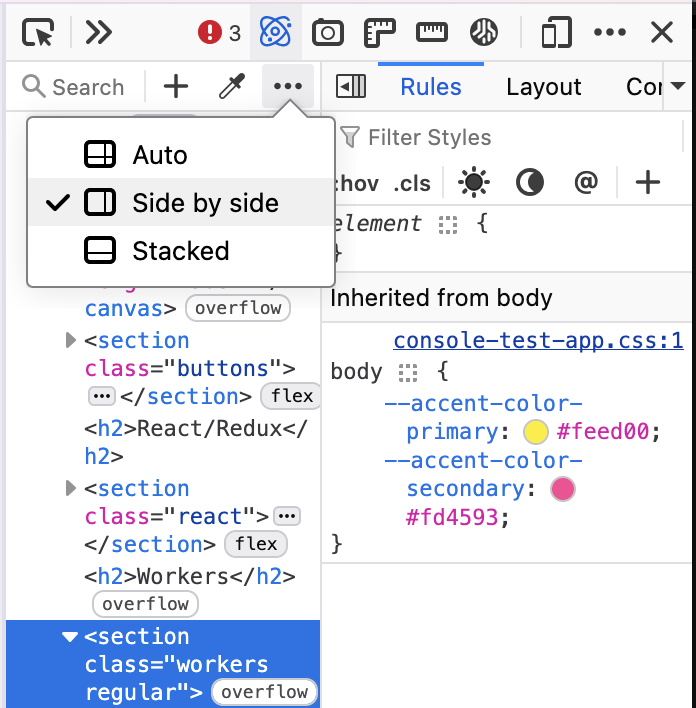
  • RΓ©v O’Conner added a settings popup to control the layout of the Inspector. β€œAuto” automatically switches the layout at a given toolbox width.
    • Firefox Developer Tools Inspector showing a layout menu with options β€œAuto,” β€œSide by side,” and β€œStacked.” β€œSide by side” is selected, displaying the HTML markup tree on the left and the CSS Rules panel on the right.
  • The new sidebar (sidebar.revamp) and switcher setting will be enabled by default for users along with Nova in DevEdition, Beta and Release channels. To ease the transition for old sidebar users, the β€œOpen tools from sidebar” option will be unchecked for those users to more closely resemble the old sidebar experience. The migration won’t apply to users who had already tried the new sidebar and reverted back.
  • The custom wallpaper library for the New Tab page is coming along! This allows you to save multiple images to your wallpaper folder, rather than replacing one image at a time. While it’s still in development, you can test it by setting browser.newtabpage.activity-stream.newtabWallpapers.customWallpaper.library.enabled to true, starting in Firefox 157.
    • Firefox New Tab's β€œYour images” customization subpanel showing two uploaded image thumbnails: a city street with a red streetcar and a hummingbird perched on a branch. The first image is selected with a purple outline. A dashed β€œAdd an image” tile with a plus button appears beside them.
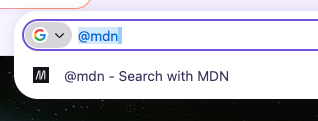
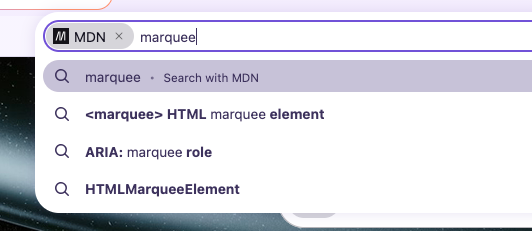
  • Mark added an MDN search engine for Nightly and Developer Edition. Select it from the menus, or type @mdn <search term>.
    • Firefox address bar with @mdn typed and highlighted. A suggestion below reads β€œ@mdn – Search with MDN,” demonstrating the MDN search shortcut.
    • Firefox address bar using the MDN search shortcut with β€œmarquee” typed. The suggestion dropdown includes β€œSearch with MDN” and MDN results for the HTML element, the ARIA marquee role, and HTMLMarqueeElement.

Friends of the Firefox team

Resolved bugs (excluding employees)

Script to find new contributors from bug list

Volunteers that fixed more than one bug

  • :Benjamin Peterson
  • Amadi
  • any1here
  • Caleb Pickard
  • Chris Vander Linden
  • Gopalarathnam Venkatesan
  • Igor [:ExplodingJoysticks]
  • Khalid AlHaddad
  • LukΓ‘Ε‘ LipinskΓ½
  • Mayank Bansal
  • Nazeer Ahmed Shaikh
  • Noah Varghese
  • Sameem [:sameembaba]
  • Sebastian Zartner [:sebo]
  • sfshah
  • Xiaosen Zhuang

New contributors (🌟 = first patch)

Project Updates

Add-ons / Web Extensions

Addon Manager & about:addons
  • As part of Project Nova related work:
    • Fixed responsive layout issues that caused horizontal scrolling in about:addons at high zoom levels – Bug 2059864
    • Fixed the β€œDiscover extensions” button appearing multiple times in about:addons – Bug 2070281
    • Added telemetry for theme-picker shown events and for appearance/native-theme changes in about:addons – Bug 2069417 / Bug 2070341
    • Added an accessible name to the themes mode control in about:addons, fixed in Firefox 158 and uplifted to the Firefox 157 beta channel – Bug 2064563
      • Thanks to Mark Kennedy for the help on fixing this accessibility gap
    • Updated the built-in dark and light theme previews to use the nova style – Bug 2070274
      • Thanks to Emilio Cobos Álvarez for the fix to the default light and dark theme previews.
    • Fixed the Nova default and AMO curated theme previews to follow the OS light/dark mode while ignoring the Website appearance setting, fixed in Firefox 158 and uplifted to the Firefox 157 beta channel – Bug 2070562
  • Stopped setting unused taarId session cookies for AMO on startup – Bug 1871561
    • Thanks to Manuel Bucher for helping us to clean up these unused internals.
WebExtension APIs
  • Fixed webRequest requestBody parsing so POST form fields named __proto__ are no longer dropped – Bug 2061470
  • Changed alarms.clearAll() to resolve with undefined instead of a boolean, starting in Firefox 157 – Bug 2067229
    • Thanks to Ollie Hensman-Crook for the fix to the alarms API.
  • Implemented native messaging support via xdg-native-messaging-proxy for Flatpak and Snap builds – Bug 1955255
    • Thanks to Jan Horak for the native messaging work on Linux packaging.
  • As part of Florian QuΓ¨ze effort to investigate and fix intermittent failures:
    • Made windows.update() wait for the window to actually resize or move before resolving, fixing an intermittent Linux test failure – Bug 1307759
    • Fixed a pageAction popup incorrectly opening via a commands API shortcut while the extension was already shutting down – Bug 2039637
    • Fixed action.openPopup() rejecting when a tab hover preview was showing, a regression from Bug 2022281 in Firefox 150, with the fix shipping in Firefox 157 and no uplift planned – Bug 2062229

DevTools

  • The team has a few sizable ongoing projects.
    • Bomsy is working on moving Stylesheets to the Debugger so we can retire the (XUL-based) Style Editor, and turn the Debugger into a β€œSources” panel (keeping all the existing functionality of course).Β  (pref: devtools.debugger.features.stylesheets-in-debugger)
    • Alex is investigating ways to better handle CSS authored text and CSSOM changes in the Inspector, building information directly from the Rust CSS engine, with the hope it will bring performance improvement editing styles in the Rules view.
    • Nicolas is implementing a way to show to the user how the engine goes from a CSS declaration value to the computed value so it’s easier to follow what’s the result of the different call sites, or how the different units (em, %, vmin, …) are computed to their final (e.g. px) values. Β  (pref: devtools.inspector.css-explainers)
External contributions
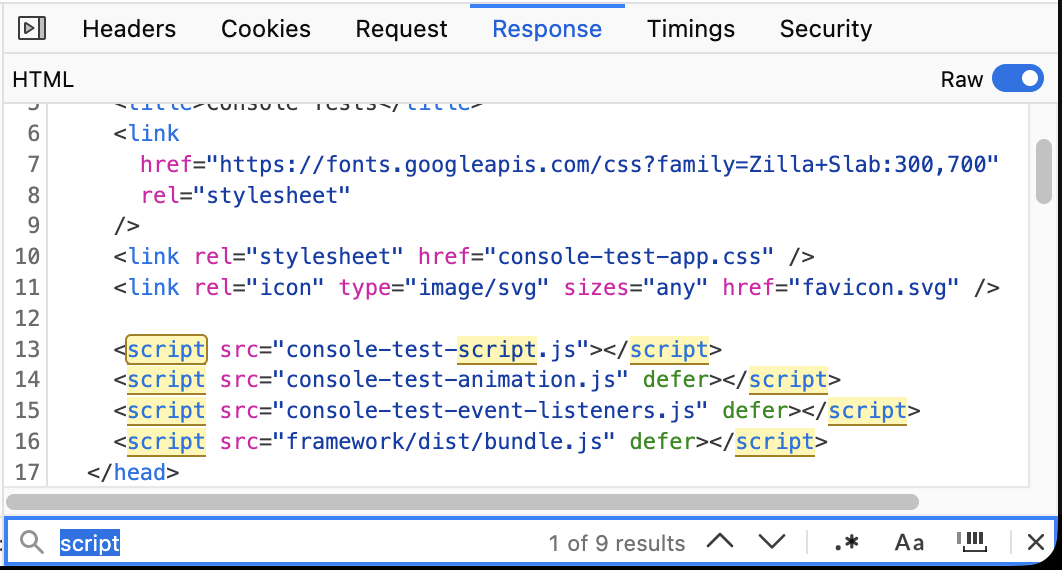
  • Chris Vander Linden finalized a multi-months project to add a search toolbar in the Netmonitor Raw Response panel, adapting and reusing the component we are using in the Debugger (#1941575)
    • Firefox Developer Tools Network panel showing the Response tab for an HTML request with a new find bar. The response source contains several elements, with matches for β€œscript” highlighted in yellow. The find bar at the bottom shows the search term β€œscript” and indicates β€œ1 of 9 results.”
  • Amadi made the β€œOpen in new tab” context menu entry to open tab next to the selected tab, not at the very end of the tab list (#2059979)
  • Mayank Bansal optimized the performance of console.clear() (#2068156, #2068157, #2067000)
  • Benoit added JSON Lines (JSONL/NDJSON) support in the Netmonitor Response panel (#2059673)
  • Gopalarathnam Venkatesan made the β€œAdd class” button (.cls) to be disabled when a class can’t be added to the selected node (e.g. it’s a text node, or a comment, or the doctype node) (#2000150)
  • K fixed an issue with the β€œGo to line” action in the Debugger (#2064575)
  • Samuel Mbabhazi refactored our CSS codebase to use new color syntax (e.g. rgb(255 0 0) instead of rgb(255, 0, 0)) (#2054228)
  • sfshah turned devtools/client/jsonview/converter-child.js into an ES class (#2004273)
Team/Project Update

WebDriver

Fluent

Lint, Docs and Workflow

  • According to arewemozsrcyet.com, ~59% of our modules are now using moz-src.
  • eslint-plugin-mozilla has switched from using Mocha to Jest for tests.
    • Planning on future updates to investigate getting devtools & newtab to use the jest installed at the top-level, rather than separately installed copies.

Information Management/Sidebar

  • We’re working away on bug fixes for sidebar, vertical tabs, split-view, and Nova
  • Thanks Florian (:fqueze) for landing a set of patches that have markedly reduced test flakiness in the Sidebar component

New Tab Page

Picture-in-Picture

Search and Urlbar

Address Bar
  • Dao and Moritz are working on bringing the full urlbar experience into the newtab page, now enabled on nightly and going through polish and improvements.. (Bug 2068104, Bug 2068633, Bug 2069260, Bug 2064747)
  • Drew enabled AMP and Wikipedia by default in AT, BE, CH, ES, IE, LU, NL, PL, PT and SE. (Bug 2066294)
  • James gated adaptive autofill page results behind a minimum score threshold. (Bug 2066171)
  • any1here stopped disabled Manage AI and Labs quick actions being displayed when disabled. (Bug 2070378)
Search
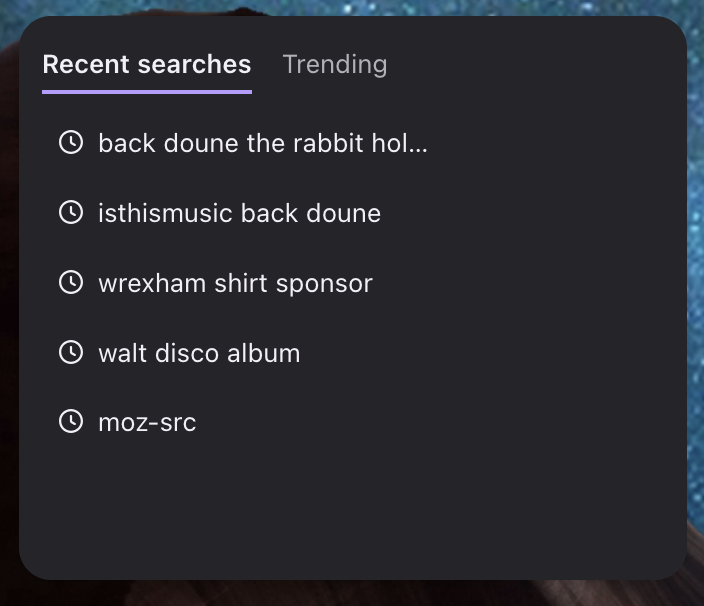
  • Dale landed the Recent Searches widget which will be be used launched as an experiment (Bug 2063718)
    • The Firefox newtab search widget showing the "Recent searches" tab selected next to a "Trending" tab. Five recent search queries are listed, each with a history icon, including β€œback doune the rabbit hol…,” β€œisthismusic back doune,” β€œwrexham shirt sponsor,” β€œwalt disco album,” and β€œmoz-src.”
  • Caleb fixed the search box eating the first character typed into it. (Bug 1953361)
  • Mark configured Wikipedia search for Sardinian (sc) to use the Sardinian Wikipedia rather than the Italian one. (Bug 2057690)
Places
  • Marco fixed bookmarked Google Maps using Google’s default favicon. (Bug 1575809)
  • Marco fixed the Downloads and History windows going full-screen instead of floating on macOS. (Bug 2058062)

Tests

  •  

iOS 26.7.1 Fixes Vulnerability Used in Targeted Attacks

28 September 2026 om 20:46
iOS 26.7.1, iPadOS 26.7.1, macOS Tahoe 26.7.1, and macOS Sequoia 15.8.1 address a major vulnerability that Apple believes was used against a small number of people.


Apple's security support pages say there was a CoreGraphics out-of-bounds write issue that could be exploited with a maliciously crafted file, allowing for arbitrary code execution. It has been fixed with improved bounds checking.

Apple says the flaw was exploited in an "extremely sophisticated attack" on targeted individuals running older versions of iOS. Apple's latest operating systems don't appear to be affected, and the iOS 27.0.1, iPadOS 27.0.1, and macOS Golden Gate 27.0.1 updates that came out today have no published CVE entries.

While the attack wasn't widespread, if you're still running a version of iOS 26, iPadOS 26, macOS Tahoe, or macOS Sequoia, you should install the new updates as soon as possible. Now that the vulnerability is public, it could be further exploited against users who aren't protected.
Related Roundups: iOS 26, iPadOS 26
Related Forum: iOS 26

This article, "iOS 26.7.1 Fixes Vulnerability Used in Targeted Attacks" first appeared on MacRumors.com

Discuss this article in our forums

  •  

Early Prime Day Deals Offer Up to 65% Off Anker and Jackery Power Stations

28 September 2026 om 19:42
Anker and Jackery have introduced big discounts across their most popular portable power stations, both of which are in preparation for Prime Big Deal Days next week. We're tracking Anker's best deals at both its own website and on Amazon, while Jackery's discounts can be found on the retailer's website.

Anker SOLIX


Note: MacRumors is an affiliate partner with Jackery and Anker. When you click a link and make a purchase, we may receive a small payment, which helps us keep the site running.

Anker's SOLIX brand is hosting an early Prime Day sale with early bird deals, free gifts, and more. This sale is focused on Anker's high-end SOLIX portable power stations, with options that range from 1-2 days of backup to 3-5 days of backup.


For cheaper options, Amazon has notable markdowns on lower-cost SOLIX batteries, like the popular SOLIX C300 Portable Power Station with Lantern for $199.99 ($50 off). If you're shopping on Anker's website, be sure to make your purchases before October 5, when the sale ends.


Jackery


Over on Jackery's website, you'll find up to 65% off a wide array of portable power stations, solar generators, add-on batteries, and more. This is another Prime Big Deal Days early access event, and is set to run through October 3.


If you're on the hunt for more discounts, be sure to visit our Apple Deals roundup where we recap the best Apple-related bargains of the past week.


Deals Newsletter


Interested in hearing more about the best deals you can find in 2026? Sign up for our Deals Newsletter and we'll keep you updated so you don't miss the biggest deals of the season!


Related Roundup: Apple Deals

This article, "Early Prime Day Deals Offer Up to 65% Off Anker and Jackery Power Stations" first appeared on MacRumors.com

Discuss this article in our forums

  •  

Apple Releases macOS Golden Gate 27.0.1 With Bug Fixes

28 September 2026 om 19:13
Apple today released macOS 27.0.1, the first update to the macOS Golden Gate operating system that came out in mid-September.


Mac users can download the new β€ŒmacOS Golden Gateβ€Œ software by using the Software Update section in System Settings.

Apple says β€ŒmacOS Golden Gateβ€Œ 27.0.1 fixes unspecified bugs. Apple has also released macOS 26.7.1 and macOS 15.8.1 security updates.
Related Roundup: macOS Golden Gate
Related Forum: macOS Golden Gate

This article, "Apple Releases macOS Golden Gate 27.0.1 With Bug Fixes" first appeared on MacRumors.com

Discuss this article in our forums

  •  

Apple Releases iOS 27.0.1 With Face ID Bug Fix

28 September 2026 om 19:09
Apple today released iOS 27.0.1, the first update for the iOS 27 update that came out two weeks ago.


iOS 27.0.1 can be downloaded over the air by going to Settings > General > Software Update. Apple has also released iPadOS 27.0.1 and visionOS 27.0.1 updates, as well as iOS and iPadOS 26.7.1 updates for devices not updated to iOS and iPadOS 27.

According to Apple's release notes, iOS 27.0.1 addresses an issue that could cause Face ID not to work properly on the iPhone 18 Pro.

Some iPhone 18 Pro users have complained that authentication can fail to work for things like unlocking a locked app. In some cases, the device freezes up and then reboots. Other users have seen a "β€ŒFace IDβ€Œ is Not Available" message when attempting β€ŒFace IDβ€Œ setup, and others have experienced issues with the Require Attention for β€ŒFace IDβ€Œ setting. Apple's release notes for the update are below.
This update provides bug fixes for your iPhone, including fixes for the following issues:

- iPhone 18 Pro and iPhone 18 Pro Max may unexpectedly restart when Face ID fails to authenticate
- A color artifact may appear on photos captured at 2x under certain lighting conditions at f/1.48 on a small number of iPhone 18 Pro and iPhone 18 Pro Max devices
- Opening Notification Center and Control Center simultaneously may cause the touchscreen to become unresponsive

The β€ŒiPhone 18 Proβ€Œ models have an infrared camera that's under the display for the first time, but it's unclear if the hardware has been causing a problem. Apple said last week that it would be able to address the β€ŒFace IDβ€Œ bugs with a software update.

While the iOS 27.0.1 update has multiple β€ŒiPhone 18 Proβ€Œ bug fixes, it is available for all iPhones able to run β€ŒiOS 27β€Œ.
Related Roundups: iOS 27, iPadOS 27
Tag: Face ID
Related Forum: iOS 27

This article, "Apple Releases iOS 27.0.1 With Face ID Bug Fix" first appeared on MacRumors.com

Discuss this article in our forums

  •  

Last Chance: OWC's Best Mac Accessories Are on Sale Just for MacRumors Readers

28 September 2026 om 16:32
MacRumors has partnered with OWC to bring our readers big savings on the retailer's best Thunderbolt docks, USB-C cables, and external storage enclosures. These exclusive deals will run through this Wednesday, September 30 at 12:00 a.m. CST, so you have just a few more days to shop.

Note: MacRumors is an affiliate partner with OWC. When you click a link and make a purchase, we may receive a small payment, which helps us keep the site running.

All discounts have been applied automatically, so all you need to do is follow the links below and add one of the accessories to your cart to see the savings. To be clear, many of these products are already on sale, but you need to add them to your cart and then go to your cart or checkout page to see the extra MacRumors discount.

There are 13 total items on sale, including docks, hubs, enclosures, and USB-C cables.


Notable accessories on sale include the OWC Thunderbolt Go Dock for $179.99 ($119 off), and the OWC ThunderBay 4 External Storage Enclosure for $299.00 ($99 off). For anyone looking to upgrade their desktop setup, there are six total enclosures on sale for our readers, with as much as $104 in savings.

External Storage Enclosures


Cables


Hubs and Docks


If you're on the hunt for more discounts, be sure to visit our Apple Deals roundup where we recap the best Apple-related bargains of the past week.


Deals Newsletter


Interested in hearing more about the best deals you can find in 2026? Sign up for our Deals Newsletter and we'll keep you updated so you don't miss the biggest deals of the season!


Related Roundup: Apple Deals

This article, "Last Chance: OWC's Best Mac Accessories Are on Sale Just for MacRumors Readers" first appeared on MacRumors.com

Discuss this article in our forums

  •  

Otto KekΓ€lΓ€inen: Using multiple git remotes for true distributed version control

28 September 2026 om 02:00
Featured image of post Using multiple git remotes for true distributed version control

One of the primary design principles for Linus Torvalds when creating Git is that it should be a distributed system, capable of working with multiple remotes. However, most people seem to use Git with just one remote, typically having GitHub or GitLab as the only origin.

Version control systems before Git relied on a centralized model. For example in Subversion or CVS you could only sync with one single remote server, which was considered the primary host of the source code. Git however is not just a VCS, but a DVCS, for distributed version control system. If you currently use Git with just one single remote as if it was a centralized version control system, now is the time to change that and learn how to add multiple remotes, and configure more flexible git pull and git push rules.

The first concept to grasp is that Git can have multiple remotes. For example, after running a basic clone command such as git clone https://github.com/ottok/debcraft.git you would end up with a single remote origin pointing to GitHub:

$ git remote --verbose origin https://github.com/ottok/debcraft.git (fetch) origin https://github.com/ottok/debcraft.git (push)
$ git remote --verbose
origin https://github.com/ottok/debcraft.git (fetch)
origin https://github.com/ottok/debcraft.git (push)

You can however configure multiple remotes with the command git remote:

$ git remote rename origin github $ git remote add gitlab https://gitlab.com/ottok/debcraft.git $ git remote --verbose github https://github.com/ottok/debcraft.git (fetch) github https://github.com/ottok/debcraft.git (push) gitlab https://gitlab.com/ottok/debcraft.git (fetch) gitlab https://gitlab.com/ottok/debcraft.git (push)
$ git remote rename origin github
$ git remote add gitlab https://gitlab.com/ottok/debcraft.git
$ git remote --verbose
github https://github.com/ottok/debcraft.git (fetch)
github https://github.com/ottok/debcraft.git (push)
gitlab https://gitlab.com/ottok/debcraft.git (fetch)
gitlab https://gitlab.com/ottok/debcraft.git (push)

You can push and pull from these individually, or from all at once:

$ git pull --all Fetching github Fetching gitlab Already up to date.
$ git pull --all
Fetching github
Fetching gitlab
Already up to date.

When you review the git history, note the labels gitlab/main and github/main which tell which commit the branch main points to on various remotes. In this case they are all in sync and point to the same 5d1815c:

$ git log --oneline 5d1815c (HEAD -> main, gitlab/main, github/main) Bump Debhelper version from 13 to 14 ca518a7 Temporarily disable automatic copyright year bumping due to frequent bugs d6e201e Exclude .pm from codespell to decrease false positives (Closes: #1140488) 708ee35 Exclude debian/copyright from codespell due to frequent false positives
$ git log --oneline
5d1815c (HEAD -> main, gitlab/main, github/main) Bump Debhelper version from 13 to 14
ca518a7 Temporarily disable automatic copyright year bumping due to frequent bugs
d6e201e Exclude .pm from codespell to decrease false positives (Closes: #1140488)
708ee35 Exclude debian/copyright from codespell due to frequent false positives

When pushing, you can choose what remote to push to. For example, if I am working on branch dev and I only want to push it to GitLab to trigger a CI run there, I can run git push gitlab dev. You can also configure a default remote by running once git push --set-upstream gitlab dev and thereafter simply run git push and it will automatically push the branch dev only to that remote.

A related setting is remote.pushDefault, which tells git which remote to push to when a branch does not define one of its own, and it applies to every branch that lacks a [branch] section in .git/config. Setting it once is what lets a repository have a per-branch pull remote, like the debcraft example below, and still have a single, predictable git push target. To see which remote git will use for each of your branches, run git branch -vv, and to refresh the remote-tracking branches of all remotes at once, run git fetch --all --prune.

If you want to have multiple remotes, but automatically push and pull to all of them at once, you configure one single remote to have multiple URLs with git remote set-url --add. Since git prints one line per push URL, git remote -v then shows the same remote several times, once for each URL it pushes to.

As an illustration, in my actual local Debcraft development project I have all these configured:

$ git remote -v github-pull-requests git@github.com:ottok/debcraft.git (fetch) github-pull-requests git@github.com:ottok/debcraft.git (push) gitlab-merge-requests git@gitlab.com:ottok/debcraft.git (fetch) gitlab-merge-requests git@gitlab.com:ottok/debcraft.git (push) origin git@salsa.debian.org:debian/debcraft.git (fetch) origin git@salsa.debian.org:debian/debcraft.git (push) origin git@gitlab.com:ottok/debcraft.git (push) origin git@github.com:ottok/debcraft.git (push) otto git@salsa.debian.org:otto/debcraft.git (fetch) otto git@salsa.debian.org:otto/debcraft.git (push) otto git@gitlab.com:ottok/debcraft.git (push) otto git@github.com:ottok/debcraft.git (push) otto git@git.sr.ht:~ottok/debcraft (push) otto ssh://git@codeberg.org/ottok/Debcraft.git (push) salsa-merge-requests git@salsa.debian.org:debian/debcraft.git (fetch) salsa-merge-requests git@salsa.debian.org:debian/debcraft.git (push)
$ git remote -v
github-pull-requests git@github.com:ottok/debcraft.git (fetch)
github-pull-requests git@github.com:ottok/debcraft.git (push)
gitlab-merge-requests git@gitlab.com:ottok/debcraft.git (fetch)
gitlab-merge-requests git@gitlab.com:ottok/debcraft.git (push)
origin git@salsa.debian.org:debian/debcraft.git (fetch)
origin git@salsa.debian.org:debian/debcraft.git (push)
origin git@gitlab.com:ottok/debcraft.git (push)
origin git@github.com:ottok/debcraft.git (push)
otto git@salsa.debian.org:otto/debcraft.git (fetch)
otto git@salsa.debian.org:otto/debcraft.git (push)
otto git@gitlab.com:ottok/debcraft.git (push)
otto git@github.com:ottok/debcraft.git (push)
otto git@git.sr.ht:~ottok/debcraft (push)
otto ssh://git@codeberg.org/ottok/Debcraft.git (push)
salsa-merge-requests git@salsa.debian.org:debian/debcraft.git (fetch)
salsa-merge-requests git@salsa.debian.org:debian/debcraft.git (push)

The settings can also be viewed directly in the config file:

$ cat .git/config ... [remote "origin"] url = git@salsa.debian.org:debian/debcraft.git fetch = +refs/heads/*:refs/remotes/origin/* pushurl = git@salsa.debian.org:debian/debcraft.git pushurl = git@gitlab.com:ottok/debcraft.git pushurl = git@github.com:ottok/debcraft.git [remote "otto"] url = git@salsa.debian.org:otto/debcraft.git fetch = +refs/heads/*:refs/remotes/otto/* pushurl = git@salsa.debian.org:otto/debcraft.git pushurl = git@gitlab.com:ottok/debcraft.git pushurl = git@github.com:ottok/debcraft.git pushurl = git@git.sr.ht:~ottok/debcraft pushurl = ssh://git@codeberg.org/ottok/Debcraft.git ... [branch "main"] remote = origin merge = refs/heads/main [branch "dev"] remote = otto merge = refs/heads/dev ...
$ cat .git/config
...
[remote "origin"]
url = git@salsa.debian.org:debian/debcraft.git
fetch = +refs/heads/*:refs/remotes/origin/*
pushurl = git@salsa.debian.org:debian/debcraft.git
pushurl = git@gitlab.com:ottok/debcraft.git
pushurl = git@github.com:ottok/debcraft.git
[remote "otto"]
url = git@salsa.debian.org:otto/debcraft.git
fetch = +refs/heads/*:refs/remotes/otto/*
pushurl = git@salsa.debian.org:otto/debcraft.git
pushurl = git@gitlab.com:ottok/debcraft.git
pushurl = git@github.com:ottok/debcraft.git
pushurl = git@git.sr.ht:~ottok/debcraft
pushurl = ssh://git@codeberg.org/ottok/Debcraft.git
...
[branch "main"]
remote = origin
merge = refs/heads/main
[branch "dev"]
remote = otto
merge = refs/heads/dev
...

On branch main:

  • Running git pull will fetch from salsa.debian.org/debian/debcraft (the primary git hosting for this project)
  • Running git push will push to Salsa, GitLab and GitHub, one after the other, making sure they all have the latest main

On branch dev:

  • Running git pull will fetch from salsa.debian.org/otto/debcraft (the personal fork)
  • Running git push will push to Salsa, GitLab, GitHub, Sourcehut and Codeberg all one after the other

The command output will have the same message three times, once for each remote (assuming they were all already up-to-date):

$ git push Everything up-to-date Everything up-to-date Everything up-to-date
$ git push
Everything up-to-date

Use cases for distributed version control

The most obvious use case for any distributed system is improved availability. In this example, the salsa.debian.org is often overloaded/unavailable, so pushing to GitLab and GitHub as well allows collaborators to use them to fetch git commits if the primary code hosting site is unresponsive. Once it comes back online again, the next git push/pull will automatically bring it up to the same content as what backup hosts had.

The second main benefit is that having the code live on multiple code forges allows collaborators to use their own favorite host. Debcraft itself is a great example of this, as collaborators who don’t have a Salsa account can - and have - submitted Merge Requests on GitLab.com and Pull Requests on GitHub.com.

A third use case is code hosting migrations. If you for example want to gradually phase out GitHub.com and replace it with something else, you could configure git to pull from the old location and push to both, ensuring that other collaborators can start using the new code hosting location without disruptions to those who have not yet updated their remotes or done a fresh git clone from the new location.

Automating setting up a project on multiple code forges

While I don’t push all projects I work on to all Salsa/GitLab/GitHub, I do set up multiple remotes for enough git projects that I have this script to automate configuring a git repository that is cloned from Salsa to also push to GitLab and GitHub. It accepts the repository whether it was cloned over SSH or HTTPS, and it adds the push URLs and then pushes the current branch, all branches, and tags for you:

#!/bin/bash # Add GitLab and GitHub push URLs to an existing git remote, so that a plain # "git push" writes the same commits to all three code forges. # # Usage: ./git-multipush-salsa.sh # # Environment: # SALSA_REMOTE remote to turn into a mirror, default origin # SALSA_USER your Salsa user, only used to detect that the source # remote is somebody else's project # GITLAB_USER your GitLab user, default ottok # GITHUB_USER your GitHub user, default ottok # PROTOCOL ssh (default) or https, for the push URLs set -euo pipefail SCRIPT=$(basename "$0") SALSA_REMOTE=${SALSA_REMOTE:-origin} SALSA_USER=${SALSA_USER:-otto} GITLAB_USER=${GITLAB_USER:-ottok} GITHUB_USER=${GITHUB_USER:-ottok} PROTOCOL=${PROTOCOL:-ssh} die() { echo "$SCRIPT: $*" >&2; exit 1; } # A failing command leaves the push URLs half configured behind, so say how # to get back to where we started fail() { echo "$SCRIPT: '$*' failed, the push URLs may already have been added" >&2 echo " git config --unset-all remote.${SALSA_REMOTE}.pushurl" >&2 echo " git remote set-url --add --push ${SALSA_REMOTE} ${SALSA_URL}" >&2 exit 1 } git rev-parse --git-dir > /dev/null 2>&1 || die "not inside a git repository" git remote | grep -qx "$SALSA_REMOTE" || die "no remote named '$SALSA_REMOTE'" # Example: git@salsa.debian.org:otto/salsa-ci-pipeline.git SALSA_URL=$(git remote get-url "$SALSA_REMOTE") # The source remote may use any of the URL forms salsa.debian.org accepts, # for example git@salsa.debian.org:otto/salsa-ci-pipeline.git or # https://salsa.debian.org/otto/salsa-ci-pipeline.git case "$SALSA_URL" in git@salsa.debian.org:*) SALSA_PATH=${SALSA_URL#git@salsa.debian.org:} ;; ssh://git@salsa.debian.org/*) SALSA_PATH=${SALSA_URL#ssh://git@salsa.debian.org/} ;; https://salsa.debian.org/*) SALSA_PATH=${SALSA_URL#https://salsa.debian.org/} ;; http://salsa.debian.org/*) SALSA_PATH=${SALSA_URL#http://salsa.debian.org/} ;; *) die "unexpected source URL '$SALSA_URL', expected a salsa.debian.org URL" ;; esac SALSA_PATH=${SALSA_PATH%/} SALSA_PATH=${SALSA_PATH%.git} SOURCE_USER=${SALSA_PATH%%/*} PROJECT=${SALSA_PATH##*/} # Write the push URLs in one and the same protocol, no matter how the # repository happens to have been cloned if [ "$PROTOCOL" = "https" ] then SALSA_URL="https://salsa.debian.org/${SALSA_PATH}.git" GITLAB_URL="https://gitlab.com/${GITLAB_USER}/${PROJECT}.git" GITHUB_URL="https://github.com/${GITHUB_USER}/${PROJECT}.git" else SALSA_URL="git@salsa.debian.org:${SALSA_PATH}.git" GITLAB_URL="git@gitlab.com:${GITLAB_USER}/${PROJECT}.git" GITHUB_URL="git@github.com:${GITHUB_USER}/${PROJECT}.git" fi # Mirroring somebody else's project is fine, but it is usually not what you # want: you most likely want to mirror your own fork instead if [ "$SOURCE_USER" != "$SALSA_USER" ] then echo "Note: $SALSA_REMOTE points to $SOURCE_USER's project, not your own." echo "To mirror your own fork, run this with SALSA_REMOTE set to its name." echo fi # Bail out instead of adding the same push URLs twice EXISTING=$(git remote get-url --push --all "$SALSA_REMOTE") if [ "$(printf '%s\n' "$EXISTING" | wc -l)" -gt 1 ] then die "remote '$SALSA_REMOTE' already has multiple push URLs: $EXISTING" fi echo "Mirroring $SALSA_URL to $GITLAB_URL and $GITHUB_URL" git remote set-url --add --push "$SALSA_REMOTE" "$SALSA_URL" git remote set-url --add --push "$SALSA_REMOTE" "$GITLAB_URL" git remote set-url --add --push "$SALSA_REMOTE" "$GITHUB_URL" # Push the branch you have checked out first, and never with --force: the # first branch a GitLab or GitHub project receives becomes its default branch, # the one you then protect DEFAULT_BRANCH=$(git symbolic-ref --short HEAD) || die "not on a branch, check out a branch first" git push -u "$SALSA_REMOTE" "$DEFAULT_BRANCH" git push "$SALSA_REMOTE" --all git push "$SALSA_REMOTE" --tags # The push above creates the GitLab and GitHub projects, but GitLab projects # are private by default, so make the new mirror public with glab if installed. if command -v glab > /dev/null then echo "Make the GitLab project public and describe it as a mirror:" glab api -X PUT "projects/${GITLAB_USER}%2F${PROJECT}" \ -f visibility=public \ -f description="Mirror of ${SALSA_URL}" \ -f notification_email=disabled else echo "Install glab to do the same automatically, or visit" echo "https://gitlab.com/${GITLAB_USER}/${PROJECT}/edit to make the project public" fi echo "To undo, drop all push URLs and add back only the original one:" echo " git config --unset-all remote.${SALSA_REMOTE}.pushurl" echo " git remote set-url --add --push ${SALSA_REMOTE} ${SALSA_URL}"
#!/bin/bash
# Add GitLab and GitHub push URLs to an existing git remote, so that a plain
# "git push" writes the same commits to all three code forges.
#
# Usage: ./git-multipush-salsa.sh
#
# Environment:
# SALSA_REMOTE remote to turn into a mirror, default origin
# SALSA_USER your Salsa user, only used to detect that the source
# remote is somebody else's project
# GITLAB_USER your GitLab user, default ottok
# GITHUB_USER your GitHub user, default ottok
# PROTOCOL ssh (default) or https, for the push URLs
set -euo pipefail
SCRIPT=$(basename "$0")
SALSA_REMOTE=${SALSA_REMOTE:-origin}
SALSA_USER=${SALSA_USER:-otto}
GITLAB_USER=${GITLAB_USER:-ottok}
GITHUB_USER=${GITHUB_USER:-ottok}
PROTOCOL=${PROTOCOL:-ssh}
die() { echo "$SCRIPT: $*" >&2; exit 1; }
# A failing command leaves the push URLs half configured behind, so say how
# to get back to where we started
fail()
{
echo "$SCRIPT: '$*' failed, the push URLs may already have been added" >&2
echo " git config --unset-all remote.${SALSA_REMOTE}.pushurl" >&2
echo " git remote set-url --add --push ${SALSA_REMOTE} ${SALSA_URL}" >&2
exit 1
}
git rev-parse --git-dir > /dev/null 2>&1 || die "not inside a git repository"
git remote | grep -qx "$SALSA_REMOTE" || die "no remote named '$SALSA_REMOTE'"
# Example: git@salsa.debian.org:otto/salsa-ci-pipeline.git
SALSA_URL=$(git remote get-url "$SALSA_REMOTE")
# The source remote may use any of the URL forms salsa.debian.org accepts,
# for example git@salsa.debian.org:otto/salsa-ci-pipeline.git or
# https://salsa.debian.org/otto/salsa-ci-pipeline.git
case "$SALSA_URL" in
git@salsa.debian.org:*) SALSA_PATH=${SALSA_URL#git@salsa.debian.org:} ;;
ssh://git@salsa.debian.org/*) SALSA_PATH=${SALSA_URL#ssh://git@salsa.debian.org/} ;;
https://salsa.debian.org/*) SALSA_PATH=${SALSA_URL#https://salsa.debian.org/} ;;
http://salsa.debian.org/*) SALSA_PATH=${SALSA_URL#http://salsa.debian.org/} ;;
*) die "unexpected source URL '$SALSA_URL', expected a salsa.debian.org URL" ;;
esac
SALSA_PATH=${SALSA_PATH%/}
SALSA_PATH=${SALSA_PATH%.git}
SOURCE_USER=${SALSA_PATH%%/*}
PROJECT=${SALSA_PATH##*/}
# Write the push URLs in one and the same protocol, no matter how the
# repository happens to have been cloned
if [ "$PROTOCOL" = "https" ]
then
SALSA_URL="https://salsa.debian.org/${SALSA_PATH}.git"
GITLAB_URL="https://gitlab.com/${GITLAB_USER}/${PROJECT}.git"
GITHUB_URL="https://github.com/${GITHUB_USER}/${PROJECT}.git"
else
SALSA_URL="git@salsa.debian.org:${SALSA_PATH}.git"
GITLAB_URL="git@gitlab.com:${GITLAB_USER}/${PROJECT}.git"
GITHUB_URL="git@github.com:${GITHUB_USER}/${PROJECT}.git"
fi
# Mirroring somebody else's project is fine, but it is usually not what you
# want: you most likely want to mirror your own fork instead
if [ "$SOURCE_USER" != "$SALSA_USER" ]
then
echo "Note: $SALSA_REMOTE points to $SOURCE_USER's project, not your own."
echo "To mirror your own fork, run this with SALSA_REMOTE set to its name."
echo
fi
# Bail out instead of adding the same push URLs twice
EXISTING=$(git remote get-url --push --all "$SALSA_REMOTE")
if [ "$(printf '%s\n' "$EXISTING" | wc -l)" -gt 1 ]
then
die "remote '$SALSA_REMOTE' already has multiple push URLs:
$EXISTING"
fi
echo "Mirroring $SALSA_URL to $GITLAB_URL and $GITHUB_URL"
git remote set-url --add --push "$SALSA_REMOTE" "$SALSA_URL"
git remote set-url --add --push "$SALSA_REMOTE" "$GITLAB_URL"
git remote set-url --add --push "$SALSA_REMOTE" "$GITHUB_URL"
# Push the branch you have checked out first, and never with --force: the
# first branch a GitLab or GitHub project receives becomes its default branch,
# the one you then protect
DEFAULT_BRANCH=$(git symbolic-ref --short HEAD) || die "not on a branch, check out a branch first"
git push -u "$SALSA_REMOTE" "$DEFAULT_BRANCH"
git push "$SALSA_REMOTE" --all
git push "$SALSA_REMOTE" --tags
# The push above creates the GitLab and GitHub projects, but GitLab projects
# are private by default, so make the new mirror public with glab if installed.
if command -v glab > /dev/null
then
echo "Make the GitLab project public and describe it as a mirror:"
glab api -X PUT "projects/${GITLAB_USER}%2F${PROJECT}" \
-f visibility=public \
-f description="Mirror of ${SALSA_URL}" \
-f notification_email=disabled
else
echo "Install glab to do the same automatically, or visit"
echo "https://gitlab.com/${GITLAB_USER}/${PROJECT}/edit to make the project public"
fi
echo "To undo, drop all push URLs and add back only the original one:"
echo " git config --unset-all remote.${SALSA_REMOTE}.pushurl"
echo " git remote set-url --add --push ${SALSA_REMOTE} ${SALSA_URL}"

If you prefer not to install glab, the last part simply reduces to visiting the GitLab project settings once and ticking the project public, and it is also worth setting a description like Mirror of https://salsa.debian.org/debian/debcraft and disabling notification email there, as nobody wants a mirror sending out a flood of emails every time you push.

There are a few caveats worth knowing about before mirroring everything everywhere. Every push to a remote with multiple push URLs writes to all of them, so a project with continuous integration configured on three forges will run its CI three times and cost you roughly three times as much. If one of the push URLs fails, say because the host is momentarily unreachable, git prints the error and stops there, leaving the remotes listed after the failing one without the new commits. Simply re-run the push once the host is reachable again; the remotes that did get the commits will just respond with Everything up-to-date. And you should never force-push to only one of the remotes, as that leaves the mirrors permanently out of sync with your local repository.

Avoid pulling too much

Related to multiple remotes, you should also be aware that git allows one to configure which branches to pull. By default a git clone will track all branches from the remote and pull everything, which in a typical open source project will bring in a lot of temporary development branches in vain.

Thus it is better to run git clone with the --single-branch and --branch parameters to fetch only the branch that matters, which in most cases is the main branch. That can be accomplished with:

git clone --single-branch --branch main https://github.com/ottok/debcraft.git

If a repository was already cloned, it can be configured to track only one branch with:

git config remote.upstream.fetch "+refs/heads/main:refs/remotes/upstream/main" git fetch upstream git config --get-all remote.upstream.fetch +refs/heads/main:refs/remotes/upstream/main
git config remote.upstream.fetch "+refs/heads/main:refs/remotes/upstream/main"
git fetch upstream
git config --get-all remote.upstream.fetch
+refs/heads/main:refs/remotes/upstream/main

If you later need to track more branches, you can configure them with commands such as:

git config --add remote.upstream.fetch "+refs/heads/3.2.y:refs/remotes/upstream/3.2.y" git fetch upstream git checkout 3.2.y
git config --add remote.upstream.fetch "+refs/heads/3.2.y:refs/remotes/upstream/3.2.y"
git fetch upstream
git checkout 3.2.y

For additional details about any of the tips in this post I recommend reading the git man pages.

Now go and spread your code around

Distributing your code over multiple code forges costs you almost nothing in configuration, and in return you get availability, a choice of host for your collaborators, and freedom to migrate without a big bang. Add the push URLs to the remotes you already have, push once, and you are done.

The rest of the git fundamentals are covered in my other posts. If your commits are not yet polished, start with what makes a good git commit message and git commit messages by example. If you work on Debian packaging, Git-based collaboration in Debian explains why the Salsa merge request workflow is built the way it is, and Salsa merge request best practices covers the review process itself.

  •  

12 New Things to Expect From Apple This October

28 September 2026 om 16:13
October will be an especially busy month for Apple this year, with the company set to release the iPhone Duo, both iOS 27.1 and iOS 27.2, and a new Mac Studio configuration with 512GB of RAM. In addition, up to six more Apple products may be unveiled next month, such as new iPad mini, HomePod mini, and Apple TV 4K models.


Below, we have outlined 12 new things to expect from Apple this October.

Confirmed


Rumored


This article, "12 New Things to Expect From Apple This October" first appeared on MacRumors.com

Discuss this article in our forums

  •  

AirPods 5 vs. AirPods Pro 3 Buyer's Guide: Which Should You Buy?

28 September 2026 om 15:10
Apple's AirPods 5 bring Active Noise Cancellation to its $129 earbuds for the first time. The $149 AirPods 5 with Wireless Charging Case add longer battery life, volume controls on the stems, and a case speaker for Find My. The AirPods Pro 3 cost $249.


The β€ŒAirPods 5β€Œ arrived in September 2026, a year after the AirPods Pro 3. They continue to narrow the feature gap between the devices, but the Pro model still offers a sealed in-ear fit, substantially better noise cancellation, and hearing and workout features. Our guide helps to answer the question of how to decide which of these sets of AirPods is best for you.


β€ŒAirPods 5β€Œ
(2026)
β€ŒAirPods 5β€Œ with Wireless Charging Case
(2026)
β€ŒAirPods Pro 3β€Œ
(2025)
Open-ear fit without ear tips Open-ear fit without ear tips In-ear fit with foam-infused silicone ear tips in five sizes
Optical in-ear sensor Optical in-ear sensor Skin-detect sensor
Open-ear Active Noise Cancellation Open-ear Active Noise Cancellation In-ear Active Noise Cancellation; up to 3x more effective than β€ŒAirPods 5β€Œ
Force sensor controls Force sensor controls with volume swipe Touch controls with volume swipe
Hearing Test, Hearing Aid, Hearing Protection, Automatic Conversation Boost, and Loud Sound Reduction
Heart rate sensing during workouts
Up to 4 hours of listening time on one charge with ANC Up to 5 hours of listening time on one charge with ANC Up to 8 hours of listening time on one charge with ANC
Up to 20 hours of listening time with ANC using the case Up to 22 hours of listening time with ANC using the case Up to 24 hours of listening time with ANC using the case
Case charges via USB-C Case charges via USB-C, Apple Watch charger, or Qi charger Case charges via USB-C, Apple Watch charger, Qi charger, or MagSafe charger
Speaker in case for β€ŒFind Myβ€Œ Speaker in case for β€ŒFind Myβ€Œ
Second-generation Ultra Wideband chip in case for Precision Finding with a compatible iPhone
Charging case is 1.97 inches (50.1 mm) wide Charging case is 1.97 inches (50.1 mm) wide Charging case is 2.45 inches (62.2 mm) wide and has a lanyard loop
Starts at $129 Starts at $149 Starts at $249


The β€ŒAirPods 5β€Œ with Wireless Charging Case are the best choice for most buyers. For $20 more than the base model, you get an extra hour of listening time per charge with ANC, volume swipes on the stems, wireless charging, and a speaker that makes a misplaced case easier to find. Choose the $129 model if the lowest price matters most and you are content with its shorter battery life and USB-C-only charging case.

However, the β€ŒAirPods Pro 3β€Œ are worth the extra $100 over the higher-end β€ŒAirPods 5β€Œ if noise cancellation is your priority and you prefer a snug in-ear fit. Apple says they provide up to three times as much ANC as the β€ŒAirPods 5β€Œ, since the ear tips create a physical seal. Their eight-hour listening time per charge is particularly useful on long journeys. In our hands-on testing, the β€ŒAirPods 5β€Œ sounded muddier than the Pro 3, particularly in the lower midrange.

The β€ŒAirPods Pro 3β€Œ are also the clear choice if you want their hearing health features or heart rate sensing during workouts without relying on an Apple Watch. Their charging case adds Precision Finding, too. If you dislike silicone ear tips, the β€ŒAirPods 5β€Œ let you keep the open-ear fit while getting nearly all of the everyday listening features shared by the Pro model.

AirPods frequently receive discounts from third-party retailers, which can narrow the β€ŒAirPods Pro 3β€Œ's $100 list-price premium over the $149 β€ŒAirPods 5β€Œ. Check the latest prices using our Deals roundup before buying.
Related Roundups: AirPods 5, AirPods Pro 3
Related Forum: AirPods

This article, "AirPods 5 vs. AirPods Pro 3 Buyer's Guide: Which Should You Buy?" first appeared on MacRumors.com

Discuss this article in our forums

  •  

Apple Ordered to Pay $5.7 Billion Over Haptic Patent Infringement

28 September 2026 om 14:09
Apple has been ordered to pay $5.7 billion in damages to Taction Technology after a federal jury found it had infringed two of the haptics company's patents, reported CNBC over the weekend.


Taction sued Apple in 2021, arguing that Apple's Taptic Engine in the company's Apple Watches and iPhones uses its inventions without proper license or authority. Apple initially had the case dismissed in 2023, but the Federal Circuit later revived it.

The jury trial began September 14, and seven jurors deliberated for two days after proceedings concluded. They returned on Friday and delivered the verdict in favor of Taction.

"We're happy the jury found for Taction and vindicated its patent rights," the company's lead counsel, Lance Yang, told CNBC. "Taction waited five and a half years for this case to get to trial, so it was a long time coming."

Apple said it intends to appeal the decision.
"While we thank the jury for their consideration, we strongly disagree with today's verdict and the damages awarded, which are entirely unsupported by the facts," Apple told CNBC in a statement. "Apple's Taptic Engine is fundamentally different from Taction's technology, which Taction's own testing of Apple's products confirmed during trial. Apple does not use Taction's technology, and we will appeal."
In Friday's verdict at the U.S. District Court for the Southern District of California, jurors did not find that Apple had infringed the patents willingly.
This article, "Apple Ordered to Pay $5.7 Billion Over Haptic Patent Infringement" first appeared on MacRumors.com

Discuss this article in our forums

  •  

New Vision Pro Headset: Apple Considering Four Different Concepts

28 September 2026 om 12:52
Apple is working on a "completely revamped" Vision Pro headset that could go in any of four directions and likely won't arrive before late 2028 or early 2029, according to Bloomberg's Mark Gurman.


Writing in his latest Power On newsletter, Gurman said Apple's Vision team is exploring four concepts for the device, codenamed N224, including designs that offload internal components in a similar way to Meta's latest VR Glasses, which are expected to launch next spring.

An external computing module on Meta's device houses the battery and main processor, and can be clipped to the user's waist. Gurman, who has previewed Meta's headset, says the module is about the same size and weight as the current Vision Pro's battery pack, but with a grippy exterior.

Gurman reports that regardless of the Vision team's work, senior Apple decision-makers still consider the external puck concept as a "poor user experience" and want the company to stick with "something closer to an all-in-one design."

If any of this sounds familiar, that's because Gurman reported in June that Apple was still working on a cheaper, lighter successor to its Vision Pro headset. (The device-in-development is distinct from the long-rumored "Vision Air," which was cancelled last year.)

Apple knows it needs to come up with ways to simplify the design and make something cheaper and lighter, and it is said to be actively exploring ways to reduce the headset's weight by experimenting with plastic, titanium, other metals and various materials.

Still, Gurman has been told the work is on "life support" as the company focuses more on smart glasses, which it aims to release in late 2027. Despite the Vision Pro's most senior leaders "pressing their bosses to keep the category alive, funded and growing at Apple," Gurman says there's still no guarantee a new headset will ever launch.
Related Roundup: Apple Vision Pro
Buyer's Guide: Vision Pro (Neutral)
Related Forum: Apple Vision Pro

This article, "New Vision Pro Headset: Apple Considering Four Different Concepts" first appeared on MacRumors.com

Discuss this article in our forums

  •  

Development Release: openSUSE 16.1 RC

28 September 2026 om 11:59
The DistroWatch news feed is brought to you by TUXEDO COMPUTERS. The openSUSE project has published a new release candidate for the upcoming Leap 16.1 release. Among the various changes is a new immutable mode for Leap: "Leap 16.1 is the first Leap release to offer an Immutable Mode, a transactionally updated system with a read-only root filesystem. This....
  •  

DistroWatch Weekly, Issue 1192

28 September 2026 om 02:13
The DistroWatch news feed is brought to you by TUXEDO COMPUTERS. This week in DistroWatch Weekly:
Review: ReactOS 0.4.16
News: Garuda offers NixOS-based edition, KDE turns 30, NetBSD polishes Enlightenment port, Q4OS offers Breeze theme for Trinity, Canonical speeds up kernel patches, postmarketOS becomes Nura
Questions and answers: Identifying the video card
Released last week: Univention Corporate Server 5.2-7, NetBSD 10.2
Torrent corner:....
  •  

Dima Kogan: Lunar terminator paradox

27 September 2026 om 23:04

There's an optical illusion known by names like the "lunar terminator paradox". This has much discussion and descriptions online, but none made sense in my head, so I wrote this program to figure out what was going on. The paradox:

  • The moon is illuminated by the sun
  • After sunset, the sun is below, so we would expect the illuminated portion of the moon to point down, towards where the sun is
  • This isn't what always happens!

I was camping in the mountains with a friend recently. We were looking up at the sky, just after the sun has set. The moon was clearly pointing up.

After playing with this program, I have clarity: we're looking up at the moon from below. The most pathological case is a full moon. Let's say the moon is on the horizon: elevation=0. If we're looking at this low moon, and the moon is full, the sun is directly behind us. The moon is fully illuminated, and we see 100% of the moon disc lit up.

Now, what happens if the moon is not at the horizon, but higher up at the sky? Effectively, the sun is infinitely far away, so the same part of the moon is lit up. But we're now looking at the moon from below, and we would see some of the dark side on the bottom edge. I.e. the moon appears bright at the top, but has a dark slice missing at the bottom: it points up! Even at sunset.

This is the most clearly weird case. A half-moon has no paradoxical behavior, and the more full the moon, the more clearly we can observe the bright moon pointing up despite the sun being down.

I produce two plots. At 3/4-full moon at sunset we look at the moon as it rises from the horizon all the way up to the zenith:

scan-moon-el.svg

If the moon is at the horizon (elevation = 0), we see the expected 3/4-lit disc. As the moon rises, we see more and more of its bottom, and thus more and more dark areas show up: It clearly points up at sunset!

We can also move the sun around. Let's say the moon is 60deg up; let's move the sun from new-moon to a full-moon:

scan-sun-az.svg

In the darkest configuration, we can still see a lit crescent on the bottom: the illumination is all on the opposite side, but we can see a slice of the illuminated back side. As the sun swings around, we see more and more of the moon. At azimuth = 90deg, we have a half-lit moon. Past that, more and more of the moon is visible, always pointing up.

This was also a super interesting study of the current state of AI tools. As I was writing this and debugging, I would talk to Claude and Gemini about how this worked and what I should be seeing. They were both completely unable to comprehend this, and would make infinite circular arguments. Clearly they read some incomplete explanations on the internet (as I have), and lack the reasoning capability necessary to distill it into something resembling "understanding". AGI is not here yet.

  •  
❌