An antitrust lawsuit accusing Apple of blocking tap-to-pay competition is moving forward and will see banks and credit unions able to band together to sue Apple.
U.S. District Judge Jeffrey White this week certified a class in the lawsuit. It will include any U.S. entities that issued any payment card enabled for Apple Pay and paid Apple a fee for Apple Pay transactions on that payment card. He also denied a motion from Apple to exclude expert testimony that plaintiff attorneys allege offers proof Apple has monopoly power over the mobile wallet market.
First filed in 2022, the suit claims Apple illegally collects up to $1 billion annually in fees by preventing rivals from accessing the iPhone's NFC chip to build mobile wallets that would compete with Apple Pay. When an iPhone user buys something with a card linked to Apple Pay, the card issuer has to pay Apple a 0.15 percent fee for credit cards and half a cent for debit cards, according to the lawsuit. If you make a $1,000 purchase via Apple Pay, Apple collects $1.50 from the card issuer.
The complaint alleges that Apple forces card issuers to pay fees by making Apple Pay the only tap-to-pay option. It points to Google's Android, which supports multiple wallets and does not collect a fee from card issuers for contactless payments. It suggests Apple would not be able to continue to charge "substantial fees" if it were forced to support other mobile wallets on Apple devices.
Apple has changed its policies since the lawsuit was filed. As of iOS 18.1, developers are able to offer NFC contactless payments in their apps. Developers have access to the NFC chip in the United States, Canada, Australia, Brazil, Japan, New Zealand, the UK, the European Economic Area, and many other countries.
Attorneys are seeking repayment of the fees card issuers have paid and injunctive relief to "put an end to Apple's policies."
Apple today finally shared release notes for tvOS 27, nearly two weeks after releasing the software update. Many of the new features and changes listed were already known, but we are sharing the notes for the sake of completeness.
tvOS 27 was released on Monday, September 14, but the Apple TV does not show release notes for software updates in the Settings app. Instead, Apple periodically updates a support document outlining what is new in tvOS updates.
Here is what is new for the Apple TV on tvOS 27, including video podcasts in the Podcasts app, AutoMix in the Apple Music app, the ability to set your preferred text size across supported apps, improved AirPlay performance, and more:
This update brings enhancements to the Apple Music, Podcasts, and AirPlay experiences on tvOS. It also brings captions to more content, adds the ability to block individual apps, and provides bug fixes and security updates for your Apple TV 4K.
Apple Music
- Hi-Res Lossless audio support provides a studio-quality listening experience.
- AutoMix transitions one song into the next like a DJ does, time stretching and beatmatching to deliver a continuous playback experience.
This release also includes other features and improvements:
- Video podcasts bring your favorite shows to the TV in the redesigned Podcasts app.
- AirPlay performance improvements deliver faster, more responsive connections when sharing photos, videos, and music from iPhone, iPad, or Mac to Apple TV.
- Transcribed audio helps you follow along with content when standard captions or subtitles aren't provided.
- Dynamic Text support in Accessibility settings allows you to set your preferred text size across supported apps.
- Individual app controls in Settings let you block users from launching specific apps.
Earlier this week, Amazon knocked the price of the previous generation Apple Watch Ultra 3 down to $599.97, from $799.00. This $199 markdown quickly disappeared, but now we're seeing a new Ultra 3 model (Black with Black Ocean Band) hit this new all-time low price.
Note: MacRumors is an affiliate partner with some of these vendors. When you click a link and make a purchase, we may receive a small payment, which helps us keep the site running.
Additionally, there's a $199 markdown on the Black Apple Watch Ultra 3 with Black Milanese Loop (Large) on Amazon. You can get this model for $699.97, down from $899.00. Delivery dates are slipping into October for some of these devices.
These Ultra 3 deals arrive in the wake of the recent launch of the Apple Watch Ultra 4, which does have some smaller discounts on Amazon right now. You can get both the Natural and Black colors for $779.99 in several band options, down from $799.00.
If you're on the hunt for more discounts, be sure to visit our Apple Deals roundup where we recap the best Apple-related bargains of the past week.
Deals Newsletter
Interested in hearing more about the best deals you can find in 2026? Sign up for our Deals Newsletter and we'll keep you updated so you don't miss the biggest deals of the season!
The next low-cost iPad will be equipped with an A19 chip, C1X modem, N1 networking chip, and 8GB RAM, according to details found in Apple's code by MacRumors contributor Aaron Perris.
We've heard some of these same specifications in prior rumors, so this is more of a confirmation than a new leak. The iPad 11 has an A16 chip, so the upgrade to the A19 in the 12th-generation iPad will bring a noticeable improvement in performance. More importantly, the A19 supports Apple Intelligence, so the iPad 12 will have all the Apple Intelligence and Siri AI features missing from the iPad 11.
The iPad 11 has 6GB RAM, but 8GB RAM is the minimum for Apple Intelligence, and the RAM boost will also speed things up.
Apple's C1X modem supports sub–6GHz 5G networks, and it is more efficient than the Qualcomm modem used in the existing iPad. The addition of the N1 networking chip will bring support for Wi-Fi 7, Bluetooth 6, and Thread.
Though not included in the code, it's possible the iPad 12 will be available in new colors.
There is no word on when Apple will release the new iPad, and at this point, we're not expecting it until spring 2027. The current iPad is priced starting at $449 after a June 2026 price hike, and the new model will likely have the same starting price.
There's no low-cost iPad coming this year, but Apple is expected to refresh the iPad mini before the end of October. We discovered new details about the iPad mini just this morning. It will have an A20 Pro chip, a new speaker system, and a landscape front-facing camera. Prior rumors say it will feature an OLED display as the main upgrade.
For this week's giveaway, we've teamed up with Lululook to offer MacRumors readers a chance to win a new Apple Watch Ultra 4. Lululook makes all kinds of accessories for Apple devices, including the Apple Watch. The company has a selection of Apple Watch bands that work well with the new Series 12 and the Ultra 4 models.
Lululook's $129.99 Strata Milanese Band matches the Apple Watch Ultra 4. It is made from 99 percent woven grade 5 titanium, and it has a coating that protects it from scratches. The Strata band comes in black and natural finishes, and the titanium is about 40 percent lighter than stainless steel.
The band has a spring-loaded titanium locking mechanism with a side-press button to open it. Lululook says the band will stay in place during workouts and activities from running to swimming. While made for the Ultra, the band works with the larger 44mm to 49mm Apple Watch models, and it comes in medium and large size options to fit wrists from 155mm to 210mm.
For a more casual look, Lululook sells the $36.99 MagDuo Reversible Apple Watch Band. As the name suggests, the band has a dual color scheme, and users can flip between two color options. The exterior of the band features pebble-textured silicone, while the interior is made of soft silicone so it is comfortable to wear all day.
The MagDuo band has a breathable hollow design to keep the wrist cool, and it uses a double-sided magnetic closure. Lululook says the magnet was tested to 1.3kg of pull, and there are extra loops for security.
Colors include Graphite Gray/Driftwood, Cobalt Blue/Mist Blue, Pink/Purple, Black/Orange, Desert Dune/Cream, and Onyx Black/Beige. The MagDuo is compatible with all Apple Watch models, and there are two size options: one for the Apple Watch Ultra and larger-sized Apple Watch models, and one for the smaller Apple Watch models.
Lululook is offering MacRumors readers a discount code on the Apple Watch bands. Just use promo code Macrumors for 10 percent off at checkout.
We have an Apple Watch Ultra 4 for one lucky MacRumors reader. To enter to win, use the widget below and enter an email address. Email addresses will be used solely for contact purposes to reach the winner(s) and send the prize(s). You can earn additional entries by subscribing to our weekly newsletter, subscribing to our YouTube channel, following us on Twitter, following us on Instagram, following us on Threads, or visiting the MacRumorsFacebook page.
Due to the complexities of international laws regarding giveaways, only U.S. residents who are 18 years or older, UK residents who are 18 years or older, and Canadian residents who have reached the age of majority in their province or territory are eligible to enter. All federal, state, provincial, and/or local taxes, fees, and surcharges are the sole responsibility of the prize winner. To offer feedback or get more information on the giveaway restrictions, please refer to our Site Feedback section, as that is where discussion of the rules will be redirected.
Lululook Giveaway
The contest will run from today (September 25) at 10:00 a.m. Pacific Time through 10:00 a.m. Pacific Time on October 2. The winner will be chosen randomly on or shortly after October 2 and will be contacted by email. The winner will have 48 hours to respond and provide a shipping address before a new winner is chosen.
This week saw the launch of the new Mac mini and Mac Studio, plus the new Beats 360 headphones. You'll find launch discounts on the Macs below, alongside big markdowns on cushion kits for the Beats 360 headphones, AirPods Pro 3, and more.
Note: MacRumors is an affiliate partner with some of these vendors. When you click a link and make a purchase, we may receive a small payment, which helps us keep the site running.
Mac Mini and Mac Studio
What's the deal? Take up to $50 off Mac mini and Mac Studio
Amazon recently introduced the first cash discounts on Apple's brand new Mac mini and Mac Studio, with discounts reaching up to $50 off original prices. All of these deals represent the first discounts on the new computers, which just launched this week.
Beats 360
What's the deal? Save on Beats 360 cushion kits and more
The new Beats 360 headphones were announced this week, and they're now available to order on Amazon and other retailers. They're available in Black, Cloud, plus a bundle where you can style the headphones however you'd like thanks to interchangeable ear cushions and headbands.
Alongside the launch, Beats announced that its Cushion Kits compatible with the Beats 360 are available for just $9.99 for the next month, down from $49.99. Amazon has both the Performance Knit and UltraPlush options in all colors at this price.
The new Apple Watch Ultra 4 just launched last week, and Amazon is offering the first cash discounts on select models for the first time since their launch. You can get the Apple Watch Ultra 4 for $779.99, down from $799.00.
Amazon this week has multiple discounts on the M4 iPad Air, providing up to $149 off these 2026 models. These remain the best prices we've seen in the wake of Apple's summer price hikes, and many deals are being matched at Best Buy.
Amazon has the AirPods Pro 3 available for $199.00 this week, down from $249.00. We haven't tracked an all-time low price on this model since Prime Day over the summer, but this is still a solid $50 markdown.
If you're on the hunt for more discounts, be sure to visit our Apple Deals roundup where we recap the best Apple-related bargains of the past week.
Deals Newsletter
Interested in hearing more about the best deals you can find in 2026? Sign up for our Deals Newsletter and we'll keep you updated so you don't miss the biggest deals of the season!
A subset of iPhone 18 Pro Max users in the U.S. are experiencing issues with AT&T cellular connectivity and/or eSIM provisioning, according to complaints across the MacRumors Forums, Reddit, and the Apple Support Community.
Affected users are unable to connect to the AT&T network for phone calls, text messages, or data.
Notably, the U.S. version of the iPhone 18 Pro Max is the only new iPhone released this month that is equipped with a Qualcomm cellular modem. The smaller iPhone 18 Pro and the iPhone Duo are equipped with Apple's C2 modem worldwide, as is the iPhone 18 Pro Max in all other countries. However, it is unclear if this is a contributing factor.
Hello Windows Insiders,
Today, we’re releasing new Windows 11 Insider Preview builds to the Beta and Experimental channels.
New builds this week
Select your channel below to view its release notes:
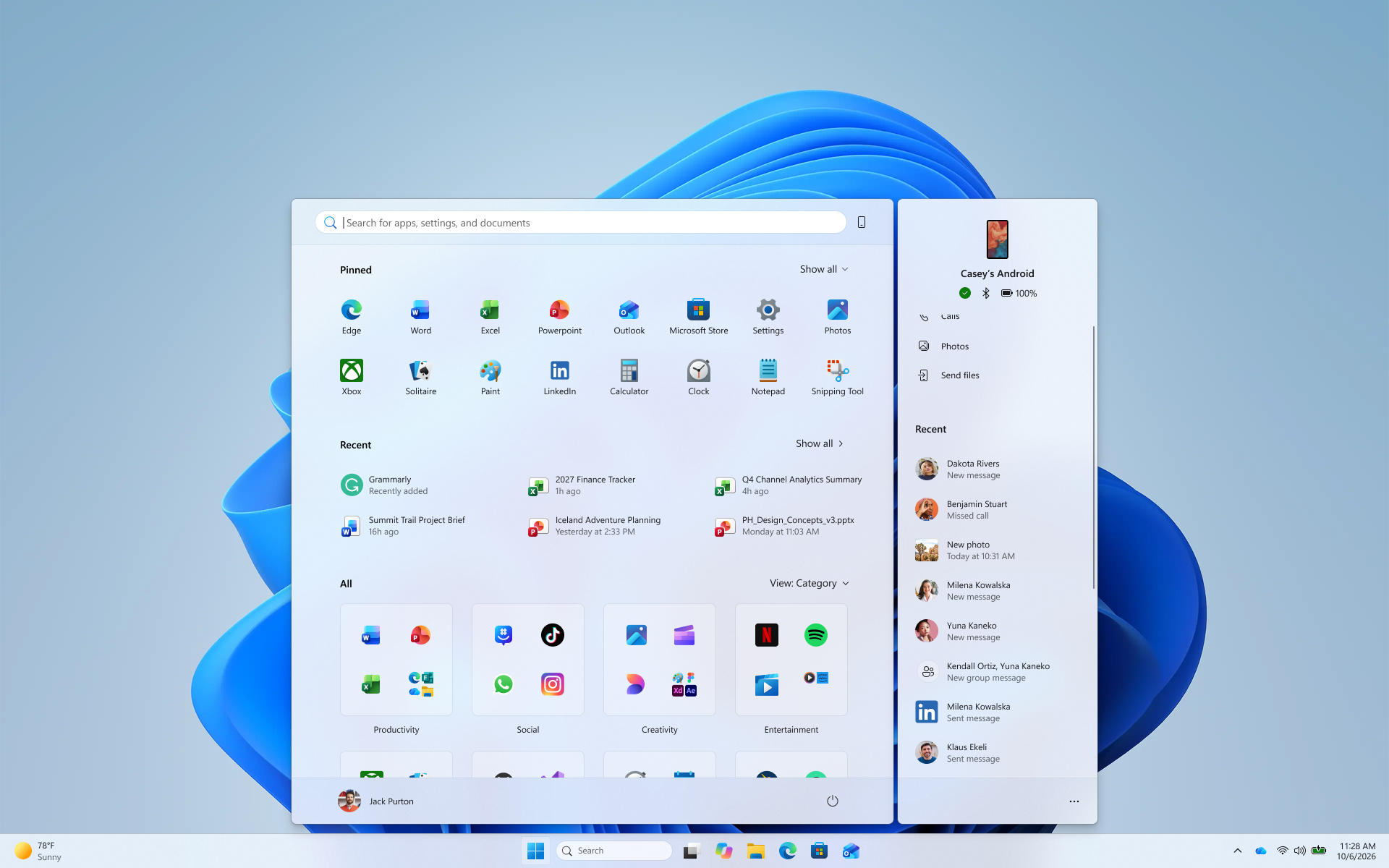
See more of your latest activities at a glance: Phone companion for the Start menu now shows more of your recent activity, with a scrollable side pane so you can view even more without leaving the Start menu.
[caption id="attachment_179178" align="aligncenter" width="1920"] The phone companion in Start with a scrollable pane for viewing more recent mobile activity.[/caption]
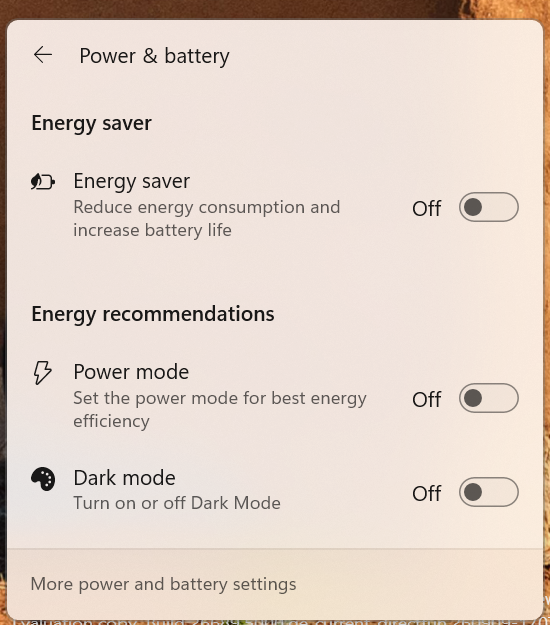
Windows Insiders will now see Energy Recommendations directly in Quick Settings, making it easier to discover and take actions that can help reduce energy consumption and improve device sustainability.
[caption id="attachment_179179" align="aligncenter" width="550"] The Power & battery settings page showing Energy Recommendations, including suggested actions.[/caption]
Thanks,
Stephen and the Windows Insider Program team
The diffoscope maintainers are pleased to announce the release of diffoscope
version 331. This version includes the following changes:
[ Chris Lamb ]
* Support radare2 >= 5.9.0. (Closes: reproducible-builds/diffoscope#432)
* Update debian/tests/control.
* Update copyright years.

[ Christopher Baines ]
* Add support for .nar files via Guix.
Photographer and videographer Tyler Stalman joins us on this week's episode of The MacRumors Show to examine whether the iPhone 18 Pro's camera is a compelling reason to upgrade, how its new features affect everyday shooting, and what photographers gain or give up with the iPhone Duo.
The iPhone 18 Pro's Main camera combines a new 48-megapixel sensor, a faster variable-aperture lens, and updated image processing. The variable aperture offers settings of ƒ/1.48, ƒ/1.8, ƒ/2.8, and ƒ/4.0. The iPhone 17 Pro has a fixed ƒ/1.78 aperture, so the new lens's widest setting admits about 45% more light on aperture values alone, or just over half an exposure stop. Apple claims around 50% better low-light performance for the complete Main camera system.
At ƒ/2.8 or ƒ/4.0, people standing at different distances in a group shot can remain sharper, provided there is enough light to compensate for the smaller opening. A narrower aperture can also let video use a slower shutter speed in bright conditions, producing more natural motion blur. At ƒ/1.48, the camera has more light for indoor photos and potentially shorter Night mode exposures. The wider opening should also reduce the need for Night mode at all in some situations. The camera defaults to ƒ/1.8, close to the 17 Pro's fixed aperture, but the new sensor and processing still affect photos taken at that setting.
The Pro Controls add manual aperture, shutter speed, and white balance adjustments, plus a live histogram directly in the native Camera app. Users can pin their most-used settings to the top of the viewfinder, which is a major practical improvement for professionals. For example, shutter speed offers control over frozen action or intentional motion blur, while white balance can help stop greenery being made too blue by automatic settings or maintain a consistent look between video clips.
Photographic Styles 3 goes further with the ability to adjust tone and color while preserving skin tones, and new controls add Soft Skin, Glow, and Film textures, with grain that can be paired with any of them. The Film setting aims to reproduce more of an analog photograph's character, including its grain and the glow around bright highlights. The strength of the effects can be adjusted, and the style can be changed after capture. Tyler has tested the iPhone 18 Pro's film look against a film SLR loaded with Kodak Portra 400.
Apple Reference Image signs data from the iPhone 18 Pro's new Main camera sensor at capture, creating a secure digital negative that can be compared with an editable photo. Meanwhile, iOS 27's Photos tools can change perspective with Reframe, generate scenery beyond a picture's original edges with Extend, or remove larger objects with Clean Up. Reference Image leaves room for creative editing while giving photographers a way to show what the sensor captured, provided they enabled the mode before taking the shot.
Meanwhile, the iPhone Duo's camera system has a 48-megapixel Main camera with a fixed ƒ/1.6 aperture and the same 48-megapixel Ultra Wide camera as the iPhone 18 Pro. Its Main camera shares a 26mm focal length, ƒ/1.6 aperture, and Hybrid Focus Pixels with the iPhone 17e, leading some to question why Apple's most expensive iPhone appears to have camera hardware similar to an entry-level model. That said, the Duo has sensor-shift optical image stabilization, which the 17e lacks, and Apple has not disclosed enough sensor details to establish that the two phones use identical hardware.
Compared with the iPhone 18 Pro, the iPhone Duo also lacks a dedicated Telephoto lens, variable aperture, manual Pro Controls, Reference Image, and professional formats including ProRAW and ProRes. The iPhone Duo's folding design makes a different case for its camera. Smart Take can capture a group photo when everyone is posing, Kid Cue plays animations on the outer display to draw a child's attention, and Duo Preview lets subjects see a live view of a photo being taken of them with the rear camera. The phone can also stand partly open for hands-free shots.
Looking to the future, Apple is rumored to be working on a custom image sensor that could arrive as soon as next year with the 20th-anniversary iPhone.
If you haven't already listened to the previous episode of The MacRumors Show, catch up to hear our iPhone Duo debate and discussion about early impressions of the AirPods 5, and the merits of Apple's latest iPhone and Apple Watch upgrades.
The MacRumors Show is on X @MacRumorsShow, so be sure to give us a follow to keep up with the podcast. You can also email us at podcast@macrumors.com or head over to The MacRumors Show forum thread. Remember to rate and review the podcast, and let us know what subjects and guests you would like to see in the future.
The next iPad mini, HomePod mini, and Apple TV 4K models have all leaked, just a few weeks before the devices are expected to be announced. Specifically, MacRumors contributor Aaron Perris discovered a few of Apple's official images of the devices, confirming their existence and some new features that are planned.
The most notable iPad mini details revealed in today's leak include an A20 Pro chip, a new speaker design, and a landscape front camera, while images have revealed that the next HomePod mini will be available in new colors like green and pink.
There is also evidence of an upcoming "Apple TV 4K (4th generation)" model, so it appears that a new Apple TV is finally coming soon after a four-year wait.
Apple's next-generation iPad mini will feature the A20 Pro chip, a rearranged front-facing camera, and a new speaker system, leaked code reveals.
The information originates from Apple's own code (spotted by MacRumors contributor Aaron Perris) and also shows clear product images of the new iPad mini. Although images of the device only show the front, leaving any design changes of the rear or side profile unknown, there are still visible changes.
The new iPad mini features a landscape front-facing camera, making it the final iPad to transition to this positioning. It also has a small groove cut out of the top of the display glass, just like the iPhone, presumably for the speaker. The volume buttons and power button remain on the top of the device.
We are not sharing the exact details of the files, but their presence in Apple's code suggests that the product is likely to launch soon.
Bloomberg's Mark Gurmanpreviously reported that the next-generation iPad mini will feature water resistance and an all new vibration-based speaker, so the icons appear to corroborate that claim.
The new iPad mini is rumored to feature a slightly larger screen, an OLED display, and more. Gurman expects it to launch by the end of October.
Apple's new HomePod mini will share the same design as the original model and come in five colors, MacRumors has found.
The information originates from Apple's own code (spotted by MacRumors contributor Aaron Perris) and shows clear product images of the new models in all of their colors. The above image contains Apple's own icons, which specifically refer to a "HomePod mini 2."
The new HomePod mini will come in green, pink, blue, white, and black. The current model comes in yellow, orange, blue, white, and midnight. The new blue is slightly lighter than the current offering.
We are not sharing the exact details of the files, but their presence in Apple's code suggests that the product is likely to launch soon.
Apple announced the original HomePod mini in October 2020 for $99. Available initially in white and space gray, the 3.3-inch speaker features a fabric-covered spherical design and a backlit touch surface for playback and volume controls. Its S5 chip powers computational audio, while a full-range driver, two passive radiators, and an acoustic waveguide deliver 360-degree sound. It also offers Siri, smart home control, multiroom audio, stereo pairing with a second HomePod mini, and Intercom messages between Apple devices. Apple later raised the price to $129.
Apple has been rumored to be working on a new HomePod mini model for several years. A new chip is almost certain to come to the device, along with support for Siri AI. It is expected to launch before the end of 2026.
MacRumors contributor Aaron Perris has uncovered an image file from Apple for an unreleased Apple TV 4K, suggesting that a new model will finally be released soon. The image is specifically for an "Apple TV 4K (4th generation)" model.
Apple TV 4K (4th generation) image (on a gradient)
The image reveals that the Apple TV will have the same external design as the current model, with all of its upgrades expected to be internal. Rumored features include an A17 Pro chip or newer, an increased 8GB of RAM, Apple Intelligence and Siri AI support, an Apple-designed N1 chip with Wi-Fi 7 support, and a revised Siri Remote.
The current Apple TV is nearly four years old, having been announced in October 2022. It is equipped with an A15 Bionic chip and 4GB of RAM.
With an A17 Pro chip or newer, the next Apple TV will have faster performance and hardware-accelerated ray tracing for improved graphics rendering in games.
With the N1 chip, the Apple TV will support Wi-Fi 7 and Bluetooth 6.
Wi-Fi 7 has increased bandwidth, in part because it allows for data transmission over the 2.4GHz, 5GHz, and 6GHz bands simultaneously with a supported device and router. Wi-Fi 7 is theoretically up to 4× faster than the current Apple TV's Wi-Fi 6, but real-world speeds are bottlenecked by internet service providers and other factors.
Siri AI will likely be the headline new feature on the next Apple TV, with tvOS 27 expected to gain a Siri app on the device. Siri AI is a much more intelligent and personalized version of Siri that can answer pretty much any question. The bump to 8GB of RAM will enable support for not only Siri AI, but some other Apple Intelligence features.
A revised Siri Remote of some kind is expected alongside the new Apple TV, but it is unclear exactly what outward changes it will have, if any.
In June, Apple raised prices on 14 products, including the Apple TV 4K. In the U.S., the Wi-Fi model with 64GB of storage now starts at $199 (up from $129), while the Wi-Fi + Ethernet model with 128GB of storage now starts at $249 (up from $149). It is unclear if the next Apple TV will maintain those prices or be even more expensive.
October is a common month for Apple to announce new products, so stay tuned, as the next Apple TV might just be days or weeks away.
We’re reimagining Microsoft Copilot to enable work as it evolves and to help expand what every individual and every organization can accomplish in the flow of human ambition. Today we’re introducing the new Copilot to connect the tools people rely on with the next generation of capabilities they’ll need to build, customize and scale AI across work.
The Copilot app now has three new capabilities: Home is your new starting point, where Chat and Cowork come together — and with Office in Copilot, the full power of Word, Excel and PowerPoint is now built into the experience. Code lets everyone build their own solutions with the tools to run them safely, and it’s powered by the same underlying technology as GitHub Copilot. And Autopilot is a persistent, proactive and personal agent that keeps working even when you’re not. Home and Code will start rolling out in our Frontier program in the coming weeks and Autopilot is expanding to private preview at the end of the month.
We’re also excited to share new FinOps for AI capabilities to help you manage spend and get the most value from Copilot and agents.
Home is your new starting point in Copilot, where Chat and Cowork come together in one place. As work moves constantly between meetings, chats, documents, emails, apps and agents, Home is where you get your bearings, keeping you grounded and moving forward. You can review recent activity, get suggestions on what Copilot can help with, and pick up work right where you left off. Chat is instant and conversational — ready for quick questions, lookups, draft-creation and keeping you in the loop on every turn. Cowork is for work you delegate. You define the task and it runs end-to-end to return a completed result: an RFP response, a launch kit, a customer briefing, a financial close package or any other complex work worth iterating on. And coming soon, you won’t need to choose a mode: simply state what you need to accomplish, and Copilot will route the work to Chat, Cowork or Code — whichever capability is right for the job.
We’re also bringing the full power of Word, Excel and PowerPoint to Copilot with Office in Copilot. Now you can get to real work fast: no broken formatting, no stray versions, no rebuilding the context in another app. From Home you can ask Copilot to draft a launch brief, model a budget, build a deck, or pick up a file your team is already working on, and it creates or updates a real, editable document, workbook or presentation — live for your whole team, not just you. Refine it side by side with your conversation, or @mention a teammate and their edits show up as they make them — things stay in sync between Copilot and the Office apps, so progress travels with you wherever you work.
If you haven’t used Copilot in the Office apps lately, take another look. PowerPoint now keeps decks on-brand automatically and enables you to fine-tune slides and images or quickly apply a custom template. When Copilot or another collaborator makes edits in Excel, you can see exactly what changed and why, so you’re up to speed quickly, and Copilot recommends the best chart to visualize your data. And across Microsoft 365, Skills help bring specialized expertise directly into the apps, like financial skills in Excel and legal skills in Word, and enable organizations to scale best practices through reusable, role-specific workflows.
Code moves solution-building outside the realm of developers alone. To date, the unit of knowledge work has been the file: the document, the spreadsheet, the deck. Those aren’t going anywhere, but Code adds a fourth: small, purpose-built solutions anyone can create to get a job done. Learning to build them is becoming as basic a skill as writing a memo or modeling a budget.
Describe an app, tracker, dashboard, automation or workflow in natural language, and Copilot chooses an approach and builds it — from persistent desktop widgets for quick reference and interactive dashboards for exploring data and testing outcomes to cloud-hosted internal apps you can share with your team.
Powered by the same underlying technology as GitHub Copilot, Code runs in a sandboxed environment and can be hosted securely within your tenant. With Microsoft IQ, everything you create is grounded in the context of your work, and plugins sync automatically. Your software developers continue to use GitHub Copilot for their day-to-day work with more connectivity into the Copilot platform. Code is rolling out to Frontier at the end of the month, with broad availability in the coming weeks. It will be in preview for Microsoft 365 Premium and Pro subscribers later this year.
As it gets easier and faster than ever to build in Copilot, we’re introducing Microsoft Copilot Managed Runtime: hosting infrastructure that lets code run safely right inside your company’s Microsoft 365 environment. It’s governed by IT but easy for everyone else: share an app with teammates, connect it to live data and access it from anywhere. This same foundation enables apps built in Cowork, Code and Copilot Studio, and we’re opening it up to third-party and pro-code developers, too. Copilot Managed Runtime is now in preview and will also be accessible inside Code.
Autopilot, previously called Scout, is your digital teammate. And it works for you: Give it a name, a role and a goal, and it goes to work — watching channels, following up on threads, running recurring work and picking a project back up days later, without waiting for a prompt. It can do things like set up and manage a full supplier review process: building the schedule and workback plan, then handling prep, meetings and follow-ups on its own, right down to reaching out to stakeholders for updates. And Autopilot is cloud-hosted, so it keeps working while you sleep or your attention is elsewhere — no constant monitoring required.
Autopilot lives in your tenant with its own identity, memory, computer and workspace, and it’s built on Microsoft IQ so it understands how your organization actually works. It shows up where people already work — Teams, Outlook, chats, channels and documents — so you can @mention it like a colleague, with permissions, audit and governance behind it. You set the objective and boundaries; Autopilot handles the rest while keeping you informed and in control.
Expanding your business context
Copilot is grounded in Microsoft IQ, the unified intelligence platform for enterprise AI across your Microsoft stack, connecting how the business operates with the knowledge it holds into one real-time view for Copilot and your agents, governed and secure.
Today we are expanding the business context available to Copilot. Fabric IQ brings trusted context from your data, including the 20+ million semantic models in Power BI into Copilot. It grounds Chat and Cowork, and is generally available in both today, with Code integration coming through the Frontier program soon. Rolling out over the next month in public preview, Copilot is now grounded in data and workflows from Dynamics 365 and Power Platform. So, when a salesperson is working on a proposal, for instance, Copilot can incorporate data like deal history and support tickets right into the document, with no app-switching or distracting lookups required.
You also need a trusted way to connect Copilot to the actions and data that move your business forward. Plugins extend what Copilot can do, bringing together skills, connectors and other capabilities so users can complete more workflows without leaving the apps they use every day. Rolling out now and generally available across surfaces in the coming weeks, a new plugin registry will bring Microsoft, partner and custom-built plugins together in one unified catalog. IT can approve and manage plugins centrally, while developers and partners can publish once to extend Copilot across supported experiences. The result is a simpler way to introduce trusted capabilities at scale, with the control your organization needs.
Managing AI spend
For everyday AI — quick answers, first drafts, summaries and analysis — you want the best possible quality at a fixed cost. A user subscription license (USL) gives you exactly that: Copilot in Chat and across Word, Excel, PowerPoint, Outlook and Teams; model selection; and new capabilities and models. Auto is at the heart of the USL. Auto weighs accuracy, speed and cost on each request to route to the model best suited for the job. Agentic work requires a different type of spend, one that gives you the best quality possible with the most advanced models. Usage-based billing (UBB) lets you have full control to choose models and match cost to value. Cowork, Code, and Autopilot, new long-running agentic capabilities, and frontier models like Astra and Fable all run on UBB. As AI capabilities and the ways people use them continue to evolve, we’re evolving Copilot pricing alongside them. Read more here.
FinOps for AI is a shared discipline for managing AI spend and optimizing it for business value. We are committed to enabling organizations to make the most of their AI spend, and, today, we are introducing new capabilities across Agent 365, Insights and Microsoft Copilot to help do that. Cost management in Agent 365 is expanding beyond Cowork and Work IQ APIs to include Code and Copilot Managed Runtime, with support for agents built in Microsoft Copilot Studio planned for October. Admins can manage spending policies at scale with API access; route credit requests from end users into existing approval and automation workflows; and set which model families are available to different groups of users — those settings also shape which models Auto can select from. Business leaders and admins can understand which Cowork tasks are generating the strongest outcomes and determine where to sustain, expand or optimize usage. And finally, end users can view credit usage, remaining balances and usage history directly in Microsoft Copilot, so they can better manage their own AI usage within organizational guardrails. We are committed to investing in FinOps for AI to help organizations stay in control of spend, understand value and optimize their AI investments for impact.
A sneak peek at what’s next
These announcements are just the beginning. We’re excited to share future Copilot experiences that make Copilot more personalized and proactive, and help the team move forward together.
Coming soon in Home, Today is a proactive, personalized command center across mail, calendar, Teams threads, meetings and tasks. It shows you what you missed, what needs attention now and what can wait. Today doesn’t just surface the work, it gets work done. The draft is written and ready for you to edit; the schedule change is already proposed; and the forgotten follow-up is waiting for you to send it, complete with context so you can catch up quickly. Today enters private preview in October in Copilot, and will be coming to Outlook and Teams as well.
And now when you invoke @Copilot in Teams, your entire team gets the shared context and permissions of the channel, group chat or meeting. Ask why a product decision was made, and Copilot pulls the background from across conversations — no digging, no re-explaining. When that decision ripples into manufacturing, packaging and launch timing, Copilot goes further: it offers to prepare a cross-functional review with dependencies, owners, open questions and decisions, so everyone can see how their work connects and what still needs resolving. The team stays aligned and the project keeps moving forward. The @Copilot capability will be in private preview in Teams by the end of the month.
With the new Copilot, you now have one place to ask, delegate, build, automate and more. It’s rolling out now through the Frontier program, with new capabilities arriving continuously. Check back here for the latest.
There is so much more coming to Copilot. Join us at Microsoft Ignite — November 17–20 in San Francisco and online — to learn about the latest Copilot innovation and how it’s empowering people and organizations to reimagine work and get value from AI.
Jared Spataro leads Microsoft’s AI at Work efforts, helping every organization leverage AI and agents to solve their unique business problems, reduce costs and drive net-new value creation. His team conducts research to help predict and shape what the future of work and business will look like across industries, while also delivering new products and features within Copilot, Copilot Studio, Microsoft 365, Dynamics 365 and Power Platform.
In iOS 27, Apple's Wallet app lets you create custom passes for things like event tickets, gift cards, loyalty cards, and more. Here's how it works.
If you have a ticket for an event and there's not a digital version available for the Wallet app, you can create one using the physical pass you have. The same goes for other cards, like a membership card, for example.
The Wallet app can use Visual Intelligence to scan your card, and it will match it to a template with corresponding fields that you can tweak before adding it to your Wallet.
Alternatively, you can create the pass manually, choose a template ("Membership," "Event," or "Custom") and then adjust the color and other details. All you need to do then is scan the barcode or QR code from your physical pass.
Each template includes relevant information like name, location, or admission type. There are 12 background colors to choose from, or seven custom backgrounds for categories like theater, music, sports, and movies.
Fields can be added or removed when creating a custom pass, with options like label, date, membership, contact, coupon code, VIN, insurance, and more, so most physical cards should be able to be stored digitally.
Here's how you create a pass with Visual Intelligence:
Open the Wallet app on your iPhone and tap the + button at the top.
Choose Create a Pass.
To let Visual Intelligence scan the pass, tap Continue, then take a photo of it in the next screen.
After Visual Intelligence matches the pass to a template, tap Edit Pass.
Use the palette icon in the bottom-left corner to change the look of the pass – you can the background colour, or use an image from your Photos library. Tap the icon in the bottom-right corner to add or remove fields.
Tap the blue checkmark at the top when you're done.
Your custom pass will now be added to your Wallet, ready for use. To edit it at any time, simply select it in Wallet, tap the three dots in the top-right corner of the screen, then tap Edit Pass.
If you installed macOS 27 Golden Gate, here's a way to find out when your Mac was manufactured. Apple has restored access to information that effectively disappeared when it randomized its serial numbers a few years ago.
On your Mac, go to System Settings ➝ General ➝ About, then click "Regulatory Certification" under the System Report button. The certificate will show with a new "Date of Manufacture" field at the bottom.
You used to be able to decode the serial number on an Apple device to find out when and where it was made. That changed in 2021, when Apple began adopting randomized serial numbers without encoded manufacturing details.
That left owners of newer Macs with no similarly straightforward way to determine when their machine was made – until macOS 27 arrived.
The spot was made by MacRumors forum member pdfu. Another forum member said that the displayed date they saw on their certificate corresponded to their Mac's logic board rather than the date the complete machine was assembled. That logic board had been replaced though, suggesting that's where the date of manufacture is stored.
The regulatory certification first appeared during the macOS 27 beta cycle and it hasn't, to our knowledge, been highlighted by Apple.
With macOS Golden Gate, Apple phased out several legacy features and services, cutting support for older devices and accessories. More cuts are coming in macOS 28 as Apple continues to root out lingering Intel features.
Here's everything that's been dropped.
Support for Intel Macs - macOS Golden Gate is the first version of macOS that runs only on Apple silicon Macs. Intel Macs can't run it and are limited to macOS Tahoe. Apple still plans to offer security updates through fall 2028.
Boot Camp Assistant - Since macOS Golden Gate doesn't run on Intel Macs, it doesn't support Boot Camp. Apple silicon Macs require virtualization software like Parallels or VMware Fusion to run Windows.
Rosetta 2 (Temporarily) - Upgrading to macOS Golden Gate removes Rosetta, but if you have an app installed that requires it, you can reinstall it. macOS Golden Gate is the last version of macOS that will have full Rosetta support.
Apple Filing Protocol - Apple deprecated AFP back in macOS Sequoia 15.5, and there is no AFP client at all in macOS Golden Gate.
Time Capsule Backups - With no support for AFP, Time Capsule no longer works with Macs running macOS Golden Gate. Time Capsule requires AFP or SMBv1, but Time Machine backups now use the SMBv2 or SMBv3 protocol.
AirPort Utility - AirPort Utility is no longer included when you install macOS Golden Gate. If you had the app before updating, you can still use it, but Apple makes no guarantee that it still works. AirPort Utility lets users manage AirPort base stations like the AirPort Extreme and AirPort Express.
macOS 28, which is expected in fall 2027, will largely drop support for Rosetta 2. Most apps that rely on Rosetta will not open on Macs running macOS 28, though Apple is making an exception for some legacy games that are unmaintained.
In macOS Golden Gate, you'll see a warning when using any app that relies on Rosetta, so you're aware that the app won't continue to work in the future without a developer update. You can also see which apps are affected by going to Settings > General > About > Intel-Based Apps and then clicking on Details.
Apple today updated its TestFlight app for iOS, iPadOS, macOS, and visionOS to version 4.4.0, adding support for features introduced in the latest software updates and products.
TestFlight for iPhone supports landscape orientation ahead of the iPhone Duo's October launch, though the option is available on all iPhones. TestFlight can now be resized when using iPhone Mirroring on a Mac running macOS 27 with an iPhone running iOS 27.
Apple says the update also includes unspecified stability improvements and bug fixes.

 Log in