❌

Normale weergave

Apple Launches Creative Labs Program With The King's Trust

7 Oktober 2026 om 23:29
Apple is partnering with UK charity The King's Trust to launch a new education program that will help young people build careers in creative industries, Apple said today.


The Apple x King's Trust Creative Labs will give people aged 18 to 30 the opportunity to work with Apple experts as they look into different career paths.

An initial cohort of up to 20 people is participating in specialized workshops to learn "valuable, industry-aligned skills using Apple technologies." The educational experience started this week with music industry and creative workshops timed to the opening of Apple Music Hall at Battersea Power Station in London. Apple chairman Tim Cook and King Charles III visited Apple Music Hall to meet with attendees.

More cohorts and more sessions will follow over the next year.

Apple has worked with The King's Trust since 2019, expanding access to science, technology, engineering, arts, and mathematics programming to schools across the UK. Apple says it is also working with The King's Trust on resources that will build AI literacy, creativity, and agency among educators and young people.
This article, "Apple Launches Creative Labs Program With The King's Trust" first appeared on MacRumors.com

Discuss this article in our forums

  •  

Apple Watch Series 12, Ultra 4 Owners Report Skin Irritation

7 Oktober 2026 om 21:02
Some Apple Watch Series 12 and Ultra 4 owners have experienced unexpected skin irritation with the new models, according to reports on the MacRumors forums and Reddit.


Affected users complain of a burning sensation and redness under the sensor area. The Apple Watch Series 12 and Ultra 4 measure heart rate every five seconds, and some people have wondered if that's the cause of the skin irritation.

Along with more frequent heart rate readings, the Series 12 and Ultra 4 have a larger ECG electrode surface, photodiodes in a ring-shaped arrangement, and larger green LEDs. It is unknown if any of these design changes are a problem, but wrist irritation from the Apple Watch is a complaint that dates back to the original model.

Apple says reactions can be caused by wearing a band too tight or too loose, or by irritants like soap and sweat under the watch. Some Apple Watch models contain nickel, but it is a low amount below EU limits, and Apple says it's unlikely to be a problem. The Apple Watch case and certain Apple Watch bands have trace amounts of acrylates and methacrylates from adhesives, but Apple says it designs the watch and bands to keep those components away from skin.

Apple recommends making sure a band fits well and keeping the Apple Watch, bands, and skin clean and dry. Apple adds that cleaning may be required after workouts or exposure to liquids like sweat, soap, sunscreen, and lotion.

Some users have seen the issue clear up after an adjustment period wearing the watch, and cleaning the back of the watch and the band has also helped in some cases. Other users have returned their devices. Apple advises that users experiencing redness, swelling, itchiness, or other irritation consult a physician before putting the watch back on.
Related Forum: Apple Watch

This article, "Apple Watch Series 12, Ultra 4 Owners Report Skin Irritation" first appeared on MacRumors.com

Discuss this article in our forums

  •  

Announcing new builds for 7 October 2026

7 Oktober 2026 om 20:10
Hello Windows Insiders, Today, we’re releasing new Windows 11 Insider Preview builds to the Beta and Experimental channels! Coming straight off the back of our Windows + Surface event, we have some exciting new features entering the Windows Insider Program. New builds this week Select your channel below to view its release notes: For those on other specific Windows build versions, here are today’s new builds and release notes:

Notable new features:

[Windows Search]

Release channel: Experimental, Experimental (26H1)
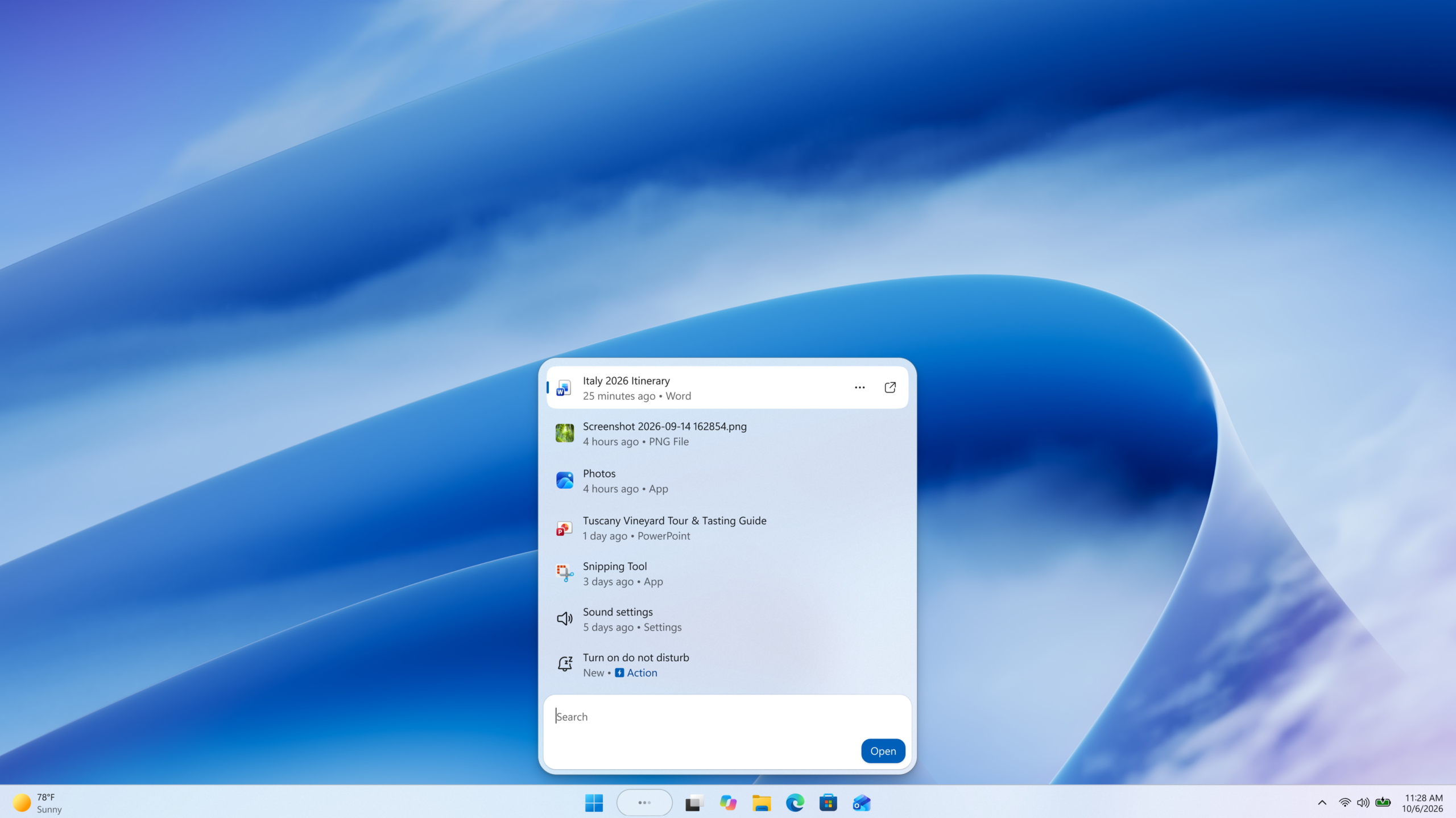
  • New Windows Search experience with inline actions: We're beginning to roll out a new Windows Search experience built on WinUI 3 that is faster, more efficient, and features a streamlined design that makes results easier to scan. We're also introducing inline actions, allowing you to quickly complete tasks directly. Turn on dark mode or Bluetooth, adjust your screen brightness, mute your device, or arrange windows from Windows Search.
  • We're improving how Windows Search understands what you're looking for, including better matching for typos and synonyms. We'll continue fine-tuning these improvements over the coming weeks. For more information detailing the new changes, check out the dedicated Windows Insider Blog.
[caption id="attachment_179190" align="aligncenter" width="2560"]Screenshot of the new Windows Search experience Screenshot of the new Windows Search experience[/caption]

[Battery Status widget]

Release channel: Experimental
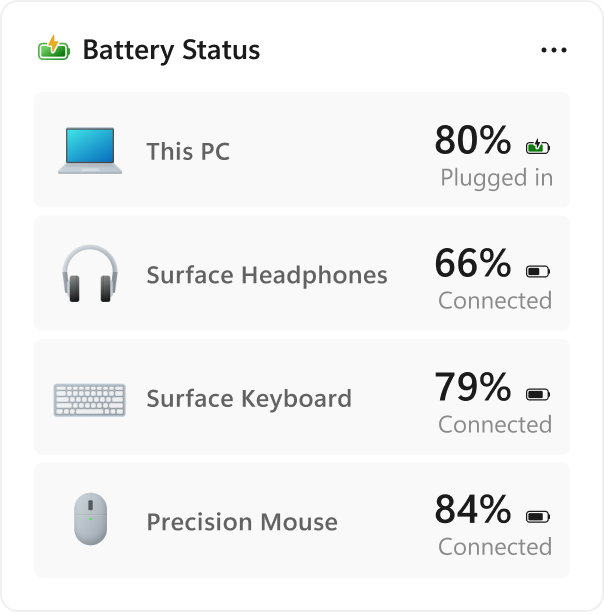
  • As part of our continued commitment to making Widgets more useful for everyday moments, we're introducing the Battery Status widget for Insiders on newer builds. This widget provides a unified view of battery levels for your PC and peripheral devices, helping you quickly assess power status without hunting through multiple UI locations. Add it by going to Widgets board > Add widgets > Battery Status.
[caption id="attachment_179221" align="aligncenter" width="604"]UI showing the new Battery Status widget, providing a unified view of battery levels across your PC and connected devices. UI showing the new Battery Status widget, providing a unified view of battery levels across your PC and connected devices.[/caption] Thanks, Stephen and the Windows Insider Program team
  •  

Boston's MBTA Testing New Charlie Card With Apple Wallet Support

7 Oktober 2026 om 20:03
This year, the Massachusetts Bay Transportation Authority (MBTA) has been testing a new version of the Charlie Card with Apple Wallet support on the iPhone and Apple Watch.

The new Charlie Card is limited to testers who signed up in 2024, with a public release to follow "at a later date."
This article, "Boston's MBTA Testing New Charlie Card With Apple Wallet Support" first appeared on MacRumors.com

Discuss this article in our forums

  •  

Pre-order our most powerful Surface devices ever

7 Oktober 2026 om 20:00
For more than a decade, Surface has been shaped by the people pushing technology further. Creators rendering complex scenes. Developers building what doesn't exist yet. Designers moving between ideas, models, code, and content. Makers whose work demands more from their devices because they're constantly pushing boundaries. Over time, we've learned something important: the people who choose Surface aren't just using technology for tasks; they're shaping what's next. Today, we're opening pre-orders for two new devices built for that reality: Surface Laptop Ultra and Surface RTX Spark Dev Box. These new Surface devices bring to life the broader Windows vision for hybrid intelligence we’re sharing today, combining the power of the PC and the cloud to help people do more with AI.

Surface Laptop Ultra: Made for world makers

Surface Laptop Ultra started with a clear ambition: How can we better serve the needs of creators, developers, and AI builders? The answer wasn’t simply a faster laptop. It meant fundamentally rethinking what a high-performance Windows PC could be. It started with a deep partnership to optimize Windows to take full advantage of NVIDIA’s RTX Spark™ Superchip. We then designed an entirely new device around the platform from the ground up. Mechanical, electrical, thermal, acoustic, material engineers, and industrial designers worked together from the beginning to fully realize the potential of the RTX Spark. The result is our most powerful Surface Laptop ever, built for demanding creative, technical, and AI workloads.

One superchip. One complete system.

Designed around NVIDIA RTX Spark, Surface Laptop Ultra unites an NVIDIA Blackwell RTX GPU with up to 6,144 cores, an NVIDIA Grace CPU with up to 20 cores, and up to 128 GB of unified memory.1 Run AI models exceeding 120B parameters locally, with up to 1 petaflop of AI performance.2 Move between creative work, development, and immersive gaming without missing a beat. Keep more of your work on-device, with less reliance on the cloud and access to the CUDATM ecosystem and full Windows AI stack.3

Power is only the beginning

Power only matters if it lasts. That's why we designed a new thermal architecture that delivers up to 2.5x more thermal power capacity than our current Surface Laptops. In a chassis less than 18 mm thin and under 4.5 lb4, Surface Laptop Ultra was built for sustained performance. The 15-inch PixelSense™ Ultra touchscreen is the brightest, sharpest, and most vivid display we've ever put on a Surface Laptop.5 It’s designed to empower professionals to review footage frame by frame, annotate designs, explore datasets, and interact directly with their work. It delivers the brightest peak HDR of any laptop6, up to 25% brighter peak HDR than MacBook Pro M57, and the color accuracy creators trust. The touchpad is 30% larger, with advanced haptics for precise control across demanding creative workflows.8 Storage is user-removable, so you can upgrade, replace, or secure your own storage.9 Surface Laptop Ultra is available in Platinum and Nightfall, so it looks as sleek and sophisticated as it runs.10 It also features our most complete port selection yet, led by something entirely new: Magnetic Connect, the world’s first built-in magnetic USB-C® charging on a laptop. The included charging cable attaches magnetically to the right-side USB-C port and releases easily. The port remains fully functional for video, data, and other USB-C devices. Other ports include: · Two additional USB-C ports · HDMI · USB-A · An SD card reader · A 3.5 mm headphone jack Drive up to three 4K displays11. Import footage without adapters. One device. Every connection you need.

Built for real work. Always ready to play.

Creative professionals get a display they can trust, graphics acceleration when projects get demanding, and up to 128 GB of unified memory to provide headroom for multitasking across demanding creative and local AI workflows. Developers can use local models with GitHub Copilot to bring agentic coding on device. They can prototype agents, review code, test larger models, and keep development tools running side by side. When the work is done, the same RTX Spark architecture that accelerates creative and AI workloads also powers a great gaming experience. Ray tracing, DLSS and NVIDIA Reflex in supported titles, together with the deep and growing catalog of games on Windows on Arm, mean the machine you rely on during the day can keep delivering when it’s time to play.

Surface RTX Spark Dev Box

Surface Laptop Ultra moves with you. Surface RTX Spark Dev Box gives developers, AI engineers, and technical teams powerful AI compute at their desks. Also built around NVIDIA RTX Spark Superchip, this developer-first powerhouse brings massive local AI compute to a compact small form factor, giving developers more control over where workloads run and how resources are used. When experimentation happens locally, teams can iterate faster, reduce cloud dependency, and reserve cloud resources for the workloads that truly need them. Dev Box offers developers:
  • Up to 1 petaflop of AI performance and 128 GB of unified memory on your desk
  • Support for AI models exceeding 120B parameters with large context windows2
  • Local inference, evaluation, and experimentation at interactive speeds
  • The same powerful NVIDIA RTX Spark platform that powers Surface Laptop Ultra
Ready to go out of the box The goal is simple: less time configuring your environment, more time building. As part of the Project Zenith family of devices, Surface RTX Spark Dev Box comes ready with the tools, runtimes, and environments developers use most, including Visual Studio Code, Git, GitHub CLI, GitHub Copilot, WSL, Python, Node and more.

Run AI agents where they work best

Give developers the freedom to move faster with agents, while keeping access, compute, and cost under control. Windows is the OS for agents, and Surface is the hardware for Windows. Microsoft Execution Containers provide containment for agents, while upcoming Windows capabilities will use Microsoft Entra to distinguish agent activity from user activity and extend Microsoft Agent 365 controls to local agents on-device. With NVIDIA RTX Spark and up to 128 GB of unified memory, Surface Laptop Ultra and Surface RTX Spark Dev Box can run demanding models and agent workflows locally, including GitHub Copilot tasks that investigate builds and propose fixes, while Microsoft Dev Box adds cloud capacity when needed.1 The result is governed, scalable AI development without spending a cloud token on every step. Commercial configurations of Surface Laptop Ultra are available for pre-order today.

Break up with your MacBook

If you've outgrown the compromises of a traditional professional laptop, we'll help make the switch. Level up to Surface Laptop Ultra and get up to $1,000 cash back when you trade in an eligible MacBook Pro.12 We're confident that once today's creators and developers experience everything Surface Laptop Ultra has to offer, they won't look back. Learn more about the offer here.

Reserve yours today

Starting today, pre-order Surface Laptop Ultra starting at $2,599 (MSRP) from Microsoft.com or select retailers worldwide, with availability beginning October 16. At Microsoft Store, explore the full lineup of configurations and accessories, with free shipping, easy returns, flexible payment options, and Microsoft support. If you’re looking for a commercial device, explore Surface Laptop Ultra for Business. Surface RTX Spark Dev Box is available for pre-order for $5,999 (MSRP), exclusively on Microsoft.com in the U.S. and will begin shipping to customers this November.
1 Memory varies by configuration. 128GB total system memory in a unified memory architecture dynamically shared between CPU and GPU. Maximum amount addressable by the GPU depends on system configuration and workload and is less than the total. 2 Based on theoretical FP4 performance of 1 petaflop using the sparsity feature. See: NVIDIA Corporation - NVIDIA and Microsoft Reinvent Windows PCs for the Age of Personal AI. 3 CUDA™ is a registered trademark of NVIDIA Corporation. 4 Might vary depending on manufacturing processes. 5 Surface display has rounded corners within a standard rectangle. When measured as a standard rectangular shape the screen is 15” diagonally (actual viewable area is less). Touchscreen is optimized for touch interaction only. Pen input and compatibility with Surface Pen, Surface Slim Pen, or similar accessories is not supported. 6 Peak HDR brightness of 2,000 nits, measured over a 10 percent window with HDR content. Comparison against laptops commercially available as of October 2026. Sustained and SDR brightness are lower. Actual brightness varies with content, settings, and conditions. 7 Based on peak HDR brightness comparing Surface Laptop Ultra to MacBook Pro M5 Pro published specifications as of October 1st, 2026. 8 Compared to Surface Laptop 8th Edition 9 Replacement components and service options vary by market and over time. Repairs should follow the Microsoft Service Guide. Device damage caused during repair may not be covered by warranty unless required by law. 10 Colors available on selected models only. Available colors, sizes, finishes, and processors may vary by store, market, and configuration. 11 External monitor support requires compatible displays, cables, and accessories. See Surface tested peripherals page for compatibility information. 12 Offer valid with purchases of qualifying new Surface Laptop Ultra device between October 7, 2026 - November 23, 2026 after trade-in of a qualifying device, where customer submits the online trade-in claim for their used device, plus proof of purchase for new device, during the Promotion Period. Available only through the Microsoft Store online in the United States and Canada. Amount of additional cash back varies depending on device purchased and value of trade in; see FAQ for more details. To be eligible for the cash back, customer must mail in the qualifying trade-in device within 15 days of completing the online trade-in process. To be eligible for trade-in, (i) customer must own the qualifying device, (ii) the device must power on, (iii) the battery must hold a charge (the device must not be required to be plugged in to operate), and (iv) the device must be in fully functional, working condition and not have broken or missing components, a cracked display or screen, liquid damage, modification(s) or the device warranty seal broken. The device cannot be password protected and must include its original chargers, accessories, and hard drive. Trade-in value depends on device type and condition after inspection by Teladvance. All trade-ins and reimbursements are subject to Teladvance's sole discretion and approval. Devices determined to not meet eligibility criteria may be shipped back to the customer or recycled. Recycled devices are not eligible for cash back. All trade-ins are final. See Microsoft Store Trade-in Program for steps and requirements. Not valid on prior orders or purchases; cannot be transferred or otherwise redeemed for cash or gift cards, or credit towards other devices or products. May not be combined with other offers. Void where prohibited or restricted by law. Microsoft reserves the right to modify or discontinue offers at any time. Limit of 1 offer per customer.

  •  

Microsoft Execution Containers: Policy-driven containment for AI agents

7 Oktober 2026 om 20:00
Agents are unlocking enormous productivity gains for customers, but their ability to work across files, networks, and applications can introduce new security risks. This can leave customers feeling like they only have two choices: give agents unrestricted access and hope nothing goes wrong or block them and lose the productivity benefits they provide. Neither option is acceptable. That’s why we’re building Windows platform capabilities to help run and manage agents more securely, starting with:
  • Containment: limiting what an agent can access and do.
  • Identity: distinguishing an agent’s activity from a person.
  • Manageability: giving organizations the tools to govern access and monitor agent activity.
Microsoft Execution Containers (MXC), now generally available, provides the containment layer. Developers and IT administrators define the resources, like files and network destinations an agent can use and MXC uses the appropriate container to enforce those policies at runtime.   Windows will also soon enable Microsoft Entra to help distinguish agent activity from user activity, ensuring users can remain productive even when agent access needs restrictions and extend Microsoft Agent 365 controls to local agents on-device, enabling IT teams to manage MXC containers, apply policies, and monitor agent activity.

Why agents need a managed execution boundary 

An agent cannot be its own security authority. It must run within a boundary defined by the developer or organization and enforced independently of the agent itself. Consider a coding agent asked to update a website. The agent needs read and write access to the website repository and access to the development tools required to build and test the change. It may need to read production server configuration to understand how the application is deployed, but it should not be able to modify that configuration. Without a managed execution boundary, the agent may decide that changing the server configuration is the fastest way to complete the task and potentially break the production site. The action can be reasonable from the agent's perspective and still exceed the authority the developer intended to grant. Containment creates that managed boundary: the agent can read and write the repository, read the server configuration, but is not authorized to access anything else unless access has been granted. If the agent attempts to modify the server configuration, the containment environment is designed to prevent the operation regardless of what the model, generated code, plugin, or tool decides to do.

What is Microsoft Execution Containers (MXC)? 

Microsoft Execution Containers (MXC) is a policy-driven execution layer for untrusted code or dynamically generated workloads. In agentic scenarios, developers can use MXC to contain model-generated output, plugins, tools, agent harness, or the entire agent. This limits what the agent workload can access by containing the scope of the impact if something goes wrong.   Developers declare the resources a workload requires, such as files and network destinations, and MXC enforces the resulting boundary with the appropriate container. The policy remains outside the agent workload’s control, so the agent or generated code cannot grant itself additional access. MXC also separates workload requirements from platform-specific containment details, greatly simplifying the developer experience. Developers integrate with a unified JSON configuration schema and multi-language SDK, while MXC maps the requested controls to the selected backends on Windows, macOS, or Linux. Developers can apply the same containment model wherever an agent needs to run – from a local device to the cloud. With Windows 365 support for MXC now generally available, developers can run agents alongside their existing work on Cloud PCs, using the right isolation model to help keep agent execution separate and secure.

Choose the containment level that fits the workload 

Different workloads require different levels of isolation. A coding agent working in a repository may prioritize low latency and responsiveness, while an agent processing sensitive data or running untrusted code may require stronger isolation. MXC provides a spectrum of containment options so developers and organizations can select the right level of isolation for each workload. Only Windows supports a session container, which runs an agent on the user’s device in a separate, OS-isolated session with its own local agent identity and isolated desktop, clipboard, UI, and input boundaries.
Backend  Availability  Best suited for  Important characteristics 
Process container  Windows 11, macOS, and Linux   Lightweight containment for responsive workloads, including model-generated code and tool execution.  Uses the platform-appropriate process sandbox, including AppContainer on Windows, Seatbelt on macOS, and Bubblewrap on Linux.
Session container  Windows 11 only  Long-running agents and automation that need a desktop or stronger separation from the interactive user.  Runs under a distinct Windows account and session, separating the agent's desktop, clipboard, UI, input, and active session from the user. 
WSL container (WSLc)  Windows 11 only  Linux-first agent toolchains and workloads that depend on the Linux package and development ecosystem. Provides a Linux execution environment through WSL.  
MicroVM  Windows 11 and Linux, experimental  Higher-risk workloads that benefit from a hardware-backed virtualized boundary.  Provides hardware-enforced isolation and full Linux workload compatibility.  
Each containment backend has distinct security properties and workloads should be evaluated for fit with containment backend.

How MXC policy defines workload boundaries 

MXC helps users and organizations delegate more work to agents while limiting them to the resources required for each task. Instead of giving an agent the full authority of the signed-in user, developers and IT can define an OS-enforced boundary around the agent’s workload.  For the website scenario, an MXC policy could give a coding agent read and write access to its local source-code repository and access to required development tools such as Git, while preventing access to personal locations such as the user’s Documents folder. The policy could also block inbound and outbound network connections and access to the interactive desktop.  
Policy area  What it controls 
Containment  The isolation environment in which the workload runs, such as a process or session container. 
Process  The command, arguments, working directory, environment, and other settings used to start the workload. 
File system  Locations the workload can modify, locations it can read without changing, and locations it cannot access. 
Network  Inbound and outbound connectivity, including whether the workload can connect to services through the host’s loopback interface. 
User interface  Whether the workload can access or interact with the desktop and related UI resources.  
Adding MXC support is straightforward for agent developers – you can easily use your favorite coding agent to integrate the MXC SDK and draft an initial workload policy, then review, test, and refine the resulting controls.

How workload and organizational policy work together 

Agent developers declare the resources their agentic workloads may need. Organizations can also apply additional constraints through management policy, like with Microsoft Intune management policy. This allows the same agent to operate within different enterprise boundaries without requiring the agent developer to encode the organization's security posture into the application. Containment becomes more valuable when organizations can apply it consistently. Intune policy will soon be available to manage MXC process containers used by MXC-integrated agents on Windows 11. These policies will offer IT administrators control over how Windows evaluates container creation requests made by agents, and the resource boundaries that are enforced by those containers. Agent developers should design their workloads to operate within boundaries that may be more restrictive than the default configuration. If organizational policy blocks a resource, the agent should explain that the task could not be completed within the available permissions, request an appropriate user or administrator action when supported, or choose a safe alternative. It should not silently fail.

Observe and refine policy before enforcing it 

Writing a least privilege policy can be difficult when you do not yet know every resource an agent workload requires. Only on Windows, MXC process containers can produce an agent activity report showing which resources a workload attempted to use to help craft a least-privilege policy. MXC supports three operating modes:  
Mode  Ungranted access  Activity Report  Intended use 
Enforcement  Blocked  No  Run the workload with its production policy 
Learning  Blocked and recorded  Yes  Diagnose failures and verify that the policy grants only required access 
Permissive  Allowed and recorded  Yes  Observe agent activity without enforcing policy 
In Enforcement mode, MXC applies the policy without activity report. Granted operations proceed, and operations outside the boundary are restricted. In Learning mode, MXC continues to enforce the configured boundary. An operation that has not been granted is blocked and recorded in a JSON activity report. This lets developers or IT reproduce containment failures and understand which resources the workload attempted to access. In Permissive mode, MXC records access that the policy would have denied but allows the operation to continue. This is useful during policy authoring because the workload can be completed while developers or IT collect evidence about the resources it uses. Permissive mode does not bypass other applicable operating system or organizational restrictions. When you bring an agent into an MXC container for the first time, the policy may block capabilities that the workload legitimately needs. These denials reveal where the boundary needs adjustment, helping you grant the required access without unnecessarily expanding the agent’s reach.

Agent identity & attribution 

Containment answers what an agent may do. Identity helps determine which agent performed an action. Coming soon, Windows will allow Microsoft Entra to distinguish agent activity from user activity in Microsoft Agent 365. This separation will allow security teams to evaluate an agent's behavior and risk independently from the person using the device. If an agent becomes compromised or violates policy, security controls will target the agent's access to protected resources without blocking the employee’s access. As organizations deploy more agents, one misbehaving agent does not have to interrupt the employee’s access or productivity. Agent-level attribution also improves investigation and governance. Administrators will be able to use Agent 365 to understand which agents are running, associate activity with a specific agent, investigate risky behavior, and apply policy to individual agents or groups of agents instead of relying only on user-level or device-level context.

Agents using MXC today 

NVIDIA has integrated OpenShell into MXC, complementing MXC with policy controls for agent access to files and inference services; advanced network controls; credential management, and for enterprises, OCSF auditing. Leading agents and agent frameworks already support MXC, including GitHub Copilot, OpenClaw, OpenAI Codex, Replit, LM Studio, and Unsloth AI. Many others will be releasing support for MXC: Anthropic Claude Code, Box, Egnyte, Heidi Health, Hermes Agent by Nous Research, Manus, Perplexity, Raycast, and Simular amongst others. For people using AI every day, these safeguards are part of the agent experience itself, giving users a more secure way to work with these tools. GitHub Copilot, Codex, and Replit agent scenarios demonstrate how MXC supports a demanding developer workflow. A coding agent needs access to the project repository, development tools, and commands required to complete a task, but it should not automatically gain access to unrelated files or network destinations. MXC preserves the capabilities the agent needs while enforcing clear boundaries around the rest of the system. Learn more about how GitHub Copilot uses MXC for sandboxed execution in this blog post. 

Get started and share feedback 

With containment, identity, and manageability built into the platform, Windows helps agents run more securely while giving developers and IT control over what they can access and do. MXC continues to improve as we expand containment backends, policy authoring, manageability, observability, and more supported scenarios in the containers. You can get started today with the MXC SDK, configuration schema, documentation, and samples in the MXC repository. If you encounter unexpected behavior or have ideas for improving the experience, open an issue on GitHub and help shape what comes next.
  •  

Building Windows for hybrid intelligence

Building Windows for hybrid intelligence Agents are creating a foundational shift in how people get things done, unlocking new levels of productivity and capability on the PC. As agents become part of everyday work, they also raise the bar for compute, security, and control.   That’s why we’re building Windows as the home for hybrid intelligence: a platform where agents can run locally when it makes sense, reach the cloud when they need to, and operate with the security and manageability organizations expect.  Hybrid intelligence expands what’s possible. Windows makes it practical, secure, and ready for broad adoption. And powerful new silicon, devices and models unlock local compute. Together, they define the next chapter of the PC: 
  • Windows is the most secure platform for agents. With containment, identity, and manageability built into the platform, Windows helps you control what agents can access, know which agent acted, and govern them at scale. Microsoft Execution Containers (MXC), now generally available for Windows and integration with Microsoft Agent 365, are key steps in making that real.   
  • Hybrid intelligence brings frontier capability to Windows locally. With intelligent routing, powerful local models, and a performant runtime, Windows lets work run in the right place for each task — local or cloud. We’re bringing frontier-class capabilities to local PCs and enabling services like GitHub to route intelligently on Windows. 
  • Copilot gets supercharged with Windows hybrid intelligence. With your permission, Copilot will be able to use local context from your PC, take action on your behalf, and tap into local models, bringing you more capability while helping your tokens go further. 
  • A new generation of PCs built for these possibilities. From always-on mini desktop PCs to deskside supercomputers powered by DGX Station for Windows, we are bringing a broad range of devices to unlock hybrid intelligence. Surface Laptop Ultra, powered by NVIDIA RTX Spark™, is available for pre-order today, alongside new devices from ASUS, Dell, HP, Lenovo, and MSI. 
  • Windows gets more capable across everyday tasks including new ways to take action directly from Windows Search on the taskbar and enhancements in gaming. 

Windows is the most secure platform for agents

https://www.youtube.com/watch?v=MzhMPCeFc5w Agents don’t work like traditional apps. They can run around the clock, use tools, write code, access files, and act across systems, often without someone watching every step. That requires a new security model built for how agents actually operate. On Windows, that model comes together through containment, identity, and manageability. Containment controls what an agent can access. Identity makes clear which agent acted, so IT can distinguish agent activity from the person using the device. And manageability connects that activity into tools like Agent 365 and Intune, so organizations can set policy, monitor risk, and govern agents across the organization1.  Together, these primitives allow organizations to secure, observe, and govern agents with confidence.

Expanding the ecosystem of agents on Microsoft Execution Containers, now generally available

Microsoft Execution Containers Traditional sandbox solutions weren’t designed for agents, where containment needs can change with every prompt and tool call. We built Microsoft Execution Containers (MXC) to meet that need. Today, Microsoft Execution Containers (MXC), becomes generally available on Windows 11, enabling organizations to define which files and networks agents can access, with those policies enforced at runtime. For individuals using AI on their personal PC2, these safeguards are part of the agent experience itself, giving users a more secure way to work with these tools. While MXC works across operating systems, its deep integration with Windows gives organizations more control of their data and a broader range of containment options, from process and session isolation to WSLc, virtual machines, and Windows 365 for Agents. Leading agents already support MXC, including Codex from OpenAI, GitHub Copilot, OpenClaw, Replit, LM Studio, OpenShell from NVIDIA, and Unsloth AI. Many others will be releasing support for MXC: Anthropic Claude Code, Box, Egnyte, Heidi Health, Hermes Agent by Nous Research, Manus, Perplexity, Raycast, and Simular amongst others. Microsoft Execution Containers Partners We’re also excited to share that Muse for Windows, a personal AI agent from Meta, is coming soon as a native app on Windows with MXC integration, bringing another leading AI experience to Windows and providing more choice in the agents people can use on their Windows PC. To learn more about how developers can integrate their agents with MXC, visit: Microsoft Execution Containers: Policy-driven containment for AI agents. 

Bringing hybrid intelligence to Windows

Hybrid intelligence As AI models grow in size and capability, customers’ needs are outpacing what their cloud budgets can support. They want to make every AI token count without giving up frontier capabilities. Hybrid intelligence brings local and cloud AI together, helping customers stretch their budgets while preserving access to the intelligence they need.   To bring this to life requires powerful local models, intelligent orchestration, a performant runtime, and capable silicon, all working together to create a meaningful experience.

Frontier coding intelligence, running locally on your PC

At Build, we introduced MAI Code 1.1 Flash, a 137 billion total and 6.8 billion active parameters, designed for real-world coding workloads. Today, we’re bringing that intelligence to your device, using 3-bit precision to reduce the model size by nearly 80% while preserving coding quality and supporting a 256K context window locally.  In addition to MAI Code 1.1 Flash, we are bringing other powerful models like an upcoming Nemotron model from NVIDIA – with over 70 billion parameter and quantized in 2-bit to use just over 20GB of memory and DeepSeek V4 Flash, a 284B parameter model, and others for optimal speed and intelligence running locally on RTX Spark.  With optimization and tuning, these models bring what was frontier-class capabilities to local PCs while preserving accuracy and performance — using less memory and fewer system resources.  The goal is to keep AI responsive while leaving room for everything else you do on your PC.

Introducing intelligent routing on Windows with GitHub HydraFusion

https://youtu.be/yzBVjfwgWw8 Earlier this year, GitHub launched HydraFusion, which routes each task to the right model in the cloud.   Today, we’re extending that intelligence to Windows, enabling HydraFusion to tap into models running locally on device, making your tokens go further.   Hybrid intelligence on Windows, powered by HydraFusion is coming to the GitHub Copilot app, GitHub Copilot CLI and Visual Studio Code in experimental preview later in October.   To learn more about how we’re working with GitHub to make this possible on Windows, read: Bringing local models and sandboxed tools to Windows and GitHub Copilot. 

Bringing llama.cpp to Windows ML to provide easier access to open-source models

To power this growing ecosystem of highly capable local models, you need a performant runtime. Windows ML is a scalable runtime to deploy models across GPU, NPU, and CPU, and we’re continuously evolving it.   Today, we’re also announcing llama.cpp support in Windows ML, giving developers more open-source model choices, and the ability to experiment quickly with emerging models as they land.  To learn more, visit AI Development on Windows: from PyTorch and llama.cpp to Windows ML. 

Supercharging Copilot on Windows with hybrid intelligence

Copilot with Hybrid intelligence Recently, we introduced the new Copilot built around three experiences: Home, Code, and Autopilot. Today, we’re announcing that on Copilot+ PCs, Copilot will get supercharged with Windows hybrid intelligence, providing three key local capabilities.   
  • Local context. With your permission, Copilot can understand relevant content on your PC, including files and recent activity, bringing local context into the flow of work. 
  • Local actions. Copilot can take action on your behalf across Windows, helping complete tasks like organizing files, assessing device diagnostics, troubleshooting issues, coding, and carrying out workflows directly on your device. 
  • Local models. Copilot can tap into AI models running on your PC, using local compute for the right tasks while combining it with cloud intelligence when needed. 
Across Home, Code, and Autopilot, hybrid intelligence makes Copilot more useful on Windows.  In Home, Copilot can use local context from your PC to pull in the files you’ve been working on and help turn them into collaboration-ready artifacts.  In Code, hybrid intelligence helps you create native Windows apps from a single prompt, run code more securely with MXC support, and use local models when appropriate so projects can move faster and token costs can be managed.  And hybrid intelligence will make Autopilot, a persistent, proactive and personal agent, even better. Hybrid intelligence brings local context, local models and PC actions into the agent flow, enabling more grounded personal agent experiences that can continue working on your behalf, even while you focus on other things.  This is the next step for Copilot on Windows, powered by hybrid intelligence. Copilot understands your PC, takes action with your permission, and uses local models when it makes sense, with you in control at every step. Copilot features powered by hybrid intelligence are expected to begin rolling out on Copilot+ PCs in the coming months.3

Offering a range of PCs for agentic work

To bring our vision of hybrid intelligence and new experiences to every desk and every home, you need a broad range of silicon and Windows PCs, from mini desktops up to deskside supercomputers.

Mini desktop PCs, with a simplified out-of-box setup for running agents 

https://youtu.be/DsLkQ04iECA People are already using mini desktop PCs as always-on machines for long-running agents. But too often, getting started requires terminal-based setup, complicated configuration, and security trade-offs that weren’t designed for agent workloads.  Today, we’re announcing a simpler way to set up popular agents on mini desktop PCs in just a few clicks, right out of the box. For OpenClaw users, we’re introducing a native Windows gateway that simplifies setup, along with MXC integration to help keep agents securely contained in a sandbox.  This is just the beginning. Over time, we intend to bring these experiences to more Windows devices, guided by customer feedback, so more people can securely run and work with the agents they choose.

Copilot+ PCs, with hybrid intelligence

Copilot+ PCs established a new class of thin, light and powerful Windows PCs designed to deliver advanced AI experiences on device. Across all Copilot+ PCs, over 2 trillion inferences are run locally per month, improving customers’ experience across search, imaging, and video calls, and today, over 40% of laptops being built for business are Copilot+ PCs. With fast performance, great battery life, and built-in AI features, Copilot+ PCs are your PC for everyday tasks, with even more capability on the way with the new Copilot and hybrid intelligence. See the latest Copilot+ PCs from Acer, ASUS, Dell, HP, Lenovo and Microsoft Surface, at: https://www.microsoft.com/en-us/windows/shop-pcs.   Copilot features powered by hybrid intelligence are expected to begin rolling out over the coming months on Copilot+ PCs4.

Builder PCs, for a new way to create with cloud and local AI

We’re designing new PCs for the builders – the developers, creators, and makers who are pushing the limits of what they can do with their PC. They bring together high-performance local compute and intelligence so people can build, iterate, and create with the right AI capability for the task. Builder’s PCs require powerful silicon, unified memory, and optimized AI experiences built for demanding local workloads. In June, Microsoft and NVIDIA introduced RTX Spark to help usher in this category. Windows will continue partnering with NVIDIA and other silicon vendors to expand these capabilities across more devices. Today, we’re excited to announce pre-order of new Windows PCs powered by RTX Spark from ASUS, Dell, HP, Lenovo, MSI and Microsoft Surface.

Surface Laptop Ultra and Surface RTX Spark Dev Box, available for pre-order

Surface Laptop Ultra Surface Laptop Ultra, our most powerful Surface ever, brings the vision of hybrid intelligence to life for creators, developers and AI builders. Designed around the RTX Spark, it combines up to 128 GB of unified memory with the ability to run AI models exceeding 120 billion parameters locally, bringing powerful AI compute to demanding creative and technical workflows. Alongside Surface Laptop Ultra, Surface RTX Spark Dev Box brings powerful local AI compute to the desk, helping developers and AI engineers experiment, evaluate models and iterate locally. Both devices are available for pre-order today, with Surface Laptop Ultra available beginning October 16 and Surface RTX Spark Dev Box shipping to customers in the U.S. November.

An ecosystem of Builder PCs, powered by RTX Spark

With Windows on RTX Spark, we're bringing last year’s frontier capabilities to your laptop. New Windows PCs powered by NVIDIA RTX Spark were designed as an ecosystem to maximize performance in tasks like local inference, image and video generation. We’re proud to support our device partners as they meet the unique needs of our customers. Across Windows PCs with RTX Spark, builders can see significant local AI performance gains compared with an Apple MacBook Pro 16-inch with M5 Pro, including up to5:
  • 2.1x faster time to first token6
  • 4.3x faster AI image generation7
  • 6.2x faster AI video generation8
Today you can pre-order the following PCs: 
  • ASUS ProArt P16 and ASUS ProArt P14: Combines powerful AI performance, ASUS Lumina Pro OLED displays and big capacity battery life in slim, lightweight 16- and 14-inch designs built for creators on the go.
  • Dell XPS 16 Creator Edition: The first XPS laptop powered by NVIDIA RTX Spark, giving creators and developers studio-grade performance, professional display accuracy, and local AI development in a premium, portable design.
  • HP OmniBook Ultra 16: Combines an ultra-thin premium design with breakthrough thermal innovation, delivering sustained performance for the most demanding AI workloads.
  • Lenovo Yoga 9n 2-in-1: A versatile convertible that combines NVIDIA RTX Spark with a 360-degree design and dual-surface pen input for creators who need high performance and flexibility to work independently or collaborate.
  • MSI Prestige N16 Flip AI+: Combines a thin-and-light 2-in-1 design with a 16-inch UHD+ Tandem OLED display, NVIDIA AI acceleration and a 99.9Wh battery for creators, professionals and gamers on the go.
  • Surface Laptop Ultra: The most powerful Surface Laptop ever, built around NVIDIA RTX Spark with up to 128GB of unified memory, a 15-inch touchscreen and a new thermal architecture engineered for sustained performance. 
All of these RTX Spark Windows PCs are available for pre-order starting today and begin shipping October 16. The RTX Spark based dev boxes and mini desktops will be coming later this year.

AI supercomputers, with DGX Station for Windows

With Windows on DGX Station we're bringing last quarter’s frontier capabilities to your desktop. At the top of the range, we’re excited to announce that new supercomputers powered by NVIDIA DGX Station will be available on Windows later this year. Utilizing the NVIDIA GB300 Grace Blackwell Ultra Desktop Superchip, DGX Station for Windows brings data-center-class performance together with enterprise grade security and manageability. This unlocks the power to run frontier-class models locally, from Llama 4 Maverick and Kimi K2.6 to DeepSeek V4 Pro, at more than a trillion parameters9. Capabilities that once required renting a cluster, now in a deskside supercomputer. This brings a new level of AI compute to Windows, enabling developers, engineers, scientists and organizations everywhere to run frontier-class models and agentic workloads on devices that were previously limited to the cloud or data centers. The DGX Station for Windows enables 2 key customer scenarios:
  • Personal AI Supercomputer: For the most demanding engineering, scientific, and research workloads, DGX Station for Windows enables a generation of powerful Windows applications accelerated by multimodal agents that can model, perceive, and design for the physical world.
  • Scalable Windows Token Factory: DGX Station for Windows can also serve as powerful token factory for teams, supporting 32 or more simultaneous agents serving teams of developers, engineers, or researchers, helping reduce cloud token consumption.
By keeping inference local, organizations can keep sensitive data and IP within their own environment and manage their AI Supercomputers and Token Factories using the same trusted tools they use across their Windows fleet today. The result is a shared AI resource on Windows that helps lower operating costs, improve responsiveness, and give teams greater control over how and where their AI workloads run. Paired with MXC, it’s never been easier to build, govern, secure, and trust end-to-end agentic loops on Windows. Today we welcome the Dell Pro Precision with GB300, and HP ZGX Fury AI Station, both coming later this year, alongside more from our other OEM partners, running the Windows platform organizations know and trust.

Windows gets more capable across everyday tasks

Hybrid intelligence opens up an entirely new chapter for Windows, but innovation isn’t only about what’s next. It’s also about making the experiences you rely on every day faster, easier and better, from getting things done to how you play. 

Introducing actions in Windows Search: Go from finding to doing

https://youtu.be/Nj5KL9yDlwE Search has always been about quickly helping you find what you need. Today, we’re introducing a new Windows Search experience that is faster, more efficient, and enables richer experiences, beginning with thousands of new actions that will be available directly from the taskbar.  These new actions help you finish tasks right where you started, without opening another app or navigating through additional screens. We’re starting with familiar tasks where saving a few steps can make a meaningful difference in everyday use.    Here are a few things to try:  
  • Turn something on or off. Try phrases such as “switch to dark mode, “turn on Do Not Disturb,” or “enable Airplane mode.” 
  • Make a quick adjustment. Try “dim my screen” or “mute.”
  • Manage your workspace. Try “minimize all my windows,” or “arrange my windows.”
  • Send a message. Try “Text Elisa I’ll be there soon.” 
We will also begin adding the option to integrate the new Copilot with Search on the taskbar, so you can get quick answers inline from Search, and if you want to have a richer conversation, you can jump from Search directly to the full Copilot app. This experience will be opt-in, and will first start rolling out to select markets later this year. New actions will begin rolling out to Windows Insiders in the experimental channel today. Visit to read more: From searching to doing: Building a faster, more streamlined Windows Search . 

Advancing gaming across the Windows PC ecosystem

Gaming is a fundamental part of Windows, and with new Windows PCs powered by RTX Spark, we’re continuing to expand where and how people can play the games they love.  Over the past several years, we’ve made significant investments to improve the gaming experience on Arm-based Windows PCs with expanded availability of Prism, support from leading anti-cheat providers, and XBOX PC app compatibility.   RTX Spark™ now raises those investments to new levels for gaming performance and graphics capabilities, showcased by Gears of War: E-Day, with support for features like DirectX raytracing, variable rate shading, and DirectStorage. Gears will also be the first to offer expanded support for Advanced Shader Delivery, cutting first-launch shader compilation from minutes to seconds and helping reduce in-game stutter, so players spend less time waiting, and more time playing.  Combined with growing support from game developers and publishers such as Electronic Arts, Embark, Tencent and Ubisoft joining KRAFTON, NetEase, Riot Games, Epic Games and more, players now have access to a deep and growing catalog of PC games on Windows on Arm, including Fortnite, Alan Wake 2 and the new World of Warcraft: Forever, and other top titles coming soon, like League of Legends, Valorant, PUBG: Battlegrounds, Genshin Impact and other top titles on Arm-based Windows PCs.  And we’re super excited to announce that in 2027, Call of Duty will be coming to RTX Spark™.   Windows is the home for PC gaming and together with our partners, we’re making Windows on Arm continue that heritage. That means more of the games players love, richer graphics, and less time waiting to get into the action.

Innovation built on a foundation of quality

Innovation only matters when the foundation underneath is great. Over the past year, the team has been hard at work improving Windows quality, and we continue to invest in everyday performance, reliability, and craftmanship that have meaningful impact on the way people experience Windows. This work has spanned giving customers more personalization and control in places like Windows updates, Start and taskbar, Search, the Windows Insider program, as well as deep investments with our partners to enhance driver quality, reliability and security with our ecosystem. It has also included significant efforts to make Windows the best destination for developers, including optimizations specific to the developer experience. In July we shared how this work continues as we deliver ongoing improvements customers can feel across each of these areas, which will only grow in importance with the new capabilities we’ve shared today. The way forward for Windows   This is the future we’re building: agents that can work securely on your behalf, intelligence that moves seamlessly between local and cloud, and devices that become more capable than ever before. At the same time, Windows will continue to get better at the everyday experiences people rely on — from Search to gaming and everything in between. From the edge to the frontier, Windows is the home for hybrid intelligence — helping individuals and organizations get more done, more efficiently, with security built in.  Explore the new Windows PCs powered by NVIDIA RTX Spark and join us at Microsoft Ignite in November to learn more about putting hybrid intelligence to work for your organization.
[1] Governance at scale may require additional services. [2] Windows Update required. Features will roll out over time, and availability and timing may vary by device, market, and silicon platform. [3] Windows Update required. Features will roll out over time, and availability and timing may vary by device, market, and silicon platform. [4] Availability and timing may vary by device, market, and silicon platform. [5] Compared with an Apple MacBook Pro 16-inch with M5 Pro and 64 GB of memory, tested Windows PCs with NVIDIA RTX Spark. [6] Based on Microsoft-commissioned testing conducted in September 2026, comparing a selection of preproduction Windows PCs with NVIDIA RTX Spark (64 GB) and a preproduction Microsoft Surface Laptop Ultra with NVIDIA RTX Spark (64 GB) against an Apple MacBook Pro 16-inch with M5 Pro (64 GB). Tested in llama.cpp using the Qwen3.5 27B model (Q4K-Medium) with a fixed 8,192-token prompt. Performance varies significantly by device configuration, usage and other factors. [7] Based on NVIDIA testing conducted in September 2026, comparing a selection of preproduction Windows PCs with NVIDIA RTX Spark (64 GB) and an Apple MacBook Pro 16-inch with M5 Pro (64 GB). Tested in ComfyUI using FLUX.2 Klein 4B at NVFP4 precision, four sampling steps, and an output resolution of 1024 × 1024. Performance varies by device. [8] Based on NVIDIA testing conducted in September 2026, comparing a selection of preproduction Windows PCs with NVIDIA RTX Spark (64 GB) and an Apple MacBook Pro 16-inch with M5 Pro (64 GB). Tested in ComfyUI using LTX 2.3 22B at NVFP4 precision, 121 frames at 25 fps, eight steps, and an output resolution of 1280 × 720. Performance varies by device. [9] Powered by the NVIDIA GB300 Grace Blackwell Ultra Desktop Superchip with up to 748 GB of coherent memory and 20 petaflops of FP4 AI compute, it delivers data-center-level performance, supporting large AI models up to 1 trillion parameters.
  •  

From searching to doing: Building a faster, more streamlined Windows Search

7 Oktober 2026 om 20:00
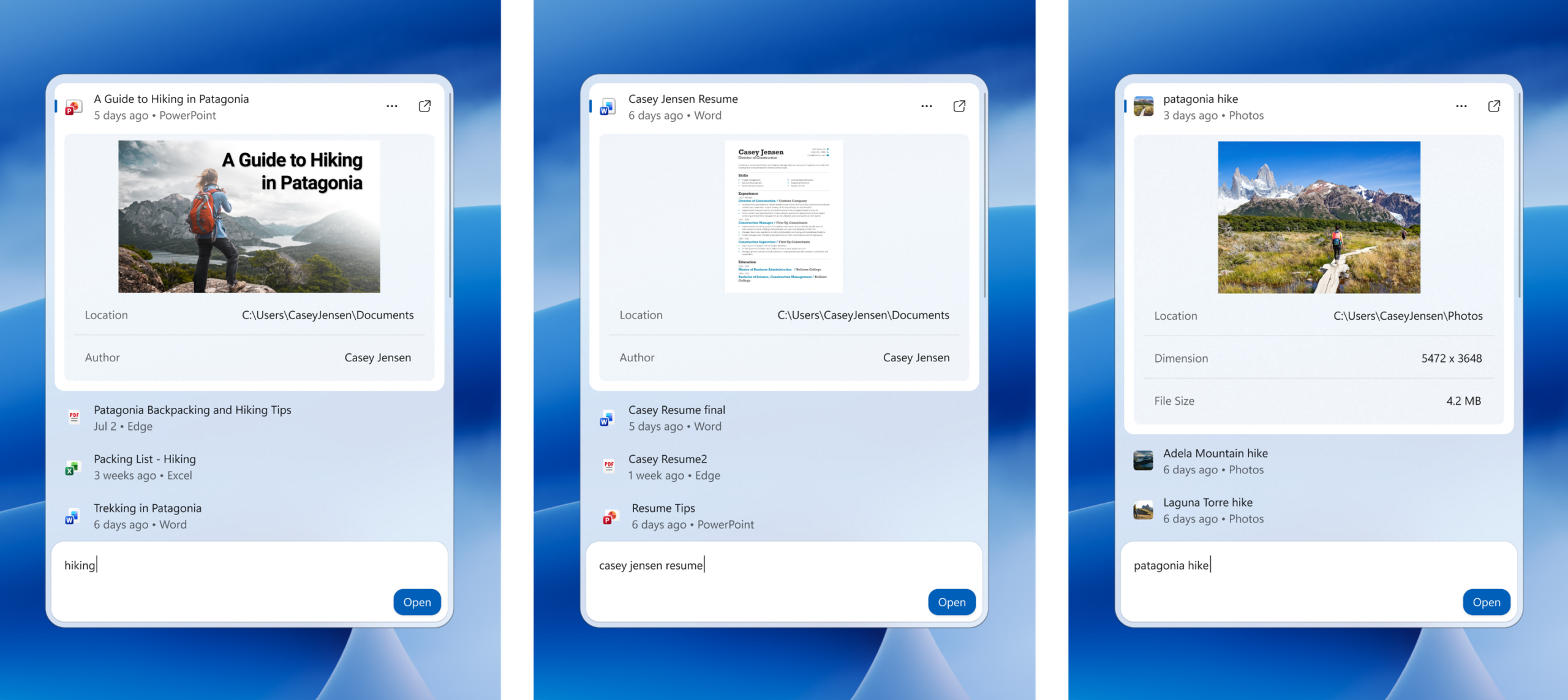
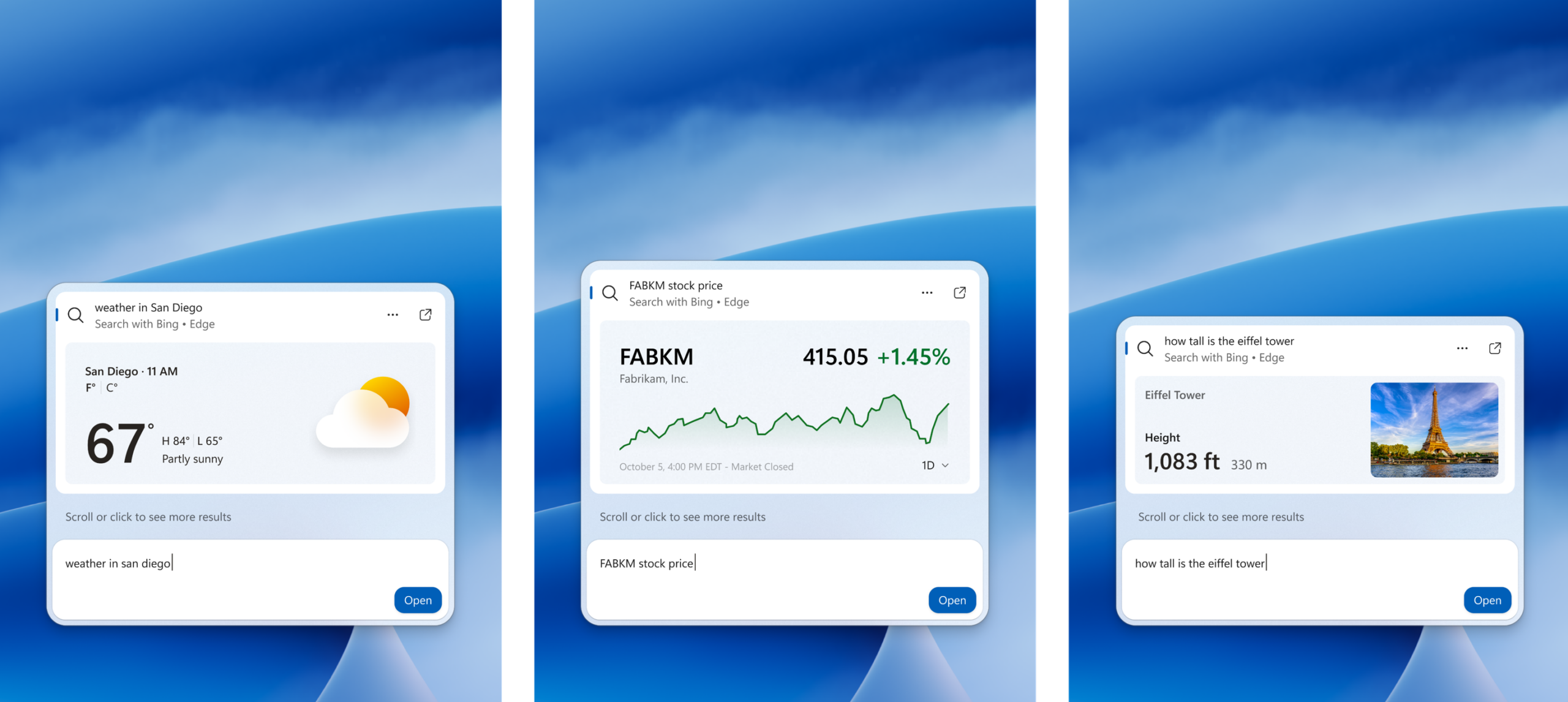
Hello Windows Insiders, Search is one of the most familiar ways to get around a Windows PC. It is how you may open an app, find a file, change a setting, or simply look for information. As Insiders, you have also been clear about what you expect from it: search should be fast, focused, and help you find what you need without friction. In July, we shared how we are improving the Windows Search Box with less clutter and more control. We introduced a calmer home screen, removed promotional content from web results, and gave you more choice over whether web and Microsoft Store suggestions appear. Today, we’re carrying those investments forward with a new Windows Search experience built on WinUI 3. This modern foundation makes Windows Search faster and more efficient with resources, while delivering an even more streamlined and focused design. [caption id="attachment_179190" align="aligncenter" width="2560"]Screenshot of the new Windows Search experience Windows Search showing recent files, apps, settings, and an inline action to turn on do not disturb[/caption] Beginning 10/7, we’re rolling out this new experience on the taskbar for Windows Insiders. We are sharing this version early and intentionally so your feedback can help us fine-tune the experience, improve result relevance, identify stability issues across real-world hardware and workflows, and shape the UX before we expand the preview. Below, we’ll share what you can try today in the Experimental channel, what’s coming later this year, and what we’re building toward in the year ahead. First, this new Windows Search experience is built for speed. It’s built on WinUI 3 and is part of our broader investment in modernizing our core Windows experiences. Early testing shows substantial improvements in performance and memory usage, so it feels faster and more efficient from the moment you open it. Next, we’ve streamlined the UI into a single list to make it easier to scan and focus on what matters. Data shows that nearly all clicks in the current UX come from the results list on the left, rather than the large preview pane on the right. Informed by this behavior and your feedback, the new design brings results together in a single, easy-to-scan view that reduces visual clutter and puts the information you need in one place. We’re also improving how Windows Search understands what you’re looking for, including better matching for typos and synonyms. We’ll continue fine-tuning these improvements over the coming weeks. Later this year, inline previews and richer file details will make it easier to differentiate similar results and give you more context before opening a file. [caption id="attachment_179199" align="aligncenter" width="2560"]Screenshots of inline previews of documents and photos Windows Search showing inline previews for a PowerPoint presentation, a Word document, and a photo directly in search results[/caption] Rich inline web previews will bring answers to queries like “weather in San Diego” or “How tall is the Eiffel Tower?” directly into Windows Search, helping you get useful information without leaving the experience. [caption id="attachment_179201" align="aligncenter" width="2560"]Screenshots of rich inline web previews Windows Search showing rich web previews for weather in San Diego, a stock price, and the height of the Eiffel Tower[/caption] You’ll also be able to narrow results with filters when exploring a category like files. These are experiences you may already be familiar with today but will be brought together in a more streamlined, single-pane layout. Lastly, we are expanding what search can help you accomplish. Search has always been about quickly helping you find what you need, and we’re turning Windows Search into a more capable starting point for getting things done in Windows with inline actions.

Actions: From finding to doing

We’re introducing inline actions to help you finish tasks right where you started, without opening another app or navigating through additional screens. We’re starting with familiar tasks where saving a few steps can make a meaningful difference in everyday use. Here are a few things to try:
  • Turn something on or off. Try phrases such as “switch to dark mode," “turn on night light,” or “turn on Bluetooth.”
  • Make a quick adjustment. Try “dim my screen” or “mute.”
  • Manage your workspace. Try “minimize all my windows,” or “arrange windows on screen.”
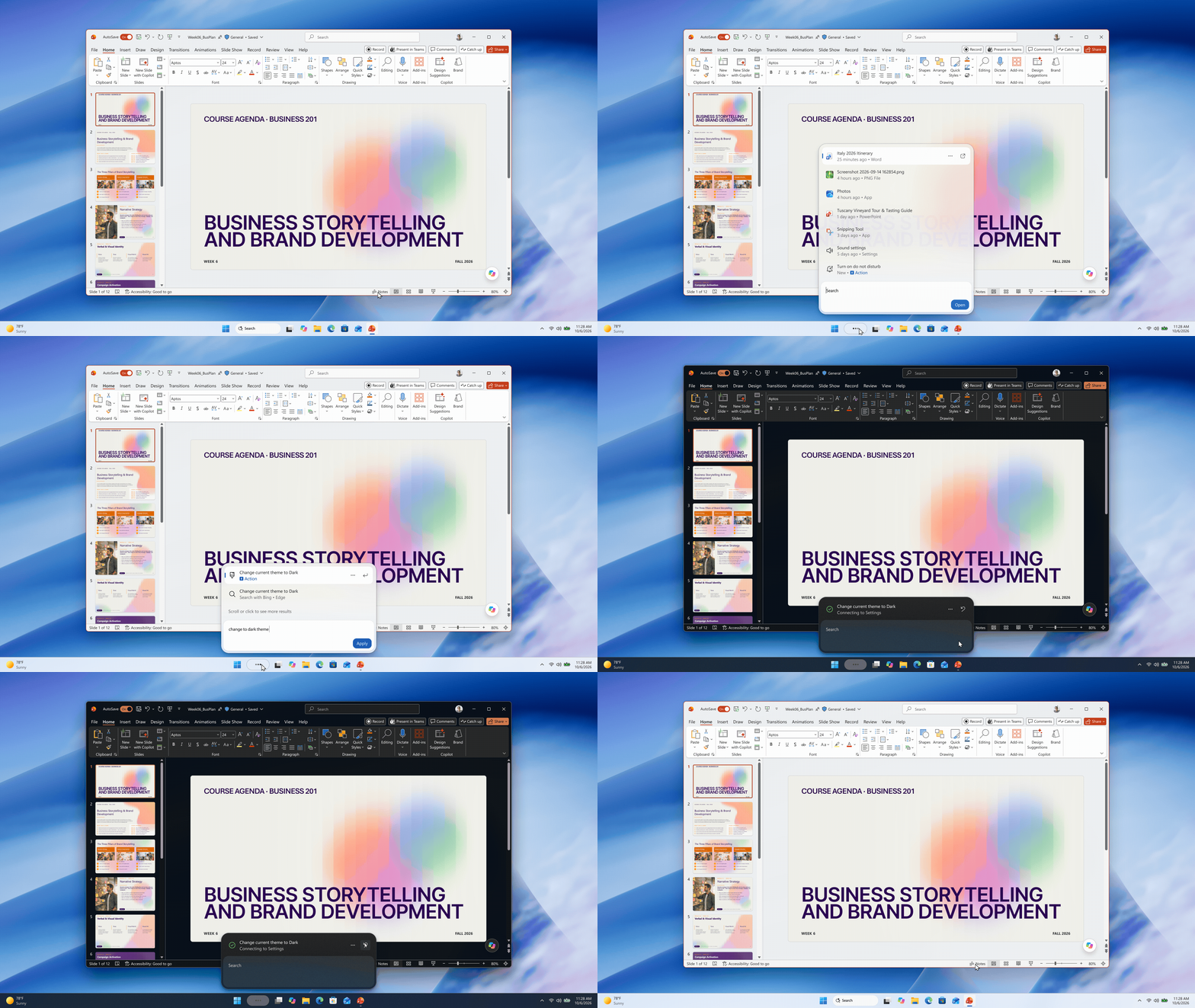
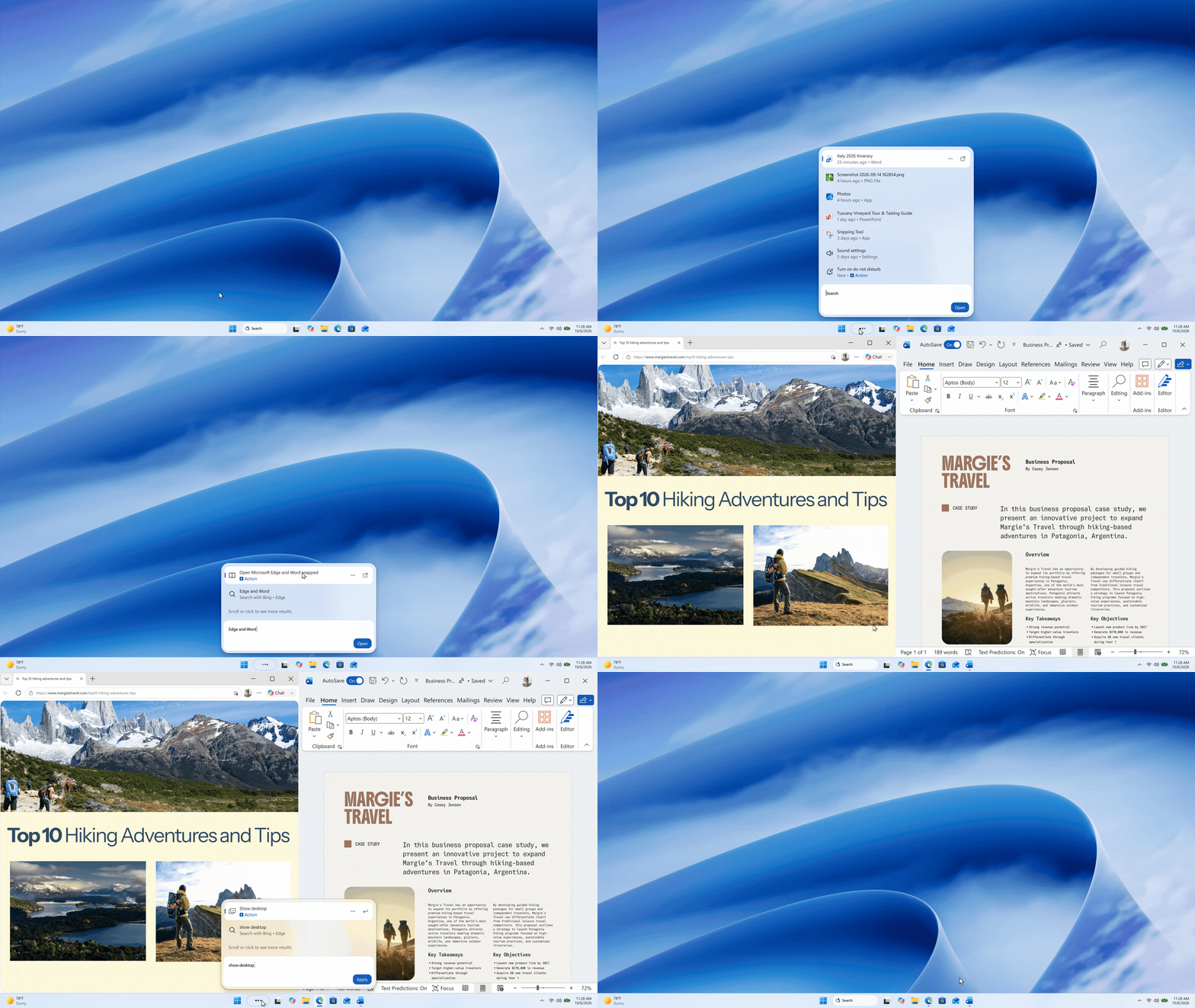
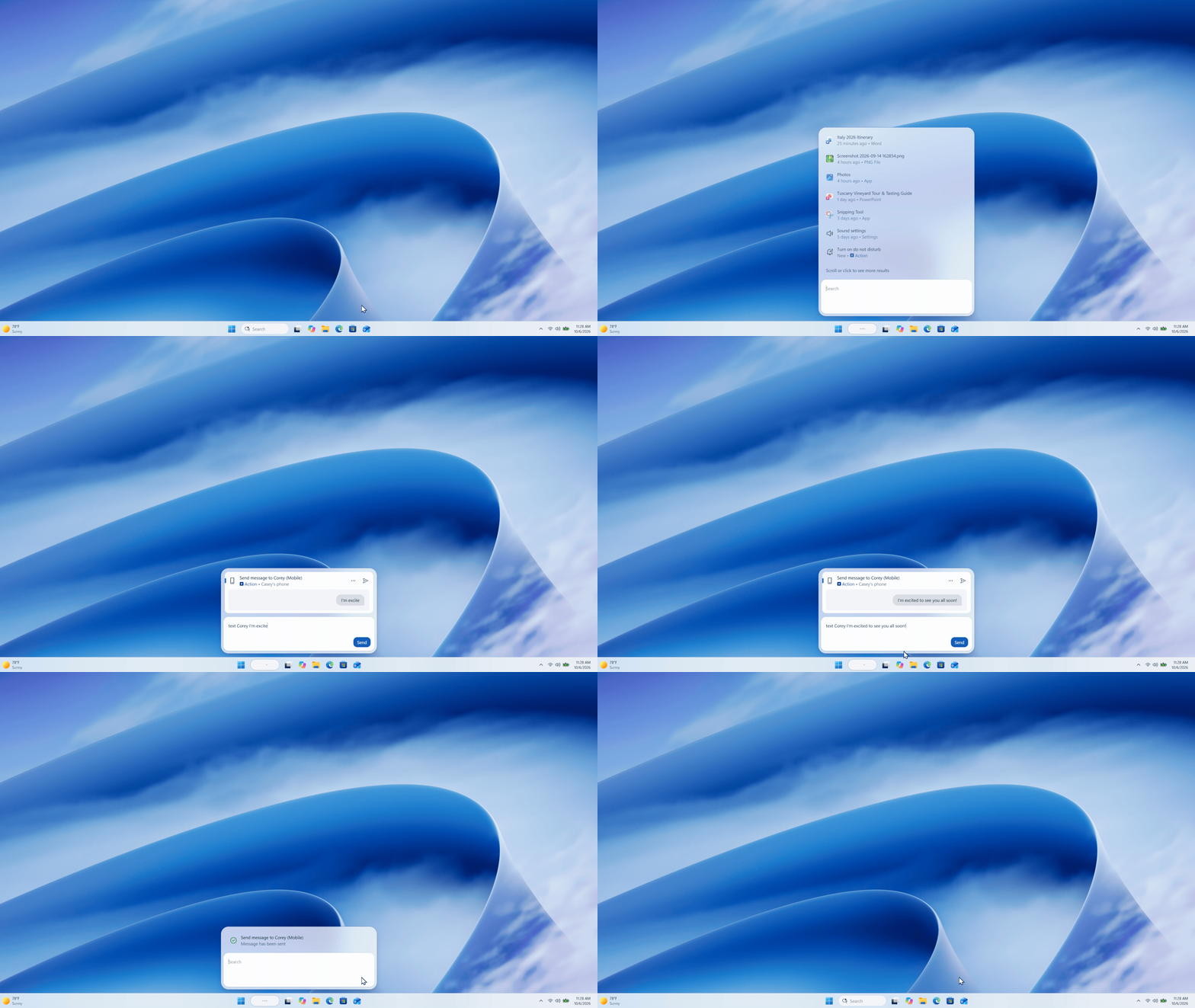
[caption id="attachment_179195" align="aligncenter" width="1920"]GIF showing dark mode being enabled form the new search experience Windows Search demonstrating an inline action to change the system theme to dark mode.[/caption] [caption id="attachment_179228" align="aligncenter" width="1920"]Windows Search demonstrating an inline action to snap Edge and Word Windows Search demonstrating an inline action to snap Edge and Word[/caption] Coming soon, you’ll also see phone actions to complete quick tasks with your Phone Link connected device. [caption id="attachment_179197" align="aligncenter" width="1920"]GIF showing phone actions in the new Search experience Windows Search demonstrating an inline action to send a text on a Phone Link connected device[/caption] We’re starting with the actions people rely on most and will continue building on that foundation over time. Every piece of feedback helps us improve how search understands intent and expand the range of tasks you can complete directly from Windows Search.

What's ahead

Looking to next year, work is already underway to bring the new Windows Search experience to the Start menu and have it adapt naturally to different taskbar positions and Windows configurations. In our initial previews, you’ll continue to see the existing search experience when searching from the Start menu while we learn and refine the new experience with your feedback. Our goal is to make Windows Search more capable, with more natural ways to express what you need, richer information in context, and more ways to get things done directly from search – including thoughtful integrations with experiences like Copilot. Together, these improvements will help reduce the distance between finding something and getting it done, while preserving the speed and familiarity you expect today.

Try the new Windows Search and give us feedback

This search experience with inline actions is gradually rolling out to Windows Insiders starting today in the Experimental channel, with English as the supported language for this initial release. If you’d like to preview it sooner, you can also enable this experience in Settings > Windows Update > Windows Insider Program > Feature flags. After upgrading to build 26340.9616 in the Experimental channel, or build 28120.3181 in the Experimental (26H1) channel, you’ll need to click the "Check for updates" button in Windows Update, and restart your device before the ‘New Windows Search Experience’ feature flag is visible. If you are moving a device to a Windows Insider build for the first time, please see Get started with the Windows Insider Program - Windows Insider Program | Microsoft Learn. Share your feedback in Feedback Hub (WIN + F) under Desktop Environment > Search. Your feedback will help us tune the experience and shape what comes next. Anshul
  •  

Get AirPods Pro 3 for $179, Apple Watch for $199, and More Before Prime Day Ends Today

7 Oktober 2026 om 19:55
Amazon Prime Big Deal Days is coming to a close later today, so we're quickly recapping all of the best Apple and Apple-related deals that are still live on Amazon right now. Since many of these products have been on sale for a few days, shipping may be delayed, but they're all at some of the lowest prices we've ever seen.

Note: MacRumors is an affiliate partner with some of these vendors. When you click a link and make a purchase, we may receive a small payment, which helps us keep the site running.

Amazon Prime Day requires you to have an Amazon Prime membership to take advantage of the discounts. Amazon Prime costs $14.99 per month or $139.00 per year, and it comes with a 30-day free trial for new subscribers.

AirPods


The best AirPods discount so far this Prime Day is on the AirPods Pro 3, available for the record low price of $179.00, down from $249.00. We haven't seen a deal this good since over the summer, during the first Prime Day event in June.


Apple Watch


Rare deals have hit the Apple Watch SE 3 for Prime Big Deal Days, with prices now starting at $199.00 for the 40mm GPS model and increasing to $229.00 for the 44mm GPS model. Both of these are $50 discounts and matches for the record low prices on each device.


For the Apple Watch Series 12, you can get the 42mm GPS model for $349.99 and the 46mm GPS model for $399.99, both of which are $49 discounts and new all-time low prices. Both of these models have two colors available at these all-time low prices, and you'll find a few cellular options on sale as well.


Mac Mini and Mac Studio


One of the best deals this Prime Day is on the M5 Max Mac Studio with 36GB RAM and a 512GB SSD, on sale for $2,299.99, down from $2,499.00. Regarding the Mac mini, you can get the 16GB RAM/256GB SSD Mac mini for $779.99, down from $899.00, and the 16GB RAM/512GB SSD model for $949.99, down from $1,099.00.


MacBook Air


Amazon is taking $200 off nearly every M5 MacBook Air model for Prime Big Deal Days, including both 13-inch and 15-inch models. These are the best prices we've seen on the M5 MacBook Air in the wake of Apple's summertime price hikes.

In terms of 13-inch models, Amazon has the 16GB/512GB 13-inch MacBook Air for $1,099.00, down from $1,299.00. This one is available in three colors on Amazon, and it's accompanied by the 16GB/1TB and 24GB/1TB model for $200 off as well.


For the 15-inch M5 MacBook Air models, prices start with the 16GB/512GB model for $1,299.00, down from $1,499.00. You can also get the 16GB/1TB model for $1,599.00, down from $1,799.00, all $200 off and the best prices we've seen in months.


MacBook Pro


Amazon is taking a giant $600 off the 36GB/2TB 14-inch M5 Max MacBook Pro, now priced at $3,499.00. This is the steepest discount on the 14-inch models right now, but you'll also find a few entry-level options on sale below.


In terms of the larger display models, we're tracking big discounts on all four models on Amazon. These start at $2,749.00 for the 24GB/1TB M5 Pro configuration ($250 off), and reach up to $4,499.00 for the 48GB/2TB M5 Max device ($500 off).


M4 iPad Air


Amazon this week has multiple discounts on the M4 iPad Air, providing up to $149 off these 2026 models. These remain the best prices we've seen in the wake of Apple's summer price hikes, and many deals are being matched at Best Buy.


The new iPad Air features the M4 chip, C1X modem, and N1 networking chip, which brings support for Wi-Fi 7 and Bluetooth 6. In terms of design, the 2026 models are identical to the 2025 iPad Air tablets, with an edge-to-edge display, slim bezels, and aluminum chassis.

11-inch M4 iPad Air


13-inch M4 iPad Air


iPad Mini 7


Amazon has low prices on every Wi-Fi model of the iPad mini 7, starting at $499.00 for the 128GB Wi-Fi tablet, down from $599.00. You'll also find a few deals on cellular models during this Prime Day sale.


If you're on the hunt for more discounts, be sure to visit our Apple Deals roundup where we recap the best Apple-related bargains of the past week.


Deals Newsletter


Interested in hearing more about the best deals you can find as we head into the holidays? You can sign up for our Deals Newsletter and we'll keep you updated so you don't miss the biggest deals of the season!


Related Roundup: Apple Deals

This article, "Get AirPods Pro 3 for $179, Apple Watch for $199, and More Before Prime Day Ends Today" first appeared on MacRumors.com

Discuss this article in our forums

  •  

Manchester's Bee Card Now Fully Supported in Apple Wallet

7 Oktober 2026 om 18:21
In August, Transport for Greater Manchester announced that the Bee Card could be added to the Apple Wallet app on the iPhone and Apple Watch, but it was limited to younger riders using free or discounted "Our Pass" tickets. As of this Tuesday, though, the Bee Card is now fully supported in Apple Wallet for all types of Bee Network tickets.


To add the card to Apple Wallet, open the app, tap on the plus sign in the top-right corner, select "Travel Card" (may appear as "Transit Card" for some users), scroll down to the United Kingdom section, and choose Bee Network.

Once the card has been added, you can buy bus and tram tickets directly in Apple Wallet and store them on the virtual Bee Card. Then, when traveling on the Bee Network in Greater Manchester, you can simply tap your iPhone or Apple Watch on a card reader to pay for your fare. If you enable Express Mode, there is no need to wake or unlock the iPhone or Apple Watch when holding it near the card reader.

iOS 27 is required to add the Bee Card to Apple Wallet.
This article, "Manchester's Bee Card Now Fully Supported in Apple Wallet" first appeared on MacRumors.com

Discuss this article in our forums

  •  

You Can Get Up to $149 Off Every New Mac Mini During Prime Day

7 Oktober 2026 om 17:34
Prime Big Deal Days sales have hit Apple's brand new Mac mini and Mac Studio computers, and we're tracking up to $149 off every model of the M6 and M5 Pro Mac mini during this year's event. You'll also find $199 off the M5 Max Mac Studio below.

Note: MacRumors is an affiliate partner with some of these vendors. When you click a link and make a purchase, we may receive a small payment, which helps us keep the site running.

One of the best deals is on the M5 Max Mac Studio with 36GB RAM and a 512GB SSD, on sale for $2,299.99, down from $2,499.00. Regarding the Mac mini, you can get the 16GB RAM/256GB SSD Mac mini for $779.99 ($119 off), the 16GB RAM/512GB SSD model for $949.99 ($149 off), and similar savings on every other model.


For more of the best Prime Big Deal Days discounts, be sure to check out our main article with sales on Apple Watch, AirPods, and more. If you're on the hunt for more discounts, be sure to visit our Apple Deals roundup where we recap the best Apple-related bargains of the past week.


Deals Newsletter


Interested in hearing more about the best deals you can find in 2026? Sign up for our Deals Newsletter and we'll keep you updated so you don't miss the biggest deals of the season!


Related Roundup: Apple Deals

This article, "You Can Get Up to $149 Off Every New Mac Mini During Prime Day" first appeared on MacRumors.com

Discuss this article in our forums

  •  

The Best Anker Prime Day Deals: Score Big on MagSafe Chargers and More

7 Oktober 2026 om 17:04
Anker's Prime 3-in-1 Wireless Charging Station has dropped to $94.74 on Amazon during Prime Big Deal Days, down from $149.99. This is a new all-time low price that beats the previous low by about $5, and it's accompanied by dozens of other Anker discounts this Prime Day.

Note: MacRumors is an affiliate partner with some of these vendors. When you click a link and make a purchase, we may receive a small payment, which helps us keep the site running.

The Prime 3-in-1 Wireless Charging Station features Qi2.2 support, which lets a compatible MagSafe ‌iPhone‌ charge at up to 25W. It's the same speed as Apple's ‌MagSafe‌ charger, and it is 10W faster than the standard Qi2 ‌MagSafe‌ chargers. You can also simultaneously charge an Apple Watch and AirPods with the device.


Below you'll find a list of the best Anker discounts on Amazon this week, also including wall chargers, portable batteries, and more. Highlights include the Anker Nano Smart Display Charger for $25.99 ($14 off) and the Anker Prime TB5 Docking Station for $309.99 ($90 off). You can also get a screen protector for your new iPhone 18 Pro and iPhone 18 Pro Max for $19.99 ($10 off).

Wall Chargers


Wireless Chargers


Portable Chargers


Portable Power Stations


Hubs


If you're on the hunt for more discounts, be sure to visit our Apple Deals roundup where we recap the best Apple-related bargains of the past week.


Deals Newsletter


Interested in hearing more about the best deals you can find in 2026? Sign up for our Deals Newsletter and we'll keep you updated so you don't miss the biggest deals of the season!


Related Roundup: Apple Deals

This article, "The Best Anker Prime Day Deals: Score Big on MagSafe Chargers and More" first appeared on MacRumors.com

Discuss this article in our forums

  •  

Best Buy Takes $260 Off All iPhone Air Models During Techtober Sale

7 Oktober 2026 om 17:00
Best Buy today is offering customers a chance to get $260 off every model of the iPhone Air during its "Techtober" event. This is a match of the record low prices we saw during Best Buy's Black Friday in July event.

Note: MacRumors is an affiliate partner with Best Buy. When you click a link and make a purchase, we may receive a small payment, which helps us keep the site running.

You can get the 256GB iPhone Air for $839.99 ($260 off), and this is an unlocked model available in all colors. The retailer is also offering the 512GB model for $1,039.99, another $260 discount.


Additionally, Amazon is back with an all-time low price on the iPhone Air MagSafe Battery, available for $59.00, down from $99.00.


The iPhone Air MagSafe Battery is only compatible with the iPhone Air, and it can add up to 65 percent additional charge to the smartphone. The MagSafe Battery supports up to 12W of fast wireless charging, and it sports a thin and light design similar to the iPhone Air.

If you're on the hunt for more discounts, be sure to visit our Apple Deals roundup where we recap the best Apple-related bargains of the past week.


Deals Newsletter


Interested in hearing more about the best deals you can find in 2026? Sign up for our Deals Newsletter and we'll keep you updated so you don't miss the biggest deals of the season!


Related Roundup: Apple Deals

This article, "Best Buy Takes $260 Off All iPhone Air Models During Techtober Sale" first appeared on MacRumors.com

Discuss this article in our forums

  •  

12 New Things to Expect From Apple in October

7 Oktober 2026 om 16:40
October is about to become a very busy month for Apple, with the company set to release the iPhone Duo, both iOS 27.1 and iOS 27.2, and a new Mac Studio configuration with 512GB of RAM. In addition, up to seven more Apple products may be unveiled this month, including an all-new smart home hub, a new Apple TV 4K, a new HomePod mini, an iPad mini with an OLED display, MacBook Pro models with OLED displays, and more.


Below, we have outlined 12 new things to expect from Apple in October. This article was published previously and updated today to reflect the latest rumors.

Confirmed


Rumored


The following three devices will be unveiled on Tuesday, October 13, according to a report from Bloomberg's Mark Gurman:
  • Home hub: An all-new Apple smart home hub featuring Siri AI, a 6-inch to 7-inch square display, an A18 chip or newer for Apple Intelligence, FaceTime, and more. A new operating system will feature clock faces, widgets, and more. There will be a tabletop version with a speaker base and a wall-mounted version.

    ↳ homeOS: Apple's smart home hub is expected to run an all-new operating system that may be named homeOS, according to trademark filings.


  • Apple TV 4K (4th Generation): A19 or A19 Pro chip, an increased 8GB to 12GB of RAM for Apple Intelligence and Siri AI support, an Apple-designed N1 chip with Wi-Fi 7 support, and an updated Siri Remote. A leak revealed the new Apple TV will look the same as the existing model.

  • HomePod mini 2: Newer chip, Siri AI support, improved sound quality, Apple's N1 chip with Wi-Fi 7 support, a second-generation Ultra Wideband chip, and new color options, including pink and green. No major design changes.
Apple is planning to unveil a second set of new products in the final week of October, according to MacRumors sources. While we do not know exactly which products are coming at this time, it is likely that the following Macs will be announced:A new iPad mini is also expected at some point in October:Apple has yet to announce an October event. When it held a "Scary Fast" event on October 30, 2023, Apple sent out invites six days prior, on October 24. Today is six days before the October 13 date that Apple reportedly plans to unveil an all-new home hub, so we shall see if history repeats itself and invites go out today.

If there are no October events planned, then expect press releases on the Apple Newsroom website, along with shorter per-product YouTube videos and hands-on gatherings for selected journalists and content creators.
This article, "12 New Things to Expect From Apple in October" first appeared on MacRumors.com

Discuss this article in our forums

  •  

Steinar H. Gunderson: Decompilation patterns, part 4: range comparison

7 Oktober 2026 om 16:30

Today, we're looking at a rewrite that rarely differs for matching, but can mean quite a lot for understanding the code. Say that you have a signed variable and the compiler has suddenly decided to make an unsigned comparison:

    if ((u32) (x - 4) < 2) {

What's happening is that it uses a controlled overflow to do two signed comparisons using one unsigned comparison. How does this work?

Since the comparison is unsigned, this is trivially equivalent to the first expression:

    if ((u32) (x - 4) >= 0 && (u32) (x - 4) < 2) {

and since negative numbers compare larger than 6 in unsigned comparisons, nothing prevents us from adding 4 on each side of the inequality signs:

    if ((u32) (x) >= 4 && (u32) (x) < 6) {

which is, for the same reason, equivalent to:

    if (x >= 4 && x < 6) {

which is what you probably should be writing.

  •  

Prime Day Offers Best TV Prices of the Year From Samsung, Sony, and More

7 Oktober 2026 om 16:06
Prime Big Deal Days is in full swing this week, offering massive savings on everything from AirPods to MacBook Pro and much more. We've been keeping an eye on these Apple-related Prime Day discounts all week, but now we're also tracking great sales on other categories, including TVs.

Note: MacRumors is an affiliate partner with Amazon. When you click a link and make a purchase, we may receive a small payment, which helps us keep the site running.

Below we've collected some of the best TV deals you can find during Prime Day, including those from Samsung, Sony, Hisense, LG, Panasonic, Toshiba, and more. Shoppers should remember that Prime Day sales are typically time sensitive, so purchase quickly if you're interested.


There are a few rival Prime Day TV discount events this year as well, including Sony's own fall sale. During this event, you can get the 65-inch BRAVIA II Google TV for $1,799.99, down from $2,599.99. You'll also find Sony's popular noise-canceling headphones and more on sale at their best prices ever this week.

Shoppers should note that many sales during Amazon Prime Day require you to have an Amazon Prime membership to take advantage of the discounts. Amazon Prime costs $14.99 per month or $139.00 per year, and it comes with a 30-day free trial for new subscribers.

50-Inch TVs


60-Inch TVs


70-Inch TVs


80-Inch+ TVs


If you're on the hunt for more discounts, be sure to visit our Apple Deals roundup where we recap the best Apple-related bargains of the past week.


Deals Newsletter


Interested in hearing more about the best deals you can find as we head into the holidays? You can sign up for our Deals Newsletter and we'll keep you updated so you don't miss the biggest deals of the season!


Related Roundup: Apple Deals

This article, "Prime Day Offers Best TV Prices of the Year From Samsung, Sony, and More" first appeared on MacRumors.com

Discuss this article in our forums

  •  

First Look at LG's Smart Home Products Made With Apple

7 Oktober 2026 om 15:26
FCC filings reveal the designs of three upcoming LG smart home accessories that Apple reportedly helped develop, including a thermostat, a temperature sensor, and a deadbolt lock.


Yesterday, Bloomberg reported that Apple is working with LG Electronics on accessories for its upcoming home hub and other home products, citing regulatory documents without sharing the filings. FCC records MacRumors found contain label-placement drawings, three-dimensional renderings, and technical reports, providing a first look at the products' housings and additional details about their capabilities.

The smart thermostat, model TMCTAW5W, has a round, puck-like body with a raised edge. The drawing shows its back, with a small socket near the center and two round bumps near the bottom. Its specifications list a 24-volt AC power supply.


The Matter logo and QR setup code sit in the middle of the back, with regulatory text printed in a circle around them. A separate drawing shows the wiring connections arranged in two curved rows, with one on each side. LG's logo appears in the printing instructions.

The thermostat supports 2.4 GHz and 5 GHz Wi-Fi, Bluetooth, and Thread. A dedicated radio test report also confirms a built-in 60 GHz radar. This could enable presence or approach detection.

According to the leaker known as "pdfu," the thermostat offers a "Far Sight Display" setting, an option to display humidity, and controls for screen brightness and language. The leaker also lists temperature calibration and temperature offset settings, allowing users to adjust its temperature readings.

The temperature sensor, model TMST2A6W, is also round and runs on a 3-volt CR2477 coin battery. On its back, the product name, model number, and manufacturing information curve around the outer edge.

The middle contains the Matter setup code on the left, a battery warning symbol in the center, and a UL certification mark on the right. Its test report confirms Bluetooth Low Energy and Thread connectivity.


The temperature sensor measures both temperature and humidity, according to pdfu. Its magnetic back allows it to attach directly to metal surfaces, while an included metal plate with adhesive enables mounting on other surfaces. The sensor's battery is replaceable, and it provides alerts when a replacement is needed.

The smart deadbolt lock has a tall interior unit with straight sides and curved top and bottom ends. The filings reveal Graphite and Silver versions of the device, with model numbers TMCDD15G and TMCDD15S, respectively.

It runs on four AA batteries, which sit vertically side by side in a compartment in the upper half. Below them, a large, rotating circular section takes up almost the full width of the lower half. The Matter setup code and regulatory text sit above the battery compartment, near the top of the unit.


The lock supports Bluetooth, Thread, near-field communication, and ultra wideband (UWB). An accompanying FCC order explains that it first verifies a compatible device's access credentials over Bluetooth, then uses UWB to determine its position before granting access. This provides more detail about the proximity-based automatic unlocking described in yesterday's report.

According to pdfu, the lock's keypad rotates open, with an included swivel pin allowing movement to be restricted on one side to prevent it from hitting a nearby wall. Its settings include controls for the touchpad's light ring, a "Door Left Audio Alarm," and lock sound volume. The lock also reportedly supports automatic unlocking, tap to unlock, emergency power, and master codes, comes with two mechanical keys, and fits 2.375-inch (60.3 mm) and 2.75-inch (69.9 mm) brackets.

2. LG Smart Thermostat

• Settings for Far Sight Display, Humidity Display, Brightness, Language.
• Calibrated Temperature/Temperature Offset options. https://t.co/Q8AAaxy4ey

— pdfu (@itspdfu) October 7, 2026


Apple is not identified in the documents; its involvement is known about because of Bloomberg's report. Labels also refer to Hyundai HT Global's factory in Vietnam.

The three devices are part of a broader seven-product lineup that reportedly also includes a wired video doorbell, indoor security camera, outdoor security camera, and floodlight camera. LG will sell the accessories under its own brand, with Apple reportedly helping to shape their designs, features, and engineering. The arrangement would allow Apple to easily expand its home ecosystem while LG handles production and support.

Apple and LG have collaborated before, including on UltraFine 4K and 5K displays designed for Macs. LG also expanded its smart home business in 2024 by acquiring an 80% stake in Athom, the company behind the Homey smart home platform.

Apple is reportedly preparing an aggressive expansion into the smart home market, with a new home hub, Apple TV 4K, and HomePod mini expected on October 13. Its longer-term plans also include a higher-end home hub with a display mounted on a robotic arm. Apple is separately developing its own AI-powered home security camera and sensor, which remains distinct from LG's accessories and is still expected in 2027.
This article, "First Look at LG's Smart Home Products Made With Apple" first appeared on MacRumors.com

Discuss this article in our forums

  •  

Apple Drops Intel Macs From Magic Mouse/Trackpad Compatibility Lists

7 Oktober 2026 om 15:06
Apple updated its Magic Mouse and Magic Trackpad product pages around August 25 to drop all Intel-based Macs from the compatibility lists for the accessories, and this week it updated some related tech specs pages to reflect these changes.

Given the Magic Mouse and Magic Trackpad still work with Intel Macs, it is unclear why the accessories are now considered to be compatible with Apple silicon Macs only. Apple has yet to respond to our requests for comment.
This article, "Apple Drops Intel Macs From Magic Mouse/Trackpad Compatibility Lists" first appeared on MacRumors.com

Discuss this article in our forums

  •  

Apple Watch Ultra 3 and Ultra 4 See Record Discounts During Prime Day

7 Oktober 2026 om 14:57
Amazon has knocked the price of the previous generation Apple Watch Ultra 3 down to $599.97 for Prime Big Deal Days, from $799.00. This $199 markdown is available in the Natural color with Anchor Blue Ocean Band, and it's accompanied by a Milanese Loop model at all-time low price as well.

Note: MacRumors is an affiliate partner with some of these vendors. When you click a link and make a purchase, we may receive a small payment, which helps us keep the site running.

You can get the Black Apple Watch Ultra 3 with Black Milanese Loop (Large) on sale for $699.97 today on Amazon, down from $899.00. Both of these models have free delivery estimates around October 9 if ordered today.


These Ultra 3 deals arrive in the wake of the recent launch of the Apple Watch Ultra 4, which does have a few discounts during Prime Big Deal Days as well. You can get both the Natural and Black colors for $774.99 in several band options, down from $799.00. This is a new record low price on the Ultra 4, beating the previous low by about $5.


If you're on the hunt for more discounts, be sure to visit our Apple Deals roundup where we recap the best Apple-related bargains of the past week.


Deals Newsletter


Interested in hearing more about the best deals you can find as we head into the holidays? You can sign up for our Deals Newsletter and we'll keep you updated so you don't miss the biggest deals of the season!


Related Roundup: Apple Deals

This article, "Apple Watch Ultra 3 and Ultra 4 See Record Discounts During Prime Day" first appeared on MacRumors.com

Discuss this article in our forums

  •  

Kentaro Hayashi: Testing Japanese IMEs on virtual desktops with virt-japanese-desktop

7 Oktober 2026 om 14:47

Japanese input method editors (IMEs) such as Mozc are essential for typing Japanese (yes, skk, anthy and more, but it's out-of-scope in this article). Testing them is a surprisingly fiddly job: an IME behaves differently depending on the desktop environment (GNOME, KDE, Xfce, Budgie), the input framework (ibus, fcitx5, uim), and the Wayland or X11 session. Setting up a fresh VM for every combination from scratch is slow and repetitive, and breaking your host's environment while experimenting is no fun.

virt-japanese-desktop is a small set of toy scripts that solves exactly this problem. It builds ready-to-use virtual machines - each with a desktop environment and a Japanese IME already installed and configured - so you can start typing Japanese within a minute of booting, and throw the whole thing away without any impact on your host.

What it gives you

A single make command produces a qcow2 image that combines one of four desktops with one of three IMEs:

ibus-mozc fcitx5-mozc uim-mozc
GNOME ✓ ✓ ✓
KDE ✓ ✓ ✓
Xfce ✓ ✓ ✓
Budgie ✓ ✓ ✗

The one gap - uim on Budgie - is a real technical limitation, not an oversight: Budgie runs the labwc compositor, which implements zwp_input_method_v2, while uim-wayland only speaks the older zwp_input_method_v1 (KWin/Weston). On Budgie you use ibus-mozc or fcitx5-mozc instead.

All images come with the Japanese locale, fonts, and the Asia/Tokyo time zone pre-configured, plus the SSH key of your choice. Input switching is wired up out of the box: Ctrl + Space or Shift + Space for your IMEs to enable it.

The layered-image trick

The core idea is that the images are stacked qcow2 overlay layers, one on top of another:

debian-sid-nocloud-amd64-daily.qcow2     ... base image you download
└─ unstable-japanese-template.qcow2      ... locale, fonts, user, SSH
   └─ unstable-<DE>-template.qcow2       ... a desktop environment
      └─ unstable-<DE>-<IME>.qcow2       ... desktop + IME, configured
         └─ unstable-<DE>-<IME>.workspace.qcow2 ... the image you test in

This makes both building and resetting fast. The first build downloads and customizes the base image and takes a while, but every later step only adds a thin overlay. When a test breaks the VM, you do not rebuild anything - you simply delete the top workspace layer and recreate it. That is all it takes to return to a pristine state:

rm /tmp/unstable-gnome-ibus-mozc.workspace.qcow2
make gnome-ibus-mozc

The images reference their backing files by relative path, so you can move an entire stack anywhere you like as long as the images stay together.

A platform for experimenting with bleeding-edge IMEs

The base system is Debian unstable (sid), and the experimental repository is already added. That makes the project a convenient platform for testing not just the IME packages in sid but also the ones still being developed in experimental - exactly what the project was built for.

The keyboard layout of the VM follows the layout of your host (read from /etc/default/keyboard, with a fallback chain to localectl and finally us).

Quick start

# 1. Install the tools (Debian/Ubuntu example)
sudo apt install qemu-utils libguestfs-tools virt-install curl

# 2. Save your SSH public key
curl --location https://github.com/USERNAME.keys --output pubkey.pub

# 3. Download the base Debian sid image
make download

# 4. Build a desktop + IME (first build takes a while)
make gnome-ibus-mozc

# 5. Start it as a VM (needs the libvirt daemon, qemu:///system)
./scripts/make-virsh-image.sh virt-gnome-ibus-mozc /tmp/unstable-gnome-ibus-mozc.workspace.qcow2

Log in as debian (password debian) and press Ctrl + Space (Shift + Space) to start typing Japanese. The VM is registered in libvirt, so you can manage it with virsh or virt-manager - handy for opening the SPICE console or restarting the machine after a test.

Status

The project is still in the proof-of-concept phase, and it is developed mainly to test Mozc and other IMEs across desktops and input frameworks.

If you regularly test Japanese IMEs - give it a try.

  •  

Apple Reportedly Waiting on Samsung for Ultimate Bezel-Free iPhone Display

7 Oktober 2026 om 14:20
Apple is waiting on Samsung to perfect a next-generation OLED display technology that wraps almost vertically around a phone and essentially makes the sides themselves part of the screen, claims a Chinese leaker.

Xiaomi's 2021 concept phone – bearing a striking resemblance to Samsung's rumored technology

According to the Weibo-based leaker Instant Digital, the technology is internally described by Samsung as a "full-surround, full-screen display." In the design – unlike a curved so-called "waterfall screen" – the main display remains completely flat, while the OLED panel bends sharply downward at close to a 90-degree angle on all four edges and corners.

The idea is that those folded display sections would effectively become the sides of the device and replace the typical metal or plastic frame. Meanwhile, the display wiring and other components usually hidden behind the bezels could also be moved around the edges.

The result – in theory – would be an iPhone that looks almost entirely bezel-free when viewed from the front, with the physical black border around the display reduced virtually to nothing. The technology could also reportedly facilitate an iPhone model without conventional mechanical buttons.

According to the leaker, Apple has been waiting for Samsung to finalize the technology, but there are still challenges to overcome. These are said to include optical distortion and color shifts around the corners, maintaining the OLED's protective encapsulation through extreme bends, and finding suitable locations for antennas when all sides are covered by the display.

Concept design shared by Instant Digital

The technology is quite different from the less-extreme "four-sided quad-curved display" that is rumored for Apple's 20th-anniversary iPhone expected in 2027. Indeed, the leaker suggests that the commemorative iPhone 20 model could be an intermediate step toward this more ambitious design. We'll see.
This article, "Apple Reportedly Waiting on Samsung for Ultimate Bezel-Free iPhone Display" first appeared on MacRumors.com

Discuss this article in our forums

  •  

Apple's Own Home Security Camera Still Coming Next Year

7 Oktober 2026 om 12:35
Apple's home security camera remains in development separately from the LG-made accessories reported yesterday, Bloomberg's Mark Gurman has clarified. In a follow-up post on X, Gurman said the security cameras co-developed with LG are "completely separate" from Apple's privacy-centric home camera and sensor, which he says is still coming next year.

As reported previously, Apple's device will not record video, using AI instead to analyze the home environment and detect which room a person is in. Bloomberg first reported a 2027 home security system and service in September. The LG-branded lineup spans a video doorbell, deadbolt lock, thermostat and indoor and outdoor cameras, and is not expected for at least a few more months.
This article, "Apple's Own Home Security Camera Still Coming Next Year" first appeared on MacRumors.com

Discuss this article in our forums

  •  

Unfolded iPhone Duo Lets You Preview Documents in a Two-Page Layout

7 Oktober 2026 om 12:06
The iPhone Duo's Quick Look feature appears to have a two-page layout option when the foldable is held in its open-book orientation, based on a new finding by code explorer pdfu.


A video clip shared on X shows an Apple Style Guide document previewed across both halves of the unfolded iPhone, with consecutive pages displayed side by side like a spread. When navigating the document, the Quick Look interface displays search, markup, and share controls along the right-hand side.

The layout would make Quick Look the latest feature to take advantage of the Duo's wide-format display. Apple has already detailed how iOS 27 adapts interfaces for the device, including angle-aware layouts and side-by-side multitasking.

Quick Look on iPhone Duo has a new two-page layout in the open book position. https://t.co/gZtSH49rp1

— pdfu (@itspdfu) October 6, 2026


Pre-orders for ‌iPhone Duo‌ open at 5 a.m. Pacific Time on Friday, October 16, with availability beginning Friday, October 23.
Related Roundup: iPhone Duo
Related Forum: iPhone

This article, "Unfolded iPhone Duo Lets You Preview Documents in a Two-Page Layout" first appeared on MacRumors.com

Discuss this article in our forums

  •  

Bits from Debian: Looking for artwork for the next Debian release: Forky

7 Oktober 2026 om 11:00

Each release of Debian has a shiny new theme which is visible on the installer, the boot screen, the login screen and, most prominently, on the desktop wallpaper. It's a very important part of a Debian release as it is usually the first thing new users see when installing or booting the system for the first time. Not only that, but also the first thing appearing when debianites share their screen or connect to an external device when giving talks around the world.

As the most enthusiastic users will know, the forky - yes, that is the name of the next stable version, Debian 14 - release cycle is rapidly approaching its latter stages. This means we need to select the artwork shipping with forky soon, really soon!

And as with everything else in Debian, collecting artwork is a collaborative effort which Debian shares with its community. So, if you would like (or know someone who would like) to create a desktop look and feel that will be seen by trillions of people around the world - and in space! - be sure to send in your artwork ASAP!

The deadline for submissions is: 2026-11-26.

For the most up to date details please refer to the Debian wiki.

At the same time, we would like to thank Elise Couper for creating the Ceratopsian theme for our last trixie release.

And for the interested or the curious ones, the artwork is usually picked based on which theme looks the most:

  • ''Debian'': admittedly not the most defined concept, since everyone has their own take on what Debian means to them. Though, usually they all agree when something looks like Debian.

  • ''Plausible to integrate without patching core software'': as much as we love some of the insanely looking themes, some would require heavy GTK+ theming and patching GDM/GNOME.

  • ''Clean and well designed'': without becoming something that gets annoying to look at a year, or ten, down the road. Examples of good themes include Emerald, Homeworld, Joy, Lines, softWaves and futurePrototype

If you'd like more information or details, please post to the Debian Desktop mailing list.

  •  

Formula 1 Coverage on Apple TV to Get Dolby Atmos Later This Month

7 Oktober 2026 om 10:44
Formula 1 coverage on Apple TV is set to be broadcast in Dolby Atmos beginning later this month.


Starting with the U.S. Grand Prix weekend on Friday, October 23 in Austin, Texas, Formula 1 coverage on Apple TV will be available in Dolby Atmos on supported devices.

Apple says the introduction of Dolby Atmos will create a more immersive presentation designed to put viewers at the center of the race. The Atmos mix will encompass team radio, commentary, engines, on-track battles, and activity in the pit lane.

The combination of Dolby Vision and Dolby Atmos is intended to capture the full audiovisual intensity of Formula 1 and bring viewers closer to the action, according to Apple.

Oliver Schusser – Apple's VP of music, sports, Apple TV and Beats – spoke to The Hollywood Reporter about the new presentation:
"If you are a sports fan today, our viewpoint is that the experience is – I'm going to be polite and say not easy. There really has not been a lot of innovation. We went into sports a couple of years back with the intention to make a difference for the customer, and this is a continuation of that journey."
"The sound is what makes it emotional; it is the sound that guides you through that and builds the tension," said John Couling, senior VP of entertainment for Dolby Laboratories, speaking to THR. "That is what Dolby Atmos will deliver."

The Atmos presentation works on supported Apple devices and compatible Dolby-enabled TVs, soundbars, and home-theater systems.

Last October, Apple and Formula 1 announced a five-year partnership including exclusive streaming rights in the U.S. The partnership allows ‌Apple TV‌ to provide comprehensive coverage of Formula 1, including all practice, qualifying, Sprint sessions, and Grands Prix.
Related Roundup: Apple TV
Buyer's Guide: Apple TV (Don't Buy)

This article, "Formula 1 Coverage on Apple TV to Get Dolby Atmos Later This Month" first appeared on MacRumors.com

Discuss this article in our forums

  •  

LG Making Doorbell, Lock, and Cameras for Apple's Home Hub

6 Oktober 2026 om 23:58
Apple is working with LG Electronics on smart home accessories that will integrate with the upcoming home hub and other Apple home products, reports Bloomberg.


LG is making a wired video doorbell, thermostat, smart deadbolt lock, temperature sensor, indoor security camera, outdoor security camera, and floodlight camera, according to documents LG submitted to the Federal Communications Commission and UL Solutions. Apple is not mentioned in the filings, and LG asked the FCC to keep details confidential. The devices will be built and branded by LG, though Bloomberg says Apple helped develop them.
This arrangement with so-called second-party suppliers gives Apple a way to quickly expand its ecosystem without shouldering the full cost and complexity of producing and supporting a wide range of accessories. Apple can also help shape the products' design, tailor their features and oversee engineering while keeping the work largely under wraps.

While Apple is expected to introduce the rumored home hub, a new Apple TV 4K, and a new HomePod mini on October 13, the LG accessories won't be ready to launch for a few months.

Several of LG's devices support Wi-Fi, Bluetooth, Thread, and Matter, with the lock also offering UWB support for close-proximity auto-unlocking.

Apple has worked with LG frequently. It uses LG Display components in its devices, and when Apple didn't sell Apple-branded displays, it teamed up with LG for 4K and 5K UltraFine monitors made for Macs. LG is not known for smart home accessories, but it bought a majority stake in smart home platform Homey in 2024. LG may be aiming to compete with Samsung SmartThings, Amazon Ring, Google Nest, and other smart home brands.
This article, "LG Making Doorbell, Lock, and Cameras for Apple's Home Hub" first appeared on MacRumors.com

Discuss this article in our forums

  •  

Apple to Report Q4 2026 Earnings on November 2

6 Oktober 2026 om 23:44
Apple plans to announce its earnings for the fourth fiscal quarter of 2026 on Monday, November 2, according to the company's updated Investor Relations page.


The earnings report will be available at 1:30 p.m. Pacific Time on November 2, with new Apple CEO John Ternus and CFO Kevan Parekh to discuss the results during a 2:00 p.m. Pacific Time phone call. Apple will stream the call on its website.

Apple's Q4 2026 earnings will cover launch-week iPhone 18 Pro sales. Apple also released the Apple Watch Series 12, Apple Watch Ultra 4, and AirPods 5 during the quarter. The iPhone Duo won't be included because the quarter covers the period between June 28 and September 26, and the device won't launch until October 23.

Apple executives could comment on memory pricing and supply constraints, as well as share holiday quarter expectations.

During Apple's Q3 2026 call, Parekh said total company revenue would grow 9 to 11 percent year-over-year in the September quarter. Apple expects iPhone revenue to be affected by foreign exchange headwinds and supply constraints, with growth in the mid-teens year-over-year.

Q4 2025 revenue was $102.5 billion, so Apple's guidance suggests $111.7 to $113.7 billion for Q4 2026.
This article, "Apple to Report Q4 2026 Earnings on November 2" first appeared on MacRumors.com

Discuss this article in our forums

  •  

Steinar H. Gunderson: Decompilation patterns, part 3: do-while-while

6 Oktober 2026 om 22:45

Today's decompilation pattern is a variation on yesterday's loop pattern, because loops are important and tend to induce a lot of transformations by the compiler. So assume you have code like this (perhaps after converting a goto):

if (var_s0 > var_s1) {
  // Perhaps some other initialization stuff here
  do {
    ...
  } while (var_s0 > var_s1);
}

Assuming there are no side effects from the initializations, a natural candidate would be that the programmer instead wrote:

// Initialization stuff moved up here
while (var_s0 > var_s1) {
  ...
}

Remember to remove the old while so that it does not say while (x) { ... } while (x); it won't tell you with a syntax error, but rather leave an infinite loop that will mess up the generated code.

  •  

Three Years of 80% Charge Limits on iPhone: The Results

6 Oktober 2026 om 21:59
Since 2023, Apple's newer iPhones have had an 80 percent charge limit for those who want to extend battery lifespan. Charging to 80 percent instead of 100 percent is supposed to put less stress on the battery, improving longevity.


For the last three years, I've used that setting on my iPhone. I started with the iPhone 15 Pro Max, then did the iPhone 16 Pro Max, and most recently, the iPhone 17 Pro Max.

After 12 months at an 80 percent maximum charge, my iPhone 17 Pro Max is at 97 percent maximum capacity with a cycle count of 277.


Last year, my iPhone 16 Pro Max was at 94 percent capacity after 12 months, and in 2024, my iPhone 15 Pro Max was also at 94 percent capacity.

During the year I tested the ‌iPhone 16‌ Pro Max, I tried not to let the battery dip below 20 percent. This year, I did the same thing, but I also tried to do more charging over USB-C than Qi2 or MagSafe. I'm not sure if that helped, but 97 percent capacity is the best result I've had yet with the charge limit turned on.

I don't know how my battery result compares to others, but if you've kept yours at 100 percent, you can compare your capacity to mine to see if there's any real difference.

Apple transitioned to aluminum and added vapor chamber cooling with the ‌iPhone 17‌ Pro Max, and I did think my iPhone spent less time uncomfortably warm than the ‌iPhone 16‌ Pro Max. It may be that the vapor chamber cooling made the biggest difference and limiting wireless charging didn't matter.

I don't use the iPhone 15 Pro Max or the ‌iPhone 16‌ Pro Max as my main iPhones anymore, but I do use them daily as test devices. They still have the 80 percent limit turned on, so I can share some longer-term battery results.

  • iPhone 15 Pro Max (36 months) - 88%, 369 cycles

  • ‌iPhone 16‌ Pro Max (24 months) - 93%, 343 cycles

  • ‌iPhone 17‌ Pro Max (12 months) - 97%, 277 cycles


Last year, my ‌iPhone 16‌ Pro Max hit 299 cycles by September 24. This year, I'm only at 277 cycles. It's nearly two weeks later than I usually report results too, so the larger battery meant less charging.

The ‌iPhone 17‌ Pro Max has a bigger battery and faster charging than the ‌iPhone 16‌ Pro Max, so an 80 percent charge limit wasn't as difficult to live with as it was in the past. I rarely ran out of battery, though I did still bring a battery pack with me most places. My favorite battery packs right now are the ones with built-in USB-C cables, especially those that can attach to my iPhone magnetically but charge it over USB-C. It's faster charging that's still convenient. I also continue to be a fan of the super-slim battery packs that add little bulk and weight to an iPhone.

For the iPhone 15 Pro Max and ‌iPhone 16‌ Pro Max, I didn't think sacrificing a fifth of my battery was worth the capacity I ended up with, and that's still mostly the case. I'm guessing my 97 percent capacity isn't too far off from the battery health readings on iPhones that didn't have the charge limit turned on.

As for older devices, my two-year-old ‌iPhone 16‌ Pro Max only lost 1 percent capacity from 2025 to 2026, and my iPhone 15 Pro Max didn't lose any capacity at all during the year. Both phones had fewer battery cycles (44 and 17, respectively), but they're holding capacity even after sitting dead for short periods of time throughout the year.

The most hands-off way to manage battery health is to use Optimized Battery Charging, since it minimizes time spent at 100 percent battery while still charging to full. Setting an 80 percent limit and then turning it off on days you need 100 percent is also a good compromise that could save you battery capacity over time. Apple has 90 and 95 percent options too, which might be a better choice.

My iPhone 18 Pro Max is already set to 80 percent, so I'll check in again in September 2027. I'm going to stick with USB-C charging when I can, and I'm curious how the even bigger battery will affect longevity and what the 80 percent limit is like day to day.

What's your iPhone battery capacity and cycle count? Share it in the comments below and weigh in on whether you think battery charge limits are worthwhile.
This article, "Three Years of 80% Charge Limits on iPhone: The Results" first appeared on MacRumors.com

Discuss this article in our forums

  •  

macOS 27.2 Further Hints at MacBook With Touch-Enabled OLED Display

6 Oktober 2026 om 20:22
The latest macOS 27.2 beta released this week further hints at the long-rumored MacBook with a touchscreen, which is expected to be unveiled by next month.


Specifically, when you click and hold on an app icon in the Dock on the third developer beta of macOS 27.2, the icon gets a little bit larger. A similar animation occurs when you long press on an iOS or iPadOS app, so the fact that the animation now extends to macOS could be another subtle clue that a touch-enabled MacBook is coming.

The new animation can be seen in videos shared by @madeby_ldt and @craigapplecom.

macOS 27.2 beta 3 introduces a new long-press animation for Dock icons, hinting at the upcoming touchscreen MacBook Pro https://t.co/4zfZOxy8MO

— ldt (@madeby_ldt) October 5, 2026


The latest macOS 27.2 beta added other new touch gestures as well, so it seems pretty clear that Apple is gearing up for the first touch-enabled Macs. In particular, Apple reportedly plans to release new higher-end, higher-priced 14-inch and 16-inch MacBook Pro or "MacBook Ultra" models with touchscreens in October or November.

In addition to a touch-enabled OLED display, these Macs are expected to feature M5 Pro and M5 Max chips, a thinner-and-lighter design, a Dynamic Island, and potentially Apple's C1X or C2 modem for built-in cellular connectivity.
Related Roundups: MacBook Pro, macOS Golden Gate
Tag: OLED
Buyer's Guide: MacBook Pro (Caution)

This article, "macOS 27.2 Further Hints at MacBook With Touch-Enabled OLED Display" first appeared on MacRumors.com

Discuss this article in our forums

  •  
❌