Normale weergave
iPhone 18 Pro First Impressions: What Do You Think So Far?
If you upgraded from an older phone, was it worth it? What about upgrading from an iPhone 17 Pro? What problems are you running into? Anything you love so far?
MacRumors readers have already been sharing early opinions on the MacRumors forums, and there are interesting discussion threads to read through. For early reviews and hands-on images, make sure to check out the first impressions and photos thread.
People have been taking excellent photos with the iPhone 18 Pro and sharing results in a dedicated image thread. If you're still thinking about getting the iPhone 18 Pro and want to know how the new variable aperture lens performs, the thread includes useful real-life examples.
Curious about battery life? There's a whole thread for that with early data. Readers have also shared how heavy the iPhone 18 Pro Max feels in the hand, and we've seen the reasons why some 17 Pro Max owners decided to upgrade to the iPhone 18 Pro Max.
The new iPhones aren't perfect, and a few people have run into heat issues, speaker bugs, and problems with Face ID. Apple just released iOS 27.0.1 with a Face ID fix, so if you're having that bug, let us know if the new software solves it.
For easy navigation, here are all the threads linked above, along with other suggested reading.
- iPhone 18 Pro Max is here! First impressions and photos thread
- Photos taken with iPhone 18 Pro / Pro Max – Worldwide (2026–2027)
- iPhone 18 Series + Duo Battery Mega-Thread
- Did anyone with a 17 Pro Max upgrade to the 18 Pro Max?
- How really heavy is the 18PM?
- iPhone 18 Pro Max speaker issue?
- New 18 Pro - "Face ID not available"?
- 18 Pro Max rebooting
- Extreme heating up on 18 PM
- iPhone 18 Pro TLC vs QLC NAND modules
- iPhone 18 Pro Unlocks - Even If I'm Not Looking Directly at It?
Holding out for the iPhone Duo instead of the iPhone 18 Pro? You're not alone. Lots of MacRumors readers are discussing Apple's foldable, weighing possible downsides, and mulling where to order for the best chance of getting one at launch.
This article, "iPhone 18 Pro First Impressions: What Do You Think So Far?" first appeared on MacRumors.com
Discuss this article in our forums
Shoutout to More Layouts – These Weeks in Firefox: Issue 210
Highlights
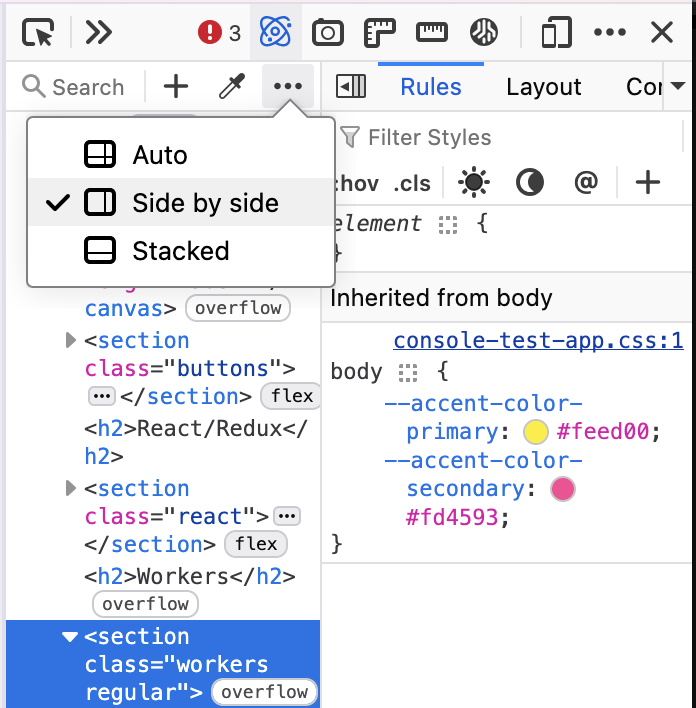
- Rév O’Conner added a settings popup to control the layout of the Inspector. “Auto” automatically switches the layout at a given toolbox width.
- The new sidebar (sidebar.revamp) and switcher setting will be enabled by default for users along with Nova in DevEdition, Beta and Release channels. To ease the transition for old sidebar users, the “Open tools from sidebar” option will be unchecked for those users to more closely resemble the old sidebar experience. The migration won’t apply to users who had already tried the new sidebar and reverted back.
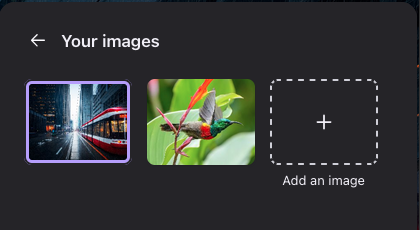
- The custom wallpaper library for the New Tab page is coming along! This allows you to save multiple images to your wallpaper folder, rather than replacing one image at a time. While it’s still in development, you can test it by setting
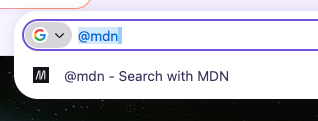
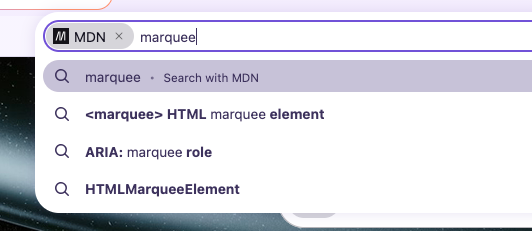
browser.newtabpage.activity-stream.newtabWallpapers.customWallpaper.library.enabledto true, starting in Firefox 157. - Mark added an MDN search engine for Nightly and Developer Edition. Select it from the menus, or type @mdn <search term>.
Friends of the Firefox team
Resolved bugs (excluding employees)
Script to find new contributors from bug list
Volunteers that fixed more than one bug
- :Benjamin Peterson
- Amadi
- any1here
- Caleb Pickard
- Chris Vander Linden
- Gopalarathnam Venkatesan
- Igor [:ExplodingJoysticks]
- Khalid AlHaddad
- Lukáš Lipinský
- Mayank Bansal
- Nazeer Ahmed Shaikh
- Noah Varghese
- Sameem [:sameembaba]
- Sebastian Zartner [:sebo]
- sfshah
- Xiaosen Zhuang
New contributors (🌟 = first patch)
- Amadi:
- Caleb Pickard
- dchen705: Remove unnecessary module import in browser/components/urlbar/tests/browser/head.js
- Ekerin Agboola: Remove old documentation related to the removed SEARCH_SUGGESTIONS_LATENCY_MS histogram
- Igor [:ExplodingJoysticks]:
- Gopalarathnam Venkatesan:
- 🌟 Jieke Jiang: Remove unused AboutReaderParent._getArticle
- 🌟 Andrew: White flash on startup caused by abouthome_cache storing incompatible startup frame
- 🌟 Rév O’Conner: Inspector does not respect panel layout
- 🌟 Kana: browser_privatebrowsing_resetPBM.js awaits an array instead of Promise.all, so the tab-close wait does nothing
- Raúl: L10nCache.add() throws on an unknown Fluent ID instead of reporting it
- 🌟 Samuel Mbabhazi: Use new color syntax throughout the DevTools
- K: “Go to line” sets a cursor line which does not exist in footer location indicator
- sfshah:
- Nazeer Ahmed Shaikh
- Noah Varghese:
- Valerie Racine (:v-racine): Fix incorrect assertion message in browser_adoptTab_failure.js
- 🌟 Xiaosen Zhuang:
Project Updates
Add-ons / Web Extensions
Addon Manager & about:addons
- As part of Project Nova related work:
- Fixed responsive layout issues that caused horizontal scrolling in about:addons at high zoom levels – Bug 2059864
- Fixed the “Discover extensions” button appearing multiple times in about:addons – Bug 2070281
- Added telemetry for theme-picker shown events and for appearance/native-theme changes in about:addons – Bug 2069417 / Bug 2070341
- Added an accessible name to the themes mode control in about:addons, fixed in Firefox 158 and uplifted to the Firefox 157 beta channel – Bug 2064563
- Thanks to Mark Kennedy for the help on fixing this accessibility gap
- Updated the built-in dark and light theme previews to use the nova style – Bug 2070274
- Thanks to Emilio Cobos Álvarez for the fix to the default light and dark theme previews.
- Fixed the Nova default and AMO curated theme previews to follow the OS light/dark mode while ignoring the Website appearance setting, fixed in Firefox 158 and uplifted to the Firefox 157 beta channel – Bug 2070562
- Stopped setting unused taarId session cookies for AMO on startup – Bug 1871561
- Thanks to Manuel Bucher for helping us to clean up these unused internals.
WebExtension APIs
- Fixed webRequest requestBody parsing so POST form fields named __proto__ are no longer dropped – Bug 2061470
- Changed alarms.clearAll() to resolve with undefined instead of a boolean, starting in Firefox 157 – Bug 2067229
- Thanks to Ollie Hensman-Crook for the fix to the alarms API.
- Implemented native messaging support via xdg-native-messaging-proxy for Flatpak and Snap builds – Bug 1955255
- Thanks to Jan Horak for the native messaging work on Linux packaging.
- As part of Florian Quèze effort to investigate and fix intermittent failures:
- Made windows.update() wait for the window to actually resize or move before resolving, fixing an intermittent Linux test failure – Bug 1307759
- Fixed a pageAction popup incorrectly opening via a commands API shortcut while the extension was already shutting down – Bug 2039637
- Fixed action.openPopup() rejecting when a tab hover preview was showing, a regression from Bug 2022281 in Firefox 150, with the fix shipping in Firefox 157 and no uplift planned – Bug 2062229
DevTools
- The team has a few sizable ongoing projects.
- Bomsy is working on moving Stylesheets to the Debugger so we can retire the (XUL-based) Style Editor, and turn the Debugger into a “Sources” panel (keeping all the existing functionality of course). (pref: devtools.debugger.features.stylesheets-in-debugger)
- Alex is investigating ways to better handle CSS authored text and CSSOM changes in the Inspector, building information directly from the Rust CSS engine, with the hope it will bring performance improvement editing styles in the Rules view.
- Nicolas is implementing a way to show to the user how the engine goes from a CSS declaration value to the computed value so it’s easier to follow what’s the result of the different call sites, or how the different units (em, %, vmin, …) are computed to their final (e.g. px) values. (pref: devtools.inspector.css-explainers)
External contributions
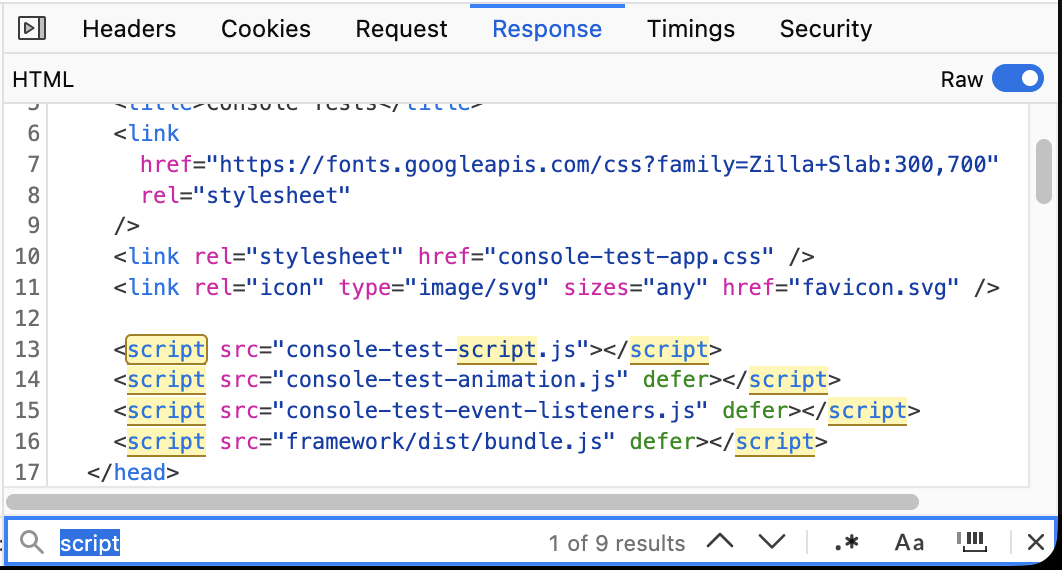
- Chris Vander Linden finalized a multi-months project to add a search toolbar in the Netmonitor Raw Response panel, adapting and reusing the component we are using in the Debugger (#1941575)
- Amadi made the “Open in new tab” context menu entry to open tab next to the selected tab, not at the very end of the tab list (#2059979)
- Mayank Bansal optimized the performance of console.clear() (#2068156, #2068157, #2067000)
- Benoit added JSON Lines (JSONL/NDJSON) support in the Netmonitor Response panel (#2059673)
- Gopalarathnam Venkatesan made the “Add class” button (.cls) to be disabled when a class can’t be added to the selected node (e.g. it’s a text node, or a comment, or the doctype node) (#2000150)
- K fixed an issue with the “Go to line” action in the Debugger (#2064575)
- Samuel Mbabhazi refactored our CSS codebase to use new color syntax (e.g. rgb(255 0 0) instead of rgb(255, 0, 0)) (#2054228)
- sfshah turned devtools/client/jsonview/converter-child.js into an ES class (#2004273)
Team/Project Update
- Florian Quèze [:florian] is working on fixing test flakiness in devtools/client/debugger and already landed an impressive stack of patches (#2001947, #2070917, #2070920, #2070932, #2070970, #2027953, #1932082, #2070923, #2070933, #1814093, #1868969, #2071238)
- that also includes fixing various accessibility issues that were spotted by a11y_checks #2070911, #2070955, #2071227, #2071231)
- Note that Julian Descottes [:jdescottes] also has an ongoing quest to reduce intermittent failures in our codebase and fixed a few those last 2 weeks (#1767707, 2069100, #2009386)
- [florian] 24 patches landed on Friday, you can see the impact on https://tests.firefox.dev/tests.html?path=devtools%2Fclient%2Fdebugger
- Nicolas Chevobbe [:nchevobbe] fixed a few issues spotted by Jake in the Inspector for the new-ish attr()CSS function (#2068479, #2068480, #2068483)
- Alexandre Poirot [:ochameau] fixed an OOM crash when viewing source mapped file for a large wasm module with many workers (#2058286)
- Julian Descottes [:jdescottes] improved performance of the Inspector when Devtools was opened on a page with many grid elements (#1988868)
- Hubert Boma Manilla (:bomsy) fixed an infinite loop in the Debugger search if you were searching for $ on a big JS file (#2068517)
WebDriver
- Sameem merged two internal helpers (remote/shared/Sync.sys.mjs and remote/marionette/sync.sys.mjs) which removed some code duplication.
- Khalid AlHaddad unified the navigation commands in Marionette and WebDriver BiDi to always initiate navigations via browsingContext.loadURI().
- Khalid AlHaddad updated the WebDriver BiDi client used by WebDriver tests so that browsing_context.locate_nodes returns the nodes array directly instead of the enclosing result object, matching the updated command response.
- Julian Descottes made the destinationFolder mandatory when calling the browser.setDownloadBehavior command with type=”allowed” – which aligns us with the specification. In order to restore the default behavior without having to specify a folder, clients should call setDownloadBehavior with null instead.
- Henrik Skupin fixed a bug in geckodriver where specifying androidIntentArguments in the capabilities caused the default intent arguments to be omitted.
Fluent
- According to arewefluentyet.com, ~74.77% of our strings are now using Fluent!
Lint, Docs and Workflow
- According to arewemozsrcyet.com, ~59% of our modules are now using moz-src.
- eslint-plugin-mozilla has switched from using Mocha to Jest for tests.
- Planning on future updates to investigate getting devtools & newtab to use the jest installed at the top-level, rather than separately installed copies.
Information Management/Sidebar
- We’re working away on bug fixes for sidebar, vertical tabs, split-view, and Nova
- Thanks Florian (:fqueze) for landing a set of patches that have markedly reduced test flakiness in the Sidebar component
New Tab Page
- Custom wallpaper library
- Dre added a “Your images” folder to the wallpaper picker on the New Tab Page, letting users save and switch between multiple custom wallpapers directly from the picker UI (desktop channels), which reduces friction for users who frequently change backgrounds.
- Dre implemented storage and migration for multiple custom wallpapers so users keep their existing wallpaper during upgrade while gaining the ability to save and switch multiple wallpapers — migration moves old single-wallpaper prefs into the new multi-wallpaper storage and the NTP now reads the wallpaper array at load/sync points.
- Dre updated New Tab Page strings to support multiple custom wallpapers so users now see accurate, localized labels and accessibility text when managing or switching between multiple custom backgrounds, reducing confusion in the UI during wallpaper selection.
- Dre added a delete affordance for saved custom wallpapers inside the New Tab Page picker so users can remove unwanted images from their saved set without going to profile files or prefs, improving manageability of user-provided wallpapers.
- We’ve completed a mass migration of our unit tests from Mocha (not mochi) / Karma to Jest/RTL, which is more modern and actively maintained.
- Sections is now enabled globally for all regions that show the content feed!
- Reem Hamoui fixed Lists widget so that keyboard users can now tab to completed items on the New Tab Page and see a visible selection/focus state
- Reem Hamoui fixed the Timer widget so that keyboard users can toggle focus vs break modes with standard keys (Enter/Space/arrow keys) thanks to restored keyboard handlers and tabindex semantics.
- Reem Hamoui made it so that screenreaders now announce wallpaper names via added aria-labels/alt text and role improvements in the Customize UI.
- Maxx Crawford made it so that the Customize UI now filters wallpapers by their metadata and no longer surfaces images marked hidden or in specific visibility groups.
- Irene Ni added Section Layout Name (String) telemetry to newtab content impression & click events so impressions/clicks now carry layout identifiers for more granular UX and A/B analysis
- Reem Hamoui added accessible names (aria-label/aria-labelledby) to the HNT Customize panel back buttons to fix screen-reader discoverability and keyboard/AT announcement when navigating the New Tab Customize flow.
- Nina Pypchenko [:nina-py] preserved iframe rendering for New Tab Page widgets during drag operations to prevent iframe-backed widgets from going blank while being moved.
- Nina Pypchenko [:nina-py] restored the Stocks widget dropdown and menu visibility under High Contrast Mode by adjusting contrast-aware CSS and ARIA roles so users relying on HCM can access stock controls again.
- Nina Pypchenko [:nina-py] fixed a results text overflow for long search queries in the Stocks widget by adding word-wrap/clamping to result lines, preventing layout breakage and truncated controls when users enter long symbols or queries.
- Nina Pypchenko [:nina-py] added telemetry for theme selection in the New Tab customization panel by emitting a selection ping on change, enabling measurement of user theme choices without changing UX.
- Irene Ni restored the Lists widget switcher checkmark for the selected list by fixing menu item selection-state rendering so users can again see which list is active in the switcher.
- Reem Hamoui updated the Privacy widget CTA and spacing on the New Tab Page, adjusting CSS/layout and CTA copy so the action is more discoverable and has a clearer tap/click target across responsive breakpoints.
- Reem Hamoui updated the zero-state copy for the New Tab Privacy widget to clarify what the widget does and the next steps for users when no privacy events or trackers are present, reducing confusion for first-time or cleared-state users.
- Maxx Crawford landed Fluent strings for the Nova launch New Tab customization callout, enabling localized text in the New Tab customization callout so users in supported locales see translated UI instead of missing-string fallbacks.
- Nina Pypchenko made the customization panel reset when closed, ensuring about:newtab customization state (temporary tile/layout previews) is cleared on close so users no longer see stale previews when reopening the panel.
- Dão Gottwald fixed New Tab to pick up system High Contrast Mode on Linux and macOS, restoring correct high-contrast colors/contrast on those platforms for users who rely on OS-level accessibility settings.
- Irene Ni restored theme matching for New Tab context menus by reapplying theme-aware CSS variables in the New Tab Page contextmenu styles, fixing mismatched colors for users with custom/light/dark themes.
- Dustin Whisman fixed New Tab section context menu button color regression by adjusting the section-contextmenu button style rules (button color variables and state selectors) so section actions now respect theme contrast.
- Irene Ni restored transparency to New Tab card backgrounds by removing opaque background rules so cards correctly display background images/themes and improve visual consistency across DPI/compositing setups.
Picture-in-Picture
- Thanks to Sebastian Zartner [:sebo] for fixing broken Dailymotion captions on the PiP player.
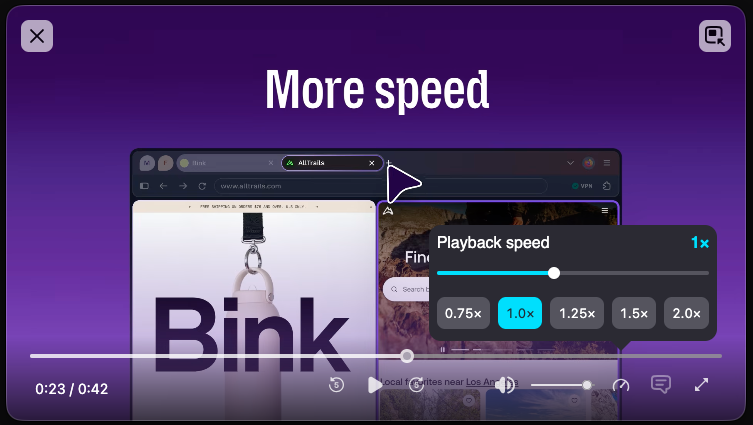
- kpatenio fixed YouTube’s displayed playback speed settings being out of sync with PiP.
- Thanks to Sylvestre Ledru [:Sylvestre] for helping fix a broken link in our PiP docs as a part of Bug 2071683.
Search and Urlbar
Address Bar
- Dao and Moritz are working on bringing the full urlbar experience into the newtab page, now enabled on nightly and going through polish and improvements.. (Bug 2068104, Bug 2068633, Bug 2069260, Bug 2064747)
- Drew enabled AMP and Wikipedia by default in AT, BE, CH, ES, IE, LU, NL, PL, PT and SE. (Bug 2066294)
- James gated adaptive autofill page results behind a minimum score threshold. (Bug 2066171)
- any1here stopped disabled Manage AI and Labs quick actions being displayed when disabled. (Bug 2070378)
Search
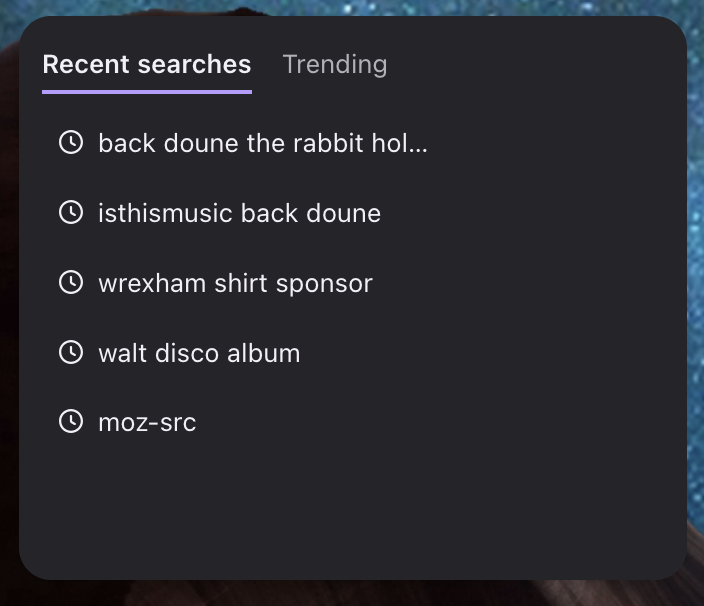
- Dale landed the Recent Searches widget which will be be used launched as an experiment (Bug 2063718)
- Caleb fixed the search box eating the first character typed into it. (Bug 1953361)
- Mark configured Wikipedia search for Sardinian (sc) to use the Sardinian Wikipedia rather than the Italian one. (Bug 2057690)
Places
- Marco fixed bookmarked Google Maps using Google’s default favicon. (Bug 1575809)
- Marco fixed the Downloads and History windows going full-screen instead of floating on macOS. (Bug 2058062)
Tests
- Dashboards:
- Most frequent oranges: https://tests.firefox.dev/intermittent.html#date=21days
- Folders with the most flaky tests: https://tests.firefox.dev/flaky.html?kind=mochitest#date=21days&view=list
- Issues of tests in a given folder: https://tests.firefox.dev/tests.html
- Eg devtools debugger tests shows progress of the recent effort to fix these tests recently
- Flakiness burn down
- Multi-agent Claude sessions running for hours investigating and fixing tests of a given set provided in the prompt. Still iterating on the process. Did this 3 times so far:
- Bug 2062142 – [meta] Fix the flakiness in browser/components/extensions/test/browser
- Top 20 intermittent mochitest bugs annotated by sheriffs.
- Probably what made the mochitest line go down for the first time on https://tests.firefox.dev/
- And what helped with the sidebar component, even though sidebar wasn’t my target.
- Bug 2070797 – [meta] Fix the flakiness in devtools/client/debugger/test/mochitest
- Multi-agent Claude sessions running for hours investigating and fixing tests of a given set provided in the prompt. Still iterating on the process. Did this 3 times so far:
- Profile your claude session for cost and context size: https://github.com/fqueze/claude-profiler
- To monitor cost during your sessions, try https://github.com/padenot/foxtail
iOS 26.7.1 Fixes Vulnerability Used in Targeted Attacks
Apple's security support pages say there was a CoreGraphics out-of-bounds write issue that could be exploited with a maliciously crafted file, allowing for arbitrary code execution. It has been fixed with improved bounds checking.
Apple says the flaw was exploited in an "extremely sophisticated attack" on targeted individuals running older versions of iOS. Apple's latest operating systems don't appear to be affected, and the iOS 27.0.1, iPadOS 27.0.1, and macOS Golden Gate 27.0.1 updates that came out today have no published CVE entries.
While the attack wasn't widespread, if you're still running a version of iOS 26, iPadOS 26, macOS Tahoe, or macOS Sequoia, you should install the new updates as soon as possible. Now that the vulnerability is public, it could be further exploited against users who aren't protected.
This article, "iOS 26.7.1 Fixes Vulnerability Used in Targeted Attacks" first appeared on MacRumors.com
Discuss this article in our forums
Early Prime Day Deals Offer Up to 65% Off Anker and Jackery Power Stations
Anker SOLIX
Anker's SOLIX brand is hosting an early Prime Day sale with early bird deals, free gifts, and more. This sale is focused on Anker's high-end SOLIX portable power stations, with options that range from 1-2 days of backup to 3-5 days of backup.
For cheaper options, Amazon has notable markdowns on lower-cost SOLIX batteries, like the popular SOLIX C300 Portable Power Station with Lantern for $199.99 ($50 off). If you're shopping on Anker's website, be sure to make your purchases before October 5, when the sale ends.
- SOLIX C200 - $129.98, down from $169.99
- SOLIX C300 with Lantern - $199.99, down from $249.99
- SOLIX C1000 Gen 2 - $499.99, down from $599.00
- SOLIX S2000 - $679.99, down from $1,199.00
- SOLIX C2000 Gen 2 - $899.99, down from $1,499.00
- SOLIX F3000 - $1,399.99, down from $1,699.00
- SOLIX E10 Whole-Home Backup System - $4,299.00, down from $4,599.00
Jackery
Over on Jackery's website, you'll find up to 65% off a wide array of portable power stations, solar generators, add-on batteries, and more. This is another Prime Big Deal Days early access event, and is set to run through October 3.
- Explorer 300D - $209.00, down from $249.00
- Explorer 2000 v2 - $899.00, down from $999.00
- Battery Pack 2000 Plus - $799.00, down from $1,399.00
- Battery Pack 3600 - $1,349.00, down from $1,499.00
- HomePower 3000 Solar Generator - $1,349.00, down from $1,499.00
- Explorer 2000 v2 + Dual 200W Solar Panels - $1,399.00, down from $1,639.00
- HomePower 3000 Solar Generator + Dual 200W Solar Panels - $1,799.00, down from $2,139.00
- HomePower 3600 Plus Solar Generator - $2,469.00, down from $2,729.00
- Explorer 5000 Plus - $4,639.00, down from $5,159.00
If you're on the hunt for more discounts, be sure to visit our Apple Deals roundup where we recap the best Apple-related bargains of the past week.
Deals Newsletter
Interested in hearing more about the best deals you can find in 2026? Sign up for our Deals Newsletter and we'll keep you updated so you don't miss the biggest deals of the season!
This article, "Early Prime Day Deals Offer Up to 65% Off Anker and Jackery Power Stations" first appeared on MacRumors.com
Discuss this article in our forums
Apple Releases macOS Golden Gate 27.0.1 With Bug Fixes
Mac users can download the new macOS Golden Gate software by using the Software Update section in System Settings.
Apple says macOS Golden Gate 27.0.1 fixes unspecified bugs. Apple has also released macOS 26.7.1 and macOS 15.8.1 security updates.
This article, "Apple Releases macOS Golden Gate 27.0.1 With Bug Fixes" first appeared on MacRumors.com
Discuss this article in our forums
Apple Releases iOS 27.0.1 With Face ID Bug Fix
iOS 27.0.1 can be downloaded over the air by going to Settings > General > Software Update. Apple has also released iPadOS 27.0.1 and visionOS 27.0.1 updates, as well as iOS and iPadOS 26.7.1 updates for devices not updated to iOS and iPadOS 27.
According to Apple's release notes, iOS 27.0.1 addresses an issue that could cause Face ID not to work properly on the iPhone 18 Pro.
Some iPhone 18 Pro users have complained that authentication can fail to work for things like unlocking a locked app. In some cases, the device freezes up and then reboots. Other users have seen a "Face ID is Not Available" message when attempting Face ID setup, and others have experienced issues with the Require Attention for Face ID setting. Apple's release notes for the update are below.
This update provides bug fixes for your iPhone, including fixes for the following issues:
- iPhone 18 Pro and iPhone 18 Pro Max may unexpectedly restart when Face ID fails to authenticate
- A color artifact may appear on photos captured at 2x under certain lighting conditions at f/1.48 on a small number of iPhone 18 Pro and iPhone 18 Pro Max devices
- Opening Notification Center and Control Center simultaneously may cause the touchscreen to become unresponsive
The iPhone 18 Pro models have an infrared camera that's under the display for the first time, but it's unclear if the hardware has been causing a problem. Apple said last week that it would be able to address the Face ID bugs with a software update.
While the iOS 27.0.1 update has multiple iPhone 18 Pro bug fixes, it is available for all iPhones able to run iOS 27.
This article, "Apple Releases iOS 27.0.1 With Face ID Bug Fix" first appeared on MacRumors.com
Discuss this article in our forums
Last Chance: OWC's Best Mac Accessories Are on Sale Just for MacRumors Readers
All discounts have been applied automatically, so all you need to do is follow the links below and add one of the accessories to your cart to see the savings. To be clear, many of these products are already on sale, but you need to add them to your cart and then go to your cart or checkout page to see the extra MacRumors discount.
There are 13 total items on sale, including docks, hubs, enclosures, and USB-C cables.
Notable accessories on sale include the OWC Thunderbolt Go Dock for $179.99 ($119 off), and the OWC ThunderBay 4 External Storage Enclosure for $299.00 ($99 off). For anyone looking to upgrade their desktop setup, there are six total enclosures on sale for our readers, with as much as $104 in savings.
External Storage Enclosures
- OWC Express 1M2 80GB Portable Enclosure - $149.00, down from $219.00
- OWC Express 4M2 USB4 External Storage Enclosure - $154.00, down from $239.99
- OWC Express 4M2 USB4 Enclosure with SoftRAID - $274.00, down from $379.99
- OWC ThunderBay 4 External Storage Enclosure - $299.00, down from $399.99
- OWC Express 1M2 1TB Portable Enclosure - $398.00, down from $469.99
- OWC ThunderBay 4 Enclosure with SoftRAID - $429.00, down from $549.99
Cables
- 3.6 Meter HDMI 2.0 Cable - $3.50, down from $9.99
- Philips 60W 2-Port GaN Charger - $9.99, down from $39.99
- 0.8 Meter OWC Thunderbolt 5 USB-C Cable - $19.00, down from $27.99
Hubs and Docks
- HyperDrive 6-in-2 USB-C Hub - $17.99, down from $39.99
- OWC Thunderbolt Dual DisplayPort Adapter - $29.00, down from $79.99
- OWC Thunderbolt Ethernet Adapter - $158.00, down from $199.99
- OWC Thunderbolt Go Dock - $179.00, down from $299.99
If you're on the hunt for more discounts, be sure to visit our Apple Deals roundup where we recap the best Apple-related bargains of the past week.
Deals Newsletter
Interested in hearing more about the best deals you can find in 2026? Sign up for our Deals Newsletter and we'll keep you updated so you don't miss the biggest deals of the season!
This article, "Last Chance: OWC's Best Mac Accessories Are on Sale Just for MacRumors Readers" first appeared on MacRumors.com
Discuss this article in our forums
Otto Kekäläinen: Using multiple git remotes for true distributed version control
One of the primary design principles for Linus Torvalds when creating Git is that it should be a distributed system, capable of working with multiple remotes. However, most people seem to use Git with just one remote, typically having GitHub or GitLab as the only origin.
Version control systems before Git relied on a centralized model. For example in Subversion or CVS you could only sync with one single remote server, which was considered the primary host of the source code. Git however is not just a VCS, but a DVCS, for distributed version control system. If you currently use Git with just one single remote as if it was a centralized version control system, now is the time to change that and learn how to add multiple remotes, and configure more flexible git pull and git push rules.
The first concept to grasp is that Git can have multiple remotes. For example, after running a basic clone command such as git clone https://github.com/ottok/debcraft.git you would end up with a single remote origin pointing to GitHub:
$ git remote --verbose
origin https://github.com/ottok/debcraft.git (fetch)
origin https://github.com/ottok/debcraft.git (push)$ git remote --verbose
origin https://github.com/ottok/debcraft.git (fetch)
origin https://github.com/ottok/debcraft.git (push)You can however configure multiple remotes with the command git remote:
$ git remote rename origin github
$ git remote add gitlab https://gitlab.com/ottok/debcraft.git
$ git remote --verbose
github https://github.com/ottok/debcraft.git (fetch)
github https://github.com/ottok/debcraft.git (push)
gitlab https://gitlab.com/ottok/debcraft.git (fetch)
gitlab https://gitlab.com/ottok/debcraft.git (push)$ git remote rename origin github
$ git remote add gitlab https://gitlab.com/ottok/debcraft.git
$ git remote --verbose
github https://github.com/ottok/debcraft.git (fetch)
github https://github.com/ottok/debcraft.git (push)
gitlab https://gitlab.com/ottok/debcraft.git (fetch)
gitlab https://gitlab.com/ottok/debcraft.git (push)You can push and pull from these individually, or from all at once:
$ git pull --all
Fetching github
Fetching gitlab
Already up to date.$ git pull --all
Fetching github
Fetching gitlab
Already up to date.When you review the git history, note the labels gitlab/main and github/main which tell which commit the branch main points to on various remotes. In this case they are all in sync and point to the same 5d1815c:
$ git log --oneline
5d1815c (HEAD -> main, gitlab/main, github/main) Bump Debhelper version from 13 to 14
ca518a7 Temporarily disable automatic copyright year bumping due to frequent bugs
d6e201e Exclude .pm from codespell to decrease false positives (Closes: #1140488)
708ee35 Exclude debian/copyright from codespell due to frequent false positives$ git log --oneline
5d1815c (HEAD -> main, gitlab/main, github/main) Bump Debhelper version from 13 to 14
ca518a7 Temporarily disable automatic copyright year bumping due to frequent bugs
d6e201e Exclude .pm from codespell to decrease false positives (Closes: #1140488)
708ee35 Exclude debian/copyright from codespell due to frequent false positivesWhen pushing, you can choose what remote to push to. For example, if I am working on branch dev and I only want to push it to GitLab to trigger a CI run there, I can run git push gitlab dev. You can also configure a default remote by running once git push --set-upstream gitlab dev and thereafter simply run git push and it will automatically push the branch dev only to that remote.
A related setting is remote.pushDefault, which tells git which remote to push to when a branch does not define one of its own, and it applies to every branch that lacks a [branch] section in .git/config. Setting it once is what lets a repository have a per-branch pull remote, like the debcraft example below, and still have a single, predictable git push target. To see which remote git will use for each of your branches, run git branch -vv, and to refresh the remote-tracking branches of all remotes at once, run git fetch --all --prune.
If you want to have multiple remotes, but automatically push and pull to all of them at once, you configure one single remote to have multiple URLs with git remote set-url --add. Since git prints one line per push URL, git remote -v then shows the same remote several times, once for each URL it pushes to.
As an illustration, in my actual local Debcraft development project I have all these configured:
$ git remote -v
github-pull-requests git@github.com:ottok/debcraft.git (fetch)
github-pull-requests git@github.com:ottok/debcraft.git (push)
gitlab-merge-requests git@gitlab.com:ottok/debcraft.git (fetch)
gitlab-merge-requests git@gitlab.com:ottok/debcraft.git (push)
origin git@salsa.debian.org:debian/debcraft.git (fetch)
origin git@salsa.debian.org:debian/debcraft.git (push)
origin git@gitlab.com:ottok/debcraft.git (push)
origin git@github.com:ottok/debcraft.git (push)
otto git@salsa.debian.org:otto/debcraft.git (fetch)
otto git@salsa.debian.org:otto/debcraft.git (push)
otto git@gitlab.com:ottok/debcraft.git (push)
otto git@github.com:ottok/debcraft.git (push)
otto git@git.sr.ht:~ottok/debcraft (push)
otto ssh://git@codeberg.org/ottok/Debcraft.git (push)
salsa-merge-requests git@salsa.debian.org:debian/debcraft.git (fetch)
salsa-merge-requests git@salsa.debian.org:debian/debcraft.git (push)$ git remote -v
github-pull-requests git@github.com:ottok/debcraft.git (fetch)
github-pull-requests git@github.com:ottok/debcraft.git (push)
gitlab-merge-requests git@gitlab.com:ottok/debcraft.git (fetch)
gitlab-merge-requests git@gitlab.com:ottok/debcraft.git (push)
origin git@salsa.debian.org:debian/debcraft.git (fetch)
origin git@salsa.debian.org:debian/debcraft.git (push)
origin git@gitlab.com:ottok/debcraft.git (push)
origin git@github.com:ottok/debcraft.git (push)
otto git@salsa.debian.org:otto/debcraft.git (fetch)
otto git@salsa.debian.org:otto/debcraft.git (push)
otto git@gitlab.com:ottok/debcraft.git (push)
otto git@github.com:ottok/debcraft.git (push)
otto git@git.sr.ht:~ottok/debcraft (push)
otto ssh://git@codeberg.org/ottok/Debcraft.git (push)
salsa-merge-requests git@salsa.debian.org:debian/debcraft.git (fetch)
salsa-merge-requests git@salsa.debian.org:debian/debcraft.git (push)The settings can also be viewed directly in the config file:
$ cat .git/config
...
[remote "origin"]
url = git@salsa.debian.org:debian/debcraft.git
fetch = +refs/heads/*:refs/remotes/origin/*
pushurl = git@salsa.debian.org:debian/debcraft.git
pushurl = git@gitlab.com:ottok/debcraft.git
pushurl = git@github.com:ottok/debcraft.git
[remote "otto"]
url = git@salsa.debian.org:otto/debcraft.git
fetch = +refs/heads/*:refs/remotes/otto/*
pushurl = git@salsa.debian.org:otto/debcraft.git
pushurl = git@gitlab.com:ottok/debcraft.git
pushurl = git@github.com:ottok/debcraft.git
pushurl = git@git.sr.ht:~ottok/debcraft
pushurl = ssh://git@codeberg.org/ottok/Debcraft.git
...
[branch "main"]
remote = origin
merge = refs/heads/main
[branch "dev"]
remote = otto
merge = refs/heads/dev
...$ cat .git/config
...
[remote "origin"]
url = git@salsa.debian.org:debian/debcraft.git
fetch = +refs/heads/*:refs/remotes/origin/*
pushurl = git@salsa.debian.org:debian/debcraft.git
pushurl = git@gitlab.com:ottok/debcraft.git
pushurl = git@github.com:ottok/debcraft.git
[remote "otto"]
url = git@salsa.debian.org:otto/debcraft.git
fetch = +refs/heads/*:refs/remotes/otto/*
pushurl = git@salsa.debian.org:otto/debcraft.git
pushurl = git@gitlab.com:ottok/debcraft.git
pushurl = git@github.com:ottok/debcraft.git
pushurl = git@git.sr.ht:~ottok/debcraft
pushurl = ssh://git@codeberg.org/ottok/Debcraft.git
...
[branch "main"]
remote = origin
merge = refs/heads/main
[branch "dev"]
remote = otto
merge = refs/heads/dev
...On branch main:
- Running
git pullwill fetch fromsalsa.debian.org/debian/debcraft(the primary git hosting for this project) - Running
git pushwill push to Salsa, GitLab and GitHub, one after the other, making sure they all have the latestmain
On branch dev:
- Running
git pullwill fetch fromsalsa.debian.org/otto/debcraft(the personal fork) - Running
git pushwill push to Salsa, GitLab, GitHub, Sourcehut and Codeberg all one after the other
The command output will have the same message three times, once for each remote (assuming they were all already up-to-date):
$ git push
Everything up-to-date
Everything up-to-date$ git push
Everything up-to-date
Everything up-to-dateUse cases for distributed version control
The most obvious use case for any distributed system is improved availability. In this example, the salsa.debian.org is often overloaded/unavailable, so pushing to GitLab and GitHub as well allows collaborators to use them to fetch git commits if the primary code hosting site is unresponsive. Once it comes back online again, the next git push/pull will automatically bring it up to the same content as what backup hosts had.
The second main benefit is that having the code live on multiple code forges allows collaborators to use their own favorite host. Debcraft itself is a great example of this, as collaborators who don’t have a Salsa account can - and have - submitted Merge Requests on GitLab.com and Pull Requests on GitHub.com.
A third use case is code hosting migrations. If you for example want to gradually phase out GitHub.com and replace it with something else, you could configure git to pull from the old location and push to both, ensuring that other collaborators can start using the new code hosting location without disruptions to those who have not yet updated their remotes or done a fresh git clone from the new location.
Automating setting up a project on multiple code forges
While I don’t push all projects I work on to all Salsa/GitLab/GitHub, I do set up multiple remotes for enough git projects that I have this script to automate configuring a git repository that is cloned from Salsa to also push to GitLab and GitHub. It accepts the repository whether it was cloned over SSH or HTTPS, and it adds the push URLs and then pushes the current branch, all branches, and tags for you:
#!/bin/bash
# Add GitLab and GitHub push URLs to an existing git remote, so that a plain
# "git push" writes the same commits to all three code forges.
#
# Usage: ./git-multipush-salsa.sh
#
# Environment:
# SALSA_REMOTE remote to turn into a mirror, default origin
# SALSA_USER your Salsa user, only used to detect that the source
# remote is somebody else's project
# GITLAB_USER your GitLab user, default ottok
# GITHUB_USER your GitHub user, default ottok
# PROTOCOL ssh (default) or https, for the push URLs
set -euo pipefail
SCRIPT=$(basename "$0")
SALSA_REMOTE=${SALSA_REMOTE:-origin}
SALSA_USER=${SALSA_USER:-otto}
GITLAB_USER=${GITLAB_USER:-ottok}
GITHUB_USER=${GITHUB_USER:-ottok}
PROTOCOL=${PROTOCOL:-ssh}
die() { echo "$SCRIPT: $*" >&2; exit 1; }
# A failing command leaves the push URLs half configured behind, so say how
# to get back to where we started
fail()
{
echo "$SCRIPT: '$*' failed, the push URLs may already have been added" >&2
echo " git config --unset-all remote.${SALSA_REMOTE}.pushurl" >&2
echo " git remote set-url --add --push ${SALSA_REMOTE} ${SALSA_URL}" >&2
exit 1
}
git rev-parse --git-dir > /dev/null 2>&1 || die "not inside a git repository"
git remote | grep -qx "$SALSA_REMOTE" || die "no remote named '$SALSA_REMOTE'"
# Example: git@salsa.debian.org:otto/salsa-ci-pipeline.git
SALSA_URL=$(git remote get-url "$SALSA_REMOTE")
# The source remote may use any of the URL forms salsa.debian.org accepts,
# for example git@salsa.debian.org:otto/salsa-ci-pipeline.git or
# https://salsa.debian.org/otto/salsa-ci-pipeline.git
case "$SALSA_URL" in
git@salsa.debian.org:*) SALSA_PATH=${SALSA_URL#git@salsa.debian.org:} ;;
ssh://git@salsa.debian.org/*) SALSA_PATH=${SALSA_URL#ssh://git@salsa.debian.org/} ;;
https://salsa.debian.org/*) SALSA_PATH=${SALSA_URL#https://salsa.debian.org/} ;;
http://salsa.debian.org/*) SALSA_PATH=${SALSA_URL#http://salsa.debian.org/} ;;
*) die "unexpected source URL '$SALSA_URL', expected a salsa.debian.org URL" ;;
esac
SALSA_PATH=${SALSA_PATH%/}
SALSA_PATH=${SALSA_PATH%.git}
SOURCE_USER=${SALSA_PATH%%/*}
PROJECT=${SALSA_PATH##*/}
# Write the push URLs in one and the same protocol, no matter how the
# repository happens to have been cloned
if [ "$PROTOCOL" = "https" ]
then
SALSA_URL="https://salsa.debian.org/${SALSA_PATH}.git"
GITLAB_URL="https://gitlab.com/${GITLAB_USER}/${PROJECT}.git"
GITHUB_URL="https://github.com/${GITHUB_USER}/${PROJECT}.git"
else
SALSA_URL="git@salsa.debian.org:${SALSA_PATH}.git"
GITLAB_URL="git@gitlab.com:${GITLAB_USER}/${PROJECT}.git"
GITHUB_URL="git@github.com:${GITHUB_USER}/${PROJECT}.git"
fi
# Mirroring somebody else's project is fine, but it is usually not what you
# want: you most likely want to mirror your own fork instead
if [ "$SOURCE_USER" != "$SALSA_USER" ]
then
echo "Note: $SALSA_REMOTE points to $SOURCE_USER's project, not your own."
echo "To mirror your own fork, run this with SALSA_REMOTE set to its name."
echo
fi
# Bail out instead of adding the same push URLs twice
EXISTING=$(git remote get-url --push --all "$SALSA_REMOTE")
if [ "$(printf '%s\n' "$EXISTING" | wc -l)" -gt 1 ]
then
die "remote '$SALSA_REMOTE' already has multiple push URLs:
$EXISTING"
fi
echo "Mirroring $SALSA_URL to $GITLAB_URL and $GITHUB_URL"
git remote set-url --add --push "$SALSA_REMOTE" "$SALSA_URL"
git remote set-url --add --push "$SALSA_REMOTE" "$GITLAB_URL"
git remote set-url --add --push "$SALSA_REMOTE" "$GITHUB_URL"
# Push the branch you have checked out first, and never with --force: the
# first branch a GitLab or GitHub project receives becomes its default branch,
# the one you then protect
DEFAULT_BRANCH=$(git symbolic-ref --short HEAD) || die "not on a branch, check out a branch first"
git push -u "$SALSA_REMOTE" "$DEFAULT_BRANCH"
git push "$SALSA_REMOTE" --all
git push "$SALSA_REMOTE" --tags
# The push above creates the GitLab and GitHub projects, but GitLab projects
# are private by default, so make the new mirror public with glab if installed.
if command -v glab > /dev/null
then
echo "Make the GitLab project public and describe it as a mirror:"
glab api -X PUT "projects/${GITLAB_USER}%2F${PROJECT}" \
-f visibility=public \
-f description="Mirror of ${SALSA_URL}" \
-f notification_email=disabled
else
echo "Install glab to do the same automatically, or visit"
echo "https://gitlab.com/${GITLAB_USER}/${PROJECT}/edit to make the project public"
fi
echo "To undo, drop all push URLs and add back only the original one:"
echo " git config --unset-all remote.${SALSA_REMOTE}.pushurl"
echo " git remote set-url --add --push ${SALSA_REMOTE} ${SALSA_URL}"#!/bin/bash
# Add GitLab and GitHub push URLs to an existing git remote, so that a plain
# "git push" writes the same commits to all three code forges.
#
# Usage: ./git-multipush-salsa.sh
#
# Environment:
# SALSA_REMOTE remote to turn into a mirror, default origin
# SALSA_USER your Salsa user, only used to detect that the source
# remote is somebody else's project
# GITLAB_USER your GitLab user, default ottok
# GITHUB_USER your GitHub user, default ottok
# PROTOCOL ssh (default) or https, for the push URLs
set -euo pipefail
SCRIPT=$(basename "$0")
SALSA_REMOTE=${SALSA_REMOTE:-origin}
SALSA_USER=${SALSA_USER:-otto}
GITLAB_USER=${GITLAB_USER:-ottok}
GITHUB_USER=${GITHUB_USER:-ottok}
PROTOCOL=${PROTOCOL:-ssh}
die() { echo "$SCRIPT: $*" >&2; exit 1; }
# A failing command leaves the push URLs half configured behind, so say how
# to get back to where we started
fail()
{
echo "$SCRIPT: '$*' failed, the push URLs may already have been added" >&2
echo " git config --unset-all remote.${SALSA_REMOTE}.pushurl" >&2
echo " git remote set-url --add --push ${SALSA_REMOTE} ${SALSA_URL}" >&2
exit 1
}
git rev-parse --git-dir > /dev/null 2>&1 || die "not inside a git repository"
git remote | grep -qx "$SALSA_REMOTE" || die "no remote named '$SALSA_REMOTE'"
# Example: git@salsa.debian.org:otto/salsa-ci-pipeline.git
SALSA_URL=$(git remote get-url "$SALSA_REMOTE")
# The source remote may use any of the URL forms salsa.debian.org accepts,
# for example git@salsa.debian.org:otto/salsa-ci-pipeline.git or
# https://salsa.debian.org/otto/salsa-ci-pipeline.git
case "$SALSA_URL" in
git@salsa.debian.org:*) SALSA_PATH=${SALSA_URL#git@salsa.debian.org:} ;;
ssh://git@salsa.debian.org/*) SALSA_PATH=${SALSA_URL#ssh://git@salsa.debian.org/} ;;
https://salsa.debian.org/*) SALSA_PATH=${SALSA_URL#https://salsa.debian.org/} ;;
http://salsa.debian.org/*) SALSA_PATH=${SALSA_URL#http://salsa.debian.org/} ;;
*) die "unexpected source URL '$SALSA_URL', expected a salsa.debian.org URL" ;;
esac
SALSA_PATH=${SALSA_PATH%/}
SALSA_PATH=${SALSA_PATH%.git}
SOURCE_USER=${SALSA_PATH%%/*}
PROJECT=${SALSA_PATH##*/}
# Write the push URLs in one and the same protocol, no matter how the
# repository happens to have been cloned
if [ "$PROTOCOL" = "https" ]
then
SALSA_URL="https://salsa.debian.org/${SALSA_PATH}.git"
GITLAB_URL="https://gitlab.com/${GITLAB_USER}/${PROJECT}.git"
GITHUB_URL="https://github.com/${GITHUB_USER}/${PROJECT}.git"
else
SALSA_URL="git@salsa.debian.org:${SALSA_PATH}.git"
GITLAB_URL="git@gitlab.com:${GITLAB_USER}/${PROJECT}.git"
GITHUB_URL="git@github.com:${GITHUB_USER}/${PROJECT}.git"
fi
# Mirroring somebody else's project is fine, but it is usually not what you
# want: you most likely want to mirror your own fork instead
if [ "$SOURCE_USER" != "$SALSA_USER" ]
then
echo "Note: $SALSA_REMOTE points to $SOURCE_USER's project, not your own."
echo "To mirror your own fork, run this with SALSA_REMOTE set to its name."
echo
fi
# Bail out instead of adding the same push URLs twice
EXISTING=$(git remote get-url --push --all "$SALSA_REMOTE")
if [ "$(printf '%s\n' "$EXISTING" | wc -l)" -gt 1 ]
then
die "remote '$SALSA_REMOTE' already has multiple push URLs:
$EXISTING"
fi
echo "Mirroring $SALSA_URL to $GITLAB_URL and $GITHUB_URL"
git remote set-url --add --push "$SALSA_REMOTE" "$SALSA_URL"
git remote set-url --add --push "$SALSA_REMOTE" "$GITLAB_URL"
git remote set-url --add --push "$SALSA_REMOTE" "$GITHUB_URL"
# Push the branch you have checked out first, and never with --force: the
# first branch a GitLab or GitHub project receives becomes its default branch,
# the one you then protect
DEFAULT_BRANCH=$(git symbolic-ref --short HEAD) || die "not on a branch, check out a branch first"
git push -u "$SALSA_REMOTE" "$DEFAULT_BRANCH"
git push "$SALSA_REMOTE" --all
git push "$SALSA_REMOTE" --tags
# The push above creates the GitLab and GitHub projects, but GitLab projects
# are private by default, so make the new mirror public with glab if installed.
if command -v glab > /dev/null
then
echo "Make the GitLab project public and describe it as a mirror:"
glab api -X PUT "projects/${GITLAB_USER}%2F${PROJECT}" \
-f visibility=public \
-f description="Mirror of ${SALSA_URL}" \
-f notification_email=disabled
else
echo "Install glab to do the same automatically, or visit"
echo "https://gitlab.com/${GITLAB_USER}/${PROJECT}/edit to make the project public"
fi
echo "To undo, drop all push URLs and add back only the original one:"
echo " git config --unset-all remote.${SALSA_REMOTE}.pushurl"
echo " git remote set-url --add --push ${SALSA_REMOTE} ${SALSA_URL}"If you prefer not to install glab, the last part simply reduces to visiting the GitLab project settings once and ticking the project public, and it is also worth setting a description like Mirror of https://salsa.debian.org/debian/debcraft and disabling notification email there, as nobody wants a mirror sending out a flood of emails every time you push.
There are a few caveats worth knowing about before mirroring everything everywhere. Every push to a remote with multiple push URLs writes to all of them, so a project with continuous integration configured on three forges will run its CI three times and cost you roughly three times as much. If one of the push URLs fails, say because the host is momentarily unreachable, git prints the error and stops there, leaving the remotes listed after the failing one without the new commits. Simply re-run the push once the host is reachable again; the remotes that did get the commits will just respond with Everything up-to-date. And you should never force-push to only one of the remotes, as that leaves the mirrors permanently out of sync with your local repository.
Avoid pulling too much
Related to multiple remotes, you should also be aware that git allows one to configure which branches to pull. By default a git clone will track all branches from the remote and pull everything, which in a typical open source project will bring in a lot of temporary development branches in vain.
Thus it is better to run git clone with the --single-branch and --branch parameters to fetch only the branch that matters, which in most cases is the main branch. That can be accomplished with:
git clone --single-branch --branch main https://github.com/ottok/debcraft.gitgit clone --single-branch --branch main https://github.com/ottok/debcraft.gitIf a repository was already cloned, it can be configured to track only one branch with:
git config remote.upstream.fetch "+refs/heads/main:refs/remotes/upstream/main"
git fetch upstream
git config --get-all remote.upstream.fetch
+refs/heads/main:refs/remotes/upstream/maingit config remote.upstream.fetch "+refs/heads/main:refs/remotes/upstream/main"
git fetch upstream
git config --get-all remote.upstream.fetch
+refs/heads/main:refs/remotes/upstream/mainIf you later need to track more branches, you can configure them with commands such as:
git config --add remote.upstream.fetch "+refs/heads/3.2.y:refs/remotes/upstream/3.2.y"
git fetch upstream
git checkout 3.2.ygit config --add remote.upstream.fetch "+refs/heads/3.2.y:refs/remotes/upstream/3.2.y"
git fetch upstream
git checkout 3.2.yFor additional details about any of the tips in this post I recommend reading the git man pages.
Now go and spread your code around
Distributing your code over multiple code forges costs you almost nothing in configuration, and in return you get availability, a choice of host for your collaborators, and freedom to migrate without a big bang. Add the push URLs to the remotes you already have, push once, and you are done.
The rest of the git fundamentals are covered in my other posts. If your commits are not yet polished, start with what makes a good git commit message and git commit messages by example. If you work on Debian packaging, Git-based collaboration in Debian explains why the Salsa merge request workflow is built the way it is, and Salsa merge request best practices covers the review process itself.

12 New Things to Expect From Apple This October
Below, we have outlined 12 new things to expect from Apple this October.
Confirmed
- iPhone Duo: The foldable iPhone Duo launches on Friday, October 23. Pre-orders begin Friday, October 16 at 5 a.m. Pacific Time.
- iOS 27.1: Apple said the iPhone Duo will ship with iOS 27.1, so the software update is expected to be released before October 23.
- iOS 27.2: Apple jumped ahead to an iOS 27.2 beta because iOS 27.1 is dedicated to the iPhone Duo. iOS 27.2 adds support for the five additional Siri AI languages that Apple promised would be coming in October, so accordingly we can expect iOS 27.2 to be released at some point during the month.
- Mac Studio (512GB RAM): While the new Mac Studio with M5 Max and M5 Ultra chips was released last week, Apple said a high-end configuration with the M5 Ultra and 512GB of RAM will be available in late October.
Rumored
- iPad mini 8: OLED display, A20 Pro chip, landscape front camera, redesigned speaker system, and water-resistant design.
- 24" iMac: M6 chip and new color options.
- 14" MacBook Pro: M6 chip.
- 14" and 16" MacBook Pro models with OLED displays: A major MacBook Pro redesign in late 2026 with M5 Pro and M5 Max chips, an OLED display, a touch screen, a Dynamic Island, and a thinner design.
- Apple TV 4K (4th Generation): A19 or A19 Pro chip, an increased 8GB to 12GB of RAM for Apple Intelligence and Siri AI support, an Apple-designed N1 chip with Wi-Fi 7 support, and an updated Siri Remote. A leak revealed the new Apple TV will look the same as the existing model.
- HomePod mini 2: Newer chip, Siri AI support, improved sound quality, Apple's N1 chip with Wi-Fi 7 support, a second-generation Ultra Wideband chip, and new color options, including pink and green. No major design changes.
- Home hub: An all-new Apple smart home hub featuring Siri AI, a 6-inch to 7-inch square display, an A18 chip or newer for Apple Intelligence, FaceTime, and more. A new operating system will feature clock faces, widgets, and more. There will be a tabletop version with a speaker base and a wall-mounted version.
- homeOS: Apple's smart home hub is expected to run an all-new operating system that may be named homeOS, according to trademark filings.
This article, "12 New Things to Expect From Apple This October" first appeared on MacRumors.com
Discuss this article in our forums
AirPods 5 vs. AirPods Pro 3 Buyer's Guide: Which Should You Buy?
The AirPods 5 arrived in September 2026, a year after the AirPods Pro 3. They continue to narrow the feature gap between the devices, but the Pro model still offers a sealed in-ear fit, substantially better noise cancellation, and hearing and workout features. Our guide helps to answer the question of how to decide which of these sets of AirPods is best for you.
| AirPods 5
(2026) |
AirPods 5 with Wireless Charging Case
(2026) |
AirPods Pro 3
(2025) |
|---|---|---|
| Open-ear fit without ear tips | Open-ear fit without ear tips | In-ear fit with foam-infused silicone ear tips in five sizes |
| Optical in-ear sensor | Optical in-ear sensor | Skin-detect sensor |
| Open-ear Active Noise Cancellation | Open-ear Active Noise Cancellation | In-ear Active Noise Cancellation; up to 3x more effective than AirPods 5 |
| Force sensor controls | Force sensor controls with volume swipe | Touch controls with volume swipe |
| Hearing Test, Hearing Aid, Hearing Protection, Automatic Conversation Boost, and Loud Sound Reduction | ||
| Heart rate sensing during workouts | ||
| Up to 4 hours of listening time on one charge with ANC | Up to 5 hours of listening time on one charge with ANC | Up to 8 hours of listening time on one charge with ANC |
| Up to 20 hours of listening time with ANC using the case | Up to 22 hours of listening time with ANC using the case | Up to 24 hours of listening time with ANC using the case |
| Case charges via USB-C | Case charges via USB-C, Apple Watch charger, or Qi charger | Case charges via USB-C, Apple Watch charger, Qi charger, or MagSafe charger |
| Speaker in case for Find My | Speaker in case for Find My | |
| Second-generation Ultra Wideband chip in case for Precision Finding with a compatible iPhone | ||
| Charging case is 1.97 inches (50.1 mm) wide | Charging case is 1.97 inches (50.1 mm) wide | Charging case is 2.45 inches (62.2 mm) wide and has a lanyard loop |
| Starts at $129 | Starts at $149 | Starts at $249 |
The AirPods 5 with Wireless Charging Case are the best choice for most buyers. For $20 more than the base model, you get an extra hour of listening time per charge with ANC, volume swipes on the stems, wireless charging, and a speaker that makes a misplaced case easier to find. Choose the $129 model if the lowest price matters most and you are content with its shorter battery life and USB-C-only charging case.
However, the AirPods Pro 3 are worth the extra $100 over the higher-end AirPods 5 if noise cancellation is your priority and you prefer a snug in-ear fit. Apple says they provide up to three times as much ANC as the AirPods 5, since the ear tips create a physical seal. Their eight-hour listening time per charge is particularly useful on long journeys. In our hands-on testing, the AirPods 5 sounded muddier than the Pro 3, particularly in the lower midrange.
The AirPods Pro 3 are also the clear choice if you want their hearing health features or heart rate sensing during workouts without relying on an Apple Watch. Their charging case adds Precision Finding, too. If you dislike silicone ear tips, the AirPods 5 let you keep the open-ear fit while getting nearly all of the everyday listening features shared by the Pro model.
AirPods frequently receive discounts from third-party retailers, which can narrow the AirPods Pro 3's $100 list-price premium over the $149 AirPods 5. Check the latest prices using our Deals roundup before buying.
This article, "AirPods 5 vs. AirPods Pro 3 Buyer's Guide: Which Should You Buy?" first appeared on MacRumors.com
Discuss this article in our forums
Apple Ordered to Pay $5.7 Billion Over Haptic Patent Infringement
Taction sued Apple in 2021, arguing that Apple's Taptic Engine in the company's Apple Watches and iPhones uses its inventions without proper license or authority. Apple initially had the case dismissed in 2023, but the Federal Circuit later revived it.
The jury trial began September 14, and seven jurors deliberated for two days after proceedings concluded. They returned on Friday and delivered the verdict in favor of Taction.
"We're happy the jury found for Taction and vindicated its patent rights," the company's lead counsel, Lance Yang, told CNBC. "Taction waited five and a half years for this case to get to trial, so it was a long time coming."
Apple said it intends to appeal the decision.
"While we thank the jury for their consideration, we strongly disagree with today's verdict and the damages awarded, which are entirely unsupported by the facts," Apple told CNBC in a statement. "Apple's Taptic Engine is fundamentally different from Taction's technology, which Taction's own testing of Apple's products confirmed during trial. Apple does not use Taction's technology, and we will appeal."In Friday's verdict at the U.S. District Court for the Southern District of California, jurors did not find that Apple had infringed the patents willingly.
This article, "Apple Ordered to Pay $5.7 Billion Over Haptic Patent Infringement" first appeared on MacRumors.com
Discuss this article in our forums
New Vision Pro Headset: Apple Considering Four Different Concepts
Writing in his latest Power On newsletter, Gurman said Apple's Vision team is exploring four concepts for the device, codenamed N224, including designs that offload internal components in a similar way to Meta's latest VR Glasses, which are expected to launch next spring.
An external computing module on Meta's device houses the battery and main processor, and can be clipped to the user's waist. Gurman, who has previewed Meta's headset, says the module is about the same size and weight as the current Vision Pro's battery pack, but with a grippy exterior.
Gurman reports that regardless of the Vision team's work, senior Apple decision-makers still consider the external puck concept as a "poor user experience" and want the company to stick with "something closer to an all-in-one design."
If any of this sounds familiar, that's because Gurman reported in June that Apple was still working on a cheaper, lighter successor to its Vision Pro headset. (The device-in-development is distinct from the long-rumored "Vision Air," which was cancelled last year.)
Apple knows it needs to come up with ways to simplify the design and make something cheaper and lighter, and it is said to be actively exploring ways to reduce the headset's weight by experimenting with plastic, titanium, other metals and various materials.
Still, Gurman has been told the work is on "life support" as the company focuses more on smart glasses, which it aims to release in late 2027. Despite the Vision Pro's most senior leaders "pressing their bosses to keep the category alive, funded and growing at Apple," Gurman says there's still no guarantee a new headset will ever launch.
This article, "New Vision Pro Headset: Apple Considering Four Different Concepts" first appeared on MacRumors.com
Discuss this article in our forums
Development Release: openSUSE 16.1 RC
DistroWatch Weekly, Issue 1192
Review: ReactOS 0.4.16
News: Garuda offers NixOS-based edition, KDE turns 30, NetBSD polishes Enlightenment port, Q4OS offers Breeze theme for Trinity, Canonical speeds up kernel patches, postmarketOS becomes Nura
Questions and answers: Identifying the video card
Released last week: Univention Corporate Server 5.2-7, NetBSD 10.2
Torrent corner:....
Dima Kogan: Lunar terminator paradox
There's an optical illusion known by names like the "lunar terminator paradox". This has much discussion and descriptions online, but none made sense in my head, so I wrote this program to figure out what was going on. The paradox:
- The moon is illuminated by the sun
- After sunset, the sun is below, so we would expect the illuminated portion of the moon to point down, towards where the sun is
- This isn't what always happens!
I was camping in the mountains with a friend recently. We were looking up at the sky, just after the sun has set. The moon was clearly pointing up.
After playing with this program, I have clarity: we're looking up at the moon from below. The most pathological case is a full moon. Let's say the moon is on the horizon: elevation=0. If we're looking at this low moon, and the moon is full, the sun is directly behind us. The moon is fully illuminated, and we see 100% of the moon disc lit up.
Now, what happens if the moon is not at the horizon, but higher up at the sky? Effectively, the sun is infinitely far away, so the same part of the moon is lit up. But we're now looking at the moon from below, and we would see some of the dark side on the bottom edge. I.e. the moon appears bright at the top, but has a dark slice missing at the bottom: it points up! Even at sunset.
This is the most clearly weird case. A half-moon has no paradoxical behavior, and the more full the moon, the more clearly we can observe the bright moon pointing up despite the sun being down.
I produce two plots. At 3/4-full moon at sunset we look at the moon as it rises from the horizon all the way up to the zenith:
If the moon is at the horizon (elevation = 0), we see the expected 3/4-lit disc. As the moon rises, we see more and more of its bottom, and thus more and more dark areas show up: It clearly points up at sunset!
We can also move the sun around. Let's say the moon is 60deg up; let's move the sun from new-moon to a full-moon:
In the darkest configuration, we can still see a lit crescent on the bottom: the illumination is all on the opposite side, but we can see a slice of the illuminated back side. As the sun swings around, we see more and more of the moon. At azimuth = 90deg, we have a half-lit moon. Past that, more and more of the moon is visible, always pointing up.
This was also a super interesting study of the current state of AI tools. As I was writing this and debugging, I would talk to Claude and Gemini about how this worked and what I should be seeing. They were both completely unable to comprehend this, and would make infinite circular arguments. Clearly they read some incomplete explanations on the internet (as I have), and lack the reasoning capability necessary to distill it into something resembling "understanding". AGI is not here yet.
Dirk Eddelbuettel: #060: Using bubblewrap for R sandboxing
Welcome to post 60 in the R4 series.
bubblewrap is a great tool and very suitable for using with an agent harness. It is a very compelling—and lightweight—alternative to using a full-blown docker container as it offers low-level unprivileged sandboxing on Linux hosts.
In a nutshell, bubblewrap can ‘turn
everything off’ (see unshare-all below) and allow access
only to selected services and directories (as shown below). This makes
it a very useful tool be used on a main workstation as it can provide a
lower-risk deployment quite easily while taking advantage of the already
installed software stack. I continue to get a lot of value out of docker, especially as r2u makes installing R
package dependencies so trivial. Its slogan ‘easy, fast, reliable: pick
all three’ clearly holds for r2u. But sometimes bubblewrap is
compelling, for example to launch opencode (documented for example at the
debian-inference
site).
When using R we need add more
directories to the example to provide /etc/alternatives
which is governing inter alia the LAPACK / BLAS resolution on
Debian / Ubuntu systems; this is now on debian-inference
site but wasn’t when I first tried it a few days ago ;-) as well as
/etc/R for config files and possibly
~/.R/Makevars for compiler settings. With that my current
wrapper is
#!/bin/bash
#
# cf https://inference.debian.net/doc
# and 'curl' command to set bearer code
bwrap \
--ro-bind /usr /usr \
--symlink usr/bin /bin \
--symlink usr/lib /lib \
--symlink usr/lib64 /lib64 \
--ro-bind /etc/ssl /etc/ssl \
--ro-bind /etc/resolv.conf /etc/resolv.conf \
--ro-bind $HOME/.gitconfig $HOME/.gitconfig \
--bind $HOME/.config/opencode $HOME/.config/opencode \
--bind $HOME/.cache/opencode $HOME/.cache/opencode \
--bind $HOME/.opencode $HOME/.opencode \
--bind $HOME/.local/share/opencode $HOME/.local/share/opencode \
--bind $HOME/.local/state/opencode $HOME/.local/state/opencode \
--ro-bind $HOME/.R/Makevars $HOME/.R/Makevars \
--ro-bind /etc/R/ /etc/R \
--ro-bind /etc/alternatives/ /etc/alternatives \
--proc /proc \
--dev /dev \
--tmpfs /tmp \
--bind $(pwd) $(pwd) \
--chdir $(pwd) \
--unshare-all \
--share-net \
--die-with-parent \
/usr/local/bin/opencode "$@"Launched that way we can have agents use R to check packages sources,
builds, and triage for bugs. this works equally well with local models
served via ollama (and with that a
quick shoutout to packages.lingfish.net for
providing an apt service for ollama) as it does with the various
cloud-based offerings. So harness away with R!
This post by Dirk Eddelbuettel originated on his Thinking inside the box blog. If you like this or other open-source work I do, you can now sponsor me at GitHub.
Amazon Just Knocked $900 Off Apple's Latest 16-Inch MacBook Pro
We're also tracking a big discount on the 16-inch M5 Max MacBook Pro with 48GB RAM, available for $4,499.00, down from $4,999.00. Overall, these are some of the best deals we've seen on the 2026 MacBook Pro in the wake of the price hikes over the summer.
If you're on the hunt for more discounts, be sure to visit our Apple Deals roundup where we recap the best Apple-related bargains of the past week.
Deals Newsletter
Interested in hearing more about the best deals you can find in 2026? Sign up for our Deals Newsletter and we'll keep you updated so you don't miss the biggest deals of the season!
This article, "Amazon Just Knocked $900 Off Apple's Latest 16-Inch MacBook Pro" first appeared on MacRumors.com
Discuss this article in our forums
Aquila Macedo Costa: Testing library transitions before they reach unstable
A library transition can affect many packages in Debian. I added a way for Salsa CI to rebuild the ones that depend on the changing library, so maintainers can test the transition before it reaches unstable.
The need for this became clear during a proposed Poppler transition. Poppler is a library for rendering PDFs. The reverse-dependency job I had added to Salsa CI queued 100 of 115 candidate rebuilds, even though only about 21 were relevant. The problem was documented in issue #571.
Before this change, ratt used every binary package produced by Poppler to
decide what to rebuild. That also picked up packages unrelated to the library
transition. The tracker listed the old and new library package names, so I used
them to focus the selection.
The Poppler transition tracker identifies the old and new runtime library package names.
I added -transition_affected to
ratt to implement this selection. The
option performs the scan against the selected archive indexes and injects
locally built .deb files into each source rebuild. It expects a regex of
dependency package names, not a complete Ben expression, so the tracker’s
Affected expression must be adapted first.
I then integrated the mode into Salsa
CI.
Maintainers can enable transition-aware
rebuilds
by setting SALSA_CI_BUILD_REVERSE_DEPENDENCIES_TRANSITION_AFFECTED_REGEX. If
the variable is unset, the pipeline keeps the existing selection.
A Poppler test showing the selected rebuild jobs. Three jobs reached the CI timeout, they were not confirmed package regressions.
I also changed ratt to cover
packages targeting
experimental. By default, it
resolves and rebuilds reverse dependencies from unstable while still injecting
the locally built .deb files. This lets a maintainer test a transition staged
in experimental against packages currently in unstable.
Together, these changes help maintainers focus CI on packages relevant to a library transition and review rebuild results before the new library reaches unstable.
Russ Allbery: Review: Ode to the Half-Broken
Review: Ode to the Half-Broken, by Suzanne Palmer
| Publisher: | DAW |
| Copyright: | May 2026 |
| ISBN: | 0-7564-2013-X |
| Format: | Kindle |
| Pages: | 441 |
Ode to the Half-Broken is a standalone post-apocalyptic (sort of) science fiction novel.
As this novel opens, the unnamed first-person protagonist is waking up in a bathtub in an abandoned building. They are covered in electromagnets and missing one leg.
Waking up involved a secure reboot from a protected core kernel, so it is immediately obvious that the protagonist is a robot. That also explains the electromagnets, which interfere with their ability to control their body. Or they would, if the protagonist didn't have long-dormant combat routines available to deploy EM shielding and free themselves from the bathtub. There are no immediate answers to why someone embedded a virus in the data attached to a scientific paper on ants, an act so precisely targeted that it had to be personal. Or what happened to their leg.
"There are a number of electromagnets in the next room," I say. I point. "Behind that wall with all the holes in it."
"Those are big holes. And fresh, too," the dog says. "I wonder what made them."
"Electromagnets experiencing sudden velocity."
The dog gives another of its short barks, and I am more convinced now it is laughing, though I was not attempting to be funny.
Ode to the Half-Broken has a classic science fiction beginning: in medias res in a future science fiction version of Earth where nothing is immediately explained, leaving the reader to work out the date and the setting. Helping us out is the protagonist, who is neither chatty nor very sociable with other characters but keeps up an analytical monologue about the world as they narrate events.
We are some decades into a grim future. The United States has largely collapsed. Large parts of New York City are dangerous to humans due to disease and radiation. Neither of those hazards bother the large number of sentient robots; their scarcity, and therefore economy, is instead based on power. Robots that control solar power stations act as low-level mob bosses, trading power for information or labor.
Our protagonist doesn't want to care about any of this. They retreated from the world long ago for a solitary life in the former New York Botanical Gardens studying ants. But they need a new leg and the best robot repair person nearby is a human woman outside of the city, so they reluctantly head in that direction, accompanied somewhat surprisingly by a cyborg dog.
The typical science fiction apocalypse is caused by something specific. Classically, that event is a nuclear war, but writers found various alternatives before, during, and after the Cold War era: alien invasions, meteor showers, plagues, sea level rise, and peak oil and general environmental collapse, among many others. Less common is a post-apocalyptic novel where the collapse comes from multiple overlapping crises and accumulating failures, from a general failure to meet what Adam Tooze and others call polycrisis. The first time I encountered that style of post-apocalyptic story was in Octavia Butler's Parable of the Sower. It was one of the choices that made (and still makes) that book feel so chillingly realistic.
The world background in Ode to the Half-Broken is shaped by that sort of polycrisis collapse. There is no one reason why New York City is a dangerous, irradiated ruin and society has collapsed into isolated and sometimes warring factions. It is not runaway artificial intelligence, or at least not directly; sentient robots were a late-stage innovation of the collapsing US civilization and a tool and accelerator of its many wars, but they were not the cause and may be a critical ingredient in building some functional replacement. Instead, society fell apart because we failed to address any of the growing problems and then turned on each other in the resulting ruins. The reader gets an idiosyncratic view of that collapse in flashback chapters intermixed with the main narrative of the initially unnamed robot protagonist, flashbacks told from the perspective of the man who invented the key component for robot sentience. As you would expect, those two narratives are linked. The reader will not discover how they are linked until late in the story.
This book could have been extremely depressing. It is not, which says a great deal about Palmer's skill in telling it. The clinical distance of the protagonist in the early chapters helps considerably: They have rejected involvement in this world and therefore can describe it in detached, factual terms, aided by the tendency of most robots in this story to be slightly more precise, logical, and verbose than the human characters. But as the protagonist's clinical distance fades, as it must to allow the story's emotional stakes to rise, Palmer fills this book with moments of beauty and hope. A former nuclear submarine that has become the mind of a subway car is a key early ally. A collective has turned the Hudson Bridge into a thriving if chaotic community. Self-regulating enclaves of humans and robots are working together to try to build a livable world. Robots oversee pollinator swarms that are attempting to restore plant life, for no reason other than that they like order and stability and see this as a way of restoring both. This is a grim, post-apocalyptic world that does not dwell on either the grimness or the apocalypse. It is instead full of small moments of hope, collaboration, and personal connection.
This is a story with villains, danger, pain, and risk. Despite the similar keywords and cover aesthetics, it bears little resemblance to Becky Chambers's philosophical Monk and Robot series. It is not, in any definition of the term, cozy; it's a post-apocalyptic adventure story about a robot and a dog making their way through a ruined civilization and fighting people who are trying to build something even worse on the rubble. But it's also charming and oddly happy. There are strong found-family vibes in the way that a party coalesces around the protagonist and eventually gives them a name, there is the quiet happiness of seeing a grumpy misanthrope slowly come out of their protective shell, and the rail mechs are an absolute delight.
Like a lot of stories of happy small-group anarchism, I didn't entirely believe the politics and have some qualms about the realism of the ending, although perhaps I should strive to be as optimistic as Palmer writes. The somewhat dry and fussily precise first-person narration will also not be to everyone's taste; it worked for me by the end of the book, but it took a bit of reading to get used to it. But those quibbles aside, this was quietly lovely. It's a satisfying science fiction adventure story in a world with disturbing parallels to the one we're living in, but which uses those parallels to focus on small-scale collective efforts to build something better. And all the small details of the world-building are delightful: the different tiers of robots and their odd behaviors, the machine sense of purpose, even the mix of suspicion and generosity. The plot has large-scale implications, but it was the human-level details that charmed me.
I still want another Fergus novel, but this was a highly successful foray outside of that series. Palmer has won two Hugos for her novellas, so I can't really say she's overlooked, but her novels aren't getting anywhere near the attention they deserve. Highly recommended.
There is plenty of world-building room here for a sequel, but Ode to the Half-Broken reaches a satisfying standalone conclusion. So far as I know, no sequel is currently planned.
Rating: 8 out of 10
Top Stories: Apple Leaks, Siri AI Settlement, and More
We're also still learning more about the just-released iPhone 18 Pro and Pro Max plus the upcoming iPhone Duo, while this week saw the debut of new Beats 360 headphones and the start of claim acceptance for the class action lawsuit over Siri AI delays, so read on below for all of the details on these stories and more!
Top Stories
iPad Mini With A20 Pro, New HomePod Mini Colors, and New Apple TV 4K All Just Leaked
MacRumors this week leaked the next iPad mini, HomePod mini, and Apple TV 4K models, all of which are likely to be announced this October as part of another wave of product launches including an all-new operating system to accompany some of the new hardware.
The most notable iPad mini details revealed in the leaks include an A20 Pro chip, a new speaker design, and a landscape front camera, while images have revealed that the next HomePod mini will be available in new colors like green and pink. There is also evidence of an upcoming "Apple TV 4K (4th generation)" model, so it appears that a new Apple TV is finally coming soon after a four-year wait.
A separate Apple code leak has confirmed some rumored details for the 12th-generation iPad, although we're not expecting that to launch until early next year.
Siri AI Settlement Website Now Live: Apple to Pay Some iPhone Owners
In May, Apple agreed to pay $250 million to settle a U.S. class action lawsuit over Siri AI's delayed launch, and the settlement website is now live.
Apple will pay an estimated $25 per eligible iPhone to eligible customers, who can submit a claim via the settlement website between September 21 and December 21 of this year. The exact payment may be higher or lower than $25 depending on the total number of valid claims submitted and other factors, with the maximum amount set at $95.
Apple denies all of the allegations made in the lawsuit, but agreed to the settlement to avoid the costs and risks of a trial.
iPhone 18 Pro Max Requires 'Prepare to Ship' Battery Drain Before Shipping
The iPhone 18 Pro Max has a single-cell battery capacity over 20 watt-hours, which means there are additional shipping requirements. If an iPhone 18 Pro Max needs to be shipped somewhere, its maximum battery capacity has to be limited through firmware.
According to Apple, the iPhone 18 Pro Max uses an "innovative battery-firmware solution" that limits battery capacity to below 20Wh between when the iPhone is manufactured and its delivery to a customer. Activating the iPhone removes the limit to make the battery's full charging capacity available.
Customers who need to ship the iPhone 18 Pro Max for repair, trade-in, or other purposes have to use a new Prepare to Ship feature. Prepare to Ship discharges the battery to below 20Wh and sets a charge limit so the iPhone stays below the threshold during the shipping process.
Apple Exec Says 'Hold Us Accountable' on iPhone Duo Crease
Apple hardware engineering VP Tom Marieb recently spoke with TechRadar and shared some candid thoughts about Apple's upcoming iPhone Duo.
The iPhone Duo uses a matte nano-texture display, which is meant to cut down on glare and minimize the visibility of the crease. When asked if the iPhone Duo's crease would be more visible over time, as that's what tends to happen on other foldables, Marieb said the nano-texture display would help. He asked people to hold the company "accountable" on crease visibility.
Marieb also discussed the Duo's innovative hinge, the use of Ceramic Shield 2 on the front display, and more.
Beats 360 Deliver Customizability and a Revamped Over-Ear Headphone Design
After months of teases and leaks, Apple's Beats brand officially announced its new Beats 360 headphone this week. Priced at $349.99, Beats 360 represents a rethinking of the Beats over-ear headphone design, with an emphasis on sound quality, comfort, and customizability.
Beats 360 is not a replacement for the brand's Studio Pro over-ear headphone, as the Studio Pro will remain part of the Beats lineup at a reduced price point of $299.99, down from the previous $349.99. Compared to Studio Pro, Beats 360 features a completely new acoustic architecture that delivers up to 1.75× more active noise cancellation and a 12dB increase in output while maintaining clarity across all frequencies with low distortion.
Swappable ear and headband cushions let you customize your look by mixing and matching colors and materials, with Beats offering extra cushion kits at heavily discounted prices as part of a launch promo.
iPhone 20 Pro Display Sizes Leak Ahead of 2027 Launch
Apple's 20th-anniversary iPhone lineup coming next year could feature slightly larger displays than the iPhone 18 Pro models, if a recent leak shared on Weibo is accurate.
Prolific Chinese leaker Digital Chat Station claims that early iPhone 20 Pro display specifications include a 6.41-inch screen with a resolution of approximately 2,686 × 1,236 pixels, while the iPhone 20 Pro Max is said to have a 6.96-inch display with a resolution of around 2,912 × 1,340 pixels.
For comparison, the iPhone 18 Pro and iPhone 18 Pro Max feature 6.27 inches (rounded to 6.3 inches) and 6.86 inches (rounded to 6.9 inches) respectively. Meanwhile, the iPhone 18 Pro and 18 Pro Max resolutions are 2,622 × 1,206 pixels and 2,868 × 1,320 pixels, respectively.
MacRumors Newsletter
Each week, we publish an email newsletter like this highlighting the top Apple stories, making it a great way to get a bite-sized recap of the week hitting all of the major topics we've covered and tying together related stories for a big-picture view.
So if you want to have top stories like the above recap delivered to your email inbox each week, subscribe to our newsletter!
This article, "Top Stories: Apple Leaks, Siri AI Settlement, and More" first appeared on MacRumors.com
Discuss this article in our forums
watchOS 27: 12 New Things To Check Out on Your Apple Watch
To do so, open the Watch app on your iPhone, then tap General ➝ Software Update, strap your watch into a charger, and follow the onscreen prompts.
Check Out the Dedicated Siri App
Siri has finally caught up with the AI revolution, and apart from having contextual awareness, it now has an app of its own that collects every conversation in a single view and syncs them privately across your devices over iCloud. Just ask something on your iPhone and you can pick the thread up again on your Apple Watch, as well as pin conversations worth keeping, or even start a new chat directly from your wrist.
Try Siri Modular Watch Face
The new Siri watch face is a genuinely useful one. Its rectangular complication shows you whatever sits at the top of your Smart Stack, and it automatically updates through the day based on time, location, and other factors.
The Dynamic App Grid
Pressing the Digital Crown no longer produces the honeycomb app view by default. Now, watchOS 27 shows a dynamic grid made up of suggested apps, your most-used apps, and your most recently used ones. The Siri app sits in the middle, but the alphabetical list remains available – simply turn the Digital Crown to navigate through all of your apps.
New Tap Gesture
Apple has added a third gesture to Double Tap and Wrist Flick. The new one is simply called Tap. A single tap of your index finger and thumb opens the highlighted widget in the Smart Stack. You can still navigate the Smart Stack with Double Tap and dismiss notifications with Wrist Flick.
Walkie-Talkie Has Been Deleted
Walkie-Talkie is gone, and not merely hidden. The app is unavailable after updating to watchOS 27 and cannot be reinstalled from the App Store. You can keep the app by staying on watchOS 26, but you won't be able to start a conversation with a contact who has updated.
Live Rewind (Not Yet)
This is the change most likely to catch people out. In watchOS 26 and earlier, a double press of the Digital Crown opens the App Switcher, where you can jump back to the previous app, scroll through recent ones, and swipe to force-quit anything misbehaving.
That's changed in watchOS 27, in which a double press shows the new dynamic app grid instead. The gesture has been reserved for Live Rewind, an upcoming feature (exclusive to Apple Watch Series 12 and Ultra 4) that produces a transcript of the last fifteen seconds of speech in your environment.
Fortunately, the App Switcher will still be available when watchOS 27.2 is released later this year, but it will open with a different gesture. If you're already on the latest beta, simply long press on the bottom of the app that you're in, and that should open the App Switcher.
Find My is Now One App
Find Devices, Find Items, and Find People have been folded into a single Find My app with a map-centric layout, which also includes shortcuts for directions and for items nearby.
Workout Buddy No Longer Needs Your iPhone
Introduced in watchOS 26, Workout Buddy previously required your iPhone within range. In watchOS 27, your Apple Watch can run it if Wi-Fi or cellular is available. It also draws new insights from your training history, tracking gradual gains in pace, distance and workout duration, and it now speaks Spanish as well as English.
New Cycle Tracking Features
Cycle Tracking in the Health app can now notify you if your logged patterns are suggestive of perimenopause, alongside symptom tracking and educational material. The notifications only draw on your logged cycle history and apply to users aged 40 and over. Apple says the feature is not a method of birth control and is not a diagnosis.
Treadmill Distance Is More Accurate
In watchOS 27, new machine learning motion algorithms measure distance more precisely for indoor runs and walks, and Apple says the improvement starts from the first step, as opposed to settling after a few minutes. Fitness route maps are more accurate too, and step counts finally stay in sync between the Fitness and Health apps.
The Smart Stack Gets More to Say
The Smart Stack's contextual suggestions are now a lot smarter. A few examples provided by Apple include new widgets surfacing your parked car's location, a close contact's birthday, a change in your transit card balance, the Noise app immediately after a loud-noise alert, a reminder that Theater Mode is still on, pinned messages, celebrations, and identity cards.
New Models Get a Steps Counter
On Apple Watch Series 12 and Apple Watch Ultra 4, the redesigned pedometer model and S11 chip allow watchOS 27 to provide more accurate step counts. There's also a new Steps complication on the latest models to track your steps in real time, right from your watch face. Will we see the feature come to older devices? Your guess is as good as ours.
This article, "watchOS 27: 12 New Things To Check Out on Your Apple Watch" first appeared on MacRumors.com
Discuss this article in our forums
Banks and Credit Unions to Team Up Against Apple Pay Fees
U.S. District Judge Jeffrey White this week certified a class in the lawsuit. It will include any U.S. entities that issued any payment card enabled for Apple Pay and paid Apple a fee for Apple Pay transactions on that payment card. He also denied a motion from Apple to exclude expert testimony that plaintiff attorneys allege offers proof Apple has monopoly power over the mobile wallet market.
First filed in 2022, the suit claims Apple illegally collects up to $1 billion annually in fees by preventing rivals from accessing the iPhone's NFC chip to build mobile wallets that would compete with Apple Pay. When an iPhone user buys something with a card linked to Apple Pay, the card issuer has to pay Apple a 0.15 percent fee for credit cards and half a cent for debit cards, according to the lawsuit. If you make a $1,000 purchase via Apple Pay, Apple collects $1.50 from the card issuer.
The complaint alleges that Apple forces card issuers to pay fees by making Apple Pay the only tap-to-pay option. It points to Google's Android, which supports multiple wallets and does not collect a fee from card issuers for contactless payments. It suggests Apple would not be able to continue to charge "substantial fees" if it were forced to support other mobile wallets on Apple devices.
Apple has changed its policies since the lawsuit was filed. As of iOS 18.1, developers are able to offer NFC contactless payments in their apps. Developers have access to the NFC chip in the United States, Canada, Australia, Brazil, Japan, New Zealand, the UK, the European Economic Area, and many other countries.
Attorneys are seeking repayment of the fees card issuers have paid and injunctive relief to "put an end to Apple's policies."
This article, "Banks and Credit Unions to Team Up Against Apple Pay Fees" first appeared on MacRumors.com
Discuss this article in our forums
Apple Finally Shares tvOS 27 Release Notes With List of New Features
tvOS 27 was released on Monday, September 14, but the Apple TV does not show release notes for software updates in the Settings app. Instead, Apple periodically updates a support document outlining what is new in tvOS updates.
Here is what is new for the Apple TV on tvOS 27, including video podcasts in the Podcasts app, AutoMix in the Apple Music app, the ability to set your preferred text size across supported apps, improved AirPlay performance, and more:
This update brings enhancements to the Apple Music, Podcasts, and AirPlay experiences on tvOS. It also brings captions to more content, adds the ability to block individual apps, and provides bug fixes and security updates for your Apple TV 4K.tvOS 27 is compatible with the Apple TV 4K (2nd generation) and newer.
Apple Music
- Hi-Res Lossless audio support provides a studio-quality listening experience.
- AutoMix transitions one song into the next like a DJ does, time stretching and beatmatching to deliver a continuous playback experience.
This release also includes other features and improvements:
- Video podcasts bring your favorite shows to the TV in the redesigned Podcasts app.
- AirPlay performance improvements deliver faster, more responsive connections when sharing photos, videos, and music from iPhone, iPad, or Mac to Apple TV.
- Transcribed audio helps you follow along with content when standard captions or subtitles aren't provided.
- Dynamic Text support in Accessibility settings allows you to set your preferred text size across supported apps.
- Individual app controls in Settings let you block users from launching specific apps.
This article, "Apple Finally Shares tvOS 27 Release Notes With List of New Features" first appeared on MacRumors.com
Discuss this article in our forums
Amazon's $199 Discount on Apple Watch Ultra 3 Returns to Help Clear Stock
Additionally, there's a $199 markdown on the Black Apple Watch Ultra 3 with Black Milanese Loop (Large) on Amazon. You can get this model for $699.97, down from $899.00. Delivery dates are slipping into October for some of these devices.
These Ultra 3 deals arrive in the wake of the recent launch of the Apple Watch Ultra 4, which does have some smaller discounts on Amazon right now. You can get both the Natural and Black colors for $779.99 in several band options, down from $799.00.
If you need a breakdown on all of the differences between the Apple Watch Ultra 3 and Ultra 4, be sure to check out our buyer's guide on the wearables.
If you're on the hunt for more discounts, be sure to visit our Apple Deals roundup where we recap the best Apple-related bargains of the past week.
Deals Newsletter
Interested in hearing more about the best deals you can find in 2026? Sign up for our Deals Newsletter and we'll keep you updated so you don't miss the biggest deals of the season!
This article, "Amazon's $199 Discount on Apple Watch Ultra 3 Returns to Help Clear Stock" first appeared on MacRumors.com
Discuss this article in our forums
Apple Code Confirms iPad 12 Specs: A19, 8GB RAM, N1, C1X Modem
We've heard some of these same specifications in prior rumors, so this is more of a confirmation than a new leak. The iPad 11 has an A16 chip, so the upgrade to the A19 in the 12th-generation iPad will bring a noticeable improvement in performance. More importantly, the A19 supports Apple Intelligence, so the iPad 12 will have all the Apple Intelligence and Siri AI features missing from the iPad 11.
The iPad 11 has 6GB RAM, but 8GB RAM is the minimum for Apple Intelligence, and the RAM boost will also speed things up.
Apple's C1X modem supports sub–6GHz 5G networks, and it is more efficient than the Qualcomm modem used in the existing iPad. The addition of the N1 networking chip will bring support for Wi-Fi 7, Bluetooth 6, and Thread.
Though not included in the code, it's possible the iPad 12 will be available in new colors.
There is no word on when Apple will release the new iPad, and at this point, we're not expecting it until spring 2027. The current iPad is priced starting at $449 after a June 2026 price hike, and the new model will likely have the same starting price.
There's no low-cost iPad coming this year, but Apple is expected to refresh the iPad mini before the end of October. We discovered new details about the iPad mini just this morning. It will have an A20 Pro chip, a new speaker system, and a landscape front-facing camera. Prior rumors say it will feature an OLED display as the main upgrade.
We also found official images of the Apple TV 4K and the HomePod mini, including its colors. The HomePod mini will come in green, pink, blue, white, and black.
This article, "Apple Code Confirms iPad 12 Specs: A19, 8GB RAM, N1, C1X Modem" first appeared on MacRumors.com
Discuss this article in our forums
MacRumors Giveaway: Win an Apple Watch Ultra 4 From Lululook
Lululook's $129.99 Strata Milanese Band matches the Apple Watch Ultra 4. It is made from 99 percent woven grade 5 titanium, and it has a coating that protects it from scratches. The Strata band comes in black and natural finishes, and the titanium is about 40 percent lighter than stainless steel.
The band has a spring-loaded titanium locking mechanism with a side-press button to open it. Lululook says the band will stay in place during workouts and activities from running to swimming. While made for the Ultra, the band works with the larger 44mm to 49mm Apple Watch models, and it comes in medium and large size options to fit wrists from 155mm to 210mm.
For a more casual look, Lululook sells the $36.99 MagDuo Reversible Apple Watch Band. As the name suggests, the band has a dual color scheme, and users can flip between two color options. The exterior of the band features pebble-textured silicone, while the interior is made of soft silicone so it is comfortable to wear all day.
The MagDuo band has a breathable hollow design to keep the wrist cool, and it uses a double-sided magnetic closure. Lululook says the magnet was tested to 1.3kg of pull, and there are extra loops for security.
Colors include Graphite Gray/Driftwood, Cobalt Blue/Mist Blue, Pink/Purple, Black/Orange, Desert Dune/Cream, and Onyx Black/Beige. The MagDuo is compatible with all Apple Watch models, and there are two size options: one for the Apple Watch Ultra and larger-sized Apple Watch models, and one for the smaller Apple Watch models.
Lululook is offering MacRumors readers a discount code on the Apple Watch bands. Just use promo code Macrumors for 10 percent off at checkout.
We have an Apple Watch Ultra 4 for one lucky MacRumors reader. To enter to win, use the widget below and enter an email address. Email addresses will be used solely for contact purposes to reach the winner(s) and send the prize(s). You can earn additional entries by subscribing to our weekly newsletter, subscribing to our YouTube channel, following us on Twitter, following us on Instagram, following us on Threads, or visiting the MacRumors Facebook page.
Due to the complexities of international laws regarding giveaways, only U.S. residents who are 18 years or older, UK residents who are 18 years or older, and Canadian residents who have reached the age of majority in their province or territory are eligible to enter. All federal, state, provincial, and/or local taxes, fees, and surcharges are the sole responsibility of the prize winner. To offer feedback or get more information on the giveaway restrictions, please refer to our Site Feedback section, as that is where discussion of the rules will be redirected.
Lululook Giveaway
The contest will run from today (September 25) at 10:00 a.m. Pacific Time through 10:00 a.m. Pacific Time on October 2. The winner will be chosen randomly on or shortly after October 2 and will be contacted by email. The winner will have 48 hours to respond and provide a shipping address before a new winner is chosen.
This article, "MacRumors Giveaway: Win an Apple Watch Ultra 4 From Lululook" first appeared on MacRumors.com
Discuss this article in our forums
Launch Week Deals Hit Latest Macs, Apple Watch Ultra 4, and Apple Accessories
Mac Mini and Mac Studio
- What's the deal? Take up to $50 off Mac mini and Mac Studio
- Where can I get it? Amazon
- Where can I find the original deal? Right here
Amazon recently introduced the first cash discounts on Apple's brand new Mac mini and Mac Studio, with discounts reaching up to $50 off original prices. All of these deals represent the first discounts on the new computers, which just launched this week.
Beats 360
- What's the deal? Save on Beats 360 cushion kits and more
- Where can I get it? Amazon
- Where can I find the original deal? Right here
The new Beats 360 headphones were announced this week, and they're now available to order on Amazon and other retailers. They're available in Black, Cloud, plus a bundle where you can style the headphones however you'd like thanks to interchangeable ear cushions and headbands.
Alongside the launch, Beats announced that its Cushion Kits compatible with the Beats 360 are available for just $9.99 for the next month, down from $49.99. Amazon has both the Performance Knit and UltraPlush options in all colors at this price.
Apple Watch Ultra 4
- What's the deal? Take $19 off Apple Watch Ultra 4
- Where can I get it? Amazon
- Where can I find the original deal? Right here
The new Apple Watch Ultra 4 just launched last week, and Amazon is offering the first cash discounts on select models for the first time since their launch. You can get the Apple Watch Ultra 4 for $779.99, down from $799.00.
iPad Air
- What's the deal? Take $100 off M4 iPad Air
- Where can I get it? Amazon
- Where can I find the original deal? Right here
Amazon this week has multiple discounts on the M4 iPad Air, providing up to $149 off these 2026 models. These remain the best prices we've seen in the wake of Apple's summer price hikes, and many deals are being matched at Best Buy.
AirPods Pro 3
- What's the deal? Take $50 off AirPods Pro 3
- Where can I get it? Amazon
- Where can I find the original deal? Right here
Amazon has the AirPods Pro 3 available for $199.00 this week, down from $249.00. We haven't tracked an all-time low price on this model since Prime Day over the summer, but this is still a solid $50 markdown.
If you're on the hunt for more discounts, be sure to visit our Apple Deals roundup where we recap the best Apple-related bargains of the past week.
Deals Newsletter
Interested in hearing more about the best deals you can find in 2026? Sign up for our Deals Newsletter and we'll keep you updated so you don't miss the biggest deals of the season!
This article, "Launch Week Deals Hit Latest Macs, Apple Watch Ultra 4, and Apple Accessories" first appeared on MacRumors.com
Discuss this article in our forums
Some iPhone 18 Pro Max Users Experiencing AT&T Cellular Issues
Affected users are unable to connect to the AT&T network for phone calls, text messages, or data.
Notably, the U.S. version of the iPhone 18 Pro Max is the only new iPhone released this month that is equipped with a Qualcomm cellular modem. The smaller iPhone 18 Pro and the iPhone Duo are equipped with Apple's C2 modem worldwide, as is the iPhone 18 Pro Max in all other countries. However, it is unclear if this is a contributing factor.
Apple is currently testing iOS 27.0.1, which is expected to be released next week, and hopefully it includes a carrier update that resolves these AT&T issues.
This article, "Some iPhone 18 Pro Max Users Experiencing AT&T Cellular Issues" first appeared on MacRumors.com
Discuss this article in our forums
Announcing new builds for 25 September 2026
- Beta: Build 26220.9568
- Experimental: Build 26340.9577
- Beta (26H1): Build 28020.3112
- Experimental (26H1): Build 28120.3122
- Experimental (Future Platforms): We do not have a release for Experimental (Future Platforms) today.
Notable new features:
[Start menu - Phone companion]
Release channel: Experimental- See more of your latest activities at a glance: Phone companion for the Start menu now shows more of your recent activity, with a scrollable side pane so you can view even more without leaving the Start menu.
[Settings]
Release channel: Experimental- Windows Insiders will now see Energy Recommendations directly in Quick Settings, making it easier to discover and take actions that can help reduce energy consumption and improve device sustainability.