In 2025 I was honored to be selected for the first cohort of Sovereign Tech Fellows, a program by Germany’s Sovereign Tech Agency to improve the resilience of the open source ecosystem by supporting maintainers directly (complementing their existing support for larger FOSS organizations). Back in 2025, I was only working very limited hours – however, this has changed in 2026.
For the second half of 2026, I am working again as a Sovereign Tech Fellow, but this time with significantly increased hours. After finishing my PhD, I do have time now for new tasks (and new jobs!), and the fellowship presents an amazing opportunity to really advance projects that I maintain or am part of. This also has a very nice effect on contributors and bug reporters, as their feedback gets addressed a lot faster. With some luck, this ultimately will help finding new (co)maintainers for projects as well (although in the age of AI, a lot of how open source used to work is much more uncertain, but that is a matter for a different blog post).
The fellowship is time-limited, so I am intending to make the time I currently have count!
So, what’s planned?
I am involved in many projects, but three of them will be getting attention as part of the fellowship. I know I am notoriously slow at blogging, but expect more details on each of them very soon. Here’s an overview:
Freedesktop.org, Specifications and Organization
I maintain the Freedesktop Specifications, which is an area of Freedesktop that has traditionally been a bit chaotic. This “worked” in the past, because Freedesktop was never intended to be a formal standards body, but more a shared space where people could throw a lot of code and ideas over the wall and see what sticks and what people can collaborate on.
While I very much love the spirit of this and want to keep it in some form, we definitely would benefit not just from more formalization and better procedures, but also from better organization of the specifications in general. A lot of conflicts can be avoided by that. I will work on improving procedures, crunching through the (lots!) of pending bug reports and MRs, and to make the specifications site better searchable and accessible (similar to how Mozilla’s MDN presents information, but I am not sure if we will get quite that far). I also intent to add a compatibility matrix for specifications, so if a desktop opts out of any one of them (or does not implement them yet) that fact is documented and authors of applications know what they can expect. This will allow us to move a lot faster and avoid a lot of conflict, because there is no implicit assumption that “everybody will implement everything” anymore (which has never been quite true anyway).
Hopefully, this will ultimately result in a Freedesktop that is both a lot more useful for application authors who want to bring their project to Linux, as well as developers of desktop environments who need to see which specifications are available and which ones are current.
In addition to that, I have also worked on a Freedesktop.org website refresh, which is pretty much done in its first iteration (pending sysadmin action). The aim there is to have a more official website, separate from user-contributed wiki content, that showcases what Freedesktop is and which projects are using it for hosting. Once the new website is live, I will also review every page again, archive dead projects in their own section and reorganize the software and specifications directory. Those sections are severely outdated and are missing recent efforts from the community, while still containing long-dead old projects (remember HAL? ).
AppStream
A lot of extra maintenance work will be (has been!) done on it. This includes things such as JPEG-XL support (blog post soon), sandboxed media processing, support for newer specification additions, better OARS integration (and potentially migrating it to fd.o infrastructure), improvements and API stabilization for libappstream-compose and a lot of bugfixing and resolution of issues found by AI code review.
AppStream was originally designed to parse only trusted data from vetted Linux distribution sources – this is no longer the case in today’s world and in the way Flatpak uses it, so we need to increase resilience of the project.
I am also exploring a project that could vastly improve search accuracy for AppStream. Stay tuned for that.
PackageKit & System Upgrades
Many years ago, people thought we would all migrate to atomic Linux distributions and slowly not need PackageKit anymore. This has not turned out to be the case, and there are still plenty of reasons to use a package-based OS, especially in development environments. At the same time, PackageKit has been basically the same for years, and its older architecture is beginning to show. It being a daemon who’s literal job it is to modify the entire system also makes it one of the most security-sensitive components that a Linux system can have, while simultaneously making it near-impossible to sandbox.
My plan is to create PackageKit 2.0 by building on the great foundation of PackageKit 1.0, but modernizing it. This will include simplifying its code and removing a bunch of features that have no more use in modern desktops, while also adding some features that PackageKit never had but that would be useful to expose to frontends (still no to interactivity an terminal-progress forwarding though!). PK 2.0 will also allow me to solve a few design issues that have been worked around in the past, by replacing them with better solutions. This will be a painful transition, as PackageKit 2.0 will break all interfaces PackageKit has – and those interfaces have been frozen for more than a decade. However, I do fully expect this change to be worth the effort.
In addition to that, I intend to look into the offline-update procedure again and improve it. The current multi-reboot operation comes with downsides, that newer systemd features such as soft-reboot can alleviate. The end result should be a much smoother, less annoying offline-update experience for users (I especially want to get rid of updates running on system startup, which I consider quite bad from a usability perspective). The new behavior is in the early drafting stages and may need direct support from systemd. I will share more about it once I can.
That’s a lot of tasks!
Yes! I will see how far I get. I am moving project-by-project though, to allow me to focus on one project at a time, rather than scattering my attention continuously. Amazingly, this means that the major tasks for AppStream are already almost done, and we are nearing the 1.2.0 release. AppStream got priority, because the new Freedesktop Flatpak runtime will be released soon, and because I want FlatHub/Flatpak to have access to the new AppStream release sooner. Freedesktop and PackageKit are next on the task list.
Either way, a lot of progress is coming – if you have any feedback or want to help out, please don’t hesitate to reach out! All work is happening fully in the open, so you can also chime in on the respective GitHub/GitLab tasks .
You can also expect blog posts about key features or interesting changes, so stay tuned!
Apple's upcoming home hub will support multiple profiles and will include "ambient sensing" for identity verification, according to code we found in the macOS Tahoe 26.7 update.
The accessory will show Personal Content for different users in the home, with options to select a profile via Control Center or the Settings app on the device. The home hub is expected to have an operating system similar to tvOS, so the Control Center and profile selection options might look like those on the Apple TV.
It sounds like the home hub can switch between profiles automatically using some combination of cameras and sensors, based on the mentions of ambient sensing. The device is rumored to include cameras and a presence-sensing feature to determine when someone is in the room, so it will be able to tell who is near it and switch profiles appropriately.
Here are some of the code strings.
Sorry, I'm not sure who you are. To access your Personal Content, you'll need to select yourself in Control Center.
Before I can help with that, you'll need to enable Personal Content. In the Settings app, tap on your name, and turn on Personal Content.
I'm not sure who's speaking. Please come in front of this device and ask again.
Sorry, since this device hasn't seen you in a while, you'll need to ask again in front of the camera.
To access your Personal Content, you'll need to select yourself in Control Center and temporarily allow ambient sensing to verify your identity.
There are also mentions of a wall-mounted version of the home hub, confirming that there will be two models. The other version will include a speaker base.
Rumors suggest the home hub will have a square, 7-inch display. It will run apps and have a main home screen with quick-access widgets. We could see the home hub announced as soon as September.
Apple today said it is reversing its decision and will not change the email domain used for the iCloud+ Hide My Email feature.
Emails sent using Hide My Email will continue to use the same icloud.com domain that Apple uses for standard iCloud emails.
In June, Apple said it would unify the email domains used by Sign in with Apple and Hide My Email under a single private.icloud.com domain. iPhone users expressed concern that moving Hide My Email to a private.icloud.com domain instead of icloud.com would let platforms easily block iCloud aliases. Using the same domain for iCloud and Hide My Email makes it hard for services to block the disposable iCloud addresses because doing so would also block legitimate users.
Apple said after further consideration and reviewing feedback from the community, it will not make the change. Sign in with Apple addresses will be issued through private.icloud.com instead of privaterelay.appleid.com starting later this year. There will be no update for Hide My Email addresses.
Sign in with Apple addresses created before the change will continue to be forwarded without interruption. Apple says developers with apps or websites that use Sign in with Apple should make sure their systems allow the private.icloud.com domain in addition to privaterelay.appleid.com.
Hide My Email is a paid iCloud feature that allows users to generate unique email addresses for each website or service, with options to deactivate and delete those addresses at any time. Hide My Email addresses are forwarded to a user's real email address, which is hidden from the site or service.
Tim Cook will step down as Apple's CEO on Tuesday, September 1, and ahead of that date, Apple hosted a farewell party for him. According to The Information, the party took place on August 23, just a day before Cook celebrated his 15th anniversary as Apple CEO.
Approximately 200 people celebrated Cook at the Caffé Macs cafeteria on the Apple campus, and band OneRepublic performed. Several speakers shared tributes to Cook, including Steve Jobs' wife Laurene Powell Jobs, former Apple COO Jeff Williams, Apple services chief Eddy Cue, and incoming CEO John Ternus.
Cook is not leaving Apple, despite the party. Next Tuesday, he will become Apple's executive chairman, where he will "assist with certain aspects of the company, including engaging with policymakers around the world." Cook will spend less time in the spotlight in his new role.
Ternus has been at Apple since 2001, serving as senior vice president of hardware engineering since 2021. Apple's September iPhone event will be his first major product launch as CEO.
Insiders at Apple told The Information that continuity is the focus of the transition from Cook to Ternus, with few things to change. Cook's executive assistant will stay on and work for Ternus.
A new release of gaussfacts package
arrived on CRAN – the first in
pretty much exactly a decade! gaussfacts
provides a fortunes-inspired
function to display randomly-chosen facts about Carl Friedrich
Gauss, based on the collection curated by Mike Cavers via the gaussfacts web site (with an archive.org link
it case it vanishes again). Each call of gaussfact()
displays another (randomly chosen, or indexed) fact.
An example:
> gaussfacts::gaussfact(9)Gauss once played himself in a zero-sum game and won $50.>
This releases, as detailed below, accumulates a number of smaller
maintenance changes including switching to Authors@R. Functionality has
not changed. Oddly enough, it appears that I did not blog about the
package when I created it in August 2016. So to (partially) make up for
that, the NEWS for all three releases follow.
Changes in version 0.0.3
(2026-08-23)
Several rounds of continuous integration maintenance and
enhancements
Additional README.md badges
Updates to DESCRIPTION as CRAN requirements change
A duplicate data entry has been removed (Tim Pokart in #4)
Documentation prefers https URLs
Updated continunous integration multiple times
Correct man page removing an erroneous duplicate word
Changes in version 0.0.2
(2016-08-03)
Support 'ind' argument to reference by position
Clean-up encoding and support extended character set (#2 closes
#1)
The DistroWatch news feed is brought to you by TUXEDO COMPUTERS. The Vanilla OS team has announced the release of Vanilla OS 3, a brand-new version of the project's immutable Linux distribution based on Debian's "Testing" branch. Code-named "Reunion", this major release arrives with support for two processor architectures - x86_64 and AArch64: "Two years after the release of....
Apple today provided developers with the seventh beta of macOS Golden Gate, with the update coming a week after Apple seeded the sixth beta.
Developers can download macOS Golden Gate by going to System Settings > General > Software Update. Beta Updates will need to be enabled, and a free developer account is required.
macOS Golden Gate includes multiple design improvements. Liquid Glass opacity has been improved to increase readability, there's a slider for controlling the level of transparency, and changes to shadowing make it easier to tell when a window is active. Apps now have uniform toolbars, edge-to-edge sidebars, and less rounded corners, plus there are fewer icons in menu bars.
Siri has been transformed into Siri AI, a chatbot-style assistant that combines general world knowledge, your personal data, and onscreen awareness to answer questions about anything and find information for you. Siri lives in Spotlight, and you can ask questions with the new Search or Ask interface.
There's also a Siri app where you can chat with Siri and view past conversations, and on newer Macs, you can set a custom voice for Siri with personalized pace and expressivity. Visual Intelligence is now on the Mac so Siri can answer questions about what's on your screen, and a Write with Siri feature lets Siri generate text or give feedback on your writing.
There are AI photo editing tools in the Photos app, AI tab organization in Safari, an option to use AI to automatically update weak passwords in the Passwords app, and a revamped Image Playground app that can generate photorealistic images.
Apple today seeded the seventh betas of iOS 27 and iPadOS 27 to developers for testing purposes, with the update coming one week after Apple released the sixth betas.
Registered developers can download the betas from the Settings app on the iPhone or iPad by going to the General section and selecting Software Update.
iOS 27 introduces Apple's smarter version of Siri, Siri AI. Siri AI is a chatbot similar to ChatGPT, incorporating general world knowledge, personal data from apps like Messages and Mail, and onscreen awareness to answer questions and find information for you.
There are new Apple Intelligence features in apps like Photos, Safari, Shortcuts, Wallet, and Passwords, plus Apple added a standalone Siri app that houses Siri conversations. Write with Siri is available systemwide for generating text or offering feedback on your writing, and Visual Intelligence has been relocated to the Camera app with a new Siri mode.
Apple improved the look of Liquid Glass and added a slider for customizing transparency. There are multiple performance improvements to speed up iOS, so everything feels faster, even on older iPhones. Apps launch quicker, AirDrop transfers are faster, the keyboard pops up more quickly, and devices are better at transitioning between Wi-Fi and Cellular to keep you connected.
Apple today seeded the seventh beta of watchOS 27 to developers, with the update coming a week after the launch of the sixth beta.
The beta can be downloaded through the Watch app on the iPhone with a free developer account. The Apple Watch will need to be on the charger, connected to Wi-Fi, and have a battery level of 50 percent or above for new software to be installed. The beta is available for all Apple Watch models compatible with watchOS 27 except for the Apple Watch Ultra 3.
watchOS 27 gains Siri AI, the smarter, more capable version of Siri. Siri can hold back-and-forth conversations, plus it has access to general world knowledge and your personal data to answer questions and find information. Siri AI on Apple Watch requires an iPhone that supports Apple Intelligence, including the iPhone 15 Pro and later.
There's a new Dynamic app grid that highlights Siri suggested apps, and more intuitive Smart Stack Suggestions. You can find your parked car, see pinned messages, get noise alerts, and view identity and transit cards.
Liquid Glass has been updated to improve legibility, and Workout Buddy works on the Apple Watch even when an iPhone isn't nearby. Workout Buddy also gains new metrics like progressive increases to distance, pace, or duration. Apple added a new all-in-one Find My app with support for Precision Finding, and there are performance optimizations that improve battery life.
Apple today provided developers with the seventh beta of an upcoming visionOS 27 update for testing purposes. The beta comes a week after Apple released the fifth beta.
visionOS 27 can be installed by opening the Settings app, going to Software Updates, and opting into Beta Updates.
visionOS 27 introduces Siri AI, the smarter and more capable version of Siri that's similar in capability to chatbots like ChatGPT and Claude. On the Vision Pro, Siri can answer questions about anything the wearer is looking at, and there's a new Siri orb that can be placed anywhere in wearer's virtual space.
Panorama photos can be turned into spatial environments, and there's a new Icelandic Thórsmörk environment that features dramatic mountains, valleys, and glaciers, along with the northern lights. Web Environment support allows developers to create 360-degree environments in Safari for a more native Vision Pro browsing experience.
App windows are now curved to provide a more immersive workspace, and Control Center has been reorganized to make system controls easier to find. Apple added a smaller widget size, and notifications automatically expand when the wearer looks at them.
Apple today seeded the seventh beta of tvOS 27 to developers for testing purposes, with the update coming a week after Apple released the sixth beta.
The beta can be downloaded and installed through the Settings app on the Apple TV. A free developer account is required.
tvOS 27 has few new features compared to the other 27 software updates, but it does add a redesigned Podcasts app, options for larger text, and a more responsive Control Center.
AirPlaying to an Apple TV from another Apple device is faster, and apps and animations are smoother. You can also now see AppleCare coverage details in the Settings app.
This post contains interactive examples. To visualize and interact
with them, you need to leave your RSS reader.
Imagine you rent office space for a three-day event. You quickly set up a few
Ethernet switches and tape some cables on the floor to get everyone online.
Unfortunately, Stan, your clumsiest coworker, kicks out a cable every time he
gets up for coffee. You could add extra cables, but then you’d get a broadcast
storm: Ethernet packets that loop and multiply until nothing else gets through.
That’s where the spanning tree protocol (STP) comes in. STP blocks just enough
of your spare cables to leave a loop-free tree. When Stan strikes again, it
rebuilds the tree in a second, leaving some time for Blobby, your one-person
support crew, to reconnect the cable.1 See for yourself: the diagram
below runs a real STP implementation in your browser!
:demo
A1 @0,0 prio=4096
A2 @0,1
A3 @0,2
A4 @0,3
B1 @1,0 prio=8192
B2 @1,1
B3 @1,2
B4 @1,3
C1 @2,0 prio=8192
C2 @2,1
C3 @2,2
C4 @2,3
A1 -- A2 hazard=0
A2 -- A3 hazard=0
A3 -- A4 hazard=0
B1 -- B2
B2 -- B3
B3 -- B4
C1 -- C2 hazard=0
C2 -- C3 hazard=0
C3 -- C4 hazard=0
A1 -- B1 cost=10
B1 -- C1 cost=10
A4 -- B4 cost=20
B4 -- C4 cost=20
Leo @-0.3,0.7 proto=none icon=👦🏻
Mia @-0.3,1.3 proto=none icon=👧🏽
Joy @0.3,0.7 proto=none icon=👱🏻♀️
Roy @0.3,1.3 proto=none icon=👨🏾
A2 -- Leo hazard=0 A2:edge
A2 -- Mia hazard=0 A2:edge
A2 -- Joy hazard=0 A2:edge
A2 -- Roy hazard=0 A2:edge
Max @-0.3,1.7 proto=none icon=👨🏽
Zoe @-0.3,2.3 proto=none icon=👩🏾
Ada @0.3,1.7 proto=none icon=👵🏾
Amy @0.3,2.3 proto=none icon=👩🏼
A3 -- Max hazard=0 A3:edge
A3 -- Zoe hazard=0 A3:edge
A3 -- Ada hazard=0 A3:edge
A3 -- Amy hazard=0 A3:edge
Eli @0.7,0.7 proto=none icon=👦🏼
Jay @0.7,1.3 proto=none icon=👨🏻
Kai @1.3,0.7 proto=none icon=🧑🏽
Ben @1.3,1.3 proto=none icon=👱🏼
B2 -- Eli hazard=0.2 B2:edge
B2 -- Jay hazard=0.2 B2:edge
B2 -- Kai hazard=0.2 B2:edge
B2 -- Ben hazard=0.2 B2:edge
Ava @0.7,1.7 proto=none icon=👩🏻
Lea @0.7,2.3 proto=none icon=🧑🏾🦱
Ivy @1.3,1.7 proto=none icon=🧕🏽
Rex @1.3,2.3 proto=none icon=👴🏿
B3 -- Ava hazard=0.2 B3:edge
B3 -- Lea hazard=0.2 B3:edge
B3 -- Ivy hazard=0.2 B3:edge
B3 -- Rex hazard=0.2 B3:edge
Ana @1.7,0.7 proto=none icon=👩🏿
Eve @1.7,1.3 proto=none icon=👧🏼
Abe @2.3,0.7 proto=none icon=🧓🏿
Ian @2.3,1.3 proto=none icon=🧔🏾
C2 -- Ana hazard=0 C2:edge
C2 -- Eve hazard=0 C2:edge
C2 -- Abe hazard=0 C2:edge
C2 -- Ian hazard=0 C2:edge
Ned @1.7,1.7 proto=none icon=👨🏼🦳
Lou @1.7,2.3 proto=none icon=🧑🏿
Fay @2.3,1.7 proto=none icon=👧🏻
Sue @2.3,2.3 proto=none icon=👩🏽🦰
C3 -- Ned hazard=0 C3:edge
C3 -- Lou hazard=0 C3:edge
C3 -- Fay hazard=0 C3:edge
C3 -- Sue hazard=0 C3:edge
Note
This article is also available as a video, but I advise you to
keep reading here to try the interactive demonstrations.
Designed in the ’80s, the spanning tree protocol has evolved into a “rapid”
flavor (RSTP) and a “VLAN-aware” variation (MSTP).2 Any sound-minded
network engineer knows there are better alternatives, like BGP EVPN VXLAN.
Yet, because any switch speaks it, the venerable spanning tree protocol still
fills a niche.
We focus on RSTP: it replaced the original protocol in 2004. To eliminate
network loops, RSTP implements a complex state machine. Timers, link state
changes, and the link-local control frames a bridge receives from its neighbors
drive its transitions. These Ethernet frames are the Bridge Protocol Data
Units (BPDUs). You can watch them in action below: hit the “Start” button.
After some time, the topology converges to a tree: from the root
C11, there is a path to each bridge3 and no loop. In the upper right
corner, the interface displays a tree icon 🌳 followed by the time it took to
reach this state. Cut a link and see how the protocol
finds an alternate path to reach C12 in less than a second. You can stop the
simulation, move it forward step by step, reset it to its initial state, or slow
it down with the “snail” mode 🐌. Don’t worry about all the displayed
information: I explain it later.
Note
While you scroll, the current simulation stays in view so you can
look at it while reading. Uncheck this box to disable this behavior: .
All examples run in your browser, powered by MSTPD—an open-source
user-space4 implementation of RSTP.5
I think that I shall never see
A graph more lovely than a tree.
A tree whose crucial property
Is loop-free connectivity.
A tree which must be sure to span
So packets can reach every LAN.
First, the root must be selected.
By ID, it is elected.
Least cost paths from root are traced.
In the tree, these paths are placed.
A mesh is made by folks like me,
Then bridges find a spanning tree.
To build a tree, RSTP first elects the bridge with the lowest bridge
identifier as the root bridge. The bridge identifier combines the priority
and the MAC address: 8192.6e:2b:10:a0:5f:29.
In the example below, S1 and S2 have priorities of 4,096 and 8,192: S1 becomes
root. S4 has a priority of 12,288, while S3 keeps the default priority of
32,768:6 S4 becomes root. S5 and S6 don’t have a specific priority, so
the lowest MAC address wins and S5 becomes root.
Each non-root bridge chooses its root port, the one with the lowest-cost
path to the root. Unless you override it, each bridge derives the link cost
from the speed: 20,000 for 1 Gbps. In case of equality, the lowest port
identifier wins.
Each remaining port becomes a designated port if the BPDU it sends is
“better” than the BPDU it receives. Otherwise, it becomes an alternate port.
Later, if the root port goes down, the “best” alternate port becomes the new
root port. The tiebreakers for the best BPDU are:
In the example above, after convergence, S1 is the root bridge
because it has a priority of 4,096, while the other bridges have a priority of
32,768. All its ports are designated ports because the accumulated cost to the
root is 0.
S2’s port facing S1 becomes a root port because it has the lowest accumulated
cost to the root—20,000 vs 40,000. S3 has two ports facing S1, and the one with
the lowest port identifier becomes the root port—0x8000 vs 0x8001. The other
candidate is an alternate port because the remote port on the link sends a
better BPDU, with an accumulated cost of 0. On the segment between S2 and S3,
S2’s port wins: while both bridges have the same accumulated cost to the root
(20,000), S2’s bridge identifier is smaller—32768.02:00:00:00:00:01 vs
32768.02:00:00:00:00:02.
Spanning Tree Protocol
    Protocol Identifier: Spanning Tree Protocol (0x0000)
    Protocol Version Identifier: Rapid Spanning Tree (2)
    BPDU Type: Rapid/Multiple Spanning Tree (0x02)
    Root Identifier: 4096.02:00:00:00:00:00
    Root Path Cost: 20000
    Bridge Identifier: 32768.02:00:00:00:00:01
    Port identifier: 0x8002
Unless a specific event happens, designated ports send BPDUs every 2
seconds.9 If a bridge does not
receive BPDUs from its neighbor for 3 consecutive hello periods, it considers
the neighbor dead and removes the port information.
Port state transition
Each port can have one of three states. The diagram displays a background color
for each state:
discarding (red),
learning (yellow), or
forwarding (green).
A root port transitions automatically to the forwarding state. An alternate
port stays in the discarding state. A designated port has two options to
transition from the discarding state to the forwarding state:
If the port is an edge port, either through configuration or because the
remote device does not speak any flavor of STP, the bridge assumes the device
won’t participate in the protocol and cannot create a loop. In this case, the
designated port immediately transitions to the forwarding state.
Otherwise, it sends a proposal to its downstream neighbor. If the remote
bridge agrees that the received BPDU is “better” than any other BPDU stored
for other ports, it elects the receiving port as its root port and starts the
synchronization process: it transitions all non-edge non-synced designated
ports to the discarding state to avoid a loop. Then, it sends back an
agreement. Upon receiving the agreement, the peer designated port
transitions to the forwarding state.10
In the topology above, H1, H2, H3, and H4 are end devices not participating in
the protocol. We configure the ports they connect to as edge ports, so these
ports immediately move to the forwarding state.
Use the “step” button to move the simulation forward. The clock moves to 1
second. Step again and S1 and S2 send a proposal to
each other. Here is the proposal from S2:
Spanning Tree Protocol Protocol Identifier: Spanning Tree Protocol (0x0000) Protocol Version Identifier: Rapid Spanning Tree (2) BPDU Type: Rapid/Multiple Spanning Tree (0x02) BPDU flags: 0x4e, Agreement, Port Role: Designated, Proposal
0... .... = Topology Change Acknowledgment: No
.1.. .... = Agreement: Yes
..0. .... = Forwarding: No
...0 .... = Learning: No
.... 11.. = Port Role: Designated (3).... ..1. = Proposal: Yes
.... ...0 = Topology Change: No
Root Identifier: 32768.02:00:00:00:00:01
Root Path Cost: 0
Bridge Identifier: 32768.02:00:00:00:00:01
Port identifier: 0x8001
S1 ignores it: its own root identifier is lower. When S2 receives a similar
proposal from S1, it accepts S1 as its root bridge. It also elects the port to
S1 as the root port and starts the synchronization process. The two designated
ports are already discarding, so no change here. Step
again and S2 sends two BPDUs to S1. In one of them, the
agreement bit is 1 and the proposal bit is 0. It also shows that S2 accepted S1
as the root bridge and its root port is now in the forwarding state. When
receiving this BPDU, S1 transitions its own designated port to the forwarding
state. From this point, the link between S1 and S2 forwards user traffic.
Spanning Tree Protocol Protocol Identifier: Spanning Tree Protocol (0x0000) Protocol Version Identifier: Rapid Spanning Tree (2) BPDU Type: Rapid/Multiple Spanning Tree (0x02) BPDU flags: 0x79, Agreement, Forwarding, Learning, Port Role: Root, Topology Change
0... .... = Topology Change Acknowledgment: No
.1.. .... = Agreement: Yes
..1. .... = Forwarding: Yes
...1 .... = Learning: Yes
.... 10.. = Port Role: Root (2).... ..0. = Proposal: No
.... ...1 = Topology Change: Yes
Root Identifier: 4096.02:00:00:00:00:00
Root Path Cost: 20000
Bridge Identifier: 32768.02:00:00:00:00:01
Port identifier: 0x8001
Let’s look at what happened to S5. Reset the simulation and step
twice. S5 exchanges BPDUs with both S3
and S6. Since S5 has a lower root identifier than S3 and S6, it stays the root
bridge, while S3 and S6 accept the proposal and elect their root ports. S3 and
S6 start the synchronization process. S6’s port to H4 keeps forwarding because
it is an edge port. Move one step. Both S3 and S6 send
an agreement back to S5, which transitions both designated ports to the
forwarding state. Yet, the link between S5 and S3 keeps discarding user traffic!
If you look carefully, S3’s port toward S5 is now a designated port, not a root
port. During the same step, S3 also receives a better BPDU
from S2 with S1 as the root bridge. It elects its port to S2 as the root port
and downgrades the port to S5 to a designated port, which stays in the
discarding state.
On the next step, things get a bit tricky. S3 sends a
proposal to S5:11
Spanning Tree Protocol Protocol Identifier: Spanning Tree Protocol (0x0000) Protocol Version Identifier: Rapid Spanning Tree (2) BPDU Type: Rapid/Multiple Spanning Tree (0x02) BPDU flags: 0x4f, Agreement, Port Role: Designated, Proposal, Topology Change
0... .... = Topology Change Acknowledgment: No
.1.. .... = Agreement: Yes
..0. .... = Forwarding: No
...0 .... = Learning: No
.... 11.. = Port Role: Designated (3).... ..1. = Proposal: Yes
.... ...1 = Topology Change: Yes
Root Identifier: 4096.02:00:00:00:00:00
Root Path Cost: 40000
Bridge Identifier: 32768.02:00:00:00:00:02
Port identifier: 0x8002
S5 elects S1 as its root bridge and the port toward S3 as its root port. It
starts its synchronization process, but the designated port to S6 does not
move into the discarding state. Why? That port stays a designated port and its
neighbor S6 has already sent an agreement on the link, so the port keeps its
synced status.
Now, let’s step back to look at what happens to S6. At this point,
S6 believes S5 is the root bridge. Step once and S4 sends
a new proposal to S6. S6 accepts the proposal, elects S1 as the root bridge and
the port to S4 as its root port. The role of the port facing S5 changes: from a
root port, it becomes a designated port. Because its peer keeps advertising an
inferior BPDU on the link, this port becomes disputed and moves to the
discarding state. The root port transitions to the forwarding state and the link
starts forwarding immediately because S4’s designated port is already in the
forwarding state. If we step one more time, S5 and S6
exchange two BPDUs. The one from S5 is better because of its lower bridge
identifier. S5’s port stays a designated port, while S6 downgrades its own port
to an alternate port.
Let’s rewind to the start one last time: cut the link between S1 and S2, run
the simulation until the topology is stable, stop the
simulation, and restore the link between S1 and S2. During the first
step, S1 and S2 exchange proposals. S2
elects S1 as the root bridge instead of S5 and the port to S1 as the root port.
It downgrades the previous root port to a designated port and moves it into the
discarding state. The other designated port stays synced and keeps its
forwarding state. At the next step, S2 sends
an agreement to S1 and the link between them starts forwarding user traffic. It
also sends a proposal to S3, but not to S4.
Instead, it sends a regular BPDU to S4. S4
still elects S1 as its root bridge and the port to S2 as its root port. It
demotes its previous root port, the one to S3, to a designated port, which
transitions to the discarding state because of the root port change. The other
alternate port, to S6, also becomes a designated port and stays in the
discarding state. The new root port moves to the forwarding state. On the next
step, S4’s port to S3 settles as an
alternate port after receiving a “better” BPDU from S3.
RSTP is a giant state machine split into smaller ones: bridge detection, port
information, port protocol migration, port role selection, port role
transitions, port receive, port state transitions, port timers, port transmit,
and topology change. Some of them are per bridge, some per port. Each bridge
runs an instance. Time, operational port state changes, and the BPDUs it
receives from other instances drive the transitions. Being event-driven makes
RSTP more efficient but also more difficult to understand.
Placeholder for the Port Information state machine extracted from IEEE 802.1Q-2005, page 182. Pending IEEE authorization for reproduction, this is the blueprint for the Western Australian Government Railways class Msa Garratt articulated steam locomotive.
Topology change notification
A bridge populates a MAC address table: it associates each source MAC address
with the port that last received it. When forwarding an Ethernet frame, it looks
up this table to choose the right port.12 When a link fails, a connected
fridge reachable through one port may become reachable through another one. The
affected bridges should flush the MAC addresses they learned, because these
entries may now be wrong.
For this purpose, RSTP implements topology change notifications using a
flooding mechanism. When a non-edge port transitions to the forwarding state, a
bridge generates BPDUs with the topology change (TC) bit set. It sends them to
all the non-edge designated ports and to the root port. It also flushes the MAC
address table on these ports. When a bridge receives such a BPDU, it propagates
the notification to all non-edge designated ports and the root port, except the
one the notification came from. It also flushes the MAC address table on these
ports. In the examples, the BPDUs with the TC bit set to 1 have a red circle.
Start the simulation and wait a few seconds for the topology to
settle. Stop the simulation and disable the link between S2 and
S5. S5 elects the port facing S4 as the root port, which
transitions immediately to the forwarding state. Step
once and S5 emits a BPDU with the TC bit set to 1:
Spanning Tree Protocol Protocol Identifier: Spanning Tree Protocol (0x0000) Protocol Version Identifier: Rapid Spanning Tree (2) BPDU Type: Rapid/Multiple Spanning Tree (0x02) BPDU flags: 0x79, Agreement, Forwarding, Learning, Port Role: Root, Topology Change
0... .... = Topology Change Acknowledgment: No
.1.. .... = Agreement: Yes
..1. .... = Forwarding: Yes
...1 .... = Learning: Yes
.... 10.. = Port Role: Root (2).... ..0. = Proposal: No
.... ...1 = Topology Change: Yes
Root Identifier: 4096.02:00:00:00:00:00
Root Path Cost: 40000
Bridge Identifier: 32768.02:00:00:00:00:04
Port identifier: 0x8002
S4 receives this BPDU. It flushes the MAC address table on the port facing S1:
while LPT was previously reachable through this port, it is now reachable
through S5. Step once. S4 sends S1 a BPDU
with the TC bit set to 1. When S1 receives this BPDU, it flushes the MAC address
table on the ports facing S2 and S3. Step
once and S1 sends a notification to S2 and
S3. Step once again and S2 sends a notification to
S3, while S3 does nothing because the port toward S2 is an alternate port. S3
does not flush any MAC address table: LPT is still reachable through its port to
S1.
If you step a bit more, you will see that some of the
periodic BPDUs keep the TC bit set to 1. Each port runs a timer equal to the
hello timer plus one second.13 The timer starts when the port emits a
notification. Until it expires, the port sets the TC bit to 1 in every BPDU it
sends. You can also see some periodic BPDUs
without the TC bit: they originate from a port that only received a notification
and therefore did not arm its timer.
Security
RSTP is weak against configuration errors and malicious actors. A bridge not
talking RSTP can create a loop. An attacker can insert themselves into the
topology to disrupt the service, spy on the traffic, or alter it.
To mitigate such problems, you need to identify the edge ports. An edge port
connects to an end device, like a PC or a printer. Such devices do not generate
BPDUs and cannot create a loop. RSTP defines two related flags:
When true, AdminEdge initializes a port as an edge port. It defaults to
false.
When true, AutoEdge lets a port become an edge port when it does not
receive BPDUs for 3 seconds. It defaults to true.
If an edge port receives a BPDU, regardless of the values of these two flags, it
reverts to a non-edge port.
In the topology above, S1, S2, S3, S4, S5, and S6 act as bridges, while H1, H2,
H3, H4, H5, and H6 act as end devices:
S1 and H1 are on a port without a specific configuration: AutoEdge is true,
AdminEdge is false,
S2 and H2 are on a port where AdminEdge is true,
S3 and H3 are on a port where AutoEdge is false and AdminEdge is true,
S4 and H4 are on a port where AutoEdge is false.
If you start the simulation and wait about 20 seconds, links to S1,
S2, S3, S4, H1, H2, H3, and H4 eventually forward user traffic: none of the
flags matter.
But what about the two remaining pairs? S5 and H5 connect to a network port.
Such a port enables a non-standard feature: bridge assurance. The port
transmits BPDUs regardless of its role. If it does not receive BPDUs for 3
consecutive hello periods, it transitions to the discarding state. On the link
between R0 and S5, you can see BPDUs traveling in both
directions, unlike the other links, where only
designated ports send BPDUs.
S6 and H6 connect to a port where AdminEdge is true and BPDU guard is
enabled. This is another non-standard feature that shuts down a port if it
receives a BPDU.
In summary, if you expect a port to be an edge port, you should set AdminEdge
to true and enable BPDU guard. Otherwise, declare it as a network port.
Why RSTP today?
A compelling use case for RSTP today is an out-of-band network for a datacenter,
since you can tolerate an outage of a few seconds. The configuration is minimal
and you can use cheap switches, like a Cisco 2960X.14 You need two
switches acting as root bridges, and you build several loops to connect OOB
switches in each cabinet. This simple design survives one failure on each
loop.15
This topology converges in about 6 seconds. Each loop should stay
small (around 16 bridges) to reduce the probability of a double failure and to
avoid sharing too much bandwidth. The design can evolve a bit without adding too
much complexity: one VLAN per loop or one bridge domain per loop.
How large can a network be?
The maximum age, whose default value is 20, governs the maximum distance of a
bridge from the root. The topology below is too big for BPDUs from R1 to reach
beyond S20.16
Once the topology settles, part of the network considers R1 the
root, while the other votes for R2. At the boundary, S20 tries to start a
synchronization with S21 to move its designated port to the forwarding state.
The BPDU looks like this:
Spanning Tree Protocol
    Protocol Identifier: Spanning Tree Protocol (0x0000)
    Protocol Version Identifier: Rapid Spanning Tree (2)
    BPDU Type: Rapid/Multiple Spanning Tree (0x02)
    BPDU flags: 0x4e, Agreement, Port Role: Designated, Proposal
    Root Identifier: 4096.02:00:00:00:00:00
    Root Path Cost: 400000
    Bridge Identifier: 32768.02:00:00:00:00:15
    Port identifier: 0x8002
    Message Age: 20
    Max Age: 20
S21 rejects it because the message age equals the maximum age. On the other
hand, the BPDU S21 sends to S20 looks like this:
Spanning Tree Protocol
    Protocol Identifier: Spanning Tree Protocol (0x0000)
    Protocol Version Identifier: Rapid Spanning Tree (2)
    BPDU Type: Rapid/Multiple Spanning Tree (0x02)
    BPDU flags: 0x7c, Agreement, Forwarding, Learning, Port Role: Designated
    Root Identifier: 4096.02:00:00:00:00:01
    Root Path Cost: 320000
    Bridge Identifier: 32768.02:00:00:00:00:16
    Port identifier: 0x8001
    Message Age: 16
    Max Age: 20
This is not enough to change S20’s root port because S20 has a lower root
identifier—4096.02:00:00:00:00:00 vs 4096.02:00:00:00:00:01.
Fixing the link between R1 and R2 resolves the issue. The
maximum message age any packet carries is now 18, below the configured maximum
age. But it only works until another link breaks. A plausible fix is to increase
the maximum age to 40.17
How fast is RSTP?
RSTP usually converges in a couple of seconds at startup. It often repairs a
tree in less than a second. Even the 38-bridge topology takes less than 10
seconds to converge.18 Some topologies can take a bit more time to recover
when the root bridge becomes unavailable.19
First, S1 loses its root port. It has no more information about R0 and elects
itself as the root bridge. It keeps its ports to S2 and S3 as designated ports
in the forwarding state. Step once and it
sends a BPDU to both S2 and S3 to let them know about the root change. When
receiving it, S2 accepts S1 as its root because it does not have a better root
on another port. It elects the port to S1 as its root port. The other port stays
a designated port. Both ports keep forwarding.
When receiving the BPDU from S1, S3 behaves differently: it knows R0 as a better
root than S1 through its alternate port to S2. It promotes this port to a root
port and demotes the port facing S1 to a designated port, which requires a new
agreement. Step once and S3 sends a proposal to
S1 with R0 as the root bridge. S1 elects R0 as the root bridge and promotes its
port to S3 as a root port.
During the same step, S3 also receives a BPDU from
S2 stating that S1 is the root bridge. Therefore, S3 has no port left with R0 as
the root bridge: it elects S1 as the root bridge and its port to S2 as the root
port. Step once and its next BPDU to S1 includes
this information: S1 elects itself again as the root bridge. But during the
same wave, S1 sends a proposal to S2 with R0 as
the root bridge. While S1 and S3 agree that S1 is the root bridge, S2 now
believes this is R0! In turn, S2 again convinces S3
that R0 is the root bridge, S3 convinces S1, S1 convinces S2, and S2 convinces
S3.
This could go on forever, but it does not. The BPDUs saying “R0 is root”
eventually age out when the message age goes past the maximum age. In the
example above, at the eleventh second, S2 sends a
BPDU to S3 with R0 as root, but S3 drops it because its message age reached the
maximum. With some luck, the topology can also converge faster if a port stops
transmitting new BPDUs after tripping the transmit hold count, whose default
value is 6 per second.
About MSTP
MSTP is the “VLAN-aware” version of RSTP: it runs several instances of RSTP and
lets the administrator map each VLAN to a specific instance. For example, you
can map VLANs 100 to 200 to a first instance, and 300 to 400 to a second
instance. The remaining VLANs map to a special instance named the Internal
Spanning Tree (IST). MSTP adds its own complexity, but the gist is that you have
several logical topologies acting independently. If you want to dig deeper, have
a look at “MSTP Tutorial Part I: Inside a Region.”
About the interactive examples
The interactive examples run MSTPD directly in your browser, compiled to
WebAssembly with emscripten. A C API replaces the code talking to the
Linux kernel: it manages bridges and ports, exports state as JSON, and drives
time deterministically. A JavaScript wrapper makes it more user-friendly:
import{loadMSTPD}from"./dist/mstpd.mjs";constmstp=awaitloadMSTPD();// Create 3 bridgesconsta=mstp.createBridge("A",{priority:4096});constb=mstp.createBridge("B",{priority:8192});constc=mstp.createBridge("C");// Each bridge has two portsconsta1=a.addPort("a-b",{portno:1});consta2=a.addPort("a-c",{portno:2});constb1=b.addPort("b-a",{portno:1});constb2=b.addPort("b-c",{portno:2});constc1=c.addPort("c-a",{portno:1});constc2=c.addPort("c-b",{portno:2});// Build a triangle topologymstp.link(a1,b1);mstp.link(a2,c1);mstp.link(b2,c2);// Enable all bridges and portsfor(constbrof[a,b,c])br.enable();for(constpof[a1,a2,b1,b2,c1,c2])p.enable();// Execute 40 seconds' worth of wall clock and display the topologymstp.step(40);console.log("Topology:",mstp.topology());
Several dozen unit tests explore the features of MSTPD and check that they work
correctly in this environment:
$ node--test*.test.mjs
✔ two bridges: lower priority becomes root (41.657342ms)✔ triangle loop: exactly one port blocks and all agree on the root (5.832ms)✔ breaking the active link reconverges and restoring recovers (18.730753ms)[…]ℹ tests 40ℹ pass 40ℹ fail 0[…]ℹ duration_ms 396.190897
Additional JavaScript code looks for specific <pre> blocks containing a
topology definition and turns them into interactive widgets. You can inspect
and modify the definition by hitting the “edit” button.
There is also a cool trick to tell whether the topology has converged. After
each step, we save a snapshot of the simulation memory, play 50 seconds’ worth
of simulation to check if the topology is stable, and travel back in time by
restoring that snapshot. 🕰️
The complete code lives on GitHub. I am happy with the result. It can be
difficult to follow everything happening during a single step, but stepping
forward and backward helps. I plan to use the same approach in future blog posts
about networking features.
Note
Michael Lynch reviewed a first draft of this article. He authored
“Refactoring English,” a book to sharpen your writing for blog posts,
documentation, commit messages, and tutorials. Any errors are still mine!
The sprites for Stan and Blobby come from Craftpix, the coffee
cups from Yanin. ↩
The priority is a multiple of 4,096: with MSTP, the lower 12 bits
of the bridge priority encode the MST instance identifier, leaving only the
upper 4 bits for the configured priority. ↩
To inspect the BPDUs crossing a link, select it, click the
“Download packets” button, and open the file with Wireshark. ↩
A backup port only exists if the bridge has several ports on the same
collision domain. This should not happen in a switched network. ↩
This is the value of the “hello” timer. It used to be configurable,
but IEEE 802.1Q-2005 pins it to 2. MSTPD does not allow another value. ↩
If the peer port does not receive an agreement after the hello
timer elapses—or the maximum age if the port has just come up—it falls back
to the timer-based method for compatibility with STP: it transitions to
the learning state, waits again for the hello timer to expire, and
transitions to the forwarding state. ↩
As in many proposals, S3 also sets the agreement bit to 1. The
proposal bit says “I am the designated port on this link and I want to
transition to the forwarding state.” The agreement bit says “I am already in
sync with the rest of my bridge on this root information.” Both can be true. ↩
If it finds no entry, the bridge duplicates the Ethernet frame on all
ports, except the incoming one. The same happens if the destination MAC
address is the broadcast one (ff:ff:ff:ff:ff:ff). This behavior bootstraps
the learning process. ↩
If you look closely at what happens at t=2s, you can see that R2 is
gaining popularity as root: S17 to S36 believe R2 is the root bridge. S16
does not follow because we hit the maximum age. Later, S17 to S20 reverse
their position. I’ll let you explore the state of the various bridges to
understand the root cause. ↩
When increasing the maximum age to 40, you also need to
increase the forward delay to 21 (:forward-delay 21), as the standard
enforces this condition: 2 × (Forward Delay − 1) ≥ Max Age. For this
specific topology, you could also increase the maximum age to 37 and
forward-delay to 20. ↩
The simulation may seem slow, but it does not run in real time. Look at
the current timestamp in the upper right corner to know the wall clock, e.g.
“t=8s.” Once the topology stabilizes, the same corner shows the convergence
time, e.g. “🌳 2s.” ↩
Imagine you rent office space for a three-day event. You quickly set up a few
Ethernet switches and tape some cables on the floor to get everyone online.
Unfortunately, Stan, your clumsiest coworker, kicks out a cable every time he
gets up for coffee. Spare cables would fix that, but a loop turns into a
broadcast storm: Ethernet packets multiply until nothing else gets through.
That’s where the spanning tree protocol comes in: it blocks just enough of the
spare cables to leave a loop-free tree, and rebuilds it in a second each time
Stan strikes again.1
This content is also available as a text version, with interactive demos
that run a real implementation directly in your browser!
This video is an experiment.2 Honestly, except for Radia Perlman reading
her poem,3 you should read the original article instead. It presents the same content, but you can play with the
interactive examples, which are the main contribution. On the other hand, if you
happen to like the video, be sure to tell me in the comments!
The Apple Watch Series 12 is almost certain to be introduced at Apple's annual iPhone event next month, and the rumors point to another quieter upgrade year for the device.
Apple has not altered the Apple Watch's design since the Series 10 arrived in 2024, and it is not expected to change this year either, making 2026 the third year of the current case. This isn't unusual since every Apple Watch casing design has lasted through three successive generations before being refreshed.
Bloomberg's Mark Gurman believes the Series 12 will continue a run of "modest upgrades," with virtually everything of significance happening internally. Here are all of the features and changes rumored for the device so far:
New chip: Last year's Apple Watch Series 11 retained the same S10 chip as its predecessor for the first time, and the S10 chip is itself functionally the same as 2023's S9 chip. After three generations of the same chip, the Apple Watch Series 12 is highly likely to deliver the first meaningfully new chip for the device in years. Evidence of this has also been spotted in internal Apple code. The new chip will likely be branded as the "S11," but it could be the "S12" if Apple wants to keep its numbering in line with the series.
Longer battery life: A known leaker on the Chinese social media platform Weibo said in May that Apple is prioritizing battery life with the Series 12, pursuing a physically larger battery as well as efficiency gains elsewhere in the device. Apple rates the Series 11 at up to 24 hours on a charge, or up to 38 hours in Low Power Mode.
Health and fitness improvements: Gurman referred to a number of health and fitness upgrades for the device without detailing them. DigiTimes pointed to a new blood pressure notification feature awaiting FDA clearance, which would build on the hypertension notifications Apple introduced last year, and claimed at least one high-end model is due a significant sensing upgrade involving eight sensors arranged in a ring.
Ceramic case option: Gurman reported this month that the Apple Watch's distinctive ceramic casing is set to return either this year or in 2027, and the leaker and prototype collector known as "Kosutami" since claimed it will arrive with the Series 12. The finish has been absent from the lineup for six years and would give Apple a high-end case option above titanium for the first time since 2020.
New colors and bands: Gurman expects to see the device unveiled with a fresh collection of case finishes and band options.
Leaked code related to the Apple Watch Series 12 included references to "AppleMesa," Apple's codename for Touch ID, prompting rumors that a sensor could sit under the display or in the side button. The same leaker who flagged the battery focus denied the claim, arguing that it would add cost and consume internal space better given over to the battery. Gurman said he does not expect any significant design changes to the Series 12 or Ultra 4, which a fingerprint sensor would almost certainly require, so the rumor seems unlikely to pan out.
A rumor about a new sensor embedded in the band looks similarly improbable. Kosutami claimed in July that the Series 12 could ship with at least one health sensor in a band, which would be a first for the product. Every existing model houses its sensors in the case itself, and no other source has corroborated the claim.
The Apple Watch Series 12 is expected to be announced alongside the Apple Watch Ultra 4, iPhone 18 Pro, iPhone 18 Pro Max, and foldable "iPhone Ultra." There is not expected to be a new Apple Watch SE this year.
Microsoft Edge is moving to a two-week release cycle, and the WebView2 Runtime is moving right along with it.
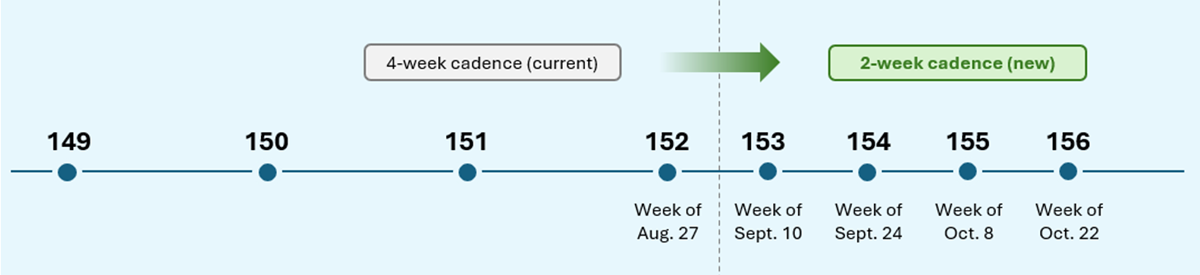
Starting with 152, the WebView2 Runtime will align with Edge's new two-week major-release cadence, instead of the previous four-week cadence, for faster security fixes, platform improvements, and other capabilities.
On the week of August 27, the WebView2 Runtime version 152 will be last major version to be released 4 weeks after the previous version.
On the week of September 10, version 153 will be the very first version to be released only two weeks after the previous version.
After that point, a new major version will be released about every two weeks, aligned with the Edge release cadence.
The WebView2 SDK release cadence will also be updated. Instead of the monthly releases, SDK versions will be released when there are new features, bug fixes, security updates, and other improvements to share. When we do ship an SDK, it will be released on the same date as the corresponding Runtime release.
What this means for your app
If you use the Evergreen Runtime distribution mode, which is the default, there's nothing you need to do. Your users' machines will start getting security and platform fixes at the more frequent cadence.
If you ship a Fixed Version Runtime instead, you stay in control of when you update, but new major versions arrive more often. Plan to validate and pick up new versions more frequently, so you don't fall behind on security fixes.
Recommended actions
We recommend that you test your WebView2 app by using the Beta preview channel of Microsoft Edge to catch any bugs before they roll out to your users. Early testing is the best way to catch app-specific issues before they reach Stable. To learn more, see Prerelease testing using preview channels.
We also recommend automating the validation of your app's core workflows with the WebView2 preview channels. You can automatically test your app by using Microsoft Edge WebDriver. See Automate and test WebView2 apps with Microsoft Edge WebDriver.
Finally, report regressions early so we can address them before the Stable release. You can report bugs by using the WebView2Feedback GitHub repository.
Stay current
Moving with Edge means your users get a safer, more capable web platform sooner, and you get a single, predictable release train to plan around.
We're grateful for the partnership of the WebView2 developer community, and we'll keep sharing details as the new cadence rolls out.
To learn more, read our recent announcement, check out our release notes, and review the release schedule. And, as always, feel free to share feedback with us.
Safari is one of the apps that Apple focused on in iOS 27, and it includes multiple new Apple Intelligence features. From automatically organizing tab groups to custom extensions, Safari is getting useful new capabilities.
Automatic Tab Organization
Safari uses Apple Intelligence to organize your open tabs into relevant topics, grouping like concepts together to make it easier to browse your open tabs.
If you're searching for a new couch while also planning a weekend trip, websites that you open for each topic are grouped together. Automatic sorting can be enabled by tapping on the icon with three lines in the upper right of the display while in tab view and turning on the Automatically Create Topics setting.
This same Safari menu also lets you see all of the groups and filter by topic so you can open just the tabs related to a specific topic while avoiding the other tabs.
There is a new "Resume Browsing" section of the Start Page that lets you continue browsing topics you recently closed or topics you have open on other devices.
You can also group pages you've saved to Bookmarks and Reading List by topic.
Custom Extensions
You can use AI to create Safari Extensions in iOS 27 with Apple's new Create an Extension option.
In the Safari settings accessible from the left of the URL bar, tapping into Create an Extension brings you to an interface where you can type in whatever you want an extension to do. Apple also includes suggestions in categories that include Boost Productivity, Improve Focus, Get Creative, and Develop and Design. Some of Apple's extension suggestions:
Create a citation for the current webpage and copy it to my clipboard
Create a 3-minute focus timer for the page
Set the minimum font size to 14pt
Turn the page into pirate speak
Style websites like 90s websites with bold colors and type
Every time I open a new tab, draw me a different flower
Highlight and show the dimensions of webpage elements when I tap on them
Enter the design mode for a website so that I can edit the contents
Notify Me
Safari can monitor a website for changes and alert you when new information is detected. Apple says it's useful for monitoring when concert tickets go on sale or watching for a product to be restocked.
To use it, navigate to a website, then tap on the settings icon to the left of the URL bar, and choose the Notify Me option. You can type in what you want Safari to watch for and set a frequency and a time.
At most, Safari will check websites once per hour, with daily, weekly, and monthly checks also available.
Passwords
The Passwords app can use Safari to automatically change flagged weak and compromised passwords, turning them into strong passwords.
The feature uses Apple Intelligence to automatically navigate to eligible websites, sign in, and update your password with a tap.
Ask to Browse
Apple added new parental controls in iOS 27, including an "Ask to Browse" feature that requires children to get parental approval before visiting a new website.
Performance Improvements
Apple says Safari's power efficiency has improved, so it will drain less battery. Web apps and start page content load faster, JavaScript handling is faster, and animations and graphics are smoother.
Compatibility
Safari features like automatic tab grouping, custom extensions, and custom notifications require Apple Intelligence. Apple Intelligence is available on the iPhone 15 Pro and later.
Availability
iOS 27 is available to both developers and public beta testers, so you can try it now. The update will launch in the fall alongside new iPhone models.
Safari is one of the apps that Apple focused on in iOS 27, and it includes multiple new Apple Intelligence features. From automatically organizing tab groups to custom extensions, Safari is getting useful new capabilities.
Automatic Tab Organization
Safari uses Apple Intelligence to organize your open tabs into relevant topics, grouping like concepts together to make it easier to browse your open tabs.
If you're searching for a new couch while also planning a weekend trip, websites that you open for each topic are grouped together. Automatic sorting can be enabled by tapping on the icon with three lines in the upper right of the display while in tab view and turning on the Automatically Create Topics setting.
This same Safari menu also lets you see all of the groups and filter by topic so you can open just the tabs related to a specific topic while avoiding the other tabs.
There is a new "Resume Browsing" section of the Start Page that lets you continue browsing topics you recently closed or topics you have open on other devices.
You can also group pages you've saved to Bookmarks and Reading List by topic.
Custom Extensions
You can use AI to create Safari Extensions in iOS 27 with Apple's new Create an Extension option.
In the Safari settings accessible from the left of the URL bar, tapping into Create an Extension brings you to an interface where you can type in whatever you want an extension to do. Apple also includes suggestions in categories that include Boost Productivity, Improve Focus, Get Creative, and Develop and Design. Some of Apple's extension suggestions:
Create a citation for the current webpage and copy it to my clipboard
Create a 3-minute focus timer for the page
Set the minimum font size to 14pt
Turn the page into pirate speak
Style websites like 90s websites with bold colors and type
Every time I open a new tab, draw me a different flower
Highlight and show the dimensions of webpage elements when I tap on them
Enter the design mode for a website so that I can edit the contents
Notify Me
Safari can monitor a website for changes and alert you when new information is detected. Apple says it's useful for monitoring when concert tickets go on sale or watching for a product to be restocked.
To use it, navigate to a website, then tap on the settings icon to the left of the URL bar, and choose the Notify Me option. You can type in what you want Safari to watch for and set a frequency and a time.
At most, Safari will check websites once per day at a set time, with weekly and monthly checks also available.
Passwords
The Passwords app can use Safari to automatically change flagged weak and compromised passwords, turning them into strong passwords.
The feature uses Apple Intelligence to automatically navigate to eligible websites, sign in, and update your password with a tap.
Ask to Browse
Apple added new parental controls in iOS 27, including an "Ask to Browse" feature that requires children to get parental approval before visiting a new website.
Performance Improvements
Apple says Safari's power efficiency has improved, so it will drain less battery. Web apps and start page content load faster, JavaScript handling is faster, and animations and graphics are smoother.
Compatibility
Safari features like automatic tab grouping, custom extensions, and custom notifications require Apple Intelligence. Apple Intelligence is available on the iPhone 15 Pro and later.
Availability
iOS 27 is available to both developers and public beta testers, so you can try it now. The update will launch in the fall alongside new iPhone models.
Amazon is taking up to $150 off multiple models of the M5 MacBook Air, focused mainly on 13-inch models this time around. These are solid second-best prices on the M5 MacBook Air in the wake of Apple's summertime price hikes.
Note: MacRumors is an affiliate partner with Amazon. When you click a link and make a purchase, we may receive a small payment, which helps us keep the site running.
In terms of 13-inch models, Amazon has the 16GB/1TB 13-inch MacBook Air for $1,499.00, down from $1,599.00. This one is available in two colors on Amazon, and it's accompanied by the 24GB/1TB model for $150 off.
If you're on the hunt for more discounts, be sure to visit our Apple Deals roundup where we recap the best Apple-related bargains of the past week.
Deals Newsletter
Interested in hearing more about the best deals you can find in 2026? Sign up for our Deals Newsletter and we'll keep you updated so you don't miss the biggest deals of the season!
When you're at home or work with regular access to an iPhone charger, you probably don't need to worry much about your iPhone's battery. On days when you're away from home for long stretches, you might want to make some adjustments to extend battery life.
We've rounded up 10 tips that can cut down on battery drain.
1. Turn on Adaptive Power
The best way to preserve battery life is to make sure you have Adaptive Power turned on. It's an iOS 26 feature that's available on Apple Intelligence iPhones. It uses on-device intelligence to analyze usage patterns and determine when you might need extra power.
It saves battery by lowering screen brightness a bit, adjusting performance, and limiting background activity. It also turns on Low Power Mode automatically when your battery hits 20 percent.
If you have an iPhone 17, iPhone 17 Pro, iPhone 17 Pro Max, or iPhone Air, Adaptive Power is on by default, but you need to turn it on with other models. Adaptive Power can be activated on eligible iPhones in Settings & Battery & Power Mode.
2. Set Up Automations for Low Power Mode
Turning on Low Power Mode is the most obvious way to extend battery life on your iPhone, and you can automate it so it turns on at a set battery percentage.
Apple will prompt you to turn on Low Power Mode when your battery is at 20 percent, but it's helpful to turn it on earlier. To set up a Low Power Mode shortcut, open up the Shortcuts app, and create a new Automation. With iOS 27, you can just type in what you want the automation to do, but in iOS 26, search for Battery Level, choose a target battery percentage, then add Low Power Mode as the action to turn on when your battery hits that level.
3. Turn Off the Always-On Display
Your iPhone's Always-On Display leaves the time, wallpaper, widgets, and Live Activities visible on the Lock Screen even when your iPhone is locked.
The setting preserves battery by doing things like turning off the display when a connected Apple Watch is no longer nearby (signaling that the iPhone owner is out of the room) or the iPhone is in a pocket, but Always-On Display still drains battery faster than no Always-On Display.
You can turn off the Always-On Display by following these steps:
Open up the Settings app.
Tap on Display & Brightness.
Tap on Always-On Display.
Toggle off Always-On Display.
You can also customize the Always-On Display if you don't want to turn it off entirely. You can disable wallpapers or turn off notifications.
4. Limit Frame Rate
Some iPhones have a 120Hz ProMotion refresh rate, but dropping it down to 60Hz can eke out a bit more battery life. You can adjust frame rate by using an Accessibility setting.
Open up the Accessibility section of the Settings app.
Tap on Motion.
Toggle on Limit Frame Rate.
ProMotion is available on all iPhone 17 models, the iPhone Air, and Pro versions of earlier iPhones dating back to the iPhone 13 Pro.
5. Turn on Dark Mode
On OLED iPhone displays, activating Dark Mode preserves battery life because there's less power draw when darker-colored pixels are displayed. Activating Dark Mode when outside on a sunny day can preserve a good amount of battery life.
Lower levels of brightness in Light Mode use the same battery as higher levels of brightness in Dark Mode, so Dark Mode can save battery even with brightness turned up when you're in a sunny location.
When you're somewhere that has dimmer lighting and screen brightness is lower, turning on Dark Mode won't save as much battery life, but it still draws a little less power.
6. Audit Apps With Location Access
It's a good idea to regularly check your privacy and access settings to make sure apps and services aren't doing things you don't want them to be doing.
Limiting the apps that have access to your location and how often apps can access that data can save battery life.
Open up the Settings app.
Choose Privacy & Security.
Tap Location Services.
Review the list and edit settings by tapping on the name of each app in the list.
You have four possible choices for location settings for each app, though not all four choices will always be available for every app depending on what it does. You can select the following: Never, Ask Next Time Or When I Share, While Using the App, and Always.
Never will prevent an app from ever accessing your location, and unless there's a real need for an app to know where you are, such as a mapping app, setting location access to Never is the best choice.
Ask Next Time Or When I Share will prompt an app to ask you with a pop-up the next time that it wants your location, so you can temporarily approve it. With this setting, location access is off until expressly allowed via the pop-up.
While Using the App lets an app access your location when the app is open and being actively used. If you close the app or switch over to another app, location access ends.
Always allows an app to have access to your location at all times, regardless of whether it's open or closed. This will cause the most battery drain and should be limited to only the apps that you need the most.
Many apps that don't need location information will ask for your location information. A banking app may want location access to show nearby ATMs, and a social media app like Facebook may want to serve you location-based features. Clearing the cruft will ensure no apps are accessing your location without express permission, and it'll save battery life at the same time.
You can also turn off Location Services entirely, but it's not ideal because it can impact apps you rely on, like Maps.
7. Rein in Background App Refresh
Most apps use background refresh to update even when they're not open. Limiting background activity to just the apps that need it is a classic way to cut down on battery usage. It's also another one of the privacy-related options that's just good to check regularly.
You can turn off Background App Refresh entirely or choose which apps can refresh in the background.
Open the Settings app.
Select General.
Tap on Background App Refresh.
From there, you can tap on the Background App Refresh option to turn it off altogether or choose to have it activate only when connected to Wi-Fi, which doesn't drain battery as much as downloading over cellular.
8. Limit Live Activities and Notifications
Incoming notifications wake your screen, and Live Activities keep the Lock Screen updated constantly. Limiting the apps that can send you notifications and Live Activities saves battery life.
Under Settings & Notifications, go through the list and turn off notifications for apps you don't need to hear from. After that, you can further refine with Focus modes. Focus modes let you choose which apps and people can send you notifications and when.
Open the Settings app.
Scroll down to Focus and tap it.
Tap on the "+" button.
Follow the instructions to choose a Focus mode and the apps you want to use with it.
During work hours, you can make sure you're only getting work notifications, and during personal time, you can limit work notifications. You can set up Focus modes for all kinds of situations, from driving to workouts to sleep.
You'll still get all of your notifications, but silently. Turning off unwanted notifications from apps is still the best method for saving battery life, but Focus lets you keep your notifications while still cutting down on the number that you receive at any given time.
Scheduled Summary is another way to limit your notifications because you can have non-urgent alerts sent at a scheduled time.
You can toggle on Scheduled Summary for apps in the Notifications section of the Settings app, where you can choose which apps should have their notifications included in Scheduled Summary and when you want them delivered.
9. Turn Off Keyboard Haptics
Haptic feedback on the iPhone's keyboard is satisfying to feel when you tap on the on-screen keys, but it can drain your battery.
You can turn it off by going to Settings & Sounds & Haptics & Keyboard Feedback and toggling off Haptic.
10. Monitor Your Battery Usage and Adjust
In iOS 26, Apple made it easier to see which of your apps are draining the most battery.
The top of the Battery interface has an overview of your current battery level and the time that you last charged. If your iPhone is charging, it also lets you know how much time you have left until the battery is full.
There is a weekly view of average battery use along with how much battery you're currently using compared to your typical average. The comparison tells you if you're using more, the same, or less battery life than you do on most days.
It shows which apps used more battery and by how much, which makes it easier to tell what's draining your battery. It also displays why an app used more battery, such as background app refresh or an excessive number of notifications.
Apple is working on AirPods that have cameras for feeding data to Siri. The new earbuds will be Apple's first AI wearable, and they're expected to launch sometime in 2027.
Leaked Video
Apple accidentally left a demo video featuring its rumored camera-equipped AirPods in macOS Tahoe 26.7 in mid-August. In the demo, a man holds up a book so the cameras in the AirPods can see the title. "With Visual Intelligence, your world becomes savable. See something you like? Just ask me to save it for later," says the voiceover.
Here is your first look at AirPods with Cameras in action using Visual Intelligence.
The cameras on the AirPods will feed information to Visual Intelligence, and Siri will be able to answer questions about the wearer's surroundings and log information. There is a direct reference to setting up Visual Intelligence on the AirPods.
If hair is covering the AirPods up, you'll receive an alert. "To get the most accurate information about things in your environment, make sure AirPods are not covered," it says.
Two Versions
Rumors about camera-equipped AirPods have been a little confusing. Most of the rumors about the AirPods with cameras were about a product with the codename B798. In June, Gurman said the camera AirPods had been delayed because of issues with Siri AI, and would not launch until September 2027 alongside the 20th anniversary iPhone.
In early August, Gurman revised his launch timing and said Apple was close to debuting camera AirPods with the codename B790. The B790 AirPods had apparently been progressing alongside the B798 model, and Gurman said the company "famously creates competing versions of the same product internally," with B790 closer to launch than B798. Then in mid-August, multiple references to the B790 version were spotted in macOS Tahoe 26.7. After B790 was discovered, Gurman claimed the AirPods were no longer on Apple's release schedule, and Apple has no plans to release camera-equipped AirPods before 2027.
Gurman said B790 is a version of the AirPods Pro 3 with cameras, while B798 is a future AirPods Pro model with cameras.
Design
The AirPods will look similar to the current AirPods Pro 3, but with cameras embedded in the stem. Apple may include a light that will come on when visual data from the AirPods is being sent to the cloud. The LED will let people around the wearer know the cameras are in use.
Size, design, and fit are expected to remain largely the same for the earbuds and the charging case, with the exception of the changes to the stem.
Features
The cameras in the AirPods will be used for sending data about the wearer's surroundings to Siri, giving Siri more information about where the user is and what's nearby.
Siri will be able to answer questions about objects or whatever the wearer happens to be looking at. The camera-equipped AirPods could be useful for more exact turn-by-turn directions when walking, contextual reminders, 3D mapping, and more.
The iPhone already has Visual Intelligence, which uses AI to identify plants, animals, landmarks, art, books, and more. Camera-equipped AirPods will be able to supply data for Visual Intelligence without the need to use the Camera app.
H3 Chip
Apple is working on an upgraded H3 chip and it could make its first appearance in the camera-equipped AirPods. The H3 chip is expected to bring latency improvements and better audio quality.
Two cameras - There are individual camera sensors in both the left and right earbuds.
Paired color images - The cameras take synchronized RGB still images of up to 1 megapixel, each with the same frame ID. The cameras give Visual Intelligence a look at the same scene from two angles.
No video - The cameras can take a series of pictures for Visual Intelligence, but there is no video recording option.
Resolution - There's an "active" mode that's likely triggered when the wearer activates Siri where the AirPods capture a 640x640 image. In a separate passive mode, they capture a 320x320 image. The sensors are capable of higher-quality images, but Apple appears to be capturing a specific image size.
Passive image capture - Passive capture mode appears to be for background environmental awareness, triggered by nearby speech, audio changes, posture changes, head rotation, and more.
Head movement - The cameras in the AirPods have distortion correction to account for head movement, and can reject images that have excessive movement.
On-device processing - Some content is processed directly on the AirPods, such as person detection.
Indicator lights - Code suggests the AirPods have a hardware indicator light to let people know when still images are being captured.
Naming
There were rumors suggesting the new AirPods could be called the "AirPods Ultra" instead of the AirPods Pro, but the macOS Tahoe 26.7 file we found that references the new AirPods is labeled "AirPods Pro" and not AirPods Ultra. It's possible that's a placeholder name, so AirPods Ultra isn't entirely out of the question. Apple may have also planned to use AirPods Pro for a version of the camera-equipped AirPods that won't ultimately make it to release.
Bloomberg's Mark Gurmansaid in March that Apple was considering several devices with the Ultra name, including the foldable iPhone Ultra, AirPods Ultra, and an OLEDMacBook Ultra, but that may or may not be a term we see for the new AirPods.
Pricing
Pricing is unconfirmed, but the current AirPods Pro 3 sell for $249. Camera hardware could make the new version more expensive.
Compatibility
Since the AirPods will feed data to Siri, an iPhone that supports Apple Intelligence will be required to use the features. Apple Intelligence is available on the iPhone 15 Pro and later.
Release Date
Despite showing up in macOS Tahoe 26.7, the camera-equipped AirPods aren't going to come out until 2027. They'll likely launch alongside the 20th-anniversary iPhone in September.
It is now late August, meaning that Apple's annual iPhone event is just around the corner. Below, we take a look at when the event might be held this year.
This September, Apple is expected to unveil the iPhone 18 Pro, iPhone 18 Pro Max, and an all-new foldable iPhone that will reportedly be named the iPhone Ultra. The regular iPhone 18, a lower-end iPhone 18e, and the iPhone Air 2 are not expected to be announced until around March 2027, as part of a new launch strategy.
Australian media outlet ChannelNews recently published an "exclusive" report claiming that the iPhone 18 Pro and iPhone Ultra event will take place on Tuesday, September 8. However, this date is questionable, as Apple has never held its iPhone event one day after Labor Day. Historically, there has always been at least a two-day gap between the holiday and the event, so it is more likely to fall on Wednesday, September 9 or later this year.
In his Power On newsletter yesterday, Bloomberg's Mark Gurman said the event will indeed take place "on or around" Wednesday, September 9 this year.
If the event were to fall on Tuesday, September 8 or Wednesday, September 9 this year, pre-orders would ordinarily begin on Friday, September 11. However, that Friday will mark the 25th anniversary of the 9/11 attacks, so Apple may want to avoid starting pre-orders that day out of respect. Perhaps for the same reason, iPhone 6s and iPhone 6s Plus pre-orders began on Saturday, September 12 instead of Friday, September 11 in 2015.
It would be a lot smoother for Apple to skip the week of Labor Day and the 9/11 anniversary entirely and hold its iPhone 18 Pro and iPhone Ultra event the following week instead. This would also allow for an extra week of production for the first-of-its-kind iPhone Ultra. Bloomberg's Mark Gurman reported that the event will take place in the first half of September, which would make Tuesday, September 15 the latest possible date.
If the event falls on Monday, September 14 or Tuesday, September 15, then pre-orders would likely begin on Friday, September 18, and the devices would likely launch Friday, September 25. It remains to be seen if the iPhone Ultra is available at the same time as the iPhone 18 Pro models, but it might be limited to the U.S. at first either way.
Since 2020, iPhone event videos have been pre-recorded, but in recent years Apple has invited select reporters to the Steve Jobs Theater to watch the video in person. Afterwards, attendees receive hands-on time with the new devices.
The table below provides an overview of dates for the last six iPhone events, with 2020 being an outlier due to the COVID-19 pandemic.
Apple's AirTag 2 is on sale for $79.99 this week on Amazon, down from $99.00. This deal is on the 4-Pack of the AirTag 2, and it's a new record low price for the accessory, beating the previous low by about $9.
Note: MacRumors is an affiliate partner with Amazon. When you click a link and make a purchase, we may receive a small payment, which helps us keep the site running.
We're also tracking a smaller deal on the AirTag 2 1-Pack, available for $24.00, down from $29.00. This is another record low price on the AirTag 2, and both have estimated delivery dates of August 28.
The new AirTag is equipped with a second-generation Ultra Wideband chip, enabling the Precision Finding feature to work up to 50% farther away from an item compared to the previous-generation model.
If you're on the hunt for more discounts, be sure to visit our Apple Deals roundup where we recap the best Apple-related bargains of the past week.
Update: When we originally posted this article, the price of the AirTag 2 4-Pack was $85.00, and Amazon has since sweetened this deal to the new all-time low price of $79.99.
Deals Newsletter
Interested in hearing more about the best deals you can find in 2026? Sign up for our Deals Newsletter and we'll keep you updated so you don't miss the biggest deals of the season!
In the Apple Store app on the iPhone, select users have received access to an "early preview" of a new AI-powered virtual shopping assistant.
Once it is available, you can open the chatbot by tapping on the speech bubble with two sparkles in the bottom-right corner of the app. Then, you can ask questions about Apple products, your existing Apple Store orders, trade-in values, payment options, and more, or simply tap on one of the common topics on the page to begin.
MacRumors was first to report that the Apple Store app would be getting an AI shopping assistant, based on a new privacy policy added to Apple's website. The policy states that Apple uses your personal information to personalize the chat experience, provide relevant responses, and if you opt in, to improve the assistant.
Apple has yet to officially announce this feature, so it seems to be quietly testing it with a smaller number of users for now. Many of our staff members do not have access to the chatbot, so if you do not see it yet, know you are not alone.
Apple's 20th-anniversary iPhone will be made using the same glass manufacturing process developed for the iPhone Air, according to the leaker known as "Fixed Focus Digital."
In a new post on Weibo, the leaker said that iPhone Air manufacturing equipment has been modified to produce more rounded glass components for next year's 20th anniversary iPhone, which has helped to reduce Apple's manufacturing costs. The leaker added that overall heat dissipation and thinness have both improved substantially as a result of the changes.
The claim builds on the leaker's earlier report that a supply chain facility had finished renovations ahead of "iPhone 20" production, with manufacturing quality expected to land somewhere around that of the first-generation iPhone Air. The iPhone Air is Apple's thinnest iPhone to date at 5.6mm and uses a polished titanium frame with a glass back.
The report adds incremental detail to a redesign that has been rumored for well over a year. Bloomberg's Mark Gurman reported that Apple is aiming for a "mostly glass, curved iPhone without any cutouts in the display" to mark the iPhone's 20th anniversary, with curved glass wrapping around all sides of the device.
The 20th-anniversary iPhone models are expected to launch in the fall of 2027, following the iPhone 18, iPhone 18e, and iPhone Air 2 in the spring.
15 years ago today, Tim Cook was appointed Apple CEO following Steve Jobs' resignation on August 24, 2011. On September 1, Cook will step down and incoming CEO John Ternus will take over, ahead of Apple announcing new iPhone 18 Pro models and its first foldable iPhone.
Ternus joined Apple as part of its product design team in 2001. He became VP of hardware engineering in 2013 and senior VP in 2021, and has overseen AirPods, Mac, iPad, and iPhone development in that time. Cook will remain at Apple as executive chairman, where he will engage with policymakers and help Apple navigate regulatory pressure.
Apple is preparing to raise iPhone prices following similar moves from Samsung and Google, according to Bloomberg's Mark Gurman.
Apple raised prices on almost every major product category two months ago, with affected Macs and iPads rising about 23% on average. In the latest edition of his "Power On" newsletter, Gurman said that the iPhone faces the same memory and chip supply chain issues affecting Apple's other products, so a price increase "remains inevitable."
Apple has apparently been closely observing how Samsung and Google respond to higher component costs. Both companies raised prices on their latest smartphones by about $100. Matching that increase would put the iPhone 18 Pro's starting price at $1,199, up about 9% from the current iPhone 17 Pro's $1,099 starting price.
Given the severity of the memory crunch, Gurman says that is a "fairly modest bump," suggesting Apple is absorbing some of the added costs itself. The company has already warned of pressure on gross margins this quarter, which is a sign it is not passing on all of its growing expenses to customers.
Apple still has good reason not to push too far. A $100 increase would keep the iPhone broadly in Samsung's pricing territory and avoid the "sticker shock" of the steeper hikes imposed on the Mac and iPad. Nevertheless, Gurman says that Apple has room to go higher, since the Mac and iPad price increases were far larger and the iPhone has a loyal customer base to draw on. The new Apple Upgrade subscription program could also soften the blow by allowing buyers to spread the higher cost across monthly payments rather than paying the full price upfront.
Recently I was trying to reproduce a bug with
citeproc.el and
org-mode in emacs.
I thought I could use package-vc-install to install a set of
upstream emacs packages at fixed versions, and thereby let citeproc
upstream test in the same environment as I have.
It turns out that getting emacs to load the non-builtin version
of org via package-vc-install did not work because
org-mode needs to run make after cloning
once package.el was initialized, I always seemed to end up with the
built in org-mode (yeah, I realize that isn't an explanation).
Recipe part 1: get org
Here you can replace 9.8.7 with any other tagged release
When Apple pushed out the release candidate for macOS Tahoe 26.7 last week, it contained references to a raft of unannounced products, from home devices to iPhones, iPads, AirPods, and Macs. It's not the first time we've seen this kind of thing, but the sheer amount of references – including a video showing off AirPods with cameras – is a bit unusual.
Code references to unreleased products turn up in early Apple betas quite regularly, but macOS Tahoe 26.7 was a Release Candidate, which means that – barring something unexpected – it's the final version of the software, just provided to developers a few days early for testing. In other words, it isn't meant to include anything Apple hasn't already rubber-stamped as good to go. So what happened?
In his latest Power On newsletter, Bloomberg's Mark Gurman has offered what he believes to be the most likely explanation.
When Apple prepares an update, it doesn't assemble the software release from a single line of work. Instead, it merges separate development branches of code, including bug fixes, assets, and features, into the branch that ships to users. It also maintains internal builds containing software suppport for hardware that it hasn't announced yet so that it can be written and tested well ahead of a potential launch.
According to Gurman, one of those internal builds most likely got inadvertently merged into the branch destined for release. As a result, "something that was supposed to remain inside Apple got tangled up with the shipping software – and made it all the way to the release candidate," he writes. It suggests someone inside Apple got confused as to which versions they were merging. Or was it AI that made the mistake? We'll likely never know. Either way, expect all the references to be stripped out of the public release.
With one exception – the AirPods with cameras – all of the product references in macOS Tahoe 26.7 RC had appeared in previous software, but they still go to show that Apple continues to work on several rumored products. Meanwhile, the camera-equipped AirPods aren't expected until 2027, and the hardware shown in the video is believed to be a version that Apple has already shelved in favor of a newer model.
The DistroWatch news feed is brought to you by TUXEDO COMPUTERS. This week in DistroWatch Weekly:
Review: umbrelOS 1.7.4
News: Fairphone 6 sold in USA, Bazzite updates Deck images, performance improvements in Linux 7.2, RPM fixes lock issue
Questions and answers: Follow-up questions about free and open-source software
Released last week: Mainstream OS 1.3.0, Garuda Linux 260819, FydeOS 23.0, DragonOS Resolute_R1, PorteuX....
The DistroWatch news feed is brought to you by TUXEDO COMPUTERS. PorteuX is a Linux distribution based on Slackware Linux. The project's latest version, PorteuX 2.8, introduces a new union filesystem and new compositing for Xfce. "This release is built around two new in-house projects: aufs-ng and xfwm4-gl. aufs-ng is our new union filesystem, written from scratch to replace....

 Log in
 ).
).