In the recent weeks I've been engaging Prot as a coach to help review
my new ffs package for GNU Emacs as I worked on preparing it for
inclusion in GNU ELPA, as well as discussing other Emacs- and
life-related topics.
In our nearly 2-hour conversation, we discussed at length and in depth
various aspects of life in the current times. For instance, feeling
overwhelmed in the face of innumerable things happening at once, with
technology changing our perception and making events feel proximate
and imminent.
We talked about seasonality and rhythms in life, including in relation
to burnout and knowing our own limitations, and descriptive vs
prescriptive thinking when reflecting on the expectations we may place
on our self when comparing our self to others through the lens of our
necessarily-incomplete impressions and glimpses of their lives. We
discussed absence or loss as a dual to presence or persistence in the
process of life. How with our memories and through embodying the
philosophy and teachings of departed loved ones their essence and
legacy continues to live on within us. But also loss in the sense of
us losing parts of our self in life-defining moments while preserving
other parts and gaining new ones, being liberated of some of the
burdens of our past self and in effect becoming someone else in the
process.
In being true to our self, we talked about humans as multi-faceted
beings and the importance of expressing and giving a voice to these
different aspects of our self, and keeping alive that child-like
sense of awe and wonder. To live a life where the pace and rhythms of
our environment are in sync with our internal rhythms, and to not give
others undue power over us or our happiness through trying to live
according to their prescribed standards or expectations.
I also learned more about Prot's practical philosophy of situational
awareness in life, not merely as a means for survival, but also as a
way of appreciating all of the beauty that surrounds us, and a method
for gaining the knowledge and skills to apply what we learn from
patterns in one area of life to other areas.
We concluded our session with a mention to the concept of sanctity, to
set aside a sacred time or place for our self wherein no distractions
are allowed, where we can unwind, rest, and recharge for whatever
comes next.
Here is the video recording of our session, which I share with Prot's
permission:
ffs provides a minor mode for simple plain text presentations in
Emacs, where the slides are separated using the page-delimiter, by
default the form feed character (^L).
I wrote ffs in early 2022 for my LibrePlanet 2022 presentation the
Net beyond the Web, and earlier this year decided to polish it towards
being a proper package and submit it to GNU ELPA. The manual still
needs some more work, but the overall package is in pretty good shape
so I submitted for inclusion in GNU ELPA.
ffs and I owe a debt of gratitude to Protesilaos for rounds of
code review and feedback for improving and polishing the package in
preparation for submission to GNU ELPA. You can watch videos of these
sessions posted earlier on my website:
The attempted build of ffs 0.2.1 within GNU ELPA build sandbox failed
with an Error: void-function (org-texinfo-kbd-macro) due to use of
#+macro: kbd (eval (org-texinfo-kbd-macro $1)) in ffs.org for better
formatting of key sequences in the exported Texinfo copy. This seems
to have happened for the specific case of generating a plain text
README using ox-ascii where ELPA didn't load ox-texinfo. To try
and mitigate this, a README.md has been added for use as the package
README instead of ffs.org. If not sufficient, a Texinfo copy of the
ffs manual will be shipped instead of the Org one in the next release.
ffs 0.2.2 also includes small fixes and improvements throughout
ffs.el from Stefan Monnier, and additional feedback to be addressed
in future releases.
Version 0.2.1 on 2026-05-20
The attempted build of ffs 0.2.0 within GNU ELPA build sandbox failed
with a "Cannot include file" error on the "#+include: fdl.org" in the
manual. So, as a workaround, we switch to using the official Texinfo
copy of the GNU FDL license rather than an Org copy.
Version 0.2.0 on 2026-05-19
First release of ffs intended for GNU ELPA.
After a few years of inactivity, in early 2026 I decided to dust off
ffs.el, polish and document it, and offer for inclusion in GNU ELPA
as a proper package.
Default value of ffs-default-face-height changed to nil
To minimize unexpected and/or unnecessary changes out-of-the-box, the
default value of ffs-default-face-height has been changed to nil.
ffs-edit-buffer-name demoted from user option to variable
This is not an important user-facing setting, so to help avoid
overwhelming users with many options, this has been demoted from a
user option to a variable.
Several new user options for customizing ffs's behaviour
As part of the effort to bring ffs more in line with the conventions
of other existing Emacs packages, the mechanisms for toggling various
parts of Emacs's interface to minimize visual clutter were changed
from being minor modes to being customizable user options. These are
the replacement new user options, with a default value of nil:
ffs-hide-cursor
ffs-hide-mode-line
ffs-hide-header-line
Their value is buffer-local, and may be set globally using
setq-default. See the sample configuration in the manual for an
example of how to customize them.
The new ffs-page-delimiter user option defines the page delimiter
inserted by ffs-edit-done when inserting a new slide. Emacs's
page-delimiter regexp should be able to match ffs-page-delimiter's
value, so if you use a custom page-delimiter be sure to customize
ffs-page-delimiter accordingly.
The new ffs-echo-progress user option controls whether to display in
echo area the progress through the slides. When non-nil, changing
slides will also display the progress through the slides in the echo
area. The format of the displayed progress can be customized using
the new ffs-echo-progress-format user option.
The new ffs-edit-display-buffer-alist user option may be used to
control the Window configuration for the ffs-edit buffer. By
default, it will display the ffs-edit buffer in the same window.
The new ffs-edit-done-hook user option may be used to define hooks
to be run at the end of ffs-edit-done after returning to the main
ffs presentation buffer.
Lastly, a new ffs-find-speaker-notes-function variable was added to
allow customizing the find function used for opening the speaker's
notes file, defaulting to find-file-other-frame.
Version 0.1.0 on 2022-05-19
Initial publication of ffs.el as part of my personal configurations
for GNU Emacs.
My first attempt at this concept was a now-archived ffsanim.el,
a major mode implementation that used Emacs's animate library to
animate slide texts onto the screen. Shortly after realizing the
shortcomings of that approach, I abandoned it in favour a minor mode
implementation and published version 0.1.0 of what is now ffs in
my personal configs repository.
I used this implementation for presenting my LibrePlanet 2022 talk,
The Net beyond the Web.
I picked "ffs" as the package name, the acronym for form feed slides.
In the recent weeks I've been engaging Prot as an Emacs coach to help
with doing review passes over my upcoming ffs package as I work on
polishing and documenting it in preparation for offering it for
inclusion in GNU ELPA.
Today we had our third session where we started by reviewing and
talking about my recent changes to ffs, then ventured to other
Emacs-related topics with the overarching theme of the flexibility
and extensibility of GNU Emacs, including display-buffer-alist,
keyboard macros, defining a custom ox-bhtml Org export backend
derived from Org's ox-html for ultimate flexibility when exporting
my site's pages from Org to HTML, Org capture, plain text files and
Emacs's diary and how it compares to org-agenda, and keeping a
journal with the help of Emacs.
Here is the video recording of our session, which I share with Prot's
permission:
In the recent weeks I've been engaging Prot as an Emacs coach to help
with doing review passes over my upcoming ffs package as I work on
polishing and documenting it in preparation for offering it for
inclusion in GNU ELPA.
Yesterday we had our second session focused on ffs, which I recorded
and share publicly with everyone with Prot's permission, so that
others can also benefit from Prot's insights and experience as we
discuss various aspects of Emacs package development with the concrete
example of ffs.
I addressed most of Prot's feedback about ffs from our first
session, and I'll be working on the changes we discussed in this
session in the next days.
In the last third of the video we switched topics to discuss a few
Emacs-related tangents including adding a 'padding' effect for the
mode line and its constructs, and distilling and separating the
easily-reusable package-like parts of one's Emacs configuration from
the actual configuration of those parts (e.g. the distinction of
prot-lisp and prot-emacs-modules in Prot's Emacs configuration).
For mode line padding, here is the snippet I'm using with Prot's
doric-themes:
Yesterday I joined Sacha Chua for a new episode of her Emacs Chat
podcast, where we talked about Emacs and life. I gave a quick tour
of my Emacs configuration, discussing at length my configurations for
EXWM (Emacs X Window Manager) among other topics like Emacs's facility
for visually indicating buffer boundaries in the fringe by setting
indicate-buffer-boundaries and my convenience configuration macros.
The above video is provided with closed captions and the below
transcript courtesy of Sacha with minor fixes and formatting by me.
I've included some of Sacha's screenshots from our chat, you can see
the rest on the episode's page on Sacha's blog.
Apple is now aiming to release its first smart glasses in "late 2027," according to the latest word from Bloomberg's Mark Gurman.
Meta Ray-Bans
He previously said that Apple planned to begin shipping the glasses by early 2027, but he said the product has faced development delays.
The glasses will feature "oval-shaped cameras, unique colors, and multiple frame styles," according to Gurman. "Over time, Apple believes the glasses could evolve into a health device and eventually incorporate augmented reality technologies capable of improving how people see," he said, but this technology is likely years away.
The glasses will compete with products in the $200 to $500 range in the U.S., he said.
Like the Meta Ray-Bans, Apple's glasses will have built-in cameras that let users capture photos and videos. There would also be speakers and microphones for music, phone calls, and notifications announced by Siri, he said.
The glasses could offer turn-by-turn walking directions.
As for build quality, he said Apple is designing its own plastic frames, with the company allegedly testing at least four potential designs:
A larger rectangular frame, similar to Ray-Ban's Wayfarers
A slimmer rectangular design, similar to the glasses worn by Apple CEO Tim Cook
Larger oval or circular frames
Smaller oval or circular frames
Apple is exploring a range of color options, including black, ocean blue, and light brown, and the glasses may have vertically-oriented oval camera lenses, he said.
Meta uses frames from the popular glasses brand Ray-Ban.
Unlike the latest generation of Meta Ray-Bans, Gurman does not expect Apple's first smart glasses to have an in-lens augmented reality display. He does not expect Apple's glasses to gain such a feature for at least a few years.
Both devices have been ready "for months," but Apple is holding off on launching them until the more personalized version of Siri is available, he said.
"I am told the hardware for the next Apple TV set-top box and HomePod mini has been done for months and that both devices are already in active use among employees at the company's headquarters in Cupertino, California," wrote Gurman.
If you have been closely following Apple TV and HomePod mini rumors, this is a familiar narrative.
The revamped Siri is finally expected to launch as part of iOS 27, iPadOS 27, and macOS 27, which will be unveiled during the WWDC 2026 keynote on Monday, June 8. Following beta testing, the software updates should be widely released in September, so the new Apple TV 4K and HomePod mini models should be available to purchase by then. In other words, the devices are hopefully around 3-4 months away at the latest.
The current Apple TV 4K was unveiled in October 2022, while the HomePod mini was introduced in October 2020, so there has been a long wait for new models. Nevertheless, Gurman said "don't expect much" in terms of new features for both devices, aside from newer chips that support the more personalized version of Siri.
The current Apple TV 4K has an A15 Bionic chip from the iPhone 13 series, while the HomePod mini uses the S5 chip from the Apple Watch Series 5.
Earlier rumors claimed the next Apple TV would be equipped with the A17 Pro chip, which is the oldest chip that supports Apple Intelligence. The device is also expected to feature Apple's N1 chip for Wi-Fi 7, Bluetooth 6, and Thread.
Gurman expects the next Apple TV to have a similar design as the current model.
There is one new twist, as he was told that the Apple TV's Siri Remote may be "refreshed in some form," but he did not provide any specific details or guarantee that there will be any outward-facing design changes to the accessory.
As for the HomePod mini, it is expected to use an Apple Watch's S9 chip or newer, but it is unclear if or how that chip would fully support the new Siri powered by Apple Intelligence. Other previously-rumored features for the speaker include the N1 chip, improved sound quality, a newer Ultra Wideband chip, and a red color option.
The DistroWatch news feed is brought to you by TUXEDO COMPUTERS. Armbian, which is a set of Debian and Ubuntu-based Linux distributions designed primarily for ARM development boards, has been updated to version 26.5.1: "Armbian 26.5.1 delivers another strong round of improvements across the project, focusing on expanded hardware support, desktop and userland refinements, build framework modernization, and infrastructure....
Ahead of the upcoming World Cup, football superstar Lamine Yamal has arrived at training camp for the Spanish national team sporting what seems to be the unreleased over-ear headphones that appeared in a U.S. Federal Communications Commission database last week. As suspected, the new headphones are a Beats product rather than an Apple product.
In a post on his Instagram account, Yamal shared several photos and a video clip showing him arriving to training camp with the new headphones in a pink color.
We don't know any other details on the upcoming headphones, and it's unclear whether they are a next-generation version of the Beats Studio Pro or if they will carry a new name. They feature a distinctly different design than the Beats Studio Pro, with flatter exteriors on the ear cups and a completely different headband design that appears to include tubular telescoping arms rather than the wider and flatter arms of the Beats Studio Pro.
A release date for the new Beats headphones is currently unknown, but it shouldn't be too far in the future given that they've already received FCC approval and are being seeded to key influencers like Yamal.
The DistroWatch news feed is brought to you by TUXEDO COMPUTERS. The NixOS project has published a new snapshot of its distribution: NixOS 26.05. The new version updates initrd to be based on systemd, plans for the retirement of x86_64-darwin, and updates GNOME to version 50. "We are very proud to announce the public availability of NixOS 26.05 'Yarara.....
Amazon today has the AirPods 4 available for $99.00, down from $129.00. This is a second-best price on the AirPods 4, which is the base model without Active Noise Cancellation, and it's accompanied by a solid deal on the AirPods Max 2.
Note: MacRumors is an affiliate partner with some of these vendors. When you click a link and make a purchase, we may receive a small payment, which helps us keep the site running.
Amazon provides a June 4 estimated delivery date for free shipping, with faster delivery options for Prime members. We haven't tracked an all-time low price on the AirPods 4 in a few months, so Amazon's deal this weekend is a solid option if you've been waiting for a sale.
Additionally, you can get the AirPods Max 2 on sale for $509.00 right now on Amazon, down from $549.00. This one is available in Blue and Starlight, with similar June 4 delivery estimates as the AirPods 4. This is a match of the all-time low price on the AirPods Max 2.
Head to our full Deals Roundup to get caught up with all of the latest deals and discounts that we've been tracking over the past week.
Deals Newsletter
Interested in hearing more about the best deals you can find in 2026? Sign up for our Deals Newsletter and we'll keep you updated so you don't miss the biggest deals of the season!
WWDC 2026 is coming up very quickly now and we're continuing to learn more about what to expect in iOS 27 and other updates, so make sure to check in to see the latest as we head toward Apple's big week, which kicks off with the traditional keynote on Monday, June 8.
While we may not see anything on the hardware side at WWDC, Apple does have plenty of products in the pipeline, and this week gave us an opportunity to check in on where things stand with the high-end "MacBook Ultra," the long-rumored foldable iPhone, and more, so read on below for all the details!
Top Stories
iOS 27's Siri App and 'Search or Ask' Feature Shown in Leaked Images
MacBook Ultra: 5 Features That Could Justify the Name
Reports and rumors suggest the next MacBook Pro that Apple will release might not be a MacBook Pro at all. It could actually be something altogether new and more exciting – a "MacBook Ultra" – positioned above the Pro as Apple's top-tier laptop, suggesting that the current M5 Pro and M5 Max models will remain on sale when it launches.
In a recent recap, we listed the key features we are expecting in the MacBook Ultra, which is likely to go on sale either later this year or in early 2027. As things stand, the latter time frame is now looking more likely, owing to the global memory chip shortage.
Apple Watch for Diabetes: The Latest on Apple's Plans for Non-Invasive Blood Sugar Monitoring
For many years now, it has been rumored that the Apple Watch will eventually gain non-invasive blood sugar monitoring capabilities, which would enable millions of people with diabetes to track their blood glucose levels without needing to prick their skin with a needle or wear a dedicated continuous glucose monitor.
According to Bloomberg's Mark Gurman, Apple recently shifted oversight of the project from its platform architecture chief Tim Millet to Zongjian Chen, a senior engineer overseeing advanced technologies within the company. He framed this change as positive news for the project, which has apparently been in development for more than 15 years.
Apple Seeds First iOS 26.6 and iPadOS 26.6 Betas to Developers
Even though WWDC is right around the corner, Apple still has another iOS 26 update in the works to tide us over until iOS 27 is ready for prime time, and that's iOS 26.6, which saw its first beta release this week.
We haven't spotted much new in this update yet other than potentially a new alert that will pop up when you've reached the maximum number of blocked contacts, but with that limit into the thousands, most users won't ever hit the cap.
Ferrari Reveals $640,000 EV Co-Designed by Jony Ive
Despite billions of dollars in investment, the Apple Car never came to fruition, but the just-unveiled Ferrari Luce may offer a glimpse of some things we might have seen had Apple's project panned out.
The $640,000 Luce is Ferrari's first all-electric car, and former Apple design chief Jony Ive and his LoveFrom collective were heavily involved in the design of the vehicle.
First Cases for Apple's Foldable iPhone Surface Online
Case makers routinely begin mass producing accessories ahead of a new iPhone announcement, working from dummy units or leaked CAD files to size their molds. Their designs are speculative, but they have historically proven accurate to the millimeter, since accessory makers cannot afford to be left without product on launch day.
Meanwhile, we continue to hear about hiccups as Apple seeks to ramp up toward mass production on the new device, with the latest being that Apple's supply chain is seeing issues with early-stage assembly procedures affecting production yields. This comes after word that issues with hinge reliability were also cropping up. Apple is, however, reportedly still aiming for a release later this year, though supplies may be very limited to start.
MacRumors Newsletter
Each week, we publish an email newsletter like this highlighting the top Apple stories, making it a great way to get a bite-sized recap of the week hitting all of the major topics we've covered and tying together related stories for a big-picture view.
Privacy-focused search engine DuckDuckGo has seen a surge in demand for its "No AI" search option in the wake of Google's May 19th I/O announcements. Google debuted a new "intelligent" search box reimagined with AI. It features AI suggestions as an upgrade to autocomplete, support for follow-up questions, expanded Personal Intelligence for connecting Gmail and Google Photos, and Search agents.
DuckDuckGo told MacRumors that visits to its No AI search page more than tripled after Google's announcement. Traffic hit the 3x mark on May 28th, and has continued to climb. Visits have averaged around 84 percent above baseline consistently since May 19.
DuckDuckGo is embracing demand for No AI search options, and it is promoting new extensions available for Chrome and Firefox that set No AI search as the default.
No AI search has no AI-assisted answers, no chat interface, and it surfaces fewer AI images. DuckDuckGo can be set as the default search engine on Apple devices, but not the specific No AI page. DuckDuckGo has its own AI tools, but they are turned off for people who opt for the No AI experience.
DuckDuckGo plans to add No AI search settings to its original extensions for Chrome, Firefox, Edge, and Opera in the near future.
Along with DuckDuckGo, there are other privacy-focused search engine options that minimize AI results. Paid search engine Kagi is one example, with no visible AI information unless you opt for AI tools. Kagi is $5 per month for a limited number of searches, and $10 a month for unlimited searches.
Because it is a paid search engine, it does not have ads and it does not collect and sell user data.
The DistroWatch news feed is brought to you by TUXEDO COMPUTERS. Aleksey Samoilov has announced the release of Ubuntu Sway Remix 26.04, a major update of the project's unofficial Ubuntu variant featuring the popular Sway tiling compositor. It is intended for Linux beginners who are interested in the keyboard-oriented interface of tiling window managers and also for advanced Linux....
Armadillo is a powerful
and expressive C++ template library for linear algebra and scientific
computing. It aims towards a good balance between speed and ease of use,
has a syntax deliberately close to Matlab, and is useful for algorithm
development directly in C++, or quick conversion of research code into
production environments. RcppArmadillo
integrates this library with the R environment and language–and is
widely used by (currently) 1272 other packages on CRAN, downloaded 46.6 million
times (per the partial logs from the cloud mirrors of CRAN), and the CSDA paper (preprint
/ vignette) by Conrad and myself has been cited 693 times according
to Google Scholar.
This versions updates to the 15.2.7 upstream Armadillo release made today.
The package has already been updated for Debian, and built for r2u. As the upstream was
modest, we for once skipped reverse-dependency checks. That bet paid off
as CRAN found no issues among
the over 1270 reverse dependencies. However, one package referenced a
package archived today, hence ‘invisible’ to CRAN and triggered a (false
positive) NOTE of ‘reference to non-existing package’. We came close.
Anyway, the package made it CRAN shortly thereafter following
the standard brief email exchange explaining the false-positive nature
of the NOTE.
All changes since the last CRAN release follow.
Changes in
RcppArmadillo version 15.2.7-1 (2026-05-29)
Upgraded to Armadillo release 15.2.7 (Medium Roast Deluxe)
Back at CES in January, LG unveiled its UltraGear evo GX9 (39GX950B) display, which it claims is the world's first 39-inch ultrawide 5K2K OLED gaming monitor, offering a large curved canvas in the increasingly popular 21:9 aspect ratio with the added benefit of OLED technology for enhanced contrast with true blacks, standard refresh rates of up to 165Hz, and more.
While LG began taking pre-orders for the UltraGear evo GX9 last month and a few early orders have already trickled out through various channels, LG says that the official kickoff of order shipments starts next week.
LG touts the gaming prowess of the UltraGear evo GX9, but its specs mean it can deliver a premium experience across a variety of use cases, from productivity to media consumption and more.
OLED technology delivers a contrast ratio of 1,850,000:1 across the ultrawide display's 5,120 x 2,160 resolution. At a large 39-inch display size with a 1500R curve, this translates to a density of 143 pixels per inch, which is solid but not enough for true retina-level quality. Still, the large, curved display means many users will often be sitting further from the display than usual to be able to take in the full scope of content on the display, and that should prove plenty sharp in most situations.
The Tandem OLED panel in the UltraGear evo GX9 supports up to 335 nits of typical brightness, which is likely sufficient for most uses but does lag behind some other displays including ones in Apple products. The OLED contrast, color fidelity at up to 98.5% of the DCI-P3 spectrum, and HDR support that can push brightness to 1,500 nits at 1.5% APL and 600 nits at 10% APL should, however, all help to offer a quality viewing experience.
For those who do want to game on this display, the UltraGear evo GX9 features AMD FreeSync Premium Pro and NVIDIA G-SYNC support, as well as 0.03ms response times to keep up with fast-moving content.
On the connectivity side, the UltraGear evo GX9 offers a USB-C port with 90-watt power delivery to a connected computer, as well as DisplayPort 2.1 and HDMI 2.1.
We'll be looking to go hands-on with the LG UltraGear evo GX9 as soon as we can, and we'll report back on how well it works for Mac users, but for now LG is taking orders on its own site priced at $1,799.99, and it's also available at Amazon for the same price with delivery quotes starting around June 8.
MacRumors is an affiliate partner with LG and Amazon. When you click a link and make a purchase, we may receive a small payment, which helps us keep the site running.
Hey Windows Insiders,
One of the best parts of the work is hearing directly from the people using Windows every day. I was recently in Hyderabad and Taipei meeting with local Windows Insiders, and those conversations gave me a lot of energy heading into Build next week.
The feedback we’re hearing from you continues to reinforce that we’re focused on the right places.
For me, the theme this month is momentum.
Some of that momentum is in performance. We’re making steady progress across core areas like File Explorer, search, and broader system responsiveness, backed by architectural improvements that are starting to unlock more consistent gains across Windows.
Some of it is in craft: the small details that make Windows feel more polished, more predictable, and more personal. Address bar improvements in File Explorer. A modern Run experience. More taskbar positioning flexibility with app labels. These are the kinds of refinements we’re working through across Windows, and you’ll continue to see more of them in Insider builds throughout the coming year.
Let’s get into what started showing up this month, including new experiences beginning to roll out in today’s flights.
Making Taskbar and Start more personal
This month, we began rolling out more personalization for Taskbar and Start, two of the most used and most personal surfaces in Windows.
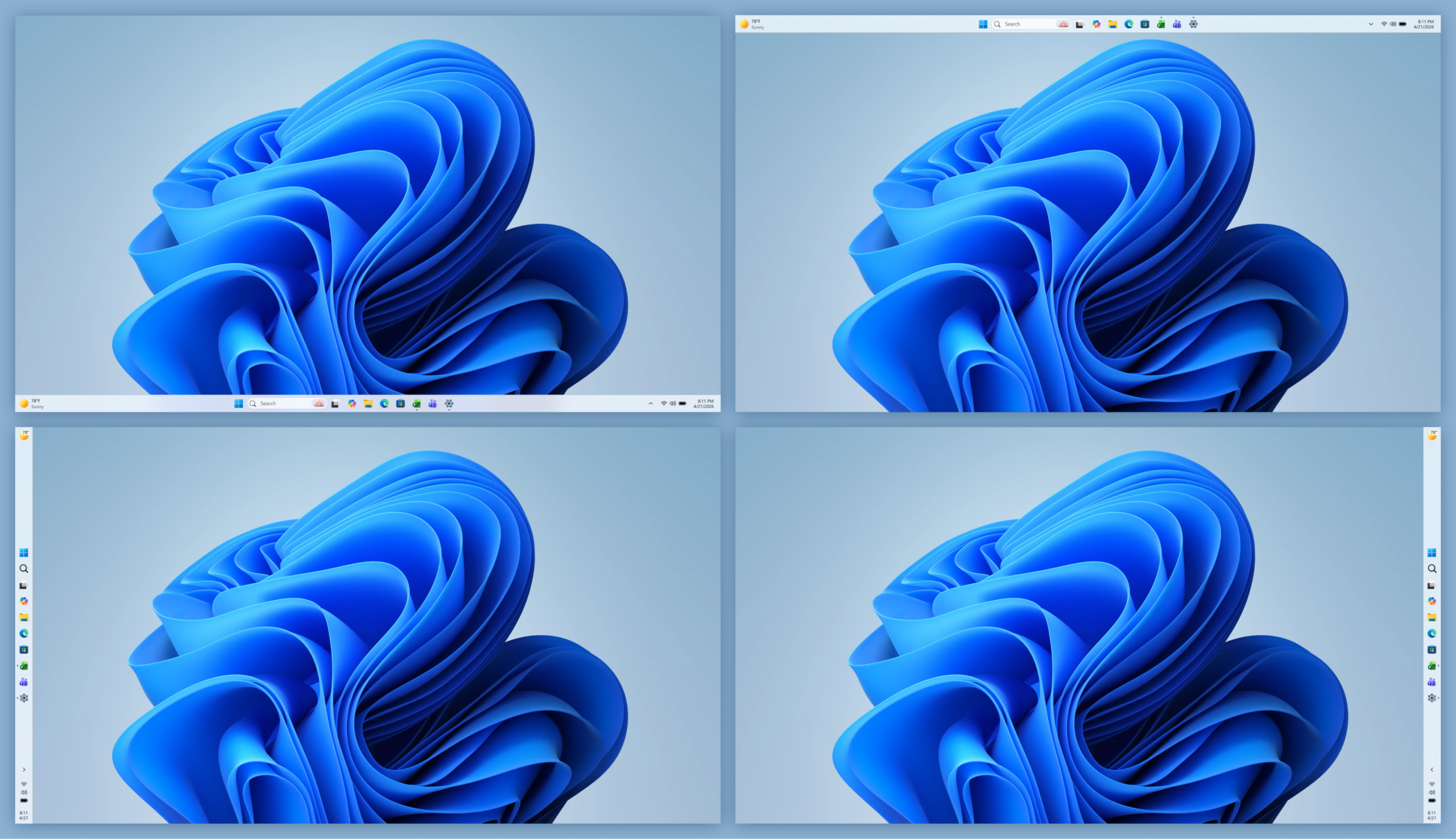
With these updates, you can move the taskbar to any edge of the screen, choose icon alignment based on its position, and use app labels across positions to make open windows easier to tell apart. There’s also a new smaller taskbar option to help reclaim screen space.
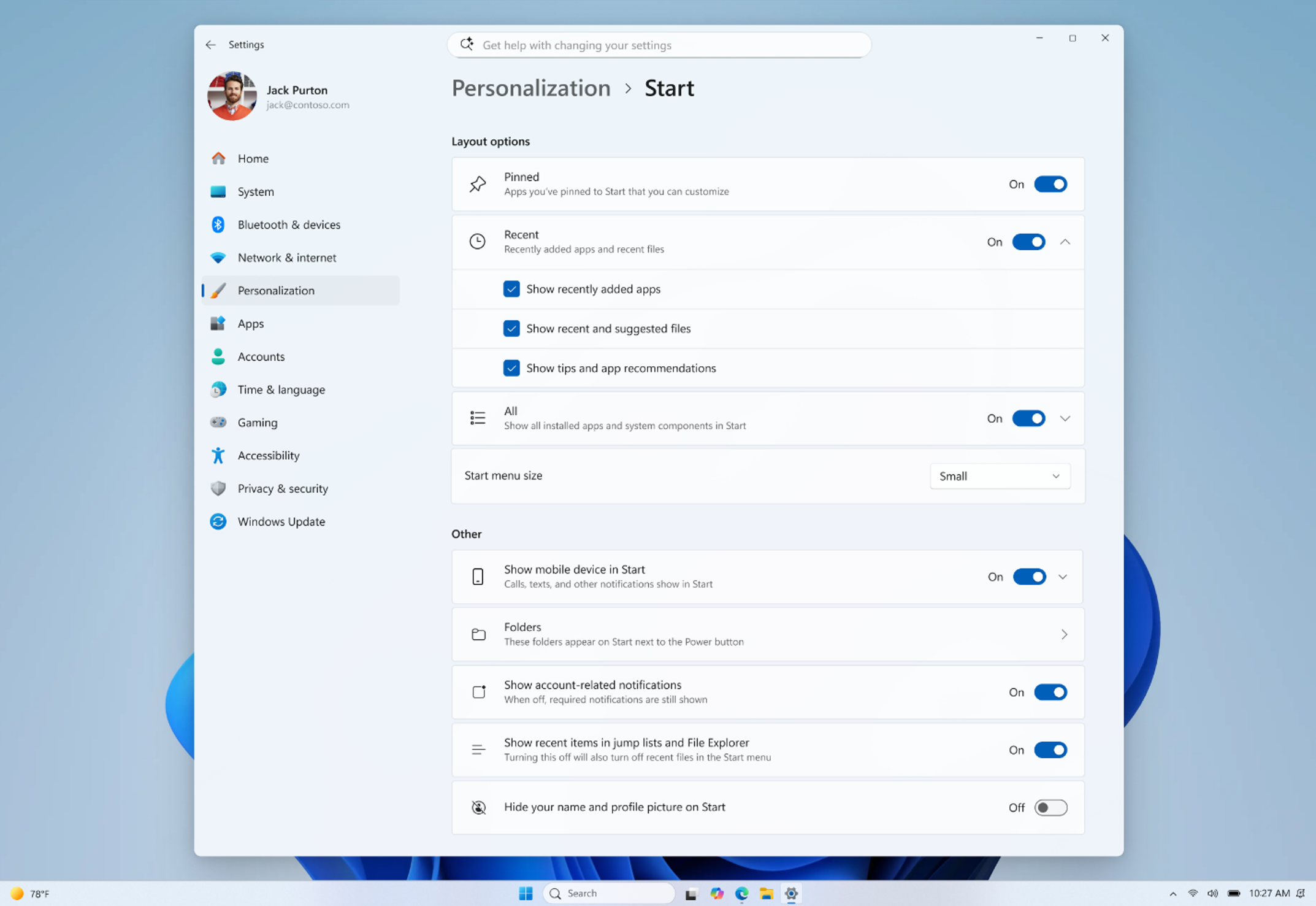
We’re also making Start easier to shape around how you work. New controls let you independently show or hide sections like Pinned, Recommended, and All apps, adjust Start menu size, and hide your name and profile picture for more privacy. The Recommended section is also being updated to Recent, with better file relevancy, so surfaced content better reflects what you’re actually working on.
These updates have started to roll out in the Experimental Channel. Read more about the considerations and improvements we’re bringing to taskbar and Start in the recent blog post from Diego Baca.
Improving driver quality, reliability, and security with the Driver Quality Initiative (DQI), and Cloud Initiated Driver Recovery
In March, we committed to delivering a smoother, more dependable Windows experience with our ecosystem of partners. Drivers are a critical part of that work.
Drivers sit at the heart of Windows, connecting the OS to silicon, components, and peripherals. With thousands of partners contributing to tens of thousands of active driver families, improving driver quality is essential to making Windows more reliable over time.
At WinHEC 2026, we introduced the Driver Quality Initiative (DQI), a comprehensive effort designed to improve driver quality, reliability, and security across Windows.
We also rolled out new changes with Cloud Initiated Driver Recovery to improve how drivers are validated, delivered, and maintained. By catching issues earlier, targeting updates more precisely, and enabling automatic recovery when needed, devices can stay reliable over time with fewer disruptions and a better path back to a known-good state.
This is part of our ongoing work with partners to make Windows more dependable over time.
File Explorer improvements across reliability, readability and usability
[embed]https://youtu.be/gZUDEBbZSp4[/embed]
Building on last month’s improvements, we made several updates to File Explorer across reliability, readability, and usability, including the Address Bar, file size formatting, keyboard navigation, and renaming.
The Address Bar now supports paths containing double backslashes and quotation marks, such as C:\Users\user or "C:\Users\user", improving compatibility with more of the paths people paste or type into File Explorer. We also improved reliability of the Address Bar suggestion dropdown so it consistently closes after an item is selected.
In Details view, file sizes now use appropriate units like KB, MB, and GB instead of KB-only, making them easier to read at a glance. We also improved keyboard navigation in File Explorer context menu flyouts.
We also fixed multiple renaming issues, including one where text could be repeatedly selected while renaming items in folder views, and another where updated names with case-only changes were not immediately reflected in folder views across local and cloud storage.
These are small details, but they show up in places people use all day. The goal is fewer broken paths, clearer information, and File Explorer interactions that behave more predictably. These updates also began rolling out earlier this month in the Experimental Channel.
Making Windows easier to use with voice input, touch, and more personalization
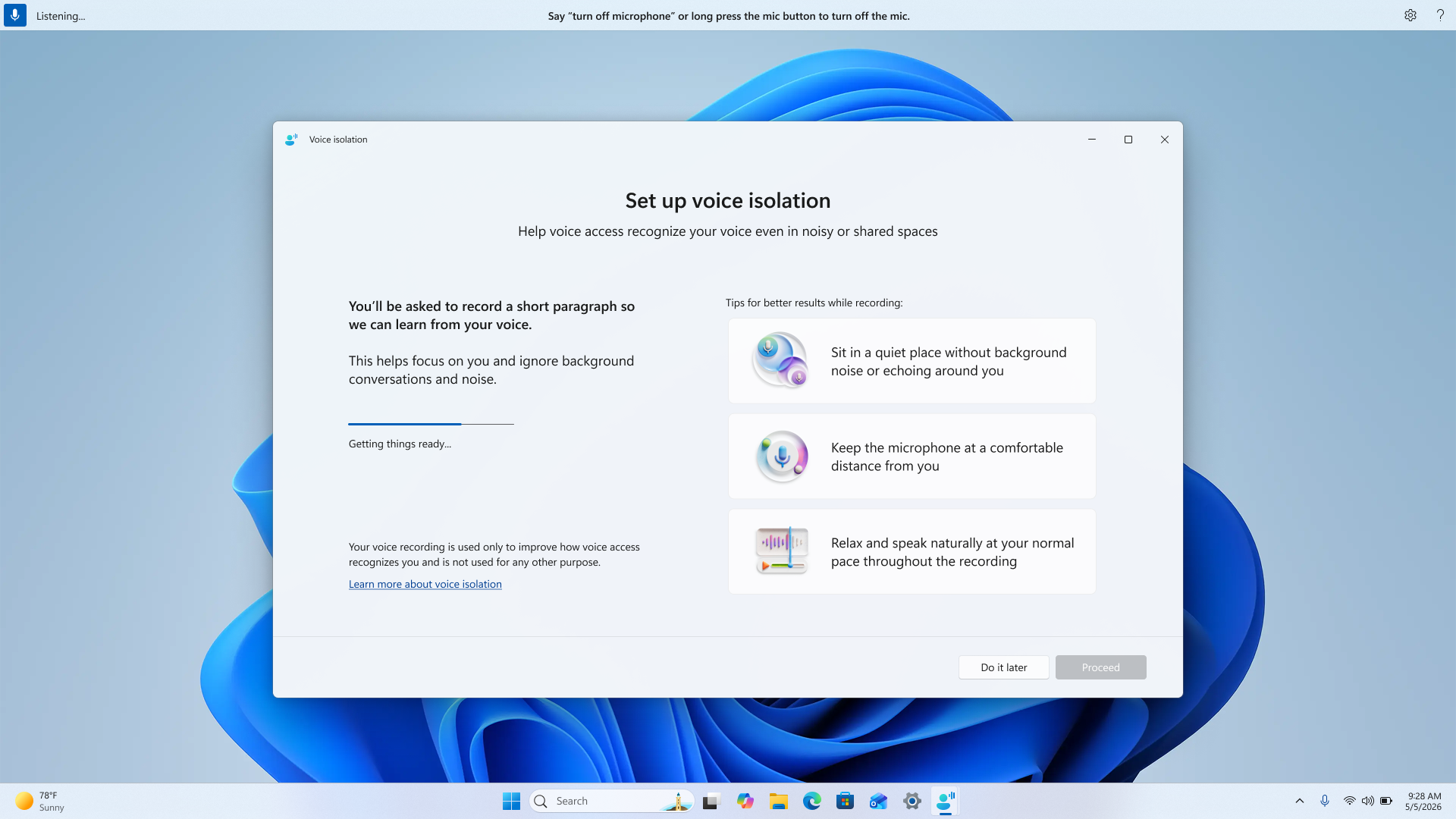
[caption id="attachment_178981" align="aligncenter" width="1024"] Screenshot showing setup of voice isolation.[/caption]
Accessibility work in Windows often shows up across many different parts of the experience, because people use their PCs in different ways and in different environments.
For voice, one of the most common pieces of feedback we hear is sensitivity to background noise. With Voice Isolation in Voice Access, Windows can better focus on the speaker and reduce the impact of surrounding noise, helping commands come through more consistently without needing to change where or how you’re working.
We’re also adding more ways to personalize how Windows looks and feels. New options like screen tint make it easier to adjust color and opacity based on preference or lighting conditions, giving people more control during longer sessions.
We’re continuing to improve Magnifier as well, making it easier to set precise zoom levels and adjust zoom directly within the experience without needing to go into Settings.
Finally, we added new gesture-related controls for precision touchpads in Settings, including automatic scrolling, gesture speed controls, accelerated scrolling, and optional single-finger scrolling support.
These are areas we hear about regularly in feedback. The changes are gradual, but they help reduce friction and make Windows easier to use in more moments.
These updates began rolling out in the Experimental channel earlier this month.
Build next week!
Next week is Microsoft Build, where we’ll share more about what we’re doing to elevate the developer experience across the Windows platform. We’ve got a lot in store, so tune in for the keynote at 9:30am PT on Tuesday.
Earlier today, we also shared the first episode of Inside Windows, a podcast where Pavan Davuluri, Executive Vice President, Windows & Devices, sits down with members of the team to share more insight into the work and people behind Windows. I was honored to be the first guest and talk through some of the work we’ve been focused on over the past several months.
For those attending our meetup next week in San Francisco, I look forward to meeting you and hearing how we can keep improving the Windows Insider experience, particularly for developers.
More to come next week!
Marcus
Hello Windows Insiders,
This week we continue to expand the rollout of the new Windows Insider Program changes to devices in channels already announced.
New builds this week
Today we are releasing new Windows 11 Insider Preview Builds. As a reminder, all Insiders can find the release notes for your device based on the new channel system, even if you haven’t moved yet. This is to make finding build information as easy as possible during the transition. See your channel release notes here:
Experimental (Future Platforms) – Including Canary 29500 series: Build 29599.1000
Please note: We have identified an issue internally causing crashes on AMD machines supporting System Guard, meaning these devices in WIP will not be offered this week's Experimental (Future Platforms) build. This should be fixed by the next flight.
As a reminder, you can always find your build number in the watermark on bottom right-hand corner of your desktop.
Advanced core selection
As mentioned in recent WIP blogs, we are in the process of releasing the Windows 11 version 26H1 build to those Insiders who have elected this version under Advanced options in the Windows Insider Program settings. We will begin releasing this version to those Insiders who have elected this change on June 5 2026.
As outlined in our Windows IT Pro Blog, Windows 11 26H1 is a targeted release that supports some of the new device innovations coming in 2026, including devices with Qualcomm Snapdragon X2 Series processors. Devices running Windows 11, version 26H1 will not be able to update to the next annual feature update in the second half of 2026. This is because Windows 11, version 26H1 is based on a different Windows core than Windows 11, versions 24H2 and 25H2, and the upcoming feature update. These devices will have a path to update in a future Windows release.
Insiders who have elected the 26H1 option in Advanced options but no longer wish to take this version, should reselect version 25H2 before version 26H1 is made available to these devices beginning June 5. Insiders who do take version 26H1 and want to move back to 25H2 will be able to do so through a complete reinstall of Windows.
Renamed "Recommended" section to "Recent" in Start and Settings page
Section-level toggles to independently show or hide Pinned, Recommended, and All.
Choose between a small and large Start menu, in addition to "Automatic (default)" setting option that's already available today
The option to hide your name and profile picture in Start
Redesigned Start menu settings page
[caption id="attachment_178960" align="aligncenter" width="1024"]Screenshot of the updated Start settings showing the new section-level toggles.[/caption]
[Windows Search]
Release channel: Experimental, Beta
We're improving Windows Search results:
Search by Substring: Files with compound names or content (e.g., MeetingNotesApril, ProjectStatusReport) are now easily discoverable by typing “april” or “status”.
Thanks,
Stephen and the Windows Insider Program team
Apple's digital driver's license feature in the Wallet app is set to expand to Virginia, according to a person familiar with the matter.
In select U.S. states, residents can add their driver's license or state ID to the Wallet app on the iPhone and Apple Watch, and then use it to display proof of identity or age at select airports and businesses, and in select apps. The feature has rolled out to 14 states so far, including Arkansas earlier this week, and it is also available in Puerto Rico.
The other states are Arizona, Maryland, Colorado, Georgia, Ohio, Hawaii, California, Iowa, New Mexico, Montana, North Dakota, West Virginia, and Illinois.
Now, Apple is preparing for the feature to go live in Virginia, the person said. However, we do not have an exact timeframe for availability. Towards the end of 2025, Virginia's Department of Motor Vehicles said it planned to support the Apple Wallet's digital ID feature in the coming months, so hopefully it goes live soon by this point.
When the feature goes live, Virginia residents will be able to set it up by opening the Wallet app on the iPhone and tapping on the plus sign in the top-right corner. Next, they will tap on Driver's License and ID Cards, select Virginia from the list once it is added, and follow the on-screen steps to complete the process.
Apple Wallet IDs are accepted at TSA checkpoints at hundreds of U.S. airports for domestic travel. Given that Apple Wallet IDs are not accepted by law enforcement, and lack many other use cases, carrying a physical ID is still necessary.
If you live in a state that does not yet offer Apple Wallet IDs, you can create a Digital ID based on your U.S. passport, and present it at the same participating TSA checkpoints, for age and identity verification purposes during domestic travel. It is not a replacement for a physical passport, and it cannot be used for international travel.
The passport feature requires iOS 26.1 or watchOS 26.1 and later.
OpenAI is developing a smartphone intended to compete directly with the iPhone, in what appears to be a significant departure from the company's previously stated hardware strategy. Here's everything we know so far.
Analyst Ming-Chi Kuopublished his findings in late April following supply chain checks, describing the device as an "AI agent phone" built around a continuous, context-aware interface rather than individual apps. Kuo argued that the smartphone is the only device that captures a user's full real-time state, including location, activity, communication, and context, making it uniquely suited to AI agent inference.
He said fully controlling both the operating system and the hardware is the only way for OpenAI to deliver a comprehensive AI agent service, and that AI agents will fundamentally shift how people interact with a phone, moving the focus from launching individual apps to completing tasks through a seamless interface.
Specifications
OpenAI's phone is said to use a customized version of MediaTek's Dimensity 9600 processor, built on TSMC's N2P node in the second half of 2026. Kuo initially named both MediaTek and Qualcomm as chip partners but has since said MediaTek appears "better positioned to become the sole processor supplier."
Luxshare Precision Industry is believed to be the exclusive manufacturing partner. Separately, Kuo reported that Sunny Optical has secured component orders for two OpenAI devices, including the smartphone. This is likely for the camera module.
The device's headline known hardware specification today is its image signal processor, which includes an enhanced HDR pipeline intended to improve real-world sensing through the camera. It is also said to use two AI processors for handling different tasks simultaneously, such as vision and language processing, along with fast memory and storage and security features to isolate processes.
What About Jony Ive's Devices?
The phone represents a notable reversal in OpenAI's publicly stated strategy. The company's hardware ambitions had previously been described as centered on non-phone form factors developed with former Apple design chief Jony Ive, whose startup io Products OpenAI acquired for $6.5 billion in May 2025. Ive and CEO Sam Altman had specifically said they did not want to build a device with a screen, with Altman describing a prototype to employees as "the coolest piece of technology that the world will have ever seen."
The first product from that collaboration was delayed out of 2026 and has since been identified as a smart speaker with an integrated camera, priced between $200 and $300 and expected to launch in early 2027. Other devices reportedly in development include smart glasses, a smart lamp, and potentially earbuds, though those products are further out on the roadmap and some could be cancelled.
OpenAI has also been aggressively recruiting from Apple's hardware ranks, hiring over 40 former Apple employees. The hires include former Apple designers Evans Hankey, Tang Tan, and Scott Cannon, prompting Apple to offer its iPhone Product Design team retention bonuses of up to $400,000 in restricted stock units to counter the poaching.
Timeline
Mass production of OpenAI's smartphone was originally believed to be targeted for 2028, but Kuo has since revised that expectation to the first half of 2027. The accelerated timeline is said to reflect OpenAI's planned IPO, where a compelling hardware product could strengthen the company's investor narrative, as well as intensifying competition in the AI agent phone category. Kuo projects combined 2027 and 2028 shipments could reach around 30 million units if development stays on track.
What Does It Mean for Apple?
If the broader hardware lineup ships, OpenAI will be a direct competitor to Apple across several product categories. Apple is rumored to be developing smart glasses, AirPods with cameras, an AI pendant, and a smart home hub with enhanced Siri capabilities. On the day Kuo published his initial report, Altman posted on X that it "feels like a good time to seriously rethink how operating systems and user interfaces are designed."
A few months ago, Apple released the MacBook Neo, its most affordable MacBook ever. At the time, an ASUS executive admitted that the laptop came as a "shock" to the Windows PC industry, which is now in the process of responding.
Acer today introduced a Swift Air 14 laptop, with U.S. pricing starting at $699. By comparison, the MacBook Neo starts at $599 with a 256GB SSD and 8GB of RAM, or at $499 for college students and educational staff. However, the MacBook Neo costs an equal $699 when configured with a doubled 512GB of storage and a Touch ID button.
Powered by a new Intel Core Series 3 processor, the Swift Air 14 features a 14-inch display with a 120Hz refresh rate and a resolution of 1,920 × 1,200 pixels, up to a 512GB SSD, up to 16GB of RAM, an all-aluminum enclosure, and quad speakers with DTS:X Ultra audio. Like the MacBook Neo, the laptop supports Wi-Fi 6E.
Acer's Swift Air 14
The laptop is equipped with two Thunderbolt 4 ports, a USB-A port, and a 3.5mm headphone jack, and Acer says a 70 Wh battery provides up to 19 hours of battery life for video playback and up to 16 hours of battery life for web browsing.
Like the MacBook Neo, the Swift Air 14 is available in colorful finishes, including sage green, frost blue, blossom pink, and lilac purple.
Acer said the Swift Air 14 will be available in North America starting in August.
Meanwhile, Qualcomm this week announced the Snapdragon C, a new processor designed for "entry-tier laptops" priced at "$300 and up." Qualcomm said the processor delivers "responsive everyday performance" with "breakthrough power efficiency." The first laptops powered by the Snapdragon C are expected to launch later this year, with committed brands including Acer, HP, and Lenovo, according to Qualcomm.
Qualcomm's Snapdragon C processor
Indeed, Acer has previewed the Aspire Go 15, the first laptop powered by the Snapdragon C processor. The laptop will have an "affordable" price point, but Acer did not provide specific pricing or a release date. Key specs include a 15.6-inch display with a resolution of 1,920 × 1,080 pixels, up to a 512GB SSD, up to 8GB of RAM, a 1080p webcam, two speakers, two USB-C ports, one USB-A port, one HDMI port, and a 3.5mm headphone jack.
Acer said the Aspire Go 15 is made from 100% recyclable materials and has some components made from recycled plastic, so it sounds like the laptop will not have an all-aluminum enclosure like the MacBook Neo and the Swift Air 14.
Finally, ASUS commented on the MacBook Neo again during its annual shareholders meeting today. According to Taiwan's Economic Daily News, ASUS's chairman Jonney Shih said that the company can learn from Apple's cost-efficient strategy with the MacBook Neo and views it as an opportunity. Stay tuned, he said.
On an earnings call last month, Apple's CEO Tim Cook said that customer response to the MacBook Neo had been "off the charts" since its launch.
Apple was very optimistic about the MacBook Neo before announcing it, but the company still "undercalled" the level of enthusiasm that the laptop would generate, according to Cook. He said that MacBook Neo demand exceeded Apple's expectations and helped to drive a record number of first-time Mac buyers last quarter.
"We could not be happier with how things are going at the moment," said Cook.
As for the Windows PC industry, perhaps not so much.
In September 2025, I attended the annual LibreOffice conference in Budapest, Hungary. This gave me an opportunity to explore the city, which I will cover in this post.
Let’s start with the currency. Although Hungary is a part of the European Union (EU), it doesn’t use the euro as its currency. Instead, it uses Hungarian forints (denoted by “Ft”). During my time in Hungary, 1 Indian rupee was equal to 4 Hungarian forints.
After reaching the Budapest airport, I bought a 15-day public transport pass. The public transport counter is after you pass customs and immigration. The pass allows unlimited use of public transport in the city. I had to show my passport and pay 5950 Ft to get the pass. The pass had my passport number mentioned on it. The public transport passes can also be bought at any of the tram stations as well.
This is the counter from where I bought my public transport pass.
My unlimited public transport pass for Budapest. I have redacted my passport number from it.
An automatic ticket machine at a tram station in Budapest.
Budapest is a union of two cities—Buda and Pest—lying on opposite sides of the Danube River. My hotel—Corvin Hotel—was on the Pest side.
Budapest had good public transport. The buses, metros, and trams complemented each other. For example, the airport didn’t have metro or tram connectivity, but it was served by the bus. Most of the metro was on the Pest side, with only a couple of stations falling in Buda. However, both sides had an extensive network of trams.
Furthermore, the information about the public transport was easily accessible. For instance, the map of tram stops inside the trams also included the bus routes one could get after alighting at those stops.
From the airport, I took a bus followed by taking a metro on the M3 line to reach within walking distance of my hotel.
An M3 line metro in Budapest.
During the conference I would take the tram to the conference venue. The trams were modern and fast. They also had a smiley face at the front, which gave them a friendly look. It seemed like the trams were happily doing their job. The city also had a good pedestrian infrastructure along with separate cycling tracks.
A tram in Budapest having a smiley face at the front.
Budapest’s tap water is officially safe to drink, which was mentioned on a sticker posted on the wall of the bathroom of my hotel room. So, I did not need to buy any water bottles while I was there.
On the 6th of September, I went on a sightseeing tour of Budapest with my Dione. Our friend Attila, who was a local (from Hungary), joined us. We went to the central market from our hotel by metro.
If you read my post on Vienna, I mentioned that the metro stations don’t have AFC gates but ticket validators instead. Budapest’s metro also has the same system. If you buy individual tickets, you need to validate them using the validators on the station before boarding the metro. If you are using a public transport pass like I was, then you do not need to validate, and you can board the metro directly.
A ticket validator at a metro station in Budapest.
In 10-15 minutes, we reached the central market. Attila showed us around. I bought a fridge magnet and paprika powder as souvenirs. Paprika powder is a signature spice of Hungary. It is mainly available in two forms—one is sweet and the other being spicy. I wanted the spicy one, but I didn’t get that in that market. Therefore, I had to contend with buying the sweet version. The sweet version isn’t sweet though, it is just not spicy. After bringing that paprika powder home, it is mainly used for food coloring. I like it though and use it frequently in my omelets and other dishes.
Central market.
The building right behind the tram is the central market building.
At some point, Atilla had to join the The Document Foundation (TDF) sightseeing group, so we parted ways at the central market. Dione and I continued our sightseeing and decided to start with visiting the Hungarian parliament, which is a tourist attraction. It was because we were on the Pest side and the parliament was also on the same side, while other tourist attractions were on the Buda side.
So, Dione and I hopped on a tram and went to the parliament. We got off at a tram station just outside the parliament. The parliament is the icon of Budapest. The building has a gothic architecture and colored brown and white. One can buy tickets and take an inside tour. However, we didn’t have a lot of time, so we stayed outside the building.
Hungarian Parliament building.
After spending some time outside the parliament building, we took a tram to the Chain Bridge. As I mentioned earlier, Budapest has two parts—Buda and Pest—separated by the Danube River. To go from one of the sides to the other requires crossing a bridge. Although Budapest has many bridges linking the two sides, the main one is the Chain Bridge.
We walked on the chain bridge to get to the other side. The bridge gave a good view of the Danube River. It also had a statue of a lion. The Buda Castle (another major landmark of Budapest) was visible from the bridge.
A shot of Chain Bridge.
The lion statue on the Chain Bridge.
After reaching the other side of the bridge (the Buda side), we sat on a bench for some time and then planned on where to go next. We decided to go to Fisherman’s Bastion, which is another tourist attraction.
We used the OSMAnd~ app to figure out which bus to take and hopped on one. Soon we reached Fisherman’s Bastion, where we found a flight of stairs that led upwards. Upon climbing the stairs, we got a panoramic view of the city. It also gave us a good view of the Hungarian parliament across the river. Going further upstairs, we found a statue of Stephen I of Hungary. He was the first king of Hungary, getting the crown in the year 1900.
A view of Hungarian parliament from Fisherman’s bastion.
I found Fisherman’s Bastion to be the best tourist attraction in the city. As mentioned earlier, it offers a panoramic view of the city, which I liked. I liked the arhitecture and open space there. If you find yourself in Budapest, I would highly recommend that you visit Fisherman’s Bastion.
Fisherman’s Bastion.
Statue of Stephen I of Hungary at Fisherman’s Bastion.
Next, we went downstairs and returned to where the bus dropped us. From here on, we walked in random streets to see the residential and non-touristy side of Budapest. It was not so random as we walked towards Batthyány tér metro station. Upon reaching the metro station, we found a café where we stopped for a while for some coffee. After injecting some caffeine into our blood, we proceeded to find a place to have lunch.
Batthyány tér metro station.
For lunch, we decided to go to Rákóczi tér metro station after reading on the internet about the food options there. Upon exiting the metro station, we found a market inside a building that had a lot of shops, but most of them were closed.
After roaming around inside a bit, we found an Italian place open and decided to eat there. The name of this place was Matteos. We ordered an eggplant parmigiana, a lasagna artichoke, and a classic tiramisu. It wasn’t very tasty but filled us up for the day.
A picture of Matteos, where we had our lunch.
Budapest has four metro lines, and we had been to three of them, so we decided to try the remaining line, which was the M1 line. It is the oldest line in the city and has a different vibe than the modern lines. This line was opened in 1896, one of the oldest subway systems in the world.
The coaches were much smaller than the other metro lines, and the seating arrangement was something you would expect from a bus than a typical metro train. We rode all the way to the last stop, Mexikói út. Upon going outside, we found out there wasn’t much to do here.
At this point, I checked the map and realized that Heroes’ Square is just a couple of metro stations away. Heroes’ Square is a tourist attraction in Budapest. It is located in Zuglóa and is a historically significant place in Budapest. It has a monument which features the Seven chieftains of the Magyars.
M1 line station and tracks. It is the oldest metro transit of Budapest and one of the oldest in the world. It started operations in 1896.
Here, our unlimited public transport pass was handy because if it was paid per trip, we would think of the stop as a “wasted” one because we would have to buy a ticket again, but in this case we could just hop on again without any regrets.
An M1 line metro train entering the station.
So we took the M1 line again and deboarded at Hősök tere station, followed by walking to the square. After roaming around for a while, we saw a trolleybus and decided to ride on that.
Heroes’ Square.
This is the trolleybus we took in Budapest.
A trolleybus is an electric bus that is powered by overhead electric cables. It is like a tram but runs on roads instead of tracks. We got down at Dózsa György út metro station. Then we took a metro to our hotel.
Before going to the hotel, we went to a place to eat something. We had coffee and lángos. Lángos is a deep-fried Hungarian dish, which looks exactly like the Indian flatbread bhatura. I found it tasty, but since it was deep-fried, that was almost a given.
Lángos — a dish which looks like the Indian flatbread bhatura.
The next day we went to Vienna—the capital of Austria—which I have already posted about. Check it out here.
I had a good time in Budapest, and it is a beautiful city with good public transport and some amazing sites to visit.
That’s it for now, and see you next time!
The M5 MacBook Air hit new all-time low prices this week, with $199 off nearly every model of the computer on Amazon. We're also tracking an ongoing low price on the AirPods Max 2, plus great discounts from Anker and Samsung.
Note: MacRumors is an affiliate partner with some of these vendors. When you click a link and make a purchase, we may receive a small payment, which helps us keep the site running.
Amazon has sweetened its deal on the 512GB 13-inch M5 MacBook Air this week, dropping the price of the notebook down to $899.99, from $1,099.00. This is a new record low price on the 13-inch M5 MacBook Air, and you'll find $199 off every 13-inch model right now on Amazon.
Anker
What's the deal? Save on Anker charging accessories
Anker's new Prime 3-in-1 Wireless Charging Station has been marked down to $109.99 on Amazon, down from $149.99. This is one of Anker's newest accessories, and Amazon's sale today is just $5 higher compared to the all-time low price.
Samsung
What's the deal? Save on Samsung's new 2026 monitors
Samsung's newest monitors are now available to purchase this week, including the Odyssey G8, ViewFinity S8, and Movingstyle Essential. All of these are available with a $50 launch discount, plus your choice of extras including up to $300 in Samsung credit on a future purchase, a free Music Studio speaker, or free Galaxy Buds4 Pro.
Amazon this week has a record low price on the AirPods Max 2, now available for $509.00, down from $549.00. This sale is available in two colors of the headphones.
If you're on the hunt for more discounts, be sure to visit our Apple Deals roundup where we recap the best Apple-related bargains of the past week.
Deals Newsletter
Interested in hearing more about the best deals you can find in 2026? Sign up for our Deals Newsletter and we'll keep you updated so you don't miss the biggest deals of the season!
Last year I blogged about using Zram for VMs [1]. That setup is still working well for VMs and for phones and laptops with no swap device.
I have just read Chris Down’s insightful blog post about Zswap vs Zram [2] which convinced me to setup Zswap on some systems. I have had some of the problems that were described in his blog post when trying to run Zram on workstation and server systems.
One limitation of zswap is that it doesn’t allow specifying the compression level. For zram I can put the following in /etc/systemd/zram-generator.conf to set the zstd compression level (this works well on my Thinkpad X1 Carbon Gen6):
[zram0]
compression-algorithm=zstd(level=10)
For the BTRFS filesystem I can put “compress=zstd:13” in the mount options to specify the compression level. They really should support different compression levels in zswap. The ideal compression level depends on the speed of the CPU and new CPUs keep getting faster.
Setup
The documentation says to use something like the following on the kernel command-line to enable zswap:
The max_pool_percent=20 setting is the default which means to use up to 20% of system RAM for compressed data. I’ve seen documentation sugesting up to 50% which seems a little excessive.
There is documentation about changing the compression algorithm via command line parameters, on Debian only lzo is linked in to the kernel and zstd (my preferred option) is a module so the kernel command line can’t be used to set zstd, but the following command works:
The shrinker_enabled option is to allow the kernel to evict cold pages without waiting for memory pressure.
You can enable zswap without rebooting by running commands like the following. You could even put them in /etc/rc.local or something, but I think putting it in the kernel command line is a good idea as it makes it obvious to the next sysadmin what is happening.
This table documents my current understanding of the debug values. The difference between reject_compress_fail and reject_compress_poor isn’t clear in a lot of the documentation, even reading the source didn’t make it easy to understand.
File
Meaning (LC is lifetime count)
pool_limit_hit
LC pool limit hit and pages are forced to the swap partition
pool_total_size
RAM used for zswap data
reject_alloc_fail
LC can’t allocate memory because max_pool_percent has been reached
reject_compress_fail
LC of pages with a compression algorithm failure so go straight to swap partition
reject_compress_poor
LC of pages that can’t compress so go straight to swap partition
reject_kmemcache_fail
LC kernel malloc failure (serious problem?)
reject_reclaim_fail
LC failure to move a page from compressed RAM to disk – serious problem!
stored_pages
Swapped pages stored by zswap
written_back_pages
LC of pages written back to swap partition from zswap
All of this is not nearly as easy to understand as the following command for zram:
# zramctl
NAME       ALGORITHM DISKSIZE  DATA COMPR TOTAL STREAMS MOUNTPOINT
/dev/zram0 zstd          7.7G  2.1G  375M  386M       4 [SWAP]
Debian Wiki
The Debian Wiki page about Zswap is very brief [4] and needs more description about this, I think a lot of Debian users will use zram instead of zswap because setting up zram is just a single apt command. I’m not planning to immediately add to that wiki page because I’m not an expert on this, I would appreciate comments on this blog post from others who have got zswap working. I will update the wiki if others report matching experiences to mine.
Conclusion
I’m now using zswap on a few systems including my main home workstation which had performed poorly with zram and a swap device in the past. If that goes well I’ll put it on other systems.
I wrote the following shell script to display zswap stats, consider it GPL if you want to use it:
#!/bin/bash

if [ ! -f /sys/kernel/debug/zswap/stored_pages ]; then
  echo "ZSwap not enabled"
  exit 0
fi
PAGES=$(</sys/kernel/debug/zswap/stored_pages)
PAGESIZE=$(getconf PAGESIZE)
RAM=$(echo "$PAGESIZE * " $(getconf _PHYS_PAGES) | bc)
POOL=$(</sys/kernel/debug/zswap/pool_total_size)
if [ "$POOL" == "0" ]; then
  echo "ZSwap not used yet"
  exit 0
fi
COMP=$(</sys/module/zswap/parameters/compressor)
echo -n "$COMP compression ratio: "
echo "scale=2; $PAGES * $PAGESIZE / $POOL" | bc
echo -n "RAM%: "
echo "100 * $POOL / $RAM" | bc
Leaker Sonny Dickson today shared images of iPhone 18 Pro dummy models in the device's four rumored colors, offering the first real-world look at what to expect from the lineup visually.
Corroborating previous rumors, the dummies show the iPhone 18 Pro Max in Light Blue, Black, Silver, and Dark Cherry. Dickson said "Cherry will probably be the next hit, orange did very well." Cosmic Orange was the signature color of the iPhone 17 Pro and proved popular with customers.
Dark Cherry is expected to serve as the headline new color for the iPhone 18 Pro models this year. The color has been in the rumor mill since at least February 2026, when Bloomberg's Mark Gurman reported that Apple was testing a deep red finish for the iPhone 18 Pro and iPhone 18 Pro Max. At the time, Gurman described the shade as a deep red, and separate reporting from a Chinese leaker later suggested the color was very likely to make the cut, partly because Android rivals were already prototyping the same shade.
First look at iPhone 18 dummies in the new colors: Black, Silver, Dark Cherry and Light Blue. Cherry will probably be the next hit, orange did very well. pic.twitter.com/2qpZDA7oEK
The picture sharpened in April, when Macworld reported that the color would be called Dark Cherry and would be closer to wine than a brighter red, and considerably more muted than Cosmic Orange. The leaker known as "Instant Digital" subsequently corroborated that name, characterizing the shade as a combination of burgundy, coffee, and deep purple. "Instant Digital" has a good track record on Apple color leaks, having accurately predicted the yellow finish for the iPhone 14 and iPhone 14 Plus.
Macworld's reporting also identified the full four-color lineup, with internal Pantone codes said to be in use at Apple: Light Blue (Pantone 2121), described as resembling the current iPhone 17's Mist Blue; Dark Cherry (Pantone 6076); Dark Gray (Pantone 426C); and Silver (Pantone 427C), said to be similar to the current generation.
The latest images are significant because they mark the first time the rumored colors have been depicted in physical, real-world form rather than renders or supply chain descriptions. That said, dummy models are typically made from plastic or low-quality metals and are not finished to the same standard as production units, meaning the tone and saturation of each color could vary from what Apple ultimately ships. With that caveat, the dummies are consistent with the earlier rumors, suggesting that this will indeed likely be the final color palette of the device.
The iPhone 18 Pro and iPhone 18 Pro Max are expected to be announced in the fall alongside the first foldable iPhone.
The iPhone 18 Pro and iPhone 18 Pro Max's all-new variable aperture lens will cost Apple 50% more than the camera unit used in current models, according to supply chain analyst Ming-Chi Kuo.
Unlike the fixed f/1.78 aperture found on every iPhone Pro from the 14 Pro through to the 17 Pro, a variable aperture will physically adjust the size of the lens opening to control how much light reaches the sensor, offering better exposure control and greater flexibility over depth of field.
Kuo said that the component has an average selling price roughly 50% higher than the seven-element plastic lens Apple currently uses in the iPhone 17 Pro's main camera. Sunny Optical set to supply Apple between 40 and 50% of orders
Sunny Optical has also become a new compact camera module (CCM) supplier for Apple, initially producing the camera for the MacBook Neo. MacBook Neo shipments have come in significantly better than expected, with Kuo doubling his 2026 forecast from 5 million to 10 million units, a notable upward revision as the entry-level Mac has materially exceeded early expectations.
Looking further ahead, the 2028 iPhone's ultra wide camera module is expected to move away from flip-chip packaging in favor of an improved COB (chip-on-board) design, with Sunny Optical well positioned to become a supplier at that point. A COB ultra-wide module could be thinner or smaller, leaving more room for other components, or simply deliver better image quality from the same physical footprint.
Beyond Apple, Kuo says Sunny Optical has secured component orders for two OpenAI devices, including a smartphone and a pocket or mobile device.
The iPhone 18 Pro and iPhone 18 Pro Max are expected to launch in the fall alongside the first foldable iPhone.
The DistroWatch news feed is brought to you by TUXEDO COMPUTERS. Andreas Mueller has announced the release of Gnoppix Linux 26_6, the latest version of the project's privacy-focused and AI-optimised Linux distribution. This version is based on Debian's "Testing" branch and showcases the latest Xfce desktop: "We are excited to announce the release of Gnoppix Linux 26.6. This release....
The DistroWatch news feed is brought to you by TUXEDO COMPUTERS. The Rocky Linux project has announced the release of Rocky Linux 9.8 which retains 1:1 compatibility with Red Hat Enterprise Linux. The release notes share highlights of the new version: "Major changes: This document highlights major changes between Rocky Linux (RL) 9.7 and RL 9.8. If this is....

 Log in
 Meta Ray-Bans