Normale weergave
Distribution Release: Quarkos 26.04
Distribution Release: Proxmox 9.2 "Virtual Environment"
Dirk Eddelbuettel: nanotime 0.3.15 on CRAN: Coping
Another very minor update, now at 0.3.15, for our nanotime
package is now on CRAN, and has
been built for r2u and
Debian. nanotime
relies on the RcppCCTZ
package (as well as the RcppDate
package for additional C++ operations) and offers efficient high(er)
resolution time parsing and formatting up to nanosecond resolution,
using the bit64
package for the actual integer64 arithmetic. Initially
implemented using the S3 system, it has benefitted greatly from a
rigorous refactoring by Leonardo who not only rejigged
nanotime internals in S4 but also added new S4 types for
periods, intervals and durations.
This release adjusts the package for the maybe overly hasty switch R 4.6.0 has undertaken with respect to using C++20 as a default C++ compilation standard. I am of course largely in favour of such a switch to more modern C++. But I am also cognizant of the fact that not all compilers and machines are ready. And just as I have already seen one other package fail to compile on a particular CRAN system (!!) under C++20, this package all of a sudden, and only on that same system, started to throw two (harmless) compiler warnings. We could call these erroneous as newer versions of the same compiler do not throw them but it does not matter. The decision to default to C++20 has been made, and now we live with it. But maybe some hardware platforms should be moved behind the barn. Either way, this release both adds an explicit cast to two lines that may not really need it (but this will not hurt) and also dials the compilation standard down to C++17 on one particular platform. So once again there are no user-facing changes, or behavioural changes or enhancements, in this release.
The NEWS snippet below has the fuller details.
Changes in version 0.3.15 (2026-05-21)
Add extra
const_castas one CRAN machine with more ancient setup whines otherwise and is obviously less C++20 ready than it thinks
tools/configurealso checks where this is being built and βas needed' downgrades the compilation to C++17
Thanks to my CRANberries, there is a diffstat report for this release. More details and examples are at the nanotime page; code, issue tickets etc at the GitHub repository β and all documentation is provided at the nanotime documentation site.
This post by Dirk Eddelbuettel originated on his Thinking inside the box blog. If you like this or other open-source work I do, you can now sponsor me at GitHub. You can also sponsor my Tour de Shore 2026 ride in support of the Maywood Fine Arts Center.
iPhone 17 Pro Will Make Sports History This Weekend
Apple said this will mark the first time an iPhone will be used to capture the entirety of a major professional live sporting event broadcast, rather than studio cameras, so the iPhone 17 Pro will make sports history this weekend.
"iPhone 17 Pro will capture live footage throughout the match, including team warmups on the pitch, player introductions, in-net goal angles, and the atmosphere inside the stadium," said Apple. "With cameras positioned throughout the venue, the broadcast will deliver the pristine video quality fans expect, alongside dynamic new perspectives that bring viewers closer to the action, made possible by the small form factor of iPhone."
Apple TV subscribers will be able to stream the match live on Saturday, May 23 at 7:30 p.m. Pacific Time. For the 2026 season, only an Apple TV subscription is required, with a separate MLS Season Pass subscription no longer necessary.
Apple already used the iPhone 17 Pro to capture select moments and cinematic Fenway Park footage during a Major League Baseball game between the Boston Red Sox and Detroit Tigers last year, but other cameras were also used. For the Major League Soccer match this weekend, the iPhone 17 Pro will exclusively capture all footage.
Earlier this year, the U.S. National Baseball Hall of Fame and Museum added one of the four iPhone 17 Pro devices that captured the Red Sox's thrilling walk-off win over the Tigers to its permanent collection in Cooperstown, New York, so the device already made sports history, and now it will repeat the feat in an even bigger way.
This article, "iPhone 17 Pro Will Make Sports History This Weekend" first appeared on MacRumors.com
Discuss this article in our forums
Apple's 15-Inch M5 MacBook Air Sees Biggest Price Cut Yet at $199 Off
Amazon is providing delivery by the end of this week for many locations, and Prime members should see same-day or overnight options as well. Additionally, you'll find $150 markdowns on both 1TB models of the 15-inch M5 MacBook Air this week on Amazon, but we aren't tracking any major discounts on 13-inch models right now.
If you're on the hunt for more discounts, be sure to visit our Apple Deals roundup where we recap the best Apple-related bargains of the past week.
Deals Newsletter
Interested in hearing more about the best deals you can find in 2026? Sign up for our Deals Newsletter and we'll keep you updated so you don't miss the biggest deals of the season!
This article, "Apple's 15-Inch M5 MacBook Air Sees Biggest Price Cut Yet at $199 Off" first appeared on MacRumors.com
Discuss this article in our forums
Apple TV to air first major live pro sports event shot on iPhone 17 Pro

Apple Debuts Sleep Apnea Alerts and Hearing Test Features in India
Sleep apnea is a condition in which breathing repeatedly stops and starts during sleep, often leading to poor rest. The Apple Watch detects signs of the disorder by using its accelerometer to track subtle wrist movements associated with irregular breathing patterns. When these disturbances occur repeatedly across several nights, the watch can flag a potential case of sleep apnea.
The feature is supported on the Apple Watch Series 9, Series 10, Series 11, Apple Watch Ultra 2, and Apple Watch Ultra 3, and is available in more than 150 countries worldwide. To receive an initial reading, users need to wear the watch consistently for several nights, although nightly breathing disturbances are logged in the iPhone's Health app.
Hearing tests can be conducted by connecting AirPods Pro 2 or AirPods Pro 3 to an iPhone running iOS 18.1 or later or an iPad running iPadOS 18.1 or later. The hearing test mimics the hearing tests one might encounter at a doctor's office or when visiting an audiologist.
Tones at different frequencies and sound levels play in each ear, with users instructed to tap the iPhone's display whenever a sound is heard. Apple tests four frequencies, including 500Hz, 1kHz, 2kHz, and 4kHz. Results up to 25 dBHL indicate little to no hearing loss. 26 to 40 dBHL is a sign of mild hearing loss, while results of 41 to 60 dBHL suggest moderate hearing loss. 61 to 80 dBHL is severe hearing loss, and a result above 80 dBHL is considered profound hearing loss.
The results, which include an audiogram, are stored in the Health app, and can be shared with a healthcare provider to have more informed conversations.
Apple Health features are now available in over 160 countries and regions globally, according to a post on X by Apple's Greg Joswiak. Joswiak's post also suggests that Apple recently brought its Hearing Aid feature to Italy and hypertension notifications to Taiwan.
This article, "Apple Debuts Sleep Apnea Alerts and Hearing Test Features in India" first appeared on MacRumors.com
Discuss this article in our forums
From AI pilots to enterprise impact: Why execution is the new differentiator
As the pace of change accelerates, organizations are moving quickly from AI experimentation to enterprise-scale transformation. Leaders are prioritizing measurable outcomes, faster time to value and repeatability across the business.
But many are encountering the same reality: the challenge is no longer deciding whether to invest in AI β itβs scaling adoption and delivering consistent, enterprise-wide impact.
Over the past year, one thing has become clear. Organizations arenβt asking if AI matters. Theyβre asking how to make it real β how to embed it into the way work gets done and ensure it drives meaningful results.
Thatβs where many are getting stuck.
Because the barrier is no longer experimentation. Itβs execution.
Intelligence and trust as the foundation
At Microsoft, we believe successful AI Transformation depends on two foundational elements: intelligence and trust.
Organizations need to harness their own work intelligence β the data, workflows and expertise that make their business unique β and apply it through AI in ways that are flexible, secure and governed. That requires a platform that supports model diversity and continuous innovation, without compromising enterprise-grade security, compliance and reliability.
Just as importantly, AI must be embedded into the flow of work β how people collaborate, make decisions and operate day to day. For that to scale, systems must be transparent, secure and accountable.
This is where real enterprise value is created β and where many organizations need a clearer path forward.
Achieving impact at scale requires more than deploying new tools. It requires a trusted foundation β integrating data, security, privacy and governance β and a new model for delivering AI into the business.
Thatβs why Microsoft and EY are deepening our alliance β to help organizations move faster from AI ambition to measurable business outcomes.
From pilots to production
There is no shortage of AI pilots in todayβs market. But pilots donβt transform businesses. What organizations need now is the ability to scale AI across the enterprise, integrate it into core workflows and deliver sustained, repeatable impact.
EY brings that experience.
As one of the first global organizations to deploy Microsoft 365 Copilot at scale, EY began with an initial rollout to 150,000 of its people, quickly demonstrating whatβs possible when AI is embedded into everyday work.
The results were significant and measurable:
- A 15% productivity gain, reinvested into client delivery and continuous learning
- 94% monthly adoption and 85% weekly usage
- 63% of enabled employees using Copilot three or more days per week
- 81% of employees reporting time savings, with 84% redirecting that time to higher-value work and 73% improving quality of output
The impact goes beyond individual productivity into agentic AI in core business operations:
- Finance operations modernized with intelligent agents, driving 95% faster lead times and more than 37% reduction in operational costs
- A multi-agent AI framework was deployed across 130,000 Assurance professionals and 160,000 audit engagements
- Tax workflows were transformed through document automation, reducing manual effort by up to 90%
With these results, EY is now expanding Copilot through Microsoft 365 E7 to more than 400,000 of its people worldwide, moving from early success to true enterprise scale.
This is what enterprise-scale transformation looks like β not isolated wins, but sustained impact across the organization.
Itβs also why EY serves as Customer Zero β applying Microsoft AI technologies internally to prove what works before bringing those solutions to clients.
Investing in what actually drives outcomes
Building on this foundation, Microsoft and EY are jointly investing more than $1 billion in a new initiative designed to help organizations move from isolated AI use cases to enterprise-scale transformation.
This effort brings together Microsoftβs AI platforms, including Azure, Microsoft 365 Copilot, Foundry, Fabric and security β and EYβs deep industry capabilities and transformation leadership.
But what differentiates this initiative isnβt just what we bring. Itβs how we deliver it.
At its core is a shared focus on helping organizations become Frontier Firms β where AI is embedded across the enterprise, not layered on top.
In a Frontier Firm, data, workflows and decision-making are connected end to end. AI becomes part of how work happens, and human expertise is amplified by intelligent systems.
Reaching this level requires more than investment. It requires execution.
A new model for execution at scale
This is where our approach is fundamentally different.
Microsoft and EY are cooperating as an integrated transformation engine β co-developing, co-engineering and co-delivering solutions aligned to real business priorities.
A key part of this model is Microsoftβs Forward Deployed Engineers (FDEs), who work side by side with EY transformation teams directly within customer environments.
Together, these teams:
- Co-create solutions grounded in business needs
- Accelerate deployment across complex systems
- Stay engaged from initial use case through full-scale adoption
This integrated model closes the gap between strategy and execution. It reduces friction across the technology stack and creates a direct path from pilot to production β at enterprise scale.
It also ensures that intelligence and trust advance together, embedding AI across data, applications and infrastructure in ways that can be governed, secured and continuously optimized.
Importantly, it establishes a repeatable blueprint β one that organizations can use to scale AI adoption across functions, industries and geographies.
Why this matters now
Organizations are under pressure to move faster β to go beyond experimentation and deliver AI across the enterprise.
What they need is not just technology, but a clear path to execution β grounded in both intelligence and trust.
AI is not simply about doing work faster. Itβs about enabling people and organizations to do more β focusing on insight, creativity and higher-value decision-making.
Our work with EY demonstrates whatβs possible when AI is deployed with purpose at scale. Together, we are bringing those learnings to customers around the world β helping them accelerate transformation, unlock efficiencies and create new opportunities for growth.
Microsoft and EY are committed to helping organizations turn AI ambition into enterprise impact.
Learn more in the official announcement.
The post From AI pilots to enterprise impact: Why execution is the new differentiator appeared first on The Official Microsoft Blog.

iPhone 19 Pro Prototype in Testing Allegedly Has Quad-Curved Display
According to Weibo-based Digital Chat Station, the 2027-generation Pro device, currently at the evaluation stage, has a hole-punch cutout in the display for the front-facing camera, but Face ID is completely hidden under the panel.
The claim is notable because multiple reports suggest Apple is aiming to launch a 20th-anniversary iPhone next year featuring a quad-curved display with no cutouts. Whether Apple plans to position the commemorative model as an ultra-premium tier above its Pro and Pro Max lineup has remained unclear, but the leaker's latest comments suggest that could be the case.
That said, if Apple is planning to use quad-curved panels across both the iPhone 19 Pro and iPhone 19 Pro Max, it would leave the company less room to differentiate them from the rumored commemorative iPhone.
One way Apple could play it is to keep the uninterrupted display exclusive to the 20th-anniversary iPhone while leaving a hole-punch cutout in the 19 Pro models β an option that the leaker's comments do seem to imply. However, Apple is said to be finding it particularly challenging to get both the Face ID system and the front-facing camera under the panel, with the selfie camera proving to be the most difficult to hide.
If existing technologies can't hide the camera under the panel without degrading quality, Apple is unlikely to go ahead with it β which would leave the 2027 iPhone series' differentiation outlined here unresolved.
Digital Chat Station has more than three million followers on Weibo, and has a track record of accurately leaking Apple-related information. For example, they accurately revealed the overall design of the iPhone Air and iPhone 17 Pro, as well as the triple 48-megapixel rear camera system of the βiPhone 17 Pro.β Recently, the leaker claimed Apple's first foldable, expected to arrive alongside the iPhone 18 Pro models, will be called "iPhone Ultra."
This article, "iPhone 19 Pro Prototype in Testing Allegedly Has Quad-Curved Display" first appeared on MacRumors.com
Discuss this article in our forums
MacBook Pro OLED Display Production Clears Key Hurdle
According to Korean publication The Elec, some individual process stages are now reaching yields as high as 95 percent, a level that the display industry considers "golden yield" territory for stable mass production.
The report says Samsung could begin shipping OLED laptop panels through the supply chain as early as June. The panels are expected to be used in future 14-inch and 16-inch MacBook Pro models, with estimated supply volumes of around 2 million units this year.
The rapid yield improvement is notable because OLED laptop panels are a lot harder to manufacture than smartphone displays due to their larger size and stricter brightness and lifespan requirements. For example, MacBook Pro panels are expected to use brighter tandem two-stack OLED technology like Apple's OLED iPad Pro models, oxide TFT backplanes for improved battery life, and an anti-moisture sealing protection method called hybrid encapsulation.
Samsung began its Gen 8.6 IT OLED investment in 2023 and is currently operating one of two planned production lines. Depending on demand for the OLED MacBook Pro models, which will reportedly have touchscreen capability for the first time, Samsung could activate the second line and expand capacity further.
Bloomberg's Mark Gurman has repeatedly stated that 14-inch and 16-inch OLED MacBook Pro models are slated to launch in late 2026 to early 2027, but the latter time frame is now said to be more likely due to the industry-wide chip shortage.
This article, "MacBook Pro OLED Display Production Clears Key Hurdle" first appeared on MacRumors.com
Discuss this article in our forums
Tianon Gravi: Containers Are a Security Boundary (some assembly required)
I've heard "containers are not a security boundary" enough times that it's started to feel like received wisdom, and my honest read (after 13+ years) is that it's technically defensible but practically sloppy β and the sloppiness matters.
The part that's true: containers share a kernel, and a kernel exploit crosses the container boundary where a VM would not. That difference is real and non-trivial, and the CVE history backs it up β CVE-2019-5736, CVE-2022-0492, and CVE-2024-21626 all happened in "correctly configured" production containers.
The part I'd push back on is that the comparison point is almost never stated. "Containers aren't a security boundary" is being used as shorthand for "containers aren't a VM boundary" β but the conclusion people seem to draw from that is "therefore don't bother", which doesn't actually follow. The more honest version is that default Docker doesn't provide strong isolation between mutually untrusting parties, but a hardened configuration does.
What ships by default in Moby is actually a pretty reasonable foundation: seccomp is enabled (with a builtin profile blocking ~50 syscalls β credit where it's due: this is mostly @jessfraz's work; she even ran contained.af as a public CTF for years daring people to escape a container under her seccomp profile, and to my knowledge it was never claimed), AppArmor is enabled (the docker-default profile), and several sensitive /proc paths are masked. What's not on by default: no-new-privileges (setuid binaries inside can escalate), CAP_NET_RAW is still granted to every container (even though the kernel has supported unprivileged ICMP sockets for over a decade, meaning most modern distributions no longer need CAP_NET_RAW for ping), and user namespace remapping β though user namespaces aren't quite the silver bullet they might sound like; Debian left them disabled by default for years because the kernel attack surface they exposed hadn't been hardened against unprivileged callers.
The boundary isn't absent β it doesn't come completely pre-assembled. With VMs, the hypervisor is there whether you asked for it or not; with containers, assembling the boundary is left as an exercise for the operator. That's a much more solvable problem than "the technology is incapable", but it does mean the work falls to whoever's running the containers.
So, some things you can do today without waiting for defaults to change:
--user (or USER in your Dockerfile) is worth calling out specifically, because I think it's arguably stronger than user namespace remapping in one important way β and partly for the same reason Debian was hesitant about user namespaces in the first place. User namespace remapping protects the host from a root-in-container escape: if you do escape, you land as an unprivileged user on the host. But you were still root inside the container the whole time. Running as a non-root user means you were never root anywhere. The blast radius of a compromised process is limited whether or not it escapes, including for things like reading secrets, modifying container contents, or lateral movement within the container itself. Most application containers have no legitimate reason to be root.
Beyond that, a short list of things that are easy to enable and hard to justify leaving off:
--security-opt no-new-privilegesβ prevents setuid binaries from escalating; can also be set daemon-wide indaemon.jsonwith"no-new-privileges": true--read-onlyβ a read-only root filesystem means a compromised process can't easily persist tooling or modify the container (pair with a writabletmpfsmount for/tmpetc as needed)--cap-drop NET_RAWβ or--cap-drop ALLand add back only what you actually need;CAP_NET_RAWis almost never legitimately needed by application containers- never
--privilegedβ if something seems to require it, the right answer is almost always a more targeted capability grant or bind mount, not the nuclear option
docker run \
--user 1234:5678 \
--security-opt no-new-privileges \
--read-only \
--tmpfs /tmp \
--cap-drop ALL \
acme/untrusted-workload:latest
None of these require a daemon restart or infrastructure changes, and stacked together they go a long way toward actually building the boundary that the defaults leave unbuilt.
(this post was written with the assistance of "claude my eyes right out" but all thoughts and understanding are Tianon's)
New iOS 27 Feature Hints at Major Siri Upgrade Coming Soon
This year, one of the new capabilities shown off by Apple is natural language support for the Voice Control feature on the iPhone and iPad.
Voice Control is receiving an Apple Intelligence upgrade that will make the feature "more intuitive than ever," according to Apple. Specifically, iPhone and iPad users will be able to describe on-screen buttons and controls with natural language, instead of having to remember exact labels, numbers, or descriptions like before.
For example, users will be able to say things like "tap the guide about best restaurants" in Apple Maps or "tap the purple folder" in the Files app.
Voice Control powered by Apple Intelligence will initially be available in English in the U.S., Canada, the UK, and Australia, according to Apple.
AI-powered Voice Control hints at the more personalized version of Siri that Apple first announced all the way back at WWDC 2024. At the time, Apple said Siri would gain on-screen awareness, which would essentially turn the assistant into an AI agent that is capable of understanding natural language and taking action for you.
Correct me if I'm wrong but it sure looks like Apple just casually dropped agentic AI being built into iPhone
β Dylan (@DylanMcD8) May 19, 2026
Yes, in this video it's being used for Voice Control, but if a person can control their iPhone with natural language so can an AI agent! pic.twitter.com/S6DQOiQGsO
Apple's own example was an iPhone user asking Siri about their mother's flight and lunch reservation plans based on info retrieved from the Mail and Messages apps, and it was later reported that Siri will be able to do things such as comment on an Instagram post, or scroll through a shopping app and add something to your cart.
Overall, the revamped Siri is expected to have a better understanding of a user's personal context, on-screen awareness, and deeper per-app controls. In March 2025, Apple announced that these capabilities were delayed until later this year. The new-and-improved Siri is expected to be a tentpole feature of iOS 27, iPadOS 27, and macOS 27, which will be unveiled on June 8 and should be released to the public in September.
The more personalized Siri will likely require an iPhone 15 Pro or newer, a Mac with an M1 chip or newer, or an iPad with an A17 Pro or M1 chip or newer.
This article, "New iOS 27 Feature Hints at Major Siri Upgrade Coming Soon" first appeared on MacRumors.com
Discuss this article in our forums
Michael Prokop: The mysterious XF86AudioPlay issue
I was getting β<XF86AudioPlay> is undefinedβ in the status bar of Emacs displayed every 2-3 seconds. Nowhere else I noticed any misbehavior or problems, and also couldnβt find any related log entries. It didnβt stop, though didnβt want to reboot my system to see whether that would fix the problem, but it was driving me nuts.
Now, as a starting point I adjusted my sway configuration, to react to the XF86AudioPlay key press event:
bindsym XF86AudioPlay exec playerctl play-pause
After reloading sway, my music player started to play for 2-3 seconds, stopped playing, started again, etc. It wasnβt a Emacs bug, but something indeed seemed to send the XF86AudioPlay key event every 2-3 seconds. It wasnβt my USB keyboard or any stuck key on it, as verified also by unplugging it. So which device was causing this?
libinput from libinput-tools to the rescue:
% sudo libinput debug-events [...] -event12 KEYBOARD_KEY +0.000s KEY_PLAYPAUSE (164) pressed event12 KEYBOARD_KEY +0.000s KEY_PLAYPAUSE (164) released event12 KEYBOARD_KEY +2.887s KEY_PLAYPAUSE (164) pressed event12 KEYBOARD_KEY +2.887s KEY_PLAYPAUSE (164) released event12 KEYBOARD_KEY +5.773s KEY_PLAYPAUSE (164) pressed event12 KEYBOARD_KEY +5.774s KEY_PLAYPAUSE (164) released [...]
The `event12` device was sending this event, whatβs behind this?
% sudo udevadm info /dev/input/event12
P: /devices/pci0000:00/0000:00:1f.3/skl_hda_dsp_generic/sound/card0/input17/event12
M: event12
R: 12
J: c13:76
U: input
D: c 13:76
N: input/event12
L: 0
S: input/by-path/pci-0000:00:1f.3-platform-skl_hda_dsp_generic-event
E: DEVPATH=/devices/pci0000:00/0000:00:1f.3/skl_hda_dsp_generic/sound/card0/input17/event12
E: DEVNAME=/dev/input/event12
E: MAJOR=13
E: MINOR=76
E: SUBSYSTEM=input
E: USEC_INITIALIZED=12468722
E: ID_INPUT=1
E: ID_INPUT_KEY=1
E: ID_INPUT_SWITCH=1
E: ID_PATH=pci-0000:00:1f.3-platform-skl_hda_dsp_generic
E: ID_PATH_TAG=pci-0000_00_1f_3-platform-skl_hda_dsp_generic
E: XKBMODEL=pc105
E: XKBLAYOUT=us
E: XKBOPTIONS=lv3:ralt_switch,compose:rctrl
E: BACKSPACE=guess
E: LIBINPUT_DEVICE_GROUP=0/0/0:ALSA
E: DEVLINKS=/dev/input/by-path/pci-0000:00:1f.3-platform-skl_hda_dsp_generic-event
E: TAGS=:power-switch:
E: CURRENT_TAGS=:power-switch:
% sudo udevadm info -a /dev/input/event12 | grep -iE 'kernels|drivers|name'
KERNELS=="input17"
DRIVERS==""
ATTRS{name}=="sof-hda-dsp Headphone"
KERNELS=="card0"
DRIVERS==""
KERNELS=="skl_hda_dsp_generic"
DRIVERS=="skl_hda_dsp_generic"
KERNELS=="0000:00:1f.3"
DRIVERS=="sof-audio-pci-intel-tgl"
KERNELS=="pci0000:00"
DRIVERS==""
Behind this event12 is sof-hda-dsp Headphone, and evtest confirms that:
% sudo evtest No device specified, trying to scan all of /dev/input/event* Available devices: /dev/input/event0: AT Translated Set 2 keyboard /dev/input/event1: Sleep Button /dev/input/event10: ThinkPad Extra Buttons /dev/input/event11: sof-hda-dsp Mic /dev/input/event12: sof-hda-dsp Headphone /dev/input/event13: sof-hda-dsp HDMI/DP,pcm=3 /dev/input/event14: sof-hda-dsp HDMI/DP,pcm=4 /dev/input/event15: sof-hda-dsp HDMI/DP,pcm=5 /dev/input/event16: Yubico YubiKey OTP+FIDO+CCID /dev/input/event17: Apple Inc. Magic Keyboard with Numeric Keypad /dev/input/event18: Apple Inc. Magic Keyboard with Numeric Keypad [...] Select the device event number [0-24]: ^C
We can even get further information:
% sudo evtest /dev/input/event12
Input driver version is 1.0.1
Input device ID: bus 0x0 vendor 0x0 product 0x0 version 0x0
Input device name: "sof-hda-dsp Headphone"
Supported events:
Event type 0 (EV_SYN)
Event type 1 (EV_KEY)
Event code 114 (KEY_VOLUMEDOWN)
Event code 115 (KEY_VOLUMEUP)
Event code 164 (KEY_PLAYPAUSE)
Event code 582 (KEY_VOICECOMMAND)
Event type 5 (EV_SW)
Event code 2 (SW_HEADPHONE_INSERT) state 0
Properties:
Testing ... (interrupt to exit)
Event: time 1779295060.175766, type 5 (EV_SW), code 2 (SW_HEADPHONE_INSERT), value 1
Event: time 1779295060.175766, -------------- SYN_REPORT ------------
Event: time 1779295061.951168, type 1 (EV_KEY), code 164 (KEY_PLAYPAUSE), value 1
Event: time 1779295061.951168, -------------- SYN_REPORT ------------
Event: time 1779295061.951194, type 1 (EV_KEY), code 164 (KEY_PLAYPAUSE), value 0
Event: time 1779295061.951194, -------------- SYN_REPORT ------------
Event: time 1779295064.548671, type 1 (EV_KEY), code 164 (KEY_PLAYPAUSE), value 1
Event: time 1779295064.548671, -------------- SYN_REPORT ------------
Event: time 1779295064.548689, type 1 (EV_KEY), code 164 (KEY_PLAYPAUSE), value 0
Event: time 1779295064.548689, -------------- SYN_REPORT ------------
Event: time 1779295067.437172, type 1 (EV_KEY), code 164 (KEY_PLAYPAUSE), value 1
Event: time 1779295067.437172, -------------- SYN_REPORT ------------
Event: time 1779295067.437187, type 1 (EV_KEY), code 164 (KEY_PLAYPAUSE), value 0
Event: time 1779295067.437187, -------------- SYN_REPORT ------------
Event: time 1779295070.323775, type 1 (EV_KEY), code 164 (KEY_PLAYPAUSE), value 1
Event: time 1779295070.323775, -------------- SYN_REPORT ------------
Event: time 1779295070.323790, type 1 (EV_KEY), code 164 (KEY_PLAYPAUSE), value 0
Event: time 1779295070.323790, -------------- SYN_REPORT ------------
Event: time 1779295073.200350, type 1 (EV_KEY), code 164 (KEY_PLAYPAUSE), value 1
Event: time 1779295073.200350, -------------- SYN_REPORT ------------
Event: time 1779295073.200373, type 1 (EV_KEY), code 164 (KEY_PLAYPAUSE), value 0
Event: time 1779295073.200373, -------------- SYN_REPORT ------------
Event: time 1779295076.076228, type 1 (EV_KEY), code 164 (KEY_PLAYPAUSE), value 1
Event: time 1779295076.076228, -------------- SYN_REPORT ------------
Event: time 1779295076.076250, type 1 (EV_KEY), code 164 (KEY_PLAYPAUSE), value 0
Event: time 1779295076.076250, -------------- SYN_REPORT ------------
Event: time 1779295078.961740, type 1 (EV_KEY), code 164 (KEY_PLAYPAUSE), value 1
Event: time 1779295078.961740, -------------- SYN_REPORT ------------
Event: time 1779295078.961754, type 1 (EV_KEY), code 164 (KEY_PLAYPAUSE), value 0
Event: time 1779295078.961754, -------------- SYN_REPORT ------------
Event: time 1779295081.850156, type 1 (EV_KEY), code 164 (KEY_PLAYPAUSE), value 1
Event: time 1779295081.850156, -------------- SYN_REPORT ------------
Event: time 1779295081.850175, type 1 (EV_KEY), code 164 (KEY_PLAYPAUSE), value 0
Event: time 1779295081.850175, -------------- SYN_REPORT ------------
Event: time 1779295083.306612, type 5 (EV_SW), code 2 (SW_HEADPHONE_INSERT), value 0
Event: time 1779295083.306612, -------------- SYN_REPORT ------------
So when I plug in my headphone (see the `SW_HEADPHONE_INSERT` event), the unexpected behavior starts, unplugging stops the problem.
Good! But what was totally unexpected for me: my headphone, being a Beyerdynamic DT-990 Pro, does not have any keys. 8-)
As it turned out, the headphone jack seemed to have been not entirely clean. The analog side of the jack triggers a behavior within the audio codec, where it seems to interpret the fluctuating impedance as a play button of the headset, being pressed, again and again.
I cleaned the jack of my headphone and my XF86AudioPlay problem is gone, case closed.
New in Edge for Business: AI for work, safe from day one
- Agentic browsing with Copilot (limited preview)
- AI across tabs to move from information to decisions
- Deliver AI securelyβwithout losing control
- Protect against shadow AI in the browser
- Join the limited preview
Introducing agentic browsing with Copilot in Edge for Business
Agentic browsing lets Copilot complete multi-step tasks on approved sites, with IT controls and user oversight. Business users across your organization often spend time on repetitive, multi-step work in the browserβfilling out forms, navigating sites to complete tasks, and pulling information across tabs. It's exactly the kind of work people want to shortcut. Available today in limited preview, agentic browsing with Copilot in Edge for Business brings multi-step task completion into a managed enterprise experience. Copilot can navigate pages, fill in information, and complete workflowsβhelping users save time without turning to unsanctioned AI. https://www.youtube.com/watch?v=mQv0EBvj2nI For IT, enabling Copilot to browse doesn't mean giving up control: you decide when to turn it on and exactly where it can run. You enable it through its own policy and is scoped to sites you designate, so you can roll it out deliberately. Purview continues to enforce data protection policies, such as copy/paste of sensitive data, while Copilot browses. For users, clear visual indicators show when Copilot is taking action, and they can pause or stop it at any time. For sensitive actions such as entering passwords or credit card numbers, Copilot pauses for user input. IT admins can request to join the limited preview. Available worldwide with a Microsoft 365 Copilot license, excluding the European Economic Area.Quickly move from tabs to decisions
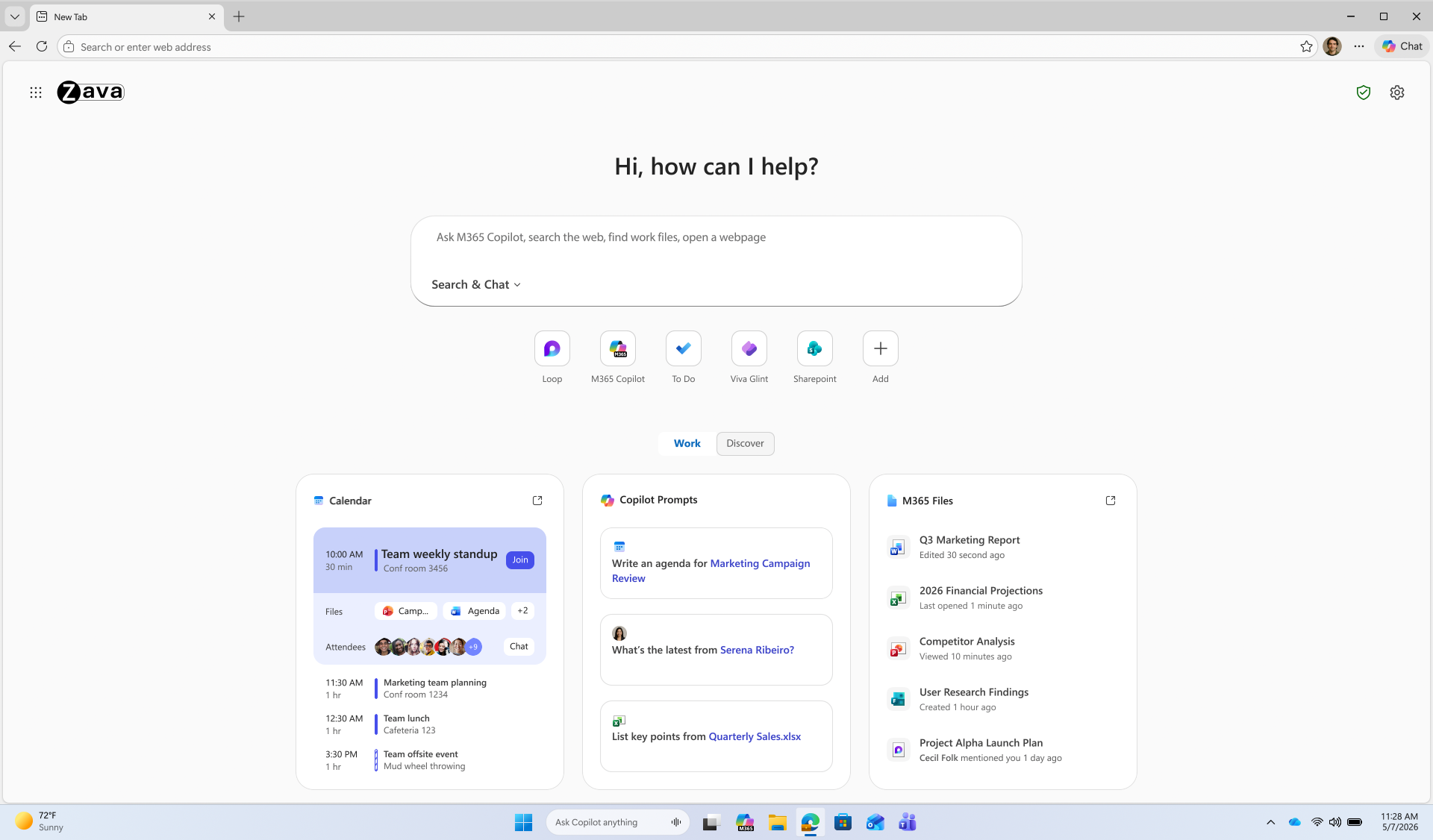
Beyond agentic browsing, we're expanding AI capabilities that help users get oriented faster, pull together information across tabs, and get to an answerβright in the flow of work.Copilot-inspired new tab page
The Copilot-inspired new tab page brings calendar, files, and prompts into one work dashboardβgenerally available on desktop and mobile. Every day starts the same way: users open the browser, review their calendar, and track down files. A reimagined new tab page brings calendar, files, and Copilot prompts into one view, reducing the need to switch between tools. An intelligent box enables chat and search from one entry point, while work cards surface upcoming meetings, Microsoft 365 files, and suggested Copilot prompts for quick action. The experience becomes even more personalized with a Microsoft 365 Copilot license. Generally available today on desktop and mobile. Learn how to configure.Multi-tab reasoning and YouTube summarization
Multi-tab reasoning and YouTube summarization are now available on mobile, in addition to desktop, turning open tabs and videos into quick takeaways. Users live in tabsβjumping between docs, web pages, and videos just to piece together an answer. Multi-tab reasoning and YouTube summarization help turn that scattered information into quick answers, without adding yet another tool. Multi-tab reasoning analyzes open tabs to generate comparisons, summaries, and insights. For example, users can compare product specs across tabs, summarize vendor documentation, or pull key differences from multiple pages into one answer. And because it's Edge for Business, Purview policies exclude sensitive content from reasoning. https://www.youtube.com/watch?v=X87JA-sPz2Y When users only need a few key answers from a 15-minute video, YouTube summarization pulls out the takeaways and even answers questionsβwhether they're reviewing a product demo, an industry presentation, or a webinar. Learn how to configure multi-tab reasoning and YouTube summarization.Deliver AI securelyβwithout losing control
Edge for Business offers an IT-managed system of controls for AIβpolicies, tenant protections, and data protection enforcementβavailable from day one. AI in the browser is moving fast, and IT teams are under pressure to deliver new capabilities without becoming the team that slows everyone down. Most organizations don't want an "all or nothing" switchβthey want to adopt AI in stages without changing their security posture or creating new exceptions. With Edge for Business, our mission is to offer AI experiences with enterprise-grade security and controls built-in from day one β through a system of controls that provides differentiated compliance and security for AI. That's what you should expect from an industry-leading secure enterprise browser. Edge for Business is the only major enterprise browser that protects company data in AI by enforcing data protection in the browser and keeping sensitive interactions within the tenant. Protections you rely on, such as blocking copy/paste, continue to be enforced on AI-assisted workflows. And because Microsoft 365 Copilot includes enterprise data protection, prompts, responses, and files stay within your tenant and are not used to train models. These protections apply natively when users sign into Edge for Business with an eligible Entra ID, no extensions required. A single policy enables AI features like summarization and multi-tab reasoning to help you get started quickly. For advanced AI, Copilot Mode is evolving into granular controlsβso you can enable each feature individually instead of through a single toggle, making it easier to pilot and deploy advanced AI with more predictable outcomes. Existing configurations are honored for organizations that previously enabled Copilot Mode. The result: you can roll out AI on your termsβenabled by policy and fully under IT control. https://www.youtube.com/watch?v=9KFId0FzSfMProtect against shadow AI in the browser
Purview data protections in Edge for Business can audit or block sensitive prompts and uploads on common consumer AI apps and redirect users to Copilot for protected work AI. What happens when users don't follow rules and use unsanctioned AI? Organizations need the ability to audit prompts and block sensitive uploads, especially on consumer AI tools. With Edge for Business, consumer AI doesn't have to be a gap. Shadow AI protections powered by Purview bring inline data loss prevention into the browser for the most common AI apps. Purview analyzes prompts and file uploads: when sensitive data is detected, the action is audited or blocked. Users receive a clear, policy notification and are redirected to Microsoft 365 Copilot, where enterprise data protection and DLP policies apply. These protections work on managed and unmanaged devices when users are signed into Edge for Business with their eligible Entra ID. Requires Microsoft 365 E5; pay as you go pricing applies. Learn more. https://www.youtube.com/watch?v=JIDs57MAXOoGet started
IT admins can request to join the limited preview for agentic browsing in Edge for Business to experience how it works in a managed environment. Edge for Business plays a key role in delivering AI securelyβwhere users already work and where controls are already in place. Request to join the limited preview for agentic browsing in Edge for Business to evaluate the experience and help shape what comes next.Note: learn more about Microsoft 365 Copilot availability here.
Apple Says iOS 27 Can Automatically Add Captions to Your Personal iPhone Videos
For videos that do not already have captions, Apple said a new on-device speech recognition model can automatically generate them for spoken audio. According to Apple, this feature will be available for videos that you record on your iPhone, videos that you receive from friends and family, and videos that are streamed online.
The automatic captions will initially be limited to English in the U.S. and Canada.
Apple ensured that the captions are generated privately, and you will be able to customize their appearance in the video playback menu or in the Settings app. The feature will be supported across the iPhone, iPad, Mac, Apple TV, and Vision Pro, with the "later this year" timing pointing to iOS 27, iPadOS 27, macOS 27, tvOS 27, and visionOS 27.
Apple will unveil those software versions during its WWDC 2026 keynote, which begins on Monday, June 8 at 10 a.m. Pacific Time, so we expect to learn more about this feature and its exact implementation in a few weeks from now.
This article, "Apple Says iOS 27 Can Automatically Add Captions to Your Personal iPhone Videos" first appeared on MacRumors.com
Discuss this article in our forums
Samsung Overtakes Apple for Top Smartphone Customer Satisfaction
Samsung scores 81 in the ACSI's cell phone rankings while Apple posts 80, breaking last year's tie between the two companies for satisfaction leadership. The overall cell phone industry score rose 1% to 79 this year, recovering from a sharp 4% decline in 2025 that had pushed it to its lowest point in a decade.
The ACSI says satisfaction improves most when new features translate into everyday value without introducing new pain points, citing battery life tradeoffs as an example. AI integration, measured by the ACSI for the first time, scores 85 overall, signaling that customers are not only aware of AI features but find them useful, while improvements in battery life, up 5% to 81.
For the cell phone industry, the highest-rated customer experience metrics are the fundamental functions of making phone calls and sending text messages, both scoring 86. AI feature performance debuts at 85, nearly matching those top table-stakes interactions, suggesting that AI is moving from novelty to practical utility for many customers.
Among new flagship owners, Samsung's latest Galaxy S-series leads at 84, followed by new iPhone owners at 82, with Google's flagship models scoring 80. Satisfaction with flagship models overall scores 82, far outpacing legacy phones at 76 and foldables at 72.
In the foldable segment, Samsung holds a clear lead with an ACSI score of 80, which is 8 points ahead of Google at 72 and 10 points ahead of Motorola at 70. The ACSI notes that foldable owners are three times as likely to complain as non-foldable owners, and says competitive dynamics in the segment may shift as Apple's rumored entry into the foldable market is anticipated for later this year. Apple is widely expected to debut a foldable iPhone alongside the iPhone 18 Pro models this fall, featuring a 7.8-inch inner display and a 5.5-inch cover screen, priced at around $2,000.
In the smartwatch category, Apple holds steady at 80, while Samsung drops 4% to create a first-place tie at the top of the leaderboard. Customer experience characteristics of smartwatches are universally rated higher this year at the industry level, with the biggest gains including ease of navigating menus and settings, up 7% to 80, and app and accessory connectivity, up 5% to 83.
The ACSI study is based on 26,963 completed surveys, with customers contacted via email between April 2025 and March 2026.
This article, "Samsung Overtakes Apple for Top Smartphone Customer Satisfaction" first appeared on MacRumors.com
Discuss this article in our forums
Apple Provides Update on App Store, Highlights Key 2025 Safety Stats
In 2025, Apple said its App Review team evaluated more than 9.1 million App Store submissions, with a mix of human review and AI. The company rejected over two million of these submissions, including over 1.2 million new apps and nearly 800,000 pending app updates, for failing to adhere to the App Store's Review Guidelines.
As bad actors continue to evolve their methods, Apple said it continuously improves its multilayered defenses, leveraging a combination of human review and advanced machine learning in an attempt to detect and prevent malicious activity.
"By utilizing AI to rapidly identify complex malicious patterns, analyze app similarity, and flag potentially problematic changes in app updates, Apple's systems help human reviewers focus their expertise where it matters most," said Apple. "This not only improves the customer experience by ensuring a high-quality, curated storefront, it also helps legitimate developers get their great apps and updates to users faster."
Apple added that it terminated 193,000 developer accounts over fraud concerns and prevented over $2.2 billion in potentially fraudulent transactions in 2025.
In 2025, Apple processed over 1.3 billion App Store reviews and ratings. Using a mix of human review and AI, the company said it identified and blocked close to 195 million fraudulent reviews and ratings from ever appearing.
"Apple's Trust and Safety teams integrate AI throughout the entire moderation process to detect spam, offensive content, and inauthentic reviews at scale," the company explained. "Additionally, AI-powered dashboards and rapid data analysis tools accelerate the discovery of new fraud vectors, enabling Apple's teams to react quickly to deceptive activity and protect the integrity of the platform."
Apple's press release contains many more stats that highlight the company's efforts to ensure the App Store is secure, even if they are not perfect.
This article, "Apple Provides Update on App Store, Highlights Key 2025 Safety Stats" first appeared on MacRumors.com
Discuss this article in our forums
Ugreen Debuts Pocket-Sized Chargers for Your Apple Devices
First up is the Nexode Air 65W charger, which Ugreen is pitching as a travel-friendly option for MacBook Air owners, but it should work just as well for iPhones, iPads, and other USB-C devices. (Its Cosmic Orange-style finish twins particularly well with the iPhone 17 Pro.) Ugreen describes the unit as pocket-sized while still delivering up to 65W of fast charging, and it features the company's Ugreen's Thermal Guard temperature control for safety.
For users who want a thinner option, Ugreen is also touting its Nexode Air 45W Charger Slim, plus there's a new MagFlow Air Magnetic Power Bank 10000mAh β a Qi2-certified 15W magnetic battery with a built-in USB-C cable, a second USB-C port, and ATL battery cells inside.
The company's broader existing Air lineup includes a thicker Nexode Air 65W Charger Slim and a less bulky 5000mAh version of the MagFlow Air.
The Nexode Air 65W Charger and 45W Slim are priced at $39.99, with the 10000mAh MagFlow Air at $79.99. All the chargers are available now over on Ugreen's official site as well as Amazon.com.
Note: MacRumors is an affiliate partner with Amazon. When you click a link and make a purchase, we may receive a small payment, which helps us keep the site running.
This article, "Ugreen Debuts Pocket-Sized Chargers for Your Apple Devices" first appeared on MacRumors.com
Discuss this article in our forums
Apple's Eddy Cue to Receive 'Entertainment Person of the Year' Award
Cue will deliver a keynote on the opening day of the festival, which runs from June 22 to June 26 in the south of France. He will be joined by producer Jerry Bruckheimer, whose film "F1: The Movie" was released by Apple last year. In a statement, Lions CEO Simon Cook said:
Eddy Cue has consistently pushed the boundaries of entertainment and storytelling, building platforms and experiences that have redefined how audiences engage with culture. Under his leadership, Apple has not only produced world-class content but has also shaped the future of entertainment through innovation, creativity and an unwavering commitment to quality. We're delighted to honor Eddy as our 2026 Entertainment Person of the Year.
Cue told Variety last year that as streaming platforms multiplied, Apple saw an opportunity to focus on quality over volume. "We saw that the world was changing, and it seemed like everybody was going after quantity. We thought there was an opening for us, if we really focused on high quality," he said.
Apple TV+ launched in November 2019 and has since compiled an impressive awards record. The streamer earned best picture at the Oscars for its 2021 drama "CODA," and "The Studio" set records at last year's Emmy Awards with 13 wins, which is the most by a comedy series in a single year and the most by a first-year series.
This article, "Apple's Eddy Cue to Receive 'Entertainment Person of the Year' Award" first appeared on MacRumors.com
Discuss this article in our forums
Distribution Release: Red Hat Enterprise Linux 10.2, 9.8
Daniel Baumann: Debian: Linux Vulnerability Mitigation (PinTheft)
Following the series of various Linux exploits of the last three weeks, the bug of today is PinTheft [CVE-2026-43494] which is local root privilege escalations.
The vulnerability can be mitigated by unloading and blocking rds modules, linux-vulnerability-mitigation as of 20260519-1 (uploaded to sid, trixie-fastforward-backports and people.debian.org/~daniel) does that automatically for you.
Updates:
default Debian kernels (bullseye, bookworm, trixie, and testing/unstable, experimental) are not directly affected because autoloading of the rds modules is disabled by rds-Disable-auto-loading-as-mitigation-against-local.patch
Added references to CVE-2026-43494
Amazon Takes $150 Off Every 15-Inch M5 MacBook Air
You'll find $150 off every model on Amazon, also including both 1TB models. Best Buy is matching these deals as part of its ongoing Memorial Day sale, which we began tracking yesterday. As of writing, we aren't tracking any deals on the 13-inch M5 MacBook Air.
If you're on the hunt for more discounts, be sure to visit our Apple Deals roundup where we recap the best Apple-related bargains of the past week.
Deals Newsletter
Interested in hearing more about the best deals you can find in 2026? Sign up for our Deals Newsletter and we'll keep you updated so you don't miss the biggest deals of the season!
This article, "Amazon Takes $150 Off Every 15-Inch M5 MacBook Air" first appeared on MacRumors.com
Discuss this article in our forums
The App Store stopped over $2.2 billion in fraudulent transactions in 2025

Discord Voice and Video Calls Now End-to-End Encrypted by Default
The rollout covers DMs, group DMs, voice channels, and Go Live streams. There's no opt-in required, or any setting to change. Stage channels are the only exception, given that they're built for broadcasting to larger audiences rather than personal chats.
The protection runs on DAVE, an open-source protocol Discord first introduced in September 2024. In a blog post, Discord's Mark Smith said building it was slow and complicated, partly because a single Discord call can mix people on phones, laptops, browsers, and game consoles in the same conversation. Announcing the change, Smith said:
"Building an E2EE protocol that works seamlessly across all of those surfaces simultaneously is, to my knowledge, unlike anything else that's been shipped. DAVE is likely one of the internet's most platform-diverse E2EE voice and video implementations."Discord says it's now stripping out the remaining client code that allowed unencrypted fallback, so that encrypted calls will be the only option rather than a default. "We have no current plans to extend E2EE to text messages," added Smith.
The completed rollout stands in stark contrast to policy changes by Meta, which recently removed its encryption feature for Instagram DMs.
This article, "Discord Voice and Video Calls Now End-to-End Encrypted by Default" first appeared on MacRumors.com
Discuss this article in our forums
WhatsApp Tests Read-Triggered Disappearing Messages
Spotted by WaBetaInfo in the latest WhatsApp TestFlight beta, the new option starts a countdown after the recipient reads the message, rather than starting the countdown when the message is sent.
The countdown options with the "After reading" setting chosen include the usual "5 minutes," "1 hour," and "12 hours." The setting appears in the "Default messsage timer" menu, so perhaps WhatsApp will find a different home for the option or (more likely) rename the settings page to something like "Message timer options."
The new feature is said to be available to "some" beta testers on iOS and Android, but WABetaInfo believes that some users on the public WhatsApp version on the App Store may have access to the option already.
Disappearing messages can be set as the default behavior for all new chats on the end-to-end encrypted messaging platform, so this new After reading option will likely be a welcome addition for particularly privacy-conscious users, and it could also be a potential storage-saver for heavy users of the app.
This article, "WhatsApp Tests Read-Triggered Disappearing Messages" first appeared on MacRumors.com
Discuss this article in our forums
Plex Tripling Lifetime Plex Pass Price to $750 in July
Plex said that the updated price reflects the "real, ongoing value" of the software that it plans to build and maintain. The company has considered removing the Lifetime Plex Pass because recurring subscriptions pay for long-term development, but Plex wants to continue to offer it because it's a "valuable option" for many in the Plex community.
Over the years, as our software and product has evolved, the breadth of features and benefits included with your Plex Pass has expanded. This increase ensures we can continue to invest resources into building and maintaining the Plex personal media software, while continuing to offer a Lifetime option.For those unfamiliar with Plex, it is media server software that lets users stream their library of content from a device with the server software installed to any other connected smartphone, tablet, or TV. The Plex Pass unlocks features like server management, hardware transcoding, offline downloads, mobile syncing, remote streaming, and more.
Plex previously increased the cost of the Lifetime Plex Pass from $120 to $250 in March 2025.
Plex customers who previously bought a Lifetime Plex Pass will still be able to access the benefits and perks associated with a Plex Pass with no change. Customers can purchase a Lifetime Plex Pass for $250 prior to when the price changes.
Plex is also not increasing the price of its subscription Plex Pass, which is $7 per month or $70 per year.
In addition to announcing the upcoming price change to the Lifetime Plex Pass, Plex shared its roadmap. It is working to implement improvements to downloads like grouping by show, and updates to its mobile apps.
The Lifetime Plex Pass price increase will go into effect on July 1, 2026 at 12:01 a.m. UTC.
This article, "Plex Tripling Lifetime Plex Pass Price to $750 in July" first appeared on MacRumors.com
Discuss this article in our forums
Google's First AI Smart Glasses Launching This Fall With iPhone Support
The glasses will run Android XR, which is Google's platform for smart glasses and AR/VR headsets. There are cameras, speakers, and microphones in the glasses, but there is no display in the lenses.
Google previewed two of the designs coming from Gentle Monster and Warby Parker, though there will be other options. Google says the two companies will have "full collections" available when the glasses launch.
The glasses support Gemini AI, with Gemini integrated into all of the available features. Users will be able to say "Hey Google" or tap the side of the frame to bring up Gemini, and Google says the AI can do the following:
- Gives information about what the wearer sees, like reviews for a restaurant nearby, the name of a cloud formation, or details on a confusing parking sign.
- Offer sight-based navigation with turn-by-turn directions. Gemini can add stops or locate nearby locations like restaurants based on user preferences.
- Manage calls, send texts, and summarize messages.
- Listen to music.
- Capture photos and videos and edit them with Google's Nano Banana AI image editing engine.
- Translate speech and writing in real time.
- Complete multi-step tasks like ordering coffee via DoorDash.
- Use apps on a connected smartphone with voice-based commands.
Google says that its upcoming glasses will be able to work with iPhones in addition to Android smartphones.
Apple is working on its own AI smart glasses that are expected to have similar capabilities, but rumors suggest Apple's glasses won't be ready until 2027.
In the future, Google plans to launch "display glasses" that have a small display in the lens to relay information from Gemini, but that product is not coming until later.
This article, "Google's First AI Smart Glasses Launching This Fall With iPhone Support" first appeared on MacRumors.com
Discuss this article in our forums
Apple Taps Virtual Avatar Firm Animato's Expertise and Intellectual Property
The acquisition was filed under the EU's Digital Markets Act in January 2026, and appears to be what's known as a "structured acqui-hire." In other words, Apple is able to make employment offers to certain Animato employees and receive a non-exclusive license to the company's intellectual property, as well as acquire its patent applications.
Apple Inc. ("Apple") will have the right to make employment offers to and hire certain employees of Animato, Inc. ("Animato"), receive a non-exclusive license to Animato's intellectual property rights, and acquire Animato's patent applications. Animato develops and distributes software that creates virtual avatars for video chats and tutoring.Animato was founded in October 2022 by Francesco Rossi, who previously spent seven years at Apple before leaving to start the company.
Animato is best known for a free app called "Call Annie," which launched in April 2023, and gave ChatGPT a real-time animated avatar face, allowing users to have video-style conversations with the AI chatbot.
The app later moved into language learning by offering avatar tutors for practicing English, Spanish, French, German, Japanese, Mandarin, and Korean through video conversations.
Animato also came out with a macOS virtual camera app called Animato Studio that let users make themselves appear as fantasy figures and anime avatars during video calls and live streams.
Both App Store listings have since been removed following the acquisition, and the Call Annie website says the app has been discontinued.
It's Apple's second acquisition of a digital avatar company in just over a year. In January 2025, Apple acquired technology, IP, and physical assets from TrueMeeting, a company specializing in the development of digital avatar technology for meetings.
Apple already offers avatar-style technology with Memoji on iPhone and its Personas feature on Apple Vision Pro, the latter of which generates a realistic digital representation of the user for FaceTime calls.
This article, "Apple Taps Virtual Avatar Firm Animato's Expertise and Intellectual Property" first appeared on MacRumors.com
Discuss this article in our forums