
Normale weergave

Best Apple Deals of the Week: Anker Accessories on Sale Plus AirPods Max 2 for $509 and More

15 Mei 2026 om 19:20
The best Apple deals this week include AirPods Max 2 for $40 off, 2026 MacBook Pro for up to $216 off, and Apple Watch Series 11 for up to $130 off. You'll also find Anker's best charging accessories on sale on Amazon right now, including the new Prime 3-in-1 Wireless Charging Station.

Note: MacRumors is an affiliate partner with some of these vendors. When you click a link and make a purchase, we may receive a small payment, which helps us keep the site running.

Anker


  • What's the deal? Save on Anker charging accessories

  • Where can I get it? Amazon

  • Where can I find the original deal? Right here


Anker's new Prime 3-in-1 Wireless Charging Station has been marked down to $104.99 on Amazon, down from $149.99. This is one of Anker's newest accessories, and Amazon's sale today is a match of the all-time low price.

AirPods Max 2


  • What's the deal? Take $40 off AirPods Max 2

  • Where can I get it? Amazon

  • Where can I find the original deal? Right here


Amazon this week has a record low price on the AirPods Max 2, now available for $509.00, down from $549.00. This sale is available in three colors of the headphones.

MacBook Pro


  • What's the deal? Take up to $249 off M5 Pro/M5 Max MacBook Pro

  • Where can I get it? Amazon

  • Where can I find the original deal? Right here


Amazon is offering a few all-time low prices on Apple's M5 Pro/M5 Max MacBook Pro this week, with up to $249 off select models.

Apple Watch Series 11


  • What's the deal? Take up to $130 off Apple Watch Series 11

  • Where can I get it? Amazon

  • Where can I find the original deal? Right here


Amazon has all-time low prices on the Apple Watch Series 11 this week, with up to $130 off numerous models of the smartwatch. A highlight of the sale is the 46mm cellular model at $130 off, which is a match of the all-time low price.

If you're on the hunt for more discounts, be sure to visit our Apple Deals roundup where we recap the best Apple-related bargains of the past week.


Deals Newsletter


Interested in hearing more about the best deals you can find in 2026? Sign up for our Deals Newsletter and we'll keep you updated so you don't miss the biggest deals of the season!


Related Roundup: Apple Deals

This article, "Best Apple Deals of the Week: Anker Accessories on Sale Plus AirPods Max 2 for $509 and More" first appeared on MacRumors.com

Discuss this article in our forums

  •  

Top Stories: iPhone 18 Pro Rumors, iOS 26.5 Released, and More

15 Mei 2026 om 20:01
WWDC is less than a month away, so the focus of the Apple world is turning toward what we might see in the next major operating system updates, but we're also looking ahead to the busy hardware update season in the fall.


This week also saw a significant change to Apple's education pricing program in some countries, while a new commemorative U.S. coin featuring Steve Jobs made a brief appearance, so read on below for all the details!

Top Stories


11 Reasons to Wait for the iPhone 18 Pro


We're only four months out from the launch of Apple's premium next-generation smartphone lineup, and while we're not expecting a sea change in terms of functionality, there are still several enhancements rumored to be coming to the iPhone 18 Pro and iPhone 18 Pro Max.


Despite cost pressures from industry-wide memory shortages that are forcing some Android smartphone manufacturers to raise prices, one analyst believes Apple will be "aggressive" on pricing with the iPhone 18 Pro models.

iOS 26.5 Features: Everything New in iOS 26.5


Apple this week released iOS 26.5 and related updates to the general public, delivering several new features and dozens of fixes for security issues.


The headline features in iOS 26.5 include a beta of end-to-end encryption for RCS messages exchanged between iPhone and Android users on supported carriers, a new "Suggested Places" section in the Maps app for recommendations based on your location and recent searches, and a new Pride Luminance wallpaper option.

macOS 27: Two More Changes Leaked Ahead of WWDC Next Month


macOS 27 will have a "slight redesign" compared to macOS Tahoe, according to the latest word from Bloomberg's Mark Gurman. In his Power On newsletter this week, Gurman said the design changes will help to improve the readability of macOS Tahoe's Liquid Glass interface.


In addition, Gurman said macOS 27 will have a new Safari feature that can automatically organize browser tabs into groups. This feature, previously revealed by MacRumors, is also expected to be available on iOS 27 and iPadOS 27.

macOS 27 and Apple's other major operating system updates will be revealed during the WWDC keynote on June 8.

Apple Watch Series 12 and watchOS 27: What to Expect Later This Year


While not too much has been reported about the next Apple Watch models, there are a few rumors about potential design changes and watchOS 27 features.


Apple Watch Series 12 and potentially Apple Watch Ultra 4 models are expected to be released in September, and we recently recapped some of the key rumored hardware and software changes. A new Apple Watch SE is not expected this year, as that model was just updated last year and it typically goes two to three years between refreshes.

Touch ID is one interesting rumor that has been circulating based on leaked Apple code, but one leaker recently claimed it won't be coming to the next-generation Apple Watch models, so we'll have to wait and see whether it makes an appearance. Otherwise, it seems battery life improvements, new Apple Intelligence and satellite features, and a few other quality-of-life improvements are likely.

Apple Now Requires UNiDAYS Verification for Education Discounts in U.S. and Canada, Adds Apple Watch


Apple has long offered discounted pricing on an array of products to educational customers, but in the U.S. and Canada this has largely been on the honor system outside of the occasional audit.


That changed as of this week, with Apple now requiring education customers in the U.S., Canada, and several other countries to verify their eligibility via the UNiDAYS system that the company has long used in other countries around the world.

On the positive side, Apple Watch is now eligible for education pricing in a number of countries, delivering a roughly 10 percent discount compared to regular pricing.

Steve Jobs U.S. Commemorative $1 Coin Goes on Sale, Immediately Sells Out


The United States Mint this week began selling a new $1 American Innovation Coin featuring Steve Jobs, although the coins sold out within minutes.


The $1 Steve Jobs Coin features a young Steve Jobs in a turtleneck, jeans, and sneakers, sitting in front of the Northern California landscape. Jobs is said to be "captured in a moment of reflection," in which "his posture and expression reflect how this environment inspired his vision to transform complex technology into something as intuitive and organic as nature itself."

The coin is part of the American Innovation $1 Coin Program that has been graudally honoring groundbreaking innovations and innovators from every U.S. state, territory, and the District of Columbia for nearly a decade.

MacRumors Newsletter


Each week, we publish an email newsletter like this highlighting the top Apple stories, making it a great way to get a bite-sized recap of the week hitting all of the major topics we've covered and tying together related stories for a big-picture view.

So if you want to have top stories like the above recap delivered to your email inbox each week, subscribe to our newsletter!
This article, "Top Stories: iPhone 18 Pro Rumors, iOS 26.5 Released, and More" first appeared on MacRumors.com

Discuss this article in our forums

  •  

10 Useful iPhone Tips and Tricks You Might Not Know About

16 Mei 2026 om 01:08
Over the years, the iPhone's operating system has gotten complicated. Apple adds new features with every version of iOS, and many of them aren't always obvious, leading to hidden iPhone capabilities you might not be aware of.


The tips below assume that you have iOS 26 or later installed.

Turn an App Into a Widget


You can turn most app icons into widgets right from the iPhone's Home Screen. Just long press on an app icon, and select one of the squares from the top to choose a widget size. It works with any Apple or third-party app that has a widget option. Long press again and select the top left icon with four squares to turn it back into a standard app icon.


See Where You've Been


In the Maps app, you can look back at your location history to see places that you've visited. It's useful if you've been on a weekend trip, found a great restaurant, and want to remember where it was the next time you visit.


You can get to this feature by opening up the Maps app, tapping on your profile, selecting Places, and then choosing Visited Places. Places are organized by category like leisure or shopping, and by city.

You can clear your history by scrolling down to the bottom of the interface, or select a period of time for visits to be kept. Go to Settings > Maps > Location > Visited Places to turn it off entirely.

Set Custom Vibrations


You probably know you can set custom sounds for people that call or text, but you can also do the same thing for vibration patterns if you keep your iPhone on silent all the time, as civilized people do.


Important people you message can each have a different vibration pattern, so you know who is texting without having to look at your phone.

To set a vibration pattern for someone, open up the Contacts app and select them. Tap Edit in the upper right corner, then tap on Text Tone or Ringtone. Tap on Haptics and then select Create New Vibration. From there, you can use taps and presses to make your own vibration patterns.

Customize Your Lock Screen Buttons


Your Lock Screen buttons don't have to open up the Flashlight and the Camera app. You can set them to any Control Center option, including those from third-party apps.


To do so, go to the Lock Screen and long press. Tap on Customize if you want to edit your current wallpaper and Lock Screen, or the "+" button to make a new one. From there, tap on the "-" button on the apps at the left or right of the screen to remove them, and then tap on "+" to choose something new to add.

Back Tap Gestures


Back Tap has been around for a long time, but it's easy to forget it exists. You can use it to set a tap on the back of the iPhone to do whatever you want, from snapping a screenshot to activating the flashlight. It even works with Shortcuts you've created.


Go to Settings > Accessibility > Touch and then scroll down to Back Tap to set it up. You can set actions for a double tap or a triple tap.

Screenshot a Webpage


When you press the side button and volume buttons to take a screenshot, the default is a capture of what's currently on your display. If you want to screenshot a whole webpage or a PDF, there is a way to do it. Take the screenshot as normal, then tap it (if you have full-screen previews off). Select "Full Page" at the top of the interface, and then choose where to save your extra long screenshot.


Hide Apps


If you have apps that you don't want to show up on the ‌Home Screen‌, you can hide them one by one by long pressing and tapping the Face ID option, or you can hide a whole app page at once. To hide an app page, long press on the ‌Home Screen‌ to enter jiggle mode.


Tap on the dots at the bottom of the display, and then select the app page you want to hide from view. Apps hidden this way don't show up in the Hidden folder in the App Library. You can still find them through Spotlight Search and they're visible in their appropriate App Library category. To unhide a page, follow the same steps and tap the checkbox to bring it back.

Quick Set a Timer


If you add the Timer option to Control Center, you can long press on it to get an easy slider that lets you select an amount of time you want to set it for.


In Control Center, tap the "+" button and then choose Add a Control. Select the Timer icon to add it to Control Center. Long press on the timer, choose an amount of time from the slider, and then tap Start. Times range from two hours to one minute.

Remove Photos Location Data


If you're sending a photo to someone, you might want to remove metadata like location first. To do so, select an image in the Photos app, swipe up, and tap on Adjust Location. From there, you can choose No Location.


Alternatively, when you go to share a photo, you can turn off metadata there. Select a photo, and tap on the Share button. Tap on Options, and toggle off Location.


Use a Timer to Turn Off Media


You can use timers to control how long music, podcasts, audiobooks, and other media play for, which is useful if you only want to listen for a short period at night.


In the Clock app, tap on Timers. Set a time period, and then tap on the When Timer Ends option. Scroll down and select Stop Playing. When your timer goes off, any media you have playing will stop.

More Tips


Have a favorite iPhone tip that most people don't know about? Let us know in the comments below.
This article, "10 Useful iPhone Tips and Tricks You Might Not Know About" first appeared on MacRumors.com

Discuss this article in our forums

  •  

SwitchBot Launches Two Matter Smart Locks With 3D Facial Recognition

15 Mei 2026 om 23:22
SwitchBot today debuted the SwitchBot Lock Vision and the Lock Vision Pro, two Matter-enabled smart locks that include facial recognition technology for quick door unlocking.


With Matter-over-WiFi, the locks are compatible with HomeKit and they support NFC, so you can use them with an Apple Home setup. SwitchBot also included "advanced 3D structured light" facial recognition that's able to recognize approved lock users in under one second.

SwitchBot says the facial recognition is comparable to 3D facial recognition used by "flagship smartphones," and it can't be spoofed with photos or videos, even when wearing glasses, hats, or makeup. It uses more than 20,000 infrared dots to create an accurate 3D facial map that SwitchBot says is capable of millimeter-level recognition.

The locks also include multiple other unlocking methods, including NFC, passwords, iPhone app controls, the Apple Watch, Siri-based voice commands, geofencing, and physical keys. The Pro version of the lock adds palm vein and fingerprint access too, for even more ways to get into your house. Palm vein detection works without touching the lock, even if hands are wet or dirty.

SwitchBot's Lock Vision and Lock Vision Pro have 12-month battery life and emergency backup power options. They are meant to replace a standard deadbolt, and include mmWave radar detection to determine when someone is approaching the door. No hub is required for the locks, and biometric data is stored on-device.

The SwitchBot Lock Vision is priced at $170, while the SwitchBot Lock Vision Pro is available for $230. SwitchBot has a $40 launch discount on Amazon and on its website.
This article, "SwitchBot Launches Two Matter Smart Locks With 3D Facial Recognition" first appeared on MacRumors.com

Discuss this article in our forums

  •  

Cats Lock for Mac Stops Your Cat From Causing Keyboard Havoc

15 Mei 2026 om 22:29
If you have a Mac and a cat, you've probably run into a situation where your cat sits on your computer keyboard. Whether it's because Macs are warm or because they want to distract you from the screen absorbing all of your attention, laptops tend to attract cats.


A new Mac app called Cats Lock adds cat-proofing that keeps your cat from doing damage to whatever you're working on when it gets on your keyboard, and it can even be set to shoo the cat off.

You can click to turn on Cats Lock from the menu bar or use a quick keyboard shortcut, and it prevents cats from being able to activate the keys. Cats can be particularly good at finding odd keyboard shortcuts you never knew existed and making changes that are annoying to undo, so Cats Lock is useful for preventing that. It also has an option to cut sound, so there's no more incessant beeping of keys when your cat gets on your keyboard and holds down a button.


Putting your Mac in sleep mode is an alternative, but you can also set Cats Lock to alert you or make a loud noise when your cat gets on the keyboard. Some of the built-in sounds like a barking dog, vacuum cleaner, or hissing cat might serve as a deterrent even when you're not around. You can also upload your own sounds.

Cats Lock stays on until your Mac goes to sleep, at which point it turns off so you're not locked out of your Mac because of the app.

Cats Lock can be downloaded from the Mac App Store for $2.99.
This article, "Cats Lock for Mac Stops Your Cat From Causing Keyboard Havoc" first appeared on MacRumors.com

Discuss this article in our forums

  •  

Improving Windows quality: Making Taskbar and Start more personal

15 Mei 2026 om 21:50
In our commitment to Windows quality, we outlined our plans to deliver improvements in performance, reliability, and craft. We are also committed to being transparent about the work behind those efforts, including what we are shipping, why we prioritized those features, and where we still have more work to do. Start and taskbar are some of the most visible and frequently used experiences in Windows, so we are focused on improving their quality and giving you more flexibility to personalize them to meet your needs. Let’s walk through where we're making meaningful progress against the feedback we’ve heard from you, rolling out to Windows Insiders in the Experimental channel over the coming weeks, including several rolling out today.

Bringing more personalization to the taskbar

The taskbar is where your PC experience comes to life. Just like a well-organized workspace, having it tailored to your needs helps you stay productive, so we’re introducing more ways to customize it.

Taskbar positions

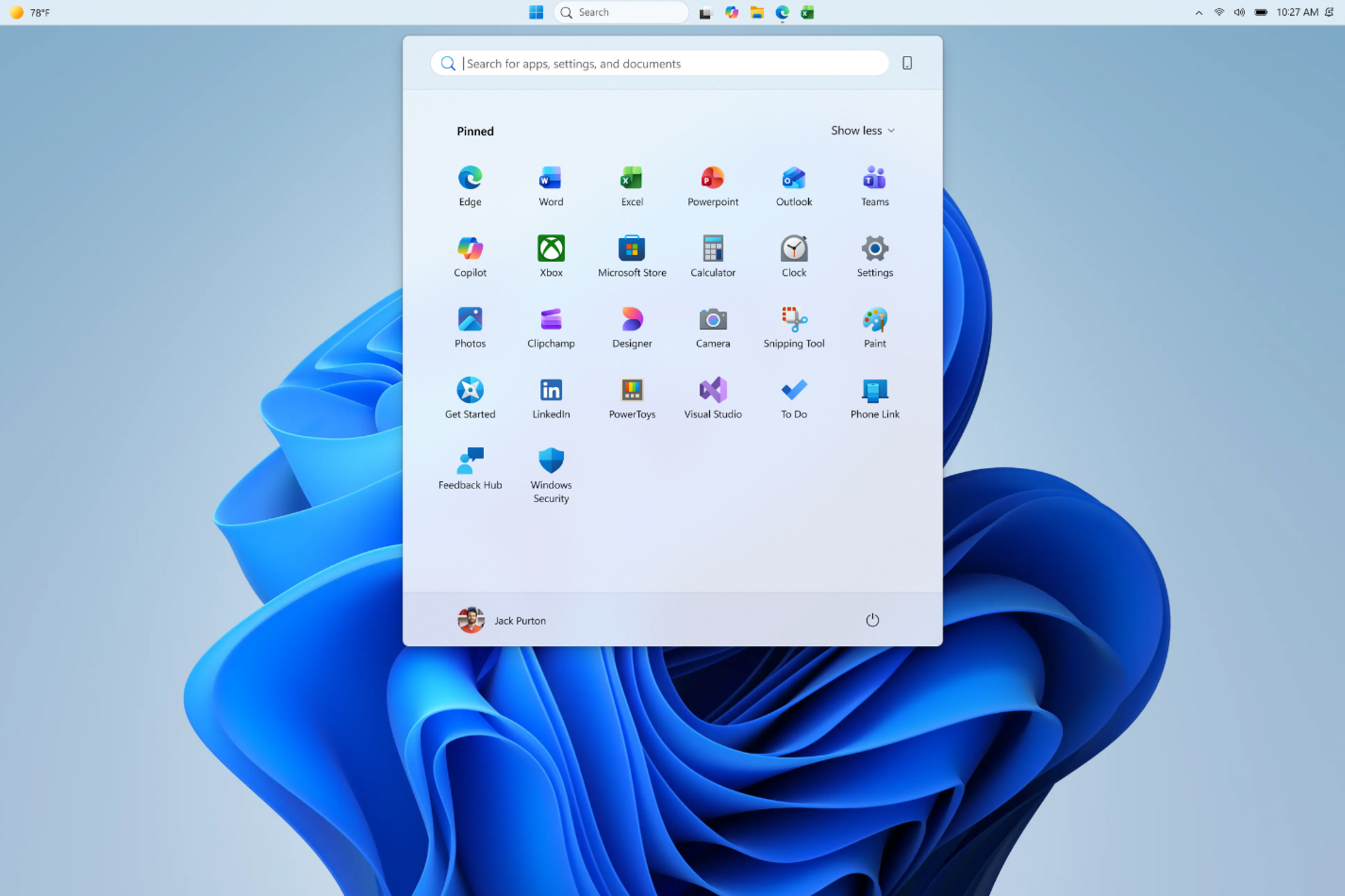
Location, location, location. The ability to move the taskbar to the top or sides of the screen has been one of the most requested features, and we are bringing it to Windows 11. Starting today, Windows Insiders in the Experimental channel will be able to:
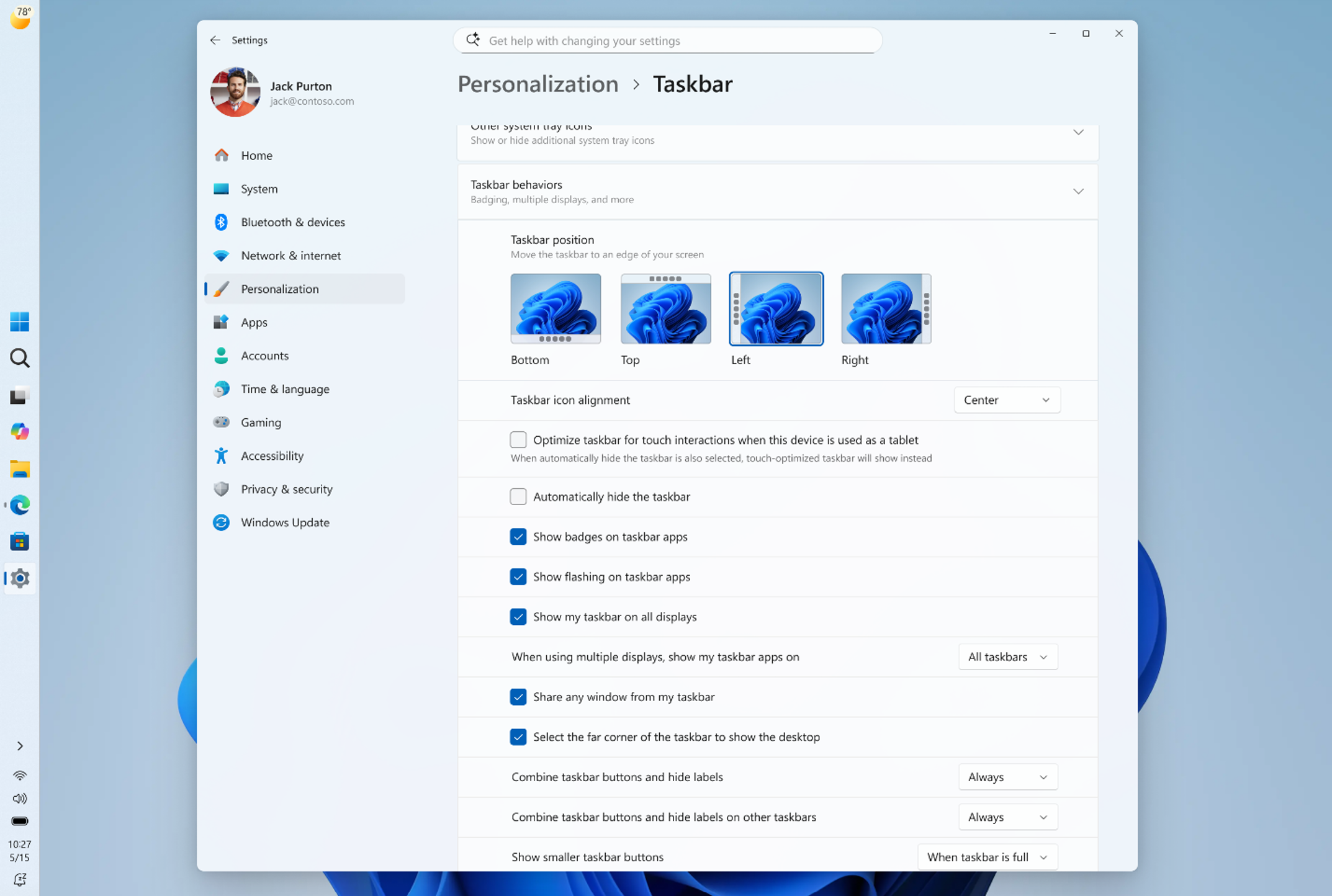
  • Position the taskbar on any edge of the screen: Top, bottom, left, or right (see figure 1).
  • Choose icon alignment for every taskbar position: Top-aligned or centered when the taskbar is on the left or right, and left-aligned or centered when the taskbar is on the top or bottom.
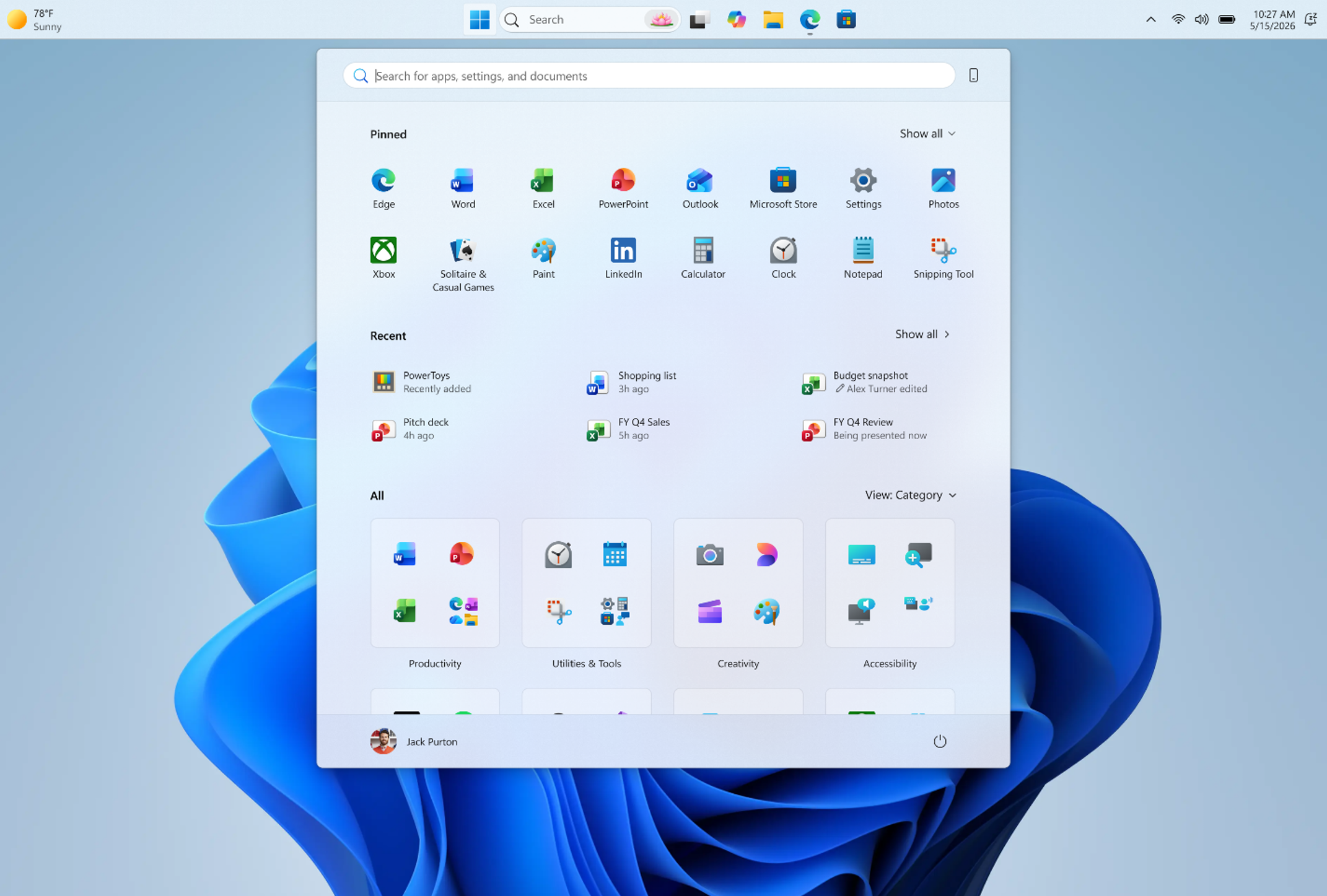
  • Use Start, Search, and other flyouts relative to the taskbar location: For example, when the taskbar is on the top, Start opens from the top (see figure 2).
  • See every window at a glance: When using a vertical taskbar with “Never combine” taskbar buttons and show labels enabled, each app window appears as a separate labeled button, making it easier to identify and switch between windows (see figure 3).
For people who value vertical screen space, like developers who want to see more of their code at once, moving the taskbar to the side can help reclaim precious room on the screen. If accessibility or ergonomics make the top of the screen easier to reach, you can place the taskbar there. If you rely on the taskbar to keep track of your work, a vertical layout with ungrouped icons can help you stay organized. The choice is yours. [caption id="attachment_178963" align="aligncenter" width="1024"]Screenshot of the taskbar in the left-aligned position. (Figure 1) Screenshot of the taskbar in the left-aligned position.[/caption] [caption id="attachment_178956" align="aligncenter" width="1024"]Screenshot of the taskbar in the top-aligned position, with Start opening from the top. (Figure 2) Screenshot of the taskbar in the top-aligned position, with Start opening from the top.[/caption] [caption id="attachment_178957" align="aligncenter" width="1024"]Screenshot of the taskbar in the left-aligned position with buttons never combined and labels shown. (Figure 3) Screenshot of the taskbar in the left-aligned position with buttons never combined and labels shown.[/caption] To change the taskbar position, go to Settings > Personalization > Taskbar > Taskbar behaviors, where you will find the new option alongside taskbar icon alignment. [caption id="attachment_178958" align="aligncenter" width="1024"]Screenshot of the new Settings > Personalization > Taskbar page showing the taskbar position options. (Figure 4) Screenshot of the new Settings > Personalization > Taskbar page showing the taskbar position options.[/caption] We’re excited to hear your feedback. We’re still working through additional visual polish, performance improvements, and a few known issues, and there are also some features that are not yet included in this release but are coming soon:
  • Auto-hide and tablet-optimized taskbar are not yet supported in alternate positions.
  • Touch gestures for alternate positions are still in progress.
  • Search boxes are not yet supported in alternate positions and will appear as a search icon for now.
We are also evaluating additional features like different taskbar positions per monitor and drag and drop. Our focus is to deliver the core functionality you need while keeping the experience simple, predictable, and free from accidental taskbar movement.

Smaller taskbar

Windows 11 introduced a roomier taskbar to support more states and features while also improving touch targets. On smaller screens, that extra height can take away from your usable workspace. We are adding the option to switch to a more compact taskbar for times when every pixel counts. With this update, when small taskbar is enabled, you get smaller icons, a shorter taskbar, and more vertical space for your apps (see video below). No restart or sign-out is required. This experience is rolling out today in the Experimental channel. To change your taskbar size, go to Settings > Personalization > Taskbar > Taskbar behaviors > Show smaller taskbar buttons. When set to Always, both the icons and the taskbar height become smaller. [embed]https://youtu.be/pvE2gyWnVHA[/embed]

Putting you in control of Start

There is a unique Start for everyone, whether you want a minimal experience with just your pinned apps, quick access to recent files, everything in one place, or something in between. We are making changes in two areas to support this. First, we are giving you easier ways to shape your Start menu. Second, we are improving the quality of what appears there by default.

More control over your layout

Today, customizing Start can require navigating multiple settings in different places. Turning off the Recommended section involves toggling several settings, and clearing pinned apps means unpinning them one by one. We are simplifying this experience. Over the coming weeks, Insiders will get:
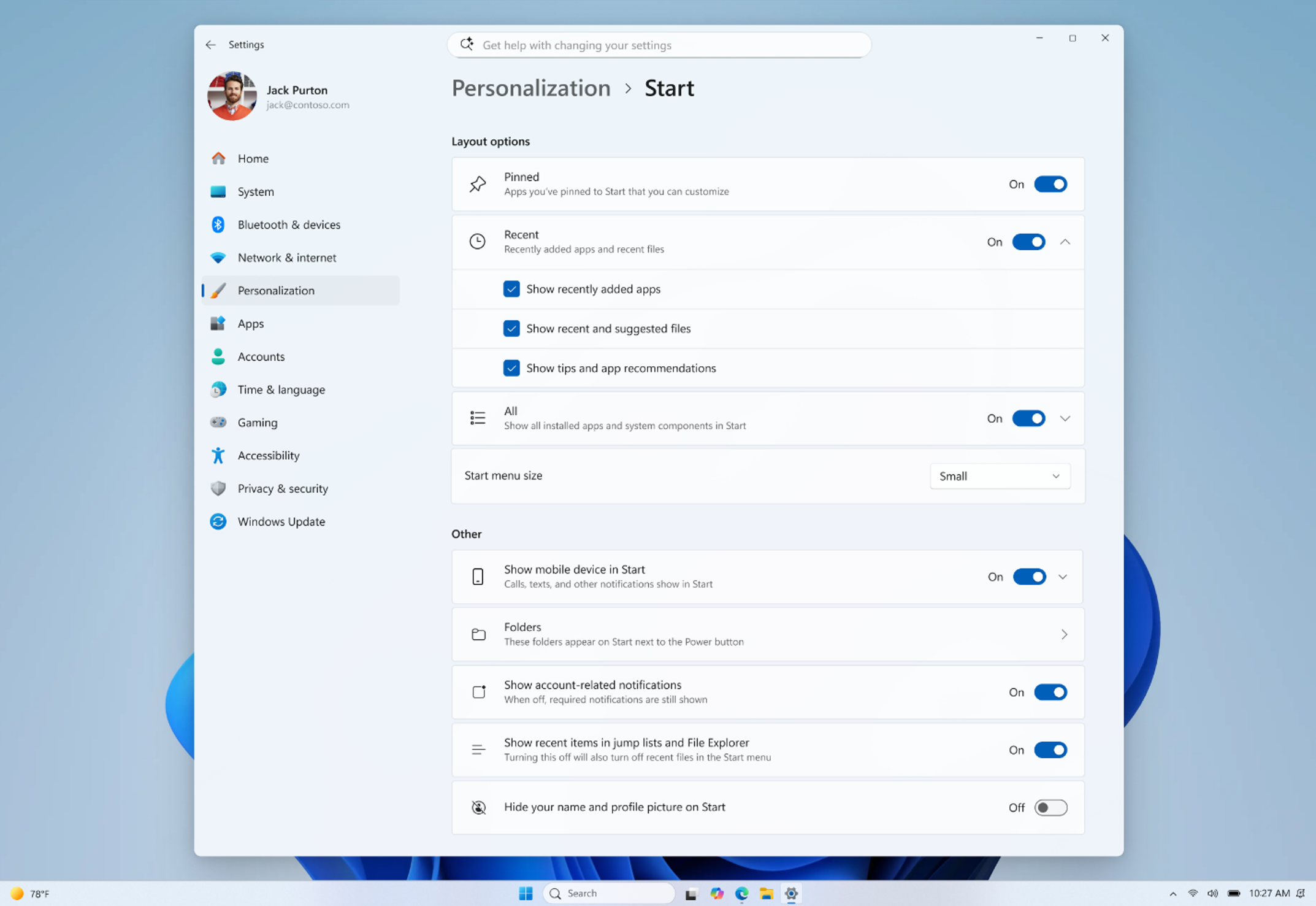
  • Section-level toggles to independently show or hide Pinned, Recommended, and All. One toggle per section that is simple and clear.
  • A separate control for file recommendations. Today, turning off Recommended in Start also turns off jump lists and recent files in File Explorer. With this change, you can disable file recommendations in Start without affecting recent files in other places.
  • Start menu size settings that let you choose your preferred size. Today, Start adapts to your display. With this update, you can choose Small or Large so your preference stays consistent across displays whenever possible.
  • The option to hide your name and profile picture in Start for added privacy when sharing your screen, presenting, or streaming.
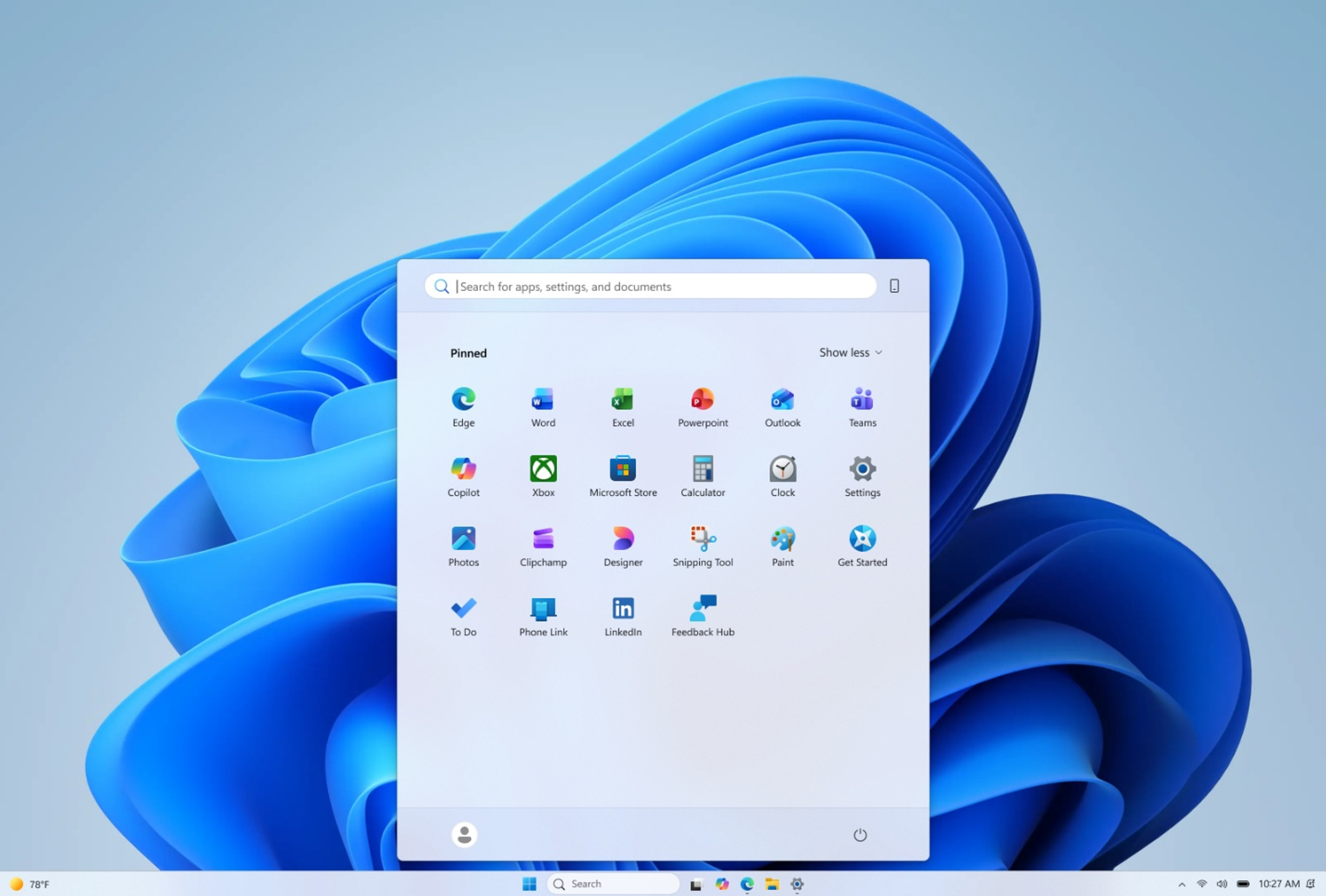
[caption id="attachment_178960" align="aligncenter" width="1024"]Screenshot of the updated Start settings showing the new section-level toggles. (Figure 5) Screenshot of the updated Start settings showing the new section-level toggles.[/caption] These controls are designed to work together. If you want a Start menu with just your pinned apps, you can turn off Recommended and All. If you want a full Start that shows everything, you can leave it all on. The goal is simple: it is your choice, and it should be easy to make. [caption id="attachment_178961" align="aligncenter" width="1024"]Screenshot showing Start in a minimal "pins only" configuration with hidden name and profile picture. (Figure 6) Screenshot showing Start in a minimal "pins only" configuration with hidden name and profile picture.[/caption]

Improving recommendation quality

We are also improving the content that appears in this section for people who choose to keep it on. We are renaming Recommended to Recent to better reflect what the section primarily shows, including recently installed apps and recently used files. We are keeping recently installed apps visible, as this remains one of the primary ways people discover newly installed apps alongside the Microsoft Store. Both users and developers have told us this visibility is important. In addition, we are improving file relevancy. We are refining which files appear and how they are ordered to reduce less relevant items and better reflect what you have been working on.

What’s next

Everything described will roll out to Windows Insiders in the Experimental channel over the coming weeks, including several in today's flight. We have talked about earning trust through steady and visible progress. Start and taskbar are where that trust is tested most, every time you sit down at your PC. Please share your feedback in Feedback Hub by pressing WIN + F. The Windows Insider community plays a critical role in shaping Windows, and as these features become available, we encourage you to explore them and share what is working and what is not. This work is ongoing, and our goal is to build it together with you. Thanks, Diego Twitter (X): @bacadd LinkedIn: Diego Baca | LinkedIn [caption id="attachment_178962" align="aligncenter" width="1024"]Screenshot showing top-aligned small taskbar with Start in a minimal "pins only" configuration. (Figure 7) Screenshot showing top-aligned small taskbar with Start in a minimal "pins only" configuration.[/caption]
  •  

Announcing new builds for 15 May 2026

15 Mei 2026 om 21:50
Hello Windows Insiders, Today we will be expanding the rollout of the new Windows Insider Program changes to devices in the Beta Channel, which will be moved to the new Beta experience. Please see the announce blog for more information about what this entails.

New builds this week

Today we are releasing new Windows 11 Insider Preview Builds. As a reminder, all Insiders can find the release notes for your device based on the new channel system, even if you haven’t moved yet. This is to make finding build information as easy as possible during the transition. See your channel release notes here: For those on other specific build versions, here are today’s new builds and release notes: As a reminder, you can always find your build number in the watermark on bottom right-hand corner of your desktop. Please note, existing Beta Channel Insiders on Windows 11 version 26H1 are currently getting the same build version as Experimental (26H1). In the coming weeks we will be releasing separate builds for these channels, which is when we will have a new Beta (26H1) release notes section. Additionally, Insiders who move to the new Beta experience and are on the default 25H2 core version, and who elect to move to version 26H1 under the WIP settings Advanced options, will experience a delay in their device up taking the new version during this transition.

Notable new features:

[Taskbar improvements]

Release channel: Experimental Alternate Taskbar Position You can now change the position of taskbar on your screen. In Settings > Personalization > Taskbar > Taskbar Behaviors, you can select the side of the screen you want your taskbar on: bottom, top, left, or right. In these other positions, tooltips, flyouts, and animations will still come from the taskbar, and most customization settings like small taskbar and never combine taskbar icons will work with all locations. [caption id="attachment_178963" align="aligncenter" width="1024"]Screenshot of the taskbar in the left-aligned position. Screenshot of the taskbar in the left-aligned position.[/caption] Smaller Taskbar We’re introducing a smaller taskbar for users who want to maximize screen space, especially on smaller devices. While the default taskbar remains unchanged, this setting provides a more compact experience with smaller icons and a reduced taskbar height, giving you more room for your apps. Core elements like Start, Search, and the system tray scale appropriately to stay aligned and consistent. See the in-depth blog for more information about Taskbar improvement.

[Widgets]

Release channel: Experimental As we continue to make Widgets feel less distracting, we’ve made a small but meaningful visual update to taskbar badging. For those that have taskbar badging on, the badge color will now match your Windows accent color instead of always appearing red, reducing the sense of urgency that something needs your immediate attention. We’re also testing out quieting down a user’s experience based on their level of engagement. For example, a user who highly engages with Widgets likely have their settings set to a state that works best for them, as compared to a user who barely engages with it and would benefit from having the experience quieted down with taskbar badging turned off as it is for new users who experience it as quiet by default.

[Windows Search Box]

Release channel: Experimental We've started making changes to make Windows Search Box more relevant, starting with making it easier to find your files and apps:
  • Files and apps more reliably appear ahead of web suggestions when your content is a stronger match
You can expect to see additional relevance improvements in upcoming releases. Thanks, Stephen and the Windows Insider Program team
  •  

Best Apple Deals of the Week: Anker Accessories on Sale Plus AirPods Max 2 for $509 and More

15 Mei 2026 om 19:20
The best Apple deals this week include AirPods Max 2 for $40 off, 2026 MacBook Pro for up to $216 off, and Apple Watch Series 11 for up to $130 off. You'll also find Anker's best charging accessories on sale on Amazon right now, including the new Prime 3-in-1 Wireless Charging Station.

Note: MacRumors is an affiliate partner with some of these vendors. When you click a link and make a purchase, we may receive a small payment, which helps us keep the site running.

Anker


  • What's the deal? Save on Anker charging accessories

  • Where can I get it? Amazon

  • Where can I find the original deal? Right here


Anker's new Prime 3-in-1 Wireless Charging Station has been marked down to $104.99 on Amazon, down from $149.99. This is one of Anker's newest accessories, and Amazon's sale today is a match of the all-time low price.

AirPods Max 2


  • What's the deal? Take $40 off AirPods Max 2

  • Where can I get it? Amazon

  • Where can I find the original deal? Right here


Amazon this week has a record low price on the AirPods Max 2, now available for $509.00, down from $549.00. This sale is available in three colors of the headphones.

MacBook Pro


  • What's the deal? Take up to $249 off M5 Pro/M5 Max MacBook Pro

  • Where can I get it? Amazon

  • Where can I find the original deal? Right here


Amazon is offering a few all-time low prices on Apple's M5 Pro/M5 Max MacBook Pro this week, with up to $249 off select models.

Apple Watch Series 11


  • What's the deal? Take up to $130 off Apple Watch Series 11

  • Where can I get it? Amazon

  • Where can I find the original deal? Right here


Amazon has all-time low prices on the Apple Watch Series 11 this week, with up to $130 off numerous models of the smartwatch. A highlight of the sale is the 46mm cellular model at $130 off, which is a match of the all-time low price.

If you're on the hunt for more discounts, be sure to visit our Apple Deals roundup where we recap the best Apple-related bargains of the past week.


Deals Newsletter


Interested in hearing more about the best deals you can find in 2026? Sign up for our Deals Newsletter and we'll keep you updated so you don't miss the biggest deals of the season!


Related Roundup: Apple Deals

This article, "Best Apple Deals of the Week: Anker Accessories on Sale Plus AirPods Max 2 for $509 and More" first appeared on MacRumors.com

Discuss this article in our forums
  •  

ChatGPT Can Now Connect to Your Financial Accounts for Budgeting Advice

15 Mei 2026 om 19:13
OpenAI is adding a new personal finance feature to ChatGPT, letting people connect their financial accounts to the chatbot to get budgeting advice.


Through a partnership with Plaid, ChatGPT users can connect their bank accounts, credit cards, investment accounts, and other financial accounts to get advice. OpenAI says ChatGPT supports more than 12,000 financial institutions.

ChatGPT will provide a dashboard of how money is being spent, along with an up-to-date view of portfolio performance, spending, subscriptions, upcoming payments, and more. It will also let users ask finance-related questions, and OpenAI provided a sample of questions ChatGPT will be able to answer with access to a user's financial accounts.

  • Help me build a plan to buy a house in my area in the next 5 years

  • What did my recent vacation actually cost me?

  • I feel like I've been spending more recently. Has anything changed?

  • Can I afford to take a lower-paying job if it gives me more flexibility to be home with the kids?

  • What's the biggest risk in my portfolio?

  • Look at my subscriptions and help me choose what to cancel


OpenAI says that connecting financial accounts lets ChatGPT provide a more personal and complete finance guidance experience. ChatGPT will be able to see balances, transactions, investments, and liabilities, but it can't see full account numbers or make changes to accounts.

The new personal finance feature is available to Pro ChatGPT users located in the United States, and it works on iOS and the web. While integration is limited to Plaid right now, OpenAI is adding Intuit soon. Support for ChatGPT Plus subscribers will be added in the future after OpenAI improves it after feedback from Pro users.
This article, "ChatGPT Can Now Connect to Your Financial Accounts for Budgeting Advice" first appeared on MacRumors.com

Discuss this article in our forums

  •  

Review: iVANKY's FusionDock Ultra is a Premium 26-Port Thunderbolt 5 Dock for Your Mac

15 Mei 2026 om 19:05
A couple of years ago, I reviewed iVANKY's FusionDock Max 1, a powerful Mac dock utilizing dual Thunderbolt chips and dual-cable connectivity to drive 20 ports of various types for extreme versatility. Since that time, iVANKY has taken things further with the 23-port FusionDock Max 2 and now the 26-port FusionDock Ultra, and I've spent the past few weeks testing out the top-of-the-line FusionDock Ultra to see how it performs.


Similar to the FusionDock Max 1, the FusionDock Ultra features a dual Thunderbolt chip architecture that supports an impressive set of ports for power users. You'll find a huge array of USB ports, plus 10 Gigabit Ethernet, SD/TF card slots, and more.

The FusionDock Ultra offers an appealing and practical design, although the front of the dock is littered with ports. That's a positive for ease of access if you need to connect and disconnect things, but it results in a less clean look and can make it harder to keep cables out of sight. But with this many ports, it more or less requires using the full front and rear panels of the dock just to fit them all in, so it's an understandable compromise.

The main body of the dock appears to float within a larger enclosure, only sitting on a few small pegs within the extruded black aluminum exterior shell. This design offers visual appeal while also providing room for airflow and a hefty amount of aluminum for heat dissipation via the copper-alloy midframe. In my testing, I found the exterior shell to get a bit warm with use, but not uncomfortable to touch at any point.


On the front of the FusionDock Ultra, you'll find a whopping six 10 Gbps USB-C ports, an additional 10 Gbps USB-C port with Power Delivery support up to 45 watts, two 10 Gbps USB-A ports, a 3.5mm combo audio port, UHS-II SD and TF/microSD 4.0 card slots, and an LED power light that's bright enough to let you know it's on while remaining dim enough to not be a distraction, even in a dark room when your screens are sleeping.

The rear of the dock features more than a dozen additional ports, including a pair of Thunderbolt/USB-C ports for the upstream connection to the Mac, four downstream Thunderbolt/USB-C ports for displays with the ability to support up to 80 Gbps or even 120 Gbps of data connection, an HDMI 4K port, a DisplayPort 2.1 port, one additional 10 Gbps USB-C port, two 10 Gbps USB-A ports, a 10 Gb Ethernet port, an S/PDIF optical port, and separate 3.5mm audio in and out ports, plus a Kensington lock slot to help secure the dock if used in a public environment.


There are dual fans inside the dock to help move air for heat dissipation, and they are audible when they kick on in a quiet environment, but I have not found them to be distractingly loud. Adaptive fan control modulates the speed depending on the heat being generated, and they will turn off or run very quietly at low speed under light to moderate workloads before ramping up under more demanding conditions. iVANKY says the fans register at 44–46 dBA when measured at a 1 cm distance, and that sounds about right: audible but more of a low white noise in a quiet environment and becoming nearly unnoticeable in busier environments.

As mentioned, the FusionDock Ultra connects to a Mac over a double Thunderbolt cable, and iVANKY has a clever cable design to help keep things neat. The two Thunderbolt connectors at the Mac end of the cable attach to each other magnetically, creating what amounts to a single connector for machines such as the MacBook Pro that have standard horizontal spacing between Thunderbolt ports.


If you're using something like a Mac Studio or Mac mini with a different alignment of the ports, the cable connectors can be separated. iVANKY's solution also includes a pair of slidable clips to help keep the two cables together and organized.

Notably, the FusionDock Ultra can provide up to 140 watts of upstream power to a connected Mac over this Thunderbolt connection, delivering quick charging to even Apple's most power-hungry portable Macs. In order to drive all of this, the dock comes with a fairly large 240-watt external power brick, but most users shouldn't find it too hard to tuck it away on the floor or behind other equipment.

Turning to display connectivity, while the FusionDock Ultra can drive four 6K displays natively, support ultimately depends on the Mac you're connecting it to. For full quad-display support, you'll need to be using a Mac with a Max or Ultra flavor of chip, anywhere from M1 up to M5. The latest ‌MacBook Pro‌ with an M5 Pro chip supports up to three displays, as does the latest ‌Mac mini‌ with either the M4 or M4 Pro chip. Machines with most other chips can support two external displays, while some older base chips like the ‌M1‌ or M2 in a ‌MacBook Pro‌ or MacBook Air can only support a single external display.

Simply put, go off Apple's published specs for your model to see how many external displays you can use, as iVANKY's dock won't supersede those limits by using tricks like DisplayLink compression. This ensures optimal performance without degraded image quality or lag.

Users of the LG UltraFine 5K or Samsung ViewFinity S9 5K displays should note that the FusionDock Ultra only supports up to two of these being connected simultaneously. Apple Studio Displays are fully supported up to the maximum number specified for your machine. Generally speaking, I've been regularly using the FusionDock Ultra with two external displays throughout my testing and had a brief opportunity to test it with four displays, and I've seen no hiccups in performance with everything working seamlessly through the dock.


10Gb Ethernet connectivity is a major selling point for power users, as most docks deliver Ethernet at lower speeds as they seek to balance demands on the overall connection bandwidth, but the FusionDock Ultra's dual-chip and dual-cable design gives it the headroom to support the higher data speed.

There aren't a whole lot of Intel Macs left at this point, but it's worth noting that the FusionDock Ultra is only compatible with Apple silicon Macs, so it won't work with Intel Macs or PCs.

All of this doesn't come cheaply, with the FusionDock Ultra normally priced at $749.99, although iVANKY is currently discounting it to $649.99 on the iVANKY website and at Amazon. But for power users looking to connect a boatload of accessories to their Macs with minimal fuss, the FusionDock Ultra is an excellent companion. And if your needs aren't quite as high as what the FusionDock Ultra supports, iVANKY also offers the FusionDock Max 2 currently discounted to $399.99 or the original FusionDock Max 1 on sale for $299.99.

Note: iVANKY provided MacRumors with the FusionDock Ultra for the purposes of this review. No other compensation was received. MacRumors is an affiliate partner with Amazon. When you click a link and make a purchase, we may receive a small payment, which helps us keep the site running.
Tag: iVANKY

This article, "Review: iVANKY's FusionDock Ultra is a Premium 26-Port Thunderbolt 5 Dock for Your Mac" first appeared on MacRumors.com

Discuss this article in our forums
  •  

MacRumors Giveaway: Win an Apple Watch Ultra 3 and 25W 3-in-1 Charging Station From Lululook

15 Mei 2026 om 18:51
For this week's giveaway, we've teamed up with Lululook to offer MacRumors readers a chance to win an Apple Watch Ultra 3 and a Qi2.2 25W 3-in-1 Charging Station to go along with it.


Lululook makes all kinds of accessories for Apple devices, and it has several Apple Watch charging options with different capabilities and price points. The $68 3-in-1 Charging Station is one of Lululook's newest options, and it supports the Qi2.2 specification for MagSafe charging speeds up to 25W.

With 25W charging, the Lululook Charging Station can charge an iPhone at the same speeds as Apple's 25W ‌MagSafe‌ chargers. Faster charging is available on the iPhone 17 models, the iPhone 16 Plus, and the ‌iPhone 16‌ Pro Max. The ‌iPhone 16‌ and 16 Pro charge at up to 22.5W, and the iPhone Air charges at up to 20W. Other models charge at 15W. Lululook's charger provides enough power to get an iPhone to 50 percent battery in 30 minutes.


There's also a pop-out Apple Watch charger and a charging platform for the AirPods, so you can charge up three devices at once. The Apple Watch charger is a fast charger, so you'll get maximum charging speeds on the Apple Watch Ultra models and standard Apple Watch models that support faster charging.


When not in use, the charger folds down into a slim square, making it ideal for travel. Lululook offers the 3-in-1 Charging Station in three colors to match Apple's iPhone 17 Pro lineup, including a bright orange. There are silicone pads on each charging area to keep devices scratch-free.

Strong magnets keep the iPhone in place while it is charging, and the hinged design lets it be positioned at appropriate angles for watching videos or gaming. It supports an iPhone in either landscape or portrait mode, and it is powered with USB-C. It comes with a 45W power adapter, a 3.2-foot USB-C cable, and a portable organizer for keeping everything together when on the go.

For those who don't need fast charging and want to spend less money, Lululook also has a Qi2 3-in-1 Charging Station that's available for $35. Qi2 charging is limited to 15W, and that's the main difference compared to the Qi2.2 charger that Lululook offers.


The chargers otherwise have a similar design, and the Qi2 Charging Station features a platform for charging the iPhone, a pop-out Apple Watch charger, and a Qi charging pad at the base for the AirPods. It comes in black or gray, and when not in use, it folds into a square.

The charger can be used upright or laid flat on a desktop if preferred. It ships with a 30W power adapter, USB-C cable, and travel case.


We have an ‌Apple Watch Ultra 3‌ and a Qi2.2 3-in-1 Charging Station for one lucky MacRumors reader. To enter to win, use the widget below and enter an email address. Email addresses will be used solely for contact purposes to reach the winner and send the prize. You can earn additional entries by subscribing to our weekly newsletter, subscribing to our YouTube channel, following us on Twitter, following us on Instagram, following us on Threads, or visiting the MacRumors Facebook page.

Due to the complexities of international laws regarding giveaways, only U.S. residents who are 18 years or older, UK residents who are 18 years or older, and Canadian residents who have reached the age of majority in their province or territory are eligible to enter. All federal, state, provincial, and/or local taxes, fees, and surcharges are the sole responsibility of the prize winner. To offer feedback or get more information on the giveaway restrictions, please refer to our Site Feedback section, as that is where discussion of the rules will be redirected.


Lululook Giveaway
The contest will run from today (May 15) at 9:00 a.m. Pacific Time through 9:00 a.m. Pacific Time on May 22. The winner will be chosen randomly on or shortly after May 22 and will be contacted by email. The winner will have 48 hours to respond and provide a shipping address before a new winner is chosen.
Related Roundup: Apple Watch Ultra 3
Related Forum: Apple Watch

This article, "MacRumors Giveaway: Win an Apple Watch Ultra 3 and 25W 3-in-1 Charging Station From Lululook" first appeared on MacRumors.com

Discuss this article in our forums
  •  

Apple Card Promo to Offer Free AirPods Pro 3

15 Mei 2026 om 17:59
Starting as early as next week, customers who sign up for an Apple Card at Apple's retail stores in the U.S. will receive $249 cash back when they purchase AirPods Pro 3, according to Bloomberg's Mark Gurman. The promotion has yet to be officially announced by Apple, so exact terms and conditions are not available at this time.


AirPods Pro 3 are priced at $249 in the U.S., so customers who sign up for an Apple Card will effectively get free AirPods Pro through this promotion.

Apple Card cash back is known as Daily Cash, so customers would receive the $249 cash back on the same day as they sign up for the card.

As a refresher, the Apple Card launched in 2019, and it remains available in the U.S. only. The credit card can be managed in the iPhone's Wallet app, with color-coded spending summaries. The card has no annual fee, and it offers 2% to 3% cash back on purchases via Apple Pay and 1% back on purchases with the physical card.

Apple Card holders can also open a high-yield savings account.

Currently, the Apple Card is issued by Goldman Sachs, but Apple previously announced that Chase will be taking over the credit card by early 2028.
Related Roundup: AirPods Pro 3
Buyer's Guide: AirPods Pro (Neutral)
Related Forum: AirPods

This article, "Apple Card Promo to Offer Free AirPods Pro 3" first appeared on MacRumors.com

Discuss this article in our forums
  •  

iPhone 17 Pro Named Fastest-Charging Smartphone

15 Mei 2026 om 17:49
Apple's iPhone 17 Pro has been named the fastest-charging phone overall in a new CNET lab test covering 33 smartphones, with Samsung's Galaxy S26 Ultra taking the top spot for wired charging speed.


To determine the rankings, CNET's lab team ran each phone through a 30-minute wired charging test starting at 10% battery or less, using the phone's included cable and a wall charger rated at or above the device's maximum supported speed. Phones that support wireless charging went through a matching 30-minute wireless test using a Qi (7.5W), Qi2 (15W), or Qi2.2 (25W) charger matched to the phone's peak supported speed. CNET then averaged the wired and wireless results into an overall charging score.

The ‌iPhone 17 Pro‌'s win in the overall category is partly a function of its relatively compact 4,252mAh battery, which is smaller than the 5,000mAh or larger capacities common among competing flagships. With less capacity to fill, the 17 Pro charges faster in absolute terms, and it supports both 40-watt wired charging and 25-watt Qi2.2 wireless charging. CNET notes that battery size is just one factor in overall battery life, alongside processor and software efficiency, and in its battery life testing, the ‌iPhone 17 Pro‌ Max came out on top for endurance.

For wired charging, Samsung's Galaxy S26 Ultra took the top spot, adding 76% charge in 30 minutes via its 60-watt wired charging speed, the fastest of any Samsung flagship to date. The ‌iPhone 17 Pro‌ came in second at 74%, tied with Motorola's Moto G Stylus (2025). The OnePlus 15 followed with 72%, while the iPhone 17, ‌iPhone 17 Pro‌ Max, and Samsung Galaxy S25 FE each reached 69%.

Apple's ‌iPhone 17 Pro‌ also claimed the fastest wireless charging result, gaining 55% in 30 minutes. The ‌iPhone 17 Pro‌ Max added 53%, followed by the ‌iPhone 17‌ at 49%, the iPhone Air at 47%, and the Galaxy S26 Ultra at 39%. CNET again attributes the 17 Pro's edge over the 17 Pro Max largely to its smaller battery, since both devices share the same A19 Pro chip and software.

Across all brands tested, Apple had the most consistent fast-charging performance by a considerable margin, averaging 54.6% across the four ‌iPhone 17‌ models and the ‌iPhone Air‌. Samsung's nine-phone average came in at 38.5%, with the Galaxy S26 Ultra as its strongest performer and the Galaxy Z Fold 7 as its weakest at 29%.

Silicon-carbon batteries, which use a silicon-based anode rather than graphite to enable higher capacities and faster charge rates, appeared among several of the top performers. The OnePlus 15, for example, recharged 72% of its 7,300mAh silicon-carbon battery in 30 minutes using a proprietary 80-watt charger. Silicon-carbon phones in the U.S. remain limited to OnePlus, RedMagic, and Poco. Apple, Samsung, and Google have not yet adopted the technology.
Related Roundup: iPhone 17 Pro
Tag: CNET
Related Forum: iPhone

This article, "iPhone 17 Pro Named Fastest-Charging Smartphone" first appeared on MacRumors.com

Discuss this article in our forums
  •  

The MacRumors Show: Gemini Announcements and Apple Watch Series 12 Rumors

15 Mei 2026 om 16:30
On this week's episode of The MacRumors Show, we discuss Google's latest wave of announcements for Android and Gemini, the newly announced Fitbit Air, and Apple Watch Series 12 rumors.


The centerpiece of Google's announcements this week was Gemini Intelligence, Google's new umbrella platform for AI across phones, watches, cars, and laptops. Its headline capability is cross-app automation: users can photograph an event flyer and ask Gemini to find tickets on Expedia, or pull up a grocery list and have it build a cart in a shopping app. A companion feature called Create My Widget lets users describe a home screen widget in natural language and have Gemini generate it, drawing from Gmail and Calendar to build a personalized dashboard.

Google also unveiled the Googlebook, a new laptop category designed from the ground up around Gemini with partners including Acer, Asus, Dell, HP, and Lenovo arriving this fall. Gemini in Chrome for Android gained an agentic browsing layer rolling out end of June, and Android Auto received AI-generated contextual replies and DoorDash voice ordering. A Meta partnership brings Ultra HDR, native stabilization, and night mode to Instagram on Android flagship devices.

In January, Apple and Google announced a partnership under which Gemini would power the next generation of Apple Foundation Models, including a more personalized Siri expected this year. Apple's equivalent cross-app ‌Siri‌ actions were announced at WWDC 2024 but have not yet shipped; Gemini Intelligence is rolling out this summer using the same underlying technology.

Google also unveiled the Fitbit Air this week, a screenless fitness tracker priced at $99 that ships on May 26. The device weighs just 12 grams with the band and tracks heart rate, AFib, HRV, SpO2, and sleep stages in a small pill-shaped design with no display, no buttons, and no notifications. Battery life lasts for seven days, with a five-minute fast charge delivering a full day of use. A Stephen Curry Special Edition is priced at $129, with core tracking free and Google Health Premium adding an AI Coach for $9.99 per month after a three-month trial.

The launch accompanies a broader rebrand. The Fitbit app becomes Google Health on May 19, with Google Fit folded in, Apple Health data supported on iOS, and APIs for Garmin, Whoop, and Oura. Bloomberg's Mark Gurman reported earlier this year that Apple has scaled back a comparable Health+ coaching service, with the feature now unlikely to launch. The Apple Watch SE starts at $249 and requires daily charging, and the Fitbit Air's $99 price with no mandatory subscription addresses a segment Apple does not cover.

We also discuss the Apple Watch Series 12, which is shaping up to be an incremental upgrade. Bloomberg's Mark Gurman said in March that he does not expect any major design changes, and a significant redesign is now not expected until 2028.

The leaker known as "Instant Digital" said this week that Touch ID, which appeared in leaked Apple code last year, has been deprioritized in favor of battery life improvements. DigiTimes previously reported on an eight-sensor array on the back of at least one 2026 model, though blood pressure monitoring is said to be further out. A new chip is expected, with leaked code indicating a meaningful upgrade from the S10 used across the last three series. watchOS 27 will be previewed at WWDC on June 8.

The MacRumors Show has its own YouTube channel, so make sure you're subscribed to keep up with new episodes and clips.


You can also listen to ‌The MacRumors Show‌ on Apple Podcasts, Spotify, Overcast, or other podcast apps. You can also copy our RSS feed directly into your player.


If you haven't already listened to the previous episode of The MacRumors Show, catch up to hear our discussion about how the global memory shortage is forcing Apple's hand across multiple key products, killing configurations, delaying launches, and prompting spec decisions that would have seemed unlikely a year ago.

Subscribe to ‌The MacRumors Show‌ for new episodes every week, where we discuss some of the topical news breaking here on MacRumors, often joined by interesting guests such as Kayci Lacob, Kevin Nether, John Gruber, Mark Gurman, Jon Prosser, Luke Miani, Matthew Cassinelli, Brian Tong, Quinn Nelson, Jared Nelson, Eli Hodapp, Mike Bell, Sara Dietschy, iJustine, Jon Rettinger, Andru Edwards, Arnold Kim, Ben Sullins, Marcus Kane, Christopher Lawley, Frank McShan, David Lewis, Tyler Stalman, Sam Kohl, Federico Viticci, Thomas Frank, Jonathan Morrison, Ross Young, Ian Zelbo, and Rene Ritchie.

‌The MacRumors Show‌ is on X @MacRumorsShow, so be sure to give us a follow to keep up with the podcast. You can also email us at podcast@macrumors.com or head over to The MacRumors Show forum thread. Remember to rate and review the podcast, and let us know what subjects and guests you would like to see in the future.
Related Roundup: Apple Watch 11
Buyer's Guide: Apple Watch (Caution)

This article, "The MacRumors Show: Gemini Announcements and Apple Watch Series 12 Rumors" first appeared on MacRumors.com

Discuss this article in our forums

  •  

Amazon Discounts 2026 16-Inch MacBook Pro by $249 Across All Models

15 Mei 2026 om 16:16
Deals on the 2026 MacBook Pros have been popular over the past few weeks, but the focus has been on the 14-inch M5 Pro models. Today, Amazon has opened up massive discounts on the 16-inch M5 Pro and M5 Max MacBook Pro, with $249 off every model.

Note: MacRumors is an affiliate partner with Amazon. When you click a link and make a purchase, we may receive a small payment, which helps us keep the site running.

With these markdowns, every model of the 2026 16-inch MacBook Pro has hit a new all-time low price on Amazon, and each deal is available in both Silver and Space Black. Prices start at $2,449.99 for the 24GB/1TB M5 Pro model, down from $2,699.00.


You can also still get up to $216 off the 14-inch MacBook Pro this week on Amazon. The best deal is the 24GB/1TB M5 Pro model for $1,983.94, down from $2,199.00.

If you're on the hunt for more discounts, be sure to visit our Apple Deals roundup where we recap the best Apple-related bargains of the past week.


Deals Newsletter


Interested in hearing more about the best deals you can find in 2026? Sign up for our Deals Newsletter and we'll keep you updated so you don't miss the biggest deals of the season!


Related Roundup: Apple Deals

This article, "Amazon Discounts 2026 16-Inch MacBook Pro by $249 Across All Models" first appeared on MacRumors.com

Discuss this article in our forums

  •  

Bits from Debian: New Debian Developers and Maintainers (March and April 2026)

15 Mei 2026 om 16:00

The following contributors got their Debian Developer accounts in the last two months:

  • Filip Strömbäck (fstromback)
  • Arthur Diniz (arthurbd)
  • Manuel Traut (manut)
  • Xiyue Deng (manphiz)
  • kpcyrd (kpcyrd)

The following contributors were added as Debian Maintainers in the last two months:

  • Chris Talbot
  • Gabriel Filion
  • Mate Kukri

Congratulations!

  •  

Apple Slashes iPhone 17 Prices in China for Annual 618 Festival

15 Mei 2026 om 15:58
Apple has slashed prices on the iPhone 17 Pro series in China by 1,000 yuan (around $138) in anticipation of the annual 618 shopping festival, one of the country's largest mid-year online retail events.


The cuts went live on Friday on JD.com and Tmall, with Apple's official store on the latter platform applying a direct 1,000-yuan discount on the iPhone 17 Pro series. On JD.com, taking into consideration trade-in offers and platform promotions, some iPhone 17 Pro models can be picked up for as low as 6,999 yuan (around $968). That's the lowest price since the device's launch, according to the Global Times.

The standard iPhone 17 also received its first notable markdown. Some configurations are now available for 4,499 yuan (around $622) including discounts, bringing it well under the 6,000-yuan threshold for China's national trade-in subsidy, which knocks 15% off qualifying devices up to a 500-yuan cap – something that customers of the Pro models miss out on.

News of Apple's price cuts quickly shot to the top of social media platform Weibo's trending list on Friday. Meanwhile, Huawei has also introduced lower prices for its high-end foldable models for the first time.

"Apple and Huawei are the two companies most closely benchmarked against each other in the high-end segment," said Liu Dingding, a technology industry analyst speaking to the Global Times. "Other brands still hold market share, but in terms of premium-market influence, the rivalry is increasingly centered on these two players."

Liu said both companies are using this year's shopping festival window to quickly lift orders and shipments while competing for a larger share of replacement demand.

Apple's iPhone 17 series has been a runaway hit in China so far. Apple reported $26 billion in Chinese revenue during its fiscal first quarter, a 38 percent year-over-year increase and the company's best-ever performance in the region. China now accounts for roughly one-fifth of Apple's total global sales.

The results are a major turnaround after nearly three years of declining sales in the country, where Apple has faced stiff competition from domestic rivals like Huawei, Xiaomi, and Vivo.

Apple CEO Tim Cook is currently on his way back home from China, following his participation in an official U.S. business delegation accompanying President Donald Trump as he met with Chinese president Xi Jinping.
Related Roundup: iPhone 17
Tag: China
Buyer's Guide: iPhone 17 (Neutral)
Related Forum: iPhone

This article, "Apple Slashes iPhone 17 Prices in China for Annual 618 Festival" first appeared on MacRumors.com

Discuss this article in our forums

  •  

Apple Watch: 15 Tips Every Owner Needs to Know

15 Mei 2026 om 13:07
Apple Watch is now eleven generations in, and packed with useful features that are easy to miss at first glance. To help you get more out of your device, we've rounded up 15 practical tips you might not have discovered yet, including a few that long-time users often overlook.


Bounce Between Two Apps


watch
On your Apple Watch, double-press the Digital Crown to see a deck of all currently open apps, and turn it to scroll through them. From this view, you can jump back to the last app you were using. Simply tap on an app screen to switch to it, or swipe left on its card and tap the red X button to quit it.

Switch App Views


app view
If the app grid feels messy, switch to List View. Open the Watch app on iPhone, tap App View, and choose List View. From then on, pressing the Digital Crown will show your apps in a simple, scrollable list.

Rearrange Apps


watch app
You can rearrange your apps so that the ones you use most are closer to hand. Simply press and hold on any app in the grid view, then drag it where you want. Alternatively, open the Watch app on your iPhone, go to App View ➝ Arrangement, and move things around there instead.

Ping Your iPhone


ping
If you've misplaced your iPhone but you're sure it's nearby, open Control Center with a press of the Side button, then tap the phone icon to make it ping. Press and hold that icon and the iPhone's camera flash will blink too, which can help if it's hidden under something.

Skip the Countdown


workout
If you're eager to start a workout, the three-second countdown before it starts can be skipped. Just tap the screen when the countdown begins and your workout will start immediately. If you find yourself doing this regularly, consider turning on Precision Start in Settings ➝ Workout.

Customize Vibration Strength


haptics
If you keep missing notifications, go to Settings ➝ Sounds & Haptics ➝ and change from Default to Prominent. This adds an extra tap pattern before alerts so they're harder to ignore.

Perform Precision Timing


chronograph
The Chronograph Pro watch face transforms into an actual chronograph. Tap the outer edge surrounding the main 12-hour dial on this watch face to record time on scales of 60, 30, 6, or 3 seconds. Alternatively, select the tachymeter timescale to measure speed based on time travel over a fixed distance.

Jump to the Top


jump to top
If you've scrolled way down in an app and want to jump back to the top, just tap the time in the top corner of the screen. It works in most apps and saves a lot of scrolling.

Remove Apps


apps view
Clearing out apps you don't use on your Apple Watch is easy. In the List or Grid View, press and hold on the screen until the apps jiggle, then tap the small x in the corner of the app icon to delete it. This works for most system apps and all third-party apps.

Customize Control Center


control center
By default, Control Center (accessed via the Side button) gives you quick access to things like Wi-Fi, battery, and Do Not Disturb. But it's worth seeing what else you can add to it that you'd like quick access to. Tap the Edit button at the bottom, then tap the + icon in the top-left corner of the screen. System options such as New Note and Lights are particularly handy, and you might see some third-party options listed too, depending on your installed apps.

Speak the Time Out Loud


mickey
If you're using the Mickey or Minnie watch face, tap on the character and they'll speak the time out loud. Just make sure your sound is turned on. In fact, you can also have Siri read the time on any watch face by tapping and holding with two fingers on the display. Again though, sound needs to be enabled.

Customize Smart Replies


smart replies
Smart Replies are handy when you want to reply with just a few words. In the Watch app on iPhone, go to Messages and tap Default Replies to customise what shows up. Then when a message comes in, simply swipe down to pick one of your preset replies.

Pause Activity Rings


activity
Feeling unwell but hoping to keep your streak intact? In the Activity app, select your rings to access the option to suspend them for the day, or set a pause that lasts until a chosen date up to 90 days ahead.

Create a Note


notes
In the new Notes app in watchOS 26, you can't modify existing notes on Apple Watch, but you can create a new one by tapping the compose control in the bottom-right corner and speaking your text. Because Notes sync through iCloud, you can refine or reorganize everything later on a device with a physical or on-screen keyboard.

Mute and Dismiss Alerts


With a quick wrist flip, you can clear the current screen and go back to the watch face. The same gesture can be used to mute calls, stop timers, and dismiss notifications. The feature, which is on by default, is supported on Apple Watch SE (3rd generation), Series 9, Ultra 2, and later.
Related Roundup: Apple Watch 11
Buyer's Guide: Apple Watch (Caution)

This article, "Apple Watch: 15 Tips Every Owner Needs to Know" first appeared on MacRumors.com

Discuss this article in our forums

  •  

OpenAI Brings Codex Remote Access to ChatGPT Mobile App

15 Mei 2026 om 12:43
OpenAI has brought its Codex coding agent to the ChatGPT mobile app, providing iPhone and Android users with remote access to Codex sessions running on a Mac.


"Codex is now in the ChatGPT mobile app so you can stay in the loop from anywhere while Codex gets work done across your laptops, devboxes, or remote environments," said OpenAI, announcing the feature.

Codex remains a standalone app on Mac, but the mobile integration lives inside the existing ChatGPT app on iPhone and Android. Setup is pretty simple. First, update the Codex Mac app and ChatGPT mobile app, then select the new "Codex mobile" section in the Mac app interface. Scan the QR code it shows with your phone, and you're done.

Once connected, the mobile app loads the live state from the Mac where Codex is running, and you can pick up active chats or projects from the desktop, get notifications when Codex finishes a task or needs input, and begin new tasks by sending a message from your phone.

From the ChatGPT app, users can also review outputs, approve commands, switch between models, and add new prompts across active threads. Files, credentials, and permissions stay on the machine where Codex is operating, while screenshots, terminal output, diffs, test results, and approval requests flow back to the phone in real time.

OpenAI notes that Codex will access the desktop's files, apps, and browser to complete tasks sent from a phone, and warns users to only pair devices they own and trust.

You've been asking for this one...

Now in preview: Codex in the ChatGPT mobile app.

Start new work, review outputs, steer execution, and approve next steps, all from the ChatGPT mobile app. Codex will keep running on your laptop, Mac mini, or devbox. pic.twitter.com/9i2Jckjt9z

— OpenAI (@OpenAI) May 14, 2026

The feature follows OpenAI's recent launch of a Codex Chrome extension, which lets the agent work directly in the browser to test web apps and pull context across tabs.

OpenAI says support for remotely accessing Codex for Windows will follow soon.
This article, "OpenAI Brings Codex Remote Access to ChatGPT Mobile App" first appeared on MacRumors.com

Discuss this article in our forums

  •  

Russell Coker: Debian SE Linux and ssh-keysign-pwn

15 Mei 2026 om 10:48

I just tested out the ssh-keysign-pwn exploit [1] on Debian kernel 6.12.74+deb13+1-amd64 which was released before these exploits.

When sshkeysign_pwn is run as user_t the following is logged in the audit log and it fails to exploit anything:

type=SYSCALL msg=audit(1778831599.951:22353257): arch=c000003e syscall=438 success=no exit=-1 a0=3 a1=c a2=0 a3=1b8020 items=0 ppid=5632 pid=6654 auid=1000 uid=1000 gid=1000 euid=1000 suid=1000 fsuid=1000 egid=1000 sgid=1000 fsgid=1000 tty=pts0 ses=144 comm="sshkeysign_pwn" exe="/home/test/a/ssh-keysign-pwn/sshkeysign_pwn" subj=user_u:user_r:user_t:s0 key=(null)ARCH=x86_64 SYSCALL=pidfd_getfd AUID="test" UID="test" GID="test" EUID="test" SUID="test" FSUID="test" EGID="test" SGID="test" FSGID="test"
type=PROCTITLE msg=audit(1778831599.951:22353257): proctitle="./sshkeysign_pwn"
type=AVC msg=audit(1778831599.951:22353258): avc:  denied  { ptrace } for  pid=6654 comm="sshkeysign_pwn" scontext=user_u:user_r:user_t:s0 tcontext=user_u:user_r:user_t:s0 tclass=process permissive=0

When it is run as unconfined_t the contents of the /etc/ssh/ssh_host_ecdsa_key file are correctly displayed on standard out in about 10ms, the file in question is only readable by root and a non-root user can use this exploit to read it.

It wouldn’t be uncommon to have a system configured to allow users to trace their own processes. The following policy addition grants access for the user to trace their own processes:

allow user_t self:process ptrace;

With that in place the sshkeysign_pwn exploit still doesn’t work and there are logs like the following:

type=AVC msg=audit(1778833455.726:57355191): avc:  denied  { read } for  pid=6941 comm="ssh-keysign" name="ssh_host_rsa_key" dev="vda" ino=15492 scontext=user_u:user_r:user_t:s0 tcontext=system_u:object_r:sshd_key_t:s0 tclass=file permissive=0
type=SYSCALL msg=audit(1778833455.726:57355191): arch=c000003e syscall=257 success=no exit=-13 a0=ffffffffffffff9c a1=55eadec43061 a2=0 a3=0 items=0 ppid=6933 pid=6941 auid=1000 uid=1000 gid=1000 euid=0 suid=0 fsuid=0 egid=1000 sgid=1000 fsgid=1000 tty=pts0 ses=144 comm="ssh-keysign" exe="/usr/lib/openssh/ssh-keysign" subj=user_u:user_r:user_t:s0 key=(null)ARCH=x86_64 SYSCALL=openat AUID="test" UID="test" GID="test" EUID="root" SUID="root" FSUID="root" EGID="test" SGID="test" FSGID="test"

So if you could find some secret data in a file that’s only restricted by Unix permissions and user_t is granted ptrace access then a variant of that exploit could work.

When user_t is allowed ptrace access the chage_pwn exploit fails with the following log entries, so any binary that runs in a different domain can’t be used in that situation.

type=AVC msg=audit(1778833908.020:57434896): avc:  denied  { ptrace } for  pid=7037 comm="chage_pwn" scontext=user_u:user_r:user_t:s0 tcontext=user_u:user_r:passwd_t:s0 tclass=process permissive=0
type=SYSCALL msg=audit(1778833908.020:57434896): arch=c000003e syscall=438 success=no exit=-1 a0=3 a1=5 a2=0 a3=1b7e00000000 items=0 ppid=5632 pid=7037 auid=1000 uid=1000 gid=1000 euid=1000 suid=1000 fsuid=1000 egid=1000 sgid=1000 fsgid=1000 tty=pts0 ses=144 comm="chage_pwn" exe="/home/test/a/ssh-keysign-pwn/chage_pwn" subj=user_u:user_r:user_t:s0 key=(null)ARCH=x86_64 SYSCALL=pidfd_getfd AUID="test" UID="test" GID="test" EUID="test" SUID="test" FSUID="test" EGID="test" SGID="test" FSGID="test"

Conclusion

In a “strict” configuration with users having the user_t domain a Debian system is not vulnerable to these exploits unless there is some configuration error or some unusual configuration choices. Users with the unconfined_t domain can successfully run the exploits.

Related posts:

  1. Copy Fail on Debian and SE Linux I have just learned of the Copy Fail kernel vulnerability...
  2. Dirty Frag on Debian and SE Linux Hot on the heels of the Copy Fail vulnerability [1]...
  3. Google Chrome and SE Linux [107108.433300] chrome[12262]: segfault at bbadbeef ip 0000000000fbea18 sp 00007fffcf348100 error...
  •  

Freexian Collaborators: Debian Contributions: Detecting undeclared file conflicts, contributors.debian.org mini-sprint, security-tracker performance and more! (by Anupa Ann Joseph)

15 Mei 2026 om 02:00

Debian Contributions: 2026-04

Contributing to Debian is part of Freexian’s mission. This article covers the latest achievements of Freexian and their collaborators. All of this is made possible by organizations subscribing to our Long Term Support contracts and consulting services.

Undeclared file conflicts, by Helmut Grohne

The duplication checker, the Multi-Arch hinter, and the /usr-move analyzer share significant parts of their code. While the /usr-move transition is complete, the other tools needed a bit of love. Helmut added Python type annotations, slightly improved the performance of the duplication website and shared more code between these tools.

Building upon this Helmut looked into file conflicts of various kinds such as unrelated packages installing overlapping files, file type conflicts, mismatching directory metadata and shared files of Multi-Arch: same packages with varying content. Implementing reliable detection proved to be difficult due to the amount of corner cases. So Helmut semi-manually filed bugs. In that process, it became apparent that binNMUs do not reproduce SOURCE_DATE_EPOCH across architectures and therefore some shared files embedding the build date would vary in content. Additionally, a significant number of reports required further correspondence.

contributors.debian.org mini-sprint, by Enrico Zini

Enrico Zini met with Mattia Rizzolo to continue the work started at DebConf 25 on crediting contributions done via salsa, and to catch up with accumulated site issues.

Building on the same kind of infrastructure used to notify tag2upload, salsa.debian.org triggers a webping on pushes and merge request activity, which causes a small JSON payload to be queued in a private directory on contributors.debian.org.

We worked on processing, filtering and aggregating the files in the queue into a private, staging database table. When configuring a data source on the site, it is now possible to configure automated submission of contributions from information in the staging table. This makes it significantly simpler to credit contributors for all teams that use Salsa as their code repository and coordination tool, as the site can take care of the data mining for you.

See more details in the sprint report posted to debian-devel-announce.

MiniDebConf Campinas, by Lucas Kanashiro, Santiago Ruano Rincón and Antonio Terceiro

MiniDebConf Campinas was held between April 23rd and 25th, at the State University of Campinas, and was preceded by a MiniDebcamp between April 20th and 22nd. Freexian was Gold sponsor for the event, and Freexian collaborators were active contributors to the conference success.

Lucas and Santiago delivered a talk about Debian LTS during MiniDebConf Campinas 2026, where they described how the LTS project benefits Debian users and developers, while strengthening Debian itself.

Lucas and Antonio delivered a talk about internship programs in Debian during MiniDebConf Campinas 2026, with the goal of getting students interested in working in and with Debian.

Lucas took part in the MiniDebConf Campinas content team, reviewing/accepting talks and building the schedule.

Antonio led a session where he invited the audience to weigh in on current controversies in Debian. The session presented playful elements as colored signs to denote agree/disagree, and was not recorded, to help people feel more comfortable about speaking up. He might be convinced to lead a similar session at the next DebConf.

Antonio also organized a debate to discuss the consequences of new Brazilian regulation for the protection of children and adolescents in digital spaces for Debian and other free operating systems, but also for the free software community in general. This session was very fruitful and will lead into further actions, as one of the main outcomes was the realization that the free software community must follow the discussion leading up to similar regulations more closely to avoid being caught by surprise when they come into effect.

security-tracker performance, by Helmut Grohne and Emilio Pozuelo Monfort

Prompted by spontaneous influx of web requests on Freexian’s security-tracker back in February, we considered the options for managing that demand. One of our mitigations was making it faster. To that end, Helmut sent two MRs towards improving the situation. There are four notable improvements. The use of Python’s str.translate generally speeds up rendering of larger templates. Indexing the CVE names avoids a costly sequential table scan. Avoiding FFI calls while sorting and reducing the queryset speeds up the source package view. Emilio reviewed and deployed the changes on to the Debian instance. Together these changes provide a twofold speedup on both Freexian’s and Debian’s instance on average.

dput-ng data loss bug, by Colin Watson

Ian Jackson (not affiliated with Freexian) reported that dput-ng could lose data when using the local install method, which could cause misleading results in tests of other packages; they also filed an initial merge request to fix it. Colin improved this to isolate its tests properly, and uploaded it.

Miscellaneous contributions

  • Lucas coordinated the src:valkey update to version 9 in unstable with a potential co-maintainer.
  • Lucas provided a security update for src:valkey targeting “trixie”.
  • Thorsten did two uploads of foo2zjs, one to fix a bug and one to improve packaging. As there have been several CVEs published for cups he also did an upload of a new upstream version. Unfortunately this introduces a regression and another upload was needed to take care of a crash. The patch for one CVE also broke a test script, which is used by lots of printing packages in Debian. As a result some autopkgtest runs failed. This could be fixed as well and the only remaining issue that needs some more investigation is related to cups-pdf. It is also worth mentioning that some issues related to the apparmor configuration of cups could be resolved.
  • Helmut sent patches for 11 cross build failures.
  • Helmut sent a MR for enabling the new mainline YT6801 ethernet Linux driver and it is now working fine with Debian’s 7.x kernels.
  • Helmut upgraded a crossqa.debian.net autobuilder to “trixie”.
  • Carles using po-debconf-manager, improved Catalan translations: reviewed 2 packages, submitted 3 packages, deleted 5 packages.
  • Carles did further code developments for check-relations: steps towards making it production ready when the initial round of reports are analyzed. New “show-package” (information) command, improvements for “report_missing” cases, added support for ignoring packages for specific reasons, added unit tests, added CI. Used it to open 39 new bugs. Also followed up different open bugs
  • Raphaël completed the French translation of Zulip for the release of version 12.0. Zulip is a nice 100% free software threaded communication platform for distributed teams.
  • Stefano did routine uploads of python-pipx, python-mitogen, platformdirs, python-authlib, python-discovery, distro-info-data, python-virtualenv, python-certifi, python-wheel, pypy3.
  • Stefano uploaded distro-info-data updates to stable and oldstable proposed updates, with the latest Ubuntu release.
  • Stefano took part in DebConf 26 preparation meetings.
  • Stefano prepared DebConf’s online video streaming infrastructure for MiniDebConf Campinas, and configured the Debian reimbursement system to handle their travel bursary claims.
  • Stefano helped MiniDebConf Hamburg prepare their website for 2027.
  • Stefano did some sysadmin work on debian.social infrastructure.
  • Stefano reviewed Matthias’ python3.15 packaging and rebased his work on top of it.
  • Antonio implemented several improvements to the Debian CI platform, including but not limited to adding support for dark mode, dropping compatibility with ActiveRecord < 7 which is no longer shipped in Debian stable, and generating content-based links to static assets, in two parts.
  • Antonio debugged a general slowness in salsa, caused by loss of IPv6 connectivity between the salsa host and the remote object storage in “the cloud”, which is a problem due to an open upstream bug in gitlab.
  • Santiago reviewed different changes to the Salsa CI pipeline, including the new uscan test job, prepared by Thaís Rebouças Araujo, and the final review to introduce faketime testing, made by Áquila Macedo.
  • Santiago continued helping the DebConf 26 local team to prepare the conference.
  • Emilio updated libxpm to address a security issue.
  • Colin finished upgrading groff to 1.24.1; 1.24.0 and 1.24.1 were the first upstream releases since 2023 and had extensive changes, so this took some time to get right.
  • Colin released “bookworm” and “trixie” fixes for CVE-2026-3497 in openssh, and issued the corresponding BSA-130 for trixie-backports.
  • Colin upgraded openssh to 10.3p1.
  • Anupa worked on the accounting tasks for MiniDebConf Kanpur and prepared and submitted a report to the fiscal host.
  •  

Daniel Baumann: Debian: Linux Vulnerability Mitigation (ssh-keysign-pwn)

15 Mei 2026 om 02:14

After the Linux local root privilege escalations of the last two weeks, the bug of today is ssh-keysign-pwn [CVE-2026-46333] which allows to read root-owned files as an unprivileged user.

Exploiting the vulnerability doesn’t require to load any specific modules like the bugs from the last weeks, this one needs to be fixed by rebooting the system into an updated kernel.

I’ve cherry-picked the upstream commit to fix it in trixie-fastforward-backports (linux 7 backports for trixie), confirmed that the exploits don’t work anymore, and submitted a merge request for sid.

Updates:

  •  

Apple's iPhone 18 Modem Switch Comes With a Quiet Privacy Benefit

14 Mei 2026 om 22:16
Rumors suggest Apple plans to expand Apple-designed modems to the entire iPhone 18 lineup, ending support for Qualcomm modems. The transition will bring speed and efficiency improvements, along with a little-known privacy benefit.


In iOS 26.3, Apple added a Limit Precise Location setting that cuts down on the amount of location data that's available to mobile networks, improving user privacy.

Mobile networks determine your location using information from cellular towers that a device connects to, but with Limit Precise Location enabled, some of the data typically provided to mobile networks is restricted. Instead of seeing location down to a street address, carriers may be limited to the neighborhood where a device is located.

The problem is that this feature is currently only available on devices with an Apple-designed C1 or C1X modem, which includes the iPhone Air, iPhone 16e, iPhone 17e, and M5 iPad Pro. Devices with Qualcomm modems like the iPhone 17 Pro models do not have the Limit Precise Location setting.

With the iPhone 18 Pro models and the iPhone Fold expected to use Apple modem technology, this is likely a privacy option that is set to expand to the full iPhone lineup.

Reducing location precision does not impact signal quality or user experience, nor does it affect the precision of location data provided to emergency responders during an emergency call. It is only meant to limit the location data given to cellular carriers, and it is distinct from location data shared with apps through Location Services.

While Apple's next set of iPhones will all likely have the new privacy feature, carriers do have to implement support. So far there are a limited number of carriers that have added the feature, but if it expands to the entire iPhone lineup and there is customer demand, it could see more widespread adoption.

In the United States, only Boost Mobile supports limiting precise location data, but EE, BT, and Sky all support it in the UK, while carriers in Austria, Germany, Denmark, Ireland, and Thailand have also adopted support and all of these carriers have the setting turned on by default. Users on a physical SIM or eSIM from any carrier in the EU or UK can also manually turn the setting on. A full list of supported carriers and regions is available on Apple's website.

The C2 modem that Apple is rumored to be working on is more capable than the C1 or C1X, and it will offer similar performance to Qualcomm's newest modems. It is expected to support mmWave 5G, which is not a feature of the C1 or C1X.
Related Roundups: iPhone 18, iPhone 18 Pro, iPhone Fold
Related Forum: iPhone

This article, "Apple's iPhone 18 Modem Switch Comes With a Quiet Privacy Benefit" first appeared on MacRumors.com

Discuss this article in our forums

  •  

It's a Bad Time to Buy the Low-Cost iPad

14 Mei 2026 om 22:15
Apple's iPad that's just an ‌iPad‌ with no Air or Pro attached is its most appealing tablet because of the affordable starting $349 price tag, but if you've been thinking about buying one, you should wait.


Apple refreshed the ‌iPad‌ in March 2025, so it's over a year old. That's reason enough not to buy when there's a new model on the horizon, but this year, there's even more to lose by purchasing now.

The 2025 ‌iPad‌ has an A16 chip inside that does not support Apple Intelligence. It does not have features like Writing Tools, Image Playground, Clean Up, Live Translation, notification summaries, Smart Reply, Priority Messages in Mail, Visual Intelligence, and multiple other AI-related tools.

‌Apple Intelligence‌ is still new so it might not sound like a big deal to miss out on those capabilities, but not having access to it is going to become more of a problem as Apple continues implementing new AI features.

Rumors suggest there are big changes coming in iOS 27. Siri is going to get smarter and turn into a full chatbot, the Camera app is going to get ‌Visual Intelligence‌ integration, the Photos app will have AI image editing tools, Shortcuts may be more automated, and there are probably features coming that haven't even been rumored yet.

The A16 ‌iPad‌ will likely feel outdated in the next year or two because of the feature set it won't have access to.

The next ‌iPad‌ is likely to get the A18 chip, and the A18 does support ‌Apple Intelligence‌. It will have faster performance, more RAM, and most importantly, future-proofing and access to the AI features that Apple is investing in.

Holding out for the next ‌iPad‌ will take some patience, because right now, we don't know when it's coming. Updating the ‌iPad‌ alongside the low-cost iPhone 17e would have made sense, but that didn't happen. A new entry-level ‌iPad‌ isn't coming in the first half of 2026, so we're likely going to be waiting until September or October.

Bloomberg's Mark Gurman said in March that an updated low-cost iPad is "ready to go" and "still coming this year." Even though the wait may be several months, we think it's worth holding out for the next ‌iPad‌ instead of buying now because of the upgrade that comes with ‌Apple Intelligence‌ support.
Related Roundup: iPad
Buyer's Guide: iPad (Don't Buy)
Related Forum: iPad

This article, "It's a Bad Time to Buy the Low-Cost iPad" first appeared on MacRumors.com

Discuss this article in our forums

  •  

Report: Intel is Testing Production of Some iPhone, iPad, and Mac Chips

14 Mei 2026 om 20:48
TSMC has been the exclusive supplier of Apple's systems-on-a-chip since 2016, but that 10-year streak could be nearing its end.


Apple supply chain analyst Ming-Chi Kuo today said that Intel has "kicked off" small-scale testing of lower-end iPhone, iPad, and Mac chip fabrication, with production expected to ramp up throughout 2027 and 2028. Kuo did not indicate exactly which of Apple's A-series and/or M-series chips would be manufactured by Intel.

Apple is utilizing Intel's 18A process for these chips, and it is evaluating Intel's other advanced-node technologies, according to Kuo.

By sourcing chips from two suppliers, Apple can negotiate lower costs and bolster supply. In this case, Apple rekindling a partnership with Intel could win it favor with the Trump administration, which wants more U.S. manufacturing. However, Kuo said Taiwan's TSMC will remain responsible for more than 90% of Apple's chip supply.

There is no indication that Intel would play a role in designing the iPhone chips, with its involvement expected to be strictly limited to fabrication. That would differ from the era of Intel Macs, which used Intel-designed processors with x86 architecture. Apple began transitioning away from Intel processors in Macs in 2020.

All in all, these would be Apple-designed chips manufactured by Intel in the U.S., for use in some lower-end iPhone, iPad, and Mac models.

Apple's potential return to Intel has been reported by numerous sources by this point, but an official announcement has still yet to be made.
This article, "Report: Intel is Testing Production of Some iPhone, iPad, and Mac Chips" first appeared on MacRumors.com

Discuss this article in our forums

  •  

Nimble Wally Stretch Review: A Colorful Charger With a Retractable USB-C Cable

14 Mei 2026 om 20:47
Last year, accessory maker Nimble came out with the Wally Stretch power adapters, and they've become some of my favorite charging options.


The Wally Stretch is available in 35W and 65W options, and it has an excellent design. It's a simple cube with prongs that fold down, a retractable USB-C cable, and an extra USB-C port. The 65W model that I tested is thicker than the comparable 70W Apple charger, but it's smaller in length and width.


Nimble's charger is just about two inches all around, and it looks like a block. While Nimble sells the 35W charger in black and the 65W charger in white, Apple offers 65W Wally Stretch in better colors. It comes in teal with a yellow accent and a gold-topped cable, along with deep purple with a pink accent and a silver-topped cable. I'm a big fan of any charger that's not your standard black or white, and I use the Wally Stretch chargers with my desktop power strip.


The retractable USB-C cable measures in at two feet, which is a great length for desktop use. It's also worked well for traveling between locations, and two feet seems to be an all-around useful length. Some people prefer much longer cables, and there aren't options with the Wally, which is a downside. There is, however, an extra USB-C port at the bottom where a longer cable can be plugged in if desired.


65W is enough for me to power even a 16-inch MacBook Pro when it's not under heavy load, and it's more than sufficient for my MacBook Air, iPad Pro, and iPhone. Even when charging two of the latter three devices at the same time, I get fast charging.


A retractable cable paired with an extra USB-C port all in a small package makes the Wally Stretch one of my most flexible power adapters. I would pick it over a standard Apple charger in all situations, and over many third-party chargers. The only situation where I reach for something else is when I need more than two ports or higher watts, but that doesn't happen too often. I think the only thing that would make the Wally Stretch better is an XL version with two retractable cables and 140W.


Nimble also makes power banks that I like a lot, again because they come in colors other than your standard black or white. The Nimble 10k Champ Portable Charger I tested is teal with yellow accents, and it has some design elements I've found useful.


It's small, and it tucks nicely into a pocket or a bag. It has a lanyard, which is a feature that I find surprisingly useful for a power bank. I can always track it down in my backpack, and I can put it around my wrist when I'm charging my iPhone with a short cable. I wouldn't have thought a lanyard would make a difference, but I have a decent selection of power banks, and I always pick the ones with the lanyard first when I need one.

The Nimble Champ is 3.4 inches long, 2.3 inches wide, and under an inch thick, plus it's lightweight at six ounces. There's a yellow button on the front that can be pressed to see remaining power level, which is reflected via four LED dots. That's standard for power banks, and it's fine. Some power banks have a little LED display that shows exact level, and I do prefer the more exact readout, but it's not a make-or-break feature.

There are two USB-C ports for charging an iOS device or for charging the power bank, and while it does come with an included USB-C cable, I wish it was a color-matched cable instead of a plain cable. A power bank designed to stand out with a bright color should have a cable that goes along with it, but I do understand the plain cable choice because it keeps costs lower. Nimble's power bank is $60, which makes it reasonably priced.


I have an Anker Nano power bank with a lanyard and a retractable cable and it is the one that I love the most. Nimble Champ is my second pick, just because I like integrated cables that don't require me to hunt down a cable and that don't result in excess cable I don't need. Nimble does actually have an updated version with a retractable cable and an exact readout of charging capacity, but it's more expensive at $80.

This is a 10K power bank, so it has enough power to charge an iPhone 17 Pro Max from 0 to 100 and then some, but it is limited to 20W fast charging. Apple's iPhone 17 models charge to 50 percent in 20 minutes with a 40W adapter, so you're not going to get maximum charging speeds with the Nimble Champ. I probably wouldn't choose the Nimble Champ in a situation where you need to optimize for the fastest possible charging for an ‌iPhone 17‌, but it's great if charging that's a bit slower isn't an issue.

Bottom Line


Nimble's Wally is a useful power adapter for everything from the Mac to the iPhone, and the retractable cable is super convenient. I'd definitely recommend it to anyone looking for a power adapter for desktop or travel use.

The Nimble Champ is a budget-friendly power bank that's brightly colored and slim enough to carry in a pocket. It's a good pick as long as you don't need the fastest USB-C charging.

How to Buy


Nimble's 65W Wally Chargers can be purchased from the Nimble website for $42, but you can get the colorful versions from Apple for $60. The 10K Nimble Champ Charger is $60 from Nimble or from Apple.
This article, "Nimble Wally Stretch Review: A Colorful Charger With a Retractable USB-C Cable" first appeared on MacRumors.com

Discuss this article in our forums

  •  

OpenAI Considering Legal Action Against Apple Over 'Strained' Siri Partnership

14 Mei 2026 om 19:52
OpenAI is preparing to potentially take legal action against Apple due to a "strained" relationship with the iPhone maker, according to Bloomberg's Mark Gurman.


The two companies reached a partnership in 2024 that saw ChatGPT integrated into features like Siri and Image Playground across iOS, iPadOS, and macOS. iPhone users can also subscribe to ChatGPT directly via the Settings app, with Apple taking a cut of revenue. Ultimately, though, the report said OpenAI expected ChatGPT to be more deeply integrated across additional Apple apps and to have more prime placement within Siri.

OpenAI executives also believe that Apple has not sufficiently advertised the integration, resulting in fewer customers knowing about it.

OpenAI initially believed the deal could generate billions of dollars per year in subscription revenue, but that "hasn't come close to happening." This expectation was seemingly set by Apple, which reportedly characterized the agreement as being an opportunity on par with its multi-billion-dollar deal with Google for search in Safari.

Apple's culture of secrecy is said to have resulted in OpenAI not knowing exactly how ChatGPT would be integrated on the iPhone, iPad, and Mac.

"They basically said, 'OpenAI needs to take a leap of faith and trust us,'" an unnamed OpenAI executive told Bloomberg. They described the deal as a "failure."

"We have done everything from a product perspective," the executive said. "They have not, and worse, they haven't even made an honest effort."

Siri users must use the word "ChatGPT" when speaking or typing a command in order to get results from OpenAI's chatbot. ChatGPT responses shown within the Siri interface also contain limited information compared to the ChatGPT app.

OpenAI's attempts at renegotiating the deal have apparently stalled.

As a result of the shortcomings, OpenAI is considering taking legal action against Apple, according to the report. OpenAI is said to be weighing a range of options, including sending Apple a letter alleging breach of contract, without necessarily filing a full lawsuit. However, OpenAI still hopes to resolve the issues outside of court.

iOS 27 is expected to tap into other chatbots like Google's Gemini and Anthropic's Claude, but this is apparently not one of OpenAI's grievances, as its partnership with Apple was never meant to be exclusive. In fact, iOS 27's rumored Siri app with an "Extensions" feature for other chatbots actually might better promote ChatGPT.

For now, though, it appears that OpenAI feels it received the short end of the stick.
This article, "OpenAI Considering Legal Action Against Apple Over 'Strained' Siri Partnership" first appeared on MacRumors.com

Discuss this article in our forums

  •  

Announcing new Release Preview builds for 14 May 2026

14 Mei 2026 om 19:05
[19 May 2026: Updated build numbers for new releases containing bug fixes - see release notes for details] Hello Windows Insiders, Today we're releasing new builds for Release Preview across our supported versions of Windows 11.  Please see the build numbers and links to the release notes below: As a reminder, Windows 11 version 26H1 is a targeted release of Windows to support specific device hardware and silicon. Read more in our IT Pro blog. Thanks, Stephen and the Windows Insider Program team
  •  

Apple Alerted to macOS Security Vulnerability Uncovered With AI Tool

14 Mei 2026 om 18:04
Anthropic recently announced Project Glasswing, an initiative that enables tech companies like Apple to use its new frontier AI model Claude Mythos Preview to find security vulnerabilities across operating systems and web browsers.


The Wall Street Journal today reported that researchers at cybersecurity firm Calif used Claude Mythos Preview to uncover a new macOS security vulnerability last month. Specifically, they used the model to write code that links together two macOS bugs in a way that resulted in what is known as a privilege escalation exploit.

The security researchers said the exploit would not have been possible with Mythos alone, as it still required their human expertise on top, but it nevertheless proves that AI can assist with discovering software vulnerabilities.

Apple said it was reviewing Calif's report to validate the findings.

"Security is our top priority, and we take reports of potential vulnerabilities very seriously," an Apple spokesperson told The Wall Street Journal.

It is unclear if Apple has already patched the exploit. Apple's security notes for the macOS 26.5 update released this week mention a fix for a kernel-level vulnerability, and it credits Calif and Anthropic for discovering it. Yet, the report said that Calif only met with Apple this week and suggested that a fix was still coming.

We have reached out to Apple for comment.
Related Roundup: macOS Tahoe
Related Forum: macOS Tahoe

This article, "Apple Alerted to macOS Security Vulnerability Uncovered With AI Tool" first appeared on MacRumors.com

Discuss this article in our forums

  •  

Spotify to Adopt Apple's Technology for Video Podcasts

14 Mei 2026 om 18:02
Spotify today announced plans to adopt Apple's HTTP Live Streaming (HLS) technology for video podcasts, a move that will allow creators to distribute video shows across both platforms without changing their existing setup.


Apple introduced an enhanced HLS-based video podcast experience for the iPhone, iPad, Apple Vision Pro, and the web at the end of March. The upgrade significantly improves how video shows are delivered and consumed within Apple Podcasts, but Mac and Apple TV support is not yet available.

Spotify says its Spotify for Creators and Megaphone platforms will support Apple's HLS video technology later this year, describing the move as "a major step toward truly platform-agnostic video distribution." The company says it is "actively working on this integration in coordination with Apple" and will share timeline details in the near future.

This will enable Spotify-hosted creators to distribute their video podcast content across platforms, reaching audiences on both Spotify and Apple Podcasts without changing their existing setup.


Monetization will carry over alongside distribution. Spotify says it plans to support "monetization for video content on ‌Apple Podcasts‌ so creators don't have to choose between audience reach and revenue," with further details on how that will work across platforms to follow.

The company noted that video shows must be uploaded directly to Spotify rather than distributed via RSS, which the company says is necessary to enable engagement-based monetization, real-time analytics, and other Spotify-first features. RSS distribution to other platforms, including ‌Apple Podcasts‌, remains unchanged.

Separately, Spotify also announced that several podcast hosting providers are now live with video support through the Spotify Distribution API. Libsyn, Podigee, Audioboom, Audiomeans, and Podspace have all completed integration, allowing creators on those platforms to distribute video content directly to Spotify and monetize eligible content through the Spotify Partner Program. Additional partner integrations are said to be in progress.
This article, "Spotify to Adopt Apple's Technology for Video Podcasts" first appeared on MacRumors.com

Discuss this article in our forums

  •  
❌