❌

Normale weergave

Faster protection, fewer interruptions: How Microsoft Edge is rethinking updates

15 Oktober 2026 om 18:01
At a glance Microsoft Edge is developing new ways to help security updates reach people faster with less disruption. A seamless-updates prototype shows how Edge could update while work continues. Available today, Restart to update on idle (formerly Instant Updates) can apply pending updates when devices are idle and Security Update Alerts help organizations identify devices that need critical updates.

Imagine an update that does not interrupt your work

As AI speeds up both the discovery of security flaws and the pace of attacks, getting protection to everyone quickly matters more than ever. Security updates are essential. Interruptions shouldn't have to be. That's why we've developed a working prototype that moves the browser to a new, more secure version while your open work continues, with no restart prompt and hardly anything to notice. Imagine you are halfway through a long form, such as an expense report. You've found the receipts and entered all the details. Then you notice a security update is ready…but you're not. Restart now, or risk losing your work? It's easy to see why people hesitate to take updates. With seamless updates, instead of asking you to pause and relaunch the browser, Edge applies the new version in the background. The browser, its supporting processes, and your open tabs transition to that version while the form stays open and your work remains in place. https://www.youtube.com/watch?v=QY3IEkey1NQ In this demo, we clicked the Update button so you can see the moment the browser begins updating. Our goal is that you won't have to click the update button at all; you would simply continue working with a safer browser. Importantly, your updates could be applied within minutes of availability. There's a reason browser updates have traditionally relied on a restart. A browser needs to coordinate many connected processes, all of which must transition safely and reliably to the new version while preserving what you are doing. Prototype Preview: Update without restart. Your open work will stay available while Edge moves safelly to the updated version. Simplified illustration: a tab may use multiple renderer processes. Existing tabs will remain only when the versions are compatible. 1, update staging, version N+1 will download in the background. 2, Browser update and work preserved, N+1 will take control without closing your work. 3, Existing tabs update when possible. Existing tabs will adopt N+1 after navigation. We're sharing this prototype early in development to make the ambition tangible and help advance the broader conversation about how browsers can move to more secure versions without interrupting people's work. As such, it is not in production code or part of Chromium today. We invite others across the industry to join us in exploring new approaches to getting critical protection to people faster and with less disruption.

Restart to update on idle: A practical step you can take today

You don't need to wait for seamless updates to arrive to reduce update friction. You can opt in to Restart to update on idle (formerly named "Instant Updates"), which relaunches Edge when the device is idle, applies a pending update, and restores open tabs. Organizations can configure the experience through the Monitoring dashboard in Edge management service. This is different from the seamless-updates prototype: a restart still occurs, but it shifts that interruption away from active work and helps important security fixes reach everyone sooner. If you typically wait to update your browser, Restart to update on idle can help you get the latest protection in hours instead of days.

Why faster updates matter

A security update can only protect you after apply it. The time between a fix becoming available and the update being applied is known in security circles as the patch gap. Restarts add friction to that gap: people may keep a browser open for days because they are in the middle of something important. That window matters even more as AI changes the speed and scale of cybersecurity. The 2026 Microsoft Digital Defense Report describes how AI is compressing attack timelines and accelerating vulnerability discovery. Defenders need to find and fix issues quickly—and help those fixes reach people just as quickly.

When protection can't wait, Edge can move faster

Microsoft Edge is built on Chromium and benefits from the security work of the broader open-source community. But Edge is not limited to waiting for the Chromium release cadence in urgent situations when Microsoft determines that customers need protection sooner. As we shared in a recent Browser Vulnerability Research blog, Microsoft has issued Edge patches independently of Chromium to address urgent security needs. We're ready to bring our security research and engineering capabilities to bear when timing is critical. Together, these efforts show Microsoft Edge working across each stage of the update journey: responding quickly when protection is needed, helping updates take effect with less disruption today, and exploring a future where people can stay secure without interrupting their work.

For organizations: Security Update Alerts help admins close update gaps faster

For organizations managing browsers across many devices, Edge for Business also provides robust tools to help IT and security teams close update gaps today. Security Update Alerts in the Microsoft Edge management service let admins set a minimum severity threshold and receive dashboard alerts and email notifications when a newly released update contains security fixes that meet or exceed it. Alerts also highlight releases that address zero-day vulnerabilities. From the Monitoring dashboard, admins can review release severity, addressed CVEs, how many managed Windows devices may require an update, and the latest versions available across Edge channels. They can then prompt users to restart or configure automatic restarts when devices are idle. https://www.youtube.com/watch?v=G_g8HC20JZA Security Update Alerts are available now for managed Windows devices through the Monitoring dashboard in the Edge management service, with no additional licensing required. Learn more about the Monitoring dashboard. During Cybersecurity Awareness Month and throughout the year, Microsoft Edge is working toward a simple outcome: protection that moves faster and asks less of you. The seamless-updates prototype makes that future visible, while Microsoft security engineering and organizational management tools help close update gaps today.
  •  

New in Edge for developers – Create better components and make your site agent-ready

21 September 2026 om 18:58
Welcome back to New in Edge for developers, our recurring roundup of recent web platform updates in Microsoft Edge. In this edition, we'll look more closely at some of the newest additions to Microsoft Edge and the Chromium project, such as the OpaqueRange API, to highlight and interact with ranges of text in input fields, the referenceTarget property, to make your custom web components more accessible, and the aria-actions attribute, to expose your widgets' secondary actions to assistive technologies. We'll then round up other useful additions, including media-state pseudo-classes, relative alpha colors, and PWA drag regions, and go over early features that are ready for testing such as WebMCP, to unlock browsing agent scenarios.

OpaqueRange API: highlight and interact with text ranges in form inputs

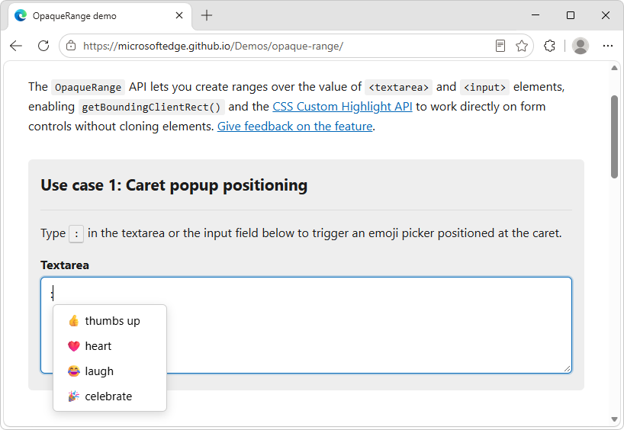
The OpaqueRange API demo page, showing a textarea. The user has entered a colon character, and a popover menu which contains emojis is displayed next to the character. The new OpaqueRange API provides live access to ranges of text within form inputs, such as <textarea> and <input> elements. You can use these ranges for operations like getBoundingClientRect() and getClientRects(), and therefore position UI at specific places within form inputs. The OpaqueRange API also works with the CSS Custom Highlight API, making it possible to create personalized highlights within editable text regions. To learn more about the OpaqueRange API, checkout our intro video, explainer, and live demos.

Reference Target: improve your web components' accessibility

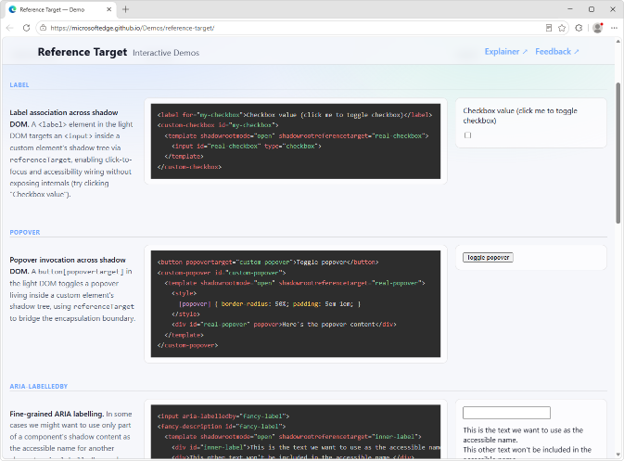
The reference target demo page, showing multiple inputs in shadow dom trees, linked to labels or other elements, via ID-reference attributes. A common pain point developers face when creating web components with Shadow DOM is making them accessible. A problem also known as cross-root ARIA. The referenceTarget property of a ShadowRoot object, which can also be set via the shadowrootreferencetarget HTML attribute on elements, solves this. It makes it possible to forward ID reference attributes, such as for or aria-labelledby, to elements that are inside the shadow DOM of a component. For example, you can use this to link a <label for> element to the right <input> element, even if that <input> is inside the shadow DOM of a web component.
<label for="custom-checkbox">Checkbox value</label>
<custom-checkbox id="custom-checkbox">
  <template shadowrootmode="open" shadowrootreferencetarget="real-checkbox">
    <input id="real-checkbox" type="checkbox">
  </template>
</custom-checkbox>
To learn more, read our explainer, and use our live demos.

aria-actions: make composite widgets accessible

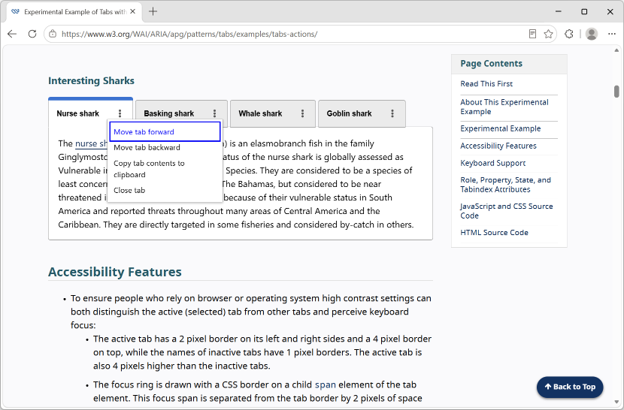
The aria-actions demo page, which is showing a tab bar. Each tab has a tab title and a three-dot menu icon which, when clicked, opens a popover menu to move or close the tab. Complex UIs often contain composite widgets with multiple actionable parts. For example, a tab widget may also include another button. These composite interactive widgets can be hard to make accessible to assistive technology users. The new HTML aria-actions attribute makes it possible to expose your widgets' secondary actions to screen readers. For example, you can expose the close button of a tab widget as follows:
<button class="tab" aria-actions="close-tab">
    <span class=”tab-title”>Tab 1</span>
    <span id="close-tab">Close</span>
</button>
To learn more, check out the tabs with action buttons example from the ARIA Authoring Practices Guide.

And many other features

The above features, which our team added to Microsoft Edge and contributed to Chromium, are only a part of what's been added over the past few releases. Below are other additions that might simplify your daily life as a web developer. For even more, check out the Edge web platform release notes.
  • Media pseudo-classes allow you to style media elements, such as <video> and <audio>, based on their playback state, by using the new :playing, :paused, :buffering, :muted, and :stalled pseudo-classes.
  • The window-drag CSS property is a new standardized way to make installed PWA windows draggable, which is helpful when using the Window Controls Overlay API. In addition, starting with Microsoft Edge 151 on Windows, when you use the Window Controls Overlay API, the PWA app title bar is now hidden by default, giving you more control over the look and feel of your app.
  • New JavaScript Iterator methods make it easier to work with iterators:
    • Iterator.join() returns a string that's the concatenation of all elements that are produced by the iterator.
    • Iterator.zip(), and Iterator.zipKeyed() create new iterators that aggregate elements from multiple iterable objects. These methods zip the input iterables together, allowing simultaneous iteration over the input iterables.
  • The soft-navigation and interaction-contentful-paint performance entries help you improve performance of modern single-page web apps by measuring soft navigations that update the page without triggering a traditional page browser history changes.
  • The alpha() CSS function creates a new color by adjusting another color's transparency.
  • textStream() is now available on Response, Request, and Body objects, making it more convenient to process text incrementally without manually decoding byte chunks.
  • The <camera> and <microphone> HTML elements are browser-provided buttons that let users toggle camera or microphone streams and, when needed, connect the permission request directly to an explicit user action.

Ready for testing

We're already hard at work on what's coming next. Here are upcoming features that are available for your early testing and feedback. You can test these new features either by enabling them locally, or on your production website with your own users, by registering for an origin trial. Your feedback is crucial to help us shape these next features and ensure they meet your needs as developers, and the needs of your users.

WebMCP: unlock browsing agent scenarios on your site

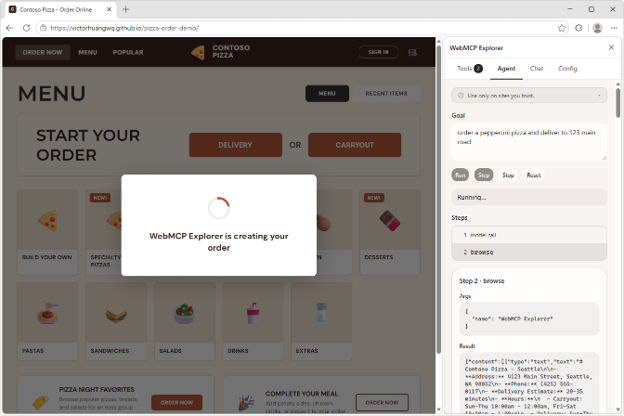
The Contoso Pizza demo site in Edge, with the WebMCP Explorer sidebar extension. The extension shows a prompt to order a pizza from the site, and logs that show the agent is running on the site. The site has a popup on top saying WebMCP Explorer is creating your order. We have been actively involved with the Web Machine Learning Community Group, specifying WebMCP: a web API that helps you create efficient, fast, and trusted human-agent collaboration workflows for your site. Using WebMCP, you can reuse your existing front-end code, and expose it as structured tools which a browsing agent can then use to help users accomplish tasks on your site. Our implementation of the WebMCP spec in Microsoft Edge is ready for testing. To get started, we created a few samples and a browser extension to run and debug your WebMCP tools. Find out more on the webmcp-labs repo.

JS Self-Profiling markers: see what the browser is doing during a trace

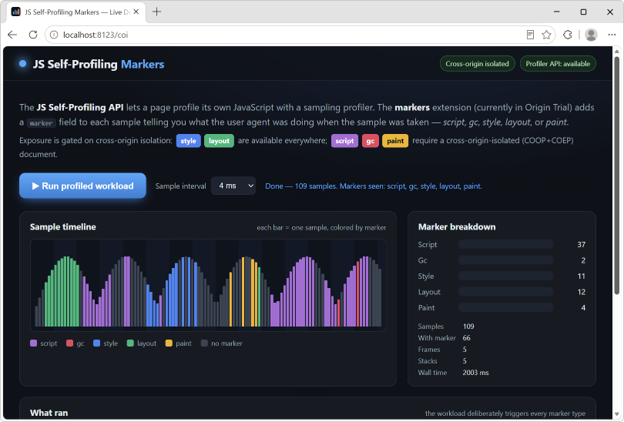
The Self-Profiling Markers demo page, with a button to run some workload, and a timeline showing the different samples that were recorded by the API during the workload. Some samples represent layout, others style, script, gc, and paint. The JS Self-Profiling API is a great way to measure your app's performance in production, on real user devices. But it only samples your page's JavaScript, which often leaves unexplained gaps in a trace, moments where the browser was styling, laying out, painting, or running garbage collection. We're adding sample markers to fill those gaps. Each sample can now carry a marker that identifies what the browser was doing at capture time. Now, an unexplained gap shows up clearly as, for example, a run of layout markers, so you can pinpoint the real cause of a slow trace and optimize the right thing instead of guessing. To learn more, read the feature explainer, see the markers in action by running our live demo, and register for the origin trial to test it with your own users and share feedback.

New network debugging tools: edit and resend requests

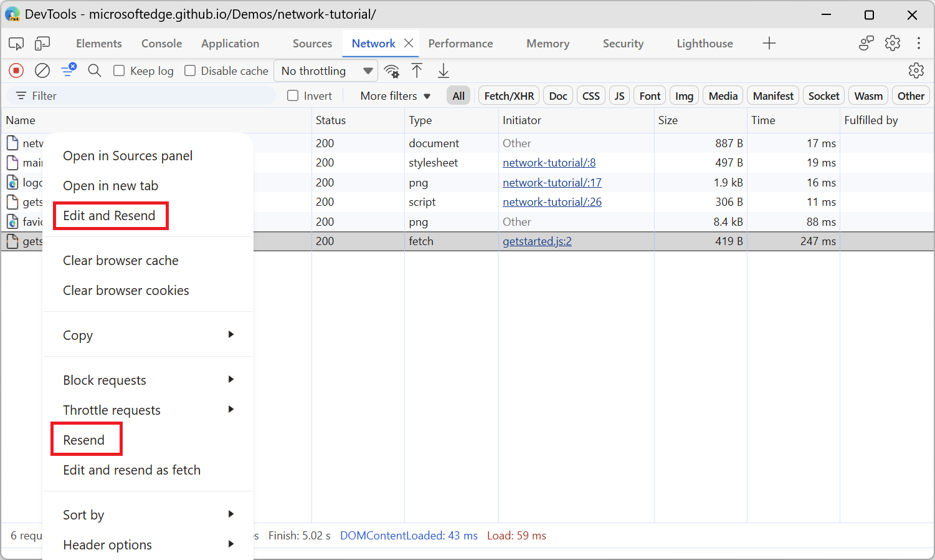
The Network tool in Microsoft Edge DevTools. A request is selected, and the contextual menu shows, among other items, the Edit and Resend, and Resend actions. Starting with Edge 153, the Network tool in DevTools now includes two new actions, available on each request via the contextual menu:
  • Resend: this action resends a request such as XHR or Fetch.
  • Edit and resend as fetch: this action creates a Fetch API call but doesn't send it right away. Instead, it writes it to the input of the Console tool. You can then modify the new request, such as by changing the request headers or parameters, and send it.
Learn more about these new features on our Network tool reference documentation at Resend a request and Edit and resend a request as a fetch call. These features are planned to replace the experimental Network Console tool. Try them out and share your feedback.

navigator.install() and <install>: install other web apps

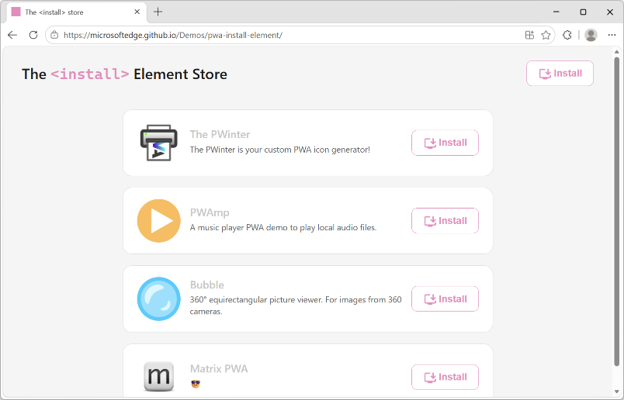
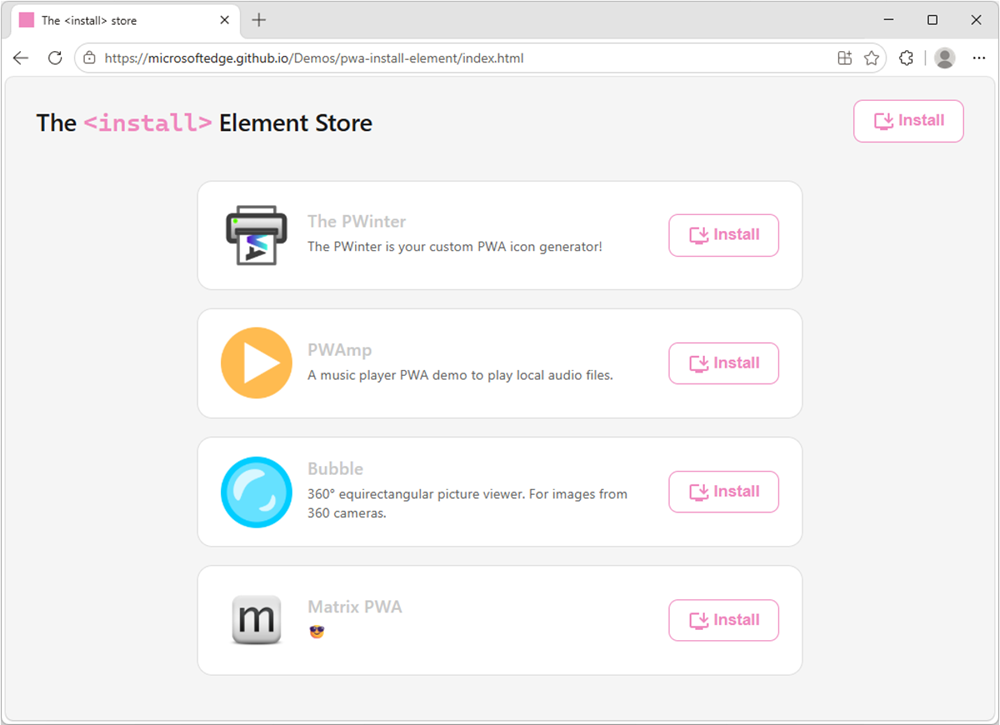
The install element store demo. Multiple PWAs are listed, each with their name, description, and a browser-provided install button next to them. Updated versions of the Web Install API and the <install> element are available for testing. Both navigator.install() and the <install> element now take a direct link to the target manifest file of the app you're installing. For example:
// Install the current app
navigator.install();

// Install a cross-origin web app
navigator.install( { manifest: https://example.com/manifest.json });
<!-- Install the current app -->
<install>

<!-- Install a cross-origin web app -->
<install manifest="https://example.com/app/manifest.webmanifest"></install>
To learn more about these web app installation features, check out the Web Install API and <install> element demos and resources. You can also start using the <install> element on your own site by registering to the origin trial.

News from across the web platform

Before closing, here are a couple of updates from the broader web ecosystem.

The Interop 2027 call for proposals closes soon

The Interop 2027 call for proposals is open, submit your ideas now! If there's a web feature you care about and would like to see more consistently supported across browsers, now is the time to make your case. Submit your idea and help shape the priorities for Interop 2027. Learn more by reading our blog post: Calling for Interop 2027 proposals.

Microsoft Edge sponsors Open Web Docs for the 7th consecutive year

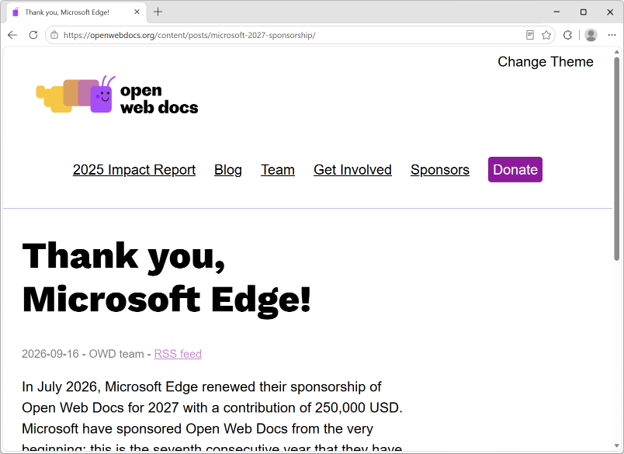
The Open Web Docs website, displaying an article titled Thank you, Microsoft Edge! High-quality and up-to-date technical web platform documentation continues to play a key role in making the web the most universal application runtime in history. This is why, at Microsoft Edge, we have been sponsoring Open Web Docs. This year marks our 7th consecutive year funding OWD, enabling the collective to continue creating and maintaining the documentation and data that all web developers need.

A native menu element is coming

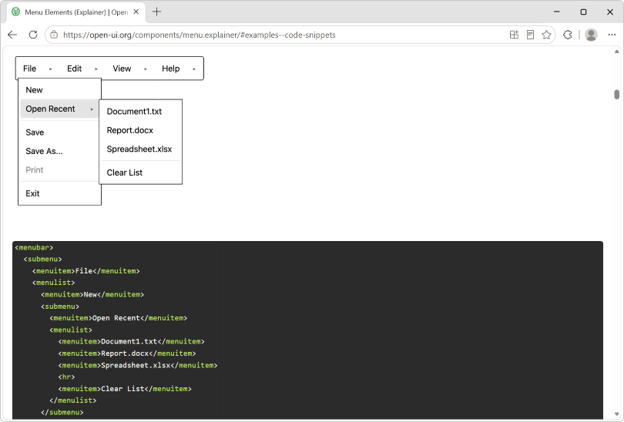
The menu element demo page on the Open UI website. The page shows a horizontal app-style menu bar with File, Edit, View, and Help items. The File item is selected and a submenu dropdown is visible, showing submenu items such as New, Open, Save, etc. Web developers have long needed a browser-provided way to build menus that don't require re-implementing accessibility, keyboard navigation, focus management, and positioning from scratch. The Open UI community is working on a new native menu element that aims to provide these capabilities out of the box, while remaining flexible enough to fit modern design systems. We're excited about this work because it reflects a broader trend toward more powerful, customizable built-in web platform components. Great work from the Google team for implementing the <menubar> element. To test the element, enable the "Experimental Web Platform features" flag on the about://flags page. We can't wait to see what you build.

Do you have feedback? We're listening

On the Microsoft Edge web platform team, we're always listening to what users and web developers need and work toward a better, more capable web. We hope these recent additions help you build experiences that are easier to use, easier to measure, and easier to maintain. Try the features that matter to your projects, tell us where the APIs fall short, and share the use cases the platform still doesn't solve. Your feedback helps us improve Edge, Chromium, and the web platform for everyone.

  •  

Calling for Interop 2027 proposals

3 September 2026 om 18:09
The Interop 2027 call for proposals is open, submit your ideas now! Over the past six years, the Interop project has helped bring key web platform features to a state where developers can rely on them across browsers. Technologies such as CSS layout and utilities, View Transitions, anchor positioning, popover, and shadow DOM have all benefited from the focused effort that Interop makes possible. This year, browser vendors have continued to work across a broad set of focus areas including View Transitions, Navigation API, CSS Anchor Positioning, WebRTC, WebTransport, Dialogs and Popovers, custom highlights, container style queries, and more. These efforts are helping move the web platform toward a future where developers can spend less time working around browser differences and more time building great experiences. Interoperability remains one of the most important challenges facing the web. New capabilities are constantly being standardized and implemented, but they're most valuable when they work consistently everywhere. That's why the Interop project continues to evolve each year, guided by input from developers, framework authors, browser vendors, and standards communities. Today, we're opening the proposal process for Interop 2027. If you've encountered a web platform feature that behaves differently across browsers, a standards-based capability that's difficult to rely on today, or an area where better interoperability would unlock new opportunities, we want to hear from you. The proposal submission period is open now and will remain open through September 23, 2026. The Interop team will review submissions and evaluate them using the Interop selection process, with the goal of publishing the final Interop 2027 scope early February 2027.

What makes a strong proposal?

The strongest Interop proposals share a few common traits:
  • They solve a real developer problem. Make sure you explain how inconsistent browser behavior or missing support affect developers in practice.
  • They have ecosystem impact. Evidence from developers, frameworks, libraries, issue trackers, surveys, or real-world sites helps demonstrate that a problem is worth solving.
  • They're about standards-based features. Features with a stable specification and broad standards support are better candidates for Interop.
  • They can be measured. Interop relies on Web Platform Tests (WPT) to track progress, so proposals should either have strong existing test coverage or a clear path to adding it.
  • They are scoped for meaningful progress. A focused, concrete proposal is often easier to evaluate and more likely to succeed than a broad request such as "improve CSS" or "fix forms everywhere."
For more information, check the Interop Proposers Guide.

Submit your proposals now

Submit your ideas now, even if you're unsure they qualify. Even proposals that aren't selected can help us understand where you're experiencing pain and where future interoperability work is needed. On the Microsoft Edge team, we're always listening to developer signals, and unselected Interop proposals often constitute clear needs from developers. We track these needs, and others, on our Top Developer Needs dashboard to influence progress on the highest-impact, long-running issues. We'll be refreshing this dashboard early next year.
  •  

New in Edge for developers – Style layout gaps, improve keyboard accessibility and migrate your PWA to a new origin

7 Juli 2026 om 18:04
Welcome to New in Edge for developers, a new series featuring recent web platform updates in Microsoft Edge that help web developers build better sites and apps. In this first edition, we'll look at CSS gap decorations for styling the space between layout items, the focusgroup attribute for easier keyboard navigation, same-site PWA origin migration for moving an installed web app without disrupting users, and other improvements such as text-fit, flex-wrap: balance, and faster clipboard reads. We'll also preview upcoming features you can test today and share feedback on early, and highlight a few updates from across the broader web ecosystem, such as Modern Web Guidance, an AI coding agent skill helping you write better code.

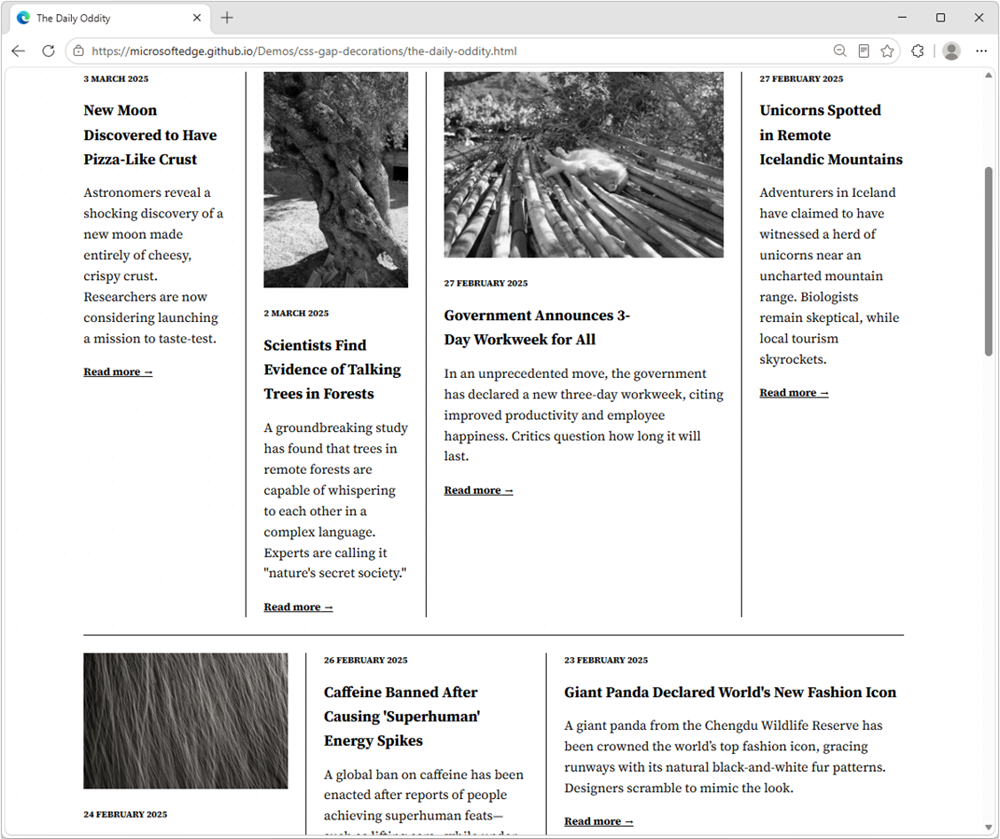
Style layout gapsA demo news website with mutiple articles in columns, each with an image and some text. Articles are separated by dark lines.

CSS gap decorations let you style the gaps between items in flex, grid, and multi-column layouts directly, without relying on border hacks, pseudo-elements, or extra DOM elements. The new row-rule and extended column-rule properties, as well as the rule shorthand, support colors, patterns, and even the repeat() syntax for rich, consistent designs with minimal CSS.
.grid {
  display: grid;
  gap: 16px;
  row-rule: 1px solid #ccc;
  column-rule: 2px solid #333;
}
Learn more about CSS gap decorations and try our interactive playground.

Improve keyboard accessibility with focusgroup

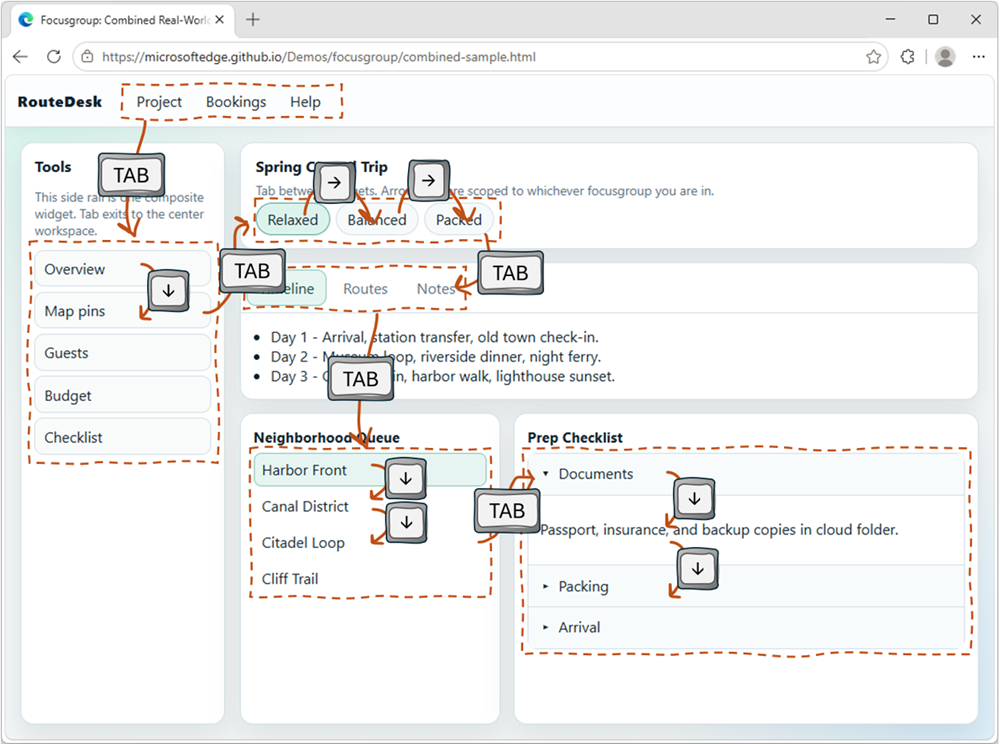
A typical web app UI with a horizontal menu bar, a sidebnar, a toolbar, some tabs, and more widgets like accordions, and more. Overlaid on top of the UI are key strokes showing that the user is navigating between the different widgets with tabs, and navigating within the widgets with arrow keys. The focusgroup HTML attribute gives you arrow key navigation for composite widgets, such as toolbars, tabs, or menus, for free. With the focusgroup attribute you get automatic arrow key handling and focus memory, without any custom JavaScript roving tabindex code. To learn more, check out Making keyboard navigation effortless.

Migrate your PWA to a new origin

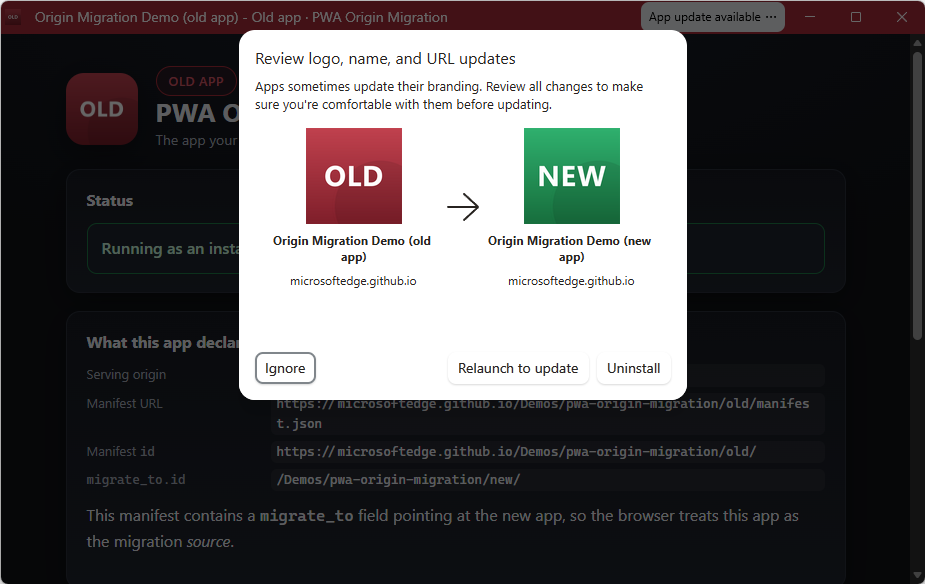
The window of an installed PWA called Old app. A button titled App update available is in the title bar, the user has clicked it, and a popup has appeared as an overlay on the app, showing the intended move from Old app to New app. The user can ignore the move, relaunch to update, or uninstall the app. You can now seamlessly migrate your Progressive Web App (PWA) to a new, same-site origin, preserving user installations and permissions. When a user installs a PWA, its identity is bound to its web origin (for example, example.com/app). Previously, changing the origin forced users to manually uninstall and reinstall the app. This is no longer necessary. Now, moving to a new origin such as app.example.com can happen without interruption to your users. To learn more, see Seamless PWA origin migration: Change domains without losing users.

And many other features

We've added many more web platform features to Microsoft Edge over the past fews releases. Check out the links below to find out more: For even more updates, check out our web platform release notes.

Ready for testing

While not yet available for general use, the following features are available for early testing and feedback. You can test these new features either locally, or on your production website with your own users, by registering for an origin trial. Your feedback is crucial to help us shape these next features and ensure they meet your needs as developers, and the needs of your users.

Network Efficiency Guardrails: monitor and improve your site's load performance

Complex sites that embed third-party content and are maintained by many different teams tend to run the risk of regressing load performance when strong guidelines and monitor practices are not in place. This is exactly what the Network Efficiency Guardrails feature provides. It surfaces performance violations automatically in production, so your teams can catch and fix them without manually auditing every page. To learn more and test the Network Efficiency Guardrails feature, see Monitor and improve your web app's load performance.

<install>: install web apps with a single HTML element

A website called The install Element store. The site has a button to install itself as an app. And it lists other apps, such as The PWinter, PWAmp, Bubble, and Matrix PWA, each with their own install button. The new <install> element gives you a browser-trusted install button with no JavaScript required. The browser controls the button's label and appearance, so a user click is a genuine signal of intent. You can even use the installurl attribute to build an app catalog that installs cross-origin web apps.
<!-- Install the current app -->
<install></install>

<!-- Install a different app -->
<install installurl="https://awesome-app.com/"></install>
To learn more, and get started, see our blog post: Install web apps with the new HTML install element.

CSS Grid Lanes: space efficient masonry layout

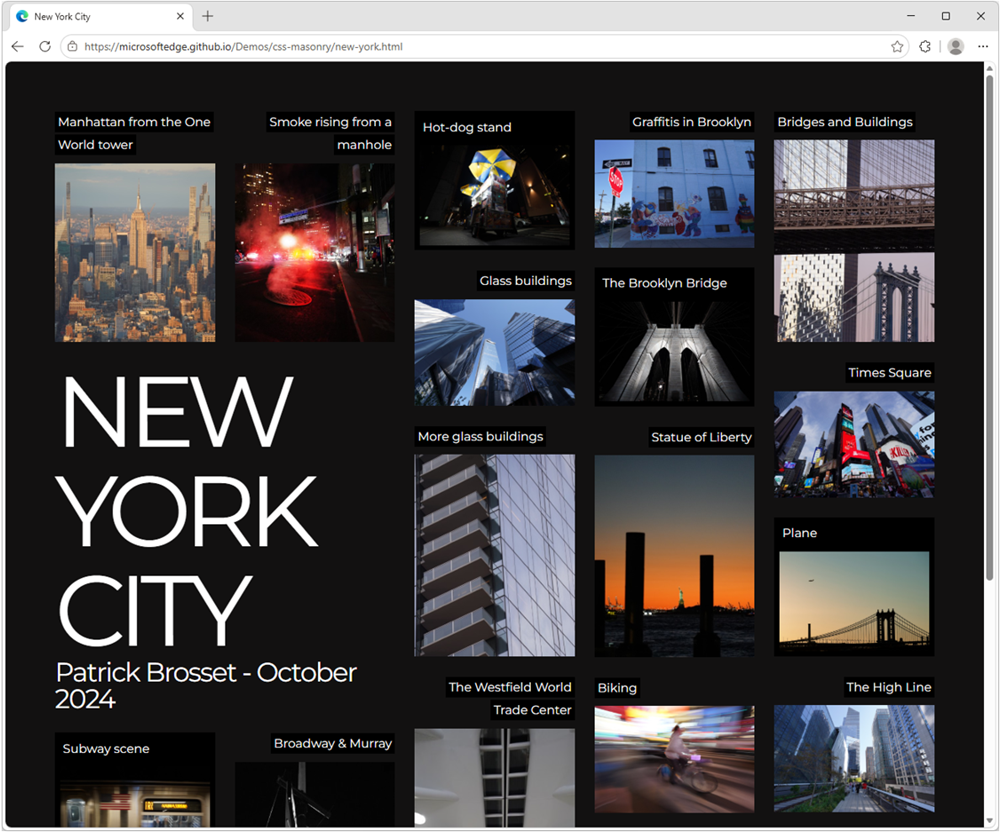
A photo gallery website, dark background, with the text New Work City, and a dozen or so photos of New York, placed in a space efficient masonry layout. Grid Lanes is a new type of CSS layout that allows items to be automatically placed in the next available space, creating a space-efficient masonry-like layout without needing to specify row heights or use JavaScript. Grid Lanes is ideal for galleries, portfolios, and any design where items have varying widths or heights.
.grid {
  display: grid-lanes;
  grid-template-columns: repeat(auto-fill, minmax(200px, 1fr));
}
To learn more, check out our demos.

New models and APIs for on-device AI

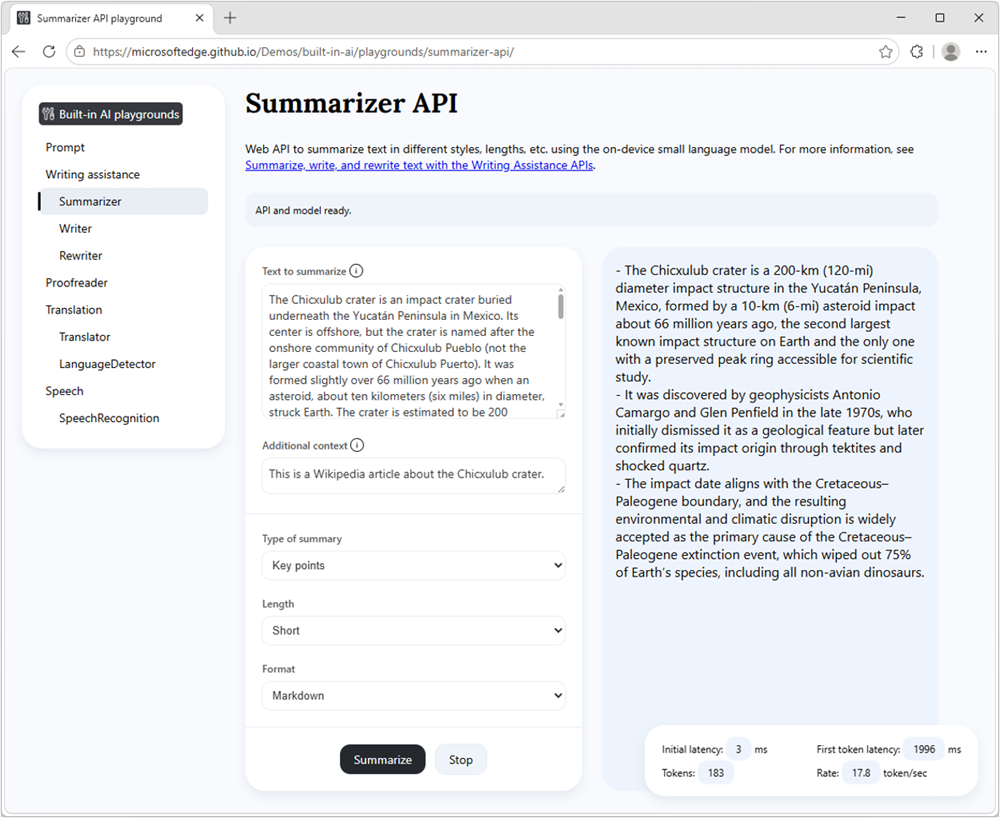
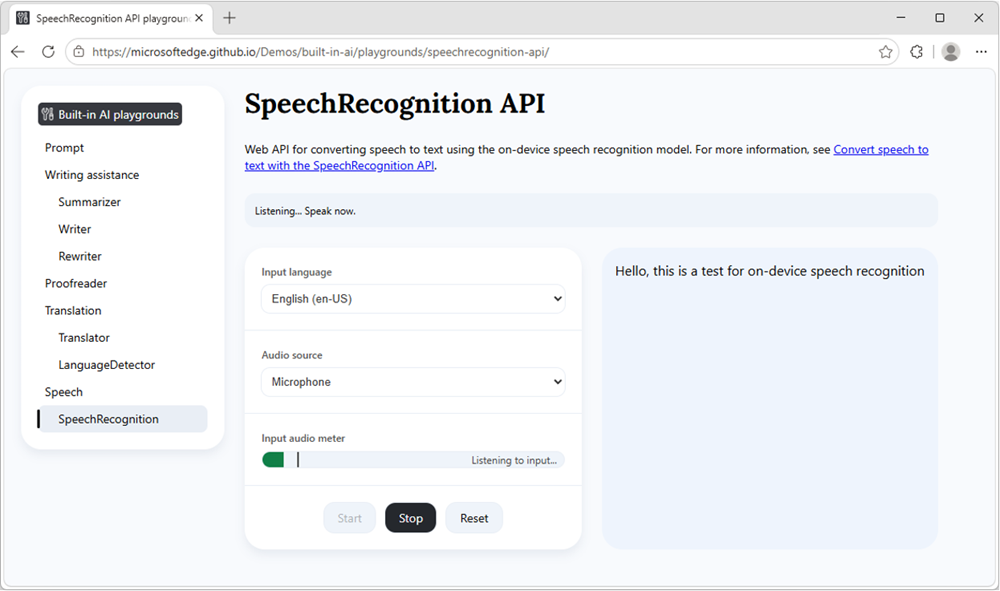
Our developer preview of the pre-release Aion-1.0-Instruct small language model is now available to use with the Prompt API and Writing Assistance APIs in Microsoft Edge. Aion-1.0-Instruct is smaller, faster, and more efficient than Phi-4-mini. It also expands support to significantly more devices. Check out our playground samples and share your feedback on GitHub. Summarizer API: a playground site with two columns. On the left: input text to summarize, and settings. On the right: summarized text. That's not all, starting with Microsoft Edge Canary or Dev 150, you can now also use the WebSpeech API to convert speech to text by using a local model, rather than a cloud-based solution. With on-device speech recognition support in Microsoft Edge, you can reduce your web app's running cost, be network independent, and improve privacy for your users. Speech Recognition API: a demo webpage that lets you choose an input language and an audio source, and which converts the audio source into written text. The audio meter shows current activity, and the output reads Hello, this is a test for on-device speech recognition. To learn more about Aion-1.0-Instruct, on-device speech recognition, and other on-device AI API updates, see Expanding on‑device AI in Microsoft Edge: New models and APIs for the web.

News from across the web platform

Beyond individual features, we also want to highlight a few updates from across the web platform and the broader web ecosystem.

Interop 2026 progress

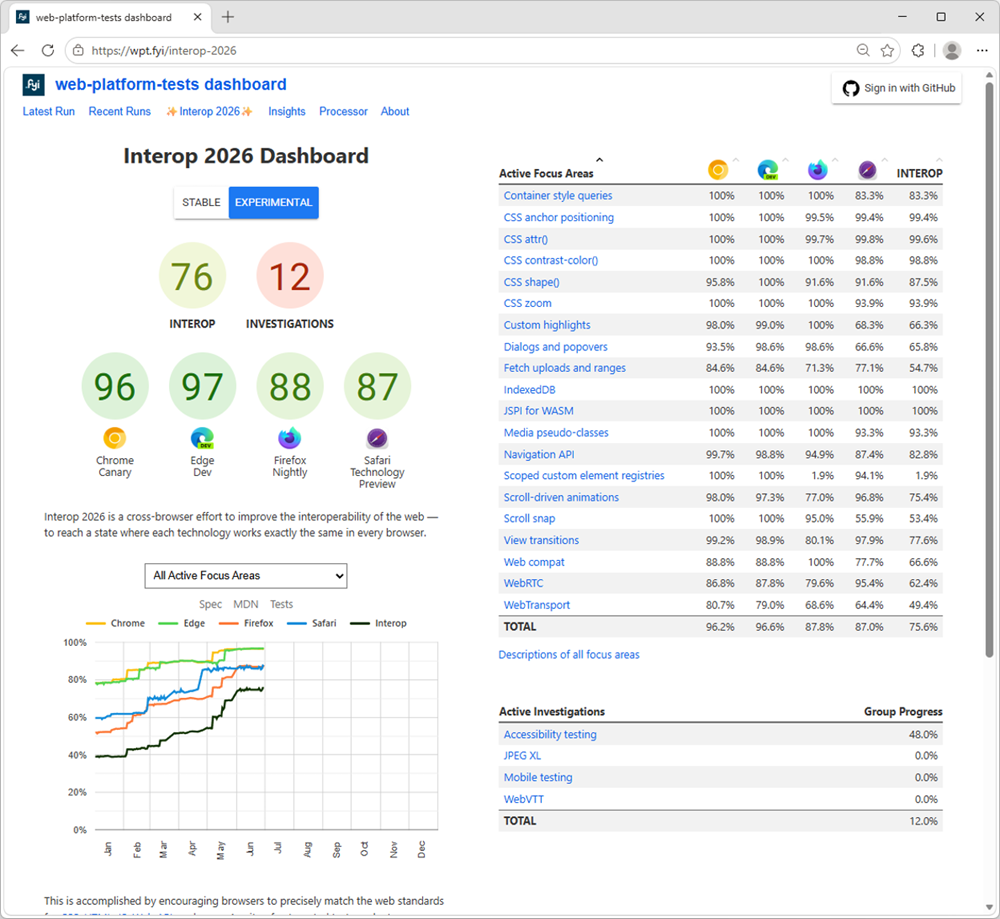
The Interop 2026 home page, showing browsers' current scores, a graph with scores over time, and the list of focus areas with their scores per browser. The web moves forward by responding to new end-user and developer needs, and this is therefore a big part of what we do. But we also know that you need stability and consistency to build on. That's why we've been participating in the Interop project for the past five years, working with other browser vendors to identify and fix interoperability issues across browsers. This work is crucial to ensure that the web remains a healthy ecosystem where developers can build with confidence, and users can access content and applications regardless of their choice of browser. Interop 2026, the latest round of the project, is now well underway, and we've already made significant progress in fixing the issues identified during the planning phase. Between January and June 2026, Microsoft Edge's test pass rate increased from 77% to 97%, and we're hard at work on features such as Scoped custom element registries and WebTransport. Check out the Interop dashboard for more details on this year's focus areas and the progress made by all participating browsers.

Modern web guidance

We've partnered with the Google Chrome team to bring Modern Web Guidance to web developers. This ambitious project gives developers AI skills they can use with their AI coding agents, to build better web apps based on best practices under rigorous evals. We want to hear from you about this project. Did you try it? Did you find the results helpful? Are there other features you'd like to see included? Please let us know by using the public repo.

Closing words

On the Microsoft Edge web platform team, we're always listening to what users and web developers need, and pushing for a better, more capable web. Our work is never done; a healthy web is one that keeps improving to meet ever evolving needs. We hope these recent feature additions and early experiments are useful to you and your users. As always, let us know your feedback and other unsolved use cases. With your help, we can make your lives as developers easier, and your web products better for users.
  •  

Expanding on‑device AI in Microsoft Edge: New models and APIs for the web

2 Juni 2026 om 18:28
At Build 2025, we introduced the Prompt and Writing Assistance APIs in Microsoft Edge with the Phi-4-mini language model. Since then, we've heard from web developers, incorporated your feedback, and expanded Edge's on-device AI capabilities with new models and APIs. Today, we're introducing three updates:
  1. A developer preview of the pre-release Aion-1.0-Instruct small language model for early testing and feedback.
  2. The Language Detector and Translator APIs in Edge 148, powered by on-device, task-specific models.
  3. Experimental on-device speech recognition with the Web Speech API, available in Edge Canary and Dev channels.

Developer preview of Aion-1.0-Instruct

For the past year, the Prompt and Writing Assistance APIs have used Phi-4-mini, a highly capable 4B-parameter language model, in Edge. While it delivers strong text understanding, reasoning, and instruction-following for web scenarios, the model's hardware requirements have limited its availability across devices. Today, we're introducing a developer preview of the pre-release Aion-1.0-Instruct small language model in Edge Canary and Dev channels. This language model is smaller, faster, and more efficient. It expands support to significantly more devices — including those with less capable GPUs and, through CPU-inference, devices without a GPU — while delivering strong quality for a wide range of web use-cases. https://www.youtube.com/watch?v=5RMUnykaFTY This preview allows you to evaluate Aion-1.0-Instruct in real-world web scenarios, test API interoperability, and provide feedback that will guide final optimizations, ahead of its planned open-source release on Hugging Face in July. To try out the model, explore the documentation for the Prompt API and Writing Assistance APIs, experiment with the playground samples, and share your feedback on GitHub.

Language Detector and Translator APIs in Edge 148

The Language Detector and Translator APIs enable websites and browser extensions to identify the language of text and translate between language pairs. These APIs are now available in Edge 148, powered by on-device, task-specific models built directly into the browser. They deliver fast, high-quality translation, support 145+ languages, and are optimized for translation workloads on the web. You can use these APIs from JavaScript in your site or extension, gaining improved user privacy, network independence, and zero translation costs compared to cloud-based services. In their simplest form, the Language Detector and Translator APIs can be used as shown:
// Create a Language Detector session.
const detector = await LanguageDetector.create();

// Detect the language of the text.
const results = await detector.detect(userText);

// Use the results.
for (const result of results) {
  // Show the full list of potential languages with their likelihood,
  // ranked from most likely to least likely.
  console.log(result.detectedLanguage, result.confidence);
}

// Create a Translator session.
const translator = await Translator.create({
  sourceLanguage: "es",
  targetLanguage: "en"
});

// Translate the text and wait for the translation to be done.
const translatedText = await translatorSession.translate(userText);

// Use the translation. 
console.log(translatedText);
https://www.youtube.com/watch?v=DRLG6jXEs50 To learn more, check out the documentation for the Language Detector API and Translator API, try our playground samples, and share your feedback in the Language Detector and Translator feedback issues on GitHub.

On-device speech recognition with the Web Speech API

The Web Speech API enables you to incorporate voice or audio input into websites and browser extensions. This API is typically backed by cloud-based services for speech recognition (speech-to-text) and synthesis (text-to-speech). In the latest Edge Canary and Dev channels, we're introducing a task-specific model that processes speech locally on the user's device. This on-device implementation improves user privacy, reduces latency, and unlocks low-connectivity scenarios that require network independence. Using the new on-device speech recognition capability requires only minor updates to your existing Web Speech API code, as shown:
// Create a SpeechRecognition instance.
const recognition = new SpeechRecognition();
recognition.lang = 'en-US';

// Use on-device speech recognition.
recognition.processLocally = true;

// Start speech recognition.
recognition.start();
https://www.youtube.com/watch?v=svw3dQn52YY To get started with on-device speech recognition, check out the documentation, try the playground demo, and share your feedback on GitHub.

Try it out and let us know

With the Aion-1.0-Instruct small language model, the new Language Detector and Translator APIs, and on-device speech recognition in Microsoft Edge, you can build AI-powered web experiences by leveraging models built into the browser, without relying on specialized hardware, cloud services, or domain-specific expertise. We invite you to explore these capabilities, experiment with the new models, and tell us what you build. Your feedback will shape the next iteration of on-device AI in Microsoft Edge, and we're excited to partner with you as we continue expanding what's possible for AI on the web.
  •  

New in Edge for Business: AI for work, safe from day one

20 Mei 2026 om 18:00
TL;DR: Edge for Business adds agentic browsing in limited preview, a Copilot-inspired new tab page, and mobile availability for multi-tab reasoning and YouTube summarization. These experiences are built on a secure enterprise browser foundation with an IT-managed system of controls—policy-based enablement, tenant protections, and data loss prevention—so AI is safe for work from day one. AI is moving from answering questions to completing work—and the browser is where that shift becomes real. Business users want the latest AI capabilities to help with everyday work without adding another tool, and IT wants to deliver them—but the bar is higher: productivity must come with security, compliance, and IT control. Today, we're introducing agentic browsing in Edge for Business in limited preview and expanding AI experiences that help users get started faster, connect information across tabs, and make decisions more quickly—all on a secure enterprise browser foundation with IT-managed controls from day one. Here's a look at what's new:

Introducing agentic browsing with Copilot in Edge for Business

Agentic browsing lets Copilot complete multi-step tasks on approved sites, with IT controls and user oversight. Business users across your organization often spend time on repetitive, multi-step work in the browser—filling out forms, navigating sites to complete tasks, and pulling information across tabs. It's exactly the kind of work people want to shortcut. Available today in limited preview, agentic browsing with Copilot in Edge for Business brings multi-step task completion into a managed enterprise experience. Copilot can navigate pages, fill in information, and complete workflows—helping users save time without turning to unsanctioned AI. https://www.youtube.com/watch?v=mQv0EBvj2nI For IT, enabling Copilot to browse doesn't mean giving up control: you decide when to turn it on and exactly where it can run. You enable it through its own policy and is scoped to sites you designate, so you can roll it out deliberately. Purview continues to enforce data protection policies, such as copy/paste of sensitive data, while Copilot browses. For users, clear visual indicators show when Copilot is taking action, and they can pause or stop it at any time. For sensitive actions such as entering passwords or credit card numbers, Copilot pauses for user input. IT admins can request to join the limited preview. Available worldwide with a Microsoft 365 Copilot license, excluding the European Economic Area.

Quickly move from tabs to decisions

Beyond agentic browsing, we're expanding AI capabilities that help users get oriented faster, pull together information across tabs, and get to an answer—right in the flow of work.

Copilot-inspired new tab page

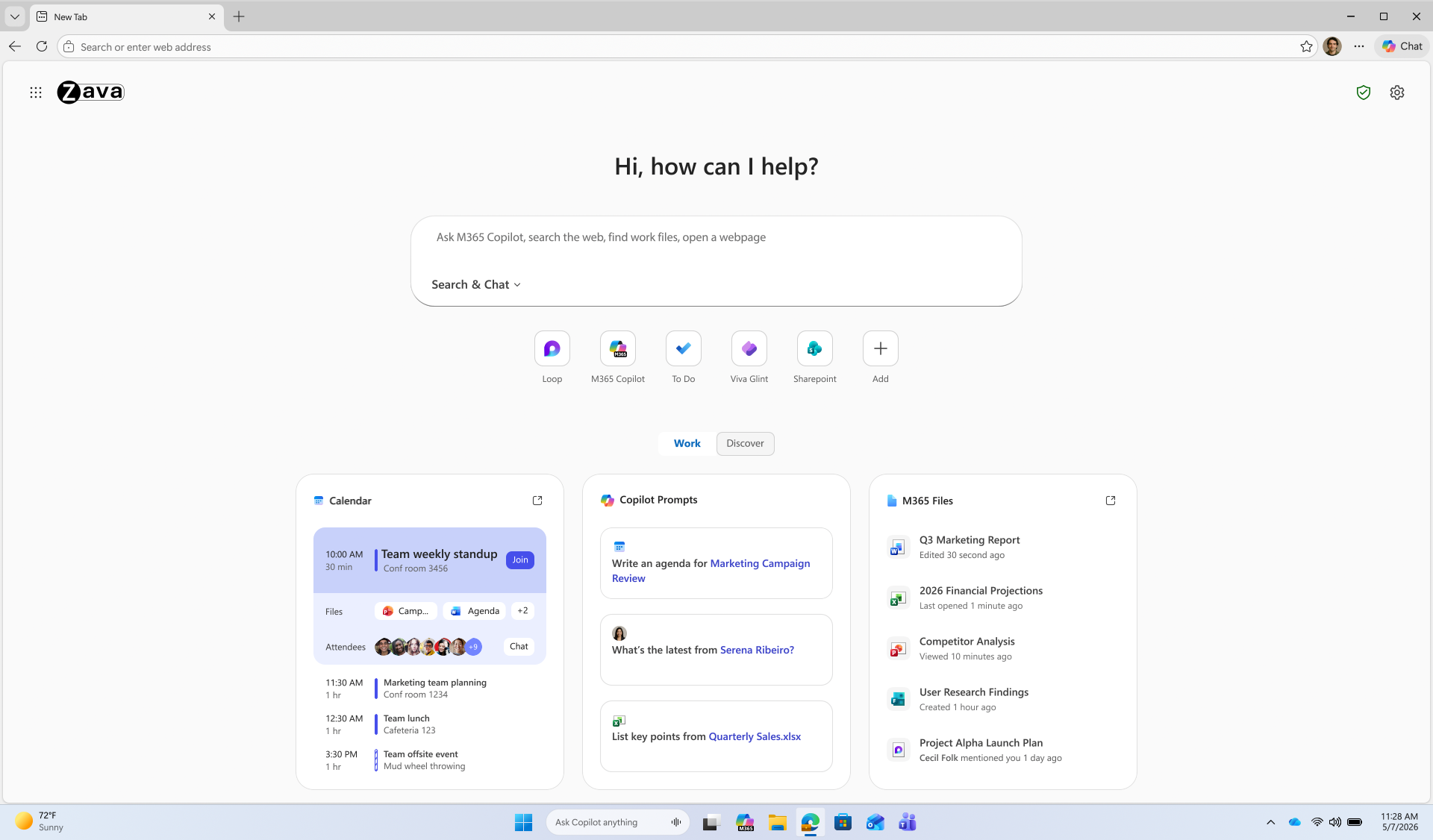
The Copilot-inspired new tab page brings calendar, files, and prompts into one work dashboard—generally available on desktop and mobile. Every day starts the same way: users open the browser, review their calendar, and track down files. A reimagined new tab page brings calendar, files, and Copilot prompts into one view, reducing the need to switch between tools. An intelligent box enables chat and search from one entry point, while work cards surface upcoming meetings, Microsoft 365 files, and suggested Copilot prompts for quick action. The experience becomes even more personalized with a Microsoft 365 Copilot license. Generally available today on desktop and mobile. Learn how to configure. Microsoft Edge new tab page.

Multi-tab reasoning and YouTube summarization

Multi-tab reasoning and YouTube summarization are now available on mobile, in addition to desktop, turning open tabs and videos into quick takeaways. Users live in tabs—jumping between docs, web pages, and videos just to piece together an answer. Multi-tab reasoning and YouTube summarization help turn that scattered information into quick answers, without adding yet another tool. Multi-tab reasoning analyzes open tabs to generate comparisons, summaries, and insights. For example, users can compare product specs across tabs, summarize vendor documentation, or pull key differences from multiple pages into one answer. And because it's Edge for Business, Purview policies exclude sensitive content from reasoning. https://www.youtube.com/watch?v=X87JA-sPz2Y When users only need a few key answers from a 15-minute video, YouTube summarization pulls out the takeaways and even answers questions—whether they're reviewing a product demo, an industry presentation, or a webinar. Learn how to configure multi-tab reasoning and YouTube summarization.

Deliver AI securely—without losing control

Edge for Business offers an IT-managed system of controls for AI—policies, tenant protections, and data protection enforcement—available from day one. AI in the browser is moving fast, and IT teams are under pressure to deliver new capabilities without becoming the team that slows everyone down. Most organizations don't want an "all or nothing" switch—they want to adopt AI in stages without changing their security posture or creating new exceptions. With Edge for Business, our mission is to offer AI experiences with enterprise-grade security and controls built-in from day one — through a system of controls that provides differentiated compliance and security for AI. That's what you should expect from an industry-leading secure enterprise browser. Edge for Business is the only major enterprise browser that protects company data in AI by enforcing data protection in the browser and keeping sensitive interactions within the tenant. Protections you rely on, such as blocking copy/paste, continue to be enforced on AI-assisted workflows. And because Microsoft 365 Copilot includes enterprise data protection, prompts, responses, and files stay within your tenant and are not used to train models. These protections apply natively when users sign into Edge for Business with an eligible Entra ID, no extensions required. A single policy enables AI features like summarization and multi-tab reasoning to help you get started quickly. For advanced AI, Copilot Mode is evolving into granular controls—so you can enable each feature individually instead of through a single toggle, making it easier to pilot and deploy advanced AI with more predictable outcomes. Existing configurations are honored for organizations that previously enabled Copilot Mode. The result: you can roll out AI on your terms—enabled by policy and fully under IT control. https://www.youtube.com/watch?v=9KFId0FzSfM

Protect against shadow AI in the browser

Purview data protections in Edge for Business can audit or block sensitive prompts and uploads on common consumer AI apps and redirect users to Copilot for protected work AI. What happens when users don't follow rules and use unsanctioned AI? Organizations need the ability to audit prompts and block sensitive uploads, especially on consumer AI tools. With Edge for Business, consumer AI doesn't have to be a gap. Shadow AI protections powered by Purview bring inline data loss prevention into the browser for the most common AI apps. Purview analyzes prompts and file uploads: when sensitive data is detected, the action is audited or blocked. Users receive a clear, policy notification and are redirected to Microsoft 365 Copilot, where enterprise data protection and DLP policies apply. These protections work on managed and unmanaged devices when users are signed into Edge for Business with their eligible Entra ID. Requires Microsoft 365 E5; pay as you go pricing applies. Learn more. https://www.youtube.com/watch?v=JIDs57MAXOo

Get started

IT admins can request to join the limited preview for agentic browsing in Edge for Business to experience how it works in a managed environment. Edge for Business plays a key role in delivering AI securely—where users already work and where controls are already in place. Request to join the limited preview for agentic browsing in Edge for Business to evaluate the experience and help shape what comes next.

Note: learn more about Microsoft 365 Copilot availability here.

  •  

Engineering secure passkey sync in Microsoft Password Manager

22 April 2026 om 17:57
Passkeys are designed to replace passwords with strong, phishing-resistant credentials that make sign-in quick, easy, and secure. With Microsoft Password Manager, users can now save and sync passkeys across devices signed in with their Microsoft account. Syncing passkeys enables a seamless sign-in experience, allowing users to access their credentials wherever they are signed in. Instead of being tied to a single device, passkeys can be securely available across devices while continuing to leverage device-based authentication such as biometrics or PIN. However, enabling this experience requires a thoughtful approach to security. Roaming cryptographic credentials must be protected during creation, sync, and recovery without weakening their security properties. In this post, we'll walk through the architectural principles that power passkey syncing in Microsoft Password Manager.

Architecture overview

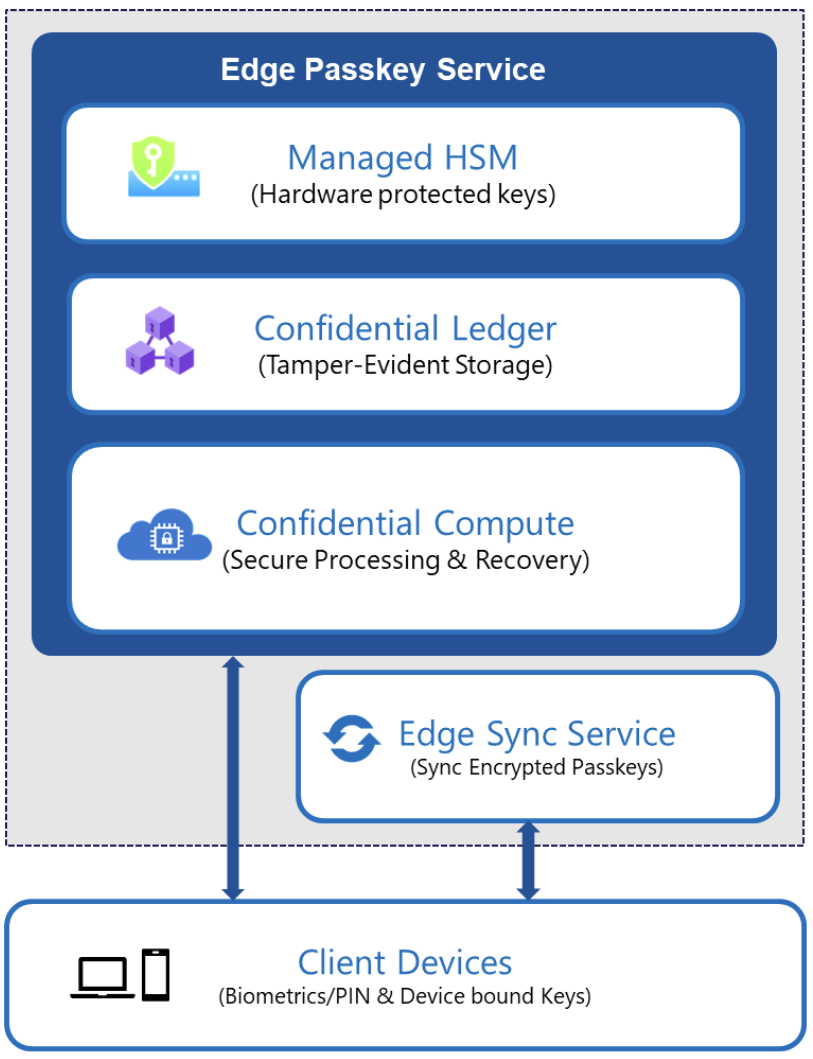
Passkey syncing in Microsoft Password Manager is built on a layered architecture that's designed to securely enable roaming credentials. The system applies multiple independent protections across the boundaries between compute (where sensitive operations are processed), key management, storage, and device authorization. At a high level, passkey syncing in Microsoft Password Manager combines:
  • Confidential computing for sensitive passkey operations.
  • Hardware-rooted key protection for service-side encryption keys.
  • Tamper-evident recovery storage for secure activation and recovery.
  • Encrypted synchronization across registered devices.
Diagram. A Client Devices box (Biometrics, PIN, and Device bound Keys) is linked to two other boxes: Edge Sync Service, and Edge Passkey Service. The Edge Passkey Service box contains Managed HSM, Confidential Ledger, and Confidential Compute. These layers work together to protect passkeys during creation, synchronization, and recovery. The passkey service backend is deployed using Confidential Containers on Azure Container Instances (ACI), which leverage Trusted Execution Environments for protected execution of sensitive workloads.

Confidential compute for passkey operations

Sensitive passkey operations, including credential creation, assertion, and recovery validation, execute inside the Azure confidential computing environments backed by hardware isolation. This ensures that:
  • Cryptographic material is processed inside protected memory.
  • The host environment cannot inspect sensitive cryptographic material (such as passkeys and encryption keys) while in use.
  • Only attested service code can access protected encryption keys.
By strictly controlling where passkey material can be decrypted and used, we ensure that sensitive cryptographic material remains protected within trusted execution boundaries, while strengthening operational integrity. Access to these operations is further gated by user verification using platform authenticators (for example, Windows Hello or device biometrics), with device-bound cryptographic keys used to authorize passkey operations.

Hardware-rooted key protection

Encryption keys that safeguard synced passkeys are protected using Azure Managed HSM. Access to these keys is restricted through attestation-based secure key release mechanisms. Before keys are released, the execution environment is verified using Microsoft Azure Attestation, ensuring that key material is only accessible within trusted confidential workloads and is not released to non-confidential environments. This provides a hardware-rooted trust anchor for service-side encryption operations. Passkeys are encrypted before synchronization and handled within authorized, hardware-isolated environments.

Secure registration and recovery

Microsoft Password Manager enables cross-device activation through a secure, auditable registration and recovery process. This process requires authentication via a user-defined knowledge factor (PIN), with all protections enforced within confidential computing boundaries. Recovery operations are validated within the confidential computing environment to ensure strong integrity guarantees. Recovery attempts are enforced using a securely maintained retry counter and associated recovery metadata, both recorded in a tamper-evident Azure Confidential Ledger. This prevents counter manipulation and rollback attempts. To protect against malicious brute-force attempts on the low-entropy PIN, the system enforces a fixed limit on consecutive incorrect attempts. Once this limit is reached, the system enters a lockout state. Recovery from lockout requires resetting the PIN through a secure flow that is initiated from a trusted device and authenticated via the user's Microsoft account. This design ensures that recovery mechanisms do not weaken the protections applied to synced passkeys.

Building for the passwordless future

Passkeys represent a major step forward in authentication. In Microsoft Password Manager, we've engineered a sync system that balances strong security protections with seamless cross-device usability. By combining confidential computing, hardware-backed key protection, and device-bound authorization, Microsoft Password Manager delivers secure passkey roaming built to withstand modern threats. These protections are designed as independent layers that collectively safeguard passkeys throughout their lifecycle. Synced passkeys are a strong step forward in our passwordless journey, bringing the simplicity and security of phishing-resistant sign-in to users. We're excited to continue this journey with new capabilities and experiences ahead.
  •  
❌